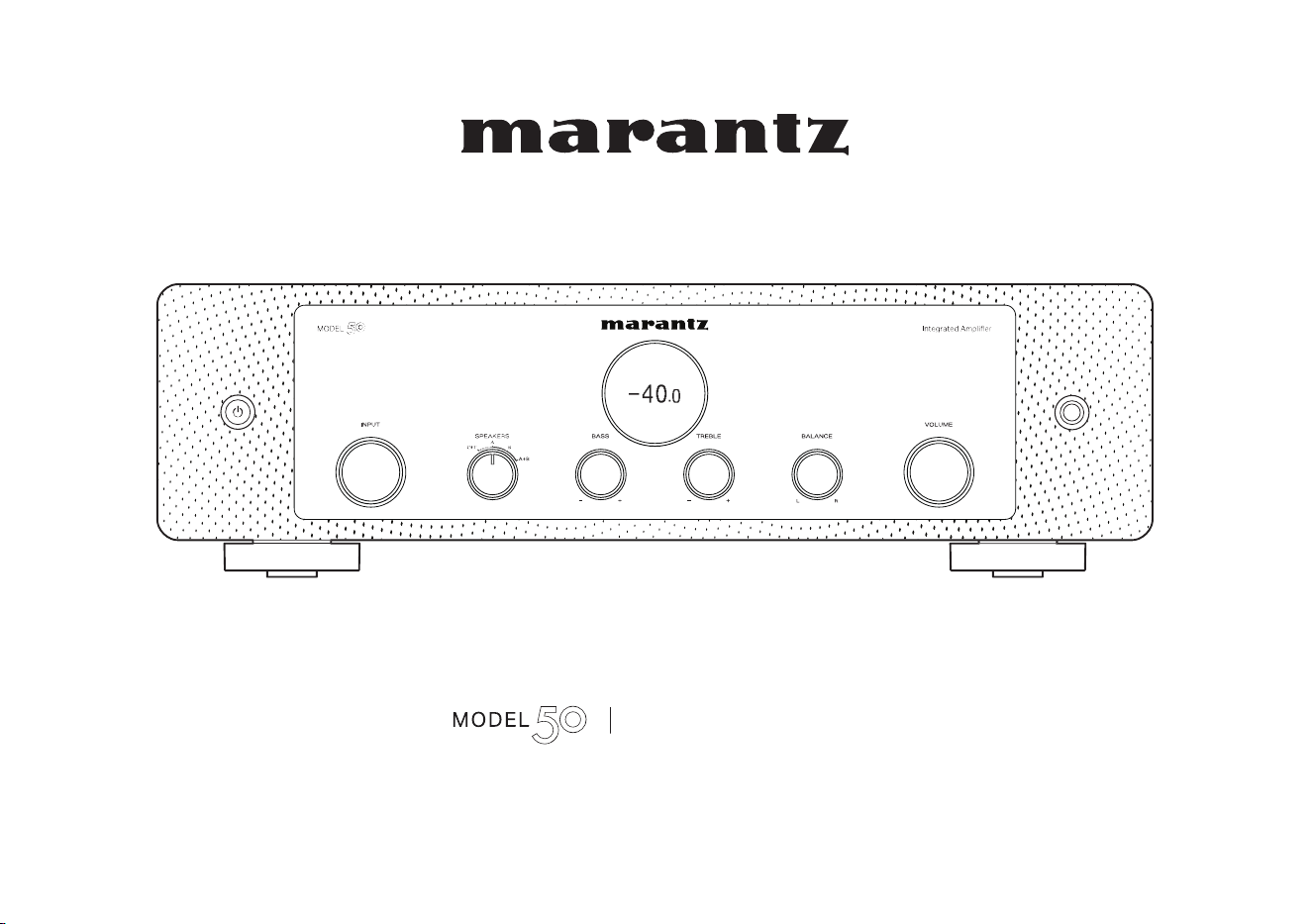
Integrated Amplifier
Owner’s Manual
1
Accessories
4
Inserting the batteries
5
Operating range of the remote control unit
5
Part names and functions
6
Front panel
6
Rear panel
8
Remote control unit
10
Connections
Connecting speakers
14
Speaker A/B connection
16
Bi-wiring connection
17
Subwoofer connection
18
Connecting a playback device
19
Connecting a recording device
20
Connecting a pre-amplifier or power amplifier
21
Connecting devices with remote control connectors
22
Performing operations by RC on this unit without visual contact
22
Remotely connecting Marantz audio devices
22
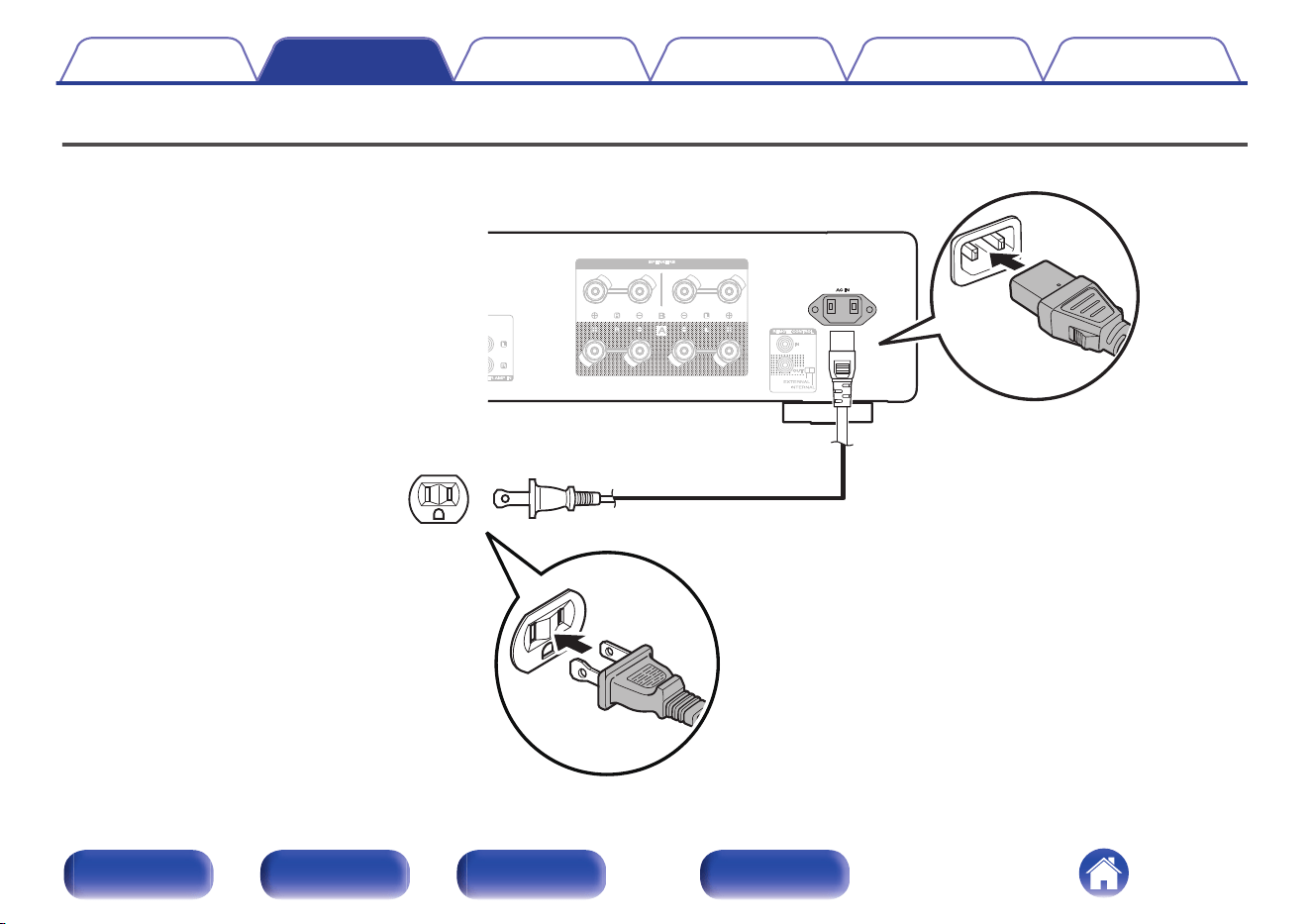
Connecting the power cord
24
Playback
Turning the power on
26
Switching the power to standby
26
Selecting the speakers for audio output
27
Selecting the input source
27
Adjusting the volume
27
Turning off the sound temporarily (Muting)
28
Adjusting the tone and balance
28
Playback in source direct mode
28
Playing CDs
28
Using this unit as a power amplifier
29
Recording
29
Contents Connections Playback Settings Tips Appendix
2
Front panel Rear panel
Remote control
unit
Index
Settings
Setting the display’s brightness
31
Setting the Auto Standby mode
32
Setting remote control codes
33
Setting remote control codes for the remote control
34
Setting remote control codes for the main unit
34
Tips
Tips
36
Troubleshooting
37
Power does not turn on / Power is turned off
38
Operations cannot be performed through the remote control unit
40
Display on this unit shows nothing
41
No sound comes out
41
Desired sound does not come out
42
Sound is interrupted or noise occurs
43
Appendix
Explanation of terms
44
Specifications
45
Index
47
Contents Connections Playback Settings Tips Appendix
3
Front panel Rear panel
Remote control
unit
Index
Thank you for purchasing this Marantz product.
To ensure proper operation, please read this owner’s manual carefully before using the product.
After reading this manual, be sure to keep it for future reference.
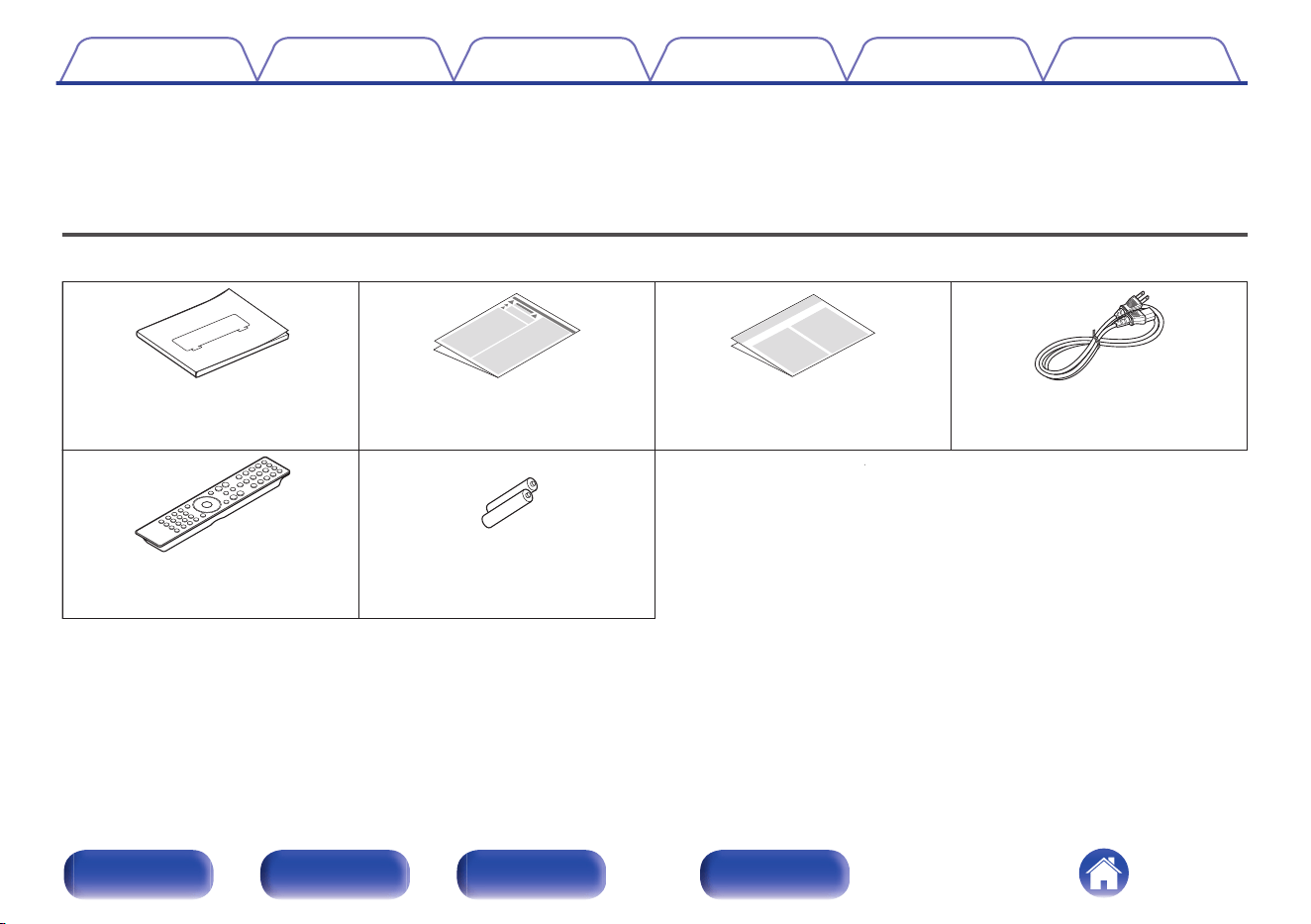
Accessories
Check that the following parts are included with the product.
Quick Start Guide Safety Instructions Warranty
(for North America model only)
Power cord
2× R03/AAA batteries
Remote control unit
(RC003PMND)
Contents Connections Playback Settings Tips Appendix
4
Front panel Rear panel
Remote control
unit
Index
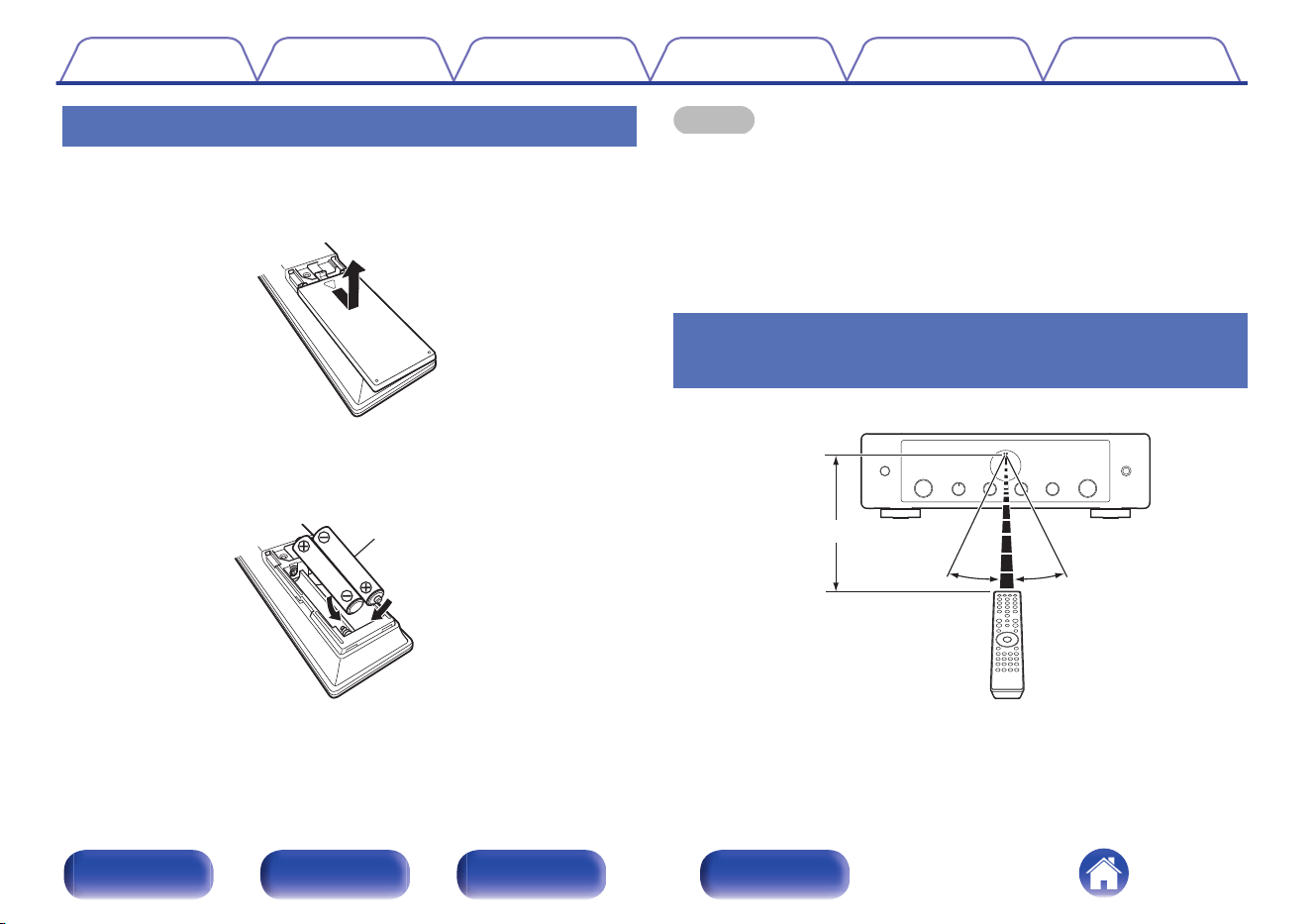
Inserting the batteries
1
Remove the rear lid in the direction of the arrow and
remove it.
2
Insert two batteries correctly into the battery
compartment as indicated.
Batteries
3
Put the rear lid back on.
NOTE
0
To prevent damage or leakage of battery fluid:
0
Do not use a new battery together with an old one.
0
Do not use two different types of batteries.
0
Remove the batteries from the remote control unit if it will not be in use for long
periods.
0
If the battery fluid should leak, carefully wipe the fluid off the inside of the battery
compartment and insert new batteries.
Operating range of the remote control
unit
Point the remote control unit at the remote sensor when operating it.
30° 30°
Approx. 23 ft/7 m
Contents
Connections Playback Settings Tips Appendix
5
Front panel Rear panel
Remote control
unit
Index
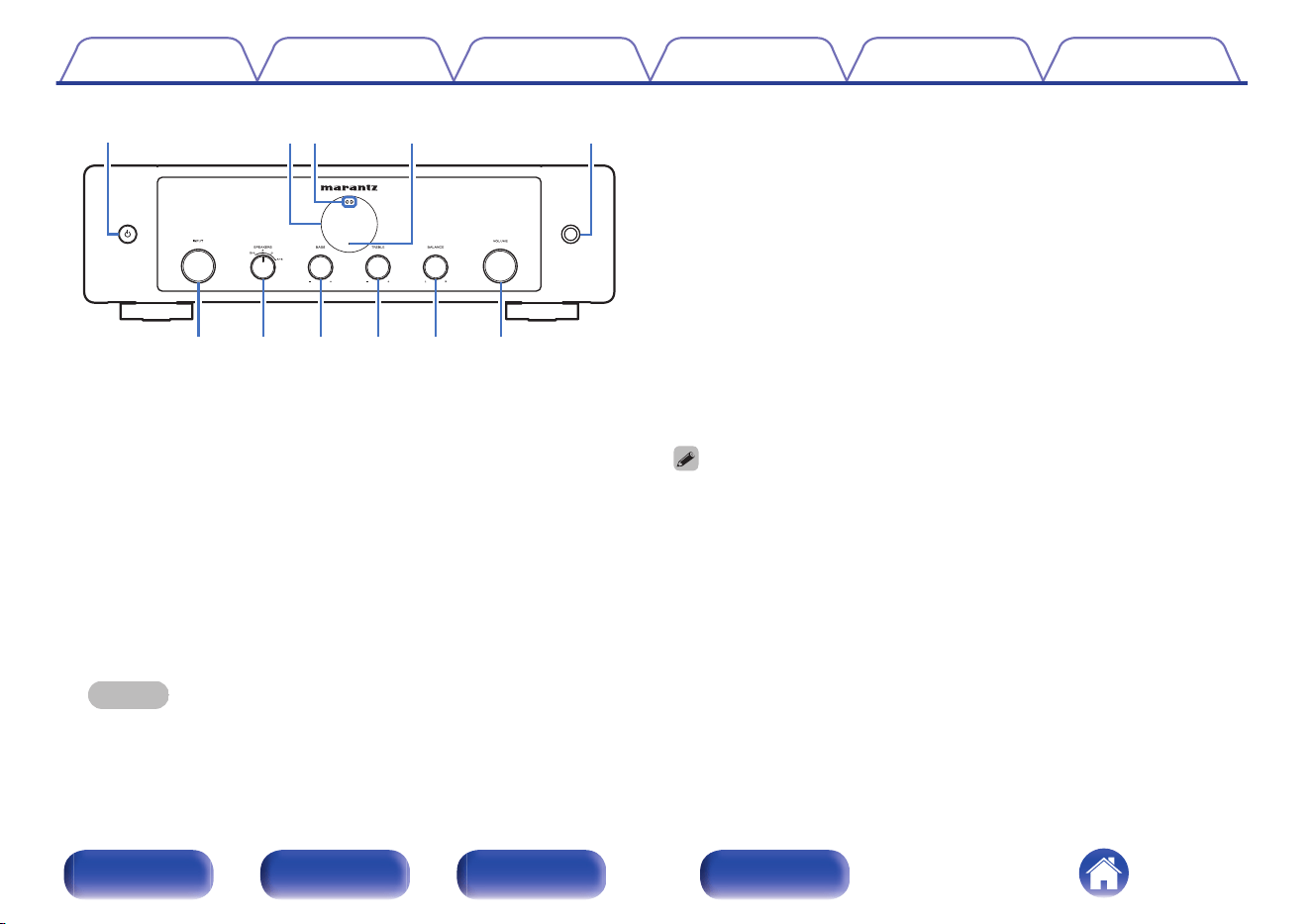
we r
q
t
uioQ
0
Q
1
y
A
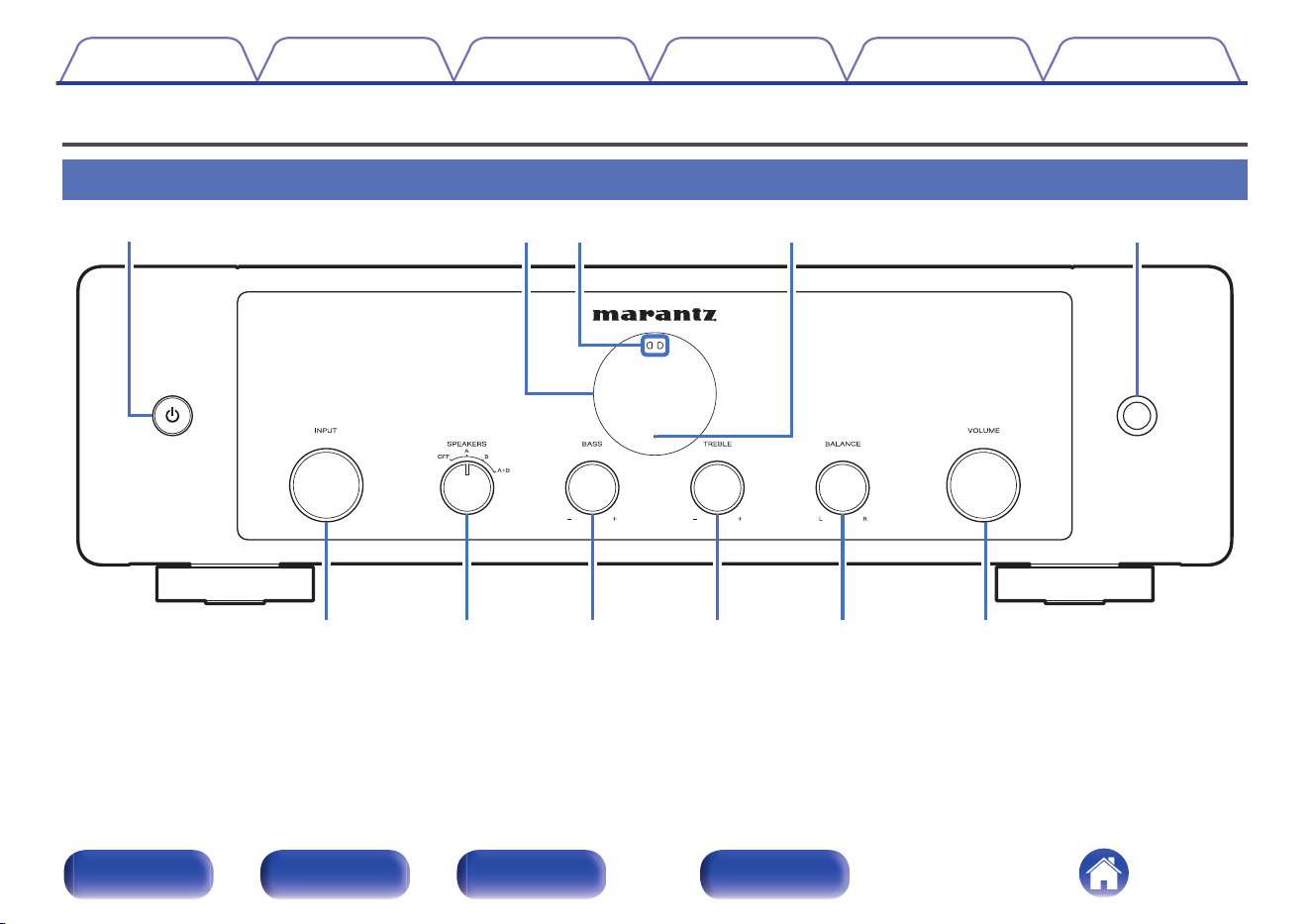
Power X button
This turns the power on/off (standby). (v p. 26)
B
Display
This displays various pieces of information.
C
Remote control sensor
This receives signals from the remote control unit. (v p. 5)
D
Protection circuit indicator
This blinks when the protection circuit has operated. (v p. 38)
E
Headphones jack
Used to connect headphones.
Turn the SPEAKERS selector knob on the main unit to turn off speaker
output when using headphones. (v p. 27)
NOTE
0
To prevent hearing loss, do not raise the volume level excessively when using
headphones.
F
INPUT selector knob
This selects the input source. (v p. 27)
G
SPEAKERS selector knob
This selects the speaker for audio output. (v p. 27)
H
BASS control knob
This setting adjusts the volume level for the bass. (v p. 28)
I
TREBLE control knob
This setting adjusts the volume level for the treble. (v p. 28)
J
BALANCE control knob
This adjusts the balance of the volume output from the left and right
speakers. (v p. 28)
K
VOLUME knob
This adjust the volume level. (v p. 27)
0
8, 9 and 0 can be adjusted when source direct mode is off. (v p. 28)
Contents Connections Playback Settings Tips Appendix
7
Front panel Rear panel
Remote control
unit
Index
qw e r
uyt oi
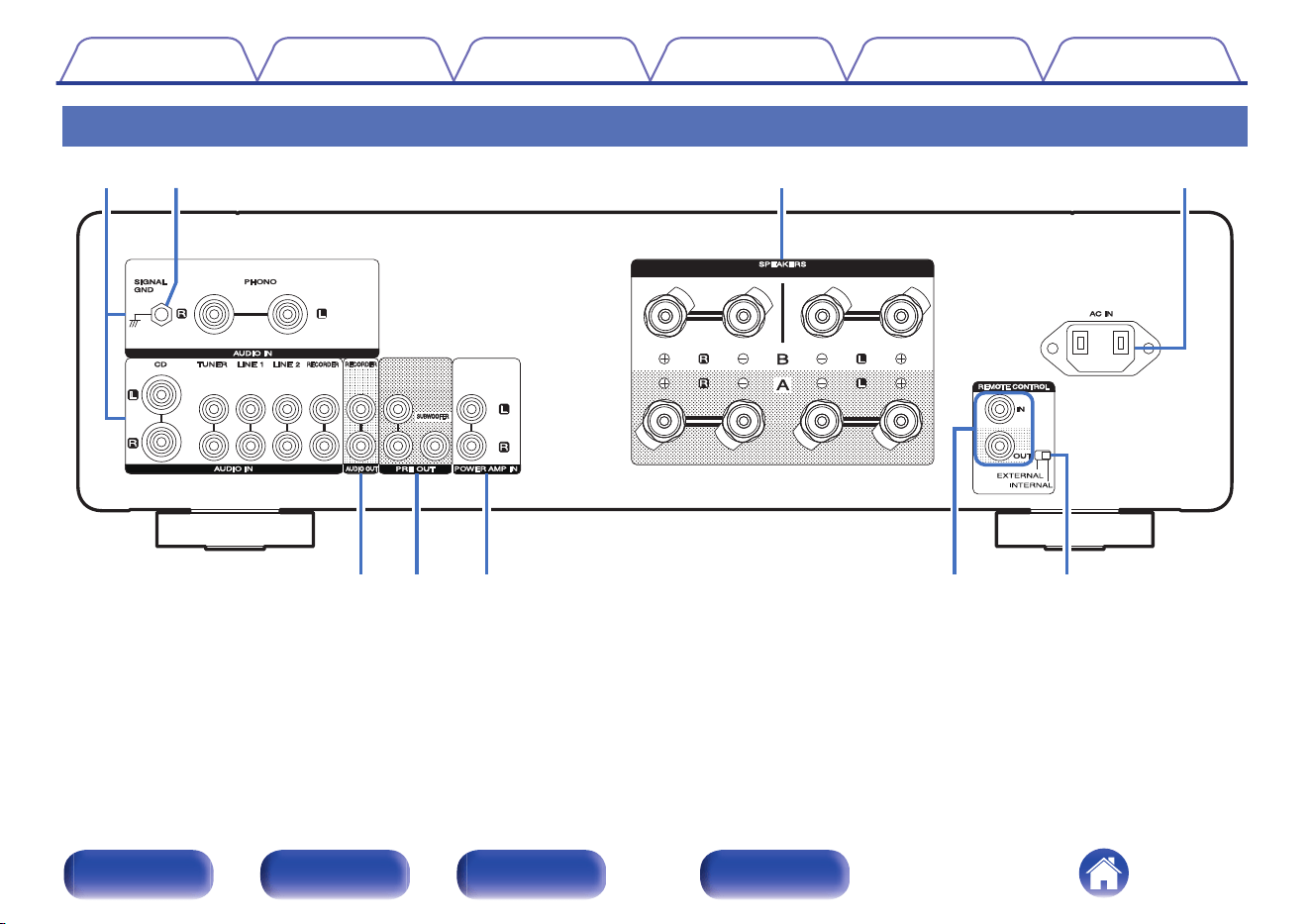
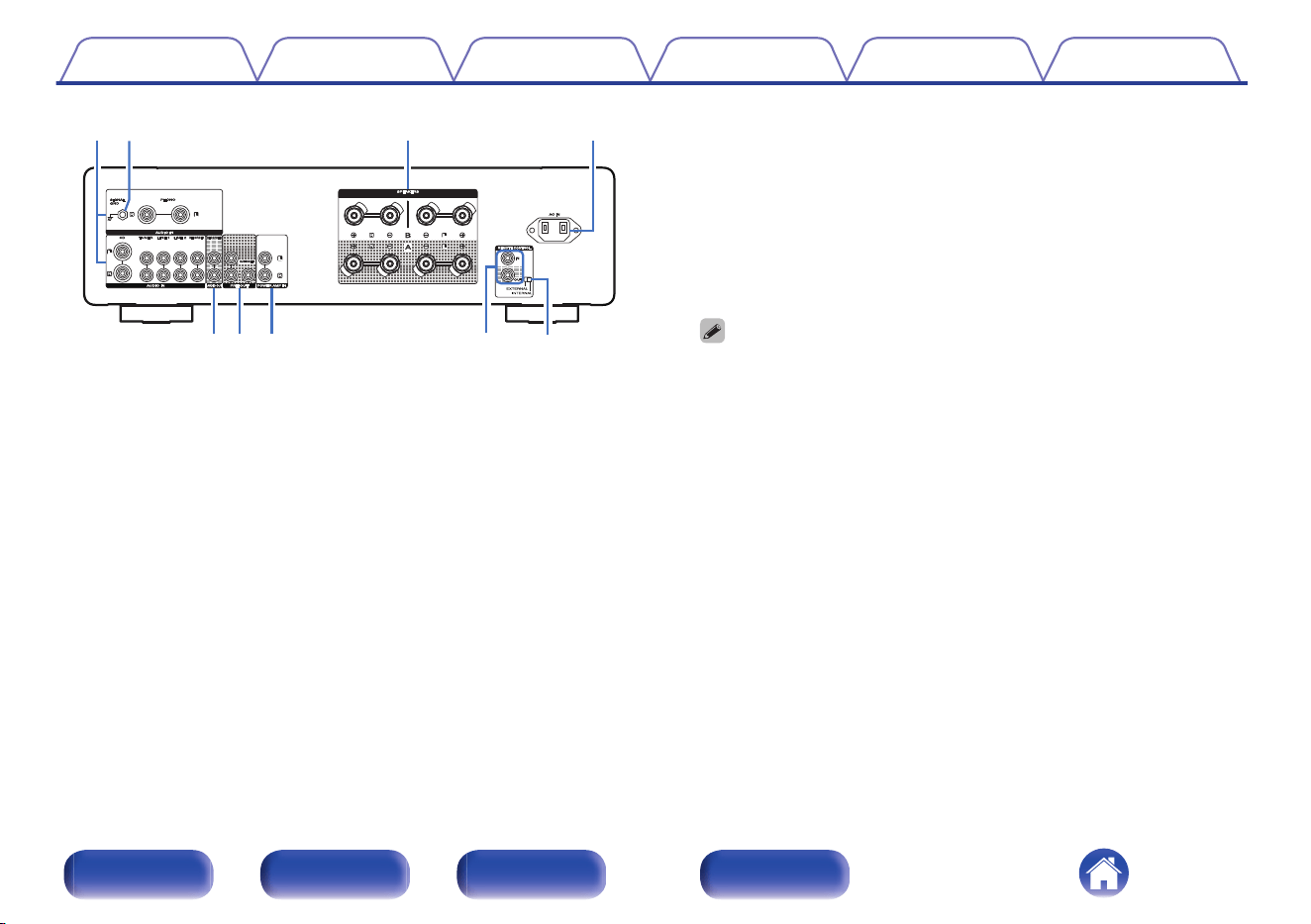
A
Analog audio input connectors (AUDIO IN)
Used to connect devices equipped with analog audio output
connectors.
0
“Connecting a playback device” (v p. 19)
0
“Connecting a recording device” (v p. 20)
B
SIGNAL GND terminal
Used to connect the ground wire of a turntable. (v p. 19)
C
Speaker terminals (SPEAKERS)
Used to connect speakers. (v p. 14)
D
AC inlet (AC IN)
Used to connect the power cord. (v p. 24)
E
AUDIO OUT connectors (RECORDER)
Used to connect the input connector of a recorder. (v p. 20)
F
PRE OUT connectors
Use this to add such equipment as a power amplifier or subwoofer.
0
“Subwoofer connection” (v p. 18)
0
“Connecting a pre-amplifier or power amplifier” (v p. 21)
0
When connecting a subwoofer, also consult the subwoofer instruction manual.
G
Power amplifier connectors (POWER AMP IN)
Used to connect a pre-amplifier when this unit is used as a power
amplifier. (v p. 21)
H
Remote control input/output connectors (REMOTE CONTROL)
Used to connect to a Marantz audio device that is compatible with the
remote control function. (v p. 22)
I
EXTERNAL/INTERNAL switch
Turn this switch to “EXTERNAL” to operate the unit by pointing the
remote control at the audio device connected to this unit using the
remote control connection. (v p. 22)
Contents
Connections Playback Settings Tips Appendix
9
Front panel Rear panel
Remote control
unit
Index
Remote control unit
w
e
y
r
t
q
u
The remote control provided with this unit can control a Marantz Network
CD player.
0
“Network CD player operations” (v p. 11)
o
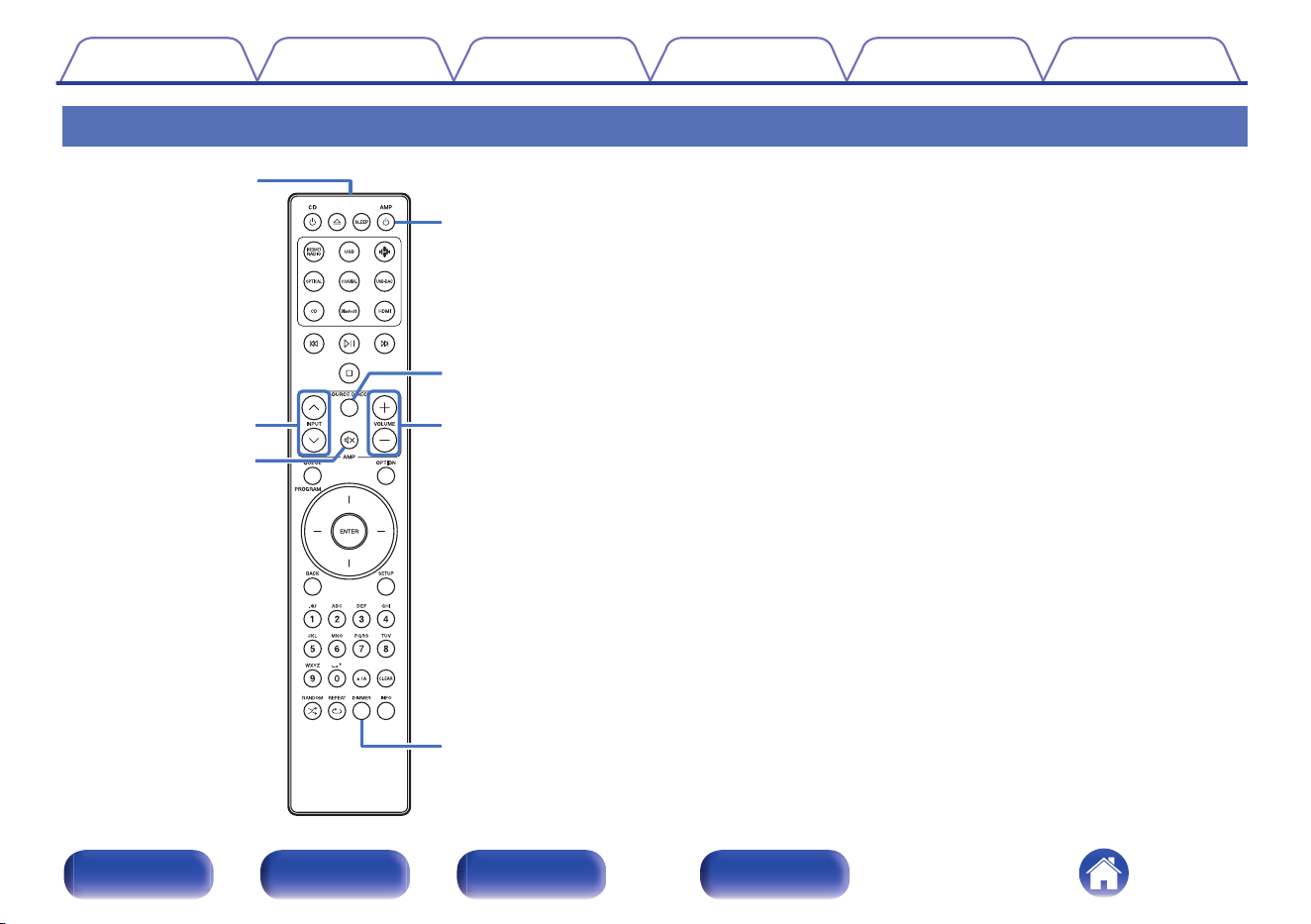
Operating this unit
A
Remote control signal transmitter
This transmits signals from the remote control unit. (v p. 5)
B
INPUT buttons (ml)
This selects the input source. (v p. 27)
C
Mute button (:)
This mutes the output audio. (v p. 28)
D
Power (AMP X) button
0
This turns the power on/off (standby). (v p. 26)
0
This turns auto standby mode on/off. (v p. 32)
E
SOURCE DIRECT button
This turns source direct mode on/off. (v p. 28)
F
VOLUME buttons (no)
These adjust the volume level. (v p. 27)
G
DIMMER button
Adjust the display brightness of this unit. (v p. 31)
Contents
Connections Playback Settings Tips Appendix
10
Front panel Rear panel
Remote control
unit
Index
q
e
w
r
i
o
Q0
Q1
t
y
u
o
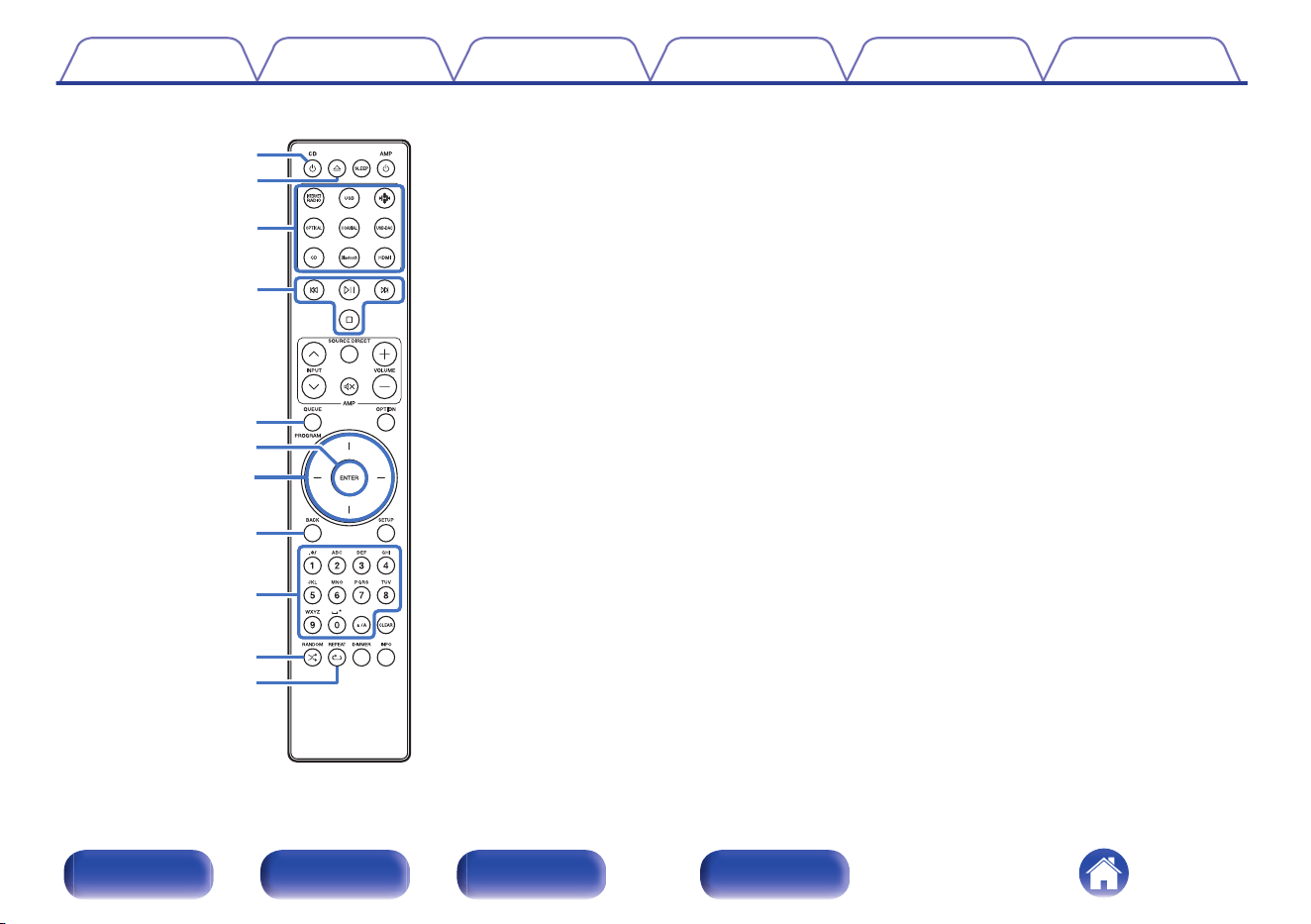
Network CD player operations
A Marantz Network CD player can be operated.
A
Power (CD X) button
B
Disc tray open/close button (q)
C
Input source select buttons
D
System buttons
E
QUEUE button
PROGRAM button
F
ENTER button
G
Cursor buttons
H
BACK button
I
Number/letter buttons (0 – 9, a/A)
J
RANDOM button (s)
K
REPEAT button (r)
Contents
Connections Playback Settings Tips Appendix
11
Front panel Rear panel
Remote control
unit
Index
Q7
Q8
Q4
Q6
Q2
Q9
Q5
Q3
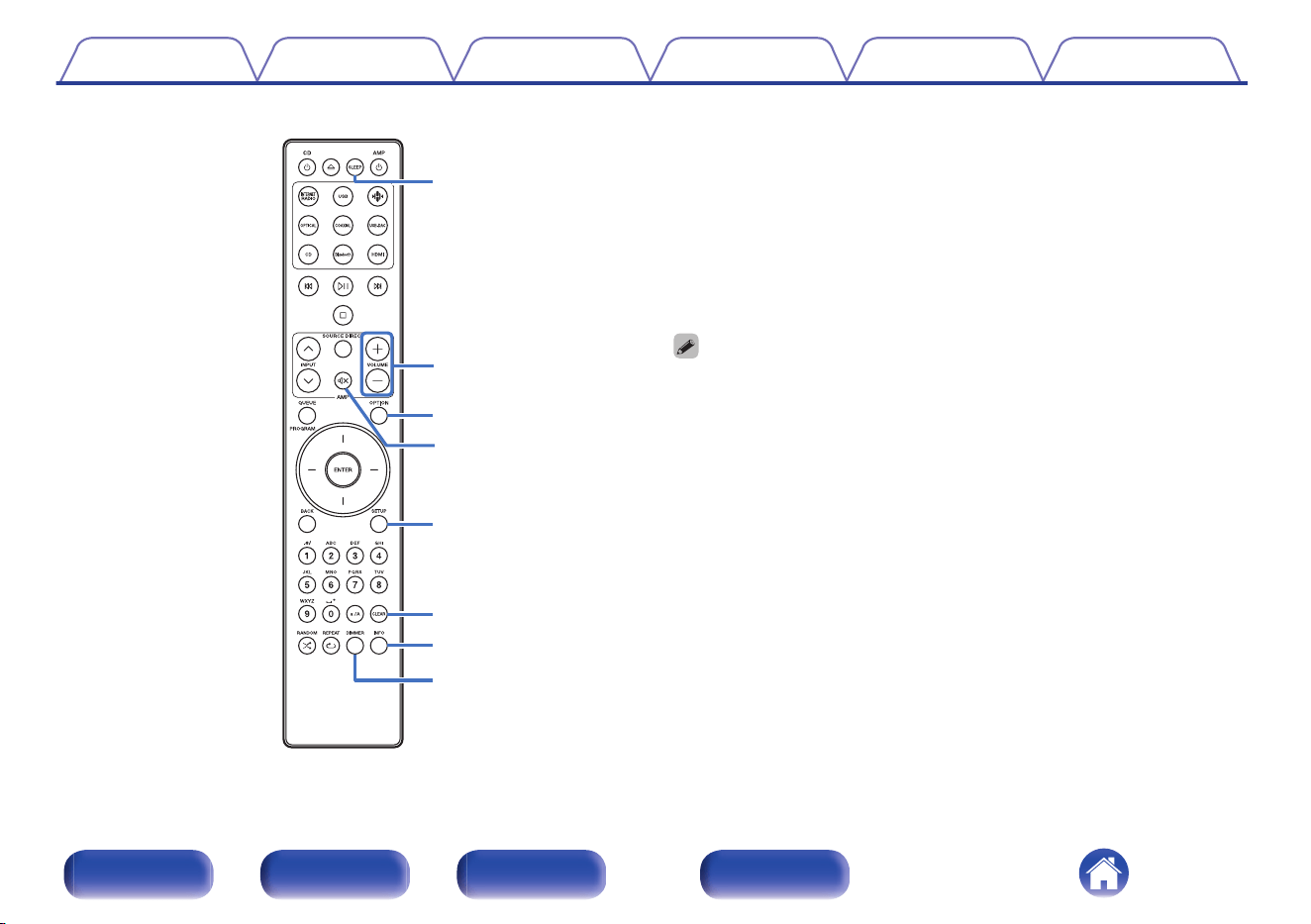
L
SLEEP button
M
VOLUME buttons (no)
N
OPTION button
O
Mute button (:)
P
SETUP button
Q
CLEAR button
R
Information button (INFO)
S
DIMMER button
0
The remote control may not operate some products.
0
c and e only work when the remote control code is set to Network CD player
operation mode. See the instruction manual of your Marantz Network CD player
for details.
Contents
Connections Playback Settings Tips Appendix
12
Front panel Rear panel
Remote control
unit
Index
o
Contents
Connecting speakers 14
Connecting a playback device 19
Connecting a recording device 20
Connecting a pre-amplifier or power amplifier 21
Connecting devices with remote control connectors 22
Connecting the power cord 24
NOTE
0
Do not plug in the power cord until all connections have been completed.
0
Do not bundle power cords together with connection cables. Doing so can result in
humming or noise.
o
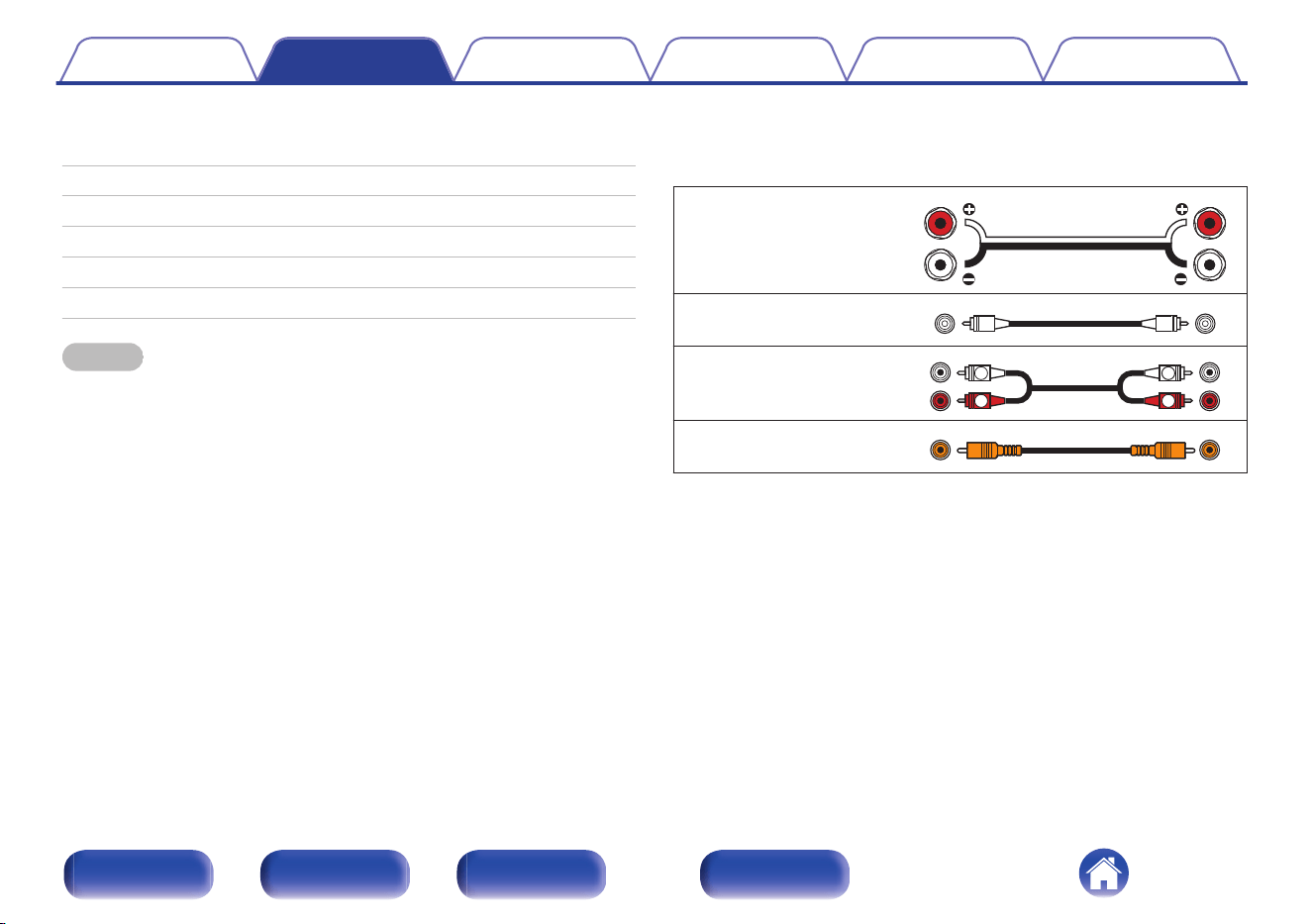
Cables used for connections
Provide necessary cables according to the devices you want to
connect.
Speaker cable
Subwoofer cable
Audio cable
R
L
R
L
Remote connector cable
Contents Connections Playback Settings Tips Appendix
13
Front panel Rear panel
Remote control
unit
Index
Connecting speakers
NOTE
0
Disconnect this unit’s power plug from the power outlet before connecting the
speakers.
0
Connect so that the speaker cable core wires do not protrude from the speaker
terminal. The protection circuit may be activated if the core wires touch the rear
panel or if the + and - sides touch each other. (“Protection circuit” (v p. 44))
0
Never touch the speaker terminals while the power cord is connected. Doing so
could result in electric shock.
0
Use speakers with impedances within the ranges shown below to suit how they
are used.
Speaker terminals
used on this unit
No. of connected
speakers
Speaker
Impedance
SPEAKERS A
(Standard
connection)
2 (one set) 4 – 16 Ω/ohms
SPEAKERS B
2 (one set) 4 – 16 Ω/ohms
SPEAKERS A and
SPEAKERS B
4 (two sets) 8 – 16 Ω/ohms
SPEAKERS A and
SPEAKERS B
(Bi-wiring
connection)
2 (one set) 4 – 16 Ω/ohms
o
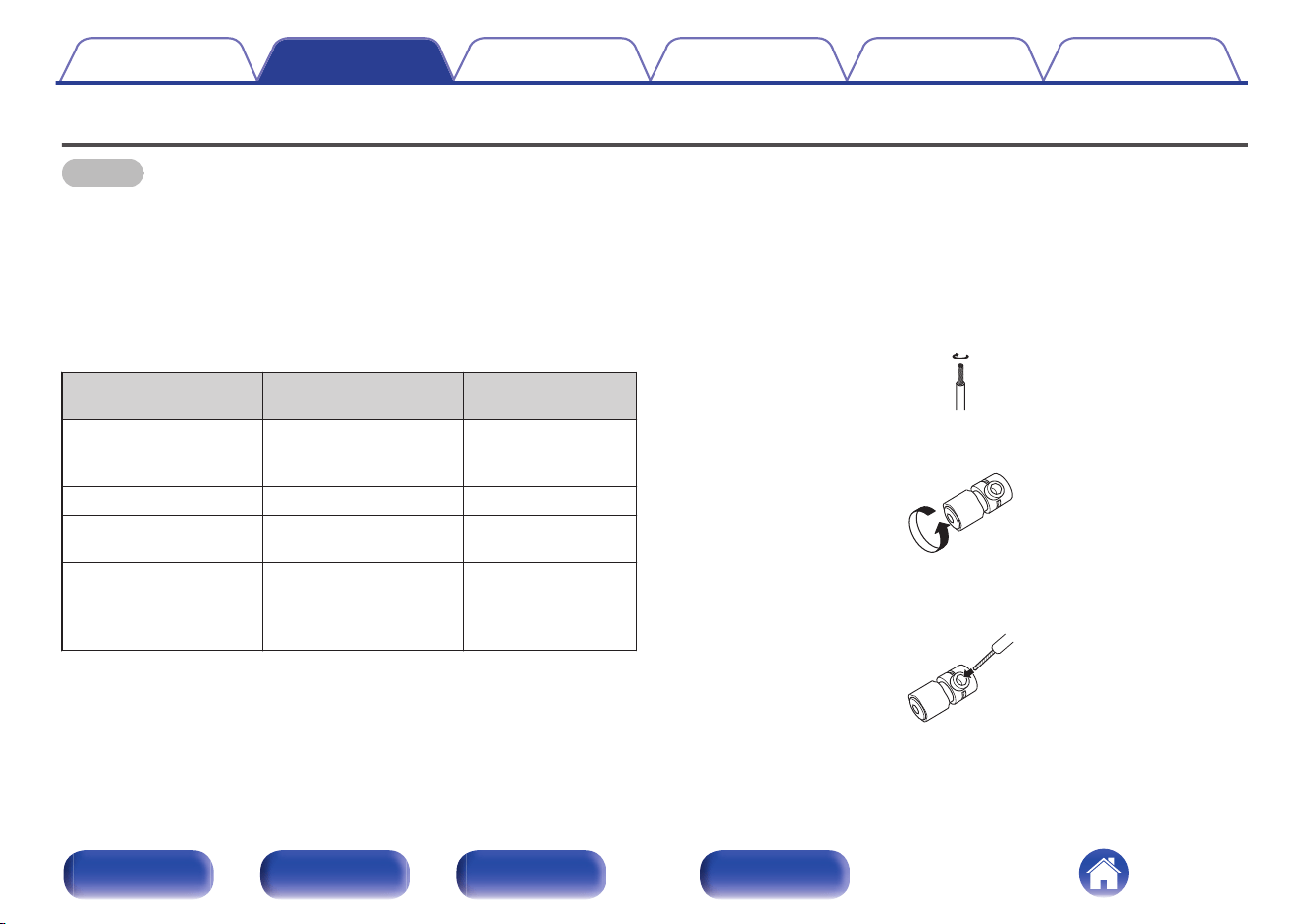
Connecting the speaker cables
Carefully check the left (L) and right (R) channels and + (red) and - (white)
polarities on the speakers being connected to this unit, and be sure to
connect the channels and polarities correctly.
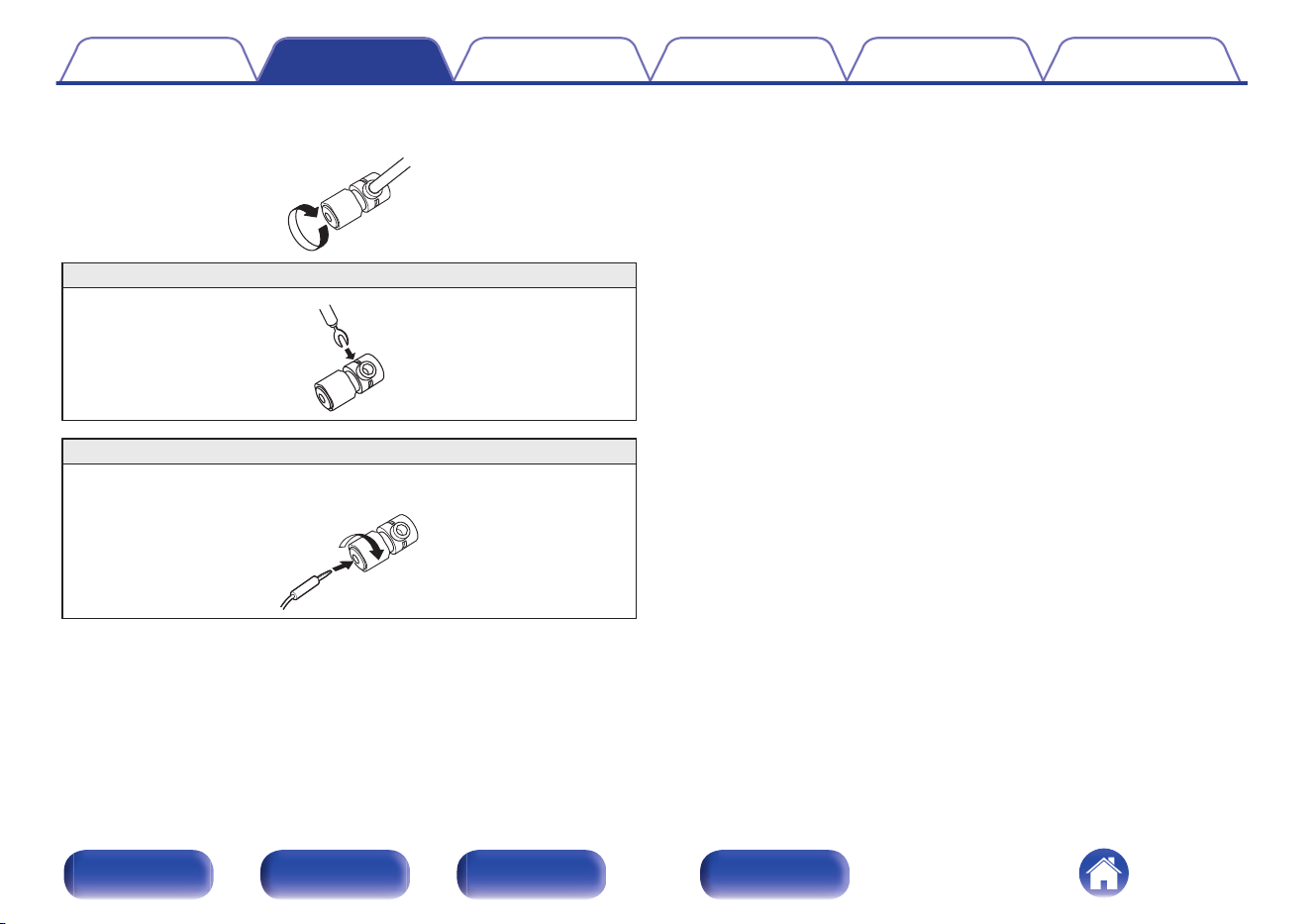
1
Peel off about 3/8 inch (10 mm) of sheathing from the
tip of the speaker cable, then either twist the core wire
tightly or terminate it.
2
Turn the speaker terminal counterclockwise to loosen it.
3
Insert the speaker cable’s core wire to the hilt into the
speaker terminal.
Contents Connections Playback Settings Tips Appendix
14
Front panel Rear panel
Remote control
unit
Index
Speaker A/B connection
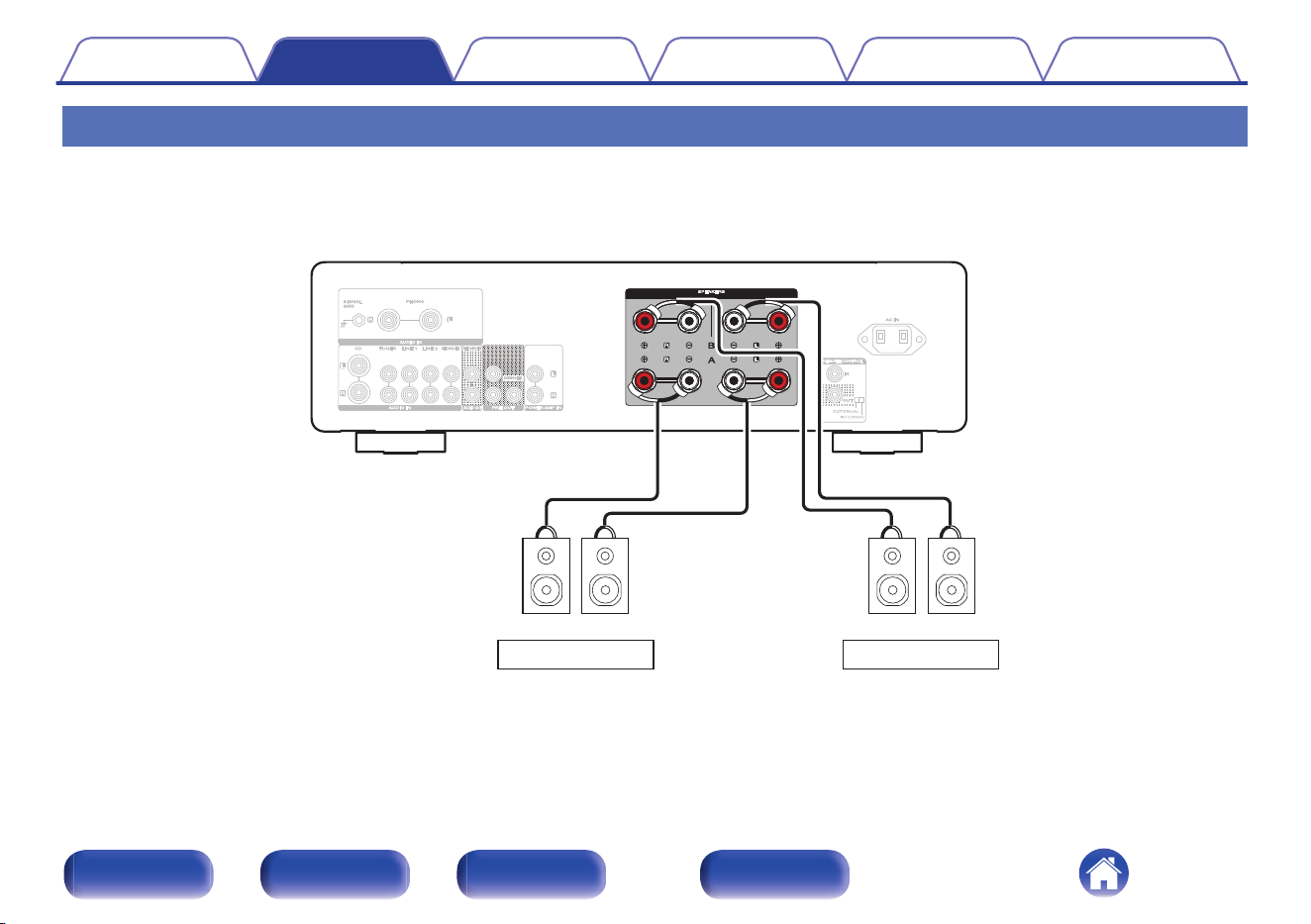
This unit is equipped with two sets of speaker terminals (SPEAKER A and SPEAKER B). One set of speakers can be connected to each set of terminals,
and a total of two sets of speakers can be connected.
The same signal is output from the SPEAKERS A and SPEAKERS B terminals.
When only one set of speakers is to be connected, use either the SPEAKERS A or SPEAKERS B terminals.
wqwq wqwq
SPEAKERS A
SPEAKERS B
(R) (L)
(R) (L)
Contents
Connections Playback Settings Tips Appendix
16
Front panel Rear panel
Remote control
unit
Index
Bi-wiring connection
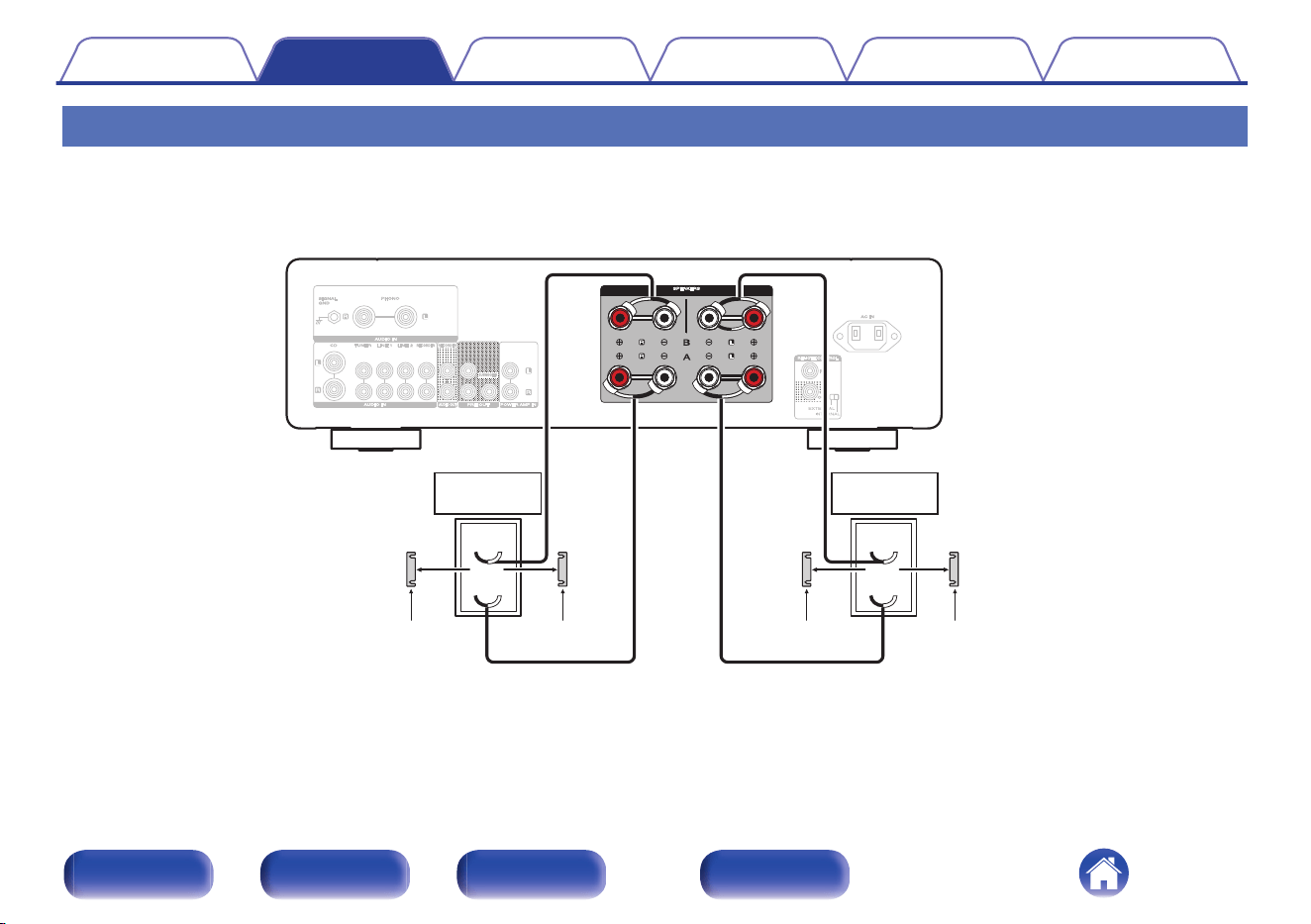
This connection limits the effects of signal interference between the high range speakers (tweeters) and low range speakers (woofers), allowing you to
enjoy high quality playback.
When bi-wiring with bi-wireable speakers, connect the mid and high range terminals to SPEAKERS B (or SPEAKERS A), the low range terminals to
SPEAKERS A (or SPEAKERS B).
wq
wq
HIGH
LOW
wq
wq
HIGH
LOW
Speaker
(R)
Speaker
(L)
Remove shorting bar
Remove shorting bar Remove shorting bar
Remove shorting bar
Contents Connections Playback Settings Tips Appendix
17
Front panel Rear panel
Remote control
unit
Index
Subwoofer connection
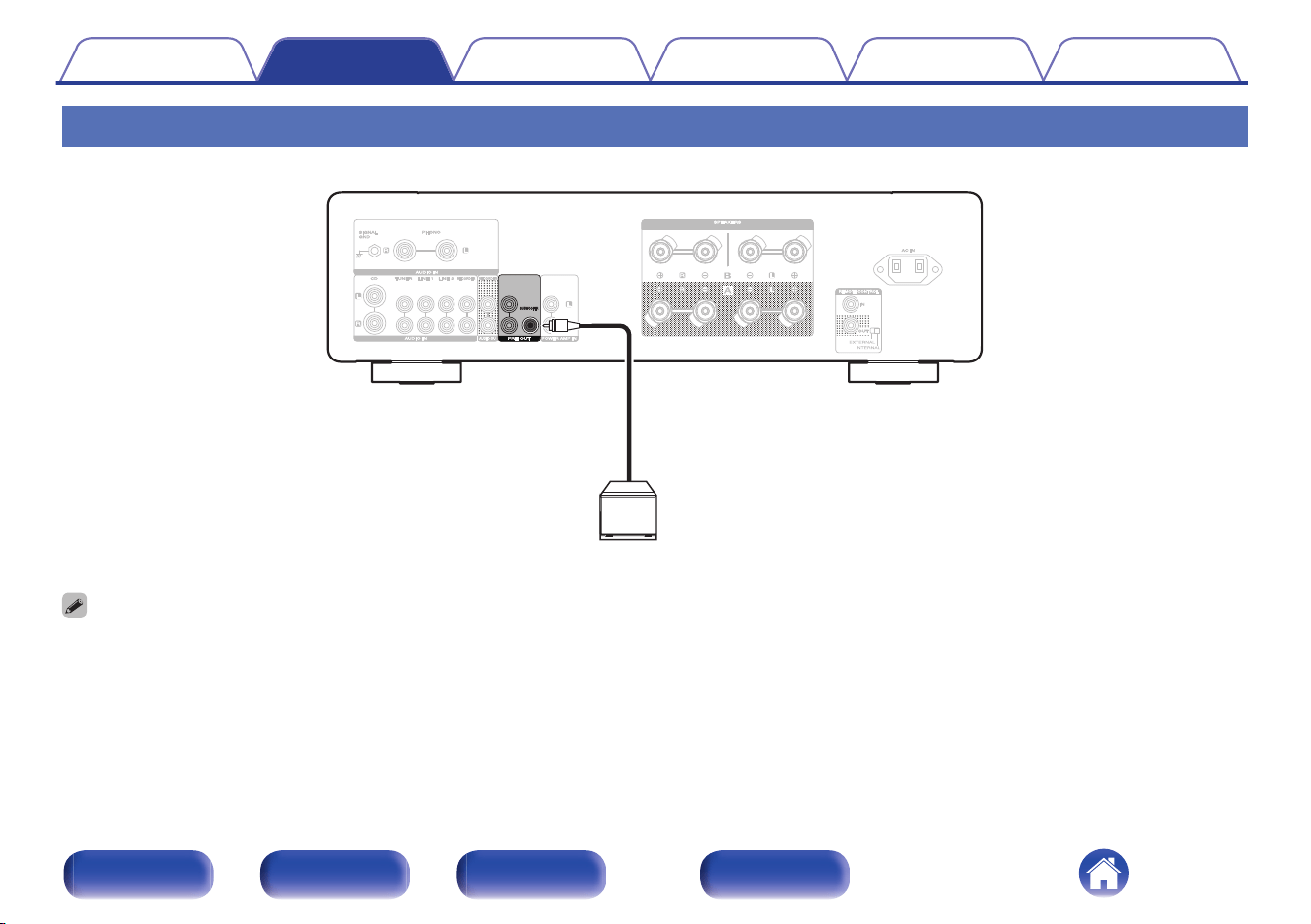
Use a subwoofer cable to connect the subwoofer.
Subwoofer
0
The subwoofer volume is linked to the Speaker A volume.
0
This unit does not output to the subwoofer when not set to output audio from the SPEAKERS A terminal. (v p. 27)
Contents Connections Playback Settings Tips Appendix
18
Front panel Rear panel
Remote control
unit
Index
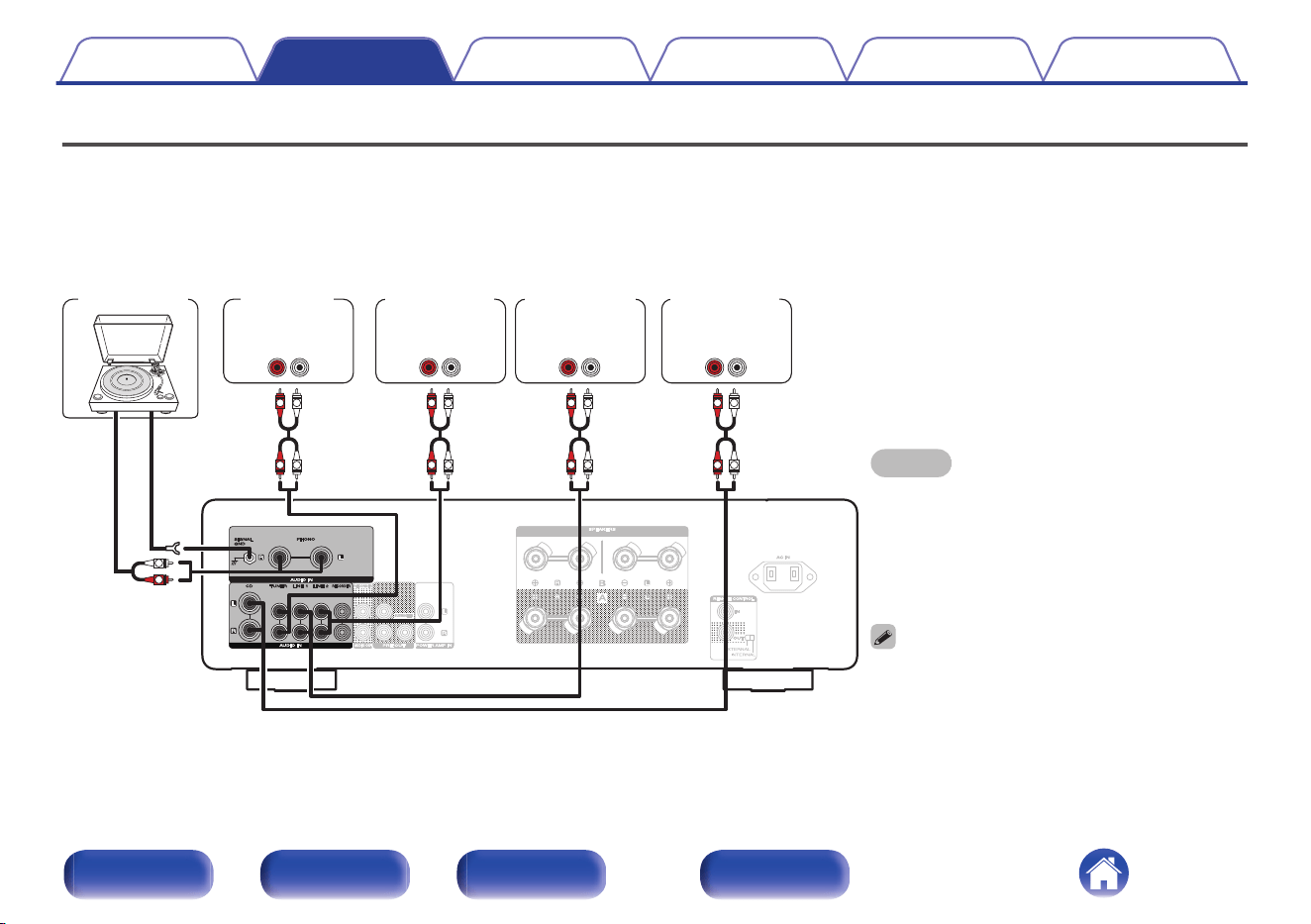
Connecting a playback device
You can connect turntables, tuners, Blu-ray disc players, network audio players and CD players to this unit.
This unit is compatible with turntables equipped with a moving magnet (MM) phono cartridge. When you connect to a turntable with a low output moving
coil (MC) cartridge, use a commercially available MC head amp or a step-up transformer.
If you set this unit’s input source to “PHONO” and you accidentally increase the volume without having a turntable connected, you may hear a hum noise
from the speakers.
NOTE
0
The earth terminal (SIGNAL GND) of this unit is not
for safety grounding purposes. If this terminal is
connected when there is a lot of noise, the noise can
be reduced. Note that depending on the turntable,
connecting the ground line may have the reverse
effect of increasing noise. In this case, it is not
necessary to connect the ground line.
0
The PHONO input terminals are equipped with a
short pin-plug. Remove this plug to connect a record
player. Store the removed short pin-plug in a safe
place so as not to lose it.
GND
AUDIO
OUT
L
R
AUDIO
OUT
LR
AUDIO
OUT
LR
AUDIO
OUT
LR
AUDIO
OUT
LR
L
L
R
R
L
L
R
R
L
L
R
R
L
L
R
R
Turntable
Tu n e r
Blu-ray disc
player
Network audio
player
CD player
Contents Connections Playback Settings Tips Appendix
19
Front panel Rear panel
Remote control
unit
Index
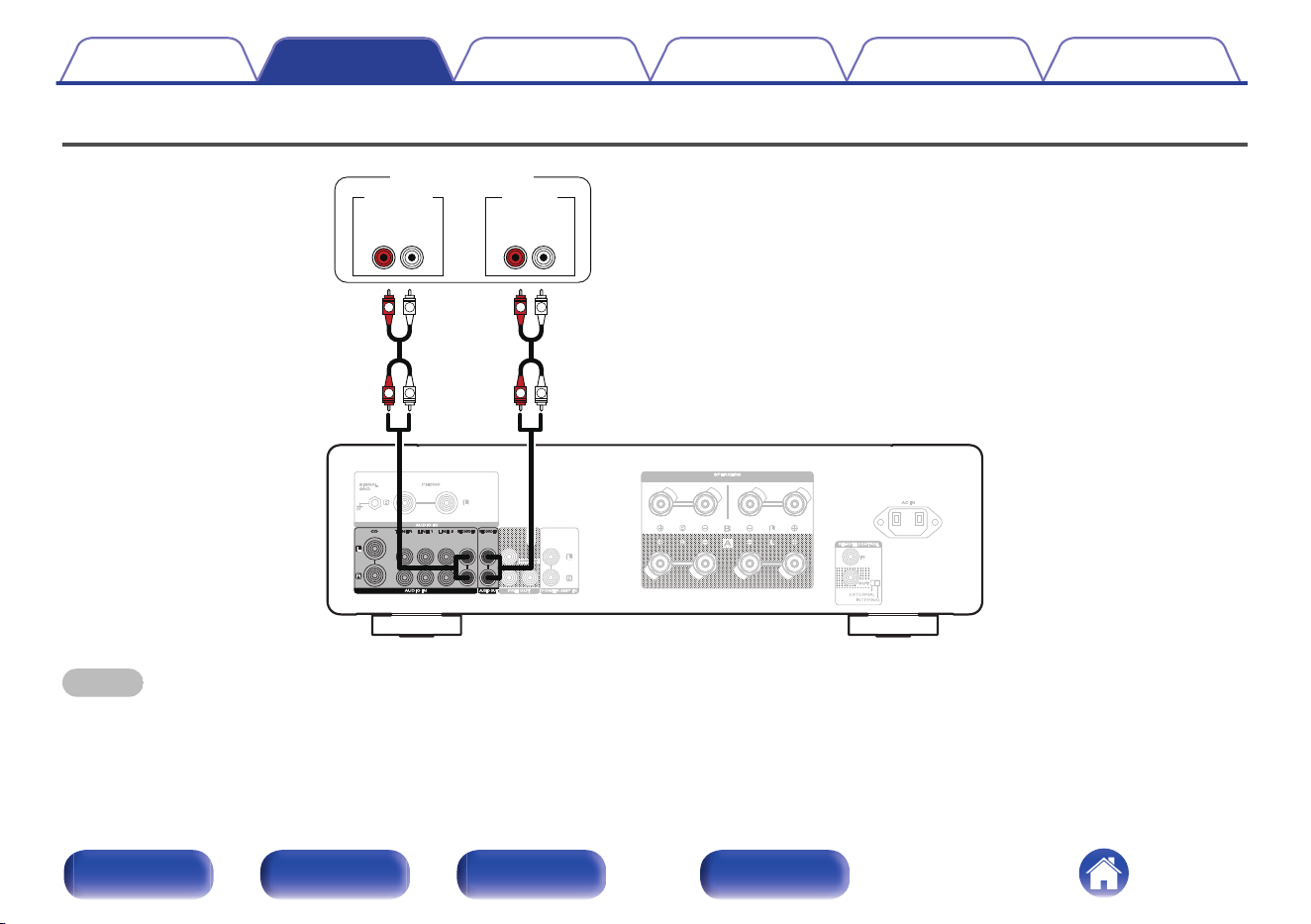
Connecting a recording device
LR
L
L
R
R
L
L
R
R
LR
AUDIO INAUDIO OUT
Recording device
NOTE
0
Never insert the short-circuiting pin plug into the recording output connectors (AUDIO OUT RECORDER). Doing so could result in damage.
Contents Connections Playback Settings Tips Appendix
20
Front panel Rear panel
Remote control
unit
Index
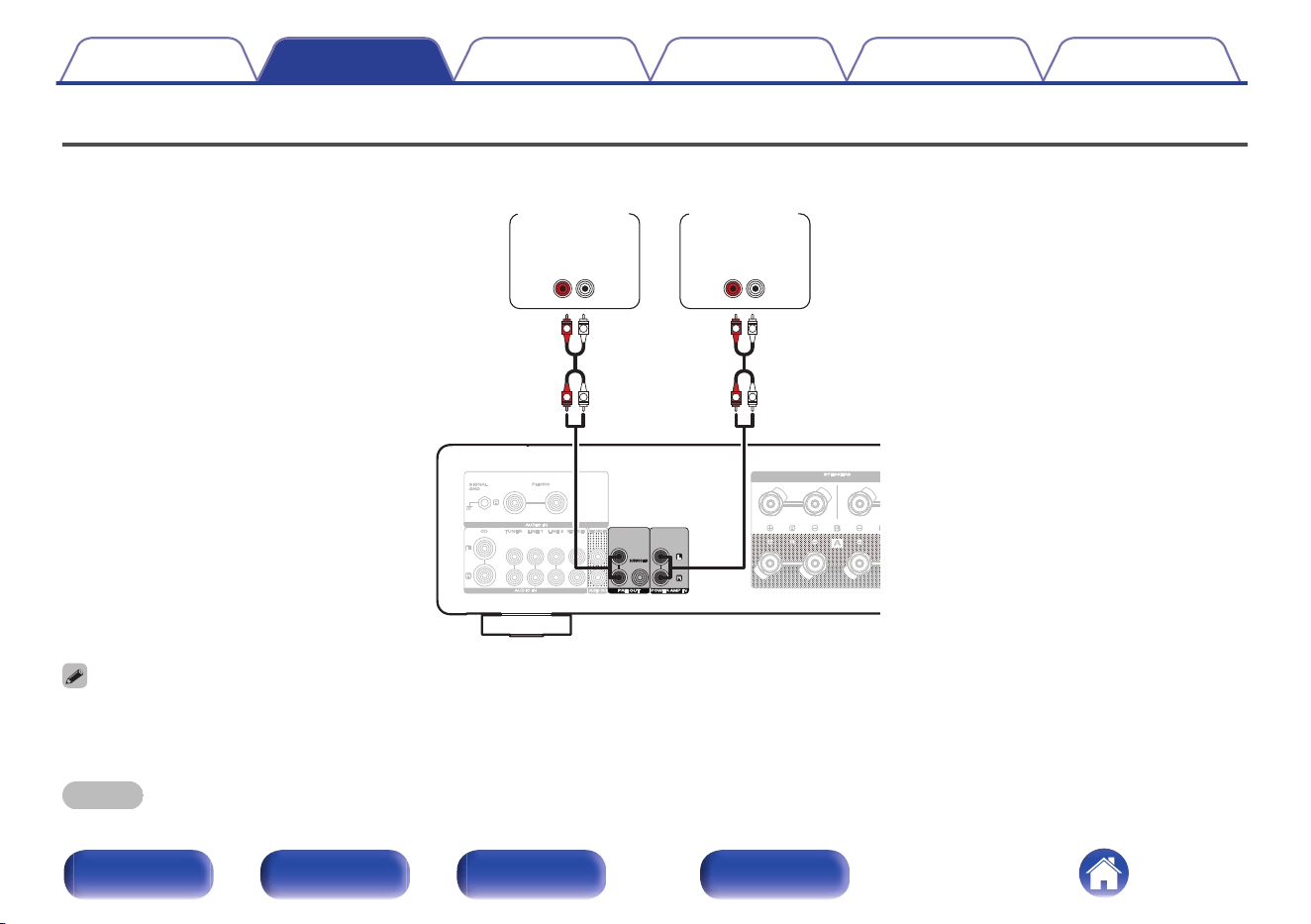
Connecting a pre-amplifier or power amplifier
Connect a power amplifier to the unit to use it as a pre-amplifier, or connect a pre-amplifier to the unit to use it as a power amplifier.
AUDIO
IN
LR
AUDIO
OUT
LR
L
L
R
R
L
L
R
R
Power
amplifier
Pre-
amplifier
0
When connecting a pre-amplifier and using this unit as a power amplifier, switch the input source to “PWR AMP”. (v p. 29)
0
This unit does not output the audio signal from the PRE OUT connectors when the speaker output setting is off.
0
The volume of the audio signal from the PRE OUT connectors is linked to the speakers A/B volume.
NOTE
0
Never insert the short-circuiting pin plug into the PRE OUT connectors. Doing so could result in damage.
Contents Connections Playback Settings Tips Appendix
21
Front panel Rear panel
Remote control
unit
Index
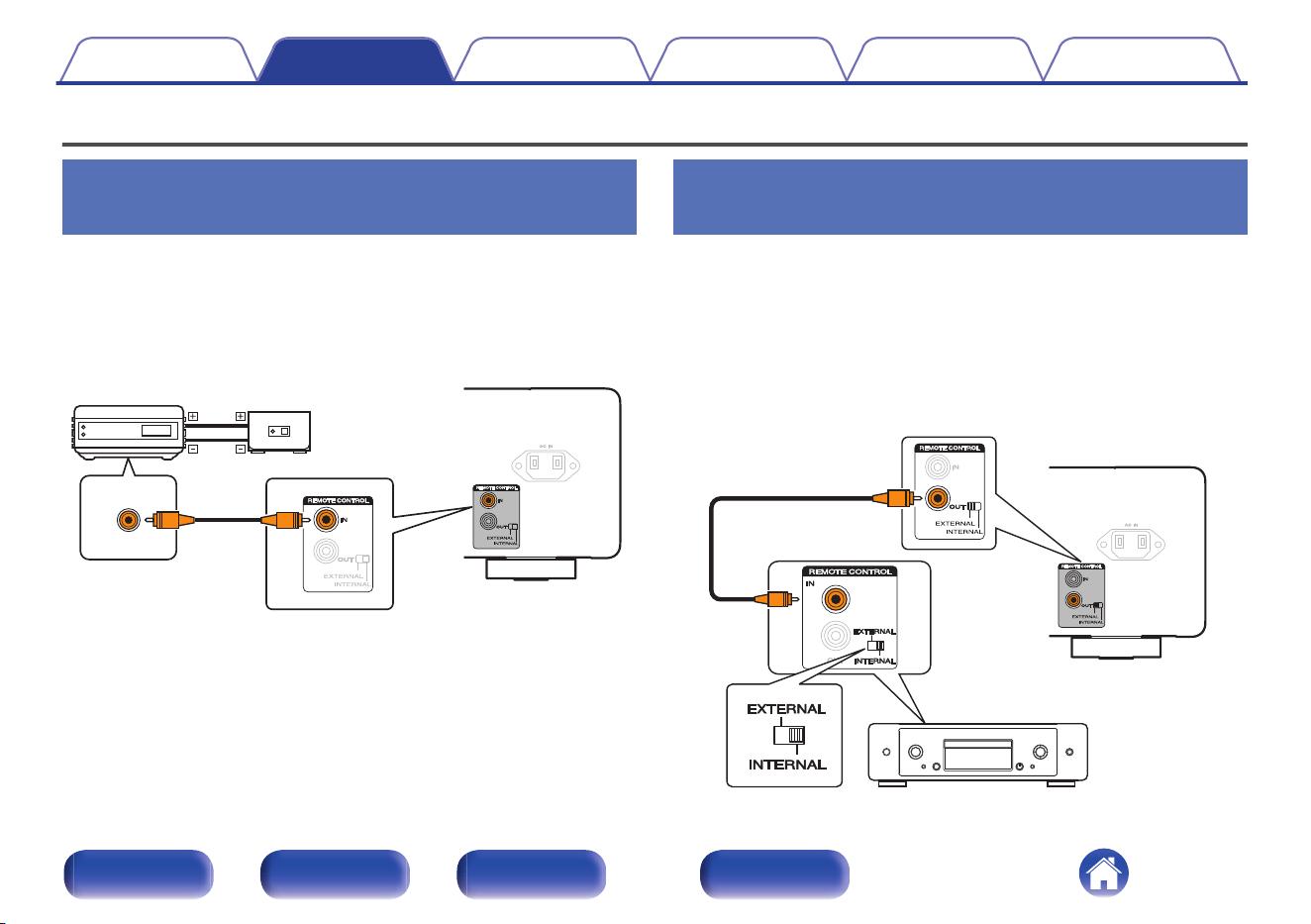
Connecting devices with remote control connectors
Performing operations by RC on this
unit without visual contact
You can connect an external IR receiver to the REMOTE CONTROL
connectors to perform operations on this unit with the included remote
control unit without visual contact. This might be necessary if the unit is
hidden in a cupboard or corner, so you can’t directly point with the remote
control unit to the device.
RC OUT
Infrared
retransmitter
Infrared
sensor
Remotely connecting Marantz audio
devices
You can transmit remote control signals simply by connecting a Marantz
audio device to the REMOTE CONTROL IN/OUT connectors using the
remote connection cable provided with the device.
Set the EXTERNAL/INTERNAL switch on the rear panel of this unit and
the connected device as follows.
0
Turn this unit’s EXTERNAL/INTERNAL switch to “EXTERNAL”.
0
Turn the EXTERNAL/INTERNAL switch of the connected device to
“INTERNAL”.
Contents Connections Playback Settings Tips Appendix
22
Front panel Rear panel
Remote control
unit
Index
0
This setting will disable remote sensor reception of this unit.
0
To operate the unit, point the remote control at the remote sensor of the Marantz
audio device.
0
To use this unit by itself without connecting a Marantz audio device, turn the switch
to “INTERNAL”.
Contents
Connections Playback Settings Tips Appendix
23
Front panel Rear panel
Remote control
unit
Index
o
Contents
Turning the power on 26
Switching the power to standby 26
Selecting the speakers for audio output 27
Selecting the input source 27
Adjusting the volume 27
Turning off the sound temporarily (Muting) 28
Adjusting the tone and balance 28
Playback in source direct mode 28
Playing CDs 28
Using this unit as a power amplifier 29
Recording 29
Contents Connections Playback Settings Tips Appendix
25
Front panel Rear panel
Remote control
unit
Index
AMP
X
INPUT VOLUME
SOURCE DIRECT
VOLUMEBALANCETREBLEBASS
SPEAKERS
X
INPUT
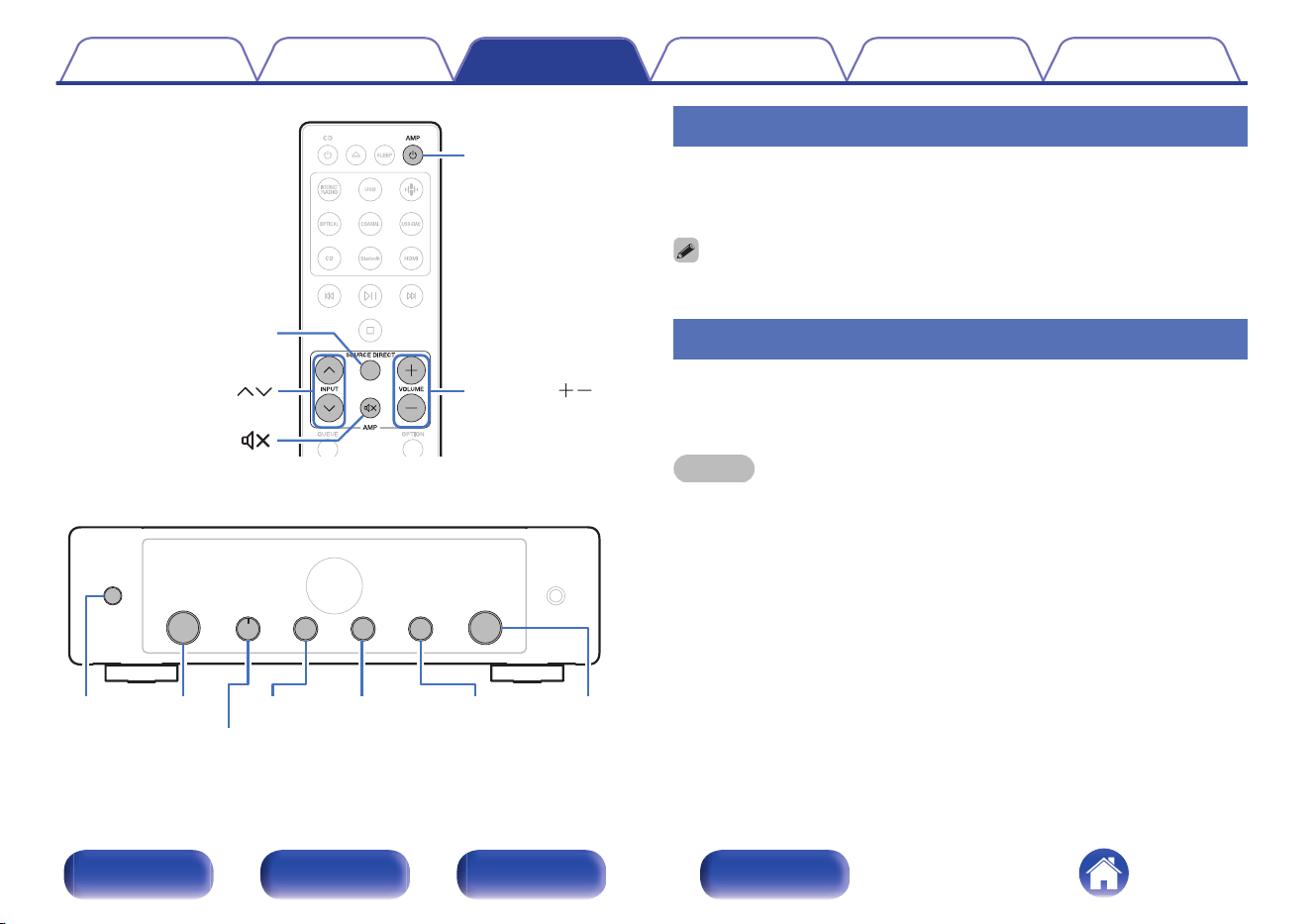
Turning the power on
1
Press AMP X to turn on power to the unit.
The display turns on.
0
You can also press X on the main unit to turn on power from standby mode.
Switching the power to standby
1
Press AMP X.
The unit switches to standby mode.
NOTE
0
Power continues to be supplied to some of the circuitry even when the power is in
the standby mode. When leaving home for long periods of time or when going on
vacation, unplug the power cord from the power outlet.
Contents Connections Playback Settings Tips Appendix
26
Front panel Rear panel
Remote control
unit
Index
Selecting the speakers for audio output
1
Turn the SPEAKERS selector knob on the main unit to
select the speaker system to be used for playback.
SPEAKERS A
(Default):
Outputs audio from speakers A only.
SPEAKERS B: Outputs audio from speakers B only.
SPEAKERS A+B:
Outputs audio from both speakers A
and speakers B.
SPEAKERS OFF: No audio is output from the speakers.
Selecting the input source
1
Use INPUT ml to select the input source to be played
back.
The selected input source appears on the display.
0
You can also select the input source by turning INPUT selector on the main unit.
Adjusting the volume
1
Use VOLUME no to adjust the volume.
The volume level appears on the display.
0
You can also adjust the volume by turning VOLUME on the main unit.
Contents Connections Playback Settings Tips Appendix
27
Front panel Rear panel
Remote control
unit
Index
Turning off the sound temporarily
(Muting)
1
Press :.
“Mute” is displayed on the display.
0
To cancel mute, either adjust the volume or press : again.
Adjusting the tone and balance
1
Turn the BASS, TREBLE and BALANCE on the main
unit to adjust the tone and balance.
0
BASS, TREBLE and BALANCE cannot be adjusted when this unit is in source
direct mode. Press SOURCE DIRECT on the remote control to turn off source
direct mode.
Playback in source direct mode
The signal does not pass through the tone adjustment circuitry (BASS,
TREBLE and BALANCE), resulting in playback of a higher sound quality.
1
Press SOURCE DIRECT to turn on source direct mode.
“SOURCE DIRECT” is displayed on the display.
Playing CDs
This section uses playback from a CD as an example.
1
Press AMP X to turn the power on.
2
Use INPUT ml to switch the input source to “CD”.
“CD” is displayed on the display.
3
Playback the CD.
4
Use VOLUME no to adjust the volume.
Contents Connections Playback Settings Tips Appendix
28
Front panel Rear panel
Remote control
unit
Index
Using this unit as a power amplifier
When connecting a pre-amplifier and using this unit as a power amplifier,
switch the input source of this unit to “PWR AMP”.
1
Turn the INPUT selector on the main unit to switch the
input source to “PWR AMP”.
“PWR AMP” is displayed on the display.
0
When the input source is “PWR AMP”, adjustment of the volume, balance and
tone has no effect. Adjust these adjustments on the pre-amplifier.
0
When the remote control code setting is set to “AMP1” (Default), INPUT ml on
the remote control cannot be used to switch the input source to “PWR AMP” or
switch from “PWR AMP” to another input source. To make remote control
operations, change the remote control code setting to “AMP2” or “AMP3”.
(v p. 33)
NOTE
0
When the input source is “PWR AMP”, the main unit outputs at maximum volume.
Check the output level on the input device before playing it and adjust the volume
accordingly.
Recording
Audio signals input into this unit can be output to an external recording
device. When recording audio from a playback device connected to this
unit, audio can be recorded with the playback device still connected to this
unit.
1
Press AMP X to turn the power on.
2
Use INPUT ml to switch to the input source from
which you want to record.
The selected input source appears on the display.
3
Recording starts.
0
For information on operations, see the owner’s manual of the
recording device.
Contents Connections Playback Settings Tips Appendix
29
Front panel Rear panel
Remote control
unit
Index
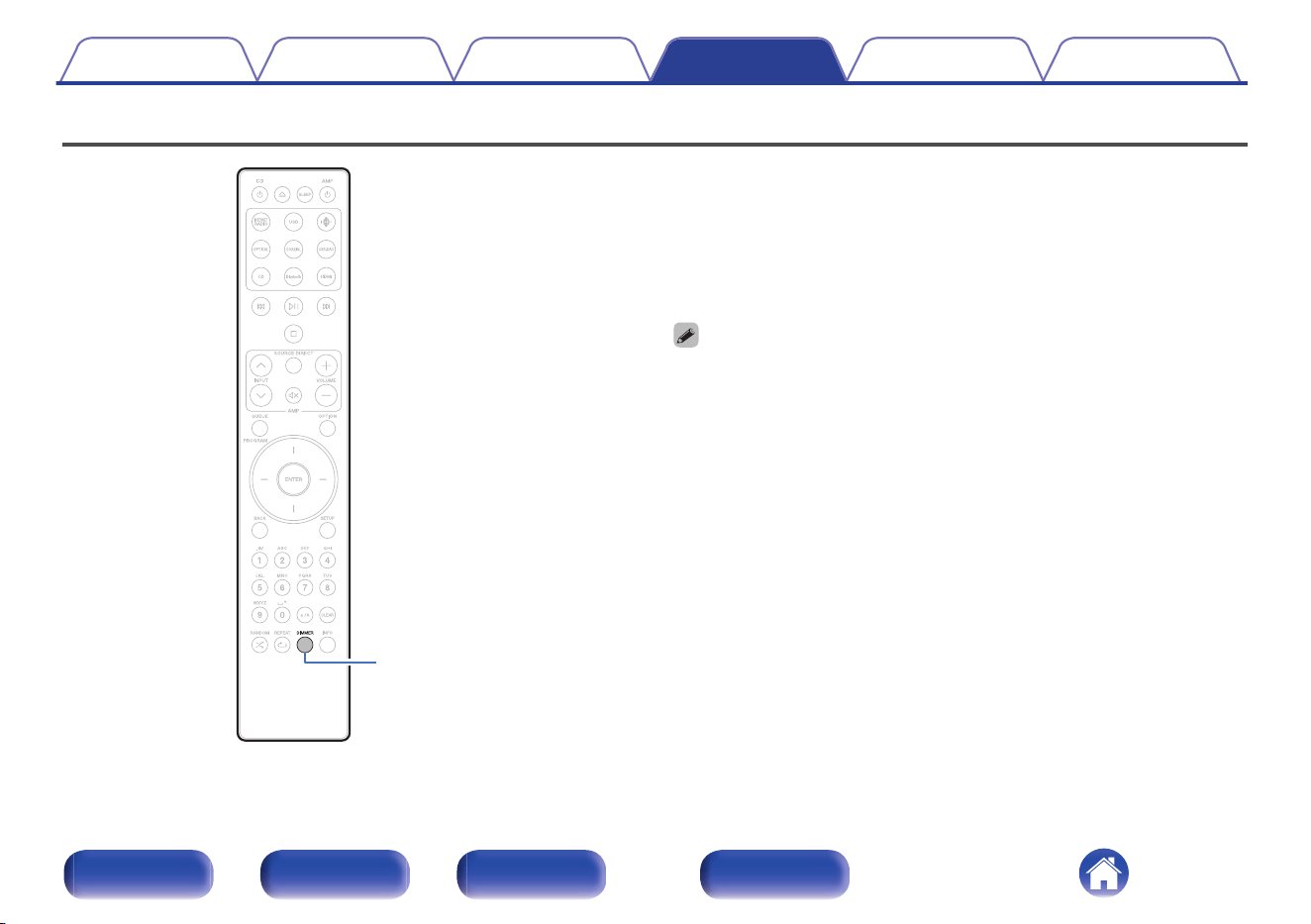
Setting the display’s brightness
DIMMER
The display brightness can be adjusted between four levels. Switching the
display off reduces a source of noise that affects sound quality, enabling
higher sound quality playback.
1
Press DIMMER.
0
The brightness of the display switches each time the button is
pressed.
0
If button operations are made while the display is off, information is temporarily
displayed at the brightest setting.
0
The display brightness is set to most brightly by default.
0
DIMMER also works with Marantz Network CD player CD 50n (not included), so its
brightness can be adjusted simultaneously when used in combination with this
unit. If the devices have different brightness settings, press and hold DIMMER for
5 seconds or longer and adjust after they are both at the brightest setting.
Contents Connections Playback Settings Tips Appendix
31
Front panel Rear panel
Remote control
unit
Index
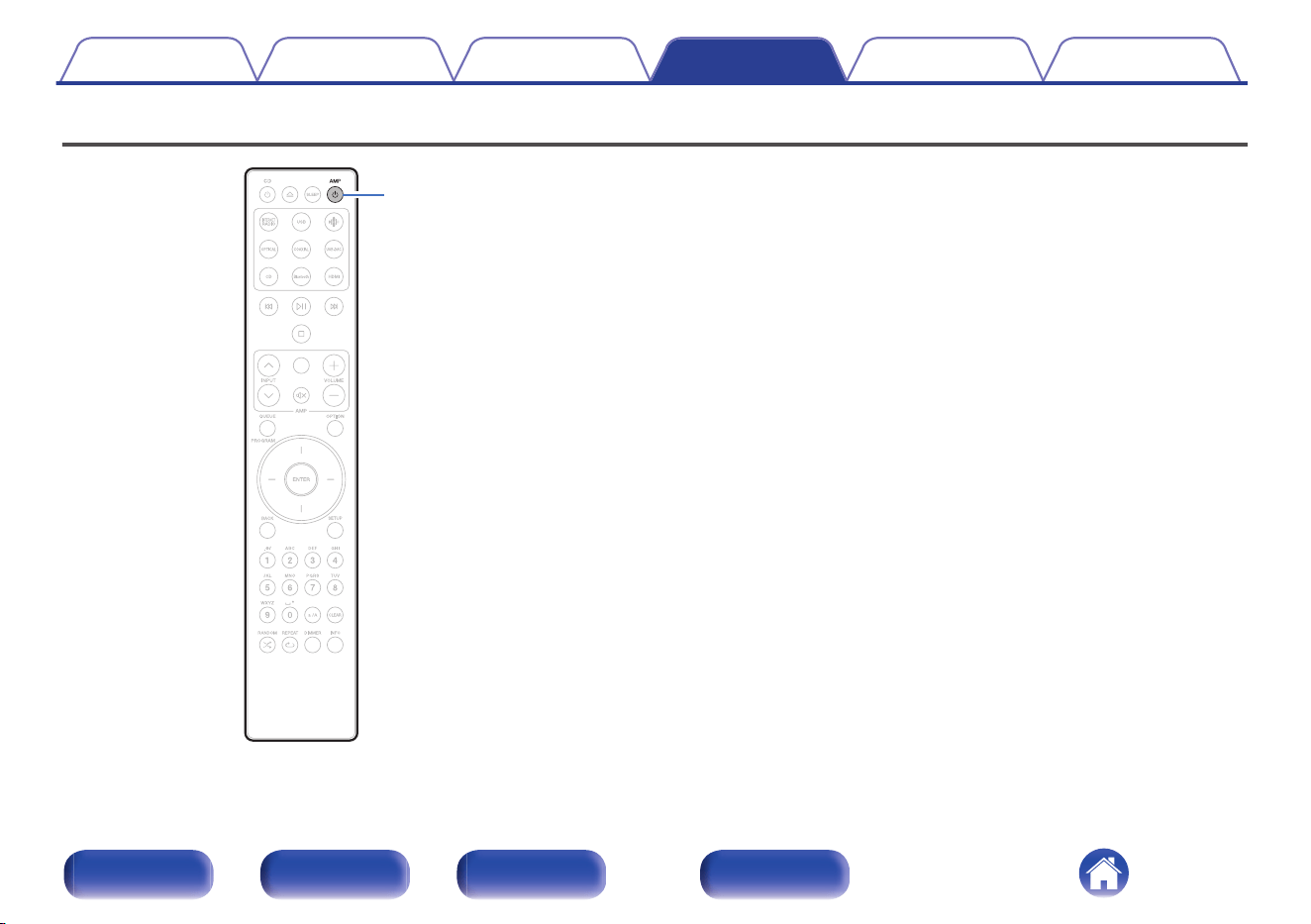
Setting the Auto Standby mode
AMP
X
You can set the unit to automatically switch to standby mode if the unit is
not operated for 15 minutes when there is no audio input (Auto Standby
mode).
Auto Standby mode is set to off by default.
1
Press and hold AMP X for 5 seconds or more to switch
it on and off.
“Auto STBY On” or “Auto STBY Off” is displayed on the display.
Contents Connections Playback Settings Tips Appendix
32
Front panel Rear panel
Remote control
unit
Index
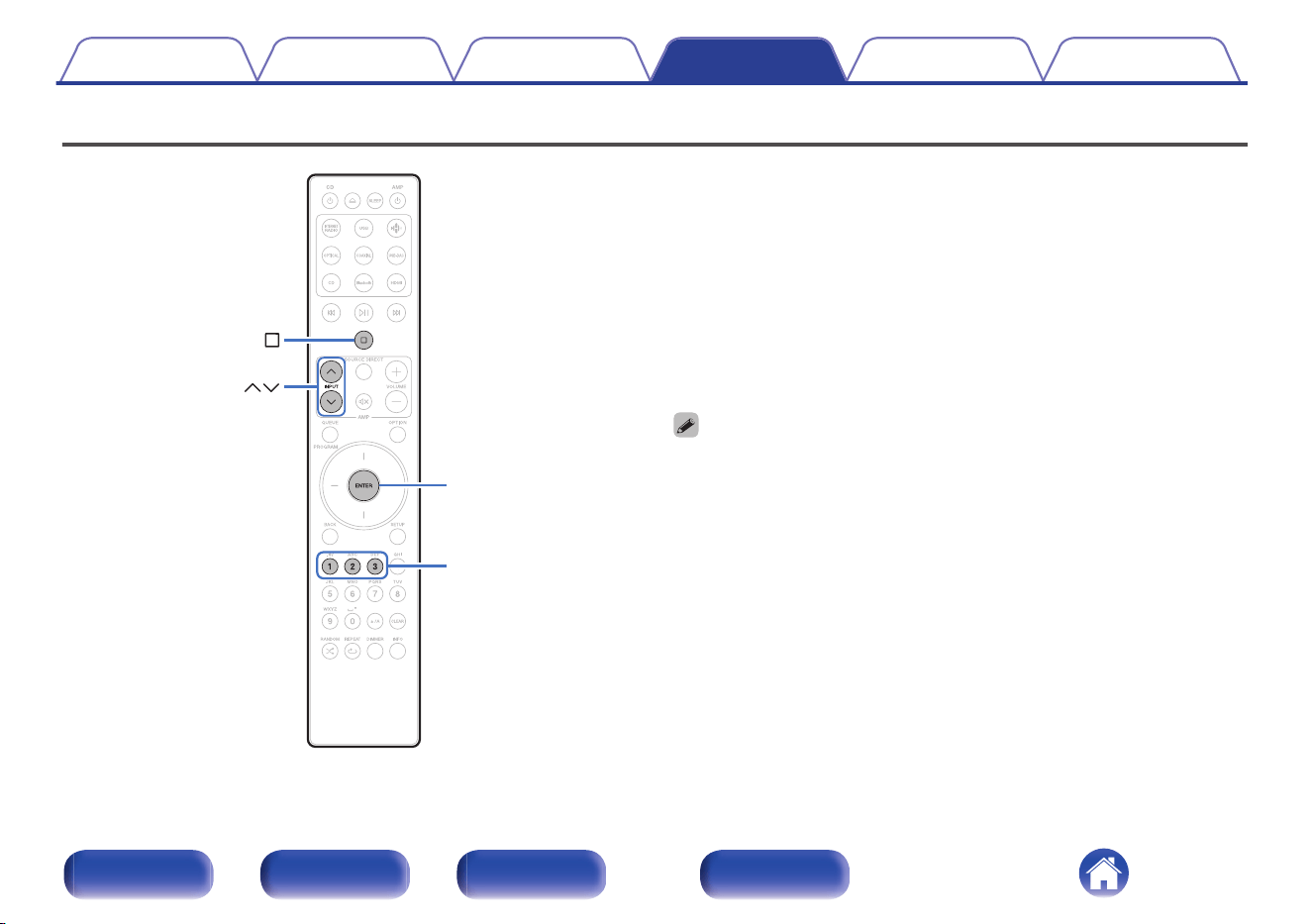
Setting remote control codes
INPUT
ENTER
1
-
3
Remote control codes are set between this unit and the included remote
control. You can select one of the three types of remote control codes, and
the remote control can be used to control the unit when the same remote
control code is used. If three of these units are used in the same location,
all three units can be controlled simultaneously using one remote control
in the default settings. By setting individual remote control codes between
a unit and the remote control, the remote control can be used to control
only the unit that has the same remote control code.
Be sure to check the operation of each unit after setting the remote control
codes.
The default setting is “AMP1”.
0
When remote control code setting is set to “AMP1”, the input source for this unit
cannot be switched to “PWR AMP” using INPUT ml on the remote control. To
switch with the remote control, change the remote control code setting to “AMP2”
or “AMP3”.
0
Set the remote control cord to “AMP 1” when controlling this unit from a Marantz
network CD player or other device connected using a remote connection cable to
this unit. (v p. 22)
Contents Connections Playback Settings Tips Appendix
33
Front panel Rear panel
Remote control
unit
Index
Setting remote control codes for the
remote control
o
To set the remote control codes to AMP1,
AMP2 or AMP3
1
Hold down i and one of the number 1, 2 or 3 buttons
for more than 5 seconds.
0
Set the remote control code to AMP1, AMP2 or AMP3 according
to the selected number button.
NOTE
0
The remote control codes returns to the default settings when the batteries are
removed. Set the remote control codes again after replacing the batteries.
Setting remote control codes for the
main unit
1
Point the remote control for which the remote control
code was set at the main unit, and press i and ENTER.
When setting the remote control code of the main unit is complete,
the remote control code set (AMP 1 – 3) is displayed on the display.
Contents Connections Playback Settings Tips Appendix
34
Front panel Rear panel
Remote control
unit
Index
o
Contents
Tips
I want to adjust the tone myself 36
I want sound playback that is faithful to the original sound 36
I want to turn the display off 36
I want to use bi-wiring compatible speakers 36
I want to operate a Marantz Network CD player using the remote
control of this unit 36
I want to use this unit as a power amplifier 36
I want to use this unit as a pre-amplifier 36
I want to use more than one unit in one location 36
Troubleshooting
Power does not turn on / Power is turned off 38
Operations cannot be performed through the remote control unit 40
Display on this unit shows nothing 41
No sound comes out 41
Desired sound does not come out 42
Sound is interrupted or noise occurs 43
Contents Connections Playback Settings Tips Appendix
35
Front panel Rear panel
Remote control
unit
Index
Tips
I want to adjust the tone myself
0
Use the BASS, TREBLE and BALANCE knobs to adjust the sound as desired. (v p. 28)
I want sound playback that is faithful to the original sound
0
Set the source direct mode on. (v p. 28)
I want to turn the display off
0
Press the DIMMER button to turn the display off. (v p. 31)
I want to use bi-wiring compatible speakers
0
This unit is compatible with bi-wiring connections. Enjoy high quality playback by using bi-wiring connections. (v p. 17)
I want to operate a Marantz Network CD player using the remote control of this unit
0
Marantz Network CD Players can also be operated with the remote control of this unit. Also refer to the Network CD player's instruction manuals.
(v p. 11)
I want to use this unit as a power amplifier
0
Connect a pre-amplifier to the POWER AMP IN connectors of this unit and switch the input source to “PWR AMP”. (v p. 21)
I want to use this unit as a pre-amplifier
0
Connect a power amplifier to the PRE OUT connectors of this unit. (v p. 21)
I want to use more than one unit in one location
0
Set individual remote control codes for each combination of devices and remote control. (v p. 33)
Contents
Connections Playback Settings Tips Appendix
36
Front panel Rear panel
Remote control
unit
Index
Troubleshooting
If a problem should arise, first check the following:
1. Are the connections correct?
2. Is the set being operated as described in the owner’s manual?
3. Are the other devices operating properly?
If this unit does not operate properly, check the corresponding symptoms in this section.
If the symptoms do not match any of those described here, consult your dealer as it could be due to a fault in this unit. In this case, disconnect the power
immediately and contact the store where you purchased this unit.
Contents Connections Playback Settings Tips Appendix
37
Front panel Rear panel
Remote control
unit
Index
Power does not turn on / Power is turned off
Power is not turned on.
0
Check whether the power plug is correctly inserted into the power outlet. (v p. 24)
0
This unit is in standby mode. Press the X button on the unit or the AMP X button on the remote control. (v p. 26)
Power automatically turns off.
0
The Auto Standby mode is on. When approx. 15 minutes pass with no audio input and no operations on the unit, this unit automatically enters the
standby mode. To turn off the Auto Standby mode, press the AMP X button for 5 seconds or longer. (v p. 32)
0
When this unit and a Marantz audio device compatible with the power synchronization function are connected using a remote connection cable, the
power of this unit turns off (standby) in synchronization with the power off operation of the device connected to this unit. (v p. 22)
The power turns off and the protection circuit indicator shows one long blink and two short blinks in orange.
0
Stop playback on the playback device, and then turn the power off and on again.
0
If the problem is not solved by turning the power off and on again, this unit’s amplifier circuit has failed. Unplug the power cord and contact our customer
service center.
The power turns off and the protection circuit indicator shows one long blink and three short blinks in orange.
0
This unit’s power circuit has failed. Unplug the power cord and contact our customer service center.
Contents
Connections Playback Settings Tips Appendix
38
Front panel Rear panel
Remote control
unit
Index
The power turns off and the protection circuit indicator shows one long blink and four short blinks in orange.
0
The protection circuit has been activated due to a rise in temperature within this unit. Turn the power off, wait about an hour until this unit cools down
sufficiently, and then turn the power on again.
0
Please re-install this unit in a place having good ventilation.
0
Stop playback on the playback device, and then turn the power off and on again.
The power turns off and the protection circuit indicator shows one long blink and five short blinks in orange.
0
Check the speaker connections. The protection circuit may have been activated because speaker cable core wires came in contact with each other or a
core wire was disconnected from the connector and came in contact with the rear panel of this unit. After unplugging the power cord, take corrective
action such as firmly re-twisting the core wire or taking care of the connector, and then reconnect the wire. (v p. 14)
0
Stop playback on the playback device, and then turn the power off and on again.
0
If the problem is not solved by turning the power off and on again, this unit’s amplifier circuit or power circuit has failed. Unplug the power cord and
contact our customer service center.
Contents Connections Playback Settings Tips Appendix
39
Front panel Rear panel
Remote control
unit
Index
Operations cannot be performed through the remote control unit
Operations cannot be performed through the remote control unit.
0
Batteries are worn out. Replace with new batteries. (v p. 5)
0
Operate the remote control unit within a distance of about 23 ft/7 m from this unit and at an angle of within 30°. (v p. 5)
0
Remove any obstacle between this unit and the remote control unit.
0
Insert the batteries in the proper direction, checking the q and w marks. (v p. 5)
0
The set’s remote control sensor is exposed to strong light (direct sunlight, inverter type fluorescent bulb light, etc.). Move the set to a place in which the
remote control sensor will not be exposed to strong light.
0
When using a 3D video device, the remote control unit of this unit may not function due to effects of infrared communications between units (such as TV
and glasses for 3D viewing). In this case, adjust the direction of units with the 3D communications function and their distance to ensure they do not
affect operations from the remote control unit of this unit.
0
The remote control code of the volume buttons on the remote control (VOLUME no and :) is set to the mode for operating a Marantz Network CD
player. If the volume of this unit cannot be adjusted using the remote control, press and hold ENTER and the number 1 button together for 5 seconds or
more to change the remote control code to AMP operation mode.
0
When the remote control code setting is set to “AMP1” (Default), the INPUT ml buttons on the remote control cannot be used to switch the input
source to “PWR AMP” or switch from “PWR AMP” to another input source. To make remote control operations, change the remote control code setting
to “AMP2” or “AMP3”. (v p. 33)
0
The remote control code between this unit and the remote control is different. Set this unit and the remote control to the same remote control code.
(v p. 33)
0
When using this unit independently, set the switch to INTERNAL. (v p. 22)
Contents
Connections Playback Settings Tips Appendix
40
Front panel Rear panel
Remote control
unit
Index
Display on this unit shows nothing
Display is off.
0
Press the DIMMER button, and change the setting to anything other than off. (v p. 31)
No sound comes out
No sound comes out of speakers.
0
Check the connections for all devices. (v p. 13)
0
Insert connection cables all the way in.
0
Check that input connectors and output connectors are not reversely connected.
0
Check cables for damage.
0
Check that speaker cables are properly connected. Check that cable core wires come in contact with the metal part on speaker terminals. (v p. 14)
0
Securely tighten the speaker terminals. Check speaker terminals for looseness. (v p. 14)
0
Check that the proper input source is selected. (v p. 27)
0
The volume is set to the minimum level. Adjust the volume to a suitable level. (v p. 27)
0
Cancel the muting mode. (v p. 28)
0
Make sure that the settings for the speakers that output audio are appropriate. (v p. 27)
Contents
Connections Playback Settings Tips Appendix
41
Front panel Rear panel
Remote control
unit
Index
Desired sound does not come out
No sound comes out of a specific speaker.
0
Check that speaker cables are properly connected. (v p. 14)
0
Adjust the BALANCE control knob. (v p. 28)
No sound is produced from subwoofer.
0
Check the subwoofer connections. (v p. 18)
0
Turn on the subwoofer’s power.
The settings of the BASS, TREBLE and BALANCE knobs are not applied.
0
Press the SOURCE DIRECT button to turn off source direct mode. (v p. 28)
The left and right of stereo sound is reversed.
0
Check whether the left and right speakers are connected to the correct speaker terminals. (v p. 16)
Sound is not correctly output from the power amplifier connected to the PRE OUT connectors.
0
Check the power amplifier connections. (v p. 21)
0
The audio signal is not outputed from the PRE OUT connectors when the speaker output setting is off. Set the speakers A/B output. (v p. 27)
0
The volume of the audio signal from the PRE OUT connectors is linked to the speakers A/B volume. Adjust the volume to a suitable level. (v p. 27)
Sound is not correctly output from the pre amplifier connected to the POWER AMP IN connectors.
0
Check the pre amplifier connections. (v p. 21)
0
Check the the input source of this unit is set to “PWR AMP”. (v p. 27)
Contents
Connections Playback Settings Tips Appendix
42
Front panel Rear panel
Remote control
unit
Index
Sound is interrupted or noise occurs
When playing a record, the sound is distorted.
0
Adjust to a proper needle pressure.
0
Check the tip of the needle.
0
Replace the cartridge.
When playing a record, a humming noise comes out of the speakers.
0
Check that the turntable is connected correctly. (v p. 19)
0
If there is a TV or AV device near the turntable, such devices may affect the playback sound. Install the turntable in a location as far away as possible
from the TV or other AV devices.
When playing a record, a humming noise comes out of the speakers when the volume is high. (Howling phenomenon)
0
Install the turntable and speakers as far from each other as possible. (v p. 19)
0
The vibrations from the speakers are being transmitted to the player through the floor. Use cushions, etc., to absorb the speakers’ vibrations.
Contents
Connections Playback Settings Tips Appendix
43
Front panel Rear panel
Remote control
unit
Index
Explanation of terms
Source direct
Playback with higher fidelity to the source becomes possible, as input
audio signals are output by bypassing the tone control circuits (BASS/
TREBLE/BALANCE).
Speaker impedance
This is an AC resistance value, indicated in Ω (ohms).
Greater power can be obtained when this value is smaller.
Protection circuit
This is a function to prevent damage to devices within the power supply
when an abnormality such as an overload, excess voltage occurs or over
temperature for any reason.
Contents
Connections Playback Settings Tips Appendix
44
Front panel Rear panel
Remote control
unit
Index
Specifications
0
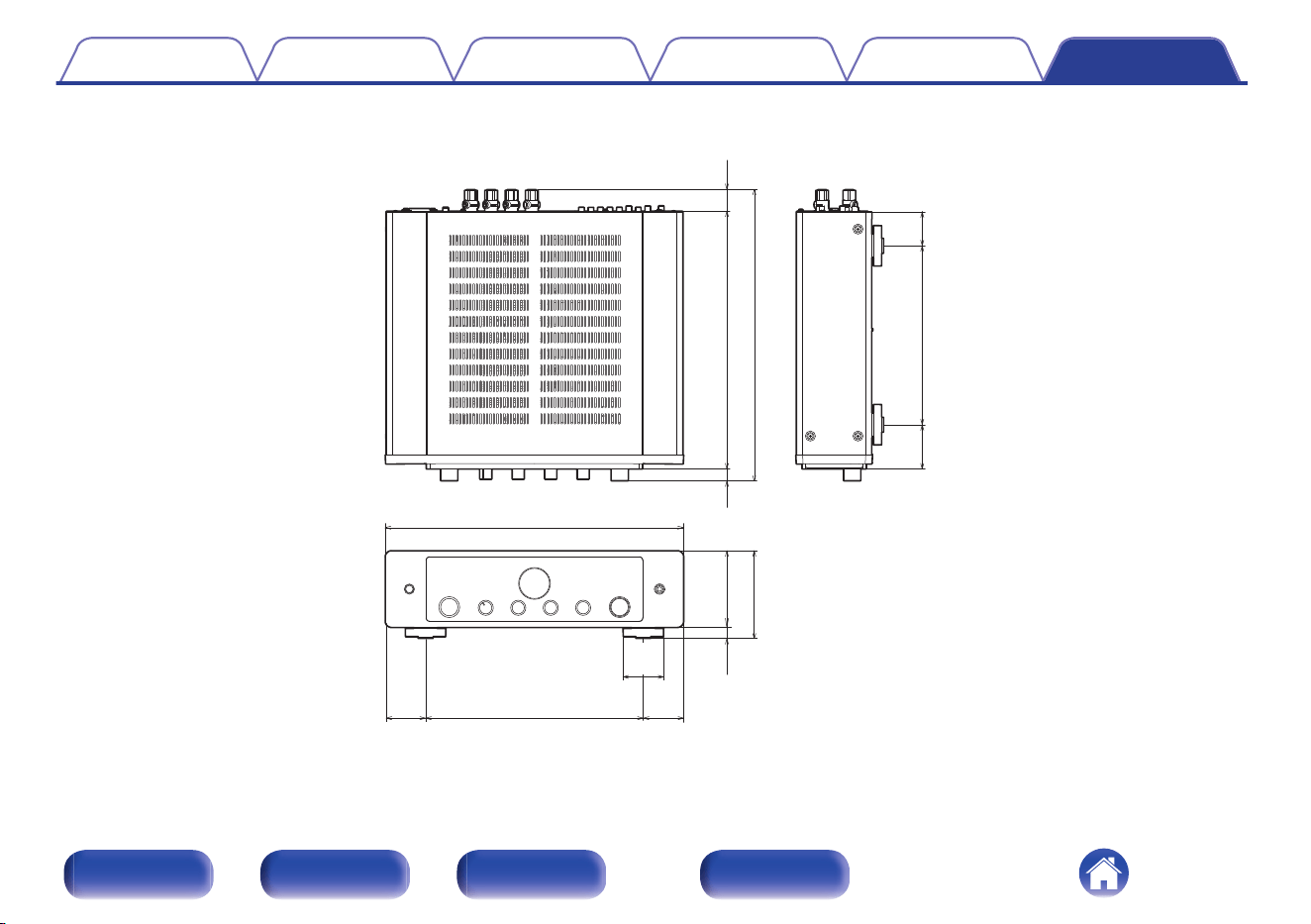
RMS Power output (20 Hz – 20 kHz simultaneous drive of both
channels) :
70 W x 2 (8 Ω/ohms load)
100 W x 2 (4 Ω/ohms load)
0
Total harmonic distortion (20 Hz – 20 kHz simultaneous drive of
both channels, 8 Ω/ohms load) :
0.02 %
0
Frequency response (CD, 1 W, 8 Ω/ohms load) : 5 Hz – 100 kHz ±3 dB
0
Damping factor (8 Ω/ohms load, 20 Hz – 20 kHz) : 100 and over
0
Input sensitivity/impedance: PHONO (MM): 1.4 mV / 47 kΩ/kohms
CD, TUNER, LINE, RECORDER: 185 mV/16 kΩ/kohms
POWER AMP IN: 1.5 V/15 kΩ/kohms
0
Output voltage: PRE OUT: 1.5 V
SUBWOOFER OUT: 220 mV
0
Maximum allowable PHONO input level (1 kHz) MM : 80 mV
0
RIAA deviation (20 Hz – 20 kHz) : ±0.5 dB
0
S/N (IHF-A, 8 Ω/ohms load) : PHONO (MM): 87 dB (5 mV input)
CD, TUNER, LINE, RECORDER: 113 dB (rated output)
POWER AMP IN: 125 dB (rated output)
0
Tone Control : BASS (50 Hz): ±10 dB
TREBLE (15 kHz): ±10 dB
0
Operating temperature: 41 °F - 95 °F (5 °C - 35 °C)
0
Power supply : AC 120 V, 60 Hz
0
Power consumption : 220 W
0
Power consumption in standby mode : 0.3 W
For the purpose of improvement, the specifications and design are subject to change without notice.
Contents
Connections Playback Settings Tips Appendix
45
Front panel Rear panel
Remote control
unit
Index
Index
v A
Auto Standby mode ........................................ 32
v B
Blu-ray Disc player ......................................... 19
v C
CD player ................................................. 19, 28
v F
Front panel ....................................................... 6
v I
Input source ................................................... 27
v M
Muting ............................................................ 28
v N
Network audio player ..................................... 19
v P
Power amplifier .............................................. 21
Pre-amplifier ................................................... 21
Protection circuit ............................................ 44
v R
Rear panel ........................................................ 8
Recording device ........................................... 20
Remote control codes settings ....................... 34
Remote control unit ........................................ 10
v S
Source direct ............................................ 28, 44
Speaker impedance ....................................... 44
Speakers ........................................................ 14
v T
Tips ................................................................ 36
Tone ............................................................... 28
Troubleshooting ............................................. 37
Tuner .............................................................. 19
Turntable ........................................................ 19
v V
Volume ........................................................... 27
Contents
Connections Playback Settings Tips Appendix
47
Front panel Rear panel
Remote control
unit
Index
3520 10943 00AS
© 2023 DEI Sales, Inc. All Rights Reserved.
48