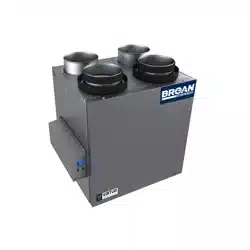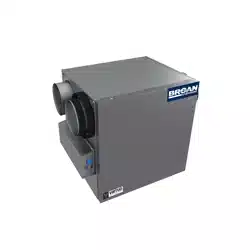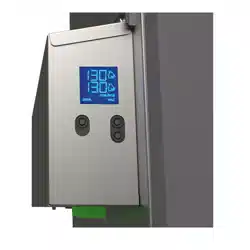
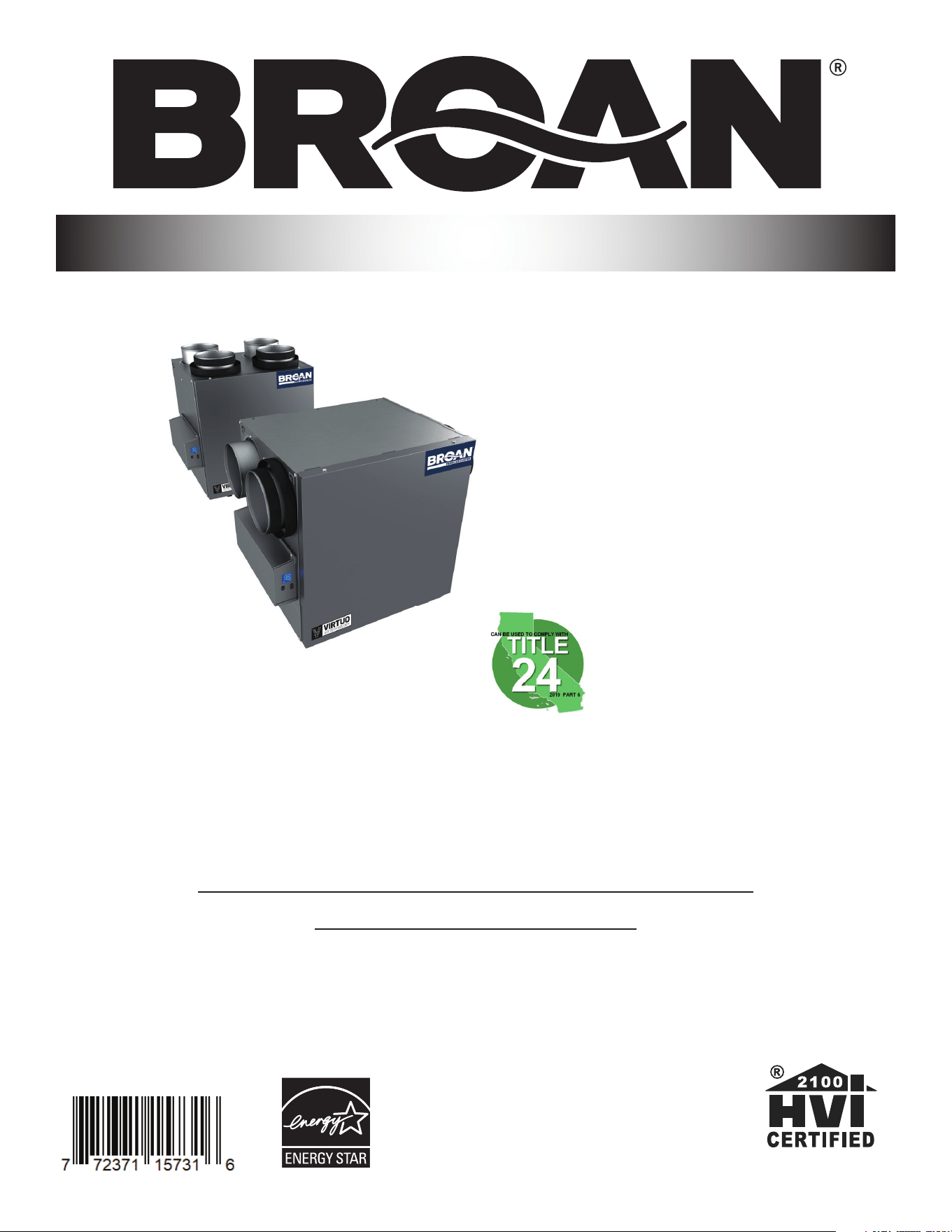
B110H65RT B110H65RS
B130H65RT B130H65RS
B130E65RT B130E65RS
**B150H75NT* **B150H75NS*
**B160H75RT **B160H75RS
**B160H65RT **B160H65RS
B160E65RT B160E65RS
B150E75NT* B150E75NS*
B160E75RT B160E75RS
USER AND INSTALLER MANUAL
INSTALLER: READ THESE INSTRUCTIONS
SAVE THEM FOR USER
RESIDENTIAL USE ONLY
23832 REV. 12
REGISTER YOUR PRODUCT ONLINE AT:
www.broan-nutone.com/en-us/home/customer-service/product-registration
For additional information, visit www.Broan-NuTone.com
VB0288
FAULT INDICATOR DISPLAY REQUIREMENTS
*Recirculation mode is not offered on these
models.
**THESE PRODUCTS EARNED THE ENERGY
STAR
®
BY MEETING STRICT ENERGY EFFICIENCY
GUIDELINES SET BY NATURAL RESOURCES CANADA
AND THE US EPA. THEY MEET ENERGY STAR
REQUIREMENTS ONLY WHEN USED IN CANADA.
Broan-NuTone LLC, 926 West State Street, Hartford, Wisconsin, USA 53027 Broan-NuTone.com 800-558-1711
2
Please take note that this manual uses the following symbols to emphasize particular information:
Identifi es an instruction which, if not followed, might cause serious personal injuries including possibility of death.
CAUTION
Denotes an instruction which, if not followed, may severely damage the unit and/or its components.
NOTE: Indicates supplementary information needed to fully complete an instruction.
LIMITATION
For residential (domestic) installation only. Installation work and electrical wiring must be done by a qualifi ed person in accordance with
all applicable codes and standards, including fi re-rated construction codes and standards.
⚠ WARNING
TO REDUCE THE RISK OF FIRE, ELECTRIC SHOCK, OR INJURY TO PERSON(S) OBSERVE THE FOLLOWING:
1. Use this unit only in the manner intended by the manufacturer.
2. Before servicing or cleaning this unit, disconnect power cord from electrical outlet.
3. This unit is not designed to provide combustion and/or dilution air for fuel-burning appliances.
4. When cutting or drilling into a wall or ceiling, do not damage electrical wiring and other hidden utilities.
5. Do not use this unit with any solid-state speed control device other than those specifi ed in section 3.1.
6. This unit must be grounded. The power supply cord has a 3-prong grounding plug for your personal safety. It must be plugged into
a mating 3-prong grounding receptacle, grounded in accordance with the national electrical code and local codes and ordinances.
Do not remove the ground prong. Do not use an extension cord.
7. Do not install in a cooking area or connect directly to any appliances.
8. Do not use to exhaust hazardous or explosive materials and vapors.
9. When performing installation, servicing or cleaning this unit, it is recommended to wear safety glasses and gloves.
10. When applicable local regulation comprises more restrictive installation and/or certifi cation requirements, the aforementioned
requirements prevail on those of this document and the installer agrees to conform to these at his own expense.
CAUTION
1. To avoid prematurely clogged fi lters, turn the unit OFF during construction or renovation.
2. Please read specifi cation label on product for further information and requirements.
3. Be sure to duct air outside – Do not intake/exhaust air into spaces within walls or ceiling or into attics, crawl spaces, or garage. Do
not attempt to recover the exhaust air from a dryer or a range hood.
4. Intended for residential installation only in accordance with the requirements of NFPA 90B (for a unit installed in U.S.A.) or Part 9 of
the National Building Code of Canada (for a unit installed in Canada).
5. Do not run any air ducts directly above or within 2 ft. of a furnace or its supply plenum, boiler, or other heat producing appliance. If
a duct has to be connected to the furnace return plenum, it must be connected 10 ft. away from plenum connection to the furnace.
6. The ductwork is intended to be installed in compliance with all applicable local and national codes.
7. When leaving the house for a long period of time (more than two weeks), a responsible person should regularly check if the unit
operates adequately.
8. If the ductwork passes through an unconditioned space (e.g.: attic), the unit must operate continuously except when performing
maintenance and/or repair. Also, the ambient temperature of the house should never drop below 65°F (18°C).
9. At least once a year, the unit mechanical and electronic parts should be inspected by qualifi ed service personnel.
10. Do not use your unit during construction or renovation of your house or when sanding drywall. Certain types of dust and vapors may
damage your system.
11. Make sure at all times that the outside intake and exhaust hoods are free from any snow during the winter season. It is important to
check your unit during a big snow storm, so it doesn’t draw in any snow. If this is the case, please turn the unit OFF for a few hours.
12. Since the electronic control system of the unit uses a microprocessor, it may not operate correctly because of external noise or very
short power failure. If this happens, unplug the unit and wait approximately 10 seconds. Then, plug the unit in again.
13. Do not make excessive use of fragrance appliances or chemicals since some may damage the unit components material.
WARNING
!

3
TABLE OF CONTENTS
1. TECHNICAL DATA ...............................................................................................................4
1.1 AIR DISTRIBUTION (NORMAL OPERATION) .............................................................................................4
2. INSTALLATION ....................................................................................................................4
2.1 LOCATING AND MOUNTING THE UNIT .....................................................................................................4
2.2 INSTALLING THE DUCTWORK AND THE REGISTERS .............................................................................6
2.2.1 FULLY DUCTED SYSTEM (T-1) (THIS CONFIGURATION ALLOWS RECIRCULATION MODE TO OPERATE.) ............................ 6
2.2.2 EXHAUST DUCTED SYSTEM (T-2) (THIS CONFIGURATION ALLOWS RECIRCULATION MODE TO OPERATE.) .......................6
2.2.3 SIMPLIFIED INSTALLATION (T-4) (THIS CONFIGURATION DOES NOT ALLOW RECIRCULATION MODE TO OPERATE.) ..............7
2.3 CONNECTING THE DRAIN (HRV ONLY) ....................................................................................................8
2.4 INSTALLING DUAL EXTERIOR HOOD USING TANDEM
®
TRANSITION KIT (OPTIONAL) .......................8
2.5 INSTALLING THE EXTERIOR HOODS .......................................................................................................9
2.6 CONNECTING THE DUCTS TO THE UNIT .................................................................................................9
2.6.1 DUCTS CONNECTION .................................................................................................................................10
3. CONNECTIONS .................................................................................................................11
3.1 ELECTRICAL CONNECTION TO OPTIONAL MAIN WALL CONTROL .................................................... 11
3.1.1 ELECTRICAL CONNECTION TO SPEED, DEHUMIDISTAT OR AUTOMATIC OPTIONAL MAIN WALL CONTROL .........................
11
3.1.2 ELECTRICAL CONNECTION TO ADVANCED OPTIONAL MAIN WALL CONTROL ..............................................................
11
3.2 ELECTRICAL CONNECTION TO OPTIONAL AUXILIARY WALL CONTROL ........................................... 12
3.2.1 ELECTRICAL CONNECTION TO 20-40-60 OPTIONAL AUXILIARY WALL CONTROL .......................................................
12
3.2.2 ELECTRICAL CONNECTION TO DRY CONTACT OPTIONAL AUXILIARY WALL CONTROL (E.G. CRANK TIMER) .....................
12
3.3 CONNECTION TO THE CENTRAL FORCED-AIR SYSTEM .....................................................................13
3.3.1 UNIT OPERATION USING A DRY CONTACT CONNECTION...................................................................................13
3.3.2 UNIT INTERCONNECTION WITH CENTRAL FORCED-AIR SYSTEM (R/C/G/GF) ....................................................... 13
3.3.3 SYNCHRONIZATION WITH CENTRAL FORCED-AIR SYSTEM FUNCTION ...................................................................13
4. WIRING DIAGRAM ............................................................................................................14
5. NAVIGATION ON LCD SCREEN .......................................................................................15
5.1 DISPLAY ON LCD SCREEN ......................................................................................................................16
5.2 UNIT FIRST BOOT .....................................................................................................................................16
5.3 SETTINGS MODIFICATION ....................................................................................................................... 16
5.3.1 PROCEDURE TO MODIFY MIN CFM SETTING ....................................................................................................16
5.3.2 PROCEDURE TO MODIFY MAX CFM SETTING ...................................................................................................16
5.3.3 PROCEDURE TO MODIFY OPTIONS SETTING...................................................................................................16
5.3.4 PROCEDURE TO MODIFY INDEPENDENT AIRFLOWS SETTING ..............................................................................16
5.4 FACTORY SETTINGS RESET ...................................................................................................................17
6. USING THIS UNIT ..............................................................................................................17
6.1 YOUR VENTILATION SYSTEM ..................................................................................................................17
6.2 INTEGRATED CONTROL ..........................................................................................................................17
6.3 AHU MODE DISPLAY ................................................................................................................................17
7. SERVICE PARTS ................................................................................................................18
8. INSTALLER’S TROUBLESHOOTING ...............................................................................20
9. MAINTENANCE .................................................................................................................23
9.1 QUARTERLY ..............................................................................................................................................23
9.2 ANNUAL (AT FALL) ....................................................................................................................................24
10. USER’S TROUBLESHOOTING .......................................................................................24
11. WARRANTY ......................................................................................................................25
4
1. TECHNICAL DATA
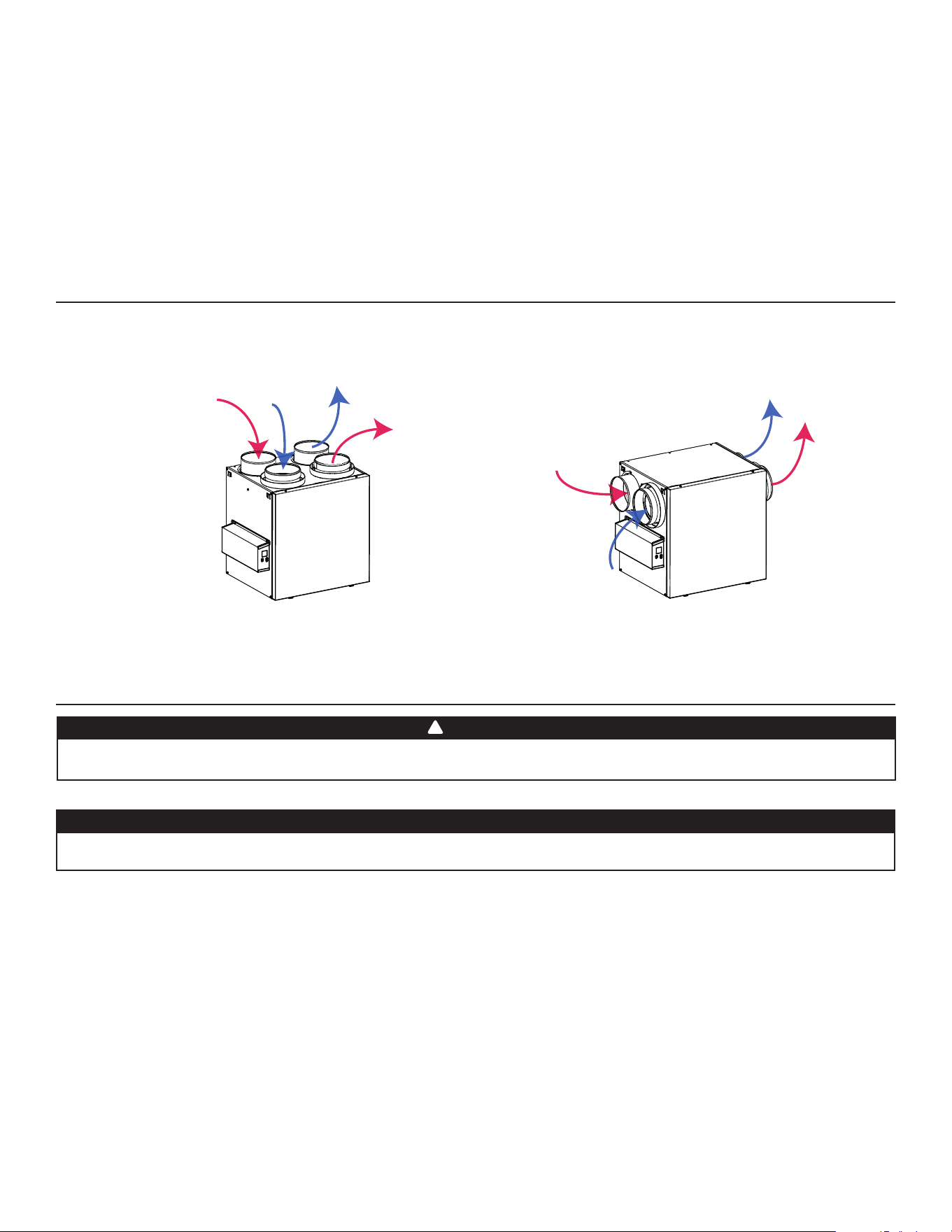
1.1 AIR DISTRIBUTION (NORMAL OPERATION)
VF0077
NOTE: The dimensions, performance charts, defrost cycle tables and specifi cations are listed on the specifi cation sheets of the unit.
Visit our website at www.Broan-NuTone.com.
2. INSTALLATION
2.1 LOCATING AND MOUNTING THE UNIT
The wearing of safety glasses and gloves is recommended when installing, maintaining or cleaning the unit to reduce the risk of injury
that could be caused by the presence of thin metal and/or high moving parts.
WARNING
!
Stale
air from
building
Stale
air from
building
Stale air to
outdoors
Stale air to
outdoors
Fresh
air from
outdoors
Fresh
air from
outdoors
Fresh air to
building
Fresh air to
building
Choose an appropriate location for the unit:
• Within an area of the house where the ambient temperature is kept between 50°F and 149°F;
• Away from living areas (dining room, living room, bedroom), if possible;
• So as to provide easy access to the interior cabinet for maintenance, and to the control panel on the side of the unit;
• Close to an exterior wall, so as to limit the length of the insulated fl exible ducts to and from the unit;
• HRV units only: close to a drain. If no drain is close by, use a pail to collect run-off;
• Away from hot chimneys, electrical panel and other fi re hazards;
• Within 6 feet of a power source (standard outlet).
Consumer Information
A. To ensure quiet operation of the H/ERV, each product model must be installed using sound attenuation techniques appropriate for
the installation.
B. The way your heat/energy-recovery ventilator is installed can make a signifi cant difference to the electrical energy you use. To
minimize the electricity use of the heat/energy-recovery ventilator, a stand-alone fully ducted installation is recommended. If you
choose a simplifi ed installation that operates your furnace air handler for room-to-room ventilation, an electrically effi cient furnace that
has an electronically commutated (EC) variable speed blower motor will minimize your electrical energy consumption and operating
cost.
C. Installation of a user-accessible control with your product model will improve comfort and may signifi cantly reduce the product
model’s energy use.
CAUTION
Make sure that no piece of mineral wool will enter in the unit during installation. Otherwise, this could reduce airfl ow and generate
vibrations and noise in the unit.
5
VD0488
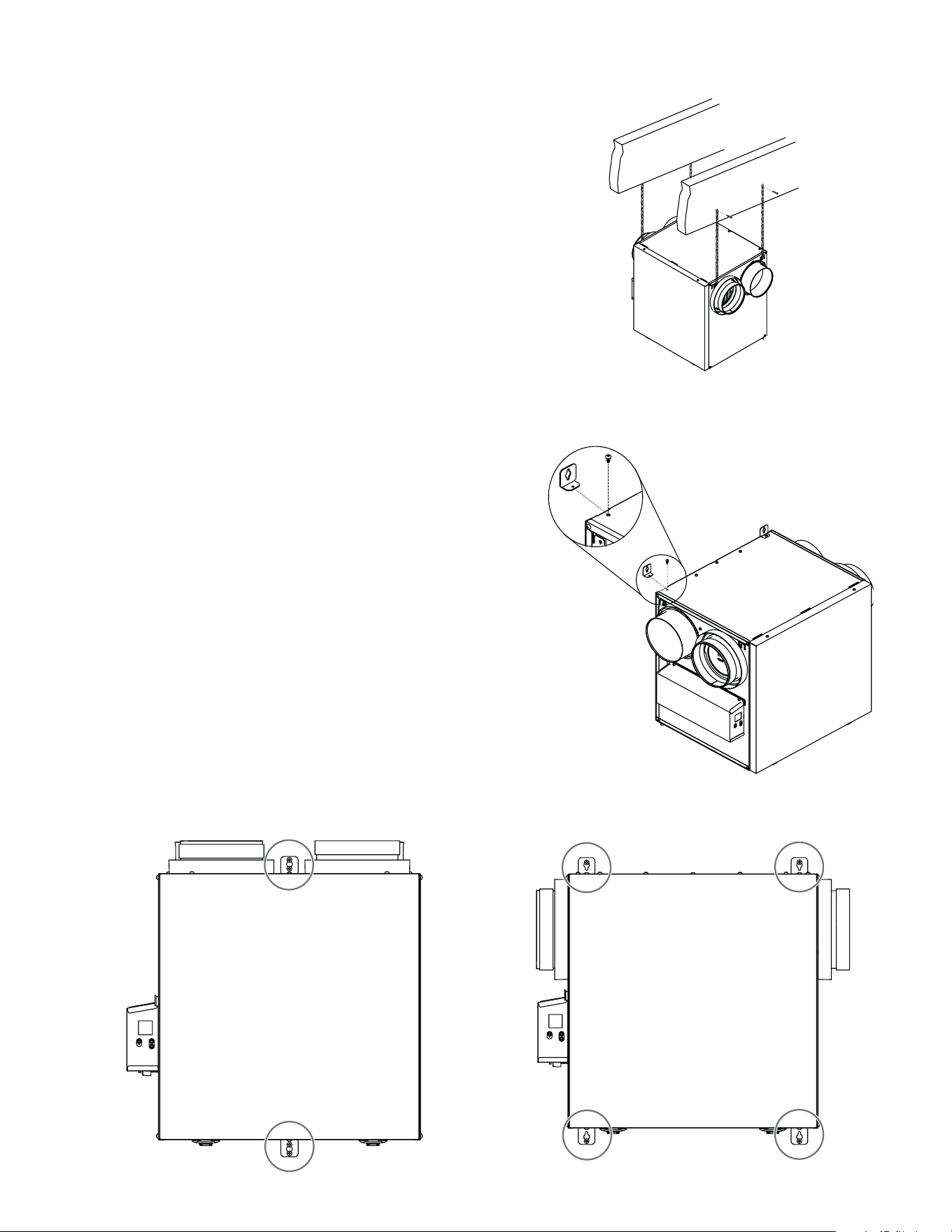
Wall mounted:
• Choose the appropriate location(s) for the mounting brackets
(see illustration below) according to stud(s) position.
• Insert the provided brackets under the unit frame (see illustration
hereafter).
• Fix the bracket using the screw no. 8 x 3/8".
• Using the 4 no. 8 x 1½" screws provided, secure the unit to the
wall making sure that the 4 screws engage into a stud.
• Always make sure that the unit is no more than 1/4" off level.
VD0486
VD0485
Suspended to the joists or trusts:
• Slightly bend the brackets on the unit to insert the provided
chains.
• Hang the unit to the joists (or trusts) using the chains. Springs are
not required.
• Always make sure that the unit is no more than 1/4" off level.
OR
VD0487
INSTALLATION WITH 2 BRACKETS INSTALLATION WITH 4 BRACKETS
2.1 LOCATING AND MOUNTING THE UNIT (CONT.)
6
VH0165
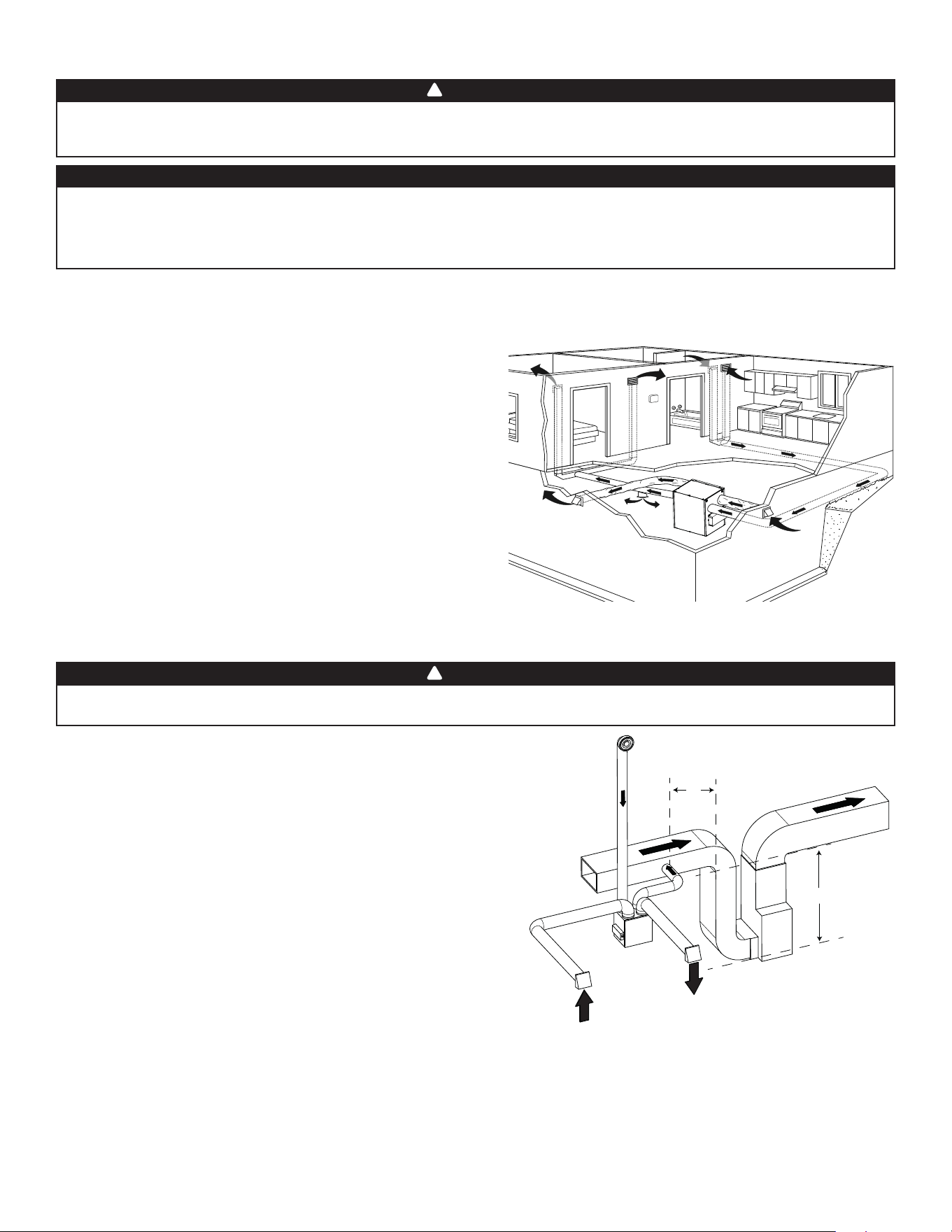
A
B
STALE AIR FROM BUILDING:
• Install registers in areas where contaminants and humidity are
produced: kitchen, bathrooms, laundry room, etc.
• Install registers on an interior wall, 6 to 12 inches away from the
ceiling OR in the ceiling.
• Install the kitchen register at least 4 feet away from the range.
• Bathroom fans and range hoods can be used to better exhaust stale
air.
• Homes with more than one level require at least one exhaust register
at the highest level.
FRESH AIR TO BUILDING:
• Install registers in bedrooms, dining room, living room and
basement.
• Install registers in the ceiling OR high on the walls with the airfl ow
directed towards the ceiling.
• If a register must be installed in the fl oor, direct the airfl ow up the
wall.
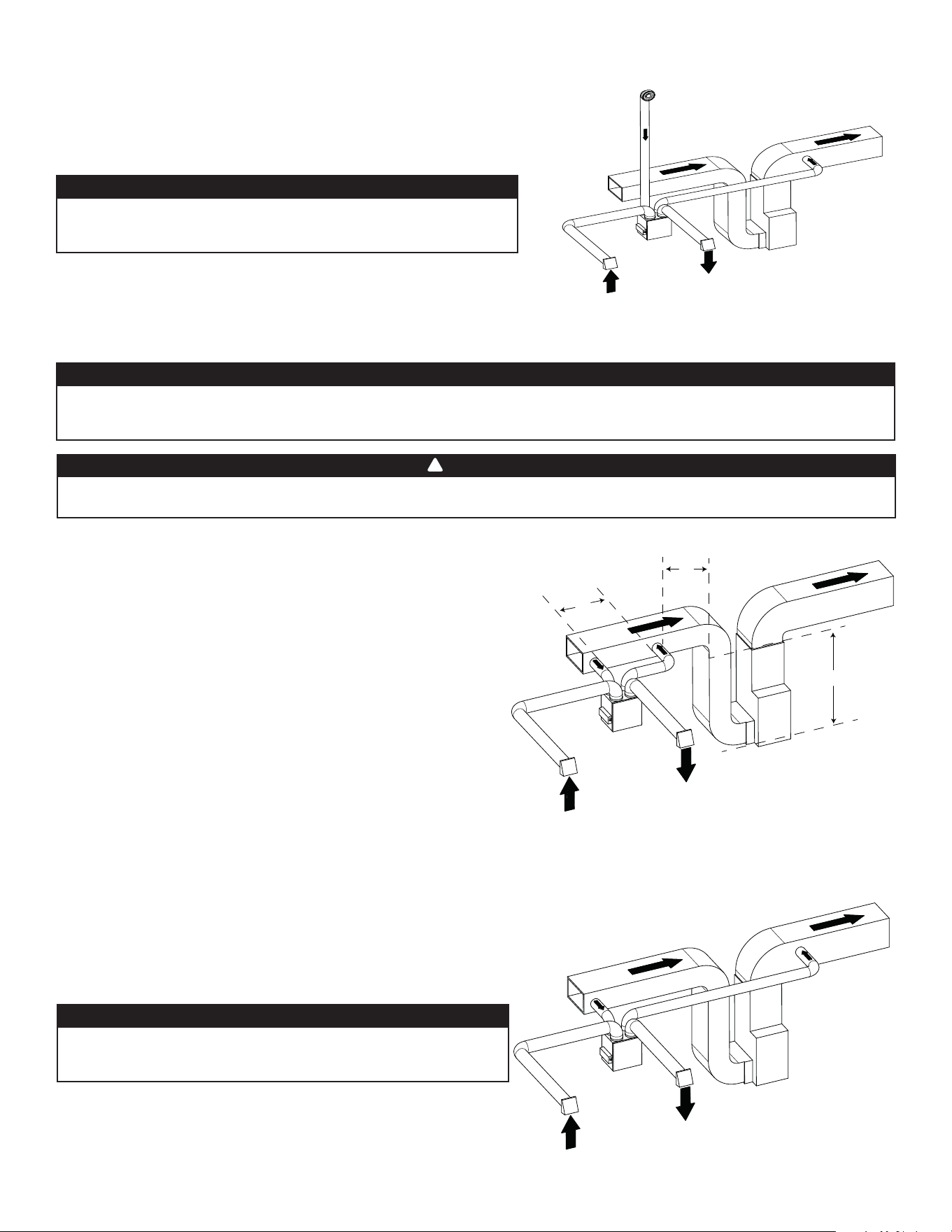
2.2.1 FULLY DUCTED SYSTEM (T-1) (THIS CONFIGURATION ALLOWS RECIRCULATION MODE TO OPERATE.)
2.2 INSTALLING THE DUCTWORK AND THE REGISTERS
Never install a stale air exhaust register in a room where there is a combustion device, such as a furnace, gas water heater, fi replace or
any appliance or equipment that can generate gaseous contaminants, or pollutants. The negative pressure this could create in the room
may impair proper evacuation of the gas or pollutants, which may have severe health consequences.
WARNING
!
STALE AIR FROM BUILDING:
Same as for Fully Ducted System, described on point 2.2.1.
FRESH AIR TO BUILDING:
• Connect the fresh air distribution duct of the unit to the central forced-
air system return duct at least 10 feet away from the central forced-air
system (A+B)*.
* This 10-ft. distance applies only in areas where the outside temperature
falls below the freezing point (32°F).
NOTE: The central forced-air system blower operation can be synchronized
with the unit (see section 3.3). It is recommended, but not essential that the
central forced-air system blower runs when the unit is in operation.
2.2.2 EXHAUST DUCTED SYSTEM (T-2) (THIS CONFIGURATION ALLOWS RECIRCULATION MODE TO OPERATE.)
Duct connection to the central forced-air system can be regulated by some codes and standards. It is your responsibility to consider and
comply with your local requirements to avoid any non-compliance.
WARNING
!
NOTE: For this type of confi guration, the T-1 option must be selected on the LCD screen when auto-balancing the unit (see section 5.2).
NOTE: For this type of confi guration, the T-2 option must be selected
on the LCD screen when auto-balancing the unit (see section 5.2).
A+B= MIN 10’
Stale air from building
(e.g. bathroom)
Fresh air to
building
Stale air to
outdoors
Fresh air from
outdoors
If ducts have to go through an unconditioned space (e.g.: attic), always use insulated ducts to prevent condensation formation inside
and outside ducts, which could cause material damage and/or mold growth. Moreover, if fresh air to building duct and/or stale air
from building duct goes/go through an unconditioned space, the unit must be set to operate continuously in cold conditions (below
10°C/50°F). Continuous air movement inside ducts will prevent condensation formation. The unit can be stopped temporarily for
maintenance and/or repair purposes in such conditions.
CAUTION
7
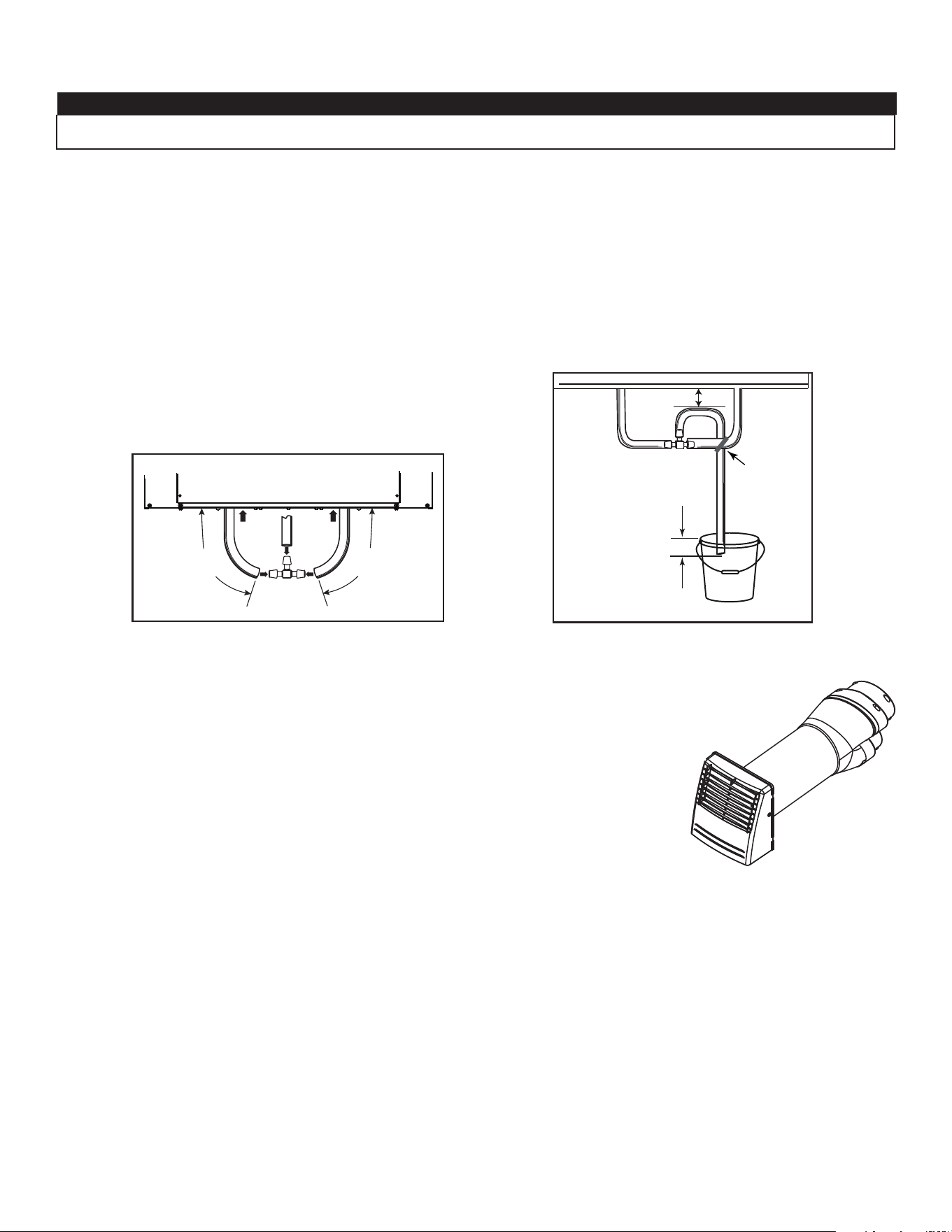
2.2.3 SIMPLIFIED INSTALLATION (T-4) (THIS CONFIGURATION DOES NOT ALLOW RECIRCULATION MODE TO OPERATE.)
The central forced-air system must be synchronized with the unit since fresh air evacuation and distribution come from the same section.
The central forced-air system must operate to avoid fresh air to be directly drawn by the evacuation, which would reduce signifi cantly
fresh air supply to the building. See section 3.3 for ducting.
CAUTION
Duct connection to the central forced-air system can be regulated by some codes and standards. It is your responsibility to consider and
comply with your local requirements to avoid any non-compliance.
WARNING
!
VH0168
Fresh air and exhaust air fl ow through the central forced-air system ducts,
which simplifi es the installation.
The use of bathroom fans and a range hood is suggested to exhaust stale
air.
STALE AIR FROM BUILDING:
Connect the stale air intake port of the unit to the central forced-air
system return duct at least 3 feet ahead of the fresh air distribution from
the unit.
FRESH AIR TO BUILDING:
Connect the fresh air distribution duct of the unit to the central forced-
air system return duct at least 10 feet away from the central forced-air
system (A+B)*.
* This 10-ft. distance applies only in areas where the outside temperature
falls below the freezing point (32°F).
VH0167
C
B
A
A+B= MIN 10’
C=3’
ALTERNATE INSTALLATION (T-5) (THIS CONFIGURATION DOES NOT ALLOW RECIRCULATION
MODE TO OPERATE.)
Unit should be synchronized with central forced-air system operation
to avoid condensation and mold growth in central forced-air system
distribution ducting if cooling mode of central forced-air system is used.
Fresh air to
building
Stale air from
building
Stale air to
outdoors
Fresh air from
outdoors
This confi guration is not recommended with high velocity central forced-
air system. High pressures produced by these systems could affect unit
proper operation and generate errors.
CAUTION
NOTE: For this type of confi guration, the T-5 option must be
selected on the LCD screen when auto-balancing the unit (see section 5.2).
Stale air to
outdoors
Fresh air from
outdoors
Fresh air to
building
Stale air from
building
NOTE: For this type of confi guration, the T-4 option must be
selected on the LCD screen when auto-balancing the unit (see section 5.2).
VH0166
ALTERNATE INSTALLATION (T-3) (THIS CONFIGURATION ALLOWS RECIRCULATION MODE TO
OPERATE.)
Unit should be synchronized with central forced-air system operation
to avoid condensation and mold growth in central forced-air system
distribution ducting if cooling mode of central forced-air system is used.
This confi guration is not recommended with high velocity central forced-
air system. High pressures produced by these systems could affect unit
proper operation and generate errors.
CAUTION
NOTE: For this type of confi guration, the T-3 option must be selected
on the LCD screen when auto-balancing the unit (see section 5.2).
Stale air from building
(e.g. bathroom)
Fresh air to
building
Stale air to
outdoors
Fresh air from
outdoors
8
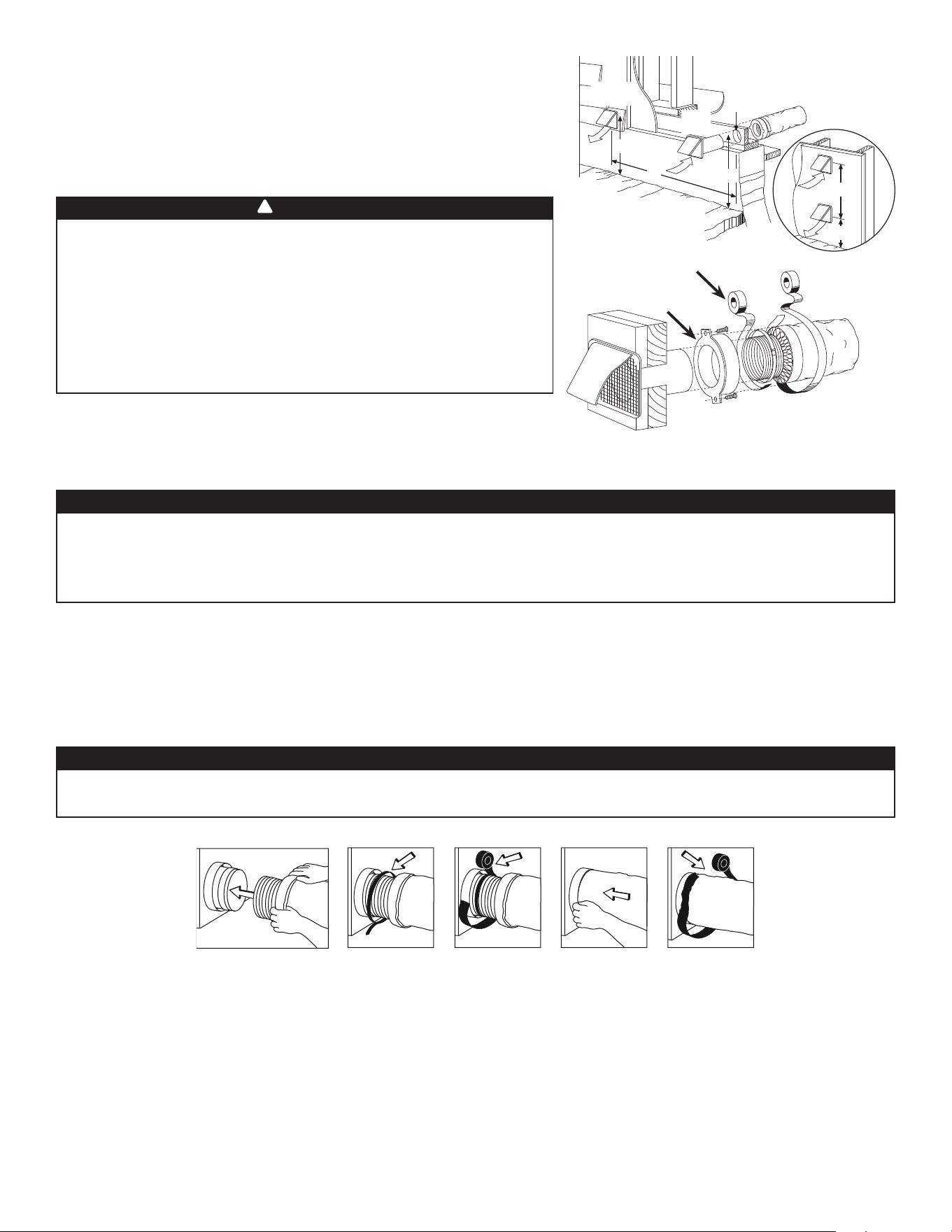
2.3 CONNECTING THE DRAIN (HRV ONLY)
Install the drain hose included and run it to a drain or a pail. This unit may generate a large amount of water in cooler weather. It is
necessary to install the drain hose properly to prevent water damage and/or material damage.
CAUTION
• Cut the appropriate length of drain tubing (see illustrations below).
• Connect the tubing to the provided adaptor.
• Make a water trap loop in the tube to prevent the unit from drawing unpleasant odors from the drain source.
• Add water in the loop to prevent noise or hiss.
• Make sure there is a distance of at least 2" between the unit and the tubing loop (see illustration below).
• Using the tie wrap provided, attach the tubing as illustrated below.
• Run the tube to the fl oor drain or to an alternate drain pipe or pail.
• IMPORTANT: If using a pail to collect water, place the tube end approximately 1” inside the pail in order to prevent water from being
drawn back up into the unit.
VO0290A
13"
(330 mm)
13"
(330 mm)
VO0083
± 1”
TIE WRAP
≥ 2”
2.4 INSTALLING DUAL EXTERIOR HOOD USING TANDEM
®
TRANSITION KIT (OPTIONAL)
For units set at 110 CFM or less, a Tandem transition kit can be used instead of 2 exterior hoods;
but take into account this device will generate approximately an additional 0.2 in w.g. static pressure
depending on the installation.
The minimum joist opening needed to install the Tandem
®
transition is 9¾”. The maximum height of
the Tandem transition is 8¾”.
To connect the insulated fl exible ducts to the Tandem transition (Exhaust air to outdoors and Fresh air
from outdoors), follow the instructions included with the Tandem transition kit (part no.VTYIK1).
VR0003
9
T
RANSITIONING TO 6-IN. DUCTS (FOR 110, 130 AND 150 CFM UNITS ONLY)
If using 6-in. ducts, install 5-in. to 6-in. transitions on the ports, and secure using duct tape only. If rigid ducting is used, install a 12-in.
section of fl exible duct between the transition and the rigid ducting (see above).
RIGID DUCTS
To prevent potential water leakage in cold side rigid ducting insulation, seal all rigid ducting joints with duct tape.
To avoid transmission of vibrations, always use a 12-inch section of fl exible duct to connect rigid ducts to the unit. To connect insulated
rigid ducts to the unit (cold side) using insulated fl exible ducts, follow instructions in section 2.5. To connect regular rigid ducts (warm
side) to the unit using non-insulated fl exible ducts, use a tie wrap.
2.6 CONNECTING THE DUCTS TO THE UNIT
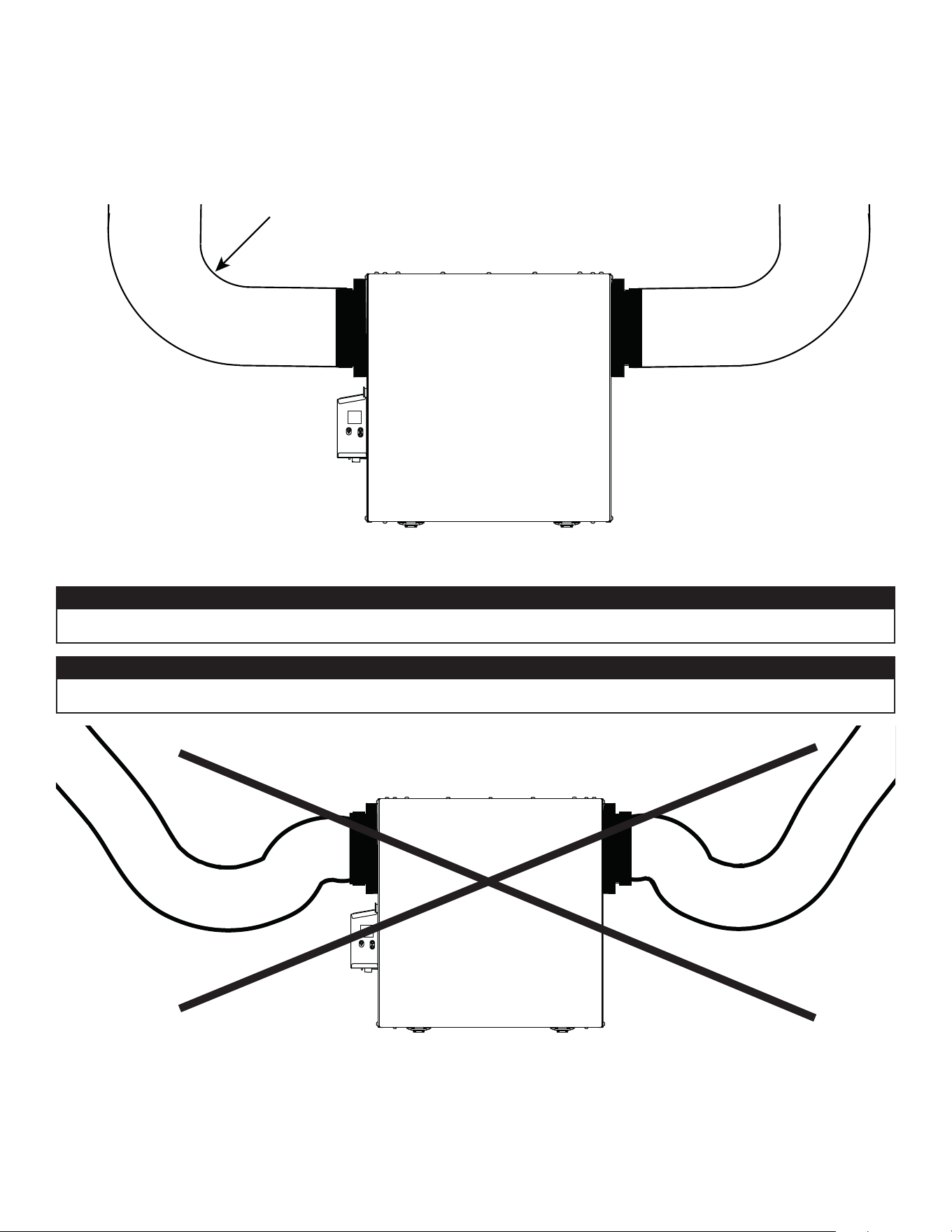
INSULATED FLEXIBLE DUCTS
Use the following procedure to connect the insulated fl exible ducts to the ports of the unit (exhaust to outside and fresh air from outside).
1. Expose the fl exible duct by pulling back the insulation, and place it over the inner port ring.
2. Attach the fl exible duct to the port using a tie wrap.
3. Seal the joint using duct tape.
4. Pull the insulation and vapor barrier over the joint, tuck them between the inner and outer rings of the double collar and fasten them
in place using duct tape.
V
J0157
• If ducts have to go through an unconditioned space (e.g.: attic), always use insulated ducts to prevent condensation formation inside
and outside ducts, which could cause material damage and/or mold growth.
• Do not use screws to connect the ducts or transitions to the ports so as not to interfere with ports inner dampers operation. A
non-functioning damper could freeze the unit, which could cause damages.
CAUTION
The vapor barrier should remain intact and free of cracks or openings. An opening could produce condensation inside or outside duct,
which could cause material damage and/or mold growth in the long run.
CAUTION
2.5 INSTALLING THE EXTERIOR HOODS
To avoid cross-contamination:
• Keep at least 10 feet between both hoods OR use approved combined hoods
model VTYIK1.
• Install hood(s) at least at 18 inches away from the ground OR depth of expected
snow accumulation, whichever is greater.
Refer to illustration at right for proper connection method of the insulated ducts
to the hoods. An “Anti-Gust Intake Hood” should be installed in regions where a
lot of snow is expected to fall.
VD0028
EXHAUST
HOOD
INTAKE
HOOD
18”
18”
6” ø
10’
6’
18”
O
PTIONAL
DUCT
LOCATION
TAPE AND DUCT TIE
CAULKING
Make sure intake hood is at least 6 feet (1.8 m) away from any of the following:
• Dryer exhaust, high effi ciency central forced-air system vent, central vacuum
vent
• Gas meter exhaust, gas barbecue-grill
• Any exhaust from a combustion source
• Garbage bin and any other source of contamination.
Ignoring these recommendations could signifi cantly degrade the quality of the
incoming air which, in some cases, could result in health consequences.
In the event of a confl ict between our conditions and local requirements, the
latter will have priority.
WARNING
!
NOTE: It is recommended to use 6" ducting instead of 5" ducting for 150H75NT, 150H75NS, 150E75NT and 150E75NS units if
required airfl ow is over 130 CFM. It will prevent having too high static pressure in the ducting.
10
2.6.1 DUCTS CONNECTION
VD0489
CORRECT INSTALLATION
VD0490
INCORRECT INSTALLATION
IMPORTANT: Make sure to connect ducting as illustrated below to get airfl ows reading accuracy. Correct installation will also allow
proper drainage of water that may accumulate in ducting.
Insulated ducts must have the same diameter as the ports to ensure proper drainage of water that may accumulate in ducts.
CAUTION
Ducting must not be too crushed. Otherwise, airfl ows reading accuracy will be affected.
CAUTION
R = 3" minimum
NOTE: Route ducts as straight as possible, minimize the number of elbows and design and install ducts in accordance with
ACCA’s Manual D.
11
3. CONNECTIONS
3.1 ELECTRICAL CONNECTION TO OPTIONAL MAIN WALL CONTROL
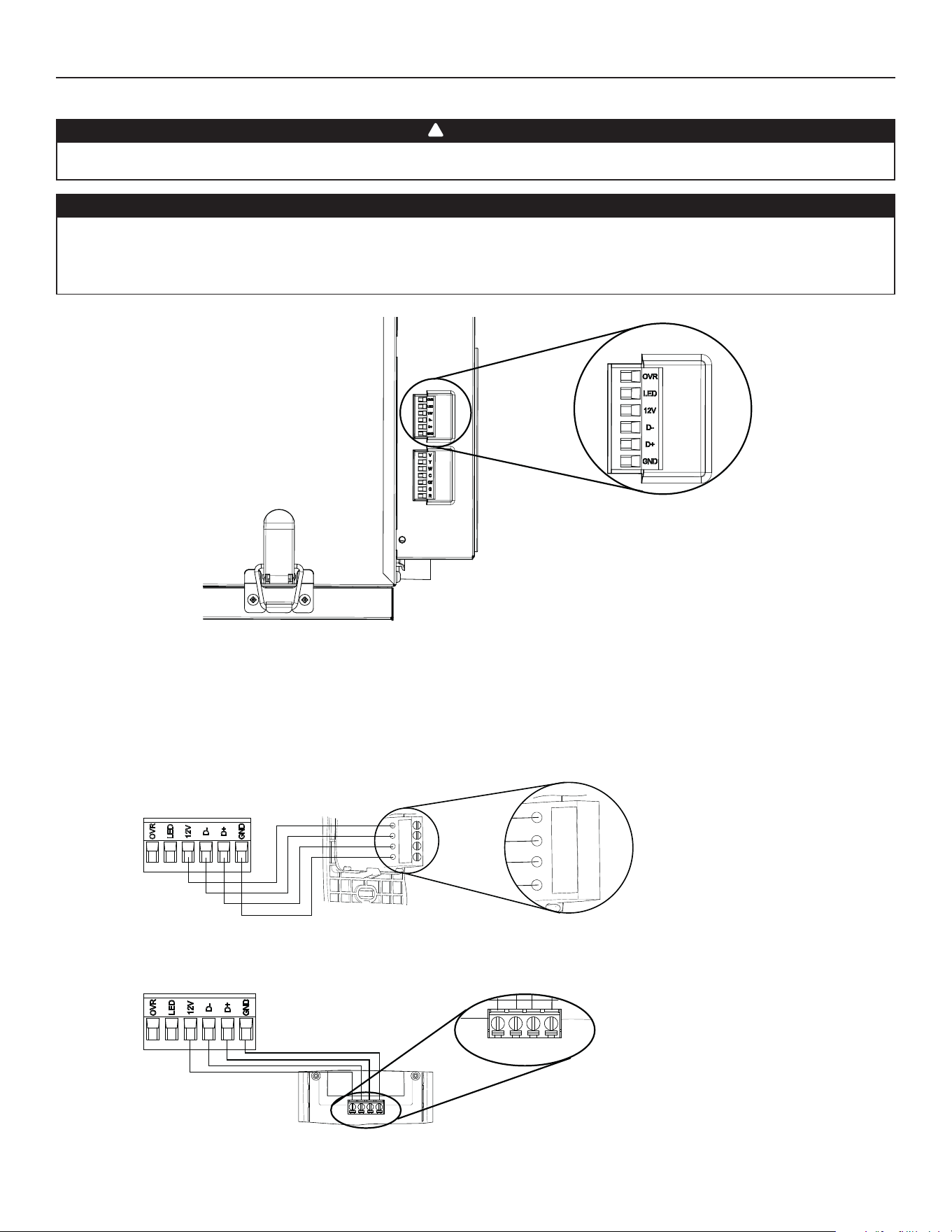
Use the terminal connector included to perform the electrical connection for optional main wall control. Check if all wires are correctly
inserted in their corresponding holes in the terminal connector. Use screws to fi x wires in the terminal connector.
3.1.1 ELECTRICAL CONNECTION TO SPEED, DEHUMIDISTAT OR AUTOMATIC OPTIONAL MAIN WALL CONTROL
Gnd
D+
12V
D-
VC0241
12V
D-
D+
Gnd
Once the wall control connections have been made, insert the terminal connector in the electrical compartment.
NOTE : For information about the operation of the wall control, refer to the corresponding Installation and User Guide, available at
www.Broan-NuTone.com.
Always disconnect the unit before making any connections. Failure to cut power could result in electrical shock or damage to the wall
control or electronic module inside the unit.
Never install more than one optional main wall control per unit. Make sure that the wires do not short-circuit between themselves or by
touching any other components on the wall control. Avoid poor wiring connections. To reduce the risk of electrical interference (noise),
do not run wall control wiring next to control contactors or near light dimming circuits, electrical motors, dwelling/building power or
lighting wiring or power distribution panel.
CAUTION
WARNING
!
HD0491
UNIT BOTTOM VIEW
TERMINAL CONNECTOR
3.1.2 ELECTRICAL CONNECTION TO ADVANCED OPTIONAL MAIN WALL CONTROL
12V D- D+ Gnd
VC0242
12V D- D+ Gnd
12
3. CONNECTIONS (CONT’D)
3.2 ELECTRICAL CONNECTION TO OPTIONAL AUXILIARY WALL CONTROL
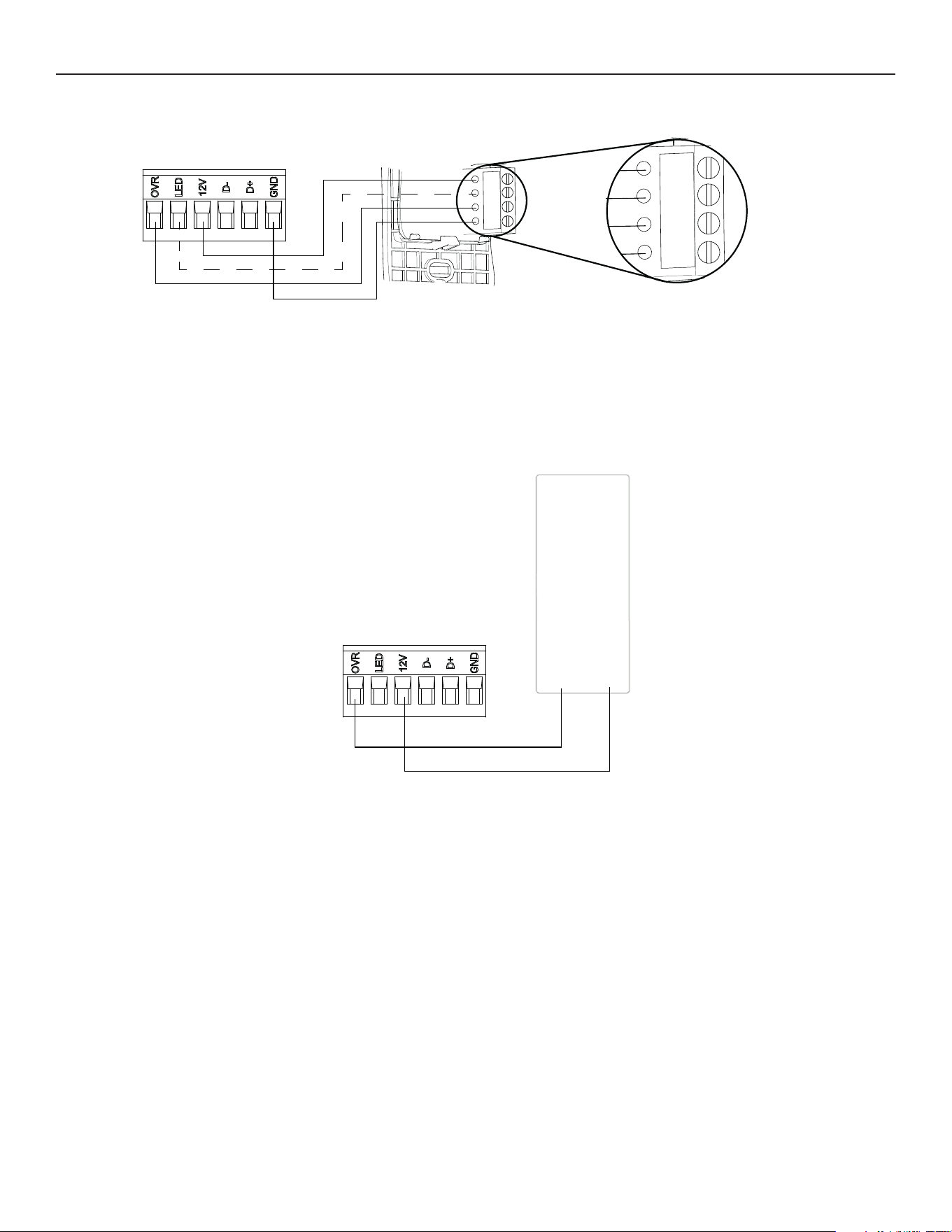
3.2.1 ELECTRICAL CONNECTION TO 20-40-60 OPTIONAL AUXILIARY WALL CONTROL
Gnd
OVR
12V
LED
VC0243
Gnd
OVR
12V
LED
When confi gurating OVR option on the LCD screen, choose among these 3 confi gurations: BAL (the unit remains balanced while
providing maximum airfl ow), PER (the unit is slightly unbalanced since the distribution motor is in MAX speed while allowing maximum
exhaust ventilation) and DIS (the unit is unbalanced since air distribution is constant despite a higher need in exhaust ventilation).
NOTE : The auxiliary wall control can be used with a 3-wire connection by removing the LED signals. This optional wiring will not allow an
installation with more than 1 auxiliary wall control to properly synchronize their LEDs on an event requested from a peer. Only the
auxiliary wall control having requested the timer event will have the LEDs updated accordingly.
3.2.2 ELECTRICAL CONNECTION TO DRY CONTACT OPTIONAL AUXILIARY WALL CONTROL (E.G. CRANK TIMER)
Crank Timer
or
Any Dry Contact
12VOVR
VC0256
13
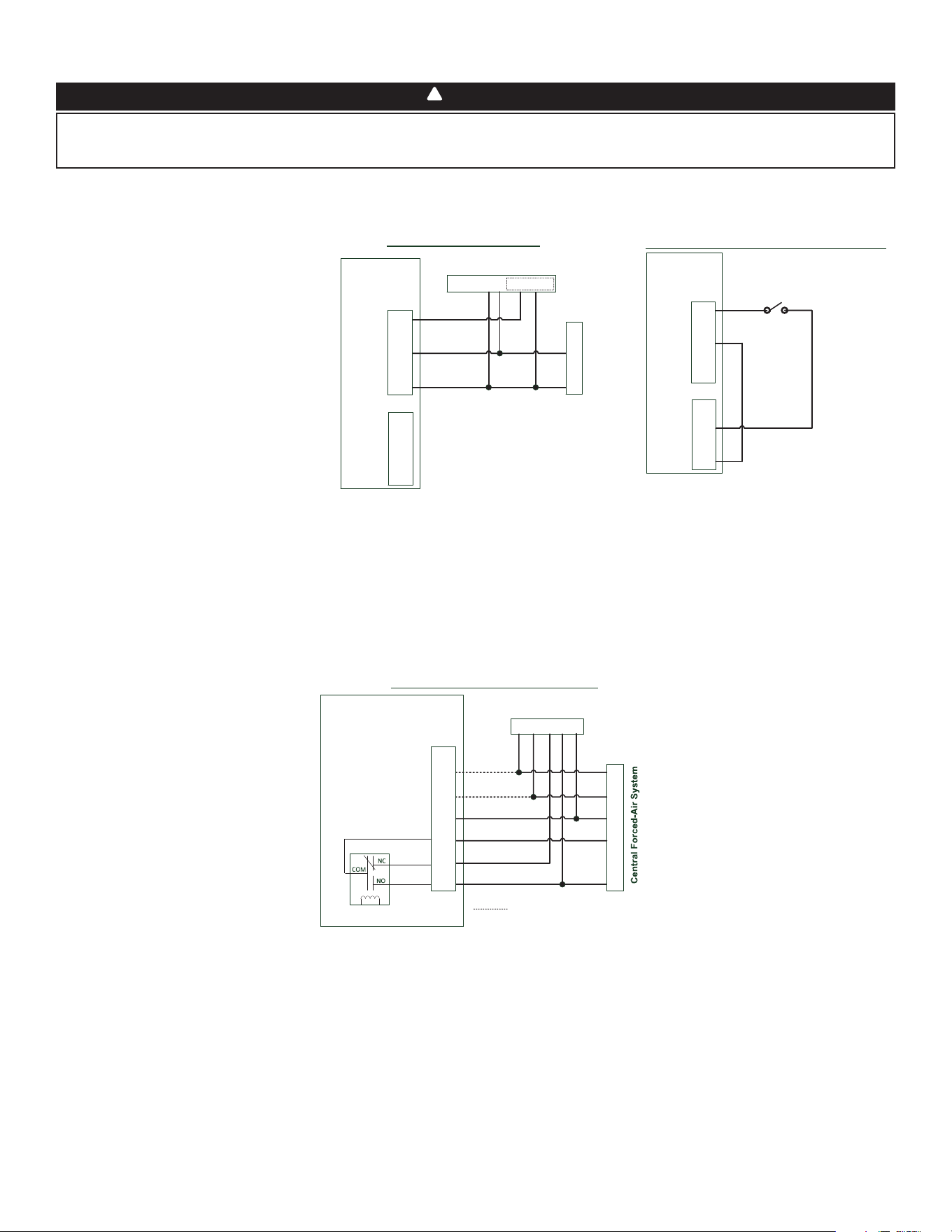
3.3.2 UNIT INTERCONNECTION WITH CENTRAL FORCED-AIR SYSTEM (R/C/G/GF)
These connections must be done if you want the unit to force the central forced-air system blower operation when ventilating (refer to
solid lines in above diagram).
NOTE : These connections are required for installation confi guration T-4. Refer to section 2.2 for more details.
3.3.3 SYNCHRONIZATION WITH CENTRAL FORCED-AIR SYSTEM FUNCTION
The Virtuo technology allows synchronizing the unit operation with the central forced-air system operating time. It prevents unnecessary
central forced-air system operating time while providing a better air distribution.
To use this function, W and Y connections must be added to R and C connections to inform the unit that the central forced-air system is
running (refer to dotted lines in above diagram).
Air Exchanger PCB
Terminal Blocks
Y
W
C
G
R
Y W G R C
Central Forced-Air System Thermostat
Wiring Options with Central Forced-Air System
Vent
Y
W
C
Gf
G
R
J13
Internal
Logic
Optional Wiring for Synchronization
Never connect a 120-volt AC circuit to the terminals of the central forced-air system interlock (standard wiring). Only use the low voltage
class 2 circuit of the central forced-air system blower control. The unit is designed for low voltages only. Connecting the unit on 120-volt
circuit would damage it instantly.
WARNING
!
3.3 CONNECTION TO THE CENTRAL FORCED-AIR SYSTEM
3.3.1 UNIT OPERATION USING A DRY CONTACT CONNECTION
This unit can be controlled by any dry contact connection such as the thermostat equipped with an optional ventilation output.
Y
W
C
G
R
Y W G R C Acc+ Acc-
Central Forced-Air System Thermostat
Central Forced-Air System
Wiring for Dry Contact Connection
1
1- External switch or any Dry-contact can be used to
activate Vent input if not available on the Thermostat
Air Exchanger
Terminal Blocks
Alternate Wiring for Dry Contact Independent Installation
Vent
Y
W
C
Gf
G
R
J13
OVR
LED
12V
D-
D+
GND
J9
External Switch or any
alternate Dry-Contact
Air Exchanger
Terminal Blocks
Vent
Y
W
C
Gf
G
R
J13
OVR
LED
12V
D-
D+
GND
J9
Note : Synchronization with a central forced-air system
with W and Y is not available with this configuration.
1 - External switch or any dry contact can be used to activate vent input if not
available on the thermostat. Some thermostats offer a single wire 24VAC output
for accessory ventilation. It can be directly connected to vent input and therefore
the Acc- / R connection is not required.
Once wired, unit will toggle between the
Standby mode when contact is opened and
the selected mode when contact is closed.
Choose among these 4 confi gurations:
minimum (unit operating in MIN speed),
intermittent (unit operating in MIN speed
20 min/hr then as per INT confi guration
selection for 40 min), auto* (unit operating
according to outdoor temperature) and
maximum (unit operating in MAX speed)
in DRY option on the LCD screen when the
VENT contact is activated. Refer to section 5
for more details.
* In auto mode, the unit will operate as
follows:
• Less than -13°F = 10 min/hr
• -13°F to 19°F = 20 min/hr
• 19°F to 50°F = 40 min/hr
• 50°F to 77°F = MIN speed
• 77°F to 82°F = 30 min/hr
• 82°F to 91°F = 20 min/hr
• Above 91°F = 10 min/hr
NOTE : This dry contact option will override the main wall control so we do not recommend
the use of a wall control with this type of connection.
NOTE : Following ducting installation confi guration and temperature conditions, it may be
necessary for the unit to operate continuously. Refer to section 2.2 for more details.
14
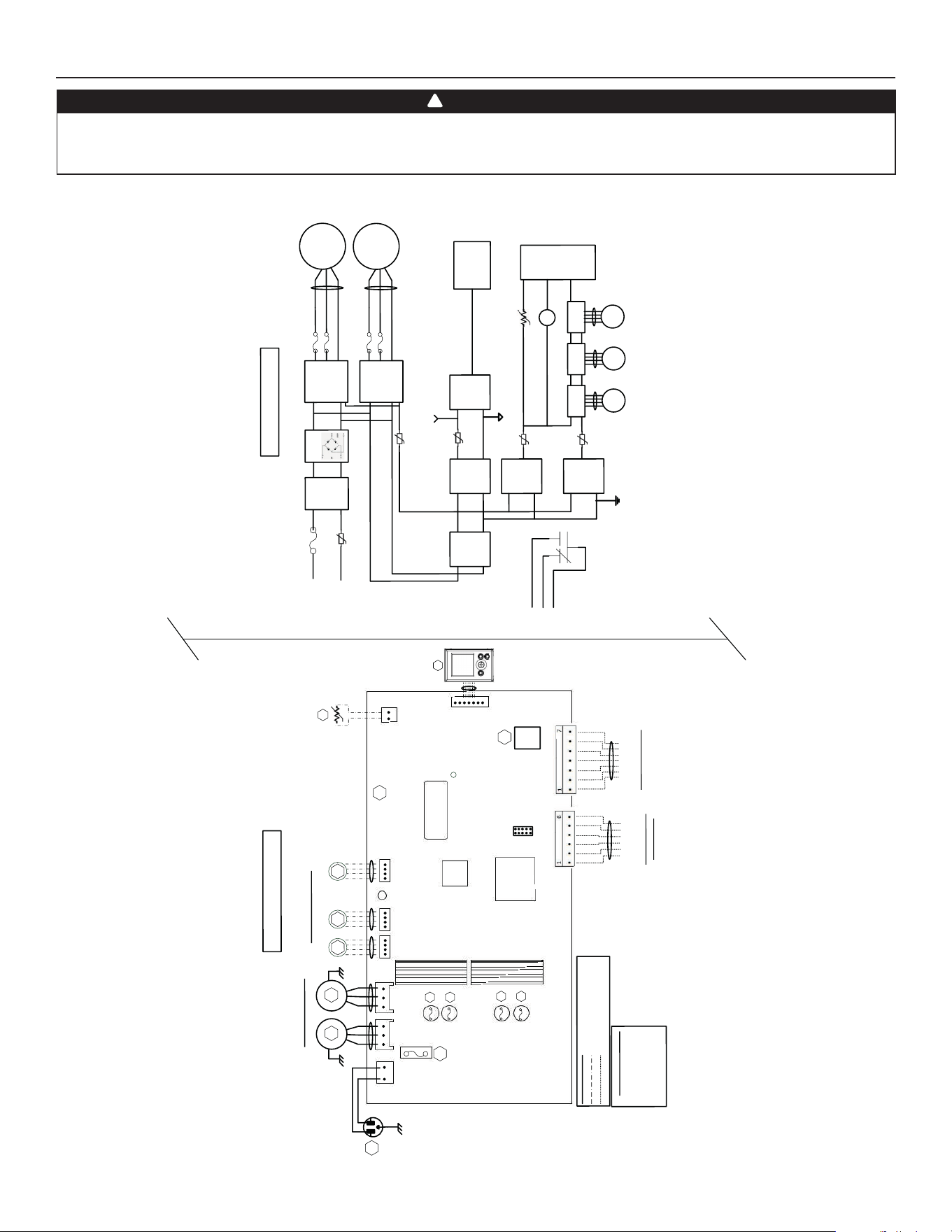
4. WIRING DIAGRAM
B
L
K
B
L
K
GRN
LOGIC DIAGRAM
W
IRING COLOR C
ODE
BLK BLA
C
K
BLU BLUE
GR
NGREE
N
RED RED
WHT
W
HITE
L
ine
voltage factory
wiring
L
ow vol
t
age factory wiring
L
ow
vol
t
age field wir
in
g
(Exhaust
)
B
LU
R
E
D
120VAC
60Hz
W1
GRN
F1
1
P
ower
LED
J1
M2
Damper
Stepp
er M
otors
Y
M1
W
HT
BLK
A1
MAIN EL
E
CTRO
NIC
A
SSEMBLY
M1
Po
wer
Supply
(15V
D
C)
Line
N
eutral
K1
G
Gf
AC
Lin
e
Filter
J1-2
F1
High Voltage
(120VAC
)
J1-1
To J
2
M
C
U
K1
M3
St
eppe
r
Driver
T
o
J5
WIRING DIAGRAM
BDM
1
5A
/125VAC
J
2J
3
J5 J6
J7
1
11
1
1
J7a
J
15a
1
A2
L
C
D
A
S
SEM
B
L
Y
GR
N
Ve
ntilatio
n F
a
n Motor
s
BLU
RED
M2
M3
M4
(Supply
)
(Suppl
y
)
* Op
tional
(R
ecir
c
)
(E
x
haust
)
MCU
Serial
N
um
ber
Isolation
Tr
a
nsformer
M
otor Fuses
F2
F3
F4
F5
V
W
Gf
C
G
R
*
Optio
nal Cen
tral Forced-A
ir
S
yste
m Wi
r
ing
(Isolate
d 2
4VAC
)
OV
R
LED
12V
D-
D+
G
N
D
Main and A
uxil
liar
y
C
o
ntrols Wiring
Thermisto
r
R1
RT
1
(N
TC)
Bridge
IPM
Motor 1
IPM
Motor 1
F
3
F2
M2
To J
3
F
5
F4
C
ent
r
al
Forced-
A
i
r
S
yst
em
Relay
K1
PT
C3
I
solat
e
d
S
u
pply
(12VDC)
Isolat
ed
Supply
(3.3VDC
)
J9
J1 3
L
ogic
Suppl
y
(
3.3VDC)
P
TC2
T
o
J9
L
ogic
Supply
(12VDC)
M4
Stepper
D
river
To
J
6
M5
Stepper
Driver
T
o
J7
PT
C6
PT
C4
T
o
J13
R
TH1
To
J
7a
(
R1)
LCD
Assembly
I
solated GND
Digital GN
D
T
o
J15a
(A2)
R
ecir
c
ulation
Damper (J6
) i
s
not
present for
a
l
l
models
J1 4
VE0452A
WARNING
• Risk of electric shocks. Before performing any maintenance or servicing, always disconnect the unit from its power source.
• This product is equipped with an overload protection (fuse). A blown fuse indicates an overload or a short-circuit situation. If the fuse blows, unplug the
product from the outlet. Discontinue using the unit and contact technical support.
!
15
5. NAVIGATION ON LCD SCREEN
+
-
OK
VD0492
OK button To confi rm a selection.
+ button
To increase a value.
To scroll up in a selection.
- button
To decrease a value.
To scroll down in a selection.
VQ0211
VQ0209
VQ0210
VQ0203
VQ0212
Indicates current
mode
Indicates
fresh airfl ow
PRESS ON OK BUTTON TO
CHANGE THE OPERATING MODE.
USE + BUTTON OR - BUTTON
TO SELECT THE DESIRED
OPERATING MODE.
+
-
PRESS ON OK BUTTON TO
CONFIRM THE OPERATING
MODE SELECTION.
VQ0205
VQ0207
VQ0201
Indicates
stale airfl ow
+
+
-
-
+
-
+
-
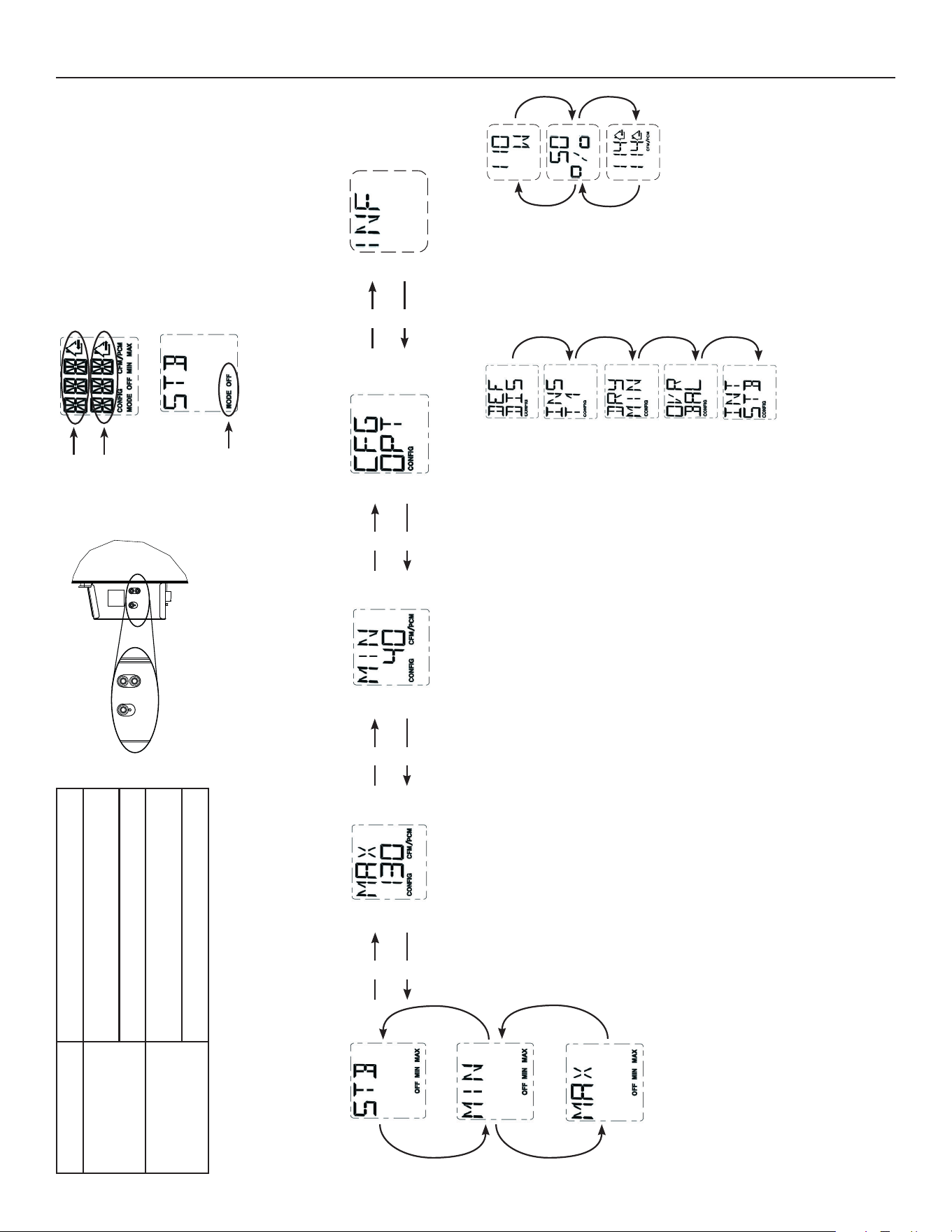
PRESS ON + BUTTON OR - BUTTON TO MODIFY MAX CFM, MIN CFM OR OPTIONS CONFIGURATION.
PRESS ON OK BUTTON DURING 4
SECONDS TO MODIFY MAX CFM
CONFIGURATION.
MAX CFM DATA WILL FLASH.
USE + BUTTON TO INCREASE
VALUE OR - BUTTON TO
DECREASE VALUE.
PRESS ON OK BUTTON TO
CONFIRM VALUE.
PRESS ON OK BUTTON DURING 4
SECONDS TO MODIFY MIN CFM
CONFIGURATION.
MIN CFM DATA WILL FLASH.
USE + BUTTON TO INCREASE
VALUE OR - BUTTON TO
DECREASE VALUE.
PRESS ON OK BUTTON TO
CONFIRM VALUE.
PRESS ON OK BUTTON DURING 4
SECONDS TO MODIFY OPTIONS
CONFIGURATION.
VQ0197
VQ0202
VQ0199
VQ0198
VQ0200
FOR EACH
OPTION
CONFIGURATION,
USE + BUTTON
TO SCROLL UP
IN OPTIONS
AVAILABLE OR
- BUTTON TO
SCROLL DOWN
IN OPTIONS
AVAILABLE.
ONCE OPTION
SELECTION IS
DONE, PRESS
OK BUTTON
TO CONFIRM
SELECTION. THE
NEXT OPTION
CONFIGURATION
WILL THEN
DISPLAY.
VQ0213
+
-
PRESS ON OK BUTTON DURING
4 SECONDS TO ACCESS
COMPLEMENTARY INFORMATION.
VQ0214
VQ0215
VQ0216
+
+
-
-
DISPLAYS ELECTRICAL
POWER CONSUMPTION.
DISPLAYS UNIT
% RUNNING
TIME (PER HOUR)
FOR SELECTED
OPERATING MODE.
DISPLAYS UNIT
AIRFLOWS.
PRESS ON OK BUTTON TO
EXIT COMPLEMENTARY
INFORMATION.
NOTE : According to unit model and confi guration, some menus may not be available.
In the example above, the unit provides
114 CFM with a power consumption of
110 W during 50% of the hour. The net
airfl ow is 57 CFM (50% X 114), the net
power consumption is about 55 W
(50% X 110).
16
5.3 SETTINGS MODIFICATION
5.3.1 PROCEDURE TO MODIFY MIN CFM SETTING
• Go to MIN using (+/-) then press on the OK button for 4 seconds.
• Use (+/-) to increase/decrease CFM and OK to confi rm.
5.3.2 PROCEDURE TO MODIFY MAX CFM SETTING
• Go to MAX using (+/-) then press on the OK button for 4 seconds.
• Use (+/-) to increase/decrease CFM and OK to confi rm.
5.3.3 PROCEDURE TO MODIFY OPTIONS SETTING
• Go to CFG OPT using (+/-) then press on the OK button for 4 seconds.
5.3.4 PROCEDURE TO MODIFY INDEPENDENT AIRFLOWS SETTING
• Press simultaneously (+/-) buttons for 4 seconds.
5.2 UNIT FIRST BOOT
PREPARATION
Follow these steps to ensure accurate measurements:
• Seal all the ductwork with tape. Close all windows and doors.
• Turn off all exhaust devices such as range hood, dryer and bathroom fans.
• If the installation is in any way connected to a ductwork of a central forced-air system, make sure that the central forced-air system
blower is ON. If not, leave central forced-air system blower OFF.
AUTO-BALANCING PROCEDURE
• Plug the unit and wait for the maximum CFM to display on the LCD screen. If unit is colder than ambient temperature, it is normal to
experience a 60 s longer boot-up since motors have to preheat.
• The maximum CFM will display on the LCD screen. Use (+/-) to adjust the CFM and OK to confi rm.
• The minimum CFM will display on the LCD screen. Use (+/-) to adjust the CFM and OK to confi rm.
• The house that fl ashes on the LCD screen indicates which side currently limits the airfl ow (supply or exhaust). If the airfl ow reached is
not suffi cient, the installer can improve the installation to increase airfl ow.
INSTALLATION CONFIGURATION SELECTION
• INS will display on the LCD screen. Choose among T-1, T-2, T-3, T-4 or T-5 following the installation confi guration (Refer to section
2.2 for more details).
• Auto-balancing is completed.
5.1 DISPLAY ON LCD SCREEN
DISPLAY DEFINITION DISPLAY DEFINITION
STB Standby mode OVR 60 Override 60 min
MED MED speed OVR CNT Override by dry contact
INT Intermittent mode AHU Refer to section 6.3 for explanation
REC Recirculation mode
(Min, Med or Max speed)
HUM Humidistat or Dehumidistat override
AUT AUTO mode TUR Turbo mode
SMT SMART mode OTH Away mode or Scheduling mode
OVR 20 Override 20 min DEF Defrost mode
OVR 40 Override 40 min EXX or WXX
(XX referring to error or warning number)
Refer to section 8 for each error/warning explanation
V
Q0
217
VQ0218
VQ0219
VQ0220
+
+
-
-
OK
OK
OK
+
WHEN MAX DISPLAYS, PRESS ON
+ BUTTON TO EXIT INDEPENDENT
AIRFLOWS SETTING.
SUPPLY AIRFLOW VALUE WILL FLASH.
PRESS ON + BUTTON OR - BUTTON TO
INCREASE/DECREASE VALUE.
PRESS OK BUTTON.
EXHAUST AIRFLOW VALUE WILL FLASH.
PRESS ON + BUTTON OR - BUTTON TO
INCREASE/DECREASE VALUE.
PRESS OK BUTTON.
17
6. USING THIS UNIT
This balanced ventilation unit is designed to provide fresh air to your home while exhausting stale, humid air. Thanks to its energy/heat
recovery module, the unit recovers a large proportion of heat or energy that is part of indoor or outdoor air according to the seasons to
improve comfort and energy effi ciency during the heating and the cooling periods. With the Virtuo Air Technology
TM
, this unit responds
to the variations in its environment in an autonomous way, ensuring to provide a proper level of ventilation and air quality. This unit also
features automatic modes (AUTO or SMART) that manage autonomously the required ventilation level as per indoor and/or outdoor
conditions. In colder areas, the unit will perform, at intervals, recovery module discreet defrost to maintain performance and comfort.
6.1 YOUR VENTILATION SYSTEM
6.2 INTEGRATED CONTROL
All units are equipped with an integrated control, located in front of the electrical compartment. For more convenience, these units can
be controlled using an optional wall control or the central forced-air system thermostat equipped with external fan activation.
+
-
OK
VD0492
MODE SELECTION
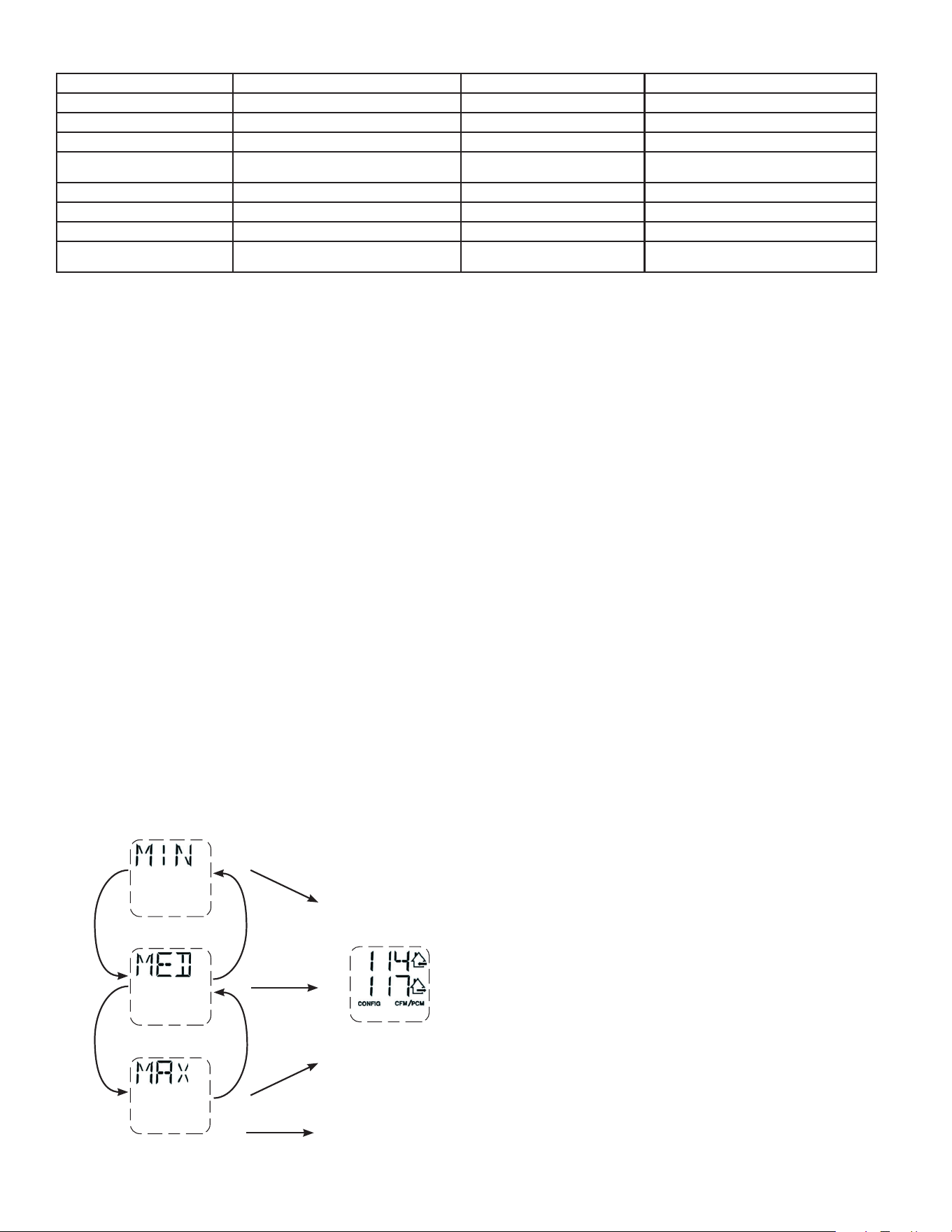
1. To change the mode, use (+/-) to access the Mode screen. Press OK to edit the mode
and use (+/-) to change the mode (Standby, Min, Max).
2. Press OK to confi rm selection. The airfl ows will be displayed for both MIN and MAX
modes.
NOTE: If an optional auxiliary wall control or the central forced-air system thermostat
equipped with external fan activation is used, it overrides the integrated control.
6.3 AHU MODE DISPLAY
Depending on unit confi guration and/or installation, the unit could not be able to reach desired minimum CFM. This situation could
happen with confi gurations T-2 to T-5. In such a case, AHUXX (XX referring to desired minimum CFM value) will display on LCD screen.
In AHU mode, the unit operates in intermittent mode to reach desired minimum CFM value. Intermittent mode duration varies as per
desired minimum CFM value.
5.4 FACTORY SETTINGS RESET
If any change is made to the ducting, reset settings to restart the airfl ow test.
PROCEDURE TO RESET SETTINGS
Press on the OK and (-) buttons simultaneously for 4 seconds. Use (+/-) to select Yes or No and OK to confi rm.
Then perform the auto-balancing procedure.
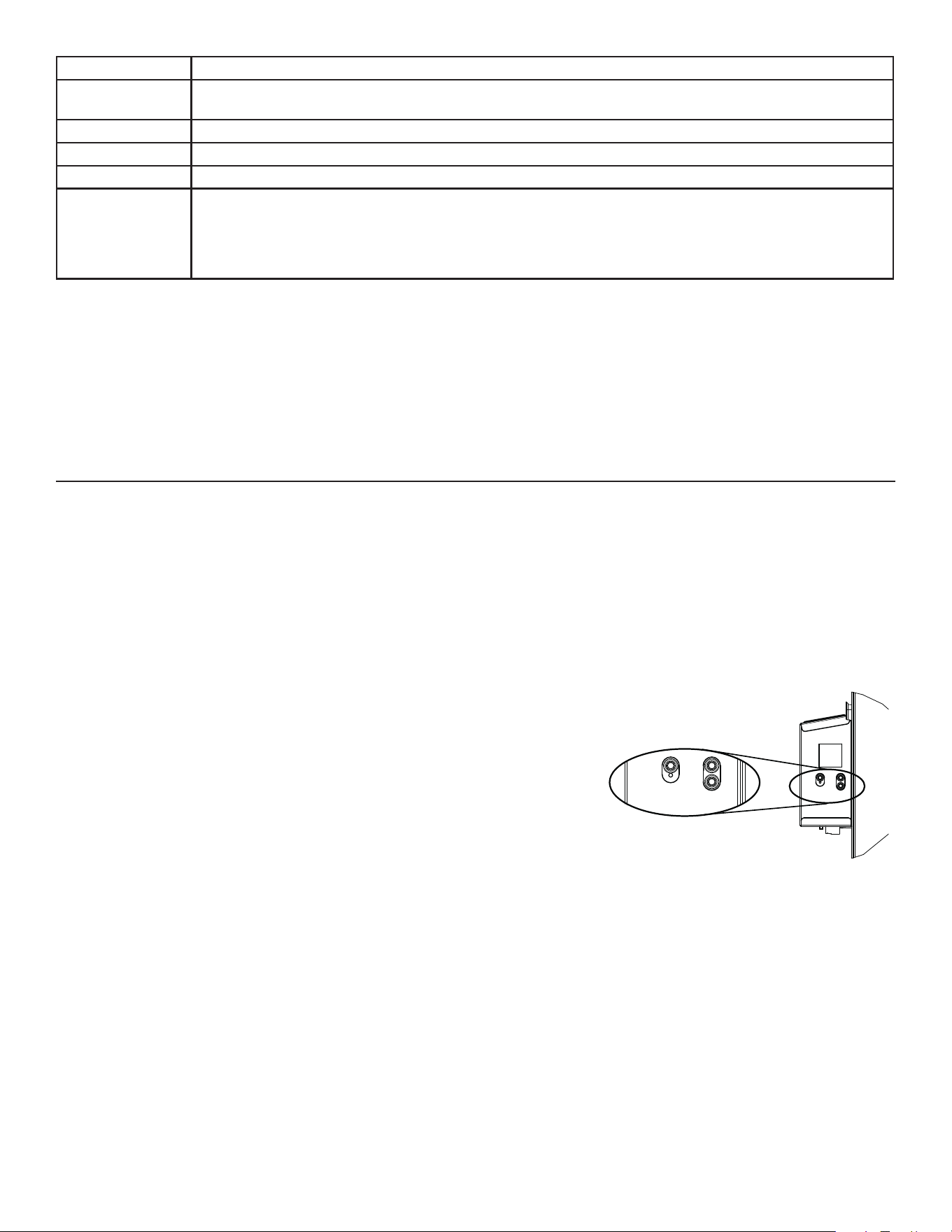
Options Confi gurations available
DEF (Defrost)
DIS* (Discretion - defrost without speed variation for more comfort),
PLU (Plus - extended defrost for colder areas)
INS (Installation) T-1, T-2, T-3, T-4*, T-5 (Refer to section 2.2)
DRY (Dry contact) MIN* (Minimum), INT (Intermittent), AUT (AUTO), MAX (Maximum) (Refer to section 3.3.1)
OVR (Override) BAL* (Balanced), PER (Performance), DIS (Discretion) (Refer to section 3.2.1)
INT (Intermittent)
STB* (Standby - 20 min in MIN speed and 40 min in standby mode), REC** (Recirculation - 20 min in MIN
speed and 40 min in recirculation mode) ** REC (Recirculation) confi guration is not available for T-2 to T-5
installation confi gurations nor for 150H75NT, 150H75NS, 150E75NT and 150E75NS units.
NOTE : Following ducting installation confi guration and temperature conditions, it may be necessary for the unit
to operate continuously. Refer to section 2.2 for more details.
* Factory setting
NOTE: If no selection is confi rmed within 10 minutes, the unit will exit the menu without saving any changes.
18
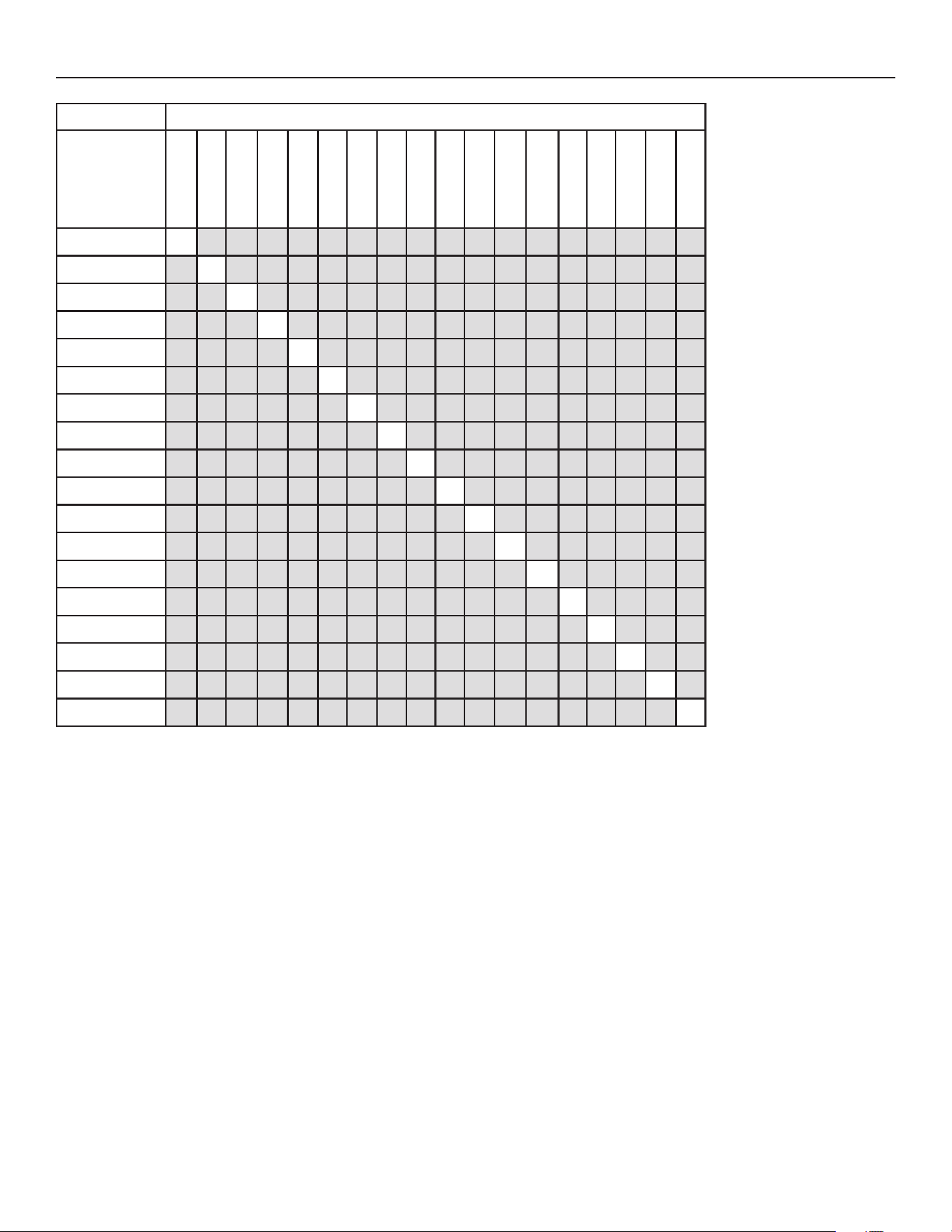
7. SERVICE PARTS
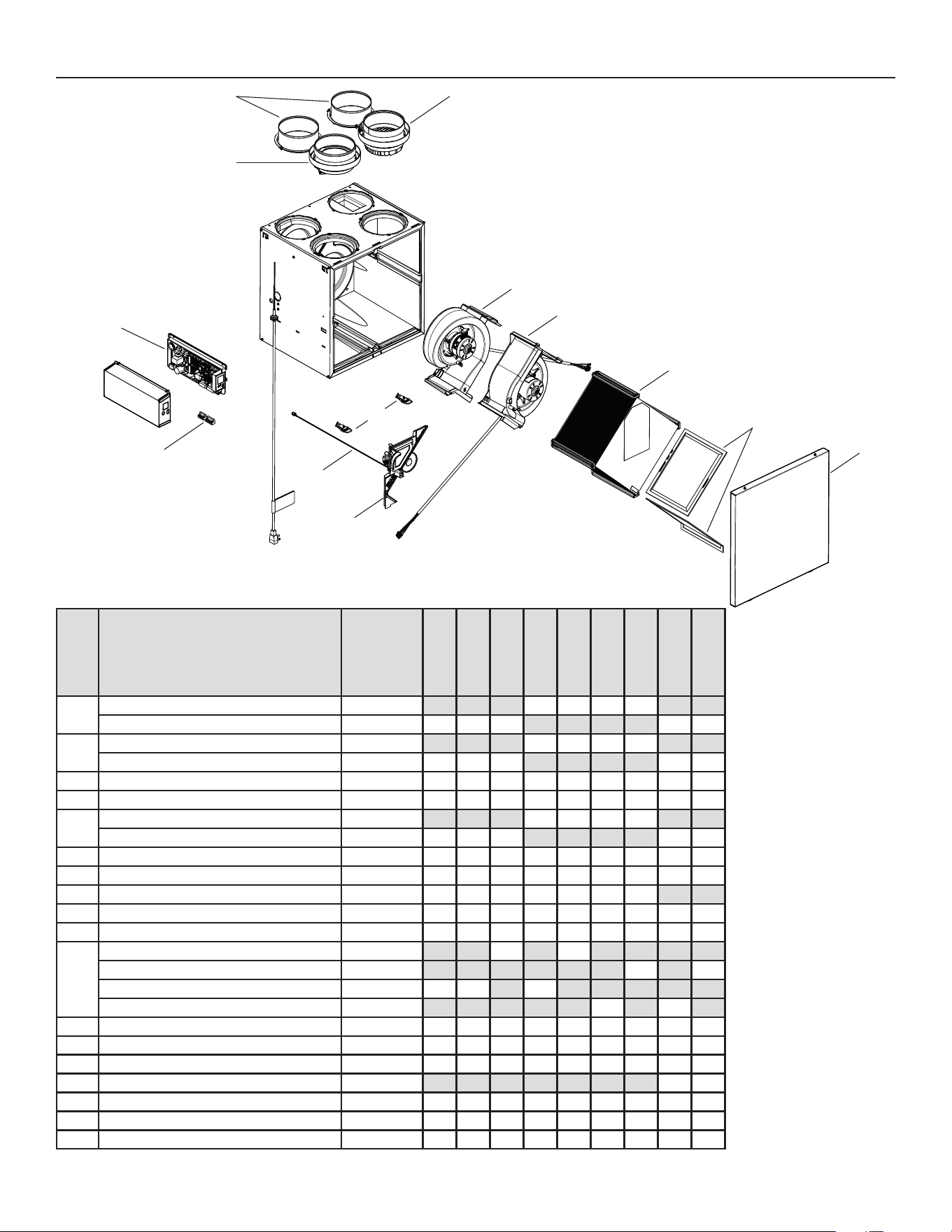
ITEM DESCRIPTION PART NUMBER
1
6" port warm side SV66139 2222
5" port warm side SV66140 2 2 2 2 2
2
6" metal port motorized damper SV66135 1111
5" metal port motorized damper SV66136 1 1 1 1 1
3 Electronic assembly SV66144** 111111111
4 Terminal blocks SV66145 111111111
5
6" exhaust port assembly SV66137 1111
5" exhaust port assembly SV66138 1 1 1 1 1
6 Door latches and keepers for door SV61218 111111111
7 Thermistor SV66134 111111111
8 Recirculation damper with thermistor SV66148 1111111
9 Exhaust blower with damper SV66142 111111111
10 Supply blower assembly SV66141 111111111
11
Core ERV 65 % SV66113 1 1
Core ERV 75 % SV66114 1 1
Core HRV 65 % SV66115 1 1 1
Core HRV 75 % SV66116 1 1
12 MERV8 fi lters kit SV66133 111111111
13 Door SV66150 111111111
14 Exhaust damper SV66143 111111111
15 Separator WE with thermistor SV66149 1 1
* Hardware kit SV66146 111111111
* Fuse for PCB SV66147 111111111
* ½" hose SV00592 111111111
REPLACEMENT PARTS AND REPAIRS
In order to ensure your ventilation
unit remains in good working
condition, you must use Broan-
NuTone LLC genuine replacement
parts only. The Broan-NuTone LLC
genuine replacement parts are
specially designed for each unit
and are manufactured to comply
with all the applicable certifi cation
standards and maintain a high
standard of safety. Any third party
replacement part used may cause
serious damage and drastically
reduce the performance level
of your unit, which will result in
premature failing. Broan-NuTone
LLC recommends to contact a
certifi ed service depot for all
replacement parts and repairs.
* Not shown.
VL0086
B
C
D
E
F
G
=
I
J
K
L
M
N
B110H65RT
B110H65RS
B130H65RT
B130H65RS
B130E65RT
B130E65RS
B160H65RT
B160H65RS
B160E65RT
B160E65RS
B160H75RT
B160H75RS
B160E75RT
B160E75RS
B150H75NT
B150H75NS
B150E75NT
B150E75NS
P
O
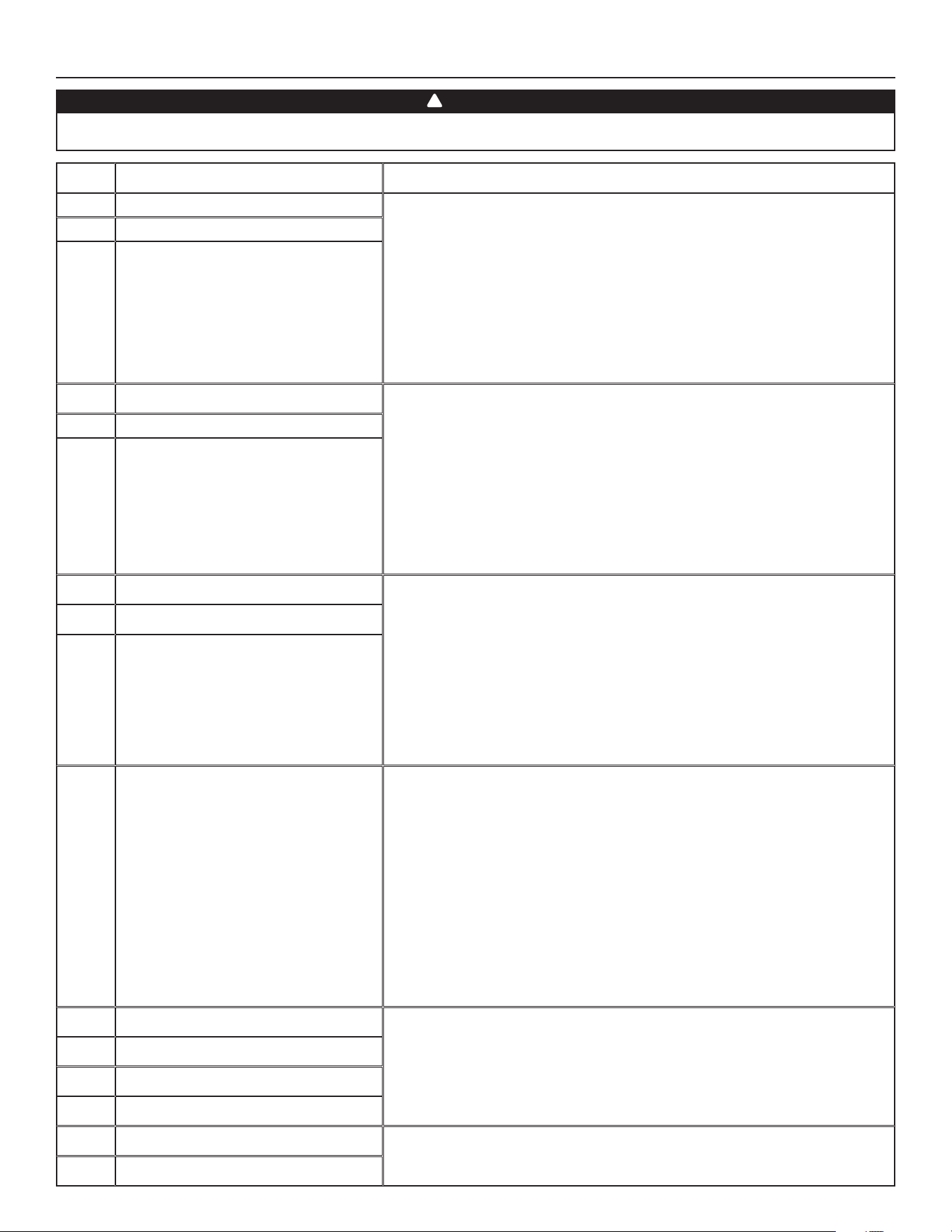
** See next page to get the part number that corresponds to the ventilation unit model.
19
VENTILATION UNIT MODEL
ELECTRONIC
ASSEMBLY PART
NUMBER
SV66144-01 X
SV66144-02 X
SV66144-03 X
SV66144-04 X
SV66144-05 X
SV66144-06 X
SV66144-07 X
SV66144-08 X
SV66144-09 X
SV66144-10 X
SV66144-11 X
SV66144-12 X
SV66144-13 X
SV66144-14 X
SV66144-15 X
SV66144-16 X
SV66144-17 X
SV66144-18 X
B110H65RS
B110H65RT
B130H65RS
B130H65RT
B160H65RS
B160H65RT
B150H75NS
B150H75NT
B160H75RS
B160H75RT
B130E65RS
B130E65RT
B160E65RS
B160E65RT
B150E75NS
B150E75NT
B160E75RS
B160E75RT
7. SERVICE PARTS (CONT’D)
20
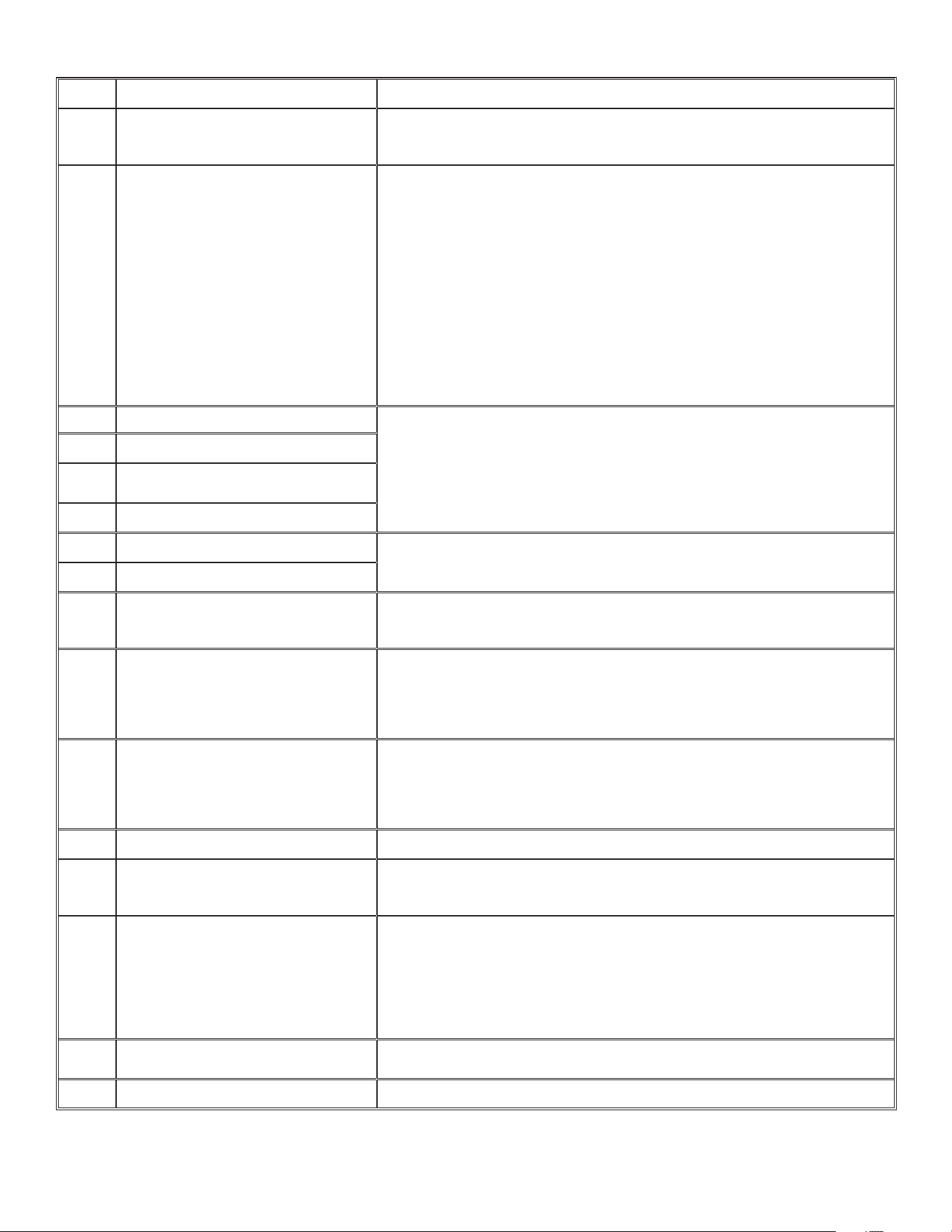
8. INSTALLER’S TROUBLESHOOTING
The wearing of safety glasses and gloves is recommended since a few diagnosis procedures may require the unit to be in operation
while proceeding. Be careful with moving and live parts to prevent any risk of injury.
WARNING
!
ERROR DESCRIPTION SOLUTION
E01 Supply damper range STEP 1: Unplug unit, inspect the damper system, remove any undesirable
obstacle or dirt (fi lters and core may have to be removed to access the
damper system). Plug unit.
If STEP 1 did not fi x the problem, perform STEP 2: Open electrical
compartment, check if connector J5 (white) is well inserted, check for any loose
wires.
If STEP 2 did not fi x the problem, perform STEP 3: If the damper is not moving
at all, unplug J7 (red) from the electronic assembly, connect the white damper
system connector into J7. If the damper moves (but the system still shows an
error), the electronic assembly must be replaced. Otherwise, replace the damper
system.
E02 Supply damper timeout
E03 Supply damper
E05 Exhaust damper range STEP 1: Unplug unit, inspect the damper system, remove any undesirable
obstacle or dirt (fi lters and core may have to be removed to access the
damper system). Plug unit.
If STEP 1 did not fi x the problem, perform STEP 2: Open electrical
compartment, check if connector J7 (red) is well inserted, check for any loose
wires.
If STEP 2 did not fi x the problem, perform STEP 3: If the damper is not moving at
all, unplug J5 (white) from the electronic assembly, connect the white damper
system connector into J5. If the damper moves (but the system still shows an
error), the electronic assembly must be replaced. Otherwise, replace the damper
system.
E06 Exhaust damper timeout
E07 Exhaust damper
E09 Recirculation damper range STEP 1: Unplug unit, inspect the damper system, remove any undesirable
obstacle or dirt (fi lters and core may have to be removed to access the
damper system). Plug unit.
If STEP 1 did not fi x the problem, perform STEP 2: Open electrical
compartment, check if connector J6 (blue) is well inserted, check for any loose
wires.
If STEP 2 did not fi x the problem, perform STEP 3: If the damper is not moving at
all, unplug J5 (white) from the electronic assembly, connect the blue damper
system connector into J5. If the damper moves (but the system still shows an
error), the electronic assembly must be replaced. Otherwise, replace the damper
system.
E10 Recirculation damper timeout
E11 Recirculation damper
E22 Supply airfl ow STEP 1: Perform a visual inspection of the supply damper system. Clean fi lters,
distribution registers and outside supply hood. Inspect ducting to ensure it is
not squeezed or bent.
If STEP 1 did not fi x the problem, perform STEP 2: Remove ducting of the supply
path. On the LCD screen, select MAX to check if the unit is able to reach the
selected fl ow. If so, review the ducting path.
If STEP 2 did not fi x the problem, perform STEP 3: On the LCD screen, select the
MIN and MAX fl ow setting values then reset the unit. MAX fl ow value will display
on the LCD screen. If MAX fl ow is above desired MAX fl ow, set MAX and MIN
fl ows.
If STEP 3 did not fi x the problem, perform STEP 4: Replace the supply blower
and repeat STEP 3.
If STEP 4 did not fi x the problem, perform STEP 5: Replace the electronic
assembly.
E23 Supply motor (drive over current) STEP 1: Unplug/plug unit.
If STEP 1 did not fi x the problem, perform STEP 2: Remove core and clear the
ventilation wheel from any dirt or obstacles.
If STEP 2 did not fi x the problem, perform STEP 3: Disconnect J2 (white) and
connect a spare blower system. If it works, replace supply blower.
If STEP 3 did not fi x the problem, perform STEP 4: Replace the electronic assembly.
E27 Supply motor (drive foc duration)
E28 Supply motor (drive speed feedback)
E29 Supply motor (startup)
E24 Supply motor (drive over voltage) STEP 1: Unplug/plug unit. Under and over voltage may be detected with severe
in-house power supply fl uctuation and stop the motor for protection.
If STEP 1 did not fi x the problem, perform STEP 2: Replace the electronic assembly.
E25 Supply motor (drive under voltage)
21
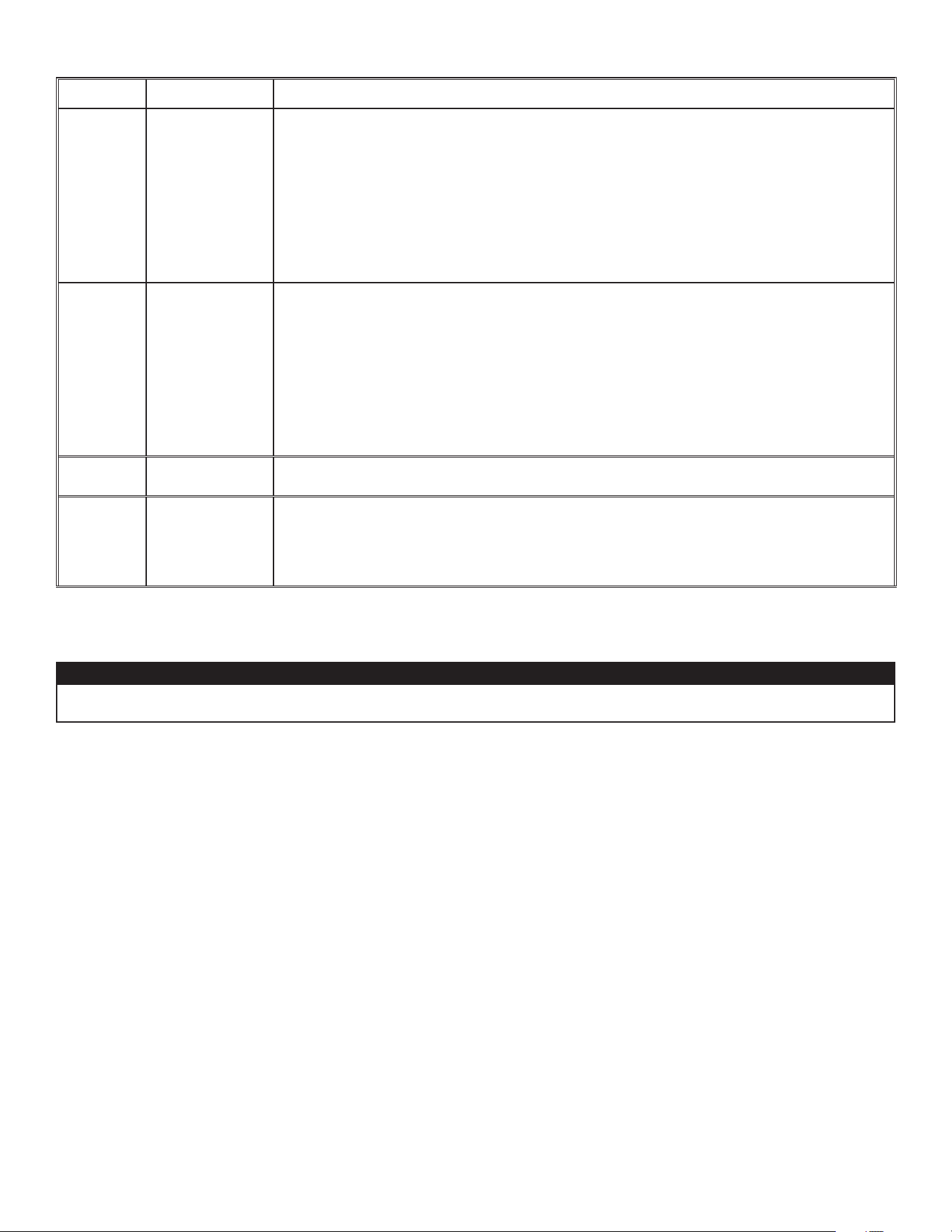
ERROR DESCRIPTION SOLUTION
E26 Supply motor (drive over temp) STEP 1: Validate if the air exchanger is exposed to ambient temperatures within
the operating limits (see p. 4)
If STEP 1 did not fi x the problem, perform STEP 2: Replace the electronic assembly.
E32 Exhaust airfl ow STEP 1: Perform a visual inspection of the exhaust damper system. Clean fi lters,
distribution registers and outside supply hood. Inspect ducting to ensure it is not
squeezed or bent.
If STEP 1 did not fi x the problem, perform STEP 2: Remove ducting of the supply
path. On the LCD screen, select MAX to check if the unit is able to reach the
selected fl ow. If so, review the ducting path.
If STEP 2 did not fi x the problem, perform STEP 3: On the LCD screen, select the
MIN and MAX fl ow setting values then reset the unit. MAX fl ow value will display
on the LCD screen. If MAX fl ow is above desired MAX fl ow, set MAX and MIN
fl ows.
If STEP 3 did not fi x the problem, perform STEP 4: Replace the exhaust blower
and repeat STEP 3.
If STEP 4 did not fi x the problem, perform STEP 5: Replace the electronic
assembly.
E33 Exhaust motor (drive over current) STEP 1: Unplug/plug unit.
If STEP 1 did not fi x the problem, perform STEP 2: Remove core and clear the
ventilation wheel from any dirt or obstacles.
If STEP 2 did not fi x the problem, perform STEP 3: Disconnect J3 (red) and
connect a spare blower system. If it works, replace exhaust blower.
If STEP 3 did not fi x the problem, perform STEP 4: Replace the electronic assembly.
E37 Exhaust motor (drive foc duration)
E38 Exhaust motor (drive speed
feedback)
E39 Exhaust motor (startup)
E34 Exhaust motor (drive over voltage) STEP 1: Unplug/plug unit. Under and over voltage may be detected with severe
in-house power supply fl uctuation and stop the motor for protection.
If STEP 1 did not fi x the problem, perform STEP 2: Replace the electronic assembly.
E35 Exhaust motor (drive under voltage)
E36 Exhaust motor (drive over temp) STEP 1: Validate if the air exchanger is exposed to ambiant temperatures within
the operating limits (see p. 4)
If STEP 1 did not fi x the problem, perform STEP 2: Replace the electronic assembly.
E40 Outside air thermistor STEP 1: Check if thermistor is well connected in connector J7A.
If STEP 1 did not fi x the problem, perform STEP 2: Disconnect connector J7A and
check if the measured resistance (thermistor connector) is within 5 Kohms to
120 Kohms. If outside the range, replace the thermistor.
If STEP 2 did not fi x the problem, perform STEP 3: Replace the electronic assembly.
E41 Distribution air thermistor STEP 1: Check if thermistor is well connected in connector J7B.
If STEP 1 did not fi x the problem, perform STEP 2: Disconnect connector J7B and
check if the measured resistance (thermistor connector) is within 5 Kohms to
120 Kohms. If outside the range, replace the thermistor.
If STEP 2 did not fi x the problem, perform STEP 3: Replace the electronic assembly.
E42 PCBA thermistor fault STEP 1: Replace the electronic assembly.
E43 PCBA temperature over limit STEP 1: Validate if the air exchanger is exposed to ambiant temperatures within
the operating limits (see p. 4)
If STEP 1 did not fi x the problem, perform STEP 2: Replace the electronic assembly.
E50 Wall control communication lost STEP 1: Unplug unit, inspect wires, plug unit.
If STEP 1 did not fi x the problem, perform STEP 2: Remove wall control from the
wall installation and test with a short cable. If it works, bring a new cable to the
wall installation location.
If STEP 2 did not fi x the problem, perform STEP 3: Test the air exchanger with a
spare wall control. If it works, replace the wall control.
If STEP 3 did not fi x the problem, perform STEP 4: Replace the electronic assembly.
E51 Wall control sensor STEP 1: Unplug unit, inspect wires, plug unit.
If STEP 1 did not fi x the problem, perform STEP 2: Replace the wall control.
E60 Protection mode STEP 1: Perform general inspection of the unit (dampers, core, fi lters).
8. INSTALLER’S TROUBLESHOOTING (CONT’D)
22
WARNING DESCRIPTION SOLUTION
W22 Supply airfl ow STEP 1: Perform a visual inspection of the supply damper system. Clean fi lters, distribution
registers and outside supply hood. Inspect ducting to ensure it is not squeezed or bent.
If STEP 1 did not fi x the problem, perform STEP 2: Remove ducting of the supply path. On the
LCD screen, select MAX to check if the unit is able to reach the selected fl ow. If so, review the
ducting path.
If STEP 2 did not fi x the problem, perform STEP 3: On the LCD screen, select the MIN and MAX
fl ow setting values then reset the unit. MAX fl ow value will display on the LCD screen. If MAX fl ow
is above desired MAX fl ow, set MAX and MIN fl ows.
If STEP 3 did not fi x the problem, perform STEP 4: Replace the supply blower and repeat STEP 3.
If STEP 4 did not fi x the problem, perform STEP 5: Replace the electronic assembly.
W32 Exhaust airfl ow STEP 1: Perform a visual inspection of the exhaust damper system. Clean fi lters, distribution
registers and outside supply hood. Inspect ducting to ensure it is not squeezed or bent.
If STEP 1 did not fi x the problem, perform STEP 2: Remove ducting of the supply path. On the
LCD screen, select MAX to check if the unit is able to reach the selected fl ow. If so, review the
ducting path.
If STEP 2 did not fi x the problem, perform STEP 3: On the LCD screen, select the MIN and MAX
fl ow setting values then reset the unit. MAX fl ow value will display on the LCD screen. If MAX fl ow
is above desired MAX fl ow, set MAX and MIN fl ows.
If STEP 3 did not fi x the problem, perform STEP 4: Replace the exhaust blower and repeat STEP 3.
If STEP 4 did not fi x the problem, perform STEP 5: Replace the electronic assembly.
W52 Initial setting
incomplete
STEP 1: Press + or - to access the selection menu.
STEP 2: Complete confi guration. (Refer to section 5 for more details).
W61 Protection mode
electronics
overheating
The unit is currently in protection mode. The power transmitted to the motor is deliberately
reduced to decrease electronics temperature. The unit will exit this mode by itself once conditions
are back to normal. It is normal to observe reduction in airfl ows during this period. This
condition should appear only when the unit is set in high speed and located in a warmer
environment, for example over 30°C (86°F).
8. INSTALLER’S TROUBLESHOOTING (CONT’D)
CAUTION
Make sure that no piece of mineral wool will enter in the unit during installation. Otherwise, this could reduce airfl ow and generate
vibrations and noise in the unit.
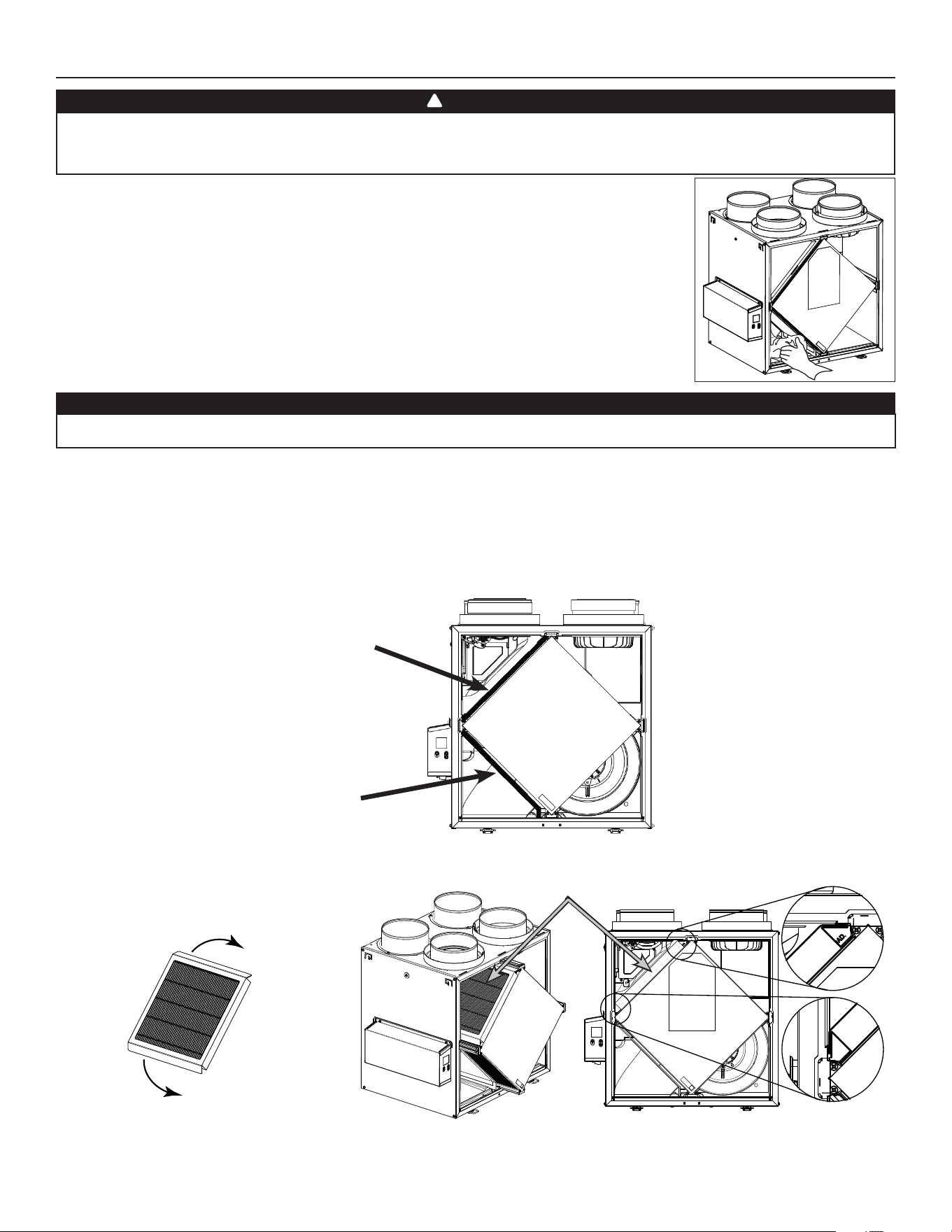
23
9. MAINTENANCE
High voltage risk. During maintenance or repairs, always stop the unit then unplug it to prevent any risk of electric shock. The wearing
of safety glasses and gloves is recommended when handling unit components to prevent any risk of injury that could be caused by the
presence of thin metal.
1. Disconnect power cord.
2. The door of this unit is hinged and maintained closed by 2 latches. Open them and set aside.
3. Clean the inside of the door with a damp cloth.
4. Clean fi lters:
• Remove fi lters.
• Vacuum to remove most of the dust.
• Wash with a mixture of warm water and mild soap. You may add bleach if you wish to disinfect (one
tablespoon per gallon). Rinse thoroughly. Shake fi lters to remove excess water and let dry.
Note: The optional MERV13 fi lter is a disposable fi lter. It should be replaced when it is too dirty.
5. Clean the condensing tray with a damp cloth.
6. Check the exterior air intake hood:
• Make sure there are no leaves, twigs, ice or snow that could be drawn into the vent.
• Clean if necessary.
7. Reassemble the components. Pay special attention to the fi lters by making sure that they are engaged in their slots.
8. Rotate the blower wheels by hand. If one of the wheels does not rotate easily, contact your installer.
9. Close the unit door and reconnect power supply.
10. Reset fi lters, if required. If using an optional main wall control (SPEED, DEHUMIDISTAT OR AUTOMATIC), press on the INT/AUTO button for
5 seconds to reset the fi lters. If using the ADVANCED optional main wall control, follow the instructions on the touch screen.
CAUTION
A blocked air vent or fi lter, even partially, could cause the unit to malfunction. The comfort provided by the unit could be reduced and
the risk of unit frost could increase. This could cause unit breakdown and/or damage to property.
V
D0493
9.1 QUARTERLY
WARNING
!
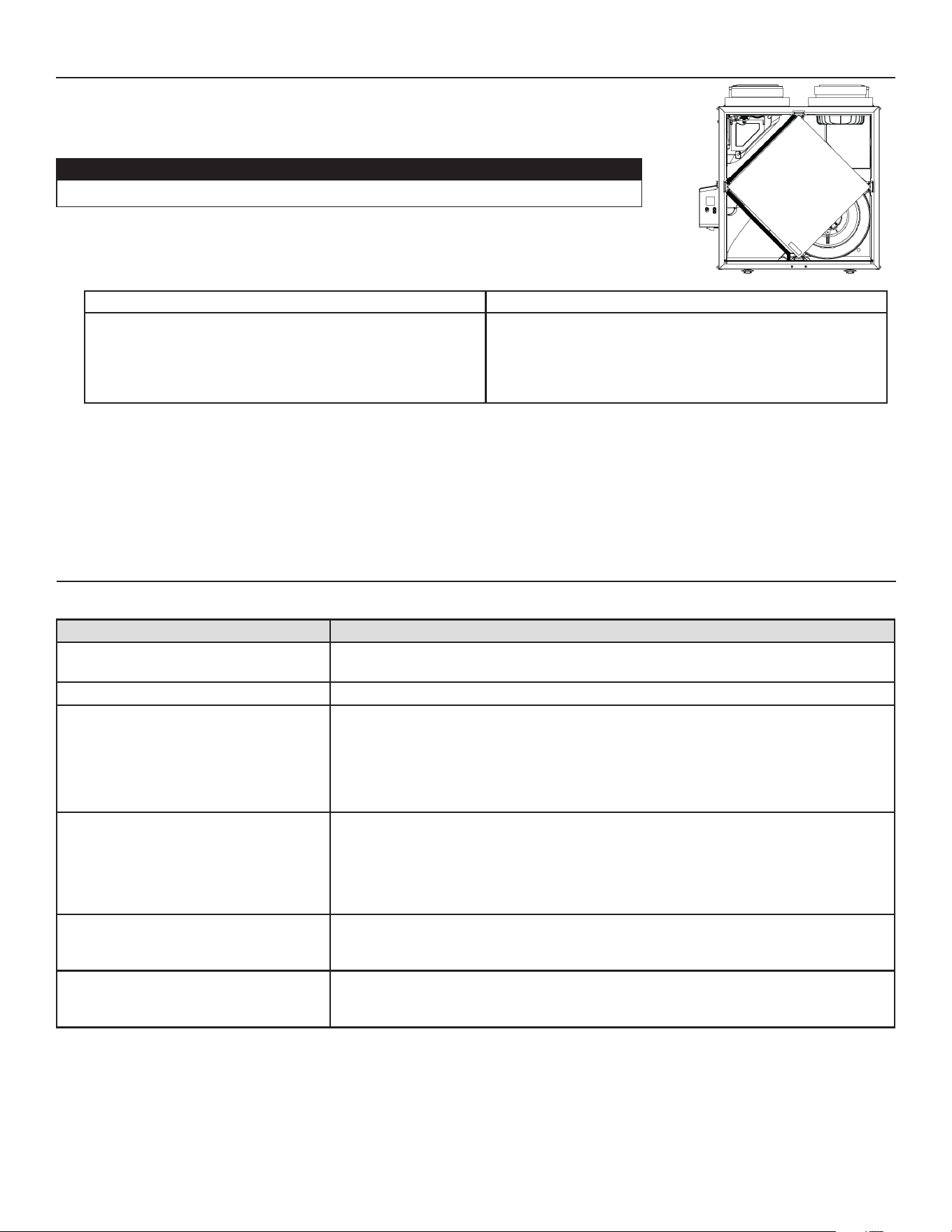
VD0494
MERV8 FILTER INCLUDED
OPTIONAL MERV13 FILTER (EXHAUST FILTER NOT INCLUDED)
EXHAUST FILTER INCLUDED
NOTE: The optional MERV13 fi lter replaces the MERV8 fi lter.
Pull the core 3" to 4" out.
Bend the two MERV13 fl aps to form a 45-degree
angle, as illustrated below.
Install the MERV13 fi lter over the core as
illustrated hereafter.
Push the core and the MERV13 fi lter to the
bottom of the unit.
45˚
45˚
24
1. Repeat steps 1 to 6 from the previous section and continue with the following steps:
2. Clean the recovery core:
HRV MODELS ERV MODELS
• Remove the core.
• Let it soak in a mixture of cold or lukewarm water and mild
soap (dishwashing liquid).
• Rinse thoroughly.
• Shake the core to remove excess water and let it dry.
Remove the dust on the core using a vacuum cleaner and a
soft brush attachment.
CAUTION: DO NOT SOAK THE ENERGY RECOVERY CORE
IN WATER
3. Clean the blower assemblies. Do not disassemble the blower assemblies.
4. Remove the dust using a vacuum cleaner with a soft brush attachment.
5. Reassemble the components.
6. Reconnect power supply.
CAUTION
• Handle the recovery core with care.
PROBLEM TRY THIS
1. Nothing works. • See if the unit is plugged in.
• See if the unit is receiving power from the house circuit breaker or fuse.
2. Noisy unit. • Clean the unit (see section 9). If the problem is not solved, contact your installer.
3. Condensation inside windows under
cold weather conditions.
• Operate the unit at MAX speed during activities generating excess humidity (family
gatherings, extra cooking, etc.).
• Leave curtains half-open to allow air circulation.
• Store all fi rewood in a closed room with a dehumidifi er or in a well ventilated room, or
store the wood outdoors.
• Keep the temperature in your house above 64°F.
4. Humidity inside under hot/humid
weather conditions.
• Operate the unit in MIN speed.
• Temporarily switch to INT mode (if available).
• Use a dehumidifi er.
5. Air too dry. • Operate the unit at MIN speed.
• Temporarily switch to INT mode (if available).
• Temporarily use a humidifi er.
6. Air too cold at the air supply register. • Make sure the outdoor hoods are not blocked.
• Operate the unit at MIN speed.
• Install a duct heater (contact your installer).
9.2 ANNUAL (AT FALL)
10. USER’S TROUBLESHOOTING
Contact customer service at 1-800-558-1711 for any unresolved issue.
VD0494
9. MAINTENANCE (CONT’D)

25
11. WARRANTY
This ventilation unit is a high quality product, built and packaged with care. The manufacturer warrants to the original purchaser of its
product, that such products will be free from defects for the period stated below, from date of original purchase. For all units, the warranty
covers parts only against any operational defect. This 5-year warranty is subject to performance of the core maintenance according
recommendations in this manual. The heat recovery core (HRV) has a limited lifetime warranty, and the energy recovery core (ERV) has
a 5-year warranty. If any defect should occur, we urge you to read the user guide carefully. If the problem persists, observe the following
rules:
RULES TO FOLLOW
If the unit is defective, contact your ventilation contractor (see address on your manual’s cover page). The contractor will determine with
you the reason for the defect, and if needed, do the replacement or repair. If ever it is impossible to reach your ventilation contractor, call
1-800-558-1711 (in North America); the personnel will be pleased to give you the phone number of a distributor or a service center near
you.
REPLACEMENT PARTS AND REPAIR
In order to ensure your ventilation unit remains in good working condition, you must use the Broan genuine replacement parts only. The
Broan genuine replacement parts are specially designed for each unit and are manufactured to comply with all the applicable certifi cation
standards and maintain a high standard of safety. Any third party replacement part used may cause serious damage and drastically reduce
the performance level of your unit, which will result in premature failing. Broan also recommends that you contact a service depot certifi ed
by the manufacturerfor all replacement parts and repair.
BILL OF PURCHASE
No replacement or repair covered by the warranty will be carried out unless the unit is accompanied by a copy of the original bill of
purchase. Please retain your original.
MISCELLANEOUS COSTS
In each case, the labor and shipping costs for the removal of a defective part and/or installation of a compliant part will not be covered
by the manufacturer.
CONDITIONS AND LIMITATIONS
These units are created for residential use only and must be used in a building as defi ned below:
Building: All structures zoned and/or erected for the act, process or art of human or animal habitation and/or the storage or
warehousing of goods.
Residential use: Dwelling, lodging, suite: Building, or part of a building, intended to act as either the domicile to one or several people
which can include general sanitary, food consumption and rest facilities. Buildings of only one room or a group of
rooms including those occupied by a tenant or owner; comprise the lodgings, the individual rooms of the motels,
hotels, rooming/lodging houses, boarding/half-way/foster homes, dormitories, and suites, as well as the stores and the
business establishments constituted by only one room in a dwelling.
Commercial use: Agricultural establishment, commercial establishment for assembly, care, or detention: Building or part of a building that
does not contain a dwelling, situated on land dedicated to agriculture or farming and used primarily to shelter animals,
or for the production, the storage or the treatment of agricultural or horticultural products or animal food. Building or
part of a building, used for the display or retail of goods, professional or personal services, or commodities. Building,
or part of a building used by persons gathering for civic activities, religious or political assembly, tourism, educational/
vocational training, recreation or the consumption of food or drink. Building, or part of a building used to shelter
persons of impaired physical or psychological states, persons requiring palliative care or medical treatments, or persons
for reasons out of their control, cannot escape harm or threat of danger autonomously.
Industrial use: Building, or part of a building, used for the assembly, the manufacture, the creation, the treatment, the repair or
the storage of products and combustible materials and that contain fuels that when ignited or exploded in suffi cient
quantity may constitute a risk of fi re.
The above warranty applies to all cases where the damage is not a result of poor installation, improper use, mistreatment or negligence,
acts of God, or any other circumstances beyond the control of the manufacturer. Furthermore, the manufacturer will not be held
responsible for any bodily injury or damage to personal property or real estate, whether caused directly or indirectly by the unit. This
warranty supersedes all prior warranties.
Broan-NuTone LLC, 926 West State Street, Hartford, Wisconsin, USA 53027 Broan-NuTone.com 800-558-1711

26
MANUAL DEL USUARIO Y DEL INSTALADOR
B110H65RT B110H65RS
B130H65RT B130H65RS
B130E65RT B130E65RS
**B150H75NT* **B150H75NS*
**B160H75RT **B160H75RS
**B160H65RT **B160H65RS
B160E65RT B160E65RS
B150E75NT* B150E75NS*
B160E75RT B160E75RS
INSTALADOR: LEA ESTAS INSTRUCCIONES
GUÁRDELAS PARA EL USUARIO
PARA USO RESIDENCIAL ÚNICAMENTE
23832 REV. 12
REGISTRE SU PRODUCTO EN LÍNEA EN:
www.broan-nutone.com/en-us/home/customer-service/product-registration
Para obtener más información, visitar nuestro sitio www.Broan-NuTone.com
VB0288
FAULT INDICATOR DISPLAY REQUIREMENTS
*No se ofrece el modo recirculación en estos
modelos.
**ESTOS PRODUCTOS OBTUVIERON LA DENOMINACIÓN ENERGY STAR
®
AL
CUMPLIR LAS ESTRICTAS DIRECTRICES DE EFICIENCIA ENERGÉTICA ESTABLECIDAS
POR EL MINISTERIO DE RECURSOS NATURALES DE CANADÁ Y LA EPA DE
E
STADOS UNIDOS. CUMPLEN CON LOS REQUISITOS DE ENERGY STAR
ÚNICAMENTE CUANDO SE UTILIZAN EN CANADÁ.
Broan-NuTone LLC, 926 West State Street, Hartford, Wisconsin, USA 53027 Broan-NuTone.com 800-558-1711

2
Este manual utiliza los siguientes símbolos para hacer hincapié en determinada información:
Se refi ere a una instrucción que, si no se sigue, puede provocar lesiones personales graves, incluso causar la muerte.
PRECAUCIÓN
Denota una instrucción que, si no se sigue, puede dañar gravemente el aparato y/o sus componentes.
NOTA: Indica la información complementaria necesaria para completar una instrucción.
LIMITACIÓN
Para instalación residencial (doméstica) solamente. Los trabajos de instalación y el cableado eléctrico han de ser realizados por personas
cualificadas, de conformidad con todos los códigos y normas aplicables, incluyendo los códigos y normas de construcción contra
incendios.
⚠ ADVERTENCIA
PARA REDUCIR EL RIESGO DE FUEGO, CHOQUE ELÉCTRICO O HERIDAS CORPORALES, SIGA LAS INDICACIONES SIGUIENTES:
1. Utilice este aparato sólo en la forma prevista por el fabricante.
2. Antes de realizar tareas de mantenimiento o de limpiar el aparato, desenchufe el cable de alimentación de la toma eléctrica.
3. Este aparato no ha sido pensado para proporcionar aire de combustión o de dilución para aparatos que queman combustible.
4. Al cortar o taladrar en una pared o en el techo, procure no dañar el cableado eléctrico ni otras instalaciones ocultas.
5. No use el aparato con un dispositivo de control de velocidad de semiconductores diferente de los que se indican en la sección 3.1.
6. Este aparato debe conectarse a tierra. El cable de alimentación lleva un enchufe de 3 patillas con toma de tierra para su seguridad
personal. Debe enchufarse en una toma de corriente para tres patillas, conectada a tierra de acuerdo con el código eléctrico
nacional y los códigos y ordenanzas locales. No retire la patilla de la toma de tierra. No utilice el aparato con un cable prolongador.
7. No instale el aparato en un espacio donde se cocina ni lo conecte directamente a otro aparato.
8. No lo use para evacuar materias ni vapores peligrosos o explosivos.
9. Para la instalación, el mantenimiento o la limpieza del aparato se aconseja llevar lentes y guantes de seguridad.
10. Cuando la reglamentación local aplicable sea más restrictiva en materia de instalación o certifi cación, dicha reglamentación prevalecerá
sobre las exigencias de este manual y el instalador acepta atenerse a dicha reglamentación y asumir los gastos correspondientes.
PRECAUCIÓN
1. Para evitar que los fi ltros se obstruyan prematuramente, apague el aparato durante las obras de construcción o renovación.
2. Para mayor información sobre otras exigencias, lea la etiqueta de especifi caciones que viene en el aparato.
3. Asegúrese de sacar el aire al exterior. No introduzca ni evacue el aire en espacios situados entre paredes, en el techo o en un desván,
en sótanos pequeños ni en cocheras. No intente recuperar el aire de salida de una secadora o de una campana.
4. Aparato para instalación residencial únicamente, de acuerdo con las exigencias de la norma 90B de la NFPA (para un aparato
instalado en EE.UU.) o con la parte 9 del Código Nacional de la Construcción de Canadá (para un aparato instalado en Canadá.
5. No pase ningún conducto de aire por encima o a menos de 2 pies (0,61 m) de una caldera o de su cámara de alimentación, de un
calentador o de otro aparato que genere calor. Si hay que conectar un conducto a la cámara de retorno de una caldera, debe situarse
al menos a 10 pies (3,1 m) de la conexión de la cámara con la caldera.
6. La instalación de los conductos debe hacerse de conformidad con todos los códigos locales y nacionales aplicables.
7. Al ausentarse de la vivienda durante un periodo largo (más de dos semanas), una persona responsable debería verifi car regularmente
si el aparato funciona correctamente.
8. Si los conductos pasan a través de un espacio no acondicionado (como un desván), el aparato debe funcionar constantemente,
excepto cuando haya que hacer tareas de mantenimiento o reparaciones. Asimismo, la temperatura ambiente de la casa nunca
debería bajar de 65°F.
9. No use el aparato durante la construcción o renovación de su casa o cuando se lije paredes de yeso. Ciertos tipos de polvo y vapores
pueden dañar su sistema.
10. Las piezas mecánicas y electrónicas del aparato deberían ser examinadas por personal de servicio cualifi cado al menos una vez al año.
11. Asegúrese en todo momento de que la admisión exterior de aire y las bocas de aire viciado estén libres de nieve durante el invierno.
Es importante comprobar que, durante una gran tormenta de nieve, el aparato no introduzca nieve. Si fuera el caso, por favor,
apague el aparato durante unas horas.
12. Dado que el sistema de control electrónico del aparato utiliza un microprocesador, es posible que no funcione correctamente
debido a los ruidos externos o a fallas de alimentación muy cortas. Si esto ocurre, desenchufe el aparato y espere aproximadamente
10 segundos. A continuación, enchufe de nuevo el aparato.
13. No debería hacer uso excesivo de aparatos de fragrancia o de químicos porque pueden dañar el material de los componentes del
aparato.
ADVERTENCIA
!

3
ÍNDICE
1. DATOS TÉCNICOS ...............................................................................................................4
1.1 DISTRIBUCIÓN DEL AIRE (FUNCIONAMIENTO NORMAL) .......................................................................4
2. INSTALACIÓN .....................................................................................................................4
2.1 UBICACIÓN Y MONTAJE DEL APARATO ....................................................................................................4
2.2 INSTALACIÓN DE LOS CONDUCTOS Y REGISTROS ...............................................................................6
2.2.1 SISTEMA TOTALMENTE EQUIPADO CON CONDUCTOS (T-1)
(SE PUEDE UTILIZAR EL MODO RECIRCULACIÓN CON ESTA CONFIGURACIÓN) .....................................................................6
2.2.2 SISTEMA EQUIPADO CON CONDUCTOS DE AIRE VICIADO (T-2)
(SE PUEDE UTILIZAR EL MODO RECIRCULACIÓN CON ESTA CONFIGURACIÓN) .....................................................................6
2.2.3 INSTALACIÓN SIMPLIFICADA (T-4)
(NO SE PUEDE UTILIZAR EL MODO RECIRCULACIÓN CON ESTA CONFIGURACIÓN) ................................................................7
2.3 CONEXIÓN DEL DESAGÜE (HRV SOLAMENTE) ......................................................................................8
2.4 INSTALACIÓN DE LA BOCA EXTERIOR DOBLE CON EL KIT DE CAMBIO DE SECCIÓN TANDEM®
(OPCIONAL) ......................................................................................................................................................8
2.5 INSTALACIÓN DE LAS BOCAS EXTERIORAS ...........................................................................................9
2.6 CONEXIÓN DE LOS CONDUCTOS AL APARATO ......................................................................................9
2.6.1 CONEXIÓN DE LOS CONDUCTOS ...................................................................................................................10
3. CONEXIONES ...................................................................................................................11
3.1 CONEXIÓN ELÉCTRICA CON EL CONTROL MURAL PRINCIPAL OPCIONAL ...................................... 11
3.1.1 CONEXIÓN ELÉCTRICA CON EL CONTROL MURAL PRINCIPAL OPCIONAL SELECTOR DE VELOCIDAD,
DEHUMIDOSTATO O AUTOMÁTICO ........................................................................................................................... 11
3.1.2 CONEXIÓN ELÉCTRICA CON EL CONTROL MURAL PRINCIPAL OPCIONAL AVANZADO .................................................... 11
3.2 CONEXIÓN ELÉCTRICA CON EL CONTROL MURAL AUXILIAR OPCIONAL ........................................12
3.2.1 CONEXIÓN ELÉCTRICA CON EL CONTROL MURAL AUXILIAR OPCIONAL 20-40-60 ....................................................12
3.2.2 CONEXIÓN ELÉCTRICA CON EL CONTROL MURAL AUXILIAR OPCIONAL DE CONTACTO SECO
(POR EJEMPLO TEMPORIZADOR MECÁNICO) ..............................................................................................................12
3.3 CONEXIÓN CON EL SISTEMA CENTRAL DE AIRE FORZADO..............................................................13
3.3.1 FUNCIONAMIENTO DEL APARATO USANDO UNA CONEXIÓN DE CONTACTO SECO ........................................................13
3.3.2 INTERCONEXIÓN DEL APARATO CON UN SISTEMA CENTRAL DE AIRE FORZADO (R/C/G/GF) ......................................13
3.3.3 SINCRONIZACIÓN CON LA FUNCIÓN SISTEMA CENTRAL DE AIRE FORZADO ..............................................................13
4. DIAGRAMA DE CABLEADOS .........................................................................................14
5. NAVEGACIÓN EN LA PANTALLA LCD ............................................................................15
5.1 INDICADOR EN LA PANTALLA LCD .........................................................................................................16
5.2 PRIMER ARRANQUE DEL APARATO .......................................................................................................16
5.3 CAMBIO DE AJUSTES ..............................................................................................................................16
5.3.1 PROCEDIMIENTO PARA CAMBIAR EL AJUSTE DEL PI
3
/MIN MÍNIMO ..........................................................................16
5.3.2 PROCEDIMIENTO PARA CAMBIAR EL AJUSTE DEL PI
3
/MIN MÁxIMO .........................................................................16
5.3.3 PROCEDIMIENTO PARA CAMBIAR EL AJUSTE DE LAS OPCIONES ............................................................................16
5.3.4 PROCEDIMIENTO PARA CAMBIAR EL AJUSTE DE LOS FLUJOS DE AIRE INDEPENDIENTES .............................................16
5.4 REINICIALIZACIÓN DE LOS AJUSTES DE FÁBRICA ..............................................................................17
6. USO DE ESTE APARATO ..................................................................................................17
6.1 SU SISTEMA DE VENTILACIÓN ...............................................................................................................17
6.2 CONTROL INTEGRADO ............................................................................................................................17
6.3 INDICADOR MODO AHU ...........................................................................................................................17
7. PIEZAS DE RECAMBIO ....................................................................................................18
8. SOLUCIÓN DE PROBLEMAS DEL INSTALADOR .........................................................20
9. MANTENIMIENTO .............................................................................................................23
9.1 TRIMESTRAL .............................................................................................................................................23
9.2 ANUAL (EN OTOÑO) .................................................................................................................................24
10. SOLUCIÓN DE PROBLEMAS POR PARTE DEL USUARIO ..........................................24
11. GARANTÍA .......................................................................................................................25
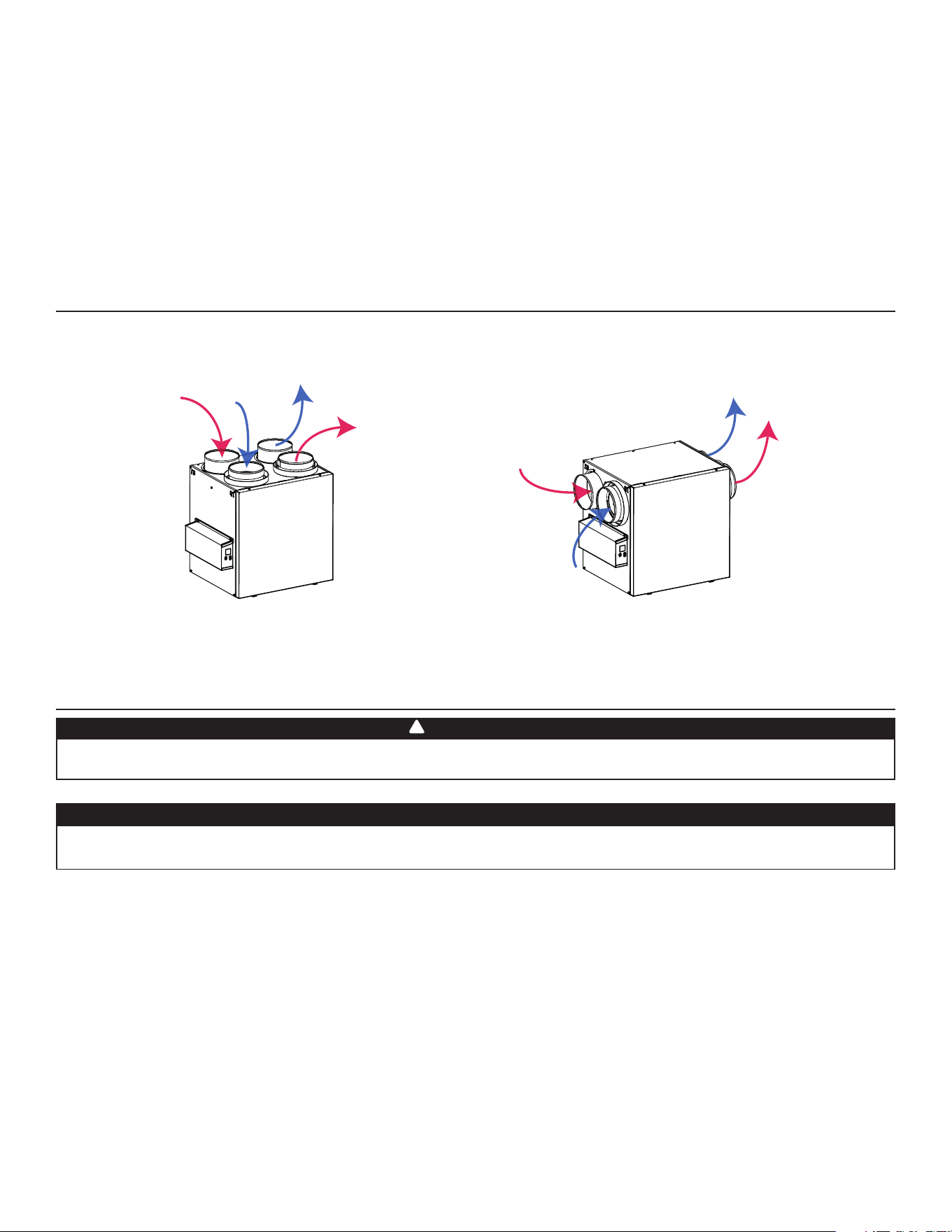
4
1. DATOS TÉCNICOS
NOTA: Las dimensiones, los gráfi cos de rendimiento, las tablas del ciclo de descongelación y las especifi caciones fi guran en las hojas
de especifi caciones del aparato. Consulte nuestro sitio web en www.Broan-NuTone.com.
1.1 DISTRIBUCIÓN DEL AIRE (FUNCIONAMIENTO NORMAL)
2. INSTALACIÓN
2.1 UBICACIÓN Y MONTAJE DEL APARATO
Se aconseja llevar guantes y gafas de protección durante la instalación, el mantenimiento o la limpieza del aparato para reducir el
riesgo de lesiones causadas por la presencia de metal delgado y/o de piezas móviles en altura.
ADVERTENCIA
VF0077
Aire
viciado del
edifi cio
Aire viciado
hacia el
exterior
Aire
fresco del
exterior
Aire fresco
hacia el
edifi cio
Aire
viciado del
edifi cio
Aire
fresco del
exterior
Aire fresco
hacia el
edifi cio
Aire viciado
hacia el
exterior
Elija una ubicación adecuada para el aparato:
• En una zona de la vivienda donde la temperatura ambiente se mantenga entre 50°F y 149°F;
• Lejos de las zonas de estar (comedor, sala de estar, dormitorio), de ser posible;
• De forma que sea fácil acceder al interior del armario para las tareas de mantenimiento trimestrales y anuales, y al tablero de control
situado en un lado del aparato;
• Cerca de una pared exterior para limitar la longitud del conducto fl exible aislado que sale del aparato o llega a él;
• Sólo para los aparatos HRV: cerca de un desagüe. Si no hay desagüe cerca, utilice un balde para recoger los residuos líquidos;
• Lejos de chimeneas calientes, tableros eléctricos y otros lugares que presenten peligro de fuego;
• A menos de 6 pies de distancia de una fuente de alimentación (toma de corriente estándar).
Información al usuario
A. Para asegurar un funcionamiento silencioso del HRV/ERV, cada modelo de aparato debe instalarse utilizando técnicas de atenuación
acústica adecuadas para la instalación.
B. La forma en que se instala su ventilador de recuperación de calor/energía puede hacer una diferencia signifi cativa a la energía
eléctrica consumida. Para minimizar el consumo eléctrico del ventilador de recuperación de calor/energía, se recomienda un sistema
independiente, totalmente equipado con conductos. Si selecciona una instalación simplifi cada para que su caldera/AHU funciona
para ventilar de sala en sala, una caldera de efi ciencia energética con un motor de ventilador de velocidad variable electrónicamente
conmutado reducirá su consumo de energía y su costo operativo.
C. La instalación de un control de usuario con su modelo de aparato mejorará la comodidad y podría reducir signifi cativamente el
consumo energético del modelo de aparato.
!
PRECAUCIÓN
Asegurese que ningún trozo de lana mineral entre en el aparato durante la instalación. De lo contrario, esto podría reducir el fl ujo y
generar vibraciones y ruido en el aparato.
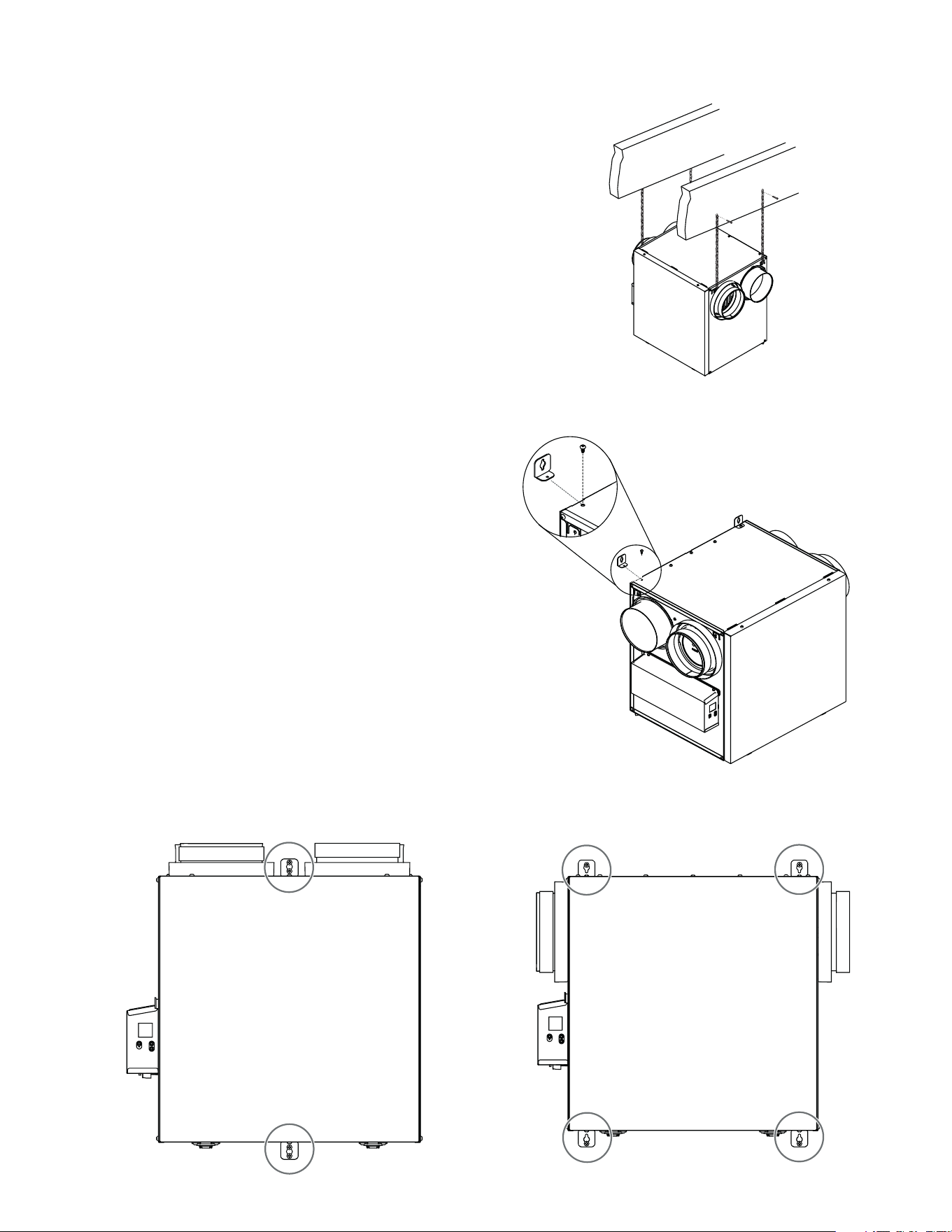
5
2.1 UBICACIÓN Y MONTAJE DEL APARATO (CONT.)
Suspendido en las viguetas:
• Doble ligeramente los soportes del aparato para insertar las cadenas
provistas.
• Cuelgue el aparato en las viguetas utilizando las cadenas. Los
resortes no son necesarios.
• Asegúrese siempre de que el desnivel del aparato no sea superior a
1/4 pulg.
O
Montado en la pared:
• Seleccione la(s) ubicación/ubicaciones apropriada(s) para los
soportes (véase la ilustración a continuación) según la posición de los
montantes.
• Inserte los soportes suministrados debajo del cuadro del aparato
(véase la ilustración a la derecha).
• Use el tornillo n.
o
8 x 3/8 pulg. para fi jar el soporte.
• Usando los 4 tornillos suministrados n.
o
8 x 1½ pulg., sujete el aparato
en la pared asegurándose de que los 4 tornillos queden sujetos en un
montante.
• Asegúrese siempre de que el desnivel del aparato no sea superior a
1/4 pulg.
VD0485
VD0488
VD0486
VD0487
INSTALACIÓN CON 2 SOPORTES INSTALACIÓN CON 4 SOPORTES
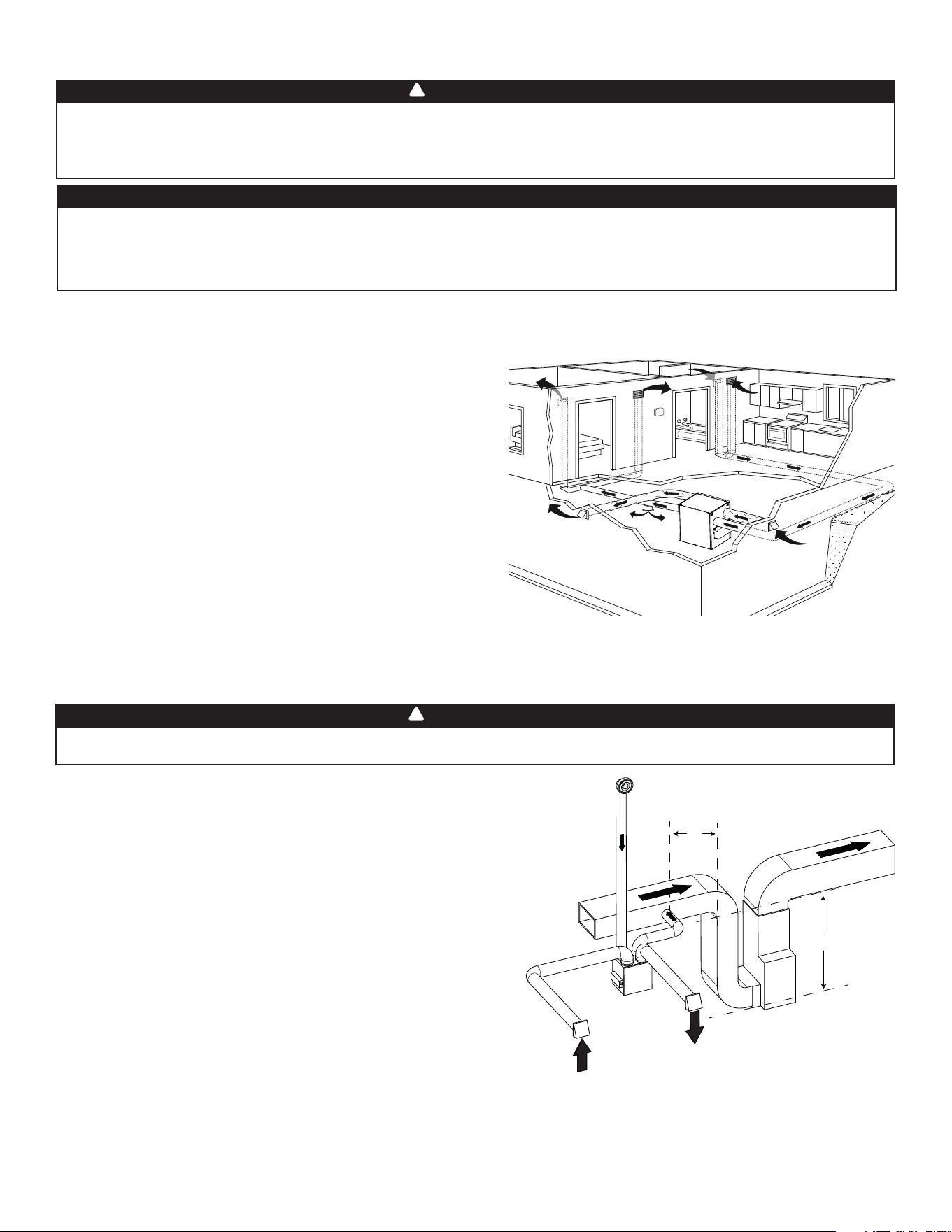
6
2.2.2 SISTEMA EQUIPADO CON CONDUCTOS DE AIRE VICIADO (T-2) (SE PUEDE UTILIZAR EL MODO RECIRCULACIÓN CON ESTA CONFIGURACIÓN)
La conexión de los conductos al sistema central de aire forzado puede regularse por ciertos códigos y normas. Es su responsabilidad
consultar y aplicar los requisitos locales para evitar incumplimiento.
ADVERTENCIA
!
AIRE VICIADO DEL EDIFICIO:
Igual que para el sistema totalmente equipado con conductos, descrito
en el punto 2.2.1.
AIRE FRESCO HACIA EL EDIFICIO:
Conecte el conducto de distribución de aire fresco del aparato con el
conducto de retorno del sistema central de aire forzado por lo menos a 10
pies de distancia del sistema central de aire forzado (A+B)*.
* Esta distancia de 10 pies se aplica solamenta en zonas donde la
temperatura exterior desciende por debajo del punto de congelación
(32°F).
NOTA: El funcionamiento del ventilador impelente del sistema central
de aire forzado puede sincronizarse con el aparato (véase la
sección 3.3). Aunque no es esencial, se aconseja que el ventilador
impelente del sistema central de aire forzado esté funcionando
cuando el aparato esté en marcha.
VH0165
A
B
A + B = MíN. 10 PIES
2.2 INSTALACIÓN DE LOS CONDUCTOS Y REGISTROS
2.2.1 SISTEMA TOTALMENTE EQUIPADO CON CONDUCTOS (T-1) (SE PUEDE UTILIZAR EL MODO RECIRCULACIÓN CON ESTA CONFIGURACIÓN)
AIRE VICIADO DEL EDIFICIO:
• Instale los registros en zonas donde se produce humedad y
contaminantes: cocina, baño, lavadero, etc.
• Instale los registros sobre una pared interior, a una distancia de 6 a
12 pulgadas del techo O en el techo.
• Instale el registro de la cocina al menos a 4 pies de distancia de la
cocina (aparato).
• Se pueden usar los ventiladores del cuarto de baño y de la campana
de cocina para expulsar mejor el aire viciado.
• Los hogares con más de un nivel necesitan al menos un registro de
salida en el nivel más alto.
AIRE FRESCO HACIA EL EDIFICIO:
• Instale registros en dormitorios, comedor, sala de estar y sótano.
• Instale los registros en el techo O en la parte alta de las paredes de
modo que la corriente de aire vaya dirigida hacia el techo.
• Si hay que instalar un registro en el suelo, dirija la corriente de aire
hacia la parte superior de la pared.
No instale nunca un registro de salida de aire viciado en una habitación donde haya un dispositivo de combustión, tal como una caldera,
un calentador de agua a base de gas, una chimenea o cualquier dispositivo o equipo que pueden producir gases contaminantes o otros
tipos de contaminantes. Una presión negativa podría crearse en la habitación y perjudicar a la evacuación de gases o contaminantes,
lo que puede tener consecuencias graves para la salud.
ADVERTENCIA
!
NOTA: Para este tipo de confi guración, se debe seleccionar la opción T-1 en la pantalla LCD al auto balanceo del aparato (consulte la sección 5.2).
Aire viciado
del edifi cio
(p.ej. baño)
Aire fresco hacia
el edifi cio
Aire viciado
hacia el exterior
Aire fresco
del exterior
NOTA: Para este tipo de confi guración, se debe seleccionar la opción T-2
en la pantalla LCD al auto balanceo del aparato (consulte la sección 5.2).
Si los conductos han de pasar a través de un espacio no acondicionado (p. ej., un desván), use siempre conductos aislados para evitar la
formación de condensación fuera o dentro del conducto, lo que podría provocar roturas de material y/o la aparición de moho. Además, si aire
fresco hacia el edifi cio y/o aire viciado del edifi cio ha/han de pasar a través de un espacio no acondicionado, el aparato debe ser ajustado para
funcionar de manera continua cuando hace frío (debajo de 10°C/50°F). El movimiento continuo de aire dentro de los conductos prevendrá que
se forme condensación. Se puede detener el aparato temporalmente para fines de reparación y/o de mantenimiento en tales condiciones.
PRECAUCIÓN
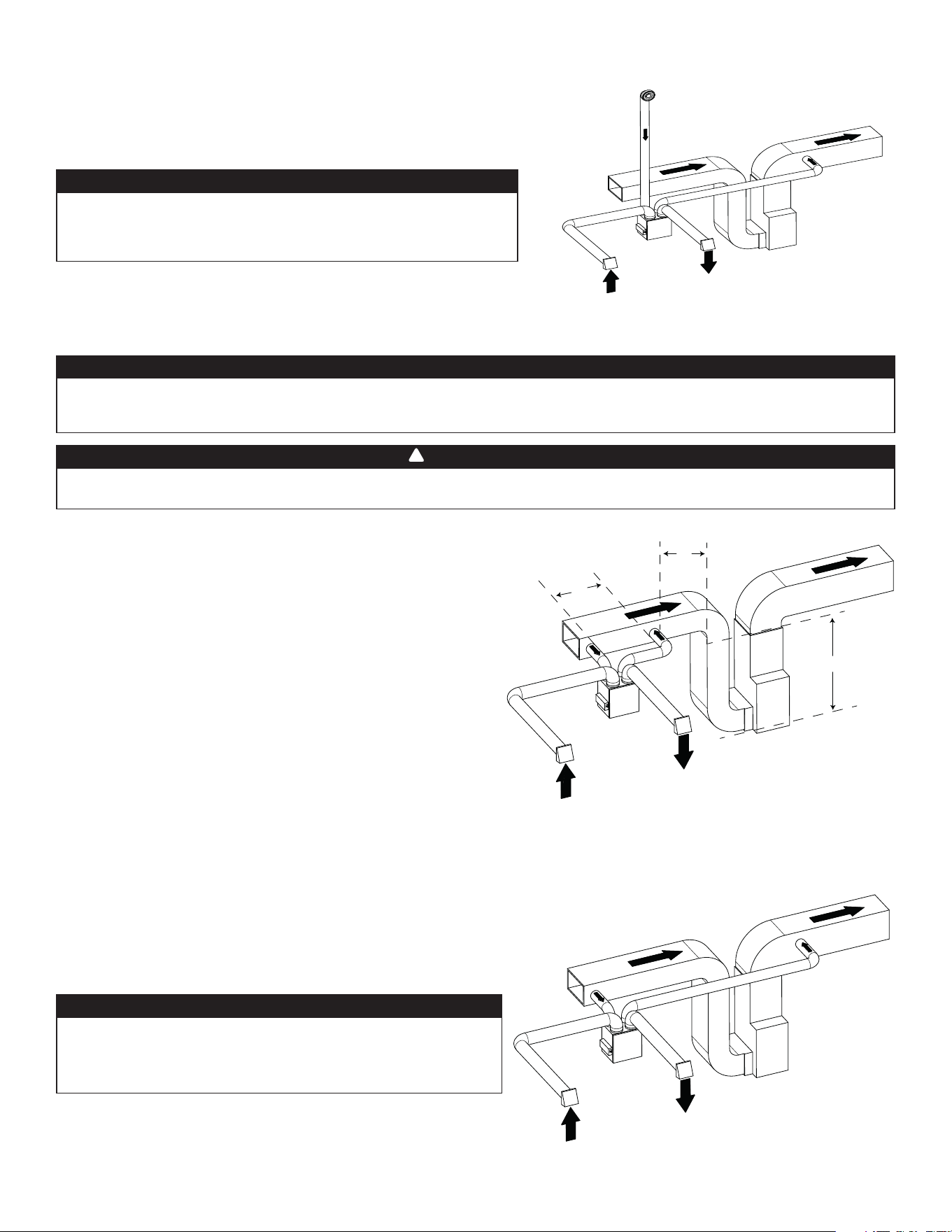
7
El aire fresco y el aire de salida circulan a través de los conductos del
sistema central de aire forzado, lo que simplifi ca la instalación.
Se sugiere el uso de los ventiladores de los baños y de una campana de
cocina para expulsar el aire viciado.
A
IRE VICIADO DEL EDIFICIO:
Conecte el puerto de admisión de aire viciado del aparato con el
conducto de retorno del sistema central de aire forzado por lo menos 3
pies antes de la distribución de aire fresco del aparato.
AIRE FRESCO HACIA EL EDIFICIO:
Conecte el conducto de distribución de aire fresco del aparato con el
conducto de retorno del sistema central de aire forzado por lo menos a
10 pies de distancia del sistema central de aire forzado (A+B)*.
* Esta distancia de 10 pies se aplica solamenta en zonas donde la
temperatura exterior desciende por debajo del punto de congelación
(32°F).
2.2.3 INSTALACIÓN SIMPLIFICADA (T-4) (NO SE PUEDE UTILIZAR EL MODO RECIRCULACIÓN CON ESTA CONFIGURACIÓN)
La conexión de los conductos al sistema central de aire forzado puede regularse por ciertos códigos y normas. Es su responsabilidad
consultar y aplicar los requisitos locales para evitar incumplimiento.
ADVERTENCIA
!
El sistema central de aire forzado debe estar sincronizado con el aparato porque la evacuación y la distribución de aire fresco proceden
de la misma sección. El sistema central de aire forzado debe funcionar para evitar que el aire fresco sea directamente aspirado por la
evacuación, lo que reduciría considerablemente el aporte de aire fresco al edifi cio. Véase la sección 3.3 por la conexión.
PRECAUCIÓN
VH0167
C
B
A
A + B = MíN. 10 PIES
C = 3 PIES
NOTA: Para este tipo de confi guración, se debe seleccionar la opción T-4
en la pantalla LCD al auto balanceo del aparato (consulte la sección 5.2).
Aire fresco
del exterior
Aire viciado
hacia el exterior
Aire viciado
del edifi cio
Aire fresco hacia
el edifi cio
VH0168
INSTALACIÓN ALTERNATIVA (T-5) (NO SE PUEDE UTILIZAR EL MODO RECIRCULACIÓN CON
ESTA CONFIGURACIÓN)
El aparato debe sincronizarse con el funcionamiento del sistema central
de aire forzado para evitar condensación y crecimiento del moho en los
conductos de distribución del sistema central de aire forzado si el modo
refrigeración del sistema central de aire forzado se utiliza.
No se recomienda esta confi guración con un sistema central de aire
forzado de alta velocidad. Las presiones elevadas generadas por estos
sistemas pueden provocar el mal funcionamiento del aparato y generar
errores.
PRECAUCIÓN
NOTA: Para este tipo de confi guración, se debe seleccionar la opción T-5
en la pantalla LCD al auto balanceo del aparato (consulte la sección 5.2).
Aire fresco hacia
el edifi cio
Aire viciado
hacia el exterior
Aire fresco
del exterior
Aire viciado
del edifi cio
VH0166
INSTALACIÓN ALTERNATIVA (T-3) (SE PUEDE UTILIZAR EL MODO RECIRCULACIÓN CON ESTA
CONFIGURACIÓN)
El aparato debe sincronizarse con el funcionamiento del sistema central
de aire forzado para evitar condensación y crecimiento del moho en los
conductos de distribución del sistema central de aire forzado si el modo
refrigeración del sistema central de aire forzado se utiliza.
No se recomienda esta confi guración con un sistema central de aire
forzado de alta velocidad. Las presiones elevadas generadas por estos
sistemas pueden provocar el mal funcionamiento del aparato y generar
errores.
PRECAUCIÓN
NOTA: Para este tipo de confi guración, se debe seleccionar la opción T-3
en la pantalla LCD al auto balanceo del aparato (consulte la sección 5.2).
Aire viciado
del edifi cio
(p.ej. baño)
Aire fresco hacia
el edifi cio
Aire viciado
hacia el exterior
Aire fresco
del exterior
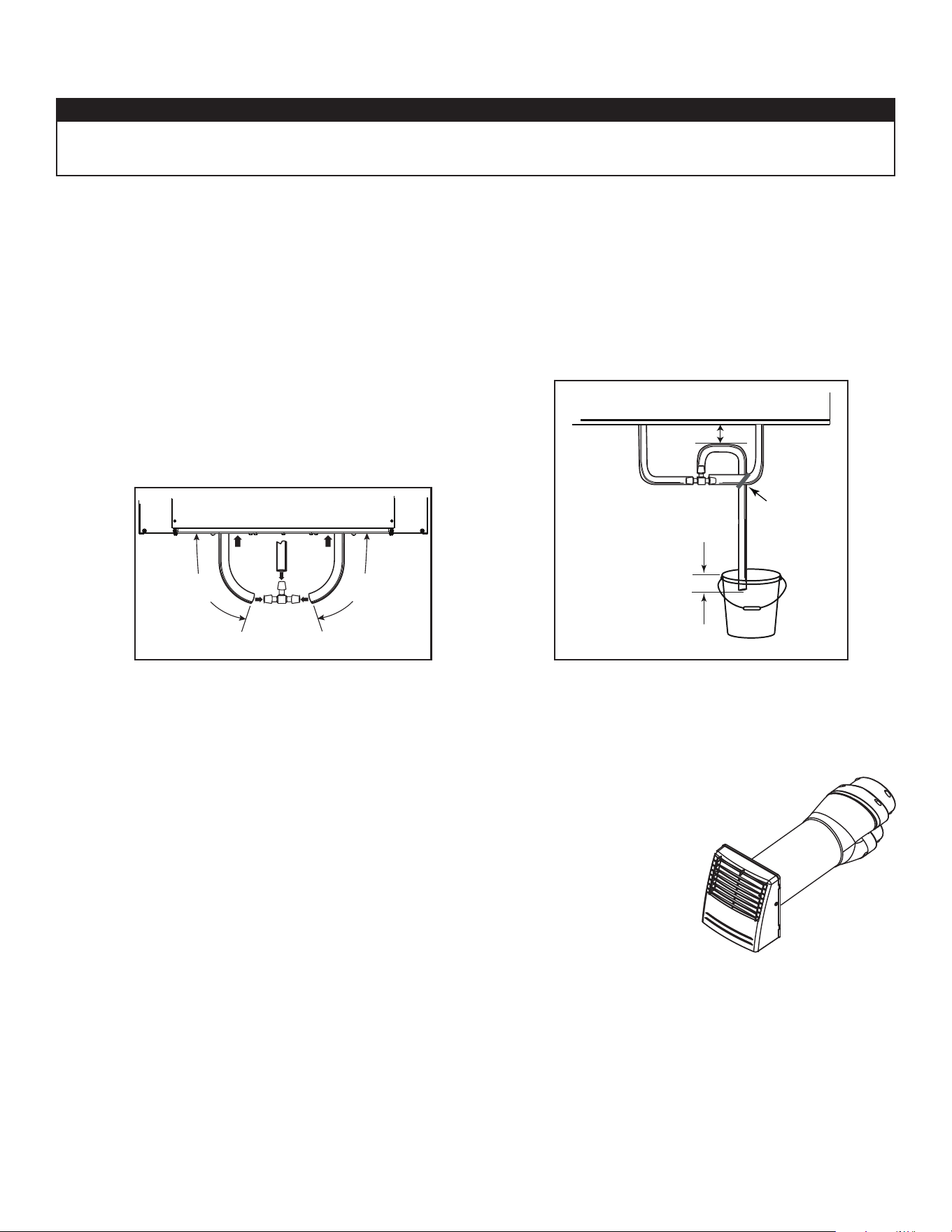
8
2.3 CONEXIÓN DEL DESAGÜE (HRV SOLAMENTE)
Instalar el conducto de desagüe incluido y canalizarlo hacia un dren o un balde. Este aparato puede generar una gran cantidad de agua
cuando hace frío. Es necesario instalar el conducto de desagüe adecuadamente para evitar todo daño y/o rotura de material.
PRECAUCIÓN
• Corte la longitud apropriada de conducto de desagüe (véase las ilustraciones a continuación).
• Conecte el conducto al adaptador suministrado.
• Haga un bucle en el conducto de desagüe para evitar que el aparato saque olores desagradables de la fuente de desagüe.
• Agregue agua en el bucle para evitar ruido o silbido.
• Asegúrese de que hay una distancia mínima de 2 pulg. entre el aparato y el bucle en el conducto (véase la ilustración a continuación).
• Use la tira de amarre suministrada para sujetar el conducto tal como ilustrado a continuación.
• Lleve el conducto al desagüe del suelo, a otro conducto de desagüe o a un balde.
• IMPORTANTE: Si utiliza un balde para recoger el agua, sitúe el extremo del conducto a 1 pulg. aproximadamente de la parte
superior del balde para evitar que el agua retroceda al aparato.
VO0290E
13 pulg.
(330 mm)
13 pulg.
(330 mm)
VO0083E
± 1 pulg.
TIRA DE
AMARRE
≥ 2 pulg.
Para los aparatos confi gurados a 110 pi
3
/min o menos, si lo desea, puede usar un kit de cambio de
sección Tandem en lugar de 2 bocas exteriores; pero tenga en cuenta que este dispositivo generará
una presión estática adicional de 0,2 pulg. de agua, según la instalación.
El espacio mínimo entre viguetas para instalar el cambio de sección Tandem es de 9 ¾ pulg. La altura
máxima del cambio de sección Tandem es de 8 ¾ pulg.
Para conectar los conductos fl exibles aislados al cambio de sección Tandem (aire viciado hacia el
exterior y aire fresco desde el exterior), siga las instrucciones que vienen con el kit de cambio de
sección Tandem (n.° de pieza VTYIK1).
VR0003
2.4 INSTALACIÓN DE LA BOCA EXTERIOR DOBLE CON EL KIT DE CAMBIO DE SECCIÓN TANDEM® (OPCIONAL)
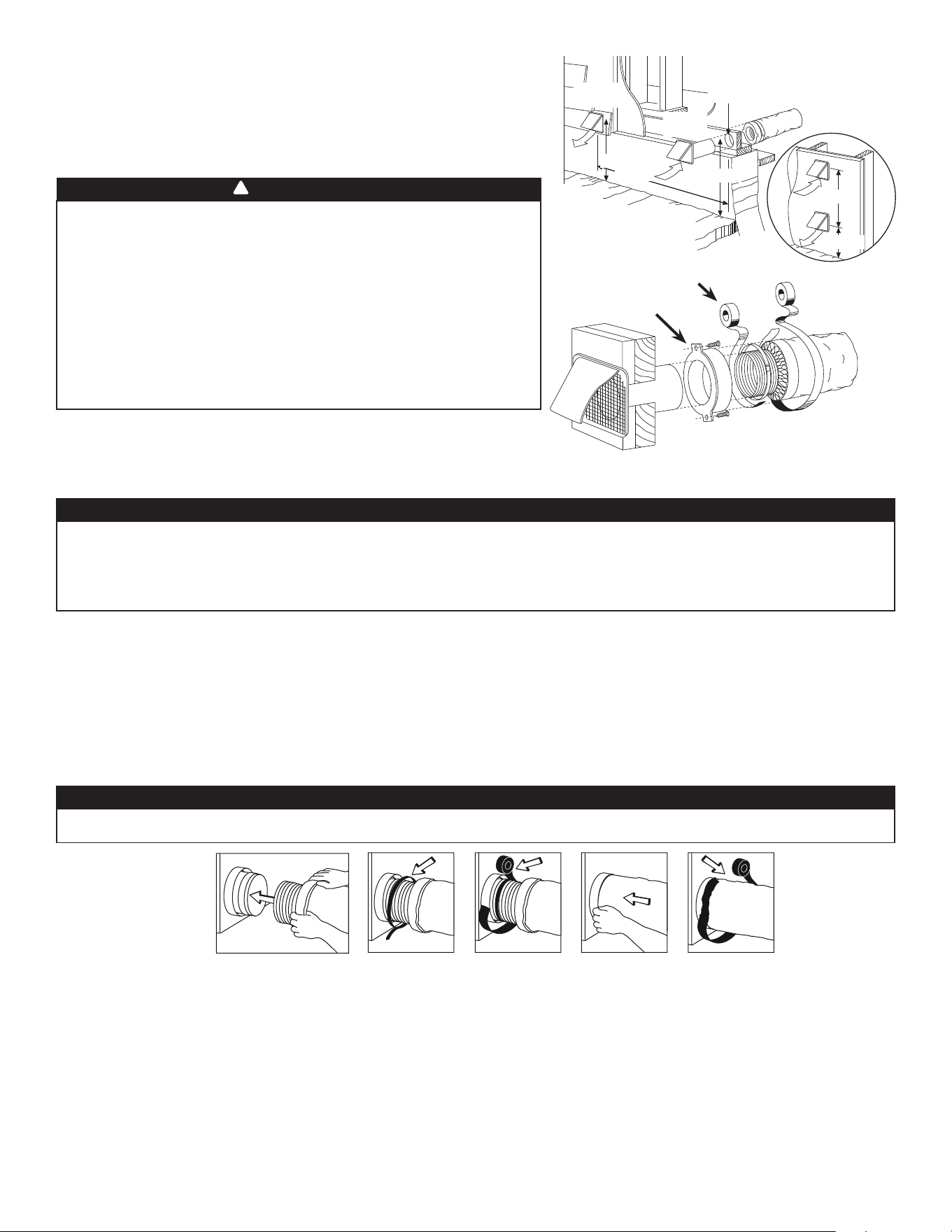
9
C
AMBIO DE SECCIÓN A CONDUCTOS DE 6 PULG. (SOLO PARA APARATOS DE 110, 130 O 150 PI
3
/MIN)
Si utiliza conductos de 6 pulg., instale cambios de sección de 5 a 6 pulg. en los puertos, y sujételos con cinta adhesiva para conductos
solamente. Si utiliza conductos rígidos, instale una sección de conducto fl exible de 12 pulg. entre el cambio de sección y el conducto
rígido (véase más arriba).
C
ONDUCTOS RÍGIDOS
Para evitar posibles fugas de agua en el aislamiento del conducto rígido del lado frío, selle todas las juntas de los conductos rígidos con
cinta adhesiva para conductos. Para evitar la transmisión de vibraciones, use siempre una sección de conducto fl exible de 12 pulg. para
conectar los conductos rígidos al aparato. Para conectar los conductos rígidos aislados al aparato (lado frío) mediante conductos fl exibles
aislados, siga las instrucciones de la sección 2.5. Para conectar los conductos rígidos regulares (lado caliente) al aparato mediante
conductos fl exibles no aislados, utilice una tira de amarre.
2.6 CONEXIÓN DE LOS CONDUCTOS AL APARATO
CONDUCTOS FLEXIBLES AISLADOS
Siga el método siguiente para conectar los conductos fl exibles aislados a los puertos del aparato (de aire viciado hacia el exterior y de
aire fresco desde el exterior).
1. Deje a la vista el conducto fl exible, tirando hacia atrás el aislamiento y colóquelo sobre el anillo del puerto interior.
2. Sujete el conducto fl exible al puerto mediante una tira de amarre.
3. Selle la junta con cinta adhesiva para conductos.
4. Tire del aislamiento y de la película impermeable al vapor sobre la junta, métalos entre el anillo interior y el exterior del cuello doble
y sujételos con cinta adhesiva para conductos.
• Si los conductos han de pasar a través de un espacio no acondicionado (p. ej., un desván), use siempre conductos aislados para evitar la
formación de condensación fuera o dentro del conducto, lo que podría provocar roturas de material y/o la aparición de moho.
• Nunca use tornillos para conectar conductos a los puertos con el fi n de no perturbar el funcionamiento de las compuertas
situadas dentro de los puertos. Una compuerta que no funciona podría congelar el aparato, lo que podría provocar roturas.
PRECAUCIÓN
2.5 INSTALACIÓN DE LAS BOCAS EXTERIORAS
Para evitar toda contaminación:
• Mantener una distancia de al menos 10 pies entre ambas bocas O usar el kit
de cambio de sección Tandem (n.° de pieza VTYIK1).
• Instalar la/las boca(s) a una distancia mínima de 18 pulg. hasta el suelo O a la
altura prevista de la acumulación de nieve si esta última es más importante.
Consulte la ilustración de la derecha para el método de conexión correcto de
los conductos aislados que van a las bocas. En las regiones donde se espera
que caiga mucha nieve debe instalarse una boca de entrada antirráfagas.
VD0028
18 PULG.
6 PULG. ø
10 PIES
6 PIES
18 PULG.
U
BICACIÓN
OPCIONAL DEL
CONDUCTO
MASILLA
BOCA DE
SALIDA
BOCA DE
ADMISIÓN
CINTA Y AMARRE
DEL
CONDUCTO
Compruebe que la boca de entrada de aire esté al menos a 6 pies
(1,8 m) de distancia de cualquiera de los siguientes elementos:
• Salida de secadora, de sistema central de aire forzado de alta efi ciencia,
de aspiradora central;
• Salida de contador de gas, barbacoa de gas;
• Cualquier salida de una fuente de combustión;
• Cubo de basura y cualquier otra fuente de contaminación.
Ignorar estas recomendaciones podría considerablemente deteriorar la
calidad del aire que entra en la casa, lo que, en ciertos casos, podría tener
repercusiones para la salud.
En caso de confl icto entre nuestras condiciones y los requisitos locales,
prevalecerán estos últimos.
ADVERTENCIA
!
18 PULG.
La barrera de vapor debe permanecer intacta, sin aberturas o huecos. Una abertura podría generar condensación fuera o dentro del
conducto, lo que podría provocar roturas de material y/o la aparición de moho a largo plazo.
PRECAUCIÓN
NOTA: Se recomienda utilizar conductos de 6 pulg. en lugar de 5 pulg. para los aparatos 150H75NT, 150H75NS, 150E75NT y
150E75NS si el fl ujo de aire necesario supera 130 pi
3
/min. Impedirá tener una presión estática demasiado alta en los conductos.
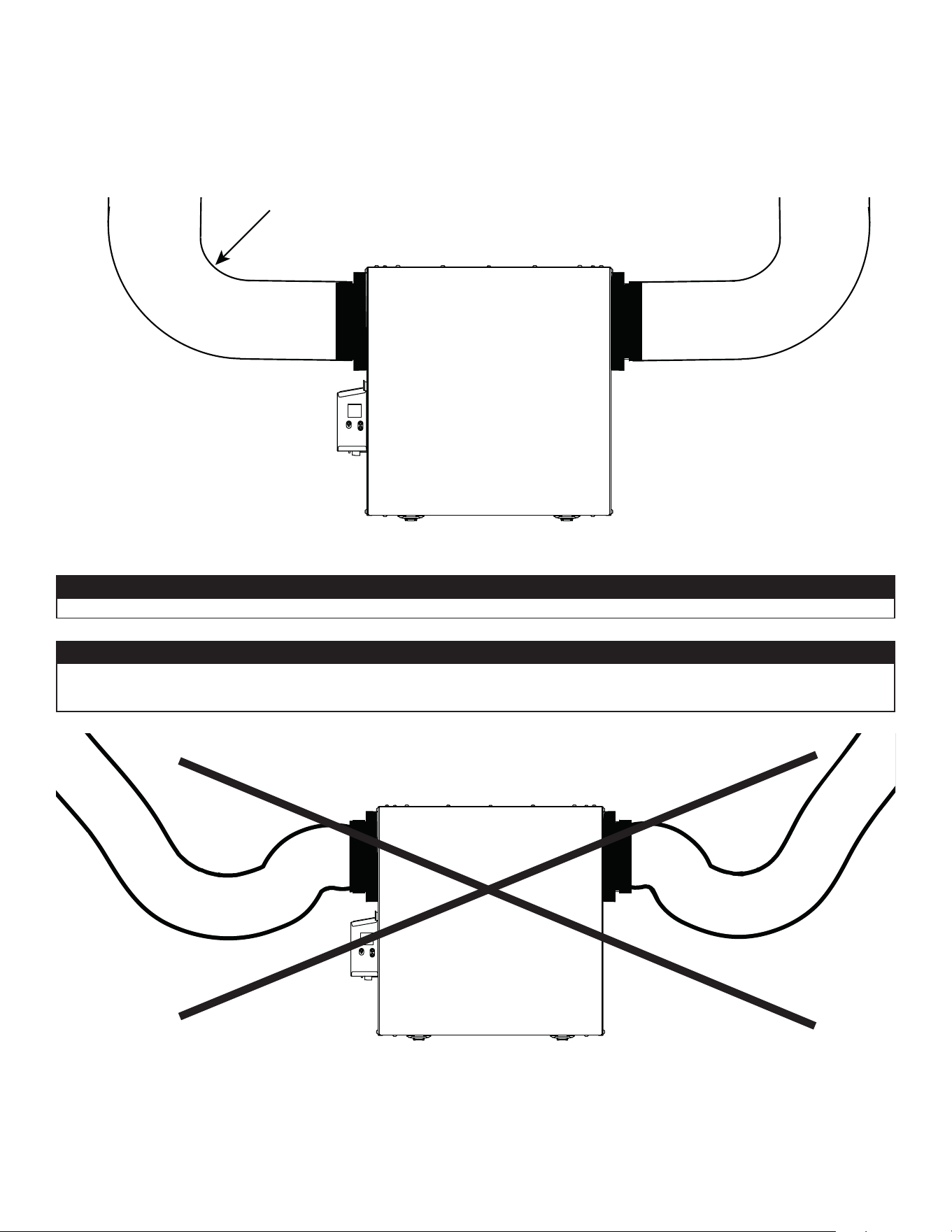
10
2.6.1 CONEXIÓN DE LOS CONDUCTOS
VD0489
INSTALACIÓN CORRECTA
VD0490
INSTALACIÓN INCORRECTA
Los conductos aislados deben tener el mismo diámetro que los puertos para asegurar un drenaje adecuado del agua que se pueda
acumular en los conductos.
PRECAUCIÓN
Los conductos no deben estar demasiado aplastados. De lo contrario, la precisión de los fl ujos de aire será afectada.
PRECAUCIÓN
IMPORTANTE: Asegúrese de conectar los conductos como se ilustra a continuación para obtener una lectura precisa de los fl ujos de
aire. Una instalación correcta también permitirá un drenaje adecuado del agua que se pueda acumular en los conductos.
R = 3 pulg. mínimo
NOTA: Instalar los conductos lo más recto posible, reducir el número de codos y diseños y instalar los conductos conforme al
Manual D de ACCA.
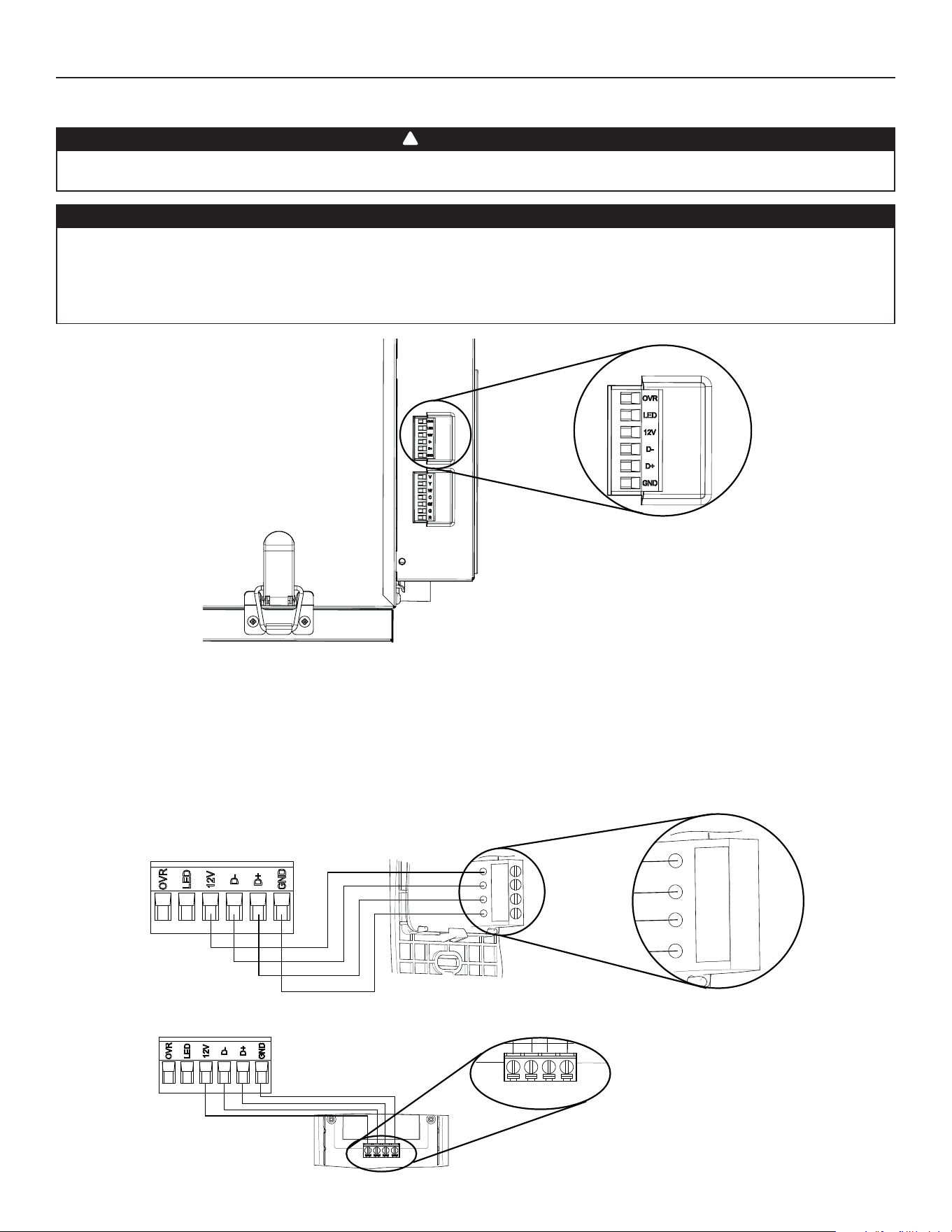
11
NOTA: Para obtener información sobre el funcionamiento del control mural, consulte el Guía de instalación y del usuario, disponible en
www.Broan-NuTone.com
Desconecte siempre el aparato antes de efectuar cualquier conexión. De no cortar la alimentación, podría producirse un choque eléctrico
o dañarse el control mural o el módulo electrónico dentro del aparato.
3. CONEXIONES
3.1 CONEXIÓN ELÉCTRICA CON EL CONTROL MURAL PRINCIPAL OPCIONAL
Use el conector de terminales incluido para realizar la conexión eléctrica de los controles murales principal y opcional. Verifi que si todos
los hilos han sido introducidos en los orifi cios correspondientes en el bloque de terminales. Use tornillos para sujetar los hilos en el
conector de terminales.Una vez conectado el control o controles murales, introduzca el conector de terminales en el compartimento
eléctrico.
No instale nunca más de un control mural principal opcional por aparato. Compruebe que los cables no se cortocircuiten entre ellos
o tocando otros componentes del control mural. Evite las malas conexiones del cableado. Para reducir el riesgo de interferencia
eléctrica (ruido), no pase los cables del control mural cerca de los contactores de control ni de circuitos de atenuación de la luz, motores
eléctricos, alimentación de viviendas o edifi cios, cables de iluminación o tableros de distribución de energía.
PRECAUCIÓN
ADVERTENCIA
!
HD0491
VISTA INFERIOR DEL
APARATO
CONECTOR DE TERMINALES
3.1.1 CONEXIÓN ELÉCTRICA CON EL CONTROL MURAL PRINCIPAL OPCIONAL SELECTOR DE VELOCIDAD, DEHUMIDOSTATO O AUTOMÁTICO
Gnd
D+
12V
D-
12V
D-
D+
Gnd
3.1.2 CONEXIÓN ELÉCTRICA CON EL CONTROL MURAL PRINCIPAL OPCIONAL AVANZADO
12V D- D+ Gnd
VC0242
12V D- D+ Gnd
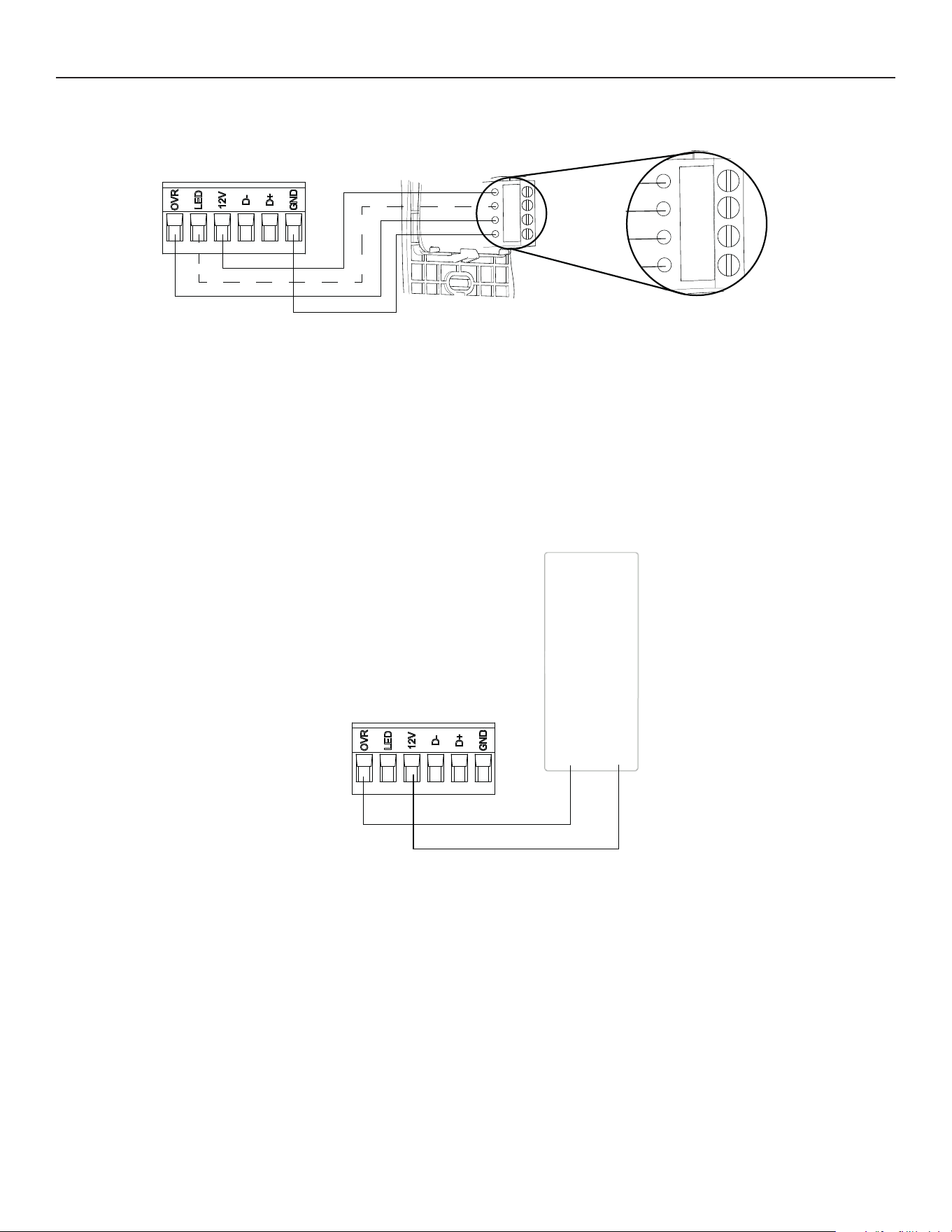
12
3. CONEXIONES (CONT.)
3.2 CONEXIÓN ELÉCTRICA CON EL CONTROL MURAL AUXILIAR OPCIONAL
3.2.1 CONEXIÓN ELÉCTRICA CON EL CONTROL MURAL AUXILIAR OPCIONAL 20-40-60
Gnd
OVR
12V
LED
VC0243
Gnd
OVR
12V
LED
Para confi gurar la opción OVR en la pantalla LCD, elija entre estas 3 confi guraciones: BAL (el aparato permanece balanceado al mismo
tiempo ofrece fl ujo de aire máximo), PER (el aparato está ligeramente desbalanceado ya que el motor de distribución está en
velocidad MAX al mismo tiempo permite ventilación máxima a la salida) y DIS (el aparato está desbalanceado ya que la distribución de
aire está constante a pesar de una mayor exigencia en ventilación a la salida).
NOTA: Se puede utilizar el control mural auxiliar con una conexión a 3 cables eliminando los indicadores LED. Este cableado opcional
no permitirá una instalación con más de un control mural auxiliar para sincronizar correctamente sus indicadores LED para un
evento requerido por un par. Sólo el control mural auxiliar que ha requerido el evento temporizador tendrá sus indicadores LED
actualizados en consecuencia.
3.2.2 CONEXIÓN ELÉCTRICA CON EL CONTROL MURAL AUXILIAR OPCIONAL DE CONTACTO SECO (POR EJEMPLO TEMPORIZADOR MECÁNICO)
Temporizador
mecánico
o
cualquier contacto
seco
12VOVR
VC0256E
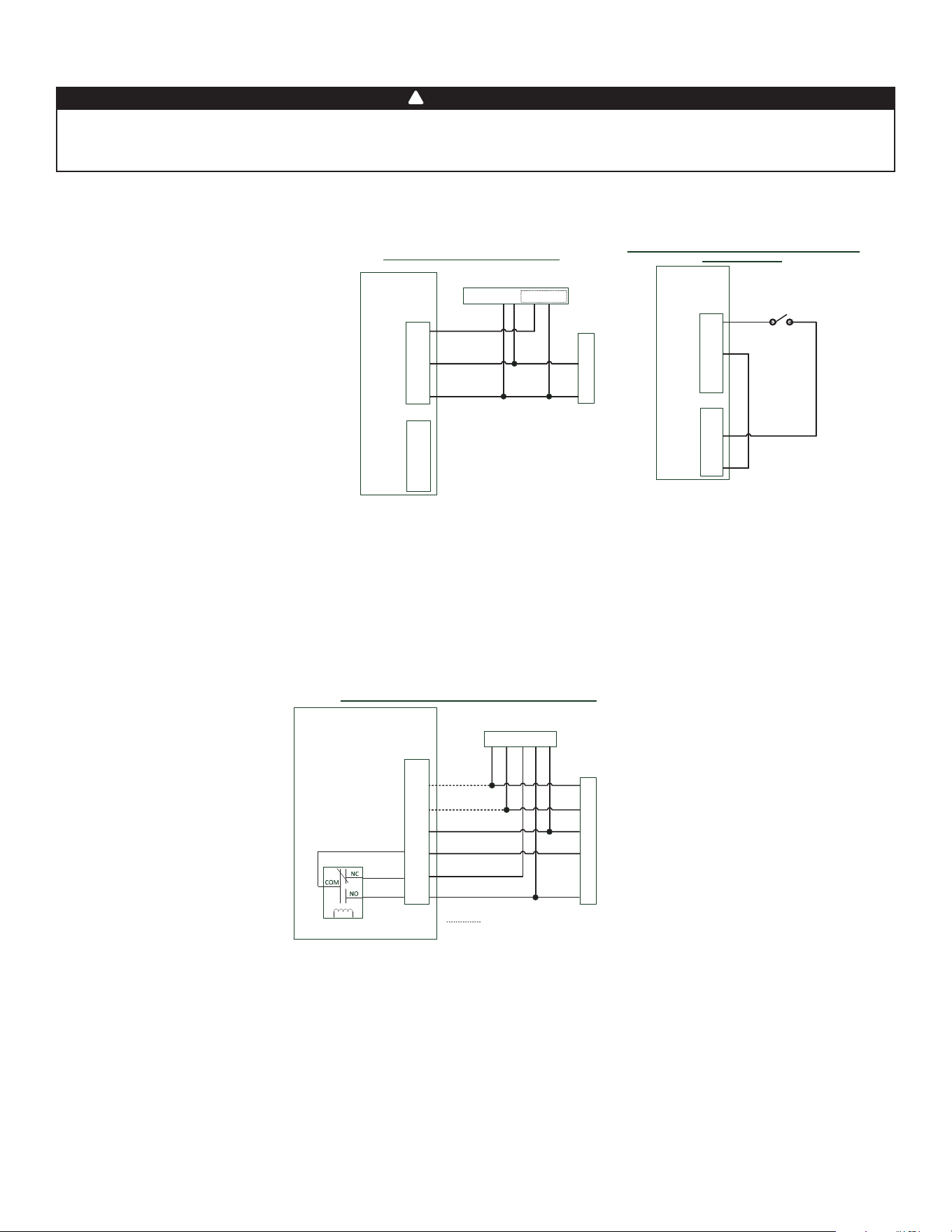
13
No conecte nunca un circuito de 120 voltios de corriente alterna a los terminales del interbloqueo del sistema central de aire forzado (cableado
estándar). Utilice sólo el circuito de clase 2 de bajo voltaje del control del ventilador impelente del sistema central de aire forzado. El aparato está
diseñado sólo para baja tensión. Enchufarlo a una tensión de 120 voltios lo dañaría inmediatamente.
3.3 CONEXIÓN CON EL SISTEMA CENTRAL DE AIRE FORZADO
ADVERTENCIA
!
VE0455E
Bloque de terminales
de la tarjeta electrónica
del intercambiador de aire
Y
W
C
G
R
Y W G R C
Termostato del sistema central de aire forzado
Opciones de cableado con sistema central de aire forzado
Vent
Y
W
C
Gf
G
R
J13
Lógica
interna
Cableado opcional por sincronización
Sistema central de aire forzado
3.3.2 INTERCONEXIÓN DEL APARATO CON UN SISTEMA CENTRAL DE AIRE FORZADO (R/C/G/GF)
Estas conexiones deben hacerse si quiere que el aparato imponga el funcionamiento del ventilador del sistema central de aire forzado
cuando ventile (consulte líneas continuas en el diagrama anterior).
NOTA : Estas conexiones se requieren para la confi guración de instalación T-4. Consulte la sección 2.2 para más detalles.
3.3.3 SINCRONIZACIÓN CON LA FUNCIÓN SISTEMA CENTRAL DE AIRE FORZADO
Virtuo Air technology
TM
permite sincronizar el funcionamiento del aparato con el tiempo de funcionamiento del sistema central de
aire forzado. Evita innecesario tiempo de funcionamiento del sistema central de aire forzado además de proporcionar una mejor
distribución del aire.
Para utilizar esta función, conexiones W e Y deben añadirse a las conexiones R e C para comunicar al aparato que el sistema central de
aire forzado está en marcha (consulte las líneas punteadas en el diagrama anterior).
3.3.1 FUNCIONAMIENTO DEL APARATO USANDO UNA CONEXIÓN DE CONTACTO SECO
Si el termostato está equipado con una salida de ventilación opcional, es posible utilizarla para hacer funcionar el aparato.
Y
W
C
G
R
Y W G R C Acc+ Acc-
Termostato del sistema central de aire forzado
Sistema central de aire forzado
Cableado con conexión de contacto seco
1
1- External switch or any Dry-contact can be used to
activate Vent input if not available on the Thermostat
Cableado alternativo para una instalación independiente
de contacto seco
Vent
Y
W
C
Gf
G
R
J13
OVR
LED
12V
D-
D+
GND
J9
Interruptor exterior o
cualquier contacto seco alternativo
Bloque de
terminales del
intercambiador
de aire
Vent
Y
W
C
Gf
G
R
J13
OVR
LED
12V
D-
D+
GND
J9
Nota : La sincronización a un sistema central de aire forzado
con W y Y no está disponible con esta configuración.
1 - Un interruptor exterior o cualquier contacto seco puede utilizarse para activar la
entrada vent si no está disponible en el termostato. Ciertos termostatos ofrecen una salida
24VAC con cable único por la ventilación accesoria. Puede conectarse directamente a la
entrada vent y, por lo tanto, la conexión a Acc- / R no es necesaria.
Bloque de
terminales del
intercambiador
de aire
Una vez hecha la conexión, el aparato
alternará entre el modo espera, cuando
el contacto está abierto, y el modo
seleccionado, cuando el contacto está
cerrado. Elija entre estas 4 confi guraciones:
mínimo (el aparato funciona en velocidad
MIN), intermitente (el aparato funciona
en velocidad MIN 20 min/hora y después
conforme a la confi guración de la opción INT
durante 40 min), auto* (el aparato funciona
en función de la temperatura exterior) y
máximo (el aparato funciona en velocidad
MAX) de la opción DRY en la pantalla LCD
cuando el contacto VENT está activado.
Consulte la sección 5 para más detalles.
* En modo auto, el aparato funciona de la
manera siguiente:
• Debajo -13°F = 10 min/hora
• -13°F a 19°F = 20 min/hora
• 19°F a 50°F = 40 min/hora
• 50°F a 77°F = velocidad MIN
• 77°F a 82°F = 30 min/hora
• 82°F a 91°F = 20 min/hora
• Por encima de 91°F = 10 min/hora
NOTA: Esta opción de contacto seco prevalecerá sobre el control mural principal. No
recomendamos el uso conjunto de un control mural con este tipo de conexión.
NOTA: Según la instalación de los conductos y la temperatura, podría ser necesario que el
aparato funcione de manera continua. Consulte la sección 2.2 para más detalles.
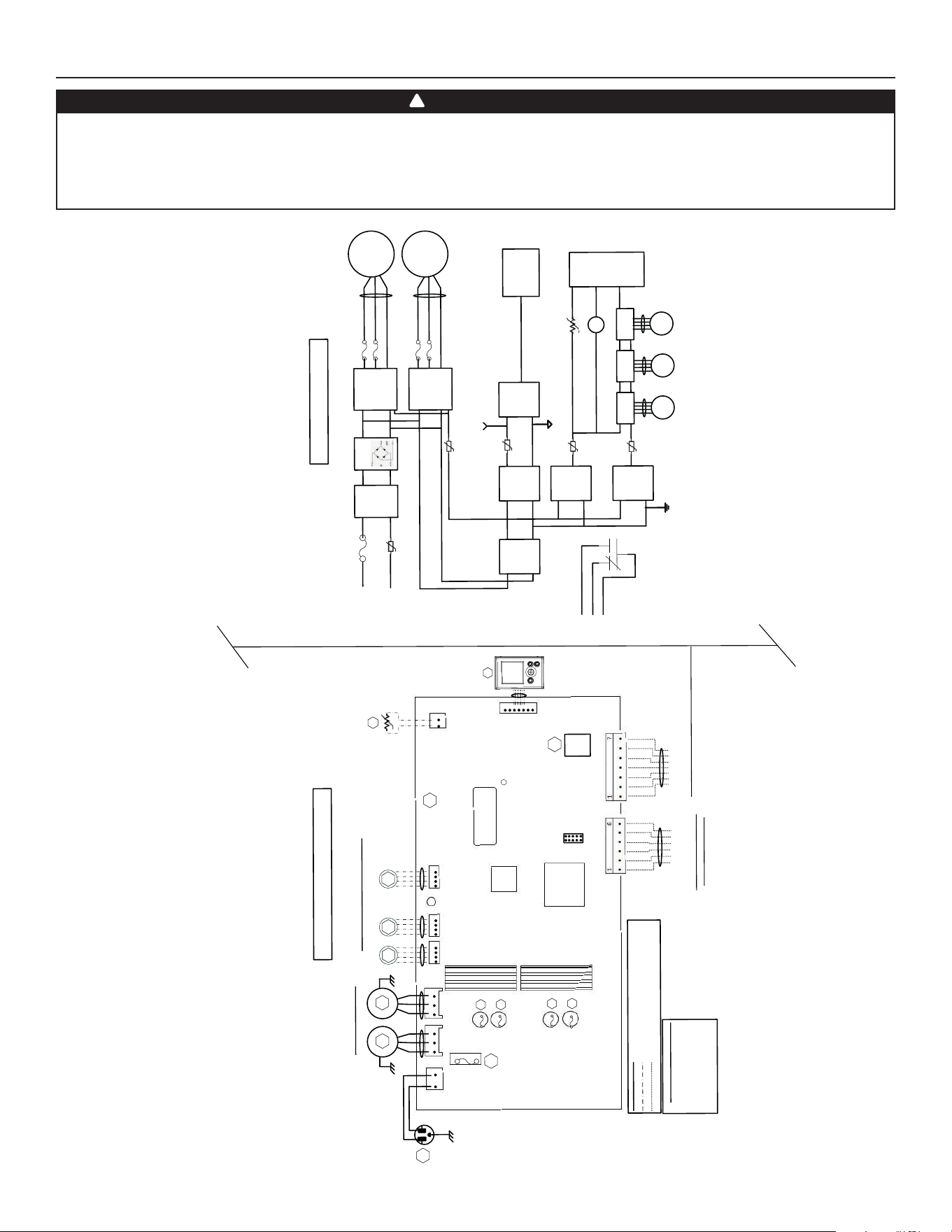
14
4. DIAGRAMA DE CABLEADOS
NE
NE
Tierra
DIAGRAMA LÓGICO
CÓ
D
IGO DE COLORES
A
Z AZUL
B
BL
AN
CO
R
ROJO
V
VERDE
C
ableado de fáb
rica de tensión de línea
Cableado de f
áb
rica de baja tensión
Cableado in situ de baja tensión
(Extracción
)
AZ
R
120VCa
60H
z
W1
Tierra
F
1
1
Luz
LE
D
J1
M
2
Mo
t
ore
s de pasos de la compuerta
Y
M1
B
NE
A1
CONJUNTO ELECTR
Ó
NICO
PRINCIPAL
M1
A
lime
n-
taci
ó
n
(
15
V
DC
)
Línea
Neutro
K1
G
Gf
Línea
de CA
Filtro
J1-2
F1
Alta tensión
(
120VCA
)
J1-1
To J
2
M
C
U
K1
M3
T
o
J
5
DIAGRAMA DE CABLEADOS
BD
M
1
5A/125
V
AC
J2 J3
J
5J6
J7
1
1
1
1
1
J7a
J
15a
1
A2
LC
D
CONJUNTO
Tierra
Motores del ventilador
AZ
R
M2
M3
M4
(Alimentación
)
(
Alime
nt
a
ción
)
* Op
cional
(Recirc
)
(Extracción
)
M
CU
Nú
mero de serie
de aislamiento
T
ran
sfor
m
ador
Fusibles del motor
F2
F3
F
4
F
5
V
W
Gf
C
G
R
* Cableado
opc
i
onal sist
em
a
central
de ai
r
e
f
orzado
(
24VCA aislado
)
O
VR
LED
1
2
V
D
-
D+
G
N
D
C
ab
l
eado de
los
cont
r
ol
es
pr
incipales y auxilia
r
es
Termi
s
t
or
R
1
R
T
1
(
NTC
)
Puente
IPM
M
otor 1
IPM
M
otor
1
F3
F2
M2
To J
3
F
5
F4
si
s
t
ema central
de aire fo
r
zado
R
el
é
K1
P
TC
3
C
o
nvert
i
-
dor aislado
(1
2VDC
)
(3.
3
VDC
)
J9
J1 3
Función
lóg
ica
(
3.3
VD
C
)
P
T
C
2
T
o
J
9
(1
2VDC
)
M4
To
J
6
M5
Motor de
pasos
To J
7
PT
C
6
PT
C
4
To J13
R
TH1
To J
7a
(R1)
LCD
Conjunto
Tie
rra aislada
Masa digit
al
T
o
J15
a
(
A2)
La compuerta de
recirculación
(
J6
)
no está
pre
se
n
te
para todos
l
os modelos
J1 4
VE0452
E
Función
lóg
ica
C
o
nvert
i
-
dor aislado
Motor de
pasos
Motor de
pasos
N
E NEGRO
• Riesgo de descarga eléctrica. Antes de cualquier trabajo de reparación o mantenimiento, desconecte siempre
el aparato de su fuente de alimentación.
• Este producto está equipado con una protección contra la sobrecarga (fusible). Un fusible fundido indica que se ha producido una
sobrecarga o cortocircuito. Si el fusible se funde, desenchufe el aparato. Deje de utilizar el aparato y póngase en contacto con el
servicio de asistencia técnica.
ADVERTENCIA
!
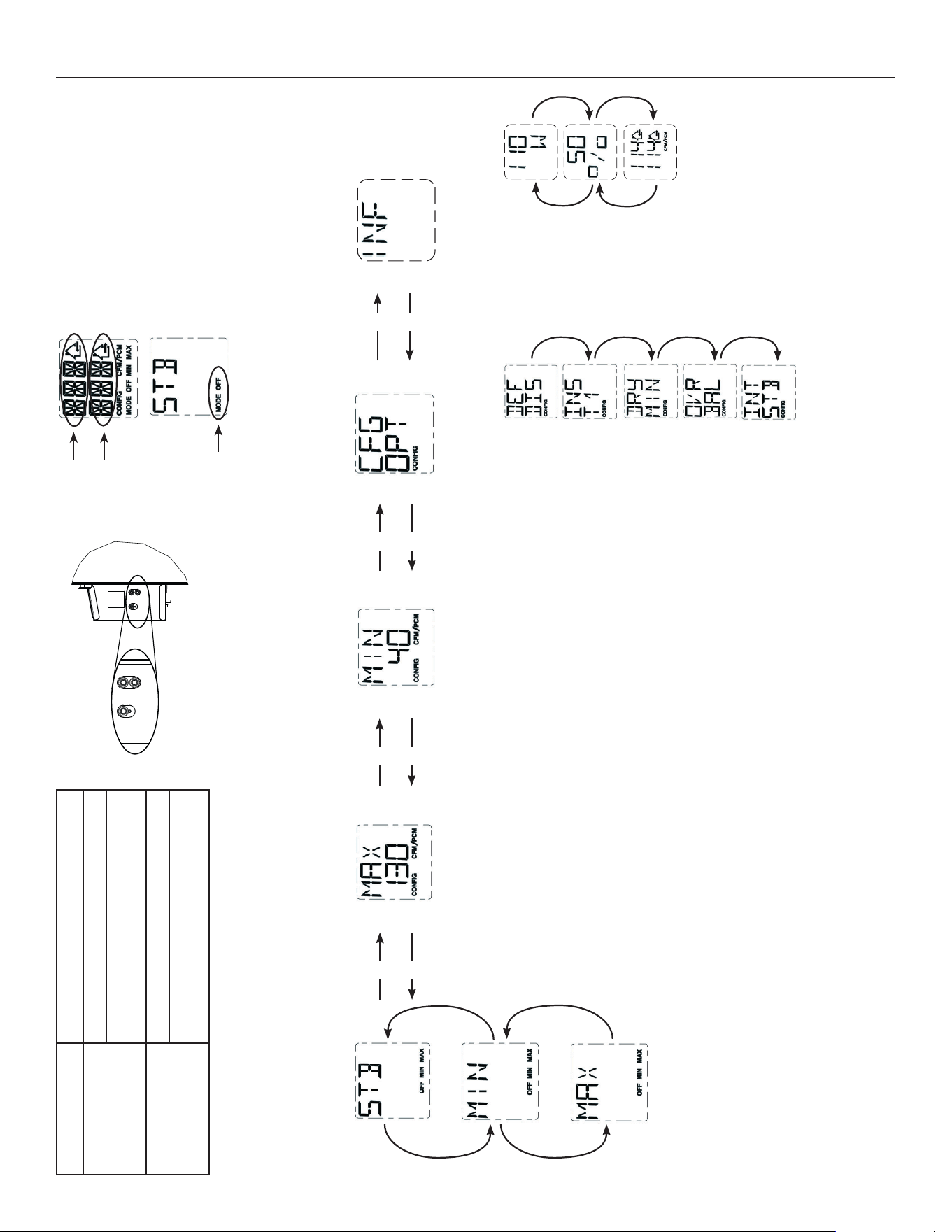
15
+
-
OK
VD0492
Botón OK Para confi rmar una selección.
Botón
+
Para aumentar el valor.
Para desplazarse hacia arriba en una
selección.
Botón
-
Para disminuir el valor.
Para desplazarse hacia abajo en una
selección.
VQ0211
VQ0209
VQ0210
VQ0203
VQ0212
Indica el modo
actual
Indica aire
fresco
PRESIONAR EL BOTÓN OK
PARA CAMBIAR EL MODO DE
FUNCIONAMIENTO
UTILIZAR EL BOTÓN + O - PARA
SELECCIONAR EL MODO DE
FUNCIONAMIENTO DESEADO.
+
-
PRESIONAR EL BOTÓN OK PARA
CONFIRMAR LA SELECCIÓN DEL
MODO DE FUNCIONAMIENTO.
VQ0205
VQ0207
VQ0201
Indica aire
viciado
+
+
-
-
+
-
+
-
PRESIONAR EL BOTÓN + O - PARA CAMBIAR EL PI
3
/MIN MÁXIMO, EL PI
3
/MIN MÍNIMO O LA
CONFIGURACIÓN DE LAS OPCIONES.
PRESIONAR EL BOTÓN OK
DURANTE 4 SEGUNDOS PARA
CAMBIAR LA CONFIGURACIÓN
DEL PI
3
/MIN MÁXIMO.
LOS DATOS DEL PI
3
/MIN MÁXIMO
PARPADEARÁN.
UTILIZAR EL BOTÓN + PARA
AUMENTAR EL VALOR O EL
BOTÓN - PARA DISMINUIR EL
VALOR.
PRESIONAR EL BOTÓN OK PARA
CONFIRMAR EL VALOR.
PRESIONAR EL BOTÓN OK
DURANTE 4 SEGUNDOS PARA
CAMBIAR LA CONFIGURACIÓN
DE LAS OPCIONES.
VQ0197
VQ0202
VQ0199
VQ0198
VQ0200
PARA CADA
CONFIGURACIÓN
DE OPCIÓN,
UTILIZAR EL
BOTÓN + PARA
DESPLAZARSE
HACIA ARRIBA EN
LAS OPCIONES
DISPONIBLES O
EL BOTÓN - PARA
DESPLAZARSE
HACIA ABAJO EN
LAS OPCIONES
DISPONIBLES.
UNA VEZ LA
SELECCIÓN DE
OPCIÓN HECHA,
PRESIONAR EL
BOTÓN OK PARA
CONFIRMAR
LA SELECCIÓN.
LA PRÓXIMA
CONFIGURACIÓN
DE OPCIÓN
APARECERÁ.
PRESIONAR EL BOTÓN OK
DURANTE 4 SEGUNDOS PARA
CAMBIAR LA CONFIGURACIÓN
DEL PI
3
/MIN MÍNIMO.
LOS DATOS DEL PI
3
/MIN MÍNIMO
PARPADEARÁN.
UTILIZAR EL BOTÓN + PARA
AUMENTAR EL VALOR O EL
BOTÓN - PARA DISMINUIR EL
VALOR.
PRESIONAR EL BOTÓN OK PARA
CONFIRMAR EL VALOR.
5. NAVEGACIÓN EN LA PANTALLA LCD
VQ0213
+
-
PRESIONAR EL BOTÓN OK
DURANTE 4 SEGUNDOS PARA
ACCEDER A INFORMACIÓN
COMPLEMENTARIA.
VQ0214
VQ0215
VQ0216
+
+
-
-
INDICA EL CONSUMO
ELÉCTRICO.
INDICA EL %
DE TIEMPO DE
FUNCIONAMIENTO
(POR HORA) PARA
EL MODO DE
FUNCIONAMIENTO
SELECCIONADO.
INDICA LOS
FLUJOS DE AIRE DEL
APARATO.
PRESIONAR EL BOTÓN OK
PARA SALIR DE INFORMACIÓN
COMPLEMENTARIA.
NOTA : Según el modelo y la confi guración del aparato, algunos menús pueden no estar disponibles.
En el ejemplo anterior, el aparato
produce 114 pi
3
/min con un consumo
eléctrico de 110 W durante 50 % de la
hora. El fl ujo de aire neto es 57 pi
3
/min
(50 % X 114), el consumo eléctrico neto
es alrededor de 55 W (50 % X 110).
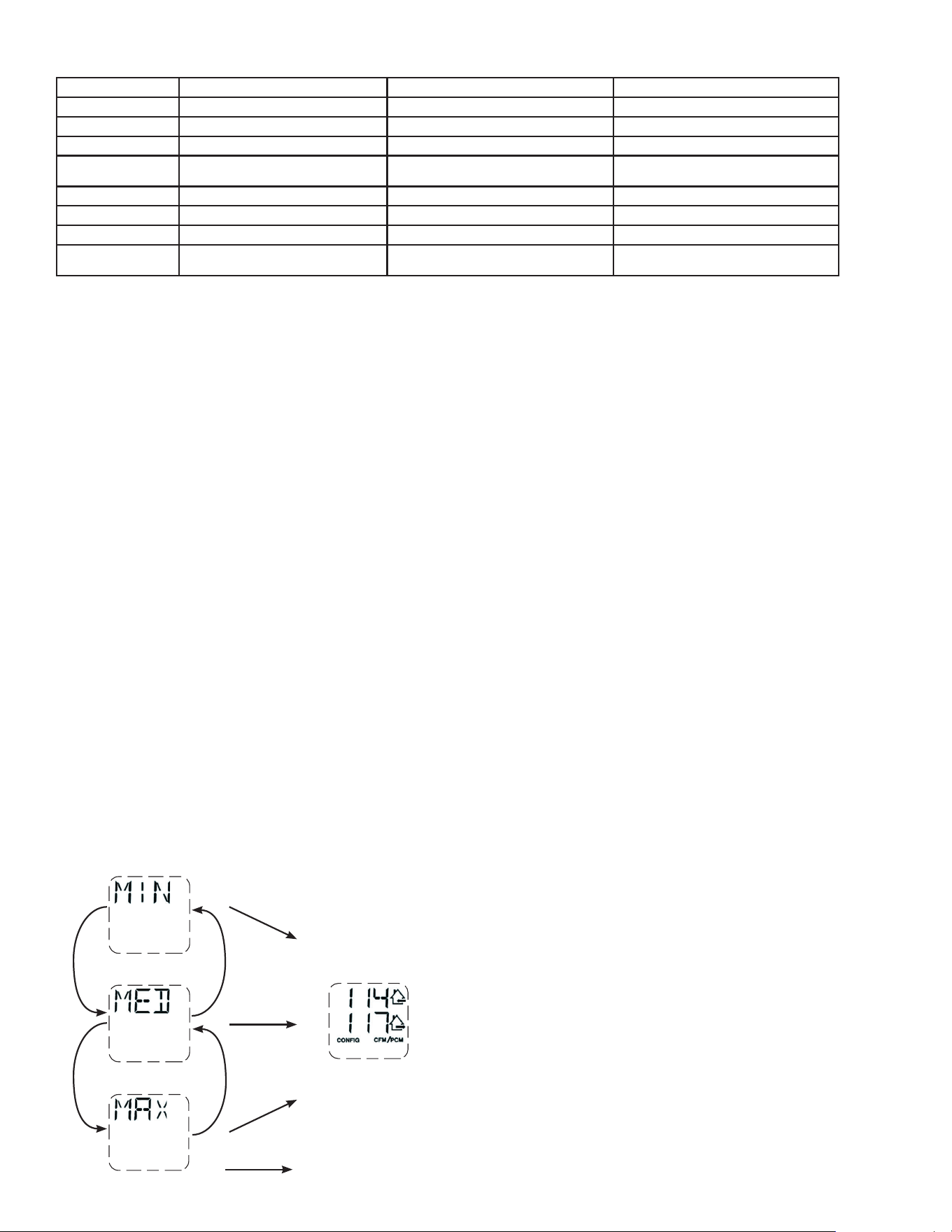
16
5.3 CAMBIO DE AJUSTES
5.3.1 PROCEDIMIENTO PARA CAMBIAR EL AJUSTE DEL PI
3
/MIN MÍNIMO
• Acceder a MIN utilizando (+/-) después presionar el botón OK durante 4 segundos.
• Utilizar (+/-) para aumentar/disminuir el pi
3
/min y OK para confi rmar.
5.3.2 PROCEDIMIENTO PARA CAMBIAR EL AJUSTE DEL PI
3
/MIN MÁxIMO
• Acceder a MAX utilizando (+/-) después presionar el botón OK durante 4 segundos.
• Utilizar (+/-) para aumentar/disminuir el pi
3
/min y OK para confi rmar.
5.3.3 PROCEDIMIENTO PARA CAMBIAR EL AJUSTE DE LAS OPCIONES
• Acceder a CFG OPT utilizando (+/-) después presionar el botón OK durante 4 segundos.
5.2 PRIMER ARRANQUE DEL APARATO
PREPARACIÓN
Siga estas indicaciones para mediciones precisas:
• Obture todos los conductos con cinta adhesiva. Cierre todas las ventanas y puertas.
• Apague todos los dispositivos de extracción, como la campana de cocina, la secadora y los ventiladores del baño.
• Si la instalación está de alguna manera conectada a un conducto de un sistema central de aire forzado, asegúrese de que el
ventilador impelente del sistema central de aire forzado esté encendido. De no ser así, deje el ventilador impelente del sistema
central de aire forzado apagado.
PROCEDIMIENTO DE AUTO BALANCEO
• Enchufar el aparato y esperar hasta que el pi
3
/min máximo aparezca en la pantalla LCD. Si el aparato es más frío que la temperatura
ambiente, es normal que el arranque requiera más tiempo (60 s) puesto que los motores deben precalentar.
• El pi
3
/min máximo aparecerá en la pantalla LCD. Utilizar (+/-) para ajustar el pi
3
/min y OK para confi rmar.
• El pi
3
/min mínimo aparecerá en la pantalla LCD. Utilizar (+/-) para ajustar el pi
3
/min y OK para confi rmar.
• La casa que parpadea en la pantalla LCD indica qué lado limita el fl ujo de aire (aire fresco o aire viciado). Si el fl ujo de aire alcanzado
no es sufi ciente, el instalador puede mejorar la instalación para aumentar el fl ujo de aire.
SELECCIÓN DE LA CONFIGURACIÓN DE INSTALACIÓN
• INS aparecerá en la pantalla LCD. Elija entre T-1, T-2, T-3, T-4 o T-5 conforme a la confi guración de instalación (consulte la sección
2.2 para más detalles).
• El auto balanceo está completado.
5.1 INDICADOR EN LA PANTALLA LCD
INDICADOR DEFINICIÓN INDICADOR DEFINICIÓN
STB Modo espera OVR 60 Auxiliar 60 min
MED Velocidad MED OVR CNT Auxiliar de contacto seco
INT Modo intermitente AHU Consulte la sección 6.3 para más detalles
REC Modo recirculación
(velocidad MIN, MED o MAX)
HUM Auxiliar humidostato o deshumidostato
AUT Modo AUTO TUR Modo turbo
SMT Modo SMART OTH Modo ausencia o modo planifi cación
OVR 20 Auxiliar 20 min DEF Modo deshielo
OVR 40 Auxiliar 40 min EXX o WXX
(XX en referencia al número de error o advertencia)
Consulte la sección 8 para obtener la explicación
de cada error o advertencia
5.3.4 PROCEDIMIENTO PARA CAMBIAR EL AJUSTE DE LOS FLUJOS DE AIRE INDEPENDIENTES
• Presionar simultáneamente los botones (+/-) durante 4 segundos.
V
Q0
217
VQ0218
VQ0219
VQ0220
+
+
-
-
OK
OK
OK
+
CUANDO LA PANTALLA MUESTRA MAX, PRESIONAR
EL BOTÓN + PARA SALIR DEL AJUSTE DE LOS
FLUJOS DE AIRE INDEPENDIENTES.
EL VALOR DEL FLUJO DE AIRE FRESCO PARPADEARÁ. PRESIONAR EL
BOTÓN + O EL BOTÓN - PARA AUMENTAR/DISMINUIR EL VALOR.
PRESIONAR EL BOTÓN OK.
EL VALOR DE FLUJO DE AIRE VICIADO PARPADEARÁ. PRESIONAR EL
BOTÓN + O EL BOTÓN - PARA AUMENTAR/DISMINUIR EL VALOR.
PRESIONAR EL BOTÓN OK.
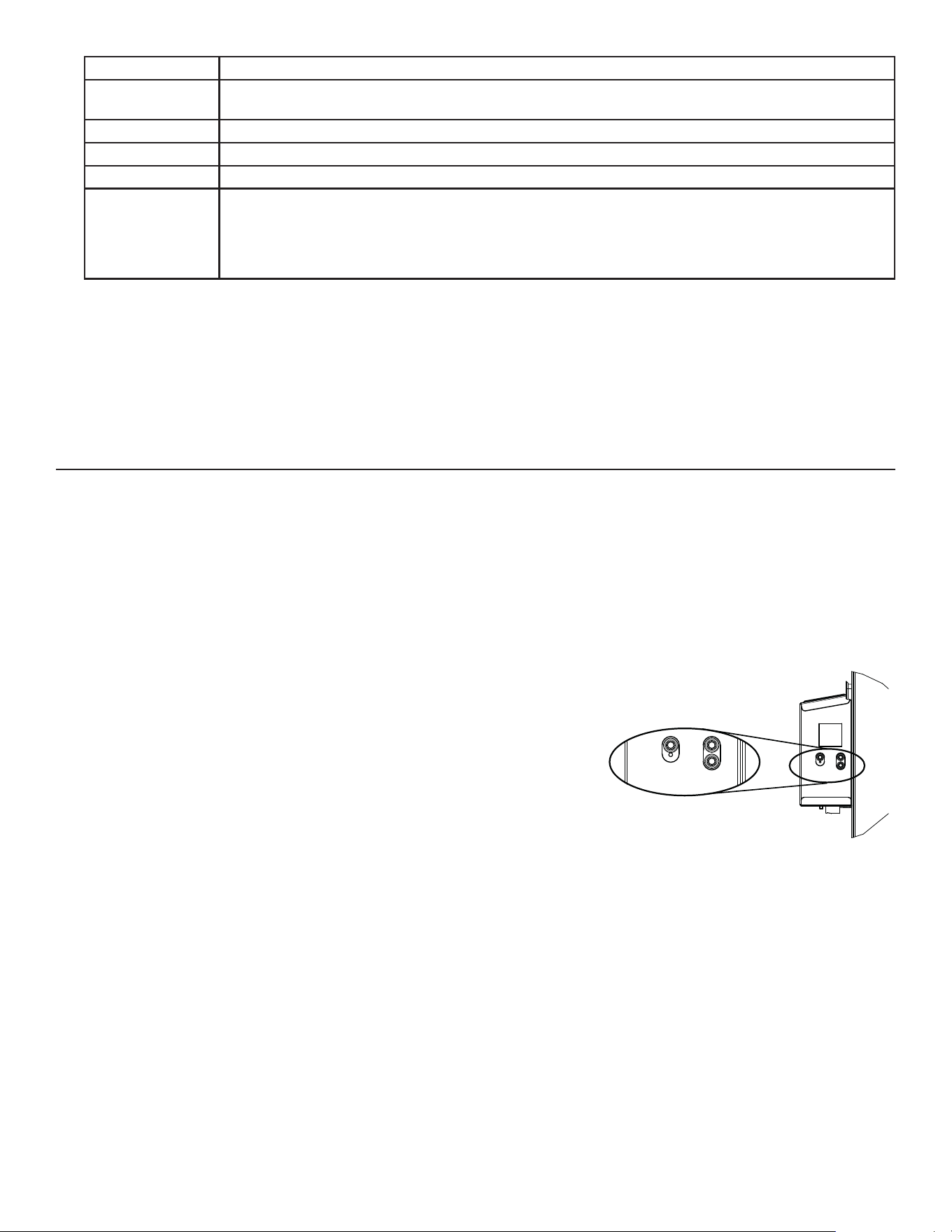
17
Este aparato de ventilación balanceado está pensado para proporcionar aire fresco a su casa y extraer el aire viciado y húmedo. Gracias
a su unidad de recuperación de energía/de calor, el aparato recupera una gran proporción de la calor o energía que forma parte del aire
interior o exterior conforme a las estaciones para mejorar la comodidad y la efi ciencia energética durante los periodos de calentamiento y
de enfriamiento. Con Virtuo Air Technology
TM
, este aparato responde a las variaciones de su entorno de manera autónoma, garantizando
un nivel adecuado de ventilación y de calidad del aire. Este aparato ofrece también modos automáticos (AUTO o SMART) que gestionan
de manera autónoma el nivel de ventilación requerido conforme a las condiciones interiores y/o exteriores. En las zonas más frías, el
aparato realizará, a intervalos, un deshielo discreto de la unidad de recuperación para mantener rendimiento y comodidad.
Todos los aparatos están equipados con un control integrado situado delante del compartimento eléctrico. Para mayor comodidad,
estos aparatos pueden controlarse mediante un control mural opcional o el termostato
del sistema central de aire forzado provisto con la activación del ventilador exterior.
+
-
OK
VD0492
SELECCIÓN DEL MODO
1. Para cambiar el modo, utilizar (+/-) para acceder a la pantalla modo. Presionar OK
para editar el modo y utilizar (+/-) para cambiar el modo (Standby, Min, Max).
2. Presionar OK para confi rmar la selección. Los pi
3
/min aparecerán en los dos modos
(MIN y MAX).
NOTA: Si un control mural auxiliar opcional o el termostato del sistema central de
aire forzado provisto con la activación del ventilador exterior se utiliza, eso invalida el
control integrado.
6.3 INDICADOR MODO AHU
Según la confi guración y/o la instalación del aparato, el aparato podría no ser capaz de alcanzar el pi
3
/min mínimo deseado. Esta situación
se puede producir con las confi guraciones T-2 a T-5. En tal caso, AHUXX (XX hace referencia al pi
3
/min mínimo deseado) aparecerá en la
pantalla LCD. En modo AHU, el aparato funciona en modo intermitente para alcanzar el pi
3
/min mínimo deseado. La duración del modo
intermitente varía según el valor del pi
3
/min mínimo deseado.
6. USO DE ESTE APARATO
6.1 SU SISTEMA DE VENTILACIÓN
6.2 CONTROL INTEGRADO
Opciones Confi guraciones disponibles
DEF (Deshielo) DIS* (Discreción - deshielo sin variación de velocidad para mayor comodidad),
PLU (Plus - deshielo prolongado en un clima más frío).
INS (Instalación) T-1, T-2, T-3, T-4*, T-5 (consulte la sección 2.2)
DRY (Contacto seco) MIN* (Mínimo), INT (Intermitente), AUT (AUTO), MAX (Máximo) (consulte la sección 3.3.1)
OVR (Auxiliar) BAL* (Balanceado), PER (Rendimiento), DIS (Discreción) (consulte la sección 3.2.1)
INT (Intermitente) STB* (Espera - 20 min en modo MIN y 40 min en modo espera), REC** (Recirculación - 20 min en velocidad
MIN y 40 min en modo recirculación)**REC (Recirculación) confi guración no está disponible para las
confi guraciones de instalación T-2 a T-5 ni para los aparatos 150H75NT, 150H75NS, 150E75NT y 150E75NS.
NOTA: Según la instalación de los conductos y la temperatura, podría ser necesario que el aparato
funcione de manera continua. Consulte la sección 2.2 para más detalles.
Si se hace una modifi cación a los conductos, reinicializar los parámetros para reiniciar la prueba del fl ujo de aire.
PROCEDIMIENTO PARA REINICIALIZAR LOS AJUSTES
Presionar simultáneamente los botones OK y (-) durante 4 segundos. Utilizar (+/-) para seleccionar Yes o No y OK para confi rmar.
Después realizar el procedimiento de auto balanceo.
* Ajuste de fábrica
NOTA: Si no se confi rma la selección dentro de 10 minutos, el aparato saldrá del menú sin guardar los cambios.
5.4 REINICIALIZACIÓN DE LOS AJUSTES DE FÁBRICA
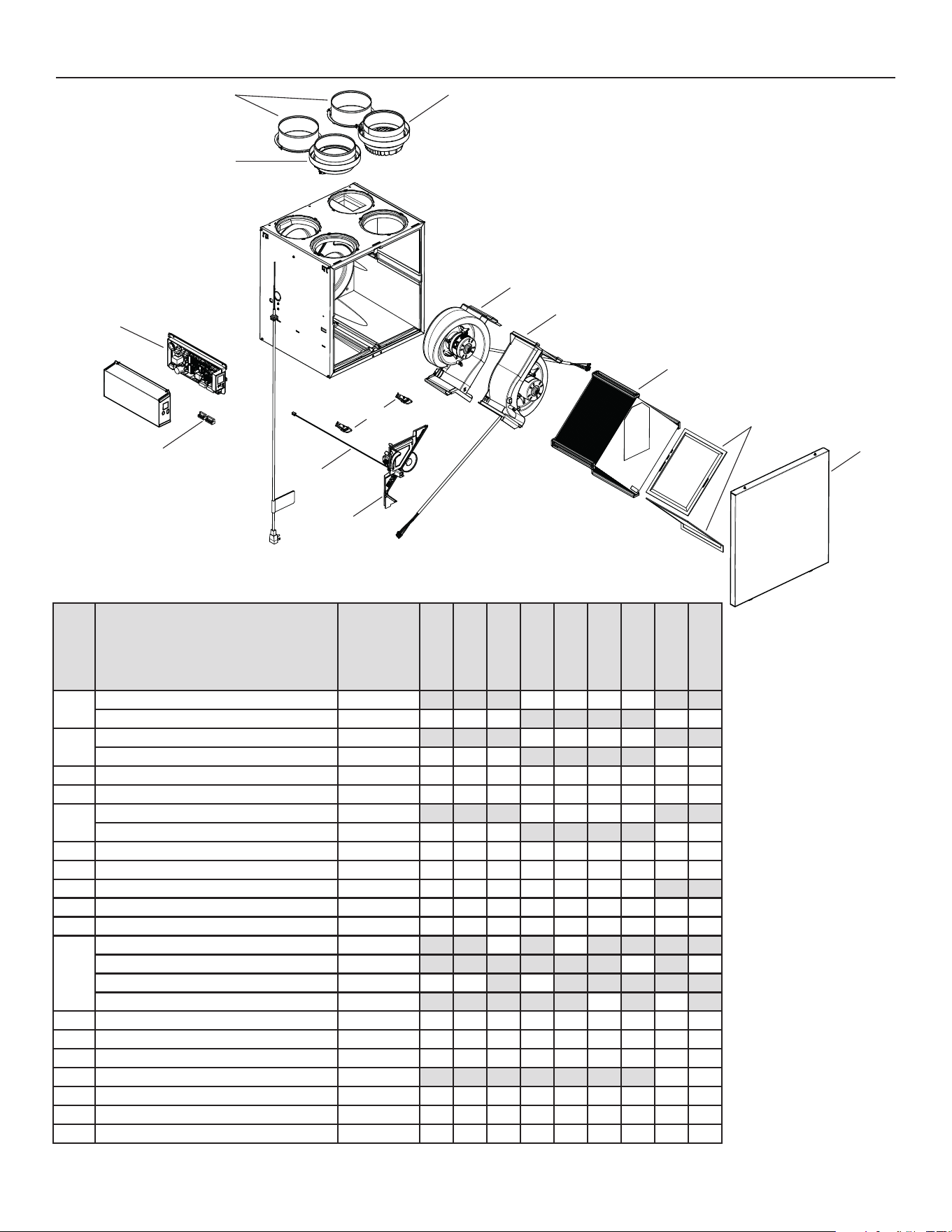
18
N
O
DESCRIPCIÓN
NúMERO DE
PIEZA
1
Puerto 6 pulg. lado caliente SV66139 2222
Puerto 5 pulg. lado caliente SV66140 2 2 2 2 2
2
Puerto de metal 6 pulg. compuerta motorizada SV66135 1111
Puerto de metal 5 pulg. compuerta motorizada SV66136 1 1 1 1 1
3 Conjunto electrónico SV66144** 111111111
4 Bloque de terminales SV66145 111111111
5
Conjunto puerto de escape 6 pulg. SV66137 1111
Conjunto puerto de escape 5 pulg. SV66138 1 1 1 1 1
6 Cerraduras y guardianes de puerta SV61218 111111111
7 Termistor SV66134 111111111
8 Compuerta de recirculación con termistor SV66148 1111111
9 Ventilador de evacuación con compuerta SV66142 111111111
10 Conjunto ventilador de alimentación SV66141 111111111
11
Núcleo ERV 65 % SV66113 1 1
Núcleo ERV 75 % SV66114 1 1
Núcleo HRV 65 % SV66115 1 1 1
Núcleo HRV 75 % SV66116 1 1
12 Kit de fi ltros MERV8 SV66133 111111111
13 Puerta SV66150 111111111
14 Compuerta de escape SV66143 111111111
15 Separador CE con termistor SV66149 1 1
* Bolsa de piezas SV66146 111111111
* Fusible para la tarjeta electrónica SV66147 111111111
* Conducto ½ pulg. SV00592 111111111
* No se muestra.
VL0086
B
C
D
E
F
G
H
I
J
K
L
B110H65RT
B110H65RS
B130H65RT
B130H65RS
B130E65RT
B130E65RS
B160H65RT
B160H65RS
B160E65RT
B160E65RS
B160H75RT
B160H75RS
B160E75RT
B160E75RS
B150H75NT
B150H75NS
B150E75NT
B150E75NS
P
O
7. PIEZAS DE RECAMBIO
M
N
REPUESTOS Y REPARACIONES
Para que el aparato de ventilación
esté en buenas condiciones,
sólo debe utilizar repuestos
genuinos de Broan-NuTone
LLC. Los repuestos genuinos
de Broan-NuTone LLC han sido
diseñados especialmente para
cada aparato, se han fabricado
de conformidad con todas
las normas de certificación
aplicables y ofrecen un alto
nivel de seguridad. El uso de
repuestos diferentes puede
provocar daños graves y
reducir drásticamente el nivel
de rendimiento del aparato, lo
cual podría causar una avería
prematura. Broan-NuTone LLC
recomienda ponerse en contacto
con un almacén de servicio
certificado para todos los
repuestos y reparaciones.
* *Consulte la página siguiente para obtener el número de pieza que corresponde al modelo del aparato de ventilación.
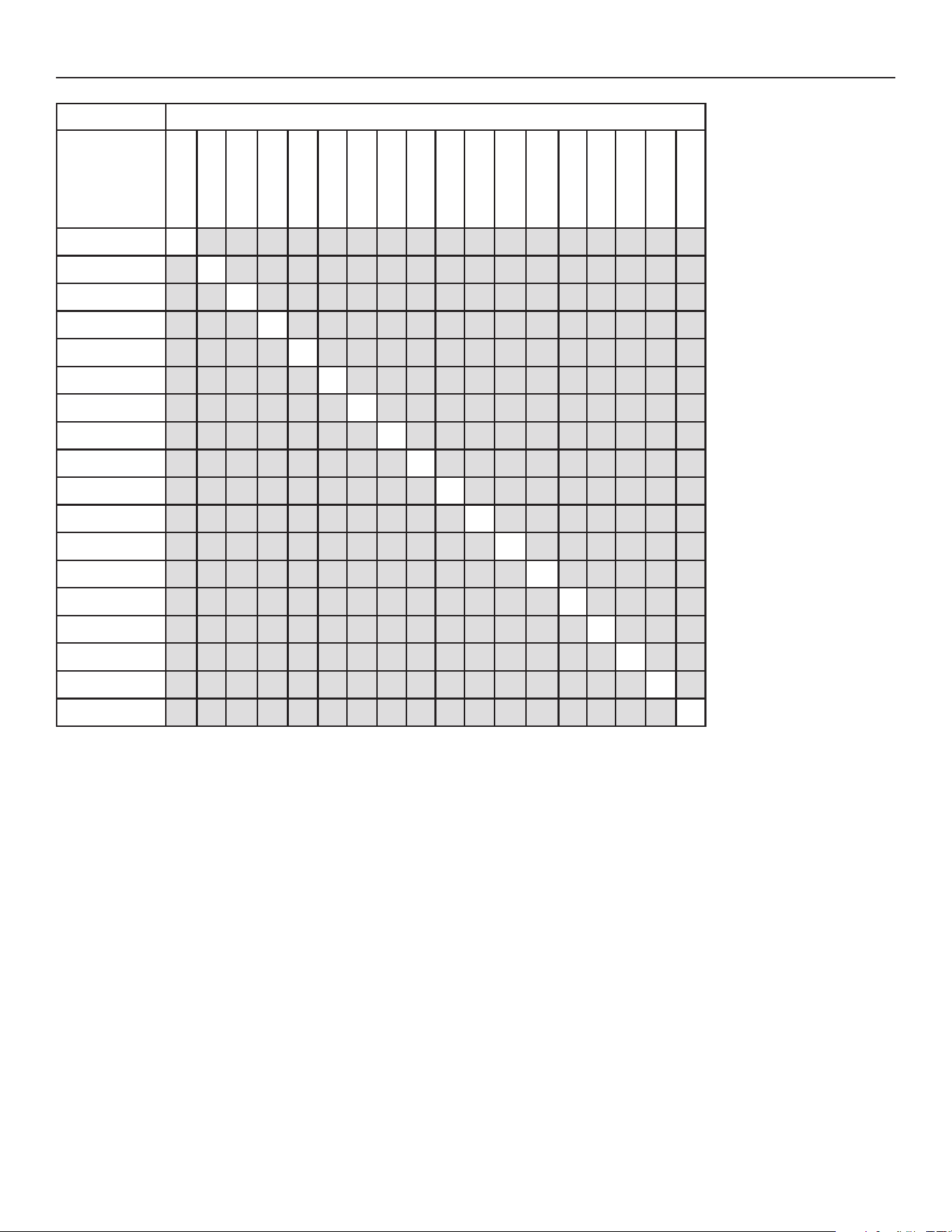
19
MODELO DEL APARATO DE VENTILACIÓN
NÚMERO DE PIEZA
DEL CONJUNTO
ELECTRÓNICO
SV66144-01 X
SV66144-02 X
SV66144-03 X
SV66144-04 X
SV66144-05 X
SV66144-06 X
SV66144-07 X
SV66144-08 X
SV66144-09 X
SV66144-10 X
SV66144-11 X
SV66144-12 X
SV66144-13 X
SV66144-14 X
SV66144-15 X
SV66144-16 X
SV66144-17 X
SV66144-18 X
B110H65RS
B110H65RT
B130H65RS
B130H65RT
B160H65RS
B160H65RT
B150H75NS
B150H75NT
B160H75RS
B160H75RT
B130E65RS
B130E65RT
B160E65RS
B160E65RT
B150E75NS
B150E75NT
B160E75RS
B160E75RT
7. PIEZAS DE RECAMBIO (CONT.)
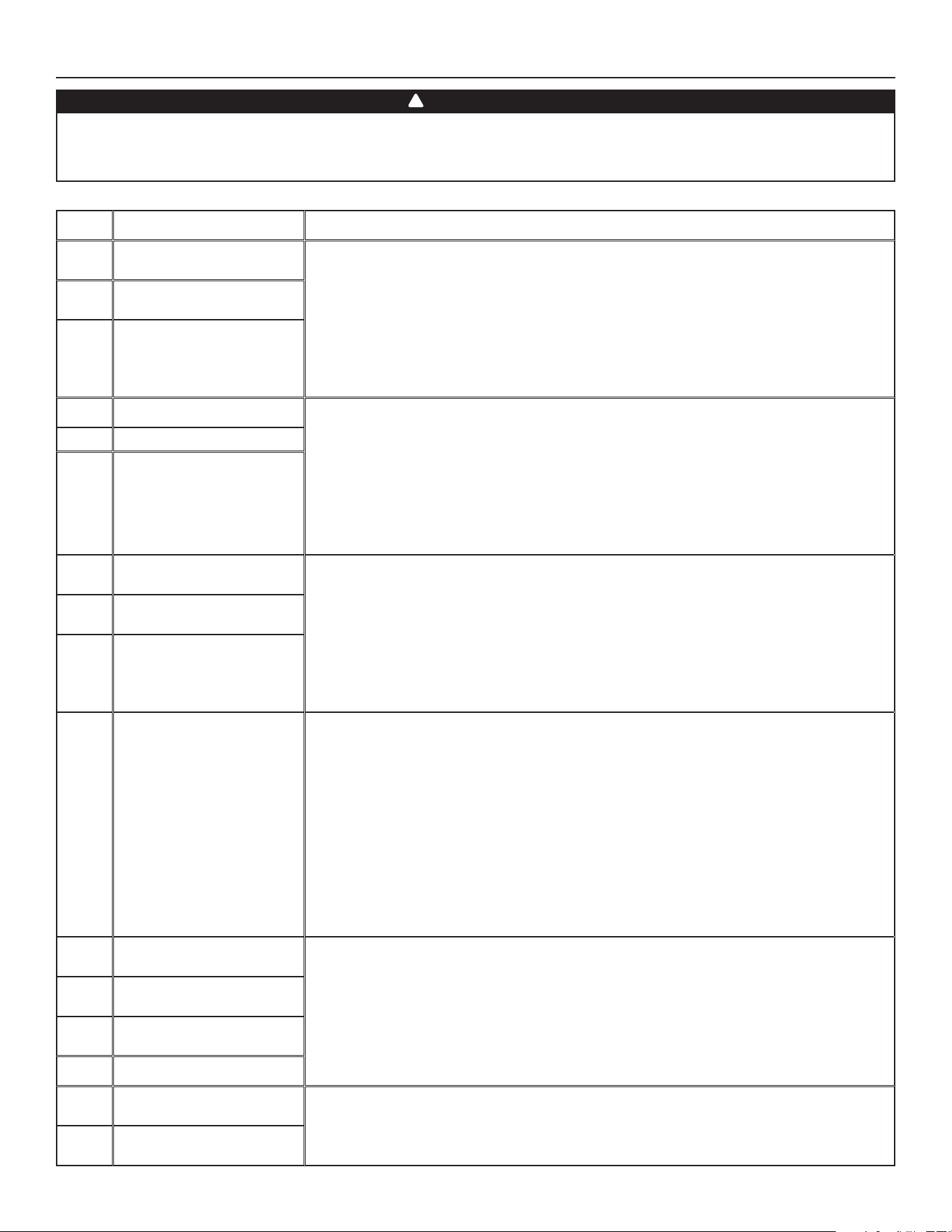
20
8. SOLUCIÓN DE PROBLEMAS DEL INSTALADOR
ADVERTENCIA
Se aconseja llevar guantes y gafas de protección porque algunos procedimientos de diagnóstico pueden exigir que el aparato esté
funcionando durante el procedimiento. Tenga cuidado con las piezas móviles y los componentes eléctricos para evitar todo riesgo de
lesiones.
!
ERROR DESCRIPCIÓN SOLUCIÓN
E01 Posición compuerta
alimentación
ETAPA 1: Desenchufar el aparato, verifi car el sistema de compuertas, retirar
cualquier obstáculo indeseable o suciedad (puede ser necesario quitar los fi ltros y el núcleo
para acceder al sistema de compuertas). Enchufar el aparato.
Si la ETAPA 1 no arregló el problema, realizar la ETAPA 2: Abrir el compartimento eléctrico,
verifi car si el conector J5 (blanco) está bien insertado, verifi car si hay cables sueltos.
Si la ETAPA 2 no arregló el problema, realizar la ETAPA 3: Si la compuerta no se mueve,
desenchufar J7 (rojo) de la tarjeta electrónica, conectar el conector blanco del sistema de
compuertas en J7. Si la compuerta mueve (el sistema sigue indicando un error), reemplazar
el conjunto electrónico. Si no funciona, reemplazar el sistema de compuertas.
E02 Parada compuerta
alimentación
E03 Compuerta alimentación
E05 Posición compuerta salida ETAPA 1: Desenchufar el aparato, verifi car el sistema de compuertas, retirar
cualquier obstáculo indeseable o suciedad (puede ser necesario quitar los fi ltros y el núcleo
para acceder al sistema de compuertas). Enchufar el aparato.
Si la ETAPA 1 no arregló el problema, realizar la ETAPA 2: Abrir el compartimento eléctrico,
verifi car si el conector J7 (rojo) está bien insertado, verifi car si hay cables sueltos.
Si la ETAPA 2 no arregló el problema, realizar la ETAPA 3: Si la compuerta no se mueve,
desenchufar J5 (blanco) de la tarjeta electrónica, conectar el conector blanco del sistema de
compuertas en J5. Si la compuerta mueve (el sistema sigue indicando un error), reemplazar
el conjunto electrónico. Si no funciona, reemplazar el sistema de compuertas.
E06 Parada compuerta salida
E07 Compuerta salida
E09 Posición compuerta
recirculación
ETAPA 1: Desenchufar el aparato, verifi car el sistema de compuertas, retirar
cualquier obstáculo indeseable o suciedad (puede ser necesario quitar los fi ltros y el núcleo
para acceder al sistema de compuertas). Enchufar el aparato.
Si la ETAPA 1 no arregló el problema, realizar la ETAPA 2: Abrir el compartimento eléctrico,
verifi car si el conector J6 (azul) está bien insertado, verifi car si hay cables sueltos.
Si la ETAPA 2 no arregló el problema, realizar la ETAPA 3: Si la compuerta no se mueve,
desenchufar J5 (blanco) de la tarjeta electrónica, conectar el conector azul del sistema de
compuertas en J5. Si la compuerta mueve (el sistema sigue indicando un error), reemplazar
el conjunto electrónico. Si no funciona, reemplazar el sistema de compuertas.
E10 Parada compuerta
recirculación
E11 Compuerta recirculación
E22 Flujo de aire alimentación ETAPA 1: Comprobar visualmente el sistema de compuertas de alimentación. Limpiar los
fi ltros, los registros de distribución y las bocas de admisión exterioras. Inspeccionar los
conductos para asegurarse que no están comprimidos o doblados.
Si la ETAPA 1 no arregló el problema, realizar la ETAPA 2: Retirar los conductos de la línea de
alimentatión. En la pantalla LCD, seleccionar MAX para verifi car si el aparato puede lograr el
fl ujo seleccionado. En caso de que así sea, verifi car la línea de los conductos.
Si la ETAPA 2 no arregló el problema, realizar la ETAPA 3: En la pantalla LCD, seleccionar los
valores de ajuste de los fl ujos MIN y MAX y después reinicializar el aparato. El valor de fl ujo
MAX aparecerá en la pantalla LCD. Si el fl ujo MAX es superior al fl ujo MAX deseado, ajustar
los fl ujos MAX y MIN.
Si la ETAPA 3 no arregló el problema, realizar la ETAPA 4: Reemplazar el ventilador de
alimentación y repetir la ETAPA 3.
Si la ETAPA 4 no arregló el problema, realizar la ETAPA 5: Reemplazar el conjunto electrónico.
E23 Motor alimentación
(sobrecarga motor)
ETAPA 1: Desenchufar/enchufar el aparato.
Si la ETAPA 1 no arregló el problema, realizar la ETAPA 2: Quitar el núcleo y retirar cualquier
obstáculo o suciedad de la rueda de ventilación.
Si la ETAPA 2 no arregló el problema, realizar la ETAPA 3: Desconectar J2 (blanco) y conectar
un sistema de ventilador de repuesto. Si funciona, reemplazar el ventilador de alimentación.
Si la ETAPA 3 no arregló el problema, realizar la ETAPA 4: Reemplazar el conjunto
electrónico.
E27 Motor alimentación
(sobretensión motor)
E28 Motor alimentación
(duración motor)
E29 Motor alimentación (inicio)
E24 Motor alimentación
(sobretensión motor)
ETAPA 1: Desenchufar/enchufar el aparato. Sobretensión y subtensión se pueden observar
con una fuerte fl uctuación de la alimentación eléctrica de la casa y se pueden apagar el
motor para protegerlo.
Si la ETAPA 1 no arregló el problema, realizar la ETAPA 2: Reemplazar el conjunto electrónico.
E25 Motor alimentación
(subtensión motor)
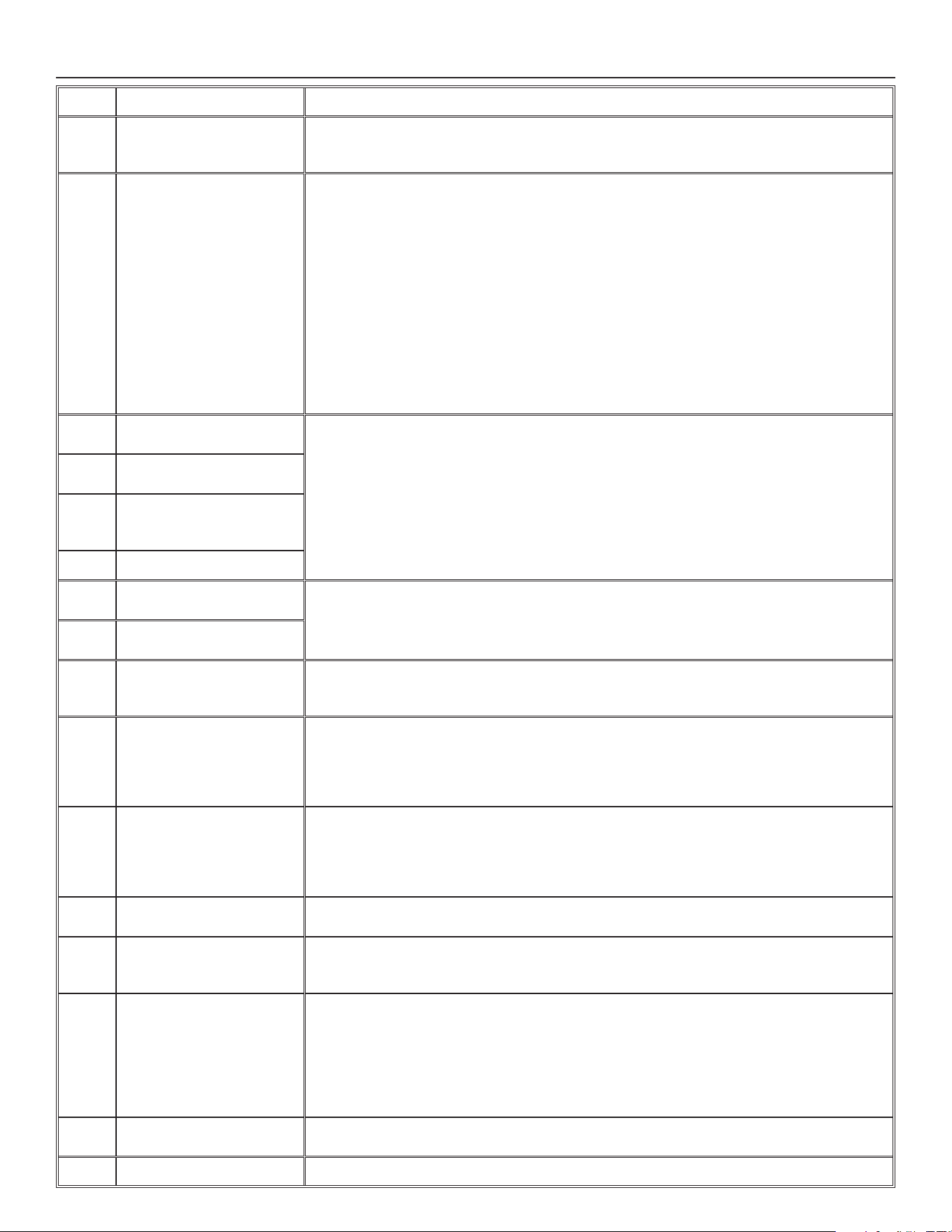
21
8. SOLUCIÓN DE PROBLEMAS DEL INSTALADOR (CONT.)
ERROR DESCRIPCIÓN SOLUCIÓN
E26 Motor alimentación
(sobrecalentamiento
motor)
ETAPA 1: Validar si el intercambiador de aire es expuesto a temperaturas ambiente dentro
de los límites de funcionamiento (ver p. 4)
Si la ETAPA 1 no arregló el problema, realizar la ETAPA 2: Reemplazar el conjunto electrónico.
E32 Flujo de aire a la salida ETAPA 1: Comprobar visualmente el sistema de compuertas de salida. Limpiar los fi ltros, los
registros de distribución y las bocas de admisión exterioras. Inspeccionar los conductos para
asegurarse que no están comprimidos o doblados.
Si la ETAPA 1 no arregló el problema, realizar la ETAPA 2: Retirar los conductos de la línea de
alimentatión. En la pantalla LCD, seleccionar MAX para verifi car si el aparato puede lograr el
fl ujo seleccionado. En caso de que así sea, verifi car la línea de los conductos.
Si la ETAPA 2 no arregló el problema, realizar la ETAPA 3: En la pantalla LCD, seleccionar los
valores de ajuste de los fl ujos MIN y MAX y después reinicializar el aparato. El valor de fl ujo
MAX aparecerá en la pantalla LCD. Si el fl ujo MAX es superior al fl ujo MAX deseado, ajustar
los fl ujos MAX y MIN.
Si la ETAPA 3 no arregló el problema, realizar la ETAPA 4: Reemplazar el ventilador de salida
y repetir la ETAPA 3.
Si la ETAPA 4 no arregló el problema, realizar la ETAPA 5: Reemplazar el conjunto
electrónico.
E33 Motor a la salida
(sobrecarga motor)
ETAPA 1: Desenchufar/enchufar el aparato.
Si la ETAPA 1 no arregló el problema, realizar la ETAPA 2: Quitar el núcleo y retirar cualquier
obstáculo o suciedad de la rueda de ventilación.
Si la ETAPA 2 no arregló el problema, realizar la ETAPA 3: Desconectar J3 (rojo) y conectar un
sistema de ventilador de repuesto. Si funciona, reemplazar el ventilador de salida.
Si la ETAPA 3 no arregló el problema, realizar la ETAPA 4: Reemplazar el conjunto electrónico.
E37 Motor a la salida
(duración motor)
E38 Motor a la salida
(retroalimentación
velocidad motor)
E39 Motor a la salida (inicio)
E34 Motor a la salida
(sobretensión motor)
ETAPA 1: Desenchufar/enchufar el aparato. Sobretensión y subtensión se pueden observar
con una fuerte fl uctuación de la alimentación eléctrica de la casa y se pueden apagar el
motor para protegerlo.
Si la ETAPA 1 no arregló el problema, realizar la ETAPA 2: Reemplazar el conjunto electrónico.
E35 Motor a la salida
(subtensión motor)
E36 Motor a la salida
(sobrecalentamiento
motor)
ETAPA 1: Validar si el intercambiador de aire es expuesto a temperaturas ambiente dentro
de los límites de funcionamiento (ver p. 4)
Si la ETAPA 1 no arregló el problema, realizar la ETAPA 2: Reemplazar el conjunto electrónico.
E40 Termistor aire exterior ETAPA 1: Verifi car si el termistor está bien conectado en el conector J7A.
Si la ETAPA 1 no arregló el problema, realizar la ETAPA 2: Desconectar conector J7A y
verifi car si la resistencia medida (conector del termistor) es dentro de
5 Kohms a 120 Kohms. Si está fuera del rango, reemplazar el termistor.
Si la ETAPA 2 no arregló el problema, realizar la ETAPA 3: Reemplazar el conjunto electrónico.
E41 Termistor distribución del
aire
ETAPA 1: Verifi car si el termistor está bien conectado en el conector J7B.
Si la ETAPA 1 no arregló el problema, realizar la ETAPA 2: Desconectar conector J7B y
verifi car si la resistencia medida (conector del termistor) es dentro de
5 Kohms a 120 Kohms. Si está fuera del rango, reemplazar el termistor.
Si la ETAPA 2 no arregló el problema, realizar la ETAPA 3: Reemplazar el conjunto electrónico.
E42 Termistor conjunto tarjeta
electrónica
ETAPA 1: Reemplazar el conjunto electrónico.
E43 Temperatura tarjeta
electrónica supera el límite
ETAPA 1: Validar si el intercambiador de aire es expuesto a temperaturas ambiente dentro
de los límites de funcionamiento (ver p. 4)
Si la ETAPA 1 no arregló el problema, realizar la ETAPA 2: Reemplazar el conjunto electrónico.
E50 Pérdida comunicación con
el control
ETAPA 1: Desenchufar el aparato, comprobar los cables, enchufar el aparato.
Si la ETAPA 1 no arregló el problema, realizar la ETAPA 2: Retirar el control mural de la pared
y probar con un cable corto. Si funciona, llevar un nuevo cable a la ubicación de instalación
en la pared.
Si la ETAPA 2 no arregló el problema, realizar la ETAPA 3: Probar el intercambiador de aire
con un control mural de repuesto. Si funciona, reemplazar el control mural.
Si la ETAPA 3 no arregló el problema, realizar la ETAPA 4: Reemplazar el conjunto electrónico.
E51 Sensor control mural ETAPA 1: Desenchufar el aparato, comprobar los cables, enchufar el aparato.
Si la ETAPA 1 no arregló el problema, realizar la ETAPA 2: Reemplazar el control mural.
E60 Modo protección ETAPA 1: Realizar una inspección general del aparato (compuertas, núcleo, fi ltros).
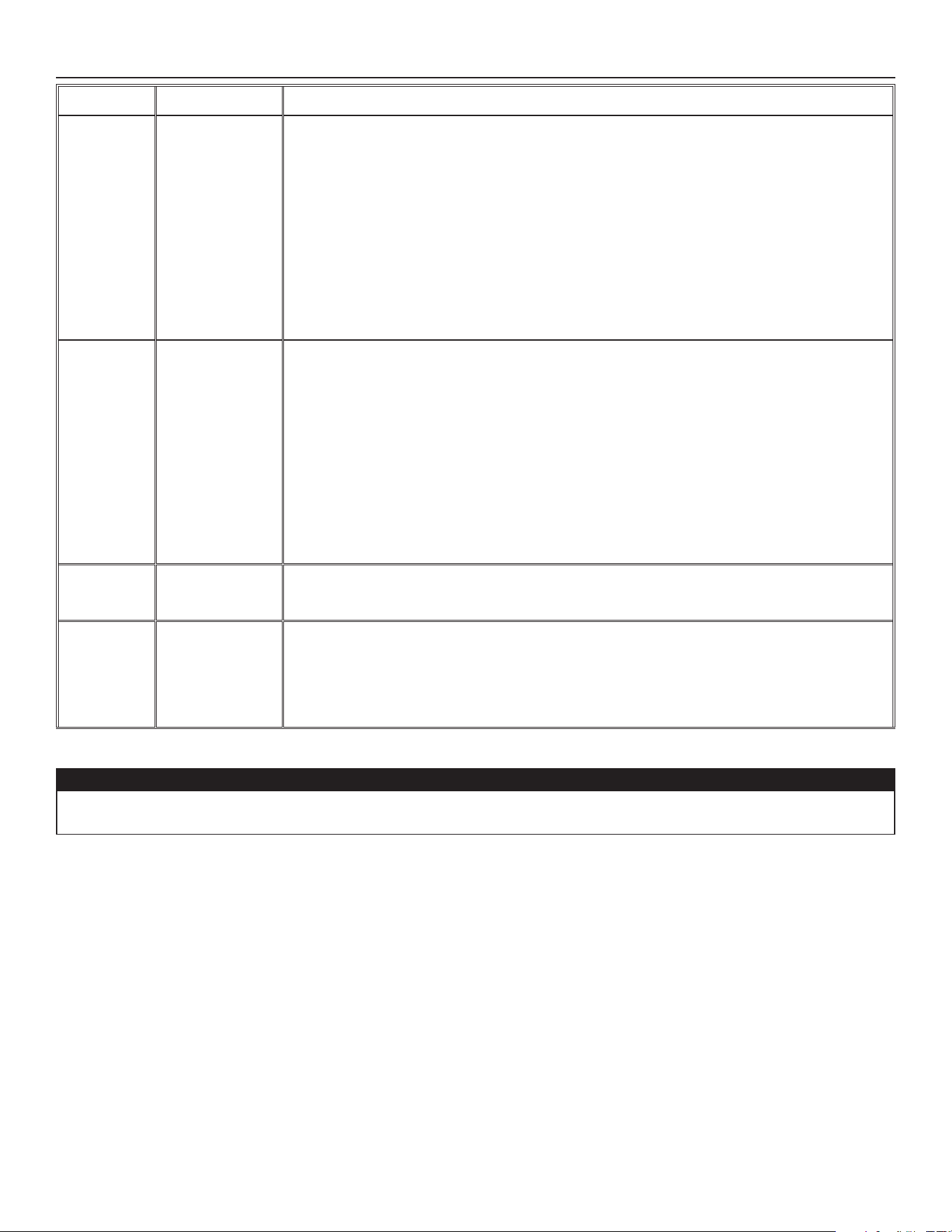
22
8. SOLUCIÓN DE PROBLEMAS DEL INSTALADOR (CONT.)
ADVERTENCIA DESCRIPCIÓN SOLUCIÓN
W22 Flujo de aire
alimentación
ETAPA 1: Comprobar visualmente el sistema de compuertas de alimentación. Limpiar los fi ltros,
los registros de distribución y las bocas de admisión exterioras. Inspeccionar los conductos para
asegurarse que no están comprimidos o doblados.
Si la ETAPA 1 no arregló el problema, realizar la ETAPA 2: Retirar los conductos de la línea de
alimentatión. En la pantalla LCD, seleccionar MAX para verifi car si el aparato puede lograr el
fl ujo seleccionado. En caso de que así sea, verifi car la línea de los conductos.
Si la ETAPA 2 no arregló el problema, realizar la ETAPA 3: En la pantalla LCD, seleccionar los
valores de ajuste de los fl ujos MIN y MAX y después reinicializar el aparato. El valor de fl ujo MAX
aparecerá en la pantalla LCD. Si el fl ujo MAX es superior al fl ujo MAX deseado, ajustar los fl ujos
MAX y MIN.
Si la ETAPA 3 no arregló el problema, realizar la ETAPA 4: Reemplazar el ventilador de
alimentación y repetir la ETAPA 3.
Si la ETAPA 4 no arregló el problema, realizar la ETAPA 5: Reemplazar el conjunto electrónico.
W32 Flujo de aire a la
salida
ETAPA 1: Comprobar visualmente el sistema de compuertas de salida. Limpiar los fi ltros, los
registros de distribución y las bocas de admisión exterioras. Inspeccionar los conductos para
asegurarse que no están comprimidos o doblados.
Si la ETAPA 1 no arregló el problema, realizar la ETAPA 2: Retirar los conductos de la línea de
alimentatión. En la pantalla LCD, seleccionar MAX para verifi car si el aparato puede lograr el
fl ujo seleccionado. En caso de que así sea, verifi car la línea de los conductos.
Si la ETAPA 2 no arregló el problema, realizar la ETAPA 3: En la pantalla LCD, seleccionar los
valores de ajuste de los fl ujos MIN y MAX y después reinicializar el aparato. El valor de fl ujo MAX
aparecerá en la pantalla LCD. Si el fl ujo MAX es superior al fl ujo MAX deseado, ajustar los fl ujos
MAX y MIN.
Si la ETAPA 3 no arregló el problema, realizar la ETAPA 4: Reemplazar el ventilador de salida y
repetir la ETAPA 3.
Si la ETAPA 4 no arregló el problema, realizar la ETAPA 5: Reemplazar el conjunto electrónico.
W52 Confi guración
inicial
incompleta
ETAPA 1: Presionar el botón + o - para acceder al menu selección.
ETAPA 2: Completar la confi guración. (Consulte la sección 5 para más detalles).
W61 Modo protección
sobrecalentamiento
del sistema
electrónico
El aparato está en modo protección. La potencia transmitida al motor se reduce
voluntariamente para disminuir la temperatura del sistema electrónico. El aparato saldrá de este
modo por sí mismo una vez que las condiciones vuelvan a la normalidad. Es normal observar
una reducción en los fl ujos de aire durante este periódo. Esta condición debe aparecer sólo
cuando el aparato está ajustado en alta velocidad y situado en un ambiente cálido, por ejemplo
más de 30°C (86°F).
PRECAUCIÓN
Asegurese que ningún trozo de lana mineral entre en el aparato durante la instalación. De lo contrario, esto podría reducir el fl ujo y
generar vibraciones y ruido en el aparato.
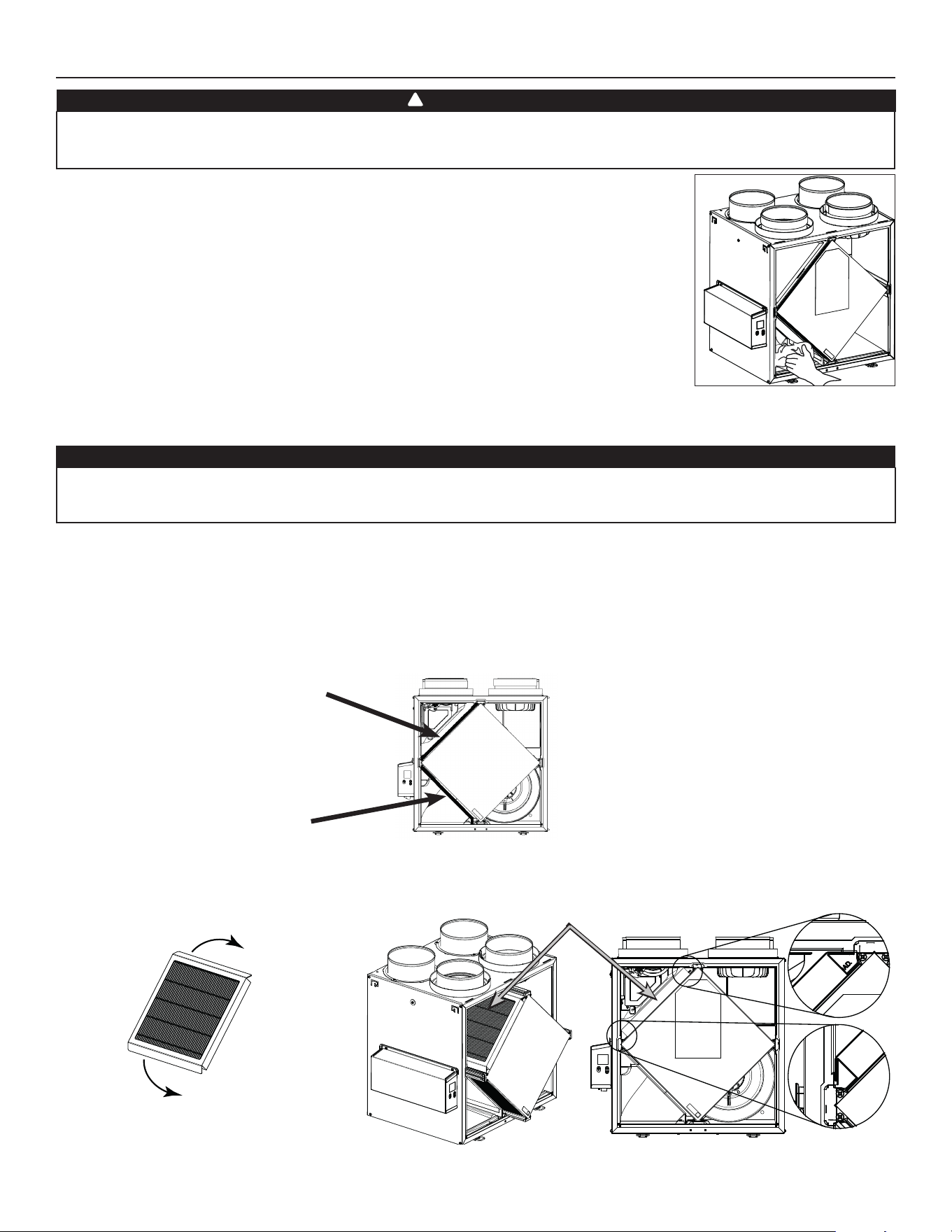
23
1. Desconecte el cable de alimentación.
2. La puerta de este aparato lleva bisagras y se mantiene cerrada con 2 cerraduras. Retírelas y póngalas
a un lado.
3. Limpie el interior de la puerta con un paño húmedo.
4. Limpie los fi ltros:
• Quite los fi ltros.
• Pase una aspiradora para quitar la mayor parte del polvo.
• Lávelos con una mezcla de agua tibia y jabón suave. Puede añadir lejía si desea desinfectar (una
cucharada por galón). Enjuague a fondo. Agite los fi ltros para eliminar el exceso de agua y déjelos
secar.
Nota: El fi ltro opcional MERV13 es un fi ltro desechable. El fi ltro debe ser reemplazado cuando está demasiado sucio.
5. Limpie la placa de condensación con un paño húmedo.
6. Verifi que la boca de entrada de aire del exterior:
• Compruebe que no haya hojas, ramitas, hielo o nieve que podrían entrar en el aparato.
• Limpie si es necesario.
7. Vuelva a montar los componentes. Preste atención especialmente a los fi ltros y compruebe que están bien encajados en sus ranuras.
8. Gire las ruedas del ventilador impelente a mano. Si una de las ruedas no gira normalmente, póngase en contacto con su instalador.
9. Cierre la puerta y vuelva a conectar la fuente de alimentación.
10. Reinicializar los fi ltros, si es necesario. Si utiliza un control mural principal opcional (S
ELECTOR DE VELOCIDAD, DEHUMIDOSTATO O AUTOMÁTICO),
presionar el botón INT/AUTO durante 5 segundos para reinicializar los fi ltros. Si utiliza el control mural principal opcional Avanzado, siga
las instrucciones en la pantalla táctil.
9. MANTENIMIENTO
PRECAUCIÓN
Un orifi cio de ventilación o un fi ltro bloqueado, aunque sólo sea parcialmente, puede hacer que el aparato funcione mal. El confort
que ofrece el aparato podría reducirse y la probabilidad de que se congele el aparato podría aumentar. Podrían resultar una rotura del
aparato y/o daños a los bienes.
VD0493
9.1 TRIMESTRAL
Riesgo de alta tensión. Durante las operaciones de mantenimiento o de reparación, el aparato debe estar siempre apagado y
desenchufado para evitar todo riesgo de choque eléctrico. Se aconseja llevar guantes y gafas de protección al manipular los
componentes del aparato para evitar todo riesgo de lesiones causadas por la presencia de metal delgado.
ADVERTENCIA
!
FILTRO MERV8 INCLUIDO
FILTRO MERV13 OPCIONAL (FILTRO DE SALIDA NO INCLUIDO)
F
ILTRO DE SALIDA INCLUIDO
NOTA: El fi ltro opcional MERV13 reemplaza el fi ltro MERV8.
9
4
Tirar el núcleo de 3 a 4 pulg. hacia fuera.
Doblar las dos aletas del fi ltro MERV13 para
formar un ángulo de 45 grados, como se ilustra
a continuación.
Instalar el fi ltro MERV13 sobre el núcleo, como
se ilustra.
Empujar el núcleo y el fi ltro MERV13 al fondo
del aparato.
45˚
45˚
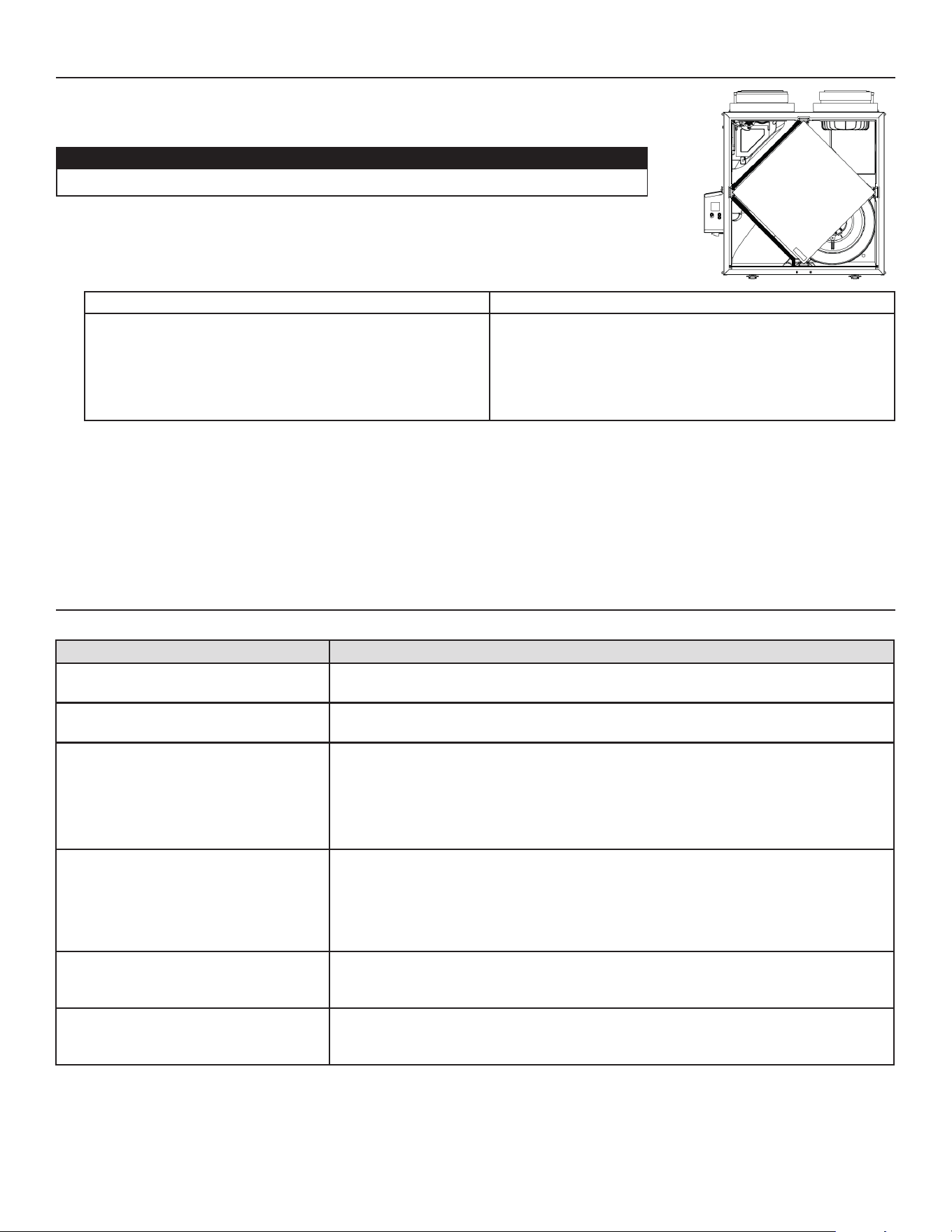
24
9. MANTENIMIENTO (CONT.)
1. Repita las etapas 1 a 6 de la sección anterior y continúe con las que se exponen a continuación:
2. Limpie el núcleo:
MODELOS HRV MODELOS ERV
• Retire el núcleo.
• Déjelo en remojo en una mezcla de agua fría o tibia y jabón
suave (detergente para vajillas).
• Enjuague a fondo.
• Agite el núcleo para eliminar el exceso de agua y déjelo
secar.
Quite el polvo del núcleo con una aspiradora equipada con un
cepillo suave.
PRECAUCIÓN: NO SUMERJA EN AGUA EL NÚCLEO.
3. Limpie el conjunto del ventilador impelente. No desmonte el conjunto del ventilador.
4. Quite el polvo con una aspiradora equipada con un cepillo suave.
5. Vuelva a montar los componentes.
6. Vuelva a conectar la fuente de alimentación.
PRECAUCIÓN
• Manipule con cuidado el núcleo.
PROBLEMA INTENTE ESTO
1. Nada funciona. • Verifi que si el aparato está enchufado.
• Compruebe si el aparato recibe alimentación del disyuntor o del fusible de la casa.
2. Aparato ruidoso. • Limpie el aparato (véase la sección 9). Si el problema no se soluciona, póngase en
contacto con el instalador.
3. Condensación en las ventanas en caso
de bajas temperaturas.
• Haga funcionar el aparato a velocidad MAX durante las actividades que generan
humedad excesiva (reuniones familiares, mucha cocina, etc.).
• Deje las cortinas entreabiertas para que el aire circule.
• Guarde toda la leña en un cuarto cerrado equipado con un deshumidifi cador, en un
cuarto bien ventilado o en el exterior.
• Mantenga la temperatura de su casa por encima de 64°F.
4. Humedad en el interior en caso de
tiempos calientes/húmedos.
• Haga funcionar el aparato a velocidad MIN.
• Cambie temporalmente al modo INT (si está disponible).
• Use un deshumidifi cador.
5. Aire demasiado seco. • Haga funcionar el aparato a velocidad MIN.
• Cambie temporalmente al modo INT (si está disponible).
• Use temporalmente un humidifi cador.
6. Aire demasiado frío en la rejilla de
suministro de aire.
• Asegúrese de que las bocas exterioras no están bloqueadas.
• Haga funcionar el aparato a velocidad MIN.
• Instale un calentador de conductos (póngase en contacto con su instalador).
9.2 ANUAL (EN OTOÑO)
10. SOLUCIÓN DE PROBLEMAS POR PARTE DEL USUARIO
Póngase en contacto con el servicio de atención al cliente en el teléfono 1-800-558-1711 para cualquier problema no resuelto.
VD0494

25
Este aparato de ventilación de Broan es un producto de gran calidad, fabricado y empacado con cuidado.
Broan garantiza al comprador original de sus productos que dichos productos están libres de defectos por el periodo de tiempo
indicado
más adelante, a partir de la fecha de compra original. La garantía de todos los aparatos Broan cubre las piezas únicamente contra
cualquier defecto que pudiera perjudicar su funcionamiento. Su duración es de cinco (5) años. A reserva de que se efectúe el
mantenimiento del núcleo, tal y como se indica en el manual del usuario y del instalador, el núcleo de recuperación del calor (HRV)
tiene una garantía limitada de por vida, y el núcleo de recuperación de energía (ERV) tiene una garantía de cinco (5) años. Si el aparato
funcionara de manera inadecuada, consulte el manual del usuario y del instalador. Si el problema continúa, siga estos pasos:
PROCEDIMIENTO A SEGUIR
Si el aparato estuviera defectuoso, sírvase comunicar inmediatamente con su empresa de ventilación (véase la dirección en la cubierta de
este manual). La empresa determinará el origen del mal funcionamiento del aparato y lo sustituirá o reparará, de ser necesario.
Si le resultara imposible ponerse en comunicación con la empresa, telefonee (en América del Norte) al 1-800-558-1711 y nuestro
personal le indicará con mucho gusto el teléfono del distribuidor o del centro de servicio más próximo.
REPLACEMENT PARTS AND REPAIR
Para que el aparato funcione bien debe usar siempre piezas originales de Broan. Estas piezas se han diseñado especialmente para
cumplir con todas las normas de certifi cación de seguridad aplicables. El uso de piezas diferentes podría poner en peligro la seguridad
del aparato, ocasionar una reducción importante de su funcionamiento y producir una falla prematura. Broan también aconseja
consultar siempre con una empresa de servicios competente reconocida por Broan para las piezas de recambio y para solicitar un
servicio.
FACTURA
La garantía no cubrirá ninguna reparación ni sustitución sin la factura original de compra. Le rogamos, pues, que la conserve debidamente.
GASTOS VARIOS
En cada caso, los gastos de mano de obra y de envío para retirar una pieza defectuosa o instalar una pieza conforme no estarán
cubiertos por el fabricante.
CONDICIONES Y LÍMITES
Este aparato es pensados únicamente para uso residencial y han de utilizarse en un edifi cio tal y como se describe a continuación:
Edifi cio: Toda construcción usada o destinada para ser usada con el fi n de alojar o recibir personas, animales o cosas.
Uso residencial: Vivienda, alojamiento, suite: edifi cio o parte de un edifi cio que sirve o está destinado a servir de domicilio a una o varias
personas y que también posee instalaciones sanitarias, para preparar y consumir comidas y dormir. Local constituido
por una sola pieza o un grupo de piezas complementarias y ocupado por un inquilino o propietario; incluye los
alojamientos, las habitaciones individuales de moteles, hoteles, las casas de alquiler de habitaciones, los dormitorios
colectivos y las pensiones familiares, incluso las tiendas y los establecimientos de negocios de una sola pieza en una
vivienda.
Uso comercial: Establecimiento agrícola, comercial, de reunión, de cuidados o de detención: edifi cio o parte de un edifi cio que no
contenga viviendas, situado en un terreno dedicado a la agricultura o a la ganadería y usado fundamentalmente para
guardar equipos o animales, o para la producción, almacenamiento o tratamiento de productos agrícolas u hortícolas o la
alimentación de los animales. Edifi cio o parte de un edifi cio usado para colocar o vender mercancías o productos al por
menor o usado para realizar negocios o prestar servicios profesionales o personales. Edifi cio o parte de un edifi cio
usado por personas que se reúnen para realizar actividades cívicas, políticas, turísticas, religiosas, mundanas, educativas,
recreativas o similares, o para consumir alimentos o bebidas. Edifi cio o parte de un edifi cio que acoge a personas
que, por su estado físico o mental, necesitan cuidados o tratamientos médicos, o a personas que, por razones de
seguridad fuera de su control, no pueden guarecerse en caso de peligro.
Uso industrial: Edifi cio o parte de un edifi cio usado para ensamblar, fabricar, confeccionar, tratar, reparar o almacenar productos,
materias o materiales cuyo contenido es combustible y posee materias muy combustibles, infl amables o explosivas en
cantidad sufi ciente para constituir un riesgo concreto de incendio.
La garantía se aplicará en todos los casos en los que los daños no resulten de una instalación inadecuada, de un uso inapropiado, de un
abuso o negligencia, de un caso fortuito o de cualquier otra circunstancia fuera del control de Broan. Además, Broan no se hace responsable
de las lesiones o daños en la propiedad personal o inmobiliaria causados directa o indirectamente por el aparato de ventilación Broan.
Esta garantía anula todas las garantías anteriores.
Broan-NuTone LLC, 926 West State Street, Hartford, Wisconsin, USA 53027 Broan-NuTone.com 800-558-1711
11. GARANTÍA

26