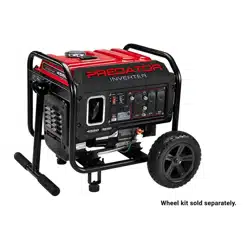
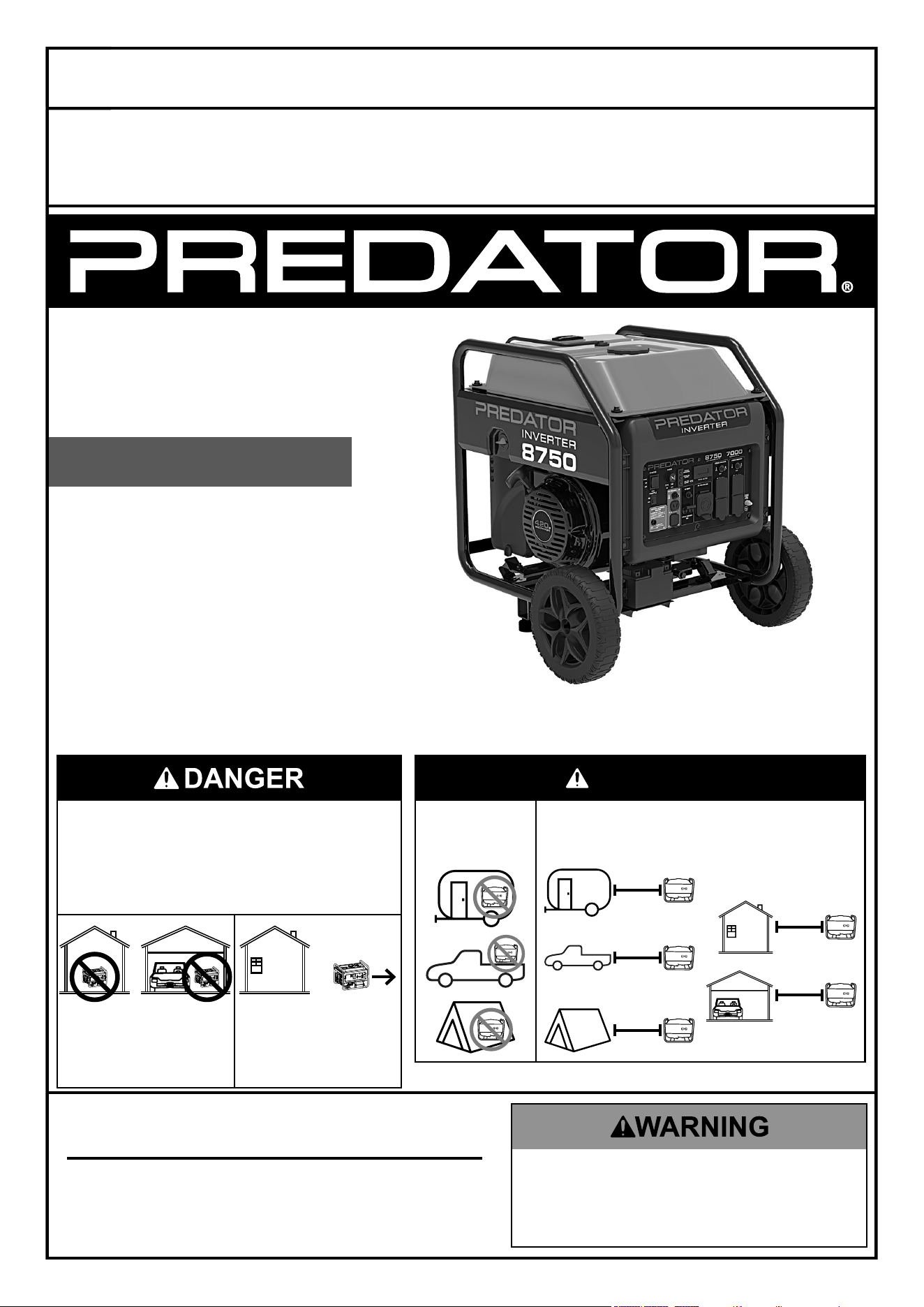
8750 WATT
INVERTER
GENERATOR
7000 RUNNING WATTS
8750 MAX STARTING WATTS
Visit our website at: https://www.harborfreight.com
email our technical support at: [email protected]
email our engine support at: [email protected]
71340
DanGer
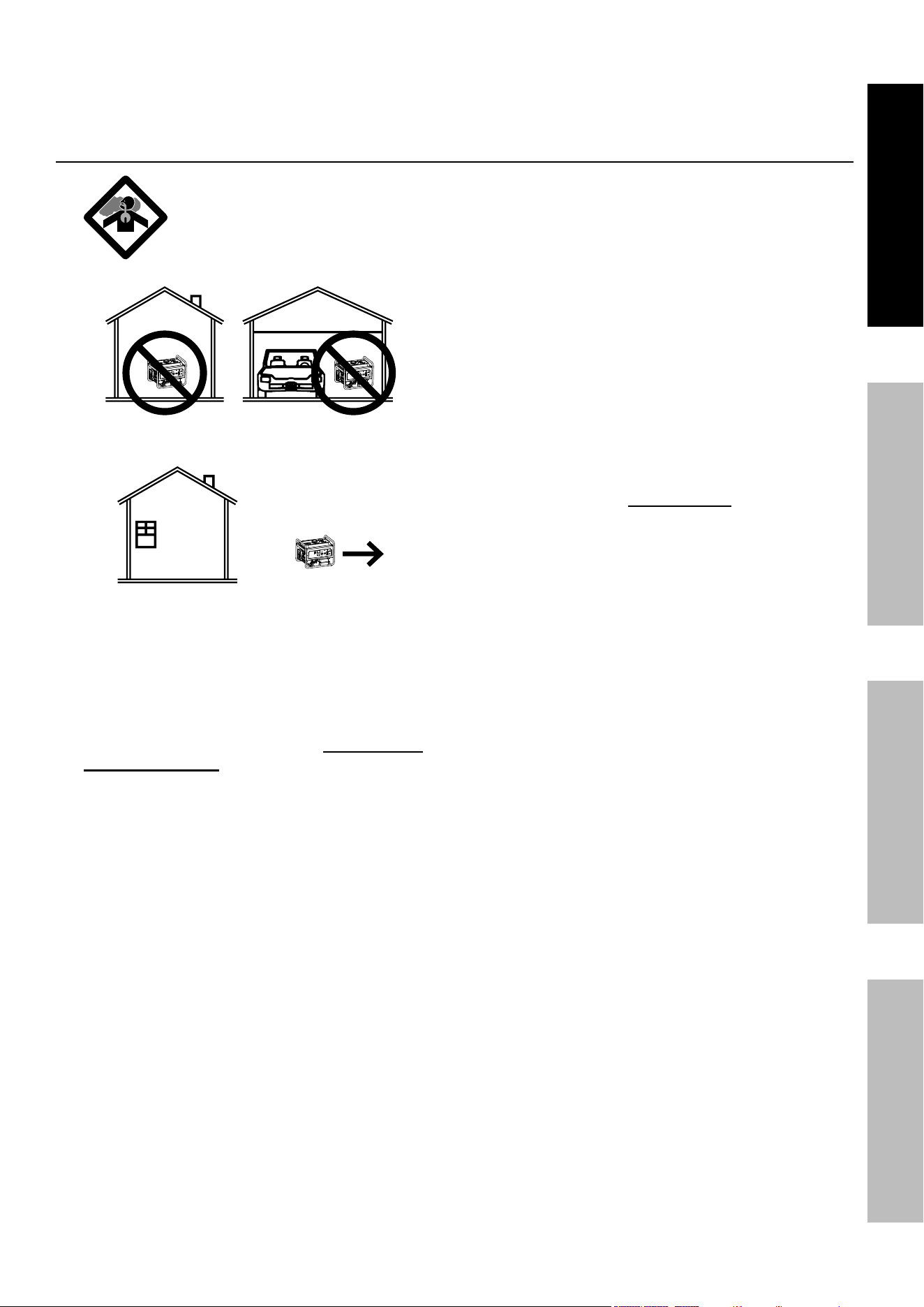
using a generator indoors can
KiLL yOu in MinuteS.
Generator exhaust contains
carbon monoxide. this is a poison
you cannot see or smell.
Do not use in
trailers, truck
beds, or tents.
use at least 20 feet away from
people, animals, and structures
with exhaust pointed away.
20′
20′
20′
20′
20′
neVer use inside
a home or garage,
eVen iF doors and
windows are open.
Only use OutSiDe
and far away from
windows, doors,
and vents.
Owner’s Manual & Safety Instructions
Save This Manual Keep this manual for the safety warnings and precautions, assembly,
operating, inspection, maintenance and cleaning procedures. Write the product’s serial number in the
back of the manual (or month and year of purchase if product has no number). Keep this manual and the
receipt in a safe and dry place for future reference. 25f
When unpacking, make sure that the product is intact
and undamaged. If any parts are missing or broken,
please call 1‑800‑444‑3353 as soon as possible.
Copyright
©
2024 by Harbor Freight Tools
®
. All rights reserved.
No portion of this manual or any artwork contained herein may be reproduced in
any shape or form without the express written consent of Harbor Freight Tools.
Diagrams within this manual may not be drawn proportionally. Due to continuing
improvements, actual product may differ slightly from the product described herein.
Tools required for assembly and service may not be included.
read this material before using this product.
Failure to do so can result in serious injury.
SaVe tHiS ManuaL.
Page 2 For technical questions, please call 1-800-444-3353. 71340
SaFety Setup OperatiOn Maintenance
table of contents
Safety ......................................................... 2
Setup .......................................................... 6
Specifications ............................................. 6
Operation ................................................... 13
Maintenance .............................................. 20
Parts List and Diagram .............................. 26
Warranty .................................................... 32
WarninG SyMBOLS anD DeFinitiOnS
This is the safety alert symbol. It is used to alert you to potential
personal injury hazards. Obey all safety messages that
follow this symbol to avoid possible injury or death.
Indicates a hazardous situation which, if not avoided,
will result in death or serious injury.
Indicates a hazardous situation which, if not avoided,
could result in death or serious injury.
Indicates a hazardous situation which, if not avoided,
could result in minor or moderate injury.
Addresses practices not related to personal injury.
iMpOrtant SaFety inStructiOnS
SaVe tHeSe inStructiOnS
This manual contains important instructions that should be followed during
installation and maintenance of the Generator and any batteries.
Set up precautions
1. This unit is to be installed so that access is
restricted to only qualified service personnel
who have been instructed of the reasons for the
restrictions applied to the location and about any
precautions that must be taken. Access shall be
through the use of a special tool, or lock and key,
or other means of security and shall be controlled
by the authority responsible for the location.
2. Gasoline fuel and fumes are flammable, and
potentially explosive. Use proper fuel storage
and handling procedures. Do not store fuel
or other flammable materials nearby.
3. Have multiple ABC class fire extinguishers nearby.
4. Operation of this equipment may create sparks that
can start fires around dry vegetation.
A spark arrestor may be required. The operator
should contact local fire agencies for laws or
regulations relating to fire prevention requirements.
5. Set up and use only on a flat, level,
well‑ventilated surface.
6. All connections and conduits from the Generator
to the load must only be installed by trained and
licensed electricians, and in compliance with all
relevant local, state, and federal electrical codes and
standards, and other regulations where applicable.
7. Connections for standby power to a building
electrical system must be made by a qualified
electrician. The connection must isolate the
Generator power from utility power, and must
comply with all applicable laws and electrical codes.
8. Wear ANSI‑approved safety goggles, heavy‑duty
work gloves, and dust mask/respirator during set up.
9. Use only lubricants and fuel
recommended in this manual.
10. A transfer switch should be installed by a
licensed electrician in compliance with all
applicable laws and electrical codes.
11. Improper connections to a building electrical system
can allow electrical current from the Generator
to backfeed into the utility lines. Such backfeed
may electrocute utility company workers or others
who contact the lines during a power outage, and
the Generator may explode, burn, or cause fires
when utility power is restored. Consult the utility
company and a qualified electrician if intending
to use the Generator for back up power.
12. Do not operate the Generator before grounding.
The Generator must be earth‑grounded
in accordance with all relevant electrical
codes and standards before operation.
Page 3For technical questions, please call 1-800-444-3353.71340
SaFetySetupOperatiOnMaintenance
13. Install carbon monoxide alarm(s) with
battery backup in nearby buildings according
to manufacturer’s instructions.
Operating precautions
1. carBOn MOnOXiDe HaZarD
using a generator indoors can
KiLL yOu in MinuteS.
Generator exhaust contains carbon
monoxide. This is a poison you cannot
see or smell.
NEVER use inside a home or garage, EVEN IF
doors and windows are open.
Only use OUTSIDE and far away from
windows, doors, and vents.
2. carBOn MOnOXiDe SHutOFF
DanGer! tO preVent SeriOuS
inJury anD DeatH FrOM
carBOn MOnOXiDe inHaLatiOn:
the carbon Monoxide sensor is an additional
layer of protection only. Do not use the
Generator in any area or situation that will
allow carbon monoxide to accumulate.
• FLASHING RED LIGHT:
Dangerous levels of carbon monoxide gas have
built up and generator will shutoff.
Leave immediately until area has aired
out. Move Generator to well‑ventilated
area before operation.
• FLASHING YELLOW LIGHT:
Carbon monoxide sensor malfunction.
Sensor needs service. Do not use the
Generator until the sensor is working
properly. For technical questions, please call
1‑800‑444‑3353.
NOTE: Yellow light flashes once
after starting to indicate passing self‑
check and is functioning normally.
carbon Monoxide sensor must only be serviced
by qualified technician to restore it to original
settings. Do not modify or tamper with the
carbon Monoxide sensor. not following these
instructions can result in death or serious injury
due to carbon Monoxide sensor malfunction.
3. Never use a generator indoors, including in
garages, basements, crawlspaces and sheds.
Opening doors and windows or using fans will NOT
prevent carbon monoxide build up in the home.
4. When using generators, keep them outdoors
and far away from open doors, windows,
and vents to avoid toxic levels of carbon
monoxide from building up indoors.
5. If you start to feel sick, dizzy, or weak while
using a generator, get to fresh air right away.
The carbon monoxide from generators can
quickly lead to full incapacitation and death.
6. Keep children away from the equipment,
especially while it is operating.
7. Keep all spectators at least six feet
from the Engine during operation.
8. Do not touch engine during use.
Let engine cool down after use.
9. Never store fuel or other flammable
materials near the engine.
10. Fire Hazard! Do not fill gas tank while engine is
running. Do not operate if gasoline has been spilled.
Clean spilled gasoline before starting engine.
Do not operate near pilot light or open flame.
11. If the plugged in product operates abnormally
or unusually slow, immediately stop using the
Generator as a power source. Always read and
adhere to the instruction manual of the product
to be powered, to make sure that it can be safely
and efficiently powered by a portable generator.
12. Before connecting an appliance or power cord
to the Generator: Make sure that it is in good
working order. Faulty appliances or power cords
can create a potential for electrical shock.
13. Do not exceed the maximum power rating of the
Generator. Make sure that the total electrical rating
of the all of the tools or appliances plugged into
the Generator at the same time does not exceed
that of the Generator. Check that the startup
surge will not be beyond the limit of the Generator.
Power levels between rated and maximum
may be used for no more than 30 minutes.
14. Avoid substantially overloading which will
trip the circuit breaker. Exceeding the time
limit for maximum power operation or slightly
overloading the Generator may not switch the
circuit breaker or circuit protector OFF, but will
shorten the service life of the Generator.

Page 4 For technical questions, please call 1-800-444-3353. 71340
SaFety Setup OperatiOn Maintenance
15. Do not attempt to connect or disconnect
load connections while standing in
water, or on wet or soggy ground.
16. Do not touch electrically energized parts of
the Generator and interconnecting cables
or conductors with any part of the body, or
with any non‑insulated conductive object.
17. Connect the Generator only to a load or
electrical system (120 volt or 240 volt) that is
compatible with the electrical characteristics
and rated capacities of the Generator.
18. GFci precautiOnS
Test Ground Fault Circuit Interrupter (GFCI)
receptacles before each use as follows:
a. Disconnect all devices from the Generator.
b. Start the engine.
c. Press Test button on receptacle
to trip the GFCI device.
d. The Reset button should extend, cutting
off electricity to the receptacle.
e. If above test fails, do not use receptacle
until it is repaired or replaced.
f. Press Reset button in for use.
Refer to Grounding on page 10.
19. Insulate all connections and disconnected wires.
20. Guard against electric shock. Prevent body
contact with grounded surfaces such as
pipes, radiators, ranges, and refrigerators.
21. Only use a suitable means of transport and
lifting devices with sufficient weight bearing
capacity when transporting the Generator.
22. Secure the Generator on transport vehicles to
prevent the tool from rolling, slipping, and tilting.
23. Industrial applications must follow
OSHA requirements.
24. Do not leave the Generator unattended when it is
running. Turn off the Generator (and remove safety
keys, if available) before leaving the work area.
25. The Generator engine can produce high noise
levels. Prolonged exposure to noise levels
above 85 dBA is hazardous to hearing. Always
wear ear protection when operating or working
around the gas engine while it is operating.
26. Wear ANSI‑approved safety glasses,
hearing protection, and NIOSH‑approved
dust mask/respirator during use.
27. People with pacemakers should consult their
physician(s) before use. Electromagnetic fields
in close proximity to a heart pacemaker could
cause pacemaker interference or pacemaker
failure. Caution is necessary when near
the engine’s magneto or recoil starter.
28. Use only accessories that are recommended
by Harbor Freight Tools for your model.
Accessories that may be suitable for one
piece of equipment may become hazardous
when used on another piece of equipment.
29. Do not operate in explosive atmospheres,
such as in the presence of flammable
liquids, gases, or dust. Gasoline‑powered
engines may ignite the dust or fumes.
30. Keep grounded conductive objects, such as
tools, away from exposed, live electrical parts
and connections to avoid sparking or arcing.
These events could ignite fumes or vapors.
31. Stay alert, watch what you are doing and
use common sense when operating this
piece of equipment. Do not use this piece
of equipment while tired or under the
influence of drugs, alcohol or medication.
32. Dress properly. Do not wear loose clothing or
jewelry. Keep hair, clothing and gloves away
from moving parts. Loose clothes, jewelry or
long hair can be caught in moving parts.
33. Parts, especially exhaust system components,
get very hot during use. Stay clear of hot parts.
34. Do not cover the Generator or its
engine during operation.
35. Keep the Generator, its engine, and surrounding
area clean at all times. Keep generator at
least 5 feet from combustible objects.
36. Do not smoke, or allow sparks, flames,
or other sources of ignition around the
equipment, especially when refuelling.
37. Use the Generator, accessories, etc., in
accordance with these instructions and in the
manner intended for the particular type of
equipment, taking into account the working
conditions and the work to be performed. Use of
the equipment for operations different from those
intended could result in a hazardous situation.
38. Do not operate the Generator with known
leaks in the engine’s fuel system.
39. When spills of fuel or oil occur, they must be
cleaned up immediately. Dispose of fluids and
cleaning materials as per any local, state, or
federal codes and regulations. Store oil rags in
a bottom‑ventilated, covered, metal container.
40. Keep hands and feet away from moving parts. Do
not reach over or across Generator while operating.
41. Before use, check for misalignment or binding
of moving parts, breakage of parts, and any
other condition that may affect the Generator’s
operation. if damaged, have the Generator
serviced before using. Many accidents are
caused by poorly maintained equipment.
42. Use the correct generator for the application.
Do not modify the generator or its engine,
and do not use the generator for a
purpose for which it is not intended.
Page 5For technical questions, please call 1-800-444-3353.71340
SaFetySetupOperatiOnMaintenance
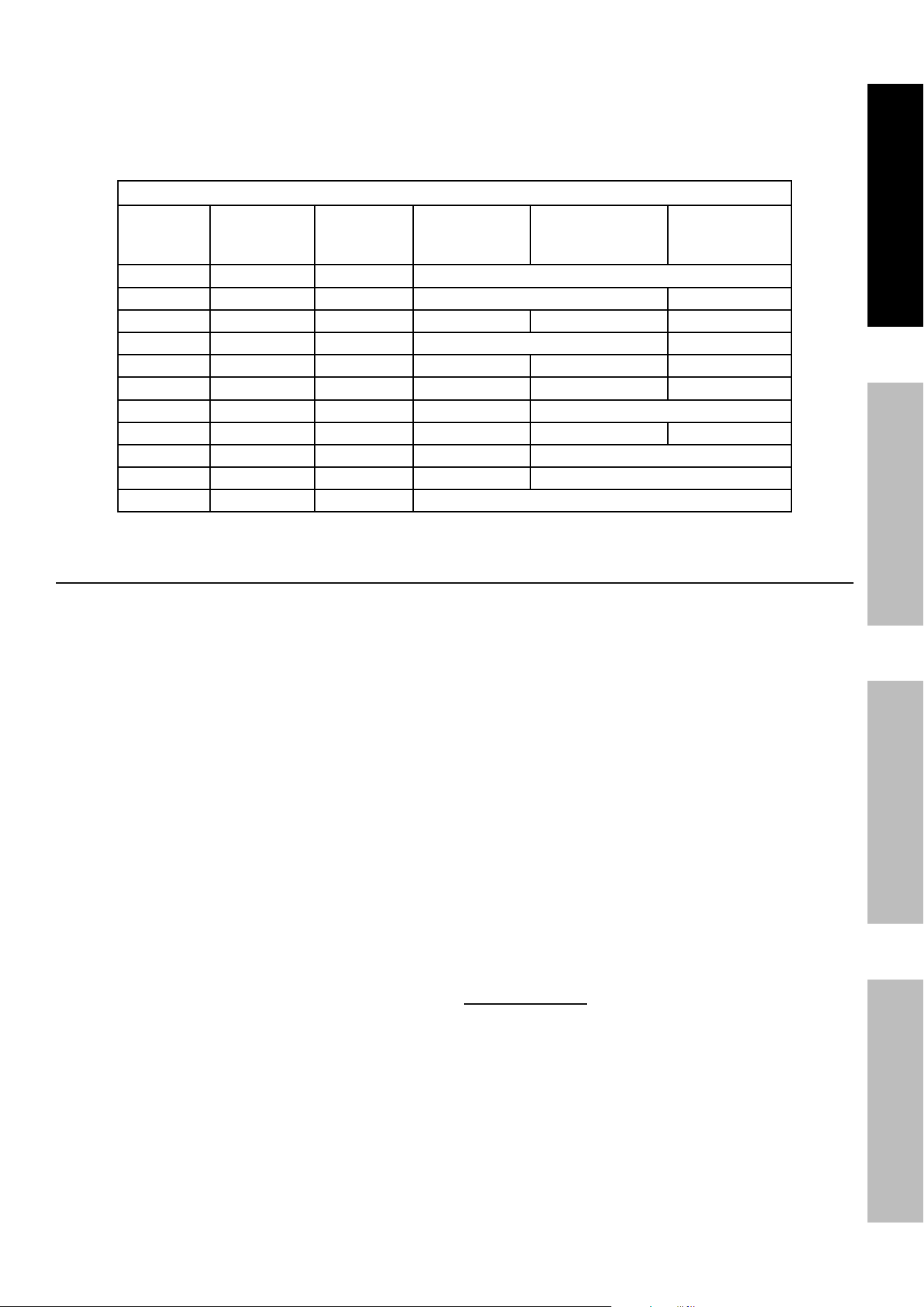
43. Extension Cord ‑ Make sure your extension cord
is in good condition. When using an extension
cord, be sure to use one heavy enough to carry
the current your product will draw. An undersized
extension cord will cause a drop in line voltage
resulting in loss of power and overheating.
The table below shows the correct cord size to use
depending on cord length and nameplate ampere
rating. If in doubt, use the next heavier gauge.
The smaller the gauge number, the heavier the cord.
recOMMenDeD MiniMuM Wire GauGe FOr eXtenSiOn cOrDS
current
(aMpS)
Load @
120V
(WattS)
Load @
240V
(WattS)
0 ~ 50 ft 50 ~ 75 ft 75 ~ 100 ft
2 240 480 18 AWG
4 480 960 18 AWG 16 AWG
6 720 1440 18 AWG 16 AWG 14 AWG
8 960 1920 16 AWG 12 AWG
10 1200 2400 16 AWG 14 AWG 12 AWG
15 1800 3600 14 AWG 12 AWG 10 AWG
20 2400 4800 12 AWG 10 AWG
25 3000 6000 12 AWG 10 AWG 8 AWG
30 3600 7200 10 AWG 8 AWG
35 4200 8400 8 AWG 6 AWG
40 4800 9600 6 AWG
Service precautions
1. Before service, maintenance, or cleaning:
a. unplug all devices from the Generator.
b. turn the engine switch to its “OFF” position.
c. allow the engine to completely cool.
d. Disconnect the negative (-) battery terminal.
e. then, remove the spark plug
cap from the spark plug.
2. Keep all safety guards in place and in
proper working order. Safety guards include
muffler, air cleaner, mechanical guards,
and heat shields, among other guards.
3. Make sure the Engine Switch is in its “OFF”
position before moving the Generator and
before performing any service, maintenance,
or cleaning procedures on the unit.
4. Keep all electrical equipment clean and dry.
Replace any wiring where the insulation is
cracked, cut, abraded, or otherwise degraded.
Replace terminals that are worn, discolored, or
corroded. Keep terminals clean and tight.
5. Do not alter or adjust any part of the
equipment or its engine that is sealed by the
manufacturer or distributor. Only a qualified
service technician may adjust parts that may
increase or decrease governed engine speed.
6. Wear ANSI‑approved safety goggles,
heavy‑duty work gloves, and dust
mask/respirator during service.
7. Maintain labels and nameplates on
the equipment. These carry important
information. If unreadable or missing, contact
Harbor Freight Tools for a replacement.
8. Have the equipment serviced by a qualified repair
person using only identical replacement parts.
This will ensure that the safety of the equipment
is maintained. Do not attempt any service or
maintenance procedures not explained in this
manual or any procedures that you are uncertain
about your ability to perform safely or correctly.
9. Store equipment out of the reach of children.
10. Follow scheduled engine and
equipment maintenance.
GFci protection:
This Generator is equipped with two 3‑Prong,
duplex 120 V ground fault circuit interrupter
(GFCI) receptacles. These outlets provide
additional protection from the risk of electric
shock. Should replacement of the receptacles
become necessary, use only identical replacement
parts that include GFCI protection.
Page 6 For technical questions, please call 1-800-444-3353. 71340
SaFety Setup OperatiOn Maintenance
refueling:
1. Do not refill the fuel tank while the
engine is running or hot.
2. Do not smoke, or allow sparks, flames,
or other sources of ignition around the
equipment, especially when refuelling.
3. tO preVent FueL LeaKaGe anD Fire
HaZarD, Do not overfill with fuel. Fill with
fuel according to the Fuel Level information
below the Specification chart for your model.
4. Do not fill fuel tank to the top. Leave a little
room for the fuel to expand as needed.
5. Refuel in a well‑ventilated area only.
6. Wipe up any spilled fuel and allow excess
to evaporate before starting engine.
to prevent Fire, do not start the engine
while the smell of fuel hangs in the air.
Battery Service:
1. Servicing of batteries are to be performed or
supervised by personnel knowledgeable of
batteries and the required precautions. Keep
unauthorized personnel away from batteries.
2. When replacing battery, use the following
type battery: 12 V, 1.6 Ah Lithium Iron
Phosphate (LiFEPO4) type.
3. CAUTION – Do not dispose of battery or batteries
in a fire. The battery is capable of exploding.
Batteries must be recycled or disposed of properly.
4. CAUTION – Do not open or mutilate the battery.
Released electrolyte has been known to be
harmful to the skin and eyes and to be toxic.
5. CAUTION – A battery presents a risk of high
short circuit current. The following precautions
are to be observed when working on batteries:
a. Remove watches, rings, or other metal objects.
b. Use tools with insulated handles.
c. Do not lay tools or metal parts on top of batteries.
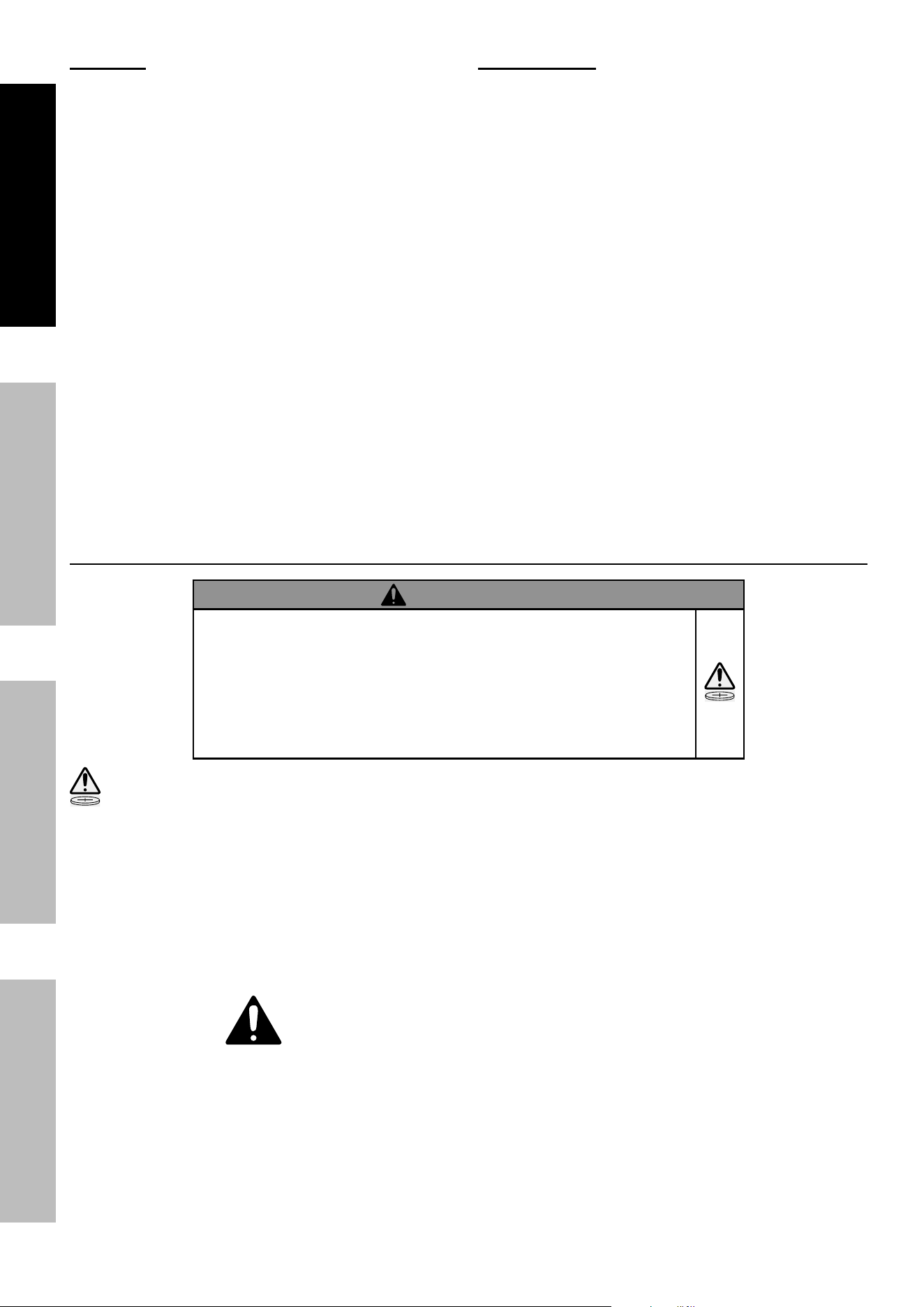
Button/coin Battery Safety
WarninG
• inGeStiOn HaZarD: This product contains
a button cell or coin battery.
• DeatH or serious injury can occur if ingested.
• A swallowed button cell or coin battery can cause
internal chemical Burns in as little as 2 hours.
• Keep new and used batteries Out OF reacH OF cHiLDren
• Seek immediate medical attention if a battery is suspected
to be swallowed or inserted inside any part of the body.
This symbol means:
inGeStiOn HaZarD: This product contains a button cell or coin battery.
1. Remove and immediately recycle or dispose
of used batteries according to local regulations
and keep away from children. Do NOT dispose
of batteries in household trash or incinerate.
2. Even used batteries may cause
severe injury or death.
3. Call a local poison control center
for treatment information.
4. Non‑rechargeable batteries are not to be recharged.
5. Do not force discharge, recharge, disassemble,
heat above 140°F or incinerate. Doing so
may result in injury due to venting, leakage
or explosion resulting in chemical burns.
SaVe tHeSe inStructiOnS.
Page 7For technical questions, please call 1-800-444-3353.71340
SaFetySetupOperatiOnMaintenance
Functional Description
Specifications
Generator
Output
120 / 240 VAC, 60 Hz, 58.3 / 29.2 A, 1 Phase
7,000 Running Watts (8,750 max. starting Watts)
12VDC, 8.3A
5V USB, 3.1A
Battery for electric start 12V, 1.6AH Lithium Iron Phosphate (LiFEPO4)
Electrical Receptacle
Two 3-Prong, duplex NEMA #5-20 120 V GFCI
One 4-Prong, NEMA #L14-30 twistlock 120 V / 240 V
One DC Outlet 12 VDC
2X USB‑A Ports
Battery Type Contains non-replaceable battery: CR2032, 3 V
Engine
Displacement 420 cc
Engine Type Horizontal Single Cylinder 4 stroke OHV
Cooling System Forced air cooled
Fuel
Type 87+ octane stabilizer treated unleaded gasoline
Capacity 5.94 Gallon / 22.50 Liter
Engine Oil
Type SAE
10W – 30 above 32° F
5W – 30 at 32° F or below
Capacity 1.1 Quart
Spark Plug
Type NHSP
®
/ LG F7TC
Gap 0.028" – 0.031"
Valve Clearance Intake/Exhaust 0.0019″ - 0.0039″
Run Time @ 25% load 15.1 hr.
Operational Volume 75 dB(A) @ 21 ft., 25% load
The emission control system for this Generator’s Engine is warranted for standards set by the U.S. Environmental
Protection Agency. For warranty information, refer to the last pages of this manual.
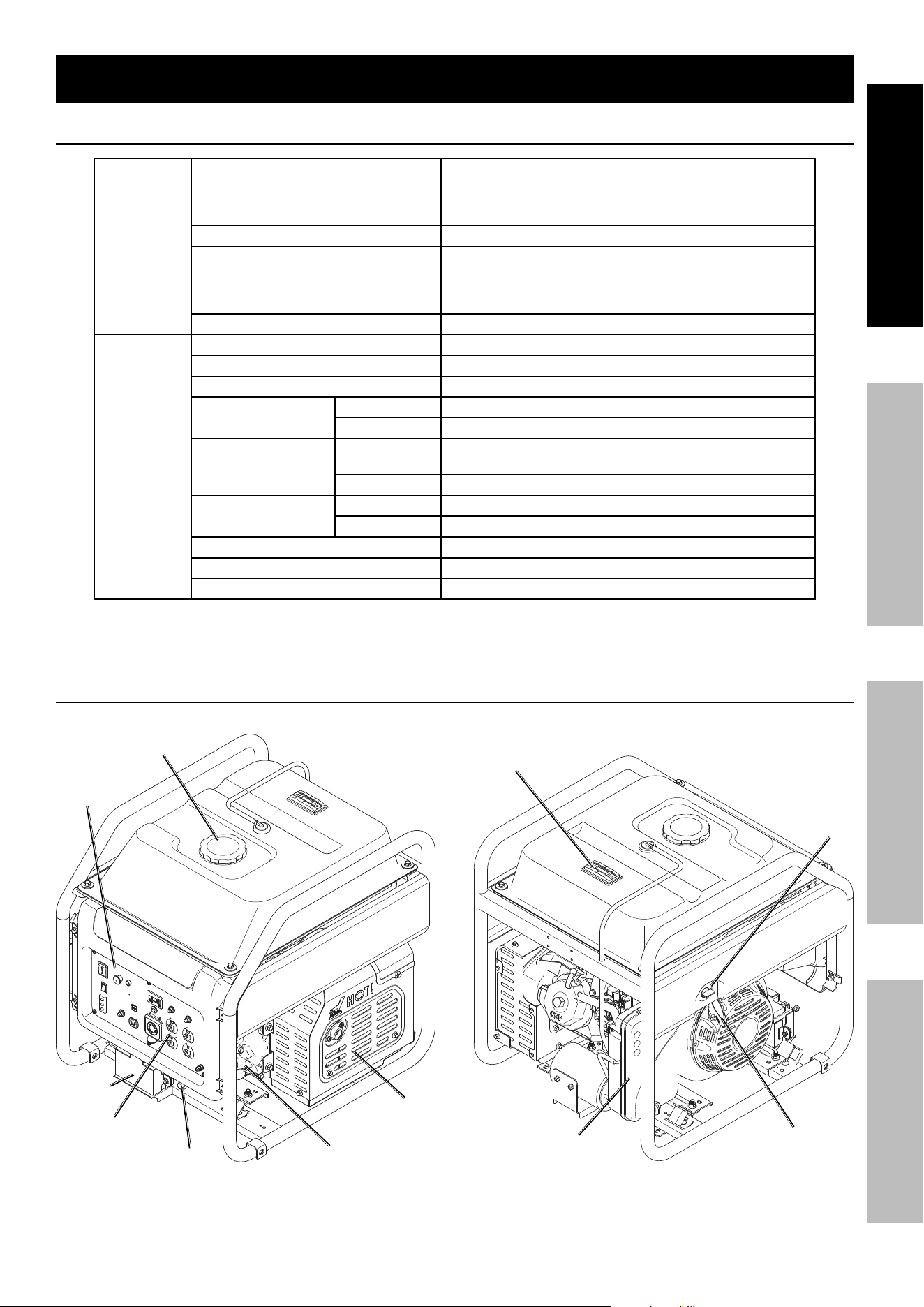
components and controls
Fuel cap
Battery
Holder
Oil Drain Oil Fill
Muffler
control
panel
receptacles
Fuel Gauge
Starter
Handle
Fuel
Valve
air cleaner
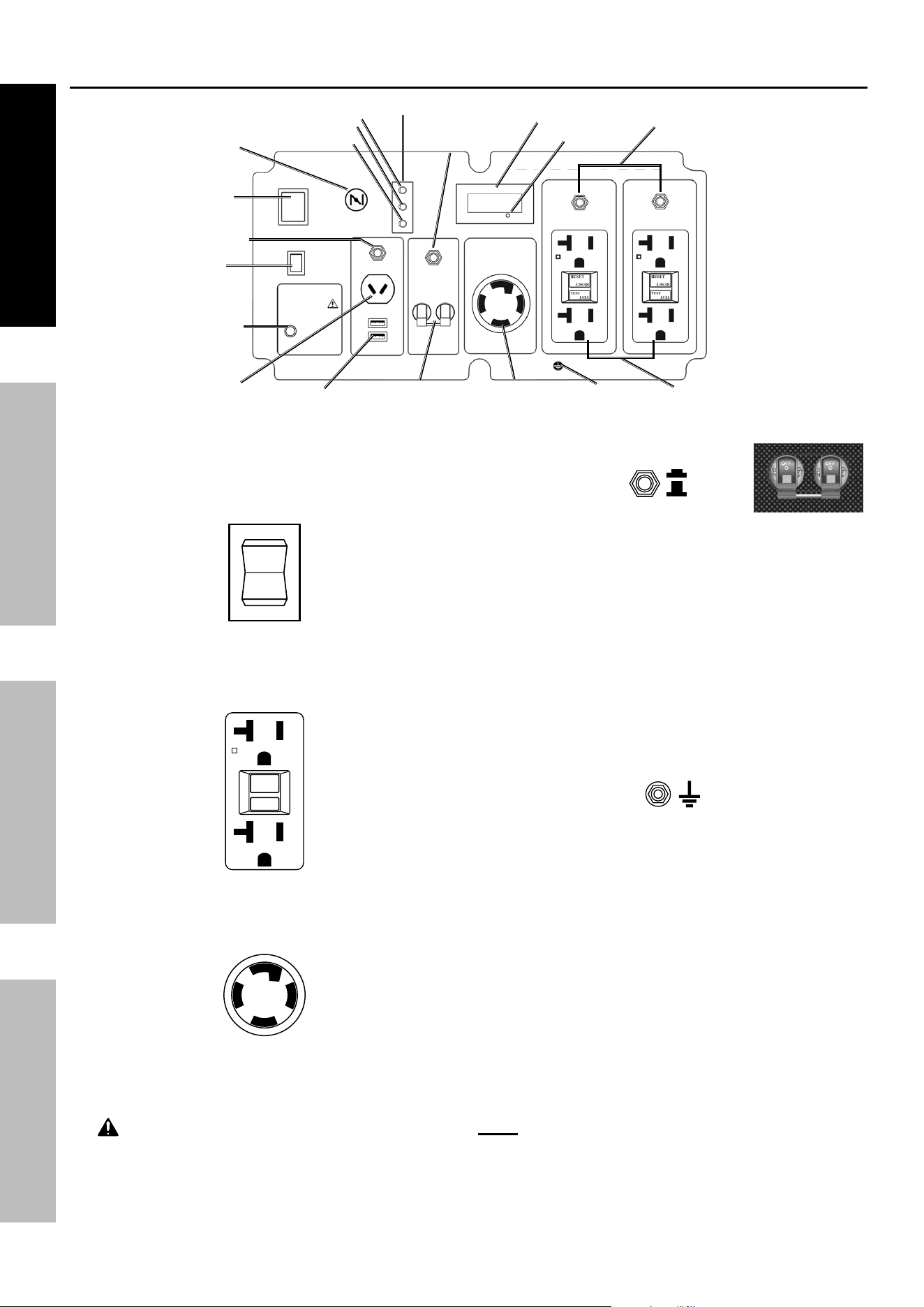
Page 8 For technical questions, please call 1-800-444-3353. 71340
SaFety Setup OperatiOn Maintenance
components and controls (continued)
The following are descriptions of the controls
on the power panel. Your Generator has
sockets to power your products with circuit
breakers to protect the voltage flow.
1.
i
O
Start
engine Switch: Used to start and stop the Engine.
2. ac receptacles: The Generator contains several
AC Receptacles to power tools and equipment.
a.
reSet
teSt
reSet
teSt
3-prong, duplex
120 volt GFci receptacle
(neMa #5-20)
b. 4-prong, twistlock,
120/240 volt receptacle
(neMa #L14-30)
WarninG! tO preVent SeriOuS inJury:
Connect tools and equipment only to the Receptacle
(120 volt or 240 volt) that is compatible with the
electrical characteristics and rated capacities
of the tools and equipment being used.
3.
On
OFF
circuit Breakers: The circuit
breaker protects the Generator from overloading.
The rating of the breaker and the load it protects are
marked near the breaker. Should any of the Circuit
Breakers trip, the Generator will stop the electricity
output. If this happens, unplug all loads from the
Generator. Then, turn the tripped Circuit Breaker to
ON and re‑attach loads gradually. note: For push‑
type Circuit Breakers allow a few minutes for cool‑
down before resetting.
4. 12 VDc receptacle: 12 VDC Receptacle
provides a power source for 12 volt DC items.
5. Grounding terminal: Prior to each use, set
up the ground wire (not included) connection to
the Grounding Terminal to properly ground the
Generator. Refer to Grounding on page 10
for instructions on grounding the Generator.
6. Digital Display: Press the Mode Button to
cycle through the Display’s functions:
• Voltage
(Displays U + voltage reading. Example: “U120”)
• Frequency
(Displays F + frequency reading. Ex.: “F60”)
• Current session runtime
• Total (accumulated) runtime
note: Every 50 hours, a blinking maintenance
reminder will appear on the screen (P050, P100,
P150, etc.) See Page 18 for maintenance
schedule. To clear a maintenance reminder, press
and hold the Mode Button for 5 seconds.
Mode Button
#5-20r GFci
receptacles
L14-30
receptacle
20a Breakers
Digital Display
Ground
indicators
Output
Overload
Low Oil
30a Breaker
cO Sensor
Light
eSc
throttle
Start
Switch
choke
Dc Breaker
ac Overload
reset
12V Dc
receptacle
uSB ports
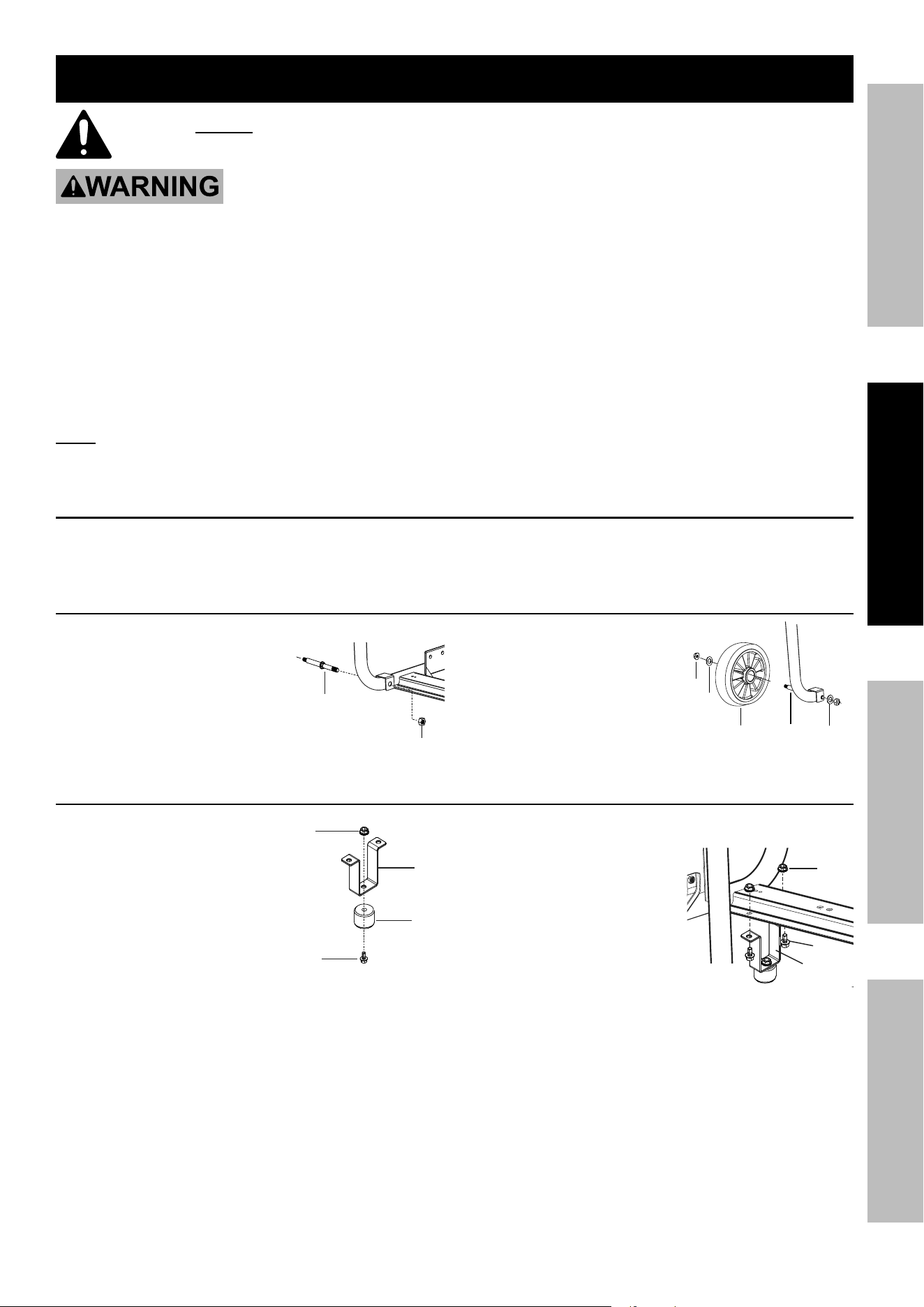
Page 9For technical questions, please call 1-800-444-3353.71340
SaFetySetupOperatiOnMaintenance
initial tool Set up/assembly
read the entire iMpOrtant SaFety inFOrMatiOn section at the beginning of this
manual including all text under subheadings therein before set up or use of this product.
tO preVent SeriOuS inJury:
Operate only with proper spark arrestor installed.
Operation of this equipment may create sparks that can start fires around dry vegetation.
a spark arrestor may be required. the operator should contact local fire agencies
for laws or regulations relating to fire prevention requirements.
At high altitudes, the engine’s carburetor, governor,
and any other parts that control the fuel‑air ratio will
need to be adjusted by a qualified mechanic to allow
efficient high‑altitude use and to prevent damage to the
engine and any other devices used with this product.
note: For additional information regarding the parts listed in the following pages,
refer to the Assembly Diagram near the end of this manual.
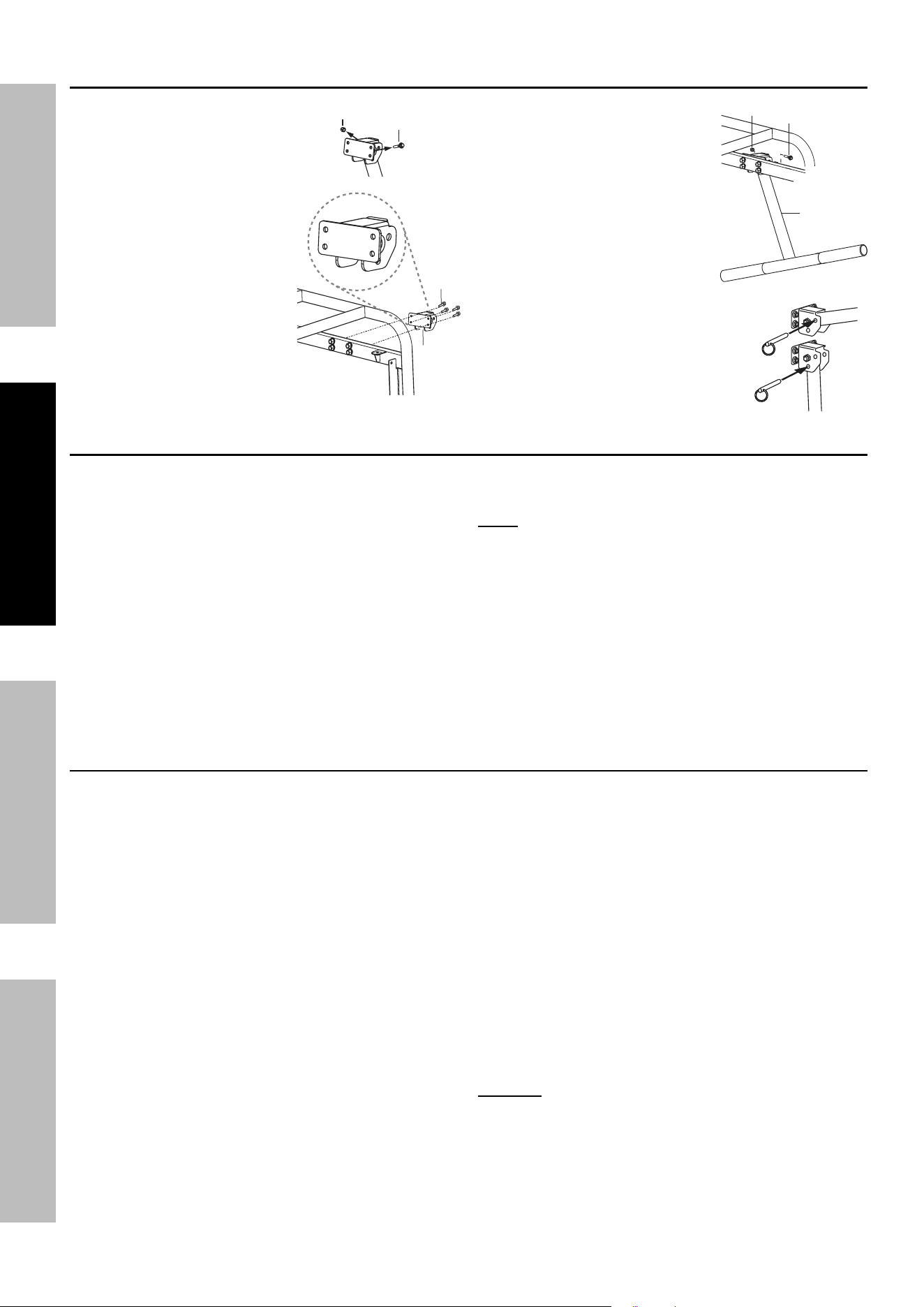
Wheel Kit assembly
Install the included wheel kit by following
the instructions included with it.
installing the Wheels
1. Unpack and identify all parts.
2. Slide the Axle (11a) onto one
side of the compressor frame
and secure the Nut (14a)
in place. Repeat on the
other side of the frame.
3. Slide a Washer (10a),
a Wheel (12a), and
another Washer (13a)
onto an Axle and secure
the Nut (9a) in place.
Repeat on the other Axle.
installing the Feet
1. Secure the Foot (18a)
onto the bottom of the
Foot Support (16a) with a
Bolt (19a) and Nut (15a).
2. Working on the opposite end of the Frame from the
wheels, align the holes in
the frame with a Foot
Support (16a) and secure
in place with two
Bolts (17a) and Nuts (15a).
Repeat with the other
Foot support.
9a
10a
12a
13a
11a
11a
14a
15a
16a
18a
19a
15a
16a
17a
Page 10 For technical questions, please call 1-800-444-3353. 71340
SaFety Setup OperatiOn Maintenance
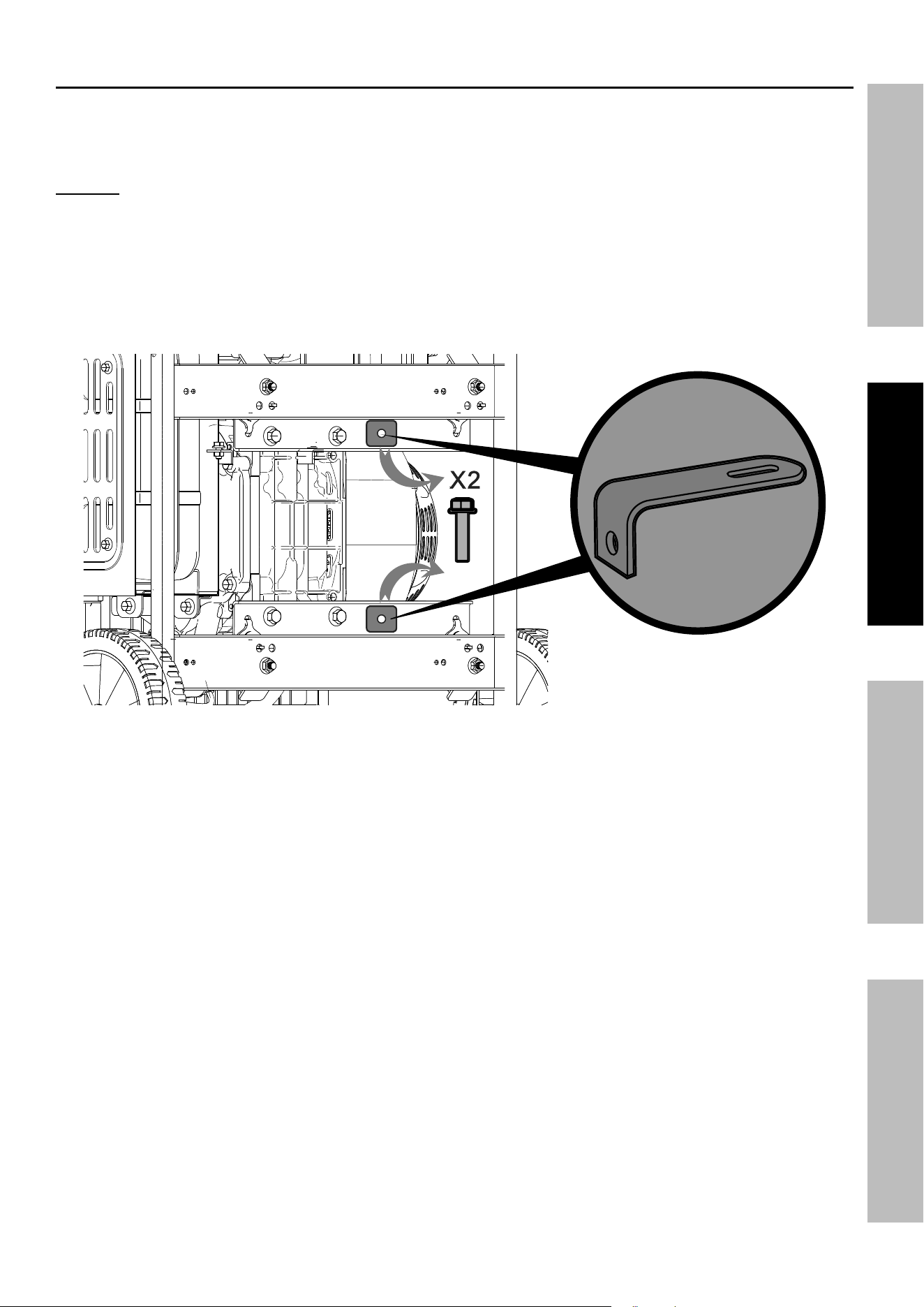
installing the Handle
1. Remove the Bolt (6a)
holding the Handle (4a) to the
Handle Seat (7a) before installing
the Handle Seat.
2. Holding the Handle Seat
as shown at right, align the
holes of the
Handle Seat (7a) with the
holes on the generator
frame on the same side as
the Feet.
3. Secure in place with
four Bolts (5a).
4. Align the Handle (4a) with
the holes in the Handle Seat
and secure in place with the
Bolt (6a) and Nut (8a).
5. Use the Pin (2a) to secure
the handle in the raised or
lowered position.
Battery Setup instructions
All generators can be started using the recoil method. This Generator requires installation of a
battery to operate the electric start feature. Connect the battery to the Generator engine:
1. Remove terminal covers from the battery, if installed.
2. Attach the positive (red) cable connector
from the engine to the Positive Terminal
on the battery. Connect cable securely to
prevent disconnection and short circuits.
3. Attach the negative (black) cable connector
to the negative battery terminal.
note: This generator is equipped with a battery charging
circuit specific to the installed battery type that will
charge the battery when the generator is running. If
battery needs charging during storage, make sure to
use a charger that provides less than 1 Amp and voltage
less than 14V. Do not overcharge. Unplug charger when
battery is fully charged.
Grounding
The Generator must be properly grounded in
accordance with all relevant electrical codes and
standards before operation. In many locations, local
code will not require this generator to be grounded
when used with cord and plug equipment plugged
directly into the receptacles on the generator. However,
your local regulations may require the generator to be
grounded. Contact a licensed electrician or consult
local authorities regarding local grounding requirements.
If grounding is required, have the unit grounded by a
qualified electrician if you are not qualified to do so.
General grounding instructions are as follows:
Use one of the following as the grounding electrode:
pipe or conduit, minimum ¾ in. diameter, minimum
8 ft. long. If steel, it must have anti‑corrosion coating.
rod, stainless steel or copper‑ or zinc‑coated steel,
minimum 5/8 in. diameter, minimum 8 ft. long.
1. Drive electrode at least 8 ft.
vertically into the ground.
a. If rock layer prevents vertical entry, drive at an
angle not exceeding 45 degrees from vertical.
b. If rock layer prevents angle entry, bury electrode
in horizontal trench at least 30 in. deep.
2. The upper end of electrode must be
protected if above ground level.
3. Connect a #6 AWG grounding wire (not included)
from the Grounding Terminal on the Generator
Control Panel to the buried electrode.
For additional information on grounding methods,
please see the National Electrical Code.
nOtice: There is a permanent conductor
between the portable generator inverter module
(Neutral Conductor) and the frame.
6a
8a
7a
5a
8a
6a
4a
To lock
raised
To lock
lowered
Page 11For technical questions, please call 1-800-444-3353.71340
SaFetySetupOperatiOnMaintenance
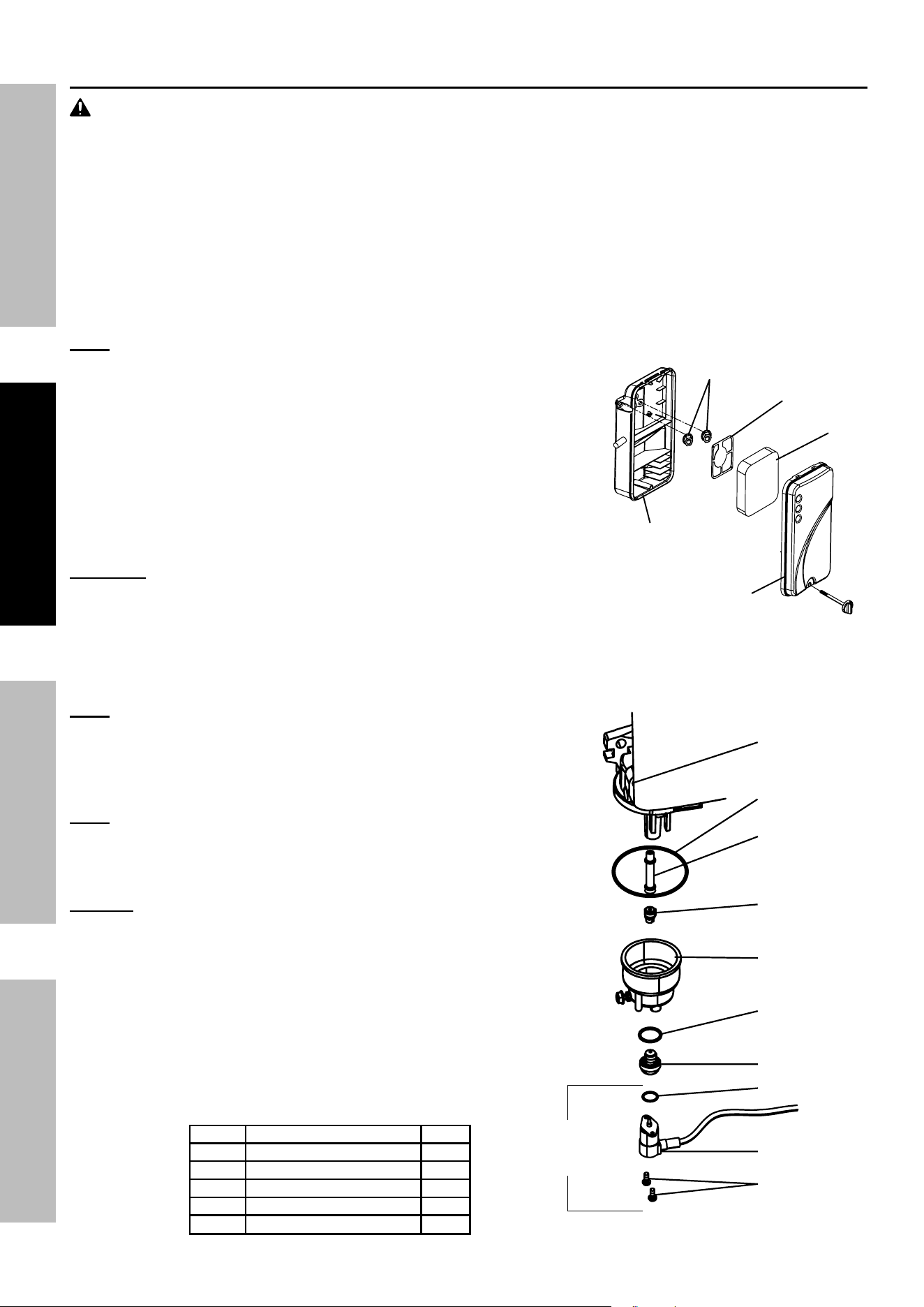
remove the Shipping Brackets
to protect the Generator during shipping, Shipping Brackets have been installed between the engine
and Frame. these brackets MuSt Be reMOVeD BeFOre adding oil or gasoline to the Generator.
nOtice: DO nOt attempt to start Generator without first removing the Shipping Brackets.
Damage to the Generator as a result of not removing the Brackets will void the warranty.
1. BEFORE filling the Engine with oil or gasoline, tip the Generator onto its recoil end. Tip onto the flattened
cardboard box the Generator came in or other protective surface so as to not scratch the Frame.
2. Remove the Bolts from the orange Shipping Brackets. Bolts and Shipping Brackets can be discarded.
Figure a: remove Both Shipping Brackets and Bolts
3. Tip the Generator upright.
Page 12 For technical questions, please call 1-800-444-3353. 71340
SaFety Setup OperatiOn Maintenance
High altitude Operation above 3000 feet
WarninG! tO preVent SeriOuS inJury FrOM Fire:
Follow instructions in a well‑ventilated area away from ignition sources.
If the engine is hot from use, shut the engine off and wait for it to cool before proceeding. Do not smoke.
nOtice Warranty void if necessary adjustments are not made for high altitude use.
At high altitudes, the engine’s carburetor, governor, and any other parts that control the fuel‑air ratio will need
to be adjusted by a qualified mechanic to allow efficient high‑altitude use and to prevent damage to the engine
and any other devices used with this product. The fuel system on this engine may be influenced by operation
at higher altitudes. Proper operation can be ensured by installing an altitude kit at altitudes higher than 3000 ft.
above sea level. At elevations above 8000 ft, the engine may experience decreased performance, even with
the proper main jet. Operating this engine without the proper altitude kit installed may increase the engine’s
emissions and decrease fuel economy and performance. The kit should be installed by a qualified mechanic.
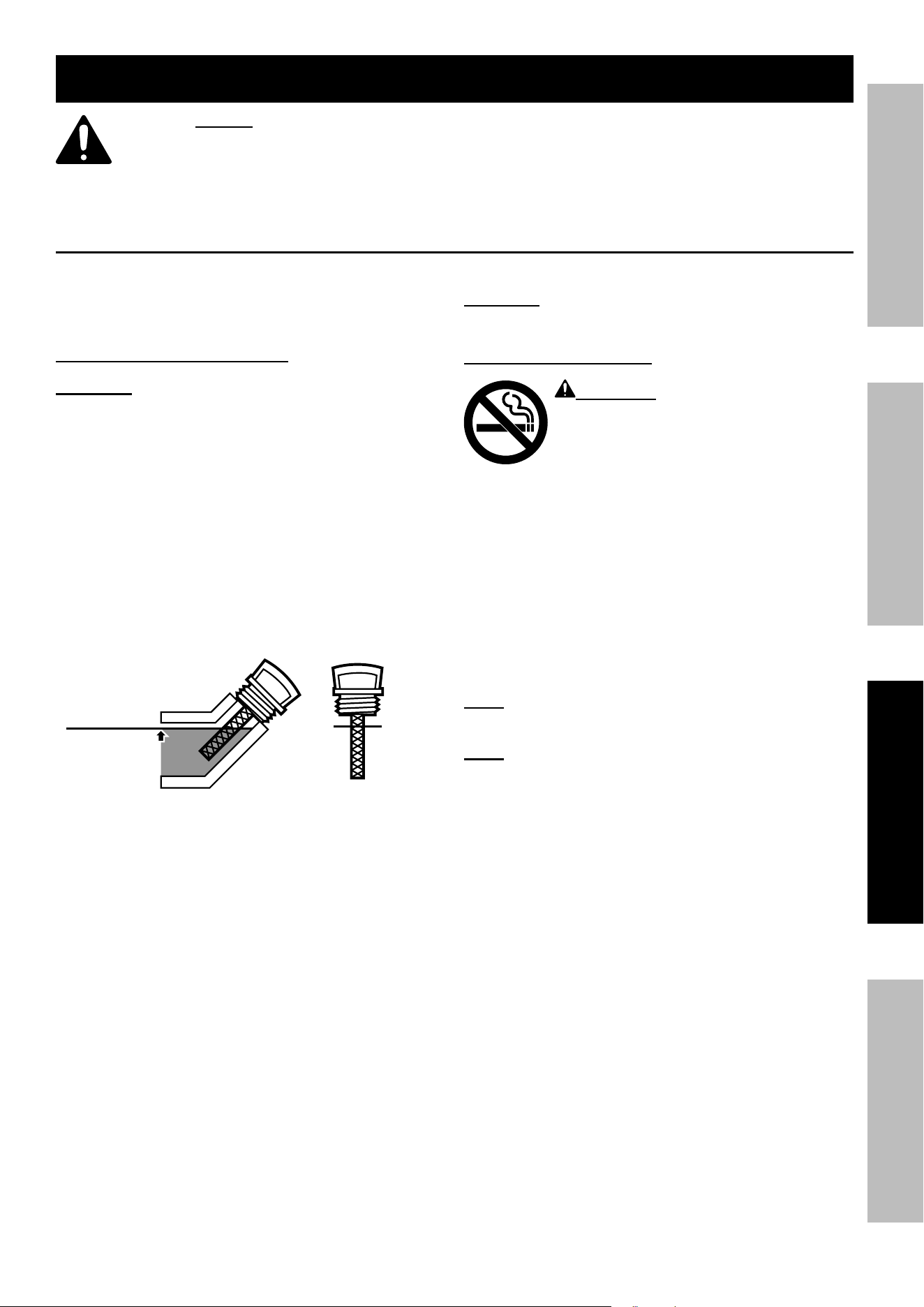
note: Not all Generator models have a Solenoid. Skip those steps if a Solenoid is not present.
1. Turn off the engine.
2. Close the fuel valve.
3. Move the air cleaner housing aside to allow access to the carburetor:
a. Loosen the knob and remove air cleaner cover.
b. Remove the foam filter and deflecting plate.
c. Remove the nuts to allow the air cleaner housing to be moved aside.
4. Place a bowl under the fuel cup to catch any spilled fuel.
5. Unthread the screws holding the solenoid in place.
cautiOn! Carburetor bowl may have gas in it which
will leak upon removing the solenoid/bolt.
6. Disconnect the solenoid and solenoid seal from the bolt.
7. Unthread the bolt holding the fuel cup.
8. Remove the bolt, Bolt Seal, fuel cup, Fuel Cup Seal and Main Jet from the body of the carburetor assembly.
A carburetor screwdriver (not included) is needed to remove and install the Main Jet.
note: The mixing tube is held in place by the Main Jet and
might fall out when it is removed. If it falls out, replace it in
the same orientation before replacing the Main Jet.
9. Replace the Main Jet with the replacement Main Jet
needed for your altitude range (part 1a or 2a).
note: The Fuel Cup Seal and Bolt Seal may be damaged during
removal and should be replaced with the new ones from the kit.
10. Replace the Fuel Cup Seal (4a), fuel cup,
Bolt Seal (3a), and bolt. Tighten in place.
nOtice: Do not cross thread bolt when tightening.
Finger tighten first and then use a wrench to
make sure the bolt is properly threaded.
11. Replace the solenoid and Solenoid Seal (5a),
and tighten in place with screws.
12. Reassemble the air cleaner and reattach all hoses to it.
13. Wipe up any spilled fuel and allow excess to evaporate before starting
engine. To prevent FIRE, do not start the engine while the smell of fuel
hangs in the air.
High altitude Kit parts List - a
part Description Qty
1a Main Jet 3000‑6000 ft. 1
2a Main Jet 6000‑8000 ft. 1
3a Bolt Seal 1
4a Fuel Cup Seal 1
5a Solenoid Seal 1
air cleaner
Housing
nuts
Deflecting plate
Foam Filter
air
cleaner
cover
carburetor
assembly
Main Jet
Fuel cup Seal
Mixing tube
(might remain
inside carburetor)
Fuel cup
Bolt Seal
Bolt
Solenoid
Solenoid Seal
Screws
Not present
on some
Generators
Page 13For technical questions, please call 1-800-444-3353.71340
SaFetySetupOperatiOnMaintenance
Operating instructions
read the entire iMpOrtant SaFety inFOrMatiOn section at the beginning of this
manual including all text under subheadings therein before set up or use of this product.
inspect tool before use, looking for damaged, loose, and missing parts.
if any problems are found, do not use tool until repaired.
Generator pre-Start checks
Inspect engine and equipment, looking for
damaged, loose, and missing parts before set
up and starting. If any problems are found,
do not use equipment until fixed properly.
checking and Filling engine Oil
cautiOn! your Warranty is VOiD if the engine’s
crankcase is not properly filled with oil before
each use. Before each use, check the oil level.
Do not run the engine with low or no engine
oil. running the engine with no or low engine
oil WiLL permanently damage the engine.
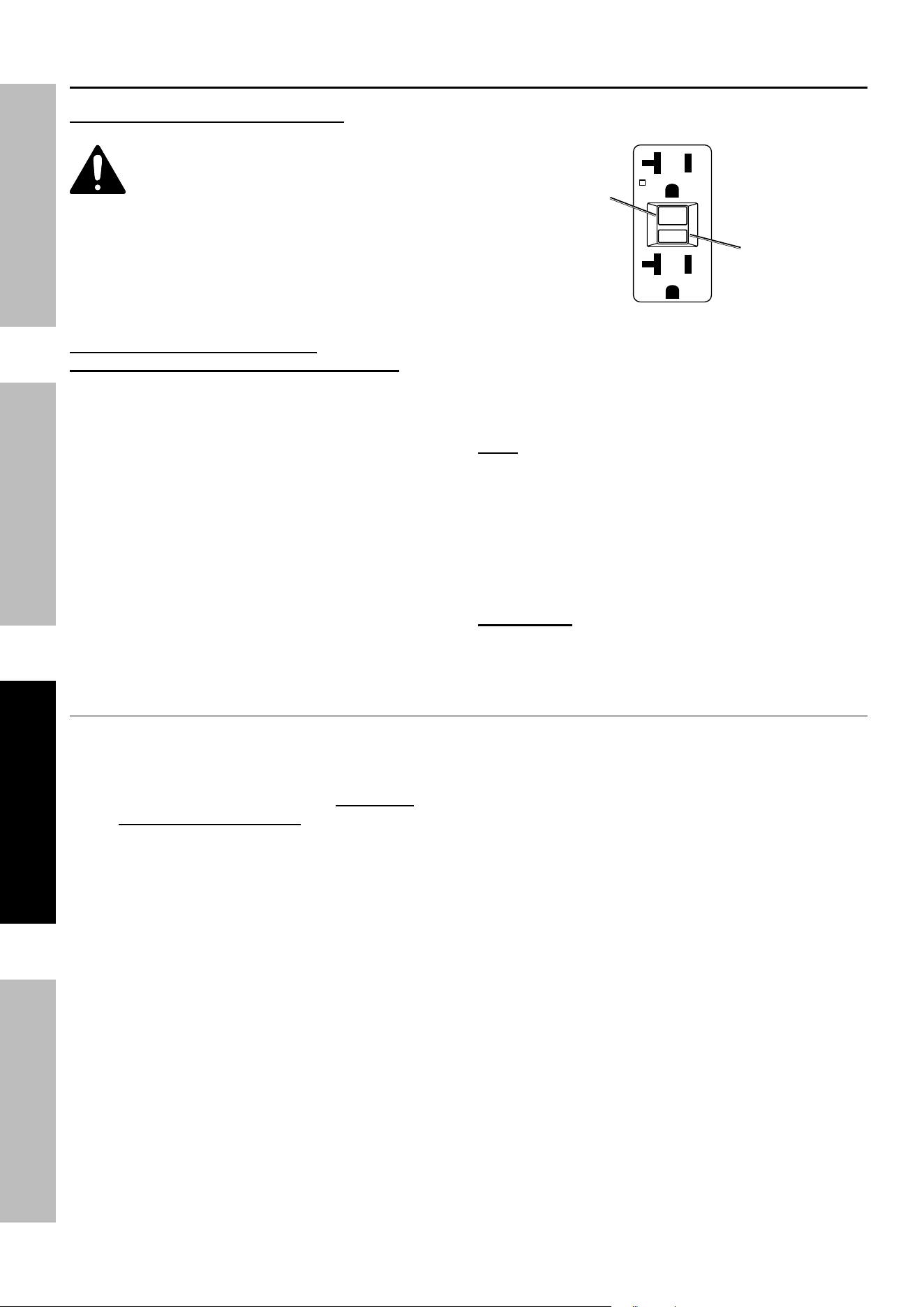
1. Make sure the engine is stopped and is level.
2. Close the Fuel Valve.
3. Clean the top of the Dipstick and the
area around it. Remove the Dipstick
by threading it counterclockwise, and
wipe it off with a clean lint free rag.
4.
Full level
Full level
Reinsert the Dipstick without threading it in and
remove it to check the oil level. The oil level
should be up to the full level as shown above.
5. If the oil level is at or below the low mark add the
appropriate type of oil until the oil level is at the
proper level. SAE 10W‑30 oil is recommended
for general use. (The SAE Viscosity Grade chart
on page 21 in the Service section shows other
viscosities to use in different average temperatures.)
6. Thread the dipstick back in clockwise.
cautiOn! Do not run the engine with too little oil.
The engine will be permanently damaged.
checking and Filling Fuel
WarninG! tO preVent SeriOuS
inJury FrOM Fire:
Fill the fuel tank in a well-ventilated area
away from ignition sources. if the
engine is hot from use, shut the engine
off and wait for it to cool before adding fuel.
Do not smoke.
1. Clean the Fuel Cap and the area around it.
2. Unscrew and remove the Fuel Cap.
3. If needed, fill the Fuel Tank to about 1 inch
under the fill neck with 87 octane or higher
unleaded gasoline that has been treated with
a fuel stabilizer additive. Follow fuel stabilizer
manufacturer’s recommendations for use.
note: Do not use gasoline containing more than
10% ethanol (e10). Do not use e85 ethanol.
note: Do not use gasoline that has been stored in a
metal fuel container or a dirty fuel container. it can
cause particles to enter the carburetor, effecting
engine performance and/or causing damage.
4. Then replace the Fuel Cap.
5. Wipe up any spilled fuel and allow excess
to evaporate before starting engine. To
prevent FIRE, do not start the engine while
the smell of fuel hangs in the air.
Page 14 For technical questions, please call 1-800-444-3353. 71340
SaFety Setup OperatiOn Maintenance
using the Generator
Before Starting the Generator engine
Before starting the engine:
a. Follow the Set up instructions
to prepare the Generator.
b. unplug all loads from the Generator.
c. inspect the Generator and engine.
d. Fill the engine with the proper
amount and type of both
stabilizer-treated fuel and oil.
Basic Generator use procedure -
See following pages for specific instructions
1. Check that the Generator can handle the
wattage needed to power your products.
2. Start the Engine, and allow the Engine and
Generator to run and warm up for five minutes
after starting with no electrical load.
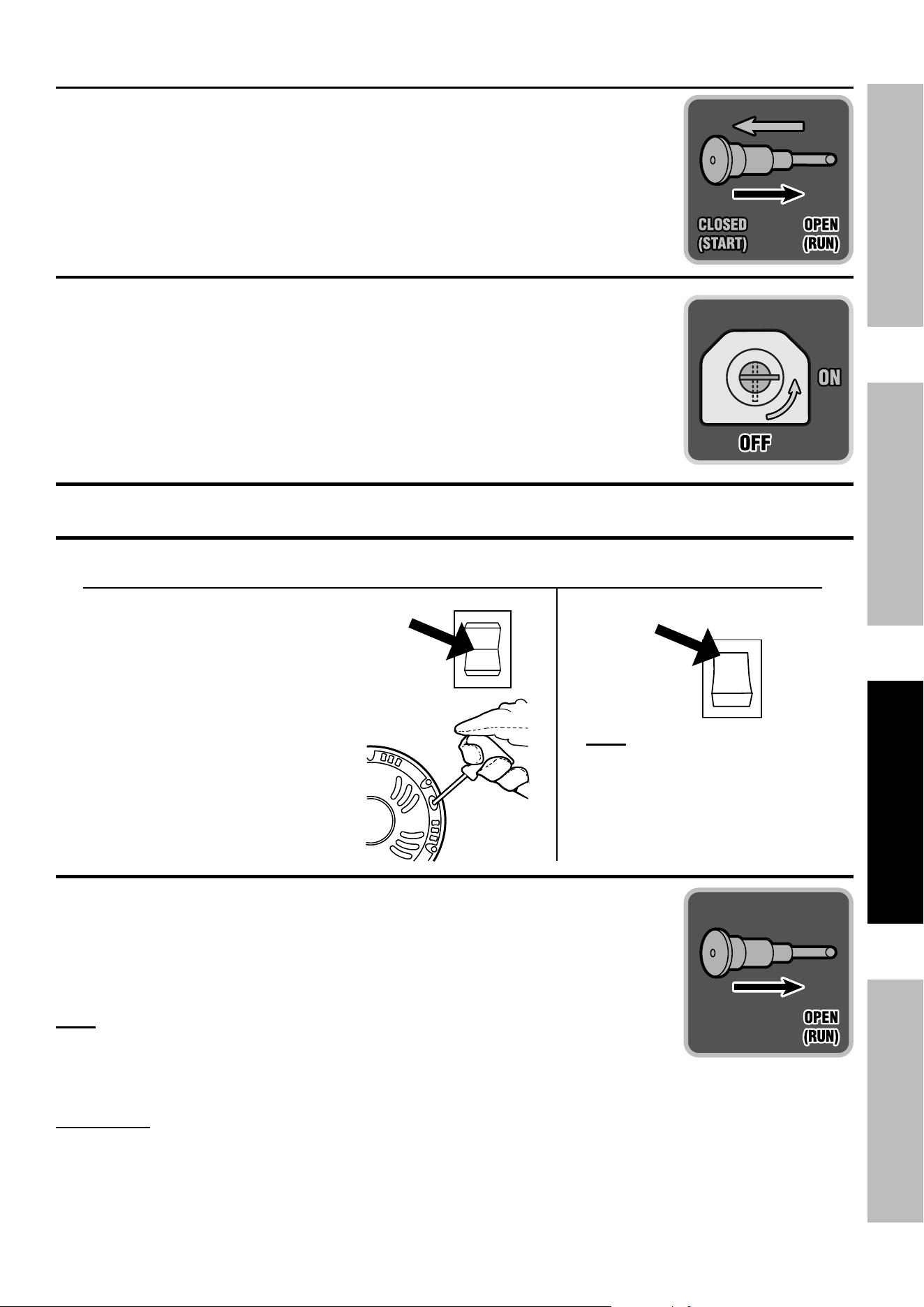
3. With the engine running, test GFCI
receptacles before each use as follows:
a. Press Test button on receptacle
to trip the GFCI device.
b. The Reset button should extend, cutting
off electricity to the receptacle.
c. If above test fails, do not use receptacle
until it is repaired or replaced.
d. Press Reset button in for use.
reSet
teSt
reSet
teSt
reset
Button
test
Button
120 Volt GFci receptacle
4. Plug in products.
5. When finished using the Generator,
disconnect all electrical loads.
note: Do not allow Generator to run
out of fuel with loads attached.
6. Turn off the Engine.
7. Allow the Generator and its Engine to
completely cool. Then store the unit in a
clean, dry, safe location out of reach of
children and other unauthorized people.
iMpOrtant: After starting the engine, allow it to
run at no load for five minutes with no load after
each start‑up so that the engine can stabilize.
Break-in period:
a. Breaking‑in the engine will help to ensure
proper equipment and engine operation.
b. The break‑in period will last about 25
hours of use. DO NOT exceed 75% of the
Generator’s rated capacity during this period.
• Change the engine oil after this period.
Under normal operating conditions subsequent
maintenance follows the schedule explained
in the MAINTENANCE section.
Page 15For technical questions, please call 1-800-444-3353.71340
SaFetySetupOperatiOnMaintenance
Starting the engine
1. To start a cold engine, pull the Choke Knob out to the
START position.
To restart a warm engine, leave the
Choke Knob in the RUN position.
2. Open the Fuel Valve.
3. Put ESC Switch in off position.
4.
5. Allow the Engine to run for several seconds.
Then, if the Choke Knob is in the CHOKE position,
move the Choke Knob very slowly to its RUN position.
note: Moving the Choke Knob too
fast could stall the engine.
iMpOrtant: Allow the engine to run at no load for five minutes with no
load after each start‑up so that the engine can stabilize.
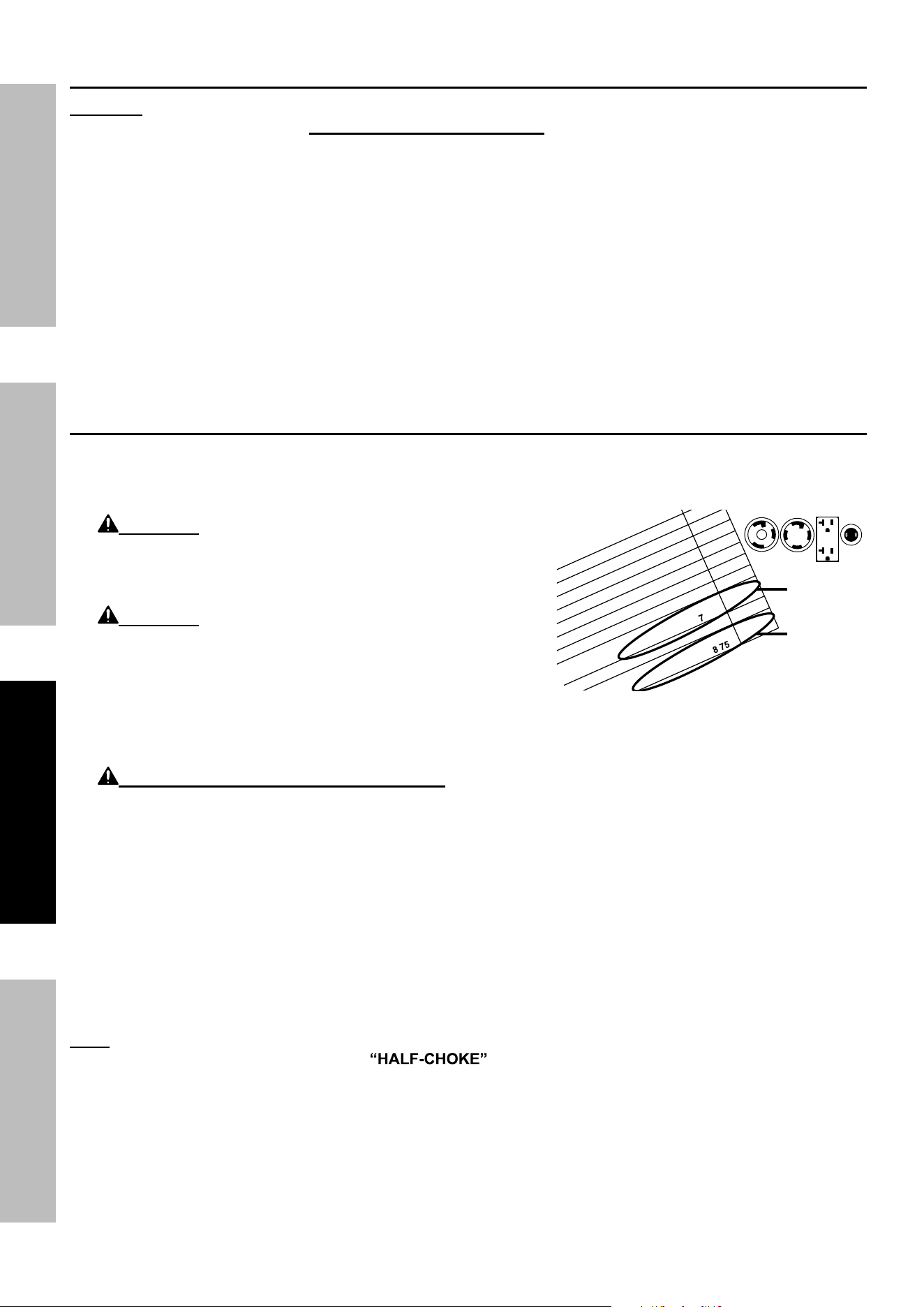
For ManuaL Start
a. Turn the Engine Switch to ON.
B. Grip the Starter Handle of the Engine
loosely and pull it slowly several times to
allow the gasoline to flow into the
Engine’s carburetor. Then pull the Starter
Handle gently until resistance is felt.
Allow Cable to retract fully and then pull
it quickly. Repeat until the engine starts.
Note: Do not let the Starter Handle snap
back against the engine. Hold it as it
recoils so it doesn't hit the engine.
i
O
Start
For eLectric Start
Turn the Engine Switch to START.
note: To prolong starter life, use
short starting cycles (5 seconds
maximum). Then wait one minute
before attempting to start again.
START
i
O
Start
Page 16 For technical questions, please call 1-800-444-3353. 71340
SaFety Setup OperatiOn Maintenance
carBOn MOnOXiDe SHutOFF
DanGer! tO preVent SeriOuS inJury anD DeatH FrOM carBOn MOnOXiDe inHaLatiOn:
the carbon Monoxide sensor is an additional layer of protection only. Do not use the
Generator in any area or situation that will allow carbon monoxide to accumulate.
• FLASHING RED LIGHT:
Dangerous levels of carbon monoxide
gas have built up and generator will
shut off. Leave immediately until area
has aired out. Move Generator to
well‑ventilated area before operation.
• FLASHING YELLOW LIGHT:
Carbon monoxide sensor malfunction.
Sensor needs service. Do not use the Generator
until the sensor is working properly. For
technical questions, please call 1‑800‑444‑3353.
NOTE: Yellow light flashes once
after starting to indicate passing self‑
check and is functioning normally.
carbon Monoxide sensor must only be serviced by qualified technician to restore it to original
settings. Do not modify or tamper with the carbon Monoxide sensor. not following these
instructions can result in death or serious injury due to carbon Monoxide sensor malfunction.
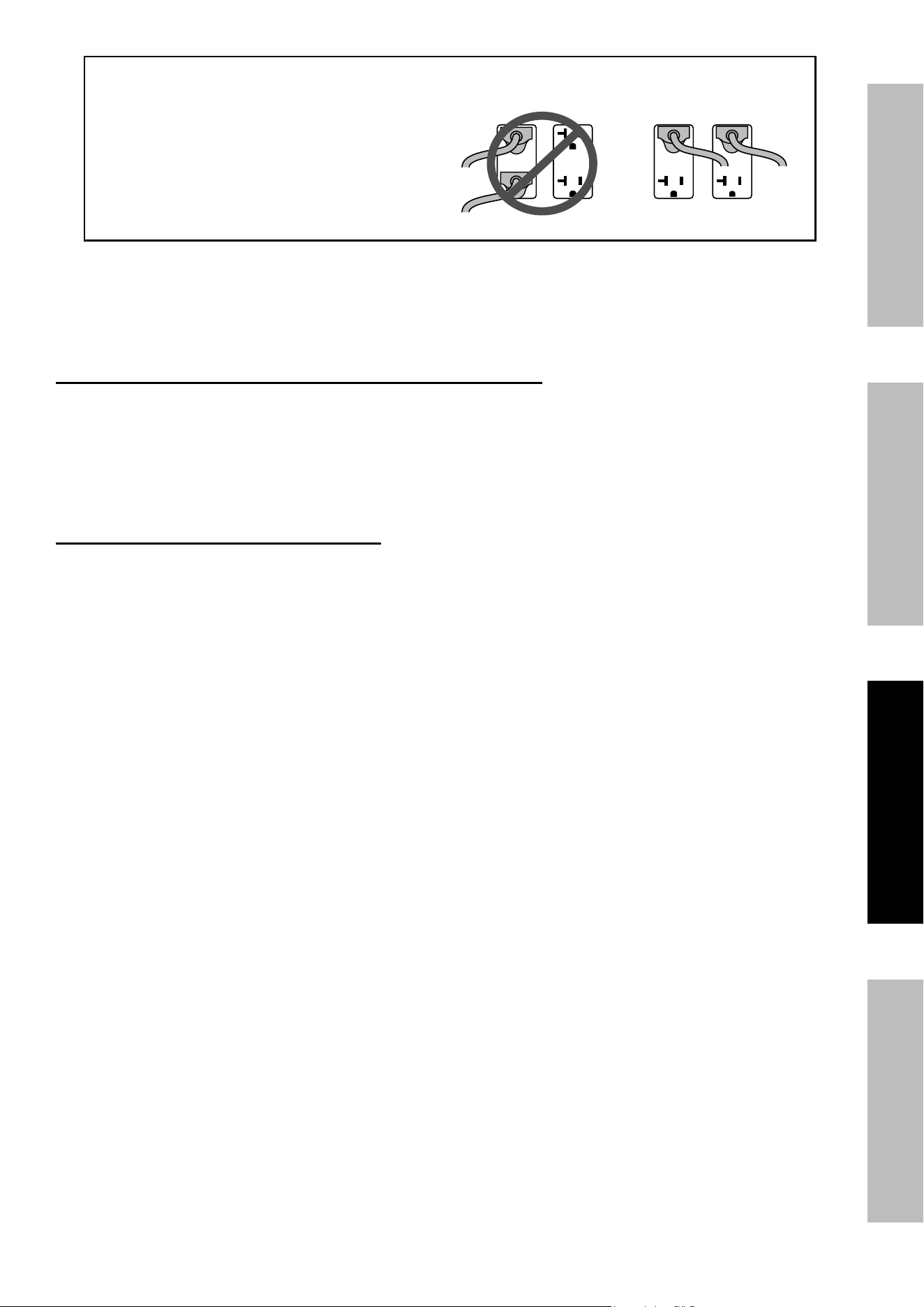
connecting electrical Loads
Familiarize yourself with the engine controls, power panel and how to start the engine
before using the Generator. Calculate the wattage of the products you will use with
the Generator and verify that the Generator can handle the total load.
WarninG! Connect only properly wired plugs
to the Generator. A plug that is spliced onto a
different cord may be hazardous. Only a qualified
electrician should wire a plug onto a cord.
WarninG! Never exceed the rated capacity
for this Generator, as serious damage to the
Generator and/or appliances, tools, and equipment
could result from an overload. Starting and running
wattage requirements should always be calculated
when matching this Generator’s wattage capacity to the appliance, tool, or equipment.
Use the DC12 V Receptacle to power 12 VDC equipment.
WarninG! tO preVent SeriOuS inJury: Do not charge batteries
without a proper charge controller. Do not overcharge.
a. Connect the items that require the most wattage first.
b. Connect “inductive” load appliances, tools, and equipment next. Inductive
loads are small hand tools and some small appliances.
c. Connect any lights next.
d. Voltage sensitive appliances, tools, and equipment should be the last to be connected to the Generator.
Plug voltage sensitive items such as TVs, DVD players, microwaves, and cordless telephones into a UL
®
Listed voltage surge protector (not included). Then, connect the surge protector into the Generator.
iMpOrtant! Failure to connect and operate appliances, tools, and equipment in this sequence can cause
damage to the Generator, appliances, tools, and equipment and will void the Warranty of this Generator.
note: If Engine speed or voltage fluctuates with a load below the Generator’s running
watts, move the Engine Choke Lever to the position.
000
l
S
t
1,
400
200
1,200
to
ta
l r
u
n
n
in
g
Wa
tts
(m
u
s
t b
e
le
s
s
th
a
n
,
0
0
)
4,200
L
a
rg
e
s
t
a
d
d
itio
n
a
l S
ta
rt-u
p
Wa
tts
1,200
a
rtu
p
Wa
tts
n
e
e
d
e
d
fo
r a
ll lo
a
d
s
(m
u
s
t b
e
le
s
s
th
a
n
,
0
)
5,400
Must be
Less than
8,750
Must be
Less than
7,000
0
Page 17For technical questions, please call 1-800-444-3353.71340
SaFetySetupOperatiOnMaintenance
evenly distributed
over outlets:
iF any circuit BreaKerS trip cHecK tHe FOLLOWinG:
1. Make sure that ALL circuit breakers are reset
before starting the Generator again.
2. Adjust the plugs so the loads are
shared across outlet circuits.
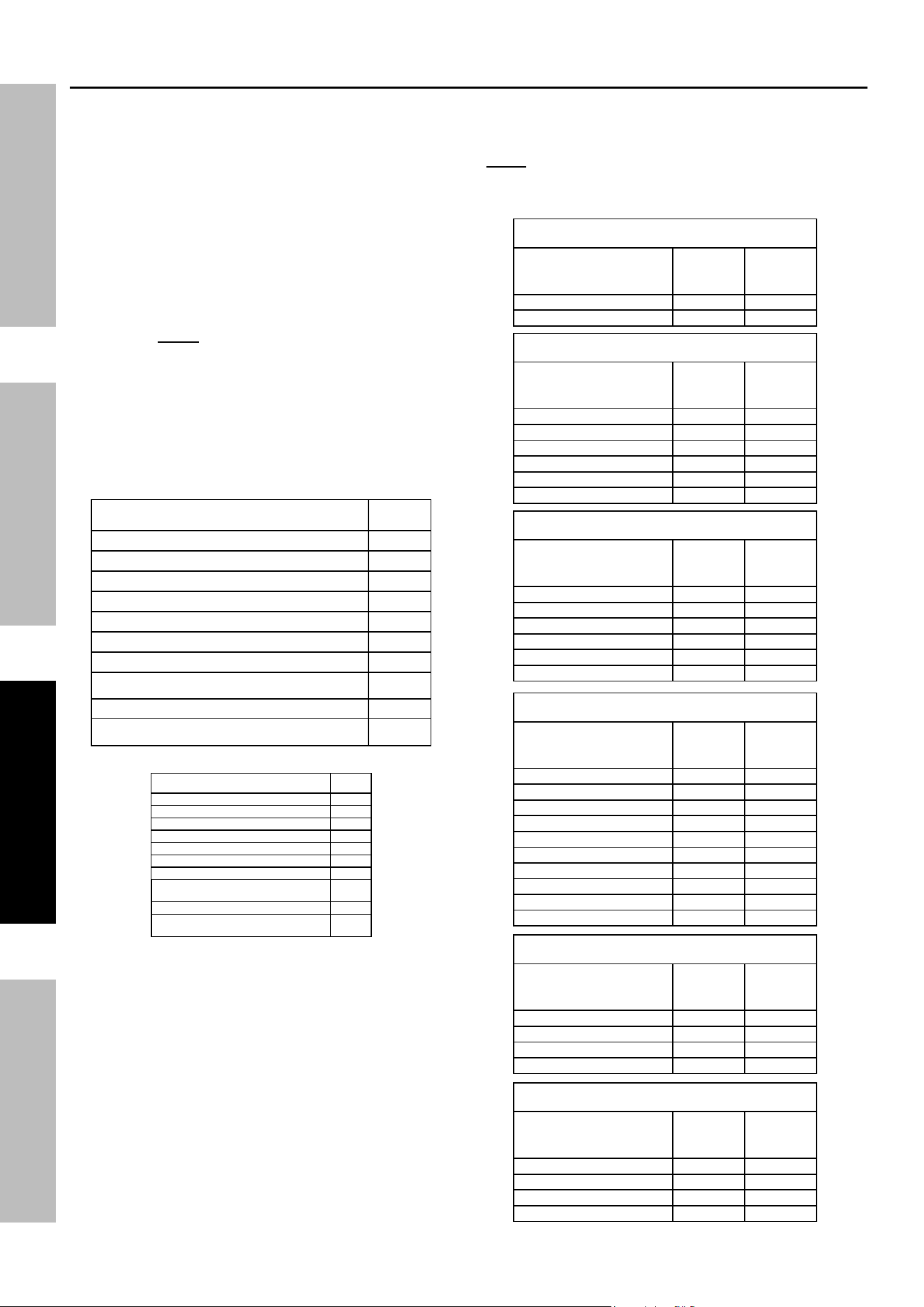
to achieve rated output from the Generator,
distribute loads over outlets.
The generator uses a 2‑circuit system to supply power to the receptacles. The loads must
be evenly distributed across receptacles to prevent overload on a single circuit. If the loads
being drawn are below the max rated wattage of the generator, yet the overload light begins
blinking or the generator shuts off, try redistributing plugs across receptacles.
120V Only (3-wire) adaptor cord connected to L14-30 receptacle:
If the overload light begins blinking or the Generator shuts off, too much wattage is being drawn from one
circuit even though the rated wattage of the Generator has not been reached. If an additional plug is connected
to one of the duplex receptacles, move the plug to the other duplex receptacle. Restart the Generator.
note: Only half the Generator’s rated wattage, or 3500W, will be delivered through
a 120V (3‑wire) adaptor cord. Exceeding this may cause overload.
240V cord connected to L14-30 receptacle:
The 240V cord will draw full wattage from both circuits. If further loads
are possible, distribute them across receptacles.
Page 18 For technical questions, please call 1-800-444-3353. 71340
SaFety Setup OperatiOn Maintenance
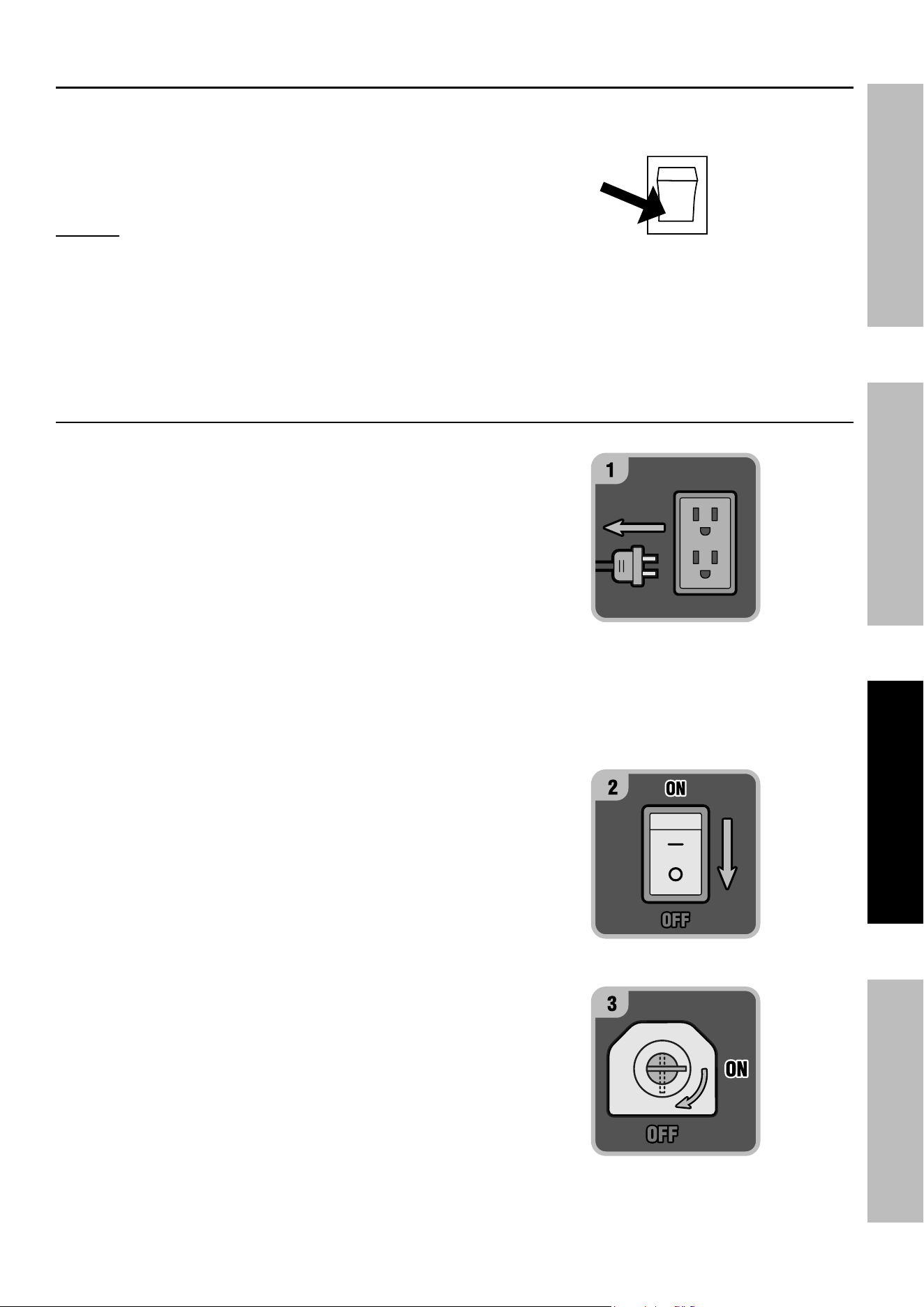
Before using the Generator, check that the products
you want to plug into the unit are below the rated and
maximum wattage ratings of the Generator. Use the
Wattage Calculation Table below, and the watts listed
on your products, to help calculate multiple
wattage totals.
to use the table:
1. Add up the Running Watts for all items you
would like to use at any given time.
2. Make sure that this total is under the 7,000
running wattage of the Generator.
3. Find the single highest starting watts for
the selected items and add to the total.
4. Make sure that this total is under the 8,750
max. starting wattage of the Generator.
5. Plug in and turn on products from largest wattage
to smallest.
example
equipment
running
Watts
Electric Water Heater (2,000 + 0) 2,000
Television (400 + 0) 400
Lawn Mower (1,200 + 1,200) 1,200
Hand Drill (600 + 600) 600
total running Watts
(must be less than 7,000)
4,200
Largest additional Start-up Watts
1,200
total Startup Watts needed for all loads
(must be less than 8,750)
5,400
Wattage calculation table
equipment
running
Watts
total running Watts
(must be less than 7,000)
Largest additional Start-up Watts
total Startup Watts needed for all loads
(must be less than 8,750)
A generator that is rated more than the minimum
required max. starting watts will last much longer than
a generator that only supplies the exact watts needed.
to calculate Wattage
Volts and amps can be multiplied together to get watts
(volts x amps = watts).
to calculate additional Start-up Watts
(if they are not Listed)
For equipment with a motor: Use the rated watts
amount as an estimate of additional Start‑up Watts.
For most lights or heaters:
there are no additional start‑up watts.
calculating total Wattage of Devices used with the Generator
JOB Site
Device
running
Watts
additional
Start-up
Watts
Air Compressor ‑ 1/2 HP 1000 1000
Table Saw ‑ 10" 1700 1300
Belt Sander ‑ 3" 1200 1200
Hand Drill ‑ 1/2" 600 600
Halogen Work Light 1000 0
Recipricating Saw 900 900
HOuSeHOLD
Device
running
Watts
additional
Start-up
Watts
Computer w/ Monitor 800 0
Electric Clothes Dryer 5500 500
Electric Range 2100 0
Electric Water Heater 2000 0
Light Bulb ‑ 100 watts 100 0
Microwave ‑ 1000 watts 1000 200
Sump Pump ‑ 1/2 HP 1000 1100
Television 400 0
Washing Machine 1100 1100
Well Pump ‑ 1/2 HP 1000 1000
recreatiOn
Device
running
Watts
additional
Start-up
Watts
AM/FM Radio 100 0
Electric Grill 1700 0
Inflator Pump 50 100
CD/DVD Player 100 0
Box Fan ‑ 20" 200 200
Coffee Maker 600 0
LaWn & GarDen
Device
running
Watts
additional
Start-up
Watts
Hedge Trimmer 400 400
Pressure Washer 1200 1200
Lawn Mower 1200 1200
Edger 1000 1000
HeatinG & cOOLinG
Device
running
Watts
additional
Start-up
Watts
Central AC ‑ 10,000 BTU 1500 1500
Furnace Fan ‑ 1/2 HP 900 1400
Space Heater 1800 0
Window AC ‑ 10,000 BTU 1200 600
eMerGency
Device
running
Watts
additional
Start-up
Watts
Refrigerator/Freezer 700 1500
Radio 100 0
Wattage estimate charts
note: Wattages listed below are estimates for that type
of equipment only. Check nameplate wattages on all
loads before connecting to Generator.
Page 19For technical questions, please call 1-800-444-3353.71340
SaFetySetupOperatiOnMaintenance
Stopping the engine in an emergency
1. To stop the engine in an emergency,
turn the Engine Switch off.
nOtice: Generator shut‑off under load may damage
the Generator and attached equipment.
Stopping the engine under normal conditions
1. Before turning off the Engine,
turn off all electrical loads,
then unplug them.
2. Turn the ESC Switch to off position.
3. Turn the Engine Switch off.
4. Close the Fuel Valve.
i
O
Start
OFF
Page 20 For technical questions, please call 1-800-444-3353. 71340
SaFety Setup OperatiOn Maintenance
user-Maintenance instructions
procedures not specifically explained in this manual must
be performed only by a qualified technician.
tO preVent SeriOuS inJury FrOM acciDentaL OperatiOn:
turn the power Switch of the Generator to its “OFF” position, wait for the engine to cool, and disconnect
the spark plug cap before performing any inspection, maintenance, or cleaning procedures.
tO preVent SeriOuS inJury FrOM eQuipMent FaiLure:
Do not use damaged equipment. if abnormal noise, vibration, or excess
smoking occurs, have the problem corrected before further use.
Follow all service instructions in this manual. the engine may fail critically if not serviced properly.
Many maintenance procedures, including any not detailed in this manual, will need to be
performed by a qualified technician for safety. if you have any doubts about your ability to safely
service the equipment or engine, have a qualified technician service the equipment instead.
cleaning, Maintenance, and Lubrication
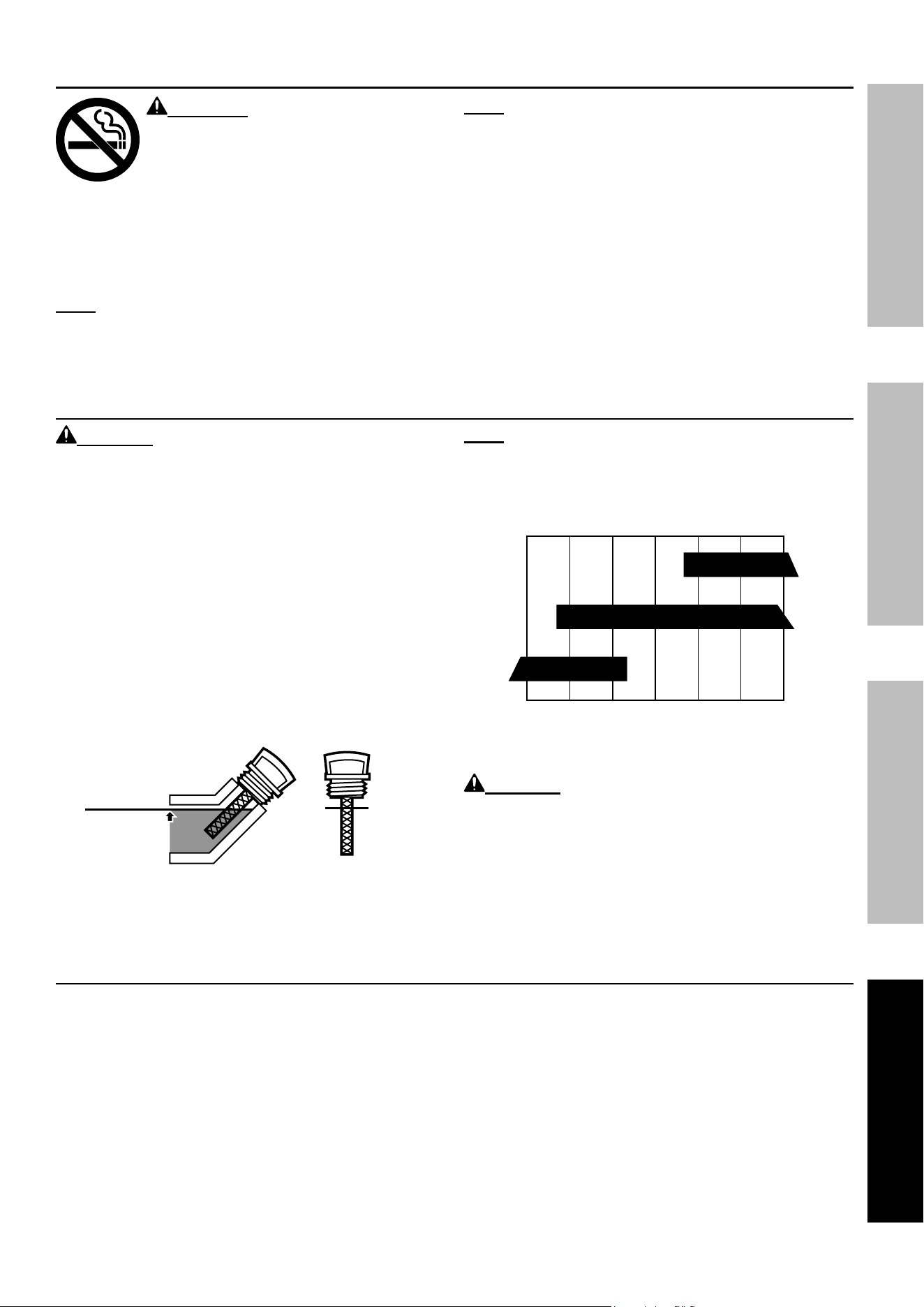
note: This maintenance schedule is intended solely as a general guide. If performance decreases or if
equipment operates unusually, check systems immediately. The maintenance needs of each piece of equipment
will differ depending on factors such as duty cycle, temperature, air quality, fuel quality, and other factors.
note: The following procedures are in addition to the regular checks and maintenance
explained as part of the regular operation of the engine and equipment.
procedure
Before
each use
Monthly or
every 20
hr. of use
every 3 mo. or
50 hr. of use
every 6 mo. or
100 hr. of use
yearly or
every 300
hr. of use
every
2 years
Brush off outside of engine
Check engine oil level
Check air cleaner
Check deposit cup
Change engine oil
Clean/replace air cleaner
*
Check and clean spark plug
1. Check/adjust idle speed
2. Check/adjust valve clearance
3. Clean fuel tank, strainer
and carburetor
4. Clean carbon build‑up from
combustion chamber
** **
Replace fuel line if necessary
**
*Service more frequently when used in dusty areas.
**These items should be serviced by a qualified technician.
Page 21For technical questions, please call 1-800-444-3353.71340
SaFetySetupOperatiOnMaintenance
checking and Filling Fuel
WarninG! tO preVent SeriOuS
inJury FrOM Fire:
Fill the fuel tank in a well-ventilated area
away from ignition sources. if the
engine is hot from use, shut the engine
off and wait for it to cool before adding
fuel. Do not smoke.
1. Clean the Fuel Cap and the area around it.
2. Unscrew and remove the Fuel Cap.
note: Do not use gasoline containing more than
10% ethanol (e10). Do not use e85 ethanol.
note: Do not use gasoline that has been stored in a
metal fuel container or a dirty fuel container. it can
cause particles to enter the carburetor, effecting
engine performance and/or causing damage.
3. If needed, fill the Fuel Tank to about 1 inch
under the fill neck with 87 octane or higher
unleaded gasoline that has been treated with
a fuel stabilizer additive. Follow fuel stabilizer
manufacturer’s recommendations for use.
4. Replace the Fuel Cap.
5. Wipe up any spilled fuel and allow excess
to evaporate before starting engine. To
prevent FIRE, do not start the engine while
the smell of fuel hangs in the air.
engine Oil change
cautiOn! Oil is very hot during operation and can
cause burns. Wait for engine to cool before changing oil.
1. Make sure the engine is stopped and is level.
2. Close the Fuel Valve.
3. Place a drain pan (not included) underneath
the crankcase’s drain plug.
4. Remove the drain plug and, if possible,
tilt the crankcase slightly to help drain
the oil out. Recycle used oil.
5. Replace the drain plug and tighten it.
6. Clean the top of the Dipstick and the
area around it. Remove the Dipstick
by threading it counterclockwise, and
wipe it off with a clean lint free rag.
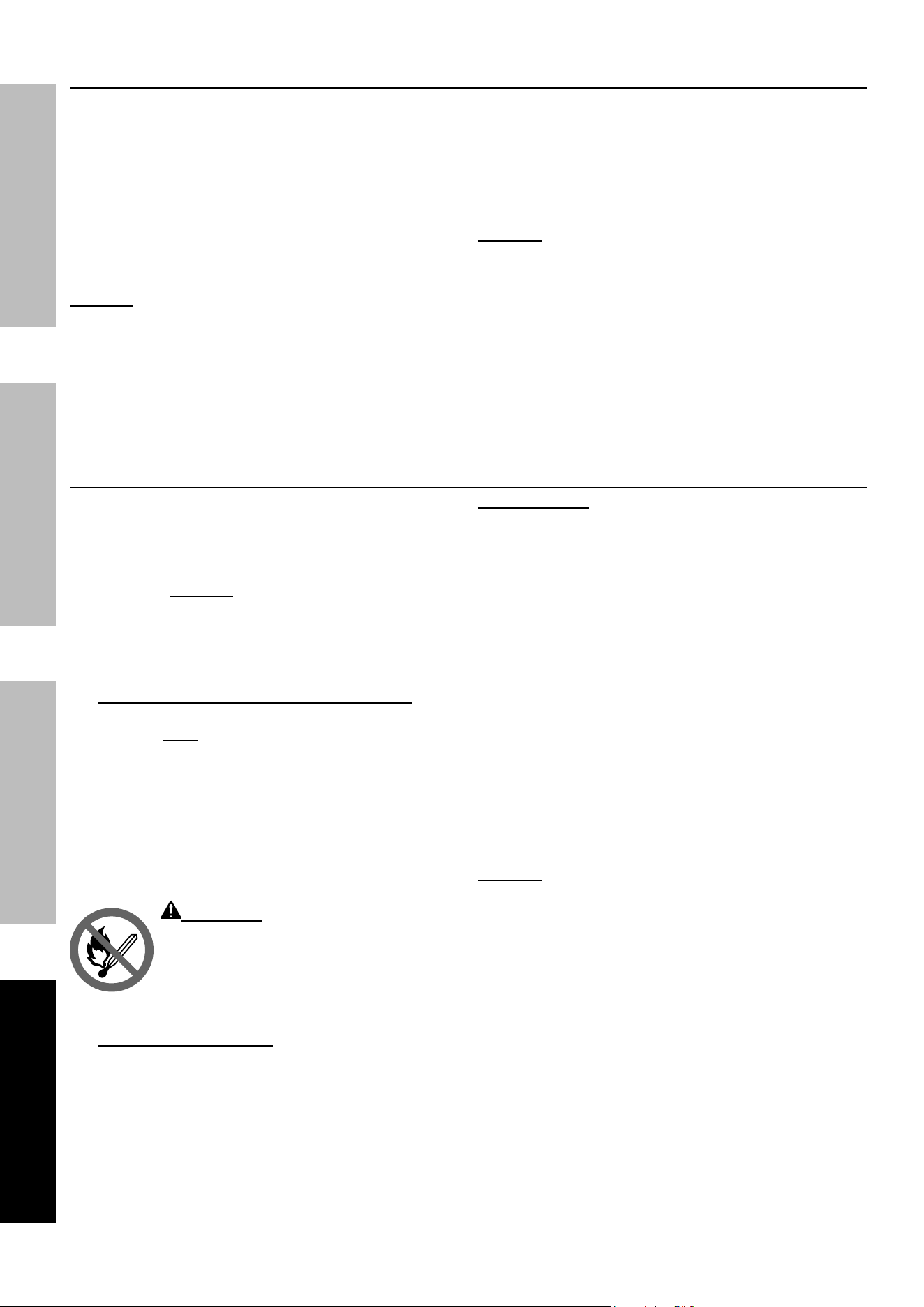
Full level
Full level
7. Add the appropriate type of oil until the
oil level is at the full level. SAE 10W‑30
oil is recommended for general use.
note: Do not thread the dipstick in
when checking the oil level.
The SAE Viscosity Grade chart shows other
viscosities to use in different average temperatures.
10W-30
30
5W-30
‑20 0 20 40 60 80 100°F
Sae Viscosity Grades
average outdoor temperature
8. Thread the dipstick back in clockwise.
cautiOn! Do not run the engine with too
little oil. The engine will be permanently damaged.
air Filter element Maintenance
1. Remove the air filter cover and the air filter elements
and check for dirt. Clean as described below.
2. cleaning:
• For “paper” filter elements:
To prevent injury from dust and debris,
wear ANSI‑approved safety goggles,
NIOSH‑approved dust mask/respirator, and
heavy‑duty work gloves. In a well‑ventilated
area away from bystanders, use pressurized
air to blow dust out of the air filter. If this does
not get the filter clean, replace it.
• For foam filter elements:
Wash the element in warm water and
mild detergent several times. Rinse.
Squeeze out excess water and allow it to dry
completely. Soak the filter in lightweight oil
briefly, then squeeze out the excess oil.
3. Install the cleaned filter. Secure the
Air Cleaner Cover before use.
Page 22 For technical questions, please call 1-800-444-3353. 71340
SaFety Setup OperatiOn Maintenance
Spark plug Maintenance
1. Disconnect spark plug cap from end of plug.
Clean out debris from around spark plug.
2. Using a spark plug wrench, remove the spark plug.
3. Inspect the spark plug:
If the electrode is oily, clean it using a clean, dry
rag. If the electrode has deposits on it, polish it
using emery paper. If the white insulator is cracked
or chipped, the spark plug needs to be replaced.
nOtice: Using an incorrect spark plug may
damage the engine. See the Specifications chart
for your Generator for the type and gap required.
4. When installing a new spark plug, adjust
the plug’s gap to the specification on the
Specifications chart. Do not pry against the
electrode, the spark plug can be damaged.
5. Install the new spark plug or the cleaned spark plug
into the engine. Gasket‑style: Finger‑tighten until
the gasket contacts the cylinder head, then about
1/2‑2/3 turn more.
Non‑gasket‑style: Finger‑tighten until the plug
contacts the head, then about 1/16 turn more.
nOtice: Tighten the spark plug properly.
If loose, the spark plug will cause the engine
to overheat. If overtightened, the threads
in the engine block will be damaged.
6. Apply dielectric spark plug boot protector
(not included) to the end of the spark
plug and reattach the wire securely.
Storage
When the equipment is to remain idle for longer than
20 days, prepare the Engine for storage as follows:
1. cLeaninG:
Wait for Engine to cool, then clean Engine with
dry cloth. nOtice: Do not clean using water.
The water will gradually enter the Engine and
cause corrosion damage. Apply a thin coat of
corrosion preventive oil to all metal parts.
2. FueL:
Gasoline treatment/Draining the Fuel tank
To protect the fuel tank during storage, fill the
tank with fresh gasoline that has been treated
with a fuel stabilizer additive. Follow fuel
stabilizer manufacturer’s recommendations
for use. Refer to Checking and Filling Fuel
Checking and Filling Fuel on page 11.
Aged gasoline that has not been treated with
stabilizer ahead of time must be safely drained
away and not run through the engine.
WarninG! tO preVent SeriOuS
inJury FrOM Fire:
Fill tank in a well-ventilated area away
from ignition sources. if the engine
is hot from use, shut the engine off and
wait for it to cool before adding fuel. Do not smoke.
Draining the carburetor
After closing the Fuel Valve, place an appropriate
container under the Carburetor and carefully
remove the Drain Bolt from the bottom of the
Carburetor Bowl, allowing the fuel to drain
completely. Replace the Drain Bolt after draining.
WarninG! to prevent serious
injury and fire, close the Fuel Valve
before draining the carburetor.
LuBricatiOn:
a. Change engine oil.
b. Clean out area around spark plug.
Remove spark plug and pour one tablespoon of
engine oil into cylinder through spark plug hole.
c. Replace spark plug, but leave
spark plug cap disconnected.
d. Pull Starter Handle to distribute oil in cylinder.
Stop after one or two revolutions when you
feel the piston start the compression stroke
(when you start to feel resistance).
3. StOraGe area:
Cover and store in a dry, level, well‑ventilated
area out of reach of children. Storage area should
also be away from ignition sources, such as
water heaters, clothes dryers, and furnaces.
Avoid direct exposure to rain and sunlight.
nOtice: During extended storage periods the
Engine must be started every 3 months and allowed
to run for 15 – 20 minutes or the Warranty is VOID.
4. aFter StOraGe:
Before starting the Engine during or after
storage, keep in mind that untreated gasoline
will deteriorate quickly. Drain the fuel tank and
change to fresh fuel if untreated gasoline has
been sitting for a month, if treated gasoline
has been sitting beyond the fuel stabilizer’s
recommended time period, or if the Engine does not
start.
Page 23For technical questions, please call 1-800-444-3353.71340
SaFetySetupOperatiOnMaintenance
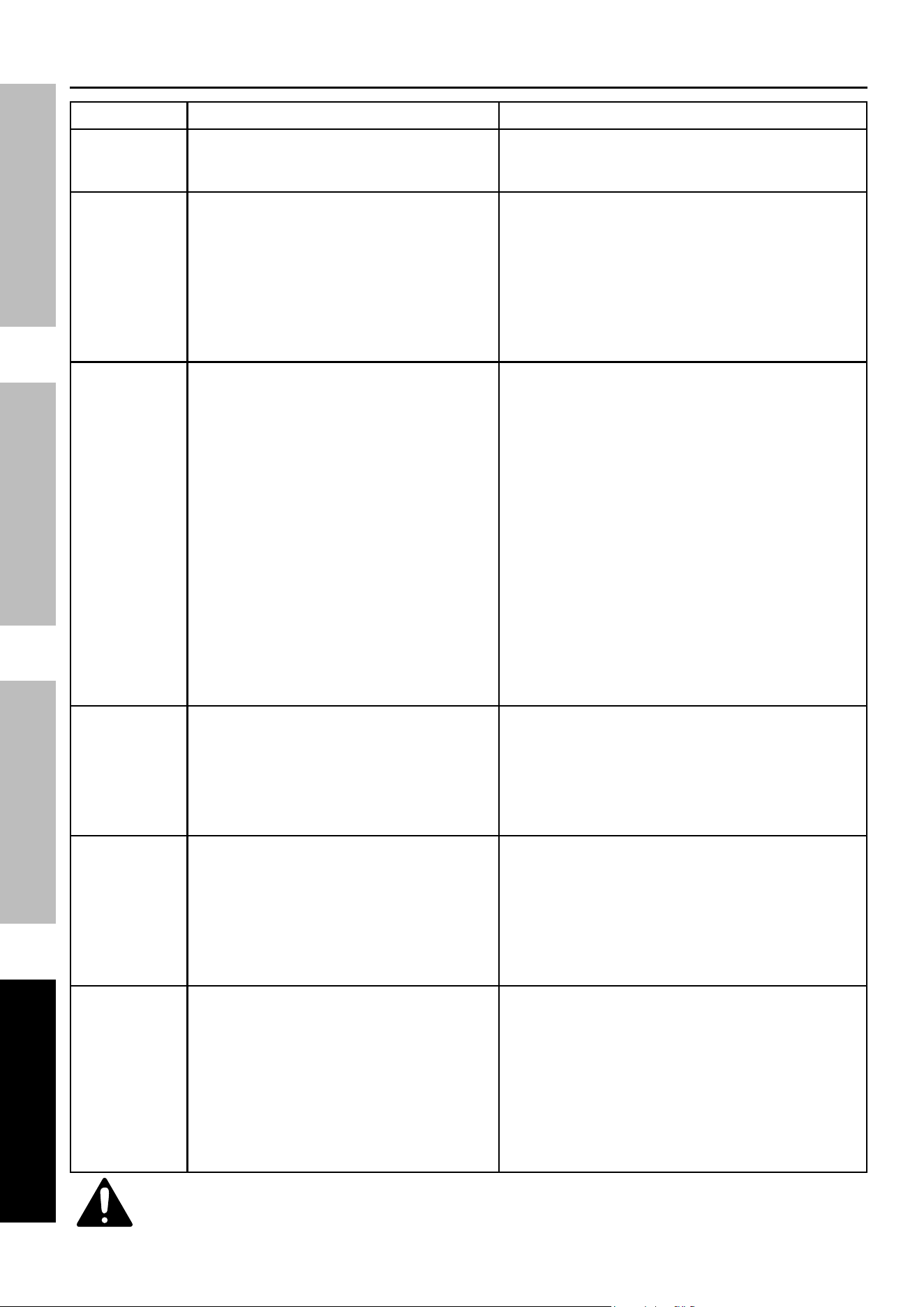
troubleshooting
problem possible causes probable Solutions
Engine will not start FUEL RELATED:
1. No fuel in tank or fuel valve closed.
2. Choke not in CHOKE position, cold engine.
3. Gasoline with more than 10% ethanol used.
(E15, E20, E85, etc.)
4. Low quality or deteriorated, old gasoline.
5. Carburetor not primed.
6. Dirty fuel passageways.
7. Carburetor needle stuck. Fuel
can be smelled in the air.
8. Too much fuel in chamber. This can be
caused by the carburetor needle sticking.
9. Clogged Fuel Filter.
FUEL RELATED:
1. Fill fuel tank with fresh 87+ octane stabilizer
treated unleaded gasoline and open fuel
valve.
Do not use gasoline with more than
10% ethanol (e15, e20, e85, etc.).
2. Move Choke to CHOKE position.
3. Clean out ethanol rich gasoline from fuel
system. Replace components damaged by
ethanol. Use fresh 87+ octane stabilizer
treated unleaded gasoline only.
Do not use gasoline with more than
10% ethanol (e15, e20, e85, etc.).
4. Use fresh 87+ octane stabilizer treated
unleaded gasoline.
Do not use gasoline with more than
10% ethanol (e15, e20, e85, etc.).
5. Pull on Starter Handle to prime.
6. Clean out passageways using fuel additive.
Heavy deposits may require further cleaning.
7. Gently tap side of carburetor float
chamber with screwdriver handle.
8. Turn Choke to RUN position. Remove spark
plug and pull the start handle several times
to air out the chamber. Reinstall spark
plug and set Choke to CHOKE position.
9. Replace Fuel Filter.
IGNITION (SPARK) RELATED:
1. Power Switch at OFF position.
2. Spark plug cap not connected securely.
3. Spark plug electrode wet or dirty.
4. Incorrect spark plug gap.
5. Spark plug cap broken.
6. Circuit breaker tripped (electric
start models only).
7. Incorrect spark timing or
faulty ignition system.
IGNITION (SPARK) RELATED:
1. Turn Power Switch to ON.
2. Connect spark plug cap properly.
3. Clean spark plug.
4. Correct spark plug gap.
5. Replace spark plug cap.
6. Reset circuit breaker. Check wiring and
starter motor if breaker continues to trip.
7. Have qualified technician diagnose/
repair ignition system.
COMPRESSION RELATED:
1. Cylinder not lubricated. Problem after long
storage periods.
2. Loose or broken spark plug. (Hissing noise
will occur when trying to start.)
3. Loose cylinder head or damaged
head gasket. (Hissing noise will
occur when trying to start.)
4. Engine valves or tappets
mis‑adjusted or stuck.
COMPRESSION RELATED:
1. Pour tablespoon of oil into spark
plug hole. Crank engine a few
times and try to start again.
2. Tighten spark plug. If that does not work,
replace spark plug. If problem persists,
may have head gasket problem, see #3.
3. Tighten head. If that does not remedy
problem, replace head gasket.
4. Have qualified technician diagnose/
repair ignition system.
ELECTRIC START RELATED:
1. No battery or defective battery installed.
2. Battery is low.
3. Electric start fuse (5A) is blown.
ELECTRIC START RELATED:
1. Install a new battery (see page 10).
2. Charge the battery.
3. Replace fuse with similar size fuse.
Page 24 For technical questions, please call 1-800-444-3353. 71340
SaFety Setup OperatiOn Maintenance
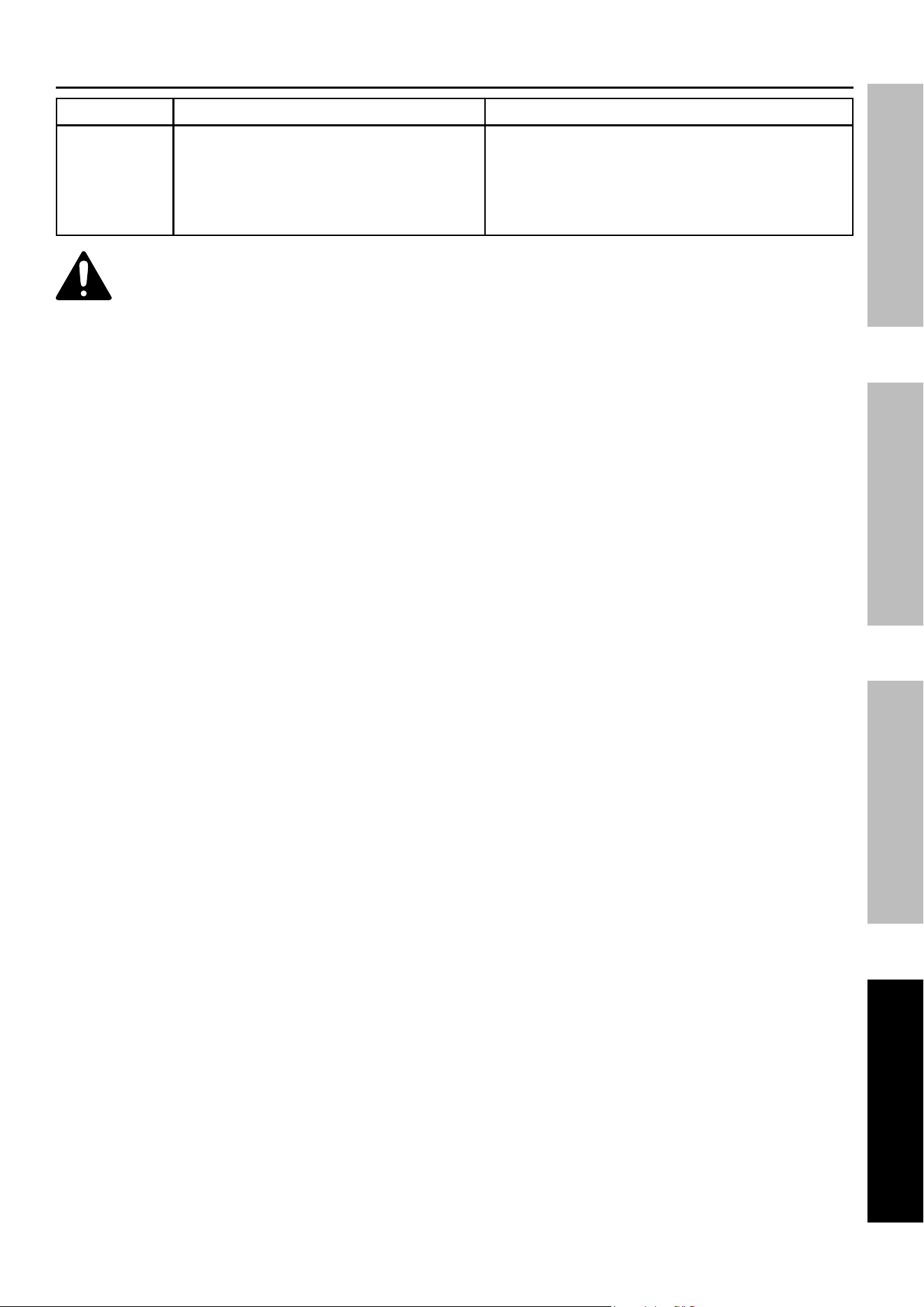
problem possible causes probable Solutions
Engine stops
when under
heavy load
1. Dirty air filter.
2. Engine running cold.
1. Clean or replace element.
2. Allow engine to warm up prior
to operating equipment.
Engine misfires 1. Spark plug cap loose.
2. Incorrect spark plug gap or
damaged spark plug.
3. Defective spark plug cap.
4. Old or low quality gasoline.
5. Incorrect compression.
1. Check wire connections.
2. Re‑gap or replace spark plug.
3. Replace spark plug cap.
4. Use only fresh 87+ octane stabilizer treated
unleaded gasoline. Do not use gasoline with
more than 10% ethanol (e15, e20, e85, etc.).
5. Diagnose and repair compression. (Use engine will
not start: cOMpreSSiOn reLateD section.)
Engine stops
suddenly
1. 1. Carbon Monoxide level high. Red light Carbon Monoxide level high. Red light
on Carbon Monoxide Sensor illuminates.on Carbon Monoxide Sensor illuminates.
2. 2. CO Sensor Alarm flashes yellow CO Sensor Alarm flashes yellow
continually shortly after starting. continually shortly after starting.
3. 3. CO Sensor Alarm flashes yellow CO Sensor Alarm flashes yellow
continually after longer period of continually after longer period of
operation. operation.
4. Fuel tank empty or full of impure or low
quality gasoline.
5. Defective fuel tank cap creating
vacuum, preventing proper fuel flow.
6. Faulty magneto.
7. Disconnected or improperly
connected spark plug cap.
1. 1. Leave area immediately and allow area to ventilate Leave area immediately and allow area to ventilate
thoroughly. Only operate generator outside.thoroughly. Only operate generator outside.
2. 2. Carbon monoxide sensor malfunction. Carbon monoxide sensor malfunction.
Sensor needs service. Call 1‑800‑444‑3353 as Sensor needs service. Call 1‑800‑444‑3353 as
soon as possible. Do not use the Generator soon as possible. Do not use the Generator
until the sensor is working properly.until the sensor is working properly.
3. 3. Make sure to operate generator within Make sure to operate generator within
rated ambient temperature; maintain rated ambient temperature; maintain
minimum 5 ft. clearance from all sides.minimum 5 ft. clearance from all sides.
4. Fill fuel tank with fresh 87+ octane stabilizer
treated unleaded gasoline.
Do not use gasoline with more than
10% ethanol (e15, e20, e85, etc.).
5. Test/replace fuel tank cap.
6. Have qualified technician service magneto.
7. Secure spark plug cap.
Engine knocks 1. Old or low quality gasoline.
2. Engine overloaded.
3. Incorrect spark timing, deposit buildup, worn
engine, or other mechanical problems.
1. Fill fuel tank with fresh 87+ octane stabilizer treated
unleaded gasoline.
Do not use gasoline with more than
10% ethanol (e15, e20, e85, etc.).
2. Do not exceed equipment’s load rating.
3. Have qualified technician diagnose
and service engine.
Engine backfires 1. Impure or low quality gasoline.
2. Engine too cold.
3. Intake valve stuck or overheated engine.
4. Incorrect timing.
1. Fill fuel tank with fresh 87+ octane stabilizer treated
unleaded gasoline. Do not use gasoline with
more than 10% ethanol (e15, e20, e85, etc.).
2. Use cold weather fuel and oil
additives to prevent backfiring.
3. Have qualified technician diagnose
and service engine.
4. Check engine timing.
Product doesn’t
have power.
1. Product not plugged in properly.
2. Circuit Breaker tripped.
3. GFCI activated.
4. Electronic overload activated.
5. Product needs service.
1. Turn off and unplug the product, then
plug it back in again and turn on.
2. Turn off and unplug product. Reset Circuit
Breaker. Plug in product and turn on.
3. Turn off and unplug product. Test GFCI
receptacle. If functioning properly reset
GFCI, plug in product and turn on.
4. Turn off and unplug the product,
then press the reset button.
5. Have product repaired.
troubleshooting (continued)
Follow all safety precautions whenever diagnosing or servicing the equipment or engine.
Page 25For technical questions, please call 1-800-444-3353.71340
SaFetySetupOperatiOnMaintenance
problem possible causes probable Solutions
Product begins
to operate
abnormally.
1. Problem with appliance.
2. Rated load capacity exceeded.
1. Immediately unplug appliance. Have
appliance repaired by a qualified
technician, or replace appliance.
2. Lower the number of items plugged into the
Generator to stay within the rated capacity,
or use a more powerful generator.
Follow all safety precautions whenever diagnosing or servicing the equipment or engine.
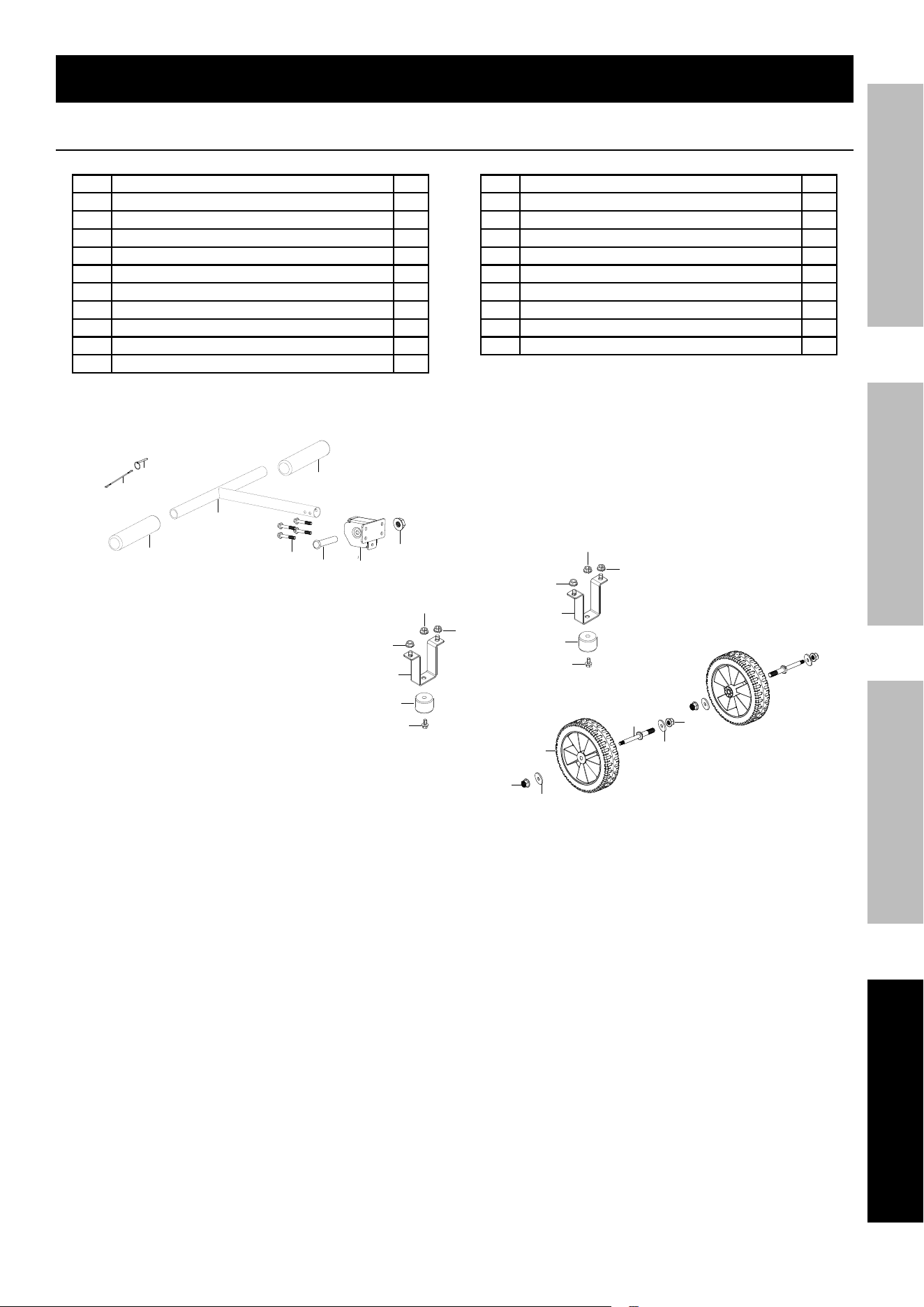
troubleshooting (continued)

Page 26 For technical questions, please call 1-800-444-3353. 71340
SaFety Setup OperatiOn Maintenance
pLeaSe reaD tHe FOLLOWinG careFuLLy
THE MANUFACTURER AND/OR DISTRIBUTOR HAS PROVIDED THE PARTS LIST AND ASSEMBLY DIAGRAM
IN THIS MANUAL AS A REFERENCE TOOL ONLY. NEITHER THE MANUFACTURER OR DISTRIBUTOR
MAKES ANY REPRESENTATION OR WARRANTY OF ANY KIND TO THE BUYER THAT HE OR SHE IS
QUALIFIED TO MAKE ANY REPAIRS TO THE PRODUCT, OR THAT HE OR SHE IS QUALIFIED TO REPLACE
ANY PARTS OF THE PRODUCT. IN FACT, THE MANUFACTURER AND/OR DISTRIBUTOR EXPRESSLY
STATES THAT ALL REPAIRS AND PARTS REPLACEMENTS SHOULD BE UNDERTAKEN BY CERTIFIED AND
LICENSED TECHNICIANS, AND NOT BY THE BUYER. THE BUYER ASSUMES ALL RISK AND LIABILITY
ARISING OUT OF HIS OR HER REPAIRS TO THE ORIGINAL PRODUCT OR REPLACEMENT PARTS
THERETO, OR ARISING OUT OF HIS OR HER INSTALLATION OF REPLACEMENT PARTS THERETO.
record product's Serial number Here:
note: If product has no serial number, record month and year of purchase instead.
note: Some parts are listed and shown for illustration purposes only, and are not available
individually as replacement parts. Specify UPC 193175546029 when ordering parts.
Page 27For technical questions, please call 1-800-444-3353.71340
SaFetySetupOperatiOnMaintenance
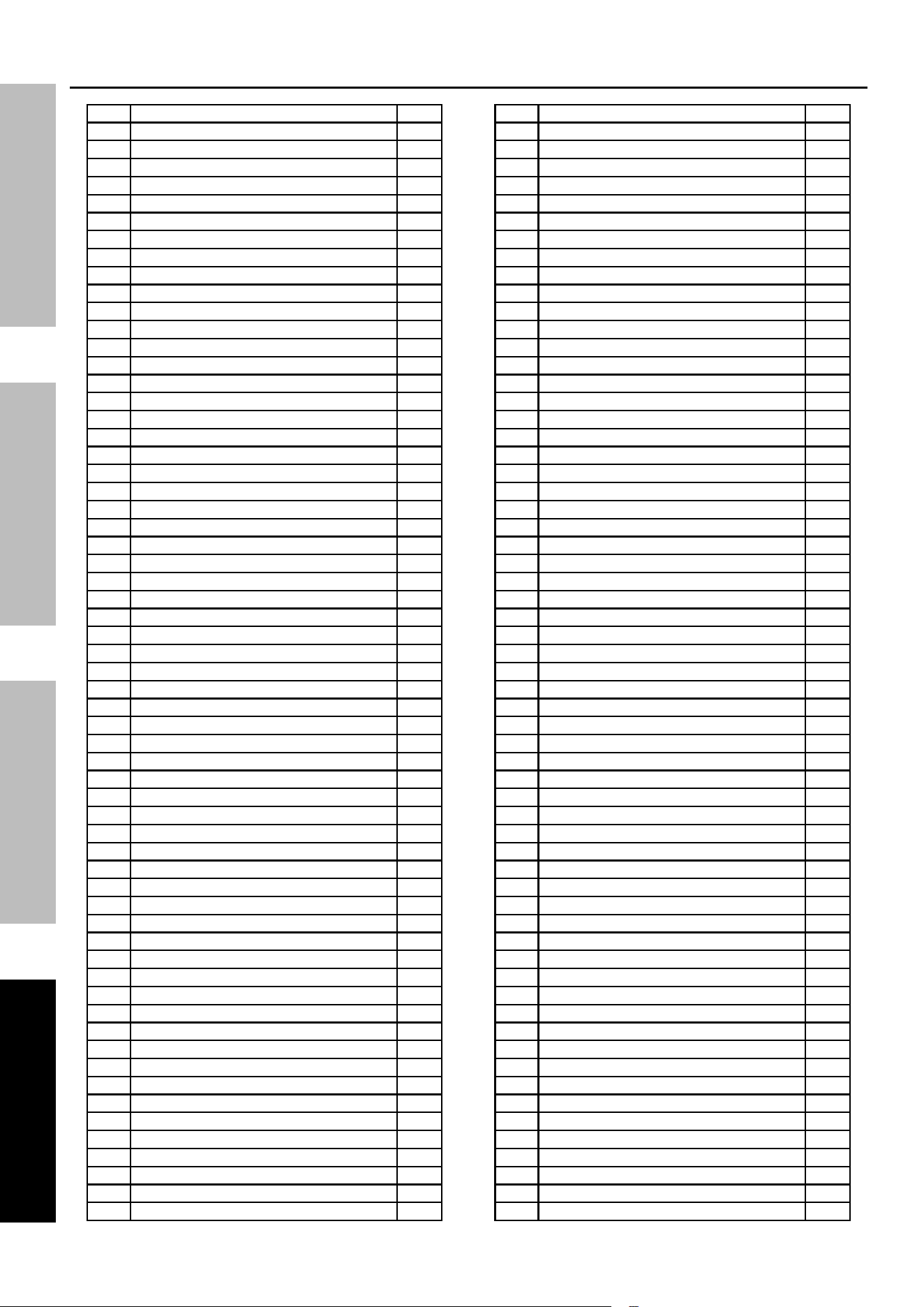
part Description Qty
1 Sling 1
2 Pin Shaft 1
3 Handle Glove 2
4 Handle Tube Assy 1
5 Bolt 4
6 Bolt 1
7 Seat, Handle Tube Connecting 1
8 Lock Nut 1
9 Lock Nut 2
10 Flat Washer 2
part Description Qty
11 Shaft, Front Wheel 2
12 Wheel, Front 2
13 Flat Washer 2
14 Lock Nut 2
15 Nut With Flange 2
16 Nut With Flange 4
17 Support, Shock Absorption 2
18 Seat, Engine Frame Shock Absorption 2
19 Bolt 2
7
6
5
3
4
8
2
1
3
9
11
12
14
10
13
15
16
16
17
18
19
15
16
16
17
18
19
parts List and Diagram
parts List and Diagram - Wheel Kit
Page 28 For technical questions, please call 1-800-444-3353. 71340
SaFety Setup OperatiOn Maintenance
Main parts List
part Description Qty
1 Bolt 15
2 Starter Assy, Recoil 1
3 Recoil Starter Reel Cover Retainer 1
4 Shroud 1
5 Shroud, Cylinder Body 1
6 Shroud 2, Cylinder Body 1
7 Clip 1
8 Nut, Flywheel 1
9 Pulley,Starter 1
10 Seat, Starter Cup 1
11 Impeller 1
12 Bolt 3
13 Case Subassembly, Magneto Rotor 1
14 Motor Assy,Starting 1
15 Stator Subassembly, Magneto 1
16 Seal, Oil 1
17 Trigger Assy. 1
18 Clamp, Magneto Wiring 1
19 Bolt 1
20 Bolt 2
21 Crankcase Subassembly. 1
22 Tube, Oil Drain 1
23 Bolt, Drain Plug 1
24 Washer, Flat 1
25 Bolt 2
26 Sensor, Engine Oil 1
27 Nut 1
28 Bolt 2
29 Tappet, Valve 2
30 Valves Set 1
31 Guide, Seal 1
32 Retainer, Valve Spring 2
33 Spring, Valve 2
34 Retainer, Exhaust Valve 1
35 Rotator, Valve 1
36 Seat, Valve Spring 1
37 Camshaft Assy. 1
38 Lifter Subassembly, Valve 2
39 Plate Subassembly, Lifter Stopper 1
40 Bolt, Rocker Shaft 2
41 Rocker, Valve 2
42 Nut, Valve Adjusting 2
43 Nut, Valve Lock 2
44 Pin 2
45 Gasket, Cylinder Head 1
46 Head Subassembly, Cylinder 1
47 Stud 2
48 Stud 2
49 Bolt, Cylinder Head 4
50 Plug, Spark 1
51 Gasket, Cylinder Head Cover 1
52 Cover Subassembly, Cylinder Head 1
53 Cylinder Head Bolt Gasket Set 1
54 Bolt, Cylinder Head 1
55 Tube, Breather 1
56 Gasket, Inlet 1
57 Plate, Carburetor Insulator 1
58 Gasket, Carburetor 1
59 Carburetor Assy. 1
60 Gasket, Air Cleaner 1
61 Cleaner Comp, Air 1
part Description Qty
62 Nut 2
63 Bearing, Deep Groove Ball 2
64 Coil, Ignition 1
65 Bolt 2
66 Rod, Connecting 1
67 Clip, Piston Pin 2
68 Piston 1
69 Pin, Piston 1
70 Ring Assy, Piston 1
71 Crankshaft Assy. 1
72 Shaft Assy, Balancing 1
73 Gasket, Crankcase 1
74 Pin 2
75 Dipstick Subassembly, Oil 1
76 Cover, Crankcase 1
77 Bolt 7
78 Bearing, Deep Groove Ball 1
79 Cap 1
80 Cover, Fuel Tank 1
81 Chain Proof Off, Fuel Tank Cover 1
82 Anti‑Off Chain Clip 1
83 Strainer, Fuel 1
84 Bolt 2
85 Leveler Assy, Oil 1
86 Bolt 4
87 Washer, Flat 4
88 Bush 4
89 Sleeve, Fuel Tank Rubber 4
90 Tank, Fuel 1
91 Valve, One Way 1
92 Outlet Subassembly, Fuel Tank Oil 1
93 Clamp 1
94 Tube, Fuel 1
95 Clamp 2
96 Tube, Fuel 1
97 Clamp 1
98 Seat, Fuel Cock 1
99 Cock Assy, Fuel 1
100 Hose, Fuel Steam Rubber 1
101 Hose, Air Cleaner Rubber 1
102 Collector, Fuel Steam 1
103 Nut 2
104 Bolt 2
105 Muffler Assy. 1
106 Gasket, Exhaust Outlet 1
107 Nut 2
108 Cover, Muffler Outer 1
109 Bolt 3
110 Bolt 3
111 Invertor Mounting Rack 1
112 Invertor Mounting Rack 1
113 Frame Assy, Engine 1
114 Protective Rubber Sleeve 2
115 Bolt 1
116 Clip 1
117 Nut 1
118 Nut 8
119 Bolt 4
120 Cushion, Engine Frame 4
121 Engine Fixed Bottom Plate 1
122 Engine Fixed Bottom Plate 1
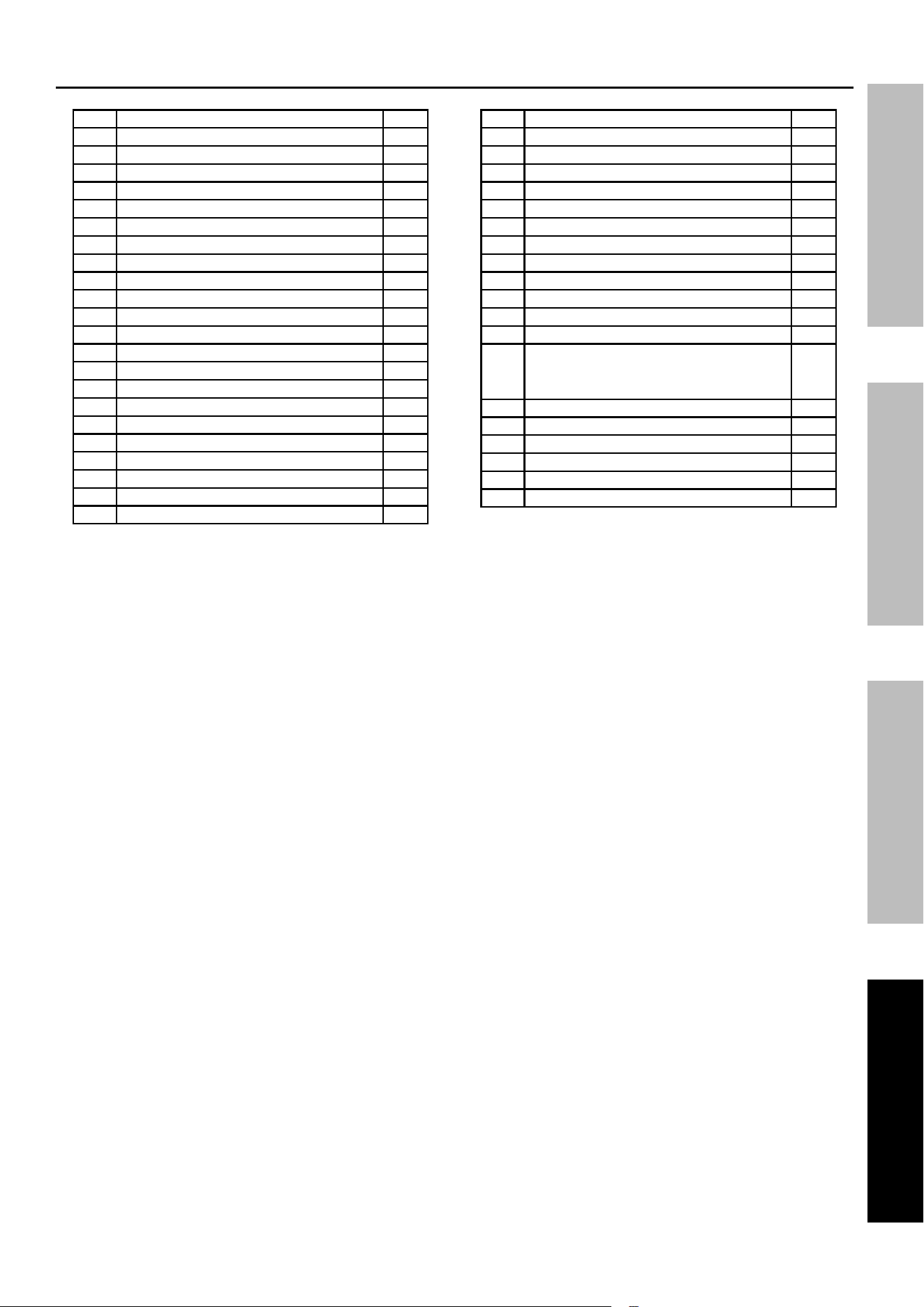
Page 29For technical questions, please call 1-800-444-3353.71340
SaFetySetupOperatiOnMaintenance
part Description Qty
123 Nut 4
124 Support, Atr Cleaner 1
125 CO Sensor 1
126 Hexalobular Socket Pan Head Screw 2
127 Clamp, Battery 1
128 Bolt 2
129 Battery 1
130 Wire, Anode 1
131 Wire, Cathode 1
132 Thermal Baffle 1
133 Seat, Panel 1
134 Bolt 4
135 Large Washer ‑ Grade A 4
136 Bolt 4
137 Washer, Flat 4
138 Invertor 1
139 Panel Subassembly, Control 1
140 Protector, Overcurrent 2
141 Bridge, Rectification 1
142 Timer 1
143 Ignitor 1
144 Choke 1
part Description Qty
145 Switch Subassembly 1
146 Switch Subassembly 1
147 Indicator 1
148 Protector, Overcurrent 1
149 Socket Subassembly, D.C 1
150 Socket Subassembly, D.C 1
151 Breaker, Double‑Pole 1
152 Socket Subassembly, Power Supply 1
153 Rain Cover Receptacle 1
154 Socket Subassembly, Power Supply 2
155 Rain Cover Receptacle 2
156 Terminal Subassembly, Grounding 1
157
Cross‑Recessed Small Pan
Head Screw, Spring Washer
And Flat Washer Assembly
6
158 Transportation Support Block 2
159 Bolt 4
160 Nut 4
161 Bolt 1
162 Control Panel Wiring Harness 1
163 CO Controller 1
Main parts List (continued)
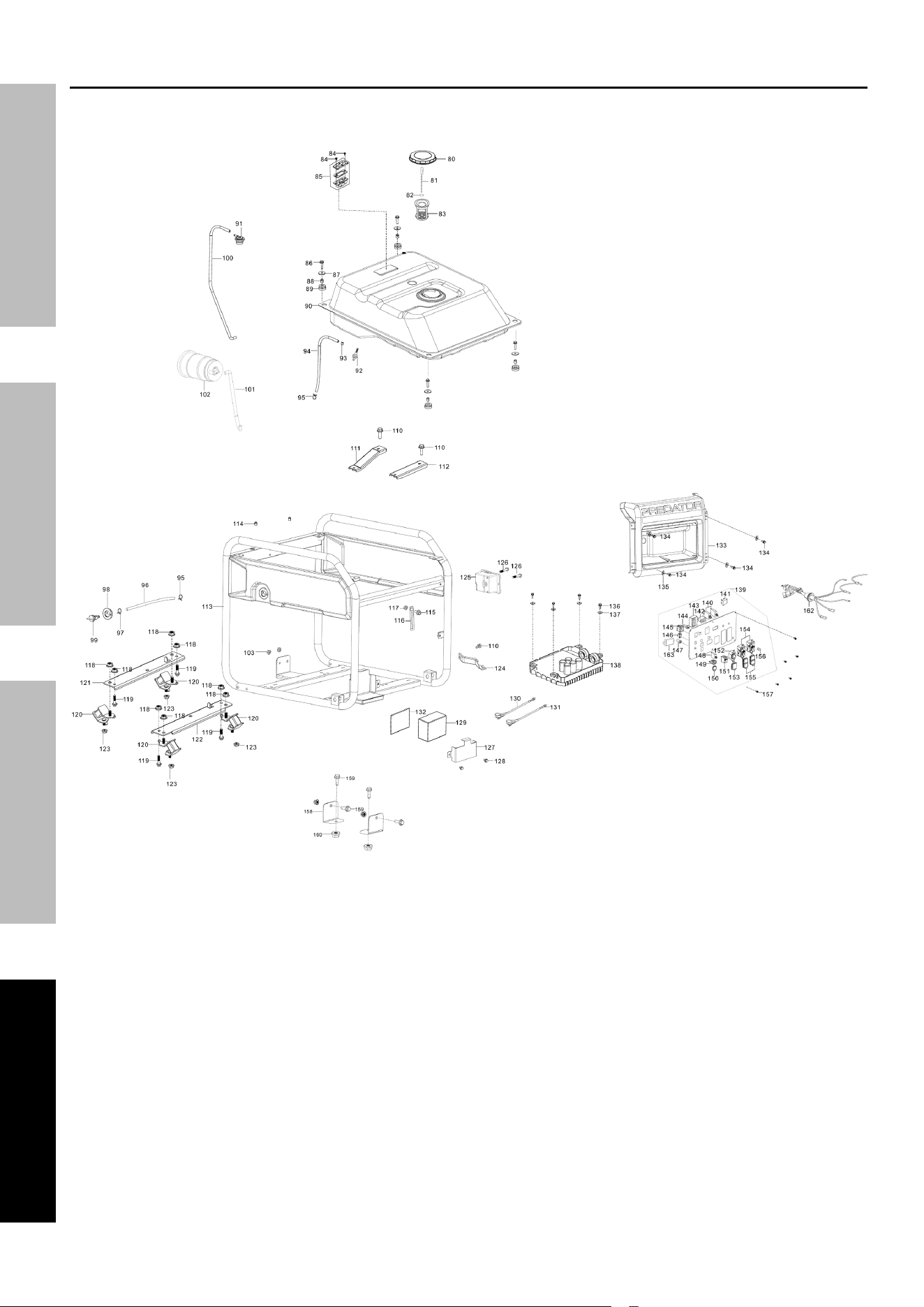
Page 30 For technical questions, please call 1-800-444-3353. 71340
SaFety Setup OperatiOn Maintenance
Main assembly Diagram
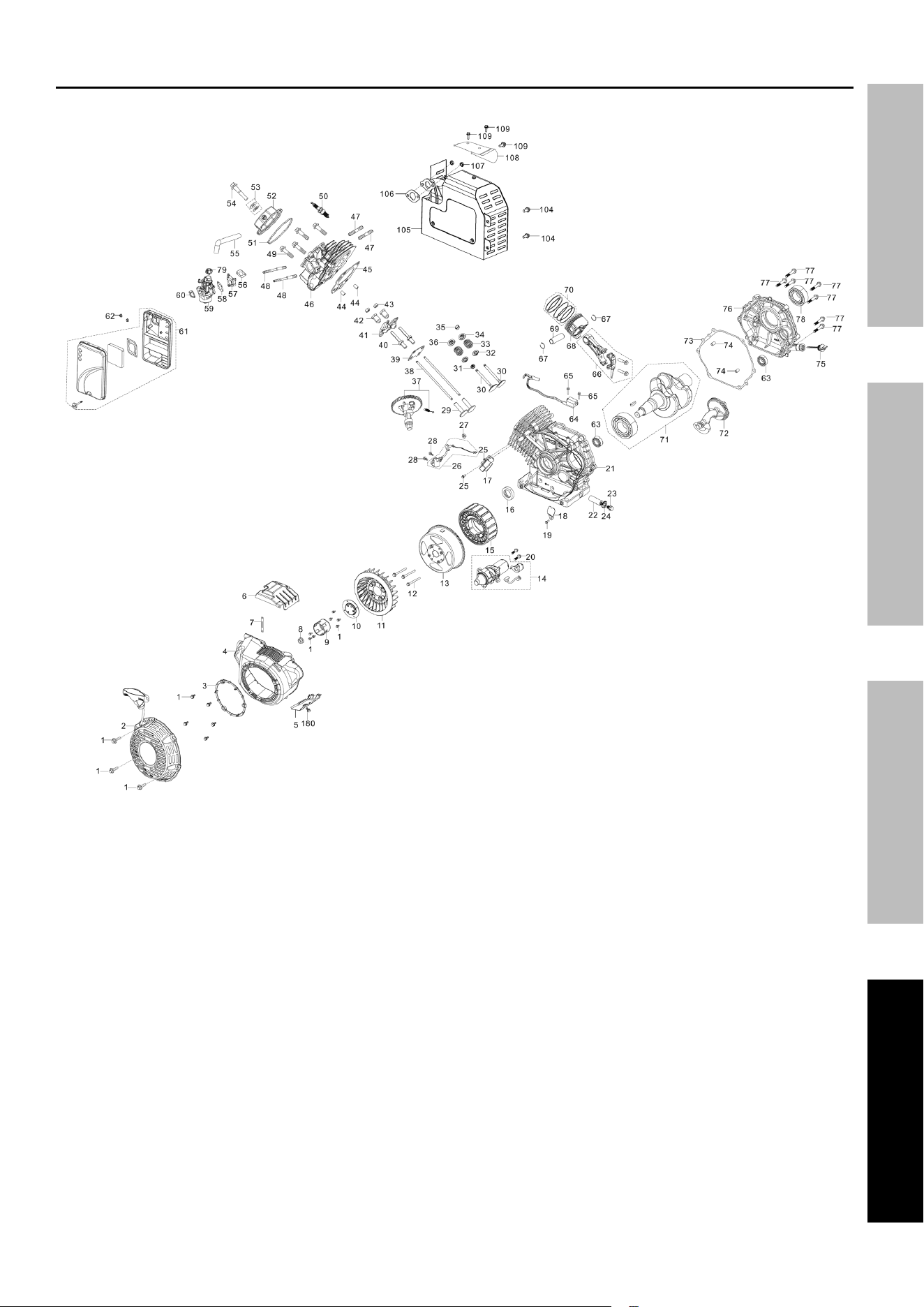
Page 31For technical questions, please call 1-800-444-3353.71340
SaFetySetupOperatiOnMaintenance
Main assembly Diagram

Page 32 For technical questions, please call 1-800-444-3353. 71340
SaFety Setup OperatiOn Maintenance
Warranties
Limited 90 Day Warranty (retail)
Harbor Freight Tools Co. makes every effort to assure that its products meet high quality and durability standards,
and warrants to the original purchaser that this product is free from defects in materials and workmanship for the
period of 90 days from the date of purchase. This warranty does not apply to damage due directly or indirectly,
to misuse, abuse, negligence or accidents, repairs or alterations outside our facilities, criminal activity, improper
installation, normal wear and tear, or to lack of maintenance. We shall in no event be liable for death, injuries
to persons or property, or for incidental, contingent, special or consequential damages arising from the use of
our product. Some states do not allow the exclusion or limitation of incidental or consequential damages, so
the above limitation of exclusion may not apply to you. THIS WARRANTY IS EXPRESSLY IN LIEU OF ALL
OTHER WARRANTIES, EXPRESS OR IMPLIED, INCLUDING THE WARRANTIES OF MERCHANTABILITY
AND FITNESS, EXCEPT FOR THE EMISSIONS CONTROL SYSTEM WARRANTY BELOW.
To take advantage of this warranty, the product or part must be returned to us with transportation charges prepaid.
Proof of purchase date and an explanation of the complaint must accompany the merchandise. If our
inspection verifies the defect, we will either repair or replace the product at our election or we may elect to
refund the purchase price if we cannot readily and quickly provide you with a replacement. We will return
repaired products at our expense, but if we determine there is no defect, or that the defect resulted from
causes not within the scope of our warranty, then you must bear the cost of returning the product.
This warranty gives you specific legal rights and you may also have other rights which vary from state to state.

Page 33For technical questions, please call 1-800-444-3353.71340
SaFetySetupOperatiOnMaintenance
emissions control System Warranty
Harbor Freight Tools (HFT) is pleased to explain the emissions control system warranty on your Small Off‑Road
Engine produced after January 1, 2024 (engine), in addition to the Retail Warranty above. HFT warrants that the
emissions control system on your engine is designed, built, and equipped so that it conforms to the United States
Environmental Protections Agency’s (EPA) emissions requirements in effect at the time of manufacture. HFT also
warrants that the emissions control system on your engine will be free from defects in material and workmanship for
two (2) years, provided there has been no improper maintenance, misuse, or abuse of your engine.
Your emissions control system may include parts such as the carburetor or fuel‑injection system, and the ignition
system. Also included may be hoses, belts, connectors and other emissions‑related assemblies.
WHat We WiLL DO
Where a warrantable condition exists, HFT will repair or replace, at our option, any emissions‑related part on
your engine if it becomes defective, malfunctions, or otherwise fails to conform with this warranty under normal use
and service during the two (2) year term of this warranty at no cost to you, including diagnosis, parts and labor. This
warranty applies to the original purchaser and any subsequent owner within the two year warranty period.
WHat iS cOVereD?
The following parts are examples of components of the emissions control system
and are covered by this two (2) year warranty. For a full list of emissions control
components covered by this warranty, please see 40 CFR §1068, Appendix I.
1. Fuel Metering System
a. Carburetor and its internal parts.
b. Fuel pump (if so equipped).
c. Cold start enrichment system.
2. Air Induction System
a. Intake pipe/manifold.
b. Air cleaner.
3. Ignition System
a. Spark plug.
b. Magneto ignition system.
4. Catalyst System (if so equipped)
a. Exhaust pipe stud.
b. Muffler.
c. Catalytic converter (if so equipped).
5. Miscellaneous Items Used in Above Systems
a. Vacuum, temperature and time sensitive
valves and switches.
b. Hoses, belts, connectors, and assemblies.
This warranty does not cover normal maintenance services or replacement of maintenance items such as filters,
oils, or spark plugs.
WHat yOu MuSt DO tO OBtain Warranty SerVice
As the engine owner, you are responsible for the performance of the required maintenance listed in your
Owner’s Manual. HFT may deny you warranty coverage if your engine or a part has failed due to abuse (including
failure to follow the fuel use instructions contained in this manual), neglect, improper maintenance, or unapproved
modifications.
In order to obtain warranty repair or replacement, you may either (a) contact HFT product support at
1‑800‑444‑3353 or [email protected]; or (b) bring the to your nearest Harbor Freight Tools retail
store. When going to the retail store or contacting product support, you must indicate the specific emissions control
part or defect that you are claiming and the date this was originally purchased. The nearest Harbor Freight Tools
retail store can be found on the internet at https://www.harborfreight.com.

Page 34 For technical questions, please call 1-800-444-3353. 71340
SaFety Setup OperatiOn Maintenance

Page 35For technical questions, please call 1-800-444-3353.71340
SaFetySetupOperatiOnMaintenance

26677 agoura road • calabasas, ca 91302 • 1-800-444-3353