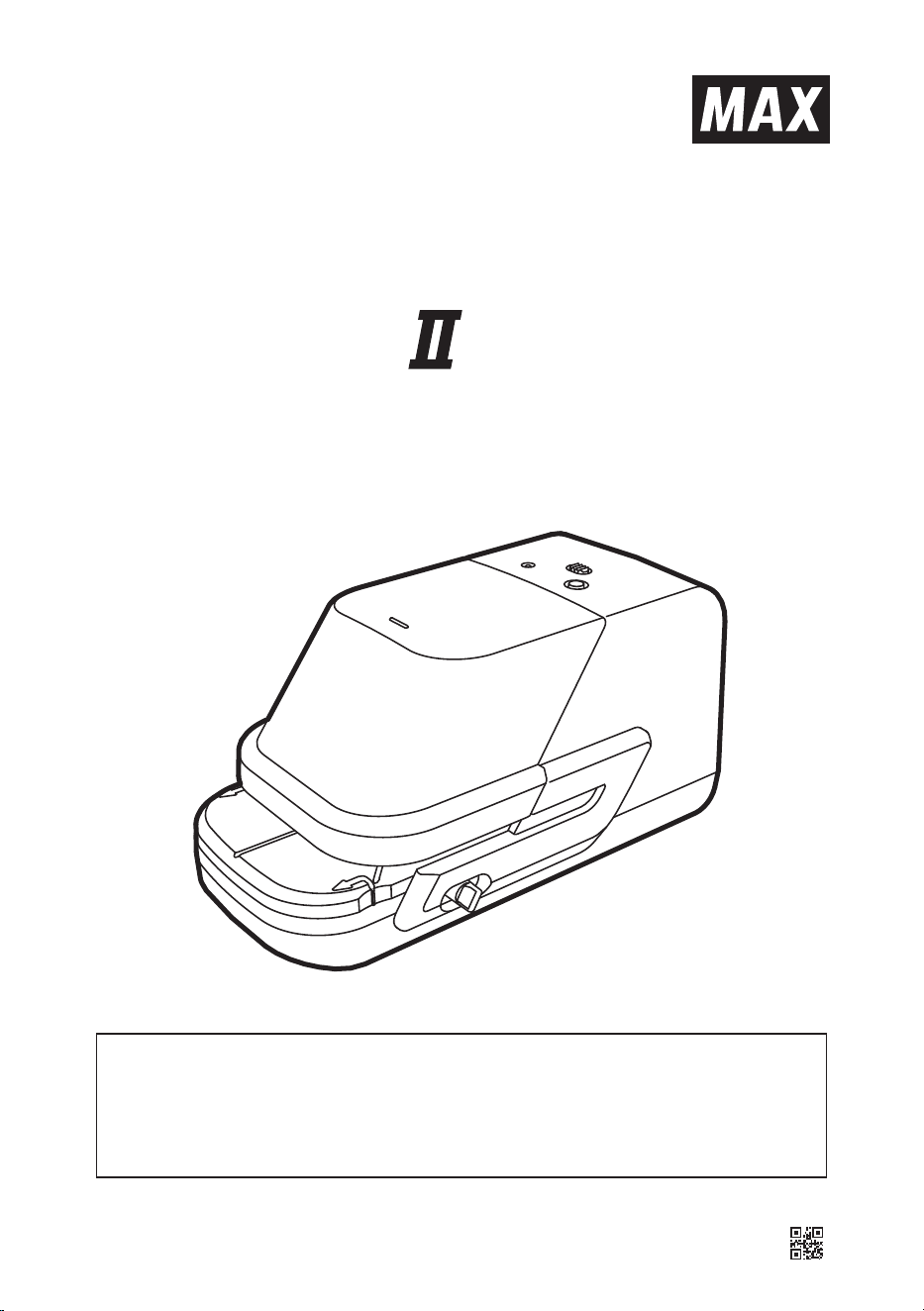
ELECTRONIC
STAPLER
INSTRUCTION MANUAL
● Prior to using, read this instruction manual.
● Keep this instruction manual.
● It is prohibited to reproduce the contents of this manual without permission.
● The information herein is subject to change without prior notice.
4102372 (00/00)
EH-70FⅡ

1
BEFORE USE
SAFETY INSTRUCTIONS
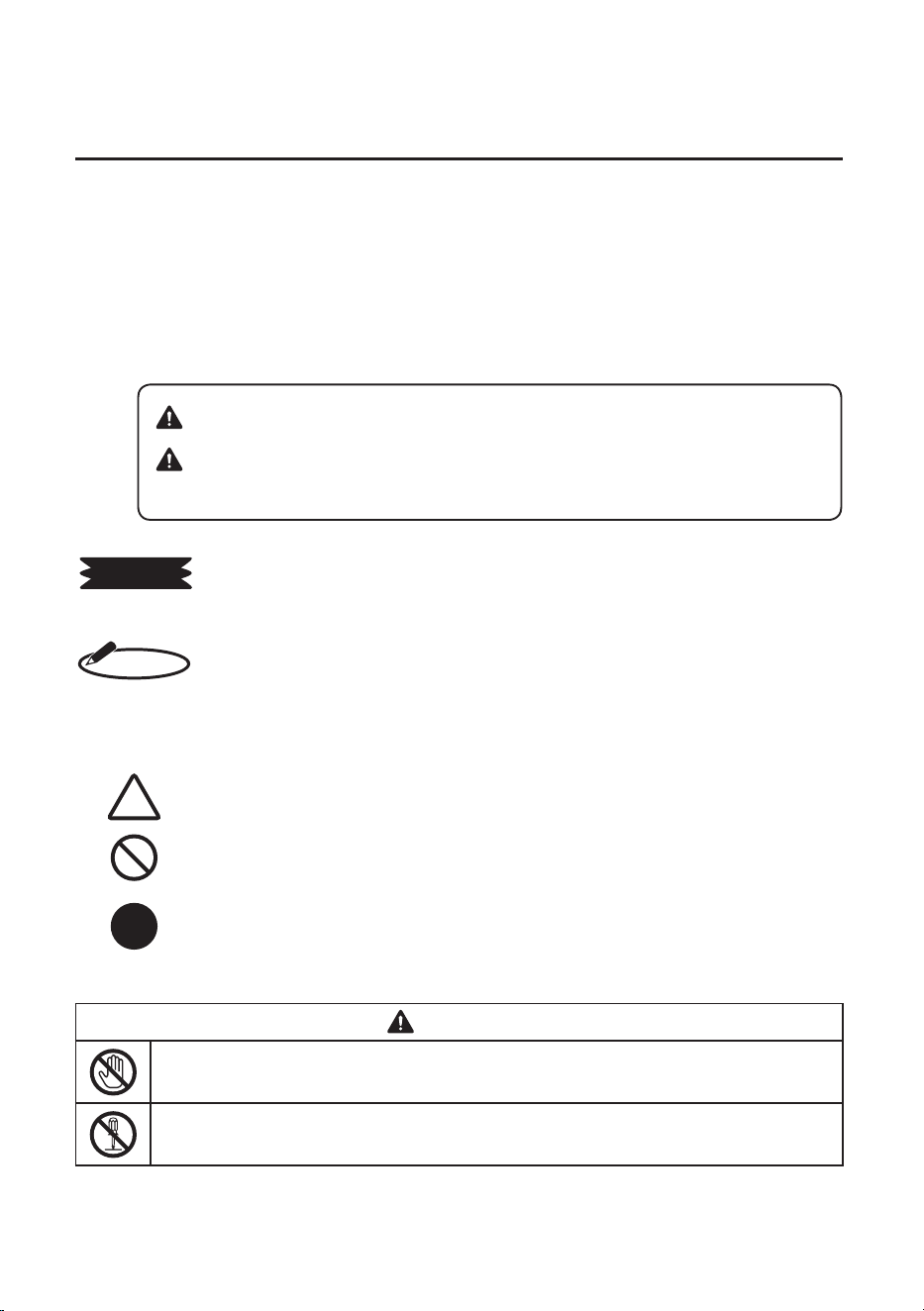
■ INDICATIONS
This instruction manual uses various indications to help you use this instrument safely and
properly.
The following describes those indications.
Describes operations that may cause damage to the instrument and require
a repair, or operations that require resetting the machine, etc., to restore the
condition of the instrument.
Describes the points of operation and tips.
★ Describes a functional precaution.
■ SYMBOLS
Denotes “What you should be aware of.”
Denotes “What you must not do.” An indication in or near this symbol shows
a specific prohibition.
Denotes “What you must do.” An indication in this symbol shows a specific
instruction.
WARNING
● Never touch a switch (white) by hand. It could cause an injury when the stapler is
abruptly activated.
● Neverdisassembleormodifythisinstrument.Itcouldcauseafire,electricshock,or
other problems.
MEMO
REQUEST
WARNING: Negligencecouldleadtoseriousinjuryordeath.
CAUTION: Negligencecouldleadtoaninjury,damageofyour
property, or cause loss of created data.
2
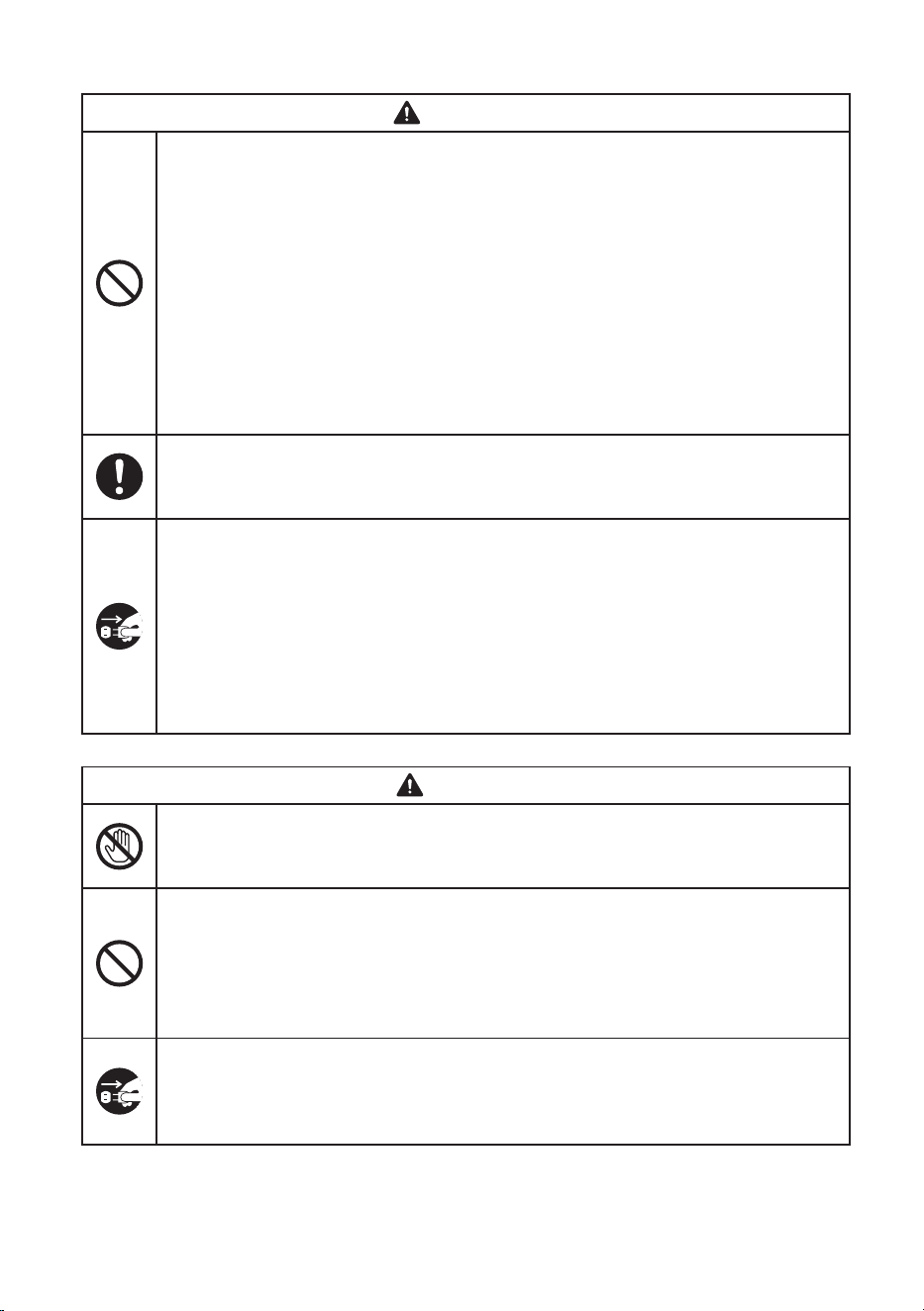
WARNING
● Donotinsertforeignsubstancessuchasfingers,pens,orwireintothisinstrument.It
coulddamagetheinstrumentorcauseafireoraninjury.
● Obtainpowerdirectlyfromasingleplugsocket.Avoidconnectingmanywirestoone
plugsocket.Itcouldleadtoafire.
● Donotplaceanyheavymaterialonapowercord.Itcouldcausedamageorafire.
● Donotconnect/disconnectapowerplugwithawethand.Itcouldcauseanelectric
shock.
● Do not insert your fingers into this instrument. It could cause an injury when the
stapler is abruptly activated.
● Donotsplashwaterorchemicalsontheinstrument.Itcoulddamagetheinstrument
or cause a fire.
● Keepastaplecartridgeontheplacewherechildrencannottouchit.Ifchildrentakea
staple, contact a doctor soon.
● Use correctsupplyvoltage.Othervoltagelevel coulddamagetheinstrumentor
causeafireoranelectronicshock.
● UseonlyspecifiedACadapter(AC100-240V,50-60Hz)appendedtotheinstrument.
● Ifwatergetsinsidetheinstrument,disconnectapowerplugimmediatelyfromaplug
socketandcontactyourdealer/distributorforarepair.Itcoulddamagetheinstrument
orcauseafireorelectricshock.
● Donotoperatetheinstrument,ifitisoutoforder.Ifitisoperatedinanout-of-order
state,suchasitissmoking,emittinganabnormalsound,orsmellingfunny,itcould
cause a fire or electric shock. Disconnect a power plug immediately from a socket
andcontactyourdealer/distributorforarepair.
● Disconnect the power cord when replacing the staple cartridge or clearing jammed
staples.Itcouldcauseaninjurywhenthestaplerisabruptlyactivated.
CAUTION
● Donotinsertthefingersintothestaplingarea.Itcouldcauseaninjury.
● Do not touch a motor when replacing a staple cartridge. It is very hot just after
stapling and you could get burned.
● Donotsharetheelectronicoutletwithequipment(airconditioner,refrigerator,
microwave, office automation equipment and so on) that requires a large capacity.
The voltage drops and the instrument could malfunction.
● Donotputpaperorclothontheinstrument.Itcoulddamagetheinstrumentorcause
a fire.
● DonotstapleanyotherpaperexceptPPCpaper.Itcoulddamagetheinstrument.
● Whenthe instrument isnot used for a long period of time, be sure to disconnect a
powerplugfromapowersocketforsafety.
● When moving the instrument, be sure to disconnect a power plug from a power
socketforsafety.Orthecordcouldbebrokenandcauseafireorelectricshock.
3
CAUTION
● Cleanapowercordplugregularly.Dustontheplugcouldcauseafire.
● Whendisconnectingapowercord,besuretoholdapowerplug.Donotpullonthe
powercord,orthecordcouldbebrokenandcauseafireorelectricshock.
● Do not install the instrument on the place that is not level or that is subject to
vibration.It coulddamagetheinstrument orcauseaninjury becauseitmightfall or
drop.
● Wash your hands / body immediately with soap if the grease is attached on them
when replacing a staple cartridge.
● UseonlyspecifiedACadapter(AC100-240V,50-60Hz)appendedtotheinstrument.
● Usethe instrument indoordry location. Itcould cause anelectric shock ordamage
the instrument when operating it in the high humidity place.
In order to prevent problems with the instrument, observe the following
precautions.
● Installthisinstrumentawayfromthefollowingplaces:
1.Anyplacethatcatchesdirectsunlightorislocatedclosetoaheatsource.
2.Anyplacethathasdustorhighhumidity.
3.Anyplacethatisnotlevelorthatissubjecttovibration.
4.Anyplacethatthetemperaturegoesbelow0°C/32°Forover40°C/104°F.
● UseonlyMAXNo.70FEStapleCartridge.
● Use a dry cloth to clean dirt of the instrument. Do not use solvents (alcohol,
benzene,thinner,etc.)oradampcloth.
● This machine does not staple when Case cap is opened because of safety.
CloseCasecapcorrectlywhenstapling.
REQUEST
4
CONTENTS
1
PACKAGE CONTENTS‥‥‥‥‥‥‥‥‥‥‥‥‥‥‥‥‥‥‥‥‥ 5
2
NAME OF EACH SECTION‥ ‥‥‥‥‥‥‥‥‥‥‥‥‥‥‥‥‥‥ 6
3
LOADING THE STAPLE CARTRIDGE‥ ‥‥‥‥‥‥‥‥‥‥‥‥‥ 7
4
STAPLING AUTOMATICALLY‥‥‥‥‥‥‥‥‥‥‥‥‥‥‥‥‥‥ 9
5
STAPLING MANUALLY‥‥‥‥‥‥‥‥‥‥‥‥‥‥‥‥‥‥‥‥‥ 10
6
STAPLING ON THE CORNER‥‥‥‥‥‥‥‥‥‥‥‥‥‥‥‥‥‥ 11
7
REPLACING THE STAPLE CARTRIDGE‥‥‥‥‥‥‥‥‥‥‥‥‥ 12
8
CLEARING JAMMED STAPLES‥‥‥‥‥‥‥‥‥‥‥‥‥‥‥‥‥ 14
9
SPECIFICATIONS‥ ‥‥‥‥‥‥‥‥‥‥‥‥‥‥‥‥‥‥‥‥‥‥ 15
10
TROUBLESHOOTING‥ ‥‥‥‥‥‥‥‥‥‥‥‥‥‥‥‥‥‥‥‥ 16
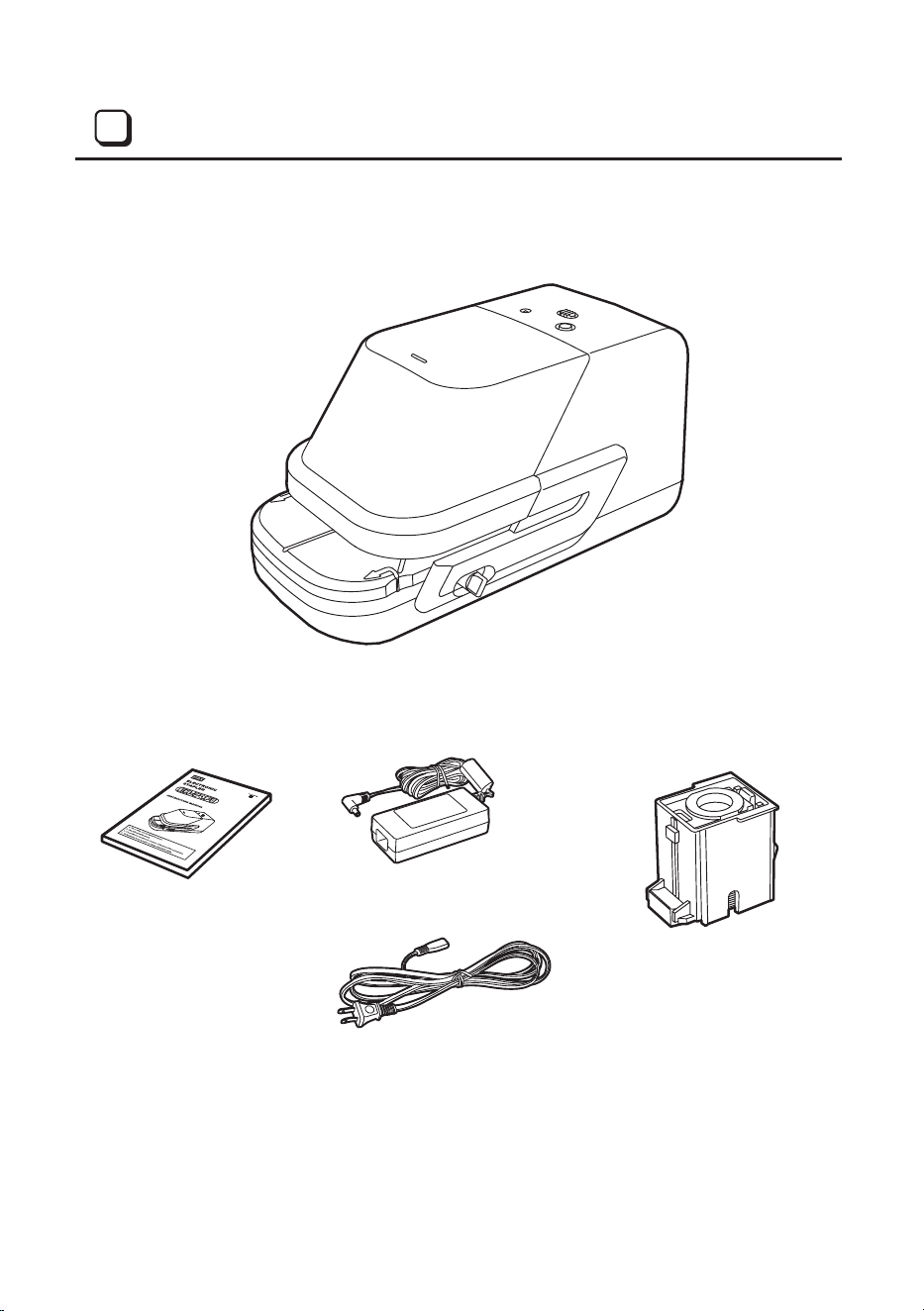
EH-70FⅡ(1pc)
Instruction manual (1pc) AC adapter (1pc)
Power cord (1pc)
No.70FE Staple cartridge (1pc)
(This cord is for USA model.
The plug is different depends
on each model.)
5
PACKAGE CONTENTS
1
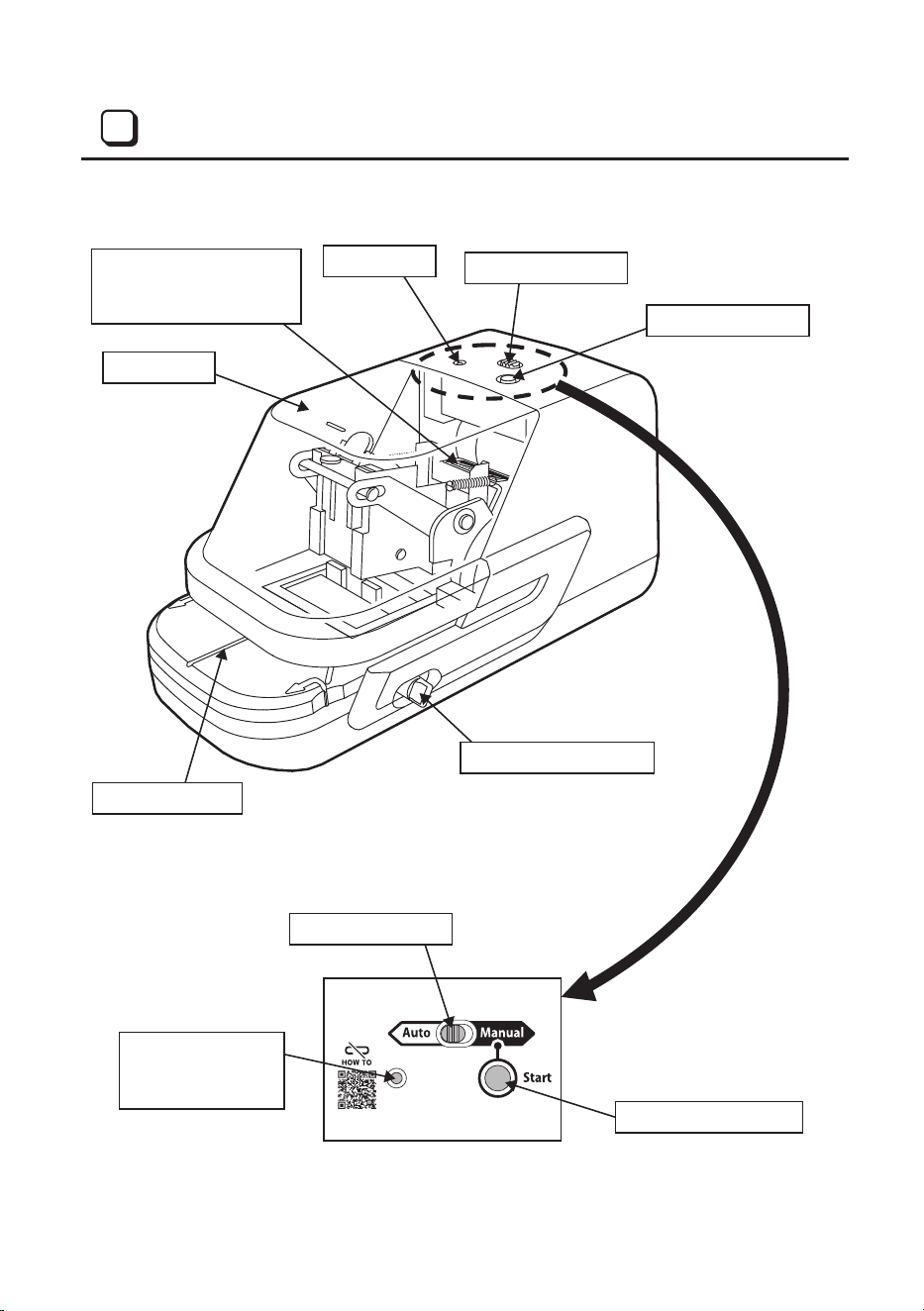
Case cap
LED lamp
Selector switch
Manual button
Paper table
Depth control slider
Selector switch
LED lamp
Green: Activate
Red: No staple
Manual button
Serial number label
Serial number is shown
with bar code.
6
NAME OF EACH SECTION
2
7
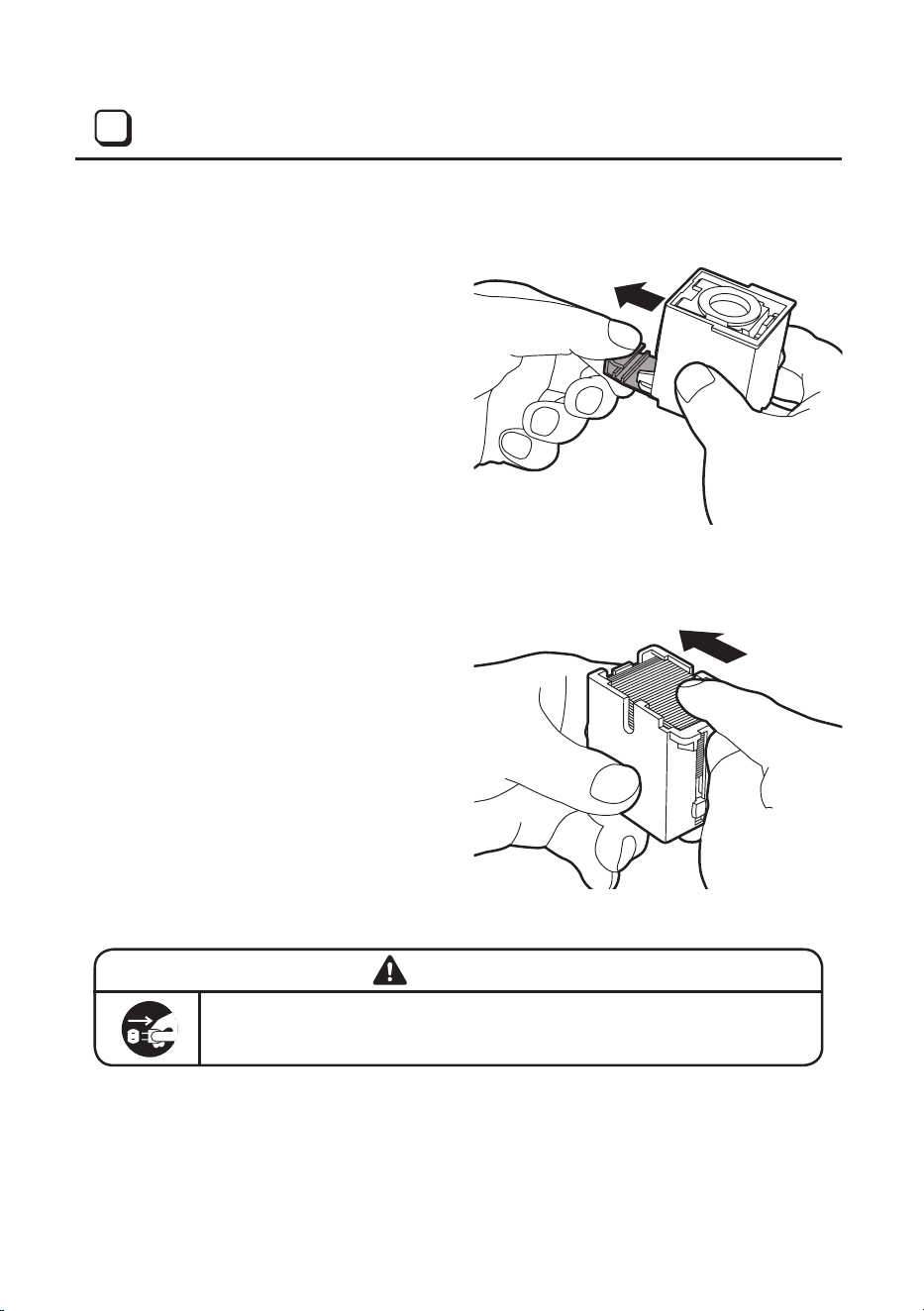
Prior to loading the staple cartridge into the machine, prepare and check it.
(1) As shown in the figure, pull the
stopper attached below the staple
cartridge in the arrow direction to
remove it.
(2) If a staple sheet is come out of the
cartridge, push it into the cartridge.
Itcouldcauseajammedstaple.
WARNING
Disconnect the power cord when loading the staple cartridge or clearing
jammedstaples.Itcouldcauseaninjurywhenthestaplerisabruptly
activated.
LOADING THE STAPLE CARTRIDGE
3
8
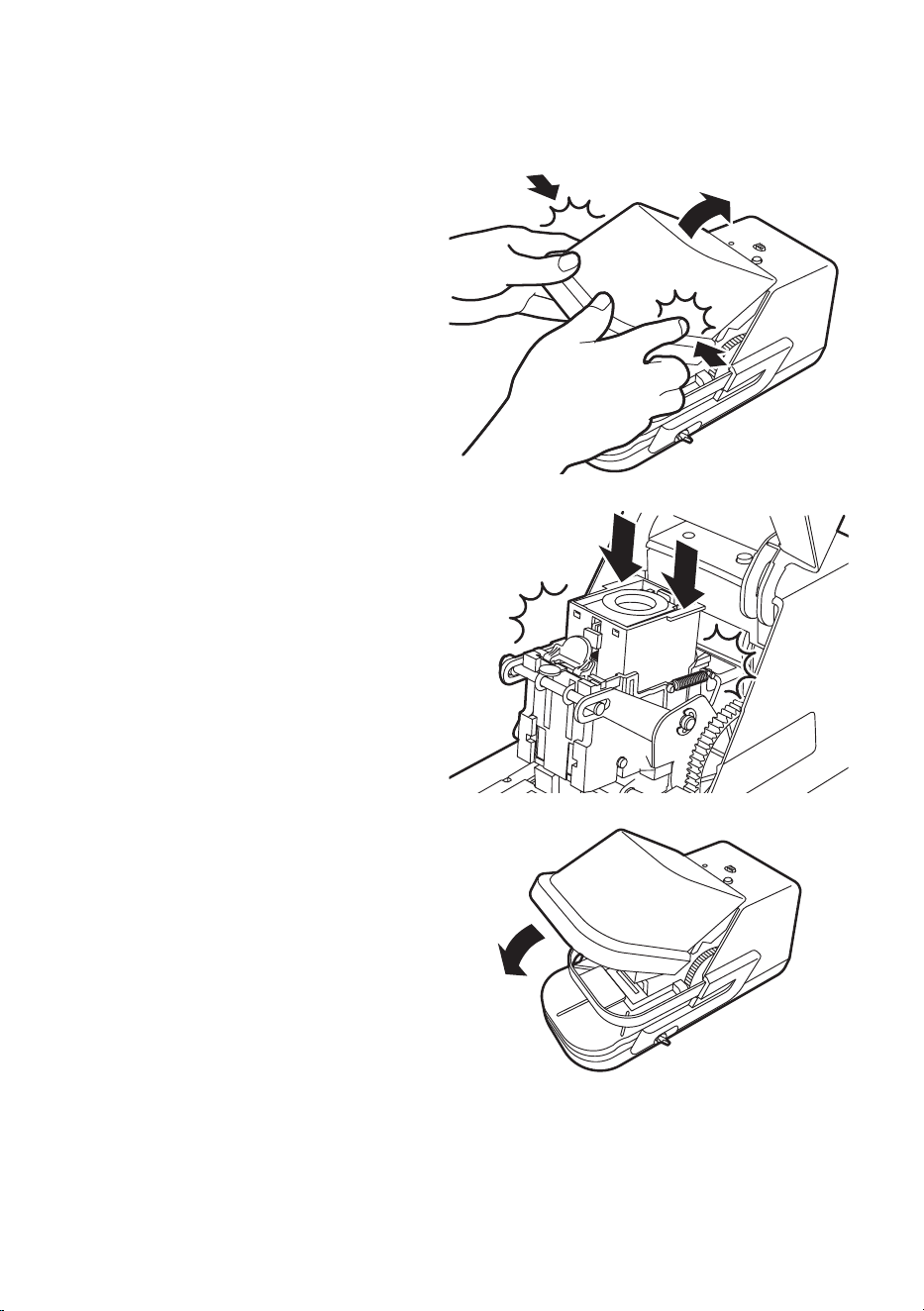
Disconnect the power cord from a plug socket.
(1) Openthecasecap.
(2) Loadthestaplecartridgeinthe
arrow direction.
(3) Closethecasecap.
(4) Connectthepowercordtothe
plugsocket.
Rear
approx.18mm
(approx. 3/4”)
Front
approx. 6mm
(approx. 1/4”)
UNLOCK LOCK
Depth control slider
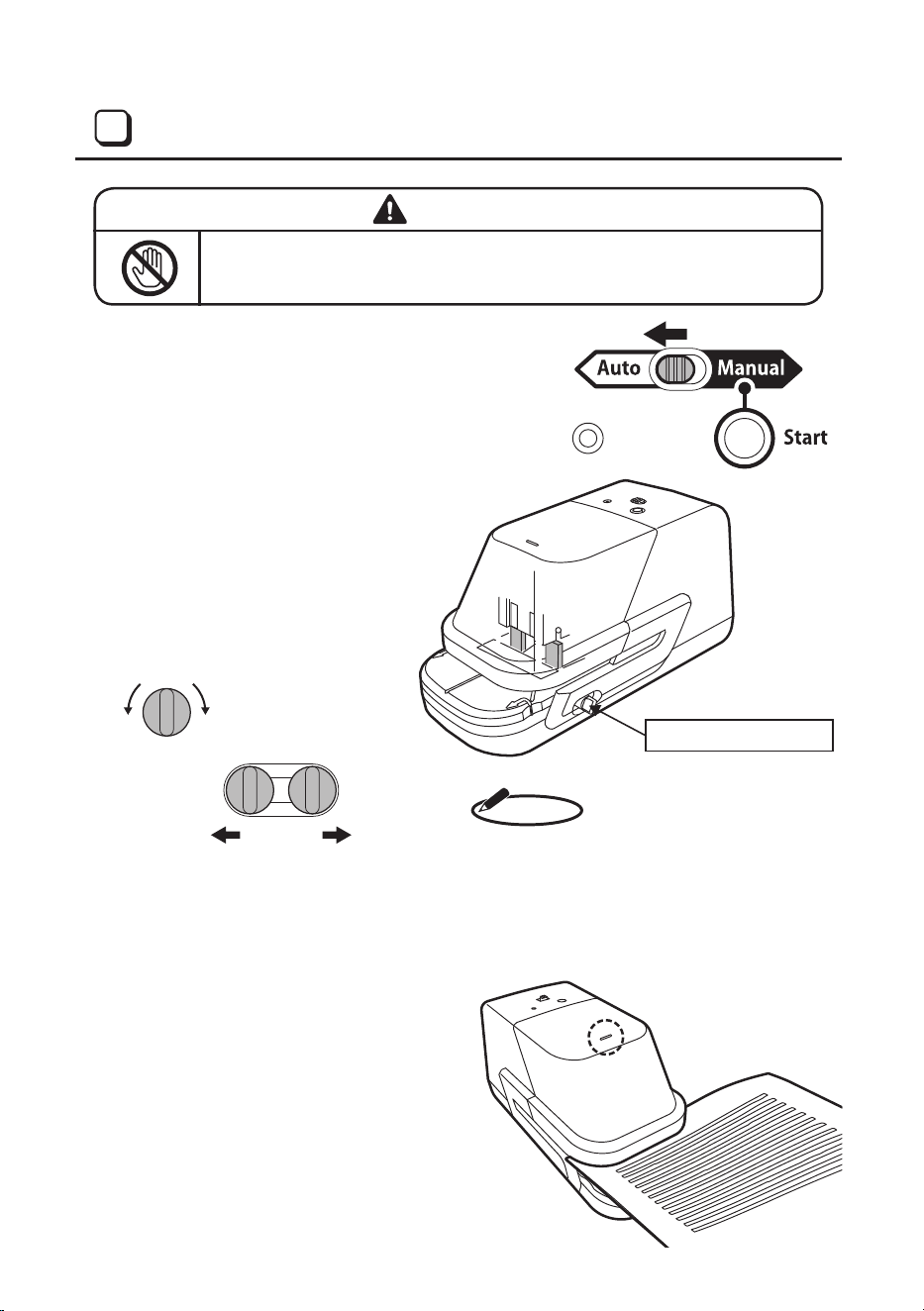
9
(1) Slide the selector switch to the
“Auto,” which is located on top of the
main body.
(2) Staplingdepthisadjustablewithina
rangeofapprox.6to18mm(1/4”to
3/4”)forparallelstapling.Loosenthe
depthcontrolknobandmoveitback
and forth to adjust to your desired
depth.
Besure toturnthedepthcontrol knob tothe
“LOCK”positionafteradjustingtheslider.
Fixing the slider in the “UNLOCK” position
could cause the stapling sensor to
malfunctionorbreak.
(3) Themarkonthetopofthemachine
is the center of the horizontal
stapling position. Move the paper to
the right and left to set your desired
position.
WARNING
Nevertouchthewhite-coloredswitch.Itcouldcauseaninjurywhenthe
stapler is abruptly activated.
STAPLING AUTOMATICALLY
4
MEMO
Manual button
Paper table
10
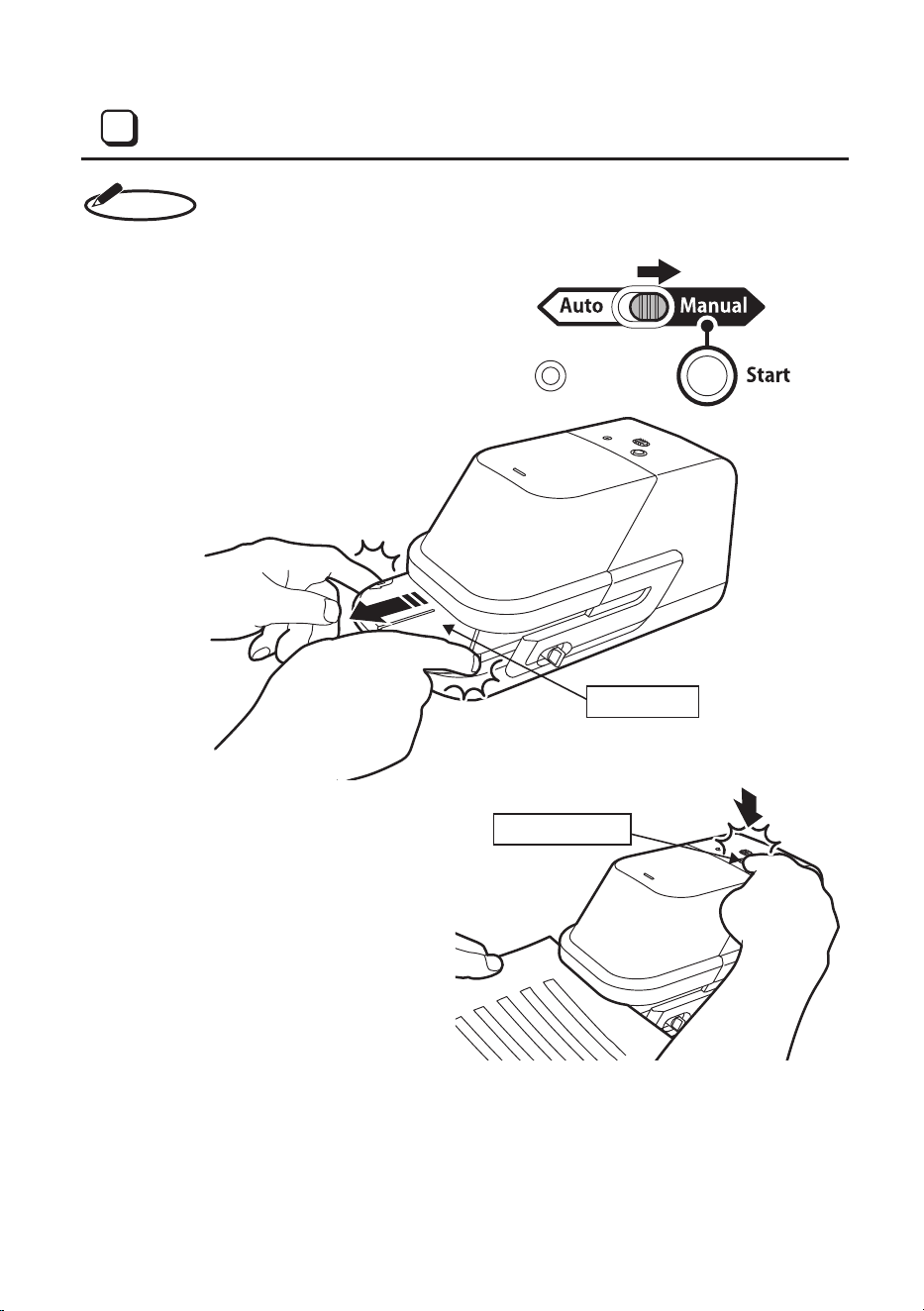
Whenstapling thepaperonthe edge(staplingdepth:3 to6mm,1/8”to 1/4”),
use the Manual button.
(1) Slide the selector switch to the
“Manual,” which is located on top of
the main body.
(2) Pull out the paper table to the near
side.
(3) Insert the paper and press the
Manual button to staple it.
STAPLING MANUALLY
5
MEMO
12mm
(1/2”)
11
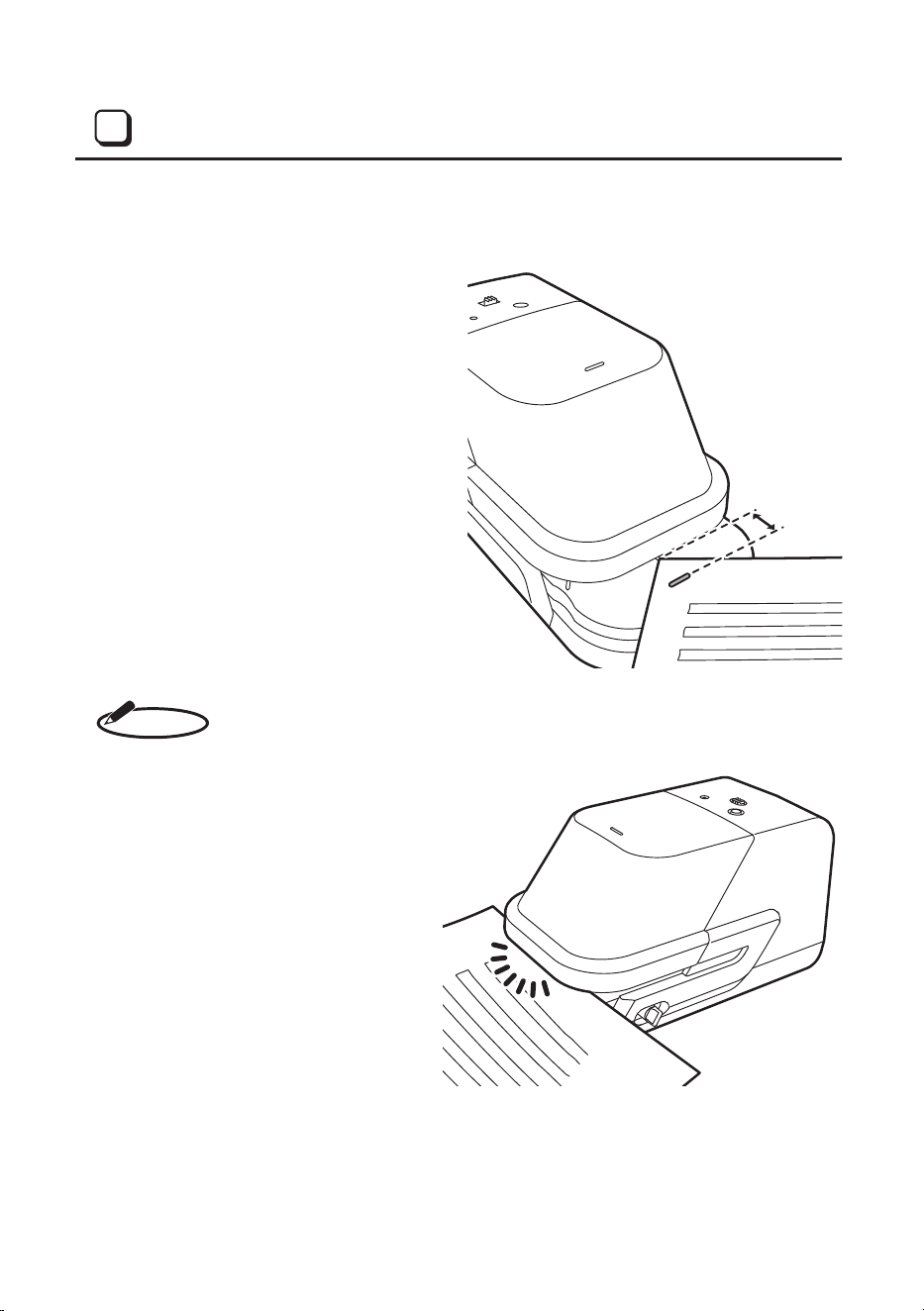
(1) When stapling on the corner, insert
the corner of the paper.
(2) If the stapling depth is set to 6 mm
(1/4”), the paper will be stapled at
the position of about 12 mm (1/2”)
from its edge.
When the machine is used for the first time,
it will perform a few (5 – 7) idle strokes
without actually stapling papers.
This is normal and occurs while the staples
are being fed to the stapling position.
STAPLING ON THE CORNER
6
MEMO
12
Ifthestaplesrunoutinthecartridge,theLEDlampontopofthemachinewillbe
illuminated in red in order to inform of replacement of cartridge.
In this case, the paper cannot be stapled, even if it is inserted. Replace the
cartridge as instructed below.
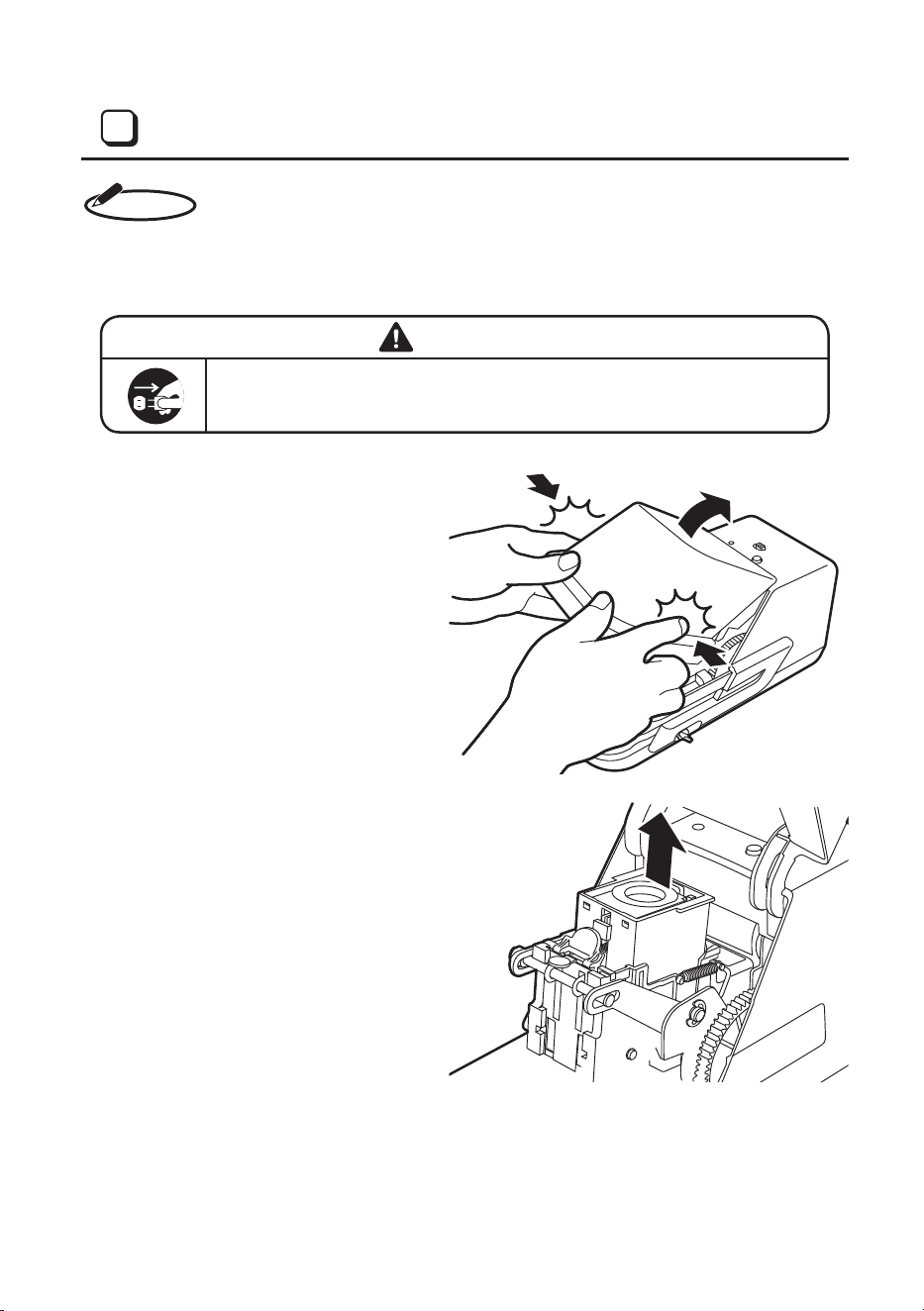
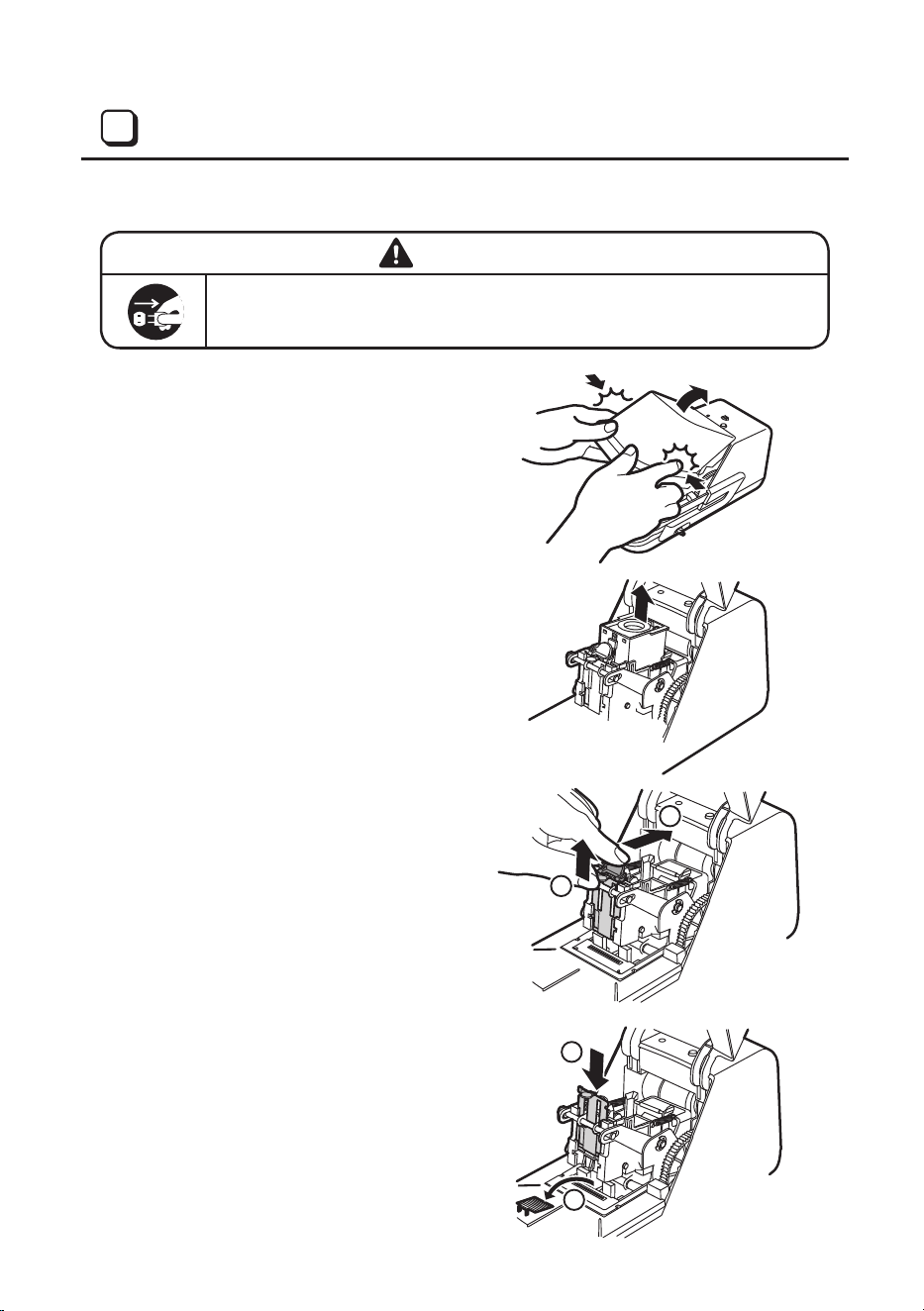
(1) Disconnect the power cord from a
plugsocket.
(2) Openthecasecap.
(3) Holdthecartridgeandpullitupward
to detach it.
(4) Loadanewcartridge.
REPLACING THE STAPLE CARTRIDGE (No. 70FE)
7
MEMO
WARNING
Disconnect the power cord when loading the staple cartridge. It could
causeaninjurywhenthestaplerisabruptlyactivated.
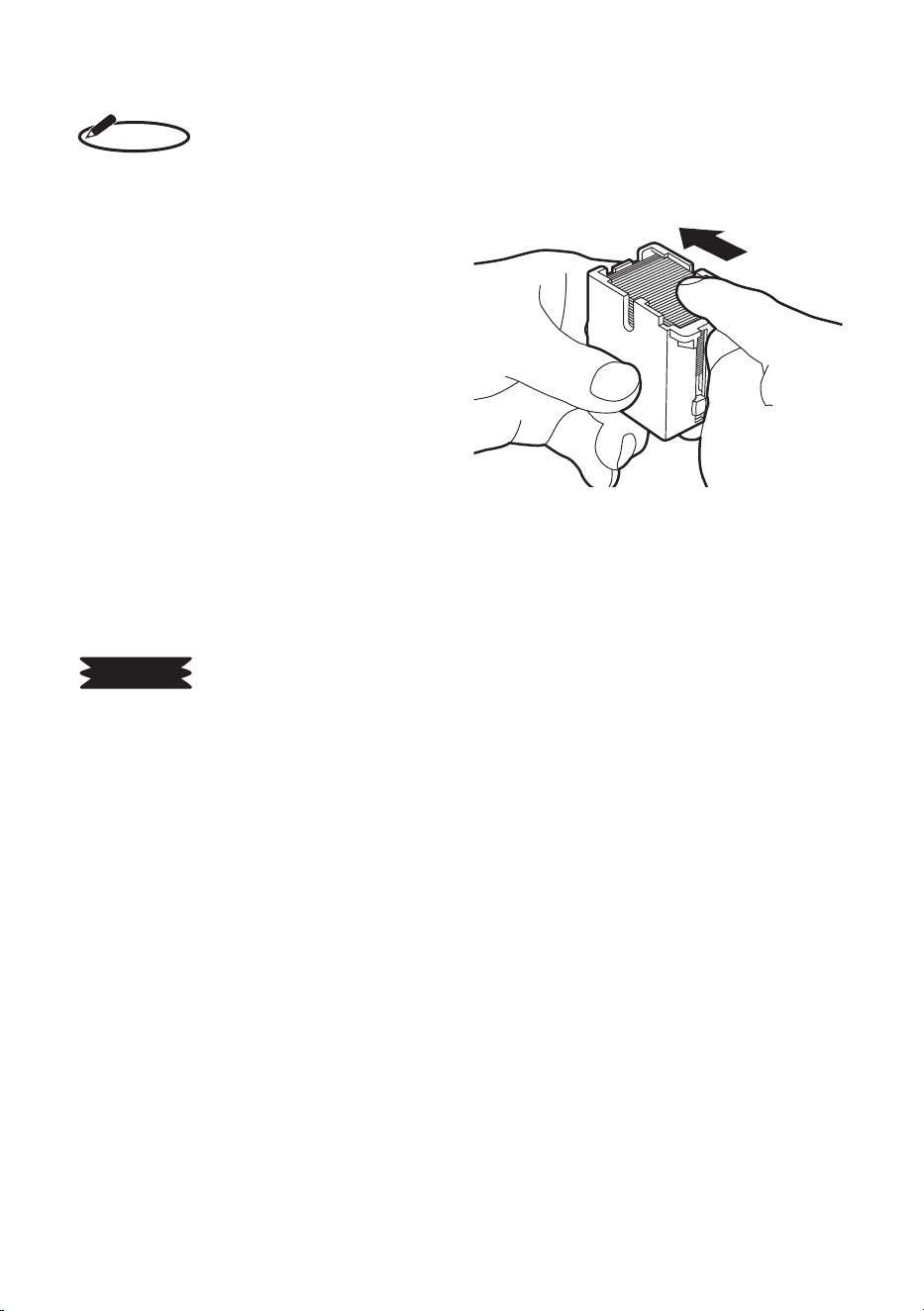
13
Ifyouhaveremovedthecartridgebeforeitrunsoutofthestaples,thefollowing
condition may occur in the cartridge. Seeing the following, load the cartridge
again.
(1) The staple sheet is exposed from
the cartridge.
In this case, push the staple sheet
into the cartridge.
1. UseMAXgenuinestaplecartridge“No.70FE.”
2. Donotsetthebrokenandshortenedstaplesintothecartridgeorloadthemintothemachine
toreusethem.Theycouldcauseatroubleorstaplejam.
3. Do not touch the staple sensor or feeding roller of staple when removing staples from the
machine.
MEMO
REQUEST
1
2
4
3
14
If the staples jam, eliminate them as follows:
(1) Disconnect the power cord from a
plugsocket.
(2) Openthecasecap.
(3) Holdthecartridgeandpullitupward
to detach it.
(4) Pushing inside the green lever
located on the front of the main
body, pull up the opener handle.
(5) Removethejammingstaples.
And then, push down the opener
handle to its original position.
WARNING
Disconnect the power cord when clearing jammed staples. It could
causeaninjurywhenthestaplerisabruptlyactivated.
CLEARING JAMMED STAPLES
8
15
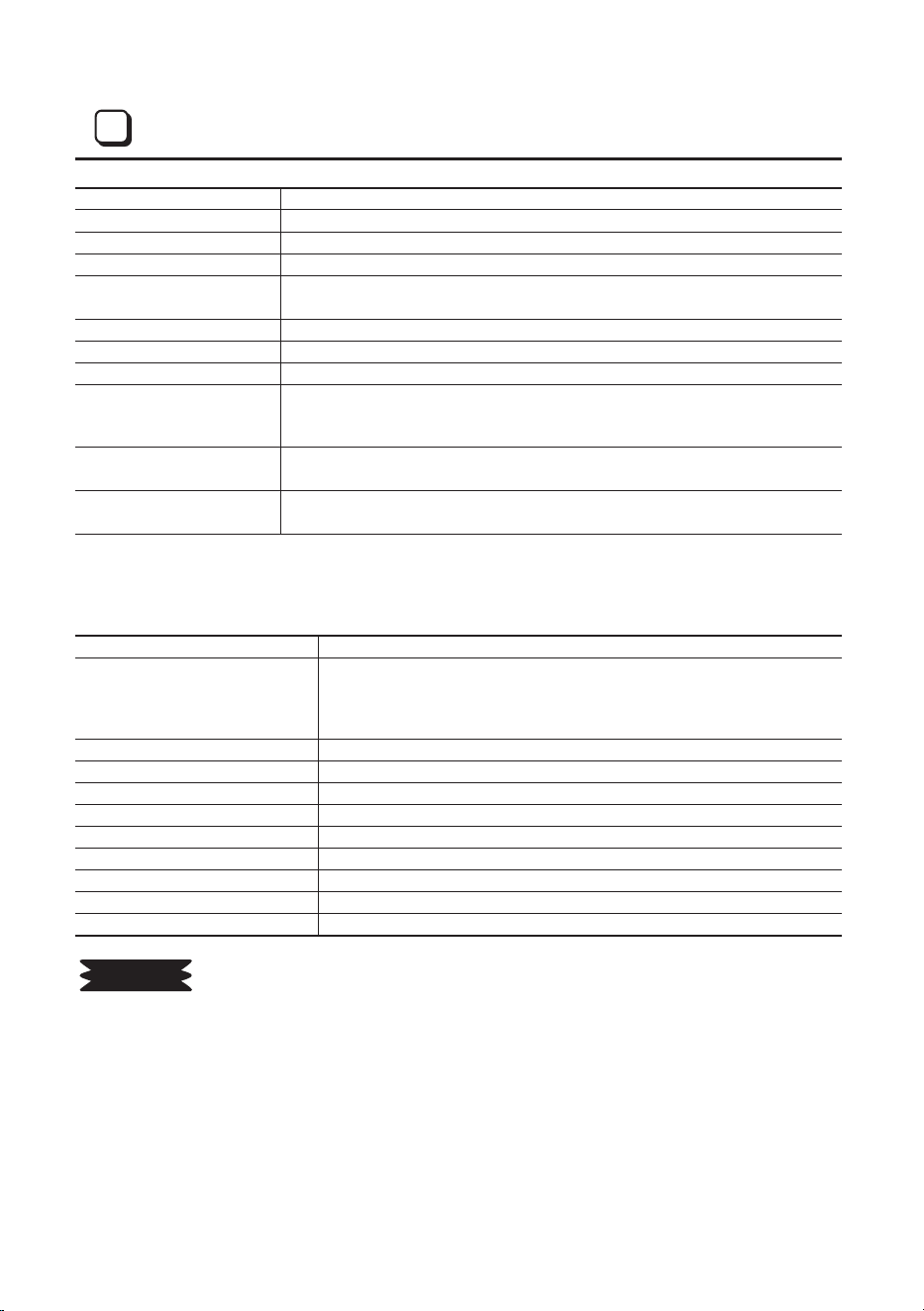
Model name MAXElectronicStaplerEH-70FII
Capacity 2–70sheets(64gsm,55kg/16-lb.bondpaper)
Stapling speed 2staplespersecond
Stapling system Motordrivenlinkmechanismwithautomaticfeed
Throat dept
Autostapling:Adjustableapprox.6to18mm(1/4”to3/4”)
Manualstapling:Adjustableapprox.3to18mm(1/8”to3/4”)
Dimensions 113mm(4-1/2”)(W)x113mm(4-1/2”)(H)x229mm(9”)(L)
Weight 1.5kg(3.3lbs)
Powerconsumption Approx.48W
Powersource
DC24V,2.08A
UseonlyspecifiedACadapter(AC100-240V,50-60Hz)appended
to machine.
WorkingTemp.and
Humidityranges
5°C/41°F-35°C/95°F,Below80%RH(non-condensation)
Staple cartridge
MAXNo.70FEstaplecartridge
Containsaguaranteedminimumof5,000staples.
COMMISSIONREGULATION(EU)2019/1782of1October2019
■ AC ADAPTER INFOMATION
Informationpublished Unit
Manufacturer’s name or
trademark,commercial
registration number and
address
MAXEUROPEB.V.NL8153.37.401.B01
Antennestraat45,1322AHAlmere,
TheNetherlands
Phonenumber:(31)36-546-9669
Model identifier 6A-601DA24
Inputvoltage AC100-240V
InputACfrequency 50-60Hz
Output voltage DC24.0V
Output current 2.7A
Output power 64.8W
Average active efficiency 88.0%
Efficiencyatlowload(10%) 79.0%
No-loadpowerconsumption 0.21W
1. Stapling capacity depends on the kind of paper. The machine might not staple up to 70
sheetsintheotherkindofpaper.Inthiscase,donotstapleitforcibly.
2. In case of stapling continually for a long time, the machine might not staple because the
motorwouldbeveryhot.Inthiscase,stopoperatingfor30minutesormoretocoolmotor.
And then, start to operate again.
3. Operatelessthan70sheets(55kg/16-lb.bondpaper).Itcouldcausedamagethemachine
when operating the machine over the specification.
4. Contactyourdealerordistributorwithtelephoneore-mailifmachinewouldbeoutoforder
or you have any problem.
SPECIFICATIONS
9
REQUEST
The following statement is only effective for the USA market.
Note: This equipment has been tested and found to comply with the limits for Class B digital
device, pursuant to Part 15 of the FCC rules. These limits are designed to provide reasonable
protection against harmful interference in a residential installation. This equipment generates,
uses and can radiate radio frequency energy and, if not installed and used in accordance with
the instructions, may cause harmful interference to radio communications. However, there is
no guarantee that interference will not occur in a particu
lar installation.
If this equipment does cause harmful interference to radio or television reception, which can
be determined by turning the equipment off and on, the user is encouraged to try to correct
the interference by one or more of the following measures:
- Reorient or relocate the receiving antenna.
- Increase the separation between the equipment and receiver.
- Connect the equipment into an outlet on a circuit different from that to which the receiver is
connected.
- Consult the dealer or an experienced radio/TV technician for help.
MAX USA CORP.
ADDRESS :
PHONE : (516)741-3151 FAX : (516)741-3272
FCC Notice
(Class B: EH-70F
Ⅱ)
16
TROUBLESHOOTING
10
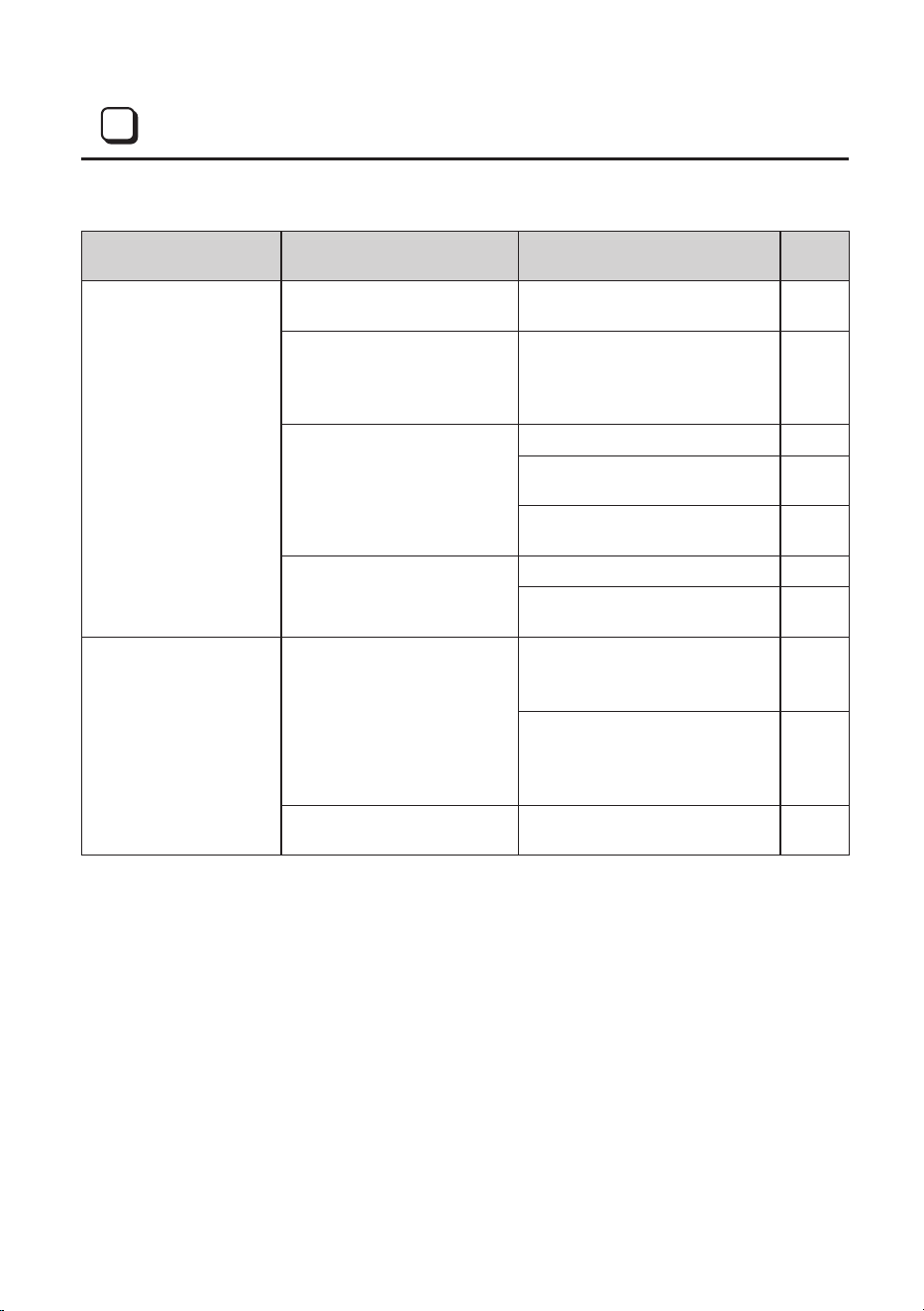
Phenomenon Check point Remedy
See
page
The stapler does not
operate when insert the
paper.
CheckiftheLEDstatuslamp
isilluminatedinRed.
LoadnewNo.70FEstaples. P7
CheckiftheLEDstatuslamp
isblinkinginRED.
Disconnect the power plug
immediately from the plug
socketandcontactyourdealer
or distributor for repair.
P18
CheckiftheLEDstatuslamp
is not illuminated.
Closethefrontcoverrmly. P8
ConnectthededicatedAC
adapter correctly.
P8
SetNo.70FEstaplecartridge
rmly.
P7
Checkiftheselectorswitch
is set to
Manual.
Set the selector switch to Auto. P9
PresstheManualbuttonfor
stapling.
P10
Stapling operation is
performed, but the
paper is not stapled.
DidyouloadnewNo.70FE
staples?
Insertdiscardedcopypapers
afew(5to7)timestofeedthe
staples.
P12
DetachNo.70EFstaplecartridge
from stapler and remove
remaining staple sheet from the
magazine.
P12
Thestaplesmaybejamming.
Followtheappropriatereference
procedure.
P14

The following statement is only effective for the USA market.
Note: This equipment has been tested and found to comply with the limits for Class B digital
device, pursuant to Part 15 of the FCC rules. These limits are designed to provide reasonable
protection against harmful interference in a residential installation. This equipment generates,
uses and can radiate radio frequency energy and, if not installed and used in accordance with
the instructions, may cause harmful interference to radio communications. However, there is
no guarantee that interference will not occur in a particu
lar installation.
If this equipment does cause harmful interference to radio or television reception, which can
be determined by turning the equipment off and on, the user is encouraged to try to correct
the interference by one or more of the following measures:
- Reorient or relocate the receiving antenna.
- Increase the separation between the equipment and receiver.
- Connect the equipment into an outlet on a circuit different from that to which the receiver is
connected.
- Consult the dealer or an experienced radio/TV technician for help.
MAX USA CORP.
ADDRESS :
PHONE : (516)741-3151 FAX : (516)741-3272
FCC Notice
(Class B: EH-70F
Ⅱ)
17

CO206N
Global Offices:
MAX CO.,LTD.
6-6 Nihonbashi Hakozaki-Cho,Chuo-Ku,Tokyo,Japan
TEL: (81) 3-3669-8131
MAX USA CORP.
205 Express St. Plainview, NY, 11803, U.S.A.
TEL: (1) 800-223-4293
MAX EUROPE B.V.
Antennestraat 45, 1322AH, Almere, The Netherlands
TEL: (31) 36-546-9669
MAX ASIA PTE. LTD.
101 Cecil Street #16-01 Tong Eng Building, Singapore
069533
TEL: (65) 6226-2180
MAX CO.,(HK)LTD.
7-B,Chuan-Kei-Fty Bldg.,15-23,Kin Hong St., Kwai Chung,
New Territories, Hong Kong
TEL: (852) 2426-2106
MAX (SHANGHAI) CO.,LTD.
Room 1505, Block E, Jin hongqiao Guangchang, No.2,
Lane 686, Wuzhong Road, Minhang District, Shanghai,
P.R.China
TEL: (86) 21-3133-8105