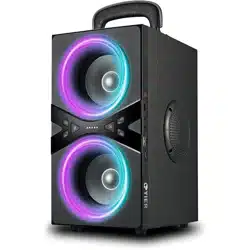

Portable Wireless Speaker
User's Manual

Matters Needing Attention
Precautions for the Charger
In order to use the player correctly and ensure that
performs well, please read and observe carefully:
1. Do not hit the host severely.
2. Do not touch benzene, thinners and other
chemicals. Please keep away from strong
magnetic and electric fields.
3. Please avoid direct light or heating appliances.
4. Do not disassemble, repair, or modify by yourself.
5. Please sort and properly dispose of waste
packaging, batteries, andold electronics.
6. Do not expose the product to rain or damp rings to
prevent fire or electric shock.
1. Insert one end of the power cord into the [5V] socket
of the machine, and insert the other end of the USB
into a matching plug or computer. The "red light"
is on when charging, and it goes out when it is fully
charged.
2. It is recommended that the product try not to play

1. Insert one end of the power cord into the [5V] socket
of the machine, and insert the other end of the USB
into a matching plug or computer. The "red light"
is on when charging, and it goes out when it is fully
charged.
2. It is recommended that the product try not to play
while charging, so as not to charge for a long time
and shorten the battery life.
3. Do not put water containers next to the charger, so
as to avoid water splashing and causing short circuit
of the charger, resulting in overheating, leakage and
malfunction.
4. Do not put heavy objects on the power cord or try
to modify the powercord, otherwise it may cause
electric shock or fire.
5. It is forbidden to use other types of chargers, as
they will affect the battery life or damage the
machine.
6. The machine has a built-in charging protection
circuit, which can be connected to a computer or
charger for a long time, about 3-4 hours fully charge
the battery, the battery life time will vary depending
on the light usage time or the volume level.
7. When the battery power is low, the system will
automatically shut down. Please charge in time. If
you do not use the machine for a long time, please
charge it at least once a month to protect the battery
and prolong its life.

Speaker Connection
while charging, so as not to charge for a long time
and shorten the battery life.
3. Do not put water containers next to the charger, so
as to avoid water splashing and causing short circuit
of the charger, resulting in overheating, leakage and
malfunction.
4. Do not put heavy objects on the power cord or try
to modify the powercord, otherwise it may cause
electric shock or fire.
5. It is forbidden to use other types of chargers, as
they will affect the battery life or damage the
machine.
6. The machine has a built-in charging protection
circuit, which can be connected to a computer or
charger for a long time, about 3-4 hours fully charge
the battery, the battery life time will vary depending
on the light usage time or the volume level.
7. When the battery power is low, the system will
automatically shut down. Please charge in time. If
you do not use the machine for a long time, please
charge it at least once a month to protect the battery
and prolong its life.
1. Wireless speaker connection: Turn on the speaker
device, turn on the wireless connection function of
the mobile phone, and search for the wireless device
"BB-02". (No need to enter a password, connect
directly).
2. TWS connection: 2.1. When the new machine is
dual-connected for the first time, you need to long
press the TWS button for both machines, when you
hear "TWS cleared", it means pairing is in progress.
When the pairing is successful, you will hear "TWS
paired". (under normal circumstances, the pairing is
successful within 6 seconds, but the greater the
environmental interference, the longer the pairing
time)
2.2. If the two devices have been connected, turn off
and on again, the machine will automatically
interconnect, no need to re-connect.
2.3. TWS is disconnected or reconnected, the host
needs to be operated (the host means: the one that
can be controlled by Bluetooth is the host, and the
one that needs to be paired is the slave).

1. Wireless speaker connection: Turn on the speaker
device, turn on the wireless connection function of
the mobile phone, and search for the wireless device
"BB-02". (No need to enter a password, connect
directly).
2. TWS connection: 2.1. When the new machine is
dual-connected for the first time, you need to long
press the TWS button for both machines, when you
hear "TWS cleared", it means pairing is in progress.
When the pairing is successful, you will hear "TWS
paired". (under normal circumstances, the pairing is
successful within 6 seconds, but the greater the
environmental interference, the longer the pairing
time)
2.2. If the two devices have been connected, turn off
and on again, the machine will automatically
interconnect, no need to re-connect.
2.3. TWS is disconnected or reconnected, the host
needs to be operated (the host means: the one that
can be controlled by Bluetooth is the host, and the
one that needs to be paired is the slave).
3. Other connections: The machine automatically
detects and recognizes the external device when it
is turned on, and enters the wireless connection
AUX mode after it is turned on. The TF card or USB is
inserted and automatically recognizes the playback.
The latter has the priority principle, and the
playback mode can also be switched by itself; the
audio signal line does not switch automatically,
through [M] Key to switch to play in AUX mode.
3. Other connections: The machine automatically
detects and recognizes the external device when it
is turned on, and enters the wireless connection
AUX mode after it is turned on. The TF card or USB is
inserted and automatically recognizes the playback.
The latter has the priority principle, and the
playback mode can also be switched by itself; the
audio signal line does not switch automatically,
through [M] Key to switch to play in AUX mode.
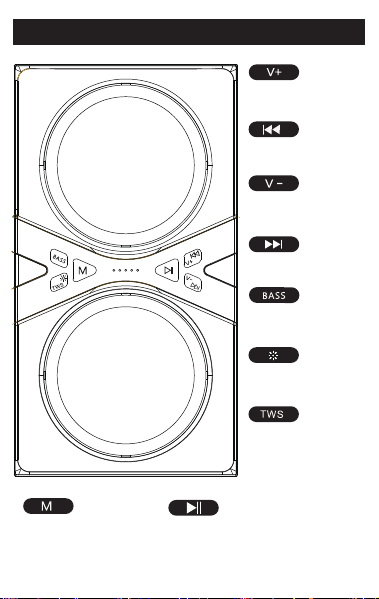
Key Description
Long press,
increase the volume
Play previous song
Long press,
reduce the volume
Play next song
Turn on the bass
Change lighting effect
Long press,
turn on the TWS
Change playback mode
Pause playback
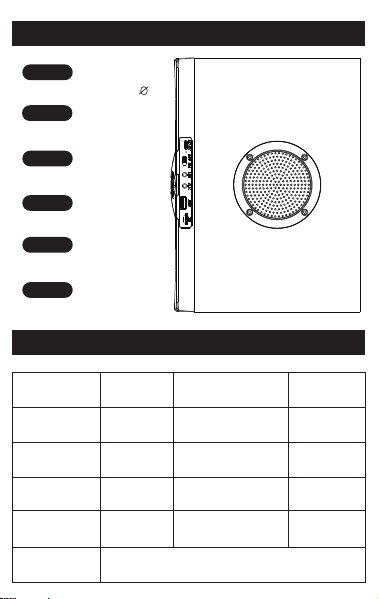
Jack Description
Basic Parameters
Microphone Interface 6.5
Power Port
TF Card Port
Auxiliary Audio
USB-Type C Port
TF
AUX
USB
MIC
Speaker type
Exterior design
Light Type
Active/Passive
Item Weight
Item Color
Charging Cable
Product Dimensions
Portable Wireless
Speaker
Cuboid
RGB/LED
Active
6.4Ib
Black
USB-Type C
10.9*6*7.9inches
Control Method
Features
Soundtrack System
Wireless Connection Electronic Devices, Support TF Card,
AUX,USB,MP3 Music Playback
Button 1.0
DC 5V
ON/OFF
ON is on/OFF is off
≧100db
3Ω
1%
16-18h
12-14h
5-6h
5.0
Questions and Answers
Q:The product shuts down automatically?
A:The battery is low, please charge it in time, it is
recommended to use it after six hours of
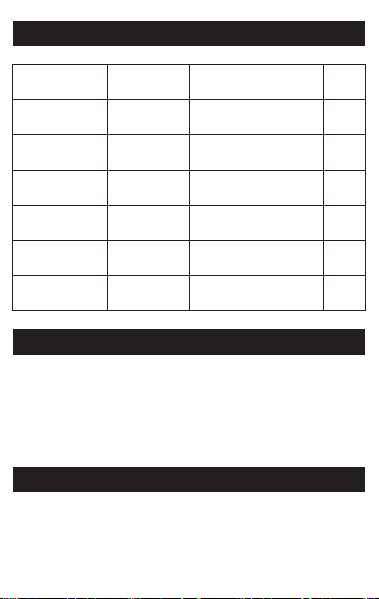
Technical Parameter
Package List
Frequency
Response
Transmission
Distance
Output Power
Speaker Unit
Power Supply
Battery Capacity
Audio Interface
Signal-to-Noise Ratio
Impedance
Distortion
Play Time (50%volume)
LED Light Play Time
Charging Time
Connection Version
DC5V/2A Lithium
Battery
45Hz-20KHz
80W
4inches*2
33Foot
5000mAh /7.4v
3.5mm AUX
●
1 x Wireless Portable Speaker
● 1 x AUX 3.5mm Audio cable
● 1 x USB-Type C cable
● 1 x User manual
3inches*2

charging.
Q:The product cannot be charged?
A:Please use the charging cable delivered by this
machine to make sure that the voltage of the
connected USB interface is normal.
Q:There is no sound from the product speaker?
A:Make sure in the TF/wireless connection/AUX
mode, in the playback state, and adjust the
volume to an appropriate level.
Q:There is no sound in the product AUX?
A:1. Please use this machine to distribute the audio
cable, and select the correct audio output
interface.
2. Insert a TF card or USB disk, it will not
automatically enter the AUX mode, you must
press the [M] key to switch AUX mode.
3. Whether the volume of the external audio
source device is turned on.
Q:The product can't connect automatically?
A:1. Only the paired devices will automatically
connect.
2. If the wireless connection device is turned
on after 10 seconds after the speaker enters the
wireless connection, the speaker will not
automatically connect.

After-Sales Service
We promise that if the product has quality problems,
it will be returned for half a year, guaranteed for one
year, and free consultation for life. Welcome your
consultation.
If you are satisfied with our service, please comment
on our service. Thank you for your participation and
recognition. This will be our greatest motivation.
If the product or service you are not satisfied, please
contact us in time so that we can know the specific
problem you encounter and provide you with a better
solution.
We are happy to help you answer any questions of
the product. Welcome to write to us and scan the QR
code for consultation. of course, you can also come to
our official website to browse, we will provide friendly
support.
Q:There is no sound from the wireless portable
speaker?
A:1. Please confirm whether the wireless connection
has been successfully connected.
2. Whether the volume of the connected device or
connected device is turned on.

Q:There is no sound from the wireless portable
speaker?
A:1. Please confirm whether the wireless connection
has been successfully connected.
2. Whether the volume of the connected device or
connected device is turned on.
Enterprise Mailbox:customer_service@dindinmodern.com
Official website: https://www.facebook.com/profile.php?id
=100071282434406
We and other buyers really need your sincerely
advice of our products, If time permits, please share
your thoughts . We will prepared some surprise for you
as well.
Thanks again!
