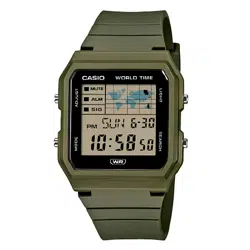
Operation Guide 3572
EN-9
Timer Mode Stopwatch Mode
CC
Alarm Mode
C
EN-8
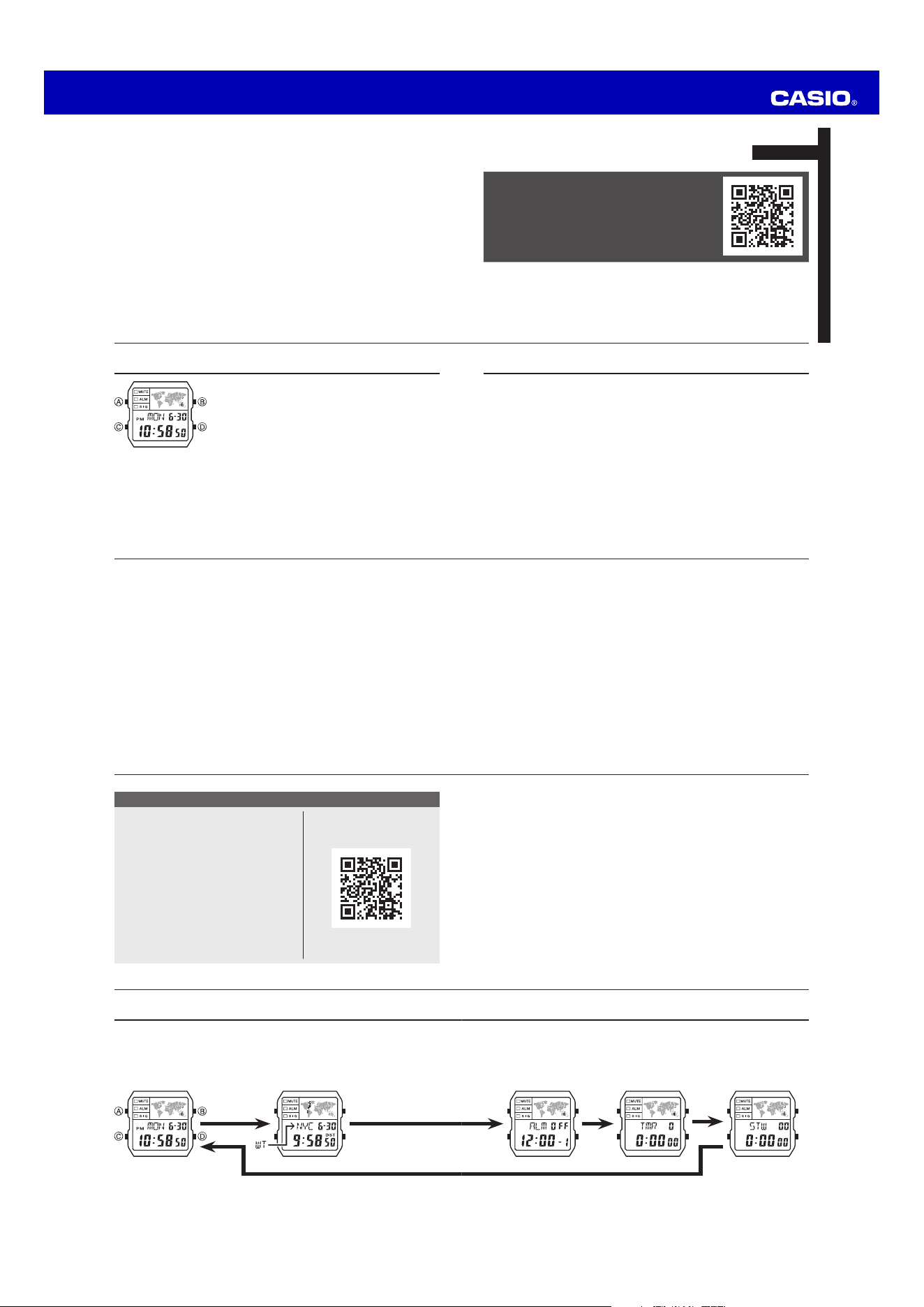
Selecting a Mode
x Press C to change from mode to mode.
x In any mode (except when a setting screen is on the display), press B to illuminate
the display.
World Time Mode
CC
Timekeeping Mode
EN-7 EN-6
Watch Features
You can also find information
about operational procedures
at the CASIO website.
https://s.casio.jp/mw/en/3572/
◆
Multi Time
◆
World Time
◆
Alarm
◆
Timer
◆
Stopwatch
EN-5
To use the countdown timer ............................................................................. EN-34
To measure times with the stopwatch ............................................................. EN-36
To turn the button operation tone on and off ................................................. EN-39
To turn off Auto Display ..................................................................................... EN-42
To turn on Auto Display ..................................................................................... EN-42
EN-4
Procedure Lookup
The following is a handy reference list of all the operational procedures contained in
this manual.
To toggle the Timekeeping Mode time between DST and Standard Time ... EN-18
To turn on illumination ...................................................................................... EN-21
To view the time for another city code ............................................................ EN-22
To toggle a city code time
between Standard Time and Daylight Saving Time .................................... EN-23
To change your Home Time city to the current World Time city ................... EN-24
To set an alarm time .......................................................................................... EN-26
To test the alarm ............................................................................................... EN-29
To turn an alarm on and off .............................................................................. EN-30
To turn the Hourly Time Signal on and off ....................................................... EN-31
To configure the countdown timer ................................................................... EN-33
EN-3
Contents
About This Manual................................................................................................ EN-2
Watch Features ..................................................................................................... EN-6
Selecting a Mode .................................................................................................. EN-8
Timekeeping ....................................................................................................... EN-11
World Time .......................................................................................................... EN-22
Alarm ................................................................................................................... EN-25
Timer .................................................................................................................... EN-32
Stopwatch ........................................................................................................... EN-35
Reference ........................................................................................................... EN-37
Specifications ..................................................................................................... EN-43
EN-2
About This Manual
x Button operations are indicated using the letters shown
in the illustration.
x Each section of this manual provides you with the
information you need to perform operations in each
mode. Further details and technical information can be
found in the “Reference” section.
EN-1
ENGLISH
You can also find information about
operational procedures at the CASIO website.
https://s.casio.jp/mw/en/3572/
MA2411-EA
© 2025 CASIO COMPUTER CO., LTD.
Published: 11/2024
Operation Guide 3572
EN-19
12/24-Hour Format
x With the 12-hour format, the PM indicator appears to the left of the hour digits for
times in the range of noon to 11:59 p.m. and no indicator appears to the left of the
hour digits for times in the range of midnight to 11:59 a.m.
x With the 24-hour format, times are displayed in the range of 0:00 to 23:59, without
any indicator.
x The 12-hour/24-hour timekeeping format you select in the Timekeeping Mode is
applied in all other modes.
Changing the City Setting of a Local Time
You can select any one of the city codes in the table at the back of this manual as a
Local Time city.
1. Display the Local Time whose city setting you want to change, and then hold down
A for at least two seconds until the current city code starts to flash.
2. Use D (east) and B (west) to select the city code you want.
3. Press C to display the DST setting screen.
4. Press D to toggle between Daylight Saving Time (On displayed) and Standard
Time (OFF displayed).
EN-18
To toggle the Timekeeping Mode time between DST and Standard Time
1. Use D to display the current Home City Time (T-1)
screen.
2. Hold down A until the second starts to flash, which
indicates the setting screen.
3. Press C to display the DST setting screen.
4. Press D to toggle between Daylight Saving Time (On
displayed) and Standard Time (OFF displayed).
5. Press A to exit the setting screen.
x The DST indicator appears on the Timekeeping screen to
indicate that Daylight Saving Time is turned on.
DST indicator
EN-17
Screen To do this: Do this:
Change the month or day.
Use D (+) and B (–).
Toggle the setting between 1.5 seconds (1)
and 3 seconds (3).
Press D.
x See “Daylight Saving Time (DST)” on page EN-17 for details about DST setting.
5. Press A to exit the setting screen.
x The day of the week is displayed automatically in accordance with the date (year,
month, and day) settings.
Daylight Saving Time (DST)
Daylight Saving Time (summer time) advances the time setting by one hour from
Standard Time. Remember that not all countries or even local areas use Daylight
Saving Time.
EN-16
4. When the setting you want to change is flashing, use D and B to change it as
described below.
Screen To do this: Do this:
Reset the second to 00.
Press D.
Toggle between Daylight Saving Time (On)
and Standard Time (OFF).
Press D.
Change the city code.
Use D (east) and B
(west).
Change the hour or minute.
Use D (+) and B (–).
Toggle between 12-hour (12H) and 24-hour
(24H) timekeeping.
Press D.
Change the year.
Use D (+) and B (–).
EN-15
3. Press C to move the flashing in the sequence shown below to select other
settings.
Second
Day
Illumination Duration Setting
DST
Month
City Code
Year
Hour
12/24-Hour Format
Minute
C C C
CCC
C C
CC
EN-14
Changing the Current Home City Time and Date Settings
1. Use D to display the current Home City Time (T-1)
screen.
2. Hold down A until the second starts to flash, which
indicates the setting screen.
EN-13
x While the Home City Time (T-1) screen is displayed, pressing A will switch the day
of the week / month-day indication to the currently selected Home City code and
the T-1 indicator for about one second.
x You can change the current time setting for your Home City Time (T-1) only.
x For Local Times (T-2, T-3, T-4), you only can change the city code and DST setting.
EN-12
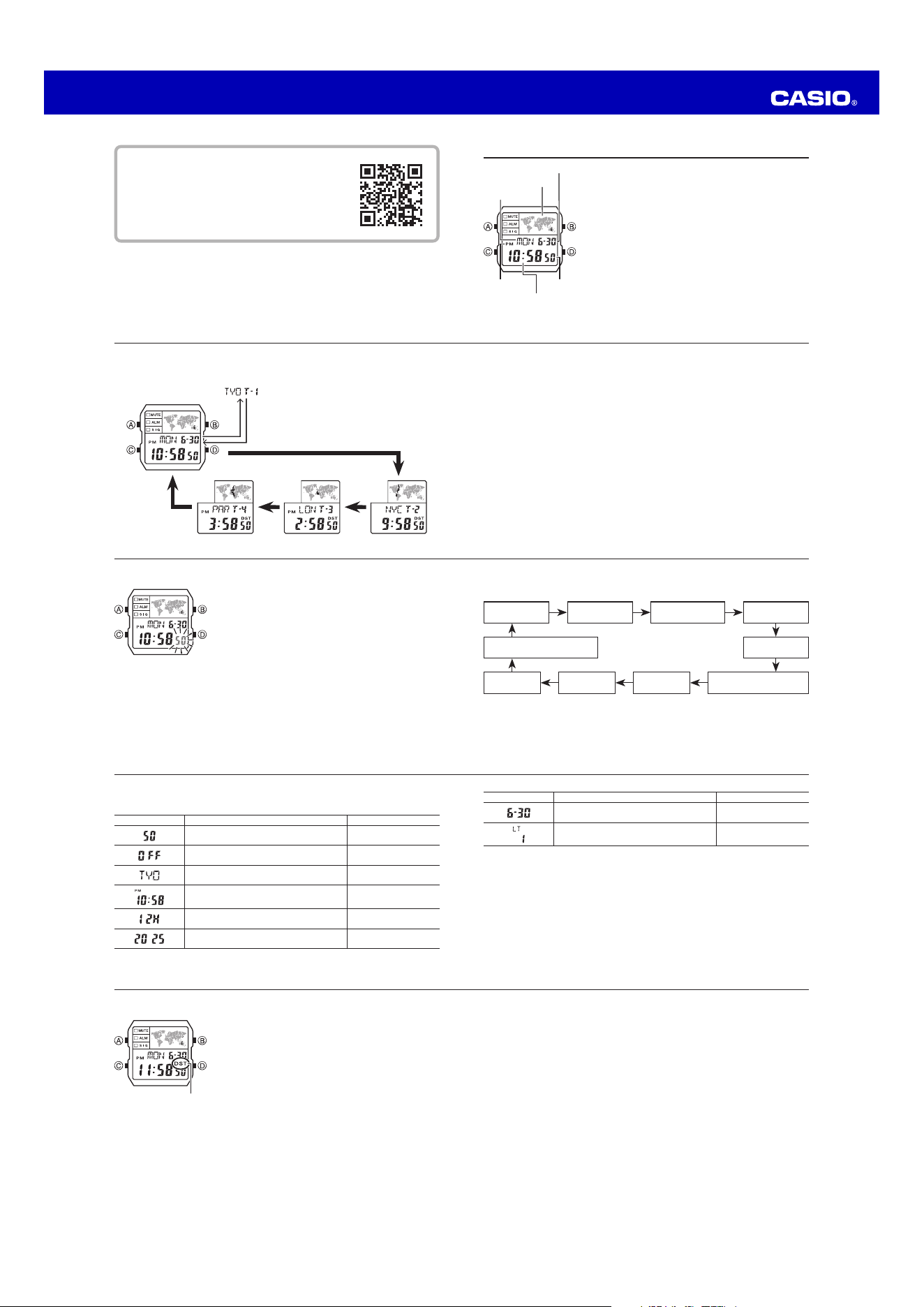
Switching Between Time Screens
Each press of D cycles the time screens in the sequence shown below.
Displayed for one second
D
D
D
A
D
EN-11
Timekeeping
The Timekeeping Mode’s Multi Time feature gives you
quick and easy access to the current time and date in
four different cities, numbered from T-1 (Time 1) through
T-4 (Time 4). T-1 is your Home City Time, and T-2,
T-3, and T-4 are Local Times. Local Times are kept in
synchronization with your Home City Time (T-1).
Map
Month – Day
Day of week
Second
Hour : Minute
PM indicator
EN-10
You can also find information about operational
procedures at the CASIO website.
https://s.casio.jp/mw/en/3572/
Operation Guide 3572
EN-29
Alarm Operation
The alarm tone sounds at the preset time for 10 seconds, regardless of the mode the
watch is in.
x Alarm and Hourly Time Signal operations are performed in accordance with the
Timekeeping Mode time.
x To stop the alarm tone after it starts to sound, press any button.
To test the alarm
In the Alarm Mode, hold down D to sound the alarm.
EN-28
4. While a setting is flashing, use D and B to change it as described below.
Screen To do this: Do this:
Change the hour
and minute.
Use D (+) and B (–).
x With the 12-hour format, set the time correctly as
a.m. or p.m. (PM indicator).
/
Toggle between
One-time Alarm
and Daily Alarm.
Press D.
One-time Alarm on: 1-On
Daily Alarm on: On
5. Press A to exit the setting screen.
EN-27
2. After you select an alarm, hold down A until the hour setting of the alarm time
starts to flash, which indicates the setting screen.
x This operation turns on the One-time Alarm automatically.
3. Press C to move the flashing in the sequence shown below to select other
settings.
Hour Minute
C
C
C
One-time Alarm/Daily Alarm Selection
EN-26
To set an alarm time
1. In the Alarm Mode, use D to scroll through the alarm
screens until the alarm number you want to set is
displayed.
–1 –2 –3
D D
D
D
:00 –5 –4
D D
EN-25
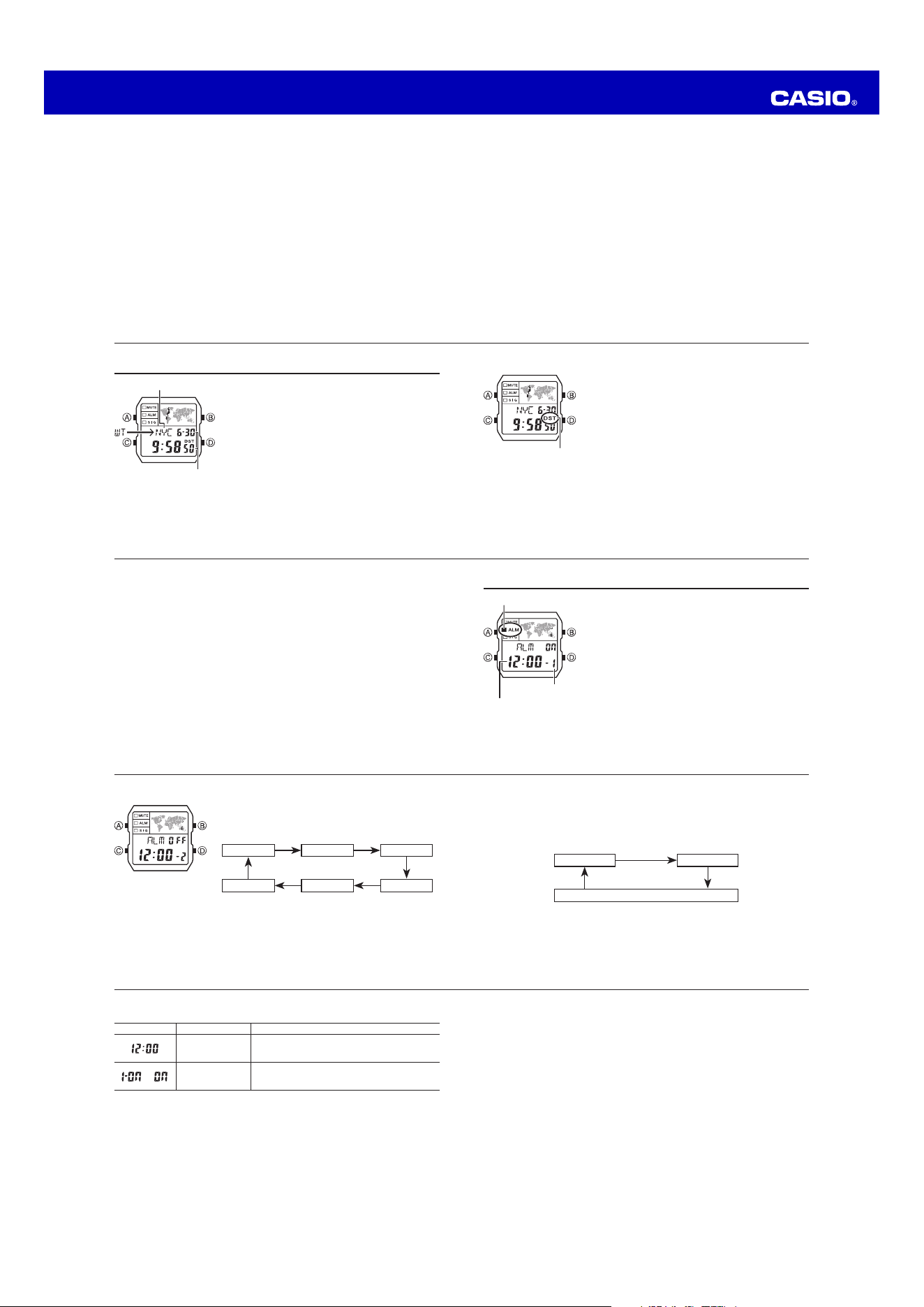
Alarm
Your watch has a total of five alarms, each of which you
can configure as a daily alarm or one-time alarm.
x Daily Alarm: Sounds at the preset time each day.
x One-time Alarm: Sounds once at the preset time and
then is disabled automatically.
You can also turn on an Hourly Time Signal that causes
the watch to beep twice every hour on the hour.
x All of the operations in this section are performed in
the Alarm Mode, which you enter by pressing C (page
EN-9).
x Alarms operate in coordination with the current Home
City Time.
Alarm time
(Hour : Minute)
Alarm number
Alarm on indicator
EN-24
To change your Home Time city to the current World Time city
1. In the World Time Mode, use D to display the city you want to make your new
Home Time city.
2. Press A and B at the same time.
x This makes the World Time city you selected in step 1 your new Home Time city.
EN-23
To toggle a city code time between Standard Time and Daylight Saving Time
1. In the World Time Mode, use D (east) to display the
city code (time zone) whose Standard Time/Daylight
Saving Time setting you want to change.
2. Hold down A for at least two seconds to toggle
Daylight Saving Time (DST displayed) and Standard
Time (DST not displayed).
x The DST indicator is on the display whenever you
display a city code for which Daylight Saving Time is
turned on.
x Note that the DST/Standard Time setting affects only
the currently displayed city code. Other city codes are
not affected.
x Note that you cannot switch between Standard Time
and Daylight Saving Time while UTC is selected as the
city code.
DST indicator
EN-22
World Time
World Time shows the current time in 48 cities (31 time
zones) around the world.
x All of the operations in this section are performed in
the World Time Mode, which you enter by pressing C
(page EN-8).
To view the time for another city code
In the World Time Mode, press D to scroll eastwardly
through city codes.
x For full information about city codes, see the “City
Code Table” at the back of this manual.
x If the current time for a city is wrong, check your
Timekeeping Mode time and time zone settings and
make the necessary changes.
City code
Current time and date in
the zone of the selected
city code
EN-21
To turn on illumination
In any mode (except when a setting screen is on the display), press B to turn on
illumination.
x You can select either 1.5 seconds or 3 seconds as the illumination duration. See
“Changing the Current Home City Time and Date Settings” on page EN-14 for details
about illumination duration setting. When you press B, the illumination will remain
on for about 1.5 seconds or 3 seconds, depending on the current illumination
duration setting.
EN-20
5. After the settings are the way you want, press A.
Changing Your Home City Time
Use the following procedure to change your current Home City Time to any one of
the three Local Times.
1. In the Timekeeping Mode, press D to display the Local Time which you want to
make your Home City Time.
2. Press A and B at the same time.
x This makes the Local Time you selected in step 1 your new Home City Time.
Illumination
An LED (light-emitting diode) illuminate the display for easy reading in the dark.
Illumination Precautions
x The illumination provided by the light may be hard to see when viewed under direct
sunlight.
x Illumination automatically turns off whenever an alarm sounds.
x Frequent use of illumination runs down the battery.
Operation Guide 3572
EN-39
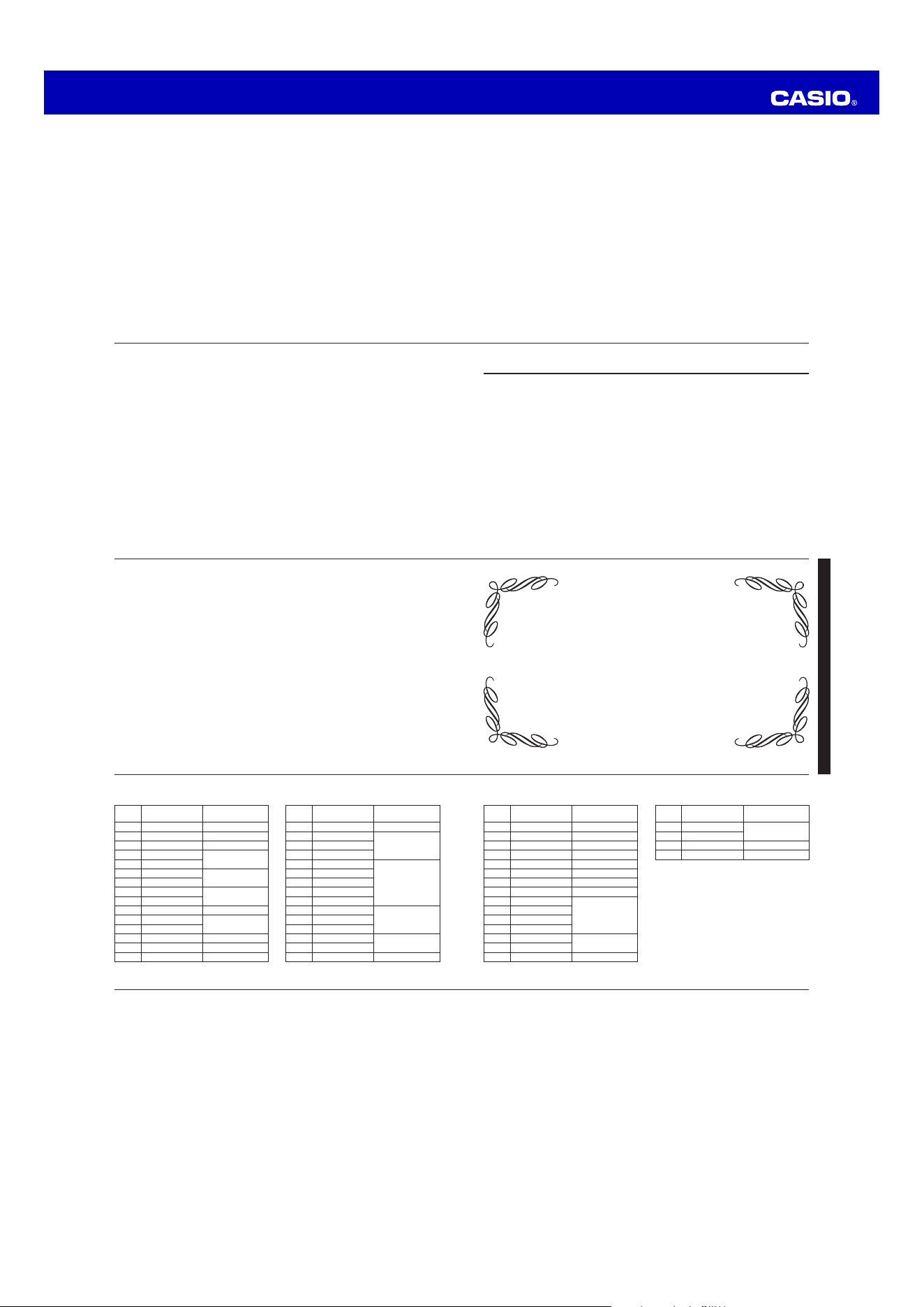
To turn the button operation tone on and off
In any mode (except when a setting screen is on the display), hold down C to toggle
the button operation tone on (the mute indicator not displayed) and off (the mute
indicator displayed).
x Holding down C to turn the button operation tone on or off also causes the
watch’s current mode to change.
x The mute indicator is displayed in all modes when the button operation tone is
turned off.
Auto Return Features
x If you leave the watch in the Alarm Mode for two or three minutes without
performing any operation, it automatically changes to the Timekeeping Mode.
x If you leave a screen with flashing digits on the display for two or three minutes
without performing any operation, the watch automatically exits the setting screen.
EN-38
Button Operation Tone
The button operation tone sounds any time you press one
of the watch’s buttons. You can turn the button operation
tone on or off as desired.
x Even if you turn off the button operation tone, the
alarms, the Hourly Time Signal, and the countdown
alarm all operate normally.
Mute indicator
EN-37
Reference
This section contains more detailed and technical information about watch operation.
It also contains important precautions and notes about the various features and
functions of this watch.
Map
In the Timekeeping and World Time modes, the map
shows the zone where the currently displayed digital time
is from. In the Alarm, Timer, and Stopwatch modes, it
shows the zone of the currently selected Home City Time
(T-1).
Map
EN-36
To measure times with the stopwatch
Elapsed Time
D
D D D A
Start Stop Re-start Stop Clear
Split Time
D
A A D A
Start Split
(SPL displayed)
Split release Stop Clear
Two Finishes
D
A D A A
Start Split
First runner
finishes. Display
time of first runner.
Stop
Second runner
finishes.
Split release
Display time of
second runner.
Clear
EN-35
Stopwatch
The stopwatch lets you measure elapsed time, split times,
and two finishes.
x The display range of the stopwatch is 23 hours,
59minutes, 59.99 seconds.
x The stopwatch continues to run, restarting from zero
after it reaches its limit, until you stop it.
x The stopwatch measurement operation continues even if
you exit the Stopwatch Mode.
x Exiting the Stopwatch Mode while a split time is frozen
on the display clears the split time and returns to elapsed
time measurement.
x All of the operations in this section are performed in
the Stopwatch Mode, which you enter by pressing C
(page EN-9).
Seconds
Minutes
Hours
1/100 second
EN-34
To use the countdown timer
Press D while in the Timer Mode to start the countdown
timer.
x When the end of the countdown is reached, the alarm
sounds for ten seconds or until you stop it by pressing
any button. The countdown time is reset to its starting
value automatically when the alarm sounds.
x Press D while a countdown operation is in progress to
pause it. Press D again to resume the countdown.
x To stop a countdown operation completely, first pause
it (by pressing D), and then press A. This returns the
countdown time to its starting value.
EN-33
To configure the countdown timer
1. While the countdown start time is on the display in the
Timer Mode, hold down A until the current countdown
start time starts to flash, which indicates the setting
screen.
2. Press C to move the flashing in the sequence shown
below to select other settings.
Hours
Minutes
C
C
Seconds
C
3. When the setting you want to change is flashing, use D (+) and B (–) to change
the flashing item.
x To specify a countdown start time of 24 hours, set 0:00 00.
4. Press A to exit the setting screen.
EN-32
Timer
The countdown timer can be set within a range of
one second to 24 hours. An alarm sounds when the
countdown reaches zero.
x All of the operations in this section are performed in
the Timer Mode, which you enter by pressing C (page
EN-9).
1/10 second
Seconds
Minutes
Hours
EN-31
To turn the Hourly Time Signal on and off
1. In the Alarm Mode, use D to select the Hourly Time
Signal.
2. Press A to toggle it on and off.
x The Hourly Time Signal on indicator is shown on the
display in all modes while this function is turned on.
Hourly time signal
on indicator
EN-30
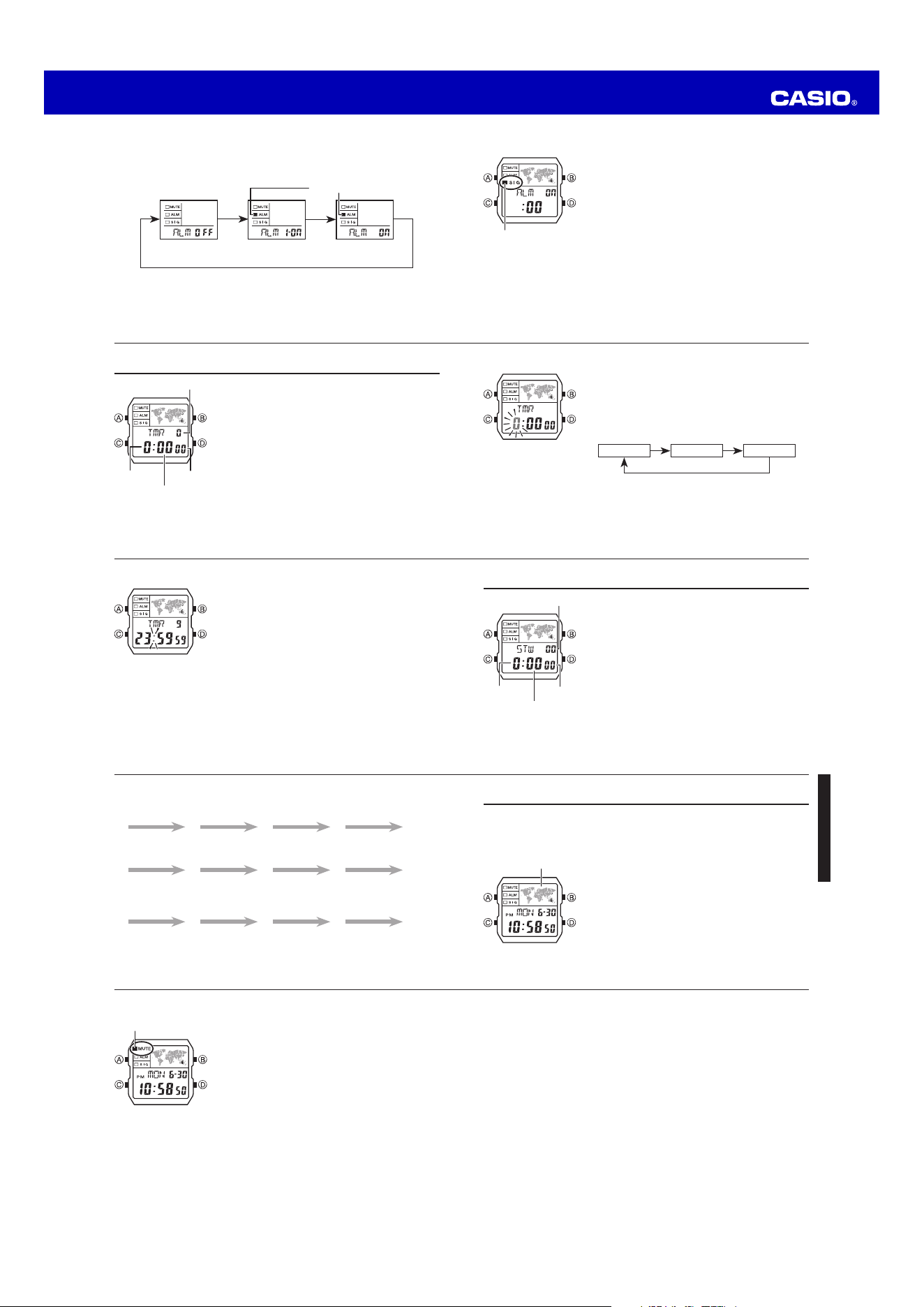
To turn an alarm on and off
1. In the Alarm Mode, use D to select an alarm.
2. Press A to cycle through the alarm settings as shown below.
A
Alarm Off One-Time Alarm
On
Daily Alarm On
x In all modes, the alarm on indicator is shown for the alarm that is currently turned
on.
x The alarm on indicator flashes while the alarm is sounding.
A
Alarm on indicator
A
Operation Guide 3572
L-3
City
Code
City
UTC offset/
GMT Differential
DXB Dubai +4
KBL Kabul +4.5
KHI Karachi +5
DEL Delhi +5.5
KTM Kathmandu +5.75
DAC Dhaka +6
RGN Yangon +6.5
BKK Bangkok +7
SIN Singapore
+8
HKG Hong Kong
BJS Beijing
TPE Taipei
SEL Seoul
+9
TYO Tokyo
ADL Adelaide +9.5
City
Code
City
UTC offset/
GMT Differential
GUM Guam
+10
SYD Sydney
NOU
Noumea +11
WLG
Wellington +12
x Based on data as of July 2024.
x The rules governing global times
(UTC offset and GMT differential) and
summer time are determined by each
individual country.
L-2
City
Code
City
UTC offset/
GMT Differential
PPG Pago Pago –11
HNL Honolulu –10
ANC Anchorage –9
YVR Vancouver
–8
LAX Los Angeles
YEA Edmonton
–7
DEN Denver
MEX Mexico City
–6
CHI Chicago
NYC New York –5
SCL Santiago
–4
YHZ Halifax
YYT St. Johns –3.5
RIO Rio De Janeiro –3
FEN
Fernando de Noronha
–2
City
Code
City
UTC offset/
GMT Differential
RAI Praia –1
UTC
0LIS Lisbon
LON London
MAD Madrid
+1
PAR Paris
ROM Rome
BER Berlin
STO
Stockholm
ATH
Athens
+2
CAI Cairo
JRS Jerusalem
MOW Moscow
+3
JED Jeddah
THR Tehran +3.5
City Code Table
L-1
City Code Table
EN-44
Stopwatch:
Measuring unit: 1/100 second
Measuring capacity: 23:59'59.99"
Measuring modes: Elapsed time, split time, two finishes
Illumination: LED (light-emitting diode); Selectable illumination duration
Other: Button operation tone on/off; Auto Display function
Battery: One lithium battery (Type: CR1616)
Battery nominal voltage: 3V
Approximately 3 years on type CR1616; 10 seconds of alarm operation,
1.5seconds of illumination per day
Specifications are subject to change without notice.
EN-43
Specifications
Accuracy at normal temperature: ±30 seconds per month
Timekeeping: Hour, minute, second, p.m. (PM), month, day, day of the week
Time format: 12-hour and 24-hour
Calendar system: Full Auto-calendar pre-programmed from the year 2000 to 2099
Other: Multi Time (one Home City Time and three Local Times); Daylight Saving
Time (summer time)/Standard Time
World Time: 48 cities (31 time zones) and Coordinated Universal Time
Other: Standard Time/Daylight Saving Time (summer time); Home Time City/
World Time City swapping
Alarm: 5 alarms (One-time or Daily), Hourly Time Signal
Timer:
Measuring unit: 1/10 second
Input range: 1 second to 24 hours (1-second increments, 1-minute increments and
1-hour increments)
EN-42
Auto Display
Auto Display continually changes the contents of the digital display.
To turn off Auto Display
Press any button to turn off Auto Display. This returns to the Timekeeping Mode.
To turn on Auto Display
In the Timekeeping Mode (page EN-8), hold down D for at least three seconds until
the watch beeps.
Note
x Auto Display cannot be performed while a setting screen is on the display.
EN-41
World Time
x The seconds count of the World Time is synchronized with the seconds count of
the Timekeeping Mode.
x All World Time Mode times are calculated from the current Home City Time in the
Timekeeping Mode using UTC time offset values.
x The UTC offset is a value that indicates the time difference between a reference
point in Greenwich, England and the time zone where a city is located.
x The letters “UTC” is the abbreviation for “Coordinated Universal Time”, which is the
world-wide scientific standard of timekeeping. It is based upon carefully maintained
atomic (cesium) clocks that keep time accurately to within microseconds. Leap
seconds are added or subtracted as necessary to keep UTC in sync with the
Earth’s rotation.
EN-40
Scrolling
The B and D buttons are used in various modes and setting screens to scroll
through data on the display. In most cases, holding down these buttons during a
scroll operation scrolls at high speed.
Initial Screens
When you enter the World Time or Alarm Mode, the data you were viewing when you
last exited the mode appears first.
Timekeeping
x Resetting the seconds to 00 while the current count is in the range of 30 to 59
causes the minutes to be increased by 1. In the range of 00 to 29, the seconds are
reset to 00 without changing the minutes.
x The year can be set in the range of 2000 to 2099.
x The watch’s built-in full automatic calendar makes allowances for different month
lengths and leap years. Once you set the date, there should be no reason to
change it except after you have the watch’s battery replaced.

