bluesound.com
QUICK SETUP GUIDE
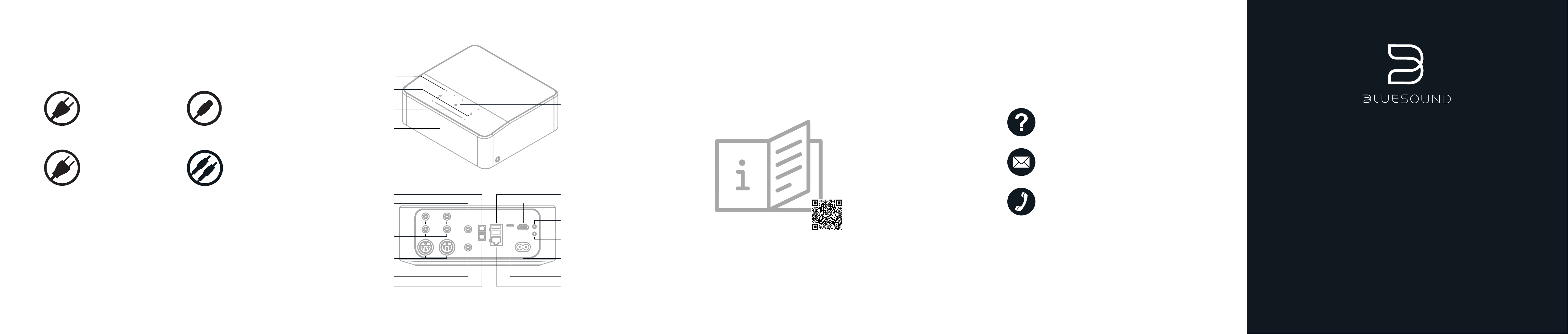
AC MAINS IN
TRIGGER OUT
IR IN
ANALOG OUT
ANALOG IN
HDMI EARC
BALANCED
XLR OUT
USB A IN/OUT
USB C IN
COAX OUT
SUBWOOFER OUT
LAN
OPTICAL OUT
OPTICAL IN
ACCESSORIES
120V AC Power Cord
230V AC Power Cord
BESOIN D'AIDE ? CONTACTEZ-NOUS / ¿NECESITAS AYUDA? Ponte en contacto con nosotros. / BRAUCHEN SIE HILFE? KONTAKTIEREN SIE UNS. /
SERVE AIUTO? CONTATTACI / HULP NODIG? NEEM CONTACT OP / NECESSITA DE AJUDA? ENTRE EM CONTACTO / НУЖНА ПОМОЩЬ?
СВЯЖИТЕСЬ С НАМИ
Adresse e-mail et numéros de téléphone de l’assistance / Correo electrónico y números de teléfono del equipo de asistencia / E-Mail-Adresse und
Telefonnummern des Supports / Numeri di telefono ed e-mail dell'assistenza / Ondersteuning e-mail en telefoonnummers / Email de suporte e números de
telefone / E-mail и телефоны поддержки
NEED HELP?
GET IN TOUCH
support.bluesound.com
support@bluesound.com
North America: 1 855 531 4666
EU: 00 800 53 14 66 66
Scannez le QR code pour accéder au manuel de l’utilisateur en ligne. Accédez instantanément à des instructions détaillées, à des conseils de dépannage et à
des informations supplémentaires sur votre lecteur. / Escanea el código QR para acceder al manual de usuario en línea. Obtén acceso instantáneo a
instrucciones detalladas, consejos para resolver los problemas e información adicional sobre tu reproductor. / Scannen Sie den QR-Code, um online auf das
Benutzerhandbuch zuzugreifen. Erhalten Sie sofortigen Zugriff auf detaillierte Anleitungen, Tipps zur Fehlerbehebung und zusätzliche Informationen über
Ihren Player. / Scansiona il codice QR per accedere al manuale d'uso online. Ottieni accesso immediato a istruzioni dettagliate, suggerimenti per la
risoluzione dei problemi e informazioni aggiuntive sul tuo lettore. / Scan de QR-code om naar de online gebruikershandleiding te gaan. Krijg direct toegang tot
gedetailleerde instructies, tips voor het oplossen van problemen en aanvullende informatie over je speler. / Digitalize o código QR para aceder ao manual de
utilizador online Obtenha acesso instantâneo às instruções detalhadas, dicas de resolução de problemas e informações adicionais sobre o seu Leitor. /
Отсканируйте QR-код, чтобы открыть руководство пользователя в сети. Получите моментальный доступ к подробным инструкциям, советам по
устранению неполадок и дополнительной информации о вашем проигрывателе.
Scan the QR code to access the user manual online. Gain
instant access to detailed instructions, troubleshooting tips,
and additional information about your Player.
PRESETS 1-5
PREV/NEXT
TRACK
VOLUME
SLIDER /TAP
DISPLAY
HEADPHONE
JACK
PL AY/ PAUSE
STATUS
INDICATOR
NODE ICON
Stereo RCA to RCA Cable
Ethernet Cable
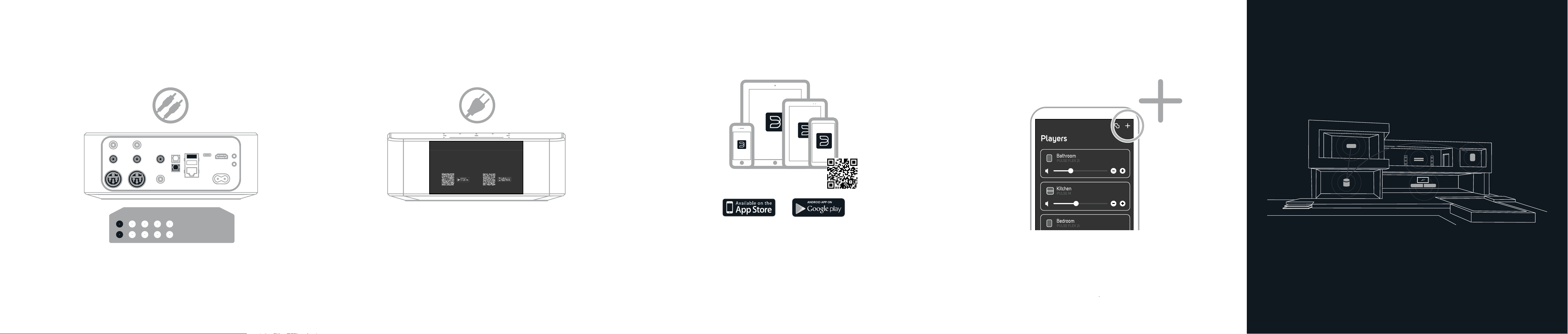
2
POWER ON
Plug the Player into mains power and look
for setup information on the display
3
LAUNCH THE BluOS APP
Open the BluOS app on your device
bluesound.com/downloads
4
ADD TO THE NETWORK
Follow the "Add A Player” wizard in the BluOS app to
complete the setup or navigate to the Players page and
press the "+" icon.
1
CONNECT FOR SOUND
Connect the Player to your audio system using one of the following
options: Balanced XLR, Analog RCA, Optical, Coaxial or USB
© Bluesound International. Bluesound, the stylized wordmark “B” logotype, the phrase “HiFi for a wireless generation”, NODE ICON and all other
Bluesound product names and taglines are trademarks or registered trademarks of Bluesound International, a division of Lenbrook Industries
Limited. All other logos and services are trademarks or service marks of their respective owners.
Connectez le lecteur à votre système audio en utilisant l’une des options suivantes : XLR équilibrée, Analogique RCA, Optique, Coaxiale ou USB / Conecte el
reproductor a su sistema de audio mediante una de las siguientes opciones: XLR balanceadas, RCA analógica, óptica, coaxial o USB / Verbinden Sie den
Player über eine der folgenden Optionen mit Ihrem Audiosystem: Symmetrisches XLR, analoges RCA, optisch, koaxial oder USB / Collega il lettore al tuo
sistema audio utilizzando una delle seguenti opzioni: XLR bilanciato, RCA analogico, ottico, coassiale o USB / Sluit de speler op uw audiosysteem aan met
een van de volgende opties: gebalanceerde XLR-kabel, analoge RCA-kabel, optische kabel, coax-kabel of USB-kabel / Ligue o Aparelho ao seu sistema
áudio através de uma das seguintes opções: XLR Balanceado, Analógico RCA, Ótico, Coaxial ou USB / Подключите проигрыватель к своей
аудиосистеме одним из следующих способов: балансный кабель XLR, аналоговый RCA, оптический кабель, коаксиальный кабель или USB
ALLUMER / ENCENDIDO / EINSCHALTEN / ACCENSIONE / INSCHAKELEN / LIGAR / ВКЛЮЧИТЬ
Branchez le lecteur sur le secteur et cherchez les informations de configuration sur l’affichage / Enchufe el reproductor a la red eléctrica y busque la
información de configuración en la pantalla / Schließen Sie den Player an das Stromnetz an und achten Sie auf die Setup-Informationen auf dem Display /
Collega il lettore alla rete elettrica e cerca le informazioni di configurazione sul display / Sluit de speler op netvoeding aan en zoek de configuratie-informatie
op het scherm / Ligue o Aparelho à corrente e siga as informações de configuração no visor / Подсоедините проигрыватель к электросети и
просмотрите сведения о настройке на экране
LANCEMENT DE L’APPLICATION BluOS / ABRIR LA APLICACIÓN BluOS / STARTEN SIE DIE BluOS-APP / LANCIO DELL'APP BluOS / BluOS-APP
STARTEN / INICIE A APLICAÇÃO BluOS / ЗАПУСТИТЕ ПРИЛОЖЕНИЕ BluOS
Ouvrez l’application BluOS sur votre appareil / Abre la aplicación BluOS en el dispositivo / Öffnen Sie die BluOS-App auf Ihrem Gerät / Apri l'app BluOS sul
tuo dispositivo / Open de BluOS-app op je apparaat / Abra a aplicação BluOS no seu dispositivo / Откройте приложение BluOS на своем устройстве
AJOUT AU RÉSEAU / AÑADIR A LA RED / HINZUFÜGEN ZUM NETZWERK / AGGIUNTA ALLA RETE / TOEVOEGEN AAN NETWERK / ADICIONE À REDE
/ ДОБАВЬТЕ ПРОИГРЫВАТЕЛЬ В СЕТЬ
Suivez l’assistant « Ajouter un lecteur » dans l’application BluOS pour terminer la configuration ou accédez à la page des lecteurs et appuyez sur l’icône « + »
/ Sigue los pasos del asistente “Añadir un reproductor” de la aplicación BluOS para completar la configuración o dirígete a la página Reproductores y pulsa el
icono “+” / Folgen Sie dem Assistenten „Player hinzufügen“ in der BluOS-App, um die Einrichtung abzuschließen, oder navigieren Sie zur Player-Seite und
drücken Sie das „+“-Symbol / Segui la procedura guidata "Aggiungi un lettore" nell'app BluOS per completare la configurazione oppure vai alla pagina dei
lettori e premi l'icona "+" / Volg de wizard ‘Add A Player’ (Een speler toevoegen) in de BluOS-app om de installatie te voltooien of ga naar de spelerspagina en
druk op het ‘+’-pictogram / Siga as instruções do assistente "Adicione um Leitor" na aplicação BluOS para concluir a configuração ou navegue até à página
Leitores e pressione o ícone "+" / Для завершения настройки используйте мастер «Добавить проигрыватель» в приложении BluOS либо перейдите
на страницу «Проигрыватели» и нажмите значок «+»
HI-RES EVERYWHERE
Download the BluOS Controller App to stup
your Player.
NODE ICON