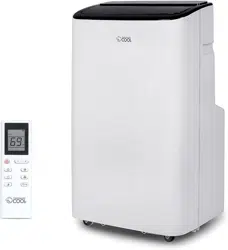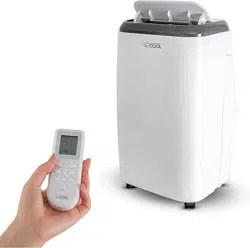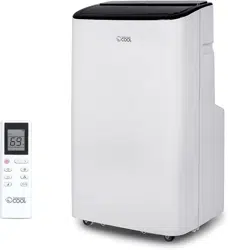
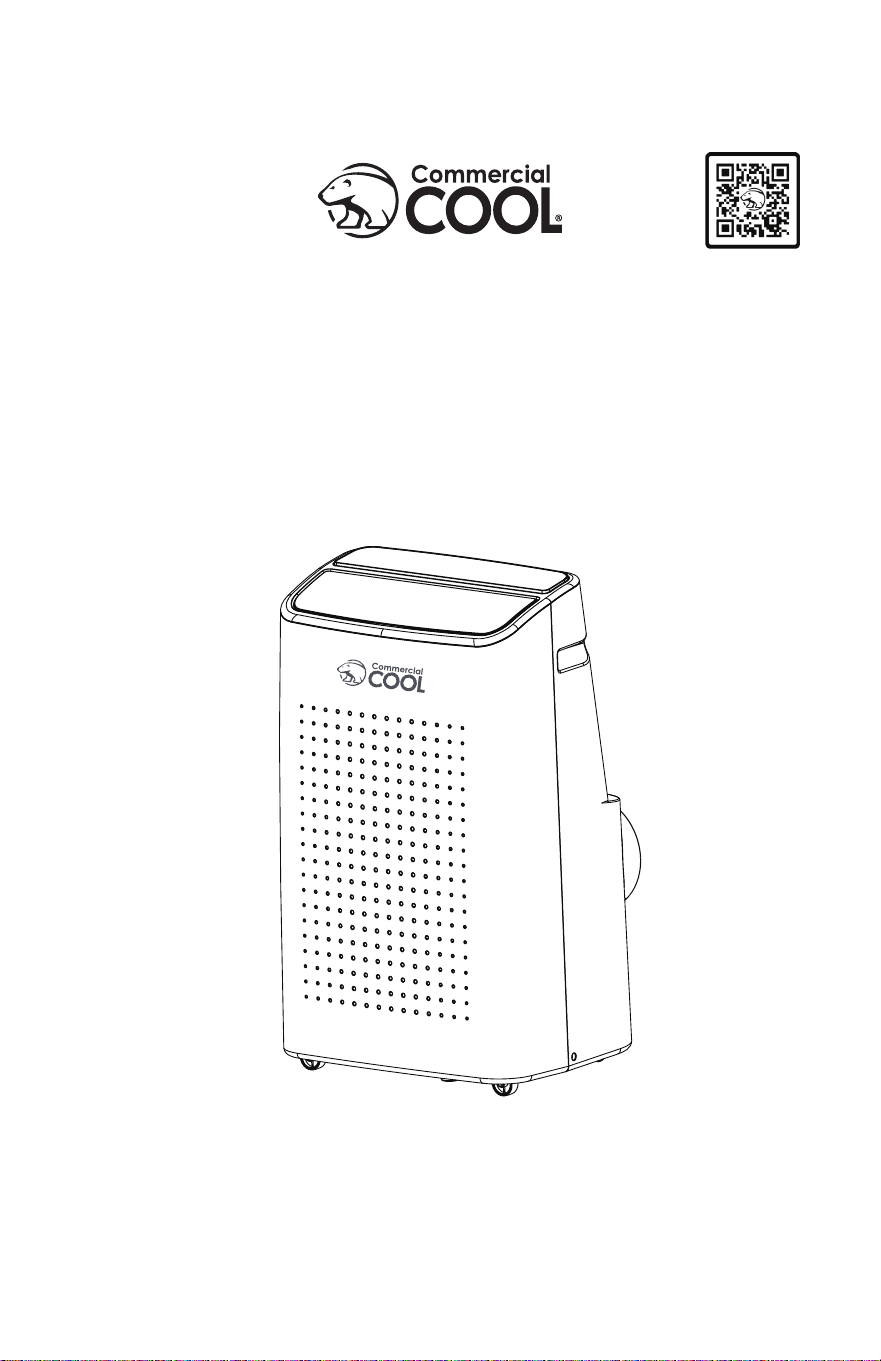
Portable Air Conditioner
Climatiseur Portable
Aire acondicionado portátil
CCP6JB, CCP6JP, CCP6JW
CCP8JW, CCP8HJW
CCP10JW, CCP10HJW

ENGLISH
Page 2
Thank you for purchasing our
COMMERCIAL COOL product. This
easy-to-use manual will guide you
in getting the best use of your air
conditioner.
Remember to record the model
and serial numbers. They are on a
label on the rear.
Staple your receipt to your manual.
You will need it to obtain warranty service.
Model number
Serial number
Date of purchase
PRODUCT REGISTRATION
CONTENTS
SAFETY INFORMATION
Important Safety Instructions ..........................................................................................................................................3-4
Grounding Instructions ......................................................................................................................................................... 5
LCDI Power Cord and Plug ................................................................................................................................................ 6
Safety Guidelines ................................................................................................................................................7-8
SET UP & USE
Parts & Features .......................................................................................................................................................................9
Specications ......................................................................................................................................................... 10
Installation Guide .................................................................................................................................................. 10
Window Slider Kit Installation ............................................................................................................................11
Exhaust Hose Installation ....................................................................................................................................12
Control Panel ...........................................................................................................................................................13
Operating from the Control Panel ............................................................................................................. 13-15
Operating from the Remote Control .......................................................................................................16-20
JHS Smart(WiFi) Guide ................................................................................................................................ 21-25
Water Drainage .....................................................................................................................................................26
CLEANING & CARE .............................................................................................................................................27
TROUBLE SHOOTING & WARRANTY
Before You Call For Service .............................................................................................................................. 28
Customer Service .................................................................................................................................................. 28
Troubleshooting ....................................................................................................................................................29
Limited Warranty ..................................................................................................................................................................30
ENGLISH
ENGLISH
Page 3
SAFETY INFORMATION
IMPORTANT SAFETY INSTRUCTIONS
1. To reduce risk of injury, read this guide before using the appliance.
2. Air conditioner must be connected to proper electrical outlet with
the correct electrical outlet with the correct electrical supply.
3. Proper grounding must be ensured to reduce the risk of shock and
re. DO NOT CUT OR REMOVE THE GROUNDING PRONG. If you do
not have a three-prong electric receptacle outlet in the wall, have a
certied electrician install the proper receptacle. The wall receptacle
MUST be properly grounded.
4. Do not operate air conditioner if power cord is frayed or otherwise
damaged. Avoid using it if there are any cracks or abrasion damage
along the length, plug connector or if the unit malfunctions or is
damaged in any manner. Contact an authorized service technician
for examination, repairs or adjustments. A damaged cord must be
replaced with one by the unit manufacturer and not repaired.
5. DO NOT USE AN ADAPTER OR AN EXTENSION CORD.
6. Do not block airow around the air conditioner. The exhaust hose
should be free of any obstructions.
7. Always unplug the air conditioner before servicing it or moving it.
8. Do not install or use the air conditioner in any area where the
atmosphere contains combustible gases or where the atmosphere is
oily or sulphurous. Avoid any chemical coming in contact with your
air conditioner.
9. Do not place any object on the top of the unit.
10. Never operate the air conditioner without lters in place.
11. Do not use the air conditioner near a bathtub, shower or wash basin.
12. This appliance is not intended for use by persons (including children)
with reduced physical sensory or mental capabilities or lack of
experience & knowledge, unless they have been given supervision or
instruction concerning use of the appliance by a person responsible
for their safety.
13. Children should be supervised to ensure that they do not play with
the appliance.
14. If the SUPPLY CORD is damaged, it must
be replaced by the manufacturer, a service
agent or similarly qualied persons in order
to avoid a hazard.
15. The air conditioner shall be installed in
accordance with national wiring regulations.
WARNING
WARNING - Hazards or unsafe
practices which COULD result in
severe personal injury or death
DANGER
DANGER - Immediate hazards
which WILL result in severe
personal injury or death
CAUTION
CAUTION - Hazards or unsafe
practices which COULD result in
minor personal injury
WARNING
When using electrical appliances, basic safety precautions
should be followed, including the following
ENGLISH
Page 4
ENGLISH
HANDLING ALKALINE BATTERIES
1. Should uid from the battery accidentally get into your eyes, there is a threat
of loss of eyesight, do not rub them. Immediately rinse your eyes with clean tap
water and then consult a physician immediately.
2. Do not put the battery in a re, expose it to heat, dismantle or modify it. If the
insulation or safety valve is damaged, the battery may leak uid, overheat or
explode.
3. Do not insert the battery with the poles reversed. Doing so may cause some
abnormality or a short and the battery may leak uid, overheat or explode.
4. Keep the battery out of the reach of children. If the battery is swallowed, contact
a physician immediately.
5. If the alkali uid gets in your mouth, rinse your mouth with water and contact a
physician immediately.
6. If the alkali uid gets on your skin or clothes, it may burn your skin, thoroughly
rinse the affected area with tap water.
7. Do not mix new and old batteries or other makes of batteries. The different
attributes may cause the battery to leak uid, overheat or explode.
8. This battery was not made to be recharged. Recharging this battery may damage
the insulation or internal structure and may cause the battery to leak uid,
overheat or explode.
9. Do not damage or remove the label on the exterior of the battery. Doing so may
cause the battery to short, leak uid, overheat or explode.
10. Do not drop, throw or expose the battery to extreme impact. Doing so may cause
the battery to leak uid, overheat or explode.
11. Do not alter the shape of the battery. If the insulation or safety valve is damaged,
the battery may leak uid, overheat or explode.
12. Immediately remove batteries when they have lost all power. Leaving the
batteries in the unit for a long time may cause the batteries to leak uid, overheat
or explode due to gas that is generated by the batteries.
13. Remove the batteries from the unit when not using the unit for an extended
period of time. The batteries may leak uid, overheat or explode due to gas that is
generated by the batteries.
14. Do not apply solder directly to the batteries. The heat may cause the batteries to
leak uid, overheat or explode.
15. Do not get the batteries wet. Doing so may cause the batteries to overheat
16. Store batteries someplace out of direct sunlight where the temperature and
humidity are not high. Not doing so may cause the batteries to leak uid,
overheat or explode. Also, it may cause the life and performance of the batteries
to decline.
17. Follow the regulations of the local government when disposing of these batteries.
18. NEVER mix alkaline, standard (carbon-zinc), rechargeable (nickel-cadmium)
batteries with this product.
SAVE THESE INSTRUCTIONS
HOUSEHOLD USE ONLY
WARNING
When handling alkaline batteries, basic safety precautions
should be followed, including the following
SAFETY INFORMATION
ENGLISH
Page 5
ENGLISH
GROUNDING INSTRUCTIONS
ELECTRICAL REQUIREMENTS
In the event of malfunction or breakdown, grounding provides a path of
least resistance for electric current to reduce the risk of electric shock.
The appliance must be connected to a cord having an equipment-
grounding conductor and a grounding plug. The plug must be plugged
into an appropriate outlet that is properly installed and grounded in
accordance with all local codes and ordinances.
DANGER - Improper connection of the equipment grounding conductor
can result in a risk of electric shock. The conductor with insulation
having an outer surface that is green with or without yellow stripes is
the equipment grounding conductor. If repair or replacement of the
cord or plug is necessary, do not connect the equipment-grounding
conductor to a live terminal. Check with a qualied electrician or service
person if the grounding instructions are not completely understood, or
if in doubt as to whether the appliance is properly grounded. Do not
modify the plug connected to the appliance – if it will not t the outlet,
have a proper outlet installed by a qualied electrician.
FOR GROUNDED, CORD-CONNECTED APPLIANCE RATED LESS THAN
15A AND INTENDED FOR USE ON A NOMINAL 120V SUPPLY CIRCUIT
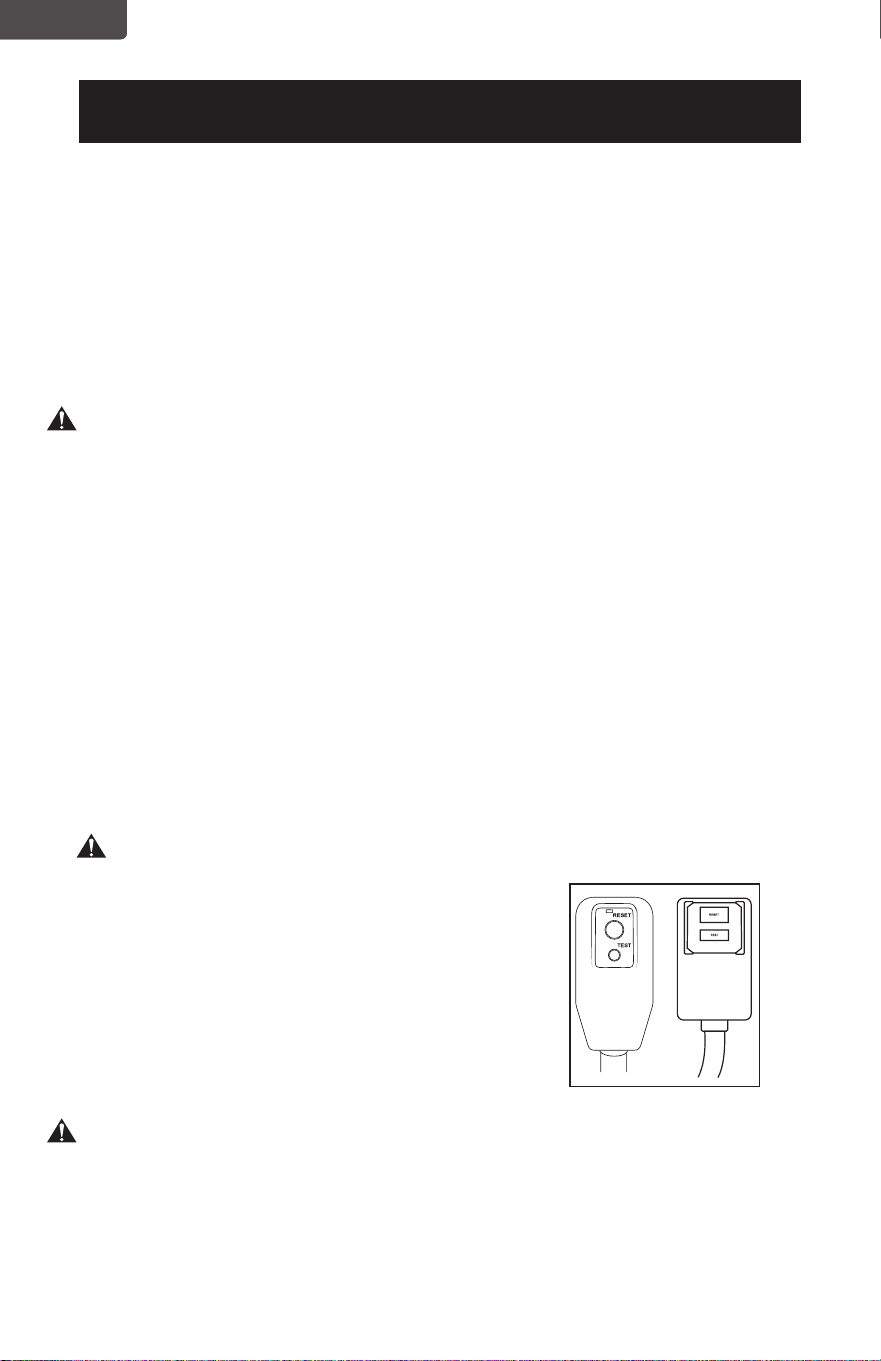
The appliance is for use on a nominal 120V circuit and should be
connected to a grounding outlet that looks like the one illustrated
below. The use of a temporary adaptor is not recommended.
SAFETY INFORMATION
ENGLISH
Page 6
ENGLISH
SAFETY INFORMATION
LCDI POWER CORD AND PLUG
This air conditioner is equipped with an LCDI (Leakage Current
Detection and Interruption) power cord that is required by UL. This
power supply cord contains state-of-the-art electronics that sense
leakage current. If the cord is damaged and leakage occurs, power will
be disconnected from the unit.
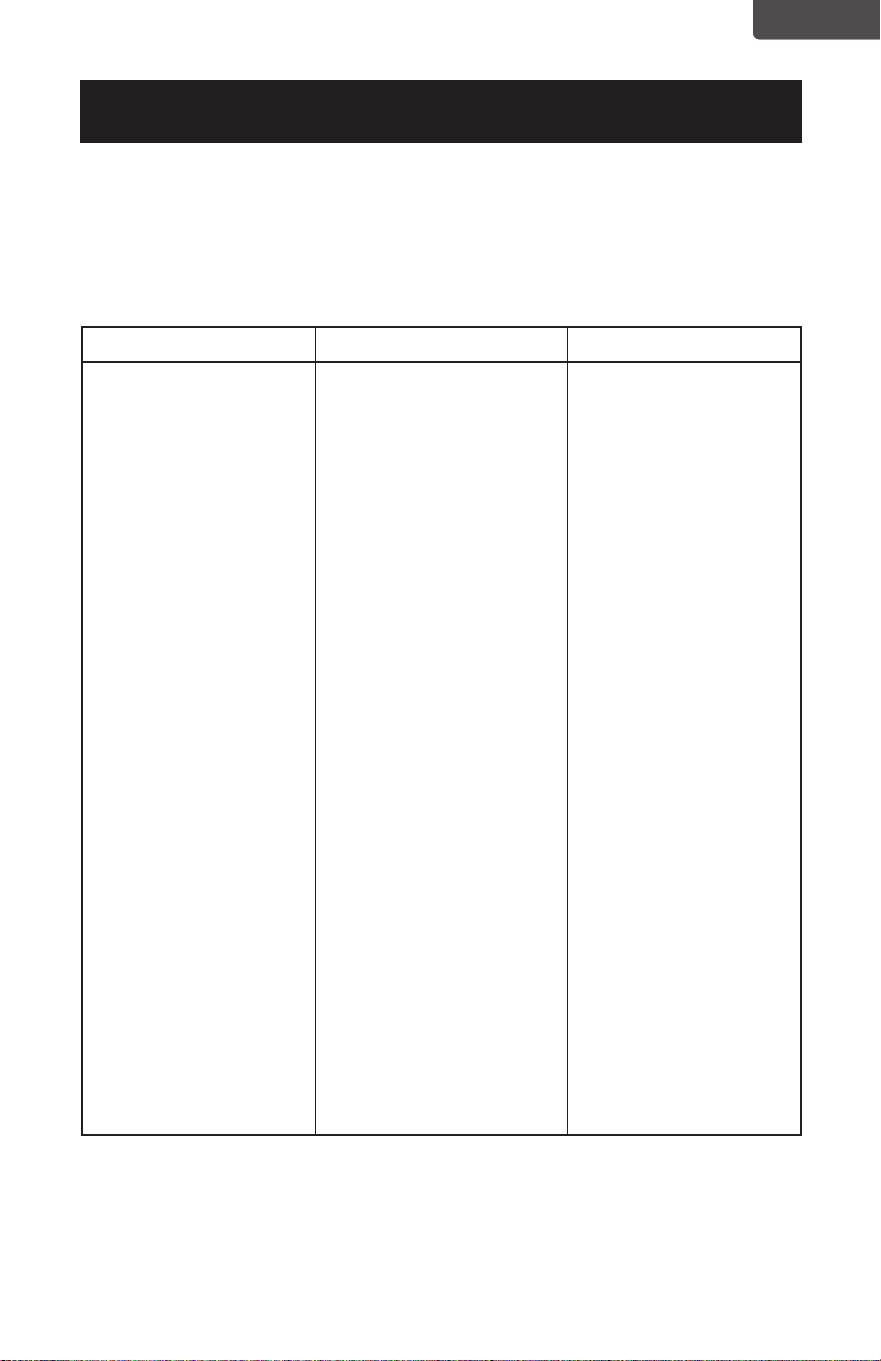
The test and reset buttons on the LCDI Plug are used to check if the
plug is functioning properly.
WARNING: Test LCDI before each use.
To test the plug:
1. Plug power cord into a grounded 3 prong outlet.
2. Press RESET (on some units a green light will turn on).
3. Press the TEST button, the circuit should trip and cut all power to the air
conditioner(on some units green light may turn off).
4. Press the RESET button for use. You will hear a click and the A/C is ready
for use.
5. The power supply cord must be replaced if it fails to trip when the TEST
button is pressed and the unit fails to reset.
NOTES:
• Do not use this device to turn the unit on or off.
• Always make sure the reset button is pushed in for correct operation
• WARNING:
• The power supply cord must be replaced if it
fails to reset when either the test button is
pushed, or it cannot be reset.
• If power supply cord is damaged, it cannot
be repaired.
• It must be replaced by one obtained from
the product manufacturer.
WARNING – RISK OF FIRE
It is important the plug ts tightly into the wall outlet.
If the plug does not t securely and appears loose, it should not be used.
Have a licensed electrician replace the receptacle.
ENGLISH
Page 7
ENGLISH
SAFETY INFORMATION
SAFETY GUIDELINES
To prevent injury to the user or other people and property damage, the following
instructions must be followed. Incorrect operation due to ignoring of instructions
may cause harm or damage.
ALWAYS DO THIS NEVER DO THIS ENERGY SAVE
• Your air conditioner
should be used in such a
way that it is protected
from moisture. e.g.
condensation, splashed
water, etc. Do not place or
store your air conditioner
where it can fall or be
pulled into water or any
other liquid. Unplug
immediately.
• Always transport your air
conditioner in a vertical
position and stand on a
stable, level surface during
use.
• Turn o the product when
not in use.
• Always use the switch on
the control panel to start or
shut off the unit.
• Always contact a qualied
person to carry out
repairs. If the supply cord
is damaged it must be
repaired by a qualied
technician.
• Keep an air path of at least
12 inches. all around the
unit from walls, furniture
and curtains.
• If the air conditioner is
knocked over during use,
turn off the unit and unplug
from the power supply
immediately.
• Do not operate your air
conditioner in a wet room
such as a bathroom or
laundry room.
• Do not touch the unit with
wet or damp hands or when
barefoot.
• Do not press the buttons
on the control panel with
anything other than your
ngers.
• Do not remove any xed
covers. Never use this
appliance if it is not working
properly, or if it has been
dropped or damaged.
• Never use the plug to start
and stop the unit.
• Do not cover or obstruct the
inlet or outlet grilles.
• Do not use hazardous
chemicals to clean or come
into contact with the unit.
Do not use the unit in the
presence of inammable
substances or vapour such as
alcohol, insecticides, gasoline,
etc.
• Do not allow children
to operate the unit
unsupervised.
• Do not use this product for
functions other than those
described in this instruction
manual.
• Use the unit in the
recommended room size.
6,000 BTU
up to 250 sq. ft.
8,000 BTU
up to 350 sq. ft.
10,000 BTU
up to 450 sq. ft.
• Locate the unit where
furniture cannot obstruct
the air ow.
• Keep blinds / curtains
drawn.
• Keep the lters clean.
• Keep doors and windows
closed to keep cool air in
and warm air out.
ENGLISH
ENGLISH
SAFETY INFORMATION
Page 8
OPERATING CONDITION
The air conditioner must be operated within the temperature range indicated below:
NOTE: · Unit performance may be affected when in use outside of these operating temperatures.
MODE ROOM TEMPERATURE
COOL 64˚F (18˚C) ~ 95˚F (35˚C)
DEHUMIDIFY 64˚F (18˚C) ~ 95˚F (35˚C)
HEAT (ELECTRICAL HEAT TYPE) 45˚F (7°C) ~ 81˚F (27˚C)
ENGLISH
ENGLISH
PARTS & FEATURES
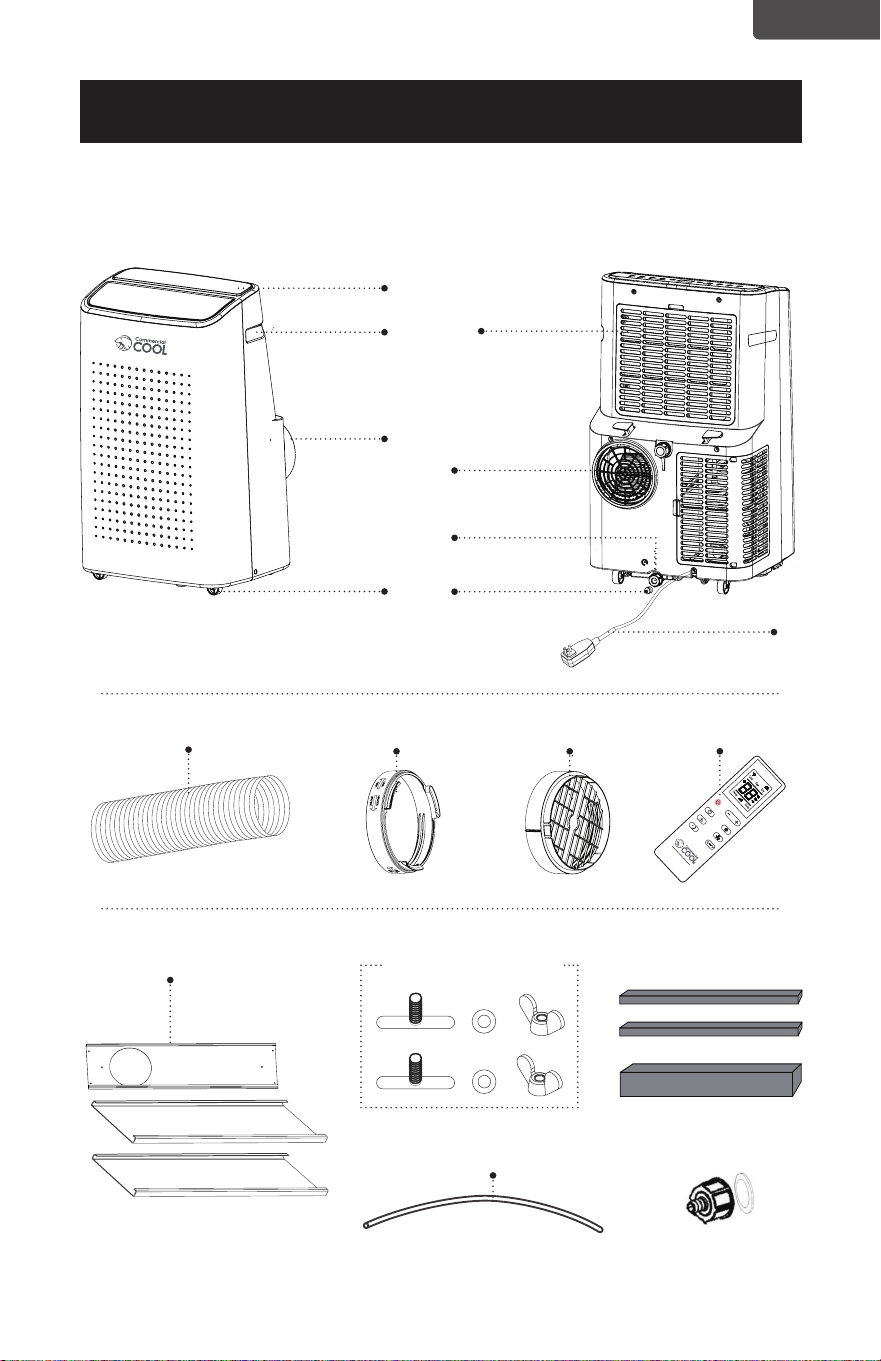
Air Exhaust Hose
Hose OutletHose Inlet
Remote Control
2x Wing Nut and Bolt
Foam Strip
Drain Hose
Drainage Joint
SET UP & USE
Window Panel 3PCS
Page 9
Handle
Control
Panel
Filter
Frme Upper
Exhaust
Connector
Rubber Plug
and Cap
Drainage
Hole
Air-outlet
Castor
Power Cord
ENGLISH

Page 10
ENGLISH
SPECIFICATIONS
CCP6JB / CCP6JP / CCP6JW
Unit dimensions (W x D x H): 16.7” x 14.7” x 28.9” Unit Weight approx. 61.8 lbs.
CCP8JW
Unit dimensions (W x D x H): 16.7” x 14.7” x 28.9” Unit Weight approx. 62.5 lbs.
CCP8HJW
Unit dimensions (W x D x H): 16.7” x 14.7” x 28.9” Unit Weight approx. 63.6 lbs.
CCP10JW
Unit dimensions (W x D x H): 18.7” x 15.5” x 31” Unit Weight approx. 71.3 lbs.
CCP10HJW
Unit dimensions (W x D x H): 18.7” x 15.5” x 31” Unit Weight approx. 72.1 lbs.
Electric Requirements: 115V ~ 60Hz
INSTALLATION GUIDE
LOCATION
• The air conditioner should be placed on a rm oor to minimize noise and
vibration. For safe and secure positioning, place the unit on a smooth, level
oor strong enough to support the unit.
• The unit has casters to aid placement, but it should be rolled on smooth, at
surfaces. Use caution when rolling on carpet surfaces. Do not attempt to roll
the unit over objects.
• The unit must be placed within reach of a properly rated grounded socket.
• Never place any obstacles around the air inlet or outlet of the unit.
• Allow 12 inches to 36 inches of space from the wall with window for efcient
air-conditioning.
SUGGESTED TOOLS FOR WINDOW KIT INSTALLATION
• Screwdrivers (medium size Phillips)
• Tape measure or ruler
• Knife or scissors
• Saw (In the event that the window kit needs to be cutdown in size because the
window is too narrow for direct installation)
SET UP & USE
ENGLISH
Page 11
ENGLISH
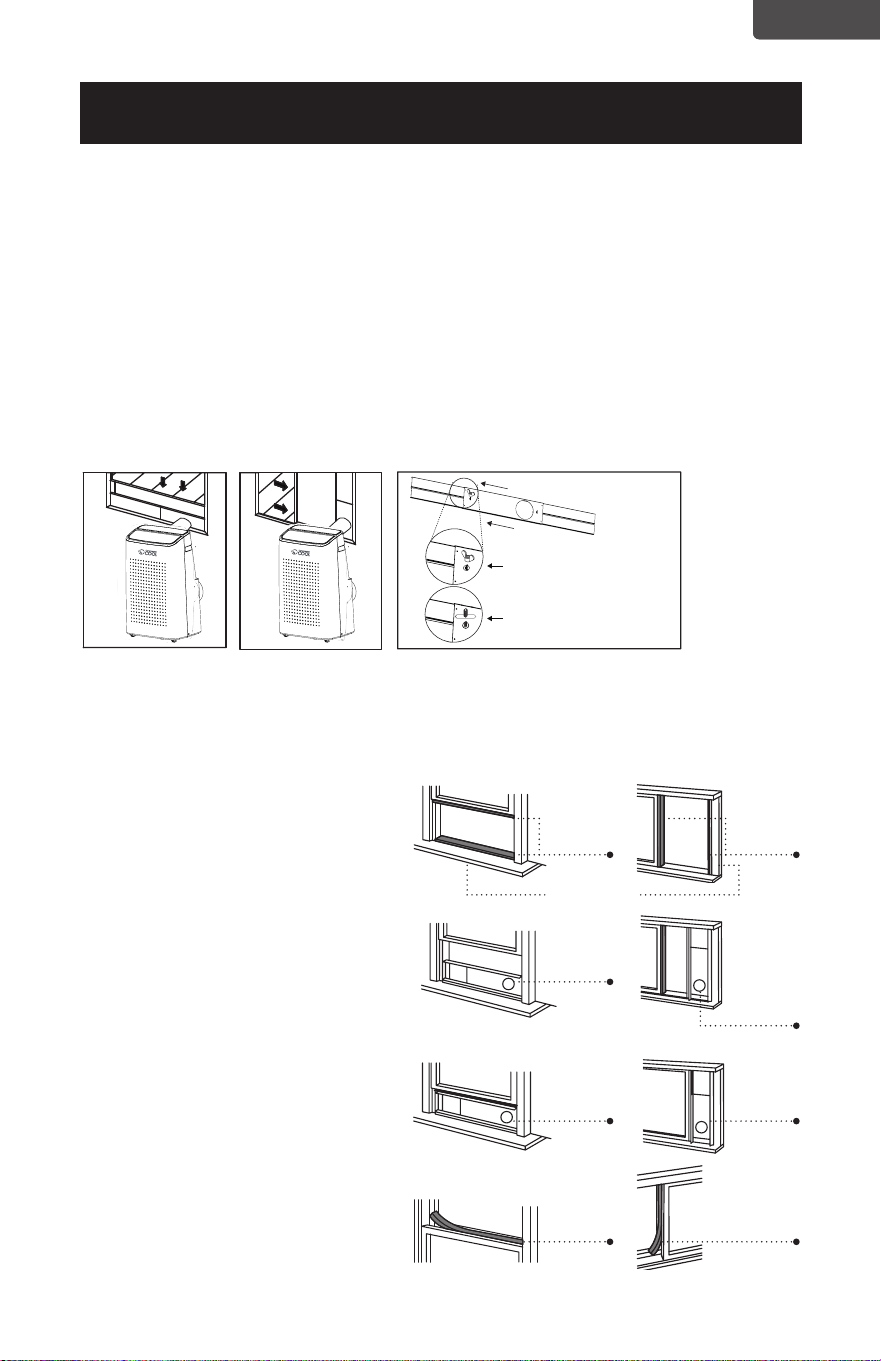
WINDOW SLIDER KIT INSTALLATION
Your window slider kit has been designed to t most standard “Vertical” and
“Horizontal” window applications; however, it may be necessary for you to
improvise/modify some aspect of the installation procedures for certain types of
window. Minimum and maximum window openings:
MAXIMUM : 59” (150 cm) MINIMUM : 29.5” (75 cm)
NOTE: · Adjust the length of the window slider kit according to the window width or height,
and secure it with the provided locking screws.
NOTE: · If the window opening is less than 29.5” the minimum length of the window slider kit,
cut the one with a hole in it short to t for the window opening. Never cut out the
hole in window slider kit.
DOUBLE-HUNG SASH/SLIDING CASEMENT
WINDOW INSTALLATION
1. Cut the foam seal (adhesive type) to the proper length and attach it to the
window sash.
2. Attach the window slider kit to the
window sash. Adjust the length of
the window slider kit according to
the width of window. Shorten the
adjustable window kit if the width
of window is less than 29.5”.
3. Cut the foam seal (adhesive type)
to the proper length and attach it
on the top of the window.
4. Close the window securely
against the window slider kit.
5. Secure the window slider kit
to the window sash.
6. Cut the foam seal to an
appropriate length and seal the
open gap between the top window
frame and outer window frame.
Horizontal Window
Vertical Window
Window Slider Kit
SET UP & USE
Foam
Seal
Foam
Seal
Foam
Seal
Window
Slider Kit
Window
Slider Kit
29.5”– 59”
Foam
Seal
Window
Slider Kit
Window
Slider Kit
29.5”– 59”
Window Sash
Window slider kit can be secured
by inserting the bolt.
Put the nut on opposite side of
the hole.
ENGLISH
Page 12
ENGLISH
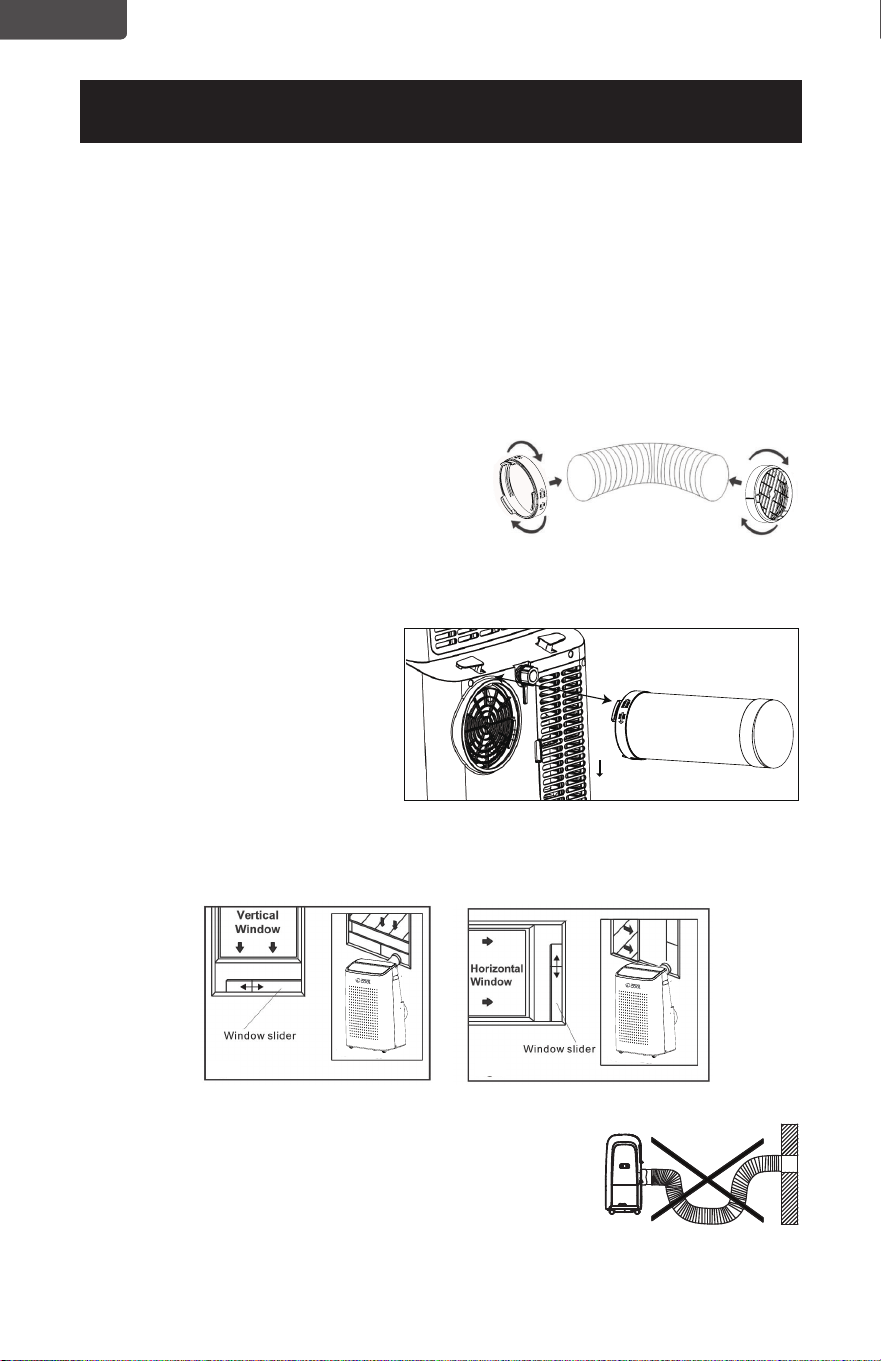
EXHAUST HOSE INSTALLATION
The air exhaust hose and hose inlet must be installed or removed from the portable
air conditioner in accordance with the way it is being used:
COOL, DEHUMIDIFY, HEAT (Heat models CCP8HJW and CCP10HJW only):
Air exhaust hose and hose inlet should be connected to the portable air
conditioner.
FAN: Air exhaust hose and hose inlet should be disconnected from the portable air
conditioner.
1. Connect hose inlet to one end of air
exhaust hose. Push hose inlet over the
end of the hose, push in slightly and then
start threading it on in a clockwise
direction. (see Fig. 1)
2. Connect hose outlet to other end of air exhaust hose. Push hose outlet over the
end of the hose, push in slightly and then start threading it on in a clockwise
direction. (see Fig. 2)
3. Align the tabs on the hose
inlet into the slots over the
air outlet, insert and push
down. (see Fig. 3)
4. Insert the hose outlet into
the window panel.
5. Afx the hose outlet into the
window slider kit and seal.
(Fig. 4 & 5)
.
NOTE: The exhaust hose can be compressed or extended
moderately, but it is desirable to keep the length to a
minimum. Also make sure that the hose does not
have any sharp bends.
Hook
SET UP & USE
Fig. 4 Fig. 5
Fig. 1 Fig. 2
Clockwise
Fig. 3
ENGLISH
Page 13
ENGLISH
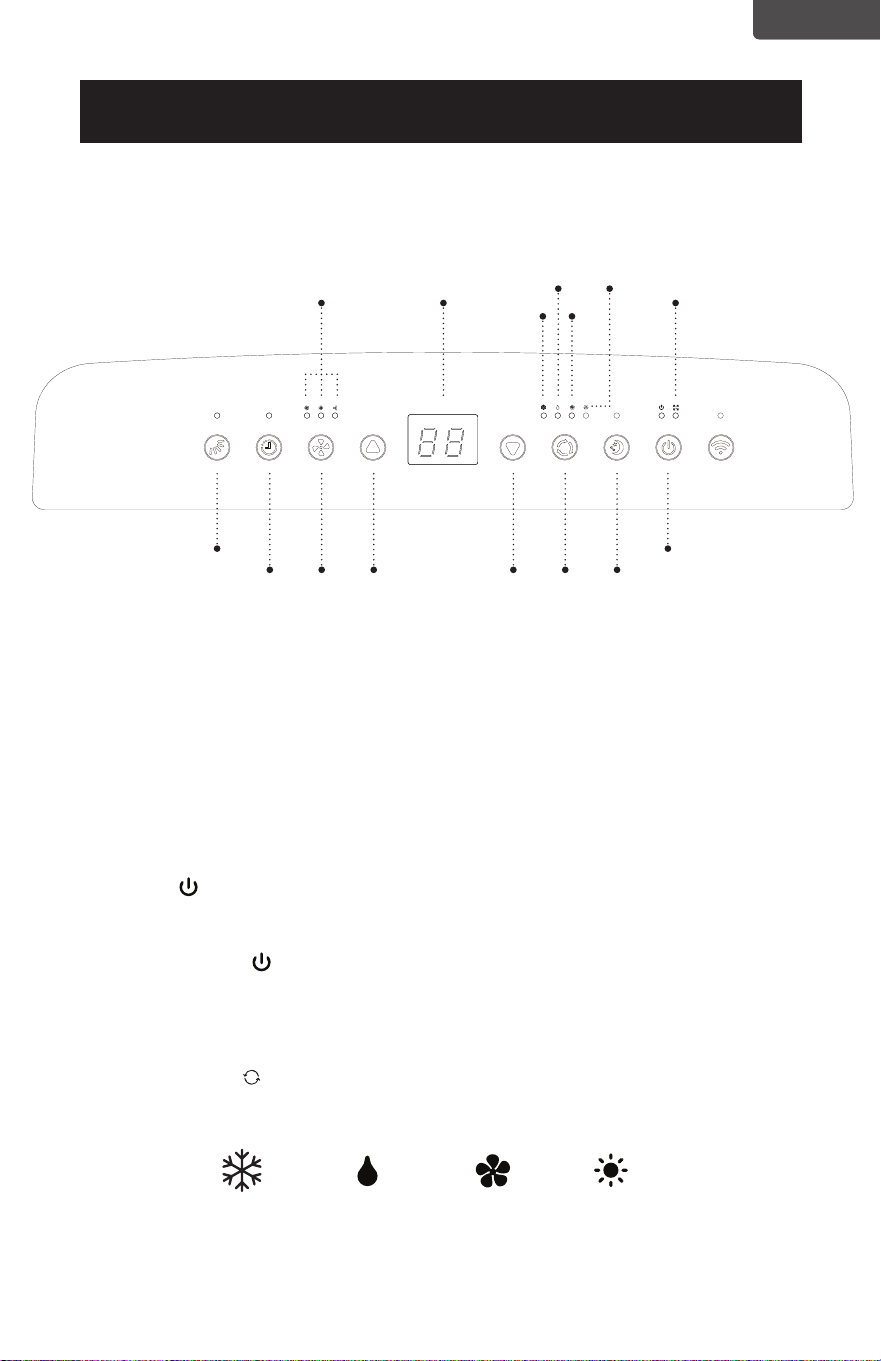
Pictures are for illustration purpose only. Your model may or may not have all the features.
CONTROL PANEL
OPERATING FROM THE CONTROL PANEL
The Control Panel enables you to manage all the main functions of the appliance,
but to fully exploit its potential, you must use the remote control.
TURNING THE APPLIANCE ON
• Plug into the dedicated electrical outlet.
• Press the
button until the appliance comes on. The last function active when
it was turned off will appear.
* Never turn the air conditioner off by unplugging from the outlet. Always press
the power button
, then wait for a few minutes before unplugging. This
allows the appliance to perform a cycle of checks to verify operation.
Note: Before pressing Power button make sure the condensate drain plug in the
rear of the unit is securely in place to avoid any leaking.
• Press the MODE button until the light corresponding to the required Mode
lights up.
SET UP & USE
Power ButtonSwing Button
Sleep
Button
Mode
Selection
Button
Fan Speed
Indicator Light
Display
Area
Full Tank
Indicator Light
Cool Fan
Dry Heat
Speed
Button
Timer
Button
Decrease
Button
Increase
Button
COOL FANDEHUMIDIFY HEAT
Heat models
CCP8HJW and
CCP10HJW only
ENGLISH
Page 14
ENGLISH
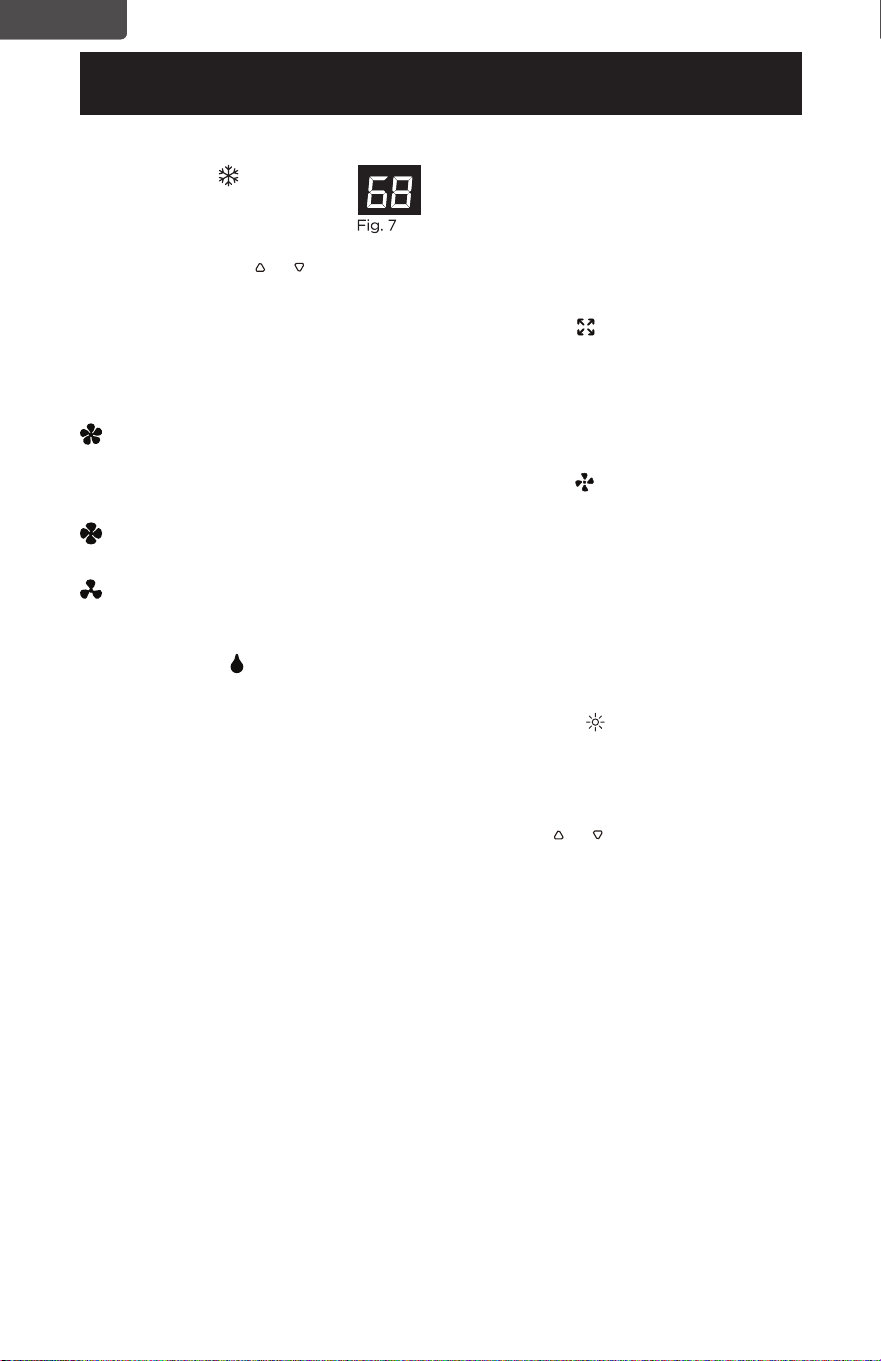
COOL MODE
Ideal for hot weather when
you need to cool the room.
To set operation of the appliance
correctly, press the or buttons until
the desired temperature is displayed.
(See Fig. 7)
Then select the fan speed by pressing
the Fan Speed Button until the light
corresponding to the required fan
speed lights up:
HIGH: The Fan operates at
maximum to reach the
required temperature as
rapidly as possible.
MED: Reduces Fan noise level but
still maintains cooling.
LOW: For quiet operation.
DEHUMIDIFY
Press the “MODE” button until the
“DEHUMIDIFY” indicator light comes
on.
• Under this mode, you cannot select a
fan speed or adjust the temperature.
The fan motor operates at LOW
speed.
• Keep window and door closed for
the best dehumidifying effect.
• Exhaust hose attachment is not
required to reduce humidity,
however it is recommended in very
humid rooms so the warm air can be
exhausted outside.
DRAINING IN
DEHUMIDIFICATION MODE
• It is recommended that the
dehumidication drain and drain
hose can be used for continuous
drainage.
• FULL TANK
- When the water
level reaches a predetermined level,
the “full tank” indicator light goes on.
The unit will have to be drained.
NOTE: Refer to Water Drainage
section.(page 26)
FAN MODE
• Press the “MODE” button until the
“FAN” indicator light comes on.
• Press the speed button to select
HIGH, MEDIUM or LOW fan speed.
The temperature cannot be adjusted.
• Exhaust hose attachment is not
required in this mode.
HEAT MODE (Heat models
CCP8HJW and CCP10HJW only)
Press the “MODE” button until the
“HEAT” indicator light comes on.
• Press the
or buttons to select
your desired room temperature.
The temperature can be set within a
range of 61°F-88°F.
• Press the speed button to select
HIGH, MEDIUM or LOW fan speed.
NOTE: At the beginning of this mode,
you may have to wait a few
seconds before the appliance
starts to give out hot air.
SET UP & USE
ENGLISH
Page 15
ENGLISH
Page 15
SET UP & USE
TIMER
• To set the AUTO STOP timer. When
the unit is ON, press the TIMER
button.
• Press the
or button to select the
AUTO TIME by 1 hour increments,
up to 24 hours. The LED Display will
indicate the remaining time. Press
the TIMER button again. The TIMER
indicator light illuminates to show
that the AUTO STOP program is
initiated.
• To set the AUTO START timer. When
the unit is OFF, press the TIMER
button.
• Press the
or button to select the
AUTO TIME by 1 hour increments,
up to 24 hours. The LED Display will
indicate the remaining time. Press
the TIMER button again. The TIMER
indicator light illuminates to show
that the AUTO START program is
initiated.
• Pressing the POWER button or the
TIMER button will cancel the AUTO
START/STOP timed program and
the timer indicator light will not be
illuminated
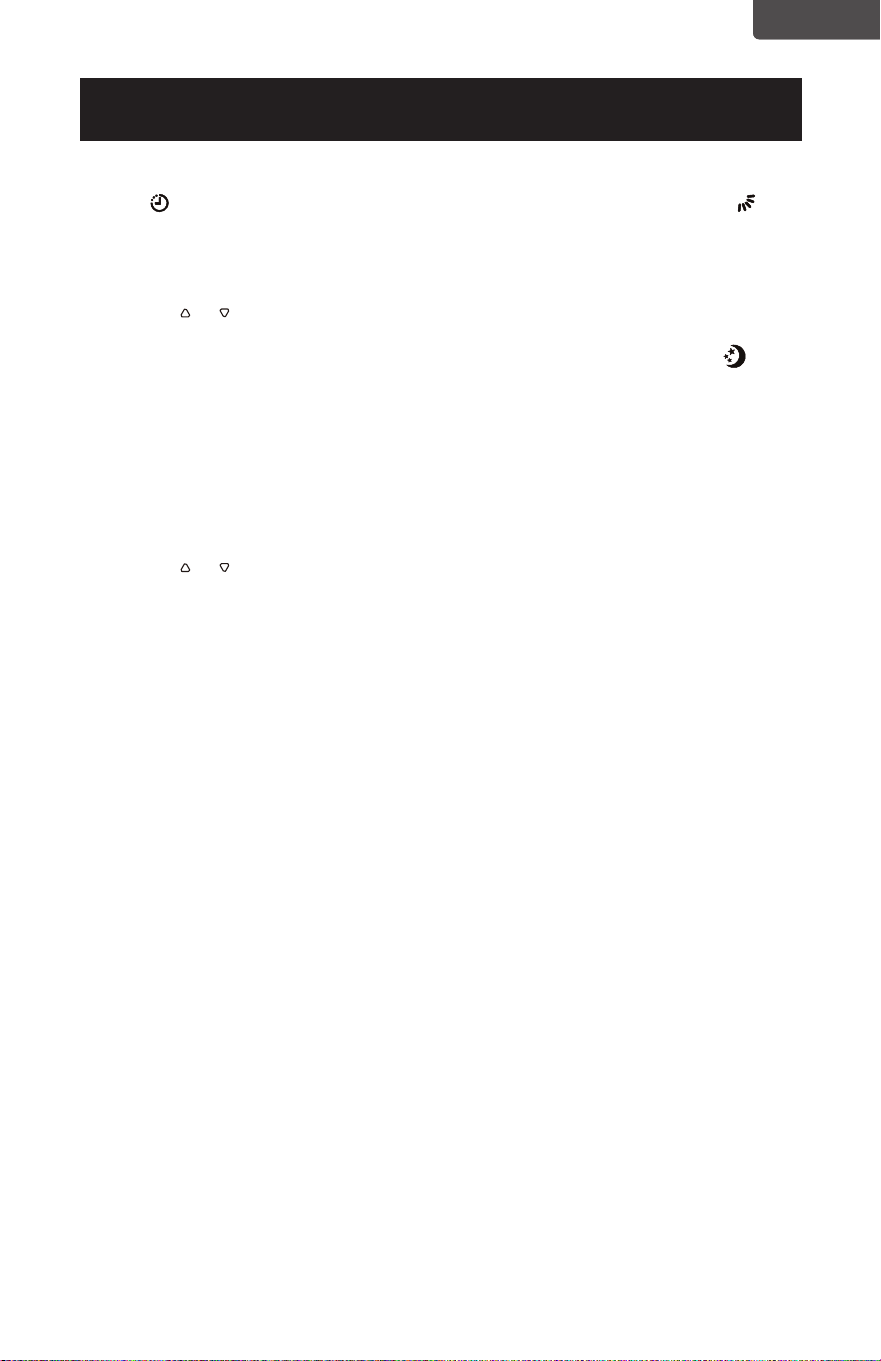
SWING INDICATOR LIGHT
When this light is illuminated, it
indicates that the air swing is activated
from the remote and the louvers will
move up and down.
SLEEP INDICATOR LIGHT
When this light is illuminated, it
indicates that SLEEP has been
activated from the remote control and
that the temperature will gradually
adjust.
ENGLISH
Page 16
ENGLISH
Page 16
SET UP & USE
OPERATING FROM THE REMOTE CONTROL
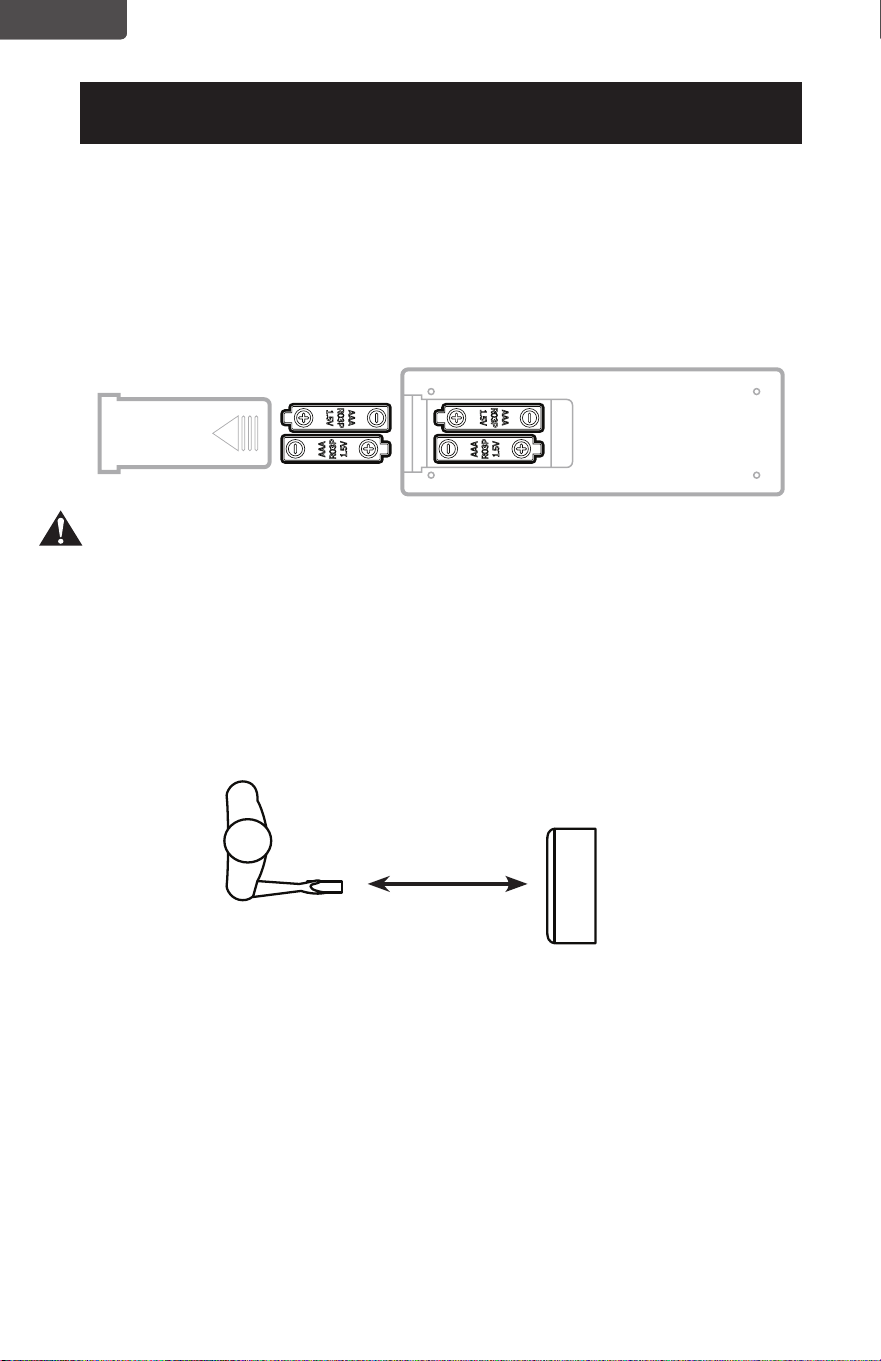
BATTERY INSTALLATION (BATTERIES NOT INCLUDED)
(1) Slide open the battery compartment cover.
(2) Insert 2 × “AAA”batteries as shown.
(3) Slide back the battery cover.
CAUTION: Use only AAA or IEC R03 1.5V alkaline batteries. Remove the batteries
if the remote is not used for a month or longer. Do not attempt to
recharge the batteries. Both batteries should be replaced at the same
time. Do not dispose of the batteries in a re as they man explode.
Point the remote control at the receiver on the appliance. The remote control
must be no more than 16 feet away from the appliance (without obstacle
between the remote control and the receiver).
The remote control must be handled with extreme care. Do not drop it or expose
it to direct sun light or sources of heat.
16 Feet
ENGLISH
Page 17
ENGLISH
SET UP & USE
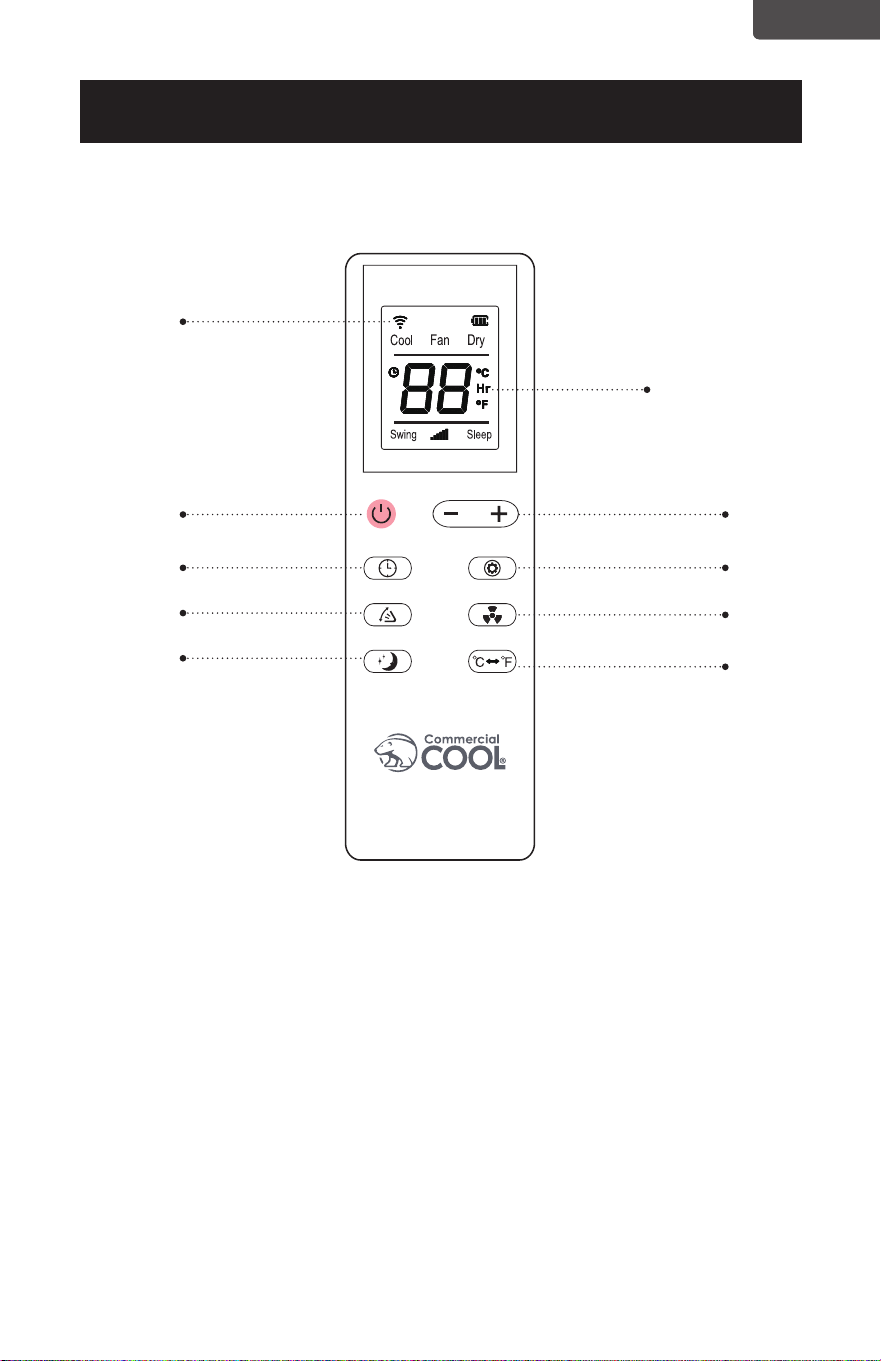
REMOTE CONTROL
POWER BUTTON: Press to Turn ON or OFF
TIMER BUTTON: Used to set a delay start or shut down time.
MODE BUTTON: Each time you press the button COOL, DEHUMIDIFY, FAN, HEAT
(models CCP8HJW and CCP10HJW is selected)
˚C / ˚F SELECTOR BUTTON: Select Fahrenheit or Celsius.
INCREASE: Increase the temperature setting.
DECREASE: Decrease the temperature setting.
SWING BUTTON: Activates the air swing of the louvers.
FAN SPEED BUTTON: Used to select the HIGH, MED or LOW Fan speed.
SLEEP BUTTON: Gradually adjusts the temperature.
Remote Signal
Time
Decrease / Increase
Button
Mode Button
Speed Button
°F /°C Selector
Button
ON / OFF
Timer Button
Swing Button
Sleep Button
ENGLISH
Heat
Page 18
ENGLISH
SET UP & USE
POWER BUTTON
• Press to Turn Air Conditioner ON or OFF. Press LED button to illuminate the
LED screen on the unit.
•
Will show on the remote LED screen when buttons are pressed to show that
the remote control is sending a signal to the air conditioner.
MODE BUTTON
• Press the mode button to scroll through COOL , DRY , FAN , HEAT
(Heat models CCP8HJW and CCP10HJW only)
• The corresponding symbol will illuminate on the LED display to indicate which
mode is selected.
COOL
• Select the target temperature 61˚F – 88˚F (16˚C – 31˚C) by pressing the
or buttons until the desired temperature is displayed on the LED screen.
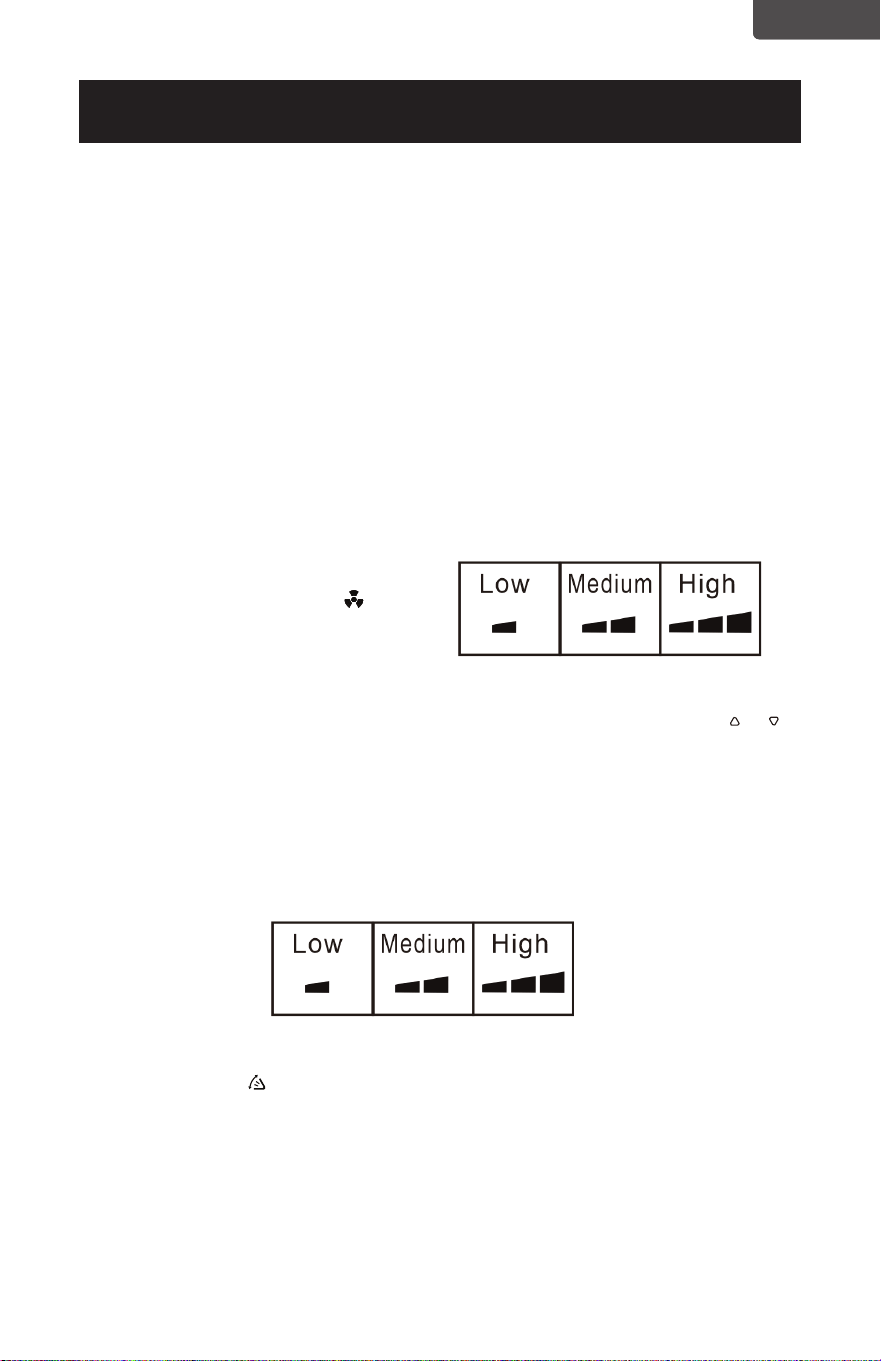
• Press the Fan Speed Button
to select Low, Medium, or High Speed.
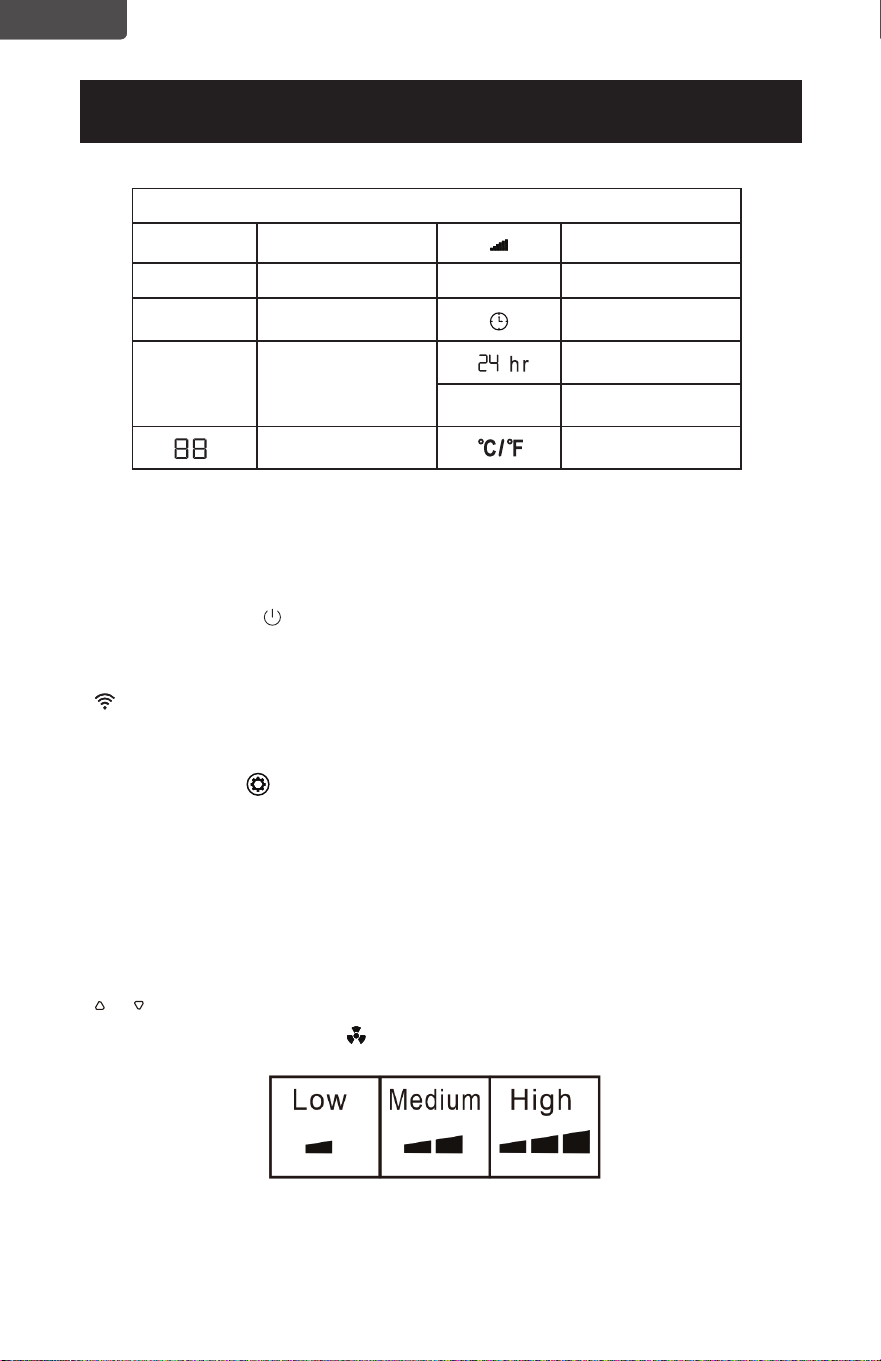
LED Display Indicators
Cool Cooling mode
Fan speed
Dry Dehumidify mode Swing Swing
Fan Fan mode
Timer on
Heat
Heat mode
Heat models
CCP8HJW and
CCP10HJW only
Time
Sleep Sleep
Display temp. or
hours
Fahrenheit or
Celsius.
ENGLISH
Page 19
ENGLISH
DEHUMIDIFY
Ideal for reducing humidity.
• Keep window and door closed for the best dehumidifying effect.
• Exhaust hose attachment is not required to reduce humidity, however it is
recommended in very humid rooms so the warm air can be exhausted outside.
Draining in Dehumidify mode
• It is recommended that the dehumidification drain and drain hose be used for
continuous drainage.
• FULL TANK - When the water level reaches a predetermined level, the “full
tank” indicator light goes on. The unit will have to be drained.
NOTE: Refer to Water Drainage section.(page 26)
• In this mode, fan speed is selected automatically by the appliance and can not
be set manually.
FAN
• Press the Fan Speed Button to
select Low, Medium or High Speed.
HEAT
• Select the target temperature 61˚F – 88˚F (16˚C – 31˚C) by pressing the or
buttons until the desired temperature is displayed on the LED screen.
• Press the speed button to select HIGH, MEDIUM or LOW fan speed.
NOTE: At the beginning of this mode, you may have to wait a few seconds
before the appliance starts to give out hot air.
SWING
• Press this button to activate the air swing of the louvers. Press it again to
deactivate.
SET UP & USE
ENGLISH
Page 20
ENGLISH
TIMER
• To set the AUTO STOP timer. When the unit is ON, press the TIMER button. The
TIME ON/OFF symbol on the remote LCD display will blink.
• Press the
or button to select the AUTO TIME by 1 hour increments, up to
24 hours. The Remote LCD Display will indicate the selected time. Press the
TIMER button again to set the selected time. There will be a steady TIME ON/
OFF symbol on the remote LCD display and the TIMER indicator light will
be illuminated on the control panel of the unit to show that the AUTO STOP
program is initiated.
• To set the AUTO START timer. When the unit is OFF, press the TIMER button.
The TIME ON/OFF symbol on the remote LCD display will blink.
• Press the
or button to select the AUTO TIME by 1 hour increments, up to
24 hours. The Remote LCD Display will indicate the selected time. Press the
TIMER button again to set the selected time. There will be a steady TIME ON/
OFF symbol on the remote LCD display and the TIMER indicator light will be
illuminated on the control panel of the unit to show that the AUTO START
program is initiated.
• Pressing the POWER button or the TIMER button will cancel the AUTO START/
STOP timed program and the timer indicator light will not be illuminated
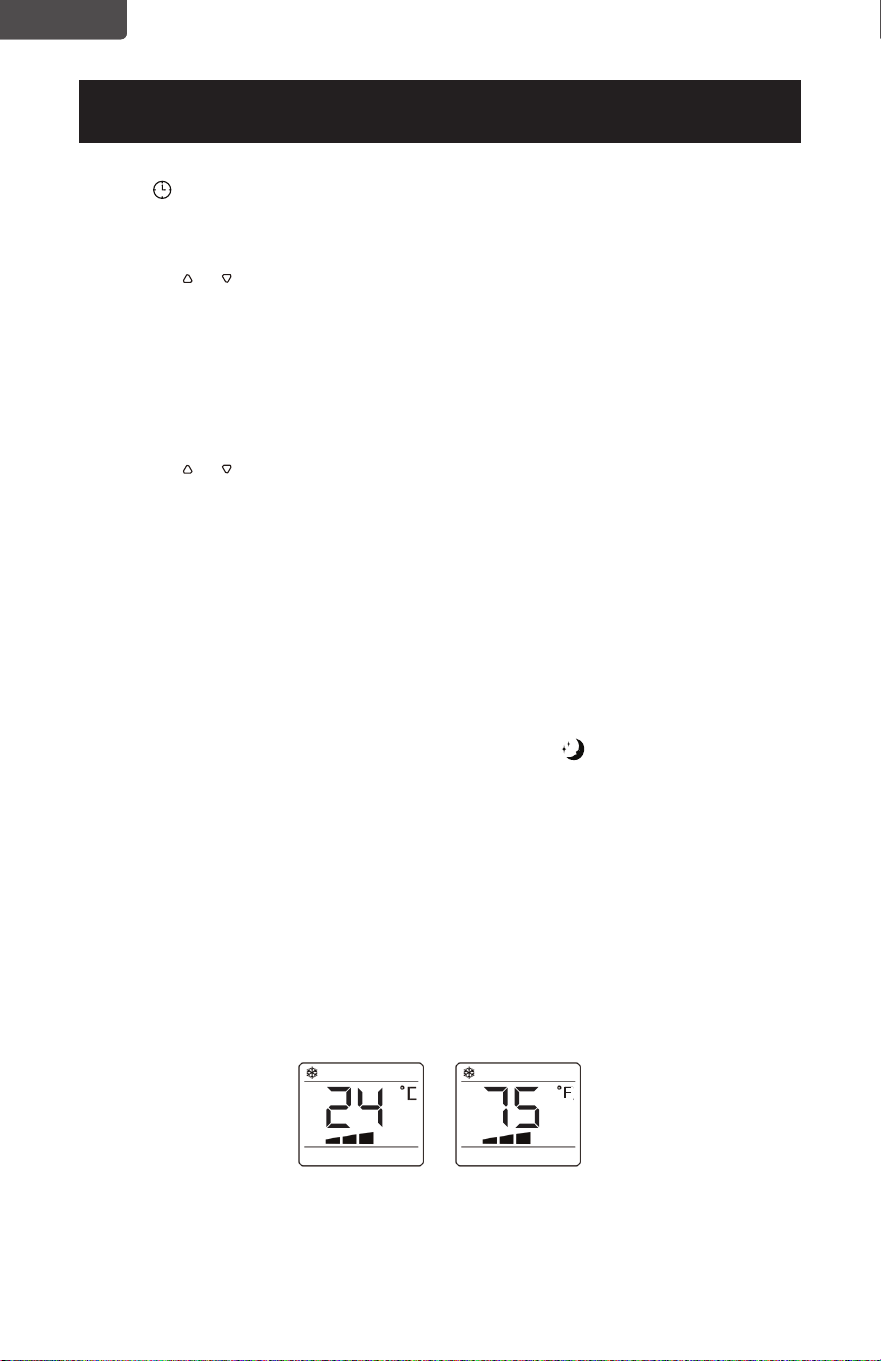
SLEEP
• The SLEEP function gradually adjusts the temperature of the rooms to provide
a comfortable environment. Press the SLEEP button
to activate.
• In COOL mode, the temperature will increase 1°F after an hour and 2°F after 2
hours.
• In HEAT mode, the temperature will decrease 1°F after an hour and 2°F after 2
hours.
• To cancel this setting press the SLEEP button again.
°C / °F SELECTOR BUTTON
• When the appliance is powered on, press the °C / °F button, then you can
select the unit of temperature from Fahrenheit or Celsius.
SET UP & USE
ENGLISH
Page 21
ENGLISH
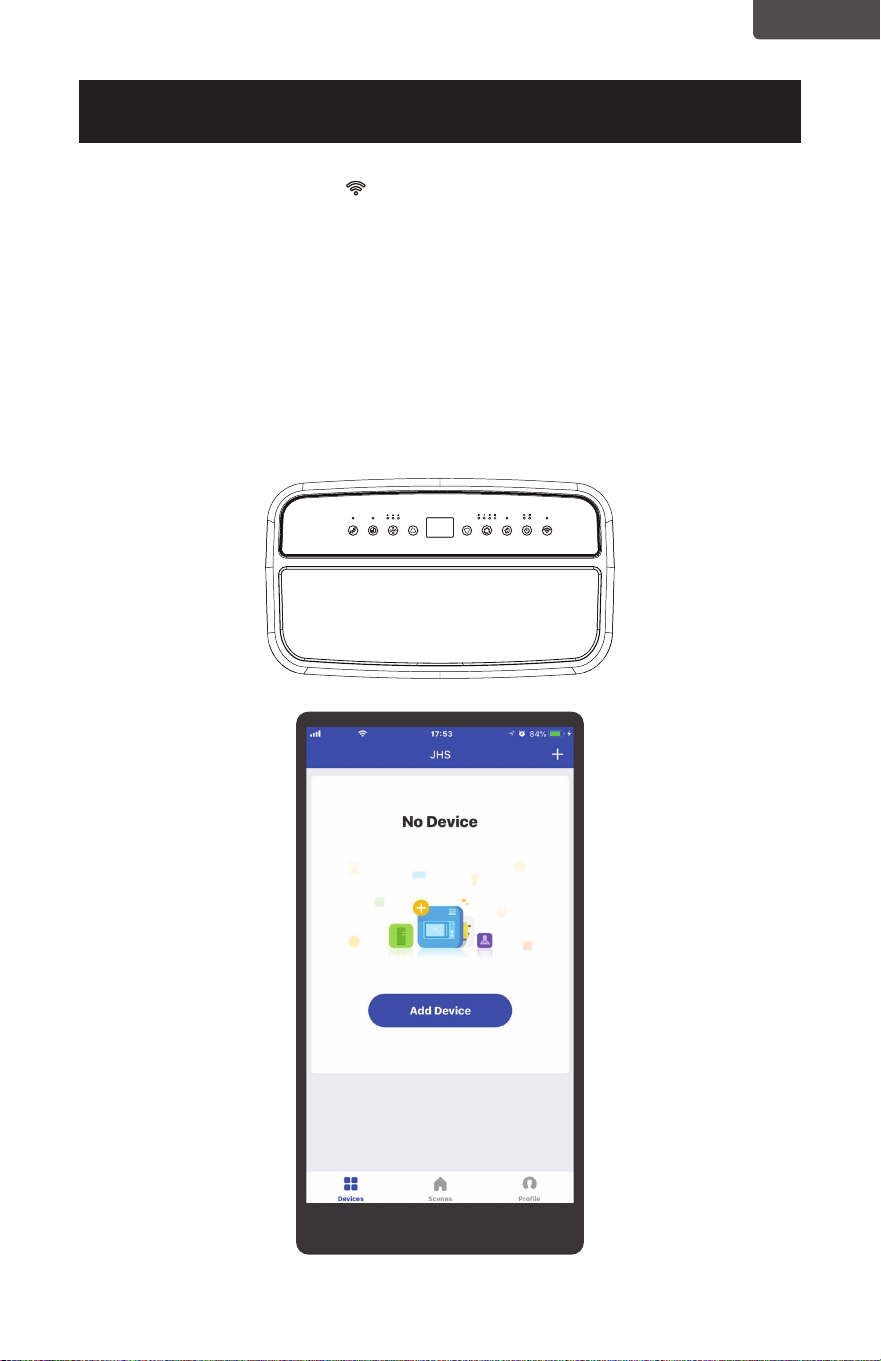
JHS SMART(WIFI) GUIDE
MODEL: CCP6JB, CCP6JP, CCP6JW
OPERATION GUIDE:
• Download the JHS Smart app.
(1) Insert the power plug to keep the unit on standby. Touch the WiFi button on
the unit panel for 5 seconds until LED indicator keep continuous ashing.
(2) Back on the home page, click Login.
Fill in your mobile number or e-mail address.
Fill in your password and nish login.
SET UP & USE
Page 22
ENGLISH
SET UP & USE
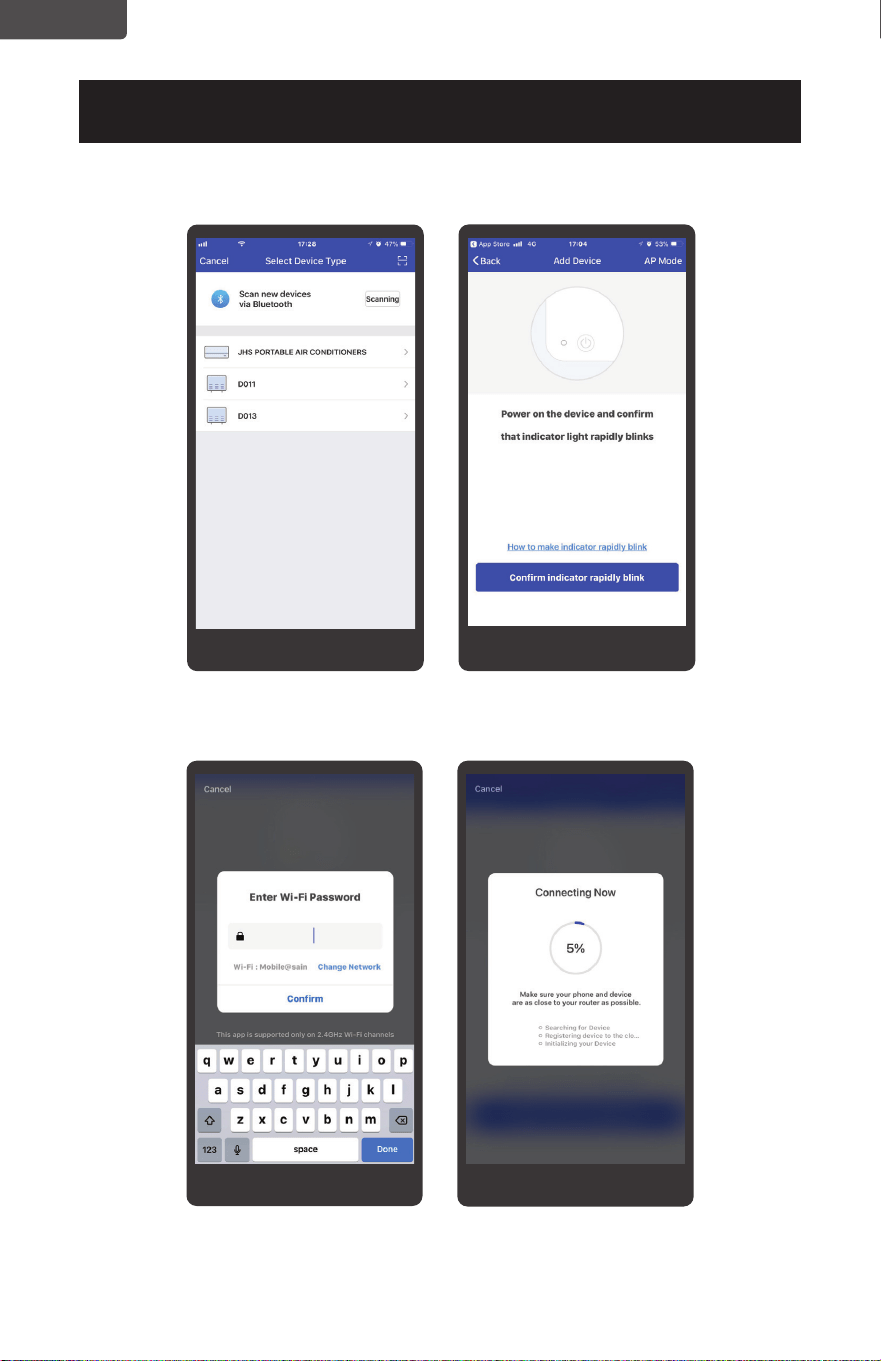
(3) Select your corresponding device.
(4) Fill in the WiFi passward and conrm.
Page 23
ENGLISH
SET UP & USE
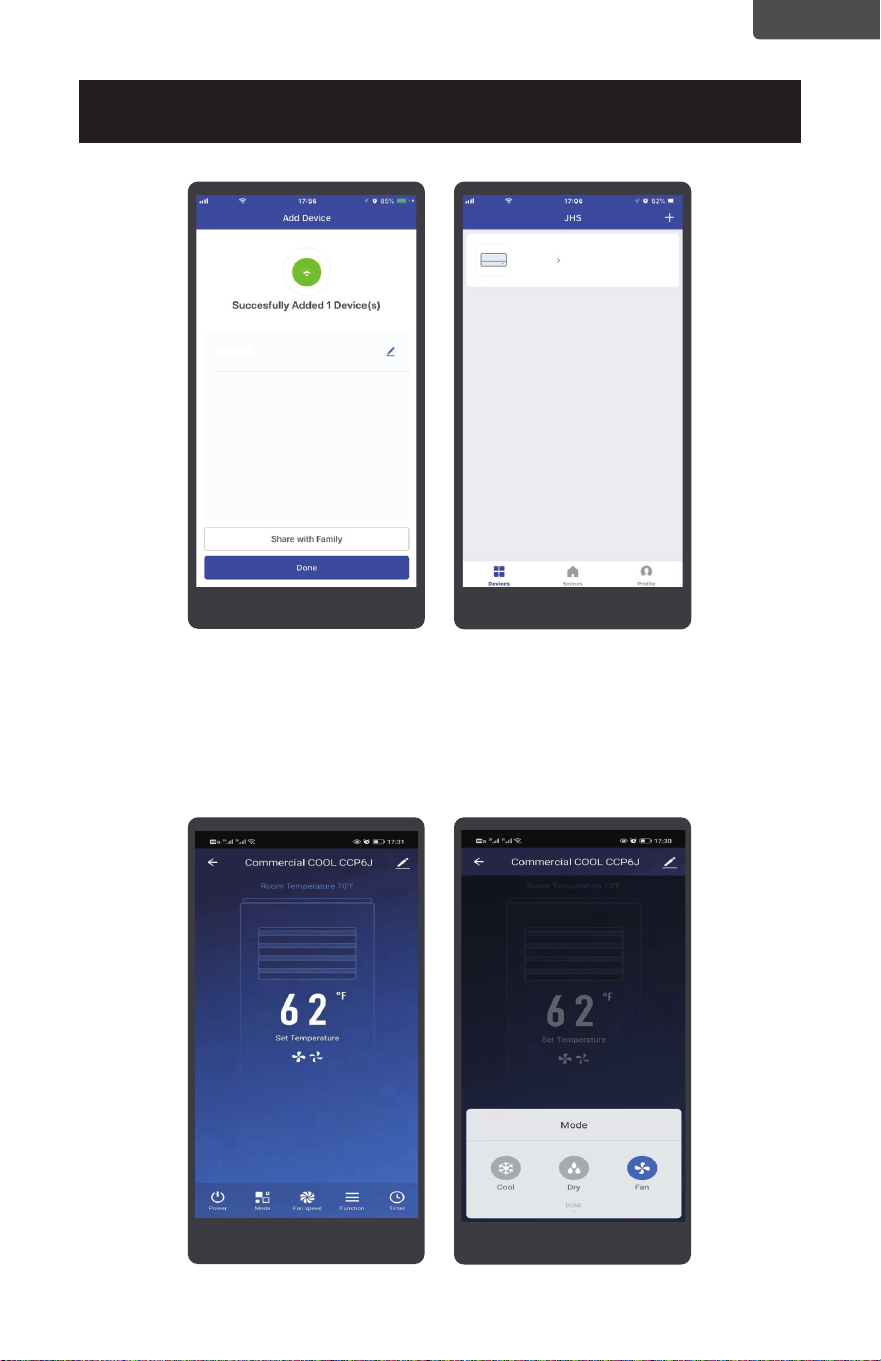
(5) Now you can control the unit to set your room temperature whether you are
driving on road or at the ofce.
Turn your JHS air
conditioner on and o.
Change working modes
Set the temperature
Commercial COOL CCP6J
Commercial COOL ...
Page 24
ENGLISH
SET UP & USE
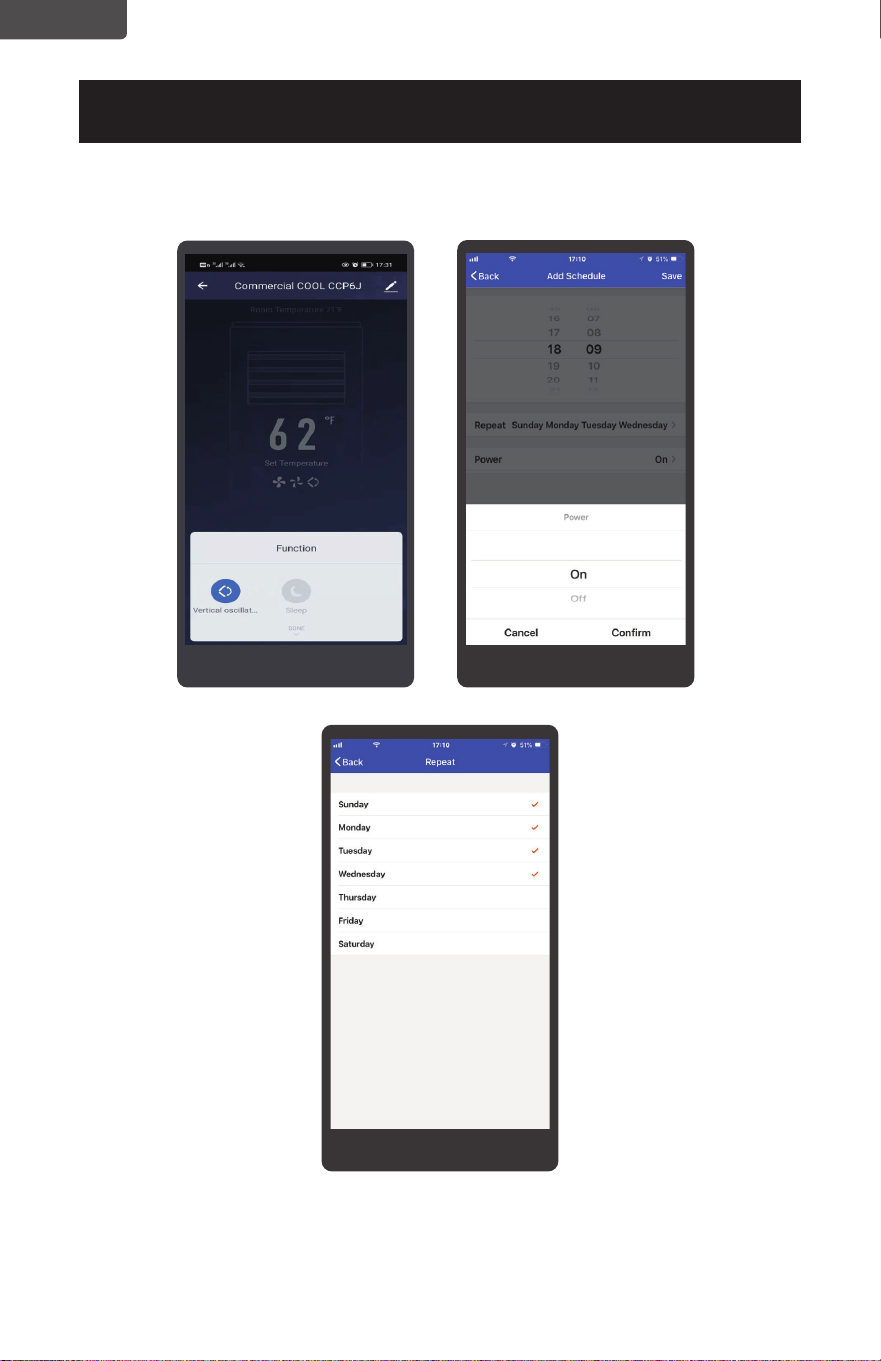
Set fan speeds for comfort
and energy savings.
Set schedules to program
a customized timer.
Page 25
ENGLISH
SET UP & USE
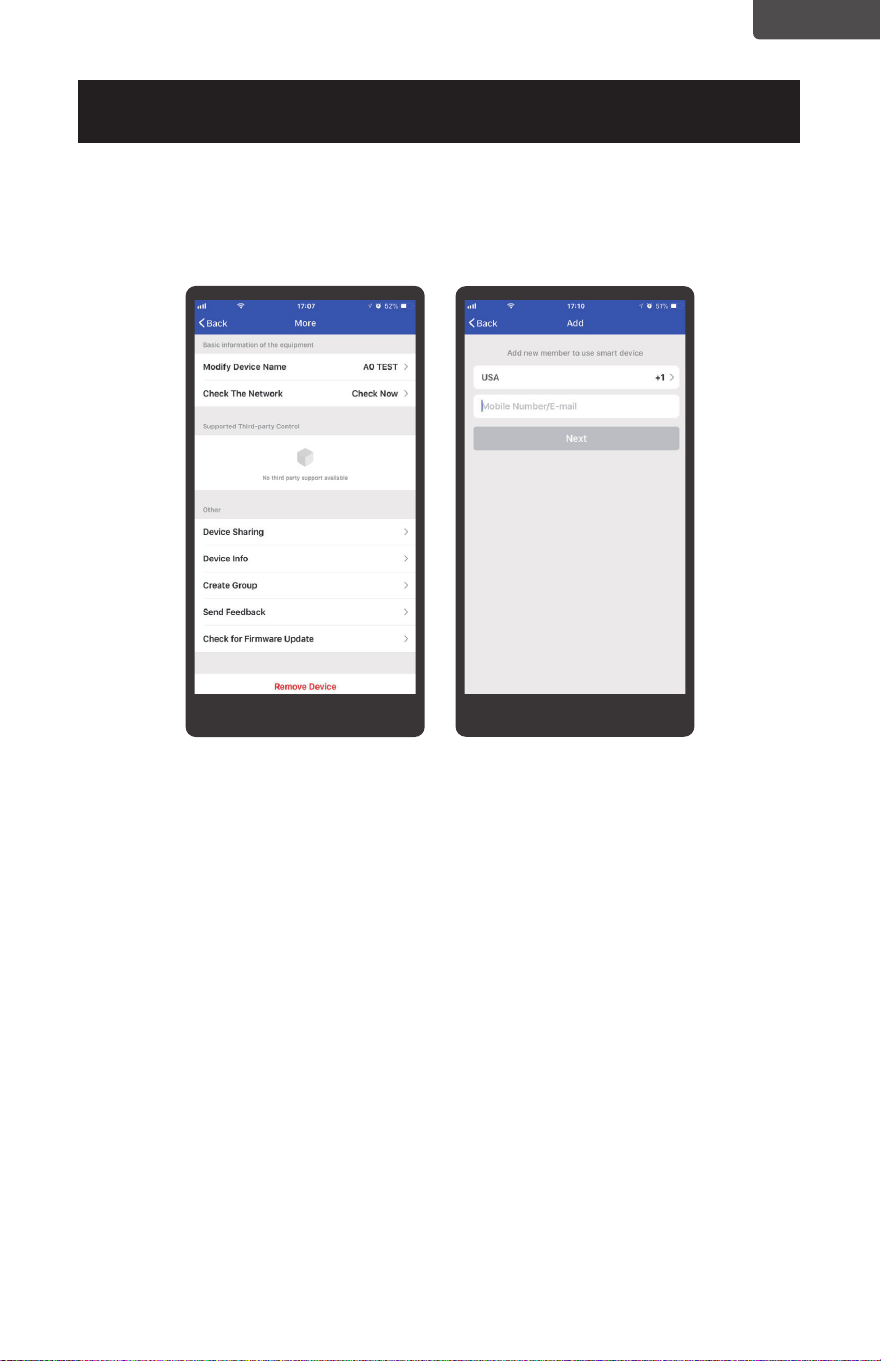
(6) Special Functions
Share the functions of the unit with your family or friends. Have them install
the JHS smart app, login, and click on device sharing. You can both now
access the functions from your smart app.
PROTECTION FUNCTION OF JHS PORTABLE AIR CONDITIONER
• Frost Protection Function:
In a cold environment, if the temperature of the EVA pipe sensor is too low,
the machine will automatically enter protection status; if the temperature of
the EVA pipe sensor rises to a certain temperature(50
°F), it can automatically
revert to normal operation.
• Overow Protection Function:
When water in the water pan exceeds the warning level, the machine will
automatically sound an alarm and stop working, and the Full Tank indicator will
ash. At this time, you need to drain the water(details see Drainage Instructions
at the end of this chapter).
After the water is emptied, the unit will work nomal again.
• Protection Function of the Compressor:
To increase the service life of the compressor, it has a 3-minute delay booting
protection function after the compressor is turned off.
Page 26
ENGLISH
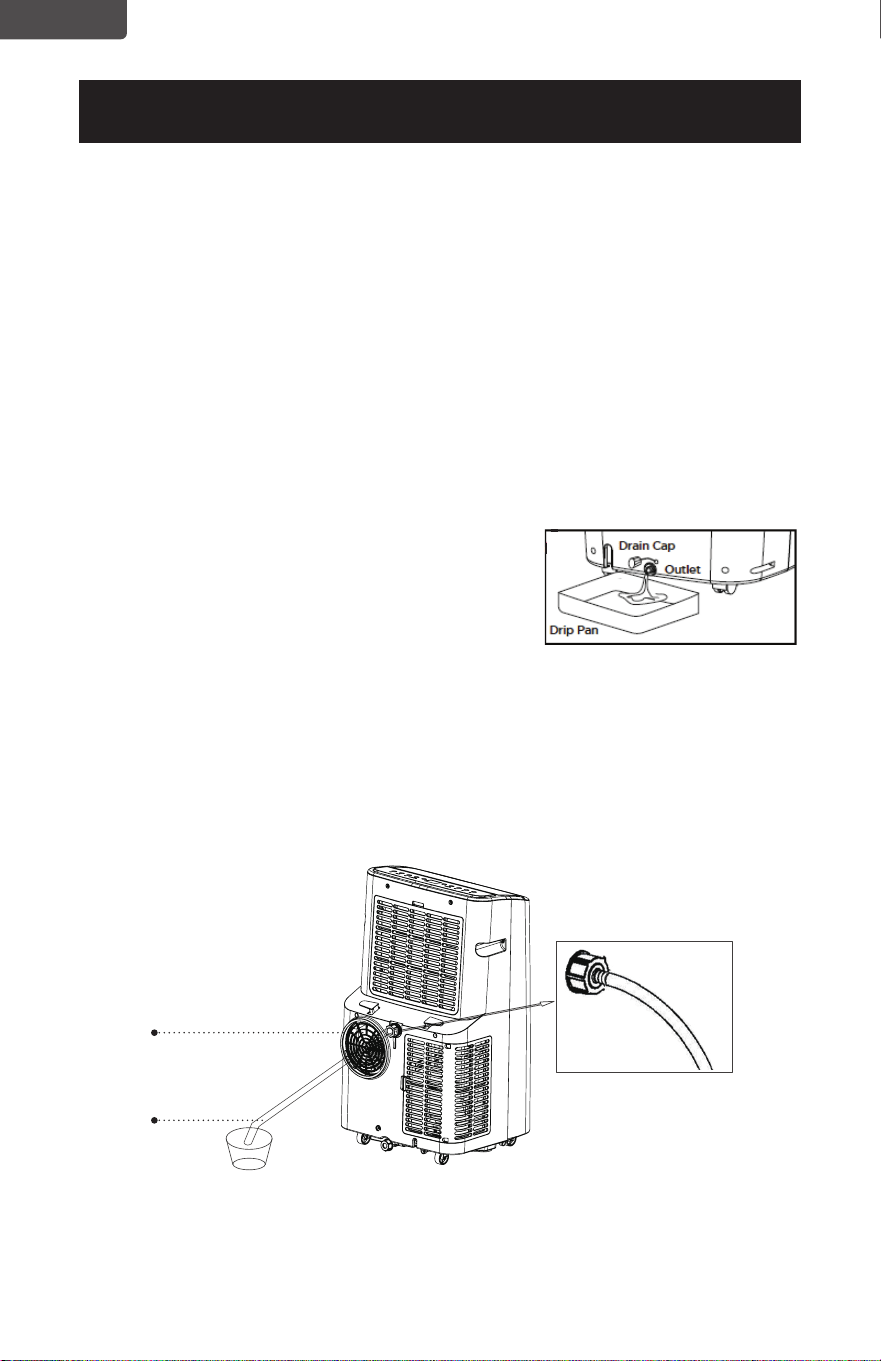
WATER DRAINAGE FOR COOLING AND HEAT MODES
This air conditioner is equipped with auto water evaporation so the water
compartment would not typically ll in cooling or heating mode unless there is
high humidity. Water drainage will generally only be required at the end of the
season for these modes. (see START-END OF SEASON OPERATIONS).
NOTE: FULL TANK - When the water level reaches a predetermined level, the
“full tank” indicator light located on the control panel of the unit goes on.
If an error code appears on the display screen on the control panel “E2”
in COOL mode or “E4” in HEAT mode. The unit will have to be drained.
Intermittent Draining
• Unplug the unit from the power source. Carefully move the unit to a drain area
over your basement oor or drip pan (not included). Remove the bottom drain
cap.
• Let the water drain away and replace the drain
cap. Restart the machine until the error codes
E2 or E4 disappears. If the error repeats, call for
service.
NOTE: Be sure to reinstall the bottom drain plug
before using the unit.
Continuous Draining
• Unplug the unit from the power source. Remove the bottom drain cap. While
doing this operation some residual water may spill so have a drip pan (not
supplied) to collect the water.
• Connect the drain hose (supplied) as shown in the diagram. The water can be
continuously drained through the hose into a oor drain or drip tray.
•Turn on the unit.
WAIT 3 MINUTES BEFORE RESUMING OPERATION
• After the unit has stopped, it cannot be restarted for 3 minutes. Operation will
automatically restart after 3 minutes.
SET UP & USE
Drain outlet
Drain hose
Page 27
ENGLISH
CLEANING
WARNING: Before cleaning or maintenance, turn the appliance off by
pressing the
button on the control panel or button on the
remote control. Unplug from the electrical outlet.
CLEANING THE CABINET
You should clean the appliance with a slightly damp cloth then dry with a dry
cloth.
• Never saturate the air conditioner with water.
• Never use petrol, alcohol or solvents to clean the appliance.
• Never spray insecticide liquids or similar near the air conditioner.
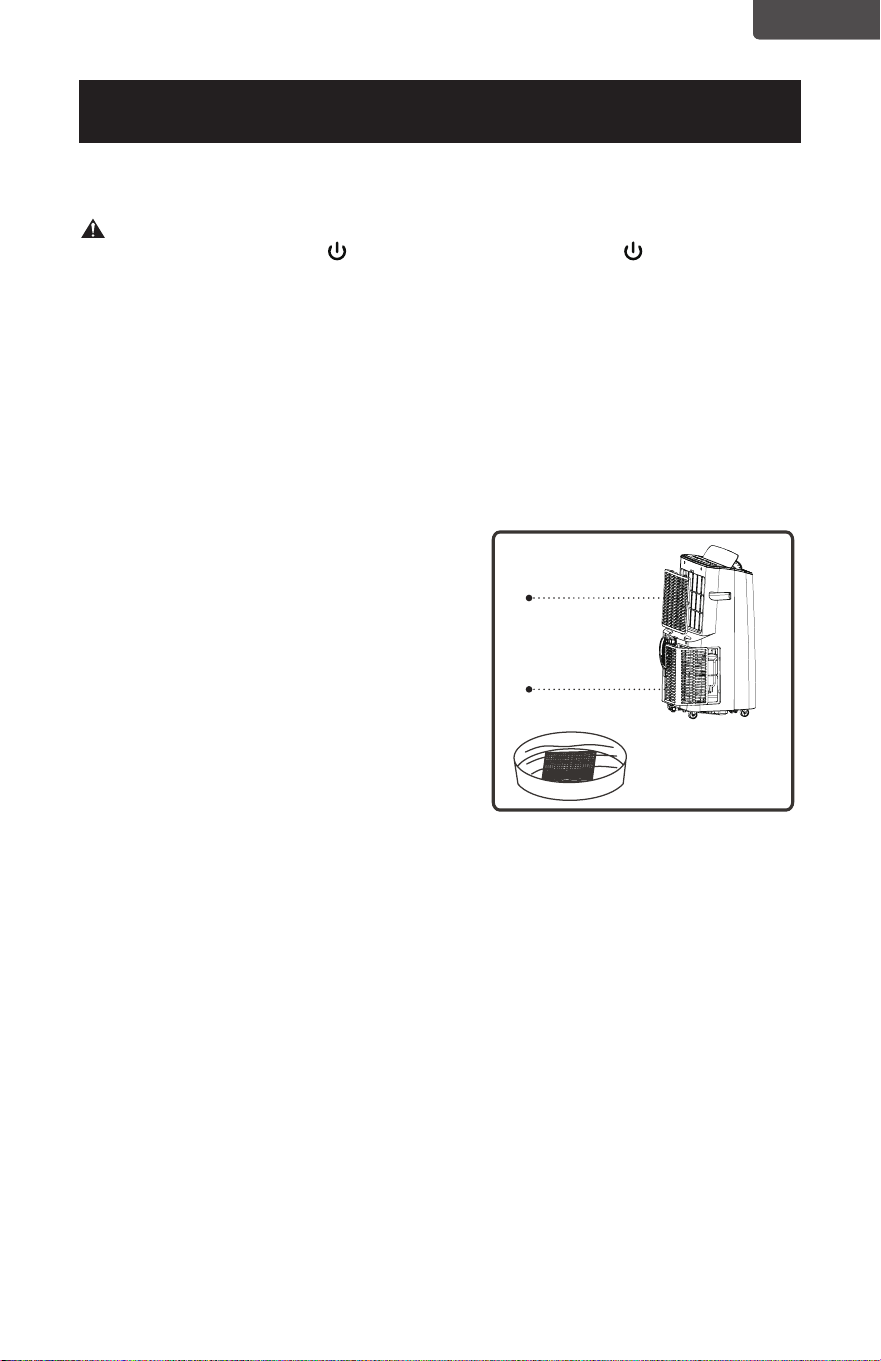
CLEANING THE FILTER
To keep your air conditioner working efciently, you should clean the evaporator
lter every week of operation.
The lter is housed in the intake grill.
Use a vacuum cleaner to remove
dust accumulations from the lter.
If it is very dirty, immerse in warm
water and rinse a number of times.
The water should be luke warm.
After washing, leave the lter to
dry then re-insert the lter.
START - END OF SEASON OPERATIONS
START OF SEASON CHECKS
Make sure the power cable and plug are undamaged.
Follow the installation instructions precisely.
END OF SEASON OPERATIONS
See Water Drainage section to make sure the air conditioner is completely
drained of water.
Clean the lter and dry thoroughly before reinstalling.
Wedging
block
Wedging
block
CLEANING & CARE
ENGLISH
Page 28
ENGLISH
TROUBLESHOOTING & WARRANTY
BEFORE YOU CALL FOR SERVICE
IF THE AIR CONDITIONER FAILS TO OPERATE:
A) Check to make sure that the air conditioner is plugged in securely. If it is
not, remove the plug from the outlet, wait 10 seconds and plug it in again
securely.
B) Check for a blown circuit fuse or a tripped main circuit breaker. If these seem
to be operating properly, test the outlet with another appliance.
WARNING
IF NONE OF THE ABOVE SOLVES THE PROBLEM, CONTACT A QUALIFIED
TECHNICIAN. DO NOT TRY TO ADJUST OR REPAIR THE AIR CONDITIONER
YOURSELF. Any person who is involved with working on or breaking into a
refrigerant circuit should hold a current valid certicate from an industry-
accredited assessment authority, which authorizes their competence to handle
refrigerants safely in accordance with an industry recognized assessment
specication.
WARNING
Do not use means to accelerate the defrosting process or to clean other than those
recommended by the manufacturer.
WARNING
Servicing shall only be performed as recommended by the equipment
manufacturer. Maintenance and repair requiring the assistance of other skilled
personnel shall be carried out under the supervision of the person competent in
the use of the ammable refrigerants.
CUSTOMER SERVICE
IMPORTANT
DO NOT RETURN THIS PRODUCT TO THE STORE
If you have a problem with this product, please contact the
W Appliance Co. Customer Satisfaction Center at
844-299-0879. DATED PROOF OF PURCHASE, MODEL # AND
SERIAL # REQUIRED FOR WARRANTY SERVICE
IMPORTANT NOTE: Read this manual
carefully before installing or operating
your new air conditioning unit. Make
sure to save this manual for future
reference.
Caution: Risk of re/
ammable materials
(Required for R32/R290 units only)
ENGLISH
Page 29
ENGLISH
TROUBLESHOOTING & WARRANTY
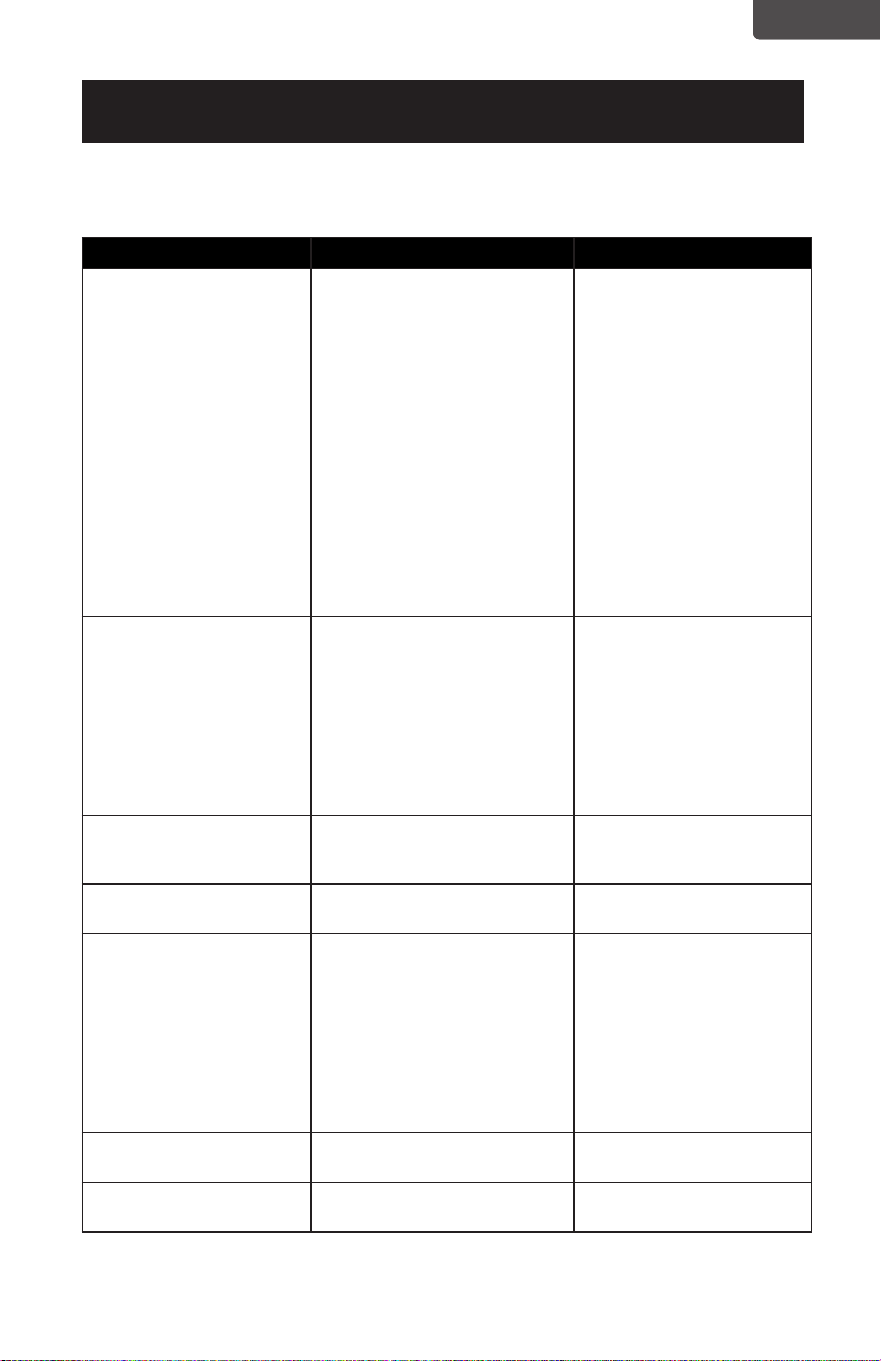
Troubleshoot your problem by using the chart below. If the air conditioner still does
not work properly, contact W Appliance Co. customer service center or the nearest
authorized service center. Customers must never troubleshoot internal components.
TROUBLE POSSIBLE CAUSE POSSIBLE REMEDY
The air conditioner does
not work.
A. There is no electricity.
B. The overow indicator
displays FL.
C. The ambient temperature is
too low or too high.
D. In cooling mode, the room
temperature is lower than
the set temperature.
E. In dehumidication mode,
the ambient temperature
is low.
A. Turn unit on after
connecting it to a socket
with electricity.
B. Discharge the water
inside.
C. Run the unit within the
ambient temperature
range of 44-95°F (7-
35°C).
D. Change the set
temperature.
E. Place the unit in a
room with an ambient
temperature of greater
than 62°F(17°C).
The cooling effect is not
good.
A. There is direct sunlight.
B. Doors or windows are open;
there are a lot of people
in the room; or in cooling
mode, there are other
sources of heat.
C. The lter screen is dirty.
D. The air inlet or outlet is
blocked.
A. Pull the room curtain
closed.
B. Close doors and
windows, and add new
air conditioner.
C. Clean or replace the lter
screen.
D. Clear obstructions.
Loud Noise A. The air conditioner is not
placed on a at surface.
A. Put the air conditioner on
a at and hard place (to
reduce noise).
Compressor
does not work.
A. Overheat protection is
active.
A. Wait for 3 minutes until
unit cools, then restart.
The remote control does
not work.
A. The distance between the
unit and the remote control
is too far.
B. The remote control is not
aligned with the direction of
the remote control receiver.
C. Batteries are dead.
A/B. Move the remote
control closer to the
air conditioner, and
make sure that the
remote control directly
faces in the direction
of the remote control
receiver on the unit.
C. Replace batteries.
Display reads E2 A. The coil temperature sensor
is malfunctioning.
A. Ask help from certied
technician.
Display reads E1 A. The room temperature sensor
is malfunctioning.
A. Ask help from certied
technician.
ENGLISH

Page 30
ENGLISH
TROUBLESHOOTING & WARRANTY
LIMITED WARRANTY
Any repair, replacement, or warranty service,
and all questions about this product should be
directed to W Appliance Co. at 844-299-0879
from the USA or Puerto Rico.
W Appliance Co. warrants to the original purchaser
that the product will be free from defects in material,
parts and workmanship for the period designated for
this product. The warranty commences the day the
product is purchased and covers up to a period of 1
year (12 months) for labor/1 year (12 months) for parts
(manufacturing defects only).
W Appliance Co. agrees that it will, at its option,
replace the defective product with either a new
or remanufactured unit equivalent to your original
purchase during the warranty period.
Exclusions: This warranty does not apply to the
below:
1. If the appearance or exterior of
the product has been damaged or
defaced, altered or modified in design or
construction.
2. If the product original serial number
has been altered or removed or cannot
be readily determined.
3. If there is damaged due to power line
surge, user damage to the AC power
cord or connection to improper voltage
source.
4. If damage is due to general misuse,
accidents or acts of God.
5. If repair attempts are done by
unauthorized service agents, use of
parts other than genuine parts or parts
obtained from persons other than
authorized service companies.
6. On units that have been transferred
from the original owner.
7. On products that have been purchased
as refurbished, like new, second-hand, in
a “As-Is” or “Final Sale” terms.
8. To products used in a commercial or
rental setting.
9. To products used in settings other than
ordinary household use or used other
than in accordance with the provided
instructions.
10. To damages for service calls for
improper installations.
11. Transportation and shipping costs
associated with the replacement of the
unit.
12. Service calls to instruct you how to use
your product.
13. Service calls to repair or replace the
house fuse, reset the circuit breaker or
correct the wiring in the house.
REPAIR OR REPLACEMENT AS PROVIDED UNDER
THIS WARRANTY IS THE EXCLUSIVE REMEDY OF
THE CUSTOMER; W Appliance Co.. SHALL NOT BE
LIABLE FOR ANY INCIDENTAL OR CONSEQUENTIAL
DAMAGES FOR BREACH OF ANY EXPRESS OR
IMPLIED WARRANTY ON THIS PRODUCT, EXCEPT
TO THE EXTENT PROHIBITED BY APPLICABLE LAW.
ANY IMPLIED WARRANTY OF MERCHANTABILITY
OF FITNESS FOR A PARTICULAR PURPOSE ON THIS
PRODUCT IS LIMITED TO THE DURATION OF THE
WARRANTY.
Some states do not allow the exclusion or limitations
of incidental or consequential damages, or limitations
on how long the warranty lasts. In these cases the
above exclusions or limitations may not apply to you.
This warranty gives you specific legal rights and you
may also have other rights which vary from state to
state.
Obtaining Service: To obtain service, product
literature, supplies or accessories please call
844-299-0879 to create a ticket for exchange/repair.
Please make sure to provide the date of purchase,
model number and a brief description of the problem.
Our customer service representative
will contact you or send detailed return instructions.
W Appliance Co. does not warrant that the appliance will work
properly in all environmental conditions, and makes no warranty
and representation, either implied or expressed, with respect
to the quality, performance, merchantability, or fitness for a
particular purpose other than the purpose identified within this
user’s manual. W Appliance Co. has made every eort to ensure
that this user’s manual is accurate and disclaims liability for any
inaccuracies or omissions that may have occurred. Information in
this user’s manual is subject to change without notice and does
not represent a commitment on the part of W Appliance Co.. W
Appliance Co. reserves the right to make improvements to this
user’s manual and/or to the products described in this user’s
manual at any time without notice. If you find information in this
manual that is incorrect, misleading, or incomplete, please contact
us at 844-299-0879.
W Appliance Co.
1356 Broadway
New York, NY 10018
ENGLISH

ENGLISH
This device complies with part 15 of the FCC rules. Operation is subject to the
following two conditions: 1) This device may not cause harmful interference, and 2)
This device must accept any interference received, including interference that may
cause undesired operation. This equipment has been tested and found to comply
with the limits for a Class B digital device, pursuant to Part 15 of the FCC rules. These
limits are designed to provide reasonable protection against harmful interference
in a residential installation. This equipment generates, uses and can radiate radio
frequency energy and, if not installed and used in accordance with the instructions,
may cause harmful interference to radio communications. However, there is no
guarantee that the interference will not occur in a particular installation. If this
equipment does cause harmful interference to radio or television reception, which
can be determined by turning the equipment off and on, the user is encouraged
to try to correct the interference by one or more of the following measures: a)
Reorient or relocate the receiving antenna. b) Increase the separation between the
equipment and the receiver. c) Connect the equipment into an outlet different from
that which the receiver is connected. d) Consult the dealer or an experienced radio/
TV technician for help.
© 2022 W Appliance Company. All Rights Reserved.
1356 Broadway, New York, NY 10018
© 2022 W Appliance Company. Tous Droits Réservés.
1356 Broadway, New York, NY 10018
© 2022 W Appliance Company. Todos los derechos reservados.
1356 Broadway, New York, NY 10018
March 2022
Mars 2022
Marzo de 2022