We continue to be committed to provide you tools with competitive price. "Save Half", "Half Price" or any other similar expressions used by us only represents an estimate of savings you might benefit from buying certain tools with us compared to the major top brands and does not necessarily mean to cover all categories of tools offered by us. You are kindly reminded to verify carefully when you are placing an order with us if you are actually saving half in comparison with the top major brands.
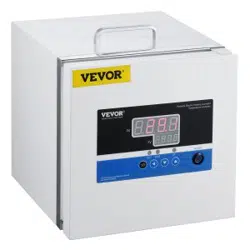
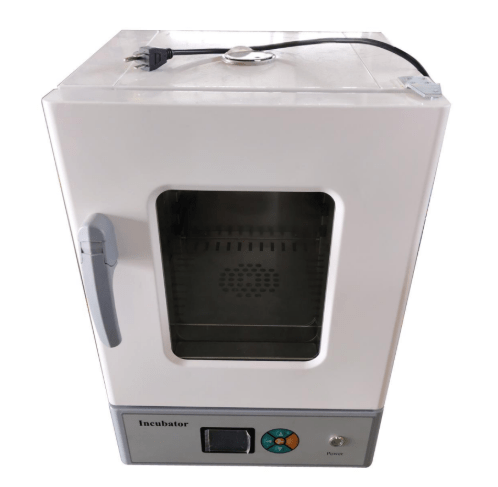
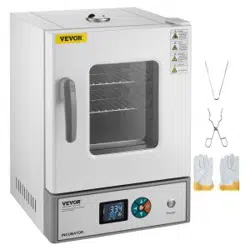
Image of the product model 303-00BE.
NEED HELP? CONTACT US!
Have product questions? Need technical support? Please feel free to contact us:
This is the original instruction, please read all manual instructions carefully before operating. VEVOR reserves a clear interpretation of our user manual. The appearance of the product shall be subject to the product you received. Please forgive us that we won't inform you again if there are any technology or software updates on our product.
Thank you for your purchase of the Electric Heating Constant Temperature Incubator.
This operation manual describes daily operation parameters in detail.
Precautions for safe operation are recorded regarding the important contents of safe use; please be sure to follow them to ensure the smooth completion of the test.
Product Features:
The shell is made of high-quality cold-rolled steel plate with a surface electrostatic spraying finish.
The inner chamber is made of stainless steel.
The intelligent digital display PID temperature controller features functions such as timing, over-temperature alarm, temperature deviation correction, and control temperature self-tuning.
The large double-layer toughened glass window allows for convenient observation of the contents inside.
The new synthetic silicone seal is aesthetically pleasing and can withstand high temperatures for extended periods.
The hot air circulation system uses a double air duct circulation design with a high-temperature resistant and low-noise fan, ensuring longer fan life and more uniform temperature distribution inside the chamber.
The device is equipped with an independent fan switch that can be turned on or off as needed.
The device is equipped with an independent fan switch that can be turned on or off as needed.
Precautions for safe operation
For the safety of the experiment, please install an external grounding device and choose a power leakage protection device that matches the equipment.
The device is strictly prohibited from being used in experiments involving flammable, explosive, highly toxic, or corrosive substances.
Place the device on a dry platform or ground, maintaining a distance of more than 50 cm from the wall.
According to the need, place the experimental items on the tray, turn on the power, turn on the switch, and set the required temperature according to the intelligent instrument operation instructions.
Turn off the power when the equipment is not in use and keep it dry and clean.
Please read the operation manual carefully before use.
Technical Parameters:
Model
303-00BE
Voltage
AC120V 60HZ
Tem.fluctuation
±0.5℃
Power
235W
Inner chamber size mm (D×W×H)
260 x 280x 270mm
Tem.range
RT+5-70℃
Working environment
Temperature 5-40℃
Relative humidity
<90%
Controller Display Indicators:
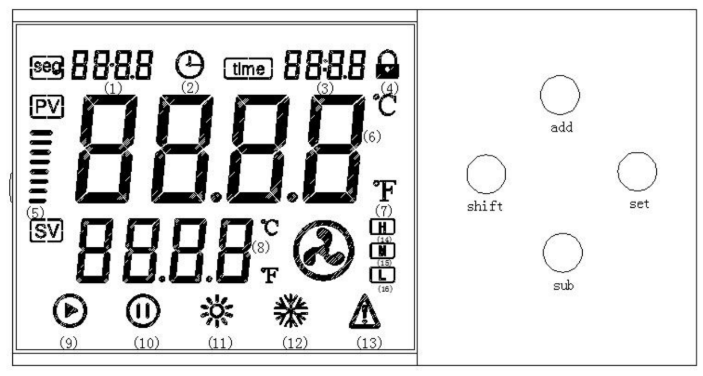
Panel Instructions
Number of program segments: display the number of segments when in program mode;
Reservation time indicator: on when the appointment is turned on;
Time: program segment time or fixed value timing time;
Key lock;
Rise Tips for cooling down;
Measure temperature in degrees Celsius;
Fahrenheit symbol;
Set temperature;
Shutdown indicator: Standby lights up for standby;
Running indicator;
Heating indicator: Lights when heating is started;
Cooling indicator (standby);
Fault indicator: flashes when a fault occurs;
High-speed fan symbol: Lights when high-speed fan starts;
Medium-speed fan symbol: Lights up when the medium speed fan starts;
Symbol for low speed fan: lights when the low speed fan starts.
Basic Operation:
When the controller is switched on, display windows show "In index (P, C, K, S) and the value of temperature range for 3 seconds, then it starts running.
Temperature and time settings: Press the "Set" button, the controller runs into the temperature setting state. Re-press the "Set" button, the controller runs into the time setting state. In setting state, you can use the "←", "▽" and "Δ" buttons to get the required settings. Press the "set" button again, it returns from the setting state and the settings are saved automatically. If the time is set as "0", the controller will run continuously, the display window of "SV" will display the set point temperature. If the time set value is not equal "0", timers start time when the measuring temperature reaches the set point temperature, the display window of "SV" will display the runtime.
When temperature alarm, the buzzer will sound.
When the buzzer sounds, it can be muted by pressing any button.
"←" button: In the setting state, it can shift the set value by pressing the button.
"▽" button: In the setting state, it can reduce the set value by pressing the button. If press and hold the button, the set value will reduce continuously.
"Δ" button: In the setting status, it can increase the set value by pressing the button. If press and hold the button, the set value will increase continuously.
In setting state, the controller will return to run status if without any key press in one minute.
If the display window shows "---", it indicates the fault of temperature.
Internal Parameters Settings:
Press the "Set" button for 3 seconds, and the controller will display the password prompt "Lc." Adjust the password to the required value, then press the "Set" button again to enter the internal parameter setting state. If you press the "Set" button for another 3 seconds, it will return to the running state.
Internal Parameter Table:
Parameter
Description / Function
Range / Default
d (Differential time)
Differential action time constant, the larger I is, the stronger the differential action is, it can also overcome the overshooting.
0~3600 (Preset time)
Ar (Overshoot suppression)
The smaller the XF is, the stronger ability of the controller to control the temperature overshoot
0~200% (Default: 85)
t (Heating cycle)
Relay output ±20s, SSR and SCS ±2s, only on heating side
1~100
dp (Decimal point setting)
0:1DP=0 displays a resolution for 1℃; DP=1 displays a resolution for 0.1℃
0,1 (Default: 1)
CE (timing unit)
0-10 takes a timing unit of minute, and 1 takes a timing unit of hour.
0,1 (Default: 0)
Ct (Refrigeration control delay)
The time required for two adjacent compressor starts, Ct=0 means to cancel the compressor function.
0~3600 (Default: 0)
CH (upper bias setting of refrigeration control)
When the temperature exceeds the CH value and conforms to the refrigeration control delay of the compressor, the refrigerating lamp lights on and refrigeration contact connects, the compressor starts, namely SP+CH) setting value
0~full scale (Default: 0.5)
CL (Lower bias setting of refrigeration control)
When the compressor starts, the refrigeration contact disconnects while the measured temperature < setting temperature +CH-CL value, the compressor stops.
0~full scale (Default: 0.3)
drt (Open door test)
When the temperature drops and the deviation exceeds the deviation, the meter judges that the door has been opened