
Cautions on handling
3
About care
3
About condensation
3
About lubricating
3
Accessories
4
Part names and functions
6
Front
6
Rear
8
Preparations
Assembly
10
Mounting the platter
11
Mounting the counterweight
11
Mounting the cartridge
12
Mounting the head shell
14
Attaching the dust cover
15
Mounting the subweight
15
Adjustments
16
Adjusting the height of the insulators
16
Adjusting the stylus pressure
17
Adjusting anti-skating
20
Adjusting the height of the tone arm
21
Connections
Connecting amplifier that have a phono input
24
Connecting the power cord
25
Playback
Record playback
26
Record playback
26
Stopping playback
28
Tips
Contents
29
Troubleshooting
30
Power does not turn on
31
Power cannot be turned off
31
No sound comes out
31
Hum noise is heard
32
Audio skips, scratches or is distorted
32
Howling is produced
33
The tone arm stops moving halfway
33
The platter does not rotate at the set speed
33
Appendix
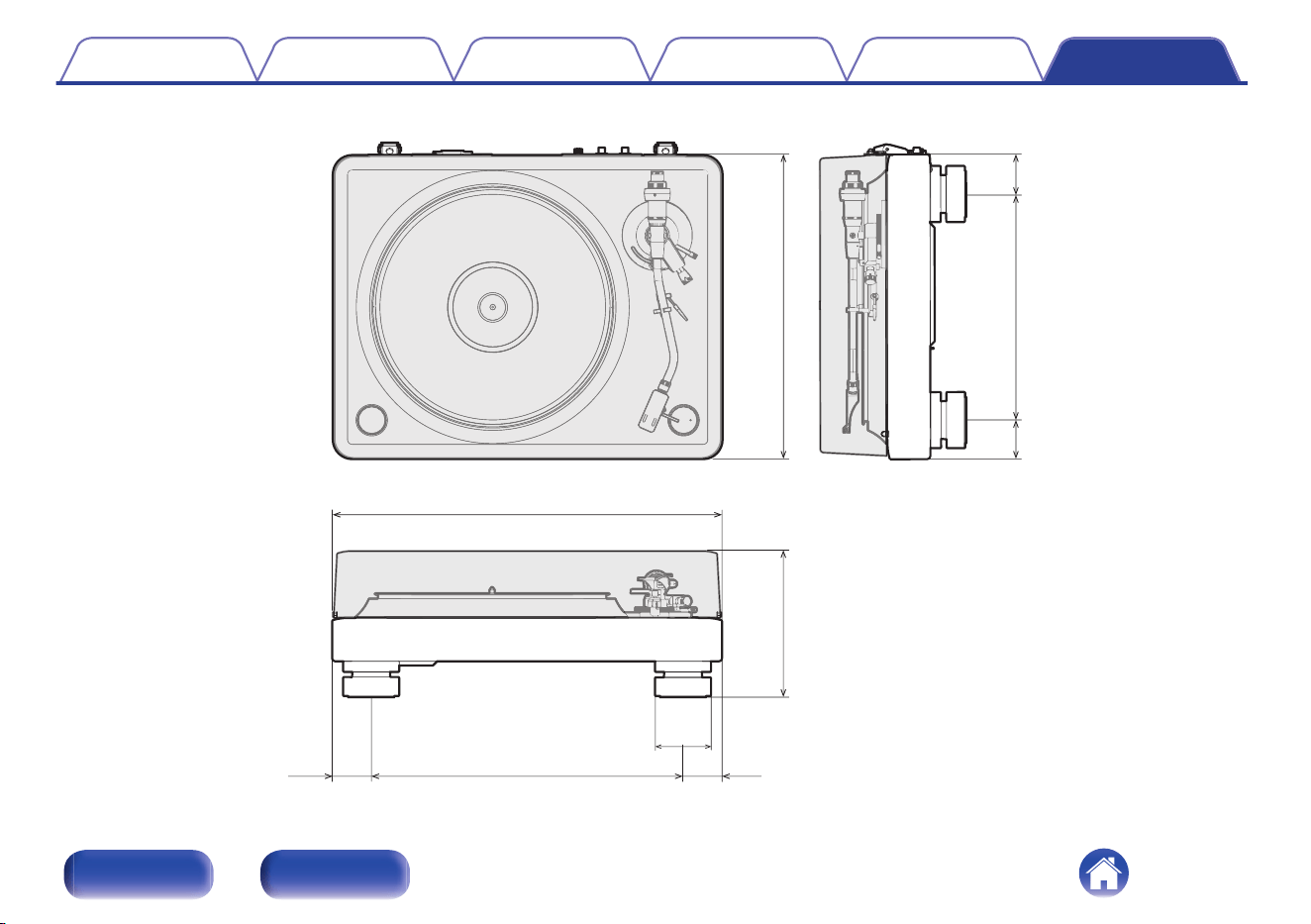
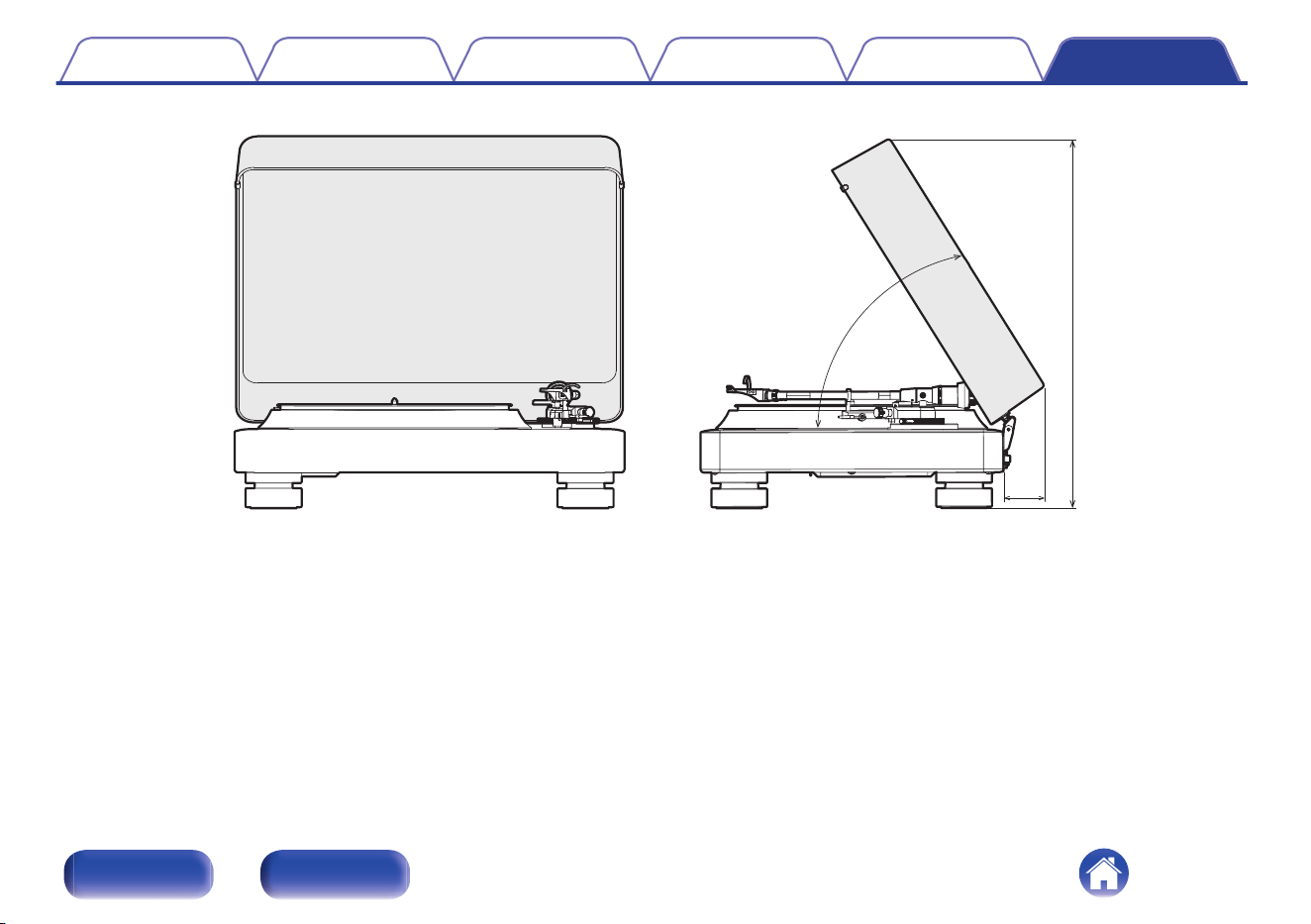
Specifications
34
Contents Preparations Connections Playback Tips Appendix
2
Front Rear

Cautions on handling
About care
0
Clean the cabinet and dust cover with the wiping cloth. Follow the
instructions when using a chemical cleaner.
0
Benzene, paint thinner or other organic solvents as well as insecticide
may cause material changes and discoloration if brought into contact
with the unit, and should therefore not be used.
About condensation
If there is a major difference in temperature between the inside of the unit
and the surroundings, condensation (dew) may form on the operating
parts inside the unit, causing the unit not to operate properly. If this
happens, let the unit sit for an hour or two with the power turned off and
wait until there is little difference in temperature before using the unit.
About lubricating
The motor does not require lubricating. Do not lubricate this unit.
Contents Preparations Connections Playback Tips Appendix
3
Front Rear
Thank you for purchasing this Denon product. To ensure proper operation, please read this owner’s manual carefully before using the product.
After reading this manual, be sure to keep it for future reference.
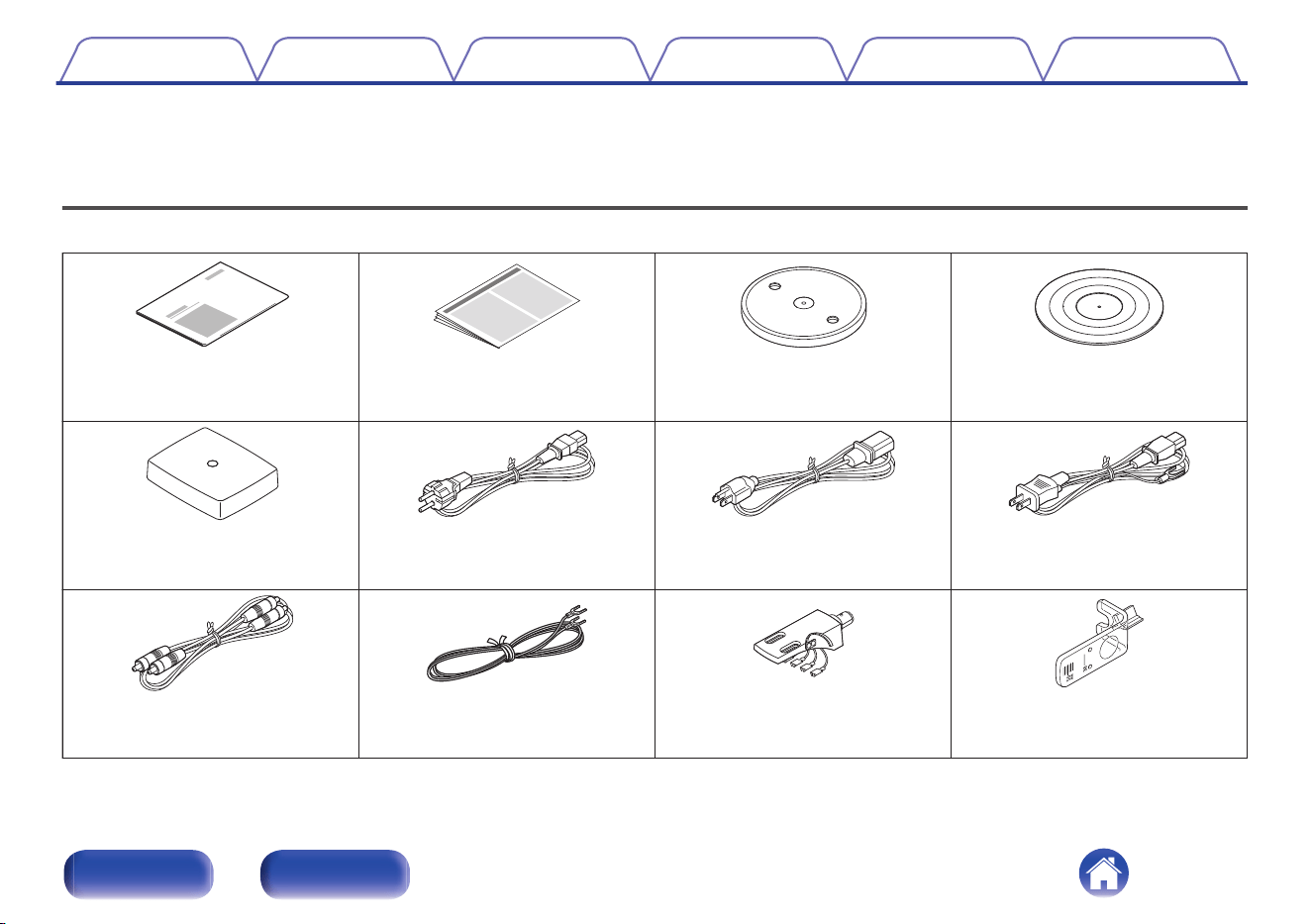
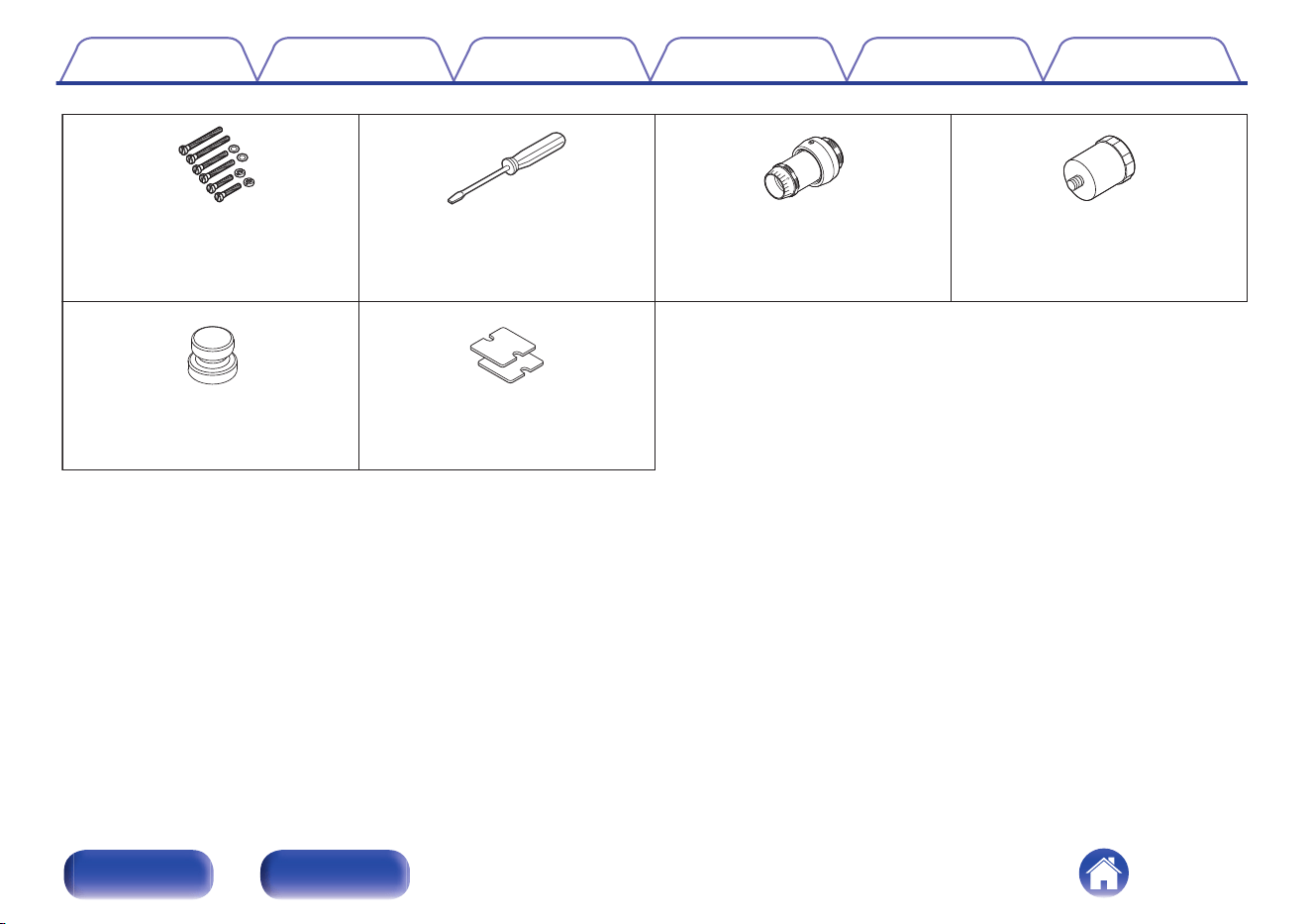
Accessories
Check that the following parts are included with the product.
Quick Start Guide
Safety Instructions Platter
Platter mat
Dust cover
Power cord
(for Europe model)
Power cord
(for North America model)
Power cord
(for Japan model)
Audio cable
Earth wire
Head shell
(with lead wire)
Overhang gauge
Contents Preparations Connections Playback Tips Appendix
4
Front Rear
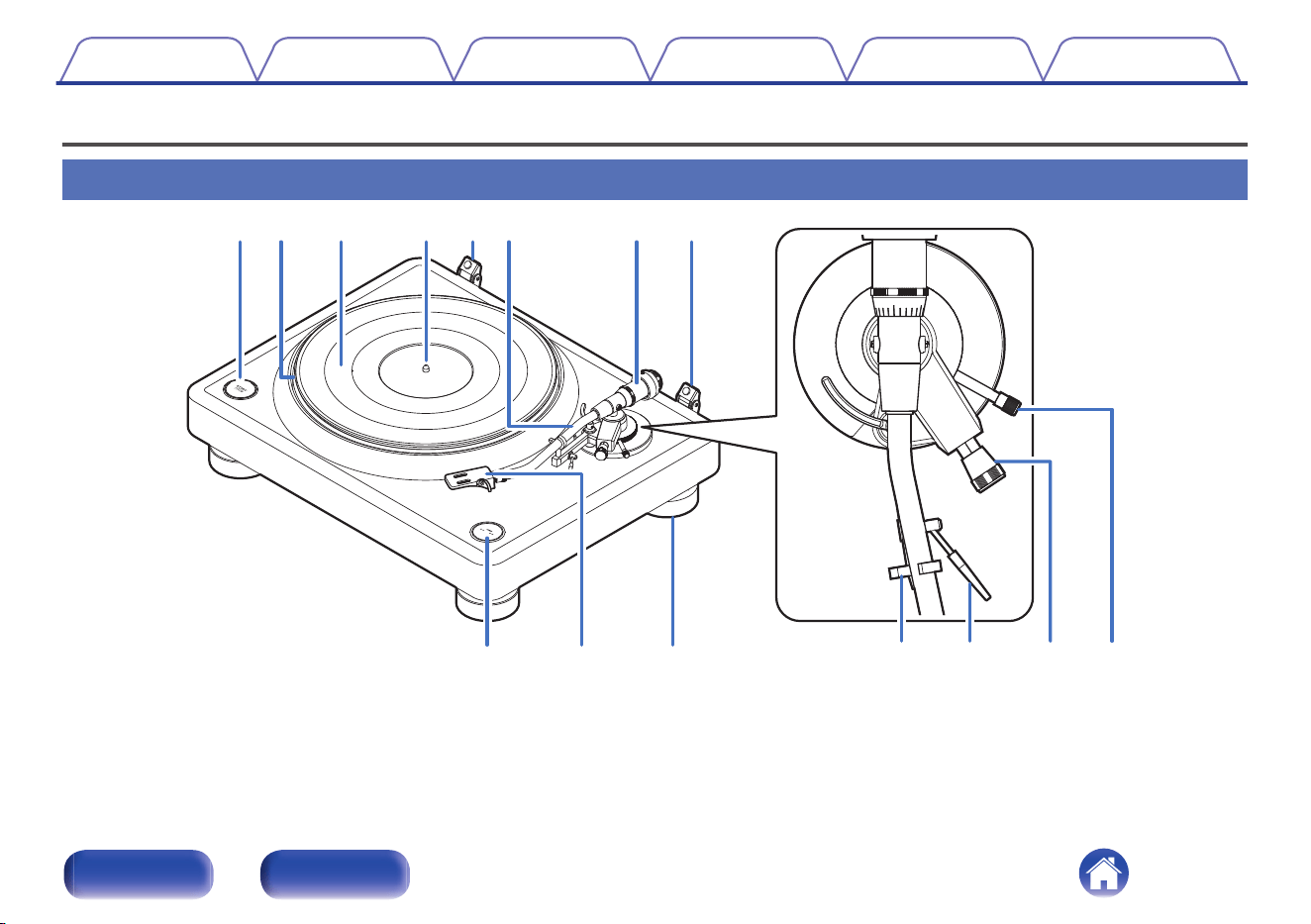
qrewutty
oiQ
0
Q1 Q2 Q3 Q4
A
START/STOP button
Starts and stops the platter. (v p. 26)
B
Platter
Attached by mounting on the center spindle on the main unit.
(v p. 11)
C
Platter mat
Mounted on top of the platter. (v p. 11)
D
Center spindle
Place the platter and records so that it comes out through the center.
E
Hinge for attaching the dust cover
Used to attach the included dust cover. (v p. 15)
F
Tone arm
0
The counterweight is mounted on the back. (v p. 11)
0
The head shell is attached to the tip. (v p. 14)
0
The sub weight is mounted on the back. (v p. 15)
G
Counterweight
Attached to the back of the tone arm to adjust stylus pressure.
0
“Mounting the counterweight” (v p. 11)
0
“Adjusting the stylus pressure” (v p. 17)
H
SPEED 33/45 button
Set the correct speed for the record you are playing. (v p. 26)
I
Head shell
Mount a commercial cartridge to the head shell and then mount the
head shell at the tip of the tone arm. (v p. 12)
J
Insulator
The height of the insulator can be adjusted. (v p. 16)
K
Armrest
Rest the tone arm here when it is not in use for record playback.
L
Lifter lever
Raises and lowers the tone arm. Lowering the lever slowly lowers the
tone arm to place the stylus without damaging it or the record to be
played. (Factory default setting: lowered position)
M
Anti-skating knob
Adjusts anti-skating. (v p. 20)
N
Arm height adjustment knob
Adjust the height of the tone arm according to the cartridge and head
shell you are using. (v p. 21)
Contents
Preparations Connections Playback Tips Appendix
7
Front Rear
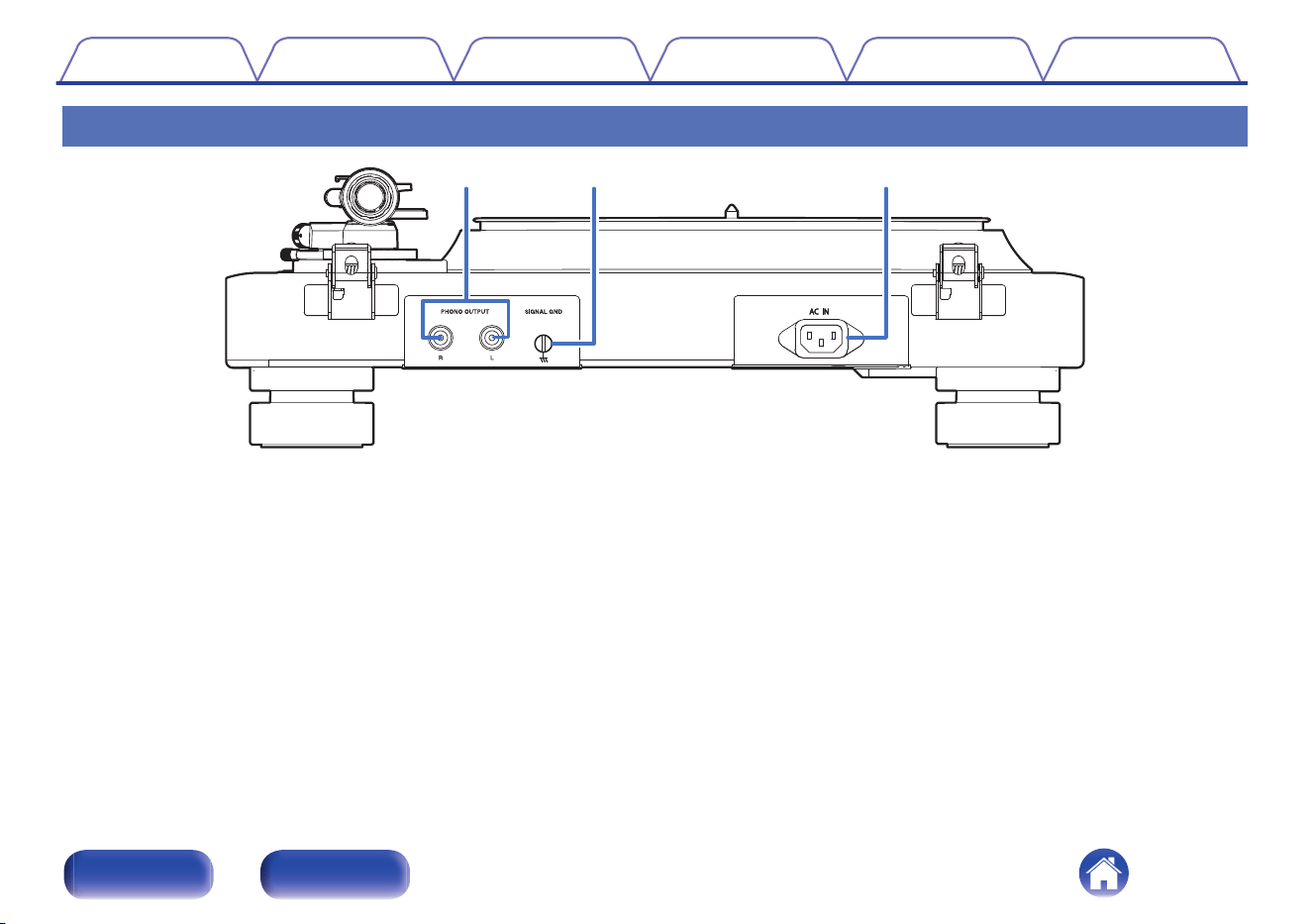
Rear
wqe
A
PHONO OUTPUT connectors
Connect equipment such as an amplifier with a PHONO input terminal.
(v p. 24)
B
SIGNAL GND terminal
Use the included earth wire, even when connecting this unit to
amplifiers with grounded connections. (v p. 24)
C
AC inlet (AC IN)
Used to connect the power cord. (v p. 25)
Contents Preparations Connections Playback Tips Appendix
8
Front Rear

o
Contents
Assembly
Mounting the platter 11
Mounting the counterweight 11
Mounting the cartridge 12
Mounting the head shell 14
Attaching the dust cover 15
Mounting the subweight 15
Adjustments
Adjusting the height of the insulators 16
Adjusting the stylus pressure 17
Adjusting anti-skating 20
Adjusting the height of the tone arm 21
Contents Preparations Connections Playback Tips Appendix
9
Front Rear
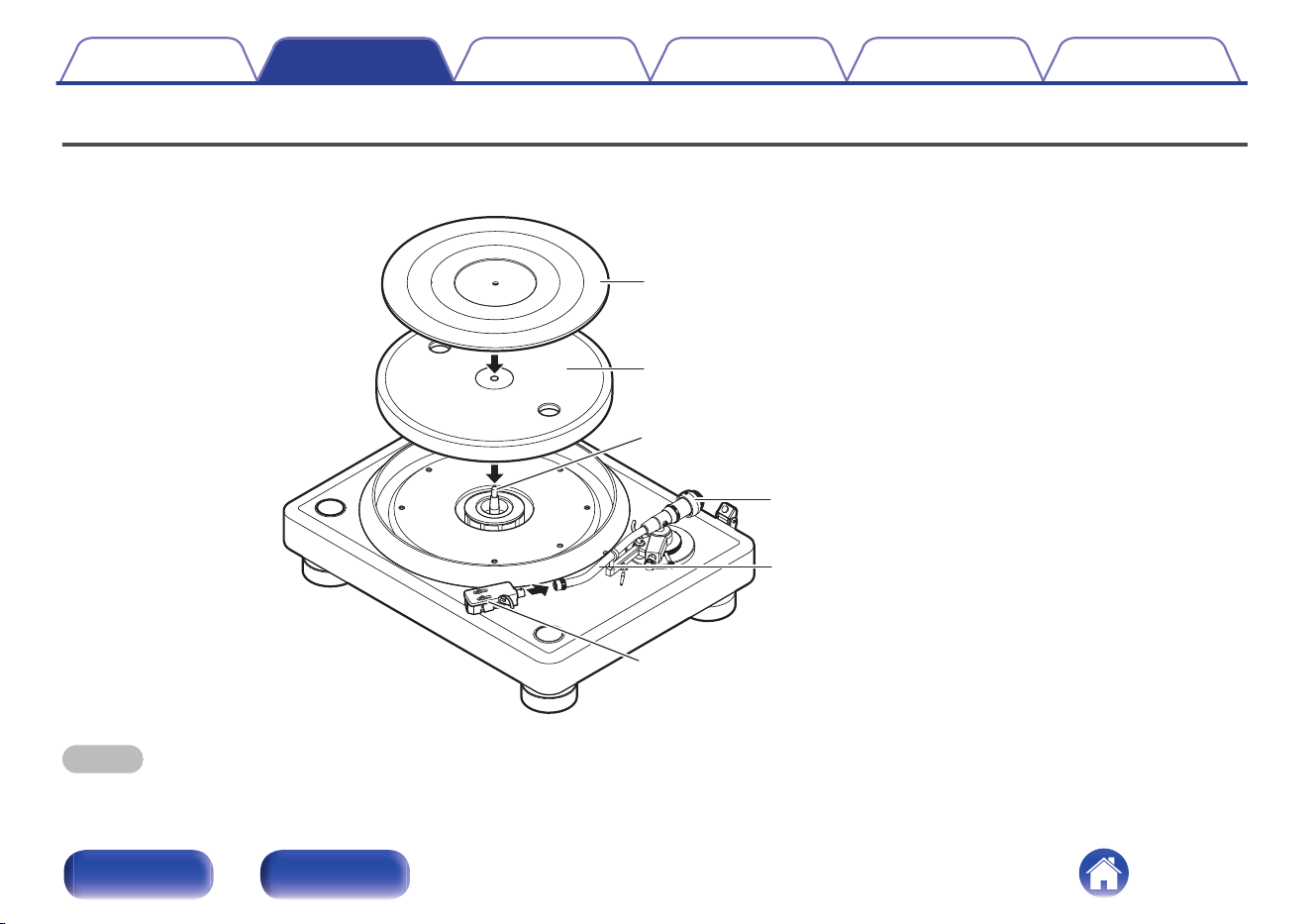
Assembly
Mount these included parts on the main unit before use.
Make sure to perform setup on a stable, even surface to prevent the influence of vibration or slanted angles on record playback.
Center spindle
Platter mat
Platter
Tone arm
Counterweight
Head shell
NOTE
0
Make sure the power cord is not connected from this unit to a wall socket during assembly.
Contents Preparations Connections Playback Tips Appendix
10
Front Rear
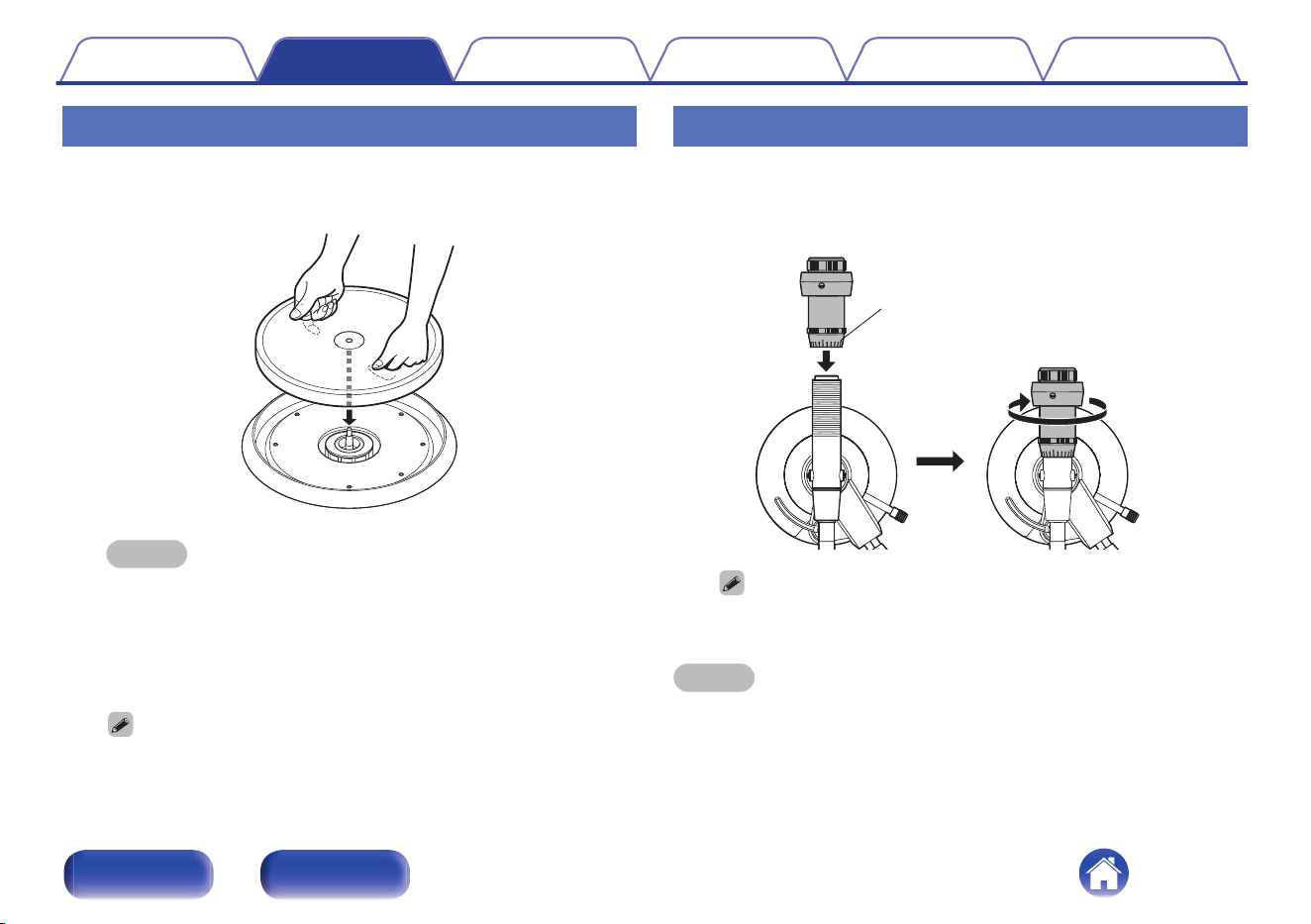
Mounting the platter
1
Mount the hole in the center of the platter on the center
spindle.
NOTE
0
Make sure there are no foreign objects around the center spindle before
mounting the platter.
0
The platter is heavy. Handle it with care.
0
Take care not to get your fingers caught when mounting.
2
Mount the platter mat on the platter.
0
Mount the mat with the side featuring the DENON logo facing down.
Mounting the counterweight
1
Insert the counterweight into the shaft on the back of
the tone arm, and turn it in the direction of the arrow
while gently pushing it.
0
0
Stylus pressure adjustment ring
0
Mount the counterweight so that its stylus pressure adjustment ring is facing
the front.
NOTE
0
It should be mounted carefully to avoid applying excessive force because the
thread of the counterweight is delicate.
Contents Preparations Connections Playback Tips Appendix
11
Front Rear
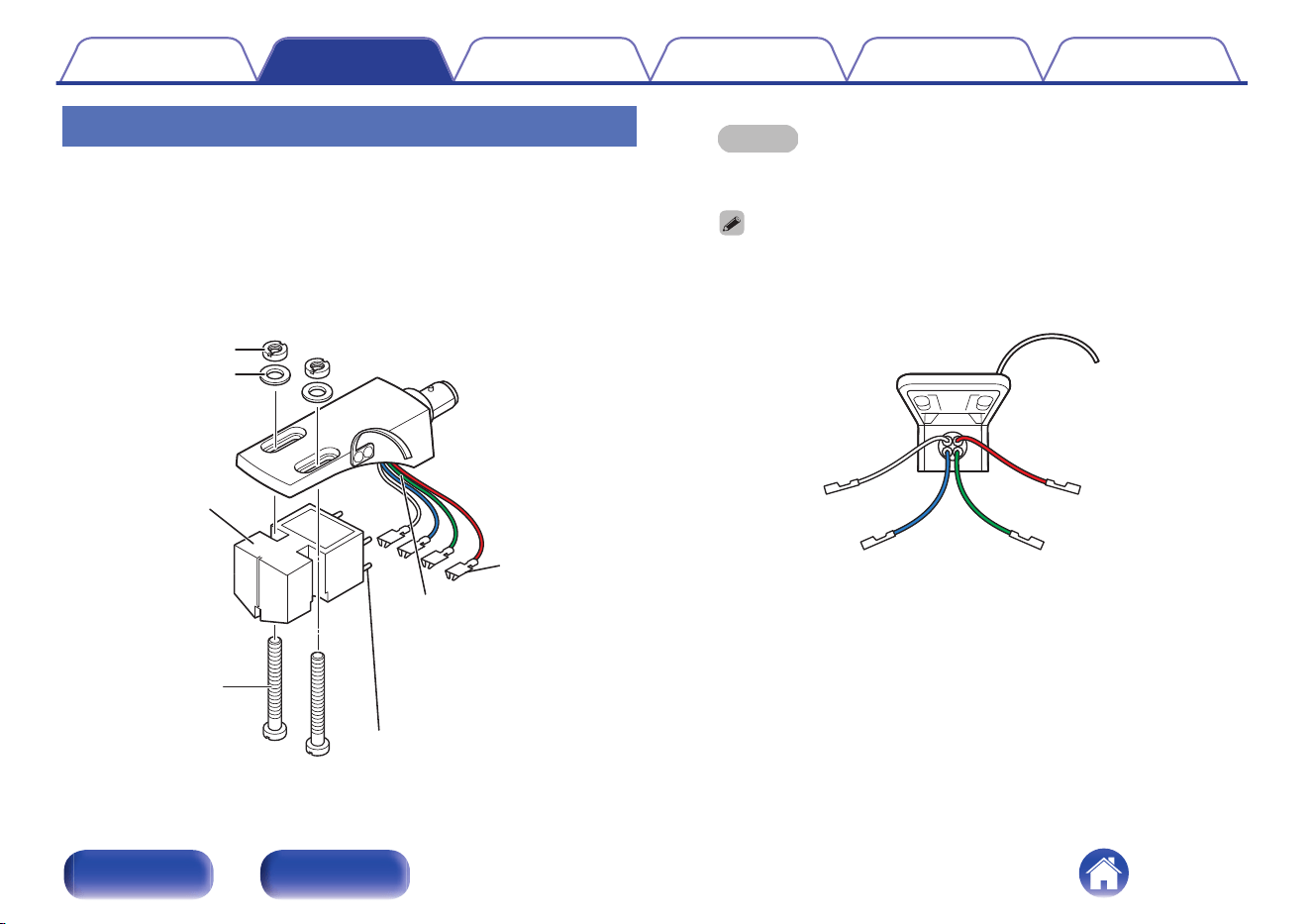
Mounting the cartridge
1
Attach the head shell to the cartridge (not included)
loosely.
0
Refer to the display or manual of the cartridge you are using and
ensure that the lead wire is correctly connected to the terminal of
the cartridge.
0
To adjust to overhang, temporarily fix the cartridge so that it can
be moved.
Nut
Washer
(Mylar film)
Screw
Terminal
Cartridge
Tip
Lead wire
・Red (R)
・Green (ER)
・Blue (EL)
・White (L)
NOTE
0
Use the included screws, nuts, washers and screwdriver.
0
Do not touch the stylus.
0
If the lead wire on the head shell is disconnected, connect the tip of the lead
wire to the terminal, as shown below.
0
The included lead wires can be replaced with commercially available lead
wires.
Red (R)
Green (ER)
White (L)
Blue (EL)
Contents
Preparations Connections Playback Tips Appendix
12
Front Rear
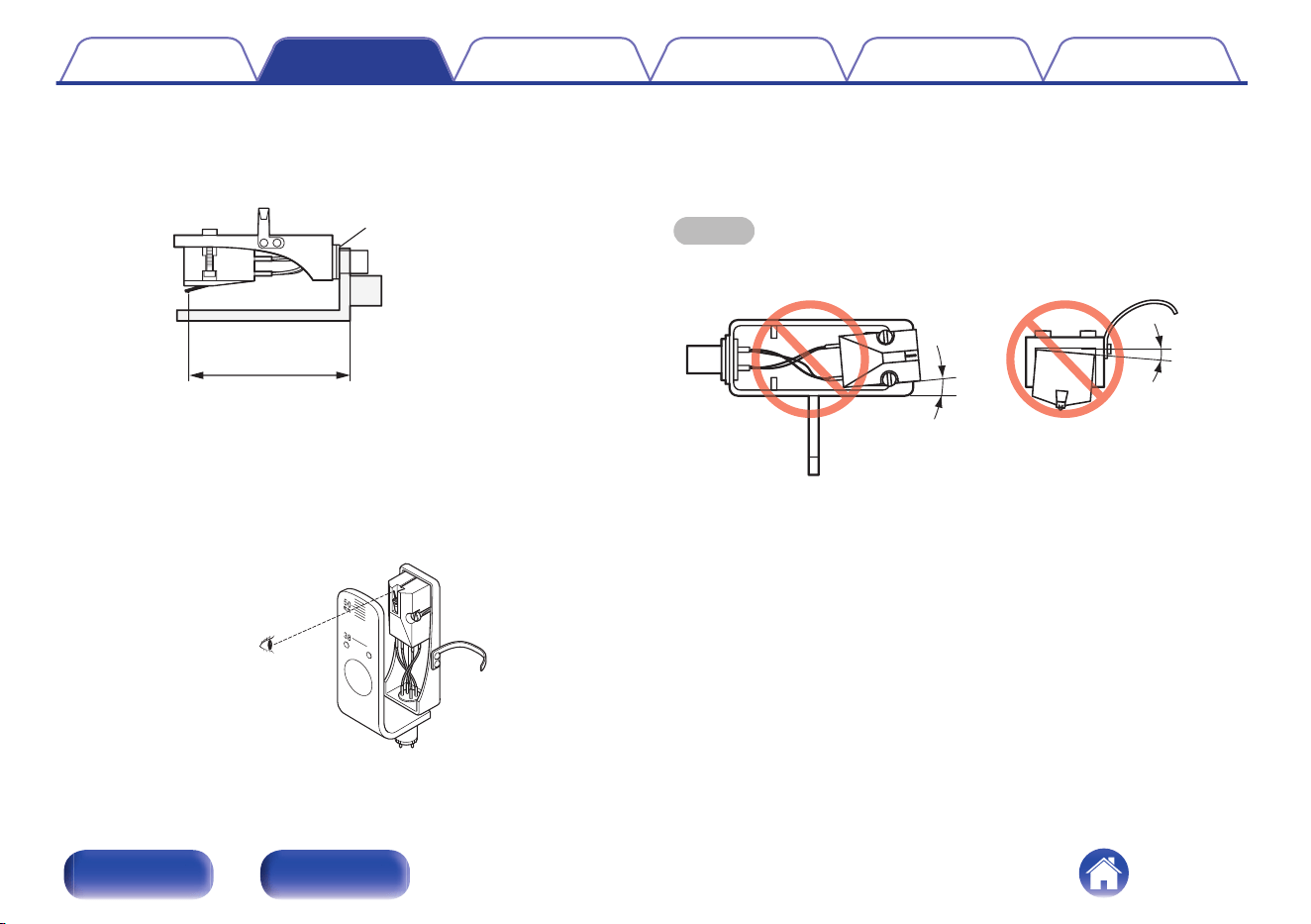
2
Adjust the overhang and then securely fasten the
cartridge to the head shell.
A
Mount the overhang gauge (included) to the head shell.
Head shell mount surface
2 inches
(50 mm)
B
Adjust the position of the cartridge so that the stylus is at the 2
inches (50 mm) point of the overhang gauge.
0
2 inches (50 mm) :This is the distance at which the stylus tip
traces the left and right channels with optimum balance
according to the positioning of the platter and tone arm.
(overhang value)
C
Tighten the screws with a screwdriver to secure the cartridge to
the head shell.
NOTE
0
Mount the cartridge with no tilt or floating so that the stylus tip can trace the groove
on a record correctly.
floating
tilt
Contents Preparations Connections Playback Tips Appendix
13
Front Rear
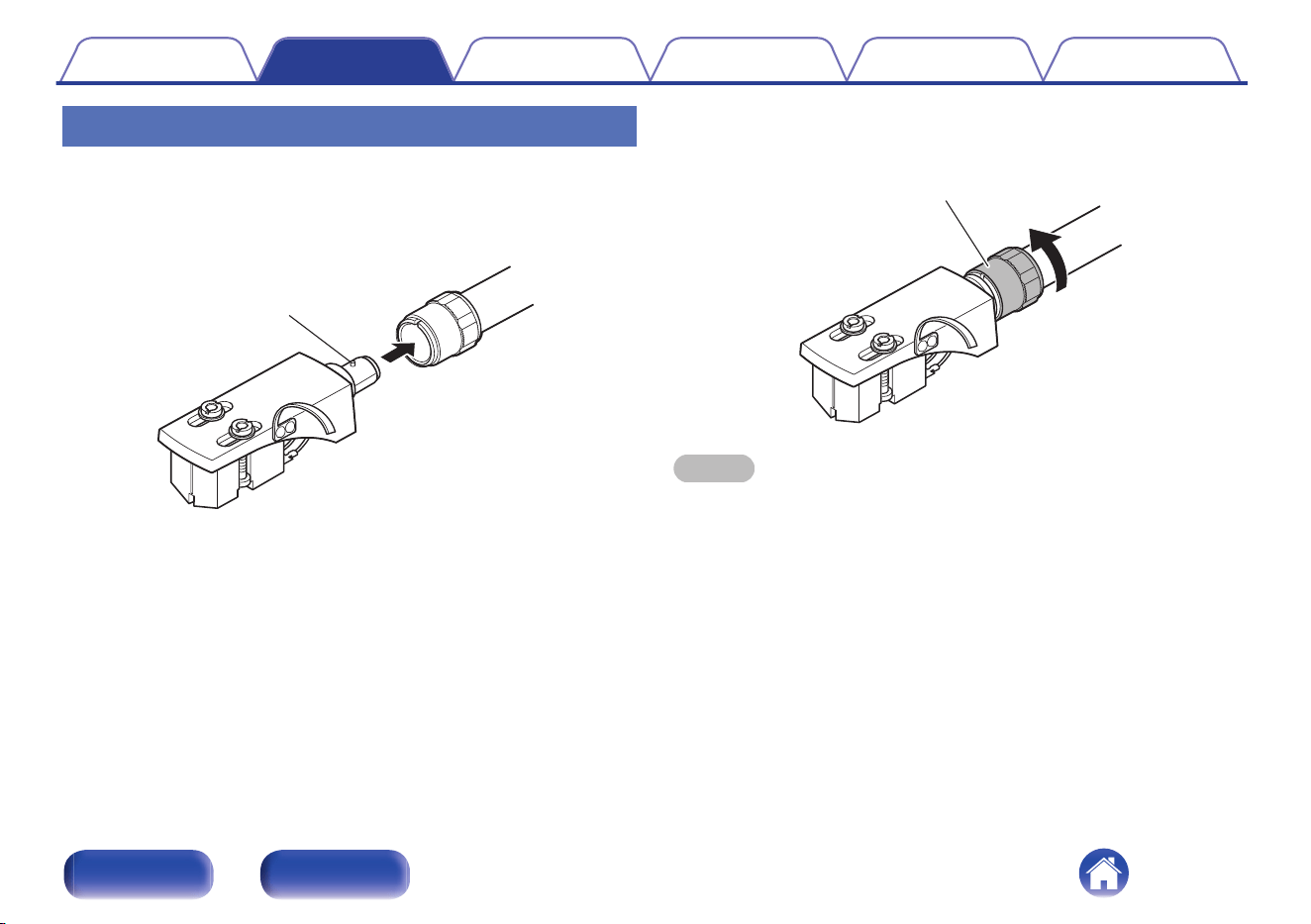
Mounting the head shell
1
Insert the head shell into the tip of the tone arm.
0
Insert the head shell with its guide pin facing up and aligned with
the hole on the top of the tone arm.
Guide pin
2
Turn the lock nut in the direction of the arrow to secure
the head shell.
Lock nut
NOTE
0
Do not touch the stylus.
0
Keep the head shell and the tone arm terminal clean. If they are dirty, this may
affect the sound quality. Regular cleaning is recommended.
Contents
Preparations Connections Playback Tips Appendix
14
Front Rear
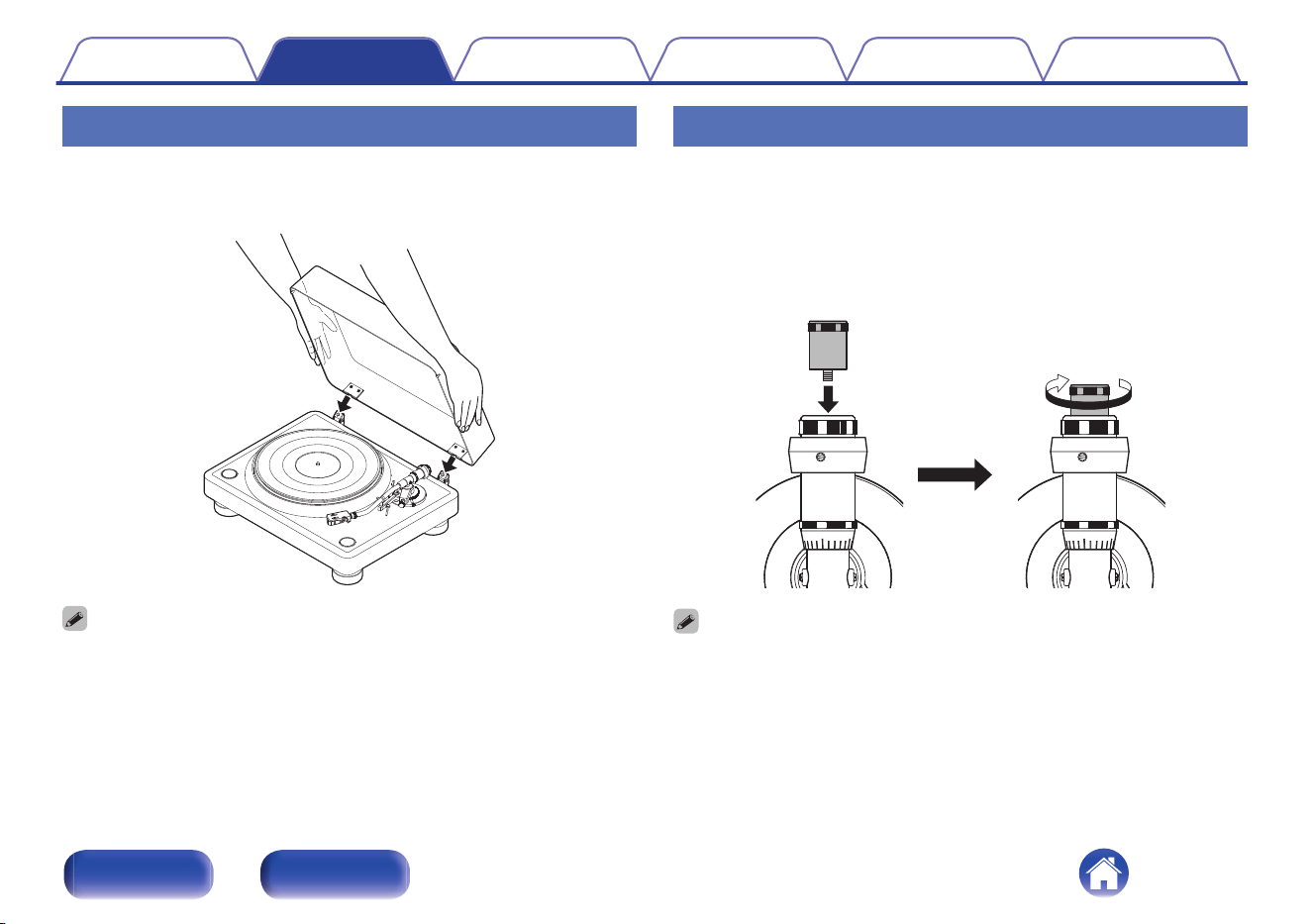
Attaching the dust cover
1
Insert the edges of the hinges on the main unit into the
hinge slots of the dust cover.
0
To remove the dust cover, open the dust cover all the way and then pull it in the
opposite direction to that indicated by the arrows.
Mounting the subweight
If your cartridge and head shell are too heavy to keep the tone arm parallel
to the record with the counterweight alone, attach the included subweight
to the tone arm to keep it balanced.
1
Mount the subweight behind the counterweight by
inserting it in the screw hole at the back of the tone
arm.
0
Refer to “Suitable cartridge weight” (v p. 35) for details on the weight range of
cartridges compatible with each of the weights.
Contents Preparations Connections Playback Tips Appendix
15
Front Rear
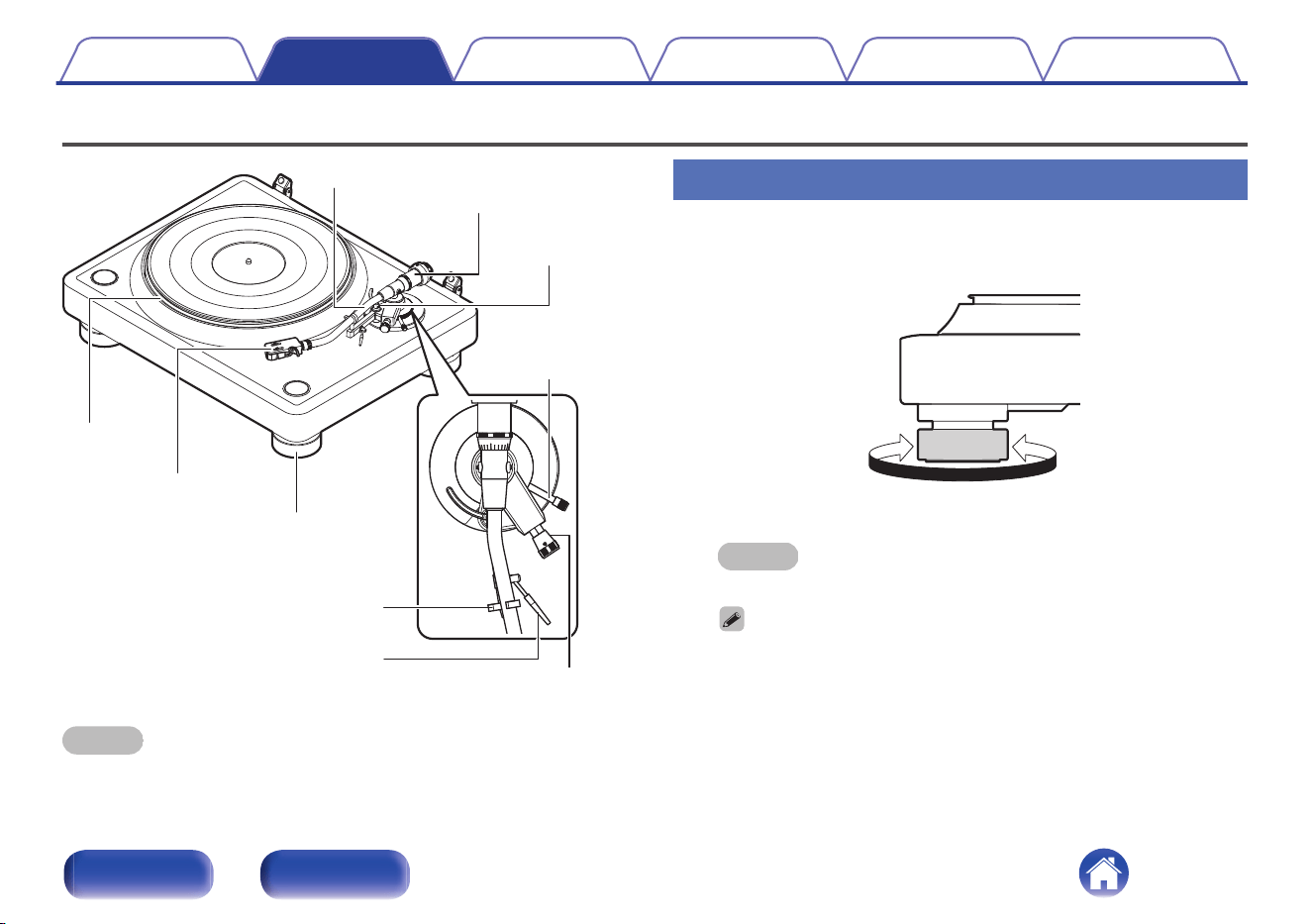
Adjustments
Tone arm
Counterweight
Lifter
Lifter lever
Anti-skating knob
Arm height
adjustment knob
Armrest
Platter
Insulator
Head shell
NOTE
0
Make sure the power cord is not connected from this unit to a wall socket when
performing adjustments.
Adjusting the height of the insulators
1
Turn the insulators to adjust their height so that the
turntable is placed level.
Increases the height
Reduces the height
NOTE
0
Do not overtighten the insulators as overtightening may result in damage.
0
A commercial spirit level can be used for more accurate adjustment.
Contents Preparations Connections Playback Tips Appendix
16
Front Rear
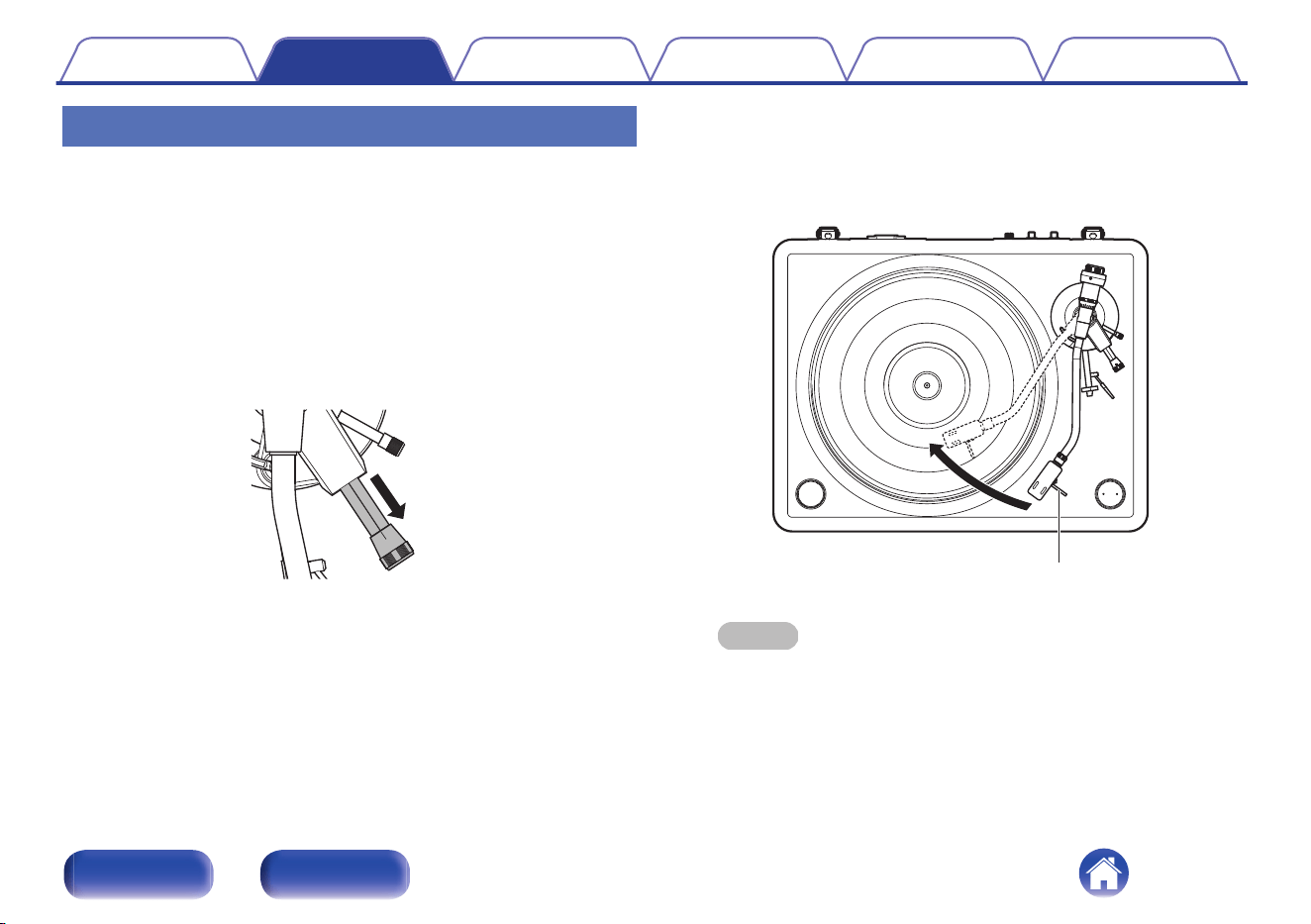
Adjusting the stylus pressure
To enable the record stylus to follow the grooves of the record and pick up
sound (vibrations), it is necessary to apply a constant pressure (stylus
pressure) to the record from the stylus tip. A suitable stylus pressure value
is specified for each cartridge. If the stylus pressure is higher or lower than
the specified value, not only will the record playback sound be distorted
and the stylus jump, but the record stylus may wear out faster and the
record may become damaged. Therefore, make sure to adjust the stylus
pressure to the suitable value.
1
Pull the anti-skating knob in the direction of the arrow.
This turns the anti-skating function off.
0.5
2
Lower the lifter lever.
3
Remove the tone arm from the arm rest.
4
Holding the finger lift of the headshell, move the tone
arm over the platter.
Finger lift
NOTE
0
For a cartridge with a removable stylus cover, remove the stylus cover.
Contents Preparations Connections Playback Tips Appendix
17
Front Rear
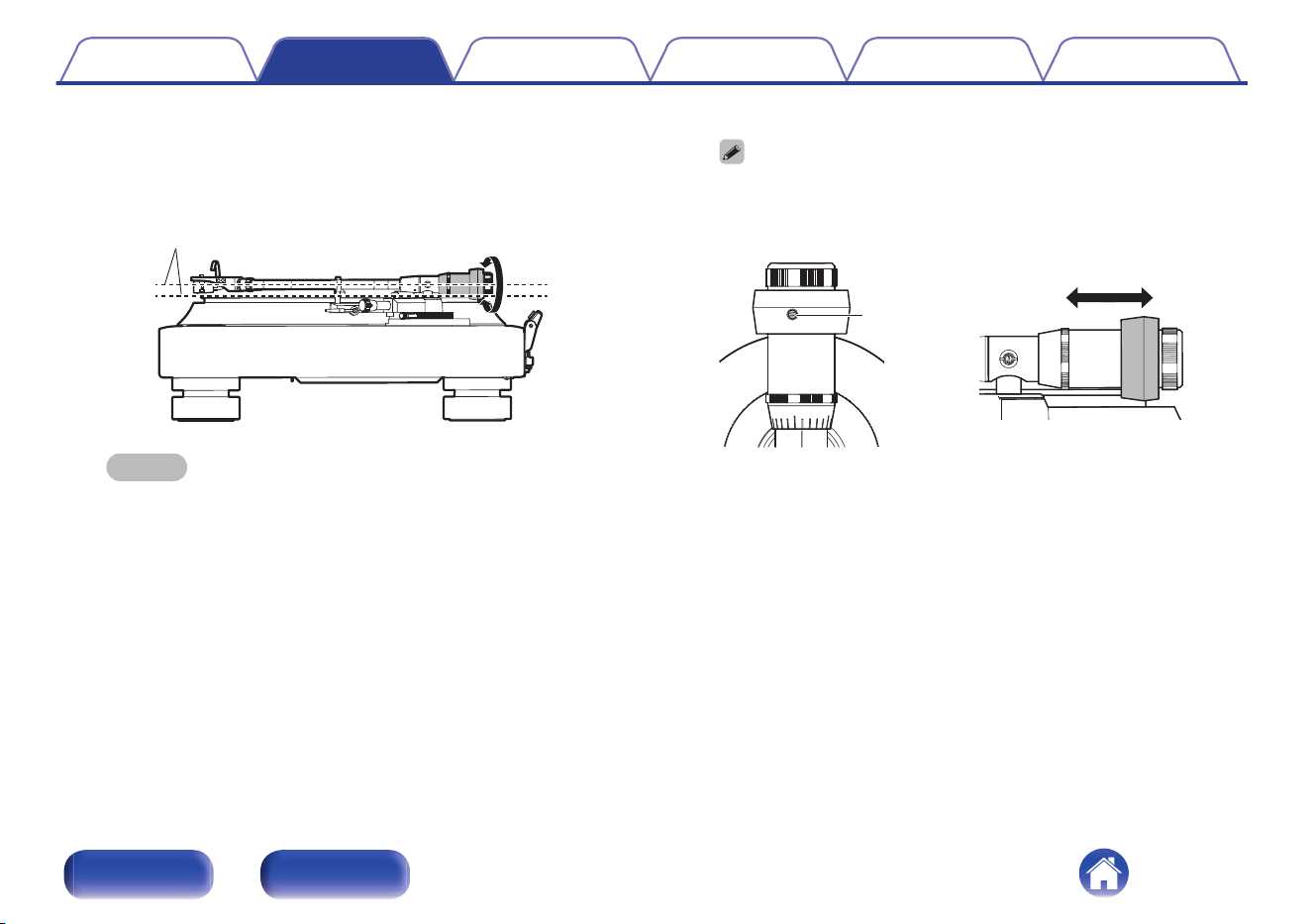
5
Turn twist the counterweight so that the tone arm is
floating parallel to the platter.
0
Perform adjustment by turning the counterweight gradually while
periodically removing your hand to check the position.
Keep it parallel
NOTE
0
Make sure the stylus does not touch the platter mat or the main unit.
0
Adjustments can also be made by sliding part of the counterweight. Loosen
the counterweight screw with the included screwdriver and slide the
counterweight. After adjusting, tighten the screw to secure the
counterweight.
Screw
0
0
If your cartridge and head shell are too heavy to keep the tone arm parallel
to the record with the counterweight alone, attach the included subweight to
the tone arm. (v p. 15)
Contents
Preparations Connections Playback Tips Appendix
18
Front Rear
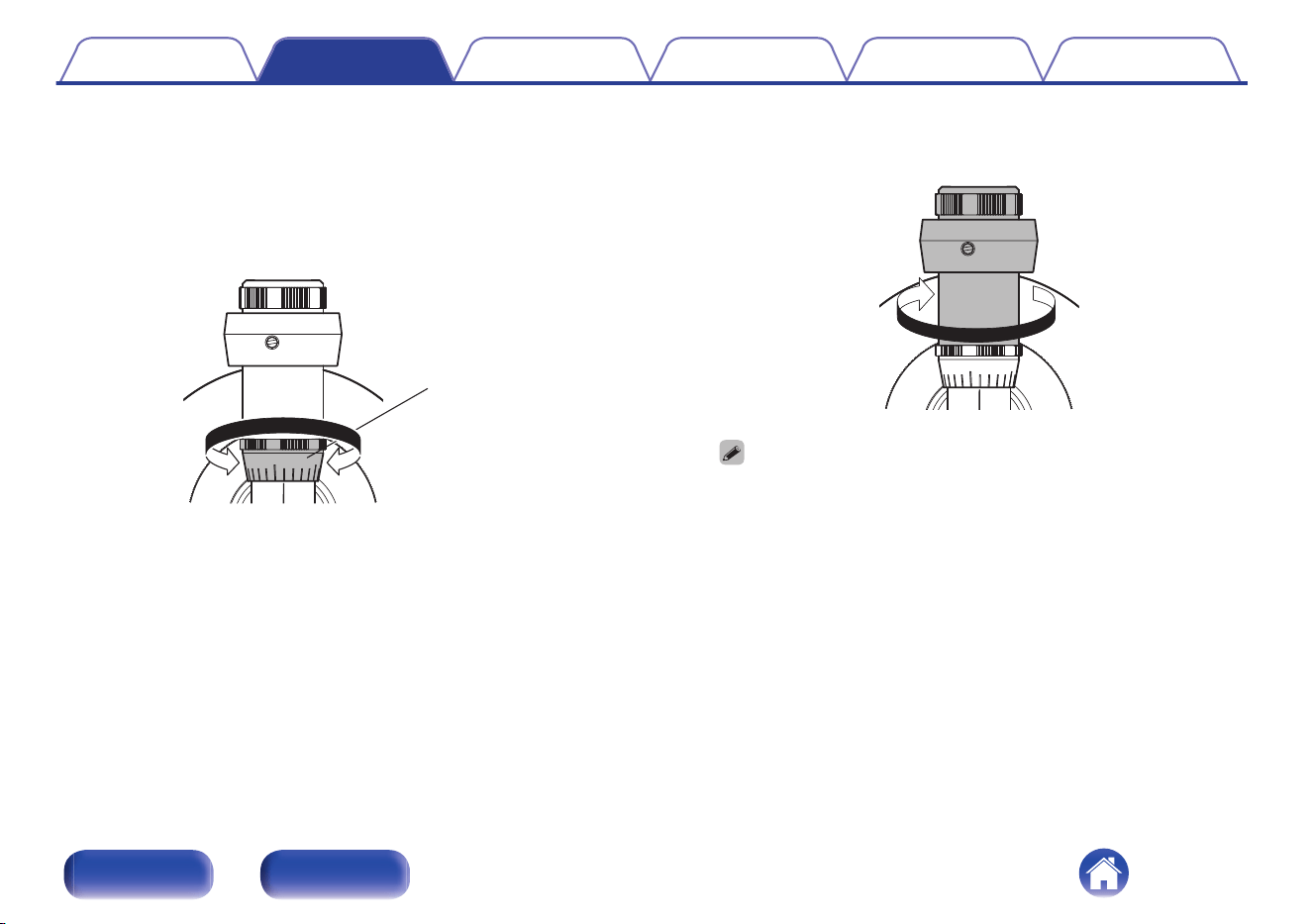
6
Return the tone arm to the armrest.
7
Holding the counterweight with a finger so that it does
not move, turn the stylus pressure adjustment ring so
that its “0” mark is lined up with the line on the tone
arm.
0
Stylus pressure
adjustment ring
8
Turn the counterweight in the direction of the arrow to
set the right cartridge stylus pressure.
0
0
Refer to the manual of the cartridge you are using for details on the right
cartridge stylus pressure.
Contents Preparations Connections Playback Tips Appendix
19
Front Rear
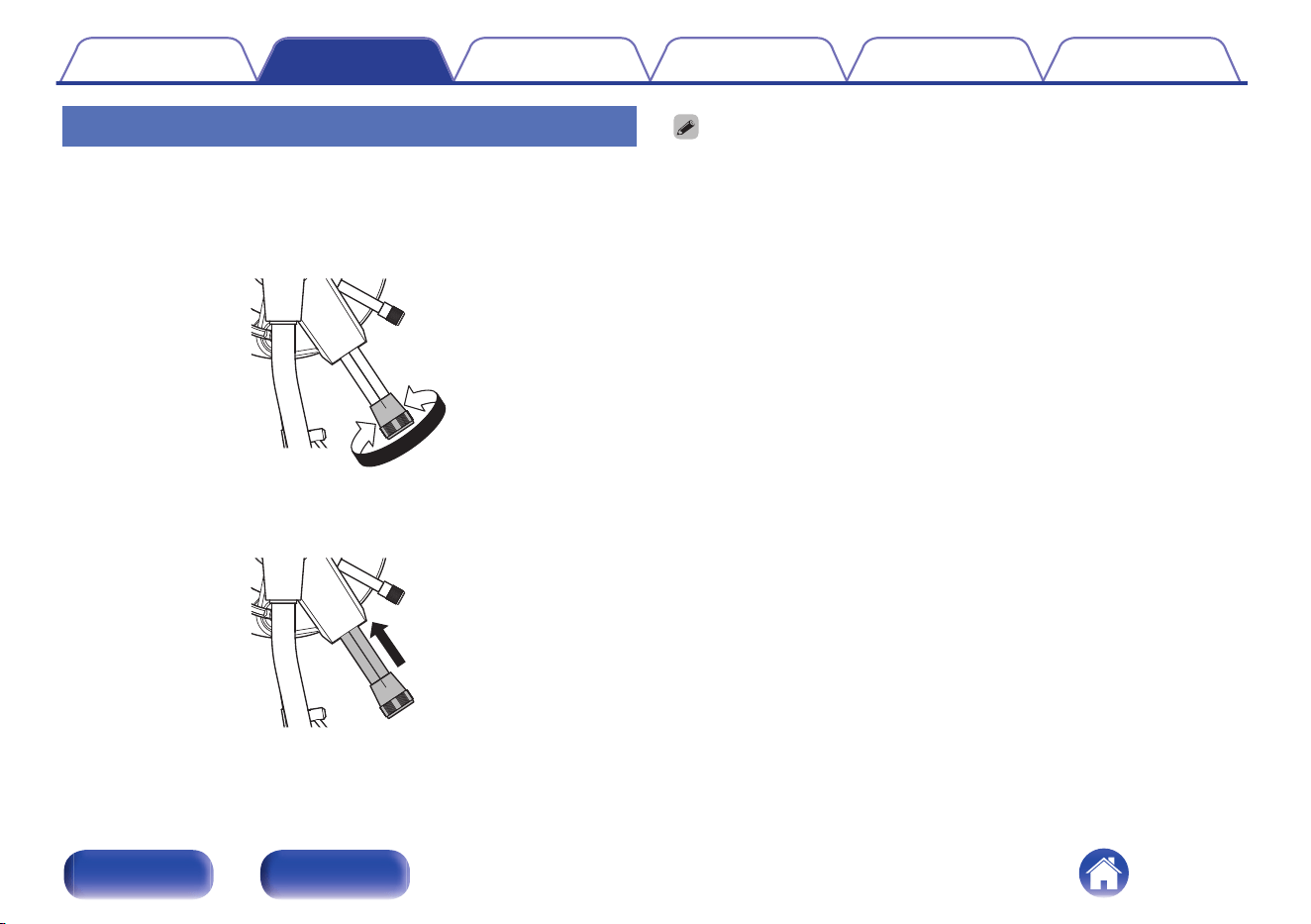
Adjusting anti-skating
Anti-skating adjustment is performed to counter the force which pulls the
stylus tip inside due to the record rotation.
1
Turn the anti-skating knob and set the same number as
the cartridge stylus pressure.
0.5
2
Push the anti-skating knob in the direction of the arrow.
This turns the anti-skating function on.
0.5
0
If the stylus pressure of your cartridge is higher than 3.0 g , set “3”.
0
This will not affect the sensitivity of the arm because the anti-skating function of
this unit is performed by a magnetic system that does not come into contact with
the shaft of the tone arm.
Contents Preparations Connections Playback Tips Appendix
20
Front Rear
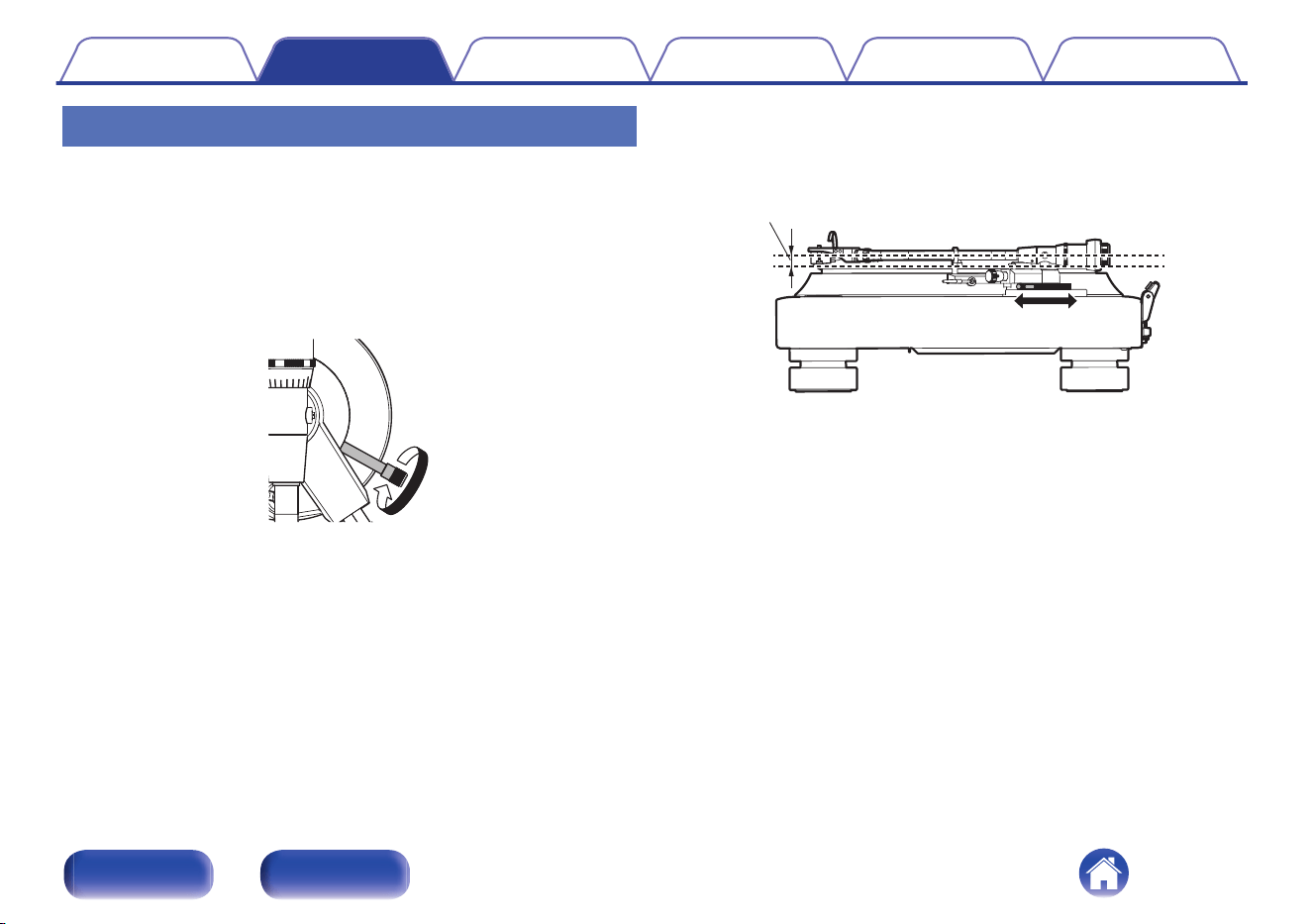
Adjusting the height of the tone arm
Depending on the cartridge or head shell you are using, the tone arm may
not be parallel to the record when the stylus touches the record. If this
happens, adjust the height of the tone arm until it is parallel to the record.
This needs to be properly adjusted so that the stylus of the cartridge will
trace the grooves of the record correctly.
1
Turn the arm height adjustment knob counterclockwise
to unlock it.
0
2
Use the arm height adjustment knob to turn the base of
the tone arm and adjust the height.
0
Adjust until the tone arm is parallel to the top of the record.
Keep it parallel
Contents Preparations Connections Playback Tips Appendix
21
Front Rear
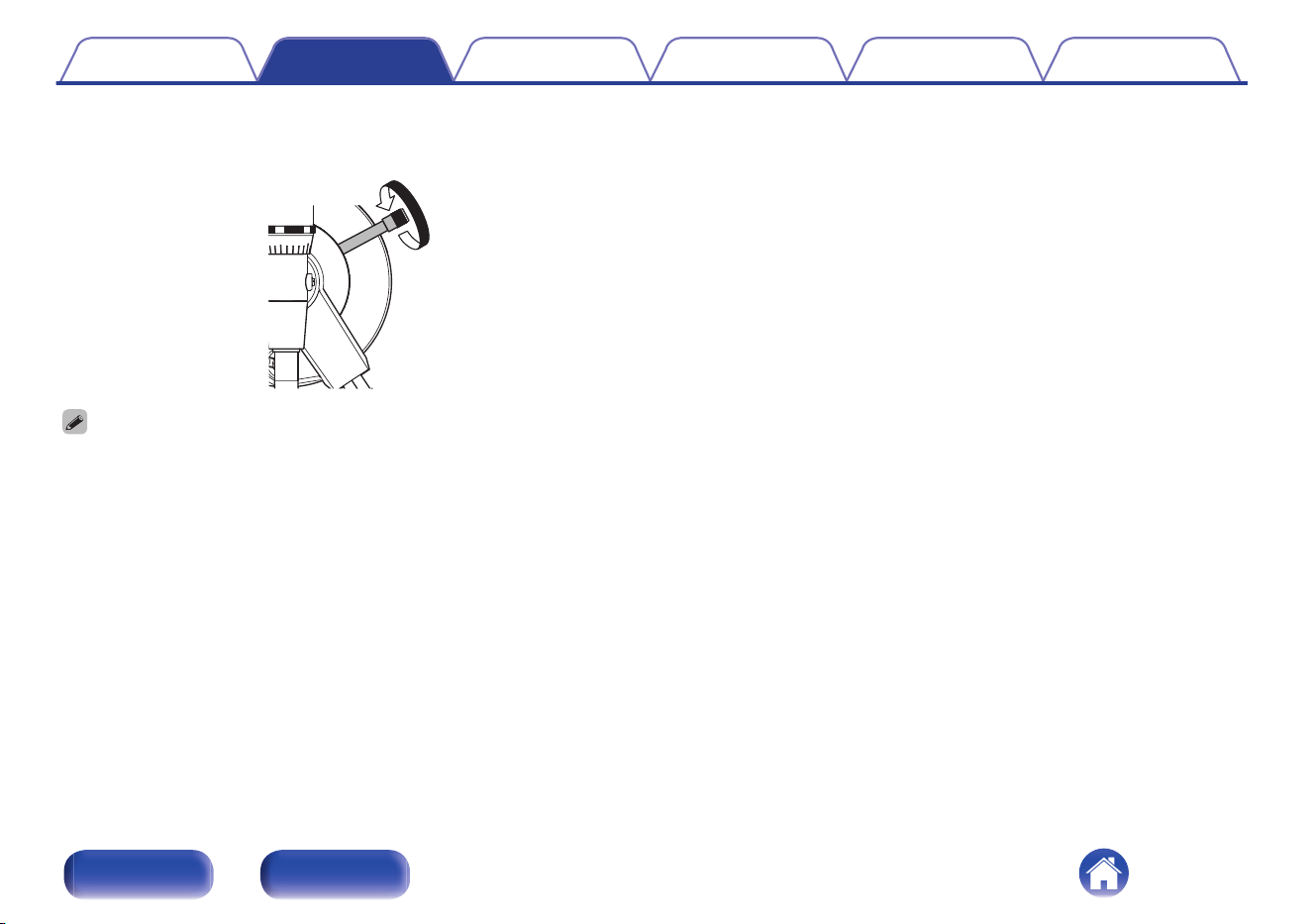
3
Turn the arm height adjustment knob clockwise to lock
it.
0
0
The tone arm height can be adjusted from 0 to 0.35 inches (9 mm).
0
If the cartridge height is too small, it may not be possible to make the tone arm
parallel to the record by adjusting the height of the tone arm. If this happens, put
the included cartridge spacers between the head shell and the cartridge and
adjust until the tone arm is parallel to the record.
Contents Preparations Connections Playback Tips Appendix
22
Front Rear

o
Contents
Connecting amplifier that have a phono input 24
Connecting the power cord 25
NOTE
0
Do not plug in the power cord until all connections have been completed.
0
Do not bundle power cords together with connection cables. Doing so can result in
humming or noise.
Contents
Preparations Connections Playback Tips Appendix
23
Front Rear
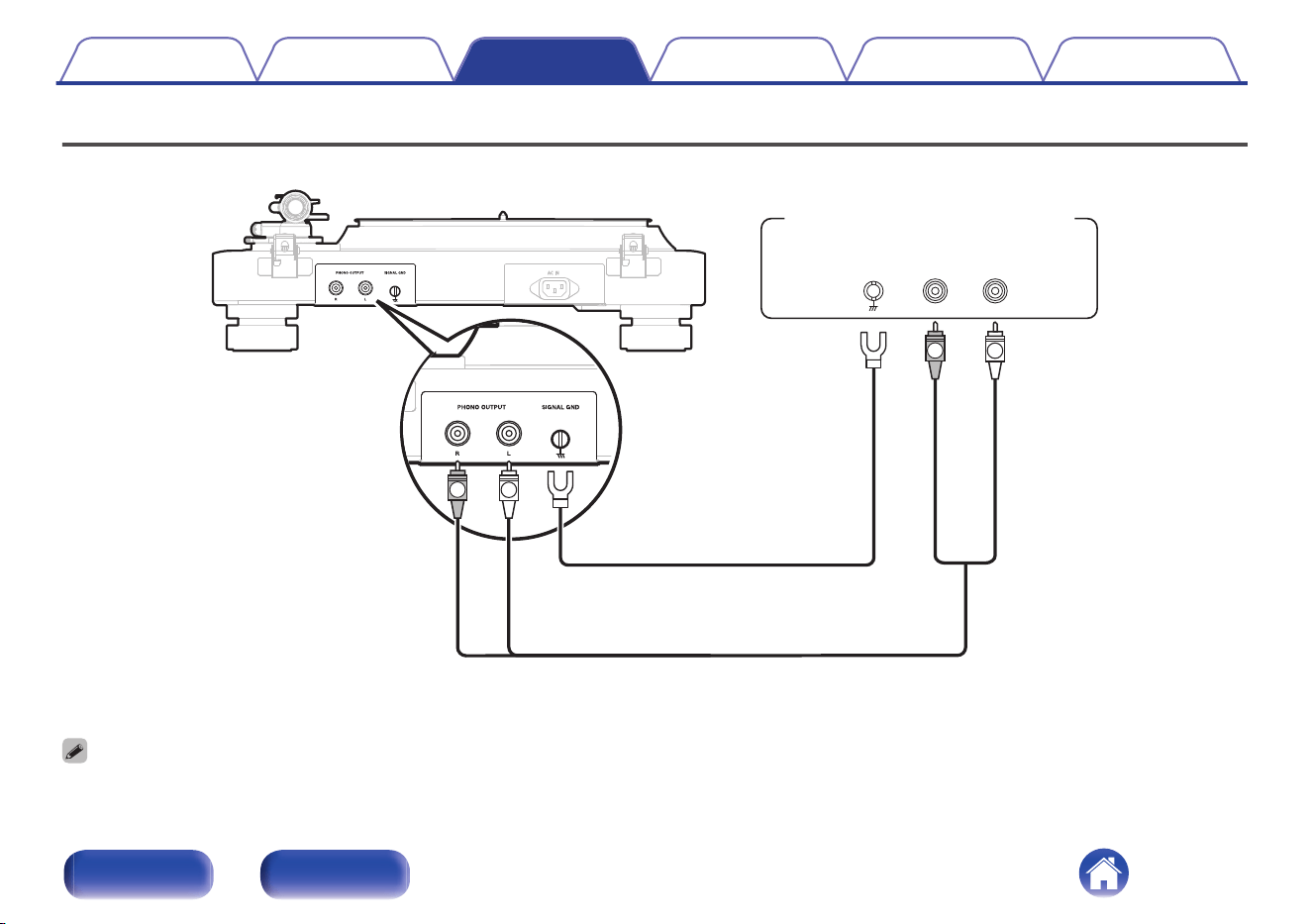
Connecting amplifier that have a phono input
R
L
RGND
SIGNAL
L
PHONEIN
R
L
Audio cable
(included)
Earth wire
(included)
Amplifier with a PHONO
input terminal
0
If a device connected to this unit has an earth terminal, connect the earth wire (included) to the earth terminal of this unit (SIGNAL GND). This may reduce noise during
playback.
0
Red and black rubber rings are attached to the audio cable plugs to distinguish between the left and right sides. Reattach the rings if they come off.
Contents
Preparations Connections Playback Tips Appendix
24
Front Rear
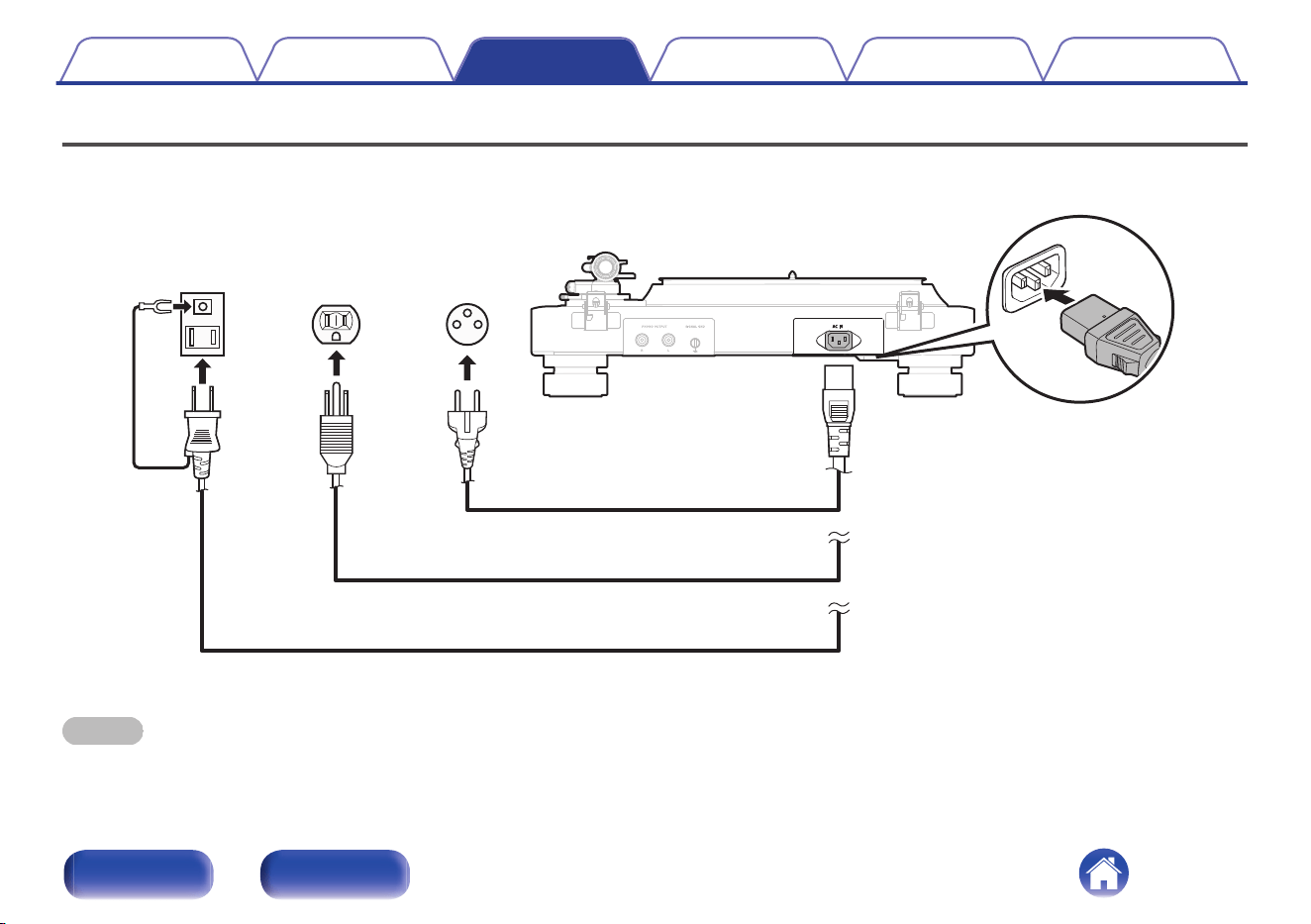
Connecting the power cord
After completing all the connections, insert the power plug into the power outlet.
A power cord for each region is included. Use the power cord for your region.
Power cord (included)
Power cord (included)
Power cord (included)
for
Europe
for
North
America
for
Japan
NOTE
0
This unit turns on when the power cord connected to the unit is plugged in to a power outlet.
0
When leaving home for long periods of time or when going on vacation, unplug the power cord from the power outlet.
Contents Preparations Connections Playback Tips Appendix
25
Front Rear
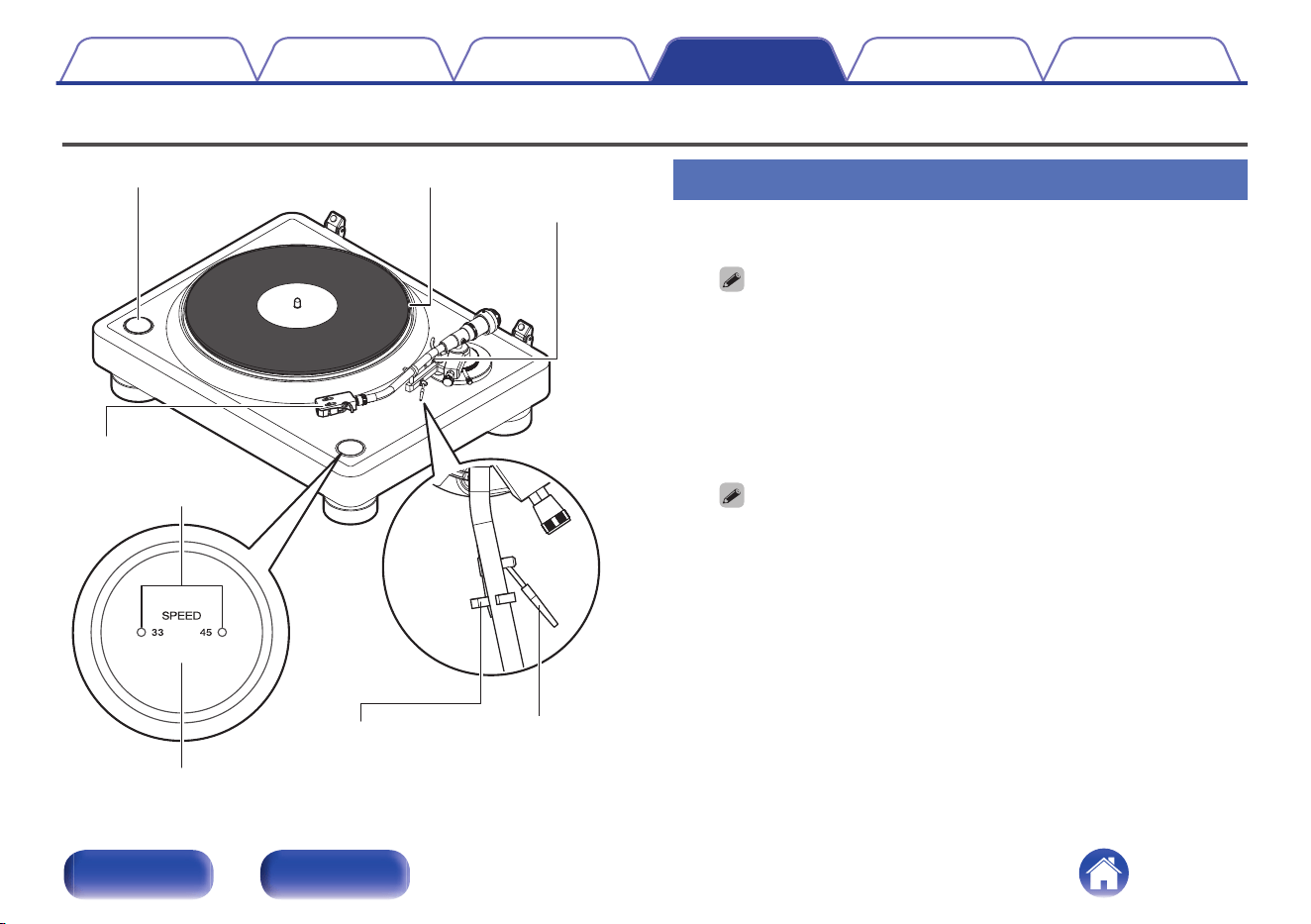
Record playback
Tone arm
Lifter lever
SPEED 33/45 button
Armrest
PlatterSTART/STOP button
Head shell
Speed light
Record playback
1
Place a record on the platter.
0
For EP (“doughnut”) records, insert the included 45 rpm adapter onto the
center spindle.
0
The adapter for 45 rpm records can also be used as a stabilizer.
2
Press the SPEED 33/45 button to set the right platter
speed for the record you are playing.
The button toggles between 33 1/3 rpm and 45 rpm. The current
speed is displayed in the speed light.
0
This unit also supports 78 rpm records.
While pressing the SPEED 33/45 button, press the START/STOP button.
Both speed lights turn on and the speed changes to 78 rpm.
0
The record rpm is normally indicated on the jacket or label of the record.
0
After pressing the SPEED 33/45 button, the speed light will turn on for
approximately 20 seconds.
0
The speed light corresponding to the set speed will turn on when the platter
is turning.
0
After the platter stops, the speed light will turn off after approximately 20
seconds.
3
Press the START/STOP button.
The platter will start turning.
Contents
Preparations Connections Playback Tips Appendix
26
Front Rear
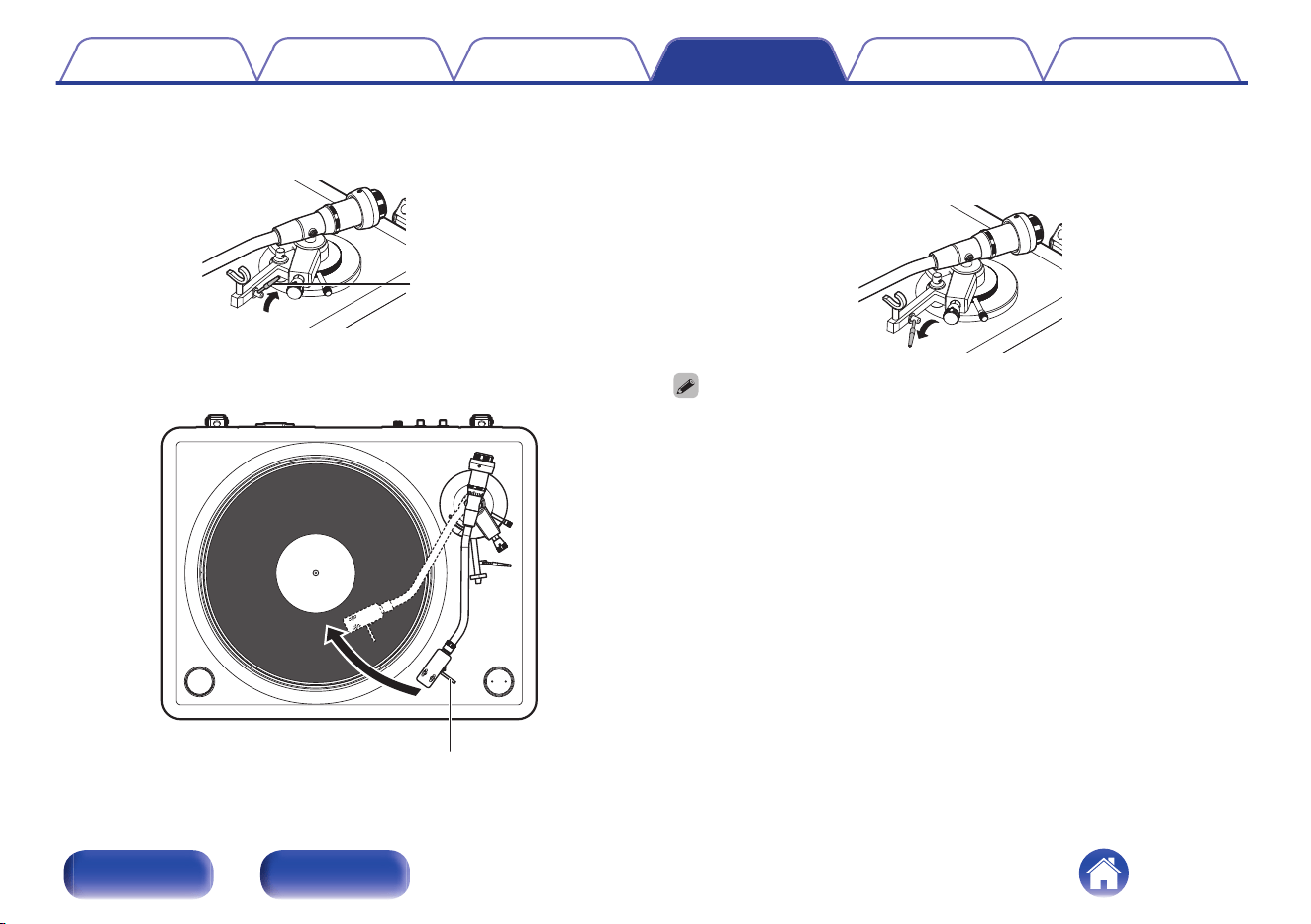
4
Lift the lifter lever and remove the tone arm from the
arm rest.
Lifter lever
5
Grip the finger lift, and move the stylus tip directly
above the start position of the track to play.
Finger lift
6
Lower the lifter lever.
The tone arm slowly lowers, and playback starts when the stylus tip
reaches the record.
0
Be careful not to scratch records.
0
Observe the following during playback.
0
Do not touch the tone arm or platter.
0
Do not disconnect the power.
0
Make sure this unit is not subjected to vibration or impact.
0
Do not change the record until the platter has completely stopped.
0
Do not apply pressure with your hand to stop the platter while it is turning. Doing so
creates internal heat which can lead to equipment failure or fire.
Contents Preparations Connections Playback Tips Appendix
27
Front Rear
Stopping playback
1
Raise the lifter lever.
Raise the tone arm to remove the stylus from the record.
2
Holding the finger lift of the headshell, return the tone
arm to the armrest.
3
Lower the lifter lever.
4
Press the START/STOP button.
The platter stops.
Contents Preparations Connections Playback Tips Appendix
28
Front Rear

Contents
o
Troubleshooting
Power does not turn on 31
Power cannot be turned off 31
No sound comes out 31
Hum noise is heard 32
Audio skips, scratches or is distorted 32
Howling is produced 33
The tone arm stops moving halfway 33
The platter does not rotate at the set speed 33
Contents Preparations Connections Playback Tips Appendix
29
Front Rear
Troubleshooting
If a problem should arise, first check the following:
1. Are the connections correct?
2. Is the set being operated as described in the owner’s manual?
3. Are the other devices operating properly?
If this unit does not operate properly, check the corresponding symptoms in this section.
If the symptoms do not match any of those described here, consult your dealer as it could be due to a fault in this unit. In this case, disconnect the power
immediately and contact the store where you purchased this unit.
Contents Preparations Connections Playback Tips Appendix
30
Front Rear

Power does not turn on
Power is not turned on.
0
Check whether the power plug is correctly inserted into the power outlet. (v p. 25)
Power cannot be turned off
Power cannot be turned off.
0
This unit does not have a power switch. When leaving home for long periods of time or when going on vacation, unplug the power cord from the power
outlet.
No sound comes out
No sound is produced. Or sound is distorted.
0
Check the connections for all devices. (v p. 23)
0
Insert connection cables all the way in.
0
Check that input connectors and output connectors are not reversely connected.
0
Check cables for damage.
0
Check the amplifier’s functions and controls and adjust as necessary.
0
Make sure the cartridge is correctly attached. (v p. 12)
Contents
Preparations Connections Playback Tips Appendix
31
Front Rear

Hum noise is heard
Hum noise is heard.
0
Check that the earth wire of the audio cable is connected to the amplifier. (v p. 24)
0
Check that the audio cable is connected to the amplifier correctly. (v p. 24)
0
Check that the head shell is securely fastened to the tone arm. (v p. 14)
Audio skips, scratches or is distorted
Audio skips, scratches or is distorted.
0
The correct stylus pressure is not applied. Adjust to the correct pressure. (v p. 17)
0
Make sure there are no scratches on the record.
0
Make sure the record is not warped.
0
Make sure there is no dirt or dust on the stylus or the record.
Contents
Preparations Connections Playback Tips Appendix
32
Front Rear

Howling is produced
Howling is produced.
0
This unit and speaker are too close together. Move the speaker away from this unit.
0
This unit is in an unstable position. Install in a stable, level location.
0
Playback volume is too loud. Adjust the volume of the connected amplifier to the appropriate level.
The tone arm stops moving halfway
The tone arm not tracking during playback.
0
Make sure there are no scratches on the record.
0
Make sure nothing is obstructing the tone arm.
The platter does not rotate at the set speed
The platter does not rotate at the set speed.
0
The speed light blinks continuously when the platter is not rotating at the set speed. Unplug and reinsert the power cord, then press the START/STOP
button again. If this does not resolve the problem, contact our customer service center.
Contents
Preparations Connections Playback Tips Appendix
33
Front Rear
Specifications
o
Turntable section
Driving system: Direct drive
Speed: 33 1/3 rpm, 45 rpm, 78 rpm
Wow & flutter: Less than 0.06 % WRMS
Starting time: Specified speed within 1.0 sec (for 33 rpm)
Starting torque: 3.9 lb/in (4.5 kg/cm)
Platter: Aluminum die-cast, diameter 12 inches (305 mm) diameter
Motor: Brushless DC motor
Speed control system:
SVPWM control, Quartz lock
Deviation of rotation: Within ± 0.5 %
S/N ratio: More than 70 dB
Contents Preparations Connections Playback Tips Appendix
34
Front Rear
o
Tone arm section
Arm form: Static balance S-shaped pipe arm
Effective arm length: 9.6 inches (244 mm)
Overhang: 0.55 inches (14 mm)
Tracking error: Within 2.5° (max)
Arm height adjustable range: About 0.35 inches (9 mm)
Stylus pressure variable range: 2.5 g (24.5 mN) / per rotation
One step 0.1 g (0.98 mN)
Suitable cartridge weight: Without sub weight
4 to 16 g
15 to 27 g (including the head shell with lead wire, screws, nuts and washers)
Using sub weight
14 to 26 g
25 to 37 g (including the head shell with lead wire, screws, nuts and washers)
Head shell weight: 11 g (including screws, nuts and washers)
o
General
Operating temperature: +5 ℃ - +35 ℃
Power supply: AC 100 – 240 V, 50/60 Hz
Power consumption: 4 W
Power consumption in standby mode: Less than 0.3 W
For the purpose of improvement, the specifications and design are subject to change without notice.
Contents
Preparations Connections Playback Tips Appendix
35
Front Rear

www.denon.com
3520 10915 00ASA
©2023 DEI Sales, Inc. All Rights Reserved.
38