ETL-ES-Jax (Backlit RC)-WH25.04
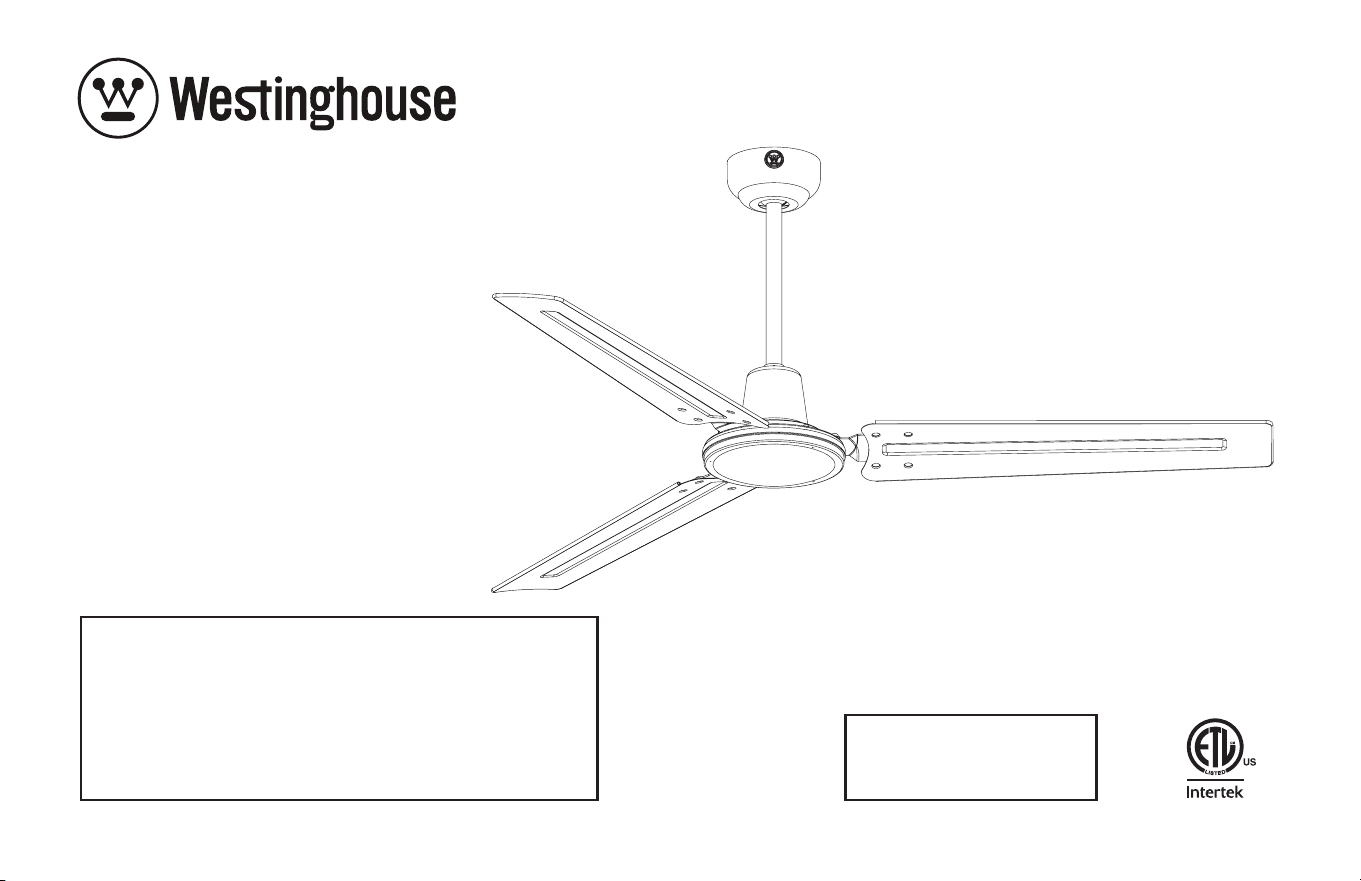
OWNER'S MANUAL
MANUAL DEL USUARIO
Jax
Please write model number here for future reference:
Por favor, incluya el número del modelo aquí para futura
referencia:
Net Weight: LBS
Peso Neto: KGS
2
ETL-ES-Jax (Backlit RC)-WH25.04
TOOLS REQUIRED
Phillips Screwdriver Wire Cutters Pliers Step Ladder
SAFETY TIPS
OBSERVE THE FOLLOWING: READ AND SAVE THESE INSTRUCTIONS
WARNING: TO REDUCE THE RISK OF FIRE, ELECTRIC SHOCK, OR PERSONAL INJURY, MOUNT TO OUTLET BOX MARKED 'ACCEPTABLE FOR FAN SUPPORT OF 35 LBS (15.9 KG) OR LESS'
AND USE MOUNTING SCREWS PROVIDED WITH THE OUTLET BOX AND/OR SUPPORT DIRECTLY FROM BUILDING STRUCTURE. MOST OUTLET BOXES COMMONLY USED FOR THE
SUPPORT OF LUMINARIES ARE NOT ACCEPTABLE FOR FAN SUPPORT AND MAY NEED TO BE REPLACED. CONSULT A QUALIFIED ELECTRICIAN IF IN DOUBT.
1. Installation work and electrical wiring must be done by qualified person(s) in accordance with all applicable codes and standards (ANSI/NFPA 70), including fire-rated construction.
2. Use this unit only in the manner intended by the manufacturer. If you have any questions contact the manufacturer.
3. After making the wire connections, gently push connections into outlet box with wire nuts pointing up. The wires should be spread apart with the grounded conductor and the
equipment-grounding conductor on one side of the outlet box and ungrounded conductor on the other side of the outlet box.
4. Before you begin installing the fan, switch power off at service panel and lock service disconnecting means to prevent power from being switched on accidentally. When the
service disconnecting means cannot be locked, securely fasten a prominent warning device, such as a tag, to the service panel.
5. Be cautious! Read all instructions and safety information before installing your new fan. Review the accompanying assembly diagrams.
6. When cutting or drilling into wall or ceiling, do not damage electrical wiring and other hidden utilities.
7. Make sure the installation site you choose allows the fan blades to rotate without any obstructions. Allow a minimum clearance of 7 feet from the floor to the trailing edge of the blade.
8. To reduce the risk of fire, electric shock, or personal injury, this fan must be mounted to an outlet box marked suitable for fan support, and use the mounting screws provided with the
outlet box. (Mounting must support at least 35 lbs.)
9. WARNING! Do not bend blade holders during installation to motor, balancing or during cleaning. Do not insert foreign object between rotating blades.
10. Attach the mounting bracket using only the hardware supplied with the outlet box. Fan is only to be mounted to an outlet box marked “Acceptable for Fan Support”.
11. If this unit is to be installed over a tub or shower, it must be marked as appropriate for the application.
12. NEVER place a switch where it can be reached from a tub or shower.
13. The combustion airflow needed for safe operation of fuel-burning equipment may be affected by this unit’s operation. Follow the heating equipment manufacturer’s guideline safety
standards such as those published by the National Fire Protection Association (NFPA), and the American Society for Heating, Refrigeration and Air Conditioning Engineers (ASHRAE) and
the local code authorities.
14. Before servicing or cleaning unit, switch power off at service panel and lock service disconnecting means to prevent power from being switched on accidentally.
When the service disconnecting means cannot be locked, securely fasten a prominent warning device, such as a tag, to the service panel.
15. All set screws must be checked and re-tightened where necessary before installation.
16. The appliance is not intended for use by young children or infirmed persons without supervision. Young children should be supervised to ensure they do not play with the appliance.
3
ETL-ES-Jax (Backlit RC)-WH25.04
HERRAMIENTAS NECESARIAS
Destornillador Phillips Pinzas de corte Pinzas Escalera de mano
CONSEJOS DE SEGURIDAD
HAGA LO SIGUIENTE: LEA Y GUARDE ESTAS INSTRUCCIONES
ADVERTENCIA: PARA REDUCIR EL RIESGO DE INCENDIO, DESCARGA ELÉCTRICA O HERIDAS GRAVES PERSONALES, MONTE EN UNA CAJA DE EMBUTIR ROTULADA “ACCEPTABLE FOR FAN
SUPPORT OF 35 LBS (15.9 KG) OR LESS” UTILIZANDO LOS TORNILLOS DE MONTAJE INCLUIDOS CON LA CAJA DE EMBUTIR Y/O MONTE DIRECTAMENTE EN LA ESTRUCTURA DEL EDIFICIO
LA MAYORÍA DE LAS CAJAS DE EMBUTIR UTILIZADAS NORMALMENTE CON ARTEFACTOS DE ILUMINACIÓN NO SON ADECUADAS PARA VENTILADORES Y DEBERÍAN SER REEMPLAZADAS.
SI TIENE PREGUNTAS, CONSULTE A UN ELECTRICISTA CALIFICADO.O
1. El trabajo de instalación y el cableado eléctrico los deben efectuar personas calificadas cumpliendo con todos los códigos y las normas aplicables (ANSI/NFPA 70), incluyendo las de incendio.
2. Use esta unidad sólo de la manera en que el fabricante quiere que se haga. Si tiene dudas, llame al fabricante.
3. Después de hacer las conexiones, empuje con cuidado las conexiones dentro de la caja de embutir con los conectores de cables mirando hacia arriba. Se deben separar los cables: el conductor de
puesta a tierra y el conductor de puesta a tierra del equipo a un lado de la caja de embutir, y el conductor que no tiene puesta a tierra del otro lado de la misma.
4. Antes de comenzar a instalar el ventilador, apague la alimentación en el panel de servicio y bloquee el medio de desconexión del servicio para evitar que se encienda accidentalmente. Cuando no se puede
bloquear el medio de desconexión del servicio eléctrico, fije de manera segura un dispositivo de advertencia prominente, como un rótulo, al panel de servicio.
5. ¡Tenga cuidado! Lea todas las instrucciones y la información de seguridad antes de instalar su ventilador nuevo. Revise los diagramas de montaje incluidos.
6. Al cortar o perforar una pared o techo, no dañe el cableado eléctrico y otras instalaciones de servicios públicos ocultos.
7. Asegúrese de que el sitio para la instalación que escoja permita que el ventilador gire libremente sin obstrucciones. Deje un espacio mínimo de 7 pies desde le piso hasta el borde posterior de la aleta.
8. Para reducir el riesgo de incendios, choques eléctricos o heridas personales, este ventilador se debe montar sobre una caja de embutir que tenga una marca que indique que es adecuada para soportar
un ventilador. Además debe utilizar los tornillos correspondientes incluidos con la caja de embutir. (El montaje debe soportar por lo menos 35 lbs. (15.9 kgs.).
9. ¡ADVERTENCIA! No doble los soportes para las aletas durante la instalación al motor, al balancear o durante la limpieza. No inserte objetos extraños entre las aletas mientras giran.
10. Fije el soporte de montaje usando sólo la tornillería suministrada con la caja de embutir. El ventilador sólo se debe montar en una caja de embutir marcada “Acceptable for Fan Support”
(Aceptable para soportar ventiladores).
11. Si esta unidad se instalará sobre una bañera o una ducha, debe estar identificada como adecuada para ese tipo de aplicación.
12. NUNCA coloque un interruptor donde se pueda alcanzar desde una bañera o una ducha.
13. Es posible que la operación de esta unidad afecte el flujo de aire de combustión necesario para la operación segura de equipo que quema combustible. Siga la directrices de seguridad del fabricante
de equipo de calefacción como las publicadas por la Asociación Nacional de Protección Contra Incendios (National Fire Protection Association, NFPA), y la Sociedad Americana para Ingenieros de
Calefacción, Refrigeración y Aire Acondicionado (American Society for Heating, Refrigeration and Air Conditioning Engineers, ASHRAE) y las autoridades del código local.
14. Antes de efectuar tareas de servicio o limpieza en la unidad, apague la alimentación en el panel de servicio y bloquee el medio de desconexión del servicio para evitar que se encienda accidentalmente.
Cuando no se puede bloquear el medio de desconexión del servicio eléctrico, fije de manera segura y un dispositivo de advertencia prominente, como un rótulo, al panel de servicio.
15. Antes de realizar la instalación, es importante comprobar y volver a ajustar todos los tornillos, según corresponda.
16. El dispositivo no ha sido diseñador para ser utilizado por niños o personas enfermas sin supervisión. Los niños deben ser supervisados para asegurarse de que no juegan con el dispositivo.
4
ETL-ES-Jax (Backlit RC)-WH25.04
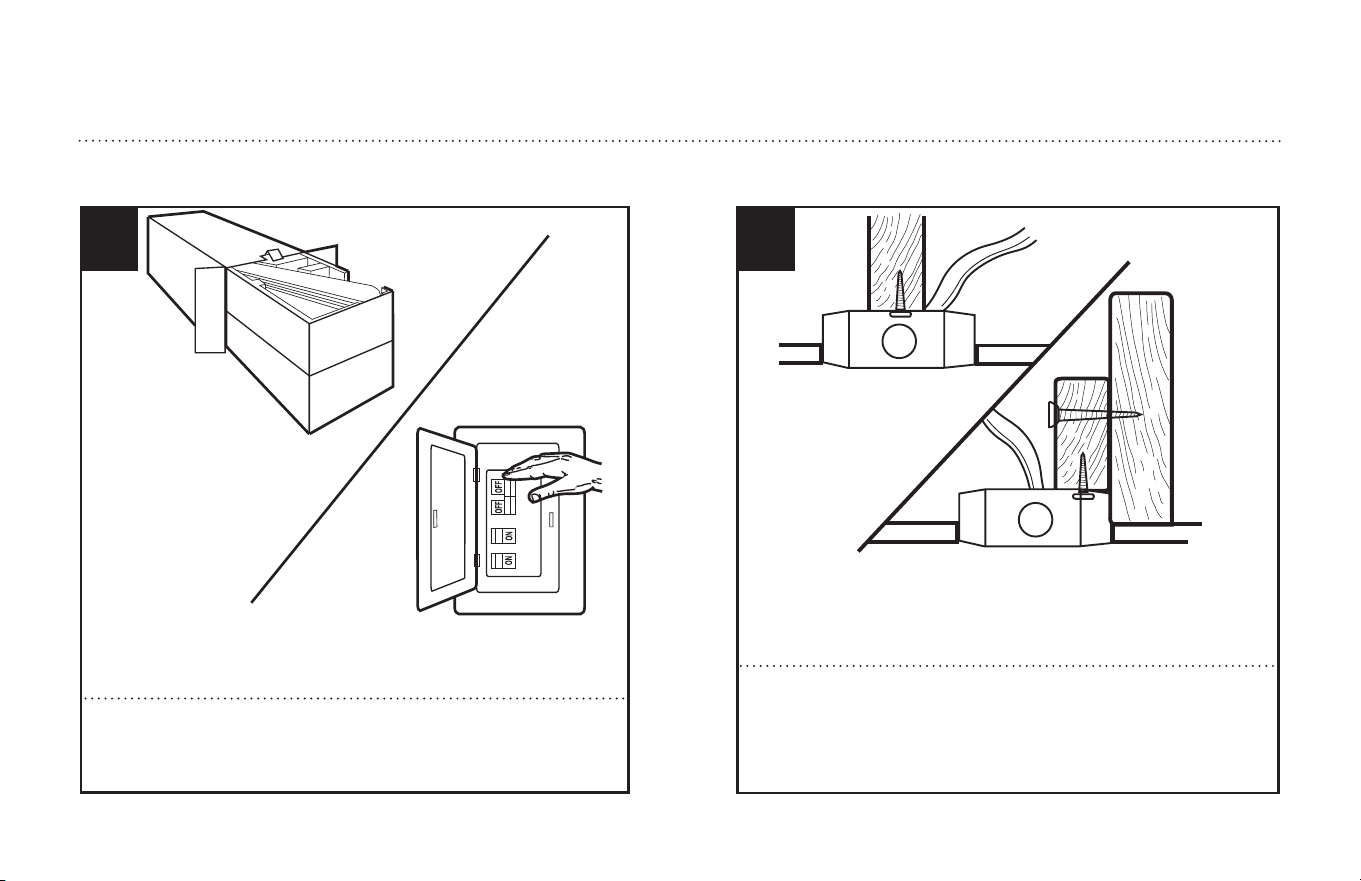
Unpack and inspect fan carefully to be certain all contents are included.
Turn off power at fuse box to avoid possible electrical shock.
1
Use metal outlet box suitable for fan support (must support 35 lbs).
Before attaching fan to outlet box, ensure the outlet box is securely
fastened by at least two points to a structural ceiling member (a loose
box will cause the fan to wobble).
2
PREPARING FOR INSTALLATION
ANTES DE LA INSTALACIÓN
Quite el envoltorio e inspeccione detenidamente el ventilador para veri-
ficar que todas las piezas estén incluidas. Apague la alimentación en la
caja de fusibles para evitar la posibilidad de descarga eléctrica.
Use una caja de embutir de metal adecuada para soportar un ventilador
(debe soportar 35 libras). Antes de fijar el ventilador a la caja de embutir
asegúrese de que la misma esté fijada de manera segura en por lo
menos dos puntos a un miembro estructural del techo (una caja suelta
haría que el ventilador oscile).
5
ETL-ES-Jax (Backlit RC)-WH25.04
MOUNTING BRACKET INSTALLATION
INSTALACIÓN CON SOPORTE DE MONTAJE
3
2
1
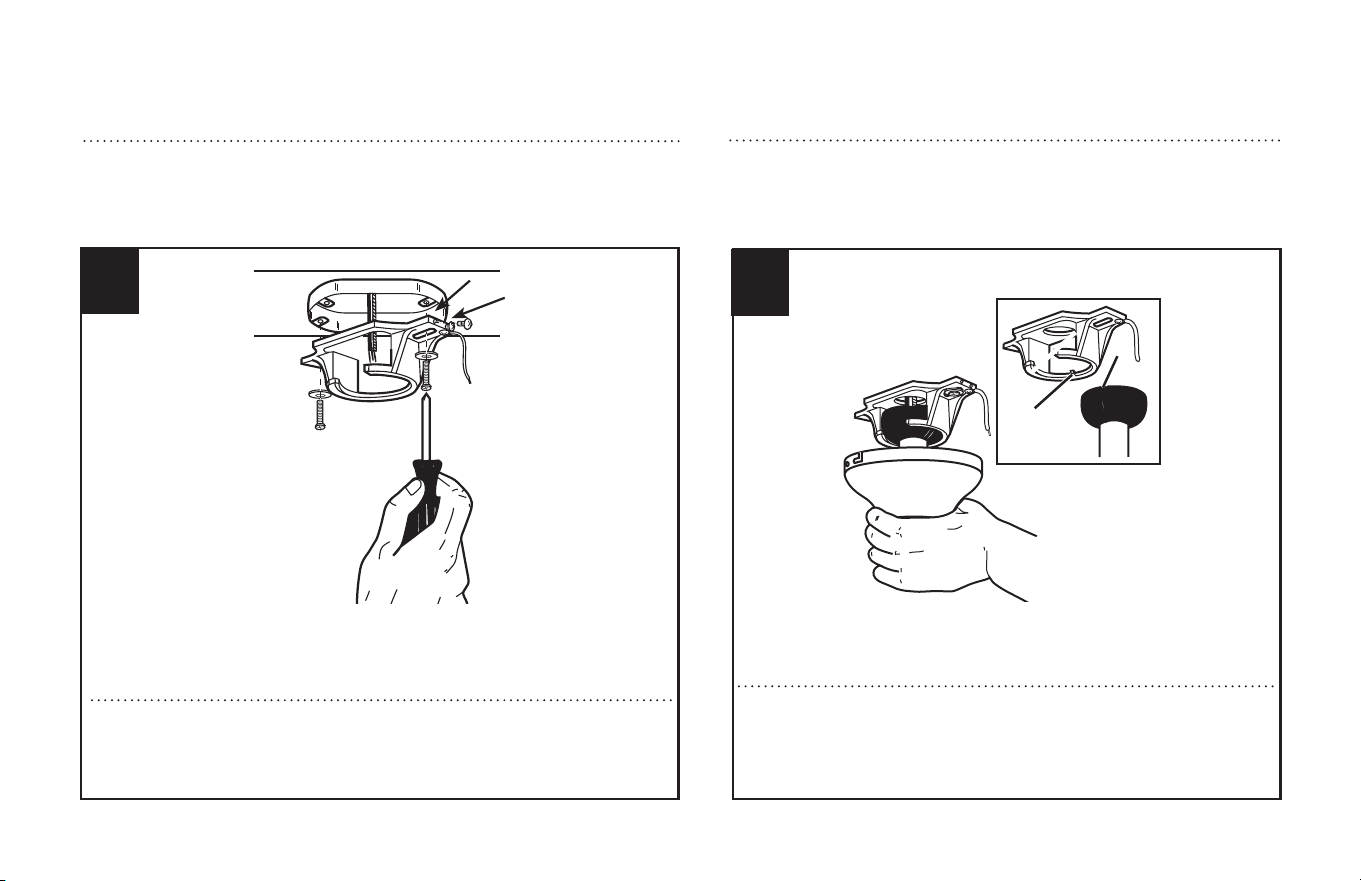
Remove the screws (1) from the bracket as shown above.
Loosen (do not remove) the screws (2) from the bracket as shown above.
Install mounting bracket to outlet box in ceiling using the screw and washer's
provided with the outlet box.
Quite los tornillos (1) del soporte como indica más arriba.
Afloje (no quite) los tornillos (2) del soporte como se indica más arriba.
Instale el soporte de montaje a la caja de embutir del techo can la tornillería
suministrada con la caja embutir.
MOUNTING
MONTAJE
4
1
2
Carefully lift fan assembly onto mounting bracket. Rotate fan until notch
on downrod ball (1) engages the ridge on the mounting bracket (2). This
will allow for hands free wiring. SEE APPENDIX FOR ALTERNATE INSTALLATION
OPTIONS ON PAGE 13.
Levante con cuidado el conjunto del ventilador hasta el soporte de monta-
je. Gire el ventilador hasta que la muesca de la bola de la varilla vertical (1)
calce sobre la saliente del soporte de montaje (2). De este modo, tendrá
las dos manos libres para hacer el cableado. CONSULTE EL APÉNDICE PARA
CONOCER LAS OPCIONES DE INSTALACIÓN ALTERNATIVAS EN LA PAGINA 13.
6
ETL-ES-Jax (Backlit RC)-WH25.04
WIRING OPTIONS
OPCIÓN DE CABLEADO
5
Green Ground
White (neutral)
White (neutral)
Green Ground
To Motor
Black or red
AC IN L
AC IN N
AC IN L
AC IN N
AC Power
Supply
Black (hot)
REMOTE CONTROL WIRING OPTION
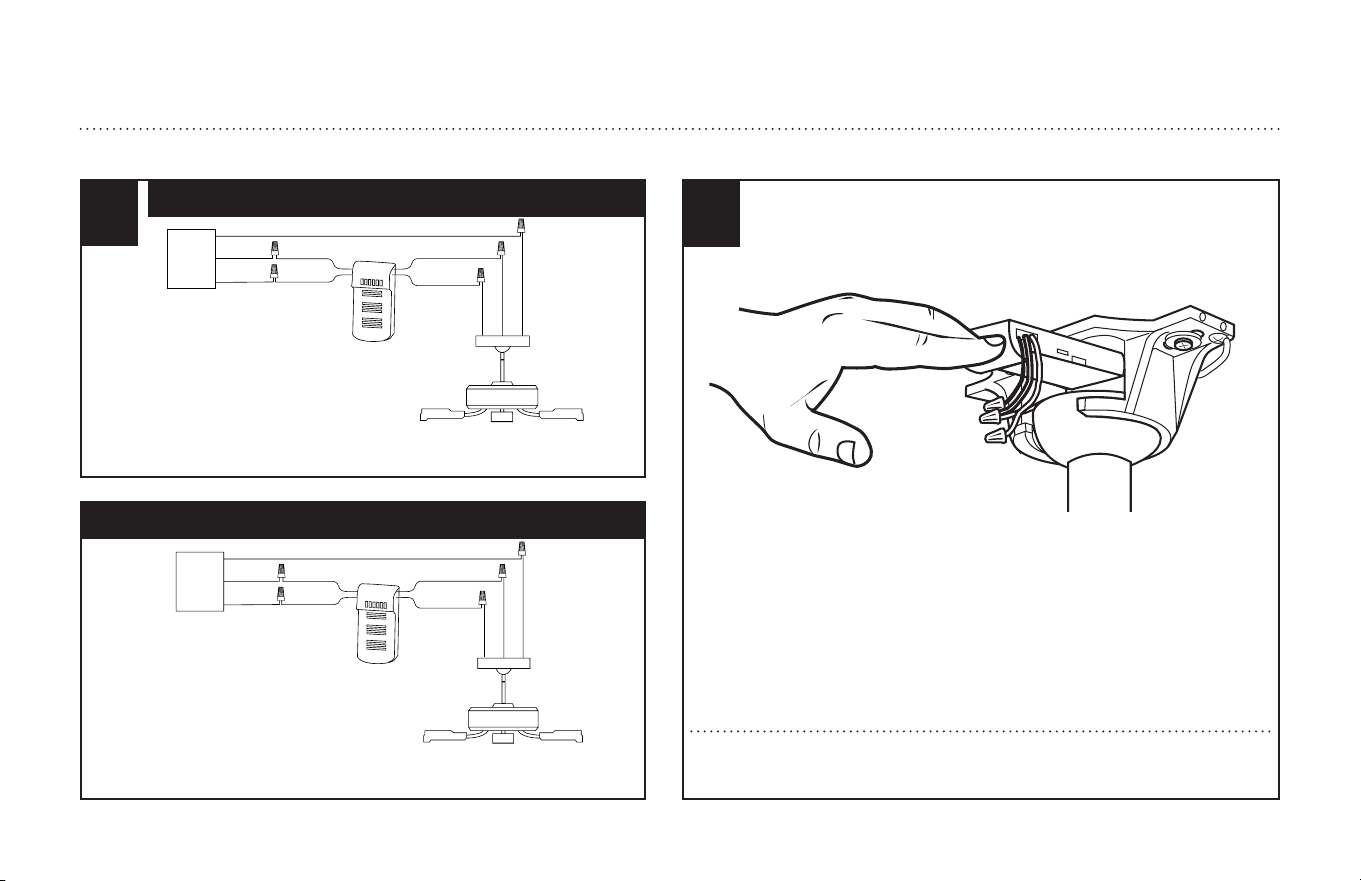
Make wiring connections from the house and the motor to the remote receiver
as shown above. Connect using wire nuts (provided).
OPCIÓN DE CABLEADO PARA CONTROL REMOTO
Haga las conexiones de cableado de la casa y el motor al receptor remoto como
se indica más arriba. Utilice las connectores para cables (incluidas).
Verde (de tierra)
Blanco (neutro)
Blanco (neutro)
Verde (de tierra)
Al Motor
Negro o Rojo
Entrada C.A. L
Entrada C.A. N
Entrada C.A. L
Entrada C.A. N
Fuente de
alimentación
de CA
Negro
(vivo)
6
Once wiring step has been completed, slide the wired remote receiver in between
the mounting bracket and the top of the downrod ball for downrod fans.
Al terminar la instalación del cableado, deslice el receptor remoto alámbrico entre el
soporte de montaje y la parte superior de la bola de la vara.
7
ETL-ES-Jax (Backlit RC)-WH25.04
SECURE TO CEILING
ASEGURE EL VENTILADOR AL TECHO
7
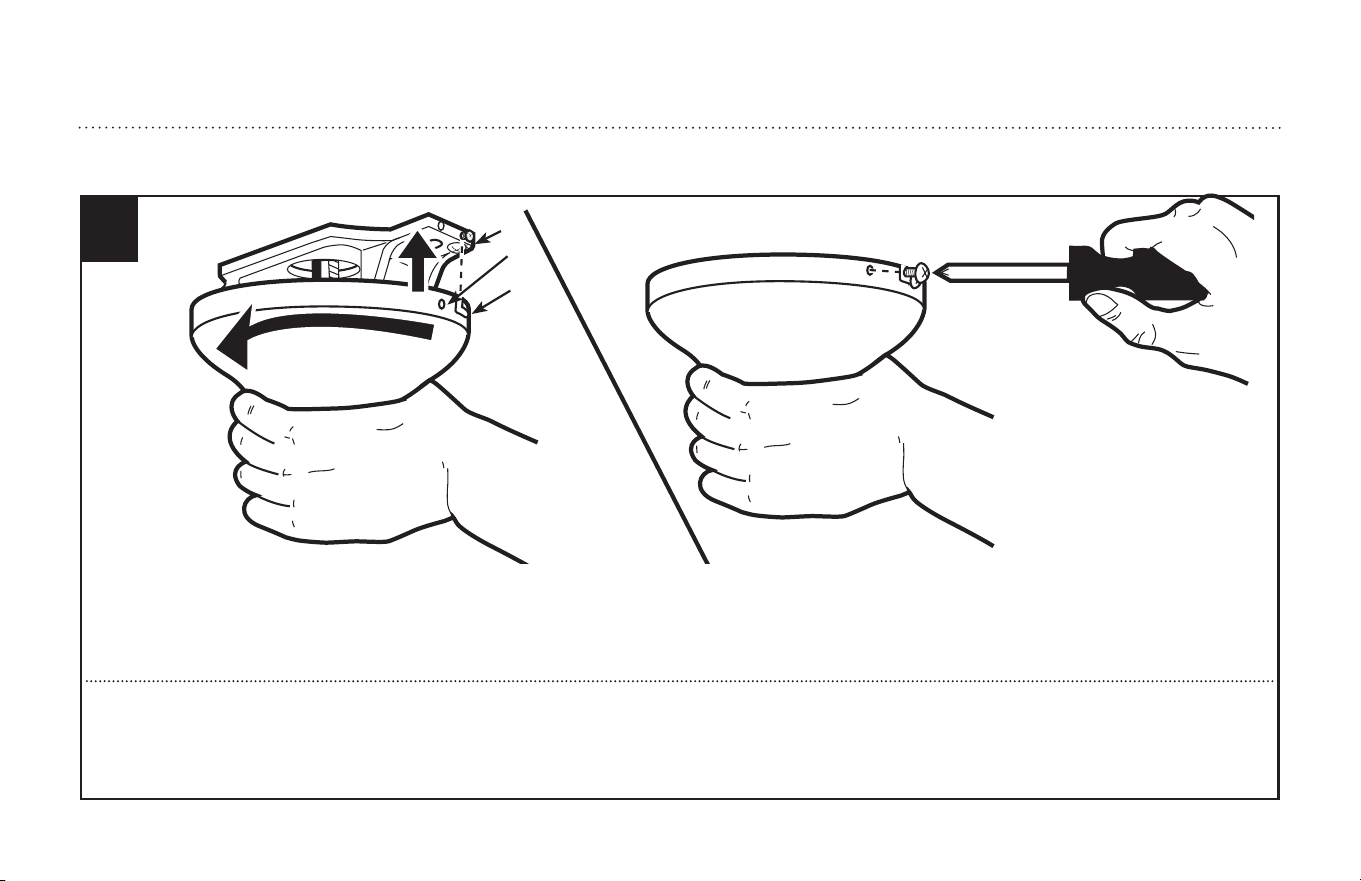
For downrod fans, slide the canopy up to the mounting bracket.
The canopy has two mating slots (1) and two mating holes (2). Position both slots on canopy directly under and in line with two screws in the mounting bracket (3).
Lift the canopy, allowing the two screws to slide into the mating slots. Rotate the canopy until both screws from the mounting bracket drop into the slot recesses.
Tighten screws securely. Install two screws into the mating holes of the canopy and tighten to secure the canopy to the mounting bracket.
Para ventiladores con varilla vertical, deslice el dosel hacia arriba hasta el soporte de montaje.
El dosel tiene dos ranuras coincidentes (1) y dos agujeros coincidentes (2). Coloque ambas ranuras del dosel directamente abajo y en línea con los dos tornillos del
soporte de montaje (3). Eleve el dosel, permitiendo que los dos tornillos se deslicen dentro de las ranuras. Gire el dosel hasta que ambos tornillos del soporte de
montaje caigan dentro de las ranuras. Apriete los tornillos asegurándolos. Instale los dos tornillos en los agujero coincidentes del dosel y ajústelos para asegurar el
dosel al soporte de montaje.
3
1
2
8
ETL-ES-Jax (Backlit RC)-WH25.04
BLADE INSTALLATION
INSTALACIÓN DE LAS ALETAS
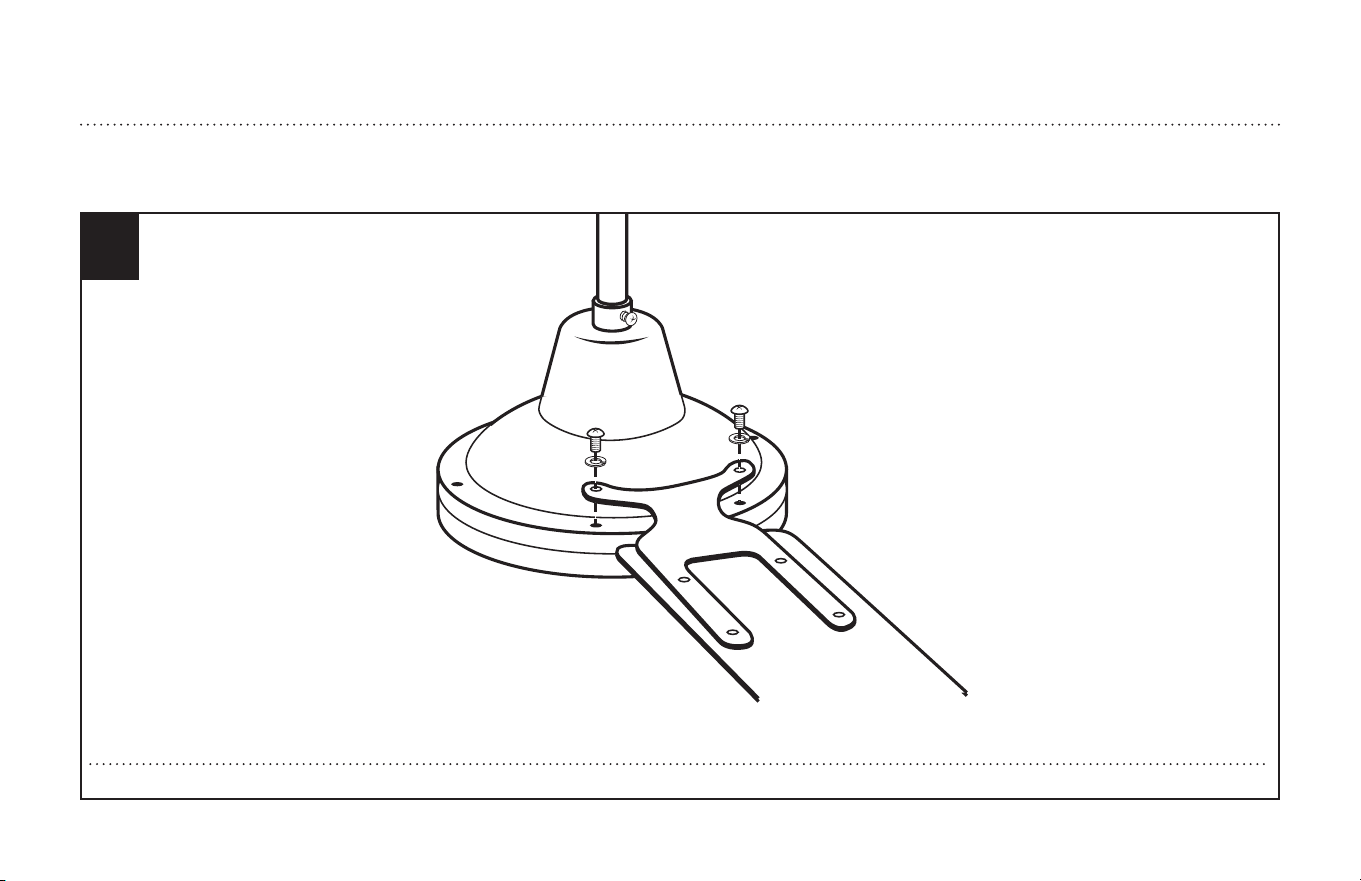
3
Install blades to top of motor using screws and washers . See above drawing for reference.
8
Instale las aletas en la parte superior del motor con la tornillería. Utilice la ilustración anterior como referencia.
9
ETL-ES-Jax (Backlit RC)-WH25.04
HOW TO OPERATE YOUR CEILING FAN
INSTRUCCIONES PARA OPERAR SU VENTILADOR DE TECHO
1
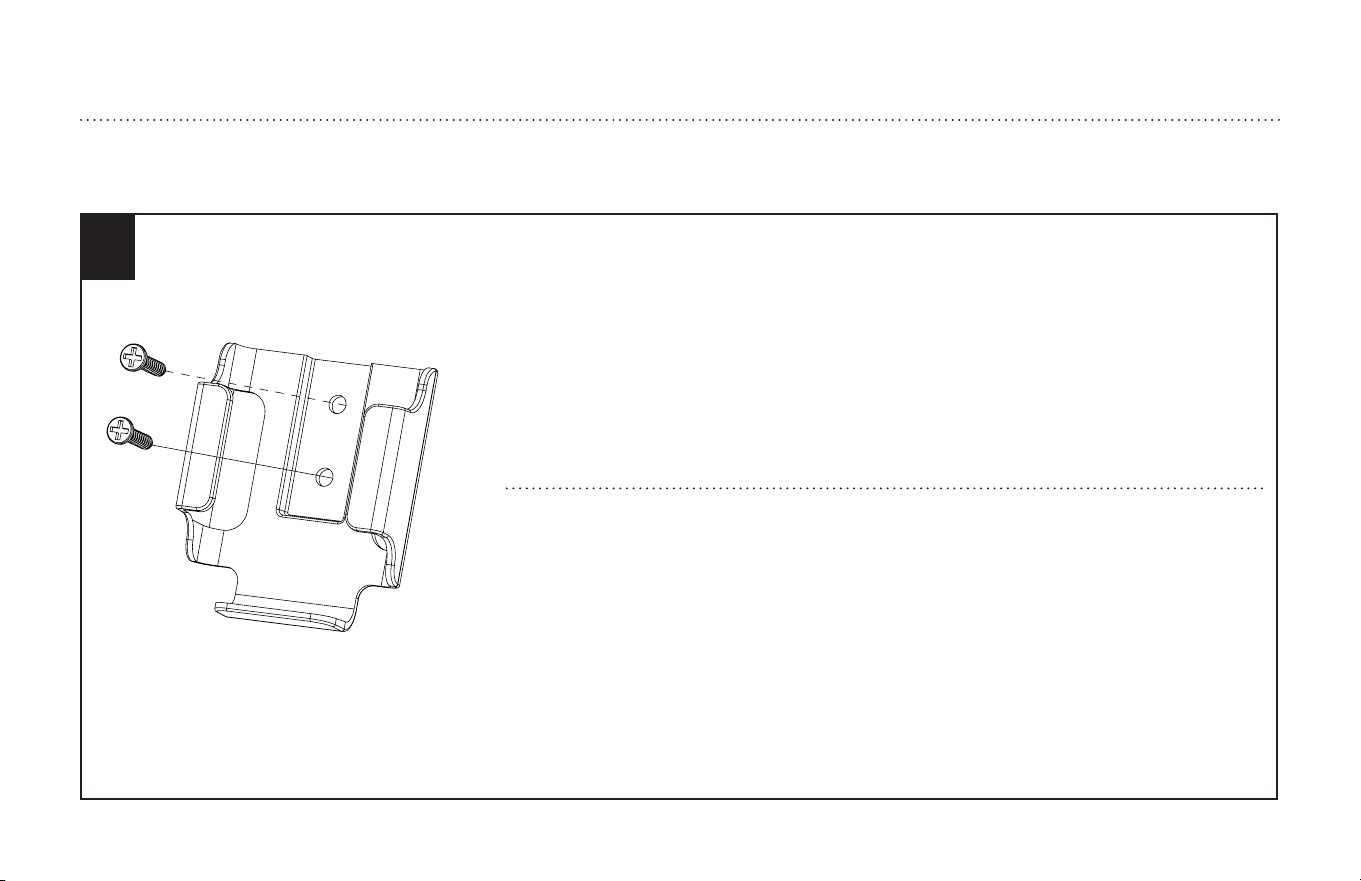
Mount the transmitter holder onto the wall using screws provided. Place the transmitter into the holder.
Monte el soporte para el transmisor a la pared usando los tornillos incluidos. Coloque el transmisor en
el soporte.
10
ETL-ES-Jax (Backlit RC)-WH25.04
2
Restore electrical power to the outlet box by turning on the electricity at the main fuse box.
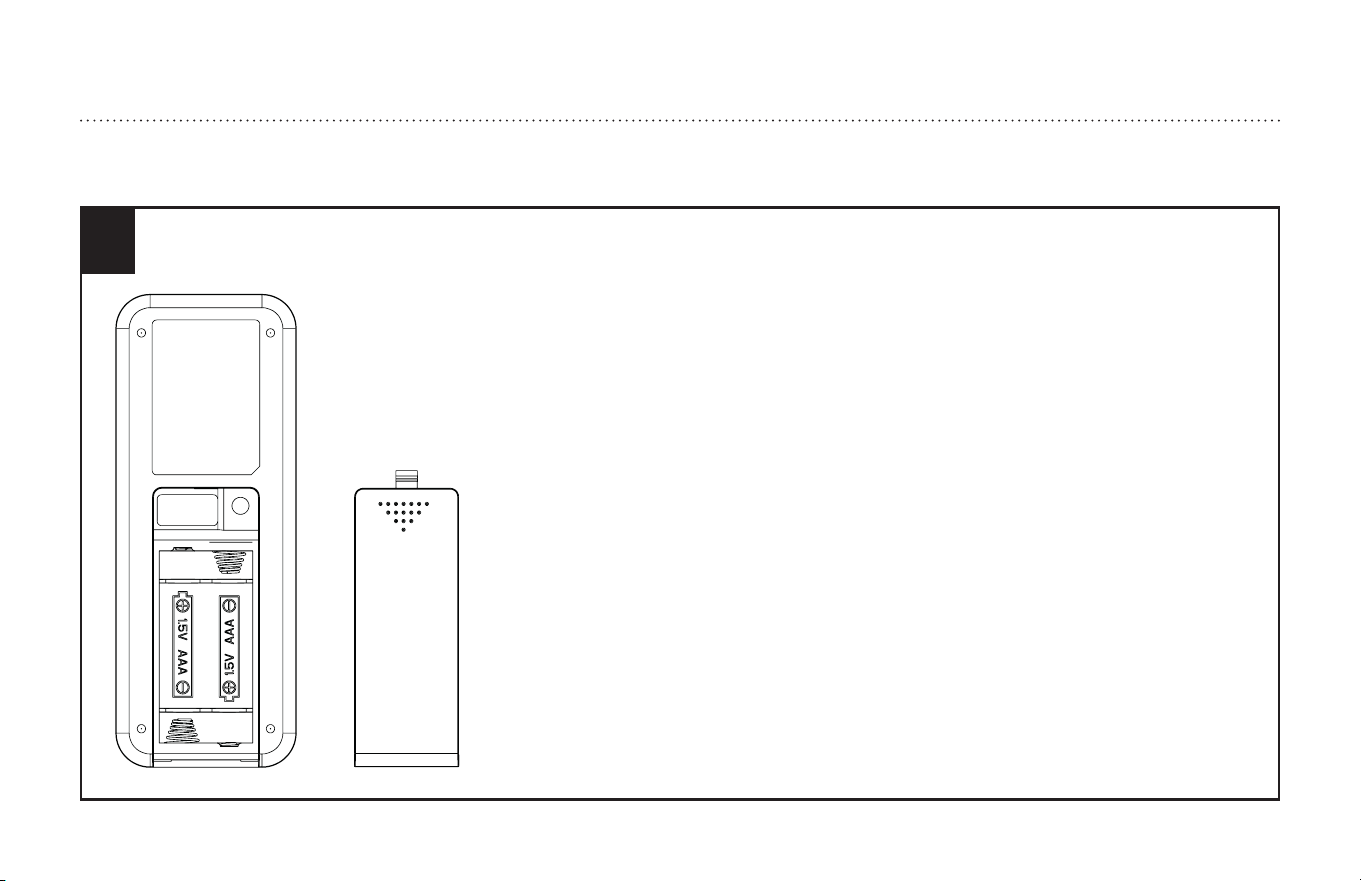
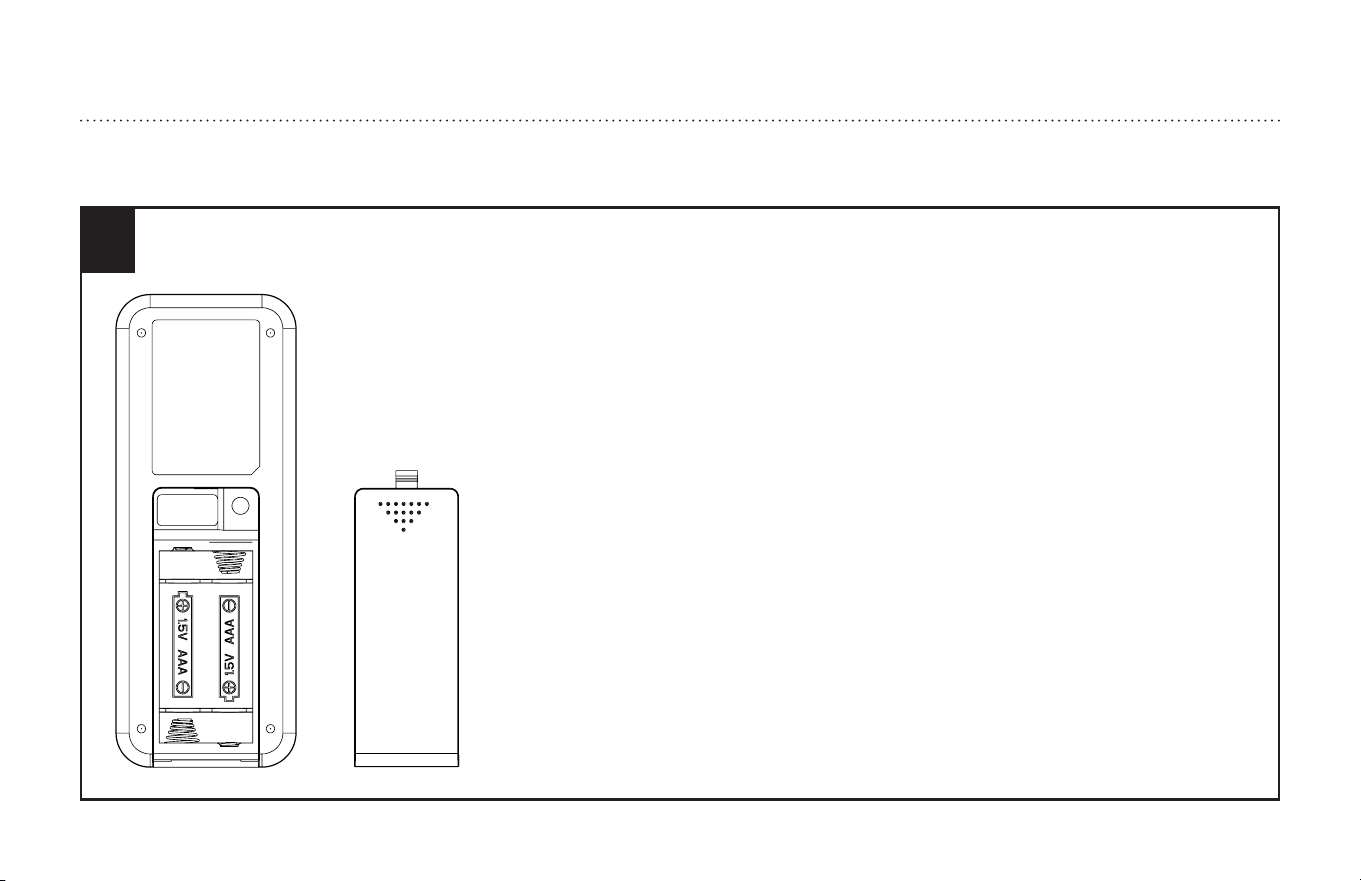
To make the fan operational, open battery door by pressing and sliding down the battery door.
Install two AAA 1.5V batteries (not included) into the hand-held remote transmitter(if not used for
long periods of time, remove the batteries to prevent damage to the transmitter).
1. The remote control adopts RF wireless digit emission technique.
2. The transmitter and receiver are matched at the factory. Please follow the next step to repair
when the pairing is failed.
3. Turn off the fan power and then restore it, press and hold the "fan stop" button for 5 seconds,
within 60 seconds after you restore the power, the fan will automatic turn on at low speed and
then turn off.
(NOTE: The pairing process is not accepted after 60 seconds when you restore supply power)
4. Please note that the transmitter can pair with multiple receivers. When the transmitter does not
control the receiver, please check if any similar remote controls are working nearby, disconnect
them and then proceed with pairing process again.
5. Store the remote transmitter away from excessive heat or humidity.
6. Low power of battery or not-used for long time should be replaced.
HOW TO OPERATE YOUR CEILING FAN
INSTRUCCIONES PARA OPERAR SU VENTILADOR DE TECHO
11
ETL-ES-Jax (Backlit RC)-WH25.04
Restaure la energía eléctrica a la caja de embutir encendiendo la electricidad en la caja de fusibles
principal. Para que el ventilador funcione, abra la puerta de la batería presionando y deslizándola
hacia abajo. Instale dos baterías AAA de 1,5 V (no incluido) en el transmisor remoto de mano (si no
se utiliza durante mucho tiempo, retire las baterías para evitar daños al transmisor).
1. El control remoto adopta la técnica de emisión de dígitos inalámbrica de RF.
2. El transmisor y el receptor se emparejan en la fábrica. Siga el siguiente paso para reparar cuando
el emparejamiento ha fallado.
3. Apague el ventilador y luego restablézcalo, presione y mantenga presionado el botón "Fan Stop"
durante 5 segundos, dentro de los 60 segundos posteriores a la restauración de la energía, el
ventilador se encenderá automáticamente a baja velocidad y luego apagar.
(NOTA: El proceso de emparejamiento no se acepta después de 60 segundos cuando restablece
la alimentación)
4. Tenga en cuenta que el transmisor puede emparejarse con varios receptores. Cuando el
transmisor no controle el receptor, compruebe si hay controles remotos similares funcionando
cerca, desconéctelos y luego continúe con el proceso de emparejamiento nuevamente.
5. Guarde el transmisor remoto lejos del calor o la humedad excesivos.
6. Debe reemplazarse la batería baja o no utilizada durante mucho tiempo.
HOW TO OPERATE YOUR CEILING FAN
INSTRUCCIONES PARA OPERAR SU VENTILADOR DE TECHO
2
12
ETL-ES-Jax (Backlit RC)-WH25.04
3
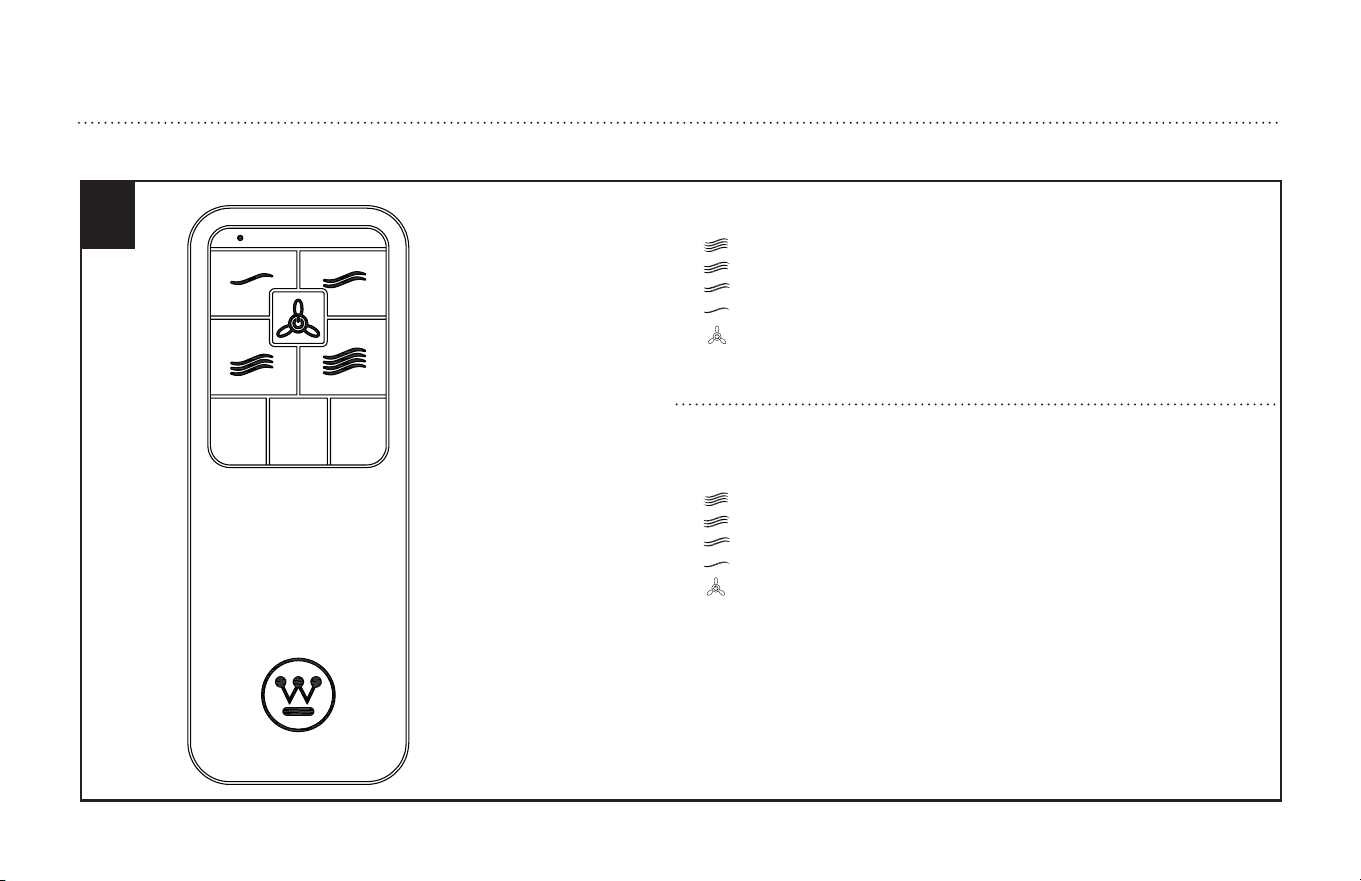
The remote buttons function as follows:
(1) Fan speed:
= High speed
= Medium-high speed
= Medium Speed
= Low Speed
(2) Button: Turn the fan off
Los botones del control remoto funcionan de la siguiente manera:
(1) Velocidad del ventilador:
= velocidad alta
= velocidad media alta
= velocidad media
= velocidad baja
(2) Botón: Apagar el ventilador
HOW TO OPERATE YOUR CEILING FAN
INSTRUCCIONES PARA OPERAR SU VENTILADOR DE TECHO

13
ETL-ES-Jax (Backlit RC)-WH25.04
Appendix for alternate installation options
EXTENDED DOWNROD OPTION (see page # 14 to Page# 16)
Apéndice para opciones de instalación alternativas
OPCIÓN DE VARILLA VERTICAL MÁS LARGA (consulte a la página # 14 a la página # 16)
14
ETL-ES-Jax (Backlit RC)-WH25.04
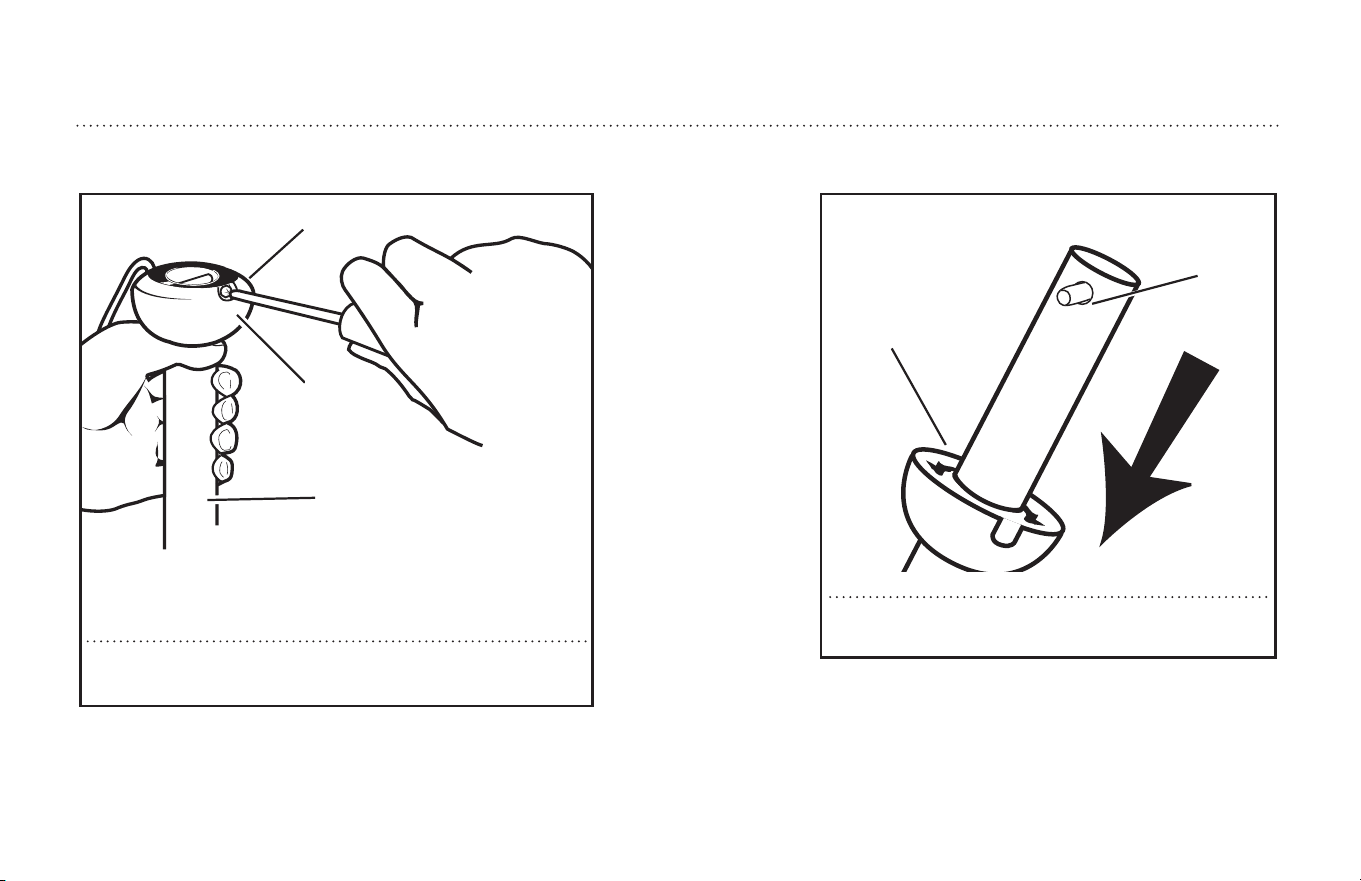
Loosen downrod ball (1) from downrod (2) by removing screw (3).
Afloje la bola de la varilla vertical (1) de la varilla vertical (2)
quitando el tornillo (3).
2
3
1
EXTENDED DOWNROD OPTION
OPCIÓN CON VARILLA VERTICAL MÁS LARGA
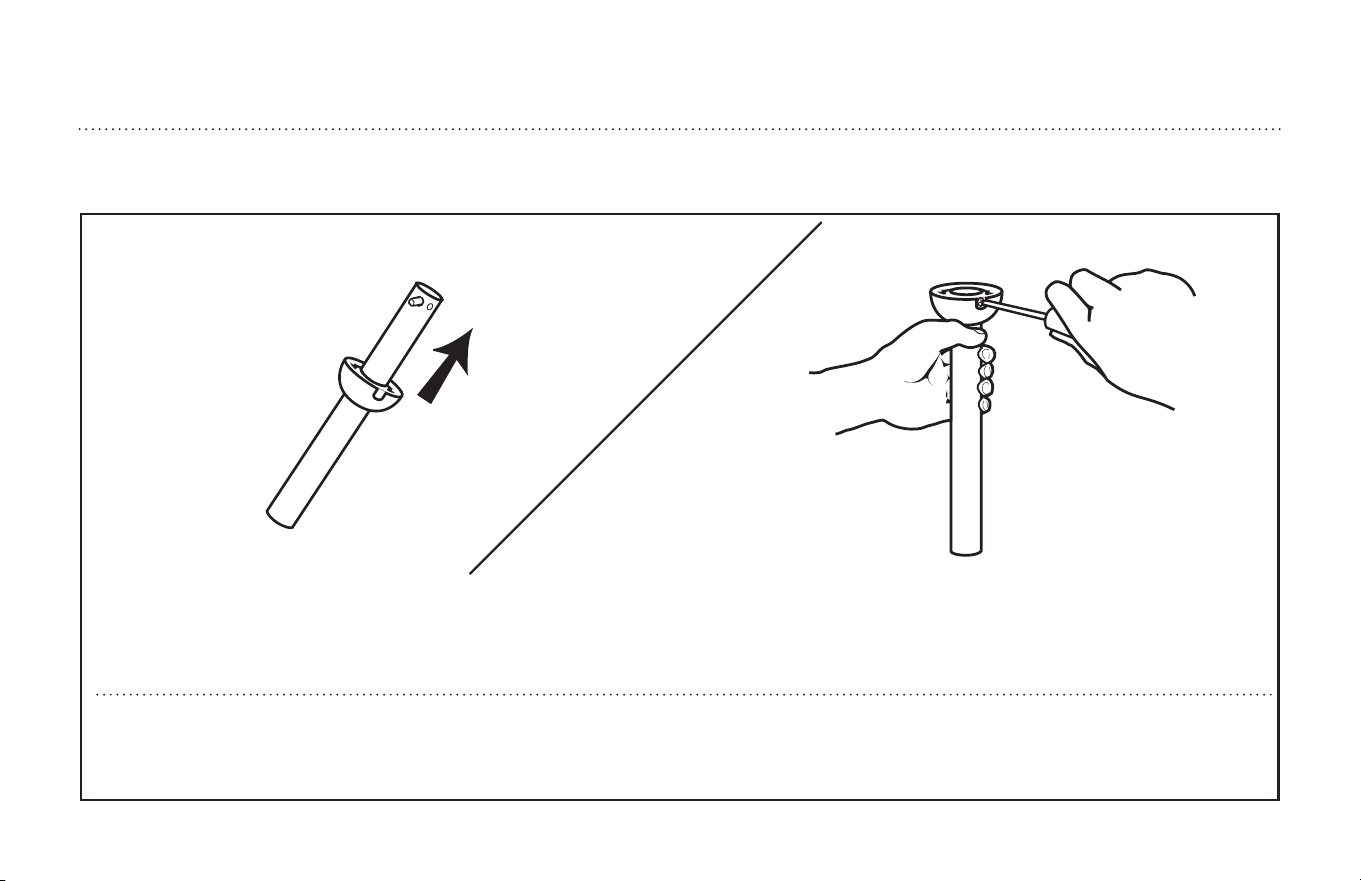
Slide downrod ball (1) off of downrod and remove pin (2).
Deslice la bola de la varilla vertical (1) y separarla de la
varilla vertical quitando el pasador (2).
1
2
15
ETL-ES-Jax (Backlit RC)-WH25.04
EXTENDED DOWNROD OPTION
OPCIÓN CON VARILLA VERTICAL MÁS LARGA
Re-install pin into extended downrod, and slide downrod ball up to the top of the downrod. Re-install screw to secure ball to downrod. Note: Some extended down-
rods have a pre-drilled set-screw hole. If a pre-drilled hole is present in the extended downrod, tighten the screw into the pre-drilled hole in the extended downrod. If
no pre-drilled hole exists in the extended downrod, tighten the screw against the downrod to secure the downrod ball.
Vuelva a instalar el pasador en la varilla vertical más larga y deslice la bola de la varilla hasta el extremo superior de la misma Vuelva a insertar el tornillo de fijación
para asegurar la bola a la varilla vertical. Nota: Algunas varillas verticales más largas tienen un agujero previamente perforado para el tornillo. Si la varilla vertical
más larga tiene un agujero previamente perforado, ajuste el tornillo en el agujero previamente perforado de la varilla vertical más larga. Si la varilla vertical más
larga no tiene un agujero previamente perforado, ajuste el tornillo sobre la varilla vertical para asegurar la esfera de la misma.
16
ETL-ES-Jax (Backlit RC)-WH25.04
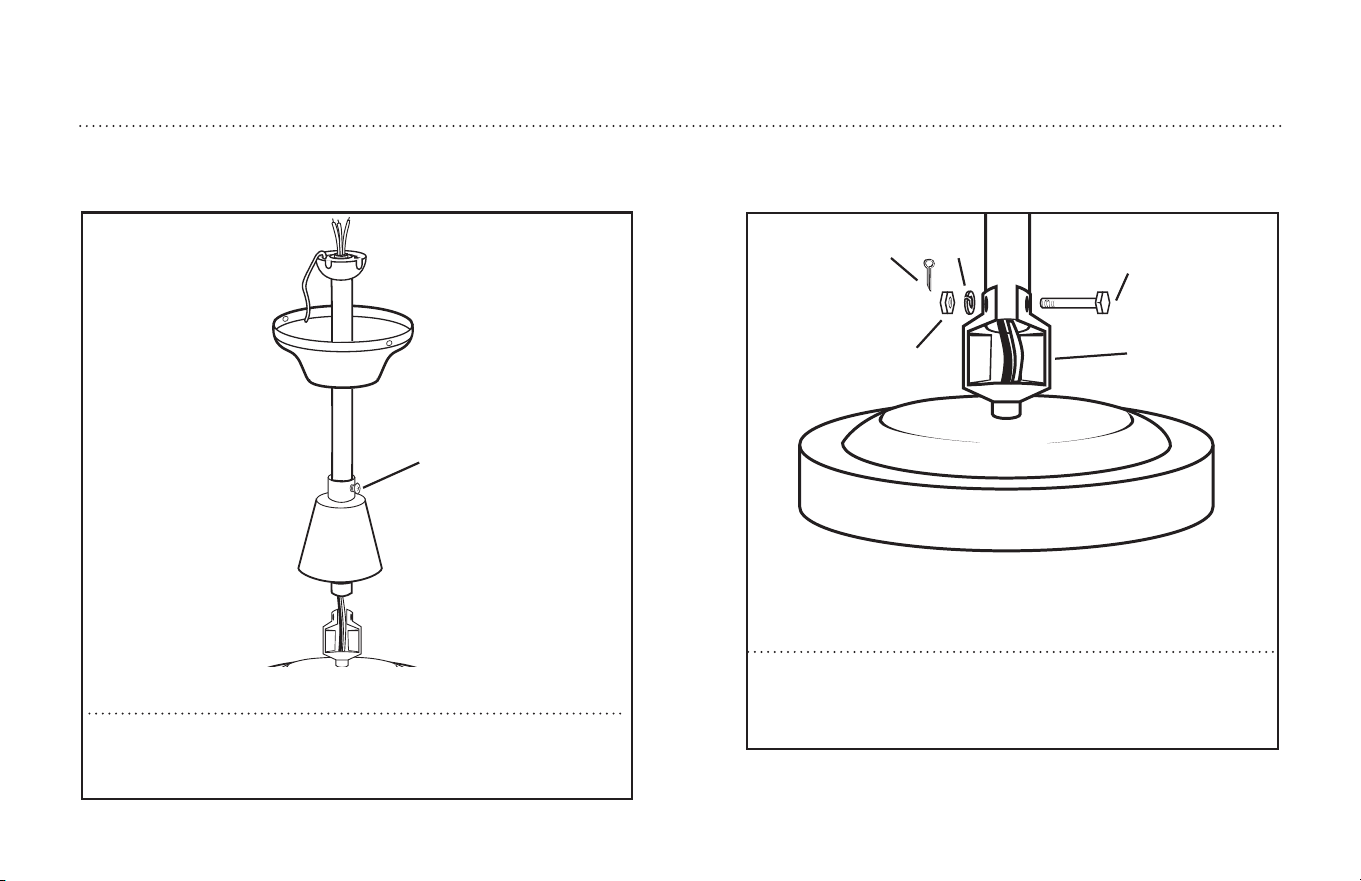
Loosen set screws on the lower canopy (1). Install canopies onto downrod
as shown. Thread lead wires through the downrod.
Afloje los tornillos de fijación en el dosel inferior (1). Instale los doseles en
la varilla vertical como se indica. Pase los cables conductores a través de
la varilla vertical.
1
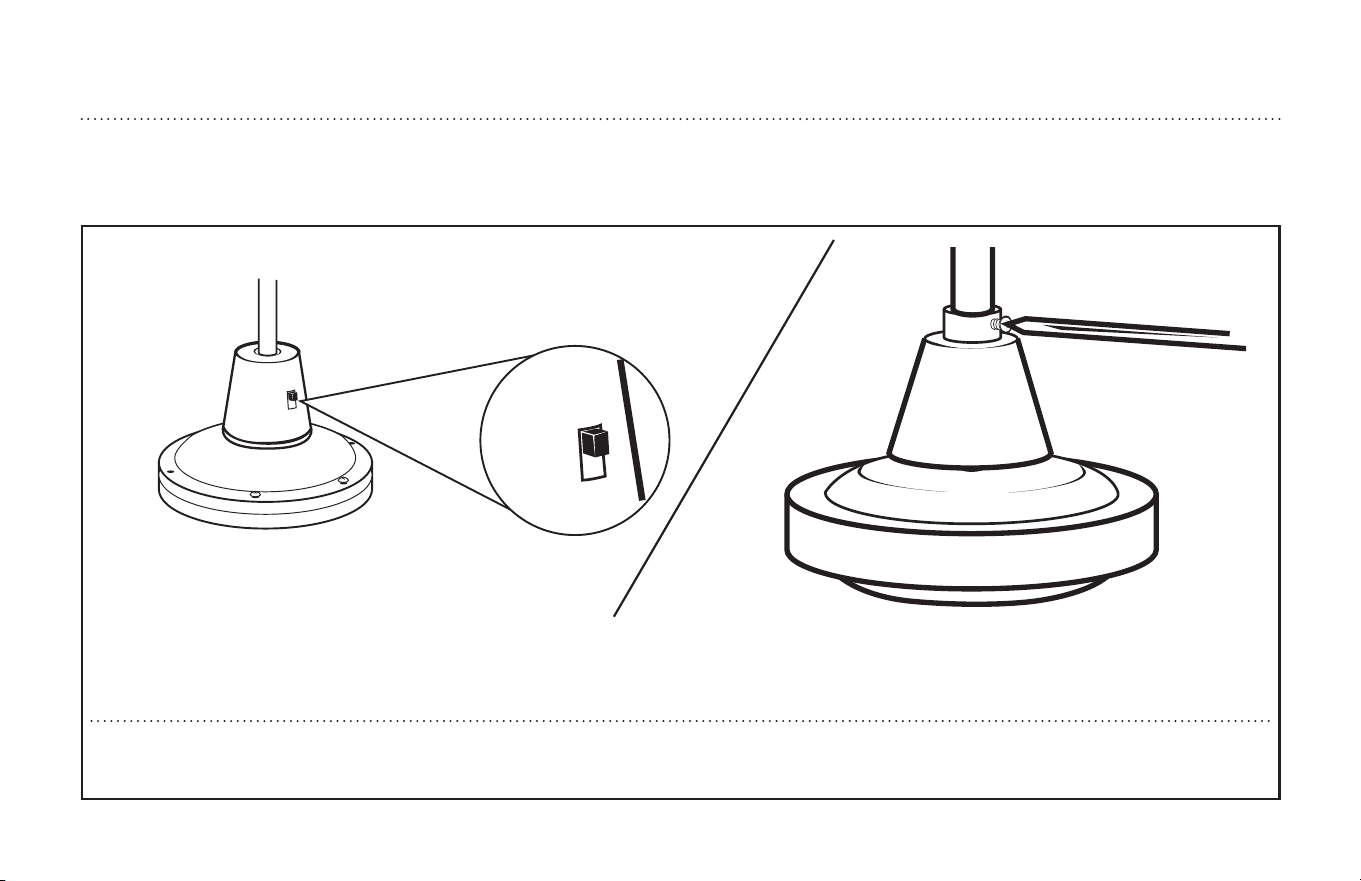
Remove cotter pin, nut, lock washer, and bolt from the yoke. Insert the
down rod into the yoke. Install bolt (1) through yoke (2) and downrod.
Install lockwasher (3) and nut (4) and tighten. Install cotter pin (5).
Quitale la clavija hendida, la tuerca,la arandela de seguridad, y el tornillo
de la horquilla. Inserte la varilla vertical dentro do la horquilla. (1) a través
de la horquilla (2) y la varilla vertica. Instale la arandela de seguridad (3)
y la tuerca (4). Aprete e instale la clavija hendida(5).
3
5
4 2
1
EXTENDED DOWNROD OPTION
OPCIÓN CON VARILLA VERTICAL MÁS LARGA
17
ETL-ES-Jax (Backlit RC)-WH25.04
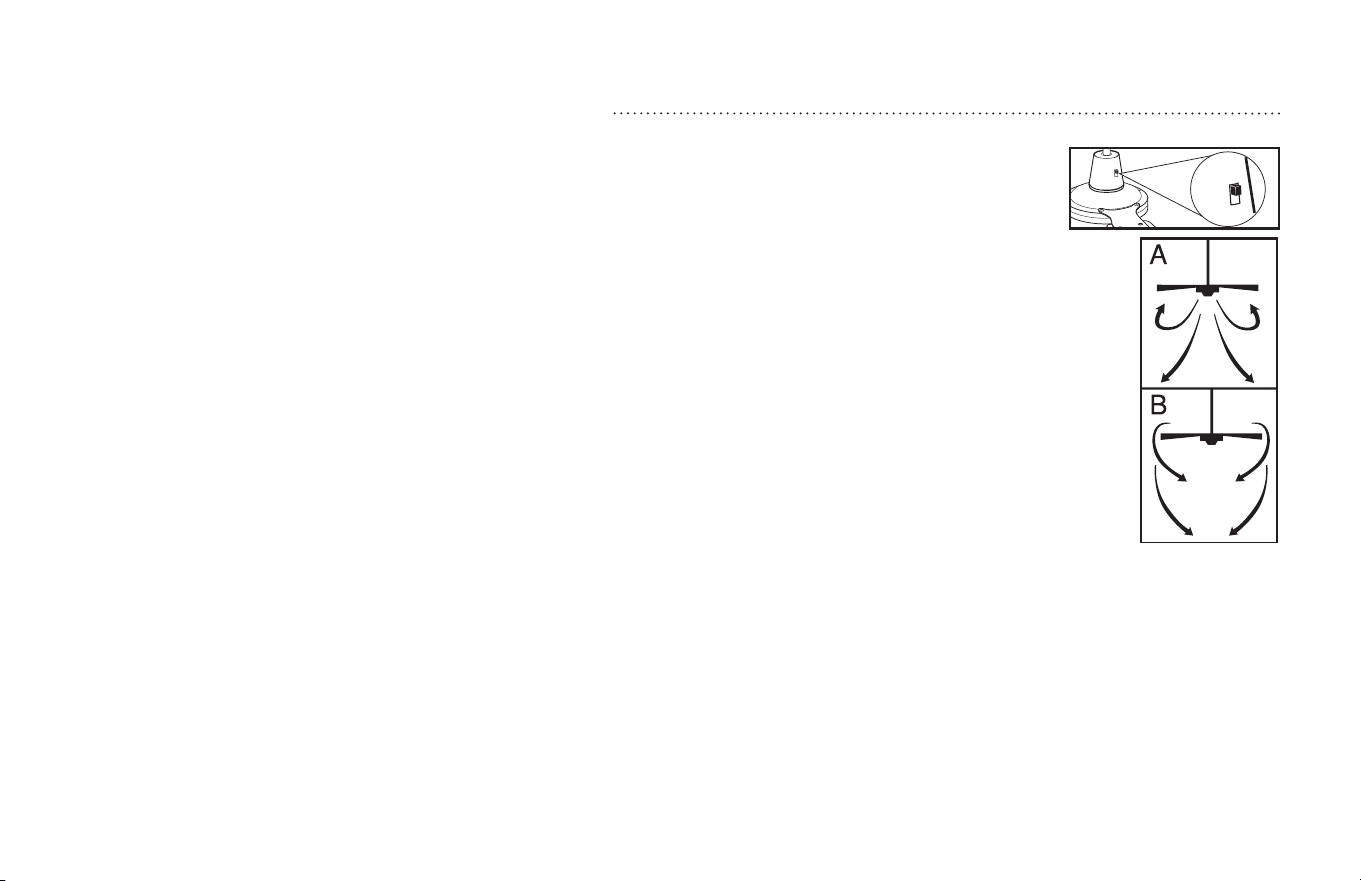
Aim the reverse switch on the yoke to the reverse switch hole in the lower canopy. Slide the lower canopy down, make sure there is at least 1/4” clearance main-
tained between the motor and lower canopy bottom and position the reverse switch properly. Tighten set screw in the lower canopy. PROCEED TO PAGE 5, STEP 4.
Alinee el interruptor de marcha atrás de la horquilla al agujero para el interruptor de marcha atrás correspondiente ubicado en el dosel inferior. Deslice el dosel inferior
hacia abajo, asegúrese de mantener un espacio de 1/4 plug (6,4mm) entre el motor y la parte inferior del dosel inferior y luego posicione el interruptor de marcha atrás de
forma apropiada. Ajuste el(los) tornillo(s) de fijación en el dosel inferior. PROCEDA A LA PÁG. 5, PASO 4.
EXTENDED DOWNROD OPTION
OPCIÓN CON VARILLA VERTICAL MÁS LARGA
18
ETL-ES-Jax (Backlit RC)-WH25.04
Operation
Turn on the power and check operation of fan.
Speed settings for warm or cool weather depend on factors such as room size, ceiling height, number of fans and so on.
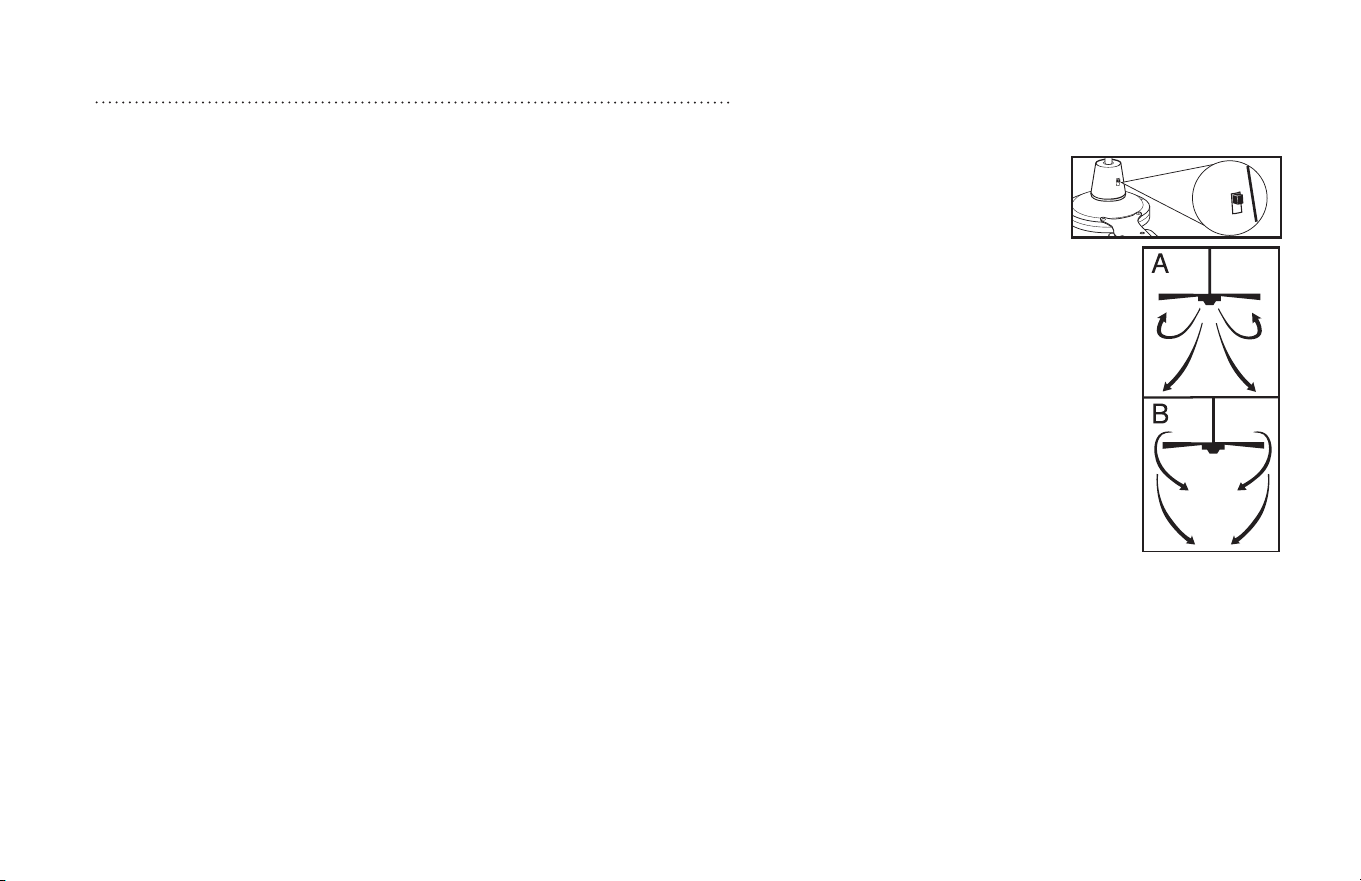
Speed settings for warm or cool weather depend on factors such as room size, ceiling height, number of fans and so on. The slide switch
controls direction, forward or reverse.
Warm weather/down position - (Forward) Fan turns counterclockwise direction. A downward air flow creates a cooling effect as shown in
illustration A. This allows you to set your air conditioner on a higher temperature setting without affecting your comfort.
Cool weather/up position - (Reverse) Fan turns clockwise direction. An upward airflow moves warm air off the ceiling area as shown in
illustration B. This allows you to set your heating unit on a lower setting without affecting your comfort.
NOTE: Turn off and wait for fan to stop before changing the setting of the forward/reverse slide switch.
Maintenance
1. Because of the fan’s natural movement, some connections may become loose. Check the support connections, brackets, and blade
attachments twice a year. Make sure they are secure.
2. Clean your fan periodically to help maintain its new appearance over the years. Do not use water when cleaning. This could damage the
motor, or the wood, or possibly cause electrical shock.
3. Use only a soft brush or lint-free cloth to avoid scratching the finish. The plating is sealed with a lacquer coating to minimize discoloration
or tarnishing.
4. There is no need to oil your fan. The motor has permanently lubricated bearings.
OPERATION AND MAINTENANCE
19
ETL-ES-Jax (Backlit RC)-WH25.04
Operación
Encienda el ventilador y verifique su funcionamiento.
Las velocidades para clima cálido o frío dependen de factores como el tamaño de la habitación, la altura del ventilador, el número de ven-
tiladores, etc.
Las velocidades para clima cálido o frío dependen de factores como el tamaño de la habitación, la altura del ventilador, el número de
ventiladores, etc. El conmutador de tipo deslizante controla la dirección, hacia adelante o hacia atrás.
Clima cálido/posición hacia abajo - (Adelante) El ventilador gira en sentido contrahorario. Una corriente de aire descendente crea un efecto
refrescante como lo indica la ilustración A. Esto le permite ajustar el aire acondicionado a una temperatura más alta sin que afecte su
comodidad.
Clima frío/posición hacia arriba - (Atrás) El ventilador gira en sentido de las agujas del reloj. Una corriente de aire ascendente aleja el aire
caliente del área del ventilador de techo como lo indica la ilustración B. Esto le permite ajustar la calefacción a un nivel más bajo sin que
afecte su comodidad.
NOTA: Apague el ventilador y espere a que se detenga antes de cambiar la dirección de adelante/atrás con el conmutador de tipo deslizante.
Mantenimiento
1. El movimiento natural del ventilador podría hacer que se aflojen algunas conexiones. Verifique las conexiones de soporte, las piezas
de fijación y los accesorios de las aletas dos veces al año. Verifique que estén aseguradas.
2. Limpie el ventilador periódicamente para ayudar a mantener su apariencia nueva con el correr de los años. No use agua para limpiarlo,
ya que podría dañar el motor o causar descarga eléctrica.
3. Use sólo un cepillo blando o un trapo sin pelusa para no rayar el acabado. El enchapado está sellado con una capa de laca para minimi-
zar la decoloración o pérdida del brillo.
4. No hay necesidad de aceitar el ventilador. El motor tiene cojinetes de lubricación permanente.
OPERACIÓN Y MANTENIMIENTO

20
ETL-ES-Jax (Backlit RC)-WH25.04
TROUBLESHOOTING
GUIDE
If you have difficulty operating your new ceiling fan, it may be the result of incorrect assembly, installation, or
wiring. In some cases, these installation errors may be mistaken for defects. If you experience any faults,
please check this Trouble Shooting Chart. If a problem cannot be remedied, please consult with your qualified
electrician and do not attempt any electrical repairs yourself.
TROUBLE SUGGESTED REMEDY
1. If fan does not start: 1. check main and branch circuit fuses or circuit breakers.
2. check wire connections as performed in step #5 of installation.
CAUTION: Make sure main power is turned off.
3. If the fan still will not start, contact a qualified electrician.
Do not attempt to troubleshoot internal electrical connections yourself.
2. If fan sounds noisy: 1. check to make sure all screws in motor housing are snug (not over tightened).
2. check to make sure the screws which attach the fan blade holder to the motor are tight.
3. Some fan motors are sensitive to signals from Solid State variable speed controls.
DO NOT USe a Solid State variable speed control.
4. Allow “break-in” period of 24 hours. Most noises associated with a new fan will disappear after this period.
3. If fan wobbles: All blades are weighed and grouped by weight. Natural woods vary in density which could cause the fan to wobble even though all blades
are weight-matched. The following procedures should eliminate most of the wobble. check for wobble after each step.
1. check that all blade holders are tightened securely to motor.
2. Make sure that canopy and mounting bracket are tightened securely to ceiling joist.
3. If blade wobble is still noticeable, interchanging two adjacent (side by side) blades can redistribute the weight and possibly result in
smoother operation.

21
ETL-ES-Jax (Backlit RC)-WH25.04
GUÍA PARA SOLUCIONAR
PROBLEMAS
Si tiene dificultades para hacer funcionar su nuevo ventilador, podría ser a causa del
armado, instalación o cableado incorrectos. En algunos casos, estos errores de
instalación podrían ser confundidos con defectos. Si experiencia algun fallo, consulte
esta guía para solucionar problemas. Si no puede solucionar el problema, consulte a un
electricista calificado y no intente reparar conexiones eléctricas.
PROBLEMA
1. Si el ventilador no
arranca:
2. Si el ventilador es
ruidoso:
3. Si el ventilador oscila:
SOLUCIÓN SUGERIDA
1. Compruebe los fusibles o disyuntores principales y del circuito derivado.
2.Compruebe el cableado del bloque de terminales como lo hizo en el paso #5 de la instalación.
ADVERTENCIA: Asegúrese de que la alimentación principal esté apagada.
3.Si el ventilador no arranca, póngase en contacto con un electricista calificado. No intente reparar conexiones eléctricas internas.
1. Compruebe para asegurarse de que todos los tornillos del alojamiento del motor estén ajustados (no los apriete demasiado).
2.Compruebe para asegurarse de que los tornillos que fijan el soporte de la aleta del ventilador al motor estén apretados.
3. NO USE un control de velocidad variable de estado sólido.
4.Permita el "rodaje" del ventilador durante un período de 24 horas. La mayoría de los ruidos asociados con el ventilador nuevo desaparecerán
después de este período.
Todas las aletas se pesan y agrupan según el peso. Las maderas naturales varían en densidad y podrían hacer que el ventilador oscile aún cuando
todas las aletas estén agrupadas por peso. Los siguientes procedimientos deberían eliminar la mayoría de los problemas de oscilación. Verifique la
oscilación después de cada paso.
1. Verifique que todos los soportes de las aletas estén firmemente aseguradas al motor.
2. Asegúrese de que el dosel y el soporte de montaje estén firmemente asegurados a la viga del techo.
3.Si la oscilación de la aleta sigue siendo visible, es posible que al intercambiar dos aletas adyacentes (lado a lado) se redistribuya el peso y el
funcionamiento sea más suave.

22
ETL-ES-Jax (Backlit RC)-WH25.04
WARRANTY
This Westinghouse Lighting Fan offers a Limited Lifetime Warranty to the original owner against defects in material and workmanship.
This warranty is in lieu of all other warranties expressed or implied.
Westinghouse Lighting will repair or replace the parts needed, and/or, replace the ceiling fan, if the defective is due to faulty materials or workmanship.
Years 1 & 2 – Westinghouse Lighting will repair or replace this ceiling fan.
After Year 2 – Warranty is limited to the motor.
This warranty does not cover acts of nature such as lightning damage, or corrosion and discoloration of components, nor does it cover damages caused through
abuse, improper installation, surges in electric current, or acts of third parties. This warranty does not cover broken glass after installation. If this ceiling fan fails
during the warranty period, return defective product to seller. Warranty terms and conditions of sellerr apply. If replacement product is not available through seller,
please contact www.westinghouselighting.com/contact-us.
GARANTÍA
Este ventilador de Westinghouse Lighting se ofrece con una garantía limitada de por vida para el propietario original frente a defectos de material y de mano de obra.
Esta garantía sustituye cualquier otra garantía expresa o implícita.
Westinghouse Lighting reparará o reemplazará las piezas necesarias y/o reemplazará el ventilador de techo si el fallo se debe a defectos de material o de mano de
obra.
Primeros 2 años: Westinghouse Lighting reparará o reemplazará este ventilador de techo.
Después del segundo año: la garantía queda limitada al motor.
Esta garantía no cubre los daños debidos a fenómenos naturales, como daños por caída de rayos, corrosión o decoloración de los componentes, ni tampoco los daños
causados por un uso inadecuado, una instalación incorrecta, sobretensiones eléctricas o actos de terceros. Esta garantía no cubre la rotura de vidrio una vez que se
haya realizado la instalación. Si el ventilador de techo falla durante el período de garantía, devuelva el producto defectuoso al distribuidor. Se aplican los términos y
condiciones de garantía del vendedor. Si el producto de reemplazo no está disponible por medio del distribuidor, póngase en contacto con nosotros a través de www.
westinghouselighting.com/contact-us.
23
ETL-ES-Jax (Backlit RC)-WH25.04
1
2
3
4
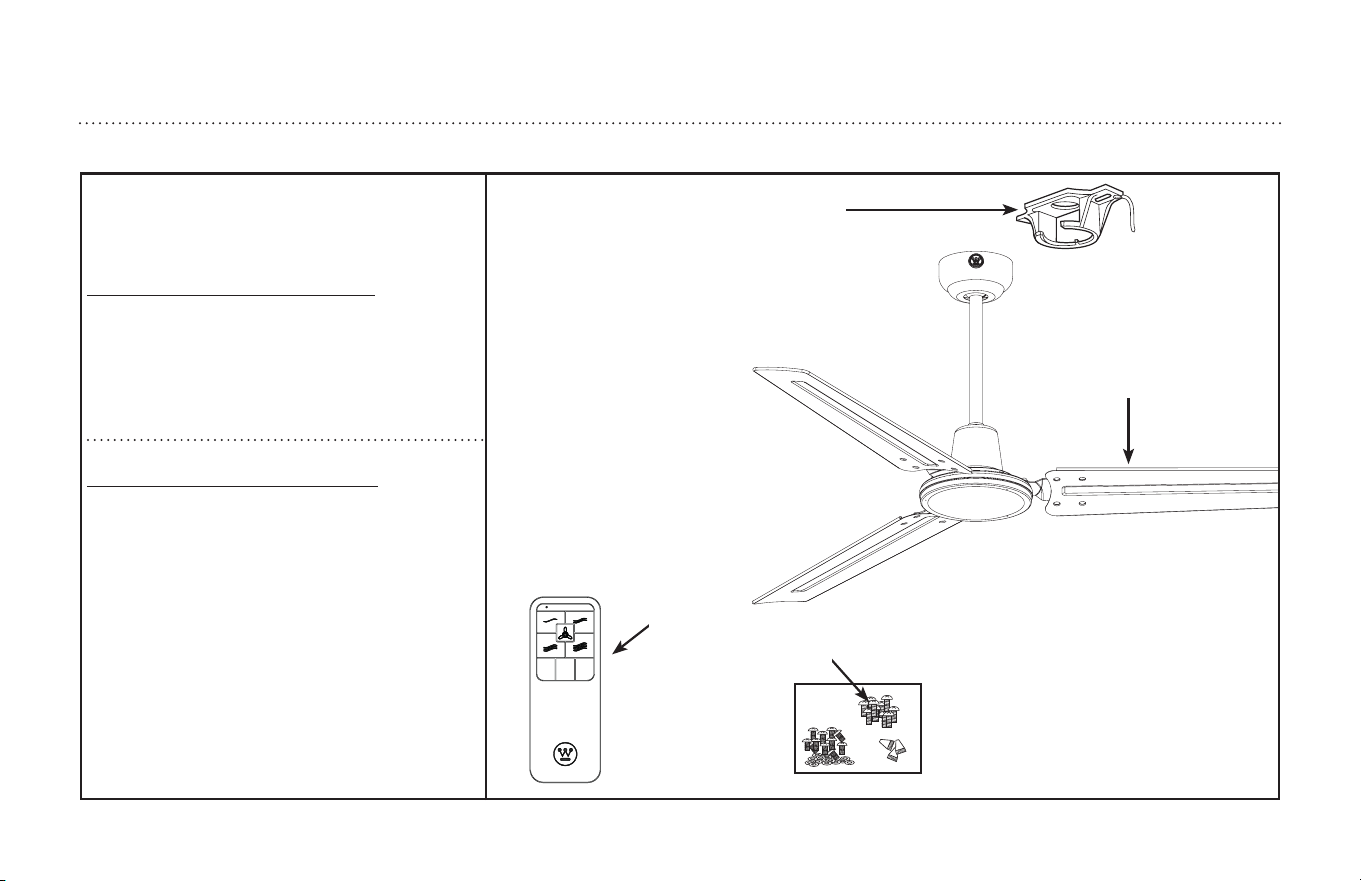
PARTS LIST
LISTA DE REPUESTOS
# Description
1 . . . . . . . . . . . . . . . . . . . . Mounting Bracket
2. . . . . . . . . . . . . . . . . . . . Blade
3. . . . . . . . . . . . . . . . . . . . Remote Control
4. . . . . . . . . . . . . . . . . . . . Hardware Pack
No. Descripción
1 . . . . . . . . . . . . . . . . . . . . Soporte de montaje
2. . . . . . . . . . . . . . . . . . . . Aleta
3. . . . . . . . . . . . . . . . . . . . Control Remoto
4. . . . . . . . . . . . . . . . . . . . Tornillería

ETL-ES-Jax (Backlit RC)-WH25.04
and Westinghouse are trademarks of
We
stinghouse Electric Corporation.
Used under license
by Westinghouse Lighting.
All Rights Reserved.
Made in China
Westinghouse Lighting, Philadelphia, PA 19154-1029, U.S.A.
www.westinghouselighting.com