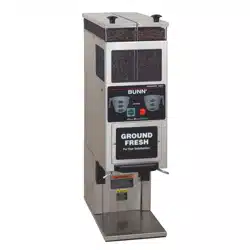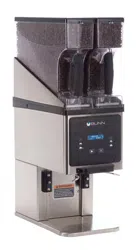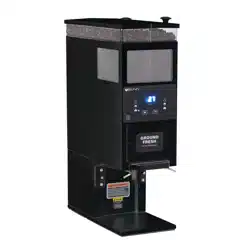
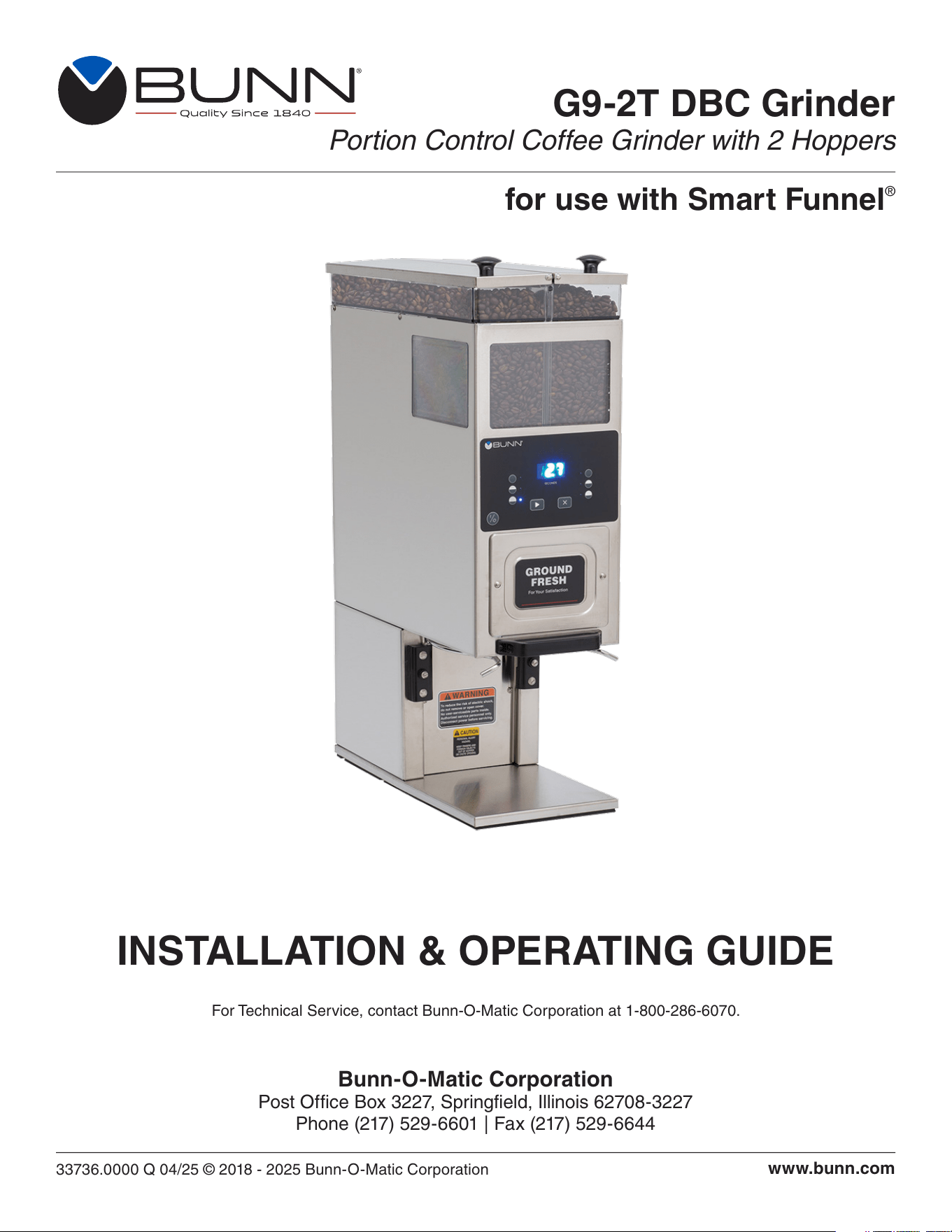
G9-2T DBC Grinder
Portion Control Coffee Grinder with 2 Hoppers
33736.0000 Q 04/25 © 2018 - 2025 Bunn-O-Matic Corporation
INSTALLATION & OPERATING GUIDE
Bunn-O-Matic Corporation
Post Office Box 3227, Springfield, Illinois 62708-3227
Phone (217) 529-6601 | Fax (217) 529-6644
www.bunn.com
For Technical Service, contact Bunn-O-Matic Corporation at 1-800-286-6070.
for use with Smart Funnel
®

2
Bunn-O-Matic Corp. (“BUNN”) warrants equipment manufactured by it as follows:
1) All coffee and tea dispensers/servers, MCR/MCP/MCA single cup brewers, and BUNNlink
®
electronic circuit and/or
control boards – 1 year parts and 1 year labor.
2) Product-specific warranties for Premia
™
,Crescendo
®
, Fast Cup
®
, Sure Immersion
®
, Sure Tamp
®
and others – 1 year
parts and 1 year labor. Please visit commercial.bunn.com/support/warranty-lookup for further details.
3) All other equipment – 2 years parts and 1 year labor plus added warranties as specified below:
a) Electronic circuit and/or control boards – parts and labor for 3 years.
b) Compressors on refrigeration equipment – 5 years parts and 1 year labor.
c) Grinding burrs on coffee grinding equipment for 4 years or 40,000 pounds of coffee, whichever comes first.
4) For customers subscribed to BUNNlink
®
, BUNN reserves the right to periodically auto-push critical software
updates that will enhance functionality or performance of the BUNN equipment, unless the customer requests
advance notice of such software updates from BUNN in writing.
These warranty periods run from the date of installation. BUNN warrants that the equipment manufactured by it will
be commercially free of defects in material and workmanship existing at the time of manufacture and appearing
within the applicable warranty period. This warranty does not apply to any equipment, component or part that was
not manufactured by BUNN or that, in BUNN’s judgment, has been affected by misuse, neglect, alteration, improper
installation or operation, improper maintenance or repair, non periodic cleaning and descaling, equipment failures
related to poor water quality, damage or casualty. In addition, the warranty does not apply to replacement of items
subject to normal wear with use including but not limited to user replaceable parts such as seals and gaskets. This
warranty is conditioned on the Buyer 1) giving BUNN prompt notice of any claim to be made under this warranty by
telephone at (217) 529-6601 or by writing to Post Office Box 3227, Springfield, Illinois 62708-3227; 2) if requested
by BUNN, shipping the defective equipment prepaid to an authorized BUNN service location; and 3) receiving prior
authorization from BUNN that the defective equipment is under warranty.
THE FOREGOING WARRANTY IS EXCLUSIVE AND IS IN LIEU OF ANY OTHER WARRANTY, WRITTEN OR
ORAL, EXPRESS OR IMPLIED, INCLUDING, BUT NOT LIMITED TO, ANY IMPLIED WARRANTY OF EITHER
MERCHANTABILITY OR FITNESS FOR A PARTICULAR PURPOSE. The agents, dealers or employees of BUNN
are not authorized to make modifications to this warranty or to make additional warranties that are binding on BUNN.
Accordingly, statements by such individuals, whether oral or written, do not constitute warranties and should not be
relied upon.
If BUNN determines in its sole discretion that the equipment does not conform to the warranty, BUNN, at its
exclusive option while the equipment is under warranty, shall either 1) provide at no charge replacement parts
and/or labor (during the applicable parts and labor warranty periods specified above) to repair the defective
components, provided that this repair is done by a BUNN Authorized Service Representative; or 2) shall replace
the equipment or refund the purchase price for the equipment.
THE BUYER’S REMEDY AGAINST BUNN FOR THE BREACH OF ANY OBLIGATION ARISING OUT OF THE
SALE OF THIS EQUIPMENT, WHETHER DERIVED FROM WARRANTY OR OTHERWISE, SHALL BE LIMITED, AT
BUNN’S SOLE OPTION AS SPECIFIED HEREIN, TO REPAIR, REPLACEMENT OR REFUND.
In no event shall BUNN be liable for any other damage or loss, including, but not limited to, lost profits, lost sales, loss
of use of equipment, claims of Buyer’s customers, cost of capital, cost of down time, cost of substitute equipment,
facilities or services, or any other special, incidental or consequential damages.
BUNN-O-MATIC COMMERCIAL PRODUCT WARRANTY
3
USER NOTICES
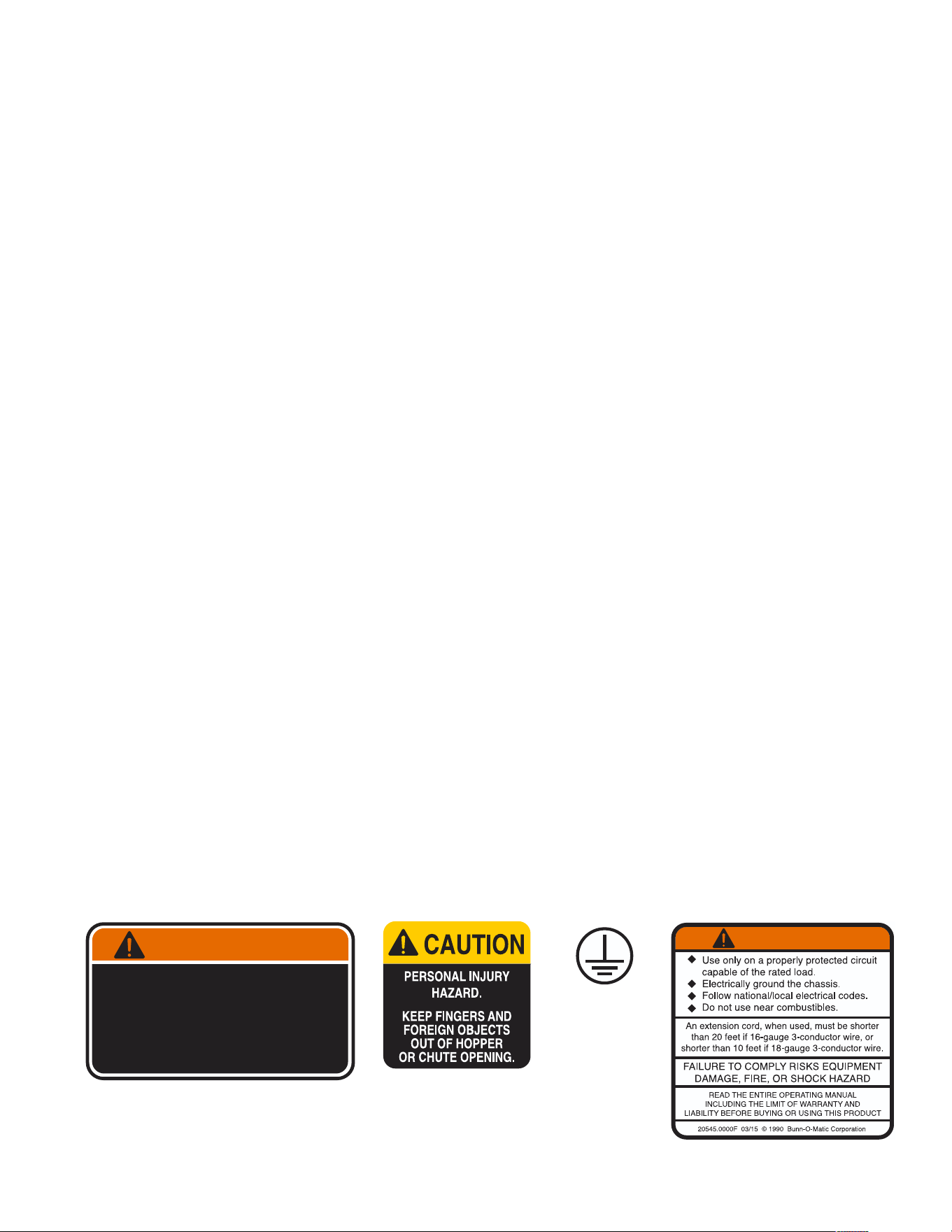
Carefully read and follow all notices on the grinder and in this manual. They were written for your protection.
All notices on the grinder are to be kept in good condition. Replace any unreadable or damaged labels.
WAR NING
20545.0000
05876.0000
INTRODUCTION
This equipment will store up-to six pounds of whole bean coffee in each of two hoppers and grind it to a
preset grind and amount into an awaiting funnel and filter from most commercial drip coffee brewers. The
equipment is only for indoor use on a sturdy counter or shelf. Adequate space must be available above the
grinder to raise the lids when adding beans. Use only with whole bean coffee.
The grind is preset at the factory to drip specifications as set forth by the United States Department of
Commerce and adopted by the Coffee Brewing Center of the Pan American Coffee Bureau. Adjustments
may be made to alter both the amount and grind from the factory setting.
To reduce the risk of electric shock,
do not remove or open cover.
No user-serviceable parts inside.
Authorized service personnel only.
Disconnect power before se rvicing.
WARNING
37881.0000
00824.0002
CONTENTS
BUNN-O-MATIC COMMERCIAL PRODUCT WARRANTY ......................................................................................2
INTRODUCTION .......................................................................................................................................................3
USER NOTICES ........................................................................................................................................................3
NORTH AMERICAN REQUIREMENTS ....................................................................................................................4
CE REQUIREMENTS ................................................................................................................................................4
ELECTRICAL REQUIREMENTS ...............................................................................................................................5
OPERATING CONTROLS (Early Models).................................................................................................................5
OPERATING CONTROLS .........................................................................................................................................6
INITIAL SETUP .........................................................................................................................................................6
CARE AND CLEANING .............................................................................................................................................7
PREVENTIVE MAINTENANCE .................................................................................................................................7
COFFEE GRINDING ................................................................................................................................................7
ADJUSTMENTS ........................................................................................................................................................8
Burr Adjustment......................................................................................................................................................8
COMMUNICATING WITH COFFEE BREWER .........................................................................................................8
SELECTING COFFEE NAMES .................................................................................................................................8
Entering a name from the Coffee Chart .................................................................................................................8
Entering a coffee name using a Recipe Card.........................................................................................................9
Resetting the grinder memory (to match Coffee Chart) .........................................................................................9
COFFEE CHART .......................................................................................................................................................9
TIMER ADJUSTMENT (CONTROL BOARD) ..........................................................................................................10
SCHEMATICS ......................................................................................................................................................... 11

4
• This appliance must be installed in locations where it can be overseen by trained personnel.
• For proper operation, this appliance must be installed where the temperature is between 41°F to 95°F
(5°C to 35°C).
• Appliance shall not be tilted more than 10° for safe operation.
• An electrician must provide electrical service as specified in conformance with all local and national codes.
• This appliance must not be cleaned by pressure washer.
• This appliance can be used by persons if they have been given supervision or instruction concerning use
of the appliance in a safe way and if they understand the hazards involved.
• Keep the appliance and its cord out of reach of children.
• Appliances can be used by persons with reduced physical, sensory or mental capabilities or lack of
experience and knowledge if they have been given supervision or instruction concerning use of the
appliance in a safe way and understand the hazards involved.
• If the power cord is ever damaged, it must be replaced by the manufacturer or authorized service
personnel with a special cord available from the manufacturer or its authorized service personnel in
order to avoid a hazard.
• Machine must not be immersed for cleaning.
• This appliance is intended for commercial use in applications such as:
– staff kitchen areas in shops, offices and other working environments
– by clients in hotel and motel lobbies and other similar types of environments
• Access to the service areas permitted by Authorized Service personnel only.
NORTH AMERICAN REQUIREMENTS
• This appliance must be installed in locations where it can be overseen by trained personnel.
• For proper operation, this appliance must be installed where the temperature is between 5°C to 35°C.
• Appliance shall not be tilted more than 10° for safe operation.
• An electrician must provide electrical service as specified in conformance with all local and national codes.
• This appliance must not be cleaned by water jet.
• This appliance is not intended for use by persons (including children) with reduced physical, sensory
or mental capabilities, or lack of experience and knowledge, unless they have been given instructions
concerning use of this appliance by a person responsible for its safety.
• This appliance is intended to be used for commercial applications, for example in kitchens of restaurants,
canteens, hospitals and in commercial enterprises such as bakeries, butcheries, etc., but not for continuous
mass production of food.
• Children should be supervised to ensure they do not play with the appliance.
• If the power cord is ever damaged, it must be replaced by the manufacturer or authorized service
personnel with a special cord available from the manufacturer or its authorized service personnel in
order to avoid a hazard.
• Machine must not be immersed for cleaning.
• Machine rated IX P1.
CE REQUIREMENTS
5
ELECTRICAL REQUIREMENTS
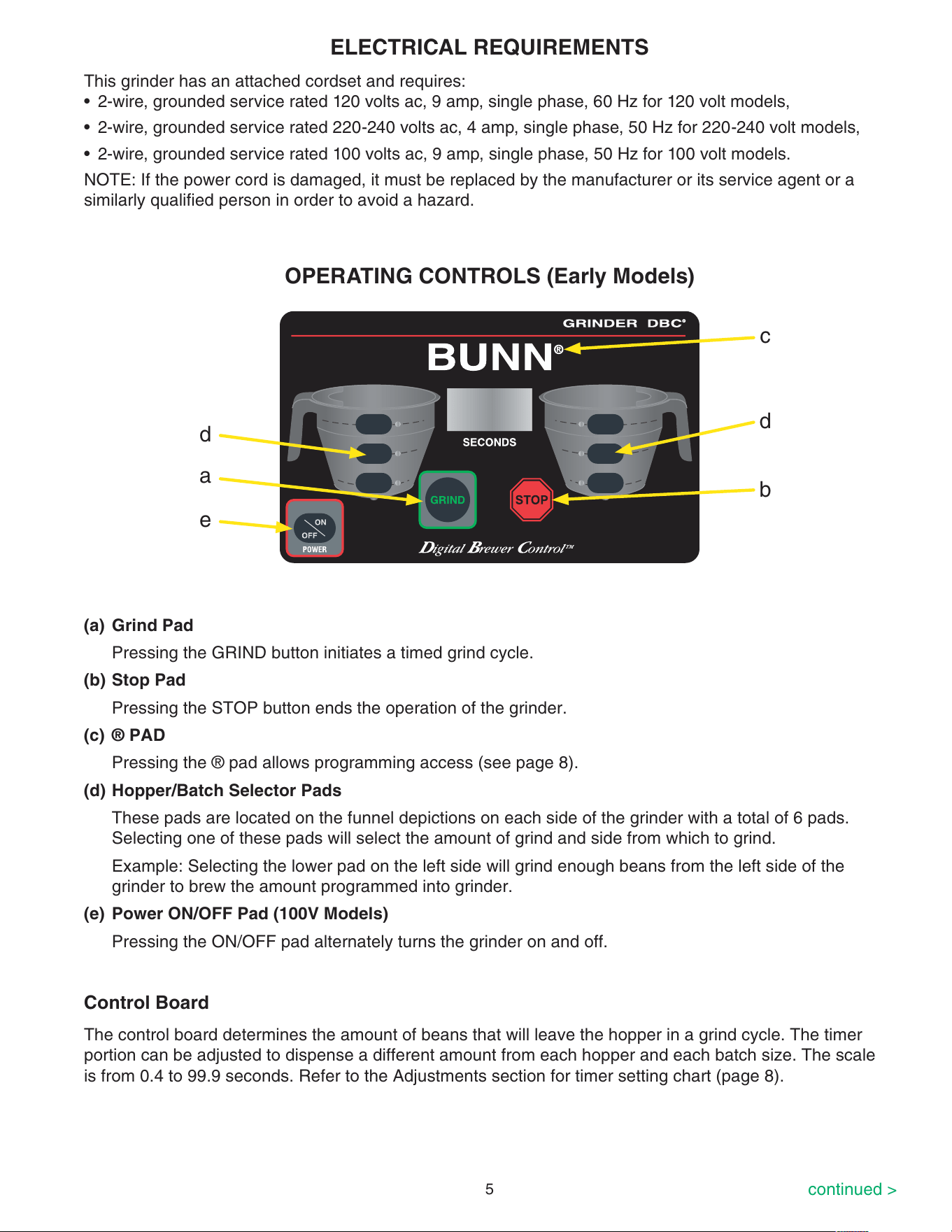
d
d
b
a
OPERATING CONTROLS (Early Models)
(a) Grind Pad
Pressing the GRIND button initiates a timed grind cycle.
(b) Stop Pad
Pressing the STOP button ends the operation of the grinder.
(c) ® PAD
Pressing the ® pad allows programming access (see page 8).
(d) Hopper/Batch Selector Pads
These pads are located on the funnel depictions on each side of the grinder with a total of 6 pads.
Selecting one of these pads will select the amount of grind and side from which to grind.
Example: Selecting the lower pad on the left side will grind enough beans from the left side of the
grinder to brew the amount programmed into grinder.
(e) Power ON/OFF Pad (100V Models)
Pressing the ON/OFF pad alternately turns the grinder on and off.
e
c
continued >
This grinder has an attached cordset and requires:
• 2-wire, grounded service rated 120 volts ac, 9 amp, single phase, 60 Hz for 120 volt models,
• 2-wire, grounded service rated 220-240 volts ac, 4 amp, single phase, 50 Hz for 220-240 volt models,
• 2-wire, grounded service rated 100 volts ac, 9 amp, single phase, 50 Hz for 100 volt models.
NOTE: If the power cord is damaged, it must be replaced by the manufacturer or its service agent or a
similarly qualified person in order to avoid a hazard.
The control board determines the amount of beans that will leave the hopper in a grind cycle. The timer
portion can be adjusted to dispense a different amount from each hopper and each batch size. The scale
is from 0.4 to 99.9 seconds. Refer to the Adjustments section for timer setting chart (page 8).
Control Board
6
INITIAL SETUP
1. Open the top lid. Clear all foreign objects and shipping material from the hopper compartment and the
entrance to the grind chamber.
2. Plug in the grinder.
3. Fill the hopper compartments with whole bean coffee. (Capacity 6 pounds each). The grinder is now
ready for use.
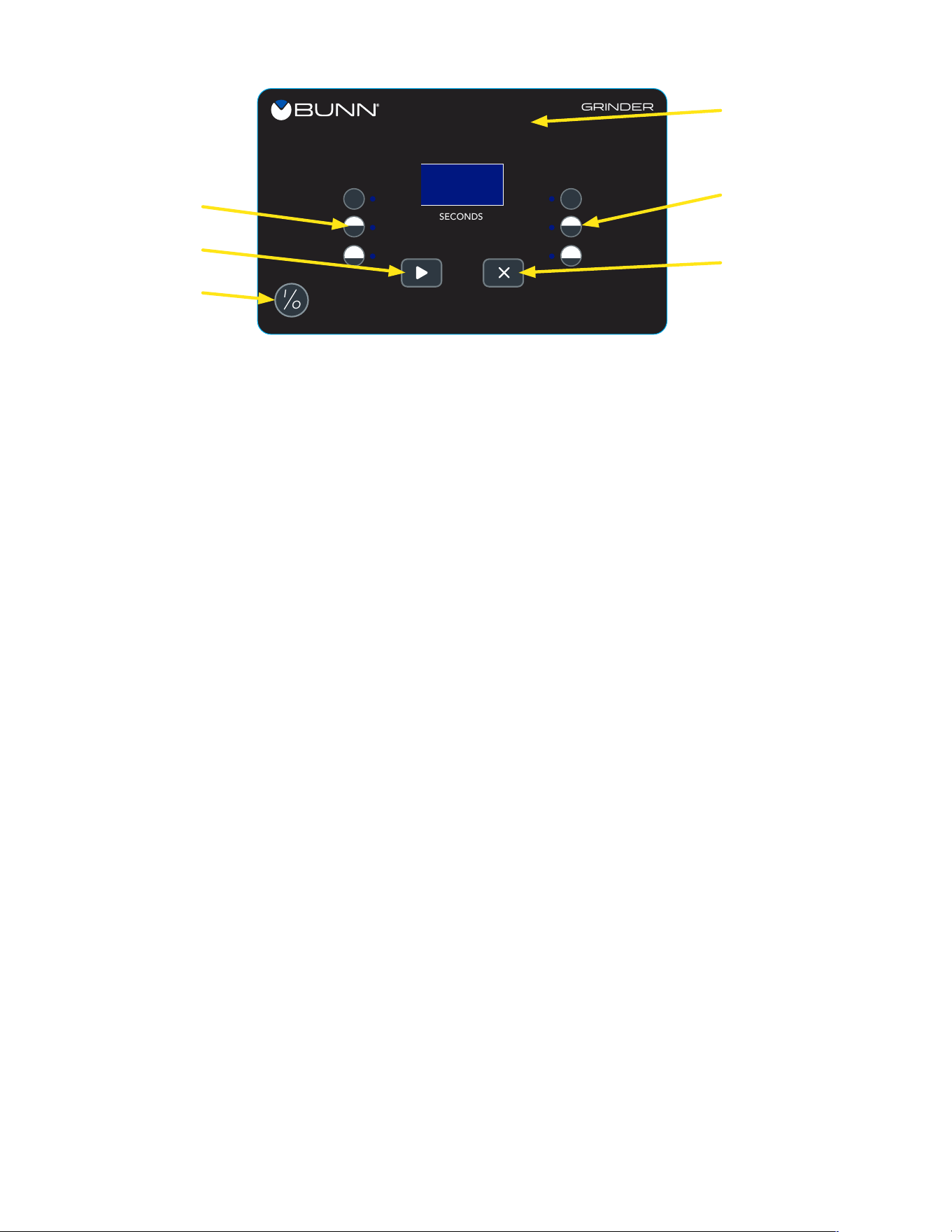
OPERATING CONTROLS
(a) Grind Pad
Pressing the GRIND button initiates a timed grind cycle.
(b) Stop Pad
Pressing the STOP button ends the operation of the grinder.
(c) PAD
Pressing the hidden button allows programming access (see page 8).
(d) Hopper/Batch Selector Pads
These pads are located on the funnel depictions on each side of the grinder with a total of 6 pads.
Selecting one of these pads will select the amount of grind and side from which to grind.
Example: Selecting the lower pad on the left side will grind enough beans from the left side of the
grinder to brew the amount programmed into grinder.
(e) Power ON/OFF Pad (100V Models)
Pressing the ON/OFF pad alternately turns the grinder on and off.
SECONDS
GRINDER
I
O
d
d
b
a
e
c
Control Board
The control board determines the amount of beans that will leave the hopper in a grind cycle. The timer
portion can be adjusted to dispense a different amount from each hopper and each batch size. The scale is
from 0.4 to 99.9 seconds for software version XX.41 and lower, and 0.4 to 60 seconds for software version
XX.42 and higher. Refer to the Adjustments section for timer setting chart (page 8).

7
COFFEE GRINDING
1. Visually inspect the selected hopper for an ample supply of whole bean coffee.
2. Place a paper filter into the brew funnel. The filter must not be folded-over or tilted to one side.
3. Insert the funnel into the funnel rails and push until it stops.
4. Choose the batch size and side of grinder to use.
5. Press the GRIND button. The grinding action will stop automatically after the preset amount of ground
coffee is dispensed into the funnel.
CARE AND CLEANING
6 Month
WARNING - Unplug the grinder before the removal of any panel or grind chamber-housing parts.
1. Clean all exterior surfaces using a damp cloth rinsed in any mild, nonabrasive, liquid detergent.
Care should be taken not to scratch the grinder with any abrasive material.
2. Empty all beans from hopper(s). Plug in the grinder; place an empty funnel with filter into the funnel
rails. Press and release the “GRIND” button. Run a few cycles until all coffee in the grind chamber is
dispensed and disconnect the grinder from the power source.
3. Remove the upper front inspection panel.
4. Remove the two screws holding the front cover to the burr housing. Carefully remove the burr housing
front cover. Clean inside surface with a dry stiff non-metallic bristle brush and wipe with a dry clean cloth.
5. Carefully remove the rotor cup, shear plate burr rotor and motor shaft extension from the grinder. Clean
all parts with a dry stiff non-metallic bristle brush and wipe with a dry clean cloth.
6. Clean the grind chamber with a dry stiff non-metallic bristle brush and wipe with a dry clean cloth.
7. Reinstall the motor shaft extension, burr rotor, shear plate, rotor cup and front cover to the burr housing.
8. Reinstall the upper front inspection panel,
9. Refer to the “Adjustment” section of the Operating and Service manual for burr adjustments.
continued >
Daily
Clean all exterior surfaces using a damp cloth rinsed in any mild, nonabrasive, liquid detergent. Care
should be taken not to scratch the grinder with any abrasive material.
PREVENTIVE MAINTENANCE
Bunn-O-Matic
®
Corporation recommends that preventive maintenance be performed at regular intervals.
Maintenance should be performed by a qualified service technician. For Technical Service, contact Bunn-
O-Matic
®
Corporation at 1-800-286-6070.
NOTE: Replacement parts or service caused by failure to perform required maintenance is not covered by
warranty.
6 Month
Replace the dechaffer assembly.
05995.1000 Dechaffer Plate (package of 6)
1-Year
1. On grinders with slide plates check the slide plates and clean.
2. Inspect and clean/replace burrs and grind chamber if necessary.
3. Adjust the burrs and grind time to your specifications for particulate size and throw weight.

8
Burr Adjustment
1. Unplug the grinder and empty all beans from the hoppers.
2. Plug in the grinder, press and release the GRIND button (with either hopper selected). Run a few grind
cycles until all of the coffee in the grind chamber is used.
3. Remove the upper front inspection panel.
4. Loosen the locknut by one turn.
5. Press the GRIND button and slowly turn the adjusting screw in a
clockwise direction until a metallic whine is heard due to the rubbing
of the grinding burrs. (It may be necessary to start more than one grind
cycle to obtain this sound.)
6. Turn plastic grind indicator until screw slot lines up with “O” on the indicator.
7. The following settings approximately correspond to the CBC recognized grinds. All are referenced from
the arrow position noted in #6.
ADJUSTMENTS
COMMUNICATING WITH COFFEE BREWER
When the grinder is used with its companion brewer, the name of the coffee and the size of the batch
ground is communicated to the brewer through the chip in the funnel handle as it is placed into the brewer.
Therefore, it is necessary to “tell” the grinder the names of the coffees that have been loaded into the
hoppers. The names are chosen from the Coffee Chart shown below. Contact the factory if custom names
that are not on the chart are required.
1
0
2
3
4
5
6
7
8
9
10
11
12
13
14
15
Adjusting
screw
Hash
Marks
continued >
The grind can be set from very fine to very coarse. The amount may be adjusted for use in most commercial
coffee brewers. The following procedures should be used to make adjustments. A change in the burr
adjustment will also change the amount dispensed. Any adjustment of the burrs should be followed by an
adjustment of the timer.
FINE GRIND: Rotate the adjusting screw 7 hash marks in a counterclockwise direction.
DRIP GRIND: Rotate the adjusting screw 8 hash marks in a counterclockwise direction.
REGULAR (COARSE) GRIND: Rotate the adjusting screw 12 hash marks in a
counterclockwise direction.
SELECTING COFFEE NAMES
Entering a name from the Coffee Chart
1. Simultaneously press and hold the STOP button and any one of the three batch buttons on the side to
be programmed. After 3 seconds all three indicators on the side selected will begin flashing. The display
will show a number from the coffee chart below. This number represents the name of the coffee that is
to be loaded into the hopper.
2. Press and release the GRIND button to increase the number or press and release the STOP button to
decrease it.
3. When the correct number for the coffee being used is displayed, press any of the batch buttons on the
other side. All three indicators on that side will begin flashing.
4. Repeat step 2 to enter the name for the coffee being used on this side.
5. To exit the setup mode, press and release the hidden button anytime during this procedure.

9
COFFEE CHART
Entering a coffee name using a Recipe Card
1. Press the STOP button and place the chip portion of the card under the sensor coil on the front of
the grinder.
2. After a short pause, the display will show 3 “dashes”.
3. Remove the card and press any batch switch on the side to be programmed.
4. The display should show the number of the coffee name loaded into the grinder.
5. The grinder display will then return to the normal operating mode.
NOTE: If a number is chosen from the chart below, and entered into the grinder, check to be sure the
number entered represents the name of the coffee on the chart.
6. Grind into the funnel then insert the funnel into the brewer funnel rails.
7. The display will read the coffee name that was ground into the funnel.
8. If this name is different from the name on the chart, the grinder’s memory needs to be reset.
SELECTING COFFEE NAMES
continued from previous page
Resetting the grinder memory (to match Coffee Chart)
1. Unplug grinder from the outlet.
2. Press in and hold both the STOP and the GRIND buttons and plug cordset into the outlet. After a short
pause, the display will show a series of 3 dashes followed by a series of 9 dashes.
3. When the 9 dashes appear, release the STOP and GRIND buttons, then press and release the
STOP button.
4. The display will count down then return to the normal operating mode. The grinder should now be set to
match the coffee names with the numbers on the chart below.
NUMBER NAME NUMBER NAME
1 Regular 15 Jamaica Blue Mountain
2 Decaf 16 Guatemalan
3 Colombian 17 Light Roast
4 Colombia Supremo 18 Dark Roast
5 Costa Rican 19 Espresso
6 Ethiopian 20 Amaretto
7 Kona 21 Hazelnut
8 Kenya AA 22 French Vanilla
9 Sumatran 23 Irish Creme
10 French Roast 24 Vanilla Nut
11 Italian Roast 25 Caramel
12 Mocha Java 26 Raspberry
13 House Blend 27 Almond
14 Breakfast Blend 28 Dark Mountain Roast

10
Three different batch settings are selectable for each hopper. Each batch is independently adjustable by
setting the length of time a slide gate opens to allow beans to drop into the grinding chamber. A second
time setting for each batch determines how long the grind motor continues to run after the slide gate
closes. This time is set long enough to insure that all the beans dropped into the grind chamber are
ground and dispensed.
APPROXIMATE TIMER SETTINGS IN SECONDS
+
Weight (ounces) Fine (7*) Drip (8*) Regular (12*)
1.5 0.5 0.5 0.5
1.75 0.7 0.6 0.6
2.0 1.0 0.8 0.8
2.25 1.4 1.4 1.2
2.5 1.9 1.8 1.6
2.75 2.4 2.2 2.0
3.0 2.9 2.7 2.5
3.25 3.3 3.1 2.9
4.0 4.8 4.4 4.0
6.0 8.6 7.9 7.5
8.0 12.0 11.5 10.9
10.0 15.7 15.1 14.1
12.0 19.6 18.5 17.5
14.0 23.5 22.0 20.9
16.0 27.0 25.3 24.3
*
Hash mark settings. Refer to Burr Adjustment section.
+ These are approximate timer settings for regular roast coffee. Settings will
vary with coffee types and roasts.
1. Determine the grind setting. (The factory setting is drip, to determine other settings, refer to the previous section.)
2. Use the table below to find approximate timer setting for the grind and amount of coffee desired.
3. To enter the setup mode and make an adjustment, press and hold the hidden programming button.
One of the batch indicators will begin to flash off and on. At this point, release the hidden button.
4. Push the hopper/batch selector button for the batch to be adjusted. Note that the digital display shows
the current slide gate time setting (in seconds).
5. To increase the time, press the GRIND button. To decrease, press the STOP button.
6. To change the chamber clean-out time, press the same batch button again and note that the indicator
light begins to blink more rapidly and the display shows the current clean-out time.
7. To increase the time, press the GRIND button. To decrease it, press the STOP button.
8. After the cleanout time has been entered, press another batch pad and repeat steps 4 to 7. Otherwise,
to exit the programming mode, press and release the hidden button and the grinder returns to the
normal operating mode, using the new settings.
NOTE: While in the setup mode, if no buttons are pushed for 60 seconds, the grinder will return to
normal operations, retaining any settings made while in the setup mode.
TIMER ADJUSTMENT (CONTROL BOARD)
11
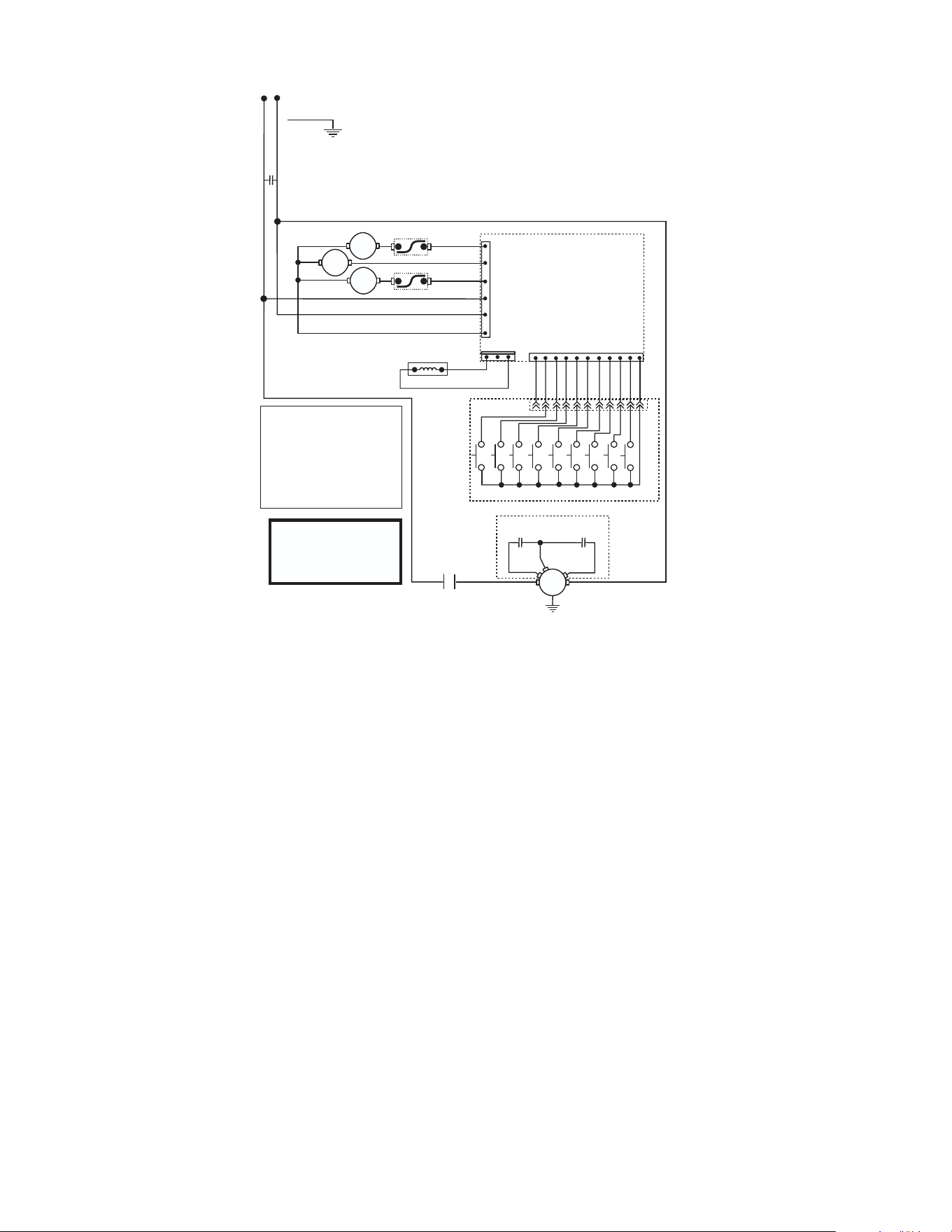
SCHEMATICS
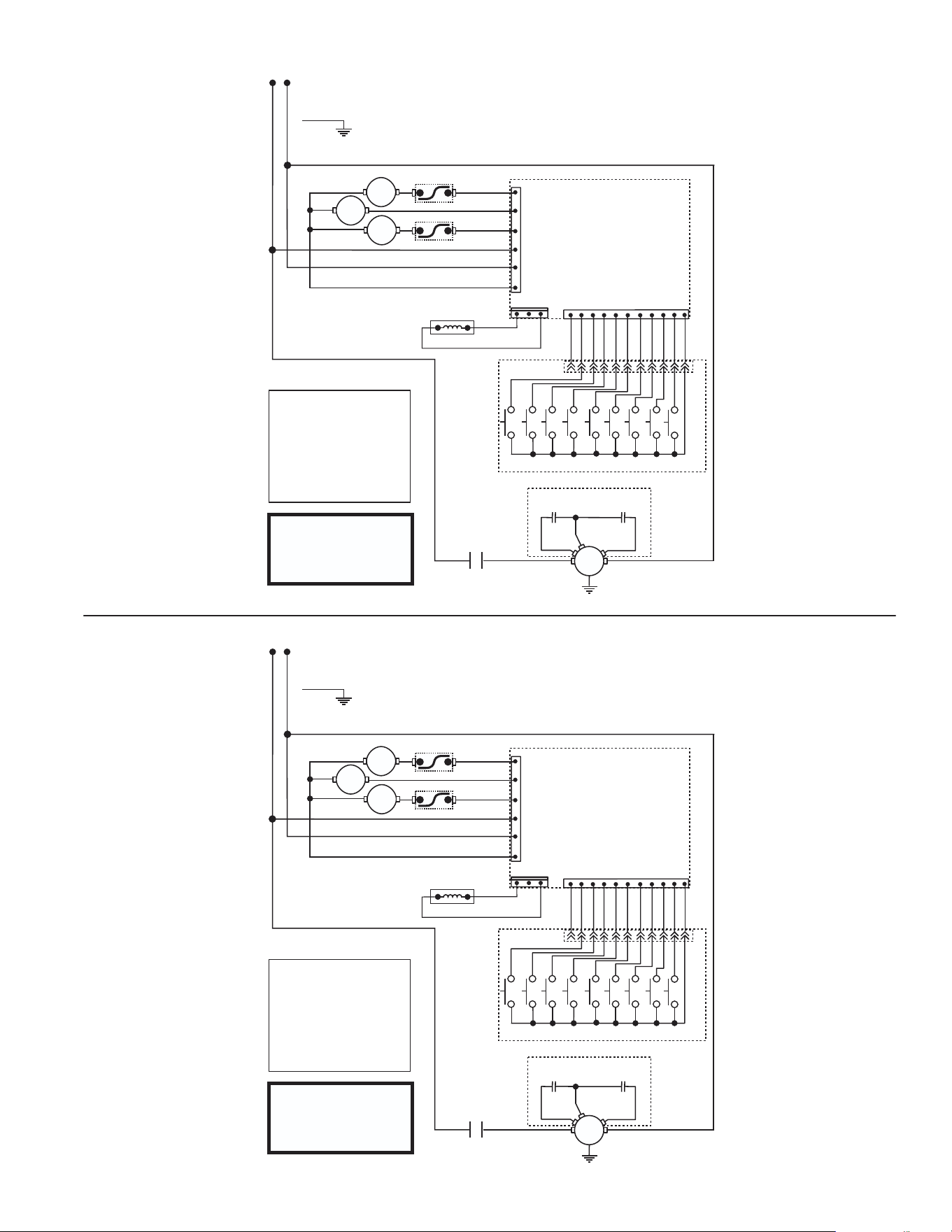
SCHEMATIC WIRING DIAGRAM
G9-2 DBC & G9-2T DBC W/SMART FUNNEL
®
W
H
I
B
L
K
LEFT GATE
LIMIT THERMOSTAT
LIMIT THERMOSTAT
SOL
SOL
WHI/ORA
WHI/GRN
WHI/YEL
BLK
WHI
RED/BLK
J1-6
J1-6
J8-3
J8-1
J6-10
J6-5
J6-1
CONTROL PC BOARD
COIL
RELAY
RIGHT GATE
1
11
SHIELD
FUNNEL SENSOR
WHI/GRN
WHI/VIO
SWITCH UNIT ASSY
B2
C4
C5
C6
A2
A1
C3
C2
C1
GRINDER MOTOR
Models with RUN capacitor
START
CAPACITOR
RUN
CAPACITOR
WHI
WHI
BLK
BLK
WHT
RED
RED
GRY
WHI/BLU
RELAY
CONTACTS
33734.0000 J 08/28/24 © 2001 Bunn-O-Matic Corporation
Switch Unit Assembly Codes
A1 Grind
A2 Stop
B2 Hidden Button "Right"
C1 Large Batch Size "Left"
C2 Medium Batch Size "Left"
C3 Small Batch Size "Left"
C4 Large Batch Size "Right"
C5 Medium Batch Size "Right"
C6 Small Batch Size "Right"
120 VOLTS AC
2 WIRE
SINGLE PHASE
60 Hz
M
LI
N
GREEN
SCHEMATIC WIRING DIAGRAM
G9-2 DBC & G9-2T DBC W/SMART FUNNEL
®
W
H
I
B
L
K
LEFT GATE
LIMIT THERMOSTAT
LIMIT THERMOSTAT
SOL
SOL
WHI/ORA
WHI/GRN
WHI/YEL
BLK
WHI
RED/BLK
J1-6
J1-6
J8-3
J8-1
J6-10
J6-5
J6-1
CONTROL PC BOARD
COIL
RELAY
RIGHT GATE
1
11
SHIELD
FUNNEL SENSOR
WHI/GRN
WHI/VIO
SWITCH UNIT ASSY
B2
C4
C5
C6
A2
A1
C3
C2
C1
GRINDER MOTOR
Models with RUN capacitor
START
CAPACITOR
RUN
CAPACITOR
WHI
WHI
BLK
BLK
WHT
RED
RED
GRY
WHI/BLU
RELAY
CONTACTS
33734.0000 J 08/28/24 © 2001 Bunn-O-Matic Corporation
Switch Unit Assembly Codes
A1 Grind
A2 Stop
B2 Hidden Button "Right"
C1 Large Batch Size "Left"
C2 Medium Batch Size "Left"
C3 Small Batch Size "Left"
C4 Large Batch Size "Right"
C5 Medium Batch Size "Right"
C6 Small Batch Size "Right"
120 VOLTS AC
2 WIRE
SINGLE PHASE
60 Hz
M
LI
N
GREEN
12
SCHEMATIC WIRING DIAGRAM
G9-2TB DBC
W/SMART FUNNEL
®
W
H
I
B
L
K
LEFT GATE
LIMIT THERMOSTAT
LIMIT THERMOSTAT
SOL
SOL
WHI/ORA
WHI/GRN
WHI/YEL
BLK
WHI
RED/BLK
J1-6
J1-6
J8-3
J8-1
J6-10
J6-5
J6-1
CONTROL PC BOARD
COIL
RELAY
RIGHT GATE
1
11
SHIELD
FUNNEL SENSOR
WHI/GRN
WHI/VIO
SWITCH UNIT ASSY
B2
C4
C5
C6
A2
A1
C3
C2
C1
GRINDER MOTOR
Models with RUN capacitor
START
CAPACITOR
RUN
CAPACITOR
WHI
WHI
BLK
BLK
WHT
RED
RED
GRY
WHI/BLU
RELAY
CONTACTS
33734.0006 A 10/15/24 © 2001 Bunn-O-Matic Corporation
Switch Unit Assembly Codes
A1 Grind
A2 Stop
B2 Hidden Button "Right"
C1 Large Batch Size "Left"
C2 Medium Batch Size "Left"
C3 Small Batch Size "Left"
C4 Large Batch Size "Right"
C5 Medium Batch Size "Right"
C6 Small Batch Size "Right"
M
LI N
100 VAC
2 WIRE
SINGLE PHASE
50/60 Hz
GRN/YEL
CAPACITOR
SCHEMATICS