
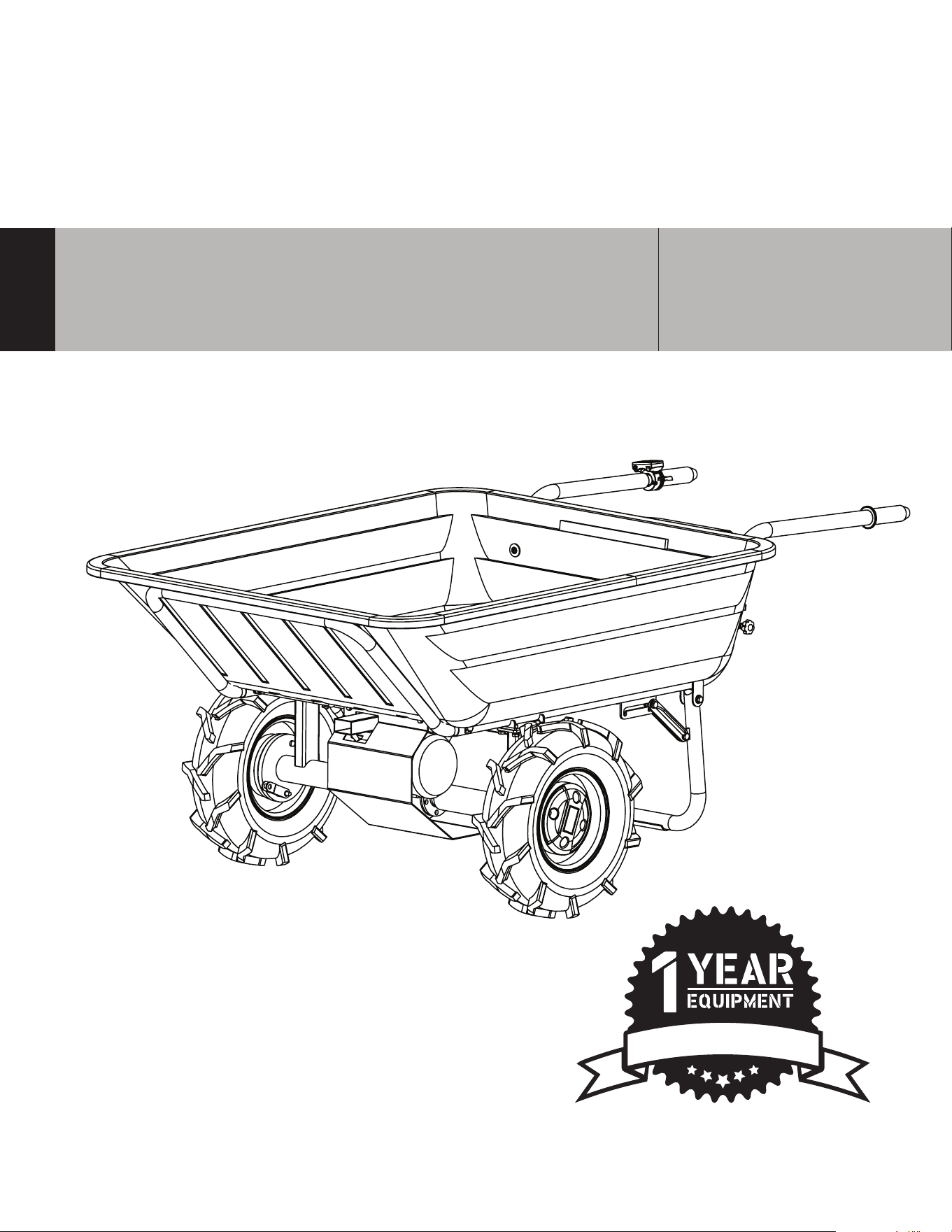
CKART300e
UTILITY CART
Operation Manual
W
A
R
R
A
N
T
Y

2
TABLE OF CONTENTS
1. Safety Information
1.1 Operating Safety
1.4 Battery
2. Technical Performance
2.1 Technical Performance
2.2 Specifications
2.3 Utility Cart Parts
3. EQUIPMENT ASSEMBLY
3.1 Warnings
3.2 Assembly Guide
3.3 Cable Assembly Steps
3.4 Loading on the slope
4. Operations
3.1 Charging the Battery
5. Maintenance
5.1 Cleaning
3.2 Storage
3.3 Disposal
6. Troubleshooting
8. Parts Manual
9. CKART300e Explosion Diagram
4
5
6
7
7
7
8
9
10
11
11
12
13
13
14
14
15
15
15
16
17

3
Register Your Equipment
Thank you for purchasing CARDINAL equipment! Your product is covered by the CARDINAL
Warranty Policy, but in order to activate your warranty, we need you to register your product.
In addition to activating your equipment warranty, product registration will grant you access
to important product updates, streamlined customer service, and more.
INCLUDED WITH YOUR REGISTRATION
☑ Equipment Warranty Activation
☑ Product Updates
☑ Streamlined Customer Service
☑ Exclusive Discounts and Sales
STEPS TO REGISTER YOUR EQUIPMENT
1. Visit www.cardinal-sprayers.com
2. Choose “Product Registration” at the bottom of the page
3. Enter your equipment’s serial number to get started
4. Provide all required information
5. Submit Registration
Equipment Resources
CARDINAL Customer Service doesn’t stop at checkout. We understand to keep a job-site
running smoothly - the proper equipment, spare parts, instruction manuals, and more are
needed at the drop of a hat. Visit www.cardinal-sprayers.com to gain access to the incredible
resources below.
How To Video Library
More of a visual person? Visit our Video Library for equipment
assembly instructions, troubleshooting tips, and more!
Found on each product listing or the Service Videos Page
Manual and Assembly Guide Library
Visit our Manual Library if you are looking for a lost
operations manual or a particular spare part?
Found on each product listing or the Cardinal Manuals Page
Service Requests
In need of a quick fix or a service center referral? Submit a
Service Request and a Cardinal Technician will respond
shortly to get you the help you need.
Choose “Service Request” at the bottom of www.cardinaL-sprayers.com
This manual provides information and procedures to safely operate and maintain this
equipment. For your own safety and protection from injury, carefully read, understand, and
observe the safety instructions described in this manual.
Keep this manual or a copy of it with the equipment. If you lose this manual or need an
additional copy, please contact Cardinal ® or visit www.cardinal-sprayers.com This
equipment is built with user safety in mind; however, it can present hazards if improperly
operated or serviced. Follow operating instructions carefully. If you have questions about
operating or servicing this equipment, contact Tomahawk Power.
The information contained in this manual is based on equipment’s production at the time of
publication. Cardinal® reserves the right to change any portion of this information without
notice.
No part of this publication may be reproduced in any form or by any means, electronic or
mechanical, including photocopying, without express written permission from Cardinal.
Any type of reproduction or distribution not authorized by Cardinal® represents an
infringement of valid copyrights and will be prosecuted. We expressly reserve the right to
make technical modifications, even without due notice, which aim at improving our
machines or their safety standards.
1. SAFETY INFORMATION
This manual contains DANGER, WARNING, CAUTION, and NOTE callouts which must
be followed to reduce the possibility of personal injury, damage to the equipment,
or improper service.
This is the safety alert symbol. It is used to alert you to potential personal injury
hazards. Obey all safety messages that follow this symbol to avoid possible injury
or death.
DANGER indicates an imminently hazardous situation which, if not avoided, will
result in death or serious injury.
WARNING indicates a potentially hazardous situation which, if not avoided, could
result in death or serious injury.
CAUTION indicates a potentially hazardous situation which, if not avoided, may
result in minor or moderate injury.
DANGER
WARNING
CAUTION
4

CAUTION
5
CAUTION: Used without the safety alert symbol, CAUTION indicates a potentially
hazardous situation which, if not avoided, may result in property damage.
1.1 Operating Safety
Familiarity and proper training are required for the safe operation of equipment!
Equipment operated improperly or by untrained personnel can be dangerous!
Read the operating instructions contained in both this manual and the engine manual and
familiarize yourself with the location and proper use of all controls. Inexperienced
operators should receive instruction from someone familiar with the equipment before
being allowed to operate the machine.
1.1.1 NEVER allow anyone to operate this equipment without proper training. People
operating this equipment must be familiar with the risks and hazards associated with it.
1.1.2 ALWAYS Be safety-conscious by dressing appropriately during operation. Always
wear protective footwear, safety glasses/eyeware, and a hard hat.
1.1.3 ALWAYS Exercise extreme caution with the controls when working on steep and/or
slippery surfaces. This is especially important when people are near the working area.
1.1.4 ALWAYS Ensure that all safety guards are in place when operating your Utility Cart.
1.1.5 ALWAYS Keep your Utility Wagon free of any accumulation of dirt, grease, oil, or any
other flammable material.
1.1.6 DO NOT carry “passengers” on your Utility Cart.
1.1.7 DO NOT start operating without completing daily maintenance checks.
Unplug battery before all maintenance and settings!
1.1.8 DO NOT operate your Utility Wagon without exercising the appropriate
safety precautions.
1.1.9 DO NOT use other types of battery charger or batteries.
1.1.10 DO NOT remove the battery while the machine is running In case of longer
standstill, press the shut-down button.
1.1.11 NEVER use accessories or attachments that are not recommended by Cardinal.
Damage to equipment and injury to the user may result.
1.1.12 NEVER leave machine running unattended.
1.1.13 ALWAYS be sure operator is familiar with proper safety precautions and operation
techniques before using machine.
1.1.14 ALWAYS wear ANSI Z87.1-approved safety goggles or safety glasses with side
shields, or when needed, a face shield. Use a dust mask in dusty work conditions. Also
use non-skid safety shoes, hardhat, gloves, dust collection systems, and hearing protection
when appropriate. This applies to all persons in the work area.
1.1.15 ALWAYS store equipment properly when it is not being used. Equipment should
be stored in a clean, dry location out of the reach of children.
WARNING

6
1.1.16 ALWAYS operate machine with all safety devices and guards in place and in working
order. DO NOT modify or remove safety devices. DO NOT operate machine if any safety
devices or guards are missing or inoperative.
1.1.17 ALWAYS read, understand, and follow procedures in Operator's Manual before
attempting to operate equipment.
1.1.17 NEVER use the machine when it is raining or in damp, wet areas. Unplug battery
before all maintenance and settings!
1.2 Service Safety
Poorly maintained equipment can become a safety hazard! In order for the
equipment to operate safely and properly over a long period of time, periodic
maintenance and occasional repairs are necessary.
1.2.1 DO NOT attempt to clean or service machine while it is running. Rotating parts can
cause severe injury.
1.2.2 ALWAYS replace worn or damaged components with spare parts designed and
recommended by Cardinal.
1.2.3 ALWAYS keep machine clean and labels legible. Replace all missing and hard-to-read
labels. Labels provide important operating instructions and warn of dangers and hazards.
1.2.4 ALWAYS check for damaged parts before each use. Carefully check that the
equipment will operate properly and perform its intended function. Replace damaged or
worn parts immediately. Never operate the buggy with a damaged part.
1.2.5 ALWAYS inspect the machine prior to placing in storage and before re-use.
Store the machine in a dry, secure place out of the reach of children.
1.2.6 ALWAYS use only accessories that are recommended by the manufacturer for use
with the machine. Accessories that may be suitable for one machine may create a risk of
injury when used with the machine.
1.3 Charger
1.3.1 NEVER charge other batteries on the utility wagon charging station. The charger is
designed exclusively charge the battery of this utility wagon only.
1.3.2 NEVER use the charger in a damp or wet environment.
1.3.3 ALWAYS disconnect cable connections by pulling on the plug. Pulling on the cable
could damage the cable and plug and electrical safety would no longer be guaranteed.
1.3.4 NEVER use the charger if the cord, plug or the appliance itself is damaged by
external influences.
1.3.5 DO NOT use the unit near heat sources.
DANGER

1.3.6 DO NOT use an extension cord to supply power to the charging station.
1.3.7 DO NOT place metal objects in the area of the charging contacts and the charger.
1.3.8 DO NOT open the charger. In case of failure, contact a specialist.
1.3.9 ALWAYS use the original charger to recharge your battery. Using another charger may
cause defects or fire hazard.
1.3 BATTERY:
Improper use or the use of damaged batteries may cause vapor leaks. If leaks does
occur move to fresh air and
seek medical attention immediately. The vapors can
irritate the respiratory tract.
FIRE HAZARD! Never charge batteries near acids and flammable materials.
1.3.1 ALWAYS charge the battery only in an ambient temperature between 0 ° C to +40 ° C.
Leave to cool down aer heavy load.
EXPLOSIVE! Protect the battery from heat and fire.
Use the battery only in an ambient temperature between 0 ° C to +45 ° C.
SHORT CIRCUIT! For disposal, transport, or storage, the battery must
placed in a container and must be taped.
1.3.2 NEVER open the battery!
2.1 TECHNICAL PERFORMANCE
Cardinal utility cart are powered by a Cardinal battery, providing incredible climbing ability
and superior traction in mud, dirt, or sand. Plus with the 40V-6Ah battery, use your wagon
longer with less down time!
7
DANGER
DANGER
DANGER
DANGER

1.3.6 DO NOT use an extension cord to supply power to the charging station.
1.3.7 DO NOT place metal objects in the area of the charging contacts and the charger.
1.3.8 DO NOT open the charger. In case of failure, contact a specialist.
1.3.9 ALWAYS use the original charger to recharge your battery. Using another charger may
cause defects or fire hazard.
1.3 BATTERY:
Improper use or the use of damaged batteries may cause vapor leaks. If leaks does
occur move to fresh air and seek medical attention immediately. The vapors can
irritate the respiratory tract.
FIRE HAZARD! Never charge batteries near acids and flammable materials.
1.3.1 ALWAYS charge the battery only in an ambient temperature between 0 ° C to +40 ° C.
Leave to cool down aer heavy load.
EXPLOSIVE! Protect the battery from heat and fire.
Use the battery only in an ambient temperature between 0 ° C to +45 ° C.
SHORT CIRCUIT! For disposal, transport, or storage, the battery must
placed in a container and must be taped.
1.3.2 NEVER open the battery!
2.1 TECHNICAL PERFORMANCE
Cardinal utility cart are powered by a Cardinal battery, providing incredible climbing ability
and superior traction in mud, dirt, or sand. Plus with the 40V-6Ah battery, use your wagon
longer with less down time!
8
2.2 Specifications
Rated Voltage
Battery Capacity
Max Battery Work time
Motor Power
Max. Load Capacity
Speed
Weight (Net)
Dimension
Charger:
Input Voltage
Power
Charge Time
Protection Class
Battery:
Rated Voltage
Battery capacity
Battery Power
Weight
Dimension
40V DC
6 Ah
3.2 h
350 W
3.7m/h (6 km/h); reverse 1.2 m/h (2km/h)
44 lbs (20 kg)
159 lbs (72 kg)
49x38x14 in (124x96x35 cm)
100~240 V/ 50~60 Hz/ AC
66W
42V
II
40V
6 Ah
240Wh
3.9lbs (1.8kg)
7x4x3 in (18080x110x80 mm)
CKART300e SPECIFICATIONS
9
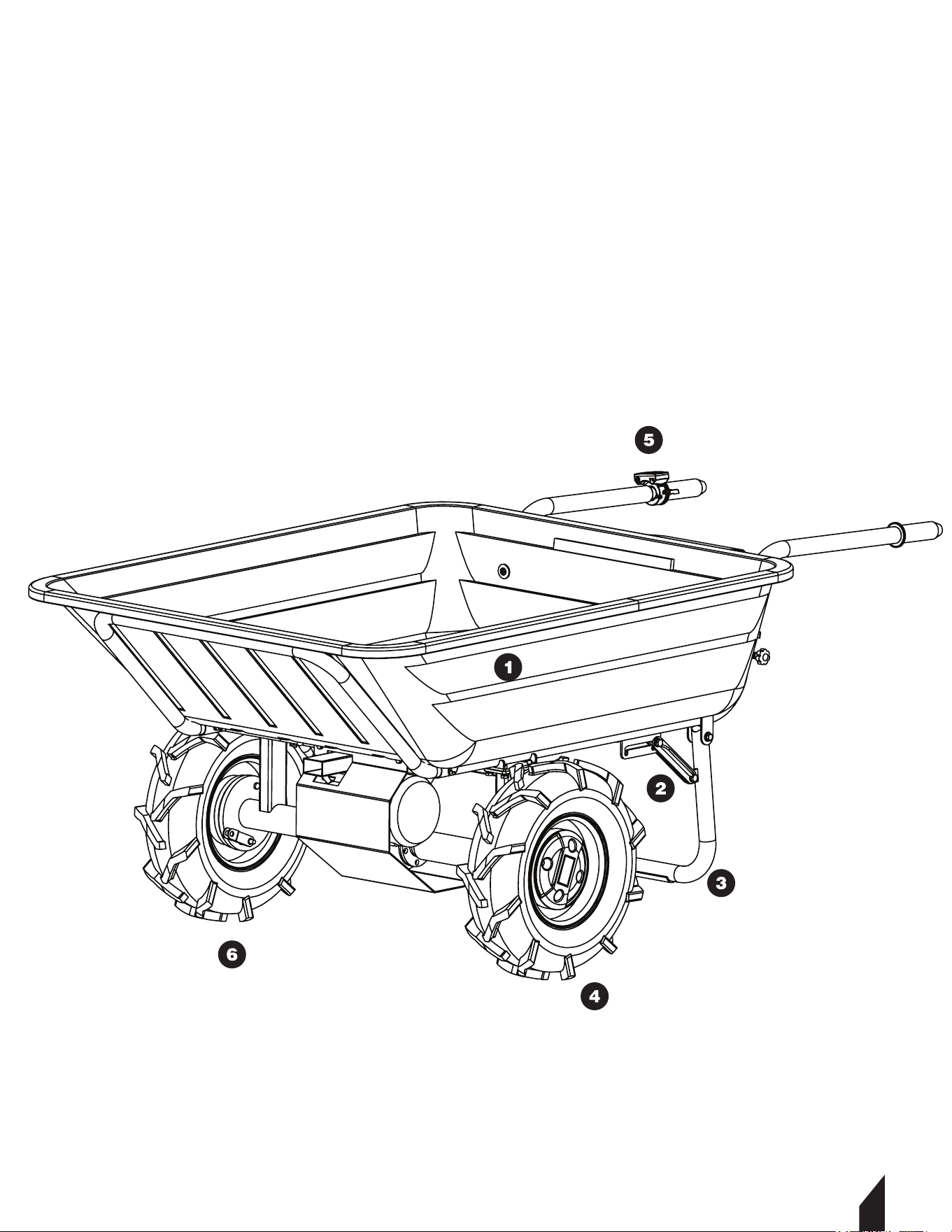
2.3 Utility Cart Parts
1. Tray
2. Battery Box
3. Tube Clamps
4. Le Rim + Tire
5. Speed Control Lever
10
3. EQUIPMENT ASSEMBLY
3.1 Warnings
3.2 Assembly Guide
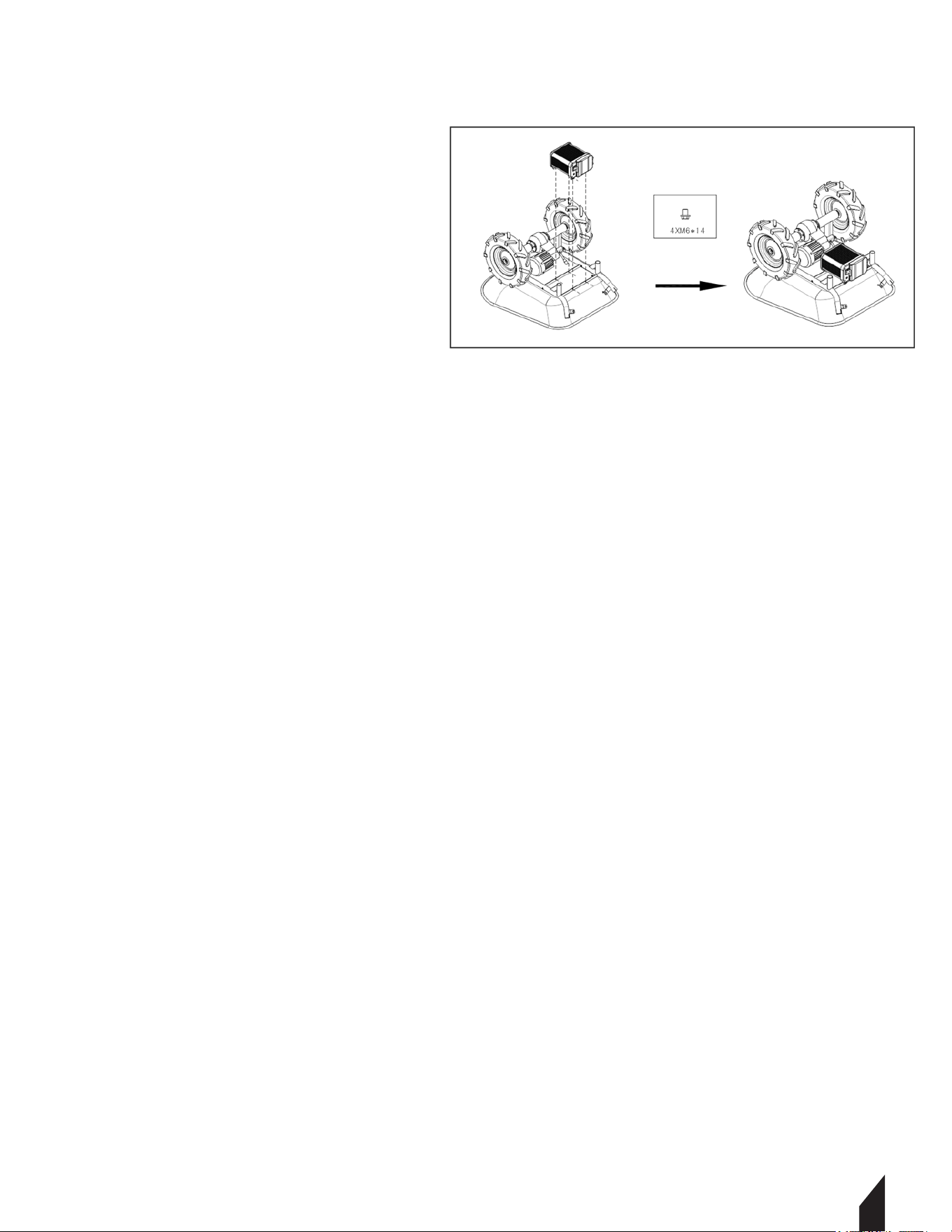
3.2.1 Connect the drive motor assy
to the main frame. Fasten in place
using a wrench and the hex tap bolt.
FIGURE 1.
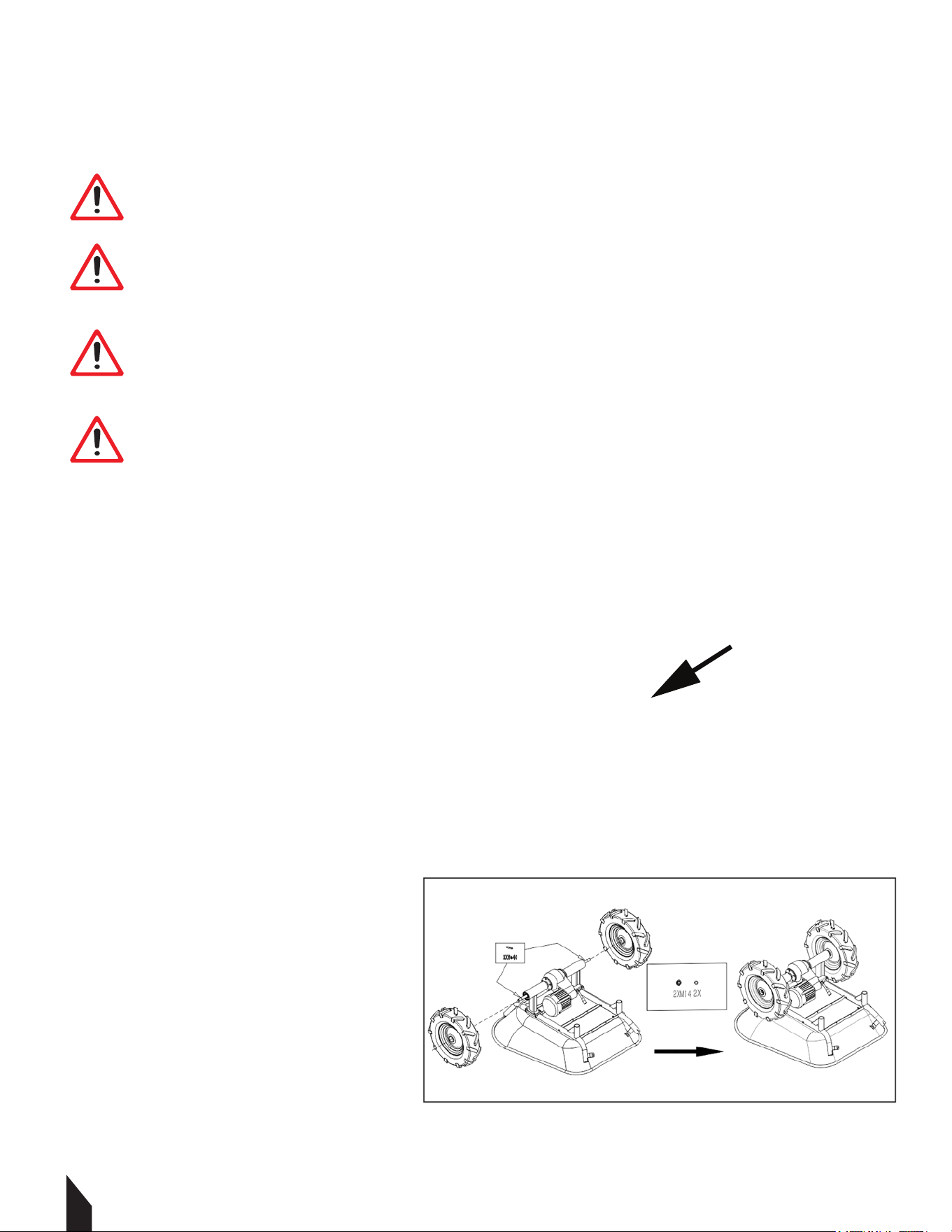
3.2.2 Attach the tires to each end of
the wheel axle. Fasten in place using
a wrench and lock washer.
FIGURE 2.
WARNING If any parts are missing or damaged, do not operate this utility cart.
Failure to do so may result in personal injury or damage to this machine.
WARNING
WARNING Never make modifications or fabricate accessories to be used with this
machine. Modifications or alterations may result in personal injury or damage
to this machine.
WARNING
WARNING Do not connect the battery before the machine is fully assembled. Failure
to comply may cause accidental starting and may result in personal injury or damage
to this machine.
WARNING
WARNING To prevent personal injury or damage to this machine, ensure the machine is
OFF, the battery is removed, and the impellers have stopped before removing any parts.
WARNING
FIGURE 2
FIGURE 1
11
3.2.3 Connect the battery box to the
main frame. Fasten in place using a
wrench and the hex tap bolt.
FIGURE 3.
3.2.4 Aer attaching the battery. Attach
both the le and right support foot on
to the main frame. Fasten in place using
a wrench, hex bolt, and lock washers.
FIGURE 4.
3.2.5 Insert le and right handles into
main frame. Fasten in place using a
phillips head screwed river and the
hose clamp. FIGURE 5.
3.2.6 The Cardinal Utility Cart
assembly is complete.
FIGURE 5
FIGURE 4
FIGURE 3

12
3.4 Cable Assembly Steps
3.4.1 Connect the plug from the motor control lever to the 10-pole socket on the battery
box using the motor cable.
FIGURE 6.
3.4.2 Connect the plug from the motor to the 3 and 5 -pole socket on the battery box.
FIGURE 7.
NOTE: Only nut #1 is allow to be turned in order to fasten or unfasten the plug,
DO NOT TURN NUT # 2 unless you are a professional performing a repair on device.
FIGURE 8.
3.5 Loading on the Slope
FIGURE 6 FIGURE 7
FIGURE 8

13
4. OPERATION
4.4.1 To turn on machine press the red power switch to the “|” position.
FIGURE 9.
4.4.2 To turn off the machine press the red power switch to “O” position.
4.4.3 Pressing the throttle lever will propel the wagon forward.
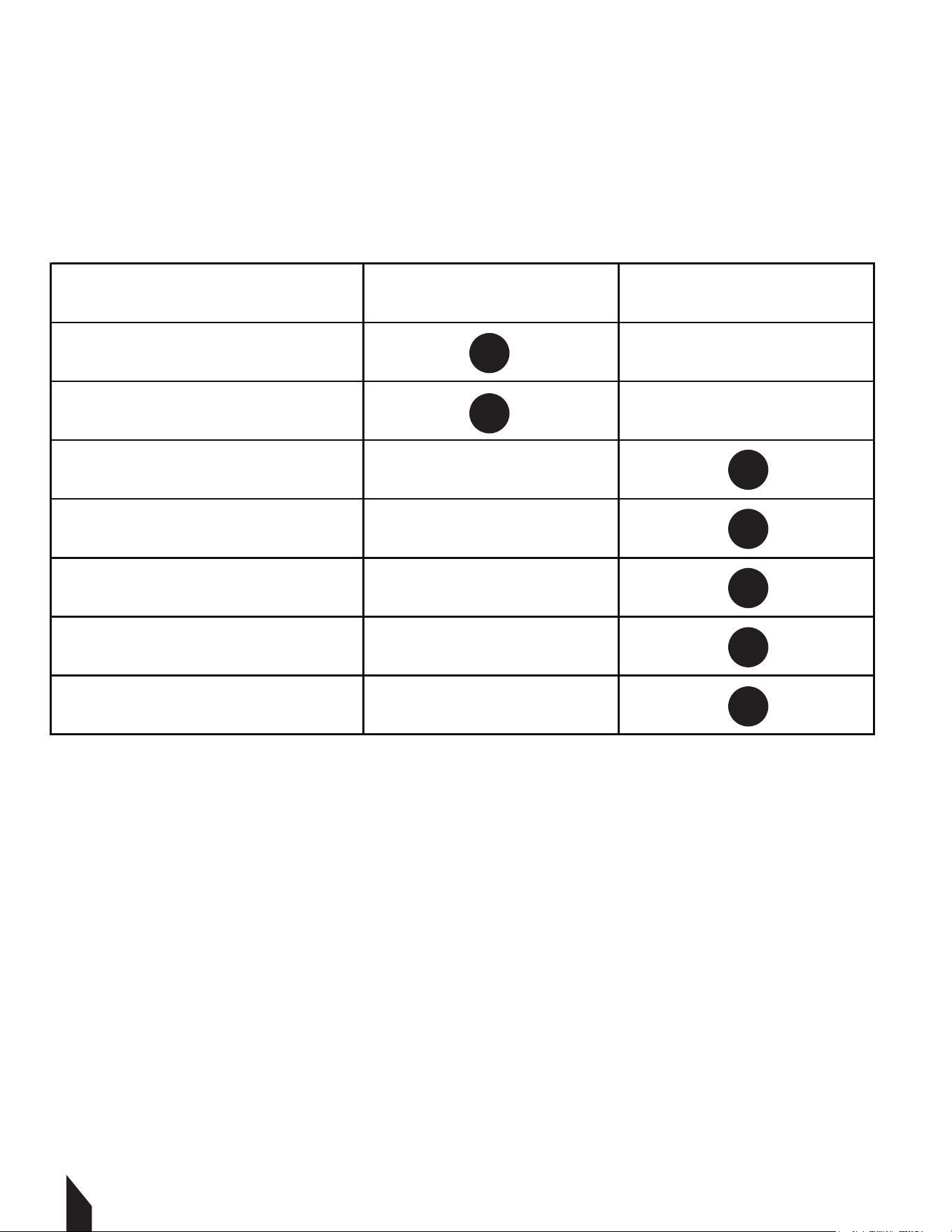
NOTE: Once the wagon is on, make sure these lights are ON: #L4(green),
#L3(green), #L1(green). Now make sure these lights are OFF : #L2 and #L5
4.4.4 Once the direction button is pressed, #L4 light will indicate the wagon
will move in a forward direction. However, if #L5 light is on the wagon will
move backwards. the wagon will not move till the throttle is pressed.
4.4.5 If the brake button is pressed, then #L3 light will turn red. This engages
the EBS brakes, the wagon will not move when throttle lever #1 is pressed.
4.4.6 Press button #3 again, the EBS will get deactivated.
NOTE: If the speed button is pressed, the #L2 light will turn ON, the wagon
works max power. Press speed button again, the wagon will return to
Eco mode, this will give you longer battery life.
NOTE: Make sure there are no people in
front of the utility wagon.
4.2 Charging the Battery
NOTE: Charger is integrated in the battery box system.
4.2.1 Connect the charger to the power supply (AC outlet)
110 V / 60 Hz and the charger plug.
4.2.2 Charge the battery.
4.2.3 Once the battery is fully charged (the charger indicate when its ready )
the charger can be removed.
NOTE: Voltage-display on battery box indicates the status of the battery.
FIGURE 11.
Voltage display shows 42 V
Voltage display shows 36V
Voltage display shows <30 V
Battery capacity 100%
Battery capacity ~50%
Please charge the battery immdetatly
BATTERY VOLTAGE DISPLAY
Brake
Direction
Speed
L1
L2
L3
L4
Throttle
L5
FIGURE 9
FIGURE 10
FIGURE 11
KEY
#1 voltage display switch
#2 voltage display
#3 recharge port
14
5. MAINTENANCE
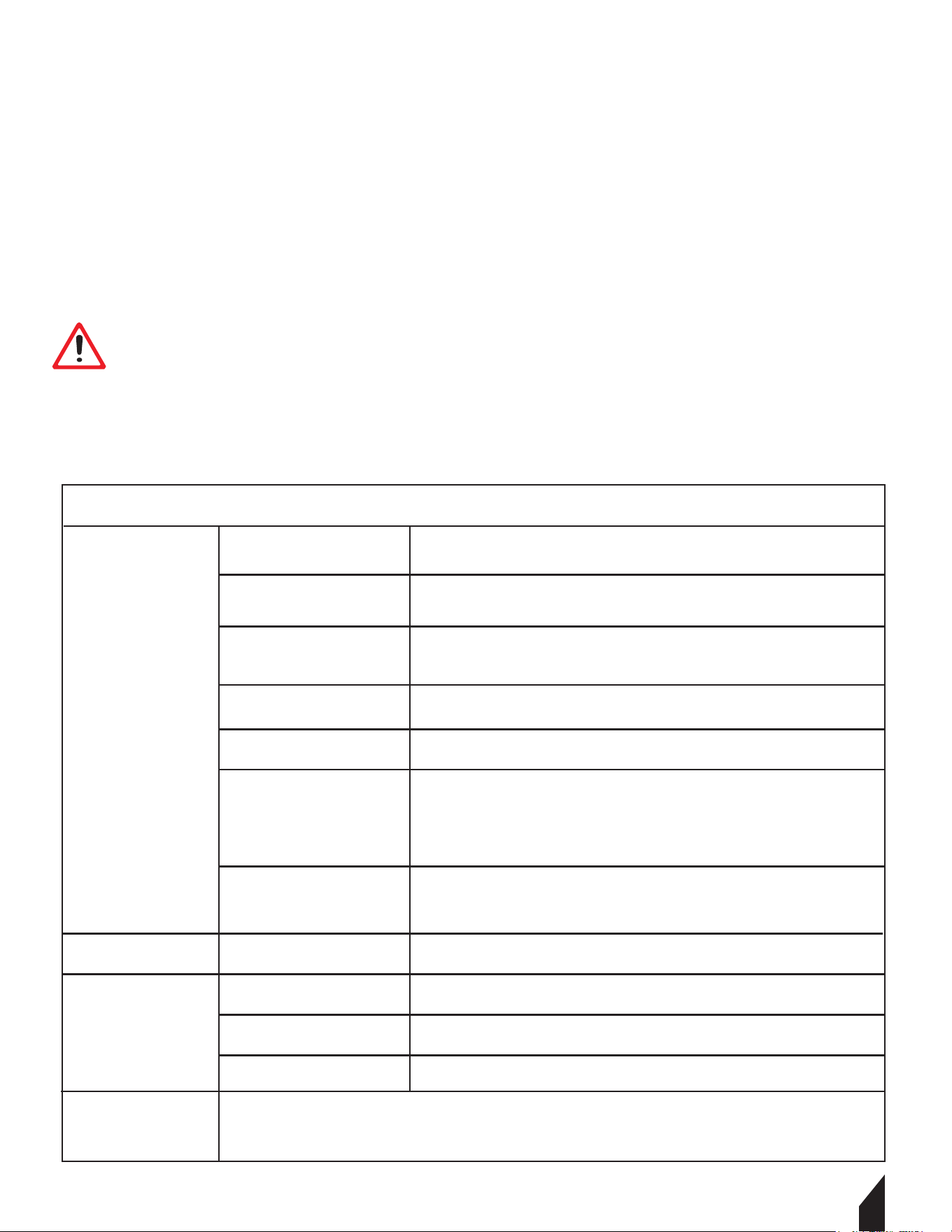
Routine checks of your utility wagon will ensure trouble-free operation. Inspect and/or
service your utility cart at the intervals shown below. A daily check takes only minutes, but
could save you hours of time and money. Good usage habits and maintenance will extend
the life of the machine!
5.2 Cleaning
NOTE: The usage of certain solutions may contain ingredients that can be damaging to
metal surfaces. As well as the use of certain scrubbing agents!
5.2.1 Clean the machine surface with a wet cloth soaked in a mild solution.
5.2.2 Never use running water or a high pressure cleaner to clean the wagon.
5.2.3 Clean the outer parts with a damp sponge.
5.2.4 Never clean the electronic parts with water!
5.2.5 Check the machine and remove any deposits and / or residues with a brush.
DAILY WEEKLY
State of Battery Charge
Control Cables
Condition of Wiring
Tire Pressure
Front Wheels: 30 PSI
Back Wheels: 30 PSI
All Nuts/Bolts
15
5.3 Storage
5.3.1 Clean the wagon thoroughly before storage.
5.3.2 Store all components separately in a dry area at not less than -10 ° C.
Charge the battery fully before storing.
NOTE: When not using the wagon for long periods. Ensure to charge the battery aer a
month of no use.
5.4 Disposal
Do not dispose the machine and the battery in your residential/ commercial trash.
Contact your local authorities for information regarding the available disposal
options. When buying replacement battery for the utility wagon be sure to trade in
your old battery with your local retailer.
6. TROUBLESHOOTING
WARNING
For Professional
Repair Only
No Charging
of Battery
Extra Resistance
No Electrical
Support
Battery Capacity Is at
Low Level
Speed Control Lever
moved too fast
EBS Is On
Power Switch is
Damaged
Broken or Loose Cables
Motor Stuck
ECU in the Motor
Controller is Broken
Bas Is On
Poor Connection
Faulty Charge
Faulty Battery
Check the voltage on the battery. Then recharge or change
batteries
Press the speed regulator to delay the start
Turn off the EBS by pressing the "P" button. Ensure the light
is green
Replace the power switch
Check cables, then fasten the joint or replace the broken part
1. Disconnect the motor cable from the motor controller. Try to
rotate the motor, if motor rotates easily, plug motor
controller back in.
2. If the motor is still stuck, then change the motor.
The ECU protects the motor, it may be broken aer continuous
overload over time. Change the ECU and try not to overload
the cart in the future.
Check and re-connect the battery / AC power supply separately
Check and re-connect the battery / AC power supply separately
Change the charger and then recharge the battery
Change the battery
When the new motor controller is replaced, sometimes ECU needs to be reprogram
BEFORE YOU START WORKING FOR THE ELIMINATION OF DEFECTS, UNPLUG THE BATTERY.
CKART300e
UTILITY CART

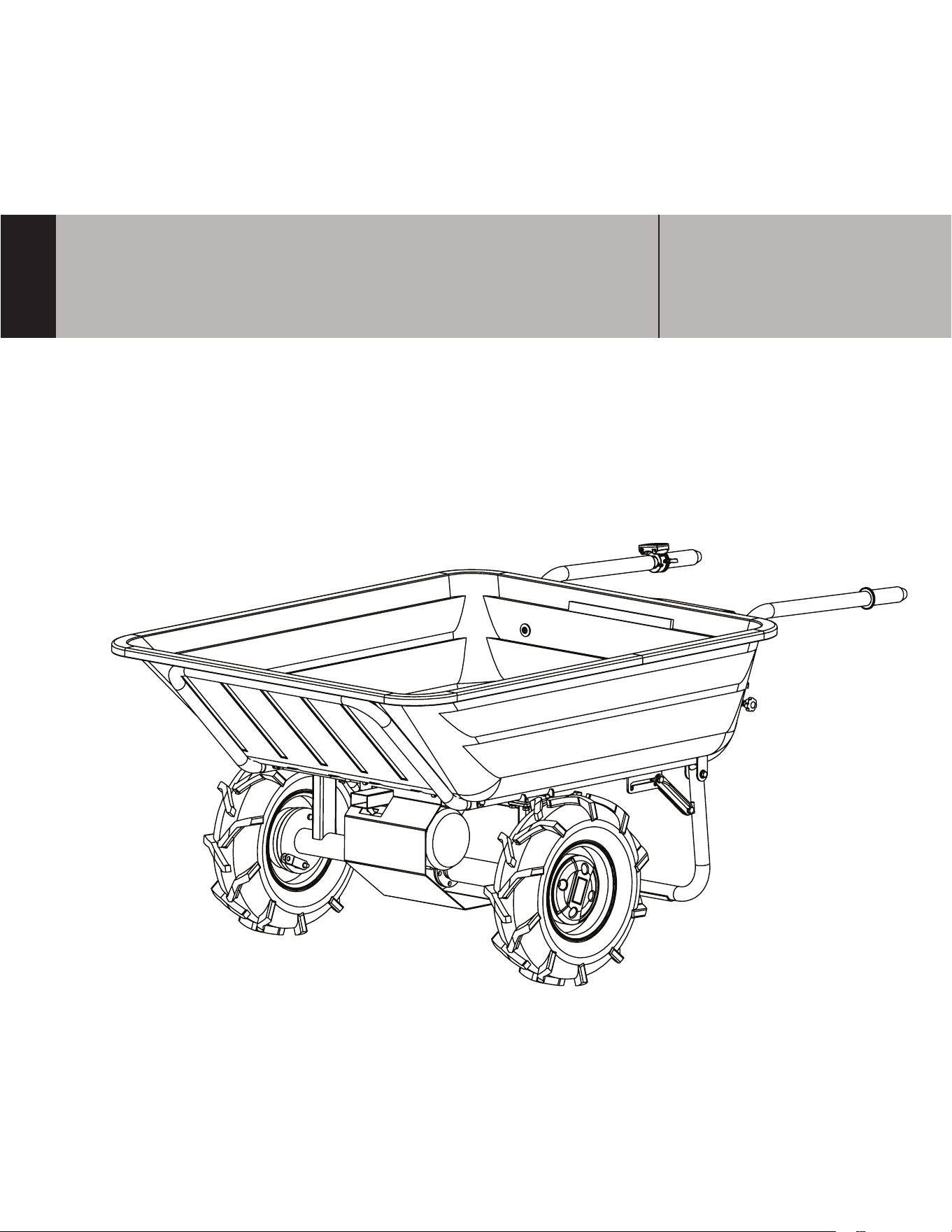
9. CKART300e EXPLOSION DIAGRAM

Tray
Front base frame
Right Rim+Tyre
Left Rim+Tyre
Drive motor assy
Left support feet
Battery box (with motor controller)
Left handle
Handle cap
Speed control lever
Right handle
Tube clamps
Right support feet
Main frame
1
2
3a
3b
4
5
6
7
8
9
10
11
12
13
1
1
1
1
1
1
1
1
2
1
1
2
1
1
Item
Description
Quality

Cardinal, LLC
San Diego, CA
Equipment Support
(866) 577-4476
www.cardinal-sprayers.com
Cardinal understands to keep a job-site running smoothly the proper equipment and
spare parts are needed at the drop of a hat. With same day shipping and faster
delivery times, count on Cardinal to keep you powered throughout the day! With long
lasting parts and engines, Cardinal equipment will be the star of your fleet for years to
come. Visit www.cardinal-sprayers.com to get started today!
Power Your World