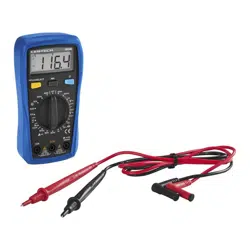
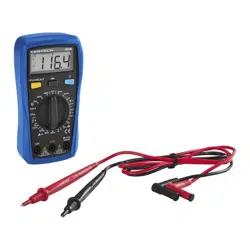
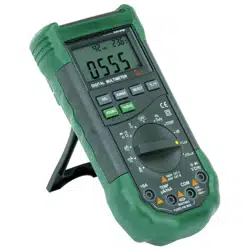
CEN-TECH 90899 7 Function Digital Multimeter
Product's Documents
Below are documents related to this product, you can read online or download:
- User Manual - (English) Read Online | Download pdf
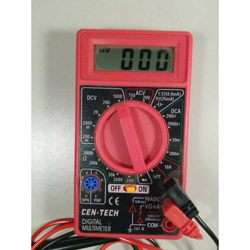
7 FUNCTION DIGITAL MULTIMETER OPERATING INSTRUCTIONS
SKU 90899 Read all instructions before using this tester
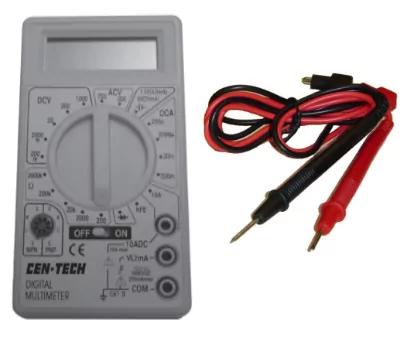
| ITEM | DESCRIPTION |
|---|---|
| Frequency | 45-450 Hz |
| DC Amps | Ranges: 200μA/2000μA/20mA/200mA, 10A Accuracy (@200μA-200mA) 1.2%±2D; (@10A) 3%±2D |
| DC Voltage | Ranges: 200mV/2000mV/20/200/1000V Accuracy (@200mV) 0.5%±1D; (@2000mV-200V) 1.0%±1D; (@1000V) 1.0%±2D |
| AC Voltage | Ranges: 200/750V Accuracy (45-450 Hz) 1.2%±10D |
| Resistance | Ranges: 200/2000/20K/200K/2000K Ohm Accuracy (@200-200K Ohm) 0.8%±2D; (@2000K Ohm) 1.0%±2D; |
| Sampling Rate | 2.5 times/Second |
| Overload Protection | Fast-Acting 500mA/250V Fuse |
| Operating Temperature | Range: 32° - 104° F |
| Display | 1/2" high 3-1/2-digit LCD |
| Battery | One 9 V (included) |
| Weight | .45 lb. |
| Features | 32" Test Leads, Transistor (NPN and PNP) Testing Function, Battery Testing Function, and Automatic Polarity and Zero Adjust |
You will need the manual for the safety warnings and precautions, and operating and maintenance procedures.
Keep your invoice with this manual. Write the invoice number on the inside of the front cover. Keep the manual and invoice in a safe and dry place for future reference.
Safety Warnings and Precautions
WARNING: When using tool, basic safety precautions should always be followed to reduce the risk of personal injury and damage to equipment.
Warnings continued on page 3.
1 Avoid working alone If an accident happens an assistant can bring help
2 Keep work area clean Cluttered areas invite injuries
3 Avoid electrical shock Use extreme caution when using this tool near uninsulated conductors or bus bars Prevent body contact with grounded surfaces such as pipes radiators ranges and cabinet enclosures when testing voltages
4 Avoid damaging meter Use only as specified in this manual
5 Observe work area conditions Do not test voltages in damp or wet locations Dont expose to rain Keep work area well lit
6 Keep children away Children must never be allowed in the work area Do not let them handle machines tools or extension cords
7 Store idle equipment When not in use tools must be stored in a dry location to inhibit rust Always lock up tools and keep out of reach of children
8 Dress properly Do not wear loose clothing or jewelry as they can be caught in moving parts Protective electrically nonconductive clothes and nonskid footwear are recommended when working Wear restrictive hair covering to contain long hair
9 Use eye protection Always wear ANSI approved impact safety goggles
10 Do not overreach Keep proper footing and balance at all times Do not reach over or across electrical cables or frames
11 Maintain tools with care Ensure multimeter has a fresh battery Inspect test leads periodically and if damaged have them repaired by an authorized technician
12 Stay alert Watch what you are doing use common sense Do not operate any tool when you are tired
13 Check for damaged parts Before using any tool any part that appears damaged should be carefully checked to determine that it will operate properly and perform its intended function Check for any broken parts and any other condition that may affect proper operation Any part that is damaged should be properly repaired or replaced by a qualified technician Do not use the tool if any switch does not operate properly
15 Replacement parts and accessories When servicing use only identical replacement parts Use of any other parts will void the warranty Only use accessories intended for use with this tool Approved accessories are available from Harbor Freight Tools
16 Do not operate tool if under the influence of alcohol or drugs Read warning labels on prescriptions to determine if your judgment or reflexes are impaired while taking drugs If there is any doubt do not operate the tool
17 We recommend that only a licensed electrician work on high voltage or other potentially dangerous circuits
Note Performance of this tool may vary depending on condition of internal battery
Warning The warnings cautions and instructions discussed in this instruction manual cannot cover all possible conditions and situations that may occur It must be understood by the operator that common sense and caution are factors which cannot be built into this product but must be supplied by the operator
Warning This product contains or produces chemicals including lead known to the State of California to cause cancer and birth defects or other reproductive harm California Health & Safety Code 25249.5 et seq.
WARNING ELECTRICAL SHOCK CAN CAUSE DEATH OR INJURY AVOID TOUCHING EXPOSED CONDUCTORS OF ELECTRICITY
1 Do not test voltage on AC circuits higher than 750 volts
2 Do not test voltage on DC circuits higher than 1000 volts
3 Do not test current on circuits higher than 10 amps
4 Be careful not to apply voltage to the Test Leads when they are connected to the COM Bottom and VΩmA Center Jacks and the Multimeter is in an Ohms testing setting Damage can occur to the multimeter or the fuse may blow
5 Do not switch between testing modes with the multimeter connected to a circuit
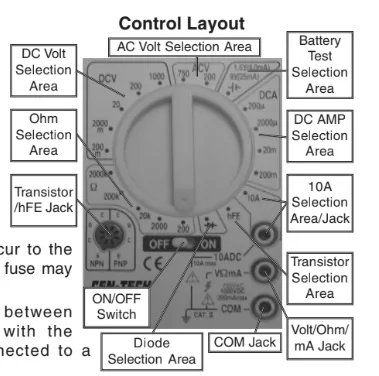
Measure AC conductors carrying up to 750 VAC 45-450 Hz
Measure DC conductors carrying up to 1000 VDC
Measure DC conductors carrying up to 10 amperes
Measure circuit resistance up to 2000K Ohms
WARNING NEVER measure resistance on a circuit with voltage running through it
Test transistors to ensure proper function
Test the voltage drop in diodes
 position
Test the amount of charge left in batteries
NOTE This setting is for testing the charge of small 9V or 1.5V batteries only Never use this setting to test automotive or lead acid batteries The high current could cause damage to the meter and or cause severe personal injury Use the appropriate DC Voltage setting to test the open current voltage of such batteries instead
positionNormal amperage
For a standard 9V 6LR61 battery = 25 mA ,
For a 1.5 V AA LR6 battery = 4 mA
1 Wipe unit with a slightly damp cloth using a light detergent Do not use solvents or abrasives
2 Remove battery if not in use for long periods
3 Store unit in a dry location
4 Other than the battery and fuse there are no replaceable parts on this unit Repairs should be done by a qualified technician
To replace the battery or fuse
1 Remove the Test Leads from the multimeter
2 Turn the unit over
3 Remove both screws using a Philips screwdriver
4 Remove back cover
5 Pull battery/fuse out of unit and replace with the same 9V battery or 500mA/250V fastacting fuse
6 Replace cover and retighten screws
NOTE No replacement parts are available for this tool