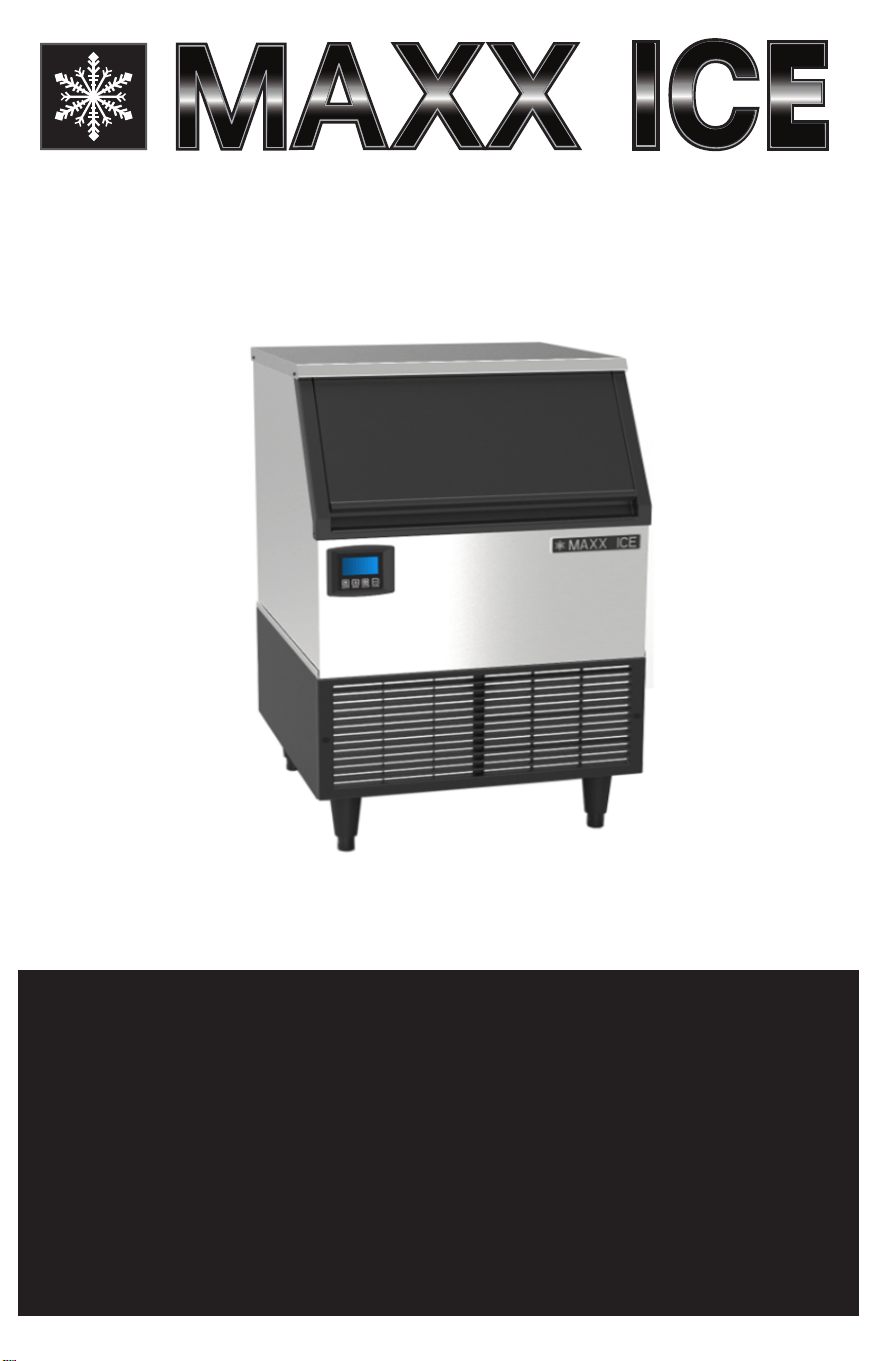
SERVICE, INSTALLATION, AND INSTRUCTION MANUAL
MANUEL D’UTILISATION, D’INSTALLATI
ON ET D’ENTRETIEN
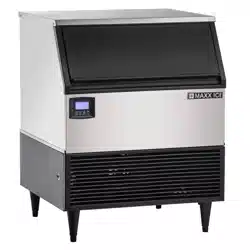
MIM150N - MIM150NH
AUTOMATIC COMMERCIAL ICE CUBE MACHINE
PLEASE READ CAREFULLY
MACHINE À GLAÇONS COMMERCIALE
VEUILLEZ LIRE ATTENTIVEMENT
061617
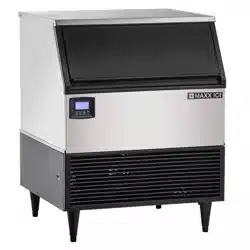
MIM200N - MIM200NH
MIM260N - MIM260NH
MIM320N - MIM320NH

CONTENTS
ICE MAKER SAFETY 2
IMPORT
ANT SAFEGUARDS
3 - 4
TECHNICAL INFORMATION 4
COMPONENT LOCATIONS 5
ICE MAKER INSTALLA
TION
6 - 10
Unpacking 6
Installing the Adjustable Feet
6
Installing the Stability Brackets 7
Location Requirements 7 - 8
Electrical Requirements 8
Leveling the Ice Maker 9
Water Supply 9
Installation Types
10
OPERATION
11 - 12
Final Checklist before Operation 11
Operating Method 11
How the Machine Makes Ice 12
Normal Sounds
12
Preparing the Ice Maker for Long Storage
12
CLEANING AND MAINTENANCE 13 - 14
Exterior Cleaning
13
Interior Cleaning 13
Water Distribution T
ube Cleaning
14
Ice-Making System Cleaning
14
Sanitizing the Ice-Making System 14
CONTROL PANEL 15 - 17
TROUBLESHOOTING 17
TROUBLESHOOTING GUIDE
18
NOTES 19
FRENCH 19 - 36
We r
eserve the right to make changes in specications and design without prior notice.
Be sure the ice machine has been standing upright.
1
Condenser Cleaning 14
SERVICE AND INST
ALLATION MANUAL
www.maxxfoodservice.com
2
ICE MAKER SAFETY
We have pr
ovided many important safety messages in this manual and on your appliance
Always
read and obey all safety messages
This is the Safety Alert Symbol This symbol alerts you to potential hazards that can injur
e
or kill you and others All safety messages will follow the Safety Alert Symbol and either
the words “DANGER”, “W
ARNING” OR “CAUTION”
DANGER means that failure to heed
this safety statement may result in
death or severe personal injury
WARNING
means that failure to heed this safety statement may result in
extensive product damage, serious personal injury, or death
CAUTION means that failure to heed this safety statement may r
esult in
minor or moderate personal injury, or property or equipment damage
All safety messages will alert you to what the potential hazard is, tell you how to r
educe the chance
of injury, and let you know what can happen if the instructions are not followed
NOTE: IMPORTANT SAFETY INSTRUCTIONS
WARNING: To reduce the risk of re, electric shock or injury, when using your ice maker, follow these
basic precautions:
• Plug into grounded 3-pr
ong outlet
• Do not remove gr
ounding prong
• Do not use an adapter
• Do not use an extension cord
• Disconnect power before cleaning
• Disconnect power before servicing
• Replace all panels before operating
• Use 2 or more people to move and install ice maker
SAVE THESE INSTRUCTIONS
DANGER
WARNING
CAUTION
DANGER
WARNING
CAUTION
DANGER
WARNING
CAUTION
DANGER
WARNING
CAUTION
3
IMPORT
ANT SAFEGUARDS
Before the
ice maker is used, it must be properly positioned and installed as described
in this manual, so read the manual car
efully
We str
ongly recommend that you have
a professional install your new machine The warranty may be affected or voided
by an
incorrect installation. To reduce the risk of re, electrical shock or injury when
using the ice maker, follow basic precautions, including the following:
• Plug into a
grounded 3-prong outlet
Do
not remove grounding prong, do not use an adapter,
and do not use an extension cord
• It is r
ecommended that a separate circuit, serving only your ice maker, be provided
Use
receptacles that cannot be tur
ned off by a switch or pull chain
• Do not connect or disconnect the electric plug when your hands are wet
• Never unplug
the ice maker by pulling on the power cord. Always grip the plug rmly and pull
straight out from the outlet
• Never clean
ice maker parts with ammable uids. Do not store or use gasoline or other
ammable vapors
and liquids in the vicinity of this or any other appliance. The fumes can create
a re hazard or explosion.
• Before
proceeding with cleaning and maintenance operations, make sure the power line of the
unit is disconnected and the water line is shut off (EXCEPTION: When cleaning the machine’s ice
making and water systems)
• Before operating, put all the enclosur
e panels back into their original places
• Do not touch the evaporator with your hand when the machine is operating
• Unplug the ice maker or disconnect power before cleaning or
servicing
Failure
to do so can
result in electrical shock or death
• Do not
attempt to repair or replace any part of your ice maker unless it is specically recommended
in this manual. A qualied technician should do all other servicing.
• Use two or more people to move and install ice maker Failure to do so can r
esult in back or
other injury
• To ensur
e proper ventilation for your ice maker, the front of the unit must be completely
unobstructed Choose a well-ventilated area with temperatur
es above 40 ÿF(4 4 C) and below
110 F (43 3 C) This unit MUST be installed in an area pr
otected from the elements, such as wind,
rain, water spray or drips
• The ice maker should not be located next to ovens, grills or other sources of high heat
• The ice maker must be installed with all electrical and water connections in accordance with
state and local codes A standard electrical supply (
115 VAC, 60 Hz, 15 A), properly grounded
in accordance with the National Electrical Code and local codes and or
dinances, is required
• Do not kink or pinch power supply cord or drain lines between ice maker and cabinet
• The fuse (or circuit br
eaker) size should be 15 amperes
• It is important for the ice maker to be leveled in order to work pr
operly
You may need to make
several adjustments to level it
• All installations must be in accordance with local plumbing code r
equirements
• Make certain that the hoses are not pinched or kinked or damaged during installation
• Check for leaks after connection
• Remove the packing materials and clean the ice maker before using
• Tur
n on the water supply tap before switching on the ice maker
Never turn the water supply tap
off when the ice maker is working
DANGER
WARNING
CAUTION
DANGER
WARNING
CAUTION
DANGER
WARNING
o
o
o
o
•
•
SERVICE AND INSTALLATION MANUAL
www.maxxfoodservice.com
• Except to take ice from the unit, keep the door closed in order to r
educe ice melting and to
promote pr
oper ice formation
• Although the unit has been tested at the factory, due to long-term transit and storage, the rst
batch of cubes must be discar
ded
•
If the ice maker will not be used for a long time, before the next use it must be thoroughly
cleaned Follow carefully any instructions provided for cleaning or use of sanitizing solution Do
not leave any solution inside the ice maker after cleaning
•
DO NOT touch the condenser ns. The condenser ns are sharp and can be easily damaged.
•
DO NOT use solvent-based cleaning agents or abrasives on the interior These cleaners may
transmit taste to the ice cubes, or damage or discolor the interior
• The ice machine cleaner contains acids DO NOT use or mix with any other solvent-based cleaner
pr
oducts
Use rubber gloves to pr
otect hands
Car
efully r
ead the material safety instructions on
the container of the ice machine cleaner
• Do not use this apparatus for other than its intended purpose
SAVE THESE INSTRUCTIONS
Electrical Connection
Do not, under any circumstances, cut or remove the third (ground) prong fr
om the power cord
For personal safety, this appliance must be properly grounded The power cord of this appliance
is equipped with a 3-prong grounding plug that mates with a standard 3-prong grounding wall
outlet to minimize the possibility of electric shock hazard from the appliance Have the wall outlet
and circuit checked by a qualied electrician to make sure the outlet is properly grounded. When
a standard 2-prong wall outlet is encountered, it is your responsibility and obligation to have it
replaced with a properly grounded 3-prong wall outlet
The ice maker should always be plugged into its own individual electrical outlet which has a voltage
rating that matches the rating label on the appliance This provides the best performance and
also prevents overloading house wiring circuits which could cause a re hazard from overheated
wires. Never unplug your ice maker by pulling on the power cord. Always grip the plug rmly and
pull straight out from the outlet Repair or replace immediately all power cords that have become
frayed or otherwise damaged Do not use a cord that shows cracks or abrasion damage along its
length or at either end When moving the ice maker, be careful not to damage the power cord
Extension Cord
Because of potential safety hazards under certain conditions, it is strongly recommended that you
do not
use an extension cord with this ice maker
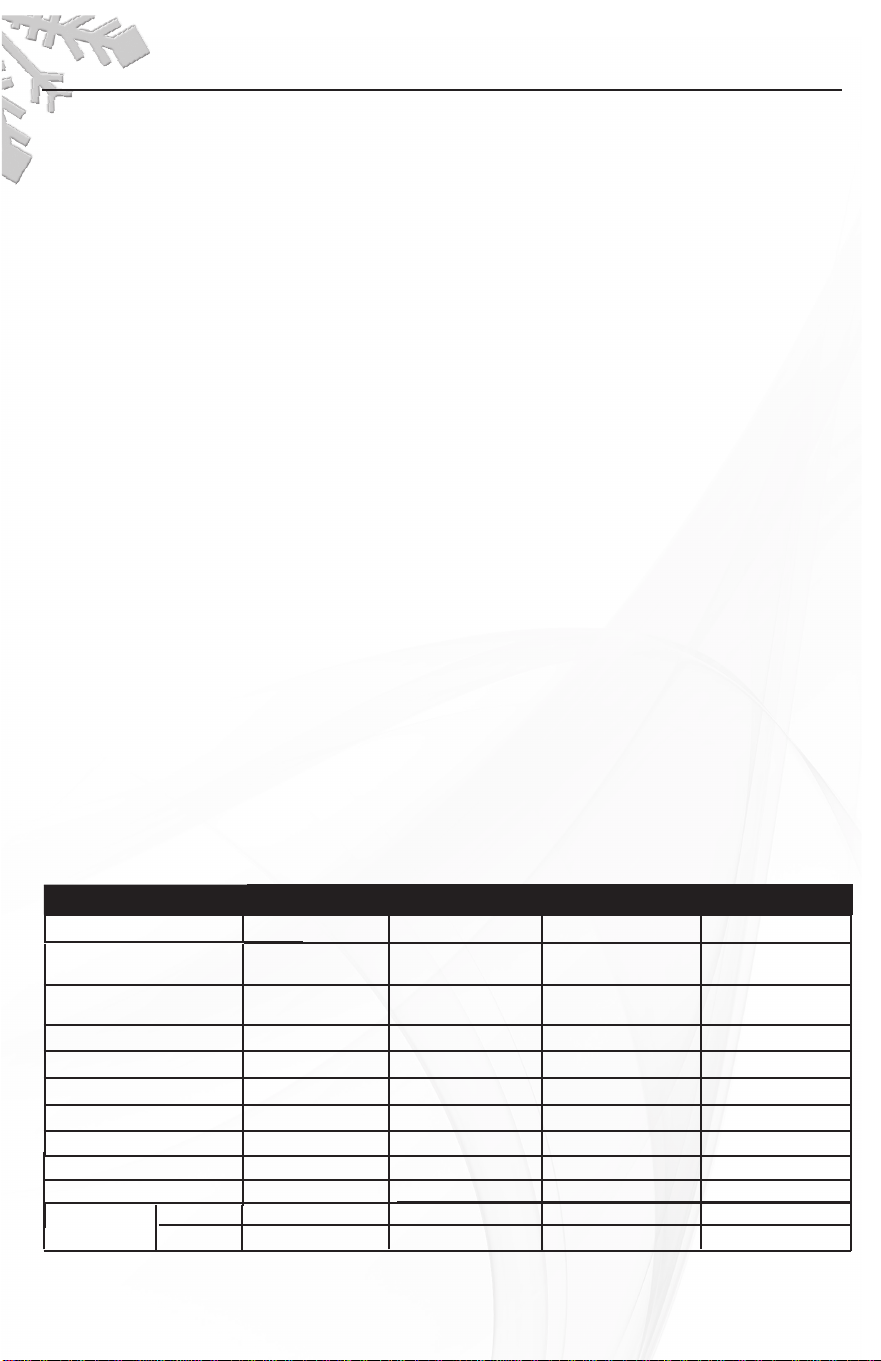
Technical Information
*The actual quantity of ice produced per day can vary with room and water conditions
The technical data and performance index listed above should be used for reference only
They ar
e subject to change
4
MODEL MIM150N/150NH MIM200N/200NH
Electrical input 115VAC/60Hz 115VAC/60Hz
Power consumption
(kW· h/100 lbs of ice)
7 0
8 17
Ice-making/Ice-harvest
rated current
5 2A/6 4
A
Refrigerant
R134a, 7oz
R404A, 8 11
oz
High/Low side pressure 320psig/120psig 350psig/190psig
Unit width x depth x heigh 24”x 24”x 39'' 24”x 24’'x 39''
Unit weight 139 lbs
Ice-making capability 121/124 lbs/day* 151/154 lbs/day*
Ice shape Cube Cube
7/8” x 7/8” x 7/8” 1/2” x 7/8” x 7/8”
7A/7 4 A
Ice storage capacity 88 lbs
MIM260N/260NH
MIM320N/320NH
115VAC/60Hz 115VAC/60Hz
7 15 6 89
R404A, 10 6oz
R404A, 12 5
oz
350psig/190psig 350psig/190psig
30”x 28’'x 39''
252/260 lbs/day*
Cube Cube
7/8” x 7/8” x 7/8”
8A/9 A
Half dice
1/2” x 7/8” x 7/8” 1/2” x 7/8” x 7/8” 1/2” x 7/8” x 7/8” 1/2” x 7/8” x 7/8”
Ice cube
7/8” x 7/8” x 7/8” 1/2” x 7/8” x 7/8”
7 8” x 7/8” x 7/8”
Dice
dimensions
.
.
. .
.
. .
7 1A/9 8
A
. .
.
.
.
24”x 24’'x 39''
141 lbs 144 lbs 148 lbs
88 lbs 88 lbs 128 lbs
7/8” x 7/8” x 7/8”7 8” x 7/8” x 7/8”
222/220 lbs/day*
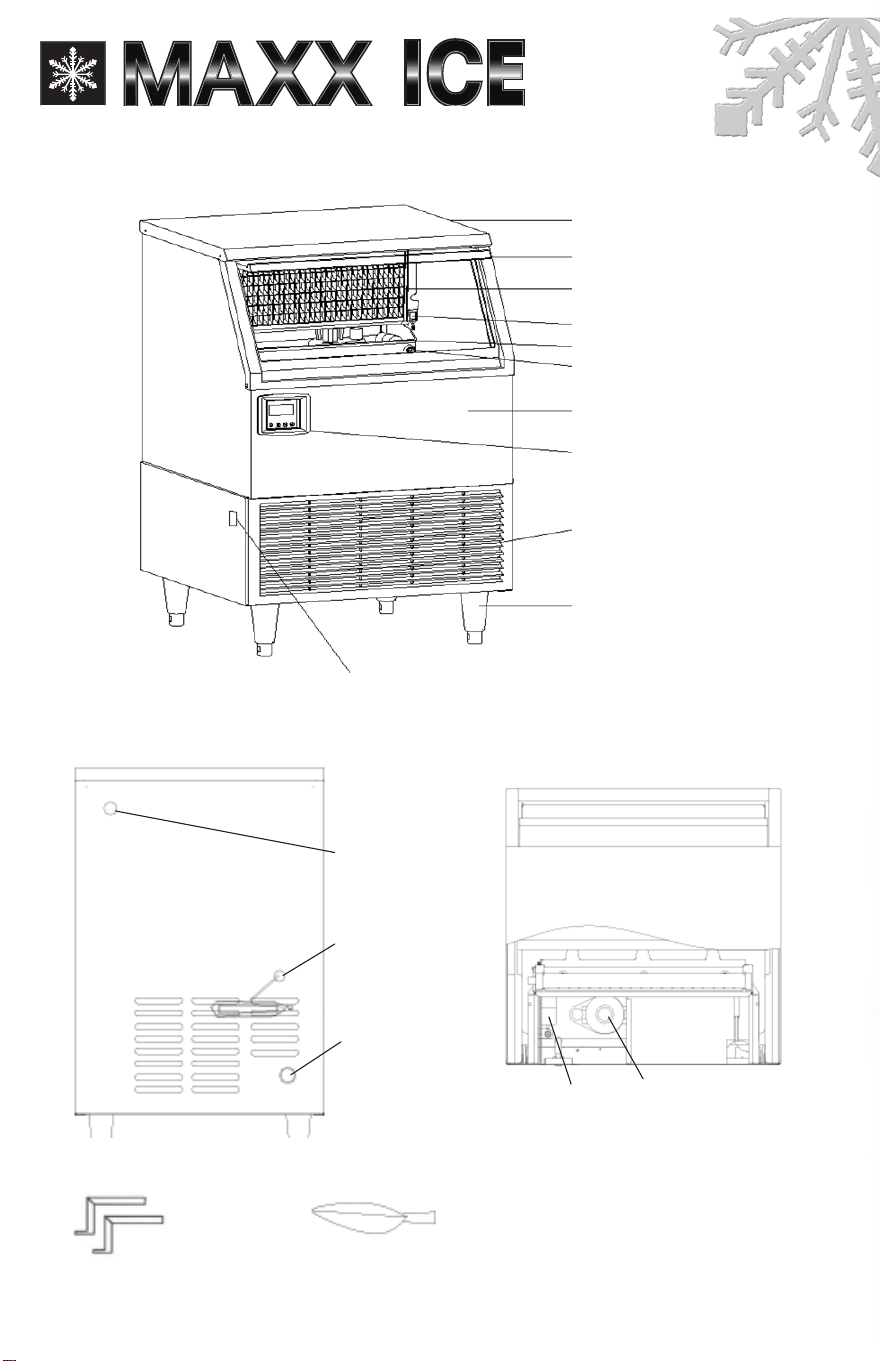
Component Information
Top panel
Door
Evaporator (ice mold)
Bin full probe
Water tank
Water tank screw nut
Ice storage bin
Front bottom louver
Control panel
Adjustable foot
Water inlet
3/8” FPT
Power supply line
Drain
1/2” FPT
Float Water pump
Stability brackets Ice scoop
BACK VIEW
TOP VIEW
5
Power switch
(MIM320N(H) without)
SERVICE AND INST
ALLATION MANUAL
www.maxxfoodservice.com
Ice Maker Installa
tion
UNPACKING
Excessive Weight Hazard
Use two or more persons to move and install ice maker
Failure to do so can r
esult in back or other injury
REMOVE PACKAGING MATERIALS
IMPORTANT: Do not remove any permanent instruction labels or the data label on your ice maker.
Remove tape and glue from your ice maker befor
e using,
• To r
emove any remaining tape or glue, rub the area briskly with your thumb
Tape
or glue residue
can also be easily removed by rubbing a small amount of liquid dish soap over the adhesive with
your ngers. W
ipe with warm water and dry.
• Do not
use sharp instruments, rubbing alcohol, ammable uids, or abrasive cleaners to remove
tape or glue These products can damage the sur
face of your ice maker
• Leave lowermost foam panel in place until after the adjustable feet ar
e attached
Cleaning before use
After
you
remove all tape and glue from the machine, clean the inside of your ice maker before using
it See “Interior Cleaning” in the Cleaning and Maintenance section
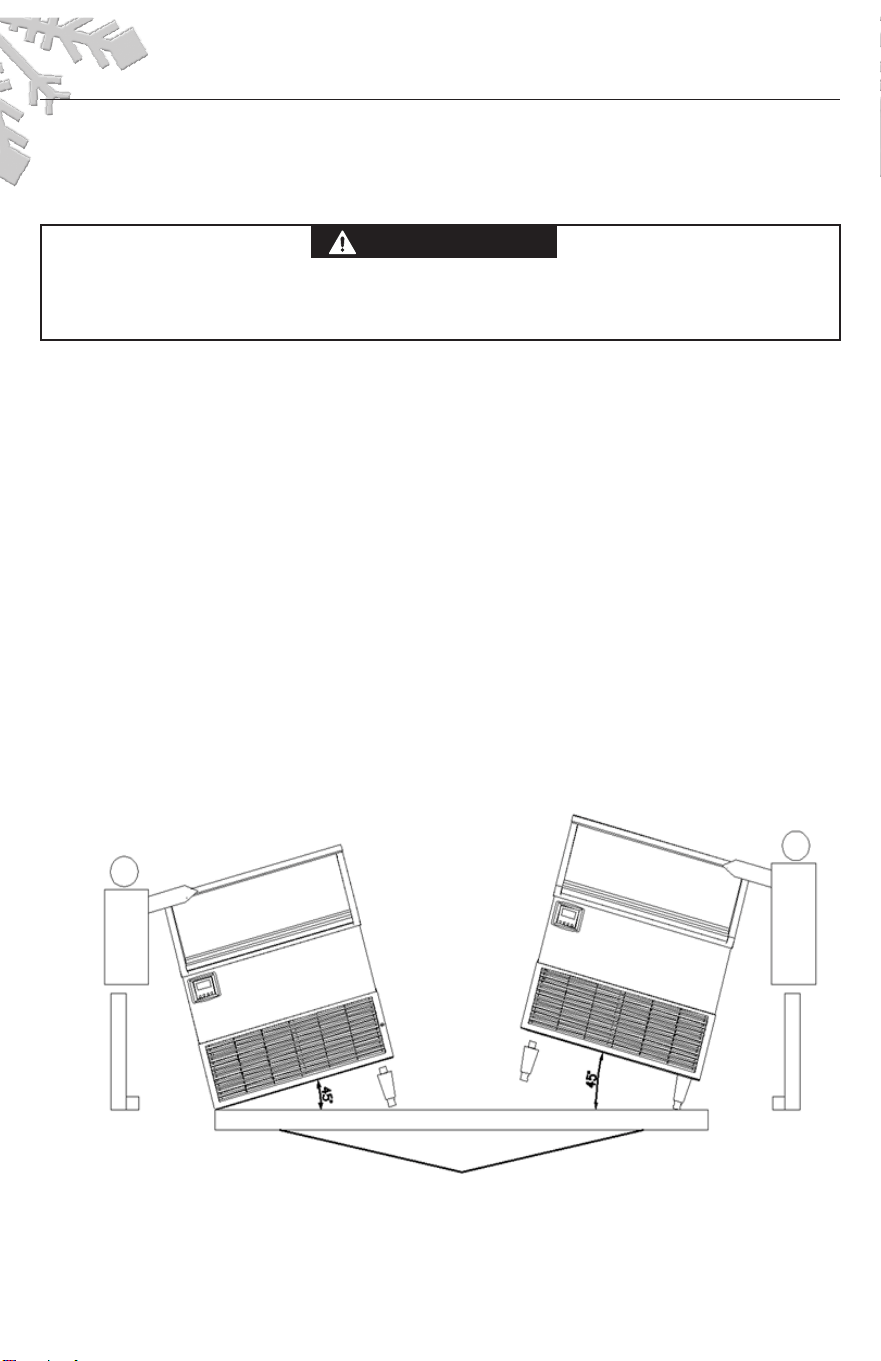
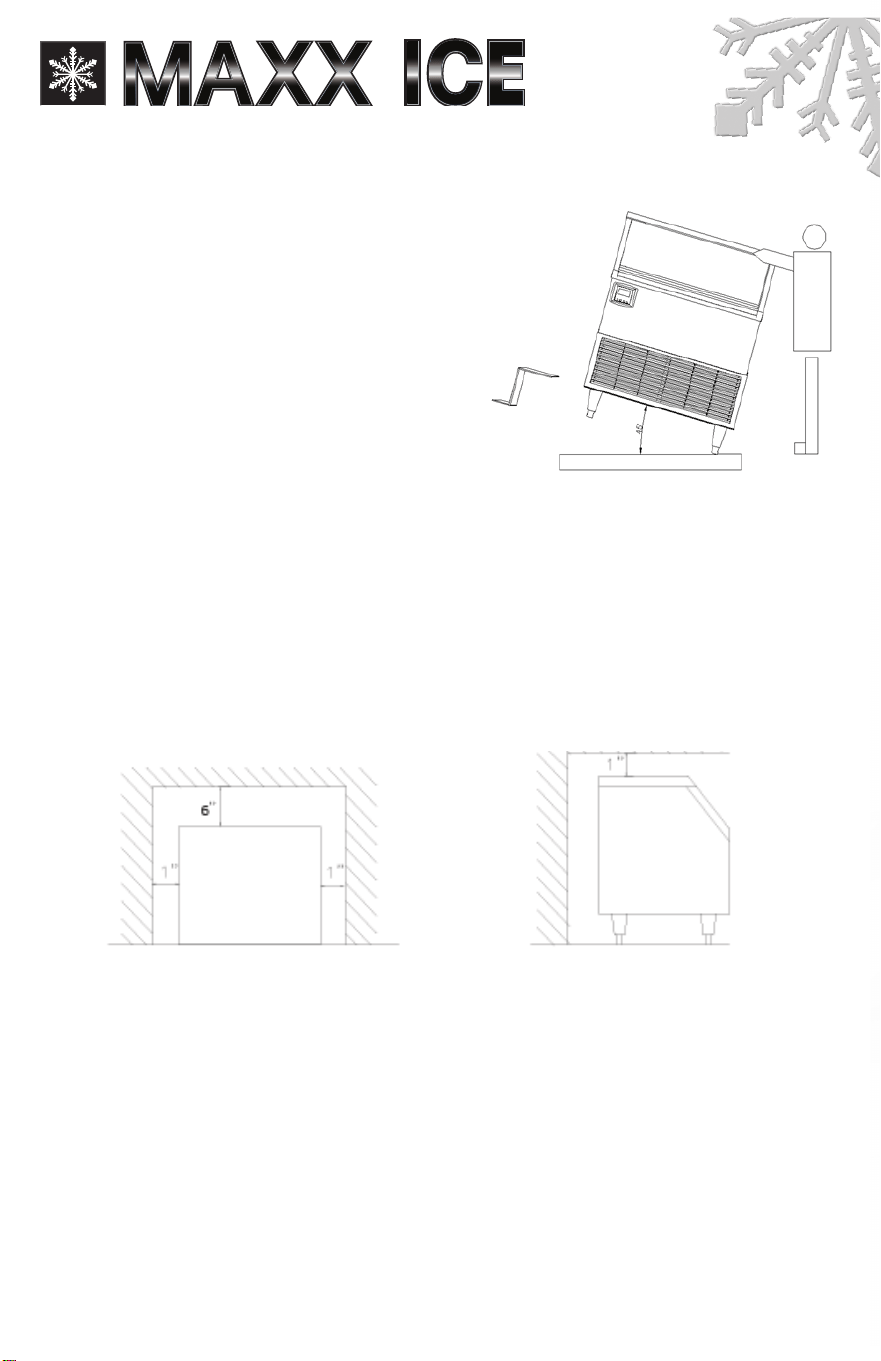
Installing the adjustable feet
At least two persons are required to install the adjustable feet.
Y
ou
will nd four adjustable feet packed in the ice storage bin. To install, tilt one side of the unit and
screw
in two adjustable feet, as illustrated
(IMPOR
TANT: Do not tilt the unit more than 45º)
Then
tilt
the other side and screw in the r
emaining two feet
Lower foam panel
DANGER
WARNING
CA
UTION
6
45
45
Ice Maker Installa
tion
INSTALLING THE STABILITY BRACKETS
This operation requir
es at least two persons
If you wish to install the ice maker in a free-standing
mode rather than enclosed, it is necessary to attach
the two metallic stability brackets that can be found
packed inside the ice storage bin Keeping the
machine tilted
to the right, but not more than 45˚,
attach one bracket to the center of the underside
of the ice maker with two screws (supplied) See
illustration below Set the unit back on its four feet, then
tilt it forward in or
der to screw in the second bracket
on the underside of the unit opposite the rst bracket.
Level the ice maker This operation will stabilize it for
free-standing operation
LOCATION REQUIREMENTS
This ice maker should be installed by qualied personnel.
NOTICE:
1 Before setting the ice
maker inside a cabinet, connect the water supply pipe correctly
Untie the drain hose, insert it into the drain, and connect the power supply line
2 Do not kink or pinch the power supply line between the ice maker and wall or cabinet
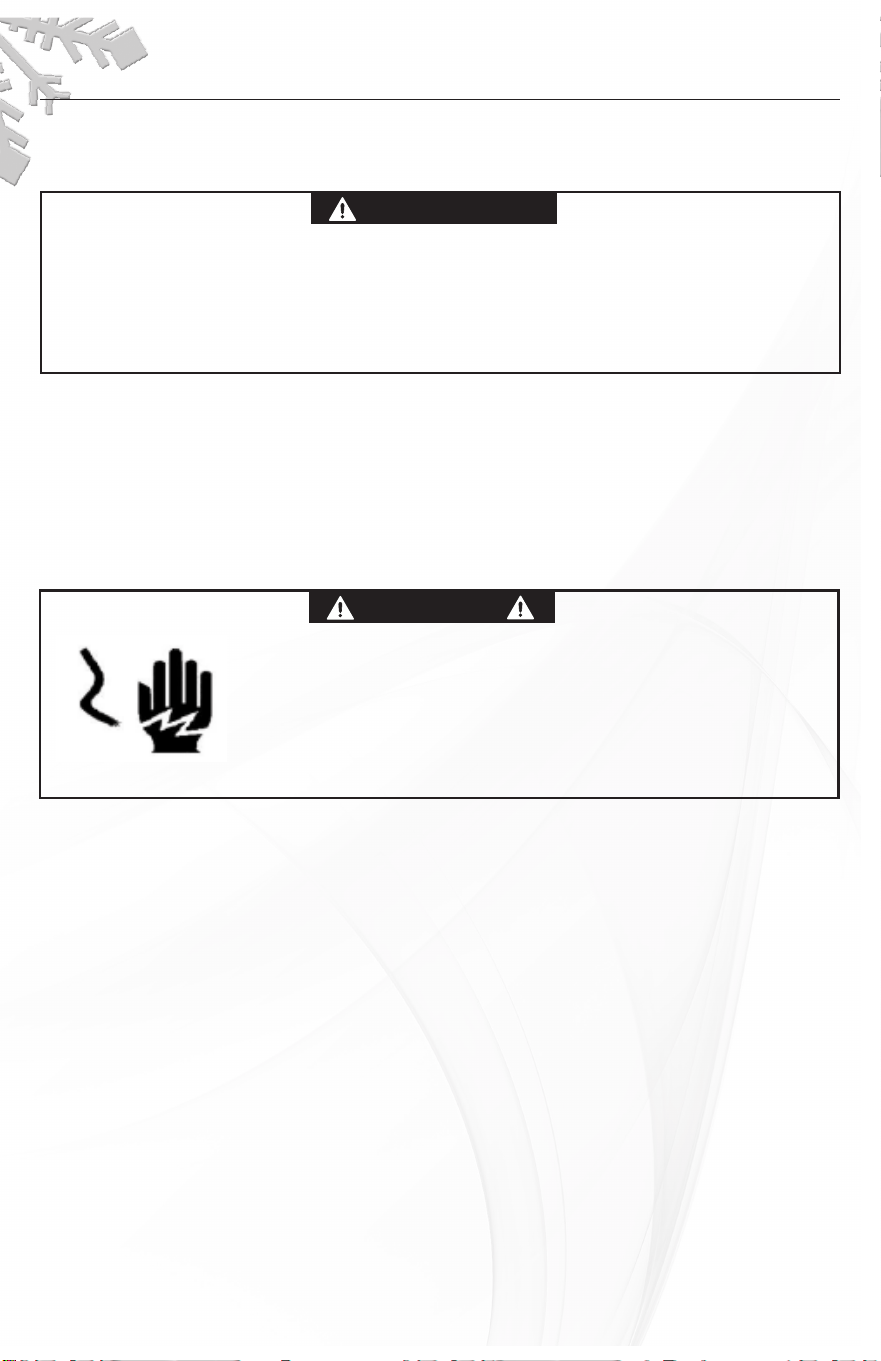
Installation Clearance
• To ensur
e proper ventilation for your ice maker, the front of the unit must be completely
unobstructed
• When installing the ice maker under a counter, follow the r
ecommended spacing dimensions
shown Allow at least 6” (150 mm) clearance at rear
, and 1” (25 mm) at the sides and at the
top for proper air cir
culation
The installation should allow the ice maker to be pulled forward for
servicing if necessary
• Choose a well-ventilated area with temperatur
es above 40 F (4 4 C) and below 110 F (43 3 C)
This
unit MUST be installed in an area pr
otected from the elements, such as wind, rain, water spray or
drips
• The unit should not be located next to ovens, grills or other sources of high heat
• Installation of the ice maker
requires a cold water supply inlet of 3/8” (9
5 mm) soft copper tubing
with a shut-off valve
• The ice maker requir
es a continuous water supply with a minimum pressure of 15 psig and a static
pressur
e not to exceed 80 psig
The temperature of the water feeding into the ice maker should
be between 40 F(4 4 C) and 90 F (32 C) for proper operation
Top V
iew Side View
Rear
Front
7
45
•
oooo
oo o o
• •
SERVICE AND INST
ALLATION MANUAL
www.maxxfoodservice.com
Ice Maker Installa
tion
Normal
operating ambient temperature should be between 40˚F (4.4˚C)
and 110˚F (43.3˚C). Normal operating water temperature should be
between 40˚F (4.4˚C) and 90˚F (32˚C). Operation of the ice maker for
extended periods outside of these normal temperature ranges may
affect pr
oduction capacity
• IT IS STRONGLY RECOMMENDED TO USE A WATER FILTER. A FILTER, IF IT IS OF THE PROPER TYPE, CAN
REMOVE TASTE AND ODORS AS WELL AS PARTICLES AND CAN PROLONG THE LIFE OF THE MACHINE.
• The ice maker must be installed with all electrical and water connections in accordance with state
and local codes
• The unit
should be located on a rm and level surface. It is important for the ice maker to be level in
order to work pr
operly
If needed, you can adjust the height of the ice maker by rotating the feet
See the Leveling the Ice Maker section
ELECTRICAL REQUIREMENTS
Plug into a grounded 3-pr
ong outlet
Never remove the gr
ounding prong from the plug
Never use an adapter
Never use an extension cor
d
Failure to follow these instructions can r
esult in re,
electrical shock or death
Before
you move your ice maker into its nal location, it is important to make sure you have the proper
electrical connection A standard electrical supply (
115 VAC, 60 Hz, 15 A), properly grounded in
accordance with the National Electrical Code and local codes and or
dinances, is required
The ice
maker should always be plugged into its own individual electrical outlet It is recommended that a
separate cir
cuit, serving only your ice maker, be provided
Use receptacles
that cannot be turned off
by a switch or pull chain The fuse (or circuit br
eaker) size should be 15 amperes
Recommended grounding method
For your personal safety, this appliance must be grounded It is equipped with a power supply cord
having a
3-prong grounding plug
T
o minimize possible shock hazard, the cord must be plugged into a
mating 3-pronged and gr
ounding-type wall receptacle, grounded in accordance with the National
Electrical Code
and local codes and ordinances
If
a mating wall receptacle is not available, it is
the personal responsibility of the customer to have a pr
operly grounded, 3-prong wall receptacle
installed by a qualied electrician.
DANGER
WARNING
CA
UTION
DANGER
WARNING
CAUTION
Ice Maker Installa
tion
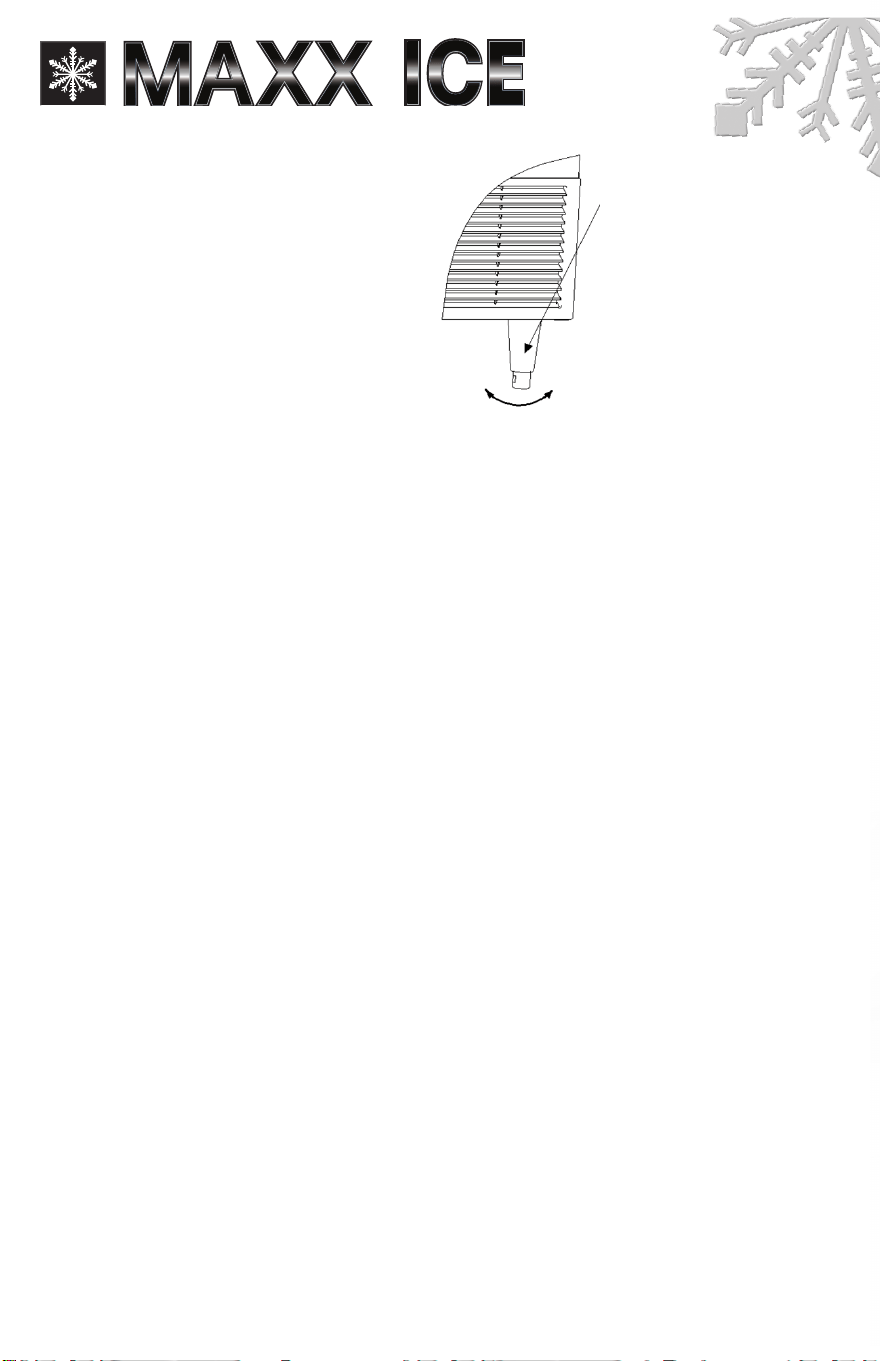
LEVELING THE ICE MAKER
Once the ice cube machine is set in its
enclosure, if the
base is not level, you
can adjust the feet by rotating the under
block (see below) until the machine is
level
It is important for the ice maker to be
leveled, or
water may not ow properly
through the evaporator (ice mold) Ice
production will be lower than nor
mal,
and operation will be noisy
Adjust the
height of the under block of the adjustable foot, rotating it to the right (counter- clockwise)
to lower
that side of the ice maker
Turning the under block to the left (clockwise) raises that side of
the ice maker
Water Supply
The water supply should be ready at the point of installation The water supply pressur
e should be a
minimum of 15 psig
with a static pressure not more than 80 psig
(A wall outlet directly behind
the ice
maker will make installation easier )
We
strongly recommended the use of a water lter. A lter, if it is of the proper type, can remove taste
and odors as well as particles and can prolong the life of the machine
IMPORTANT:
1 All installations must be in accordance with local plumbing code r
equirements
Professional installation is r
ecommended
2. Water inlet tting: 3/8” FPT (Female Pipe Thr
ead); drain line connection: 1/2” FPT.
3 Make certain you have a suitable water supply hose and two suitable drain hoses, and that the
hoses are not pinched, kinked or damaged during installation
4 Check for leaks after connection
Tools required: 3/8” open-end wrench, Phillips screwdriver
Connecting the water line:
1 Tur
n off main water supply
2 Find a water supply line near the installation location The distance should be less than the length
of the water supply hose
3 A shut-off valve must be installed to the main water supply
4. Connect the
water supply hose to tap and water inlet valve. Tighten rmly by hand, then one-half
turn with wr
ench
5. Connect one
water drain hose to ice maker drain line connection. Tighten rmly by hand, then
one-half turn with wr
ench
6. Connect another
water drain hose to bin drain line connection. Tighten rmly by hand, then one-
half turn with wr
ench
7 Tur
n on main water supply and tap
Check for water supply connection leaks Tighten every
connection (including connections at the water inlet)
NOTE: If using a water lter, be sur
e to follow the lter manufacturer’s directions.
Under block
Tur
ning the under block
counter-clockwise reduces
the machine’s height up
Tur
ning the under block
clockwise increases the
machine’s height
9

SERVICE AND INSTALLA
TION MANUAL
www.maxxfoodservice.com
Ice Maker Installation
INSTALLATION TYPES
This ice cube machine
has been designed to be enclosed (as under a cabinet)
It can
also be free-
standing (using the
supplied stability brackets) or built-in (sealed to the oor). In every case, there
must be adequate air space around the unit for ventilation purposes
Enclosed Installation:
An enclosed installation will allow you to install the ice cube machine under a counter or in a kitchen
cabinet provided the requir
ed clearance space around the ice maker is respected
You must follow
the stated instructions for
a Electrical requirements
b Water supply
Free-standing Installation:
The ice cube machine can be installed to be fr
ee-standing in any place you desir
e pr
ovided you
have access to a water supply This installation has the same requirements as an enclosed installation,
plus you must also follow the stated instructions for Installing the Stability Brackets
Built-in Installation:
If this method of installation is chosen, it will still be necessary to allow adequate ventilation space
around the unit The following additional items must be observed
1 Place the ice cube machine in front of the installation location Raise the machine and place it on
the oor or on a platform depending on your installation requir
ements.
2 The water supply line must be plumbed before connecting to the ice maker
3 Turn on the main water supply and tap Check for water supply connection leaks Tighten every
connection (including connections at the water inlet)
4 If the electrical outlet for the ice maker is behind the cabinet, plug in the ice maker
5 Push the ice maker into position
6. Seal all around the cabinet to the oor with an approved caulking compound.
10
Opera
tion
FINAL CHECK LIST BEFORE OPERATION
1 Have all packing materials and tape been removed fr
om the interior and exterior of the ice maker
2 Did you clean the ice storage bin
3 Have the installation instructions been followed, including connecting the machine to water and
electricity
4 Has the machine been leveled
5 Is the ice cube machine in a site where the ambient temperatur
(43 3 ) and the water temperature between 40 (4 4 ) and 90 (32 ) all year r
ound
6 Has the water supply pressur
e been checked to ensure a minimum of 15 psig with a static pressure
not to exceed 80 psig
7 Is there a clearance of at least 6” (150 mm) at the r
ear, 1” (25 mm) at the top and sides for proper
air circulation
8 Has the power supply voltage been checked or tested against the nameplate rating And has
proper gr
ounding been installed for the ice cube machine
9 Is the ice cube machine plugged in
10 Have you turned on the main water supply and the tap
11 Have you checked for leaks at all water supply connections
OPERATING METHOD
1
Tur
n on the water tap, letting the water enter the water tank, then turn the power switch ON
And press ON/OFF button in front panel The LCD screen lights
2 After about 3 minutes, the ice maker will automatically proceed to the ice-making stage, and the
sound of
fowing water will be heard. The words of "Making ice" displays on the LCD screen.
3 When the batch of ice has been fully formed, ice will automatically fall into the ice storage bin The
words of "Harvesting Ice" displays on the screen
4 When the ice storage bin is full, the sheet of cubes will not fall completely and will hold the bin full
probe open The machine is in the bin full mode, and the words of "Bin Full" displays on the LCD
5 The unit starts making ice again automatically approximately 3 minutes after ice cubes ar
e
removed As ice is removed, the bin full pr
obe swings back to operating position
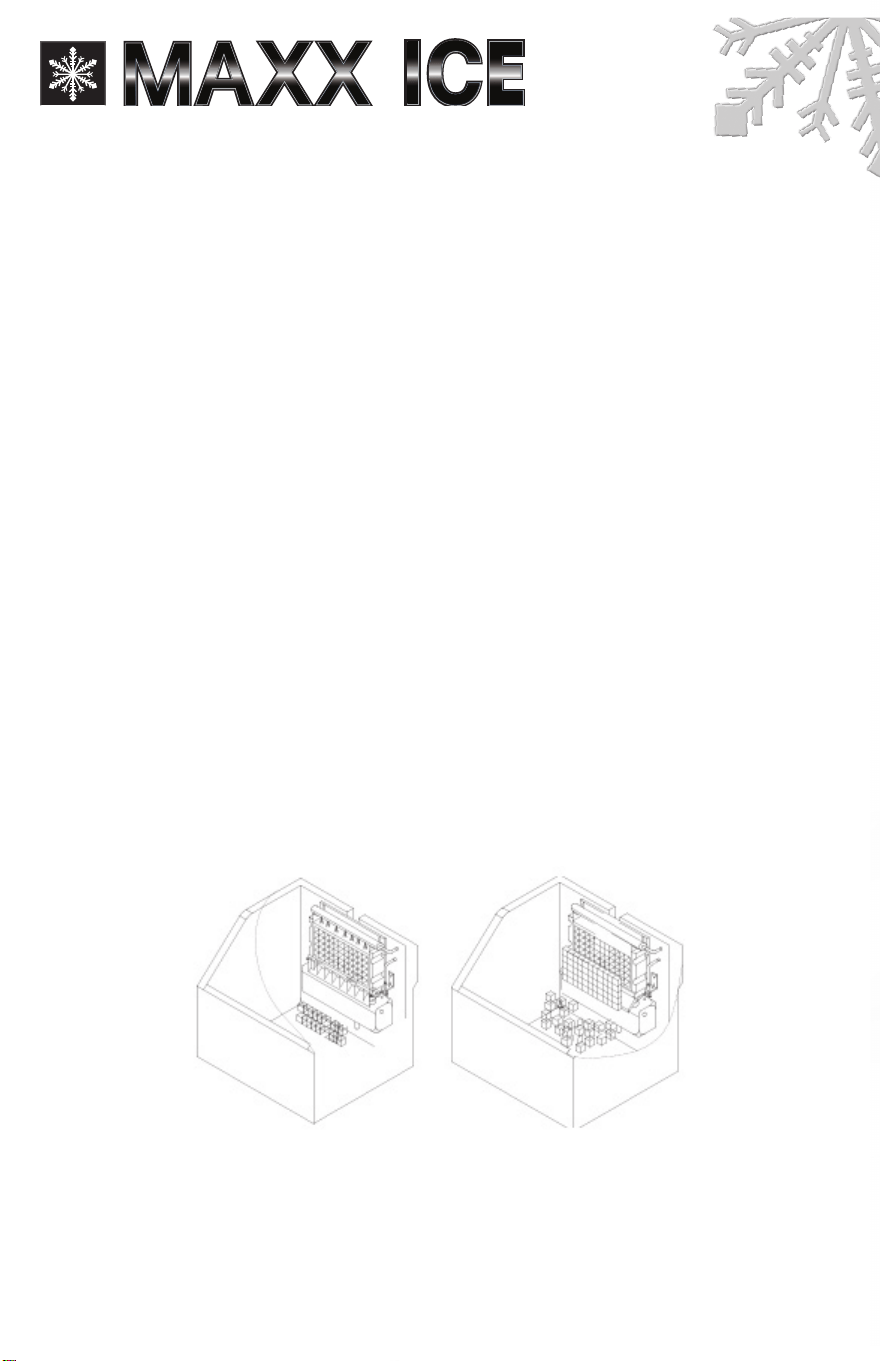
Ice-making stage Ice harvest stage
IMPORTANT:
• Although the unit
has been tested and cleaned at the factory, due to long-term transit and storage,
the rst batch of cubes must be discarded.
• Never turn the water supply tap off when the ice maker is working
• Never touch the evaporator when the machine is running
• Except to take ice from the unit, keep the door closed to r
educe melting and insure proper ice
formation
11
e is between 40 (4 4 ) and 110
º F
º C
º F
º C
.
º F
.
.
º C
º C
º F
?
?
?
?
?
?
?
?
?
?
?
?
screen The unit stops working
SERVICE AND INST
ALLATION MANUAL
www.maxxfoodservice.com
Opera
tion
HOW THE MACHINE MAKES ICE
Turn the power switch to the ON position. Then
press ON/OFF button in front panel The LCD
screen lights After about 3 minutes the machine
will automatically go into the ice-making stage
There
are two distinct cycles: Freeze and
Harvest. During the Freeze cycle, water ows
to the evaporator surface In the Harvest
cycle, the ice is released and water enters the
machine A complete cycle can take 15 to 40
minutes, depending on ambient temperature
and operating conditions
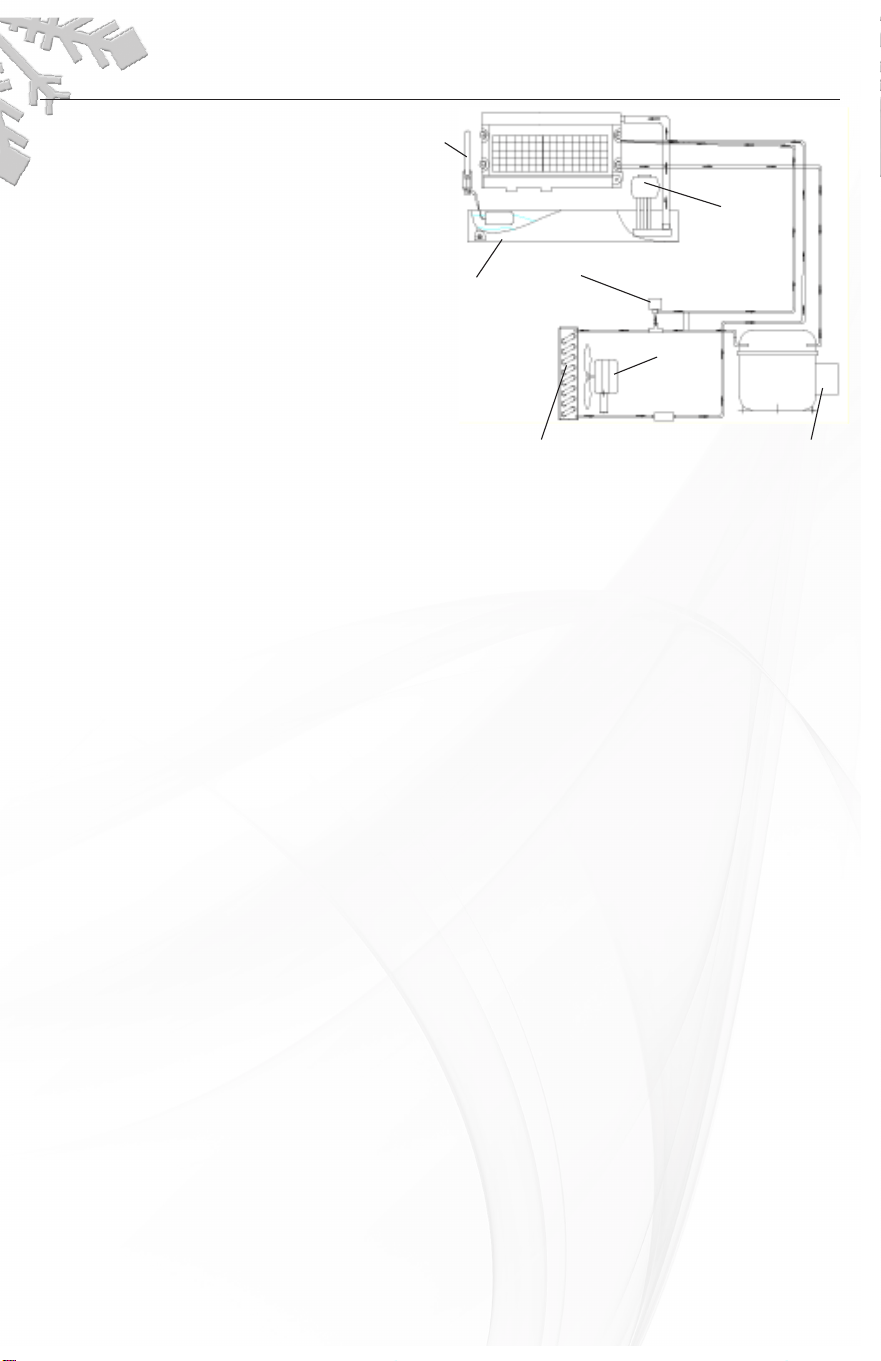
Freeze: During the Freeze cycle the compr
essor is pumping refrigerant, the fan motor is blowing air, and
the water pump is circulating water When the batch of ice
has been fully formed, the ice maker stops the
Freeze cycle and begins the Harvest cycle
Harvest: During the Harvest cycle the compressor is still operating, power is supplied to the water pur
ge
valve and hot gas valve The water purge valve opens and allows the water pump to purge the water
remaining in the water tank, r
emoving all impurities and sediment
This allows the machine to make clear
ice cubes and keep mineral build-up at a minimum Then the water pump stopped The hot gas valve
opens, diverting hot refrigerant gas into the evaporator The gas warms the evaporator
, causing the cubes
to slide as a unit off the evaporator and into the storage bin The Freeze cycle will r
estart when all the cubes
drop into the bin
HOW THE MACHINE USES WATER:
The ice
cube machine begins with a xed charge of water that is contained in the water tank. As the water
ows to the freezing evaporator surface, the water will freeze and stick to the ice cube molds. During the
ice-making process, fresh water enters the water tank continuously as the water from the trough freezes
continuously on the evaporator
NORMAL SOUNDS
Your new ice cube machine may make sounds that ar
e unfamiliar to you
Most of the new sounds are
normal.
Hard surfaces like the oor and walls can amplify the sounds. The following describes the kinds of
sounds that might be new to you and what may be causing them
• Rattling noises
may come from the ow of the refrigerant or the water line. Items stored on top of the ice
cube machine can also make noises
• The high-efciency compressor may make a pulsating or high-pitched sound.
• Running water may make a splashing sound
• Y
ou may hear air being for
ced over the condenser by the condenser fan
• During the Harvest cycle, you may hear the sound of ice cubes falling into the ice storage bin
PREPARING THE ICE CUBE MACHINE FOR LONG STORAGE
If the ice cube machine will not be used for a long time, or it is to be moved to another place, it will be
necessary to drain the system of water
1 Shut off the water supply at the main water sour
ce
2 Disconnect the water supply line from the water inlet
3 Shut off the power supply at the main electrical power sour
ce
4. MIM150N(H)/200N(H)/260N(H): Screw off the water tank screw nut and drain out water completely,
tighten the nut after fnishing. Dry the tank.
5 Remove the ice from the ice storage bin Dry the bin
6 Leave the door open to allow for circulation and to pr
event mold and mildew
7 Leave the water supply line and power cord disconnected until r
eady to reuse
IMPORTANT:
• Do not touch the power plug when your hands are wet
• Never unplug the unit by pulling on the cord
Evaporator
Water
tank (tr
ough)
Hot gas valve
Condenser
Fan
motor
Compressor
Water
pump
12
•
•
•
MIM320N(H): Depress the clean button and hold for six seconds Draining mode starts automatically When
the words "Water Fill" display, the drain process is complete Dry the tank
Note: Don't forget to screw the nut back into place again
Cleaning and Maintenance
If the
ice maker is left unused for a long time, before the next use it must
be thoroughly cleaned Follow carefully any instructions pr
ovided for
cleaning or use of sanitizing solution Do not leave any solution inside the
ice maker after cleaning
Periodic
cleaning and
pr
oper
maintenance will ensure efciency, top performance, and long life. The
maintenance intervals listed ar
e based on nor
mal conditions Y
ou may want to shorten the intervals if
you have pets or there ar
e other special considerations
WHAT SHOULDN’T BE DONE
Never keep anything in the ice storage bin other than ice: objects like wine and beer bottles ar
e not
only unsanitary, but the labels may slip of
f and plug up the drain
WHAT SHOULD BE KEPT CLEAN
There ar
e 4 things to keep clean:
1 The exterior
2 The interior
3 W
ater distribution tube
4 The ice-making system cleaning
Before pr
oceeding with cleaning and maintenance operations, make
sure the power line of the unit is disconnected and the water line is shot
off (EXCEPTION: Cleaning of ice-making system)
EXTERIOR CLEANING
The door and cabinet may be cleaned with a mild detergent and war
m water solution such as 1 oz of
dishwashing liquid mixed with 2 gallons of warm water Do not use solvent-based or abrasive cleaners
Use a
soft sponge and rinse with clean water
W
ipe with a soft clean towel to prevent water spotting
Clean stainless steel with a cloth dampened with a mild detergent and war
m water solution
Never use
an abrasive cleaning agent
INTERIOR CLEANING
The ice storage bin should be sanitized occasionally Clean the water tank before the ice cube machine
is used
for the rst time and reused after stopping for an extended period of time. It is usually convenient
to sanitize the trough after the ice-making system has been cleaned and the ice storage bin is empty
1 Disconnect power to the unit
2. Open the door.
3 Using a
sanitizing solution made of 1 ounce of household bleach and 2 gallons of hot water (95º to
115ºF), wipe down the water tank and the inside of the ice storage bin with a clean cloth To clean
hard-to-r
each corners, apply the sanitizing solution with a spray bottle
4 Rinse thoroughly with clear water This completes the routine interior cleaning of the unit
5 Reconnect the power
The ice scoop should be washed regularly W
ash it just like any other food container
DANGER
WARNING
CAUTION
DANGER
WARNING
CAUTION
13
6
DO NOT use solvent-based cleaning agents or abrasives on the interior
These cleaners may transmit taste to the ice cubes, or damage or discolor
the interior
WARNING
CAUTION
SERVICE AND INST
ALLATION MANUAL
www.maxxfoodservice.com
Cleaning and Maintenance
WATER DISTRIBUTION TUBE CLEANING
When you nd that the ice cubes are incompletely formed or the output of ice cubes is low, the water
distribution tube
may be blocked
Set
the power switch to OFF
Unscr
ew the six screws holding the top
panel and
remove the panel
You will see
the water distribution tube
Rotate
the water distribution tube
so that the holes in it are facing up Using a toothpick or similar tool, dredge the holes, then r
otate the
water distribution tube back to its original position If the tube is badly blocked, clean it as follows:
1 Shut off the water and power supplies
2 Disconnect the water hose from the distribution tube
3 Lift one side, remove the distribution tube
4 With a brush, clean the tube with a dilute solution of war
m water and a mild detergent such as
dishwashing liquid After removing the dirt and lint fr
om the surface, rinse the tube with clean water
5 Replace the distribution tube
6 Reconnect the water supply and power supply lines
7 Re-attach the top panel
ICE-MAKING SYSTEM CLEANING
Minerals that are r
emoved from water during the freezing cycle will eventually form a hard, scaly
deposit in
the water system
Cleaning
the system regularly helps remove the mineral scale buildup
How
often you
need to clean the system depends on how hard your water is or how effective your ltration
may be With har
d water of 15 to 20 grains/ gallon (4 to 5 grains/liter), you may need to clean the system
as often as every 3 months
1 Set the power switch to OFF
2 Remove all ice cubes from the storage bin If ice is being made, initiate harvest or wait for cycle
3 Keep the ice maker connected to the water supply Pour 8 oz of Nickel-Safe Ice Maker Cleaner
Solution into the water tank
4
Turn the power switch ON and press ON/OFF button to light the LCD screen Within 3 minutes,
press the CLEAN button The machine will automatically shiift into cleaning mode
5 The cleaning cycle will continue for 30 minutes unless you press ON/OFF buttonI(you can press the
power switch to stop the cleaning cycle any time during the 30 minutes) After cleaning, the LCD
6
The dirty water must be drained out completely
Perform steps
2 and 3 in the Interior Cleaning section
7 Repeat steps 3 to 6 above three times to rinse the ice-making system completely NOTE: Do not add
Ice Maker Cleaner Solution to the water trough during the rinses
8 If you
want to make ice cubes after cleaning, turn off the power switch, drain off the waste water,
then turn on the power switch The next ice-making cycle will begin
9. Discard the rst batch of ice.
D
ANGER
14
completion then turn machine off at the power switch
screen will display the words of "OFF" The cleaning process stops
The ice machine cleaner contains acids DO NOT use or mix with any other
solvent-based cleaner product Use rubber gloves to protect hands
WARNING
CAUTION
Carefully read the material safety instructions on the container of the ice machine
cleaner DISCARD the first batch of ice produced after cleaning
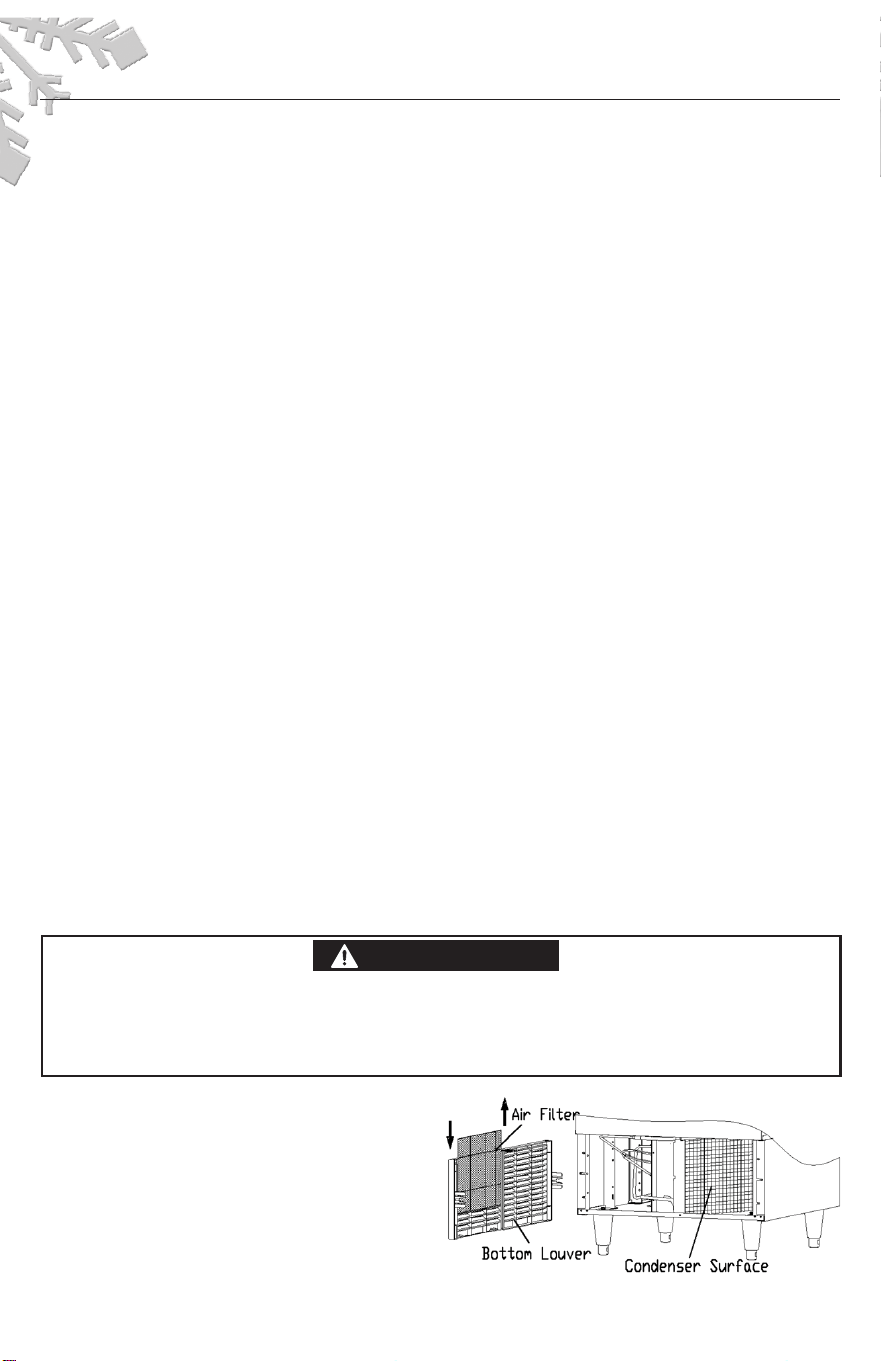
CONDENSER CLEANING
The air-cooled condenser should be vacuumed
may have been drawn into it
1 Unplug the ice maker or disconnect power
2 Gently pull off the bottom louver
3 Romove dirt and lint from the condenser and
the air filter with brush attachment of a vacuum
4 Reassemble the air filter and the bottom louver
5 Plug in the ice maker or reconnect power
once or twice per year to remove any lint that
cleaner Use a pointed tool like a toothpick to
remove any lint that adheres to the condenser fins
Control P
anel
(located a
t the left side of front panel)
15
front panel.
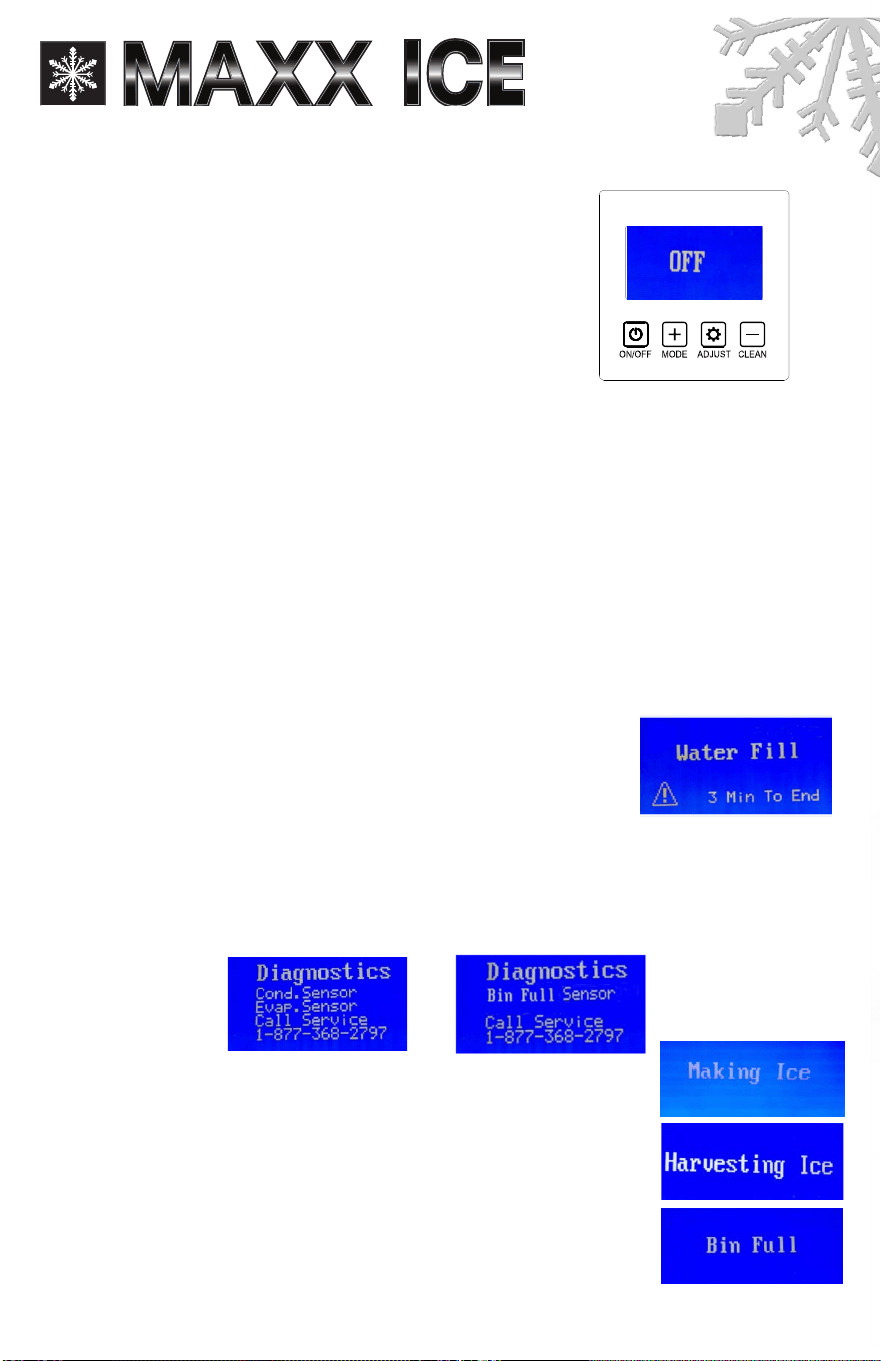
This control panel offers four pressure
sensitive
buttons and a LCD display screen.
You will find the control panel at the left side of
1 ON/ OFF Button. Powers the ice machine.
2 Bin Full Process: When the words of "Bin Full" display, the ice
storage bin is full of ice or something is holding the water
taken out of the ice storage bin, releasing the water curtain,
3 Making Ice Process: When the words of "Making Ice" display, the unit is working in the Ice
Making mode controlled by a temperature probe on the evaporator and a fixed timer.
4 Harvesting Ice Process: When the words of "Harvesting Ice" di splay, the unit is working in the Ice
Harvest mode controlled by a temperature probe on the evaporator and a fixed timer.
5 Clean Button: When this button is pressed, the unit enters the Cleaning mode. the screen will
display "Cleaning" To stop the Cleaning mode, just press
6 Mode Button: Recommended for service technician only. When this button is pressed, unit
can change from Ice Making mode to Ice Harvest mode or from Ice Harvest mode to Ice
Making mode. You can judge the mode from the displaying contents on the screen.
7 Water Fill Process: When the words of "Water Fill" display, there are three minutes for water inlet
and self-checking After
three minutes the ice maker will start to make ice automatically.
the ON/OFF button.
curtain open. The unit will stop working when ice cubes are
the words of "Bin Full" will flash for 3 minutes. The unit will then
restart and returns to the ice making mode.
OPERATION OF THE CONTROL PANEL:
1. When the unit is plugged in and turn on the power switch. Only
“OFF” displays on the LCD screen.
2. Press the ON/OFF button, the LCD screen lights. If normal, only the
words of “Water Fill” and “3 Min To End” displays on the LCD screen.
The ice maker will start to make ice automatically when the words
of “3 Min To End” changes to “0 Min To End".
Note:
When the ice machine runs in “Water Fill” process, the control board will check the
condenser probe, evaporator probe and bin full probe function, if one of them defaults, the
exclamation mark will appear and blink on the left bottom corner of the LCD screen. At this
time press “ADJUST” button, the Diagnostics for bin full probe, condenser probe and evaporator
probe will appear on the LCD screen.
or
See photos below.
3. After three minutes, the ice maker will start to make ice automatically.
The words of “Making Ice” displays on the LCD screen.
4. When the ice machine runs in harvest process, the words of
“Harvesting Ice” displays on the LCD screen.
5. When the ice storage bin is full of ice cubes or there is something
obstructing the bin full probe, the words of "Bin Full" displays on the
LCD screen. The unit stops working.
SERVICE AND INST
ALLATION MANUAL
www.maxxfoodservice.com
16
6. When ice cubes are removed from from the ice storage bin, clearing the
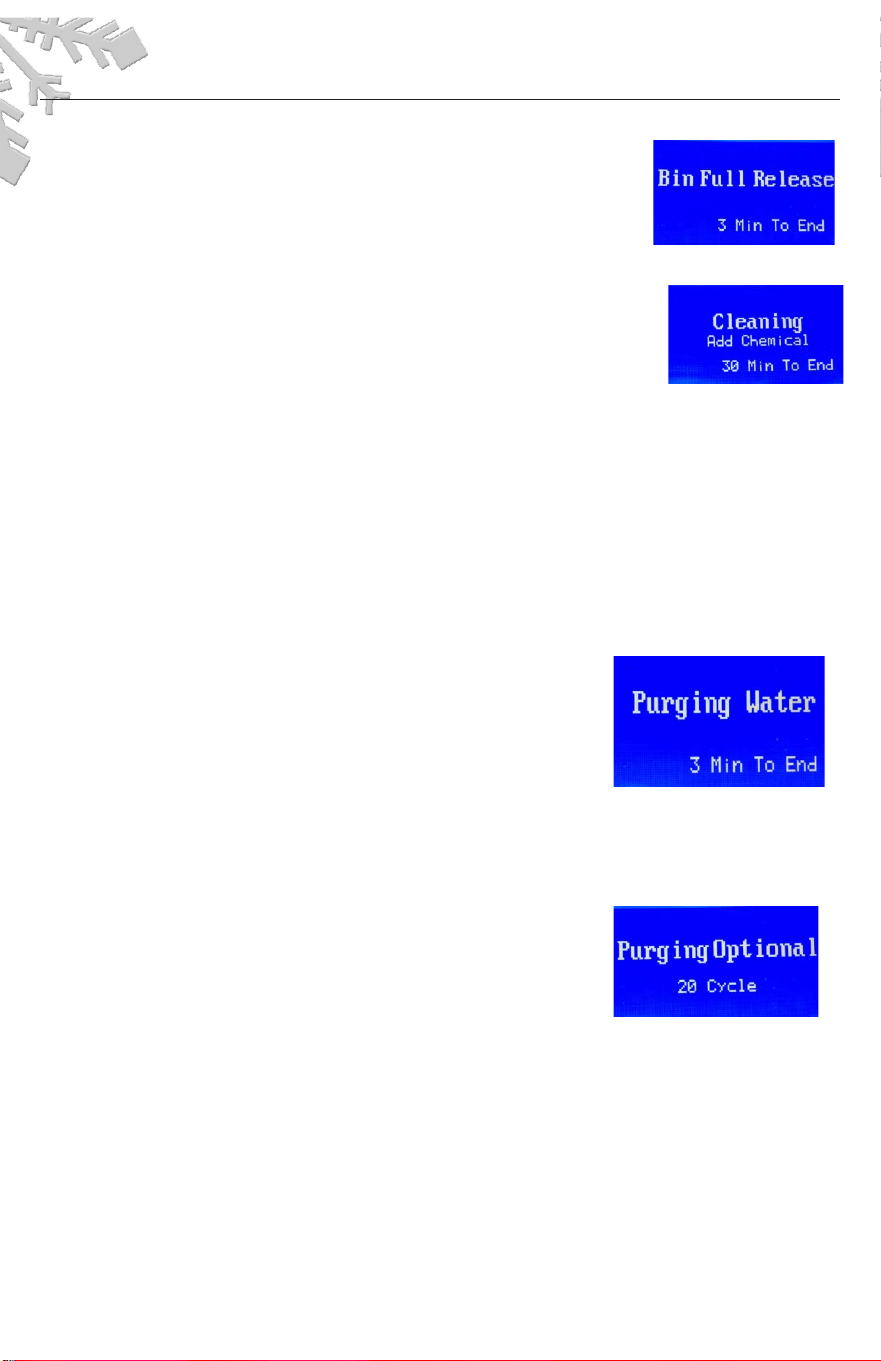
bin full probe, the machine will judge the status for three minutes.
During this period, the LCD screen will display the words of “Bin Full
Release” and “3 Min To End”. "Bin Full Release” flashes until the words
“3 Min To End” changes to“0 Min To End”. At this time, the ice maker
will start to make ice automatically.
7. TO CLEAN THE MACHINE, press the ON/OFF button first, then press it on again.
• During “Water Fill” process, press the “CLEAN” button, the ice maker
will start the cleaning process, the words of “Cleaning”, “Add
chemical” and “30 Min To End” display on the LCD screen.
• At the first one minute, the words of “Add chemical” flash to remind
pouring the Ice Maker Cleaner Solution into the water tank until the
words of “30 Min To End” changed into “29 Min To End”, the words of “Add chemical”
disappear and the water pump runs, the ice maker goes into cleaning process.
• The ice-making system cleaning cycle will continue until the words of “30 Min To End” changed
into “0 Min To End”, the cleaning process stops and the ice machine is in suspend mode.
• You can press the ON/OFF button to stop the cleaning cycle any time during the cleaning
mode.
• If you want to make ice cubes after cleaning, press the ON/OFF twice, the next ice-making
cycle will begin.
NOTE:
Pressing the CLEAN BUTTON has no effect when the ice maker runs in ice-making, harvest and bin
full process.
Additional Functions:
1. Draining Function: press the “Clean” button and hold for 6
seconds, the machine will go into the draining water mode
automatically. The words of “Purging Water” appear on the
LCD screen. The words disappear after 3 minutes and the
draining process stops. NOTE: Draining function only effect in
“Water Fill” process and “Cleaning” process.
2. Self-checking Function: when the ice maker runs, the control board will check the
condenser probe, evaporator probe, high condenser temperature, water shortage, long
freeze, long harvest and bin full probe function, if one of them defaults, the
exclamation mark will appear and blink on the left bottom corner of the LCD screen. At this
time press “ADJUST” button, the cause of default will appear on the LCD screen.
3. Purging cycle interval Optional Function: during “Water Fill”
process, press and hold the “CLEAN” button and “ADJUST”
button together for at least 3 seconds. The unit will enter the
“Purging Optional” process, the words of “Purging Optional”
and “20 Cycle” (Note: The cycle number may display other
number) appear on the LCD screen. During this period, you
can press the “MODE” or “CLEAN” button for the desired purging cycle interval. You can
choose any purging cycle interval from 0 to 20.
4. After 10 seconds without any operation, the unit will automatically memorize the current
status and return to the previous process.
NOTE: The machine is only in "Water Fill" process, the purging cycle interval optional function can
be accessed.
IMPORTANT: The purging cycle interval 20 has been set at the factory for optimum performance.
You can change it according to the quality of water.

17
ICE BRIDGE SIZE ADJUSTMENT GUIDE:
Press
and
hold
the
“ADJUST"
button
for
at
least
3
seconds
The
unit
will
enter
the
Ice
Size
Adjustment mode and the words "Ice Adjust" display on the LCD Screen.
While in the Ice Size Adjustment mode, press the “Clean” button or the “Mode” button for the
desired ice size.
SMALLER ICE SETTING:
By pressing the “Clean” button, you can decrease the size of the ice bridge. The words of "-6
Minutes" indicate the smallest ice size.
LARGER ICE SETTING:
By pressing the “Mode” button, you can increase the size of the ice bridge. The words of "+10 Minutes"
indicate the largest ice size. After 10 seconds without any operation, the unit will automatically
memorize the current state and return to the previous mode.
NOTE:
•
If during the ice size adjustment mode the words of “Ice Adjust” and “0 Minute” display on the LCD
screen, this indicates that the unit is in the regular (middle) setting of the ice size.
•
When the machine is in the cleaning stage or ice full stage, the ice size adjustment mode cannot be
accessed.
IMPORTANT:
•
The ice bridge adjustment has been set at the factory for optimum performance and it is not
recommended for a user to make this adjustment. This ice adjustment procedure should be made
only by an authorized service technician.
IMPORTANT:
•
Although the unit has been tested and cleaned at the factory, due to long-term transit and storage,
the first batch of cubes must be discarded.
•
Never turn the water supply tap off when the ice maker is working.
•
Never touch the evaporator when the machine is running.
•
Keep the door closed as much as possible to reduce melting and insure proper ice formation.
1.
2.
IMPORTANT:
• Avoid letting water contact the contr
ol box
Tr
oubleshooting
BEFORE CALLING FOR SERVICE
If the
unit appears to be malfunctioning, read through the OPERATION section of this manual rst.
If the
problem persists, check the Troubleshooting Guide on the following page
The problem may
be
something very simple that can be solved without a service call
SERVICE AND INST
ALLATION MANUAL
www.maxxfoodservice.com
Page | 13
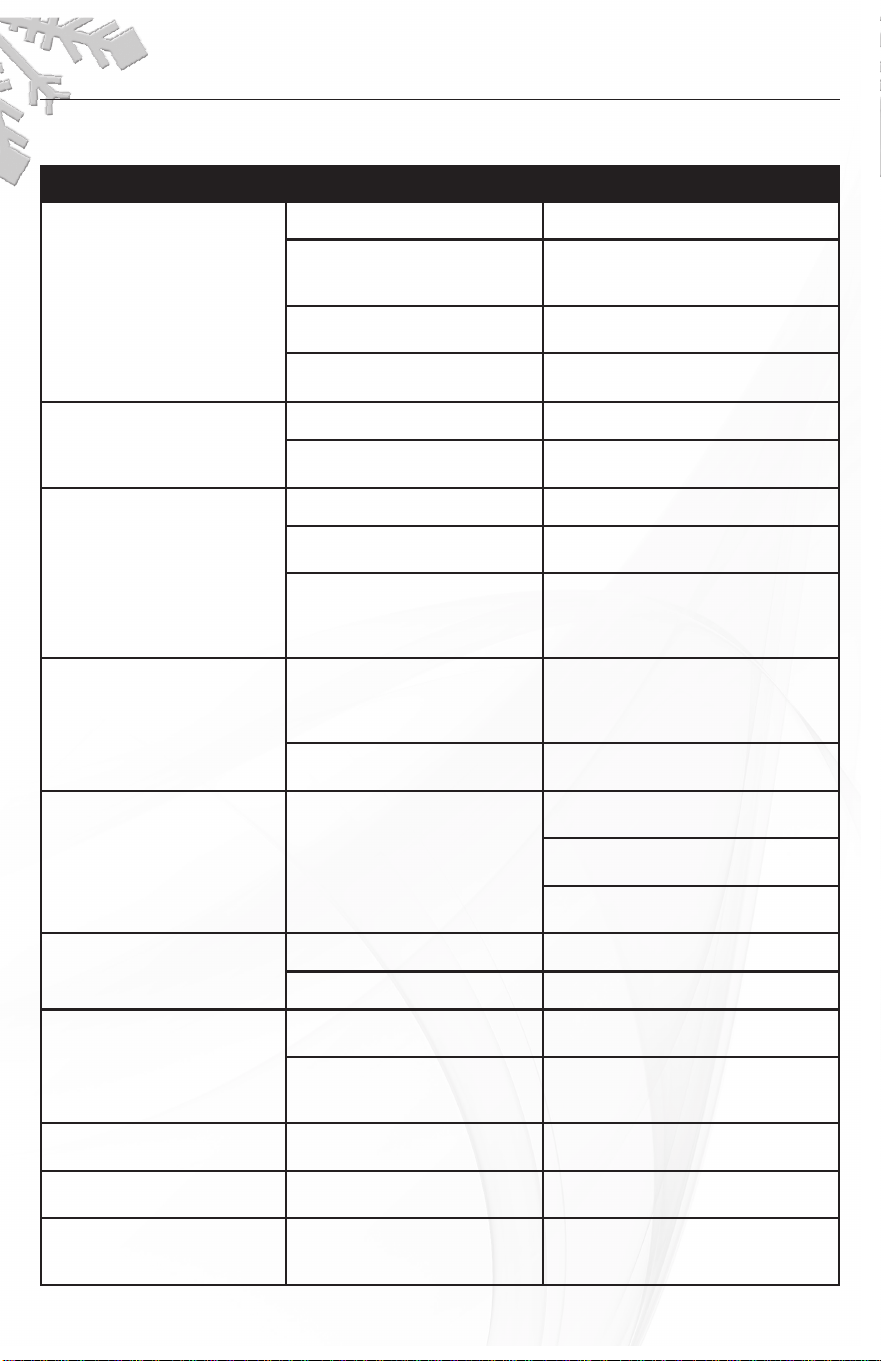
PROBLEM POSSIBLE CAUSE PROBABLE CORRECTION
The machine doesn't
operate
The ice maker is unplugged Plug the ice maker in
The fuse is blown Replace fuse--if it happen, call for
service to check for a short circuit in
the ice maker
The ice maker power switch
is OFF
Tur
n the ice maker power switch
to ON
The ice storage bin is full of ice Take away some ice, make the ice-
full sensor is free of ice
The water doesn't feed in
after the ice maker starts
The water supply tap is turn of
f
Tur
n on the water supply tap
The water supply pipe is not
proper connected
Reconnect the water supply pipe
Machine makes ice, but bin
does not ll up with ice
The condenser may be dirty Clean the condenser
The air ow to the ice maker
may be obstructed
Check the installation
The ambient temperature
and water temperatur
e are
high, or it is near with some
heat resour
ce
Check the installation
Water is leaking out the unit
A few water drops to the
oor when you open the
door to take out ice fr
om
ice storage bin
Normal condensation on the door or
some water together with ice Take
care when you take out ice
Water supply connection leaks Tighten tting. See Connecting the
water line
Cubes are partially for
med--
are white at the bottom
Not enough water in
the water bin
Check if the water supply
pressur
e is below 15psig
Check water supply--lter may be
restricted
Check for a water leak at the water
tank
Noise during operation
The feet are not leveled See Leveling the Ice Maker
Certain sounds are nor
mal
See Normal Sounds
The icemaker stops suddenly
while making ice
The electricity is off Reconnected the power
supply line
The room temperatur
e is out
the state range
Cut off the electricity, let the ice
maker stop working till the tempera-
ture r
eturns within the stated range
The body of the ice maker is
electried
The earth line isn't in the socket Please use the socket meeting the
standard
Scales occur frequently inside
the machine
The hardness of the water qual-
ity is too high
Using a water-soften apparatus
installed in front of the water inlet
The ice cubes are not
completely for
med when
being dumped
The sprinkler is blocked Clean the sprinkler, see
"interior cleaning"
18
Tr
oubleshooting Guide
NOTES:
19