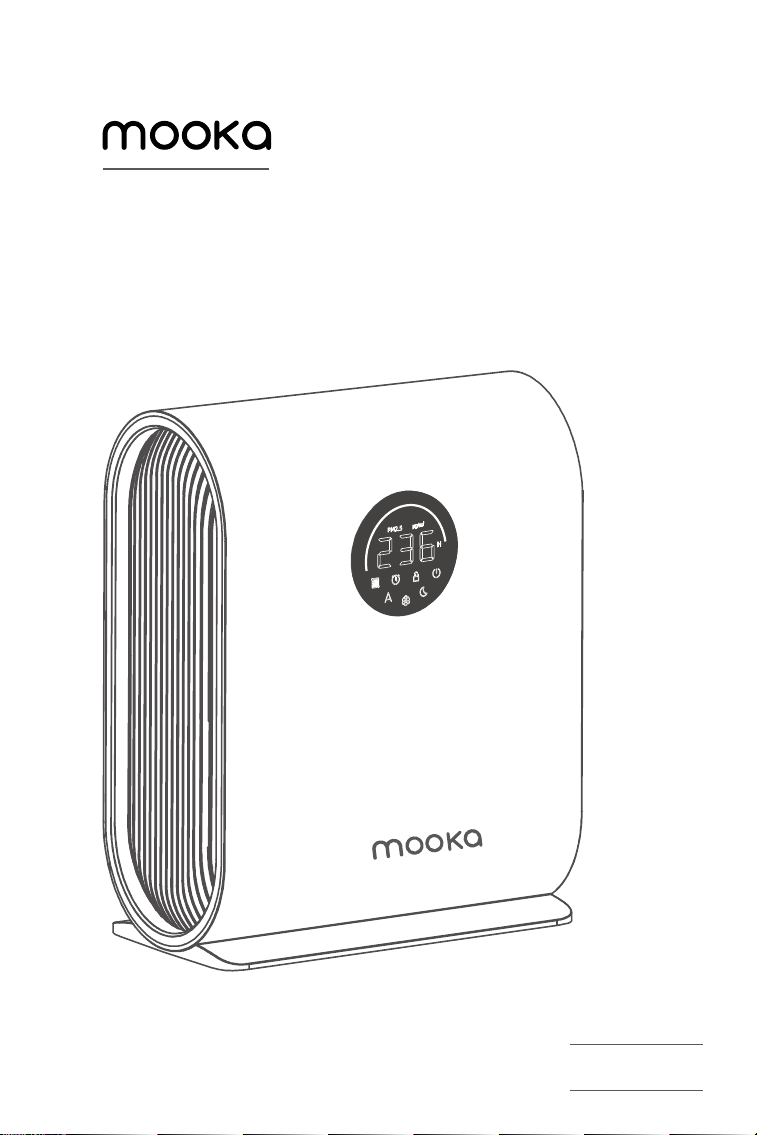
User Manual
Air Purifier
Model: KJ217
CUSTOMER SERVICE
Our customer service team is standing by to assist you
if you have any questions or concerns.
www.mookashops.com
support@mookashops.com
1-855-666-9955
m.me/MookaUS
Safety Information
Product Overview
Operation Guide
Getting Started
Care & Maintenance
Troubleshooting
1× Air Purifier
1× True HEPA Filter
1× User Manual
Product
Dimensions
Power Supply
Model
Weight
Rated Power
Air Purifier
310×160×400mm
120V 60Hz
KJ217
3.4kg
32W
1
2
3
4
6
7
Table of Contents
Package Contents
Specifications
SAFETY INFORMATION
1. Do not use without removing the plastic wrap from the filter. The air purifier
will not filter air and may overheat, causing a fire hazard.
2. Do not
use your air purifier outdoors.Keep your air purifier away from water,
wet or damp areas. Never place in water or liquid.
3. Do not
use in excessively humid areas. Keep your air purifier away from heat
sources.
4. Do not
use where combustible gases, vapors, metallic dust, aerosol (spray)
products, or fumes from industrial oil are present.
5. Do not
block any air flow that is coming in/out of the air purifier.
6. Do not
sit or place heavy objects on the air purifier.
7. Do not
use your air purifier if it is damaged or not working correctly, or if the
cord or plug is damaged.
8. Do not
try to repair it yourself. Please contact customer support .
9. Keep the inside of the air purifier dry. To prevent moisture buildup, avoid
placing in rooms with major temperature changes or underneath air
conditioners.
10. Keep 5 ft/1.5 m away from where oxygen is being administered.
11. Supervise children when they are near the air purifier.
12 Always unplug your air purifier before servicing (such as changing the filter).
13. This appliance is not intended for used by persons (including children) with
reduced physical, sensory or mental capabilities, or lack of experience and
knowledge, unless they have been given supervision or instruction concerning
use of the appliance by a person responsible for their safety.
14. Children should be supervised to ensure that they do not play with the
appliance.Cleaning and user maintenance shall not be made by children
without supervision.
15. If the supply cord is damaged, it must be replaced by the manufacturer, its
service agent or similarly qualified persons in order to avoid a hazard.
1
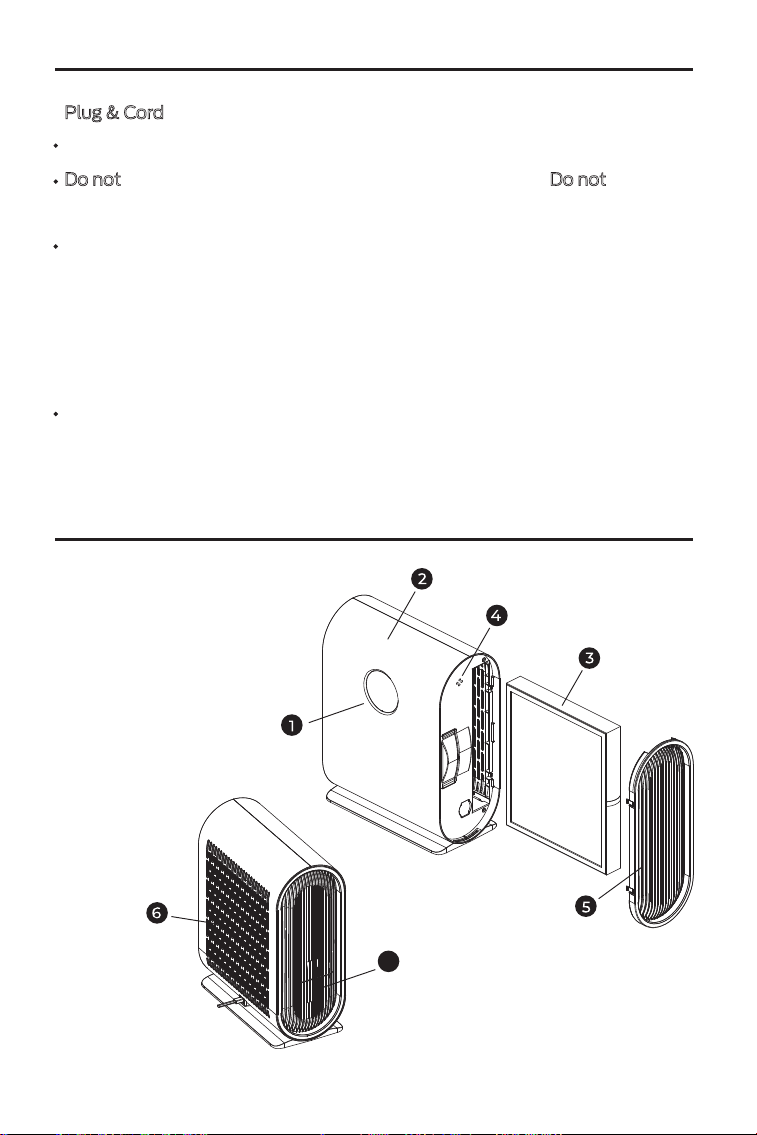
1. Control Panel
2. Housing
3. Filter
4. Particle Sensor
5. Filter Cover
6. Air Intake
7. Air Outlet
SAFETY INFORMATION
PRODUCT OVERVIEW
7
Plug & Cord
Never place the cord near any heat source.
Do not
cover the cord with a rug, carpet, or other covering. Do not place the
cord under furniture or appliances.
This appliance has a polarized plug (one blade is wider than the other).
To reduce the risk of electric shock, this plug is intended to fit in a polarized
outlet only one way. If the plug does not fit fully in the outlet, reverse the plug.
If it still does not fit, contact a qualified electrician. Do not attempt to defeat
this safety feature.
This air purifier uses standard US 120V, 60Hz outlets. If using in a dierent
area, check for compatibility.
2
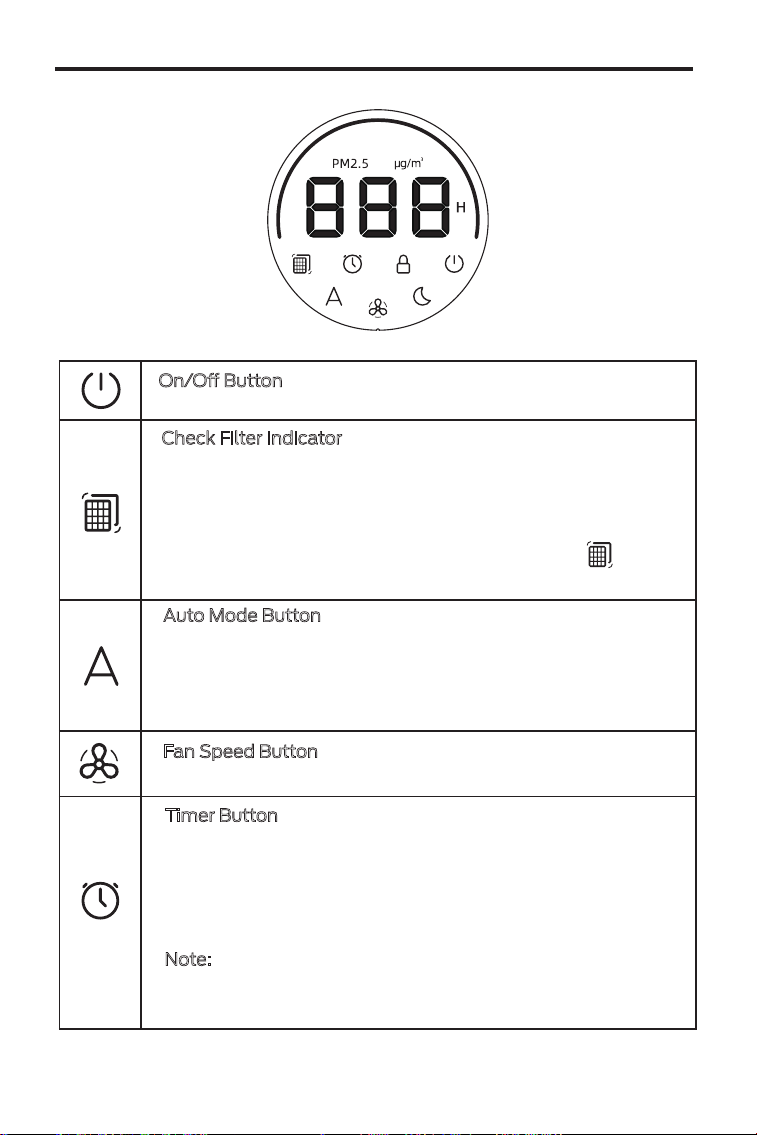
On/O Button
Turns the air purifier on/o.
Check Filter Indicator
Lights up when the filter should be checked. Depending on
how often you use the air purifier, the indicator should turn
on within 3-6 months. You may not need to replace your filter
yet, but you should check it when turns on.
To reset the Check Filter Indicator, press and hold button
for 3 seconds. The Check Filter Indicator will turn o.
Auto Mode Button
Turns Auto Mode on/o. Auto Mode uses dust sensor inside
the air purifier, to adjust the fan speed automatically based
on air quality. For example, if the air quality is bad, the fan
will automatically be set to high speed.
Fan Speed Button
Cycles through fan speeds: 1 (low ), 2 (medium), 3 (high).
Timer Button
Cycles through timer options: ---, 2 hours, 4 hours, 6 hours,
and 8 hours. Tap the timer button to select a time, after 3
seconds of no operation, the timer starts and the time unit
symbol “H” lights up. Once the timer has finished, the air
purifier will turn o.
Note:
To turn o the timer setting, please click the timer
button until the "---" mode is displayed on the screen, after
3 seconds of no operation, the timer will turn o.
OPERATION GUIDE
3
Air Quality Indicator Chart
PM2.5 Range
0-75
76-150
>150
Good
Moderate
Poor
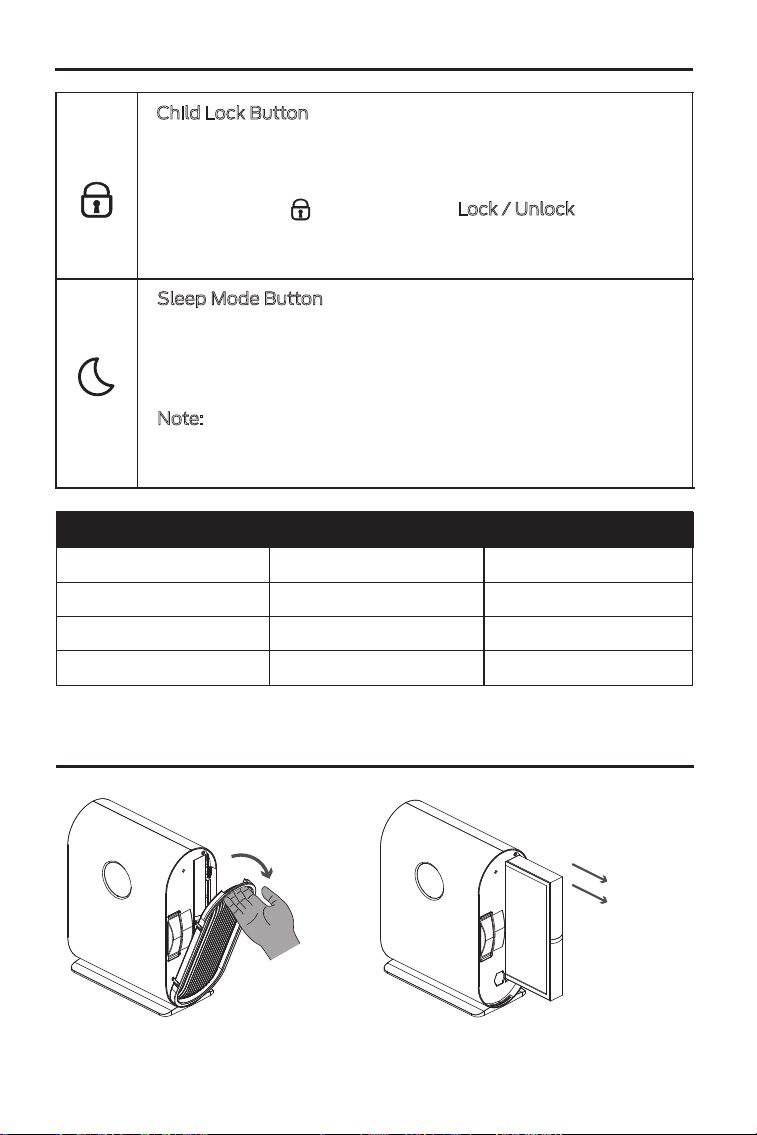
1. Open the filter cover and remove the filter from inside the air purifier.
Green
Yellow
Red
Air Quality Indicator Color
Child Lock Button
When the air purifier is on, you can lock the display to prevent
settings from being accidentally changed. Buttons will not
respond to being tapped.
Press and hold for 3 seconds to Lock / Unlock
the display.
Note: The child Lock Indicator will blink when any other
button is tapped to indicate that Display Lock is on.
Sleep Mode Button
Turns Sleep Mode on/o. Sleep Mode operates quietly by
using a fan speed lower than low speed.
Sleep Mode will turn o the display after 3 seconds if no
other buttons are tapped.
Note:
When the display is turned o, tap any button to turn
the display back on. If you don’t tap another button, the
display will turn o again after 3 seconds.
OPERATION GUIDE
GETTING STARTED
4
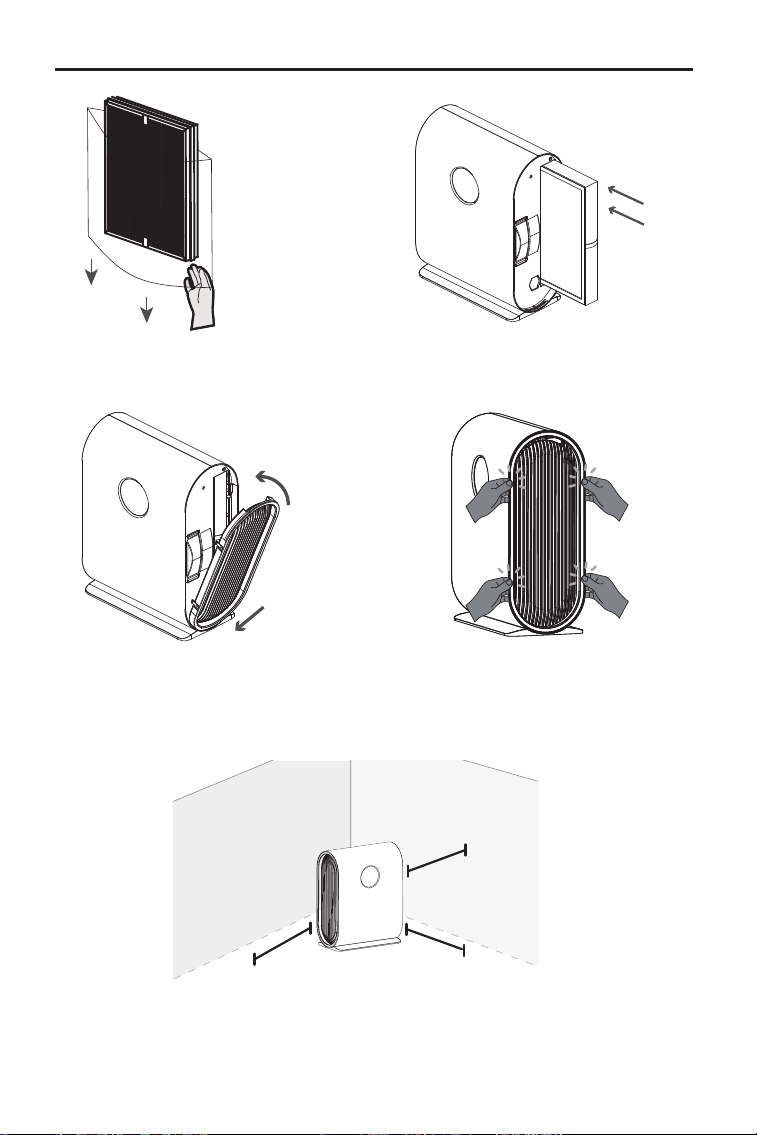
2. Remove the plastic packaging from the filter and place the filter back
into the air purifier.
3. Replace the Filter cover by lining up the cover's feet with the matching
slots on the bottom of the housing, Use your thumb to push the four
positions of the filter cover into the purifier.
4. When using the air purifier, allow at least 15 inches / 38 cm of clearance
from the front of the air purifier. Keep away from anything that would block
air flow, such as curtains.
GETTING STARTED
Step1
Step2
15 in /
38 cm
5
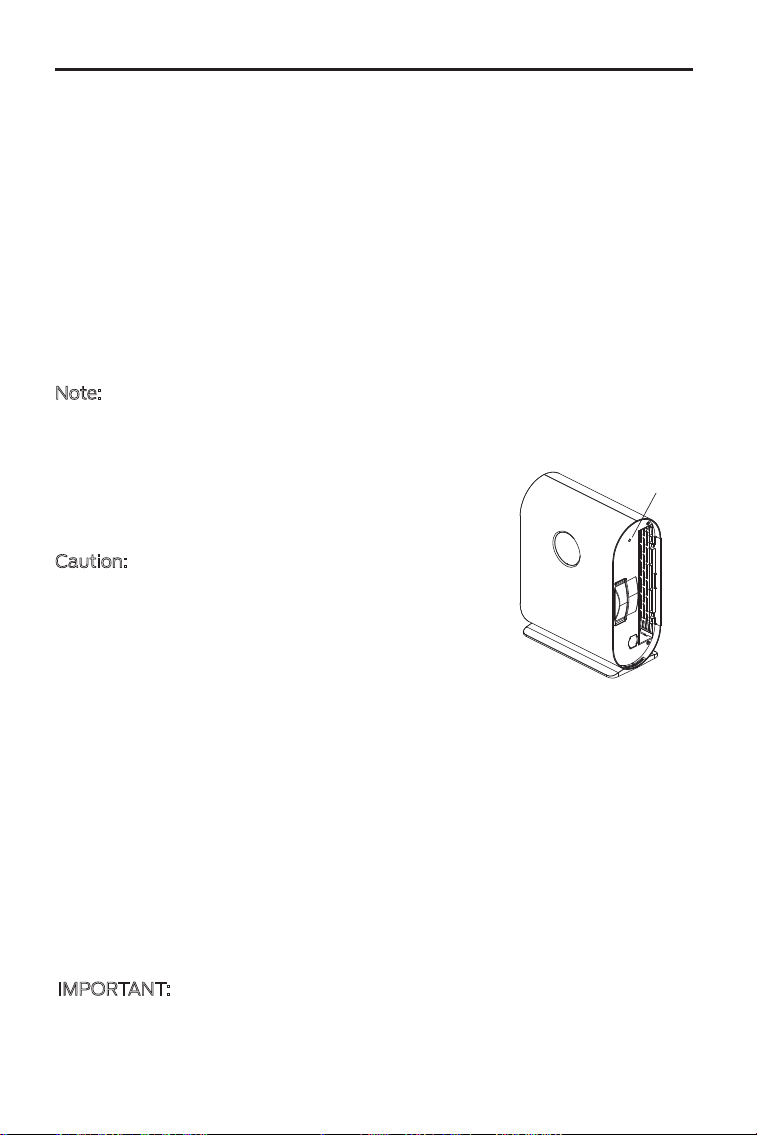
Caution: Do not use water, alcohol, gasoline,
benzene and any other liquid to clean the sensor.
Otherwise, it would cause damage to the sensor.
1. Unplug the air purifier.
2. Open the filter cover.
3. Use a clean soft cloth to clean the sensor.
IMPORTANT:
To maintain the performance of your air purifier, only use ocial
mooka filters. For more information, contact Customer Support.
The True HEPA / Activated Carbon Filter should be replaced every 3-6 months.
You may need to replace your filter earlier or later depending on how often you
use your air purifier. Using your air purifier in an environment with relatively high
pollution may mean you will need to replace the filter more often, even if the
Check Filter Indicator is o.
You may need to replace your filter if you notice:
• The air purifier does not eectively filter certain odors anymore.
• Increased noise when the air purifier is on.
• Decreased airflow from the top of the air purifier.
• Unusual odors.
• The HEPA filter is visibly dusty or discolored after removing the filter.
• Unplug before cleaning.
• Wipe the outside of the air purifier with a soft, dry cloth. If necessary, wipe
the housing with a damp cloth, then immediately dry.
• Vacuum the inside of the air purifier.
• Do not clean with abrasive chemicals or flammable cleaning agents.
Cleaning the Air Purifier
It is recommended to clean the Dust Sensor every 2 months to help maintain
the eciency of the sensor. If the Air Quality Indicator is red (indicating “Bad”
air quality) more than usual, you may need to clean your dust sensor.
Note:
How often you clean the dust sensor will depend on the air quality of
your environment. If your air is often polluted with dust, dander, smoke, and
other particles, you may need to clean your dust sensor more often.
Cleaning the Dust Sensor
When Should I Replace the Filter?
CARE & MAINTENANCE
Sensor
6
Problem
Air purifier will not turn on.
Strange smell coming from
the air purifier.
Air Quality Indicator always
stays green or yellow, even
when the air quality is poor.
Air Quality Indicator always
stays red.
Plug in the air purifier.
Plug the air purifier into a dierent outlet.
Clean the filter, or replace if necessary.
Contact Customer Support.
Clean the dust sensor.
The dust sensor detects airborne particles,
but it cannot detect gas. Make sure there
aren’t gasses polluting the air.
Make sure not to use your air purifier in an
area with high humidity or while diusing
essential oils.
The air purifier may be malfunctioning.
Contact Customer Support.
Check to see if the power cord is damaged.
If it is, stop using the air purifier and contact
Customer Support.
Possible Solution
If not using the air purifier for an extended period of time, wrap both the air
purifier and the filter in plastic packaging and store in a dry place to avoid
moisture damage.
Storage
TROUBLESHOOTING
Clean the dust sensor.
If you’re using an ultrasonic humidifier near
the air purifier, the mist may aect the
accuracy of the dust sensor. The dust
sensor will detect the large mist particles,
and the Air Quality Indicator may turn red.
Avoid using an ultrasonic humidifier near
the air purifier.
7
Airflow is significantly
reduced.
Tap speed button to increase the fan speed.
Leave 15 inches / 38 cm of clearance from
the front of the air purifier.
Make sure the filter is removed from its
packaging and properly in place.
Replace the filter.
Replace the filter.
The air purifier may be damaged, or a
foreign object may be inside. Stop using
the air purifier and contact Customer
Support . Do not try to repair the air purifier.
Problem
Air purifier makes an
unusual noise.
Poor air purification quality.
Make sure the filter is properly in place with
plastic packaging removed.
Make sure the air purifier is operating on a
hard, flat, level surface.
Contact Customer Support.
Make sure no objects are blocking the front,
sides, or top of the air purifier.
Make sure the filter is removed from its
packaging and properly in place.
Close doors and windows while using the
air purifier.
If the room is too larger, air purification will
take longer.
Replace the filter.
Note: If your problem is not listed, please contact Customer Support.
Tap speed button to increase the fan speed.
Possible Solution
TROUBLESHOOTING
8