Motherboard
TUF GAMING
X870-PLUS
WIFI

2
E24080
First Edition
September 2024
Copyright © 2024 ASUSTeK COMPUTER INC. All Rights Reserved.
No part of this manual, including the products and software described in it, may be reproduced,
transmitted, transcribed, stored in a retrieval system, or translated into any language in any form or by
any means, except documentation kept by the purchaser for backup purposes, without the express
written permission of ASUSTeK COMPUTER INC. (“ASUS”).
Product warranty or service will not be extended if: (1) the product is repaired, modified or altered, unless
such repair, modification of alteration is authorized in writing by ASUS; or (2) the serial number of the
product is defaced or missing.
ASUS PROVIDES THIS MANUAL “AS IS” WITHOUT WARRANTY OF ANY KIND, EITHER EXPRESS
OR IMPLIED, INCLUDING BUT NOT LIMITED TO THE IMPLIED WARRANTIES OR CONDITIONS OF
MERCHANTABILITY OR FITNESS FOR A PARTICULAR PURPOSE. IN NO EVENT SHALL ASUS, ITS
DIRECTORS, OFFICERS, EMPLOYEES OR AGENTS BE LIABLE FOR ANY INDIRECT, SPECIAL,
INCIDENTAL, OR CONSEQUENTIAL DAMAGES (INCLUDING DAMAGES FOR LOSS OF PROFITS,
LOSS OF BUSINESS, LOSS OF USE OR DATA, INTERRUPTION OF BUSINESS AND THE LIKE),
EVEN IF ASUS HAS BEEN ADVISED OF THE POSSIBILITY OF SUCH DAMAGES ARISING FROM
ANY DEFECT OR ERROR IN THIS MANUAL OR PRODUCT.
SPECIFICATIONS AND INFORMATION CONTAINED IN THIS MANUAL ARE FURNISHED FOR
INFORMATIONAL USE ONLY, AND ARE SUBJECT TO CHANGE AT ANY TIME WITHOUT NOTICE,
AND SHOULD NOT BE CONSTRUED AS A COMMITMENT BY ASUS. ASUS ASSUMES NO
RESPONSIBILITY OR LIABILITY FOR ANY ERRORS OR INACCURACIES THAT MAY APPEAR IN
THIS MANUAL, INCLUDING THE PRODUCTS AND SOFTWARE DESCRIBED IN IT.
Products and corporate names appearing in this manual may or may not be registered trademarks or
copyrights of their respective companies, and are used only for identification or explanation and to the
owners’ benefit, without intent to infringe.

3
Contents
Safety information ....................................................................................................... 4
About this guide .......................................................................................................... 6
TUF GAMING X870-PLUS WIFI specifications summary ......................................... 8
Package contents ...................................................................................................... 13
Connectors with shared bandwidth ........................................................................ 14
Chapter 1: Product Introduction
1.1 Before you proceed .................................................................................... 15
1.2 Motherboard layout..................................................................................... 16
1.3 Motherboard rear and audio connections ................................................ 31
1.3.1 Rear I/O connection ..................................................................... 31
1.3.2 LAN port LEDs ............................................................................. 32
1.3.3 Audio I/O connections .................................................................. 32
Chapter 2: Basic Setup
2.1 CPU installation........................................................................................... 35
2.2 DIMM installation......................................................................................... 37
2.3 M.2 module installation .............................................................................. 38
2.4 Motherboard installation ............................................................................ 41
2.5 ASUS WiFi Q-Antenna installation ........................................................... 42
2.6 BIOS FlashBack™ ....................................................................................... 43
2.7 Starting up for the first time ....................................................................... 44
2.8 Turning off the computer ........................................................................... 44
Chapter 3: BIOS and RAID Support
3.1 Knowing UEFI BIOS .................................................................................... 45
3.2 ASUS EZ Flash 3 ......................................................................................... 46
3.3 ASUS CrashFree BIOS 3............................................................................. 47
3.4 RAID configurations ................................................................................... 48
Appendix
General notices ......................................................................................................... 49
Notices for Wi-Fi model ............................................................................................ 52
Warranty ..................................................................................................................... 60
ASUS contact information ........................................................................................ 63
Service and support .................................................................................................. 63
Product register ........................................................................................................ 63

4
Safety information
Electrical safety
• To prevent electrical shock hazard, disconnect the power cable from the electrical
outlet before relocating the system.
• When adding or removing devices to or from the system, ensure that the power cables
for the devices are unplugged before the signal cables are connected. If possible,
disconnect all power cables from the existing system before you add a device.
• Before connecting or removing signal cables from the motherboard, ensure that all
power cables are unplugged.
• Seek professional assistance before using an adapter or extension cord. These
devices could interrupt the grounding circuit.
• Ensure that your power supply is set to the correct voltage in your area. If you are not
sure about the voltage of the electrical outlet you are using, contact your local power
company.
• If the power supply is broken, do not try to fix it by yourself. Contact a qualified service
technician or your retailer.
Operation safety
• Before installing the motherboard and adding devices on it, carefully read all the
manuals that came with the package.
• Before using the product, ensure all cables are correctly connected and the power
cables are not damaged. If you detect any damage, contact your dealer immediately.
• To avoid short circuits, keep paper clips, screws, and staples away from connectors,
slots, sockets and circuitry.
• Avoid dust, humidity, and temperature extremes. Do not place the product in any area
where it may become wet.
• Place the product on a stable surface.
• If you encounter technical problems with the product, contact a qualified service
technician or your retailer.
• Your motherboard should only be used in environments with ambient temperatures
between 10°C and 35°C.
5
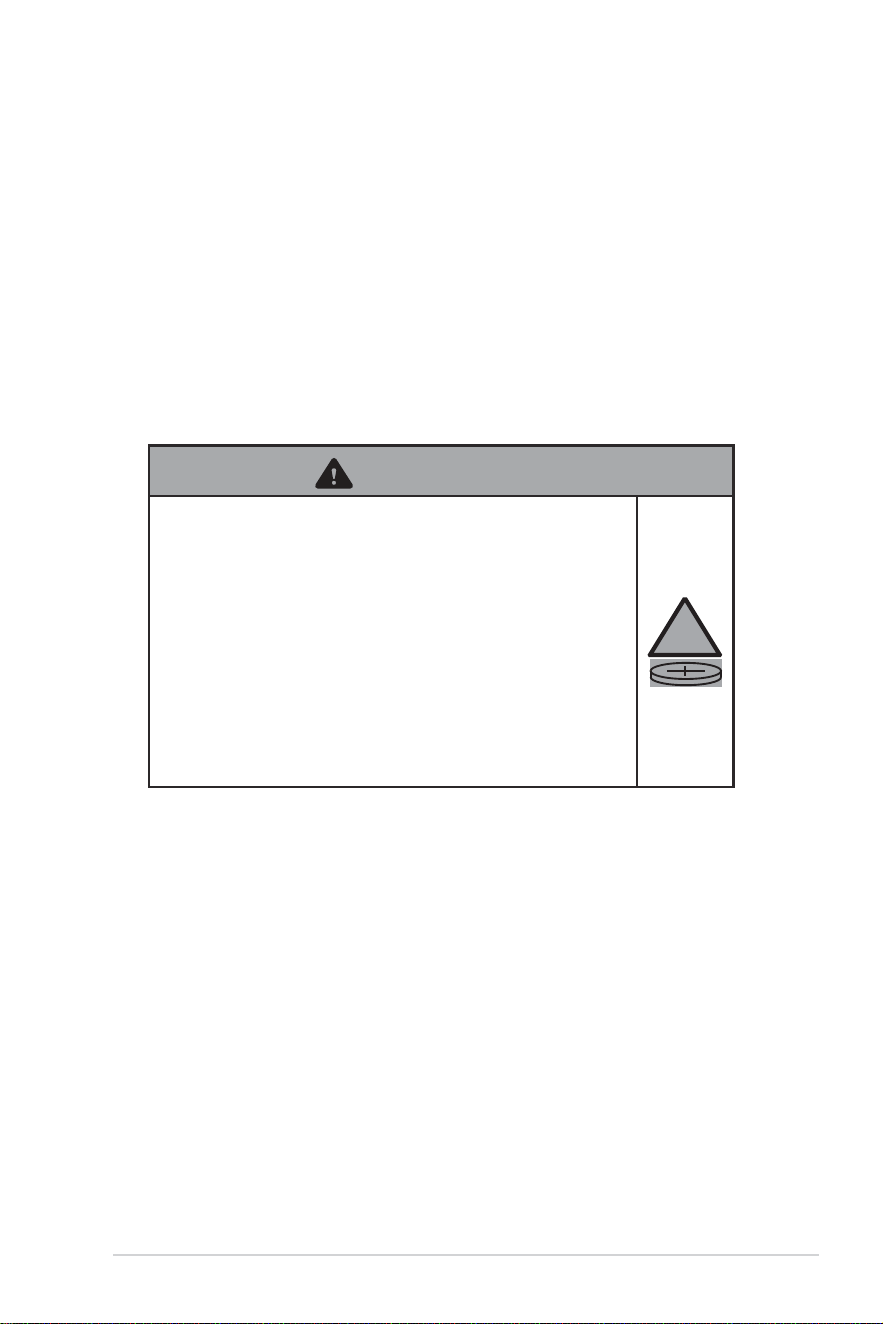
Button/Coin Batteries Safety Information
1. Remove and immediately recycle or dispose of used batteries according to local
regulations and keep out of reach of children. Do not incinerate or dispose of batteries
in household trash.
2. If ingested or inserted inside any part of the body, call a local poison control center for
treatment information. Even used batteries may cause serious injury or death.
3. This product uses CR2032 type batteries with a nominal voltage of 3V.
4. Do not attempt to recharge non-rechargeable batteries.
5. Do not forcibly discharge, recharge, disassemble, heat above the battery
manufacturer’s specified temperature rating, or incinerate. Doing so may result in
injury or chemical burns caused by venting, leakage, or explosion.
6. This product contains non-replaceable batteries.
WARNING
• INGESTION HAZARD: This product contains a
button cell or coin battery.
• DEATH or serious injury can occur if ingested.
• A swallowed button cell or coin battery can cause
Internal Chemical Burns in as little as 2 hours.
• KEEP new and used batteries OUT OF REACH of
CHILDREN.
• Seek immediate medical attention if a battery
is suspected to be swallowed or inserted inside
any part of the body.
!
6
About this guide
This user guide contains the information you need when installing and configuring the
motherboard.
How this guide is organized
This guide contains the following parts:
• Chapter 1: Product Introduction
This chapter describes the features of the motherboard and includes descriptions for
each part of the motherboard.
• Chapter 2: Basic Setup
This chapter lists the basic setup procedures for setting up your motherboard.
• Chapter 3: BIOS and RAID Support
This chapter tells how to boot into the BIOS, upgrade BIOS using the EZ Flash Utility
and support on RAID.
Where to find more information
Refer to the following sources for additional information and for product and software
updates.
1. ASUS website
The ASUS website (www.asus.com) provides updated information on ASUS hardware
and software products.
2. Optional documentation
Your product package may include optional documentation, such as warranty flyers,
that may have been added by your dealer. These documents are not part of the
standard package.
3. Motherboard Installation Guide
Please visit https://www.asus.com/support for more information on the Motherboard
Installation Guide.
7
5. RAID Configuration Guide
Please visit https://www.asus.com/support for more information on the RAID
Configuration Guide.
6. BIOS FlashBack™ Feature
Please visit https://www.asus.com/support for more information on the BIOS
FlashBack™ Feature.
4. Driver and Utilities FAQ
Please visit https://www.asus.com/support for more information on downloading and
installing drivers and utilities for your motherboard.
Conventions used in this guide
To ensure that you perform certain tasks properly, take note of the following notes used
throughout this user guide.
CAUTION
Information to prevent damage to the components and injuries to yourself
when trying to complete a task.
IMPORTANT Instructions that you MUST follow to complete a task.
NOTE Tips and additional information to help you complete a task.
8
TUF GAMING X870-PLUS WIFI specifications summary
CPU
AMD Socket AM5 for AMD Ryzen™ 9000 & 8000 & 7000 Series
Desktop Processors*
* Refer to https://www.asus.com/support/download-center/ for CPU support
list.
Chipset
AMD X870 Chipset
Memory
4 x DIMM slots, DDR5 ECC and Non-ECC, Un-buffered DIMM*
Dual channel memory architecture
Supports AMD Extended Profiles for Overclocking (EXPO™)
ASUS Enhanced Memory Profile (AEMP)
* Supported memory types, data rate (speed), and number of DRAM modules
vary depending on the CPU and memory configuration, for more information
please refer to CPU/Memory Support list under the Support tab of product
information site or visit https://www.asus.com/support/download-center/.
* Non-ECC, Un-buffered DDR5 Memory supports On-Die ECC function.
Graphics
1 x HDMI™ port**
2 x USB4
®
(40Gbps) ports support USB Type-C
®
display outputs***
* Graphics specifications may vary between CPU types. Please refer to AMD
CPU specifications.
** Support 4K@60Hz as specified in HDMI 2.1.
*** Supports max. 4K@60Hz as specified in DisplayPort 1.4a.
**** VGA resolution support depends on processors’ or graphic cards’
resolution.
Expansion Slots
AMD Ryzen™ 9000 & 7000 Series Desktop Processors*
1 x PCIe 5.0 x16 slot (supports x16 mode)**
AMD Ryzen™ 8000 Series Desktop Processors
1 x PCIe 4.0 x16 slot (supports x8/x4 mode)***
AMD X870 Chipset
1 x PCIe 4.0 x16 slot (supports x4 mode)****
* Please check PCIe bifurcation table on support site
(https://www.asus.com/support/FAQ/1037507/).
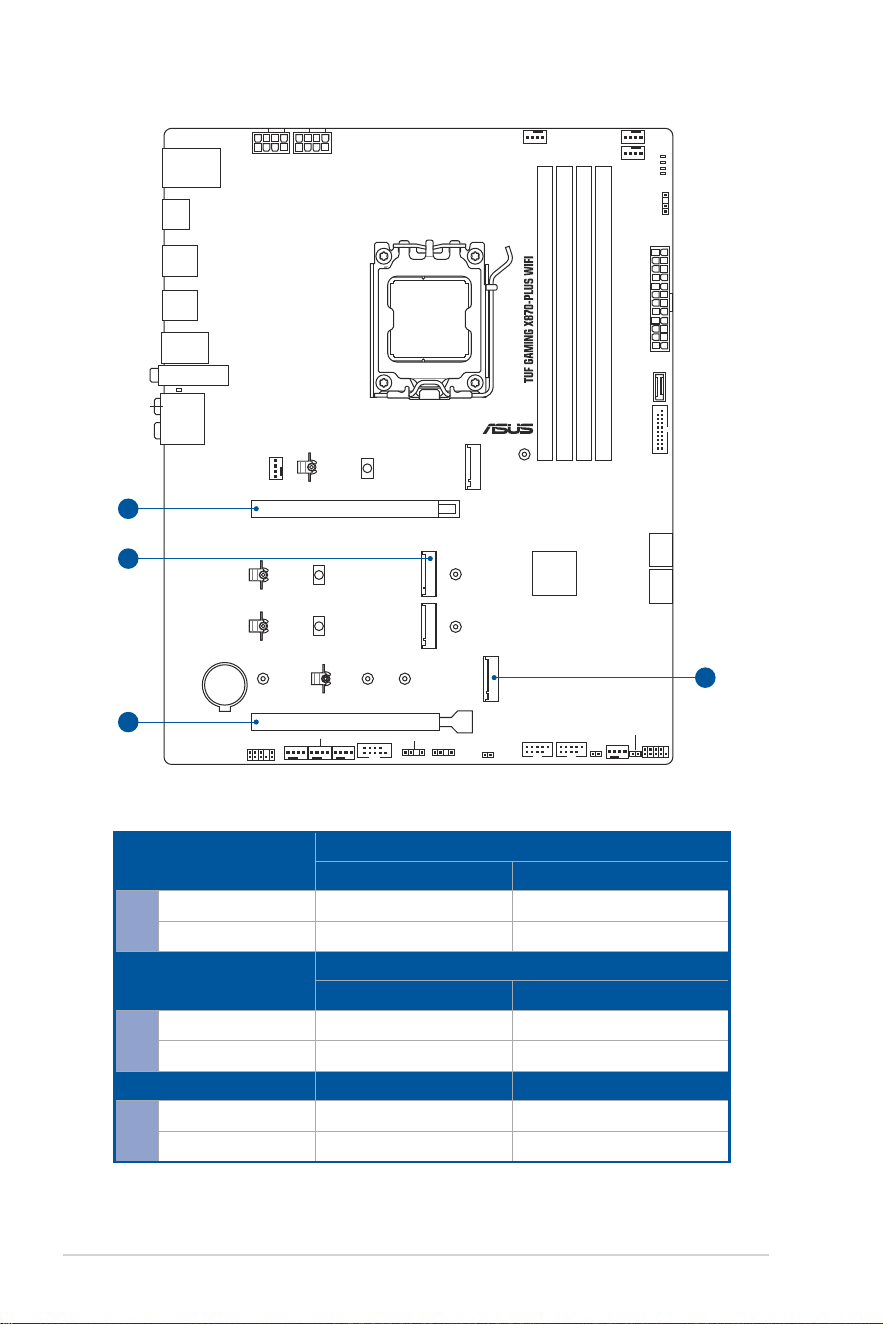
** PCIEX16(G5) shares bandwidth with M.2_2. PCIEX16(G5) will run to x8
mode when M.2_2 runs.
*** Specifications vary by CPU types.
**** PCIEX16(G4) shares bandwidth with M.2_4. PCIEX16(G4) will be disabled
when M.2_4 runs.
***** To ensure compatibility of the device installed, please refer to
https://www.asus.com/support/download-center/ for the list of supported
peripherals.
Storage
Supports 4 x M.2 slots and 2 x SATA 6Gb/s ports*
AMD Ryzen™ 9000 & 7000 Series Desktop Processors
- M.2_1 slot (Key M), type 2280 (supports PCIe 5.0 x4 mode)
- M.2_2 slot (Key M), type 2280 (supports PCIe 5.0 x4 mode)**
AMD Ryzen™ 8000 Series Desktop Processors***
- M.2_1 slot (Key M), type 2280 (supports PCIe 4.0 x4 mode)
(continued on the next page)

9
TUF GAMING X870-PLUS WIFI specifications summary
Storage
AMD X870 Chipset
- M.2_3 slot (Key M), type 2280 (supports PCIe 4.0 x4 mode)
- M.2_4 slot (Key M), type 2242/2260/2280/22110 (supports PCIe 4.0
x4 mode)****
- 2 x SATA 6Gb/s ports
* AMD RAIDXpert2 Technology supports both PCIe RAID 0/1/5/10 and SATA
RAID 0/1. RAID 5 Function is only supported by AMD Ryzen™ 9000 series
CPU.
** PCIEX16(G5) shares bandwidth with M.2_2. PCIEX16(G5) will run to x8
mode when M.2_2 runs.
*** M.2_2 will not work when an 8000 Series Desktop Processor is installed.
**** PCIEX16(G4) shares bandwidth with M.2_4. PCIEX16(G4) will be disabled
when M.2_4 runs.
Ethernet
1 x Realtek 2.5Gb Ethernet
TUF LANGuard
Wireless & Bluetooth
®
Wi-Fi 7*
2x2 Wi-Fi 7 (802.11be)
Supports 2.4/5/6GHz frequency band**
Supports Wi-Fi 7 160MHz bandwidth, up to 2.9Gbps transfer rate.
Bluetooth
®
v5.4***
* Wi-Fi features may vary depending on the operating system.
For Windows 11, Wi-Fi 7 will require 24H2 or later version for full functions,
Windows 11 21H2/22H2/23H2 only support Wi-Fi 6E.
For Windows 10, please note that no driver is available, please refer to the
Wi-Fi chipset vendor’s website for details.
** Wi-Fi 6GHz frequency band and bandwidth regulatory may vary between
countries.
*** The Bluetooth
®
version may vary, please refer to the Wi-Fi module
manufacturer’s website for the latest specifications.
USB
Rear USB (Total 10 ports)
2 x USB4
®
(40Gps) ports (2 x USB Type-C
®
)*
3 x USB 10Gbps ports (3 x Type-A)
4 x USB 5Gbps ports (4 x Type-A)
1 x USB 2.0 port (1 x Type-A)
Front USB (Total 7 ports)
1 x USB 20Gbps connector (supports USB Type-C
®
with up to 30W PD
Fast-charge)**
1 x USB 5Gbps header supports 2 additional USB 5Gbps ports
2 x USB 2.0 headers support 4 additional USB 2.0 ports
* USB Type-C
®
power delivery output: max. 5V/3A
** USB Type-C
®
power delivery output: 5V/9V max. 3A, 12V max 2.5A, 15V max.
2.0A
Audio
Realtek ALC1220P 7.1 Surround Sound High Definition Audio
CODEC
- Impedance sense for front and rear headphone outputs
- Internal audio Amplifier to enhance the highest quality sound for
headphone and speakers
- Supports: Jack-detection, Multi-streaming, Front Panel Jack-retasking
- High quality 120 dB SNR stereo playback output and 113 dB SNR
recording input (Line-in)
- Supports up to 32-Bit/192 kHz playback*
(continued on the next page)
10
TUF GAMING X870-PLUS WIFI specifications summary
Audio
Audio Features
- Audio Shielding
- Premium audio capacitors
- Dedicated audio PCB layers
- Audio cover
- Unique de-pop circuit
* Due to limitations in HDA bandwidth, 32-Bit/192 kHz is not supported for 7.1
Surround Sound audio.
Back Panel I/O Ports
2 x USB4
®
(40Gbps) ports (2 x USB Type-C
®
)
3 x USB 10Gbps ports (3 x Type-A)
4 x USB 5Gbps ports (4 x Type-A)
1 x USB 2.0 port (1 x Type-A)
1 x HDMI™ port
1 x Wi-Fi module
1 x Realtek 2.5Gb Ethernet port
5 x Audio jacks
1 x BIOS FlashBack™ button
Internal I/O connectors
Fan and Cooling Related
1 x 4-pin CPU Fan header
1 x 4-pin CPU OPT Fan header
1 x 4-pin AIO Pump header
4 x 4-pin Chassis Fan headers
1 x W_PUMP+ header
Power Related
1 x 24-pin Main Power connector
2 x 8-pin +12V CPU Power connectors
Storage Related
4 x M.2 slots (Key M)
2 x SATA 6Gb/s ports
USB
1 x USB 20Gbps connector (supports USB Type-C
®
with up to 30W PD
Fast-charge)
1 x USB 5Gbps header supports 2 additional USB 5Gbps ports
2 x USB 2.0 headers support 4 additional USB 2.0 ports
Miscellaneous
3 x Addressable Gen2 headers
1 x Chassis Intrusion header
1 x Clear CMOS header
1 x COM Port header
1 x Front Panel Audio header (F_AUDIO)
1 x 10⁻¹ pin System Panel header
1 x Thermal Sensor header
(continued on the next page)

11
TUF GAMING X870-PLUS WIFI specifications summary
Special Features
ASUS TUF PROTECTION
- DIGI+ VRM (- Digital power design with SPS)
- ESD Guards
- TUF LANGuard
- Overvoltage protection
- SafeSlot
- Stainless-steel back I/O
ASUS Q-Design
- M.2 Q-Latch
- PCIe Slot Q-Release
- Q-Antenna
- Q-Dashboard
- Q-DIMM
- Q-LED (CPU [red], DRAM [yellow], VGA [white], Boot Device [yellow
green])
- Q-Slot
ASUS Thermal Solution
- M.2 heatsinks
- VRM heatsink design
ASUS EZ DIY
- BIOS FlashBack™ button
- BIOS FlashBack™ LED
- ProCool
- Pre-mounted I/O shield
- SafeDIMM
Aura Sync
- Addressable Gen2 headers
Front Panel USB 20Gbps with PD Fast Charge Support
- Supports: up to 30W fast charging and USB Wattage Watcher
- Output: 5V/9V max. 3A, 12V max 2.5A, 15V max. 2A
- Compatible with PD3.0
Software Features
ASUS Exclusive Software
Armoury Crate
- Aura Creator
- Aura Sync
-Fan Xpert 4 (with AI Cooling II)
- Power Saving
ASUS DriverHub
ASUS GlideX
USB Wattage Watcher
TurboV Core
TUF GAMING CPU-Z
DTS Audio Processing
Norton 360 for Gamers (60 Days Free Trial)
WinRAR (40 Days Free Trial)
(continued on the next page)

12
TUF GAMING X870-PLUS WIFI specifications summary
Software Features
UEFI BIOS
AI Overclocking Guide
ASUS EZ DIY
- ASUS CrashFree BIOS 3
- ASUS EZ Flash 3
- ASUS UEFI BIOS EZ Mode
- ASUS MyHotkey
BIOS 256 Mb Flash ROM, UEFI AMI BIOS
BIOS CAP Filename TUF GAMING X870-PLUS WIFI: A5569.CAP
Manageability WOL by PME, PXE
Operating System Windows 11
Form Factor
ATX Form Factor
12 inch x 9.6 inch (30.5 cm x 24.4 cm)
NOTE: Specifications are subject to change without notice. Please refer to the ASUS website for
the latest specifications.

13
Package contents
Check your motherboard package for the following items.
Motherboard 1 x TUF GAMING X870-PLUS WIFI motherboard
Cables 2 x SATA 6Gb/s cables
Miscellaneous
1 x ASUS WiFi Q-Antenna
2 x M.2 rubber packages
1 x Screw package for M.2 SSD
1 x TUF GAMING sticker
Documentation 1 x Quick Start Guide
NOTE:
• If any of the above items is damaged or missing, contact your retailer.
• Items not listed in the Package contents list above are purchased separately and do not come
bundled with your motherboard package.
14
Connectors with shared bandwidth
CPU_OPT
CPU_FAN
AIO_PUMP
CHA_FAN1 CHA_FAN3
CHA_FAN2
W_PUMP+
SATA6G_1SATA6G_2
COM
F_PANEL
F_AUDIO
ATX_PWR
U5G_1011
CHA_FAN4
AUDIO
2280
22110 2260
2280
2280
2280
2242
PCIEX16(G4)
PCIEX16(G5)
USB_1415USB_1617
ADD_GEN 2_3
ADD_GEN 2_2
T_SENSOR
CLRTC
CHASSIS
LAN_U10G_34
HDMI
U5G_E1234
U20G_C6
SOCKET AM5
CPU_12V_1 CPU_12V_2
AMD
X870
M.2_3(SOCKET3)
M.2_2(SOCKET3)
FLBK_LED
ADD_GEN 2_1
U40G_EC1
USB_5
U10G_8
U40G_EC2
M.2(WIFI)
BATTERY
CPU
DRAM
VGA
BOOT
DDR5 DIMM_B2
1st
(64bit, 288-pin module)
DDR5 DIMM_B1 (64bit, 288-pin module)
DDR5 DIMM_A2
1st
(64bit, 288-pin module)
DDR5 DIMM_A1 (64bit, 288-pin module)
BIOS_FLBK
M.2_4(SOCKET3)
M.2_1(SOCKET3)
B
A
A
B
Configuration
AMD Ryzen™ 9000 & 7000 Series Desktop Processors
1 (Defualt) 2
A
PCIEX16(G5) x8 x16
M.2_2 x4 -
Configuration
AMD Ryzen™ 8000 Series Desktop Processors
1 (Defualt) N/A
A
PCIEX16(G5) x8/x4 N/A
M.2_2 - N/A
Configuration 1 (Defualt) 2
B
PCIEX16(G4) - x4
M.2_4 x4 -

15
Product Introduction
Chapter 1: Product Introduction
CAUTION!
• Unplug the power cord from the wall socket before touching any component.
• Before handling components, use a grounded wrist strap or touch a safely grounded object or a
metal object, such as the power supply case, to avoid damaging them due to static electricity.
• Hold components by the edges to avoid touching the ICs on them.
• Whenever you uninstall any component, place it on a grounded antistatic pad or in the bag that
came with the component.
• Before you install or remove any component, ensure that the power supply is switched off or
the power cord is detached from the power supply. Failure to do so may cause severe damage
to the motherboard, peripherals, or components.
NOTE: The pin definitions in this chapter are for reference only. The pin names depend on the
location of the header/jumper/connector.
1.1 Before you proceed
Take note of the following precautions before you install motherboard components or
change any motherboard settings.
16
1.2 Motherboard layout
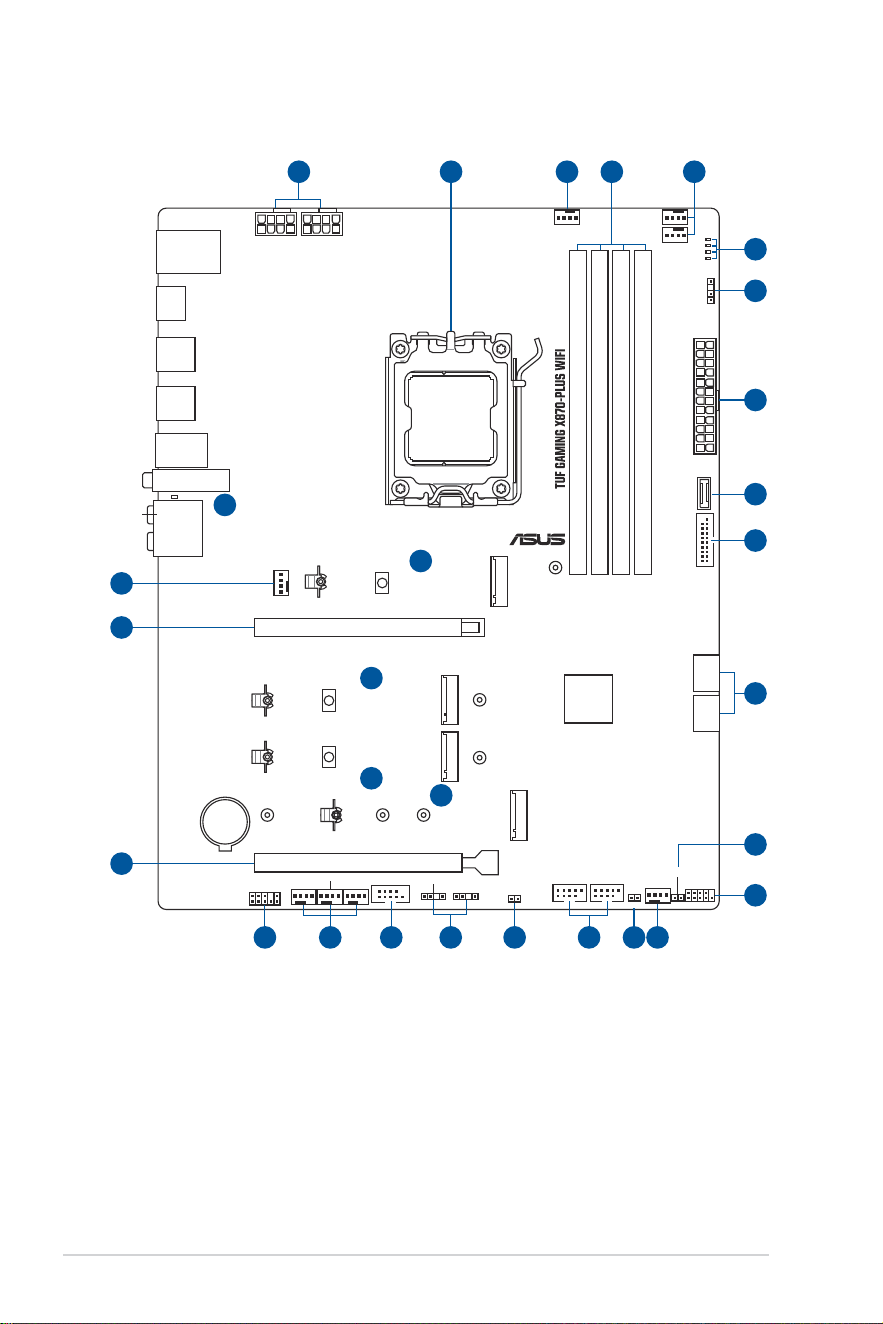
CPU_OPT
CPU_FAN
AIO_PUMP
CHA_FAN1 CHA_FAN3
CHA_FAN2
W_PUMP+
SATA6G_1SATA6G_2
COM
F_PANEL
F_AUDIO
ATX_PWR
U5G_1011
CHA_FAN4
AUDIO
2280
22110 2260
2280
2280
2280
2242
PCIEX16(G4)
PCIEX16(G5)
USB_1415USB_1617
ADD_GEN 2_3
ADD_GEN 2_2
T_SENSOR
CLRTC
CHASSIS
LAN_U10G_34
HDMI
U5G_E1234
U20G_C6
SOCKET AM5
CPU_12V_1 CPU_12V_2
AMD
X870
M.2_3(SOCKET3)
M.2_2(SOCKET3)
FLBK_LED
ADD_GEN 2_1
U40G_EC1
USB_5
U10G_8
U40G_EC2
M.2(WIFI)
BATTERY
CPU
DRAM
VGA
BOOT
DDR5 DIMM_B2
1st
(64bit, 288-pin module)
DDR5 DIMM_B1 (64bit, 288-pin module)
DDR5 DIMM_A2
1st
(64bit, 288-pin module)
DDR5 DIMM_A1 (64bit, 288-pin module)
BIOS_FLBK
M.2_4(SOCKET3)
M.2_1(SOCKET3)
9
7
16
12
8
5
11
18
6
19
6
6
6
14 1115 4 4
4
3
3
5
2
4 41
1017 13

17
Layout contents
1. CPU socket
2. DIMM slots
3. Expansion slots
4. Fan and Pump headers
5. Power connectors
6. M.2 slot
7. SATA 6Gb/s port
8. USB 20Gbps Type-C
®
Front Panel connector
9. USB 5Gbps header
10. USB 2.0 header
11. Addressable Gen2 header
12. Chassis Intrusion header
13. Clear CMOS header
14. COM Port header
15. Front Panel Audio header
16. Front Panel System header
17. Thermal Sensor header
18. Q-LEDs
19. BIOS FlashBack™ LED
18
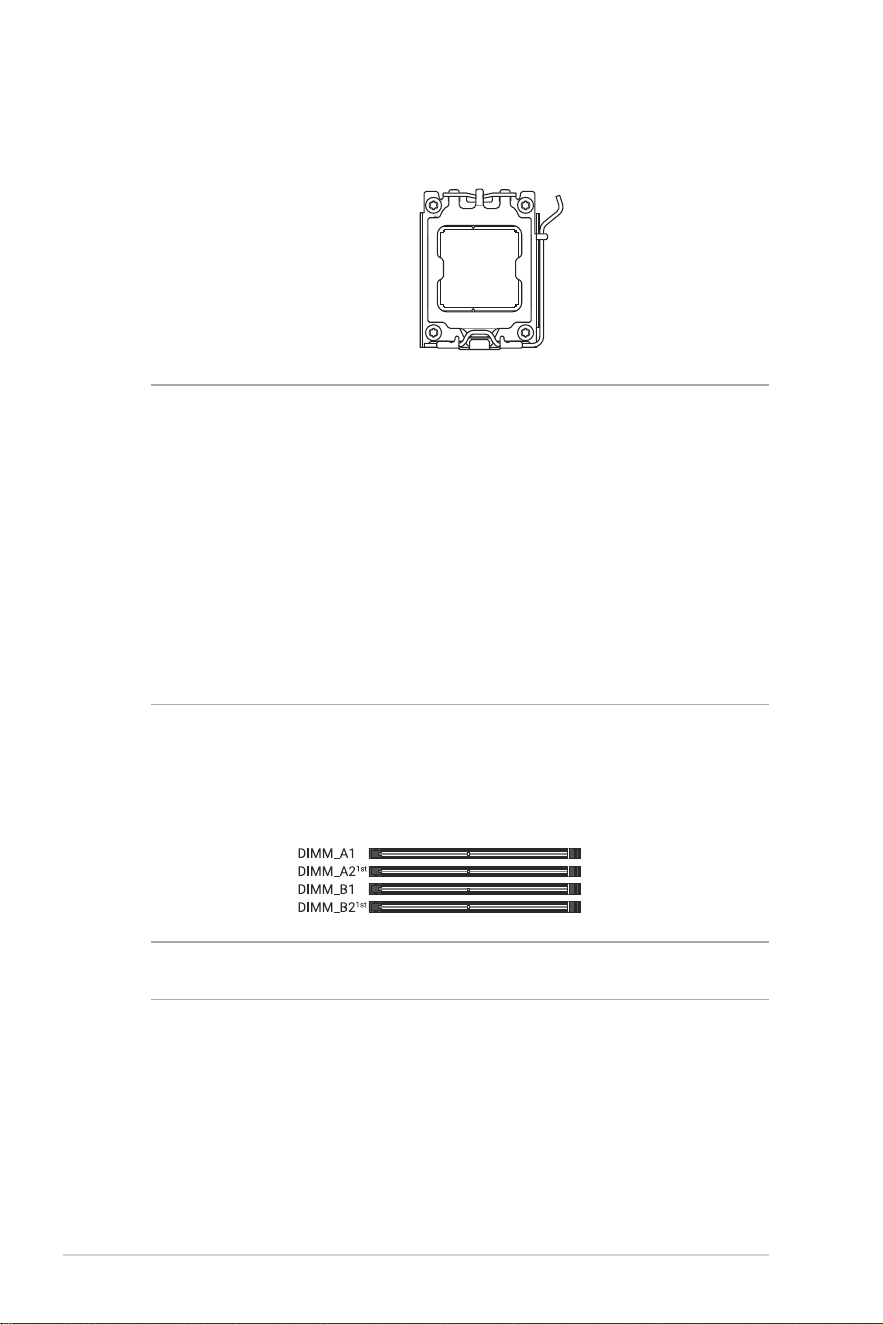
2. DIMM slots
The motherboard comes with Dual Inline Memory Modules (DIMM) slots designed for
DDR5 (Double Data Rate 5) memory modules.
CAUTION! A DDR5 memory module is notched differently from a DDR, DDR2, DDR3, or DDR4
module. DO NOT install a DDR, DDR2, DDR3, or DDR4 memory module to the DDR5 slot.
1. CPU socket
The motherboard comes with a Socket AM5 designed for AMD Ryzen™ 9000 & 8000 &
7000 Series Desktop Processors.
Socket AM5
CAUTION!
• The AM5 socket has a different pinout design. Ensure that you use a CPU designed for the
AM5 socket.
• The CPU fits in only one correct orientation. DO NOT force the CPU into the socket to prevent
bending the connectors on the socket and damaging the CPU.
• Ensure that all power cables are unplugged before installing the CPU.
• Upon purchase of the motherboard, ensure that the PnP cap is on the socket and the socket
contacts are not bent. Contact your retailer immediately if the PnP cap is missing, or if you see
any damage to the PnP cap/socket contacts/motherboard components. ASUS will shoulder the
cost of repair only if the damage is shipment/transit-related.
• Keep the cap after installing the motherboard. ASUS will process Return Merchandise
Authorization (RMA) requests only if the motherboard comes with the cap on the AM5 socket.
• The product warranty does not cover damage to the socket contacts resulting from incorrect
CPU installation/removal, or misplacement/loss/incorrect removal of the PnP cap.
19
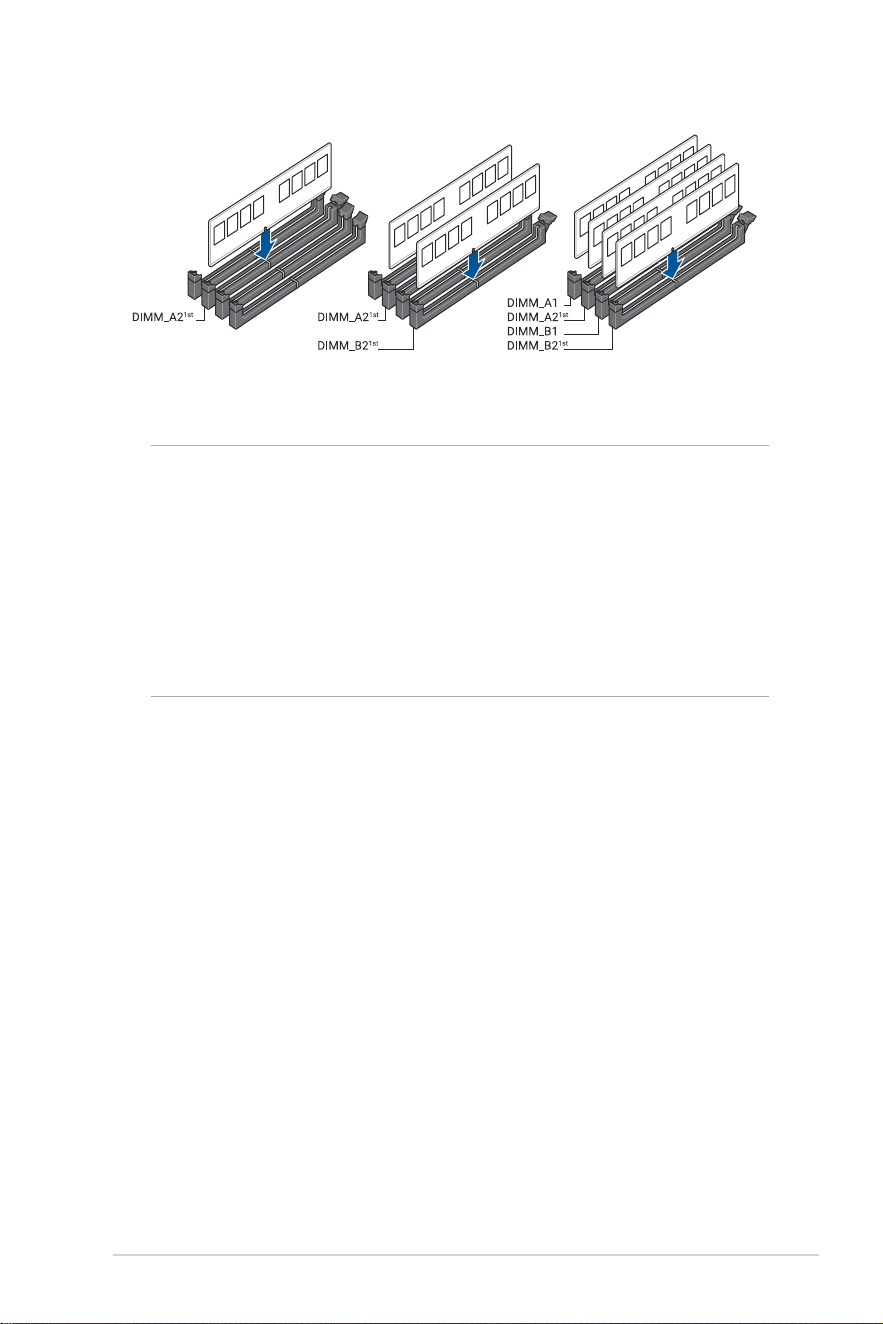
Recommended memory configurations
Memory configurations
You may install ECC or Non-ECC DDR5 DIMMs into the DIMM sockets.
NOTE:
• The default memory operation frequency is dependent on its Serial Presence Detect (SPD),
which is the standard way of accessing information from a memory module. Under the default
state, some memory modules for overclocking may operate at a lower frequency than the
vendor-marked value.
• For system stability, use a more efficient memory cooling system to support a full memory load
or overclocking condition.
• Always install the DIMMs with the same CAS Latency. For an optimum compatibility, we
recommend that you install memory modules of the same version or data code (D/C) from the
same vendor. Check with the vendor to get the correct memory modules.
• Visit the ASUS website for the latest QVL.
20
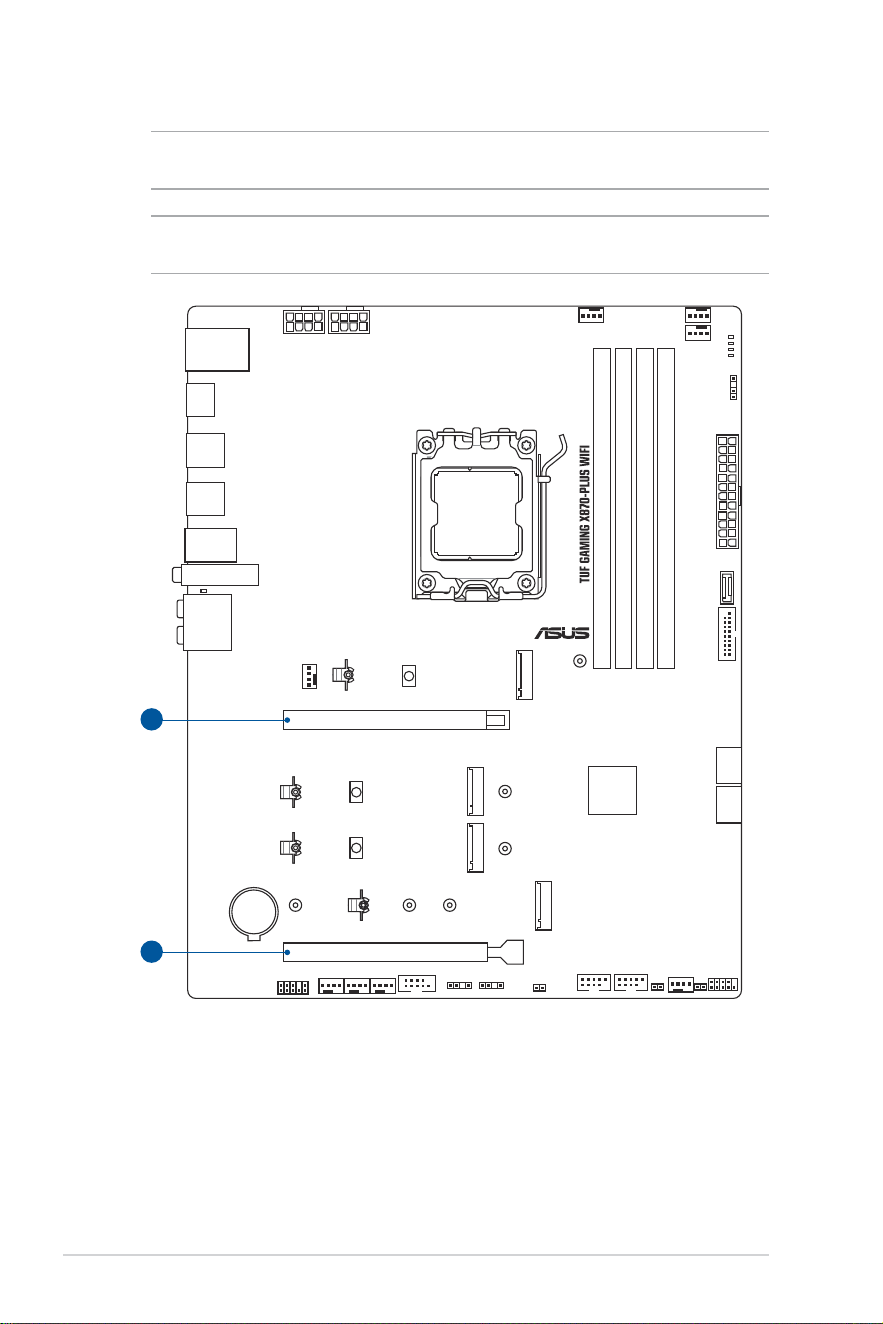
3. Expansion slots
CAUTION! Unplug the power cord before adding or removing expansion cards. Failure to do so
may cause you physical injury and damage motherboard components.
NOTE: To install a PCIe expansion card, please refer to the Motherboard Installation Guide on
the ASUS support site.
1
2
PCIEX16(G4)
PCIEX16(G5)
21
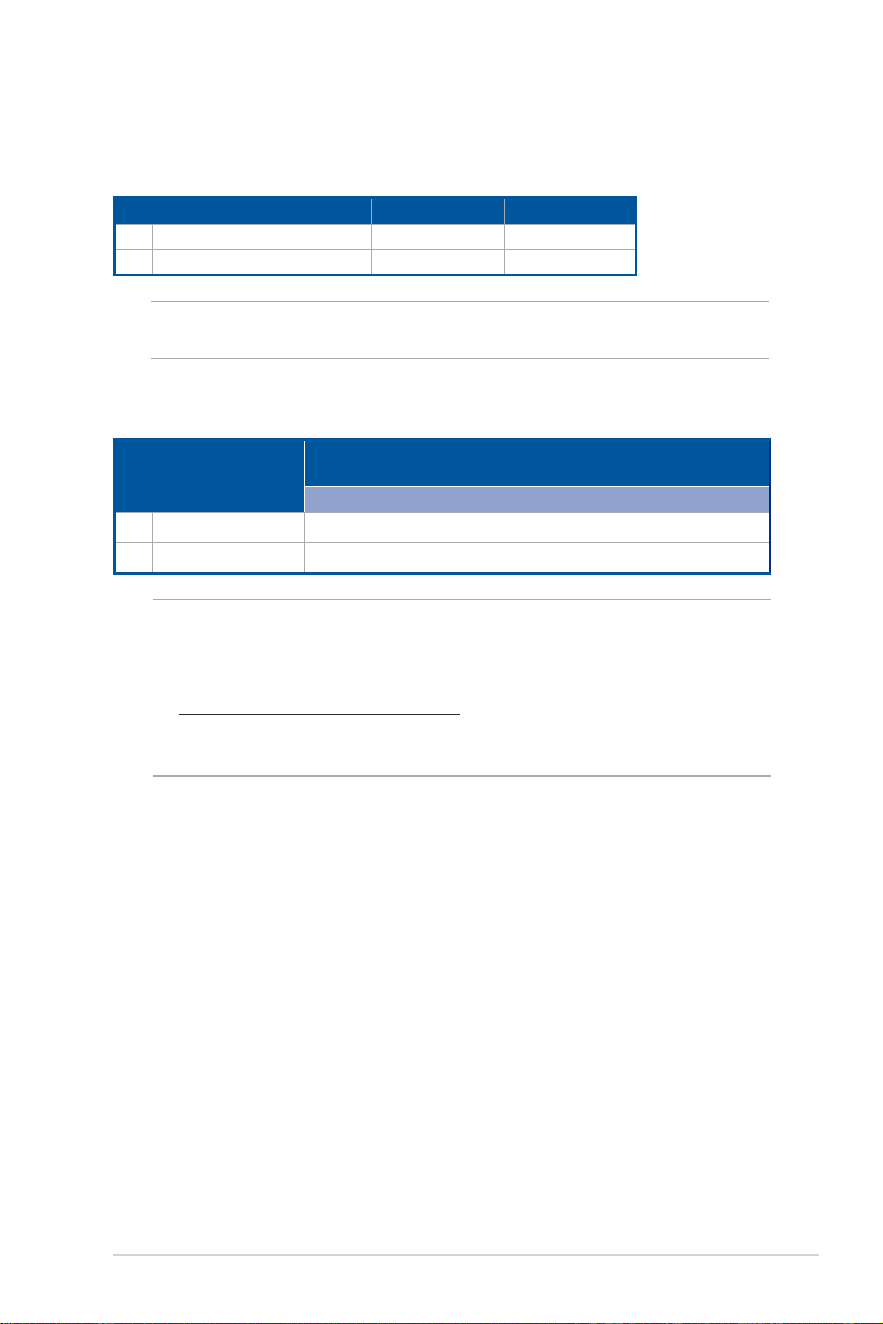
PCIe bifurcation & M.2 settings in PCIe x16 slots
Slot Description
PCIe bifurcation settings in PCIe x16 slots with different
Ryzen™ CPUs
AMD Ryzen™ 9000 & 7000 Series Desktop Processors
1 PCIEX16(G5) 4(x4+x4+x4+x4)
2 PCIEX16(G4) 1(x4)
Please refer to the following tables for the recommended VGA configuration and PCIe
bifurcation & M.2 settings configuration.
Recommended VGA configuration
Slot Description
Single VGA Dual VGA
1 PCIEX16(G5) x16 x16
2 PCIEX16(G4) - x4
IMPORTANT! Connect chassis fans to the chassis fan connectors when using multiple graphics
cards for better thermal environment.
NOTE:
• Additional PCIe bifurcation and M.2 settings for RAID function are also supported when a Hyper
M.2 X16 series card is installed.
• For more details on the PCIe bifurcation, you may visit the support site at
https://www.asus.com/support/FAQ/1037507/.
• Hyper M.2 X16 series card sold separately.
• Adjust the PCIe bifurcation under BIOS settings.
22
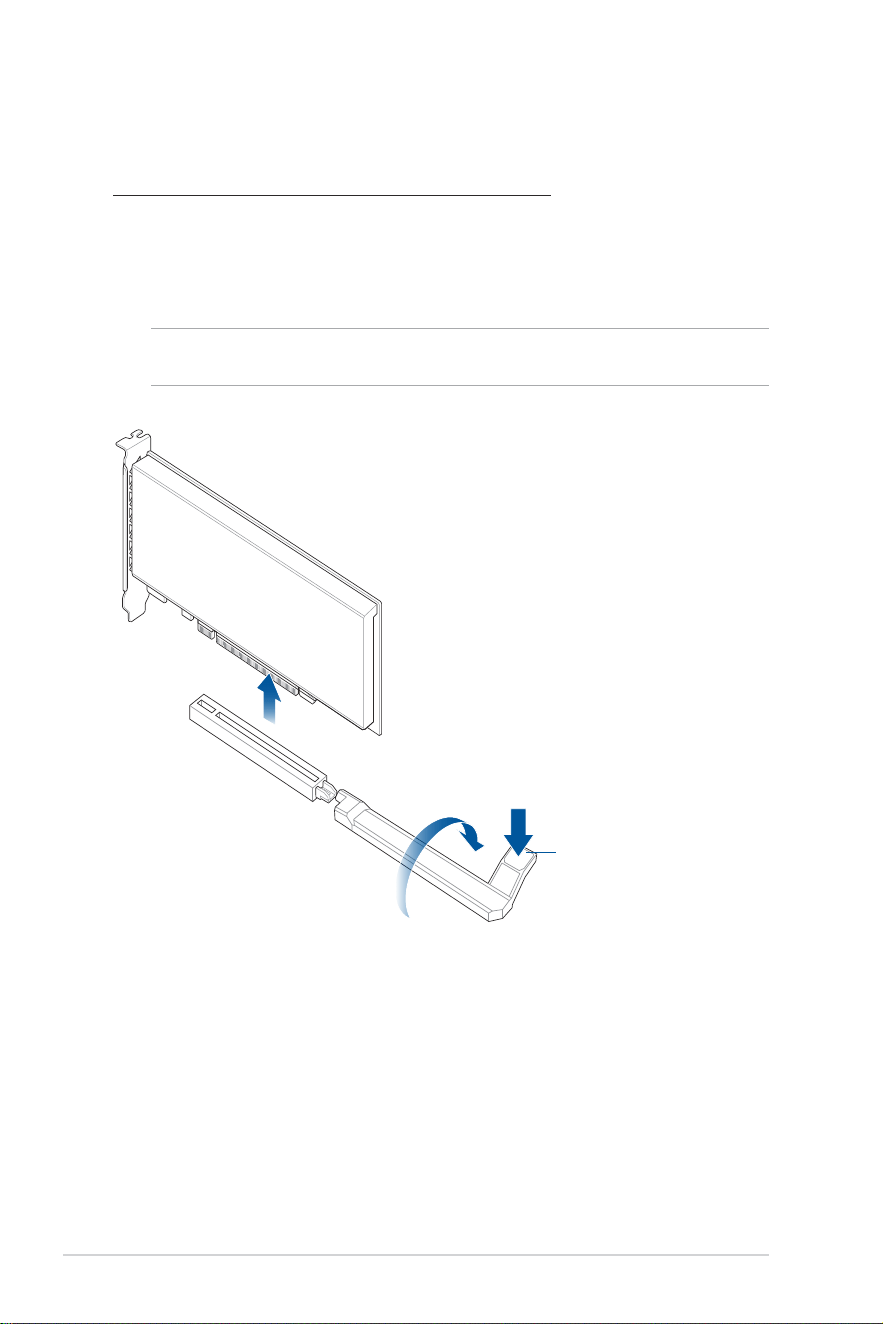
Using the PCIe Slot Q-Release
The PCIEX16(G5) slot comes with a comes with a PCIe Slot Q-Release button allowing you
to easily remove an expansion card installed to this PCIe slot.
To release an expansion card using the PCIe Slot Q-Release:
Press the PCIe Slot Q-Release button until a click is heard, then stop pressing the PCIe Slot
Q-Release button. If the PCIe Slot Q-Release button does not bounce back after you have
stopped pressing, the expansion card has been successfully released and can be removed,
lift and remove the expansion card. The PCIe Slot Q-Release button should bounce back up
after the expansion card has been removed.
NOTE: The illustration below is for reference only. The motherboard and Q-Release PCIe slot may
differ between models, but the steps for using the Q-Release PCIe slot remain the same.
M.2(SOCKET3)_4
M.2(SOCKET3)_3
M.2(SOCKET3)_2
M.2(SOCKET3)_1
PCIe Slot Q-Release
button
23
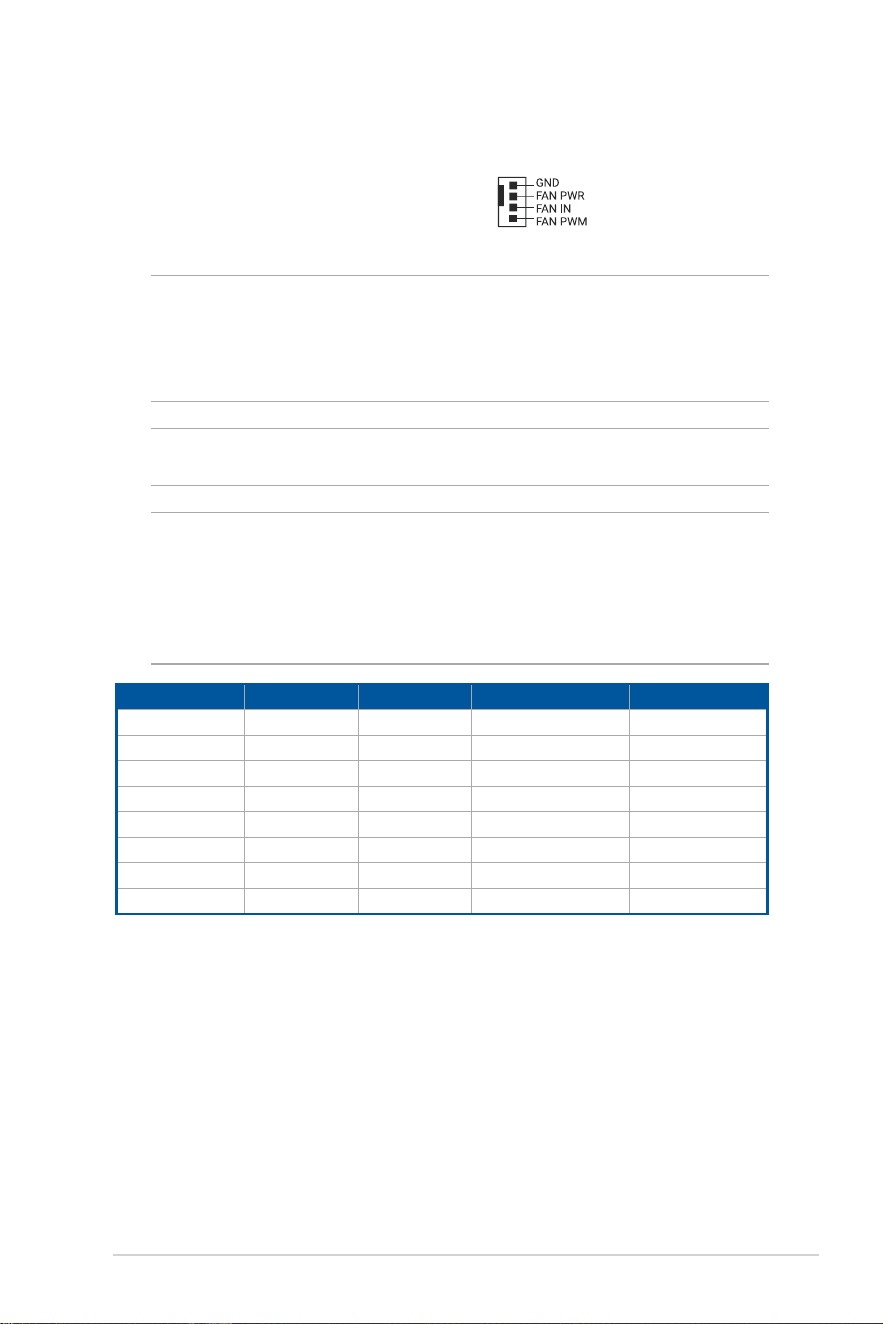
4. Fan and Pump headers
The Fan and Pump headers allow you to connect fans or pumps to cool the system.
CPU_FAN
CPU_OPT
AIO_PUMP
W_PUMP+
CHA_FAN1
CHA_FAN2
CHA_FAN3
CHA_FAN4
CAUTION!
• DO NOT forget to connect the fan cables to the fan headers. Insufficient air flow inside the
system may damage the motherboard components. These are not jumpers! Do not place
jumper caps on the fan headers!
• Ensure the cable is fully inserted into the header.
IMPORTANT! For water cooling kits, connect the pump connector to the W_PUMP+ or AIO_
PUMP header.
NOTE:
• When connecting a single CPU fan, you may connect it to either the CPU_FAN or CPU_OPT
header.
• When connecting two CPU fans, ensure to connect the fans to the CPU_FAN and the CPU_
OPT header, and make sure both fans are the same brand and model.
• W_PUMP+ function support depends on water cooling device.
Header Max. Current Max. Power Default Speed Shared Control
CPU_FAN 1A 12W Q-Fan Controlled A
CPU_OPT 1A 12W Q-Fan Controlled A
CHA_FAN1 1A 12W Q-Fan Controlled -
CHA_FAN2 1A 12W Q-Fan Controlled -
CHA_FAN3 1A 12W Q-Fan Controlled -
CHA_FAN4 1A 12W Q-Fan Controlled -
AIO_PUMP 1A 12W Full-Speed -
W_PUMP+ 3A 36W Full Speed -
24
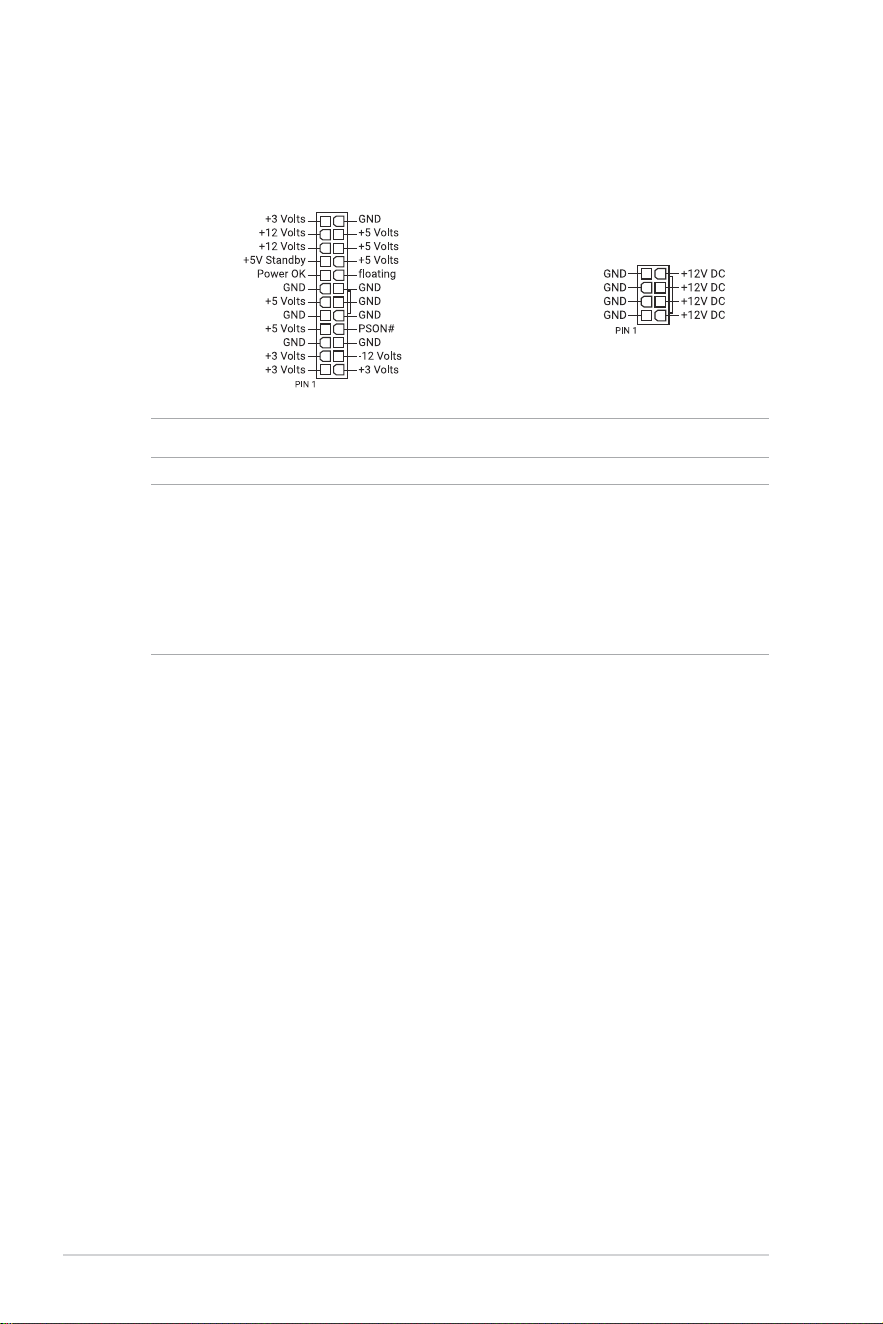
5. Power connectors
These Power connectors allow you to connect your motherboard to a power supply.
The power supply plugs are designed to fit in only one orientation, find the proper
orientation and push down firmly until the power supply plugs are fully inserted.
ATX_PWR
CPU_12V_1
CPU_12V_2
CAUTION! Ensure to connect the 8-pin power plug, or connect both the 8-pin power plugs.
NOTE:
• We recommend that you use a PSU with a higher power output when configuring a system with
more power-consuming devices. The system may become unstable or may not boot up if the
power is inadequate.
• If you want to use two or more high-end PCI Express x16 cards, we recommend using a PSU
with 900W~1200W power or above to ensure the system stability.
• PSU input: AC 100~240V, 6A/3A, 50/60Hz.
25
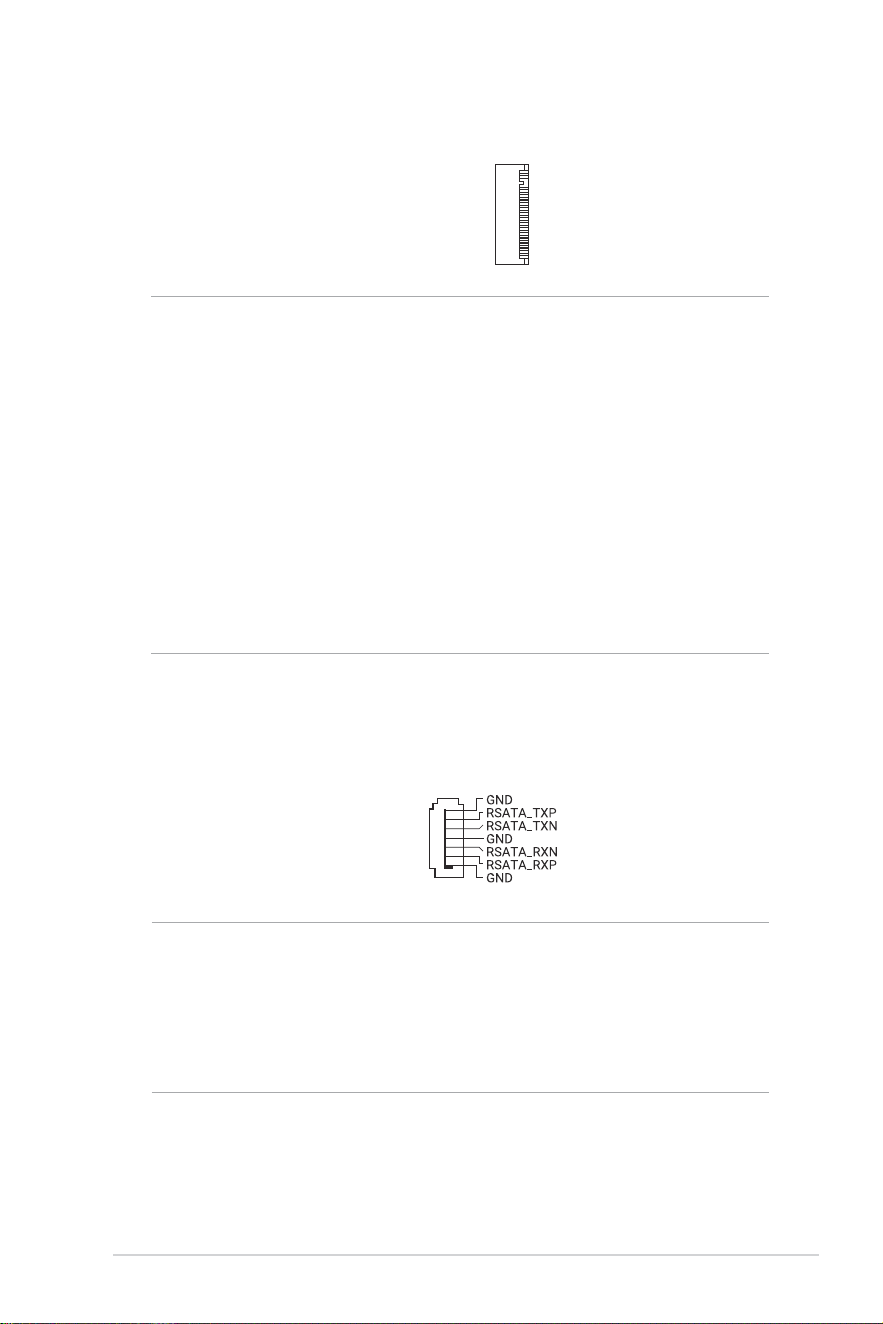
6. M.2 slot
The M.2 slot allows you to install M.2 devices such as M.2 SSD modules.
M.2_1(SOCKET3)
M.2_2(SOCKET3)
M.2_3(SOCKET3)
M.2_4(SOCKET3)
NOTE:
• AMD Ryzen™ 9000 & 7000 Series Desktop Processors:
- M.2_1 slot (Key M), type 2280 (supports PCIe 5.0 x4 mode)
- M.2_2 slot (Key M), type 2280 (supports PCIe 5.0 x4 mode)
• AMD Ryzen™ 8000 Series Desktop Processors:
- M.2_1 slot (Key M), type 2280 (supports PCIe 4.0 x4 mode)
• AMD X870 Chipset:
- M.2_3 slot (Key M), type 2280 (supports PCIe 4.0 x4 mode)
- M.2_4 slot (Key M), type 2242/2260/2280/22110 (supports PCIe 4.0 x4 mode)
• PCIEX16(G5) will run x8 when M.2_2 is enabled.
• M.2_2 will not work when an 8000 Series Desktop Processor is installed.
• PCIEX16(G4) will be disabled when M.2_4 is enabled.
• AMD RAIDXpert2 Technology supports both PCIe RAID 0/1/5/10 and SATA RAID 0/1. RAID 5
Function is only supported by AMD Ryzen™ 9000 series CPU.
7. SATA 6Gb/s port
The SATA 6Gb/s port allows you to connect SATA devices such as optical disc drives
and hard disk drives via a SATA cable.
SATA6G_1
SATA6G_2
NOTE:
• If you installed SATA storage devices to the SATA6G_1-2 ports, you can create a RAID 0 and
1 configuration through the onboard AMD X870 chipset.
• To install a SATA device , please refer to the Motherboard Installation Guide on the ASUS
support site.
• Before creating a RAID set, refer to the RAID Configuration Guide. You can download the
RAID Configuration Guide from the ASUS website.
26
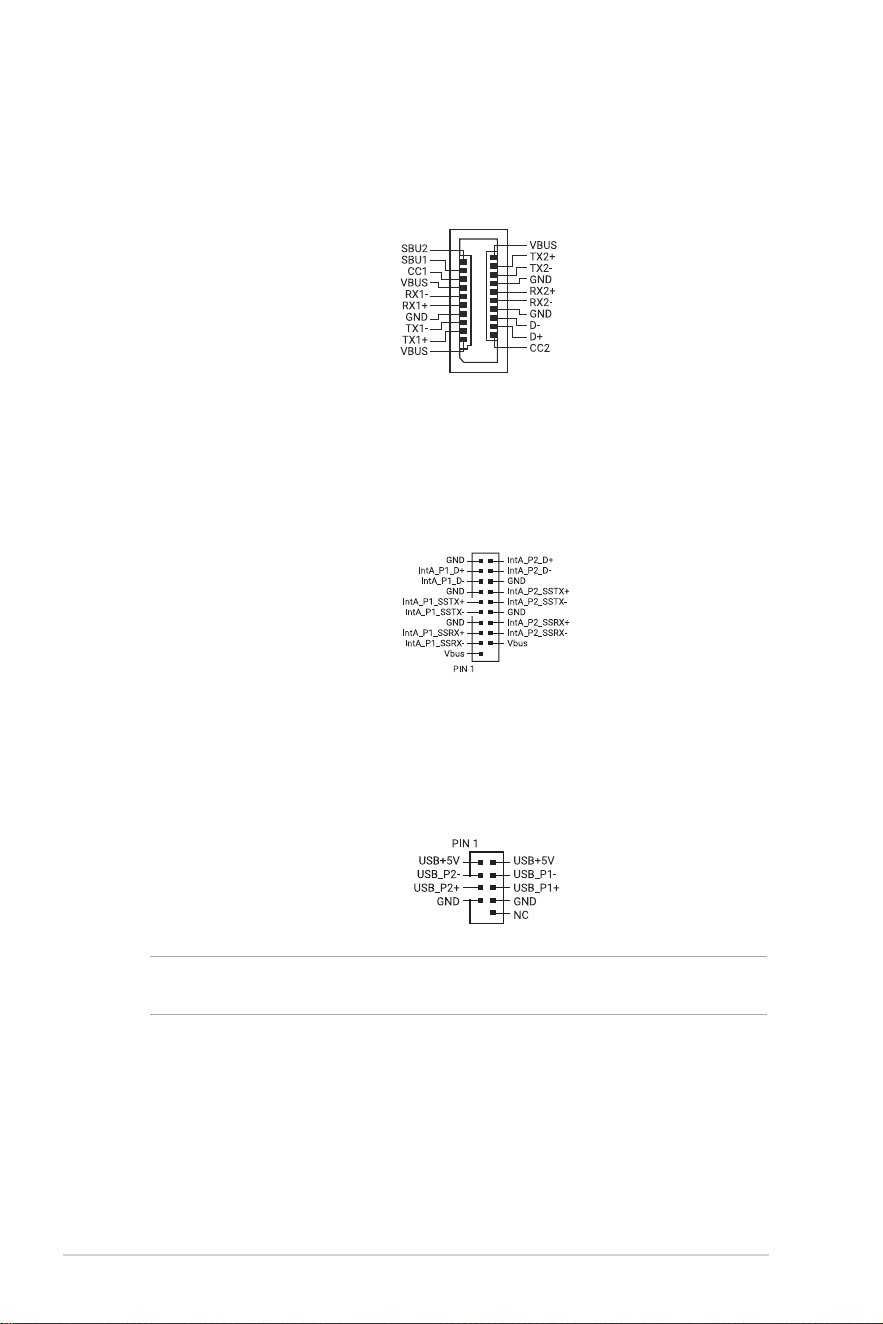
9. USB 5Gbps header
The USB 5Gbps header allows you to connect a USB 5Gbps module for additional
USB 5Gbps ports. The USB 5Gbps header provides data transfer speeds of up to 5
Gb/s.
U5G_1011
8. USB 20Gbps Type-C
®
Front Panel connector
The USB 20Gbps Type-C
®
connector allows you to connect a USB 20Gbps Type-C
®
module for additional USB 20Gbps ports on the front panel. The USB 20Gbps
Type-C
®
connector provides data transfer speeds of up to 20 Gb/s and PD 3.0 support
for up to 30W fast charging technology.
U20G_C6
10. USB 2.0 header
The USB 2.0 header allows you to connect a USB module for additional USB 2.0
ports. The USB 2.0 header provides data transfer speeds of up to 480 Mb/s.
USB_1415
USB_1617
CAUTION! DO NOT connect a 1394 cable to the USB connectors. Doing so will damage the
motherboard!
27
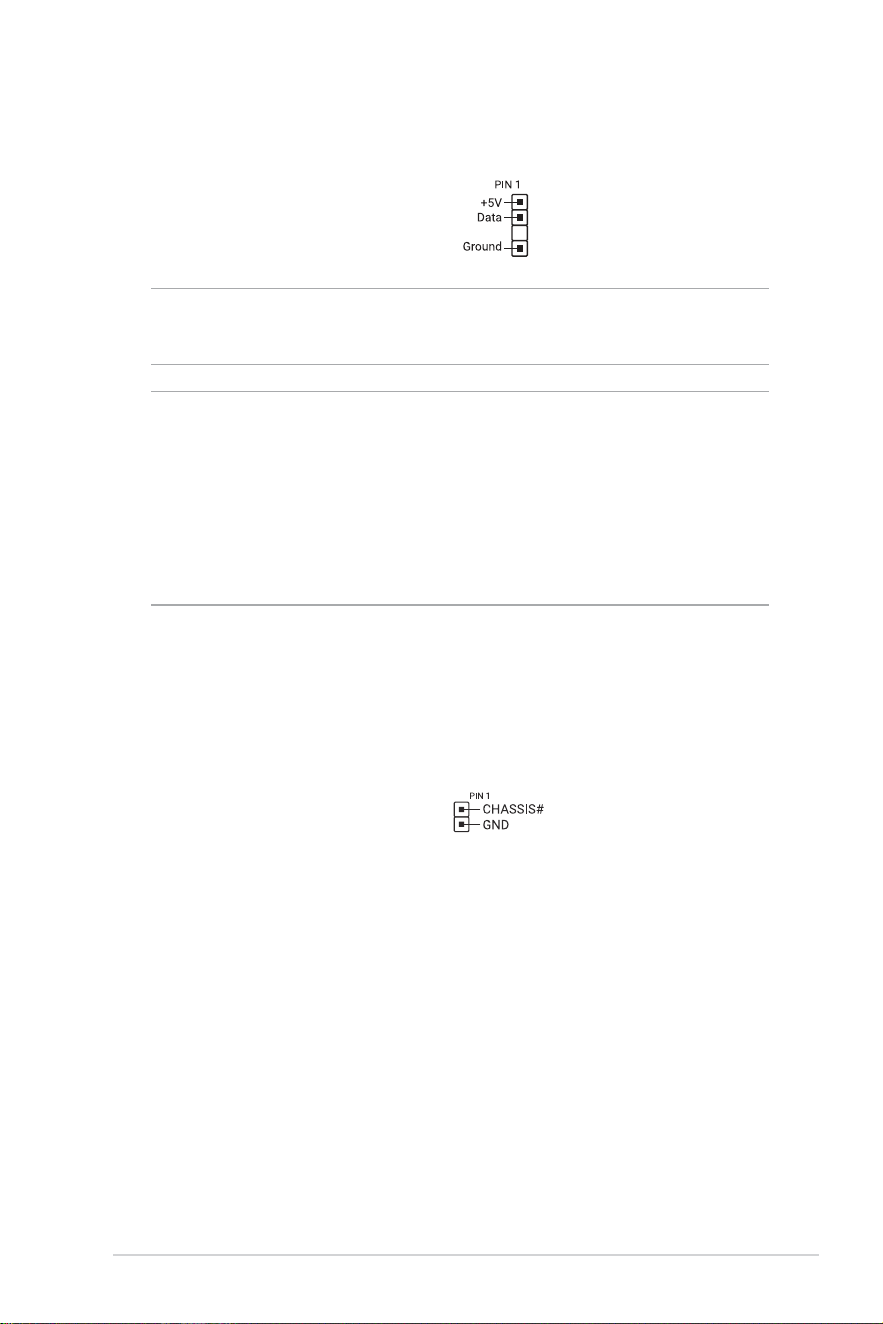
11. Addressable Gen2 header
The Addressable Gen2 header allows you to connect individually addressable RGB
(ARGB) WS2812B LED strips or WS2812B based LED strips.
ADD GEN2_1
ADD GEN2_2
ADD GEN2_3
CAUTION! Before you install or remove any component, ensure that the power supply is switched
off or the power cord is detached from the power supply. Failure to do so may cause severe
damage to the motherboard, peripherals, or components.
NOTE:
• The Addressable Gen2 header supports addressable RGB LED strips (5V/Data/Ground), with
a maximum power rating of 3A (5V). Additionally, the addressable header on this board can
support up to 120 LEDs per header in Gen1 mode, or a combined maximum of 500 LEDs in
Gen2 mode.
• Actual lighting and color will vary with LED strip.
• If your LED strip does not light up, check if the addressable RGB LED strip is connected in the
correct orientation, and the 5V connector is aligned with the 5V header on the motherboard.
• The addressable RGB LED strip will only light up when the system is powered on.
12. Chassis Intrusion header
The Chassis Intrusion header allows you to connect a intrusion sensor or microswitch
for the chassis intrusion detection feature. When you remove any chassis component,
the sensor or microswitch triggers and sends a high level signal and records a chassis
intrusion event.
CHASSIS
28
13. Clear CMOS header
The Clear CMOS header allows you to clear the Real Time Clock (RTC) RAM in
the CMOS, which contains the date, time, system passwords, and system setup
parameters.
CHASSIS#
GND
CLRTC
To erase the RTC RAM:
1. Turn OFF the computer and unplug the power cord.
2. Short-circuit pin 1-2 with a metal object or jumper cap for about 5-10 seconds.
3. Plug the power cord and turn ON the computer.
4. Hold down the <Del> key during the boot process and enter BIOS setup to re-
enter data.
CAUTION! DO NOT short-circuit the pins except when clearing the RTC RAM. Short-circuiting or
placing a jumper cap will cause system boot failure!
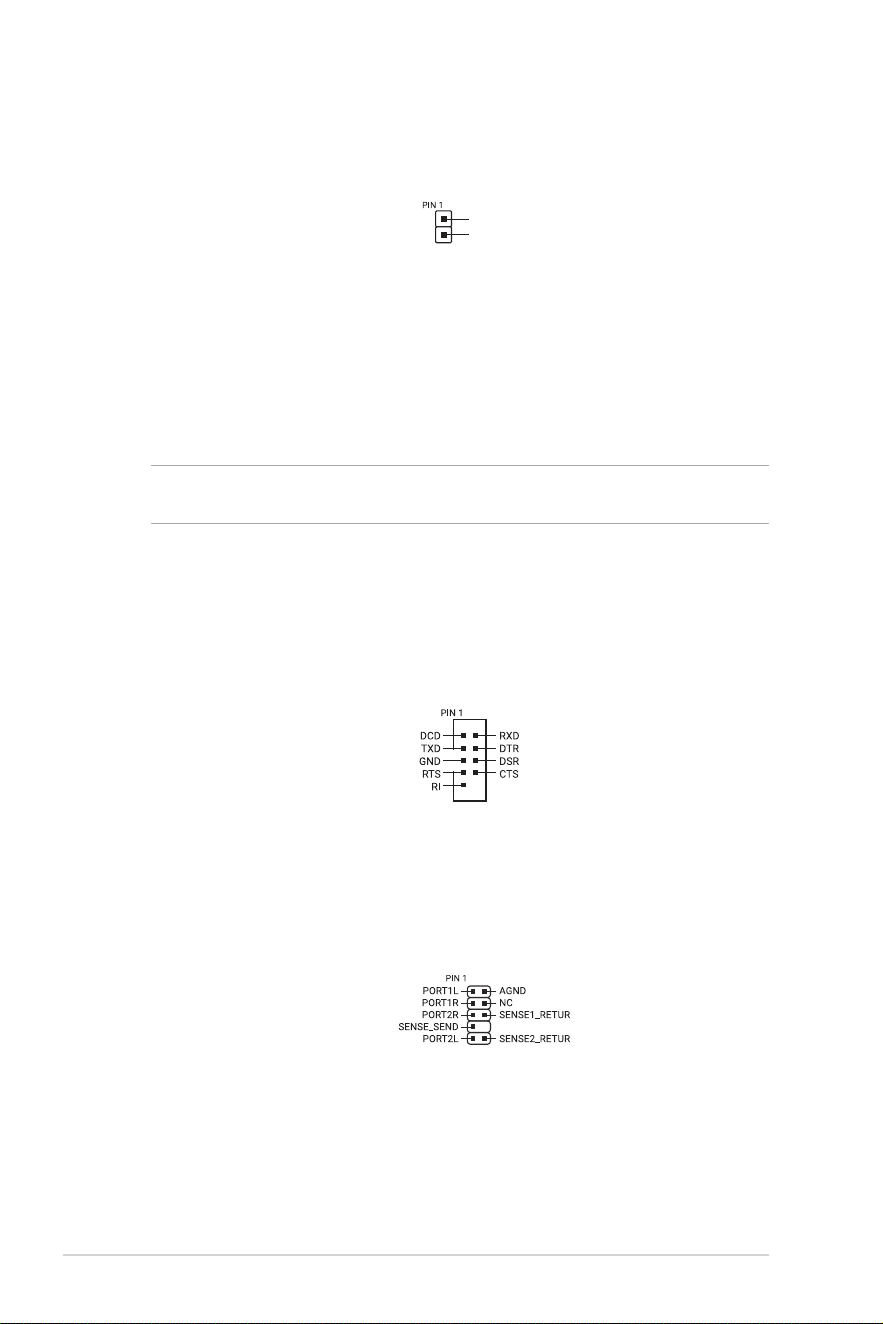
14. COM Port connector
The COM (Serial) Port connector allows you to connect a COM port module. Connect
the COM port module cable to this connector, then install the module to a slot opening
on the system chassis.
COM
15. Front Panel Audio header
The Front Panel Audio header is for a chassis-mounted front panel audio I/O module
that supports HD Audio. Connect one end of the front panel audio I/O module cable to
this header.
F_AUDIO
29
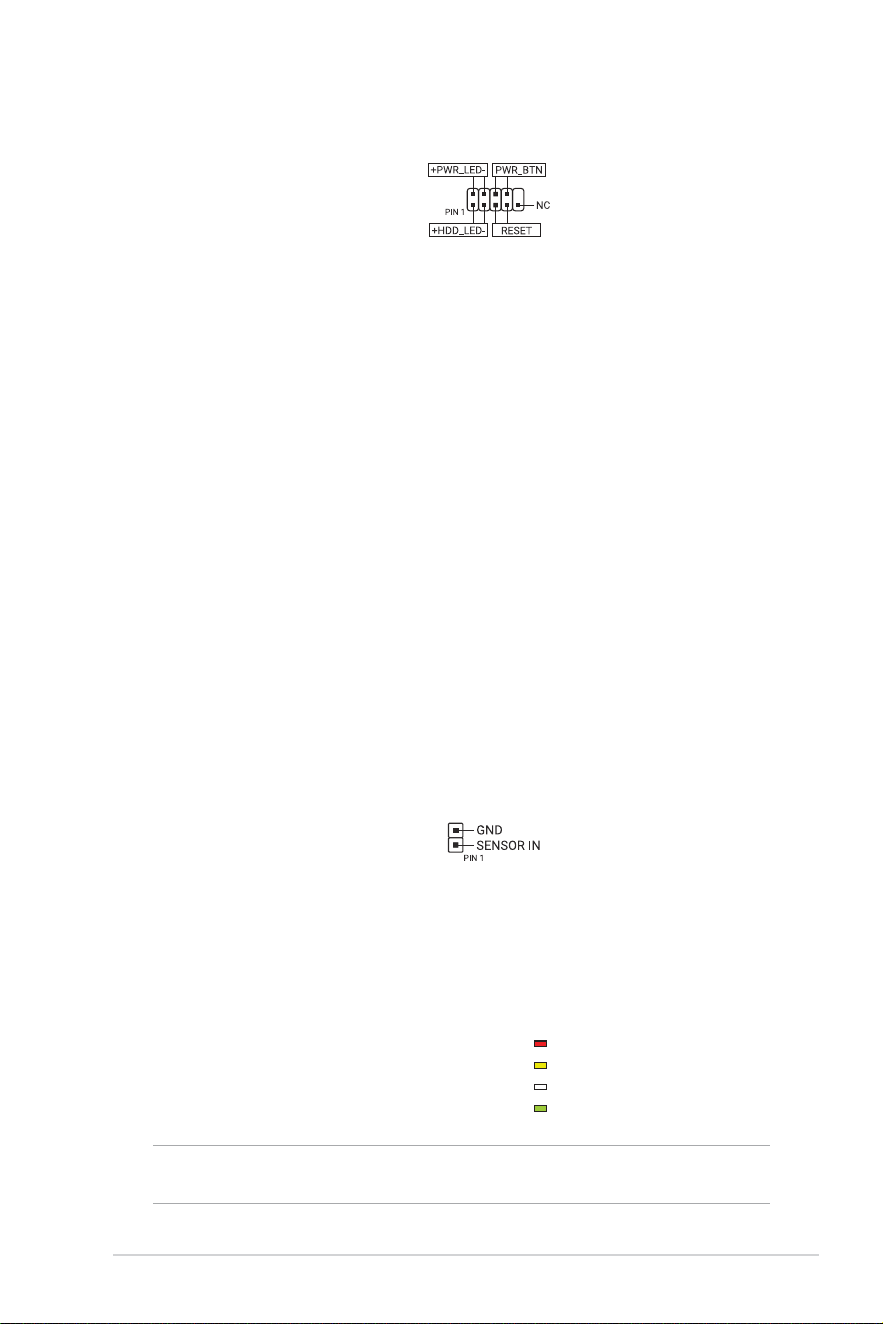
16. System Panel header
The System Panel header supports several chassis-mounted functions.
F_PANEL
• System Power LED header (+PWR_LED-)
The 2-pin header allows you to connect the System Power LED. The System Power
LED lights up when the system is connected to a power source, or when you turn on
the system power, and blinks when the system is in sleep mode.
• Storage Device Activity LED header (+HDD_LED-)
The 2-pin header allows you to connect the Storage Device Activity LED. The Storage
Device Activity LED lights up or blinks when data is read from or written to the storage
device or storage device add-on card.
• Power Button/Soft-off Button header (PWR_BTN)
The 3-1 pin header allows you to connect the system power button. Press the
power button to power up the system, or put the system into sleep or soft-off mode
(depending on the operating system settings).
• Reset button header (RESET)
The 2-pin header allows you to connect the chassis-mounted reset button. Press the
reset button to reboot the system.
17. Thermal Sensor header
The Thermal Sensor header allows you to connect a sensor to monitor the
temperature of the devices and the critical components inside the motherboard.
Connect the thermal sensor and place it on the device or the motherboard’s
component to detect its temperature.
T_SENSOR
18. Q-LEDs
The Q-LEDs check key components (CPU, DRAM, VGA, and booting devices) during
the motherboard booting process. If an error is found, the critical component’s LED
stays lit up until the problem is solved.
CPU (RED)
DRAM (YELLOW)
VGA (WHITE)
BOOT (GREEN)
NOTE: The Q-LEDs provide the most probable cause of an error code as a starting point for
troubleshooting. The actual cause may vary from case to case.

30
19. BIOS FlashBack™ LED
The BIOS FlashBack™ LED lights up or blinks to indicate the status of the BIOS
FlashBack™.
FLBK_LED1
NOTE: Refer to the BIOS FlashBack™ section for more information on using the BIOS
FlashBack™ feature.
31
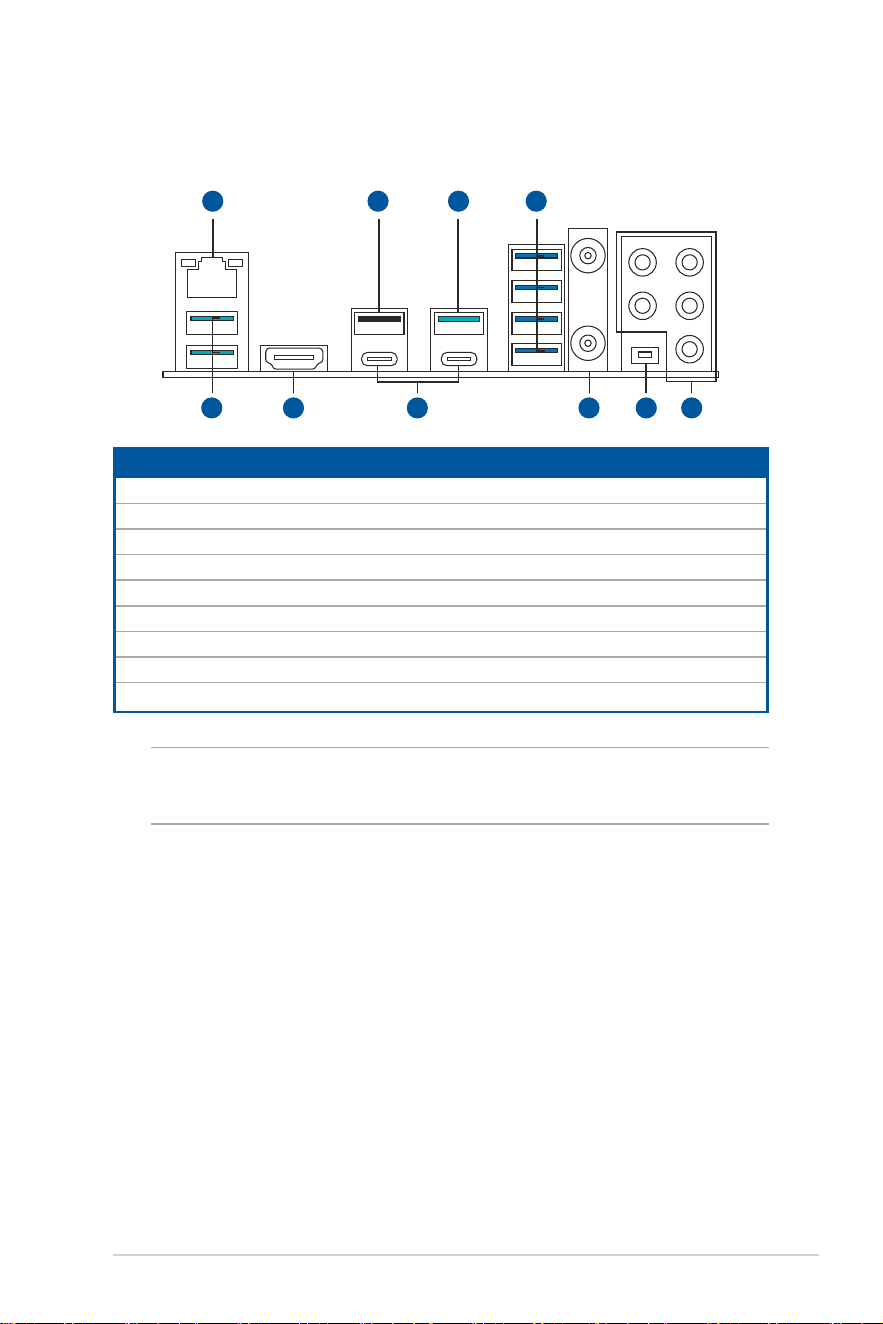
1.3 Motherboard rear and audio connections
1.3.1 Rear I/O connection
Rear panel connectors
1. Realtek 2.5Gb Ethernet port*
2. USB 2.0 port 5
3. USB 10Gbps (Tea blue) Type-A ports 3, 4, 8
4. USB 5Gbps (Blue) Type-A ports E1, E2, E3, E4
5. HDMI™ port
6. USB4
®
(40Gbps) ports EC1,EC2
7. Wi-Fi module
8. BIOS FlashBack™ button
9. Audio jacks**
* and ** : Refer to the tables under LAN port LEDs, and Audio I/O connections sections.
NOTE: We strongly recommend that you connect your devices to ports with matching data transfer
rate. For example connecting your USB 5Gbps devices to USB 5Gbps ports for faster and better
performance for your devices.
3 5 6 9
21
8
3 4
7
32
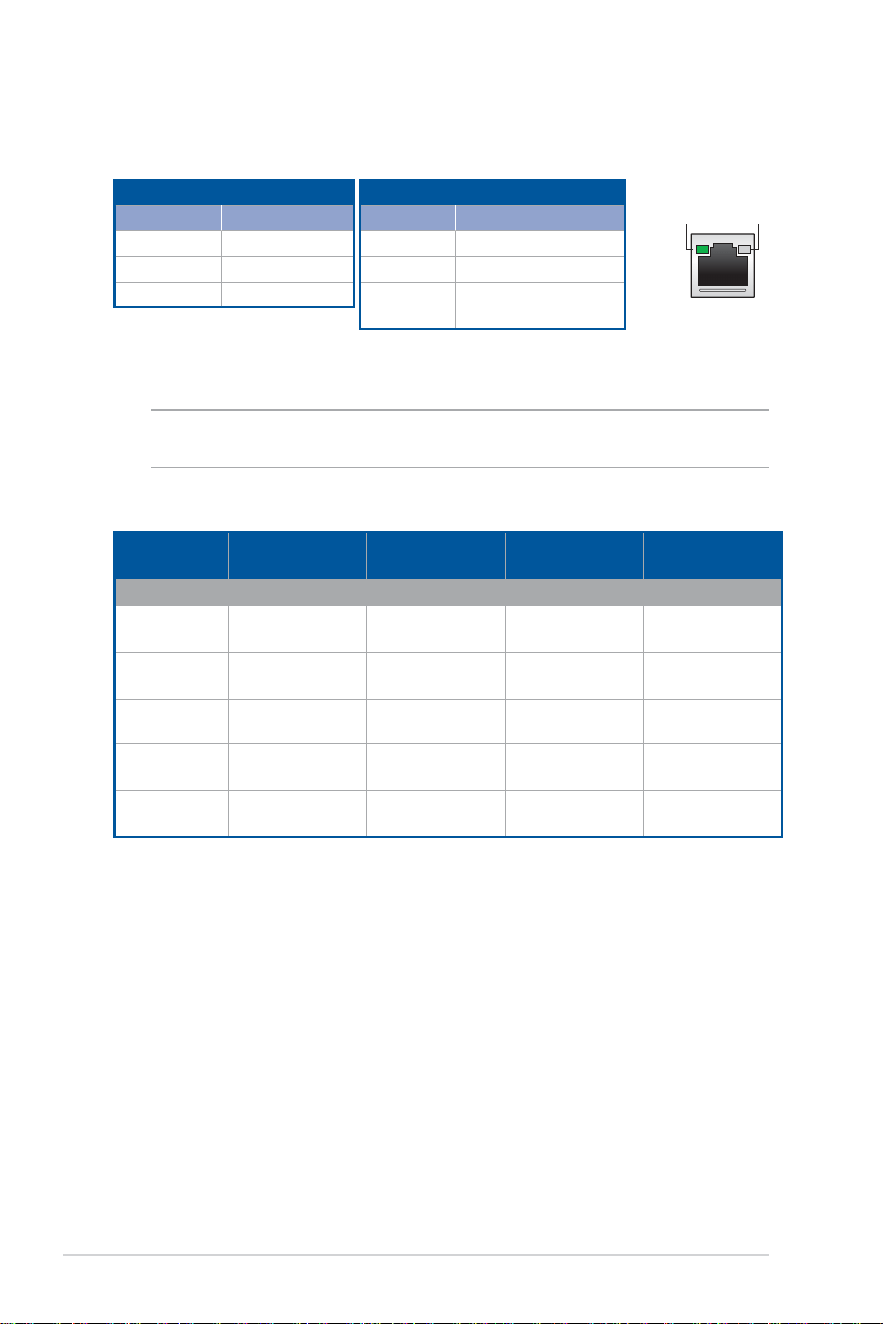
ACT/LINK
LED
SPEED
LED
LAN port
1.3.2 LAN port LEDs
Realtek 2.5Gb Ethernet port LED indications
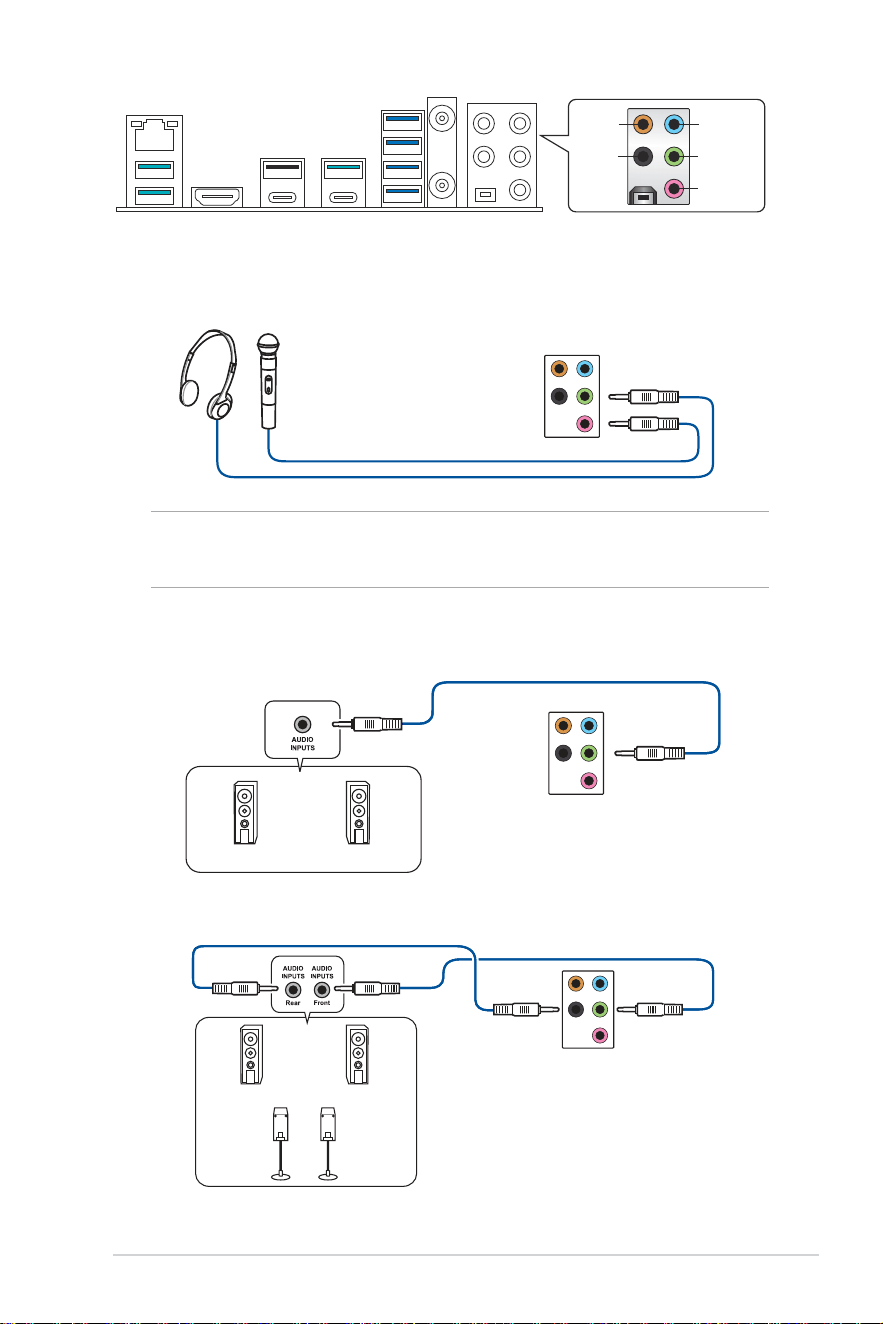
1.3.3 Audio I/O connections
NOTE: The illustrations for this section are for reference only. The WiFi module is only available
on selected models.
Speed LED
Status Description
OFF No link
GREEN 2.5 Gbps connection
ORANGE
1 Gbps / 100 Mbps /
10 Mbps connection
Activity Link LED
Status Description
OFF No link
GREEN Linked
BLINKING Data activity
Audio 2, 4, 5.1 or 7.1-channel configuration
Port 2-channel 4-channel 5.1-channel 7.1-channel
Rear panel
LINE IN
- - - Side Speaker
Out
LINE OUT
Front Speaker
Out
Front Speaker
Out
Front Speaker
Out
Front Speaker
Out
MIC IN
- - - -
REAR
- Rear Speaker
Out
Rear Speaker
Out
Rear Speaker
Out
C/SUB
- - Center/
Subwoofer
Center/
Subwoofer
33
C/SUB
REAR
LINE IN
LINE OUT
MIC OUT
Connect to Headphone and Mic
Connect to 2-channel Speakers
Connect to 4-channel Speakers
NOTE: The LINE OUT port on the rear panel does not support spatial audio. If you wish to use
spatial audio, make sure to connect your audio output device to the audio jack on the front panel of
your chassis or use a USB interface audio device.
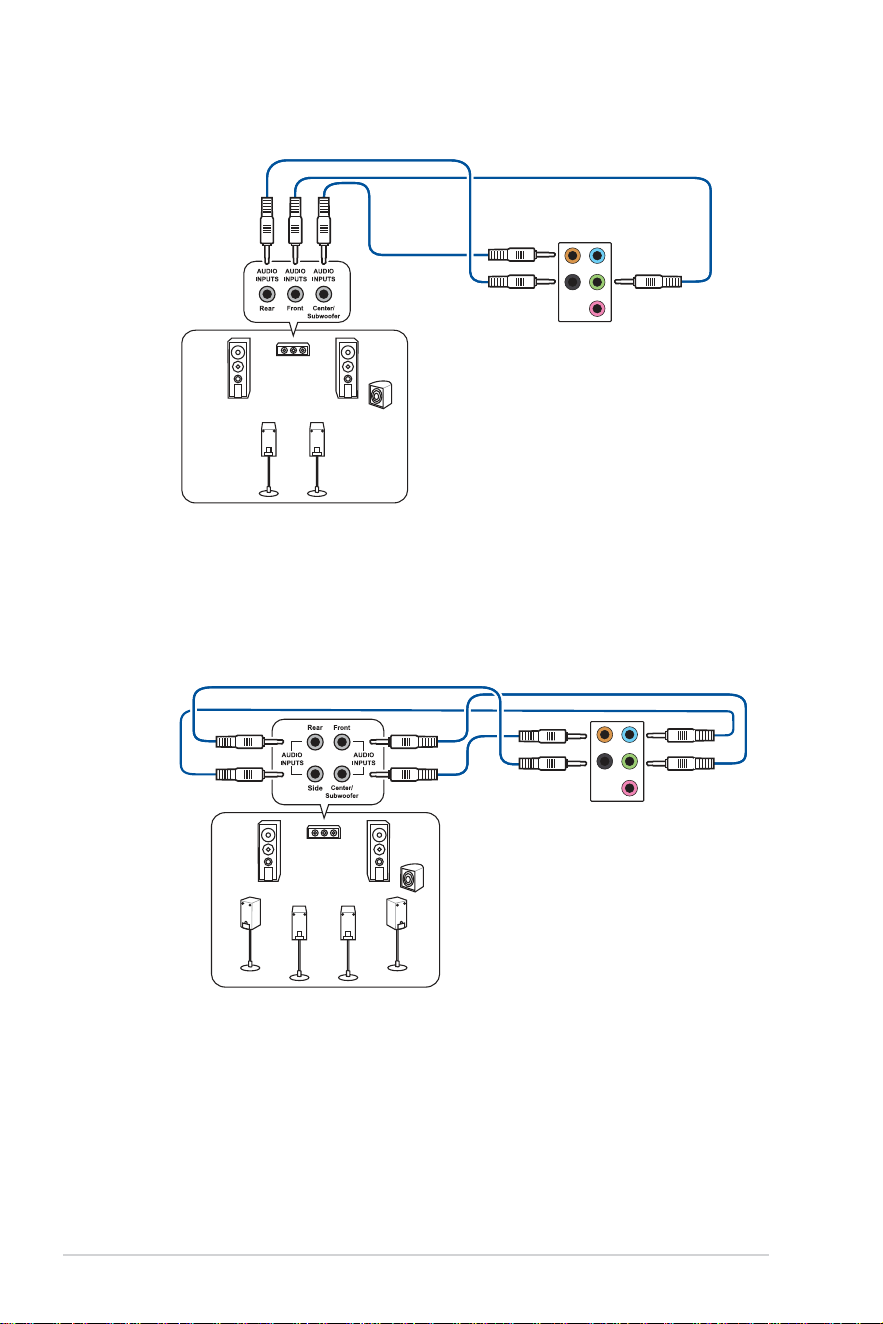
34
Connect to 5.1-channel Speakers
Connect to 7.1-channel Speakers
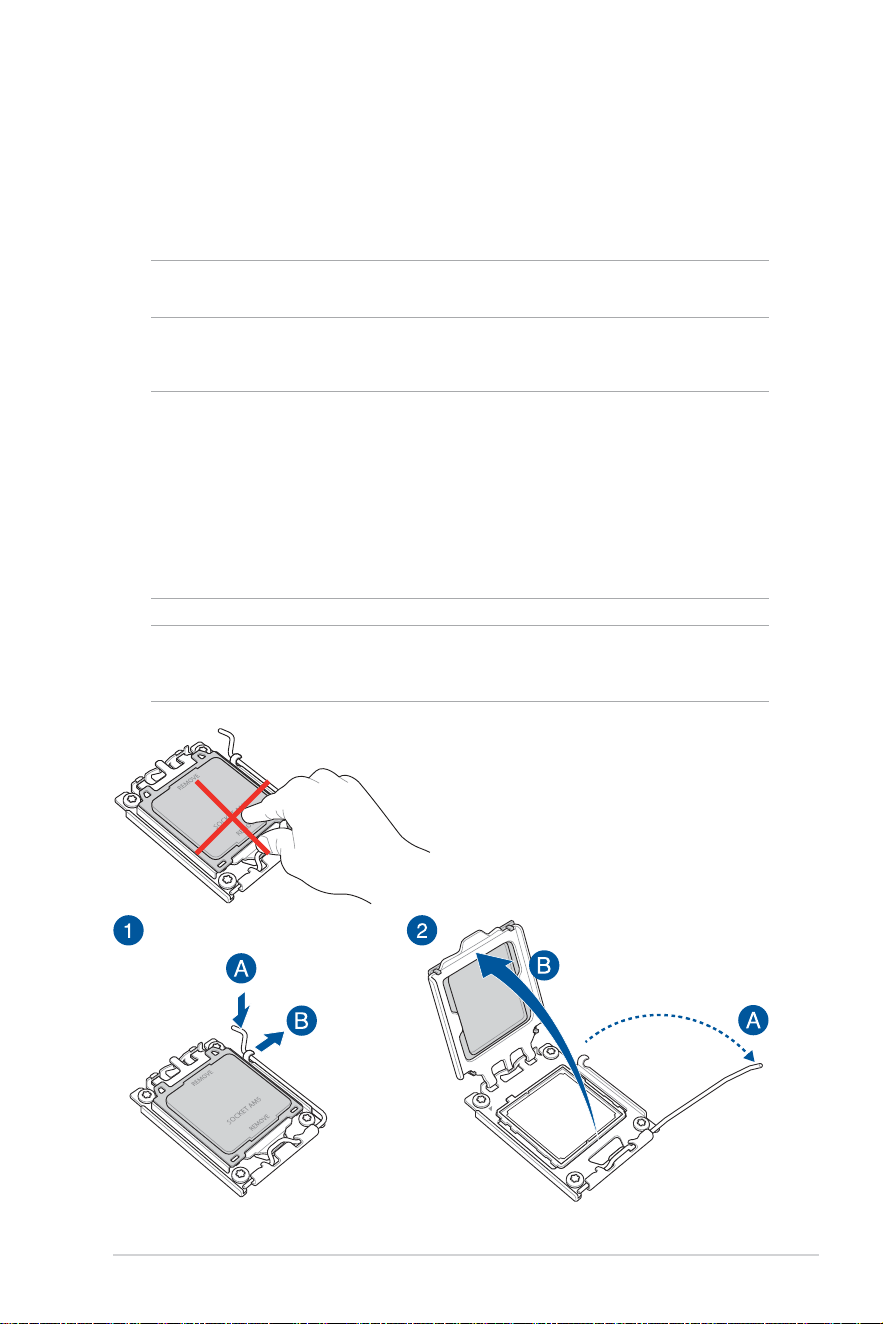
35
Basic Setup
Chapter 2: Basic Setup
NOTE: The installation diagrams in this section are for reference only. The motherboard layout
may vary with models, but the installation steps are the same for all models.
2.1 CPU installation
CAUTION!
• Ensure that you use a CPU designed for the AM5 socket. The CPU fits in only one correct
orientation. DO NOT force the CPU into the socket to prevent bending the pins and damaging
the CPU
• Ensure that all power cables are unplugged before installing the CPU.
• Upon purchase of the motherboard, ensure that the PnP cap is on the socket and the socket
contacts are not bent. Contact your retailer immediately if the PnP cap is missing, or if you see
any damage to the PnP cap/socket contacts/motherboard components. ASUS will shoulder the
cost of repair only if the damage is shipment/transit-related.
IMPORTANT! Install a heatsink or AIO cooler after installing the CPU. Please refer to the
Motherboard Installation Guide on the ASUS support site, or to the user manual of the heatsink/
AIO cooler for steps on installing the heatsink/AIO cooler.
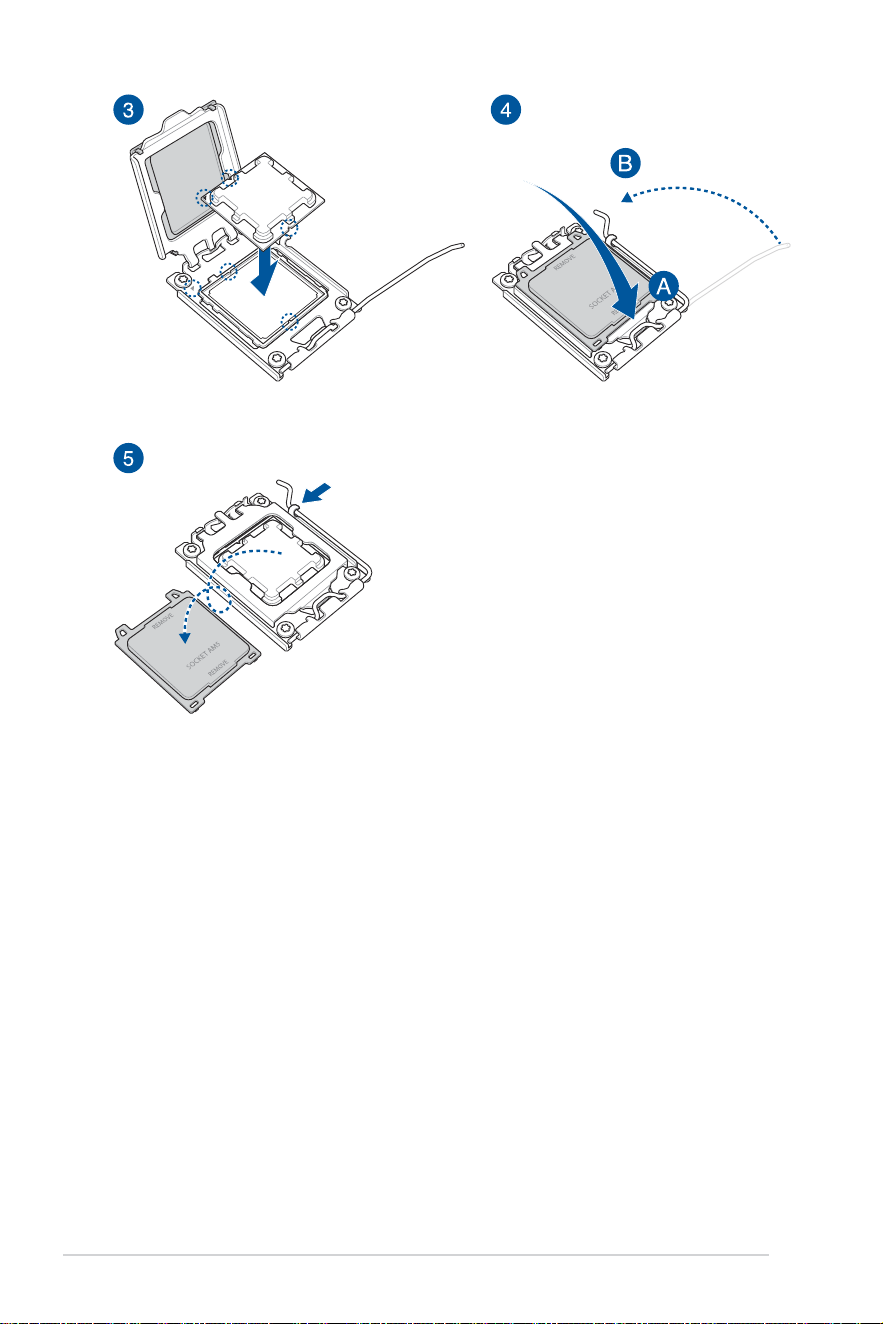
36
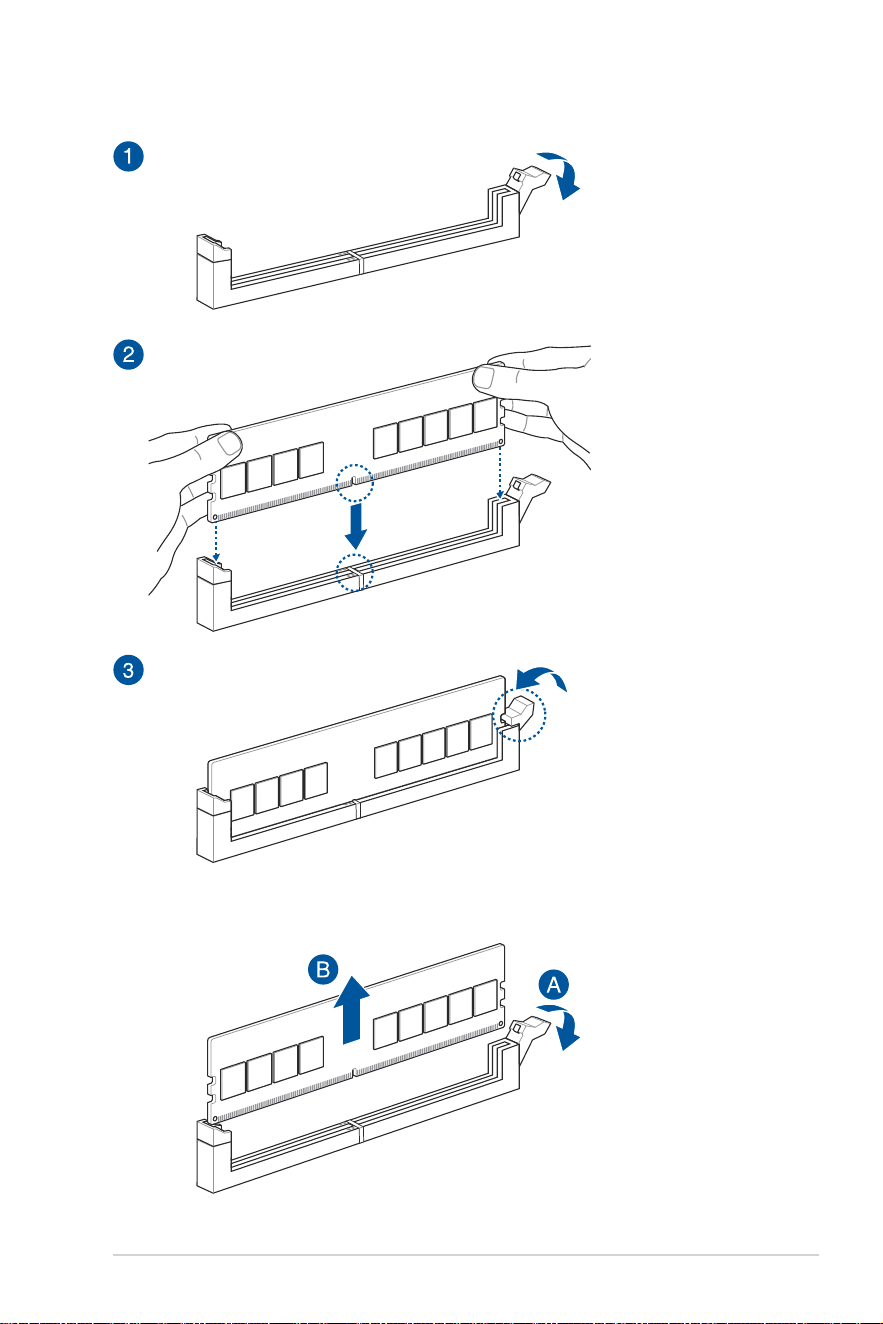
37
2.2 DIMM installation
DIMM removal
38
2.3 M.2 module installation
NOTE:
• The illustrations only show the installation steps for selected M.2 slots, the steps are the same
for the other M.2 slots.
• Use a Phillips screwdriver when removing or installing the screws or screw stands mentioned in
this section.
• If the thermal pad on the M.2 heatsink becomes damaged, we recommend replacing it with a
thermal pad with a thickness of 1.25mm.
• Supported M.2 type varies per motherboard.
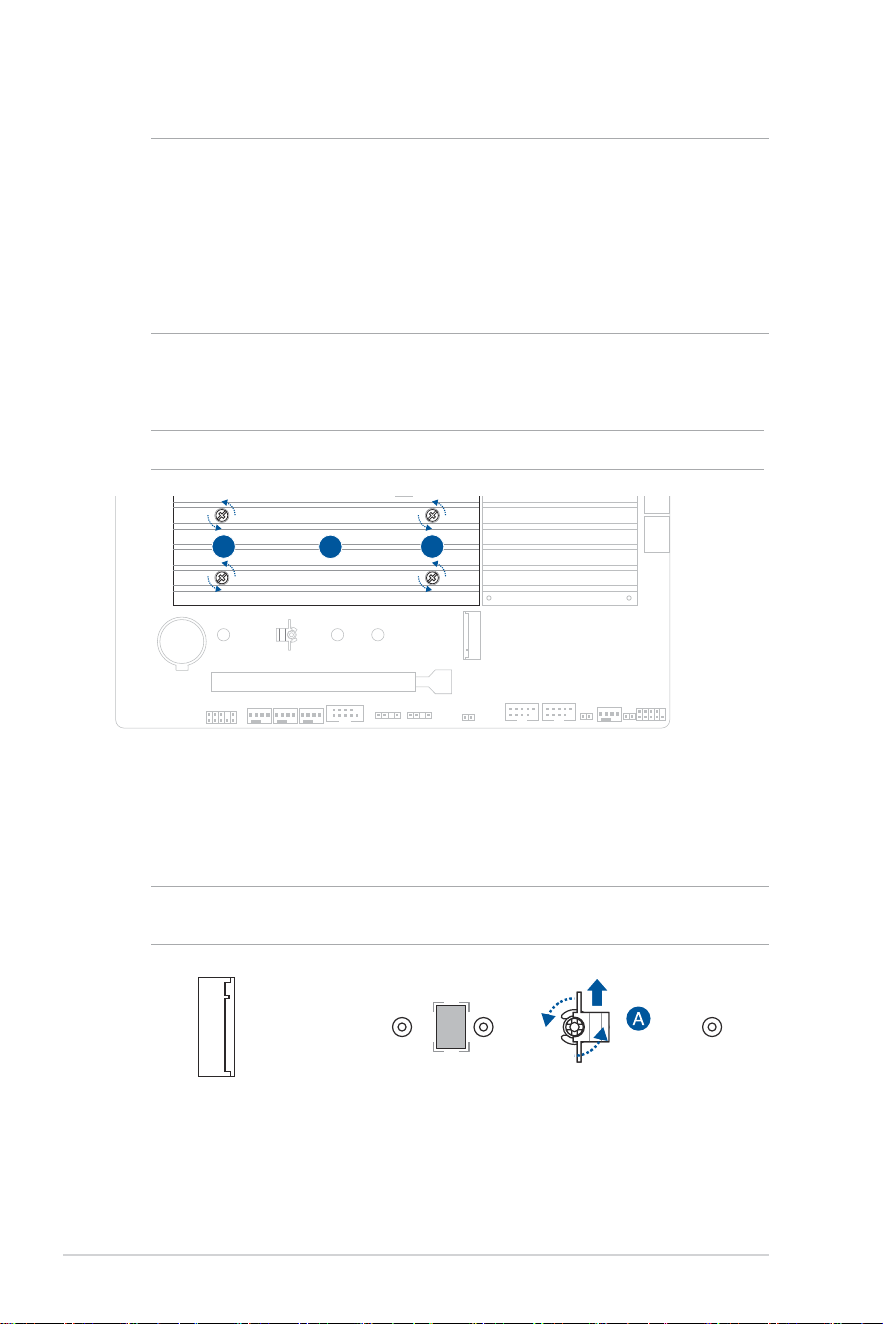
1. Loosen the screws from the other M.2 heatsink(s).
2. Lift and remove the heatsink(s).
1 1
2
3. Install your M.2 module to your M.2 slot.
NOTE: Only follow the steps above if a heatsink is pre-installed.
A. (optional) If required, remove the pre-installed removable M.2 Q-Latch
screw at the 2280 length screw hole.
NOTE: Only follow this step if a removable M.2 Q-Latch screw is pre-installed at the 2280 length
screw hole and can be removed.
39
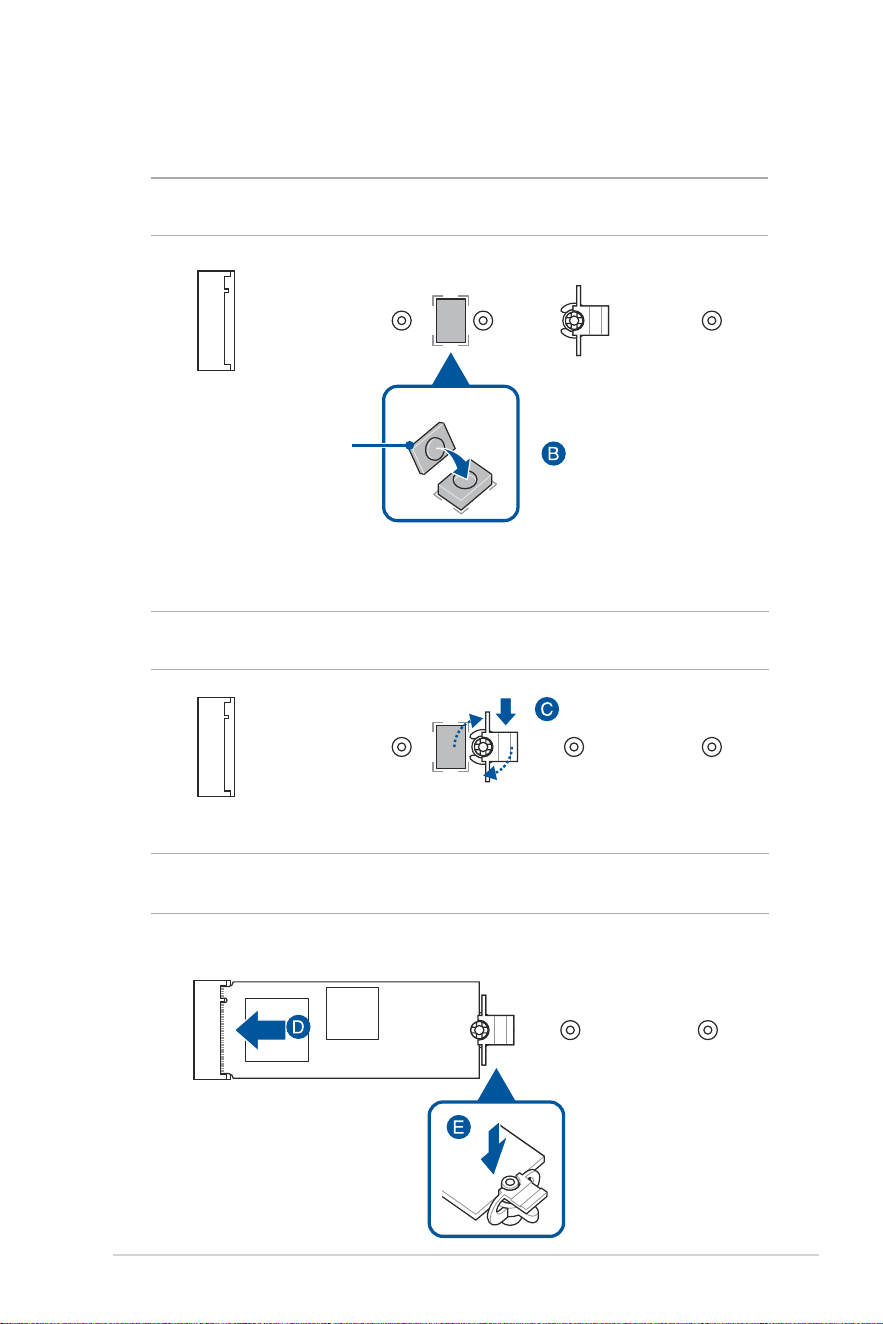
B. (optional) Install the bundled M.2 rubber if you are installing a single
sided M.2 module. DO NOT install the bundled M.2 rubber when
installing a double-sided M.2 module. The rubber installed by default
is compatible with double sided M.2 modules.
NOTE: Only follow this step if installing a 22110 or 2280 length M.2 module and when the M.2
rubber comes bundled with your motherboard package.
C. (optional) Install the M.2 Q-Latch to the M.2 length screw hole you
wish to install your M.2 module to.
NOTE: You can use a bundled M.2 Q-Latch screw or a pre-installed removable M.2 Q-Latch
screw.
D. Install your M.2 module to the M.2 slot.
IMPORTANT! Ensure that there is nothing obstructing your M.2 module when installing the M.2
module to the M.2 slot.
E. Push the M.2 module down until it is secured by the M.2 Q-Latch.
OPTIONAL
M.2 rubber
40
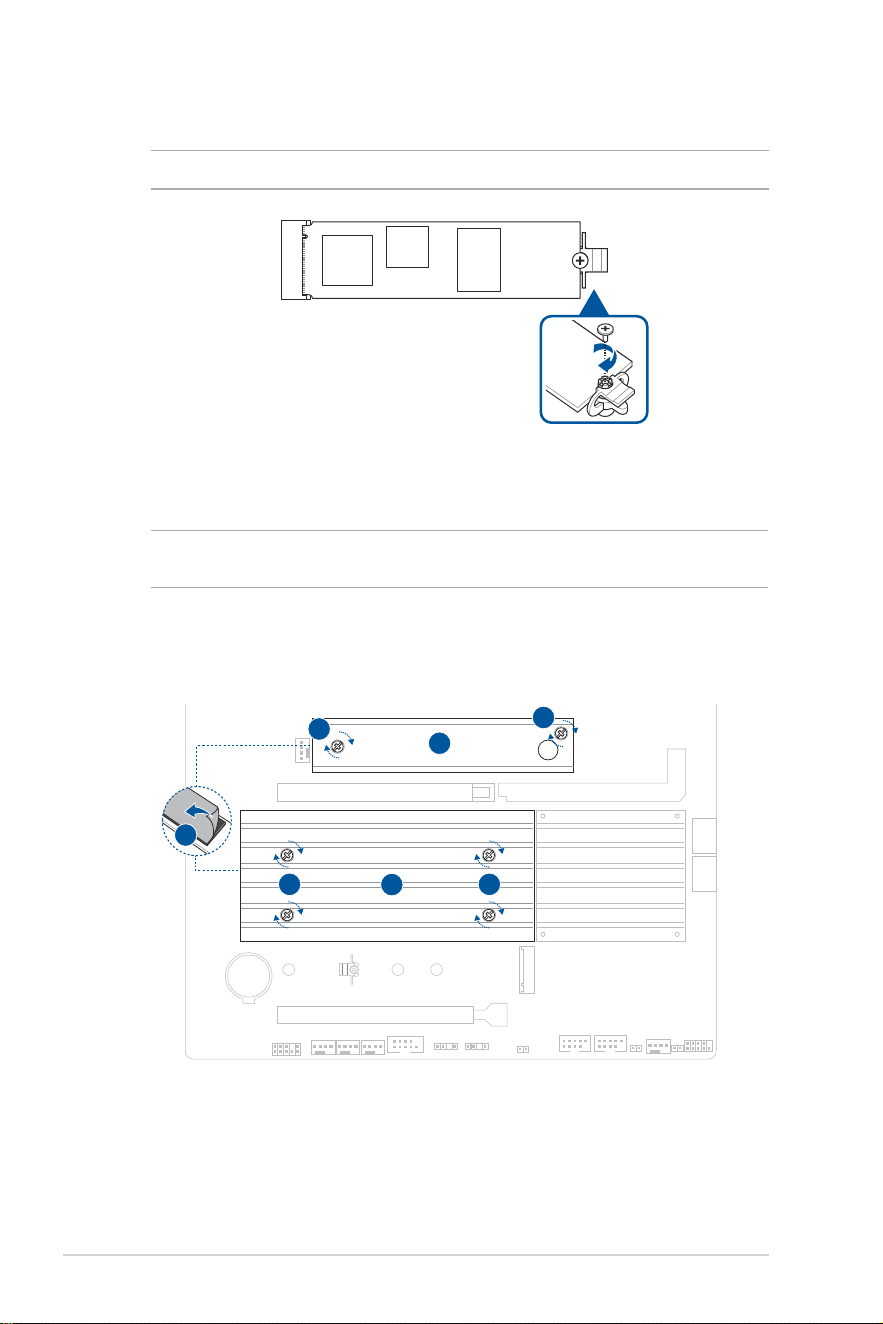
4. Remove the plastic film from the thermal pads on the bottom of the other heatsink(s).
NOTE: If the thermal pad on the M.2 heatsink becomes damaged, we recommend replacing it with
a thermal pad with a thickness of 1.25mm.
5. Replace the heatsink(s).
6. Secure the heatsink(s) using the screws on the heatsink(s).
4
6
5
6
6 6
5
F. (optional) Secure the M.2 module and the M.2 Q-Latch using the
bundled screw.
NOTE: Only follow this step if the M.2 slot comes without a heatsink.
41
CAUTION! DO NOT over tighten the screws! Doing so can damage the motherboard.
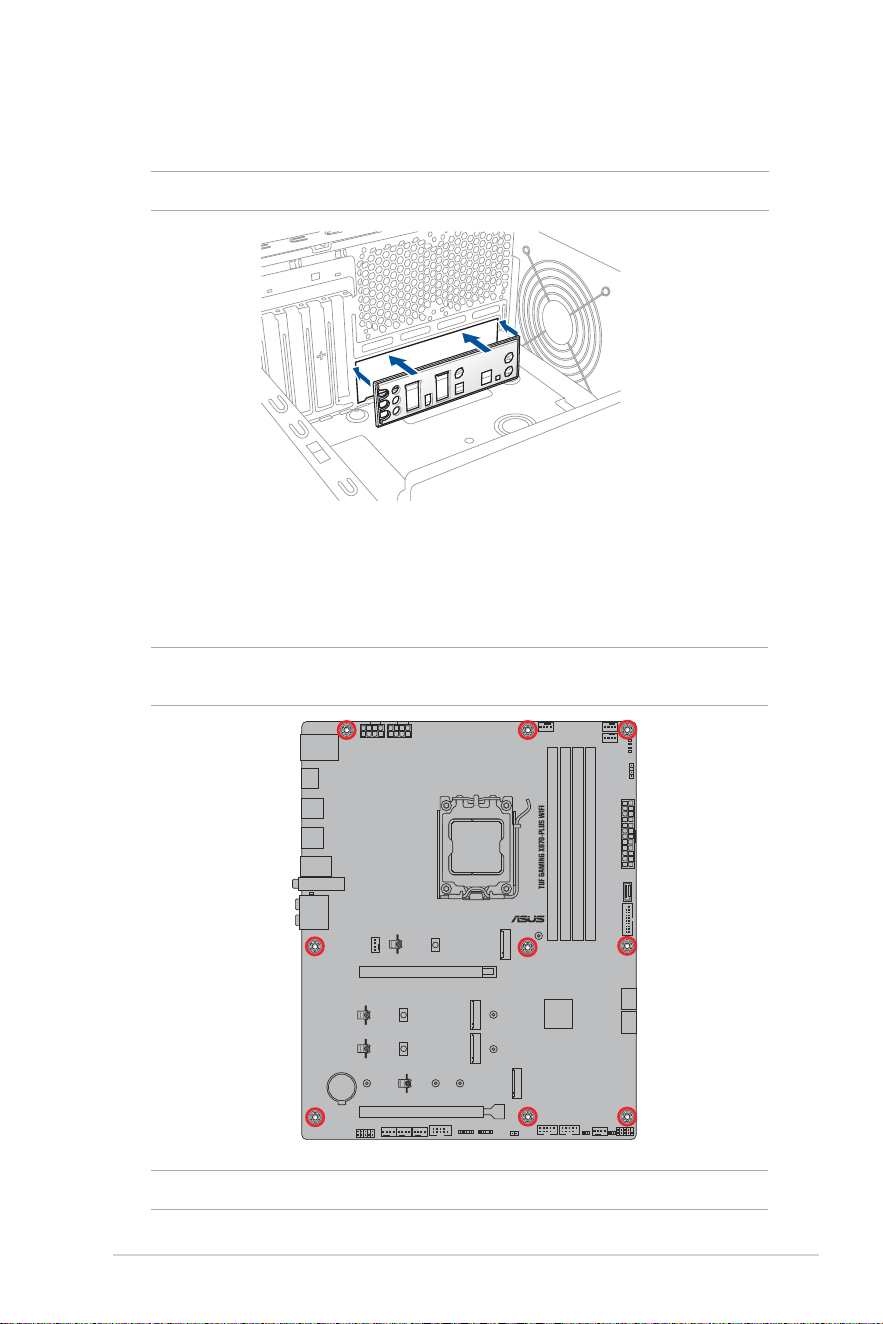
2. Place the motherboard into the chassis, ensuring that its rear I/O ports are aligned to
the chassis’ rear I/O panel.
3. Place nine (9) screws into the holes indicated by circles to secure the motherboard to
the chassis.
NOTE: This instruction is for reference only, please place the amount of screws according to your
installation situation.
2.4 Motherboard installation
1. (on selected models) Install the bundled I/O Shield to the chassis rear I/O panel.
NOTE: Only install the I/O Shield if your motherboard does not have a pre-installed I/O shield.
42
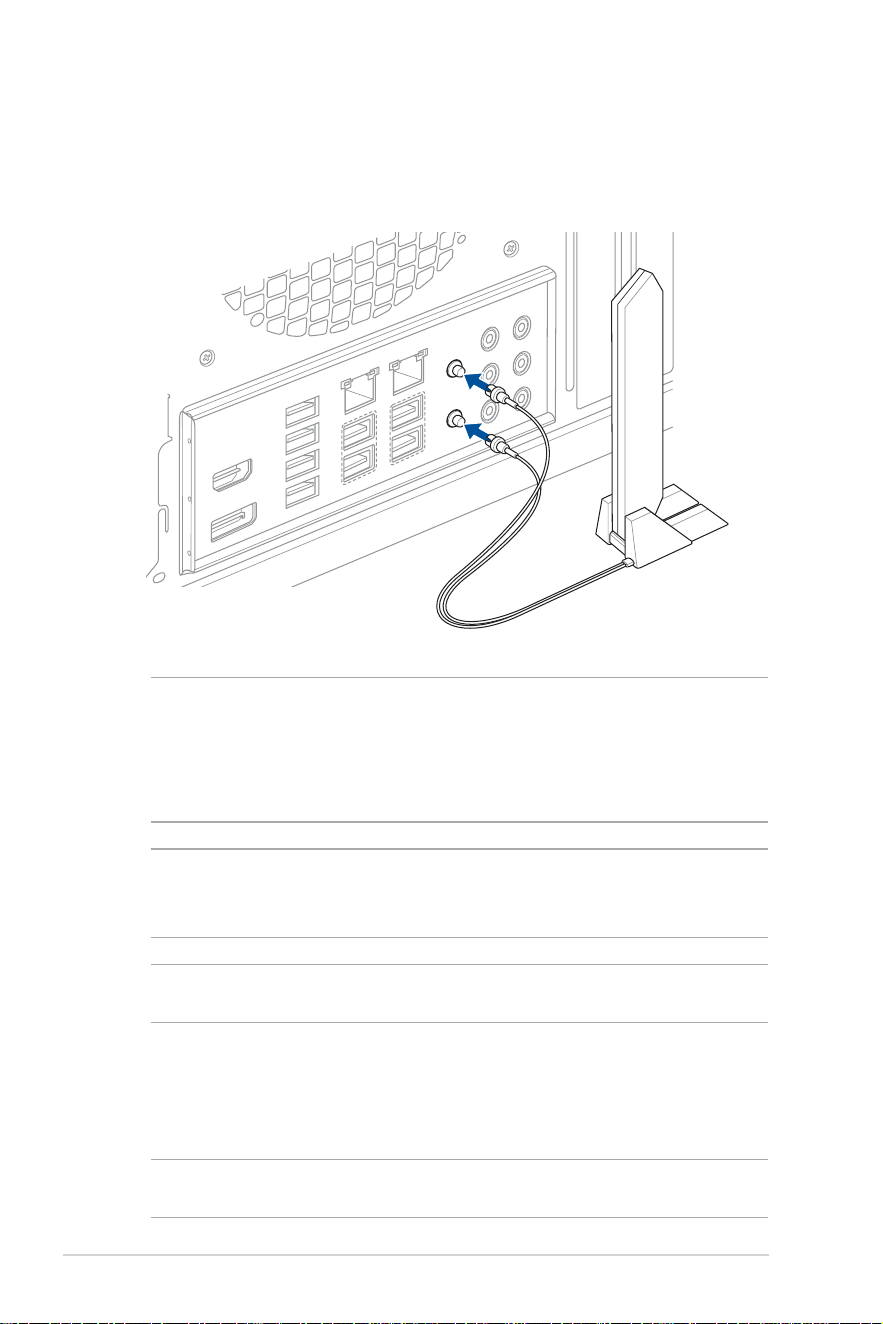
2.5 ASUS WiFi Q-Antenna installation
Installing the ASUS WiFi Q-Antenna
Connect the bundled ASUS WiFi Q-Antenna connector to the Wi-Fi ports at the back of the
chassis.
CAUTION!
• Ensure to hold tightly onto the connector when removing the antenna connector from the Wi-Fi
ports, and refrain from attempting to remove the antenna connector from the Wi-Fi ports by
pulling on the antenna connector cable.
• The antenna can only be extended to a right angle (90°). Do not force the antenna into an angle
more than 90°, doing so may cause damages to the ASUS WiFi Q-Antenna.
IMPORTANT!
• Ensure that the ASUS WiFi Q-Antenna is securely installed to the Wi-Fi ports.
• Ensure that the antenna is at least 20 cm away from all persons.
NOTE: The illustration above is for reference only. The I/O port layout may vary with models, but
the WiFi Q-Antenna installation procedure is the same for all models.
Using ASUS WiFi Q-Antenna functions
The ASUS WiFi Q-Antenna features a variety of wireless functions, you can learn more
about these feature and how to use them in the ASUS WiFi Q-Antenna tab in Armoury
Crate.
NOTE: The ASUS WiFi Q-Antenna function in Armoury Crate is only supported on the bundled
antenna and Wi-Fi module.
43
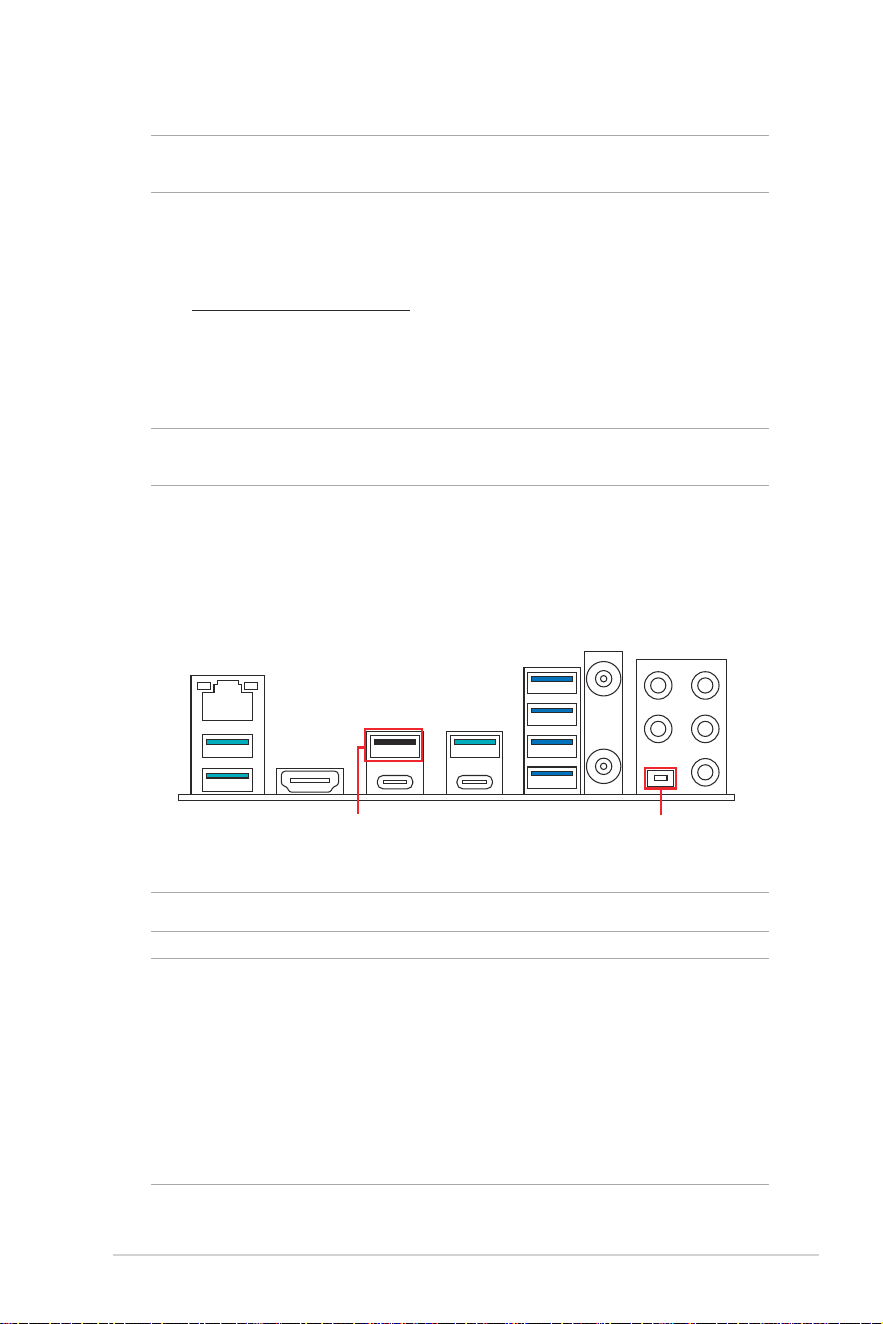
BIOS FlashBack™ button
BIOS FlashBack™ port
2.6 BIOS FlashBack™
NOTE: The illustrations for this section are for reference only. The WiFi module is only available
on selected models.
BIOS FlashBack™ allows you to easily update the BIOS without entering the existing BIOS
or operating system.
To use BIOS FlashBack™:
1. Visit https://www.asus.com/support/ and download the latest BIOS version for this
motherboard.
2. Launch the BIOSRenamer.exe application to automatically rename the file or
manually rename the file to the BIOS CAP filename specified in the Specifications
summary section, then copy it to your USB storage device.
NOTE: The BIOSRenamer.exe application is zipped together with your BIOS file when you
download a BIOS file for a BIOS FlashBack™ compatible motherboard.
3. Plug the 24-pin power connector to the motherboard and turn on the power supply
(no need to power on the system). Insert the USB storage device to the USB port with
BIOS FlashBack™ function.
4. Press the BIOS FlashBack™ button for three (3) seconds until the BIOS FlashBack™
LED blinks three times, indicating that the BIOS FlashBack™ function is enabled.
5. Wait until the light goes out, indicating that the BIOS updating process is completed.
NOTE: For more BIOS update utilities in BIOS setup, refer to BIOS and RAID Support section.
CAUTION!
• Do not unplug portable disk, power system, or short the CLRTC header while BIOS update is
ongoing, otherwise update will be interrupted. In case of interruption, please follow the steps
again.
• If the light flashes for five seconds and turns into a solid light, this means that the BIOS
FlashBack™ is not operating properly. This may be caused by improper installation of the
USB storage device and filename/file format error. If this scenario happens, please restart the
system to turn off the light.
• Updating BIOS may have risks. If the BIOS program is damaged during the process and results
to the system’s failure to boot up, please contact your local ASUS Service Center.

44
2.7 Starting up for the first time
1. After making all the connections, replace the system case cover.
2. Ensure that all switches are off.
3. Connect the power cord to the power connector at the back of the system chassis.
4. Connect the power cord to a power outlet that is equipped with a surge protector.
5. Turn on the devices in the following order:
a. Monitor
b. External storage devices (starting with the last device on the chain)
c. System power
6. After applying power, the system power LED on the system front panel case lights
up. For systems with ATX power supplies, the system LED lights up when you press
the ATX power button. If your monitor complies with the “green” standards or if it has
a “power standby” feature, the monitor LED may light up or change from orange to
green after the system LED turns on.
The system then runs the power-on self tests (POST). While the tests are running,
additional messages appear on the screen. If you do not see anything within 30
seconds from the time you turned on the power, the system may have failed a power-
on test. Check the jumper settings and connections or call your retailer for assistance.
7. At power on, hold down the <Delete> key to enter the BIOS Setup. Follow the
instructions in Chapter 3.
2.8 Turning off the computer
While the system is ON, press the power button for less than four seconds to put the system
on sleep mode or soft-off mode, depending on the BIOS setting. Press the power button
for more than four seconds to let the system enter the soft-off mode regardless of the BIOS
setting.

45
BIOS and RAID Support
Chapter 3: BIOS and RAID Support
NOTE: For more details on BIOS and RAID configurations, please refer to Manual & Document
under the Support tab of the product information site, or visit https://www.asus.com/support.
3.1 Knowing UEFI BIOS
BIOS (Basic Input and Output System) stores system hardware settings such as storage
device configuration, overclocking settings, advanced power management, and boot
device configuration that are needed for system startup in the motherboard CMOS. In
normal circumstances, the default BIOS settings apply to most conditions to ensure
optimal performance. DO NOT change the default BIOS settings except in the following
circumstances:
• An error message appears on the screen during the system bootup and requests you
to run the BIOS Setup.
• You have installed a new system component that requires further BIOS settings or
update.
CAUTION! Inappropriate BIOS settings may result to instability or boot failure. We strongly
recommend that you change the BIOS settings only with the help of a trained service
personnel.
NOTE: BIOS settings and options may vary due to different BIOS release versions. Please refer to
the latest BIOS version for settings and options.
Entering BIOS at startup
To enter BIOS Setup at startup, press <Delete> or <F2> during the Power-On Self Test
(POST). If you do not press <Delete> or <F2>, POST continues with its routines.
IMPORTANT!
• If the system becomes unstable after changing any BIOS setting, load the default settings to
ensure system compatibility and stability. Select the Load Optimized Defaults item under the
Exit menu or press the <F5> hotkey.
• If the system fails to boot after changing any BIOS setting, try to clear the CMOS and reset the
motherboard to the default value.
• The BIOS setup program does not support Bluetooth devices.
BIOS menu screen
The BIOS Setup program can be used under two modes: EZ Mode and Advanced Mode.
You can change modes from Setup Mode in Boot menu or by pressing the <F7> hotkey.

46
3.2 ASUS EZ Flash 3
The ASUS EZ Flash 3 feature allows you to update the BIOS without using an OS-based
utility.
IMPORTANT! Ensure to load the BIOS default settings to ensure system compatibility and
stability. Select the Load Optimized Defaults item under the Exit menu or press the <F5> hotkey.
To update the BIOS:
CAUTION!
• This function can support devices such as a USB flash disk with FAT 32/16 format and single
partition only.
• DO NOT shut down or reset the system while updating the BIOS to prevent system boot failure!
1. Insert the USB flash disk that contains the latest BIOS file to the USB port.
2. Enter the Advanced Mode of the BIOS setup program. Go to the Tool menu to select
ASUS EZ Flash 3 Utility and press <Enter>.
3. Press the Left arrow key to switch to the Drive field.
4. Press the Up/Down arrow keys to find the USB flash disk that contains the latest
BIOS, and then press <Enter>.
5. Press the Right arrow key to switch to the Folder field.
6. Press the Up/Down arrow keys to find the BIOS file, and then press <Enter> to
perform the BIOS update process. Reboot the system when the update process is
done.

47
3.3 ASUS CrashFree BIOS 3
The ASUS CrashFree BIOS 3 utility is an auto recovery tool that allows you to restore the
BIOS file when it fails or gets corrupted during the updating process. You can restore a
corrupted BIOS file using a USB flash drive that contains the BIOS file.
Recovering the BIOS
1. Download the latest BIOS version for this motherboard from
https://www.asus.com/support/.
2. Rename the file using one of the following methods:
• Launch the BIOSRenamer.exe application to automatically rename the file.
• Manually rename the file to the BIOS CAP filename specified in the
Specifications summary section.
• Manually rename the file to ASUS.CAP.
3. Copy the renamed file to your USB storage device.
4. Turn on the system.
5. Insert the USB flash drive containing the BIOS file to a USB port.
6. The utility automatically checks the devices for the BIOS file. When found, the utility
reads the BIOS file and enters ASUS EZ Flash 3 automatically.
7. The system requires you to enter BIOS Setup to recover the BIOS setting. To ensure
system compatibility and stability, we recommend that you press the <F5> hotkey to
load default BIOS values.
CAUTION! DO NOT shut down or reset the system while updating the BIOS! Doing so may cause
system boot failure!

48
3.4 RAID configurations
The motherboard supports RAID configurations.
RAID definitions
Volume provides the ability to link-together storage from one or several disks, regardless
of the size of the space on those disks. This configuration is useful in scavenging space on
disks unused by other disks in the array. This configuration does not provide performance
benefits or data redundancy, disk failure will result in data loss.
RAIDABLE arrays (also known as RAID Ready) are a special type of Volume (JBOD) that
allows the user to add more storage space or create a redundant array after a system is
installed.
NOTE: The ability to create RAIDABLE arrays may vary per system.
RAID 0 (Data striping) optimizes two identical hard disk drives to read and write data in
parallel, interleaved stacks. Two hard disks perform the same work as a single drive but at a
sustained data transfer rate, double that of a single disk alone, thus improving data access
and storage. Use of two new identical hard disk drives is required for this setup.
RAID 1 (Data mirroring) copies and maintains an identical image of data from one drive to
a second drive. If one drive fails, the disk array management software directs all applications
to the surviving drive as it contains a complete copy of the data in the other drive. This RAID
configuration provides data protection and increases fault tolerance to the entire system.
Use two new drives or use an existing drive and a new drive for this setup. The new drive
must be of the same size or larger than the existing drive.
RAID 5 stripes both data and parity information across three or more hard disk drives.
Among the advantages of RAID 5 configuration include better HDD performance, fault
tolerance, and higher storage capacity. The RAID 5 configuration is best suited for
transaction processing, relational database applications, enterprise resource planning, and
other business systems. Use a minimum of three identical hard disk drives for this setup.
RAID 10 is data striping and data mirroring combined without parity (redundancy data)
having to be calculated and written. With the RAID 10 configuration you get all the benefits
of both RAID 0 and RAID 1 configurations. Use four new hard disk drives or use an existing
drive and three new drives for this setup.

49
Appendix
Appendix
General notices
FCC Compliance Information
Responsible Party: Asus Computer International
Address: 48720 Kato Rd., Fremont, CA 94538, USA
Phone / Fax No: (510)739-3777 / (510)608-4555
This device complies with part 15 of the FCC Rules. Operation is subject to the following
two conditions: (1) This device may not cause harmful interference, and (2) this device must
accept any interference received, including interference that may cause undesired operation.
This equipment has been tested and found to comply with the limits for a Class B digital
device, pursuant to part 15 of the FCC Rules. These limits are designed to provide
reasonable protection against harmful interference in a residential installation. This
equipment generates, uses and can radiate radio frequency energy and, if not installed
and used in accordance with the instructions, may cause harmful interference to radio
communications. However, there is no guarantee that interference will not occur in a
particular installation. If this equipment does cause harmful interference to radio or television
reception, which can be determined by turning the equipment off and on, the user is
encouraged to try to correct the interference by one or more of the following measures:
- Reorient or relocate the receiving antenna.
- Increase the separation between the equipment and receiver.
- Connect the equipment into an outlet on a circuit different from that to which the receiver
is connected.
- Consult the dealer or an experienced radio/TV technician for help.
HDMI Trademark Notice
The terms HDMI, HDMI High-Definition Multimedia Interface, HDMI trade dress and the
HDMI Logos are trademarks or registered trademarks of HDMI Licensing Administrator, Inc.
安全上のご注意
付属品は当該専用品です。他の機器には使用しないでください。機器の破損もしくは、火災や感
電の原因となることがあります。

50
VCCI: Japan Compliance Statement
Class B ITE
Japan JATE
本製品は電気通信事業者(移動通信会社、固定通信会社、インターネットプロバイダ等)の通信
回線(公衆無線LANを含む)に直接接続することができません。本製品をインターネットに接続す
る場合は、必ずルーター等を経由し接続してください。
Declaration of compliance for product environmental regulation
ASUS follows the green design concept to design and manufacture our products, and
makes sure that each stage of the product life cycle of ASUS product is in line with global
environmental regulations. In addition, ASUS disclose the relevant information based on
regulation requirements.
Please refer to https://esg.asus.com/Compliance.htm for information disclosure based on
regulation requirements ASUS is complied with:
EU REACH and Article 33
Complying with the REACH (Registration, Evaluation, Authorisation, and Restriction of
Chemicals) regulatory framework, we published the chemical substances in our products at
ASUS REACH website at https://esg.asus.com/Compliance.htm.
EU RoHS
This product complies with the EU RoHS Directive. For more details, see
https://esg.asus.com/Compliance.htm
Australia statement notice
From 1 January 2012 updated warranties apply to all ASUS products, consistent with the
Australian Consumer Law. For the latest product warranty details please visit https://www.
asus.com/support/. Our goods come with guarantees that cannot be excluded under the
Australian Consumer Law. You are entitled to a replacement or refund for a major failure
and compensation for any other reasonably foreseeable loss or damage. You are also
entitled to have the goods repaired or replaced if the goods fail to be of acceptable quality
and the failure does not amount to a major failure.
If you require assistance please call ASUS Customer Service 1300 2787 88 or visit us at
https://www.asus.com/support/.
51
India RoHS
This product complies with the “India E-Waste (Management) Rules, 2016” and prohibits
use of lead, mercury, hexavalent chromium, polybrominated biphenyls (PBBs) and
polybrominated diphenyl ethers (PBDEs) in concentrations exceeding 0.1% by weight in
homogenous materials and 0.01% by weight in homogenous materials for cadmium, except
for the exemptions listed in Schedule II of the Rule.
Vietnam RoHS
ASUS products sold in Vietnam, on or after September 23, 2011,meet the requirements of
the Vietnam Circular 30/2011/TT-BCT.
Các sản phẩm ASUS bán tại Việt Nam, vào ngày 23 tháng 9 năm2011 trở về sau, đều phải đáp ứng
các yêu cầu của Thông tư 30/2011/TT-BCT của Việt Nam.
Türkiye RoHS
AEEE Yönetmeliğine Uygundur
ASUS Recycling/Takeback Services
ASUS recycling and takeback programs come from our commitment to the highest
standards for protecting our environment. We believe in providing solutions for you to
be able to responsibly recycle our products, batteries, other components as well as the
packaging materials. Please go to https://esg.asus.com/en/Takeback.htm for detailed
recycling information in different regions.
France sorting and recycling information
Points de collecte sur www.quefairedemesdechets.fr
Privilégiez la répara�on ou le don de votre appareil !
À DÉPOSER
EN MAGASIN
À DÉPOSER
EN DÉCHÈTERIE
OU
FR
Cet appareil
et ses accessoires
se recyclent
DO NOT throw the motherboard in municipal waste. This product has been designed to
enable proper reuse of parts and recycling. This symbol of the crossed out wheeled bin
indicates that the product (electrical and electronic equipment) should not be placed in
municipal waste. Check local regulations for disposal of electronic products.
DO NOT throw the mercury-containing button cell battery in municipal waste. This symbol
of the crossed out wheeled bin indicates that the battery should not be placed in municipal
waste.

52
RF exposure warning
This equipment must be installed and operated in accordance with provided instructions and
the antenna(s) used for this transmitter must be installed to provide a separation distance of
at least 20 cm from all persons and must not be co-located or operating in conjunction with
any other antenna or transmitter. End-users and installers must be provide with antenna
installation instructions and transmitter operating conditions for satisfying RF exposure
compliance.
FCC RF Caution Statement
WARNING: Any changes or modifications not expressly approved by the party responsible
for compliance could void your authority to operate the equipment.
Notices for Wi-Fi model
Compliance Statement of Innovation, Science and Economic
Development Canada (ISED)
This device complies with Innovation, Science and Economic Development Canada licence
exempt RSS standard(s). Operation is subject to the following two conditions: (1) this device
may not cause interference, and (2) this device must accept any interference, including
interference that may cause undesired operation of the device.
Operation in the band 5150–5250 MHz is only for indoor use to reduce the potential for
harmful interference to co-channel mobile satellite systems.
CAN ICES-003(B)/NMB-003(B)
Déclaration de conformité de Innovation, Sciences et
Développement économique Canada (ISED)
Le présent appareil est conforme aux CNR d’Innovation, Sciences et Développement
économique Canada applicables aux appareils radio exempts de licence. L’exploitation est
autorisée aux deux conditions suivantes : (1) l’appareil ne doit pas produire de brouillage,
et (2) l’utilisateur de l’appareil doit accepter tout brouillage radioélectrique subi, même si le
brouillage est susceptible d’en compromettre le fonctionnement.
La bande 5150–5250 MHz est réservée uniquement pour une utilisation à l’intérieur afin de
réduire les risques de brouillage préjudiciable aux systèmes de satellites mobiles utilisant
les mêmes canaux.
CAN ICES-003(B)/NMB-003(B)
ISED 5.925-7.125 GHz Caution Statement (RLAN devices)
Devices shall not be used for control of or communications with unmanned aircraft systems.
Les dispositifs ne doivent pas être utilisés pour commander des systèmes d’aéronef sans
pilote ni pour communiquer avec de tels systèmes.
FCC 5.925-7.125 GHz Caution Statement
Operation of transmitters in the 5.925-7.125 GHz band is prohibited for control of or
communications with unmanned aircraft systems.

53
NCC: Wireless Statement
取得審驗證明之低功率射頻器材,非經核准,公司、商號或使用者均不得擅自變更頻
率、加大功率或變更原設計之特性及功能。低功率射頻器材之使用不得影響飛航安全及
干擾合法通信;經發現有干擾現象時,應 立即停用,並改善至無干擾時方得繼續使用。
前述合法通信,指依電信管理法規定作業之無線電通信。低功率射頻器材須忍受合法通
信或工業、科學及醫療用電波輻射性電機設備之干擾。
應避免影響附近雷達系統之操作。
Japan RF Equipment Statement
屋外での使用について
5GHz帯(W52/53)及び6GHz帯(LPI)の屋外での使用は、電波法により禁じられています(法令に
より許可された場合は除く)(6GHz帯は対応製品のみ)。
法律および規制遵守
本製品は電波法及びこれに基づく命令の定めるところに従い使用してください。日本国外では、
その国の法律または規制により、本製品の使用ができないことがあります。このような国では、本
製品を運用した結果、罰せられることがありますが、当社は一切責任を負いかねますのでご了承
ください。
Précautions d’emploi de l’appareil :
a. Soyez particulièrement vigilant quant à votre sécurité lors de l’utilisation de cet
appareil dans certains lieux (les avions, les aéroports, les hôpitaux, les stations-
service et les garages professionnels).
b. Évitez d’utiliser cet appareil à proximité de dispositifs médicaux implantés. Si
vous portez un implant électronique (stimulateurs cardiaques, pompes à insuline,
neurostimulateurs…), veuillez impérativement respecter une distance minimale de 15
centimètres entre cet appareil et l’implant pour réduire les risques d’interférence.
c. Utilisez cet appareil dans de bonnes conditions de réception pour minimiser le niveau
de rayonnement. Ce n’est pas toujours le cas dans certaines zones ou situations,
notamment dans les parkings souterrains, dans les ascenseurs, en train ou en voiture
ou tout simplement dans un secteur mal couvert par le réseau.
d. Tenez cet appareil à distance du ventre des femmes enceintes et du bas-ventre des
adolescents.
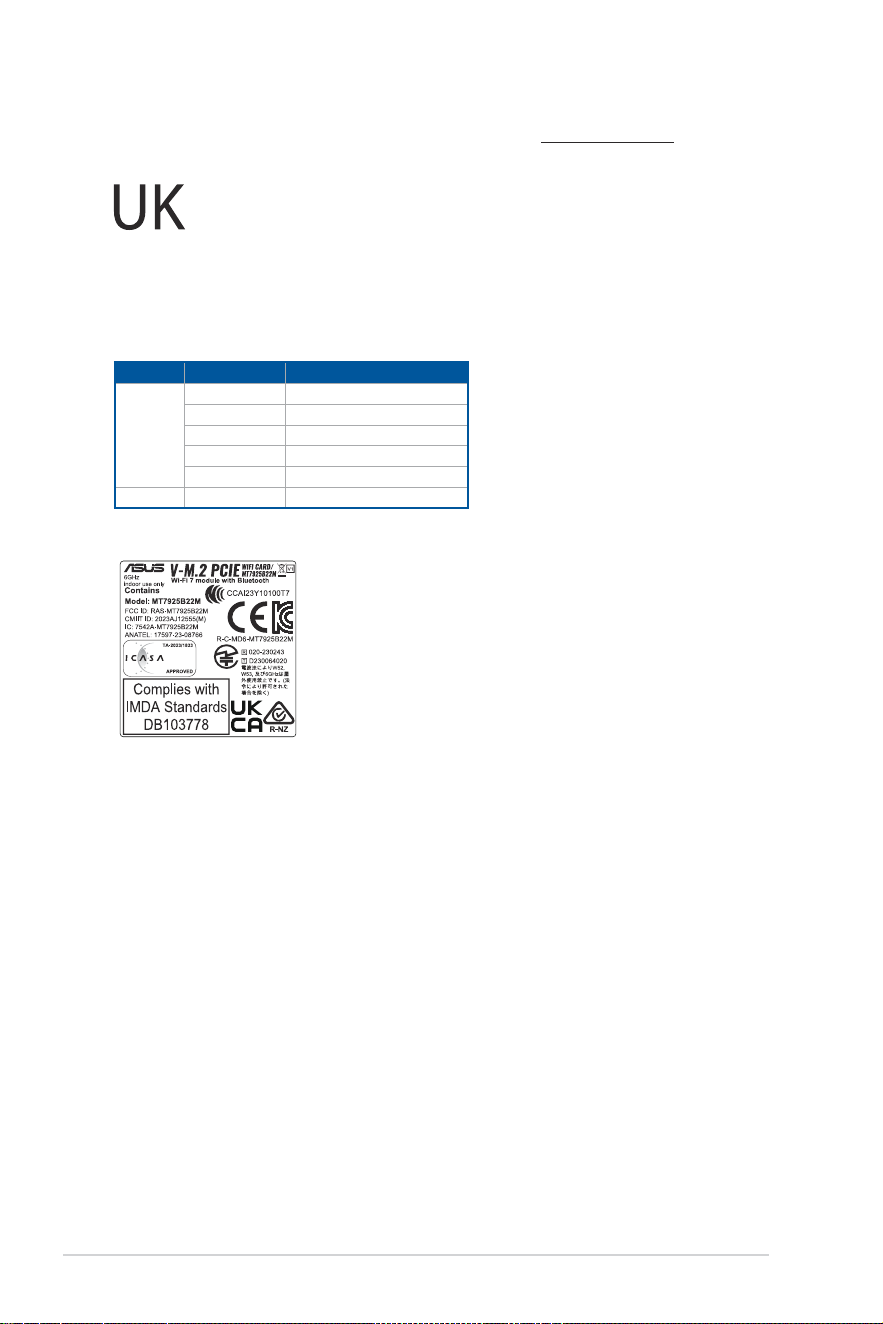
KC: Korea Warning Statement
54
Simplified UKCA Declaration of Conformity
ASUSTek Computer Inc. hereby declares that this device is in compliance with the essential requirements and other relevant provisions of The Radio
Equipment Regulations 2017 (S.I. 2017/1206). Full text of UKCA declaration of conformity is available at https://www.asus.com/support/.
The WiFi operating in the band 5150-5350MHz shall be restricted to indoor use for the country listed below:
UKCA RF Output table (The Radio Equipment Regulations 2017)
Model: MT7925B22M
a. Low power indoor (LPI) Wi-Fi 5.945-6.425 GHz devices:
The device is restricted to indoor use only when operating in the 5925 to 6425 MHz frequency ranges in the UK.
b. Very Low Power (VLP) Wi-Fi 5.945-6.425 GHz devices (portable devices):
The device is not permitted to be used on Unmanned Aircraft Systems (UAS) when operating in the 5925 to 6425 MHz frequency range in the UK.
Function Frequency Maximum Output Power EIPR (mW)
WiFi
2.4 - 2.4835 GHz <100
5.15 - 5.35 GHz <200
5.47 - 5.725 GHz <200
5.725 - 5.875 GHz* <25
5.925 - 6.425 GHz <200
Bluetooth 2.4 - 2.4835 GHz <100
Receiver category 1
* Non-Intel modules: 5.725 - 5.85 GHz

55
Dichiarazione di conformità UE semplificata
ASUSTek Computer Inc. con la presente dichiara che questo dispositivo è
conforme ai requisiti essenziali e alle altre disposizioni pertinenti con la
direttiva 2014/53/EU. Il testo completo della dichiarazione di conformità UE è
disponibile all’indirizzo: https://www.asus.com/support/.
L’utilizzo della rete Wi-Fi con frequenza compresa nell’intervallo 5150-
5350MHz deve essere limitato all’interno degli edifici per i paesi presenti
nella seguente tabella:
a. Dispositivi LPI (Low Power Indoor) Wi-Fi 5.945-6.425 GHz:
Il dispositivo è limitato all’uso in ambienti interni quando funziona nella
gamma di frequenza da 5945 a 6425 MHz in Austria (AT), Belgio (BE),
Bulgaria (BG), Cipro (CY), Repubblica Ceca (CZ), Estonia (EE), Francia (FR),
Germania (DE), Islanda (IS), Irlanda (IE), Lettonia (LV), Lussemburgo (LU),
Paesi Bassi (NL), Norvegia (NO), Romania (RO), Slovacchia (SK), Slovenia
(SI), Spagna (ES), Svizzera (CH).
b. Dispositivi VLP (Very Low Power) Wi-Fi 5.945-6.425 GHz (dispositivi
portatili):
Il dispositivo non può essere utilizzato su Unmanned Aircraft Systems
(UAS) quando opera nella gamma di frequenza da 5945 a 6425 MHz in
Austria (AT), Belgio (BE), Bulgaria (BG), Cipro (CY), Repubblica Ceca (CZ),
Estonia (EE), Francia (FR), Germania (DE), Islanda (IS), Irlanda (IE), Lettonia
(LV), Lussemburgo (LU), Paesi Bassi (NL), Norvegia (NO), Romania (RO),
Slovacchia (SK), Slovenia (SI), Spagna (ES), Svizzera (CH).
Изделие соответствует основным требованиям директив ЕС
Настоящим, ASUSTeK COMPUTER INC, заявляет, что устройство
соответствует основным требованиям и другим соответствующим
условиям директивы 2014/53/EU. Полный текст декларации соответствия
ЕС доступен на https://www.asus.com/ru/support/.
Работа WiFi в диапазоне частот 5150-5350 должна быть ограничена
использованием в помещениях для стран, перечисленных в таблице
ниже:
a. Устройства Wi-Fi 5,945–6,425 ГГц для помещений с низким
энергопотреблением (LPI): Устройство предназначено для
использования внутри помещений только при работе в диапазоне
частот от 5945 до 6425 МГц в Австрии (AT), Бельгии (BE), Болгарии
(BG), Кипре (CY), Чехии (CZ), Эстонии (EE), Франции (FR), Германии
(DE), Исландии (IS), Ирландии (IE), Латвии (LV), Люксембурге (LU),
Нидерландах (NL), Норвегии (NO), Румынии (RO), Словакии (SK),
Словении (SI), Испании (ES), Швейцарии (CH)
b. Устройства Wi-Fi с очень низким энергопотреблением (VLP)
5,945–6,425 ГГц (портативные устройства): Устройство не
разрешается использовать в беспилотных авиационных системах
(БАС) при работе в диапазоне частот от 5945 до 6425 МГц в Австрии
(AT), Бельгии (BE), Болгарии (BG), Кипре (CY), Чехии (CZ), Эстонии (EE),
Франции (FR), Германии (DE), Исландии (IS), Ирландии (IE), Латвии
(LV), Люксембурге (LU), Нидерландах (NL), Норвегии (NO), Румынии
(RO), Словакии (SK), Словении (SI), Испании (ES), Швейцарии (CH)
Опростена декларация за съответствие на ЕС
С настоящото ASUSTek Computer Inc. декларира, че това устройство е
в съответствие със съществените изисквания и другите приложими
постановления на свързаната Директива 2014/53/EC. Пълният текст на ЕС
декларация за съвместимост е достъпен на адрес
https://www.asus.com/support/.
WiFi, работеща в диапазон 5150-5350MHz, трябва да се ограничи до
употреба на закрито за страните, посочени в таблицата по-долу:
а. Ниско захранване на закрито (LPI) Wi-Fi 5,945-6,425 GHz устройства:
Устройството е ограничено до употреба само на закрито, когато
работи в честотния диапазон от 5945 до 6425 в Австрия (AT), Белгия
(BE), България (BG), Кипър (CY), Чехия (CZ), Естония (EE), Франция (FR),
Германия (DE), Исландия (IS), Ирландия (IE), Латвия (LV), Люксембург
(LU), Нидерландия (NL), Норвегия (NO), Румъния (RO), Словакия (SK),
Словения (SI), Испания (ES), Швейцария (CH).
б. Много ниско захранване (VLP) Wi-Fi 5,945-6,425 GHz устройства
(преносими устройства):
Устройството не е разрешено за употреба в безпилотни летателни
средства (UAS) при работа в честотния диапазон от 5945 до 6425 MHz
в Австрия (AT), Белгия (BE), България (BG), Кипър (CY), Чехия (CZ),
Естония (EE), Франция (FR), Германия (DE), Исландия (IS), Ирландия
(IE), Латвия (LV), Люксембург (LU), Нидерландия (NL), Норвегия
(NO), Румъния (RO), Словакия (SK), Словения (SI), Испания (ES),
Швейцария (CH).
Simplified EU Declaration of Conformity
ASUSTek Computer Inc. hereby declares that this device is in compliance
with the essential requirements and other relevant provisions of Directive
2014/53/EU. Full text of EU declaration of conformity is available at
https://www.asus.com/support/.
The WiFi operating in the band 5150-5350 MHz shall be restricted to indoor
use for countries listed in the table below:
a. Low power indoor (LPI) Wi-Fi 5.945-6.425 GHz devices:
The device is restricted to indoor use only when operating in the 5945
to 6425 MHz frequency range in Austria (AT), Belgium (BE), Bulgaria (BG),
Cyprus (CY), Czech Republic (CZ), Estonia (EE), France (FR), Germany
(DE), Iceland (IS), Ireland (IE), Latvia (LV), Luxembourg (LU), Netherlands
(NL), Norway (NO), Romania (RO), Slovakia (SK), Slovenia (SI), Spain (ES),
Switzerland (CH)
b. Very Low Power (VLP) Wi-Fi 5.945-6.425 GHz devices (portable devices):
The device is not permitted to be used on Unmanned Aircraft Systems
(UAS) when operating in the 5945 to 6425 MHz frequency range in
Austria (AT), Belgium (BE), Bulgaria (BG), Cyprus (CY), Czech Republic
(CZ), Estonia (EE), France (FR), Germany (DE), Iceland (IS), Ireland (IE),
Latvia (LV), Luxembourg (LU), Netherlands (NL), Norway (NO), Romania
(RO), Slovakia (SK), Slovenia (SI), Spain (ES), Switzerland (CH)
Déclaration de conformité simplifiée de l’UE
ASUSTeK COMPUTER INC. déclare par la présente que cet appareil est
conforme aux critères essentiels et autres clauses pertinentes de la directive
2014/53/UE. La déclaration de conformité de l’UE peut être téléchargée à
partir du site internet suivant : https://www.asus.com/fr/support/.
Dans la plage de fréquences 5150-5350 MHz, le WiFi est restreint à une
utilisation en intérieur dans les pays listés ci-dessous :
a. Pour les appareils WiFi LPI (Low Power Indoor) dans la plage 5,945-6,425
GHz :
L’appareil est limité à une utilisation en intérieur uniquement lorsqu’il
fonctionne dans la plage de fréquences 5945-6425 MHz en Autriche
(AT), Belgique (BE), Bulgarie (BG), Chypre (CY), République tchèque
(CZ), Estonie (EE), France (FR), Allemagne (DE), Islande (IS), Irlande (IE) ,
Lettonie (LV), Luxembourg (LU), Pays-Bas (NL), Norvège (NO), Roumanie
(RO), Slovaquie (SK), Slovénie (SI), Espagne (ES), Suisse (CH).
b. Pour les appareils portables WiFi VLP (Very Low Power) dans la plage
5,945-6,425 GHz :
L’appareil n’est pas autorisé à être utilisé sur des systèmes d’aéronefs
sans pilote (UAS) lorsqu’il fonctionne dans la plage de fréquences
5945-6425 MHz en en Autriche (AT), Belgique (BE), Bulgarie (BG), Chypre
(CY), République tchèque (CZ), Estonie (EE), France (FR), Allemagne (DE),
Islande (IS), Irlande (IE), Lettonie (LV), Luxembourg (LU), Pays-Bas (NL),
Norvège (NO), Roumanie (RO), Slovaquie (SK), Slovénie (SI), Espagne
(ES), Suisse (CH).
Vereinfachte EU-Konformitätserklärung
ASUSTeK Computer Inc. erklärt hiermit, dass dieses Gerät mit den
wesentlichen Anforderungen und anderen relevanten Bestimmungen
der Richtlinie 2014/53/EU übereinstimmt. Der gesamte Text der EU-
Konformitätserklärung ist verfügbar unter: https://www.asus.com/support/.
Der WLAN-Betrieb im Band von 5150-5350 MHz ist für die in der unteren
Tabelle aufgeführten Länder auf den Innenbereich beschränkt:
a. Low Power Indoor (LPI) Wi-Fi 5,945 bis 6,425 GHz-Geräte:
Das Gerät ist auf den Innenbereich beschränkt, wenn es im
Frequenzbereich von 5945 MHz bis 6425 MHz in Österreich (AT), Belgien
(BE), Bulgarien (BG), Zypern (CY), der Tschechischen Republik (CZ),
Estland (EE), Frankreich (FR), Deutschland (DE), Island (IS), Irland (IE),
Lettland (LV), Luxemburg (LU), den Niederlanden (NL), Norwegen (NO),
Rumänien (RO), der Slowakei (SK), Slowenien (SI), Spanien (ES) und der
Schweiz (CH) betrieben wird.
b. Very Low Power (VLP) Wi-Fi 5,945 bis 6,425 GHz-Geräte (tragbare Geräte):
Das Gerät darf nicht auf unbemannten Luftfahrzeugsystemen (UAS)
verwendet werden, wenn es im Frequenzbereich von 5945 MHz bis 6425
MHz in Österreich (AT), Belgien (BE), Bulgarien (BG), Zypern (CY), der
Tschechischen Republik (CZ), Estland (EE), Frankreich (FR), Deutschland
(DE), Island (IS), Irland (IE), Lettland (LV), Luxemburg (LU), den
Niederlanden (NL), Norwegen (NO), Rumänien (RO), der Slowakei (SK),
Slowenien (SI), Spanien (ES) und der Schweiz (CH) betrieben wird.

56
Pojednostavljena EU Izjava o sukladnosti
ASUSTeK Computer Inc. ovim izjavljuje da je ovaj uređaj sukladan s bitnim
zahtjevima i ostalim odgovarajućim odredbama direktive 2014/53/EU. Cijeli
tekst EU izjave o sukladnosti dostupan je na https://www.asus.com/support/.
WiFi koji radi na opsegu frekvencija 5150-5350 MHz bit će ograničen na
upotrebu u zatvorenom prostoru u zemljama na donjem popisu:
a. Unutarnji uređaji male snage (LPI) Wi-Fi 5,945 – 6,425 GHz:
Uređaj je ograničen na upotrebu u zatvorenom prostoru samo kada radi
u frekvencijskom pojasu od 5945 do 6425 MHz u Austrija (AT), Belgiji
(BE), Bugarskoj (BG), Cipru (CY), Češkoj (CZ), Estoniji (EE), Francuskoj
(FR), Njemačkoj (DE), Islandu (IS), Irskoj (IE), Latvija (LV), Luksemburg
(LU), Nizozemskoj (NL), Norveška (NO), Rumunjska (RO), Slovačka (SK),
Slovenija (SI), Španjolskoj (ES), Švicarska (CH).
b. Uređaji vrlo male snage (VLP) Wi-Fi 5,945 – 6,425 GHz (prijenosni uređaji):
Uređaj nije dopušteno koristiti u sustavima bespilotnih letjelica (UAS)
kada radi u frekvencijskom pojasu od 5945 do 6425 MHz u Austrija
(AT), Belgiji (BE), Bugarskoj (BG), Cipru (CY), Češkoj (CZ), Estoniji (EE),
Francuskoj (FR), Njemačkoj (DE), Islandu (IS), Irskoj (IE), Latvija (LV),
Luksemburg (LU), Nizozemskoj (NL), Norveška (NO), Rumunjska (RO),
Slovačka (SK), Slovenija (SI), Španjolskoj (ES), Švicarska (CH).
Zjednodušené prohlášení o shodě EU
Společnost ASUSTek Computer Inc. tímto prohlašuje, že toto zařízení splňuje
základní požadavky a další příslušná ustanovení směrnice 2014/53/ EU. Plné
znění prohlášení o shodě EU je k dispozici na adrese
https://www.asus.com/support/.
V zemích uvedených v tabulce je provoz sítě Wi-Fi ve frekvenčním rozsahu 5
150 - 5 350 MHz povolen pouze ve vnitřních prostorech:
a. Zařízení Wi-Fi s nízkým výkonem („LPI“) pro pásmo 5,945 – 6,425 GHz:
Při provozu ve frekvenčním pásmu 5945 až 6425 MHz je používání
tohoto zařízení omezeno pouze na interiér v Rakousko (AT), Belgii (BE),
Bulharsku (BG), Kypru (CY), České republice (CZ), Estonsku (EE), Francii
(FR), Německu (DE), Islandu (IS), Irsku (IE), Lotyšsko (LV), Lucembursko
(LU), Nizozemsku (NL), Norsko (NO), Rumunsko (RO), Slovensko (SK),
Slovinsko (SI), Španělsku (ES), Švýcarsko (CH).
b. Zařízení Wi-Fi s velmi nízkým výkonem („VLP“) pro pásmo 5,945 – 6,425
GHz (přenosná zařízení):
Při provozu ve frekvenčním pásmu 5945 až 6425 MHz není povoleno
používat toto zařízení v systémech bezpilotních letadel (UAS) v Rakousko
(AT), Belgii (BE), Bulharsku (BG), Kypru (CY), České republice (CZ),
Estonsku (EE), Francii (FR), Německu (DE), Islandu (IS), Irsku (IE), Lotyšsko
(LV), Lucembursko (LU), Nizozemsku (NL), Norsko (NO), Rumunsko (RO),
Slovensko (SK), Slovinsko (SI), Španělsku (ES), Švýcarsko (CH).
Forenklet EU-overensstemmelseserklæring
ASUSTeK Computer Inc. erklærer hermed at denne enhed er i
overensstemmelse med hovedkravene og øvrige relevante bestemmelser i
direktivet 2014/53/EU. Hele EU-overensstemmelseserklæringen kan findes på
https://www.asus.com/support/.
Wi-Fi, der bruger 5150-5350 MHz skal begrænses til indendørs brug i lande,
der er anført i tabellen:
a. Lav effekt indendørs (LPI) Wi-Fi 5.945-6.425 GHz-enheder:
Enheden må kun bruges indendørs, når den bruges inden for
frekvensområdet 5945 til 6425 MHz i Østrig (AT), Belgien (BE), Bulgarien
(BG), Cypern (CY), Tjekkiet (CZ), Estland (EE), Frankrig (FR), Tyskland
(DE), Island (IS), Irland (IE), Letland (LV), Luxembourg (LU), Holland (NL),
Norge (NO), Rumænien (RO), Slovakiet (SK), Slovenien (SI), Spanien (ES),
Schweiz (CH).
b. Meget lav strøm indendørs (VLP) Wi-Fi 5.945-6.425 GHz-enheder
(bærbare enheder):
Enheden må kun bruges i ubemandede flysystemer (UAS), når den
bruges inden for frekvensområdet 5945 til 6425 MHz i Østrig (AT),
Belgien (BE), Bulgarien (BG), Cypern (CY), Tjekkiet (CZ), Estland
(EE), Frankrig (FR), Tyskland (DE), Island (IS), Irland (IE), Letland (LV),
Luxembourg (LU), Holland (NL), Norge (NO), Rumænien (RO), Slovakiet
(SK), Slovenien (SI), Spanien (ES), Schweiz (CH).
Vereenvoudigd EU-conformiteitsverklaring
ASUSTeK Computer Inc. verklaart hierbij dat dit apparaat voldoet aan de
essentiële vereisten en andere relevante bepalingen van Richtlijn 2014/53/
EU. De volledige tekst van de EU-conformiteitsverklaring is beschikbaar op
https://www.asus.com/support/.
De WiFi op 5150-5350MHz zal beperkt zijn tot binnengebruik voor in de tabel
vermelde landen:
a. LPI (Low Power Indoor=laag vermogen binnenshuis) Wi-Fi 5.945-6.425
GHz-apparaten:
Het apparaat is beperkt tot enkel binnengebruik bij bedienen in het
frequentiebereik van 5945 tot 6425 MHz in Oostenrijk (AT), België
(BE), Bulgarije (BG), Cyprus (CY), Tsjechische Republiek (CZ), Estland
(EE), Frankrijk (FR), Duitsland (DE), IJsland (IS), Ierland (IE), Letland (LV),
Luxemburg (LU), Nederland (NL), Noorwegen (NO), Roemenië (RO),
Slowakije (SK), Slovenië (SI), Spanje (ES), Zwitserland (CH).
b. VLP (Very Low Power = zeer laag vermogen) Wi-Fi 5.945-6.425 GHz-
apparaten (draagbare apparaten):
Het apparaat mag niet worden gebruikt in onbemande
luchtvaartsystemen (UAS) bij bedienen in het frequentiebereik van 5945
tot 6425 MHz in Oostenrijk (AT), België (BE), Bulgarije (BG), Cyprus (CY),
Tsjechische Republiek (CZ), Estland (EE), Frankrijk (FR), Duitsland (DE),
IJsland (IS), Ierland (IE), Letland (LV), Luxemburg (LU), Nederland (NL),
Noorwegen (NO), Roemenië (RO), Slowakije (SK), Slovenië (SI), Spanje
(ES), Zwitserland (CH).
Lihtsustatud EÜ vastavusdeklaratsioon
Käesolevaga kinnitab ASUSTek Computer Inc, et seade vastab direktiivi
2014/53/EÜ olulistele nõuetele ja teistele asjakohastele sätetele. EL
vastavusdeklaratsiooni täistekst on saadaval veebisaidil
https://www.asus.com/support/.
Sagedusvahemikus 5150-5350 MHz töötava WiFi kasutamine on järgmistes
riikides lubatud ainult siseruumides:
a. Madala võimsusega (LPI) Wi-Fi 5.945-6.425 GHz seadmed:
Sagedusalas 5945 kuni 6425 MHz töötavate seadmete kasutamine
on siseruumides piiratud järgmistes riikides: Austria (AT), Belgia (BE),
Bulgaaria (BG), Küpros (CY), Tšehhi Vabariik (CZ), Eesti (EE), Prantsusmaa
(FR), Saksamaa (DE), Island (IS), Iirimaa (IE), Läti (LV), Luksemburg (LU),
Holland (NL), Norra (NO), Rumeenia (RO), Slovakkia (SK), Sloveenia (SI),
Hispaania (ES), Šveits (CH).
b. Väga madala võimsusega (VLP) Wi-Fi 5.945-6.425 GHz seadmed
(kantavad seadmed):
Sagedusalas 5945 kuni 6425 MHz töötavate seadmete kasutamine on
mehitamata õhusüsteemides (UAS) keelatud järgmistes riikides: Austria
(AT), Belgia (BE), Bulgaaria (BG), Küpros (CY), Tšehhi Vabariik (CZ), Eesti
(EE), Prantsusmaa (FR), Saksamaa (DE), Island (IS), Iirimaa (IE), Läti (LV),
Luksemburg (LU), Holland (NL), Norra (NO), Rumeenia (RO), Slovakkia
(SK), Sloveenia (SI), Hispaania (ES), Šveits (CH).
Eurooppa - EY:n vaatimustenmukaisuusvakuutus
ASUSTek Computer Inc. ilmoittaa täten, että tämä laite on direktiivin 2014/53/
EU olennaisten vaatimusten ja muiden asiaankuuluvien lisäysten mukainen.
Koko EY:n vaatimustenmukaisuusvakuutuksen teksti on luettavissa
osoitteessa https://www.asus.com/support/.
5 150 - 5 350 MHz:in taajuudella toimiva WiFi on rajoitettu sisäkäyttöön
taulukossa luetelluissa maissa:
a. Pienitehoiset sisäkäyttöön (LPI) Wi-Fi 5,945-6,425 GHz-laitteet:
Laite on rajoitettu sisäkäyttöön vain, kun se toimii 5945-6425 MHz
taajuusalueella Itävalta (AT), Belgiassa (BE), Bulgariassa (BG), Kyproksella
(CY), Tšekin tasavallassa (CZ), Virossa (EE), Ranskassa (FR), Saksassa (DE),
Islannissa (IS), Irlannissa (IE), Latvia (LV), Luxembourg (LU), Alankomaissa
(NL), Norja (NO), Romania (RO), Slovakia (SK), Slovenia (SI), Espanjassa
(ES), Sveitsi (CH).
b. Erittäin pienitehoiset (VLP) Wi-Fi 5,945-6,425 GHz-laitteet (kannettavat
laitteet):
Laitetta ei saa käyttää miehittämättömissä lentokonejärjestelmissä (UAS)
toimittaessa 5945–6425 MHz taajuusalueella Itävalta (AT), Belgiassa (BE),
Bulgariassa (BG), Kyproksella (CY), Tšekin tasavallassa (CZ), Virossa (EE),
Ranskassa (FR), Saksassa (DE), Islannissa (IS), Irlannissa (IE), Latvia (LV),
Luxembourg (LU), Alankomaissa (NL), Norja (NO), Romania (RO), Slovakia
(SK), Slovenia (SI), Espanjassa (ES), Sveitsi (CH).

57
Απλοποιημένη Δήλωση Συμμόρφωσης ΕΕ
Διά του παρόντος η ASUSTek Computer Inc. δηλώνει ότι αυτή η συσκευή
είναι σύμμορφη με τις βασικές προϋποθέσεις και άλλες σχετικές διατάξεις της
Οδηγίας 2014/53/ΕE. Το πλήρες κείμενο της δήλωσης συμμόρφωσης της ΕΕ
είναι διαθέσιμο στη διεύθυνση https://www.asus.com/support/.
Το WiFi που λειτουργεί στη ζώνη 5150-5350MHz περιορίζεται για χρήση σε
εσωτερικούς χώρους για τις χώρες που αναφέρονται στον παρακάτω πίνακα:
a. Συσκευές Wi-Fi χαμηλής ισχύος για εσωτερικούς χώρους (LPI) 5.945-
6.425 GHz:
Η συσκευή περιορίζεται σε χρήση σε εσωτερικούς χώρους μόνο όταν
λειτουργεί στο εύρος συχνοτήτων 5945 έως 6425 MHz στην Αυστρία
(AT), το Βέλγιο (BE), τη Βουλγαρία (BG), την Κύπρο (CY), την Τσεχική
Δημοκρατία (CZ), την Εσθονία (EE), τη Γαλλία (FR), τη Γερμανία (DE), την
Ισλανδία (IS), την Ιρλανδία (IE), τη Λετονία (LV), το Λουξεμβούργο (LU),
την Ολλανδία (NL), τη Νορβηγία (NO), τη Ρουμανία (RO), τη Σλοβακία
(SK), τη Σλοβενία (SI), την Ισπανία (ES), τη Ελβετία (CH).
b. Συσκευές Wi-Fi πολύ χαμηλής ισχύος (VLP) 5.945-6.425 GHz (φορητές
συσκευές):
Η συσκευή δεν επιτρέπεται να χρησιμοποιείται σε μη επανδρωμένα
συστήματα αεροσκαφών (UAS) όταν λειτουργεί στο εύρος συχνοτήτων
5945 έως 6425 MHz στην Αυστρία (AT), το Βέλγιο (BE), τη Βουλγαρία
(BG), την Κύπρο (CY), την Τσεχική Δημοκρατία (CZ), την Εσθονία (EE),
τη Γαλλία (FR), τη Γερμανία (DE), την Ισλανδία (IS), την Ιρλανδία (IE), τη
Λετονία (LV), το Λουξεμβούργο (LU), την Ολλανδία (NL), τη Νορβηγία
(NO), τη Ρουμανία (RO), τη Σλοβακία (SK), τη Σλοβενία (SI), την Ισπανία
(ES), τη Ελβετία (CH).
יפוריא דוחיאה רובע תרצוקמ תירוטלוגר תומיאת תרהצה
תושירדל םאות הז רישכמ יכ תאזב הריהצמ ASUSTek Computer Inc.
תא אורקל ןתינ . 2014/53/EU הנקת לש םייטנוולרה םיפיעסה ראשלו תוינויחה
:תבותכב יפוריאה דוחיאה רובע תירוטלוגרה תומיאתה תרהצה לש אלמה חסונה
.https://www.asus.com/support/
שומישל 5150-5350MHz םירדתה תעוצרב תולעופה Wi-Fi תותשר ליבגהל שי
:האבה המישרב תוטרופמה תוצראב םירוגס םינבמ ךותב
:)LPI( ךומנ קפסהב תיבל Wi-Fi 5.945-6.425 GHz ירישכמ a.
דע 5945 םירדתה חווטב שומישב דבלב ימינפ שומישל לבגומ רישכמה
היכ'צ ,)CY( ןיסירפק ,)BG( הירגלוב ,)BE( היגלבב ,)AT( הירטסוא 6425MHz
,)IE( דנלריא ,)IS( דנלסיא ,)DE( הינמרג ,)FR( תפרצ ,)EE( הינוטסא ,)CZ(
,)RO( הינמור ,)NO( היגוורונ ,)NL( דנלוה ,)LU( גרובמסקול ,)LV( היבטל
.)CH( ץיווש ,)ES( דרפס ,)SI( הינבולס ,)SK( היקבולס
:)םידיינ םירישכמ( )VLP( דואמ ךומנ קפסהב Wi-Fi 5.945-6.425 GHz ירישכמ b.
חווטב שומישב )UAS( סיט אלל םיסוטמ לש תוכרעמב שומישל רוסא רישכמה
,)BG( הירגלוב ,)BE( היגלבב ,)AT( הירטסוא 6425MHz דע 5945 םירדתה
דנלסיא ,)DE( הינמרג ,)FR( תפרצ ,)EE( הינוטסא ,)CZ( היכ'צ ,)CY( ןיסירפק
,)NO( היגוורונ ,)NL( דנלוה ,)LU( גרובמסקול ,)LV( היבטל ,)IE( דנלריא ,)IS(
.)CH( ץיווש ,)ES( דרפס ,)SI( הינבולס ,)SK( היקבולס ,)RO( הינמור
Egyszerűsített EU megfelelőségi nyilatkozat
Az ASUSTek Computer Inc. ezennel kijelenti, hogy ez az eszköz megfelel az
2014/53/EU sz. irányelv alapvető követelményeinek és egyéb vonatkozó
rendelkezéseinek. Az EU megfelelőségi nyilatkozat teljes szövegét a
következő weboldalon tekintheti meg: https://www.asus.com/support/.
Az 5150-5350 MHz-es sávban működő Wi-Fi-t beltéri használatra kell
korlátozni az alábbi táblázatban felsorolt országokban:
a. Kis teljesítményű, beltéri (LPI) 5,945-6,425 GHz-es Wi-Fi-eszközök:
A készülék csak beltéri használatra korlátozódik, ha az 5945-6425
MHz-es frekvenciatartományban működik Ausztria (AT), Belgiumban
(BE), Bulgáriában (BG), Cipruson (CY), a Cseh Köztársaságban (CZ),
Észtországban (EE), Franciaországban (FR), Németországban (DE),
Izlandon (IS), Írországban (IE), Lettország (LV), Luxemburg (LU),
Hollandiában (NL), Norvégia (NO), Románia (RO), Szlovákia (SK),
Szlovénia (SI), Spanyolországban (ES), illetve Svájc (CH).
b. Nagyon kis fogyasztású (VLP) 5,945-6,425 GHz-es Wi-Fi-eszközök
(hordozható eszközök):
A készülék nem használható pilóta nélküli légi járműveken (UAS) az
5945-6425 MHz-es frekvenciatartományban Ausztria (AT), Belgiumban
(BE), Bulgáriában (BG), Cipruson (CY), a Cseh Köztársaságban (CZ),
Észtországban (EE), Franciaországban (FR), Németországban (DE),
Izlandon (IS), Írországban (IE), Lettország (LV), Luxemburg (LU),
Hollandiában (NL), Norvégia (NO), Románia (RO), Szlovákia (SK),
Szlovénia (SI), Spanyolországban (ES), illetve Svájc (CH).
Vienkāršota ES atbilstības paziņojums
ASUSTeK Computer Inc. ar šo paziņo, ka šī ierīce atbilst Direktīvas
2014/53/ES būtiskajām prasībām un citiem citiem saistošajiem nosacījumiem.
Pilns ES atbilstības paziņojuma teksts pieejams šeit:
https://www.asus.com/support/.
Wi-Fi darbība 5150–5350MHz ir jāierobežo lietošanai telpās valstīs, kuras
norādītas tālāk.
a. Zema enerģijas patēriņa iekštelpu (LPI) Wi-Fi 5,945-6,425 GHz ierīces:
Ierīce ir paredzēta lietošanai telpās tikai tad, ja tā darbojas 5945 līdz 6425
MHz frekvenču diapazonā Austrija (AT), Beļģijā (BE), Bulgārijā (BG), Kiprā
(CY), Čehijā (CZ), Igaunijā (EE), Francijā (FR), Vācijā (DE), Islandē (IS), Īrijā
(IE), Latvija (LV), Luksemburga (LU), Nīderlandē (NL), Norvēģija (NO),
Rumānija (RO), Slovākija (SK), Slovēnija (SI), Spānijā (ES), Šveice (CH).
b. Ļoti zema enerģijas patēriņa iekštelpu (VLP) Wi-Fi 5,945-6,425 GHz
ierīces:
Ierīci nav atļauts izmantot bezpilota gaisa kuģu sistēmās (UAS), ja
tā darbojas 5945 līdz 6425 MHz frekvenču diapazonā Austrija (AT),
Beļģijā (BE), Bulgārijā (BG), Kiprā (CY), Čehijā (CZ), Igaunijā (EE), Francijā
(FR), Vācijā (DE), Islandē (IS), Īrijā (IE), Latvija (LV), Luksemburga (LU),
Nīderlandē (NL), Norvēģija (NO), Rumānija (RO), Slovākija (SK), Slovēnija
(SI), Spānijā (ES), Šveice (CH).
Supaprastinta ES atitikties deklaracija
Šiame dokumente bendrovė „ASUSTek Computer Inc.“ pareiškia, kad šis
prietaisas atitinka pagrindinius reikalavimus ir kitas susijusias Direktyvos
2014/53/ES nuostatas. Visas ES atitikties deklaracijos tekstas pateikiamas čia:
https://www.asus.com/support/.
Toliau nurodytose šalyse „WiFi“ ryšiu, veikiančiu 5 150–5 350 MHz dažnio
juostoje, galima naudotis tik patalpose:
a. Mažos galios, patalpose naudojami (angl. Low Power Indoor – LPI) „Wi-Fi“
5.945–6.425 GHz įrenginiai:
Šį įrenginį galima naudoti tik patalpoje, kai jis veikia 5 945–6 425 MHz
dažnių diapazone Austrija (AT), Belgijoje (BE), Bulgarijoje (BG), Kipre (CY),
Čekijoje (CZ), Estijoje (EE), Prancūzijoje (FR), Vokietijoje (DE), Islandijoje
(IS), Airijoje (IE), Latvija (LV), Liuksemburgas (LU), Nyderlanduose (NL),
Norvegija (NO), Rumunija (RO), Slovakijoje (SK), Slovėnija (SI), Ispanijoje
(ES), Šveicarija (CH).
b. Labai mažos, patalpose naudojami (angl. Very Low Power – VLP) „Wi-Fi“
5.945–6.425 GHz įrenginiai (nešiojamieji įrenginiai):
Šio įrenginio neleidžiama naudoti bepiločių orlaivių sistemose (UAS), kai
jis veikia 5 945–6 425 MHz dažnių diapazone Austrija (AT), Belgijoje (BE),
Bulgarijoje (BG), Kipre (CY), Čekijoje (CZ), Estijoje (EE), Prancūzijoje (FR),
Vokietijoje (DE), Islandijoje (IS), Airijoje (IE), Latvija (LV), Liuksemburgas
(LU), Nyderlanduose (NL), Norvegija (NO), Rumunija (RO), Slovakijoje
(SK), Slovėnija (SI), Ispanijoje (ES), Šveicarija (CH).
Forenklet EU-samsvarserklæring
ASUSTek Computer Inc. erklærer herved at denne enheten er i samsvar med
hovedsaklige krav og andre relevante forskrifter i direktivet 2014/53/EU.
Fullstendig tekst for EU-samsvarserklæringen finnes på:
https://www.asus.com/support/.
Wi-Fi-området 5150–5350 MHz skal begrenses til innendørs bruk for landene
som er oppført i tabellen:
a. Laveffekt innendørs (LPI) Wi-Fi 5,945–6,425 GHz-enheter:
Enheten er begrenset til kun innendørs bruk når den brukes i
frekvensområdet 5945 til 6425 MHz i Østerrike (AT), Belgia (BE), Bulgaria
(BG), Kypros (CY), Tsjekkia (CZ), Estland (EE), Frankrike (FR), Tyskland
(DE), Island (IS), Irland (IE), Latvia (LV), Luxembourg (LU), Nederland
(NL), Norge (NO), Romania (RO), Slovakia (SK), Slovenia (SI), Spania (ES)
og Sveits (CH).
b. Veldig lavstrøms (VLP) Wi-Fi 5,945–6,425 GHz-enheter (bærbare enheter):
Enheten får ikke brukes på ubemannede flysystemer (UAS) når den
brukes i frekvensområdet 5945 til 6425 MHz i Østerrike (AT), Belgia
(BE), Bulgaria (BG), Kypros (CY), Tsjekkia (CZ), Estland (EE), Frankrike
(FR), Tyskland (DE), Island (IS), Irland (IE), Latvia (LV), Luxembourg (LU),
Nederland (NL), Norge (NO), Romania (RO), Slovakia (SK), Slovenia (SI),
Spania (ES) og Sveits (CH).

58
Uproszczona deklaracja zgodności UE
Firma ASUSTek Computer Inc. niniejszym oświadcza, że urządzenie to jest
zgodne z zasadniczymi wymogami i innymi właściwymi postanowieniami
dyrektywy 2014/53/EU. Pełny tekst deklaracji zgodności UE jest dostępny pod
adresem https://www.asus.com/support/.
W krajach wymienionych w tabeli działanie sieci Wi-Fi w paśmie 5150–
5350MHz powinno być ograniczone wyłącznie do pomieszczeń:
a. Urządzenia Wi-Fi o niskim poziomie mocy w pomieszczeniach (LPI) w
zakresie 5,945–6,425 GHz:
W Austria (AT), Belgii (BE), Bułgarii (BG), Cyprze (CY), Czechach (CZ),
Estonii (EE), Francji (FR), Niemczech (DE), Islandii (IS), Irlandii (IE), Łotwa
(LV), Luksemburg (LU), Holandii (NL), Norwegia (NO), Rumunia (RO),
Słowacja (SK), Słowenia (SI), Hiszpanii (ES) i Szwajcaria (CH) działanie
urządzenia w zakresie częstotliwości od 5945 do 6425 MHz jest
ograniczone do użytku wewnątrz pomieszczeń.
b. Urządzenia Wi-Fi o bardzo niskim poziomie mocy (VLP) w zakresie
5,945–6,425 GHz (urządzenia przenośne):
W Austria (AT), Belgii (BE), Bułgarii (BG), Cyprze (CY), Czechach (CZ),
Estonii (EE), Francji (FR), Niemczech (DE), Islandii (IS), Irlandii (IE), Łotwa
(LV), Luksemburg (LU), Holandii (NL), Norwegia (NO), Rumunia (RO),
Słowacja (SK), Słowenia (SI), Hiszpanii (ES) i Szwajcaria (CH) urządzenie
działające w zakresie częstotliwości od 5945 do 6425 MHz nie może być
używane w bezzałogowych systemach latających (UAS).
Declaração de Conformidade Simplificada da UE
A ASUSTek Computer Inc. declara que este dispositivo está em conformidade
com os requisitos essenciais e outras disposições relevantes da Diretiva
2014/53/UE. O texto integral da declaração de conformidade da UE está
disponível em https://www.asus.com/support/.
A utilização das frequências WiFi de 5150 a 5350MHz está restrita a
ambientes interiores nos países apresentados na tabela:
a. Dispositivos Wi-Fi 5,945-6,425 GHz de baixa potência para interiores
(LPI):
O dispositivo restringe-se à utilização em locais interiores apenas
quando funcionar na gama de frequências de 5945 a 6425 MHz na
Áustria (AT), Bélgica (BE), Bulgária (BG), Chipre (CY), República Checa
(CZ), Estónia (EE), França (FR), Alemanha (DE), Islândia (IS), Irlanda
(IE), Letónia (LV), Luxemburgo (LU), Países Baixos (NL), Noruega (NO),
Roménia (RO), Eslováquia (SK), Eslovénia (SI), Espanha (ES), Suíça (CH).
b. Dispositivos Wi-Fi 5,945-6,425 GHz de muito baixa potência (VLP)
(dispositivos portáteis):
Não é permitida a utilização do dispositivo em veículos aéreos não
tripulados (UAS) quando o mesmo funcionar na gama de frequências de
5945 a 6425 MHz na Áustria (AT), Bélgica (BE), Bulgária (BG), Chipre (CY),
República Checa (CZ), Estónia (EE), França (FR), Alemanha (DE), Islândia
(IS), Irlanda (IE), Letónia (LV), Luxemburgo (LU), Países Baixos (NL),
Noruega (NO), Roménia (RO), Eslováquia (SK), Eslovénia (SI), Espanha
(ES), Suíça (CH).
Declarație de conformitate UE, versiune simplificată
Prin prezenta, ASUSTek Computer Inc. declară că acest dispozitiv este în
conformitate cu reglementările esențiale și cu celelalte prevederi relevante
ale Directivei 2014/53/UE. Textul complet al declarației de conformitate UE
este disponibil la adresa https://www.asus.com/support/.
Pentru ţările listate în tabelul de mai jos, reţelele WiFi care funcţionează în
banda de frecvenţă de 5.150-5.350 MHz trebuie utilizate doar în interior:
a. Dispozitive Wi-Fi cu consum redus de energie pentru interior (LPI) de
5,945-6,425 GHz:
Dispozitivul este restricționat pentru utilizare exclusivă în interior atunci
când funcționează în gama de frecvențe de la 5945 la 6425 MHz în
Austria (AT), Belgia (BE), Bulgaria (BG), Cipru (CY), Republica Cehă (CZ),
Estonia (EE), Franța (FR), Germania (DE), Islanda (IS), Irlanda (IE), Letonia
(LV), Luxemburg (LU), Țările de Jos (NL), Norvegia (NO), România (RO),
Slovacia (SK), Slovenia (SI), Spania (ES), Switzerland (CH).
b. Dispozitive Wi-Fi de foarte mică putere (VLP) de 5,945-6,425 GHz
(dispozitive portabile):
Nu este permisă utilizarea dispozitivului pe sisteme de aeronave fără
pilot la bord (UAS) atunci când funcționează în gama de frecvențe 5945-
6425 MHz în Austria (AT), Belgia (BE), Bulgaria (BG), Cipru (CY), Republica
Cehă (CZ), Estonia (EE), Franța (FR), Germania (DE), Islanda (IS), Irlanda
(IE), Letonia (LV), Luxemburg (LU), Țările de Jos (NL), Norvegia (NO),
România (RO), Slovacia (SK), Slovenia (SI), Spania (ES), Switzerland (CH).
Pojednostavljena Deklaracija o usaglašenosti EU
ASUSTek Computer Inc. ovim izjavljuje da je ovaj uređaj usaglašen sa
osnovnim zahtevima i drugim relevantnim odredbama Direktive 2014/53/EU.
Ceo tekst Deklaracije o usaglašenosti EU dostupan je na lokaciji
https://www.asus.com/support/.
WiFi koji radi u frekventnom opsegu od 5150 MHz do 5350 MHz ograničen
je isključivo na upotrebu u zatvorenom prostoru za zemlje navedene u
tabeli ispod:
a. Wi-Fi 5.945-6.425 GHz uređaji s niskom potrošnjom za zatvoren prostor
(LPI):
Ovaj uređaj je ograničen na upotrebu samo u zatvorenom prostoru
kada radi u frekventnom opsegu od 5945 do 6425 MHz u Austrija (AT),
Belgiji (BE), Bugarskoj (BG), Kipru (CY), Češkoj Republici (CZ), Estoniji
(EE), Francuskoj (FR), Nemačkoj (DE), Islandu (IS), Irskoj (IE), Letonija (LV),
Luksemburg (LU), Holandiji (NL), Norveška (NO), Rumunija (RO), Slovačka
(SK), Slovenija (SI), Španiji (ES), Švajcarska (CH).
b. Wi-Fi 5.945-6.425 GHz uređaji s veoma niskom potrošnjom (VLP)
(prenosivi uređaji):
Nije dozvoljeno da se ovaj uređaj koristi na sistemima bespilotnih
letelica (UAS) kada radi u frekventnom opsegu od 5945 do 6425 MHz
u Austrija (AT), Belgiji (BE), Bugarskoj (BG), Kipru (CY), Češkoj Republici
(CZ), Estoniji (EE), Francuskoj (FR), Nemačkoj (DE), Islandu (IS), Irskoj (IE),
Letonija (LV), Luksemburg (LU), Holandiji (NL), Norveška (NO), Rumunija
(RO), Slovačka (SK), Slovenija (SI), Španiji (ES), Švajcarska (CH).
Zjednodušené vyhlásenie o zhode platné pre EÚ
Spoločnosť ASUSTek Computer Inc. týmto vyhlasuje, že toto zariadenie je
v súlade so základnými požiadavkami a ďalšími príslušnými ustanoveniami
smernice č. 2014/53/EÚ. Plné znenie vyhlásenia o zhode pre EÚ je k dispozícii
na lokalite https://www.asus.com/support/.
Činnosť WiFi v pásme 5150 - 5350 MHz bude obmedzená na použitie vo
vnútornom prostredí pre krajiny uvedené v tabuľke nižšie:
a. Zariadenia s Wi-Fi 5,945 – 6,425 GHz s nízkym výkonom určené do
vnútorného prostredia (LPI):
Toto zariadenie je obmedzené len na použitie vo vnútornom prostredí
pri prevádzke vo frekvenčnom pásme 5945 až 6425 MHz v Rakúsko
(AT), Belgicku (BE), Bulharsku (BG), na Cypre (CY), v Českej republike
(CZ), Estónsku (EE), vo Francúzsku (FR), Nemecku (DE), na Islande (IS),
v Írsku (IE), Lotyšsko (LV), Luxemburg (LU), Holandsku (NL), Nórsko
(NO), Rumunsko (RO), Slovensko (SK), Slovinsko (SI), Španielsku (ES),
Švajčiarsko (CH).
b. Zariadenia s Wi-Fi 5,945 – 6,425 GHz s veľmi nízkym výkonom (VLP)
(prenosné zariadenia):
Toto zariadenie sa nesmie používať v bezpilotných leteckých systémoch
(UAS) pri prevádzke vo frekvenčnom pásme 5945 až 6425 MHz v Rakúsko
(AT), Belgicku (BE), Bulharsku (BG), na Cypre (CY), v Českej republike
(CZ), Estónsku (EE), vo Francúzsku (FR), Nemecku (DE), na Islande (IS),
v Írsku (IE), Lotyšsko (LV), Luxemburg (LU), Holandsku (NL), Nórsko
(NO), Rumunsko (RO), Slovensko (SK), Slovinsko (SI), Španielsku (ES),
Švajčiarsko (CH).
Poenostavljena izjava EU o skladnosti
ASUSTek Computer Inc. tukaj izjavlja, da je ta naprava skladna s temeljnimi
zahtevami in drugimi relevantnimii določili Direktive 2014/53/EU. Polno
besedilo izjave EU o skladnosti je na voljo na https://www.asus.com/support/.
WiFi, ki deluje v pasovnem območju 5150–5350MHz, mora biti v državah,
navedenih v spodnjem seznamu, omejen na notranjo uporabo:
a. Notranje naprave z nizko močjo (LPI) Wi-Fi 5,945–6,425 GHz:
Naprava je omejena na uporabo v zaprtih prostorih, kadar deluje v
frekvenčnem območju 5945 do 6425 MHz v Avstrija (AT), Belgiji (BE),
Bolgariji (BG), na Cipru (CY), Češkem (CZ), v Estoniji (EE), Franciji (FR),
Nemčiji (DE), na Islandiji (IS), Irskem (IE), v Latvija (LV), Luksemburg (LU),
na Nizozemskem (NL), Norveška (NO), Romunija (RO), Slovaška (SK),
Slovenija (SI), Španiji (ES), Švica (CH).
b. Naprave z zelo nizko močjo (VLP) Wi-Fi 5,945–6,425 GHz (prenosne
naprave):
Naprave ni dovoljeno uporabljati v sistemih brezpilotnih zrakoplovov
(UAS), kadar delujejo v frekvenčnem območju 5945 do 6425 MHz v
Avstrija (AT), Belgiji (BE), Bolgariji (BG), na Cipru (CY), Češkem (CZ), v
Estoniji (EE), Franciji (FR), Nemčiji (DE), na Islandiji (IS), Irskem (IE), v
Latvija (LV), Luksemburg (LU), na Nizozemskem (NL), Norveška (NO),
Romunija (RO), Slovaška (SK), Slovenija (SI), Španiji (ES), Švica (CH).
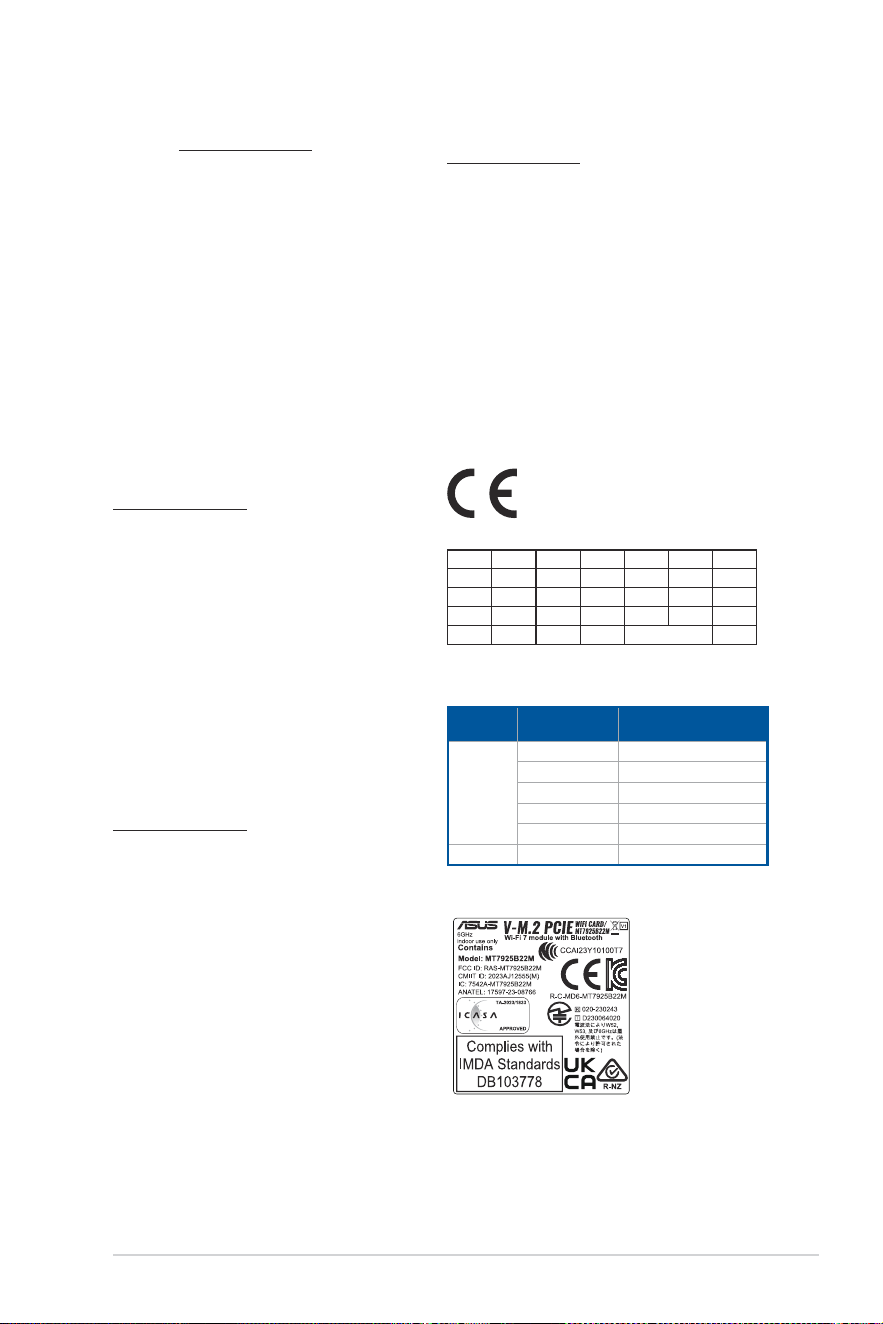
59
Declaración de conformidad simplificada para la UE
Por la presente, ASUSTek Computer Inc. declara que este dispositivo cumple
los requisitos básicos y otras disposiciones pertinentes de la directiva
2014/53/EU. En https://www.asus.com/support/ está disponible el texto
completo de la declaración de conformidad para la UE.
La conexión WiFi con una frecuencia de funcionamiento de 5150-5350 MHz
se restringirá al uso en interiores para los países enumerados en la tabla:
a. Dispositivos con Wi-Fi de baja potencia para interiores (LPI) de 5,945-
6,425 GHz:
El dispositivo está restringido al uso en interiores únicamente cuando
funciona en el intervalo de frecuencias de 5945 a 6425MHz en Austria
(AT), Bélgica (BE), Bulgaria (BG), Chipre (CY), República Checa (CZ),
Estonia (EE), Francia (FR), Alemania (DE), Islandia (IS), Irlanda (IE), Letonia
(LV), Luxemburgo (LU), Países Bajos (NL), Noruega (NO), Rumanía (RO),
Eslovaquia (SK), Eslovenia (SI), España (ES) y Suiza (CH).
b. Dispositivos con Wi-Fi de muy baja potencia (VLP) de 5,945-6,425 GHz
(dispositivos portátiles):
No está permitido usar el dispositivo en sistemas de aeronaves no
tripuladas cuando funciona en el intervalo de frecuencias de 5945
a 6425MHz en Austria (AT), Bélgica (BE), Bulgaria (BG), Chipre (CY),
República Checa (CZ), Estonia (EE), Francia (FR), Alemania (DE), Islandia
(IS), Irlanda (IE), Letonia (LV), Luxemburgo (LU), Países Bajos (NL),
Noruega (NO), Rumanía (RO), Eslovaquia (SK), Eslovenia (SI), España
(ES) y Suiza (CH).
Förenklad EU-försäkran om överensstämmelse
ASUSTek Computer Inc. deklarerar härmed att denna enhet överensstämmer
med de grundläggande kraven och andra relevanta bestämmelser i direktiv
2014/53/EU. Fullständig text av EU-försäkran om överensstämmelse finns på
https://www.asus.com/support/.
WiFi som använder 5150-5350 MHz kommer att begränsas för användning
inomhus i de länder som anges i tabellen:
a. Wi-Fi-enheter 5,945-6,425 GHz med låg effekt inomhus (LPI):
Enheten är begränsad till användning inomhus enbart när den använder
5 945 till 6 425 MHz frekvensband i Österrike (AT), Belgien (BE), Bulgarien
(BG), Cypern (CY), Tjeckien (CZ), Estland (EE), Frankrike (FR), Tyskland
(DE), Island (IS), Irland (IE), Lettland (LV), Luxemburg (LU), Nederländerna
(NL), Norge (NO), Rumänien (RO), Slovakien (SK), Slovenien (SI), Spanien
(ES), Schweiz (CH).
b. Wi-Fi-enheter 5,945-6,425 GHz med mycket låg effekt (VLP) (bärbara
enheter):
Enheten får inte användas på obemannade luftfartyg (UAS) när den
använder 5 945 till 6 425 MHz frekvensband i Österrike (AT), Belgien
(BE), Bulgarien (BG), Cypern (CY), Tjeckien (CZ), Estland (EE), Frankrike
(FR), Tyskland (DE), Island (IS), Irland (IE), Lettland (LV), Luxemburg
(LU), Nederländerna (NL), Norge (NO), Rumänien (RO), Slovakien (SK),
Slovenien (SI), Spanien (ES), Schweiz (CH).
Basitleştirilmiş AB Uyumluluk Bildirimi
ASUSTek Computer Inc., bu aygıtın 2014/53/EU Yönergesinin temel
gereksinimlerine ve diğer ilgili hükümlerine uygun olduğunu bildirir. AB
uygunluk bildiriminin tam metni şu adreste bulunabilir:
https://www.asus.com/support/.
5150-5350 MHz arasındaki WiFi çalışması, tabloda listelenen ülkeler için iç
mekân kullanımıyla kısıtlanacaktır.
a. Düşük Güç İç Mekan (LPI) Wi-Fi 5.945-6.425 GHz cihazları:
Avusturya (AT), Belçika (BE), Bulgaristan (BG), Kıbrıs (CY), Çek
Cumhuriyeti (CZ), Estonya (EE), Fransa (FR), Almanya (DE), İzlanda (IS),
İrlanda (IE), Letonya (LV), Lüksemburg (LU), Hollanda (NL), Norveç (NO),
Romanya (RO), Slovakya (SK), Slovenya (SI), İspanya (ES), İsviçre (CH)’da
5945 ila 6425 Mhz frekans aralığında çalışırken cihaz yalnızca iç mekanda
kullanım ile sınırlandırılmıştır.
b. Çok Düşük Güç (VLP) Wi-Fi 5.945-6.425 GHz cihazları (taşınabilir cihazlar):
Avusturya (AT), Belçika (BE), Bulgaristan (BG), Kıbrıs (CY), Çek
Cumhuriyeti (CZ), Estonya (EE), Fransa (FR), Almanya (DE), İzlanda (IS),
İrlanda (IE), Letonya (LV), Lüksemburg (LU), Hollanda (NL), Norveç (NO),
Romanya (RO), Slovakya (SK), Slovenya (SI), İspanya (ES), İsviçre (CH)’da
5945 ila 6425 Mhz frekans aralığında çalışırken cihazın İnsansız Hava
Aracı Sistemleri (UAS)’ta kullanımı izinli değildir.
Спрощена декларація про відповідність нормам ЄС
ASUSTek Computer Inc. заявляє, що цей пристрій відповідає основним
вимогам та іншим відповідним вимогам Директиви 2014 / 53 / EU. Повний
текст декларації відповідності нормам ЄС доступний на
https://www.asus.com/support/.
Робота Wi-Fi на частоті 5150-5350 МГц обмежується використанням у
приміщенні для країн, поданих у таблиці нижче:
a. Пристрої низької потужності для приміщень (LPI) Wi-Fi 5,945–6,425
ГГц.
Використання пристрою обмежено лише приміщенням із діапазоном
частот від 5945 МГц до 6425 МГц у Австрія (AT), Бельгії (BE), Болгарії
(BG), на Кіпрі (CY), у Чеській Республіці (CZ), Естонії (EE), Франції (FR),
Німеччині (DE), Ісландії (IS), Ірландії (IE), Латвія (LV), Люксембург
(LU), Нідерландах (NL), Норвегія (NO), Румунія (RO), Словаччина (SK),
Словенія (SI), Іспанії (ES), Швейцарія (CH).
b. Пристрої дуже низької потужності (VLP) Wi-Fi 5,945–6,425 ГГц
(портативні пристрої).
Використання пристрою не дозволено на безпілотних літальних
апаратах (UAS) із діапазоном частот від 5945 МГц до 6425 МГц
у Австрія (AT), Бельгії (BE), Болгарії (BG), на Кіпрі (CY), у Чеській
Республіці (CZ), Естонії (EE), Франції (FR), Німеччині (DE), Ісландії
(IS), Ірландії (IE), Латвія (LV), Люксембург (LU), Нідерландах (NL),
Норвегія (NO), Румунія (RO), Словаччина (SK), Словенія (SI), Іспанії
(ES), Швейцарія (CH).
AT BE BG CZ DK EE FR
DE IS IE IT EL ES CY
LV LI LT LU HU MT NL
NO PL PT RO SI SK TR
FI SE CH HR UK(NI)
CE RED RF Output table (Directive 2014/53/EU)
Model: MT7925B22M
Function Frequency Maximum Output Power
EIPR (mW)
WiFi
2.4 - 2.4835 GHz <100
5.15 - 5.35 GHz <200
5.47 - 5.725 GHz <200
5.725 - 5.875 GHz* <25
5.925 - 6.425 GHz <200
Bluetooth 2.4 - 2.4835 GHz <100
Receiver category 1
* Non-Intel modules: 5.725 - 5.85 GHz

60
Warranty
EN: ASUS Guarantee Information
• ASUS offers a voluntary manufacturer’s Commercial Guarantee.
• ASUS reserves the right to interpret the provisions of the ASUS
Commercial Guarantee.
• This ASUS Commercial Guarantee is provided independently and
in addition to the statutory Legal Guarantee and in no way affects
or limits the rights under the Legal Guarantee.
For all the guarantee information, please visit
https://www.asus.com/support.
CZ: Informace o záruce společnosti ASUS
• Společnost ASUS nabízí dobrovolnou komerční záruku výrobce.
• Společnost ASUS si vyhrazuje právo vykládat ustanovení
komerční záruky společnosti ASUS.
• Tato komerční záruka společnosti ASUS je poskytována nezávisle
a jako doplněk zákonné záruky a žádným způsobem neovlivňuje
ani neomezuje práva vyplývající ze zákonné záruky.
Všechny informace o záruce najdete na adrese
https://www.asus.com/cz/support/.
CR: Informacije o ASUS jamstvu
• ASUS dragovoljno nudi komercijalno proizvođačko jamstvo.
• ASUS zadržava prava na tumačenje odredbi ASUS komercijalnog
jamstva.
• Ovo ASUS komercijalno jamstvo daje se neovisno i kao dodatak
zakonskom jamstvu i ni na koji način ne ograničuje prava iz okvira
zakonskog jamstva.
Sve informacije o jamstvu potražite na
https://www.asus.com/support.
DU: ASUS-garantie-informatie
• SUS biedt een vrijwillige commerciële garantie van de fabrikant.
• ASUS behoudt zich het recht voor om de bepalingen van de
commerciële garantie van ASUS uit te leggen.
• Deze commerciële garantie van ASUS wordt onafhankelijk en
als aanvulling op de statutaire Wettelijke garantie geboden en
beïnvloedt of beperkt in geen geval de rechten onder de wettelijke
garantie.
Voor alle informatie over de garantie, gaat u naar
https://www.asus.com/nl/support/.
I: Informativa sulla Garanzia ASUS
• ASUS offre una Garanzia Commerciale volontaria del produttore.
• ASUS si riserva il diritto di interpretare le disposizioni della
Garanzia Commerciale ASUS.
• La presente Garanzia Commerciale ASUS viene fornita in modo
indipendente e in aggiunta alla Garanzia Legale prevista per
legge e non pregiudica o limita in alcun modo i diritti previsti dalla
Garanzia Legale.
Per tutte le informazioni sulla garanzia, visitare https://www.asus.
com/it/support.
EE: Teave ASUS-e garantii kohta
• ASUS pakub vabatahtlikku tasulist tootjagarantiid.
• ASUS jätab endale õiguse tõlgendada ASUS-e tasulise garantii
tingimusi.
• See ASUS-e tasuline garantii on sõltumatu lisagarantii seadusega
kehtestatud garantiile ega mõjuta mingil määral seadusega
kehtestatud garantiid ning seadusega kehtestatud garantii
piiranguid.
Vaadake garantiiga seotud teavet veebisaidilt
https://www.asus.com/ee/.
GK: Πληροφορίες εγγύησης ASUS
• Η ASUS προσφέρει μια εθελοντική Εμπορική εγγύηση κατασκευαστή.
• Η ASUS διατηρεί το δικαίωμα ερμηνείας των διατάξεων της Εμπορικής
εγγύησης ASUS.
• Αυτή η Εμπορική εγγύηση ASUS παρέχεται ανεξάρτητα και
επιπροσθέτως της θεσμικής Νομικής εγγύησης και σε καμία περίπτωση
δεν επηρεάζει ή περιορίζει τα δικαιώματα βάσει της Νομικής εγγύησης.
Για όλες τις πληροφορίες εγγύησης, επισκεφθείτε τη διεύθυνση
https://www.asus.com/gr-el/.
DA: ASUS garantioplysninger
• ASUS tilbyder en valgfri handelsmæssig garanti.
• ASUS forbeholder sig retten til at fortolke bestemmelserne i ASUS’
handelsmæssige garanti.
• Denne handelsmæssige garanti fra ASUS tilbydes uafhængigt,
som en tilføjelse til den lovbestemte juridiske garanti og den
påvirker eller begrænser på ingen måde rettighederne i den
juridiske garanti.
Alle garantioplysningerne kan findes på
https://www.asus.com/dk/support/.
HUG: ASUS garanciális információk
• Az ASUS önkéntes gyártói kereskedelmi garanciát kínál.
• Az ASUS fenntartja magának a jogot, hogy értelmezze az ASUS
kereskedelmi garanciára vonatkozó rendelkezéseket.
• Ezt a kereskedelmi garanciát az ASUS függetlenül és a törvényes
garancia mellett nyújtja és semmilyen módon nem befolyásolja,
vagy korlátozza a jogi garancia nyújtotta jogokat.
A garanciára vonatkozó teljes körű információkért látogasson el a
https://www.asus.com/hu/support/ oldalra.
BG: Информация за гаранцията от ASUS
• ASUS предлага доброволна търговска гаранция от производителя.
• ASUS си запазва правото да тълкува условията на търговската
гаранция на ASUS.
• Тази търговска гаранция на ASUS се предлага независимо от
и в допълнение на законовата гаранция. Тя по никакъв начин
не оказва влияние върху правата на потребителя в законовата
гаранция и по никакъв начин не ги ограничава.
За цялостна информация относно гаранцията, моля, посетете
https://www.asus.com/support.
LV: ASUS garantijas informācija
• ASUS piedāvā brīvprātīgu ražotāja komerciālo garantiju.
• ASUS patur tiesības interpretēt ASUS komerciālās garantijas
noteikumus.
• Šī ASUS komerciālā garantija tiek piedāvāta neatkarīgi un
papildus likumā noteiktajai juridiskajai garantijai, un tā nekādi
neietekmē vai neierobežo juridiskajā garantijā noteiktās tiesības.
Lai iegūtu informāciju par garantiju, apmeklējiet vietni
https://www.asus.com/lv/.
F: Garantie ASUS
• ASUS fournit une garantie commerciale en tant que garantie
volontaire du fabricant.
• ASUS se réserve le droit d'interpréter et de clarifier les
informations relatives à la garantie commerciale ASUS.
• Cette garantie commerciale ASUS est fournie indépendamment
et parallèlement à la garantie légale, elle n'affecte ou ne limite
d'aucune façon les droits acquis par la garantie légale.
Pour plus d'informations sur la garantie, consultez le site
https://www.asus.com/fr/support/.
G: ASUS Garantieinformationen
• ASUS bietet eine freiwillige Warengarantie des Herstellers an.
• ASUS behält sich das Recht zur Auslegung der Bestimmungen in
der ASUS Warengarantie vor.
• Diese ASUS Warengarantie wird unabhängig und zusätzlich zur
rechtmäßigen gesetzlichen Garantie gewährt und beeinträchtigt
oder beschränkt in keiner Weise die Rechte aus der gesetzlichen
Garantie.
Die vollständigen Garantieinformationen finden Sie unter
https://www.asus.com/de/support/.
R: Информация о гарантии ASUS
• ASUS предлагает добровольную гарантию от производителя.
• ASUS оставляет за собой право интерпретирование положений
гарантии ASUS.
• Настоящая гарантия ASUS никоим образом не ограничивает Ваши
права, предусмотренные локальным законодательством.
Для получения полной информации о гарантии посетите
https://www.asus.com/ru/support/.
LT: Informacija apie ASUS garantiją
• ASUS siūlo savanorišką komercinę gamintojo garantiją.
• ASUS pasilieka teisę savo nuožiūra aiškinti šios komercinės ASUS
garantijos nuostatas.
• Ši komercinė ASUS garantija suteikiama nepriklausoma, be
įstatyminės teisinės garantijos, ir jokiu būdu nepaveikia ar
neapriboja teisinės garantijos suteikiamų teisių.
Norėdami gauti visą informaciją apie garantiją, apsilankykite
https://www.asus.com/lt/.
FI: ASUS-takuutiedot
• ASUS tarjoaa vapaaehtoisen valmistajan kaupallisen takuun.
• ASUS pidättää oikeuden tulkita ASUS-kaupallisen takuun ehdot.
• Tämä ASUS-kaupallinen takuu tarjotaan itsenäisesti lakisääteisen
oikeudellisen takuun lisäksi eikä se vaikuta millään tavoin laillisen
takuun oikeuksiin tai rajoita niitä.
Saadaksesi kaikki takuutiedot, siirry osoitteeseen https://www.asus.
com/fi/support.

61
MX: Garantía y Soporte
Esta Garantía aplica en el país de compra. Usted acepta que en esta
garantía:
• Los procedimientos de servicio pueden variar en función del país.
• Algunos servicios y/o piezas de reemplazo pudieran no estar
disponibles en todos los países.
• Algunos países pueden tener tarifas y restricciones que se
apliquen en el momento de realizar el servicio, visite el sitio de
soporte de ASUS en
https://www.asus.com/mx/support/ para ver más detalles.
• Si tiene alguna queja o necesidad de un centro de reparación local
o el periodo de garantía del producto ASUS, por favor visite el sitio
de Soporte de ASUS en https://www.asus.com/mx/support/ para
mayores detalles.
Información de contacto ASUS
Esta garantía está respaldada por:
ASUSTeK Computer Inc.
Centro de Atención ASUS +52 (55) 1946-3663
NW: Informasjon om ASUS-garanti
• ASUS tilbyr som produsent en frivillig kommersiell garanti.
• ASUS forbeholder seg retten til å tolke bestemmelsene i ASUS sin
kommersielle garanti.
• ASUS sin kommersielle garanti gis uavhengig og i tillegg til den
lovbestemte juridiske garantien, og verken påvirker eller begrenser
rettighetene under den juridiske garantien på noen måte.
Du finner fullstendig informasjon om garanti på
https://www.asus.com/no/support/.
PL: Informacje o gwarancji firmy ASUS
• Firma ASUS oferuje dobrowolną gwarancję handlową producenta.
• Firma ASUS zastrzega sobie prawo do interpretacji warunków
gwarancji handlowej firmy ASUS.
• Niniejsza gwarancja handlowa firmy ASUS jest udzielana
niezależnie, jako dodatek do wymaganej ustawowo gwarancji
prawnej i w żaden sposób nie wpływa na prawa przysługujące na
mocy gwarancji prawnej ani ich nie ogranicza.
Wszelkie informacje na temat gwarancji można znaleźć na stronie
https://www.asus.com/pl/support.
PG: Informações de Garantia ASUS
• A ASUS oferece uma Garantia Comercial voluntária do fabricante.
• A ASUS reserva o direito de interpretar as disposições da
Garantia Comercial da ASUS.
• Esta Garantia Comercial da ASUS é fornecida de forma
independente além da Garantia Legal estatutária e não afeta nem
limita de qualquer forma os direitos estabelecidos na Garantia
Legal.
Para consultar todas as informações sobre a garantia, visite
https://www.asus.com/pt/support/.
RO: Informații despre garanția ASUS
• ASUS oferă o garanție comercială voluntară a producătorului.
• ASUS își rezervă dreptul de a interpreta prevederile garanției
comerciale ASUS.
• Această garanție comercială ASUS este oferită independent și în plus
față de garanția obligatorie legal și nu afectează sau limitează în niciun
fel drepturile acordate conform garanției legale.
Pentru toate informațiile legate de garanție, vizitați
https://www.asus.com/ro/support.
TR: ASUS Garanti Bilgileri
• ASUS, gönüllü olarak üretici Ticari Garantisi sunar.
• ASUS, ASUS Ticari Garantisinin hükümlerini yorumlama hakkını
saklı tutar.
• Bu ASUS Ticari Garantisi, bağımsız olarak ve hukuki Yasal
Garanti’ye ek olarak sağlanır ve hiçbir şekilde Yasal Garanti
kapsamındaki hakları etkilemez veya sınırlandırmaz.
Tüm garanti bilgileri için lütfen
https://www.asus.com/tr/support adresini ziyaret edin.
SL: Informacije o garanciji ASUS
• ASUS ponuja prostovoljno tržno garancijo proizvajalca.
• ASUS si pridržuje pravico do razlage določb tržne garancije
družbe ASUS.
• Ta tržna garancija družbe ASUS je na voljo neodvisno in kot
dodatek zakonsko predpisani pravni garanciji ter na noben način
ne vpliva na pravice, ki jih zagotavlja pravna garancija, oziroma jih
omejuje.
Vse informacije o garanciji najdete na spletnem mestu
https://www.asus.com/support.
SK: Informácie o záruke ASUS
• ASUS ponúka dobrovoľnú obchodnú záruku výrobcu.
• ASUS si vyhradzuje právo interpretovať ustanovenia obchodnej
záruky ASUS.
• Táto obchodná záruka ASUS je poskytnutá nezávisle a navyše
k zákonnej záruke a v žiadnom prípade neovplyvňuje ani
neobmedzuje tieto práva podľa tejto zákonnej záruky.
Všetky ďalšie informácie o záruke nájdete na
https://www.asus.com/sk/support.
SB: Informacije o ASUS garanciji
• ASUS nudi dobrovoljnu proizvođačku komercijalnu garanciju.
• ASUS zadržava pravo da tumači odredbe svoje ASUS
komercijalne garancije.
• Ova ASUS komercijalna garancija daje se nezavisno, kao dodatak
zakonskoj pravnoj garanciji, i ni ka koji način ne utiče na i ne
ograničava prava data pravnom garancijom.
Za sve informacije o garanciji, posetite https://www.asus.com/support/.
SW: ASUS garantiinformation
• ASUS erbjuder en frivillig kommersiell tillverkningsgaranti.
• ASUS förbehåller sig rätten att tolka bestämmelserna i ASUS
kommersiella garanti.
• Denna kommersiella garanti från ASUS tillhandahålles separat
och som tillägg till den lagstadgade garantin, och påverkar eller
begränsar på intet sätts rättigheterna under den lagstadgade
garantin.
För all garantiinformation, besök https://www.asus.com/se/support/.
BP: Informações de garantia ASUS
Esta garantia aplica-se ao período definido pela garantia legal (90
dias) mais o período de garantia comercial oferecido pela ASUS.
Por exemplo: 12M significa 12 meses de garantia no total (3 meses
de garantia legal mais 9 meses de garantia contratual), 24 meses
significa 24 meses de garantia no total (3 meses de garantia legal
mais 21 meses de garantia contratual) e 36 meses significa 36 meses
de garantia no total (3 meses de garantia legal e 33 de garantia
contratual) a contar da data da garantia declarada (Data de Início
da Garantia).
Para todas as informações de garantia, visite https://www.asus.com/
br/support/.
UA: Інформація про Гарантію ASUS
• ASUS пропонує добровільну Комерційну Гарантію виробника.
• ASUS застерігає за собою право тлумачити положення Комерційної
Гарантії ASUS.
• Цю Комерційну Гарантію надано незалежно і на додаток до
обов’язкової Законної Гарантії; вона жодним чином не впливає на
права за Законною Гарантією і не обмежує їх.
Всю інформацію про гарантію подано тут:
https://www.asus.com/ua/support.
Компанія ASUS не не се відповідальності за шкоду, заподіяну життю,
здоров’ю чи майну користувача або інших осіб внаслідок використання
несправного Виробу або такого Виробу, що не пройшов діагностику
після закінчення терміну служби.
З метою перевірки технічного стану Виробу та визначення безпеки
його подальшого використання після закінчення терміну служби
користувачу необхідно припинити використання Виробу та передати
його в авторизований сервісний центр компанії ASUS протягом одного
місяця з моменту виявлення пошкоджень та/або закінчення терміну
служби Виробу.
S: Información de garantía de ASUS
• ASUS ofrece una garantía comercial voluntaria del fabricante.
• ASUS se reserva el derecho de interpretar las disposiciones de
esta garantía comercial de ASUS.
• Esta garantía comercial de ASUS se proporciona de forma
independiente y adicional a la garantía estatutaria y de ninguna
manera afecta a los derechos bajo la garantía legal ni los limita.
Para obtener toda la información sobre la garantía, visite
https://www.asus.com/ES/support/.
62
ID: Informasi Garansi ASUS
Garansi ini berlaku di negara tempat pembelian.
Periode Garansi tertera pada kemasan/kotak dari Produk dan Masa
Garansi dimulai sejak tanggal pembelian Produk ASUS dengan
kondisi baru.
Silahkan pindai Kode di bagian bawah halaman terakhir untuk Kartu
Garansi versi Web dalam format PDF untuk lebih informasi jelas
mengenai jaminan garansi Produk ASUS.
• Informasi Dukungan ASUS, silakan kunjungi
https://www.asus.com/id/support.
• Informasi Lokasi Layanan, silakan kunjungi
https://www.asus.com/id/support/Service-Center/Indonesia.
• Layanan Call Center: 1500128
VN: Thông tin đảm bảo của ASUS
• ASUS cung cấp Bảo hành thương mại tự nguyện của nhà sản xuất.
• ASUS bảo lưu quyền giải thích các điều khoản của Bảo hành thương
mại của ASUS.
• Bảo hành thương mại này của ASUS được cung cấp độc lập và ngoài
Bảo đảm pháp lý theo luật định và không có cách nào ảnh hưởng
đến hoặc giới hạn các quyền theo Bảo lãnh pháp lý. Để biết tất cả các
thông tin bảo hành, vui lòng truy cập
https://www.asus.com/vn/support
ASUS תוירחא לע עדימ :HB
.ןוצרמ ןרצי לש תירחסמ תוירחא העיצמ ASUS •
לש תירחסמה תוברעה תוארוה תא שרפל תוכזה תא המצעל תרמוש ASUS •
.ASUS
תיטפשמה תוברעל ףסונבו יאמצע ןפואב תנתינ ASUS לש וז תירחסמ תוירחא •
תרגסמב תויוכזה תא ןפוא םושב הליבגמ וא העיפשמ הניאו תירוטוטטסה
.תיטפשמה תוברעה
ב רקב אנא ,תוירחאה תודוא עדימל
.https://www.asus.com/support
Warranty Card (Online)
63
Service and support
Visit our multi-language website at https://www.asus.com/support.
Product register
Log in and register your device for better product support.
ASUS contact information
ASUSTeK COMPUTER INC.
Address: 1F., No. 15, Lide Rd., Beitou Dist., Taipei City 112
https://qr.asus.com/ProductSafety
ASUS COMPUTER INTERNATIONAL (America)
Address: 48720 Kato Rd., Fremont, CA 94538, USA
ASUS COMPUTER GmbH (Germany and Austria)
Address: Harkortstrasse 21-23, 40880 Ratingen, Germany
ASUSTeK (UK) LIMITED
Address: 1st Floor, Sackville House, 143-149 Fenchurch Street, London, EC3M 6BL,
England, United Kingdom
ASUS GLOBAL PTE. LTD.
Address: 10 Changi Business Park Central 2 #02-01 Hansapoint Singapore 486030
https://qr.asus.com/ProductSafety