©COPYRIGHT AVPRO GLOBAL HOLDINGS 2023 - 2222 E 52ND STREET N SIOUX FALLS, SD 57104 ~ 1.877.866.5112
1
GUIDE-4
User Manual
HDMI 2.1 4×1 Switch

Thenaudio is proud to introduce GUIDE-4, a smart four-port AV switch with up to 48Gbps /
FRL6 switching capability and CEC control support for extra convenience.
The GUIDE-4 is engineered in a completely new way to support various audio, video, and
encryption standards. In a typical AV product, the incoming signal is first decoded and then
re-encoded inside an increasingly complex IC. Thenaudio decided to look for other ways
to be completely transparent to the contents of the input signal using the fastest data rates
of 48Gbps FRL6 while still allowing the much-needed CEC control support. Each input port
of GUIDE-4 is equipped with a unique way to process the information exchange between
the connected source and the TV in runtime while the audio and video signal is flowing
untouched with perfect pass-through quality.
GUIDE-4 supports any HDMI video signaling all the way to the latest standards found
from the 2.1 specification. GUIDE-4 can support 4k120 10/12bit HDR, 8k60, and any other
format up to 48Gbps while including features such as VRR for the best gaming experience.
For audio support, there are no limitations, and all standardized audio formats such as all
flavors of Dolby Atmos / DTS:X / PCM 7.1 are supported including all standard sample rates
like 48kHz to 192kHz.
Introduction
©COPYRIGHT AVPRO GLOBAL HOLDINGS 2023 - 2222 E 52ND STREET N SIOUX FALLS, SD 57104 ~ 1.877.866.5112
2
CEC SWITCHING CONTROL:
GUIDE-4 supports CEC control; CEC control is a desired feature to use in modern AV set-
ups since most TVs sold in the past several years oer CEC control simply by using the
TV remote controller. TV menus are often engineered to natively support this feature, yet
many switches have never added the capability due to the additional complexities to sup-
port these commands while making the CEC network reflect the correct parameters.
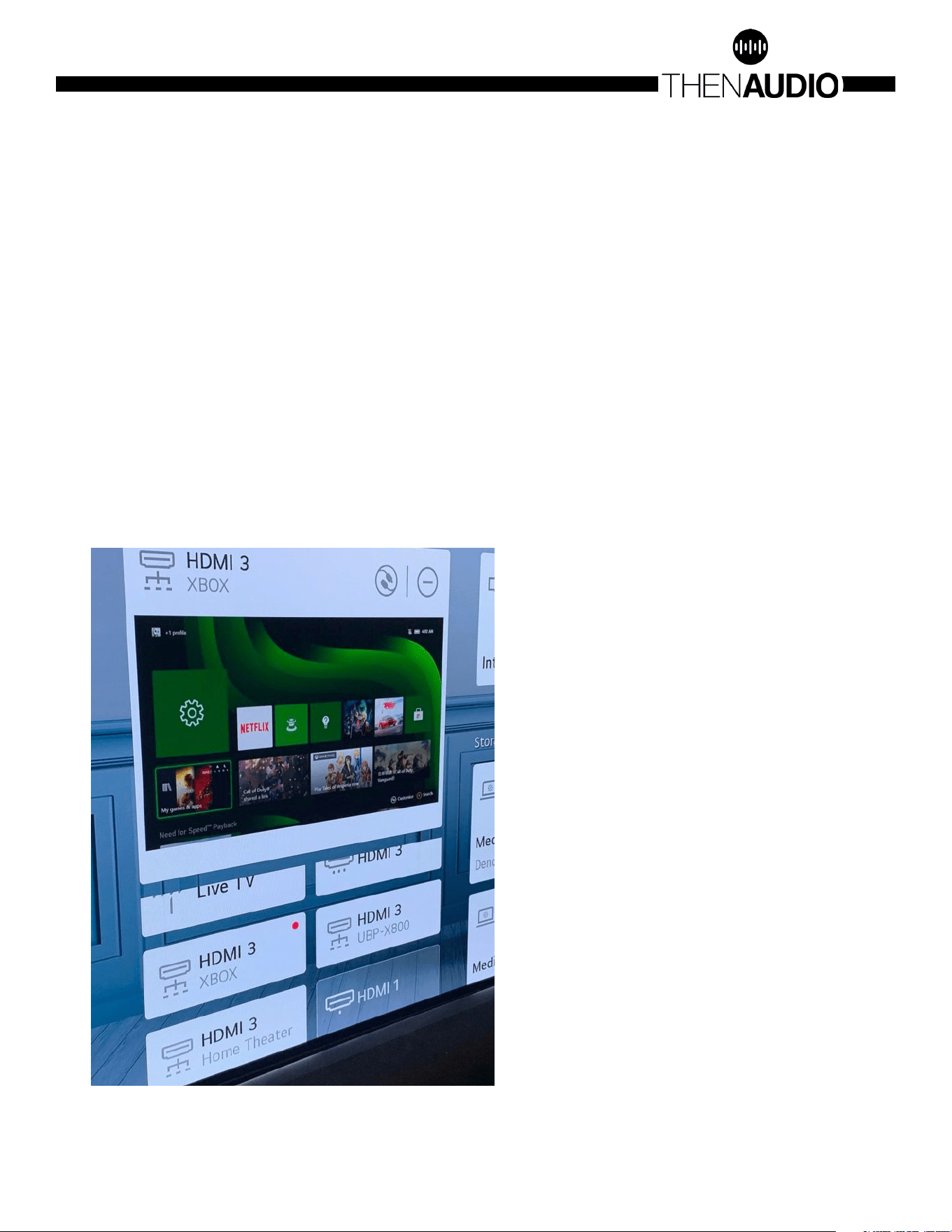
An example of GUIDE-4 using three connected devices, Xbox Series X, Blu-Ray player and
AppleTV is shown below. Each source is connected to one of the GUIDE-4 inputs and the
output is connected to the HDMI 3 of an LG TV. The LG TV will scan the CEC network and
display each capable source under HDMI 3 as this is the input where GUIDE-4 is connect-
ed. By using the LG TV remote, it is simple to switch between the inputs. The actual switch-
ing happens automatically inside GUIDE-4.
CEC channel switching example
Another way to start watching the
desired source is to press the menu
button on the remote controller for the
respective input source. For example,
pressing the AppleTV remote controller
menu button will issue a string of
specific CEC commands which GUIDE-4
will process accordingly to make the
channel change.
©COPYRIGHT AVPRO GLOBAL HOLDINGS 2023 - 2222 E 52ND STREET N SIOUX FALLS, SD 57104 ~ 1.877.866.5112
3

AUTO-SWITCHING CONTROL:
There are other ways to perform channel switching with GUIDE-4. In case CEC
control is not available, it is possible to use a simple “+5 switching”. There is a
rudimentary way that HDMI sources use when informing their presence when
connected to a sink device. They do it by showing a fixed voltage level that can be
detected by the connecting device. Whenever such voltage is detected GUIDE-4
will switch to this channel if the relevant feature is enabled using the DIP switches
on the side of GUIDE-4.
IR SWITCHING CONTROL:
In case GUIDE-4 is installed within a system that has system controllers then it is
possible to use IR control for channel selection. The IR hex codes are available in
the download section.
For use cases without an IR system controller, there are special additional IR
commands that GUIDE-4 can respond to. This means it is possible to use an
already existing remote controller, say, from an AVR to do the switching. Such
support is generally ongoing and will be added depending on the number of
requests for specific models.
MANUAL SWITCHING CONTROL:
Finally, there is also a manual push-button that cycles through the inputs in case
no automation is desired.
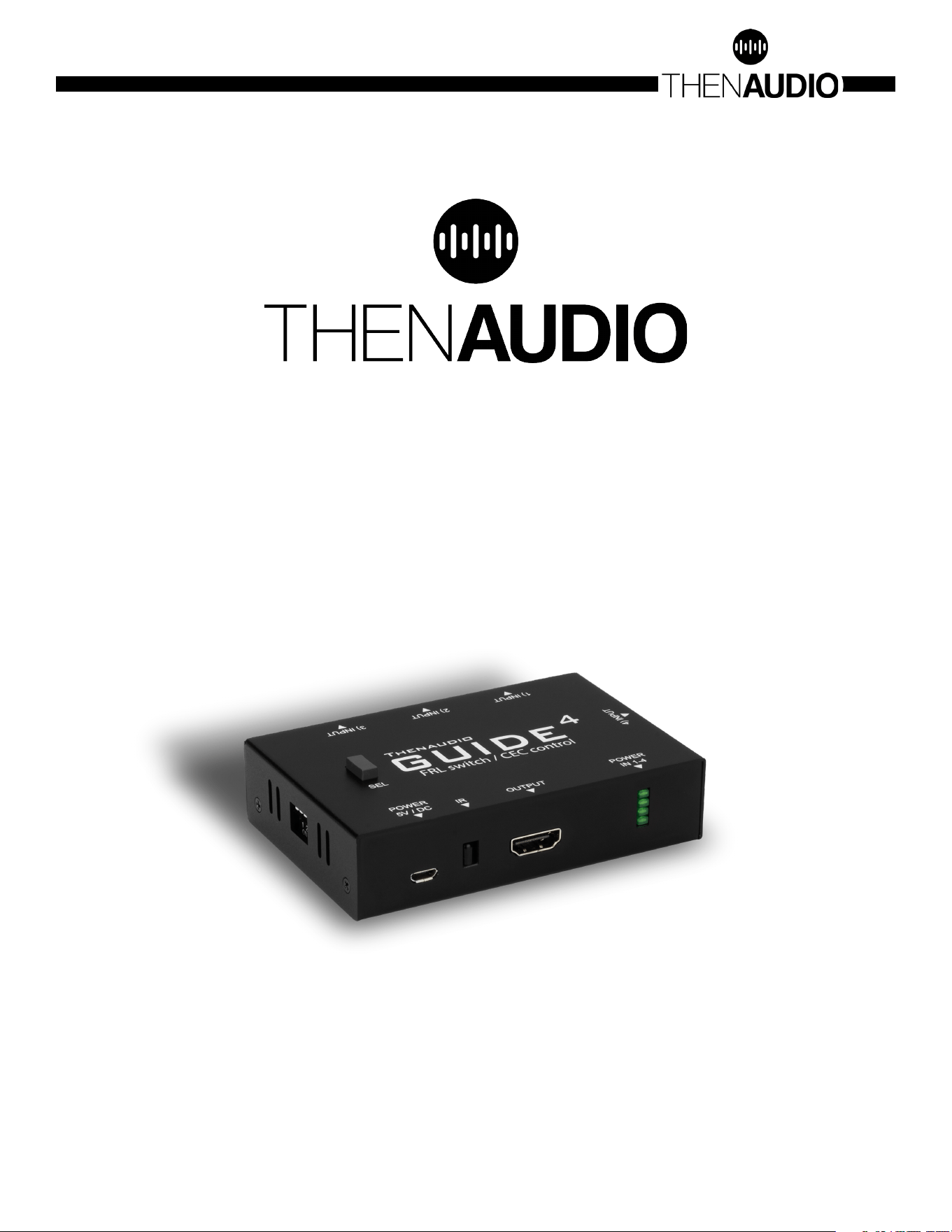
INDICATOR LED LIGHTS:
The four LED lights are active input indicators. TOP LED indicates that the input
port 1) is selected and is passed through to the TV. BOTTOM LED indicates that the
input port 4) is selected and passed through to the TV.
©COPYRIGHT AVPRO GLOBAL HOLDINGS 2023 - 2222 E 52ND STREET N SIOUX FALLS, SD 57104 ~ 1.877.866.5112
4

DIP SWITCH CONTROL:
DIP switches are used to modify the default operation as described below.
• DIP 1: CEC Switching
• UP: CEC control is enabled. (default)
• DN: CEC control is disabled. GUIDE-4 will not respond to CEC control
• DIP 2: +5 Source switching
• UP: Disabled. GUIDE-4 will not respond to source +5 signals. (default)
• DN: Enabled.
• DIP 3: FRL limit control
• UP: Allow any signals (default)
• DN: Allow max FRL-5 40Gbps signals
• What Does the FRL Limit do in practice?
• The maximum signal frequency in HDMI 2.1 is FRL-6 which corresponds
to 48Gbps. This bandwidth is large, and many cables cannot support
such high bandwidth. In some cases, the source signal format can be
sent using FRL-5. In this case, it is possible to relax the cable requirement
by using FRL-5 instead of FRL-6. GUIDE-4 can inform the source
specifically to limit the format to FRL-5 if the DIP switch #3 is in down-
position.
• DIP4: MultiPCM
• UP: Use capabilities from the connected display (default)
• DN: Add 7.1 PCM 48kHz-192kHz 24bit support
• What does the MultiPCM do in Practice?
• When it comes to TV Multichannel PCM support there are two types
of generic issues:
1. The TV does not advertise any 5.1 or 7.1 PCM support even though
the TV is in fact capable to pass those formats through via eARC
port?
2. The 5.1 or 7.1 PCM support is advertised but at a maximum sample
rate of 48kHz.
• Both issues are unfortunate as in the first case no MultiPCM will be
sent by the source device. In the second case it will be downmixed
or otherwise limited to standard audio, blocking all HD audio
signals that run at 96kHz and over.
• GUIDE-4 implements a real time modification to the TV capabilities
which will unlock the source device to send full spec 7.1 PCM
supporting up to 192kHz 24bit.
©COPYRIGHT AVPRO GLOBAL HOLDINGS 2023 - 2222 E 52ND STREET N SIOUX FALLS, SD 57104 ~ 1.877.866.5112
5

IR CODE BASE:
1. guide4_in1:
a. guide4_in1: NEC 0xdc 0x01
b. 0000 006e 0000 0022 0156 00ab 0015 0015 0015 0015 0015 003f 0015 003f
0015 003f 0015 0015 0015 003f 0015 003f 0015 003f 0015 003f 0015 0015 0015
0015 0015 0015 0015 003f 0015 0015 0015 0015 0015 003f 0015 0015 0015 0015
0015 0015 0015 0015 0015 0015 0015 0015 0015 0015 0015 0015 0015 003f 0015
003f 0015 003f 0015 003f 0015 003f 0015 003f 0015 003f 0015 1d0b
2. guide4_in2:
a. guide4_in2: NEC 0xdc 0x02
b. 0000 006e 0000 0022 0156 00ab 0015 0015 0015 0015 0015 003f 0015 003f
0015 003f 0015 0015 0015 003f 0015 003f 0015 003f 0015 003f 0015 0015 0015
0015 0015 0015 0015 003f 0015 0015 0015 0015 0015 0015 0015 003f 0015 0015
0015 0015 0015 0015 0015 0015 0015 0015 0015 0015 0015 003f 0015 0015 0015
003f 0015 003f 0015 003f 0015 003f 0015 003f 0015 003f 0015 1d0b
3. guide4_in3:
a. guide4_in3: NEC 0xdc 0x03
b. 0000 006e 0000 0022 0156 00ab 0015 0015 0015 0015 0015 003f 0015 003f
0015 003f 0015 0015 0015 003f 0015 003f 0015 003f 0015 003f 0015 0015 0015
0015 0015 0015 0015 003f 0015 0015 0015 0015 0015 003f 0015 003f 0015 0015
0015 0015 0015 0015 0015 0015 0015 0015 0015 0015 0015 0015 0015 0015 0015
003f 0015 003f 0015 003f 0015 003f 0015 003f 0015 003f 0015 1d0b
4. guide4_in4:
a. guide4_in4: NEC 0xdc 0x04
b. 0000 006e 0000 0022 0156 00ab 0015 0015 0015 0015 0015 003f 0015 003f
0015 003f 0015 0015 0015 003f 0015 003f 0015 003f 0015 003f 0015 0015 0015
0015 0015 0015 0015 003f 0015 0015 0015 0015 0015 0015 0015 0015 0015 003f
0015 0015 0015 0015 0015 0015 0015 0015 0015 0015 0015 003f 0015 003f 0015
0015 0015 003f 0015 003f 0015 003f 0015 003f 0015 003f 0015 1d0b
©COPYRIGHT AVPRO GLOBAL HOLDINGS 2023 - 2222 E 52ND STREET N SIOUX FALLS, SD 57104 ~ 1.877.866.5112
6
TROUBLESHOOTING:
1. Ensure all HDMI cables are capable of the HDMI bandwidth you are trying to
send. 48Gbps HDMI 2.1 cables are recommended.
2. If using CEC, ensure that all devices have CEC control enabled.
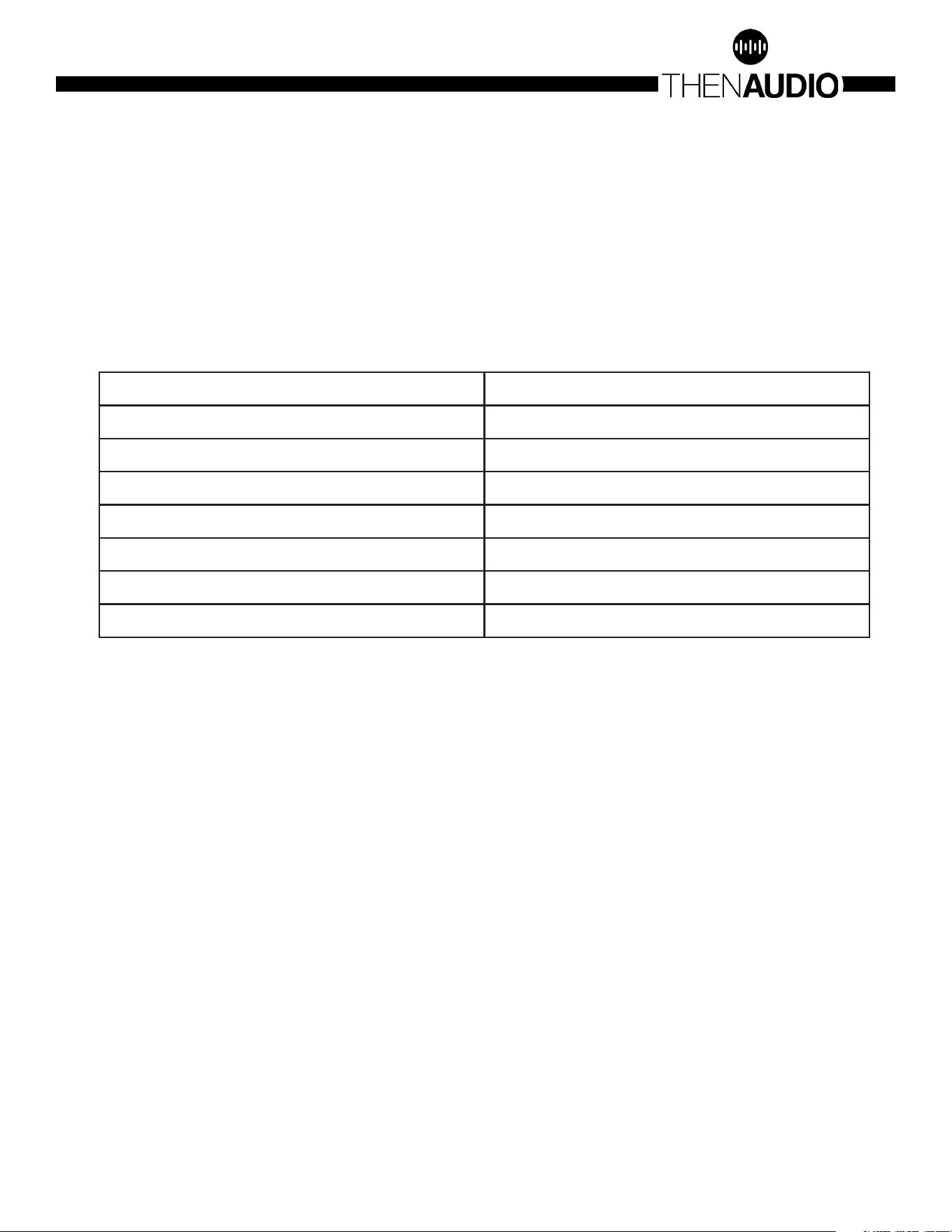
3. Some TV models require a CEC reset to reload the changed CEC network
parameters. Examples include:
4. Check the Input Indicator LED lights to ensure that the desired input is selected.
5. Check the DIP Switch controls to ensure that the desired function mode is
selected.
Manufacturer CEC Settings Control
LG Simplink
Samsung Anynet+
Sony Bravia Sync
Panasonic VIERA Link
Philips EasyLink
Snap Aquos Link
Hitachi HDMI-CEC
©COPYRIGHT AVPRO GLOBAL HOLDINGS 2023 - 2222 E 52ND STREET N SIOUX FALLS, SD 57104 ~ 1.877.866.5112
7

©COPYRIGHT AVPRO GLOBAL HOLDINGS 2023 - 2222 E 52ND STREET N SIOUX FALLS, SD 57104 ~ 1.877.866.5112
8

Thank you for choosing Then Audio!
Please contact us with any questions, we are
happily at your service!
CONTACT [email protected]om
IF YOU HAVE ANY QUESTIONS ABOUT OPERATING THIS PRODUCT
ZONE2-PRO is a brand new, one of a kind device in the entire world.
We greatly appreciate all kinds of feedback to help perfect this
product. For the latest firmware and manual visit
www.avproedge.com
©COPYRIGHT AVPRO GLOBAL HOLDINGS 2023 - 2222 E 52ND STREET N SIOUX FALLS, SD 57104 ~ 1.877.866.5112
9