Use & Care Guide
Customer Assistance
1-800-265-8456
www. koolatron.com
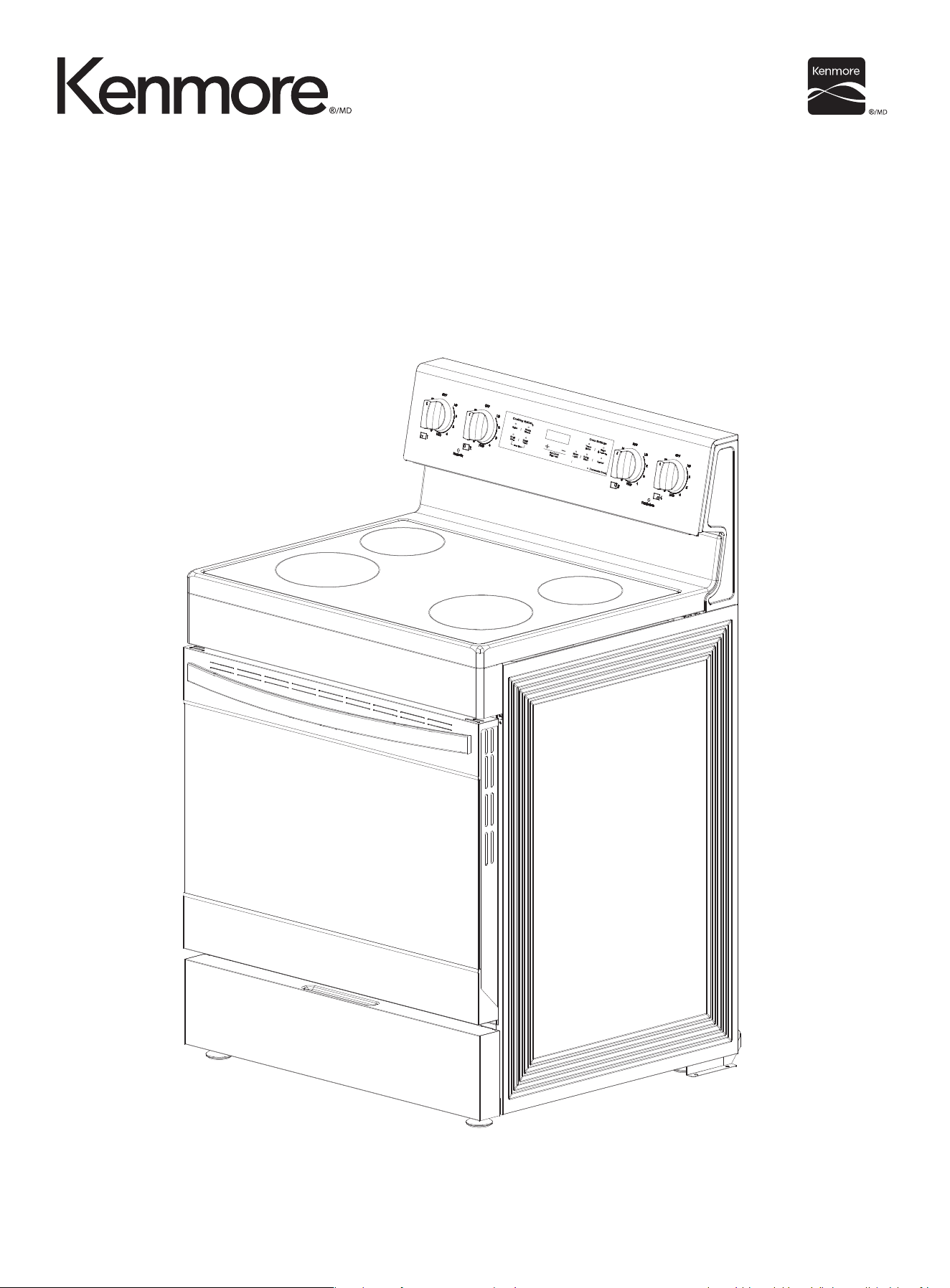
ELECTRIC RANGE
30” width / 5 cu. ft. / Rear Control /
Ceramic Glass Top / with Air Fry and Convection
KKFTR4.8-RearAFC-SS

IMPORTANT SAFETY PRECAUTIONS
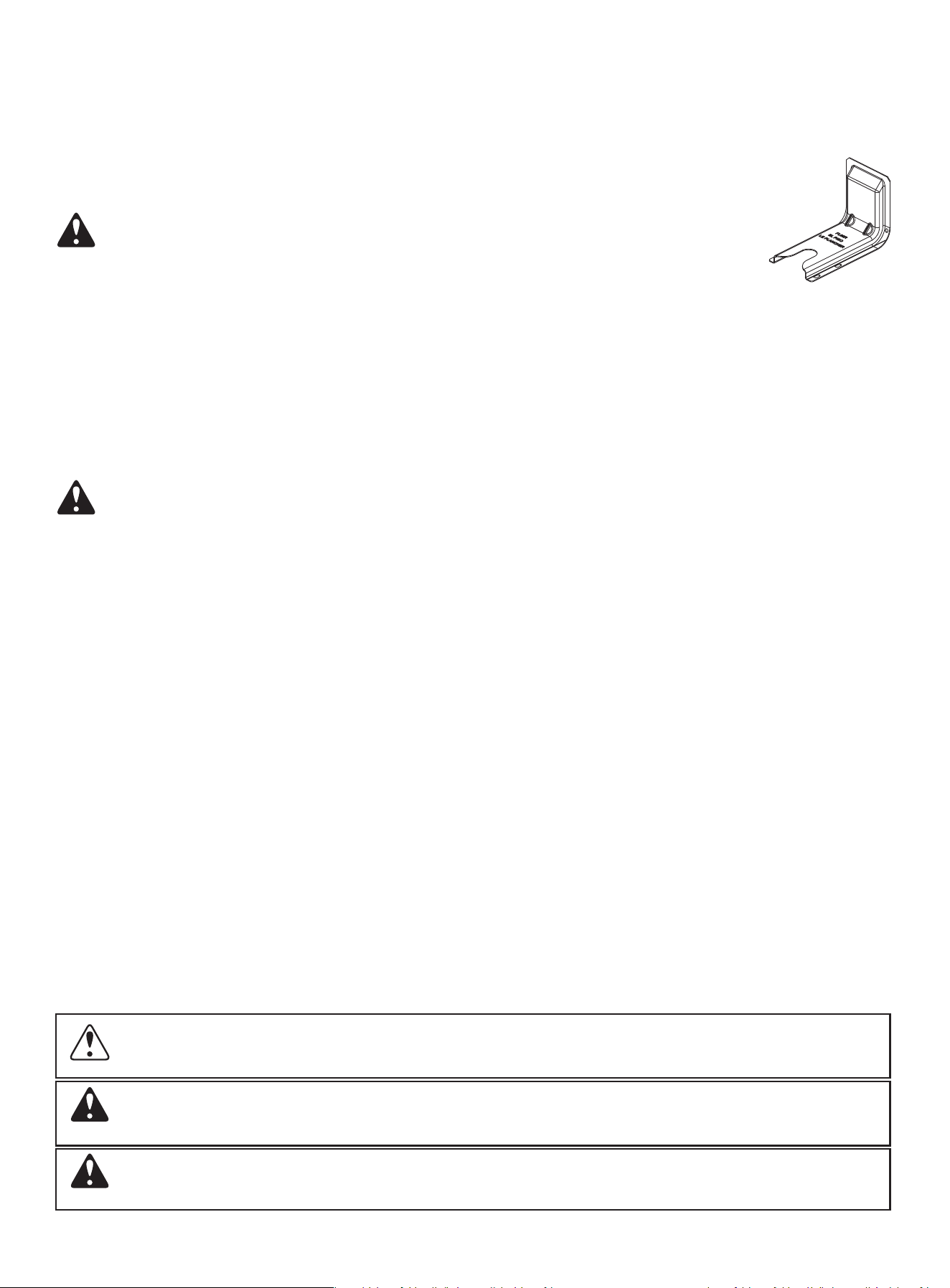
Anti-tip device
IMPORTANT SAFETY INSTRUCTIONS
Specifications
PRODUCT OVERVIEW
Package contents
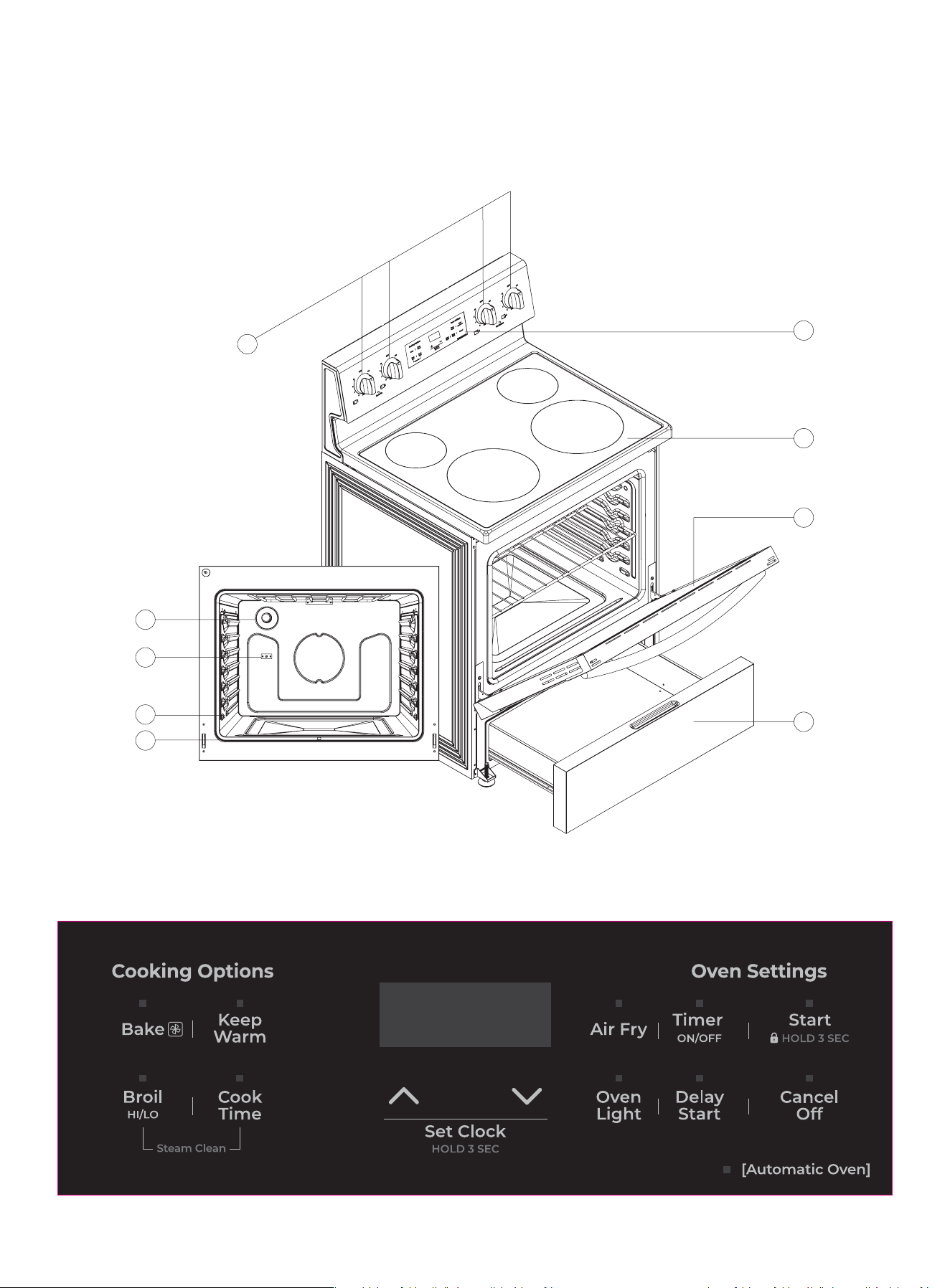
Main components
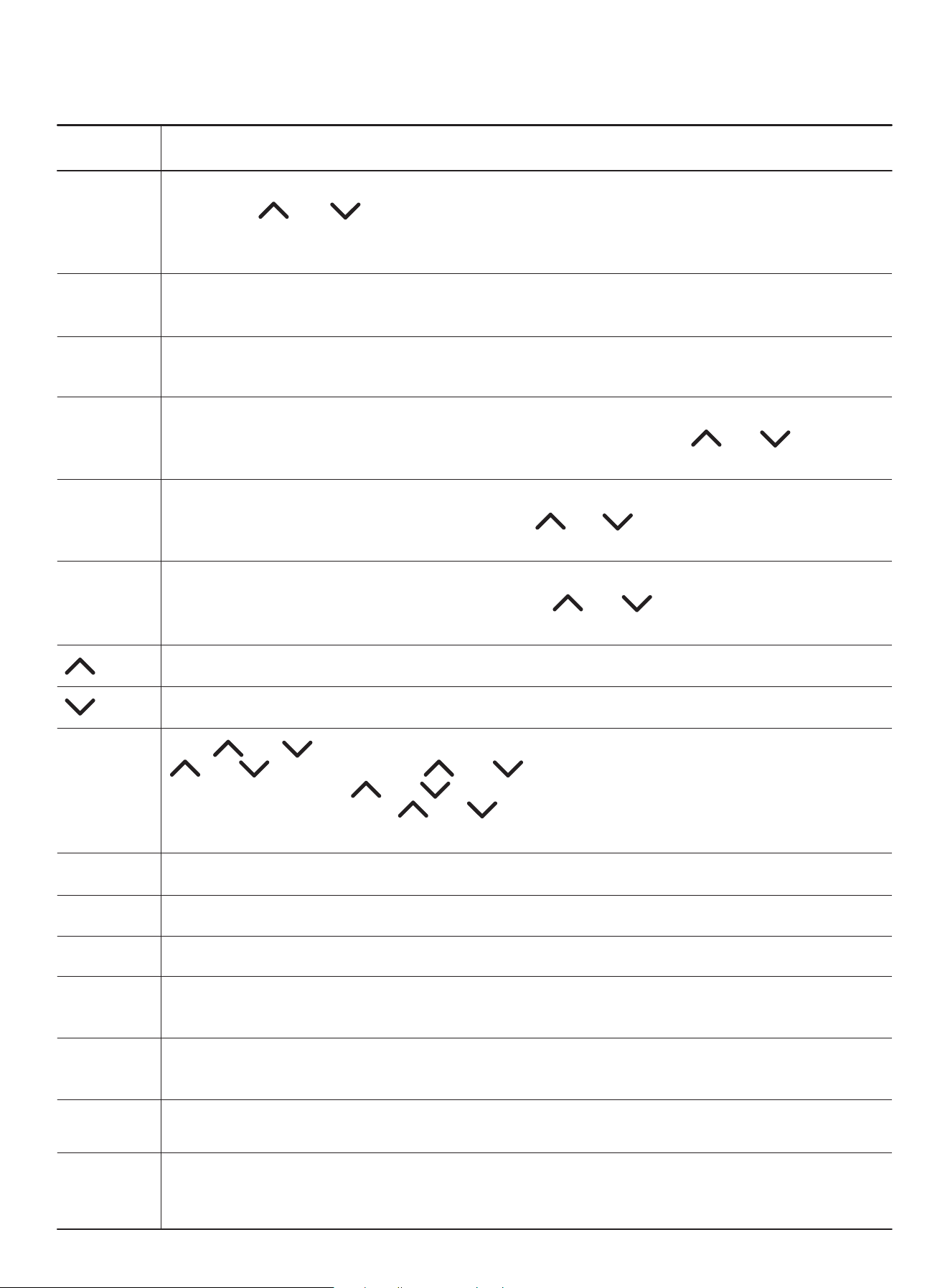
Oven control panel
INSTALLATION
Selecting a location
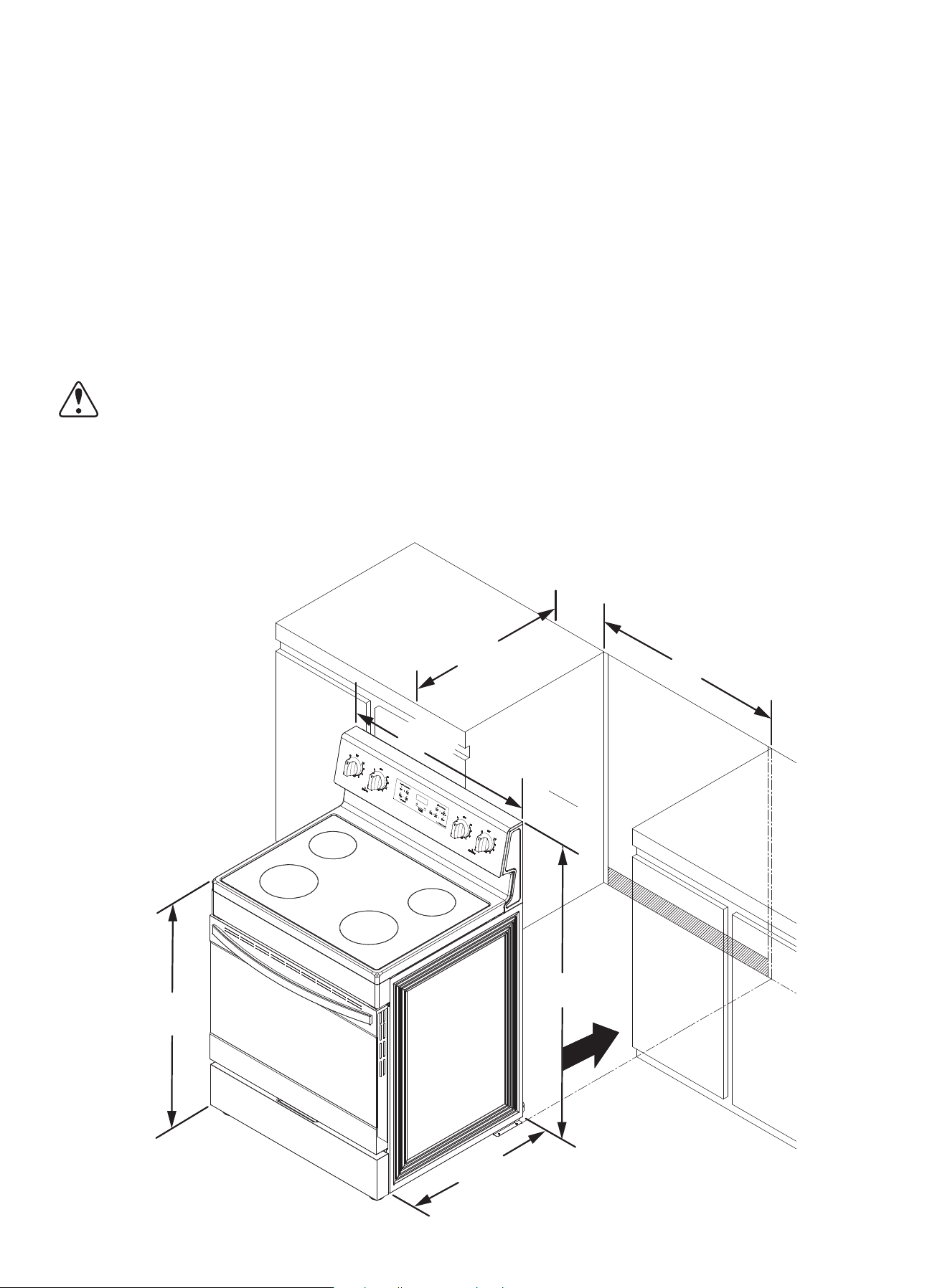
Clearances and dimensions
Electrical requirements
Installing your range
Tools you need (not included)
Items not included
Notes to the installer
Before installing your range
Connecting the power cord
Installing the anti-tip device
Placing your range and connecting to power
Leveling your range
Finishing the installation
Installing the oven door handle
Installing the plastic pads
OPERATING INSTRUCTIONS
Before you begin using your range
Tips for saving energy
Using the surface burners
Identifying the burners
Cooking areas
Using a surface element control knob
Using the correct cookware
Protecting the ceramic cooktop
Using the oven
Minimum and maximum settings
Positioning the oven racks
4
4
4
10
11
11
11
11
13
14
14
15
16
16
16
16
17
17
20
20
21
21
21
22
23
24
24
24
25
25
26
26
27
27
27
29
TABLE OF CONTENTS
2

Using the oven vent
Using the oven light
Tips for baking
Setting the clock
Selecting the 12-hour or 24-hour display setting
Using the timer
Baking
Adjusting the thermostat
Programming the cook time
Programming a delayed start time
Broiling
Air Fry
Keeping food warm
Switching between Fahrenheit and Celsius
Locking oven controls
MAINTENANCE
Cleaning and maintenance
Using the oven vent
Cleaning the control panel
Cleaning painted parts and decorative trim
Cleaning stainless steel surfaces
Cleaning the oven racks
Cleaning the oven door
Cleaning the surface element control knobs
Cleaning the cooktop
Removing and replacing the oven door
Removing and replacing the storage drawer
Steam cleaning the oven
TROUBLESHOOTING
Control panel display
Cooktop
Oven
Drawer
Error codes
WARRANTY
30
30
30
30
31
31
31
31
32
33
33
34
34
34
34
35
36
36
36
36
36
37
37
37
38
39
42
43
44
44
45
46
48
49
50
TABLE OF CONTENTS
3
4
CAUTION To reduce the risk of fire, explosion, electric shock, or personal injury when
using your oven, follow these basic safety precautions.
Hazards or unsafe practices that may result in severe personal injury or death.
Read and follow all instructions before using your oven to prevent the risk of fire, electric shock,
personal injury, or damage when using the range. This guide does not cover all possible conditions
that may occur. Always contact your service agent or manufacturer about problems that you do
not understand.
WHAT YOU NEED TO KNOW ABOUT SAFETY PRECAUTIONS
Anti-tip device
WARNING
To reduce the risk of tipping the range, the range must be secured by a properly
installed Anti-Tip device.
AFTER THE RANGE HAS BEEN INSTALLED, CONFIRM THAT THE ANTI-TIP DEVICE HAS BEEN
PROPERLY INSTALLED AND VERIFY THAT THE ANTI-TIP DEVICE IS PROPERLY ENGAGED.
• If the anti-tip device is not installed, a child or adult can tip the range and be killed.
• Verify that the anti-tip device has been properly installed and engaged at the rear right (or rear
left) of the range bottom.
• If you move the range and then move it back into place, ensure the anti tip-device is re-engaged
at the right or left rear of the range bottom.
• Do not operate the range without the anti-tip device in place and engaged.
• Failure to do so can result in death or serious burns to children or adults.
WARNING
• Do not step, lean, or sit on the doors of the range. You can cause the range to tip, resulting in
burns or serious injuries.
• Confirm that the Anti-Tip device is installed properly. Then, to verify that the Anti-Tip device is
engaged, grasp the top rear edge of the range and carefully attempt to tilt it forward. The Anti-Tip
device should prevent the range from tilting forward more than a few inches.
• If you pull the range out from the wall for any reason, make sure the anti-tip device is properly
engaged when you push the range back against the wall. If it is not, there is a risk of the range
tipping over and causing injury if you or a child stand, sit, or lean on the open door.
• Never completely remove the leveling legs. If you remove the leveling legs, the range will not be
secured to the antitip device properly.
IMPORTANT SAFETY PRECAUTIONS
Read and follow all instructions before using your oven to prevent the risk of fire, electric shock,
personal injury, or damage when using the range. This guide does not cover all possible conditions
that may occur. Always contact your service agent or manufacturer about problems that you do
not understand.
WHAT YOU NEED TO KNOW ABOUT SAFETY INSTRUCTIONS
Warnings and Important Safety Instructions in this manual do not cover all possible conditions
and situations that may occur. It is your responsibility to use common sense, caution, and care
when installing, maintaining, and operating your oven.
What the icons and signs in this user manual mean:
IMPORTANT SAFETY INSTRUCTIONS
WARNING
Hazards or unsafe practices that may result in minor personal injury or property damage.
CAUTION

5
When using electrical appliances, you should follow basic safety precautions, including the following:
CAUTION
• Use this appliance only for its intended purpose as described in this User Guide.
• Potentially hot surfaces include the cooktop, areas facing the cooktop, oven vent opening, surfac-
es near the opening, and crevices around the oven door.
• Be sure your appliance is properly installed and grounded by a qualified technician.
• User servicing - Do not repair or replace any part of the appliance unless specifically recommend-
ed in this manual. All other servicing should be referred to a qualified technician.
• Always disconnect the power to the appliance before servicing by removing the fuse or switching
off the circuit breaker.
• Do not store items of interest to children in cabinets above a range or on the back guard of a
range. Children climbing on the range to reach items could be seriously injured.
• Do not leave children alone. Never leave children alone or unattended in an area where this appli-
ance is in use. They should never be allowed to sit or stand on any part of the appliance.
• Never use your appliance for warming or heating the room.
• Do not use water on grease fires. Turn off the oven to avoid spreading the flames. Smother the fire
or flames by closing the door or use a dry chemical, baking soda, or foam-type extinguisher.
IMPORTANT SAFETY INSTRUCTIONS
• Do not store items in or on the appliance. Do not store flammable materials in the oven or near
the surface elements. Be sure all packing materials are removed from the appliance before operat-
ing it. Keep plastics, clothes, and paper away from parts of the appliance that may become hot.
• Wear proper apparel. Never wear loose-fitting or hanging garments while using the appliance.
• Use only dry potholders. Placing moist or damp potholders on hot surfaces may result in burns
from steam. Do not let the potholder touch hot heating elements. Do not use a towel or other
bulky cloth.
• Teach children not to play with the controls or any other part of the range.
• For your safety, do not use high-pressure water cleaners or steam jet cleaners.
• If the power cord is damaged, it must be replaced by the manufacturer, its service agent, or simi-
larly qualified persons to avoid creating a hazard.
• The appliance is not intended for use by persons (including children) with reduced physical, sen-
sory, or mental capabilities, or lack of experience and knowledge, unless they have been given
supervision or instruction concerning use of the appliance by a person responsible for their safety.
SURFACE COOKING ELEMENTS
• Never leave surface elements unattended at high heat settings. Boilovers cause smoking and
greasy spillovers that may ignite.
• Protective Liners – Do not use aluminum foil to line surface element drip bowls or oven bottoms,
except as suggested in the manual. Improper installation of these liners may result in a risk of elec-
tric shock or fire.
• To avoid oil spillover and fire, use a minimum amount of oil when shallow pan-frying and avoid
cooking frozen foods with excessive amounts of ice.
• Do not lift the cooktop. Lifting the cooktop can damage the range and cause the range to mal-
function.
• Do not operate the cooktop without cookware. If the cooktop operates without cookware, the
control knobs will become hot.
• Never use the glass cooktop surface as a cutting board.
ADDITIONAL SAFETY INSTRUCTIONS
WARNING - Cancer and Reproductive Harm - www.P65Warnings.ca.gov.
CALIFORNIA PROPOSITION 65 WARNING
FOR YOUR SAFETY

6
SURFACE COOKING ELEMENTS (cont.)
• Use care when touching the cooktop. The glass surface of the cooktop will retain heat after the
controls have been turned off.
• Be careful when placing spoons or other stirring utensils on the glass cooktop surface when it is
in use. They may become hot and could cause burns.
• Use proper pan sizes. This appliance is equipped with surface elements of different size. Select
pots and pans that have flat bottoms large enough to cover the surface area of the heating
element. Using undersized cookware will expose a portion of the heating element to direct con-
tact and may result in the ignition of clothing. Matching the size of the pot or pan to the element
will also improve efficiency.
• Utensil handles should be turned inward and not extended over adjacent surface elements – To
reduce the risk of burns, ignition of flammable materials, or spillage due to unintentional contact
with utensils, position utensil handles so that they are turned inward and do not extend over adja-
cent surface elements.
• Glazed cooking utensils – Only certain types of glass, glass/ceramic, ceramic, earthenware, or
other glazed cookware can be used for range top service without breaking due to sudden changes
in temperature.
• Cleaning – Read and follow all instructions and warnings on the cleaning cream labels.
• Be sure you know which control knob operates each surface element. Make sure you turned on
the correct surface element.
• Always turn the surface elements off before removing cookware.
• When preparing flaming foods under the hood, turn the fan on.
• Keep an eye on foods being fried at high or medium high heat settings.
• Do not store heavy items above the cooktop surface that could fall and damage it.
• Do not use decorative surface element covers – If an element is accidentally turned on, the deco-
rative cover will become hot and possibly melt. Burns will occur if the hot covers are touched.
Damage may also be done to the cooktop.
ELECTRICAL SAFETY
• PROPER INSTALLATION - Be sure your appliance is properly installed and grounded by a quali-
fied technician.
• Flush-mounted appliances may be operated only after they have been installed in cabinets and
workplaces that conform to the relevant standards. This ensures that the appliances are installed
in compliance with the appropriate safety standards.
• If your appliance malfunctions or if fractures, cracks, or splits appear:
- Switch off all cooking zones
- Unplug the range from the AC wall outlet
- Contact your local service center.
WARNING
If the surface is cracked, switch off and unplug the appliance to avoid the possibility of electrical
shock. Do not use your cooktop until the glass surface has been replaced.
WARNING
• Disconnect the range from AC power or turn off its breaker circuit before replacing the lamp to
avoid the possibility of electric shock.
• The range should not be placed on a base.
CHILD SAFETY
WARNING
• This appliance is not intended for use by young children or infirm persons without the adequate
supervision of a responsible adult.
• Young children should be supervised to ensure that they do not play with the appliance.
ADDITIONAL SAFETY INSTRUCTIONS

7
CHILD SAFETY (cont.)
• Keep children away from the door when opening or closing it as they may bump themselves on
the door or catch their fingers in the door.
• The cooking zones will become hot when you cook. To keep small children from being burned,
always keep them away from the appliance while you are cooking.
WARNING
• Accessible parts may become hot during use. To avoid burns, young children should be kept
away.
OVEN
• DO NOT TOUCH THE HEATING ELEMENTS OR INTERIOR SURFACES OF THE OVEN. Heating
elements may be hot even though they are dark in color. Interior surfaces of an oven become hot
enough to cause burns. During and after use, do not touch or let clothing or other flammable
materials contact the heating elements or interior surfaces of the oven until they have had suffi-
cient time to cool. Other surfaces of the appliance may become hot enough to cause burns.
Among these surfaces are oven vent openings and surfaces near these openings, the oven door,
and the window of the oven door.
• Do not heat unopened food containers. The build-up of pressure may cause the container to
burst and result in injury.
• Do not use the oven for a storage area. Items stored in an oven can ignite.
• Use care when opening the door. Let hot air or steam escape before you remove food from or
put food into the oven.
• Protective liners. Do not use aluminum foil to line the oven bottoms. Improper installation of
these liners may result in a risk of electric shock or fire.
• Keep oven vent ducts unobstructed. The oven vent is located above the right rear surface
element. This area could become hot during oven use. Never block this vent or place plastic or
heat-sensitive items on it.
• Placement of oven racks. Always place oven racks in the desired location while the oven is cool.
If the rack must be moved while the oven is hot, use potholders. Do not let the potholders come
in contact with the hot heating element in the oven.
• Do not allow aluminum foil or a meat probe to contact the heating elements.
• During use, the appliance becomes hot. Care should be taken to avoid touching heating
elements inside the oven.
• Do not use harsh abrasive cleaners or sharp metal scrapers to clean the oven door glass. They can
scratch the surface which may result in the glass shattering.
VENTILATING HOOD
• Clean ventilating hoods frequently. Do not let grease accumulate on the hood or filter.
• When flaming foods are under the hood, turn the hood fan on.
GLASS/CERAMIC COOKING SURFACES
• DO NOT TOUCH SURFACE ELEMENTS OR AREAS NEAR ELEMENTS. Surface elements may be
hot even though they are dark in color. Areas near surface elements may become hot enough to
cause burns. During and after use, do not touch, or let clothing or other flammable materials con-
tact the surface elements or areas near the elements until they have had sufficient time to cool.
Among these areas are the cooktop and areas directly facing the cooktop.
• Do not cook on a broken cooktop. If the cooktop should break, cleaning solutions and spillovers
may penetrate the broken cook-top and create a risk of electric shock. Contact a qualified techni-
cian immediately.
• Clean the cooktop with caution. If a wet sponge or cloth is used to wipe spills on a hot cooking
area, be careful to avoid steam burns. Some cleaners can produce noxious fumes if applied to a
hot surface.
ADDITIONAL SAFETY INSTRUCTIONS

8
CRITICAL INSTALLATION WARNINGS
WARNING
• This appliance must be installed by a qualified technician or service company. - Failing to have a
qualified technician install the range may result in electric shock, fire, an explosion, problems with
the product, or injury.
• Unpack the oven, remove all packaging material and examine the oven for any damage such as
dents on the interior or exterior of the oven, broken door latches, cracks in the door, or a door that
is not lined up correctly. If there is any damage, do not operate the oven and notify your dealer
immediately.
• Plug the power cord into a properly grounded outlet with the proper configuration. Your oven
should be the only item connected to this circuit.
• Keep all packaging materials out of the reach of children. Children may use them for play and
injure themselves.
• Install your appliance on a level and hard floor that can support its weight. - Failing to do so may
result in abnormal vibrations, noise, or problems with the product.
• This appliance must be properly grounded.
• Do not ground the appliance to a gas pipe, plastic water pipe, or telephone line.
- This may result in electric shock, fire, an explosion, or problems with the product.
• Do not cut or remove the ground prong from the power cord under any circumstances.
• Connect the range to a circuit that provides the correct amperage.
• Do not install this appliance in a humid, oily, or dusty location, or in a location exposed to direct
sunlight or water (rain drops). - This may result in electric shock or fire.
• Do not use a damaged power cord or loose wall socket. - This may result in electric shock or fire.
• Do not pull or excessively bend the power cord.
• Do not twist or tie the power cord.
• Do not hook the power cord over a metal object or insert the power cord between objects. - This
may result in electric shock or fire.
• If the power cord is damaged, contact your nearest service center.
CAUTION
• If the appliance is flooded by any liquid, disconnect the appliance from power by turning off the
circuit breaker that is powering it. Please contact your nearest service center. Failing to do so may
result in electric shock or fire.
• If the appliance produces a strange noise, a burning smell, or smoke, unplug the power plug
immediately and contact your nearest service center. - Failing to do so may result in electric shock
or fire.
• Do not touch the power cord. Do not touch the appliance. - A spark may result in an explosion or
fire.
• Do not touch the power cord. Do not touch the appliance. - A spark may result in an explosion or
fire.
• Take care not to contact the oven door, heating elements, or any of the other hot parts with your
body while cooking or just after cooking. - Failing to do so may result in burns.
• If materials inside the oven should ignite, keep the oven door closed, turn the oven off and discon-
nect the power cord, or shut off power at the fuse or circuit breaker panel. If the door is opened, the
fire may spread.
• Always observe safety precautions when using your oven. Never try to repair the oven on your
own - there is dangerous voltage inside. If the oven needs to be repaired, contact an authorized
service center near you.
• If you use the appliance when it is contaminated by foreign substances such as food waste, it may
result in a problem with the appliance.
• Take care when removing the wrapping from food taken out of the appliance. - If the food is hot,
hot steam may be emitted abruptly when you remove the wrapping and this may result in burns.
ADDITIONAL SAFETY INSTRUCTIONS

9
CRITICAL INSTALLATION WARNINGS (cont.)
• Do not attempt to repair, disassemble, or modify the appliance yourself. - Since a high voltage
current enters the product chassis, it may result in electric shock or fire. - When a repair is needed,
contact your nearest service center.
• If any foreign substance such as water has entered the appliance, contact your nearest service
center. - Failing to do so may result in electric shock or fire.
• Do not touch the power cord with wet hands. - This may result in electric shock.
• Keep all packaging materials well out of the reach of children, as packaging materials can be dan-
gerous to children. - If a child places a plastic bag over their head, the child can suffocate.
• Do not let children or any person with reduced physical, sensory, or mental capabilities use this
appliance unsupervised.
• Make sure that the appliance’s controls and cooking areas are out of the reach of children. - Fail-
ing to do so may result in electric shock, burns, or injury.
• Do not touch the inside of the appliance immediately after cooking. The inside of the appliance
will be hot. - Failing to do so may result in burns.
• Do not use or place flammable sprays or objects near the oven. - Flammable items or sprays can
cause fires or an explosion.
• Do not insert fingers, foreign substances, or metal objects such as pins or needles into inlets, out-
lets, or holes. If foreign substances are inserted into any of these holes, contact your product pro-
vider or nearest service center.
• Any adjustments or repairs to the oven door must be done by a licensed professional.
• Do not tamper with or make any adjustments or repairs to the door. Under no circumstances
should you remove the door or outer shell of the oven.
• Do not store or use the oven outdoors.
• Never use this appliance for purposes other than cooking. - Using the appliance for any purpose
other than cooking may result in fire.
• Open the cap or stopper of sealed containers (herb tonic tea bottle, baby bottle, milk bottle and
so on) before heating them. Make a hole in food items that have shells (eggs, chestnuts, etc) with
a knife before cooking them. - Failing to do so may result in burns or injury.
• Never heat plastic or paper containers and do not use them for cooking. - Failing to do so may
result in fire.
• Do not heat food wrapped in paper from magazines, newspapers, etc. - This may result in fire.
• Do not open the door when the food in the oven is burning. - If you open the door, it causes an
inflow of oxygen and may cause the food to ignite.
• Do not apply excessive pressure to the door or the inside of the appliance. Do not strike the door
or the inside or the appliance.
• Hanging on to the door may result in the product falling and cause serious injury.
• If the door is damaged, do not use the appliance. Contact a service center.
• Do not hold food in your bare hands during or immediately after cooking.
• Use cooking gloves. The food may be very hot and you could burn yourself.
• Handle and oven surfaces may be hot enough to cause burns after cooking.
USAGE CAUTIONS
CAUTION
• If the surface is cracked, turn the appliance off. - Failing to do so may result in electric shock.
• Dishes and containers can become hot. Handle with care.
• Hot foods and steam can cause burns. Carefully remove container coverings, directing the steam
away your hands and face.
• Take care as beverages or food may be very hot after heating, especially when feeding a child.
Check that it has cooled sufficiently.
• Take care when heating liquids such as water or other beverages.
- Make sure to stir during or after cooking.
- Avoid using a slippery container with a narrow neck.
- Wait at least 30 seconds after heating before removing the heated liquid.
ADDITIONAL SAFETY INSTRUCTIONS

10
USAGE CAUTIONS (cont.)
- Failing to do so may result in an abrupt overflow of the contents and cause burns.
• Do not stand on top of the appliance or place objects (such as laundry, oven cover, lighted can-
dles, lighted cigarettes, dishes, chemicals, metal objects, etc.) on the appliance.
- Items, such as a cloth, may get caught in the door.
- This may result in electric shock, fire, problems with the product, or injury.
• Do not operate the appliance with wet hands. - This may result in electric shock.
• Do not spray volatile substances such as insecticide onto the surface of the appliance. - As well as
being harmful to humans, it may also result in electric shock, fire, or problems with the product.
• Do not put your face or body close to the appliance while cooking or when opening the door just
after cooking.
• Take care that children do not come too close to the appliance. - Failing to do so may result in chil-
dren burning themselves.
• Do not place food or heavy objects over the edge of the oven door. - If you open the door, the food
or object may fall and this may result in burns or injury.
• Do not abruptly cool the door, the inside of the appliance, or a dish by pouring water over it
during or just after cooking. - This may result in damage to the appliance. The steam or water spray
may result in burns or injury.
• Do not operate while empty except for self-cleaning.
• Do not scratch the glass of the oven door with a sharp object. - This may result in the glass being
damaged or broken.
• Do not store anything directly on top of the appliance when it is in operation.
• Do not use sealed containers. Remove seals and lids before cooking. Sealed containers can
explode due to the build up of pressure even after the oven has been turned off.
• Take care that food you are cooking in the oven does not come into contact with the heating
element. - This may result in fire.
• Do not overheat food. - Overheating food may result in fire.
CRITICAL CLEANING WARNINGS
CAUTION
• Do not clean the appliance by spraying water directly on to it.
• Do not use benzene, thinner, or alcohol to clean the appliance. - This may result in discoloration,
deformation, damage, electric shock, or fire.
• Take care not to hurt yourself when cleaning the appliance (externally or internally). - You may
hurt yourself on the sharp edges of the appliance.
• Do not clean the oven with a steam cleaner. Instead use the appliance’s built-in steam cleaning
function. - This may result in corrosion.
• Keep the inside of the oven clean. Food particles or spattered oils stuck to the oven walls or floor
can cause paint damage and reduce the efficiency of the oven.
ADDITIONAL SAFETY INSTRUCTIONS
SPECIFICATIONS
SAVE THESE INSTRUCTIONS
Dimensions (H×W×D)
Weight
Power requirements
Cooktop elements
Oven element
Oven temperatures
Oven light
46.9 to 47.9 × 29.9 × 26.9 in. (119.1 to 121.7 × 75.9 × 68.3 cm)
GW: 175.8 lbs. (79.4 kg) / NW: 153.4 lbs. (69.6 kg)
208 ~ 240 VAC, 60 Hz, 43A
Right Front: 2100 W
Left Front: 2100 W
Right Rear: 1200 W
Left Rear: 1200 W
Hidden Bake Element: 3000W
Broil Element: 3500W
Bake: 175 ~ 550° F (79 ~ 288° C )
40 W Halogen type, designed for oven use
PACKAGE CONTENTS
1 x electric range
1 x anti-tip device
4 x ST 5x40 mm screws
1 x oven handle
1 x hex wrench
2 x oven racks
2 x back plastic pads
2 x ST 5x20 mm screws
1 x User Guide
MAIN COMPONENTS
1 Oven Control Panel
2 Glass Surface
3 Oven Door
4 Storage Drawer
5 Surface Control Knob
6 Oven Light
7 Thermocouple
8 Oven Layer
9 Gasket
OVEN CONTROL PANEL
1
2
3
4
5
6
7
8
9
PRODUCT OVERVIEW
11
OVEN CONTROL PANEL
PRODUCT OVERVIEW
12
TOUCHPAD
Bake
Broil
Keep Warm
Cook Time
Delay Start
Timer on/off
Set Clock
Oven Light
Start
Cancel
Lock
Air Fry
Automatic
Oven
Steam
Clean
DESCRIPTION
Cooks food using the top and bottom oven heating elements. Press once to turn on BAKE
mode. Use and to set the desired temperature from 150°F to 550°F (66°C to 288°C)
and press START to begin preheating. Press and hold for 3 seconds to switch between Fahren-
heit and Celsius and press START to confirm the change.
Cooks food using only the top oven heating element. Press once to enter Hi (high heat) mode,
press again to change to Lo (low heat) mode, and press Start to begin broiling.
Keeps cooked foods warm at a low baking temperature of 175°F(79°C) for up to three hours.
Press once to turn on Keep Warm mode and press Start to begin preheating.
Preheats and cooks for a specified time and then turns off automatically. After setting the
baking temperature, press once to enter timer cooking mode. Use and to enter the
desired time from 1 minute to 10 hours and press START to begin preheating.
Delays the start of an automatic timer cooking program. Set the COOK TIME as above and
then press DELAY START instead of START. Use and to enter the desired time from 1
minute to 10 hours and press START to begin the countdown.
The kitchen timer sounds an alert after a specified amount of time but does not turn off the
oven. Press once to turn on the kitchen timer, use and to enter the desired time, and
press START to begin the countdown.
Press to increase the value when setting a time or temperature.
Press to decrease the value when setting a time or temperature.
Press and simultaneously to set the clock. The hours value will flash and you can use
and to change it. Press and simultaneously again to switch to the minutes
value and repeat. Press and simultaneously once more to confirm and exit the clock
setting state. Press and hold and simultaneously for 3 seconds to switch between
12- and 24-hour format.
Press to turn the oven light on or off.
Press to start the oven cooking, cleaning, or timing functions.
Press to cancel the current operation.
Locks the oven control panel to prevent accidental or unauthorized operation. Press and hold
for three seconds to disable the control panel and press and hold again to unlock.
Uses a convection fan to circulate hot air for faster cooking. Press once to turn on and press
again to turn off.
Lights up when a cooking timer or delay start function is operating.
Heats a small amount of water into steam to deep clean inside the oven. Press and hold BROIL
and COOK TIME simultaneously for 3 seconds to enter STEAM CLEAN mode and then press
START to begin. After 20 minutes, press CANCEL and wipe up any remaining water.

Selecting a location
Clearances and dimensions
Electrical requirements
Installing your range
Tools you need (not included)
Items not included
Notes to the installer
Before installing your range
Connecting the power cord
Installing the anti-tip device
Placing your range and connecting to power
Leveling your range
Finishing the installation
Installing the oven door handle
Installing the plastic pads
14
14
15
16
16
16
16
17
17
20
20
21
21
21
22
INSTALLATION
13
INSTALLATION
SELECTING A LOCATION
CLEARANCES AND DIMENSIONS
BEFORE YOU BEGIN to install your range, refer to the following information, dimensions, and
clearances.
• Do not locate your range where it may be subject to strong drafts.
• Provide adequate clearances between your range and adjacent combustible surfaces.
• These dimensions must be met for safe use of your range.
• The location of the electrical outlet may be adjusted to meet the following dimensions and clear-
ances.
For installation in Canada, a free-standing range is not to be installed closer than 4.7 in. (12 cm)
from any adjacent surface.
CAUTION
• Your range has been designed to comply with the maximum allowable wood cabinet tempera-
ture of 194° F (90 °C).
• Make sure that the wall covering, counter tops, and cabinets around your range can withstand
the heat (up to 194° F (90° C)) generated by your range. If not, discoloration, de-lamination, or melt-
ing may occur.
14
36 - 37 in
91.4 - 94 cm
25 in
63.5 cm
30 in
76.2 cm
25 in
63.5 cm
29.9 in
75.9 cm
46.9 - 47.9 in
119 - 121.6 cm
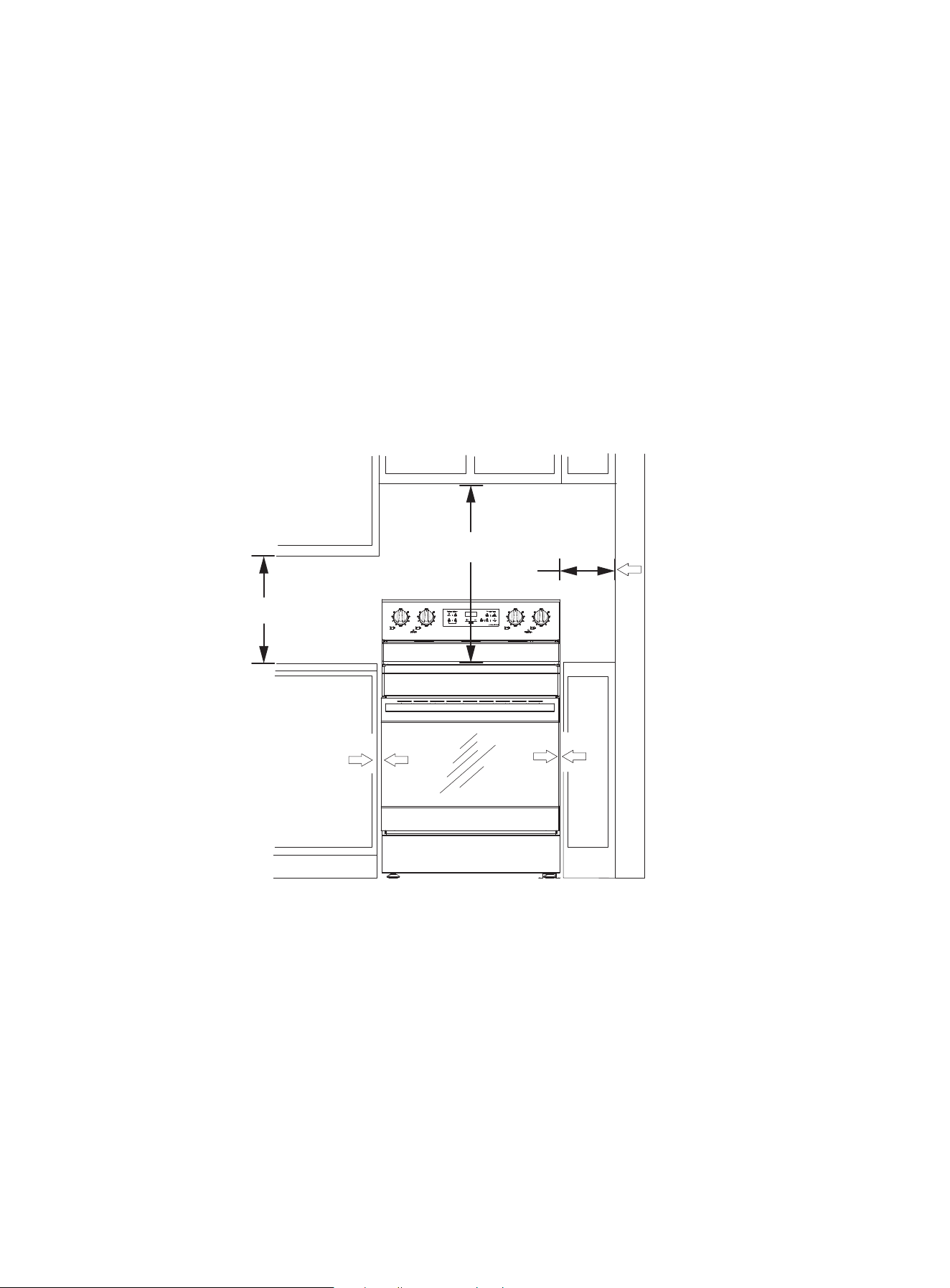
0 in
0 cm
INSTALLATION
MINIMUM DIMENSIONS
• Make sure that the wall covering, countertop, flooring, and cabinets around your range can with-
stand the heat up to the 194° F (90° C) that your range generates.
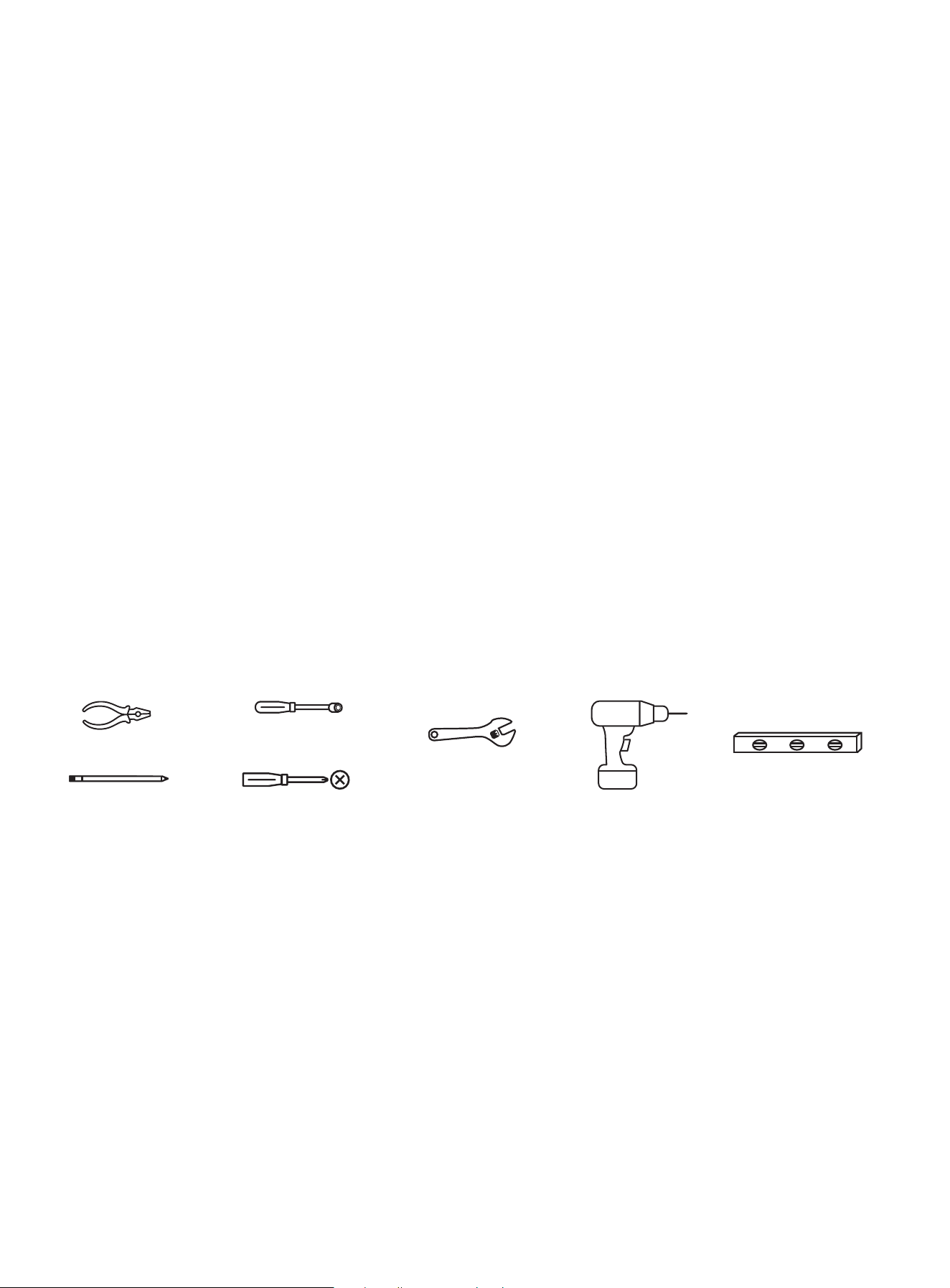
• Allow a 30 in. (76.2 cm) minimum clearance between the surface elements and the bottom of
unprotected wood or metal cabinets, or allow a 24 in. (61 cm) minimum when the bottom of the
wood or metal cabinet is protected by no less than .25 in. (.6 cm) thick flame retardant mill board
covered with not less than No. 28 MSG sheet steel, .015 in. (.038 cm) stainless steel, .024 in. (.061 cm)
aluminum, or .020 in. (.051 cm) copper.
• Your range has been approved for 0 in. (0 cm) spacing to adjacent surfaces above the cooktop.
However, we recommend a 6 in. (15.2 cm) minimum spacing to surfaces less than 15 in. (38.1 cm)
above the cooktop and adjacent cabinet to reduce exposure to steam, grease splatter, and heat.
• To reduce the risk of burns or fire when reaching over hot surface elements, cabinet storage
space above the cooktop should be avoided. If cabinet storage space is above the cooktop, the risk
can be reduced by installing a range hood that projects at least 5 in. (12.7 cm) beyond the front of
the cabinets. Cabinets installed above the cooktop must be no deeper than 16 in. (40.6 cm).
ELECTRICAL REQUIREMENTS
WARNING! To reduce the risk of fire, electric shock, or personal injury:
• Remove the house fuse or open the circuit breaker before beginning installation.
• Your range must be supplied with the correct voltage and frequency, and must be connected to
an individual, correctly grounded branch circuit, protected by a circuit breaker or fuse having the
amperage as specified on the rating plate located above the top panel of the bottom drawer.
• We recommend you have the electrical wiring and hookup of your range connected by a quali-
fied electrician. After installation, have the electrician show you where your main range disconnect
is located.
• Check with your local utilities for electrical codes which apply in your area. Failure to wire your
oven according to governing codes could result in a hazardous condition. If there are no local
codes, your range must be wired and fused to meet the requirements of the National Electrical
Code, ANSI/NFPA No. 70–Latest Edition.
15
15 in
38.1 cm
0 in/0 cm
on all sides
30 in
76.2 cm
INSTALLATION
ELECTRICAL REQUIREMENTS (cont.)
Effective January 1, 1996, the National Electrical Code requires that new construction (non-exist-
ing) utilize a 4-conductor connection to an electric range.
• When installing an electric range in new construction, follow the instructions in Connect a 4-wire
power cord on page 18.
• You must use a 3-wire or 4-wire, single-phase A.C. 208Y/120 volt or 240/120 volt, 60 hertz electrical
system.
• If the electrical service provided does not meet the above specifications, have a licensed electri-
cian install an approved outlet.
• Use only a 3-conductor or 4-conductor UL-listed range cord. These cords may be provided with
ring terminals on the wires and a strain relief device.
• A range cord rated at 40 amps with a 125/250 minimum volt range is required. We do not recom-
mend a 50 amp range cord, but if used, it should be marked for use with nominal 13.8 in. (35 cm)
diameter connection openings. Make sure that you center the cable and strain relief within the
knockout hole to keep the edge from damaging the cable.
• Because range terminals are not accessible after the range is in position, a flexible service conduit
or cord must be used.
INSTALLING YOUR RANGE
WARNING! We recommend that a professional installer install your range.
If your range is not installed correctly, incorrect electrical grounding can cause a fire or explosion
which can lead to injury or death.
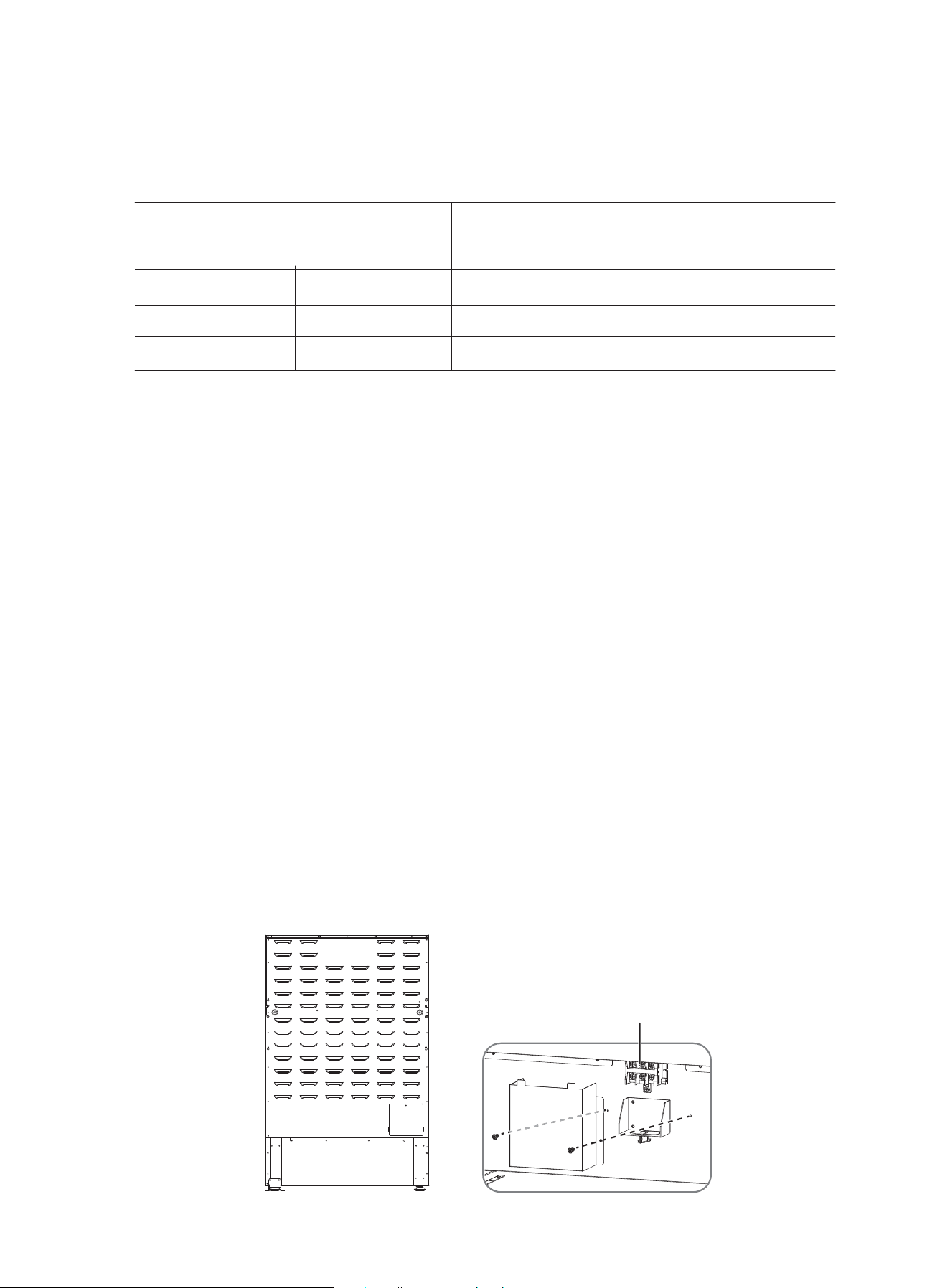
TOOLS YOU NEED (not included)
ITEMS NOT INCLUDED
• 4-wire or 3-wire power cord
• Strain relief
NOTES TO THE INSTALLER
1. Read this manual before installing your range.
2. Observe all governing codes and ordinances.
3. Make sure that you keep these instructions with your range.
4. Before installing your range in an area covered with linoleum or any synthetic floor covering,
make sure that the floor covering can withstand temperatures of at least 180°F (82°C) without
shrinking, warping, or discoloring.
5. Do not install your range over carpeting unless you place an insulating pad or sheet of 0.25 in.
(0.6 cm) thick plywood between your range and carpeting.
16
Phillips screwdriver
pliers
1/4 in. nut driver
pencil
adjustable
wrench
drill
level
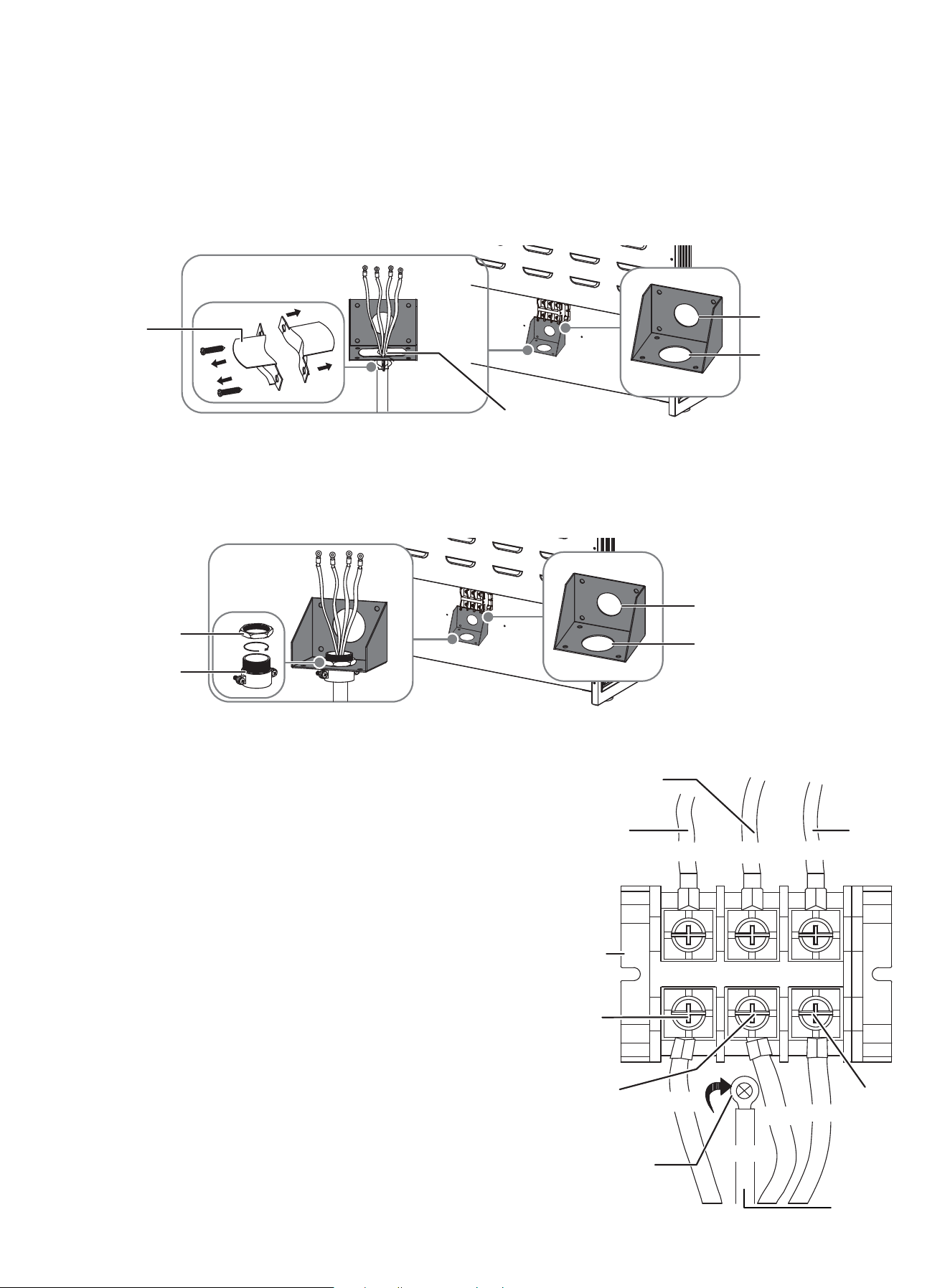
terminal block
INSTALLATION
BEFORE INSTALLING YOUR RANGE
1. Remove the exterior and interior packing.
2. Wipe the surfaces of your range with a damp cloth or sponge, then wipe them dry with a clean,
dry cloth.
• This range can be connected directly to the circuit breaker box (or fused disconnected) through
flexible or nonmetallic sheathed, copper cable.
• Allow 2 to 3 ft (61 cm to 91.4 cm) of slack in the line so that the range can be moved if servicing is
ever necessary.
• A UL listed conduit connector must be provided at each end of the power supply cable (at the
range and at the junction box).
• Wire sizes and connections must conform with the rating of the range.
• The wiring diagram is located on the rear panel.
CONNECTING THE POWER CORD
WARNING!
• Electrical ground is required on your range.
• Do not connect to the electrical supply until your range is permanently grounded.
• Your range must be connected to a grounded, metallic, permanent wiring system, or a ground-
ing connector should be connected to the grounding terminal or wire lead on your range.
• Failure to do any of the above could result in a fire, personal injury, or electrical shock.
REMOVE THE TERMINAL BLOCK COVER
1. Remove the two screws that secure the terminal block cover to the back of your range. Don’t
discard the screws. You need them to reinstall the cover.
17
Range rating*
Specified rating of power supply cord kit
and circuit protection
120/240 Volts
8.8 – 16.5 KW
16.6 – 22.5 KW
120/208 Volts
7.8 – 12.5 KW
12.6 – 18.5 KW
Amps
40 or 50**
50
INSTALLATION
REMOVE THE TERMINAL BLOCK COVER (cont,)
2. For the power cord installation, hook the strain relief over the 1-3/8 in. (3.5 cm) power cord hole
located below the rear of the oven. Insert the power cord through the strain relief, then tighten the
relief.
NOTE - You must install the power cord with a strain relief. Attach the strain relief to the open-
ing in the conduit connection plate.
CONNECT A 4-WIRE POWER CORD
1. Disconnect power to the circuit breaker or fuse box
before making the electrical connection.
2. Remove the three lower terminal screws from the
terminal block and remove the ground screw.
3. Remove and discard the ground strap located
between the middle terminal screw and the ground
screw. Do not discard any screws.
4. Insert the ground screw into the power cord ground
wire terminal ring and into the frame of the range.
5. Insert the three terminal screws (removed earlier)
through each power cord terminal ring and into the
lower terminals of the terminal block. Be certain that
the center wire (white/neutral) is connected to the
center position of the terminal block.
6. Reinstall and tighten screws securely to the terminal
block.
7. CAUTION! Check the voltage after connecting the
power cord.
3. For the conduit installation, insert the conduit strain relief in the 1-1/8 in. (2.8 cm) conduit hole,
then install the conduit through the body of the strain relief and fasten the strain relief with its
ring.
18
conduit hole
power cord hole
power cord hole
strain relief
power cord hole
ring
body
conduit hole
L1
L2
N
neutral
live 2
live 1
terminal
block
neutral
live 2
live 1
black
white
red
black
white
remove
ground
strap
green
ground
wire
red
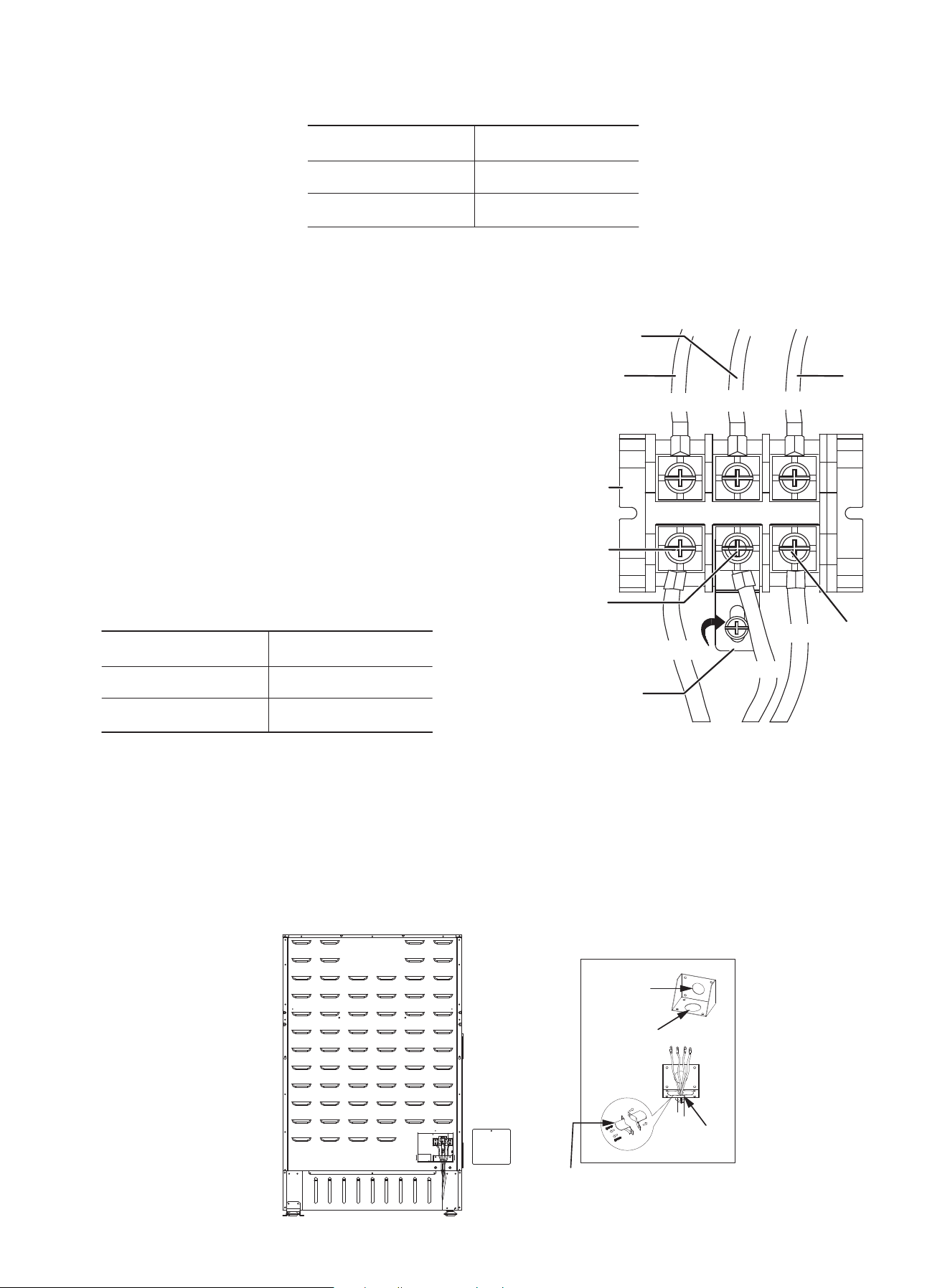
INSTALLATION
CONNECT A 3-WIRE POWER CORD
1 Remove the three lower terminal screws from the
terminal block.
2 Insert the three terminal screws through each power
cord terminal ring and into the lower terminals of the
terminal
block. Be certain that the center wire (white/neutral) is
connected to the center lower position of the terminal
block.
3 Tighten screws securely to the terminal block. DO
NOT remove the ground strap connection.
4 CAUTION! Check the voltage after connecting the
power cord.
REPLACE THE TERMINAL BLOCK COVER
1. Make sure that the cable is tightened in place using the strain relief.
2. Align the terminal block cover with the screw holes on the back of your range.
3. Insert the two screws you removed earlier through the holes in the cover and into the holes on
the back of your range.
4. Tighten the screws.
19
Live 1 - Neutral
Live 2 - Neutral
Live 1 - Live 2
120 V
120 V
208 V / 240 V
8. Replace the terminal block cover. See below.
Live 1 - Neutral
Live 2 - Neutral
Live 1 - Live 2
120 V
120 V
208 V / 240 V
5. Replace the terminal block cover. See below.
CONNECT A 4-WIRE POWER CORD (cont.)
neutral
live 2
live 1
terminal
block
neutral
live 2
live 1
red
black
white
red
white
black
ground
strap
strain relief
1-3/8”
3.5 cm
1-3/8”
3.5 cm
1-1/8”
2.8 cm
L1
L2
N
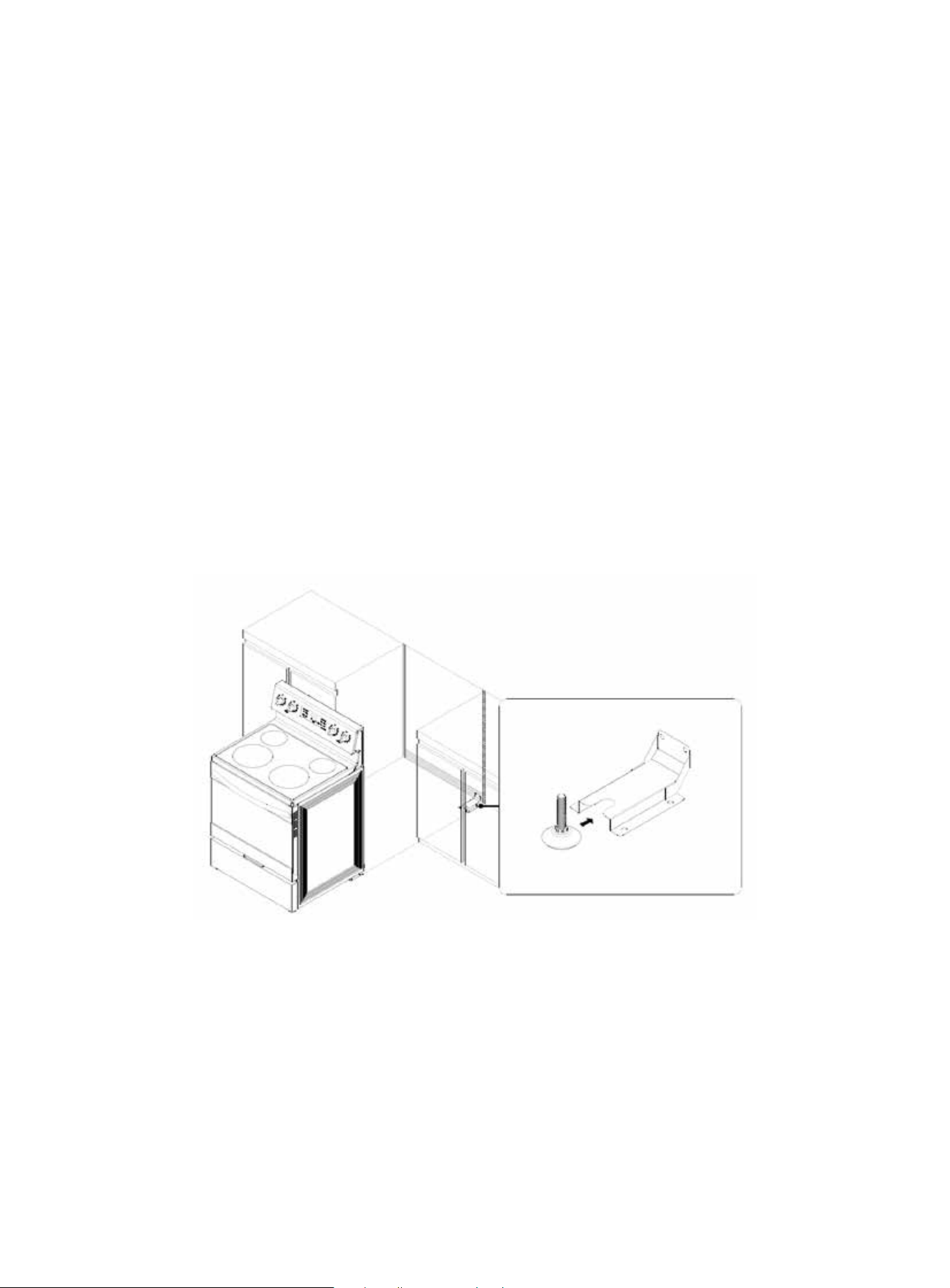
20
INSTALLATION
INSTALLING THE ANTI-TIP DEVICE
WARNING!
To reduce the risk of tipping, your range must be secured by the provided anti-tip device.
• All ranges can tip and cause personal injury.
• A child or adult can tip your range and be killed.
• Install the anti-tip device to your range and structure by following the installation instructions.
• Make sure that your range is connected to the anti-tip device installed to the structure.
• If you pull your range away from the wall for cleaning, service, or any other reason, make sure that
the anti-tip device is correctly reengaged when you push your range back against the wall. In the
event of abnormal usage (such as a person standing, sitting, or leaning on an open door), failure to
take this precaution can result in tipping of your range. Personal injury might result from spilled
hot liquids or from your range itself.
• Failure to follow these instructions can result in death or serious burns to children or adults.
An anti-tip bracket and screws with installation instructions came with your range. If the bracket
is not installed correctly, your range could be tipped by you or a child standing, sitting, or leaning
on an open oven door.
1. Release and extend the leveling leg to a minimum clearance of .7 in. (1.8 cm) between the range
bottom and the floor.
2. Follow the instructions that came with the anti-tip device.
3. Remove the storage drawer and look underneath your range to make sure that the leveling leg
is engaged in the bracket. See Removing and replacing the storage drawer on page 44.
4. Carefully tip your range forward. The bracket should stop your range within 4 in. (10.2 cm) of
tipping. If it does not, you need to re-install the bracket.
PLACING YOUR RANGE AND CONNECTING TO POWER
1. Plug in the power cord. Make sure that the outlet meets local or national electrical codes.
2. Slide your range into place.
3. Make sure that the back leg of your range slid into the anti-tip bracket. Carefully tip your range
forward to make sure that the anti-tip bracket prevents a tip-over.
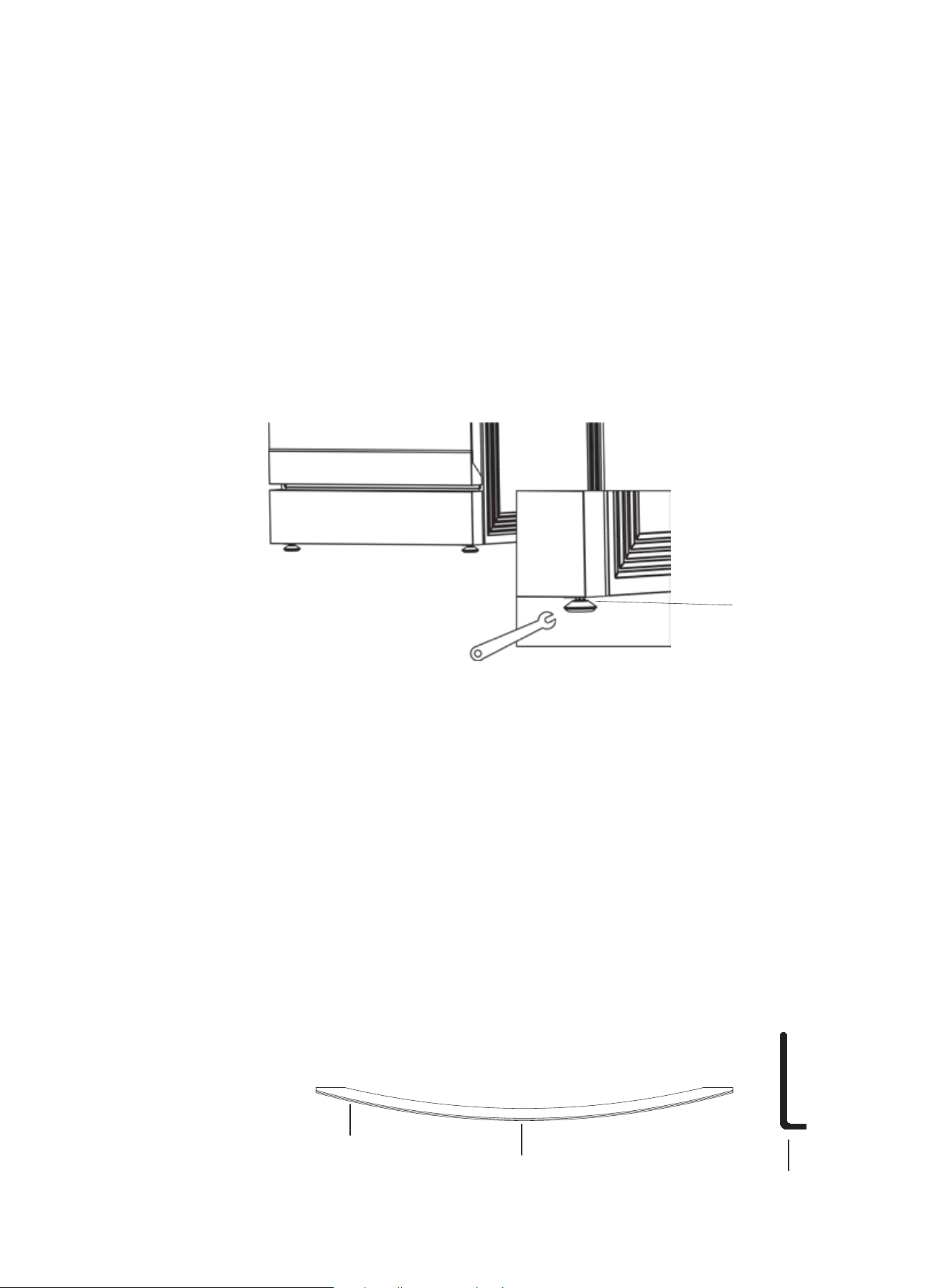
21
INSTALLATION
LEVELING YOUR RANGE
Your range should be level. If your range is not level, the door may not close or seal correctly which
can cause uneven heating and electric wastage problems.
NOTE
• To make it easier to adjust the feet, have someone push against the top of your range to tilt it
slightly.
• Adjusting the two front legs is usually sufficient, but all four legs adjust if necessary.
1. Make sure that your range is positioned where you want it.
2. Using a wrench, level your range by turning the front leveling legs if necessary. Counterclockwise
shortens the leg and lowers your range. Clockwise lengthens the leg and raises your range.
Adjust the leveling legs only as far as necessary to level your range. Extending the leveling legs
more than necessary or removing the legs can make your range unstable.
3. If your range is next to or between cabinets, make sure that the cooktop is level with the counter
tops.
FINISHING THE INSTALLATION
1. Move your range close enough to the power outlet you plan to use, then plug in the power cord.
2. Slide your range into position. Make sure that the rear left (or rear right) leg slides under the
anti-tip bracket. Your range should sit 0.8 in. (2 cm) away from the back wall when correctly
installed.
3. Carefully tip your range forward to make sure that the anti-tip bracket is installed correctly and
prevents a tip-over.
4. Turn on the electrical power. Make sure that your range is working correctly. For more informa-
tion, see OPERATING INSTRUCTIONS.
INSTALLING THE OVEN DOOR HANDLE
Your range may have a “KD handle” that you need to install.
1. Check your installation kits for the handle and hex wrench.
2. Make sure that the side with screw holes faces towards the oven door.
handle
screw hole
hex wrench
leveling leg
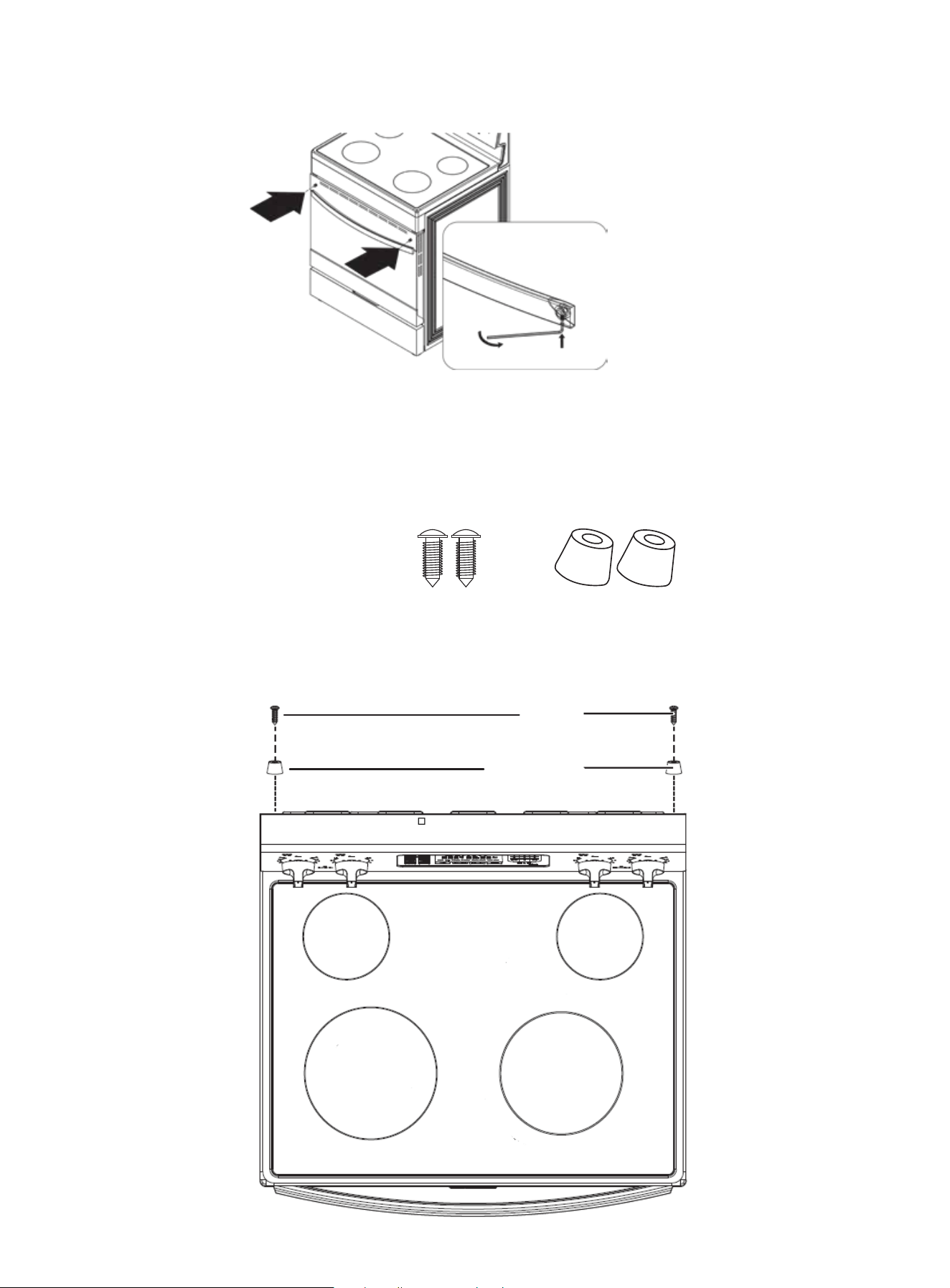
22
INSTALLATION
4. Use the Allen wrench to tighten both sides of the door handle.
INSTALLING THE PLASTIC PADS
To prevent your range from getting too close to the wall behind the range, install the included
plastic pads.
1. Locate the plastic pad kit. It includes:
2 Align the holes in the plastic pads with the holes on the top, back of your range, then secure the
pads to your range with the provided screws.
3. Place the door handle against to the oven door and fit it on the connection part.
screws
plastic pads
2 x plastic pads2 x screws

Before you begin using your range
Tips for saving energy
Using the surface burners
Identifying the burners
Cooking areas
Using a surface element control knob
Using the correct cookware
Protecting the ceramic cooktop
Using the oven
Minimum and maximum settings
Positioning the oven racks
Using the oven vent
Using the oven light
Tips for baking
Setting the clock
Selecting the 12-hour or 24-hour display setting
Using the timer
Baking
Adjusting the thermostat
Programming the cook time
Programming a delayed start time
Broiling
Air Fry
Keeping food warm
Switching between Fahrenheit and Celsius
Locking oven controls
24
24
24
25
25
26
26
27
28
28
29
30
30
30
30
31
31
31
31
32
33
33
34
34
34
34
23
OPERATING INSTRUCTIONS

BEFORE YOU BEGIN USING YOUR RANGE
WARNING! All electrical equipment with moving parts can be dangerous. Make sure that you read
and understand all safety information. See IMPORTANT SAFETY PRECAUTIONS.
Before turning on the burners or oven:
• Remove all packaging materials.
• Wipe the surfaces of your range with a damp cloth or sponge, then dry with a clean, dry cloth.
CAUTION! Do not use harsh detergents, scouring powder, or any sharp objects to clean your range.
These items can damage the surfaces of your range.
When you turn on an element or the oven for the first time, smoke and odors may be emitted. This
is normal. Make sure that the room is well ventilated.
WARNING!
• Do not touch any hot surface on your range. Use oven gloves or potholders.
• Do not let children near your range.
TIPS FOR SAVING ENERGY
• During cooking, keep the oven door closed except when you turn food over.
• To maintain the oven temperature, do not open the door frequently during cooking.
• If cooking time is more than 30 minutes, switch the oven off 5 to 10 minutes before the end of the
cooking time. The residual heat completes the cooking process.
• To reduce the time needed for re-heating the oven, plan oven use to avoid turning the oven off
between cooking one item and the next.
• Whenever possible, cook more than one item at a time.
USING THE SURFACE BURNERS
WARNING!
• Before using the surface burners, make sure that you follow all the safety warnings and precau-
tions as listed. Failure to do so could result in product damage, personal injury, or death.
• When you want to move a pot or pan onto another element, lift it up and place it on the other
element. Do not slide a pot or pan from one element to another. Sliding can scratch surfaces.
CAUTION! Before cooking
• Do not use the glass cooktop surface as a cutting board.
• Do not place or store items that can melt or catch fire on the glass cooktop, even when it is not
being used.
• Turn the surface burners on only after placing cookware on them.
• Do not store heavy items above the cooktop surface. They could fall and damage it.
CAUTION! While cooking
• Do not place aluminum foil or plastic items such as salt and pepper shakers, spoon holders, or
plastic wrappings on your range when it is in use. The hot air from the vent could melt plastics or
ignite flammable items.
• Make sure that you turn on the correct element.
• Never cook directly on the glass. Always use cookware.
• Always place a pan in the center of the surface element you are cooking on.
• Never leave surface burners unattended while using a high heat setting. Boilovers cause smoking
and greasy spillovers that may catch on fire.
24
OPERATING INSTRUCTIONS
25
USING THE SURFACE BURNERS
CAUTION! While cooking (cont.)
• Turn the surface burners off before removing cookware.
• Do not use plastic wrap to cover food. Plastic may melt onto the surface and be difficult to remove
CAUTION: After cooking
• Do not touch the surface burners until they cool down.
• The surface may still be hot and burns may occur if you touch the glass surface before it has
cooled down sufficiently.
• Immediately clean spills on the cooking area to prevent tough cleanup chores later.
• If cabinet storage is directly above the cooking surface, make sure that the items in the cabinet
are used infrequently, and that they can be safely stored in an area subjected to heat. Tempera-
tures may be unsafe for items such as volatile liquids, cleaners, or aerosol sprays.
The cooktop burners are radiant surface elements. When you turn on an element, the tempera-
ture rises gradually and evenly. As the temperature rises, the radiant element glows red.
To maintain the selected setting, the element cycles on and off. The heating element retains
enough heat to help provide a more uniform and consistent heat during the off cycle. For efficient
cooking, turn off the element several minutes before cooking is complete. This lets residual heat
complete the cooking process.
NOTE
A radiant element has a limiter that lets the element cycle on and off, even at the HI setting. This is
normal and helps prevent damage to the ceramic cooktop. Excessive cycling at the HI setting can
occur if the cookware is too small for the radiant element or if the cookware bottom is not flat.
IDENTIFYING THE BURNERS
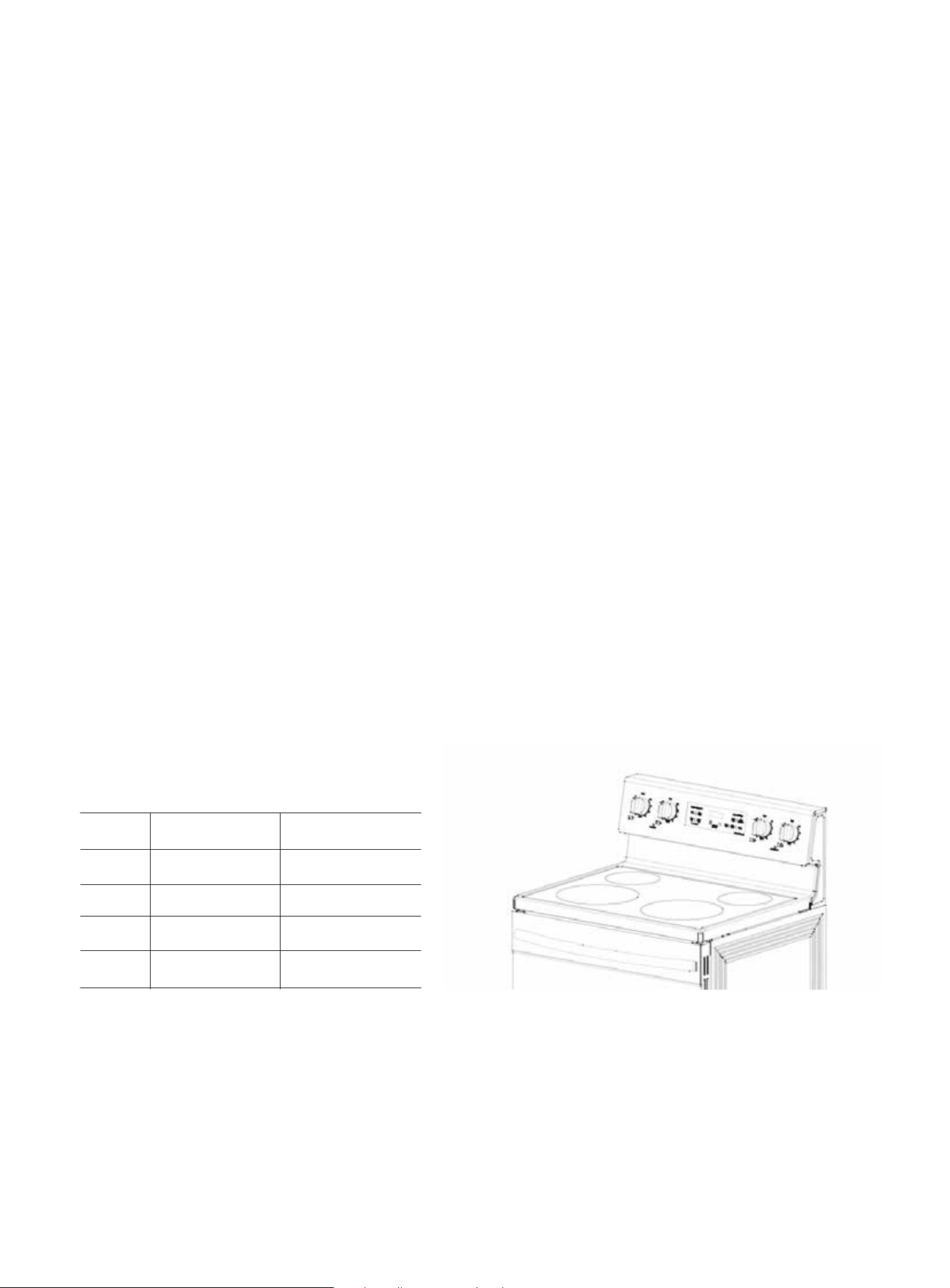
Your range cooktop has four surface burner. The different element sizes make sure that you have
the correct heat source for each cooking job.
OPERATING INSTRUCTIONS
COOKING AREAS
• The cooking areas on your range are identified by permanent circles on the glass cooking surface.
For the most efficient cooking, fit the pan size to the element size.
• Pans should not extend more than .5 to 1 in. (1.3 to 2.5 cm) beyond the cooking area.
• When a control is turned on, you can see a glow through the glass cooking surface. The element
cycles on and off to maintain the preset heat setting, even at high settings.
• For more information about the correct types of cookware, see USING THE CORRECT COOK-
WARE.
No.
1
2
3
4
Item
Left Front
Left Rear
Right Rear
Right Front
Description
2100W
1200W
1200W
2100W
Single
(left rear, right rear)
26
USING THE CORRECT COOKWARE
Using the correct cookware can prevent many problems, such as uneven cooking or extended
cooking times. Look for the following pan characteristics:
• Flat bottom and straight sides
• Tight-fitting lid
• Weight of handle does not tilt pan
• Pan is well-balanced
• Pan size matches the amount of food being prepared and the size of the surface element.
• Made of material that conducts heat well. See TYPES OF COOKWARE.
TYPES OF COOKWARE
What your cookware is made of determines how evenly and quickly heat is transferred from the
surface element to the pan bottom.
DESCRIPTION
Excellent heat conductor. Some types of food cause aluminum to darken.(An-
odized aluminum cookware resists staining and pitting.) If you slide aluminum
pans across the ceramic cooktop, they may leave metal marks that resemble
scratches. Remove these marks as soon as the coo top cools down.
Excellent heat conductor, but discolors easily. If you slide copper pans across
the ceramic cooktop, they may leave metal marks that resemble scratches.
Remove these marks as soon as the cooktop cools down.
Slow heat conductor with uneven cooking results. It is durable, easy to clean,
and resists staining.
A poor conductor, but retains heat well. Cooks evenly once cooking tempera-
ture is reached. Not recommended for use on ceramic cooktops.
Heating characteristics vary depending on base material. Porcelain enamel
coating must be smooth to avoid scratching ceramic cooktops.
Slow heat conductor. Not recommended for ceramic cooktops because it may
scratch the glass.
OPERATING INSTRUCTIONS
SETTING
HIGH
MEDIUM HIGH
MEDIUM
MEDIUM LOW
LOW
TYPE OF COOKING
Starting most foods, bringing water to a boil, or pan broiling
Continuing a rapid boil, frying, deep fat frying, or steaming vegetables
Maintaining a slow boil or thickening sauces and gravies
LOW Keeping foods cooking, poaching, or stewing
Keeping food warm or melting
MATERIAL
Aluminum
Copper
Stainless Steel
Cast-iron
Enamelware
Glass
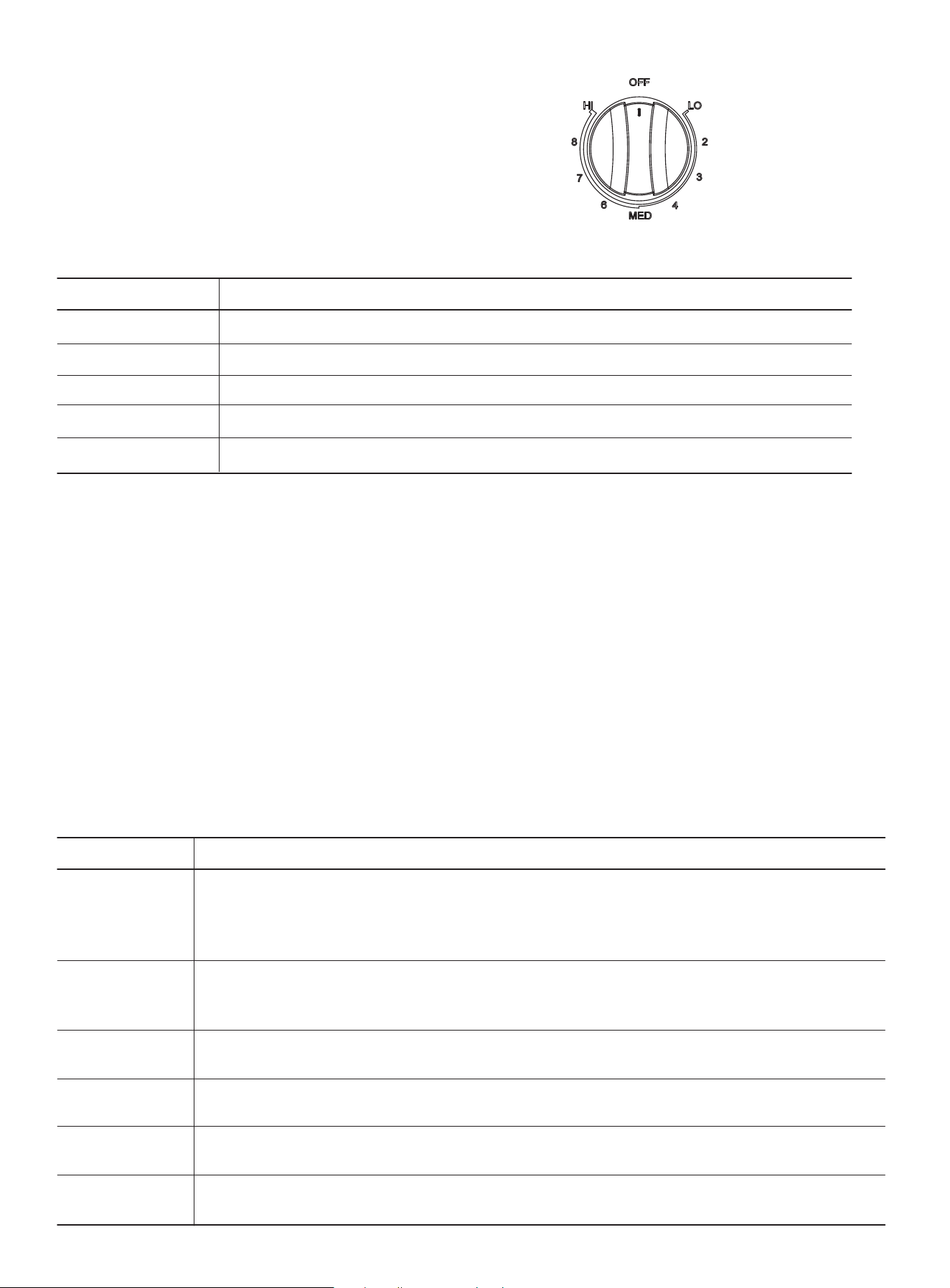
USING A SURFACE ELEMENT CONTROL KNOB
1. Push the knob in.
2. For the left and right burners, turn knob
in either direction to the setting you want.

PROTECTING THE CERAMIC COOKTOP
CLEANING
• Clean the cooktop before using it for the first time.
• Clean your cooktop daily or after each use. This helps keep your cooktop looking good and can
prevent damage.
• If a spillover occurs while you are cooking, turn off the burner elements and immediately clean
the spill from the cooking area while it is hot to prevent a tough cleaning chore later. Using
extreme care, wipe the spill with a clean dry towel. Wear protective gloves or mitts to avoid burn-
ing yourself.
• Do not let spills remain on the cooking area or the cooktop trim for a long period of time.
• Do not use abrasive cleansing powders or scouring pads because they can scratch the cooktop.
• Do not use chlorine bleach, ammonia, or other cleansers not specifically recommended for use
on a glass ceramic surface.
PREVENTING MARKS AND SCRATCHES
• Do not use glass cookware. It may scratch the cooktop.
• Do not place a trivet or wok ring between the cooktop and the pan. These items can mark or
scratch the cooktop.
• Make sure that the cooktop and the pan bottoms are clean.
• Do not slide metal pans across the cooktop.
PREVENTING STAINS
• Do not use a soiled dish cloth or sponge to clean the cooktop surface. They may leave a film,
which may cause stains on the cooking surface after the area is heated.
• Continuously cooking on a soiled surface can result in a permanent stain.
PREVENTING OTHER DAMAGE
• Do not let plastic, sugar, or foods with high sugar content melt onto the hot cooktop. Should this
happen, clean immediately.
• Do not let a pan boil dry. This may damage the cooktop and the pan.
• Do not use the cooktop as a work surface or cutting board.
USING THE OVEN
MINIMUM AND MAXIMUM SETTINGS
WARNING! Stand away from the oven when opening the oven door. Escaping hot air or steam can
burn your hands, face, or eyes. Let hot air or steam escape before removing or replacing food.
NOTE - Always bake or broil with the oven door closed. If you open the oven door while the oven
is operating and leave it open, the oven element stops in one minute. This is not a product failure.
The oven automatically starts again when you close the door.
27
OPERATING INSTRUCTIONS

28
OPERATING INSTRUCTIONS
FUNCTION
Bake
Keep Warm
Steam Clean
Broil Hi
Broil Lo
Default
350
177
175
79
150
66
550
288
400
Range
175-550
79-288
Not adjustable
Not adjustable
Not adjustable
Not adjustable
Not adjustable
Not adjustable
Not adjustable
Unit
°F
°C
°F
°C
°F
°C
°F
°C
°F
TEMPERATURE
FUNCTION PARAMETER LIST
TIME
Default
10:00
03:00
00:25
03:00
03:00
Range
00:01-10:00
Not adjustable
Not adjustable
Not adjustable
Not adjustable
Unit
HR/MIN
HR/MIN
HR/MIN
HR/MIN
HR/MIN
MINIMUM AND MAXIMUM SETTINGS
single rack pan placement multi rack pan placement
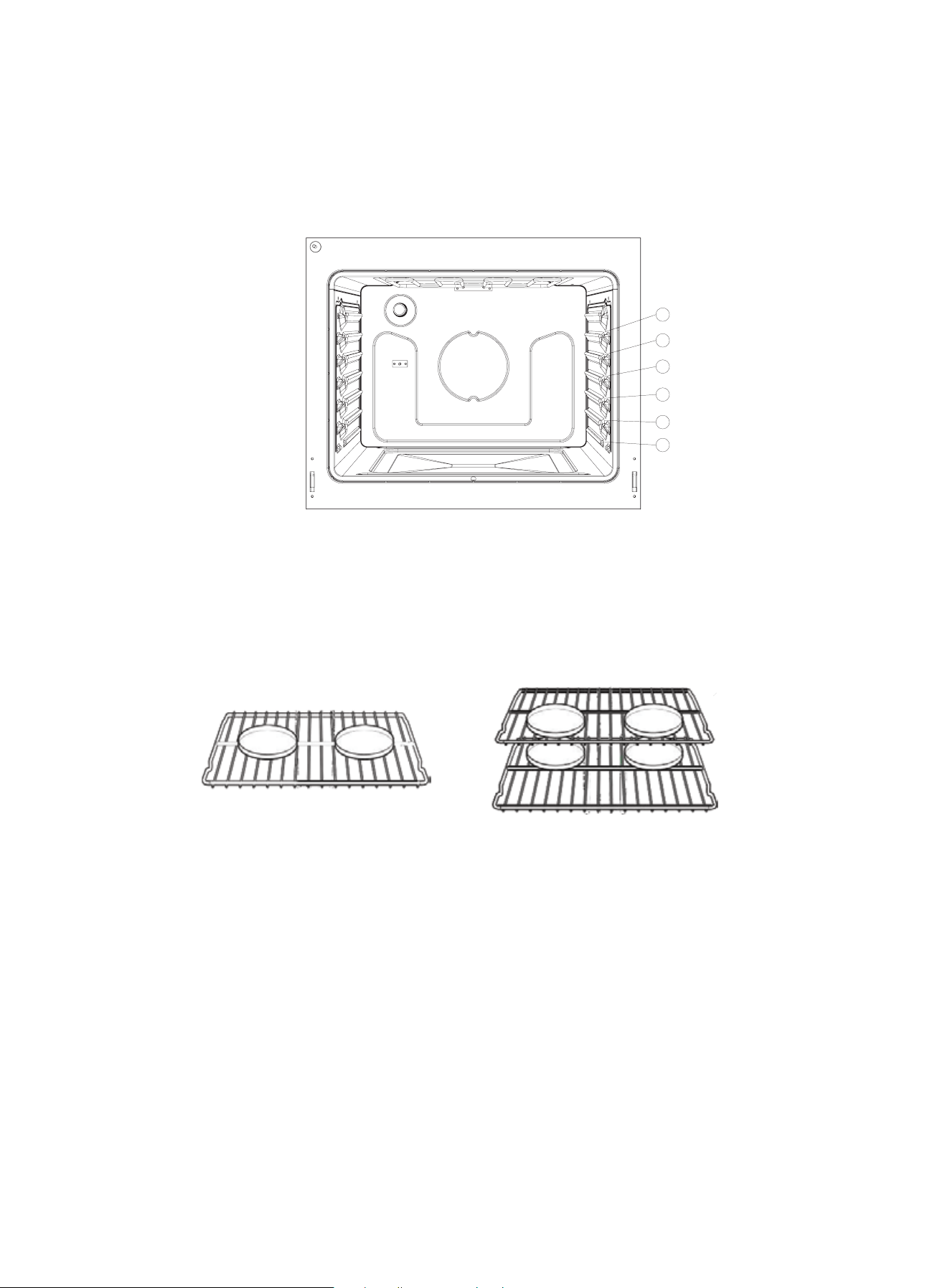
POSITIONING THE OVEN RACKS
You can remove and reposition the oven racks in any of the six rack positions. Each oven rack has
a built-in stop to prevent it from accidentally being pulled completely out. Correct positioning of
the oven racks provides the best cooking results.
WARNING! Stand away from the oven when opening the oven door. Escaping hot air or steam can
burn your hands, face, or eyes. Let hot air or steam escape before removing or replacing food.
• Centering the baking pans in the oven produces better cooking results.
• When baking multiple items, make sure that you leave a 1 to 1.5 in. (2.5 to 3.8 cm) space around
each item.
• When baking or fan baking on a single rack, place the oven rack in position 3 or 4.
• When baking or fan baking on multiple racks, place the oven racks in positions 3 and 5. Place two
pans in the rear of the top rack and the other two pans in the front of the bottom rack.
CAUTION
• Do not cover an oven rack with aluminum foil. This disturbs the heat circulation and results in
poor baking.
• Do not place aluminum foil on the oven bottom because it could cause damage.
• Arrange the oven racks only when the oven is cool.
• When placing an oven rack in the top most rack position, make sure that the rack is stably situat-
ed on the embossed stop.
REMOVING AN OVEN RACK
1. Pull the rack straight out until it stops.
2. Lift the front of the oven rack and pull to remove it from the oven.
REPLACING AN OVEN RACK
1. Place the back edge of the rack on the a rack support.
2 Lift the front of the rack and slide it into the oven.
29
OPERATING INSTRUCTIONS
1
2
3
4
5
6
OPERATING INSTRUCTIONS
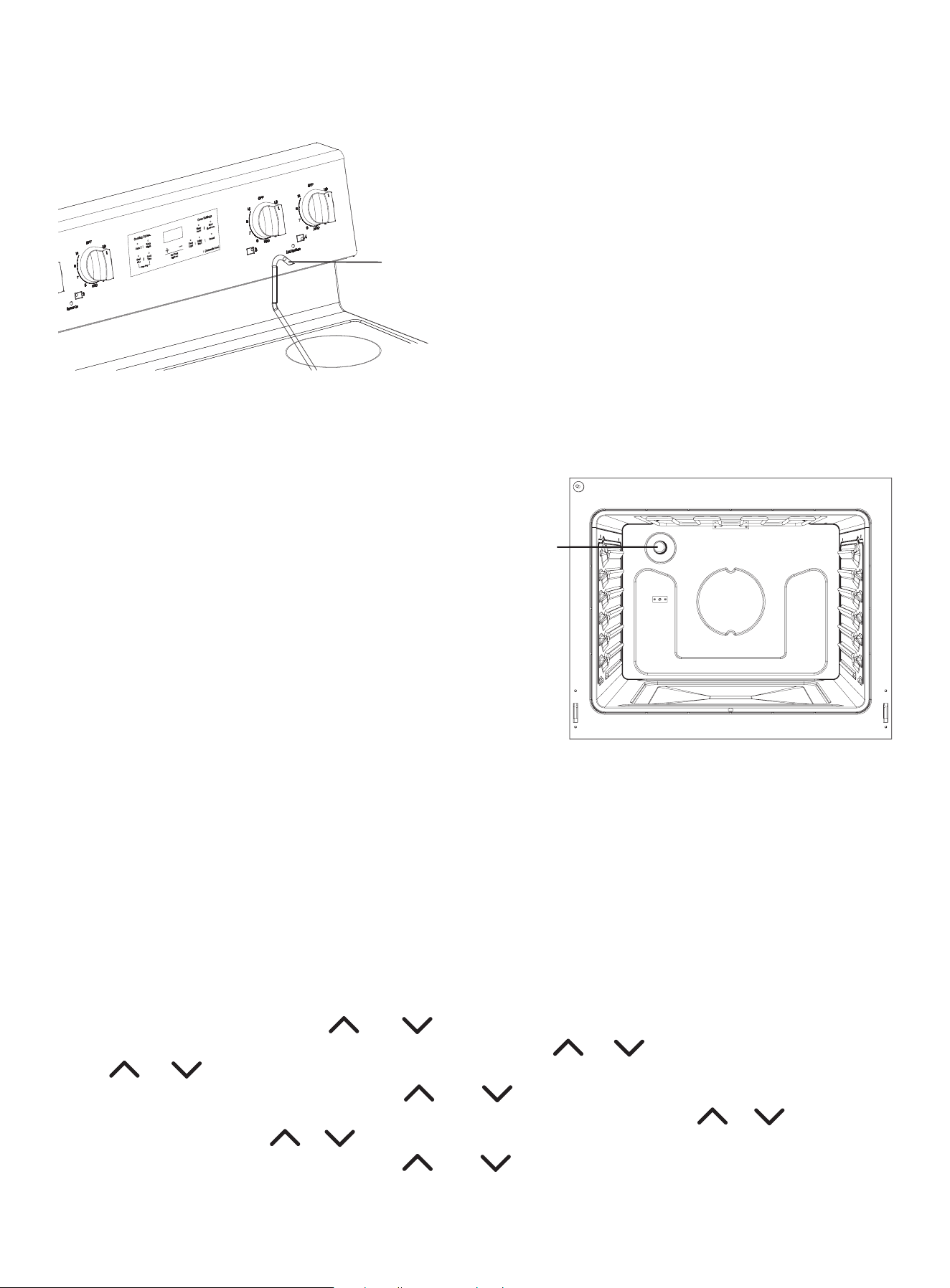
USING THE OVEN VENT
The oven vent is located over the right-rear element
• Do not block or place items in front of the oven
vent. Proper air circulation helps prevent com-
bustion issues with the oven’s heating element
and ensures optimal cooking results.
• Because the oven vent and surrounding area
can become hot, use care when placing items
near the vent. Hot steam could heat or melt
items placed in front of the vent.
• Touch the OVEN LIGHT pad to turn the light on
or off. The oven light lets you check the cooking
progress without opening the oven door.
USING THE OVEN LIGHT
The oven has a light that is located on the rear oven wall in the upper left rear corner.
TIPS FOR BAKING
• Use appropriate non-stick coated metal sheets or aluminum containers or use heat-resistant
silicone molds.
• Make the best use of the space on the rack. We recommend placing the baking pan in the middle
of the rack.
• Select the correct rack position before turning the oven on.
• Do not move oven racks when hot. If you must move a rack while the oven is hot, do not let the
potholder contact the hot oven element.
• Keep the oven door closed as much as possible.
SETTING THE CLOCK
1) In standby mode, short press and at the same time to enter the hour setting state. The-
hours will flash, and the minutes will stay on. Short press or to adjust by 1 hour and long
press or to adjust by 10.
2) Once the hour is correct, short press and at the same time to change to the minute
setting state. The hours will stay on and the minutes will flash. Short press or to adjust by
1 minute and long press or to adjust by 10.
3) When the minutes are correct, press and simultaneously to confirm the clock setting
and return to standby mode.
4) The 12-hour time setting range is 1:00--12:59, and the 24-hour time setting range is 0:00--23:59.
30
oven vent
oven
light

31
OPERATING INSTRUCTIONS
SELECTING THE 12-HOUR OR 24-HOUR DISPLAY SETTING
1) In standby mode, press and hold and at the same time for 3 seconds to enter the clock
12/24 hour switching function. When the setting is successful, the buzzer will beep once.
2) Every time the clock enters the 12/24 hour switching state, switching between 12 and 24, the
screen displays “12” or “24”. Time synchronization is converted according to the current hour
format.
3) After the clock switches to 12/24 hour format for 3 seconds, it enters standby mode.
USING THE TIMER
1) When the timer is not running, short press TIMER to enter the timing setting state. At this time,
the TIMER indicator light is always on and the screen flashes "00:00". Short press or to
adjust for 1 minute, long press or to adjust for 10 minutes.
2) In the timer setting state, short press TIMER to confirm the setting. The TIMER indicator light is
always on, the screen is always on to display the time, and the countdown starts. If there is no oper-
ation within 60 seconds, exit the scheduled state. If the confirmation time is “00:00”, exit the
scheduled state.
3) When the timer is running, other cooking functions are also running. At this time, short press
TIMER to switch to the timer time display, and after 3 seconds, it will switch to the other cooking
function display.
4) When the timer ends, the buzzer will beep 10 times and the screen will flash and display “00:00”.
You can click any key to exit the timer state.
5) When the timer is running, press and hold TIMER for 3 seconds to exit the timer state, and the
TIMER indicator light goes out.
BAKING
The BAKE function lets you program the oven to bake to any temperature between 150°F (66°C)
and 550°F (288°C).
1. Position the oven rack where you want it.
2. Press the BAKE pad. The display blinks bake icon and shows of 350°. If the default temperature
is the cooking temperature you want, skip to step 4.
3. (Optional) Press the or to enter the cooking temperature you want. The display blinks the
temperature.
4. Press the START pad. The oven automatically turns on and starts preheating. Place food in the
oven after preheating is complete. Preheating is important for good baking results.
The display shows PRE, 100°, and BAKE icons until the oven reaches 100°. Then, the display shows
the actual oven temperature. When the oven reaches the temperature you set, it beeps three
times.
5. When baking is complete, remove the food from the oven, close the oven door, then press
CANCEL. The oven shuts off and the display shows the time of day.
6. To change a programmed baking temperature, press BAKE, enter the new baking temperature,
then press START. The oven completes cooking at the new temperature.
ADJUSTING THE THERMOSTAT
If your baking results are not what you are used to, the present oven cooking thermostat can be
adjusted by up to ±35°F (±19°C).
NOTE - This temperature adjustment is retained in memory after a power failure. This adjustment
will be used in all future baking including Bake, Broil, and Keep Warm. Adjusting the thermostat
does not affect steam-cleaning.

32
OPERATING INSTRUCTIONS
ADJUSTING THE THERMOSTAT (cont.)
1) In standby mode, press and hold [Bake] and [Broil] at the same time for 3 seconds to enter the
temperature adjusting setting. The screen flashes to display the compensation temperature, and
the temperature unit remains consistent with the system temperature. Temperature setting
range: ±35°F (±19°C) . Short press or to adjust 1 value, and long press or to adjust 5
values. When the compensation temperature is +5°F, “5F” is displayed, and when the compensa-
tion temperature is -5°F, “-5F” is displayed.
2) In the setting state, short press START to confirm and return to standby. If you do not press
START within 30 seconds after setting, it will return to standby mode.
3) The compensation temperature does not affect the setting and display of the original operating
temperature, but the temperature control is handled according to the compensation tempera-
ture. Compensation temperature is valid for all heating modes.
PROGRAMMING THE COOK TIME
The COOK TIME function lets you program the oven to cook food at a set temperature for a speci-
fied length of time. At the end of the set time, the oven automatically shuts off.
CAUTION - Use caution when using the COOKING TIME function. This function is best used when
cooking cured or frozen meats and most fruits and vegetables. Foods that can easily spoil, like
milk, eggs, fish, poultry, and meats, should be chilled in a refrigerator before they are placed in the
oven. Even when chilled, they should not stand for more than one hour before cooking begins and
should be removed promptly when cooking is completed. Eating spoiled food can result in sick-
ness from food poisoning.
1. Position the oven rack in the location you want, then place the food in the oven and close the
oven door.
NOTE - Place food in the oven after preheating if the recipe calls for it. Preheating is important for
good baking results.
2. Press BAKE. The display shows the default temperature and the bake icon blinks. If the default
temperature is the temperature you want, skip to step 4.
3. (Optional) Press COOK TIME pad and adjust the temperature by pressing or for the tem-
perature you want. Preheating is important for good baking results.
4. Press the COOK TIME pad. The display will show 00:00.
5. Press the or for the cooking time you want. The display shows the selected time. You can
set the time to any duration from 1 minute to 10 hours.
6. Press the START pad. The oven automatically turns on and starts preheating.
The display shows the default or selected temperature, BAKE, and selected cook time, until the
oven reaches the temperature you set. When the oven reaches that temperature, it beeps three
times. The oven starts cooking for the set amount of time, and the display shows the remaining
cooking time.
7. To change the programmed baking temperature, press the BAKE pad, press or for new
baking temperature, then press the START pad. The oven completes cooking at the new tempera-
ture.
8. To change the cooking time, press the COOK TIME pad, press or , then press the START
pad. The oven continues cooking for the remaining time you set.

33
OPERATING INSTRUCTIONS
PROGRAMMING A DELAYED START TIME
The DELAY START function lets you use the kitchen timer to automatically start and stop another
cooking program.
CAUTION - Use caution when using the DELAY TIME function. This function is best used when
cooking cured or frozen meats and most fruits and vegetables. Foods that can easily spoil, like
milk, eggs, fish, poultry, and meats, should be chilled in a refrigerator before they are placed in the
oven. Even when chilled, they should not stand for more than one hour before cooking begins and
should be removed promptly when cooking is completed. Eating spoiled food can result in sick-
ness from food poisoning.
1. Position the oven rack in the location you want, then place the food in the oven and close the
oven door.
2. Press the pad for the baking operation you want. The display blinks the function icon and shows
the default temperature (350°). If the default temperature is the temperature you want, skip to
step 4.
3. (Optional) Press the or for the temperature you want. The display shows the temperature
you set.
4. Press the COOK TIME pad. The display shows the cooking temperature, BAKE, and 00:00.
5. Press the or for the cooking duration you want. The display blinks the cooking duration
you set. You can set the duration to any amount of time from 1 minute to 10 hours.
6. Press DELAY START. The display shows DELAY and 00:00 blinks.
7. Press or to enter the duration of time you want, duration to any amount of time from 1
minute to 10 hours.
8. Press START. The oven automatically turns on and starts preheating.
9. To change the programmed baking temperature, press BAKE, enter the new baking tempera-
ture, then press START. The oven completes cooking at the new temperature.
10. To change the cooking time, press COOK TIME, enter the new cooking time, then press START.
The oven continues cooking for the remaining time you set.
BROILING
The BROIL function lets you cook and brown foods using only a top heat source. The oven door
must remain closed during broiling. Meat or fish should always be placed on a broiling grid in a
broiling pan.
WARNING! If an oven fire occurs, close the oven door and turn the oven off. If the fire continues,
throw baking soda on the fire or use a foam-type fire extinguisher. Do not put water or flour on the
fire. Flour may explode and water can cause a grease fire to spread. Both can cause personal injury
or property damage.
1. Position the oven rack so that the top of the food is at least 3 to 5 inches (7.6 to 12.7 cm)
2. Place the food on a broiling pan with an insert grid and into the oven. Close the oven door.
3. Press BROIL once for Hi and twice for Lo. Use Lo to cook foods such as poultry or thick cuts of
meat thoroughly without over browning them.
4. Press START. The oven automatically lights the top oven burner and starts cooking. The display
shows the broil setting (Hi or Lo) you selected and BROIL. Broil on one side until food is browned,
then turn and broil on the other side.
5. When broiling is completed, press OFF/CLEAR to shut off the oven. The display shows the time
of day.
6. To change a programmed broiling setting, press BROIL to change the setting between Hi and
Lo, then press START. The oven changes the broil setting and completes cooking at the new tem-
perature.

34
OPERATING INSTRUCTIONS
AIR FRY
1. When not in operation, short press AIR FRY to enter this mode. The AIR FRY indicator light is
always on and the screen flashes “425F”. Press the , to enter the cooking temperature you
want.
2. Short press START to confirm the temperature and enter the time setting state. At this time, the
COOK TIME indicator light is always on, and the screen flashes “--:--” (indicating that the time is not
set). At this time, you can adjust time by , .
3. After setting the time, short press START to enter the heating state. At this time, the COOK TIME
indicator light is always on, the AUTOMATIC OVEN indicator light is always on, the START indicator
light is always on, the countdown starts, and the screen is always on to display the time.
4. In the working state, short press AIR FRY to set the temperature or short press COOK TIME to set
the time. In this setting state, the heating will continue, and the screen will flash to display the
temperature or time. After adjustment, short press START to confirm and continue working, and
the screen will always display the temperature or time.
5. When baking is complete, remove the food from the oven, close the oven door, then press
CANCEL to enter standby mode.
KEEPING FOOD WARM
The KEEP WARM function lets you keep cooked foods warm at a low baking temperature for up to
three hours.
1 Position the oven rack in the location you want, then place the food in the oven and close the
oven door.
2 Press the KEEP WARM pad, then press the START pad. The oven automatically turns on and
heats to 175°F (79°C). The display shows Warm and the time of day.
3 When warming is complete, press the CANCEL pad. The display shows the time of day.
SWITCHING BETWEEN FAHRENHEIT OR CELSIUS
You can program the oven control to display temperatures in Fahrenheit or Celsius. The oven was
preset at the factory to display in Fahrenheit.
1 Press and hold the BAKE pad for three seconds. The display shows F or C. The default is F.
2 Press and hold the BAKE pad for three seconds to change between F and C.
3 Press the Start pad to save the temperature selection.
LOCKING OVEN CONTROLS
The LOCK function turns off the control panel touch pads to prevent the oven from accidentally
being turned on. Touch pads stay locked until you turn this function off.
1. Press and hold the and START for three seconds. The oven beeps and the display shows LOC,
the time of day, and the lock icon.
2. To unlock the controls, press and hold the and START for three seconds.

Cleaning and maintenance
Using the oven vent
Cleaning the control panel
Cleaning painted parts and decorative trim
Cleaning stainless steel surfaces
Cleaning the oven racks
Cleaning the oven door
Cleaning the surface element control knobs
Cleaning the cooktop
Removing and replacing the oven door
Removing and replacing the storage drawer
Steam cleaning the oven
Troubleshooting
Control panel display
Cooktop
Oven
Drawer
Error codes
36
36
36
36
36
37
37
37
38
39
42
43
44
44
44
46
48
49
35
MAINTENANCE
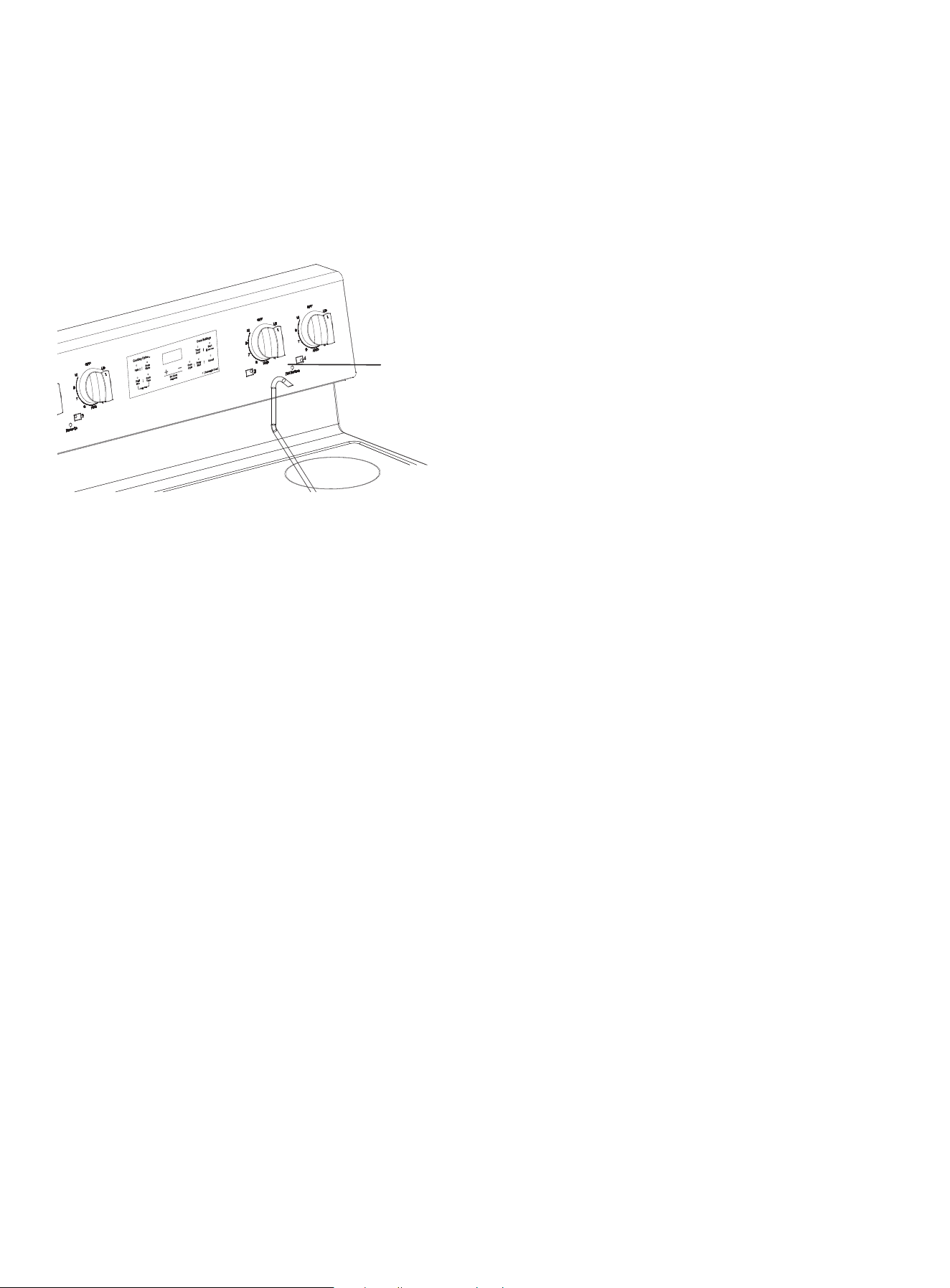
36
MAINTENANCE
CLEANING AND MAINTENANCE
WARNING
• Always make sure that the controls are off and all surfaces are cool before removing or cleaning
any of the range parts. This will prevent you from getting burned.
• If your range is pulled out from the wall for any reason, make sure that the anti-tip device is reen-
gaged after your range has been pushed back into place. Failure to take this precaution could
result in your range tipping and personal injury.
CLEANING THE CONTROL PANEL
CAUTION
• Never use steel wool or abrasive cleansers.
• Protect the surface from sharp objects. These items can damage the surface.
1. Lock the oven controls. See Locking oven controls on page 34.
2. Clean spatters with a damp cloth or glass cleaner. You can use warm, soapy water to clean heavi-
ly soiled areas.
3. When cleaning is done, unlock the oven controls.
CLEANING PAINTED PARTS AND DECORATIVE TRIM
• For general cleaning, use a cloth with hot, soapy water, then dry with a clean, dry, soft cloth.
• For more difficult residue and built-up grease, apply a liquid detergent directly onto the area and
leave for 30 to 60 minutes. Wipe with a damp cloth and dry with a clean, dry, soft cloth.
CAUTION - Do not use a steel-wool pad or abrasive cleaners on stainless steel surfaces. Abrasive
pads and cleaners will scratch the surface and damage the finish.
CLEANING STAINLESS STEEL SURFACES
CAUTION - Do not use a steel-wool pad or abrasive cleaners on stainless steel surfaces. Abrasive
pads and cleaners will scratch the surface and damage the finish.
NOTE - To prevent any discolorations or grease stains, we recommend that you clean and remove
any spills, spots, and grease from your range after each use.
1. Place a small amount of a stainless steel cleaner designed for use with appliances on a damp
cloth or damp paper towel.
2. Clean a small area, rubbing with the grain of the stainless steel, if applicable.
3. Dry and buff with a clean, dry paper towel or soft cloth.
4. Repeat as necessary.
NOTE - If you previously used a mineral oil-based stainless steel appliance cleaner, wash the
surface with dish washing liquid and water before using the stainless steel cleaner.
USING THE OVEN VENT
• The oven vent is located above the right-rear
surface element.
• The vent area can become hot during oven use.
• Steam coming out of the vent is normal.
• The vent is important for correct air circulation.
Never block this vent.
oven vent
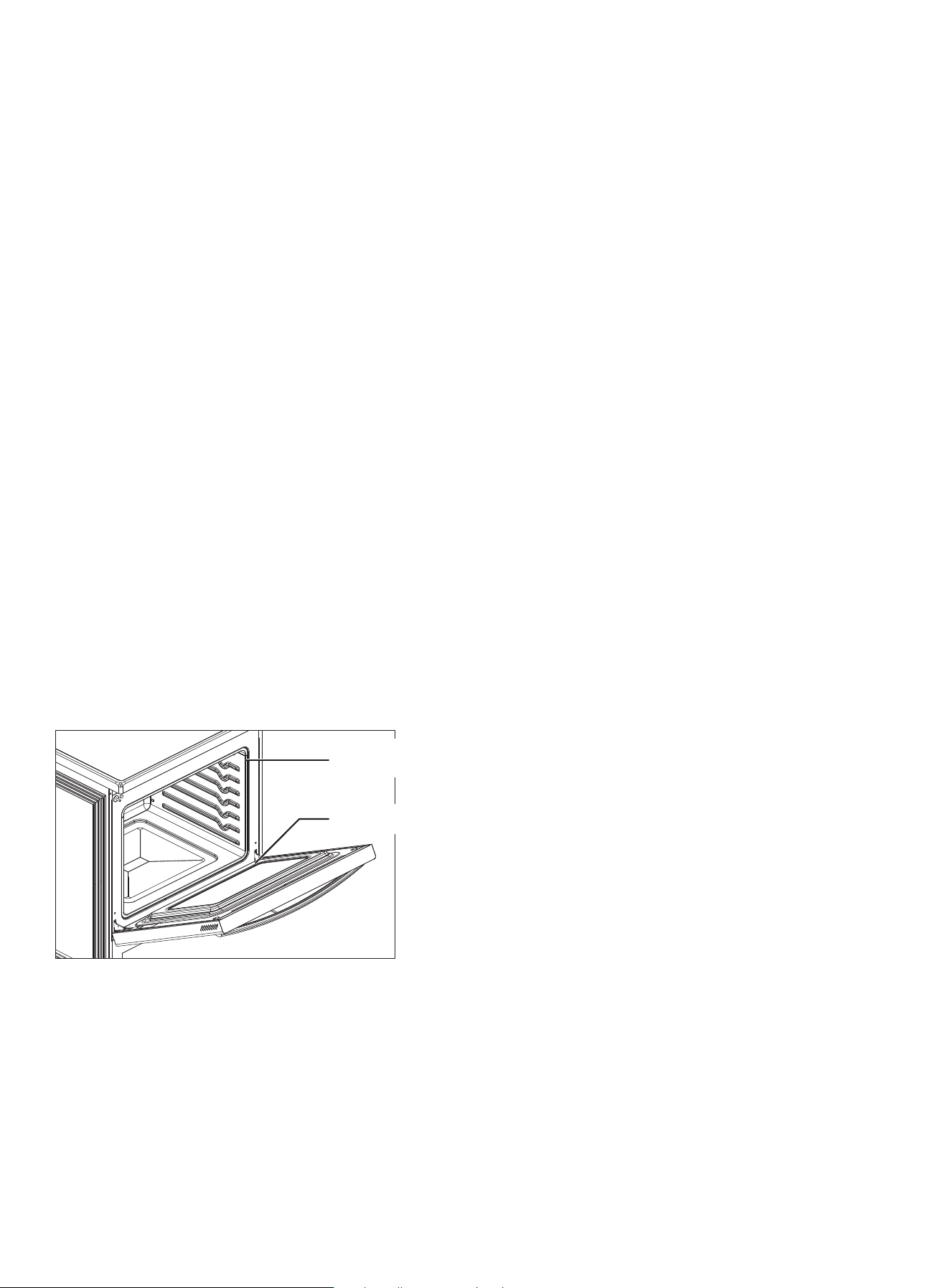
37
MAINTENANCE
CLEANING THE OVEN RACKS
CAUTION - Make sure that the oven racks ha dishwasher. They are not dishwasher-safe.
1 Pull a rack straight out until it stops.
2 Lift the front of the oven rack and pull to remove it from the oven.
3 Clean by hand in hot, soapy water with a plastic or soap-filled scouring pad or sponge, then dry
with a soft cloth. Do not use steel wool,
4 To replace the rack, place the back edge of the rack on the a rack support, then lift the front of
the rack and slide it into the oven. If a rack becomes difficult to slide, rub the side rails with wax
paper or a cloth containing a small amount of cooking oil. This helps the rack slide more easily in
the tracks.
CLEANING THE OVEN DOOR
CAUTION
• DO NOT clean the oven door gasket. The oven door gasket is made of a woven material which is
essential for a good seal. Care should be taken not to rub, damage, or remove this gasket.
• DO NOT immerse the door in water.
• DO NOT spray or let water or the glass cleaner to enter the door vents.
• DO NOT use oven cleaners, cleaning powders, or any harsh abrasive cleaning materials on the
outside of the oven door.
The oven door has multiple surfaces that require different cleaning techniques. The gasket on the
oven door frame should never be cleaned or moved to clean other surfaces. The gasket is made of
woven material which is essential for a good heat seal.
1. Clean the inside door surface by hand with hot, soapy water and a soapy plastic scouring pad. Do
not let moisture get inside the door assembly.
CLEANING THE SURFACE ELEMENT CONTROL KNOBS
WARNING!
• Do not use spray cleaners on the surface element control panel. Spray entering the valve holes
could contact electrical components resulting in death, personal injury, or product damage.
• The knobs and the valve stems must be completely dry before you reinstall them.
1. Make sure that all surface element knobs are in the OFF position.
2. Pull the control knobs straight off the surface element control valve stems. Do not clean the con-
trol knobs in a dishwasher. They are not dishwasher-safe.
2 Rinse and dry thoroughly with a clean, soft
cloth.
3 Clean the outside door stainless steel surfaces
by following the instructions in CLEANING
STAINLESS STEEL SURFACES.
4 Clean the glass window with glass cleaner or
warm, soapy water with a thorough rinse. Do not
let moisture get inside the door assembly.
door gasket
Do not clean!
oven door

38
MAINTENANCE
CLEANING THE SURFACE ELEMENT CONTROL KNOBS (cont.)
3. Clean the knobs in warm, soapy water. Rinse and completely dry all surfaces including back and
stem hole.
4. Clean stainless steel surfaces with a stainless steel cleaner on a damp, soft cloth.
5. Replace the control knobs in the OFF position by pushing them straight onto the control valve
stems.
CLEANING THE COOKTOP
The cooktop surface is a porcelain-enamel surface. To prevent this surface from becoming dull,
wipe up and clean spills as they happen. Foods with a lot of acid (for example, tomatoes, sauer-
kraut, and fruit juices) or foods with high sugar content can cause dull spots if allowed to set.
CAUTION
• Do not use a steel-wool pad or abrasive cleaners on stainless steel surfaces. Abrasive pads and
cleaners will scratch the surface and damage the finish.
• Carefully check the bottoms of pans for roughness that may scratch the cooktop.
NORMAL DAILY USE CLEANING
NOTE - Daily use of a ceramic cooktop cleaner helps keep the cooktop looking new.
Use only a ceramic cooktop cleaner. Other creams may not be as effective. By following these
steps, you can maintain and protect the surface of the glass cooktop.
Before using the cooktop for the first time, clean it with a ceramic cooktop cleaner. This helps pro-
tect the top and makes cleanup easier.
1. Shake the cleaning cream well, then apply a few drops of cleaner directly on the cooktop.
2. Use a paper towel or a cleaning pad for ceramic cooktops to clean the entire cooktop surface.
3. Use a dry cloth or paper towel to remove all cleaning residue. You do not need to rinse.
CLEANING SUGARY SPILLS AND MELTED PLASTICS
NOTE
- If pitting or indentations in the glass surface have already occurred, they can’t be repaired. The
cooktop glass will have to be replaced.
- Sugary spillovers (such jellies, fudge, candy, and syrups) or melted plastics can cause pitting of
the cooktop surface. This is not covered under the warranty.
- You should clean the spill while it is still hot. Take special care when removing hot substances.
- When using a scraper, make sure that it is new and the razor blade is still sharp. Do not use a dull
or nicked blade.
1. Turn off all surface burners. Remove hot pans.
2. Wearing an oven mitt, use a single-edge, razor-blade scraper to move the spill to a cool area of
the cooktop. Remove the spill with paper towels.
3. Wait until the cooktop has cooled, then remove any remaining spillover. Don’t use the surface
burners again until all of the residue has been completely removed.
REMOVING BURNED-ON RESIDUE
1. Make sure that all surface burners are turned off, then let the cooktop cool.
2. Spread a few drops of ceramic cooktop cleaner on the entire burned residue area.
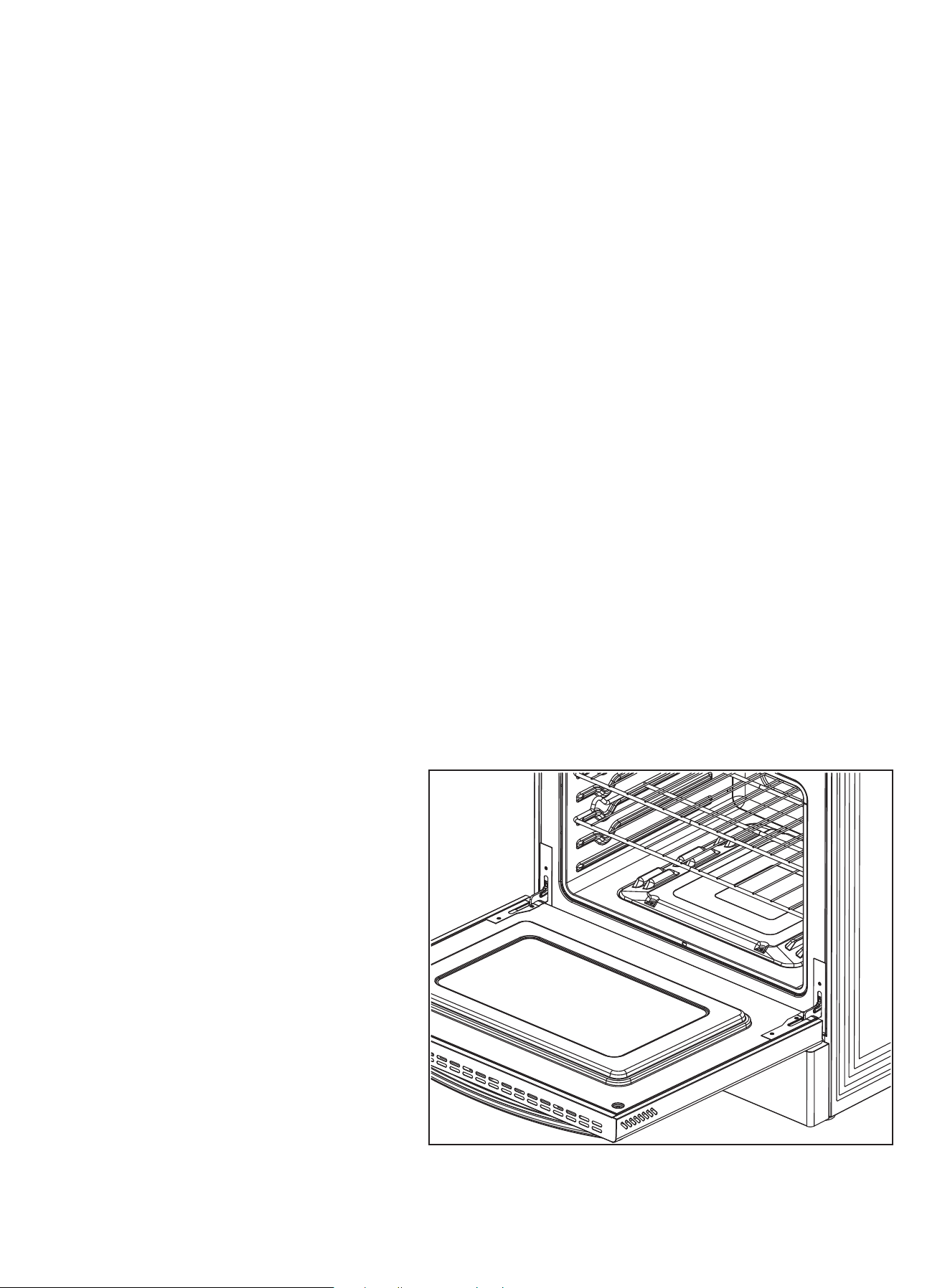
39
MAINTENANCE
REMOVING BURNED-ON RESIDUE (cont.)
3. Using a cleaning pad for ceramic cooktops, rub the residue area. Apply pressure as needed.
4. If any residue remains, repeat the steps listed above as needed.
5. For additional protection, after all residue has been removed, polish the entire surface with a
ceramic cooktop cleaner and a paper towel.
REMOVING HEAVY, BURNED-ON RESIDUE
1. Make sure that all surface burners are turned off, then let the cooktop cool.
2. Use a single-edge, razor-blade scraper at approximately a 45° angle against the glass surface
and scrape the residue. You need to apply pressure remove the residue. Do not scrape the seal.
3. After scraping with the scraper, spread a few drops of ceramic cooktop cleaner on the entire
burned residue area. Use the cleaning pad to remove any remaining residue.
4. For additional protection, after all residue has been removed, polish the entire surface with a
ceramic cooktop cleaner and a paper towel.
CLEANING THE COOKTOP SEAL
• Lay a wet cloth on the seal for a few minutes, then wipe clean with a nonabrasive cleaner.
REMOVING AND REPLACING THE OVEN DOOR
WARNING
• We recommend that you do not remove the door unless directed to do so by Criterion Customer
Service.
• The oven door is heavy. Do not lift the door by its handle. Be careful not to drop the door during
removal. Incorrect handling could result in personal injury.
• Disconnect the electrical power to your range before removing the oven door. This prevents the
oven from accidentally being turned on while the door is removed.
REMOVING THE DOOR
1. Completely open the oven door.
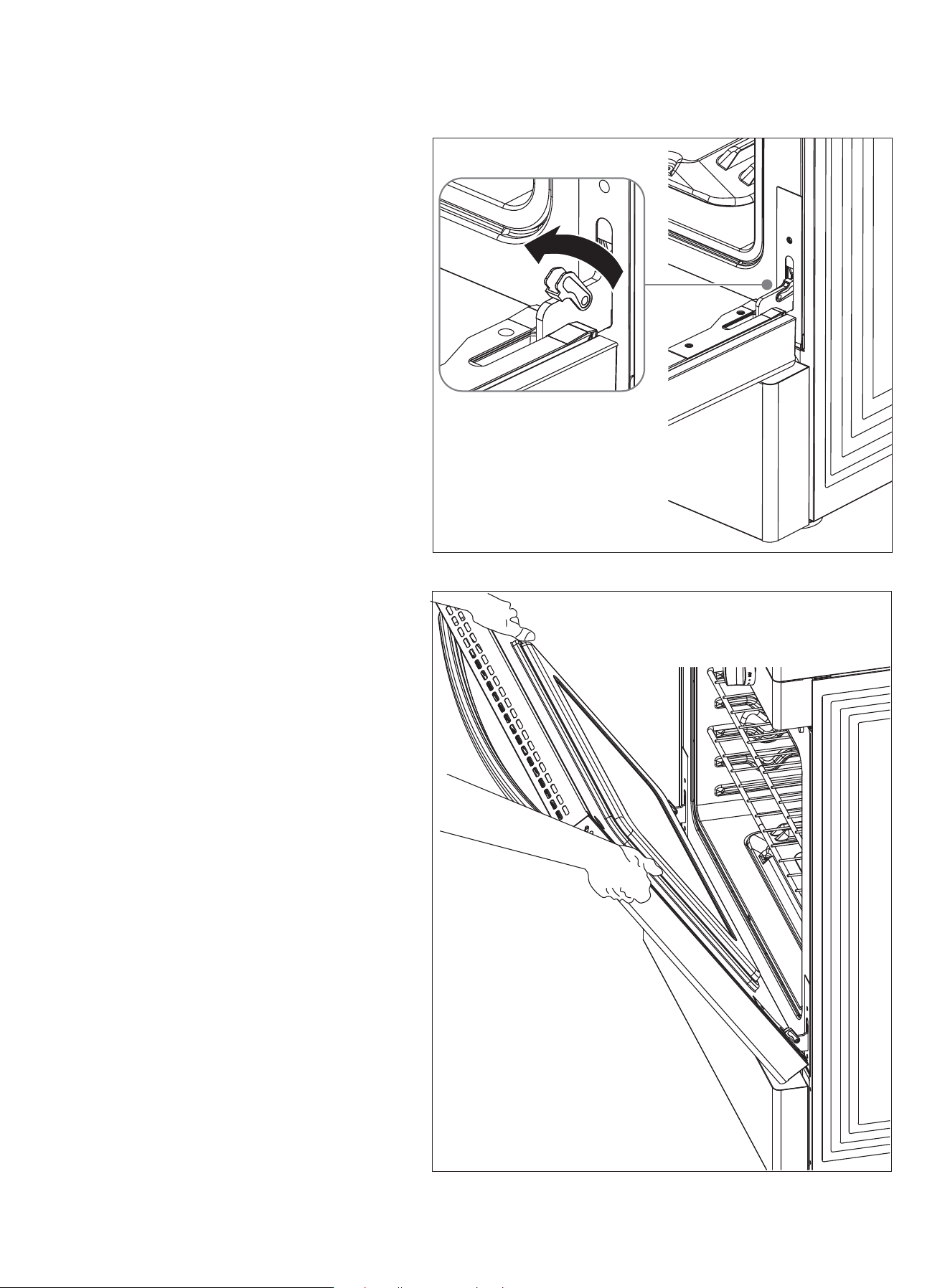
40
MAINTENANCE
REMOVING THE DOOR (cont.)
2. Open the levers fully on both sides.
3. Hold the door firmly on both sides.
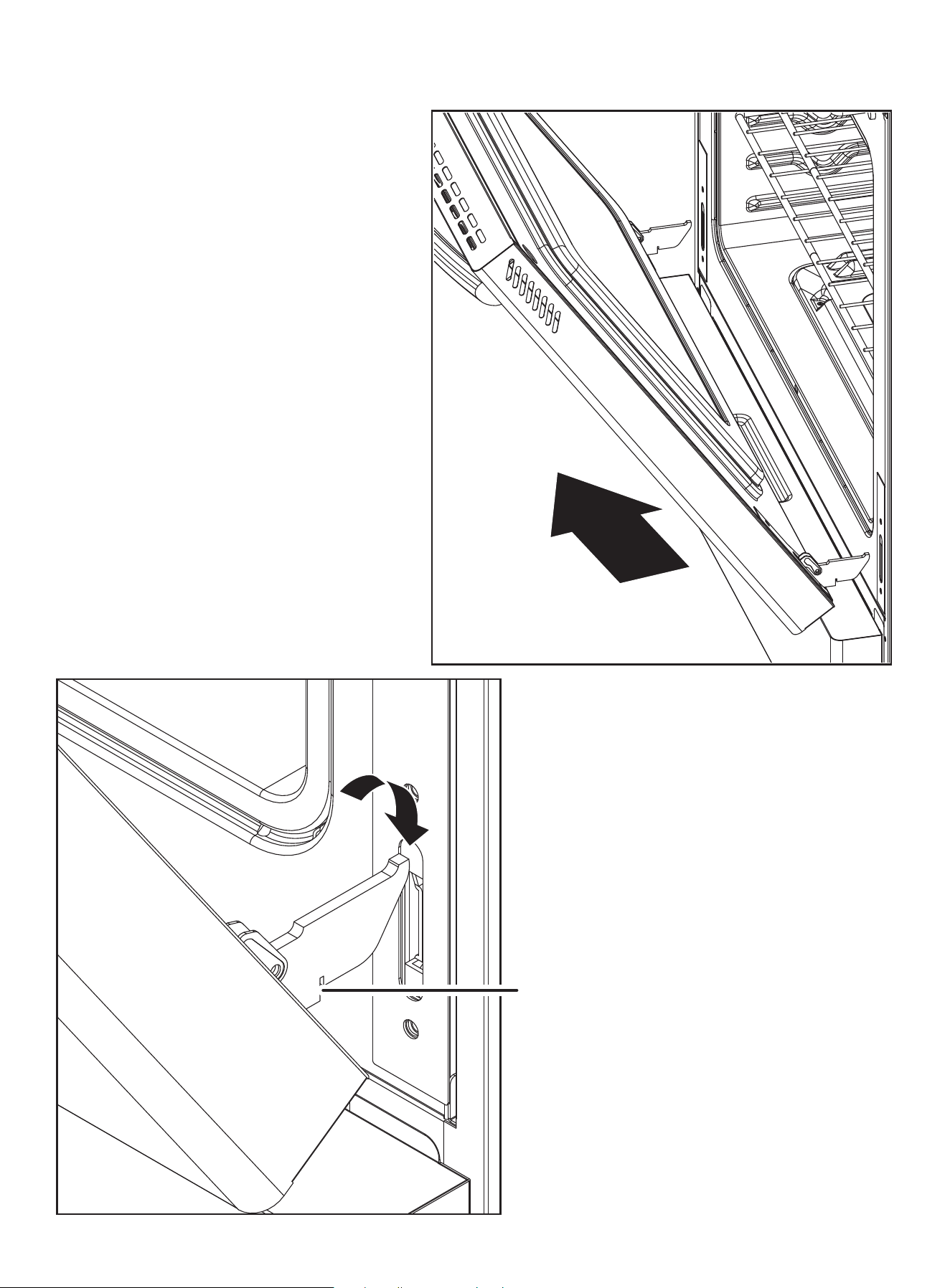
41
MAINTENANCE
REMOVING THE DOOR (cont.)
4. Disengage the hinges and remove the
door gently with a 30° angle between the
door and the oven. Place the door on a
protected surface.
REPLACING THE DOOR
1. Hold the door firmly in almost half open
position.
notch
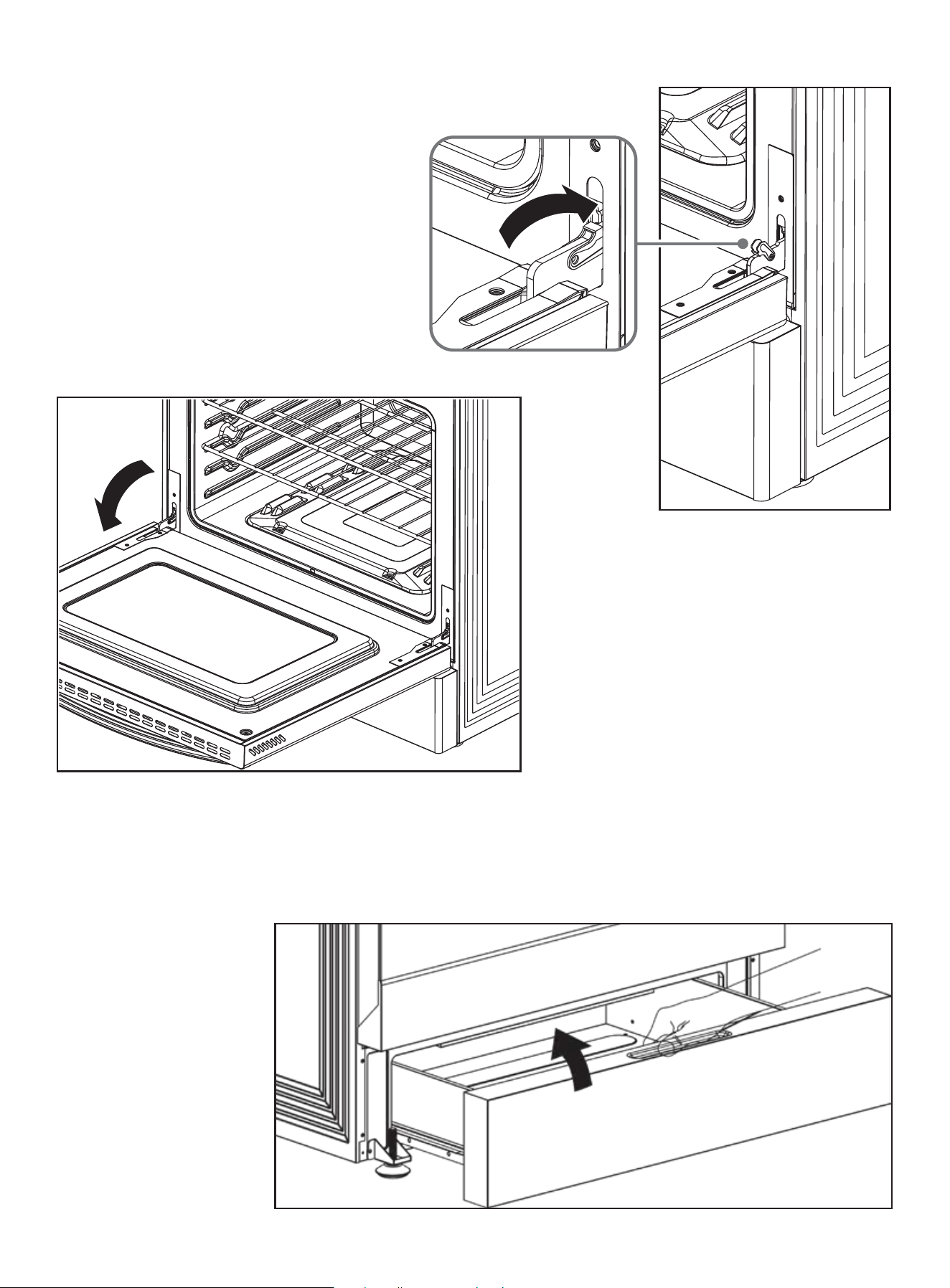
42
MAINTENANCE
REPLACING THE DOOR (cont.)
2. Insert the hinge tongues into the slots
making sure that the notches on both
sides drop into place.
3. Open the door fully.
1. Open storage drawer
fully, lift the storage
drawer, then remove
the drawer.
REMOVING AND REPLACING THE STORAGE DRAWER
The storage drawer is a good place to store cookware and bakeware. Do not store plastics or flam-
mable material in the drawer. Clean the storage drawer with a damp cloth or sponge. Never use
harsh abrasives or scouring pads.
4. Fully close the levers on the left and
right hinges, then close the door.
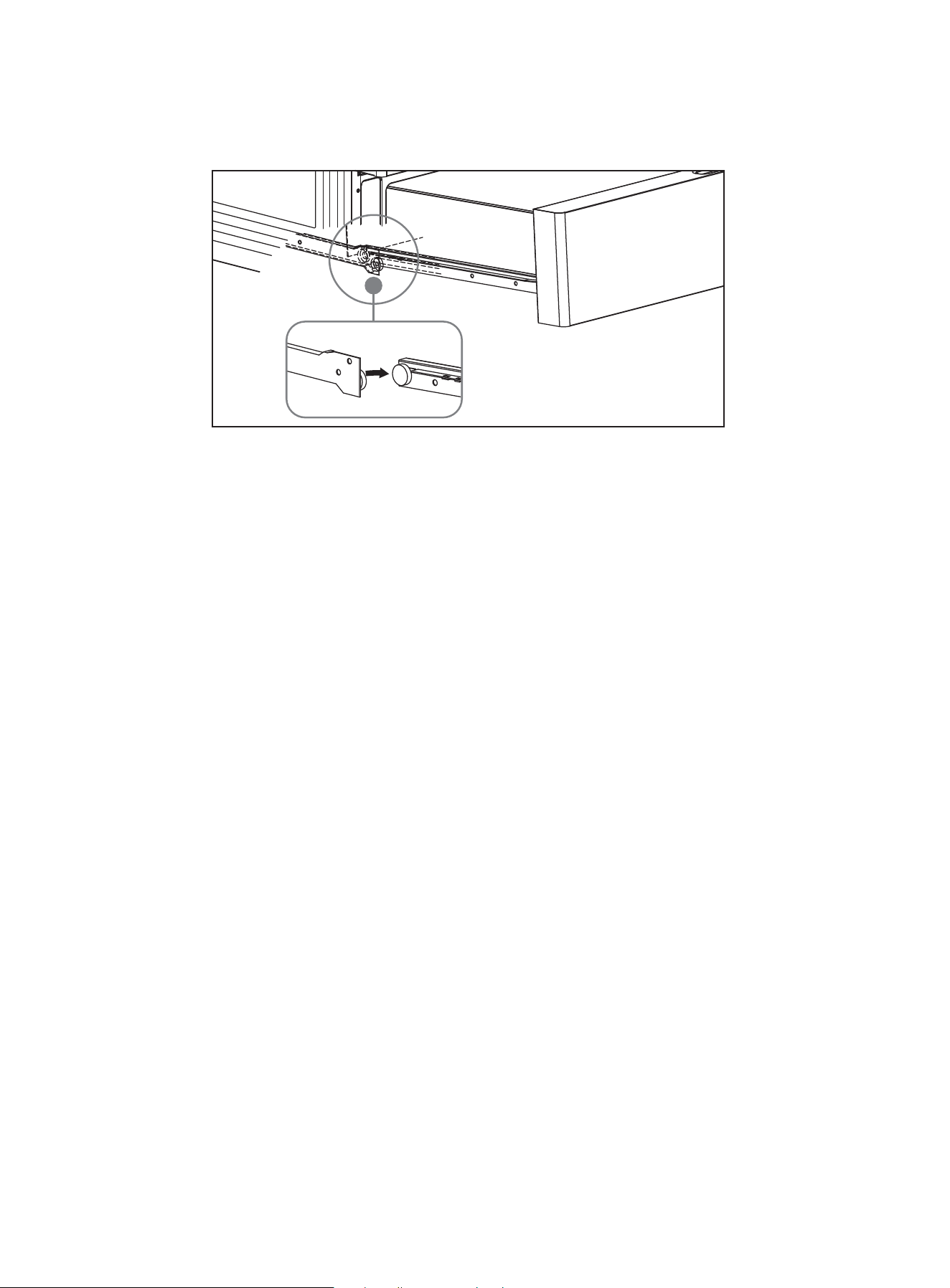
MAINTENANCE
43
REMOVING AND REPLACING THE STORAGE DRAWER (cont.)
2. To replace the drawer, make sure that the white wheel on the drawer aligns with the rails well,
then slide the drawer back into your range.
STEAM CLEANING THE OVEN
NOTE - Steam cleaning the oven takes about 20 minutes and is automatically controlled by the
oven.
1. Remove all accessories from the oven.
2. Pour 10 oz. (300 ml) of water onto the bottom of the empty oven and close the oven door. Use
normal water only, not distilled water. When steam-cleaning, use exactly 10 oz. of water because
this produces the best results.
NOTE - For heavy residue, such as grease left over from roasting, we recommend that you rub
detergent into the residue before activating the steam-cleaning function.
3. Press both BROIL and COOK TIME pads at the same time and hold for 3 seconds to get STEAM
CLEAN, then press the START pad.
NOTE - If you press the STEAM CLEAN pad when the oven temperature is above 150° F (65° C), HOT
appears in the display. Because this function produces the best results when started while the
oven is cool, we recommend that you wait until the oven has cooled down and HOT disappears
from the display.
4. Press the CANCEL pad.
WARNING - Be careful when opening the door before a steam-cleaning procedure has ended.
The water on the bottom is hot.
5. Open the oven door and remove the remaining water with a sponge. Do not leave the residual
water in the oven for any length of time. A significant amount of water remains on the bottom of
the oven after a steam-cleaning cycle.
6. Use a detergent-soaked sponge, a soft brush, or a nylon scrubber to wipe the oven interior.
Remove stubborn residue with a nylon scourer. You can remove lime deposits with a cloth soaked
in vinegar. If the oven remains dirty, repeat the procedure after the oven has cooled.
7. After cleaning, leave the oven door ajar at a 15° angle to let the interior enamel surface dry thor-
oughly.

44
TROUBLESHOOTING
If the solutions in this section do not solve a problem, contact a qualified service technician or
Koolatron Customer Assistance.
POSSIBLE CAUSE
Your range has been installed
incorrectly.
The floor is sagging or sloping.
The kitchen cabinets are not
correctly aligned and make your
range appear to not be level.
The oven leg is inside the anti-tip
device.
The kitchen cabinets are not
square and too close to your
range.
Carpet is interfering with move-
ment of your range.
SOLUTION
• Place an oven rack in the center
of the oven.
• Place a level on the oven rack.
• Adjust the leveling legs at the
base of your range until the oven
rack is level.
• Make sure that the floor is level
and strong and stable enough to
adequately support your range.
Contact a carpenter to correct
the situation.
Make sure that the cabinets are
square and provide sufficient
room for installation.
Slide your range forward until
the leg is out of the anti-tip
device, then move your range as
needed.
Make sure that you reinstall the
range leg into the anti-tip device
when you are through.
Contact a builder or installer to
make your range accessible.
Provide sufficient space so your
range can be lifted over the
carpet.
PROBLEM
My range is not level.
My range needs to be
accessed for servicing
and can’t be moved
easily.
CONTROL PANEL DISPLAY
POSSIBLE CAUSE
A fuse in your home may be
blown or the circuit breaker
tripped.
There was a power failure.
Some beep tones can’t be
turned off.
SOLUTION
Replace the fuse or reset the
circuit breaker.
Reset the clock.
The clock and beep warning
tones stay on even when you
turn the beeper off. This is
normal.
PROBLEM
The display goes blank.
The display flashes.
I turned off the beeper,
but it still beeps.

45
TROUBLESHOOTING
COOKTOP
POSSIBLE CAUSE
You may be using inappropriate
cookware.
In some areas, the power (volt-
age) may be low.
If your range was recently
installed, its power cord connec-
tion may be incorrect causing
the burners and oven to receive
half the normal voltage.
A fuse in your home may be
blown or the circuit breaker
tripped.
The cooktop controls are set
incorrectly.
Food spillover was not cleaned
up.
The surface is hot and the model
features a light-colored cooktop.
The element cycles on and off to
maintain the power setting.
The cooktop is being cleaned
incorrectly.
SOLUTION
Use pans which are flat and
match the diameter of the
surface element you selected.
Cover the pan with a lid until the
desired heat is obtained.
Disconnect the circuit breaker to
cut power to the range and
follow instructions on pages 18 or
19 to make sure the power cord
wires are connected in the
correct order and that the wire
colors match the diagram
shown, or contact Koolatron
Customer Assistance for support.
Replace the fuse or reset the
circuit breaker.
Make sure that you have select-
ed the correct control for the
element you are using.
See CLEANING THE COOKTOP.
This is normal. The surface may
appear discolored when it is hot.
This is temporary and disappears
as the glass cools.
This is normal and not a system
failure. Use the cooktop as usual.
Scratches are not removable.
Tiny scratches become less
visible in time as a result of
cleaning.
Use a ceramic glass top cleaning
cream. Do not use chemical or
corrosive agents. These agents
may damage the surface of the
product.
PROBLEM
The surface burners do
not produce a rolling
boil or do not cook fast
enough.
The surface burners do
not turn on.
The cooktop has areas
of discoloration.
The surface element
frequently cycles on
and off.
The surface element
stops glowing when
changed to a lower
setting.
Scratches or abrasions
on the cooking surface.

46
TROUBLESHOOTING
COOKTOP (cont.)
POSSIBLE CAUSE
Cookware with rough bottoms
was used on the cooktop or
there were coarse particles (for
example, salt or sand) between
the cookware and the surface of
the cooktop.
Cookware has been slid across
the cooktop surface.
Boilovers have been cooked onto
the surface.
Mineral deposits from water and
food have been left on the
surface of the cooktop.
This is the sound of the metal
heating and cooling during both
the cooking and self-cleaning
functions.
SOLUTION
To avoid scratches, use the
recommended cleaning proce-
dures. Make sure that cookware
bottoms are clean before use,
and use cookware with smooth
bottoms.
Wait until the surface cools
down. Then, use a scraper to
remove those impurities. Use a
blade scraper to remove soil. See
CLEANING THE COOKTOP.
• Remove using a ceramic-glass
cooktop cleaning cream.
• Use cookware with clean, dry
bottoms.
• Clean the cooktop with a
ceramic cleaning agent regularly
every week.
This is normal operation, and not
a system failure. Use the cooktop
as usual.
PROBLEM
Scratches or abrasions
on the cooking surface.
The cooktop has brown
streaks or specks.
Cooktop areas have
discoloration with a
metallic sheen.
I hear a “cracking” or
“popping” sound.
OVEN
POSSIBLE CAUSE
Your range is not completely
plugged into the electrical
outlet.
A fuse in your home may be
blown or the circuit breaker
tripped.
The oven controls have been set
incorrectly.
The oven is too hot.
Incomplete service wiring.
Power outage.
SOLUTION
Make sure that the electrical
plug is inserted into a live,
correctly grounded outlet.
Replace the fuse or reset the
circuit breaker.
See USING THE OVEN.
Let the oven cool.
Call for service.
Check to see if the house lights
turn on. If required, call your local
electric company for service.
PROBLEM
The oven does not turn
on.

47
TROUBLESHOOTING
OVEN (cont.)
POSSIBLE CAUSE
A delayed start time has been
set.
The oven door doesn’t close
correctly.
The light bulb is loose or defec-
tive.
The switch operating the light is
broken.
The control has not been set
correctly.
The meat has been placed too
close to the element.
The meat has not been correctly
prepared.
Grease has built up on oven
surfaces.
The oven controls have not been
set correctly.
The oven rack has been posi-
tioned incorrectly or is not level.
Incorrect cookware or cookware
of incorrect size is being used.
The oven sensor needs to be
adjusted.
The serving size may not be
appropriate.
The rack has not been correctly
positioned.
Cookware not suited for broiling.
SOLUTION
Press the Cancel pad to cancel
the delayed start time.
Open the oven door and make
sure that an item, like a baking
dish, is not too big for the oven or
is not placed correctly on the
oven shelf.
Tighten or replace the bulb.
Call for service.
See BROILING.
Reposition the rack to provide
the correct clearance between
the meat and the element.
Preheat the broil element for
searing.
Remove the excess fat from the
meat. Cut away fatty edges that
may curl, leaving the lean intact.
Regular cleaning is necessary
when broiling frequently.
See USING THE OVEN.
See POSITIONING THE OVEN
RACKS.
See ADJUSTING THE THERMO-
STAT.
Refer to the cooking guide on
the food packaging for serving
sizes and try again.
See MINIMUM AND MAXIMUM
SETTINGS.
Use suitable cookware.
PROBLEM
The oven does not turn
on.
The oven light does not
turn on.
Oven smokes exces-
sively during broiling.
Food does not bake or
roast correctly.
Food does not broil
correctly.

48
DRAWER
POSSIBLE CAUSE
The drawer is out of alignment
The drawer is over-loaded or the
load is unbalanced.
SOLUTION
Fully extend the drawer and
push it all the way in. See
REMOVING AND REPLACING
THE STORAGE DRAWER.
Reduce weight.
Redistribute drawer contents.
PROBLEM
The drawer does not
slide smoothly or drags.
TROUBLESHOOTING
OVEN (cont.)
POSSIBLE CAUSE
In some areas, the power (volt-
age) may be low.
The oven sensor needs to be
adjusted.
When using the fan feature, it is
normal to see steam coming out
of the oven vent.
As the number of racks or
amount of food being cooked
increases, the amount of visible
steam increases.
This is normal in a new oven and
disappears in time.
An odor coming from the insula-
tion around the inside of the
oven is normal for the first few
times the oven is used.
The shiny, silver-colored racks
were cleaned in a self-cleaning
cycle.
SOLUTION
Preheat the broil element for 10
minutes. See MINIMUM AND
MAXIMUM SETTINGS.
See ADJUSTING THE THERMO-
STAT.
This is normal operation, and not
a system failure. Use the oven as
usual.
Operate the oven at the BAKE
setting at 400 °F (204° C) for one
hour.
Apply a small amount of vegeta-
ble oil to a paper towel and wipe
the edges of the oven racks with
the paper towel.
PROBLEM
Food does not broil
correctly.
The oven temperature
is too hot or too cold.
Steam is coming out of
the vent.
A burning or oily odor
is coming from the
vent.
Strong odor.
Oven racks are difficult
to slide.

49
TROUBLESHOOTING
ERROR CODES
POSSIBLE CAUSE
Communication failure
Cavity sensor open/short
circuit
Cavity high temperature
protection
Oven heating failure
SOLUTION
1. Enter standby state after fault recovery.
2. Make a judgment after 20 consecutive commu-
nication abnormalities.
1. A short-circuit fault can only be determined if
the box sensor is detected to be short-circuited for
5 consecutive seconds under normal conditions. If
the box sensor is detected to be normal for 5
consecutive seconds under a short-circuited state,
the sensor can be judged to be back to normal.
2. After the machine has been running for 5 min-
utes, it can be judged as an open-circuit fault only
if the cabinet sensor is open-circuited for 5 con-
secutive seconds. If the cabinet sensor is detected
to be normal for 5 consecutive seconds with the
cabinet sensor open-circuited state, the sensor
can be judged to be back to normal.
3. After a fault occurs, the machine needs to stop
heating, exit the current state, enter the fault
state, and display the fault code.
4. If the fault is eliminated, you need to press the
cancel button to return to the standby state and
clear the fault code. If you press the cancel button
in the fault state, the machine returns to the
standby mode and clears the fault code. When
re-testing determines that there is a fault, pro-
ceed to step 2.
1. In working mode, if the temperature exceeds
310°C for 10 consecutive seconds, the oven tem-
perature is deemed to be overheated.
2. After a fault occurs, the machine needs to stop
heating, exit the current state, enter the fault
state, and display the fault code.
3. If the fault is eliminated, you need to press the
cancel button to return to the standby state and
clear the fault code. If you press the cancel button
in the fault state, the machine returns to the
standby mode and clears the fault code.
1. 25°C ≤ cavity temperature ≤ set temperature
-30°C;
2. Set temperature ≥ 85°C;
3. Temperature rise rate ≤ 3°C within 7 minutes;
4. Only judge during the heating state (Judge
when starting, and only judge once During the
judgment process, if there is a door opening,
malfunction, etc. to stop the heating operation,
the judgment will be suspended.);
5. No judgment is made for special menus (such
as fermentation, heat preservation, no require-
ment for the heating stage time…)
ERROR CODE
F1E1
F3E1
F3E3
F3E2

07/2025-v2
H1S443
WARRANTY
Kenmore and the Kenmore logo are registered trademarks
to Transform SR Brands LLC and are used under license
by Koolatron Corporation
1
Limited Warranty
Year
WITH PROOF OF ORIGINAL SALE, the following warranty coverage applies when this appliance is correctly installed,
operated and maintained according to all supplied instructions.
One Year Limited Warranty on Appliance
FOR ONE YEAR from the date of original sale this appliance is warranted against defects in material or workmanship.
A defective appliance will receive free repair. If the appliance cannot be repaired, it will be replaced free of charge.
All warranty coverage applies for only 90 DAYS from date of original sale if this appliance is ever used for other than
private household purposes.
This warranty covers ONLY defects in material and workmanship, and will NOT pay for the exclusions to repair service
listed as follows:
1. A service technician to clean or maintain the product.
2. A service technician to instruct the user in correct appliance installation, operation or maintenance.
3. Expendable items that can wear out from normal use within the warranty period, including but not limited to filters,
belts, bags or screw-in base light bulbs.
4. Cracks in a ceramic glass cooktop that are not a result of thermal shock.
5. Stains and scratches on a ceramic glass cooktop resulting from accident or improper operation or maintenance, nor
for discoloration of any cooktop surface resulting from normal use.
6. Service calls to correct appliance installation not performed by Kenmore authorized service agents, or to repair
problems with house fuses, circuit breakers, house wiring, and plumbing or gas supply systems resulting from such
installation.
7. Damage to or failure of this appliance resulting from installation not performed by Kenmore authorized service
agents, including installation that was not in accord with electrical, gas or plumbing codes.
8. Damage to or failure of this appliance, including discoloration or surface rust, if it is not correctly operated and
maintained according to all supplied instructions.
9. Damage to or failure of this appliance, including discoloration or surface rust, resulting from accident, alteration,
abuse, misuse or use for other than its intended purpose.
10. Damage to or failure of this appliance, including discoloration or surface rust, caused by using detergents, cleaners,
chemicals or utensils other than those recommended in all instructions supplied with the product.
11. Damage to or failure of this appliance resulting from natural or other catastrophe, such as flood, fire or storm.
12. Damage to or failure of parts or systems resulting from unauthorized modifications made to this appliance.
13. Service to an appliance if the model and serial plate is missing, altered, or cannot easily be determined to have the
appropriate certification logo.
The Kenmore brand is used under license. Direct all claims for warranty service to Kenmore Customer Assistance, call
1-800-265-8456 or email service@koolatron.com
Koolatron Corporation
4320 Federal Drive, Batavia, NY 14020 U.S.A.
139 Copernicus Blvd., Brantford, ON N3P1N4 Canada