https://manual-hub.com/
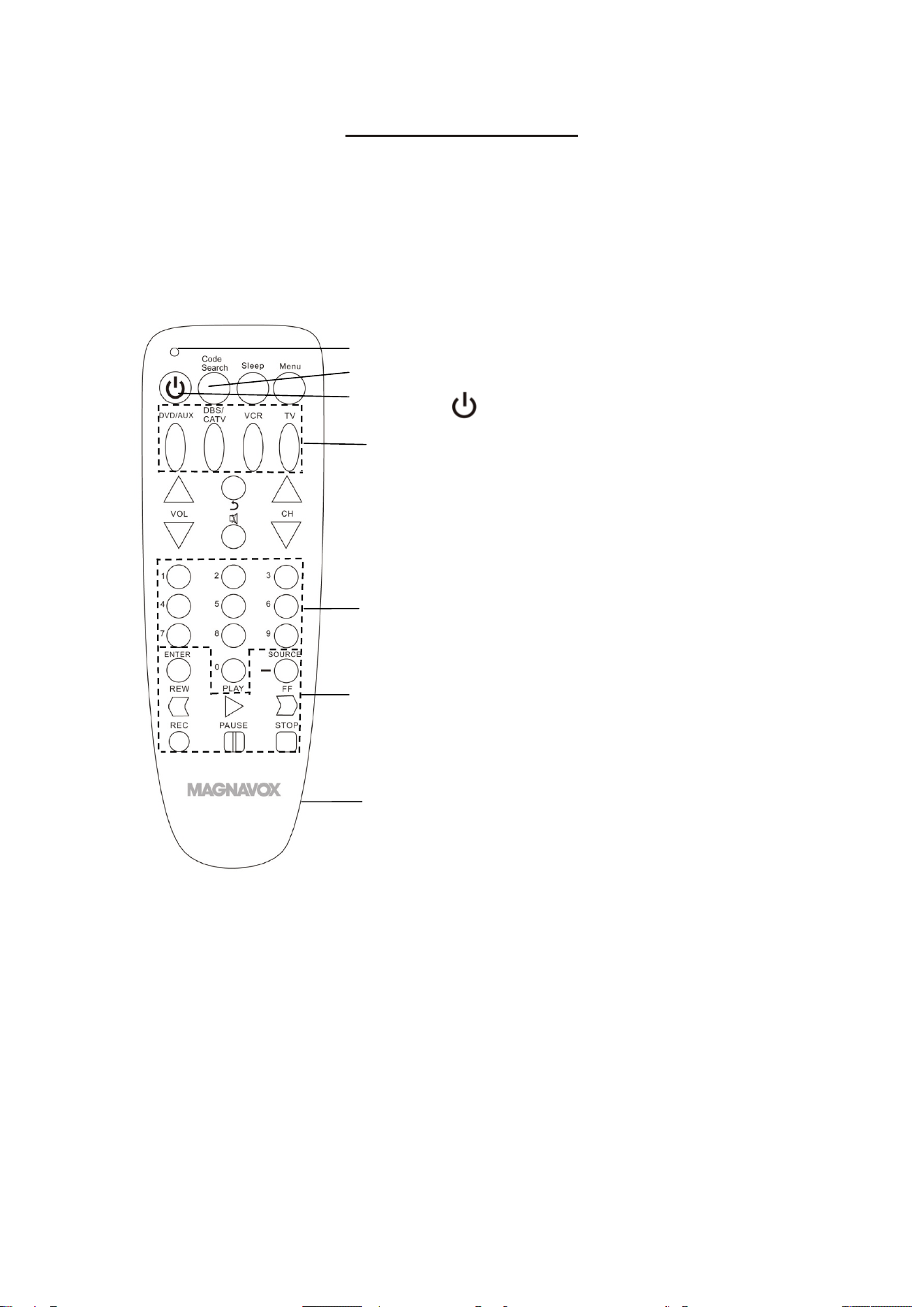
LOCATIONOFCONTROLS:
1
1. Indicator
2. CodeSearchButton
3. PowerOn‐OffButton
4. DeviceSelectionButtons
DVD/AUX: DVDplayer/Auxiliaryplayer
DBS/CATV: Satellitereceiver/Cablebox
VCR: Videocassetterecorder
TV: Television
5. NumericButtons
6. FunctionButtons
7. BatteryCompartment(Ontherear)
5
6
7
1
2
3
4
https://manual-hub.com/
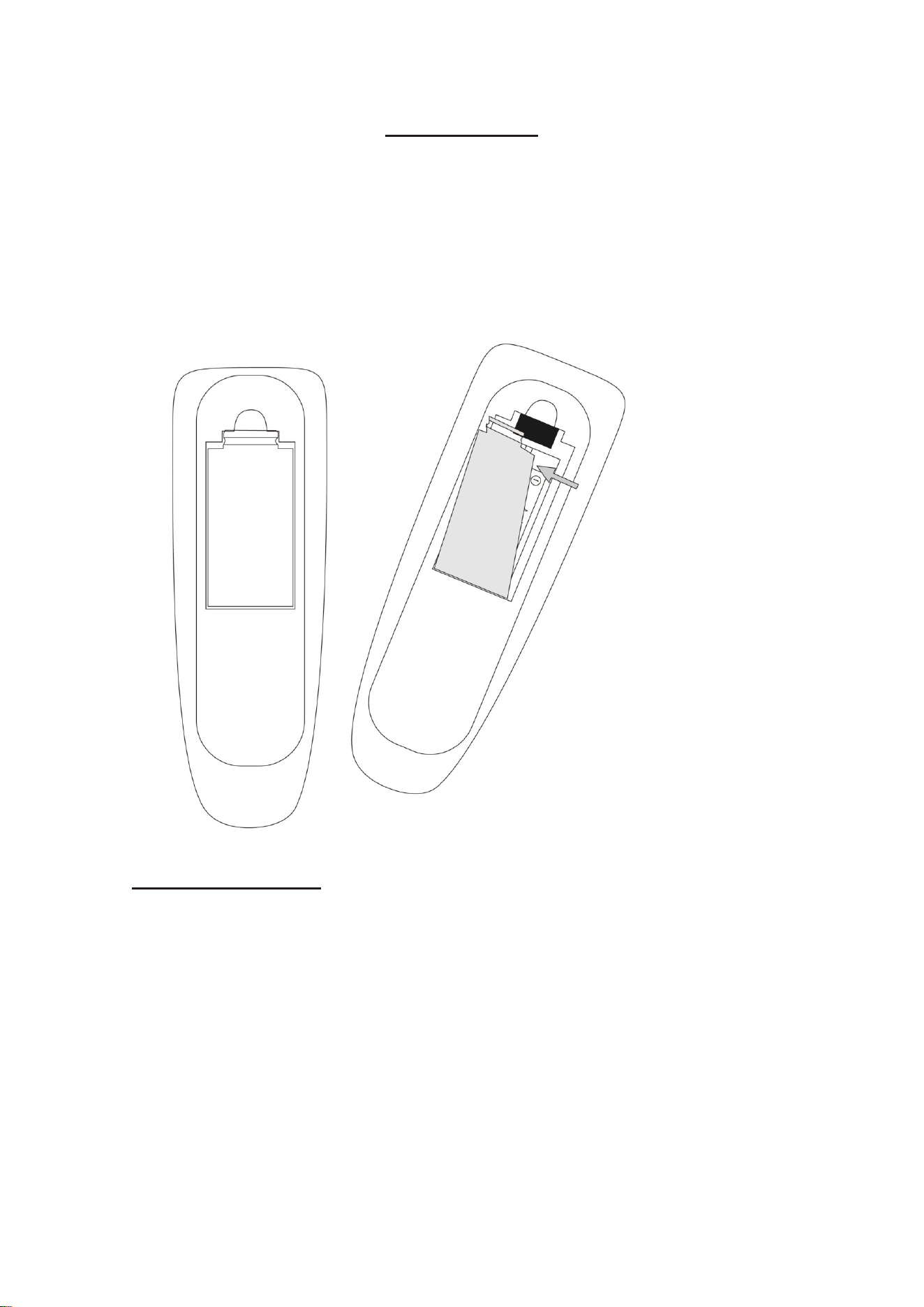
POWERSOURCE:
Installorreplacingthebatterieswhenitisdrainedasfollows:
1. Openthebatterydoorontherearoftheunitbypressingthetabandthenlifting
itastheillustratedbelow.
2. Installtwo(2)xAAAsizebatteries(notincluded)intothebatterycompartment
followpolaritymarkingsinside.
3. Closethebatterydoor.
BATTERYPRECAUTIONS:
FollowtheseBatteryPrecautionwhenusingabatteryinthisdevice:
1. Useonlythesizeandtypeofbatteryspecified.
2. Besuretofollowthecorrectpolaritywheninstallingthebatteryasindicatedinthe
batterycompartment.Areversedbatterymaycausedamagetothedevice.
3. Donotmixdifferenttypesofbatteriestogether(e.g.AlkalineandCarbon‐zinc)or
oldbatterieswithfreshones.
2
https://manual-hub.com/

4. Ifthebatteriesinthedeviceisfullydrainedorthedeviceisnotbeingusedfora
longperiodoftime,removethebatteriestopreventdamageorinjuryfrom
possiblebatteryleakage.
5. Donottrytorechargethebatteryitisnotintendedtoberecharged;itcan
overheatandrupture.(Followbatterymanufacturer’sinstructions.)
6. Donotdisposeofbatteryinfire.Batterymaybeexplodedorleaked.
7. Cleanthebatterycontactsandalsothoseofthedevicepriortobatteryinstallation.
SETTINGUP:
YoumustsetuptheUniversalRemotebeforeoperatingwithyourdeviceasfollows:
Setupwithdevicecode:
1. Poweronyourdesireddevice(Ex:TV)asusual.
2. Findthefour(4)digitdevicecodeforitintheattachedCodeList.
3. PressandholdtheCodeSearchButtonapproximately2secondsuntiltheLED
Indicatorisilluminatedthenreleasethebutton.
4. PressandreleasethecorrespondingdeviceselectionbuttonontheUniversal
Remote(suchasTVButton).
5. Enterthefour(4)digitcodeforyourdevicebypressingthenumericbuttons.The
LEDIndicatorwillturnoff.
(Ifthecodeisinvalid,theIndicatorwillblink5timesthenautoexit.Repeatthe
settingproceduresfrom2‐5againtoresetavalidcode.)
6. AimtheUniversalRemotetotheremotesensorforyoudevicethenoperatingthe
device.Ifthedevicerespondscorrectly,itmeansyouhaveenteredtherightcode.
NOTE:
IfthecodesprovideddonotworktopairtheUniversalRemotetoyourdevice,trythe
followingmethods.
3
https://manual-hub.com/

AutoSetting:
1. Poweronyourdesireddevice(Ex:TV)asusual.
2. PressandholdtheCodeSearchButtonapproximately2secondsuntiltheLED
Indicatorisilluminatedthenreleasethebutton.
3. Pressandreleasethecorrespondingdevice’sselectionbuttonofyourdevice(such
asTVButton).
4. AimtheUniversalRemotetotheremotesensorofyourdevice,thenpressthe
POWERButtonuntiltheLEDindicatoristwinklingtoturnoffyourdevice.Ifit
doesn’tworkrightaway,checkifrightaimorresetfromstep2.TheAdifferent
infraredsignalof“Poweroff”issentevery4seconds.
5. Onceyourdeviceisshutoff,presstheENTERButtonwithin4secondstosavethe
settingandexit.
6. AimtheUniversalRemotetotheremotesensorofyourdevicethenoperatethe
devicewiththeUniversalRemote.Ifthedeviceisrespondingcorrectly,itmeans
youhaverightsettings.Otherwise,setitagainstartingfromstep2ortrythe
followingsettingmethods.
Manualsetting:
1. Poweronyourdevice(EX:TV)asusual.
2. PressandholdtheCodeSearchButtonapproximately2secondsuntiltheLED
Indicatorisilluminatedthenreleasethebutton.
3. Pressandreleasethecorrespondingdeviceselectionbuttonforyourdesired
device(Ex:TVButton).
4. AimtheUniversalRemotetotheremotesensorforyourdevice(suchlikeTV)then
pressandreleasethePOWERButtonrepeatedlytosenddifferentinfrared
signalof“Poweroff”.
5. Onceyourdeviceisshoutoff,presstheENTERButtonwithin4secondstosave
thesettingandexit.
6. AimtheUniversalRemotetotheremotesensorforyourdevice(Ex:TV)then
operationthedevicewiththeUniversalRemote.Ifthedevice(Ex:TV)is
respondingcorrectly,itmeansyouhavesettheremotetothecorrectsettings.
https://manual-hub.com/

4
OPERATION:
1. Repeatthe settingprocedureuntilalldesireddevices(upto4devices)havebeen
set.
2. Pressthedesireddeviceselectionbutton(Ex:TV)ontheUniversalRemote.
3. AimtheUniversalRemotetotheremotesensorofyoudevicethenoperationthe
devicewiththeUniversalRemote.
NOTES:
1. ButtonsmaybetitleddifferentlyonyourUniversalRemoteasitontheoriginal
manufacturer’scontroller.
2. Someofthebuttonsmaynotrespondasyouroriginalremote.
3. IftheUniversalRemoteisnotrespondingproperly,youmaywanttoresetthe
settings.ResettheUniversalRemotebyremovingbatteriesfromtheUniversal
Remoteforapproximately1minutetheninsertthebatteriesbackintothe
UniversalRemote.
https://manual-hub.com/
5
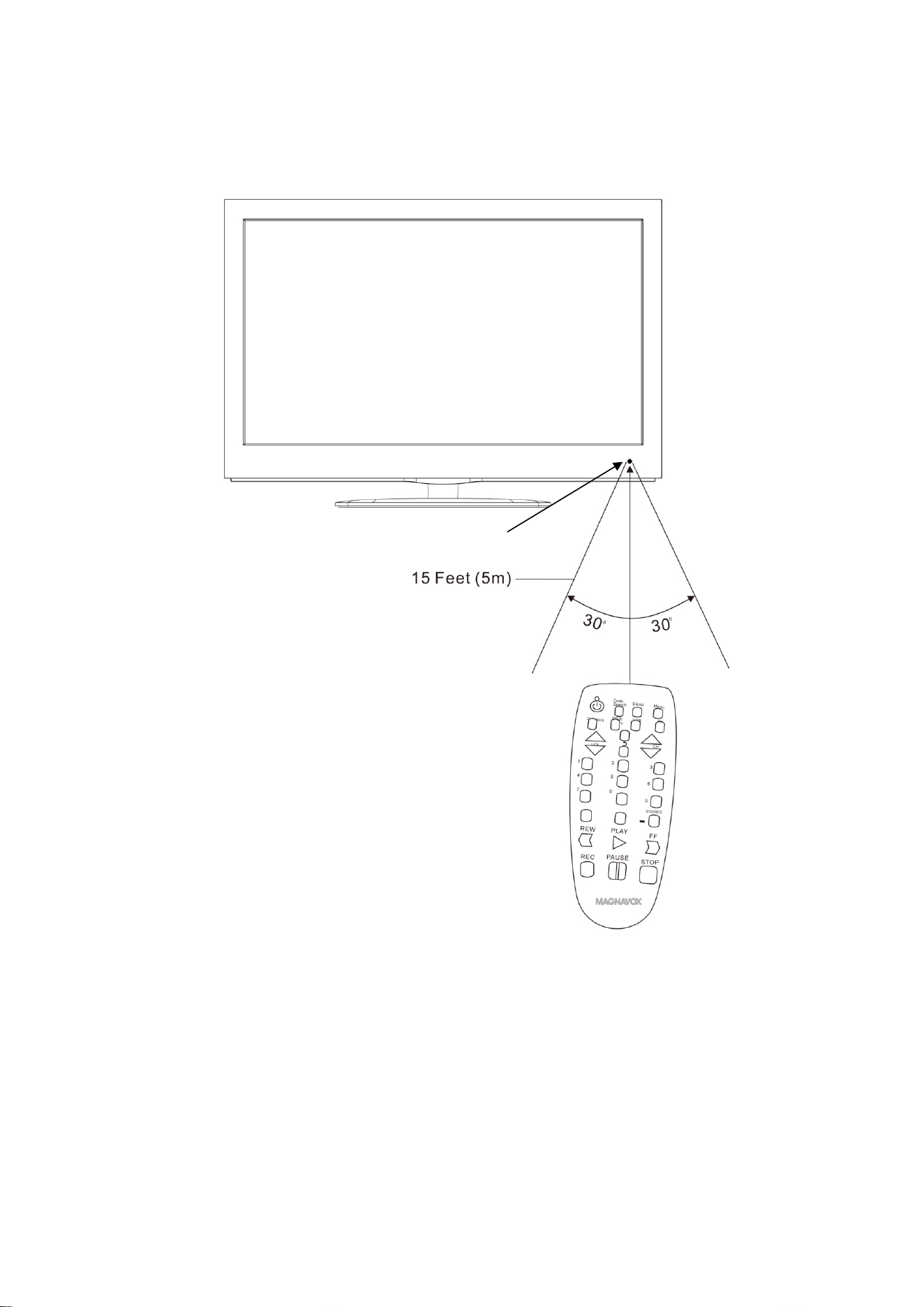
4. RemoteDistance:
Remotesensorofyourdesireddevice
Remarks:
A. WhenthereisanobstaclebetweenthedeviceandtheUniversalRemote,the
transmittermaynotoperate.
B. Whentheremotesensorofthedeviceisshineddirectlyundersunlight,
incandescentlamp,fluorescentlamporanyotherstronglight,theoperationof
RemoteControlmaybeunstable.
https://manual-hub.com/

6
TROUBLESHOOTING:
Checkthefollowingbeforerequestingservice:
SYMPTOM POSSIBLECAUSE POSSIBLESOLUTION
Nopower
Batteriesincorrectinstallation Re‐installthebatteriesasthe
polaritymarkinginsidethebattery
compartment
Batteriesdrained Replacebynewbatteries
Notfunctioning
TheUniversalRemotehadnotsetor
incorrectset
ResettheUniversalRemoteas
instructedearlier
GERNERALSPECIFICATTIONS:
PowerSource:………………2xAAAsizebatteries(Notincluded)
EffectiveRange…………….Approximate15feet(5M)inopenarea
ACCESSORIES:
1xRemoteControl
1xOwner’sManual
1xRemoteCodeList
https://manual-hub.com/
7
https://manual-hub.com/