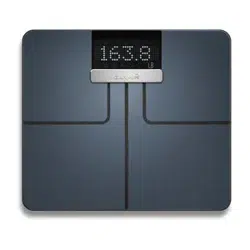
Garmin Index
™
Smart Scale
Owner’s Manual

© 2015 Garmin Ltd. or its subsidiaries
All rights reserved. Under the copyright laws, this manual may not be copied, in whole or in part, without the written consent of Garmin. Garmin reserves the right to change or improve its
products and to make changes in the content of this manual without obligation to notify any person or organization of such changes or improvements. Go to www.garmin.com for current updates
and supplemental information concerning the use of this product.
Garmin
®
, the Garmin logo, and ANT
®
are trademarks of Garmin Ltd. or its subsidiaries, registered in the USA and other countries. Garmin Connect
™
, Garmin Express
™
, Garmin Index
™
, and USB
ANT Stick
™
are trademarks of Garmin Ltd. or its subsidiaries. These trademarks may not be used without the express permission of Garmin.
The Bluetooth
®
word mark and logos are owned by Bluetooth SIG, Inc. and any use of such marks by Garmin is under license. Mac
®
is a trademark of Apple Inc., registered in the U.S. and other
countries. Wi‑Fi
®
is a registered trademark of Wi-Fi Alliance. Windows
®
is a registered trademark of Microsoft Corporation in the United States and other countries. Other trademarks and trade
names are those of their respective owners.
M/N: N5; ATWINC1500-MR210PA

Table of Contents
Getting Started............................................................... 1
Device Overview......................................................................... 1
Installing the Risers.................................................................... 1
Installing the Batteries................................................................ 1
Changing the Units of Measure.................................................. 1
Status Icons................................................................................ 1
Setting Up Your Device.................................................. 1
Additional Users..........................................................................2
Changing Users.......................................................................... 2
Changing Your Wi‑Fi Connection............................................... 2
Reading and Recording Measurements....................... 2
Measurements............................................................................ 2
Device Information......................................................... 2
Device Care................................................................................ 2
Specifications..............................................................................3
Troubleshooting............................................................. 3
Software Updates....................................................................... 3
Getting More Information............................................................ 3
Tips for Erratic Body Composition Data......................................3
My device is recognizing me as a guest or another user........... 3
My device is not recording measurements................................. 3
Resetting to Factory Defaults..................................................... 3
Index................................................................................ 4
Table of Contents i

Getting Started
WARNING
See the Important Safety and Product Information guide in the
product box for product warnings and other important
information.
This device passes electric current through the user to conduct
measurements. This device should not be used by individuals
with pacemakers or other internal medical devices. Consult your
physician before using this product if you are pregnant or if you
think you may be pregnant.
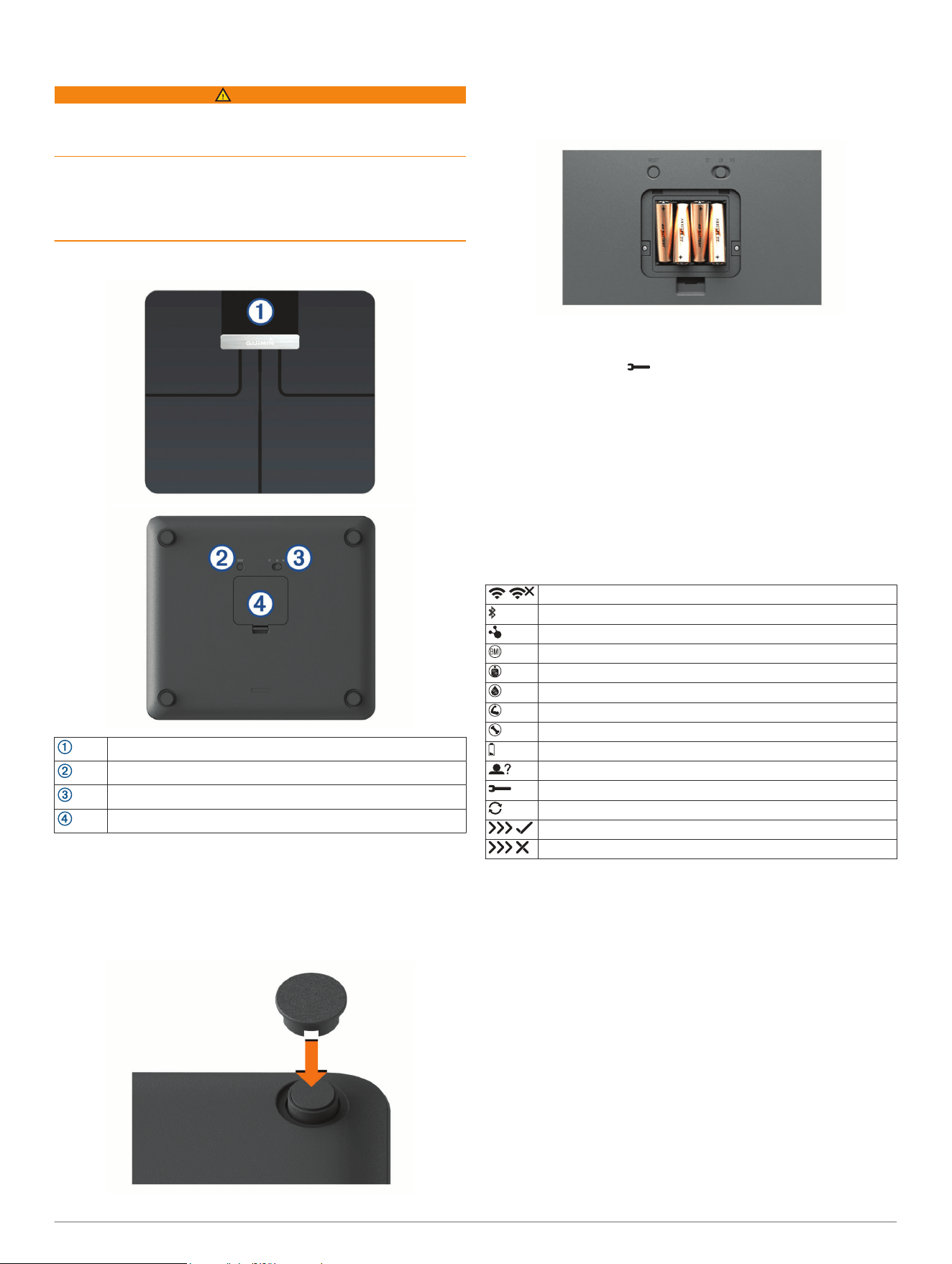
Device Overview
LCD screen
Reset key
Units of measure switch
Battery door
Installing the Risers
For the most accurate weight measurement, you should use the
device on a hard, flat floor. If you plan to use your device on a
carpeted floor, you should install the included risers. The risers
are not necessary when you use the device on a hard floor.
Press a riser onto each foot on the device.
Installing the Batteries
The device operates on four AA batteries.
1
Remove the battery cover.
2
Insert four AA batteries, observing polarity.
3
Replace the battery cover.
After installing the batteries, the wireless indicator lights on the
LCD screen flash and appears to indicate the device is
ready to set up.
Changing the Units of Measure
On the underside of the scale, slide the switch to your
preferred unit of measure.
Status Icons
Icons appear on the LCD screen to indicate connection status
and to indicate which metric is displayed on the screen. Flashing
wireless signal icons indicate the device is searching for a
signal. A solid icon means the device is connected using the
corresponding wireless technology.
Wi‑Fi
®
signal status
Bluetooth
®
wireless signal status
ANT
®
wireless signal status
Body mass index
Body fat percentage
Body water percentage
Skeletal muscle mass
Bone mass
Low battery
Guest user
Setup mode
A software update or software maintenance connection status
Data upload or software update was successful
Data upload or software update was unsuccessful
Setting Up Your Device
You must set up your Garmin Index device with Garmin
Connect
™
and connect it to a compatible Wi‑Fi router before you
can use all of the features of the device.
1
Go to www.garminconnect.com/indexscale.
2
Select an option:
• Select Mobile to set up your device using the Garmin
Connect Mobile app.
• Select WPS to set up your device using a WPS-enabled
Wi‑Fi router.
3
Follow the on-screen instructions on your computer or
smartphone to set up and configure your device.
NOTE: Until you complete the setup process, the device has
limited functionality.
Getting Started 1
Additional Users
You can invite up to 15 users to use your Garmin Index device
using your Garmin Connect account. Each invited user must
have a Garmin Connect account.
NOTE: Only the device owner can invite users.
Inviting Users with Garmin Connect
1
Sign in to your Garmin Connect account on your computer.
2
Select > Devices > Index Smart Scale.
3
Select Invite next to the user.
Inviting Users with the Garmin Connect Mobile App
1
Open the Garmin Connect Mobile app on your compatible
smartphone.
2
Select an option:
• For Android devices, select .
• For iOS devices, select More.
3
Select Garmin Devices > Index Smart Scale > Device
Settings > Manage People > Invite Connections.
4
Select Invite next to the user.
Changing Users
Your device distinguishes between users automatically based
on weight and frequency of use. When you step on the device, it
weighs you and displays your initials on the screen. If the device
detects a different user, you can change users.
While initials are displayed on the device screen, tap the
device to move through the users registered to the scale.
Changing Your Wi‑Fi Connection
You can return your device to setup mode and change your
Wi‑Fi connection at any time.
NOTE: Returning the device to setup mode does not delete any
user information from the device.
On the underside of the scale, press RESET.
The wireless indicator lights on the LCD screen flash to indicate
the device is ready to set up (Setting Up Your Device, page 1).
Reading and Recording
Measurements
Each time you step on the device, it calculates your weight and
other measurements. The LCD screen displays the calculated
measurements automatically, moving to the next measurement
every few seconds.
1
Remove your socks and shoes.
2
Tap the scale.
The LCD display activates.
3
Stand on the scale barefoot.
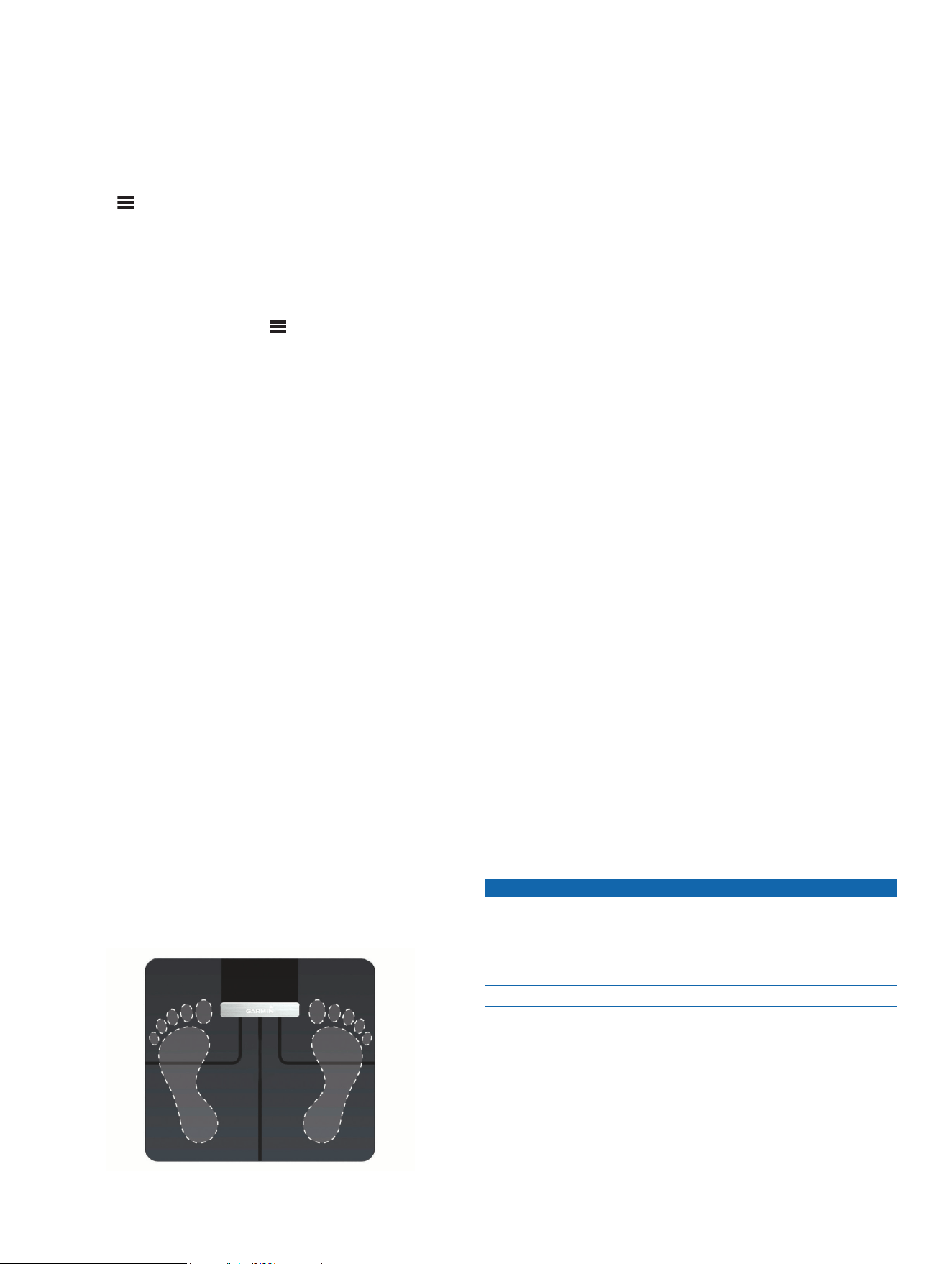
TIP: For best results, stand with your feet placed flat on the
glass surface of the scale. Do not contact the screen or the
Garmin
®
logo.
The scale weighs you, and it displays your initials and
measurements automatically.
4
When measurements display, tap the device to move through
the measurements more quickly.
If you have set up your device with an active Wi‑Fi connection,
measurements are uploaded automatically to your Garmin
Connect account.
Measurements
The Garmin Index smart scale uses bioelectrical impedance to
calculate your body composition. The device sends a small
amount of electrical current (which you will not feel) from one
foot through your body to the other foot. The device measures
the electrical signal after it passes through your body to estimate
aspects of your body composition.
For best accuracy, ensure you use the device under the same
circumstances and at approximately the same time of day each
time you use the device. Activities that temporarily impact your
body's weight, hydration, and distribution of water can impact
the accuracy of measurements.
Garmin recommends waiting two hours before using the device
after eating, drinking, exercising, bathing, or visiting a sauna.
Body Mass Index (BMI): Body mass index is your weight in
kilograms divided by your height in meters squared. BMI is
often used to estimate if a person is underweight or
overweight.
Muscle Mass: Muscle mass is the total amount of mass
attributed to muscle. It is measured in pounds, kilograms, or
stones and pounds.
Bone Mass: Bone mass is the total amount of mass attributed
to bone. It is measured in pounds, kilograms, or stones and
pounds.
Body Fat Percentage: Body fat percentage is the percentage of
total mass attributed to fat, including essential fat and storage
body fat. Essential body fat is required for basic health.
Water Percentage: Water percentage is the percentage of total
mass attributed to fluid. This measurement can be used to
indicate your level of hydration.
Device Information
Device Care
NOTICE
Avoid extreme shock and harsh treatment, because it can
degrade the life of the product.
Do not store the device where prolonged exposure to extreme
temperatures can occur, because it can cause permanent
damage.
Do not use a sharp or abrasive object to clean the device.
Avoid chemical cleaners, abrasive cleaners, solvents, and insect
repellents that can damage plastic components and finishes.
Cleaning the Device
1
Clean the surface of the device using a cloth dampened with
a mild detergent solution.
2
Wipe the device dry.
2 Reading and Recording Measurements
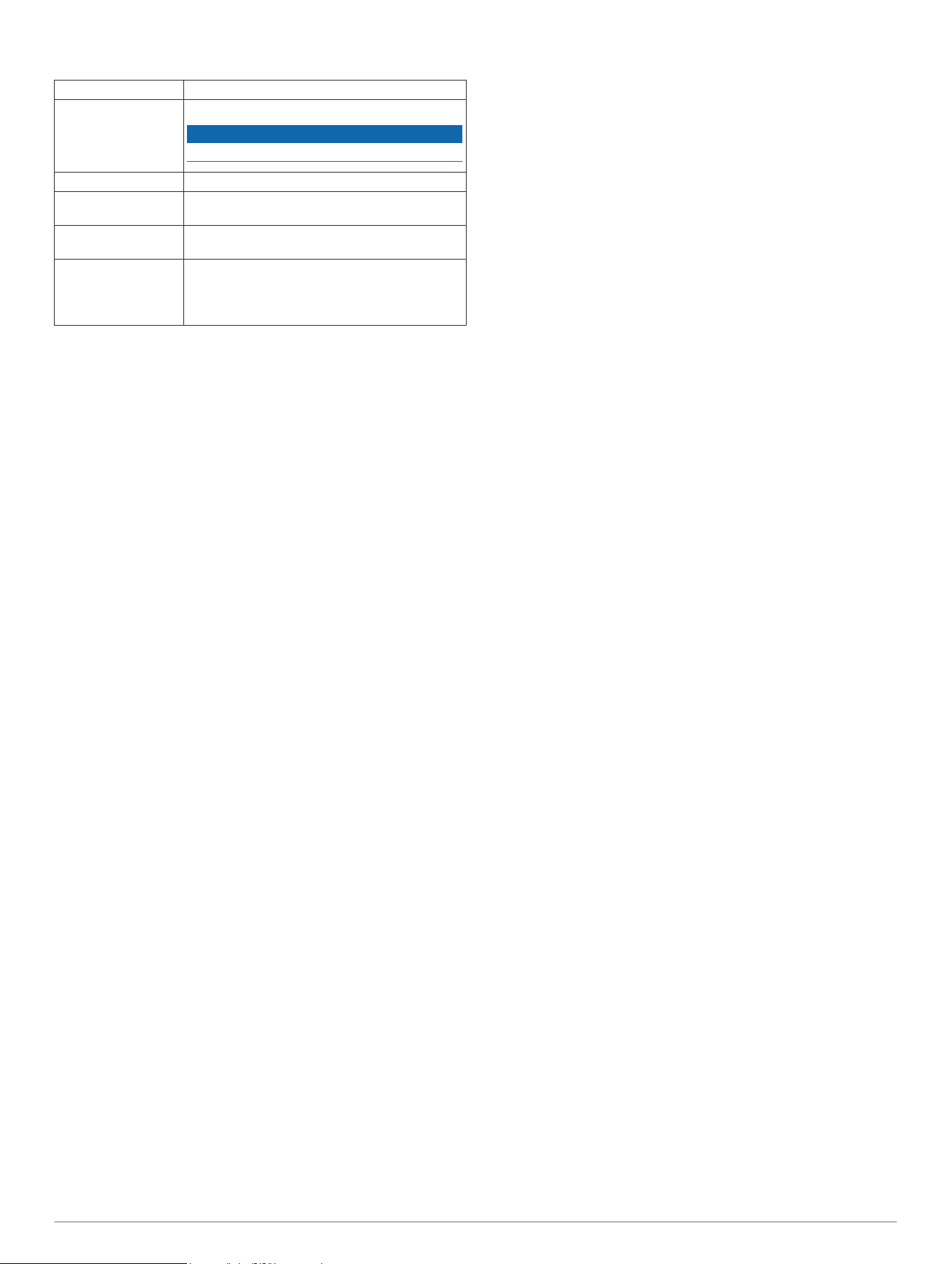
Specifications
Maximum load 181.4 kg (400 lb.)
Battery type 4 AA alkaline batteries
NOTICE
You must use 1.5 V batteries in this device.
Battery life Up to 9 mo.
Operating
temperature range
From 10° to 40°C (from 50° to 104°F)
Storage temperature
range
From -20° to 50°C (from -4° to 122°F)
Wireless frequency/
protocol
Wi‑Fi 802.11 b/g/n: 2412 to 2472 MHz (ch. 1 to
13 for EU models) @ 9 dBm
ANT: 2402 to 2480 MHz @ 0 dBm
Bluetooth Smart: 2402 to 2480 MHz @ 0 dBm
Troubleshooting
Software Updates
Your device receives software updates automatically when it is
connected using Wi‑Fi technology.
Getting More Information
• Go to www.garmin.com/intosports.
• Go to www.garmin.com/learningcenter.
• Go to http://buy.garmin.com, or contact your Garmin dealer
for information about optional accessories and replacement
parts.
Tips for Erratic Body Composition Data
If body composition data is erratic or does not appear, you can
try these tips.
• Stand with your feet placed flat on the glass surface of the
scale. Do not contact the screen or the Garmin logo.
• Verify the surface of the scale is dry before use.
• Do not wear socks or shoes.
• Use the device under the same circumstances and at
approximately the same time of day each time you use the
device.
• Garmin recommends waiting two hours before using the
device after eating, drinking, exercising, bathing, or visiting a
sauna.
My device is recognizing me as a guest or
another user
• Verify your initials and weight on your Garmin Connect
account.
• When a user name appears on the screen, tap the scale to
move to the next user.
The device distinguishes between users based on weight and
frequency of use. If another person with similar
characteristics uses the device, it is possible for the device to
select the wrong person.
My device is not recording measurements
• Verify the battery is not low.
• Verify you have completed the setup process and that the
device is connected using Wi‑Fi technology.
Resetting to Factory Defaults
You can reset all the options on your device to factory default
values.
NOTE: Resetting the device to factory default values does not
delete information saved to your Garmin Connect account.
On the underside of the scale, hold RESET for 5 seconds.
Troubleshooting 3

Index
A
accessories 3
B
battery 1
installing 1
Bluetooth technology 1
C
cleaning the device 2
computer, connecting 2
D
device, cleaning 2
G
Garmin Connect 1, 2
I
icons 1
initial setup 1
K
keys 1
M
measurements 2, 3
P
pairing 2
R
resetting the device 3
S
software, updating 3
specifications 3
T
troubleshooting 3
U
units of measure 1
updating software 3
USB ANT Stick 1
user data 2
user profile 2
users, adding 2
W
Wi-Fi 3
4 Index


support.garmin.com
GUID-9E6BEB7B-950C-45B1-8BF1-A59DF70DC80D v4July 2020