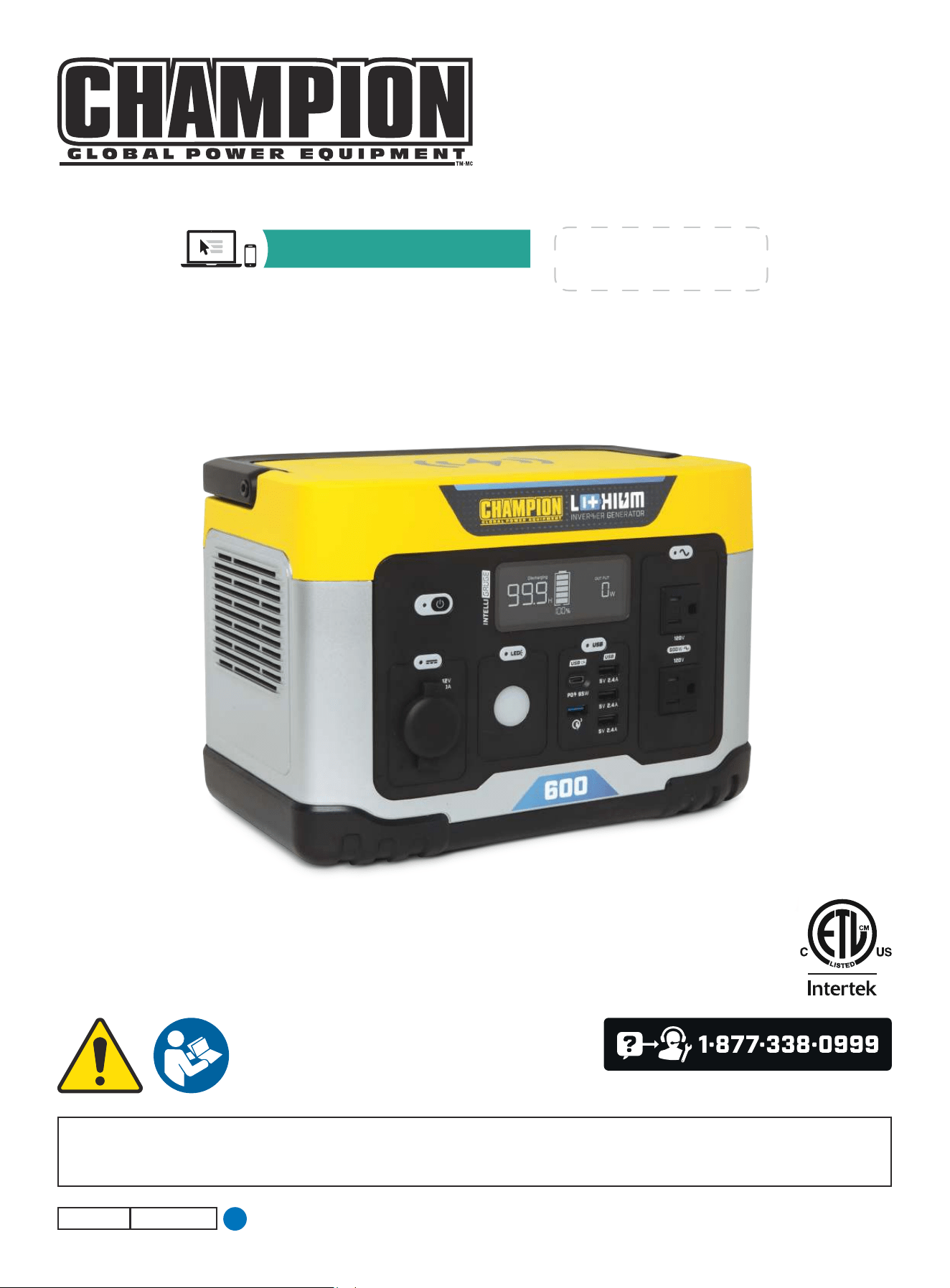
OPERATOR'S MANUAL
MODEL #201189
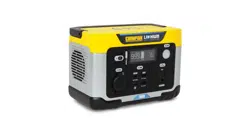
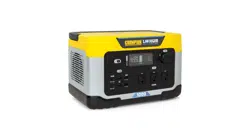
600 PORTABLE POWER STATION
REGISTER YOUR PRODUCT ONLINE
at championpowerequipment.com
4318-M-OP REV 20240521
EN
or visit championpowerequipment.com
READ AND SAVE THIS MANUAL. This manual contains important safety precautions which should be read and understood before operating the product. Failure to
do so could result in serious injury. This manual should remain with the product.
Specifications, descriptions and illustrations in this manual are as accurate as known at the time of publication, but are subject to change without notice.
Champion Power Equipment, Inc.

201189 - 600 PORTABLE POWER STATION
TABLE OF CONTENTS
2
TABLE OF CONTENTS
Introduction
................................................... 3
Safety Definitions ..........................................3
Important Safety Instructions .......................4
Lithium-ion Battery Safety ........................................ 5
Safety and Dataplate Labels ...................................... 8
Safety Symbols .................................................... 9
Operation Symbols ............................................... 11
Controls and Features ................................. 12
Power Station .................................................... 12
Control Panel ..................................................... 13
Intelligauge ....................................................... 14
FCC Statement ................................................... 17
Industry Canada: ICES-003/NMB-003 .......................... 17
Parts Included .................................................... 17
Parts Not Included ............................................... 17
Initial Use ..................................................... 18
Unpacking ........................................................ 18
Grounding ........................................................ 18
Surge Protection ................................................. 18
Charging from Wall ............................................... 18
Using Included Solar Charge Cable .............................. 19
Recommended Solar Panels ..................................... 19
Using 12V DC Automotive Charge Cable ........................20
Operation .....................................................20
Using the Power Station ......................................... 20
Using the Wireless Charging Pad ................................ 20
Standby Mode .................................................... 21
LED Light ......................................................... 21
Connecting Electrical Loads ..................................... 21
Resetting the Output .............................................22
Do Not Overload Power Station ..................................22
Operation at High Altitude ....................................... 23
Turning Off the Power Station ................................... 23
Moving the Power Station ....................................... 23
Maintenance ................................................23
Cleaning the Power Station ...................................... 23
Storage ........................................................... 23
Specifications .............................................. 24
Power Station Specifications .................................... 24
Battery Specifications............................................ 24
AC Charger Specifications ....................................... 24
Solar Charge Specifications ..................................... 24
Automotive Charge Specifications ............................... 24
Temperature Specifications ...................................... 24
Troubleshooting ........................................... 25
Power Station Fault Indicator Codes ........... 27
FOR PARTS BREAKDOWN
Search by model number at
championpowerequipment.com

201189 - 600 PORTABLE POWER STATION
INTRODUCTION
3
SAFETY DEFINITIONS
The purpose of safety symbols is to attract your attention to
possible dangers. The safety symbols, and their explanations,
deserve your careful attention and understanding. The safety
warnings do not by themselves eliminate any danger. The
instructions or warnings they give are not substitutes for proper
accident prevention measures.
DANGER
DANGER indicates a hazardous situation which, if not avoided,
will result in death or serious injury.
WARNING
WARNING indicates a hazardous situation which, if not
avoided, could result in death or serious injury.
CAUTION
CAUTION indicates a hazardous situation which, if not avoided,
could result in minor or moderate injury.
NOTICE
NOTICE indicates information considered important, but not
hazard-related (e.g., messages relating to property damage).
INTRODUCTION
Congratulations on your purchase of a Champion Power Equipment
(CPE) product. CPE designs, builds, and supports all of our
products to strict specifications and guidelines. With proper
product knowledge, safe use, and regular maintenance, this
product should bring years of satisfying service.
Every effort has been made to ensure the accuracy and
completeness of the information in this manual at the time of
publication, and we reserve the right to change, alter and/or
improve the product and this document at any time without prior
notice.
CPE highly values how our products are designed, manufactured,
operated, and serviced as well as providing safety to the operator
and those around the Power Station. Therefore, it is IMPORTANT
to review this product manual and other product materials
thoroughly and be fully aware and knowledgeable of the assembly,
operation, dangers and maintenance of the product before use.
Fully familiarize yourself, and make sure others who plan on
operating the product fully familiarize themselves too, with the
proper safety and operation procedures before each use. Please
always exercise common sense and always err on the side
of caution when operating the product to ensure no accident,
property damage, or injury occurs. We want you to continue to use
and be satisfied with your CPE product for years to come.
When contacting CPE about parts and/or service, you will need to
supply the complete model and serial numbers of your product.
Transcribe the information found on your product’s nameplate
label to the table below
CPE TECHNICAL SUPPORT TEAM
1-877-338-0999
MODEL NUMBER
201189
SERIAL NUMBER
DATE OF PURCHASE
PURCHASE LOCATION

201189 - 600 PORTABLE POWER STATION
IMPORTANT SAFETY INSTRUCTIONS
4
IMPORTANT SAFETY INSTRUCTIONS
WARNING
Cancer and Reproductive Harm – www.P65Warnings.ca.gov
WARNING
Read all safety warnings and instructions. Failure to follow
warnings and instruction may result in electric shock, fire
and/or cause serious personal injury. Save all warnings and
instruction.
DANGER
Power Station generates powerful voltage.
Keep your Power Station in a dry, well-ventilated area when in
use.
Do not operate the Power Station with a damaged cord, plug,
or a damaged output cable. Use only Champion electrical cords
for proper application.
Do not allow children or unqualified persons to charge, operate
or service the Power Station.
Do not operate Power Station in wet conditions. To avoid short
circuits or electric shock do not allow unit to get wet. In the
event the unit does get wet, let the unit dry completely before
using.
Always use a ground fault circuit interrupter (GFCI) while
charging in damp areas and areas containing conductive
material such as metal decking.
Do not allow fluids to flow into Power Station. Corrosive or
conductive fluids, such as seawater, industrial chemicals,
bleach or bleach containing products can cause a short circuit,
damaging the Power Station and voiding the warranty.
This equipment has internal arcing or sparking parts which
should not be exposed to flammable vapors or liquids.
WARNING
To avoid fire or electrical shock hazard, observe all ratings on
the Power Station and accessory products you intend to use.
DANGER
This device is intended to be used indoors only. Do not use
outdoors.
WARNING
Do not use Power Station for medical life support uses.
In case of emergency, call 911 immediately.
NEVER use this product to power life support devices or life
support appliances.
Inform your electricity provider immediately if you or anyone
in your household depends on electrical medical equipment to
live.
Inform your electrical provider immediately if a loss of power
would cause you or anyone in your household to experience a
medical emergency.
WARNING
Power Station produces heat.
Do not touch hot surfaces.
Allow equipment to cool before touching.
WARNING
Exceeding the Power Station’s running capacity can damage
the Power Station and/or electrical devices connected to it.
DO NOT overload the Power Station.
DO NOT tamper or modify the Power Station in any way.
WARNING
Improper treatment or use of the Power Station can damage it,
shorten its life and void the warranty.
Use the Power Station only for intended uses.
DO NOT expose Power Station to moisture, dust, or dirt.
DO NOT allow any material to block the cooling slots.
If connected devices overheat, turn them off and disconnect
them from the Power Station.
DO NOT use the Power Station if:
– Electrical output is lost
– Equipment sparks, smokes or emits flames
– Equipment vibrates excessively

201189 - 600 PORTABLE POWER STATION
IMPORTANT SAFETY INSTRUCTIONS
5
Lithium-ion Battery Safety
DANGER
Electrolyte inside the battery is harmful to skin and eyes.
Electrolyte may pose an increased risk of harm if not handled
properly.
Under abusive conditions, liquid may be ejected from the
battery; avoid contact. Liquid ejected from the battery may
cause irritation or burns. If contact accidentally occurs, flush
with water. If the battery leaks and electrolyte gets in your
eyes, do not rub them, immediately flood eye with running cold
water for at least 10 minutes and seek medical help. If left
untreated, electrolyte can cause permanent eye injury. Keep
away from children.
DANGER
This Power Station generates the same potential lethal AC
electrical voltage as a standard building wall outlet.
Always treat the Power Station as you would a normal AC
outlet on a standard building wall.
WARNING
When using the Power Station:
– Always use in a dry well ventilated area while in use and
do not obstruct fan openings on unit. Inadequate ventilation
may cause excessive heat and damage the unit.
– Always keep the unit clean and dry and inspect for dirt,
dust, or moisture prior to every use.
– Power cord plugs must always match the outlet. Never
modify the plug in any way. Do not use any adapter plugs
with earthed (grounded) power tools.
– Connect only to properly grounded outlets.
– To reduce risk of damage to the electric plug and cord,
pull the plug rather than the cord when disconnecting the
Power Station. Never use the cord for carrying, pulling or
unplugging the tool.
– Do not use this Power Station if the power cord or the
battery cables are damaged in any way.
– Always use a suitable extension cord to reduce the risk of
electric shock.
– Always keep the cord away from heat, oil, sharp edges or
moving parts.
– Always position cords carefully to avoid hazardous
conditions. Tripping or snagging on cords can cause
injury or cause product damage. Never allow cords to run
through puddles or across wet ground.
– Use of an accessory attachment not recommended or sold
by Champion Power Equipment may result in a risk of fire,
electric shock, or injury to persons.
– To reduce the risk of electric shock always unplug the
cord from outlet when not in use and before servicing or
cleaning.
– Do not insert foreign objects into outputs or ventilation
holes.

201189 - 600 PORTABLE POWER STATION
IMPORTANT SAFETY INSTRUCTIONS
6
WARNING
– Do not overload the Power Station’s capacity. Exceeding
the wattage/amperage capacity may damage the power
supply and/or electrical devices connected to it. Inductive
loads such as refrigerators with compressors, motor
powered equipment, and air conditioners may have much
greater starting wattage than their rated wattage.
– Do not connect Power Station output to a building’s
electrical system.
– Do not use this unit if you do not understand these
operating instructions.
– Maintain the labels and nameplates on this Power Station.
These carry important information.
WARNING
– Do not use a Power Station or appliance that is damaged
or modified. Damaged or modified internal batteries may
exhibit unpredictable behavior resulting in fire, explosion or
risk of injury.
– Do not remove cover. No user serviceable parts inside.
– Do not tamper or disassemble the Power Station to attempt
service or replace the battery. Incorrect reassembly may
result in a risk of fire, electric shock or personal injury.
– For service information please contact our Champion
Technical Support Team at 1-877-338-0999. Please have
your serial number and model number available when
service, repair or replacement is required.
– Never place fingers or hands inside the product.
WARNING
– To reduce the risk of injury or damage, avoid contact with
any hot surface.
– Do not use the Power Station near sources of high heat or
fire. Exposure to fire or temperature above 265°F (130°C)
may cause explosion.
– Do not discharge the Power Station battery in
temperatures below 5°F (-15°C) or above 104°F (40°C).
– Do not allow fluids to flow into the Power Station. Corrosive
or conductive fluids, such as seawater, certain industrial
chemicals, and bleach or bleach containing products, etc.,
can cause a short circuit.
– Follow all charging instructions and do not charge the
Power Station outside the temperature range specified in
the instructions. Charging improperly or at temperatures
outside the specified range may damage the battery and
increase the risk of fire.
When charging the Power Station:
– Always charge the Power Station’s internal battery in a
well-ventilated area.
– Do not use the AC charging cable outdoors.
– Do not expose AC charging cable to oil, oil vapor, grease,
gasoline, gasoline vapors or other caustic substances that may
damage the AC charging cable.
– Do not charge the Power Station below 43°F (6°C) or above
104°F (40°C).
– Do not charge Power Station in rain, snow, damp or wet
locations.
– Do not overcharge the Power Station. Use only supplied AC
charging cable and follow solar charging guidelines and
voltage and current limits.
– Always connect to properly grounded outlets.
– Never use Power Station or charger in the presence of
explosive atmospheres (gaseous fumes, dust or flammable
materials).
– Never leave the Power Station unattended while charging.
If the internal battery smokes, or gives off an odor during
charging, terminate charging immediately.
– During charging, if the Power Station battery becomes hot to
the touch, stop charging. Allow Power Station to cool before
resuming.
– Always unplug charger when not in use.
– To reduce the risk of electric shock, always unplug charger
before cleaning or maintenance. Do not allow water to flow
into plug. Use a Ground Fault Circuit Interrupter (GFCI) to
reduce shock hazards.
Grounding Information:
If the Power Station should malfunction or breakdown, provides
a path of least resistance for electric current to reduce the risk
of electric shock. This product is equipped with a cord having an
equipment conductor and a plug. The plug must be plugged into
an outlet that is properly installed and grounded in accordance
with all local codes ordinances. We strongly recommend that you
consult with a qualified electrician to ensure compliance with local
electrical codes.
When storing the Power Station:
– This Power Station is intended to be stored indoors and shall
not be stored or left outdoors when not in use.
– Do not stack any items on top of the Power Station during
storage.
– Store your Power Station in a cool, dry place between 32°F
(0°C) and 104°F (40°C). The ideal storage temperature is 59°F
(15°C).

201189 - 600 PORTABLE POWER STATION
IMPORTANT SAFETY INSTRUCTIONS
7
– Do not store Power Station where temperatures may exceed
104°F (40°C) such as in direct sunlight, in a vehicle or metal
buildings especially during the summer.
– Do not store the Power Station near sources of high heat or
fire.
– Do not store the Power Station when battery level is at 20% or
less state of charge (SOC). The ideal storage SOC is 40-60%.
– When storing the Power Station for periods of one month or
longer, store the Power Station at an SOC of about 60%. Every
three months, discharge the Power Station to 0% and recharge
back to 100%, then discharge it to 60%.
– Lithium batteries must be charged regularly to perform well.
The Power Station must be fully charged by you at least once
every 6 months (180 days).
In case of battery damage:
– If damaged, the internal battery may emit hazardous fumes.
If fumes are present, move Power Station to a well-ventilated
area.
– Do not try to repair the Power Station or replace the battery.
Safe disposal of Lithium-ion battery:
– Lithium-ion batteries contain elements that pose health risks
to individuals if they are allowed to leach into the ground
water supply. In many states and counties, it may be illegal to
dispose of these batteries in standard household waste.
– To dispose the battery safely, apply tape over any exposed
connectors to prevent accidental shorting of the positive and
negative terminals of the battery during transport.
– Place the battery in a clear sturdy plastic bag, seal the bag and
deposit the battery into the recycling container at your local
municipal hazardous waste (HHW) recycling location.
– In the United States and Canada, a large network of over
30,000 battery drop-off locations may be found at
www.call2recycle.org.
– Never dispose of the battery in a fire or incinerator, as the
battery may catch fire and explode.
201189 - 600 PORTABLE POWER STATION
IMPORTANT SAFETY INSTRUCTIONS
8
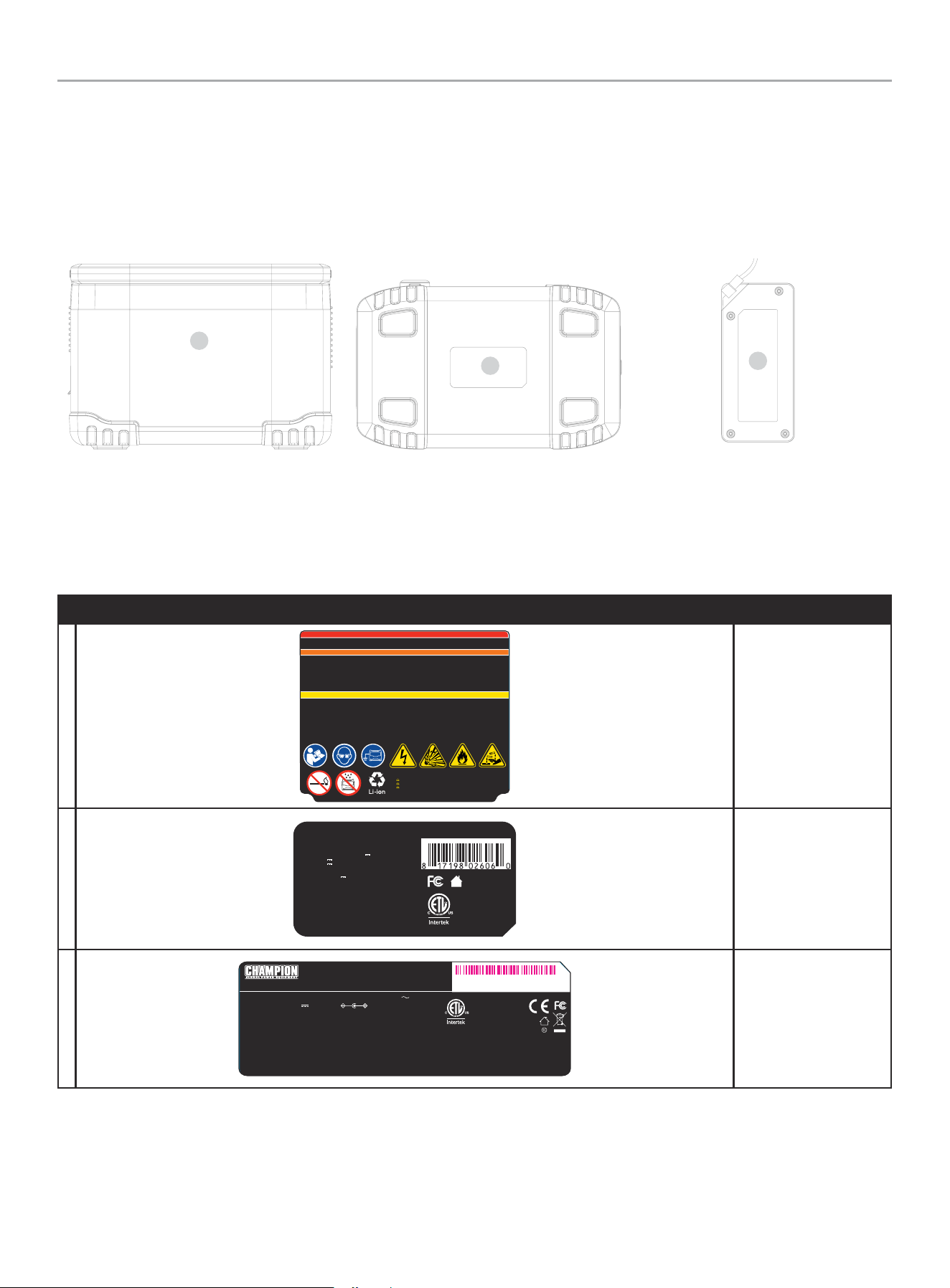
Safety and Dataplate Labels
These labels warn you of potential hazards that can cause serious injury. Read them carefully.
If a label comes off or becomes hard to read, contact Technical Support Team for possible replacement.
LABEL DESCRIPTION
A
4299-L-SF-B
DANGER
DANGER
CAUTION
MISE EN GA RDE
WARNING
AVERTISSEMENT
Do not overcharge the internal b attery. To reduce the risk of injury, user must r ead Operator’s Manua l. Do not smoke, strike a match, or cause a
spark in the v icinity of the power pac k. Only charge the in ternal batter y in a well ventilated area . Risk of Explosion. This equipment has a rcing or
sparking p arts which should not be exposed to flammable vapors. Risk of Electric Shock and R isk of Fire. This device is not to be stored in a
vehicle. / Ne pas surcharger la batterie interne.
Pour déduir e le risque de blessure, l’u tilisateur doit lire le m anuel de l’opérateur. Il ne faut pas
fumer, allumer une allumette ou prod uire des étincelles à p roximité du bloc d'alime ntation. Charg er la batterie uniq uement dans un endro it bien
aéré. Risque d'explosion. Cet équipement comporte des pièces susceptibles de produire des arcs ou des étincelles qui ne doivent pas êt re
exposées à de s vapeurs inflammables. Risques de décharge électrique et d'incendie. Le dispositif ne doit pas être rangé dans un véhicule.
This device is intended to be used i ndoors only. Do not use o utdoors.
Cet appar eil est destiné à être utilisé à l'intérieur uniquement. Ne pas utiliser à l'extérieur.
Risk of Elec tric Shock. Do not rem ove cover. No user serviceable parts insi de. Refer servici ng to qualified service personnel. Connect only to
properly grounded outlet s. Risk of Injury To Persons. Do not use this pro duct if the power cord or t he battery cab les are damaged in any way. Th is
device is not intended for use in a commercial repair fac ility. This device is in tended to be stored indoors when not in use.
Risque de décharge électrique. Ne pas enlever le couvercle. Aucune des piè ces à l'intérieur ne peu t être réparée par l'utilisateur. L'entretien
courant doit être effectué par un personnel d'entretien qualifié. Brancher l'unité uniquement à des prises de courant correctement mises à la
masse. Risque de blessure aux personnes. Ne pas u tiliser ce produit si le cordon d'alimenta tion ou les câbles de bat terie sont endommagés de
quelque façon. Le dispositif n'est pas destiné à êtr e utilisé dans un ateli er de réparation commercial. Le dispos itif est destiné à êtr e rangé à
l'intérieu r lorsqu'il n'est pas ut ilisé. Le dispositif ne doit pas être rangé ou laissé à l'extérieu r lorsqu'il n'est pas ut ilisé.
WARNING: Cancer and Reproductive Harm – www.P65Warnings.ca.gov
ADVERTENCIA: Cáncer y Daño Reproductivo – www.P65Warnings.ca.gov
AVERTISSEMENT : Cancer et Troubles de l'appareil reproducteur – www.P65Warnings.ca.gov
Safety Symbols/ Safety
Warning
B
Model / Modèle: 201189
Capacity / Capacité
: 579Wh 22.2V 26.1Ah
USB Output / Sortie USB : USB-A (x3) 5V 2.4A, 12W max
USB-A QC3.0 : 5V 3A, 9V 2A, 12V 1.5A, 18W max
USB-C PD3.0 : (5V,9V,12V,15V)/3A; 20V/3.25A, 65W
12VDC Automotive / 12VCC Automobile : 12V 10A, 120W
DC Input: / Entrée CC : 12V-30V, 8A
(max)
Wireless Charging / Chargement sans fil : 5V 1A, 7.5V 1A,
9V 1.12A, 10W max
Discharging temperature / Température de décharge :
5°F-104°F (-15°C-40°C)
Charging temperature / Température de charge :
43°F-104°F (6°C-40°C)
DC output / Sortie CC : 249W
AC output / Sortie CA : 600W 120VAC 60Hz,
1200W Starting / Démarrage
CHAMPION POWER EQUIPMENT, INC. 6370 S PIONEER WAY, UNIT 101, LAS VEGAS, NV 89113, USA / É.-U.
1-877-338-0999 • WWW.CHAMPIONPOWEREQUIPMENT.COM • MADE IN CHINA / FABRIQUÉ EN CHINE
CAN ICES-003/
NMB-003
4288-L-PR-D
Conforms to
ANSI/CAN/UL
STD.2743
Conforme à
ANSI/CAN/UL
STD.2743
IC :10186A-CPEWC02
HVIN:201189
5022215
Power Station Dataplate
C
MODEL / MODÈLE : SOY-2520800-244-B INPUT / ENTRÉE : 100-240V 60/50HZ, 3.0A
OUTPUT / SORTIE : 25.2V 8.0A, 201.6W
This device complies with Part 15 of the FCC Rules. Operation is subject to
the following two conditions: (1) This device may not cause harmful
interference, and (2) This device must accept any interference received,
including interference that may cause undesired operation.
Ces dispositifs se conforment à la section 15 du règlement de la FCC. Le
fonctionnement est assujetti aux conditions suivantes : (1) Ce dispositif ne doit pas
générer d’interférences nuisibles, et (2) ce dispositif doit accepter toute interférence
qui peut causer un fonctionnement non désiré.
ICES-003(B)/NMB-003(B)
Shenzhen SOY Technology Co., Ltd
4F,5F 501, A building, No. 11,
Dakan Industrial, 2nd Road, xili Town,
Nanshan District, Shenzhen City, China
Made in China / Fabriqué en Chine
4289 -L-PR-A
Certified to UL/CSA STD.
C22.2 NO. 62368-1
Certifié selon la norme
UL/CSA C22.2 NO. 62368-1
4004541
SWITCHING ADAPTER / ADA PTAT EUR DE COMM UTATION
XXXXXXXXXXXX
Charging Adapter
Dataplate
Bottom Bottom of Adapter
A
B
Back
C
201189 - 600 PORTABLE POWER STATION
IMPORTANT SAFETY INSTRUCTIONS
9
Safety Symbols
Some of the following symbols may be used on this product. Please study them and learn their meaning. Proper interpretation of these
symbols will allow you to more safely operate the product.
SYMBOL MEANING
Read Operator’s Manual. To reduce the risk of injury, user must read and understand operator’s manual
before using this product.
Eye protection. Always wear eye protection with side shields marked to comply with ANSI Z87.1.
Ground. Consult with local electrician to determine grounding requirements before operation.
Electric Shock. Failure to use in dry conditions and to observe safe practices can result in
electric shock.
Shield eyes. Explosive gases can cause blindness or injury.
If damaged, battery may emit hazardous fumes. If fumes present, move battery to a well-ventilated area.
Fire/Explosion. Batteries and its vapors are extremely flammable and explosive. Fire or explosion
can cause severe burns or death. Keep Power Station at least 5 feet (1.5m) from all objects to prevent
combustion.
Blindness or severe burns. Electrolyte solution can cause blindness or severe burns.
Open Flame Alert. Keep away from fuel, smoking, open flames, sparks, pilot lights, heat, and other
ignition sources.
201189 - 600 PORTABLE POWER STATION
IMPORTANT SAFETY INSTRUCTIONS
10
SYMBOL MEANING
Wet Conditions Alert. Do not operate Power Station in wet conditions.
This product uses lithium-ion (Li-ion) batteries. Local, state, or federal laws prohibit disposal of
Li-ion batteries in ordinary trash. In the United States and Canada, a large network of over 30,000
battery drop-off locations may be found at www.call2recycle.org and/or consult your local waste
authority for information regarding available recycling disposal options.
201189 - 600 PORTABLE POWER STATION
IMPORTANT SAFETY INSTRUCTIONS
11
Operation Symbols
Some of the following symbols may be used on this product. Please study them and learn their meaning. Proper interpretation of these
symbols will allow you to more safely operate the product.
SYMBOL MEANING
Hold for 3 seconds to power ON/OFF
Wireless Charging Pad
USB Output Button
AC Output Button
DC Output Button
Charging Input Port
SYMBOL MEANING
USB Fast Charge Port
USB-C PD Port
3
Qualcomm Quick Charge 3+
Pure Sine Wave Output
LED Light Button
201189 - 600 PORTABLE POWER STATION
CONTROLS AND FEATURES
12
CONTROLS AND FEATURES
Read this operator’s manual before operating your Power Station. Familiarize yourself with the location and function of the controls and
features. Save this manual for future reference.
Power Station
1. Carrying Handle – Used to lift or carry the unit.
2. Wireless Charging Pad (5V 1A, 7.5V 1A, 9V 1.12A,
10W max.)– Used to charge compatible devices when placed
in center of pad and USB ports turned ON.
3. Control Panel – See Control Panel section.
4. Cooling Vents – Used to cool battery and other internal
components. Do not block.
5. Charging Port - 12-30V DC, max. 8A/200W – Used to
charge the power station via supplied accessories.
1
3
5
4
2
201189 - 600 PORTABLE POWER STATION
CONTROLS AND FEATURES
13
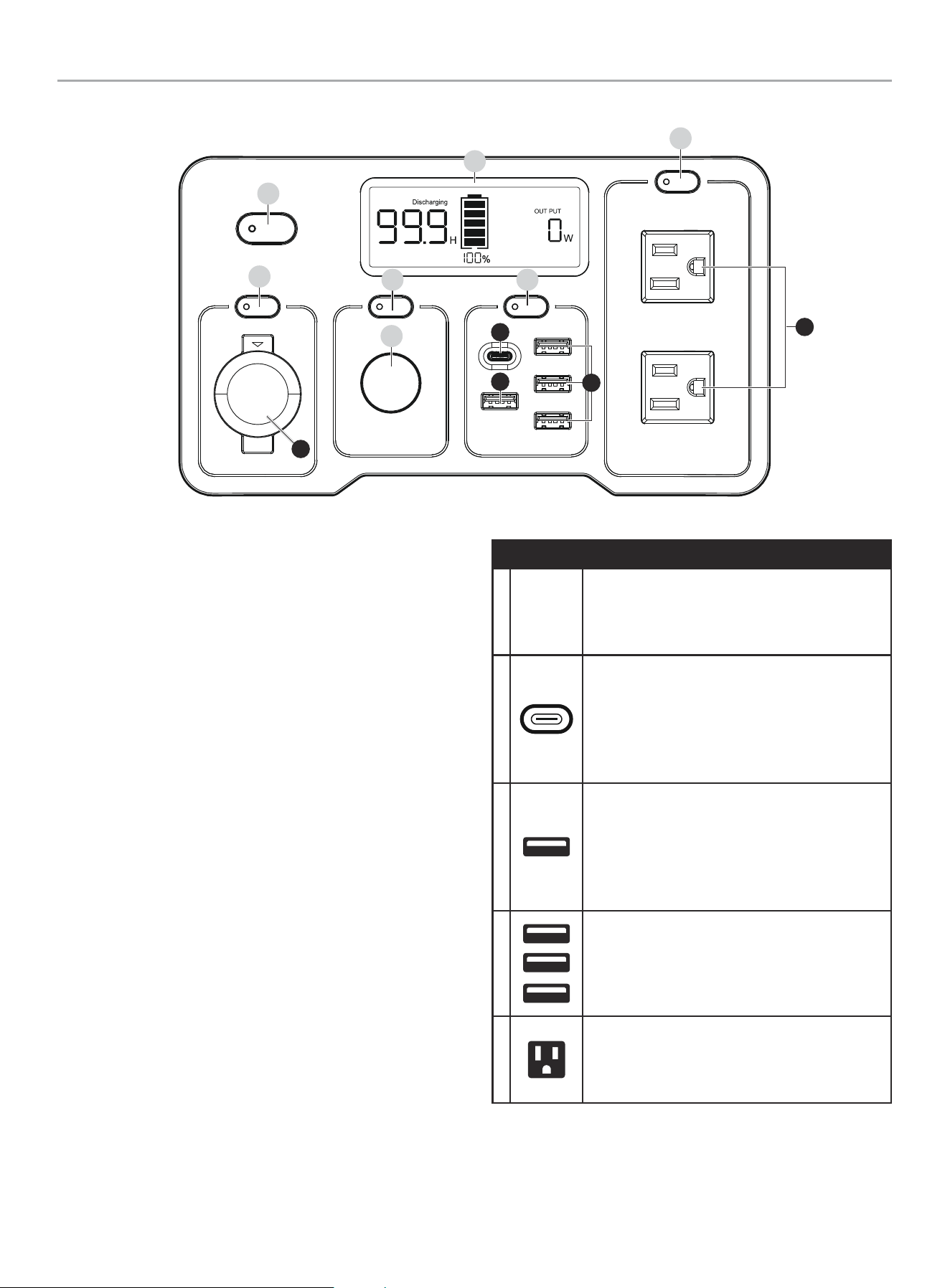
Control Panel
1. On/Off Button – Turns the Power Station ON/OFF when
pressed for three seconds.
2. 12V DC Button – Turns the 12V DC port ON/OFF when
pressed one time.
3. LED Light Button – Used to turn the LED light ON/OFF and
toggle through different modes.
4. LED Light – Used to illuminate the work area in front of the
Power Station.
5. Intelligauge – See Intelligauge section.
6. USB Button – Turns the USB ports ON/OFF when pressed
one time.
7. AC Button – Turns the AC outlet ON/OFF when pressed one
time.
RECEPTACLES
A
z
12V DC/10A, 120W.
(12V DC Regulated Automotive)
May be used to supply electrical power for
operation of 12 Volt DC, 10 Amp electrical loads.
B
(5V, 9V, 12V, 15V)/3A; 20V/3.25A, 65W max.
(USB-C PD3.0)
Port may be used to supply DC power to
cellphones, laptops, tablets, and similar devices
up to a maximum of 65W with PD 3.0 compatible
devices.
C
5V/3A, 9V/2A, 12V/1.5A, 18W max.
(USB-A QC3.0)
Port may be used to supply DC power to
cellphones, laptops, tablets, and similar devices
up to a maximum of 18W with Quick Charge
3.0(QC 3.0) compatible devices.
D
(3x) 5V/2.4A, 12W max. (USB-A)
Ports may be used to supply DC power to
cellphones, laptops, tablets, and similar devices
up to a maximum of 12W.
E
(2x) 120V AC, 5.0A (NEMA 5-15R)
May be used to supply electrical power for
operation of 120 Volt AC, 5.0 Amp, single phase,
60 Hz electrical loads.
1
5
2
4
3 6
7
C
B
A
E
D
201189 - 600 PORTABLE POWER STATION
CONTROLS AND FEATURES
14
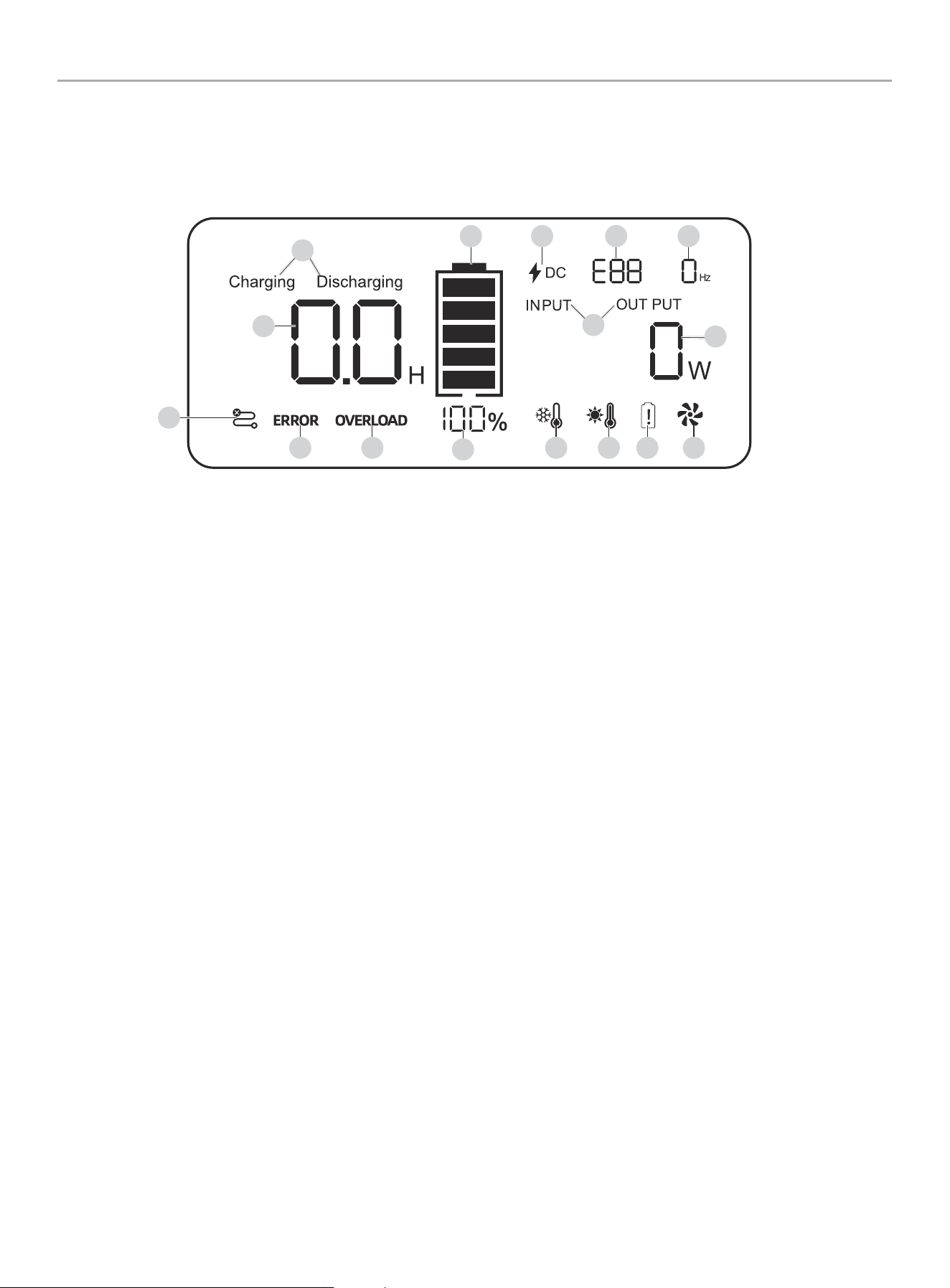
Intelligauge
1. Charging/Discharging – Shows “Charging” when input
watts are higher than output watts. Shows “Discharging”
when output watts are higher than input watts.
2. Hour Meter – Shows time, in hours, until battery level is 0%
(when “Discharging” shown) or hours until 100% charged
(when “Charging” shown).
3. Communication Fault – Indicates a communication fault
between the Battery Management System (BMS) or other
component.
4. Error – Indicates a fault and may be accompanied by a Fault
Indicator Code (see #14. Fault Indicator Code).
5. Overload – Indicates the devices’ power demands exceed
the max wattage of the ports/outlets.
6. Battery Percentage (%) – Shows battery level in percent.
7. Low Temperature – Indicates internal temperature too low.
8. High Temperature – Indicates internal temperature too high.
9. Battery Fault – Indicates a battery fault and may be
accompanied by a Fault Indicator Code (see #14. Fault
Indicator Code).
3
2
4 5
6
7 8 9 10
1516 14 13
11
10. Cooling Fan – Indicates the fan is on to cool internal
components. Intermittent operation of the fan is normal.
11. Power Meter – Shows power, in watts, supplied to load
(when “OUTPUT” shown) or supplied to charge the Power
Station (when “INPUT” shown).
12. INPUT/OUTPUT – Toggles automatically to show input and
output watts.
13. Frequency – Shows the frequency, in Hertz (Hz), of the AC
outlet load.
14. Fault Indicator Code – Shows error code. See
Troubleshooting section POWER STATION FAULT INDICATOR
CODES.
15. DC Input – Indicates the power station is being charged.
Even when charging through wall outlet, DC Input icon is
illuminated as the AC power is being converted to DC to
charge the battery.
16. Fuel Gauge – Shows battery level in 20% increments.
This meter displays a variety of info such as input/output power, charge/discharge times, as well as faults, errors, and protection codes to
help diagnose malfunctions in the Power Station.
1
12
201189 - 600 PORTABLE POWER STATION
CONTROLS AND FEATURES
15
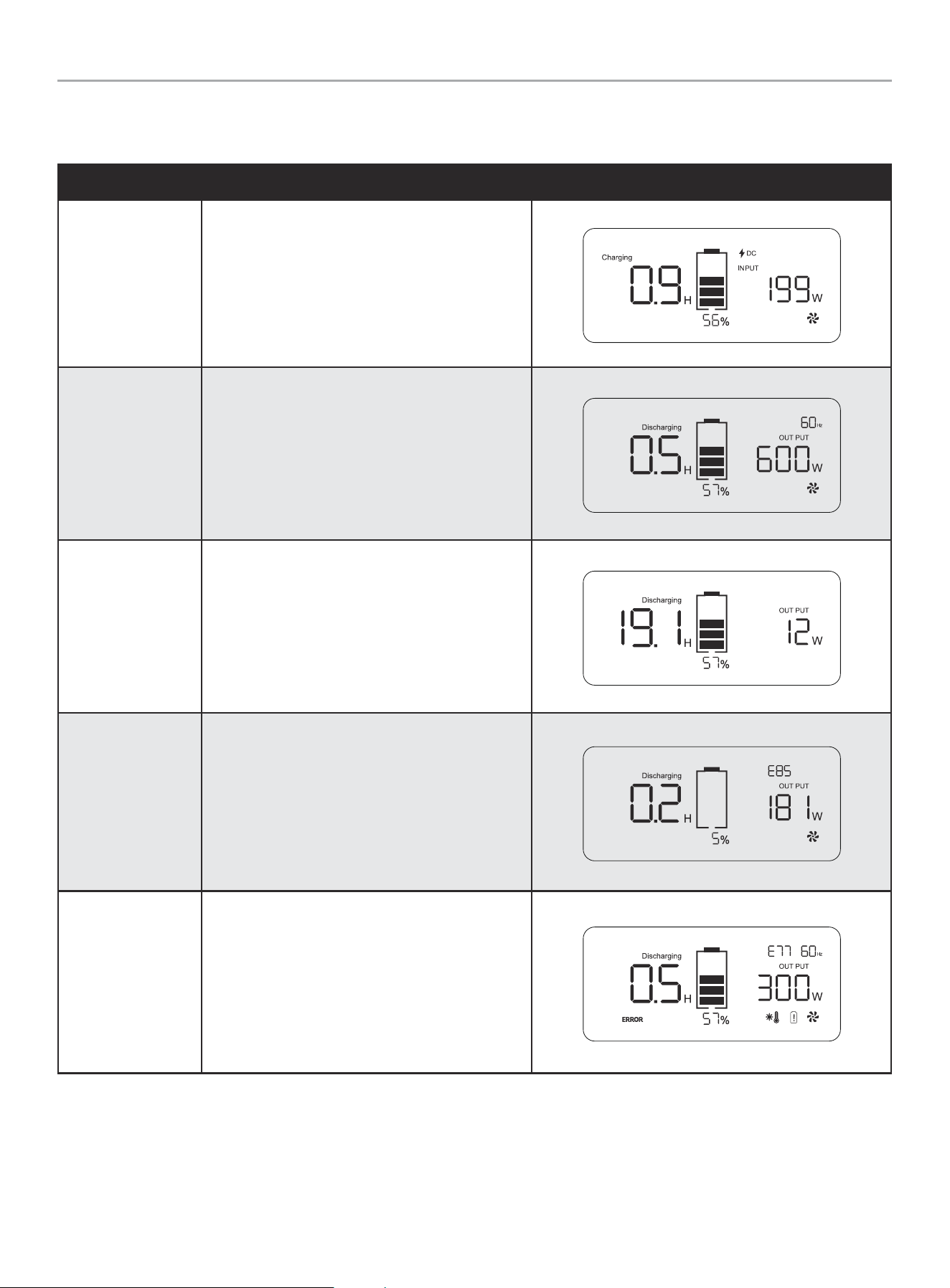
Display Modes and Indicators
See Power Station Fault Indicator Codes section for full list of codes.
MODE DESCRIPTION
Charging
Example: 0.9 Hours to charge to full, 199 watts in,
battery is at 56%, Fan is ON.
Discharging (AC)
Example: 0.5 Hours to empty, 600 watts out, battery
is at 57%, Fan is ON.
Discharging (DC)
Example: 19.1 Hours to empty, 12 watts out, battery
is at 57%.
AC Voltage Protection
(Low Battery)
Example: E85 Error code displayed. AC Output cutoff
when battery falls to 5%. Fault will clear when
charged to 7%.
High Temperature
Warning (E77)
Example: The battery surface temperature ≥60 ° C,
reduce AC load, move to cooler or shaded location.
201189 - 600 PORTABLE POWER STATION
CONTROLS AND FEATURES
16
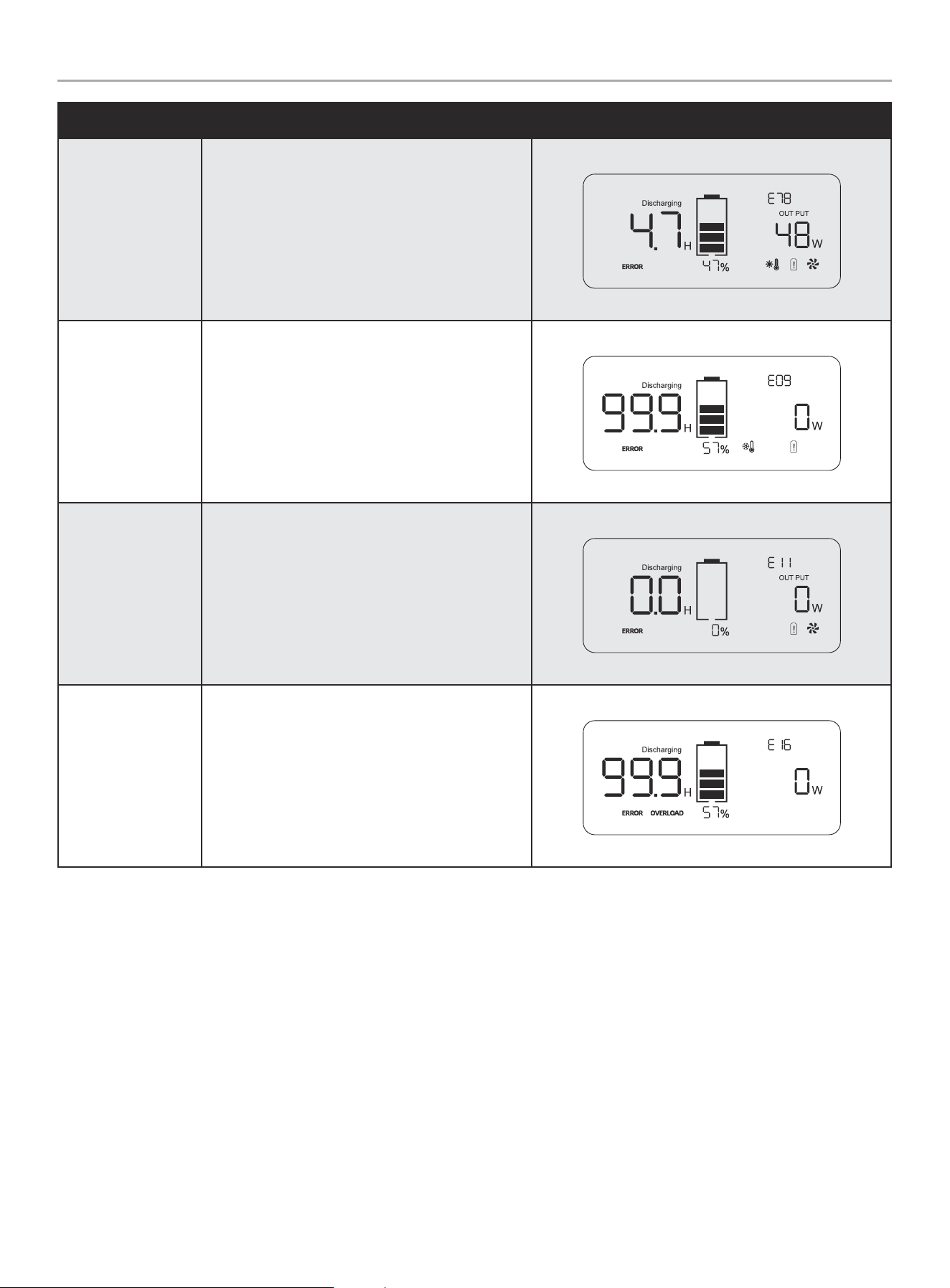
MODE DESCRIPTION
High Temperature
Protection (E78)
Example: The battery surface temperature ≥64 ° C,
the AC and 12V DC will be closed automatically, the
USB & PD port goes on working. Move the power
station to cooler or shaded location.
Low Temperature
Warning
Example: Illuminated when the Power Station has
experienced a low temperature event.
Low Voltage
Protection Alarm
(E11)
Example: Battery fully discharged, power station
needs to be recharged immediately.
Overload
Example: Rated output exceeded. Reduce output,
press the USB, 12V DC, or AC button to reset output.
201189 - 600 PORTABLE POWER STATION
CONTROLS AND FEATURES
17
FCC Statement
*Applicable in USA only.
1. This device complies with Part 15 of the FCC Rules. Operation
is subject to the following two conditions:
1a. This device may not cause harmful interference.
1b. This device must accept any interference received,
including interference that may cause undesired
operation.
2. Changes or modifications not expressly approved by the party
responsible for compliance could void the user’s authority to
operate the equipment.
NOTICE
This equipment has been tested and found to comply with
the limits for a Class B digital device, pursuant to Part 15
of the FCC Rules. These limits are designed to provide
reasonable protection against harmful interference in a
residential installation. This equipment generates, uses and
can radiate radio frequency energy and if not installed and
used in accordance with the instructions, may cause harmful
interference to radio communications. However, there is
no guarantee that interference will not occur in a particular
installation. If this equipment does cause harmful interference
to radio or television reception, which can be determined by
turning the equipment off and on, the user is encouraged to
try to correct the interference by one or more of the following
measures:
– Reorient or relocate the receiving antenna.
– Increase the separation between the equipment and
receiver.
– Connect the equipment into an outlet on a circuit different
from that to which the receiver is connected.
Consult dealer or an experienced radio/TV technician for help.
Industry Canada: ICES-003/NMB-003
* Applicable in Canada only.
This device complies with Industry Canada license - exempt RSS
standard(s).
Operation is subject to the following two conditions:
1. This device may not cause interference, and
2. This device must accept any interference, including
interference that may cause undesired operation of the
device.
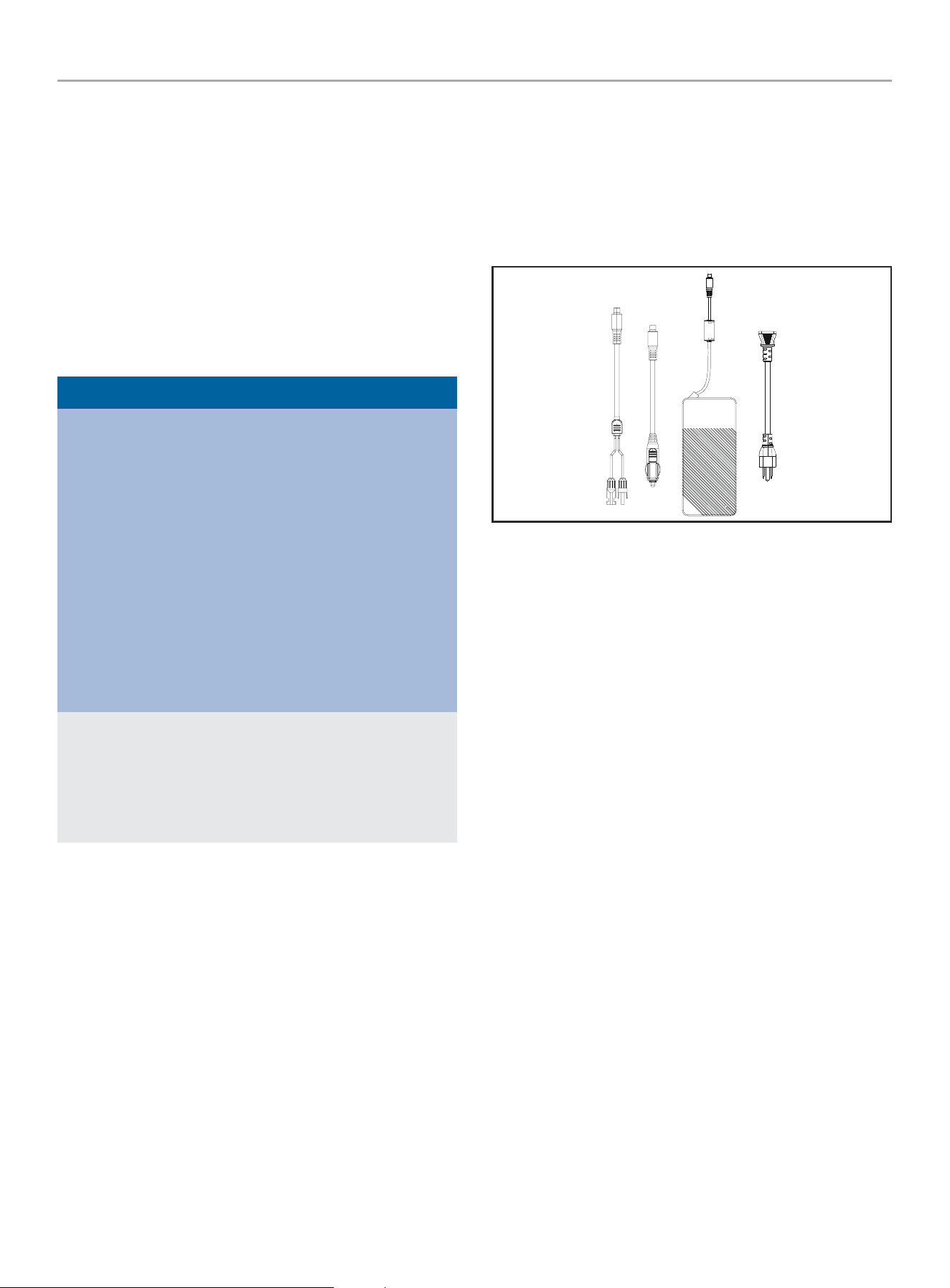
Parts Included
Accessories
Solar Charge Cable
................................................. 1
12V DC Automotive Charge Cable .................................1
AC Charging Adapter ...............................................1
AC Charge Cable ...................................................1
Parts Not Included
– Solar Panels
201189 - 600 PORTABLE POWER STATION
INITIAL USE
18
INITIAL USE
Your Power Station must be charged before first use.
If you have any questions regarding the use of your Power Station,
call our Technical Support Team at 1-877-338-0999. Please have
your serial number and model number available.
Unpacking
1. Set the shipping carton on a solid, flat surface.
2. Remove everything from the carton except the Power Station.
3. Using the carrying handle of the unit, carefully remove the
Power Station from the box.
Grounding
Your Power Station must be properly connected to an appropriate
ground to help prevent electric shock.
If the Power Station should malfunction or breakdown, grounding
provides a path of least resistance for electric current to reduce
the risk of electric shock. This product is equipped with a cord
having an equipment grounding conductor and a grounding plug.
The plug must be plugged into an outlet that is properly installed
and grounded in accordance with all local codes ordinances. We
strongly recommend that you consult with a qualified electrician to
ensure compliance with local electrical codes.
Surge Protection
Electronic devices, including computers and many programmable
appliances use components that are designed to operate within a
narrow voltage range and may be affected by momentary voltage
fluctuations. While there is no way to prevent voltage fluctuations,
you can take steps to protect sensitive electronic equipment.
– Install UL1449, CSA-listed, plug-in surge suppressors on the
outlets feeding your sensitive equipment.
Surge suppressors come in single- or multi-outlet styles.
They’re designed to protect against virtually all short-duration
voltage fluctuations.
Charging from Wall
NOTICE
The Power Station must be fully charged at least every 180
days when in storage, to keep the internal battery in good
operating condition. Do not store the Power Station when
battery level is at 20% or less state of charge (SOC). The ideal
storage SOC is 40-60%.
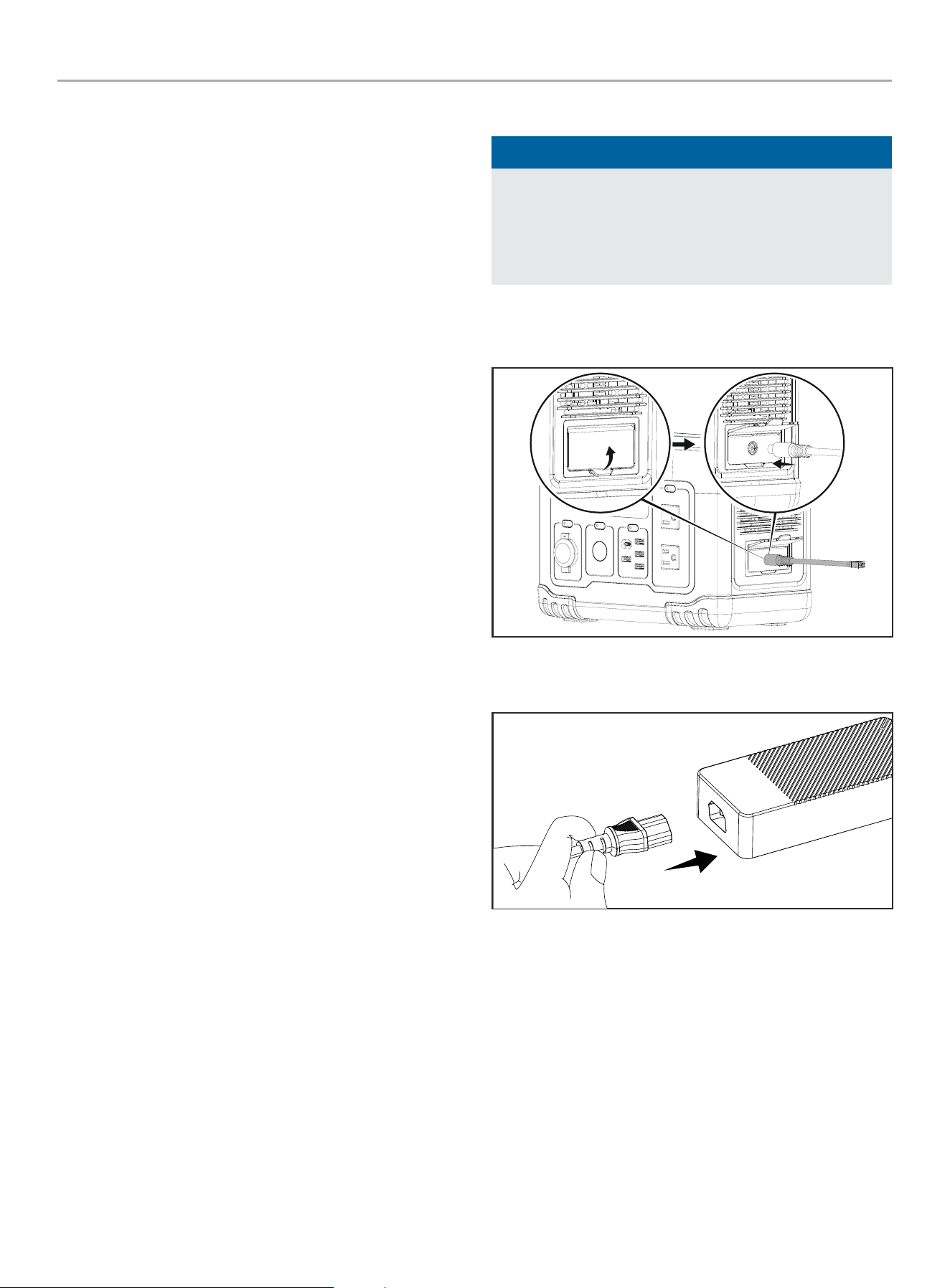
1. Open the input port cover.
2. Plug the AC Charging Adapter Cable into the input port.
3. Plug the other end into a standard wall outlet. Ensure the
cable is securely connected to the adapter.
201189 - 600 PORTABLE POWER STATION
INITIAL USE
19
Using Included Solar Charge Cable
NOTICE
The Power Station’s charging wattage is rated at 200W.
However, depending on environmental conditions and solar
panel efficiency, it may be necessary to use a solar panel rated
higher than 200W to reach the full 200W of charging power.
It will not damage the Power Station to use solar panels rated
more than 200W as long as they are rated between 12-30V.
The charging power and rate is reduced as the battery level
gets closer to 100% to safely charge the internal battery.
It is important to adjust your solar panels to face the sun as
best as possible throughout the day to achieve maximum
charging efficiency.
For example, on a cloudy day, a 300W or higher solar panel
may be needed to produce 200W of charge. Ensure the solar
panel is within the power station’s required voltage and current
range.
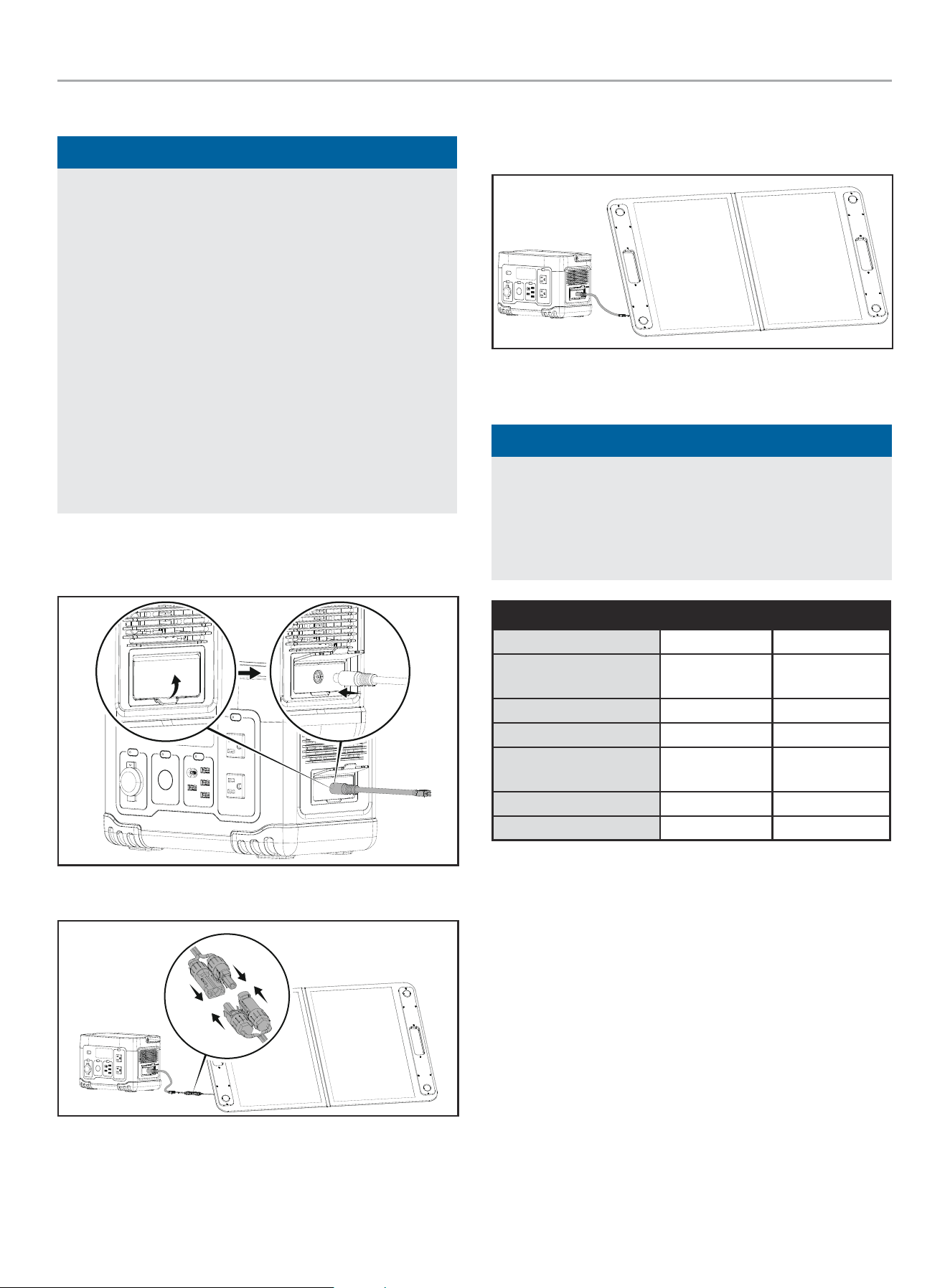
1. Open the input port cover.
2. Plug the solar charge cable into the input port.
3. Connect solar panel using MC4 connectors.
4. It is important to adjust your solar panels to face the sun as
best as possible throughout the day to achieve maximum
charging efficiency.
Recommended Solar Panels
NOTICE
It will not damage the Power Station to use solar panels rated
more than 200W as long as they are rated between 12-30V.
Do not exceed voltage or current rating. Connecting solar
panels in series will add their voltages and connecting solar
panels in series will add their current together.
Model Watts Connector Type
Renogy RNG-100D-SS 100 MC4
Renogy Solar Panel 200
Watt 12 Volt
200 MC4
Bluetti SP120 120 MC4
Bluetti SP200 200 MC4
ECOFLOW EFSOLAR
160W
160 MC4
Champion 201246 120 MC4
Champion 201247 200 MC4
Any solar panel rated between 12-30V, 8A with MC4 connectors
can be used. The Power Station has a built in MPPT solar charge
controller and inverter so there is no need to buy an external
charge controller, inverter, or worry about connecting more than
200W of solar panels to reach 200W of input on cloudy days.
201189 - 600 PORTABLE POWER STATION
OPERATION
20
Using 12V DC Automotive Charge Cable
1. Open the Input Cover.
2. Plug the automotive charge cable into the input port.
3. Connect the other end into a regulated 12V outlet.
OPERATION
Using the Power Station
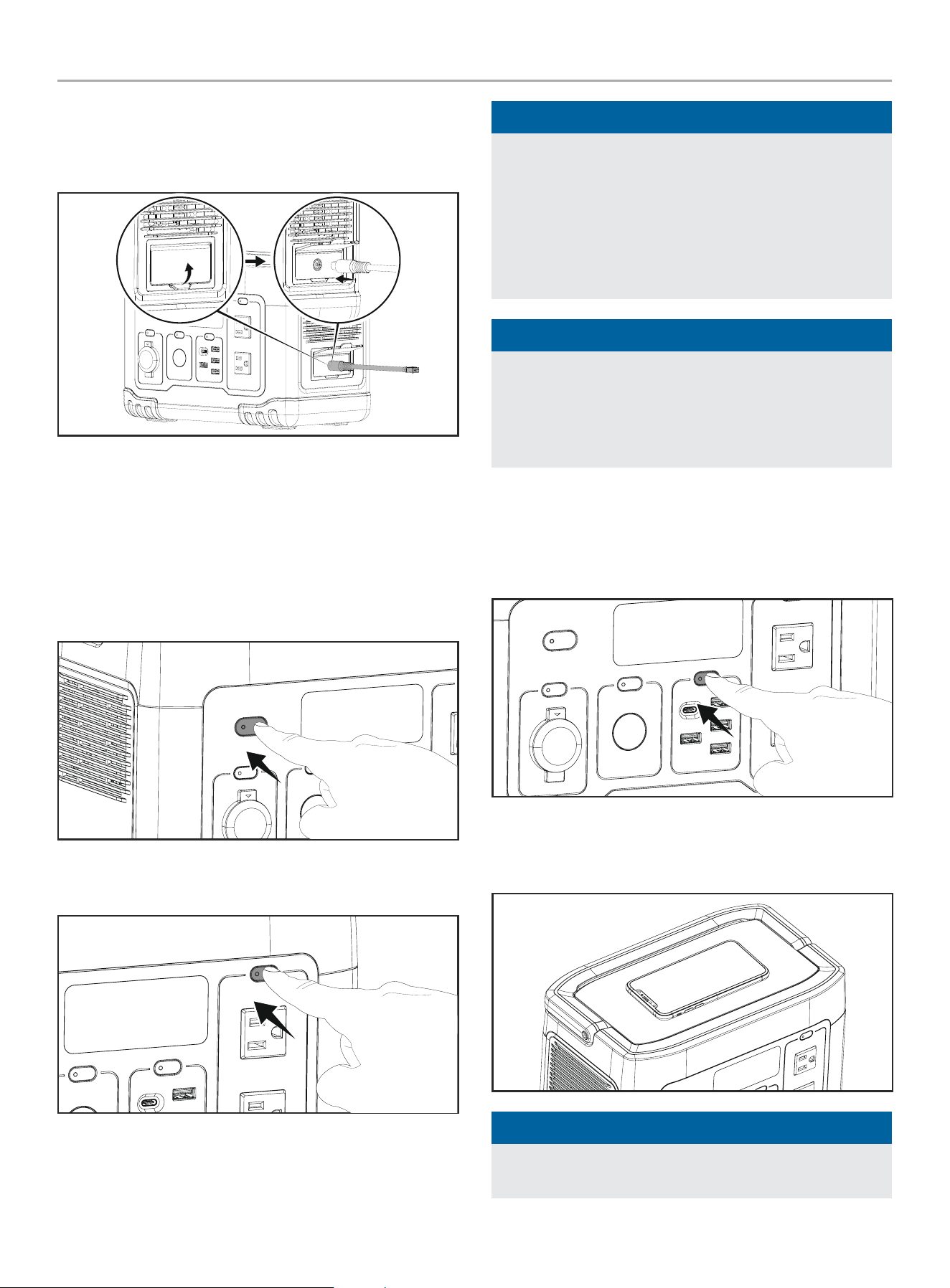
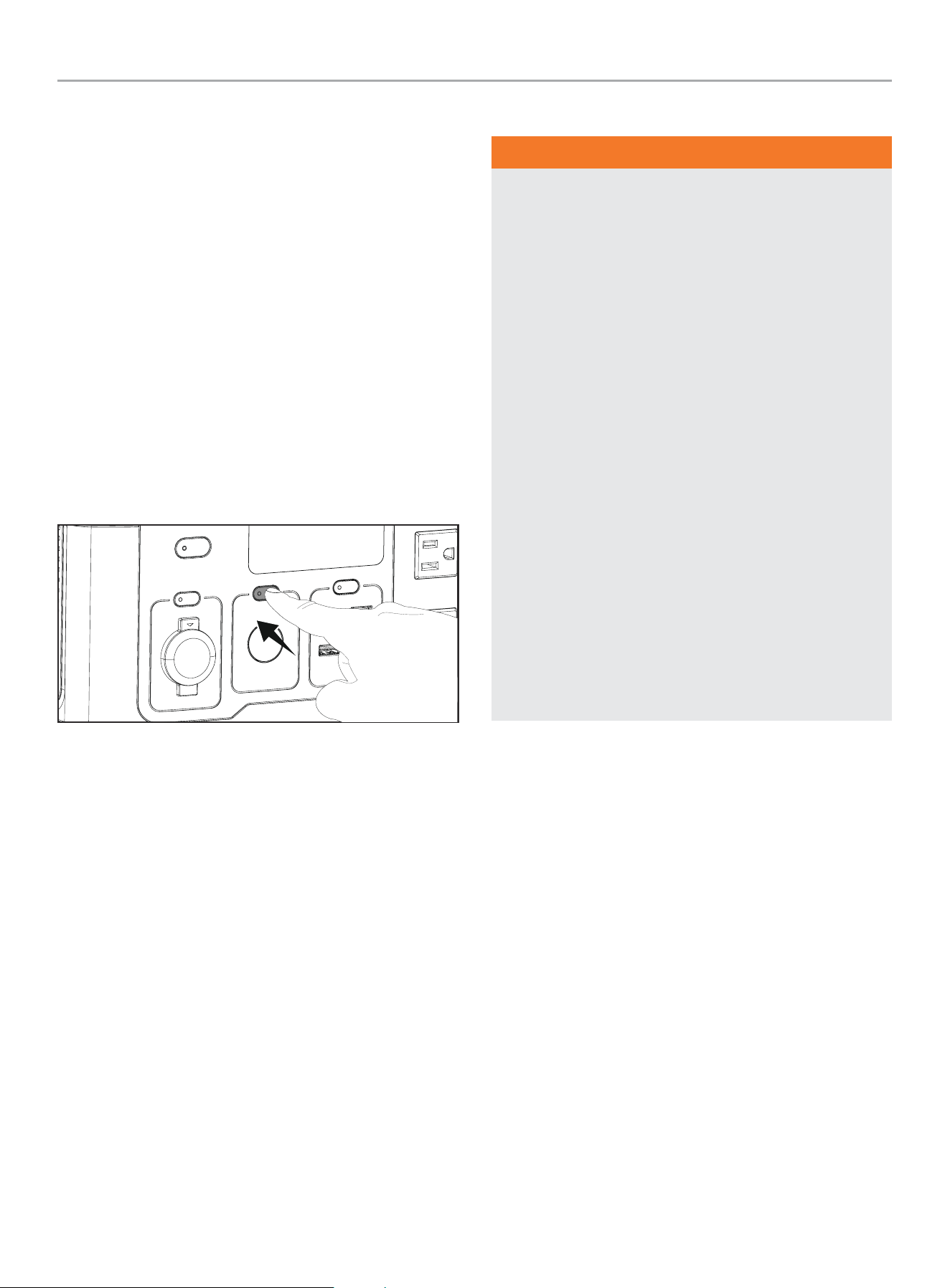
1. Press and hold the power button for three seconds, until
display illuminates.
2. Press the appropriate button to turn on power for ports/
outputs intended to be used.
NOTICE
See Specifications section for maximum allowable watts. The
sum of the watts of the 12V DC outlet, wireless charging pad,
and USB ports can not exceed the number listed next to “DC
Watts”. The 120V AC outlet(s) can not exceed the number
listed next to “AC Running Watts” and “AC Starting Watts”.
All ports and outlets may be used simultaneously and each
have their own wattage limits and protections.
NOTICE
To protect sensitive electronics, as the Power Station’s battery
level drops to 5%, the AC output will be shutoff and fault
indicator code E85 will be shown. DC and 12VDC ports can
still be used. AC output will be restored once the power station
is recharged.
3. Plug in desired devices.
Using the Wireless Charging Pad
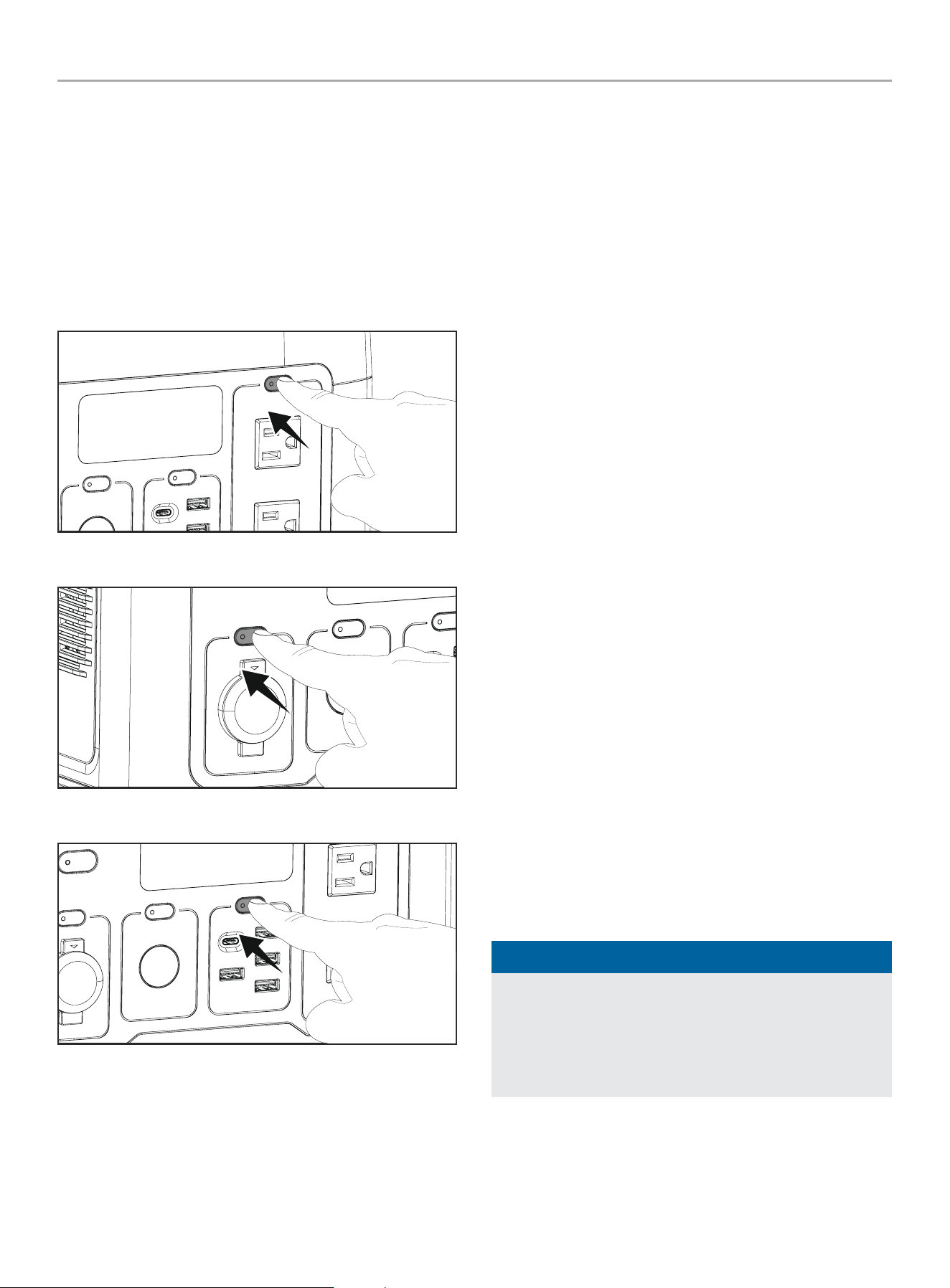
1. Press the USB button.
2. Place the device in the center of the charging pad. If the
device is not centered on the pad, the device may not charge
or charge slowly.
NOTICE
Ensure your device is compatible with wireless charging.
Remove phone case for more efficient charging.
201189 - 600 PORTABLE POWER STATION
OPERATION
21
Standby Mode
The USB and 12V DC ports will remain in standby mode for 2
hours, then shut off if they do not supply at least 2W of power to
an external device. The AC port(s) will remain in standby mode for
1 hour, then shut off if they do not supply at least 2W of power to
an external device or appliance.
If the Power Station is left untouched with all outlets powered off
for 2 hours, it will shut itself OFF. The Power Station will not shut
off if it is plugged in and charging. In standby mode, the display
will shut off to preserve power, and the power button will remain
illuminated.
When the ports and outlets are powered on, the Power Station
consumes about the same amount of power as one light bulb.
LED Light
1. To turn on LED low power mode press LED light button one
time for low power, two times for high power, and three times
for SOS mode.
2. Press LED light button until LED light turns off.
Connecting Electrical Loads
WARNING
Always remember to plug your appliances directly into the
Power Station and do not connect any of the several Power
Station “outputs” into any electrical outlet or connect to the
circuit breaker panel in your home. Connecting a Power Station
to your home’s electric utility company’s power lines, or to
another power source, called ‘backfeeding’ is a dangerous
practice that is illegal in many states and municipalities.
This action if done incorrectly could damage your Power
Station, appliances and could cause serious injury or death
to you or a utility worker when attempting to restore power
during an outage occurrence in the neighborhood who may
then unexpectedly encounter high voltage on the utility line
and suffer a fatal shock.
Whether injuries occur or not, if installed incorrectly and not to
applicable laws and codes, you may be subject to fines or the
utility company may disconnect your home power should this
practice be found in your home.
If the Power Station will be connected to a building electrical
system, those connections must isolate the Power Station
power from the utility power. You are responsible for ensuring
your Power Station’s electricity does not backfeed into the
electric utility power lines. These connections must comply
with all applicable laws and codes – Consult your local utility
company or a qualified electrician to properly install this
connection.
201189 - 600 PORTABLE POWER STATION
OPERATION
22
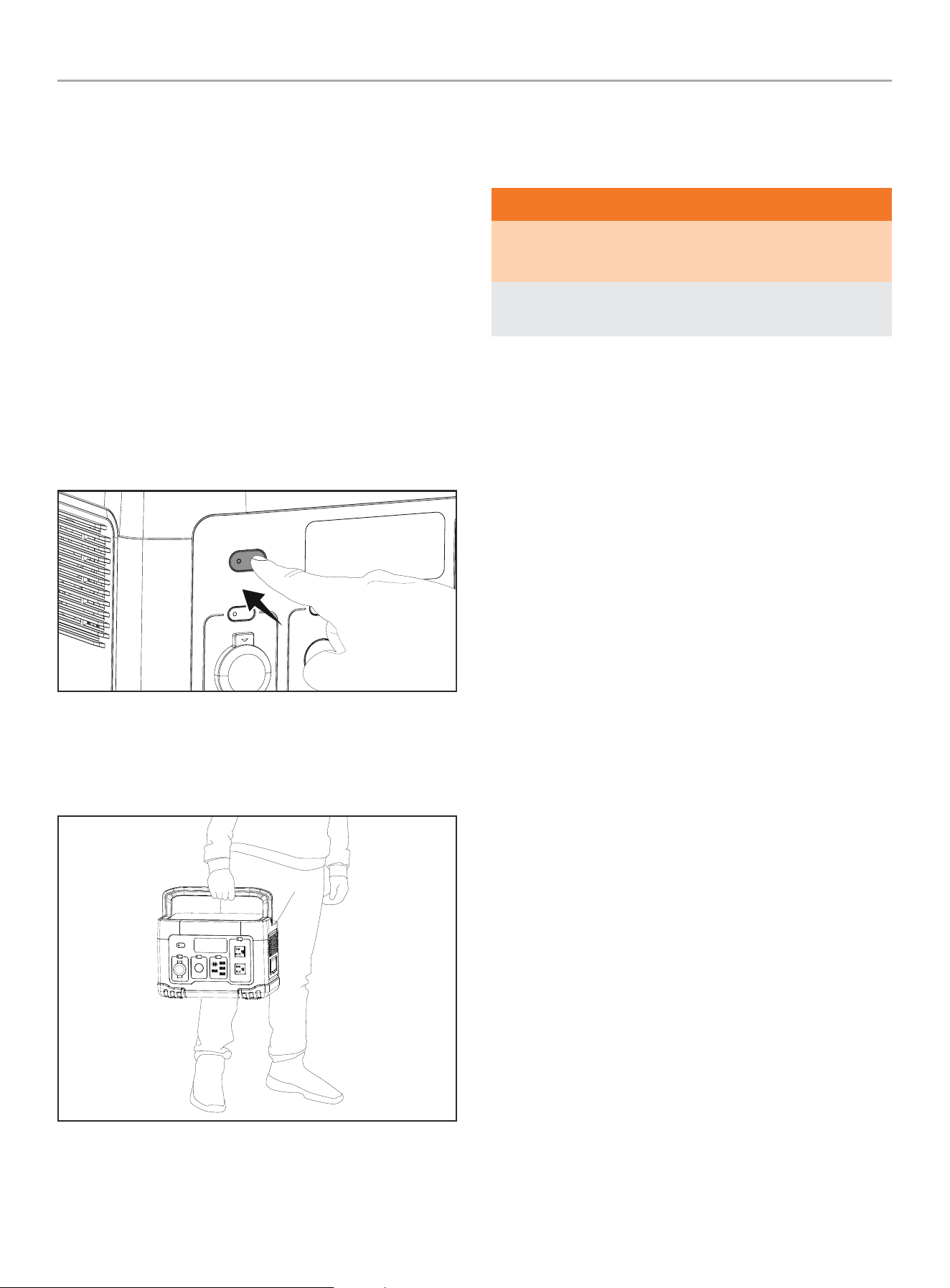
Resetting the Output
In case of an overload or fault on the AC, USB or DC outlets:
1. Unplug all devices from the overloaded ports/outlets, USB
outlets will be restored automatically when devices are
unplugged.
2. For AC and DC outlets. Press the button of the overloaded
ports/outlets to restore power. Do not exceed your power
station’s maximum running or starting wattages.
AC Outlets
DC Outlets
USB Ports
Do Not Overload Power Station
Calculating Run Time (Capacity)
Follow these simple steps to calculate the running and starting
watts necessary for your purposes:
1. Select the electrical devices you plan on running at the same
time.
2. Total the running watts of these items. This is the amount of
power you need to keep your items running.
3. Identify the highest starting wattage of all devices identified
in step 1. Add this number to the number calculated in step 2.
Starting wattage is the surge of power needed to start some
electric driven equipment. Following the steps listed under
“Power Management” will guarantee that only one device will
be starting at a time.
The total running watts from step 2 is how many watts the
Power Station will discharge during one hour of run time,
watt-hours (Wh).
Divide the Power Station’s capacity (Wh) by total running
watts from step 2 to get the approximate available run time.
Example:
Step 2 total running watts: 90W
201189 inverter efficiency: 90%
579Wh/90W*90% = Approximately 6 hours of run time.
Power Management
Use the following formula to convert voltage and amperage to
watts:
Volts × Amps = Watts
To prolong the life of your Power Station and attached devices,
follow these steps to add electrical load:
1. Start the Power Station with no electrical load attached.
2. Make sure power for the desired ports/outlets is ON and the
LED indicator on the button is illuminated.
3. Plug in and turn on the first item. It is best to attach the item
with the largest load first.
4. Plug in and turn on the next items one by one.
NOTICE
Never exceed the specified capacity when adding loads to the
Power Station.
If your device is capable of using DC or AC power, it is more
efficient to use DC power. Doing so also allows you to utilize
more AC power through the Power Station’s AC outlet(s).
201189 - 600 PORTABLE POWER STATION
MAINTENANCE
23
Operation at High Altitude
The density and pressure of air at higher altitudes is lower than at
sea level.
The increased pressure at higher altitudes can cause the battery
to ignite faster if misused or punctured. The mass loss, heat
release rate and total heat release for batteries decrease at low
pressure, thereby experiencing faster internal battery arcing, and
greater energy consumption with the higher altitudes and thinner
atmosphere.
Turning Off the Power Station
If the Power Station is being charged, it will not be able to be
turned off. The internal fans will continue running periodically to
ensure the unit does not overheat.
1. Turn off and disconnect all devices.
2. Press and hold the power button for three seconds.
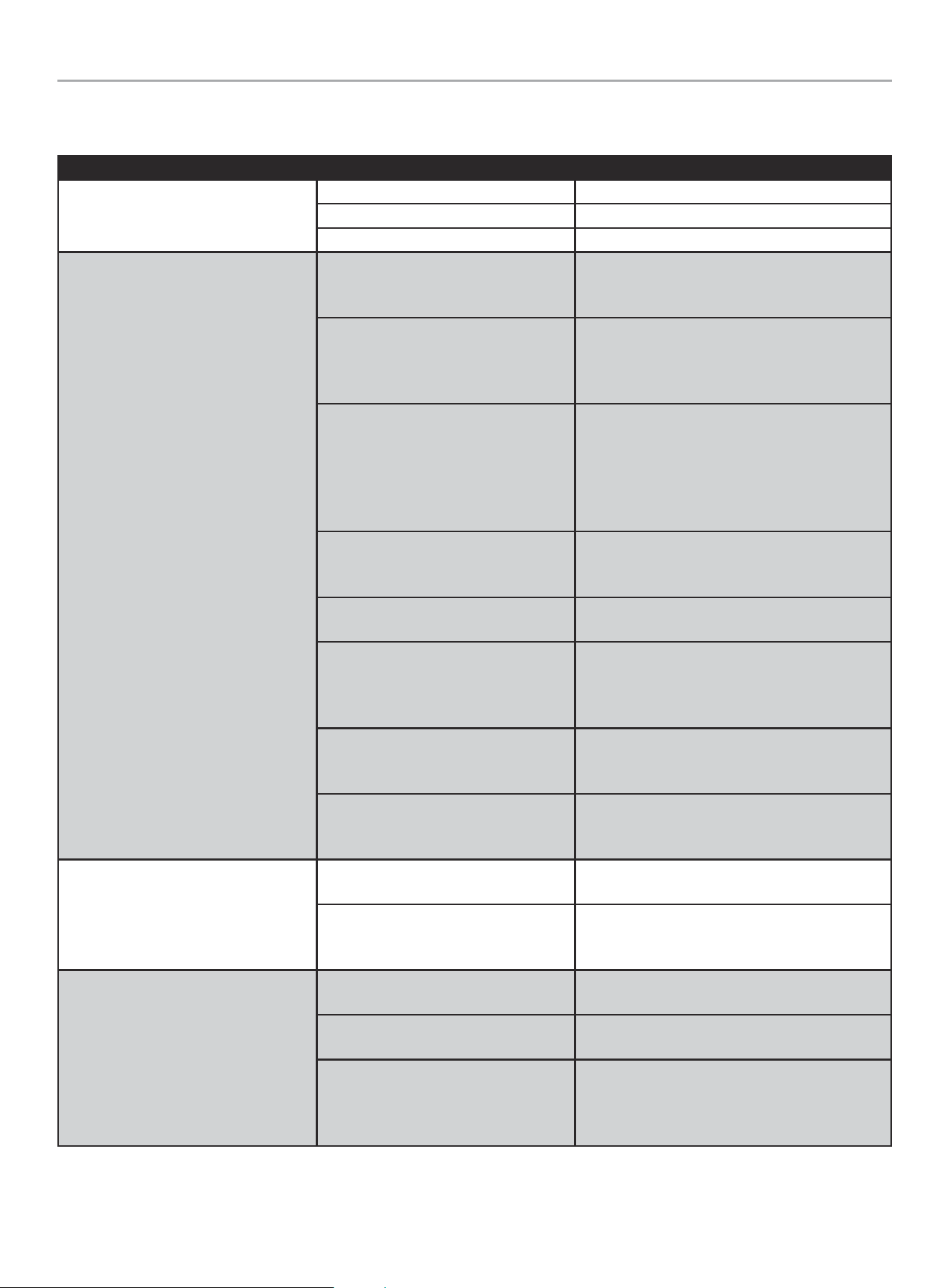
Moving the Power Station
1. Pick up the power station by the carrying handles as shown
below.
2. Move to desired location.
MAINTENANCE
Cleaning the Power Station
WARNING
DO NOT spray Power Station directly with water.
No user serviceable parts for maintenance required.
Water can enter the Power Station through the cooling slots
and damage the Power Station electronics.
1. Use a damp cloth to clean exterior surfaces of the Power
Station.
2. Use a soft bristle brush to remove dirt and debris.
3. Use an air compressor (25 PSI) to clear dirt and debris from
the Power Station.
4. Inspect all air vents and cooling slots to ensure that they are
clean and unobstructed.
STORAGE
– This Power Station is intended to be stored indoors and shall
not be stored or left outdoors when not in use.
– Do not stack any items on top of the Power Station during
storage.
– Store your Power Station in a cool, dry place between 32°F
(0°C) and 104°F (40°C). The ideal storage temperature is 59°F
(15°C).
– Do not store Power Station where temperatures may exceed
104°F (40°C) such as in direct sunlight, in a vehicle or metal
buildings especially during the summer.
– Do not store the Power Station near sources of high heat or
fire.
– Do not store the Power Station when battery level is at 20% or
less state of charge (SOC). The ideal storage SOC is 40-60%.
– When storing the Power Station for periods of one month
or longer, store the power station at an SOC of about 60%.
Every three months, discharge the Power Station to 40% and
recharge back to 60% to extend the battery life.
– Lithium batteries must be charged regularly to perform well.
The Power Station must be fully charged by you at least once
every 6 months (180 days).

201189 - 600 PORTABLE POWER STATION
SPECIFICATIONS
24
SPECIFICATIONS
Power Station Specifications
Power Station Model
....................................... 201189
AC Running Watts .............................................. 600
AC Starting Watts ................................... 1200 (≤0.1 S)
DC Watts ....................................................... 249
AC + DC Watts ................................................. 849
AC Volts .......................................................... 120
AC Amps @ 120V (Running) .....................................5.0
DC Volts .................................. See outlet specifications
DC Amps .................................. See outlet specifications
Output Frequency ............................................60 Hz
Phase ......................................................... Single
Weight .............................................. 15.9 lb. (7.2 kg)
Length ............................................11.6 in. (29.4 cm)
Width .............................................. 7.2 in. (18.4 cm)
Height ............................................... 8.1 in. (20.7cm)
Battery Specifications
Chemistry ..........................................Lithium ion NMC
Pack Rated Output Voltage .................................... 22.2
Pack Capacity .............................................. 579 Wh
AC Charger Specifications
Input Voltage ...........................................100-240 AC
Input Amps .........................................................3
Input Frequency ........................................... 60/50 Hz
Output Voltage.............................................. 25.2 DC
Output Amps .......................................................8
Output Watts ..................................................201.6
Solar Charge Specifications
Input Voltage ..............................................12-30 DC
Max. Input Amps ...................................................8
Input Watts ......................................................200
Automotive Charge Specifications
Input Voltage ................................................. 12 DC
Max. Input Amps ...................................................8
Input Watts ....................................................... 96
Temperature Specifications
Charging Temperature Range (°F/°C) ...........43 to 104/6 to 40
Discharging Temperature Range (°F/°C) ....... 5 to 104/-15 to 40
201189 - 600 PORTABLE POWER STATION
TROUBLESHOOTING
25
TROUBLESHOOTING
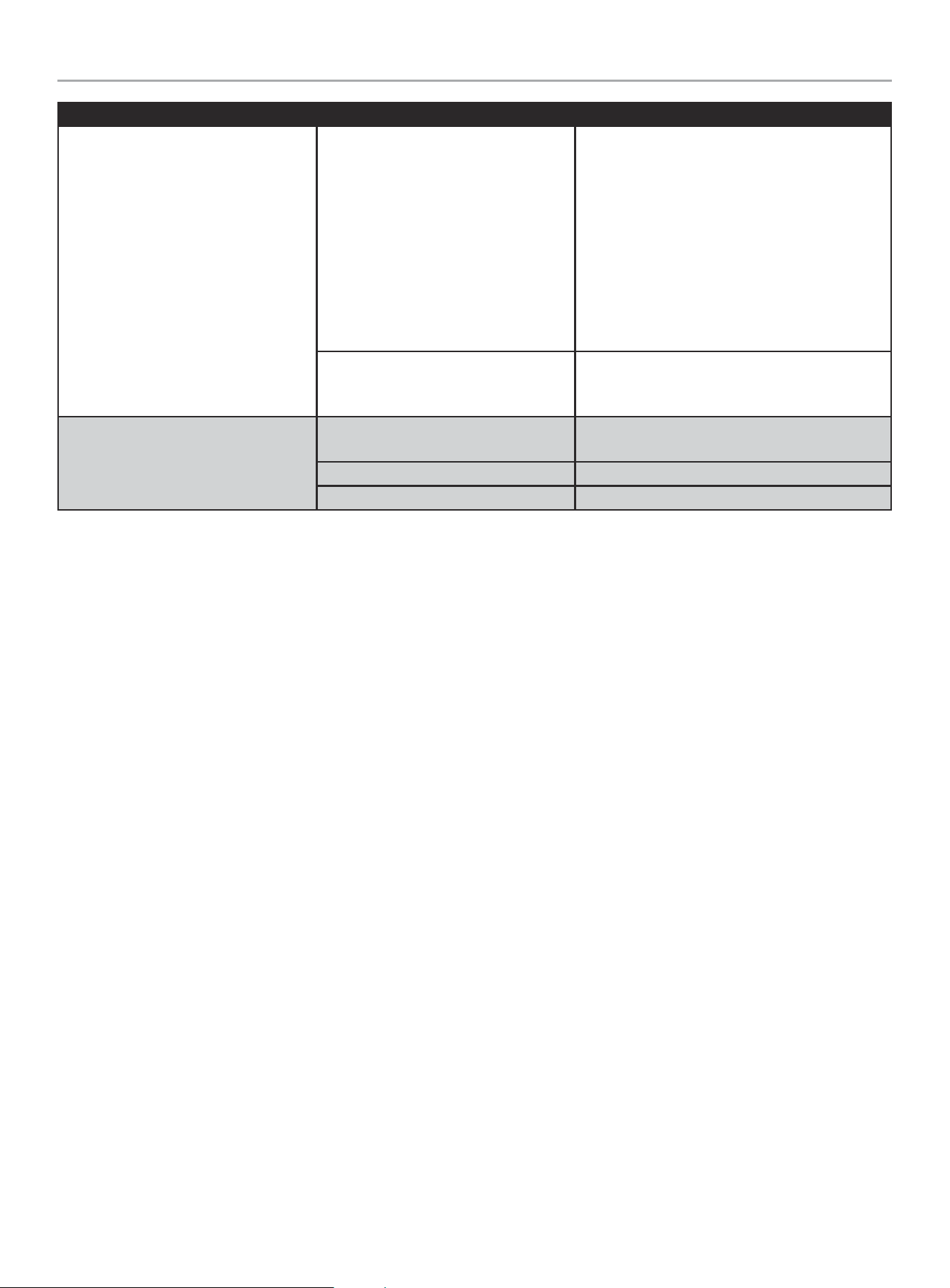
Problem Cause Solution
Power Station will not turn on.
Battery is not charged Charge battery.
Did not hold power button long enough Hold for 3 full seconds until display turns on.
Battery is faulty Call Champion Support.
No power output. Warning icons or LED
light flashing.
DC Outlets overloaded
Check display for overload indicator and ensure
device’s power demand does not exceed power
stations output limit.
AC outlets overloaded
Check display for overload indicator and ensure
device’s power demand does not exceed power
station’s output limit. If power still not restored,
turn unit OFF for 1 minute then restart.
Battery level at 5% or lower, preventing
AC output (E85)
To protect sensitive electronics, as the Power
Station’s battery level drops to 5%, the AC output
will be shutoff and fault indicator code E85 will be
shown. USB and 12VDC ports can still be used. AC
output will be restored when the power station is
recharged above 7% or more.
Device is faulty
Check all plugged in devices for frayed or faulty
wires. Never run any equipment in wet or humid
environments
Device not compatible with USB outlet.
Check your devices' charging capability and try
different USB outlet.
Unit is too hot
Check display for flashing red High Temperature
warning light. Turn the unit off, place it in the
shade or a cooler area and let it cool down. Check
that the unit is not overloaded.
Unit is too cold
Check display for Low Temperature warning light.
Turn the unit off and bring it indoors. Allow the
unit to warm up.
Battery fault
Check display for fault or error code. See Error
Code list below. Call customer service if warning
light does not go away.
Unit will not charge through wall.
Home circuit breaker tripped
Check your home's circuit breaker and reset if
necessary.
Faulty charging cable
Check that your charging cable is not frayed or
faulty. Never charge your equipment in wet or
humid conditions.
Unit will not charge through solar.
Solar panels are not within spec
Check that your solar panels are rated between
12-30V, 8A.
Solar panels improperly connected
Ensure MC4 connectors are securely connected.
Do not connect solar panels in parallel.
Solar panels not receiving enough
sunlight
Check that your solar panels are pointed directly
at the sun and there is ample sunlight. Read
your solar panel's instruction manual for proper
placement and instructions.
201189 - 600 PORTABLE POWER STATION
TROUBLESHOOTING
26
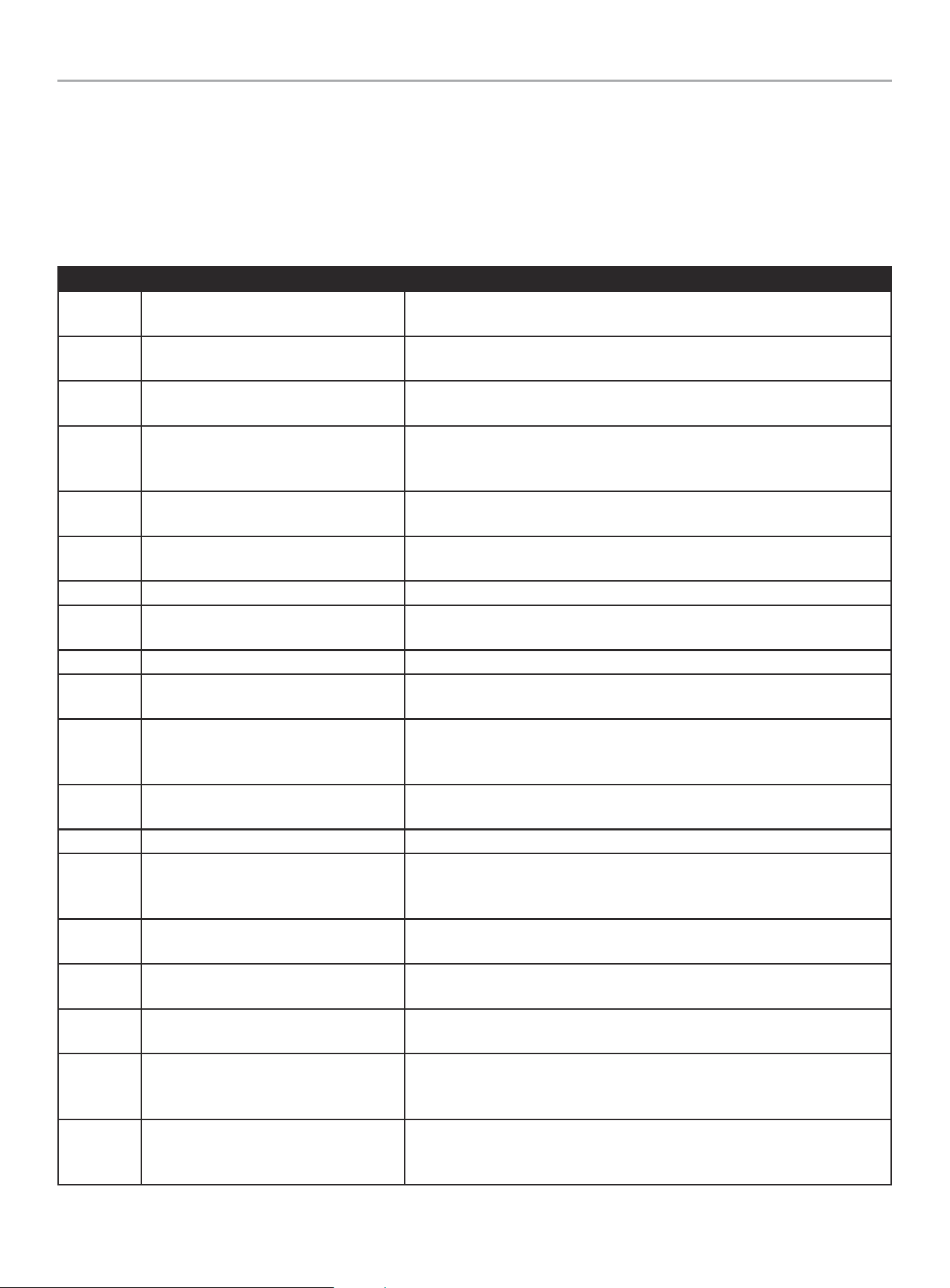
Problem Cause Solution
Unit not charging at Solar Panel rated
wattage.
Charging wattage depends on
environmental conditions and panel
efficiency.
Adjust your solar panels to face the sun as best as
possible throughout the day to achieve maximum
charging efficiency.
It may be necessary to connect more than any
combination of 200W of solar panels to reach the
full 200W of charging power.
For example, on a cloudy day, a 300W or higher
solar panel may be needed to produce 200W of
charge. Ensure the solar panel is within the power
station’s required voltage and current range.
Unit is nearing 100% battery level and is
slowing down to a safer charging rate.
The charging power and rate is reduced as the
battery level gets closer to 100% to safely charge
the internal battery.
Wireless Charging Pad not working or
charging slowly.
Device not compatible with wireless
charging.
Ensure your device is compatible with wireless
charging.
Device too far from induction coil. Ensure device is centered on charging pad.
USB Output OFF Press USB button to turn USB output ON.
For other issues and technical support:
Technical Support Team
Toll Free 1-877-338-0999
support@championpowerequipment.com
201189 - 600 PORTABLE POWER STATION
POWER STATION FAULT INDICATOR CODES
27
POWER STATION FAULT INDICATOR CODES
If a problem arises with the Expansion Battery, a fault indicator code will flash on the Expansion Battery Intelligauge. To resolve the issue,
follow the directions as indicated in the table below. For further information about Fault Codes, contact:
Technical Support Team
Toll Free 1-877-338-0999
support@championpowerequipment.com
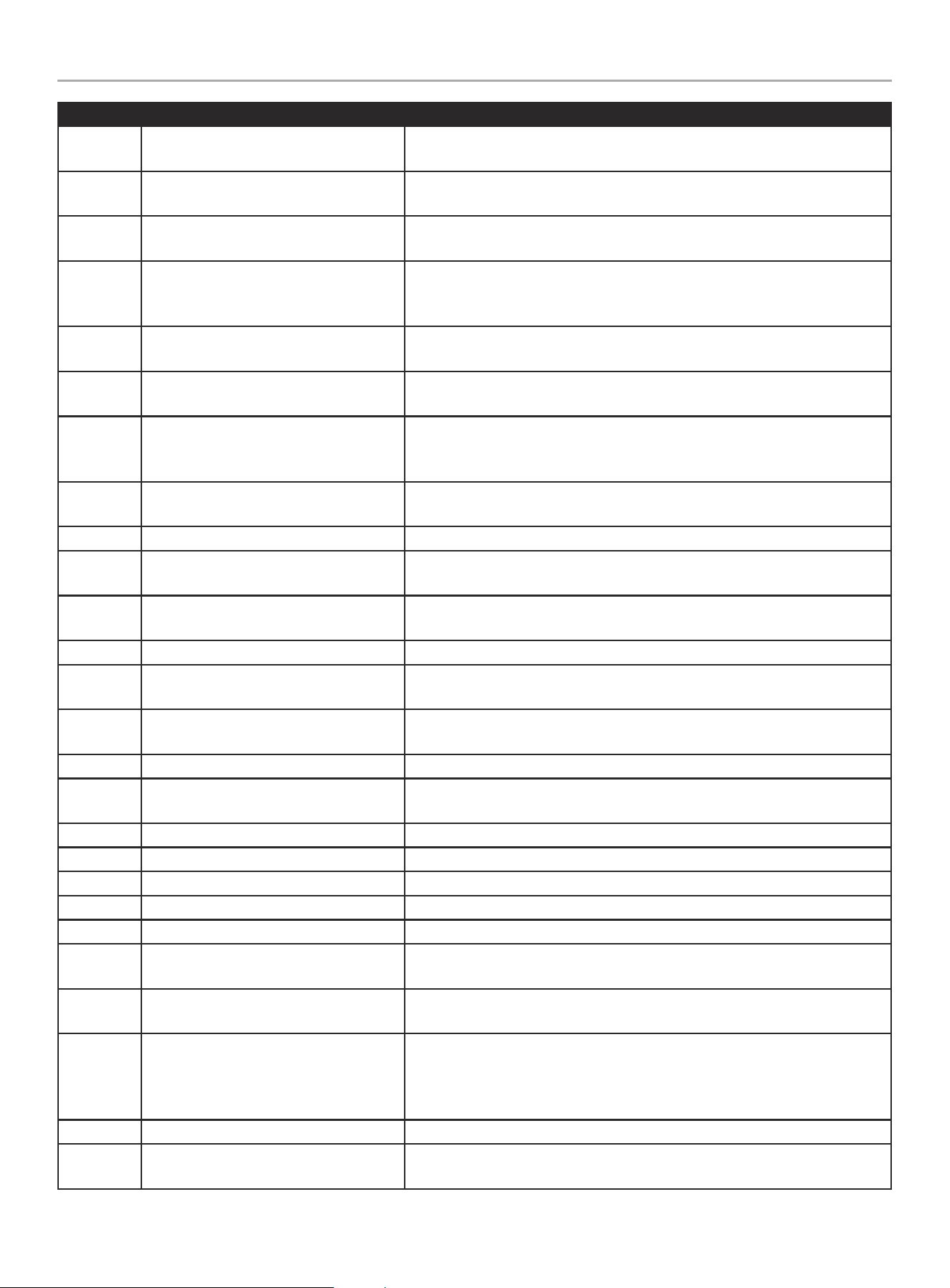
Fault Code Failure Description Diagnosis
E00
Battery pack low temperature protection
during charging
Please place the power station at room temperature and let the battery pack
warm up before charging
E01
Battery pack high temperature protection
during charging
Please place the power station at room temperature and keep the vents
unobstructed, let the battery pack cool before charging
E03
Battery pack overvoltage protection
during charging.
Discharge to below 95% and then charge the power station; Please contact
customer service if the problem still exists.
E05
When charging or discharging, the
battery pack is lower than 13.8V, and the
battery pack cannot be used.
Please restart the power station. Please contact customer service if the
problem still exists.
E09
Battery pack low temperature protection
when discharging
Please place the power station at room temperature and let the battery pack
warm up before discharging
E10
Battery pack high temperature protection
when discharging
Please place the power station at room temperature and keep the vents
unobstructed, let the battery pack cool before discharging
E11 SOC = 0% warning when discharging Please charge the power station before using
E12
Battery pack low temp. & low voltage
protection, AC output shut off.
Please use the power station at room temperature or use the power station
when SOC > 80%
E16 AC output overcurrent protection Please reduce the output and contue using power station.
E17 AC output high temperature protection
Please place the power station at room temperature and keep the vents
unobstructed. Use the power station after cooling
E20
AC output protection due to low voltage
or low voltage caused by short circuit,
over current
Please restart the power station. Please contact customer service if the
problem still exists.
E21 AC output high voltage protection
Please restart the power station. Please contact customer service if the
problem still exists.
E22 AC output short circuit protection Remove the load and ensure load does not exceed rated power.
E24
Abnormal communication warning
between the control panel and the
inverter
Please restart the power station. Please contact customer service if the
problem still exists.
E25 Inverter bus with low voltage
Please restart the power station. Please contact customer service if the
problem still exists.
E26 Inverter bus with high voltage
Please restart the power station. Please contact customer service if the
problem still exists.
E27
The inverter boosting module is too high-
high temp. protection
Please place the power station at room temperature and Keep the vents
unobstructed,let the battery pack cool before charging
E28 Inverter low temperature protection
Please place the power station at room temperature and restart the power
station after warm up. Please contact customer service if the problem still
exists.
E30
The inverter boosting module low
temperature, low temp. protection
Please place the power station at room temperature and restart the power
station after warm up. Please contact customer service if the problem still
exists.
201189 - 600 PORTABLE POWER STATION
POWER STATION FAULT INDICATOR CODES
28
Fault Code Failure Description Diagnosis
E32
Charger input voltage is high, overvoltage
protection
Please use the standard charger to charge the power station, or ensure that
the input voltage is within the specified range.
E33
Car Charger output short circuit
protection
Remove the load then reset the ports, Please contact customer service if the
problem still exists.
E34
Car Charger output over voltage
protection
Disconnect the load then reset the ports, Please contact customer service if
the problem still exists.
E35
Car Charger output low voltage
protection; or low voltage due to short
circuit, over current
Disconnect the load and restart the power station. Please contact customer
service if the problem still exists.
E38
The input voltage is lower than 12V when
charging
Please use the standard charger to charge the power station, or ensure that
the input voltage is within the specified range.
E39
12V DC module high temperature
protection
Please place the power station at room temperature and keep the vents
unobstructed. Use the power station after cooling
E40
The communication between the
charging control chip and the MCU is
abnormal
Disconnect the adapter and restart the power station. Please contact
customer service if the problem still exists.
E41
Charging control chip high temperature
protection
Please place the power station at room temperature and keep the vents
unobstructed. Use the power station after cooling
E44 USB overvoltage protection Remove the load then reset the ports
E45
USB(upper and middle) short circuit/over
current protection
Remove the load then reset the ports
E47
USB (lower) short circuit/over current
protection
Remove the load then restart the ports, the power station will be recovered.
E48 QC3.0 with overvoltage protection Remove the load then restart the ports, the power station will be recovered.
E49
QC3.0 with overcurrent/short circuit
protection
Remove the load then restart the ports, the power station will be recovered.
E50
The PD65W chip and control panel with
abnormal communication.
Remove the load then restart the ports, the power station will be recovered.
E51 PD65W short circuit protection. Remove the load then restart the ports, the power station will be recovered.
E52 PD65W high temp. protection.
Please place the power station at room temperature and Keep the vents
unobstructed. Use the power station after cooling
E53 POWER button is disabled Press the button. Please contact customer service if the problem still exists.
E54 DC button is disabled Press the button. Please contact customer service if the problem still exists.
E55 AC button is disabled Press the button. Please contact customer service if the problem still exists.
E56 USB button is disabled Press the button. Please contact customer service if the problem still exists.
E57 LED button is disabled Press the button. Please contact customer service if the problem still exists.
E72
Control panel and BMS abnormal
communication
Please restart the power station. Please contact customer service if the
problem still exists.
E77
High temp. alarams when battery pack
surface temperature ≥ 60 ° C
Please use the power station at room temperature or reduce AC load and Keep
the vents unobstructed.
E78
High temp. protection when battery pack
surface temperature ≥ 64 ° C, AC & 12V
DC turn off ,the USB & PD port goes on
working.
Please place the power station at room temperature and Keep the vents
unobstructed. Use the power station after cooling
E85 If the SOC is ≤5%, AC output turns off. It will be eliminated after charging to SOC > 7%
E88
The over 60% of rated power is
prohibitted at low temperature
Keep the power station at room temperature. Use the power station after the
temperature rises or reduce the discharge power

WARRANTY*
CHAMPION POWER EQUIPMENT
2 YEAR or 800 CYCLE LIMITED WARRANTY
Warranty Qualifications
To register your product for warranty and FREE lifetime call center
technical support please visit:
https://www.championpowerequipment.com/register
To complete registration you will need to include a copy of the
purchase receipt as proof of original purchase. Proof of purchase
is required for warranty service. Please register within ten (10)
days from date of purchase.
Repair/Replacement Warranty
CPE warrants to the original purchaser that the components will
be free of defects in material and workmanship for a period of two
(2) years or 800 cycles (parts and labor), whichever occurs first,
from the original date of purchase and 90 days (parts and labor)
for commercial and industrial use. Transportation charges on
product submitted for repair or replacement under this warranty
are the sole responsibility of the purchaser. This warranty only
applies to the original purchaser and is not transferable.
Do Not Return The Unit To The Place Of
Purchase
Contact CPE’s Technical Service and CPE will troubleshoot any
issue via phone or e-mail. If the problem is not corrected by
this method, CPE will, at its option, authorize evaluation, repair
or replacement of the defective part or component at a CPE
Service Center. Please keep it for future reference. Repairs or
replacements without prior authorization, or at an unauthorized
repair facility, will not be covered by this warranty.
Warranty Exclusions
This warranty does not cover the following repairs and equipment:
Normal Wear
Products with lithium batteries should be charged regularly to
perform well. The Power Station must be fully charged by you
at least once every 6 months (180 days). This warranty does not
cover repair when normal use has exhausted the life of a part, like
the batteries, or the equipment.
Installation, Use and Maintenance
This warranty will not apply to parts and/or labor if the product is
deemed to have been misused, neglected, involved in an accident,
abused, loaded beyond the product’s limits, modified, installed
improperly or connected incorrectly to any electrical component.
Normal maintenance is not covered by this warranty and is not
required to be performed at a facility or by a person authorized by
CPE.
Other Exclusions
This warranty excludes:
– Items purchased from unauthorized resellers.
– Any defects or damages caused by exposure to excessive
heat, cold, corrosive or conductive fluids, liquids such as
water, seawater, industrial chemicals, bleach or bleach
containing products or other external causes.
– Warranty claims on items taken outside the original country of
purchase
– Cosmetic defects on plastic, labels, etc.
– Failures due to acts of God and other force majeure events
beyond the manufacturer’s control.
– Problems caused by parts that are not original Champion
Power Equipment parts.
– Any battery cell or product containing a battery cell unless
the battery cell has been fully charged after purchase of
the product and at least once every 6 months (180 days)
thereafter.
Limits of Implied Warranty and
Consequential Damage
Champion Power Equipment disclaims any obligation to cover
any loss of time, use of this product, freight, or any incidental or
consequential claim by anyone from using this product.
A unit provided as an exchange will be subject to the warranty
of the original unit. The length of the warranty governing the
exchanged unit will remain calculated by reference to the purchase
date of the original unit.
This warranty gives you certain legal rights which may change
from state to state or province to province. Your state or province
may also have other rights you may be entitled to that are not
listed within this warranty.
Contact Information
Address
Champion Power Equipment, Inc.
6370 S Pioneer Way, Unit 101
Las Vegas, NV 89113 USA
www.championpowerequipment.com
Customer Service
Toll Free: 1-877-338-0999
support@championpowerequipment.com
Fax no.: 1-562-236-9429