Operating and installation
instructions
Induction cooktops
It is essential to read these operating and installation instructions
before installing and using the appliance. This prevents both personal
injury and damage to the appliance.
en-AU, NZM.-Nr. 12 470 940


Contents
3
Warning and Safety instructions......................................................................6
Sustainability and environmental protection..................................................17
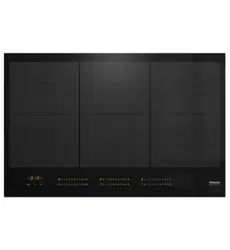
Familiarising yourself with the appliance........................................................18
Cooktop...............................................................................................................18
KM7220FR,KM7220FL..............................................................................18
KM7221FR...................................................................................................19
Controls and display...........................................................................................20
Cooking zone data..............................................................................................22
Power management............................................................................................24
Operating principles............................................................................................25
Functions.............................................................................................................26
Permanent pan recognition............................................................................26
Pan and pan size recognition.........................................................................26
Booster...........................................................................................................26
Stop & Go.......................................................................................................26
Extended power levels...................................................................................26
Auto heat-up..................................................................................................26
Timer..............................................................................................................26
System lock....................................................................................................26
Safety lock......................................................................................................26
Recall..............................................................................................................27
Keeping warm................................................................................................27
Programming..................................................................................................27
Demonstration mode......................................................................................27
Residual heat indicator...................................................................................27
Safety switch-off............................................................................................28
Overheating protection...................................................................................29
Commissioning..................................................................................................30
Unpacking the cooktop.......................................................................................30
Cleaning the cooktop for the first time................................................................30
Using the cooktop for the first time.....................................................................30
Operation............................................................................................................31
Safety instructions for operation.........................................................................31
Switching on the cooktop...................................................................................32
Switching off the cooktop/a cooking zone..........................................................32
Power level..........................................................................................................32
Setting the power level...................................................................................32
Setting the power level – extended power level range...................................32
Changing the power level...............................................................................33

Contents
4
Booster................................................................................................................34
Activating the Booster....................................................................................34
Deactivating the Booster................................................................................34
Activating/Deactivating Stop & Go......................................................................34
Auto heat-up .......................................................................................................35
Activating Auto heat-up .................................................................................35
Deactivating Auto heat-up.............................................................................35
Timer ...................................................................................................................36
Setting timer durations...................................................................................36
Setting the minute minder..............................................................................36
Changing the time set for the minute minder.................................................36
Cancelling the minute minder.........................................................................36
Setting a switch-off time................................................................................37
Changing the switch-off time.........................................................................37
Deleting the switch-off time...........................................................................37
Setting multiple switch-off times....................................................................37
Displaying switch-off times............................................................................37
Using both timer functions at the same time.................................................38
System lock.........................................................................................................39
Activating the system lock.............................................................................39
Deactivating the system lock.........................................................................39
Safety lock...........................................................................................................39
Activating the safety lock...............................................................................39
Deactivating the safety lock...........................................................................39
Activating Recall..................................................................................................40
Activating/Deactivating the Keeping warm function...........................................40
Cooktop data ......................................................................................................40
Model number/serial number display.............................................................40
Display the software version..........................................................................40
Activating/Deactivating the demonstration mode...............................................41
Power level range..............................................................................................42
Good to know....................................................................................................43
How induction cooktops work............................................................................43
Noises..................................................................................................................43
Cookware............................................................................................................44
Adjusting settings..............................................................................................46
Cleaning and care.............................................................................................49
Problem solving guide......................................................................................51
Messages in the display......................................................................................51

Contents
5
Unexpected behaviour........................................................................................53
Unsatisfactory results..........................................................................................55
General problems or technical faults...................................................................55
Service................................................................................................................56
Contact in case of fault.......................................................................................56
Data plate............................................................................................................56
Warranty..............................................................................................................56
Optional accessories........................................................................................57
Installation..........................................................................................................58
Safety instructions for installation.......................................................................58
Additional installation instructions for surface-mounted installation.............59
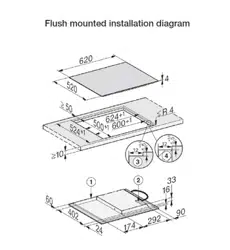
Additional installation instructions for flush-fit installation.............................60
Safety distances..................................................................................................61
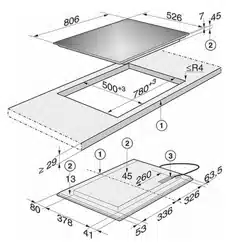
Installation dimensions for surface-mounted cooktops......................................66
KM7220FR,KM7221FR.............................................................................66
KM 7220 FL....................................................................................................67
Installation dimensions for flush-fit cooktops.....................................................68
KM 7220 FL....................................................................................................68
Installing the surface-mounted cooktop.............................................................69
Installing the cooktop flush with the worktop.....................................................70
Electrical connection...........................................................................................71

Warning and Safety instructions
6
This cooktop complies with all relevant local and national safety
requirements. However, inappropriate use can lead to personal
injury and damage to property.
Read the operating and installation instructions carefully before
using the cooktop. They contain important information on safety,
installation, use and maintenance of the appliance. This prevents
both personal injury and damage to the cooktop.
In accordance with standard IEC 60335-1, Miele expressly and
strongly advises that you read and follow the instructions in
“Installation”, as well as in the “Warning and Safety instructions”.
Miele cannot be held liable for injury or damage caused by non-
compliance with these instructions.
Keep these instructions in a safe place and pass them on to any
future owner.

Warning and Safety instructions
7
Correct application
This cooktop is designed for domestic use and for use in similar
environments by guests in hotel or motel rooms, bed & breakfasts
and other typical living quarters. This does not include common/
shared facilities or commercial facilities within hotels, motels or bed
& breakfasts.
This cooktop is not suitable for outdoor use.
It is intended only to cook food and keep it warm. Any other use is
not supported by Miele and could be dangerous.
This cooktop is not intended for use by people (including children)
with reduced physical, sensory or mental capabilities or lack of
experience and knowledge, unless they have been given supervision
and instruction concerning its use by a person responsible for their
safety. They may only use the cooktop unsupervised if they have
been shown how to use it in a safe way. They must be able to
recognise and understand the potential dangers of improper use.

Warning and Safety instructions
8
Safety with children
Young children must not be allowed to use this appliance.
Older children may only use the appliance if its operation has
been clearly explained to them and they are able to use it safely.
They must be aware of the potential dangers caused by incorrect
operation.
Cleaning may only be carried out by older children under the
supervision of an adult.
Please supervise children in the vicinity of the cooktop and do not
let them play with it.
The cooktop gets hot when in use and remains hot for a while
after being switched off. Keep children well away from the cooktop
until it has cooled down and there is no danger of burning.
Danger of burning! Do not store anything which might arouse a
child's interest in storage areas above or behind the cooktop.
Otherwise children could be tempted to climb onto the cooktop with
the risk of burning themselves.
Danger of burning and scalding! Turn the handles of pots and
pans on the cooktop to the side or the rear so that children cannot
pull them down and burn themselves.
Danger of suffocation! Whilst playing, children may become
entangled in packaging material (such as plastic wrapping) or pull it
over their head with the risk of suffocation. Keep packaging material
away from children.
Activate the system lock to ensure that children cannot switch on
the cooktop inadvertently. Use the safety lock when the cooktop is in
use to prevent children from altering the settings selected.

Warning and Safety instructions
9
Technical safety
Unauthorised installation, maintenance and repairs can pose a
considerable risk to the user. Maintenance and repairs must only be
carried out by a Miele authorised technician.
Damage to the cooktop can compromise your safety. Check the
appliance for visible signs of damage. Do not use the cooktop if it is
damaged.
Temporary or permanent operation with a self-sufficient or non-
mains synchronous energy supply system (e.g. isolated networks,
back-up systems) is possible. A requirement for the operation is that
the energy supply system complies with all current local and national
requirements that apply to stand-alone, solar and/or battery
systems.
The protective measures provided in the installation and in this Miele
product must also be assured in their function and operation in
isolated operation or in non-mains synchronous operation, or
replaced with equivalent measures in the installation.
The electrical safety of this appliance can only be guaranteed
when continuity is complete between it and an effective earthing
system which complies with local and national safety regulations. It
is most important that this basic safety requirement is present and
tested regularly and, where there is any doubt, the household wiring
system should be inspected by a qualified electrician.
Before connecting the appliance to the mains electricity supply,
ensure that the connection data on the data plate (voltage and
frequency) matches the mains electricity supply. This data must
correspond in order to avoid the risk of damage to the appliance.
Do not connect the cooktop to the mains electricity supply by a
multi-socket adapter or extension lead. These are a fire hazard and
do not guarantee the required safety of the appliance.
For safety reasons, this cooktop may only be used after it has
been built in.

Warning and Safety instructions
10
This appliance must not be installed and operated in mobile
installations (e.g. on a ship).
Never open the casing of the cooktop.
Touching or tampering with electrical connections or components
and mechanical parts is highly dangerous to the user and can cause
operational faults.
The manufacturer's warranty will be invalidated if the appliance is
not repaired by a Miele authorised service technician.
Faulty components must only be replaced by genuine Miele spare
parts. The manufacturer can only guarantee the safety of the
appliance when Miele replacement parts are used.
The cooktop is not intended for use with an external timer switch
or a remote control system.
If the mains connection cable is damaged, it must be replaced
with a special mains connection cable by a qualified electrician in
order to avoid a hazard (see “Installation - Electrical connection”).
During installation, maintenance and repair work, the appliance
must be disconnected from the mains electricity supply. It is only
completely isolated from the electricity supply when:
-the mains circuit breaker is switched off, or
-it is switched off at the wall socket and the plug is withdrawn from
the socket. Do not pull the mains connection cable but the mains
plug to disconnect your appliance from the mains electricity
supply.
Danger of electric shock! If the ceramic surface is faulty, cracked,
chipped or damaged in any way, do not use the cooktop and switch
it off immediately. Disconnect the cooktop from the electricity
supply. Contact Miele.

Warning and Safety instructions
11
If the cooktop is installed behind a furniture door, do not close the
door while the cooktop is in operation. Heat and moisture can build
up behind the closed door. This can result in damage to the cooktop,
the housing unit and the floor. Do not close the door until the
appliance has cooled down and the residual heat indicators have
gone out.
In areas which may be subject to infestation by cockroaches or
other vermin, pay particular attention to keeping the appliance and
its surroundings clean at all times. Any damage caused by
cockroaches or other vermin will not be covered by the warranty.
DO NOT MODIFY THIS APPLIANCE.

Warning and Safety instructions
12
Correct use
The cooktop gets hot when in use and remains hot for a while
after being switched off. There is a danger of burning until the
residual heat indicators go out.
Oil and fat can overheat and catch fire. Do not leave the cooktop
unattended when cooking with oil and fat. If it does ignite, do not
attempt to put the flames out with water.
Switch off the cooktop and use a suitable fire blanket, saucepan lid,
damp towel or similar to smother the flames.
The cooking process has to be supervised. A short term cooking
process has to be supervised continuously.
Flames could set the grease filters of a rangehood on fire. Do not
flambé under a rangehood.
Spray canisters, aerosols and other inflammable substances can
ignite when heated. Therefore do not store such items or substances
in a drawer under the cooktop. Cutlery inserts must be heat-
resistant.
Do not heat an empty pan.
Do not heat up food in closed containers e.g. tins or sealed jars
on the cooktop, as pressure can build up in the containers, causing
them to explode.
Do not cover the cooktop, e.g. with a cooktop cover, a cloth or
protective foil. The material could catch fire, shatter or melt if the
cooktop is switched on by mistake or if residual heat is still present.

Warning and Safety instructions
13
When the appliance is switched on either deliberately or by
mistake, or when there is residual heat present, there is the risk of
any metal items left on the cooktop heating up, with the danger of
burning. Depending on the material, other items left on the cooktop
could also melt or catch fire. Damp pan lids might adhere to the
ceramic surface and be difficult to dislodge. Do not use the
appliance as a resting place. Switch the cooking zones off after use
and do not rely on the pan detector.
You could burn yourself on the hot cooktop. Protect your hands
with heat-resistant pot holders or oven gloves when handling hot
pots and pans. Do not let them get wet or damp, as this causes heat
to transfer through the material more quickly with the risk of scalding
or burning yourself.
When using an electrical appliance, e.g. a hand-held food mixer,
near the cooktop, ensure that the cable of the electrical appliance
cannot come into contact with the hot cooktop. The insulation on the
cable could become damaged.
Grains of salt, sugar and sand (e.g. from cleaning vegetables) can
cause scratches if they get under pan bases. Make sure that the
ceramic surface is clean before placing pans on it.
Even a light object can cause damage in certain circumstances.
Do not drop anything on the ceramic surface.
Placing hot pans on the sensors and indicators could damage the
electronics underneath. Do not place hot pans on the sensors or
indicators.

Warning and Safety instructions
14
Do not allow solid or liquid sugar, or pieces of plastic or aluminium
foil to get onto the cooktop when it is hot, as they can damage the
ceramic surface when it cools down. If this should occur, switch off
the appliance and scrape off all the sugar, plastic or aluminium
residues whilst still hot, using a shielded scraper blade suitable for
use on glass. Wear oven gloves when doing this. Allow the ceramic
surface to cool down and then clean it with a suitable ceramic
cooktop cleaning agent.
Pans which boil dry can cause damage to the ceramic glass. Do
not leave the cooktop unattended whilst it is being used.
Only use pots and pans with smooth bases. Rough bases will
scratch the ceramic glass.
Lift pans into position on the cooktop. Sliding them into place can
cause scuffs and scratches.
Because induction heating works extremely quickly, the base of
the pan could heat up to the temperature at which oil or fat self-
ignites within a very short time. Do not leave the cooktop unattended
whilst it is being used.
Heat oil or fat for a maximum of one minute. Never use the
Booster function to heat oil or fat.
For people fitted with a heart pacemaker: please note that the
area immediately surrounding the cooktop is electromagnetically
charged when it is switched on. It is very unlikely to affect a
pacemaker. However, if in any doubt, consult the manufacturer of
the pacemaker or your doctor.
To prevent damage to items which are susceptible to
electromagnetic fields, e.g. credit cards, digital storage devices,
pocket calculators, etc., do not leave them in the immediate vicinity
of the cooktop.

Warning and Safety instructions
15
Metal utensils stored in a drawer under the cooktop can become
hot if the appliance is used intensively for a long time. Do not store
any metal items or utensils in a drawer under the cooktop.
The cooktop is fitted with a cooling fan. If a drawer is fitted directly
underneath the cooktop, ensure that there is sufficient space
between the drawer and its contents and the underside of the
cooktop in order to ensure sufficient ventilation for the cooktop.
If a drawer is fitted directly underneath the cooktop, do not store
pointed or small items, paper, serviettes etc. in the drawer. They
could get in through the ventilation slots or be sucked into the casing
by the fan and damage the fan or impair cooling.
Never use two pieces of cookware simultaneously on one cooking
zone.
If the cookware only partially covers a cooking zone or extended
zone, the handle could become very hot.
Always place cookware in the middle of a cooking zone or extended
zone!
If an induction adapter plate is used for cookware, the induction
generator may be damaged or even destroyed. Do not use induction
adapter plates.

Warning and Safety instructions
16
Cleaning and care
Do not use a steam cleaning appliance to clean this appliance.
The steam could reach the electrical components and cause a short
circuit.
If the cooktop is built-in above a pyrolytic oven or cooker, do not
use it during a pyrolytic cleaning programme as this could trigger the
overheating protection device on the cooktop (see "Familiarising
yourself with the appliance – Safety switch-off").
Miele will guarantee to supply functional spare parts for a
minimum of 10years and up to 15years following the
discontinuation of your cooktop.

Sustainability and environmental protection
17
Energy saving tips
-Cook in covered pots and pans if
possible. This prevents heat escaping
unnecessarily.
-Cook with as little water as possible.
-Once food has come to the boil or
the pan is hot for frying, reduce the
heat to a lower power level.
-Use a pressure cooker to reduce the
cooking duration.
Disposal of the packing
material
The transport and protective packaging
has been selected from materials which
are environmentally friendly for
disposal, and can normally be recycled.
Recycling the packaging reduces the
use of raw materials in the
manufacturing process and also
reduces the amount of waste in landfill
sites. Ensure that any plastic
wrappings, bags etc. are disposed of
safely and kept out of the reach of
babies and young children. Danger of
suffocation.
Disposing of your old
appliance
Electrical and electronic appliances
often contain valuable materials. They
also contain specific materials,
compounds and components, which
were essential for their correct function
and safety. These could be hazardous
to human health and to the environment
if disposed of with your domestic waste
or if handled incorrectly. Please do not,
therefore, dispose of your old appliance
with your household waste.
Please dispose of it at your local
community waste collection / recycling
centre for electrical and electronic
appliances. You are also responsible for
deleting any personal data that may be
stored on the appliance prior to
disposal. Please ensure that your old
appliance poses no risk to children
while being stored prior to disposal.
Familiarising yourself with the appliance
18
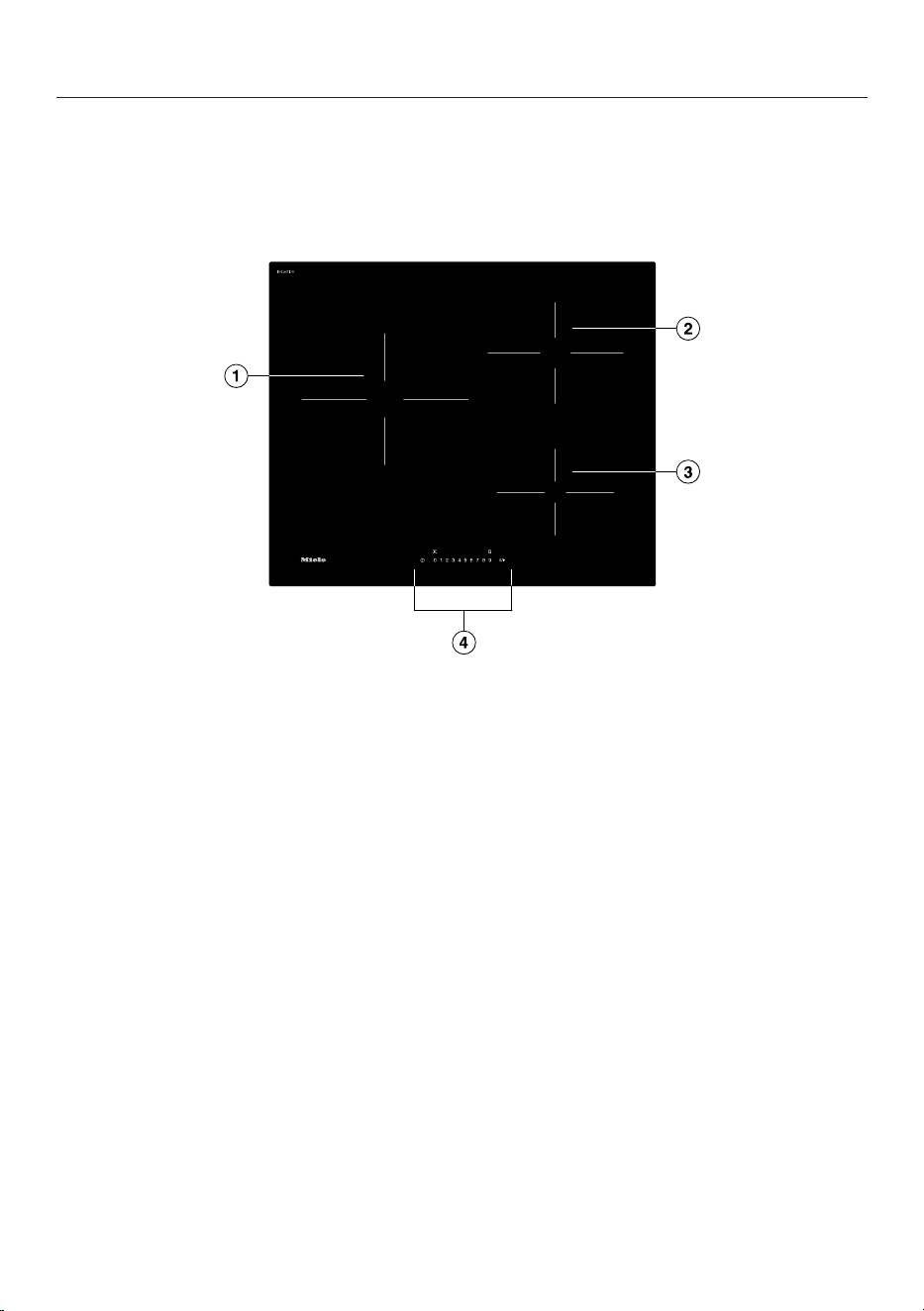
Cooktop
KM7220FR,KM7220FL
a
Cooking zone with Booster
b
Cooking zone with Booster
c
Cooking zone with Booster
d
Controls and indicators
Familiarising yourself with the appliance
19
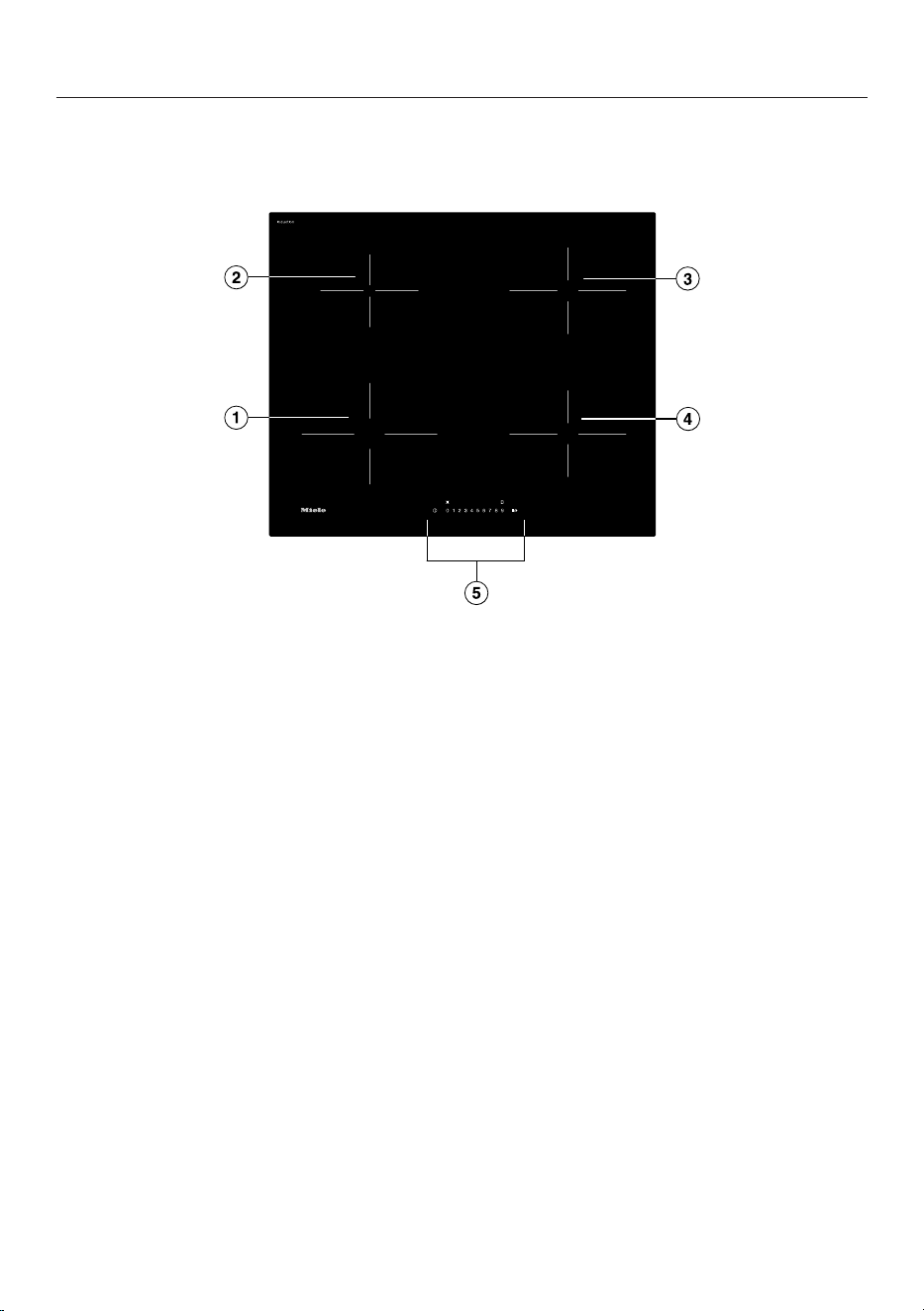
KM7221FR
a
Cooking zone with Booster
b
Cooking zone with Booster
c
Cooking zone with Booster
d
Cooking zone with Booster
e
Controls and indicators
Familiarising yourself with the appliance
20
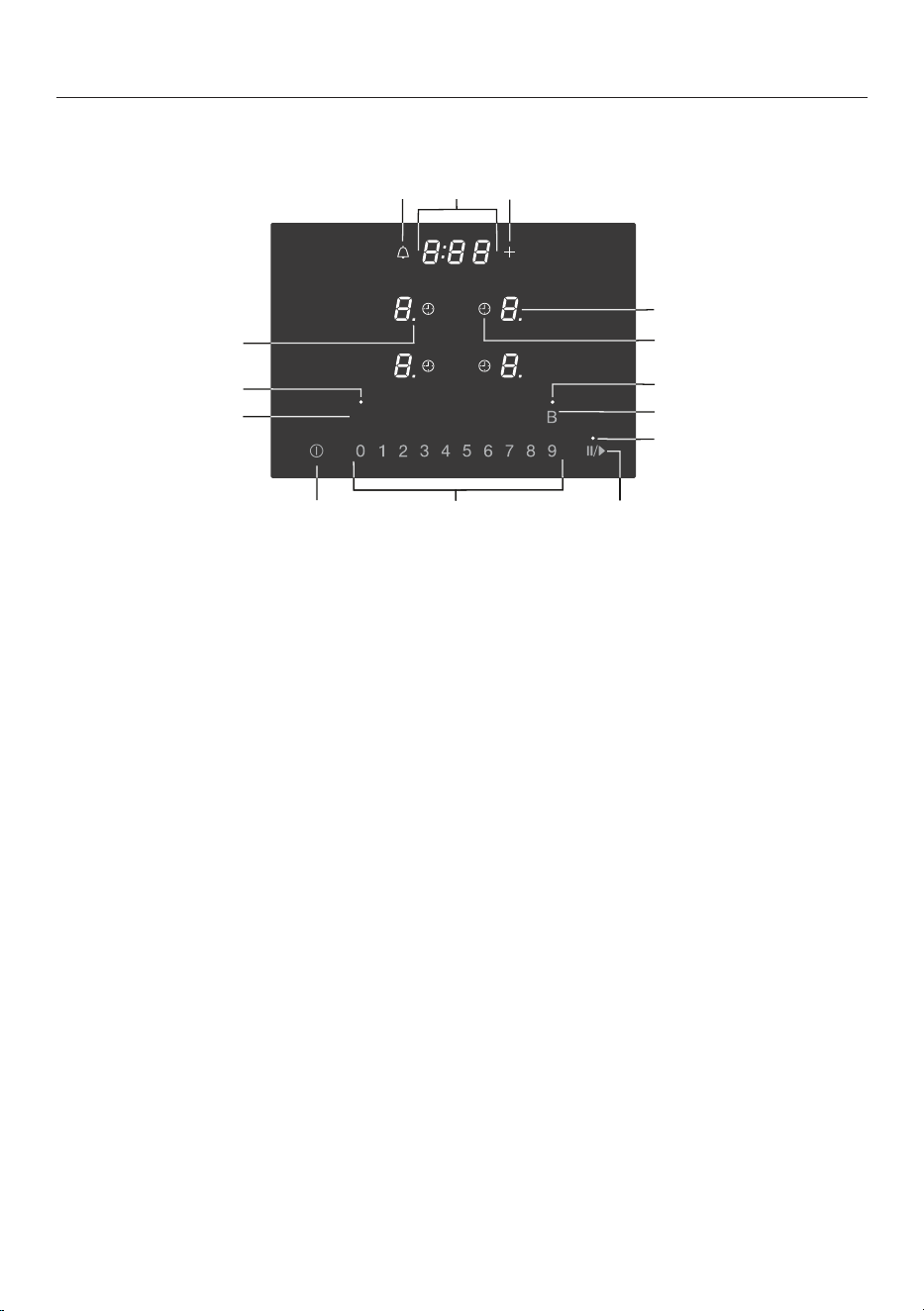
Controls and display
h
b
e
f
a
b
g
k
i
j
c
l
n
m
d
a
Cooktop On/Off sensor
b
Numerical display sensors
– For setting the power level
– For setting the times
c
Stop&Go sensor
For stopping/starting a cooking process in progress
d
Stop & Godisplay
Stop & Go function is activated
e
Booster sensor
f
Booster display
Booster function is activated
g
Automatic switch-off sensor
Switches the cooking zones off automatically
h
Cooking zone selection and display sensor
Cooking zone is ready for operation
to Power level
Residual heat
Auto heat-up
Cookware missing or unsuitable
Booster
Keeping warm

Familiarising yourself with the appliance
21
i
Entry sensor
- For changing the programming
- For adjusting the times
j
Timer display
: to
:
Duration
System lock/Safety lock is activated
Demo mode is activated
k
Minute minder sensor
l
Power level display – extended setting range
m
Keeping warmdisplay
Keeping warm function is activated
n
Keeping warm sensor
For activating/deactivating the Keeping warm function
Familiarising yourself with the appliance
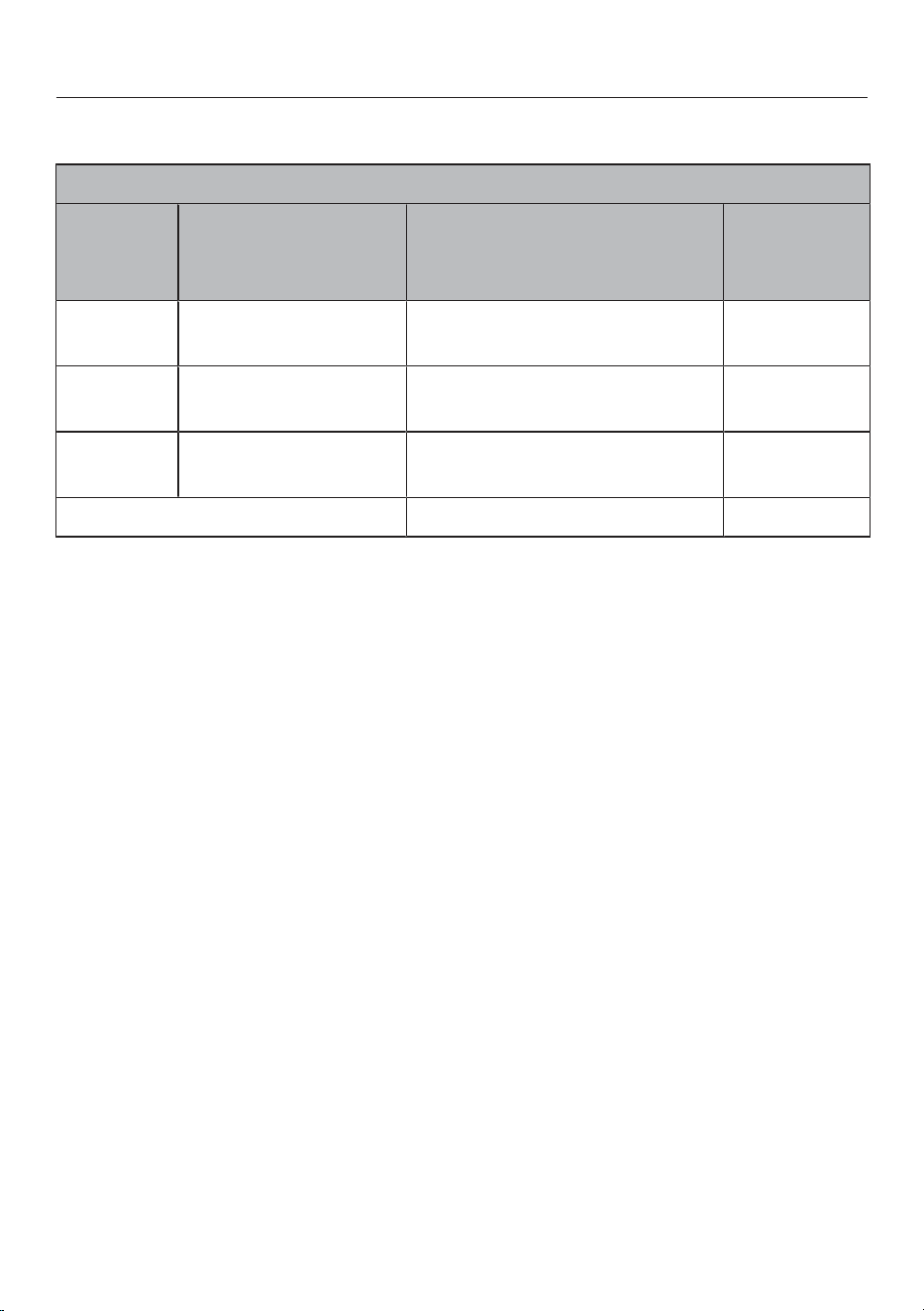
22
Cooking zone data
KM7220FR,KM7220FL
Cooking
zone
Øin cm
1
Max. rating
in watts for 230V
2
Connected
cooking
zone
3
14–28
Normal
Booster
2300
3000
-
11–22
Normal
Booster
2300
3000
9–16
Normal
Booster
1350
1850
Total3450
1
Pans with a base diameter within the given range may be used.
2
The power level given may vary depending on the size and material of the pans used.
3
The cooking zone is linked to this cooking zone electrically so that the rating can be increased (see
“Familiarising yourself with the appliance – Power management”).
Familiarising yourself with the appliance
23
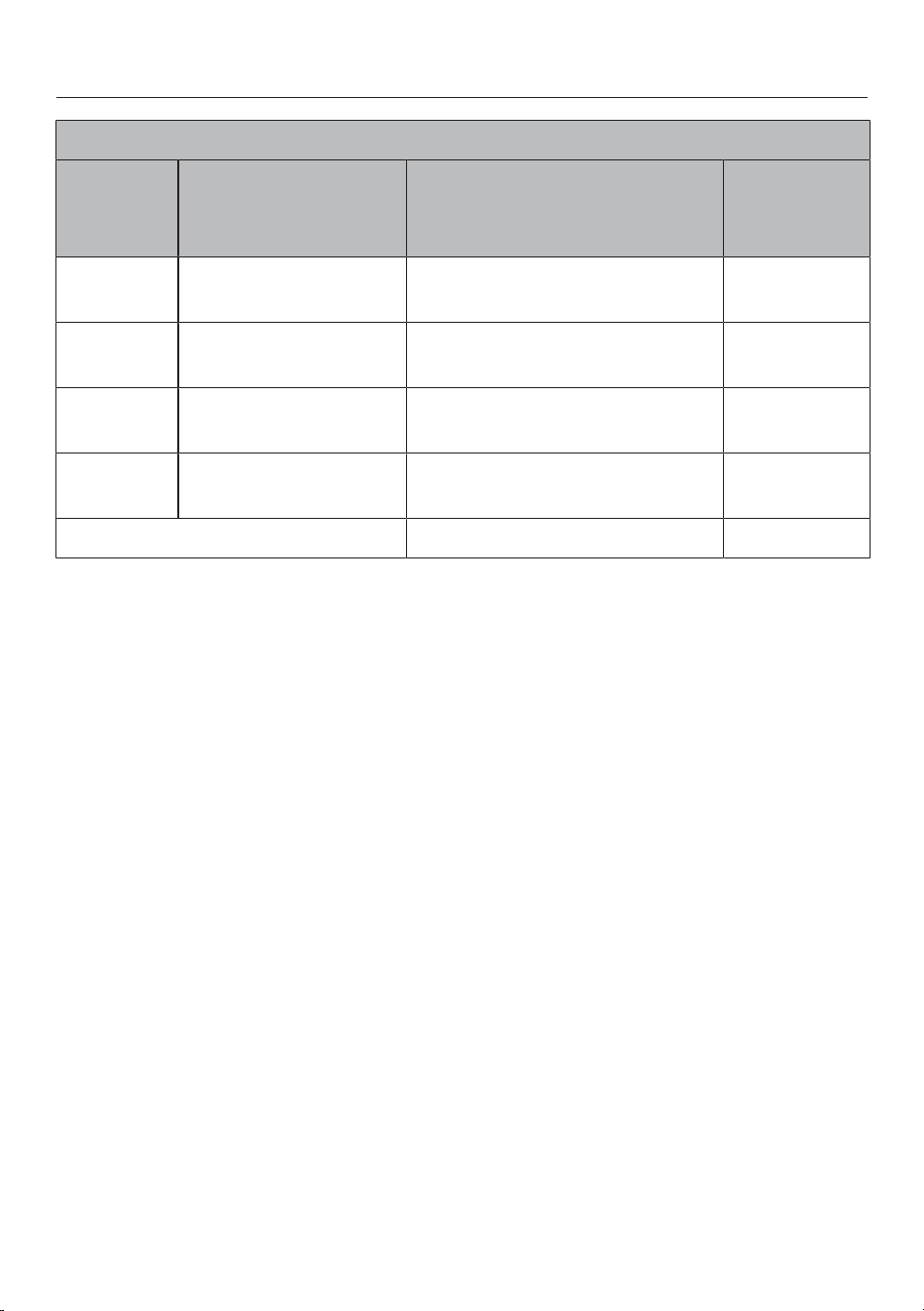
KM7221FR
Cooking
zone
Øin cm
1
Max. rating
in watts for 230V
2
Connected
cooking
zone
3
11–22
Normal
Booster
2300
3000
9–16
Normal
Booster
1350
1850
10–19
Normal
Booster
1400
2100
10–19
Normal
Booster
1400
2100
Total3680
1
Pans with a base diameter within the given range may be used.
2
The power level given may vary depending on the size and material of the pans used.
3
The cooking zone is linked to this cooking zone electrically so that the rating can be increased (see
“Familiarising yourself with the appliance – Power management”).

Familiarising yourself with the appliance
24
Power management
Total power
The cooktop has a maximum total
permitted power consumption which
cannot be exceeded for safety reasons.
The higher the total permitted power
consumption of the cooktop, the more
power levels/functions that can be used
simultaneously on all cooking zones.
If the set power levels/functions require
more power than can be made available
by the total permitted power output, the
cooktop will distribute the possible
power across the cooking zones.
Power distribution
Cooking zones can be linked together
in pairs on the cooktop. This allows
power to be transferred from one
cooking zone (A) to another zone (B).
This transfer reduces the power on
cooking zone (A).
Example: the Booster for cooking zone
(B) is activated.
The cooking zone (B) which requires
power is determined by the most recent
selected setting on the cooktop.
The values for the maximum total
permitted power consumption and
which cooking zones are linked
together can be found in “Familiarising
yourself with the appliance – Cooking
zone data”.
You can reduce the maximum total
permitted power consumption (see
“Adjusting settings”).
Effects of distributing the power
When a cooking zone gives power to
another zone, it can have the following
effects on the power of the first zone:
-The power level is reduced.
-Auto heat-up will be deactivated.
Cooking continues at the set level. If
the power is not sufficient, the power
level will be reduced again.
-The Booster function is deactivated.
-The cooking zone is switched off.
If the most recently set power level is
reduced or the Booster function is
switched off, the power level for the
linked cooking zone can be increased
again.
Useful tip: If you want to cook large
quantities of food on a cooking zone,
switch the other cooking zones to lower
power levels.

Familiarising yourself with the appliance
25
Operating principles
Switched off cooktop
When the cooktop is switched off, you
can only see the printed symbols for the
sensors and the numerical display.
More sensors light up when the
cooktop is switched on.
Operation
a
Sensors and indicators
This ceramic cooktop is equipped with
sensors which react to finger contact.
Each time you touch a sensor, an
acoustic signal sounds.
For safety reasons, when switching the
appliance on, the On/Off sensor
needs to be touched for a little longer
than the other sensors.
Selecting a cooking zone
If you want to select settings on a
cooking zone, the cooking zone must
be selected.
To select a cooking zone, touch the
relevant cooking zone sensor. The
relevant cooking zone sensor will begin
to flash when touched.
While the cooking zone indicator is
flashing, the cooking zone is selected
and you can select settings on the
cooking zone.
Exception: If only one cooking zone is
in operation, settings can be adjusted
without needing to select a cooking
zone.

Familiarising yourself with the appliance
26
Functions
Permanent pan recognition
When you place a pan on a cooking
zone, the numerical display of the
cooking zone activates automatically.
Pan and pan size recognition
The pan and its size are detected within
the cooking zone. The energy given off
is adjusted according to the pan size.
Booster
When activated, the power is boosted
so that large quantities can be heated
up quickly, e.g. when boiling water for
cooking pasta.
Stop & Go
When Stop & Go is activated, the power
of all cooking zones in use is reduced to
power level1. When Stop & Go is
deactivated, the cooking zones will
operate at the power level previously
selected.
Useful tip: Use this function when the
sensors need to be cleaned quickly, or
when there is a risk of boiling over.
Extended power levels
You can switch on additional levels
between the power levels. These
intermediate power levels enable you to
make finer adjustments to the power
output for the pot or pan being used.
Auto heat-up
When Auto heat-up has been activated,
the cooking zone switches on
automatically at the highest setting and
then switches to the continued cooking
setting which you have previously
selected.
Timer
The timer can be used for the following
2 functions:
-For setting the minute minder
-For automatically switching a cooking
zone off
You can use the functions
simultaneously.
Minute minder
You can set a minute minder for
activities that are unrelated to the
cooktop.
Automatic switch-off
You can set a time after which the
cooking zone will switch off
automatically. This function can be
used on all zones at the same time.
System lock
If the system lock is activated, the
cooktop cannot be switched on.
Safety lock
The safety lock is activated while the
cooktop is switched on. When the
safety lock is activated, the cooktop
can only be operated to a limited
extent.

Familiarising yourself with the appliance
27
Recall
If the cooktop is switched off
inadvertently during operation, this
function can be used to reset all
settings. For this to work, the cooktop
must be switched on again within
10seconds of being switched off.
Keeping warm
This function enables food to be kept
warm directly after cooking.
The maximum duration for keeping food
warm is 2hours.
Programming
You can adapt the programming of the
cooktop to your personal needs.
Demonstration mode
This function enables the cooktop to be
demonstrated in showrooms without
heating up.
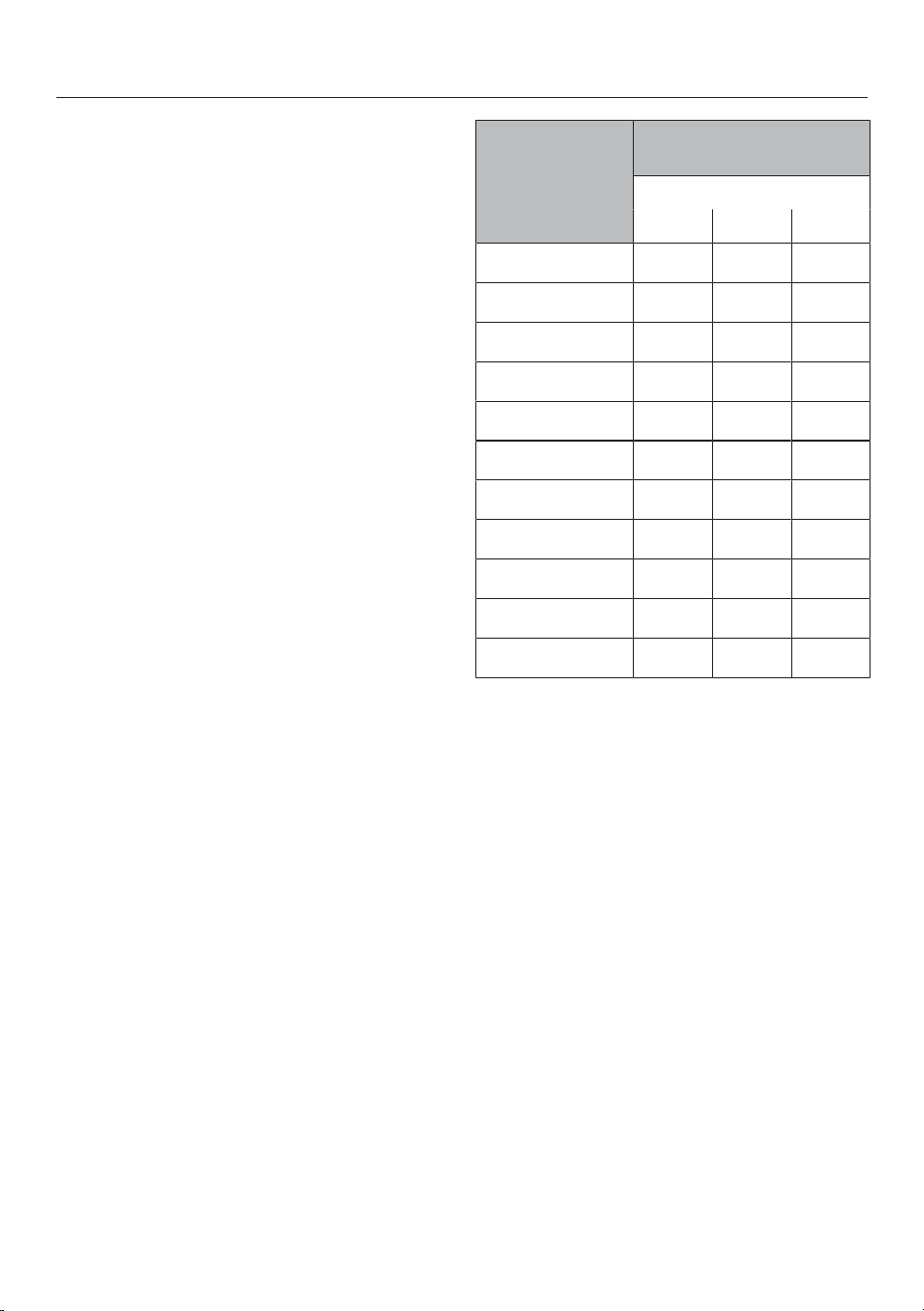
Residual heat indicator
If a cooking zone is still hot, the residual
heat indicator will light up after it has
been switched off.
The bars of the residual heat indicator
go out one after the other as the
cooking zone cools down. The last
horizontal bar only goes out when the
cooking zone is safe to touch.
Familiarising yourself with the appliance
28
Safety switch-off
Sensors are covered
Your cooktop will switch off
automatically if one or several of the
sensors remain covered for longer than
10seconds, for example, by finger
contact, food boiling over or by an
object such as an oven glove or a tea
towel. will appear in the timer display
for a few seconds. If the sensor is
affected, will light up until the object
or soiling has been removed.
will go out once you have removed
the object or cleaned the cooktop and
the cooktop will be ready to use again.
Excessive operating time
The safety switch-off mechanism is
triggered automatically if a cooking
zone is heated for an unusually long
period of time. This time depends on
the power level selected. If it has been
exceeded, the cooking zone switches
off and the residual heat indicator
appears. If you switch the cooking zone
on and off again, it is ready for
operation again.
You can adust the safety switch-off
function by changing the safety setting
(see "Adjusting settings").
Power level*Maximum operating time
[h:min]
Safety setting
0**12
110:008:005:00
1.10:007:004:00
2/2.5:004:003:00
3/3.5:003:302:00
4/4.4:002:001:30
5/5.4:001:301:00
6/6.4:001:0000:30
7/7.4:0000:4200:24
84:0000:3000:20
8.4:0000:3000:18
91:0000:2400:10
* The power levels with a dot after the
number are only available if the power level
range has been extended (see "Power level
range").
** Factory default setting

Familiarising yourself with the appliance
29
Overheating protection
To protect the cooktop from damage
caused by excessively high
temperatures, the overheating
protection mechanism initiates one of
the following measures:
Overheating protection mechanism
measures
-A switched-on Booster is cancelled.
-The set power level is reduced.
-A cooking zone switches itself off
automatically. will flash alternately
with in the timer display.
-All cooking zones switch off.
Causes for triggering the overheating
protection mechanism
The overheating protection may be
triggered under the following
circumstances:
-The pot or pan being used is empty.
-Fat or oil being heated on a high
power level.
-Insufficient ventilation to the
underside of the cooktop.
-A hot cooking zone being switched
on after an interruption to the power
supply.

Commissioning
30
Unpacking the cooktop
Please stick the extra data plate
stating the model number, which is
temporarily affixed to the appliance,
in the space provided in the "Service"
section of this booklet. Alternatively,
the additional plate stating the model
number can be stuck near the
appliance if the appliance markings
are not visible after installation.
Remove any protective wrapping and
stickers.
Cleaning the cooktop for the
first time
Before using for the first time, wipe
the cooktop with a damp cloth.
Then wipe the cooktop dry.
Using the cooktop for the first
time
The metal components have a
protective coating. When the cooktop is
used for the first time, this causes a
smell and possibly also vapour. The
heating of the induction coils also
causes odours in the first few hours of
operation. This smell will be less
noticeable with each subsequent use
before dissipating completely.
The smell and any vapours given off do
not indicate a faulty connection or
appliance and they are not hazardous
to health.

Operation
31
Safety instructions for operation
Risk of fire due to overheated food.
Unattended food can overheat and ignite.
Do not leave the cooktop unattended whilst it is being used.
Risk of burning on hot cooking zones.
The cooking zones will be hot after use.
Do not touch the cooking zones while the residual heat indicators
are on.
Risk of burning due to hot items!
When the cooktop is switched on, either deliberately or by
mistake, or when there is residual heat present, there is a risk of
metal items placed on the cooktop heating up.
Do not use the cooktop as a resting place for anything else.
After use, switch the cooktop off with the sensor control.
Placing hot pans on the sensors and indicators can damage
the electronic unit underneath.
The sensors do not respond.
The sensors may switch on and off unintentionally.The cooktop
switches itself off (see "Familiarising yourself with the appliance –
Safety switch-off").
Do not place hot pans over the sensors or indicators.

Operation
32
Switching on the cooktop
Touch the sensor.
Further sensors will light up.
If no further entry is made, the
appliance will switch itself off after a
few seconds for safety reasons.
Switching off the cooktop/a
cooking zone
Switching the cooktop off
To switch off the cooktop and all the
cooking zones, touch the sensor.
Switching off a cooking zone
To switch off a cooking zone, touch
the relevant cooking zone indicator.
The cooking zone indicator will begin to
flash.
Touch the 0sensor on the numerical
display.
Power level
Setting the power level
Permanent pan recognition is activated
as standard (see "Adjusting settings").
When the cooktop is switched on and
you place a pan on a cooking zone, the
cooking zone indicator starts to flash.
Place a pan on the cooking zone you
want to use.
The cooking zone indicator will begin to
flash.
Touch the appropriate power level
sensor on the numerical display.
The power level selected will flash in the
display for a few seconds and then light
up constantly.
Setting the power level – extended
power level range
The extended power level range for
the power levels is set (see "Adjusting
settings").
Touch the numerical display between
the sensors.
The power level selected flashes in the
display for a few seconds to start with
and then lights up constantly. The
intermediate setting will be represented
by an illuminated dot next to the
number.

Operation
33
Changing the power level
Touch the relevant cooking zone
display.
The cooking zone indicator will begin to
flash.
Touch the appropriate power level
sensor on the numerical display.

Operation
34
Booster
Activating the Booster
When the Booster feature is activated,
the settings for the linked cooking zone
may be changed (see “Familiarising
yourself with the appliance – Power
management”).
You can use the Booster function on
any cooking zone.
The Booster is active for 5minutes.
Place a pan on the cooking zone you
want to use.
Select a power level if necessary.
Touch theB sensor.
appears in the cooking zone display.
Deactivating the Booster
Touch theB sensor.
or
Set a different power level.
If you deactivate the Booster or when
the Booster time ends and
-a power level was not set before
activating the Booster, the cooking
zone will automatically revert to
power level 9.
-a power level was set before
activating the Booster, the cooking
zone will revert to the previously
selected power level.
Activating/Deactivating Stop &
Go
The power levels and the timer settings
cannot be altered; the cooktop can only
be switched off. The minute minder,
switch-off, Booster and heat-up times
continue to run.
If the function is not deactivated within
1hour, the cooktop will switch off.
Touch the sensor.
Operation
35
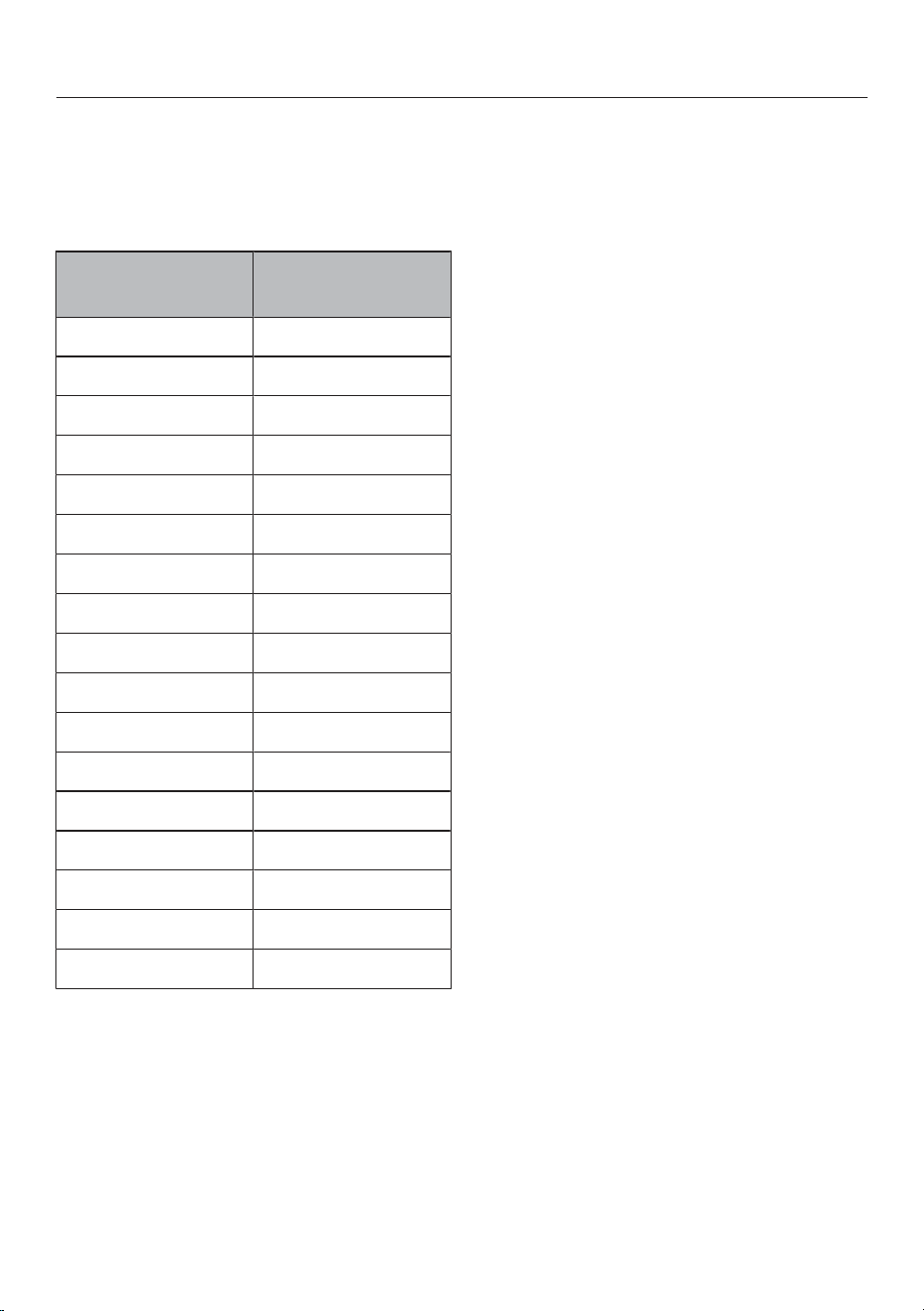
Auto heat-up
The heat-up time depends on which
continued cooking setting has been
selected:
Continued
cooking setting*
Heat-up time
[min:sec]
1approx. 0:15
1.approx. 0:15
2approx. 0:15
2.approx. 0:15
3approx. 0:25
3.approx. 0:25
4approx. 0:50
4.approx. 0:50
5approx. 2:00
5.approx. 5:50
6approx. 5:50
6.approx. 2:50
7approx. 2:50
7.approx. 2:50
8approx. 2:50
8.approx. 2:50
9–
* The continued cooking settings with a dot
after the number are only available if the
power level range has been extended (see
“Adjusting settings”).
Activating Auto heat-up
Briefly touch the cooking zone
display for the required cooking zone.
Touch the sensor for the continued
cooking setting you want until a tone
sounds and lights up in the cooking
zone display.
The symbol flashes alternately with
the selected power level in the cooking
zone display during the heat-up time
(see chart).
Deactivating Auto heat-up
Briefly touch the cooking zone
display for the required cooking zone.
Touch the continued cooking setting
you have set until goes out.
or
Set a different power level.

Operation
36
Timer
Setting timer durations
A duration of between 1minute (:)
and 9hours 59minutes (:) can be
set.
Durations of up to 59minutes are
shown in minutes (0:59) and durations
of more than 60minutes are shown in
hours and minutes.
Times are entered using the numerical
keybank and can be adjusted with the +
sensor.
Enter durations in the order of hours,
followed by minutes in tens and then
units.
Example:
59 minutes = 0:59 hours,
Enter: 5-9
80 minutes = 1:20 hours,
Enter: 1-2-0
After the first number has been entered,
the timer display will light up constantly.
After the second number has been
entered, the first number will move to
the left. After the third number has been
entered, the first and second numbers
will move to the left.
Setting the minute minder
Touch the sensor.
The timer display flashes.
Set the required duration (see “Timer
– Setting timer durations”).
Touch the sensor or wait 10seconds
to start the minute minder.
Changing the time set for the minute
minder
Touch the sensor.
The timer display flashes.
Set the required duration (see “Timer
– Setting timer durations”).
Touch the sensor or wait 10seconds
to start the minute minder.
Cancelling the minute minder
Touch the sensor.
Touch on the numerical display.

Operation
37
Setting a switch-off time
If the maximum operating time has
been reached, a cooking zone is
switched off independently of the set
switch-off time (see "Familiarising
yourself with the appliance - Safety
switch-off").
A power level for the required cooking
zone has been set.
Touch the sensor next to the
relevant cooking zone display.
The timer display and the sensor
flash.
Set the required time.
Touch the sensor or wait 10seconds
to start the switch-off time.
The switch-off time of the cooking zone
runs down and the sensor lights up
constantly.
Changing the switch-off time
Touch the sensor of the cooking
zone you wish to use.
The timer display flashes.
Set the required time.
Touch the sensor or wait 10seconds
to start the switch-off time.
The switch-off time of the cooking zone
runs down and the sensor lights up
constantly.
Deleting the switch-off time
Touch thesensor of the required
cooking zone repeatedly until
the:symbol appears in the timer
display.
or
Touch the sensor of the cooking
zone you wish to use.
The timer display flashes.
Touch the sensor on the numerical
display.
Setting multiple switch-off times
To set a switch-off time for another
cooking zone, follow the same steps
as described under "Operation -
Setting a switch-off time".
If more than one switch-off time is
programmed, the shortest time
remaining will be displayed, and the
corresponding sensor will flash. The
other sensors light up constantly.
Displaying switch-off times
If you want to show the time left for
other cooking zones in the
background, touch the sensor of
the desired cooking zone.
The rounded up time left is displayed
for the required cooking zone.

Operation
38
Using both timer functions at the
same time
If you use both functions
simultaneously, the shortest time is
always displayed. The sensor
(minute minder alarm) or the sensor
(automatic switch-off) of the cooking
zone with the shortest time pulsates.
If you want to show the time left for
another cooking zone which is
counting down in the background,
touch the or sensor for the
required cooking zone.

Operation
39
System lock
Activating the system lock
All sensors are locked. A set minute
minder time continues to count down.
Touch the sensor for 6seconds.
The seconds can be seen counting
down in the timer display. When this
time has elapsed, will appear in the
timer display. The system lock is
switched on.
If a disallowed sensor is touched while
the system lock is activated, will
appear in the timer display for few
seconds and a buzzer will sound.
The system lock can be programmed
so that it activates automatically
5minutes after the cooktop has been
switched off (see "Adjusting settings").
Deactivating the system lock
Touch the sensor for 6seconds.
will appear briefly in the timer
display and then the seconds will count
down. The system lock is deactivated
once the time has elapsed.
Safety lock
Activating the safety lock
If the safety lock is activated:
-the cooking zones and the cooktop
can only be switched off
-a set minute minder time can be
modified
Touch and hold the + and sensors
at the same time for 6seconds.
The seconds can be seen counting
down in the timer display. When this
time has elapsed, will appear in the
timer display. The safety lock is
activated.
If a disallowed sensor is touched while
the safety lock is activated, will
appear in the timer display for few
seconds and a buzzer will sound.
Deactivating the safety lock
Touch and hold the + and sensors
at the same time for 6seconds.
will appear briefly in the timer
display and then the seconds will count
down. The safety lock is deactivated
once the time has elapsed.

Operation
40
Activating Recall
Switch the cooktop on again.
Immediately after switching the
cooktop on, touch one of the flashing
cooking zone sensors.
Activating/Deactivating the
Keeping warm function
Food which has become cold cannot be
heated up again with the Keeping warm
function.
Briefly touch the cooking zone
display for the required cooking zone.
The cooking zone indicator will begin to
flash.
Touch the sensor.
Tips for keeping warm
-Only use suitable cookware (pots/
pans) for keeping food warm. Cover
the pot or pan with a lid.
-Stir firm or viscous food (mashed
potatoes, stew) occasionally.
-Nutrients are lost when food is
cooked, and continue to diminish
when food is kept warm. The longer
food is kept warm for, the greater the
loss of nutrients. Try to keep food
warm for as short a time as possible.
Cooktop data
Model number/serial number display
There must not be any cookware on
the cooktop.
Switch the cooktop on.
Press the 0 and 4sensors on the
numerical display at the same time
for 6 seconds.
Numbers will appear in the timer display
one after another, separated by a dash.
Example: (Model number
KM1234)– (Serial
number)
Display the software version
There must not be any cookware on
the cooktop.
Switch the cooktop on.
Press the 0 and 3sensors on the
numerical display at the same time
for 6 seconds.
3numbers appear in the timer display:
Example: . = Software version 123.

Operation
41
Activating/Deactivating the
demonstration mode
Switch the cooktop on.
Press the 0 and 2sensors on the
numerical display at the same time
for 6 seconds.
The following will flash in the timer
display for a few seconds:
- alternating with (Demonstration
mode activated)
or
- alternating with
(Demonstration mode deactivated)
Power level range
42
The cooktop is programmed with 9power levels at the factory. If you wish to fine-
tune a setting, you can extend the power level range to 17power levels (see
"Adjusting settings").
Power level range
Default
setting
(9 power
levels)
Extended
settings
(17 power
levels)
Melting butter
Melting chocolate
Dissolving gelatine
1–21–2.
Warming up small quantities of liquid
Keeping warm food which sticks easily
Cooking rice or porridge
Defrosting vegetables frozen in a block
2–42–3.
Warming up liquid and semi-solid food
Steaming fruit
Simmering potatoes (pans with lids)
4–63.–5.
Making omelettes or lightly fried eggs
Gently frying rissoles
Steaming fish and vegetables
Cooking dumplings and dried pulses
Defrosting and warming up frozen food
Thickening sauces, e.g. Hollandaise
Pancakes
5–74.–7.
Gently frying meat (without overheating the fat), fish, sausages,
eggs etc.
6–86–7.
Cooking potato fritters, pancakes etc.7–87–8.
Deep frying, e.g. chips98.–9
Boiling large quantities of water
Bringing to the boil
Searing large amounts of meat
9–Booster8.–Booster
These settings should only be taken as a guide. The power of the induction coils will vary
depending on the size and material of the pan. For this reason, it is possible that the
settings will need to be adjusted slightly to suit your pans. As you use the cooktop, you will
get to know which settings suit your pans best. When using new pans that you are not
familiar with, set the power level below the one specified.

Good to know
43
How induction cooktops work
An induction coil is located under each
cooking zone. The coil creates a
magnetic field that reacts directly with
the base of the pan and heats it up. The
cooking zone itself is heated up
indirectly by the heat given off by the
pan.
An induction cooktop only works when
a pan with a magnetic base is placed
on it (see "Good to know - Cookware").
Induction automatically recognises the
size of the pan.
Noises
When using an induction cooking zone,
the following noises can occur in the
pan, depending on what it is made of
and how it has been constructed:
Buzzing on the higher power levels.
This will decrease or cease altogether
when the power level is reduced.
If the pan base is made of layers of
different materials (e.g. in a sandwiched
base), it might emit a crackling sound.
Whistling might occur if linked cooking
zones (see "Operation - Booster") are
being used at the same time, and the
pans also have bases made of layers of
different materials.
You might hear a clicking sound from
the electronic switches, especially on
lower power levels.
You might hear a whirring sound when
the cooling fan switches on. It switches
on to protect the electronics when the
cooktop is being used intensively. The
fan may continue to run after the
cooktop has been switched off.

Good to know
44
Cookware
Suitable pans
-stainless steel pans with a base that
can be magnetised
-enamelled steel pans
-cast iron pans
Please be aware that the properties of
the pan base can affect the evenness
with which the food heats up (e.g. when
making pancakes). The base of the pan
must be able to distribute the heat
evenly. Cookware with a base made of
multi-layered material (sandwich or
encapsulated base) is suitable.
Unsuitable pans
-stainless steel pans with a base
which cannot be magnetised
-aluminium or copper pans
-glass, ceramic or earthenware pots
and pans
Testing cookware
To test whether a pot or pan is suitable
for use on an induction cooktop, hold a
magnet to the base of the pan in
several different places. If the magnet
sticks, the pan is generally suitable.

Good to know
45
Tips on cookware
-Position the cookware as centrally as
possible on the relevant cooking
zone/cooking area.
-To make optimum use of the cooking
zones, choose pans with a suitable
base diameter (see "Familiarising
yourself with the appliance - Cooking
zone data"). If the pan is too small, it
will not be recognised.
-Use only pots and pans with smooth
bases. Rough bases can scratch the
ceramic glass.
-Always lift the cookware to move it.
This will help prevent scratching. If
any scratches do appear as a result
of cookware being pushed around,
this will not affect the function of the
cooktop. These scratches are normal
signs of use and are not grounds for
making a complaint.
-Please note that the maximum
diameter quoted by manufacturers
often refers to the diameter of the top
rim of the pot or pan. The diameter of
the base (generally smaller) is more
important.
-Where possible, use cookware with
vertically straight sides. If a pan has
angular sides, induction also acts on
the sides of the pan. The sides of the
pan may discolour or the coating may
peel off.

Adjusting settings
46
Calling up programming mode
The cooktop is switched off.
Touch and hold the and
sensors together until the+
sensor lights up and appears in
the timer display.
After a few seconds :(Programme
01) will flash alternately with :(Code)
in the timer display.
Setting a programme
Whilst the programme is visible in the
display (e.g. :), touch the+sensor
repeatedly until the number of the
programme you want appears in the
display.
Setting the code
Whilst the code is visible in the
display (e.g. :), touch the+sensor
repeatedly until the number of the
code you want appears in the display.
How to save settings
Whilst the programme is displayed
(e.g.:), touch the sensor until
the displays go out.
How to avoid saving the
settings
Touch the sensor until the
indicators go out.
Adjusting settings
47
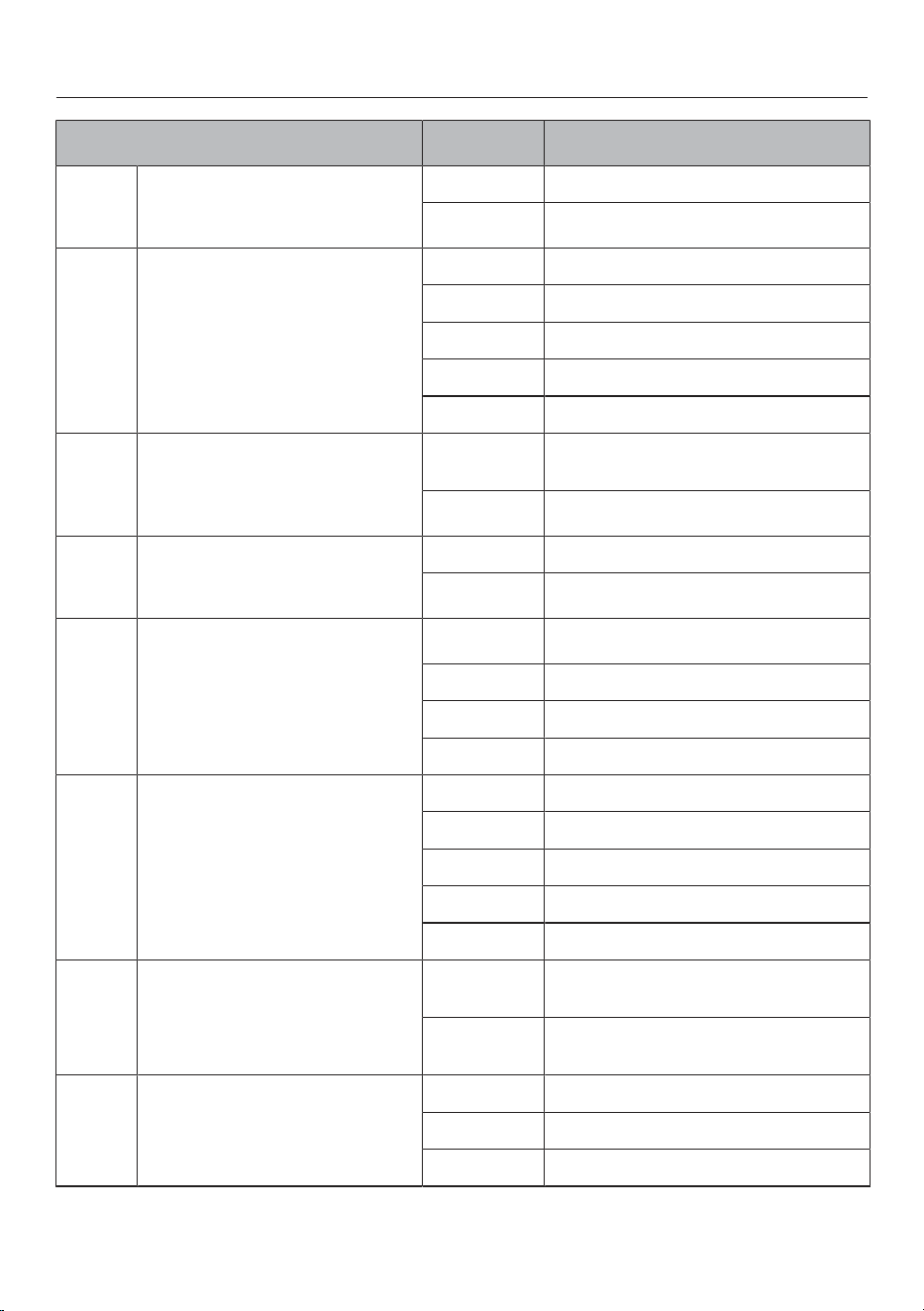
Programme
1
Code
2
Settings
1
Demonstration mode
0
Demonstration mode off
1
Demo mode on
3
2
Power management
4
0
Off
1
3680W
2
3000W
3
2000W
4
1000W
3
Factory default setting
0
Do not restore the factory default
settings
1
Restore factory default settings
4
Setting range for power levels
0
9 power levels + Booster
1
17 power levels + Booster
5
6
Confirmation tone when a
sensor control is touched
0
Off
6
1
Quiet
2
Medium
3
Loud
7
Timer signal tone
0
Off
1
Quiet
2
Medium
3
Loud
4
Maximum volume
8
System lock
0
System lock can only be activated
manually
1
Activating the system lock
automatically
9
Maximum operating time
0
Safety setting 0
1
Safety setting 1
2
Safety setting 2

Adjusting settings
48
Programme
1
Code
2
Settings
12
Sensor controls reaction speed
0
Slow
1
Normal
2
Fast
15
Permanent pan recognition
0
Permanent pan recognition off
1
Permanent pan recognition on
1)
Programmes not shown here have no allocation.
2)
The factory default setting is shown in bold.
3
After the cooktop has been switched on, appears in the timer display for a few
seconds.
4
The total output of the cooktop may be reduced in order to meet the local network
provider’s requirements.
5)
In the text and charts, the extended power levels are shown with a dot after the number.
6
The confirmation tone of the On/Offsensor cannot be switched off.

Cleaning and care
49
Safety notes on cleaning and care
Risk of burning due to hot surfaces.
All parts of the cooktop may be hot after use.
Switch the cooktop off.
Allow the cooktop to cool down before cleaning it.
All surfaces could be discoloured or damaged if unsuitable
cleaning agents are used or if residues from suitable cleaning
agents are heated on the cooktop. All surfaces are susceptible to
scratching.
Allow the surfaces to cool down before cleaning the cooktop.
Remove any residual cleaning agent immediately.
Never use abrasive sponges or cleaning agents.
Do not use a steam cleaner to clean the cooktop.
Do not use pointed objects for cleaning.

Cleaning and care
50
Cleaning interval
The entire cooktop should be cleaned
after each use.
Removing light soiling
Clean the entire ceramic surface of
the cooktop with a damp, soft cloth
and a solution of water and a little
washing-up liquid. Please follow the
cleaning agent manufacturer's
instructions.
Removing stubborn soiling
Remove any coarse soiling with a
damp cloth and more stubborn
soiling with a glass scraper.
Clean the glass ceramic surface with
the Miele ceramic and stainless steel
cooktop cleaner (see “Optional
accessories – Cleaning and care
products”) or with a proprietary
ceramic glass cleaner. Please follow
the cleaning agent manufacturer's
instructions.
Finishing the cleaning process
Remove all cleaning agent residues
with a damp cleaning cloth.
Dry the ceramic glass surface of the
cooktop after cleaning.
Unsuitable cleaning agents
To avoid damaging the surfaces of the
appliance, do not use:
-cleaning agents containing soda,
alkalines, ammonia, acids or
chlorides
-stain and rust removers
-abrasive cleaning agents, e.g.
powder cleaners and cream cleaners
-solvent-based cleaning agents
-dishwasher cleaners
-grill and oven cleaners
-hard, abrasive brushes or sponges
(e.g. pot scourers), or sponges which
have been previously used and still
contain abrasive cleaning agents
-dirt eraser sponges
-sponges

Problem solving guide
51
Messages in the display
ProblemPossible cause and remedy
In the cooking zone
display, thesymbol
lights up or flashes
alternately with the
selected power level
or.
No cookware is present on the cooking zone.
Unsuitable cookware is present on the cooking zone.
The base diameter of the cookware used is too small.
Suitable cookware has been removed from the
cooking zone.
If no pan or an unsuitable pan is placed on the
cooking zone, the cooking zone will switch off
automatically after 3minutes.
Place a suitable item of cookware on the cooking
zone within 3minutes.
goes out. The cooking process is started/continued
with the previously selected settings.
If you are using a different item of cookware and/or
food, modify the settings.
After the cooktop has
been switched on, or
after touching a sensor,
appears in the timer
display for a few
seconds.
The system lock is switched on.
Deactivate the system lock (see "Operation -
Deactivating the system lock").
The safety lock is activated.
Deactivate the safety lock (see "Operation -
Deactivating the safety lock").
After the cooktop has
been switched on,
appears in the timer
display for a few
seconds. The cooking
zones do not heat up.
The cooktop is in demonstration mode.
Touch the and sensors at the same time
until flashes alternately with in the timer
display.
flashes in the
timer display and
the cooktop
switches off
automatically.
One or more of the sensors are covered, e.g. by
finger contact, food boiling over, or an object.
Clean off any dirt and/or remove the object (see
"Familiarising yourself with the appliance - Safety
switch-off").

Problem solving guide
52
ProblemPossible cause and remedy
flashes alternately
with in the timer
display.
The overheating protection mechanism has been
activated.
Allow the cooktop to cool down.
Remove the cause of the overheating (see
"Familiarising yourself with the appliance -
Overheating protection").
Check that the cooktop works.
If this fault code continues to appear in the
display, contact Miele.
flashes alternately
with, or in
the timer display.
The fan is blocked or defective.
Make sure the fan has not been blocked by an
object.
Remove the obstruction.
If this fault code continues to appear in the
display, contact Miele.
A message not listed in
this table is appearing
in the timer display.
There is an electronic unit fault.
Interrupt the power supply to the cooktop for
approx. 1minute.
If the problem persists after power is restored,
please contact Miele.

Problem solving guide
53
Unexpected behaviour
ProblemPossible cause and remedy
The sensor switches
show increased
sensitivity or fail to
react.
The sensitivity level of the sensor switches has
changed.
Make sure that there is no direct light (from the sun
or from an artificial source) falling onto the
cooktop. The area surrounding the cooktop must
not be too dark.
Make sure that there is nothing covering the
sensors or the cooktop.
Take any pans off the cooktop and wipe away any
food deposits.
Interrupt the power supply to the cooktop for
approx. 1minute.
If the problem persists after power is restored,
please contact Miele.
Power level9 is
automatically reduced if
you also set power
level9 for the
connected cooking
zone.
Operating both zones at power level9 exceeds the
permitted maximum power for the two zones.
Use a different cooking zone.
A cooking zone
switches itself off
automatically.
It has been operated for too long.
You can use the cooking zone again by switching
it back on (see "Familiarising yourself with the
appliance - Safety switch-off").
The cooking zone is not
working in the usual
way on the power level
selected.
The overheating protection mechanism has been
activated.
Allow the cooktop to cool down.
Remove the cause of the overheating (see
"Familiarising yourself with the appliance -
Overheating protection").
Check that the cooktop works.
If the problem occurs again, contact Miele.

Problem solving guide
54
ProblemPossible cause and remedy
A cooking zone or the
whole cooktop switches
off automatically.
The overheating protection mechanism has been
activated.
Allow the cooktop to cool down.
Remove the cause of the overheating (see
"Familiarising yourself with the appliance -
Overheating protection").
Check that the cooktop works.
If the problem occurs again, contact Miele.
The Booster has
automatically switched
off early.
The overheating protection mechanism has been
activated.
Allow the cooktop to cool down.
Remove the cause of the overheating (see
"Familiarising yourself with the appliance -
Overheating protection").
Check that the cooktop works.
If the problem occurs again, contact Miele.

Problem solving guide
55
Unsatisfactory results
ProblemPossible cause and remedy
The food in the pan
hardly heats up or does
not heat up at all when
the Auto heat-up
function is switched on.
There is too much food in the pan.
Start cooking at the highest power level and then
turn down to a lower one manually later on.
The pan is not conducting heat properly.
Use a different pan which is better able to conduct
heat.
General problems or technical faults
ProblemPossible cause and remedy
The cooktop or cooking
zones do not switch on.
There is no power to the cooktop.
Check if the circuit breaker has tripped. Contact
an electrician or Miele (for the minimum fuse
rating, see data plate).
There may be a technical fault.
Disconnect the cooktop from the mains electricity
supply for approx. 1 minute. To do this:
–switch off at the wall socket and withdraw the
plug, or
–switch off at the residual current device.
If, after switching the circuit breaker or residual
current device back on, the appliance will still not
switch on, contact a qualified electrician or Miele.
A smell and vapours are
given off when the new
appliance is being used.
The metal components have a protective coating.
When the appliance is used for the first time, this
causes a smell and possibly also vapour. The
material from which the induction coils are made also
gives off a smell in the first few hours of operation.
This smell will be less noticeable with each
subsequent use before dissipating completely. The
smell and any vapours given off do not indicate a
faulty connection or appliance and they are not
hazardous to health.
A noise can be heard
after the appliance is
switched off.
The fan will continue running until the cooktop has
cooled down. It will then switch itself off
automatically.

Service
56
You can find information on how to remedy faults yourself and about Miele spare
parts at www.miele.com.au/service or www.miele.co.nz/service.
Contact in case of fault
In the event of a fault which you cannot remedy yourself, please contact Miele.
You can book a Miele customer service call-out online at www.miele.com.au/
service or www.miele.co.nz/service.
Contact information for Miele can be found at the end of this booklet.
Please quote the model and serial number of your appliance (SN) when contacting
Miele. These can be found on the data plate or see “Operation – Cooktop data”.
Data plate
Adhere the extra data plate stating the model number supplied with the appliance
in the space below. Make sure that the model number matches the one specified
on the back cover of these operating and installation instructions.
Warranty
The manufacturer's warranty for this appliance is 2years.
For further information, please refer to your warranty booklet.

Optional accessories
57
Cookware
Miele offers a large selection of
cookware for purchase. These have all
been optimised in terms of functionality
and dimensions for Miele appliances.
Detailed information can be found on
the Miele website.
Cleaning and care products
Miele ceramic and stainless steel
cooktop cleaner 250ml
Removes heavy soiling, limescale
deposits, and aluminium residues.
Original Miele all purpose microfibre
cloth
Removes finger marks and light soiling.

Installation
*INSTALLATION*
58
Safety instructions for installation
Damage from falling objects.
Take care not to damage the cooktop when fitting wall units or a
rangehood above it.
Fit the wall units and the rangehood before the cooktop.
Dismantling the cooktop for service purposes may damage the
sealing strip underneath the edge of the cooktop.
Always replace the sealing strip before reinstalling the cooktop.
The cooktop must not be installed over a fridge, fridge-freezer,
freezer, dishwasher, washing machine, washer-dryer or tumble dryer.
This cooktop must not be installed above a cooker or oven unless
it has a built-in cooling fan.
After installation, ensure that nothing can come into contact with
the connection cable and that it is without hindrance.
The connection cable may not come into contact with any moving
kitchen component (e.g. a drawer) or be subject to mechanical
obstruction which could damage it.
The veneer or laminate coatings of worktops (or adjacent kitchen
units) must be treated with 100°C heat-resistant adhesive which will
not dissolve or distort. Any splashbacks must be of heat-resistant
material.
Remember to maintain the minimum safety distances (see
“Installation – Safety distances”).
Installation
*INSTALLATION*
59
Additional installation instructions for surface-mounted installation
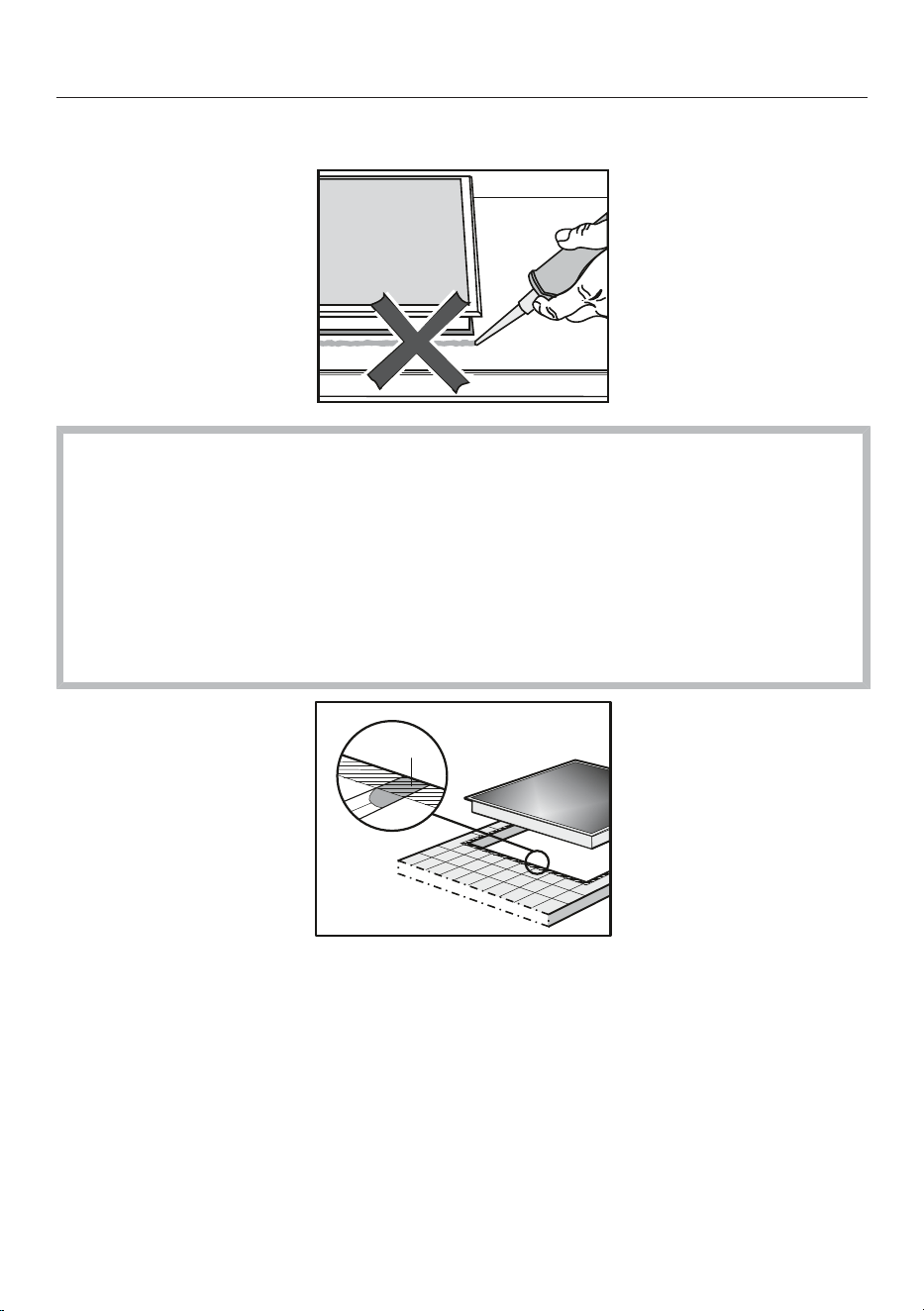
Damage caused by incorrect installation.
Using sealant under the cooktop could result in damage to the
cooktop and the worktop if the cooktop ever needs to be removed
for servicing.
Do not use sealant between the cooktop and the worktop.
The sealing strip under the edge of the cooktop provides a
sufficient seal for the worktop.
a
Grout lines and the hatched area underneath the cooktop
frame must be smooth and even. If they are not, the cooktop will not
sit flush with the worktop and the sealing strip underneath the
cooktop will not provide a good seal between the cooktop and the
worktop.

Installation
*INSTALLATION*
60
Additional installation instructions for flush-fit installation
Damage caused by unsuitable sealant.
Unsuitable sealant can damage natural stone.
For natural stone worktops and natural stone tiles, only use
silicone sealant that is specially formulated for natural stone.
Please follow the manufacturer's instructions.
The internal width of the base unit underneath the appliance must
be at least as wide as the internal cut-out width of the worktop (see
"Installation - Installation dimensions - flush-fit"). This is to ensure
that the cooktop is easily accessible from underneath after
installation and the bottom half of the casing can be removed for
maintenance. If the underside of the cooktop is not freely accessible
after installation, any sealant used to plug the gaps around the
appliance must be removed to enable the cooktop to be lifted out of
the cut-out should this be necessary.
A flush-fit cooktop is suitable only for installation in natural stone
(granite, marble), solid wood and tiled worktops. When using a
worktop made from any other material, please check first with the
worktop manufacturer that it is suitable for installing a flush-fit
cooktop.
-Natural stone worktops: the cooktop is placed directly in the cut-
out.
-Solid wood, tiled worktops: the cooktop is placed on a wooden
frame inside the cut-out. The frame must be provided on site and
is not supplied with the appliance.
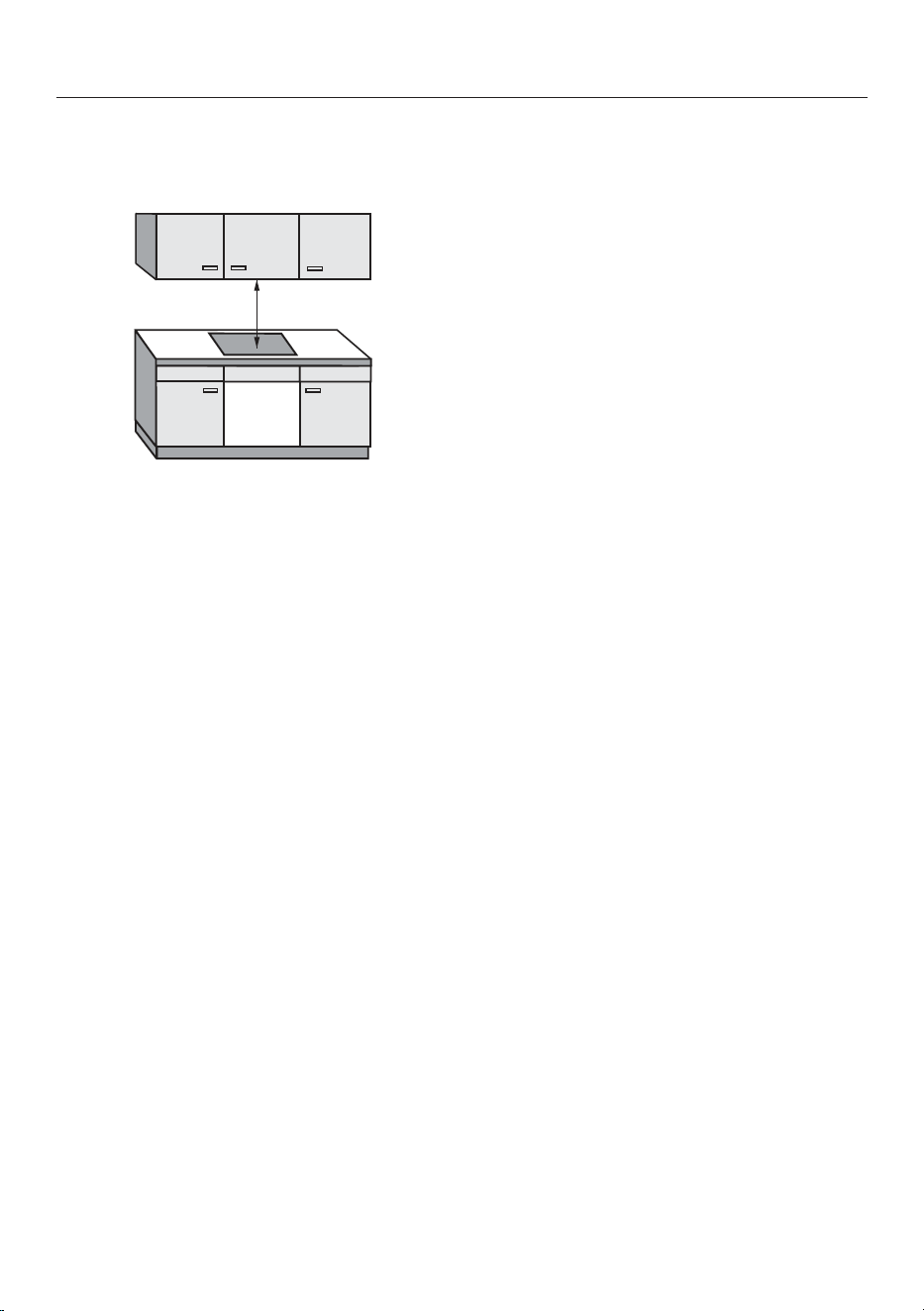
Installation
*INSTALLATION*
61
Safety distances
Safety distance above the cooktop
The safety distance specified by the
manufacturer of the rangehood must be
maintained between the cooktop and
the rangehood above it.
When two or more appliances which
have different safety distances are
installed together below a rangehood,
the greatest safety distance required
must be observed.
For any flammable objects, e.g. utensil
rails, wall units etc., a minimum safety
distance of 500mm must be
maintained between these objects and
the highest part of the cooktop below.
Safety distances to the sides and
back of the cooktop
The following minimum distances must
be maintained to a tall unit or wall:
-Distance between the back edge of
the cooktop and the rear edge of the
worktop:
50mm
and
-Distance between the right edge of
the cooktop and the closest adjacent
piece of furniture (e.g. tall unit) or a
room wall:
50mm and on the opposite side a
minimum distance of 200mm
or
-Distance between the left edge of
the cooktop and the closest adjacent
piece of furniture (e.g. tall unit) or a
room wall:
50mm and on the opposite side a
minimum distance of 200mm
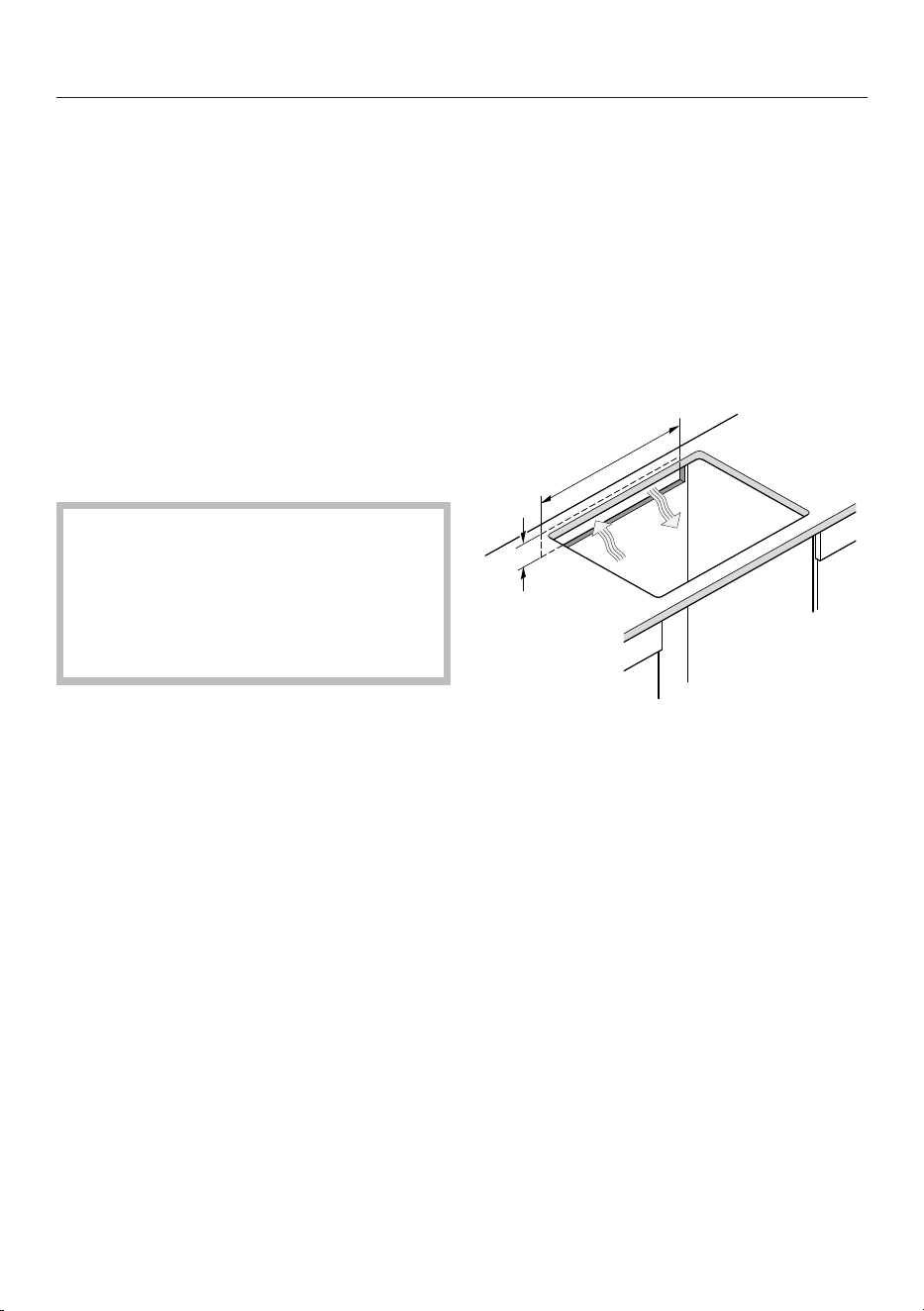
Installation
*INSTALLATION*
62
Minimum safety distance underneath
the cooktop
To install the cooktop while maintaining
the minimum safety distances, you can
choose from 3variants:
1. Without intermediate shelf or base
panel
2. With intermediate shelf
3. With an air intake-optimised base
panel
Further instructions are described in the
relevant section.
An air intake-optimised base panel
and an intermediate shelf cannot be
combined.
If they are combined, more warm air
is drawn in. The cooktop is not
adequately cooled.
Rear wall cut-out
For ventilation and accommodating
the mains connection cable, we
recommend creating a cut-out in the
rear wall.
The dimensions in brackets are
recommendations.
Create a cut-out in the rear wall using
the following instructions:
(≥ 45 mm)
(
≥
5
5
0
m
m
)
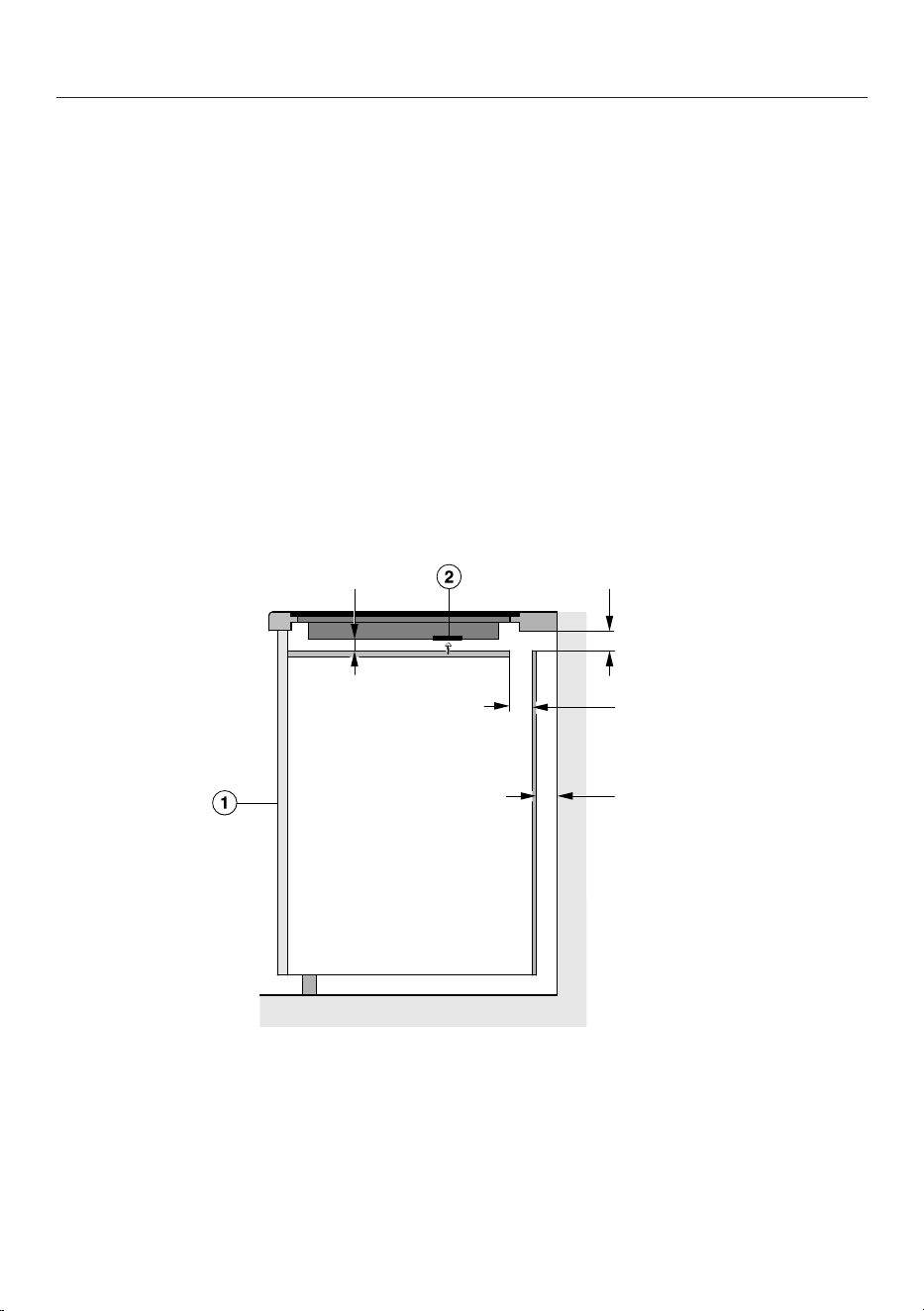
Installation
*INSTALLATION*
63
1. Without intermediate shelf or base panel
To ensure sufficient ventilation to the cooktop, a minimum safety distance must be
left between the underside of the cooktop and any drawer or oven.
The minimum safety distance between the underside
1
of the cooktop and
-Upper edge of drawer: ≥ 5 mm
-Base of drawer: ≥ 75 mm
-Upper edge of oven: ≥ 15 mm
1
The underside is the outside of the cooktop casing. Other items that are attached
lower down, such as connection boxes and spacer plates, do not count as the
lowest point and are not relevant when calculating the minimum safety distance.
2. Intermediate shelf
The dimensions in brackets are recommendations.
≥ 15 mm (≥ 45 mm)
≥ 15 mm
(≥ 20 mm)
Side view
a
Front
b
Fan
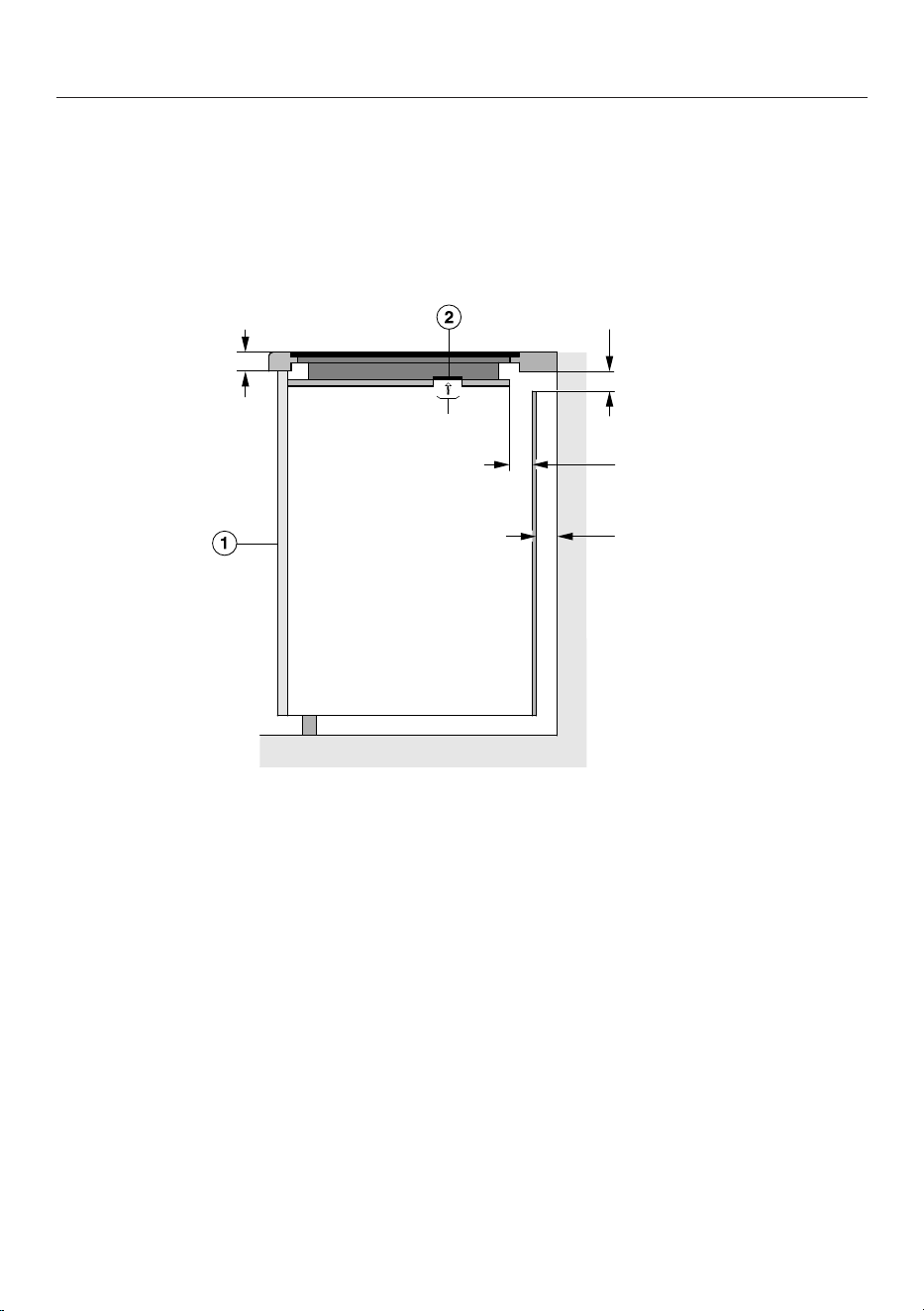
Installation
*INSTALLATION*
64
3. Air intake-optimised base panel
The performance of the cooktop depends on the ventilation.
The air intake-optimised base panel has openings where the fans are positioned.
This section contains instructions for creating an air intake-optimised base panel.
The dimensions in brackets are recommendations.
≤ 40 mm
(≥ 45 mm)
≥ 15 mm
(≥ 20 mm)
Ø 55–70 mm
Side view
a
Front
b
Fan
To ensure sufficient ventilation to the cooktop, a minimum safety distance must be
left between the underside of the air intake-optimised base panel and any drawer.
Minimum safety distance between the underside of the air intake-optimised
base panel to the:
-Upper edge of drawer: ≥ 5 mm
-Base of drawer: ≥ 75 mm
-Upper edge of intermediate shelf: not permitted
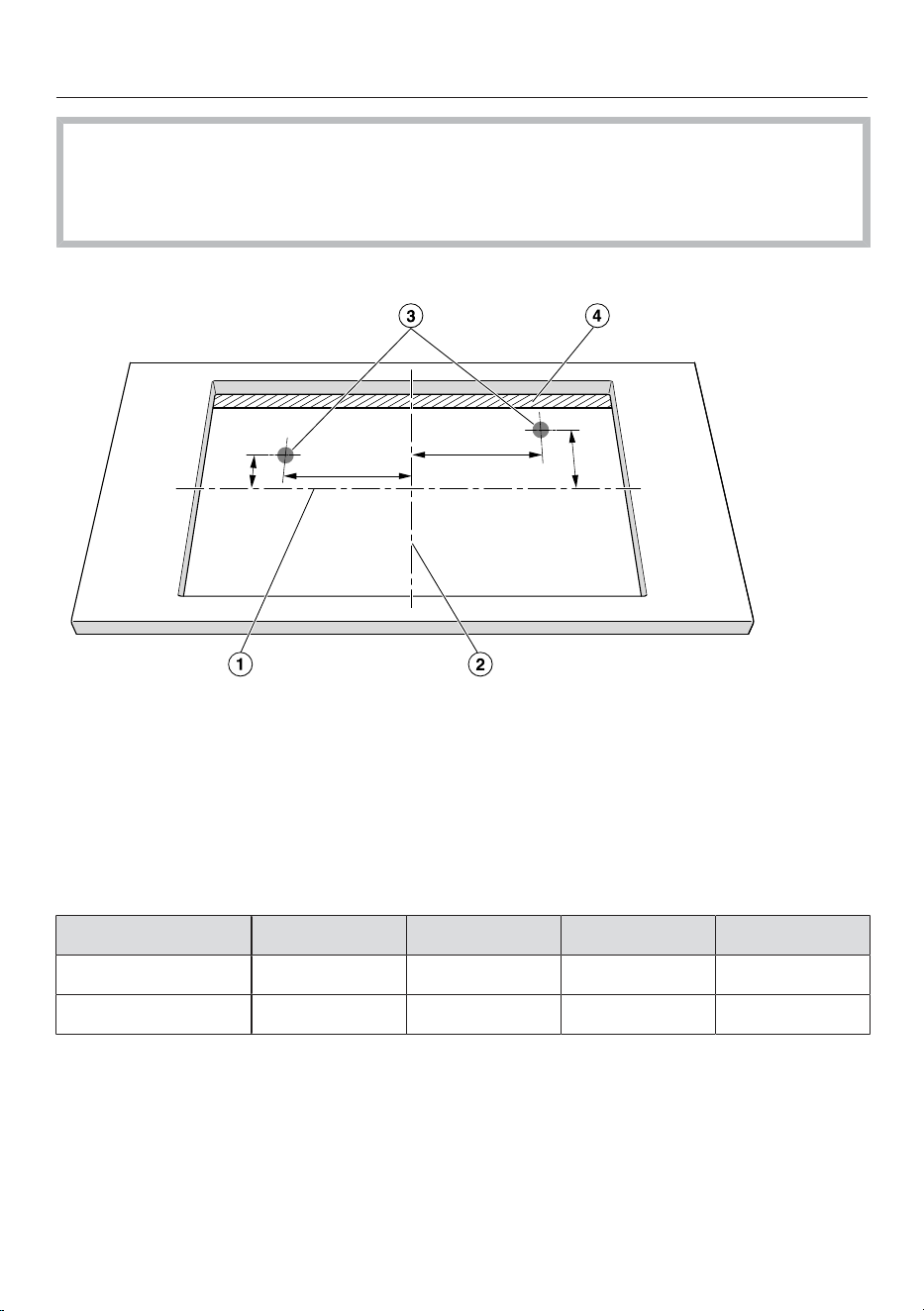
Installation
*INSTALLATION*
65
There must be no gap between the air intake-optimised base panel and the
cooktop.
A gap causes more warm air to be drawn in. The cooktop is not adequately
cooled.
Positions and cut-outs of the ventilation openings
Y1.1
X1.1
X2.1
Y2.1
Not to scale. View from above. Surface-mounted cut-out shown.
Also applies to flush-fit installation.
a
Middle of the cut-out width
b
Middle of the cut-out length
c
Fan cut-out, round (Ø 55–70 mm)
d
Gap (≥ 15 mm)
X1.1 (in mm)Y1.1 (in mm)X2.1 (in mm)Y2.1 (in mm)
KM7220FR/FL197018449
KM7221FR/FL197018449
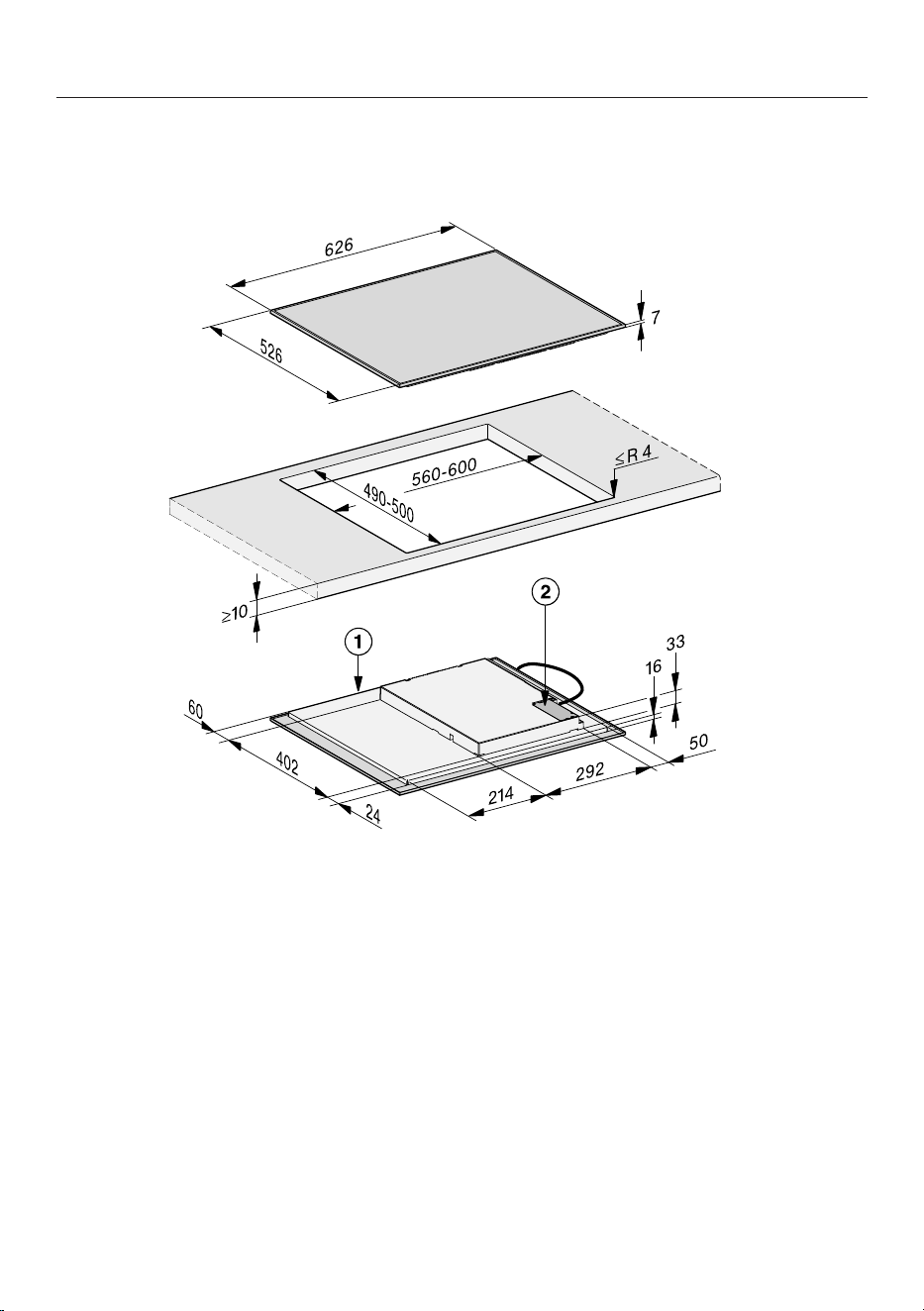
Installation
*INSTALLATION*
66
Installation dimensions for surface-mounted cooktops
KM7220FR,KM7221FR
All dimensions are given in mm.
a
Front
b
Mains connection box with mains connection cable,
L=2,000mm
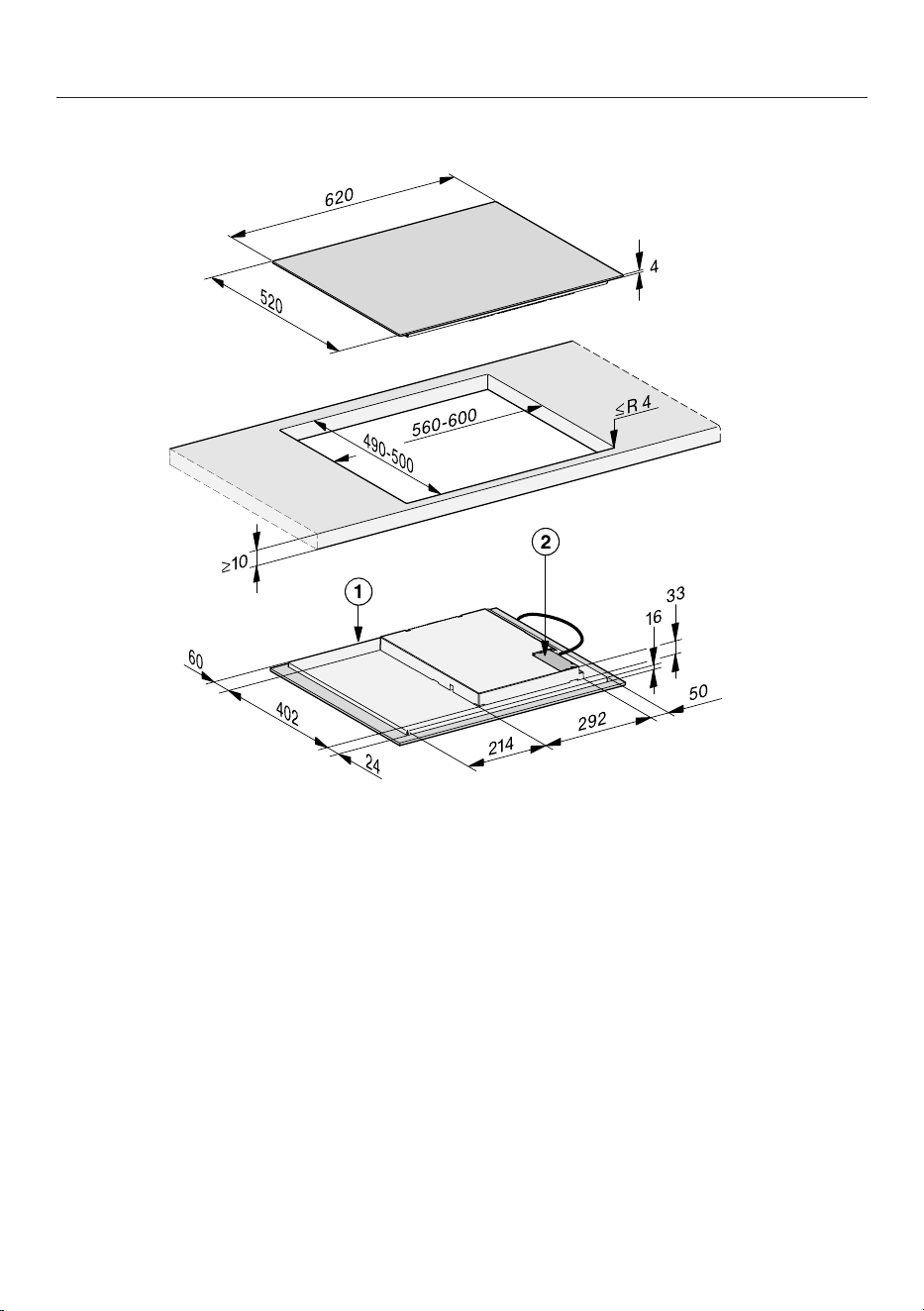
Installation
*INSTALLATION*
67
KM 7220 FL
All dimensions are given in mm.
a
Front
b
Mains connection box with mains connection cable,
L=2,000mm
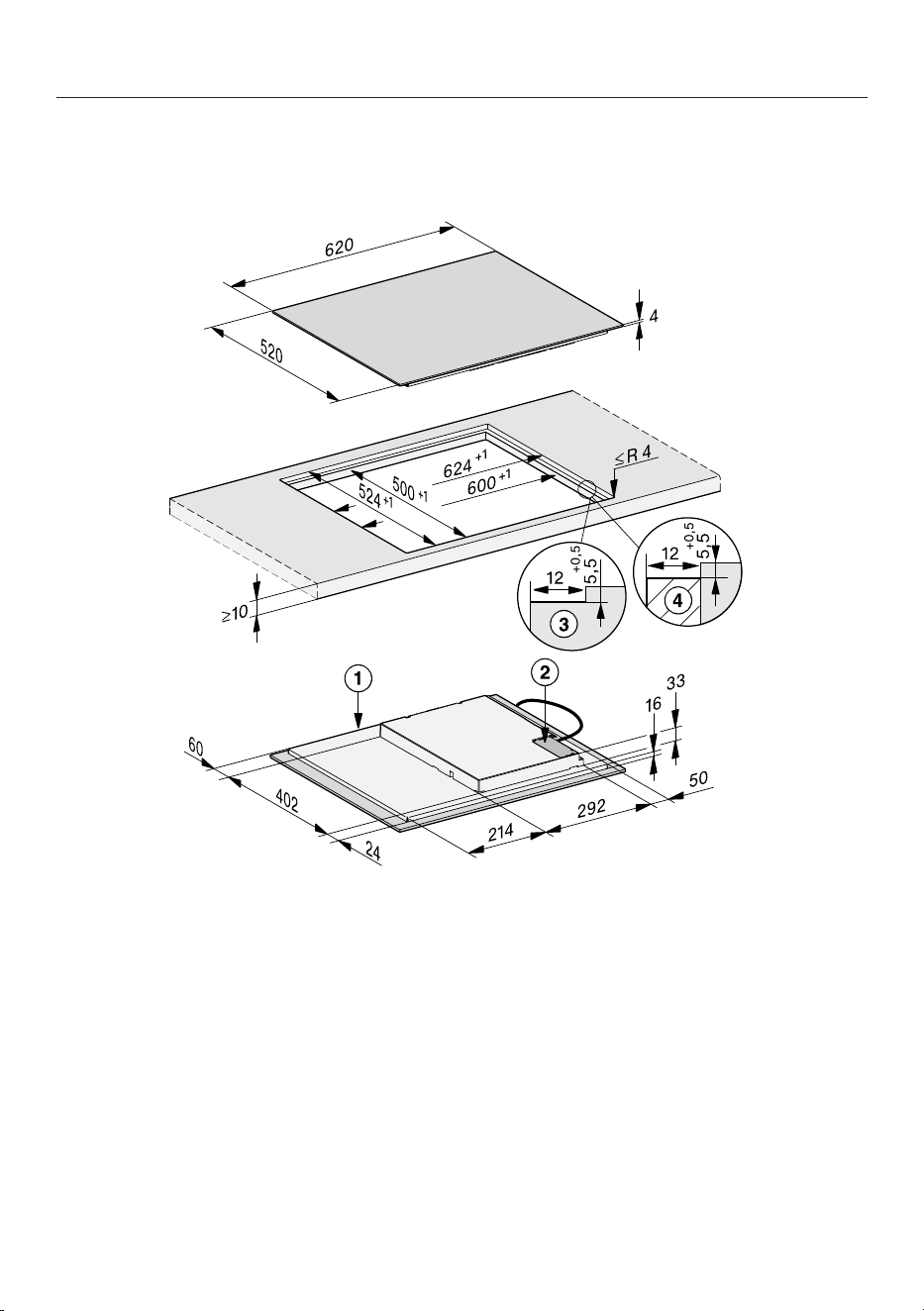
Installation
*INSTALLATION*
68
Installation dimensions for flush-fit cooktops
KM 7220 FL
All dimensions are given in mm.
a
Front
b
Mains connection box with mains connection cable,
L=2,000mm
c
Stepped cut-out, natural stone worktop
d
Wooden strip 12mm (not supplied)

Installation
*INSTALLATION*
69
Installing the surface-mounted
cooktop
Create the worktop cut-out.
Remember to maintain the minimum
safety distances (see “Installation –
Safety distances”).
Seal the cut surfaces of wooden
worktops with a suitable sealant to
avoid swelling caused by moisture.
The sealant must be heat-resistant.
Make sure the sealant does not
come into contact with the top
surface of the worktop.
Attach the sealing strip provided
underneath the edge of the cooktop.
Do not apply the sealing strip under
tension.
Feed the mains connection cable for
the cooktop down through the
worktop cut-out.
Place the cooktop centrally in the
cut-out. When doing this, make sure
that the seal of the appliance sits
flush with the worktop on all sides.
This is important to ensure an
effective seal with the worktop.
If the seal does not meet the worktop
correctly on the corners, the corner
radius (≤ R4) can be carefully scribed
to suit.
If a base panel optimised for air
intake has been installed, position the
cooktop so that the fans sit above the
cut-outs.
Connect the cooktop to the mains
electricity supply (see "Installation –
Electrical connection").
Check that the cooktop works.

Installation
*INSTALLATION*
70
Installing the cooktop flush
with the worktop
Create the worktop cut-out.
Remember to maintain the minimum
safety distances (see “Installation –
Safety distances”).
Solid wood, tiled and glass worktops:
Fix a wooden frame 5.5mm below
the top edge of the worktop.
Attach the sealing strip provided
underneath the edge of the cooktop.
Do not apply the sealing strip under
tension.
Feed the mains connection cable
down through the worktop cut-out.
The gap between the ceramic glass
surface and the worktop must be at
least 2mm wide. This is required so
that the cooktop can be sealed.
Centre the cooktop in the cut-out.
If a base panel optimised for air
intake has been installed, position the
cooktop so that the fans sit above the
cut-outs.
Connect the cooktop to the mains
electricity supply (see "Installation –
Electrical connection").
Check that the cooktop works.
Seal the gap between the cooktop
and worktop with a silicone sealant
that is heat-resistant to at least
160°C.

Installation
*INSTALLATION*
71
Electrical connection
The cooktop is supplied with a mains
connection cable with moulded plug
ready for connection to a suitable
earthed socket.
The socket should be easily accessible
after the cooktop has been installed. If
the socket is not easily accessible,
ensure that a suitable means of
disconnection is provided on the
installation side for each pole.
Risk of fire from overheating.
Connecting the cooktop to multi-
socket adapters or extension cables
can overload the cables.
For safety reasons, do not use an
extension cable or multi-socket
adapter.
Risk of damage from incorrect
connection. Incorrect installation,
maintenance and repairs can be
dangerous to users. Miele cannot be
held liable for damage or injury (e.g.
electric shock) caused by unauthorised
installation, maintenance or repair work,
or by an inadequate or faulty on-site
earthing system.
All electrical work must be carried out
by a suitably qualified and competent
person in strict accordance with
national and local safety regulations.
For safety reasons, we recommend
using a suitable residual current device
(RCD) in the relevant electrical
installation for connecting the cooktop.
If the mains connection cable is
damaged, it must only be replaced with
a specific mains connection cable of
the same type (available from Miele).
For safety reasons, such replacement
may only be carried out by a suitably
qualified and competent electrician or a
Miele authorised service technician, in
order to avoid a hazard.
The data plate indicates the nominal
power consumption and the connection
data. Compare this information with the
data of the on-site electrical
connection. If in any doubt, consult a
qualified electrician.
Temporary or permanent operation with
a self-sufficient or non-mains
synchronous energy supply system
(e.g. isolated networks, back-up
systems) is possible. A requirement for
the operation is that the energy supply
system complies with all current local
and national requirements that apply to
stand-alone, solar and/or battery
systems.
The protective measures provided in
the domestic installation and in this
Miele product must also be assured in
their function and operation in isolated
operation or in non-mains synchronous
operation, or replaced with equivalent
measures in the installation.




Miele Australia Pty. Ltd.
Miele New Zealand Limited
Miele Global Headquarters
Germany
Miele & Cie. KG
Carl-Miele-Straße 29
33332 Gütersloh
Federal Republic of Germany
IRD 98 463 631
8 College Hill
Freemans Bay, Auckland 1011
ACN 005 635 398
ABN 96 005 635 398
Level 4, 141 Camberwell Road
Hawthorn East, VIC 3123
0800 464 353 (0800 4 MIELE)
www.miele.co.nz
1300 464 353 (1300 4 MIELE)
www.miele.com.au

M.-Nr. 12 470 940 / 00en-AU, NZ
KM 7220 FR, KM 7220 FL, KM 7221 FR