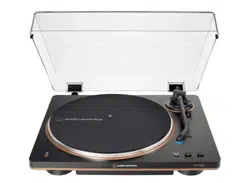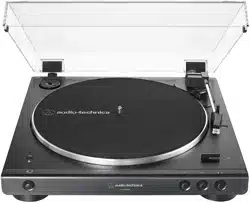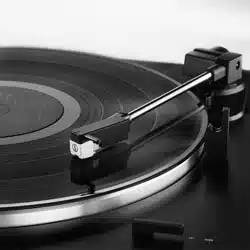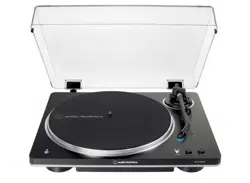

AT-LP70XBT
Automatic Wireless Turntable
User Manual
English

1
Introduction
This product can be used only in the countries where the product is sold. Make sure that the operating voltage and the
plug of AC adapter of the product are correct for the country you live in.

2
Safety precautions
Although this product was designed to be used safely, failing to use it correctly may result in an accident. To ensure
safety, observe all warnings and cautions while using the product.
Important information
Warning
To prevent fire or shock hazard, do not expose this apparatus to rain or moisture.
Caution
Do not expose this apparatus to drips or splashes.
To avoid electric shock, do not open the cabinet.
Refer servicing to qualified personnel only.
Do not expose this apparatus to excessive heat such as sunshine, fire or the like.
Do not subject this apparatus to strong impact.
This apparatus should be located close enough to the AC outlet so that you can easily grasp the AC adapter at any
time.
In case of emergency, disconnect the AC adapter quickly.
Do not place any objects filled with liquids, such as vases, on this apparatus.
To prevent fire, do not place any naked flame sources (such as lighted candles) on this apparatus.
Do not install this apparatus in a confined space such as a bookcase or similar unit.
Install this apparatus only in the place where ventilation is good.
The rating label is put on the bottom of this apparatus.
For customers in the USA
FCC Notice
Warning
This device complies with Part 15 of the FCC Rules. Operation is subject to the following two conditions: (1) This device
may not cause harmful interference, and (2) this device must accept any interference received, including interference
that may cause undesired operation.
Caution
You are cautioned that any changes or modifications not expressly approved in this manual could void your authority to
operate this equipment.

Safety precautions
3
Note: This equipment has been tested and found to comply with the limits for a Class B digital device, pursuant to part
15 of the FCC Rules. These limits are designed to provide reasonable protection against harmful interference in a
residential installation. This equipment generates, uses and can radiate radio frequency energy and, if not installed and
used in accordance with the instructions, may cause harmful interference to radio communications. However, there is
no guarantee that interference will not occur in a particular installation. If this equipment does cause harmful
interference to radio or television reception, which can be determined by turning the equipment off and on, the user is
encouraged to try to correct the interference by one or more of the following measures:
– Reorient or relocate the receiving antenna.
– Increase the separation between the equipment and receiver.
– Connect the equipment into an outlet on a circuit different from that to which the receiver is connected.
– Consult the dealer or an experienced radio/TV technician for help.
This transmitter must not be co-located or operated in conjunction with any other antenna or transmitter used in other
systems.
RF Exposure Statement
This device complies with FCC radiation exposure limits set forth for an uncontrolled environment and meets the FCC
radio frequency (RF) Exposure Guidelines. This equipment has very low levels of RF energy that it deemed to comply
without maximum permissive exposure evaluation. (MPE). But it is desirable that it should be installed and operated
keeping the radiator at least 20 cm or more away from person’s body.
Contact
Responsible Company: Audio-Technica U.S., Inc.
Address: 1221 Commerce Drive, Stow, Ohio 44224, USA
Tel: 330-686-2600
For customers in Canada
ISED statement
CAN ICES-003 (B)/NMB-003(B)
This device contains licence-exempt transmitter(s)/receiver(s) that comply with Innovation, Science and Economic
Development Canada’s licence-exempt RSS(s). Operation is subject to the following two conditions:
1. This device may not cause interference.
2. This device must accept any interference, including interference that may cause undesired operation of the device.
This device complies with RSS-102 radiation exposure limits set forth for an uncontrolled environment.
This equipment should be installed and operated with minimum distance of 20 cm between the radiator and your body.

4
Notes on use
Turntable body
Do not set and use the product in locations that are considerably hot or humid, dirty, or subject to extreme vibrations.
The product should be positioned on a flat, level surface.
When opening or closing the dust cover, do so slowly. When closing the dust cover, close it completely.
Be sure to read the user manual of the Bluetooth device before connecting the Bluetooth device to the product.
Replacement stylus
The stylus is extremely delicate. Handle with care.
To protect the stylus, attach the provided protector to the replacement stylus when the product is not in use.
Do not touch the stylus with your finger.
Do not hit or drop the stylus against the platter, felt mat, or record edges.
Be sure to attach the protector before placing the replacement stylus on the floor or a desk. Do not place the stylus
against the floor or a desk. Doing so could damage, chip, or break the stylus.
The replacement stylus for this product is not intended for DJs. Do not operate the product in any way that may
damage the stylus, such as scratching (rubbing the record on the turntable by hand to produce sound).
Do not apply lateral force to the stylus while it is on the record. Doing so could damage, chip, or break the stylus tip.
The record could also be damaged.
5
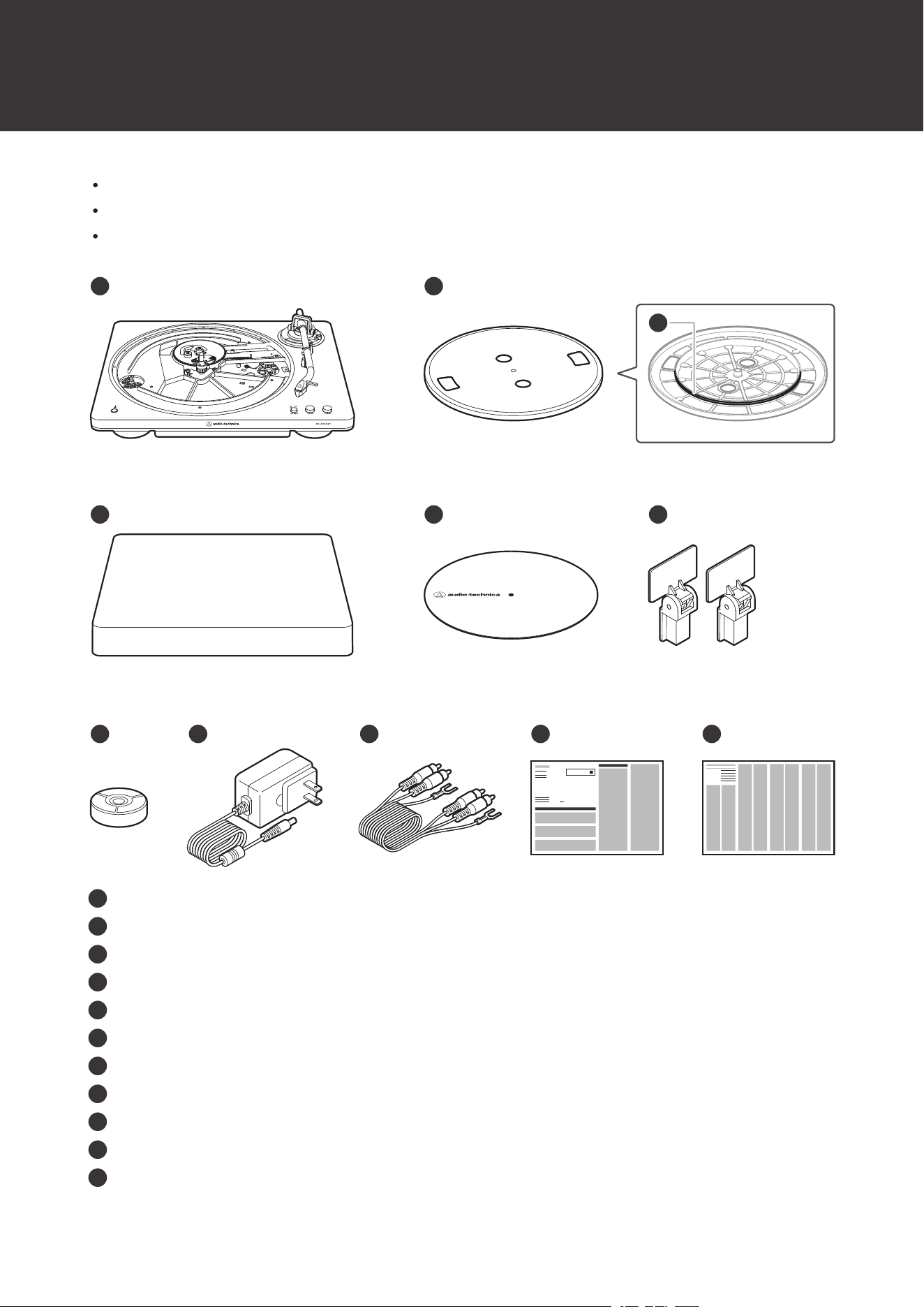
Package contents
Make sure that you have all the included items before using this product.
If some items are missing or damaged, contact your local Audio-Technica dealer.
After purchase, we suggest that you save all packaging materials for possible future storage, moving, or shipping.
1
8
9
10
7
6
4
5
2
11
3
1
Turntable body
2
Platter
3
Drive belt
4
Dust cover
5
Felt mat
6
Dust cover hinges
7
45 RPM adapter
8
AC Adapter
9
RCA audio cable (Approx. 1.0 m (3.3'))
10
Quick Start Guide
11
Caution Guide
6
Part names and functions
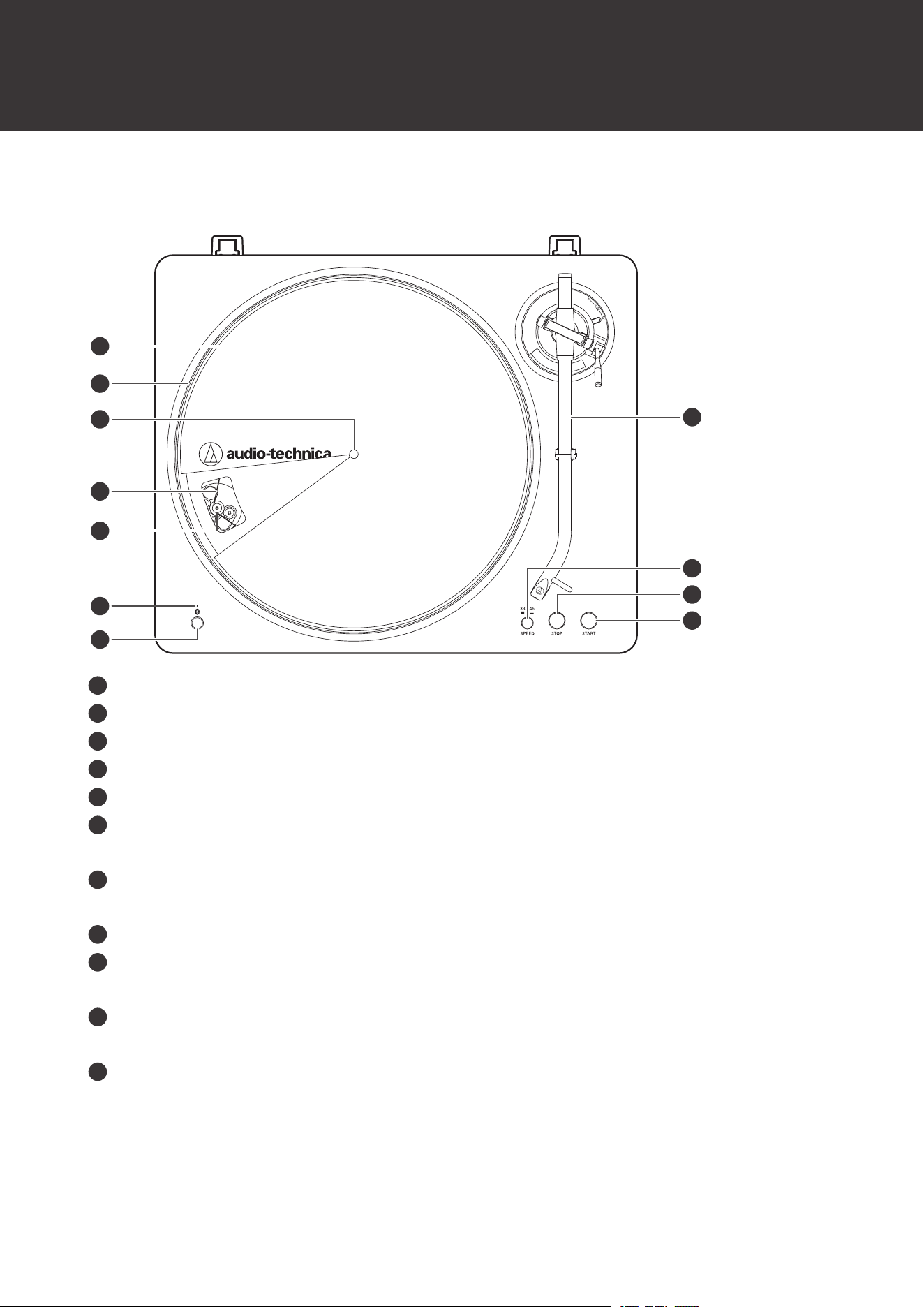
Top view
8
9
5
4
6
7
2
3
1
10
11
1
Felt mat
2
Platter
3
Spindle
4
Drive belt
5
Motor pulley (brass-colored)
6
Bluetooth indicator lamp
Flashes or lights up to display the Bluetooth connection status.
7
Bluetooth connect button
Used to connect the product with Bluetooth devices.
8
Tonearm
9
Platter speed button
Select the platter speed (33-1/3 or 45 RPM).
10
STOP button
Returns the tonearm to its original position and stops the platter.
11
START button
Spins the platter and moves the tonearm.
Part names and functions
7
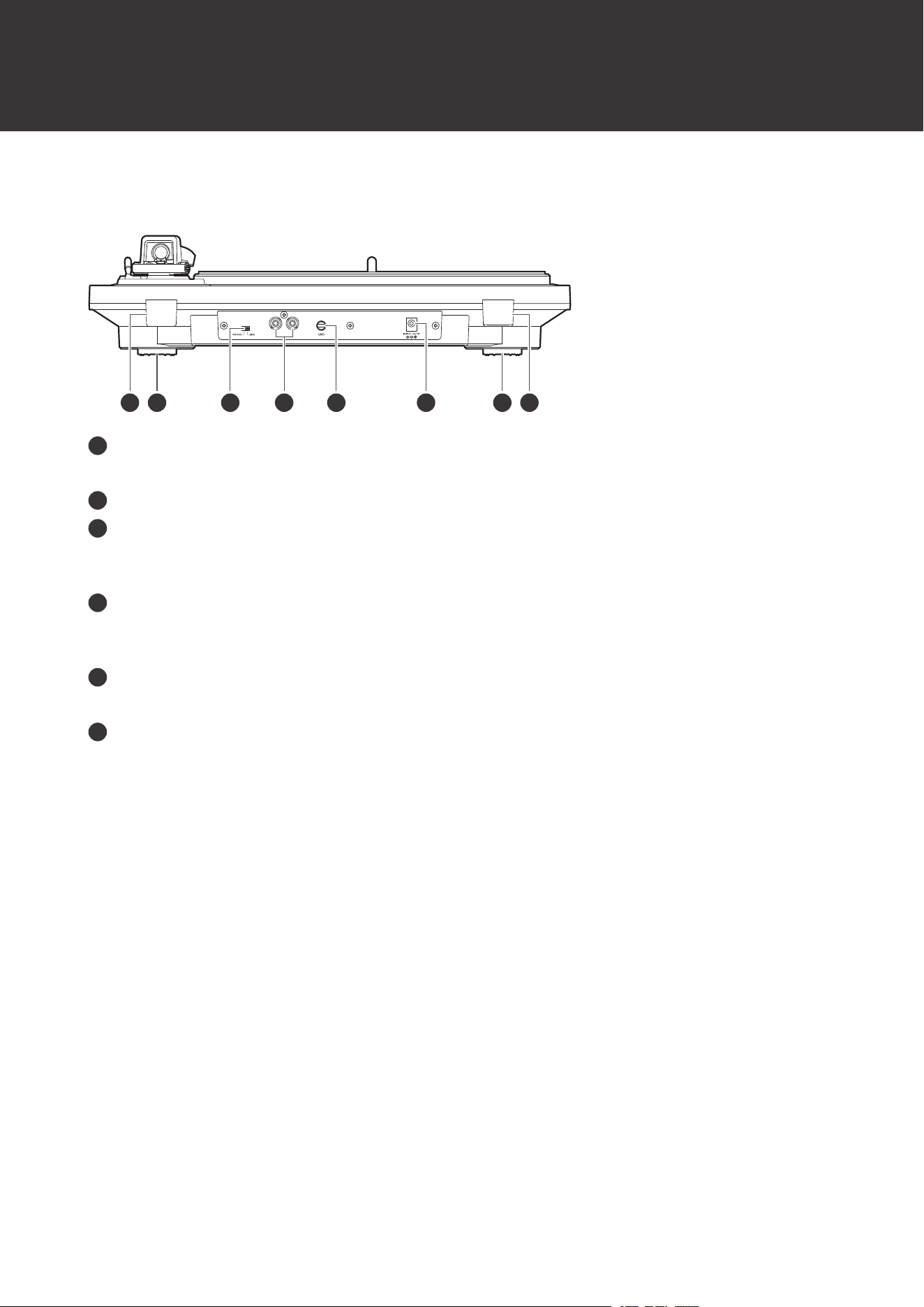
Rear view
1 2 12653 4
1
Dust cover hinge holders
Attachment points for dust cover hinges.
2
Feet
3
Pre-amplifier selector switch
If connecting to an amplifier's PHONO input jack, set this switch to the PHONO position. If connecting to the
LINE/AUX jack of an amplifier, set this switch to the LINE position.
4
Stereo output terminals
Connect the RCA audio cable. Connect it to either the amplifier's PHONO input jack or its line input jack. The red
terminal is the right channel and the white terminal is the left channel.
5
Ground (earth) terminal
Connect the amplifier's ground (earth) terminal to this terminal using the RCA audio cable's ground line.
6
Power input jack
Connect the AC adapter.
Part names and functions
8
Tonearm
4
3
1
2
5
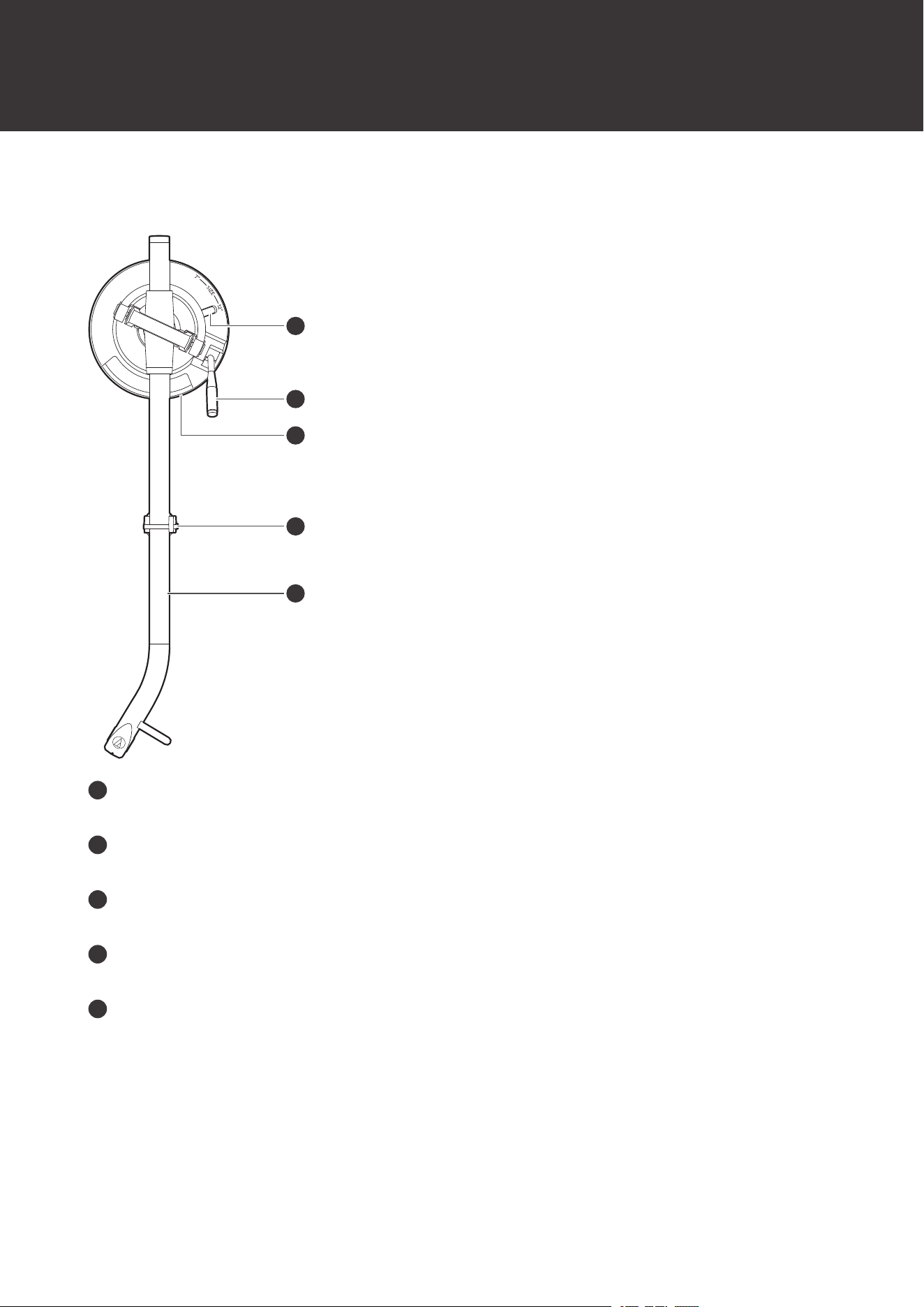
1
Size selector
Switch between 12" and 7", according to the size of the record.
2
Tonearm lift control lever
Operates the tonearm lift.
3
Tonearm lift
Moves the tonearm vertically to and from the face of the record.
4
Tonearm rest with clamp
Use the clamp to secure the tonearm so that it does not move.
5
Tonearm
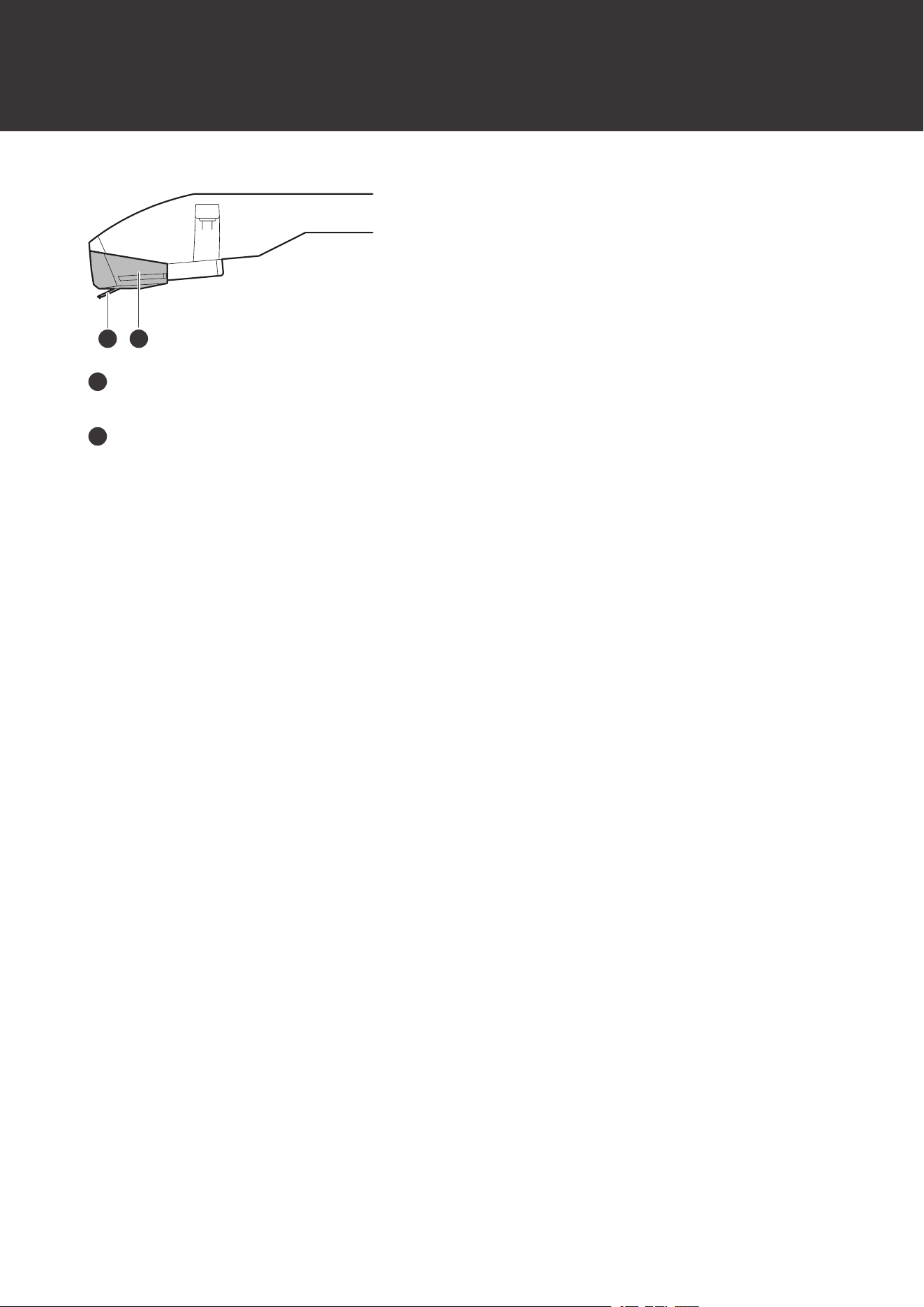
Cartridge
This product is equipped with an AT-VM95C Dual Moving Magnet Stereo Cartridge. The cartridge cannot be removed.
Part names and functions
9
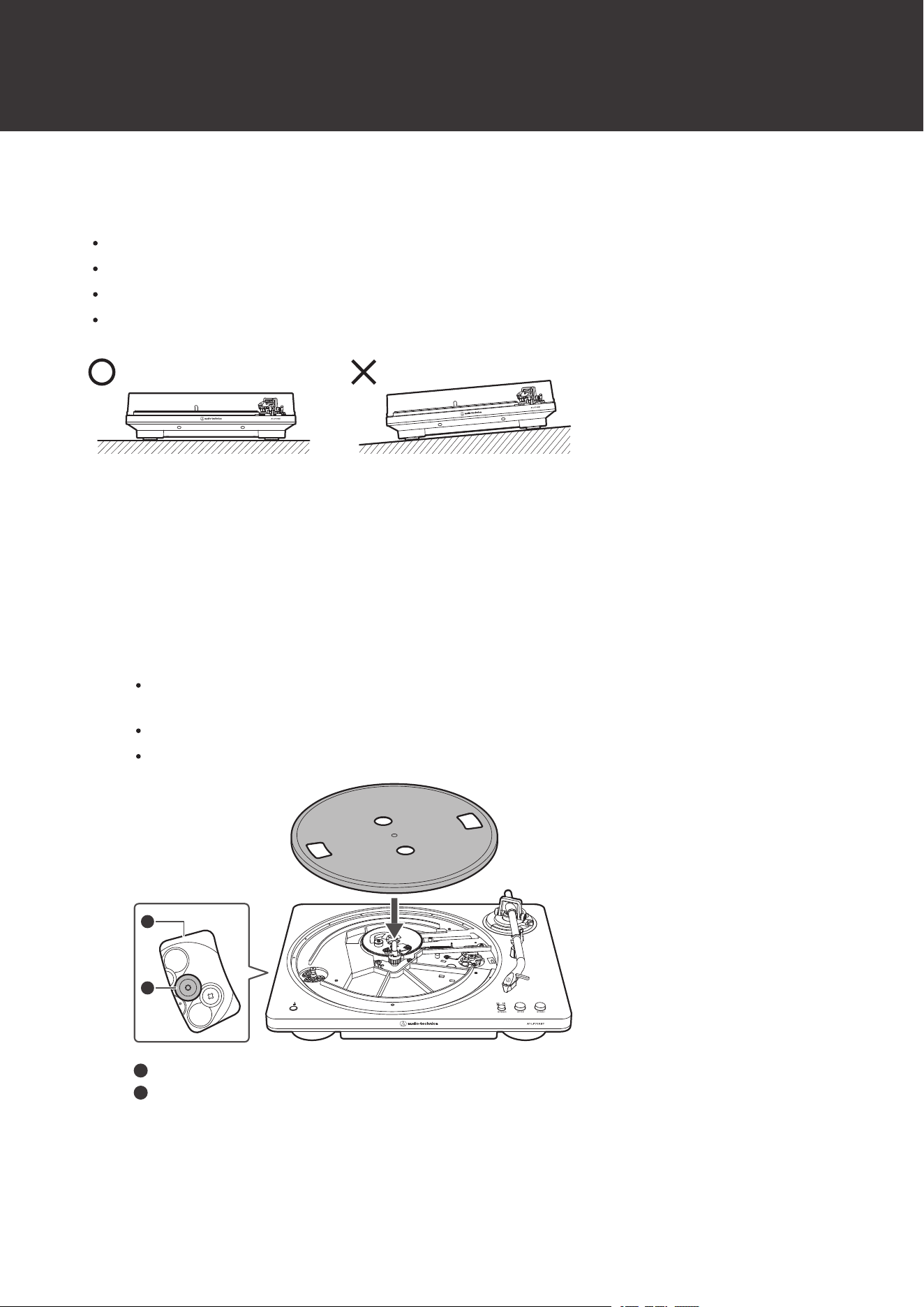
1 2
1
Stylus
The stylus is extremely delicate. Handle with care.
2
Replacement stylus
10
Preparation for use
Setting up the turntable
Position the product on a level surface.
To avoid the effects of vibrations and acoustic pressure, do not mount the product next to such items as speakers.
The product may pick up radio static if placed next to a radio. Therefore, try to keep the product away from radios.
If the product is near equipment (cell phone, etc.) that emits strong radio waves, noise may occur.
Placing the platter and the felt mat
This product requires some assembly before using it for the first time. Do not connect the AC adapter until assembly is
complete.
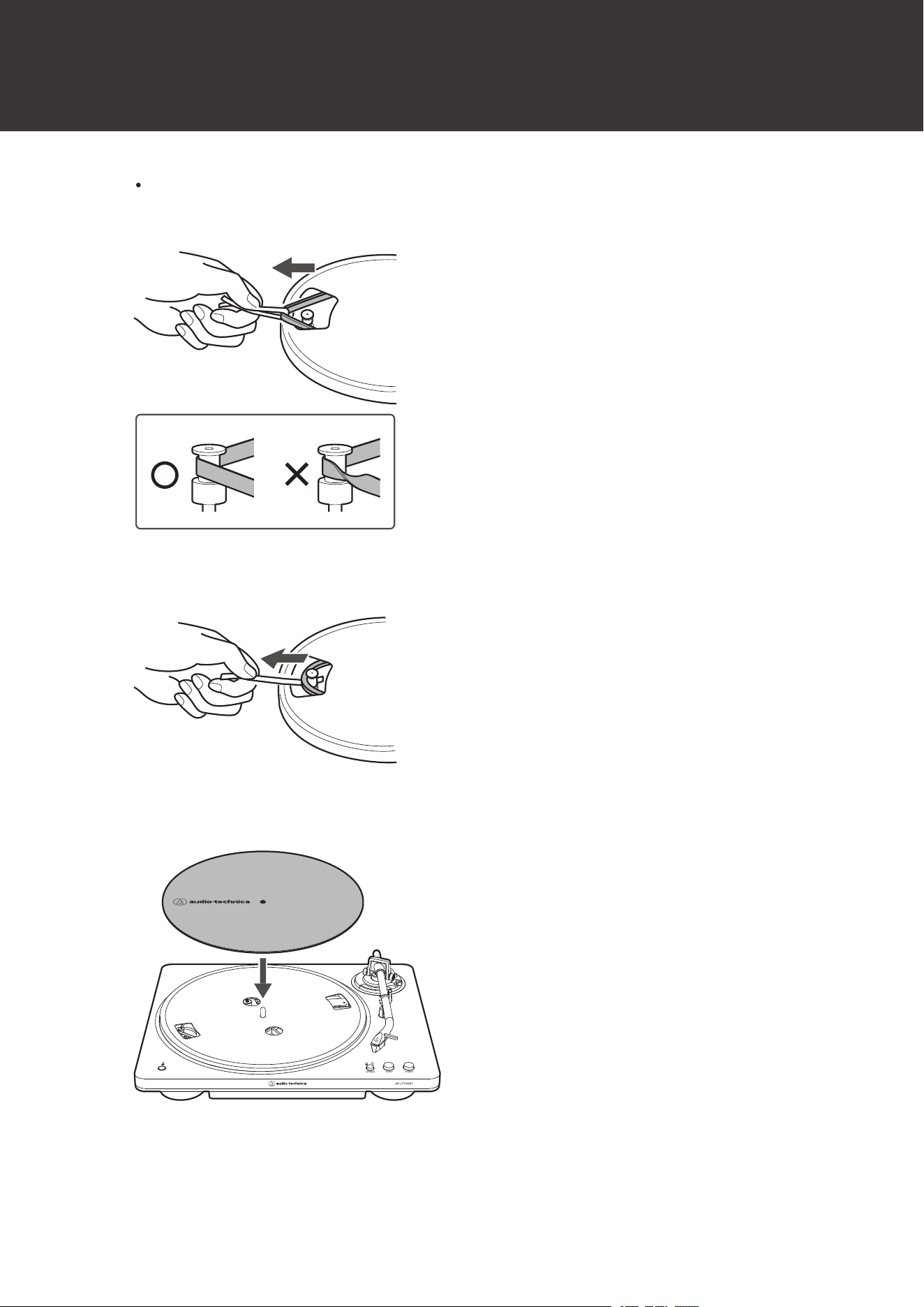
1
Set the platter on the spindle.
To avoid damaging the spindle when seating the platter, align the positions of the spindle and the platter’s
hole, and then slowly seat the platter.
Align one of the openings with the position of the motor pulley (brass-colored).
Make certain that the platter is fully seated on the spindle.
2
1
1
Opening
2
Motor pulley (brass-colored)
2
Attach the drive belt to the motor pulley (brass-colored).
Preparation for use
11
Align one of the platter openings with the motor pulley (brass-colored), and, while pulling both ends of the red
ribbon that comes attached to the drive belt, place the drive belt on the motor pulley (brass-colored), as per
the diagram. When doing this, be careful not to twist the drive belt.
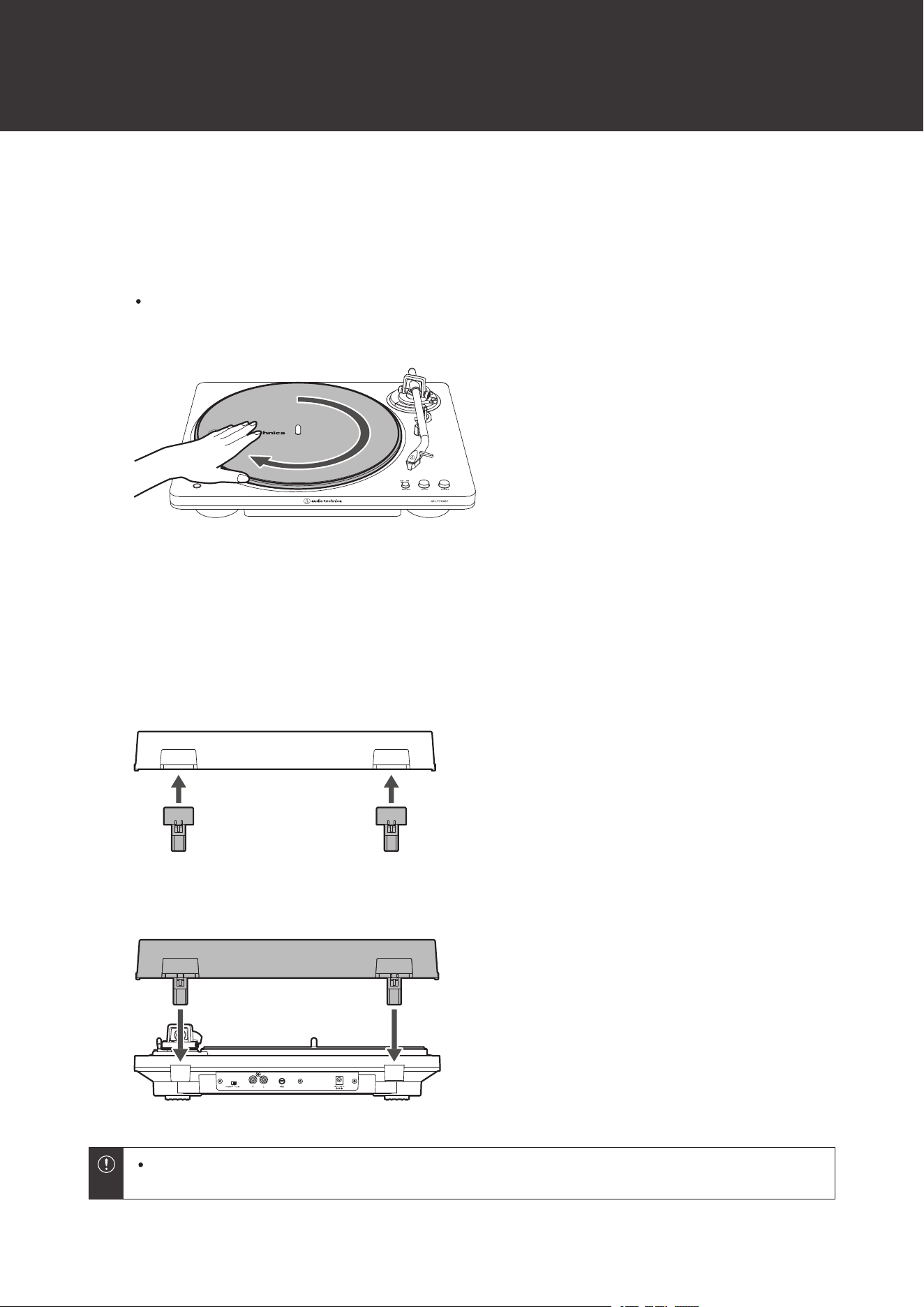
3
Remove the red ribbon from the drive belt.
4
Set the felt mat on the platter.
Preparation for use
12
Rotating the platter
1
Remove the vinyl tie securing the tonearm. Release the tonearm rest clamp and lift the tonearm with
the lift control lever. Slowly rotate the turntable ten times by hand in the direction of the arrow.
You may want to hold the tonearm to prevent it from moving. This step is for resetting the auto mechanism,
getting rid of any twists in the drive belt, and making sure the drive belt rides smoothly along the drive rim on
the underside of the platter.
Installing the dust cover
The dust cover is designed to protect the product’s sensitive components when the product is not in use.
1
Attach the dust cover hinges to the dust cover.
2
Insert the hinges of the dust cover into the two dust cover hinge holders on the back of the body.
When removing the dust cover, slowly pull the dust cover out from the dust cover hinge holders on the
body.
13
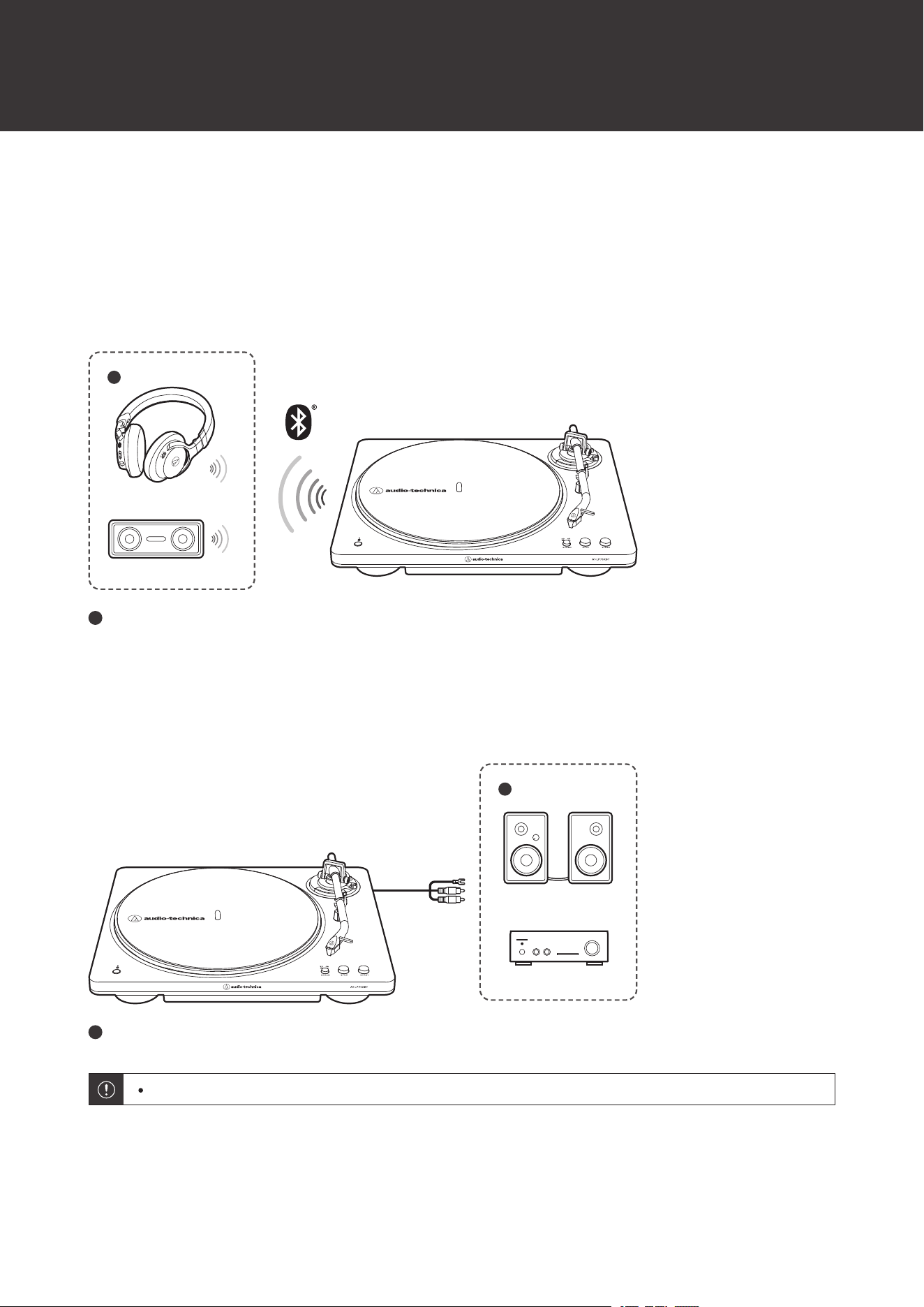
Wireless/wired connections
Depending on where this product is used, it can be connected wirelessly using Bluetooth or connected to devices such
as active speakers using the RCA audio cable.
Wireless connections
For details on wireless connections using Bluetooth, refer to "Using wireless connections" (p. 14).
1
1
Wireless headphones or wireless speaker
Wired connections
For details on wired connections using RCA audio cables, refer to "Using wired connections" (p. 22).
1
1
Active speakers or amplifier
Volume cannot be adjusted if the connected speakers, etc., do not have a volume adjustment function.

14
Using wireless connections
This product supports Bluetooth connections. It can be connected with Bluetooth-supporting devices such as
headphones and speakers (hereinafter, “Bluetooth devices”).
About pairing
To connect the product to a Bluetooth device, the product needs to pair (register) with the device. Once they are paired,
you do not need to pair them again.
However, you will need to pair again in the following cases:
If the product is deleted from the Bluetooth device’s connection history.
If the product is sent out for repair.
If 9 or more devices are paired. (The product can be paired with up to 8 devices. When you pair with a new device
after pairing with 8 devices, pairing information for the device with the oldest connection date will be overwritten by
the information for the new device.)
Pairing a Bluetooth device
Read the user manual for the Bluetooth device.
Place the Bluetooth device within 1 m (3.3') of the product to perform pairing correctly.
Note that Audio-Technica cannot guarantee the operation of connected Bluetooth devices.
1
Plug the AC adapter into an outlet.
This product does not have a power switch. A standby current is always running through the product, even
when it is not being used; disconnect the AC adapter from the outlet when not using the product for a long
period of time.
Plug the AC adapter into an outlet without removing the replacement stylus protector. If the platter has
rotated, press the STOP button without touching the tonearm, and then wait until the tonearm returns to its
original position.
If you play a record immediately after plugging the AC adapter into an outlet, the sound that is played may be
garbled. Wait a short time (about 30 seconds) after plugging the AC adapter into the outlet before playing a
record.
2
Set the pre-amplifier selector switch to the LINE side.
3
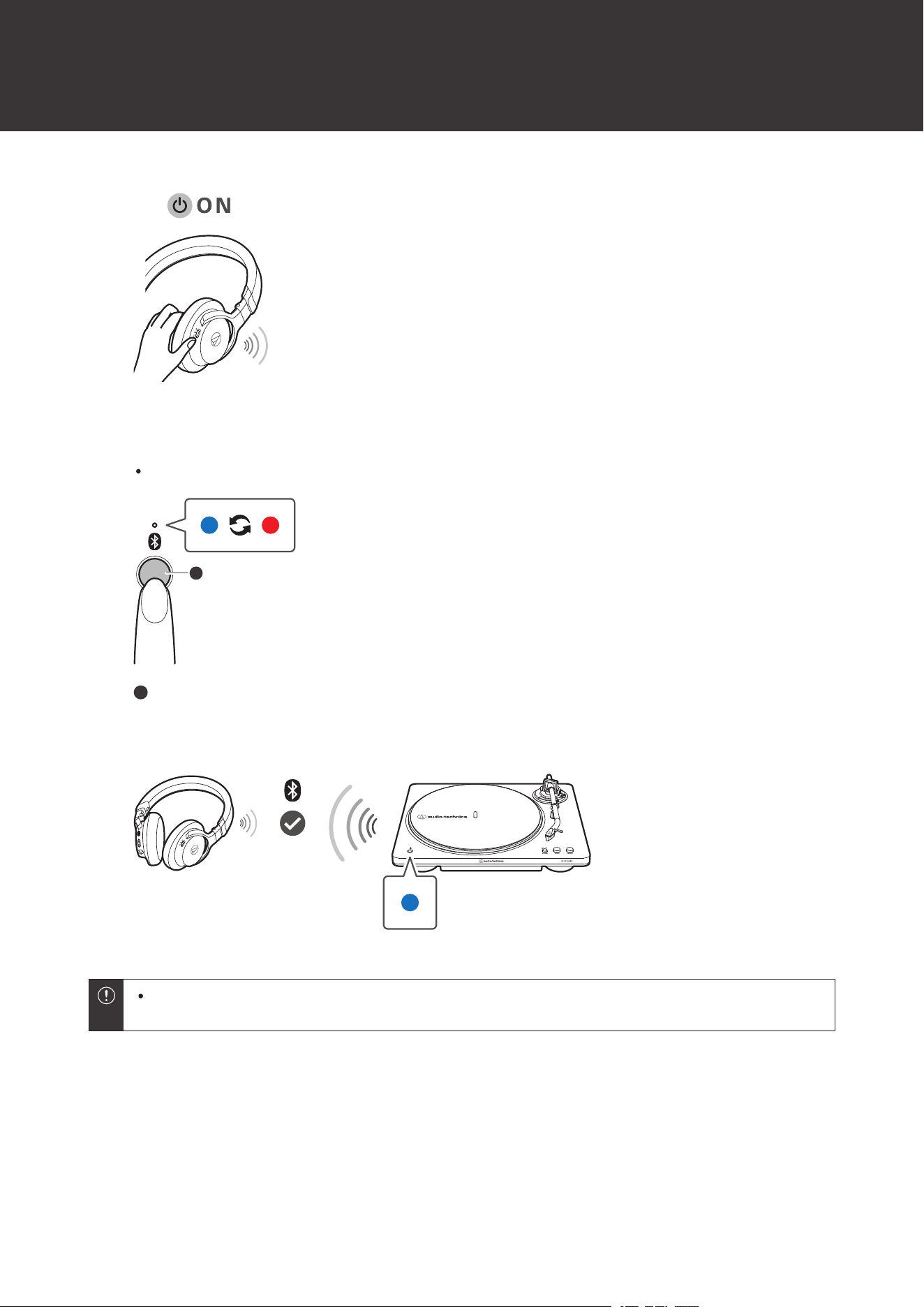
Set the Bluetooth device (a Bluetooth-supporting device such as headphones or speakers) to the
pairing mode.
Using wireless connections
15
4
Press and hold the Bluetooth connect button (for about 2 seconds).
The Bluetooth indicator lamp will start flashing red and blue.
1
1
Bluetooth connect button
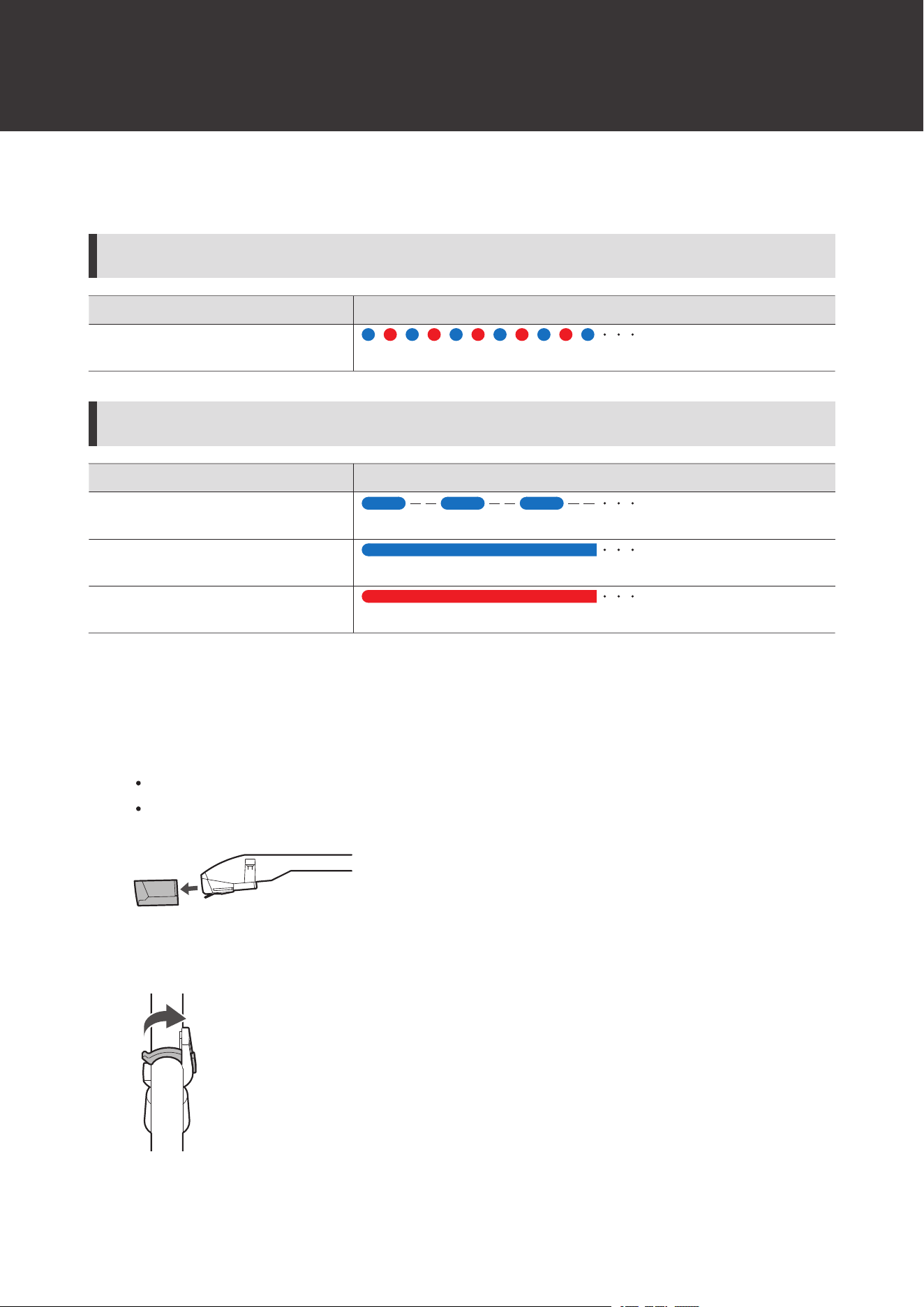
5
Once paired, the Bluetooth indicator lamp will light in blue.
The product’s pairing mode will automatically end after a certain period of time (about 120 seconds). If
pairing cannot be completed in that time, try pairing again using the same procedure.
Using wireless connections
16
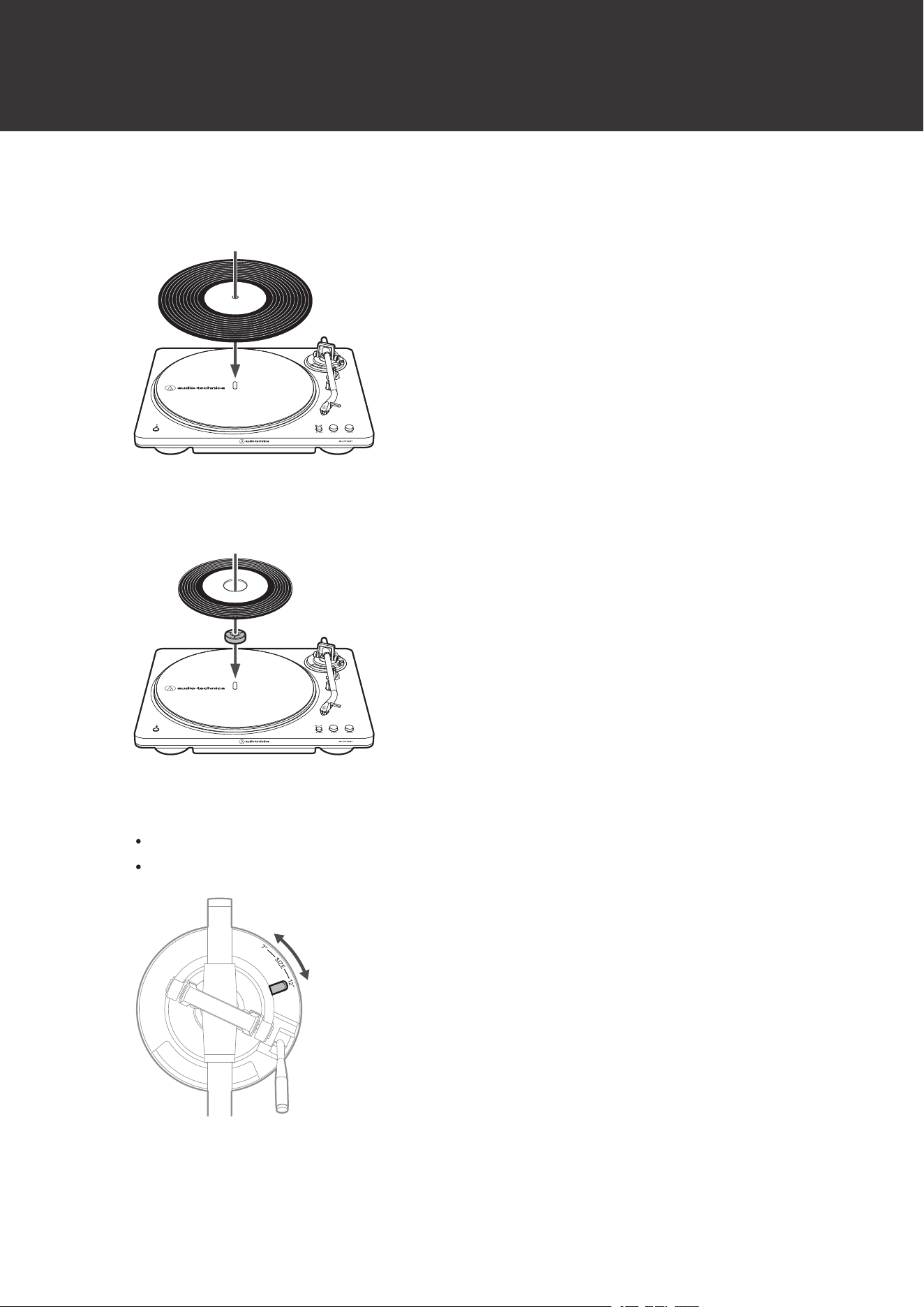
Bluetooth indicator lamp display
Pairing
Status Display pattern
Searching for devices
Flashing blue and red
Connection
Status Display pattern
Waiting to be connected
Flashing blue
Connected
Lights in blue
Disconnected
Lights in red
Before playing a record
1
Remove the replacement stylus protector.
Pull the protector straight forward to remove it.
Applying a downward force may cause the replacement stylus to come off the body. If the replacement stylus
has come off or is about to come off, refer to "Replacing the stylus" (p. 32) to reattach the stylus correctly.
2
Release the tonearm rest clamp.
Using wireless connections
17
3
Place the record on the felt mat so that the center hole aligns with the spindle.
At 33-1/3 RPM
At 45 RPM
To play a 45 RPM record, attach the 45 RPM adapter.
4
Select the record size with the size selector.
Select “12"” for an LP record with a 12" diameter, and “7"” for a 45 RPM record with a 7" diameter.
Make sure the platter is stopped before switching the size selector for a different record size.
Using wireless connections
18
5
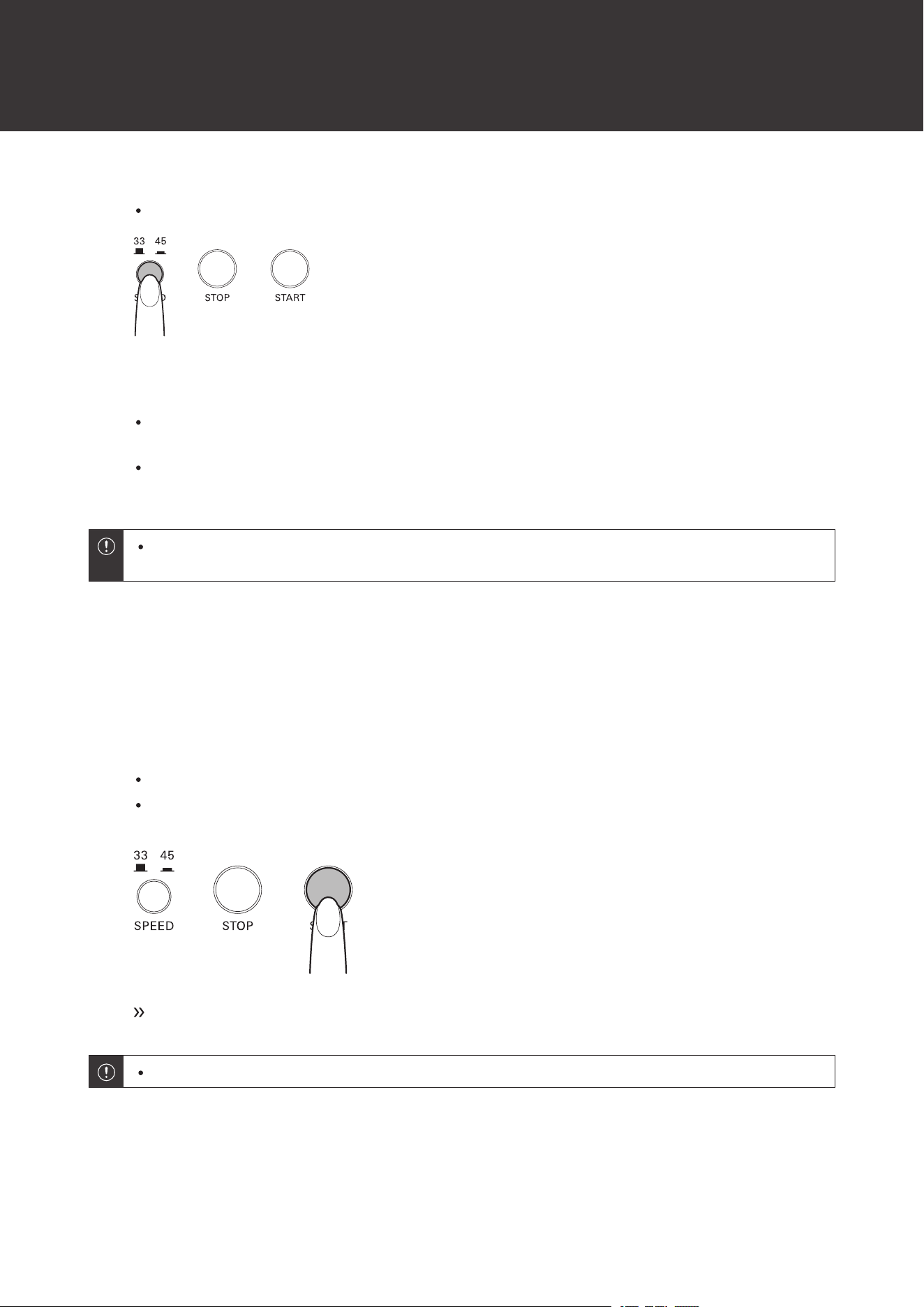
Select the speed by pressing the platter speed button.
Select “33” to play 33-1/3 RPM records or “45” to play 45 RPM records.
6
Turn on the power of the Bluetooth device.
When the product is properly connected to a Bluetooth device, the Bluetooth indicator lamp on the product
will light in blue.
If the Bluetooth indicator lamp lights in red, press the Bluetooth connect button to connect the Bluetooth
device again.
When connected to a Bluetooth device, sound will also be played from any wired amplifier or active
speakers that are connected. Turn on the power of only the device you wish to use for playing music.
Automatic operation
Lower the volume of the wireless headphones, wireless speakers, etc. sufficiently.
1
Press the START button.
Do not subject the product to strong impact during playback.
Do not switch the record size selection while the record is playing. Doing so can cause the product to
malfunction.
Play begins.
Automatic operation may not work with the start or end of songs on some records.
Manual operation
Lower the volume of the wireless headphones, wireless speakers, etc. sufficiently.
Using wireless connections
19
1
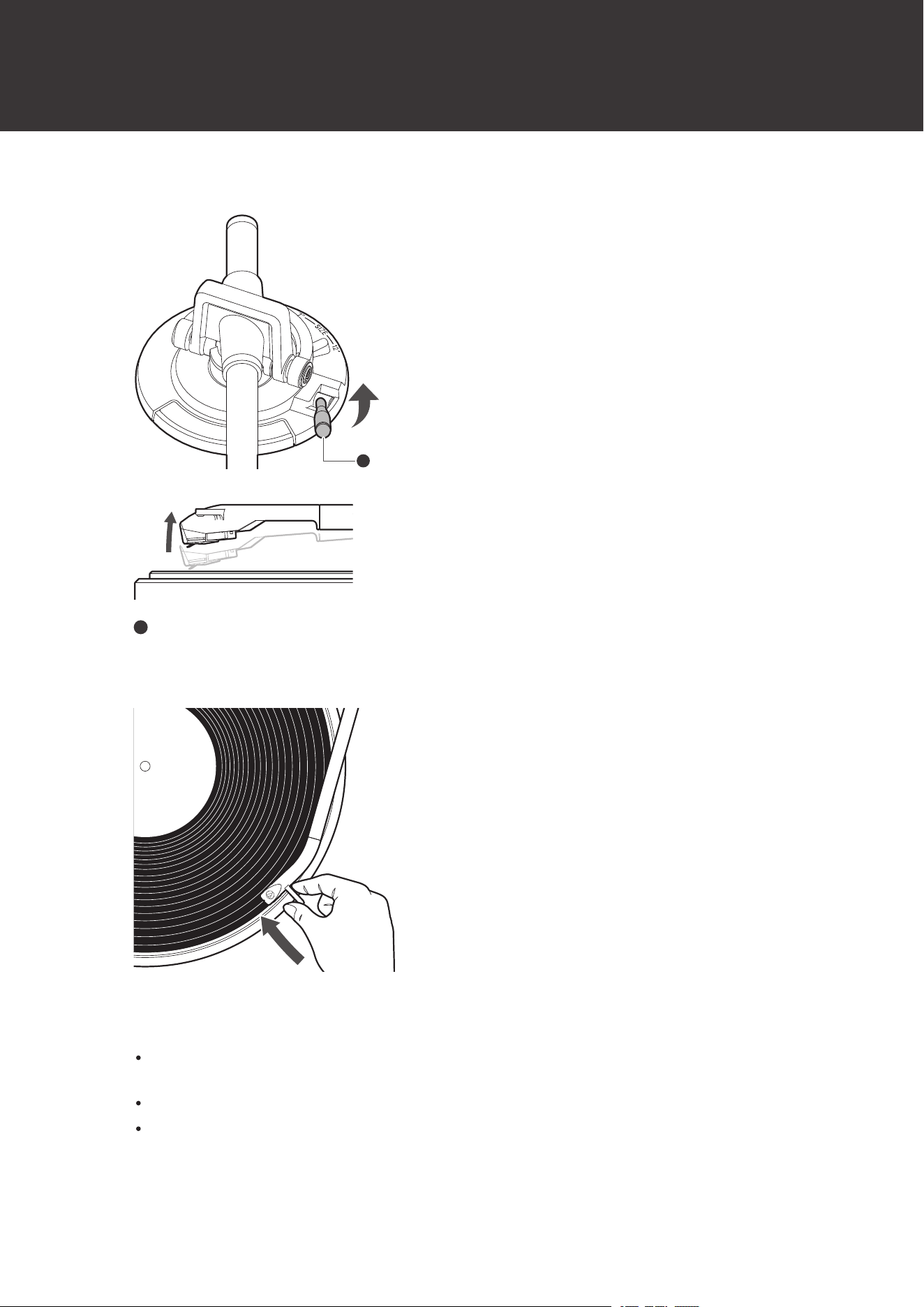
Raise the tonearm by lifting the tonearm lift control lever to the UP position.
1
1
Tonearm lift control lever
2
Position the tonearm over the desired location (groove) on the record.
3
Slowly lower the tonearm by moving the tonearm lift control lever to the DOWN position.
Alternatively, you can skip steps 1 and 2, and use your fingers to lift the tonearm and move it over the desired
location on the record, and then slowly place the tonearm down to begin playing the record.
Lower the tonearm slowly so that it does not drop. Doing so could damage the stylus tip.
Do not subject the product to strong impact during playback.

Using wireless connections
20
Do not switch the record size selection while the record is playing. Doing so can cause the product to
malfunction.
The tonearm descends slowly onto the record and play begins.
Pausing the record
1
Lower the volume of the wireless headphones, wireless speakers, etc. sufficiently.
2
Raise the tonearm lift control lever to lift the tonearm.
Stopping the record
Once the record has played through to the end, the tonearm will automatically return to the tonearm rest. To stop a
record that is currently playing, perform the following.
The tonearm may not automatically return to the tonearm rest with some records.
1
Lower the volume of the wireless headphones, wireless speakers, etc. sufficiently.
2
Press the STOP button.
Once the record stops playing, the tonearm will automatically return to the tonearm rest.
3
Remove the record after the platter has come to a complete stop.
4
Close the tonearm rest clamp.
Make sure the tonearm lift control lever is lowered before closing the tonearm rest clamp.
5
Attach the protector.

Using wireless connections
21
When the tonearm reaches the end (center) of the record, it will automatically lift and return to the tonearm
rest. Do not interfere with its motion. Doing so can cause the product to malfunction. If the tonearm does
not lift and return to the tonearm rest, press the STOP button to complete this operation.
If the felt mat gets dirty, it can easily scratch the record, so remove the felt mat periodically and wipe off any
dust.
To prevent the record from becoming scratched or warped, remove it after use.
Do not use a disk stabilizer.
Do not use a platter other than the one provided.
This product is not intended for DJs. Do not touch the record or the platter while the record is playing. Do
not operate the product in any way that may damage the stylus, such as scratching (rubbing the record on
the turntable by hand to produce sound).
Do not apply lateral force to the stylus while it is on the record. Doing so could damage, chip, or break the
stylus tip. The record could also be damaged.
22
Using wired connections
Align the settings for the pre-amplifier selector switch and connect the RCA audio cable to an input jack on the
connectable equipment you are using (amplifier, receiver, active speakers, sound card, etc.).
Setting pre-amplifier selector switch
This product has a built-in phono equalizer function. Even if you do not have a phono amplifier or connectable
equipment with a built-in phono amplifier, the product can be used by connecting active speakers, etc.
Use the pre-amplifier selector switch to set the output, as shown below.
Set the pre-amplifier selector switch to the LINE side when using a Bluetooth connection.
Device with PHONO input
Position of pre-amplifier selector
switch
Where to connect the RCA audio cable
PHONO Phono input jack and ground (earth) terminal of connectable equipment
Device without PHONO input
Position of pre-amplifier selector
switch
Where to connect the RCA audio cable
LINE AUX or line input jack of connectable equipment
PC sound card
Position of pre-amplifier selector
switch
Where to connect the RCA audio cable
LINE Sound card’s LINE input jack
[1]
[1] An audio adapter (sold separately) may be required to connect the RCA audio cable to the PC sound card’s line input jack.
Connecting to active (built-in amplifier) speakers
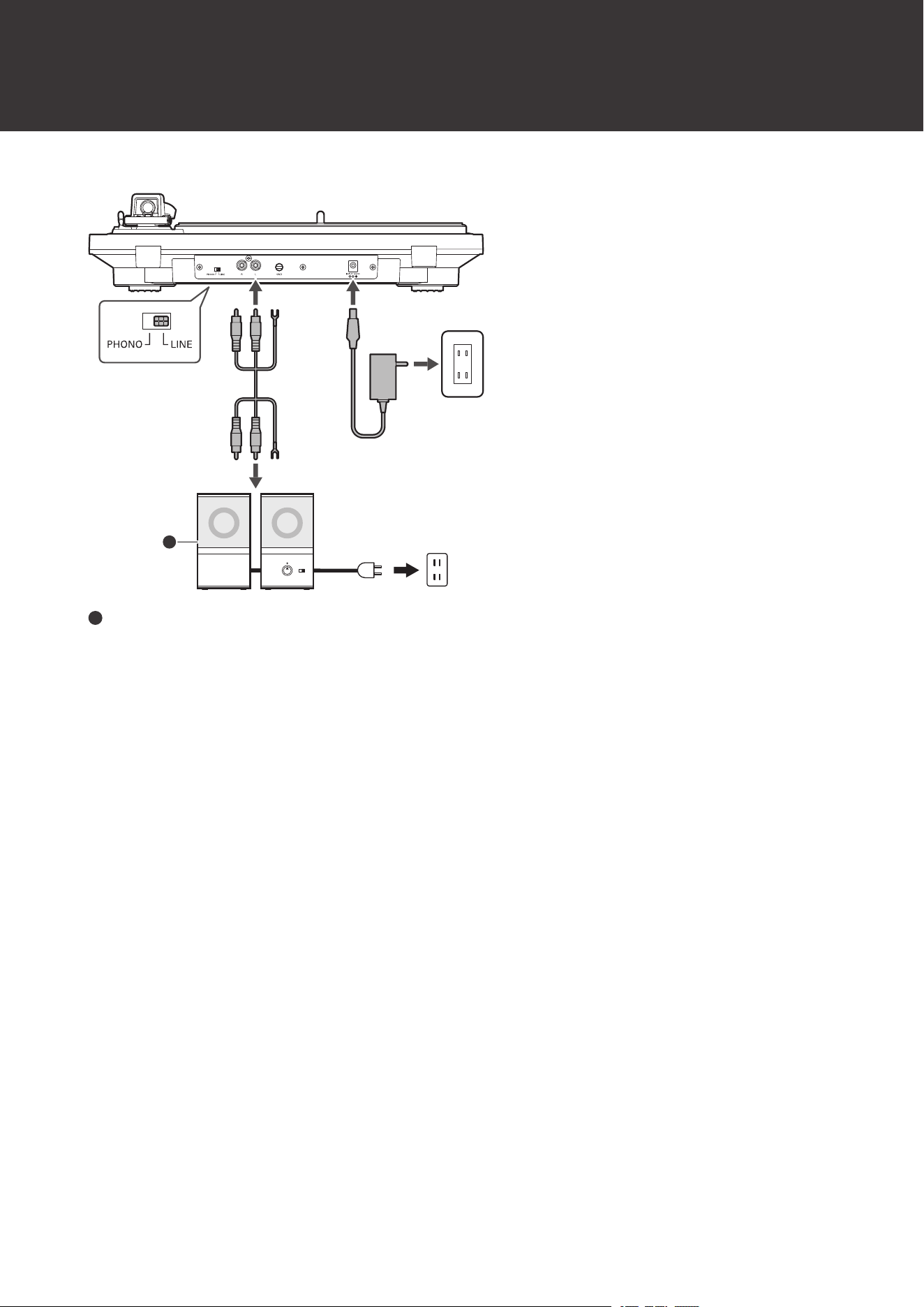
Use active speakers when directly connecting this product to speakers.
Some active speakers may need to be connected using conversion cables, etc.
Using wired connections
23
1
1
Active speakers
Connecting to connectable equipment (amplifiers, etc.)
The RCA audio cable's red jack is for the right (R) channel, and the white jack is for the left (L) channel.
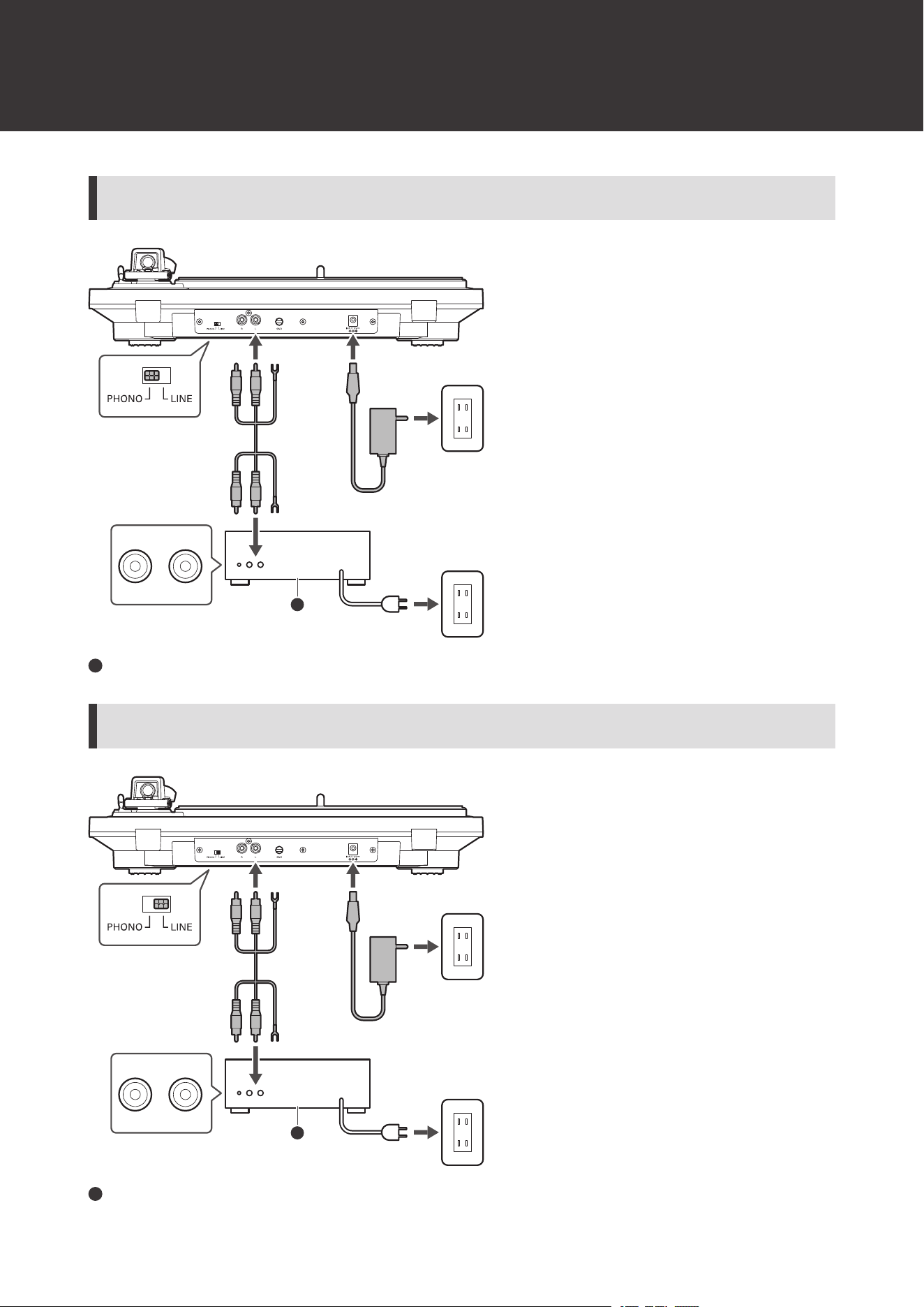
Using wired connections
24
With PHONO input
PHONO
L R
1
1
Connectable equipment (amplifier, etc.)
Without PHONO input
LINE / AUX
L R
1
1
Connectable equipment (amplifier, etc.)
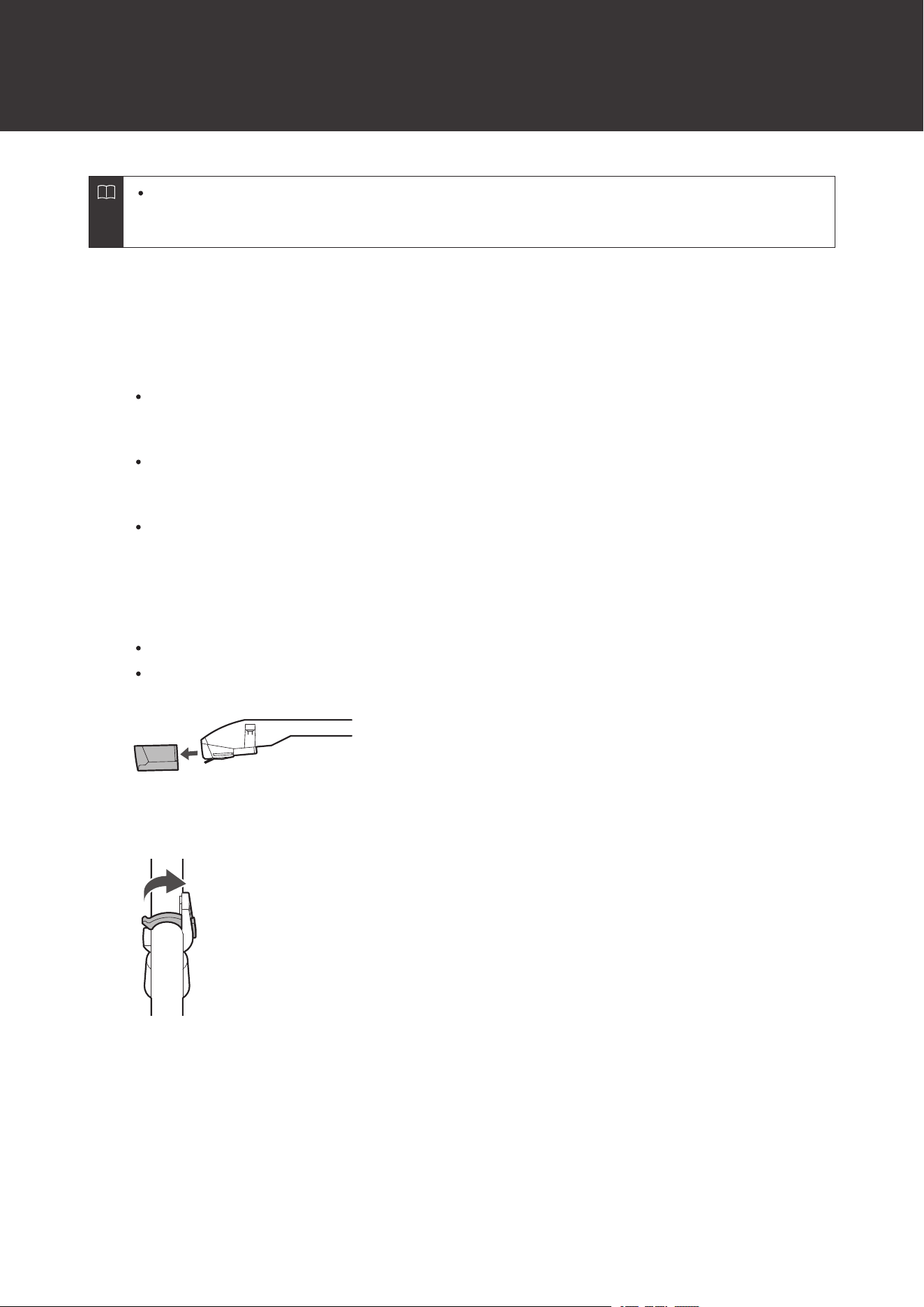
Using wired connections
25
Depending on the equipment you are connecting, a ground (earth) terminal may exist near the PHONO input
jack. If this is the case, connect to it using the ground line from the RCA audio cable. This will help prevent a
low humming noise that might otherwise be heard during playback.
Before playing a record
1
Plug the AC adapter into an outlet.
This product does not have a power switch. A standby current is always running through the product, even
when it is not being used; disconnect the AC adapter from the outlet when not using the product for a long
period of time.
Plug the AC adapter into an outlet without removing the replacement stylus protector. If the platter has
rotated, press the STOP button without touching the tonearm, and then wait until the tonearm returns to its
original position.
If you play a record immediately after plugging the AC adapter into an outlet, the sound that is played may be
garbled. Wait a short time (about 30 seconds) after plugging the AC adapter into the outlet before playing a
record.
2
Remove the replacement stylus protector.
Pull the protector straight forward to remove it.
Applying a downward force may cause the replacement stylus to come off the body. If the replacement stylus
has come off or is about to come off, refer to "Replacing the stylus" (p. 32) to reattach the stylus correctly.
3
Release the tonearm rest clamp.
4
Place the record on the felt mat so that the center hole aligns with the spindle.
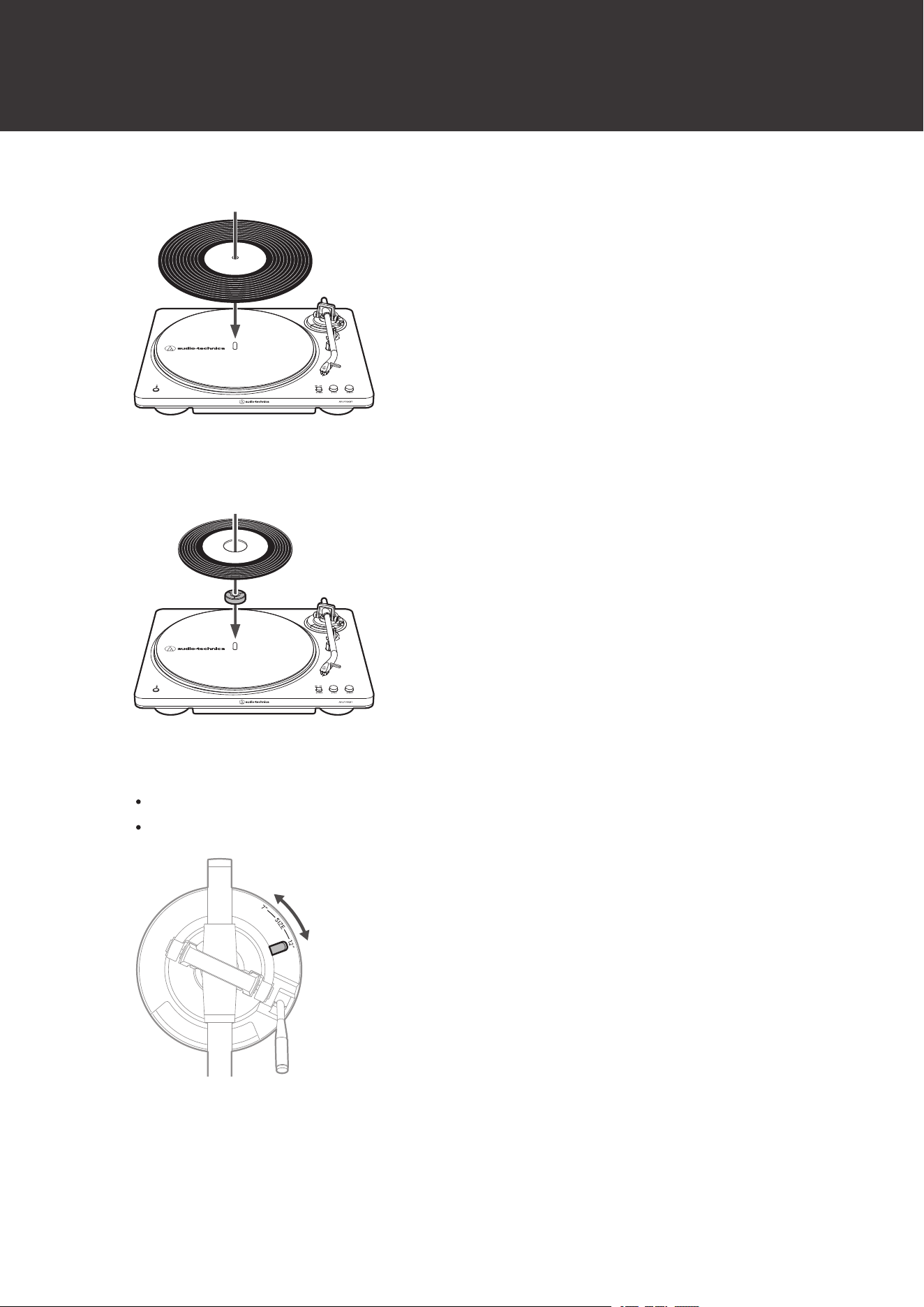
Using wired connections
26
At 33-1/3 RPM
At 45 RPM
To play a 45 RPM record, attach the 45 RPM adapter.
5
Select the record size with the size selector.
Select “12"” for an LP record with a 12" diameter, and “7"” for a 45 RPM record with a 7" diameter.
Make sure the platter is stopped before switching the size selector for a different record size.
6
Select the speed by pressing the platter speed button.
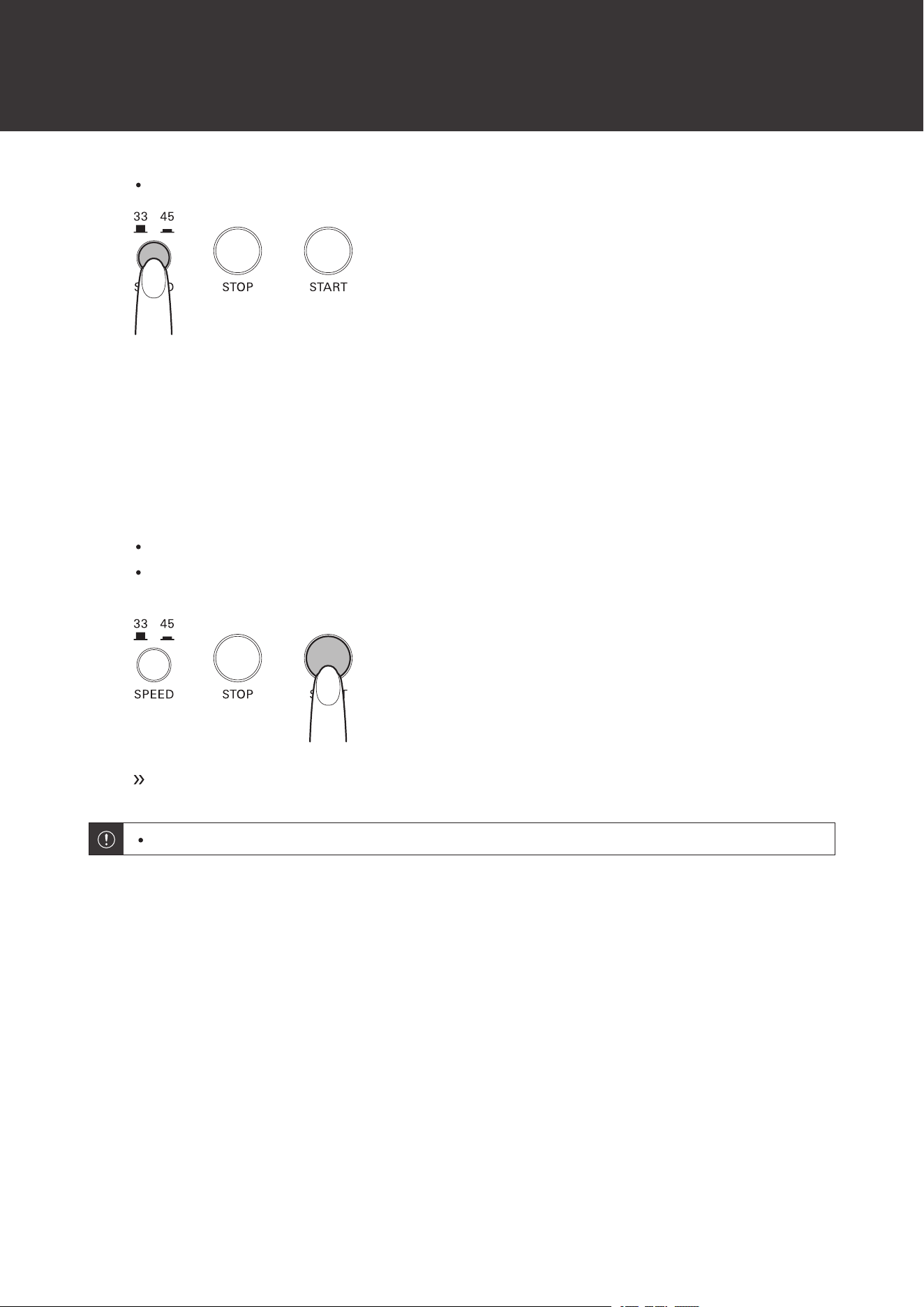
Using wired connections
27
Select “33” to play 33-1/3 RPM records or “45” to play 45 RPM records.
Automatic operation
Lower the volume of the amplifier, active speakers, etc. sufficiently.
1
Press the START button.
Do not subject the product to strong impact during playback.
Do not switch the record size selection while the record is playing. Doing so can cause the product to
malfunction.
Play begins.
Automatic operation may not work with the start or end of songs on some records.
Manual operation
Lower the volume of the amplifier, active speakers, etc. sufficiently.
1
Raise the tonearm by lifting the tonearm lift control lever to the UP position.
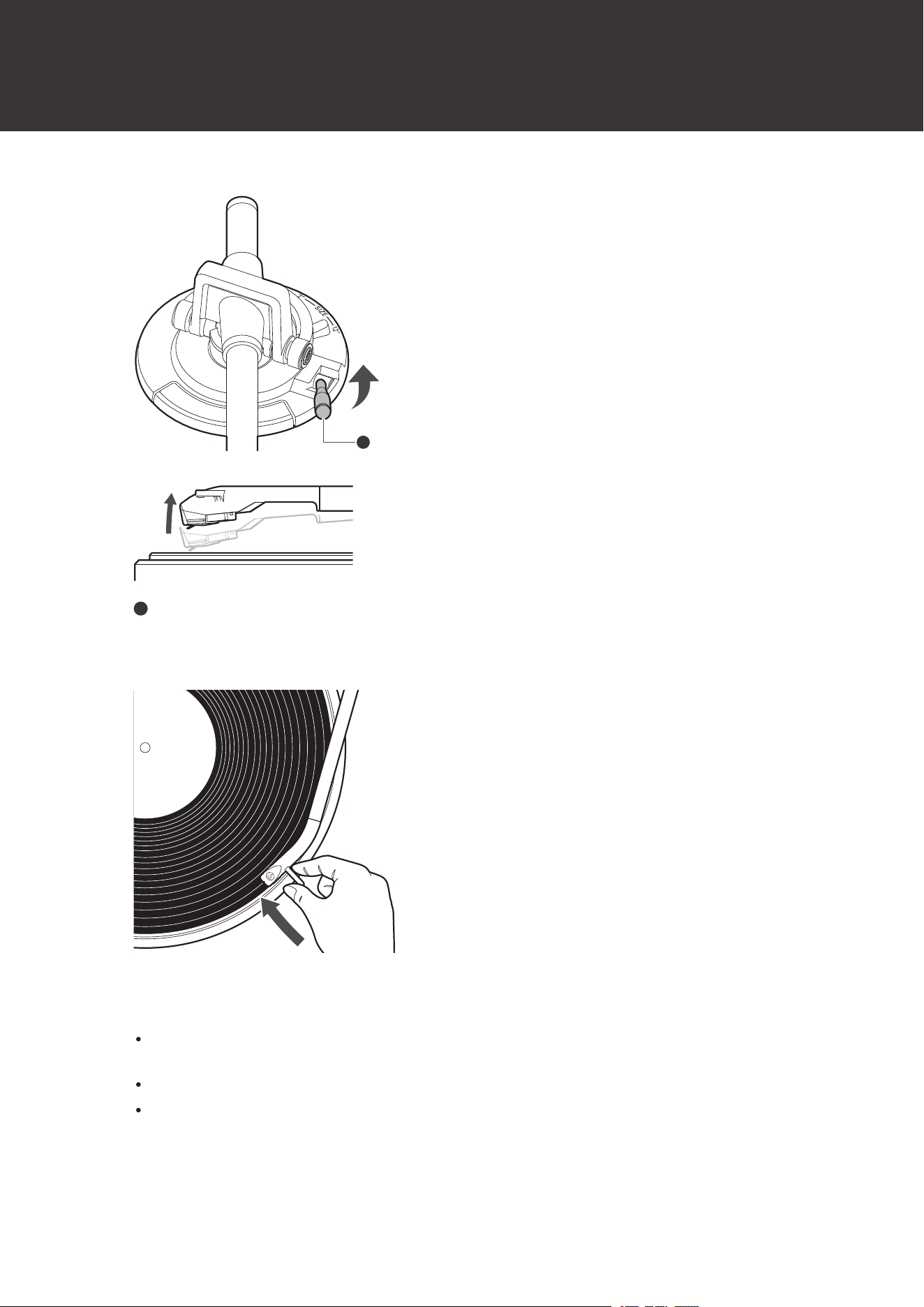
Using wired connections
28
1
1
Tonearm lift control lever
2
Position the tonearm over the desired location (groove) on the record.
3
Slowly lower the tonearm by moving the tonearm lift control lever to the DOWN position.
Alternatively, you can skip steps 1 and 2, and use your fingers to lift the tonearm and move it over the desired
location on the record, and then slowly place the tonearm down to begin playing the record.
Lower the tonearm slowly so that it does not drop. Doing so could damage the stylus tip.
Do not subject the product to strong impact during playback.

Using wired connections
29
Do not switch the record size selection while the record is playing. Doing so can cause the product to
malfunction.
The tonearm descends slowly onto the record and play begins.
Pausing the record
1
Lower the volume of the amplifier, active speakers, etc. sufficiently.
2
Raise the tonearm lift control lever to lift the tonearm.
Stopping the record
Once the record has played through to the end, the tonearm will automatically return to the tonearm rest. To stop a
record that is currently playing, perform the following.
The tonearm may not automatically return to the tonearm rest with some records.
1
Lower the volume of the amplifier, active speakers, etc. sufficiently.
2
Press the STOP button.
Once the record stops playing, the tonearm will automatically return to the tonearm rest.
3
Remove the record after the platter has come to a complete stop.
4
Close the tonearm rest clamp.
Make sure the tonearm lift control lever is lowered before closing the tonearm rest clamp.
5
Attach the protector.

Using wired connections
30
When the tonearm reaches the end (center) of the record, it will automatically lift and return to the tonearm
rest. Do not interfere with its motion. Doing so can cause the product to malfunction. If the tonearm does
not lift and return to the tonearm rest, press the STOP button to complete this operation.
If the felt mat gets dirty, it can easily scratch the record, so remove the felt mat periodically and wipe off any
dust.
To prevent the record from becoming scratched or warped, remove it after use.
Do not use a disk stabilizer.
Do not use a platter other than the one provided.
This product is not intended for DJs. Do not touch the record or the platter while the record is playing. Do
not operate the product in any way that may damage the stylus, such as scratching (rubbing the record on
the turntable by hand to produce sound).
Do not apply lateral force to the stylus while it is on the record. Doing so could damage, chip, or break the
stylus tip. The record could also be damaged.
31
Care
Turntable body
When the turntable body is dirty or dusty, disconnect the AC adapter, and then wipe off the dirt and dust with a soft,
dry cloth.
Do not use benzenes, thinners, etc.
If the felt mat gets dirty, it can easily scratch the record, so remove the felt mat periodically and wipe off any dust.
When storing the product for a long time, disconnect the AC adapter from the outlet and wrap the equipment in
plastic; do not allow it to become damp.
Cleaning the stylus tip / record
If dirt and grime are stuck to the stylus tip, clean it as needed. To clean the stylus, disconnect the AC adapter from
the outlet.
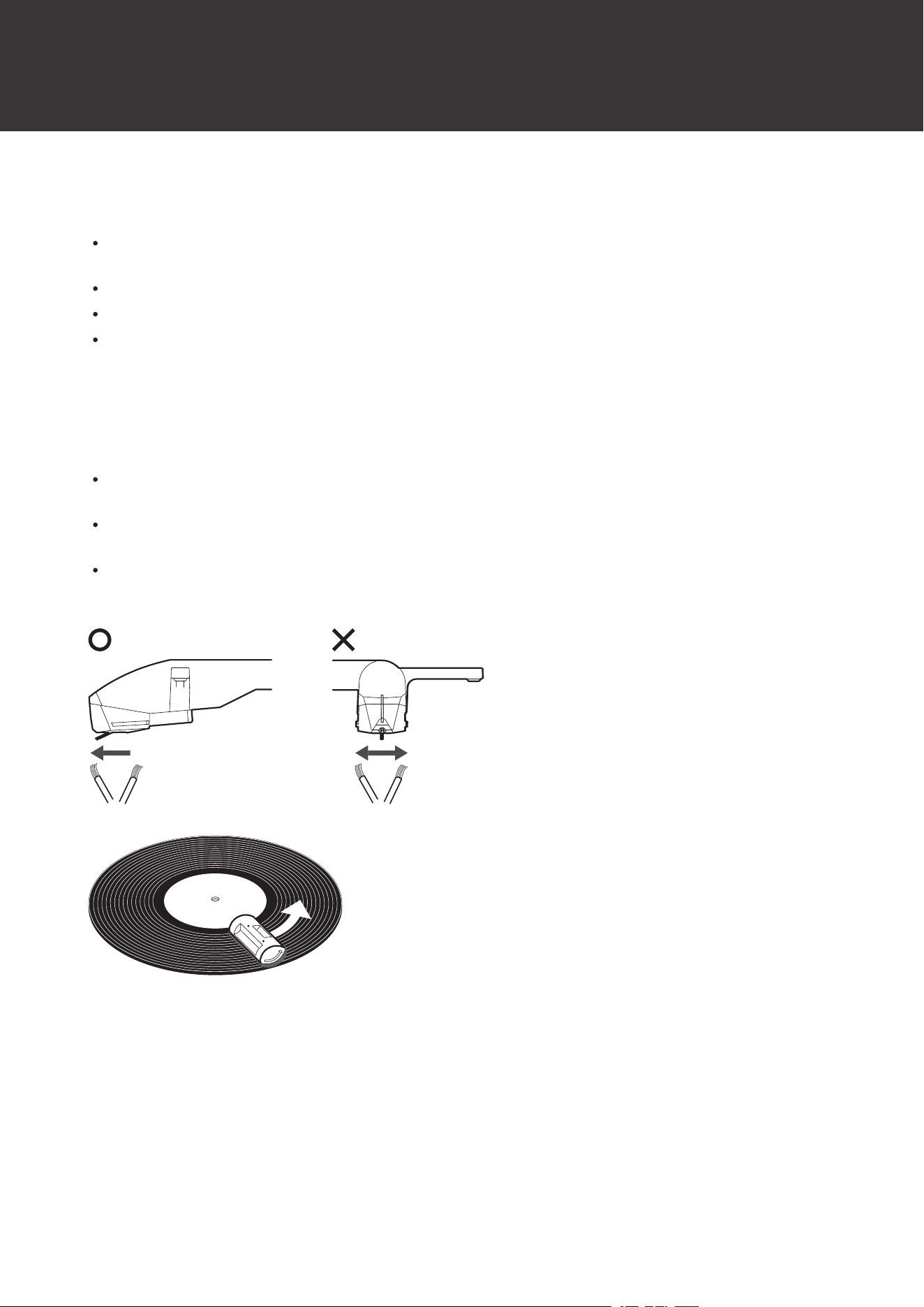
We recommend using a stylus cleaner (sold separately by Audio-Technica) if the stylus tip is considerably dirty. Clean
the stylus tip by moving the brush from the rear to the front of the stylus tip.
For more details on record and stylus cleaners (sold separately by Audio-Technica), please visit the Audio-Technica
website (https://www.audio-technica.com/).
32
Replacing the stylus
Removing the stylus
In addition to the deterioration of sound quality, records may also be damaged as the stylus tip wears down.
As a rule of thumb, replace the stylus after 300 hours of use.
Be sure to disconnect the product’s AC adapter from the outlet.
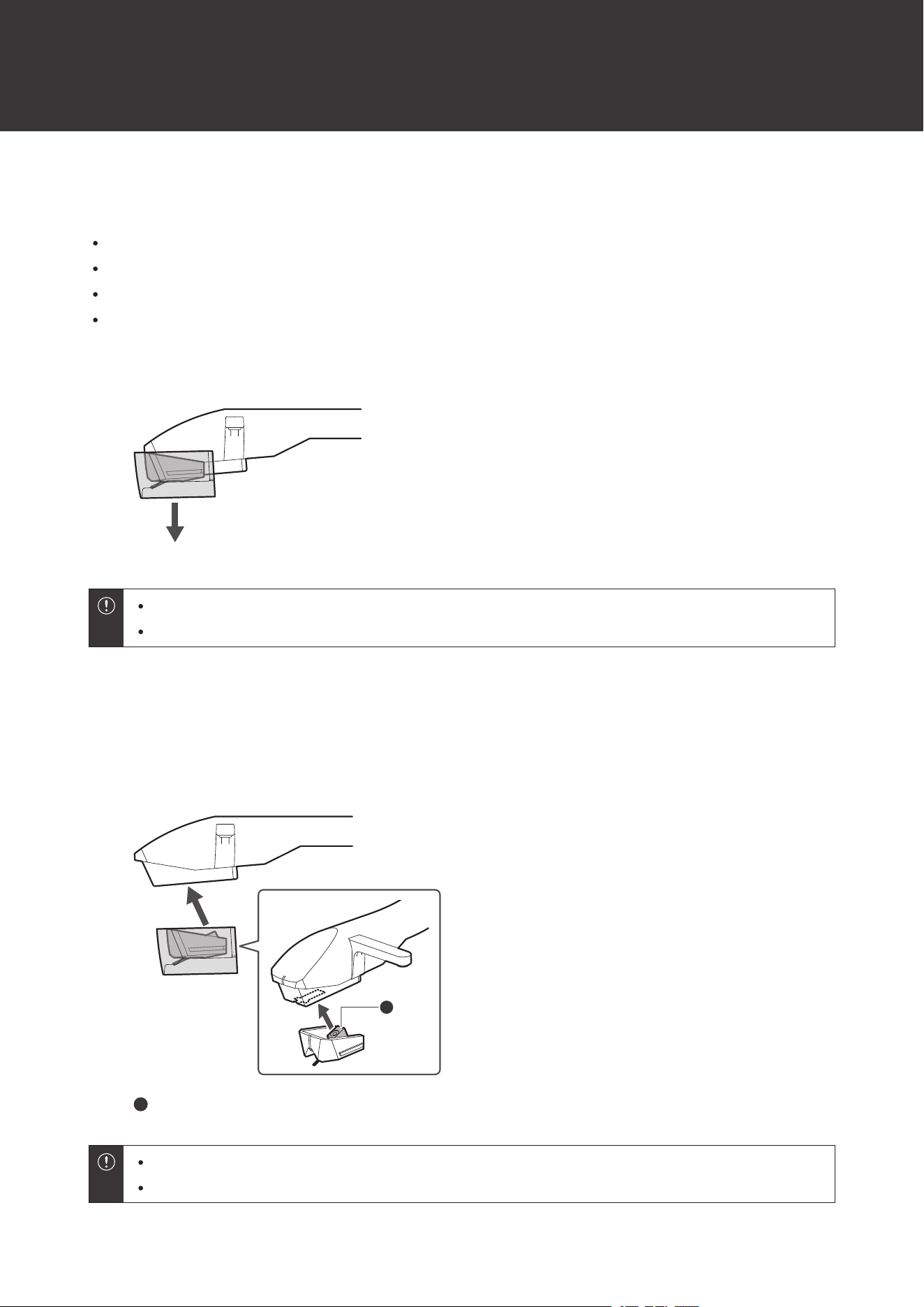
When replacing the stylus, hold the tonearm and replacement stylus firmly.
1
Remove the stylus by pulling it in the direction of the arrow with the protector attached.
Do not touch the replacement stylus cantilever or stylus tip to a magnet.
Be careful not to hit the replacement stylus on the turntable body, platter, or other object.
Installing a new replacement stylus
1
Align the protruding part of the replacement stylus and push it into place in the direction of the
arrow.
1
1
Protruding part
Do not touch the replacement stylus cantilever or stylus tip to a magnet.
Be careful not to hit the replacement stylus on the turntable body, platter, or other object.
33
Replacing the drive belt
The drive belt is a consumable part. Replace the drive belt if the speed of playback slows down or irregular rotation
occurs. As a rule of thumb, we suggest replacing the belt once a year.
Before replacing the drive belt, first disconnect the product’s AC adapter from the outlet.
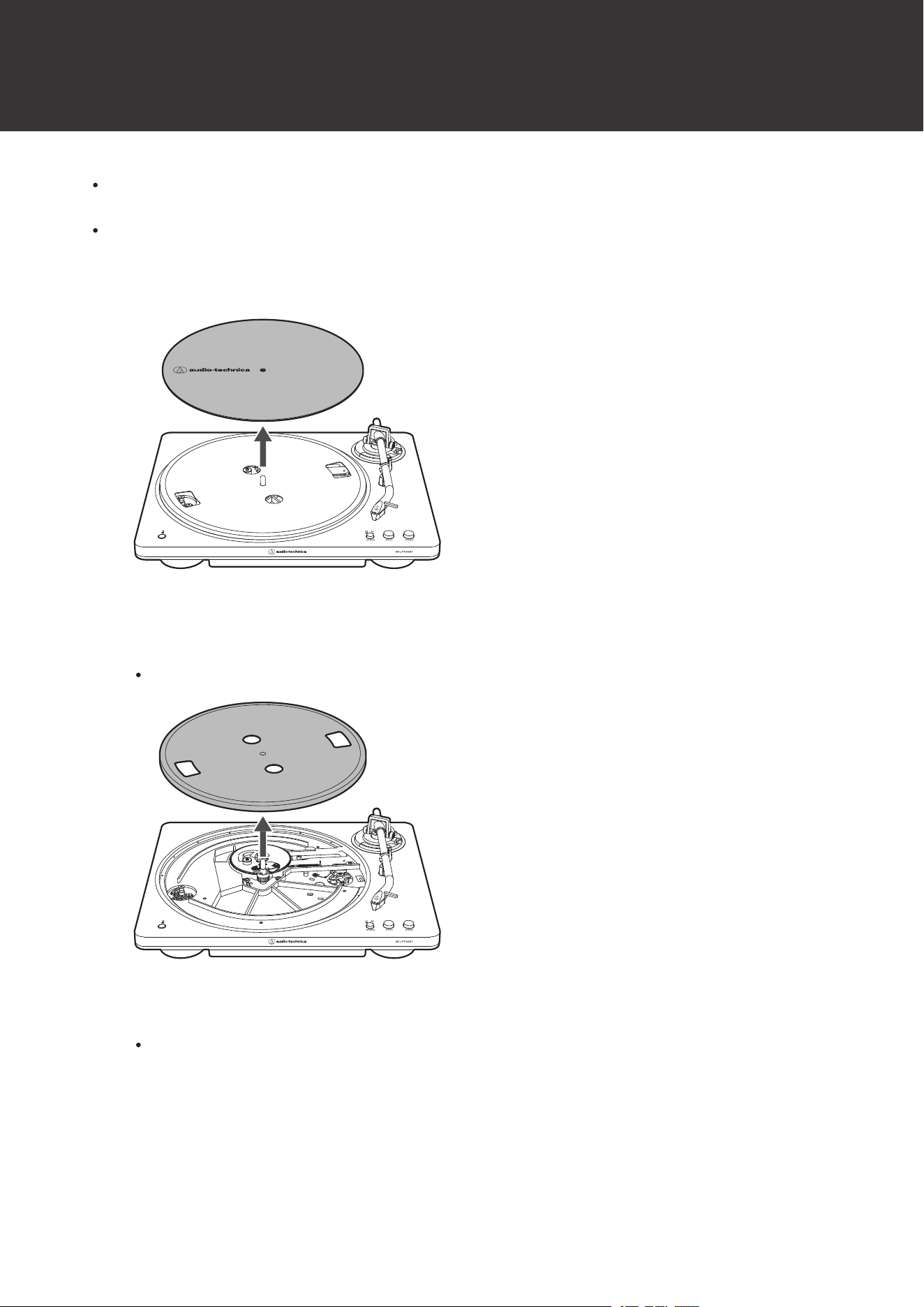
1
Remove the felt mat.
2
Remove the drive belt from the motor pulley (brass-colored), remove the platter, and then turn the
platter over and remove the old drive belt.
Place your thumbs in the openings and pull up strongly.
3
Place the new drive belt around the inner circle.
Be careful not to twist the drive belt while doing this.
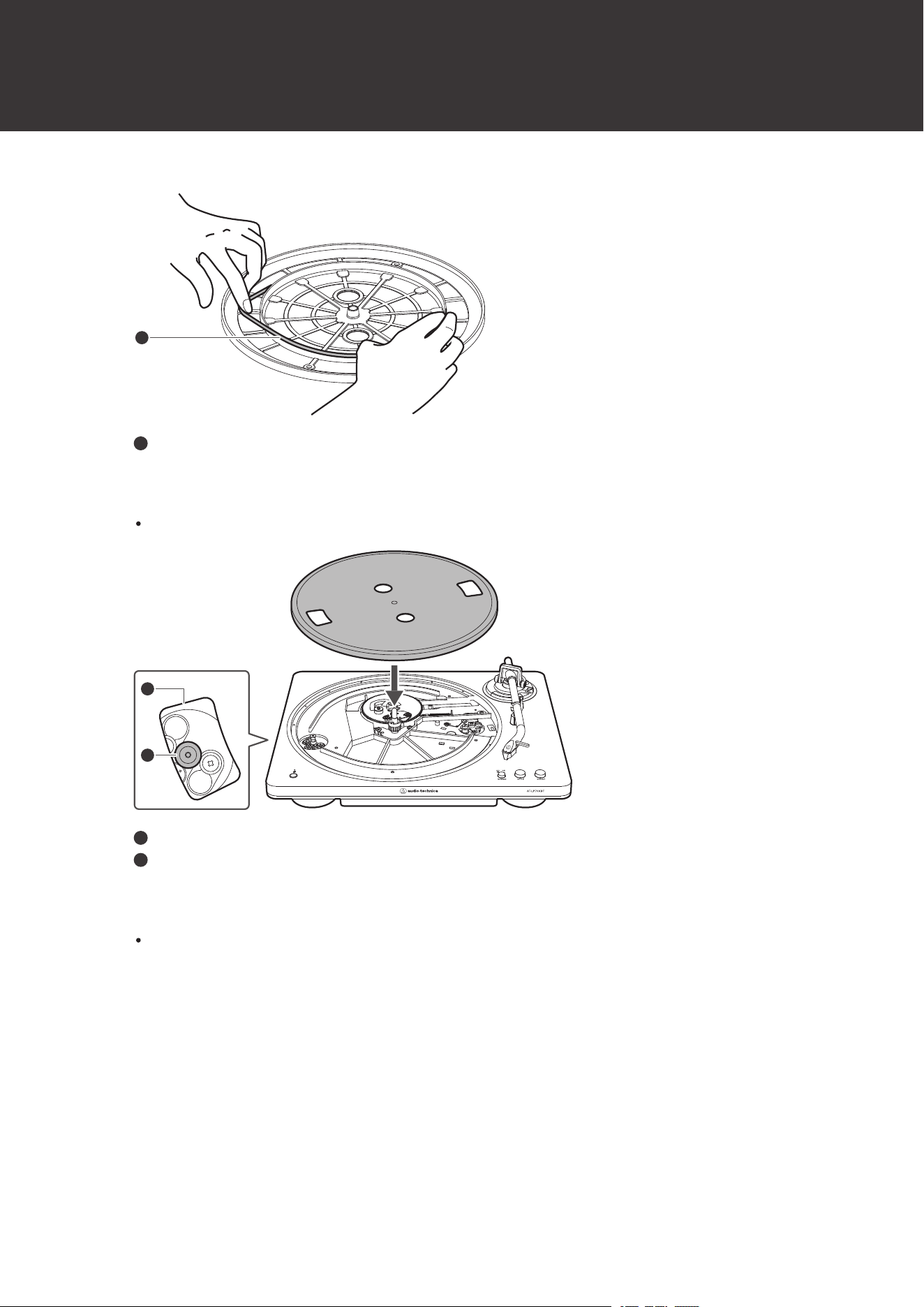
Replacing the drive belt
34
1
1
Drive belt
4
Attach the platter.
Align one of the openings with the position of the motor pulley (brass-colored).
2
1
1
Opening
2
Motor pulley (brass-colored)
5
Place the drive belt on the motor pulley (brass-colored).
Grasp the drive belt that was attached in step 3 and, while pulling it, place it on the motor pulley (brass-
colored).
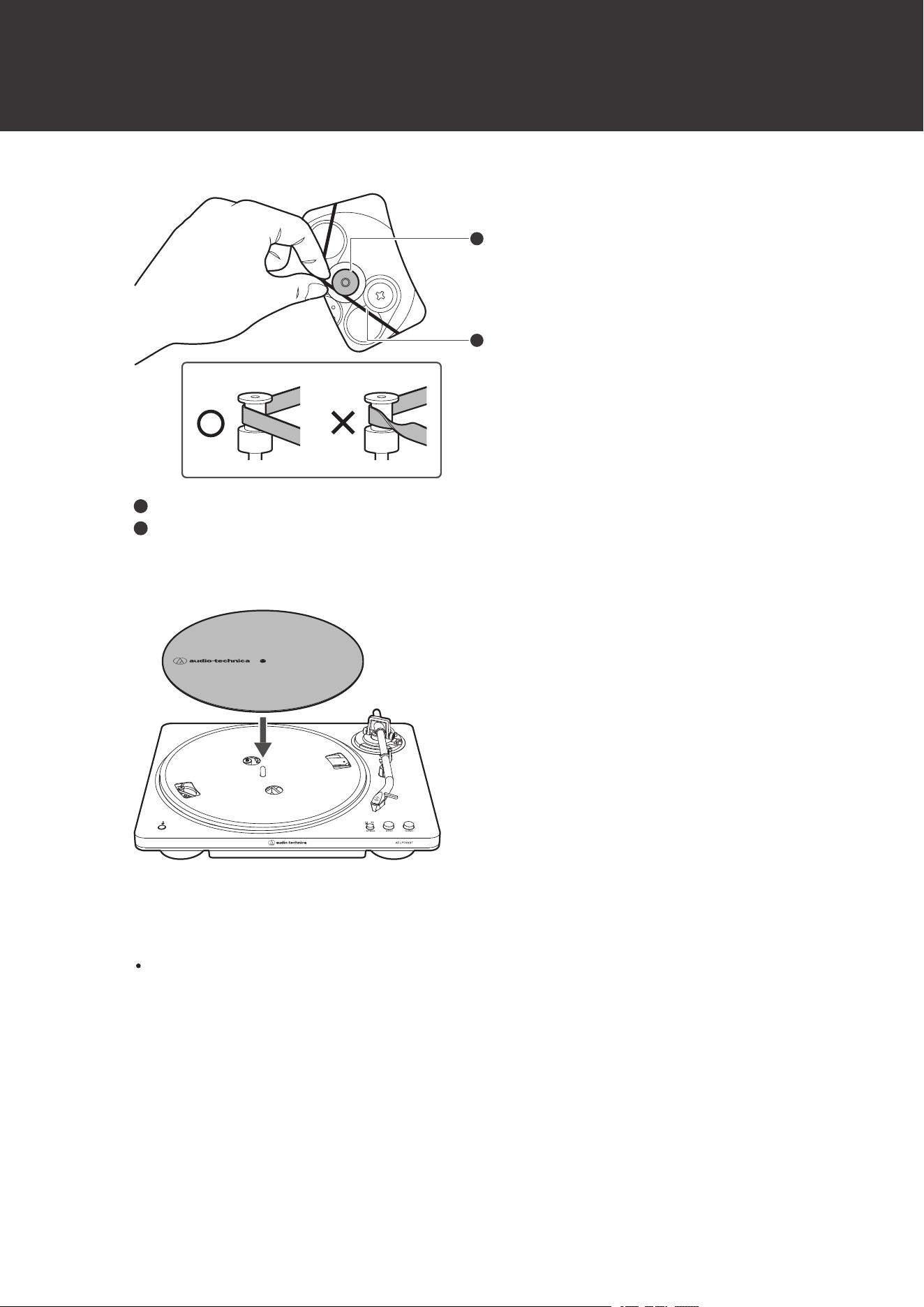
Replacing the drive belt
35
2
1
1
Motor pulley (brass-colored)
2
Drive belt
6
Set the felt mat on the platter.
7
Release the tonearm rest clamp and lift the tonearm with the lift control lever. Slowly rotate the
turntable ten times by hand in the direction of the arrow.
You may want to hold the tonearm to prevent it from moving. This step is for resetting the auto mechanism,
getting rid of any twists in the drive belt, and making sure the drive belt rides smoothly along the drive rim on
the underside of the platter.

Replacing the drive belt
36

37
When the turntable is moved
Using the product’s original packaging materials, pack the turntable in the reverse order of unpacking it. If you do not
have the original packaging materials, take the following measures:
After unplugging the AC adapter from the outlet, remove the felt mat and platter, and then wrap them so they do not
get damaged. If the product is moved while the platter is still seated, it may damage the spindle.
Make sure that the protector is attached to the replacement stylus.
Make sure the tonearm lift control lever is lowered.
Close the tonearm rest clamp so that the tonearm does not move.
Wrap the turntable body with paper or a soft cloth so that it does not get damaged.

38
Resetting
Reset the Bluetooth function if the function does not operate normally.
1
Press and hold the Bluetooth connect button (for about 10 seconds).
The Bluetooth indicator lamp will flash red, the product will reboot, and the reset will be complete.

39
Troubleshooting
The platter does not spin.
Is the AC adapter connected to the outlet? Connect AC adapter to the outlet.
Has the drive belt slipped from the platter? Correctly place the drive belt on the platter.
Is the drive belt placed on the motor pulley (brass-colored)? Check that the drive belt is placed on the motor
pulley (brass-colored) correctly.
Has the drive belt been damaged? Replace it with a new drive belt.
The platter spins, but there is no sound or the volume is not loud enough.
Is the protector still attached to the replacement stylus? Remove the replacement stylus protector.
Is the tonearm lifted? Lower the tonearm.
Are the function settings and input for connected equipment (amplifier, etc.) selected correctly? Check
whether the settings for the connected equipment are correct.
Is the stylus damaged? Check the stylus and replace it, if necessary.
Is the replacement stylus placed correctly on the tonearm? Check the replacement stylus and adjust it, if
necessary.
Are the setting positions for the pre-amplifier selector switch correct? Make sure the settings are configured
correctly for your amplifier inputs.
If there is no sound, or if the volume is not loud enough, the product may be set to the “PHONO” position
and connected to the amplifier’s AUX/LINE input.
If the volume is too loud or is distorted, the product may be set to the “LINE” position and connected to the
amplifier’s PHONO input.
The stylus skips.
Is the record warped? Check the record.
Is the record scratched? Check the record.
Is the stylus tip dirty? Excessive accumulation of dirt and dust on the stylus affects the record’s playback
quality.
There is howling.
Is the product picking up excessive vibrations from the floor, surfaces of the walls, or nearby speakers?
Decrease the vibrations or mount the product on a surface that is not subject to the effects of vibrations.
Is the product mounted on an unstable surface? Check whether the surface on which the product is mounted
is suitable.

Troubleshooting
40
There is noise when the record is playing.
Is there dust on the stylus tip? If dust is stuck to the stylus tip, clean it with a commercially sold brush.
The sound when the record is playing is either too fast or too slow.
Are the speed settings for the product correct? Use the platter speed button to select the correct speed for
the type of record being played.
Playing speed slows down or there is irregular rotation.
Is the drive belt stretched out? Replace it with a new drive belt.
Humming noise is heard during playback.
Is the ground line connected correctly? Make sure the ground line is properly connected.
If the noise continues, remove the ground line. This may reduce the noise.
Unable to pair.
Confirm that the Bluetooth device communicates using Ver. 2.1+EDR or higher.
Place the product and the Bluetooth device within 1 m (3.3') of each other.
No sound is heard or sound is faint when connected via Bluetooth.
Turn on the power of the product and the Bluetooth device.
Turn up the volume on the Bluetooth device.
Move away from obstacles between the product and the Bluetooth device, such as people, metal, or walls,
and place the product and device closer together.
Sound is distorted / noise is heard / sound cuts out.
Turn down the volume on the Bluetooth device.
Keep the product away from devices that emit radio waves such as microwaves and wireless routers.
Keep the product away from TVs, radios, and devices with built-in tuners. These devices can also be affected
by the product.
Move away from obstacles between the product and the Bluetooth device, such as people, metal, or walls,
and place the product and device closer together.

Troubleshooting
41
Automatic operation is not working correctly.
Make sure the product is placed on a level surface.
Automatic operation may not work well with start or end of some records.
For details about how to operate your Bluetooth device, refer to the device’s user manual.
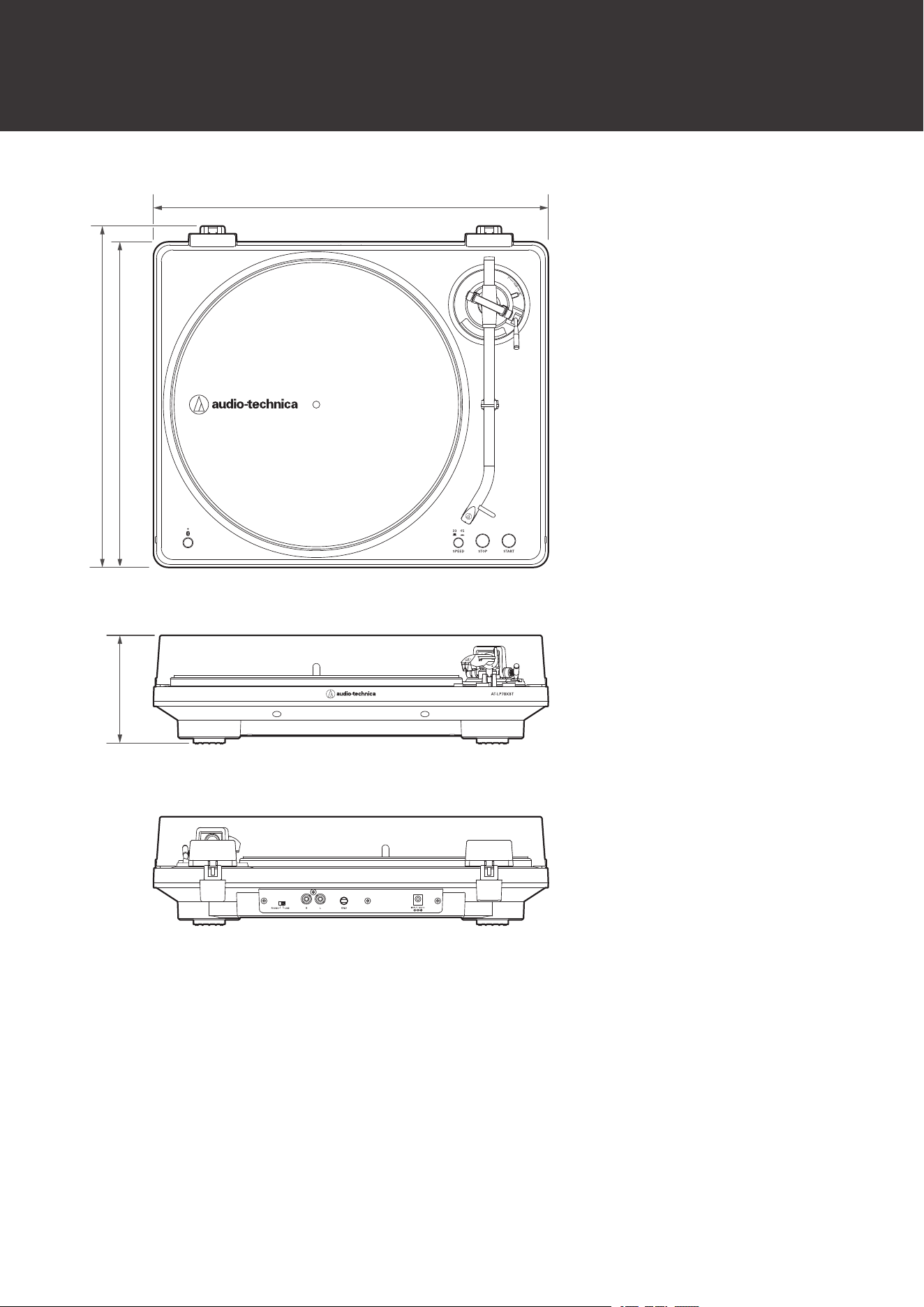
42
Dimensions
400
330
346
110
(Unit: mm)
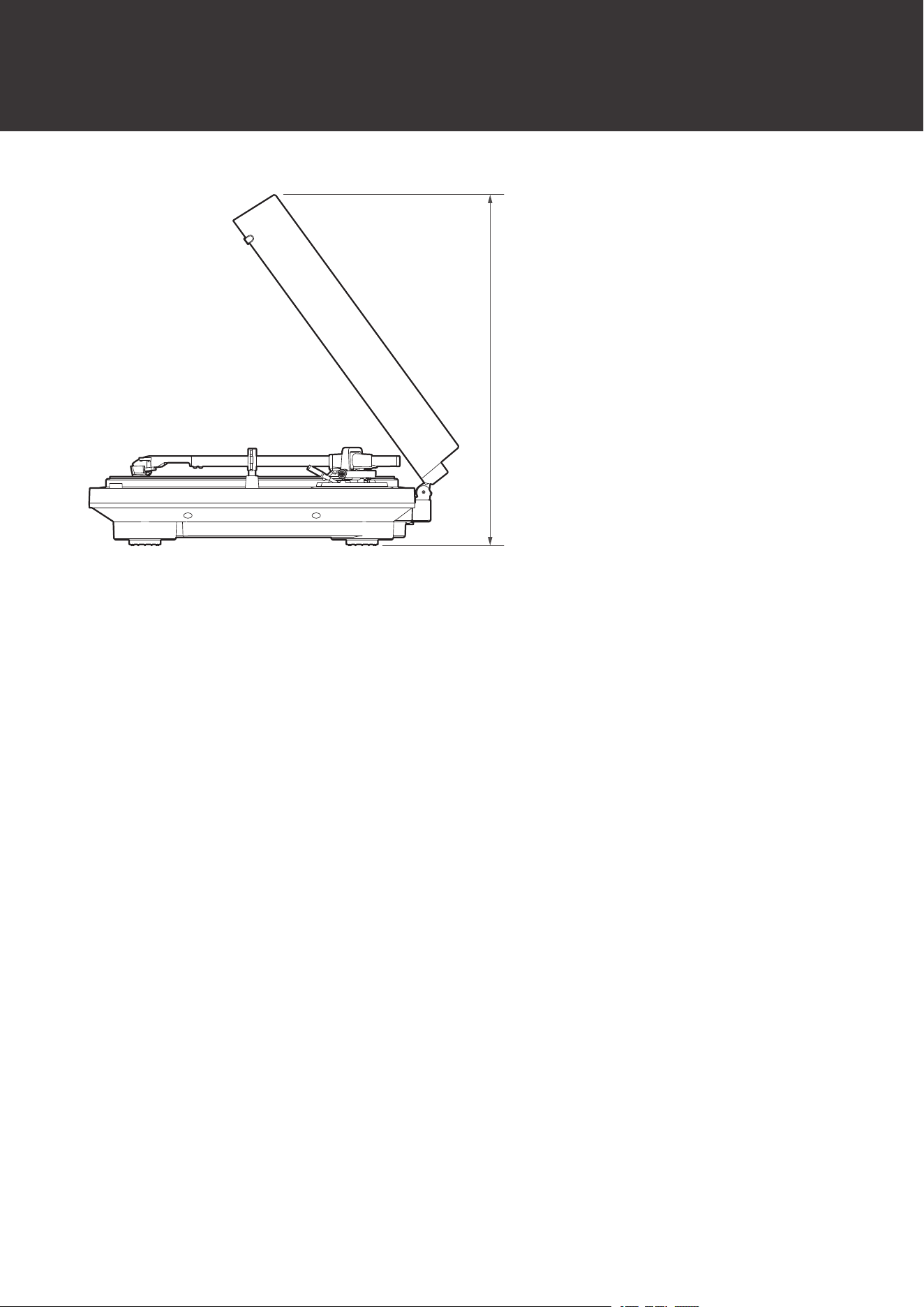
Dimensions
43
355
(Unit: mm)

44
Specifications
Communication specifications
Communication system
Bluetooth version 5.2
RF output
2.5 mW EIRP
Maximum communication
range
Line of sight - approx. 10 m (33')
Frequency band
2.402 GHz to 2.480 GHz
Modulation method
GFSK, Pi/4DQPSK, 8DPSK
Compatible Bluetooth profile
A2DP
Supported codec
Qualcomm
®
aptX
™
Adaptive audio, Qualcomm
®
aptX
™
audio, SBC
Turntable specifications
Motor
DC motor
Drive method
Belt drive
Speeds
33-1/3 RPM, 45 RPM
Turntable platter
Die-cast aluminum
Wow and flutter
< 0.25% (WTD)
Signal-to-noise ratio
> 55 dB
Output levels
PHONO: 4.0 mV nominal at 1 kHz, 5 cm/sec
LINE: 252 mV nominal at 1 kHz, 5 cm/sec
Phono Pre-amp gain
36 dB nominal, RIAA equalized
Tonearm specifications
Effective length
220 mm (8.7”)
Overhang
18 mm (0.71”)
Maximum tracking error angle
Less than 2.0°
Cartridge specifications
This product is equipped with an AT-VM95C Dual Moving Magnet Stereo Cartridge. The cartridge cannot be removed.

Specifications
45
Cartridge model
AT-VM95C
Cartridge type
VM
Recommended load impedance
47,000 ohms
Output voltage
4.0 mV (mV at 1 kHz, 5 cm/sec)
Stylus
0.6 mil bonded conical
Cantilever
Aluminum pipe
AC Adapter
Type
FJ-SW1261200500DN
Rated input voltage
100 to 240 V AC
Rated input current
0.4 A max.
Rated frequency
50 Hz / 60 Hz
Rated output voltage
12 V DC
Rated secondary current
0.5 A
Cable length
Approx. 1.5 m (4.9')
The included AC adapter may differ depending on the country of sale. Check the rating label on the AC adapter. For details, contact your local Audio-
Technica dealer.
General specifications
Dimensions
400 mm (16”) × 330 mm (13”) × 110 mm (4.3”) (W × D × H)
Weight
Approx. 2.9 kg (6.4 lbs)
Power consumption
1.6 W
Accessories
Dust cover, Felt mat, Platter (with drive belt), Dust cover hinges, 45 RPM
adapter, RCA audio cable (Approx. 1.0 m (3.3')), AC adapter (Approx. 1.5 m
(4.9'))
Replacement stylus (sold
separately)
AT-VMN95C
Replacement belt (sold
separately)
AT-LP70X exclusive belt
For product improvement, the product is subject to modification without notice.

46
Trademarks
The Bluetooth
®
word mark and logos are registered trademarks owned by Bluetooth SIG, Inc., and any use of such
marks by Audio-Technica Corporation is under license. Other trademarks and trade names are those of their
respective owners.
Qualcomm aptX is a product of Qualcomm Technologies, Inc. and/or its subsidiaries. Qualcomm is a trademark of
Qualcomm Incorporated, registered in the United States and other countries. aptX is a trademark of Qualcomm
Technologies International, Ltd., registered in the United States and other countries.

株式会社オーディオテクニカ
〒194-8666 東京都町田市西成瀬2-46-1
www.audio-technica.co.jp
Audio-Technica Corporation
2-46-1 Nishi-naruse, Machida, Tokyo 194-8666, Japan
www.audio-technica.com
©2024 Audio-Technica Corporation
Global Support Contact: www.at-globalsupport.com
351709430-02-01 ver.1 2024.07.15