
100 Watts Waterproof Portable Bicycle/Scooter MP3/
Ipod Music Player (Silver)
100 Watts Waterproof Portable Bicycle/Scooter MP3/
Ipod Music Player (Black)
PLBK A1 0 0 BK
PLBK A1 0 0 SL
PLBK A1 0 0 BK
PLBK A1 0 0 SL
Including:
1. One piece port able MP3 loudspeaker player
2. One piece easy inst allat ion bicycle handlebar br acket .
3. One piece USB cable
bike speaker syst em.
t his bike speaker syst em has been
Device Feat ures
-The high qualit y aluminum case is sult able f or bot h indoor and out door
envir onment s.
-The int er nal super ior Hi-Fi speaker pr oduces excellent sound
out door set t ings.
-W it h t he special Amp. design. t he speaker out put qualit y will not decay
dur ing t he lif e of bat t ery.
-The int er nal r echargeable long-lif e Li-ion bat t ery pr ovides f or ext ended use
-W hen t he ear phone is plugged in. t he device swit ches f rom t he speaker t o
t he ear phone aut omat ically.
-I ncor por at ing t he USB, char ging and ear phone input s int o one j ack r esult s
in an elegant appear ance.
-The device support s MP3/ WMA f or mat .
Product Specif icat ion
Model No. PLBKA100BK/ PLBKA100SL
Speaker out put THD+N=0.15%
SNR=94dB
Earphone Out put THD+N=0.6%
SNR = 92 dB
Playing Time Speaker : 8.5 hour s(depends on t he playing volume)
Ear phone : 55 hours
Char ging Time USB: 8 hours
USB(5V/ 1A) A/ C commer cial adapt or :3 hour s
Capacit y 2G
I nt er f ace USB 2.0 Full speed
File Syst em FAT16 / FAT32
Music For mat MP3 / W MA (Below 384 kbps)
Temper at ur e Funct ion wit hin -10°C - 50°C
Size/ Dimension 100 x 40 x 40 mm
Weight 240g
bike speaker syst em,
qualit y in bot h indoor and
The LED I ndicat or
- The LED indicat or will f lash once ever y second when t he device is
playing nor mally.
- While no song in t he memor y, t he LED indicat or will illuminat e f or t wo
seconds and f lashes f or one minut e unt il t he device shut down.
- The LED indicat or will f lash r apidly when t he bat t er y is low and it cont inues
t o f lash r apidly unt il t he bat t er y is dead.
- The LED indicat or f lashes when t he bat t er y is char ging and st ays on when
t he charging is complet ed.
- The LED indicat or will cont inue t o f lash while t he songs ar e being
downloaded.
Trouble Shoot ing
- The LED indicat or is f unct ioning normally, but t her e is no sound:
Check whet her or not t he ear phone is plugged in and t hat t he USB cable is
st ill connect ed.
- When t he device is not playing nor mally or behave abnor mally when
connect ed t o t he comput er :
Char ge t he device f or approximat ely 30 minut es and t hen Reset t he syst em.
Charging t he Device
- The device needs t o be f ully charged bef or e it s init ial use 8 hour s.
- To char ge t he bat t er y, use t he 3.5mm/ USB cable.
- At t ach t he 3.5mm connect or at one end of t he cable t o t he device and t he
USB at t he ot her end t o a comput er .
- The LED indicat or will illuminat e dur ing char ging, and it will go out when t he
device is f ully charged.
- The device will shut of f aut omat ically when t he USB cable is disconnect ed
(including dur ing char ging or dat a t ransmission).
Downloading Music
- Connect t he device t o a comput er t hr ough t he USB cable. The device can
t hen be oper at ed as a f lash dr ive f or downloading music.
- I t is r ecommended t o cr eat e separ at e f older s f or a variet y of music and f or
easy access and downloading.
- The W MA f or mat suppor t s Window Media Audio up t o and including ver sion
9. I t does not suppor t “Digit al Right Management (DRM)” f or mat .
I nstr uctions f or Operat ing t he Device
1. Power on : Pr essing t he but t on light ly, t he device will play song
aut omat ically af t er t he LED indicat or st ays on f or appr oximat ely 3
seconds.
2. Power of f : Pr essing t he but t on f or about 3 seconds, t he LED indicat or
will f lash r apidly and go out and t he device is t ur ned of f .
3. Pause: Pr essing t he but t on light ly dur ing playing will cause t he LED t o
st ay on and t he player will ent er t he “Pause” mode. Pr essing t he but t on
light ly again will r et ur n t he player t o normal play st at us. Please not e t hat
t he syst em will t ur n it self of f aut omat ically af t er 1 minut es in "Pause" mode.
4. Change songs during t he playing:
Pr essing t he but t on light ly, t he device will skip t o t he next song.
Pr essing t he but t on light ly, t he device will skip t o pr evious song.
|
►
||
►
||
►
||
►
||
►
►
|
►
►
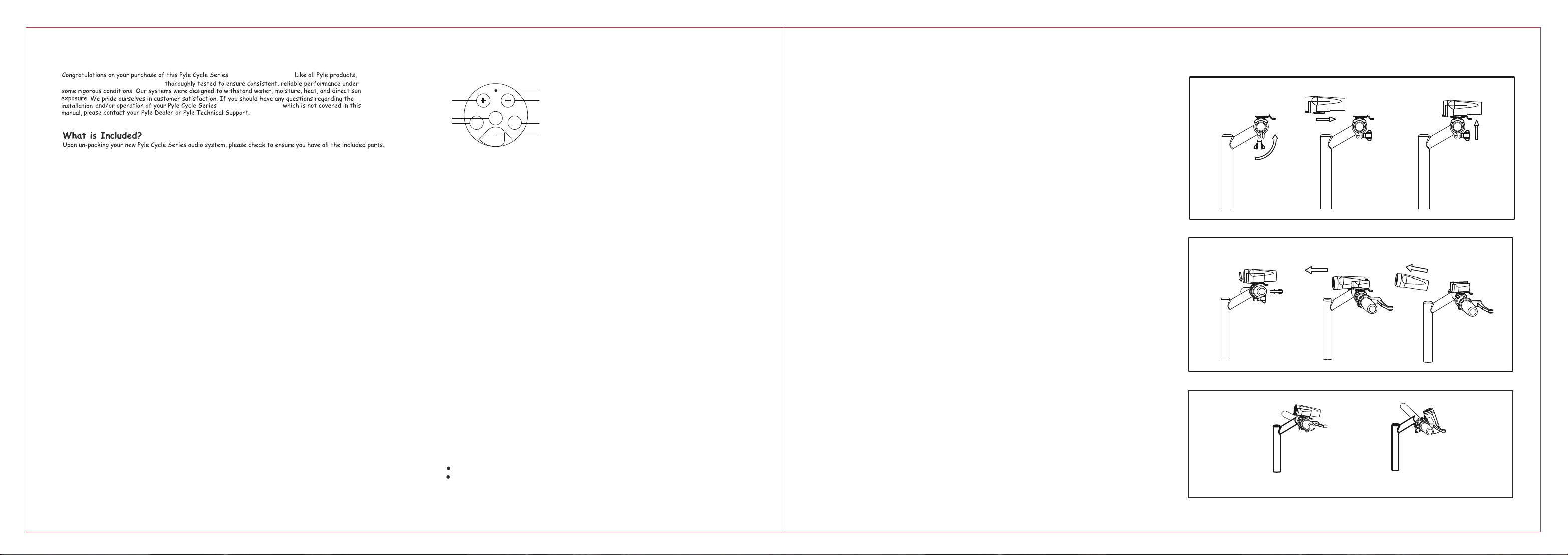
I nstallat ion I nst r uctions
O
X
Cor r ect angle
Wr ong angle
Secur ing t he MP3 loudspeaker player int o
t he handlebar br acket .
Releasing t he MP3 loudspeaker player f r om
t he handlebar br acket .
But t on Oper at ions
5. POWER On or Of f , and Play or Pause
4. VOLUME I ncr ease
3. VOLUME Decr ease
6. SKI P Backwar d
2. SKI P For ward
1. Shared Earphone/ POW ER/ USB 3.5mm
input wit h cover
4
3
2
1
5
6
|
►
►
|
►
►
►
||
7
7. LED st at us indict or
@ 1.5W
@ 1.5W
@ 32Ω
@ 32Ω

