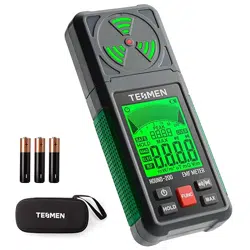
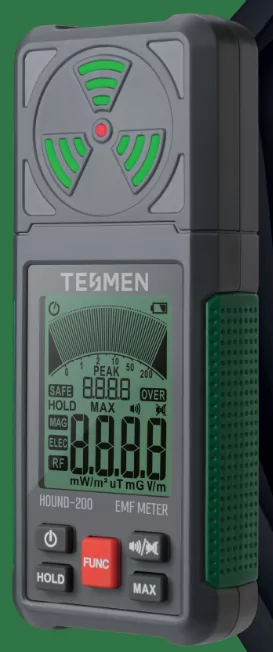
User Manual for TENMEN HOUND-200 EMF Meter
Warranty
Your TESMEN product is backed by a comprehensive three-year warranty, starting from the date of purchase, covering defects arising from faulty materials or workmanship. To ensure the validity of your warranty claim, kindly adhere to the following conditions:
Proof of Purchase: Please retain your proof of purchase, which includes the Amazon order number, and present it when making a warranty claim.
Conditions for Warranty Claim Eligibility:
- Proof of purchase must be provided.
- Unauthorized individuals must not attempt service or repairs.
- The product should not have been subjected to misuse.
- This warranty excludes damage from neglect, contamination, alteration, or accidents. It does not cover abnormal conditions of operation or handling.
We stand firmly behind the quality of our product and are committed to promptly addressing any valid warranty claims at no additional cost.
For warranty-related services or further assistance, please reach out to our dedicated customer support team. Kindly provide proof of purchase and a detailed description of your issue, or contact us at [email protected].
Thank you for choosing TESMEN: we value your trust in our products.
Safety Precautions
Low Battery: Avoid taking measurements when the battery is low to ensure accurate readings and prevent potential errors. Replace the battery with a fresh one as needed.
Power Off: Remember to power off the unit when it's not in use to conserve battery power. This practice prolongs the battery life and ensures the device remains ready for reliable measurements when required.
Proper Storage: Store the unit in a dry environment or within a protective box when it's not in use. This precaution prevents moisture and oxidation of mechanical parts, such as buttons or battery contacts, which could affect the device's functionality.
Remember to follow these cautions to maintain your device's optimal performance and longevity.
Note: For detailed instructions regarding battery replacement and storage recommendations, please consult the corresponding sections in the user manual.
Overview
Introduction
Thank you for choosing the TESMEN EMF Detector, a portable device designed for detecting and evaluating the impact of non-ionizing electromagnetic fields on human health and safety. This user manual aims to provide essential information on operating the EMF detector effectively.
The TESMEN EMF Detector is designed to detect three fields: AC magnetic fields, AC electric fields, and Radio Frequency (RF). It is versatile and suitable for use in various environments, including homes and workplaces, to evaluate the potential effects of electromagnetic fields on human well-being.
EMF meters, such as the TESMEN EMF Detector, offer many applications. They allow you to test household appliances, measure EMF emissions from power lines, and troubleshoot potential issues related to electromagnetic fields.
This user manual will walk you through the features, functions, and operation of the TESMEN EMF Detector. It will help you comprehend how to interpret the measurements provided by the device and make informed decisions regarding EMF exposure.
Before using the TESMEN EMF Detector, we recommend thoroughly reading this user manual to ensure safe and effective operation. Familiarize yourself with the device's controls, display indicators, and measurement modes to maximize its capabilities.
Please be aware that while the TESMEN EMF Detector is a valuable tool for assessing electromagnetic fields, it should not substitute for professional advice or medical evaluations. If you have specific health concerns or require expert guidance, we suggest consulting qualified professionals in the field.
We trust this user manual will empower you with the necessary knowledge to effectively utilize the TESMEN EMF Detector. Should you have any further questions or require technical support, please consult the relevant sections in this manual or contact our customer service team at [email protected].
Thank you for choosing the TESMEN EMF Detector, and we wish you a successful and informed EMF detection experience.
Features
- Detect all three types of EMF pollution: AC magnetic, AC electric, and RF/microwave.
- AC magnetic field measurements are 3-axis, allowing for quick readings, regardless of meter orientation.
- AC Magnetic Mode covers 40 Hz - 500 Hz with a range of 0.01 - 200.0 microtesla (uT) / 0.1 - 2000 milligauss (mG).
- AC Electric Mode covers 40 Hz - 500 Hz with a 1 - 2000 volts per meter (V/m) range.
- RF Mode covers 50 Hz - 3.5 GHz with a range of 0.001 - 200 milliwatts per square meter (mW/m²).
- Peak measurement captures fast pulses for measuring fast signals.
- Data retention is one key to freeze the measured display value.
- Maximum value measurement function.
- Visual and audible, automatic alarm when exceeding the alarm threshold.
- Simultaneously display the measured, peak, and quick response trend graph.
Applications
- Mobile phone and cell tower RF radiation.
- Smart meter RF radiation.
- Wi-Fi router and Bluetooth RF radiation.
- Overhead AC power line and transformer EMF emissions.
- EMF radiation detection of electrical appliances such as laptops, air conditioners, refrigerators, TVs, microwave ovens, copiers, monitors, etc.
- Wireless pinhole camera, wireless bug detection.
- EMF radiation detection in motor vehicles.
- Used for detecting electromagnetic radiation protection equipment, such as electromagnetic radiation shielding verification of electromagnetic protective clothing, computer radiation protection screens/protective materials, etc.
Specifications
| Function |
TESMEN HOUND-200 EMF Meter |
| AC Magnetic |
3-axis (X, Y, Z) |
| Frequency Range |
40~500Hz |
| Measurement Range |
0.01~20.00uT/
20.0~200.0uT |
0.1~200mG
200~2000mG |
| Resolution |
0.01/0.1uT |
0.1/1mG |
| AC Electric |
1-axis |
| Frequency Range |
40~500Hz |
| Measurement Range |
1~2000V/m |
| Resolution |
1V/m |
| RF/Microwave |
1-axis |
| Frequency Range |
50Hz~3.5GHz |
| Measurement Range |
0.001~2mW/m² |
2~20mW/m² |
20~200mW/m² |
| Resolution |
0.001mW/m² |
0.01mW/m² |
0.1mW/m² |
| Visual & Audible Alarm |
65-75dB ticking |
orange-red light |
| Automatic Shutdown |
approx. 15 minutes |
| Operating Environment |
0-40°C / 40~80%RH |
| Power Supply |
3x1.5V AAA Batteries |
Product Overview
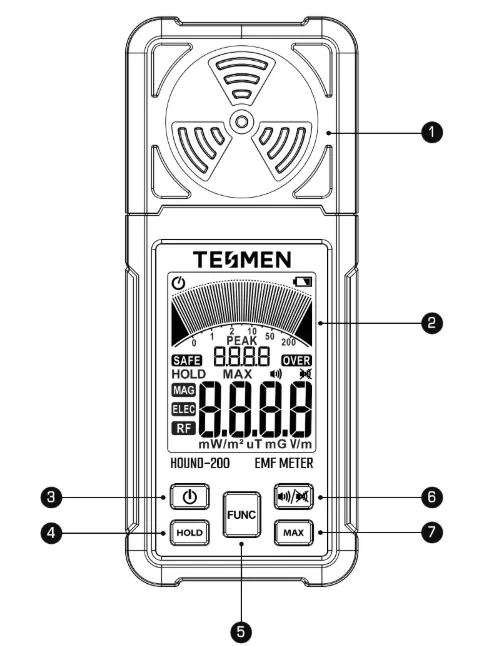
① Working Status Indicator
② LCD Screen
③ Power Button
④ Data Hold Button
⑤ Function Switch Button
⑥ Sound On/Off Button
⑦ Max Value Button
Display Description
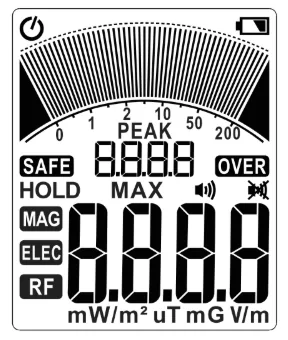
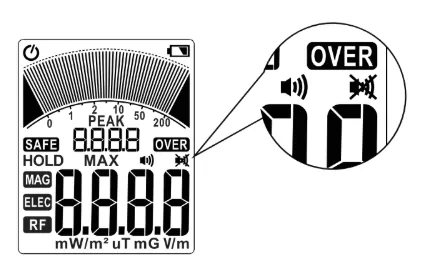
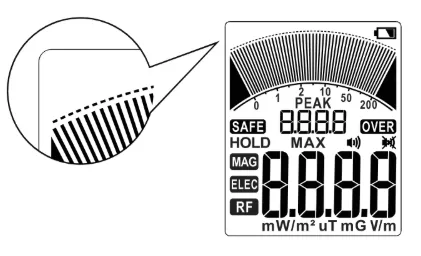
The following definitions describe what the symbols and values displayed on the EMF meter screen represent.
 |
Auto Power-Off Indicator |
 |
Low-Battery Indicator |
 |
Field Trend Indicator |
 |
Scale Bar |
 |
Peak Measurement |
| HOLD |
Data Hold Indicator |
| MAX |
Maximum Value Indicator |
 |
Speaker On Indicator |
 |
Speaker Off Indicator |
| MAG |
AC Magnetic Field Measurement Mode |
| ELEC |
AC Electric Field Measurement Mode |
| RF |
RF and Microwave Field Measurement |
| mW/m² |
Milliwats Per Square Meter |
| V/m |
Volts Per Meter |
| mG |
Milligauss |
| uT |
Microtesla |
 |
Field Measurement |
| SAFE |
Normal Field Strangth |
| OVER |
High Field Strangth |
Field Measurement is averaged to provide the most stable and accurate reading achievable. Peak Measurement captures the highest peak recorded and maintains that value for 3 seconds or until a higher peak is detected.
Operation
Low-Battery Indication
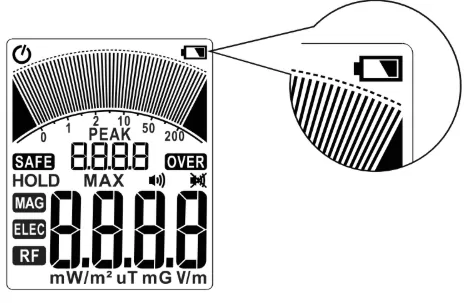
When the battery voltage is lower than the working voltage, the icon appears in the upper right of the LCD screen. This means it's time to put in 3 fresh 1.5V batteries.
Battery Installation
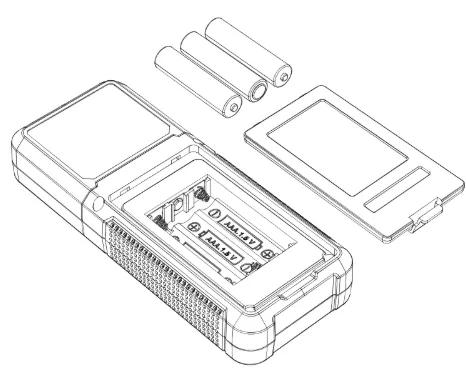
Step 1. Locate the small tab or indentation on the edge of the battery cover. Insert your fingernail or a small tool into the tab or indentation. Apply gentle pressure and lift the cover upwards while pressing on the tab. The cover should release from its locked position, allowing you to open it and access the battery compartment fully.
Step 2. Install 3 AAA batteries (included in the box) into the cartridge according to the positive and negative marks inside the battery compartment.
Step 3. Align the notch and snap on the battery cover.
WARNING: Please remove the batteries when the meter is not used for an extended period. Avoid exposure to high temperatures or humidity. If the meter has been stored in extreme conditions beyond the limits specified in the Specifications section, allow the meter to return to normal operating conditions before using it again.
Power On/Off
Press the power button  for over 1 second to turn the meter on, and enter the measurement mode. Press the button again to turn off the meter.
Turn On/Off the Audible Alarm
Short press the  button to turn on or off the audio alarm. When turning on the sound, the icon will be displayed on the screen. When turning off the sound, the icon will be displayed on the screen. The sound preference has a memory function and will retain the last set sound preference mode upon startup.
Hold the Meter
Operating Precautions
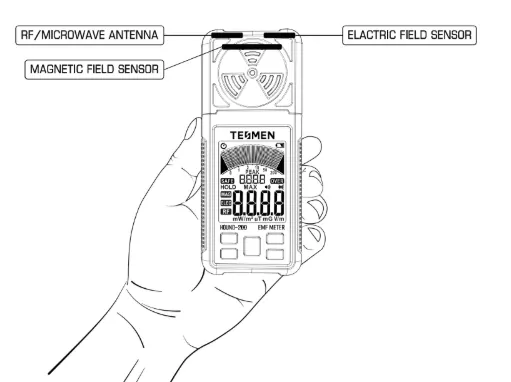
- Hold the meter (as shown above), and point the top of the meter to the position of the radiation source.
- During detection, do not cover the sensor on the top of the meter with your hands or other objects.
Operating Steps
- Press the "" key to turn on the instrument's power.
- Press the "" button to set the speaker on or off independently.
- Press the "
 " key to switch to your desired function.
- Hold the meter and point the top of the meter to the position of the electromagnetic field.
Product Mode Overview
AC Magnetic Field Detection
Press the "" key to switch to the "MAG" magnetic field uT or mG measurement function.
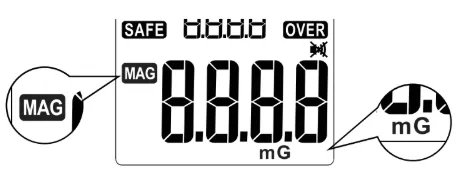
Illustration:
- The orientation of the meter does not affect magnetic mode readings, as all three axes are combined. The AC Magnetic Mode utilizes three ferrite-core coils positioned at the top of the meter, pointing in the X, Y, and Z directions. The X, Y, and Z signals are combined to provide the true magnitude of the field strength, regardless of the meter's orientation.
- You can expect to find areas with elevated magnetic field readings in most homes or offices. These fields primarily emanate from unshielded internal wiring, video displays, fluorescent lights, light dimmers, transformers within consumer devices, electric blankets, heaters, and any equipment with a motor.
AC Electric Field Detection
Press the "" key to switch to the "ELEC" electric field measurement function.
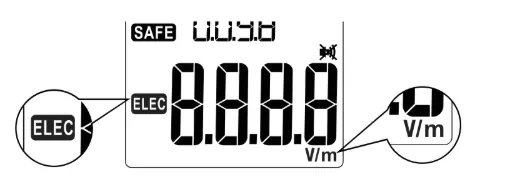
Illustration:
- Your body can easily shield electric fields; the reading is lower if you cover the top surface of the meter with your hand.
- Your hand at the back of the meter compresses the electric field, making it read somewhat higher than if the meter were suspended from a string or held on a board away from you. The true electric field near the meter will be displayed in either case.
- There are several areas in most homes or offices with high electric field readings. These fields originate primarily from improperly grounded equipment, the front of video displays, and areas of fluorescent lighting.
RF and Microwave Field Detection
Press the "" key to switch to the "RF" high-frequency measurement function.
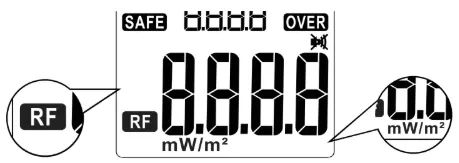
Illustration:
- Your body can effectively shield RF signals; covering the meter's face with your hand will result in lower readings.
- When measuring RF emissions from digital devices like mobile phones and smart meters, the Peak Measurement (displayed as small numerals in the middle of the screen) is more relevant than the Field Measurement (shown as large numerals at the bottom). Digital RF devices transmit data in short, irregular bursts. The Peak measurement identifies and displays the strongest signal for approximately 3 seconds.
Visual & Audible Alarm
Visual Alarm
| Radiation level evaluation |
Good |
Slight |
Severve |
| RF(mW/m²) |
0.001~10 |
10~50 |
50~200.0 |
| EF(V/m) |
1~40 |
40~400 |
400~2000 |
| MF(mG) |
0.1~1.2 |
1.2~0.4 |
4.0~2000 |
| MF(uT) |
0.01~0.12 |
0.12~0.4 |
0.4~200 |
| Screen Backlight Color |
Green |
Orange |
Red |
| text prompt |
safe |
over |
over |
| Bar graphs |
As the display values increase, the number of bar graphs increases. |
Audible Alarm
Short press the "" button to turn on or off the audio alarm. The icon will be displayed on the screen when turning on the sound. The meter will be alarmed when the measured value reaches the "slight" level. The intensity and frequency of sound changes according to the measured value.
Data Hold
Press the Data Hold Button  to turn on the data hold function and capture the measurement reading/data. The icon HOLD will appear on the screen, then press the button again to return to the normal measurement function.
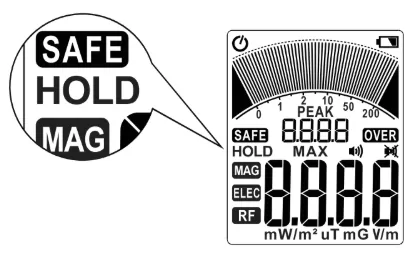
Note: Pressing the Hold button will freeze all readings, including instantaneous and peak values. If the maximum value function is activated at this time, it will also lock the maximum value.
Maximum Value
Press the  button to display the maximum values. While in this mode, the meter will only refresh the reading when a higher measurement than the one currently displayed is detected. Press the button again to exit and resume normal operation.
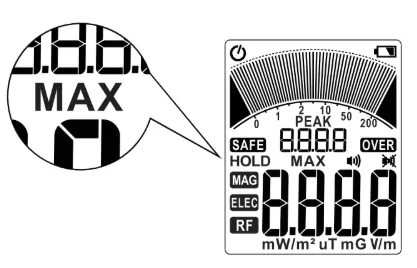
Automatic Power Off
When the meter is turned on, the icon appears in the upper left of the LCD screen. The automatic shutdown function is turned on by default. If there is no operation for 15 minutes, the meter will automatically shut down.
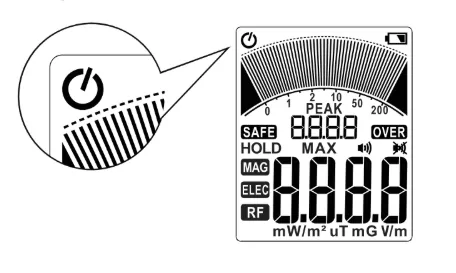
Cancel Automatic Shutdown
Press and hold the button before turning on the meter, then press the power button to turn on the meter's power.
The icon will NOT appear in the upper left of the LCD, so the user needs to turn off the power manually.
Note: Restart the meter after shutdown to restore the automatic shutdown function.
EMF Exposure Limits
Numerous EMF exposure limit standards have been published, each with varying criteria. These standards consider factors such as EMF frequency, duration of exposure, and the body part(s) affected. It's important to note that IEEE and many Western European limits primarily address the thermal effects of EMF on the human body, whereas Russian and Eastern European limits emphasize dose over extended exposure periods. Refer to the table below for specific information:
| |
Mains Electricity (50 Hz or 60 Hz) |
2000 MHz (2 GHz) |
| |
Magnetic (mG) |
Electric (V/m) |
RF (mW/m²) |
| Russia 1 |
100 |
500 |
100 |
| China 2 |
833 |
3333 |
400 |
| ICNIRP 3,4 |
2000 |
4167 |
10,000 |
| IEEE 5,6 |
9040 |
5000 |
10,000 |
[1] SanPin 2.1.2.1002-00, Sanitary and epidemiological requirements for residential buildings and premises
[2] GB 8702-2014, Controlling limits for electromagnetic environment
[3] ICNIRP GUIDELINES FOR LIMITING EXPOSURE TO TIME-VARYING ELECTRIC AND MAGNETIC FIELDS (1Hz–100 kHz)
[4] ICNIRP GUIDELINES FOR LIMITING EXPOSURE TO TIME-VARYING ELECTRIC, MAGNETIC, AND ELECTROMAGNETIC FIELDS (UP TO 300 GHz)
[5] IEEE Std C95.1M-2002, IEEE Standard for Safety Levels with Respect to Human Exposure to Electromagnetic Fields, 0–3 kHz
[6] IEEE Std C95.1M-2005, IEEE Standard for Safety Levels with Respect to Human Exposure to Radio Frequency Electromagnetic Field, 3 kHz to 300 GHz
Typical EMF Levels for Home & Office Environments
The following information provides an overview of typical electromagnetic field (EMF) levels in home and office environments. It is important to note that the maximum exposure limits mentioned below are significantly higher than you would typically encounter. While some authorities recommend lower levels for long-term exposure, there is no consensus on universally safe levels. When measuring EMF levels in a home or office, it is essential to consider the areas where people spend their time or where EMF-sensitive equipment is present.
Magnetic Fields: In the central areas of a standard home or office, magnetic field levels are typically below 0.50 uT (5.0 mG). These levels are considered to be within the normal range of radiation exposure.
Electric Fields: Within the same central areas of a typical home or office, electric field levels are typically less than 20 V/m. These levels are generally regarded as being within the acceptable range of radiation exposure.
Radio Frequencies: Radiofrequency levels in a typical home or office environment are typically below 5.000 mW/m². These levels of radiation are generally considered to be within safe limits.
Please note that the above information is a general guideline and may not account for specific variations in EMF levels within individual spaces. Following any specific guidelines or regulations provided by local authorities or relevant governing bodies regarding EMF exposure is always recommended. If you have any concerns or questions about EMF levels in your home or office, it is advisable to consult with a qualified professional or seek further information from authoritative sources.
Disclaimer
The use of this meter is entirely at the user's discretion to identify exposure to non-ionizing electromagnetic fields. Given that meters of this nature may experience malfunctions, the user's responsible for ensuring the meter's proper functioning by conducting measurements against a known reference. Please note that the test data provided by this instrument is intended for reference only.
Neither the manufacturer nor the dealer can assume liability for any damages resulting from a defective meter (except for meter replacement or repair within the warranty period) or inaccuracies in the current body of knowledge pertaining to potential health hazards associated with electromagnetic fields.
The meter should facilitate straightforward actions, such as relocating furniture or equipment generating radiation sources, to minimize relative exposure within a home or office. For more precise detection requirements, we recommend seeking expert advice and conducting independent tests with an alternative type of meter.
Your safety and accurate measurement are of utmost importance, and we encourage users to exercise caution and expertise in their applications.