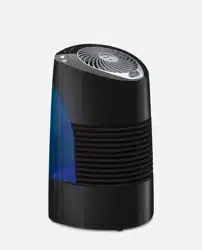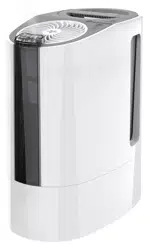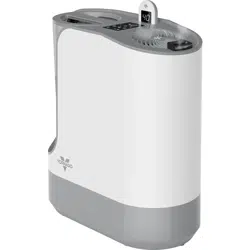
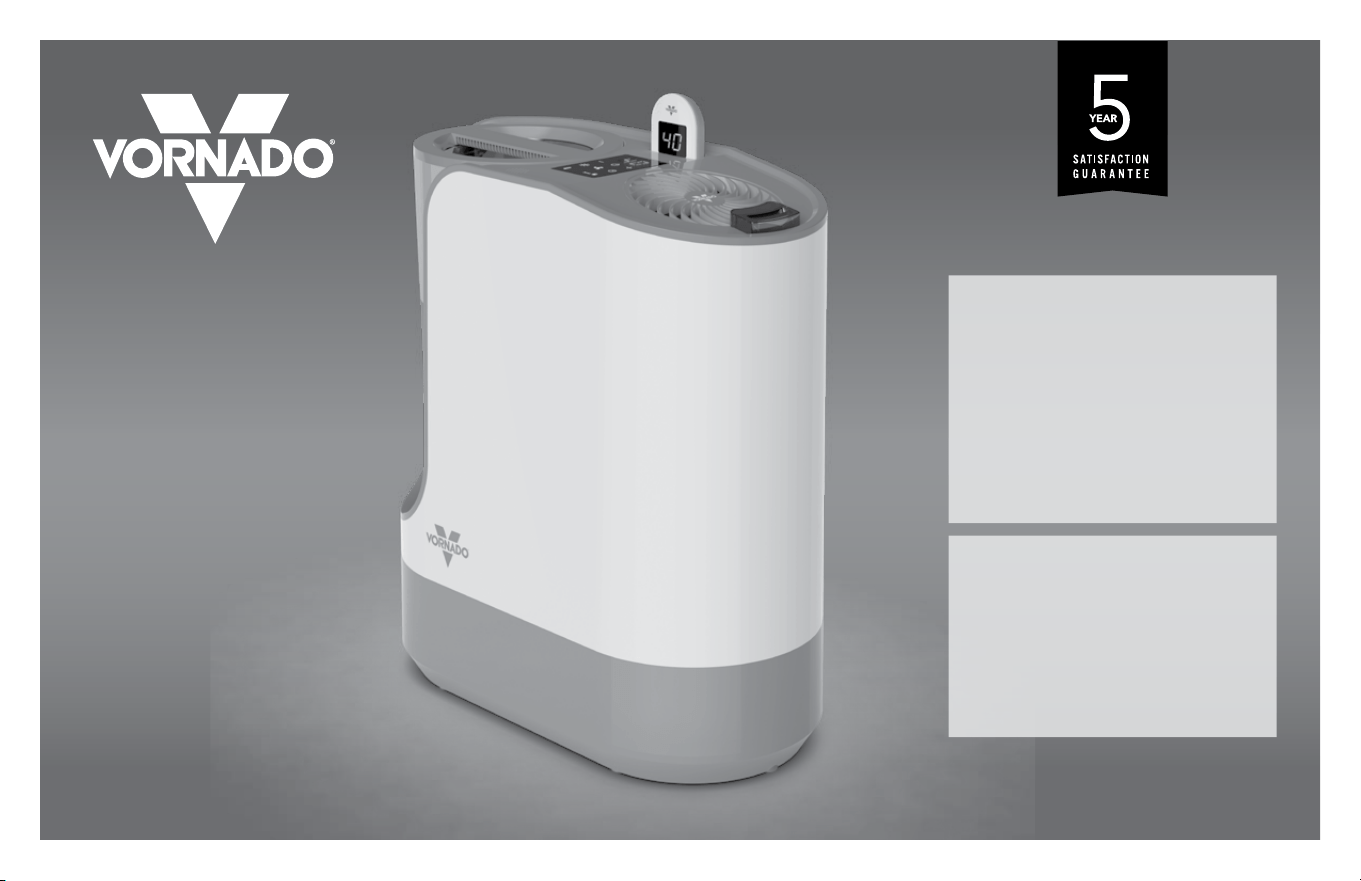
model UH200
ULTRASONIC WHOLE ROOM
HUMIDIFIER OWNER’S GUIDE
GUÍA DEL PROPIETARIO DEL
HUMIDIFICADOR Ultrasónico PARA
AMBIENTES
GUIDE D’UTILISATION –
HUMIDIFICATEUR À ULTRASONS POUR
TOUTE LA PIÈCE
READ AND SAVE
THESE INSTRUCTIONS
LEER Y GUARDAR
ESTAS INSTRUCCIONES
LISEZ ET CONSERVEZ CES
INSTRUCTIONS
vornado.com

3
English2 English
vornado.com
800.234.0604
we expect
this product
to be PERFECT
if it’s not,
WE will make
it right
Important Safety Instructions ............................................................. 4
Getting Started ................................................................................... 7
Features ..............................................................................................8
Controls ...............................................................................................9
Remote Control .................................................................................10
Filling Water Tank .............................................................................. 11
How To Use ....................................................................................... 12
Mineral Cartridge ............................................................................. 14
Automatic Rell Program ..................................................................14
Cleaning ............................................................................................ 15
Storage .............................................................................................. 18
Troubleshooting ............................................................................... 19
Warranty ............................................................................................ 21
Español p. XX Français p. XX
CONTENTS

5
English4 English
READ AND SAVE THESE INSTRUCTIONS
IMPORTANT SAFETY INSTRUCTIONS
This owner's guide and any additional inserts are considered part of
the product. They contain important information about safety, use
and disposal. Before using the product, please familiarize yourself
with all operating and safety instructions. Please keep all documents
for future reference and pass these documents on, together with the
product, to any future owner. See our website to view, download and
print the most current version of this owner’s guide.
INTENDED USE: This product is intended to humidify and circulate
the air in indoor living spaces only in the United States and Canada.
This product is not intended for commercial or industrial use. The
manufacturer assumes no responsibility for damage or injury due to
unauthorized use or product modication. Failure to follow these
directions will void the product warranty.
WARNING: Risk to Children and Impaired Persons
- Supervision is required during the installation, operation, cleaning
and maintenance of this product by children age 12 years and
younger and anyone with reduced physical, sensory or mental
capabilities. Children should be supervised to ensure that they do
not play with the appliance, its parts and packaging material.
INSTALLATION WARNING—To reduce risk of re, electrical
shock and injury to persons, observe the following:
- No part of this product (the appliance, power cord, plug,
packaging, etc.) should be placed near furnaces, replaces, stoves
or other high temperature heat sources. Do not use in a window, on
an uneven or unstable surface, or near water.
- The appliance, power supply, power cord and plug cannot come
into contact with water. Do not use this product on wet surfaces.
Do not use this product in a bathtub or shower or position product
where it may fall into a bathtub, laundry, swimming pool or other
water container. Do not use this product outdoors or expose it to
weather or elements.
- Do not run cord under carpeting. Do not cover cord with throw
rugs, runners, or similar coverings. Do not route under furniture or
appliances. Arrange cord away from trafc area and where it will not
be tripped over. The cord should not hang over edges of counters
or be placed where it can be crimped or closed in doors. Place
appliance near an easily accessible outlet so the product can be
unplugged quickly during an emergency.
SAFE USE WARNING—To reduce risk of re, electrical shock and
injury to persons, observe the following:
- WARNING: To reduce likelihood of circuit overload, re and
electric shock, do not operate with a solid state speed device, such
as a dimmer control switch.
- Do not operate unit if the unit has been dropped or damaged. Do
not use this product if it has a damaged power cord or plug. To
avoid risk of electrical shock, do not attempt to repair or replace
parts. Only original replacement parts may be used. If the power
cord is damaged, it must be replaced by the manufacturer, its
service agent, or similarly qualied persons in order to avoid a
hazard. Contact Vornado Consumer Service at 1-800-234-0604
(phone) or [email protected] (email) for further
instructions about replacement and repair.
- Risk of re. Your appliance may be equipped with a detachable
power supply or a cord/plug with a safety device such as a fuse. Use
only the power cord and plug provided.
- Before plugging power cord into electrical outlet, be sure that
all electrical information on the rating label, including voltage, is
compatible with your outlet’s power supply.
- Never use the cord as a handle or otherwise yank, strain or stretch
the power cord.
- While the product is plugged in, do not insert or allow foreign
objects to enter any input or output opening as this may cause risk
of electric shock or re, or damage the product.
- A loose t between wall outlet (receptacle) and plug may cause
overheating and distortion of the plug. Discontinue use of the
product in this outlet. Contact a qualied electrician to replace
loose or worn outlets.
- This appliance has a polarized plug (one blade is wider than the
other.) To reduce the risk of electrical shock, this plug is intended to
t in a polarized outlet only one way. If the plug does not t fully in
the outlet, reverse the plug. If it still does not t, contact a qualied
electrician. Do not attempt to defeat this safety feature.
- The product may be hot when in use. To avoid burns, do not let bare
skin touch hot surfaces. Always allow appliance to cool at least 30
minutes before moving, relling or emptying it. Empty all water and
dry unit before storing.
- Before lling with water, moving, repositioning, servicing, cleaning
and when not in use, use the product controls to turn off the
power and then unplug. To disconnect from outlet, grasp and
pull only the plug. Also, power off and unplug if the product will
be left unattended for an extended period of time or during
electrical storms.
- Electric shock can occur when liquid comes in contact with
electricity. Be careful when removing the water tank and relling to
avoid electric shock. Do not pour water through the top Outlet Air
Grille on the power head.
- Turn the humidier off if the relative humidity exceeds 60%. Humidity
levels above 60% may allow moisture to build up indoors and
condense on surfaces, where microorganisms can settle and grow.
For accurate readings, use a hygrometer which is available at most
hardware stores and home centers.
- The Mist Outlet and Mist Tube must be used when operating
this product. The Mist Outlet and Mist Tube can be removed for
cleaning.
SERVICING WARNING—To reduce risk of re, electrical shock
and injury to persons, observe the following:
- Clean your product regularly, only as is instructed in this
manual. Prior to cleaning, turn off the power on your product
and unplug. Do not use gasoline, thinners, solvents, ammonias
or other chemicals for cleaning. Refer to the CLEANING
instructions provided.
- Do not open appliance housing while product is plugged in. To
avoid risk of shock, all service and/or repairs must be done by a
Vornado Authorized Service Center.
- Protect against the growth of mold, mildew and other
microorganisms by emptying the water tank immediately after each
use. If water is left in the tank for longer than 8 hours, thoroughly
clean and disinfect the unit as described in the section of this
Owner’s Guide referenced as “CLEANING”.
DISPOSAL WARNING
To reduce waste and environmental harm, observe the following:
PACKAGE RECYCLING: The packaging protects the
appliance from transport damage. The packaging materials
are selected from the point of view of their environmental

7
English6 English
friendliness and disposal technology and are therefore recyclable.
Dispose of all packaging materials in an environmentally
responsible manner.
NOTE: This equipment has been tested and complies with the
CFR 47 Part 18 FCC Rules. Operation is subject to the following
two conditions: (1) This device may not cause harmful interference,
and (2) this device must accept any interference received, including
interference that may cause undesired operation.
These limits are designed to provide reasonable protection against
harmful interference in a residential installation. This product
generates, uses and can radiate radio frequency energy and, if not
installed and used in accordance with the instructions, may cause
harmful interference to radio communications.
However, there is no guarantee that interference will not occur in a
particular installation. If this product does cause harmful interference
to radio or television reception, which can be determined by turning
the product off and on, the user is encouraged to try to correct the
interference by one or more of the following measures:
- Reorient or relocate the receiving antenna.
- Increase the separation between the equipment and receiver.
- Connect the equipment into an outlet on a circuit different from that
to which the receiver is connected.
- Contact Vornado Consumer Service or the dealer or an experienced
radio/TV technician for help.
This digital apparatus complies with Canadian ICES-001.
Changes or modications not expressly approved by the party
responsible for compliance could void the user’s authority to operate
the equipment.
Supplier’s FCC Declaration of Conformity
Unique Identier: Vornado Model UH200
Responsible Party: Vornado Air LLC
Mailing Address : 415 E. 13th St., Andover, KS 67002
Contact: www.vornado.com
This device contains license-exempt transmitter(s)/receiver(s) that
comply with Innovation, Science and Economic Development
Canada’s license-exempt RSS(s). Operation is subject to the following
two conditions:(1) This device may not cause interference.(2) This
device must accept any interference, including interference that may
cause undesired operation of the device.
RF Exposure Statement: This product complies with the FCC and IC
RF exposure limit set forth for an uncontrolled environment and is safe
for intended operation as described in this manual.
BATTERY DISPOSAL: Please dispose of batteries according to the
local laws and regulations of your region, and while keeping them
away from children. Some batteries may be recycled and accepted
for disposal at your local recycling center. DO NOT DISPOSE OF
BATTERIES IN FIRE. BATTERIES MAY EXPLODE OR LEAK. New
and used batteries may cause injury. Keep new and used cells (or
batteries) away from children.
SAVE THESE INSTRUCTIONS
A humidier is quite useful in supplying necessary moisture to dry air. It should be
used with proper care to prevent overhumidication.
A good rule of thumb would be to gauge the condensation or frost on
windows. Adjust your humidier to a point where this condition is at a
minimum. These adjustments should be made when major changes in
outdoor temperatures occur.
Humidiers can be placed in any living area that has a convenient location and
provides distribution of the moist air to the living area. The measured output of a
humidier is based upon continuous operation at standard rating conditions. With
normal variations of indoor and outdoor conditions, the humidistat-controlled
humidier will not run continuously at maximum output unless the controls are set to
do so.
INITIAL HUMIDITY REQUIREMENTS:
When initially installed or when placed in operation at the beginning of each season,
the humidier equipped with a humidistat may run constantly for a day or so and,
thus, evaporate large quantities of moisture. When the home and its furnishings
have absorbed moisture and become stabilized at the desired humidity level, the
amount of water used will diminish and the humidier operation will maintain the
desired humidity level.
GETTING STARTED
Check for Leaks
Damage due to shipping may
cause leaks in Base or Water Tank.
A visual inspection may not reveal
hairlinefractures.
1. Place humidier on a water-resistant surface.
2. Fill Water Tank with water to inspect for leaks.
3. Pour several cups of water into Base to inspect
for leaks.
Not Leaking?
Empty water from Base and install full WaterTank.
Leaking?
In the slight chance your humidier has leaks,
contact Consumer Service and we will immediately
replace damaged parts.
Before operating, ALWAYS reach under the humidier and lift from the bottom. Before use, check appliance for visible damage. DO NOT USE
if there is evidence of damage. If any damage is found, contact Vornado Air, LLC at 1-800-234-0604.
9
English8 English
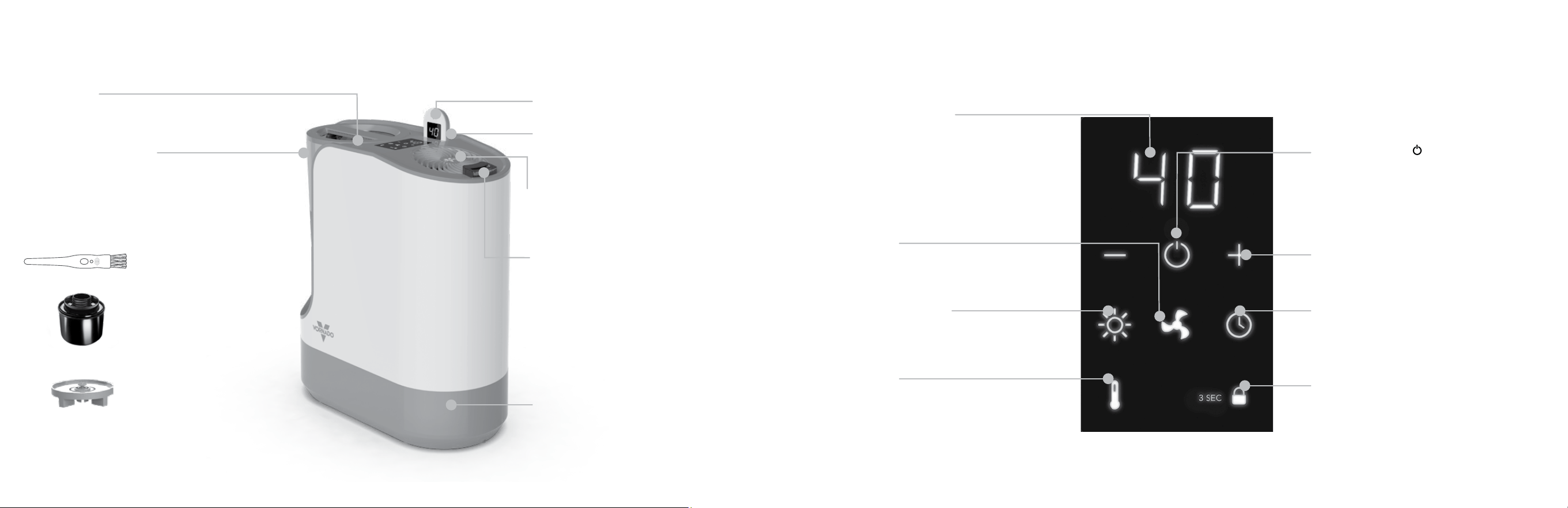
FEATURES
BASE
Durable and easy to clean.
CLEANING BRUSH
Used for cleaning the Base
in hard to reach areas.
Stored in Base.
WATER TANK CAP
Easy-to-remove Cap for
convenient Water Tank
relling. The Gasket creates
a waterproof seal between
Cap and Water Tank.
MINERAL CARTRIDGE
Removes minerals from the
water, thereby softening the
water and reducing harmful
mineral buildup on
the Transducer.
POWER HEAD
Powerful motor circulates
humidied air throughout whole room.
REMOTE
Convenience at your nger tips.
REMOTE CRADLE
Convenient storage for your remote.
HUMIDISTAT
Reads humidity in room for automatic humidity
control.
AIR OUTLET GRILLE
Initiates Vornado’s signature Vortex
circulation. Removable for easy cleaning.
MIST OUTLET
Moist air is dispersed through the Mist
Outlet and projected into Vornado’s
signature Vortex beam of air - circulating
the moist air throughout the entire room.
SIMPLETANK™ SYSTEM
This Water Tank is easy to carry, ll, install, clean
and view water level. Large 1.75-gallon capacity.
LIGHT ADJUSTMENT
Changes LED light brightness
between HIGH, MEDIUM and LOW.
Lights dim after 20 seconds.
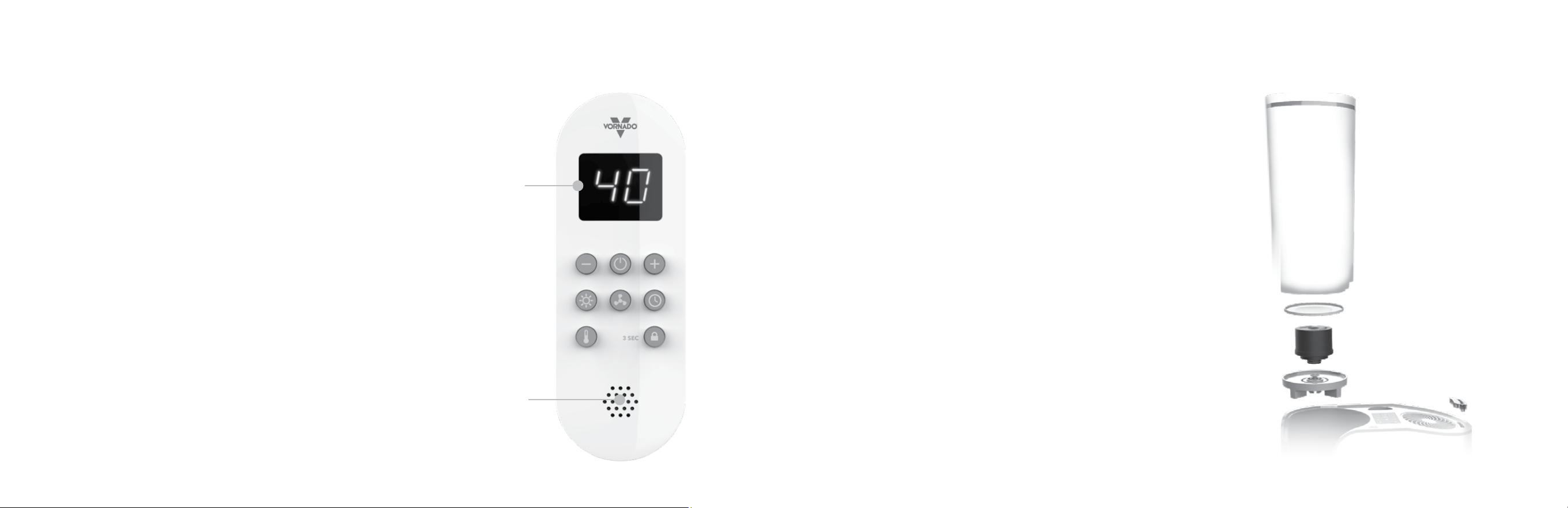
CONTROLS
DECREASE/INCREASE (-/+)
Control humidity setting between 40%-
60% or Continuous Mode and controls
Timer increments.
FAN SPEED
Enables you to select the fan speed
for output volume. Offers HIGH,
LOW, or AUTO.
POWER BUTTON
Easily operate with power button that
turns humidier On/Off. Flashes RED for
30 seconds when low water before auto
shutoff.
TIMER
Set timer up to 8 hours. BLUE LED light
indicates Timer is active. Display shows
time in hours.
WARM MIST
Red LED light indicates WARM MIST
activated.
CONTROLS LOCK
Lock the Control Panel. To lock or unlock,
hold button for 3 seconds. Red LED light
indicated control panel is locked.
CONTROL INTERFACE
Displays selected humidity % settings
Timer and Fan Speeds.
Note: Once the selected humidity
%, time or fan speed is selected, the
Control Interface will default back to
showing the selected humidity %.
11
English10 English
DISPLAY
INTERFACE (A)
REMOTE CONTROL
This product comes with a remote control. The buttons on the Remote
have the same function as the corresponding button on the Control
Panel. See CONTROL PANEL section for more information.
NOTE: The Display Interface (A) on the Remote displays the humidity
% level in the location of the remote. The Humidistat (B) on the Remote
reads the humidity % level where the remote is located.
The remote control requires 2 AAA batteries (included but not
installed). To install batteries, remove the cover located on the
underside of the remote control. If necessary, clean the battery contacts
and also those of the device prior to battery installation. Remove any
plastic protection from the batteries. On the inside of the battery cover,
there is a + and – sign indicating which direction you should insert your
batteries. Ensure the batteries are installed correctly with regards to
polarity. Then replace cover on the underside of the remote control.
ON FIRST USE: To sync the remote control to the product, hold the
Power Button on the remote for 5 seconds.
For battery replacement, always use the correct size and grade of
battery for this product.
Note: Remove batteries from the remote control when not in use for an
extended period of time and always remove dead batteries immediately
and replace with fresh. Do not store dead batteries in remote.
HUMIDISTAT (B)
Before initial use, you must soak the Mineral Cartridge in water for 24 hours. You may
use a separate container or Water Tank to do so. If Tank is used, empty water and rell
with fresh water prior to use.
Note: Spills can occur during cleaning, moving or relling the Water Tank, so be careful
to avoid spills when doing these activities.
1. Unplug humidier and place on a level surface.
Note: The unit may take several minutes to create mist with the initial use of a new
Mineral Cartridge.
2. Remove Water Tank from the base by grasping the top integrated handle and
pulling up towards you. CAUTION: When removing Water Tank lift vertically, do
not twist tank while still in base or Cap may disengage and leak.
3. Turn the Water Tank upside down and remove the Cap by turning it
counterclockwise.
4. Gently place Water Tank on a at surface and ll with cool tap water.
5. Ensure Gasket, the rubber ring around the Water Tank, is properly positioned. Insert
the Cap into the grooves of the tank and turn clockwise until tightened. When Cap is
fully tightened the arrows on the tank will align with the indicator lines on the Cap.
6. Lower Water Tank into Base, positioning Water Tank around the ledge for secure
placement. Once in nested position, water outlet valve inside Cap opens, releasing
water into Base.
Note: The rate of water dispensing from Water Tank into Base is controlled by the
Mineral Cartridge. The unit may take several minutes to ll the Base.
FILLING WATER TANK
Gasket Ring
Water Tank
Mineral Cartridge
Cap

13
English12 English
HOW TO USE
1. Position humidier to not blow directly on objects or plants. Plug
power cord into standard grounded wall outlet. Remove tape from
top of mist outlet prior to turning humidier on.
2. To setup and use Remote Control, see “Remote Control” on page
10.
3. To turn humidier on, press Power Button either on unit or remote.
On rst use, settings will default to HIGH Fan Speed, 50% humidity
level and HIGH light brightness level. Humidity level settings are
saved after power off and will return when powering back on. If unit
is unplugged, during next use, settings will default to HIGH fan
speed, 50% humidity level and HIGH light brightness.
4. Use FAN SPEED button on control panel or remote to select HIGH
or LOW fan speed or AUTO mode until the desired setting shown
on CONTROL INTERFACE.
Note: When Continuous humidity level is selected, the fan speed
cannot be set to Auto and vice versa.
HIGH FAN
Operation for fast humidication of larger rooms.HIGH fan speed with
WARM Mist will have output of approximately 4.0 gallons of water in
24 hours of continuous operation. (This assumes room conditions of
70º F and 30% relative humidity.)
LOW
Operation for quiet, nighttime use or smaller rooms. On Low
operation, your humidier may run without relling for extended
periods.
AUTO
Operation for more precise humidity control. Fan speed and mist
output will uctuate to better maintain set humidity level with the
minimal amount of fan noise. While in Auto, you will only be able
to mode through humidity settings (40% - 60%). Continuous will be
disabled.
Note: HIGH setting will be shown by ‘HI’, LOW setting will be shown
by ‘LO” and AUTO will be shown by “AU”. Setting will ash for 5
seconds, hold for 3 seconds then display selected humidity level.
5. To set TIMER, press TIMER button on control panel or remote and
then INCREASE (+) or DECREASE (-) to set length of timer. TIMER
icon is blue on control panel when activated.
6. To activate WARM MIST feature on, select WARM mist button on
control or remote. When activated, icon on control panel will be
RED.
Note: Lower humidity control settings or turn off humidier if moisture
forms on walls or windows.
HOW TO USE
HUMIDITY – 40%–60% OR CONTINUOUS
Set the humidity level by pressing the INCREASE (+) or DECREASE (–)
BUTTON until the desired humidication level is shown on the control
interface . The humidier will operate until the desired humidity level
is reached. At this point, the mist and fan will turn off. If the mist and
fan do not turn on, the humidity setting may be lower than the room
humidity level. Increase the humidity set point until the mist and fan
turn on. This is an indication of the level of humidity already in the
room. While in Continuous, you will only be able to mode through
High and Low fan speeds before unit powers off. Auto mode will be
disabled.
Note: When Continuous humidity level is selected, the fan speed
cannot be set to Auto and vice versa.
7. When the LOCK CONTROLS button on the Control Panel or
Remote is pressed and held for 3 seconds, the controls become
locked from use and buttons will not function. To unlock, press and
hold CONTROLS LOCK on Control Panel or Remote for 3 seconds.
Pressing another button while Lock feature is active (indicated by
red LED) will cause the Lock icon to ash.
CAUTION: Use caution when handling humidier after running
on WARM Mist mode. Water in the base will be HOT. Wait 15
minutes for water to cool down before handling humidier.
15
English14 English
MINERAL CARTRIDGE
WHEN TO REPLACE:
Many factors affect the frequency in which the Cartridge will need to
be replaced including amount of use, water hardness, and outside
environmental factors. For heavy use, using the unit continuously, we
recommend replacing the Cartridge approximately once a month.
For lighter use, using the unit intermittently, we recommend replacing
the Cartridge every two months.
The Cartridge will need to be replaced earlier if white powder residue
accumulates around the device. If the water used in the humidier has
been treated by a decalcication system, the salt from the treatment
can show up as white dust also.
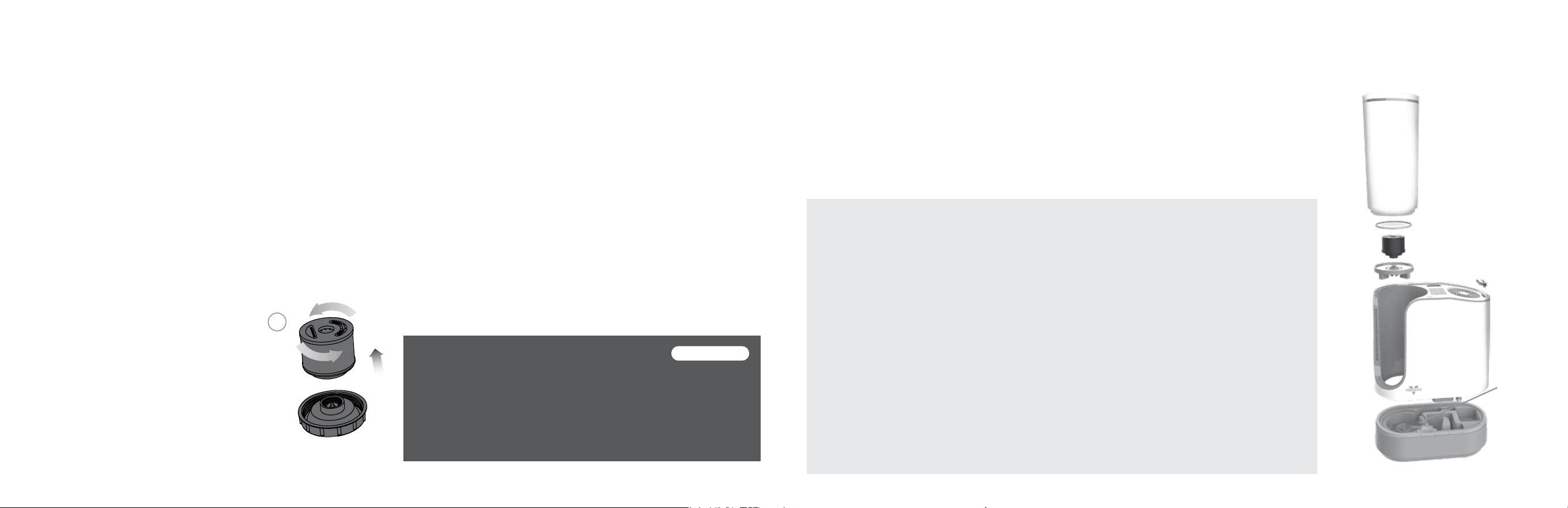
HOW TO REPLACE:
1. Remove Water Tank.
(See FILLING WATER TANK for instructions)
2. Unscrew Cap.
3. Unscrew Mineral Cartridge from Cap (A).
Discard Cartridge.
4. Install new Cartridge onto Cap.
Note: The unit may take several minutes to create mist with the
initial use of a new Mineral Cartridge.
5. If storing unit, empty Water Tank and reinstall Cap. Replace Tank
back into unit. See STORAGE.
A
The Mineral Cartridge removes minerals from the water thereby softening the water and and reducing harmful mineral buildup on
the Transducer.
AUTOMATIC REFILL PROGRAM
Select the shipment interval and Vornado will send replacement
Mineral Cartridges automatically. Eliminate the hassle of
remembering to reorder. Maintain the high efciency of your
Vornado Humidier. To sign up, visit vornado.com, email
[email protected] or call 1-800-234-0604.
Cancel at anytime.
Part # MD1-0018
CLEANING
Proper cleaning of your Ultrasonic Humidier is essential to the air quality and performance of your
humidier. The frequency in which your humidier will need to be cleaned will vary depending on
use, water hardness and outside environmental factors. It is recommended, assuming average use,
to thoroughly clean the unit several times throughout the season, or when algae, mineral deposits or
other particles begin to form. Note: If the humidier is turned Off with water in Base and not turned
back on for 8 hours or longer, or if humidier is not cleaned as recommended, you may experience
some growth of algae or bacteria. These microorganisms may become airborne.
TO CLEAN BASE
1. Turn humidier Off and unplug.
Warning: Do not submerge humidier
top in water.
2. Remove Water Tank by lifting straight up.
Remove Mist Outlet.
3. Remove the humidier body from base.
4. Wipe the exterior of the humidier with a
soft, damp cloth if needed.
5. Empty the Base. Clean Base with warm
water and a mild detergent.
6. Use brush stored at the bottom of the base
for hard to reach areas. Brush can be used
to clean out any debris or residue left in the
water trough.
7. Rinse and dry. Reassemble humidier.
8. Prior to use, ensure that the outside of the
coupler and surrounding area is completely
dry.
Note: The Base is not dishwasher safe.
CAUTION: Use caution when handling
humidier after running on WARM Mist
mode. Water in the base will be HOT. Wait
15 minutes for water to cool down before
handling humidier.
Coupler
17
English16 English
CLEANING
TO CLEAN GRILLE
1. Turn humidifer Off and unplug.
Note: Do not use gasoline, thinners, solvents or other
chemicals for cleaning.
2. Remove Mist Outlet. Using a Phillips Head screwdriver,
remove screw located at 6 o’clock position inside grille.
Twist grille counterclockwise to unlock, then use screwdriver
to lift grille.
3. Clean the grille, blade or underside of motor with a soft
cloth or with a can of compressed air.
4. Reinstall grille and twist grille clockwise until screw holes
align. Replace screw.
TO CLEAN MIST OUTLET
While you have the humidier disassembled, if needed, rinse the Mist Outlet with clean tap water. Be sure the Mist Outlet is removed from
the humidier before cleaning. Ensure Mist Outlet attached before resuming operation.
Note: On occasion the Water Tank may need to be wiped down or cleaned to remove build-up of impurities with a mild detergent and cool
water. Do not use gasoline, thinners, solvents or other chemicals for cleaning. The Water Tank is not dishwasher safe.
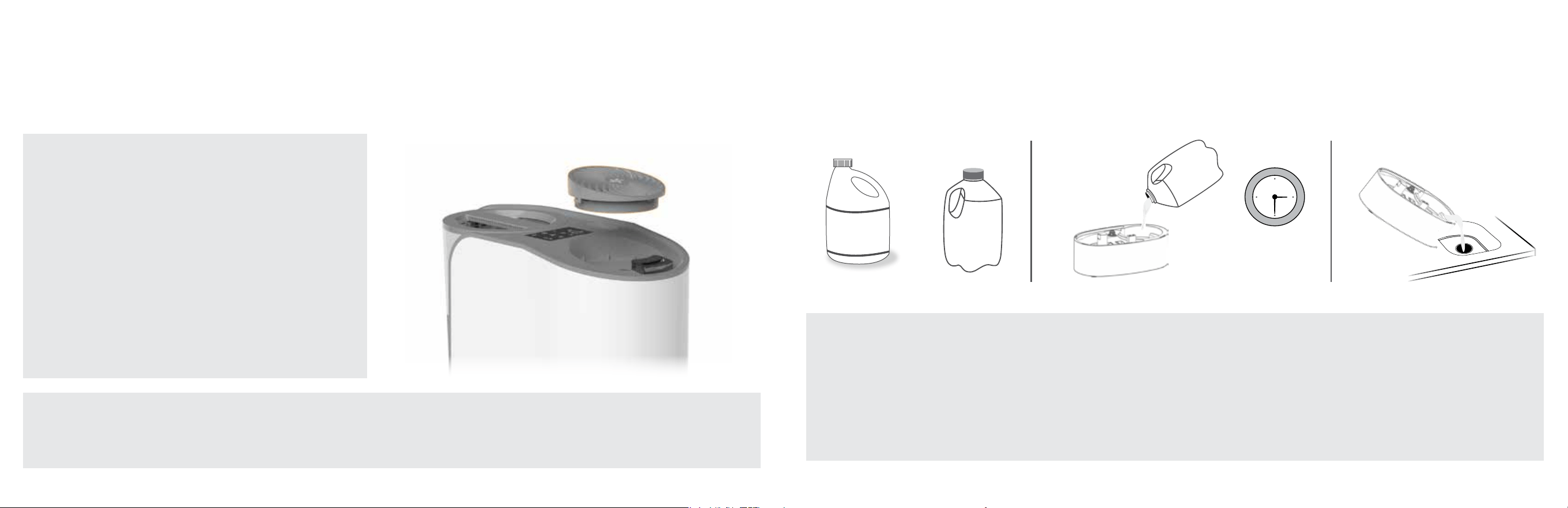
IN THE EVENT YOU WANT TO DISINFECT THE BASE:
1. Mix solution of 1 teaspoon chlorine bleach and 1 gallon water.
Fill Base with solution, wet all surfaces. Let stand 20 minutes,
then empty.
2. Rinse Base with water until bleach smell is gone. Dry with clean
cloth or paper towel.
3. You may also wipe down the entire surface of humidier with a
soft cloth.
CLEANING
+
1 gal.
Water
1 tsp.
Chlorine
Bleach
20 min.

19
English18 English
STORAGE
During the off-season or after extended periods of non-use, you
may choose to store your humidier. To ensure long life of the
product, it is recommended to store your humidier by following
these instructions:
Cleaning is recommended before storage.
1. Unplug power cord and bundle loosely.
2. Let humidier dry completely before storing.
Do not store with water inside Water Tank or Base.
3. Cover, or place back in retail carton if available.
This will prevent humidier from accumulating
dust over time.
4. Store humidier in cool and dry location.
Be aware of several things as your Vornado
®
Ultrasonic Whole Room
Humidier operates:
If you operate your humidier continuously (which is recommended
to maintain humidity all day), it may need to be relled with water
every day. Check the Water Tank to be certain that there is an
adequate water supply for operation.
Allow for optimum airow by keeping the grille unobstructed.
Ensure curtains and other items are far enough away from the unit
to not be pulled into the side inlets or interfere with airow.
Any additives, such as aroma fragrances or water conditioners,
must not be used. These additives can cause cracks in the plastic
of the humidier and may affect performance. Any use of such
additives voids the manufacturer’s warranty.
TIPS
DISPOSAL
Dispose of all packaging materials in an
environmentally responsible manner.
Unit is not plugged in. Plug power cord into electrical outlet.
Household circuit breaker/ground fault circuit interrupter has tripped or blown fuse. Reset circuit breaker/
ground fault circuit interrupter, or replace fuse. For assistance, see IMPORTANT INSTRUCTIONS.
Unit is damaged or in need of repair. Cease usage and unplug. Contact Consumer Service for assistance.
This is normal. Water is being dispensed into Base.
Water level in Tank is empty or too low. Rell with clean, cool tap water. See HOW TO USE.
Unit has reached its set point. When set humidity level is reached, the unit will not produce mist until humidity
level in the room drops below humidity set point.
Airow is blocked. Remove obstruction.
Unit settings are too low. Set to High Output and Continuous Humidity for maximum humidity output.
Mineral Cartridge is no longer removing minerals from water. Cartridge needs to be replaced. See MINERAL
CARTRIDGE.
Unit and Transducer is in need of cleaning. See CLEANING.
Water is too hard. Use distilled water.
Unit fails to power on.
Unit makes bubbling
or gurgling sound.
Unit is not producing
desired amount
ofhumidity or mist
output has ceased.
White dust has
accumulated on Mist
Outlet or on ooring
below.
TROUBLESHOOTING
POSSIBLE CAUSE AND SOLUTIONPROBLEM

21
English20 English
The batteries are dead. Replace with 2 new AAA batteries. Refer to REMOTE CONTROL section for install
instructions.
The batteries are not installed properly. Refer to REMOTE CONTROL section for install instructions.
The remote has not been synched to the product. To sync, hold Power Button on Remote control for 5 seconds.
Remote control is not
working.
TROUBLESHOOTING
POSSIBLE CAUSE AND SOLUTIONPROBLEM
Vornado Air LLC (“Vornado”) warrants to the original consumer or purchaser this
Vornado
®
Ultrasonic Whole Room Humidier (“Product”) is free from defects in material or
workmanship for a period of ve (5) years from the date of purchase. If any such defect is
discovered within the warranty period, Vornado, at its discretion, will repair or replace the
Product at no cost.
For warranty or repair service:
Call 1-800-234-0604 or email [email protected] to obtain a Return Authorization (“RA”)
form. Please have or include your Product’s model number and serial number, as well as
your name, address, city, state, Zip code and phone number when contacting Vornado for
warranty service.
After receiving the RA form, ship your Product to:
Vornado Air LLC Attn: Warranty & Repair 415 East 13th Street, Andover, KS 67002. For your
convenience, please have your model number and serial number when contacting Vornado
with service inquiries. To ensure proper handling, packages must be clearly marked with
the RA number. Packages not clearly marked with the RA number may be refused at the
receiving dock. Please allow 1–2 weeks for repair and return of your Product after the
Product is received.
Repairs not covered by the warranty or outside the warranty period will require a fee to
cover the cost of materials, labor, handling and shipping.
This warranty does not apply to defects resulting from abuse of the Product, modication,
alteration, mishandling, improper maintenance, commercial use or repair or service of the
Product by anyone other than Vornado; damages which occur in shipment or are attributed
to acts of God. Improper product use, which includes using an external device that
alters or converts the voltage or frequency of electricity, or shipping a Vornado product
to a country not intended for use will void all warranties. Any unauthorized product
modication, repair by unauthorized repair center or use of non-approved replacement
parts is not recommended and any consequences will not be covered by support services
or product warranties. The product warranty will be honored only on models that are being
used in the country intended. REPAIR OR REPLACEMENT AS PROVIDED UNDER THIS
WARRANTY IS THE EXCLUSIVE REMEDY OF THE CONSUMER. VORNADO SHALL NOT
BE LIABLE FOR ANY INCIDENTAL OR CONSEQUENTIAL DAMAGES FOR BREACH OF
ANY EXPRESS OR IMPLIED WARRANTY ON THIS PRODUCT. EXCEPT TO THE EXTENT
PROHIBITED BY APPLICABLE LAW, ANY IMPLIED WARRANTY OF MERCHANTABILITY
OR FITNESS FOR A PARTICULAR PURPOSE ON THIS PRODUCT IS LIMITED IN
DURATION TO THE DURATION OF THIS WARRANTY. Some states do not allow the
exclusion or limitation of incidental or consequential damages, or allow limitations on how
long an implied warranty lasts, so the above limitations or exclusions may not apply to you.
This warranty gives you specic legal rights, and you may have other rights that vary from
state to state. The manufacturer assumes no responsibility for damage or injury caused
by failure to follow these instructions, improper product use or unauthorized product
modications. Any such actions will invalidate the product warranty.
All company names and product names are trademarks of their respective owners.
©All rights reserved. All technical information, data and instructions for the installation,
connection and operation contained in these instructions for use correspond to the latest
available information at time of printing. The contents of this manual may differ slightly
from the actual product. Observe any additional supplements.
WARRANTY
We expect this product to be perfect. If you’re not satised with this product, let us know.
We’re Here to Help
800.234.0604
vornado.com
© 2020 Vornado Air LLC Andover, KS 67002. Patent pending. Specications subject to change without notice.
Vornado
®
is a trademark owned by Vornado Air LLC.
Designed, engineered and supported in USA.

CL3-0712 R-, V00
Vornado Air, LLC
415 East 13th Street, Andover, Kansas 67002
800.234.0604 | vornado.com