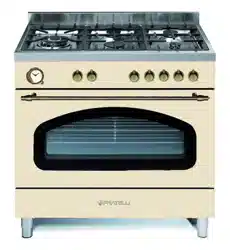

Installation, User
d Servicing Guide
NOTE TO INSTALLER: LEAVE THE OWNER’S GUIDE MANUAL WITH THE APPLIANCE.
(Keep For Future Reference)
Model
Milano, Venezia & Moena
FEM
2
RECORD HERE FOR EASY REFERENCE
Model Colour
Serial Number Installation Date
Dealer's Name and Address
Getting to know your new cooker
WHEN YOU CALL FOR SERVICE
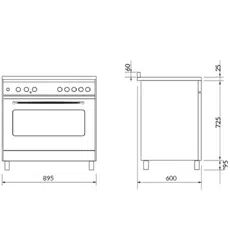
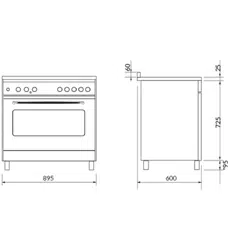
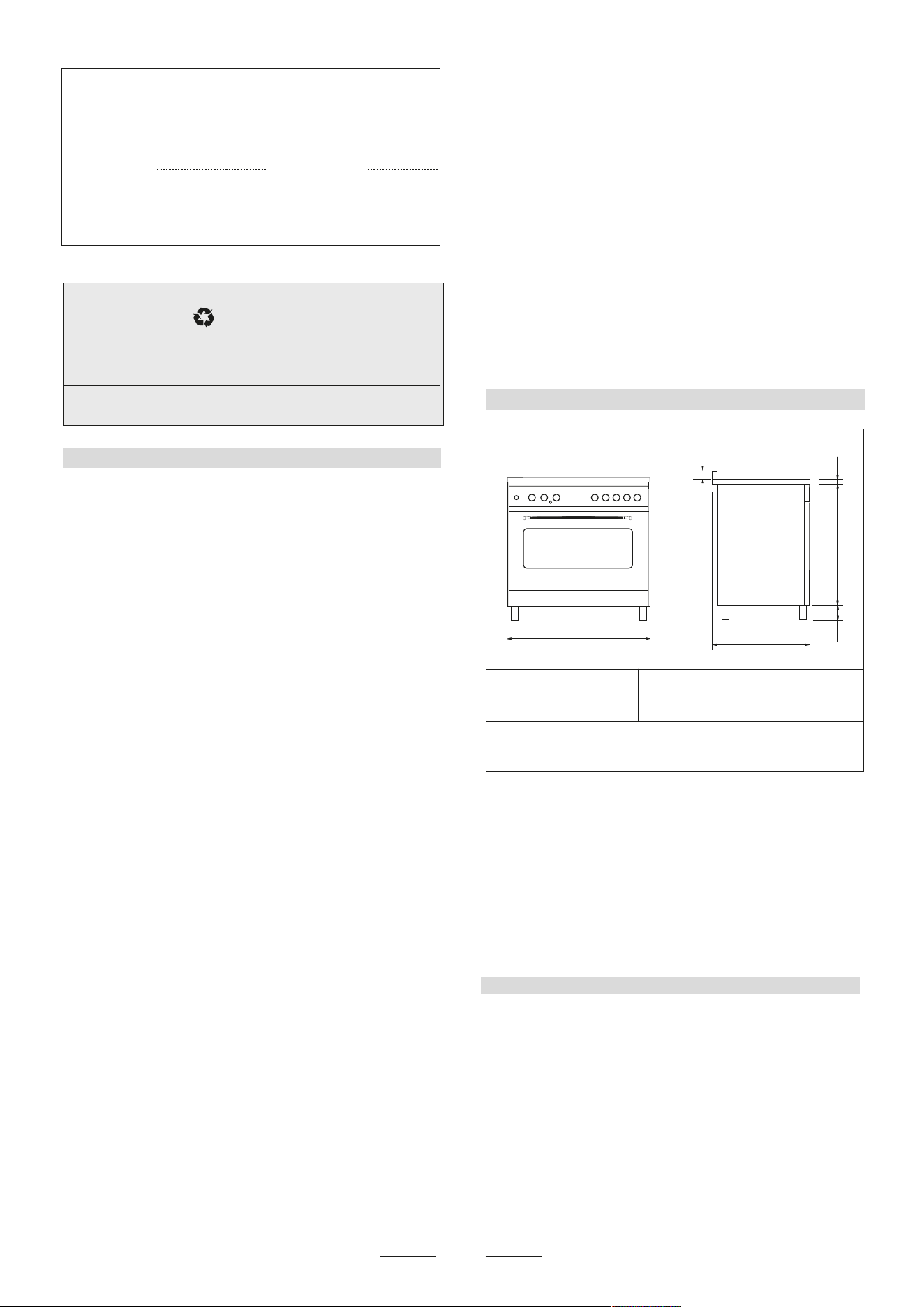
OVERALL DIMENSIONS
SECTION FOR THE QUALIFIED TECHNICIAN
PROVISION FOR VENTILATION
GENERAL INFORMATION
INSTALLATION
ENVIRONMENTAL WARNING
Waste packaging
Do not throw the packaging of your appliance into the dustbin,
but pick out the different materials (for instance foil, paperboard,
polystyrene) according to the local rules for rubbish elimination.
This appliance must only be used for the purpose of domestic
cooking.
Thank you for choosing one of our products.
Our cookers are of simple, rational design. They are
constructed to the best standards to ensure good
service and outstanding safety.
Please read this manual carefully; it will provide all the
advice needed to allow you to obtain the best results
from the very first day.
ATTENTION:
- Before using the appliance, do not forget to remove the
protecting parts of the appliance.
-WARNING
Accessible parts will become hot when in use. To avoid
burns and scalds children should be kept away.
- WARNING
In order to prevent accidental tipping of the appliance, for
example by a child climbing onto the open oven door, the
stabilizing means must be installed.
- WARNING
This appliance is not intended for use by persons (including
children) with reduced physical, sensory or mental capabili-
ties, or lack of experience and knowledge, unless they
have been given supervision or instruction concerning use
of the appliance by a person responsible for their safety.
Children should be supervised to ensure that they do not
play with the appliance.
Young children and infirm persons should not be left
unsupervised in the vicinity.
- WARNING
Before you use the appliance for the first time, check that
the plastic films protecting some parts (fascia panel, parts
in stainless steel, etc.) have been removed.
- WARNING
A steam cleaner is not to be used cleaning this appliances.
- WARMING
DO NOT place inflammable materials or plastic utensils in
the warming drawer.
DO NOT SPRAY AEROSOLS IN THE VICINITY OF THIS
APPLIANCE WHILE IT IS IN OPERATION.
Not for use in marine craft, caravans or mobile homes
unless each burner is fitted with a flame safeguard.
WHERE THIS APPLIANCE IS INSTALLED IN MARINE
CRAFT OR IN CARAVANS, IT SHALL NOT BE USED AS
A SPACE HEATER
DO NOT MODIFY THIS APPLIANCE.
The room where the Cooker is installed should have permanent
ventilation as follows:
“Ventilation must be in accordance with AS/NZS 5601 - Gas
Installations. In general, the appliance should have adequate
ventilation for complete combustion of gas, proper flueing and to
maintain temperature of immediate surroundings within safe limits.”
Do not install in a bed-sitting room, a bathroom or shower room. If
there is another fuel burning appliance in the same room, a higher
level of ventilation will be required, you should consults " the safety
requirements".
In addition to the above, during prolonged use, opening a window in
the same room is recommended.This will avoid the build up of
excessive moisture and condensation.
When you call for service or order parts for your unit, be
sure to give:
1..MODEL
2. SERIAL NUMBER
3. COLOUR
4. PART NAME and/or description of problem
5. YOUR FULL NAME, ADDRESS, and HOME TELEPHONE
NUMBER and BUSINESS TELEPHONE NUMBER IF
APPROPRIATE.
Servicing shall be carried out only by authorised personnel.
X
600
B
A
725
60
X (mod. 296) = 895 mm A = 25 mm according to the models
X (mod. 206) = 1000 mm A = 30 mm according to the models
A = 40 mm according to the models
B = 95 mm
B = Adjustable height only for some models reg. (90/150mm - 95/130mm -
115/165mm - 145/230mm according to the models).
Warning:
This appliance is noi suitable lo be installed on a base.
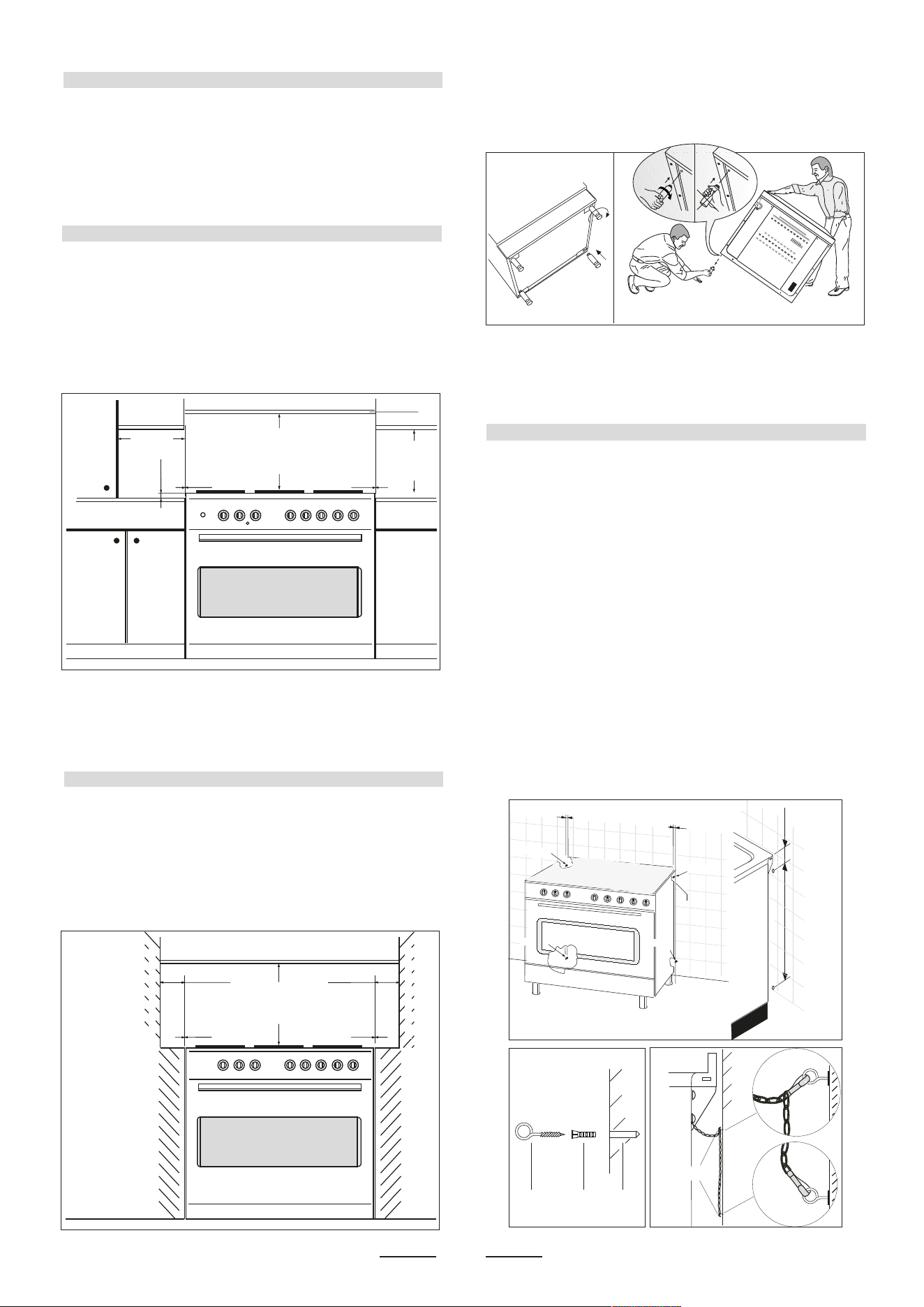
POSITIONING
3
min.100 mm
min. 650 mm
min. 400 mm
"0" mm "0" mm
min. 650 mm
"0" mm "0" mm
min "60" mmmin "60" mm min "60" mm
non- combustible materials
non- combustible materials
min.10 mm
OK NO
Fig. 1 A
Fig. B
Fig. C
G
wall
wall
Fig. A
76 mm550 mm
G R Hole
55 mm
chain
P
osition
1
P
osition
2
55 mm
P
osition
3
P
osition
4
When you call for service or order parts for your unit, be
sure to give:
1..MODEL
2. SERIAL NUMBER
3. COLOUR
4. PART NAME and/or description of problem
5. YOUR FULL NAME, ADDRESS, and HOME TELEPHONE
NUMBER and BUSINESS TELEPHONE NUMBER IF
APPROPRIATE.
Servicing shall be carried out only by authorised personnel.
Important: Fix the chain located next to the gas connection
on both sides of the cooker to the wall to prevent the cooker
from tilting. Both chains must be securely fixed.
Make sure that the wall surface behind the Cooker is
noncombustable (will not catch fire).
Where a painted surface is adjacent, a fire retardent paint
surface is recommended. Wallpaper, wood, or fabric should
not be used behind or next to the cooker.
Clearances to combustible materials
“Any adjoining wall surface (side or rear) situated within
200mm of any hob burner must be a suitable non-combusti-
ble material from the edge for a height of 150mm for the
entire length of the cooker.
Any combustible construction above the cooker must be at
least 650mm above the maintop.” Ensure that a power and
gas supply are nearby. The Cooker should be located
carefully so that the heat produced by it has plenty of space
to escape. The diagram below shows an ideal configuration.
No part of any adjoining wall surface can be made of
combustible materials. The protection of combustible
materials required by Clause 5.12.1.1 of AS/NZS 5601 is the
fixing of 5 mm thick ceramic tiles to the surface or attaching
fire resistant material to the surface and covering with sheet
metal with a minimum thickness of 0.4 mm.
Clearances to non- combustible materials
“If the cooker is being fitted next to cupboards or adjoing wall
surfaces, which are within 200mm from the edge of the hob
burner and of a suitable non-combustible material as
specified n AS/NZS 5601, then ensure that a distance of at
least 6cm is left between the edge of the cooker and the
non-combustible material. This gap is to allow plenty of
space for the heat produced by the cooker to escape on
each side of the cooker.
Note:
The cooker is fitted with 4 legs for an eventual alignment in
height with the furniture ( fig. 1 A ).
If the cooker is placed on a base, measures have to be taken
to prevent it from slipping off the base.
TO FIX THE COOKER TO THE REAR WALL
WARNING - For safety reasons and to prevent tipping of the
appliance, hese stabilizing means must be installed.
The cooker is equipped with 2 chains fixed on each side at
the rear of the cooker near the top (see Fig. A). The chains
are fitted with “spring clips” which must be clipped to the
“screw eyes” provided with the cooker.
Install the “screw eyes” as follows :
1. Drill four 6mm holes (position 1 - 2 - 3 - 4) in the wall as in
Fig. A.
2. Insert part “R” into the holes then screw in the “screw
eyes” part “G” see Fig. B.
Note: If the part provided is not suitable for the wall
material please use an appropriate device to ensure
secure holding of the “screw eyes” to the wall.
3. Bring the cooker near the wall and clip the chains on the
“screw eyes” as in Fig. C.
IMPORTANT: If the cooker is moved for any reason
(e.g. maintenance) resulting in the cooker being
unclipped from the wall, the cooker must be re-clipped
to the wall at the completion of the task.
4
GAS CONNECTION
Natural Gas 1.00 kPa jet mm Ø Burners Power Mj/h
with GC & GE & GP & GL & YP & GU & SL
0.90 Auxiliary 4.0
pan support 1.20 Semi-rapid 7.1
with GC & GE & GP & GL & GU & SL pan support
1.50 Rapid 11.0
with YP pan support 1.35 Rapid 9.1
with GC & GE & GP & GL & YP & GU & SL
pan support 1.63 TC1 / LTC1 Wok 12.7
U-LPG 2.75 kPa jet mm Ø Burners Power Mj/h
with GC & GE & GP & GL & YP & GU & SL 0.53 Auxiliary 3.7
pan support 0.73 Semi-rapid 7.0
with GC & GE & GP & GL & GU & SL pan support
0.95 Rapid 11.7
with YP pan support 0.87 Rapid 10.2
with GC & GE & GP & GL & YP & GU & SL
pan support 0.96 TC1 / LTC1 Wok 12.0
Regulator NG Regulator LP Test Point
Adapter
NOTE:
GE = Enameled Steel pan supports
GL = Light Cast Iron pan supports
YP = Light Cast Iron pan supports (evolution)
SL = Light cast iron pan support
GP = Heavy Cast Iron pan supports
GC = Flat heavy cast iron pan supports
GU = Flat heavy cast iron pan supports
TAB. 1
Should conform to gas utility regulations e.g. AS/NZS 5601
Gas installations; also refer to rangehood manufacturers
recommendations.
Check gas pressure, note the correct setting from the data
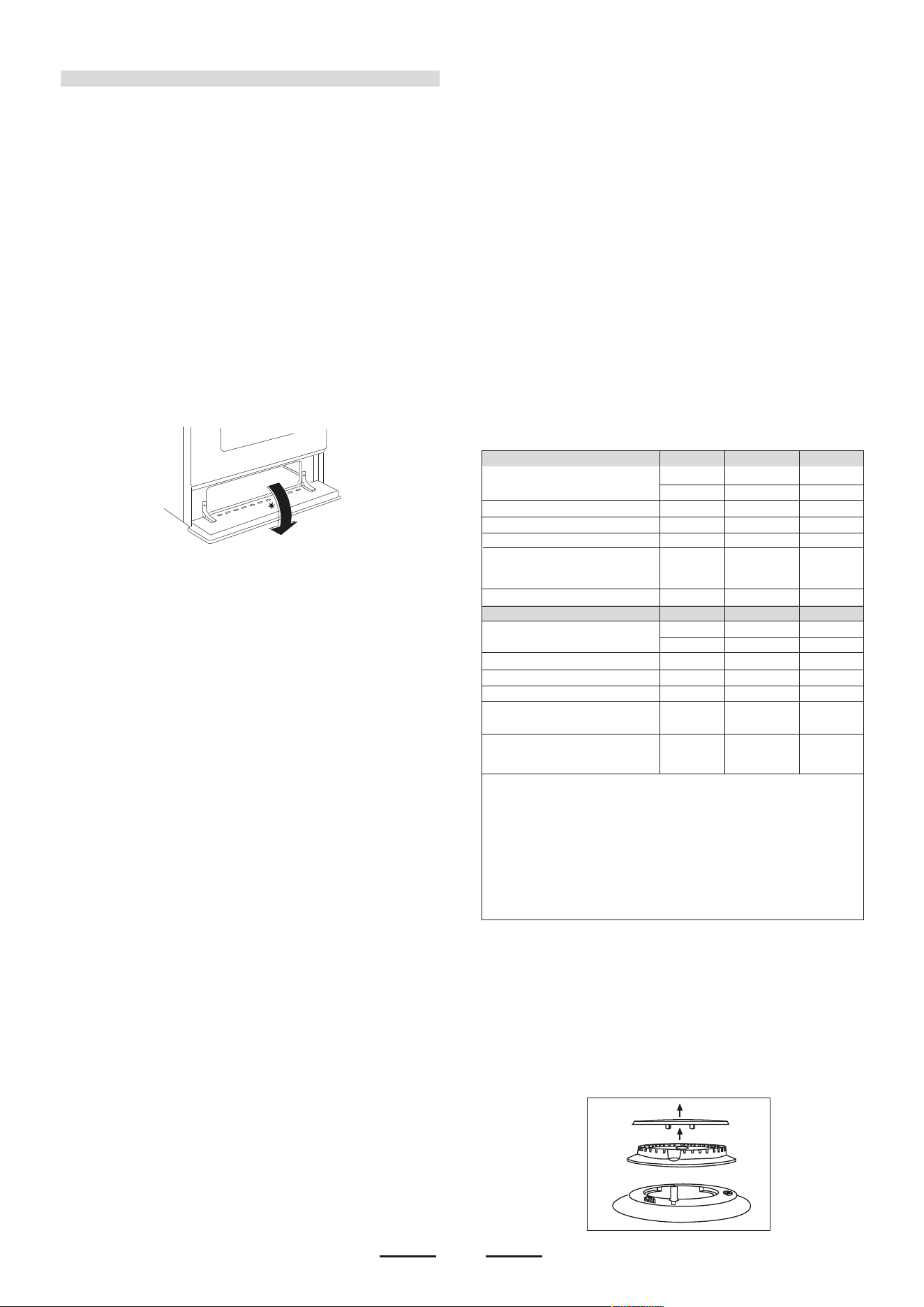
plate sealed inside the front appliance drawer
*
.
This appliance can be connected with rigid pipe as specified
in AS/NZS 5601 table 3.1 or with an AGA approved, Class B
or D flexible hose with 10mm I.D. and 1.2m max. length in
accordance with AS/NZS 5601 for a 'high level connection'.
The hose should not be subjected to abrasion, kinking or
permanent deformation and should be able to be inspected
along its entire length. Unions compatible with the hose
fittings must be used and connections tested for gas leaks.
The fixed consumer piping outlet should be at approximately
the same height as the cooker connection point, pointing
downwards and approximately 150mm to the side of the
cooker. The hose should be clear of the floor when the
cooker is in the installed position.
Ensure that the chain prevents stress on the hose assembly
when the cooker is moved out of its normal operating
position.
GAS CONVERSION AND ADJUSTMENT
When used with natural gas all burners have been preset at
our factory and further adjustment should not be
necessary.Conversion kits to other gases are available from
the place of purchase. Do not attempt to fit the conversion kit
yourself. Conversion to U-LPG gas should only be carried
out by an authorized technician.
GAS ADJUSTEMENTS
- change the injectors
- adjust the minimum flow
en onein o aal a o ene a
the NG regulator is removed and replaced with the Test
Point Assembly. A gas regulator suitable for a supply
pressure of 2.75kPa should be part of the gas tank supply
and should be adjusted with the wok burner operating at
maximum.
REPLACEMENT OF THE INJECTORS
When required to operate on other gas replace the injectors
in accordance with information referred to in chart below.
SPECIAL NOTE
After installation or any servicing operation, always ensure
that the appliance is gas sound and that the components are
now operating correctly. Items removed during servicing
should be replaced in the reverse order to their removal.
In order to change the work-top injectors, it is necessary to
act as follows:
- remove the grids
- remove burners and flame-spreaders.
This appliance from the factory suitable for NATURAL gas but,
if necessary, can be adjusted for U-LPG by authorised person.
For the adjustments to U-LPG please operate as specified in
the paragraph GAS CONVERSION AND ADJUSTMENT (pag
4). The Gas Connection is male 1/2" BSP and is situated at the
right hand rear of the appliance, approximately 40mm from the
side and 695mm from the floor (depends on adjustment of
feet). The appliance shall be installed by an authorized person
in aoane i e anae inallaion inion,
relevant local fitting regulations, municipal building regulations,
the AS/NZS 5601 code for gas burning appliances and
equipment and other relevant statutory code band regulations.
If you have some doubts, please contact the authorities for
confirmation concerning the characteristics of the gas and
electricity output.
The appliance is generally preset for natural gas (so no other
adjustment is necessary) ensure regulator is fitted for N.G.
Ensure that all foreign matter has been cleared from the gas
supply line and also purge all air from the gas system. Connect
to regulator, tighten and check the installation to ensure no gas
leaks occur.
IT IS RECOMMENDED THAT A SERVICE TAP AND UNION
BE FITTED ADJACENT TO THE APPLIANCE INLET TO
FACILITATE FUTURE SERVICING.
5 burner models: set the burner pressure to 1kPa for Natural
Gas and 2.75kPa for U-LPG with the wok burner operating a
ll ae Fo oiionin o e aliane i e aa
regulator for Natural Gas, the test point pressure should be
1.00kPa with all burners operating on HIGH.
Apply a manometer to the test nipple and reset the regulator if
necessary. Do not forget to replace the test nipple screw and
to leave the instructions book with the user.
VERY IMPORTANT FOR THE INSTALLER
Do not attempt to turn or stress threaded elbow of the
manifold: you risk damage to this part of the gas appliance
which may void the manufacturers warranty.
Before Leaving - Check all connections for gas leaks with soap
and water. DO NOT use a naked flame for detecting leaks.
Ignite all burners to ensure correct operation of gas valves,
burners and ignition. Turn gas taps to low flame position and
observe stability of the flame.
When satisfied with the cooker, please instruct the user on the
correct method of operation.
In case the appliance fails to operate correctly after all checks
have been carried out, refer to the authorised service provider
in o aea
5
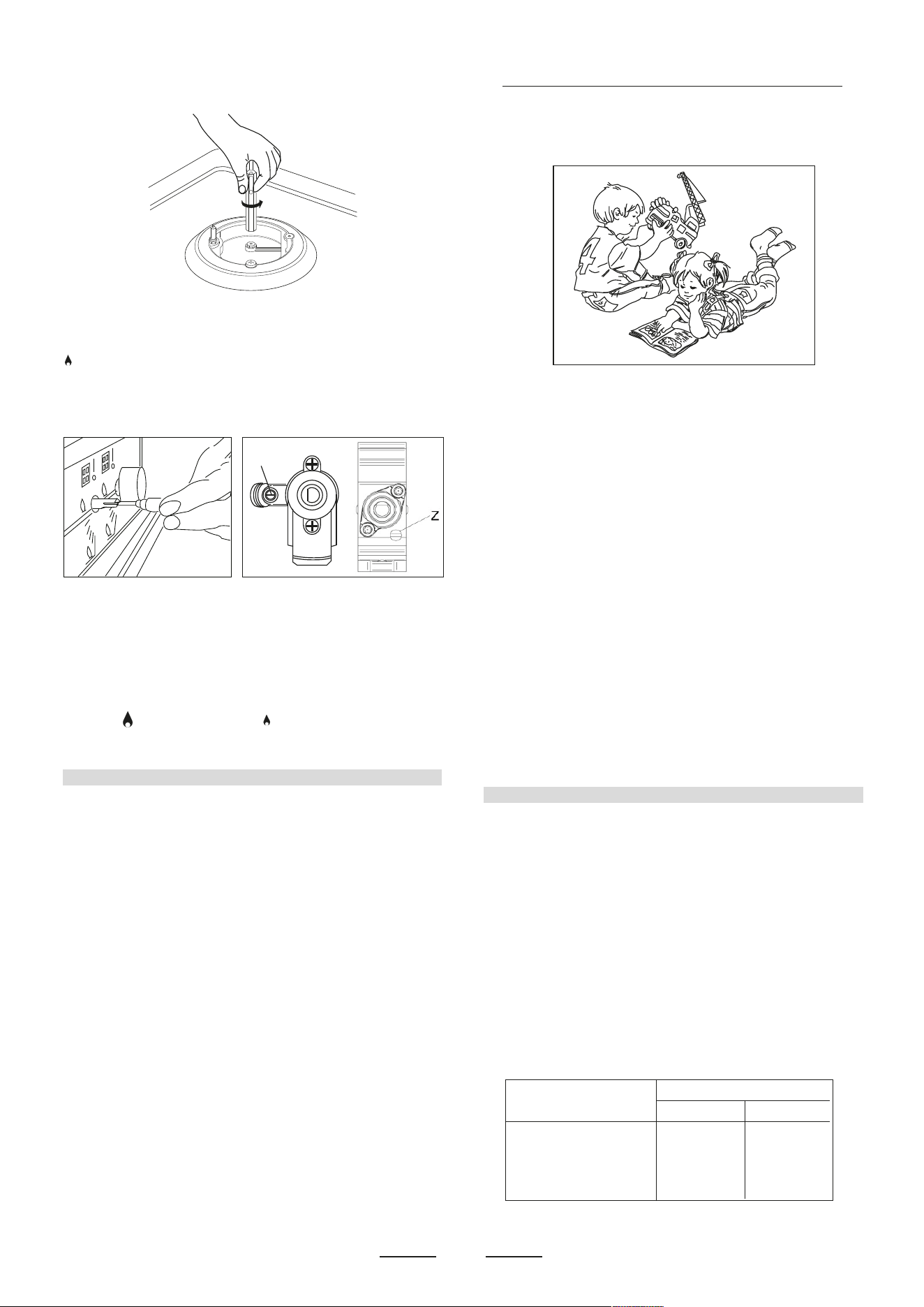
- change the injector (see Fig. C) and replace it with another one
suitable for the new type of gas (see tab. 1)
Fig. C
Z
Fig. 2BFig. 2A
MINIMUM FLOW ADJUSTMENT FOR HOB-TOP TAPS
In order to adjust the minimum flame setting proceed as follows:
switch the burner on, and set the knob at the minimum position
. Remove the knob from the tap, place a small bladed screwdriver
down the centre of the tap shaft (fig. 2A).
Attention: on taps with a security valve, the minimum adjusting
screw «Z» is on the body of the gas tap (fig. 2B).
Unscrew the adjusting screw in order to increase the flow or screw
it to decrease the flow.
The correct adjustment is obtained when the flame has a length
of about 3 or 4 mm.
For butane/propane gas, the adjusting screw must be screwed in
thigt.
Make sure that the flame does not go out turning quickly from the
max. flow
to the minimum flow .
Refit the knob again.
2nd SECTION FOR THE USER
WARNING:
Children should be kept away while the oven or grill is in use
since accessible parts become hot.
- Do not use oven base panel as a shelf, make use of the oven
shelves.
- To avoid splattering and smoke, position collecting tray under
the grill with some water in it.
- Always turn pan handles to the side or to the back of the hob.
If they are left out into the room they can easily be hit or reached
by children, this knocking the pan off the hob.
- Dont let children sit down or play with the oven door. Do not
use the drop down door as a stool to reach above cabinets.
- Once your cooking is over make sure to close the main gas
supply.
WARNING
* This appliance is not intended for use by young children or infirm
persons without supervision.
* Young children should be supervised to ensure that they do not
play with the appliance.
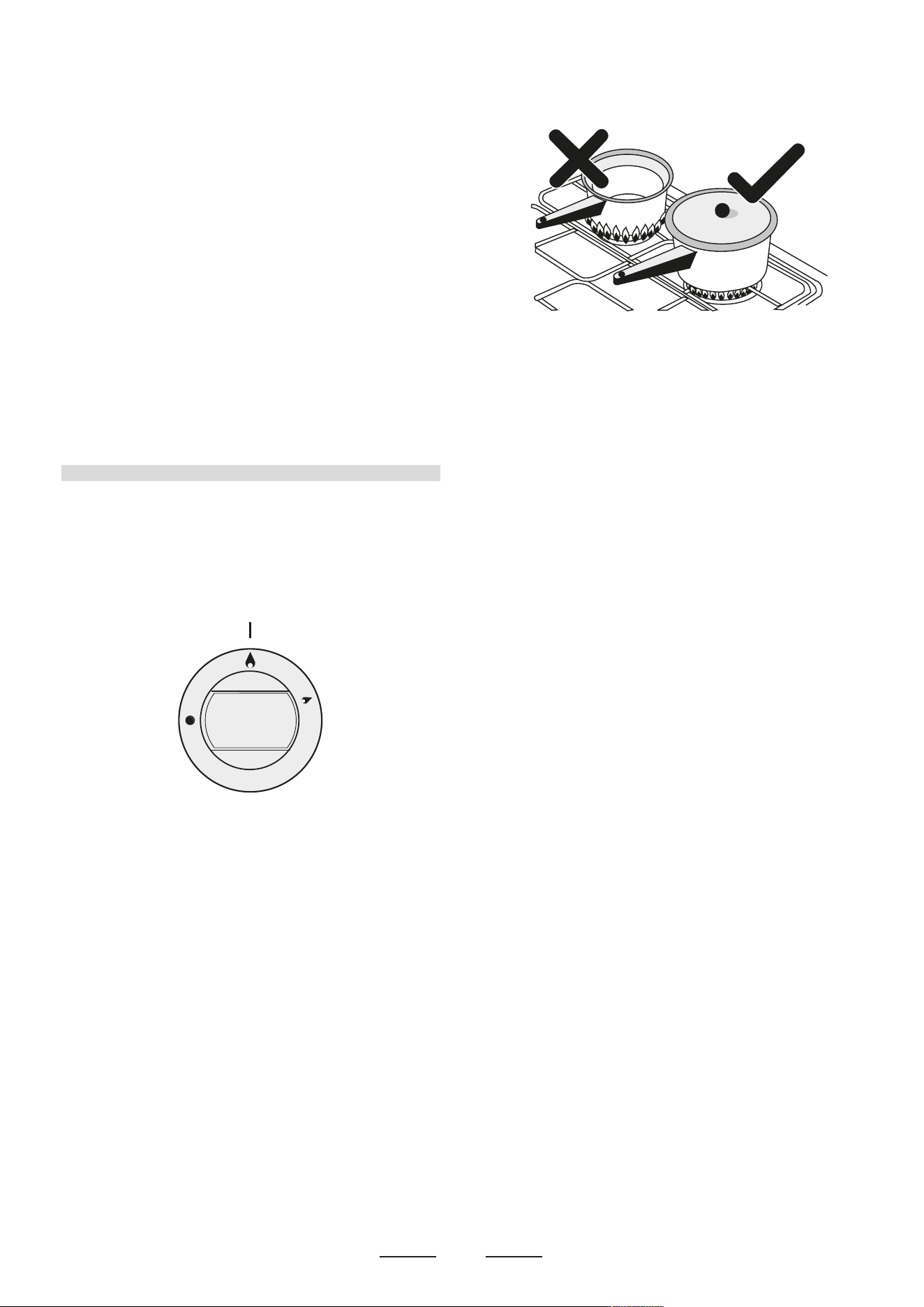
SNAPSRENRUB
fl min. fl max
AUXILIARY 80 mm 160 mm
SEMI-RAPID 120 mm 200 mm
RAPIDE 200 mm 230 mm
TRIPLE CROWN 230 mm 260 mm
* If the supply cord is damaged, it must be replaced by the
manufacturer, its service agent or similarly qualified persons
in order to avoid a hazard.
- 1 Minute Tour -
Be safe
Please read the rest of the instruction book which contains
important information to help you use the appliance safely and
efficiently.
Gas and Electricity on
Make sure that the gas supply is turned on and that the appliance
is plugged in and switched on. The ignitor needs electricity.
In case there is no electric current, the burner can also be lighted
using a match.
It is recommended that pans suitable to the size of the burner
should be used as follows:
- WARNING -
In order to prevent accidental tipping of the appliance,
for example
by a child climbing onto the open oven door, the stabilizing means
must be installed.
ELECTRICAL CONNECTION
The appliance must be installed by a suitably qualified person in
accordance with these instructions and with the requirements of
the Australian Wiring Rules AS/NZS 3000.
Fixed wired installations are to be provided with suitable isolation
means in accordance with the said rules.
Any plug socket installed for the purpose of connecting the appliance
to supply must be readily accessible when the appliance is installed.
Before making the connection, make sure that:
1) the saf
ety circuit-breaker and the electrical system are able to
withstand the load of the appliance (see nameplate).
2) the power supply system has an earth connection in good
working order in accordance with the regulations in force;
IMPORTANT
The wires in the mains lead are coloured in accordance with the
following code:
GREEN & YELLOW .........................................................EARTH
BLUE...........................................................................NEUTRAL
BROWN ...............................................................................LIVE
Electric power...1,5 mm
2
3 core cable (15 amp. Fuse required).
Should conform to local authority requirements.
Also refer to rangehood manufacturers recommendations.
This appliance is supplied with a plug & cord, simply plug into a
3 pin household socket outlet witch is properly earthed.
WARNING: THIS APPLIANCE MUST BE EARTHED.
The flexible mains lead and plug must not be in c
ontact with hot
surfaces.
6
Automatic electric ignition
Always use pans with a flat base diameter, which are well
balanced and stable in use, a pan which overhangs the
hotplate should not be used. Avoid using old, misshapen
pans, or pans which are unstable when placed on a flat
surface. Do not use “split pans” as they are inherently
unstable.
To save gas, always position pans centrally over the
burners and adjust the flames so that they do not lick up the
sides of the pan and only the base is heated. Always put
lids on saucepans and boil only the amount of liquid you
use. When the liquid has boiled adjust the setting to
maintain a simmer. Do not light the burner until the pan is in
position and turn off the burner before removing the pan. In
hard water areas, descale kettles regularly.
For safety, keep saucepan handles turned to a safe
position so they are out of reach of small children and
cannot be accidentally knocked.
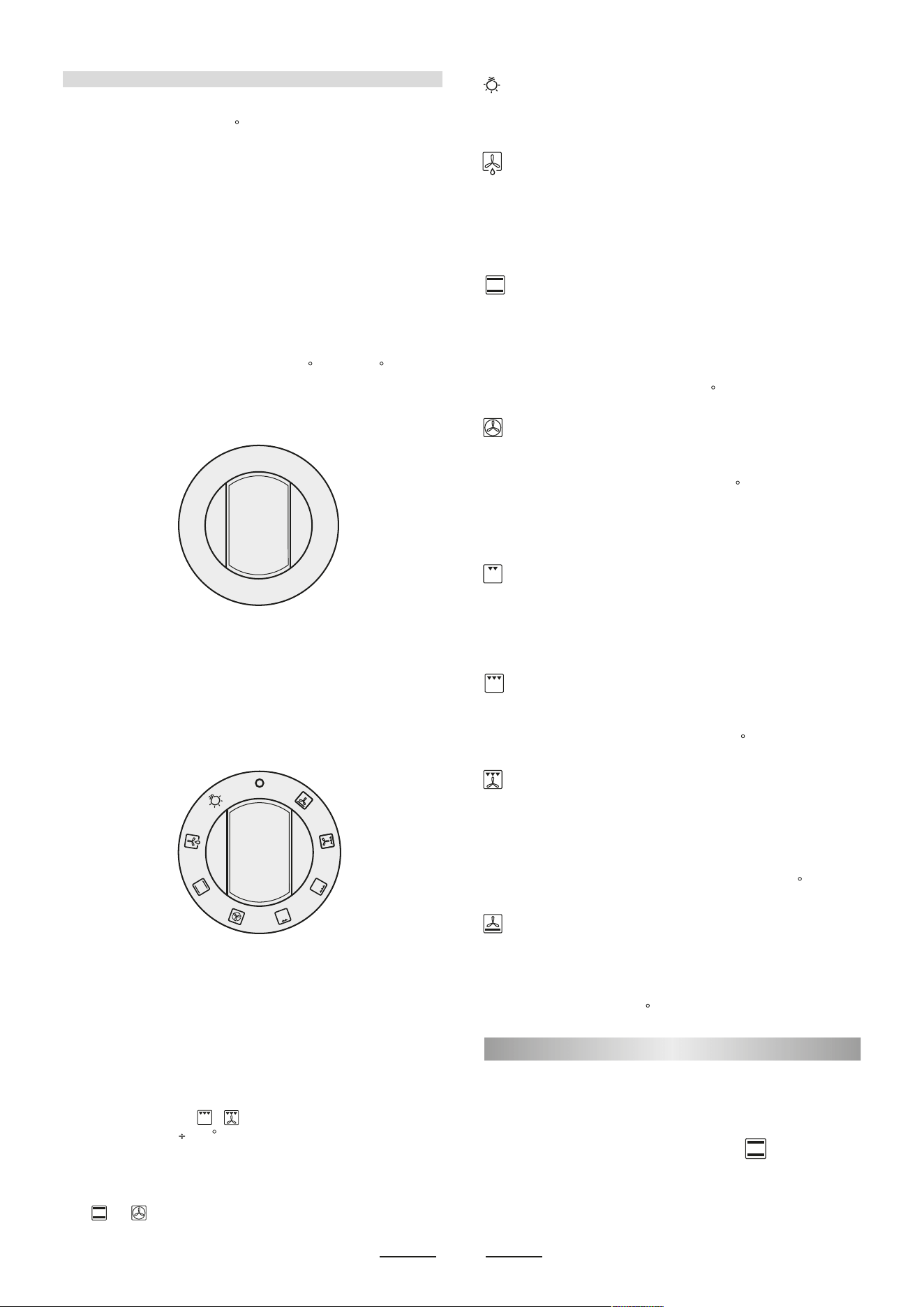
To tunr the burner OFF, turn the control knob clockwise to
the OFF setting (marked with a dot
•
)
To turn on a burner, press the knob corresponding to the
selected burner and turn it anticlockwise to the maximum
position. Keeping the knob pressed, the electric automatic
ignition of the burner will be started up. In case there is not
electric current, the burner can also be lighted using a
match.
e all lae iniae e lo oiion
Turn the knob to it after the contents of a pan have boiled.
The smaller burners are for smaller pans and simmering.
Make sure flames are under the pans. Using a lid will help
the contents boil more quickly.
WARNING
It is not recommended to press push button for ignition if all
the burners are not located in the proper positions. The
burner heads, burner skirts and pan supports are
removable for better cleaning: Always ensure that the
burner skirts and heads are replaced correctly so that the
burners function safely and correctly. During the use of the
appliance pay attention that water or any liquid does not
enter into the appliance through the holes of the burners or
around the rods of the valves or the push button electronic
lighter.
Water or juice will produce dangerous short-circuits and
can seriously damage the working of the Hotplate.
Oven commutator knob
Depending on the type of oven, it is possible to select one of the
following functions turning the commutator knob clockwise.
Note:
All the functions mentioned above switch the oven internal light on. A
warning light on the control panel will stay lit until the temperature is
reached; after it will light up intermittently.
Always use the oven with the oven door closed.
Use of the oven
Note: ovens with separate thermostat and commutator.
When the functions are used, place the thermostat
knob between 180
200 C as maximum temperature.
ATTENTION:
The temperature shown on the control panel corresponds to the
temperature in the oven centre only when the functions selected
are or
.
G ENERAL I NST R UCTI O N
Warning: remember ovens get hot; some parts naturally become
very hot, notably the glass oven door and the protective strip.
Keep children away from oven at all times and warn them about
the danger.
GUIDE FOR CONVENTIONAL COOKING
(Outer ring of upper electric element and lower electric element
ON) The following Cooking Guides give the recommended shelf
positions (counted from the bottom), thermostat settings and
approximate cooking times for a range of baked items, using the
MULTIFUNCTIONAL OVEN
The o
ven is fitted with:
• a lower heating element;
• an up
per heating element;
• a circular heating element surrounding the fan.
N.B.: Always set the temperature on the thermostat knob before
selecting any of the functions.
Oven thermostat knob
To obtain an oven temperature between 60
C and MAX C, turn the
knob clockwise.
HOW TO USE YOUR ELECTRIC OVEN
- Before cooking in the first time we reccommend that the oven
should be operated at 200 C for 30 minutes to remove any
manufacturing greases and odours.
- Do not place items or pan directly on to the oven botton.
- Foil should only be used to cover food and not oven shelves or
party of the oven. When used improperly will obstruct the air
circulation causing problems in cooking and/or harmful accidents.
7
6
0
80
1
0
0
12
5
1
50
1
7
5
200
225
m
a
x
Natural convection
Both the lower and upper heating elements operate together.
This is the traditional cooking, very good for roasting joints, ideal
for biscuits, baked apples and crisping food.
You obtain very good results when cooking on a shelf adjusting
the temperature between 60 and MAX
C.
Fan oven
Both the fan and the circular heating element operate together.
The hot air adjustable between 60 and MAX C is evenly distributed
inside the oven. This is ideal for cooking several types of food
(meat, fish) at the same time without affecting taste and smell.
It is indicated for delicate pastries.
Medium grill
It is indicated for grilling and gratinating small quantities of traditional
food.
The thermostat knob must be placed on the maximum position.
Total grill
It is indicated for grilling and gratinating traditional food.
Turn the thermostat control knob to the 200
C position.
Fan assisted total grill
The air which is heated by the grill heating element is circulated
by the fan which distributes the heat on the food.
The fan assisted grill replaces perfectly the turnspit. You can obtain
very good results also with large quantities of poultry, sausage,
red meat. Turn the thermostat control knob to the 200
C position.
Air forced lower heating element
The air which is heated by the lower heating element is circulated
by the fan which distributes the heat on the food.
This function can be used to sterilize food. This function can be
used between 60 and MAX
C
When you turn the control knob to this position, the light will be
on for all the following operations.
Defrosting with fan
The air at ambient temperature is distributed inside the oven for
defrosting food very quickly and without proteins adulterations.
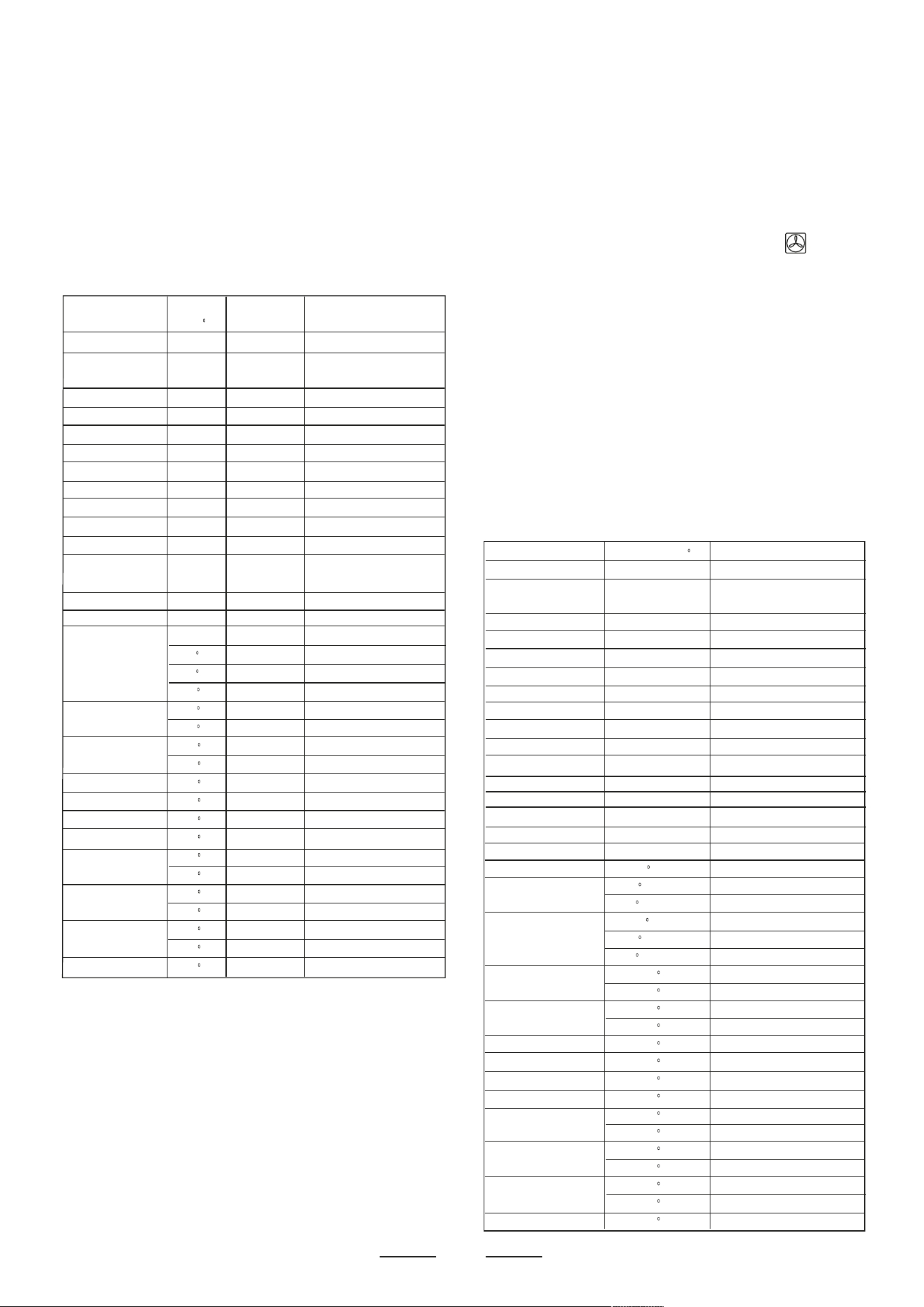
conventional oven, using one tray only. Cooking results are a matter
of personal preference and may easily be adjusted to suit individual
requirements by slight adjustment of the temperature and or
cooking time. Preheating of the oven is recommended for 10-15
minutes or until the oven thermostat indicator light switches off to
show the selected temperature has been reached.
When using a baking tray it should be placed centrally on the oven
shelf with the short sides of the tray parallel to the sides of the
oven. Do not use
trays, tins or dishes larger than 380 mm (15")
long, 356 mm (14") wide, as cooking results may be impaired.
PLATE WARMING
Ovenproof plates and dishes may be warmed in the oven on a
low temperature setting. Remember do not place items directly
into the oven base.
Warning: do not use f
oil to cover the oven shelves, or any part
of the oven interior including the oven base. Foil should only be
used to cover food and cooking dishes. Always place items which
may boil over (e.g. fruit pies) on a baking tray to prevent spillage
burning onto the oven base. Foil u
sed improperly is frequent cause
of oven problems and painful accidents. Avoid letting grease
deposit collect around the upper heating element: it will cause
smoking and may start a fire.
Remember do not place pan or items directly onto the oven base.
Never leave unit unattended at hight heat settings. Boil over causes
smokingand greasy spill over that may start a fire.
If a grease fire should occur in a pan put out the flame by placing
a lid on the pan. Do not throw water on a grease fire.
GUIDE FOR FORCED CONVECTION COOKING
(Back rolled electric element with fan)
The accessories provided with the oven can be slotted in at 5
positions: the following guide concerns cooking times and thermostat
settings using N. 2 shelves on the same time (in position N. 2 and
N. 4). Cooked results are a matter of personal preference and may
easily be adjusted to suit individual requirements by slight adjustment
of the temperature and/or cooking time, or when using more or
less shelves in the same time. Preheating of the oven is
recommended for
10-15 minutes or until the oven thermostat
indicator light switches off to show the selected temperature has
been reached.
When using a baking tray it should be placed centrally on the oven
shelf with the short sides of the tray parallel to the sides of the
oven. Do not use trays, tins or dishes larger than 380mm (15")
long, 356 mm (14") wide, as cooking results may be impaired.
flehStatsomrehT dooF Position Cooking Time
setting
C
(Counted from Bottom)
Small cakes (12 on tray) 195 3 20 - 30 mins.
Victoria sandwich 190 3 25 - 35 mins.
(2x7"/180mm)
Swiss roll or whisked sponge 200 3 20 - 25 mins.
Fruit cake (8"/205mm) 155 2 2 - 3 hours.
Scones 260 3 10 - 20 mins.
Meringues 95 2 2 - 3 hours.
Shortcrust Pastry 210 3 25 - 45 mins. depending
Puff or Flaky Pastry 220 2 20 - 35 mins. upon
Choux Pastry 220 3 25 - 35 mins. dish
Biscuits 200/220 3 15 - 25 mins. depending upon type
Bread 250 2 30 - 40 mins.
Milk pudding 165 2 1 H - 2 hours.
Pizza 270 3 25 mins.
Lasagne 170 3 75 mins.
Oven noodles 160 3 75 mins.
BEEF on bone & crusty 270 rare 3 12 mins. per 1/b (500 g) plus 12 mins.
(rare) 220
C 3 15 mins. per 1/b (500 g) plus 15 mins.
(medium) 220
C 3 20 mins. per 1/b (500 g) plus 20 mins.
(well done) 180
C 3 25 mins. per 1/b (500 g) plus 15 mins.
LAMB on bone 220
C 3 20 mins. per 1/b (500 g) plus 20 mins.
170
C 3 27 mins. per 1/b (500 g) plus 27 mins.
Boned and rolled 220
C 3 25 mins. per 1/b (500 g) plus 25 mins.
170
C 3 35 mins. per 1/b (500 g) plus 20 mins.
PORK on bone 220
C 3 25 mins. per 1/b (500 g) plus 25 mins.
Boned and roller 180
C 3 30-35 mins. per 1/b (500 g) plus 35 mins.
VEAL on bone 220
C 3 25 mins. per 1/b (500 g) plus 25 mins.
Boned and roller 220
C 3 30 mins. per 1/b (500 g) plus 30 mins.
CHICKEN 220
C 3 20 mins. per 1/b (500 g) plus 20 mins.
170
C 3 25 mins. per 1/b (500 g) plus 25 mins.
TURKEY 220
C 3 20 mins. per 1/b (500 g)
170
C 3 25 mins. per 1/b (500 g)
DUCK 220
C 3 20 mins. per 1/b (500 g)
170
C 3 25 mins. per 1/b (500 g)
GOOSE 220
C 3 20 mins. per 1/b (500 g) plus 20
Food Thermostat setting C Cooking Time
Small cakes (12 on tray) 175 15-25 mins.
Victoria sandwich 170 20-30 mins.
(2x7"/180mm)
Swiss roll or whisked sponge 180 15-20 mins.
Fruit cake (8"/205mm) 135 1 H - 2 H hours.
Scones 210 8-15 mins.
Meringues 80 1 H - 2 H hours.
Shortcrust Pastry 190 20-40 mins. depending
Puff or Flaky Pastry 200 15-30 mins. upon
Choux Pastry 200 20-30 mins. dish
Biscuits 170/180 10-20 mins. depending upon type
022/002 daerB 25-35 mins.
Milk pudding 150 1 H - 2 hours.
Pizza 250 20 mins.
Lasagne 165 60 mins.
Oven noodles 150 60 mins.
BEEF on bone 230 rare & crusty 9 mins. per 1/b (500 g) plus 9 mins.
BEEF on bone 190
C (rare) 15 mins. per 1/b (500 g) plus 8 mins.
190
C (medium) 20 mins. per 1/b (500 g) plus 10 mins.
160
C (well done) 25 mins. per 1/b (500 g) plus 8 mins.
Boned and rolled 190
C (rare) 20 mins. per 1/b (500 g) plus 10 mins.
190
C (medium) 25 mins. per 1/b (500 g) plus 15 mins.
160
C (well done) 30 mins. per 1/b (500 g) plus 8 mins.
LAMB on bone 190
C 20 mins. per 1/b (500 g) plus 10 mins.
155
C 27 mins. per 1/b (500 g) plus 14 mins.
Boned and rolled 190
C 25 mins. per 1/b (500 g) plus 14 mins.
155
C 25 mins. per 1/b (500 g) plus 14 mins.
PORK on bone 200
C 25 mins. per 1/b (500 g) plus 14 mins.
Boned and roller 160
C 30-35 mins. per 1/b (500 g) plus 18 mins.
VEAL on bone 200
C 25 mins. per 1/b (500 g) plus 14 mins.
Boned and roller 200
C 30 mins. per 1/b (500 g) plus 14 mins.
CHICKEN 200
C 20 mins. per 1/b (500 g) plus 10 mins.
155
C 25 mins. per 1/b (500 g) plus 13 mins.
TURKEY 200
C 18 mins. per 1/b (500 g) plus 14 mins.
155
C 23 mins. per 1/b (500 g)
DUCK 200
C 18 mins. per 1/b (500 g)
155
C 23 mins. per 1/b (500 g)
GOOSE 180
C 18 mins. per 1/b (500 g) plus 20 mins.
8
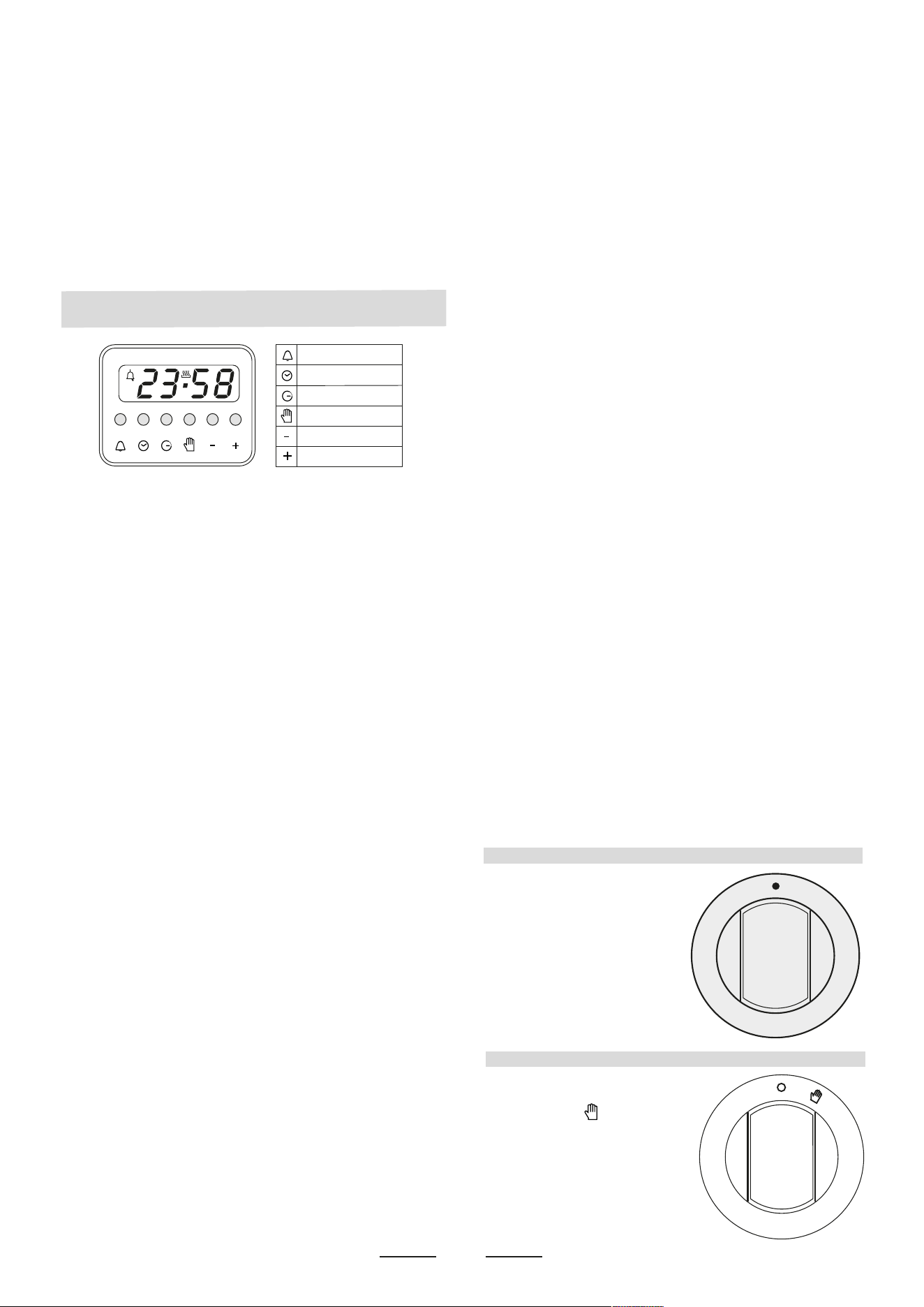
For a manual operation of the
programmer, turn the knob
anticlockwise to .
Adjust the cooking time by
turning the knob clockwise.
Select the cooking time with
the relevant knob (max.120
min.). The oven will switch off
automatically when the
cooking is up.
9
PROGRAMMER WITH COOKING END TIME
0
10
2
0
3
0
4
0
5
0
60
70
8
0
9
0
1
0
0
11
0
12
0
sto
p
A
Minute timer
Cooking time
Cooking end
Manual
Subtract time
Add time
5
10
15
20
25
35
40
5
4
50
55
30
USlNG THE GRILL
The grill is situated in the top of the oven compartment.
The grill pan should be located on the top oven shelf position.
Warning:
Do not place fatty foods too close to the grill and never leave the
grill unattended. If fatty foods are grilled, or roasting has been
cooked in the oven at a high temperature the grill element may
smoke. This is not dangerous and the smoke is caused by the fat
burning off when the grill element is hot. Leave the grill element on
until the smoking has stopped t-hen use as normal. If a grease fire
should occur in a pan put out the flame by placing a lid on the pan.
Do not throw water on a grease fire.
INSTRUCTIONS FOR USE OF CONTROL DEVICES
(ACCORDING TO THE MODELS)
Programmer with electronic clock - LED display
Functions
Cooking time, cooking end time, manual position, clock, minutes
counter, times to be set up to 23 hours 59 minutes.
Display
Fluorescent display with 4 figures of 7 segments to indicate time
and cooking times.
Cooking time and manual function = pan symbol
Automatic function = AUTO
Minutes counter = bell symbol
The symbols light up when the corresponding functions are
selected.
Setting
To set, press and release the desired function, and within 5
seconds set the time with + and - buttons.
+ and - buttons.
The + and - buttons increase or decrease the time at a speed
depending on how long the button is pressed.
Setting the time
Press any two buttons manual at the same time, and + or - button
to set the desired time. This deletes any previously set
programme. The contacts are switched off and the AUTO symbol
flashes.
Manual use
By pressing the manual button the relay contacts switch on, the
AUTO symbol switches off and the saucepan symbol lights up.
Manual operation can only be enabled after the automatic
programme is over or it has been cancelled.
Automatic use
Press the cooking time or end time button to switch automatically
from the manual to the automatic function.
Semi-automatic use with cooking time setting
Press the cooking time button and set the desired time with + or
-. The AUTO and cooking time symbols light up continuously. The
relay switches on immediately. When the cooking end time
corresponds to the time of day, the relay and cooking time symbol
switch off, the sound signal rings and the AUTO symbol flashes.
Semi-automatic use with end time setting
Press the end time button. The time of day appears on the
display. Set the cooking end time with + button. The AUTO and
cooking time symbols light up continuously. The relay contacts
switch on. When the cooking end time corresponds to the time of
day, the relay and the cooking time symbol switch off. When the
cooking time is up, the AUTO symbol flashes, the sound signal
rings and both the relay and the cooking time button switch off.
Automatic use with cooking time and end time setting
Press the cooking time button and select the length of the
cooking time with + or - button. The AUTO and cooking time
symbols light up continuously. The relay switches on. By
pressing the cooking end time button the next cooking end time
appears on the display. Set the cooking end time with + button.
The relay and the cooking time symbol switch off.
The symbol lights up again when the time of day corresponds to
the cooking start time. When the cooking time is up, the AUTO
symbol flashes, the sound signal rings, the cooking time symbol
and the relay switch off.
Minutes counter
Press the minutes counter button and set the cooking time with+
or - button.The bell symbol lights up when the minutes counter is
operating. When the set time is up, the sound signal rings and
the bell symbol switches off.
Sound signal
The sound signal starts at the end of a programme or of the
minutes counter function and it lasts for 15 minutes.
To stop it, push any one of the functions buttons.
Start programme and check
The programme starts 4 seconds after it has been set. The
programme can be chec
ked at any time by pressing the corresponding button.
Setting error
A setting error is made if the time of day on the clock falls within
the cooking start and end times. To correct the setting error,
change the cooking time or cooking end time. The relays switch
off when a setting error is made.
Cancelling a setting
To cancel a setting, press the cooking time button and then press
the - button until 00 00 appears on the display.
A set programme will automatically cancel on completion.
MINUTES COUNTERS
Turn the knob clockwise to set
the desired cooking time. The
minutes minder can be
adjusted from 1 to 60 minutes.
A sound signal will inform you
that the chosen time is up.
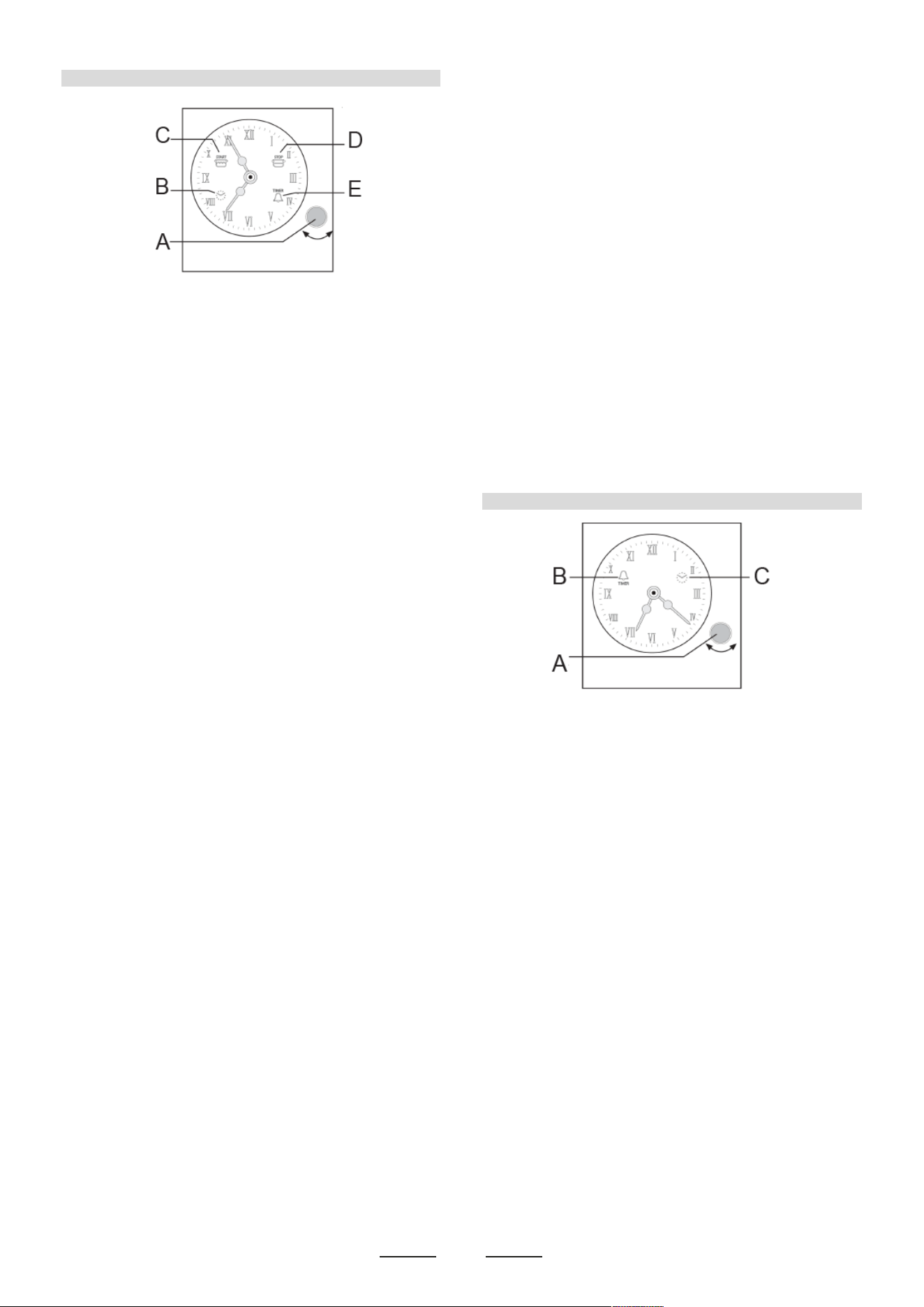
10
When the oven is connected to the electrical power supply, the
icon B (clock) flashes and the oven is not operational. After a
few seconds manual operation is activated and the oven is
powered automatically.
Time setting
Briefly press knob A 4 times until the icon B (clock) flashes.
Adjust the time of day by turning knob A clockwise or
anticlockwise. After 10 seconds from the last adjustment, the
electronic timer automatically exits the time setting mode and
the oven is in manual mode.
Programming cooking end time
Programming the cooking end time allows cooking to be started
immediately and finished automatically according to the
programmed time.
To program the cooking end time, briefly press knob A twice
until the icon D (cooking end) flashes.
Turn knob A clockwise or anticlockwise until the desired cooking
end time is obtained. Flashing of the cooking end icon continues
for 10 seconds after the last rotation. If, within this time, knob A
is not turned or pressed, the hands automatically return to
display the time of day and the program is cancelled.
The program can be confirmed by pressing knob A provided that
at least 2 minutes of cooking time has been programmed.
On confirming the program, the icon D (cooking end) remains on
and cooking starts automatically.
To view the set program, briefly press knob A. The cooking will
end when the previously set Cooking End Time coincides with
the Time of day.
At the end of cooking, the alarm beeps and the icon D (cooking
end) flashes. To disable the alarm, press knob A (after 1 minute
the alarm is automatically disabled).
To return the timer to manual function, press knob A for 3
seconds and turn the oven functions knob to the zero position.
Cooking start and end time programming
Programming the cooking start and end time allows cooking to
be started and finished automatically according to the
programmed times. To program the cooking start time, briefly
press knob A once until the icon C (cooking start) flashes.
Turn knob A clockwise or anticlockwise until the desired cooking
start time is obtained.
Icon B (cooking start) continues flashing for 10 seconds after the
last rotation. If, within this time, knob A is not turned or pressed,
the hands automatically return to display the time of day and the
program is cancelled. The program can be confirmed by
pressing knob A provided a delay of at least 2 minutes has been
programmed. Press knob A to go to the setting of Cooking End
time (the cooking end icon D goes from off to flashing). To
program the Cooking End time, follow the procedure described
in the previous paragraph (Cooking end time programming).
To view the set program, briefly press knob A. The cooking will
start when the previously set Cooking Start Time coincides with
the Time of day. At the end of cooking, the alarm beeps and the
icons C (cooking start) and D (cooking end) flash.
To disable the alarm, press knob A (after 1 minute the alarm is
automatically disabled).
To return the timer to manual function, press knob A for 3
seconds and turn the oven functions knob to the zero position.
Timer programming
Timer programming gives a simple alarm at the end of a
programmed time without deactivating the cooking (Timer mode).
To program the alarm, briefly press knob A 3 times until the icon
E (bell) flashes. Turn knob A clockwise until the desired time is
obtained. The icon (bell) continues to flash for 10 seconds after
the last rotation. If, within this time, knob A is not turned or
pressed, the hands automatically return to display the time of day
and the program is cancelled.
The program can be confirmed by pressing knob A provided at
least 2 minutes of time has been programmed. To view the set
program, briefly press knob A. At the end of the programmed
time, the alarm beeps and the icon E (bell) flashes until knob A is
pressed for about 3 seconds.
NOTE: the alarm is automatically disabled after 1 minute.
The timer can only be used when no program is in progress.
Cancelling programs
Programs can be cancelled at any time by pressing knob A for 3
seconds.
The timer returns to manual cooking mode.
TIMER
When the oven is connected to the electrical power supply, the
icon C (clock) flashes. Press knob A for about 3 seconds and
adjust the time.
Time setting
Briefly press knob A twice until the icon C (clock) flashes.
Adjust the time of day by turning knob A clockwise or
anticlockwise. After 10 seconds from the last setting, the
electronic timer automatically exits the time setting mode.
Timer programming
Timer programming gives a simple alarm at the end of a
programmed time without deactivating the cooking (Timer
mode).
To program the alarm, briefly press knob A until the icon B (bell)
flashes.
Turn knob A clockwise until obtaining the desired cooking time.
The icon (bell) continues to flash for 10 seconds after the last
rotation. If, within this time, knob A is not turned or pressed, the
hands automatically return to display the time of day and the
program is cancelled.
The program can be confirmed by pressing knob A provided at
least 2 minutes of time has been programmed.
To view the programmed time, briefly press knob A.
At the end of the programmed time, the alarm beeps and the icon
B (bell) flashes until knob A is pressed for about 3 seconds.
NOTE: the alarm is automatically disabled after 1 minute.
The timer programming can be reset at any time by pressing
knob A for 3 seconds.
Power failure signalling
The timer signals any power failure by flashing the icon (clock).
In this case, any previously programmed function will be
cancelled. To stop the clock icon flashing, press knob A for about
3 seconds.
PROGRAMMER
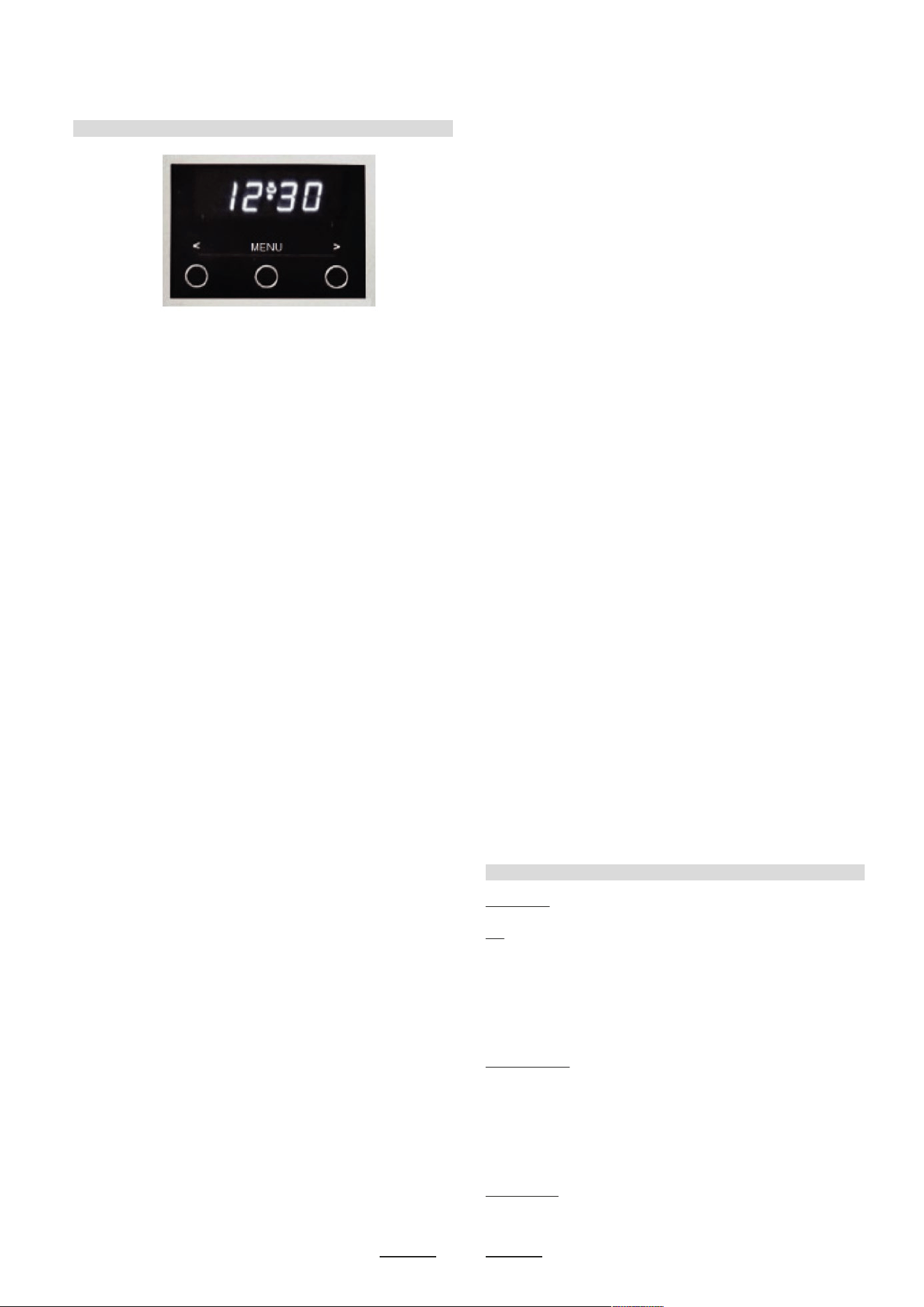
11
TIMER
When the oven is connected to the electrical power supply, the
icon C (clock) flashes. Press knob A for about 3 seconds and
adjust the time.
Time setting
Briefly press knob A twice until the icon C (clock) flashes.
Adjust the time of day by turning knob A clockwise or
anticlockwise. After 10 seconds from the last setting, the
electronic timer automatically exits the time setting mode.
Timer programming
Timer programming gives a simple alarm at the end of a
programmed time without deactivating the cooking (Timer
mode).
To program the alarm, briefly press knob A until the icon B (bell)
flashes.
Turn knob A clockwise until obtaining the desired cooking time.
The icon (bell) continues to flash for 10 seconds after the last
rotation. If, within this time, knob A is not turned or pressed, the
hands automatically return to display the time of day and the
program is cancelled.
The program can be confirmed by pressing knob A provided at
least 2 minutes of time has been programmed.
To view the programmed time, briefly press knob A.
At the end of the programmed time, the alarm beeps and the icon
B (bell) flashes until knob A is pressed for about 3 seconds.
NOTE: the alarm is automatically disabled after 1 minute.
The timer programming can be reset at any time by pressing
knob A for 3 seconds.
Power failure signalling
The timer signals any power failure by flashing the icon (clock).
In this case, any previously programmed function will be
cancelled. To stop the clock icon flashing, press knob A for about
3 seconds.
Functions
On
The display flashes.
Time setting
Press the left button.
Set the time with buttons “+” and “-”.
This function remains activated 7 seconds after the last +/-
operation.
Timer setting
This function is permanently activated and it will be immediately
set with +/- buttons. During setting the units are 10 seconds.
During count down the timer takes priority on the display.
The units are seconds. The maximum time is 99 minutes.
The relay contact (when available) is closed during the count
down only.
Reset timer
Press “+” and “-” buttons together and release “+” button first.
OPERATION MANUAL FOR OVEN TIMER TOUCH
Power On
At power on, the relay contact is opened. The display and AUTO
symbol flashes and time of day starts from 0:00. Power on state
with flashing daytime remains until time of day is set.
Setting Time Of Day
Press PLUS and MINUS button simultaneously. At Power On,
also MODE button is possible.
Time of day can be set wilh PLUS or MINUS, while the colon
between hours and minutes is flashing.
When PLUS or MINUS is continually hold, the quick setting mode
starts. lf daytime setting mode is selecled while an automatic
program is active, the automatic program is cancelled.
The Relay
The relay contact is normally closed, but opened at automatic
program end, before fully aulomatic start time is reached or after
power on before time of day is set. The Pot symbol represents the
state of the relay and is illuminated when the relay contact is
closed.
The Buzzer
The buzzer interval alarm signal sounds if minute minder or
automatic program has reached the end time. The signal can be
switched off by pressing any key or by passing the signal duration
limit.
Changing the Buzzer frequency
The buzzer signal frequency can be changed by pressing MINUS
in 3 circular steps. For listening to the actual valid signal, press
MINUS for some seconds while the display reads the time of day.
Every new key press within the time window changes the buzzer
signal. New this tone is valid as program end alarm signal.
Clearing Programs and Manual function
Program times for minute minder or automatic programs can be
cleared by
a) "Clear Function": Press PLUS and MINUS button
simultaneously.
For setting minute minder, first select minute minder program.
Auto program is cleared that way in any other display mode. This
"Manual" function closes the relay. After this clear the display
returns from adjustment mode to time of day immediately.
b) Back counting of program duration to zero or end time to actual
time.
After this clear the actual setting mode remains.
Program selection
Select following programs in turns by pressing the MODE button:
1) Minute Minder:
The Bell symbol is flashing. Set alarm time by+/-,
2) Auto program duration:
"dur" display. The display automatically toggles between "dur"
display and duration time setting
mode unill time window has passed. lf +/- is pressed while the
display reads "dur", the display changes to duration setting mode.
Set auto program duration by+/-.
3) Auto program end time:
"End" display. The display automatically toggles between "End"
display and end time setting mode until time window has passed.
When pressing PLUS or MINUS while the display reads "End",
the display changes to end time setting mode. Set auto program
end time by+/-.
Minute Minder
While minute minder mode is selected, the Bell symbol flashes
and the display reads the remaining time in hours and minutes,
only if the last minute is counting down the remaining seconds
are displayed.
An active minute minder program is indicated by the statically
illuminated Bell symbol. lf alarm time has finished, an acoustic
interval signal sounds and the Beli symbol flashes.
The minute minder program runs independently of other
programs.
Semi Automatic Program with Duration or End Time
Setting Program Time
Select either duration or end time and set the desired time with
PLUS/MINUS. While duration or end time adjustment mode ls
selected, the corresponding Auto symbol is flashing.
End time and duration are linked by: End time = Actual time +
Duration.
Afler setting the program duration the end time cannot be
reduced. Neither can the program duration be extended, when
an end time is set.
Program Run
While the automatic program is running, the Auto symbol is
illuminated statically and the display reads the time of day. The
relay contact is closed.
Automatic Program End
While duration has run down or time of day reaches end time, the
relay contact opens and the corresponding Pot symbol is
switched off. The Auto symbol flashes and an acoustic interval
signal indicates that automatic program has finished. Pressing
any key clears the buzzer and the relay contact closes.
Fully Automatic Proaram with Duration and End Time
Setting is as described far the semi automatic program, but both
duration and end time must be set.
End time and duration define program start time according to:
Start time = End time - Duration.
Before fully automatic start time is reached, the relay contact is
opened. Program starts when time of day is equal lo start time
and works now as described for semi automatic program.
Limit of duration and end time adjustments:
lf the calculated start time ls one minute after the current time,
the duration cannot be extended and the end time cannot be
reduced. This prevents the start time getting before the current
time.
Signal
The signal after time out will
stay 7 minutes if it has not
been reset with the “+” button
(one touch only).
Signal frequency
When the display shows the
time of day, the signal frequency
can be selected by pressing
the “-” button.
Three different frequencies
are selectable.
ELECTRONIC TIMER FOR COOKER
Bump
CLEANING
12
USE OF THE GRILL ELECTRIC
Functions
On
The display flashes.
Time setting
Press the left button.
Set the time with buttons “+” and “-”.
This function remains activated 7 seconds after the last +/-
operation.
Timer setting
This function is permanently activated and it will be immediately
set with +/- buttons. During setting the units are 10 seconds.
During count down the timer takes priority on the display.
The units are seconds. The maximum time is 99 minutes.
The relay contact (when available) is closed during the count
down only.
Reset timer
Press “+” and “-” buttons together and release “+” button first.
1 Time of the day
2 Timing and insertion
3 Signal timng and insertion
USlNG THE GRILL
Turn the oven knob to the right and place it on the grill position
.
The grill pan should be located on the top oven shelf position and
is provided with two detachable grill pan handles which are
engaged over the front edge of the pan between the indentations
provided. A wire grid is supplied. The grill pan handle should be
removed from the grill pan during the grilling operation and only
fitted for removal or insertion of the grill pan particularly when
hot. Always preheat the grill on full for 3-5 minutes before
inserting the food.
The user can change the shelves, depending on his personal
whishes and on the different food.
Geat the oven 5 minutes before introducing the food.
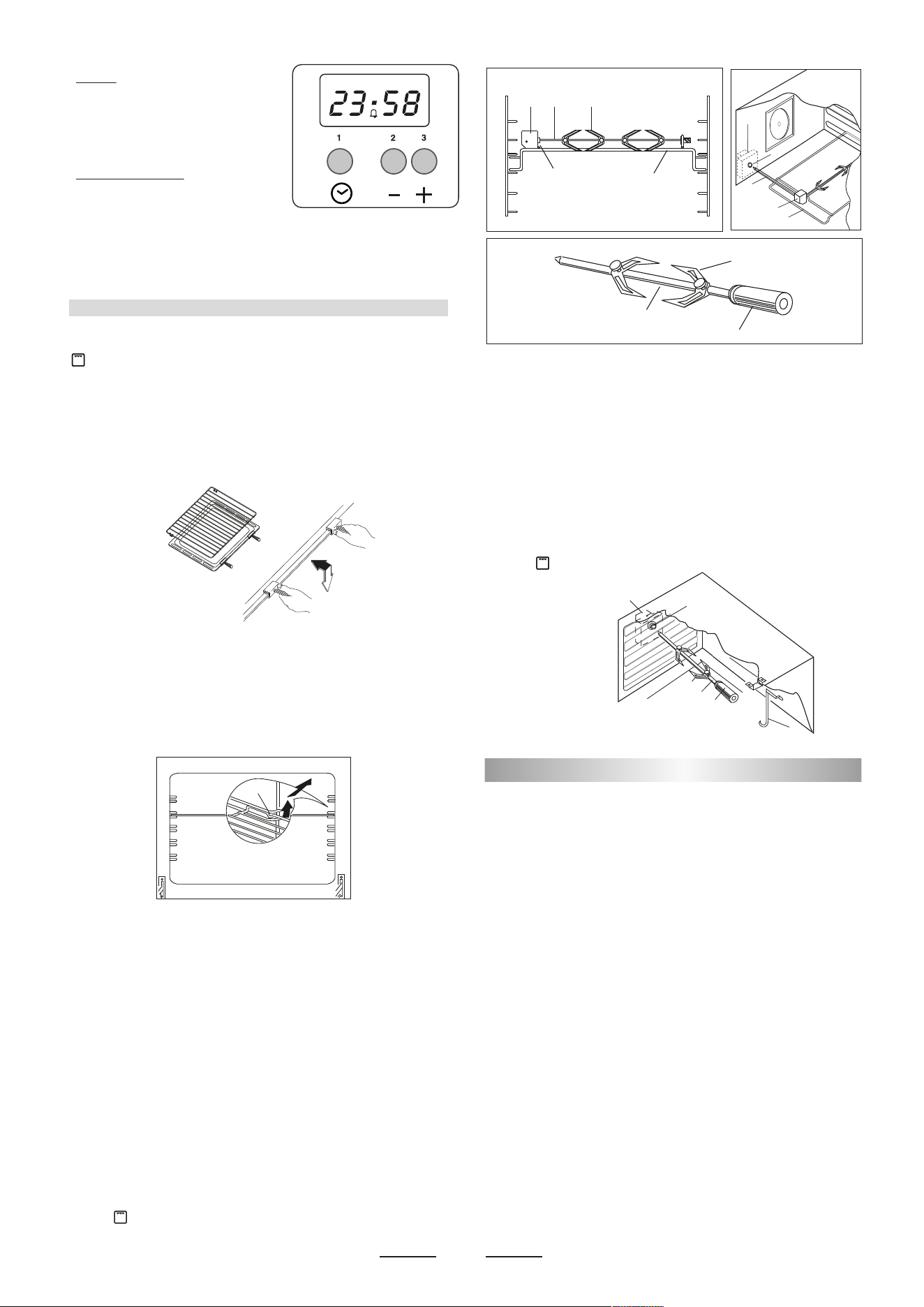
To remove the shelves from the oven, pull them forward you,
tilt front end upward and pull them out.
To replace, ct in the opposite manner as before.
Install shelves by locating them in the horizontal guide rails on
the oven walls. The raised portion of the shelf is to be facing the
rear wall of the oven.
Fig. 8B
A
L
F
R L F
P
G
Fig. 8
Fig. 8 A
I
R
G
M
H
S
L
F
R
P
G
Fig. 8C
TURNSPIT multiple (NOT AVAILABLE ALL MODELS)
For utilization of the turnspit follow the instructions described.
- Thread the chicken or the cubes of meat for roasting on the
spit L , ensuring that it is gripped safely between the two forks
F and balancing it properly to avoid unnecessary strain on the
trasmission R (fig 8).
- Put the spit on the support G, after having introduced its
opposite end in the socket P of the transmission R (fig 8)
- Put the support G completely into the oven so that the bar I
goes into the socket H of the turnspit motor M (fig 8A).
- Place the drip-tray with some water under the turnspit, on the
lowest level
- when removing the spit, wear oven mitts, pull out support G
and use the handgrip A operating in the contrary way (fig 8B).
The turnspit can be operated turning thr knob clockwise on
position .
TURNSPIT single (NOT AVAILABLE ALL MODELS)
For utilization of the turnspit follow the instructions described.
- Put the food in spit L (see fig. 8C), paying attention to block it
within the two forks F and to balance it, in order to avoid any
unnecessary effort in motor R.
- Put the spit on support G, after having put its opposite end
into hole P of motor R.
- Place the drip-tray with a little water under the spit.
- Start up motor R and turn the grill on.
- To remote the spit, operate in the opposite direction using
knob S and protecting glove in isolating wool (fig.8C).
The turnspit can be operated turning thr knob clockwise on
position .
Before cleaning the appliance, close the gas stopcock and
unplug appliance or disconnect power at the main circuit breaker
of the electrical system.
Do not clean the appliance surfaces when still hot.
Always clean off spillage as quickly as possible to prevent
burning on which will make removal more difficult. Wash with a
clean cloth soaked in hot soapy water, rinse and dry with a soft
cloth.
DO NOT USE ABRASIVES. CAUSTIC PASTES OR SPRAYS.
COARSE CLEANING PADS OR POWDERS. DO NOT USE
EXCESSIVE WATER WHEN CLEANING YOUR OVEN IN
ORDER TO AVOID WATER PRESSING THROUGH CLEFTS
INTO THE BACK OF CONTROLS PANEL OR OF THE UNIT.
NOTE: A steam cleaner is not to be used for cleaning this
appliance .
Pan supports and burners
The burner heads can be removed for cleaning.
NB: Do not drop hot burner caps in cold water.
Because of the rapid cooling they might get damaged.
Lift off and soak for about 10 minutes in hot water with a little
detergent. After having cleaned and washed them, dry them
carefully.
Make sure that no burner holes are clogged.
Clean the burners once a week or more frequently if necessary.
Make sure you have reassembled the burners correctly.
Pan supports can be washed by hand or in a dishwasher.
Remember to remove rubber feet (if fitted) prior to washing. Refit
them afterwards.
Do not use harsh abrasive cleaners or sharp metal scrapers to
clean the oven door glass since they can scratch the surface,
which may result in shattering of the glass.
Signal
The signal after time out will
stay 7 minutes if it has not
been reset with the “+” button
(one touch only).
Signal frequency
When the display shows the
time of day, the signal frequency
can be selected by pressing
the “-” button.
Three different frequencies
are selectable.
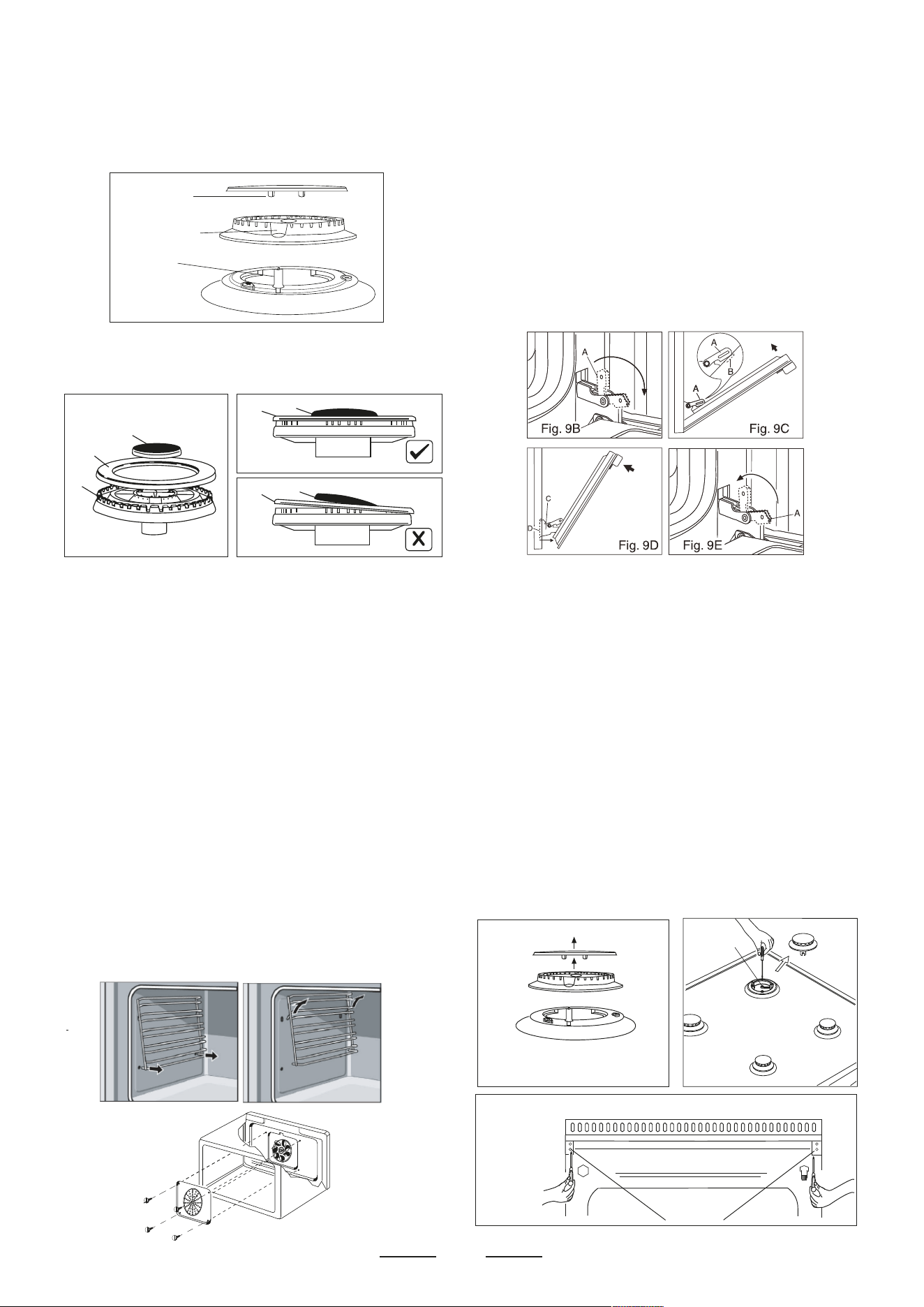
Fig. Q
Fig. R
Fig. 13
Fig. 14
V
13
mod. 196
Fig
.
15 A
A
burner cap
locating pegs
notch for electrode
in burner head
electrode
B
A
C
B
A
B
A
Fig. N
Fig. P
Before cleaning the appliance, close the gas stopcock and
unplug appliance or disconnect power at the main circuit breaker
of the electrical system.
Do not clean the appliance surfaces when still hot.
Always clean off spillage as quickly as possible to prevent
burning on which will make removal more difficult. Wash with a
clean cloth soaked in hot soapy water, rinse and dry with a soft
cloth.
DO NOT USE ABRASIVES. CAUSTIC PASTES OR SPRAYS.
COARSE CLEANING PADS OR POWDERS. DO NOT USE
EXCESSIVE WATER WHEN CLEANING YOUR OVEN IN
ORDER TO AVOID WATER PRESSING THROUGH CLEFTS
INTO THE BACK OF CONTROLS PANEL OR OF THE UNIT.
NOTE: A steam cleaner is not to be used for cleaning this
appliance .
Pan supports and burners
The burner heads can be removed for cleaning.
NB: Do not drop hot burner caps in cold water.
Because of the rapid cooling they might get damaged.
Lift off and soak for about 10 minutes in hot water with a little
detergent. After having cleaned and washed them, dry them
carefully.
Make sure that no burner holes are clogged.
Clean the burners once a week or more frequently if necessary.
Make sure you have reassembled the burners correctly.
Pan supports can be washed by hand or in a dishwasher.
For a triple crown burner, make sure head “C” and covers “A”
and “B” are properly placed on their seats as figure N and not
off-centered as in figure P.
Daily
Regular wiping down directly after use prevents dirt from burning
on. Clean the appliance with water and a detergent or all purpose
cleaner. Avoid using too much water to prevent it entering the
burner or ventilation openings.
Interior: the oven shelf carriers and the back fan cover can be
removed for easier cleaning. To do this, remove all the shelves
and spring off the side carriers. The back can now be removed by
unscrewing the screw at each side. Replace in a similar manner.
(Fig. Q-R) Oven accessories (shelves, trays etc) should be
washed in mild detergent solution and should not be treated with
abrasives. The oven interior panels should be cleaned with mild
detergent solution, mild cream cleaners or a moist soap pad.
Install shelves by locating them in the horizontal guide rails
on the oven walls.
The raised portion of the shelf is to be facing the rear wall of
the oven.
IMPORTANT
Do not use excessive water when cleaning the oven and avoid
water passing through the fan grill or ducts in the oven back .
Avoid letting grease deposit collect around the upper heating
element: it will cause smoking and may start a fire.
Removal of oven door
ln-depth cl e ani ng of the oven becomes more conveni ent if the
door is removed following the instructions below:
1 open the oven door completely.
2 flip the hinge hooks "A" outwards (see fig. 9B).
3 shut the oven door slowly until it reaches hooks "A", making
sure these are locked into slots "B" of the oven door, as shown
in fig. 9C. Remove the glass Flg. 9A (only tor models where
present).
4 Using both hands, push the oven door lightly inwards, lo
enable the door hinges "C" lo come away from the slots "O"
(see fig. 9D) and pull the door towards you until it is released
from the oven.
After cleaning it, reposition it correctly following the abovesteps in
the reverse order and flipping hooks "A" inwardsbefore you shut
the oven door (fig. 9E).
CAUTION:
Do not use rough or abrasive materials or sharp metal
scrapers to clean the glass doors of the oven since they may
scratch the surface and cause the glass to break.
WARNINGS
Isolate the cooker from the electricity supply before attempting to
replace the oven lamp.
The oven lamp used is of a special type withstanding high
temperatures. To replace it, act as follows: disassemble the
protecting glass (A) and replace the burnt lamp with one of the
same type. Reassemble the protecting glass.
DISASSEMBLE OF WORK-TOP
In case it is necessary to repair or replace the inside
components, act as follows:
Remove the grids, remove burners and flame-spreaders (see fig.
13), unscrew the visible screws “V” placed on the work-top (see
fig. 14). Disassemble the work-top by unscrewing the rear screws
“A” (see fig. 15A or 15 B according to the models). In this way it
is possible to lift the work-top and to reach the inside
components.
Remember to remove rubber feet (if fitted) prior to washing. Refit
them afterwards.
Do not use harsh abrasive cleaners or sharp metal scrapers to
clean the oven door glass since they can scratch the surface,
which may result in shattering of the glass.
SOME SAFETY POINT
D
V
1
5
7
mod. 190 & 106
To raise the cooking
hob end to push in
ahead
A
A
Fig. 15 B
14
OVEN LIGHTS
Always ensure the oven unit is switched off at the mains before
replacing the oven light bulb. To remove the light bulb, unscrew
the glass cover anticlockwise and remove. Turn the bulb
anticlockwise and remove. Replace with the same type of bulb
(Type E14 threaded clear lamp 230/240 V. 25 watt T 300°C).
Replace the light carefully and turn it clockwise.
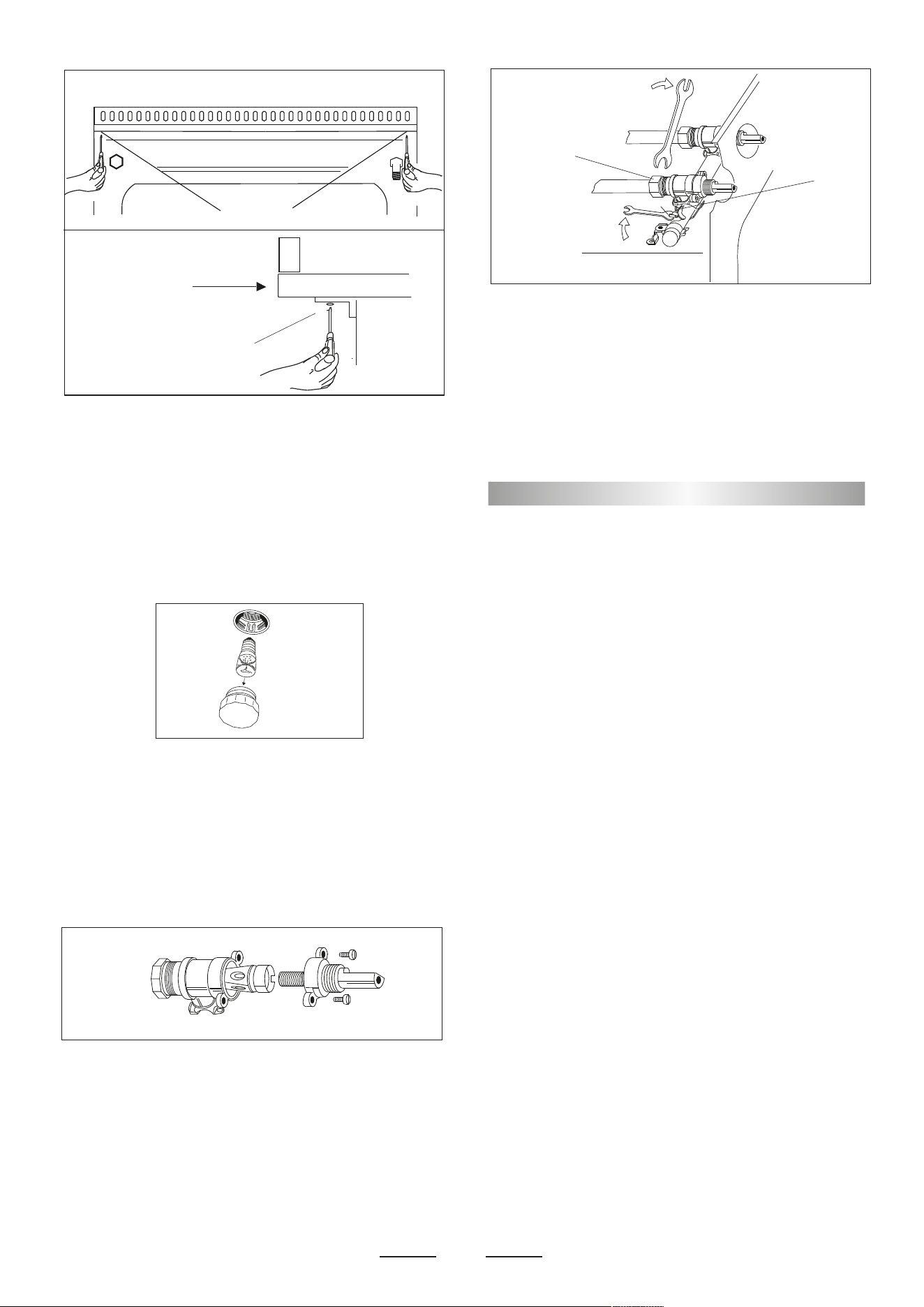
GREASING OF TAPS
If a tap becomes hard to be turned, grease it using a specific
grease withstanding high temperatures. Act as follows: open the
work-top and disassemble also the control panel as described on
the previous paragraph. Unscrew the two fixing screws from the
burner body (see picture) and remove the cone.
TAPS REPLACEMENT
Act as follows: open the work-top and disassemble also the
control panel as described on the previous paragraph. Unscrew
screw nut D of the gas tube supplying the burner. Unscrew
screw V fixing the tap to the bridle and remove it (see picture).
Note: Every time the tap is replaced, it is necessary to replace
the seal gasket too check the connection seal by means of
soapy water.
Clean the cone and its slot by means of a cloth soaked with
diluent. Slightly grease the cone with the relevant grease, put it in
its slot, and turn it some times. Remove the cone again, remove
the exceeding grease making sure the gas entries are not
obstructed by grease residuals. Assemble everything carefully in
the opposite direction check the connection seal by means of
soapy water.
Do not use the appliance as a space heater.
If you smell gas
Open a window. Do not use any electrical switches.
Immediately extinguish naked flames. Isolate appliance
from gas mains supplies via the isolation stopcock.
Contact local gas authority or emergency services as
appropriate. In the event of food fire. Isolate appliance from
electric / gas mains supplies if safe to do so.
Try to extinguish flames with the appropriate equipment
(fire blanket or extinguishing foam).
Do not use water on cooking fat / oil fires.
If in difficulty call emergency services.
• Do not store or use flammable products or aerosol
containers near the hotplate or burners.
ee lae ne an eao een i e enilao i
switched off.
The high flames can cause fire.
For your safety and that of your children
• Do not store items that are attractive to children above or
near the appliance.
• Keep children well away from the appliance:
do not forget that some parts of the appliance or of the pans
become very hot and dangerous during use, and will take
time to cool down.
• When cooking, do not use clothes that could catch fire and
cause serious injury.
• Some “Wok” cooking pots are unstable. Check with the
manufacturer before purchasing.
• Avoid using unstable and misshapen pans which may tilt
easily and pans with a very small base diameter, e.g. milk
pans, single egg poachers. The minimum pan diameter
recommended is 125mm (5"). Smaller pans will be unstable.
Very large pans may cause walls or knobs to overheat. Using
pans which are too big may deform the control knobs or
discolour the walls. This is not covered by the guarantee.
• Carefully place all pans centrally over the burners.
• Always position pan handles safely away from the front of the
hotplate and out of danger, particularly from small children.
• Never leave a chip pan unattended.
• Pans and kettles with down turned base rims should not be
used.
• Simmering aids such as asbestos or mesh mats are NOT
recommended. They will reduce burner performance and
could damage the pan supports.
• Commercially available foil spillage aids are unnecessary on
this hotplate.

15
Do not use the appliance as a space heater.
If you smell gas
Open a window. Do not use any electrical switches.
Immediately extinguish naked flames. Isolate appliance
from gas mains supplies via the isolation stopcock.
Contact local gas authority or emergency services as
appropriate. In the event of food fire. Isolate appliance from
electric / gas mains supplies if safe to do so.
Try to extinguish flames with the appropriate equipment
(fire blanket or extinguishing foam).
Do not use water on cooking fat / oil fires.
If in difficulty call emergency services.
• Do not store or use flammable products or aerosol
containers near the hotplate or burners.
ee lae ne an eao een i e enilao i
switched off.
The high flames can cause fire.
For your safety and that of your children
• Do not store items that are attractive to children above or
near the appliance.
• Keep children well away from the appliance:
do not forget that some parts of the appliance or of the pans
become very hot and dangerous during use, and will take
time to cool down.
• When cooking, do not use clothes that could catch fire and
cause serious injury.
• Some “Wok” cooking pots are unstable. Check with the
manufacturer before purchasing.
• Avoid using unstable and misshapen pans which may tilt
easily and pans with a very small base diameter, e.g. milk
pans, single egg poachers. The minimum pan diameter
recommended is 125mm (5"). Smaller pans will be unstable.
Very large pans may cause walls or knobs to overheat. Using
pans which are too big may deform the control knobs or
discolour the walls. This is not covered by the guarantee.
• Carefully place all pans centrally over the burners.
• Always position pan handles safely away from the front of the
hotplate and out of danger, particularly from small children.
• Never leave a chip pan unattended.
PROBLEM SOLVER
Any of the following are considered to be abnormal operation
and may require servicing:
Yellow tipping of the hob burner flame.
Sooting up of cooking utensils.
Burners not igniting properly.
Burners failing to remain alight.
Burners extinguished by oven door.
Gas valves, which are difficult to turn.
Your Installer should be contacted if you have any problems
with the installation.
Before you call a service engineer please check if the problem
is something you could fix yourself. The cause of the problem is
often a simple one.
THINGS TO TRY BEFORE CALLING FOR AN ENGINEER
Burner does not burn well
Is the burner dirty or damp? Try cleaning and/or drying the
burner. Appliance not suitable for your gas type? Check the
identification plate on the hotplate base.
Burner does not ignite
Do the burners spark when you press the ignition button? If not
i e oe on ee ein e oe l eion
further on. If the power supply is OK then there is probably
something wrong with the ignition system.
Are the electrode or burner slots blocked by debris?
Is the burner dirty or damp? Try cleaning and/or drying the
burner. Is the burner trim correctly located?
Are the burner caps correctly located?
Check that there is not a problem with your gas supply. You can
do this by making sure that other gas appliances you may have
are working.
Pan supports
Aluminium pans may cause a metallic marking on the pan
supports which does not affect the durability of the enamel and
a e leane o i a eal leane a ao
Checking the power supply
First check the socket by trying out another piece of electrical
equipment in it.
If that works, renew the fuse in the hotplate plug. Use a 10 amp
e e e lo aain ee i a al on e olae o
not use a fuse with a higher rating. Do not carry out other
electrical work. Unplug the hotplate and tell your installer.
Power Failure
In the event of a failure in the electrical supply the hotplate
burners may be lit using a match.
Ventilation
The use of a gas cooking appliance results in the production of
heat and moisture in the room in which it is installed. Ensure that
the kitchen is well ventilated: keep natural ventilation holes open
or install a mechanical ventilation device, (mechanical extractor
hood). Prolonged intensive use of the appliance may call for
additional ventilation, for example opening a window, or more
effective ventilation, for example increasing the level of
mechanical ventilation where present. For more detail see the
Installation Instructions.
OVEN DOES NOT WORK AT ALL
First, when the oven is equipped with timer, check appliance is
not programmed to turn on later. If it is, turn to manual setting (i.e.
hand symbol). If the button or scale on the timer remains in the
automatic position after use, the power supply to the oven will be
interrupted. Also, check your appliance is switched on at the
mains. Next check for an unexpected power strike by switching
on adjacent lights etc. Finally, check fuses and plug wiring. If all
these prove satisfactory, call engineer.
LIGHT BULB DOESN’T COME ON
Check bulb for looseness or burned out bulb.
Note: bulb replacement is not covered by your guarantee.
SMOKE COMING FROM OVEN
If oven is still relatively new, this problem is invariably due to
protective oil on elements. Otherwise, the answer may be oil or
fat which has become deposited on the elements during cooking.
In either event, continued use should burn away the residues. On
future occasions, try to shield food with foil or keep it further away
from element, particularly when grilling.
CLOCK/TIMER DOES NOT WORK
Check to be sure range cord is plugged into outlet completely.
Check for a blown fuse or tripped circuit breaker. Check for
power outage. Check step by step operating Instructions on
previous pages.
If, after checking through this section, you cannot resolve
your problem please call the number on the data plate fixed
to the front cover of these instructions for service and spare
parts.
When ordering please quote the appliance name, the colour
variant and serial number.
This information can be found on the data plate sealed
inside the front appliance drawer.
Maintenance schedule:
To ensure the appliance continues to operate at
peak performance, we recommend a routine service
call every 2 years for the life of the appliance.
• Pans and kettles with down turned base rims should not be
used.
• Simmering aids such as asbestos or mesh mats are NOT
recommended. They will reduce burner performance and
could damage the pan supports.
• Commercially available foil spillage aids are unnecessary on
this hotplate.

Cod. 539083 _ REV. 3