1
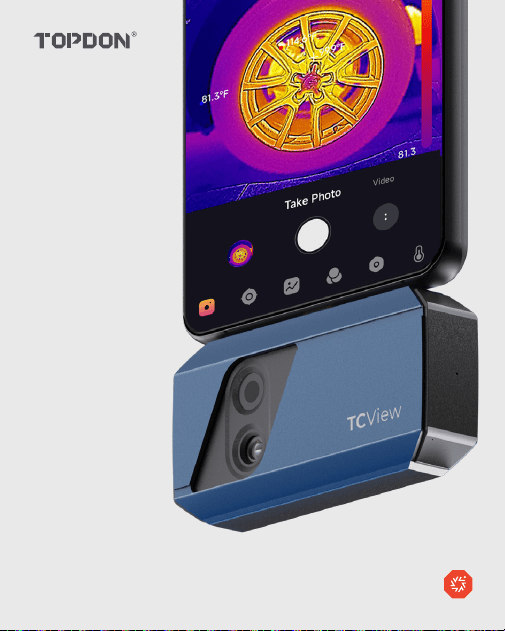
Dual-Lens Thermal Camera for Smartphones I User Manual
TC001 Plus

2

3
Contents
1. Product Overview ................................................. 4
2. Caution and Notice ................................................. 5
3. Operating Instructions ................................................. 7
4. Specifications ................................................. 11
5. FAQ ................................................. 12
6. Warranty ................................................. 14
7. Compliance Information ................................................. 15
4
1. Product Overview
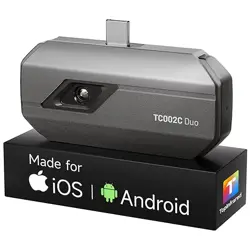
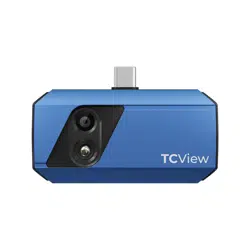
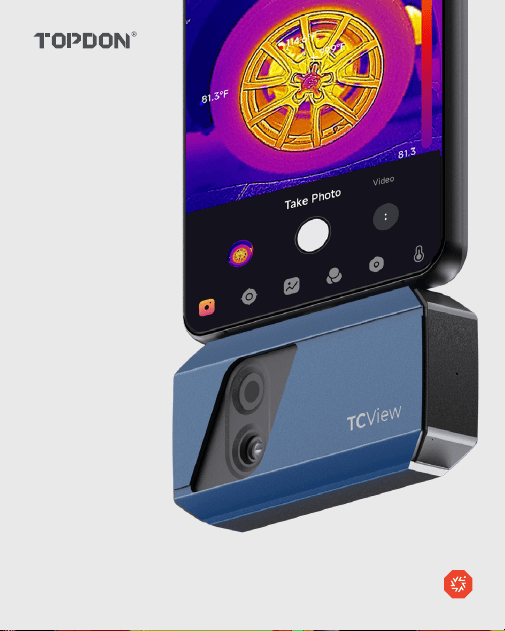
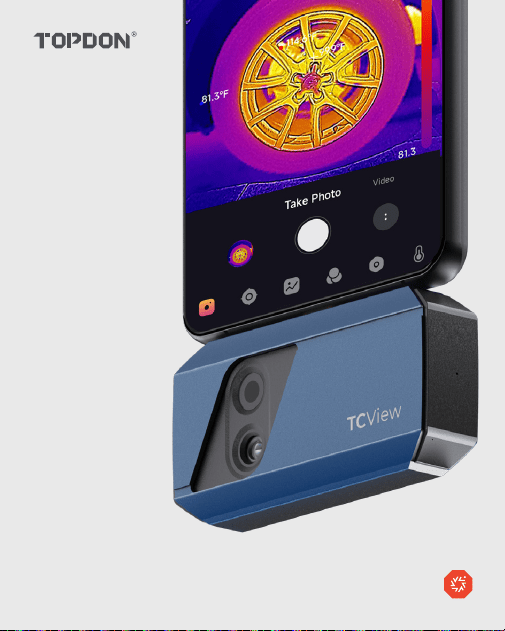
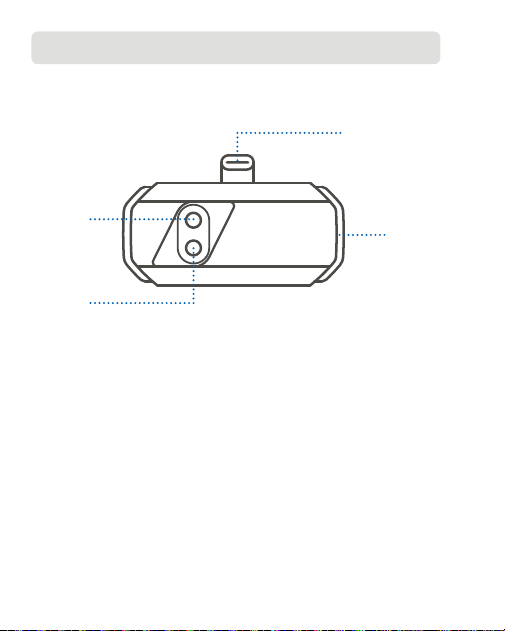
Thank you for buying TC001 Plus, a portable camera that can turn your
smartphone, tablet or Windows laptop into a powerful thermal imager.
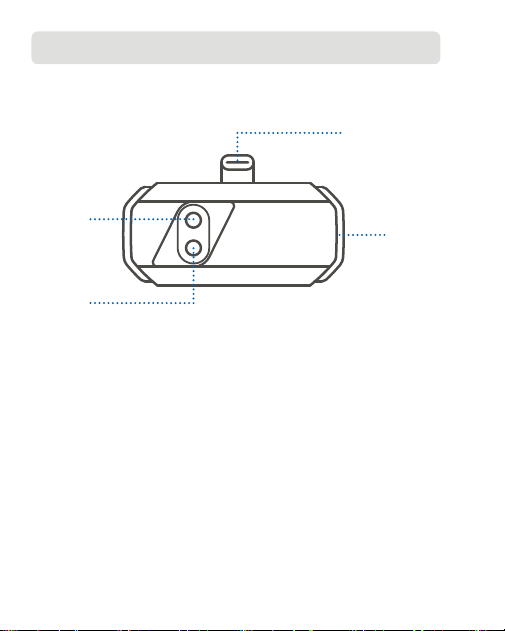
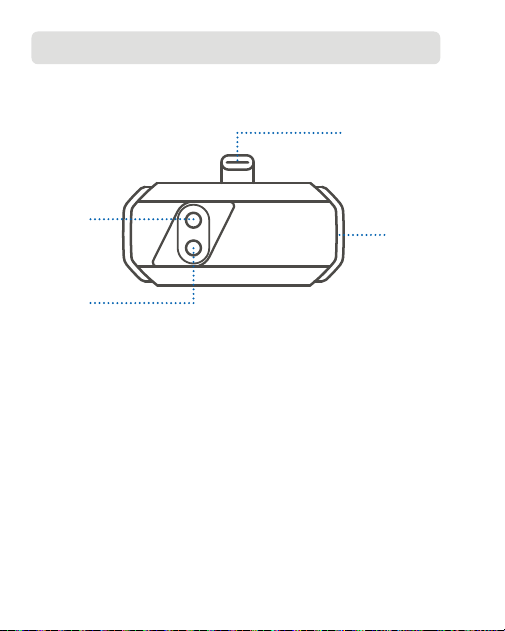
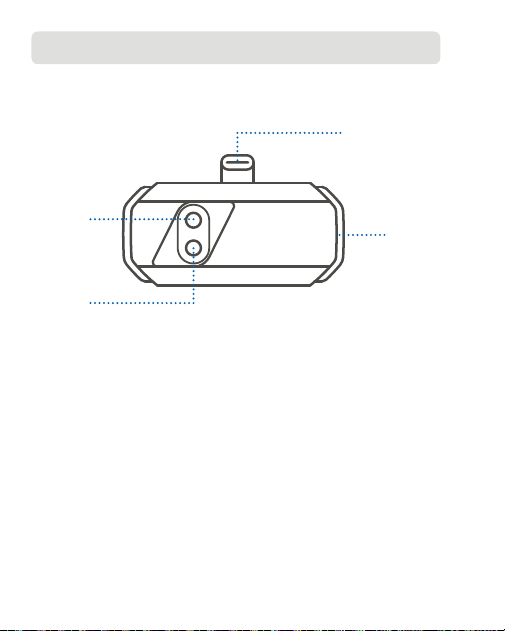
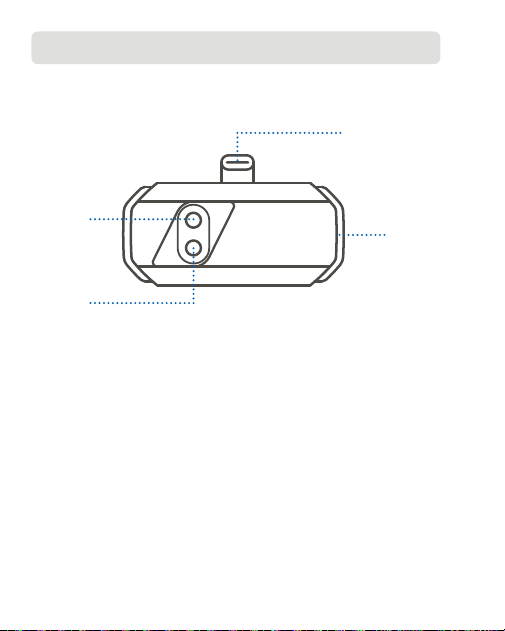
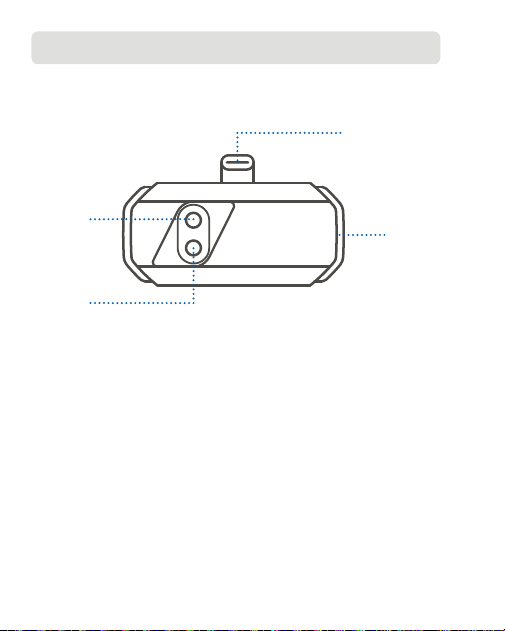
① USB-C Connector
② Indicator
③ Infrared Lens
④ Visible Light Lens
①
②
③
④

5
2. Caution and Notice
For your safety, the safety of others, and to avoid any damage to the
product, CAREFULLY READ AND MAKE SURE YOU FULLY UNDERSTAND
ALL THE SAFETY INSTRUCTIONS AND MESSAGES ON THIS MANUAL
BEFORE OPERATING.
Do not point the infrared camera at the sun or other strong energy
sources for long periods of time. This may cause damage to the
detector in the camera.
Keep the unit away from water to avoid leakage or short circuit.
Do not touch the lens with your hands. Do not knock, pry, puncture, or
scratch the lens.
Do not disassemble the unit.
The "clicking" sound is normal and occurs when the infrared camera
automatically triggers the shutter. Scattered infrared light creates heat,
causing the image to blur. Refreshing the shutter can make the picture
clear, but it will produce the "clicking" sound.
The device is designed to measure surface temperatures but cannot
detect heat through transparent materials like glass, acrylic, or water,
nor through opaque objects.
To verify the accuracy of your device's temperature measurement,
prepare an ice-water mixture, stir it, and let it settle for a few minutes.
Then, enter the interface of Temperature Correction via Learn more,
set the Emissivity to 0.96, and input the actual Distance to Spot.
Use your device to measure the mixture's temperature and check if
2.1. Safety Information
2.2. Notice to User

6
the reading falls within the range of 0° C ± 2° C. If yes, it confirms the
device's accurate temperature measurement. If not, please contact our
after sales team.
To reduce errors and interference and achieve accurate results, avoid
measuring in direct strong light or near reflective surfaces, like glass.
Extended expose to high-temperature sources may reduce image
quality. To address this issue, tap Image Calibration under Learn More
and follow the on-screen instructions.
7
3. Operating Instructions
TC001 Plus can be used with a mobile device or a Windows computer.
This section presents the usage introduction in these two modes.
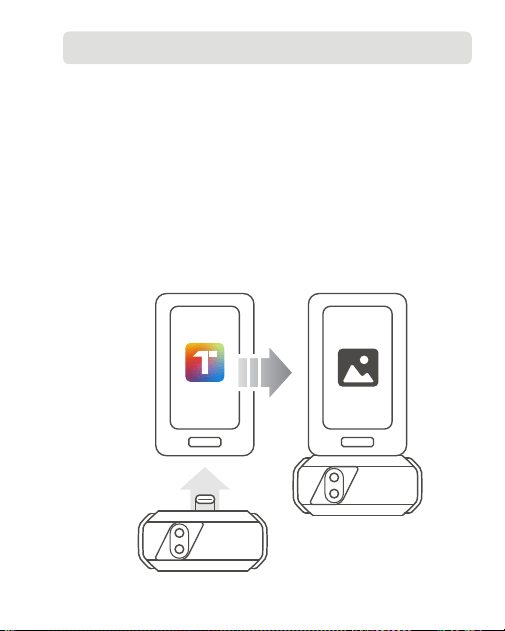
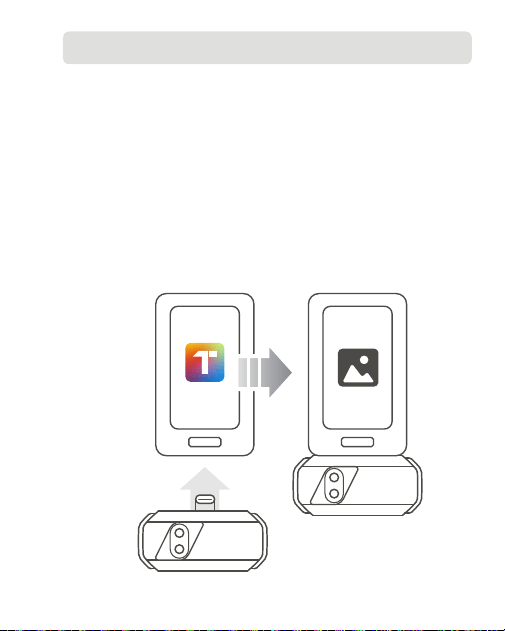
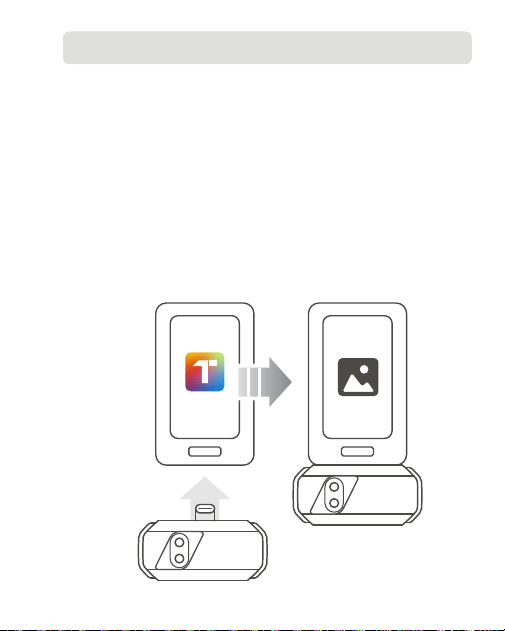
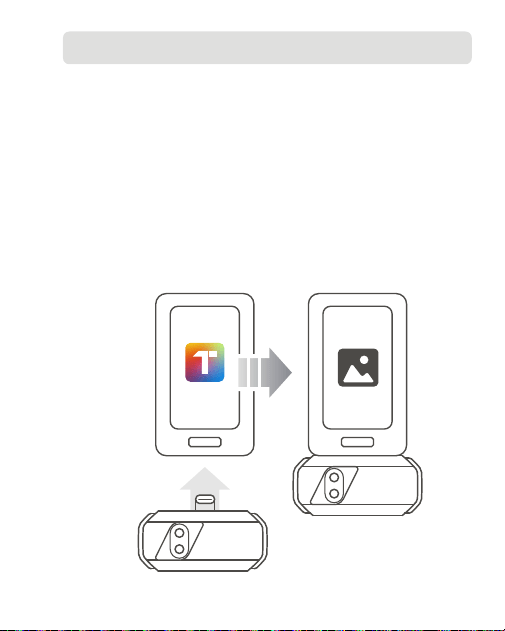
Download the Topinfrared application from your preferred app store,
and then install it on your phone. Alternatively, you can go to www.
topdon.com/products/TC001-Plus, and enter the Download page to
install the application.
Launch the Topinfrared application.
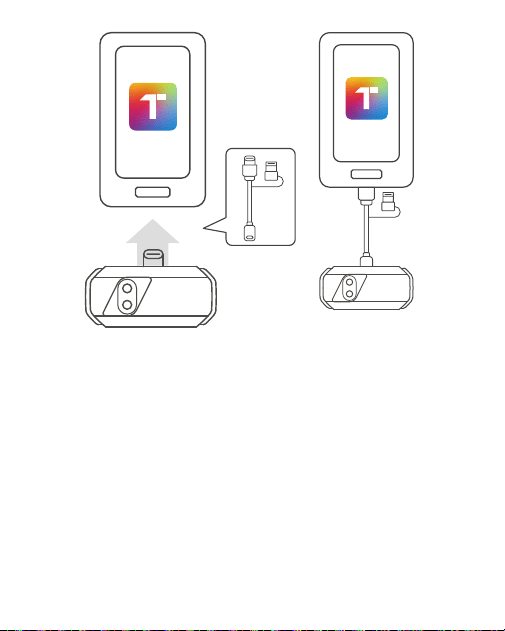
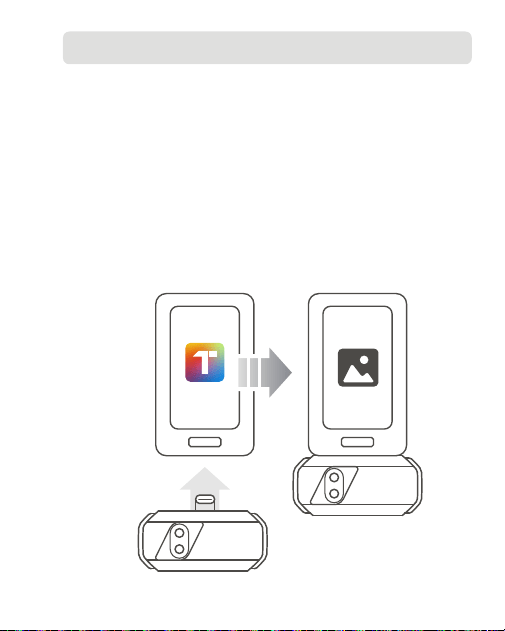
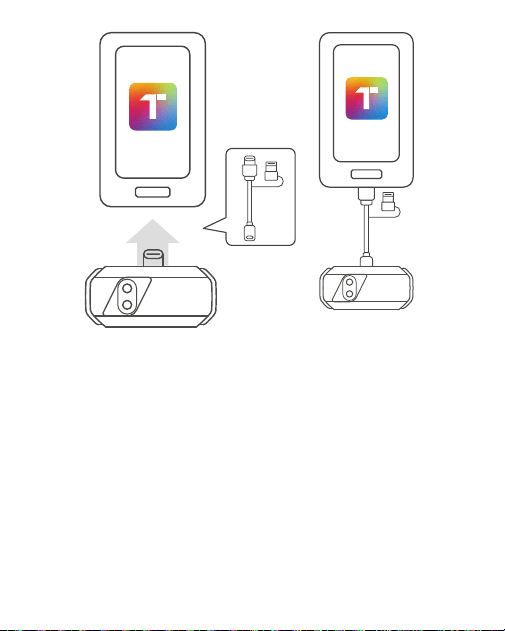
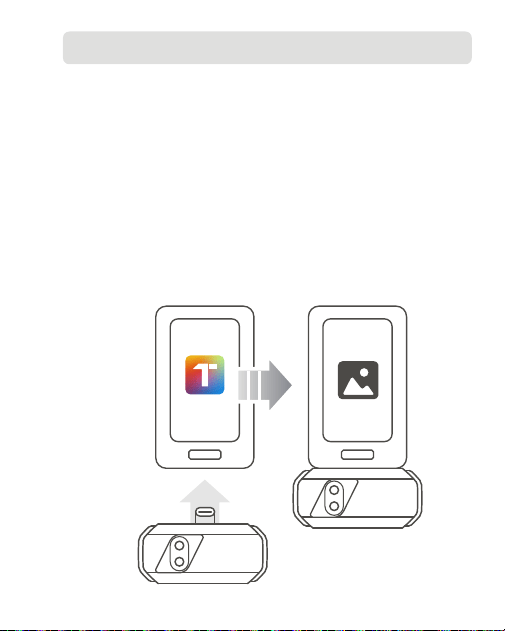
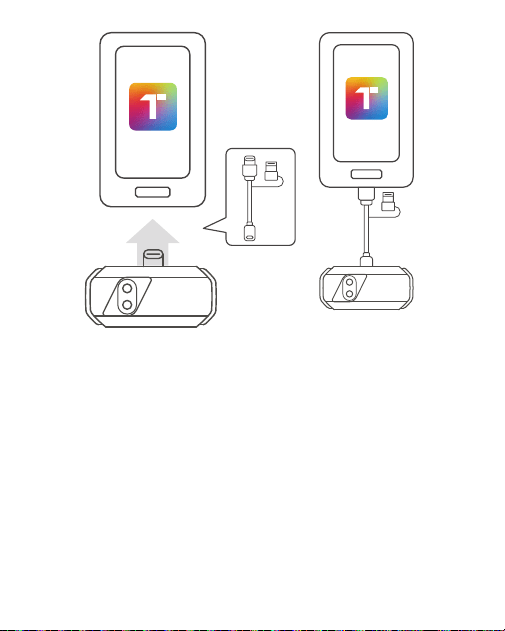
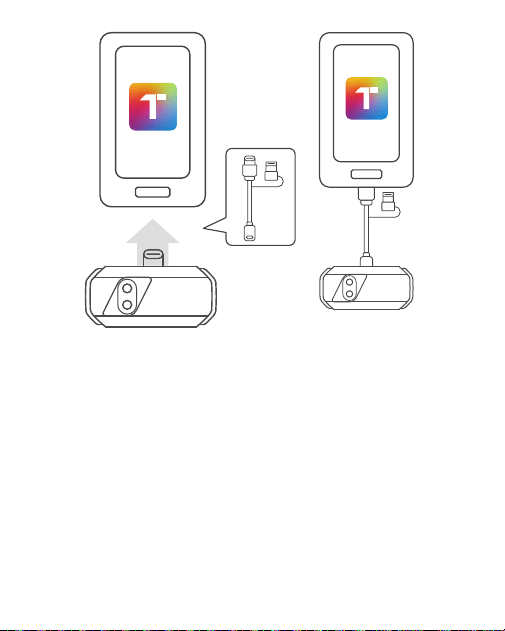
Connect the TC001 Plus camera to your mobile device directly via the
USB-C connector or using the supplied multifunctional adapter cable.
Figure 3.1.1
1.
2.
3.
3.1. Using TC001 Plus with a Mobile Device
Topinfrared
8
The onboarding of the Topinfrared will guide you and help you setup
the permissions for the application. After that, tap Enable Thermal
Imaging. The application will open in Photo mode and be ready to use.
For detailed instructions on operating TC001 Plus with a mobile device,
please refer to the user manual of Topinfrared by going to Me >
e-Manual.
4.
5.
Figure 3.1.2
9
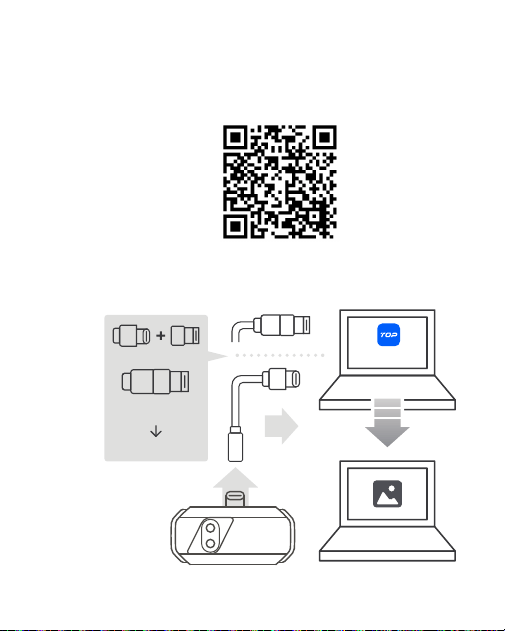
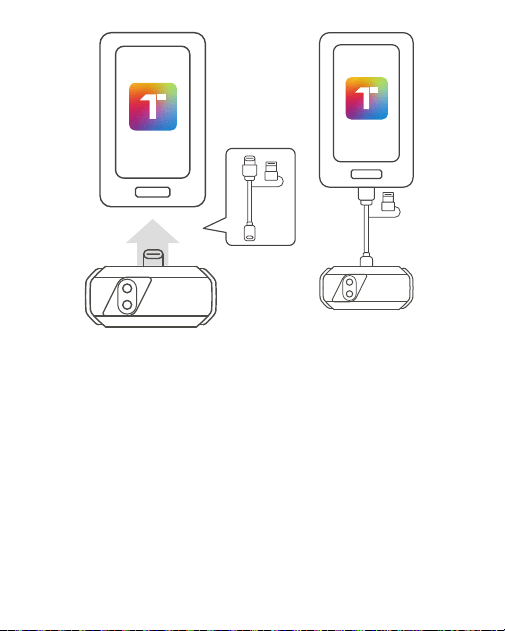
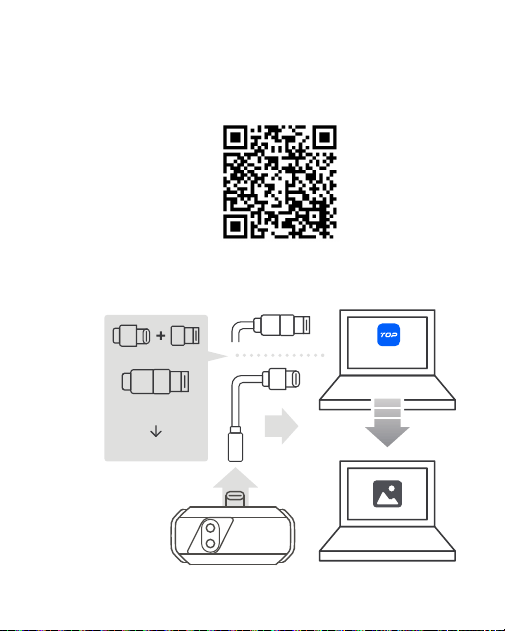
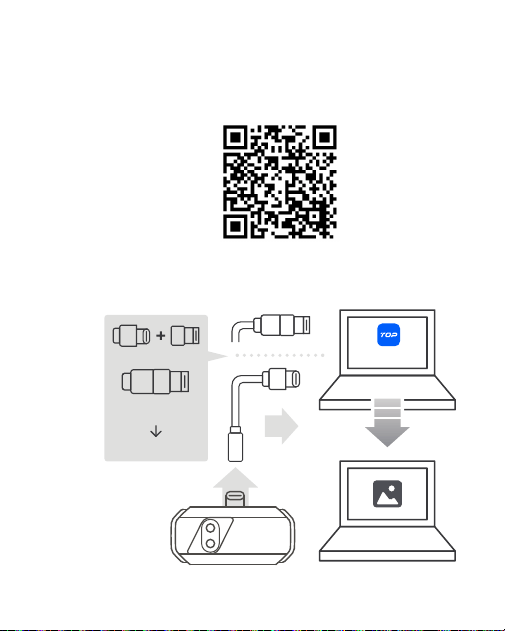
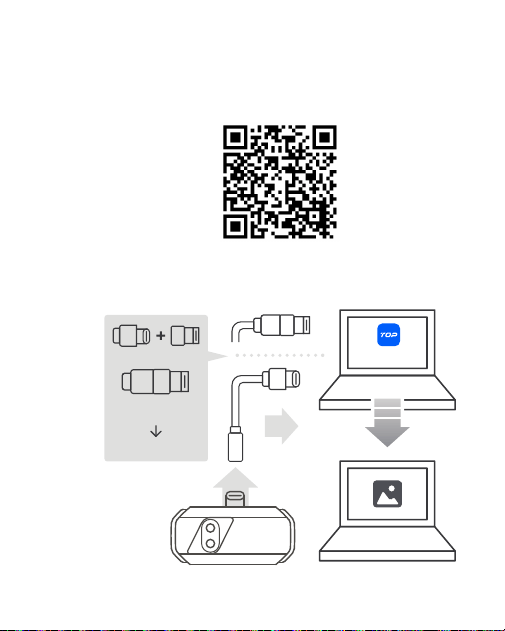
Figure 3.2.1
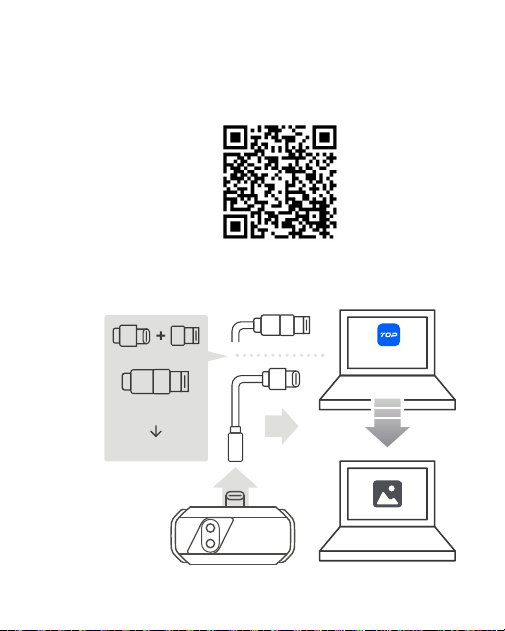
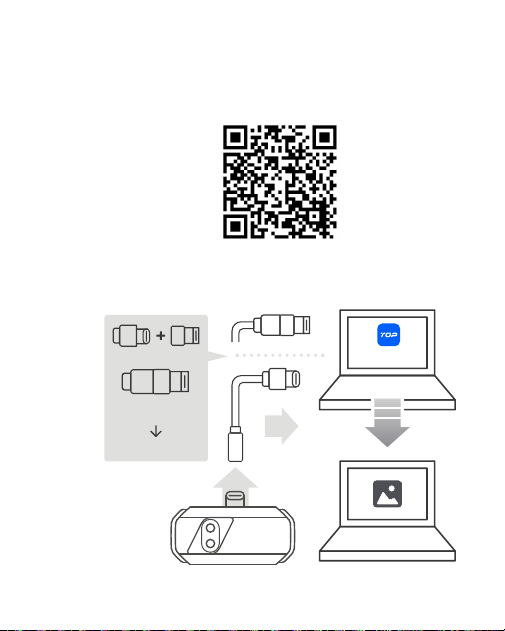
Download the software from the website www.topdon.com/products/
TC001-Plus, and enter the Download page to install it or by scanning
the QR code below.
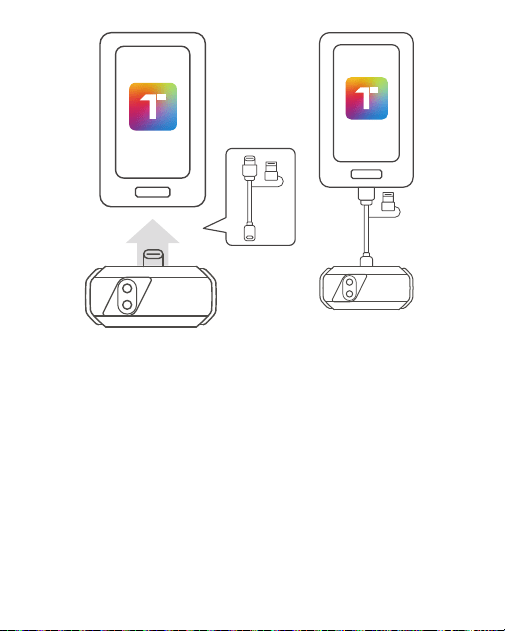
Connect the TC001 Plus camera to a Windows-based computer using
the supplied adapter cable (see figure 3.2.1).
1.
2.
3.2. Using TC001 Plus with a Computer
USB-A 3.0
USB Type-C
Type-C Female
TopView
Type-C Male
USB-A

10
Launch the software, and you can conduct thermal analysis.
For detailed instructions on operating TC001 Plus with a Windows-based
computer, please refer to the TopView user manual.
3.
4.

11
4. Specications
Camera Resolution
Lens
Spectral Range
Pixel Size
NETD
Frame Rate
Object Temperature Range
Accuracy
Resolution
256 × 192 pixels
1-Megapixel Visible Light & IR Lenses
8~14 μm
12 μm
≤ 40 mK
25 Hz
-20° C~550° C (-4° F~1022° F)
±2° C or ±2% of reading, the larger
value shall prevail
0.1° C

12
5. FAQ
Why is there no response after connecting the TC001 Plus to a phone?
Follow the steps offered below to identify the problem:
a) Check if the blue LED indicator on the side of the TC001 Plus is on.
If not, the device may not be properly connected to your phone, or
your phone does not support an OTG functionality.
b) Check if OTG is available in your phone Settings and if it is ON.
For most phones, OTG functions are enabled by default and can be
used directly. If not, please search “OTG” in Settings and turn it on
manually. Please note that the TC001 Plus is not compatible with
phones without OTG function.
c) Check if you have downloaded the corresponding application and
give necessary authorization.
d) Unplug the TC001 Plus camera and reconnect it. If there is still no
response, please contact after-sales personnel.
What external factors will affect the infrared temperature
measurement?
Temperature measurement results may be affected by factors including
emissivity of the object surface, ambient temperature and the distance
from the camera to the object.
Why does the temperature reading increase when the device gets
closer to the object?
Infrared radiation attenuates when passing through the atmosphere.
The longer the distance, the greater the attenuation. Thus, the
accuracy of temperature measurement at a distance will decrease.
To ensure accuracy of measurement, please go to Learn More >
Temperature Correction > Distance to Spot, and input the actual
distance (max: 5m) to get the corrected temperature.
Why is the measured temperature not precise?
Q:
A:
Q:
A:
Q:
A:
Q:

13
The TC001 Plus camera provides a temperature accuracy of ±2° C or
±2%, with a normal temperature range of -20° C~150° C (-4° F~302° F),
and a high temperature range of 150° C~550° C (302° F~1022° F). Please
select the appropriate range in the application before measuring to
ensure more accurate readings.
A:

14
6. Warranty
TOPDON's One Year Limited Warranty
TOPDON warrants to its original purchaser that the company's products
will be free from defects in material and workmanship for 12 months from
the date of purchase (Warranty Period).
For the defects reported during the Warranty Period, TOPDON will either
repair or replace the defective part or product according to its technical
support analysis and confirmation.
TOPDON shall not be liable for any incidental or consequential damages
arising from the device's use, misuse, or mounting.
If there is any conflict between the TOPDON warranty policy and local
laws, the local laws shall prevail.
This limited warranty is void under the following conditions:
• Misused, disassembled, altered or repaired by unauthorized stores or
technicians.
• Careless handling and/or improper operation.
Notice: All information in this manual is based on the latest information
available at the time of publication and no warranty can be made for its
accuracy or completeness. TOPDON reserves the right to make changes
at any time without notice.

15
7.Compliance Information
FCC Statement
This device complies with Part 15 of the FCC Rules. Its operation is subject
to the following two conditions:
(1) This device may not cause harmful interference, and
(2) This device must accept any interference received, including
interference that may cause undesired operation.
+86-755-21612590 (China) I +1-833-629-4832 (North America) I +34 930 038 094 (Europe)
WWW.TOPDON.COM
@TOPDONOFFICIAL
@TOPDON_OFFICIAL
1
Dual-Lens-Wärmebildkamera Für Smartphones I Bedienungsanleitung
TC001 Plus

2

3
Inhaltsverzeichnis
1. Produktübersicht ................................................. 4
2. Vorsicht und Hinweis ................................................. 5
3. Bedienungsanleitung ................................................. 7
4. Spezifikation ................................................. 11
5. FAQ ................................................. 12
6. Garantie ................................................. 14
4
1. Produktübersicht
Vielen Dank für den Kauf von TC001 Plus, einer tragbaren Kamera, die
Ihr Smartphone, Tablet oder Windows-Laptop in eine leistungsstarke
Wärmebildkamera verwandeln kann.
① USB-C-Anschluss
② Anzeige
③ Infrarotlinse
④ Sichtbare Lichtlinse
①
②
③
④

5
2. Vorsicht und Hinweis
Zu Ihrer eigenen Sicherheit, zur Sicherheit anderer und um Schäden am
Produkt zu vermeiden, LESEN SIE DIESE ANLEITUNG SORGFÄLTIG DURCH
UND STELLEN SIE SICHER, DASS SIE ALLE SICHERHEITSANWEISUNGEN
UND HINWEISE VOLLSTÄNDIG VERSTANDEN HABEN, BEVOR SIE DAS
GERÄT IN BETRIEB NEHMEN.
Richten Sie die Infrarotkamera nicht für längere Zeit auf die Sonne oder
andere starke Energiequellen. Dies kann der Detektor in der Kamera
beschädigt werden.
Bitte halten Sie das Gerät von Wasser fern, um Lecks oder Kurzschlüsse
zu vermeiden.
Berühren Sie die Linse nicht mit Ihren Händen.Klopfen, hebeln,
durchstechen oder zerkratzen Sie das Objektiv nicht.
Zerlegen Sie das Gerät nicht.
Das „Klick“-Geräusch ist normal und tritt auf, wenn die Infrarotkamera
automatisch den Verschluss auslöst. Gestreutes Infrarotlicht erzeugt
Wärme, wodurch das Bild unscharf wird. Durch erneutes Auslösen des
Verschlusses kann das Bild klarer werden, es entsteht jedoch das „Klick“-
Geräusch.
Das Gerät ist für die Messung von Oberflächentemperaturen konzipiert,
kann jedoch weder durch transparente Materialien wie Glas, Acryl oder
Wasser noch durch undurchsichtige Objekte Wärme erkennen.
Um die Genauigkeit der Temperaturmessung Ihres Geräts zu überprüfen,
bereiten Sie eine Eis-Wasser-Mischung vor, rühren Sie sie um und lassen
Sie sie einige Minuten ruhen. Rufen Sie dann über Mehr erfahren die
2.1. Sicherheitshinweise
2.2. Hinweis für den Benutzer

6
Schnittstelle zur Temperaturkorrektur auf, stellen Sie den Emissionsgrad
auf 0,96 ein und geben Sie die tatsächliche Entfernung zum Spot ein.
Messen Sie mit Ihrem Gerät die Temperatur der Mischung und prüfen Sie,
ob der Messwert im Bereich von 0°C ± 2°C liegt. Wenn ja, bestätigt dies
die genaue Temperaturmessung des Geräts. Wenn nicht, wenden Sie sich
bitte an unser Kundendienstteam.
Um Fehler und Störungen zu reduzieren und genaue Ergebnisse zu
erzielen, vermeiden Sie Messungen bei direkter, starker Lichteinstrahlung
oder in der Nähe von reflektierenden Oberflächen wie Glas.
Längere Belichtung mit Hochtemperaturquellen kann die Bildqualität
beeinträchtigen. Um dieses Problem zu beheben, tippen Sie unter Mehr
erfahren auf Bildkalibrierung und folgen Sie den Anweisungen auf dem
Bildschirm.
7
3. Bedienungsanleitung
TC001 Plus kann mit einem Mobilgerät oder einem Windows-Computer
verwendet werden. Dieser Abschnitt bietet eine Einführung in die
Verwendung in diesen beiden Modi.
Laden Sie die Topinfrared-Anwendung aus Ihrem bevorzugten App
Store herunter und installieren Sie sie dann auf Ihrem Telefon. Alternativ
können Sie www.topdon.com/products/TC001-Plus aufrufen und die
Download-Seite aufrufen, um die Anwendung zu installieren.
Starten Sie die Topinfrared-Anwendung.
Verbinden Sie die TC001 Plus Kamera direkt über den USB-C-Anschluss
oder mithilfe des mitgelieferten Multifunktionsadapterkabels mit Ihrem
Mobilgerät.
Abb. 3.1.1
1.
2.
3.
3.1. Verwendung von TC001 Plus mit einem Mobilgerät
Topinfrared
8
Die Einführung in Topinfrared führt Sie durch die App und hilft Ihnen
beim Einrichten der Berechtigungen für die Anwendung. Tippen Sie
anschließend auf Wärmebildtechnik Aktivieren. Die Anwendung wird
im Fotomodus geöffnet und ist einsatzbereit.
Detaillierte Anweisungen zur Bedienung von TC001 Plus mit einem
Mobilgerät finden Sie im Benutzerhandbuch von Topinfrared unter Mein
> E-Handbuch.
4.
5.
Abb. 3.1.2
9
Abb. 3.2.1
Laden Sie die Software von der Website www.topdon.com/products/
TC001-Plus herunter und rufen Sie die Download-Seite auf, um sie zu
installieren, oder scannen Sie den unten stehenden QR-Code.
Verbinden Sie die TC001 Plus Kamera mithilfe des mitgelieferten
Adapterkabels mit einem Windows-basierten Computer (siehe Abbildung
3.2.1).
1.
2.
3.2. Verwendung von TC001 Plus mit einem Computer
USB-A 3.0
USB Type-C
Type-C Female
TopView
Type-C Male
USB-A

10
Starten Sie die Software und führen Sie eine Wärmeanalyse durch.
Detaillierte Anweisungen zum Betrieb von TC001 Plus mit einem
Windows-basierten Computer finden Sie im TopView-Benutzerhandbuch.
3.
4.

11
4. Specications
Kameraauflösung
Objektiv
Spektralbereich
Pixel Größe
NETD
Bildrate
Objekt Temperature Range
Genauigkeit
Auflösung
256 × 192 pixels
1-Megapixel-Objektive für sichtbares
Licht und Infrarot
8~14 μm
12 μm
≤ 40 mK
25 Hz
-20° C~550° C (-4° F~1022° F)
±2° C oder ±2% des Messwerts, der
größere Wert ist maßgebend
0.1° C

12
5. FAQ
Warum erfolgt keine Reaktion, nachdem das TC001 Plus mit einem
Telefon verbunden wurde?
Befolgen Sie die unten aufgeführten Schritte, um das Problem zu
ermitteln:
a) Überprüfen Sie, ob die blaue LED-Anzeige an der Seite des TC001
Plus leuchtet. Wenn nicht, ist das Gerät möglicherweise nicht richtig
mit Ihrem Telefon verbunden oder Ihr Telefon unterstützt keine OTG-
Funktion.
b) Überprüfen Sie, ob OTG in den Einstellungen Ihres Telefons
verfügbar und eingeschaltet ist. Bei den meisten Telefonen sind OTG-
Funktionen standardmäßig aktiviert und können direkt verwendet
werden. Wenn nicht, suchen Sie in den Einstellungen nach „OTG“
und schalten Sie es manuell ein. Bitte beachten Sie, dass das TC001
Plus nicht mit Telefonen ohne OTG-Funktion kompatibel ist.
c) Überprüfen Sie, ob Sie die entsprechende Anwendung
heruntergeladen haben, und erteilen Sie die erforderliche
Autorisierung.
d) Trennen Sie die TC001 Plus Kamera vom Stromnetz und schließen
Sie sie erneut an. Wenn immer noch keine Reaktion erfolgt, wenden
Sie sich bitte an den Kundendienst.
Welche externen Faktoren beeinflussen die Infrarot-Temperaturmessung?
Die Ergebnisse der Temperaturmessung können durch Faktoren wie den
Emissionsgrad der Objektoberfläche, die Umgebungstemperatur und die
Entfernung von der Kamera zum Objekt beeinflusst werden.
Warum steigt die Temperaturanzeige, wenn sich das Gerät dem Objekt
nähert?
Infrarotstrahlung wird beim Durchgang durch die Atmosphäre
schwächer. Je länger die Entfernung, desto stärker die Dämpfung.
Daher verringert sich die Genauigkeit der Temperaturmessung aus der
Entfernung. Um die Genauigkeit der Messung sicherzustellen, gehen
F:
A:
F:
A:
F:
A:

13
Sie bitte zu Mehr erfahren > Temperaturkorrektur > Entfernung zum
Spot und geben Sie die tatsächliche Entfernung (max. 5 m) ein, um die
korrigierte Temperatur zu erhalten.
Warum ist die gemessene Temperatur nicht präzise?
Die TC001 Plus Kamera bietet eine Temperaturgenauigkeit von
±2° C oder ±2%, mit einem normalen Temperaturbereich von -20° C
bis 150° C (-4° F bis 302° F) und einem hohen Temperaturbereich
von 150° C bis 550° C (302° F bis 1022° F). Bitte wählen Sie vor der
Messung den entsprechenden Bereich in der Anwendung aus, um
genauere Messwerte zu gewährleisten.
F:
A:

14
6. Garantie
TOPDONs Einjährige Eingeschränkte Garantie
TOPDON garantiert seinem ursprünglichen Käufer, dass die Produkte
des Unternehmens für 12 Monate ab Kaufdatum frei von Material- und
Verarbeitungsfehlern sind (Garantiezeitraum).
Für die während der Garantiezeit gemeldeten Mängel wird TOPDON
das defekte Teil oder Gerät gemäß seiner Analyse und Bestätigung des
technischen Supports entweder reparieren oder ersetzen. TOPDON
haftet nicht für Neben- oder Folgeschäden, die durch den Gebrauch, den
Missbrauch oder die Montage des Geräts entstehen.
Bei Widersprüchen zwischen der TOPDON-Gewährleistungsrichtlinie und
den örtlichen Regelungen haben die örtlichen Regelungen bevorzugte
Stellung.
Diese eingeschränkte Garantie erlischt unter den folgenden Bedingungen:
• Missbrauch, Demontage, Änderung oder Reparatur durch nicht
autorisierte Geschäfte oder Techniker.
• Unachtsame Handhabung und Verletzung des Betriebs.
Notiz: Alle Informationen in dieser Anleitung basieren auf den neuesten
Informationen, die zum Zeitpunkt der Veröffentlichung verfügbar waren,
und es kann keine Garantie für ihre Genauigkeit oder Vollständigkeit
übernommen werden. TOPDON behält sich das Recht vor, jederzeit ohne
Vorankündigung Änderungen vorzunehmen.
+86-755-21612590 (China) I +1-833-629-4832 (North America) I +34 930 038 094 (Europe)
WWW.TOPDON.COM
@TOPDONOFFICIAL
@TOPDON_OFFICIAL
1
Caméra Thermique À Double Objectif Pour Smartphones I Manuel d'utilisation
TC001 Plus

2

3
Contenu
1. Présentation du Produit ................................................. 4
2. Mise en Garde et Avis ................................................. 5
3. Mode d'emploi ................................................. 7
4. Spécifications ................................................. 11
5. FAQ ................................................. 12
6. Garantie ................................................. 14
4
1. Présentation du Produit
Merci d'avoir acheté TC001 Plus, une caméra portable qui peut transformer
votre smartphone, tablette ou ordinateur portable Windows en une
puissante caméra thermique.
① Connecteur USB-C
② Indicateur
③ Lentille Infrarouge
④ Lentille de Lumière Visible
①
②
③
④

5
2. Mise en Garde et Avis
Pour votre sécurité, celle des autres et pour éviter tout dommage
au produit, LISEZ ATTENTIVEMENT ET ASSUREZ-VOUS DE BIEN
COMPRENDRE TOUTES LES CONSIGNES DE SÉCURITÉ ET LES
MESSAGES DE CE MANUEL AVANT DE L'UTILISER.
Ne dirigez pas la caméra infrarouge vers le soleil ou toute autre
source d'énergie puissante pendant de longues périodes. Cela pourrait
endommager le détecteur de la caméra.
Veuillez garder l'appareil à l'écart de l'eau pour éviter les fuites ou les
courts-circuits.
Ne touchez pas la lentille avec vos mains. Veuillez ne pas frapper, forcer,
percer ou rayer la lentille.
Ne démontez pas l'appareil.
Le bruit de « clic » est normal et se produit lorsque la caméra
infrarouge déclenche automatiquement l'obturateur. La lumière
infrarouge diffusée crée de la chaleur, ce qui rend l'image floue. Le
rafraîchissement de l'obturateur peut rendre l'image plus claire, mais il
produira le bruit de « clic ».
L'appareil est conçu pour mesurer les températures de surface, mais
ne peut pas détecter la chaleur à travers des matériaux transparents
comme le verre, l'acrylique ou l'eau, ni à travers des objets opaques.
Pour vérifier l'exactitude de la mesure de température de votre appareil,
préparez un mélange d'eau et de glace, remuez-le et laissez-le reposer
pendant quelques minutes. Ensuite, accédez à l'interface de Correction
2.1. Consignes de Sécurité
2.2. Avis à l'utilisateur

6
de la température via En savoir plus, définissez Emissivité sur 0,96
et saisissez la Distance du point. Utilisez votre appareil pour mesurer
la température du mélange et vérifiez si la lecture se situe dans la
plage de 0° C ± 2° C. Si oui, cela confirme la mesure précise de la
température de l'appareil. Dans le cas contraire, veuillez contacter notre
équipe après-vente.
Pour réduire les erreurs et les interférences et obtenir des résultats
précis, évitez de mesurer sous une lumière directe intense ou à
proximité de surfaces réfléchissantes, comme le verre.
Une exposition prolongée à des sources de température élevée peut
réduire la qualité de l'image. Pour résoudre ce problème, appuyez sur
Calibration d'image sous En savoir plus et suivez les instructions à
l'écran.
7
3. Mode d'emploi
Le TC001 Plus peut être utilisé avec un appareil mobile ou un ordinateur
Windows. Cette section présente l'introduction à l'utilisation dans ces deux
modes.
Téléchargez l'application Topinfrared depuis votre boutique d'applications
préférée, puis installez-la sur votre téléphone. Vous pouvez également
vous rendre sur www.topdon.com/products/TC001-Plus et accéder à la
page de Téléchargement pour installer l'application.
Lancez l'application Topinfrared.
Connectez la caméra TC001 Plus à votre appareil mobile directement
via le connecteur USB-C ou à l'aide du câble adaptateur multifonction
fourni.
Figure 3.1.1
1.
2.
3.
3.1. Utilisation du TC001 Plus avec un Appareil Mobile
Topinfrared
8
L'intégration de Topinfrared vous guidera et vous aidera à configurer les
autorisations de l'application. Après cela, appuyez sur Activer l'imagerie
thermique. L'application s'ouvrira en mode Photo et sera prête à être
utilisée.
Pour des instructions détaillées sur l'utilisation du TC001 Plus avec
un appareil mobile, veuillez vous référer au manuel d'utilisation de
Topinfrared en allant dans Moi > e-Manuel.
4.
5.
Figure 3.1.2
9
Figure 3.2.1
Téléchargez le logiciel depuis le site Web www.topdon.com/products/
TC001-Plus et accédez à la page de Téléchargement pour l'installer ou
en scannant le code QR ci-dessous.
Connectez la caméra TC001 Plus à un ordinateur Windows à l'aide du
câble adaptateur fourni (voir figure 3.2.1).
1.
2.
3.2. Utilisation du TC001 Plus avec un Ordinateur
USB-A 3.0
USB Type-C
Type-C Female
TopView
Type-C Male
USB-A

10
Lancez le logiciel et vous pourrez effectuer une analyse thermique.
Pour obtenir des instructions détaillées sur l'utilisation de TC001 Plus
avec un ordinateur Windows, reportez-vous au manuel d'utilisation de
TopView.
3.
4.

11
4. Spécications
Résolution de la caméra
Objectif
Gamme spectrale
Taille du pixel
NETD
Fréquence d'images
Plage de température de l'objet
Précision
Résolution
256 × 192 pixels
Objectifs à lumière visible et IR de 1
mégapixel
8~14 μm
12 μm
≤ 40 mK
25 Hz
-20° C~550° C (-4° F~1022° F)
±2° C ou ±2% de la lecture, la plus
grande valeur prévaudra
0.1° C

12
5. FAQ
Pourquoi n'y a-t-il aucune réponse après avoir connecté le TC001 Plus
à un téléphone ?
Suivez les étapes proposées ci-dessous pour identifier le problème :
a) Vérifiez si le voyant LED bleu sur le côté du TC001 Plus est allumé.
Si ce n'est pas le cas, l'appareil n'est peut-être pas correctement
connecté à votre téléphone ou votre téléphone ne prend pas en
charge la fonctionnalité OTG.
b) Vérifiez si OTG est disponible dans les paramètres de votre
téléphone et s'il est activé. Pour la plupart des téléphones, les
fonctions OTG sont activées par défaut et peuvent être utilisées
directement. Si ce n'est pas le cas, recherchez « OTG » dans les
paramètres et activez-le manuellement. Veuillez noter que le TC001
Plus n'est pas compatible avec les téléphones sans fonction OTG.
c) Vérifiez si vous avez téléchargé l'application correspondante et
donnez l'autorisation nécessaire.
d) Débranchez la caméra TC001 Plus et reconnectez-la. S'il n'y a
toujours pas de réponse, veuillez contacter le personnel après-vente.
Quels facteurs externes peuvent affecter la mesure de la température
infrarouge ?
Les résultats de la mesure de la température peuvent être affectés par
des facteurs tels que l'émissivité de la surface de l'objet, la température
ambiante et la distance entre la caméra et l'objet.
Pourquoi la température mesurée augmente-t-elle lorsque l'appareil se
rapproche de l'objet ?
Le rayonnement infrarouge s'atténue lorsqu'il traverse l'atmosphère.
Plus la distance est grande, plus l'atténuation est importante. Ainsi,
la précision de la mesure de la température à distance diminue.
Pour garantir la précision de la mesure, accédez à En savoir plus >
Correction de la température > Distance du point et saisissez la
distance réelle (max : 5 m) pour obtenir la température corrigée.
Q:
R:
Q:
R:
Q:
R:

13
Pourquoi la température mesurée n'est-elle pas précise ?
La caméra TC001 Plus offre une précision de température de ±2° C ou
±2%, avec une plage de température normale de -20° C à 150° C (-4° F
à 302°F) et une plage de température élevée de 150°C à 550°C (302° F
à 1 022° F). Veuillez sélectionner la plage appropriée dans l'application
avant de mesurer pour garantir des mesures plus précises.
Q:
R:

14
6. Garantie
Garantie limitée d'un an de TOPDON
TOPDON garantit à l'acheteur initial que les produits de la société sont
exempts de tout défaut matériel et de fabrication pendant 12 mois à
compter de la date d'achat (période de garantie).
Pour les défauts signalés pendant la période de garantie, TOPDON
réparera ou remplacera la pièce ou le produit défectueux selon l'analyse
et la confirmation de son support technique.
TOPDON ne sera pas responsable des dommages accessoires ou indirects
résultant de l'utilisation, de la mauvaise utilisation ou du montage de
l'appareil.
S'il y a un conflit entre la politique de garantie de TOPDON et les lois
locales, les lois locales prévaudront.
Cette garantie limitée est nulle dans les conditions suivantes :
• Mauvaise utilisation, démontage, modification ou réparation par des
magasins ou des techniciens non autorisés.
• Manipulation négligente et violation des règles de fonctionnement.
Avis : Toutes les informations contenues dans ce manuel sont basées
sur les dernières informations disponibles au moment de la publication
et aucune garantie ne peut être donnée quant à leur exactitude ou leur
exhaustivité. TOPDON se réserve le droit d'apporter des modifications à
tout moment sans préavis.
+86-755-21612590 (China) I +1-833-629-4832 (North America) I +34 930 038 094 (Europe)
WWW.TOPDON.COM
@TOPDONOFFICIAL
@TOPDON_OFFICIAL
1
Cámara Térmica De Doble Lente Para Smartphones I Manual de Usuario
TC001 Plus

2

3
Índice
1. Descripción General del Producto ................................................. 4
2. Precaución y Aviso ................................................. 5
3. Instrucciones de Funcionamiento ................................................. 7
4. Especificación ................................................. 11
5. Preguntas Frecuentes ................................................. 12
6. Garantía ................................................. 14
4
1. Descripción General del Producto
Gracias por comprar TC001 Plus, una cámara portátil que puede convertir
su teléfono inteligente, tableta o computadora portátil con Windows en
una poderosa cámara termográfica.
① Conector USB-C
② Indicador
③ Lente Infrarroja
④ Lente de luz Visible
①
②
③
④

5
2. Precaución y Aviso
Para su seguridad, la seguridad de los demás y para evitar cualquier daño
al producto, LEA CUIDADOSAMENTE Y ASEGÚRESE DE COMPRENDER
COMPLETAMENTE TODAS LAS INSTRUCCIONES DE SEGURIDAD Y LOS
MENSAJES DE ESTE MANUAL ANTES DE OPERAR.
No apuntes la cámara infrarroja hacia el sol u otras fuentes de energía
intensa durante largos períodos de tiempo. Esto puede dañar el detector
de la cámara.
Mantén la unidad alejada del agua para evitar fugas o cortocircuitos.
No toques la lente con las manos. No golpees, haz palanca, perfores ni
rayes la lente.
No desmontes la unidad.
El sonido de "clic" es normal y se produce cuando la cámara infrarroja
activa automáticamente el obturador. La luz infrarroja dispersa genera
calor, lo que hace que la imagen se vea borrosa. Actualizar el obturador
puede hacer que la imagen sea más clara, pero se producirá el sonido
de "clic".
El dispositivo está diseñado para medir temperaturas de superficies,
pero no puede detectar calor a través de materiales transparentes como
vidrio, acrílico o agua, ni a través de objetos opacos.
Para verificar la precisión de la medición de temperatura de su
dispositivo, prepare una mezcla de agua y hielo, revuélvala y déjela
reposar durante unos minutos. Luego, ingrese a la interfaz de
2.1. Información de Seguridad
2.2. Aviso al Usuario

6
Corrección de Temperatura a través de Aprender Más, configure
la Emisividad en 0,96 e ingrese la real Distancia al Punto. Use su
dispositivo para medir la temperatura de la mezcla y verifique si la
lectura se encuentra dentro del rango de 0 ° C ± 2 ° C. Si es así,
confirma que la medición de temperatura del dispositivo es precisa. Si
no es así, comuníquese con nuestro equipo de posventa.
Para reducir errores e interferencias y lograr resultados precisos, evite
medir bajo luz fuerte y directa o cerca de superficies reflectantes, como
el vidrio.
La exposición prolongada a fuentes de alta temperatura puede reducir la
calidad de la imagen. Para solucionar este problema, toque Calibración
de Imagen en Aprender Más y siga las instrucciones en pantalla.
7
3. Instrucciones de Funcionamiento
TC001 Plus se puede utilizar con un dispositivo móvil o una computadora
con Windows. Esta sección presenta una introducción al uso en estos dos
modos.
Descargue la aplicación Topinfrared de su tienda de aplicaciones
preferida y luego instálela en su teléfono. Alternativamente, puede ir
a www.topdon.com/products/TC001-Plus e ingresar a la página de
Descarga para instalar la aplicación.
Inicie la aplicación Topinfrared.
Conecte la cámara TC001 Plus a su dispositivo móvil directamente a
través del conector USB-C o utilizando el cable adaptador multifunción
suministrado.
Figura 3.1.1
1.
2.
3.
3.1. Cómo Usar TC001 Plus con un Dispositivo Móvil
Topinfrared
8
La incorporación de Topinfrared lo guiará y lo ayudará a configurar los
permisos. para la aplicación. Después de eso, toque Permitir Imágenes
Térmicas. La aplicación Se abrirá en modo Foto y estará listo para usar.
Para obtener instrucciones detalladas sobre el funcionamiento de
TC001 Plus con un dispositivo móvil, consulte el manual del usuario de
Topinfrared en Yo > e-Manual.
4.
5.
Figura 3.1.2
9
Figura 3.2.1
Descargar el software desde el sitio web www.topdon.com/products/
TC001-Plus e ingrese a la página de Descarga para instalarlo o
escaneando el código QR a continuación.
Conecte la cámara TC001 Plus a una computadora con Windows
usando el cable adaptador suministrado ( consulte la figura 3.2.1 ).
1.
2.
3.2. Uso de TC001 Plus con una Computadora
USB-A 3.0
USB Type-C
Type-C Female
TopView
Type-C Male
USB-A

10
Inicie el software y podrá realizar análisis térmicos.
Para obtener instrucciones detalladas sobre el funcionamiento de TC001
Plus con una computadora con Windows, consulte el manual del usuario
de TopView.
3.
4.

11
4. Especicación
Resolución de la cámara
Lente
Rango espectral
Tamaño de píxel
NETD
Cuadros por segundo
Rango de temperatura del objeto
Precisión
Resolución
256 × 192 píxeles
Lentes de luz visible e infrarrojas de 1
megapíxel
8~ 14 μm
12 μm
≤ 40 mK
25 Hz
-20° C ~ 550° C (-4° F ~ 1022° F)
±2° C o ±2% de la lectura, prevalecerá
el valor mayor
0,1° C

12
5. Preguntas Frecuentes
¿Por qué es? ¿No hay respuesta después de conectar el TC001 Plus a
un teléfono?
Siga los pasos que se ofrecen a continuación para identificar el
problema:
a) Comprueba si el indicador LED azul en el lateral del TC001 Plus está
encendido. De lo contrario, es posible que el dispositivo no esté
conectado correctamente a tu teléfono o que tu teléfono no admita
la función OTG.
b) Comprueba si la función OTG está disponible en la configuración
de tu teléfono y si está activada. En la mayoría de los teléfonos,
las funciones OTG están activadas de forma predeterminada y
se pueden usar directamente. Si no es así, busca "OTG" en la
configuración y actívala manualmente. Ten en cuenta que el TC001
Plus no es compatible con teléfonos sin función OTG.
c) Verifique si ha descargado la aplicación correspondiente y dé la
autorización necesaria.
d) Desconecte la cámara TC001 Plus y vuelva a conectarla. Si aún no
hay respuesta, comuníquese con el personal de posventa.
¿Qué factores externos afectarán la medición de temperatura por
infrarrojos?
Los resultados de la medición de temperatura pueden verse afectados
por factores que incluyen la emisividad de la superficie del objeto, la
temperatura ambiente y la distancia entre la cámara y el objeto.
¿Por qué la lectura de temperatura aumenta cuando el dispositivo se
acerca al objeto?
La radiación infrarroja se atenúa al atravesar la atmósfera. Cuanto
mayor sea la distancia, mayor será la atenuación. Por lo tanto, la
precisión de la medición de la temperatura a distancia disminuirá.
Para garantizar la precisión de la medición, acceda a Aprender Más
> Corrección de Temperatura > Distancia al Punto e ingrese la
P:
R:
P:
R:
P:
R:

13
distancia real (máximo: 5 m) para obtener la temperatura corregida.
¿Por qué la temperatura medida no es precisa?
La cámara TC001 Plus proporciona una precisión de temperatura de
±2°C o ±2%, con Rango de temperatura normal de -20°C a 150°C (-4°F
a 302° F) y rango de temperatura alta de 150° C a 550° C (302° F a
1022°F). Seleccione el rango apropiado en la aplicación antes de realizar
la medición para garantizar lecturas más precisas.
P:
R:

14
6. Garantía
Garantía limitada de un a ño para TOPDON
TOPDON asegura a sus compradores originales que los productos de
la empresa estarán libres de defectos de materiales y mano de obra
durante un período de 12 meses a partir de la fecha de compra (Período
de Garantía). Para los defectos reportados durante el período de garantía,
TOPDON analizará y confirmará, reparará o reemplazará las piezas o
productos defectuosos de acuerdo con su soporte técnico. TOPDON no
será responsable de ningún daño accidental o consecuente causado por
el uso, mal uso o instalación del dispositivo.
Si hay conflictos entre la política de garantía de TOPDON y las leyes
locales, prevalecerán las leyes locales.
Esta garantía limitada no es válida en los siguientes casos:
• Uso indebido, desmontaje, modificación o reparación de tiendas o
técnicos no autorizados.
• Manejo de errores e irregularidades operativas.
Nota: Toda la información contenida en este manual se basa en la
información más reciente disponible en el momento de su publicación y
no garantiza su exactitud o exhaustividad. TOPDON se reserva el derecho
de cambiarla en cualquier momento sin previo aviso.
+86-755-21612590 (China) I +1-833-629-4832 (North America) I +34 930 038 094 (Europe)
WWW.TOPDON.COM
@TOPDONOFFICIAL
@TOPDON_OFFICIAL
1
Fotocamera Termica A Doppio Obiettivo Per Smartphone I Manuale d'uso
TC001 Plus

2

3
Indice
1. Panoramica del Prodotto ................................................. 4
2. Attenzione e Avviso ................................................. 5
3. Istruzioni per l'uso ................................................. 7
4. Specifiche ................................................. 11
5. Domande Frequenti ................................................. 12
6. Garanzia ................................................. 14
4
1. Panoramica del Prodotto
Grazie per aver acquistato TC001 Plus, una telecamera portatile che può
trasformare il tuo smartphone, tablet o laptop Windows in una potente
termocamera.
① Connettore USB-C
② Indicatore
③ Lente a infrarossi
④ Lente per Luce Visibile
①
②
③
④

5
2. Attenzione e Avviso
Per la vostra sicurezza, quella degli altri e per evitare danni al prodotto,
LEGGERE ATTENTAMENTE E ASSICURARSI DI COMPRENDERE
PERFETTAMENTE TUTTE LE ISTRUZIONI DI SICUREZZA E I MESSAGGI
RIPORTATI IN QUESTO MANUALE PRIMA DI UTILIZZARE IL PRODOTTO.
Non puntare la telecamera a infrarossi verso il sole o altre forti fonti
di energia per lunghi periodi di tempo. Ciò potrebbe causare danni al
rilevatore nella telecamera.
Tenere l'unità lontana dall'acqua per evitare perdite o cortocircuiti.
Non toccare l'obiettivo con le mani. Non battere, fare leva, forare o
graffiare l'obiettivo.
Non smontare l'unità.
Il suono "clic" è normale e si verifica quando la fotocamera a infrarossi
attiva automaticamente l'otturatore. La luce infrarossa diffusa crea
calore, causando la sfocatura dell'immagine. Rinfrescare l'otturatore può
rendere l'immagine più nitida, ma produrrà il suono "clic".
Il dispositivo è progettato per misurare le temperature superficiali, ma
non è in grado di rilevare il calore attraverso materiali trasparenti come
vetro, acrilico o acqua, né attraverso oggetti opachi.
Per verificare l'accuratezza della misurazione della temperatura del
tuo dispositivo, prepara una miscela di acqua e ghiaccio, mescolala e
lasciala riposare per qualche minuto. Quindi, accedi all'interfaccia di
Correzione della temperatura tramite Per saperne di più, imposta
2.1. Informazioni sulla sicurezza
2.2. Avviso per l'utente

6
l' Emissività su 0,96 e inserisci la effettiva Distanza dal punto. Utilizza
il tuo dispositivo per misurare la temperatura della miscela e controlla
se la lettura rientra nell'intervallo di 0° C ± 2° C. In caso affermativo,
conferma la misurazione accurata della temperatura del dispositivo. In
caso contrario, contatta il nostro team post-vendita.
Per ridurre errori e interferenze e ottenere risultati precisi, evitare di
effettuare misurazioni sotto una luce intensa e diretta o in prossimità di
superfici riflettenti, come il vetro.
L'esposizione prolungata a fonti ad alta temperatura può ridurre la
qualità dell'immagine. Per risolvere questo problema, tocca Calibrazione
dell'immagine in Per saperne di più e segui le istruzioni sullo schermo.
7
3. Istruzioni per l'uso
TC001 Plus può essere utilizzato con un dispositivo mobile o un computer
Windows. Questa sezione presenta l'introduzione all'utilizzo in queste due
modalità.
Scarica l'applicazione Topinfrared dal tuo app store preferito, quindi
installala sul tuo telefono. In alternativa, puoi andare su www.topdon.
com/products/TC001-Plus e accedere alla pagina Scaricare per
installare l'applicazione.
Avviare l' applicazione Topinfrared .
Collega la fotocamera TC001 Plus al tuo dispositivo mobile direttamente
tramite il connettore USB-C o utilizzando il cavo adattatore
multifunzionale in dotazione.
Figura 3.1.1
1.
2.
3.
3.1. Utilizzo di TC001 Plus con un dispositivo mobile
Topinfrared
8
L'onboarding di Topinfrared ti guiderà e ti aiuterà a configurare le
autorizzazioni per l'applicazione. Dopodiché, tocca Abilita immagine
termica. L' applicazione si aprirà in modalità Foto e sarà pronto per l'uso.
Per istruzioni dettagliate sull'utilizzo del TC001 Plus con un dispositivo
mobile, fare riferimento al manuale utente di Topinfrared andando su Io
> Manuale elettronico.
4.
5.
Figura 3.1.2
9
Figura 3.2.1
Scarica il software dal sito web www.topdon.com/products/TC001-Plus
e accedere alla pagina Download per installarlo oppure scansionando il
codice QR qui sotto.
Collegare la telecamera TC001 Plus a un computer basato su Windows
utilizzando il cavo adattatore in dotazione ( vedere figura 3.2.1 ).
1.
2.
3.2. Utilizzo di TC001 Plus con un Computer
USB-A 3.0
USB Type-C
Type-C Female
TopView
Type-C Male
USB-A

10
Avviando il software è possibile effettuare l'analisi termica.
Per istruzioni dettagliate sull'utilizzo di TC001 Plus con un computer
basato su Windows, fare riferimento al manuale utente di TopView.
3.
4.

11
4. Speciche
Risoluzione della fotocamera
Obiettivo
Gamma spettrale
Dimensione pixel
NETD
Frequenza dei fotogrammi
Intervallo di temperatura
dell'oggetto
Precisione
Risoluzione
256 × 192 pixel
Obiettivi 1-Megapixel luce visibile e IR
8~14 μm
12 μm
≤ 40 mK
25 Hz
-20° C~550° C (-4° F~1022° F)
±2° C o ±2% della lettura, prevarrà il
valore maggiore
0,1° C

12
5. Domande Frequenti
Perché è non c'è risposta dopo aver collegato il TC001 Plus a un
telefono?
Seguire i passaggi indicati di seguito per identificare il problema:
a) Controlla se l'indicatore LED blu sul lato del TC001 Plus è acceso.
In caso contrario, il dispositivo potrebbe non essere correttamente
collegato al telefono o il telefono potrebbe non supportare la
funzionalità OTG.
b) Controlla se OTG è disponibile nelle Impostazioni del tuo telefono e
se è ATTIVO. Per la maggior parte dei telefoni, le funzioni OTG sono
abilitate di default e possono essere utilizzate direttamente. In caso
contrario, cerca "OTG" nelle Impostazioni e attivalo manualmente.
Nota che il TC001 Plus non è compatibile con telefoni senza
funzione OTG.
c) Controlla di aver scaricato l' applicazione corrispondente e fornisci
l'autorizzazione necessaria.
d) telecamera TC001 Plus e ricollegarla. Se non si ottiene ancora
risposta, contattare il personale post-vendita.
Quali fattori esterni influenzano la misurazione della temperatura a
infrarossi?
I risultati della misurazione della temperatura possono essere influenzati
da fattori quali l'emissività della superficie dell'oggetto, la temperatura
ambiente e la distanza tra la telecamera e l'oggetto.
Perché la lettura della temperatura aumenta quando il dispositivo si
avvicina all'oggetto?
La radiazione infrarossa si attenua quando attraversa l'atmosfera.
Maggiore è la distanza, maggiore è l'attenuazione. Pertanto, la
precisione della misurazione della temperatura a distanza diminuirà.
Per garantire la precisione della misurazione, vai a Per saperne di più
> Correzione della temperatura > Distanza dal punto e inserisci la
distanza effettiva (max: 5 m) per ottenere la temperatura corretta.
D:
R:
D:
R:
D:
R:

13
Perché la temperatura misurata non è precisa?
La telecamera TC001 Plus fornisce una precisione della temperatura di
±2° C o ±2%, con un intervallo di temperatura normale di -20° C~150° C
(-4° F~302° F) e un intervallo di temperatura elevata di 150° C~550° C
(302° F~1022° F). Selezionare l'intervallo appropriato nell'applicazione
prima di effettuare la misurazione per garantire letture più accurate.
D:
R:

14
6. Garanzia
Garanzia limitata di un anno di TOPDON
TOPDON garantisce al suo acquirente originale che i prodotti dell'azienda
saranno esenti da difetti di materiale e lavorazione per 12 mesi dalla data
di acquisto (Periodo di garanzia).
Per i difetti segnalati durante il periodo di garanzia, TOPDON riparerà o
sostituirà la parte o il prodotto difettoso in base all'analisi e alla conferma
del supporto tecnico.
TOPDON non sarà responsabile per eventuali danni incidentali o
consequenziali derivanti dall'uso, uso improprio o montaggio del
dispositivo.
In caso di conflitto tra la politica di garanzia TOPDON e le leggi locali,
prevarranno le leggi locali.
Questa garanzia limitata è nulla nelle seguenti condizioni:
• Usato in modo improprio, smontato, alterato o riparato da negozi o
tecnici non autorizzati.
• Manipolazione negligente e violazione dell'operazione.
Avviso: tutte le informazioni contenute in questo manuale si basano sulle
ultime informazioni disponibili al momento della pubblicazione e non può
essere fornita alcuna garanzia per la sua accuratezza o completezza.
TOPDON si riserva il diritto di apportare modifiche in qualsiasi momento
senza preavviso.
+86-755-21612590 (China) I +1-833-629-4832 (North America) I +34 930 038 094 (Europe)
WWW.TOPDON.COM
@TOPDONOFFICIAL
@TOPDON_OFFICIAL
1
TC001 Plus
Câmera Térmica De Dupla Lente Para Smartphones I Manual do Usuário

2

3
Índice
1. Visão Geral do Produto ................................................. 4
2. Cuidado e Aviso ................................................. 5
3. Instruções de Operação ................................................. 7
4. Especificações ................................................. 11
5. Perguntas Frequentes ................................................. 12
6. Garantia ................................................. 14
4
1. Visão Geral do Produto
Obrigado por comprar a TC001 Plus, uma câmera portátil que pode
transformar seu smartphone, tablet ou laptop Windows em uma poderosa
câmera termográfica.
① Conector USB-C
② Indicador
③ Lente infravermelha
④ Lente de Luz Visível
①
②
③
④

5
2. Cuidado e Aviso
Para sua segurança, a segurança de outras pessoas e para evitar
qualquer dano ao produto, LEIA ATENTAMENTE E CERTIFIQUE-SE DE TER
ENTENDIDO TODAS AS INSTRUÇÕES DE SEGURANÇA E MENSAGENS
DESTE MANUAL ANTES DE OPERAR.
Não aponte a câmera infravermelha para o sol ou outras fontes de
energia forte por longos períodos de tempo. Isto pode causar danos ao
detector na câmera.
Por favor, mantenha a unidade longe da água para evitar vazamentos
ou curto-circuito.
Não toque a lente com suas mãos. Não bater, bisbilhotar, perfurar ou
arranhar a lente.
Não desmonte a unidade.
O som de "clique" é normal e ocorre quando a câmera infravermelha
dispara o obturador automaticamente. A luz infravermelha dispersa cria
calor, fazendo com que a imagem fique borrada. Atualizar o obturador
pode deixar a imagem nítida, mas produzirá o som de "clique".
O dispositivo foi projetado para medir temperaturas de superfície, mas
não consegue detectar calor através de materiais transparentes como
vidro, acrílico ou água, nem através de objetos opacos.
Para verificar a precisão da medição de temperatura do seu dispositivo,
prepare uma mistura de gelo e água, mexa e deixe descansar por
alguns minutos. Em seguida, entre na interface de Correção de
Temperatura via Saiba Mais, defina a Emissividade para 0,96 e insira
2.1. Informações de Segurança
2.2. Aviso ao Usuário

6
a Distância à Mancha. Use seu dispositivo para medir a temperatura
da mistura e verifique se a leitura está dentro da faixa de 0° C ± 2° C.
Se sim, isso confirma a medição precisa da temperatura do dispositivo.
Caso contrário, entre em contato com nossa equipe de pós-venda.
Para reduzir erros e interferências e obter resultados precisos, evite
medir sob luz forte e direta ou perto de superfícies reflexivas, como
vidro.
A exposição prolongada a fontes de alta temperatura pode reduzir
a qualidade da imagem. Para resolver esse problema, toque em
Calibração de Imagem em Saiba Mais e siga as instruções na tela.
7
3. Instruções de Operação
O TC001 Plus pode ser usado com um dispositivo móvel ou um
computador Windows. Esta seção apresenta a introdução ao uso nestes
dois modos.
Baixe o Baixe o aplicativo Topinfrare d da sua loja de aplicativos
preferida e instale - o no seu telefone. Como alternativa, você pode
acessar www.topdon.com/products/TC001-Plus e entrar na página de
Download para instalar o aplicativo.
Inicie o aplicativo Topinfrared .
Conecte a câmera TC001 Plus ao seu dispositivo móvel diretamente
pelo conector USB-C ou usando o cabo adaptador multifuncional
fornecido.
Figura 3.1.1
1.
2.
3.
3.1. Usando TC001 Plus com um Dispositivo Móvel
Topinfrared
8
A integração do Topinfrared irá guiá-lo e ajudá-lo a configurar as
permissões para o aplicativo . Depois disso, toque em Permitir Imagens
Térmicas. O aplicativo será aberto no modo Foto e estará pronto para
uso.
Para obter instruções detalhadas sobre como operar o TC001 Plus com
um dispositivo móvel, consulte o manual do usuário do Topinfrared em
Eu > e-Manual.
4.
5.
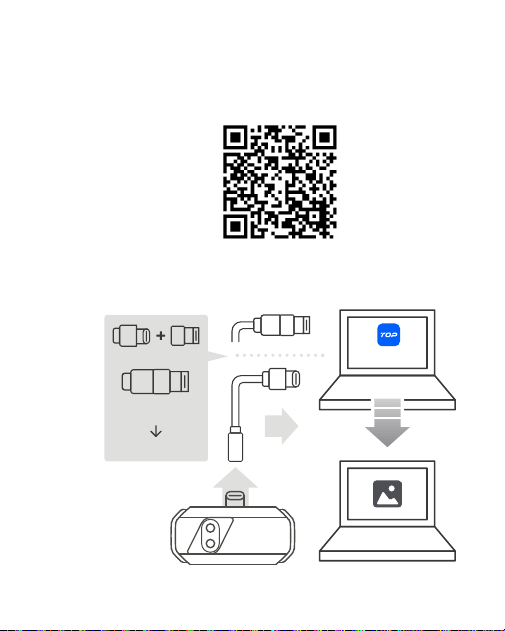
Figura 3.1.2
9
Figura 3.2.1
Baixe o software do site www.topdon.com/products/TC001-Plus e entre
na página de Download para instalá-lo ou escaneando o código QR
abaixo.
Conecte a câmera TC001 Plus a um computador com Windows usando
o cabo adaptador fornecido ( veja a figura 3.2.1 ) .
1.
2.
3.2. Usando TC001 Plus com um Computador
USB-A 3.0
USB Type-C
Type-C Female
TopView
Type-C Male
USB-A

10
Inicie o software e você poderá realizar a análise térmica.
Para obter instruções detalhadas sobre como operar o TC001 Plus com
um computador Windows, consulte o manual do usuário do TopView.
3.
4.

11
4. Especicações
Resolução da câmera
Lente
Faixa espectral
Tamanho do pixel
NETD
Taxa de quadros
Faixa de temperatura do objeto
Precisão
Resolução
256 × 192 pixels
Lentes de luz visível e infravermelho de
1 megapixel
8~ 14 μm
12 μm
≤ 40 mK
25 Hz
-20° C~550° C (-4° F~1022° F)
±2° C ou ±2% da leitura, deve
prevalecer o valor maior
0,1° C

12
5. Perguntas Frequentes
Por que é não há resposta após conectar o TC001 Plus a um telefone?
Siga os passos abaixo para identificar o problema:
a) Verifique se o indicador LED azul na lateral do TC001 Plus está
ligado. Se não estiver, o dispositivo pode não estar conectado
corretamente ao seu telefone, ou seu telefone não suporta uma
funcionalidade OTG.
b) Verifique se o OTG está disponível nas Configurações do seu
telefone e se está LIGADO. Para a maioria dos telefones, as funções
OTG são habilitadas por padrão e podem ser usadas diretamente.
Caso contrário, pesquise “OTG” nas Configurações e ative-o
manualmente. Observe que o TC001 Plus não é compatível com
telefones sem a função OTG.
c) Verifique se você baixou o aplicativo correspondente e dê a
autorização necessária.
d) Desconecte a câmera TC001 Plus e reconecte-a. Se ainda não
houver resposta, entre em contato com o pessoal de pós-venda.
Quais fatores externos afetarão a medição da temperatura
infravermelha?
Os resultados da medição de temperatura podem ser afetados por
fatores como a emissividade da superfície do objeto, a temperatura
ambiente e a distância da câmera ao objeto.
Por que a leitura da temperatura aumenta quando o dispositivo se
aproxima do objeto?
A radiação infravermelha atenua-se ao passar pela atmosfera. Quanto
maior a distância, maior a atenuação. Assim, a precisão da medição de
temperatura à distância diminuirá. Para garantir a precisão da medição,
acesse Saiba Mais > Correção da Temperatura > Distância à
Mancha e insira a distância real (máx.: 5 m) para obter a temperatura
P:
R:
P:
R:
P:
R:

13
corrigida.
Por que a temperatura medida não é precisa?
A câmera TC001 Plus fornece uma precisão de temperatura de ±2° C
ou ±2%, com uma faixa de temperatura normal de -20° C~150° C
(-4° F~302° F) e uma faixa de alta temperatura de 150° C~550° C
(302° F~1022° F). Selecione a faixa apropriada no aplicativo antes de
medir para garantir leituras mais precisas.
P:
R:

14
6. Garantia
Garantia Limitada de Um Ano TOPDON
A TOPDON garante a seu comprador original que os produtos da empresa
serão livres de defeitos materiais e de confecção por 12 meses a partir da
data de compra (Período de Garantia).
Para defeitos reportados durante o Período de Garantia, a TOPDON
irá ou consertar ou substituir o componente ou produto defeituoso de
acordo com a análise e confirmação de seu suporte técnico. A TOPDON
não se responsabiliza por quaisquer danos incidentais ou consequentes
decorrentes do uso, uso indevido ou montagem do dispositivo. Se houver
qualquer conflito entre a política de garantia TOPDON e as leis locais, as
leis locais devem prevalecer.
• Usado indevidamente, desmontado, alterado ou reparado por lojas ou
técnicos não autorizados.
• Manuseio descuidado e violação da operação.
Aviso: Todas as informações neste manual são baseadas nas informações
disponíveis mais recentes durante o momento de sua publicação e
nenhuma garantia pode ser feita sobre sua exatidão ou integridade. A
TOPDON se reserva o direito de fazer alterações a qualquer momento
sem aviso.
+86-755-21612590 (China) I +1-833-629-4832 (North America) I +34 930 038 094 (Europe)
WWW.TOPDON.COM
@TOPDONOFFICIAL
@TOPDON_OFFICIAL
1
TC001 Plus
Тепловизор С Двойной Линзой Для Смартфонов I Руководство Пользователя

2

3
Содержание
1. Обзор Продукта ................................................. 4
2. Предостережение и Уведомление ................................................. 5
3. Инструкция по эксплуатации ................................................. 7
4. Спецификация ................................................. 11
5. Часто Задаваемые Вопросы ................................................. 12
6. Гарантия ................................................. 14
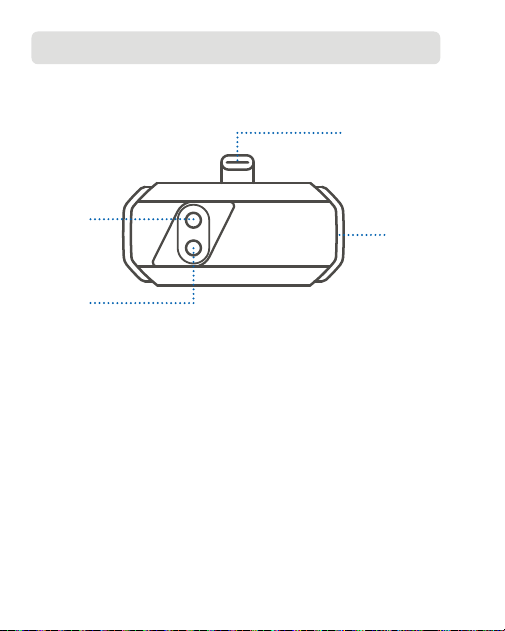
4
1. Обзор Продукта
Благодарим вас за покупку TC001 Plus — портативной камеры, которая
может превратить ваш смартфон, планшет или ноутбук на базе
Windows в мощный тепловизор.
① Разъем USB-C
② Индикатор
③ Инфракрасный объектив
④ Линза Bидимого Cвета
①
②
③
④

5
2. Предостережение и
Уведомление
Для вашей безопасности, безопасности других людей и во избежание
повреждения изделия ВНИМАТЕЛЬНО ПРОЧИТАЙТЕ И УБЕДИТЕСЬ,
ЧТО ВЫ ПОЛНОСТЬЮ ПОНИМАЕТЕ ВСЕ ИНСТРУКЦИИ ПО
БЕЗОПАСНОСТИ И СООБЩЕНИЯ В ДАННОМ РУКОВОДСТВЕ ПЕРЕД
ЭКСПЛУАТАЦИЕЙ.
Не направляйте инфракрасную камеру на солнце или другие
сильные источники энергии в течение длительного времени. Это
может привести к повреждению детектора в камере.
Держите устройство подальше от воды во избежание утечки или
короткого замыкания.
Не прикасайтесь к объективу руками. Не стучите, не протыкайте, не
прокалывайте и не царапайте объектив.
Не разбирайте устройство.
Звук «щелчка» является нормальным и возникает, когда
инфракрасная камера автоматически срабатывает затвор.
Рассеянный инфракрасный свет создает тепло, что приводит
к размытию изображения. Обновление затвора может сделать
изображение четким, но это приведет к звуку «щелчка».
Устройство предназначено для измерения температуры поверхности,
но не может обнаруживать тепло через прозрачные материалы,
такие как стекло, акрил или вода, а также через непрозрачные
предметы.
2.1. Информация по безопасности
2.2. Уведомление для пользователя

6
Чтобы проверить точность измерения температуры вашим
устройством, приготовьте смесь льда и воды, перемешайте ее и
дайте ей отстояться в течение нескольких минут. Затем войдите в
интерфейс Коррекция температуры через Подробнее, установите
Излучательная способность на 0,96 и введите фактическое
Расстояние до пятна. Используйте ваше устройство для измерения
температуры смеси и проверьте, попадает ли показание в диапазон
0° C ± 2° C. Если да, это подтверждает точность измерения
температуры устройством. Если нет, свяжитесь с нашей командой
послепродажного обслуживания.
Чтобы уменьшить количество ошибок и помех и получить точные
результаты, избегайте проведения измерений при прямом ярком
свете или вблизи отражающих поверхностей, таких как стекло.
Длительное воздействие источников высокой температуры может
снизить качество изображения. Чтобы устранить эту проблему,
нажмите Калибровка изображения в разделе Подробнее и следуйте
инструкциям на экране.
7
3. Инструкция по эксплуатации
TC001 Plus можно использовать с мобильным устройством или
компьютером Windows. В этом разделе представлено введение в
использование в этих двух режимах.
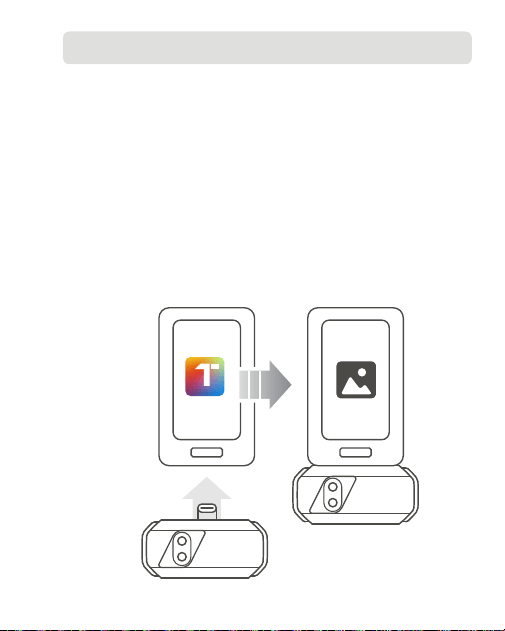
Загрузить Приложение Topinfrared из вашего любимого магазина
приложений, а затем установите его на свой телефон. В качестве
альтернативы вы можете перейти на www.topdon.com/products/
TC001-Plus и войти на страницу Загрузки, чтобы установить
приложение.
Запустите приложение Topinfrared.
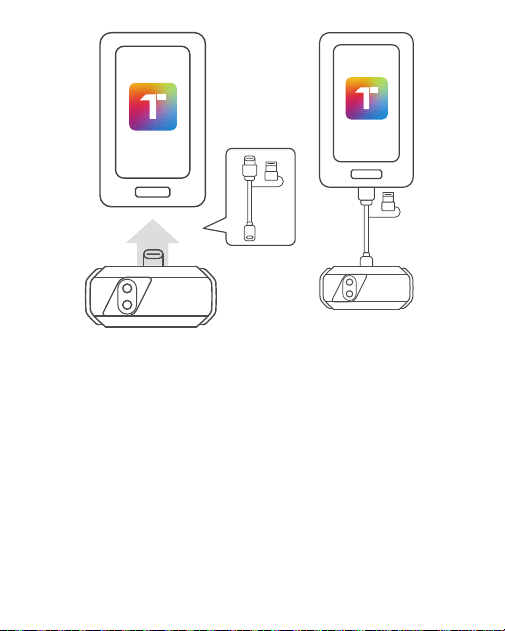
Подключите камеру TC001 Plus к мобильному устройству
напрямую через разъем USB-C или с помощью прилагаемого
многофункционального кабеля-адаптера.
Рисунок 3.1.1
1.
2.
3.
3.1. Использование TC001 Plus с мобильным устройством
Topinfrared
8
Ввод Topinfrared проведет вас и поможет настроить разрешения
для приложения. После этого нажмите Включить тепловизионное
изображение. Приложение откроется в режиме фото и будет готово
к использованию.
Подробные инструкции по эксплуатации TC001 Plus с помощью
мобильного устройства см. в руководстве пользователя Topinfrared,
перейдя в раздел Moë > e-Вручную.
4.
5.
Рисунок 3.1.2
9
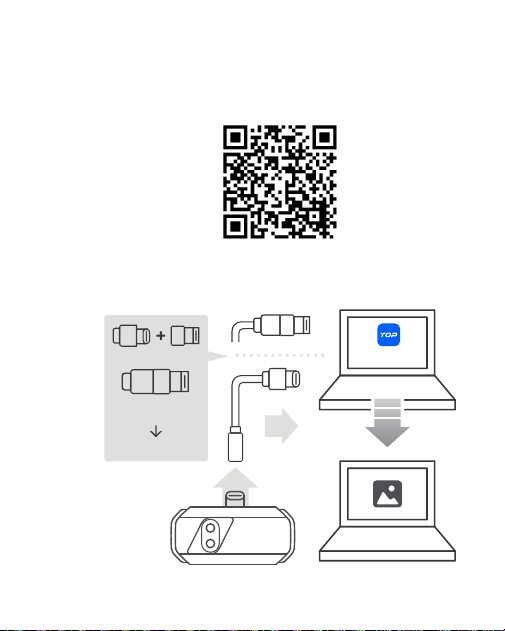
Рисунок 3.2.1
Загрузить программное обеспечение с веб-сайта www.topdon.com/
products/TC001-Plus и перейдите на страницу Загрузки, чтобы
установить его, или отсканировав QR-код ниже.
Подключите камеру TC001 Plus к компьютеру на базе Windows с
помощью прилагаемого кабеля-адаптера ( см. рисунок 3.2.1 ).
1.
2.
3.2. Использование TC001 Plus с Компьютером
USB-A 3.0
USB Type-C
Type-C Female
TopView
Type-C Male
USB-A

10
Запустите программу, и вы сможете провести термический анализ.
Подробные инструкции по эксплуатации TC001 Plus на компьютере
под управлением Windows см. в руководстве пользователя TopView.
3.
4.

11
4. Спецификация
Разрешение камеры
Объектив
Спектральный диапазон
Размер пикселя
NETD
Частота кадров
Температура объекта Диапазон
Точность
Разрешение
256 × 192 пикселей
1-мегапиксельные линзы видимого
света и ИК-объективы
8~ 14 мкм
12 мкм
≤ 40 мК
25 Гц
-20° C~550° C (-4° F~1022° F)
±2° C или ±2% от показания,
преимущество имеет большее
значение
0,1° С

12
5.Часто Задаваемые Вопросы
Почему нет ответа после подключения TC001 Plus к телефону?
Чтобы определить проблему, выполните следующие действия:
a) Проверьте, горит ли синий светодиодный индикатор сбоку TC001
Plus. Если нет, устройство может быть неправильно подключено
к вашему телефону или ваш телефон не поддерживает функцию
OTG.
b) Проверьте, доступен ли OTG в настройках вашего телефона
и включен ли он. Для большинства телефонов функции OTG
включены по умолчанию и могут использоваться напрямую.
Если нет, найдите «OTG» в настройках и включите его вручную.
Обратите внимание, что TC001 Plus несовместим с телефонами
без функции OTG.
c) Проверьте, загрузили ли вы соответствующее приложение и
дайте необходимую авторизацию.
d) Отключите камеру TC001 Plus и подключите ее снова. Если
ответа все еще нет, обратитесь в отдел послепродажного
обслуживания.
Какие внешние факторы повлияют на инфракрасное измерение
температуры?
На результаты измерения температуры могут влиять такие
факторы, как излучательная способность поверхности объекта,
температура окружающей среды и расстояние от камеры до
объекта.
Почему показания температуры увеличиваются, когда устройство
приближается к объекту?
Инфракрасное излучение ослабевает при прохождении через
атмосферу. Чем больше расстояние, тем больше ослабление. Таким
образом, точность измерения температуры на расстоянии будет
уменьшаться. Чтобы обеспечить точность измерения, перейдите на
страницу Подробнее > Коррекция температуры > Расстояние
B:
O:
B:
O:
B:
O:

13
до пятна и введите фактическое расстояние (макс.: 5 м), чтобы
получить скорректированную температуру.
Почему измеренная температура неточная?
Камера TC001 Plus обеспечивает точность измерения температуры
±2° C или ±2%, с нормальный температурный диапазон -20°C~150°C
(-4° F~302° F) и высокий температурный диапазон 150° C~550° C
(302° F~1022° F). Пожалуйста, выберите соответствующий диапазон
в приложении перед измерением, чтобы обеспечить более точные
показания.
B:
O:

14
6. Гарантия
Гарантия TOPDON на один год
TOPDON гарантирует покупателю, что не будет никаких дефектов
материалов и изготовления продукции TOPDON в течение 12 месяцев
(гарантийный срок) с даты покупки. При обнаружении дефектов в
течение гарантийного периода TOPDON проведёт ремонт или замену
дефектных деталей или продуктов после анализа и подтверждения
проблемы своей технической поддержкой. TOPDON не несет
ответственности за любые случайные или косвенные убытки,
вызванные использованием, неправильным использованием или
установкой прибора. В случае возникновения противоречий между
гарантийной политикой TOPDON и местным законодательством
преимущественную силу имеют местные законы.
Данная гарантия недействительна в следующих случаях:
• Неправильное использование, разборка, модификация или ремонт
специалистами по техническому обслуживанию, не уполномоченными
Topdon.
• Небрежное обращение и неправильная эксплуатация.
Примечание. Вся информация в этом руководстве, показанная на
момент публикации, имеет преимущественную силу, компания не
отвечает за ее точность и полноту.
Topdon оставляет за собой право вносить изменения в данное
руководство в любое время без предварительного уведомления.
+86-755-21612590 (China) I +1-833-629-4832 (North America) I +34 930 038 094 (Europe)
WWW.TOPDON.COM
@TOPDONOFFICIAL
@TOPDON_OFFICIAL
1
TC001 Plus
デュアルレンズサーマルカメラ I ユーザーマニュアル

2

3
目次
1. 製品概要 ................................................. 4
2. 注意と通知 ................................................. 5
3. 操作手順 ................................................. 7
4. 仕様 ................................................. 11
5.FAQ ................................................. 12
6. 保証 ................................................. 14
4
1. 製品概要
スマートフォン、タブレット、Windows ラップトップを強力なサーマルイ
メージャーに変えるポータブル カメラ、 TC001 Plus をお買い上げいただき
ありがとうございます。
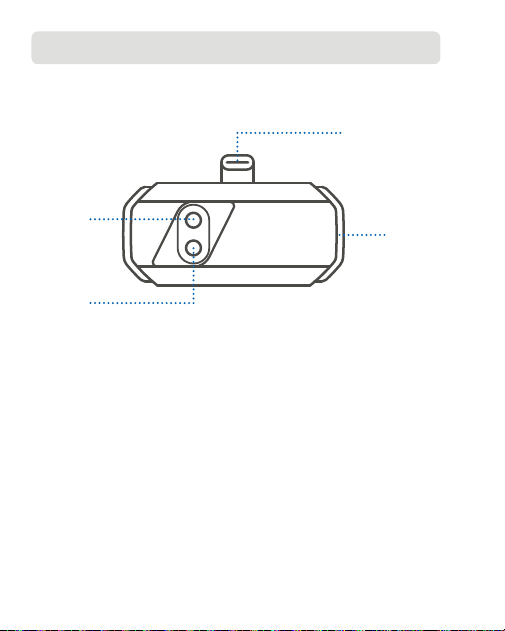
① USB-C コネクタ
②インジケータ
③赤外線レンズ
④可視光レンズ
①
②
③
④

5
2. 注意と通知
あなた自身の安全と他の人の安全のため、また製品の損傷を防ぐために、操
作する前にこのマニュアルのすべての安全に関する指示とメッセージを注意
深く読み、完全に理解してください。
赤外線カメラを太陽や他の強力なエネルギー源に長時間向けないでくださ
い。そうすれば、カメラの検出器が損傷する可能性があります。
漏電や短絡を防ぐため、水から遠ざけてください。
手でレンズに触れないでください。レンズをノックしたり、こじたり、突
き破ったり、ひっかき傷をしないでください。
組立部品を分解しないでください。
「カチッ」という音は正常で、赤外線カメラが自動的にシャッターを切っ
たときに発生します。散乱した赤外線が熱を発生し、画像がぼやけます。
シャッターをリフレッシュすると画像は鮮明になりますが、「カチッ」と
いう音は発生します。
このデバイスは表面温度を測定するように設計されていますが、ガラス、
アクリル、水などの透明な素材や不透明な物体を通して熱を検出すること
はできません。
デバイスの温度測定の精度を確認するには、氷水混合物を用意し、かき混
ぜて数分間静置します。次に、「もっと勉強する」から「温度補正」のイ
ンターフェイスに入り、「放射率」を 0.96 に設定し、実際の「検出距離」
を入力します。デバイスを使用して混合物の温度を測定し、測定値が 0° C
± 2° C の範囲内にあるかどうかを確認します。範囲内であれば、デバイ
スの温度測定が正確であることが確認できます。範囲内でない場合は、ア
フターセールス チームにお問い合わせください。
2.1. 安全情報
2.2. ユーザーへの通知

6
誤差や干渉を減らし、正確な結果を得るには、強い直射日光やガラスなど
の反射面の近くでの測定は避けてください。
高温の光源に長時間さらすと、画質が低下する場合があります。この問題
に対処するには、「もっと勉強する」の「イメージ·キャリブレーション」
をタップし、画面の指示に従ってください。
7
3. 操作手順
TC001 Plus は、モバイル デバイスまたは Windows コンピューターで使用
できます。このセクションでは、これら 2 つのモードでの使用法を紹介し
ます。
お好みのアプリ ストアから Topinfrare d アプリケーションをダウンロ
ードし、携帯電話にインストールします。または、 www.topdon.com/
products/TC002C-Duo にアクセスし、「ダウンロード」ページにアクセ
スしてアプリケーションをインストールすることもできます。
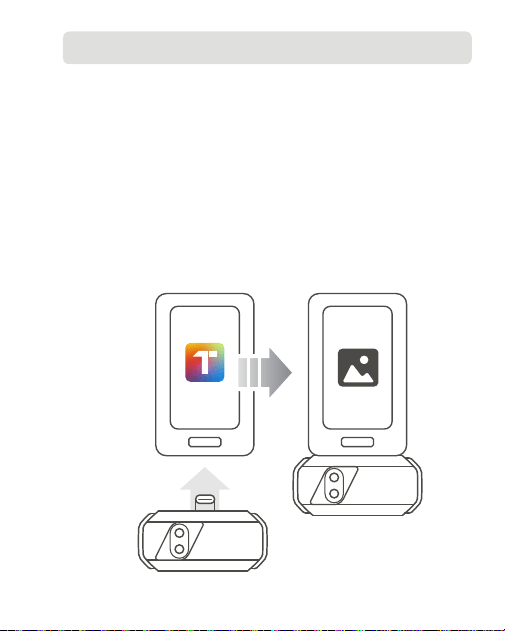
Topinfrared アプリケーションを起動します。
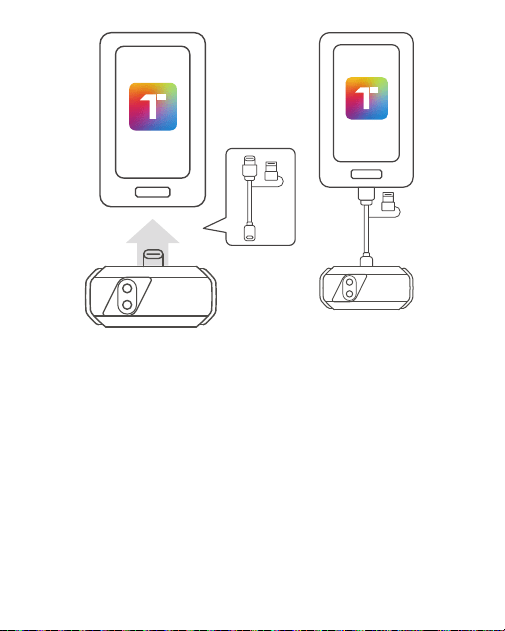
TC001 Plus カメラを USB-C コネクタ経由で直接モバイル デバイスに接
続するか、付属の多機能アダプタ ケーブルを使用して接続します。
図 3.1.1
1.
2.
3.
3.1. モバイルデバイスで TC001 Plus を使用する
Topinfrared
8
Topinfrared のオンボーディングでは、権限の設定をガイドし、お手伝い
します。その後、「熱画像を有効にする」をタップします。アプリケーシ
ョン 写真モードで開き、使用できるようになります。
TC001 Plus を操作する詳細な手順については、 「マイ」 > 「電子マニュ
アル」に移動して Topinfrared のユーザー マニュアルを参照してください。
4.
5.
図 3.1.2
9
図 3.2.1
ウェブサイト www.topdon.com/products/ TC002C-Duo からソフトウェ
アをダウンロードし、「ダウンロード」ページにアクセスしてインストー
ルするか、以下の QR コードをスキャンしてください。
付属のアダプタケーブルを使用して、 TC001 Plus カメラを Windows ベ
ースのコンピュータに接続します(図 3.2.1 を参照) 。
1.
2.
3.2.TC001 Plus をコンピューターで使用する
USB-A 3.0
USB Type-C
Type-C Female
TopView
Type-C Male
USB-A

10
ソフトウェアを起動すると、熱解析を行うことができます。
Windows ベースのコンピュータで TC001 Plus を操作する詳細な手順につ
いては、TopView ユーザーマニュアルを参照してください。
3.
4.

11
4. 仕様
カメラ解像度
レンズ
スペクトル範囲
ピクセルサイズ
NETD
フレームレート
物体の温度範囲
正確さ
解決
256 × 192 pixels
1 メガピクセル可視光および赤外線レン
ズ
8~14 μm
12 μm
≤ 40 mK
25 Hz
-20° C~550° C (-4° F~1022° F)
読み取り値の ±2° C または ±2%、より
大きな値を取る
0.1° C

12
5.FAQ
なぜ TC001 Plus を電話に接続しても応答がありませんか ?
問題を特定するには、以下の手順に従ってください。
a)TC001 Plus の側面にある青色の LED インジケーターが点灯している
かどうかを確認します。点灯していない場合は、デバイスが携帯電話
に正しく接続されていないか、携帯電話が OTG 機能をサポートして
いない可能性があります。
b) お使いの携帯電話の設定で OTG が利用可能かどうか、またオンにな
っているかどうかを確認してください。ほとんどの携帯電話では、
OTG 機能はデフォルトで有効になっており、直接使用できます。そう
でない場合は、設定で「OTG」を検索し、手動でオンにしてください。
TC001 Plus は OTG 機能のない携帯電話とは互換性がありませんので
ご注意ください。
c) 対応するアプリケーションをダウンロードしたかどうかを確認し、必
要な承認を与えてください。
d)TC001 Plus カメラを取り外して再度接続してください。それでも応答
がない場合は、アフターセールス担当者にお問い合わせください。
赤外線温度測定に影響を与える外部要因は何ですか ?
温度測定結果は、物体表面の放射率、周囲温度、カメラから物体までの
距離などの要因によって影響を受ける可能性があります。
デバイスが物体に近づくと、温度の測定値が上昇するのはなぜですか ?
赤外線は大気を通過する際に減衰します。距離が長くなるほど減衰が大
きくなります。そのため、離れた場所での温度測定の精度は低下します。
測定の精度を確保するには、「もっと勉強する」 > 「温度補正」 > 「検
出距離」、実際の距離(最大:5m)を入力して修正された温度を取得し
ます。
測定された温度が正確でないのはなぜですか ?
Q:
A:
Q:
A:
Q:
A:
Q:

13
TC001 Plus カメラの温度精度は ±2° C または ±2%、通常温度範囲は -20° C
〜
150° C(-4° F
〜
302° F)、高温範囲は 150° C
〜
550° C(302° F
〜
1022° F)です。より正確な測定値を得るために、測定前にアプリケーシ
ョンで適切な範囲を選択してください。
A:

14
6. 保証
TOPDON の 1 年間の限定保証
TOPDON は、購入日から 12 ヶ月以内(保証期間)に材料とプロセスが欠陥
がないことを元の購入者に保証します。保証期間内に報告された欠陥につい
て、TOPDON は技術サポートに基づいて欠陥部品や製品の修理または交換
を分析および確認します。
TOPDON は、デバイスの使用、誤用、や取り付けによる付随的または結果
的な損害に対して責任を持っていません。TOPDON 保証ポリシーと現地の
法律は何かの競合がある場合は、現地の法律に準拠してください。
次の場合は、この限定保証は無効です。
• 無許可店舗や技術者による誤用、取り外し、変更、修理
• 不注意な処理や不適切な操作
知らせ:このマニュアルのすべての情報は、出版時に利用可能な最新の情報
に基づいて、正確性や完全性は保証されていません。TOPDON は予告ない
で変更する権利を保持しています。
+86-755-21612590 (China) I +1-833-629-4832 (North America) I +34 930 038 094 (Europe)
WWW.TOPDON.COM
@TOPDONOFFICIAL
@TOPDON_OFFICIAL