Visit our website at: http://www.harborfreight.com
email our technical support at: [email protected]
1967E-B
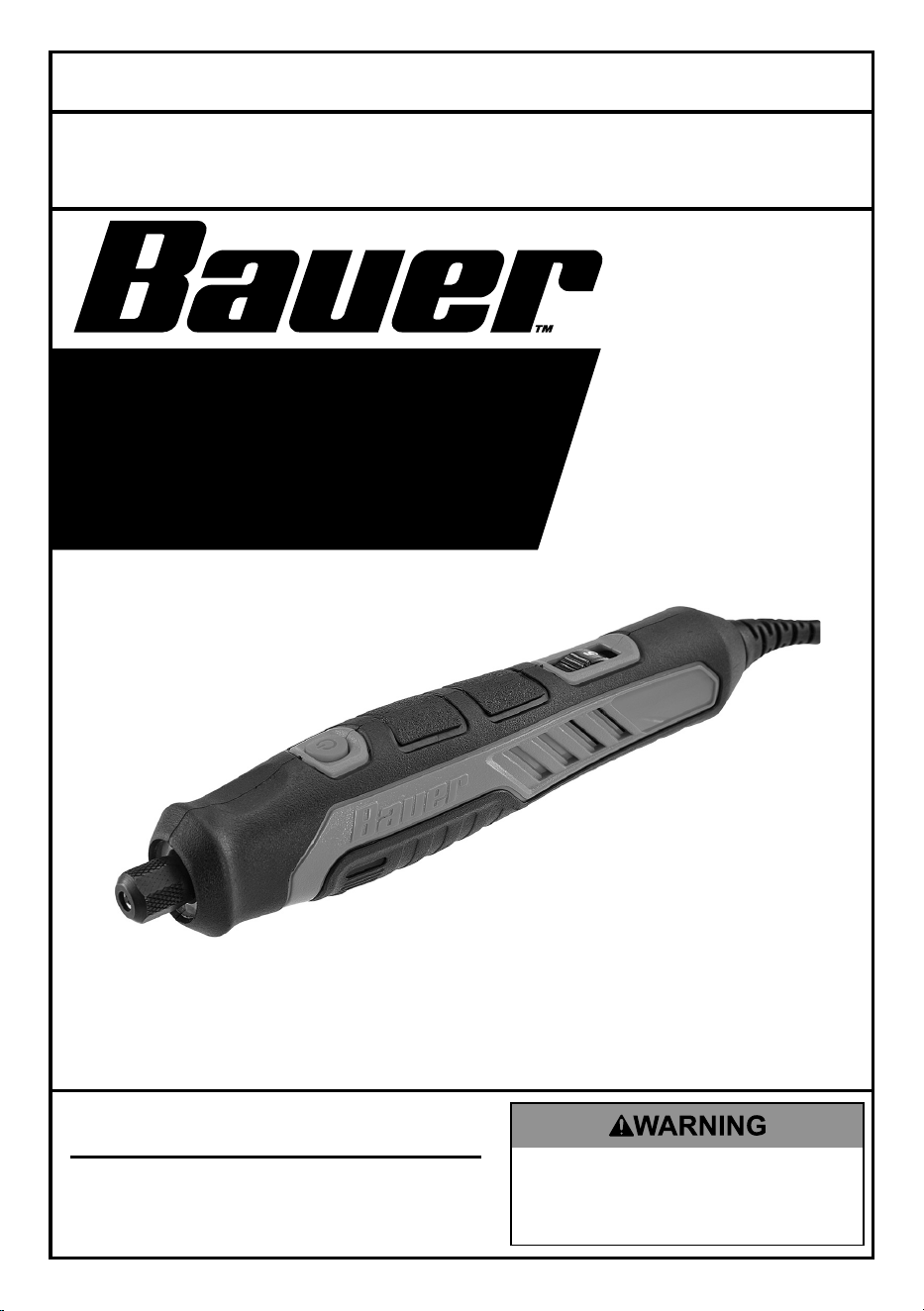
VARIABLE SPEED
PRECISION CRAFTING
ROTARY TOOL
57001
Owner’s Manual & Safety Instructions
Save This Manual Keep this manual for the safety warnings and precautions, assembly,
operating, inspection, maintenance and cleaning procedures. Write the product’s serial number in the
back of the manual near the assembly diagram (or month and year of purchase if product has no number).
Keep this manual and the receipt in a safe and dry place for future reference. 23j
When unpacking, make sure that the product is intact
and undamaged. If any parts are missing or broken,
please call 1‑888‑866‑5797 as soon as possible.
Copyright
©
2022 by Harbor Freight Tools
®
. All rights reserved.
No portion of this manual or any artwork contained herein may be reproduced in
any shape or form without the express written consent of Harbor Freight Tools.
Diagrams within this manual may not be drawn proportionally. Due to continuing
improvements, actual product may differ slightly from the product described herein.
Tools required for assembly and service may not be included.
Read this material before using this product.
Failure to do so can result in serious injury.
SAVE THIS MANUAL.
Page 2 For technical questions, please call 1-888-866-5797. Item 57001
SaFety OperatiOn MaintenanceSetup
table of contents
Safety ......................................................... 3
Specifications ............................................ 11
Setup ......................................................... 11
Operation ................................................... 15
Maintenance .............................................. 17
Warranty .................................................... 20
WarninG SyMBOLS anD DeFinitiOnS
This is the safety alert symbol. It is used to alert you to potential
personal injury hazards. Obey all safety messages that
follow this symbol to avoid possible injury or death.
Indicates a hazardous situation which, if not avoided,
will result in death or serious injury.
Indicates a hazardous situation which, if not avoided,
could result in death or serious injury.
Indicates a hazardous situation which, if not avoided,
could result in minor or moderate injury.
Addresses practices not related to personal injury.

Page 3For technical questions, please call 1-888-866-5797.Item 57001
SaFetyOperatiOnMaintenance Setup
iMpOrtant SaFety inFOrMatiOn
General power tool Safety Warnings
read all safety warnings and instructions.
Failure to follow the warnings and instructions may result in electric shock, fire and/or serious injury.
Save all warnings and instructions for future reference.
The term ″power tool″ in the warnings refers to your mains-operated (corded) power tool.
Work area Safety
1. Keep work area clean and well lit.
Cluttered or dark areas invite accidents.
2. Do not operate power tools in explosive
atmospheres, such as in the presence of
flammable liquids, gases or dust. Power tools
create sparks which may ignite the dust or fumes.
3. Keep children and bystanders
away while operating a power tool.
Distractions can cause you to lose control.
electrical Safety
1. power tool plugs must match the outlet.
never modify the plug in any way.
Do not use any adapter plugs with grounded
power tools. Unmodified plugs and matching
outlets will reduce risk of electric shock.
2. avoid body contact with grounded surfaces
such as pipes, radiators, ranges and
refrigerators. There is an increased risk of
electric shock if your body is grounded.
3. Do not expose power tools to rain or wet
conditions. Water entering a power tool
will increase the risk of electric shock.
4. Do not abuse the cord. never use the cord
for carrying, pulling or unplugging the power
tool. Keep cord away from heat, oil, sharp
edges or moving parts. Damaged or entangled
cords increase the risk of electric shock.
5. When operating a power tool outdoors, use
an extension cord suitable for outdoor use.
Use of a cord suitable for outdoor use
reduces the risk of electric shock.
6. if operating a power tool in a damp location
is unavoidable, use a Ground Fault circuit
interrupter (GFci) protected supply.
Use of a GFCI reduces the risk of electric shock.
personal Safety
1. Stay alert, watch what you are doing and
use common sense when operating a
power tool. Do not use a power tool while
you are tired or under the influence of
drugs, alcohol or medication. A moment
of inattention while operating power tools
may result in serious personal injury.
2. use personal protective equipment. always
wear eye protection. Protective equipment
such as dust mask, non-skid safety shoes, hard
hat, or hearing protection used for appropriate
conditions will reduce personal injuries.
3. prevent unintentional starting. ensure
the switch/trigger is in the off-position
before connecting to power source and/
or battery pack, picking up or carrying the
tool. Carrying power tools with your finger
on the switch or energizing power tools that
have the switch on invites accidents.
4. remove any adjusting key or wrench
before turning the power tool on.
A wrench or a key left attached to a rotating part
of the power tool may result in personal injury.
5. Do not overreach. Keep proper footing and
balance at all times. This enables better control
of the power tool in unexpected situations.
6. Dress properly. Do not wear loose clothing or
jewelry. Keep your hair, clothing and gloves
away from moving parts. Loose clothes, jewelry
or long hair can be caught in moving parts.
7. if devices are provided for the connection of
dust extraction and collection facilities, ensure
these are connected and properly used. Use of
these devices can reduce dust-related hazards.

Page 4 For technical questions, please call 1-888-866-5797. Item 57001
SaFety OperatiOn MaintenanceSetup
8. Only use safety equipment that has been approved
by an appropriate standards agency. Unapproved
safety equipment may not provide adequate
protection. Eye protection must be ANSI‑approved
and breathing protection must be NIOSH‑approved
for the specific hazards in the work area.
power tool use and care
1. Do not force the power tool.
use the correct power tool for your application.
The correct power tool will do the job better and
safer at the rate for which it was designed.
2. Do not use the power tool if the switch/trigger
does not turn it on and off.
Any power tool that cannot be controlled with the
switch/trigger is dangerous and must be repaired.
3. Disconnect the plug from the power source
before making any adjustments, changing
accessories, or storing power tools.
Such preventive safety measures reduce the
risk of starting the power tool accidentally.
4. Store idle power tools out of the reach of
children and do not allow persons unfamiliar
with the power tool or these instructions
to operate the power tool. Power tools are
dangerous in the hands of untrained users.
5. Maintain power tools. check for misalignment
or binding of moving parts, breakage of parts
and any other condition that may affect the
power tool’s operation. if damaged, have the
power tool repaired before use. Many accidents
are caused by poorly maintained power tools.
6. Keep cutting tools sharp and clean.
Properly maintained cutting tools with
sharp cutting edges are less likely to
bind and are easier to control.
7. use the power tool, accessories and tool bits
etc. in accordance with these instructions,
taking into account the working conditions
and the work to be performed. Use of the
power tool for operations different from those
intended could result in a hazardous situation.
8. Keep handles and grasping surfaces
dry, clean and free from oil and grease.
Slippery handles and grasping surfaces
do not allow for safe handling and control
of the tool in unexpected situations.
9. turn off the switch before making any
adjustments, changing accessories, or
storing power tools. Such preventive
safety measures reduce the risk of
starting the power tool accidentally.
10. Maintain labels and nameplates on
the tool. These carry important safety
information. If unreadable or missing, contact
Harbor Freight Tools for a replacement.
Service
Have your power tool serviced by a qualified repair person using only identical replacement parts.
This will ensure that the safety of the power tool is maintained.
Safety Warnings common for Sanding, Wire
Brushing, polishing Or carving Operations
1. this power tool is intended to function as a
sander, wire brush, polisher, or carving tool.
Read all safety warnings, instructions, illustrations
and specifications provided with this power tool.
Failure to follow all instructions listed below may
result in electric shock, fire and/or serious injury.
2. Operations such as grinding or cutting-off
are not recommended to be performed
with this power tool. Operations for which
the power tool was not designed may create
a hazard and cause personal injury.
3. Do not use accessories which are not
specifically designed and recommended
by the tool manufacturer. Just because the
accessory can be attached to your power tool,
it does not assure safe operation.
4. the rateD SpeeD of the accessories
must be at least equal to the operating
speed setting marked on the power tool.
Accessories running faster than their
RATED SPEED can break and fly apart.
5. the outside diameter and the thickness of
your accessory must be within the capacity
rating of your power tool. Incorrectly sized
accessories cannot be adequately controlled.
6. the arbour size of wheels, sanding drums
or any other accessory must properly fit the
spindle or collet of the power tool. Accessories
that do not match the mounting hardware of
the power tool will run out of balance, vibrate
excessively and may cause loss of control.

Page 5For technical questions, please call 1-888-866-5797.Item 57001
SaFetyOperatiOnMaintenance Setup
7. Mandrel MOunteD WHeeLS, sanding drums,
cutters or other accessories must be fully
inserted into the collet or chuck. If the mandrel
is insufficiently held and/or the overhang of the
wheel is too long, the MOUNTED WHEEL may
become loose and be ejected at high velocity.
8. Do not use a damaged accessory. Before each
use inspect the accessory such as abrasive
wheels for chips and cracks, sanding drum for
cracks, tear or excess wear, wire brush for loose
or cracked wires. If power tool or accessory
is dropped, inspect for damage or install an
undamaged accessory. After inspecting and
installing an accessory, position yourself and
bystanders away from the plane of the rotating
accessory and run the power tool at maximum no-
load speed for one minute. Damaged accessories
will normally break apart during this test time.
9. Wear personal protective equipment. Depending
on application, use face shield, safety goggles
or safety glasses. As appropriate, wear dust
mask, hearing protectors, gloves and workshop
apron capable of stopping small abrasive or
workpiece fragments. The eye protection must
be capable of stopping flying debris generated by
various operations. The dust mask or respirator
must be capable of filtrating particles generated
by your operation. Prolonged exposure to high
intensity noise may cause hearing loss.
10. Keep bystanders a safe distance away
from work area. Anyone entering the
work area must wear personal protective
equipment. Fragments of workpiece or of a
broken accessory may fly away and cause
injury beyond immediate area of operation.
11. Hold power tool by insulated gripping
surfaces only, when performing an operation
where the cutting accessory may contact
hidden wiring or its own cord. Cutting
accessory contacting a “live” wire may make
exposed metal parts of the power tool “live” and
could give the operator an electric shock.
12. always hold the tool firmly in your
hand(s) during the start-up. The reaction
torque of the motor, as it accelerates to
full speed, can cause the tool to twist.
13. use clamps to support workpiece whenever
practical. never hold a small workpiece in
one hand and the tool in the other hand while
in use. Clamping a small workpiece allows you
to use your hand(s) to control the tool. Round
material such as dowel rods, pipes or tubing
have a tendency to roll while being cut, and
may cause the bit to bind or jump toward you.
14. never lay the power tool down until the
accessory has come to a complete stop.
The spinning accessory may grab the surface
and pull the power tool out of your control.
15. after changing the bits or making any
adjustments, make sure the collet nut, chuck
or any other adjustment devices are securely
tightened. Loose adjustment devices can
unexpectedly shift, causing loss of control, loose
rotating components will be violently thrown.
16. Do not run the power tool while carrying
it at your side. Accidental contact with the
spinning accessory could snag your clothing,
pulling the accessory into your body.
17. regularly clean the power tool’s air vents.
The motor’s fan will draw the dust inside
the housing and excessive accumulation of
powdered metal may cause electrical hazards.
18. Do not operate the power tool near flammable
materials. Sparks could ignite these materials.
19. Do not use accessories that require liquid
coolants. Using water or other liquid coolants
may result in electrocution or shock.
20. Avoid unintentional starting.
Prepare to begin work before turning on the tool.
21. Do not depress the spindle lock when
starting or during operation.
22. Do not leave the tool unattended when it is plugged
into an electrical outlet. Turn off the tool, and
unplug it from its electrical outlet before leaving.
23. Use clamps (not included) or other practical
ways to secure and support the workpiece to
a stable platform. Holding the work by hand
or against your body is unstable and may
lead to loss of control and personal injury.
24. This product is not a toy.
Keep it out of reach of children.

Page 6 For technical questions, please call 1-888-866-5797. Item 57001
SaFety OperatiOn MaintenanceSetup
25. People with pacemakers should consult their
physician(s) before use. Electromagnetic fields in
close proximity to heart pacemaker could cause
pacemaker interference or pacemaker failure.
In addition, people with pacemakers should:
• Avoid operating alone.
• Do not use with Switch locked on.
• Properly maintain and inspect to avoid
electrical shock.
• Properly ground power cord.
Ground Fault Circuit Interrupter (GFCI)
should also be implemented – it prevents
sustained electrical shock.
26. The warnings, precautions, and instructions
discussed in this instruction manual cannot
cover all possible conditions and situations
that may occur. It must be understood by the
operator that common sense and caution are
factors which cannot be built into this product,
but must be supplied by the operator.
Kickback and related Warnings
Kickback is a sudden reaction to a pinched or
snagged rotating wheel, backing pad, brush
or any other accessory. Pinching or snagging
causes rapid stalling of the rotating accessory
which in turn causes the uncontrolled power
tool to be forced in the direction opposite of the
accessory’s rotation at the point of the binding.
For example, if an abrasive wheel is snagged or
pinched by the workpiece, the edge of the wheel that
is entering into the pinch point can dig into the surface
of the material causing the wheel to climb out or kick
out. The wheel may either jump toward or away from
the operator, depending on direction of the wheel’s
movement at the point of pinching. Abrasive wheels
may also break under these conditions.
Kickback is the result of power tool misuse and/or
incorrect operating procedures or conditions and can be
avoided by taking proper precautions as given below.
1. Maintain a firm grip on the power tool and
position your body and arm to allow you to
resist kickback forces. The operator can control
kickback forces, if proper precautions are taken.
2. use special care when working corners, sharp
edges etc. Avoid bouncing and snagging the
accessory. Corners, sharp edges or bouncing
have a tendency to snag the rotating accessory
and cause loss of control or kickback.
3. Do not attach a toothed saw blade. Such blades
create frequent kickback and loss of control.
4. always feed the bit into the material in
the same direction as the cutting edge is
exiting from the material (which is the same
direction as the chips are thrown). Feeding
the tool in the wrong direction causes the
cutting edge of the bit to climb out of the work
and pull the tool in the direction of this feed.
5. When using rotary files, cut-off wheels, high-
speed cutters or tungsten carbide cutters,
always have the work securely clamped.
These wheels will grab if they become slightly
canted in the groove, and can kickback. When
a cut-off wheel grabs, the wheel itself usually
breaks. When a rotary file, high-speed cutter or
tungsten carbide cutter grabs, it may jump from
the groove and you could lose control of the tool.

Page 7For technical questions, please call 1-888-866-5797.Item 57001
SaFetyOperatiOnMaintenance Setup
Safety Warnings Specific For Operations
1. use only wheel types that are recommended
for your power tool and only for recommended
applications. For example: do not grind with the
side of a cut-off wheel. Abrasive cut-off wheels
are intended for peripheral grinding, side forces
applied to these wheels may cause them to shatter.
2. For threaded abrasive cones and plugs
use only undamaged wheel mandrels with
an unrelieved shoulder flange that are of
correct size and length. Proper mandrels
will reduce the possibility of breakage.
3. Do not “jam” a cut-off wheel or apply
excessive pressure. Do not attempt to make
an excessive depth of cut. Overstressing the
wheel increases the loading and susceptibility to
twisting or snagging of the wheel in the cut and
the possibility of kickback or wheel breakage.
4. Do not position your hand in line with and
behind the rotating wheel. When the wheel,
at the point of operation, is moving away from
your hand, the possible kickback may propel the
spinning wheel and the power tool directly at you.
5. When wheel is pinched, snagged or when
interrupting a cut for any reason, switch off the
power tool and hold the power tool motionless
until the wheel comes to a complete stop.
Investigate and take corrective action to eliminate
the cause of wheel pinching or snagging.
6. Do not restart the cutting operation in
the workpiece. Let the wheel reach full
speed and carefully re-enter the cut. The
wheel may bind, walk up or kickback if the
power tool is restarted in the workpiece.
7. Support panels or any oversized workpiece
to minimize the risk of wheel pinching and
kickback. Large workpieces tend to sag under
their own weight. Supports must be placed under
the workpiece near the line of cut and near the
edge of the workpiece on both sides of the wheel.
8. Use extra caution when making a ″pocket
cut″ into existing walls or other blind areas.
The protruding wheel may cut gas or water pipes,
electrical wiring or objects that can cause kickback.
Safety Warnings Specific For Wire Brushing Operations
1. Be aware that wire bristles are thrown by
the brush even during ordinary operation.
Do not overstress the wires by applying
excessive load to the brush. The wire bristles
can easily penetrate light clothing and/or skin.
2. allow brushes to run at operating speed
for at least one minute before using them.
During this time no one is to stand in front or
in line with the brush. Loose bristles or wires
will be discharged during the run-in time.
3. Direct the discharge of the spinning wire
brush away from you. Small particles and
tiny wire fragments may be discharged at
high velocity during the use of these brushes
and may become imbedded in your skin.

Page 8 For technical questions, please call 1-888-866-5797. Item 57001
SaFety OperatiOn MaintenanceSetup
Vibration Safety
This tool vibrates during use. Repeated or
long‑term exposure to vibration may cause
temporary or permanent physical injury,
particularly to the hands, arms and shoulders. To
reduce the risk of vibration‑related injury:
1. Anyone using vibrating tools regularly or for an
extended period should first be examined by a
doctor and then have regular medical check‑ups
to ensure medical problems are not being caused
or worsened from use. Pregnant women or
people who have impaired blood circulation to
the hand, past hand injuries, nervous system
disorders, diabetes, or Raynaud’s Disease should
not use this tool. If you feel any medical or
physical symptoms related to vibration (such as
tingling, numbness, and white or blue fingers),
seek medical advice as soon as possible.
2. Do not smoke during use. Nicotine reduces
the blood supply to the hands and fingers,
increasing the risk of vibration‑related injury.
3. Wear suitable gloves to reduce the
vibration effects on the user.
4. Use tools with the lowest vibration when there
is a choice between different processes.
5. Include vibration‑free periods each day of work.
6. Grip tool as lightly as possible (while still keeping
safe control of it). Let the tool do the work.
7. To reduce vibration, maintain the tool as
explained in this manual. If any abnormal
vibration occurs, stop use immediately.
SaVe tHeSe inStructiOnS.
Page 9For technical questions, please call 1-888-866-5797.Item 57001
SaFetyOperatiOnMaintenance Setup
Grounding
tO preVent eLectric SHOcK anD DeatH FrOM
incOrrect GrOunDinG Wire cOnnectiOn:
check with a qualified electrician if you are in doubt as to whether the outlet is properly
grounded. Do not modify the power cord plug provided with the tool. never remove the
grounding prong from the plug. Do not use the tool if the power cord or plug is damaged. if damaged,
have it repaired by a service facility before use. if the plug will not fit the outlet, have a proper outlet
installed by a qualified electrician.
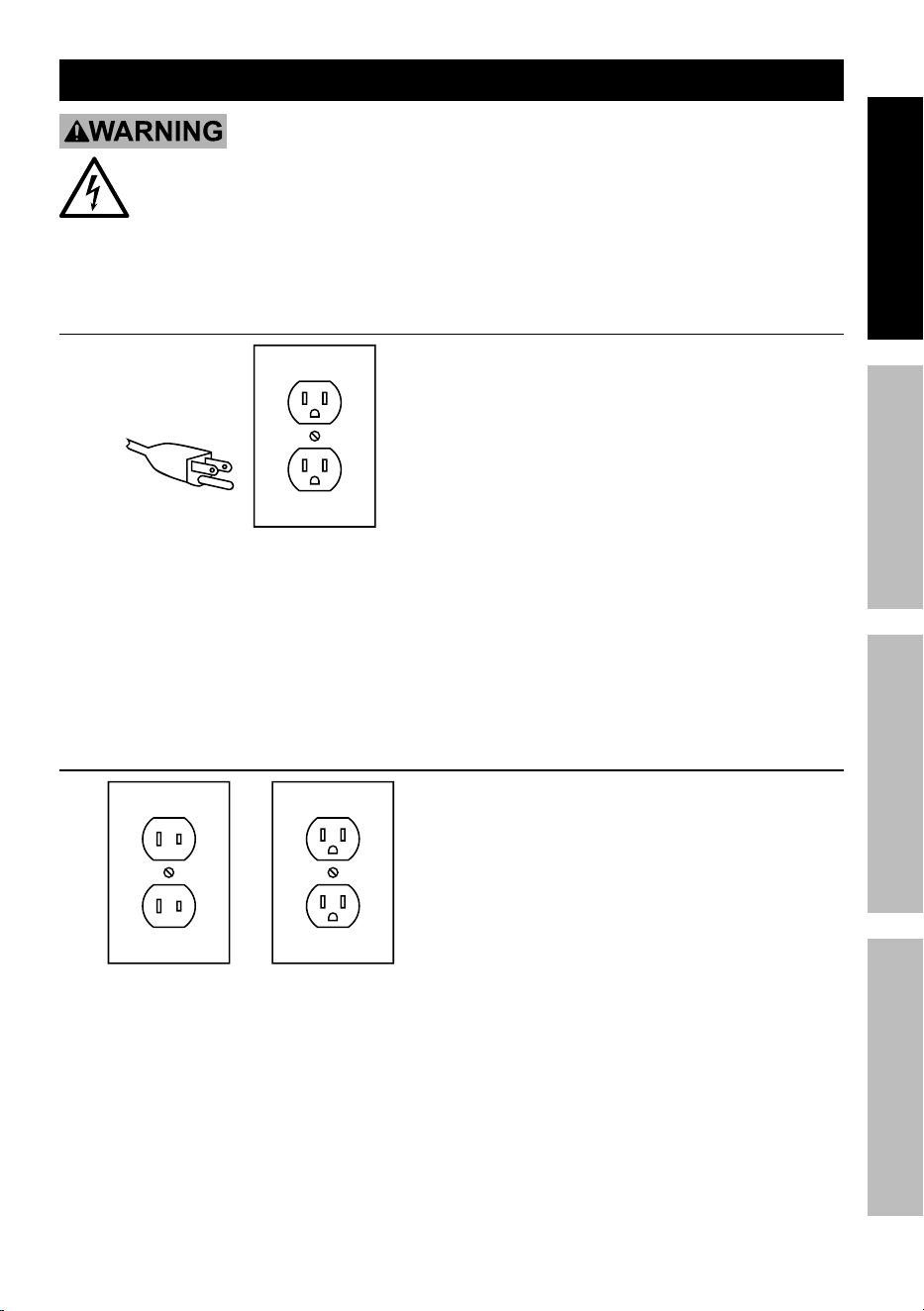
Grounded tools: tools with three prong plugs
3-prong plug and Outlet
1. Tools marked with “Grounding Required” have
a three wire cord and three prong grounding
plug. The plug must be connected to a properly
grounded outlet. If the tool should electrically
malfunction or break down, grounding provides
a low resistance path to carry electricity away
from the user, reducing the risk of electric
shock. (See 3-prong plug and Outlet.)
2. The grounding prong in the plug is connected
through the green wire inside the cord to the
grounding system in the tool. The green wire
in the cord must be the only wire connected
to the tool’s grounding system and must
never be attached to an electrically “live”
terminal. (See 3-prong plug and Outlet.)
3. The tool must be plugged into an appropriate outlet,
properly installed and grounded in accordance
with all codes and ordinances. The plug and outlet
should look like those in the preceding illustration.
(See 3-prong plug and Outlet.)
Double insulated tools: tools with two prong plugs
Outlets for 2-prong plug
1. Tools marked “Double Insulated” do not
require grounding. They have a special
double insulation system which satisfies OSHA
requirements and complies with the applicable
standards of Underwriters Laboratories, Inc.,
the Canadian Standard Association,
and the National Electrical Code.
2. Double insulated tools may be used in either of the
120 volt outlets shown in the preceding illustration.
(See Outlets for 2-prong plug.)
Page 10 For technical questions, please call 1-888-866-5797. Item 57001
SaFety OperatiOn MaintenanceSetup
extension cords
1. Grounded tools require a three
wire extension cord. Double Insulated tools can
use either a two or three wire extension cord.
2. As the distance from the supply outlet increases,
you must use a heavier gauge extension cord.
Using extension cords with inadequately sized wire
causes a serious drop in voltage, resulting in loss
of power and possible tool damage. (See table a.)
3. The smaller the gauge number of the wire, the
greater the capacity of the cord. For example,
a 14 gauge cord can carry a higher current
than a 16 gauge cord. (See table a.)
4. When using more than one extension cord
to make up the total length, make sure
each cord contains at least the minimum
wire size required. (See table a.)
5. If you are using one extension cord for more
than one tool, add the nameplate amperes
and use the sum to determine the required
minimum cord size. (See table a.)
6. If you are using an extension cord outdoors, make
sure it is marked with the suffix “W‑A” (“W” in
Canada) to indicate it is acceptable for outdoor use.
7. Make sure the extension cord is properly wired
and in good electrical condition. Always replace
a damaged extension cord or have it repaired
by a qualified electrician before using it.
8. Protect the extension cords from sharp objects,
excessive heat, and damp or wet areas.
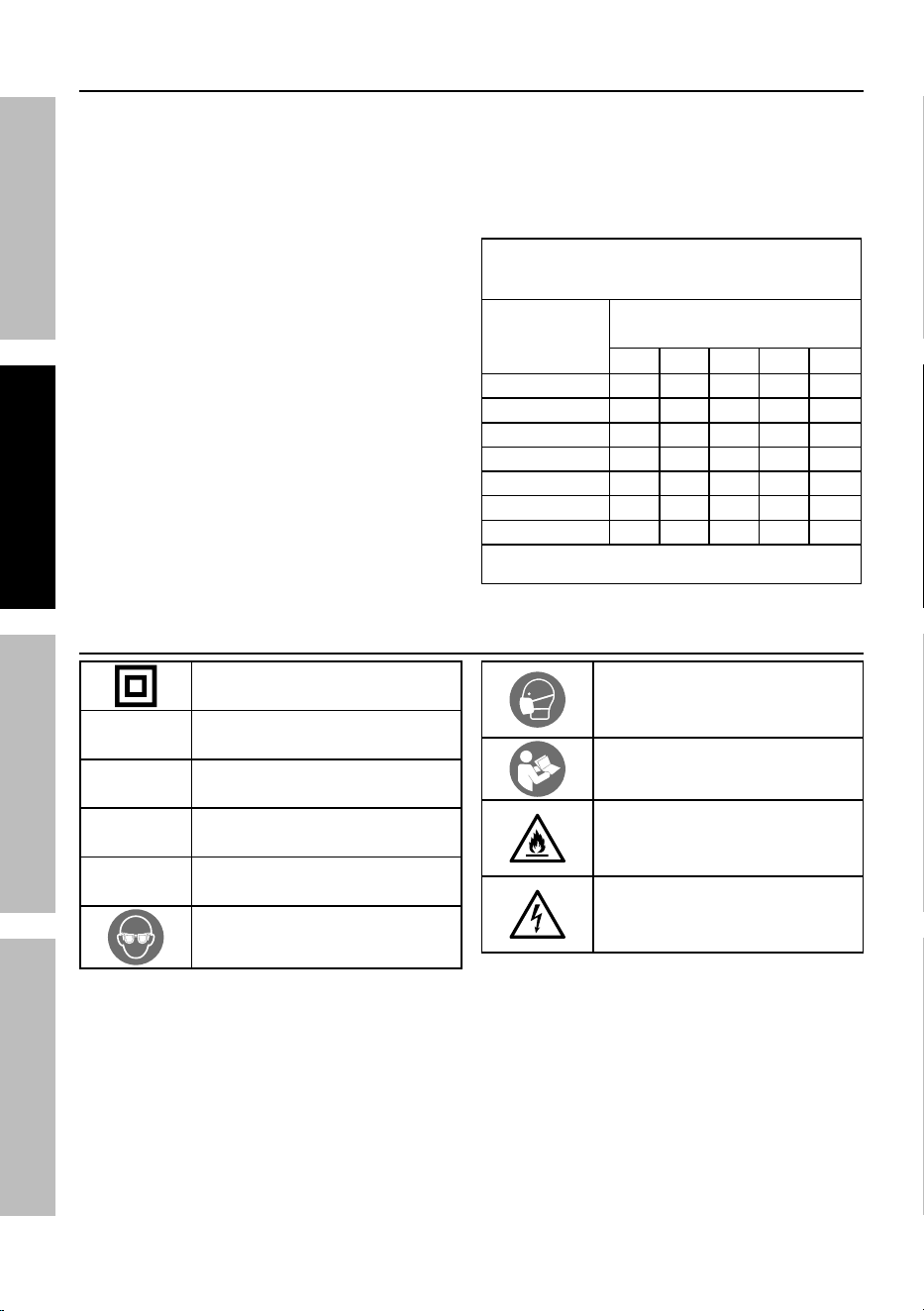
taBLe a: recOMMenDeD MiniMuM
Wire GauGe FOr eXtenSiOn
cOrDS* (120/240 VOLt)
naMepLate
aMpereS
(at full load)
eXtenSiOn cOrD
LenGtH
25´ 50´ 75´ 100´ 150´
0 – 2.0 18 18 18 18 16
2.1 – 3.4 18 18 18 16 14
3.5 – 5.0 18 18 16 14 12
5.1 – 7.0 18 16 14 12 12
7.1 – 12.0 18 14 12 10 ‑
12.1 – 16.0 14 12 10 ‑ ‑
16.1 – 20.0 12 10 ‑ ‑ ‑
* Based on limiting the line voltage drop to five volts at
150% of the rated amperes.
Symbology
Double Insulated
V
Volts
~
Alternating Current
a
Amperes
n
0
xxxx/min.
No Load Revolutions
per Minute (RPM)
WARNING marking concerning Risk
of Eye Injury. Wear ANSI‑approved
safety goggles with side shields.
WARNING marking concerning Risk
of Respiratory Injury. Wear NIOSH‑
approved breathing protection rated
for the hazards in your work area.
Read the manual before
set‑up and/or use.
WARNING marking
concerning Risk of Fire.
Do not cover ventilation ducts.
Keep flammable objects away.
WARNING marking concerning
Risk of Electric Shock.
Properly connect power cord
to appropriate outlet.
Page 11For technical questions, please call 1-888-866-5797.Item 57001
SaFetyOperatiOnMaintenance Setup
Specifications
Electrical Rating 120VAC / 60Hz / .08A
No Load Speed n:4000‑20000/min
Maximum Rated Capacity
(Maximum Accessory Diameter)
Ø25mm (Ø1″)
Maximum Chuck (Collet) Capacity Ø3.2mm (1/8”)
Page 12 For technical questions, please call 1-888-866-5797. Item 57001
SaFety OperatiOn MaintenanceSetup
Setup - Before use:
read the entire iMpOrtant SaFety inFOrMatiOn section at the beginning of this
manual including all text under subheadings therein before set up or use of this product.
tO preVent SeriOuS inJury FrOM acciDentaL OperatiOn:
Make sure that the power Switch is in the off-position and unplug the tool from
its electrical outlet before performing any procedure in this section.
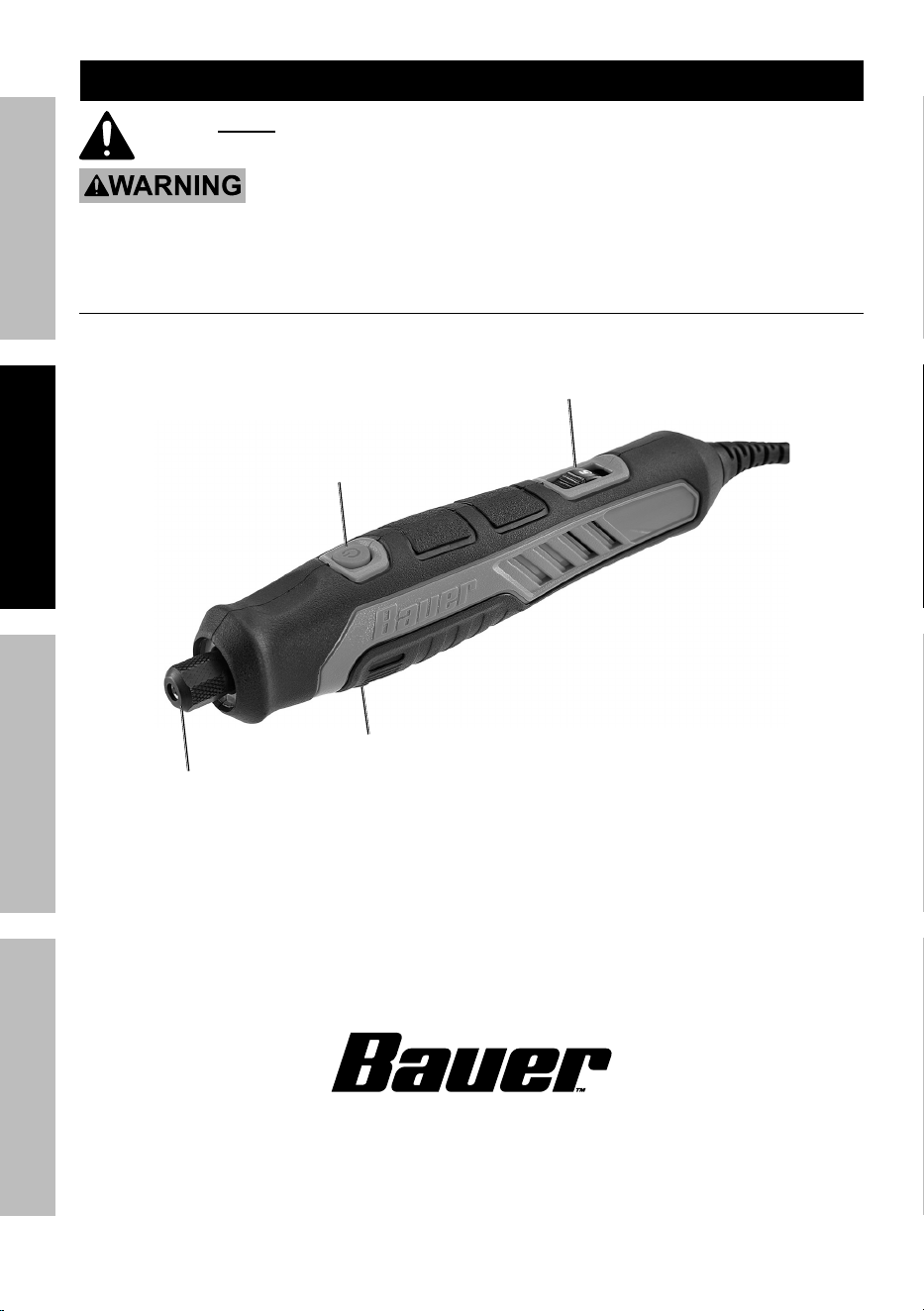
Functions
Variable
Speed Dial
power
Button
Spindle Lock Button
(not shown)
collet
nut
Page 13For technical questions, please call 1-888-866-5797.Item 57001
SaFetyOperatiOnMaintenance Setup
accessories
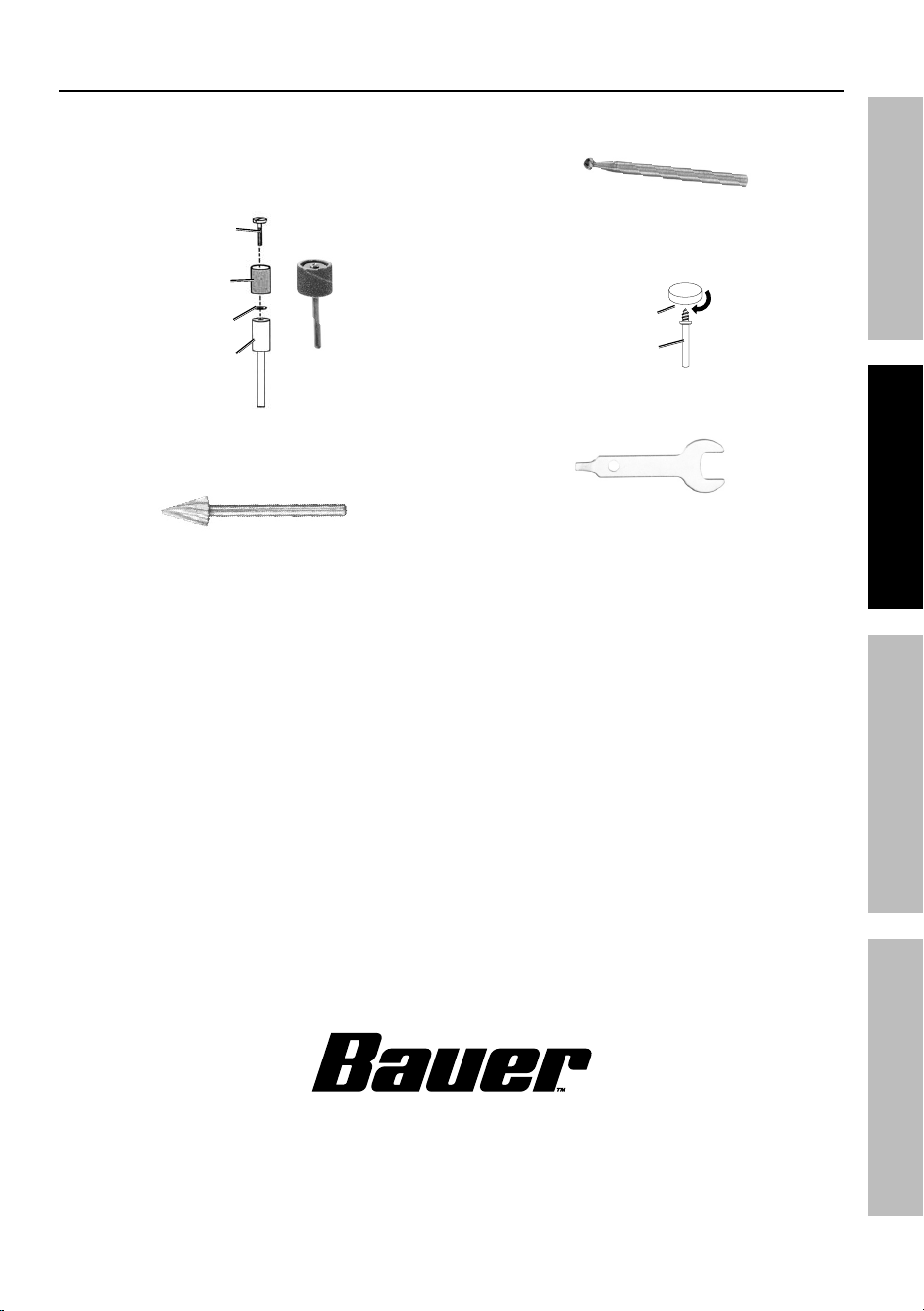
• Sanding Drums ‑ Install sanding sleeves on
drum. Use for smoothing out rough areas. Replace
sleeves as they wear and lose grit. Tighten the
screw on the Mandrel to increase the tension
of the rubber drum to the Sanding drum.
Mandrel
Sanding
Drum
Screw
Washer
• router Bit ‑ Use Router Bit to carve and engrave
wood, laminates, plastics and non‑ferrous metals.
• Diamond coated points ‑ Use for engraving
glass, tile, stone, and other hard materials.
• Buffing Wheels ‑ Use for polishing.
Use Mandrel with shank and threads
on the end for polishing wheels.
Mandrel
Buffing
Wheel
• Wrench ‑ Use Wrench to loosen
or tighten the Collet Nut.
Page 14 For technical questions, please call 1-888-866-5797. Item 57001
SaFety OperatiOn MaintenanceSetup
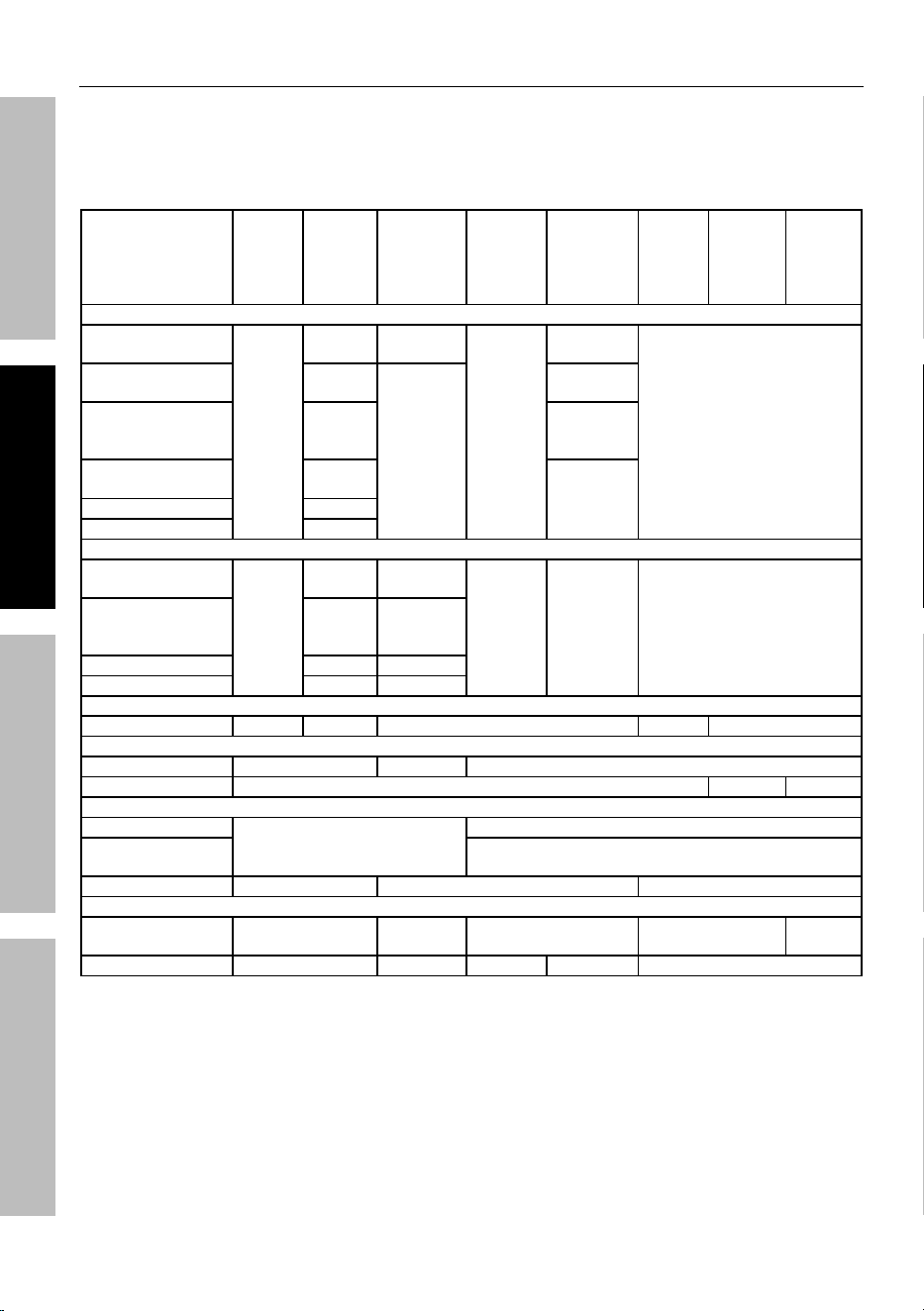
recommended accessory Speeds
When adjusting the Speed Dial, a distinct change in the tool sound will occur at select intervals:
• 1 ‑ 4,500 RPM
• 2 ‑ 7,800 RPM
• 3 ‑ 12,000 RPM
• 4 ‑ 16,000 RPM
• 5 ‑ 20,000 RPM
part Description
Soft
Wood
Hard
Wood
plastics,
Laminates
Steel
(ferrous
metals)
aluminum,
Brass,
(non-
ferrous
metals)
Stone/
Shell
ceramic Glass
carving Burrs
Ø 1/4" Spherical or
Semi‑Spherical
20K
20K 12 - 17K
12 - 17K
18 - 20K
Not Recommended
Ø 5/16" Spherical
or Semi‑Spherical
12 - 17K
9 - 11K
12 - 17K
Ø 1/8" - Ø 3/16"
Spherical, Pointed
or Cylindrical
N/R 20K
Ø 1/4" - Ø 7/32"
Cylindrical
12 - 17K
12 - 17K
Ø 5/16" Cylindrical 20K
Ø 3/8" Cylindrical 18 - 20K
engraving Bits
Ø 1/32" Spherical
or Cylindrical
20K
N/R 18 - 20K
9 - 11K 12 - 17K Not Recommended
Ø 1/16" - Ø 1/32"
Spherical or
Cylindrical
12 - 17K 12 - 17K
Ø 1/32" Cylindrical 20K 18 - 20K
Ø 1/16" Cylindrical 12 - 17K 12 - 17K
Diamond coated points
All Diameters 20K 18 - 20K Not Recommended 20K N/R
cutting Bits
Ø 1/8" Multi-Purpose 12 - 20K 5 - 11K Not Recommended
Tile Bits Not Recommended 20K N/R
polishing accessories
Rubber Points
20K
18 - 20K
Ø 1/2" Felt
Wheel or Bob
12 - 17K
Cloth Wheel Not Recommended 4.5K Not Recommended
Sanding
Ø 1/4" - Ø 1/2"
Drum (All Grits)
5 - 20K 5 - 17K Not Recommended 5 - 20K N/R
Disc 12 - 17K 5 - 8K N/R 5 - 8K Not Recommended

Page 15For technical questions, please call 1-888-866-5797.Item 57001
SaFetyOperatiOnMaintenance Setup
Operating instructions
read the entire iMpOrtant SaFety inFOrMatiOn section at the beginning of this
manual including all text under subheadings therein before set up or use of this product.
tool Set up
tO preVent SeriOuS inJury FrOM acciDentaL OperatiOn:
Make sure that the power Switch is in the off-position and unplug the tool from
its electrical outlet before performing any procedure in this section.
accessory installation
WarninG! tO preVent SeriOuS inJury:
Use only rotary accessories of the correct
shank diameter for the collet. Use only rotary
accessories suitable for the speed of the tool.
WarninG! tO preVent SeriOuS inJury:
Carefully inspect accessories for cracks, chips, or
other damage before installing. Do not use accessories
that have been dropped, cracked, or damaged. The
accessory may shatter causing serious injury.
WarninG! tO preVent SeriOuS inJury: When
changing an accessory immediately after use, be
careful not to touch the accessory. It may be very
hot from use, possibly causing serious injury. Allow
the accessory time to cool before handling it.
1. Press and hold the Spindle Lock Button.
Rotate Collet until shaft is engaged by the lock.
2. Loosen the Collet Nut by turning it
counterclockwise, using the Wrench provided.
3. To insert an accessory: Insert the shank end of
the accessory into the Collet once the Collet Nut is
loose.
To remove an accessory: Pull the
accessory straight out of the Collet
once the Collet Nut is loose.
4. Press and hold Spindle Lock and tighten
Collet Nut securely. Release Spindle Lock.
Workpiece and Work area Set up
1. Designate a work area that is clean and well‑lit.
The work area must not allow access by children
or pets to prevent distraction and injury.
2. Route the power cord along a safe route
to reach the work area without creating a
tripping hazard or exposing the power cord to
possible damage. The power cord must
reach the work area with enough extra length
to allow free movement while working.
3. Secure loose workpieces using a vise or clamps
(not included) to prevent movement while working.
4. There must not be hazardous objects, such
as utility lines or foreign objects, nearby
that will present a hazard while working.
5. You must use personal safety equipment including,
but not limited to, ANSI‑approved eye and hearing
protection, as well as heavy‑duty work gloves.

Page 16 For technical questions, please call 1-888-866-5797. Item 57001
SaFety OperatiOn MaintenanceSetup
General Operating instructions
tO preVent SeriOuS inJury WHiLe in OperatiOn:
use personal protective equipment. always wear eye protection. Wear anSi-approved
safety goggles with side shields. Grip the tool with both hands
1. Select an appropriate accessory
for the job. Install accessory.
2. Start the tool by pushing the Power Button.
3. Use the Variable Speed Dial to increase or
decrease speed. Use a speed appropriate to the
accessory and the material being worked on.
Reference the table in Recommended
Accessory Speeds on page 14.
4. Apply the accessory to the work
material as needed.
5. When finished, stop the tool by pushing
Power Button. Wait for accessory to completely
stop spinning. Remove the accessory.
6. Store tool, parts and accessories in an
indoor dry area out of reach of children.

Page 17For technical questions, please call 1-888-866-5797.Item 57001
SaFetyOperatiOnMaintenance Setup
Maintenance and Servicing
procedures not specifically explained in this manual must
be performed only by a qualified technician.
tO preVent SeriOuS inJury FrOM acciDentaL OperatiOn:
Make sure that the power Switch is in the off-position and unplug the tool from
its electrical outlet before performing any procedure in this section.
tO preVent SeriOuS inJury FrOM tOOL FaiLure:
Do not use damaged equipment. if abnormal noise or vibration occurs,
have the problem corrected before further use.
cleaning, Maintenance, and Lubrication
1. BeFOre eacH uSe, inspect the general
condition of the tool. Check for:
• loose hardware,
• misalignment or binding of moving parts,
• damaged cord/electrical wiring,
• cracked or broken parts, and
• any other condition that may
affect its safe operation.
2. aFter uSe, wipe external surfaces
of the tool with clean cloth.
3. Store tool, parts and accessories inside case
to protect from moisture and humidity. Store in
an indoor dry area out of reach of children.
WarninG! tO preVent SeriOuS inJury: If
the supply cord of this power tool is damaged, it must
be replaced only by a qualified service technician.
Page 18 For technical questions, please call 1-888-866-5797. Item 57001
SaFety OperatiOn MaintenanceSetup
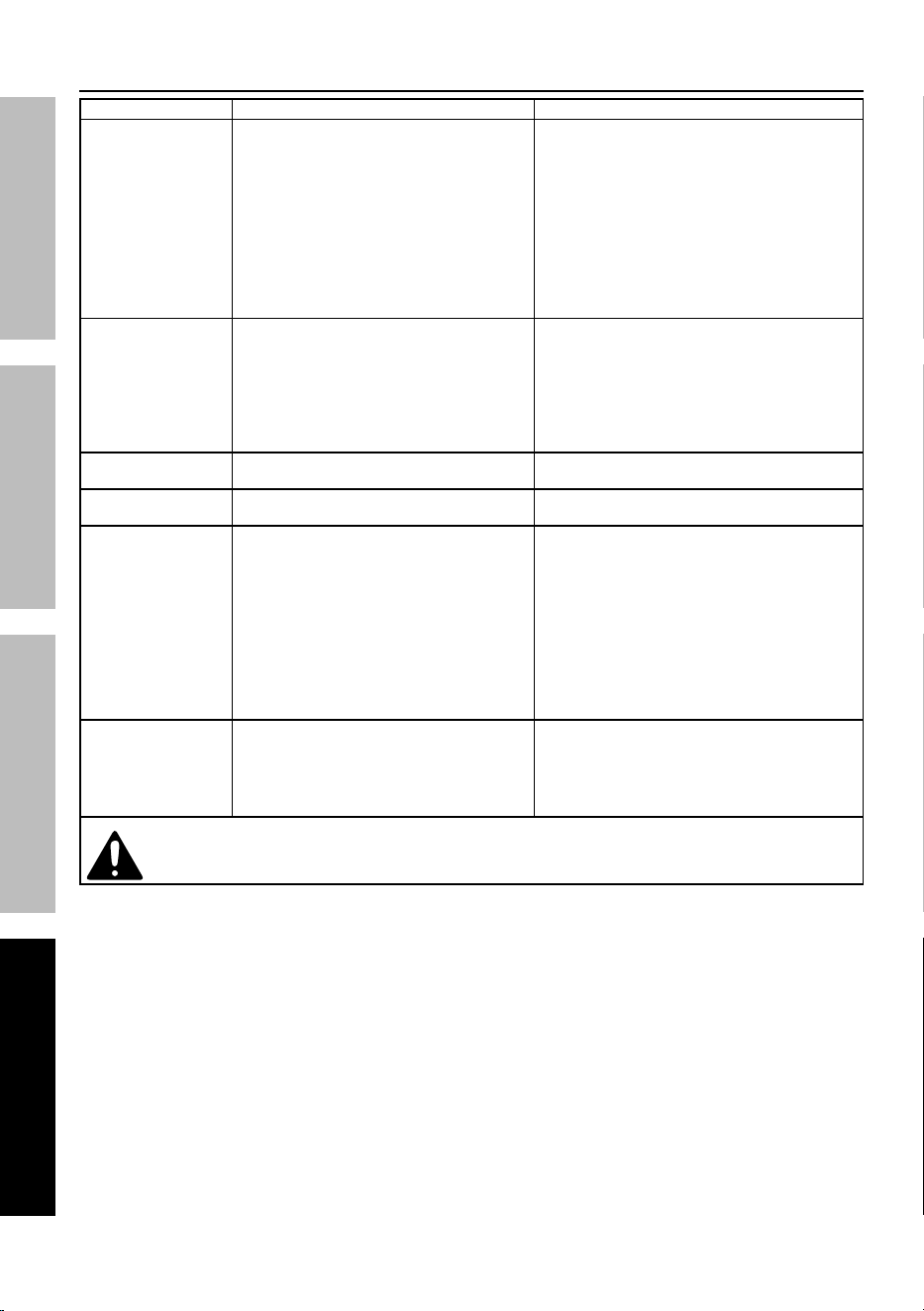
troubleshooting
problem possible causes Likely Solutions
Tool will not start. 1. Cord not connected.
2. No power at outlet.
3. Tool’s thermal reset
breaker tripped (if equipped).
4. Internal damage or wear. (Carbon
brushes or power switch, for example.)
1. Check that cord is plugged in.
2. Check power at outlet.
If outlet is unpowered, turn off tool and
check circuit breaker. If breaker is tripped,
make sure circuit is right capacity for
tool and circuit has no other loads.
3. Turn off tool and allow to cool.
Press reset button on tool.
4. Have technician service tool.
Tool operates slowly. 1. Excess pressure applied to workpiece.
2. Power being reduced by long or small
diameter extension cord.
1. Decrease pressure, allow
tool to do the work.
2. Eliminate use of extension cord.
If an extension cord is needed, use
one with the proper diameter for
its length and load. See Extension
Cords in GROUNDING section.
Performance
decreases over time.
Carbon brushes worn or damaged. Have qualified technician replace brushes.
Excessive noise
or rattling.
Internal damage or wear.
(Carbon brushes or bearings, for example.)
Have technician service tool.
Overheating. 1. Forcing tool to work too fast.
2. Blocked motor housing vents.
3. Motor being strained by long or
small diameter extension cord.
1. Allow tool to work at its own rate.
2. Wear ANSI‑approved safety goggles
and NIOSH‑approved dust mask/
respirator while blowing dust out of
motor using compressed air.
3. Eliminate use of extension cord.
If an extension cord is needed,
use one with the proper diameter for
its length and load. See Extension
Cords in GROUNDING section.
Tool does not
grind, sand or
brush effectively.
1. Accessory loose.
2. Accessory damaged, worn or
wrong type for the material.
1. Confirm accessory arbor is correct
and Outer Flange/Arbor Nut is tight.
2. Check condition and type of disc accessory.
Use only proper type of disc
accessory in good condition.
Follow all safety precautions whenever diagnosing or servicing
the tool. Disconnect power supply before service.

Page 19For technical questions, please call 1-888-866-5797.Item 57001
SaFetyOperatiOnMaintenance Setup
record product’s Serial number Here:
note: If product has no serial number, record month and year of purchase instead.
note: Replacement parts may be available for this item. Visit harborfreight.com/
parts for a list of in stock parts. Reference UPC 193175504180.

26677 agoura road • calabasas, ca 91302 • 1-888-866-5797
Limited 90 Day Warranty
Harbor Freight Tools Co. makes every effort to assure that its products meet high quality and durability
standards, and warrants to the original purchaser that this product is free from defects in materials
and workmanship for the period of 90 days from the date of purchase. This warranty does not apply to
damage due directly or indirectly, to misuse, abuse, negligence or accidents, repairs or alterations outside
our facilities, criminal activity, improper installation, normal wear and tear, or to lack of maintenance.
We shall in no event be liable for death, injuries to persons or property, or for incidental, contingent,
special or consequential damages arising from the use of our product. Some states do not allow the
exclusion or limitation of incidental or consequential damages, so the above limitation of exclusion
may not apply to you. THIS WARRANTY IS EXPRESSLY IN LIEU OF ALL OTHER WARRANTIES,
EXPRESS OR IMPLIED, INCLUDING THE WARRANTIES OF MERCHANTABILITY AND FITNESS.
To take advantage of this warranty, the product or part must be returned to us with transportation charges
prepaid. Proof of purchase date and an explanation of the complaint must accompany the merchandise.
If our inspection verifies the defect, we will either repair or replace the product at our election or we may
elect to refund the purchase price if we cannot readily and quickly provide you with a replacement. We will
return repaired products at our expense, but if we determine there is no defect, or that the defect resulted
from causes not within the scope of our warranty, then you must bear the cost of returning the product.
This warranty gives you specific legal rights and you may also have other rights which vary from state to state.