Schnellstartanleitung
Guide De Démarrage Rapide
Guida Rapida
Guía De Inicio Rápido
Przewodnik Szybkiego Startu
Snelle Startgids
Snabbstartsguide
Panduan Memulai Cepat
QUICK
START
GUIDE

ENGLISH
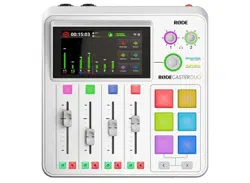
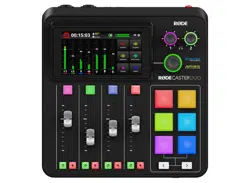
1. Connect the included power supply to your
RØDECaster Duo, press the adjacent red power
button and follow the start-up walkthrough
2. Connect your microphones to the XLR inputs on
the rear and adjust the corresponding faders to
increase or decrease input level
3. Connect your headphones to the 1/4-inch
outputs on the rear and adjust the corresponding
knobs to increase or decrease headphone volume
4. View the online user guide for more information
on how to master your RØDECaster Duo
Download RØDE Central to customise SMART Pads,
transfer recordings, congure settings and update
rmware for your RØDECaster Duo:
rode.com/apps/rode-central
GERMAN
1. Schließen Sie das mitgelieferte Netzteil an
Ihren RØDECaster Duo an, drücken Sie die
benachbarte rote Ein-/Aus-Taste und folgen Sie
dem Start-Assistenten
2. Schließen Sie Ihre Mikrofone an die XLR-
Eingänge auf der Rückseite an und passen
Sie die entsprechenden Regler an, um den
Eingangspegel zu erhöhen oder zu verringern
3. Schließen Sie Ihre Kopfhörer an die 1/4-Zoll-
Ausgänge auf der Rückseite an und passen
Sie die entsprechenden Regler an, um die
Kopfhörerlautstärke zu erhöhen oder zu
verringern
4. Sehen Sie sich den Online-Benutzerleitfaden für
weitere Informationen zur optimalen Nutzung
Ihres RØDECaster Duo an
Laden Sie RØDE Central herunter, um SMART
Pads anzupassen, Aufnahmen zu übertragen,
Einstellungen zu kongurieren und die Firmware für
Ihren RØDECaster Duo zu aktualisieren:
rode.com/apps/rode-central
FRENCH
1. Branchez l’alimentation fournie à votre
RØDECaster Duo, appuyez sur le bouton
d’alimentation rouge adjacent et suivez le guide
de démarrage
2. Connectez vos microphones aux entrées XLR à
l’arrière et ajustez les faders correspondants pour
augmenter ou diminuer le niveau d’entrée
3. Connectez vos écouteurs aux sorties 1/4 pouce
à l’arrière et ajustez les boutons correspondants
pour augmenter ou diminuer le volume des
écouteurs
4. Consultez le guide utilisateur en ligne pour
plus d’informations sur la maîtrise de votre
RØDECaster Duo
Téléchargez RØDE Central pour personnaliser
les SMART Pads, transférer des enregistrements,
congurer des paramètres et mettre à jour le
rmware de votre RØDECaster Duo:
rode.com/apps/rode-central

SPANISH
1. Conecta la fuente de alimentación incluida
a tu RØDECaster Duo, presiona el botón de
encendido rojo adyacente y sigue el asistente
de inicio
2. Conecta tus micrófonos a las entradas XLR en la
parte trasera y ajusta los faders correspondientes
para aumentar o disminuir el nivel de entrada
3. Conecta tus auriculares a las salidas de 1/4 de
pulgada en la parte trasera y ajusta los botones
correspondientes para aumentar o disminuir el
volumen de los auriculares
4. Consulta la guía de usuario en línea para
obtener más información sobre cómo dominar tu
RØDECaster Duo
Descarga RØDE Central para personalizar SMART
Pads, transferir grabaciones, congurar ajustes y
actualizar el rmware de tu RØDECaster Duo:
rode.com/apps/rode-central
ITALIAN
1. Collega l’alimentatore incluso al tuo RØDECaster
Duo, premi il pulsante di accensione rosso
adiacente e segui la procedura di avvio
2. Collega i tuoi microfoni agli ingressi XLR sul retro
e regola i fader corrispondenti per aumentare o
diminuire il livello di ingresso
3. Collega le tue cufe alle uscite da 1/4 di pollice
sul retro e regola le manopole corrispondenti per
aumentare o diminuire il volume delle cufe
4. Consulta la guida utente online per ulteriori
informazioni su come utilizzare al meglio il tuo
RØDECaster Duo
Scarica RØDE Central per personalizzare i
SMART Pads, trasferire registrazioni, congurare
le impostazioni e aggiornare il rmware del tuo
RØDECaster Duo: rode.com/apps/rode-central
POLISH
1. Podłącz dołączony zasilacz do swojego
RØDECaster Duo, naciśnij przylegający
czerwony przycisk zasilania i postępuj zgodnie z
przewodnikiem uruchomieniowym
2. Podłącz swoje mikrofony do wejść XLR z tyłu i
dostosuj odpowiednie suwaki, aby zwiększyć lub
zmniejszyć poziom wejścia
3. Podłącz słuchawki do wyjść 1/4 cala z tyłu i
dostosuj odpowiednie pokrętła, aby zwiększyć lub
zmniejszyć głośność słuchawek
4. Zapoznaj się z przewodnikiem użytkownika
online, aby uzyskać więcej informacji na temat
opanowania obsługi Twojego RØDECaster Duo
Pobierz RØDE Central, aby dostosować SMART
Pads, transferować nagrania, kongurować
ustawienia i aktualizować rmware Twojego
RØDECaster Duo: rode.com/apps/rode-central
DUTCH
1. Sluit de meegeleverde voeding aan op je
RØDECaster Duo, druk op de aangrenzende rode

aan/uit-knop en volg de opstartinstructies
2. Sluit je microfoons aan op de XLR-ingangen
aan de achterkant en pas de overeenkomstige
faders aan om het invoerniveau te verhogen of
te verlagen
3. Sluit je hoofdtelefoon aan op de 1/4-inch
uitgangen aan de achterkant en pas de
bijbehorende knoppen aan om het volume van
de hoofdtelefoon te verhogen of te verlagen
4. Bekijk de online gebruikershandleiding voor meer
informatie over hoe je je RØDECaster Duo kunt
beheersen
Download RØDE Central om SMART Pads aan
te passen, opnames over te zetten, instellingen
te congureren en rmware bij te werken voor je
RØDECaster Duo: rode.com/apps/rode-central
SWEDISH
1. Anslut den medföljande strömförsörjningen till
din RØDECaster Duo, tryck på den intilliggande
röda strömbrytaren och följ uppstarts-guiden
2. Anslut dina mikrofoner till XLR-ingångarna på
baksidan och justera motsvarande reglage för att
öka eller minska ingångsnivån
3. Anslut dina hörlurar till 1/4-tums utgångarna på
baksidan och justera motsvarande rattar för att
öka eller minska volymen på hörlurarna
4. Se den online-användarhandboken för mer
information om hur du hanterar din RØDECaster
Duo
Ladda ner RØDE Central för att anpassa SMART
Pads, överföra inspelningar, kongurera inställningar
och uppdatera rmware för din RØDECaster Duo:
rode.com/apps/rode-central
INDONESIAN
1. Hubungkan adaptor daya yang disertakan ke
RØDECaster Duo Anda, tekan tombol daya
merah yang berdekatan, dan ikuti langkah awal
saat menyala.
2. Sambungkan mikrofon Anda ke input XLR di
bagian belakang dan sesuaikan fader yang
sesuai untuk menambah atau mengurangi level
masukan.
3. Sambungkan headphone Anda ke output 1/4
inci di bagian belakang dan sesuaikan knob yang
sesuai untuk menambah atau mengurangi volume
headphone.
4. Lihat panduan pengguna online untuk informasi
lebih lanjut tentang cara menguasai RØDECaster
Duo Anda.
Unduh RØDE Central untuk menyesuaikan SMART
Pads, mentransfer rekaman, mengongurasi
pengaturan, dan memperbarui rmware untuk
RØDECaster Duo Anda di rode.com/apps/rode-
central.

NORTH AMERICA
The RØDECaster DUO must not be co-located
or operated in conjunction with any other
antenna or transmitter.
The device complies with part 15 of the FCC
rules. Operation is subject to the following two
conditions:
(1) This device may not cause harmful
interference, and
(2) This device must accept any interference
received, including interference that may cause
undesired operation.
This equipment has been tested and found
to comply with the limits for a Class B digital
device, pursuant to part 15 of the FCC rules.
These limits are designed to provide reasonable
protection against harmful interference in
a residential installation. This equipment
generates, uses and can radiate radio frequency
energy and, if not installed and used in
accordance with the instructions, may cause
harmful interference to radio communications.
However, there is no guarantee that interference
will not occur in a particular installation. If this
equipment does cause harmful interference
to radio or television reception, which can be
determined by turning the equipment off and
on, the user is encouraged to try to correct the
interference by one of more of the following
measures:
1. Reorient or relocate the receiving antenna
2. Increase the separation between the
equipment and receiver
3. Connect the equipment into an outlet on a
circuit different from that to which the receiver is
connected
4. Consult the dealer or an experienced radio/TV
technician for help
This equipment complies with FCC radiation
exposure limits set forth in an uncontrolled
environment.
Changes or modications not expressly
approved by RØDE could void the user’s
authority to operate the equipment.
For USA: The frequency stability of all
transmission frequencies of U-NII-1, U-NII 2A,
U- NII 2C and U-NII-3 meets the requirements of
47 CFR FCC Part15.407(g), and the manufacturer
declares that their transmission is maintained at
Band U-NII-1, U-NII 2A, U-NII 2C and U-NII-3.
For Canada: The frequency stability of all
transmission frequencies of U-NII-1, U-NII
2A, U- NII 2C and U-NII-3 meets the 47 CFR
FCC Part15.407(g) requirements, and the
manufacturer states that their transmissions
remain within the U-NII-1, U-NII 2A, U-NII 2C

and U-NII-3 bands.
Pour le Canada: La stabilité de fréquence de
toutes les fréquences de transmission de U- NII-
1, U-NII 2A, U-NII 2C et U-NII-3 est conforme
aux exigences 47 CFR FCC Part15.407(g), et le
fabricant déclare que leurs transmissions restent
dans les bandes U-NII-1, U-NII 2A, U-NII 2C et
U- NII-3.
CAN ICES-3 (B) / NMB-3 (B)
This Class B digital apparatus complies with
Canadian ICES-003
(Cet appareil numérique de la Classe B
conforme à la norme NMB-003 du Canada)
This device contains license-exempt
transmitter(s)/receiver(s) that comply with
Innovation, Science and Economic Development
Canada’s license-exempt RSS(s). Operation is
subject to the following two conditions:
1. This device may not cause interference
2. This device must accept any interference,
including interference that may cause undesired
operation of the device
L’émetteur/récepteur exempt de licence contenu
dans le présent appareil est conforme aux
CNR d’Innovation, Sciences et Développement
économique Canada applicables aux appareils
radio exempts de licence. L’exploitation est
autorisée aux deux conditions suivantes:
(1) L’appareil ne doit pas produire de brouillage
(2) L’appareil doit accepter tout brouillage
radioélectrique subi, même si le brouillage
est susceptible d’en compromettre le
fonctionnement
RADIATION EXPOSURE STATEMENT
This equipment complies with FCC radiation
exposure limits set forth for an uncontrolled
environment. This equipment shall be installed
and operated with minimum distance 20cm
between the radiator & body.
Radio Frequency Exposure Statement for
Canada
The device has been evaluated to meet general
RF exposure requirements. The device can
be used in mobile exposure conditions. The
minimum separation distance is 20cm
Déclaration d’exposition aux radiofréquences
pour IC
L’appareil a été évalué pour répondre aux
exigences générales en matière d’exposition
aux RF. L’appareil peut être utilisé dans des
conditions d’exposition mobiles. La distance de
séparation minimale est de 20cm.
Operation of this device is restricted to indoor
use only. (W52 band)
Le fonctionnement de cet appareil est limité à
une utilisation en intérieur uniquement. (W52
band)
EU COMPLIANCE STATEMENT
Hereby, RØDE Microphones declares that the
radio equipment type RØDECaster DUO is in
compliance with Directive 2014/53/EU.
The full text of the EU declaration of conformity
is available at the following internet address:
https://info.rode.com/rodecaster-duo
For details of EU representative go to
http://en.rode.com/distributors
EU - KONFORMITÄTSERKLÄRUNG
RØDE Microphones erklärt hiermit, dass der
Funkanlagentyp RØDECaster DUO der Richtlinie
2014/53/EU (FuA) entspricht.
Der vollständige Text der EU-
Konformitätserklärung ist unter der folgenden
Internetadresse verfügbar:
https://info.rode.com/rodecaster-duo
Einzelheiten zur EU-Vertretung nden Sie unter
http://en.rode.com/distributors
CAUTION:
The RØDECaster Duo has been designed to be
used with the provided power supply, as use the
provided power supply only.
Stop using the power supply unit and any
cables if:
1. There is any damage to the charging port,
power connector or power cord
2. The power supply unit is exposed to excessive
moisture, or liquids is spilled into the power
supply unit
3. The power supply unit enclosure is broken
Operating Frequency
Range
The maximum RF
Output Power
Bluetooth 2402-2480 MHz 3.68 dBm (BR/EDR)
4.59 dBm (BLE) EIRP
WiFi 2412-2472 MHz 15.99 dBm EIRP
WiFi 5150-5250 MHz 16.71 dBm EIRP
WiFi 5250-5350 MHz 16.71 dBm EIRP
WiFi 5470-5725 MHz 16.71 dBm EIRP
WiFi 5725-5850 MHz 14 dBm EIRP
2.4G SRD 2402-2480 MHz 1.19 dBm EIRP

POWER SUPPLY UNIT SPECIFICATIONS:
Model Name: YDS-PD030A
Frequency: 50-60 Hz
Line Voltage: 100-240 Vac
Output Ratings: 20Vdc 1.5A; 15Vdc 2.0A;
12Vdc 2.5A; 9Vdc 3A; 5Vdc 3A
NCC COMPLIANCE NOTICE
取得審驗證明之低功率射頻器材,非經核准,公司、
商號或使用者均不得擅自變更頻率、加大功率或變
更原設計之特性及功能。低功率射頻器材之使用不
得影響飛航安全及干擾合法通信;經發現有干擾現
象時,應立即停用,並改善至無干擾時方得繼續使
用。前述合法通信,指依電信管理法規定作業之無
線電通信。低功率射頻器材須忍受合法通信或工
業、科學及醫療用電波輻射性電機設備之干擾 。
應避免影響附近雷達系統之操作 。
高增益指向性天線只得應用於固定式點對點系統 。
Blank Page
Leere Seite
Page Blanche
Pagina Vuota
Pa’gina en Blanco
Pusta Strona
Lege Pagina
Tom Sida
Halaman Kosong
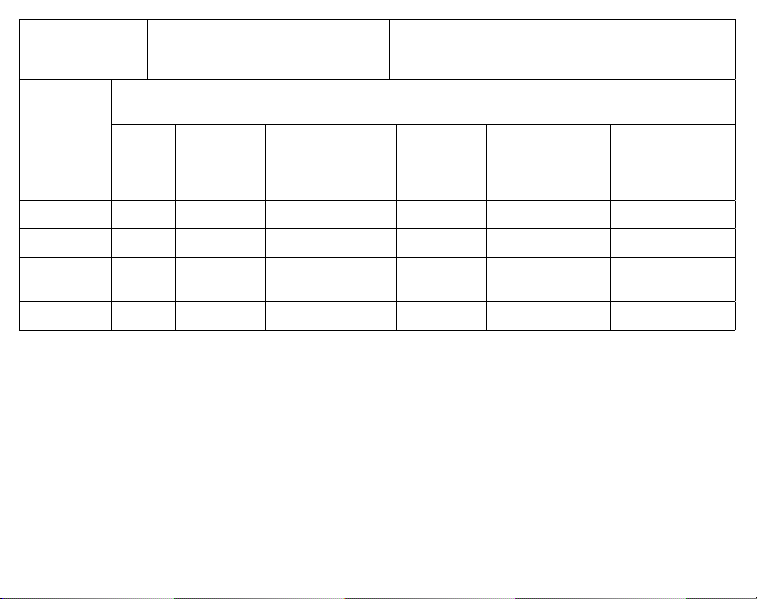
設備名稱:
Equipment name
播客工作站型號(型式): RØDECASTER DUO
Type designation (Type)
單元Unit
限用物質及其化學符號
Restricted substances and its chemical symbols
鉛Lead
(Pb)
汞 Mercury
(Hg)
鎘 Cadmium
(Cd)
六價鉻
Hexavalent
chromium
(Cr+6 )
多溴聯苯
Polybrominated
biphenyls (PBB)
多溴二苯醚
Polybrominated
diphenyl ethers
(PBDE)
外殼○○○○○○
線材○○○○○○
印刷電路板
(含插件)
○○○○○○
標籤○○○○○○
備考1.〝超出0.1 wt %〞及〝超出0.01 wt %〞係指限用物質之
百分比含量超出百分比含量基準值。
Note 1:“Exceeding 0.1 wt %” and “exceeding 0.01 wt
%” indicate that the percentage content of the restrict-
ed substance exceeds the reference percentage value
of presence condition.
備考2.〝○ 〞係指該項限用物質之百分比含量未超出百分比
含量基準值。
Note 2:“○” indicates that the percentage content of
the restricted substance does not exceed the percent-
age of reference value of presence.
備考3.〝-〞係指該項限用物質為排除項目。
Note 3:The “-” indicates that the restricted substance
corresponds to the exemption.
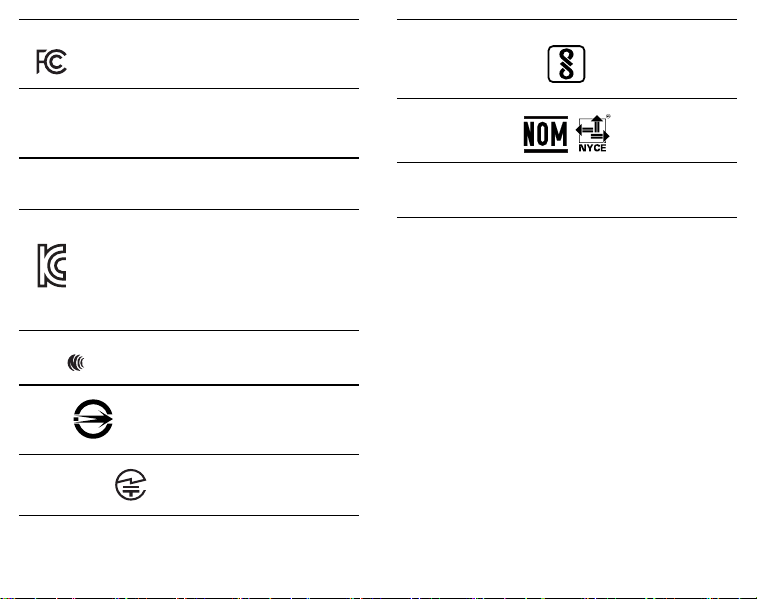
USA
FCC ID: 2AEAN-RCDUO
CANADA
IC: 20091-RCDUO
CAN: ICES-3 (B) / NMB-3 (B)
NEW ZEALAND
R-NZ
SOUTH KOREA
ID: R-R-R72-RCDUO
Company Name: RØDE Microphones
Model: RØDECaster Duo
Country of Origin: Australia
NCC
CCAJ23LP14E0T9
BSMI
D39882
RoHS
JAPAN
210-211103
INDIA
MEXICO
POWER
9Vdc 3A
IS 13252(PART 1): 2010/
IEC 60950-1: 2005
R-41263699
RØDE Microphones:
107 Carnarvon St, Silverwater NSW 2128, Australia
Authorised UK Representative:
RØDE UK, Unit A, 23-25 Sunbeam Rd, London
NW10 6JP, United Kingdom
Authorised EU Representative:
RØDE EU, Neukirchner Str. 18, 65510 Hünstetten,
Germany
To prevent possible hearing
damage, do not listen at high
volume levels for long periods.
SCAN FOR MORE INFO
View the user guide to learn more
Sehen Sie sich das Benutzerhandbuch an,
um mehr zu erfahren
Consultez le guide de l’utilisateur pour en savoir plus
Consulta la guida per l’utente per saperne di più
Consulte la guía del usuario para
obtener más información
Zapoznaj się z przewodnikiem użytkownika,
aby dowiedzieć się więcej
Bekijk de gebruikershandleiding voor meer informatie
Se användarhandboken för att lära dig mer
Lihat panduan pengguna untuk mempelajari lebih lanju
t

Blank Page
Leere Seite
Page Blanche
Pagina Vuota
Pa’gina en Blanco
Pusta Strona
Lege Pagina
Tom Sida
Halaman Kosong
Blank Page
Leere Seite
Page Blanche
Pagina Vuota
Pa’gina en Blanco
Pusta Strona
Lege Pagina
Tom Sida
Halaman Kosong

rode.com
0927-0840-03-01