Installation Guide
Quality, Design and Innovation
home.liebherr.com/fridge-manuals
Contents
1 General safety instructions.......................... 2
2 Setup conditions........................................... 3
2.1 Space.................................................................... 3
2.2 Setting up multiple appliances......................... 3
2.3 Electrical connection.......................................... 4
3 Appliance dimensions................................... 4
4 Recess dimensions........................................ 5
4.1 Internal dimensions............................................ 5
5 Ventilation requirements.............................. 6
6 Custom panel weights.................................. 6
6.1 Weight................................................................... 6
7 Transporting the appliance........................... 6
8 Unpacking the appliance.............................. 6
9 Setting up the appliance............................... 6
9.1 After setup........................................................... 7
10 Disposal of packaging................................... 7
11 Explanatory symbols used............................ 7
12 **** freezer compartment door.................... 8
12.1 Moving the door hinge........................................ 8
13 Reversing the door........................................ 8
14 Water connection*........................................ 11
15 Connecting the water supply*...................... 11
16 Fit the appliance into the recess.................. 12
17 Cabinet fronts............................................... 20
17.1 Dimensions........................................................... 20
17.2 Mounting the cabinet front(s)........................... 21
17.3 Setting the clearance to avoid collision.......... 21
18 Water tank..................................................... 22
18.1 Inserting the water tank.................................... 22
19 Water filter.................................................... 22
19.1 Installing the water filter................................... 22
20 Connecting the appliance............................. 22
The manufacturer is constantly working to improve all
types and models. Ther
efore, please be aware that we
reserve the right to make changes to the shape, equip‐
ment and technology.
Symbol Explanation
Read instructions
Please r
ead the information in these
instructions carefully to understand all of
the benefits of your new appliance.
Check appliance
Check all parts f
or transport damage. If you
have any complaints, please contact your
agent or customer service.
Symbol Explanation
Differences
These ins
tructions apply to a range of
models, so there may be differences.
Sections that apply to certain models only
are indicated by an asterisk (*).
Instructions and results
Ins
tructions are marked with a
.
R
esults are marked with a
.
Videos
Videos about the appliances ar
e available
on the YouTube channel of Liebherr-Hausg‐
eräte.
1 General safety instructions
-
Please k
eep this assembly manual in a safe
place so you can refer back to it at any time.
-
If you pass the appliance on, please hand
this assembly manual to the new owner.
-
Read this assembly manual before installa‐
tion and use in order to use the appliance
safely and correctly. Follow the instructions,
safety instructions and warning messages
included at all times. They are important for
ensuring you can operate and install the
appliance safely and without any problems.
-
First read the general safety instructions in
the “General safety instructions” section of
the operating instructions, which accom‐
pany these installation instructions, and
follow them. If you cannot find the oper‐
ating instructions, you can download the
operating instructions from the internet by
entering the service number at
home.liebherr.com/fridge-manuals. The
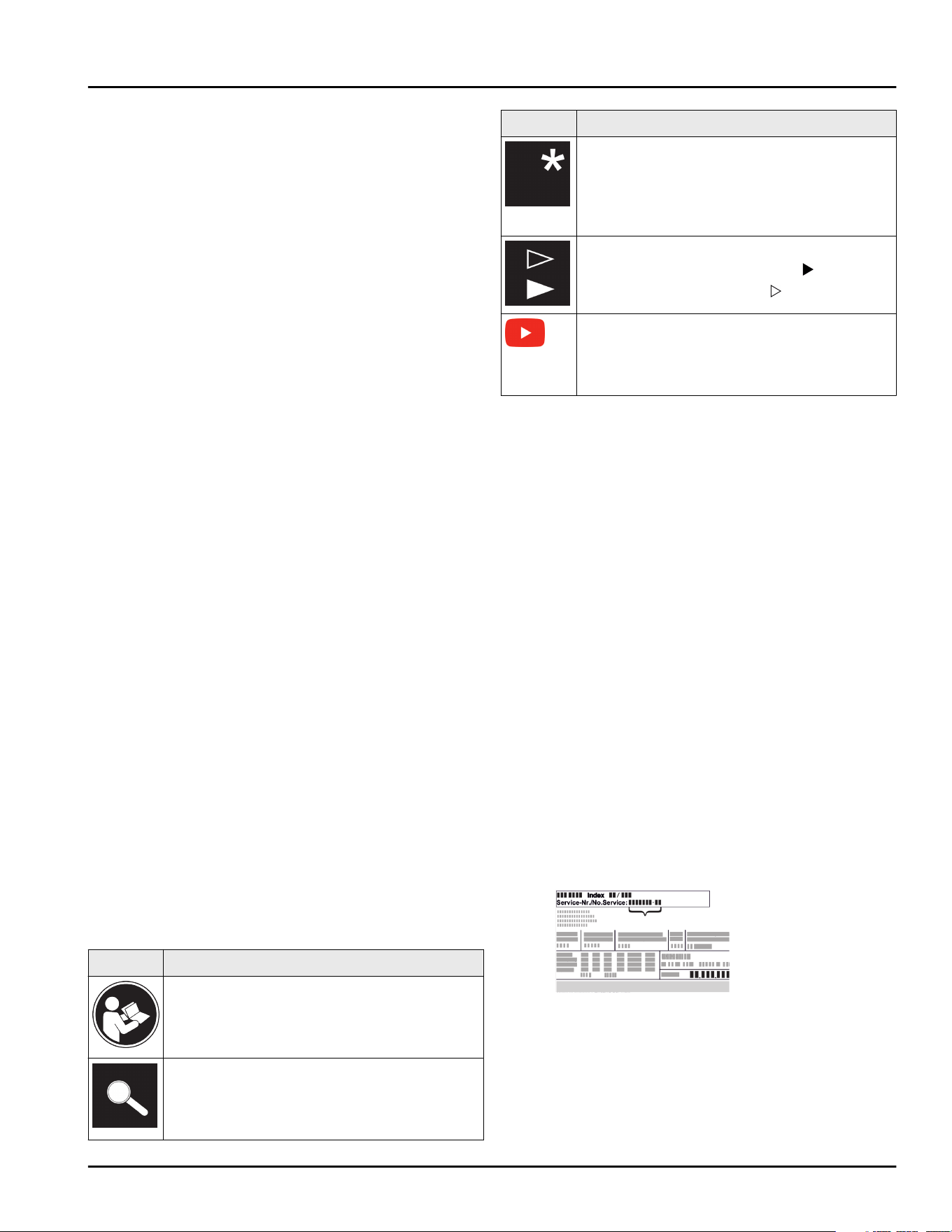
service number can be found on the serial
tag:
-
Observ
e the warning messages and other
detailed information in the other sections
when installing the appliance:
General safety instructions
2 * Depending on model and options
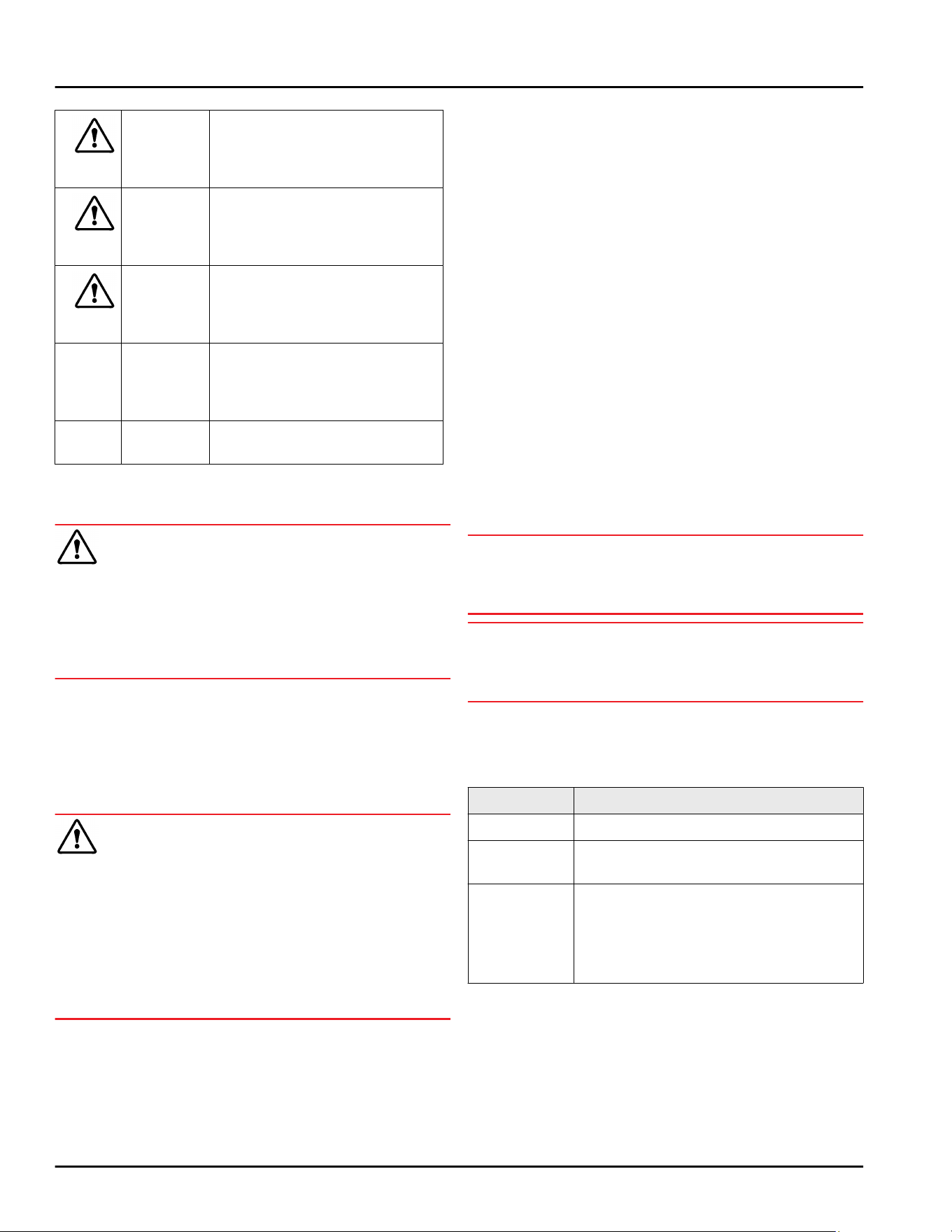
DANGER indicates a hazardous situa‐
tion, which if no
t av
oided, will
result in death or serious
injury.
WARNING indicates a hazardous situa‐
tion, which if not av
oided,
could result in death or serious
injury.
CAUTION indicates a hazardous situa‐
tion, which if not avoided, will
result in minor or moderate
injury.
NOTICE indicates a hazardous situa‐
tion, which if not av
oided,
could result in damage to prop‐
erty.
Note indicates useful advice and
tips.
2 Setup conditions
WARNING
Risk of fire due to moisture!
If live parts or the power cor
d get wet, this can cause a
short circuit.
u
The appliance is designed for use in enclosed
spaces. Do not operate the appliance in open space
or in damp areas or where there is spray.
Normal use
-
Only se
t up and use the appliance in enclosed
spaces.
-
Only use once installed.
2.1 Space
WARNING
Leaking refrigerant and oil!
Fire. The r
efrigerant contained within the appliance is
environmentally friendly, but flammable. The oil
contained within the appliance is flammable. Escaping
refrigerant and oil can ignite if they are of high enough
concentration and are exposed to an external heat
source.
u
Do not damage the pipelines of the coolant circuit
and the compressor.
-
If the appliance is installed in a very damp environ‐
ment condensate water may form on the outside of
the appliance.
Always make sure the installation area is well venti‐
lated. .
-
The more refrigerant there is in the appliance, the
larger the space it is installed in must be. If the
space is too small, any leak may create a flammable
mixture of gas and air. For every 8 g (0.02 lb) of
refrigerant the size of the installation space must be
at least 1 m
3
(35.5 ft
3
). Specifications on the
refrigerant in the appliance can be found on the
serial tag plate inside the appliance.
2.1.1 Installation surface
-
The floor of the installation site must be horizontal
and level.
-
If the floor is not completely even, level the cabinet
with supports.
2.1.2 Installation position
-
Do not install the appliance in direct sunlight or next
to an oven, heater, or similar heat source.
-
Only install the appliance in solid cabinets.
2.2 Setting up multiple appliances
NOTICE
Risk of damage caused by water condensate!
u
Do not install this device directly beside another
fridge/freezer compartment.
NOTICE
Risk of damage caused by water condensate!
u
Do not s
tack the appliance directly on top of
another.
These appliances are designed for different types of
installation. Onl
y combine appliances if the appliances
are designed for this. The following table shows the
installation options by model:
Setup type Model
Single All models
Side-by-Side
(SBS)
Model that start with S....
Stacked Models with a maximum recess height
o
f 880 mm
(34.64 in) and with a heated
cover can be “stacked”.
Top appliance: to the max. recess
height of 140 mm (5.51 in)
Setup conditions
* Depending on model and options 3
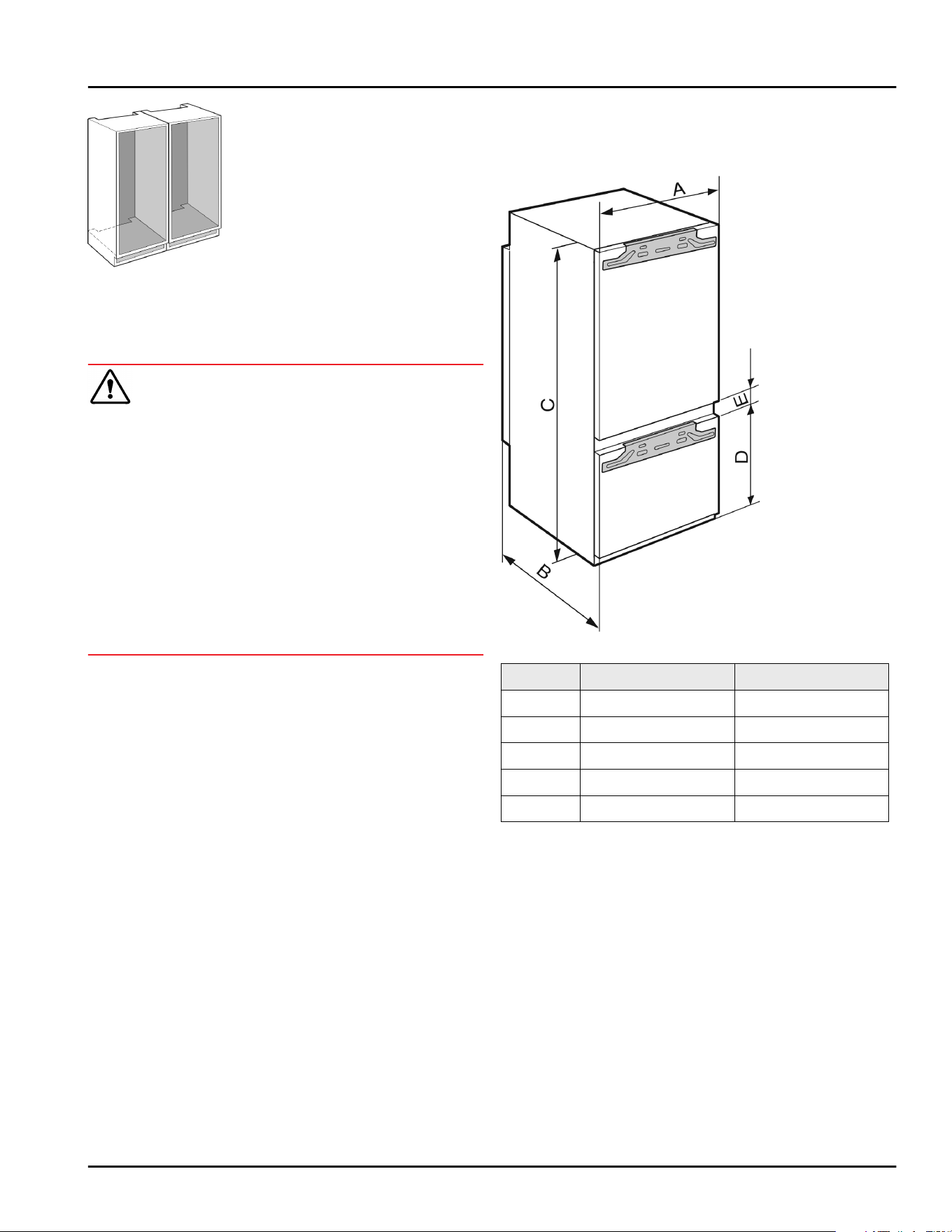
Fig. 1
Ins
tall each appliance into its own recess.
2.3 Electrical connection
WARNING
Danger of fire due to incorrect positioning!
If the power suppl
y cable or plug touches the back of
the appliance, the vibration can damage the power
supply cable or the plug resulting in a short circuit.
u
Make sure the power supply cable is not trapped
under the appliance when you position the appli‐
ance.
u
Install the appliance so that it does not touch any
plugs or power cables.
u
Do not connect any appliances to sockets in the area
of the back of the appliance.
u
Do not place and operate power strips/power
distributors and other electronic devices (such as
halogen transformers) at the back of the appliances.
3 Appliance dimensions
Fig. 2
in. mm
A 22 559
B 21 1/2 546
C 69 11/16 1770
D 27 3/8 695
E 5/8 15
Appliance dimensions
4 * Depending on model and options
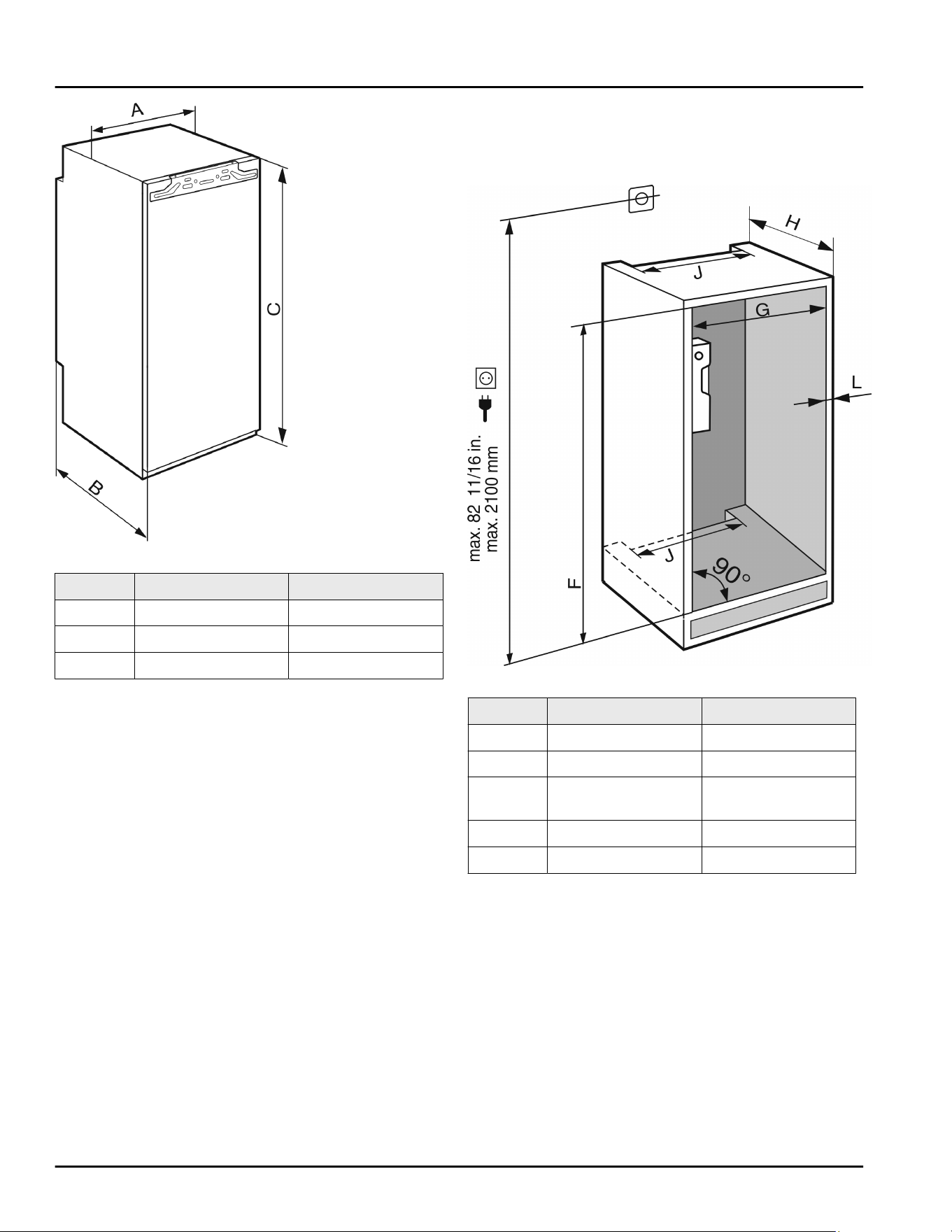
Fig. 3
in. mm
A 22 559
B 21 1/2 546
C 69 11/16 1770
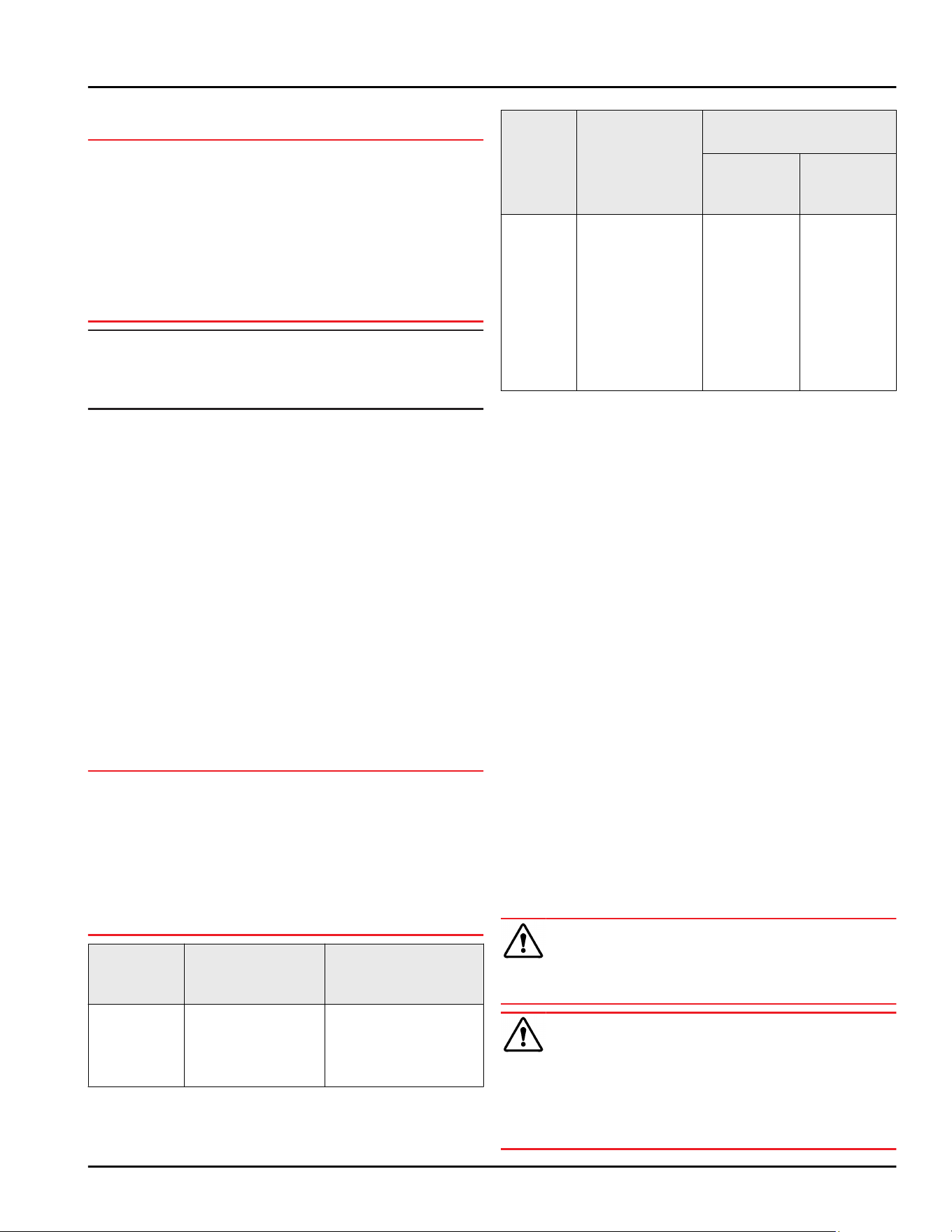
4 Recess dimensions
4.1
Internal dimensions
Fig. 4
in. mm
F 69 3/4 — 70 3/8 1772 — 1788
G 22 — 22 3/4 560 — 578
H min. 21 5/8, recom‐
mended 22
min. 550, recom‐
mended 560
J min. 19 11/16 min. 500
L max. 3/4 max. 19
The
specified energy consumption was determined
with a kitchen unit depth of 560 mm (22 in). The
appliance will work properly at a kitchen unit depth of
550 mm (21 5/8 in), but with a slightly higher
energy consumption.
u
Check the wall thickness of adjacent cabinets: It
must be min. 16 mm (5/8 in).
u
Only install
the appliance in solid, fixed kitchen cabi‐
nets. Ensure that the cabinets cannot tip over.
u
Align the cabinets with a spirit level and a try
square. If necessary, level them by putting some‐
thing underneath them.
u
Ensure that the floor and the side panels of the
cabinet are at right angles to each other.
Recess dimensions
* Depending on model and options 5
5 Ventilation requirements
NOTICE
Covered vents!
Damage. Appliance can o
verheat, which can reduce the
service life of various parts of the appliance and lead
to functional impairments.
u
Always ensure good ventilation.
u
Always keep vents or ventilation grills in the appli‐
ance housing and in the kitchen structure (built-in
appliance) unobstructed.
u
Never block air vents of the fan.
Note
The clearance on the back of the appliance must be
13
mm (1/2 in). If the clearance is less than
13 mm (1/2 in), energy consumption may increase.
Comply with the ventilation gaps:
-
The dep
th of the ventilation shaft on the back wall
of the cabinet must be at least 38 mm (1.5 in).
-
At least 200 cm
2
(31 in
2
) is required for the ventila‐
tion cross-sections below the unit at its base and
above the unit in the surrounding cabinet.
-
Basically, the larger the ventilation cross-section,
the more efficiently the appliance will run.
Sufficient ventilation is required for the appliance to
operate correctly. The pre-fitted vents ensure an effec‐
tive air-flow cross-section on the appliance of
200 cm
2
(31 in
2
). If you replace the vents with a cover
panel, it must have at least an equal or larger air-flow
cross-section than the manufacturer’s vent.
6 Custom panel weights
6.1 Weight
NOTICE
An excessively heavy custom panel can potentially
cause damage!
If the cus
tom panel is too heavy, damage to the hinges
cannot be ruled out, which may compromise the func‐
tionality of the unit.
u
Before installing the custom panel, ensure the
custom panel does not exceed the permissible
weight.
Recess
heigh
ts
(cm)
Appliance type Maximum weight of
the custom panel lb
(kg)
178 IRBhi 51600 /
IRB5160
SIFNhi 51
881/
SIF5181
57 (26)
Single-door fridges and freezers
Recess
heigh
ts
(cm)
Appliance type Maximum weight of the
custom panel lb (kg)
Fridge
compart
‐
ment door
Freezer
compart‐
ment door
178 ICN 51030/
IC5100PC
ICNh-IM 51130/
IC5110IM
ICN-IM 51130/
IC5110IMPC
ICBNhi-IM
51630/
ICB5160IM
40 (18) 26 (12)
Combinations
7 Transporting the appliance
u
On initial se
tup: Transport the appliance in its pack‐
aging.
u
When transporting after initial setup (e.g. reloca‐
tion): Transport the appliance unloaded.
u
Transport the appliance upright.
u
Use two people when transporting the appliance.
8 Unpacking the appliance
If the appliance is damaged check with the supplier
immediately before connecting it.
u
Check the appliance and packaging for damage
during transport. If you suspect any damage, please
contact your supplier immediately.
u
Remove all materials that could prevent it from
being installed properly or prevent proper ventilation
from the back or the side panels of the appliance.
u
Remove all protective films from the appliance. Do
not use sharp or pointed objects for this.
u
Remove the mains cable from the back of the appli‐
ance. Also remove the cable holder, otherwise there
will be vibration noise!
9 Setting up the appliance
CAUTION
Risk of personal injury!
u
Have two people move this appliance into place.
WARNING
Danger of injury and damage due to the appliance
being uns
table!
The appliance can tip over.
u
Secure the appliance as described in the instruc‐
tions.
Ventilation requirements
6 * Depending on model and options
WARNING
Danger of fire and damage!
u
Do no
t place devices that give off heat, e.g. micro‐
waves, toasters, etc. on the appliance.
If possible, have a professional install the appliance in
y
our kitchen cabinet unit.
Do not install the appliance without assistance.
9.1 After setup
u
Remove all transport packaging.
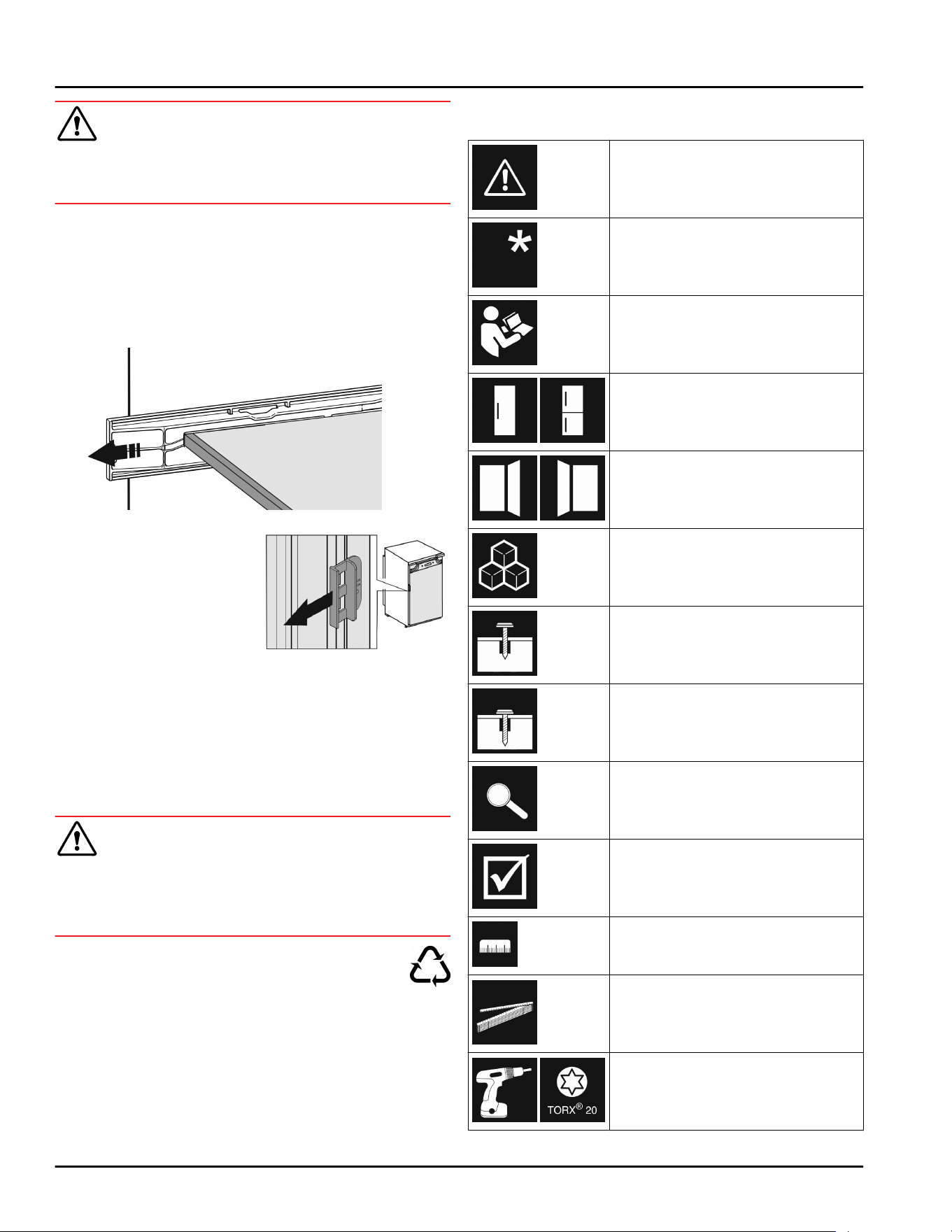
Fig. 5 *
u
Pull o
ff the transport lock
on the appliance door.
*
u
Clean the appliance (see User Guide, Cleaning the
appliance).
u
W
rite down the type (model, number), appliance
name, appliance/serial number, date of purchase
and dealer address in the designated fields (see
User Guide, About the appliance).
10 Disposal of packaging
WARNING
Danger of suffocation from packaging materials and
films!
u
Do no
t allow children to play with packaging mate‐
rials.
The packaging is made from recyclable mate‐
rials:
-
Corrugated card/cardboard
-
Parts made of foamed polystyrene
-
Films and bags from polyethylene
-
Packing bands from polypropylene
-
Wood frame nailed together with a polyethy‐
lene window*
u
T
ake the packaging material to an official collection
point.
11 Explanatory symbols used
There is the risk of injury when
doing this! Obe
y the safety
instructions!
These instructions apply to
se
veral models. Only perform this
step if it applies to your appli‐
ance.
To install, please follow the
de
tailed description in the Guide.
This section applies either to a
single-door appliance or a double-
door appliance.
Choose one of the options: Appli‐
ance with righ
t-hinged door or
appliance with left-hinged door.
Installation step necessary with
IceMak
er and/or InfinitySpring.
Loosen or tighten screws slightly.
Tighten the screws fully.
Check to see if the next step
applies f
or your model.
Check the components are in
corr
ectly.
Measure the specified measure‐
men
t and adjust if necessary.
Installation tool: Meter stick
Tool for assembly: Cordless
scr
ewdriver and attachments
Disposal of packaging
* Depending on model and options 7
Tool for assembly: Spirit level
Tool for assembly: Size 7 and size
10 spanner
Two people are required for this
step.
This step takes place at the
select
ed location of the appli‐
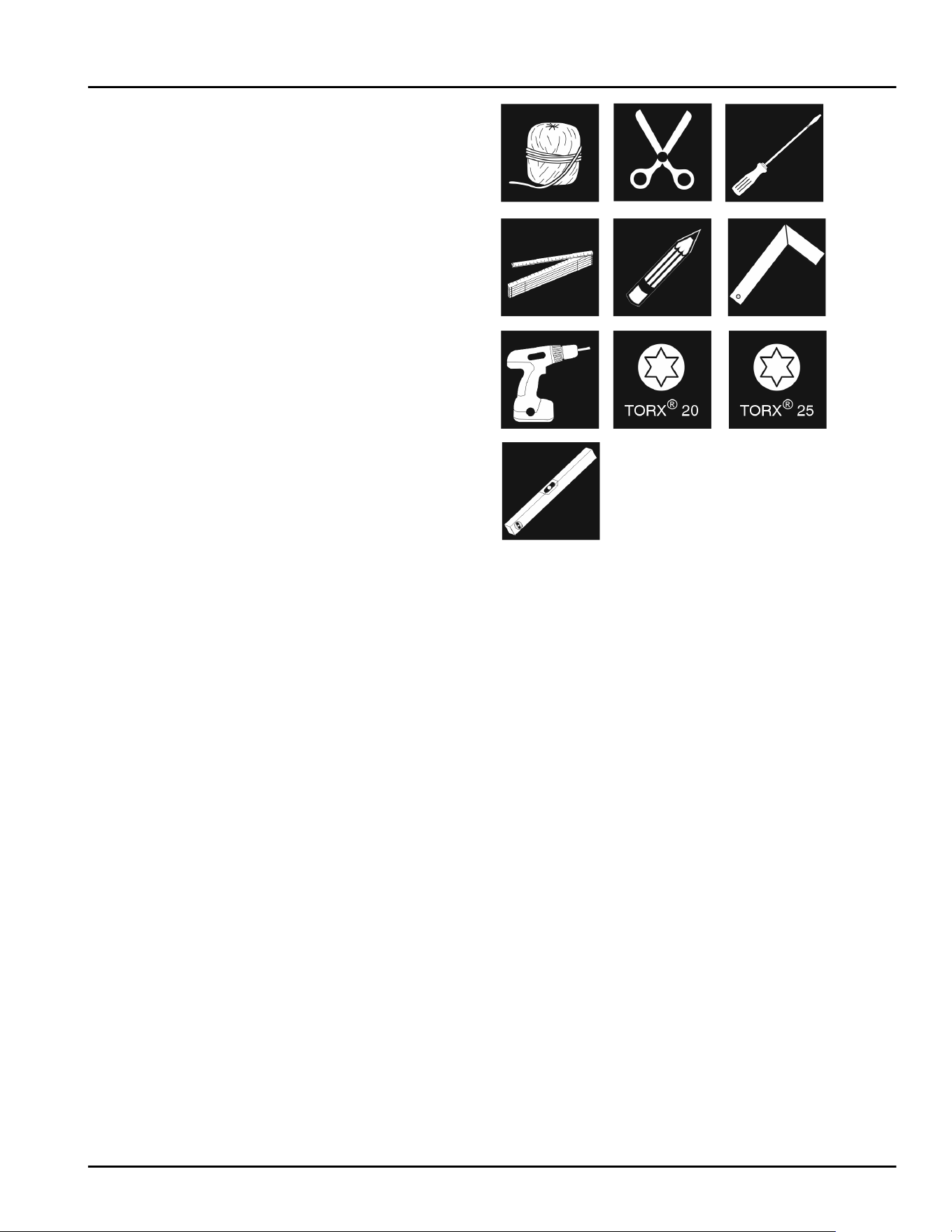
ance.
Aid for assembly: String
Aid for assembly: Square
Aid for assembly: Screwdriver
Aid for assembly: Scissors
Aid for assembly: Non-permanent
mark
er pen
Accessory kit: Remove compo‐
nen
ts
Dispose of components that are
no longer needed.
12 **** freezer compartment
door
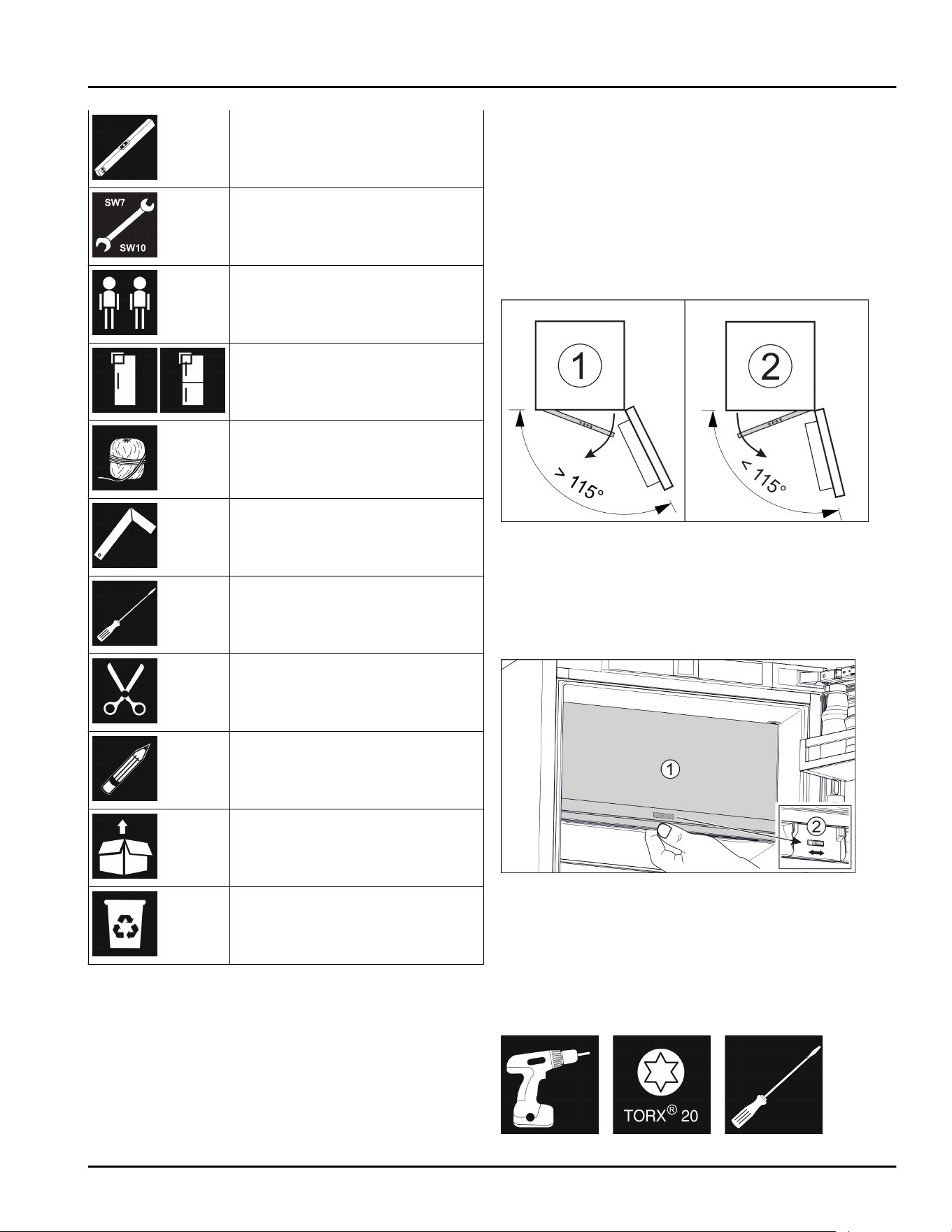
It is v
ery easy to reposition the hinge of the ****
freezer compartment door if the main door hinge is
swapped. If the main door of the appliance can be
opened to more than 115° (1), you can open the freezer
compartment without repositioning the hinge. If the
opening angle (2) of the appliance door is less than
this, the hinge must be repositioned.
Fig. 6
12.1
Moving the door hinge
The slider for moving the door hinge is located on the
back of the **** freezer compartment door at the
bottom.
Fig. 7
u
Close the **** fr
eezer compartment door (1).
u
Grab the **** freezer compartment door from below.
u
Move the slider (2) either to the right or to the left.
13 Reversing the door
Tool
**** freezer compartment door
8 * Depending on model and options
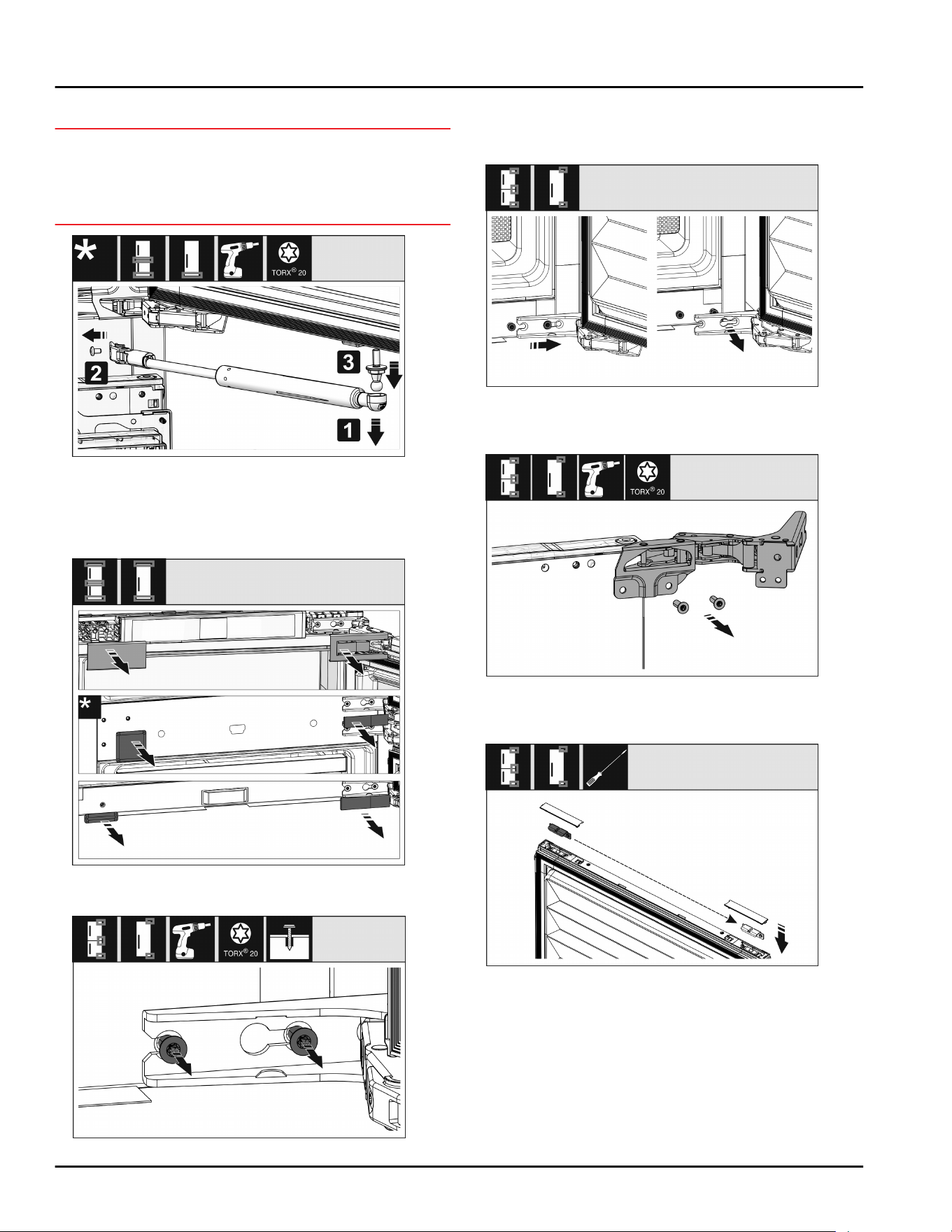
Fig. 8
NOTICE
Live parts!
Damage t
o electrical components.
u
Disconnect the power plug before reversing the
door.
Fig. 9
u
R
emoving the soft stop damper: Remove the soft
stop damper from the ball stud (1). Unscrew the
retainer (2). Remove the ball stud with a screwdriver
(3).
Fig. 10
u
R
emove covers.
Fig. 11
u
L
oosen the screws on all hinges but do not remove
them.
Fig. 12
u
R
emove the door: Push the door forward and then
out, unhook it and put it to one side.
Fig. 13
u
U
nscrew all hinges and set aside together with the
screws.
Fig. 14
u
L
oosen and shift the bracket at the top and bottom
of the door. The bracket must be shifted so you can
screw on the hinges.
Reversing the door
* Depending on model and options 9
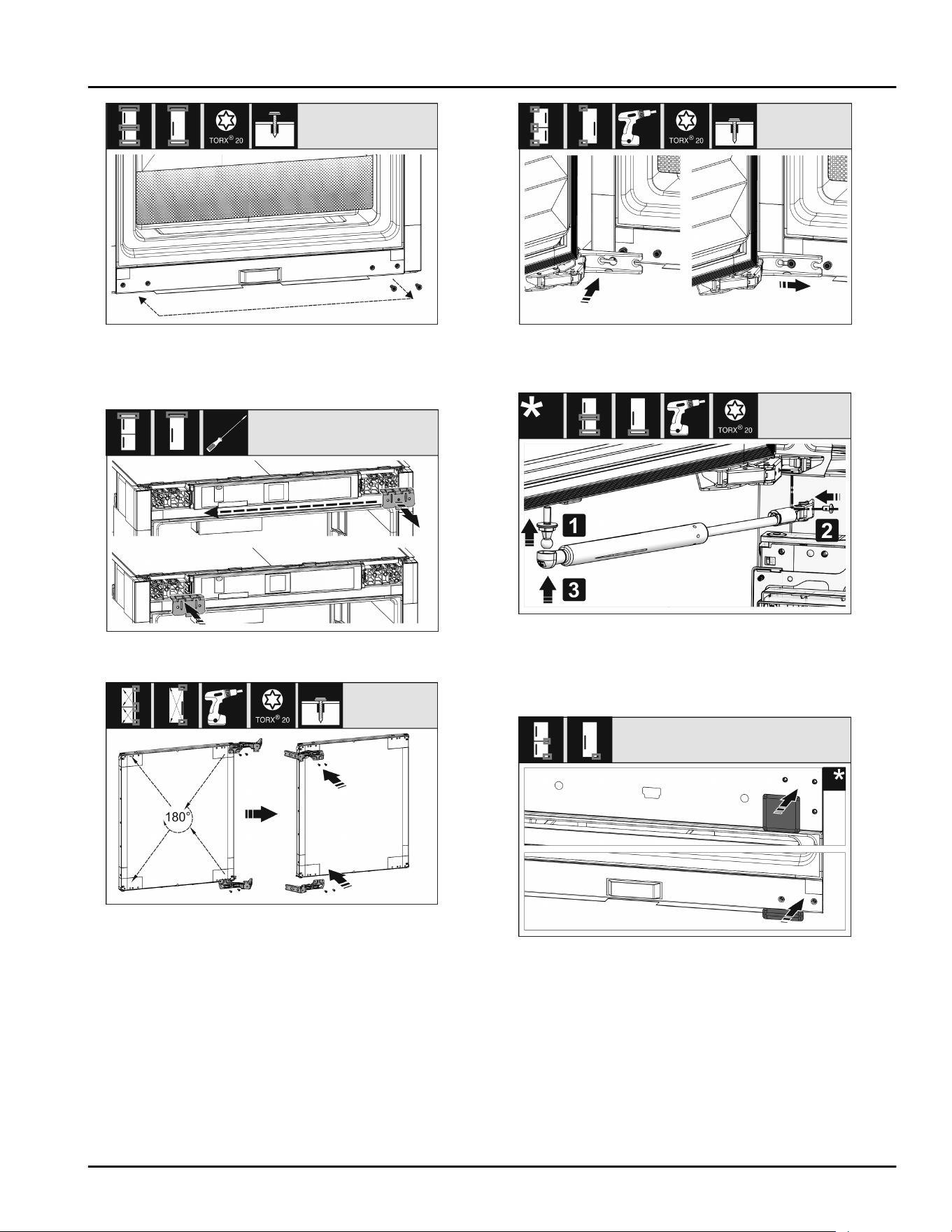
Fig. 15
u
Shift the scr
ews to fasten the hinge. Do not screw
tightly after shifting – you need to hang the hinges
later.
Fig. 16
u
Swap the fixing bracket to the opposite side.
Fig. 17
u
T
urn all hinges 180° to the opposite side and screw
firmly.
Fig. 18
u
R
efitting the door: Hang the door with its hinges and
tighten the screws.
Fig. 19
u
Refit the closing dampers: Screw in the ball studs
(1), tighten the bracket (2), and hang the closing
dampers in the ball studs.
u
Check all screws and retighten if necessary.
Fig. 20
u
R
eassemble the bottom and center cover. Only
replace the remaining covers after installing the
appliance back into the cabinet.
Reversing the door
10 * Depending on model and options
14 Water connection*
WARNING
Electricity and water!
Electric shock
u
Be
fore connecting to the water hose: Disconnect the
appliance from the mains.
u
Before connecting to water lines: Shut off the water
supply.
u
The drinking water connection may only be carried
out by a qualified gas and water installer.
WARNING
Contaminated water!
P
oisoning.
u
Connect to potable water supply only.
The appliance’s water connection and inlet solenoid
v
alve are suitable for a water pressure of up to 1 MPa
(10 bar).
Specifications for proper operation (flow rate, ice cube
size, noise level):
Water pressure:
bar psi MPa
1.5 to 6.2 21.76 to 87.02 0.15 to 0.62
Water pressure if using the water filter:
bar psi MPa
2.8 to 6.2 40 to 90 0.28 to 0.62
If the pressure exceeds 0.62 MPa (6.2 bar): Connect a
pr
essure reducer.
Make sure that the following conditions are met:
q
The water pressure is correct.
q
Water is supplied to the appliance via a cold water
pipe that can withstand the operating pressure and
is connected to the drinking water supply.
q
A 1/4" OD copper pipe is used to connect the water
supply to the solenoid valve. This is not supplied
with the appliance.
q
A connector between the R3/4 connection thread
and the 1/4" OD copper pipe is supplied with the
appliance.
q
There is a filter with a seal in the copper pipe
connector. The filter with a seal is included in the
scope of delivery.
q
There is a water valve between the copper pipe and
the domestic water connection in order to be able to
cut off the water supply if necessary.
q
The water valve is located away from the back of the
appliance and is easily accessible so that the appli‐
ance can be pushed far back as possible and the
water valve can be quickly closed if required. The
corr
ect clearances are maintained.
q
All equipment and devices used for the water supply
comply with the applicable regulations in the
country of use.
q
The back of the appliance is accessible so that you
can connect the appliance to the drinking water
supply.
q
Do not damage or kink the hose when setting up the
appliance.
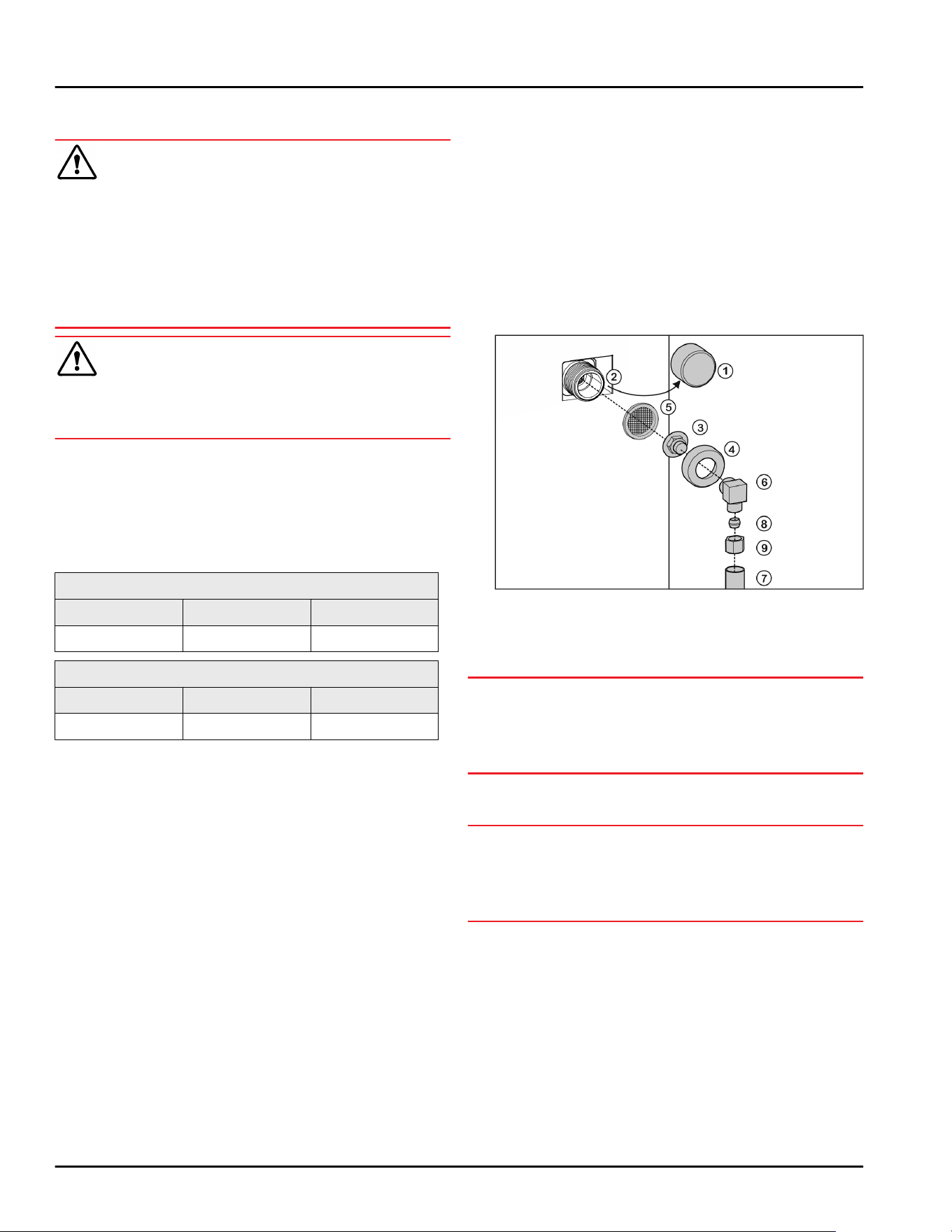
15 Connecting the water supply*
Fig. 21
Connect the coupler to the appliance
u
R
emove cap Fig. 21 (1) from solenoid valve Fig. 21 (2).
u
Insert coupler Fig. 21 (3) into union nut Fig. 21 (4).
NOTICE
Improper installation of water filter F
ig. 21 (5)!
Damage to the water filter.
u
Insert the filter with the recess pointing towards the
coupler.
u
Insert w
ater filter Fig. 21 (5) with the recess pointing
down towards coupler Fig. 21 (3).
NOTICE
Overtightened union nut!
Damage t
o the thread.
u
Screw the union nut manually on to the thread until
it is tight and secure.
u
Attach union nut F
ig. 21 (4) to solenoid valve Fig. 21 (2)
and tighten.
Water connection at 90°: Connect the water pipe to
the angle piece
u
Screw on angle piece Fig. 21 (6).
u
Connect water pipe Fig. 21 (7) (e.g. copper) to angle
piece Fig. 21 (6) using clamp ring Fig. 21 (8) and nut
Fig. 21 (9).
u
Attach water pipe Fig. 21 (7) to the housing if possible,
using the clip bracket.
Straight water connection: Connect the water pipe to
the coupler
Water connection*
* Depending on model and options 11
u
Put angle piece F
ig. 21 (6) to one side.
u
Connect water pipe Fig. 21 (7) (e.g. copper) to coupler
Fig. 21 (3) using clamp ring Fig. 21 (8) and nut Fig. 21 (9).
u
Attach water pipe Fig. 21 (7) to the housing if possible,
using the clip bracket.
u
Connect the water pipe to the water valve.
Check the water system
u
Slowly open the water valve of the water supply.
Before installing in the recess:
u
Check the entire water system for leaks.
Vent the water system
The system should be vented in the following situa‐
tions:
- On initial setup
- When replacing the InfinitySpring water tank
Make sure that the following requirements are fulfilled:
- Appliance is fully installed and connected
- Water tank is inserted (see Operating instructions,
Maintenance)
- Water filter is inserted (see Operating instructions,
Maintenance)
- Appliance is switched on
u
Open the appliance door
u
Take a glass and press it against the lower part of
the InfinitySpring dispenser.
w
The top section moves out and air or water is
dispensed into the glass.
u
Continue the process until a steady flow of water
pours into the glass.
w
There is no more air in the system.
u
Clean IceMaker (see Operating instructions, Mainte‐
nance).
u
Clean InfinitySpring (see Operating instructions,
Maintenance).
16 Fit the appliance into the
recess
Tool
Fig. 22
Supplied ins
tallation parts
Fit the appliance into the recess
12 * Depending on model and options
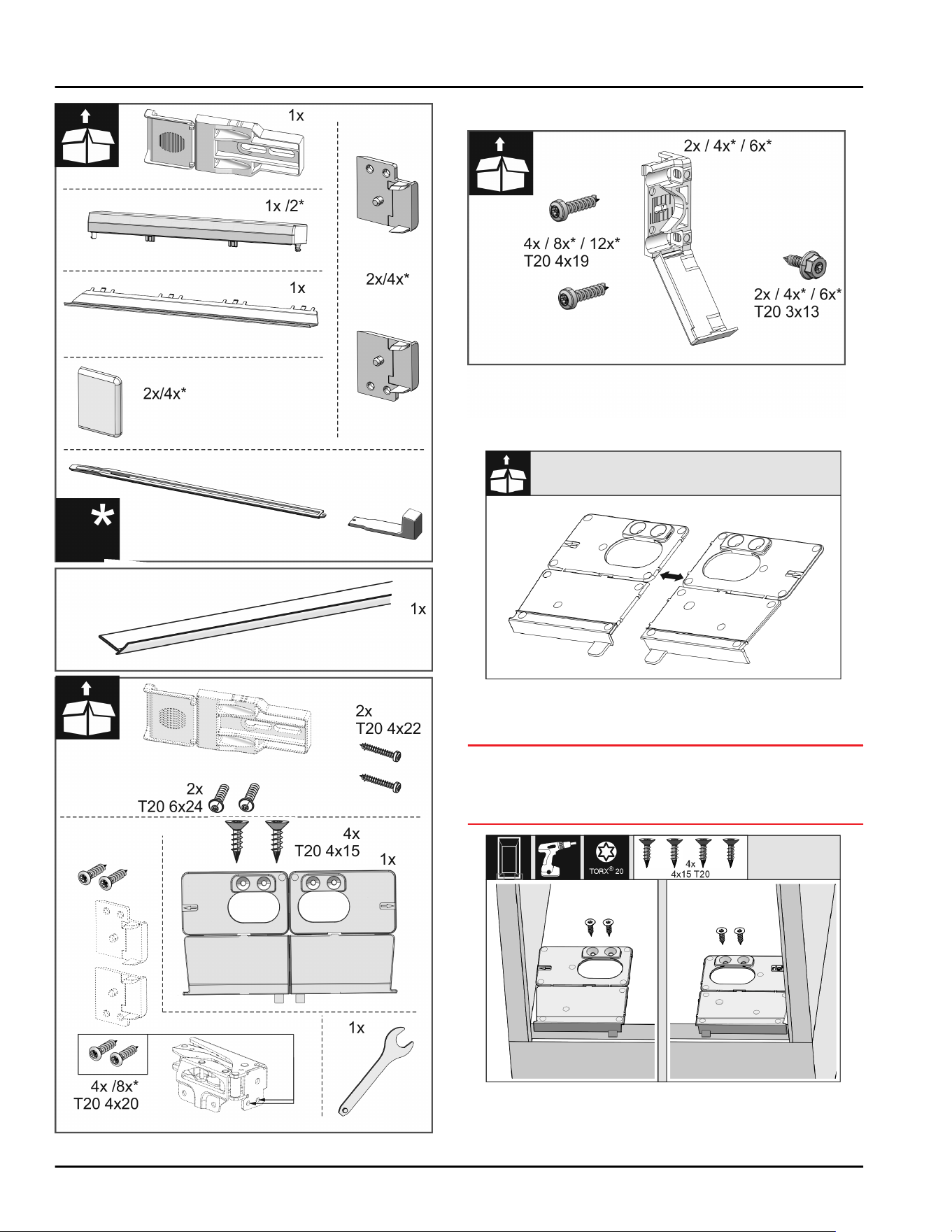
Fig. 23
Fig. 24
Fig. 25
u
Separ
ate the floor mounting bracket Fig. 25 () at the
perforation.
NOTICE
Correct installation depth of the appliance.
u
Using the moun
ting bracket ensures the correct
installation depth of the appliance.
Fig. 26
u
Screw the mounting brackets on the left and right of
the recess floor, flush to the side wall.
Fit the appliance into the recess
* Depending on model and options 13
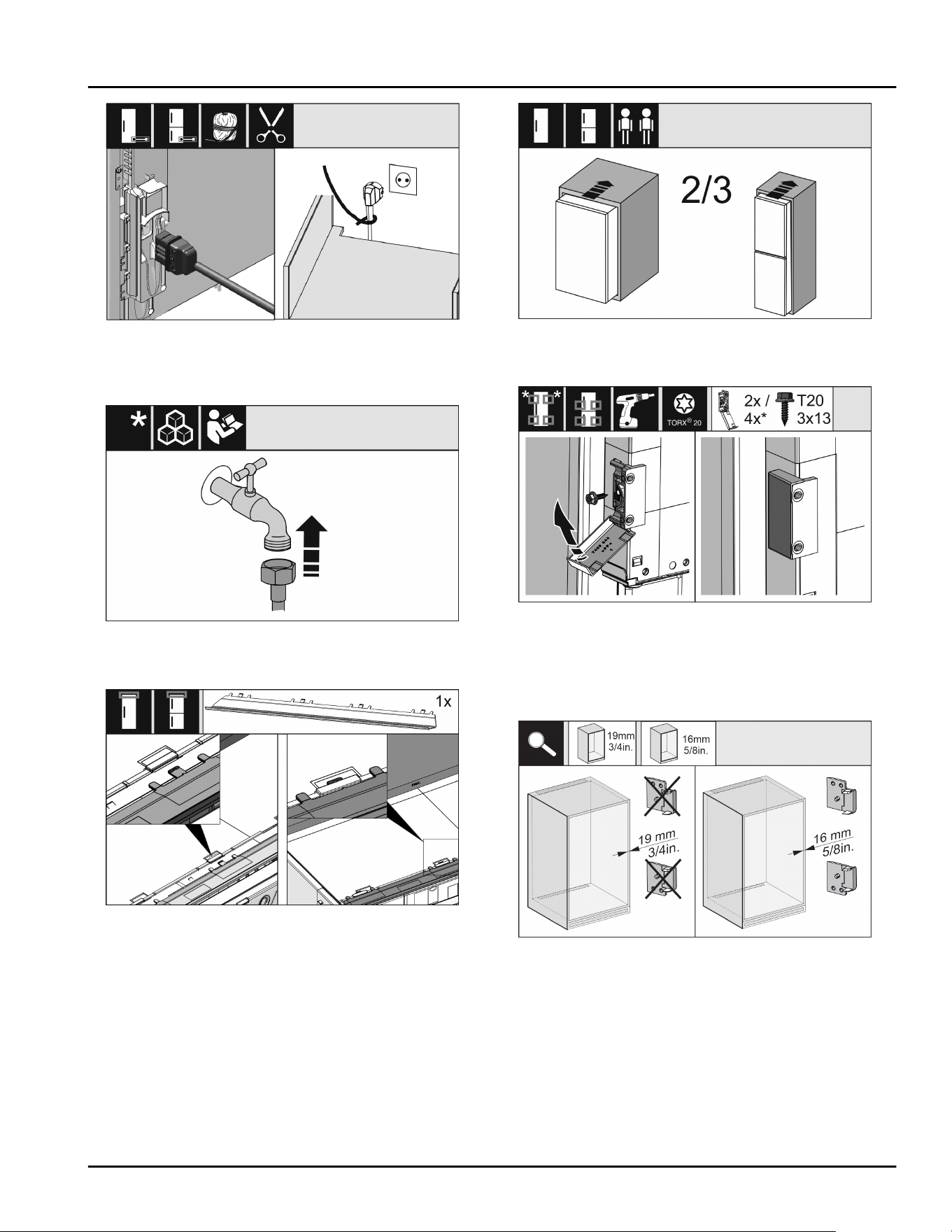
Fig. 27
u
R
emove the power cable from the package and plug
it into the back of the appliance. Use a cable lug to
lay the power plug cord to the accessible socket.
Fig. 28
u
If necessary
, install the water connection at this
point, following the instructions in the User Guide.
Fig. 29
u
Insert the adap
ter panel on the top of the appliance.
The panel can be moved to both sides.
Fig. 30
u
Slide the appliance 2/3 o
f the way into the cabinet
recess.
Fig. 31
u
Assemble the moun
ting bracket. Attach the
mounting brackets to align with the cabinet door
handles. If the door is large use four mounting
brackets in total. After assembly, fold the covers
onto the bracket.
Fig. 32
u
Check whether the unit side wall is 16 mm (5/8 in)
or 19 mm (3/4 in
) thick.
Fit the appliance into the recess
14 * Depending on model and options
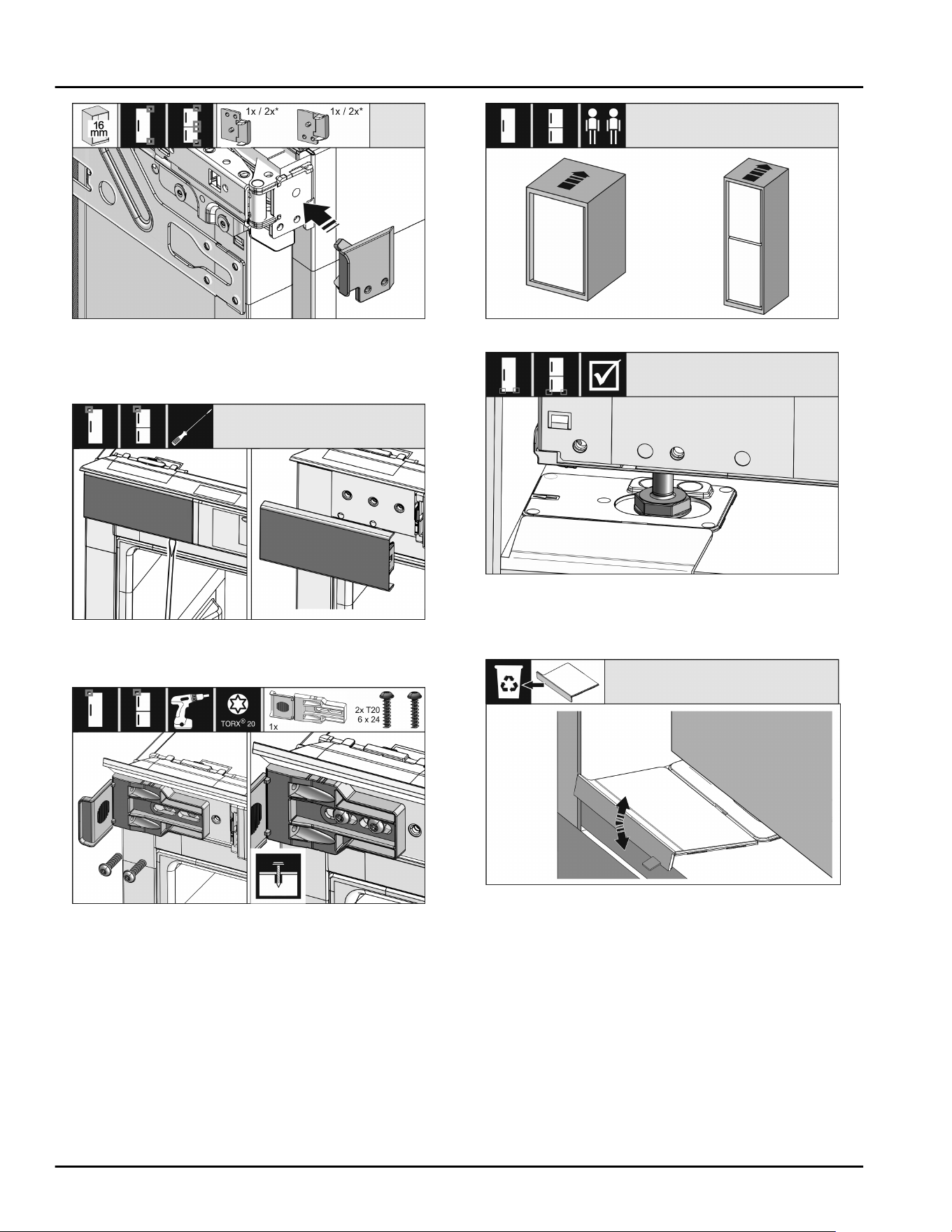
Fig. 33
u
For
unit walls which are 16 mm (5/8 in) thick: Clip a
spacer
on all hinges. No spacer is required if the unit
walls are 19 mm (3/4 in) thick.
Fig. 34
u
Use a scr
ewdriver to loosen the cover at the top left
and then remove it.
Fig. 35
u
L
oosely screw on the mounting bracket. The bracket
should still be easy to move.
Fig. 36
Fig. 37
u
Now insert the appliance all the w
ay into the unit
recess. The adjustable feet must rest in the recesses
in the brackets on both sides.
Fig. 38
u
R
emove the floor mounting bracket stopper. Loosen
the stopper by moving it and, if necessary, pull it off
with the help of pliers.
Fit the appliance into the recess
* Depending on model and options 15
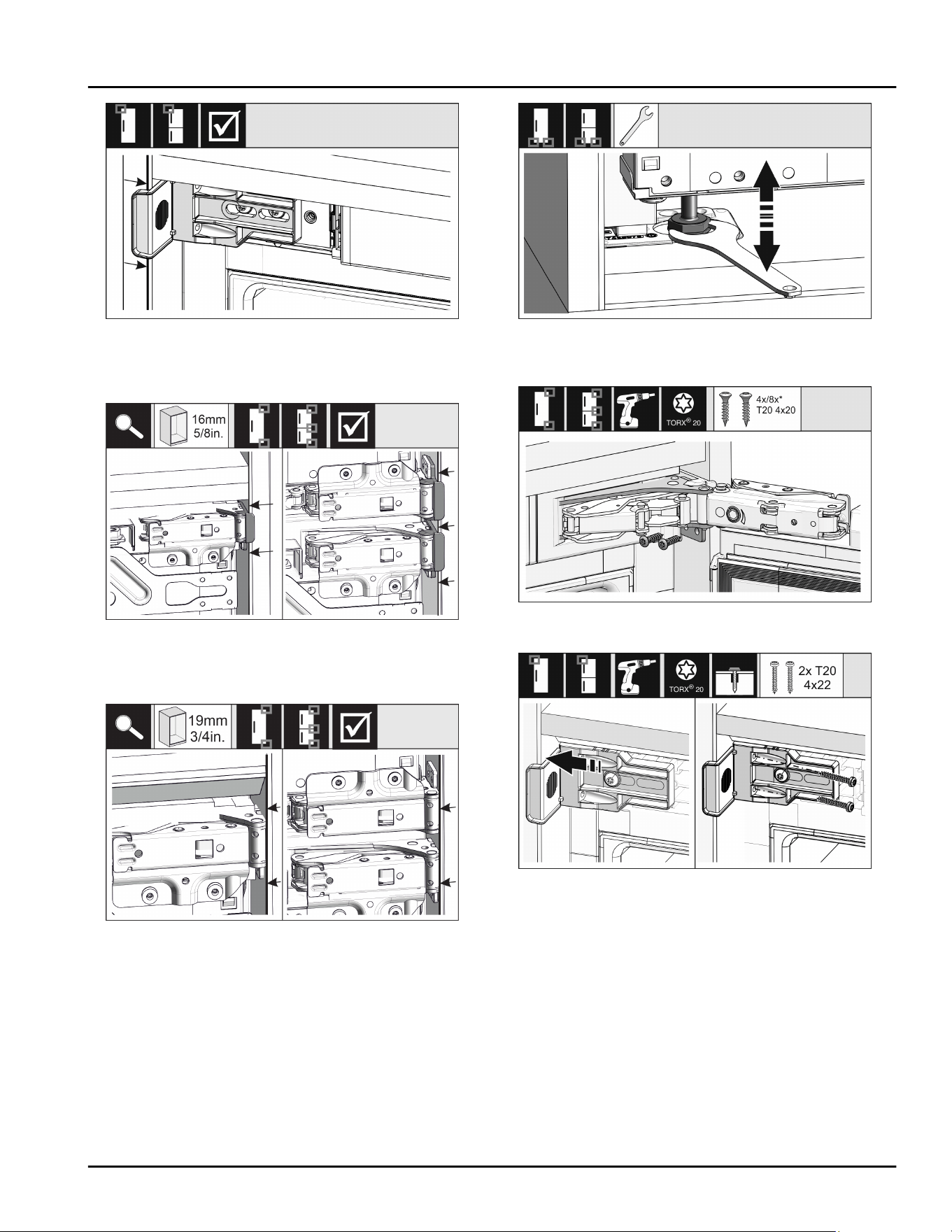
Fig. 39
u
Check that the appliance is flush in the cabine
t
recess. The mounting bracket must be attached to
the side wall of the cabinet recess.
Fig. 40
u
For
unit side walls which are 16 mm (5/8 in) thick,
the spacers fit against the unit recess on the hinge
side.
Fig. 41
u
For unit side walls which are 19 mm (3/4 in) thick,
the front sides of the hinges are positioned flush
against the front of the unit side wall.
Fig. 42
u
If necessary
, level the appliance using the adjusting
feet.
Fig. 43
u
Scr
ew on the appliance on the hinge side.
Fig. 44
u
Mo
ve the bracket so it sits flush on the side wall of
the cabinet recess. Tighten all the screws firmly.
Fit the appliance into the recess
16 * Depending on model and options
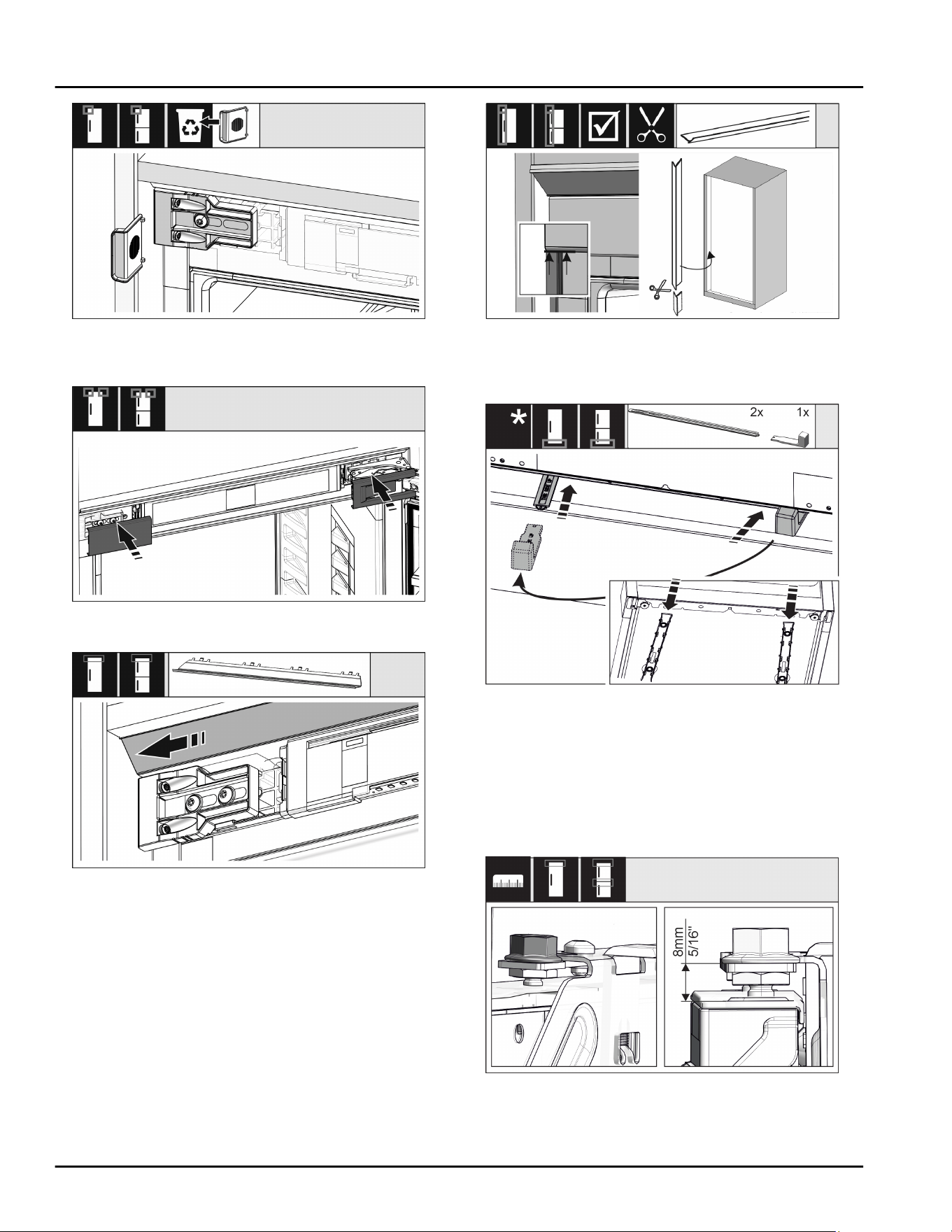
Fig. 45
u
Remo
ve the stop from the bracket on the handle side
and dispose of it.
Fig. 46
u
Place the cov
er.
Fig. 47
u
Mov
e the cover panel so it sits flush on the side of
the cabinet wall.
Fig. 48
u
The trim is magnetic. Place the trim below the t
op
cover and press. If necessary, shorten the trim to the
required length with a sharp pair of scissors.
Fig. 49
The height adjustment is only supplied as standard
for recess heights of 140 cm (55 1/8 in) and above.
It is used for sound optimization. Both parts of
the height adjustment are included in the accessory
kit.
u
To stabilize the appliance at the back underneath: Fit
the handle onto the rail of the height adjustment and
push the rail into the appliance base. Remove the
handle and do the same with the second rail.
Fig. 50
u
Close the door and check the preset of
8 mm (5/16 in) from the upper edge of the
appliance
door to the crosspiece support
Fit the appliance into the recess
* Depending on model and options 17
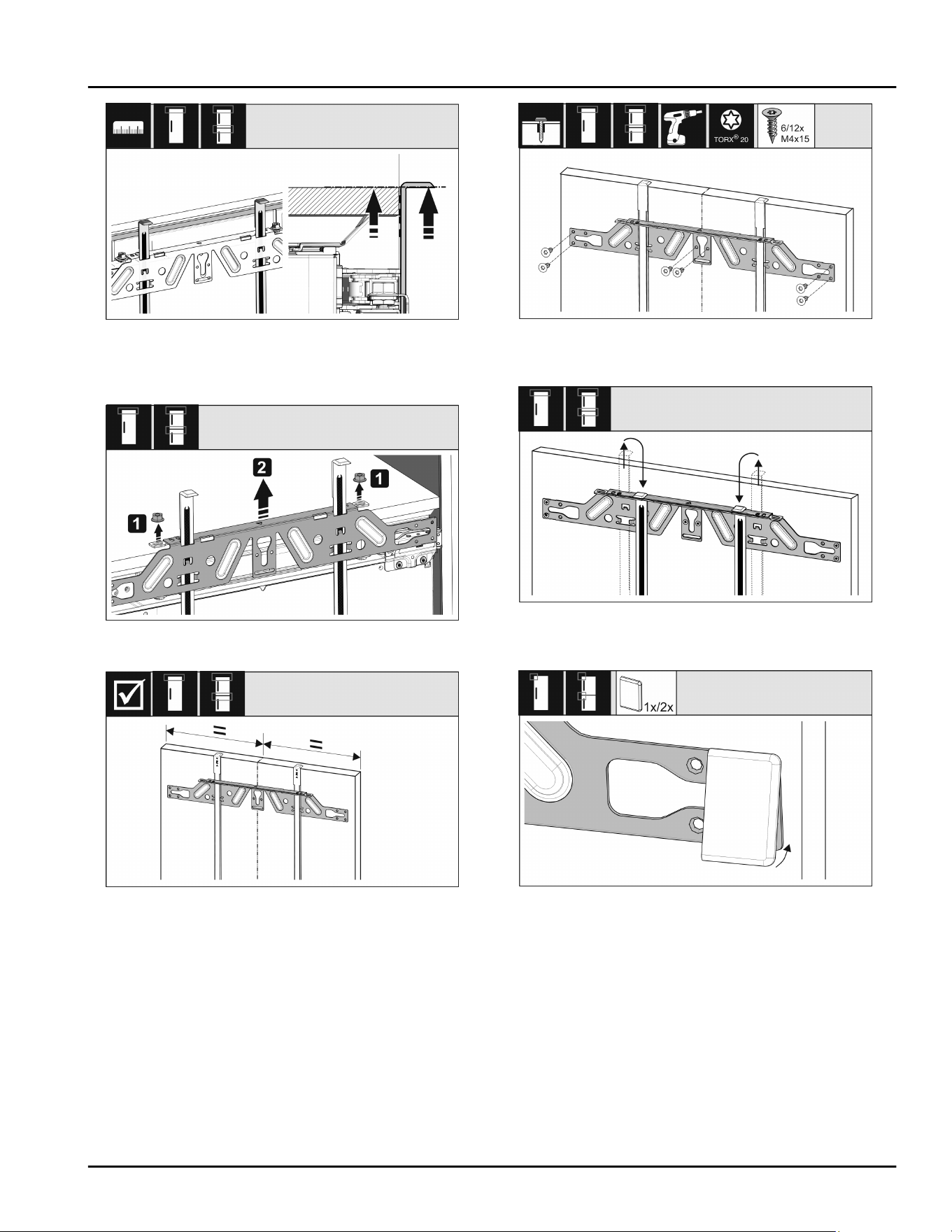
Fig. 51
u
Push up moun
ting aids to the height of the cabinet
door. Bottom stop edge of the fitting aid = top edge
of the door to be fitted.
Fig. 52
u
Undo the counter nuts and remove the crosspiece.
Fig. 53
u
Cen
ter-align the crosspiece on the inside of the
cabinet door.
Fig. 54
u
Fix the cr
osspiece using at least 6 screws for chip‐
board doors and at least 4 screws for panel doors.
Fig. 55
u
R
emove the fitting aids, turn round and insert into
the adjacent opening.
Fig. 56
u
Clip the co
ver on the crosspiece on the handle side.
Fit the appliance into the recess
18 * Depending on model and options
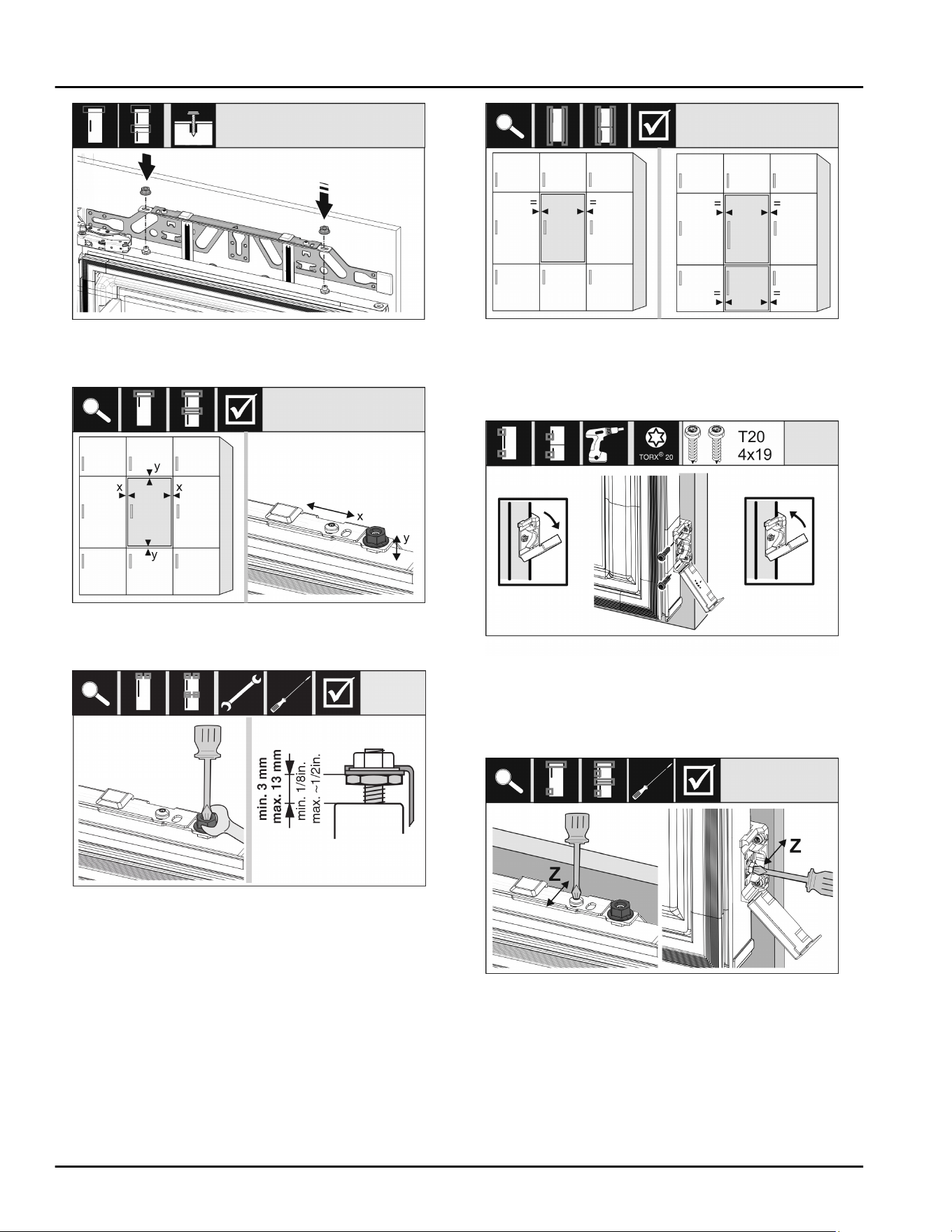
Fig. 57
u
Attach the unit door and loosely scr
ew the lock nuts
onto the adjusting bolts.
Fig. 58
u
Align the unit door in the X and Y direction using the
adjus
ting bolts.
Fig. 59
u
Scr
ew on the lock nuts and check the heigh
t.
Fig. 60
u
Check the gap between the door and the
surrounding custom panels. For unit fronts thicker
than 19 mm (3/4 in), take account of the dimensions
and advice in the Unit fronts chapter.
Fig. 61
u
Open the cov
er to fit the mounting bracket on the
custom panel. Align the front edge of the mounting
bracket parallel with the custom panel edge and
screw the bracket down tightly. Fold up the cover.
Fig. 62
Align the unit door in the Z direction:
u
L
oosen the adjusting screw on the crosspiece and
the screw on the mounting bracket.
u
Move the door.
Fit the appliance into the recess
* Depending on model and options 19
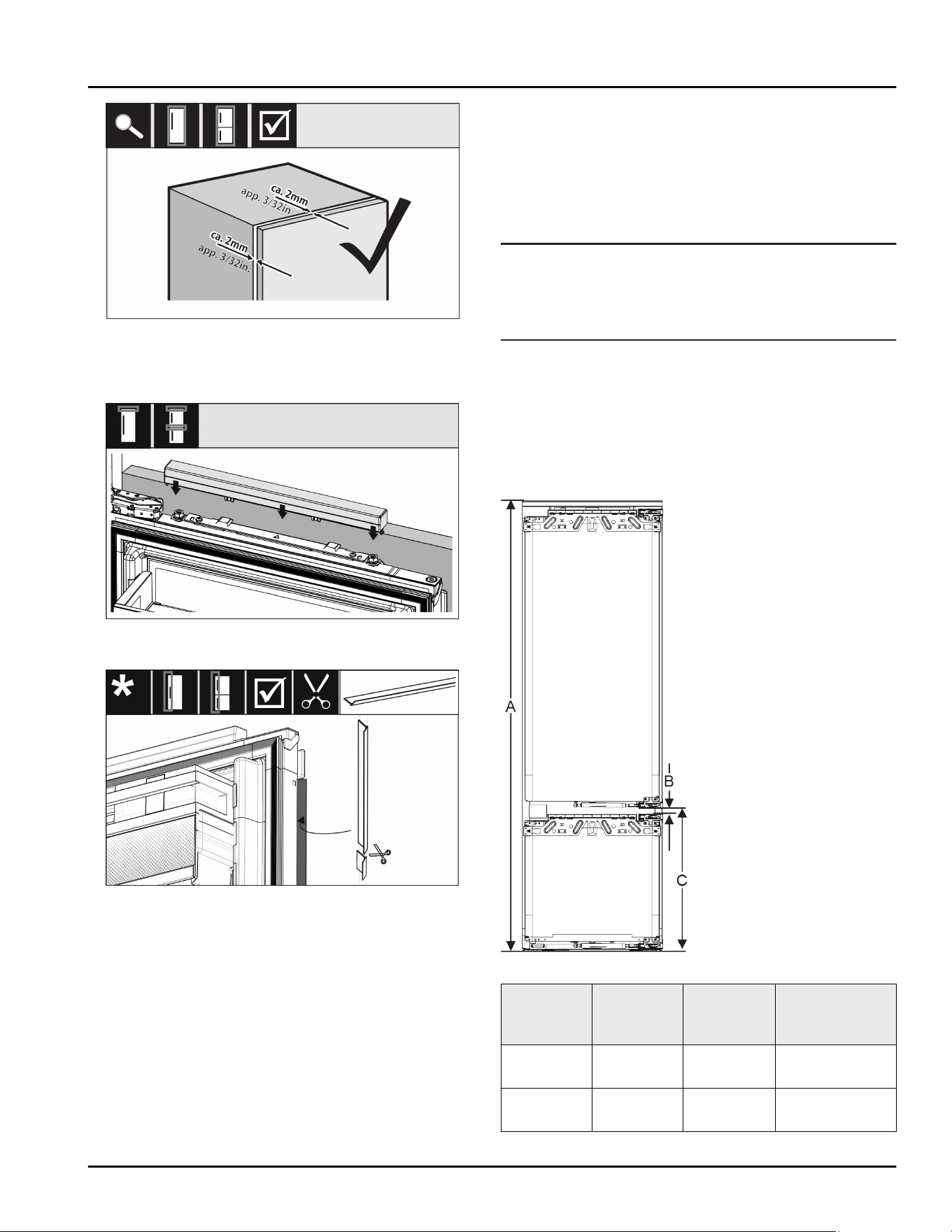
Fig. 63
u
Check the gap be
tween the custom panel and the
unit body.
u
Check all screws and retighten them if necessary.
Fig. 64
u
Clip the t
op cover on.
Fig. 65
u
Cut the tr
ead to size and place between the front of
the cabinet and the door.
Check the following points to ensure the appliance is
correctly installed. Otherwise, ice and condensation
may form, and malfunctions may occur:
w
The door must close properly.
w
The unit door must not touch the body of the unit.
w
The seal on the upper corner on the handle side
must be fitted securely.
17 Cabinet fronts
17.1
Dimensions
Depending on your model, you will need one or two
cabinet doors. The size of the cabinet door(s) depends
on the overall recess size and cabinet unit thickness.
Note
Observe the appliance and recess dimensions and
f
ollow the installation diagrams (see 3 Appliance
dimensions) (see 4 Recess dimensions) . See the rele‐
vant catalog for the installation diagrams.
General requirements:
-
Please r
efer to our catalogs for appliance-specific
recommendations on size and weight for fixed door
installations.
-
The cabinet unit thickness should be at least
16 mm (0.63 in) and no bigger than 19 mm (0.75 in).
-
When mounting a 2-door cabinet door, observe the
recommended clearance.
Fig. 66 Clearances for a 2-door cabinet door
Recess
heigh
t
Appliance
height (A)
(in.)
Distance
(B) (in.)
Clearance (C)
fixed door (in.)
178-2
dr
awers
69–11/16 19/32 21-39/64 +
19/32
178-3
dr
awers
69–11/16 19/32 27-3/8 + 19/32
Cabinet fronts
20 * Depending on model and options
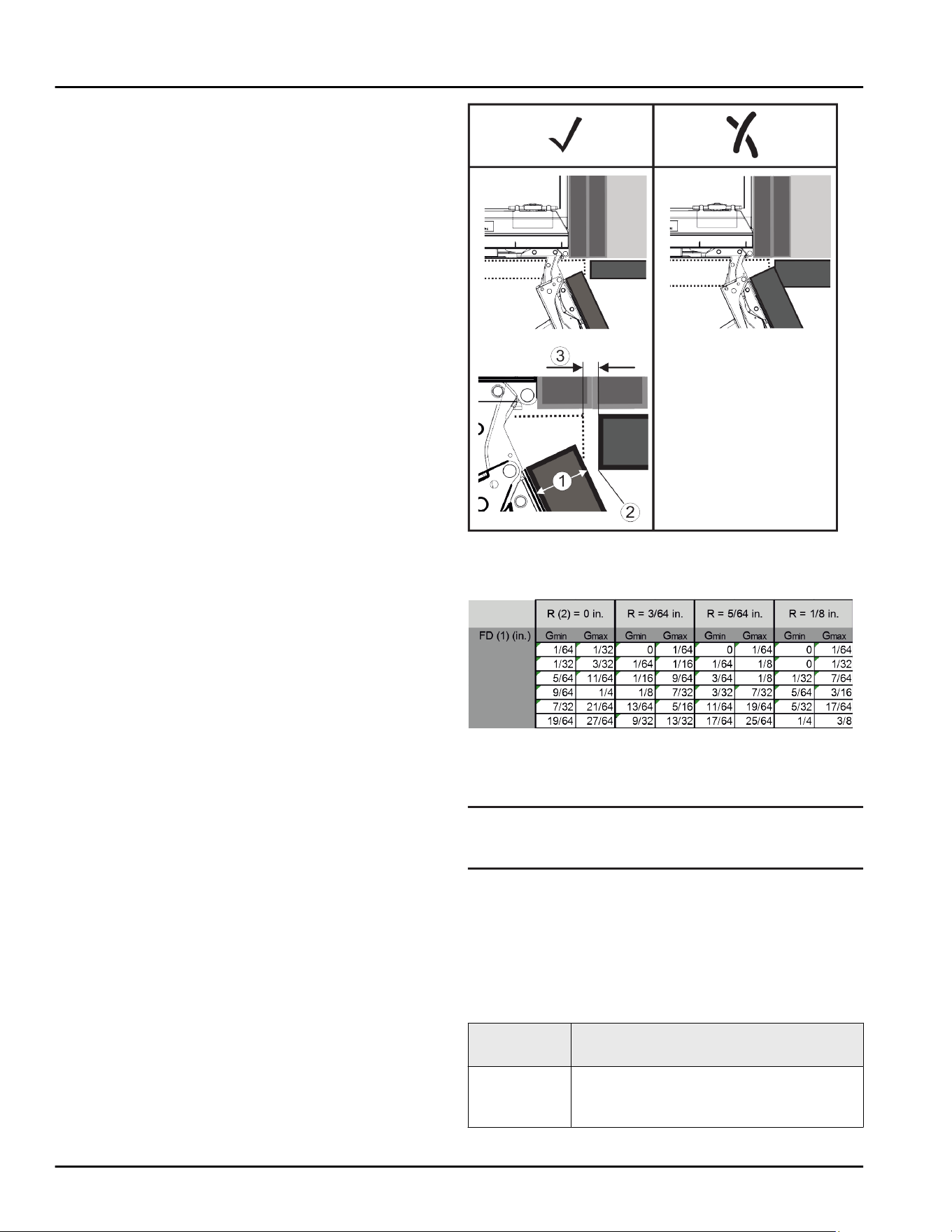
Other cabinet door above, below or next to it:
-
Vertical gap between cabinet doors must be
4 mm (0.16 in).
-
Horizontal gap between cabinet doors must be
4 mm (0.16 in). Check the collision factors here
(see 17.3 Setting the clearance to avoid collision) .
Weight and hinges:
-
Heavy cabinet fronts increase the stress on the
hinge. The hinge may be damaged. As such, refer to
the catalog for the maximum weight specification
for your appliance.
-
If the cabinet front exceeds the maximum permitted
weight, an appliance with door-tracking device can
help by loading the weight over several concealed
hinges on the cabinet.
-
If you use long unit fronts that protrude far above
the appliances, we recommend an additional door
hinge (e.g. Kamat), which must have the same pivot
point as the fixed door hinge used with your appli‐
ance. By using another hinge (Kamat), the weight is
shared over several points. The use of a milled
compensating fastening is recommended for high
unit fronts to counteract warping (convex/concave).
17.2 Mounting the cabinet front(s)
When installing, note:
- Cabinet front must be installed symmetrically to the
refrigerator door.
- Adjoining cabinet front is exactly level.
- Adjoining cabinet front has the same edge radius as
the front of the appliance.
- Cabinet front is flat and tension-free.
- Cabinet front is adjusted to a minimum depth of
approx. 2 mm (0.08 in) to the unit body.
u
Fit the appliance into the recess (see 16 Fit the
appliance into the recess) .
u
Attach the cabinet front to the appliance door
(see 16 Fit the appliance into the recess) .
u
Check the cabinet front does not collide with
anything (see 17.3 Setting the clearance to avoid
collision) .
17.3 Setting the clearance to avoid
collision
After installing the cabinet front(s), check that the
cabinet fronts do not collide.
Fig. 67
(1)
Front thickness (FD) (3) Clearance size (S)
(2) Edge radius (R)
Fig. 68 Table of min./max. clearances
G
min
= min. clearance in inches
G
max
= max. clearance in inches
Note
When making adjustments, always make sure that the
cabinet front suits the general appearance.
Check the collision factors and adjust them accord‐
ingly:
u
Determine the front thickness and edge radius.
u
Refer to the table for the min./max. clearance
dimensions.
u
Check the clearance size against the table.
u
Do one of the following depending on the measured
clearance size.
Clearance
size
Description
S > G
max
If the clearance size is greater than the
two limits, you do not need to make
any adjustments.
Cabinet fronts
* Depending on model and options 21
Clearance
size
Description
S < G
min
If the clearance size is below the limits,
you must increase it. Another option is
to increase the edge radius.
G
min
≤ S ≤
G
max
If the clearance is between the two
limits, you have to be careful. This will
quickly lead to collisions.
18 Water tank
Depending on your model, the InfinitySpring water tank
is behind the lowest drawer in the fridge or BioFresh
compartment
18.1 Inserting the water tank
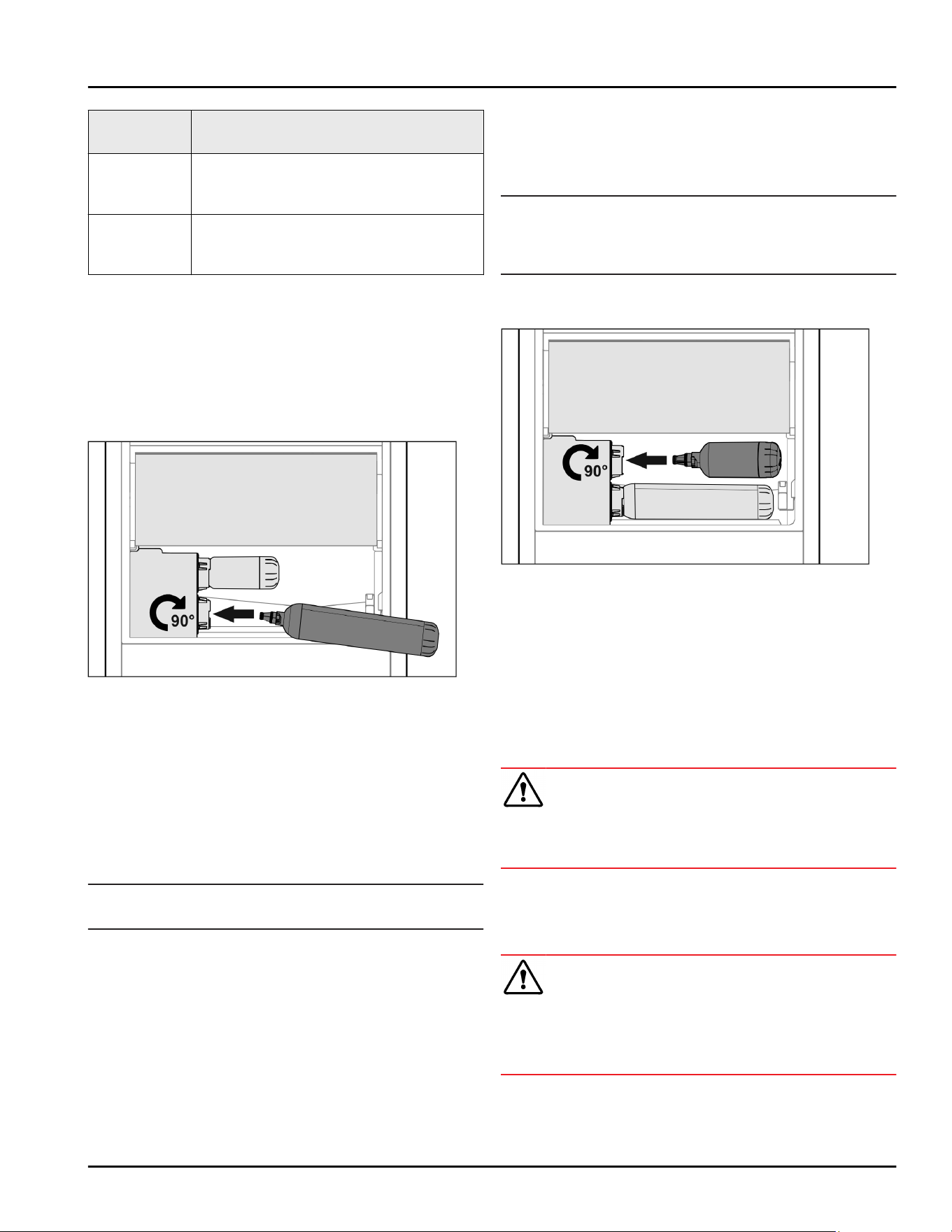
Fig. 69
u
Remove the drawer.
u
Insert the water tank and turn approx. 90° to the
right until it engages.
u
Check that the water tank is sealed and no water
leaks out.
u
Insert the drawer.
u
Vent the water system (see Installation Instructions,
Water Connection)
Instead of the water filter, you can use an additional
water tank.
Note
The water tank is available as a spare part.
19 Water filter
Depending on your model, the water filter is behind the
lowest drawer in the fridge or BioFresh compartment.
It absorbs deposits in the water and reduces the taste
of chlorine.
q
Replace the water filter at least every 6 months
under the specified usage conditions or if the flow
rate drops significantly.
q
The water filter contains carbon and can be
disposed of with the regular household waste.
Note
The water filter can be purchased from the Liebherr
Service Center. The address for your respective country
can be found on the back of the instructions.
19.1 Installing the water filter
Fig. 70
Make sure that the following conditions are met:
q
Water pressure is maintained (see Installation
Instructions, Water Connection).
u
Remove the drawer.
u
Insert the water filter and turn clockwise approx. 90°
until it engages.
u
Make sure the filter does not leak and no water is
coming out.
u
Insert the drawer.
CAUTION
New water filters may contain particulate matter.
u
Dispense 3 l (3.17 liq qt) of water through the Infini‐
tySpring and pour away.
w
The water filter is now ready for use.
20 Connecting the appliance
WARNING
Incorrect connection!
Risk of fire.
u
Do not use an extension cord.
u
Do not use a multipoint connector strip.
Water tank
22 * Depending on model and options

NOTICE
Incorrect connection!
Damage to the electronics.
u
Do not connect the appliance to a stand-alone
inverter, e.g. solar power systems and petrol genera‐
tors.
Note
Only use the mains cable supplied.
u
A longer mains cable can be ordered from Customer
Service.
Make sure that the following requirements are fulfilled:
- The type of current and voltage at the installation
site complies with the information on the serial tag .
- The socket is grounded and fused in accordance
with regulations.
- The tripping current for the fuse is between 10 and
16 A.
- The socket is easily accessible.
u
Check the electrical connection.
u
Connect the mains plug to the power supply.
w
The Liebherr logo appears on the screen.
w
The display switches to the standby symbol.
Connecting the appliance
* Depending on model and options 23
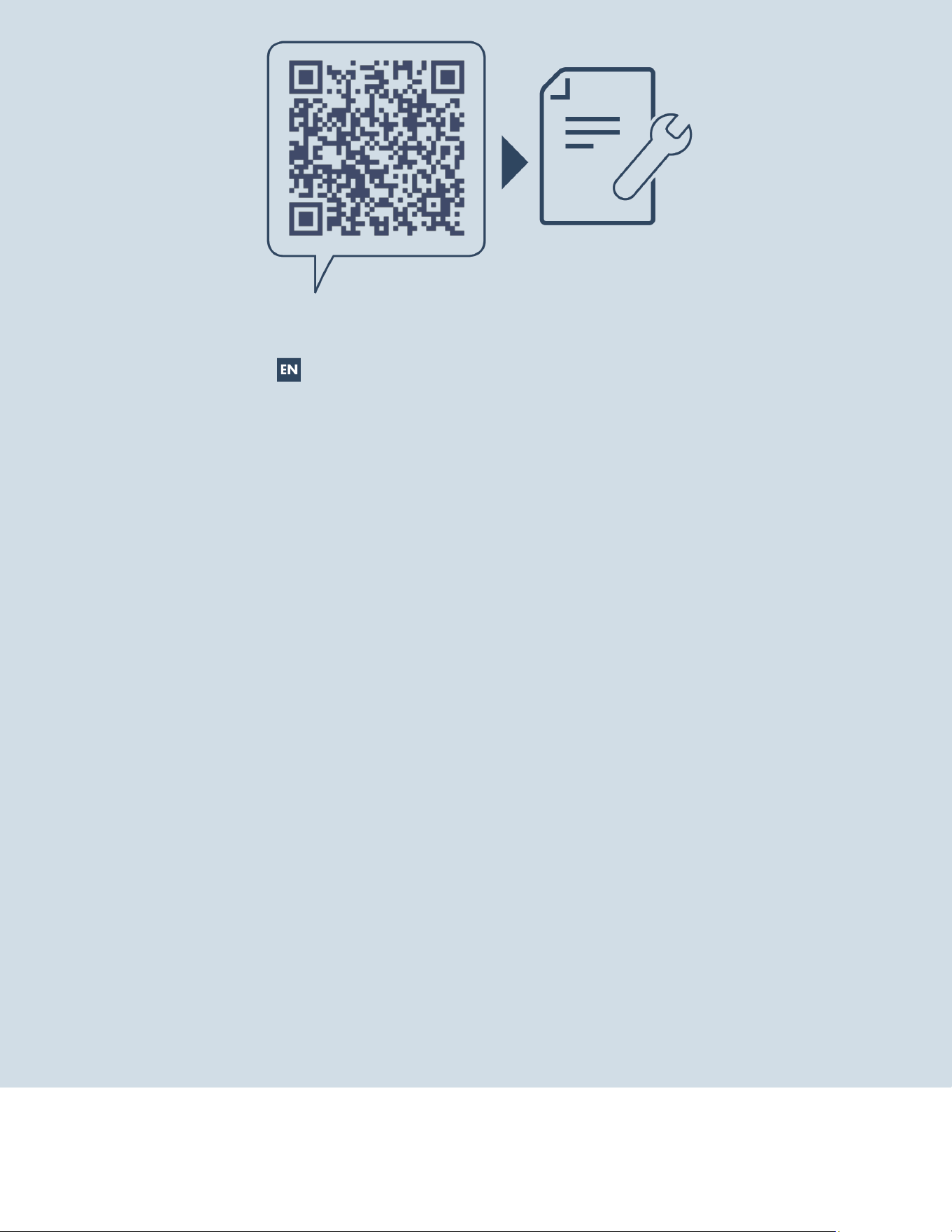
home.liebherr.com/fridge-manuals
Combined fridge-freezer for integrated use, door-on-door
Issue date: 20230126
Part number index: 7088288-00
For Service in the U.S.: Liebherr Service Center
Toll Free: 1-866-LIEBHER or 1-866-543-2437
Service-appliances.us@liebherr.com
PlusOne Solutions, Inc.
3501 Quadrangle Blvd, Suite 120
Orlando, FL 32817
For Service in Canada: Liebherr Service Center
Toll Free: 1-888-LIEBHER or 1-888-543-2437
www.euro-parts.ca
EURO-PARTS CANADA
39822 Belgrave Road, Belgrave, Ontario, N0G 1E0
Phone: (519) 357-3320 | Fax: (519) 357-1326