
CONTAINS SEALED, NON-SPILLABLE LEAD-ACID BATTERY. MUST BE DISPOSED OF PROPERLY.
WARNING: Possible explosion hazard. Contact with battery acid may cause severe burns and blindness.
Keep out of reach of children.
1. IMPORTANT SAFETY INSTRUCTIONS
WARNING – When using this product, basic precautions should always be followed, including the following:
1.1 Read all the instructions before using the product. Failure to do so could result in serious injury or death.
1.2 To reduce the risk of injury, close supervision is necessary when the product is used near children.
1.3 Do not put ngers or hands into the product.
1.4 Do not expose the power pack to rain or snow.
1.5 Use of an attachment not recommended or sold by the power pack manufacturer may result in a risk of re,
electric shock, or injury to persons.
1.6 To reduce risk of damage to the electric plug and cord, pull the plug rather than the cord when
disconnecting the power pack.
1.7 Do not use a battery pack or appliance that is damaged or modied. Damaged or modied batteries may
exhibit unpredictable behavior resulting in re, explosion or risk of injury.
1.8 Do not operate the power pack with a damaged cord or plug, or a damaged output cable.
1.9 Do not disassemble the power pack, take it to a qualied service person when service or repair is required.
Incorrect reassembly may result in a risk of re or electric shock.
1.10 To reduce the risk of electric shock, unplug the power pack from the outlet before attempting any instructed
servicing.
1.11 WARNING – RISK OF EXPLOSIVE GASES.
a. WORKING IN VICINITY OF A LEAD ACID BATTERY IS DANGEROUS. BATTERIES GENERATE
EXPLOSIVE GASES DURING NORMAL BATTERY OPERATION. FOR THIS REASON, IT IS OF
THE UTMOST IMPORTANCE THAT YOU FOLLOW THE INSTRUCTIONS EACH TIME YOU USE
THE POWER PACK.
b. To reduce risk of battery explosion, follow these instructions and those published by battery manufacturer
and manufacturer of any equipment you intend to use in vicinity of the battery. Review cautionary
markings on these products and on engine.
2. PERSONAL PRECAUTIONS
2.1 Consider having someone close enough by to come to your aid when you work near a lead-acid battery.
2.2 Have plenty of fresh water and soap nearby in case battery acid contacts skin, clothing, or eyes.
2.3 Wear complete eye protection and clothing protection. Avoid touching eyes while working near battery.
2.4 If battery acid contacts skin or clothing, wash immediately with soap and water. If acid enters eye,
immediately ood eye with running cold water for at least 10 minutes and get medical attention immediately.
2.5 NEVER smoke or allow a spark or ame in vicinity of battery or engine.
2.6 Be extra cautious to reduce risk of dropping a metal tool onto battery. It might spark or short-circuit battery
or other electrical part that may cause explosion.
Jump Starter and Power Source
OWNERS MANUAL
PLEASE SAVE THIS OWNERS MANUAL AND READ BEFORE EACH USE.
This manual will explain how to use the jump starter safely and effectively. Please
read and follow these instructions and precautions carefully.
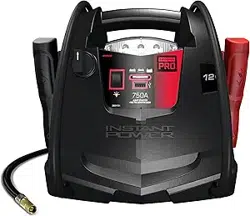
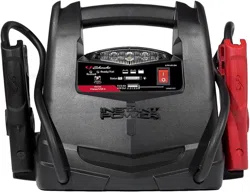
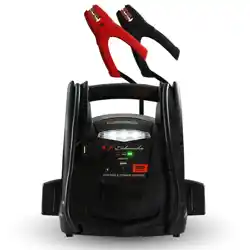
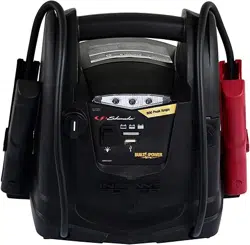
FOR MODELS
BE01255
FR01337
SJ1289
SPR1631
0099001923-04
For the manual with Spanish, visit www.batterychargers.com or call 1-800-621-5485.
Para obtener el manual en español, visite www.batterychargers.com o llame al 1-800-621-5485.
• 2 •
2.7 Remove personal metal items such as rings, bracelets, necklaces, and watches when working with a lead-
acid battery. A lead-acid battery can produce a short-circuit current high enough to weld a ring or the like to
metal, causing a severe burn.
2.8 When charging the internal battery, work in a well ventilated area and do not restrict ventilation in any way.
2.9 Under abusive conditions, liquid may be ejected from the battery; avoid contact. If contact accidentally
occurs, ush with water. If liquid contacts eyes, additionally seek medical help. Liquid ejected from the
battery may cause irritation or burns.
2.10 Do not expose a power pack to re or excessive temperature. Exposure to re or temperature above 265°F
(130°C) may cause explosion.
2.11 Have servicing performed by a qualied repair person using only identical replacement parts. This will
ensure that the safety of the product is maintained.
2.12 Attach output cables to a battery and chassis as indicated below. Never allow the output clamps to touch
one another.
2.13 Restrictions on Use: This jump starter/converter may not be used with life support devices or systems.
Failure of this converter can reasonably be expected to cause failure of that life support device or system,
or to affect the safety or effectiveness of that device or system.
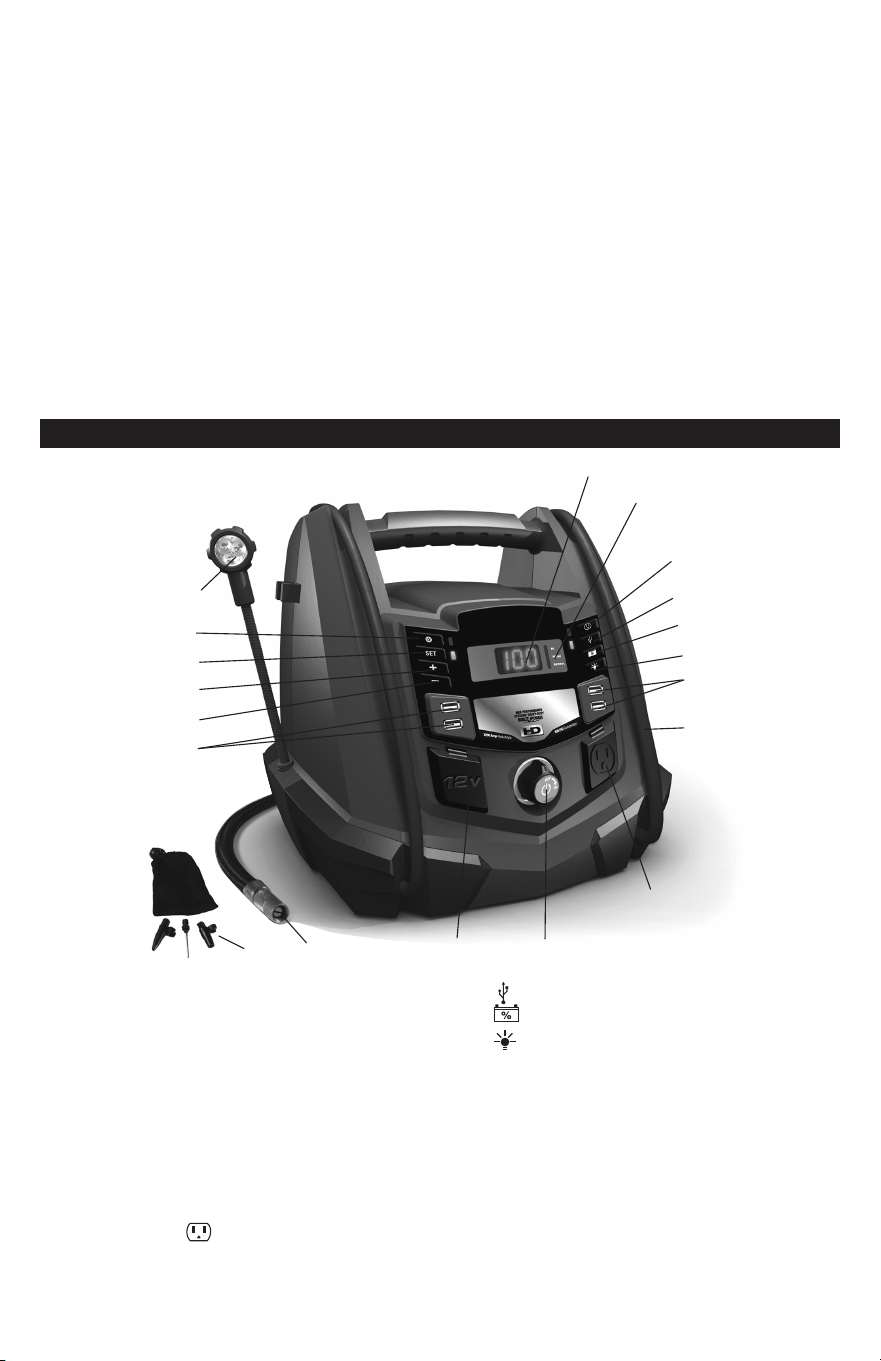
3. FEATURES
6
5
4
3
2
7
8
1
9
14
10
11
12
13
15
16171819
Android™ is a trademark of Google Inc. Apple
®
is a registered trademark of Apple Inc.
1. USB ports optimized
for Android™ (2)
2. Pressure decrease (–) button
3. Pressure increase (+) button
4. Set pressure button
5. Compressor mode button
6. Flex light
7. Digital display
8. Display LED indicators
9. Converter button
10. USB button
11. Battery % button
12. Flex light ON/OFF button
13. USB ports optimized for Apple
®
(2)
14. Cables with clamps
15. 110V AC household power outlet
16. Jump starter ON/OFF switch
17. 12V DC power outlet
18. Air compressor hose
19. Adapters

• 3 •
4. CHARGING THE INTERNAL BATTERY OF THE PORTABLE POWER
IMPORTANT! CHARGE IMMEDIATELY AFTER PURCHASE, AFTER EACH USE AND EVERY 30 DAYS, TO
KEEP THE PORTABLE POWER’S INTERNAL BATTERY FULLY CHARGED AND PROLONG BATTERY LIFE.
4.1 CHECKING THE LEVEL OF THE INTERNAL BATTERY
To check the internal battery’s charge status, press the Battery % button. The Digital Display will show
the battery’s percent of charge. Charge the internal battery if the display shows it is under 100%.
NOTE: The internal battery’s percent of charge is most accurate when the jump starter has been disconnected
from all devices and charging sources for a few hours.
4.2 CHARGING THE INTERNAL BATTERY
Charge the internal battery for the portable power using an extension cord (not included).
NOTE: Use of an improper extension cord could result in a risk of re and electric shock.
1. To charge, ip the AC connector on the back of the unit DOWN and plug in an 18 AWG or larger
extension cord.
2. Plug the extension cord into a 120VAC electrical wall outlet.
3. While the jump starter is charging, the marching dashes will show on the digital display. When the
internal battery is fully charged, the display will show a smaller, pulsing “ioo” (for energy efciency).
Complete charging may take up to 72 hours.
4. When the internal battery is fully charged, the charger will automatically go into maintain mode and
maintain the battery at full charge without damaging it. When in maintain mode, the Battery % LED will
pulse, as long as there is an AC cord connected to the charging port.
5. Charge the jump starter as soon as possible after use.
4.3 CHARGING THE INTERNAL BATTERY WHILE DRIVING
You may also charge the internal battery while driving, using a 12V port charging cable (part number
94500109 – not included).
IMPORTANT: WHEN USING A 12V PORT CHARGING CABLE, DO NOT CHARGE INTERNAL
BATTERY FOR MORE THAN 30 MINUTES OR LEAVE THE BATTERY UNATTENDED. IT COULD
EXPLODE, CAUSING PROPERTY DAMAGE OR PERSONAL INJURY.
1. Make sure the car is running.
2. Insert one end of the accessory cable into the 12V DC power outlet.
3. Insert the other end of the accessory cable into the vehicle’s accessory outlet (lighter socket).
4.4 NOTE: The Battery % LED does not operate during this method of charging. Using this method to charge
the battery overrides the maintain mode and the battery can be overcharged.
1. Monitor the progress of the charge by pressing the Battery % button. When the battery is fully charged,
disconnect the accessory cable from the Portable Power, then from the lighter socket of the vehicle.
NOTE: Completely disconnect the charger cable when the engine is not running.
5. USING THE PORTABLE POWER
5.1 DIGITAL DISPLAY
To check the jump starter’s internal battery status, press the Battery % button. The display will show
the percent of charge of the internal battery. When connected to the vehicle with the Jump Start On/Off
switch in the OFF position, the display shows the vehicle’s battery voltage. When connected and in the
ON position, the display shows the equalized voltage between the vehicle’s battery and internal battery.
5.2 JUMP STARTING A VEHICLE
IMPORTANT: Using the Jump Start feature without a battery installed in the vehicle will damage the
vehicle’s electrical system.
1. Turn the ignition OFF.
2. Lay the DC cables away from any fan blades, belts, pulleys and other moving parts.
3. For a negative-ground vehicle (as in most vehicles), connect the portable power’s POSITIVE (RED)
clamp to the POSITIVE (POS, P, +) battery post. Next, connect the NEGATIVE (BLACK) clamp to the
vehicle chassis or engine block, away from the battery.

• 4 •
4. For a positive-ground vehicle, connect the portable power’s NEGATIVE (BLACK) clamp to the
NEGATIVE (NEG, N, -) battery post. Next, connect the POSITIVE (RED) clamp to the vehicle chassis
or engine block away from the battery.
IMPORTANT: If you have connected the clamps backwards, an audio alarm will sound. DO NOT turn
the On/Off switch to the ON position. This could cause serious damage to the jump starter or the vehicle.
Reverse the connections and the audio alarm will stop.
5. Turn the switch to the ON position.
6. Crank the engine for no more than 8 seconds. If the engine does not start, wait 2 minutes before
cranking again.
7. After the engine starts, turn the switch to the OFF position and remove the portable power from the battery.
8. Charge the portable power.
5.3 USING THE WORK/EMERGENCY FLEX LIGHT
1. Position the jump starter on a at, stable surface near the intended work area.
2. Ensure that the battery clamps are securely clipped on the storage holders.
3. Remove the exible work light from the storage clip on the side of the unit. Point the light in the
desired direction.
NOTE: Do not use the ex light to lift the unit.
4. Press the light button once. The jump starter light will turn on and illuminate your work area.
5. Press the light button again. The light will ash.
6. When nished, press the light button again, to turn off the light.
7. Return the ex light to the storage clip after use.
8. Charge the jump starter as soon as possible after using the ex light.
NOTE: The ex light will automatically shut off after 24 hours.
5.4 USING THE USB PORTS
NOTE: The 2 left ports are optimized for Android™ devices. The 2 right ports are optimized for Apple
®
devices.
The USB ports provide up to 2A per side (4A total) at 5V DC.
1. Ensure that the battery clamps are securely clipped on the storage holders.
2. Plug the device into one of the four USB ports on the front panel.
3. Press the USB port ON/OFF button.
4. Turn on the USB device.
5. When you are nished using the USB port, press the button, to turn off.
6. Charge the jump starter as soon as possible after using the USB port.
NOTE: To protect your electronic devices, the USB will automatically shut off when the internal battery’s
voltage is low.
5.5 POWERING A 12V DC DEVICE
The portable power is a power source for all 12V DC accessories that are equipped with a 12V accessory
plug. Use it for power outages and on shing or camping trips.
NOTE: Do not power a 12V device with the portable power while charging the internal battery.
1. Make sure the device to be powered is OFF before inserting the 12V DC accessory plug into the 12V
DC accessory outlet.
2. Ensure that the battery clamps are securely clipped on the storage holders.
3. Open the protective cover of the DC power outlet on the portable power.
4. Plug the 12V DC device into the DC power outlet and turn on the 12V DC device (if required).
5. When nished, turn off the DC device (if required) and unplug from the DC power outlet.
CAUTION: Do not use the portable power to run appliances that draw more than 20A DC.
NOTE: Extended operation of a 12V DC device may result in excessive battery drain. Recharge the
portable power immediately after unplugging the 12V DC device.

• 5 •
12V DC ESTIMATED RUN-TIMES
APPLIANCE TYPE EST WATTAGE ESTIMATED RUN TIME
Cell phone 4 watts 54 hrs
Fluorescent light 4 watts 54 hrs
Radios, fans 9 watts 24 hrs
Depth nder 9 watts 24 hrs
Camcorder 15 watts 14.4 hrs
Electrical tool 24 watts 9 hrs
Electric cooler 48 watts 4.5 hrs
Car vacuum, air compressor 80 watts 2.7 hrs
NOTE: Actual time may vary. Times are based on a fully charged internal battery.
5.6 USING THE AIR COMPRESSOR
WARNING. Read the instructions of the product to be inated before using the compressor. Avoid
overination; do not exceed the manufacturer’s recommended pressures. Do not leave the air
compressor unattended during use.
1. Remove the air compressor hose from the storage compartment in the back of the portable power.
2. Connect the adapter to the valve stem by threading it onto the end. If necessary, use one of the
additional adapters.
3. Press the
Compressor button.
4. To select the desired PSI, press the “+” or “
–
” buttons. When done, press the SET button.
5. When the desired pressure is reached, the compressor will turn off. Unthread the connector from the
valve stem.
6. Press the
Compressor button again, to turn off the display and LEDs.
7. Do not run for more than 10 minutes at a time. Allow the jump starter to cool down for 10 minutes
before using again.
8. When nished, return the air compressor hose to the storage compartment in the back of the unit.
9. Allow unit to cool.
10. Recharge the unit before storing.
NOTE: To prevent overheating, the compressor has built-in thermal protection that will turn the compressor
off before it overheats. If the compressor shuts off, wait a few minutes and it will automatically restart when
the compressor cools.
NOTE: When not in use, the compressor will automatically shut off after 2 minutes.
NOTE: The air compressor is rated for 100 PSI maximum.
ESTIMATED TIME FOR INFLATING
Vehicle Tires 13"-16" 6-24 minutes
Bike Tires 1-3 minutes
Sports Balls 30 seconds
Times are approximate. Use the air compressor gauge to ensure
the proper pressure has been reached. Do not overinate.
5.7 BEFORE USING THE CONVERTER
Important Safety Instructions:
1. Keep the portable power well ventilated, in order to properly disperse heat generated while it is in use.
Make sure there are several inches of clearance around the top and sides, and do not block the vents on
the back of the portable power.
2. Make sure the portable power is not close to any potential source of ammable fumes or clothing.
3. Keep the portable power dry.
4. DO NOT allow the portable power to come into contact with rain or moisture.
5. DO NOT operate the portable power if you, the portable power, the device being operated or any other
surfaces that may come in contact with any power source are wet. Water and many other liquids can
conduct electricity, which may lead to serious injury or death.
6. Do not place the portable power on or near heating vents, radiators or other sources of heat.
7. Do not place the portable power in direct sunlight. The ideal air temperature for operation is between
50° and 80° F.
8. Do not use the converter near an open engine compartment where fumes may accumulate.
9. Do not modify the AC receptacle in any way.

• 6 •
5.8 USING THE CONVERTER
It is important to know the continuous wattage of the device you plan to use with the converter. The portable
power must be used with devices drawing 200 watts or less. If the wattage is not marked on the device, use
only devices that draw less than 1.7 amps of AC current.
Devices like TVs, fans or electric motors require additional power to start (commonly known as the
“starting or peak power”). The portable power can supply a momentary surge in wattage; however even
devices rated less than the maximum 200 watts can exceed the converter’s surge capability and cause
an automatic overload shutdown.
Do not use the converter with a product that draws a higher wattage than the converter can provide, as
this may cause damage to the converter and the product.
Make sure the device you are using is compatible with a modied sine wave converter.
CAUTION: Always run a test to establish whether the converter will operate a particular piece of
equipment or device.
In the event of a power overload, the converter is designed to automatically shut down. This safety feature
prevents damaging the converter while testing devices and equipment with the 200-watt range.
IMPORTANT: If you are using the power converter to operate any type of battery charger, monitor
the temperature of the battery charger for about 10 minutes. If the battery charger becomes
abnormally warm, disconnect it from the converter immediately.
You can use an extension cord from the converter to the device without signicantly decreasing the
power being generated by the converter. For best operating results, the extension cord should be 16
AWG (1.31 mm
2
) or larger and no longer than 50 feet.
IMPORTANT: This converter uses a modied sine waveform, which is not quite the same as power
company electricity. For the following devices, we strongly recommend that you use caution and check the
device’s manual to make sure it is compatible with modied sine waveform.
1. Switch mode power supplies
2. Linear power supplies
3. Class 2 transformers
4. Line lter capacitors
5. Shaded pole motors
6. Fan motors
7. Fluorescent and high-intensity lamps (with a ballast)
8. Transformerless battery chargers
Using the converter with any of these devices may cause the device to run warmer or overheat.
5.9 POWERING A 110V AC DEVICE
1. Ensure the battery clips are securely on the storage holders.
2. Open the protective cover of the AC power outlet on the front panel of the portable power.
3. Make sure the 110V AC device to be operated is turned OFF.
4. Plug the 110V AC device into the AC power outlet and press the
Converter button.
5. Turn the device on.
6. Charge the portable power as soon as possible after each use.
WARNING: RISK OF ELECTRIC SHOCK.
Incorrect operation of your converter may result in damage and personal injury. The converter output is
110V AC and can shock or electrocute the same as any ordinary household AC wall outlet.
NOTE: The maximum continuous load is 200 watts. Do not use the converter with a product that draws
more than 200 watts, as this may cause damage to the converter and the product.

• 7 •
6. MAINTENANCE AND CARE
6.1 Clean the clips and the case each time you are nished using it.
6.2 Recharge the unit once a month when not in use.
6.3 Store clips on their support posts, to ensure they do not come into contact with any metallic surface.
6.4 Never completely discharge the internal battery.
7. TROUBLESHOOTING
PROBLEM POSSIBLE CAUSE SOLUTION
The portable power won’t
jump start my car.
Clamps are not making a good
connection to the battery.
Connections are reversed.
The portable power’s battery is not
charged.
The vehicle’s battery is defective.
The portable power is not turned on.
Check for poor connection to battery
and frame. Make sure connection
points are clean.
Disconnect the portable power and
reverse the clamps.
Press the Battery Status button on the
front of the unit. The LEDs will indicate
the status of charge.
Have the battery checked.
Turn the portable power ON/OFF
switch to the ON position.
The portable power won’t
power my 12V device.
The 12V device is not turned on.
The portable power’s battery is not
charged.
The 12V device draws more than
20A or has a short circuit.
Turn on the 12V device.
Check the battery charge status by
pressing the Battery Status button.
Disconnect the 12V device. The
internal 20A fuse needs replacement
by a qualied service person.
The battery in the portable
power won’t hold a charge.
The battery is bad (will not accept a
charge).
Have the battery checked.
The compressor shuts off. The compressor is overheated. Allow to cool for a few minutes, then
try again.
The portable power’s alarm
is on.
Connections are reversed. Disconnect the jump starter and
reverse the clamps.
The converter is on, but the
display only shows err.
The jump starter battery is not fully
charged.
The device is drawing more than 200W
or has a short circuit.
Recharge the unit.
Use only devices that draw less than
1.7 amps of AC current.

• 8 •
8. ACCESSORIES
12V port charging cable ............................................................................................................94500109
9. REPLACEMENT PARTS
Air compressor accessory kit (3 hose adapters with bag) ................................................. 2299001425Z
Battery clamp replacement kit –
includes (1) red/positive clamp and (1) black/negative clamp .................................................2299002837Z
10. BEFORE RETURNING FOR REPAIRS
For REPAIRS OR RETURNS, visit 365rma.com
Visit batterychargers.com for Replacement Parts.
11. LIMITED WARRANTY
Go to batterychargers.com to register your product online.
SCHUMACHER ELECTRIC CORPORATION, 14200 FAA BLVD., FORT WORTH, TX 76155, MAKES
THIS LIMITED WARRANTY TO THE ORIGINAL RETAIL PURCHASER OF THIS PRODUCT. THIS
LIMITED WARRANTY IS NOT TRANSFERABLE OR ASSIGNABLE.
Schumacher Electric Corporation (the “Manufacturer”) warrants this portable power for one (1) year and
the internal battery for ninety (90) days from the date of purchase at retail against defective material
or workmanship that may occur under normal use and care. If your unit is not free from defective
material or workmanship, Manufacturer’s obligation under this warranty is solely to repair or replace
your product with a new or reconditioned unit at the option of the Manufacturer. It is the obligation of
the purchaser to forward the unit, along with proof of purchase and mailing charges prepaid to the
Manufacturer or its authorized representatives in order for repair or replacement to occur.
Manufacturer does not provide any warranty for any accessories used with this product that are
not manufactured by Schumacher Electric Corporation and approved for use with this product.
This Limited Warranty is void if the product is misused, subjected to careless handling, repaired, or
modied by anyone other than Manufacturer or if this unit is resold through an unauthorized retailer.
Manufacturer makes no other warranties, including, but not limited to, express, implied or statutory
warranties, including without limitation, any implied warranty of merchantability or implied warranty of
tness for a particular purpose. Further, Manufacturer shall not be liable for any incidental, special or
consequential damage claims incurred by purchasers, users or others associated with this product,
including, but not limited to, lost prots, revenues, anticipated sales, business opportunities, goodwill,
business interruption and any other injury or damage. Any and all such warranties, other than the
limited warranty included herein, are hereby expressly disclaimed and excluded. Some states do not
allow the exclusion or limitation of incidental or consequential damages or length of implied warranty,
so the above limitations or exclusions may not apply to you. This warranty gives you specic legal
rights and it is possible you may have other rights which vary from this warranty.
THIS LIMITED WARRANTY IS THE ONLY EXPRESS LIMITED WARRANTY AND THE MANUFACTURER
NEITHER ASSUMES OR AUTHORIZES ANYONE TO ASSUME OR MAKE ANY OTHER OBLIGATION
TOWARDS THE PRODUCT OTHER THAN THIS WARRANTY.
Schumacher
®
is a registered trademark of Schumacher Electric Corporation.