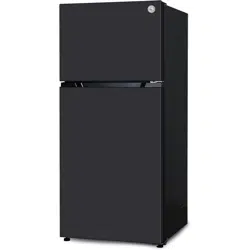
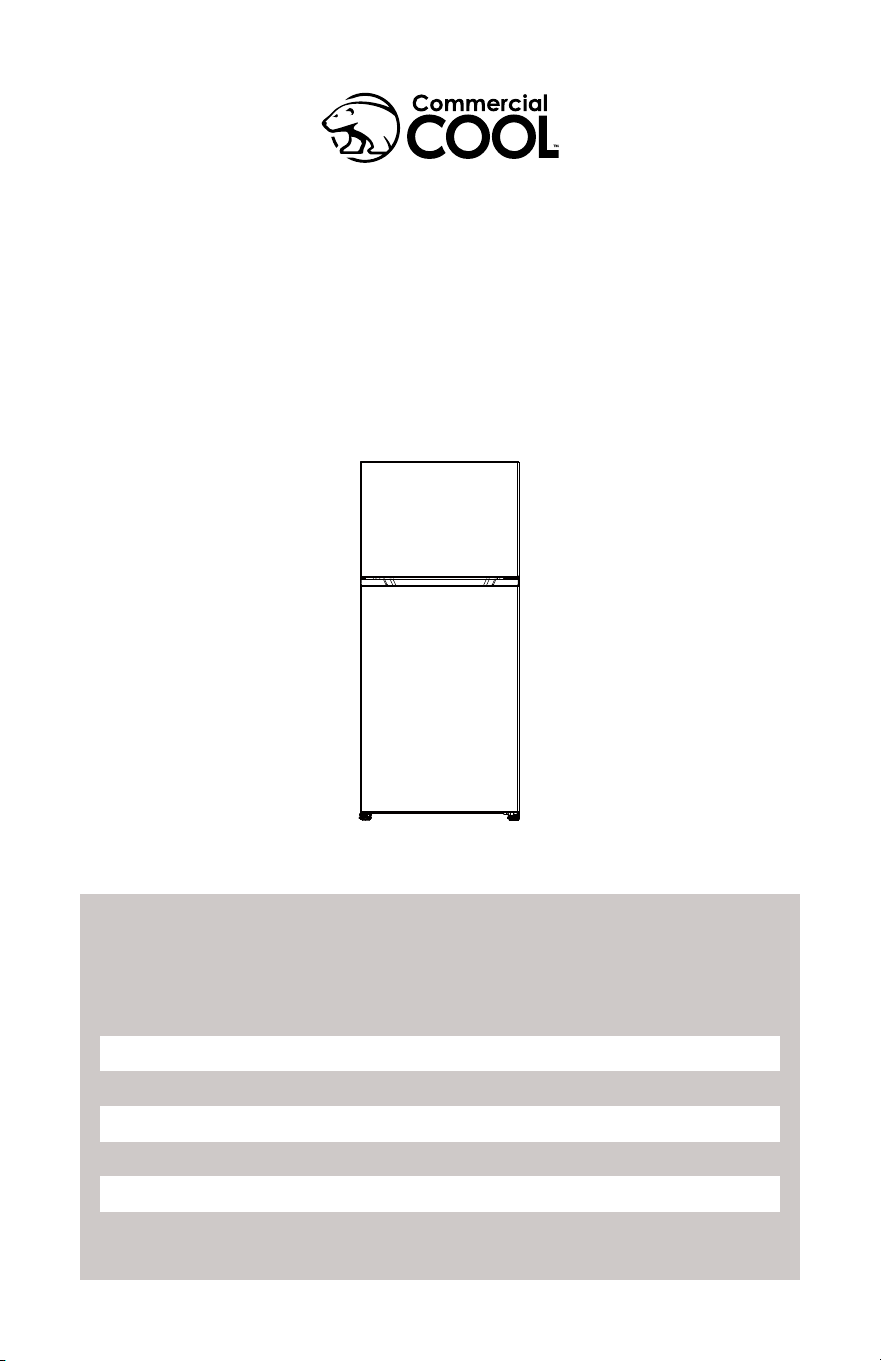
TOP MOUNT REFRIGERATOR FREEZER
CCR1800G/CCR2000G
1. READ these instructions carefully before installing and operating the
appliance. Keep them for further reference.
2. Record in the space below the “SERIAL/MODEL NUMBER” found on the back
or bottom of your appliance and retain this information for future reference.
SERIAL NUMBER:
MODEL NUMBER:
DATE OF PURCHASE:
Save and staple your sales receipt to your manual for warranty coverage.

Page 2

Page 3
CONTENTS
SAFETY INFORMATION
Important Safety Instructions ..........................................................................................................................................4-5
Refrigerant ................................................................................................................................................................................... 5
Grounding Instructions ..................................................................................................................................................... 6-7
SET UP & USE
Parts & features .......................................................................................................................................................................... 8
Food storage ...............................................................................................................................................................................9
Freezer compartment .............................................................................................................................................................9
Reverse and install the doors .................................................................................................................................... 10-11
Setting the temperature.......................................................................................................................................................11
Ice maker ready....................................................................................................................................................................11
CLEANING & CARE
Maintenance...............................................................................................................................................................................12
Vacation and moving care...................................................................................................................................................12
Eergy saving tips.......................................................................................................................................................................12
Defrost............................................................................................................................................................................................12
Disconnecting the appliance...............................................................................................................................................13
User notications......................................................................................................................................................................13
TROUBLESHOOTING & WARRANTY
Before you call for service ................................................................................................................................................... 14
Customer service ..................................................................................................................................................................... 14
Led indicator chart ...................................................................................................................................................................15
Common troubleshooting / Non-Malfunctions .........................................................................................................15
Troubleshooting ........................................................................................................................................................................16
Limited warranty .......................................................................................................................................................................17
Page 4
IMPORTANT SAFETY INSTRUCTIONS
SAFETY INFORMATION
DANGER
DANGER - Immediate hazards
which WILL result in severe
personal injury or death
WARNING
WARNING - Hazards or unsafe
practices which COULD result in
severe personal injury or death
CAUTION
CAUTION - Hazards or unsafe
practices which COULD result in
minor personal injury
WARNING
When using electrical appliances, basic safety precautions should always be
followed to reduce the risk of re, electric shock and personal injury
:
READ ALL INSTRUCTIONS BEFORE USING THE PRODUCT
1. Use this appliance only for its intended purpose as described in this use and
care guide.
2. This refrigerator must be properly installed in accordance with the installation
instructions before it is used. See grounding instructions in the installation
section.
3. Never unplug your refrigerator by pulling on the power cord. Always grasp the
plug rmly and pull straight out from the outlet.
4. Do not operate any appliance with a damaged cord or plug. Return appliance
to the nearest authorized service facility for examination, repair or adjustment.
5. Unplug your refrigerator before cleaning or before making any repairs.
NOTE: If for any reason this product requires service, we strongly recommend
that a certied technician performs the service. Component parts shall
be replaced with like components and servicing shall be done by factory
authorized service personnel, so as to minimize the risk of possible ignition due
to incorrect parts or improper service.
6. Do not use any electrical device or any sharp instrument in defrosting your
refrigerator.
7. After your refrigerator is in operation, do not touch the cold surfaces in the
freezer compartment, particularly when hands are damp or wet. Skin may
adhere to these extremely cold surfaces.
8. Do not refreeze foods that have been thawed completely. The United States
Department of Agriculture in Home and Garden Bulletin No. 69 reads: “…You
may safely refreeze frozen foods that have thawed if they still contain ice
crystals or if they are still cold-below 40˚F.
“…Thawed ground meats, poultry, or sh that have any off-odor or off-color
should not be refrozen and should not be eaten. Thawed ice cream should
be discarded. If the odor or color of any food is poor or questionable, discard
it. The food may be dangerous to eat … Even partial thawing and re-freezing
reduce the eating quality of foods, particularly fruits, vegetables, and prepared
foods. The eating quality of red meats is affected less than that of many other
foods. Use refrozen foods as soon as possible, to save as much of its eating
quality as you can.”
Page 5
SAFETY INFORMATION
DANGER
Risk of child entrapment. Before you throw away your old
refrigerator or freezer, take off the doors. Leave the shelves in place
so that children may not easily climb inside.
SAVE THESE INSTRUCTIONS
HOUSEHOLD USE ONLY
9. This refrigerator should not be recessed or built-in in an enclosed cabinet. It is
freestanding installation only.
10. Do not operate your refrigerator in the presence of explosive fumes.
11. Keep ventilation openings, in the appliance or enclosure or in the built-in
structure, clear of obstruction.
12. Do not use mechanical devices or other means to accelerate the defrosting
process, other than those recommended by the manufacturer.
13. Do not use electrical appliances inside the food storage compartments
14. Do not store explosive substances such as aerosol cans with a ammable
propellant in this appliance.
15. This appliance is not intended for use by persons (including children) with
reduced physical, sensory or mental capabilities, or lack of experience or
knowledge, unless they have been given supervision or instruction concerning
use of the appliance by a person responsible for their safety. Children should be supervised to
ensure that they do not play with the appliance.
16. is appliance is intended to be used in household or similar applications such as sta kitchen areas in
shops, oces and other working environments; farm houses and by clients in hotels, motels and other
residential type environments; catering and similar non-retail applications.
REFRIGERANT
GAS WARNINGS
DANGER - Risk of re or explosion. Flammable refrigerant used. DO NOT
use mechanical devices to defrost refrigerator. DO NOT puncture
refrigerant tubing.
DANGER - Risk of re or explosion. Flammable refrigerant used. To be repaired
only by trained service personnel. DO NOT puncture refrigerant tubing.
CAUTION - Risk of re or explosion. Flammable refrigerant used. Consult repair
manual/owner’s guide before attempting to service this product. All
safety precautions must be followed.
CAUTION - Risk of re or explosion. Dispose of properly in accordance with
federal or local regulations. Flammable refrigerant used.
CAUTION - Risk of re or explosion due to puncture of refrigerant tubing; Follow
handling instructions carefully. Flammable refrigerant used.
Page 6
SAFETY INFORMATION
WARNING
Improper use of the grounding plug can result
in a risk of electric shock.
GROUNDING INSTRUCTIONS
ELECTRICAL REQUIREMENTS
The electrical requirements are a 115 volt 60 Hz, AC only, 15 amp. It is recommended
that a separate circuit serving only the product be provided. The product is equipped
with a 3-wire cord having a 3-prong grounding plug. It must be plugged into a wall
receptacle that is properly installed and grounded.
This appliance must be grounded. In the event of an electrical short circuit, grounding
reduces risk of electric shock by providing an escape wire for the electric current.
The cord provided with this appliance is equipped with a grounding wire and a
grounding plug. The plug must be plugged into an outlet that is properly installed
and grounded.
Avoid the use of three prong adapters or cutting off the third grounding prong in
order to accommodate a two prong outlet. This is a dangerous practice since it
provides no effective grounding for the refrigerator and may result in shock hazard.
Consult a qualied electrician or serviceman if:
1) The grounding instructions are not completely understood.
2) You are unsure that the appliance is properly grounded.
3) You have any questions about the grounding or electrical instructions.
POWER SUPPLY CORD
Avoid the use of an extension cord because of potential safety hazards under certain
conditions. Have a qualied electrician or serviceman install an outlet near the
appliance.
If it is absolutely necessary to use longer cord sets or an extension cord, extreme
care must be exercised.
Page 7
SAFETY INFORMATION
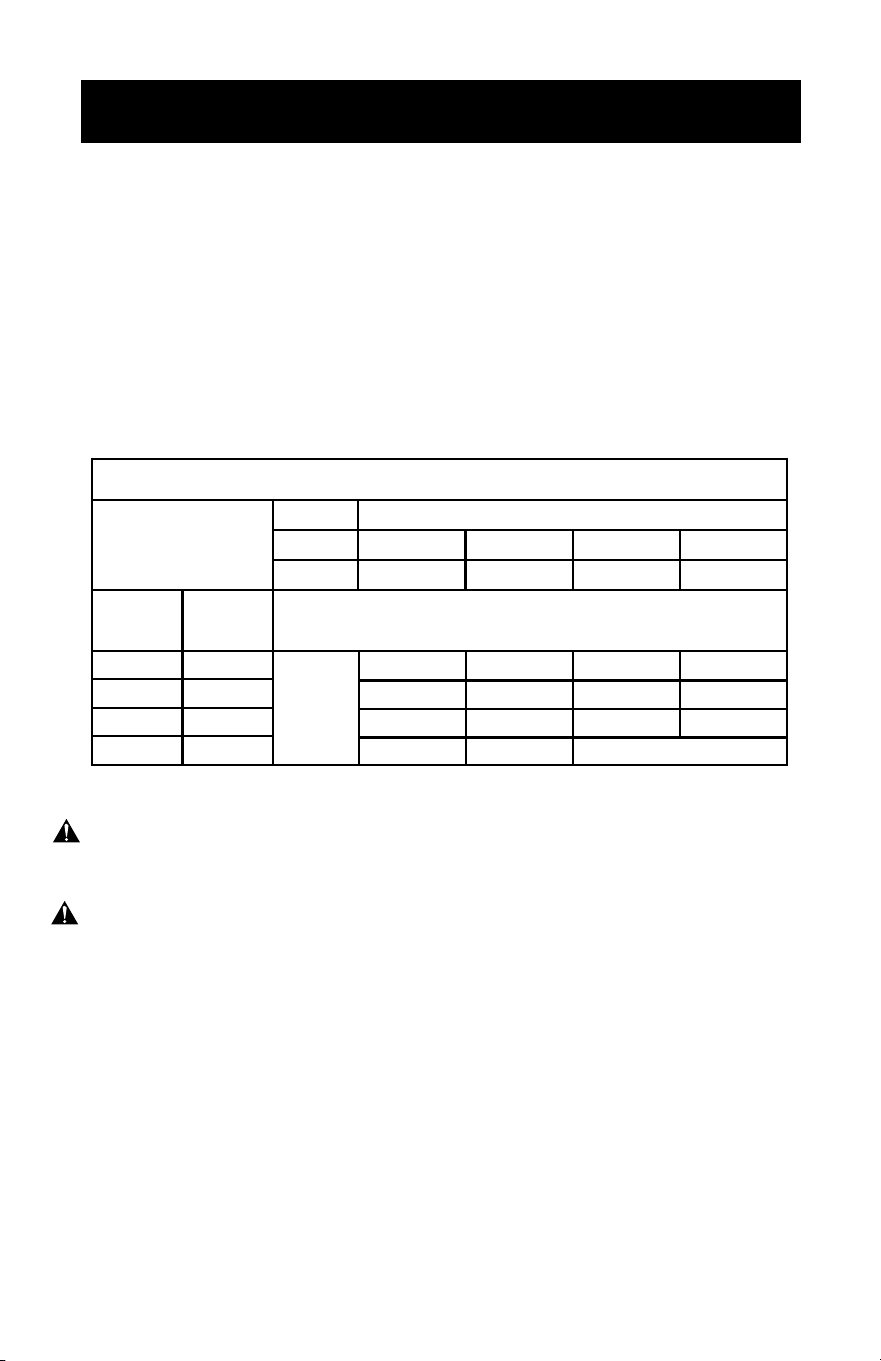
USE OF EXTENSION CORDS WITH REFRIGERATORS
Only use a grounded extension cord that is rated at least 15 amps and has a
third-wire ground. When a long extension cord is used to connect the refrigerator, a
voltage drop occurs. The longer the cord, the greater the voltage drop. This results
in less voltage being supplied to the refrigerator and increases the amount of current
(amp) draw or reduces performance. A heavier cord with a larger wire size will
reduce the voltage drop. Be sure to choose a cord that will supply enough voltage to
operate the refrigerator. The table below indicates appropriate gauge for extension
cords.
WARNING: Keep electrical cords in good condition. Do not use worn, bare, or frayed
cords because they can cause electrical shock.
WARNING: Operating equipment at low voltage can cause it to overheat. Using an
excessively long extension cord can cause the cord to overheat.
NOTE: Neither BLACK+DECKER nor the dealer can accept any liability for damage
to the product or personal injury resulting from failure to observe the
electrical connection procedures.
Minimum Gauge for Cord Sets
Ampere Rating
Volts
120V
240V
Total Length of Cord in Feet (meters)
25(7.6)
50(15.2)
50(15.2)
100(30.5)
100(30.5)
200(61.0)
150(45.7)
300(91.4)
More
Than
Not More
Than
0
18
16
10
16
14
Not Recommended
6
18
14
12
14
6
16
14
12
16
12
10
16
12
16
12
AWG
Page 8
SET UP & USE
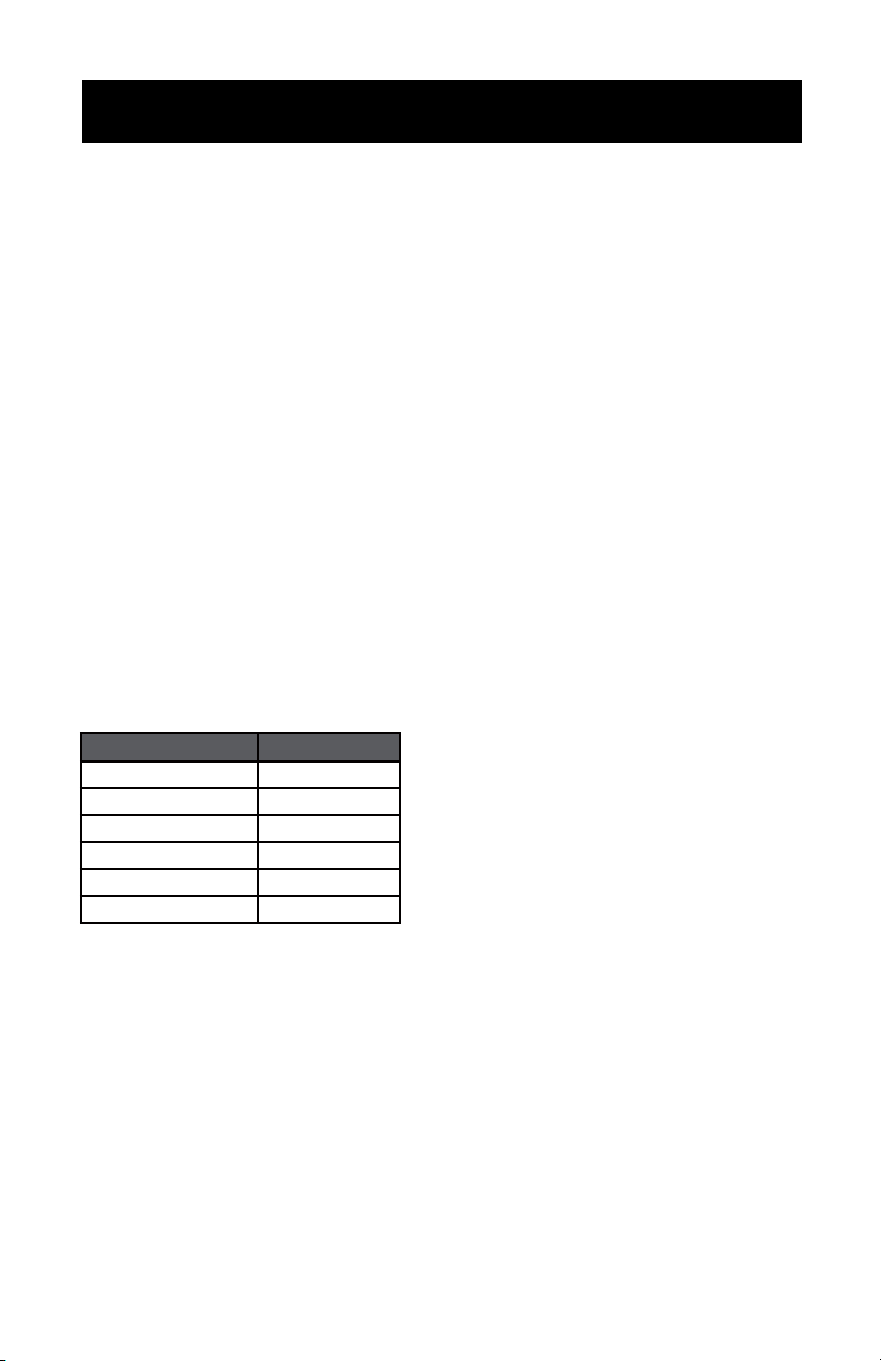
Freezer door
bins
Dairy box
Half width
refrigerator
door bins
Full width
door bins
Freezer shelf
Glass
refrigerator
shelves
Deli box
Crisper cover
Crisper
drawers
PARTS & FEATURES
Page 9
SET UP & USE
FOOD STORAGE
When storing fresh food that is not prepackaged, be sure to wrap or store food in
airtight and moisture proof material unless otherwise noted. This will ensure proper
shelf life and prevent the transfer of odors and tastes.
• Wipe containers before storing to avoid needless spills.
• Eggs should be stored in an upright position in their original carton to maximize
shelf life.
• Fruit should be washed and dried, then stored in sealed plastic bags before storing
in the refrigerator.
• Vegetables with skins should be stored in plastic bags or containers
• Leafy vegetables should be washed and drained and then stored in plastic bags or
containers.
• Hot food should be allowed to cool before storing. This will prevent unnecessary
energy use.
• Fresh seafoods should be used the same day as purchased
• When storing meats in the fresh food section, keep the original packaging or
rewrap as necessary.
FREEZER COMPARTMENT
Follow the suggestions below for safe storage:
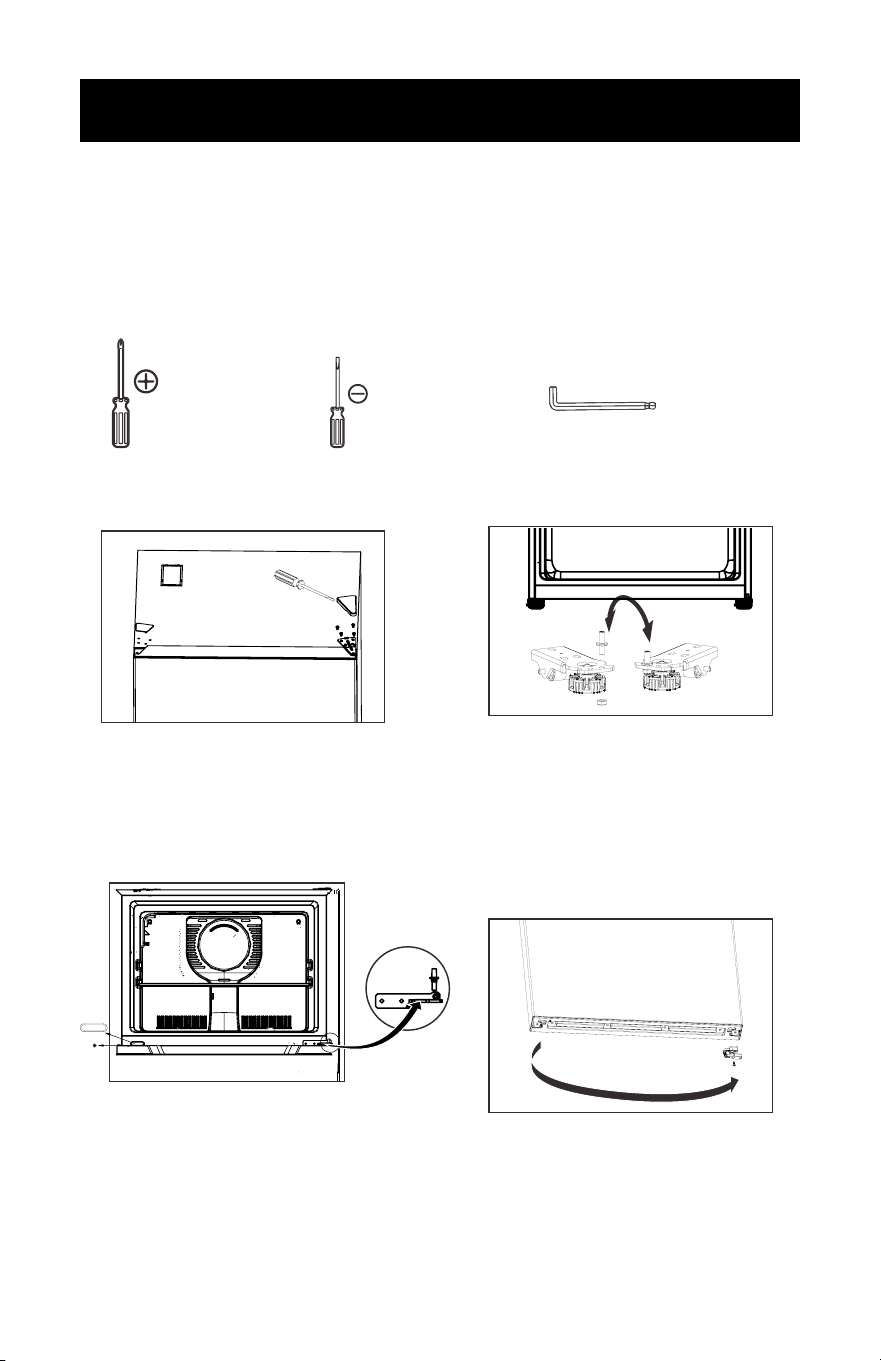
• Foods frozen in this compartment must be consumed within 5 days after storage.
This compartment is not cold enough for long term storage.
• To release frozen ice cube tray from the bottom of the compartment, pour warm
water around it. Boiling water should not be used as it can damaged the interior
cabinet. Metal objects, such as, screwdrivers or sharp knives can damage and
puncture the cooling system tubing. Do not wash the ice cube tray in a dishwasher;
only wash in lukewarm water.
T
A
Chicken
Ground Beef
Cold Cuts
Steak/Roast
ll Others
TIME
s
s
s
STORAGE
1-2 Day
1-2 Day
3-5 Days
3-5 Days
Smoked/Cured Meat
1-2 Day
-10 Days
7
All Others
TYPE OF MEAT
Page 10
SET UP & USE
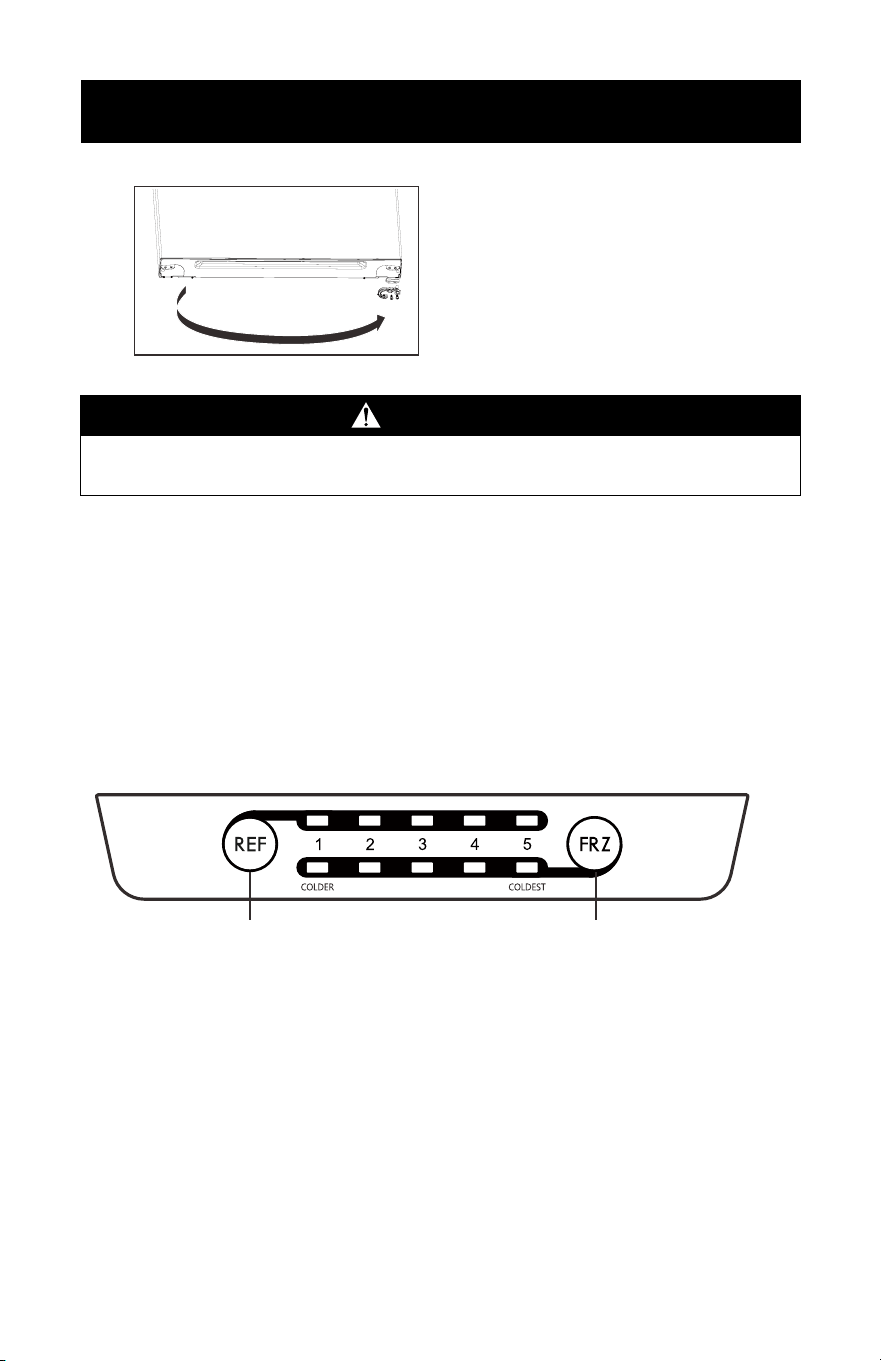
REVERSE AND INSTALL THE DOORS
You can choose to open your refrigerator by the right side or the left side.
To change the way of opening, please follow the instructions below.
Important safety warning: before doing so please unplug and disconnect the
appliance.
In addition to the accessories packed, you will need:
Medium-sized Phillips
screwdriver
Small-sized Flat - head
screwdriver
Allen wrench
1. First, check to make sure the power is disconnected.
2. Remove top hinge cover and hinge
hole cover, and remove the bolts
that secure top hinge,and check it
carefully before moving.
3. Remove freezer door.
4. Use an Allen wrench to unscrew the
hinge shaft on the middle hinge.
5. Remove the screw hole plugs on the
middle hinge and middle beam, and
remove the screws on the outer box
hole.
6. Remove the fridge door.
9. Remove the door closer and stopper
at the bottom of the fridge door and
install them on the other side.
7. Remove the hinge shaft from the
bottom hinge and install it onto the
hinge on the other side.
8. Install the middle hinge, screw hole
plug, and screws on the outer box to
the other side of the original position.
Page 11
SET UP & USE
10. Remove the door closer and
stopper at the bottom of the freezer
door,and install the stopper and the
left door closer to the other side
of the freezer door. NOTE: parts
needed are in the included plastic
bag.
WARNING
WARNING! Do not use any electronic equipment inside the appliance.
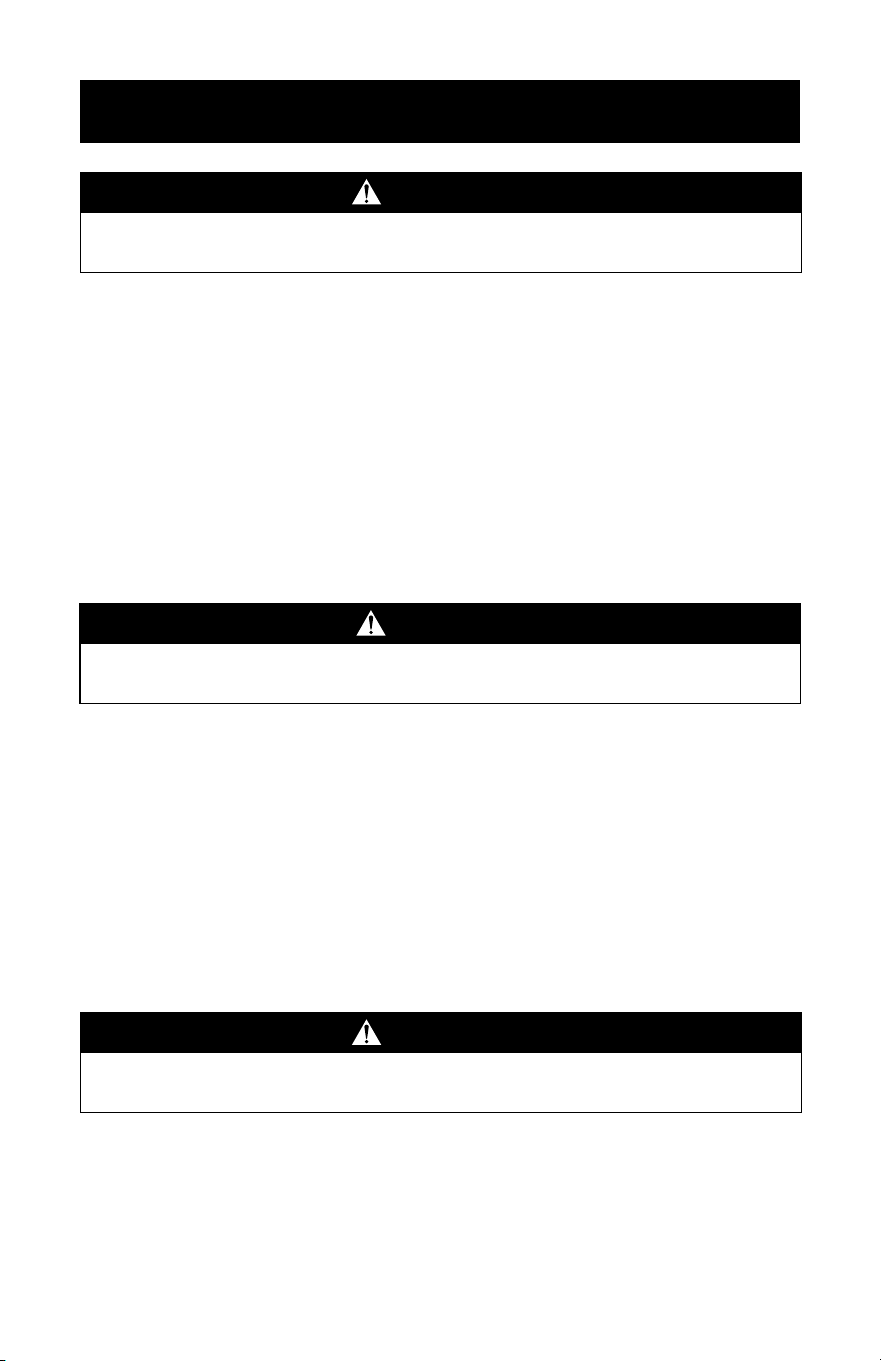
SETTING THE TEMPERATURE
The temperature of refrigerator and freezer compartment can be controlled
individually. The REF button controls the refrigerator temperature and the FRZ
button controls the freezer temperature. Please note, the number shown on the
display does not directly represent the temperature. The larger the number, the lower
the interior temperature will be. 1 is a COLD setting and 5 is the COLDEST setting.
When rst starting your refrigerator, set both the refrigerator and freezer control to
the middle setting (number 3) for 24 hours. If a colder temperature is required, push
the necessary REF or FRZ button to a colder temperature (4 or 5). Each time the
button is pressed, the temperature will cycle through each setting.
Refrigerator button Freezer button
ICE MAKER READY
This refrigerator is equipped to accept an ice maker as an after market installation
by a trained service technician. For further information, please contact the Customer
Service Department.

Page 12
CLEANING AND CARE
MAINTENANCE
The appliance should be maintained and cleaned frequently. For your safety, please
pull the plug out of the socket before the cleaning.
1. Interior maintenance.
Clean the interior of the appliance with clean water or neutral cleaning agent.
Scour with clean water and wipe it with a piece of dry cloth.
2. Door Gasket.
Clean door gaskets every three months according to general instructions. Gasket
must be kept clean and pliable to assure a proper seal.
•Petroleum jelly applied lightly on the hinge sides of gaskets will keep the gasket
pliable and ensure a good seal.
3. Exterior maintenance.
Prepare a cleaning solution of 3-4 tablespoons of baking soda mixed with warm
water. Use sponge or soft doth, dampened with the cleaning solution to wipe
down your refrigerator.
• Rinse with clean warm water and dry with a soft cloth.
• Do not use harsh chemicals, abrasives,ammonia, chlorine bleach, concentrated
detergents, solvents or metal scouring pads.
Some of these chemicals may dissolve, damage and/or discolor your refrigerator.
VACATION AND MOVING CARE
• When going on vacation, it is best that you empty all the food from your
refrigerator and freezer. Unplug the refrigerator, Clean the unit as per
“MAINTENANCE section listed above” and leave the door open to remove any
odors.
When travelling or moving the refrigerator, always transport the unit vertically.
Moving the unit on its sides may damage the refrigerator and/or its compressor.
ENERGY SAVING TIPS
• The refrigerator should be located in the coolest area of the room, away from
heat-producing appliances or heating ducts, and out of direct sunlight.
• Let hot foods cool to room temperature before placing in the refrigerator.
Overloading the refrigerator forces the compressor to run longer and thus
increase energy consumption. Foods that refrigerate too slowly may lose quality
or spoil.
• Be sure to wrap foods properly, and wipe containers dry before placing in the
refrigerator.
• The shelves should not be lined with aluminium foil, wax paper, or paper towels.
This will interfere with cold air circulation, making the refrigerator less efcient.
• Organize food to reduce door openings and extended searches. Remove as many
items as needed at one time, and close the door as soon as possible.
DEFROST
Defrost of refrigerator will be executed automatically, there is no need for manual
defrost. The defrost water ows into the vaporization plate and will be vaporized by
the heat of compressor, so the drain tube must be kept clean.
Page 13
CLEANING AND CARE
DISCONNECTING THE APPLIANCE
After power failure, even in summer, the refrigerator can store food normally for
several hours.
1. Discontinuation during power failure.
After power failure, do not put additional food in the appliance and reduce the
frequency of door opening. Place bags of ice in the top portion of the refrigerator.
2. Discontinuation during vacation.
Discard any food that will spoil while you are away and close the door rmly. If it
is an extended vacation, empty the refrigerator and unplug the appliance. After
defrosting, clean the liner of the appliance and wipei dry,and leave the door open.
3. Unused.
If the refrigerator will be unused for a long time, please unplug the outlet and clean
the appliance. The door should be kept open in order to prevent unpleasant smell.
USER NOTIFICATIONS
1. Do not splash water on the refrigerator, as it will cause oxidation and malfunction.
Electronic components such as on/off button should be wiped dry.
2. Cleansers such as soap powder, abrasive cleaning powder, alkali, cleansers,
chemical cloth, thinner, alcohol, acid petroleum product and hot water should
not be used to clean the refrigerator as they may damage the painted cover and
plastics.
3. Spills and stains can damage the interior. Please clean as soon as possible.
4. Please check the points below after maintenance:
(1) Is there any damage or loss of the electronics.
(2) Can the plug be put in the socket reliably.
(3) Is the plug overheating.
WARNING
Do not use mechanical devices or other means to accelerate the defrosting process,
other than those recommended by the manufacturer
WARNING
Please get rid of the gasket of the door before disposal.
The disposal of refrigerator should be handled by professionals as it may be harmful
to the environment.
Attention
After unplugging the power, please leave at least 5 minutes
before resuming operation.

Page 14
TROUBLESHOOTING & WARRANTY
BEFORE YOU CALL FOR SERVICE
IF THE UNIT FAILS TO OPERATE:
A) Check to make sure that the unit is plugged in securely. If it is not, remove the
plug from the outlet, wait 10 seconds and plug it in again securely.
B) Check for a blown circuit fuse or a tripped main circuit breaker. If these seem to
be operating properly, test the outlet with another appliance.
IF NONE OF THE ABOVE SOLVES THE PROBLEM, CONTACT A QUALIFIED
TECHNICIAN. DO NOT TRY TO ADJUST OR REPAIR THE PRODUCT YOURSELF.
CUSTOMER SERVICE
IMPORTANT
DO NOT RETURN THIS PRODUCT TO THE RETAILER
If you have a problem with this product, please contact the W Appliance Co.
Customer Satisfaction Center at (855)855-0294 or service@appliance. com.
DATED PROOF OF PURCHASE, MODEL # AND SERIAL #
REQUIRED FOR WARRANTY SERVICE
Page 15
TROUBLESHOOTING & WARRANTY
Common Troubleshooting / Non-Malfunctions
1. Moisture may form dew on the exterior of the product during humid seasons,
simply wipe clean as discussed in CLEANING AND CARE section.
2. The ow of refrigerant through the pipeline coil can cause clicking and noisy
operation.
3. Warm or hot refrigerator sides are a result of cooling pipeline operating. This is
normal.
4. The frame of the refrigerator may be warm during operation due to the defrost
pipeline inside. This is normal.
Please check the points above rst.
If the supply cord is damaged, it must be replaced by the manufacturer,its service
agent or similarly qualied persons in order to avoid a hazard.
No
1
2
3
4
5
6
7
8
Defect
LED1-LED 5
●●○○○
○●●○○
●●●●○
●●●○○
○●●○○
●●○○○
●●●●○
●○○○○
○●○○○
○○●○○
○○○●○
○○○○●
Position
Description
LED INDICATOR CHART
Ambient Temperature
Sensor Failure
Refrigeration
indicator light
Indicated LEDs will ash
intermittently at 0.5 second
intervals
One of Indicated LEDs
will ash intermittently
at 0.5 second intervals;
If refrigeration indicator
light ashes, it means the
refrigeration is overheated;
If the freezer light ashes,
It means that the freezer is
overheated.
Freeze indicator
light
Refrigeration or
Freeze indicator
light
Refrigeration Sensor
Failure
Refrigerator Door Alarm
Freeze Sensor Failure
Defrost Sensor Failure
Overheating Failure
Fan Failure
Communication Failure
Page 16
TROUBLESHOOTING & WARRANTY
TROUBLE POSSIBLE CAUSE POSSIBLE REMEDY
Refrigerator does not
work
A. Refrigerator is not
switched on
B. Unit is not plugged in or
is loose
C. Fuse has blown or is
defective
D. Wall power socket is
defective
A. Turn on the temperature
control dial. It may be in the
OFF, “0” position
B. Plug in the refrigerator
C. Check fuse, replace if
necessary
D. To be corrected by a
qualied electrician
The food is too cold A. Temperature is not
properly adjusted
A. Set the temperature control
dial to a warmer setting
The food is too warm A. Temperature is not
properly adjusted
B. Door was open for an
extended period
C. A large quantity of warm
food was placed in the
refrigerator within the last
24 hours
D. The refrigerator is near a
heat source
A. Set the temperature control
dial to a cooler setting
B. Open the door only as long
as necessary. Check door
gasket for proper seal
C. Set the temperature control
dial to a colder setting
temporarily
D. Please look in the
“Protection From Heat and
Moisture” section
Heavy build-up of frost,
possibly also on the door
seal
NOTE: This is normal
during high humidity
periods. Frequent door
openings will also cause
heavy frost buildup
A. Door seal is not air-tight
(possibly after reversing
the door)
A. Carefully warm the leaking
sections of the door gasket
with a hair dryer (on a cool
setting). At the same time,
shape the warmed door
seal by hand such that it sits
correctly
Popping or cracking
sounds
A. When compressor comes
on
A. This is a normal sound of
coolant owing through
condenser coils
Refrigerator door does not
shut properly
A. The refrigerator door is
not properly aligned
B. Possible blockage from
food containers, shelves,
bins, etc.
A. Re-align the refrigerator
door. Refer to the “Door
Alignment” section
B. Ensure nothing is blocking
the door
Refrigerator has an odor A. Foods not properly
sealed
B. Interior needs cleaning
A. Removed any contaminated
foods
B. Please refer to “Cleaning
and Care” section
TROUBLESHOOTING
Troubleshoot your problem by using the chart below. If the refrigerator still does
not work properly, contact W Appliance Co. customer service center or the nearest
authorized service center. Customers must never troubleshoot internal components.

Page 17
TROUBLESHOOTING & WARRANTY
Any repair, replacement, or warranty service,
and all questions about this product should
be directed to W Appliance at
1 (855) 855-
0294 from the USA or Puerto Rico.
W Appliance warrants to the original purchaser that
the product will be free from defects in material,
parts and workmanship for the period designated for
this product. The warranty commences the day the
product is purchased and covers up to a period of 1
year (12 months) for labor/1 year (12 months) for parts
(manufacturing defects only)/and a total of 5 years
(60 months) for compressor part only.
W Appliance agrees that it will, at its option,
replace the defective product with either a new
or remanufactured unit equivalent to your original
purchase during the warranty period.
Exclusions: This warranty does not apply if any of the
following conditions exist:
1. If the appearance or exterior of the
product has been damaged or defaced,
or altered or modified in either design or
construction.
2. If the product original serial number has
been altered or removed or cannot be
readily determined.
3. If there is damaged due to a power line
surge, user damage to the AC power
cord or connection to improper voltage
source.
4. If damage is due to general misuse,
accidents, or acts of God.
5. If repair attempts are done by
unauthorized service agents; use of
parts other than genuine parts or parts
obtained from persons other than
authorized service companies.
6. On units that have been transferred from
the original owner.
7. On products that have been purchased
as refurbished, like new, second-hand, in
a “As-Is” or “Final Sale” terms.
8. To products used in a commercial or
rental setting.
9. To product was used in settings other
than ordinary household use or used
other than in accordance with the
provided instructions.
10. To damages for service calls for
improper installations.
11. Transportation and shipping costs
associated with the replacement of the
unit.
12. Service calls to instruct you how to use
your product.
13. Service calls to repair or replace the
house fuse, reset a circuit breaker, or
correct the wiring in the house.
REPAIR OR REPLACEMENT AS PROVIDED UNDER
THIS WARRANTY IS THE EXCLUSIVE REMEDY OF
THE CUSTOMER; W APPLIANCE SHALL NOT BE
LIABLE FOR ANY INCIDENTAL OR CONSEQUENTIAL
DAMAGES FOR BREACH OF ANY EXPRESS OR
IMPLIED WARRANTY ON THIS PRODUCT, EXCEPT
TO THE EXTENT PROHIBITED BY APPLICABLE LAW.
ANY IMPLIED WARRANTY OF MERCHANTABILITY
OF FITNESS FOR A PARTICULAR PURPOSE ON THIS
PRODUCT IS LIMITED TO THE DURATION OF THE
WARRANTY.
Some states do not allow the exclusion or limitations
of incidental or consequential damages, or limitations
on how long the warranty lasts. In these cases the
above exclusions or limitations may not apply to you.
This warranty gives you specific legal rights and you
may also have other rights which vary from state to
state.
Obtaining Service: To obtain service, product
literature, supplies or accessories please call
1 (855) 855-0294 to create a ticket for exchange/
repair. Please make sure to provide the date of
purchase, model number and a brief description of
the problem. Our customer service representative will
contact you or send detailed return instructions.
W Appliance does not warrant that the appliance will work
properly in all environmental conditions, and makes no warranty
and representation, either implied or expressed, with respect
to the quality, performance, merchantability, or fitness for a
particular purpose other than the purpose identified within this
user’s manual. W Appliance has made every eort to ensure
that this user’s manual is accurate and disclaims liability for any
inaccuracies or omissions that may have occurred. Information in
this user’s manual is subject to change without notice and does
not represent a commitment on the part of W Appliance.
W Appliance reserves the right to make improvements to this
user’s manual and/or to the products described in this user’s
manual at any time without notice. If you find information in this
manual that is incorrect, misleading, or incomplete, please contact
us at 1- 855-855-0294.
W Appliance Co.
1356 Broadway
New York, NY 10018
LIMITED WARRANTY
Page 18
© 2024 Commercial Cool is a W Appliance Company.
All Rights Reserved.