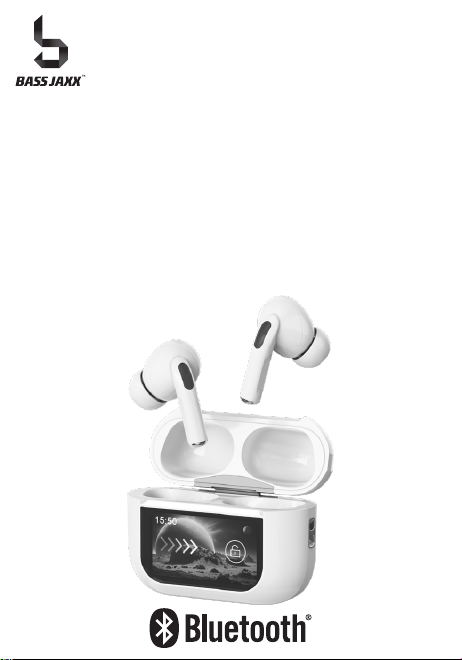
Thank you for purchasing the
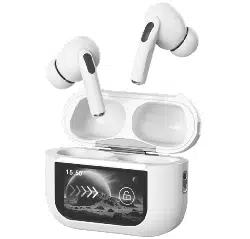
Active Noise Cancelling Smart Case True Wireless Earbuds.
This manual provides more information about this product,
please read the instructions before using.
INSTRUCTION MANUAL
Product Overview
Package Contents
USB Plug USB Type-C Plug
Specifications
Instruction Manual
USB Type-C Charging Cable
Instruction
Manual
FCC ID: 2ADM5-EP-0719V2
FCC ID: 2ADM5-EP-0719-CV2
Item# EP-0719
Keep all relevant information for future reference
Distributed by 1616 Holdings, Inc.
701 Market Street, Suite 200
Philadelphia, PA 19106
Made in China
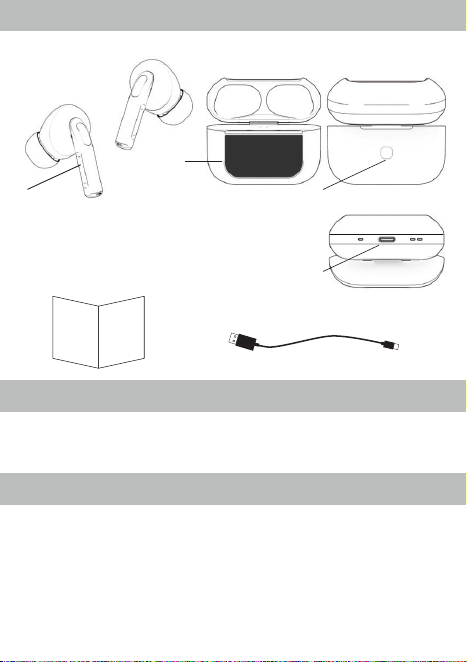
Earbuds Charging Case
Front Back
Bottom
Pair the wireless earbuds with your mobile device
Power On/Off
Power On the Smart Case
Press and hold the On/Off button for 5 seconds and the Multifunction Touchscreen will
be On.
Note: Press and hold the On/Off button for more than 8 seconds will reset the Smart
Case.
Power Off the Smart Case
Double click the On/Off button, and then select Power Off on the Multifunction
Touchscreen.
Power On the Earbuds
When the Smart Case is powered on and the earbuds are inside the Smart Case, open
the cover will turn on the Earbuds.
Power Off the Earbuds
Place the Earbuds in the Smart Case and close the cover will turn off the Earbuds.
FCC Statement
This device complies with the part 15 of the FCC rules. Operation is subject to the
following two conditions:(1) this device may not cause harmful interference, and (2) this
device must accept any interference received, including interference that may cause
undesired operation.
Caution: changes or modifications not expressly approved by the party responsible for
compliance could void the user's authority to operate the equipment.
NOTE: This equipment has been tested and found to comply with the limits for a Class B
digital device, pursuant to Part 15 of the FCC Rules. These limits are designed to provide
reasonable protection against harmful interference in a residential installation. This
equipment generates, uses and can radiate radio frequency energy and, if not installed
and used in accordance with instructions may cause harmful interference to radio
communications. However, there is no guarantee that interference will not occur in a
particular installation. If this equipment does cause harmful interference to radio or
television reception, which can be determined by turning the equipment off and on. The
user is encouraged to try to correct the interference by one or more of the following
measures:
• Reorient or relocate the receiving antenna.
• Increase the separation between the equipment and receiver.
• Connect the equipment into an outlet on a circuit different from that to which the receiver
is connected.
• Consult the dealer or experienced radio/ TV technician for help.
RF warning statement:
The device has been evaluated to meet general RF exposure requirement. The device
can be used in portable exposure condition without restriction.
If the wireless earbuds cannot be paired with your device,
please try the following:
Ensure that your earbuds are in pairing mode or reconnection mode
Ensure that Bluetooth search function of your mobile device is activated.
If the wireless earbuds will not turn on:
Make sure the earbuds are fully charged.
Make sure the protective stickers are removed from the Earbuds
Can I change the battery for the earbuds and the charging case?
The wireless earbuds and the charging case use a built-in non-detachable battery
which cannot be removed.
If the charging case cannot be recharged:
If you use a power outlet, ensure that the power supply is connected securely
and the outlet works.
FAQ
Recharge Charging Case
Multifunction Touchscreen Smart Case
NOTE:
• You must select a qualified charger from a regular manufacturer.
• You must charge the charging case and earbuds if it has been not used for more than
6 months.
USB Type-C PlugUSB Plug
1. Use the USB Type-C charging cable provided with the packaging.
2. Connect the USB plug to a USB port on a wall adapter, then connect the USB
Type-C plug to the USB Type-C charging port on the charging case to begin charging
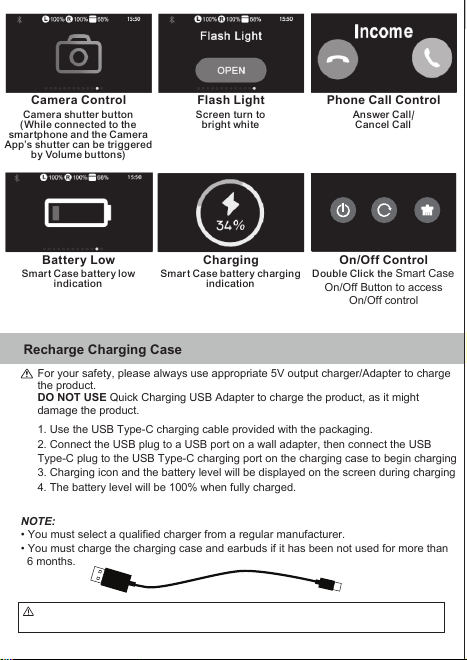
3. Charging icon and the battery level will be displayed on the screen during charging.
4. The battery level will be 100% when fully charged.
For your safety, please always use appropriate 5V output charger/Adapter to charge
the product.
DO NOT USE Quick Charging USB Adapter to charge the product, as it might
damage the product.
CAUTION: The USB Type-C charging cable included with this item is intended for use with
this product. Only use the included USB Type-C charging cable to charge this product.
Reconnect the wireless earbuds to your mobile device
Disconnect the wireless earbuds from your mobile device
Power off the wireless earbuds; or
Switch off the Bluetooth on your mobile phone; or
Leave the earbuds 60ft away from your mobile phone or further.
Answer / Reject a call
When receive a call, press the touch control area once ( on either earbud) to accept the
call, or answer the call normally via your mobile phone.
Double tap the touch control area to reject it.
End a call
To end the call, just press touch control area at any side of earbud.
Functions
Play/Pause Music: Single tap on the touch control area.
Go back to previous song: Double tap the left touch control area.
Advance to next song: Double tap the right touch control area.
Volume down: Triple tap the left touch control area.
Volume up: Triple tap the right touch control area.
Active Noise Cancelling(ANC) and Transparent mode: Press and hold the left touch
control area for 2 seconds.
Voice Assistant: Press and hold the right touch control area for 2 seconds.
Charging your Earbuds
When powered on, the wireless earbuds will automatically connect with the last
successfully paired device.
1. Open the charging case cover.
2. Insert the Earbuds into the charging case and close the cover.
3. The earbuds will start the charge automatically.
4. Earbuds battery level will be displayed on the screen.
Note: If the charging is not start, take out both earbuds from the charging case
and insert again after few seconds.
1. Keep the distance between the earbuds and mobile device within 32.8 feet.
2. De-activate the Bluetooth function on your mobile device.
3. Put the earbuds back to charging case before use. Take both earbuds out from
charging case and wait for 3 to 5 seconds for auto pairing.
4. Activate the Bluetooth function on your mobile device and select
“EP-0719 TWS” from the list shown.
1(One) Pair Earbuds
1(One) Portable Charging Case
1(One) USB Type-C Charging Cable
1(One) Instruction Manual
Driver Diameter:
Impedance:
Frequency Response:
Sensitivity:
ANC:
Earbud Battery Capacity :
Charging Case Battery Capacity:
Bluetooth Version:
Bluetooth Range:
Playtime:
Charging Time:
USB Type-C Charging Cable Included
USB Type-C Charging Cable Rating 5V/1A Max.
10 mm
32 Ohms
20 Hz - 20 kHz
98 dB +/- 3 dB
-18 dB +/- 3 dB
Li-ion 3.7V 30 mAh Per Earbud
Li-ion 3.7V 380 mAh
5.3
32.8 Feet
6 - 8 Hours (BT+ANC)
8 - 10 Hours (BT only)
2 Hours
The Bluetooth® word mark and logos are registered trademarks owned by Bluetooth
SIG, Inc. and any use of such marks by 1616 Holdings, Inc. is under license. Other
trademarks and trade names are those of their respective owners.
ACTIVE NOISE CANCELLING
TRUE WIRELESS EARBUDS
SMART CASE
ACTIVE NOISE CANCELLINGACTIVE NOISE CANCELLINGACTIVE NOISE CANCELLING
TRUE WIRELESS EARBUDSTRUE WIRELESS EARBUDSTRUE WIRELESS EARBUDS
SMART CASESMART CASESMART CASE
1. Touch Control Area
2. Multifunction Touchscreen
3. Smart Case On/Off Button
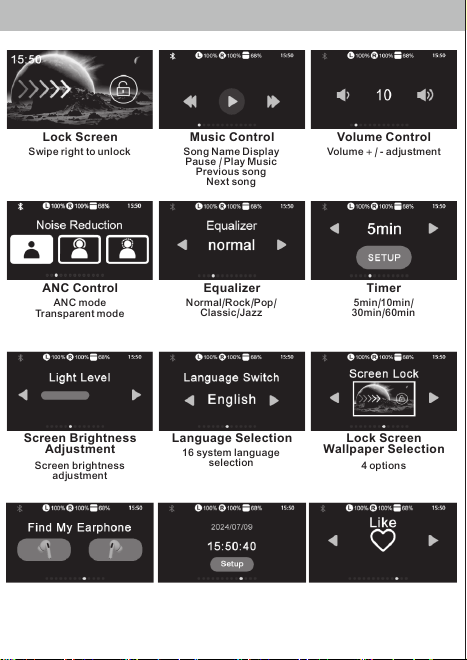
Lock Screen
Swipe right to unlock Song Name Display
Pause / Play Music
Previous song
Next song
Volume
+
/ - adjustment
Music Control Volume Control
Screen turn to
bright white
Camera shutter button
(While connected to the
smartphone and the Camera
App’s shutter can be triggered
by Volume buttons)
Answer Call/
Cancel Call
Phone Call Control
ANC mode
Transparent mode
Normal/Rock/Pop/
Classic/Jazz
5min/10min/
30min/60min
Screen brightness
adj ustment
16 system language
selection
4 options
Press the button and the
earbud will make beep sound
Setup the system time and
date for the smart case
Like shortcut button
(While connected to
the smartphone)
ANC Control Equalizer Timer
Screen Brightness
Adjustment
Language Selection Lock Screen
Wallpaper Selection
Find My Earphone Time/Date Setup Like Button
Camera Control Flash Light
4. USB Type-C
Charging Port
2
1
-The input voltage to the product is 5V 1A.
-In order to charge the product in safe manner and reliable conditions, please
only adopt certified appropriate charger/ adapter for charging the product.
-Only charge the product at ambient temperatures between 10 °C/ 50 °F
and 40 °C/104 °F.
- Do not heat above 70 °C/158 °F, eg. Do not expose to sunlight or throw into fire.
-Switch off the product after use.
-Please note that we won’t take any responsibility for any wrong operation (eg.
Voltage higher than 5V) as this may result in severe injury or loss of property, and
we cannot control the operating process during the time the user using this
product.
-In extreme cases, abuse or misuse of Lithium battery pack can lead to
explosion, heat generation, fire development or smoke development.
Safety instructions for the lithium battery and charging the product
3
4
Smart Case battery charging
indication
Smart Case battery low
indication
Double Click the Smart Case
On/Off Button to access
On/Off control
On/Off ControlBattery Low Charging
Power Off Reset Factory Reset
FRONT SIDE
BACK SIDE
Product: EP-0719 IM
Date: 28 OCT 2024
Size: 297(W) x 105(H)mm
Thank you for purchasing the
Active Noise Cancelling Smart Case True Wireless Earbuds.
This manual provides more information about this product,
please read the instructions before using.
INSTRUCTION MANUAL
Product Overview
Package Contents
USB Plug USB Type-C Plug
Specifications
Instruction Manual
USB Type-C Charging Cable
Instruction
Manual
FCC ID: 2ADM5-EP-0719V2
FCC ID: 2ADM5-EP-0719-CV2
Item# EP-0719
Keep all relevant information for future reference
Distributed by 1616 Holdings, Inc.
701 Market Street, Suite 200
Philadelphia, PA 19106
Made in China
Earbuds Charging Case
Front Back
Bottom
Pair the wireless earbuds with your mobile device
Power On/Off
Power On the Smart Case
Press and hold the On/Off button for 5 seconds and the Multifunction Touchscreen will
be On.
Note: Press and hold the On/Off button for more than 8 seconds will reset the Smart
Case.
Power Off the Smart Case
Double click the On/Off button, and then select Power Off on the Multifunction
Touchscreen.
Power On the Earbuds
When the Smart Case is powered on and the earbuds are inside the Smart Case, open
the cover will turn on the Earbuds.
Power Off the Earbuds
Place the Earbuds in the Smart Case and close the cover will turn off the Earbuds.
FCC Statement
This device complies with the part 15 of the FCC rules. Operation is subject to the
following two conditions:(1) this device may not cause harmful interference, and (2) this
device must accept any interference received, including interference that may cause
undesired operation.
Caution: changes or modifications not expressly approved by the party responsible for
compliance could void the user's authority to operate the equipment.
NOTE: This equipment has been tested and found to comply with the limits for a Class B
digital device, pursuant to Part 15 of the FCC Rules. These limits are designed to provide
reasonable protection against harmful interference in a residential installation. This
equipment generates, uses and can radiate radio frequency energy and, if not installed
and used in accordance with instructions may cause harmful interference to radio
communications. However, there is no guarantee that interference will not occur in a
particular installation. If this equipment does cause harmful interference to radio or
television reception, which can be determined by turning the equipment off and on. The
user is encouraged to try to correct the interference by one or more of the following
measures:
• Reorient or relocate the receiving antenna.
• Increase the separation between the equipment and receiver.
• Connect the equipment into an outlet on a circuit different from that to which the receiver
is connected.
• Consult the dealer or experienced radio/ TV technician for help.
RF warning statement:
The device has been evaluated to meet general RF exposure requirement. The device
can be used in portable exposure condition without restriction.
If the wireless earbuds cannot be paired with your device,
please try the following:
Ensure that your earbuds are in pairing mode or reconnection mode
Ensure that Bluetooth search function of your mobile device is activated.
If the wireless earbuds will not turn on:
Make sure the earbuds are fully charged.
Make sure the protective stickers are removed from the Earbuds
Can I change the battery for the earbuds and the charging case?
The wireless earbuds and the charging case use a built-in non-detachable battery
which cannot be removed.
If the charging case cannot be recharged:
If you use a power outlet, ensure that the power supply is connected securely
and the outlet works.
FAQ
Recharge Charging Case
Multifunction Touchscreen Smart Case
NOTE:
• You must select a qualified charger from a regular manufacturer.
• You must charge the charging case and earbuds if it has been not used for more than
6 months.
USB Type-C PlugUSB Plug
1. Use the USB Type-C charging cable provided with the packaging.
2. Connect the USB plug to a USB port on a wall adapter, then connect the USB
Type-C plug to the USB Type-C charging port on the charging case to begin charging
3. Charging icon and the battery level will be displayed on the screen during charging.
4. The battery level will be 100% when fully charged.
For your safety, please always use appropriate 5V output charger/Adapter to charge
the product.
DO NOT USE Quick Charging USB Adapter to charge the product, as it might
damage the product.
CAUTION: The USB Type-C charging cable included with this item is intended for use with
this product. Only use the included USB Type-C charging cable to charge this product.
Reconnect the wireless earbuds to your mobile device
Disconnect the wireless earbuds from your mobile device
Power off the wireless earbuds; or
Switch off the Bluetooth on your mobile phone; or
Leave the earbuds 60ft away from your mobile phone or further.
Answer / Reject a call
When receive a call, press the touch control area once ( on either earbud) to accept the
call, or answer the call normally via your mobile phone.
Double tap the touch control area to reject it.
End a call
To end the call, just press touch control area at any side of earbud.
Functions
Play/Pause Music: Single tap on the touch control area.
Go back to previous song: Double tap the left touch control area.
Advance to next song: Double tap the right touch control area.
Volume down: Triple tap the left touch control area.
Volume up: Triple tap the right touch control area.
Active Noise Cancelling(ANC) and Transparent mode: Press and hold the left touch
control area for 2 seconds.
Voice Assistant: Press and hold the right touch control area for 2 seconds.
Charging your Earbuds
When powered on, the wireless earbuds will automatically connect with the last
successfully paired device.
1. Open the charging case cover.
2. Insert the Earbuds into the charging case and close the cover.
3. The earbuds will start the charge automatically.
4. Earbuds battery level will be displayed on the screen.
Note: If the charging is not start, take out both earbuds from the charging case
and insert again after few seconds.
1. Keep the distance between the earbuds and mobile device within 32.8 feet.
2. De-activate the Bluetooth function on your mobile device.
3. Put the earbuds back to charging case before use. Take both earbuds out from
charging case and wait for 3 to 5 seconds for auto pairing.
4. Activate the Bluetooth function on your mobile device and select
“EP-0719 TWS” from the list shown.
1(One) Pair Earbuds
1(One) Portable Charging Case
1(One) USB Type-C Charging Cable
1(One) Instruction Manual
Driver Diameter:
Impedance:
Frequency Response:
Sensitivity:
ANC:
Earbud Battery Capacity :
Charging Case Battery Capacity:
Bluetooth Version:
Bluetooth Range:
Playtime:
Charging Time:
USB Type-C Charging Cable Included
USB Type-C Charging Cable Rating 5V/1A Max.
10 mm
32 Ohms
20 Hz - 20 kHz
98 dB +/- 3 dB
-18 dB +/- 3 dB
Li-ion 3.7V 30 mAh Per Earbud
Li-ion 3.7V 380 mAh
5.3
32.8 Feet
6 - 8 Hours (BT+ANC)
8 - 10 Hours (BT only)
2 Hours
The Bluetooth® word mark and logos are registered trademarks owned by Bluetooth
SIG, Inc. and any use of such marks by 1616 Holdings, Inc. is under license. Other
trademarks and trade names are those of their respective owners.
ACTIVE NOISE CANCELLING
TRUE WIRELESS EARBUDS
SMART CASE
ACTIVE NOISE CANCELLINGACTIVE NOISE CANCELLINGACTIVE NOISE CANCELLING
TRUE WIRELESS EARBUDSTRUE WIRELESS EARBUDSTRUE WIRELESS EARBUDS
SMART CASESMART CASESMART CASE
1. Touch Control Area
2. Multifunction Touchscreen
3. Smart Case On/Off Button
Lock Screen
Swipe right to unlock Song Name Display
Pause / Play Music
Previous song
Next song
Volume
+
/ - adjustment
Music Control Volume Control
Screen turn to
bright white
Camera shutter button
(While connected to the
smartphone and the Camera
App’s shutter can be triggered
by Volume buttons)
Answer Call/
Cancel Call
Phone Call Control
ANC mode
Transparent mode
Normal/Rock/Pop/
Classic/Jazz
5min/10min/
30min/60min
Screen brightness
adj ustment
16 system language
selection
4 options
Press the button and the
earbud will make beep sound
Setup the system time and
date for the smart case
Like shortcut button
(While connected to
the smartphone)
ANC Control Equalizer Timer
Screen Brightness
Adjustment
Language Selection Lock Screen
Wallpaper Selection
Find My Earphone Time/Date Setup Like Button
Camera Control Flash Light
4. USB Type-C
Charging Port
2
1
-The input voltage to the product is 5V 1A.
-In order to charge the product in safe manner and reliable conditions, please
only adopt certified appropriate charger/ adapter for charging the product.
-Only charge the product at ambient temperatures between 10 °C/ 50 °F
and 40 °C/104 °F.
- Do not heat above 70 °C/158 °F, eg. Do not expose to sunlight or throw into fire.
-Switch off the product after use.
-Please note that we won’t take any responsibility for any wrong operation (eg.
Voltage higher than 5V) as this may result in severe injury or loss of property, and
we cannot control the operating process during the time the user using this
product.
-In extreme cases, abuse or misuse of Lithium battery pack can lead to
explosion, heat generation, fire development or smoke development.
Safety instructions for the lithium battery and charging the product
3
4
Smart Case battery charging
indication
Smart Case battery low
indication
Double Click the Smart Case
On/Off Button to access
On/Off control
On/Off ControlBattery Low Charging
Power Off Reset Factory Reset
FRONT SIDE
BACK SIDE
Product: EP-0719 IM
Date: 28 OCT 2024
Size: 297(W) x 105(H)mm

Thank you for purchasing the
Active Noise Cancelling Smart Case True Wireless Earbuds.
This manual provides more information about this product,
please read the instructions before using.
INSTRUCTION MANUAL
Product Overview
Package Contents
USB Plug USB Type-C Plug
Specifications
Instruction Manual
USB Type-C Charging Cable
Instruction
Manual
FCC ID: 2ADM5-EP-0719V2
FCC ID: 2ADM5-EP-0719-CV2
Item# EP-0719
Keep all relevant information for future reference
Distributed by 1616 Holdings, Inc.
701 Market Street, Suite 200
Philadelphia, PA 19106
Made in China
Earbuds Charging Case
Front Back
Bottom
Pair the wireless earbuds with your mobile device
Power On/Off
Power On the Smart Case
Press and hold the On/Off button for 5 seconds and the Multifunction Touchscreen will
be On.
Note: Press and hold the On/Off button for more than 8 seconds will reset the Smart
Case.
Power Off the Smart Case
Double click the On/Off button, and then select Power Off on the Multifunction
Touchscreen.
Power On the Earbuds
When the Smart Case is powered on and the earbuds are inside the Smart Case, open
the cover will turn on the Earbuds.
Power Off the Earbuds
Place the Earbuds in the Smart Case and close the cover will turn off the Earbuds.
FCC Statement
This device complies with the part 15 of the FCC rules. Operation is subject to the
following two conditions:(1) this device may not cause harmful interference, and (2) this
device must accept any interference received, including interference that may cause
undesired operation.
Caution: changes or modifications not expressly approved by the party responsible for
compliance could void the user's authority to operate the equipment.
NOTE: This equipment has been tested and found to comply with the limits for a Class B
digital device, pursuant to Part 15 of the FCC Rules. These limits are designed to provide
reasonable protection against harmful interference in a residential installation. This
equipment generates, uses and can radiate radio frequency energy and, if not installed
and used in accordance with instructions may cause harmful interference to radio
communications. However, there is no guarantee that interference will not occur in a
particular installation. If this equipment does cause harmful interference to radio or
television reception, which can be determined by turning the equipment off and on. The
user is encouraged to try to correct the interference by one or more of the following
measures:
• Reorient or relocate the receiving antenna.
• Increase the separation between the equipment and receiver.
• Connect the equipment into an outlet on a circuit different from that to which the receiver
is connected.
• Consult the dealer or experienced radio/ TV technician for help.
RF warning statement:
The device has been evaluated to meet general RF exposure requirement. The device
can be used in portable exposure condition without restriction.
If the wireless earbuds cannot be paired with your device,
please try the following:
Ensure that your earbuds are in pairing mode or reconnection mode
Ensure that Bluetooth search function of your mobile device is activated.
If the wireless earbuds will not turn on:
Make sure the earbuds are fully charged.
Make sure the protective stickers are removed from the Earbuds
Can I change the battery for the earbuds and the charging case?
The wireless earbuds and the charging case use a built-in non-detachable battery
which cannot be removed.
If the charging case cannot be recharged:
If you use a power outlet, ensure that the power supply is connected securely
and the outlet works.
FAQ
Recharge Charging Case
Multifunction Touchscreen Smart Case
NOTE:
• You must select a qualified charger from a regular manufacturer.
• You must charge the charging case and earbuds if it has been not used for more than
6 months.
USB Type-C PlugUSB Plug
1. Use the USB Type-C charging cable provided with the packaging.
2. Connect the USB plug to a USB port on a wall adapter, then connect the USB
Type-C plug to the USB Type-C charging port on the charging case to begin charging
3. Charging icon and the battery level will be displayed on the screen during charging.
4. The battery level will be 100% when fully charged.
For your safety, please always use appropriate 5V output charger/Adapter to charge
the product.
DO NOT USE Quick Charging USB Adapter to charge the product, as it might
damage the product.
CAUTION: The USB Type-C charging cable included with this item is intended for use with
this product. Only use the included USB Type-C charging cable to charge this product.
Reconnect the wireless earbuds to your mobile device
Disconnect the wireless earbuds from your mobile device
Power off the wireless earbuds; or
Switch off the Bluetooth on your mobile phone; or
Leave the earbuds 60ft away from your mobile phone or further.
Answer / Reject a call
When receive a call, press the touch control area once ( on either earbud) to accept the
call, or answer the call normally via your mobile phone.
Double tap the touch control area to reject it.
End a call
To end the call, just press touch control area at any side of earbud.
Functions
Play/Pause Music: Single tap on the touch control area.
Go back to previous song: Double tap the left touch control area.
Advance to next song: Double tap the right touch control area.
Volume down: Triple tap the left touch control area.
Volume up: Triple tap the right touch control area.
Active Noise Cancelling(ANC) and Transparent mode: Press and hold the left touch
control area for 2 seconds.
Voice Assistant: Press and hold the right touch control area for 2 seconds.
Charging your Earbuds
When powered on, the wireless earbuds will automatically connect with the last
successfully paired device.
1. Open the charging case cover.
2. Insert the Earbuds into the charging case and close the cover.
3. The earbuds will start the charge automatically.
4. Earbuds battery level will be displayed on the screen.
Note: If the charging is not start, take out both earbuds from the charging case
and insert again after few seconds.
1. Keep the distance between the earbuds and mobile device within 32.8 feet.
2. De-activate the Bluetooth function on your mobile device.
3. Put the earbuds back to charging case before use. Take both earbuds out from
charging case and wait for 3 to 5 seconds for auto pairing.
4. Activate the Bluetooth function on your mobile device and select
“EP-0719 TWS” from the list shown.
1(One) Pair Earbuds
1(One) Portable Charging Case
1(One) USB Type-C Charging Cable
1(One) Instruction Manual
Driver Diameter:
Impedance:
Frequency Response:
Sensitivity:
ANC:
Earbud Battery Capacity :
Charging Case Battery Capacity:
Bluetooth Version:
Bluetooth Range:
Playtime:
Charging Time:
USB Type-C Charging Cable Included
USB Type-C Charging Cable Rating 5V/1A Max.
10 mm
32 Ohms
20 Hz - 20 kHz
98 dB +/- 3 dB
-18 dB +/- 3 dB
Li-ion 3.7V 30 mAh Per Earbud
Li-ion 3.7V 380 mAh
5.3
32.8 Feet
6 - 8 Hours (BT+ANC)
8 - 10 Hours (BT only)
2 Hours
The Bluetooth® word mark and logos are registered trademarks owned by Bluetooth
SIG, Inc. and any use of such marks by 1616 Holdings, Inc. is under license. Other
trademarks and trade names are those of their respective owners.
ACTIVE NOISE CANCELLING
TRUE WIRELESS EARBUDS
SMART CASE
ACTIVE NOISE CANCELLINGACTIVE NOISE CANCELLINGACTIVE NOISE CANCELLING
TRUE WIRELESS EARBUDSTRUE WIRELESS EARBUDSTRUE WIRELESS EARBUDS
SMART CASESMART CASESMART CASE
1. Touch Control Area
2. Multifunction Touchscreen
3. Smart Case On/Off Button
Lock Screen
Swipe right to unlock Song Name Display
Pause / Play Music
Previous song
Next song
Volume
+
/ - adjustment
Music Control Volume Control
Screen turn to
bright white
Camera shutter button
(While connected to the
smartphone and the Camera
App’s shutter can be triggered
by Volume buttons)
Answer Call/
Cancel Call
Phone Call Control
ANC mode
Transparent mode
Normal/Rock/Pop/
Classic/Jazz
5min/10min/
30min/60min
Screen brightness
adj ustment
16 system language
selection
4 options
Press the button and the
earbud will make beep sound
Setup the system time and
date for the smart case
Like shortcut button
(While connected to
the smartphone)
ANC Control Equalizer Timer
Screen Brightness
Adjustment
Language Selection Lock Screen
Wallpaper Selection
Find My Earphone Time/Date Setup Like Button
Camera Control Flash Light
4. USB Type-C
Charging Port
2
1
-The input voltage to the product is 5V 1A.
-In order to charge the product in safe manner and reliable conditions, please
only adopt certified appropriate charger/ adapter for charging the product.
-Only charge the product at ambient temperatures between 10 °C/ 50 °F
and 40 °C/104 °F.
- Do not heat above 70 °C/158 °F, eg. Do not expose to sunlight or throw into fire.
-Switch off the product after use.
-Please note that we won’t take any responsibility for any wrong operation (eg.
Voltage higher than 5V) as this may result in severe injury or loss of property, and
we cannot control the operating process during the time the user using this
product.
-In extreme cases, abuse or misuse of Lithium battery pack can lead to
explosion, heat generation, fire development or smoke development.
Safety instructions for the lithium battery and charging the product
3
4
Smart Case battery charging
indication
Smart Case battery low
indication
Double Click the Smart Case
On/Off Button to access
On/Off control
On/Off ControlBattery Low Charging
Power Off Reset Factory Reset
FRONT SIDE
BACK SIDE
Product: EP-0719 IM
Date: 28 OCT 2024
Size: 297(W) x 105(H)mm

Thank you for purchasing the
Active Noise Cancelling Smart Case True Wireless Earbuds.
This manual provides more information about this product,
please read the instructions before using.
INSTRUCTION MANUAL
Product Overview
Package Contents
USB Plug USB Type-C Plug
Specifications
Instruction Manual
USB Type-C Charging Cable
Instruction
Manual
FCC ID: 2ADM5-EP-0719V2
FCC ID: 2ADM5-EP-0719-CV2
Item# EP-0719
Keep all relevant information for future reference
Distributed by 1616 Holdings, Inc.
701 Market Street, Suite 200
Philadelphia, PA 19106
Made in China
Earbuds Charging Case
Front Back
Bottom
Pair the wireless earbuds with your mobile device
Power On/Off
Power On the Smart Case
Press and hold the On/Off button for 5 seconds and the Multifunction Touchscreen will
be On.
Note: Press and hold the On/Off button for more than 8 seconds will reset the Smart
Case.
Power Off the Smart Case
Double click the On/Off button, and then select Power Off on the Multifunction
Touchscreen.
Power On the Earbuds
When the Smart Case is powered on and the earbuds are inside the Smart Case, open
the cover will turn on the Earbuds.
Power Off the Earbuds
Place the Earbuds in the Smart Case and close the cover will turn off the Earbuds.
FCC Statement
This device complies with the part 15 of the FCC rules. Operation is subject to the
following two conditions:(1) this device may not cause harmful interference, and (2) this
device must accept any interference received, including interference that may cause
undesired operation.
Caution: changes or modifications not expressly approved by the party responsible for
compliance could void the user's authority to operate the equipment.
NOTE: This equipment has been tested and found to comply with the limits for a Class B
digital device, pursuant to Part 15 of the FCC Rules. These limits are designed to provide
reasonable protection against harmful interference in a residential installation. This
equipment generates, uses and can radiate radio frequency energy and, if not installed
and used in accordance with instructions may cause harmful interference to radio
communications. However, there is no guarantee that interference will not occur in a
particular installation. If this equipment does cause harmful interference to radio or
television reception, which can be determined by turning the equipment off and on. The
user is encouraged to try to correct the interference by one or more of the following
measures:
• Reorient or relocate the receiving antenna.
• Increase the separation between the equipment and receiver.
• Connect the equipment into an outlet on a circuit different from that to which the receiver
is connected.
• Consult the dealer or experienced radio/ TV technician for help.
RF warning statement:
The device has been evaluated to meet general RF exposure requirement. The device
can be used in portable exposure condition without restriction.
If the wireless earbuds cannot be paired with your device,
please try the following:
Ensure that your earbuds are in pairing mode or reconnection mode
Ensure that Bluetooth search function of your mobile device is activated.
If the wireless earbuds will not turn on:
Make sure the earbuds are fully charged.
Make sure the protective stickers are removed from the Earbuds
Can I change the battery for the earbuds and the charging case?
The wireless earbuds and the charging case use a built-in non-detachable battery
which cannot be removed.
If the charging case cannot be recharged:
If you use a power outlet, ensure that the power supply is connected securely
and the outlet works.
FAQ
Recharge Charging Case
Multifunction Touchscreen Smart Case
NOTE:
• You must select a qualified charger from a regular manufacturer.
• You must charge the charging case and earbuds if it has been not used for more than
6 months.
USB Type-C PlugUSB Plug
1. Use the USB Type-C charging cable provided with the packaging.
2. Connect the USB plug to a USB port on a wall adapter, then connect the USB
Type-C plug to the USB Type-C charging port on the charging case to begin charging
3. Charging icon and the battery level will be displayed on the screen during charging.
4. The battery level will be 100% when fully charged.
For your safety, please always use appropriate 5V output charger/Adapter to charge
the product.
DO NOT USE Quick Charging USB Adapter to charge the product, as it might
damage the product.
CAUTION: The USB Type-C charging cable included with this item is intended for use with
this product. Only use the included USB Type-C charging cable to charge this product.
Reconnect the wireless earbuds to your mobile device
Disconnect the wireless earbuds from your mobile device
Power off the wireless earbuds; or
Switch off the Bluetooth on your mobile phone; or
Leave the earbuds 60ft away from your mobile phone or further.
Answer / Reject a call
When receive a call, press the touch control area once ( on either earbud) to accept the
call, or answer the call normally via your mobile phone.
Double tap the touch control area to reject it.
End a call
To end the call, just press touch control area at any side of earbud.
Functions
Play/Pause Music: Single tap on the touch control area.
Go back to previous song: Double tap the left touch control area.
Advance to next song: Double tap the right touch control area.
Volume down: Triple tap the left touch control area.
Volume up: Triple tap the right touch control area.
Active Noise Cancelling(ANC) and Transparent mode: Press and hold the left touch
control area for 2 seconds.
Voice Assistant: Press and hold the right touch control area for 2 seconds.
Charging your Earbuds
When powered on, the wireless earbuds will automatically connect with the last
successfully paired device.
1. Open the charging case cover.
2. Insert the Earbuds into the charging case and close the cover.
3. The earbuds will start the charge automatically.
4. Earbuds battery level will be displayed on the screen.
Note: If the charging is not start, take out both earbuds from the charging case
and insert again after few seconds.
1. Keep the distance between the earbuds and mobile device within 32.8 feet.
2. De-activate the Bluetooth function on your mobile device.
3. Put the earbuds back to charging case before use. Take both earbuds out from
charging case and wait for 3 to 5 seconds for auto pairing.
4. Activate the Bluetooth function on your mobile device and select
“EP-0719 TWS” from the list shown.
1(One) Pair Earbuds
1(One) Portable Charging Case
1(One) USB Type-C Charging Cable
1(One) Instruction Manual
Driver Diameter:
Impedance:
Frequency Response:
Sensitivity:
ANC:
Earbud Battery Capacity :
Charging Case Battery Capacity:
Bluetooth Version:
Bluetooth Range:
Playtime:
Charging Time:
USB Type-C Charging Cable Included
USB Type-C Charging Cable Rating 5V/1A Max.
10 mm
32 Ohms
20 Hz - 20 kHz
98 dB +/- 3 dB
-18 dB +/- 3 dB
Li-ion 3.7V 30 mAh Per Earbud
Li-ion 3.7V 380 mAh
5.3
32.8 Feet
6 - 8 Hours (BT+ANC)
8 - 10 Hours (BT only)
2 Hours
The Bluetooth® word mark and logos are registered trademarks owned by Bluetooth
SIG, Inc. and any use of such marks by 1616 Holdings, Inc. is under license. Other
trademarks and trade names are those of their respective owners.
ACTIVE NOISE CANCELLING
TRUE WIRELESS EARBUDS
SMART CASE
ACTIVE NOISE CANCELLINGACTIVE NOISE CANCELLINGACTIVE NOISE CANCELLING
TRUE WIRELESS EARBUDSTRUE WIRELESS EARBUDSTRUE WIRELESS EARBUDS
SMART CASESMART CASESMART CASE
1. Touch Control Area
2. Multifunction Touchscreen
3. Smart Case On/Off Button
Lock Screen
Swipe right to unlock Song Name Display
Pause / Play Music
Previous song
Next song
Volume
+
/ - adjustment
Music Control Volume Control
Screen turn to
bright white
Camera shutter button
(While connected to the
smartphone and the Camera
App’s shutter can be triggered
by Volume buttons)
Answer Call/
Cancel Call
Phone Call Control
ANC mode
Transparent mode
Normal/Rock/Pop/
Classic/Jazz
5min/10min/
30min/60min
Screen brightness
adj ustment
16 system language
selection
4 options
Press the button and the
earbud will make beep sound
Setup the system time and
date for the smart case
Like shortcut button
(While connected to
the smartphone)
ANC Control Equalizer Timer
Screen Brightness
Adjustment
Language Selection Lock Screen
Wallpaper Selection
Find My Earphone Time/Date Setup Like Button
Camera Control Flash Light
4. USB Type-C
Charging Port
2
1
-The input voltage to the product is 5V 1A.
-In order to charge the product in safe manner and reliable conditions, please
only adopt certified appropriate charger/ adapter for charging the product.
-Only charge the product at ambient temperatures between 10 °C/ 50 °F
and 40 °C/104 °F.
- Do not heat above 70 °C/158 °F, eg. Do not expose to sunlight or throw into fire.
-Switch off the product after use.
-Please note that we won’t take any responsibility for any wrong operation (eg.
Voltage higher than 5V) as this may result in severe injury or loss of property, and
we cannot control the operating process during the time the user using this
product.
-In extreme cases, abuse or misuse of Lithium battery pack can lead to
explosion, heat generation, fire development or smoke development.
Safety instructions for the lithium battery and charging the product
3
4
Smart Case battery charging
indication
Smart Case battery low
indication
Double Click the Smart Case
On/Off Button to access
On/Off control
On/Off ControlBattery Low Charging
Power Off Reset Factory Reset
FRONT SIDE
BACK SIDE
Product: EP-0719 IM
Date: 28 OCT 2024
Size: 297(W) x 105(H)mm
Thank you for purchasing the
Active Noise Cancelling Smart Case True Wireless Earbuds.
This manual provides more information about this product,
please read the instructions before using.
INSTRUCTION MANUAL
Product Overview
Package Contents
USB Plug USB Type-C Plug
Specifications
Instruction Manual
USB Type-C Charging Cable
Instruction
Manual
FCC ID: 2ADM5-EP-0719V2
FCC ID: 2ADM5-EP-0719-CV2
Item# EP-0719
Keep all relevant information for future reference
Distributed by 1616 Holdings, Inc.
701 Market Street, Suite 200
Philadelphia, PA 19106
Made in China
Earbuds Charging Case
Front Back
Bottom
Pair the wireless earbuds with your mobile device
Power On/Off
Power On the Smart Case
Press and hold the On/Off button for 5 seconds and the Multifunction Touchscreen will
be On.
Note: Press and hold the On/Off button for more than 8 seconds will reset the Smart
Case.
Power Off the Smart Case
Double click the On/Off button, and then select Power Off on the Multifunction
Touchscreen.
Power On the Earbuds
When the Smart Case is powered on and the earbuds are inside the Smart Case, open
the cover will turn on the Earbuds.
Power Off the Earbuds
Place the Earbuds in the Smart Case and close the cover will turn off the Earbuds.
FCC Statement
This device complies with the part 15 of the FCC rules. Operation is subject to the
following two conditions:(1) this device may not cause harmful interference, and (2) this
device must accept any interference received, including interference that may cause
undesired operation.
Caution: changes or modifications not expressly approved by the party responsible for
compliance could void the user's authority to operate the equipment.
NOTE: This equipment has been tested and found to comply with the limits for a Class B
digital device, pursuant to Part 15 of the FCC Rules. These limits are designed to provide
reasonable protection against harmful interference in a residential installation. This
equipment generates, uses and can radiate radio frequency energy and, if not installed
and used in accordance with instructions may cause harmful interference to radio
communications. However, there is no guarantee that interference will not occur in a
particular installation. If this equipment does cause harmful interference to radio or
television reception, which can be determined by turning the equipment off and on. The
user is encouraged to try to correct the interference by one or more of the following
measures:
• Reorient or relocate the receiving antenna.
• Increase the separation between the equipment and receiver.
• Connect the equipment into an outlet on a circuit different from that to which the receiver
is connected.
• Consult the dealer or experienced radio/ TV technician for help.
RF warning statement:
The device has been evaluated to meet general RF exposure requirement. The device
can be used in portable exposure condition without restriction.
If the wireless earbuds cannot be paired with your device,
please try the following:
Ensure that your earbuds are in pairing mode or reconnection mode
Ensure that Bluetooth search function of your mobile device is activated.
If the wireless earbuds will not turn on:
Make sure the earbuds are fully charged.
Make sure the protective stickers are removed from the Earbuds
Can I change the battery for the earbuds and the charging case?
The wireless earbuds and the charging case use a built-in non-detachable battery
which cannot be removed.
If the charging case cannot be recharged:
If you use a power outlet, ensure that the power supply is connected securely
and the outlet works.
FAQ
Recharge Charging Case
Multifunction Touchscreen Smart Case
NOTE:
• You must select a qualified charger from a regular manufacturer.
• You must charge the charging case and earbuds if it has been not used for more than
6 months.
USB Type-C PlugUSB Plug
1. Use the USB Type-C charging cable provided with the packaging.
2. Connect the USB plug to a USB port on a wall adapter, then connect the USB
Type-C plug to the USB Type-C charging port on the charging case to begin charging
3. Charging icon and the battery level will be displayed on the screen during charging.
4. The battery level will be 100% when fully charged.
For your safety, please always use appropriate 5V output charger/Adapter to charge
the product.
DO NOT USE Quick Charging USB Adapter to charge the product, as it might
damage the product.
CAUTION: The USB Type-C charging cable included with this item is intended for use with
this product. Only use the included USB Type-C charging cable to charge this product.
Reconnect the wireless earbuds to your mobile device
Disconnect the wireless earbuds from your mobile device
Power off the wireless earbuds; or
Switch off the Bluetooth on your mobile phone; or
Leave the earbuds 60ft away from your mobile phone or further.
Answer / Reject a call
When receive a call, press the touch control area once ( on either earbud) to accept the
call, or answer the call normally via your mobile phone.
Double tap the touch control area to reject it.
End a call
To end the call, just press touch control area at any side of earbud.
Functions
Play/Pause Music: Single tap on the touch control area.
Go back to previous song: Double tap the left touch control area.
Advance to next song: Double tap the right touch control area.
Volume down: Triple tap the left touch control area.
Volume up: Triple tap the right touch control area.
Active Noise Cancelling(ANC) and Transparent mode: Press and hold the left touch
control area for 2 seconds.
Voice Assistant: Press and hold the right touch control area for 2 seconds.
Charging your Earbuds
When powered on, the wireless earbuds will automatically connect with the last
successfully paired device.
1. Open the charging case cover.
2. Insert the Earbuds into the charging case and close the cover.
3. The earbuds will start the charge automatically.
4. Earbuds battery level will be displayed on the screen.
Note: If the charging is not start, take out both earbuds from the charging case
and insert again after few seconds.
1. Keep the distance between the earbuds and mobile device within 32.8 feet.
2. De-activate the Bluetooth function on your mobile device.
3. Put the earbuds back to charging case before use. Take both earbuds out from
charging case and wait for 3 to 5 seconds for auto pairing.
4. Activate the Bluetooth function on your mobile device and select
“EP-0719 TWS” from the list shown.
1(One) Pair Earbuds
1(One) Portable Charging Case
1(One) USB Type-C Charging Cable
1(One) Instruction Manual
Driver Diameter:
Impedance:
Frequency Response:
Sensitivity:
ANC:
Earbud Battery Capacity :
Charging Case Battery Capacity:
Bluetooth Version:
Bluetooth Range:
Playtime:
Charging Time:
USB Type-C Charging Cable Included
USB Type-C Charging Cable Rating 5V/1A Max.
10 mm
32 Ohms
20 Hz - 20 kHz
98 dB +/- 3 dB
-18 dB +/- 3 dB
Li-ion 3.7V 30 mAh Per Earbud
Li-ion 3.7V 380 mAh
5.3
32.8 Feet
6 - 8 Hours (BT+ANC)
8 - 10 Hours (BT only)
2 Hours
The Bluetooth® word mark and logos are registered trademarks owned by Bluetooth
SIG, Inc. and any use of such marks by 1616 Holdings, Inc. is under license. Other
trademarks and trade names are those of their respective owners.
ACTIVE NOISE CANCELLING
TRUE WIRELESS EARBUDS
SMART CASE
ACTIVE NOISE CANCELLINGACTIVE NOISE CANCELLINGACTIVE NOISE CANCELLING
TRUE WIRELESS EARBUDSTRUE WIRELESS EARBUDSTRUE WIRELESS EARBUDS
SMART CASESMART CASESMART CASE
1. Touch Control Area
2. Multifunction Touchscreen
3. Smart Case On/Off Button
Lock Screen
Swipe right to unlock Song Name Display
Pause / Play Music
Previous song
Next song
Volume
+
/ - adjustment
Music Control Volume Control
Screen turn to
bright white
Camera shutter button
(While connected to the
smartphone and the Camera
App’s shutter can be triggered
by Volume buttons)
Answer Call/
Cancel Call
Phone Call Control
ANC mode
Transparent mode
Normal/Rock/Pop/
Classic/Jazz
5min/10min/
30min/60min
Screen brightness
adj ustment
16 system language
selection
4 options
Press the button and the
earbud will make beep sound
Setup the system time and
date for the smart case
Like shortcut button
(While connected to
the smartphone)
ANC Control Equalizer Timer
Screen Brightness
Adjustment
Language Selection Lock Screen
Wallpaper Selection
Find My Earphone Time/Date Setup Like Button
Camera Control Flash Light
4. USB Type-C
Charging Port
2
1
-The input voltage to the product is 5V 1A.
-In order to charge the product in safe manner and reliable conditions, please
only adopt certified appropriate charger/ adapter for charging the product.
-Only charge the product at ambient temperatures between 10 °C/ 50 °F
and 40 °C/104 °F.
- Do not heat above 70 °C/158 °F, eg. Do not expose to sunlight or throw into fire.
-Switch off the product after use.
-Please note that we won’t take any responsibility for any wrong operation (eg.
Voltage higher than 5V) as this may result in severe injury or loss of property, and
we cannot control the operating process during the time the user using this
product.
-In extreme cases, abuse or misuse of Lithium battery pack can lead to
explosion, heat generation, fire development or smoke development.
Safety instructions for the lithium battery and charging the product
3
4
Smart Case battery charging
indication
Smart Case battery low
indication
Double Click the Smart Case
On/Off Button to access
On/Off control
On/Off ControlBattery Low Charging
Power Off Reset Factory Reset
FRONT SIDE
BACK SIDE
Product: EP-0719 IM
Date: 28 OCT 2024
Size: 297(W) x 105(H)mm
Thank you for purchasing the
Active Noise Cancelling Smart Case True Wireless Earbuds.
This manual provides more information about this product,
please read the instructions before using.
INSTRUCTION MANUAL
Product Overview
Package Contents
USB Plug USB Type-C Plug
Specifications
Instruction Manual
USB Type-C Charging Cable
Instruction
Manual
FCC ID: 2ADM5-EP-0719V2
FCC ID: 2ADM5-EP-0719-CV2
Item# EP-0719
Keep all relevant information for future reference
Distributed by 1616 Holdings, Inc.
701 Market Street, Suite 200
Philadelphia, PA 19106
Made in China
Earbuds Charging Case
Front Back
Bottom
Pair the wireless earbuds with your mobile device
Power On/Off
Power On the Smart Case
Press and hold the On/Off button for 5 seconds and the Multifunction Touchscreen will
be On.
Note: Press and hold the On/Off button for more than 8 seconds will reset the Smart
Case.
Power Off the Smart Case
Double click the On/Off button, and then select Power Off on the Multifunction
Touchscreen.
Power On the Earbuds
When the Smart Case is powered on and the earbuds are inside the Smart Case, open
the cover will turn on the Earbuds.
Power Off the Earbuds
Place the Earbuds in the Smart Case and close the cover will turn off the Earbuds.
FCC Statement
This device complies with the part 15 of the FCC rules. Operation is subject to the
following two conditions:(1) this device may not cause harmful interference, and (2) this
device must accept any interference received, including interference that may cause
undesired operation.
Caution: changes or modifications not expressly approved by the party responsible for
compliance could void the user's authority to operate the equipment.
NOTE: This equipment has been tested and found to comply with the limits for a Class B
digital device, pursuant to Part 15 of the FCC Rules. These limits are designed to provide
reasonable protection against harmful interference in a residential installation. This
equipment generates, uses and can radiate radio frequency energy and, if not installed
and used in accordance with instructions may cause harmful interference to radio
communications. However, there is no guarantee that interference will not occur in a
particular installation. If this equipment does cause harmful interference to radio or
television reception, which can be determined by turning the equipment off and on. The
user is encouraged to try to correct the interference by one or more of the following
measures:
• Reorient or relocate the receiving antenna.
• Increase the separation between the equipment and receiver.
• Connect the equipment into an outlet on a circuit different from that to which the receiver
is connected.
• Consult the dealer or experienced radio/ TV technician for help.
RF warning statement:
The device has been evaluated to meet general RF exposure requirement. The device
can be used in portable exposure condition without restriction.
If the wireless earbuds cannot be paired with your device,
please try the following:
Ensure that your earbuds are in pairing mode or reconnection mode
Ensure that Bluetooth search function of your mobile device is activated.
If the wireless earbuds will not turn on:
Make sure the earbuds are fully charged.
Make sure the protective stickers are removed from the Earbuds
Can I change the battery for the earbuds and the charging case?
The wireless earbuds and the charging case use a built-in non-detachable battery
which cannot be removed.
If the charging case cannot be recharged:
If you use a power outlet, ensure that the power supply is connected securely
and the outlet works.
FAQ
Recharge Charging Case
Multifunction Touchscreen Smart Case
NOTE:
• You must select a qualified charger from a regular manufacturer.
• You must charge the charging case and earbuds if it has been not used for more than
6 months.
USB Type-C PlugUSB Plug
1. Use the USB Type-C charging cable provided with the packaging.
2. Connect the USB plug to a USB port on a wall adapter, then connect the USB
Type-C plug to the USB Type-C charging port on the charging case to begin charging
3. Charging icon and the battery level will be displayed on the screen during charging.
4. The battery level will be 100% when fully charged.
For your safety, please always use appropriate 5V output charger/Adapter to charge
the product.
DO NOT USE Quick Charging USB Adapter to charge the product, as it might
damage the product.
CAUTION: The USB Type-C charging cable included with this item is intended for use with
this product. Only use the included USB Type-C charging cable to charge this product.
Reconnect the wireless earbuds to your mobile device
Disconnect the wireless earbuds from your mobile device
Power off the wireless earbuds; or
Switch off the Bluetooth on your mobile phone; or
Leave the earbuds 60ft away from your mobile phone or further.
Answer / Reject a call
When receive a call, press the touch control area once ( on either earbud) to accept the
call, or answer the call normally via your mobile phone.
Double tap the touch control area to reject it.
End a call
To end the call, just press touch control area at any side of earbud.
Functions
Play/Pause Music: Single tap on the touch control area.
Go back to previous song: Double tap the left touch control area.
Advance to next song: Double tap the right touch control area.
Volume down: Triple tap the left touch control area.
Volume up: Triple tap the right touch control area.
Active Noise Cancelling(ANC) and Transparent mode: Press and hold the left touch
control area for 2 seconds.
Voice Assistant: Press and hold the right touch control area for 2 seconds.
Charging your Earbuds
When powered on, the wireless earbuds will automatically connect with the last
successfully paired device.
1. Open the charging case cover.
2. Insert the Earbuds into the charging case and close the cover.
3. The earbuds will start the charge automatically.
4. Earbuds battery level will be displayed on the screen.
Note: If the charging is not start, take out both earbuds from the charging case
and insert again after few seconds.
1. Keep the distance between the earbuds and mobile device within 32.8 feet.
2. De-activate the Bluetooth function on your mobile device.
3. Put the earbuds back to charging case before use. Take both earbuds out from
charging case and wait for 3 to 5 seconds for auto pairing.
4. Activate the Bluetooth function on your mobile device and select
“EP-0719 TWS” from the list shown.
1(One) Pair Earbuds
1(One) Portable Charging Case
1(One) USB Type-C Charging Cable
1(One) Instruction Manual
Driver Diameter:
Impedance:
Frequency Response:
Sensitivity:
ANC:
Earbud Battery Capacity :
Charging Case Battery Capacity:
Bluetooth Version:
Bluetooth Range:
Playtime:
Charging Time:
USB Type-C Charging Cable Included
USB Type-C Charging Cable Rating 5V/1A Max.
10 mm
32 Ohms
20 Hz - 20 kHz
98 dB +/- 3 dB
-18 dB +/- 3 dB
Li-ion 3.7V 30 mAh Per Earbud
Li-ion 3.7V 380 mAh
5.3
32.8 Feet
6 - 8 Hours (BT+ANC)
8 - 10 Hours (BT only)
2 Hours
The Bluetooth® word mark and logos are registered trademarks owned by Bluetooth
SIG, Inc. and any use of such marks by 1616 Holdings, Inc. is under license. Other
trademarks and trade names are those of their respective owners.
ACTIVE NOISE CANCELLING
TRUE WIRELESS EARBUDS
SMART CASE
ACTIVE NOISE CANCELLINGACTIVE NOISE CANCELLINGACTIVE NOISE CANCELLING
TRUE WIRELESS EARBUDSTRUE WIRELESS EARBUDSTRUE WIRELESS EARBUDS
SMART CASESMART CASESMART CASE
1. Touch Control Area
2. Multifunction Touchscreen
3. Smart Case On/Off Button
Lock Screen
Swipe right to unlock Song Name Display
Pause / Play Music
Previous song
Next song
Volume
+
/ - adjustment
Music Control Volume Control
Screen turn to
bright white
Camera shutter button
(While connected to the
smartphone and the Camera
App’s shutter can be triggered
by Volume buttons)
Answer Call/
Cancel Call
Phone Call Control
ANC mode
Transparent mode
Normal/Rock/Pop/
Classic/Jazz
5min/10min/
30min/60min
Screen brightness
adj ustment
16 system language
selection
4 options
Press the button and the
earbud will make beep sound
Setup the system time and
date for the smart case
Like shortcut button
(While connected to
the smartphone)
ANC Control Equalizer Timer
Screen Brightness
Adjustment
Language Selection Lock Screen
Wallpaper Selection
Find My Earphone Time/Date Setup Like Button
Camera Control Flash Light
4. USB Type-C
Charging Port
2
1
-The input voltage to the product is 5V 1A.
-In order to charge the product in safe manner and reliable conditions, please
only adopt certified appropriate charger/ adapter for charging the product.
-Only charge the product at ambient temperatures between 10 °C/ 50 °F
and 40 °C/104 °F.
- Do not heat above 70 °C/158 °F, eg. Do not expose to sunlight or throw into fire.
-Switch off the product after use.
-Please note that we won’t take any responsibility for any wrong operation (eg.
Voltage higher than 5V) as this may result in severe injury or loss of property, and
we cannot control the operating process during the time the user using this
product.
-In extreme cases, abuse or misuse of Lithium battery pack can lead to
explosion, heat generation, fire development or smoke development.
Safety instructions for the lithium battery and charging the product
3
4
Smart Case battery charging
indication
Smart Case battery low
indication
Double Click the Smart Case
On/Off Button to access
On/Off control
On/Off ControlBattery Low Charging
Power Off Reset Factory Reset
FRONT SIDE
BACK SIDE
Product: EP-0719 IM
Date: 28 OCT 2024
Size: 297(W) x 105(H)mm

Thank you for purchasing the
Active Noise Cancelling Smart Case True Wireless Earbuds.
This manual provides more information about this product,
please read the instructions before using.
INSTRUCTION MANUAL
Product Overview
Package Contents
USB Plug USB Type-C Plug
Specifications
Instruction Manual
USB Type-C Charging Cable
Instruction
Manual
FCC ID: 2ADM5-EP-0719V2
FCC ID: 2ADM5-EP-0719-CV2
Item# EP-0719
Keep all relevant information for future reference
Distributed by 1616 Holdings, Inc.
701 Market Street, Suite 200
Philadelphia, PA 19106
Made in China
Earbuds Charging Case
Front Back
Bottom
Pair the wireless earbuds with your mobile device
Power On/Off
Power On the Smart Case
Press and hold the On/Off button for 5 seconds and the Multifunction Touchscreen will
be On.
Note: Press and hold the On/Off button for more than 8 seconds will reset the Smart
Case.
Power Off the Smart Case
Double click the On/Off button, and then select Power Off on the Multifunction
Touchscreen.
Power On the Earbuds
When the Smart Case is powered on and the earbuds are inside the Smart Case, open
the cover will turn on the Earbuds.
Power Off the Earbuds
Place the Earbuds in the Smart Case and close the cover will turn off the Earbuds.
FCC Statement
This device complies with the part 15 of the FCC rules. Operation is subject to the
following two conditions:(1) this device may not cause harmful interference, and (2) this
device must accept any interference received, including interference that may cause
undesired operation.
Caution: changes or modifications not expressly approved by the party responsible for
compliance could void the user's authority to operate the equipment.
NOTE: This equipment has been tested and found to comply with the limits for a Class B
digital device, pursuant to Part 15 of the FCC Rules. These limits are designed to provide
reasonable protection against harmful interference in a residential installation. This
equipment generates, uses and can radiate radio frequency energy and, if not installed
and used in accordance with instructions may cause harmful interference to radio
communications. However, there is no guarantee that interference will not occur in a
particular installation. If this equipment does cause harmful interference to radio or
television reception, which can be determined by turning the equipment off and on. The
user is encouraged to try to correct the interference by one or more of the following
measures:
• Reorient or relocate the receiving antenna.
• Increase the separation between the equipment and receiver.
• Connect the equipment into an outlet on a circuit different from that to which the receiver
is connected.
• Consult the dealer or experienced radio/ TV technician for help.
RF warning statement:
The device has been evaluated to meet general RF exposure requirement. The device
can be used in portable exposure condition without restriction.
If the wireless earbuds cannot be paired with your device,
please try the following:
Ensure that your earbuds are in pairing mode or reconnection mode
Ensure that Bluetooth search function of your mobile device is activated.
If the wireless earbuds will not turn on:
Make sure the earbuds are fully charged.
Make sure the protective stickers are removed from the Earbuds
Can I change the battery for the earbuds and the charging case?
The wireless earbuds and the charging case use a built-in non-detachable battery
which cannot be removed.
If the charging case cannot be recharged:
If you use a power outlet, ensure that the power supply is connected securely
and the outlet works.
FAQ
Recharge Charging Case
Multifunction Touchscreen Smart Case
NOTE:
• You must select a qualified charger from a regular manufacturer.
• You must charge the charging case and earbuds if it has been not used for more than
6 months.
USB Type-C PlugUSB Plug
1. Use the USB Type-C charging cable provided with the packaging.
2. Connect the USB plug to a USB port on a wall adapter, then connect the USB
Type-C plug to the USB Type-C charging port on the charging case to begin charging
3. Charging icon and the battery level will be displayed on the screen during charging.
4. The battery level will be 100% when fully charged.
For your safety, please always use appropriate 5V output charger/Adapter to charge
the product.
DO NOT USE Quick Charging USB Adapter to charge the product, as it might
damage the product.
CAUTION: The USB Type-C charging cable included with this item is intended for use with
this product. Only use the included USB Type-C charging cable to charge this product.
Reconnect the wireless earbuds to your mobile device
Disconnect the wireless earbuds from your mobile device
Power off the wireless earbuds; or
Switch off the Bluetooth on your mobile phone; or
Leave the earbuds 60ft away from your mobile phone or further.
Answer / Reject a call
When receive a call, press the touch control area once ( on either earbud) to accept the
call, or answer the call normally via your mobile phone.
Double tap the touch control area to reject it.
End a call
To end the call, just press touch control area at any side of earbud.
Functions
Play/Pause Music: Single tap on the touch control area.
Go back to previous song: Double tap the left touch control area.
Advance to next song: Double tap the right touch control area.
Volume down: Triple tap the left touch control area.
Volume up: Triple tap the right touch control area.
Active Noise Cancelling(ANC) and Transparent mode: Press and hold the left touch
control area for 2 seconds.
Voice Assistant: Press and hold the right touch control area for 2 seconds.
Charging your Earbuds
When powered on, the wireless earbuds will automatically connect with the last
successfully paired device.
1. Open the charging case cover.
2. Insert the Earbuds into the charging case and close the cover.
3. The earbuds will start the charge automatically.
4. Earbuds battery level will be displayed on the screen.
Note: If the charging is not start, take out both earbuds from the charging case
and insert again after few seconds.
1. Keep the distance between the earbuds and mobile device within 32.8 feet.
2. De-activate the Bluetooth function on your mobile device.
3. Put the earbuds back to charging case before use. Take both earbuds out from
charging case and wait for 3 to 5 seconds for auto pairing.
4. Activate the Bluetooth function on your mobile device and select
“EP-0719 TWS” from the list shown.
1(One) Pair Earbuds
1(One) Portable Charging Case
1(One) USB Type-C Charging Cable
1(One) Instruction Manual
Driver Diameter:
Impedance:
Frequency Response:
Sensitivity:
ANC:
Earbud Battery Capacity :
Charging Case Battery Capacity:
Bluetooth Version:
Bluetooth Range:
Playtime:
Charging Time:
USB Type-C Charging Cable Included
USB Type-C Charging Cable Rating 5V/1A Max.
10 mm
32 Ohms
20 Hz - 20 kHz
98 dB +/- 3 dB
-18 dB +/- 3 dB
Li-ion 3.7V 30 mAh Per Earbud
Li-ion 3.7V 380 mAh
5.3
32.8 Feet
6 - 8 Hours (BT+ANC)
8 - 10 Hours (BT only)
2 Hours
The Bluetooth® word mark and logos are registered trademarks owned by Bluetooth
SIG, Inc. and any use of such marks by 1616 Holdings, Inc. is under license. Other
trademarks and trade names are those of their respective owners.
ACTIVE NOISE CANCELLING
TRUE WIRELESS EARBUDS
SMART CASE
ACTIVE NOISE CANCELLINGACTIVE NOISE CANCELLINGACTIVE NOISE CANCELLING
TRUE WIRELESS EARBUDSTRUE WIRELESS EARBUDSTRUE WIRELESS EARBUDS
SMART CASESMART CASESMART CASE
1. Touch Control Area
2. Multifunction Touchscreen
3. Smart Case On/Off Button
Lock Screen
Swipe right to unlock Song Name Display
Pause / Play Music
Previous song
Next song
Volume
+
/ - adjustment
Music Control Volume Control
Screen turn to
bright white
Camera shutter button
(While connected to the
smartphone and the Camera
App’s shutter can be triggered
by Volume buttons)
Answer Call/
Cancel Call
Phone Call Control
ANC mode
Transparent mode
Normal/Rock/Pop/
Classic/Jazz
5min/10min/
30min/60min
Screen brightness
adj ustment
16 system language
selection
4 options
Press the button and the
earbud will make beep sound
Setup the system time and
date for the smart case
Like shortcut button
(While connected to
the smartphone)
ANC Control Equalizer Timer
Screen Brightness
Adjustment
Language Selection Lock Screen
Wallpaper Selection
Find My Earphone Time/Date Setup Like Button
Camera Control Flash Light
4. USB Type-C
Charging Port
2
1
-The input voltage to the product is 5V 1A.
-In order to charge the product in safe manner and reliable conditions, please
only adopt certified appropriate charger/ adapter for charging the product.
-Only charge the product at ambient temperatures between 10 °C/ 50 °F
and 40 °C/104 °F.
- Do not heat above 70 °C/158 °F, eg. Do not expose to sunlight or throw into fire.
-Switch off the product after use.
-Please note that we won’t take any responsibility for any wrong operation (eg.
Voltage higher than 5V) as this may result in severe injury or loss of property, and
we cannot control the operating process during the time the user using this
product.
-In extreme cases, abuse or misuse of Lithium battery pack can lead to
explosion, heat generation, fire development or smoke development.
Safety instructions for the lithium battery and charging the product
3
4
Smart Case battery charging
indication
Smart Case battery low
indication
Double Click the Smart Case
On/Off Button to access
On/Off control
On/Off ControlBattery Low Charging
Power Off Reset Factory Reset
FRONT SIDE
BACK SIDE
Product: EP-0719 IM
Date: 28 OCT 2024
Size: 297(W) x 105(H)mm

Thank you for purchasing the
Active Noise Cancelling Smart Case True Wireless Earbuds.
This manual provides more information about this product,
please read the instructions before using.
INSTRUCTION MANUAL
Product Overview
Package Contents
USB Plug USB Type-C Plug
Specifications
Instruction Manual
USB Type-C Charging Cable
Instruction
Manual
FCC ID: 2ADM5-EP-0719V2
FCC ID: 2ADM5-EP-0719-CV2
Item# EP-0719
Keep all relevant information for future reference
Distributed by 1616 Holdings, Inc.
701 Market Street, Suite 200
Philadelphia, PA 19106
Made in China
Earbuds Charging Case
Front Back
Bottom
Pair the wireless earbuds with your mobile device
Power On/Off
Power On the Smart Case
Press and hold the On/Off button for 5 seconds and the Multifunction Touchscreen will
be On.
Note: Press and hold the On/Off button for more than 8 seconds will reset the Smart
Case.
Power Off the Smart Case
Double click the On/Off button, and then select Power Off on the Multifunction
Touchscreen.
Power On the Earbuds
When the Smart Case is powered on and the earbuds are inside the Smart Case, open
the cover will turn on the Earbuds.
Power Off the Earbuds
Place the Earbuds in the Smart Case and close the cover will turn off the Earbuds.
FCC Statement
This device complies with the part 15 of the FCC rules. Operation is subject to the
following two conditions:(1) this device may not cause harmful interference, and (2) this
device must accept any interference received, including interference that may cause
undesired operation.
Caution: changes or modifications not expressly approved by the party responsible for
compliance could void the user's authority to operate the equipment.
NOTE: This equipment has been tested and found to comply with the limits for a Class B
digital device, pursuant to Part 15 of the FCC Rules. These limits are designed to provide
reasonable protection against harmful interference in a residential installation. This
equipment generates, uses and can radiate radio frequency energy and, if not installed
and used in accordance with instructions may cause harmful interference to radio
communications. However, there is no guarantee that interference will not occur in a
particular installation. If this equipment does cause harmful interference to radio or
television reception, which can be determined by turning the equipment off and on. The
user is encouraged to try to correct the interference by one or more of the following
measures:
• Reorient or relocate the receiving antenna.
• Increase the separation between the equipment and receiver.
• Connect the equipment into an outlet on a circuit different from that to which the receiver
is connected.
• Consult the dealer or experienced radio/ TV technician for help.
RF warning statement:
The device has been evaluated to meet general RF exposure requirement. The device
can be used in portable exposure condition without restriction.
If the wireless earbuds cannot be paired with your device,
please try the following:
Ensure that your earbuds are in pairing mode or reconnection mode
Ensure that Bluetooth search function of your mobile device is activated.
If the wireless earbuds will not turn on:
Make sure the earbuds are fully charged.
Make sure the protective stickers are removed from the Earbuds
Can I change the battery for the earbuds and the charging case?
The wireless earbuds and the charging case use a built-in non-detachable battery
which cannot be removed.
If the charging case cannot be recharged:
If you use a power outlet, ensure that the power supply is connected securely
and the outlet works.
FAQ
Recharge Charging Case
Multifunction Touchscreen Smart Case
NOTE:
• You must select a qualified charger from a regular manufacturer.
• You must charge the charging case and earbuds if it has been not used for more than
6 months.
USB Type-C PlugUSB Plug
1. Use the USB Type-C charging cable provided with the packaging.
2. Connect the USB plug to a USB port on a wall adapter, then connect the USB
Type-C plug to the USB Type-C charging port on the charging case to begin charging
3. Charging icon and the battery level will be displayed on the screen during charging.
4. The battery level will be 100% when fully charged.
For your safety, please always use appropriate 5V output charger/Adapter to charge
the product.
DO NOT USE Quick Charging USB Adapter to charge the product, as it might
damage the product.
CAUTION: The USB Type-C charging cable included with this item is intended for use with
this product. Only use the included USB Type-C charging cable to charge this product.
Reconnect the wireless earbuds to your mobile device
Disconnect the wireless earbuds from your mobile device
Power off the wireless earbuds; or
Switch off the Bluetooth on your mobile phone; or
Leave the earbuds 60ft away from your mobile phone or further.
Answer / Reject a call
When receive a call, press the touch control area once ( on either earbud) to accept the
call, or answer the call normally via your mobile phone.
Double tap the touch control area to reject it.
End a call
To end the call, just press touch control area at any side of earbud.
Functions
Play/Pause Music: Single tap on the touch control area.
Go back to previous song: Double tap the left touch control area.
Advance to next song: Double tap the right touch control area.
Volume down: Triple tap the left touch control area.
Volume up: Triple tap the right touch control area.
Active Noise Cancelling(ANC) and Transparent mode: Press and hold the left touch
control area for 2 seconds.
Voice Assistant: Press and hold the right touch control area for 2 seconds.
Charging your Earbuds
When powered on, the wireless earbuds will automatically connect with the last
successfully paired device.
1. Open the charging case cover.
2. Insert the Earbuds into the charging case and close the cover.
3. The earbuds will start the charge automatically.
4. Earbuds battery level will be displayed on the screen.
Note: If the charging is not start, take out both earbuds from the charging case
and insert again after few seconds.
1. Keep the distance between the earbuds and mobile device within 32.8 feet.
2. De-activate the Bluetooth function on your mobile device.
3. Put the earbuds back to charging case before use. Take both earbuds out from
charging case and wait for 3 to 5 seconds for auto pairing.
4. Activate the Bluetooth function on your mobile device and select
“EP-0719 TWS” from the list shown.
1(One) Pair Earbuds
1(One) Portable Charging Case
1(One) USB Type-C Charging Cable
1(One) Instruction Manual
Driver Diameter:
Impedance:
Frequency Response:
Sensitivity:
ANC:
Earbud Battery Capacity :
Charging Case Battery Capacity:
Bluetooth Version:
Bluetooth Range:
Playtime:
Charging Time:
USB Type-C Charging Cable Included
USB Type-C Charging Cable Rating 5V/1A Max.
10 mm
32 Ohms
20 Hz - 20 kHz
98 dB +/- 3 dB
-18 dB +/- 3 dB
Li-ion 3.7V 30 mAh Per Earbud
Li-ion 3.7V 380 mAh
5.3
32.8 Feet
6 - 8 Hours (BT+ANC)
8 - 10 Hours (BT only)
2 Hours
The Bluetooth® word mark and logos are registered trademarks owned by Bluetooth
SIG, Inc. and any use of such marks by 1616 Holdings, Inc. is under license. Other
trademarks and trade names are those of their respective owners.
ACTIVE NOISE CANCELLING
TRUE WIRELESS EARBUDS
SMART CASE
ACTIVE NOISE CANCELLINGACTIVE NOISE CANCELLINGACTIVE NOISE CANCELLING
TRUE WIRELESS EARBUDSTRUE WIRELESS EARBUDSTRUE WIRELESS EARBUDS
SMART CASESMART CASESMART CASE
1. Touch Control Area
2. Multifunction Touchscreen
3. Smart Case On/Off Button
Lock Screen
Swipe right to unlock Song Name Display
Pause / Play Music
Previous song
Next song
Volume
+
/ - adjustment
Music Control Volume Control
Screen turn to
bright white
Camera shutter button
(While connected to the
smartphone and the Camera
App’s shutter can be triggered
by Volume buttons)
Answer Call/
Cancel Call
Phone Call Control
ANC mode
Transparent mode
Normal/Rock/Pop/
Classic/Jazz
5min/10min/
30min/60min
Screen brightness
adj ustment
16 system language
selection
4 options
Press the button and the
earbud will make beep sound
Setup the system time and
date for the smart case
Like shortcut button
(While connected to
the smartphone)
ANC Control Equalizer Timer
Screen Brightness
Adjustment
Language Selection Lock Screen
Wallpaper Selection
Find My Earphone Time/Date Setup Like Button
Camera Control Flash Light
4. USB Type-C
Charging Port
2
1
-The input voltage to the product is 5V 1A.
-In order to charge the product in safe manner and reliable conditions, please
only adopt certified appropriate charger/ adapter for charging the product.
-Only charge the product at ambient temperatures between 10 °C/ 50 °F
and 40 °C/104 °F.
- Do not heat above 70 °C/158 °F, eg. Do not expose to sunlight or throw into fire.
-Switch off the product after use.
-Please note that we won’t take any responsibility for any wrong operation (eg.
Voltage higher than 5V) as this may result in severe injury or loss of property, and
we cannot control the operating process during the time the user using this
product.
-In extreme cases, abuse or misuse of Lithium battery pack can lead to
explosion, heat generation, fire development or smoke development.
Safety instructions for the lithium battery and charging the product
3
4
Smart Case battery charging
indication
Smart Case battery low
indication
Double Click the Smart Case
On/Off Button to access
On/Off control
On/Off ControlBattery Low Charging
Power Off Reset Factory Reset
FRONT SIDE
BACK SIDE
Product: EP-0719 IM
Date: 28 OCT 2024
Size: 297(W) x 105(H)mm
