Write the model and serial
numbers here:
Model # _________________
Serial # _________________
You can find them on a label on
the side trim or on the front of
the oven behind the oven door.
OWNER’S MANUAL
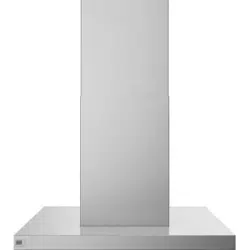
HOOD VENT
Stainless Steel
49-7000235 Rev. 2 08-24
SAFETY INFORMATION .......... 3
USING THE HOOD
Hood Controls .......................... 4
CARE AND CLEANING
For Your Safety ........................ 5
Filters ................................. 5
Hood Surfaces .......................... 5
Lights ................................. 5
TROUBLESHOOTING TIPS ........ 6
LIMITED WARRANTY ............. 7
CONSUMER SUPPORT ............ 8
UVI1036
GE is a trademark of the General Electric Company. Manufactured under trademark license.
ENGLISH / ESPAÑOL
2 49-7000235 Rev. 2
THANK YOU FOR MAKING GE APPLIANCES A PART OF YOUR HOME.
Whether you grew up with GE Appliances, or this is your first, we’re happy to have you in the family.
We take pride in the craftsmanship, innovation and design that goes into every GE Appliances
product, and we think you will too. Among other things, registration of your appliance ensures that we
can deliver important product information and warranty details when you need them.
Register your GE appliance now online. Helpful websites and phone numbers are available in the
Consumer Support section of this Owner’s Manual. You may also mail in the pre-printed registration
card included in the packing material.
49-7000235 Rev. 2 3
IMPORTANT SAFETY INFORMATION
READ ALL INSTRUCTIONS BEFORE USING THE APPLIANCE
SAFETY INFORMATION
WARNING
Read all safety instructions before using the product. Failure to follow these instructions may
result in fire, electrical shock, serious injury or death.
WARNING
GENERAL SAFETY INSTRUCTIONS
WARNING
TO REDUCE THE RISK OF FIRE,
ELECTRIC SHOCK OR INJURY TO PERSONS, OBSERVE
THE FOLLOWING:
A.
Use this unit only in the manner intended by the
manufacturer. If you have questions, contact the
manufacturer.
B. Before servicing or cleaning unit, switch power off at
service panel and lock the service disconnecting means
to prevent power from being switched on accidentally.
When the service disconnecting means cannot be locked,
securely fasten a prominent warning device, such as a
tag, to the service panel.
C. Do not use this unit with any solid-state speed control
device.
D. This unit must be grounded.
CAUTION
FOR GENERAL VENTILATING USE
ONLY. DO NOT USE TO EXHAUST HAZARDOUS OR
EXPLOSIVE MATERIALS AND VAPORS.
WARNING
TO REDUCE THE RISK OF INJURY TO
PERSONS IN THE EVENT OF A RANGE TOP GREASE
FIRE, OBSERVE THE FOLLOWING*:
A. SMOTHER FLAMES with a close-fitting lid, cookie sheet
or metal tray, then turn off the burner. BE CAREFUL
TO PREVENT BURNS. If the flames do not go out
immediately, EVACUATE AND CALL THE FIRE
DEPARTMENT.
B. NEVER PICK UP A FLAMING PAN—You may be
burned.
C. DO NOT USE WATER, including wet dishcloths or
towels—a violent steam explosion will result.
D. Use an extinguisher ONLY if:
1. You know you have a Class ABC extinguisher, and you
already know how to operate it.
2. The fire is small and contained in the area where it
started.
3. The fire department is being called.
4. You can fight the fire with your back to an exit.
* Based on “Kitchen Fire Safety Tips” published by NFPA.
WARNING
TO REDUCE THE RISK OF A RANGE
TOP GREASE FIRE:
A.
Never leave surface units unattended at high settings.
Boilovers cause smoking and greasy spillovers that may
ignite. Heat oils slowly on low or medium settings.
B. Always turn hood ON when cooking at high heat or when
flambéing food (i.e. Crepes Suzette, Cherries Jubilee,
Peppercorn Beef Flambé).
C.
Clean ventilating fans frequently. Grease should not be
allowed to accumulate on fan or filter.
D. Use proper pan size. Always use cookware appropriate
for the size of the surface element.
WARNING
TO REDUCE THE RISK OF FIRE,
ELECTRIC SHOCK OR INJURY TO PERSONS, OBSERVE
THE FOLLOWING:
A. Installation work and electrical wiring must be done by
qualified person(s) in accordance with all applicable
codes and standards, including fire-related construction.
B. Sufficient air is needed for proper combustion and
exhausting of gases through the flue (chimney) of fuel
burning equipment to prevent back drafting. Follow the
heating equipment manufacturer’s guidelines and safety
standards such as those published by the National Fire
Protection Association (NFPA), and the American Society
for Heating, Refrigeration and Air Conditioning Engineers
(ASHRAE), and the local code authorities. When
applicable, install any makeup (replacement) air system
in accordance with local building code requirements. Visit
GEAppliances.com for available makeup air solutions.
C. When cutting or drilling into wall or ceiling, do not damage
electrical wiring and other hidden utilities.
D. Ducted fans must always be vented to the outdoors.
WARNING
TO REDUCE THE RISK OF FIRE, USE
ONLY METAL DUCTWORK.
■ Do not attempt to repair or replace any part of your hood
unless it is specifically recommended in this manual. All
other servicing should be referred to a qualified technician.
CAUTION
AUTOMATICALLY
OPERATED DEVICE. TO REDUCE THE RISK OF
INJURY, DISCONNECT FROM POWER SUPPLY
BEFORE SERVICING. THE UNIT IS EQUIPPED WITH
AN INTEGRAL DISCONNECTING SWITCH LOCATED
INSIDE THE BLOWER HOUSING.
READ AND SAVE THESE INSTRUCTIONS
4 49-7000235 Rev. 2
USING THE HOOD: Hood Controls
Hood Controls
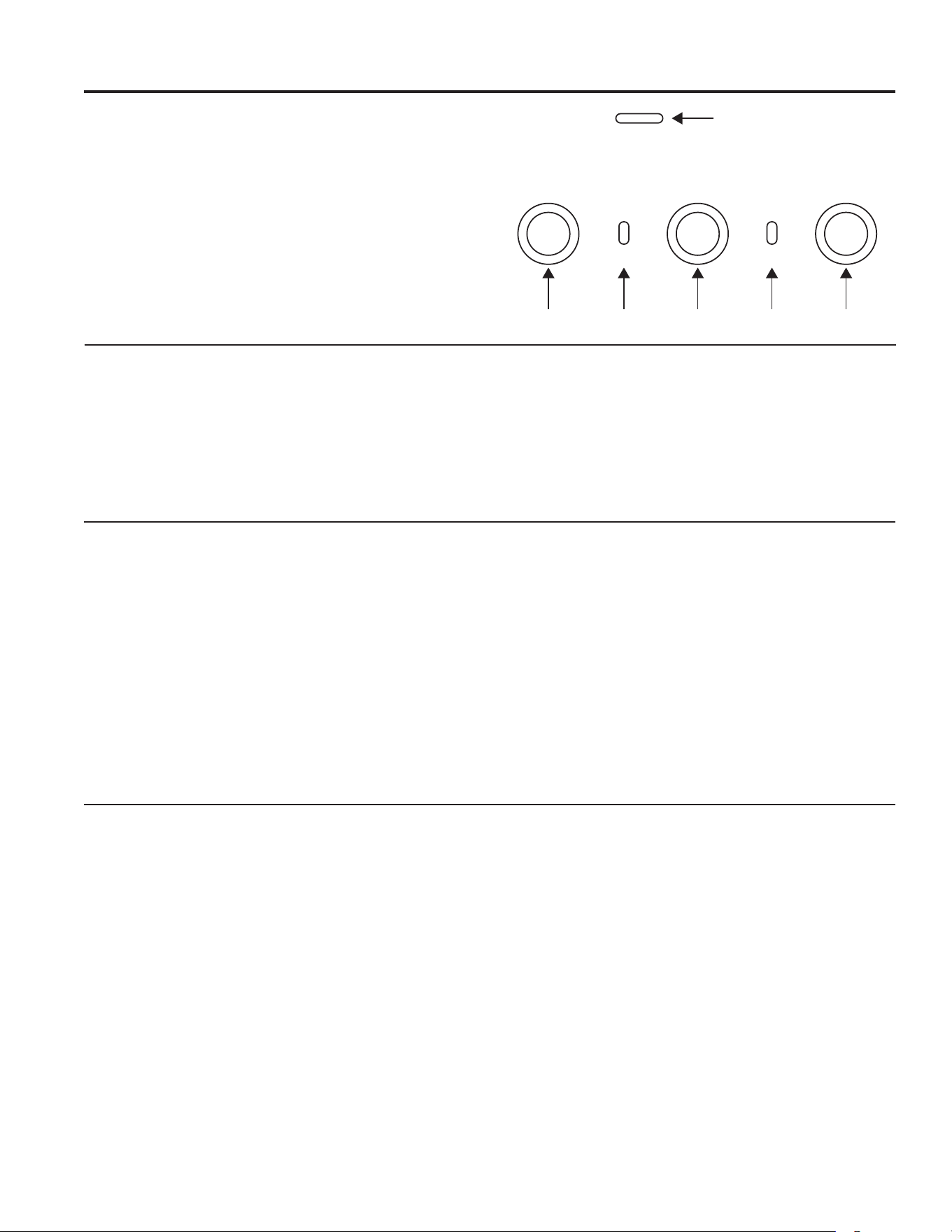
CONTROLS
1. Power. Turns fan on and off.
2. Wifi Indicator.
3. Fan. Toggles through low, medium, high, and boost.
4. Chef Connect Indicator.
5. Light. Toggles through High, Medium, Low
6. Indoor Air Quality (IAQ) LED Indicator.
Changes color as indoor air quality changes. Unit
must be commissioned to Wi-Fi for IAQ sensor to
become operational.
DISCLAIMER
Limitations on Indoor Air Quality Monitoring: The hood is intended to be used only to provide a general
awareness of changes of levels of certain components of indoor air quality near the hood rather than absolute
measurements of any given component and/or measurement against any given standard. Variations in readings may
occur due to any number of factors, including ventilation conditions, environmental influences, cooking activities, and
sensor limitations. Any observations or readings provided by this product are for informational purposes only and
may not be utilized as a substitute for or in the development of any professional advice, assessment, or diagnosis of
any type.
WI-FI CONNECT
CONNECTING YOUR WI-FI ENABLED HOOD
Your hood is designed to provide you with two-way
communication between your appliance and smart
devices. By using the SmartHQ
TM
mobile app, you will
be able to control hood operations such as fan speed,
light intensity, and night light scheduling using your
smartphone or tablet*.
For the best experience, prior to beginning:
• Download the SmartHQ
TM
app and sign in or create an
account.
NOTE: New users must verify their email address to
complete the sign in process.
• Have your home Wi-Fi network password available.
To connect your range to Wi-Fi, touch and hold the
FAN button for 3 seconds. The Wi-Fi indicator light will
start flashing. Once your hood is connected, launch
the SmartHQ
TM
app and tap on your hood to explore.
Apply all software upgrades if prompted to ensure your
hood has the latest features. If you have issues with the
connection process, please call 800.220.6899 and ask
for assistance with wireless connectivity.
* Compatible Apple or Android devices and home Wi-Fi network
required.
CHEF CONNECT
CHEF CONNECT OPERATION BLUETOOTH
®
CONNECTION
To pair with another device:
Press and hold the Light button for 3 seconds. The
indicator light will blink until the hood is paired with the
range or other device. If the pairing is successful, the
Bluetooth
®
indicator will turn on and become solid. It will
time out after 2 minutes if the pairing is not completed,
after which the pairing sequence will need to be
restarted.
To cancel pairing:
Hold the Light button down for 3 seconds and the
indicator light will stop blinking.
Changing the Default Sync Settings:
The factory Default Sync Settings for the light will be
the brightest and the setting for the fan will be OFF. The
user can change the settings by pressing and holding
the Light button for 10 seconds. This will enter the
Default Settings Mode. Once in this mode, the backlights
for all buttons will blink on/off indefinitely and the fan
and light will switch to the current settings, so the user
knows what the current default value is. At this time, set
the light and fan to the desired default levels using the
Light and Fan buttons. Once satisfied with the selection,
press and hold the Power button for 10 seconds, which
will exit this mode. At that time the backlights will stop
blinking and the state of the fan and light will change
back to their prior state before entering the Default
Settings Mode.
6
54321
49-7000235 Rev. 2 5
METAL GREASE FILTER
The metal filter traps grease released by foods on the
cooktop. The filter also helps prevent flames (from food,
grease) from damaging the inside of the hood.
For this reason, the filter must ALWAYS be in place
when the hood is used. The grease filter should be
cleaned every 6 months, or as needed.
To remove:
Grasp the filter lock and pivot it open to release. Pull the
filter down and out.
To replace:
1. Place the two tabs on the filter edge into the locating
slots in the left or right side of the hood opening.
2. Push the filter up, open the filter lock and snap it into
place in the hood.
To clean, swish the filter in hot soapy water and rinse
in clean water or wash it in the dishwasher. Do not use
abrasive cleansers.
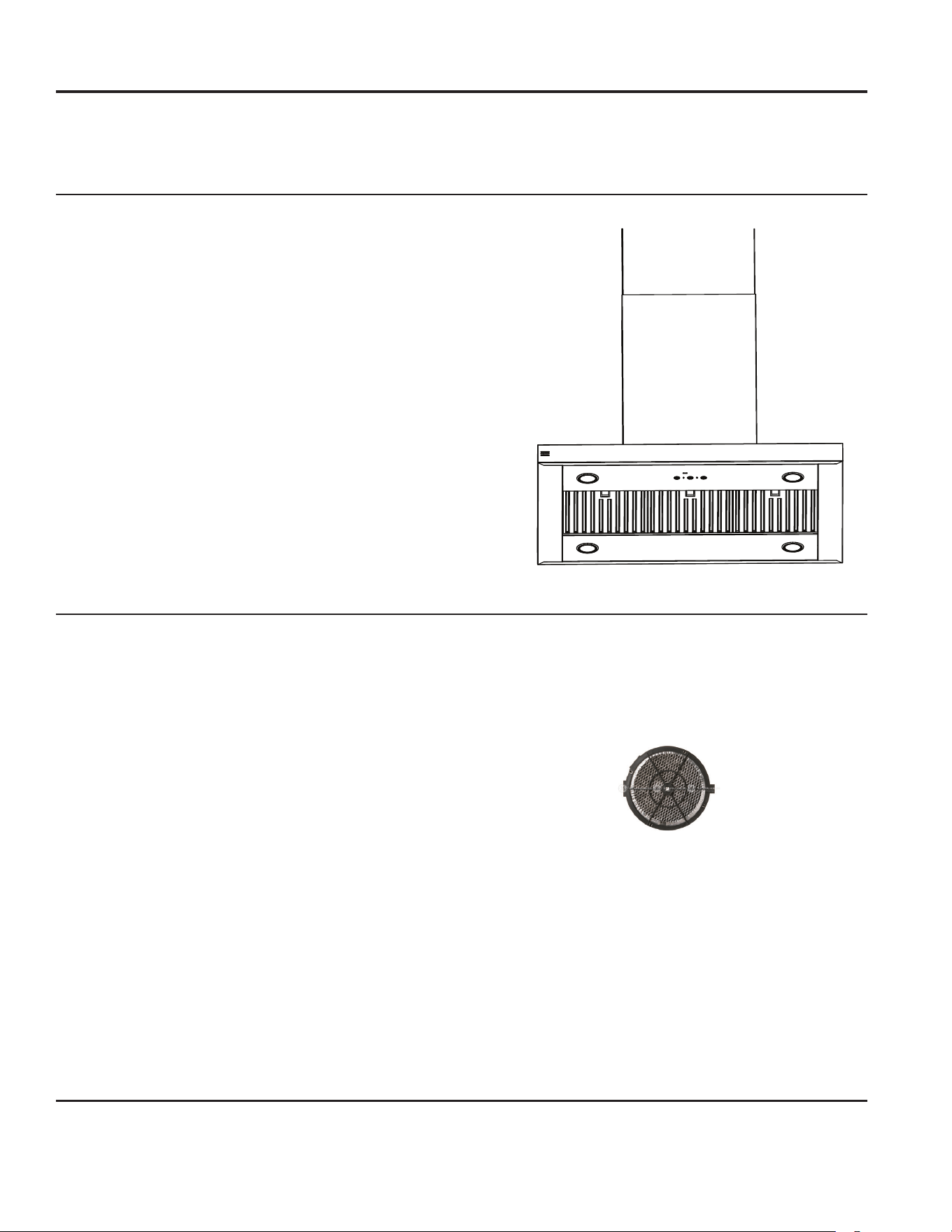
CHARCOAL FILTER (optional accessory)
If the model is not vented to the outside, the air will be
recirculated through a disposable charcoal filter that
helps remove smoke and odors.
The charcoal filter should be replaced when it is
noticeably dirty or discolored (usually after 6 to 12
months, depending on hood usage).
The charcoal filters are NOT included with the unit.
To reduce the risk of fire and shock, when used in
recirculation mode, use only charcoal filter UXCF91.
NOTE: DO NOT rinse, or put charcoal filter in an
automatic dishwasher.
The charcoal filter cannot be cleaned.
It must be replaced.
To inquire about purchasing replacement charcoal filters
or to find the location of a dealer nearest you, please
visit GEAppliances.com/ge/parts
FOR YOUR SAFETY
Before servicing or cleaning the unit, switch power off at
the service panel and lock the service panel to prevent
power from being switched on accidentally.
If the service panel cannot be locked, fasten a tag or
prominent warning label to the panel.
LIGHTS
To change the LED lamps, schedule a service
appointment. See Consumer Support page for a list of
websites and contact information.
STAINLESS STEEL HOOD SURFACES
Do not use a steel wool pad; it will scratch the surface.
To clean the stainless steel surface, use warm sudsy
water or a stainless steel cleaner or polish. Always
wipe the surface in the direction of the grain. Follow
the cleaner instructions for cleaning the stainless steel
surface. To inquire about purchasing stainless steel
appliance cleaner or polish, or to find the location of a
dealer nearest you, visit GEAppliances.com
CARE AND CLEANING
Care and Cleaning
6 49-7000235 Rev. 2
Save time and money! Review the charts on the following pages first and you may not need to call for service.
TROUBLESHOOTING
TROUBLESHOOTING
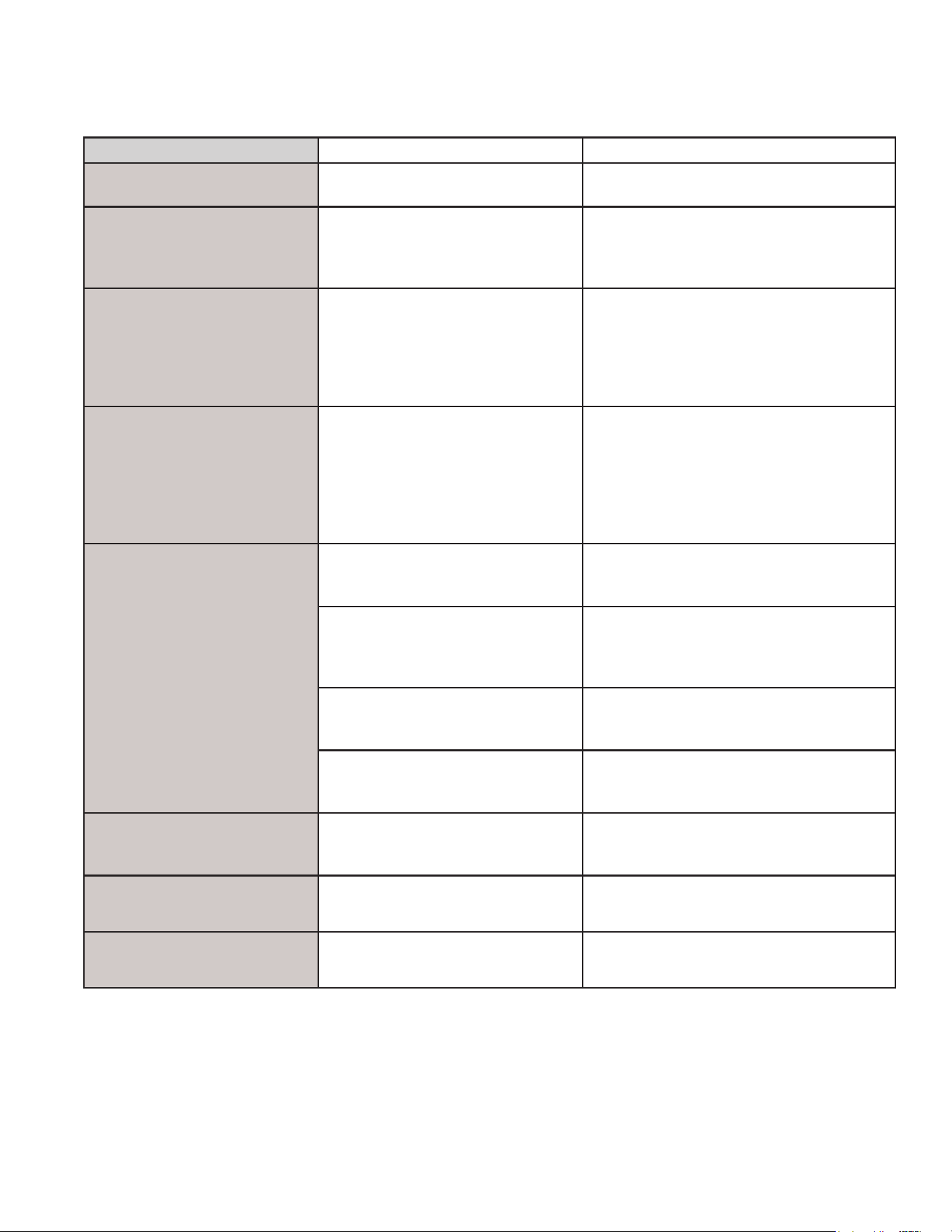
Problem Possible Causes What To Do
Fan does not operate when
the On/O button is pushed
A fuse may be blown or a circuit
breaker tripped.
Replace fuse or reset circuit breaker.
Fan keeps going o and on The motor is probably overheating
and turning itself o. This can be
harmful to the motor.
Check to be sure the lter is clean. If o
and on cycling continues, call for service.
Visit GEAppliances.com for available
makeup air solutions.
Fan does not operate when
fan On/O button is pressed
or when + or – button is
pressed
The blower connector is loose or not
plugged into its mating connector.
Disconnect power to the unit. Lift the
lower duct cover and look at the blower
connector plug. If the blower connector
plug is loose, plug it in securely. See the
Installation Instructions for the plug location
and how to plug in the connector.
Loud or abnormal airow
noise
Wrong size duct used in installation. This hood requires 8” ducting and a
maximum duct length of 150 equivalent
feet to perform optimally. Using smaller
duct pipe or longer equivalent lengths of
duct pipe will cause improper venting.
GEAppliances service technicians cannot
correct this issue if installed improperly.
Fan fails to circulate air or
moves air slower than normal
and/or fan is making loud or
abnormal airow noise
Obstructions in duct work. Make sure nothing is blocking the vent.
Make sure your wall or roof cap has a
blade or door.
Damper blade on wall or roof cap
may not be open.
Make sure damper swings freely. Damper
blades may ip over and will not fully open
when this happens. Adjust to original
position.
Metal grease lter and charcoal
lter (if present) may be dirty.
Clean the metal grease lter and replace
charcoal lter (if present). See Care and
Cleaning.
Sucient makeup (replacement)
air is required for exhausting
appliances to operate to rating.
Check with local building codes, which
may require or strongly advise the use of
makeup air.
The hood controls are not
operating correctly
Control logic confused. Disconnect power to the hood by resetting
the circuit breaker. Wait 30 seconds to
allow controls to reset.
IAQ sensor not working Unit is not connected to cloud or
calibrating.
Commission unit to router using app.
IAQ sensor changing when
not cooking
Other sources of VOC and PM in
kitchen (i.e. candles, wine).
Turn fan on if undesired smell in kitchen
otherwise no action required.
49-7000235 Rev. 2 7
Staple your receipt here. Proof of the original purchase
date is needed to obtain service under the warranty.
GEAppliances.com
All warranty service is provided by our Factory Service Centers, or an authorized Customer Care
®
technician.
To schedule service online, visit us at GEAppliances.com/service, or call GE Appliances at 800.GE.CARES
(800.432.2737). Please have your serial number and your model number available when calling for service.
Servicing your appliance may require the use of the onboard data port for diagnostics. This gives a GE Appliances
factory service technician the ability to quickly diagnose any issues with your appliance and helps GE Appliances
improve its products by providing GE Appliances with information on your appliance. If you do not want your appliance
data to be sent to GE Appliances, please advise your technician not to submit the data to GE Appliances at the time of
service.
What GE Appliances will not cover:
■ Service trips to your home to teach you how to use
the product.
■ Improper installation, delivery, or maintenance.
■ Failure of the product if it is abused, misused,
modified, or used for other than the intended purpose
or used commercially.
■ Replacement of house fuses or resetting of circuit
breakers.
■ Damage to the product caused by accident, fire,
floods, or acts of God.
■ Damage to finish, such as surface rust, tarnish, or
small blemishes not reported within 48 hours of
delivery.
■ Incidental or consequential damage caused by
possible defects with this appliance.
■ Damage caused after delivery.
■ Product not accessible to provide required service.
■ Service to repair or replace light bulbs, except for LED
lamps.
LIMITED WARRANTY
Limited Warranty
EXCLUSION OF IMPLIED WARRANTIES
Your sole and exclusive remedy is product repair as provided in this Limited Warranty. Any implied warranties,
including the implied warranties of merchantability or fitness for a particular purpose, are limited to one year or
the shortest period allowed by law.
This limited warranty is extended to the original purchaser and any succeeding owner for products purchased for home
use within the USA. If the product is located in an area where service by a GE Appliances Authorized Servicer is not
available, you may be responsible for a trip charge or you may be required to bring the product to an Authorized GE
Appliances Service location for service. In Alaska, the limited warranty excludes the cost of shipping or service calls to
your home.
Some states do not allow the exclusion or limitation of incidental or consequential damages. This limited warranty
gives you specific legal rights, and you may also have other rights which vary from state to state. To know what your
legal rights are, consult your local or state consumer affairs office or your state’s Attorney General.
Warrantor: GE Appliances, a Haier company
Louisville, KY 40225
Extended Warranties: Purchase a GE Appliances extended warranty and learn about special discounts that are
available while your warranty is still in effect. You can purchase it online anytime at
geappliances.com/extended-warranty
or call 800.626.2224 during normal business hours. GE Appliances Service will still be there after your warranty expires.
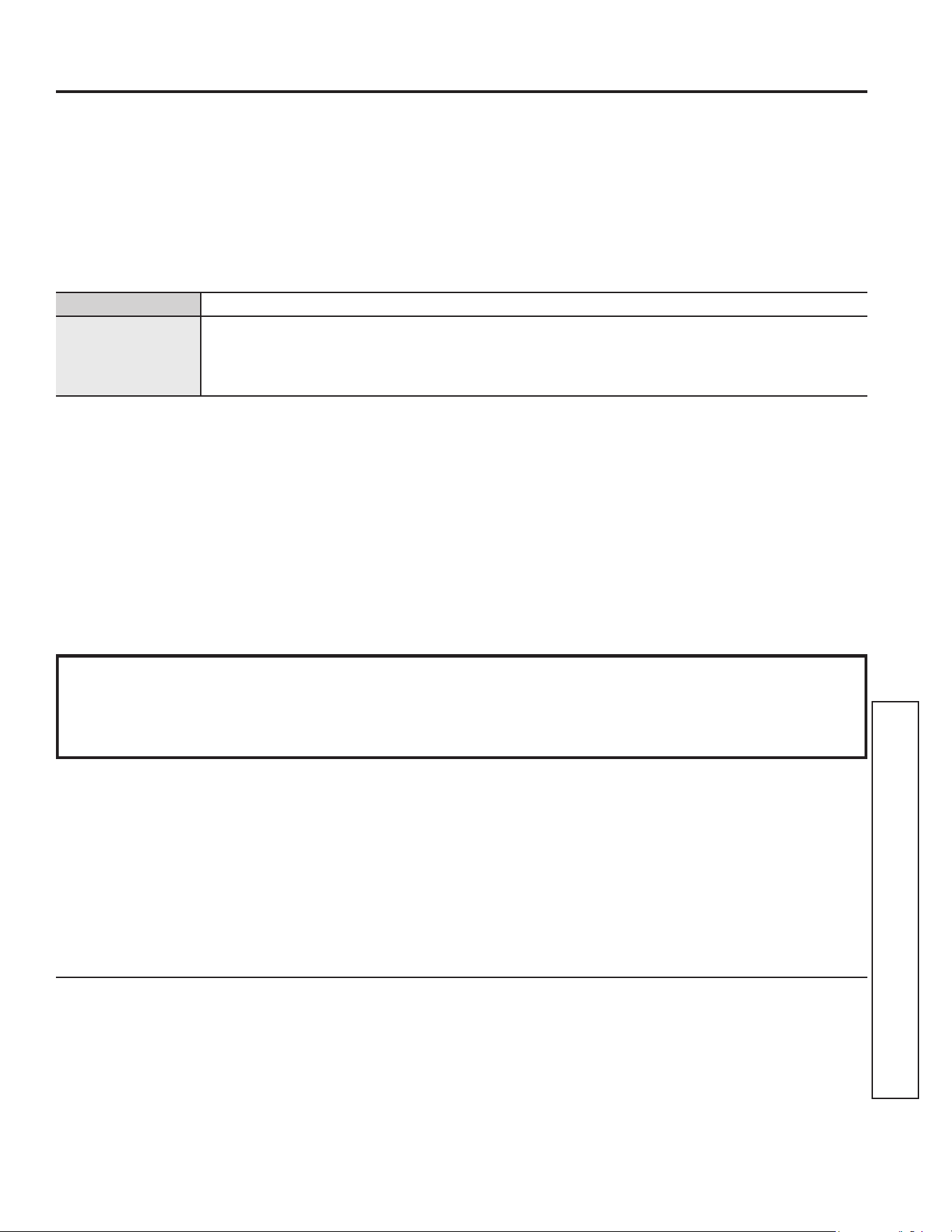
For the period of GE Appliances will replace
One year
From the date
of the original
purchase
Any part of the cooking product which fails due to a defect in materials or workmanship.
During this limited one-year warranty, GE Appliances will provide, free of charge, all labor
and related service costs to replace the defective part.
8 49-7000235 Rev. 2
CONSUMER SUPPORT
Consumer Support
GE Appliances Website
Have a question or need assistance with your appliance? Try the GE Appliances Website 24 hours a day, any day of the year!
You can also shop for more great GE Appliances products and take advantage of all our on-line support services designed for
your convenience. GEAppliances.com.
Register Your Appliance
Register your new appliance on-line at your convenience! Timely product registration will allow for enhanced communication and
prompt service under the terms of your warranty, should the need arise. You may also mail in the pre-printed registration card
included in the packing material. GEAppliances.com/register.
Schedule Service
Expert GE Appliances repair service is only one step away from your door. Get on-line and schedule your service at your
convenience any day of the year. GEAppliances.com/service or call 800.432.2737 during normal business hours.
Extended Warranties
Purchase a GE Appliances extended warranty and learn about special discounts that are available while your warranty is still in
effect. You can purchase it on-line anytime. GE Appliances Services will still be there after your warranty expires. GEAppliances.
com/extended-warranty or call 800.626.2224 during normal business hours.
Remote Connectivity
For assistance with wireless network connectivity (for models with remote enable), visit our website at GEAppliances.com/
connect or call 800.220.6899.
Parts and Accessories
Individuals qualified to service their own appliances can have parts or accessories sent directly to their homes
(VISA, MasterCard and Discover cards are accepted). Order on-line today 24 hours every day.
GEApplianceparts.com or by phone at 877.959.8688 during normal business hours.
Instructions contained in this manual cover procedures to be performed by any user. Other servicing generally should
be referred to qualified service personnel. Caution must be exercised, since improper servicing may cause unsafe
operation.
Contact Us
If you are not satisfied with the service you receive from GE Appliances, contact us on our Website with all the details including
your phone number, or write to:
General Manager, Customer Relations | GE Appliances, Appliance Park | Louisville, KY 40225
GEAppliances.com/contact or call 800.626.2000
MANUAL DEL PRO-
PIETARIO
Escriba los números de modelo y de
serie aquí:
Nº de Modelo ____________
Nº de Serie ______________
Los podrá encontrar en una etiqueta
en el borde lateral o en el frente del
horno detrás de la puerta del horno.
CAMPANA EXTRACTORA
de Acero Inoxidable
INFORMACIÓN DE
SEGURIDAD ........................11
USO DE LA CAMPANA
Controles de la Campana ................12
CUIDADO Y LIMPIEZA
Para Su Seguridad ......................13
Filtros
.................................13
Superficies de la Campana
...............13
Luz ...................................13
CONSEJOS PARA LA
SOLUCIÓN DE PROBLEMAS .....14
GARANTÍA LIMITADA ............15
SOPORTE PARA
EL CONSUMIDOR ..................16
UVI1036
GE es una marca registrada de General Electric Company. Fabricado bajo licencia de marca.
49-7000235 Rev. 2 08-24
ESPAÑOL
10 49-7000235 Rev. 2
GRACIAS POR HACER QUE GE APPLIANCES SEA PARTE DE SU HOGAR.
Ya sea que haya crecido usando GE Appliances, o que ésta es su primera vez, nos complace
tenerlo en la familia.
Sentimos orgullo por el nivel de arte, innovación y diseño de cada uno de los electrodomésticos de
GE Appliances, y creemos que usted también. Entre otras cosas, el registro de su electrodoméstico
asegura que podamos entregarle información importante del producto y detalles de la garantía
cuando los necesite.
Registre su electrodoméstico GE ahora a través de Internet. Sitios Web y números telefónicos útiles
están disponibles en la sección de Soporte para el Consumidor de este Manual del Propietario.
También puede enviar una carta en la tarjeta de inscripción preimpresa que se incluye con
el material embalado.
49-7000235 Rev. 2 11
ADVERTENCIA
INSTRUCCIONES GENERALES DE SEGURIDAD
ADVERTENCIA
PARA REDUCIR EL RIESGO
DE INCENDIOS, DESCARGAS ELÉCTRICAS O LESIONES
PERSONALES, OBSERVE LO SIGUIENTE:
A. Use este unidad solamente de la manera que el fabricante lo
indique. Si usted tiene preguntas, póngase en contacto con el
fabricante.
B. Antes de proporcionar servicio o de limpiar la unidad, desconecte
el suministro eléctrico en el panel de servicio y cierre el
mecanismo de seguridad para evitar que alguien lo conecte
accidentalmente. Cuando no exista un dispositivo de cierre de
seguridad, amarre un aviso visible, como una etiqueta al panel
de servicio haciendo la advertencia.
C. No use esta unidad con ningún dispositivo de control
de velocidad de estado sólido.
D. Esta unidad debe estar conectada a tierra.
PRECAUCIÓN
PARA USO DE VENTILACIÓN
GENERAL SOLAMENTE. NO USE PARA EXPULSAR
MATERIALES PELIGROSOS O EXPLOSIVOS Y VAPORES.
ADVERTENCIA
PARA REDUCIR EL RIESGO DE
LESIONES PERSONALES EN EL CASO DE UN INCENDIO
DEBIDO A GRASA DE ESTUFA QUEMADA, HAGA LO SIGUIENTE
*:
A. CONTENGA LAS LLAMAS con una tapa que ajuste bien sobre
la sartén, con una lámina para hacer dulces o con una bandeja
metálica, y luego apague el quemador. TENGA CUIDADO DE
NO QUEMARSE. Si las llamas no se apagan inmediatamente,
EVACUE EL LUGAR Y LLAME AL DEPARTAMENTO DE
BOMBEROS.
B. NUNCA AGARRE UNA SARTÉN O UNA OLLA QUE SE
ENCUENTRE EN LLAMAS—Se podría quemar.
C. NO USE AGUA, incluyendo paños de cocina o toallas
humedecidas—esto hará que ocurra una explosión de vapor
violenta.
D. Use un extintor SOLAMENTE si:
1. Usted sabe que tiene un extintor Clase ABC, y si usted ya sabe
cómo operarlo.
2. El fuego es pequeño y está contenido al área donde comenzó.
3. El departamento de bomberos ha sido llamado.
4. Usted está luchando contra las llamas con sus espaldas hacia
una salida.
* Basado en “Kitchen Fire Safety” publicado por NFPA.
ADVERTENCIA
PARA REDUCIR EL RIESGO DE UN
FUEGO DE GRASA DE ESTUFA:
A. Nunca deje unidades de superficies sin la atención debida en
selecciones altas. Cuando se está hirviendo algo y ocurren
derramamientos, estos podrían causar humo y que los
derramamientos grasosos se incendien. Caliente los aceites
lentamente a selecciones medias y bajas.
B.
Siempre encienda la campana cuando cocine a fuego alto o
cuando flambee alimentos (Crepes Suzette, Cherries Jubilee,
Flambeado de Carne con Pimienta).
C. Limpie el ventilador con frecuencia. La grasa no debe
acumularse en el ventilador o en el filtro.
D. Use una sartén de tamaño apropiado. Siempre use piezas de
cocina apropiadas para el tamaño del elemento de la superficie.
ADVERTENCIA
PARA REDUCIR EL RIESGO
DE INCENDIOS, DESCARGAS ELÉCTRICAS O LESIONES
PERSONALES, OBSERVE LO SIGUIENTE:
A. El trabajo de instalación y el alambrado eléctrico debe hacerlo
una persona(s) calificada conforme a todos los códigos y
estándares aplicables, incluyendo una construcción aprobada por
el inspector de incendios.
B. Suficiente aire es necesario para una combustión apropiada y
para deshacerse de los gases a través de una salida de humo
(chimenea) de equipos que queman combustibles para prevenir
retroalimentación. Siga las recomendaciones del fabricante del
equipo de calentamiento y los estándares de seguridad tales
como los publicados por la Asociación nacional de protección
de incendios (NFPA), y la Sociedad americana de ingenieros de
calefacción, acondicionadores de aire y refrigeración (ASHRAE),
y los códigos de las autoridades locales. Cuando corresponda,
instale un sistema de reposición (reemplazo) de aire de acuerdo
con los requisitos del código local de construcción. Para acceder
a soluciones de aire disponibles, visite GEAppliances.com.
C. Cuando se encuentre cortando o taladrando en la pared o en
el techo, no dañe los alambrados eléctricos u otras utilidades
escondidas.
D. Los ventiladores con conductos deben estar siempre ventilados
hacia el exterior.
ADVERTENCIA
PARA REDUCIR EL RIESGO DE
INCENDIOS, SOLAMENTE USE CONDUCTOS METÁLICOS.
■ No intente reparar o reemplazar ninguna parte de su campana a
no ser que lo recomiende específicamente este manual. Cualquier
otro servicio debe ser referido a un técnico calificado.
PRECAUCIÓN
DISPOSITIVO OPERADO
AUTOMÁTICAMENTE. PARA REDUCIR EL RIESGO DE
LESIONES, DESCONECTE DE LA FUENTE DE ENERGÍA
ANTES DE EFECTUAR REPARACIONES. LA UNIDAD SE
ENCUENTRA EQUIPADA CON UN INTERRUPTOR DE
DESCONEXIÓN INTEGRAL UBICADO DENTRO DEL CUERPO
DEL VENTILADOR.
LEA Y GUARDE ESTAS INSTRUCCIONES
ADVERTENCIA
Lea todas las instrucciones de seguridad antes de utilizar este producto. No seguir estas
instrucciones puede generar un incendio, una descarga eléctrica, lesiones corporales o la muerte.
INFORMACIÓN IMPORTANTE DE SEGURIDAD
LEA TODAS LAS INSTRUCCIONES ANTES DE USAR ESTE ELECTRODOMÉSTICO
INFORMACIÓN DE SEGURIDAD (Horno Inferior)
12 49-7000235 Rev. 2
USO DE LA CAMPANA: Controles de la Campana
Controles de la Campana
CONTROLES
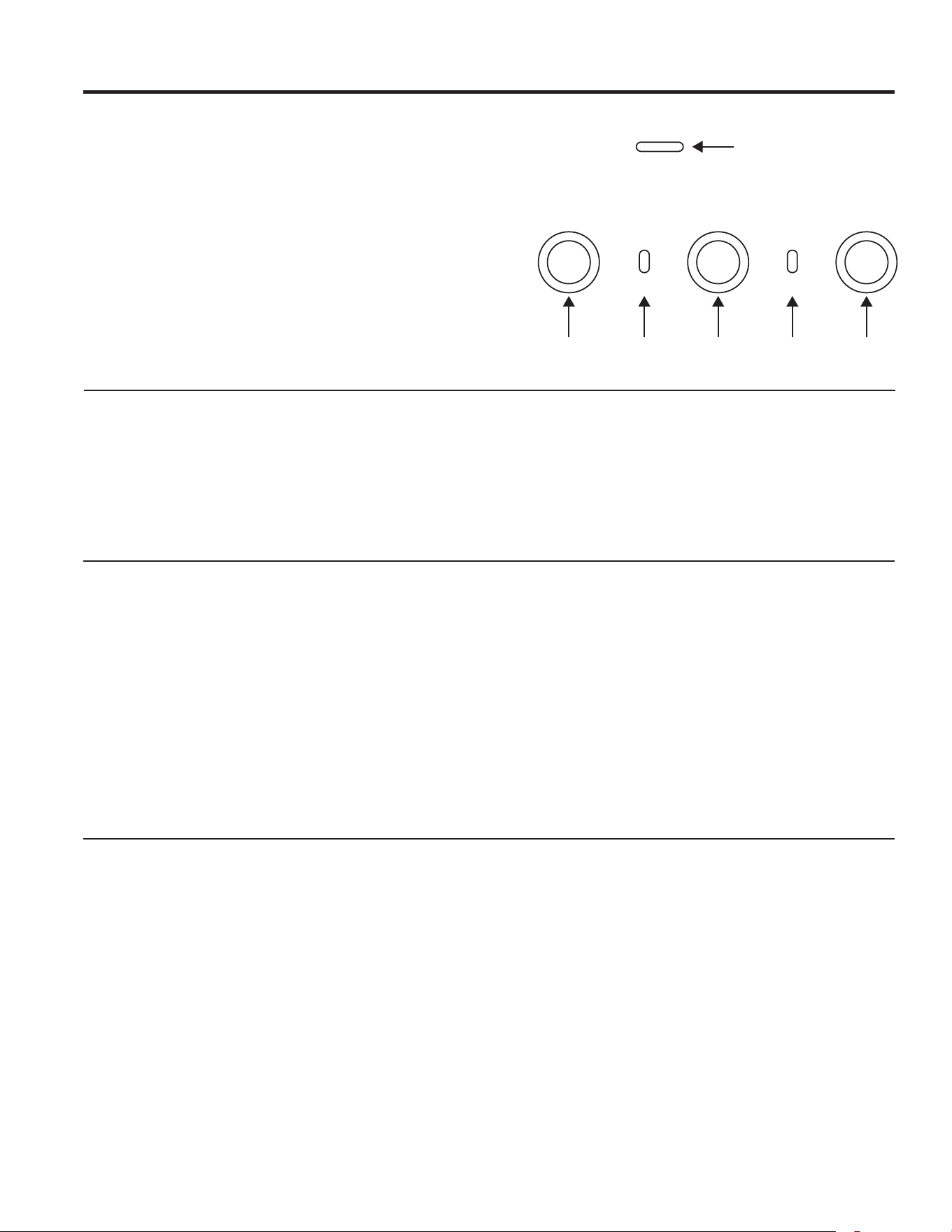
1. Encendido. Enciende y apaga el ventilador.
2. Indicador WiFi.
3. Ventilador. Pasa a través de los niveles Low (Bajo),
Medium (Medio), High (Alto) y Boost (Aumentado).
4. Indicador de Chef Connect (Conexión Chef):
5. Luz. Pasa a través de los niveles High, Medium, y
Low.
6. Indicador LED de Calidad del Aire Interior (IAQ).
Cambia de color de acuerdo a los cambios en
la calidad del aire interior. La unidad se deberá
conectar al Wi-Fi para que el sensor IAQ entre en
funcionamiento.
6
54321
DESCARGO DE RESPONSABILIDAD
Limitaciones en el Monitoreo de la Calidad del Aire Interior: La campana sólo fue diseñada para brindar una conciencia
general de los cambios en los niveles de ciertos componentes de la calidad del aire interior cerca de la campana, a diferencia
de dar mediciones absolutas de cualquier componente y/o medición contra cualquier estándar dado. Podrá haber variaciones
en las lecturas debido a cualquier serie de factores, incluyendo condiciones de ventilación, influencias ambientales, actividades
de cocción, y limitaciones del sensor. Cualquier observación de las lecturas brindadas por este producto son con propósitos
informativos únicamente, y no podrán ser utilizadas para o en el desarrollo de cualquier consejo, evaluación o diagnóstico
profesional de cualquier tipo.
CONEXIÓN WI-FI
CONEXIÓN DE LA CAMPANA CON WI-FI ACTIVADO
La campana fue diseñada para brindarle una comunicación
recíproca entre el electrodoméstico y el dispositivo inteligente.
Al usar la aplicación móvil SmartHQTM, usted podrá controlar
funciones de la campana tales como la programación de la
velocidad del extractor, intensidad de la luz, y luz nocturna a
través de su teléfono inteligente o tablet*.
Para una mejor experiencia, antes de comenzar:
• Descargue la aplicación SmartHQ
TM
y regístrese o cree una
cuenta. NOTA: Los nuevos usuarios deberán verificar su
dirección de correo electrónico para completar el proceso de
registro.
• Tenga disponible la contraseña de red de su Wi-Fi hogareño.
Para conectar la campana al Wi-Fi, mantenga presionado el
botón FAN durante 3 segundos. La luz indicadora de Wi-Fi
comenzará a parpadear. Una vez conectada la campana,
active la aplicación SmartHQ
TM
y presione sobre la campana
para comenzar a explorar. Si se indica, realice todas las
actualizaciones de software para asegurarse de que la
campana cuente con las funciones más recientes. Ante
cualquier inconveniente con el proceso de conexión, por favor
comuníquese al 800.220.6899 y solicite asistencia en relación
a la conectividad inalámbrica.
* Se requiere el uso de dispositivos y de una red Wi-Fi hogareña que sean
compatibles con Apple o Android.
CONEXIÓN CON CHEF
CONEXIÓN BLUETOOTH
®
PARA EL FUNCIONAMIENTO DE CONEXIÓN CON CHEF
Para realizar el emparejamiento con otro dispositivo:
Mantenga presionado el botón Light (Luz) durante 3
segundos. La luz indicadora parpadeará hasta que la
campana esté emparejada con la estufa u otro dispositivo.
Si el emparejamiento es realizado con éxito, el indicador de
Bluetooth
®
se encenderá y quedará fijo. Se pausará luego de
2 minutos si el emparejamiento no es completado, luego de lo
cual será necesario reiniciar la secuencia de emparejamiento.
Para cancelar el emparejamiento:
Mantenga presionado el botón Light durante 3 segundos y la
luz indicadora dejará de parpadear.
Cambio de las Configuraciones de la Sincronización por
Omisión:
La Configuración de Sincronización por Omisión de fábrica
para la luz será la más brillante y la configuración del
ventilador estará en OFF. El usuario podrá modificar las
configuraciones manteniendo presionado el botón Light
durante 10 segundos. Esto permitirá ingresar al Modo de
Configuraciones por Omisión. Una vez en este modo, las luces
de fondo de todos los botones parpadearán encendiéndose
y apagándose de forma indefinida, y el ventilador y la luz
pasarán a las configuraciones actuales, de modo que el
usuario sepa cuál es el valor por omisión actual. En este
momento, configure la luz y el ventilador en los niveles por
omisión deseados, usando los botones Light y Fan. Una
vez satisfecho con la selección, mantenga presionado el
botón Power durante 10 segundos, lo cual permitirá salir de
este modo. En este momento, las luces de fondo dejarán
de parpadear y el estado del ventilador y de la luz volverán
a cambiar a su estado anterior, antes de entrar en Default
Settings Mode (Modo de Configuraciones por Omisión).
49-7000235 Rev. 2 13
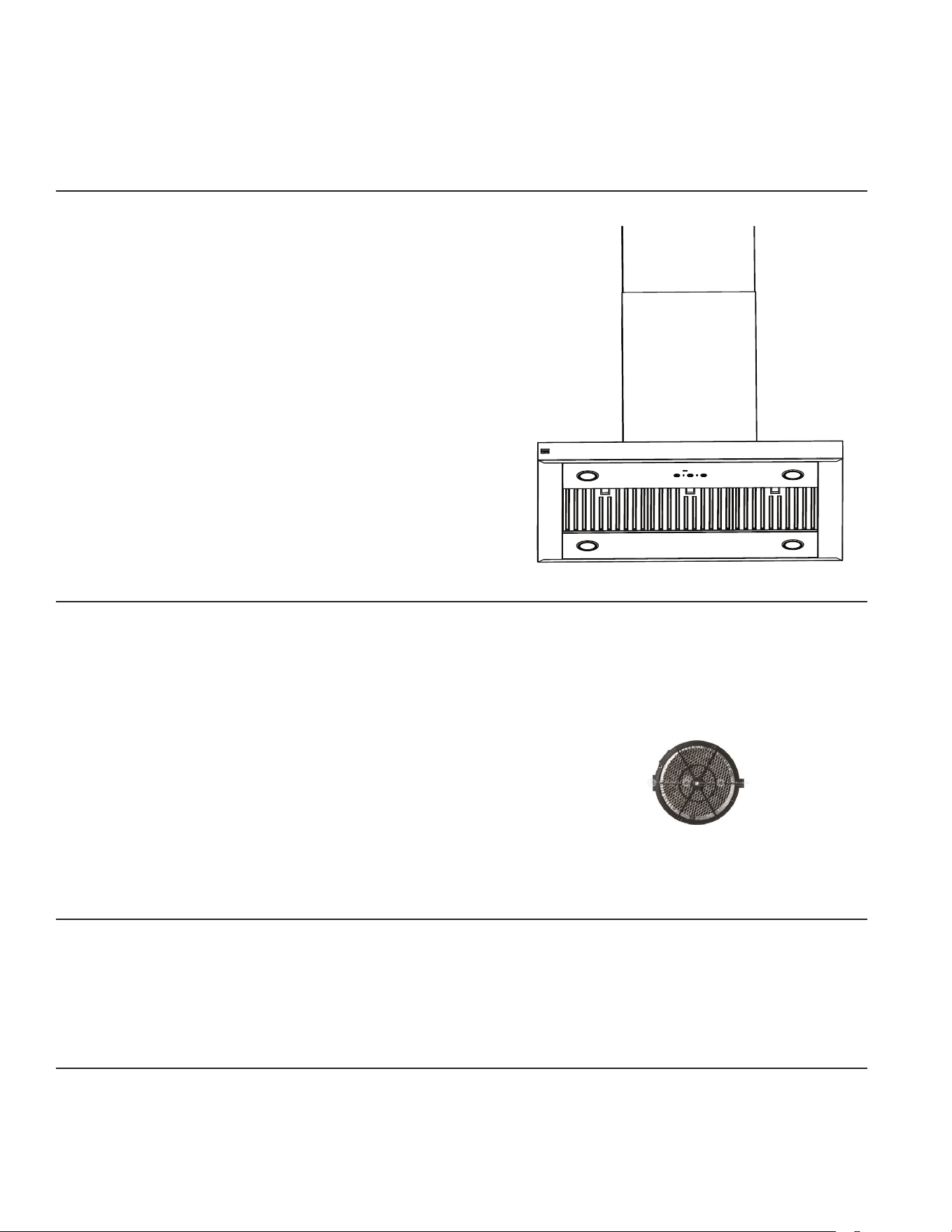
FILTRO DE GRASA DE METAL
El filtro de metal atrapa la grasa liberada por los alimentos
desde la estufa. El filtro también ayuda a evitar que las llamas
(de alimentos, grasa) dañen la parte interna de la campana.
Por esta razón, el filtro SIEMPRE debe estar en su lugar y
el panel del filtro SIEMPRE debe estar cerrado cuando la
campana se encuentre en uso. El filtro de grasa es apto para
lavavajillas y debe limpiarse cada 6 meses, o según sea
necesario.
Para retirar:
Tome el bloqueo del filtro y gírelo para abrirlo y retirarlo.
Empuje el filtro hacia abajo y afuera.
Para reemplazar:
1. Coloque las dos lengüetas sobre el extremo del filtro en las
ranuras de colocación del lado izquierdo o derecho de la
abertura de la campana.
2. Empuje el filtro hacia arriba, abra el bloqueo del filtro y calce
el mismo en su posición en la campana.
Limpie el filtro en agua jabonosa caliente y enjuague con
agua limpia o lávelo en el lavavajillas. No utilice productos de
limpieza abrasivos.
CUIDADO Y LIMPIEZA
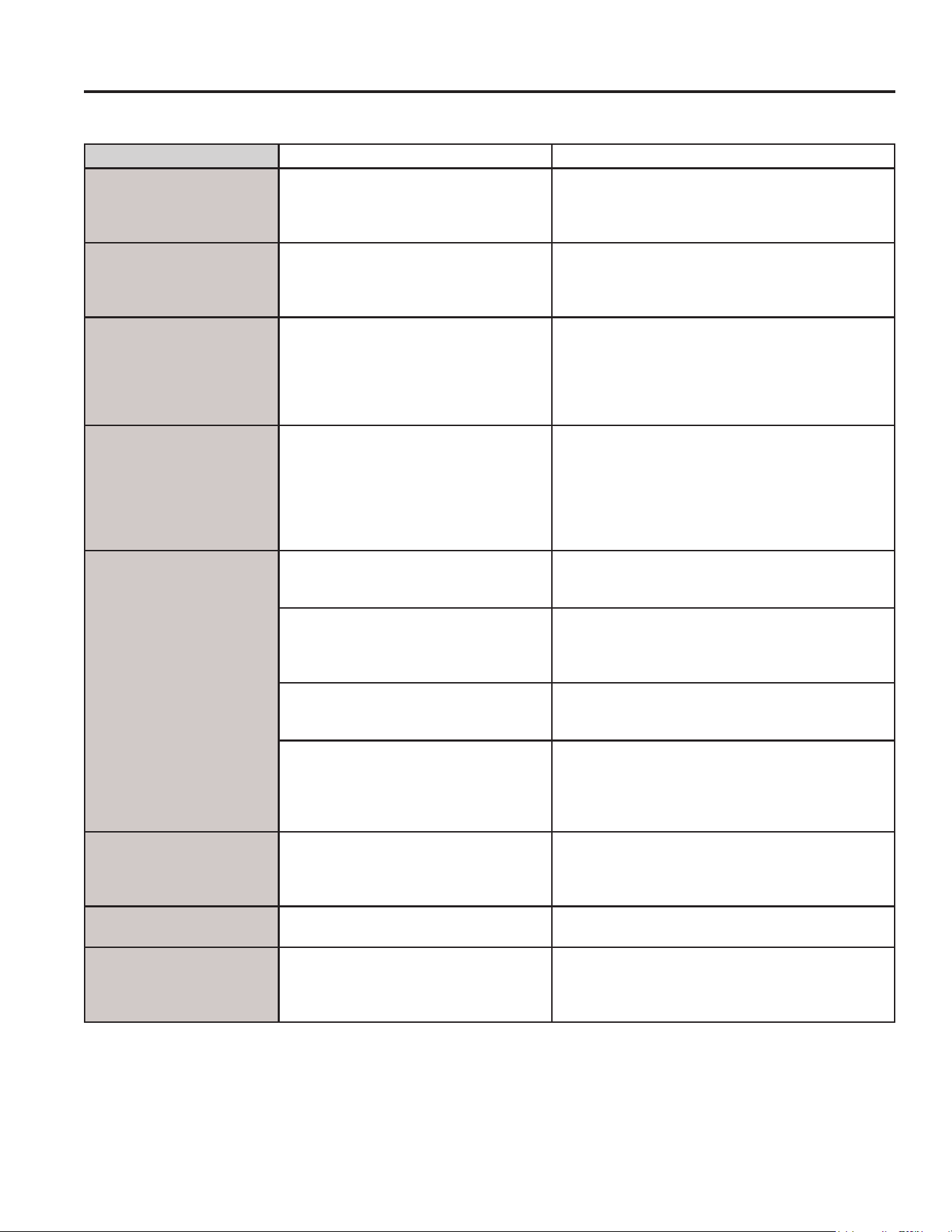
FILTRO DE CARBÓN (accesorio opcional)
Si el modelo no tiene ventilación al exterior, el aire se
recirculará a través de un filtro de carbón desechable que
ayuda a remover humo y olores.
El filtro de carbón debe cambiarse cuando esté evidentemente
sucio o decolorado (usualmente después de 6 a 12 meses,
dependiendo del uso de la campana).
Los filtros de carbón NO no se incluyen con la unidad.
A fin de reducir el riesgo de incendios y descargas, al usar
el modo de recirculación utilice sólo el filtro de carbón
UXCF91.
NOTA: NO enjuague, o lave el filtro de carbón en un lavaplatos
automático.
El filtro de carbón no se pueden limpiar. Debe cambiarse.
Para consultar sobre la adquisición de filtros de carbón de
recambio o para averiguar la dirección del distribuidor más
cercano, visite nuestro sitio web en
GEAppliances.com/ge/parts
PARA SU SEGURIDAD
Antes de realizar reparaciones o limpiar la unidad, desconecte
la energía desde el panel de servicio y bloquee éste último
para evitar el accionamiento de la energía de manera
accidental. Si el panel de servicio no puede bloquearse,
coloque una etiqueta o cartel de advertencia sobre el panel.
LUZ
Para cambiar las lámparas LED, programe una cita con el
servicio técnico. Para acceder a un listado de sitios web e
información de contacto, consulte la página de Soporte al
Consumidor.
SUPERFICIES DE ACERO INOXIDABLE DE LA CAMPANA
No use un estropajo de acero; éste rayará la superficie.
Para limpiar la superficie de acero inoxidable, use agua
caliente y jabón o un limpiador o pulidor para acero inoxidable.
Siempre limpie la superficie en la dirección del veteado.
Siga las instrucciones del limpiador para su aplicación en la
superficie de acero inoxidable.
Para consultar sobre la compra de limpiadores o pulidores
para electrodomésticos de acero inoxidable, o para buscar
la ubicación del vendedor minorista más cercano a su hogar,
visite GEAppliances.com.
CUIDADO Y LIMPIEZA
14 49-7000235 Rev. 2
Consejos para la Solución de Problemas... Antes de solicitar el servicio técnico
CONSEJOS PARA LA SOLUCIÓN DE PROBLEMAS
¡Ahorre tiempo y dinero! Primero revise los cuadros que aparecen en las siguientes páginas y es posible que no necesite solicitar
reparaciones.
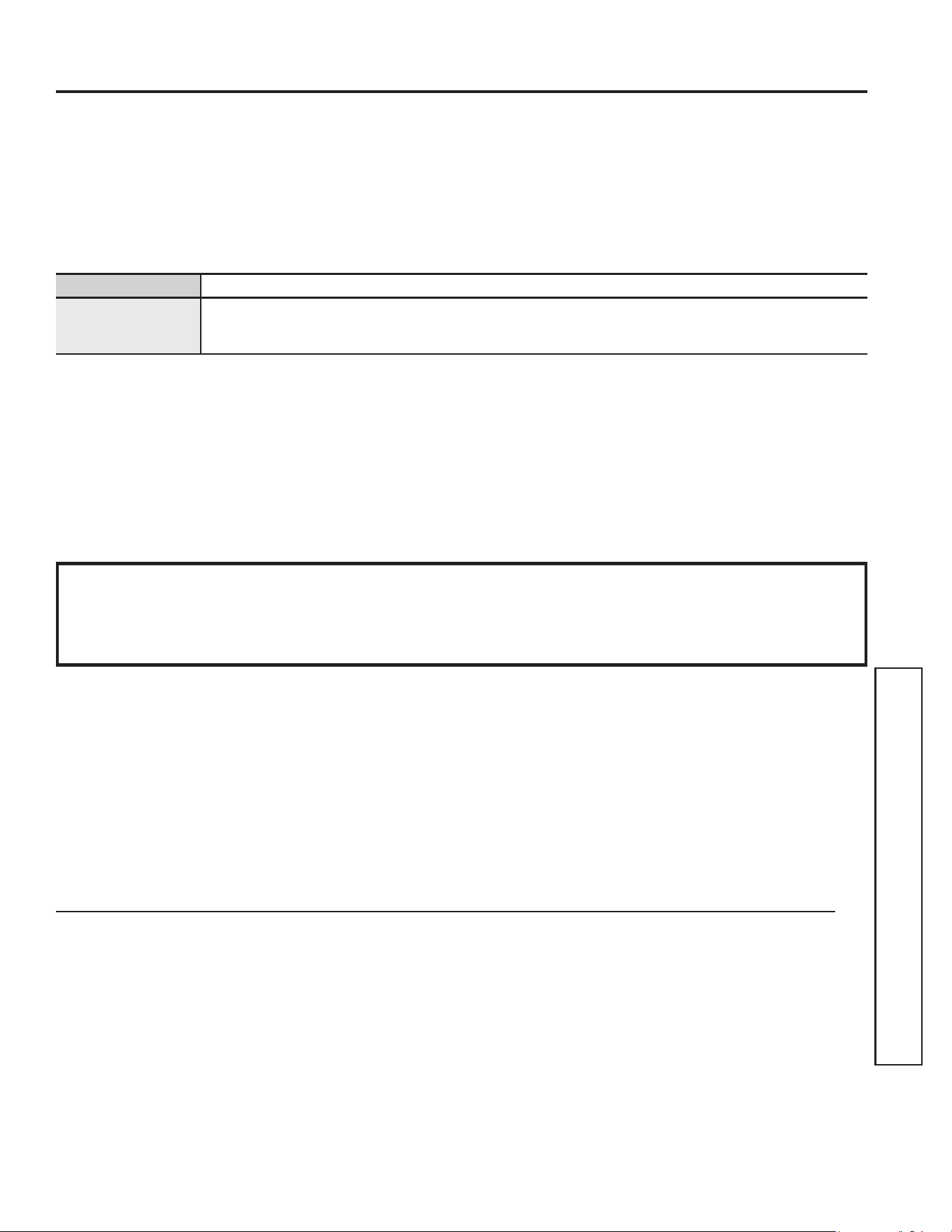
Problema Causas Posibles Qué Hacer
El ventilador no funciona
cuando se presiona el
botón On/O (encendido/
apagado)
Un fusible puede haberse quemado o
el interruptor de circuitos puede haber
saltado.
Cambie los fusibles o recongure los interruptores.
El ventilador se enciende
y apaga
sin parar
El motor probablemente se está
sobrecalentando y se apaga solo. Esto
puede dañar el motor.
Verique que el ltro esté limpio. Si continúa el ciclo
de apagado y encendido, llame al servicio técnico.
Para acceder a soluciones de aire disponibles, visite
GEAppliances.com.
El ventilador no funciona
cuando se presiona el
botón On/O (encendido/
apagado) del ventilador
o cuando se presiona el
botón + o –
El conector del ventilador está suelto o
no se encuentra enchufado dentro de su
conector correspondiente.
Desconecte la energía hacia la unidad. Levante
la tapa del conducto inferior y observe el enchufe
conector del ventilador. Si el enchufe del conector
del ventilador está suelto, enchúfelo rmemente. Ver
las Instrucciones de instalación para la ubicación del
enchufe y sobre cómo enchufar el conector.
Ruido de ujo de aire muy
fuerte o anormal
Tamaño de conducto incorrecto utilizado
en la instalación.
Esta campana requiere un conducto de 8” y
una longitud máxima de conducto de 150 pies
equivalentes para funcionar correctamente. Utilizar
conductos más pequeños o longitudes equivalentes
mayores provocará una ventilación inadecuada. Los
técnicos de GEAppliances no pueden corregir este
problema si hay una instalación inadecuada.
El ventilador no hace
circular el aire o mueve
el aire a una velocidad
menor de lo normal y/o el
ventilador hace ruido de
ujo de aire muy fuerte o
anormal
Obstrucciones en el conducto. Verique que no haya obstrucciones en la
ventilación. Controle que la cubierta de pared o
casquete de techo tengan una hoja o puerta.
La hoja del regulador de tiro de la
cubierta de pared o casquete de techo
puede estar cerrada.
Asegúrese de que el regulador de tiro se mueva
libremente. Las hojas del regulador de tiro pueden
darse vuelta y no se abrirán por completo cuando
esto suceda. Ajústela con la posición original.
El ltro de grasa metálico y el ltro de
carbón (si lo hubiera) pueden estar
sucios.
Limpie el ltro de grasa metálico y vuelva a colocar
el ltro de carbón (si lo hubiera). Ver Cuidado y
limpieza.
Se requiere suciente reposición
(reemplazo) de aire para que los
artefactos con salida de aire funcionen
de acuerdo con sus calicaciones
energéticas.
Controle los códigos locales de construcción, que
podrán requerir o aconsejar enfáticamente el uso de
reposición de aire.
Los controles de la
campana no funcionan
correctamente
Error en el circuito lógico. Desconecte la energía hacia la campana
recongurando el interruptor de circuitos. Espere
30 segundos para que los controles vuelvan a
congurarse.
El sensor IAQ no está en
funcionamiento
La unidad no está conectada a la nube o
calibrándose.
Conecte la unidad al enrutador usando la aplicación.
El sensor IAQ cambia
cuando no se está
cocinando
Otras fuentes de Componentes
Orgánicos Volátiles (VOC) y Material
Particulado (PM) en la cocina (por
ejemplo: velas, vino).
Encienda el ventilador si hay olores no deseados
en la cocina; de otro modo no se requiere ninguna
acción.
49-7000235 Rev. 2 15
Esta garantía limitada se extiende al comprador original y a cualquier dueño subsiguiente de productos
comprados para uso hogareño dentro de EE.UU. Si el producto está en un área donde no se encuentra
disponible un Proveedor Autorizado del Servicio Técnico de GE Appliances, usted será responsable por el costo
de un viaje o se podrá requerir que traiga el producto a una ubicación del Servicio Técnico de GE Appliances
autorizado para recibir el servicio. En Alaska, la garantía limitada excluye el costo de envío o llamadas del
servicio a su hogar. Algunos estados no permiten la exclusión o limitación de daños fortuitos o consecuentes.
Esta garantía limitada le da derechos legales específicos y es posible que tenga otros derechos legales que
varían entre un estado y otro. Para conocer cuáles son sus derechos legales, consulte a la oficina de asuntos
del consumidor local o estatal o al Fiscal de su estado.
Garante: GE Appliances, a Haier company
Louisville, KY 40225
Garantías Extendidas: Adquiera una garantía extendida de GE Appliances y conozca los descuentos
especiales que están disponibles mientras su garantía aún está vigente. Puede acceder a la misma a través de
Internet en cualquier momento en
geappliances.com/extended-warranty
o llamando al 800.626.2224 durante el horario comercial. Los Servicios para los GE Appliances aún estarán
disponibles cuando su garantía caduque.
GARANTÍA LIMITADA
GEAppliances.com
Todo el servicio de garantía es provisto por nuestros Centros de Servicio de Fabricación, o un técnico autorizado de Customer
Care
®
. Para programar una visita del servicio técnico a través de Internet, visítenos en geappliances.com/service, o llame al 800.
GE.CARES (800.432.2737). Cuando llame para solicitar el servicio, tenga los números de serie y modelo disponibles.
Para realizar el servicio técnico de su electrodoméstico, se podrá requerir el uso de datos del puerto de abordaje para su diagnóstico.
Esto da al técnico del servicio de fábrica de GE Appliances la habilidad de diagnosticar de forma rápida cualquier problema con
su electrodoméstico, y de ayudar a GE Appliances a mejorar sus productos al brindarle a GE Appliances la información sobre su
electrodoméstico. Si no desea que los datos de su electrodoméstico sean enviados a GE Appliances, solicitamos que le indique a su
técnico no entregar los datos a GE Appliances en el momento del servicio.
Qué no cubrirá GE Appliances:
■ Viajes del técnico del servicio a su hogar para enseñarle
sobre cómo usar el producto.
■ Instalación, entrega o mantenimiento inadecuados.
■ Fallas del producto en caso de abuso, mal uso, modificación
o uso para propósitos diferentes al original o uso comercial.
■ Reemplazo de fusibles de la casa o reinicio de disyuntores.
■ Daños ocasionados sobre el producto por accidente,
incendio, inundaciones o catástrofes naturales.
■ Daños incidentales o consecuentes causados por posibles
defectos sobre este producto.
■ Daños sobre el acabado, tales como óxido sobre la
superficie, deslustres o manchas pequeñas no informadas
dentro de las 48 horas luego de la entrega.
■ Daño causado después de la entrega.
■ Producto no accesible para brindar el servicio requerido.
■ Marcas o manchas (incluyendo manchas de óxido sobre
la superficie) que pueden ser eliminadas siguiendo las
instrucciones de limpieza.
■ Solicite el servicio técnico para reparar o reemplazar las
lámparas, excepto las lámparas LED.
Garantía Limitada
EXCLUSIÓN DE GARANTÍAS IMPLÍCITAS
Su única y exclusiva alternativa es la reparación del producto, como se indica en la Garantía Limitada. Las
garantías implícitas, incluyendo garantías implícitas de comerciabilidad o conveniencia sobre un propósito
particular, se limitan a un año o al período más corto permitido por la ley.
Por el Período de GE Appliances reemplazará
Un Año
Desde la fecha de la
compra original
Cualquier pieza del producto de cocción que falle debido a un defecto en los materiales o la
fabricación. Durante esta garantía limitada de un año, GE Appliances también proveerá, sin costo,
todo el trabajo y costos del servicio relacionados con el reemplazo de la pieza defectuosa.
Abroche su recibo aquí. Para acceder al servicio técnico de acuerdo con
la garantía deberá contar con la prueba de la fecha original de compra.
16 49-7000235 Rev. 2
SOPORTE PARA EL CONSUMIDOR
Soporte para el Consumidor
Sitio Web de GE Appliances
¿Desea realizar una consulta o necesita ayuda con su electrodoméstico? ¡Intente a través del Sitio Web de GE Appliances las
24 horas del día, cualquier día del año! Usted también puede comprar más electrodomésticos maravillosos de GE Appliances y
aprovechar todos nuestros servicios de soporte a través de Internet, diseñados para su conveniencia. GEAppliances.com.
Registre su Electrodoméstico
¡Registre su nuevo electrodoméstico en línea cuando lo desee! El registro oportuno del producto permitirá una mejor
comunicación y un servicio rápido bajo los términos de su garantía, en caso de que surja la necesidad. También puede enviar por
correo la tarjeta de registro preimpresa incluida en el empaque. GEAppliances.com/register.
Servicio Programado
El servicio de reparación de expertos de GE Appliances está a sólo un paso de su puerta. Conéctese a través de Internet y
programe su servicio a su conveniencia cualquier día del año.
GEAppliances.com/service o comuníquese al 800.432.2737 durante el horario de atención comercial.
Garantías Extendidas
Adquiera una garantía extendida de GE Appliances y conozca los descuentos especiales que están disponibles mientras su
garantía aún está vigente. La puede adquirir en cualquier momento a través de Internet. Los servicios de GE Appliances aún
estarán allí cuando su garantía caduque.
GEAppliances.com/extended-warranty o comuníquese al 800.626.2224 durante el horario de atención comercial.
Conectividad Remota
Para solicitar asistencia para la conectividad de red inalámbrica (para modelos con acceso remoto), visite nuestro sitio web en
GEAppliances.com/connect o comuníquese al 800.220.6899.
Piezas y Accesorios
Aquellos individuos calificados para realizar el servicio técnico de sus propios electrodomésticos podrán solicitar el envío de
piezas o accesorios directamente a sus hogares (se aceptan las tarjetas VISA, MasterCard y Discover). Ordene hoy a través de
Internet durante las 24 horas, todos los días. GEApplianceparts.com o de forma telefónica al 877.959.8688 durante el horario
de atención comercial.
Las instrucciones contenidas en este manual cubren los procedimientos que debe realizar cualquier usuario. Otro tipo
de servicio debe ser realizado por personal de servicio calificado. Se deberá tener cuidado, ya que una reparación
indebida podrá hacer que el funcionamiento no sea seguro.
Contáctenos
Si no se encuentra satisfecho con el servicio que recibió de GE Appliances, comuníquese con nosotros a través de nuestro sitio
Web con todos los detalles, incluyendo su número telefónico, o escriba a:
General Manager, Customer Relations | GE Appliances, Appliance Park | Louisville, KY 40225
GEAppliances.com/contact o comuníquese al 800.626.2000