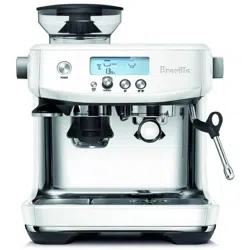
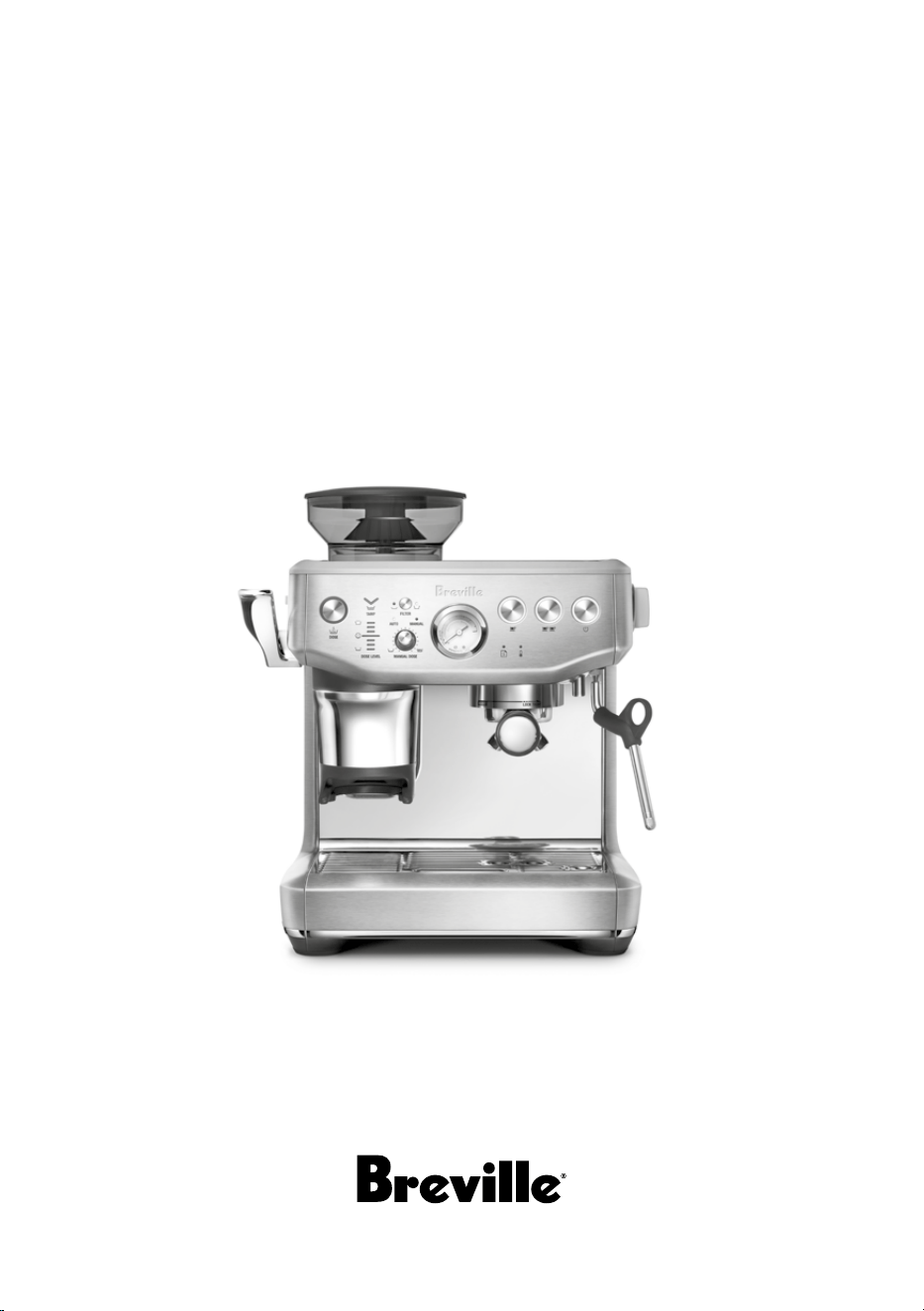
Instruction Book – BES876
the Barista Express
™
Impress

2
BREVILLE
®
RECOMMENDS
SAFETY FIRST
At Breville
®
we are very
safety conscious. We design
and manufacture consumer
products with the safety of you,
our valued customer, foremost
in mind. In addition, we ask
that you exercise a degree of
care when using any electrical
appliance and adhere to the
following precautions.
READ ALL
INSTRUCTIONS BEFORE
USE AND SAVE FOR
FUTURE REFERENCE
IMPORTANT
SAFEGUARDS
• Remove and discard any
packaging materials safely
before use.
• Ensure the product is
properly assembled before
first use and fully unwind
the power cord before
operating.
• Before using for the first
time, please ensure that
your electricity supply
is the same as shown on
the rating label on the
underside of the appliance
(220-240 V ~ 50-60 Hz
1560-1850 W).
If you have any concerns,
please contact your local
electricity company.
• The installation of a
residual current safety
switch is recommended
to provide additional
safety when using all
Contents
2 Breville Recommends Safety First
6 Features
7 Components
9 Assembly
10 Functions
22 Care & Cleaning
27 Warranty

3
electrical appliances.
Safety switches with a
rated operating current
not more than 30mA are
recommended. Consult
an electrician for
professional advice.
• Regularly inspect the
power cord, plug and
actual appliance for any
damage. If found to be
damaged in any way,
immediately cease use of
the appliance, and return
the entire appliance to
the nearest authorised
Breville
®
Service Centre
for examination,
replacement, or repair.
• Do not let the power cord
hang over the edge of a
counter or table. Do not
let the power cord touch
hot surfaces or become
knotted.
• Do not touch hot
surfaces. Always ensure
the appliance has been
allowed to cool; if the
appliance is to be:
left unattended, cleaned,
moved, assembled,
or stored, always switch
o the espresso machine
by pressing the POWER
button to OFF. Switch
o and unplug from the
power outlet.
• Children must not play
with the appliance.
Donotleave the appliance
unattended when in
use. Do not move the
appliance whilst in
operation.
• This appliance can be
used by persons with
reduced physical, sensory,
or mental capabilities
orlack of experience and
knowledge if they have
been given supervision
or instruction concerning
use of the appliance in a
safe way and understands
the hazards involved.
• Cleaning and user
maintenance shall not be
made by children unless
they are older than 8 and
supervised. Keep the
appliance and its cord
out of reach of children
aged less than 8 years.

4
To eliminate a choking
hazard for young children,
discard the protective
cover fitted to the power
plug safely.
• Position the appliance on
a stable, heat resistant,
level, dry surface away
from the counter edge, and
do not operate on or near
a heat source such as a hot
plate, oven, or gas hob.
• Do not operate the
appliance in an
enclosed space, or
inside a cupboard.
• Do not use attachments
other than those provided
with the appliances. The
use of attachments not
sold or recommended by
Breville
®
may cause fire,
electric shock, or injury.
• This appliance is for
household use only. Do
not use the appliance for
anything other than its
intended purpose. Do not
use in moving vehicles
or boats. Do not use
outdoors. Misuse may
cause injury.
• Servicing should only
be performed by an
authorised service
representative.
• Improper use of the
appliance incorrectly
operated or
unprofessionally
repaired. In such a case,
any warranty claim is void.
No warranty claim for any
damages can be accepted.
• The appliance is not
intended to be operated
by means of an external
timer or separate
remote-control system.
• Use caution when
operating machine as
metal surfaces are liable
to get hot during use.
Heating element is subject
to residual heat after use.
• The steam wand must
be positioned over the
drip tray and away from
persons before turning the
steam dial to ON.
• Do not put fingers into
the tamping chute
when pushing down the
tamping lever.
5
• Do not open the
programming port, this is
exclusively for authorised
service personnel only.
• Do not operate the grinder
without the hopper lid in
position. Keep fingers,
hands, hair, clothing, and
utensils away from the
hopper during operation.
• Do not fill water tank with
hot water.
• Never use the appliance
without water in the
water tank.
• Wipe the outer surface
with a soft, damp cloth
and then polish with a
soft, dry cloth. Keep the
appliance and accessories
clean. Follow the cleaning
instructions provided.
• Never immerse the
appliance in water
forcleaning.
CAUTION
To prevent damage to
the appliance, do not use
alkaline cleaning agents
when cleaning, use a soft
cloth and a mild detergent.
The symbol shown
indicates that this
appliance should not
be disposed of in normal
household waste. It should
be taken to a local authority
waste collection centre
designated for this purpose
or to a dealer providing
this service. For more
information, please contact
your local council oce.
To protect against
electric shock, do not
immerse the power cord,
power plug or appliance in
water or any other liquid.
FOR HOUSEHOLD USE ONLY
SAVE THESE INSTRUCTIONS

6
THERMOCOIL PRECISION
HEATING SYSTEM
Integrated stainless steel water coil that
accurately controls water temperature.
PRECISION CONICAL BURR GRINDER
Precision conical burrs maximise ground
coee surface area for a full espresso flavour.
LESS MESS
The portafilter remains secure in the same
position as you grind, dose and tamp,
reducingany potential grinds mess on your
drip tray and bench top.
PID TEMPERATURE CONTROL
Electronic PID temperature control for
increased temperature stability.
DEDICATED HOT WATER SPOUT
For making Long Blacks and pre-heating cups.
MANUAL MICRO-FOAM
TEXTURING WAND
360° swivel action steam wand that easily
adjust to perfect position for milk texturing.
THE IMPRESS PUCK™ SYSTEM
Simplifies the steps needed to grind, dose,
andtamp to create an impressive puck.
Lessmess. Less fuss.
Intelligent Dosing
Dose is automatically calculated based
onlastgrind.
Assisted Tamping with a 7° Barista Twist Finish
Precise 10kg impression with a professional
7 degree barista twist for a polished puck.
Precision Measurement Auto Corrects the
Next Dose
Gauge indicates when correct level is achieved,
and the system automatically remembers
theadjustment for the next time.
Features
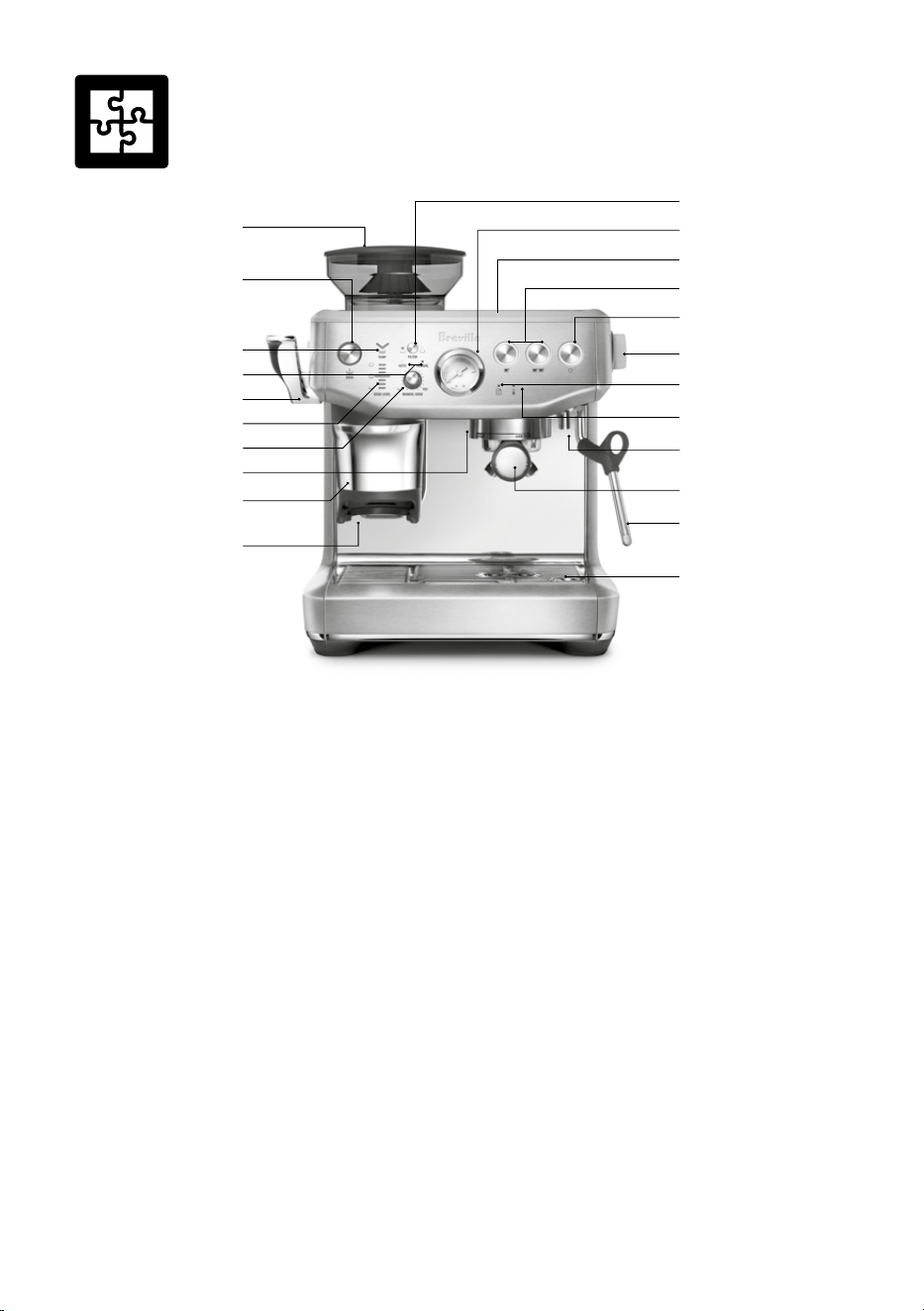
7
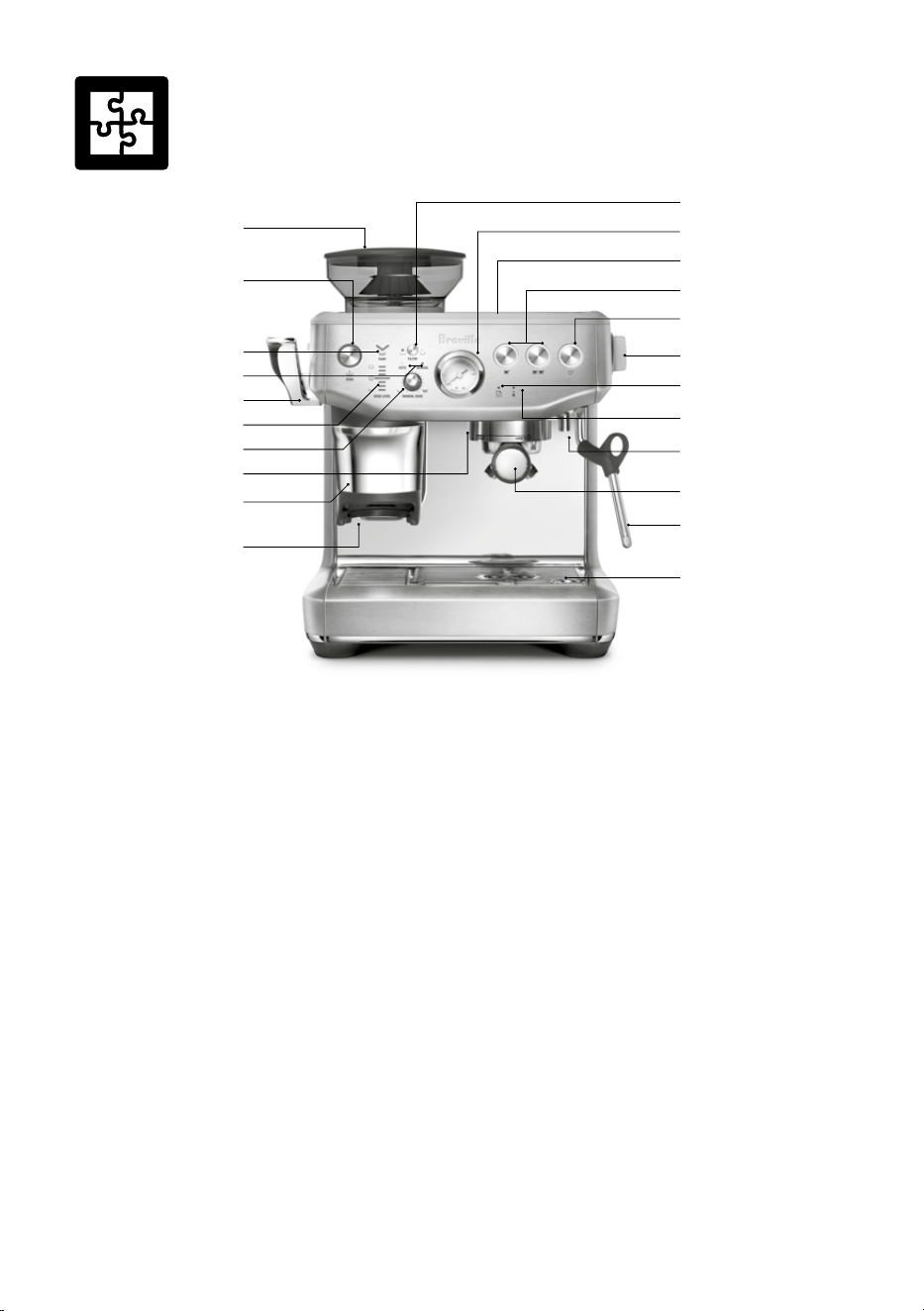
A. 250g Bean Hopper
B. Dose Button (Grind Start) –
Illuminates when portafilter is
properly inserted
‘A Bit More’ – when flashing
C. Tamp Indicator –
Flashes when ready to tamp
D. Automatic / Manual Dose Light Indicators
E. Assisted Tamp Lever
F. Dose Level Indicator
G. Manual Dose Adjust Dial –
Press to change to auto / manual dose mode.
Rotate to adjust the manual dose amount.
H. Group Head
I. Removable Tamp Cover
J. Grinding Cradle
K. Filter Button –
Single or double filter basket
L. Espresso Extraction Pressure Gauge –
Monitors extraction pressure
M. 2L Removable Water Tank
N. 1 CUP, 2 CUP Buttons
O. Power Button
P. Steam / Hot Water Dial
Q. Maintenance Light Indicator
R. Water / Steam / Heating Light Indicator
S. Hot Water Outlet
T. 54mm Stainless Steel Portafilter
U. Steam Wand
V. Drip Tray
Tool storage tray – houses accessories when
not in use. (see page 8)
Components
M
Q
P
T
J
S
N
I
H
O
K
L
U
V
R
F
B
D
E
A
G
C
8
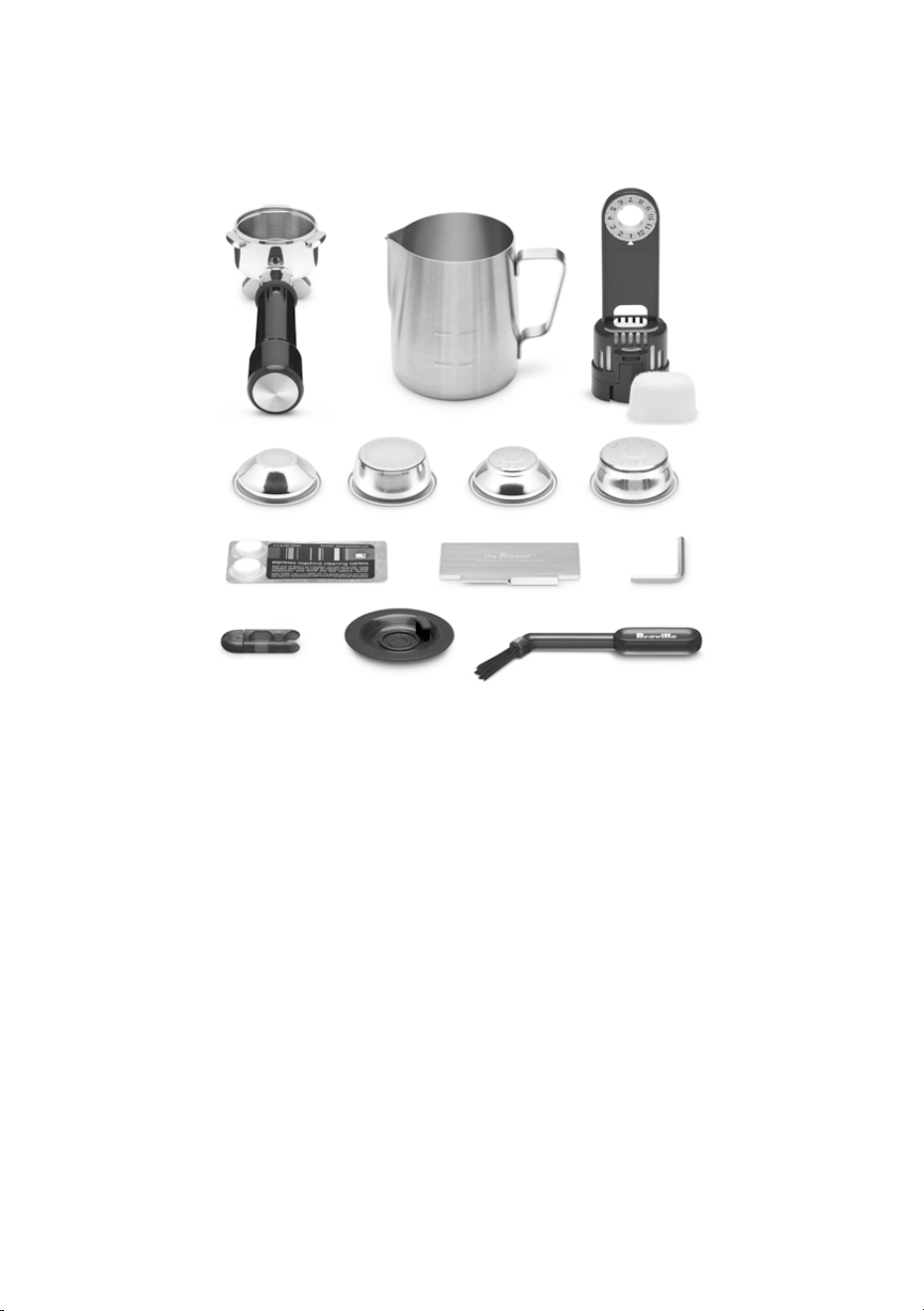
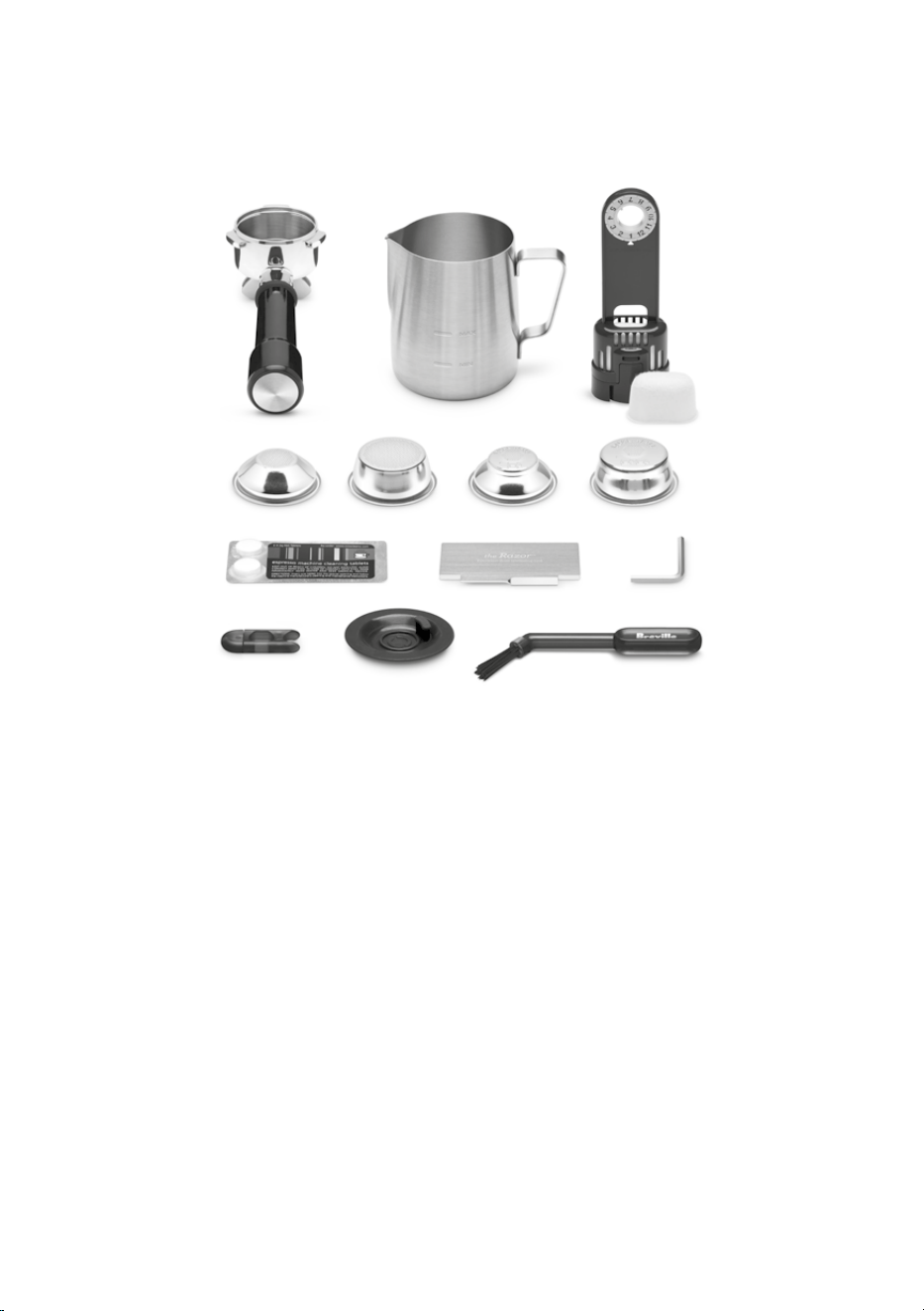
ACCESSORIES
A. 54mm Stainless Steel Portafilter
B. Stainless Steel Milk Jug
C. Water Filter Holder With Filter
D. 1 CUP & 2 CUP Single Wall Filter Baskets
E. 1 CUP & 2 CUP Dual Wall Filter Baskets
F. Cleaning Tablets
G. The Razor™ Precision Trimming Tool
H. Allen Key
I. Cleaning Tool For Steam Wand Tip
J. Cleaning Disc
K. Cleaning Brush
B
I
C
G
D
A
HF
E
J K
9
BEFORE FIRST USE
Machine Preparation
Remove and discard all labels and packaging
materials attached to your espresso machine.
Ensure you have removed all parts and
accessories from the box before discarding
the packaging.
Remove the water tank located at the back of
the machine by pulling the water tank handle.
Clean parts and accessories (water tank,
portafilter, filter baskets, jug) using warm water
and a gentle dish washing liquid. Rinse well
then dry thoroughly.
NOTE
For machines in colour, drip tray protection
guard included. DO NOT DISCARD.
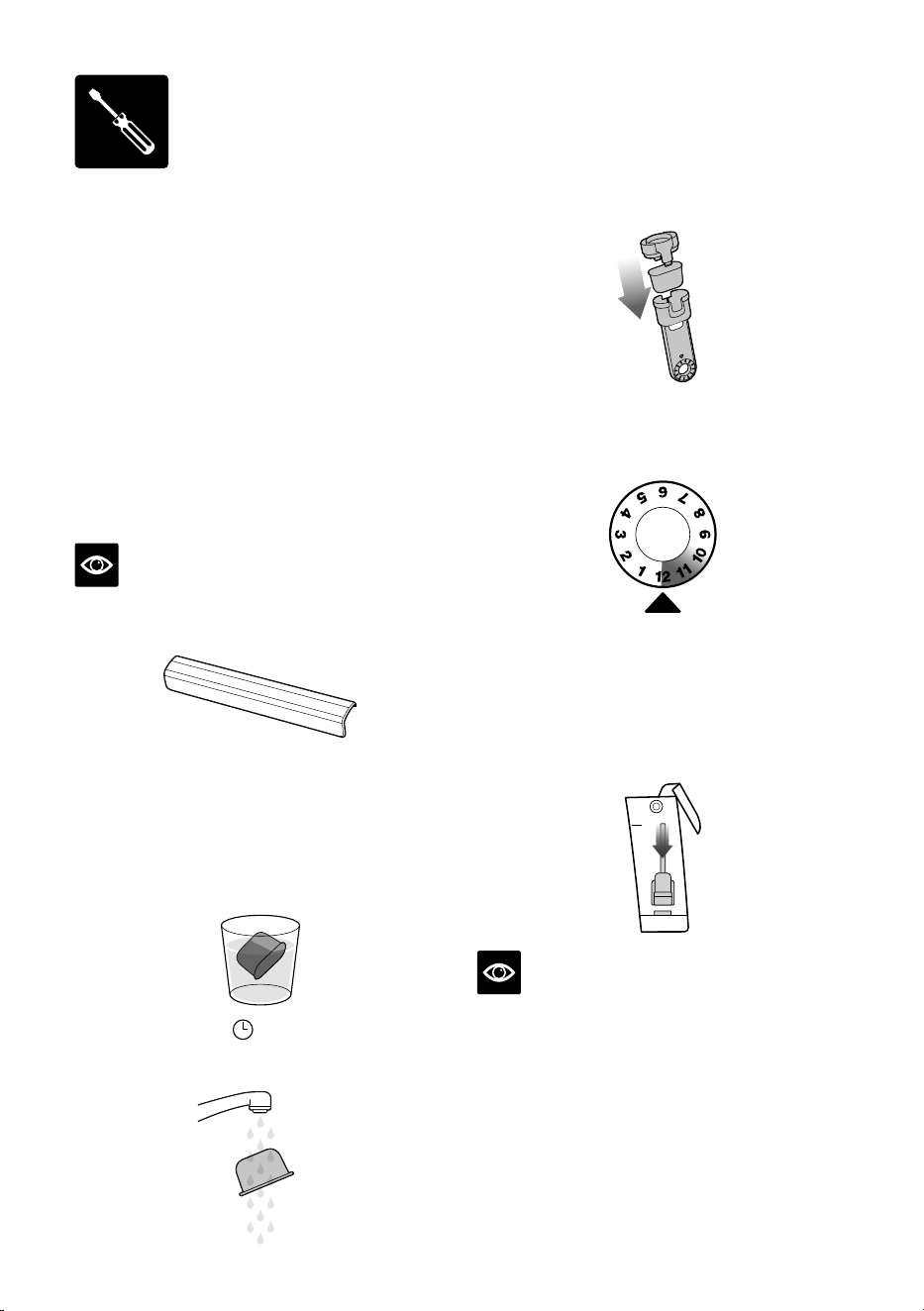
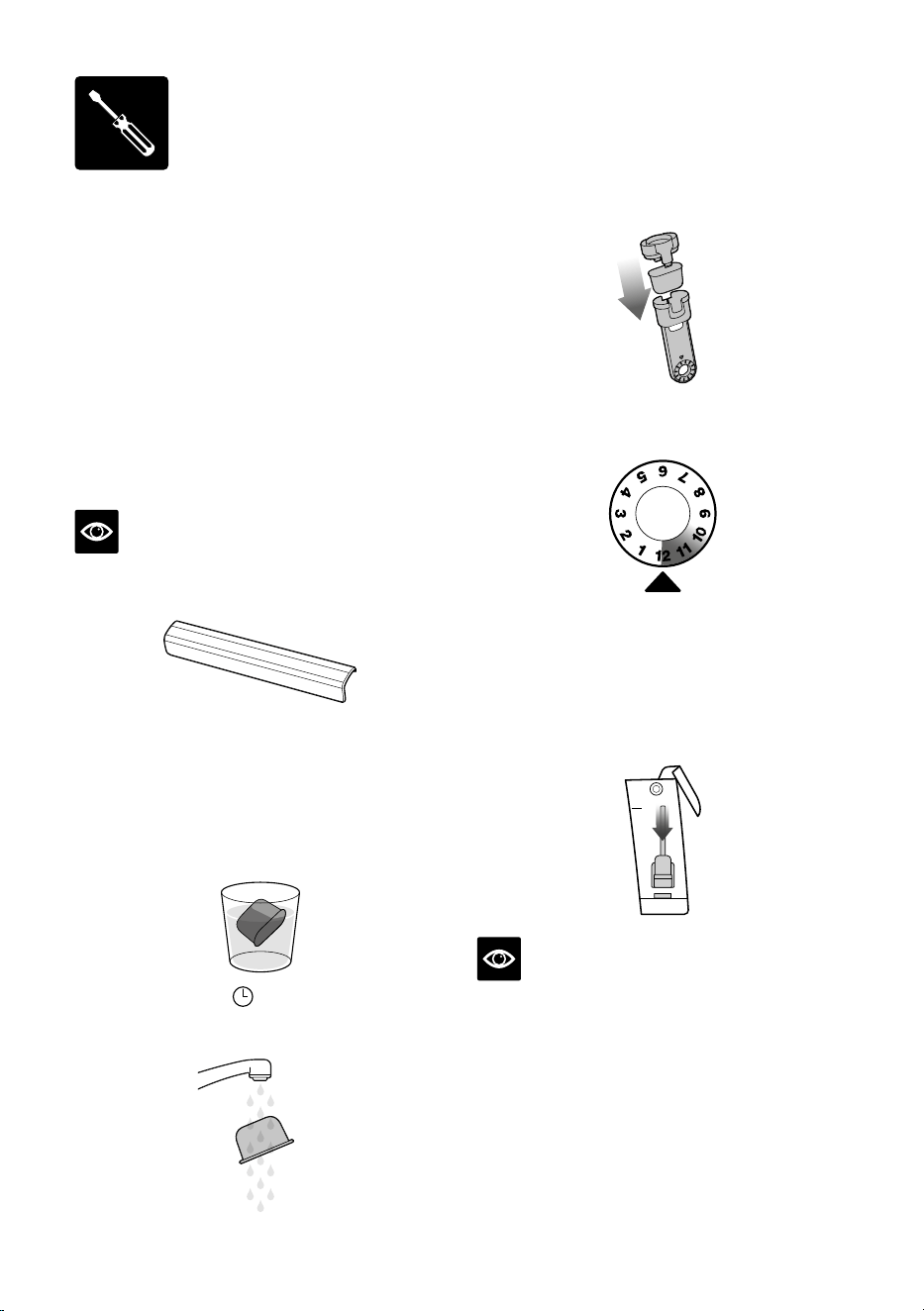
INSTALLING THE WATER FILTER
• Remove the water filter and water filter holder
from the plastic bag.
• Soak the filter in cold water for 5 minutes.
5m
H
2
0
• Rinse the filter with cold water.
• Insert the filter into the filter holder.
• Set the reminder for next month of
replacement. It is recommend replacing
the filter every 3 months.
REPLACEMENT DUE
• Insert the filter into the filter holder.
• To install the assembled filter holder into
the water tank, align the base of the filter
holder with the adapter inside the water tank.
Pushdown to lock into place.
NOTE
Replacing the water filter every three months
will reduce the need to descale the machine.
Filters can be purchased from the Breville
webpage.
Assembly
10
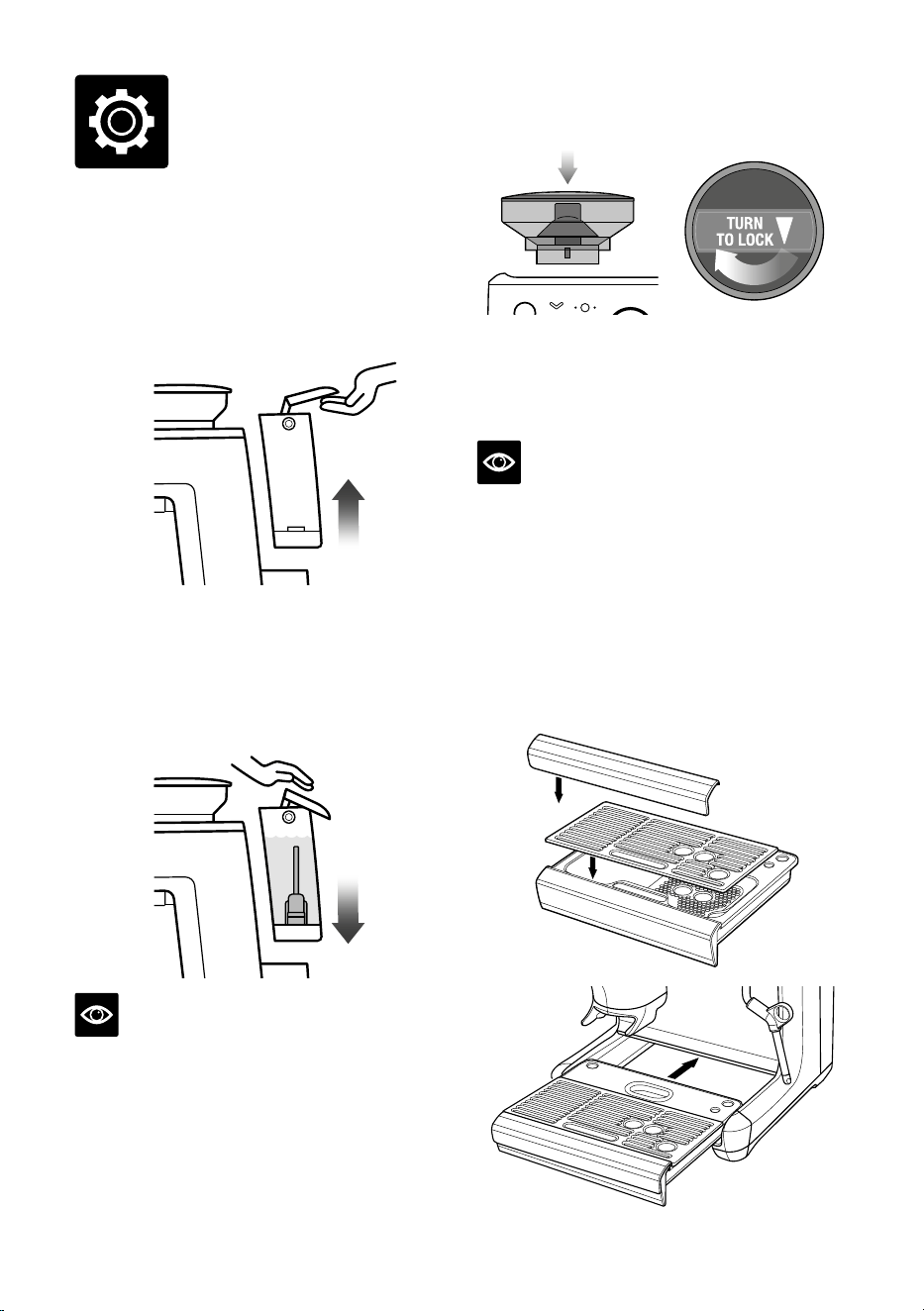
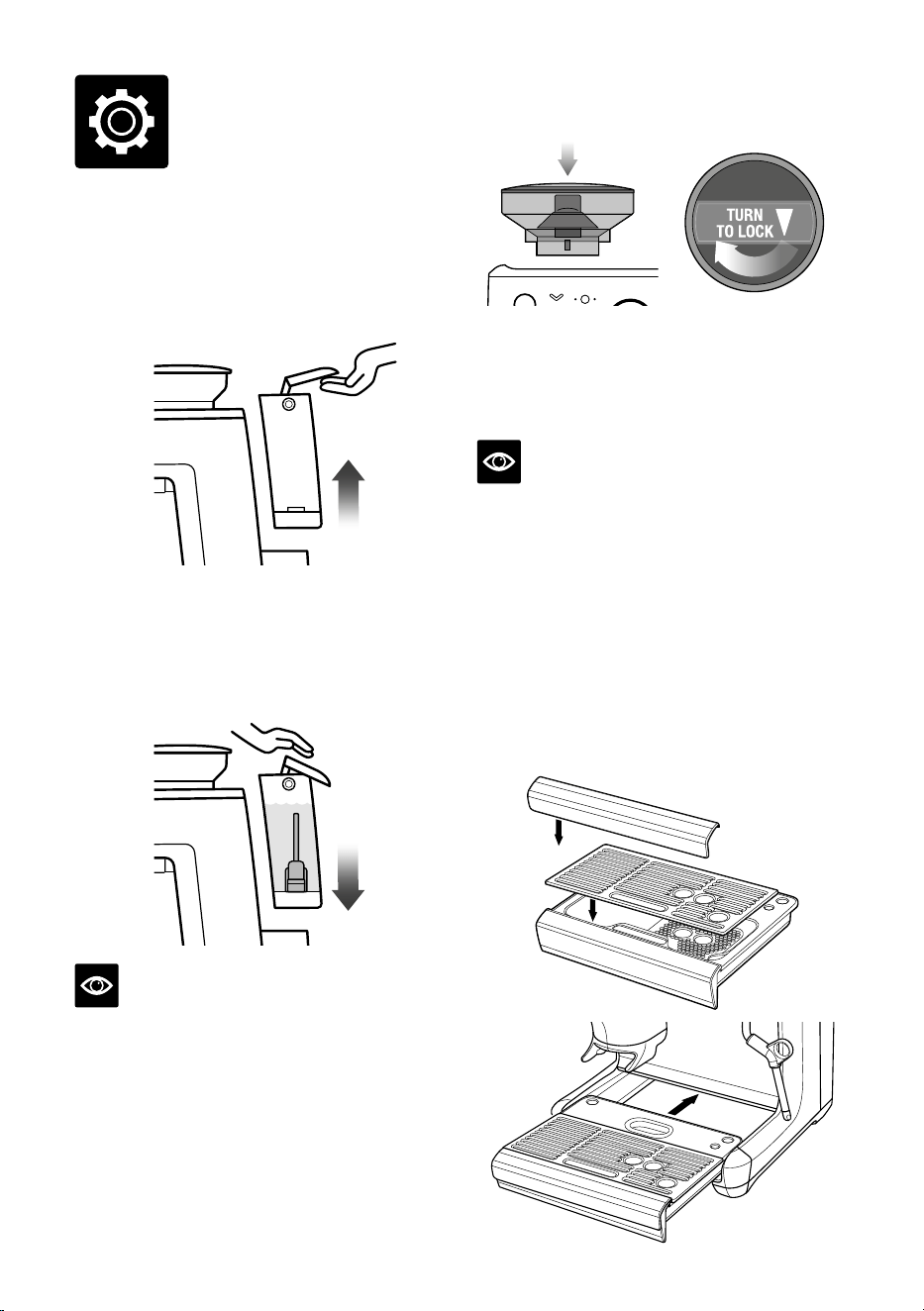
Attaching the Hopper
• Insert the bean hopper into position on top
of the machine.
• Turn the dial to lock the hopper into place.
• Fill the hopper with fresh beans.
NOTE
The filter light flashes between single and
double basket size when the bean hopper is
not correctly locked into position.
Attaching the Drip Tray
• Place the drip tray grill on top of the drip tray.
• For machine in colour, attach the drip tray
protection guard cover on the drip tray.
• Slide the drip tray in to the machine.
Filling the Water Tank
• Ensure the water filter is securely fitted inside
the water tank.
• Use the handle at the top of the water tank
to assist in lifting it up and away from the
machine.
• Fill the water tank with cold potable tap water
up to the MAX marking indicated on the side
of the water tank.
• Replace the water tank back on the machine,
pressing down to ensure that it is properly
positioned and attached to the machine.
NOTE
If the water level in the water tank is below
the minimum (MIN) marking, the espresso
machine will not operate.
Functions
11
GENERAL OPERATION
• Check the water tank is filled with cold tap
water up to the maximum mark.
• Plug the power cord into power outlet.
• Press the POWER button. The POWER
button will flash while the machine is heating.
(Light will flash for approximately up to
40seconds while the machine is heating.)
When the correct temperature has been
reached, the 1 CUP and 2 CUP buttons and
the POWER button on the control panel
will illuminate.
First Use Priming and Flushing the Machine
It is recommended to complete a water
flushing operation to ensure the machine
has been conditioned.
When the machine has reached STANDBY
mode, run the following steps.
• Place a cup under the group head and press
the 2 CUP button to run hot water through
the group head.
• Place a cup under the hot water spout. Rotate
the dial to “Hot Water” position and run water
through the hot water outlet for 10 seconds.
• Position the steam wand over the drip tray.
Rotate the dial to “Steam” position and
activate steam for 10 seconds.
• Discard the contents of the cup.
• Repeat this cycle 3 times. Discard the
contents of the drip tray and refill the water
tank up to the max line.
• Insert the portafilter into the grinding cradle,
press and hold DOSE button for 3 seconds.
Remove the portafilter and discard any grinds.
NOTE
• Top up the water daily. The water tank
shouldbe filled with fresh, cold tap water
before each use.
• DO NOT use highly filtered, demineralized,
or distilled water in this machine. This may
aect the taste of the coee.
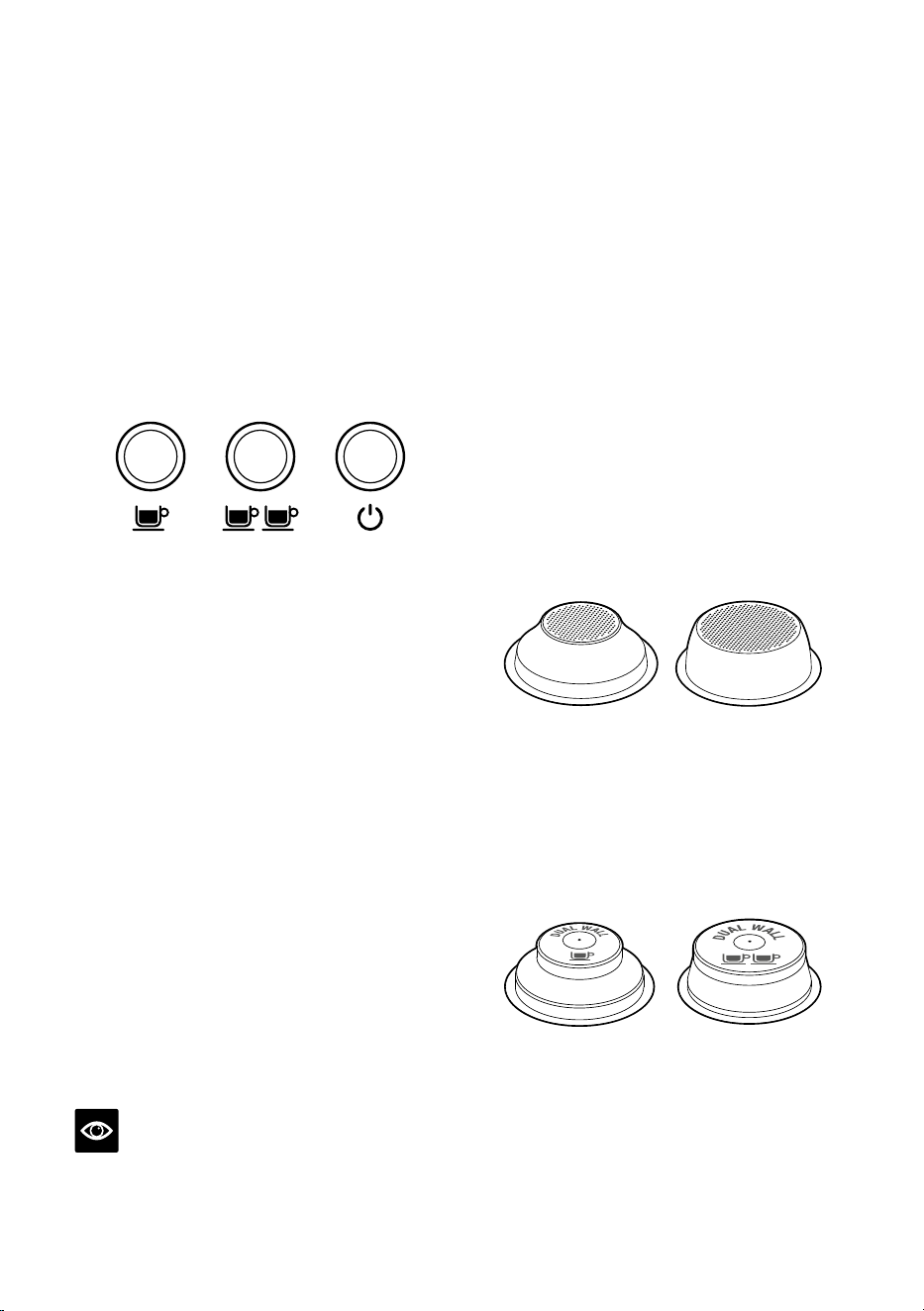
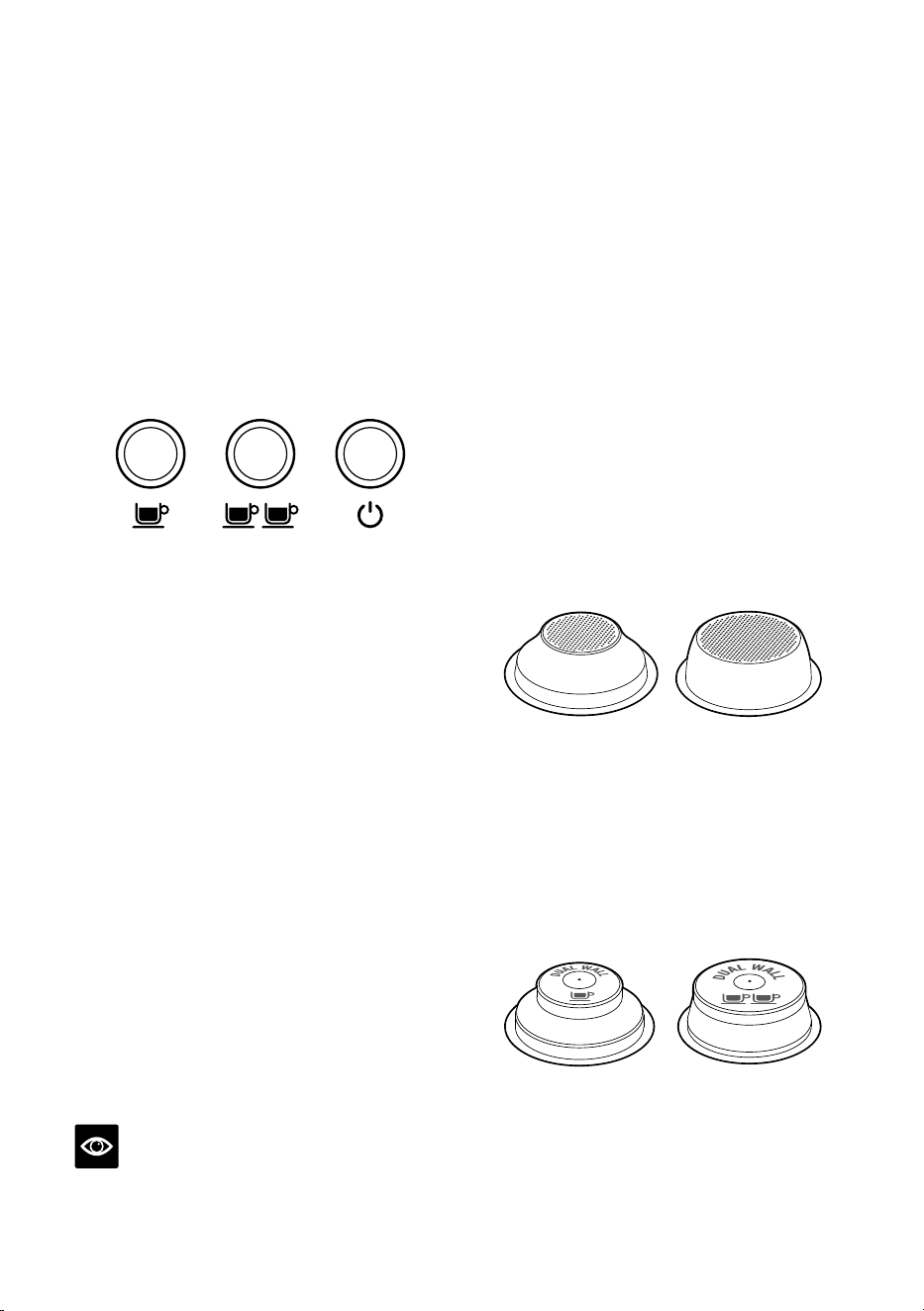
FILTER BASKETS
This machine includes both single and
dual wall, 1 CUP and 2 CUP filter baskets.
Use the 1 CUP filter basket when brewing
a single cup and the 2 CUP filter baskets
when brewing 2 cups or a stronger
single cup or mug.
Adjust the grind amount and size if switching
from a single basket to a double basket,
or vice versa.
The provided filter baskets are designed for:
1 CUP filter basket = 8-11g
2 CUP filter basket = 16-19g
Single Wall Filter Baskets
1 CUP 2 CUP
Single Wall filter baskets should be used when
grinding fresh whole coee beans.
These allows you to experiment with grind and
dose to create a more balanced espresso.
Dual Wall Filter Baskets
1 CUP 2 CUP
Dual Wall filter baskets should be used when
using pre-ground coee and older beans that
are past the 30 day roast date.
These regulate the pressure and helps to
optimize the extraction regardless of the
grind, dose or freshness.
12
THE GRIND
NOTE
This machine is designed only for whole
roasted coee beans. Avoid grinding unroasted
green and under-roasted coee beans. These
are dense and not brittle enough to run
through a burr grinder. This will damage or
break burr grinders and even pose a safety risk.
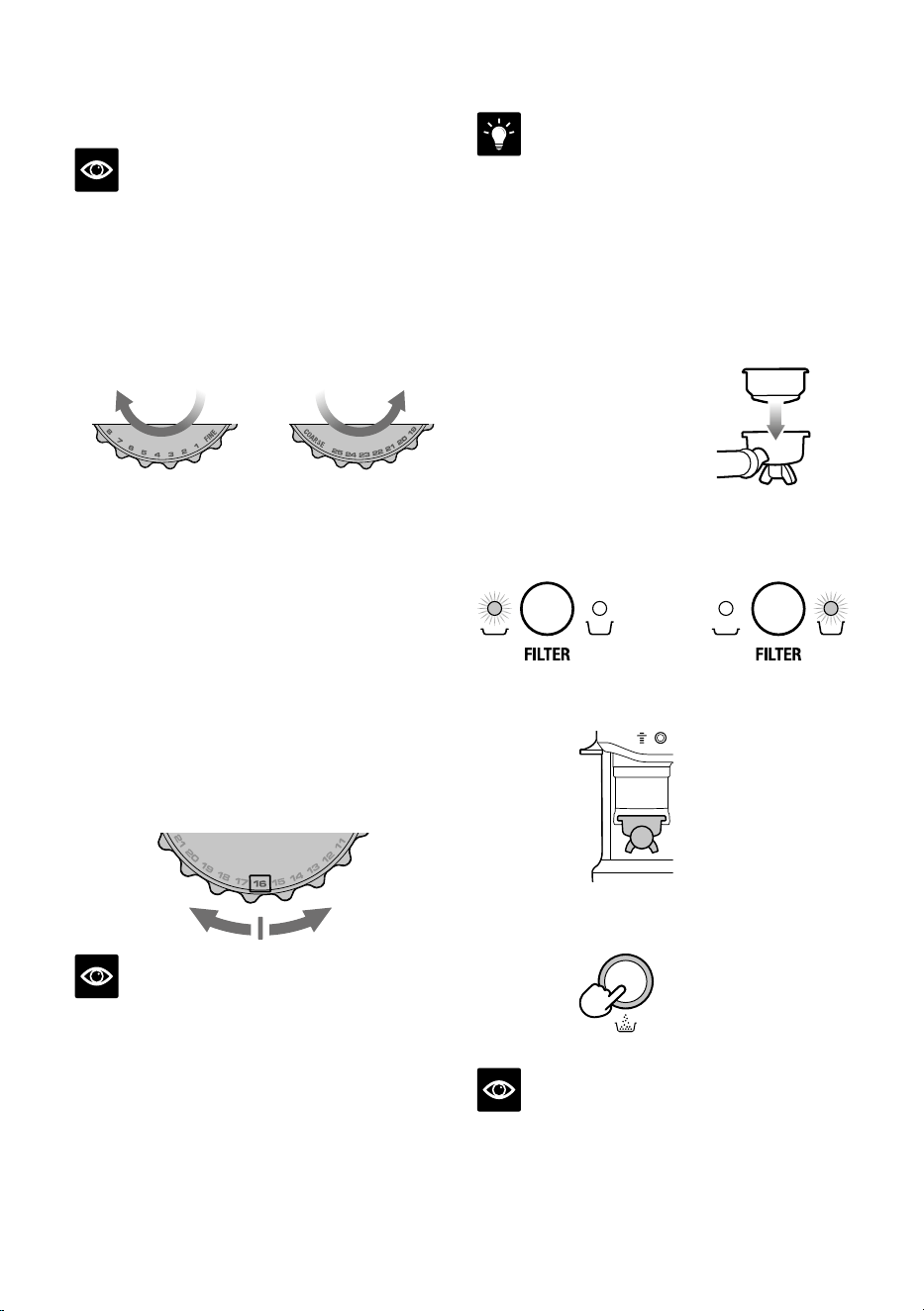
Setting the Grind Size
FINER
GRIND SIZE
TURN
COARSER
GRIND SIZE
TURN
The grind size will aect the rate of water flow
through the coee in the filter basket and the
flavour of the espresso. When setting the
grind size, it should be fine but not too fine
and powdery.
There are 25 settings on the GRIND SIZE dial.
To adjust the grind, rotate the dial to the back
of the machine to go finer, or rotate the dial
towards the front of the machine to go coarser.
The smaller the number, the finer the grind
size. The larger the number, the coarser the
grind size. We recommend you start at the
No. 16 setting and adjust as required.
NOTE
• When making changes to the grind size, the
new auto dosing time will be calculated after
your next tamp, and updated for the dose
cycle following that.
• For most bean varieties, the grinder will
automatically switch o when the beans get
too low to complete a dose.
TIP
Changing the grind size aects the dose
in the portafilter. A finer grind size may
cause an under dose requiring “A Bit More”.
Acoarser grind size may cause an over dose.
To avoid anover dose, press and hold the
FILTERbutton for 3 seconds, reducing the
grind time by threeseconds.
DOSING
• Ensure the bean hopper
is locked on the machine
and filled with fresh
coee beans.
• Insert the filter basket
required, into the
portafilter.
• Press FILTER size button to select your filter
size (single or double).
OR
• Insert the portafilter securely into the
dosing cradle.
• Press DOSE button to start grinding. The
light blinks until grind cycle is completed.
DOSE
NOTE
If the DOSE button is not illuminated, check
that the portafilter is inserted securely in the
cradle, the bean hopper is locked in position
and the tamp lever is in the up home position.
13
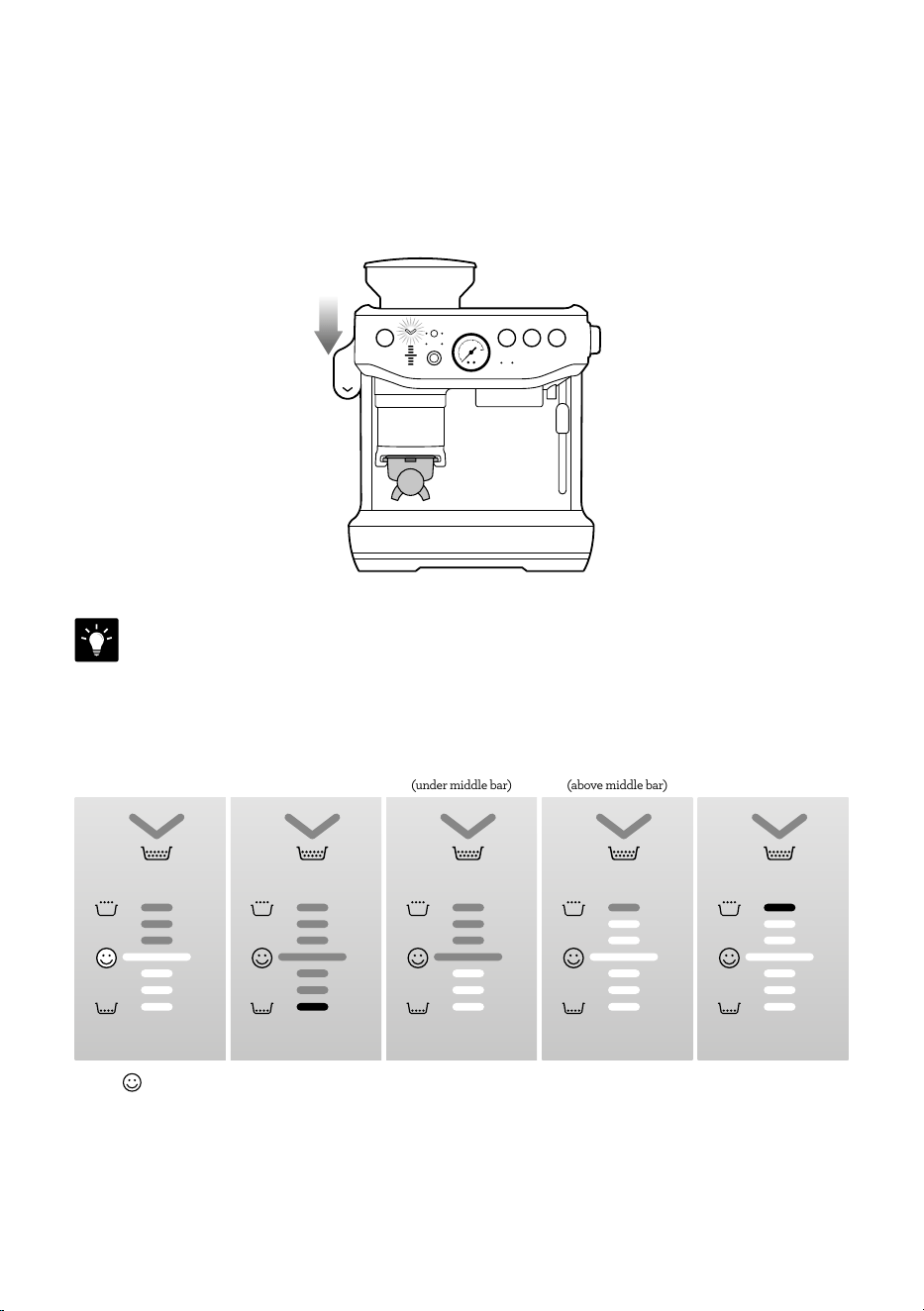
TAMPING
When the grind cycle is completed, the TAMP light indicator blinks.
• Push the lever downwards to the end position until a beep sound plays. This will tamp thecoee
grinds in the portafilter using a consistent amount of tamp force. Pushing the lever slowly
andconsistently will help to improve the puck appearance.
BEEP!
• Release the lever slowly upwards to the home position after tamping.
TIP
It is recommended to tamp twice to achieve a very polished coee puck.
Below is a table of DOSE LEVEL indicator bars:
DOSE LEVEL
TAMP
DOSE LEVEL
TAMP
DOSE LEVEL
TAMP
DOSE LEVEL
TAMP
DOSE LEVEL
TAMP
Ideal Severe Under Dose Under Dose
(under middle bar)
Over Dose
(above middle bar)
Severe Over Dose
• The bar on the machine indicates ideal tamp level and the right amount of coee grind
isinthe portafilter. This is the level that you are aiming for.

14
HOW TO CORRECT AN UNDER
OROVER DOSE?
An under or over dose can occur when fresh
beans are added to the hopper; when coee
beans age; a dierent type of coee bean is
used or if a change is made to the grind size.
What to do when dose level is below the
ideal middle bar?
• When tamp is below the ideal middle bar,
themachine is switched to ‘A Bit More’ mode,
theDOSE button light will flash.
DOSE
• Press the DOSE button to add ‘A Bit More’
grinds to the portafilter, then complete
atamp for an updated dose level reading.
• When ideal dose level is reached,
themachine will automatically update
theauto dose time for the next cycle.
What to do when dose level is above the
ideal middle bar?
• When tamp is above the ideal middle bar,
remove the portafilter from the cradle.
• Use the Razor Trimming Tool.
(refer to Trimming the Dose section)
• The machine will calculate how much to
reduce the auto grind time and apply this
for the next cycle.
DEDUCT TIME FROM AUTO DOSE
When an over dose is anticipated to occur
before grinding, due to; changing to a coarser
grind size, changing beans, or running out
ofbeans on previous grind cycle; press
andhold the FILTER button for 3 seconds.
DOSING MODES
Automatic Dosing
MANUAL DOSE
AUTO MANUAL
This is the default dose function of the
machine and the mode that will be most
commonly used.
The amount of coee grinds will automatically
dose into the portafilter and the machine
will provide guidance on achieving the ideal
amount through the Dose Level Gauge.
The machine will adjust the ideal dose on the
next grind.
Under Dose (A Bit More)
After tamping the DOSE button will flash
to indicate more grinds is needed into the
portafilter. Press the DOSE button to add
‘A Bit More’ coee grinds.
Dose Top-up
This feature is ideal when the portafilter
already has coee but needs more.
For example, in situations where:
• Removing the portafilter during grinding and
failing to re-insert within 5 seconds time out.
• Removing the portafilter after a full grind
cycle without tamping skimming o the top
of the coee pile.
The machine can top up from that amount
already in the portafilter basket preventing
coee waste, starting a fresh grind cycle,
orupdating the auto grind time.
15
To initiate the top up, the portafilter will need
to be inserted into the cradle and tamped.
Ifthe tamp level displays an under dose, the
DOSEbutton will blink indicating a top up.
Press the DOSE button to start the grind and it
will dose the right amount to get the ideal level.
NOTE
• This feature is only available on ‘Auto’ mode.
• This feature may require 2 to 3 top up cycles
to reach an ideal dose.
• The set auto grind time will not be aected
by this feature.
• Machine will not start a top up with an over
dose or ideal level. Remove the portafilter
andtrim the excess with the razor.
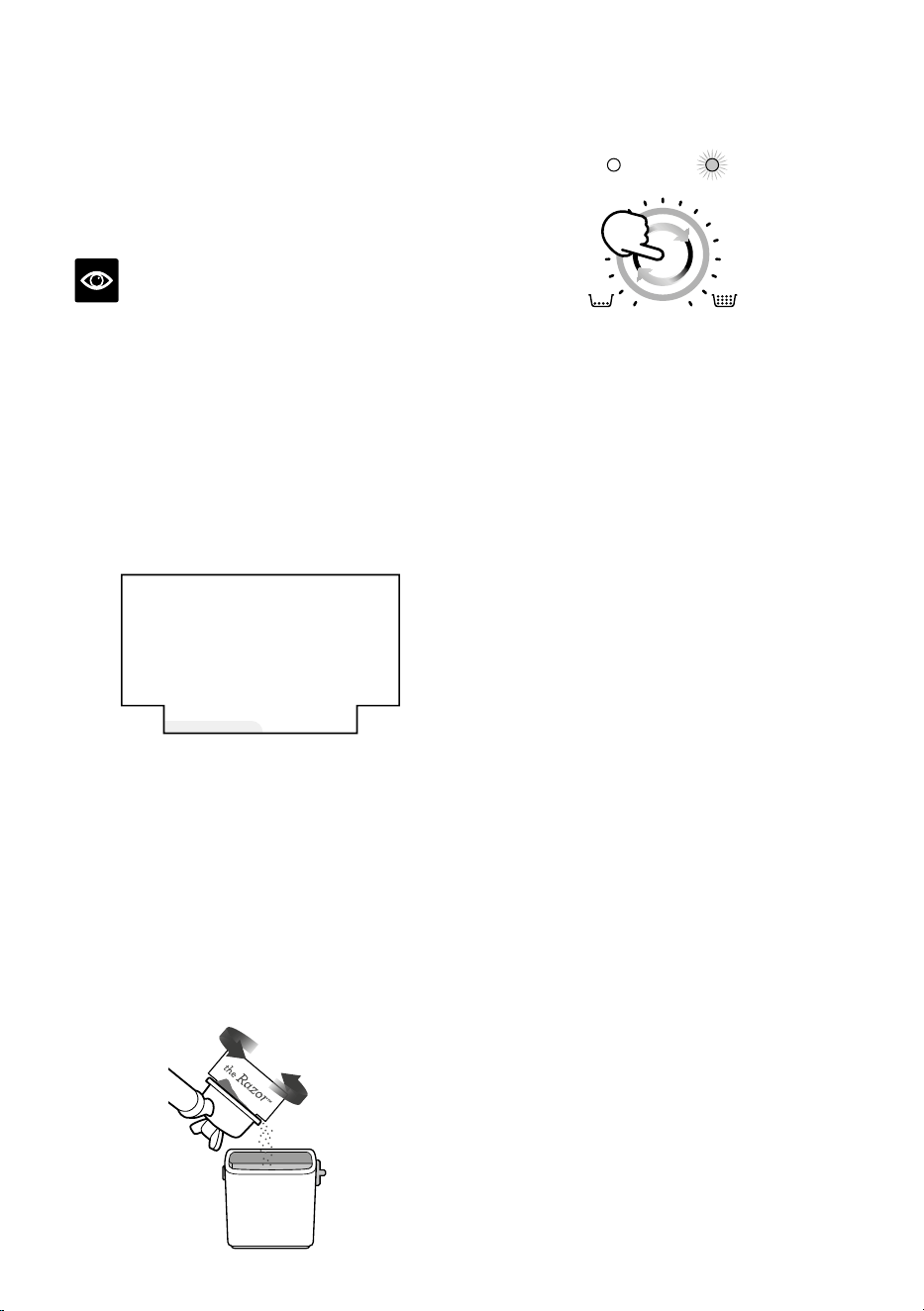
Over Dose (Trimming the Dose)
the Razor
™
Precision dose trimming tool
The Razor™ precision dose trimming tool
allows you to trim the puck to the right level
for a consistent extraction.
Insert the Razor™ into the coee basket
until the shoulders of the tool rest on the
rim of the filter basket. The blade of the
dosing tool should penetrate the surface
of the tamped coee.
Rotate the Razor™ dosing tool back and forth
while holding the portafilter on an angle over
the knock box to trim o excess coee.
Manual Dosing
MANUAL DOSE
AUTO MANUAL
Press the MANUAL DOSE button to switch
to manual dose mode. The light around the
MANUAL DOSE dial and the MANUAL light
will illuminate when in manual mode.
Select the dose amount by turning the dial
clockwise for more or counter-clockwise for
less grind time.
Grinder Purge
It is recommended to purge the retained grinds
left in the burrs or chute prior to making the
first coee of the day. Old grinds may aect
the in-cup quality and coee taste. Purging will
ensure only fresh coee makes it into your cup.
To purge, press and hold the DOSE button.
The grind will start after 0.5sec, and it will stop
once the DOSE button is released.
In auto mode, after doing a purge it is required
to remove the portafilter, discard the grind
from the basket and re-insert the portafilter
into the grinding cradle to return the machine
to its standby mode.
16
Extracting Espresso
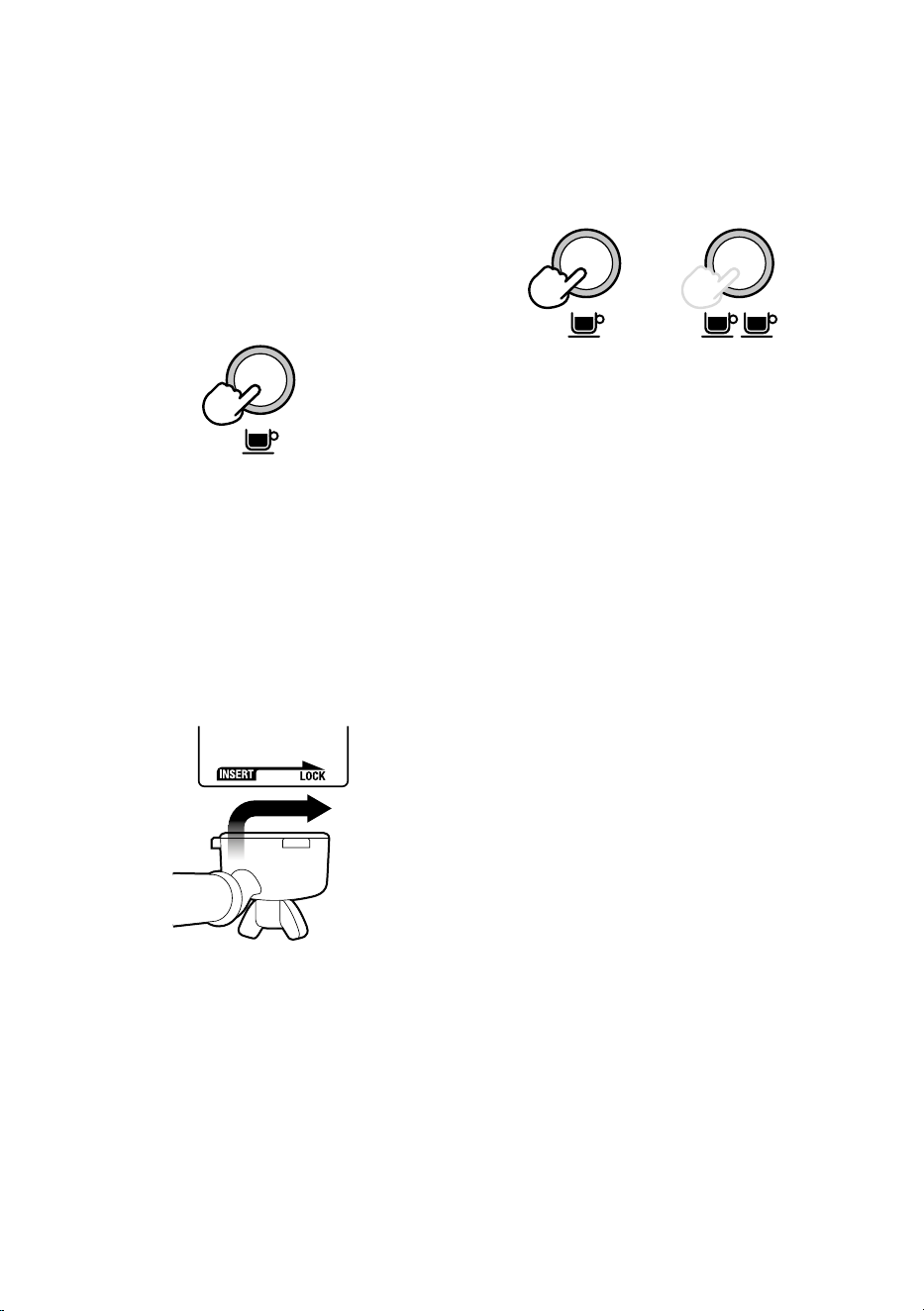
• Place pre-warmed cup(s) beneath the
portafilter and press the 1 CUP or 2 CUP
button for the required volume.
OR
• As a guide, the espresso will start to flow after
8-12 seconds (infusion time) and should be
the consistency of dripping honey.
• If the espresso starts to flow before 7 seconds
you have either under dosed the filter basket
and/or the grind is too coarse. This is an
UNDER-EXTRACTED shot.
• If the espresso starts to drip but doesn’t flow
after 12 seconds, then you have either over
dose the filter basket and/or the grind is too
fine. This is an OVER-EXTRACTED shot.
A great espresso is about achieving the
perfect balance between sweetness, acidity
and bitterness.
The flavour of your coee will depend on many
factors, such as the type of coee beans, degree
of roast, freshness, coarseness or fineness of the
grind, and the dose of ground coee.
Experiment by adjusting these factors just one
at a time to achieve the taste of your preference.
HOW TO MAKE COFFEE
Purging the Group Head
Before placing the portafilter into the group
head, run a short flow of water through the
group head by pressing the 1 CUP button. This
will purge any ground coee residue from the
group head and stabilise the temperature prior
to extraction.
Inserting the Portafilter
Wipe excess coee grinds from the rim of the
filter basket to ensure a proper seal is achieved
in the group head.
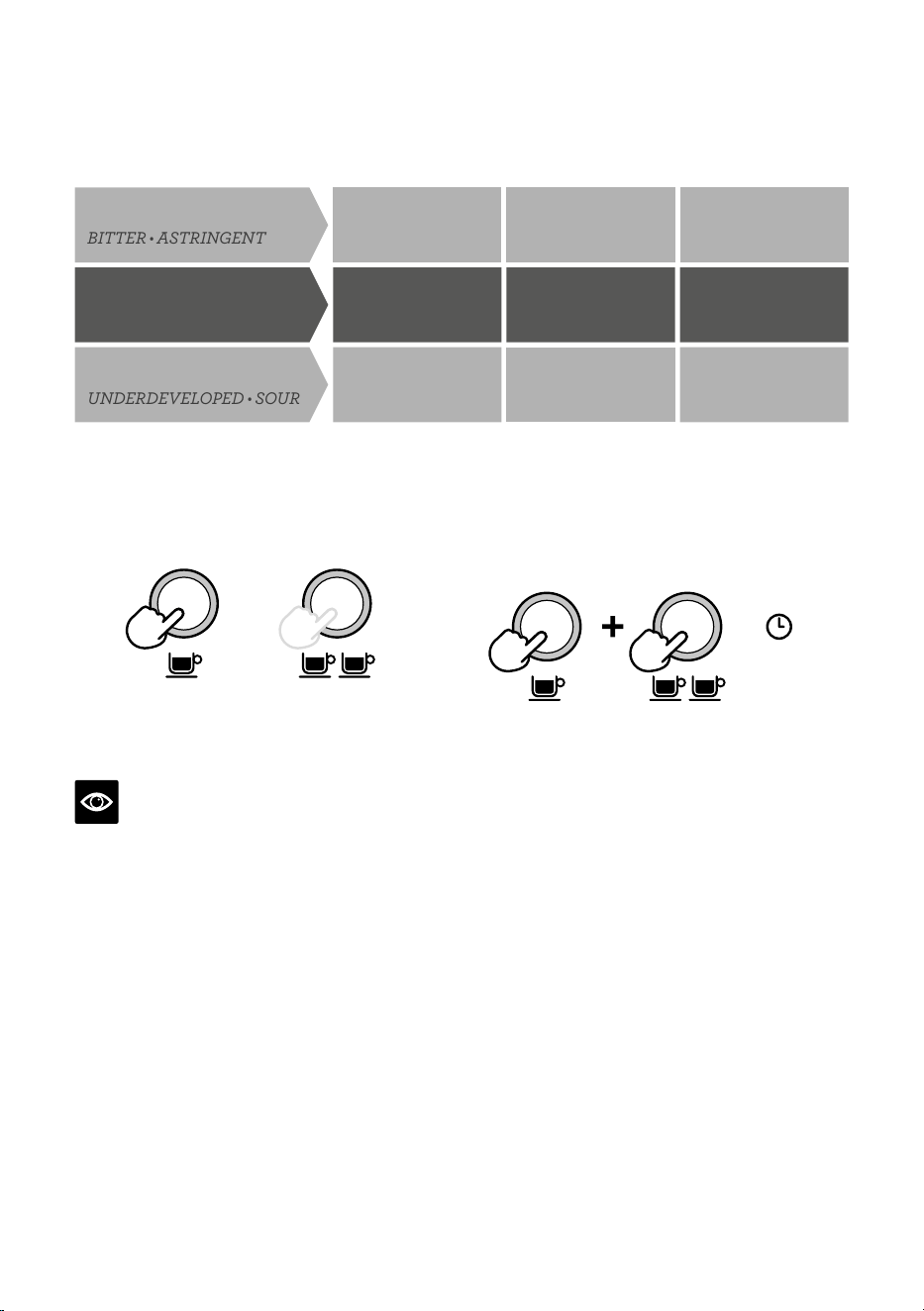
Place the portafilter underneath the group head
so that the handle is aligned with the INSERT
position. Insert the portafilter into the group
head and rotate the handle towards the centre
until resistance is felt.
17
EXTRACTION GUIDE
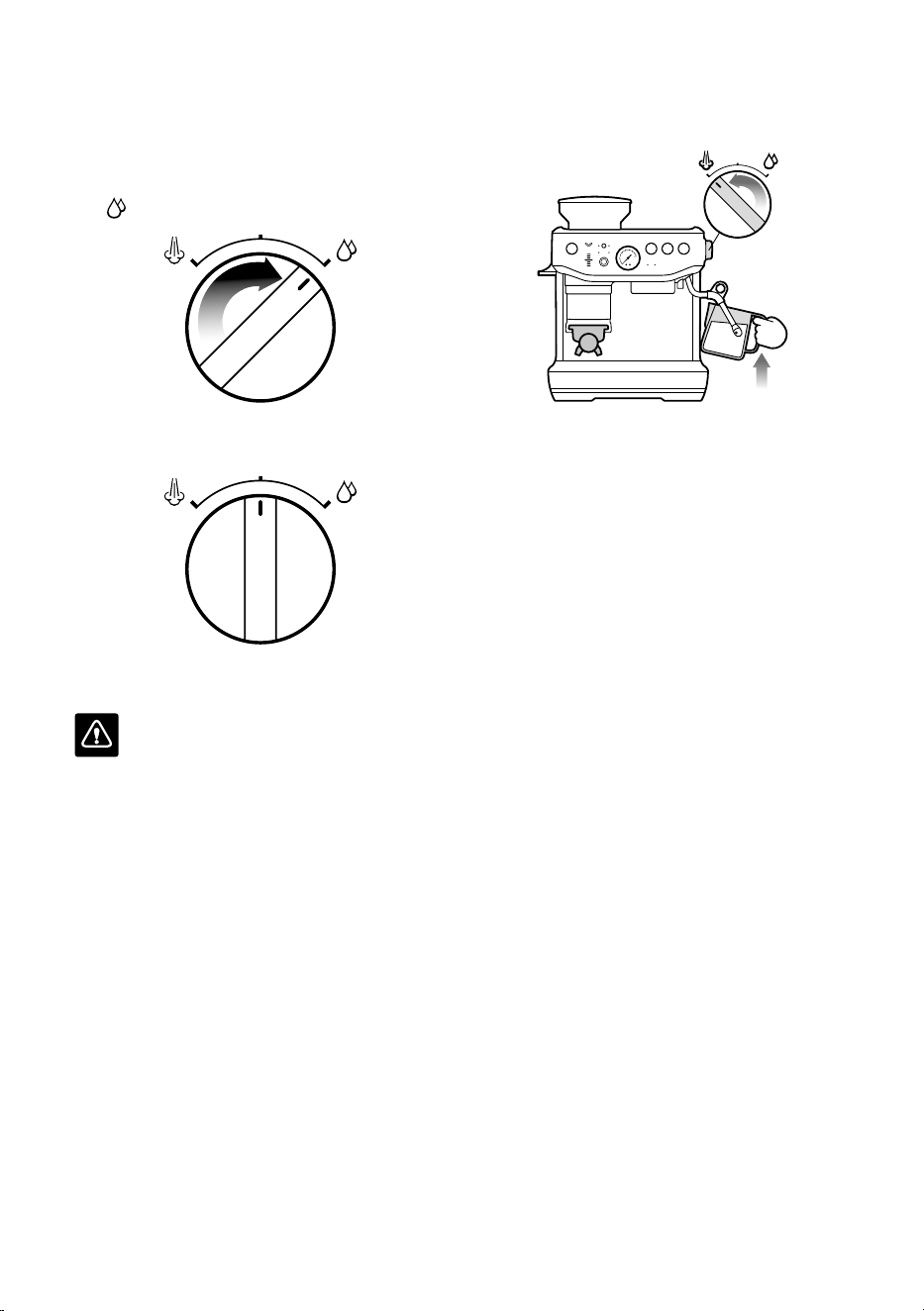
OPTIMUM
8-11g (1 CUP)
16-19g (2 CUP)
25-30 SEC
BALANCED
GRIND GRIND DOSE SHOT TIME
TOO FINE TOO MUCH OVER 35 SEC
OVER EXTRACTED
BITTER
•
ASTRINGENT
TOO COARSE TOO LITTLE UNDER 20 SEC
UNDERDEVELOPED
•
SOUR
UNDER EXTRACTED
MANUAL PRE-INFUSION
• Press and hold the 1 CUP or 2 CUP button
for the desired pre-infusion time.
OR
• Release the button to start the extraction.
• Press the 1 CUP or 2 CUP button again to
stop the extraction.
NOTE
Pressing any button during extraction will
stop extraction and the machine will return
to standby mode.
PROGRAMMING SHOT VOLUME
• Press and hold both the 1 CUP and 2 CUP
buttons for 3 seconds, the buttons will
illuminate and flash.
3s
To set the 1 CUP volume:
• Press the 1 CUP button to start the extraction.
• Press the 1 CUP button again to stop the
extraction. The modified volume will be saved.
To set the 2 CUP volume, follow the above
steps but select the 2 CUP button to start and
stop the extraction.
18
USING HOT WATER
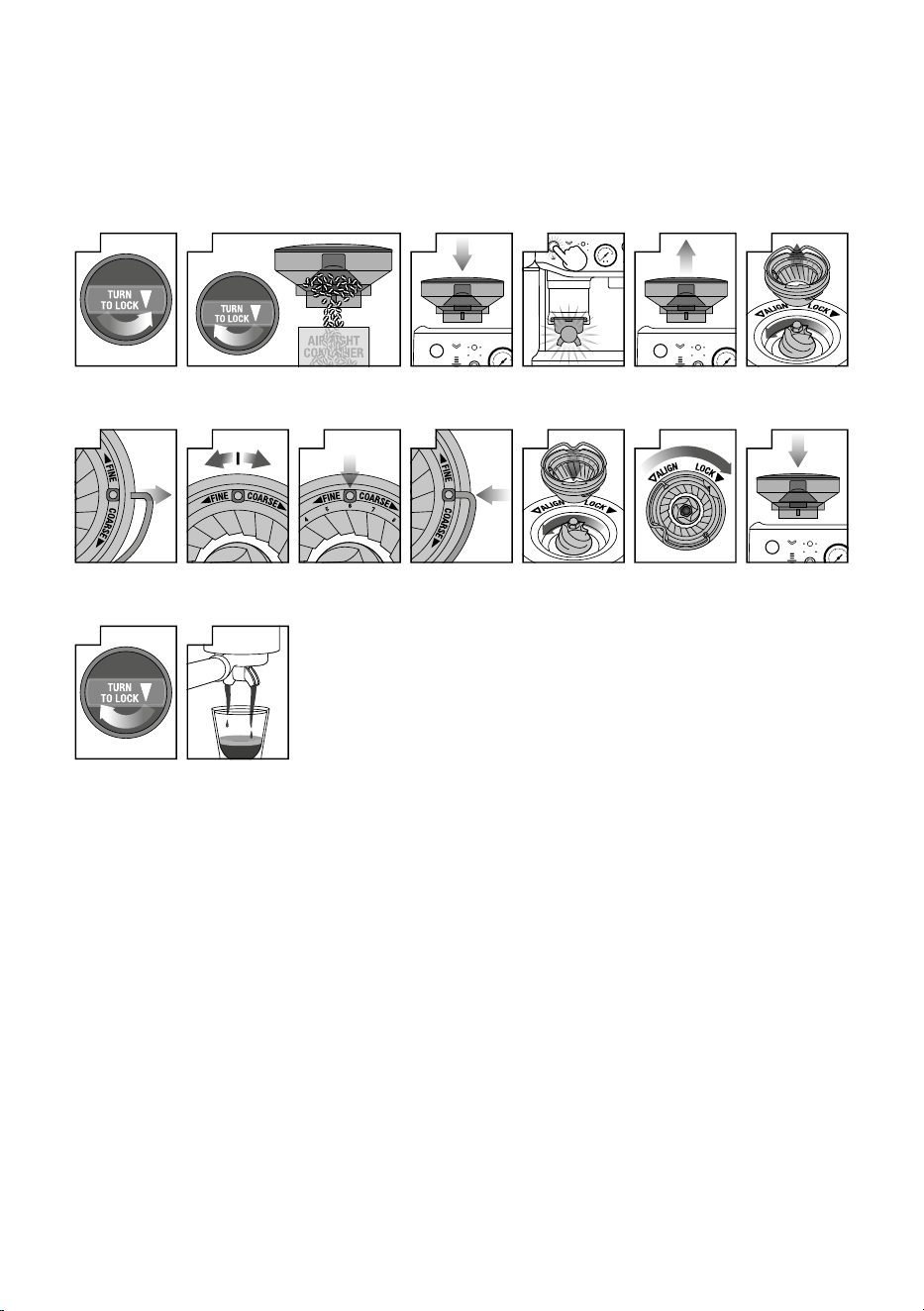
The machine has a dedicated hot water outlet.
• Turn the dial on the right, from STANDBY
to
HOT WATER.
• Turn the dial back to STANDBY to stop
hot water flow.
• Maximum flow out of hot water volume
is 240 ml.
WARNING
Cup temperature is approximately90°C(194°F).
Be careful in handling hot beverages.
TEXTURING MILK
There are two phases to texturing milk,
stretching and heating. These two operations
should blend into one with the goal being
silky smooth textured milk at the correct
temperature.
• Start with fresh cold milk of choice.
• Fill the milk jug between the Min and
Max level.
• Position the steam tip over the drip tray
andturn the dial from STANDBY to STEAM
andwait until the steam is flowing strongly.
• Turn the steam dial to the STANDBY
position to pause the steam, then within
8 seconds, insert steam wand tip into milk jug
and turn dial back to STEAM position.
• Insert the steam tip 1-2cm below the surface
of the milk close to the right-hand side of the
jug at the 3 o’clock position.
• Keep the tip just under the surface of the
milk until the milk is spinning clockwise,
producing a vortex (whirlpool eect).

19
• With the milk spinning, slowly lower the jug.
This will bring the steam tip to the surface
of the milk and start to introduce air into
the milk. You may have to gently break the
surface of the milk with the tip to get the milk
spinning fast enough.
• Keep the tip at or slightly below the surface,
continuing to maintain the vortex. Texture
the milk until sucient volume is obtained.
• Lower the tip beneath the surface but keep
the vortex of milk spinning. The milk is at the
correct temperature (60-65°C) when the jug
is hot to comfortably touch.
• Move the steam dial to the STANDBY
position before taking the tip out of the milk.
• Set the jug to one side, turn dial to STEAM
to purge out any residual milk from the steam
wand and wipe steam wand with a dampcloth.
• Tap the jug on the bench to collapse
any bubbles.
• Swirl the jug to polish and re-integrate
the texture.
• Pour milk directly into the espresso.
• The key is to work quickly, before the milk
begins to separate.
CAUTION: BURN HAZARD
Pressurised steam can still be released,
evenafter machine has been switched o.
Children must always be supervised.
Adjusting Water Temperature
Dierent beans may require dierent water
temperatures to extract their optimum flavour.
The temperature can be adjusted +/- 2°C in 1°C
increments from the default setting:
1. Turn the machine to OFF.
2. Press and hold filter, 1 CUP and 2 CUP then
press and hold the POWER button.
3. The machine will beep once and display the
current temperature.
4. Press one of the below buttons within
5 seconds:
• Increase 1°C – 2 CUP
• Increase 2°C – POWER
• Decrease 1°C – MANUAL DOSE
• Decrease 2°C – DOSE
The machine will beep twice to confirm the
change and return to standby mode.
5. Return to default temperature – press 1 CUP
button.
20
ADJUSTING CONICAL BURRS
Some types of coee may require a wider grind range to achieve an ideal extraction or brew.
A feature of your Barista Express Impress™ is the ability to extend this range with an adjustable
upper burr. We recommend making only one adjustment at a time.
1
Unlock hopper
2
Hold hopper over container & turn dial
to release beans into container
3
Align hopper
into position
DOSE
4
Run grinder
until empty
5
Remove hopper
6
Remove
upper burr
7
Remove wire
handle from both
sides of the burr
8
Move adjustable
top burr, 1 number,
coarser or finer
9
Align the number
with the handle
opening
10
Insert wire handle
from both sides
of the burr
11
Push upper burr
firmly into position
12
Lock upper burr
13
Align hopper
into position
14
Lock hopper
15
Check your
extraction

21
RESET DEFAULT SETTINGS
Reset Auto Dose Time
Resetting the auto dose time is recommended,
if there is a significant change to the grind size
or there is an accidental double dose into the
portafilter.
The machine must be on STANDBY mode.
• Press and hold MANUAL DOSE button and
FILTER button for 3 seconds to reset grind
time to factory settings.
• The machine will confirm the reset when the
control panel lights for filter, grind mode and
dial will flash 3 times with beeping sounds.
• The machine will return to STANDBY mode.
Reset Extraction Time
The machine must be on STANDBY mode.
• Press and hold the FILTER and 1 CUP
and2CUP buttons for 3 seconds.
• The machine will beep 3 times.
• The machine will then go into ready mode.
ALERTS
No Hopper Warning
The filter lights flash between single anddouble
basket size, the hopper is not attached correctly.
Check the hopper and ensure the bean hopper
is inserted correctly and locked in place.
Low Coee Beans Warning
The DOSE button and the DOSE LEVEL lights
will flash two red LEDS and will sound 3 beeps.
Add coee beans to the hopper.
Tamp Lever Not At Home Position
The machine beeps 3 times and pauses dose
cycle. Return the lever to the up or home
position and press DOSE button to continue.
22
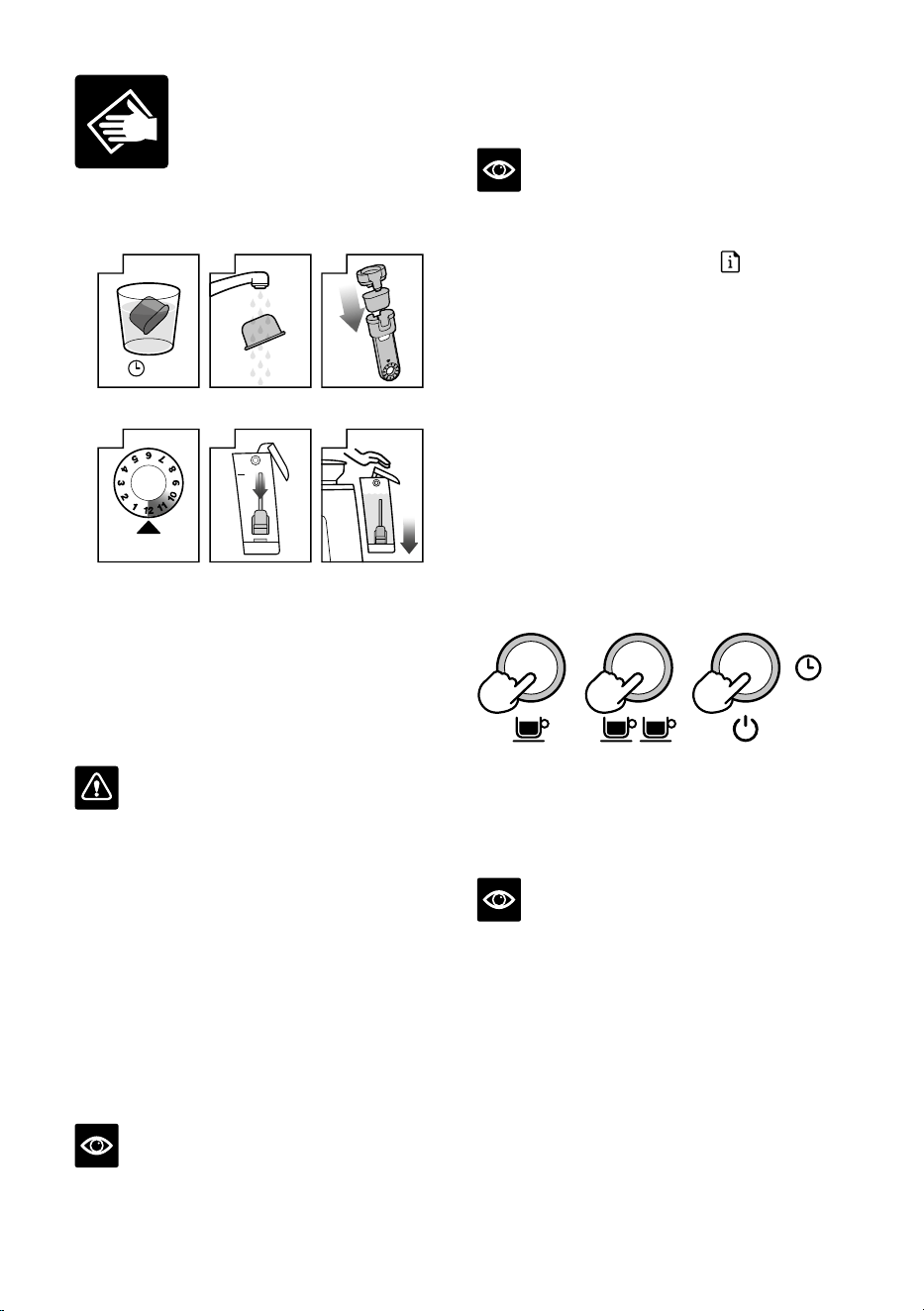
REPLACING THE WATER FILTER
IN THE WATER TANK
REPLACEMENT DUE
4
Set date 3 months
ahead
5m
H
2
0
1
Soak water filter
for 5 mins
2
Rinse water filter
3
Place filter into
filter holder
5
Install filter in
water tank
6
Insert & lock
water tank
The provided water filter helps reduce the risk
of scale build-up in and on many of the inner
functioning components. Replacing the water
filter every three months will reduce the need
to descale the machine. If you live in a hard
water area, it is recommended to change the
water filter more frequently.
WARNING
After regular use, hard water can cause
mineral build up in and on many of the inner
functioning components, reducing the brewing
flow, brewing temperature, power of the
machine, and taste of the espresso.
• Remove the filter from the plastic bag, and
soak in a cup of water for 5 minutes.
• Rinse the filter under cold running water for
5 seconds.
• Insert the filter into the filter holder.
• Set the date dial 3 months ahead.
• To install, push down the filter to lock
into place.
NOTE
For replacement of water filters contact
Breville Customer Service Centre or visit
our website at www.breville.com/kr
CLEANING CYCLE
NOTE
This is a back-flushing cycle and separate
from descaling.
The CLEAN / DESCALE light
will flash
when a cleaning cycle is required.
1. Insert the 1 CUP filter basket into the
portafilter, followed by the supplied
cleaning disc, followed by one
cleaning tablet.
2. Lock the portafilter into the group head
and place a large container beneath the
portafilter spouts.
3. Ensure the water tank is filled with cold
water and the drip tray is empty.
4. Press the POWER button to switch the
machine o.
5. Press and hold 1 CUP, 2 CUP & POWER
buttons for 3 seconds.
+ +
3s
6. The cleaning cycle will commence and last
for approximately 5 minutes. During this
time, water will intermittently flush into the
portafilter to dissolve the cleaning tablet
and flush back into the group head.
NOTE
No water should come through the portafilter.
7. Remove the portafilter and ensure the tablet
has completely dissolved. If the tablet has
not dissolved; repeat from step 4 of the
cleaning cycle until the tablet is dissolved.
8. Once the tablet has completely dissolved,
remove the cleaning disc, reinsert the
portafilter and press the 2 CUP button to
rinse the brew head. It is recommended to
place a container under the portafilter spout
to avoid water splashing onto the machine.
Once complete, make sure to wipe o any
splashes with a soft dry cloth.
Care & Cleaning
23
DESCALING
NOTE
• Ensure that the water filter is removed from
the water tank before adding the descaling
powder when descaling the machine.
• While the cleaning cycle is important for
keeping the brew head clean from coee oils;
the descaling cycle is essential to ensure that
the machine is kept clean on the inside and
free from mineral build-up.
• Do not use bottled water when descaling.
Most bottled water may contain dissolved
solids that can leave deposits inside the
machine.
The CLEAN / DESCALE light
will
illuminate solid when descaling is required.
1. Fully dissolve one sachet of Breville
descaling powder into 1 litre of water then
fill the water tank (start the process after
fully dissolving the powder).
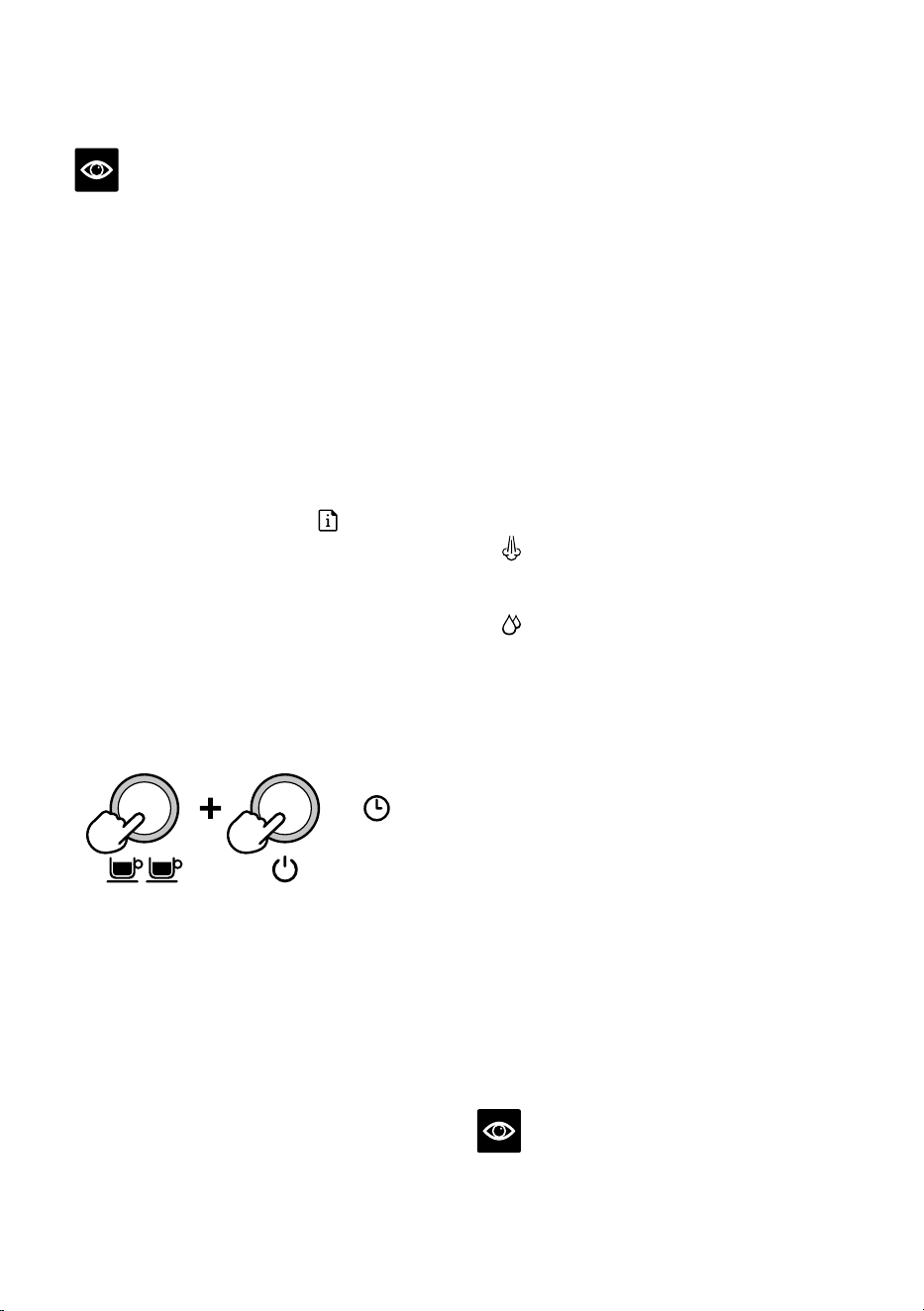
2. Ensure the machine is OFF; then press
and hold the 2 CUP and POWER buttons
simultaneously for 5 seconds to enter the
descale mode.
5s
The unit will heat up as part of commencing
the descaling action, during the heating
process, the POWER and 2 CUP buttons
should flash continuously.
The machine will indicate it is ready for
descaling when the POWER button, 2 CUP
button, CLEAN / DESCALE indicator and
HOT WATER / STEAM indicator are all
illuminated solid.
Descaling the coee component
3. Press the 2 CUP button to start the
descaling for the coee component of the
machine. Descaling coee component takes
approximately 25 seconds. The 2 CUP
button should flash continuously and
remain constant once the descaling process
has finished. To terminate the descaling
within 25 seconds, press the 2 CUP button
again. Extraction will run for 25 seconds or
the user press the 2 CUP button. The unit
will confirm coee component descale cycle
with a beep and the 2 CUP light turns solid.
Descale the steam and hot water components
Descaling steam and hot water take
approximately 13 seconds and 8 seconds
respectively. Descaling can be terminated
prematurely by turning the steam dial to
STANDBY.
4. Descale Steam component by turning
the steam dial RIGHT towards the
STEAM icon.
5. Descale Hot water component by turning
the steam dial to the LEFT towards the
HOT WATER icon.
Repeat processes to complete descaling
After the above processes about half
(0.5 litre) of the descale solution should be
left in the water tank.
6. Repeat steps 3 to 5 above to complete the
descaling process to empty the solution in
the tank.
Descaling Solution Rinse
7. After descaling, remove the water tank and
rinse thoroughly then refill with fresh cold
water to the maximum capacity (2 litres)
and repeat steps 4-6 to further cleanse the
machine of any residue of the cleaning
solution thoroughly.
8. Press POWER to quit the descaling process.
This will be indicated by the LED lights
switching o.
NOTE
The machine turns o automatically if there is
no action for 5 minutes in descaling mode. To
resume descaling start from step 2.
24
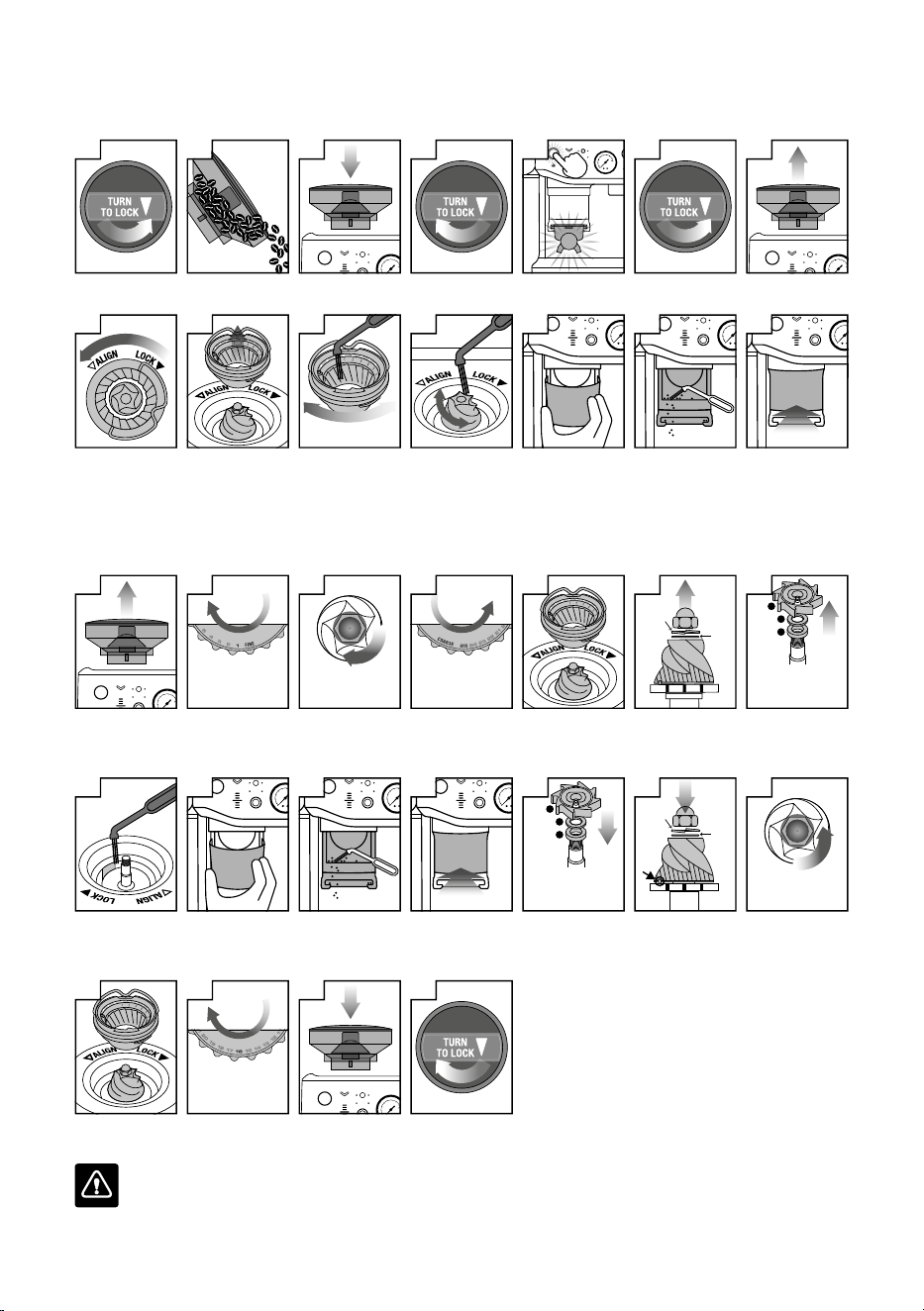
CLEANING CONICAL BURRS
Regular cleaning helps the burrs achieve consistent grinding results.
1
Unlock hopper
2
Empty hopper
3
Replace hopper
4
Lock hopper
DOSE
5
Run grinder
until empty
6
Unlock hopper
7
Remove hopper
8
Unlock top burr
9
Remove top burr
10
Clean top burr
with brush
11
Clean lower burr
with brush
12
Remove
tamp cover
13
Clean the chute
with brush
14
Replace
tamp cover
ADVANCED CLEANING FOR THE CONICAL BURR GRINDER
This step is only required if there is a blockage between the grinding burrs and the grinder outlet.
1
Remove hopper
TURN
FINER
GRIND SIZE
2
Set GRIND SIZE
to 1 (finest)
LOOSEN NUT
3
Use 10mm socket.
Rotate clockwise to
loosen the nut only
TURN
COARSER
GRIND SIZE
4
Set GRIND SIZE
to 25 (coarsest)
5
Unlock & remove
top burr
SPRING
WASHER
FLAT
WASHER
6
Remove nut,
spring & flat washer.
Carefully remove
lower burr.
3
2
1
1. GRIND FAN
2. METAL WASHER
3. FELT WASHER
7
Remove grind fan
& washers using
long-nose pliers
8
Unblock the grinds
exit chute using the
brush or a pipe
cleaner
9
Remove
tamp cover
10
Clean the chute
with brush
11
Replace
tamp cover
1
2
3
1. FELT WASHER
2. METAL WASHER
3. GRIND FAN
12
Insert washers
& grind fan using
long-nose pliers
SPRING
WASHER
FLAT
WASHER
13
Insert lower burr
(drive pin & cavity
to align).
Insert flat washer
& spring washer.
TIGHTEN NUT
14
Rotate
counter-clockwise
to tighten nut
15
Insert & lock
top burr
TURN
16
GRIND SIZE
16
Set GRIND SIZE
to 16
17
Replace hopper
18
Lock hopper
WARNING
Care should be taken as the grinder burrs are extremely sharp.
25
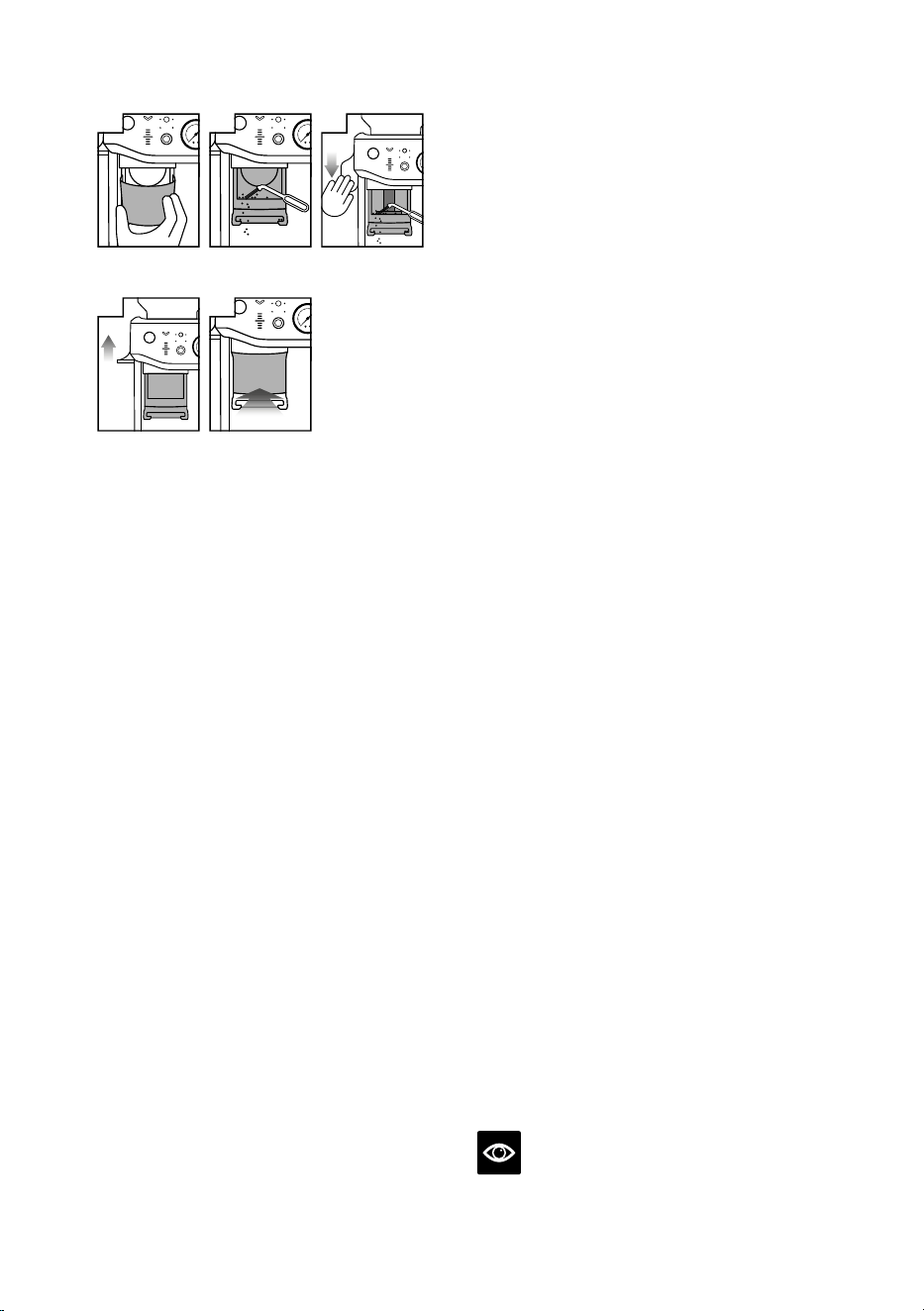
CLEANING THE TAMP SYSTEM
1
Remove
tamp cover
2
Clean the chute
with brush
3
Push down lever
4
Release lever
5
Replace
tamp cover
• Remove the tamp cover.
• Brush clean the tamp face and cradle from
any dust or grinds.
• Push down and hold the lever down, using
the tamp cleaning brush, dust o grind
residues in and around the tamp.
• Slowly release the lever back up making sure
the cleaning brush is clear and out of the
tamp system area.
CLEANING THE STEAM WAND
• The steam wand should always be cleaned
after texturing milk. Wipe the steam wand
with a damp cloth. Then with the steam wand
tip directed over the drip tray, briefly set the
STEAM / HOT WATER dial to the STEAM
position. This will clear any remaining milk
from inside the steam wand.
• If any of the holes in the tip of the steam
wand become blocked, ensure the
STEAM / HOT WATER dial is in the
STANDBY position. Press the POWER
button to switch the machine o and allow
to cool. Use the pin on the end of the
provided cleaning tool to unblock the hole(s).
• If the steam wand remains blocked, remove
the tip using the integrated spanner in the
cleaning tool and soak in hot water. Use the
pin on the end of the provided cleaning tool
to unblock the hole(s) before re-attaching to
the steam wand.
CLEANING THE FILTER BASKETS
AND PORTAFILTER
• The filter baskets and portafilter should be
rinsed under hot water immediately after use
to remove all residual coee oils.
• If any of the holes in the filter basket become
blocked, use the pin on the end of the
provided cleaning tool to unblock the hole(s).
• If the hole(s) remain blocked, dissolve
a cleaning tablet in hot water and soak
filter basket and portafilter in solution for
approximately 20 minutes.
• Rinse thoroughly.
CLEANING THE SHOWER SCREEN
• The group head interior and shower screen
should be wiped with a damp cloth to remove
any ground coee particles.
• Periodically purge the machine. Place an
empty filter basket and portafilter into the
group head.
• Press and hold the 1 CUP button and run
a short flow of water to rinse out any
residual coee.
CLEANING THE DRIP TRAY
& STORAGE TRAY
• The drip tray should be removed, emptied
and cleaned at regular intervals, particularly
when the drip tray full indicator is visibly
floating.
• Remove the grid from the drip tray. Lift the
coee grind separator and dispose of any
coee grounds. The drip tray full indicator
can also be removed from the drip tray by
pulling upwards to release the side latches.
Wash all parts in warm soapy water with
a soft cloth. Rinse and dry thoroughly.
• The storage tray (located behind the drip
tray) can be removed and cleaned with a soft,
damp cloth. Do not use abrasive cleansers,
pads or cloths which can scratch the surface.
NOTE
All parts should be cleaned by hand using
warm water and a gentle dish washing liquid.
26
Do not use abrasive cleansers, pads or cloths
which can scratch the surface. Do not clean any
of the parts or accessories in the dishwasher.
CLEANING THE OUTER HOUSING
&CUP WARMING TRAY
• The outer housing and cup warming tray
can be cleaned with a soft, damp cloth. Polish
with a soft, dry cloth. Do not use abrasive
cleansers, pads or cloths which can scratch
the surface.
STORING YOUR MACHINE
• Before storing, press the POWER button to
o, turn the steam dial to STANDBY switch
O at the power outlet and unplug. Remove
unused beans from the hopper, clean the
grinder, empty the water tank and the drip
tray.
• Ensure the machine is cool, clean and dry.
Insert all accessories into position or into
the storage tray. Store upright. Do not place
anything on top.
WARNING
To prevent damage, do not use alkaline
cleaning agents when cleaning. Use a soft
cloth and a mild detergent.
WARNING
Do not immerse power cord, power plug
orappliance in water or any other liquid.
Thewater tank should never be removed
orcompletely emptied during decalcifying.
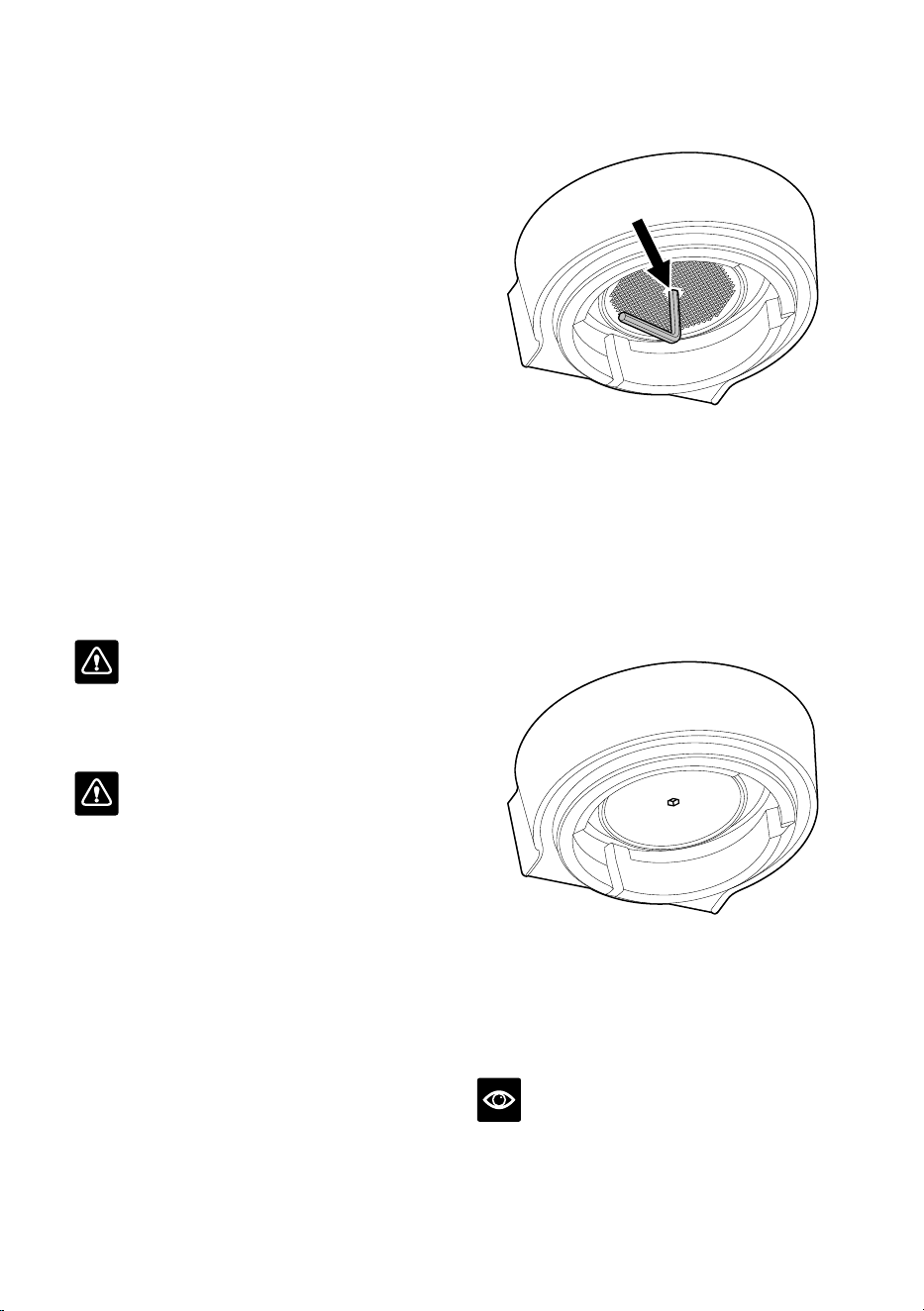
USING THE ALLEN KEY
Over time, the silicone seal surrounding the
shower screen will need to be replaced to
ensure optimum brewing performance.
1. Press the POWER button to switch the
machine o and unplug the cord from the
power outlet.
2. Carefully remove the water tank and drip
tray, taking particular care if they are full.
3. Using a skewer or similar, clean the centre
of the screw of any residual coee.
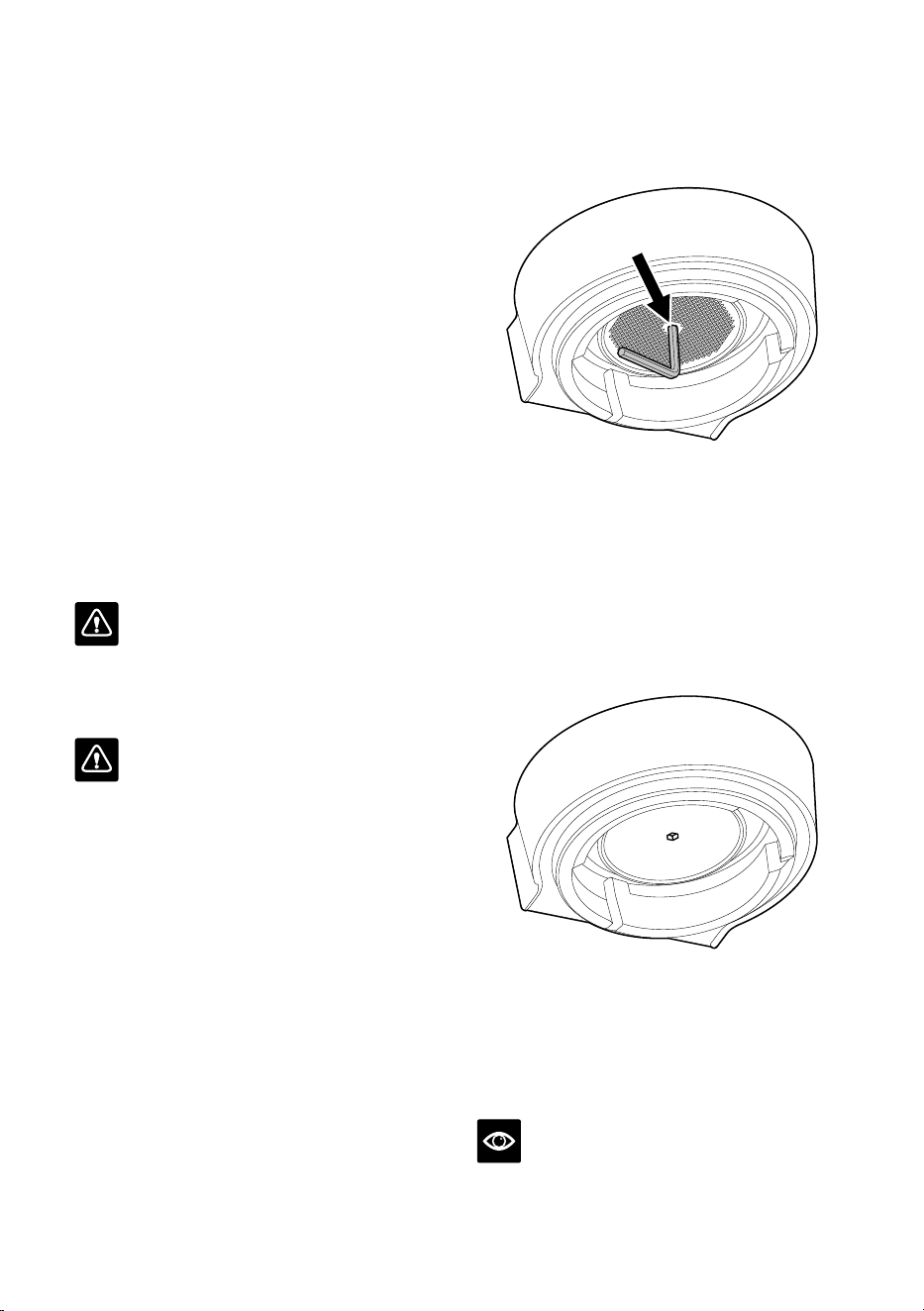
4. Insert the shorter end of the Allen Key
into the centre of the screw. Turn counter-
clockwise to loosen the screw.
5. Once loosened, carefully remove and retain
the screw and stainless-steel shower screen.
Make note of the side of the shower screen
that is facing downwards. This will make
re-assembly easier. Wash the shower screen
in warm soapy water, then dry thoroughly.
6. Remove the silicone seal with your fingers
or a pair of long-nose pliers. Insert the new
seal, flat side first, so the ribbed side is
facing you.
7. Re-insert the shower screen, then the screw.
With your fingers, turn the screw clockwise
for 2-3 revolutions then insert the Allen Key
to tighten until the screw is flush with the
shower screen.
8. Re-insert the drip tray and water tank.
NOTE
Contact Breville Customer Service or visit
www.breville.com/kr for replacement silicone
seals or for advice.
Clean centre of screw
before inserting Allen Key

27
Warranty
2 YEAR WARRANTY
Breville provides product warranty
fordomestic use in specifi ed territories
for2year from date of purchase by faulty
workmanship and materials. During this
warranty period, Breville will provide repairs
and replacement for any defective product
(based on Breville’s Warranty Policy).
Also, all legal warranty rights under
Korea’slegislation will be protected and
willnot be impaired by our warranty. For
fullterms and conditions on the warranty,
aswell as instructions on how to make
aclaim, please visit www.breville.com/kr

28
Notes
the Barista Express
™
Impress
설명서 – BES876

2
BREVILLE
®
은
안전을 최우선으로
생각합니다
Breville
®
은 안전을 매우
중요하게 생각합니다.
우리는 소중한 고객의 안전을
최우선으로 생각하여 제품을
설계하고 제조합니다. 아울러
전기 제품을 사용할 때는 각별한
주의를 기울이고 다음의 예방
조치를 준수해 주시기 바랍니다.
사용하기 전에 모든 지침을
읽고 나중에 참조할 수
있도록 보관하십시오
중요 안전 지침
•사용하기전,포장재를
안전하게제거하고
폐기하시기바랍니다.
•처음사용하기전에제품이
올바르게조립되었는지
확인하고작동에앞서전원
코드를완전히풀어주시기
바랍니다.
•처음사용하기전에
전기공급이제품밑면의
정격라벨에표시된것과
동일한지확인해주시기
바랍니다(220-240V~
50-60Hz1560-1850W).
문제가있는경우지역
전력회사에문의하시기
바랍니다.
•모든전기제품을사용할
때는추가적인안전
보장을위해누전차단
안전스위치를설치하는
것이좋습니다.정격작동
전류가30mA이하인안전
목차
2 Breville
®
은 안전을 최우선으로
생각합니다
6 특징
7 제품 구조
9 조립
10 기능
22 관리 및 세척
27 보증

3
스위치가권장됩니다.
전문적인조언은전기
기술자에게문의하시기
바랍니다.
•전원코드,플러그및실제
제품에손상이있는지
정기적으로점검합니다.
어떤식으로든손상된
것으로판명되면즉시제품
사용을중단하고전체
제품을가장가까운공인
Breville
®
서비스센터에
반환하여검사,교체또는
수리를받으시기바랍니다.
•전원코드가조리대나
테이블가장자리에걸리지
않도록합니다.전원코드가
뜨거운표면에닿거나
꼬이지않도록주의하시기
바랍니다.
•뜨거운표면을만지지
마십시오.사용후뜨거워진
제품은항상충분히
식힙니다.에스프레소
머신을사용하지않거나
청소,이동,조립또는
보관해야하는경우에는
전원버튼을눌러항상
전원을끄고전원
콘센트에서플러그를
뽑으십시오.
•제품을어린이의손에닿지
않는곳에두십시오.사용
중자리를비워제품을
방치하지마십시오.작동
중제품을이동시키지
마십시오.
•신체적,감각적,정신적
능력및경험과지식이
부족한사람도제품을
안전하게사용하는방법에
관해감독또는지침이
주어지고관련된위험을
이해하는경우이제품을
사용할수있습니다.
•8세미만의어린이가
보호자의감독없이청소및
사용자유지보수를해서는
안됩니다.제품과코드를
8세미만어린이의손이
닿지않는곳에보관하시기
바랍니다.어린이의질식
위험을방지하기위해,
전원플러그에장착된
보호커버를폐기하시기
바랍니다.

4
•제품을안정적이고
내열성이있고수평이며
조리대가장자리에서
떨어진건조한표면에
배치하십시오.핫플레이트,
오븐또는가스레인지와
같은열원위또는근처에서
작동하지마십시오.
•밀폐된공간이나찬장
안에서제품을작동하지
마십시오.
•제품과함께제공된품목
이외의부품을사용하지
마십시오.Breville
®
에서
판매하거나권장하지않는
부속품을사용하면화재,
감전또는부상을초래할수
있습니다.
•본제품은가정용입니다.
제품을원래의용도이외의
용도로사용하지마십시오.
움직이는차량이나선박
또는야외에서사용하지
마십시오.잘못 사용하면
부상을 입을 수 있습니다.
•승인된서비스담당자만이
제품관련서비스를수행할
수있습니다.
•올바르지않은방식으로
부적절하게제품을
사용하거나,비전문적인
방식으로수리를한경우
모든보증에관한청구는
무효로간주됩니다.손상에
대한보증청구는허용되지
않습니다.
•본제품은외부타이머
또는별도의원격제어
시스템으로작동하도록
제작되지않았습니다.
•금속표면은사용중에
뜨거워지기쉬우므로
제품을작동할때
주의하시기바랍니다.
발열체에는사용후잔열이
있을수있습니다.
•스팀다이얼을켜기전에
스팀봉을드립트레이위에
놓고사용자로부터떨어진
방향으로위치시킵니다.
•탬핑레버를누를때에는
탬핑이이루어지는부분에
손가락을넣지않도록
주의합니다.
가정용
이 지침을 보관하십시오
5
•프로그래밍포트를열지
마십시오.이는승인된
서비스담당자만사용할수
있습니다.
•호퍼뚜껑이제자리에
없는상태에서그라인더를
작동하지마십시오.
작동중에손가락,손,
머리카락,옷,조리도구를
원두호퍼에가까이두지
마십시오.
•물탱크에뜨거운물을
채우지마십시오.
•물탱크에물이없는
상태에서는제품을절대
사용하지마십시오.
•제품외부를부드러운젖은
천으로닦은다음부드럽고
마른천으로닦으십시오.
제품과부속품을깨끗하게
유지하시기바랍니다.
안내된지침에따라제품을
청소하십시오.
•세척을위해기기를절대
물에담그지마십시오.
주의
제품의손상을방지하려면
청소시알칼리성세척제를
사용하지마십시오.
부드러운천과순한
세척제를사용하시기
바랍니다.
표시된기호는제품을
일반가정용쓰레기와
함께폐기할수없음을
나타냅니다.지역당국의
지정된폐기물수거센터
또는관련서비스를
제공하는업체를통해
폐기하십시오.자세한
정보는지자체담당부서로
문의하시기바랍니다.
감전위험이있으므로
전원코드,전원
플러그,제품을물이나기타
액체에담그지마십시오.

6
써모코일 정밀 가열 시스템
통합된스테인리스스틸통수코일이수온을
정확하게제어합니다.
정밀 코니컬 버 그라인더
정밀한코니컬버는완전한에스프레소풍미를
위해분쇄원두의표면적을최대화합니다.
더 깔끔하게
포터필터가분쇄,분쇄원두량조절및
탬핑시에도같은위치에단단히고정되어
드립트레이또는조리대가분쇄된원두로
지저분해지는것을방지합니다.
PID 온도 제어
전자식PID온도제어로온도안정성을높여
줍니다.
온수 전용 추출구
롱블랙및잔예열용.
수동 미세 거품 텍스처 봉
360°회전하는스팀봉으로우유텍스처링을
위한완벽한위치를쉽게조절할수있습니다.
IMPRESS PUCK™ SYSTEM
추출전이상적인분쇄원두상태를위해분쇄,
분쇄원두량조절,탬핑단계를간소화하여더
깔끔하고간편하게커피를만들수있습니다.
스마트 도징
마지막분쇄를기준으로분쇄량을자동
계산합니다.
7° 각도의 바리스타 스타일 탬핑 어시스트 기능
완벽한분쇄원두상태를위한10kg의정밀한
압력과7°각도로돌리며마무리하는바리스타
스타일탬핑.
다음 번 분쇄량을 자동 조절해주는 정밀 측정
기능
적절한양이준비되면게이지가이를표시하며,
시스템이다음추출을위한조절내용을
자동으로기억합니다.
특징
7
A. 250g 원두 호퍼
B. 분쇄량(Dose) 버튼 (분쇄 시작) –
포터필터가 적절하게 삽입되면 불이 들어오며
불이 깜빡일 경우 원두를 조금 더 넣습니다
C. 탬핑 표시기 –
탬핑이 준비되면 깜빡입니다
D. 자동 / 수동 분쇄량 표시등
E. 탬핑 어시스트 레버
F. 분쇄량 표시등
G. 분쇄량 수동 조절 다이얼 –
다이얼을 눌러 자동 / 수동 분쇄량 조절
모드로 변경할 수 있습니다. 다이얼을 돌려
수동으로 분쇄량을 조절할 수 있습니다.
H. 그룹 헤드
I. 탈착식 탬프 커버
J. 포터필터 거치대
K. 필터(Filter) 버튼 –
싱글 또는 더블 필터 바스켓
L. 에스프레소 추출 압력 게이지 –
추출 압력을 모니터링합니다
M. 탈착식 2L 물탱크
N. 싱글 샷(1 CUP), 더블 샷(2 CUP) 버튼
O. 전원(Power) 버튼
P. 스팀 / 온수 다이얼
Q. 유지보수 표시등
R. 물 / 스팀 / 가열 표시등
S. 온수 배출구
T. 54mm 스테인리스 스틸 포터필터
U. 스팀 봉
V. 드립 트레이
툴보관트레이–사용하지않을때부속품을
보관할수있습니다(8페이지참조)
제품 구조
M
Q
P
T
J
S
N
I
H
O
K
L
U
V
R
F
B
D
E
A
G
C
8
부속품
A. 54mm 스테인리스 스틸 포터필터
B. 스테인리스 스틸 밀크저그
C. 필터 및 정수 필터 홀더
D. 싱글 샷 및 더블 샷 싱글 월 필터 바스켓
E. 싱글 샷 및 더블 샷 듀얼 월 필터 바스켓
F. 세척용 세제
G. Razor™ 정밀 트리밍 툴
H. 육각 렌치
I. 스팀 봉 끝부분 청소용 툴
J. 세척용 디스크
K. 청소용 브러시
B
I
C
G
D
A
HF
E
J K
9
처음 사용하기 전
에스프레소 머신 준비
에스프레소머신에부착된모든라벨및
포장재를제거하고폐기하시기바랍니다.
포장을폐기하기전에상자에서모든부품
및부속품을꺼냈는지확인하십시오.
물탱크손잡이를당겨제품뒷면에있는
물탱크를분리합니다.부품과부속품(물탱크,
포터필터,필터바스켓,용기)을따뜻한물과
부드러운식기세척액으로세척합니다.잘헹군
다음완전히말려주시기바랍니다.
참고
색상이있는제품의경우,드립트레이보호
커버가포함됩니다.버리지마십시오.
정수 필터 설치
• 비닐백에서정수필터와정수필터홀더를
꺼냅니다.
• 정수필터를찬물에5분동안담가놓습니다.
5분
물
• 차가운물로필터를헹굽니다.
• 필터를필터홀더에넣습니다.
• 다음교체달알림을설정합니다.필터는
3개월마다교체하는것을권장합니다.
교체 기한
• 필터를필터홀더에넣습니다.
• 조립된필터홀더를물탱크에설치하려면
필터홀더의밑부분을물탱크내부의
어댑터에맞춰줍니다.아래로눌러제자리에
고정합니다.
참고
3개월마다정수필터를교체하면에스프레소
머신의디스케일링빈도를줄일수있습니다.
필터는Breville홈페이지에서구매하실수
있습니다.
조립
10
호퍼 장착
• 원두호퍼를제품상단의제자리에
삽입합니다.
• 다이얼을돌려호퍼를제자리에고정합니다.
• 호퍼에신선한원두를채웁니다.
참고
원두호퍼가제자리에올바르게고정되지않은
경우,싱글및더블바스켓사이즈사이의필터
표시등이깜빡입니다.
드립 트레이 장착
• 드립트레이그릴을드립트레이위에
놓습니다.
• 색상이 있는 제품의 경우,드립트레이에드립
트레이보호커버를부착합니다.
• 드립트레이를에스프레소머신안으로밀어
넣습니다.
물탱크 채우기
• 정수필터가물탱크내부에단단히
장착되었는지확인합니다.
• 물탱크상단에있는손잡이를사용해서
물탱크를들어올려제품에서분리합니다.
• 물탱크측면에있는최대선(MAX)까지음용
가능한차가운수돗물을채웁니다.
• 물탱크를제품에다시끼우고아래로
눌러물탱크가올바른위치에있고제품에
장착되었는지확인합니다.
참고
물탱크의물이최소선(MIN)보다낮은경우
에스프레소머신이작동하지않습니다.
기능
11
일반 작동
• 물탱크의최대선까지물이채워졌는지
확인합니다.
• 전원코드를전원콘센트에연결합니다.
• 전원(POWER)버튼을누릅니다.에스프레소
머신이예열되는동안전원버튼이
깜빡입니다.(약40초간버튼이깜빡이면서
에스프레소머신이예열됩니다.)
적절한온도에도달하면제어판의싱글
샷(1CUP)및더블샷(2CUP)버튼과전원
버튼에불이들어옵니다.
첫 사용을 위한 제품 세척 및 준비
추출을위한적절한상태를위해물세척
작업을완료할것을권장합니다.
제품이대기(STANDBY)모드에도달하면
아래의단계를실행합니다.
• 그룹헤드아래에잔을놓고더블샷버튼을
눌러그룹헤드를통해온수를흘려보냅니다.
• 잔을온수추출구아래에놓습니다.다이얼을
'온수(HotWater)'로맞추고약10초동안
온수추출구를통해온수를흘려보냅니다.
• 스팀봉을드립트레이위에오도록
위치시킵니다.다이얼을'스팀(Steam)'으로
맞추고10초동안스팀을내보냅니다.
• 컵의내용물을버립니다.
• 이과정을3회반복합니다.드립트레이의
내용물을버린후물탱크의최대선까지물을
채웁니다.
• 포터필터거치대에포터필터를끼운후
분쇄량(DOSE)버튼을3초간누릅니다.
포터필터를분리해남아있는분쇄원두를
모두제거합니다.
참고
• 매일물탱크의물을새로채웁니다.물탱크는
매번사용하기전에차가운새수돗물로
채워야합니다.
• 이제품에고도로여과된물,탈염수,
증류수는사용하지마십시오.이는커피의
맛에영향을미칠수있습니다.
필터 바스켓
이제품에는싱글및듀얼월,싱글샷및더블
샷필터바스켓이포함됩니다.
한잔을추출할때는싱글샷필터바스켓을
사용하고두잔또는더진한한잔,머그잔에
추출할때는더블샷필터바스켓을사용합니다.
싱글바스켓에서더블바스켓으로또는그
반대로전환하는경우분쇄량과분쇄도를
조정합니다.
제공된필터바스켓의설계용량은아래와
같습니다.
싱글샷필터바스켓=8~11g
더블샷필터바스켓=16~19g
싱글 월 필터 바스켓
싱글 샷(1 CUP) 더블 샷(2 CUP)
신선한커피원두를분쇄하는경우싱글월
필터바스켓을사용해야합니다.
이를통해분쇄도및분쇄량조절을시도하여
더균형잡힌맛의에스프레소를만들수
있습니다.
듀얼 월 필터 바스켓
싱글 샷(1 CUP) 더블 샷(2 CUP)
미리분쇄된원두나30일이경과하여로스팅된
원두를사용하는경우듀얼월필터바스켓을
사용해야합니다.듀얼월필터바스켓은
압력을조절하여분쇄,분쇄량및신선도에
관계없이추출을최적화할수있습니다.
12
분쇄
참고
이머신은로스팅된커피원두전용으로
설계되었습니다.로스팅되지않은녹색커피
원두와덜로스팅된커피원두를분쇄하지
마십시오.이는밀도가높고버그라인더를
통과할만큼부서지지않습니다.이렇게하면
버그라인더가손상되거나파손될수있으며
심지어안전위험도발생할수있습니다.
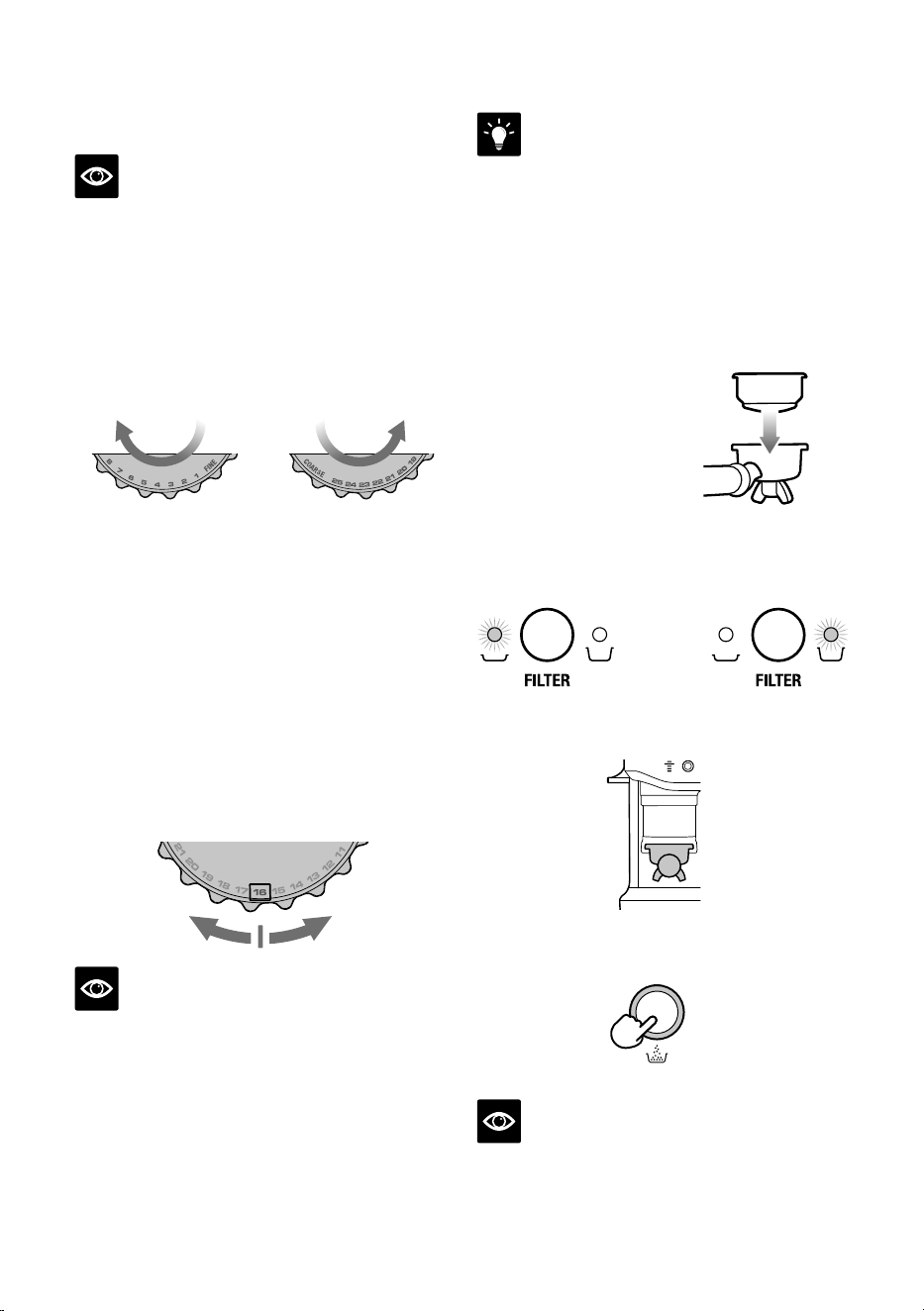
분쇄도 설정
분쇄도
더 곱게
돌리세요
분쇄도
더 굵게
돌리세요
분쇄도는필터바스켓에서분쇄원두를
통과하는물의속도와에스프레소의풍미에
영향을미칩니다.곱게분쇄하도록설정해야
하지만너무곱고가루같지는않아야합니다.
분쇄도(GRINDSIZE)다이얼에는25가지의
설정이있습니다.다이얼을에스프레소
머신뒤쪽방향으로돌려원두를더곱게
분쇄하거나,앞쪽방향으로돌려원두를더
거칠게분쇄할수있습니다.숫자가작을수록
더곱게분쇄되고숫자가클수록더굵게
분쇄됩니다.분쇄도16에서시작해서필요에
따라조정하는것을권장합니다.
참고
• 분쇄도를변경하면다음탬핑후새로운자동
분쇄량조절시간이계산되며다음번분쇄량
조절과정을위해업데이트됩니다.
• 대부분의원두품종의경우,분쇄량조절이
불가능할정도로원두량이너무적다면
그라인더가자동으로멈춥니다.
팁
분쇄도변경은포터필터에담기는분쇄
원두량에영향을미칩니다.더고운분쇄도를
선택할경우분쇄원두량이부족해분쇄량을
더추가해야할수있습니다.더거친분쇄도를
선택할경우분쇄원두량이너무많을수
있습니다.필터(FILTER)버튼을3초간눌러
분쇄시간을3초줄이면분쇄량이초과되는
것을방지할수있습니다.
분쇄량 조절(도징)
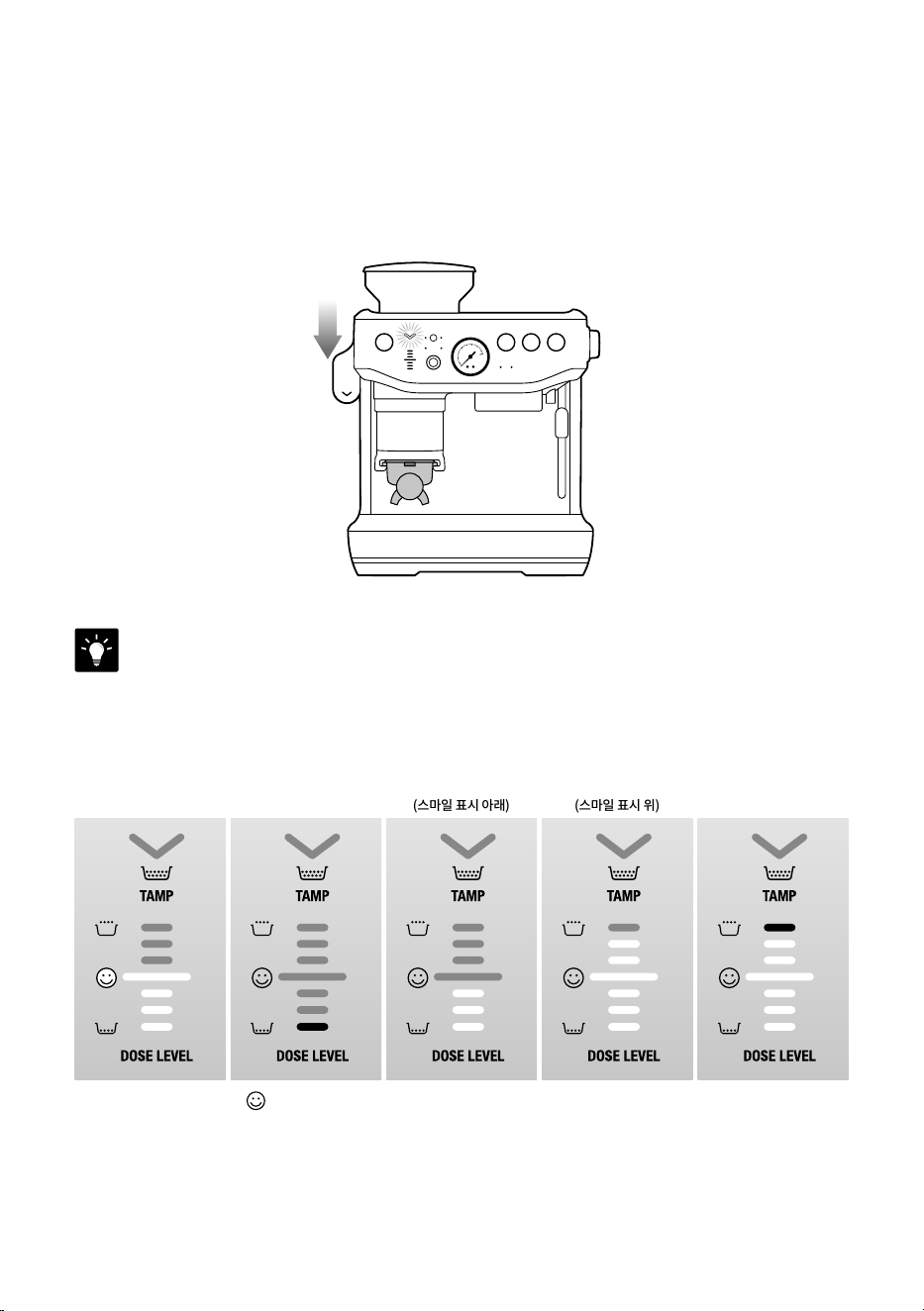
• 원두호퍼를제품의
제자리에고정하고
신선한원두를채웁니다.
• 포터필터에적절한필터
바스켓을끼웁니다.
• 필터사이즈버튼을눌러필터사이즈를
선택합니다(싱글또는더블).
또는
• 포터필터거치대에포터필터를완전히
삽입합니다.
• 분쇄량버튼을눌러분쇄를시작합니다.분쇄
과정이완료될때까지표시등이깜빡입니다.
DOSE
참고
분쇄량버튼이깜박이지않는경우,포터필터가
거치대에완전히끼워졌고,원두호퍼가
제자리에고정되어있으며,탬핑레버가
올바른위치에있는지확인합니다.
13
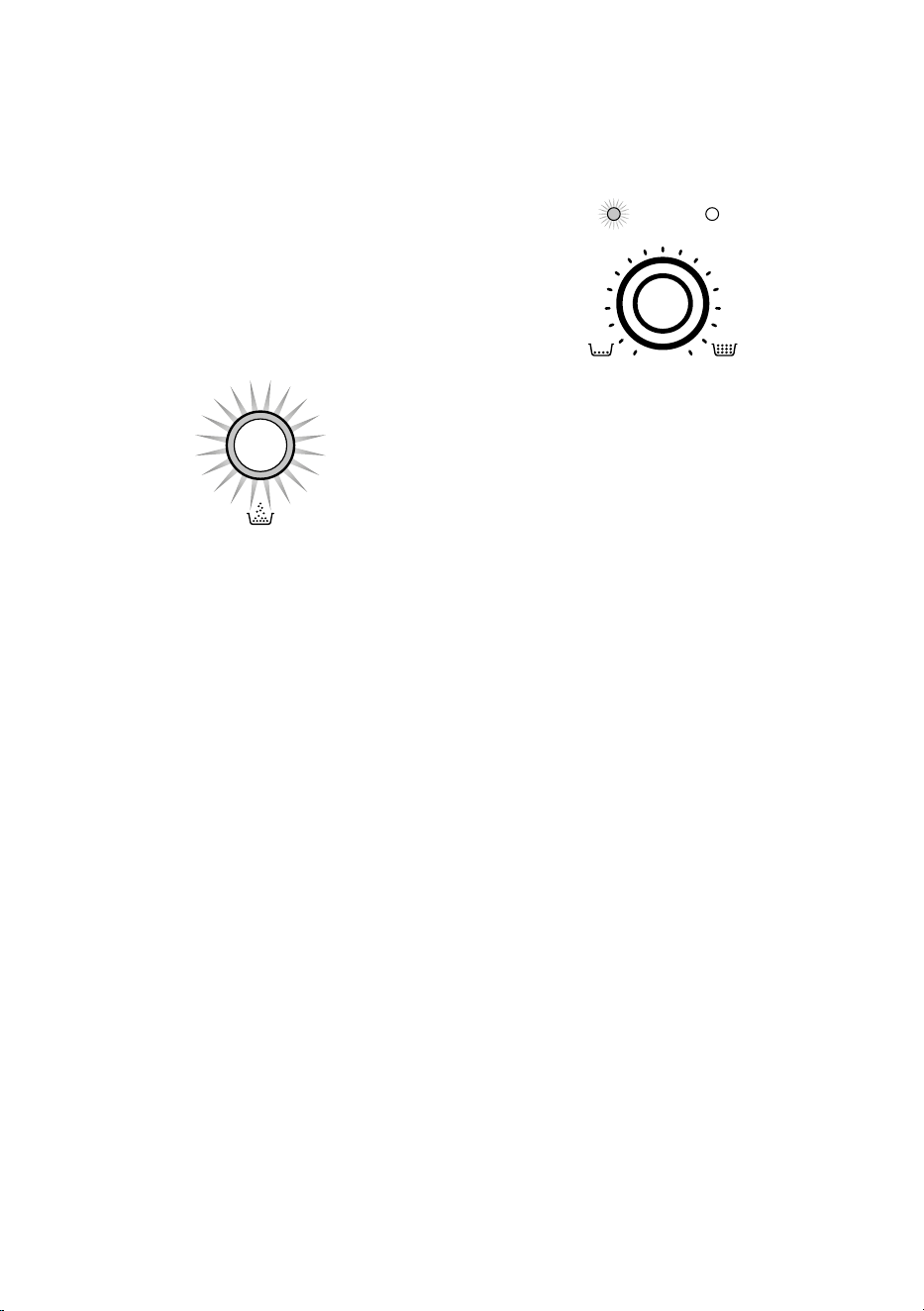
탬핑
분쇄가끝나면이번에는탬핑표시등이깜박입니다.
• 알림음이울릴때까지레버를아래로누릅니다.이를통해포터필터안에있는분쇄원두에
일정한탬핑압력이가해집니다.분쇄원두의상태를최적화하기위해레버를천천히,일정한
속도로눌러줍니다.
알림음
• 탬핑이끝나면레버를원래자리로올려줍니다.
팁
깔끔한상태의분쇄원두를위해두번탬핑하는것이좋습니다.
아래는분쇄량표시에대한설명입니다.
이상적 분쇄 원두량
매우 부족
분쇄 원두량 부족
(스마일 표시 아래)
분쇄 원두량 과다
(스마일 표시 위)
분쇄 원두량 매우
과다
• 제품의스마일기호( )는이상적인탬핑수준및포터필터내분쇄원두의적절한양을
나타냅니다.스마일기호에맞춰분쇄량을조절하고탬핑할것을권장합니다.
14
분쇄량 부족 또는 초과 시 조절 방법
호퍼에새로운원두가추가되는경우,원두가
오래된경우,다른품종의원두를사용하는
경우또는분쇄도가변경되는경우분쇄량부족
또는초과가발생할수있습니다.
분쇄량이 이상적인 양에 미치지 못할 경우
• 분쇄원두량이부족하면(스마일표시아래)
제품이'분쇄량부족(ABitMore)'모드로
바뀌며분쇄량버튼이깜박입니다.
DOSE
• 분쇄량버튼을한번눌러포터필터에분쇄
원두를추가하고,레버를눌러변경된양의
분쇄원두를다시탬핑합니다.
• 적절한분쇄량이맞춰지면,다음번에
커피를추출할때는분쇄시간이자동으로
설정됩니다.
분쇄량이 이상적인 양보다 많을 경우
• 분쇄원두량이과도하면(스마일표시위),
거치대에서포터필터를제거합니다.
• 레이저트리밍툴을사용합니다(분쇄원두
트리밍세션참조).
• 제품이자동분쇄시간을얼마나줄여야
하는지계산해다음추출과정에서이를
적용합니다.
자동 분쇄 시간 줄이기
더거친분쇄도로의변경,원두변경또는이전
추출과정에서의원두부족으로인해분쇄전에
분쇄량초과가예상되는경우,필터버튼을
3초간누릅니다.
분쇄량 조절 모드
분쇄량 자동 조절
MANUAL DOSE
AUTO MANUAL
자동조절기능은이제품의기본모드로
설정되어있으며가장자주사용될모드입니다.
분쇄원두량이자동으로조절되어포터필터에
담기며,이상적인분쇄원두량을위한안내를
분쇄량게이지를통해제공합니다.
제품이분쇄량을조절하여다음분쇄시적용될
수있도록합니다.
분쇄량 부족(A Bit More)
탬핑후포터필터에분쇄원두를추가해야
할경우,분쇄량버튼이깜박입니다.분쇄량
버튼을눌러분쇄원두를조금더추가합니다.
분쇄 원두 추가
이기능은포터필터에이미분쇄된원두가
있지만,분쇄원두를조금더추가해야할
경우에사용할수있습니다.
예시:
• 분쇄도중포터필터를빼내고5초이내에
다시삽입하지못하는경우.
• 전체분쇄과정이후분쇄원두상단을
탬핑하지않고포터필터를뺀경우.
제품이포터필터바스켓에이미담겨있는분쇄
원두의양을고려해분쇄원두를추가함으로써
원두의낭비를방지하고,새로운분쇄과정을
시작하거나자동분쇄시간을업데이트합니다.
15
포터필터를거치대에삽입하고탬핑을진행한
이후에분쇄원두를추가할수있습니다.
분쇄량이부족한것으로표시될경우,분쇄량
버튼이깜박이며분쇄원두를추가해야함을
알립니다.분쇄량버튼을누르면이상적인분쇄
원두량에따라분쇄가진행됩니다.
참고
• 이기능은'자동'모드에서만사용할수
있습니다.
• 이기능은이상적인분쇄량을위해2~3회의
분쇄원두추가과정이필요할수있습니다.
• 이기능은설정된자동분쇄시간에영향을
주지않습니다.
• 분쇄량이초과되었거나이상적인상태에서는
제품이분쇄원두추가기능을시작하지
않습니다.포터필터를제거하고레이저툴을
사용해초과분을덜어내십시오.
분쇄량 초과(분쇄 원두 트리밍하기)
the Razor
™
Precision dose trimming tool
Razor™분쇄량정밀조절트리밍툴을
사용하면퍽을알맞은수준으로트리밍하여
추출이일정하게이루어지게할수있습니다.
툴의어깨부분이필터바스켓의테두리에닿을
때까지Razor™를커피바스켓에삽입합니다.
툴의날이탬핑된분쇄원두의표면을관통해야
합니다.
커피찌꺼기용기위에포터필터가비스듬히
위치하도록잡은상태에서Razor™분쇄량
조절툴을앞뒤로회전시켜분쇄원두초과분을
덜어냅니다.
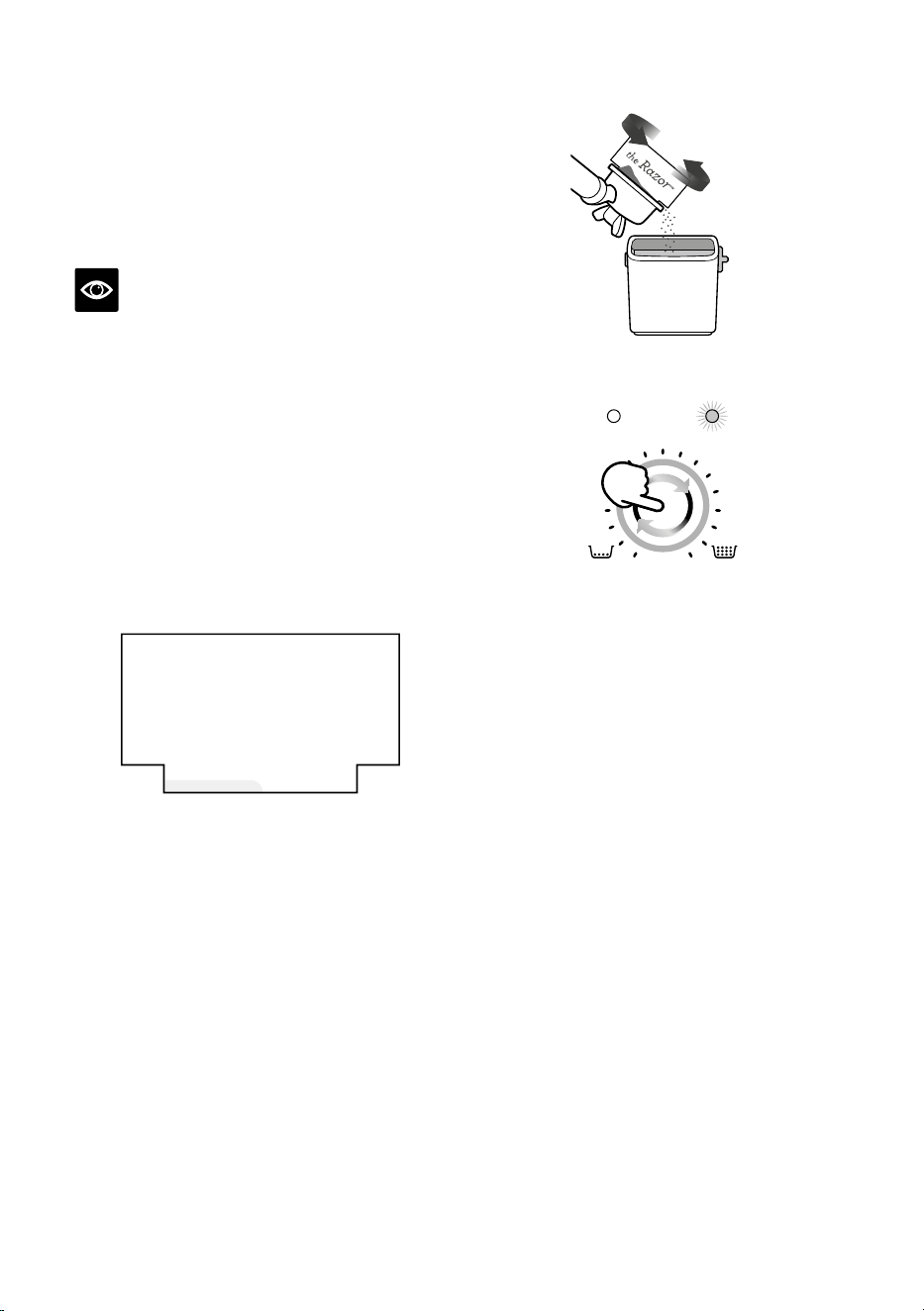
분쇄량 수동 조절
MANUAL DOSE
AUTO MANUAL
분쇄량수동조절(MANUALDOSE)
버튼을눌러수동모드를시작합니다.수동
모드가준비되면분쇄량수동조절다이얼
주변의표시등및수동모드표시등에불이
들어옵니다.
다이얼을시계방향으로돌려분쇄시간을
더하거나시계반대방향으로돌려분쇄시간을
줄여분쇄량을선택합니다.
그라인더 퍼지(물 관통) 세척
매일첫커피를만들기에앞서그라인더버
또는추출구에남아있는원두가루를퍼지
세척할것이권장됩니다.오래된원두가루는
커피의맛에영향을미칠수있습니다.퍼지
세척을통해신선한원두만을사용해커피를
만들수있습니다.
분쇄량버튼을길게눌러퍼지세척을
시작합니다.0.5초후퍼지세척이시작되며
분쇄량버튼에서손을떼면멈춥니다.자동
모드에서는,퍼지세척후포터필터를빼내
바스켓의원두가루를제거한후포터필터를
포터필터거치대에다시끼워제품을대기
모드로만들수있습니다.
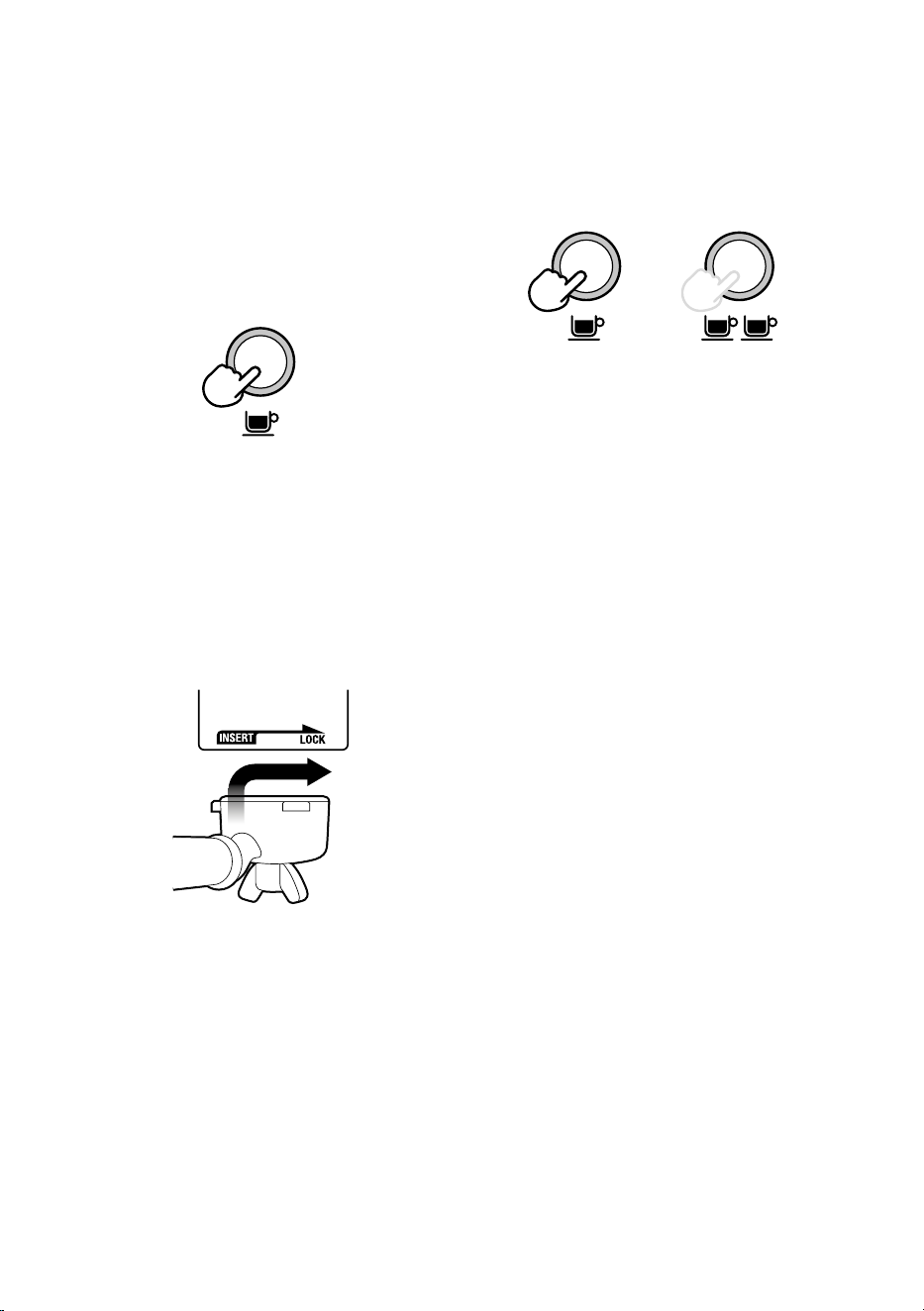
16
에스프레소 추출
• 예열한잔을포터필터아래에두고필요한
양에따라싱글샷또는더블샷버튼을
누릅니다.
또는
• 참고로에스프레소는8~12초(주입시간)
후에흐르기시작하며꿀이떨어지는듯한
일관된농도여야합니다.
• 에스프레소가7초이내에흐르기시작하면
필터바스켓에담긴분쇄량이부족하거나
원두가너무굵게분쇄된것입니다.이러한
에스프레소는'과소추출된'원액이라할수
있습니다.
• 에스프레소가나오기시작하지만,12초
후에도흘러내리지않으면필터바스켓에
담긴분쇄량이초과되었거나원두가너무
곱게분쇄된것입니다.이러한에스프레소는
'과다추출된'원액이라할수있습니다.
훌륭한에스프레소에서는단맛,신맛,쓴맛이
완벽하게균형을이룹니다.
커피의풍미는원두종류,로스팅정도,신선도,
원두분쇄도,분쇄원두량등여러요인에따라
달라집니다.
취향에따라이러한요소를한번에하나씩
조정해가면서시도해보시기바랍니다.
커피 만들기
그룹 헤드 퍼지(물 관통) 세척
포터필터를그룹헤드에넣기전에싱글샷
버튼을눌러그룹헤드에물이잠깐흐르게
합니다.이를통해그룹헤드에있는분쇄
원두의잔여물을씻어낼수있으며추출전
온도를안정화할수있습니다.
포터필터 삽입
필터바스켓테두리에남은원두가루를
닦아내어그룹헤드가제대로밀봉될수있도록
합니다.
핸들이삽입(INSERT)위치에오도록
포터필터를그룹헤드아래에놓습니다.
포터필터를그룹헤드에삽입하고저항감이
느껴질때까지핸들을중앙쪽으로돌립니다.
17
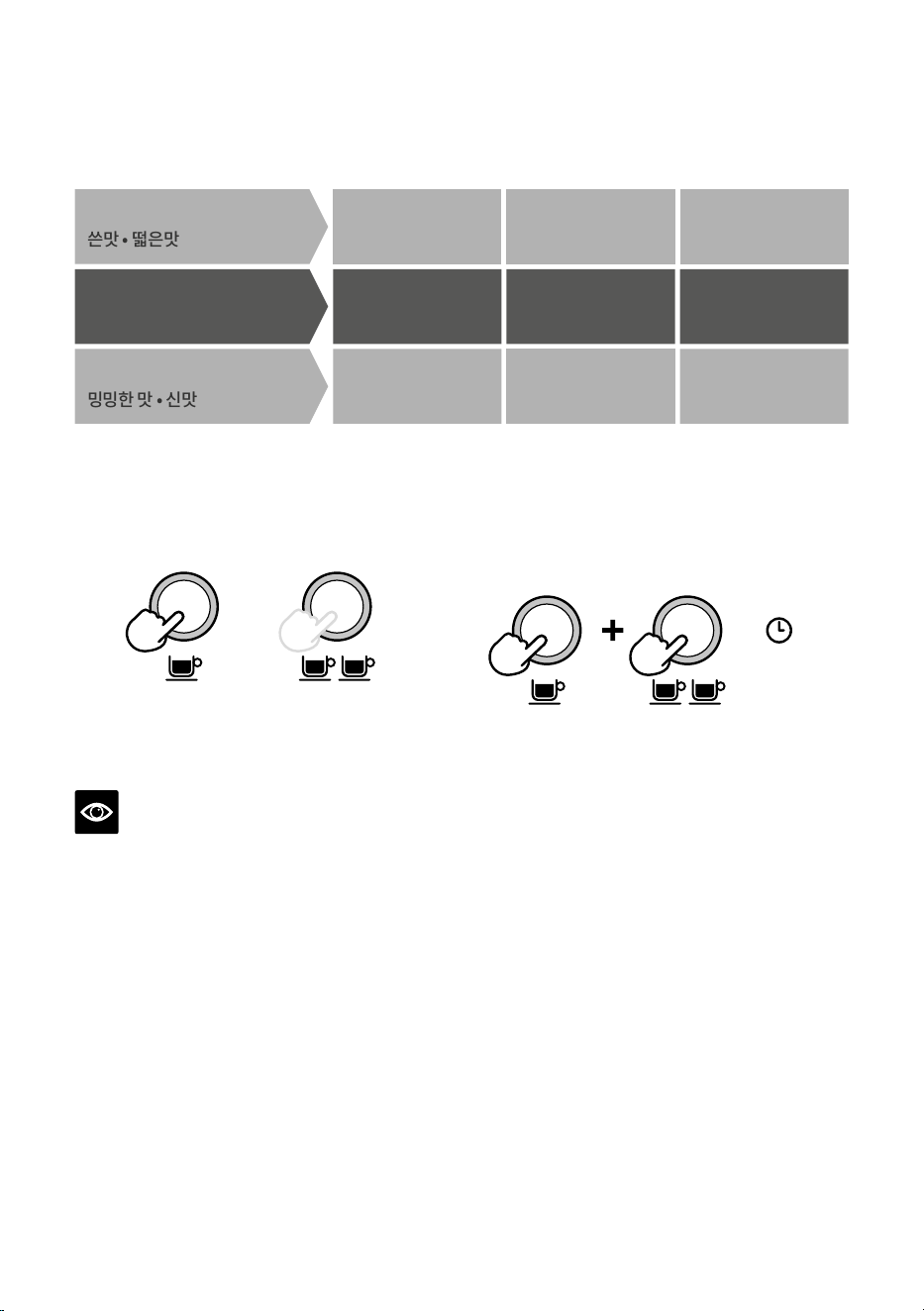
추출 가이드
최적
�~��g (싱글 샷)
��~��g (더블 샷)
��~��초
균형 잡힌 추출
분쇄도 분쇄 원두량 추출 시간
너무 고움 너무 많음 ��초 이상
과다 추출
쓴맛 • 떫은맛
너무 굵음 너무 적음 ��초 미만
밍밍한 맛 • 신맛
과소 추출
수동 사전 주입
• 싱글샷또는더블샷버튼을길게눌러
원하는사전주입시간을설정합니다.
또는
• 버튼에서손을떼어추출을시작합니다.
• 싱글샷또는더블샷버튼을다시눌러
추출을멈춥니다.
참고
추출중아무버튼을눌러추출을멈추고대기
모드로되돌릴수있습니다.
원액(샷) 양 프로그래밍
• 싱글샷과더블샷버튼을동시에3초
동안길게누르면버튼에불이들어오고
깜박입니다.
3초
싱글샷양설정하기:
• 싱글샷버튼을눌러서추출을시작합니다.
• 싱글샷버튼을다시눌러서추출을
중지합니다.수정된양이저장됩니다.
더블샷양을설정하려면위의단계를따르되
더블샷버튼을선택해추출을시작하고
중지합니다.
18
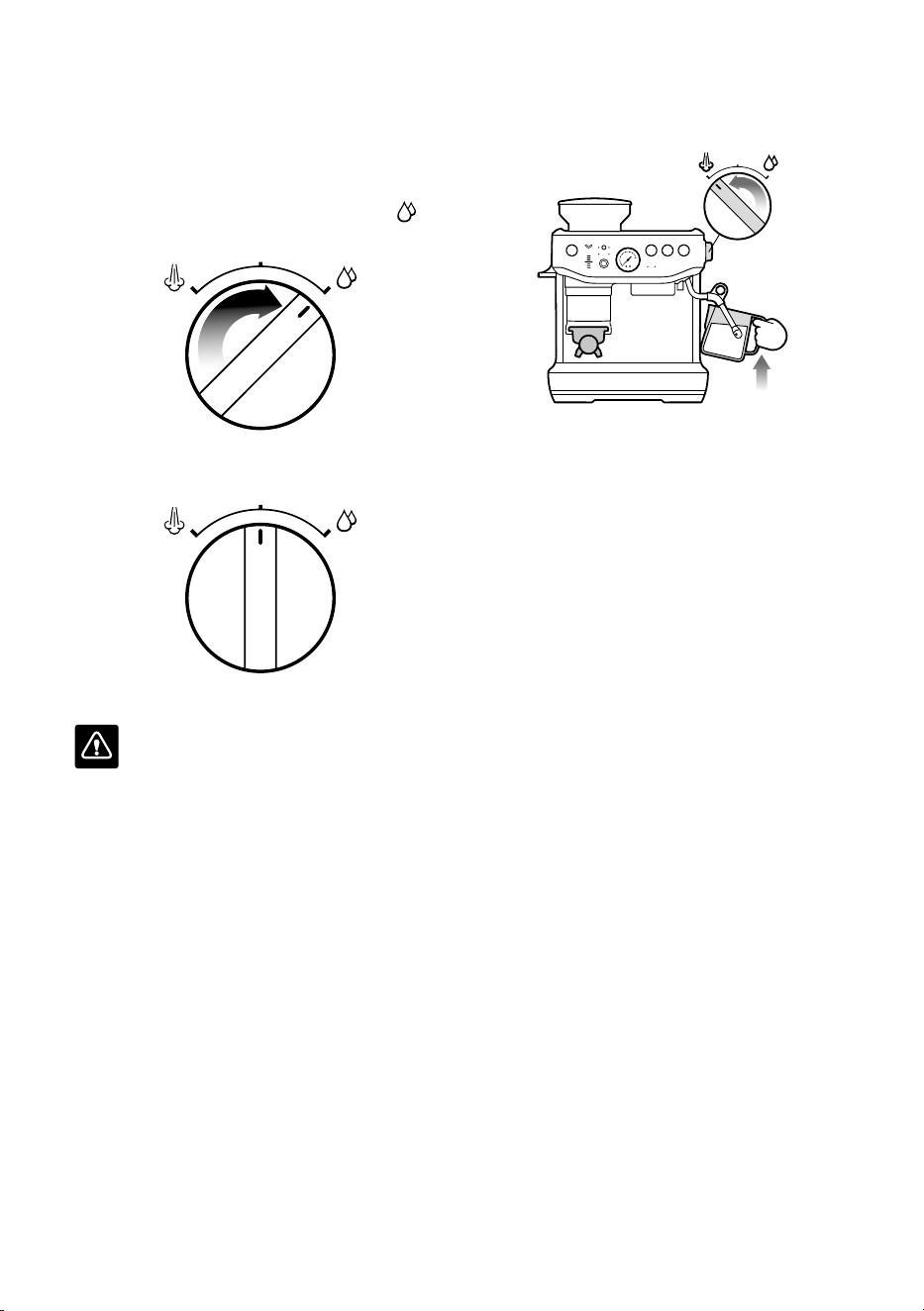
온수 사용하기
에스프레소머신에는온수전용추출구가
있습니다.
• 다이얼을오른쪽으로돌려대기상태를
온수로변경합니다.
• 다이얼을다시'대기'로돌리면온수흐름이
중지됩니다.
• 온수최대배출량은240ml입니다.
경고
잔의온도는약90°C입니다.뜨거운음료를
취급할때주의하시기바랍니다.
우유 텍스처링
우유텍스처링에는스트레칭과가열의두
단계가있습니다.이두가지작업은정확한
온도에서부드럽고매끄러운질감의우유를
만드는것을목표로하여하나로혼합되어야
합니다.
• 신선하고차가운우유로시작합니다.
• 우유를밀크저그의최소선과최대선사이로
채웁니다.
• 스팀봉의끝부분이드립트레이위를향하게
한후다이얼을'대기'에서'스팀'으로돌리고
스팀이강하게분사될때까지기다립니다.
• 스팀다이얼을대기위치로돌려서스팀을
일시중지한다음,8초이내에스팀봉끝을
밀크저그에넣고다이얼을다시스팀위치로
돌립니다.
• 3시방향위치에서밀크저그의오른쪽에
가까운우유표면아래1~2cm깊이에스팀
봉끝을삽입합니다.
• 우유가시계방향으로회전하여소용돌이가
생길때까지봉끝을우유표면바로아래에
두시기바랍니다.

19
• 우유가회전하는상태에서밀크저그를
천천히내립니다.그러면스팀봉끝이우유
표면으로이동하고우유에공기가들어가기
시작합니다.우유가충분히빨리회전하도록
하려면봉끝으로우유표면을부드럽게
휘저어야할수도있습니다.
• 소용돌이를계속유지하면서봉끝을표면
또는표면약간아래에둡니다.양이충분해질
때까지우유를텍스처링하시기바랍니다.
• 봉끝을표면아래로낮추되우유의
소용돌이는계속돌아가게둡니다.
밀크저그가만지기뜨거운상태라면
우유온도가정확하다는것(60~65°C)을
의미합니다.
• 봉끝을우유에서꺼내기전에'스팀'위치에
있는다이얼을대기위치로움직입니다.
• 밀크저그를한쪽으로옮기고다이얼을
'스팀'으로돌려스팀봉에남아있는우유를
퍼지세척한후젖은천으로스팀봉을
닦아냅니다.
• 밀크저그를조리대에대고두드려서거품을
가라앉힙니다.
• 밀크저그를돌려닦아내고텍스처링을
완료합니다.
• 에스프레소에우유를곧바로붓습니다.
• 요점은우유가분리되기시작하기전에
신속하게작업하는것입니다.
주의: 화상 위험
제품전원이꺼진후에도가압된스팀이
여전히방출될수있습니다.어린이를항상
감독하십시오.
수온 조정
원두가가진최적의풍미를추출하기위해서는
원두종류마다다른수온이필요합니다.온도는
기본설정에서1°C단위로+/-2°C만큼조절할
수있습니다.
1. 제품의전원을끕니다.
2. 필터,싱글샷,더블샷버튼을길게누른후
전원버튼을길게누릅니다.
3. 제품에서알림음이울린후현재온도가
표시됩니다.
4. 5초이내에다음버튼중하나를누릅니다.
• 1°C증가–더블샷버튼
• 2°C증가–전원버튼
• 1°C감소–분쇄량수동조절버튼
• 2°C감소–분쇄량버튼
변경사항을확인하는두번의알림음이
울린후대기모드로다시전환됩니다.
5. 싱글샷버튼을누르면기본설정온도로
돌아갑니다.
20
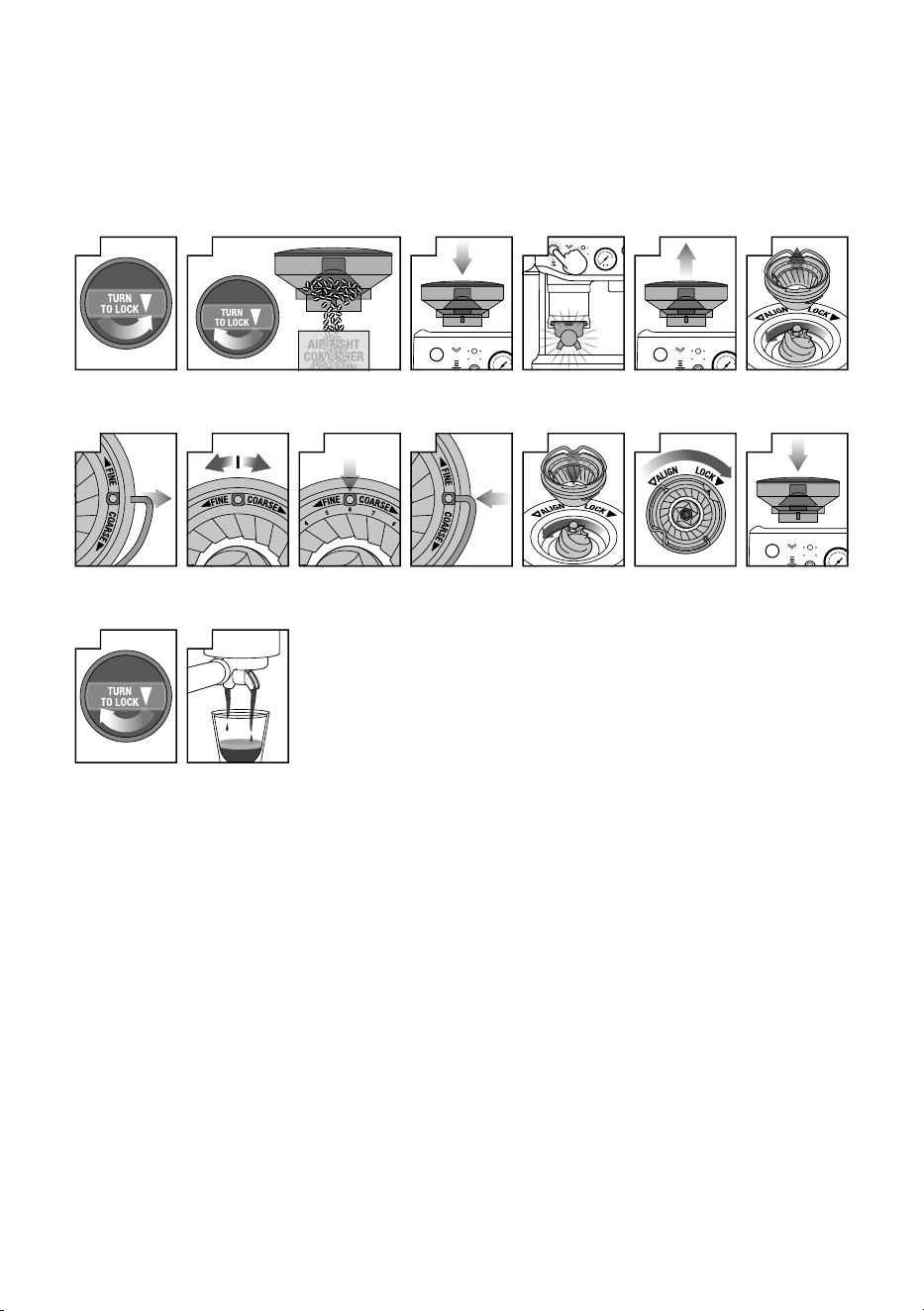
코니컬 버 조정
일부종류의커피는이상적인추출을위해더넓은분쇄범위가필요할수있습니다.
BaristaExpressImpress™에는조절식상부버를사용해이범위를확장할수있는기능이
있습니다.한번에하나의조절만수행하는것이좋습니다.
1
호퍼를 잠금
해제합니다
2
호퍼 아래에 용기를 놓고 다이얼을 돌려
호퍼의 원두를 용기에 넣습니다
3
호퍼를 제자리에
정렬합니다
4
그라인더를
작동시켜 남은
원두를 모두
비웁니다
5
호퍼를 분리합니다
6
상부 버를
분리합니다
7
버의 양쪽에서
와이어 핸들을
분리합니다
8
조절식 상단 버를
�씩 움직여,
분쇄도를 더 굵거나
더 곱게 조정합니다
9
원하는 숫자에 핸들
구멍이 오도록
정렬합니다
10
버의 양쪽에 와이어
핸들을 삽입합니다
11
상부 버를 제자리에
단단히 밀어
넣습니다
12
상부 버를
고정합니다
13
호퍼를 제자리에
정렬합니다
14
호퍼를 고정합니다
15
추출 상태를
확인합니다

21
기본 설정 재설정
자동 분쇄 시간 재설정
원두분쇄도에큰변화가있거나포터필터에
실수로분쇄원두가두번들어간경우,자동
분쇄시간을재설정할것이권장됩니다.
제품은반드시대기모드여야합니다.
• 분쇄량수동조절버튼과필터버튼을3초간
길게눌러분쇄시간을공장초기화설정으로
되돌릴수있습니다.
• 필터,분쇄모드및다이얼에대한제어판
표시등이알림음과함께세번깜박이며
재설정완료를알립니다.
• 제품이대기모드로다시전환됩니다.
추출 시간 재설정
제품은반드시대기모드여야합니다.
• 필터,싱글샷및더블샷버튼을3초간길게
누릅니다.
• 제품에서신호음이세번울립니다.
• 제품이준비모드로들어갑니다.
알림
호퍼 없음 경고
원두호퍼가제자리에올바르게고정되지않은
경우,싱글및더블바스켓사이즈사이의필터
표시등이깜빡입니다.
호퍼를살펴보고원두호퍼가제자리에
올바르게고정되어있는지확인합니다.
커피 원두 부족 경고
분쇄량버튼과분쇄량표시등에서두개의
빨간색LED표시등이깜박이며세번의
알림음이울립니다.이러한경우,호퍼에
원두를더넣습니다.
잘못된 탬프 레버 위치
제품에서알림음이세번울린후분쇄량
조절이일시정지됩니다.레버를위로또는
제자리로되돌린후분쇄량버튼을눌러
계속합니다.
22
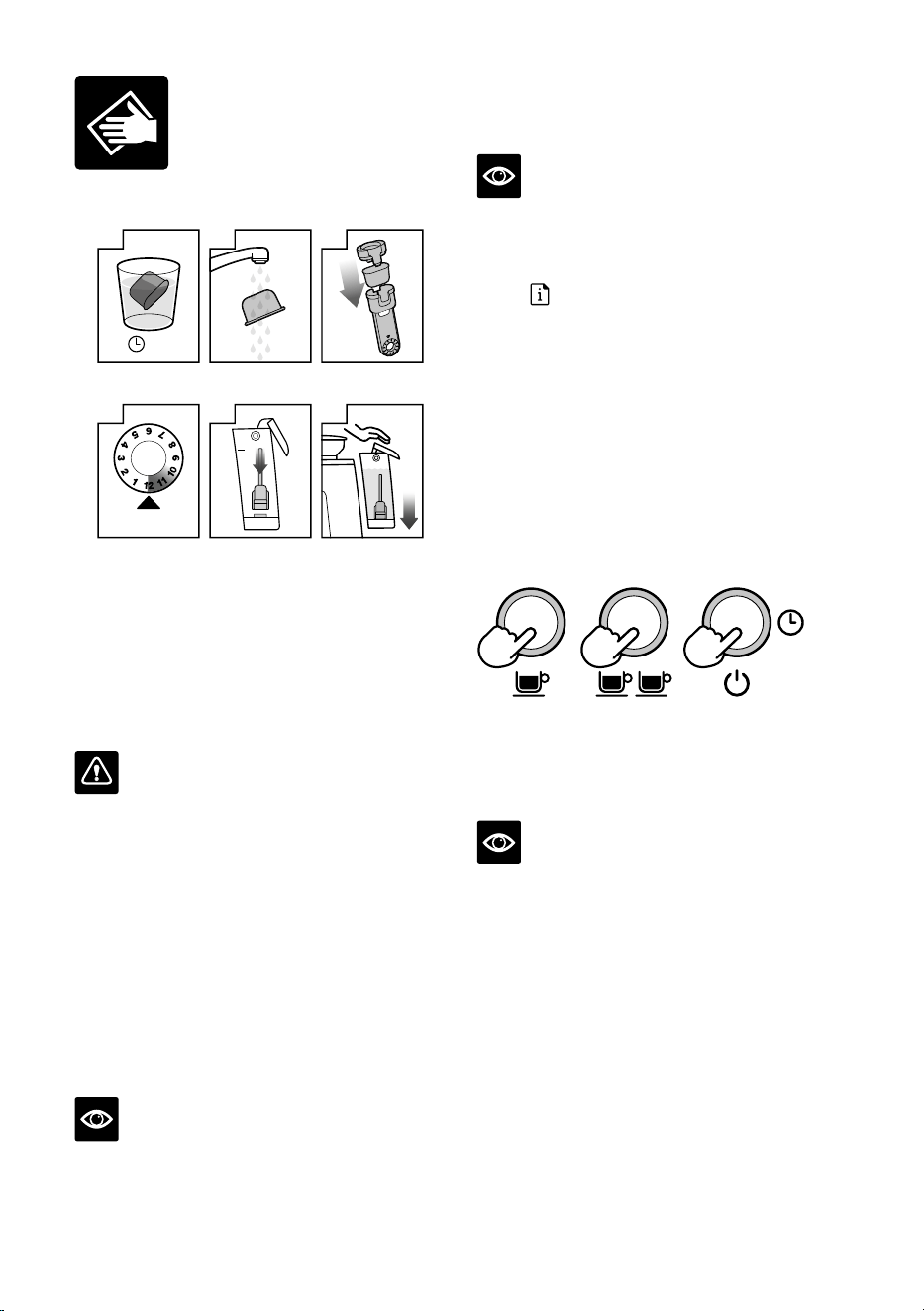
물탱크 정수 필터 교체
교체 기한
4
날짜를 �개월 후로
설정합니다
5분
물
1
정수 필터를 �분 동안
물에 담가 놓습니다
2
정수 필터를
헹굽니다
3
필터를 필터 홀더에
끼웁니다
5
필터를 물탱크에
장착합니다
6
물탱크를 삽입하고
고정합니다
제공된정수필터는제품내부의기능구성품에
석회질이쌓이는것을방지하는데도움이
됩니다.3개월마다정수필터를교체하면
에스프레소머신의디스케일링빈도를줄일
수있습니다.경수지역에거주하는경우,정수
필터를더자주교체하는것이권장됩니다.
경고
정기적으로사용시경수로인해많은내부
기능구성품에미네랄이축적되어추출흐름,
추출온도,제품성능,에스프레소의맛을
저하시킬수있습니다.
• 비닐백에서필터를꺼내고한컵분량의물에
5분동안담가둡니다.
• 흐르는찬물로필터를5초동안헹굽니다.
• 필터를필터홀더에넣습니다.
• 날짜다이얼을3개월후로설정합니다.
• 설치하려면필터를아래로눌러제자리에
고정합니다.
참고
정수필터교체는Breville고객서비스
센터에문의하거나Breville웹사이트
(www.breville.com/kr)를방문하시기
바랍니다.
세척 절차
참고
이것은역류세척절차이며디스케일링
절차와는별개입니다.
세척이필요한경우,세척/디스케일링
표시등
이깜박입니다.
1. 싱글샷필터바스켓을포터필터에삽입한
후제공된세척디스크와세제1개를차례로
삽입합니다.
2. 그룹헤드에포터필터를고정한후포터필터
추출구아래에큰용기를놓습니다.
3. 물탱크에냉수가채워져있고드립트레이가
비어있는지확인합니다.
4. 전원버튼을눌러전원을끕니다.
5. 싱글샷,더블샷및전원버튼을3초간길게
누릅니다.
+ +
3초
6. 세척절차가시작되고약5분동안
지속됩니다.세척절차가진행되는동안
포터필터에물이간헐적으로흘러세제를
녹이고그룹헤드로다시흘러들어갑니다.
참고
포터필터를통해물이나오지않아야합니다.
7. 포터필터를꺼내고세제가완전히녹았는지
확인합니다.세제가녹지않은경우,세제가
녹을때까지세척절차의4번단계를
반복합니다.
8. 세제가완전히녹은후세척디스크를
제거하고포터필터를다시끼워넣은
후더블샷버튼을눌러추출헤드를
세척합니다.포터필터추출구아래에용기를
두어제품에물이튀는것을방지합니다.
완료되면부드러운마른천으로제품과제품
주변을닦아줍니다.
관리 및 세척
23
디스케일링
참고
• 제품디스케일링을진행시디스케일링
파우더를추가하기전에물탱크에서정수
필터를제거했는지확인합니다.
• 세척절차가추출헤드에커피기름이
끼지않도록깨끗하게유지한다는
점에서중요하다면,디스케일링절차는
깨끗한내부와미네랄축적방지를위해
필수적입니다.
• 디스케일링시에는병에든생수를사용하지
마십시오.병에든생수대부분은제품내부에
침전물을남길수있는용해된고체물질을
포함하고있습니다.
디스케일링이 필요한 경우, 세척 / 디스케일링
표시등
에 불이 들어옵니다
1. 물1리터에Breville디스케일링파우더
한봉지를완전히녹인후물탱크에
붓습니다(반드시파우더를완전히녹인후
사용하십시오).
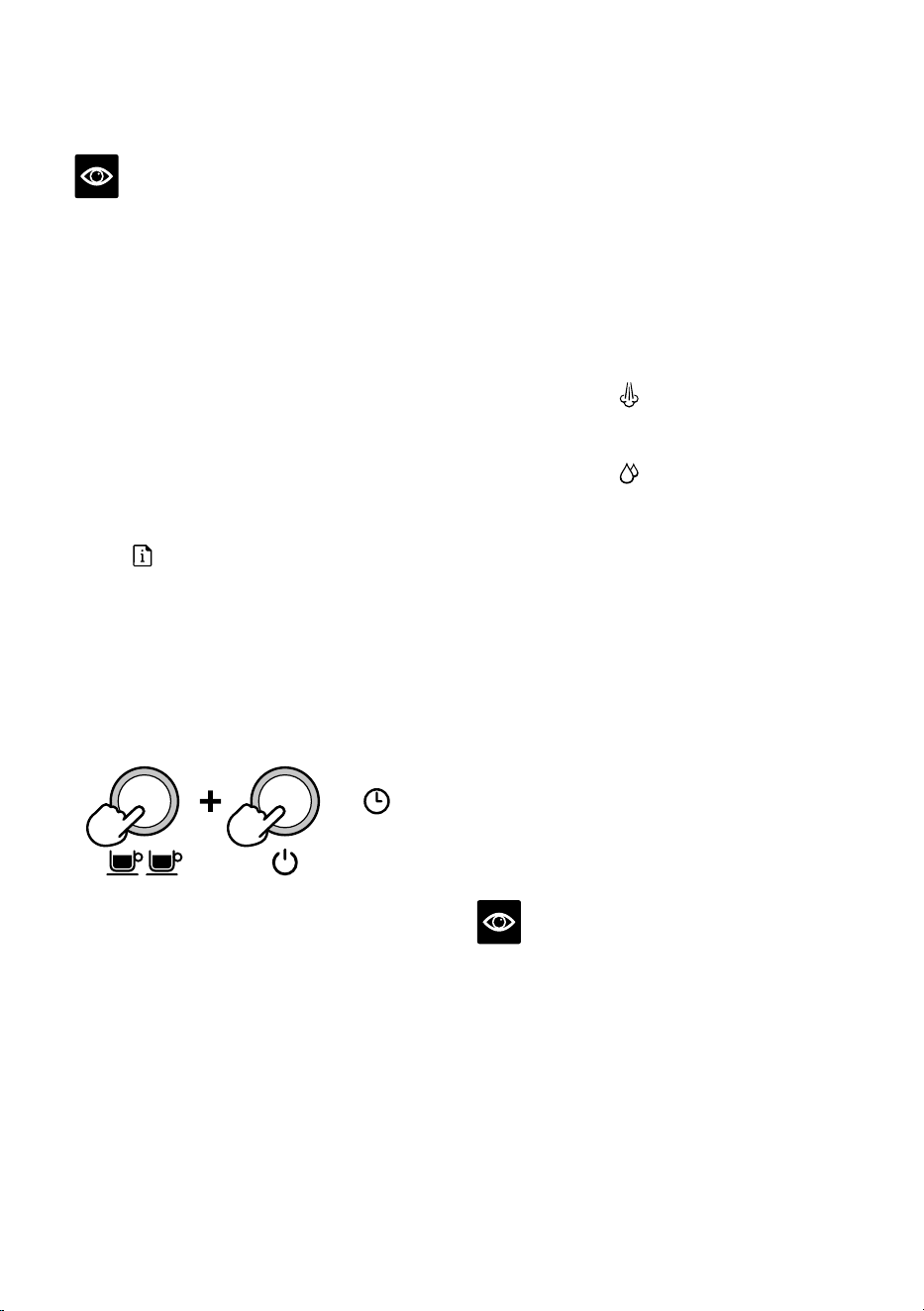
2. 전원이꺼져있는지확인한후더블샷
및전원버튼을동시에5초동안눌러
디스케일링모드로전환합니다.
5초
디스케일링작업시작의일부로장치가
가열되며,가열중에는전원및더블샷
버튼이계속깜박여야합니다.전원및
더블샷버튼,세척/디스케일링표시등,
온수/스팀표시등에모두불이들어오면
디스케일링할준비가된것입니다.
커피 구성품 디스케일링
3. 더블샷버튼을눌러제품의커피구성품에
대한디스케일링을시작합니다.커피구성품
디스케일링에는약25초가소요됩니다.
더블샷버튼은계속깜박이며디스케일링
절차가완료되면계속켜져있게됩니다.
디스케일링을25초이내에종료하려면
더블샷버튼을다시누릅니다.추출을25초
동안진행하거나사용자가더블샷버튼을
누릅니다.알림음이나고더블샷표시등에
불이들어오면커피구성품디스케일링
절차가완료됩니다.
스팀 및 온수 구성품 디스케일링
스팀과온수의디스케일링에는각각약
13초와8초가소요됩니다.스팀다이얼을
대기상태로돌리면디스케일링을조기에
종료할수있습니다.
4. 스팀다이얼을
아이콘을향해
오른쪽으로돌려스팀구성품을
디스케일링합니다.
5. 스팀다이얼을
아이콘을향해왼쪽으로
돌려온수구성품을디스케일링합니다.
과정을 반복하여 디스케일링 완료
위의과정진행후에는디스케일링용액의
약절반(0.5리터)이물탱크에남아있어야
합니다.
6. 위의3~5단계를반복해서디스케일링
과정을완료하여탱크의용액을비웁니다.
디스케일링 용액 헹굼
7. 디스케일링후물탱크를꺼내완전히헹군
다음최대용량(2리터)까지냉수를채우고
4~6단계를반복해서제품에세척액이
잔류하지않도록완전히세척합니다.
8. 전원을눌러서디스케일링과정을
종료합니다.이때,LED표시등이꺼집니다.
참고
디스케일링모드에서5분동안아무작업도
하지않으면에스프레소머신이자동으로
꺼집니다.디스케일링을다시시작하려면
2단계부터시작합니다.
24
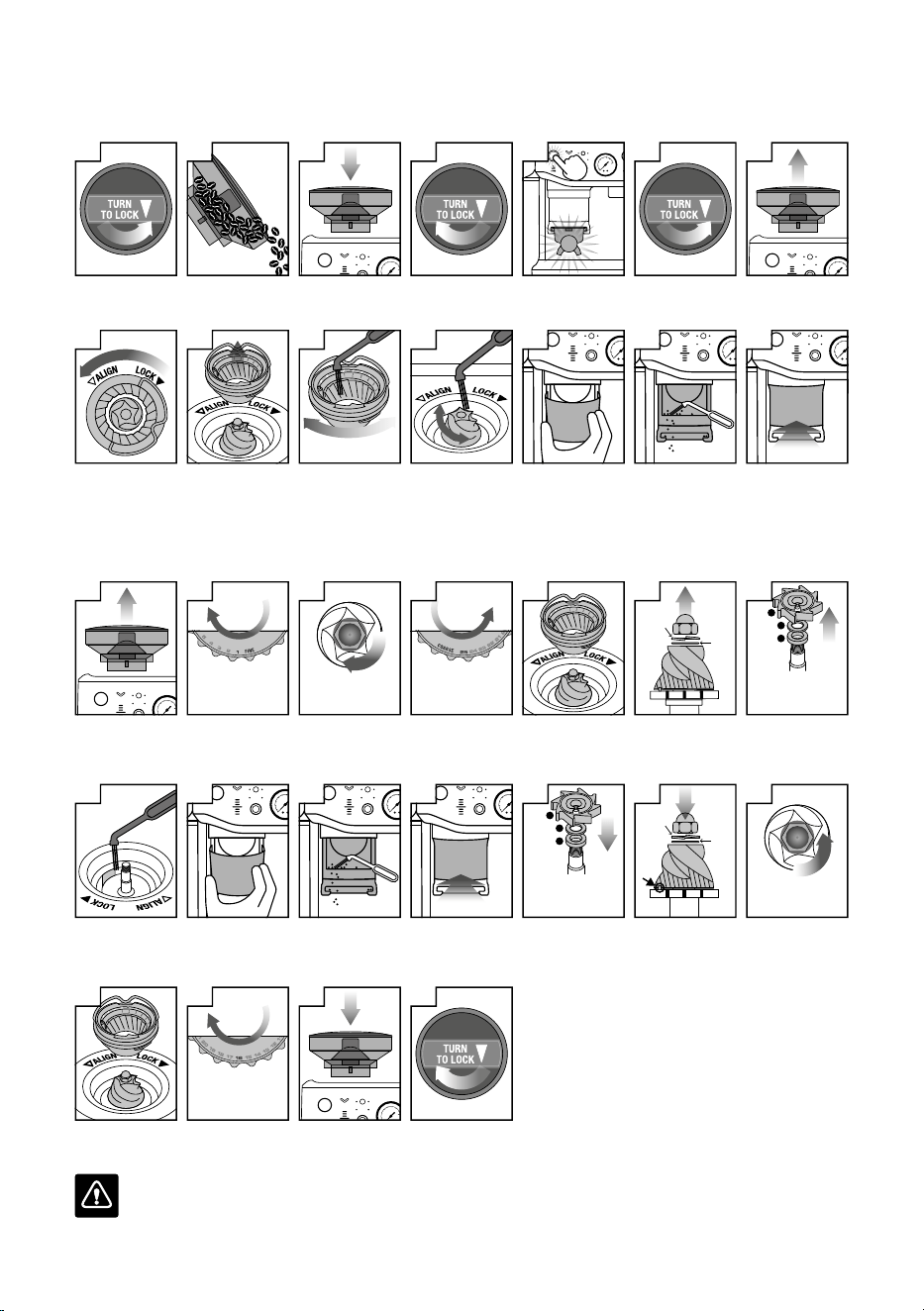
코니컬 버 청소
정기적으로버를청소하면일관된분쇄결과를얻는데도움이됩니다.
1
호퍼를 잠금
해제합니다
2
호퍼를 비웁니다
3
호퍼를 다시
장착합니다
4
호퍼를 고정합니다
5
그라인더를 작동시켜
남은 원두를 모두
비웁니다
6
호퍼를 잠금
해제합니다
7
호퍼를 분리합니다
8
상단 버를 잠금
해제합니다
9
상단 버를
분리합니다
10
상단 버를 브러시로
청소합니다
11
하부 버를 브러시로
청소합니다
12
탬프 커버를
분리합니다
13
배출구를 브러시로
청소합니다
14
탬프 커버를 다시
장착합니다
코니컬 버 그라인더 고급 청소
이단계는그라인딩버와그라인더추출구사이가막힌경우에만필요합니다.
1
호퍼를 분리합니다
돌리세요
분쇄도 더 곱게
2
분쇄도를 �(가장
곱게)로 설정합니다
너트를 푸십시오
3
��mm 소켓을
사용합니다. 시계
방향으로 돌려
너트만 풀어 줍니다
돌리세요
분쇄도 더 굵게
4
분쇄도를 ��(가장
굵게)로 설정합니다
5
상단 버를 잠금
해제하고 분리합니다
스프링
와셔
플랫
와셔
6
너트, 스프링, 플랫
워셔를 제거합니다.
하부 버를 조심스럽게
분리합니다.
�
�
�
�. 그라인드 팬
�. 금속 워셔
�. 펠트 워셔
7
롱 노즈 플라이어를
사용해서 그라인드 팬
및 워셔를 제거합니다
8
브러시 또는 파이프
청소 도구를 사용하여
분쇄 원두 배출구의
막힌 곳을 뚫어 줍니다
9
탬프 커버를
분리합니다
10
배출구를 브러시로
청소합니다
11
탬프 커버를 다시
장착합니다
�
�
�
�. 펠트 워셔
�. 금속 워셔
�. 그라인드 팬
12
롱 노즈 플라이어를
사용해서 워셔 및
그라인드 팬을
삽입합니다
스프링
와셔
플랫
와셔
13
하부 버를 삽입합니다
(드라이브 핀과 홈이
정렬되도록 합니다).
플랫 워셔 및 스프링
워셔를 삽입합니다.
너트를
조이십시오
14
시계 반대 방향으로
돌려 너트를 조여
줍니다
15
상단 바를 삽입하고
고정합니다
돌리세요
��
분쇄도
16
분쇄도를 ��으로
설정합니다
17
호퍼를 다시
장착합니다
18
호퍼를 고정합니다
경고
그라인딩버는매우날카로우므로주의하십시오.
25
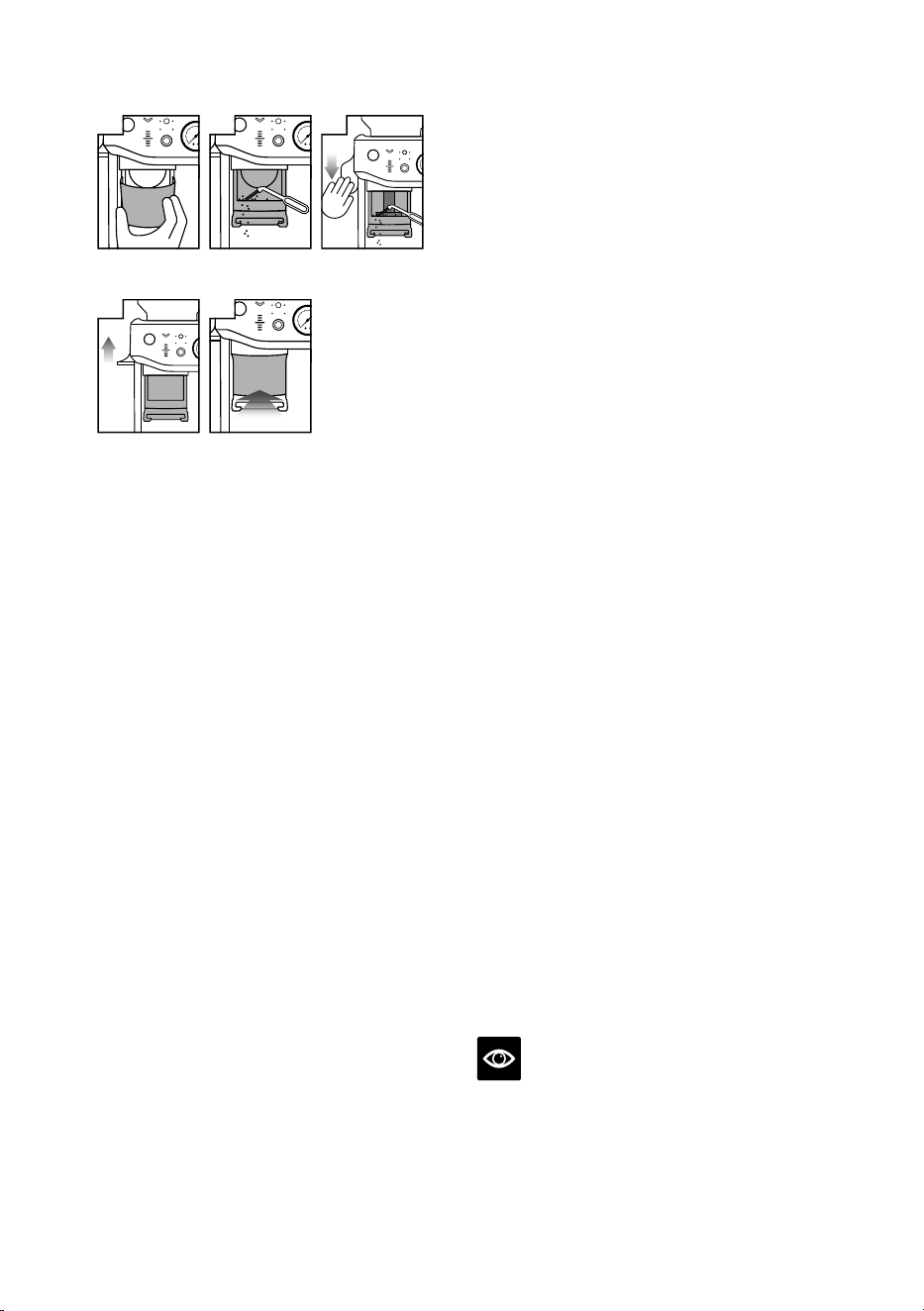
탬프 시스템 청소
1
탬프 커버를
분리합니다
2
배출구를 브러시로
청소합니다
3
레버를 아래로
누릅니다
4
레버를 제자리로
되돌립니다
5
탬프 커버를 다시
장착합니다
• 탬프커버를분리합니다.
• 브러시를사용해탬프표면과포터필터
거치대의먼지또는원두가루를청소합니다.
• 레버를아래로누른상태에서탬프청소용
브러시를사용해탬프주변의원두가루
잔여물을청소합니다.
• 브러시를탬프시스템주변에서치운후
레버를천천히원래자리로되돌립니다.
스팀 봉 청소
• 우유를텍스처링한뒤에는항상스팀봉을
청소해야합니다.젖은천으로스팀봉을
닦아줍니다.그런다음스팀봉의끝부분이
드립트레이위로향하게하여스팀/온수
다이얼을스팀위치로돌립니다.그러면스팀
봉내부에남아있는우유가모두제거됩니다.
• 스팀봉끝부분의구멍중하나라도막힌
경우,스팀/온수다이얼이'대기'위치에
가도록합니다.전원버튼을눌러전원을끄고
제품을식힙니다.제공된청소용툴끝에있는
핀을사용해서구멍을뚫어줍니다.
• 스팀봉이계속막혀있으면청소툴에
들어있는통합스패너를사용해서끝부분을
분리하고온수에담급니다.제공된청소용툴
끝에있는핀을사용해구멍을뚫은후스팀
봉에다시장착합니다.
필터 바스켓 및 포터필터 청소
• 필터바스켓과포터필터는사용직후온수로
헹구어남아있는커피기름을모두제거해야
합니다.
• 필터바스켓의어느구멍이라도막힌경우
제공된청소용툴끝에있는핀을사용해서
구멍을뚫어줍니다.
• 구멍이계속막혀있으면온수에세제를
녹이고필터바스켓과포터필터를용액에
약20분동안담갔다꺼냅니다.
• 완전히헹궈주시기바랍니다.
샤워 스크린 청소
• 그룹헤드내부와샤워스크린은젖은천으로
닦아서분쇄된원두입자를모두제거해야
합니다.
• 제품을주기적으로퍼지세척합니다.빈필터
바스켓과포터필터를그룹헤드에놓습니다.
• 싱글샷버튼을길게눌러물을흘려보내
원두잔여물을헹궈냅니다.
드립 트레이 및 보관 트레이 청소
• 정기적으로드립트레이를비우고
청소합니다.특히드립트레이가득참표시가
떠오르면트레이를분리하여비우고청소해야
합니다.
• 드립트레이에서그리드를분리합니다.원두
분쇄분리기를들어올려커피찌꺼기를
모두버립니다.위쪽으로당겨측면걸쇠를
풀면드립트레이에서드립트레이가득참
표시기를분리할수있습니다.모든부품을
따뜻한비눗물에담가서부드러운천으로
씻어줍니다.완전히헹군후말리십시오.
• 보관트레이(드립트레이뒤에있음)는
분리해서부드럽고젖은천으로청소할수
있습니다.표면에흠집을낼수있는연마성
세제,패드,천을사용하지마십시오.
참고
모든부품은온수와순한식기세척액을
사용해서손으로세척해야합니다.표면에
흠집을낼수있는연마성세제,패드,천을
사용하지마십시오.어떤부품이나부속품도
식기세척기로세척하지마십시오.
26
외부 하우징 및 컵 예열 트레이 청소
• 외부하우징과컵예열트레이는부드럽고
젖은천으로청소할수있습니다.청소후에는
부드럽고마른천으로닦아줍니다.표면에
흠집을낼수있는연마성세제,패드,천을
사용하지마십시오.
에스프레소 머신 보관
• 보관하기전에전원버튼을눌러전원을
끄고스팀다이얼을대기상태로돌려
전원콘센트를끈다음플러그를뽑습니다.
호퍼에서사용하지않은원두를제거하고
그라인더를청소한후물탱크와드립
트레이를비웁니다.
• 제품이식었고깨끗하며건조한지
확인합니다.모든부속품제자리에
삽입하거나보관트레이에넣습니다.똑바로
세운채로보관하고보관시제품위에어떤
것도올려놓지마십시오.
경고
손상을방지하려면청소시알칼리성세척제를
사용하지마십시오.부드러운천과순한세제를
사용하시기바랍니다.
경고
전원코드,전원플러그,제품을물이나다른
액체에담그지마십시오.석회질을제거하는
동안물탱크를제거하거나완전히비우지
마십시오.
육각 렌치 사용하기
시간이지남에따라샤워스크린을둘러싼
실리콘씰을교체해서최적의추출성능을
유지해야합니다.
1. 전원버튼을눌러전원을끈다음전원
콘센트에서플러그를뽑습니다.
2. 물탱크와드립트레이가가득찬경우특히
주의해서조심스럽게분리해야합니다.
3. 뾰족한막대등을사용해서나사중앙에
남아있는원두를제거합니다.
4. 육각렌치의짧은쪽을나사중앙에
삽입합니다.시계반대방향으로돌려
나사를풀어줍니다.
5. 나사를풀어나사와스테인리스스틸샤워
스크린을조심스럽게분리하고보관합니다.
아래쪽을향하는샤워스크린의측면부분에
표시를해둡니다.그러면재조립하기가더
쉬워집니다.따뜻한비눗물로샤워스크린을
씻은다음완전히말려줍니다.
6. 손가락이나롱노즈플라이어로실리콘
씰을제거합니다.골이있는면이사용자를
향하도록새씰의평평한면을먼저
삽입합니다.
7. 샤워스크린을다시삽입한다음나사를
끼웁니다.손가락으로나사를시계방향으로
두세바퀴돌린다음육각렌치를삽입해서
나사가샤워스크린과같은높이가될
때까지조입니다.
8. 드립트레이와물탱크를다시삽입합니다.
참고
실리콘씰교체및기타문의는Breville고객
서비스로문의하거나www.breville.com/kr
을방문하시기바랍니다.
육각 렌치를 삽입하기 전에
나사의 중앙을 청소하십시오

2년 품질 보증
Breville은구입일로부터2년동안대한민국
내에서가정용으로사용되는제품의잘못된
제조공정및자재로인한결함에대하여보증
서비스를제공합니다.보증기간동안Breville
은결함이있는제품에대해수리또는교체를
제공합니다(Breville의보증정책에따름).
또한,고객이대한민국의법률에따라제품의
하자에관하여행사할수있는법적권리는
보호되며Breville의보증정책으로인하여
이러한법적권리가훼손되는것은아닙니다.
Breville의보증서비스에관한자세한내용과
고객센터에대한문의방법을살펴보시려면
www.breville.com/kr을방문해주시기
바랍니다.
보증
27

지속적인제품개선으로인해,본책자에담긴제품삽화및사진은실제제품과약간다를수있습니다.
XXX KOR – A22
Copyright Breville Pty. Ltd. 2024.
브레빌코리아 유한회사
서울특별시 강남구 논현로���길��(신사동���-�번지)
고객 서비스 센터: ���-���-����
BES876 KOR – F24