Number: MAN-239-R
Issued: 08-28-2017
Revised:
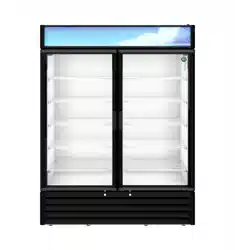
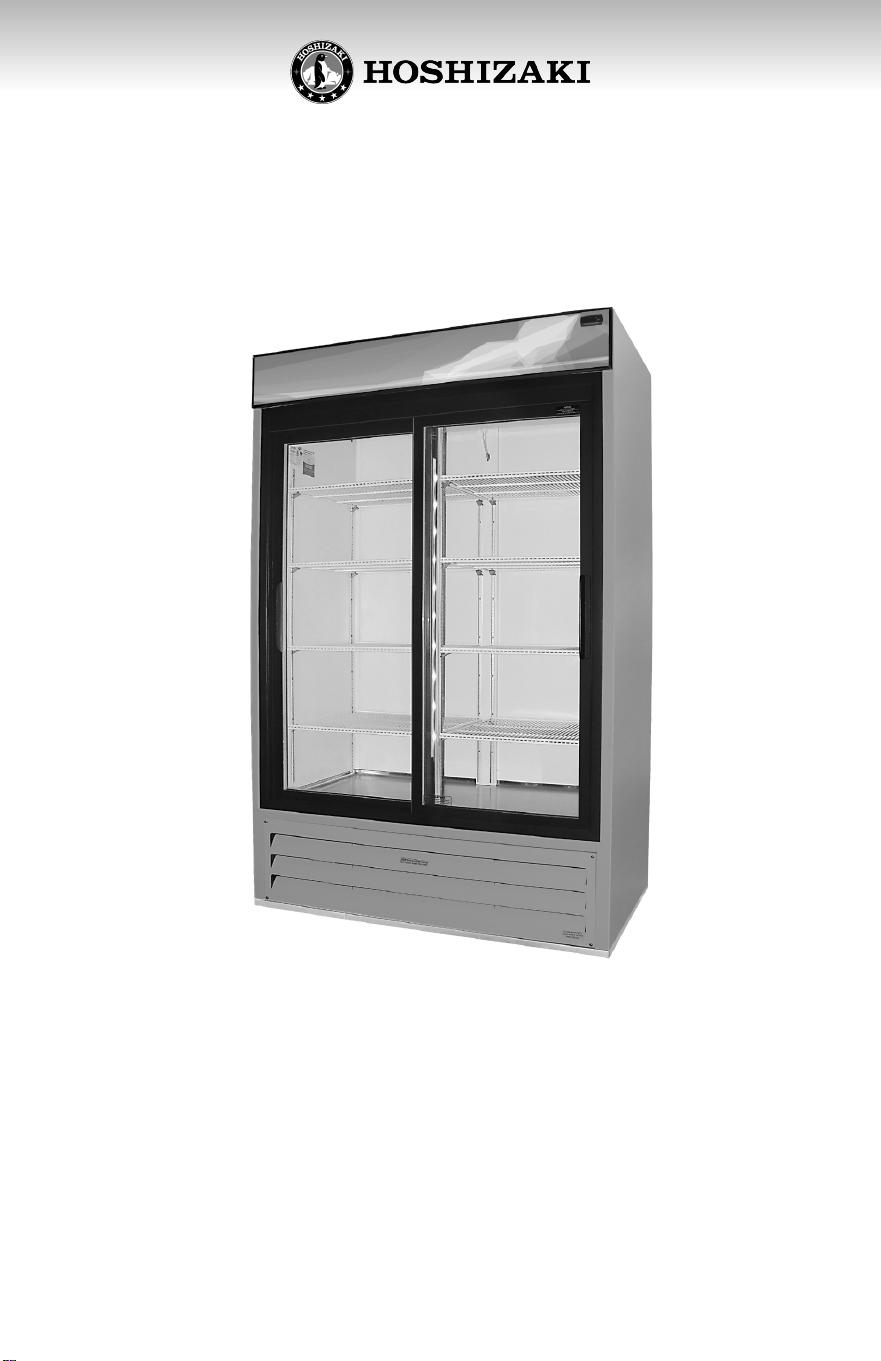
Glass Door Merchandiser
Models
RM-45-SD
2
RM-45-SD
3
Only qualified service technicians should install and service the
appliance. To obtain the name and phone number of your local
Hoshizaki Cered Service Representave, visit www.hoshizaki.com.
No installaon or service should be undertaken unl the technician has
thoroughly read this Instrucon Manual. Likewise, the owner/manager
should not proceed to operate the appliance unl the installer has
instructed them on its proper operaon. Failure to install, operate, and
maintain the appliance in accordance with this manual may adversely
aect safety, performance, component life, and warranty coverage.
Proper installaon is the responsibility of the installer. Product failure
or property damage due to improper installaon is not covered under
warranty.
WARNING
Hoshizaki provides this manual primarily to assist qualified service
technicians in the installaon, maintenance, and service of the appliance.
Should the reader have any quesons or concerns which have not been
sasfactorily addressed, please call, send an e-mail message, or write to
the Hoshizaki Technical Support Department for assistance.
Phone: 1-800-233-1940; (770) 487-2331
Fax: 1-800-843-1056; (770) 487-3360
E-mail: t[email protected]
HOSHIZAKI AMERICA, INC.
618 Highway 74 South
Peachtree City, GA 30269
An: Hoshizaki Technical Support Department
Web Site: www.hoshizaki.com
NOTE: To expedite assistance, all correspondence/communicaon MUST
include the following informaon:
• Model Number ____________________________
• Serial Number _____________________________
• Complete and detailed explanaon of the problem.
4
TABLE OF CONTENTS
Introduction ...............................................................
Important safety information .....................................
Know your equipment ...............................................
Check for shipping damage ......................................
Handling the cabinet ................................................
Remove the crate and skid .......................................
Level the cabinet .......................................................
Electrical installation ..................................................
Installing the shelves .................................................
Start up the cooler .....................................................
Use of your cooler with Carel electronic thermostat...
Cleaning and preventive maintenance ......................
Troubleshooting chart ................................................
5
5
9
10
11
12
12
13
15
16
16
18
19
5
Important Safety Informaon
Throughout this manual, noces appear to bring your aenon to
situaons which could result in death, serious injury, damage to the
appliance, or damage to property.
WARNING Indicates a hazardous situaon which could result in
death or serious injury.
NOTICE Indicates a situaon which could result in damage to the appliance
or property.
IMPORTANT Indicates important informaon about the use and care of
the appliance.
This appliance should be desned only to the use for which it has been
expressly conceived. Any other use should be considered improper and
therefore dangerous. The manufacturer cannot be held responsible for injury
or damage resulng from improper, incorrect, and unreasonable use. Failure
to install, operate, and maintain the appliance in accordance with this manual
will adversely aect safety, performance, component life, and warranty
coverage.
To reduce the risk of death, electric shock, serious injury, or re, follow basic
precauons including the following:
• Only qualied service technicians should install and service this appliance.
• This appliance must be installed in accordance with applicable naonal,
state, and local codes and regulaons.
• To reduce the risk of electric shock, do not touch the power switch or plug
with damp hands.
• This appliance requires an independent power supply of proper
capacity. See the nameplate for electrical specicaons. Failure to use
an independent power supply of proper capacity can result in a tripped
breaker, blown fuse, damage to exisng wiring, or component failure.
This could lead to heat generaon or re.
WARNING
INTRODUCTION
This manual contains instrucons for installaon, operaon and general
maintenance of your unit. It also includes a Troubleshoong Chart to
diagnose problems along with correcve acons.
6
WARNING, continued
• 115VAC Models: THIS APPLIANCE MUST BE GROUNDED: This appliance
is equipped with a NEMA 5-15 three-prong grounding plug to reduce
the risk of potenal shock hazards. It must be plugged into a properly
grounded, independent 3-prong wall outlet. If the outlet is a 2-prong
outlet, it is your personal responsibility to have a qualied electrician
replace it with a properly grounded, independent 3-prong wall outlet. Do
not remove the ground prong from the plug and do not use an adapter
plug. Failure to follow these instrucons may result in death, electric
shock, or re.
• 208-230VAC Models: THIS APPLIANCE MUST BE GROUNDED: This
appliance is equipped with a NEMA L14-20 four-prong locking, grounding
plug xx to reduce the risk of potenal shock hazards. It must be plugged
into a properly grounded, independent 4-prong wall outlet. If the outlet
is a 3-prong outlet or a 4-prong non-locking outlet, it is your personal
responsibility to have a qualied electrician replace it with a properly
grounded, independent 4-prong locking wall outlet. Do not remove
the ground prong from the plug and do not use an adapter plug. Aer
plugging in, twist the plug clockwise to lock it into place. Failure to follow
these instrucons may result in death, electric shock, or re.
• Do not use an extension cord.
• Do not use an appliance with a damaged power cord. The power cord
should not be altered, jerked, bundled, weighed down, pinched, or
tangled. Such acons could result in electric shock or re. To unplug the
appliance, be sure to pull the plug, not the cord, and do not jerk the cord.
Before unplugging a 4-prong plug, rotate the plug counter-clockwise to
unlock it.
• The GREEN ground wire in the factory-installed power cord is connected
to the appliance. If it becomes necessary to remove or replace the power
cord, be sure to connect the power cord's ground wire.
• Do not splash, pour, or spray water directly onto or into the appliance.
This might cause short circuit, electric shock, corrosion, or failure.
• Do not make any alteraons to the appliance. Alteraons could result in
electric shock, injury, re, or damage to the appliance.
• This appliance is not intended for use by persons (including children) with
reduced physical, sensory, or mental capabilies, or lack of experience
and knowledge, unless they have been given supervision or instrucon
concerning use of the appliance by a person responsible for their safety.
• Children should be properly supervised around this appliance.
• Do not climb, stand, or hang on the appliance or door or allow children
or animals to do so. Do not climb into the appliance or allow children or
animals to do so. Death or serious injury could occur or the appliance
could be damaged.
7
WARNING, continued
• Be careful not to pinch ngers when opening and closing the doors. Be
careful when opening and closing the doors when children are in the area.
• Open and close the doors with care. Doors opened too quickly or forcefully
may cause injury or damage to the appliance or surrounding equipment.
• Do not use combusble spray or place volale or ammable substances
in or near the appliance. They might catch re.
• Keep the area around the appliance clean. Dirt, dust, or insects in the
appliance could cause harm to individuals or damage to the equipment.
• Do not throw anything onto the shelves or load any single shelf with more
than 120 lb. (54.5 kg) of product. They might fall o and cause injury.
• Do not place anything on top of the appliance. Foreign objects or moisture
could enter the appliance and result in electric shock or re.
• This appliance is designed only for storage of food. Employ sanitary
methods. Use for any other purposes (for example, storage of chemicals
or medical supplies such as vaccine and serum) could cause deterioraon
of stored items.
• Do not block the cabinet air inlet or outlet, otherwise cooling performance
may be reduced.
• Do not ghtly pack the cabinet. Allow some space between items to
ensure good air ow. Also allow space between items and interior
surfaces.
• Do not place any product on the oor of the cabinet. All product must be
placed on properly installed shelves.
• Do not put warm or hot foods in the cabinet. Let them cool rst, or they
will raise the cabinet temperature and could deteriorate other foods in
the cabinet or overload the appliance.
• All foods should be wrapped in plasc lm or stored in sealed containers.
Otherwise foods may dry up, pass their smells onto other foods, cause
frost to develop, result in poor appliance performance, or increase the
likelihood of cross-contaminaon. Certain dressings and food ingredients,
if not stored in sealed containers, may accelerate corrosion of the
evaporator, resulng in failure.
• Do not store items near the air outlet. They might freeze up and crack or
break causing a risk of injury or contaminaon of other food.
• This unit must be installed and located appropriately, following the
installaon instrucons before its use.
• Do not allow children to climb, step or hang onto the shelves inside the
cooler. That could damage the unit and cause serious injuries to them.
• Do not touch the cold surfaces of the cooler with your hands wet or with
moisture. The skin can sck to these cold surfaces.
8
NOTICE
• Protect the oor when moving the appliance to prevent damage to the
oor.
• Keep venlaon openings, in the appliance enclosure or in the built-
in structure, clear of obstrucon. Do not place anything on top of the
appliance. Blockage of airow could negavely aect performance and
damage the appliance.
• To prevent deformaon or cracks, do not spray inseccide onto the plasc
parts or let them come into contact with oil.
• To avoid damage to the gasket, use only the door handle when opening
and closing.
WARNING, continued
• Do not store gasoline or other ammable liquids or gases, near this or
other electrical equipment.
• Keep your ngers away from grills; the spaces between doors and cabinet
are small, so be careful when closing doors when children are around.
• Unplug the cooler before cleaning or performing any repair.
9
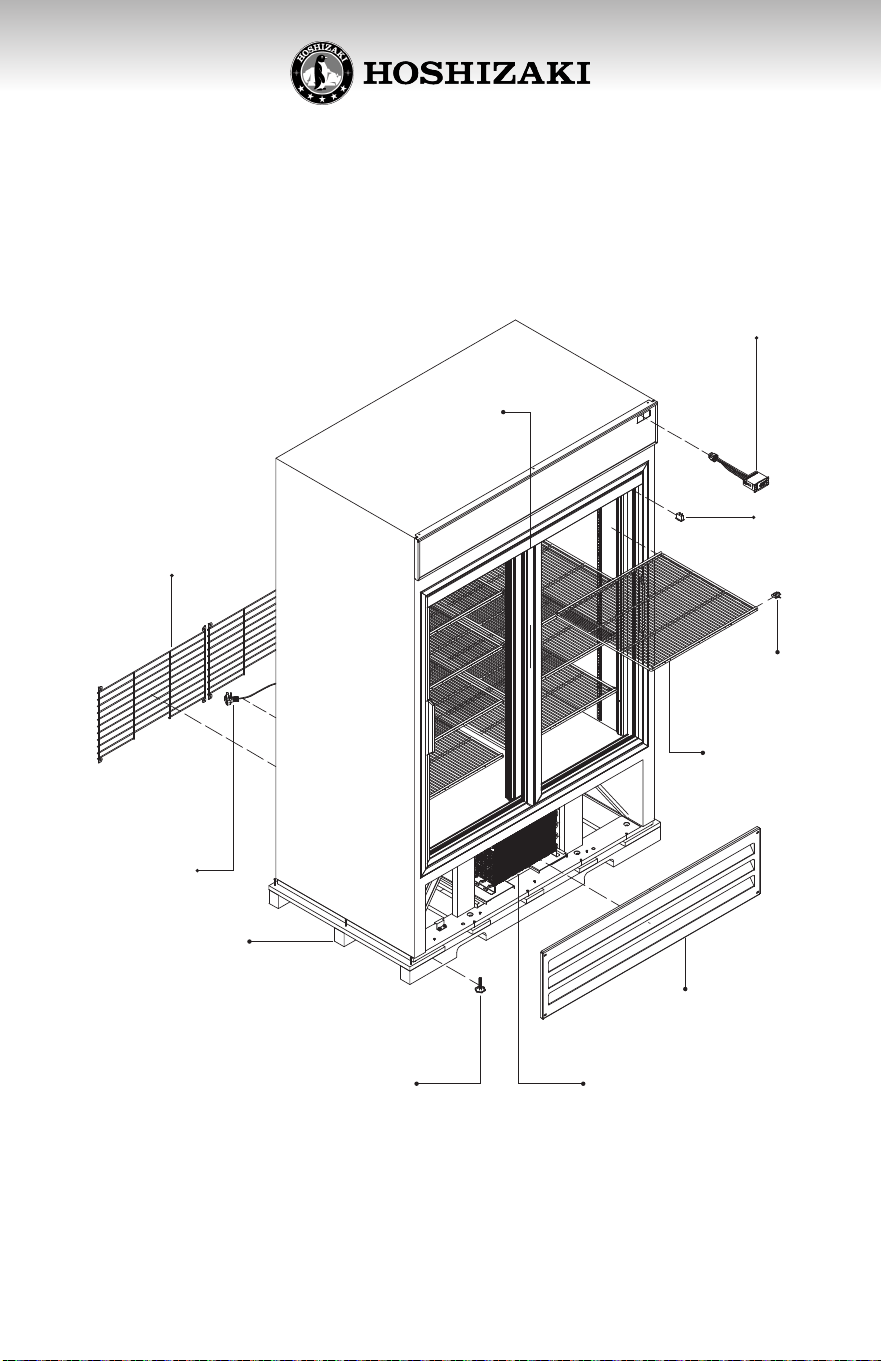
KNOW YOUR EQUIPMENT
LIGHT
SWITCH
ELECTRONIC
THERMOSTAT
METAL
CLIP
SHELF
CONDENSER
LEVELING LEG
FRONT GRILL
POWER
CORD
BACK GRILL
SKID
DOOR
10
CHECK FOR SHIPPING DAMAGE
Prior to leaving the factory, each cabinet is throughly inspected and
performance tested to assure proper operang temperatures.
Check the crate thoroughly for signs of shipping damage. If external
damage exists, internal damage is also probable. Uncrang should be done
while the carrier´s representave is present. Otherwise, the equipment
should be uncrated as soon as possible, preferably within ve (5) days.
The manufacturer is not responsible for in-transit damage and the
consignee must le any required damage claims directly with the carrier.
If the damage is severe and obvious, write a brief descripon of the evidence
on the carrier’s delivery receipt, and above the carrier representave’s
signature. Call the distributor or dealer immediately, indicang that the
cabinet was damaged.
If no obvious crate damage is present, within two hours of receiving the
cabinet from the carrier, remove the packaging to inspect for concealed
damage.
1. If concealed damage is found, call the carrier immediately, save all
crang materials, and le the necessary freight claim with the carrier.
Check for accesories: Check that the shelves are inside the refrigerator,
including the four clips or supports for each shelf.
11
HANDLING THE CABINET
1. Always move the unit in an upright posion. Do not set it on its side or upside
down as you may damage the cabinet and spill the compressor oil.
2. If liing the unit, hold it from its base. It is recommended to use a dolly.
3. Do not let the unit fall abruptly.
4. Place the cabinet on a surface solid enough to prevent vibraon and strong
enough to support the combined weight of the cabinet and the product load.
Quick guideline: Esmate 35 pounds per cubic foot of storage space.
5. Cabinets should never be placed in front of windows or glass doors where
sunlight will be in direct contact with the units. If a cabinet is located near
a window or glass door, provide an adequate shade to block the sun´s rays.
6. Ambient temperature must be between 60°F and 86°F. Low ambient
temperatures below 50° F are as harmful as high ambient temperatures.
Extreme temperatures will denitely aect the performance of the cabinet.
7. Failure to properly level the cabinet could hinder proper drainage and door
operaon. Leveling legs are provided with the cabinets. Level the cabinet by
using the adjustable poron of the leveling legs as needed.
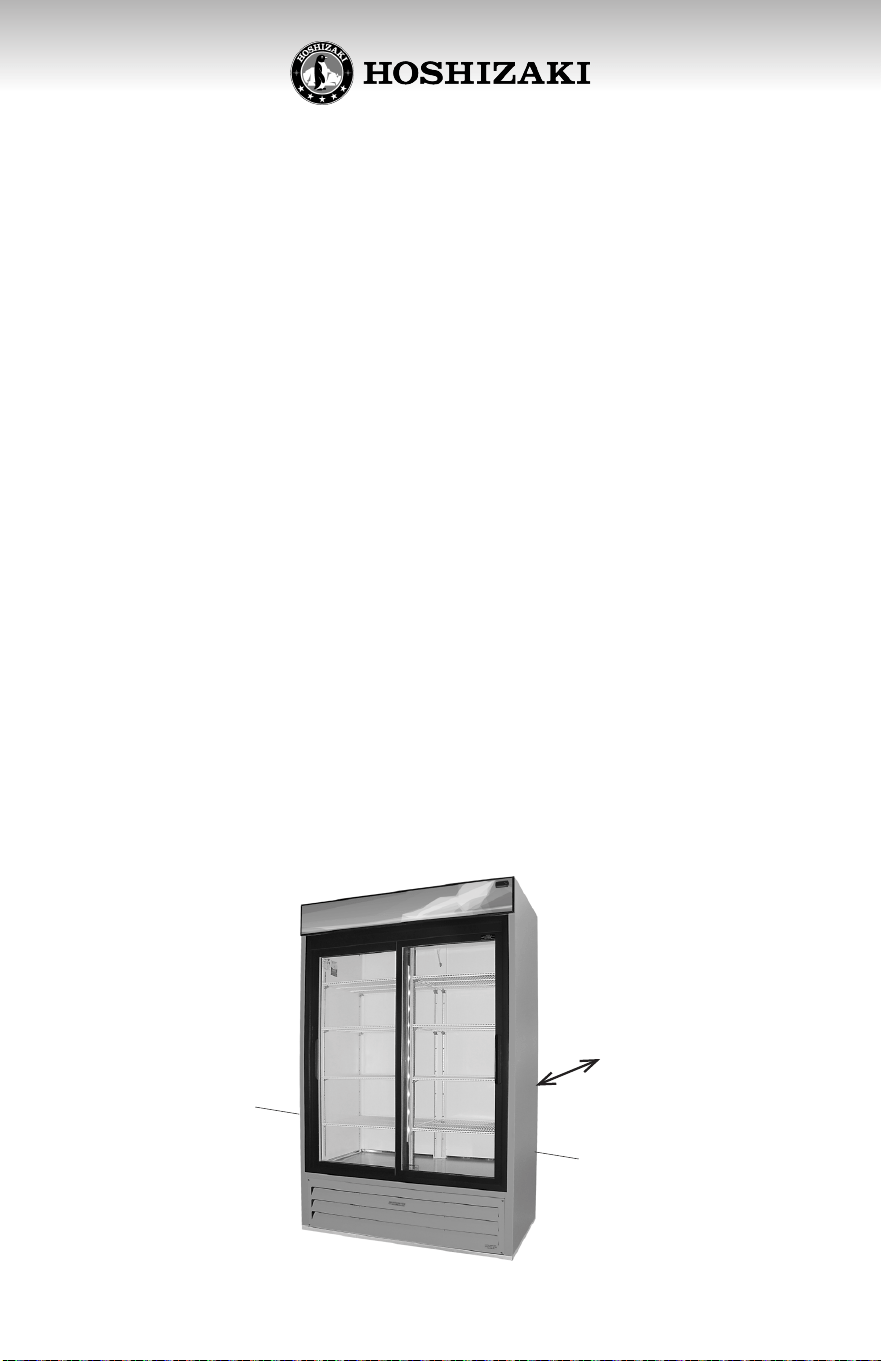
8. Clearance: Leave a space of at least 8” between the back of the cabinet and
the wall to provide adequate air circulaon of the unit compartment.
8”
12
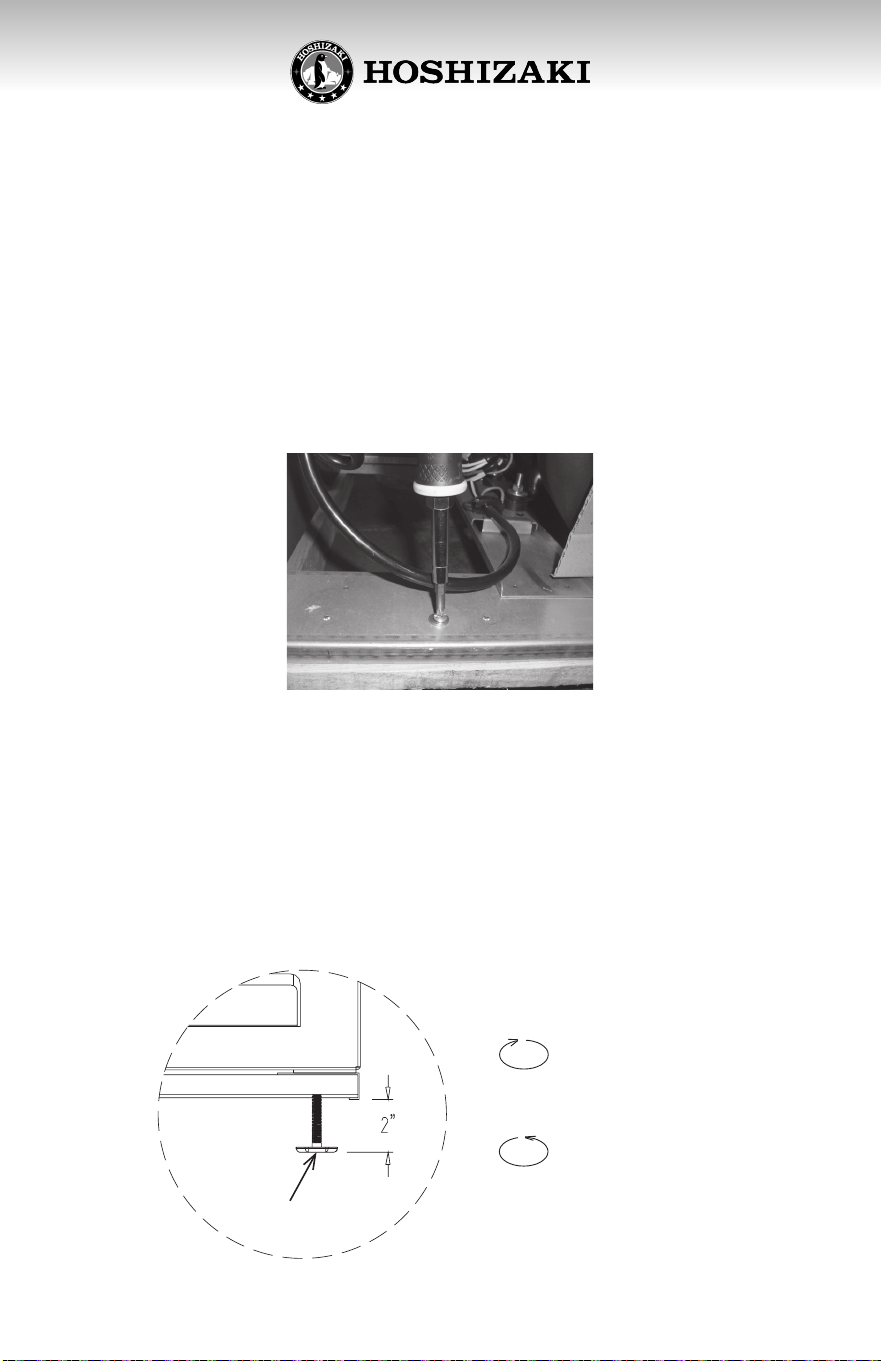
REMOVE THE CRATE AND SKID
LEVEL THE CABINET
To lower, turn
clockwise
Leveling leg
To raise, turn
counterclockwise
1. Remove the external packaging (corrugated board and plastic
wrapping). Check for concealed damage. If any damage is idened,
immediately forward a complaint to the transportaon company.
2. Move the cooler the closest possible to its nal locaon, before
removing the skid.
3. Using a screwdriver remove the screws that x the skid to the cooler.
The base of the refrigerator has heavy duty leveling legs underneath so the
cabinet may be leveled appropriately and to allow room to clean beneath
the cabinet.
Level the cabinet front to back and side to side with a level by using the
adjustable poron of the leveling legs. This is vey important to insure proper
draining and door operaon.
13
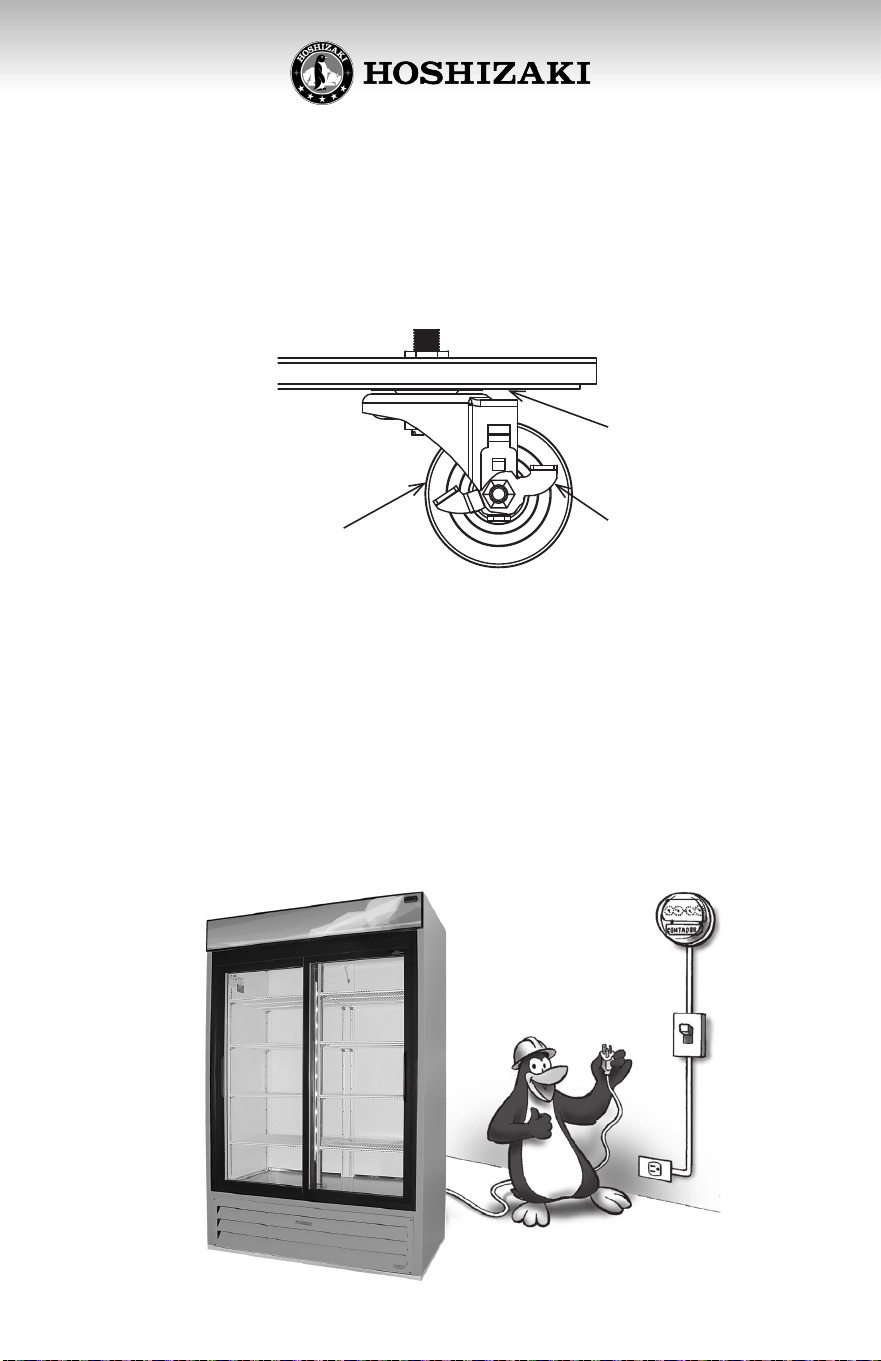
To install casters:
Casters are supplied as oponal equipment. Only use genuine casters or the base
of the cooler might suer damages. When installing the casters it is important to
hand ghten securely against the base rail reinforcement assembly (see image). The
top edge of the caster must make rm contact with the reinforcement assembly.
Each unit requires a 110 Volt individual, properly grounded branch circuit
with a 3 prong grounding type receptacle, protected by a 15 or 20 Amp
circuit breaker or me-delay fuse.
Electrical installaon must be in accordance with Naonal Electrical Codes
and local ordinances.
ELECTRICAL INSTALLATION
Caster
Base rail
NOTE:
Casters with hand-brakes must be placed in FRONT of the unit.
Hand-brake
14
ELECTRICAL INSTALLATION
WARNING
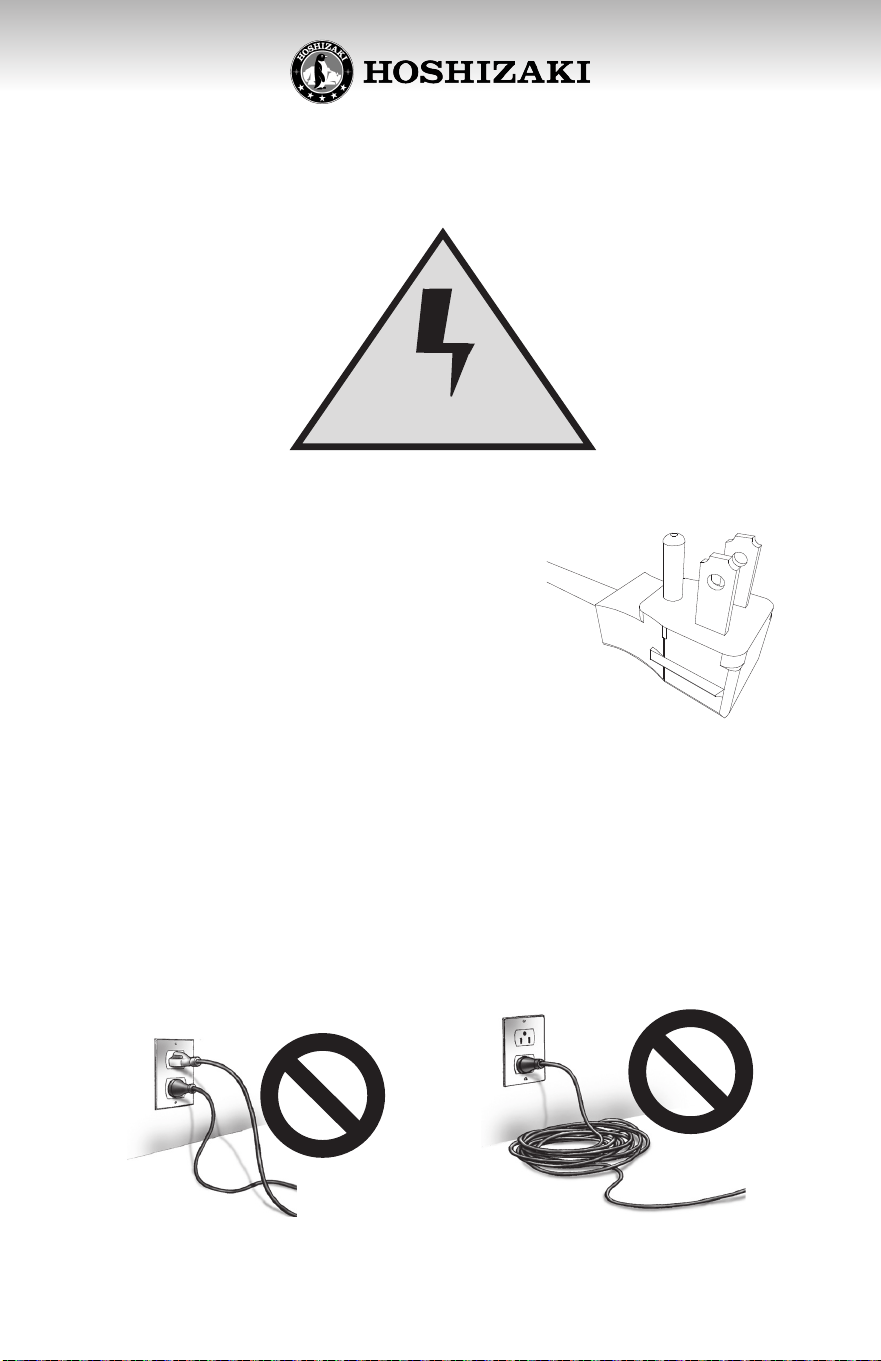
NEVER USE AN ADAPTER PLUG!
Because of potenal safety hazards under certain condions, we strongly
recommend against the use of an adapter plug.
Do not plug in the electrical cord
of the refrigerator to an electrical
outlet that is used by other
appliances.
Do not use extension cords. The
compressor might burn out.
Do not under any circumstance cut
or remove the ground prong from
the cord. Removal of ground prong
invalidates product warranty.
Ground prong
The power cord has a ground prong.
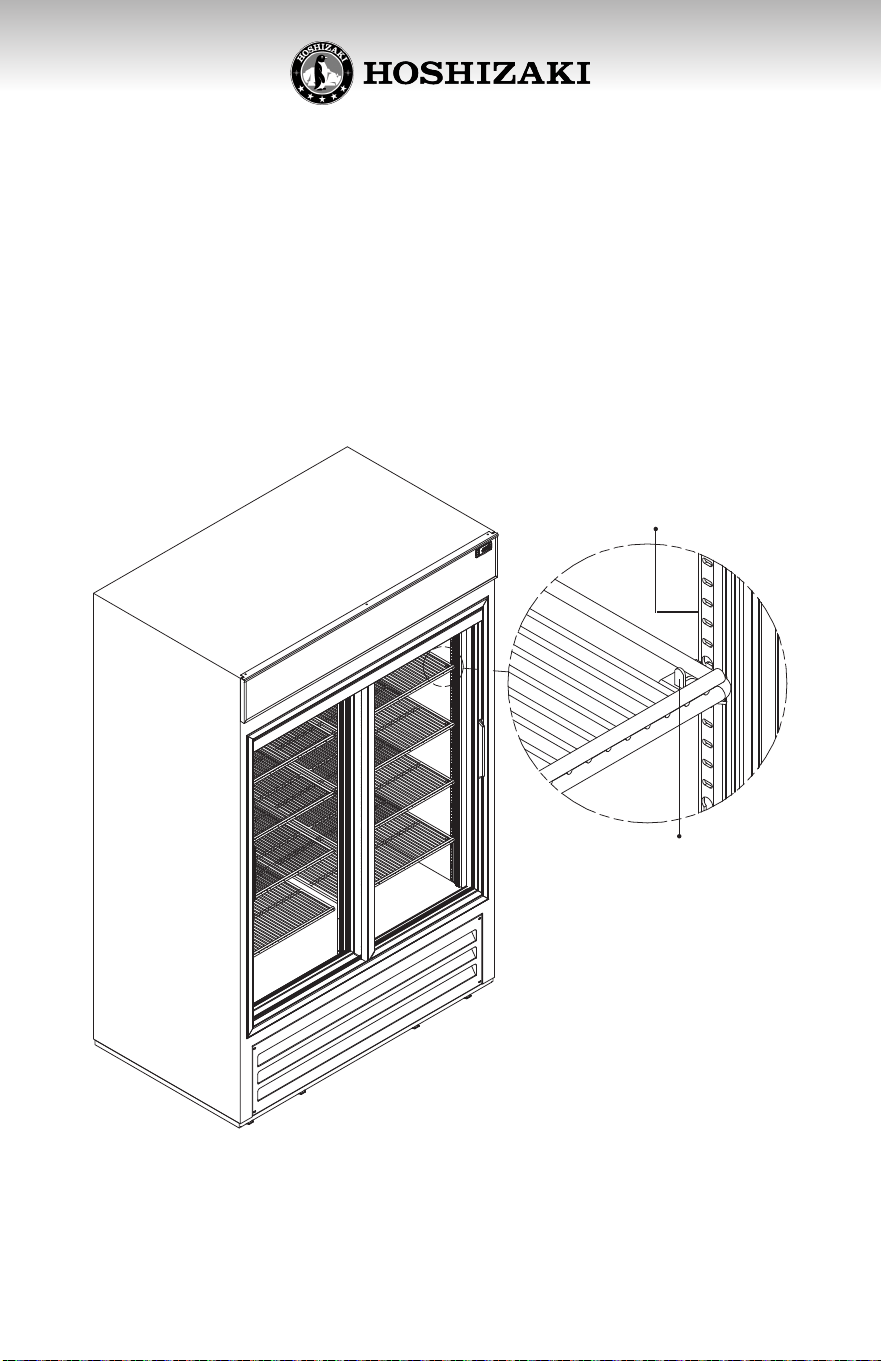
15
INSTALLING THE SHELVES
Shelves and shelf clips (4 clips per shelf) are packed inside the cabinet prior
to shipment. Aer selecng the appropriate spacing inside the cabinet,
install shelf clips by inserng top of clip inside the pilaster and then press
the lower secon of the clip while pushing inwards unl it snaps into place.
Repeat unl all clips are in desired locaon. Place shelf on clips checking that
all four corners of shelves are leveled and supported by the four shelf clips.
Pilaster
Metal clip
16
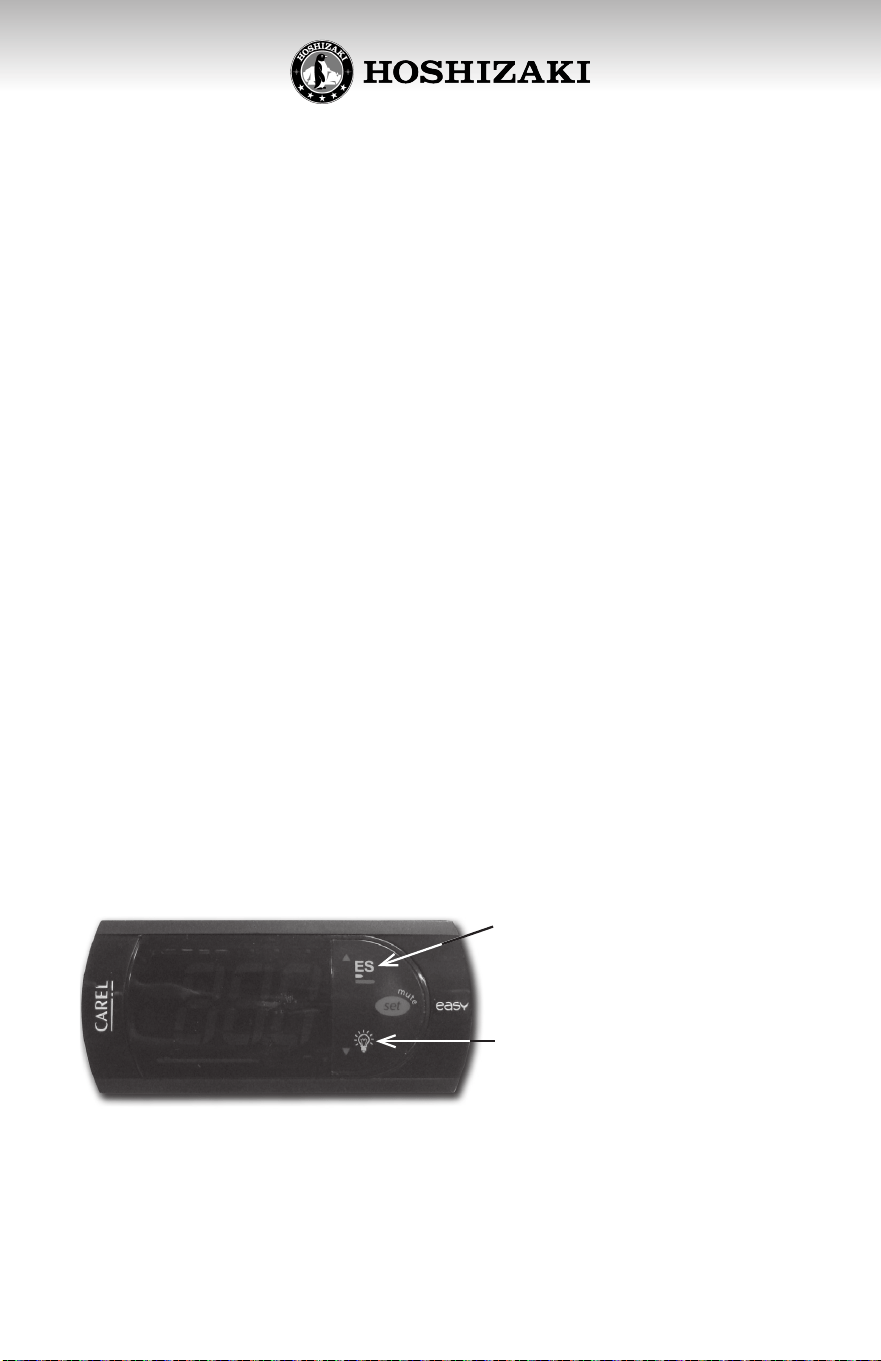
This controller has a feature to reduce energy consumpon during the
closing hours of your locale. To acvate this feature press the ES buon
on the controller. In this refrigerator, the Energy Saving mode has been
programmed to turn o the lights for one hour, or unl the door is opened.
The Energy Saving mode can also be deacvated by pressing the ES buon,
which will turn the lights back on.
1. Plug in the electrical cord of the unit to a wall outlet, following the
recommendaons about electrical installaon in this manual.
2. Let the cooler run with no product load for 2 hours, or let the
compressor complete three on/o cycles to assure that the
temperature inside is appropriate for the products before loading
them into the refrigerator.
3. Verify the internal illuminaon operaon by acvang the on and o
switch.
4. When placing products in the cooler, you should leave small gaps
between one and the other to assure free circulaon of air inside the
cabinet.
5. Do not leave the door open for extended periods of me, to avoid
increased temperature of the products.
6. Do not unplug your cooler during the night, since when you turn it
back on during the day the electrical consumpon will increase.
The temperature of a cooler should be between 34°F to 40°F.
USE OF YOUR COOLER WITH CAREL
ELECTRONIC THERMOSTAT
These coolers are provided with a versale electronic thermostat that
allows to cool dierent beverages.
To turn off the lights of the
cooler press the light bulb
symbol.
ENERGY SAVING MODE
SELECTOR
START UP THE COOLER
THIS EQUIPMENT IS INTENDED FOR THE STORAGE AND DISPLAY OF
NON-POTENTIALLY- HAZARDOUS BOTTLED OR CANNED PRODUCTS ONLY
17
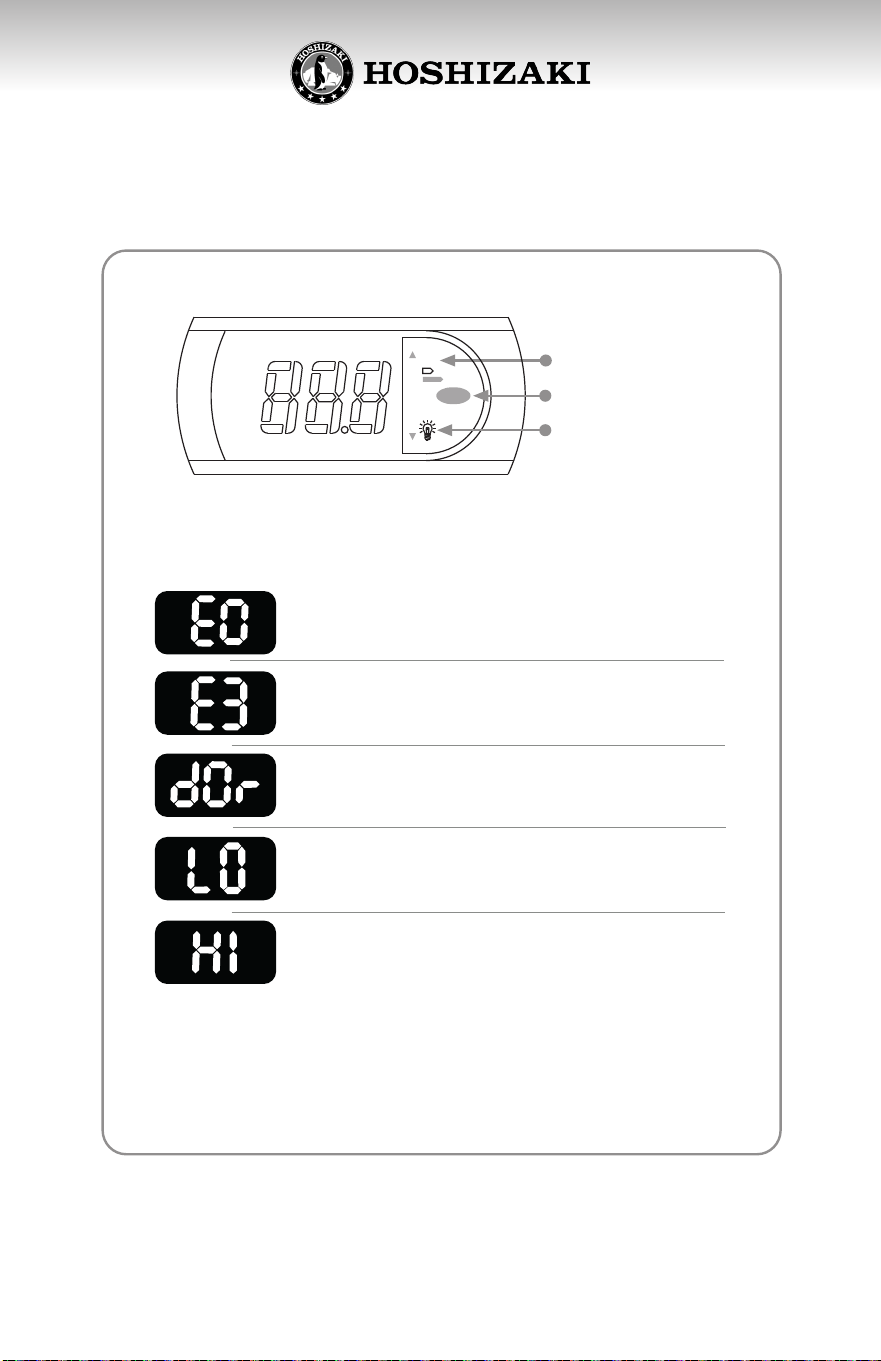
Energy saving mode
selector
Lights off
Sound alarms off
Ambient sensor failure
Open door Close the door
Low temperature alarm
High temperature alarm
Refrigeration system
failure
Report to Hoshizaki
Technical Support
Report to Hoshizaki
Technical Support
Report to Hoshizaki
Technical Support
Report to Hoshizaki
Technical Support
ES
set
m
u
t
e
ES
Note: The sound alarm can be turned off by pressing the red
button
”set mute” on the right side of the display.
In case the alarm is not turned off by the actions suggested, or you
have any questions regarding the cooler performance, please contact
to the Hoshizaki Technical Support.
CONTROLLER DISPLAY
If the display shows a number, the cooler is working in
optimal conditions and no technical service is needed
ALARM
INDICATES
WHAT TO DO?
CAREL ALARM INDICATORS
18
Your unit requires very lile maintenance. However, periodic cleaning can
help maintain eciency and prolong product life. Remember to disconnect
the power source before cleaning. Remove all products and place them
in another cooler.
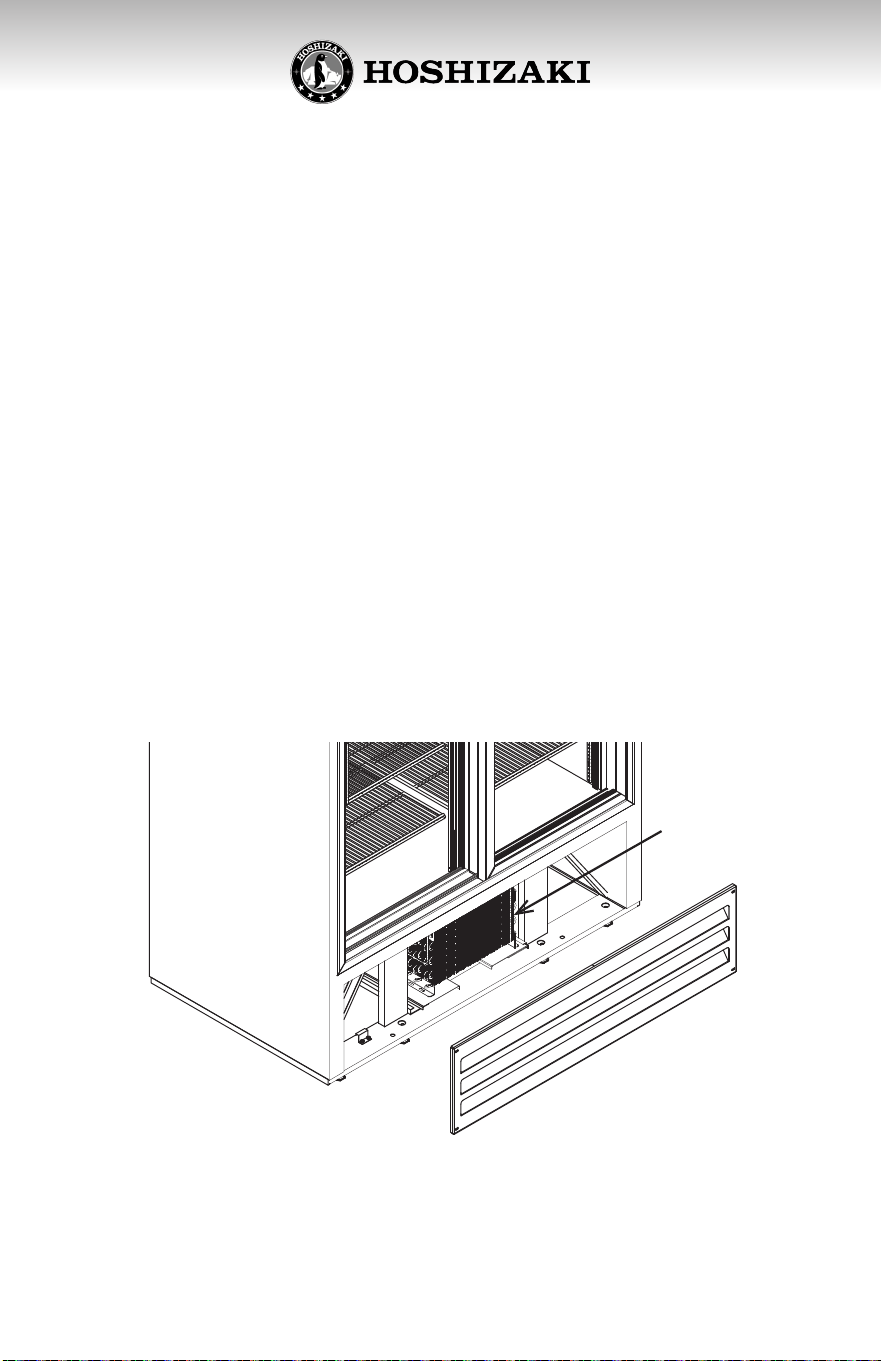
1. Clean once a month the condenser with a grease remover. The
c o n d e n s e r i s l o c a t e d i n t h e l o w e r p a r t o f y o u r u n i t , b e h i n d t h e f r o n t g r i l l .
2. Clean the inside and the exterior of your cooler, including the shelves,
with a mild soap soluon. Do not use strong detergents. Wipe dry the
inside of the cooler before loading product again.
3. Let the cooler run with no product load for 2 hours, or let the compressor
complete three on/o cycles to assure that the temperature inside is
appropriate for the products before loading them into the refrigerator.
CLEANING AND PREVENTIVE
MAINTENANCE
ATTENTION
Aer an interrupon of the electrical power supply, the
compressor will take approximately 3 minutes to start
working.
Condenser
19
Compressor will not 1. Power disconnected 1. Check cord for proper
start, no noise connecon
2. Blown fuse or 2. Replace fuse or
breaker reset breaker
3. Defecve or broken 3. Repair or replace
wiring
4. Defecve overload 4. Replace
5. Defecve relay 5. Replace
Warm storage 1. Defecve control 1. Replace
temperatures 2. Not enough 2. Leak check. Change
refrigerant drier, evacuate and
recharge
3. Cabinet locaon too 3. Relocate cabinet
warm
4. Too much refrigerant 4. Change drier,
evacuate and recharge
5. Low voltage, com- 5. Check voltage
pressor cycling on supply
overload
Compressor runs con- 1. Defecve control 1. Replace
nuously-product too 2. Control’s sensor 2. Reposion control sensor
cold out of its bracket into its bracket
3. Not enough 3. Leak check. Change
refrigerant drier, evacuate and
recharge
Compressor runs 1. Not enough 1. Leak check. Change
connuously-product refrigerant drier, evacuate and
too warm recharge
2. Inecient compressor 2. Replace
TROUBLESHOOTING CHART