READ IT OR WATCH IT
Read instructions or watch easy-to-follow video. Scan
QR code or visit https://byjasco.com/46213i
46213
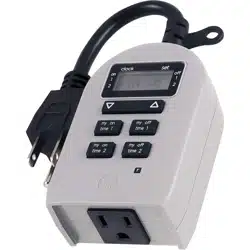
DAYSMART 7-DAY
INDOOR PLUG-IN TIMER
SETUP
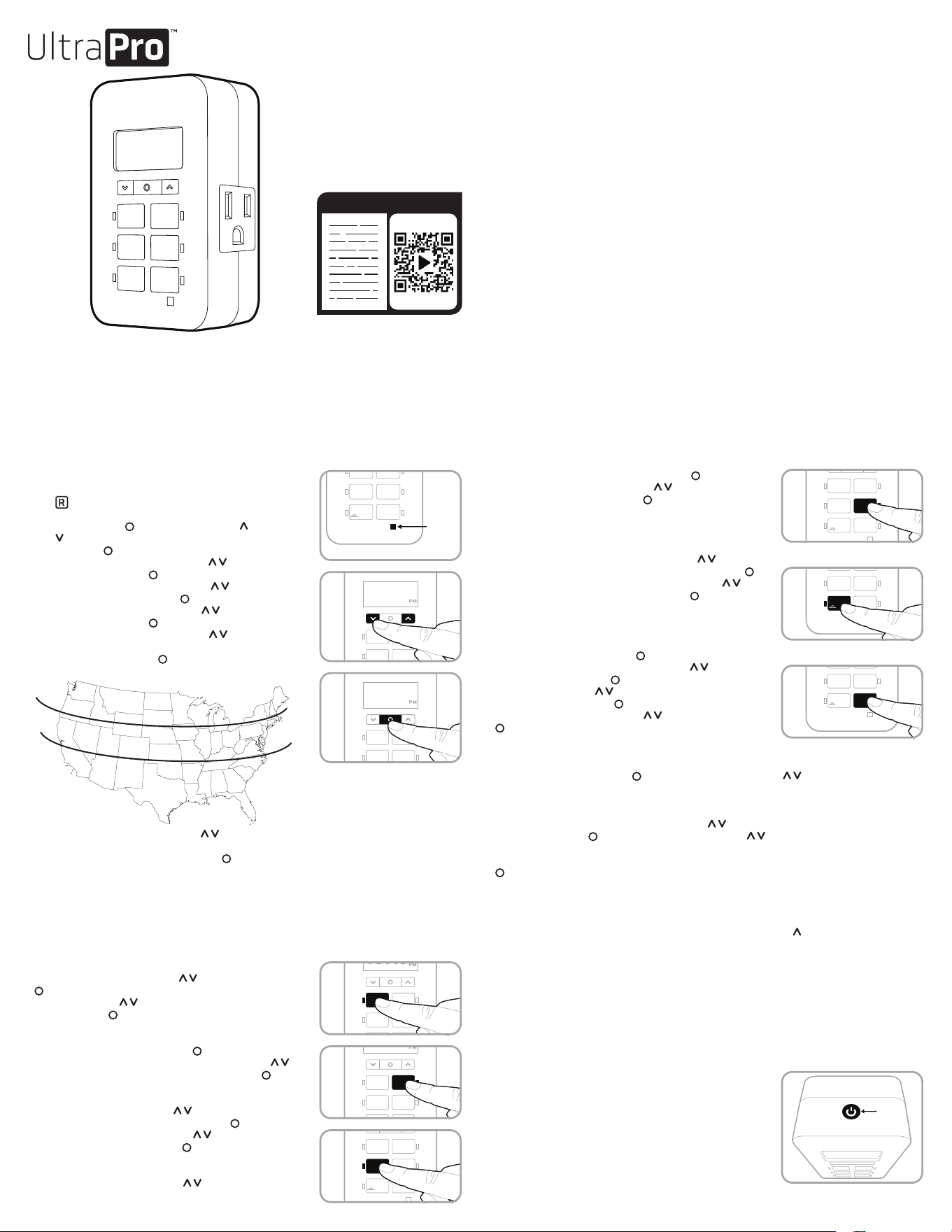
1. If no numbers are visible on-screen, plug timer into an
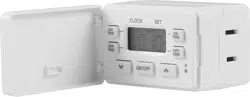
outlet and charge for 1 hour. Once charged, press the reset
( ) button in the lower-right corner using a toothpick
or pencil.
2. Press set button ( ) for 3 seconds. Use up ( ) and down
( ) arrows to set time, note the AM or PM time and press
set button ( ).
3. “YEAR” flashes on the screen. Use ( ) to select the year
and press set button ( ).
4. “MONT” flashes on the screen. Use ( ) to select the
month and press set button ( ).
5. “DAY” flashes on the screen. Use ( ) to select the day
and press set button ( ).
6. “ZONE” flashes on the screen. Use ( ) to select zone
(see Figure 1). Zone is used to determine sunrise/sunset
times. Press set button ( ).
7. “DST” flashes on the screen. Use ( ) to select “ON” if you would like the timer to
automatically adjusts for daylight saving time or “OFF” if you would not like the timer to
adjust automatically. Press set button ( ).
Note: Choose DST ON if your area observes daylight saving time. The timer automatically
adjusts backward and forward an hour. Choose DST OFF if your area does not observe
daylight saving time.
PROGRAMMING OPTIONS
Note: An illuminated LED on a button indicates the program is active. To deactivate program,
press the button again and the LED turns o. LED illuminates when plugged in.
ON time: Press ON TIME button and the clock flashes. Use
arrows to set the desired on time ( ) and press set button
( ). Default is 6PM for all days. Days of the week flashes on-
screen. Use arrows ( ) to select the correct day options and
press set button ( ).
OFF time: Press OFF TIME button and the clock flashes. Select
desired o time and press set button ( ). Default is 10PM for all
days. Days of the week flashes on-screen. Use arrows ( ) to
select the correct day options and press set button ( ).
Sunset ON: Press SUNSET ON button and the sunset time will
flash on the screen. Use arrows ( ) to adjust time up to 1
hour in either direction and press set button ( ). Days of the
week flashes on-screen. Use arrows ( ) to select the correct
day options and press set button ( ).
Sunrise OFF: Press SUNRISE OFF button and the sunrise time
flashes on the screen. Use arrows ( ) to adjust time up to 1
hour in either direction and press set button ( ). Days of the
week flashes on-screen. Use arrows ( ) to select the correct
day options and press set button ( ).
PRESET SCHEDULES
Evening – Sunset to 12AM: Press EVENING button and the
sunset time flashes on the screen. Use arrows ( ) to adjust
time up to 1 hour in either direction and press set button ( ).
Days of the week flashes on the screen. Use arrows ( ) to
select the correct day options and press set ( ).
EXTRA PROGRAMS
This option oers seven additional ON/OFF programs. Press
EXTRA PROGRAMS button and “ON 1” flashes on-screen, and
“--:--” displays. Press set button ( ) to select program “ON 1”
and the “--:--” flashes on screen. Use arrows ( ) to select
time and press set button ( ). Days of the week flashes
on-screen. Use arrows ( ) to select the desired days of the
week and press set button ( ). Program ON 1 is set. To go to
the next program, use the arrows ( ) and press set button
( ) on the next program. Repeat these steps to program OFF
1, program ON 2, program OFF 2, etc.
To skip through without setting, stop pressing buttons and the display reverts to clock mode after
10 seconds or press set button ( ). You can also use the arrows ( ) to scroll through the
options without setting a time. After program OFF 7, the menu starts over with program ON 1. The
LED indicator light remains on if any of the additional programs are set.
To delete one of the extra programs, use arrows ( ) to choose the program you wish to delete
and press set button ( ) to select program. Use arrows ( ) to scroll time to between 11:59PM
and 12:00AM. The display will show “--:--” to confirm the program has been deleted. No additional
steps are needed. The display reverts to clock mode after 10 seconds or when the set button
( ) is pressed.
Note: When program on is set to “--:--,” “DELE” flashes to confirm program has been deleted.
DAYS OF THE WEEK OPTIONS ORDER
Days of the week options display in the following order when using the up ( ) arrow unless you are using
the settings in extra programs. In this case, they will begin with the last on time set.
ON/OFF OVERRIDE BUTTON
Using ON/OFF override with no scheduled programs:
- If the device is o, press & release the ON/OFF override
to turn the device on.
- If the device is on, press & release the ON/OFF override
to turn the device o.
Using the ON/OFF override with scheduled programs:
- If a scheduled program is running and the device is on, press &
release the ON/OFF override to turn the device off. It remains off
until the next scheduled program turns the device on.
-
If a scheduled program is running and the device is off, press &
release the ON/OFF override to the turn the device on. It remains on
until the next scheduled program turns the device off.
OFF TIME
R
SUNSET
ON
SUNRISE
OFF
ON
TIME
EXTRA
PROGRAMS
EVENING
CLOCK SET
10:10
- 12AM
NORTH
ALASKA
HAWAII
NORTH
CENTRAL
CENTRAL
SOUTH
SOUTH
FIGURE 1
M thru Su — all days of the week
M thru F
Sa, Su
Su thru Th
F, Sa
Su thru Sa — each day of the week separately
10: 10
CLOCK SET
SUNSET
ON
SUNRISE
OFF
OFF
TIME
ON
TIME
EXTRA
PROGRAMS
EVENING
- 12AM
R
RESET
BUTTON
OFF TIME
R
CLOCK SET
SUNSET
ON
SUNRISE
OFF
ON
TIME
EXTRA
PROGRAMS
EVENING
- 12AM
10:10
SUNSET
ON
SUNRISE
OFF
OFF
TIME
ON
TIME
EXTRA
PROGRAMS
EVENING
R
10: 10
CLOCK SET
- 12AM
OFF
TIME
R
10: 10
CLOCK SET
SUNSET
ON
SUNRISE
OFF
ON
TIME
EXTRA
PROGRAMS
EVENING
- 12AM
SUNSET
ON
SUNRISE
OFF
OFF
TIME
ON
TIME
EXTRA
PROGRAMS
EVENING
R
10: 10
CLOCK SET
- 12AM
R
SUNSET
ON
SUNRISE
OFF
OFF
TIME
ON
TIME
EXTRA
PROGRAMS
EVENING
- 12AM
CLOCK SET
10:10
R
CLOCK SET
10:10
SUNSET
ON
SUNRISE
OFF
OFF
TIME
ON
TIME
EXTRA
PROGRAMS
EVENING
- 12AM
R
OFF TIME
CLOCK SET
SUNSET
ON
SUNRISE
OFF
ON
TIME
EXTRA
PROGRAMS
EVENING
- 12AM
10:10
ON/OFF
OVERRIDE
BUTTON
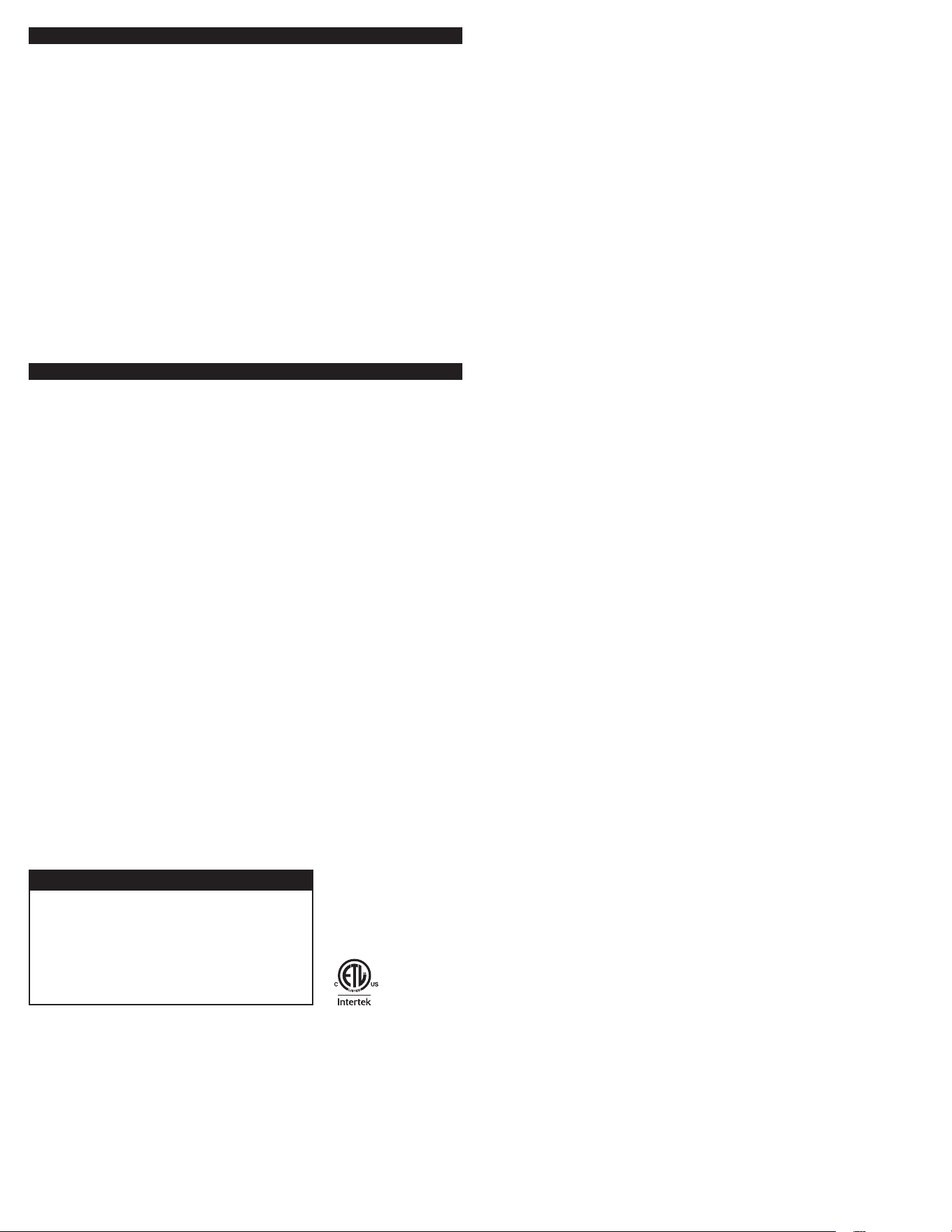
Suppliers Declaration of Conformity | Model #: 46213 | Jasco Products Co., 10 E. Memorial Rd.,
Oklahoma City, OK 73114, www.byjasco.com
This device complies with Part 15 of the FCC and Industry Canada license-exempt RSS
standards. Operation is subject to the following two conditions: (1) this device may not cause
harmful interference, and (2) this device must accept any interference received, including
interference that may cause undesired operation.
FCC NOTE: The manufacturer is not responsible for any radio or TV interference caused
by unauthorized modifications to this equipment. Such modifications could void the user’s
authority to operate the equipment.
NOTE: This equipment has been tested and found to comply with the limits for a Class B
digital device, pursuant to Part 15 of the FCC Rules. These limits are designed to provide
reasonable protection against harmful interference in a residential installation. This equipment
generates, uses and can radiate radio frequency energy, and if not installed and used in
accordance with the instructions, may cause harmful interference to radio communications.
However, there is no guarantee interference will not occur in a particular installation. If this
equipment does cause harmful interference to radio or television reception, which can be
determined by turning the equipment off and on, the user is encouraged to try to correct the
interference by one or more of the following measures:
— Reorient or relocate the receiving antenna.
— Increase the separation between the equipment and receiver.
— Connect the equipment into an outlet on a circuit different from which the receiver
is connected.
— Consult the dealer or an experienced radio/TV technician for help.
CAN ICES-3(B)/NMB-3(B)
125V 50/60Hz
15A 1875W General/Resistive
10A 1250W Tungsten
1/2HP
Works with LED, CFL, incandescent and halogen bulbs
FCC/IC - EN
SPECIFICATIONS
MADE IN CHINA
Distributed by Jasco Products Company LLC,
10 E. Memorial Rd., Oklahoma City, OK 73114.
This Jasco product comes with a 2-year limited warranty. Visit
www.byjasco.com for warranty details.
Questions? Contact our U.S.-based Consumer Care at
1-800-654-8483 between 7AM-8PM, M-F, Central Time.
©JASCO 2022 | 46213 | 05/26/22 v2
RISK OF ELECTRICAL SHOCK
• PLUG DIRECTLY INTO AN
ELECTRICAL OUTLET
• DO NOT USE IN WET
LOCATIONS
• USE INDOORS ONLY
• UNPLUG TIMER BEFORE
CLEANING
• KEEP CHILDREN AWAY
RISK OF FIRE
• DO NOT USE TO CONTROL
APPLIANCES THAT
CONTAIN HEATING
ELEMENTS (COOKING
APPLIANCES, HEATERS,
IRONS, ETC.)
• DO NOT EXCEED
ELECTRICAL RATINGS
WARNING
46213
TEMPORIZADOR DE 7 DÍAS INTELIGENTE
ENCHUFABLE PARA INTERIORES
CONFIGURACIÓN
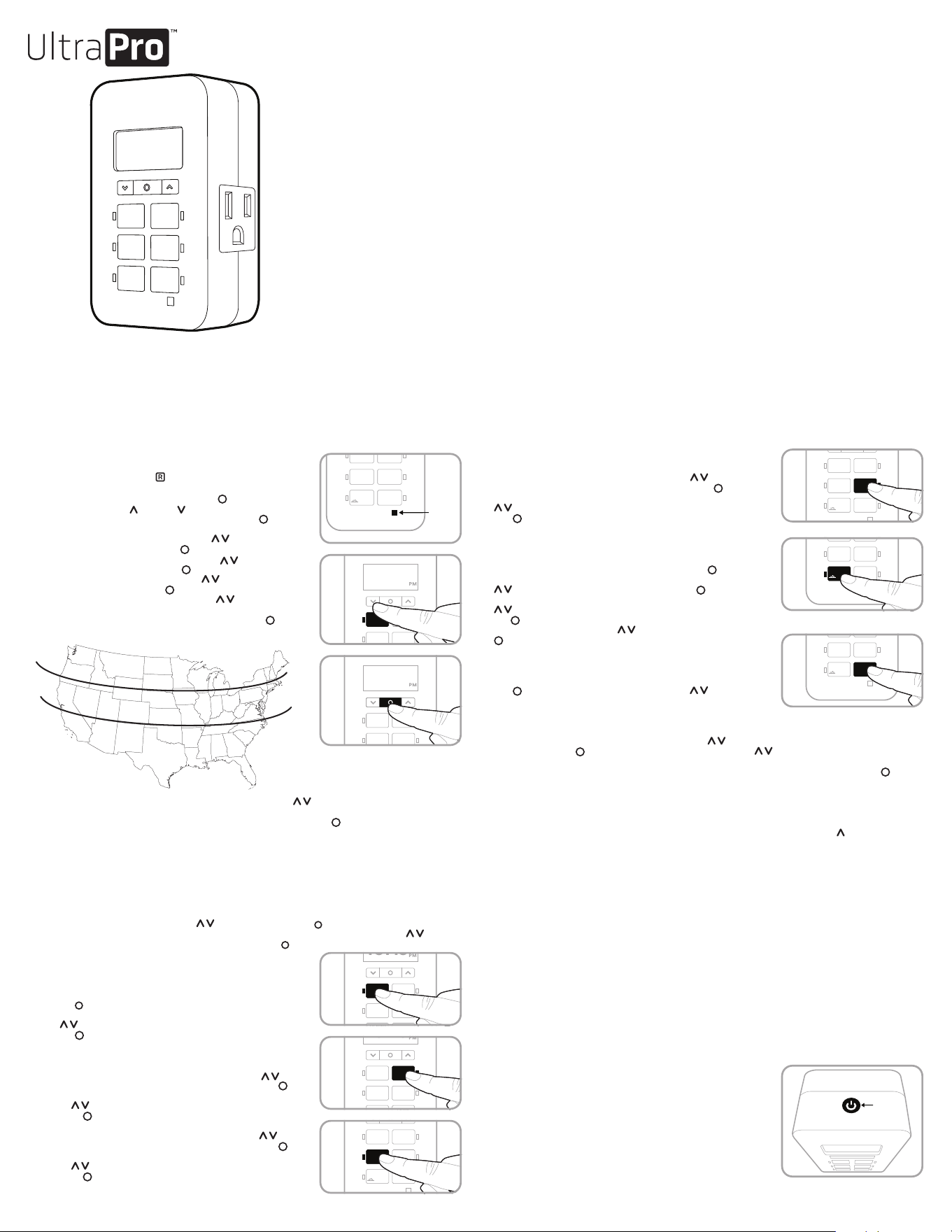
1. Si no aparecen números en la pantalla, enchufe el temporizador en un
tomacorriente y deje que se cargue durante una hora. Una vez cargado,
presione el botón restablecer ( ) que se encuentra en la esquina inferior
derecha con un lápiz o un mondadientes.
2. Mantenga oprimido el botón “set” (configurar) ( ) durante 3 segundos.
Use las flechas arriba ( ) y abajo ( ) para programar la hora actual
(tenga en cuenta si es AM o PM) y presione el botón “set” ( )
(programar).
3. En la pantalla parpadeará “YEAR” (año). Use ( ) para seleccionar el
año actual y presione el botón “set” ( ) (configurar).
4. En la pantalla parpadeará “MONTH” (mes). Use ( ) para seleccionar el
mes actual y presione el botón “set” ( ) (configurar).
5. En la pantalla parpadeará “DAY” (día). Use ( ) para seleccionar el día
actual y presione el botón “set” ( ) (configurar).
6. En la pantalla parpadeará “ZONE” (zona). Use ( ) para seleccionar la
zona actual (ver Figura 1). Zone (zona) se usa para determinar los horarios
del amanecer/anochecer. Presione el botón ‘set’ (configurar) ( ).
7. “DST” (Cambio de horario de verano) parpadeará en la pantalla. Use ( ) para seleccionar “ON” (encendido) si
desea que el temporizador se ajuste automáticamente al horario de verano, o bien “OFF” (apagado) si no desea que
el temporizador se ajuste automáticamente. Presione el botón ‘set’ (configurar) ( ).
Nota: Elija DST ON (activado) si en su área local se aplica el horario de verano. El temporizador se ajustará
automáticamente una hora hacia atrás o hacia adelante. Elija DST OFF (desactivado) si en su área local no se aplica el
horario de verano.
OPCIONES DE PROGRAMACIÓN
Nota: una luz LED de un botón iluminada indica que el programa está activo. Para desactivar el programa, oprima el botón
otra vez y la luz LED se apagará. La luz LED se iluminará una vez que esté enchufada.
Hora de encendido: presione el botón “ON TIME” (hora de encendido) y el reloj comenzará a parpadear. Use las flechas
para programar la hora de encendido deseada ( ) y presione el botón “set” ( ) (configurar). La hora predeterminada
es 6 p.m. para todos los días. Los días de la semana comenzarán a parpadear en la pantalla. Use las flechas ( ) para
seleccionar las opciones de los días correctos y presione el botón “set” ( )
(configurar).
Hora de apagado: presione el botón “OFF TIME” (hora de apagado) y el reloj
comenzará a parpadear. Establezca la hora de apagado que desee y presione el
botón “set” ( ) (configurar). La hora predeterminada es las 10 p.m. para todos
los días. Los días de la semana comenzarán a parpadear en la pantalla. Use las
flechas ( ) para seleccionar las opciones de los días correctos y presione el
botón “set” ( ).
Encender al anochecer: presione el botón “SUNSET ON” (encender al anochecer)
y la hora del anochecer parpadeará en la pantalla. Use las flechas ( ) para
ajustar hasta una hora en cualquier dirección y presione el botón “set” ( )
(configurar). Los días de la semana comenzarán a parpadear en la pantalla. Use
las flechas ( ) para seleccionar las opciones de los días correctos y presione
el botón “set” ( ).
Apagar al amanecer: presione el botón “SUNRISE OFF” (apagar al amanecer)
y la hora del amanecer parpadeará en la pantalla. Use las flechas ( ) para
ajustar hasta una hora en cualquier dirección y presione el botón “set” ( )
(configurar). Los días de la semana comenzarán a parpadear en la pantalla. Use
las flechas ( ) para seleccionar las opciones de los días correctos y presione
el botón “set” ( ).
HORARIOS PROGRAMADOS
Noche - Anochecer hasta las 12 a.m.: oprima el botón EVENING (noche) y la hora
del anochecer parpadeará en la pantalla. Use las flechas ( ) para ajustar
hasta una hora en cualquier dirección y presione el botón “set” ( ) (configurar).
Los días de la semana comenzarán a parpadear en la pantalla. Use las flechas
( ) para seleccionar las opciones de los días correctos y presione el botón
“set” ( ).
PROGRAMAS ADICIONALES
Esta opción ofrece siete programas adicionales de encendido/apagado.
Presione el botón “EXTRA PROGRAMS” (programas adicionales); en la pantalla
parpadeará “ON1” y aparecerá “--:--.” Presione el botón “set” ( ) para
seleccionar el programa “ON 1” y “--:--” parpadeará en la pantalla. Use las flechas
( ) para seleccionar la hora y presione el botón “set” ( ) (configurar).
Los días de la semana comenzarán a parpadear en la pantalla. Use las flechas
( ) para seleccionar los días de la semana que desee y presione el botón
“set”( ) (configurar). El programa ON1 ha quedado configurado. Para pasar al
siguiente programa, use las flechas ( ) y presione el botón “set” (configurar)
( ) en el siguiente programa. Repita estos pasos para el programa OFF1, el
programa ON2, el programa OFF2, etc.
Para saltarse hasta el final sin configurar ninguno, deje de presionar los botones y
la pantalla volverá al modo de reloj después de 10segundos o presione el botón
“set” ( ) (configurar). También puede usar las flechas ( ) para desplazarse
por las opciones sin programar una hora. Después del programa OFF7, el menú
comenzará de nuevo con el programa ON1. La luz LED permanecerá encendida si
se configura cualquiera de los programas adicionales.
Para borrar uno de los programas adicionales, use las flechas ( ) para seleccionar el programa que desea borrar y
presione el botón “set” ( ) para seleccionar el programa. Use las flechas ( ) para desplazar las horas entre las
11:59 p. m. y las 12:00 a. m. En la pantalla aparecerá “--:--’’ para confirmar que se ha eliminado el programa. No hace falta
hacer nada más. La pantalla volverá al modo reloj después de 10 segundos o cuando se presione el botón “set” ( ).
Nota: Cuando el programa de encendido esté configurado para las “--:--,” “DELE” parpadea para confirmar que el programa
ha sido borrado.
ORDEN DE LAS OPCIONES DE LOS DÍAS DE LA SEMANA
Las opciones de días de la semana se mostrarán en el orden siguiente al usar la flecha hacia arriba ( ), a menos que esté
utilizando las configuraciones de “extra programs” (programas adicionales). En este caso, comenzarán con la última “ON
TIME” (hora de encendido) que se haya configurado.
BOTÓN DE CONTROL MANUAL DE ENCENDIDO Y APAGADO
Usar el control manual de ENCENDIDO Y APAGADO sin programas configurados:
- Si el dispositivo está apagado, presione y suelte el control manual de ENCENDIDO Y APAGADO para encenderlo.
- Si el dispositivo está encendido, presione y suelte el control manual de ENCENDIDO Y APAGADO para apagarlo.
Usar el control manual de ENCENDIDO Y APAGADO con programas configurados:
- Si un programa configurado está funcionando y el dispositivo está encendido, presione y suelte el control manual de
ENCENDIDO Y APAGADO para apagar el temporizador. Permanecerá apagado hasta que el programa configurado lo
encienda.
- Si un programa configurado está funcionando y el temporizador está apagado, presione y suelte el control manual
de ENCENDIDO Y APAGADO para encender el temporizador. Permanecerá encendido hasta que el programa
configurado lo apague.
CLOCK SET
SUNSET
ON
SUNRISE
OFF
OFF
TIME
EXTRA
PROGRAMS
EVENING
- 12AM
ON
TIME
R
10:10
NORTE
ALASKA
HAWÁI
NORTE
CENTRAL
CENTRAL
SUR
SUR
FIGURA 1
M thru Su (lunes a domingo) - todos
los días de la semana
M thru F (lunes a viernes)
Sa (SÁBADO), Su (DOMINGO)
Su thru Th (domingo a jueves)
F (VIERNES), Sa (SÁBADO)
Su thru Sat (domingo a sábado) - cada día de la
semana por separado
CLOCK
SET
SUNSET
ON
SUNRISE
OFF
OFF TIME
R
ON TIME
EXTRA
PROGRAMS
EVENING
- 12AM
10:10
SUNSET
ON
SUNRISE
OFF
OFF
TIME
ON
TIME
EXTRA
PROGRAMS
EVENING
R
10: 10
CLOCK SET
- 12AM
OFF
TIME
R
10: 10
CLOCK SET
SUNSET
ON
SUNRISE
OFF
ON
TIME
EXTRA
PROGRAMS
EVENING
- 12AM
SUNSET
ON
SUNRISE
OFF
OFF
TIME
ON
TIME
EXTRA
PROGRAMS
EVENING
R
10: 10
CLOCK SET
- 12AM
R
OFF TIME
CLOCK SET
SUNSET
ON
SUNRISE
OFF
ON
TIME
EXTRA
PROGRAMS
EVENING
- 12AM
10:10
10: 10
CLOCK SET
SUNRISE
OFF
OFF TIME
ON TIME
EXTRA
PROGRAMS
EVENING
- 12AM
SUNSET
ON
R
R
OFF TIME
CLOCK SET
SUNSET
ON
SUNRISE
OFF
ON
TIME
EXTRA
PROGRAMS
EVENING
- 12AM
10:10
CONTROL
MANUAL DE
ENCENDIDO
Y APAGADO
10: 10
CLOCK SET
SUNSET
ON
SUNRISE
OFF
OFF
TIME
ON
TIME
EXTRA
PROGRAMS
EVENING
- 12AM
R
RESET
BUTTON
Declaración de conformidad del proveedor | Modelo #: 46213 | Jasco Products Co., 10 E.
Memorial Rd., Oklahoma City, OK 73114, www.byjasco.com
Este dispositivo cumple con las especificaciones del apartado15 de las normas de laFCC
y con las especificaciones de las normas radioeléctricas (RSS) del Ministerio de Industria
de Canadá aplicables a aparatos exentos de licencia. El funcionamiento está sujeto a las
siguientes dos condiciones: (1) este dispositivo no debe provocar interferencia perjudicial, y
(2) este dispositivo debe aceptar toda interferencia que reciba, incluso la que pudiera causar
un funcionamiento no deseado.
NOTA DE LAFCC: El fabricante no se hace responsable de ninguna interferencia de radio
oTV ocasionada por modificaciones no autorizadas efectuadas a este dispositivo. Dichas
modificaciones podrían anular la autoridad del usuario para utilizar este dispositivo.
NOTA: Este equipo ha sido probado y cumple con los límites para aparatos digitales de Clase
B de conformidad con el apartado 15 de la normativa de la FCC. Estos límites están diseñados
para proveer protección razonable contra interferencias perjudiciales en instalaciones
residenciales. Este dispositivo genera, usa y puede irradiar energía de radiofrecuencias y,
si no se instala y usa según las instrucciones, puede provocar interferencia perjudicial a las
radiocomunicaciones. No obstante, no hay garantías de que no ocurrirá interferencia en una
instalación en particular. Si este equipo genera alguna interferencia perjudicial a la recepción
de radio o televisión, lo que puede determinarse encendiendo y apagando el equipo, se
recomienda que el usuario intente corregir la interferencia aplicando una o más de las
siguientes medidas:
— Reoriente o reubique la antena receptora.
— Incremente la separación entre el equipo y el receptor.
— Conecte el dispositivo a un tomacorriente de un circuito diferente del circuito al que el
receptor está conectado.
— Consulte al distribuidor o a un técnico con experiencia en radio/televisión para solicitar
asistencia.
CAN ICES-3(B)/NMB-3(B)
125V~50/60Hz
15A 1875W Fines generales/carga resistiva
10A 1250W Tungsteno
1/2HP
Funciona con bombillas LED, CFL, incandescentes e halógenas
FCC/IC - ESP
RIESGO DE DESCARGA
ELÉCTRICA
• ENCHÚFELO DIRECTAMENTE
A UN TOMACORRIENTE
ELÉCTRICO
• NO UTILIZAR EN LUGARES
HÚMEDOS
• SOLO PARA USO EN
INTERIORES
• DESCONECTE EL
TEMPORIZADOR ANTES DE
LIMPIAR
• MANTENER FUERA DEL
ALCANCE DE LOS NIÑOS
RIESGO DE INCENDIO
• NO UTILICE PARA
CONTROLAR APARATOS QUE
INCLUYAN RESISTENCIAS
ELÉCTRICAS (APARATOS DE
COCCIÓN, CALEFACTORES,
PLANCHAS, ETC.)
• NO SUPERAR LOS VALORES
NOMINALES ELÉCTRICOS
ADVERTENCIA
ESPECIFICACIONES
HECHO EN CHINA
Distribuido por Jasco Products Company LLC,
10 E Memorial Rd., Oklahoma City, Oklahoma 73114.
Este producto de Jasco tiene una garantía limitada
de 2 años. Visite www.byjasco.com para conocer los
detalles de la garantía.
¿Preguntas? Comuníquese al 1-800-654-8483 entre las
7AM y las 8PM hora estándar del centro.