![PDR 1108 SMARTBIZ HP [EL] photo](https://manualsfile.com/images/appliances/k5/72/k5729iooee1_0_1756239841854_thumbnail.webp)
PDR1108HPSmartBiz
M.-Nr. 12 646 530 / 00(1/2)
ɑ It is essential to read the operating in-
structions and pay particular attention to the
warnings and safety notes.
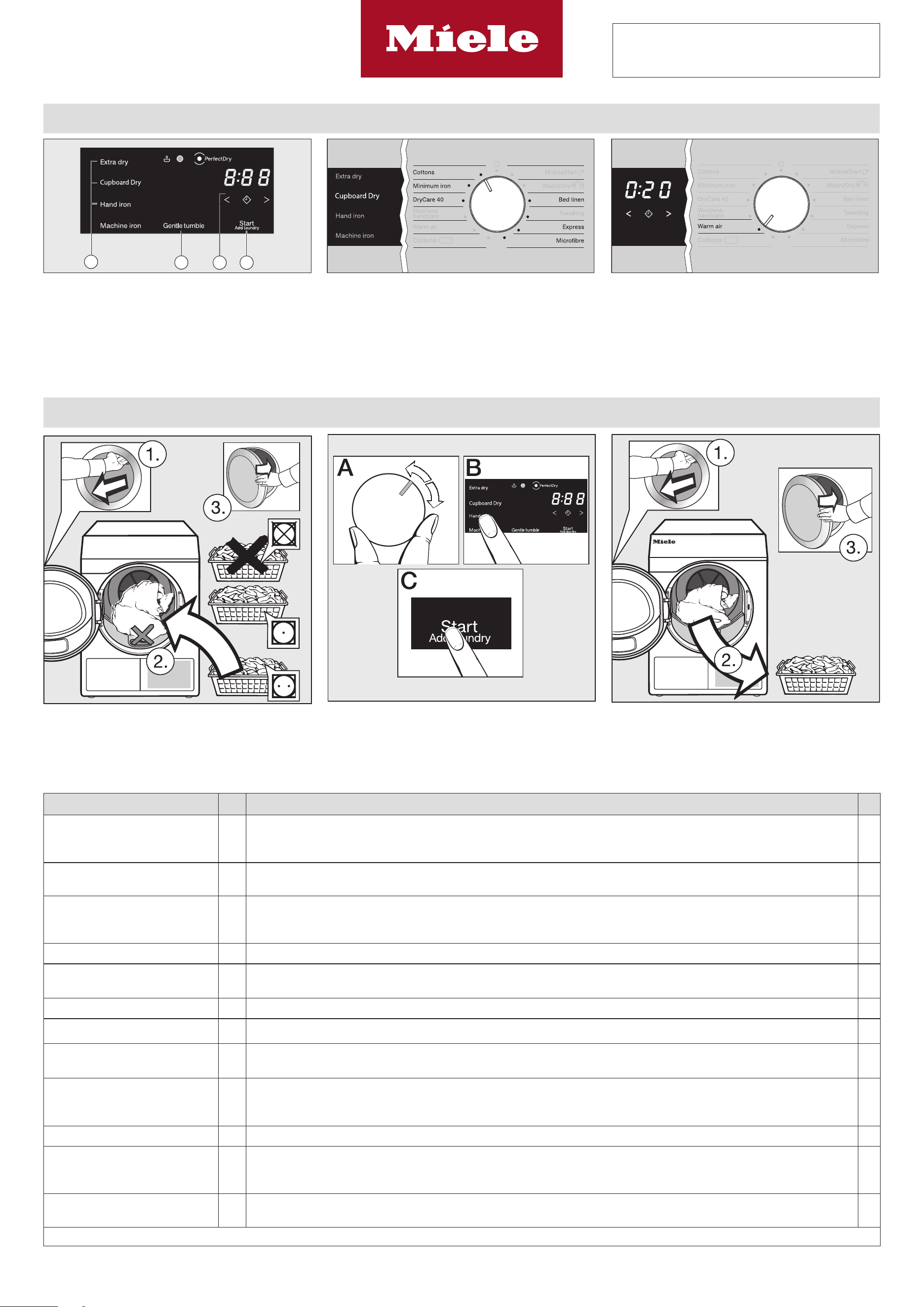
How the control field works Select the drying level Select the time
The - sensor controls react to
fingertip contact. If a sensor control is
illuminated, it can be selected.
sensor control = delay start period
(then use to select the duration).
ĺ Touch the sensor control for the dry-
ing level.
– If a sensor control is brightly lit, this
means it is currently selected
– If a sensor control is dimly lit, this
means it can be selected
ĺ Touch the orsensor control un-
til the required duration lights up.
You can select a duration of between
minutes and hours.
Sort the laundry and load the drum Select and start the programme Unload the laundry
= do not tumble dry
= normal/higher temperature
= select
Gentle tumble or DryCare 40
ĺ Load the laundry
ĺ Select the programme
ĺ Select the drying level or duration
ĺ Touch the Start/Add laundry
sensor
End of programme: is displayed
ĺ Open the door
ĺ Unload the laundry
1 2 3
4
Programmes kg Fabrics
+
Cottons
Extradry, CupboardDry,
Handiron, Machineiron
8 Jackets, workwear, overalls, aprons, baby clothes, t-shirts, underwear,
cotton blankets, boil-proof table linen
Minimum iron
Normal, Hand iron
4 Workwear, overalls, tops, dresses, trousers, table linen, tights
DryCare40
CupboardDry, Hand iron, Ma-
chine iron
4 – All fabrics that are free of wool and are washable at temperatures of 40°C and above
– Trousers, jackets or shirts made of cotton, mixed fibres, synthetics
Woollens handcare 2 Pullovers, knitted garments, tights and socks
–
Warm air 8 Jackets, pillows, sleeping bags, items made up of multiple layers, heavy cotton table cloths, individual
items of laundry
Cottons
8 Cotton items with normal residual moisture, such as those suitable for Cottons
–
MobileStart
8 After connection: the Miele app is used to select programmes and operate the appliance
–
Wash2Dry
8 After connection: the programme is selected automatically in conjunction with the programme selec-
tion on the connected washing machine
–
Bed linen
Extra dry, CupboardDry,
Hand iron, Machine iron
4 Bed linen, pillowcases
–
Towelling 8 Full towelling load: hand towels, bath towels, spa towels, bathrobes, face flannels
–
Express
Extra dry, CupboardDry,
Hand iron, Machine iron
4 Items suitable for the Cottons programme
–
Microfibres
Extra dry, CupboardDry
8 Microfibre mops and cleaning cloths
–
(kg) Maximum weight of dry laundry in kg (+) Gentle tumble: Can be selected / Always active / – Cannot be selected

PDR1108HPSmartBiz
M.-Nr. 12 646 530 / 00(2/2) All rights reserved / 1024 en-GB
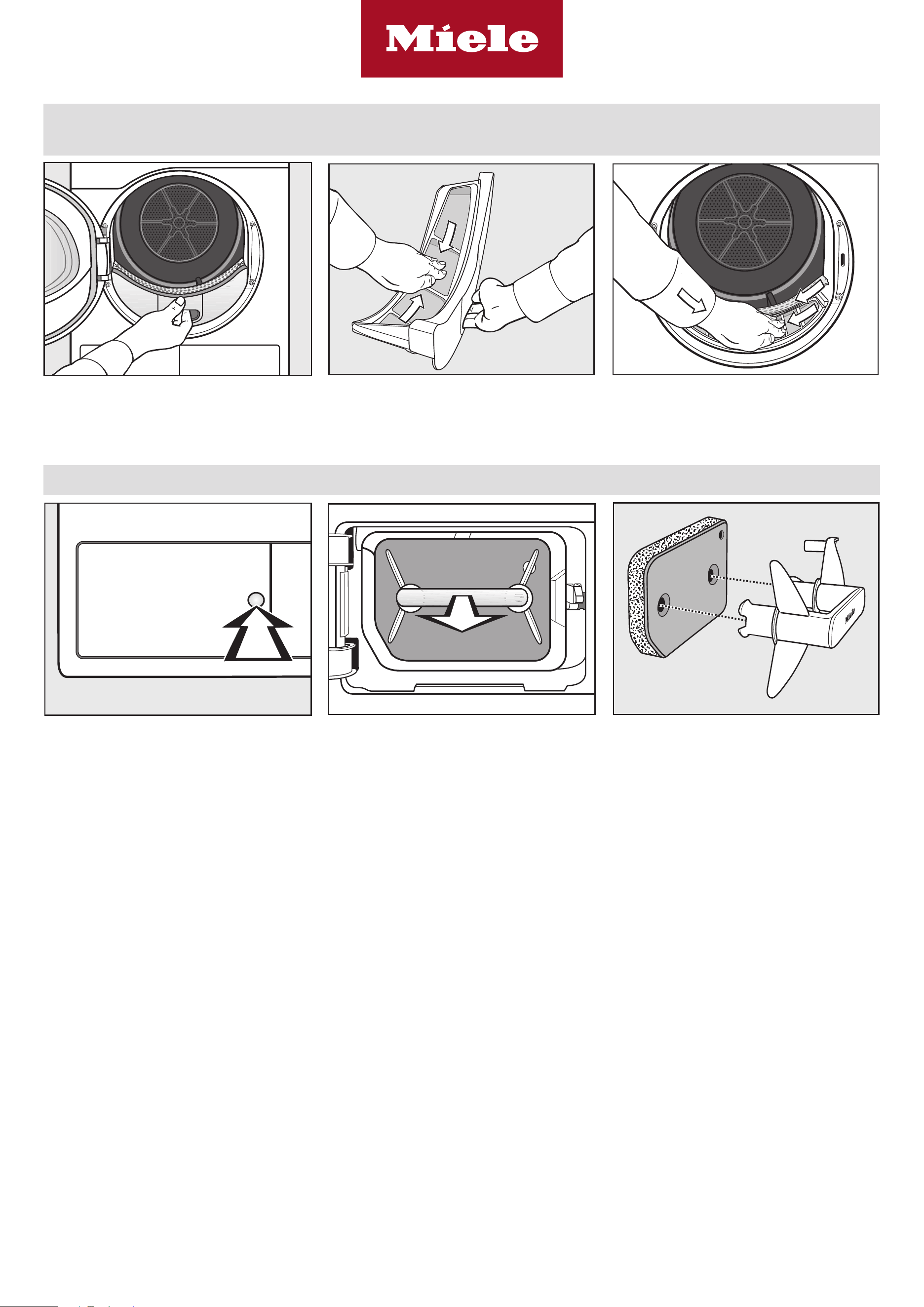
Clean after drying and when the indicator light comes on*
Tip: Have a vacuum cleaner ready
ĺ Remove the flu filter ĺ Remove the flu with your fingers or
with a vacuum cleaner
ĺ For heavy soiling: see the operating
instructions
ĺ Remove the flu with your fingers or
with a vacuum cleaner
ĺ For heavy soiling: see the operating
instructions
Clean once a day when in continuous use and when the indicator light comes on*
ĺ Open the access panel
ĺ Pull the plinth filter out by the handle
ĺ Pull the handle out of the plinth filter
ĺ Rinse the plinth filter, squeeze it
gently and leave it to dry
– Check the plinth filter at regular in-
tervals for signs of wear
ĺ Connect the handle
ĺ Reinsert the plinth filter
* Switch o the indicator light:
ĺ Open and close the door while the tumble dryer is switched on.