
User manual
for Depstech
®
industrial endoscope

Thanks for choosing Depstech
®
86T
Industrial endoscope!
Depstech 86T Industrial endoscope was featured as a
multifunctional industrial endoscope.
Thanks to ultra thin HD camera probe/ Flexible Simi-Rigid
Cable, it not only compatible with most of engine’s spark plug,
but also brings you the highest definition and up to 30fps
real-time image.
Equipped with Anti- Slipped Side Mirror, which can help you
locate the carbon/ oil/ scratch as soon as possible and also
help viewing tube wall.
Equipped with Type-C plug, you can easily get access to
connect your Android Phone. Besides, it comes with some
converter which make it possible to get the connection with the
PC/ Laptop or cell phone with a micro-USB.
It’s better to give it a shot right now!
NOTE:
Any suggestions or customer service needs are warmly
welcomed by us. You can feel free contacting us via
Email: [email protected]
Facebook Official Page: @DEPSTECH. FANS
English
Description of Different Parts
APP Download Guidance
For Android user, search and download “DEPSTECH-View” from
Google Play Store.
Note:
For Android 10 user, we’d recommend you download the compatible
version “DEPSTECH-View” from www.depstech.com.
For Windows user, we would recommend you download the
advertisement-free “DEPSTECH-View” application via Microsoft
Store or www.depstech.com, or you can turn to the “Camera”
application from Microsoft Store.
For Mac OS user, Simply used the “PhotoBooth” application to
capture the real-time image.
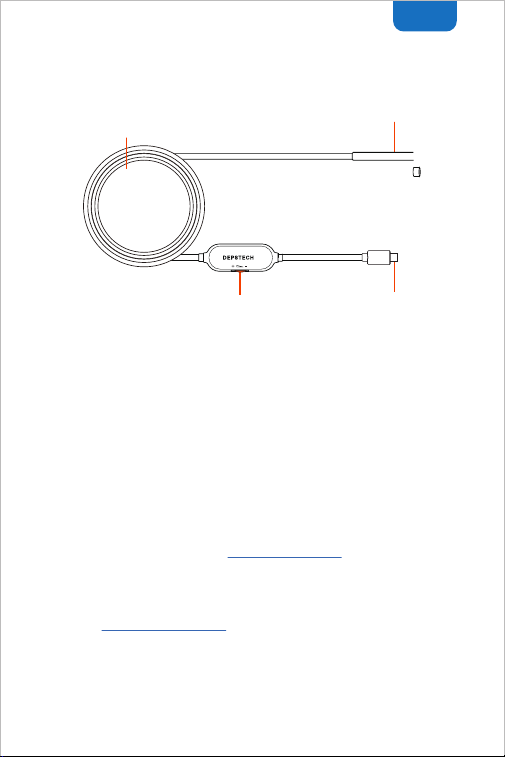
IP67 rating HD camera probe
+ 6* Dimable LEDs
Different length of simi-rigid cable:
Compatible with different needs of length
USB-C plug:
Can hookup with USB-C
to USB-A / micro-USB
converter
LED light dimmer:
Roll this gear to adjust the
brightness of the LEDs
OTG ON
Type-C to Micro
USB converter
Connection Guidance
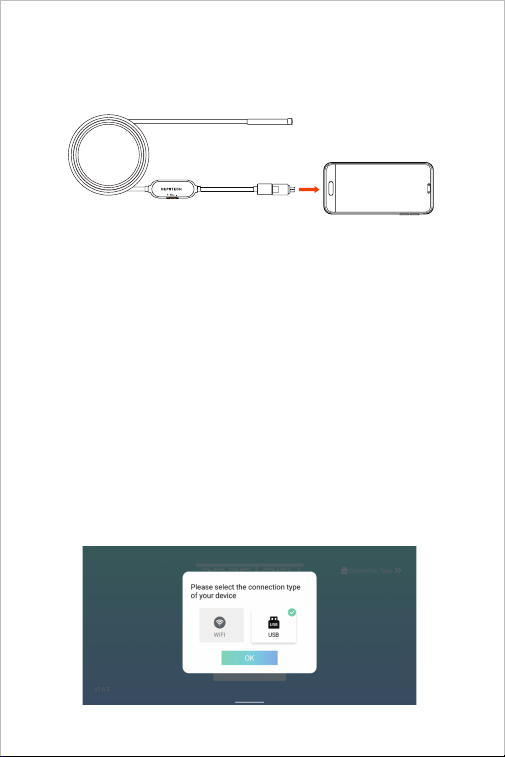
For Android user
Note:
1. Once the connection of the endoscope and the Android phone finished, the
app will tips you whether the Android phone support OTG function or not. If
your deviece didn’t support this function, please change another Android phone
or contact us for returning process via: [email protected]
2. You can turn on the OTG function in the “Settings”. For some brand of
Android phone, it will turn off the OTG function per several minutes. Please
regular check if you couldn’t get the connection.
B: Connect the industrial endoscope to an Android phone with the USB
connector (Pls notice the difference of Micro-USB/ Type-C, and connect
the industrial endoscope properly.)
C: Open the “Depstech-View” application in the phone, please select the
connection type as "USB" and click “Start”, the screen will display the
real-time transmission image captured by the industrial endoscope.
A: Confirm whether the phone supports the OTG function and whether the
OTG function was turned on.
English
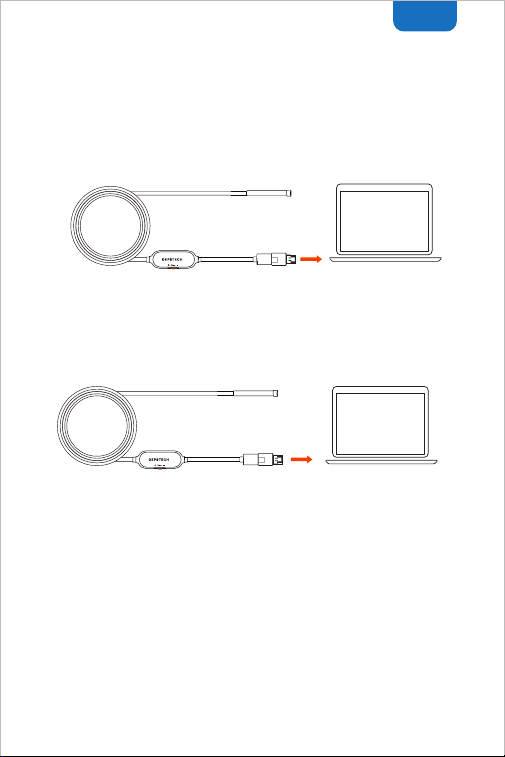
Windows
Mac OS
Connect the industrial endoscope with the Windows PC/ Laptop. After
the connection, open the “Depstech-View” or the “Camera” application,
the screen will display the real-time image of the industrial endoscope.
Connect the industrial endoscope with the Mac OS PC/ Laptop. After
the connection, open the built-in “PhotoBooth” application. The
screen will display the real-time transmission screen captured by the
industrial endoscope.
Note:
If the endoscope failed to get access to capture the real-time image, it
may cause by the UVC protocol function of your Andorid phone has
been disabled. Please update the android version or change a phone
and try it again. Or you can contact us for returning process via:
For Windows user
For Mac OS user
Note:
This USB borescope is not compatible with IOS iPhone. Please note
that the device still can not be connected to an iPhone under the
following conditions:
1. Use the latest version of iPhone device with Type-C interface to
connect the borescope (e.g. iPhone 15).
2. Use type-c to lighting adapter to connect the borescope and iPhone.

FAQ& Help
Q1: How to connect the USB endoscope to “DEPSTECH-View”?
A1:
Q2: No response after plug the usb endoscope into your android phone?
A2:
1. USB endoscopes are only available for Android phone users. Please
make sure you have turned on the OTG function of your phone. Go
to the phone "Settings"-"About this machine"-"Software
Information"-repeatedly click on "Kernel Version" or "Compilation
Number" to open "Developer Mode". After opening "Developer
Mode", please click "Settings"-"Developer Mode"-turn on "OTG
Function";
2. Select the corresponding adapter(micro USB / type-C) to connect
the mobile phone;
3. Open “DEPSTECH-View” to obtain real-time images of the
endoscope. If only the loading icon rotates when the APP acquires
the device image, this may be a hardware failure, please contact the
seller of the device.
4. If you still can’t get the image in the above steps, it may be that the
USB port of the phone is loose. Please try to connect to another
Android phone and try again according to the above steps;
5. If your phone version is Android 10.0, please click the jump link in
the App pop-up window to download the ““DEPSTECH-View” apk”
installation package adapted to Android 10.0.
1. If you got the “No OTG function” tips after plug the usb endoscope
into your android phone but no image, your cellphone may not
availiable for “OTG” function, please try to plug the endoscope into
another phone.
2. Please remember to open the “OTG” function in the “Settting”, and
for some model of cellphone it may turn off the “OTG” function
automatically for serval minutes, please regularly check if the “OTG”
function has been turn off or not.
3. The aging of the charging interface and the failure of the USB
converter will cause the device to be unavailable. Please change a
android phone or a USB converter and try to get connection again.
4. If you still couldn’t get the connection after following the steps,
please contact the supplier for help.
Type-C
industrial
endoscope
Type-C
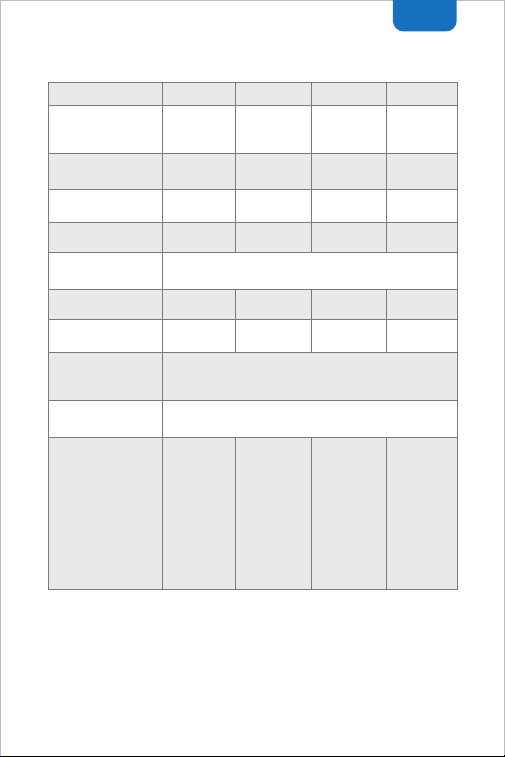
1280*720px 1600*1200px 1600*1200px 2592*1944px
0.21in 0.25in 0.25in 0.33in
60° 70°
11.5ft / 16.4ft
DC 5V/2A
IP67
80° 80°
2.75-15.74in 1.96-3.93in 2.75-15.74in 2.75-15.74in
Type-C Type-C
Micro USB +
USB-A
1*Magnet,
1*Hook,
1*Side-View
mirrow,
1*Type-C to
USB A
converter,
1*Type-C to
micro USB
converter
1*Magnet,
1*Hook,
1*Side-View
mirrow,
1*Type-C to USB
A converter,
1*Type-C to
micro USB
converter
1*Magne
1*Hook,
1*Side-View
1*Holder
1*Micro USB
converter
1*Magnet,
1*Hook,
1*Side-View
mirrow
1*Type-C to
USB A
converter
1*Type-C to
micro USB
converter
Type-C
industrial
endoscope
Type-C
industrial
endoscope
Endoscope
with 2 in 1
USB plug
Specifications
USB type
Maximum resolution
Diameter
Cable Length
Fixed focus range
FOV
Product name
Waterproof grade
Accessories
Working Voltage/
Electric current
86T 100w 86T 200w 86X 200w 86T 500w
English

Safety Warrenty
※ Operation and storage conditions: Please keep the device away from fire
source/ liquid/ acidic. These may increase the risk of electrical shocks and
damages of the device. The storage temperature should between 32-158℉.
And the working temperature should between 32-113℉.
※ The Child can only operate this device with the guidance of adults, please do
not let them operate this device alone.
※ FCC statement: This device complies with Part 15 of the FCC
rules. Operation is subject to the following two conditions:
1) This device may not cause harmful interface;
2) This device must accept any interference received, including
interference that may cause undesired operation.
※ EU Conformity Statement
This product and - if applicable - the supplied accessories too are
marked with "CE" and comply therefore with the applicable
harmonized European standards listed under the EMC Directive
2004/108/EC, the RoHS Directive 2011/65/EU and Amendment
(EU)2015/863.
2012/19/EU (WEEE directive): Products marked with this symbol
cannot be disposed of as unsorted municipal waste in the
European Union. For proper recycling, return this product to your
local supplier upon the purchase of equivalent new equipment, or
dispose of it at designated collection points. For more information
see: www.recyclethis.info
※ WEEE Notice: The directive on Waste Electrical and Electronic
Equipment (WEEE), which entered into force as European law on
14/02/2014, resulted in a major change in the treatment of electrical
equipment at end-of- life.
The purpose of this Directive is, as a first priority, the prevention of
WEEE, and in addition, to promote the reuse, recycling and other
forms of recovery of such wastes so as to reduce disposal.
EC REP: E-CrossStu GmbH. Mainzer Landstr.69,60329 Frankfurt am Main
UK REP: DST Co.,Ltd. Fifth Floor 3 Gower Street, London, WC1E 6HA, UK

Web: www.depstech.com E-mail: [email protected]
Made in China
Shenzhen Deepsea Innovation Technology Co., Ltd.
Room 1901-1902, Jingqi Wisdom Valley, No.1 Tangling Road, Nanshan
District, 518055, Shenzhen, CN