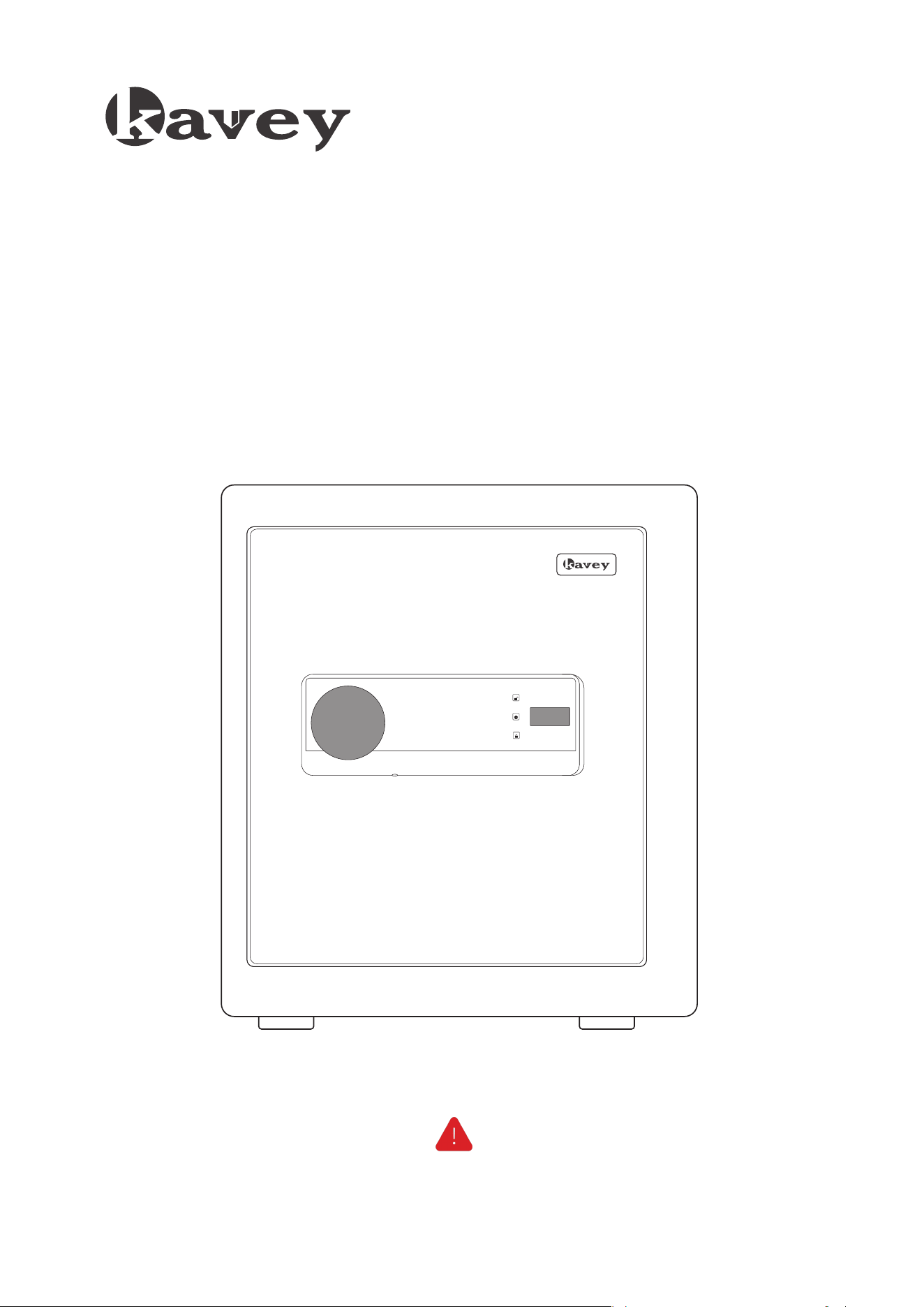
Instruction Manual
SAFE BOX
5
1
2
3
4
6 7
8
9 0
#
*
ERROR
SET
RIGHT
Please do not lock the emergency key and emergency battery box into the cabinet.
4
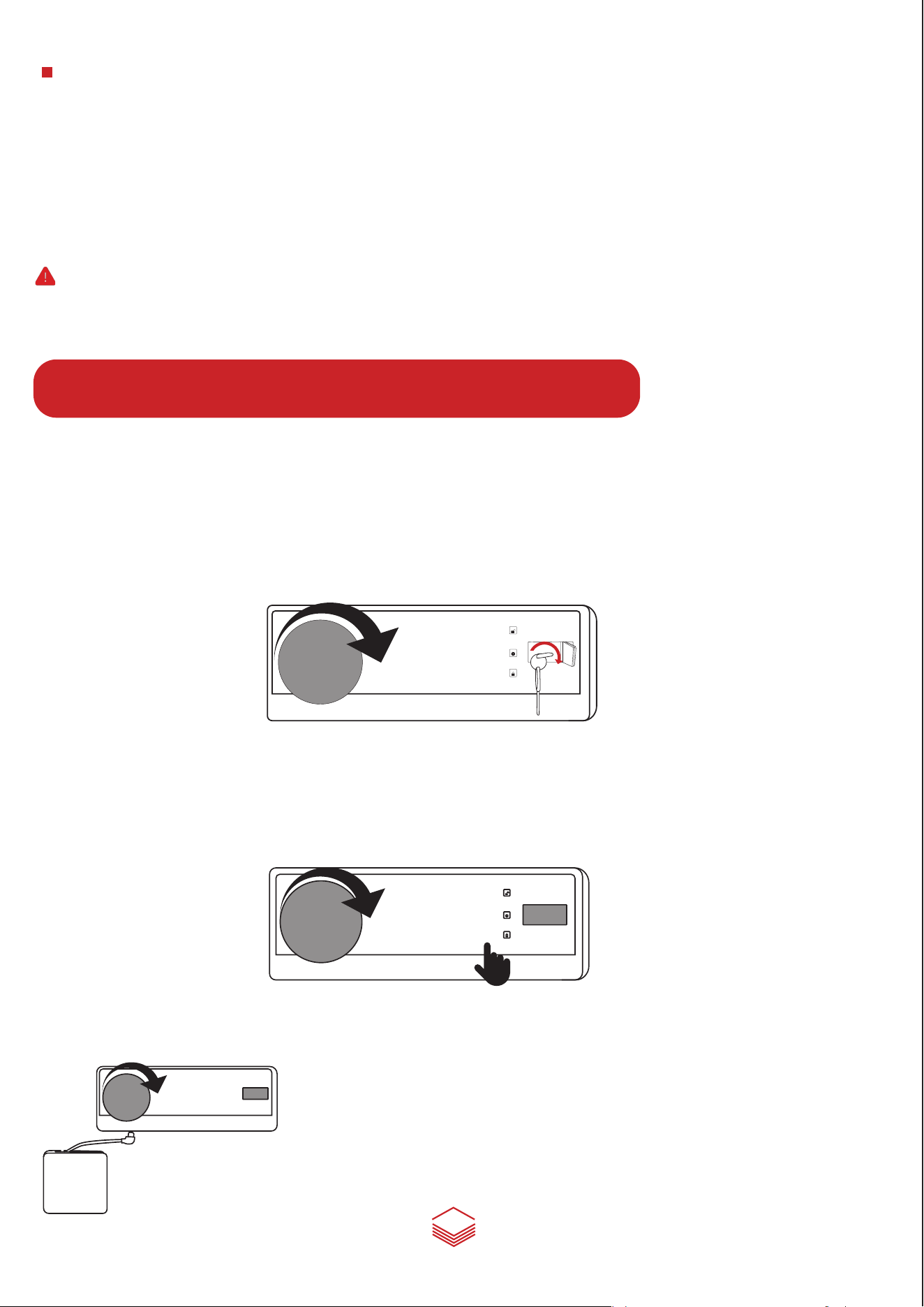
Three ways to open the door
1. The first unlocking method: Use the emergency key.
Insert the emergency key into the right keyhole, turn it to the right to the end. Then turn the
knob to the right to open the safe door(Suitable for unlocking or for the first time, forgetting the
password, or when the battery is dead).
2. The second unlocking method: Use the keyboard password.
After installing the battery, press the "#" key, enter your password and then press the "#" key,
the screen displays "RIGHT", Then turn the knob to the right to open the door.
1
2
3
4
6 7
8
9 0
#
*
5
ERROR
SET
RIGHT
3. The third unlocking method: Use the emergency battery box + password.
Dual Alarm System
Under-voltage warning
When the voltage is around 4.8V, after opening the door, the buzzer "beep" will ring 9 times alarm, reminding
the user that the battery power is low and the user needs to repalce the battery.
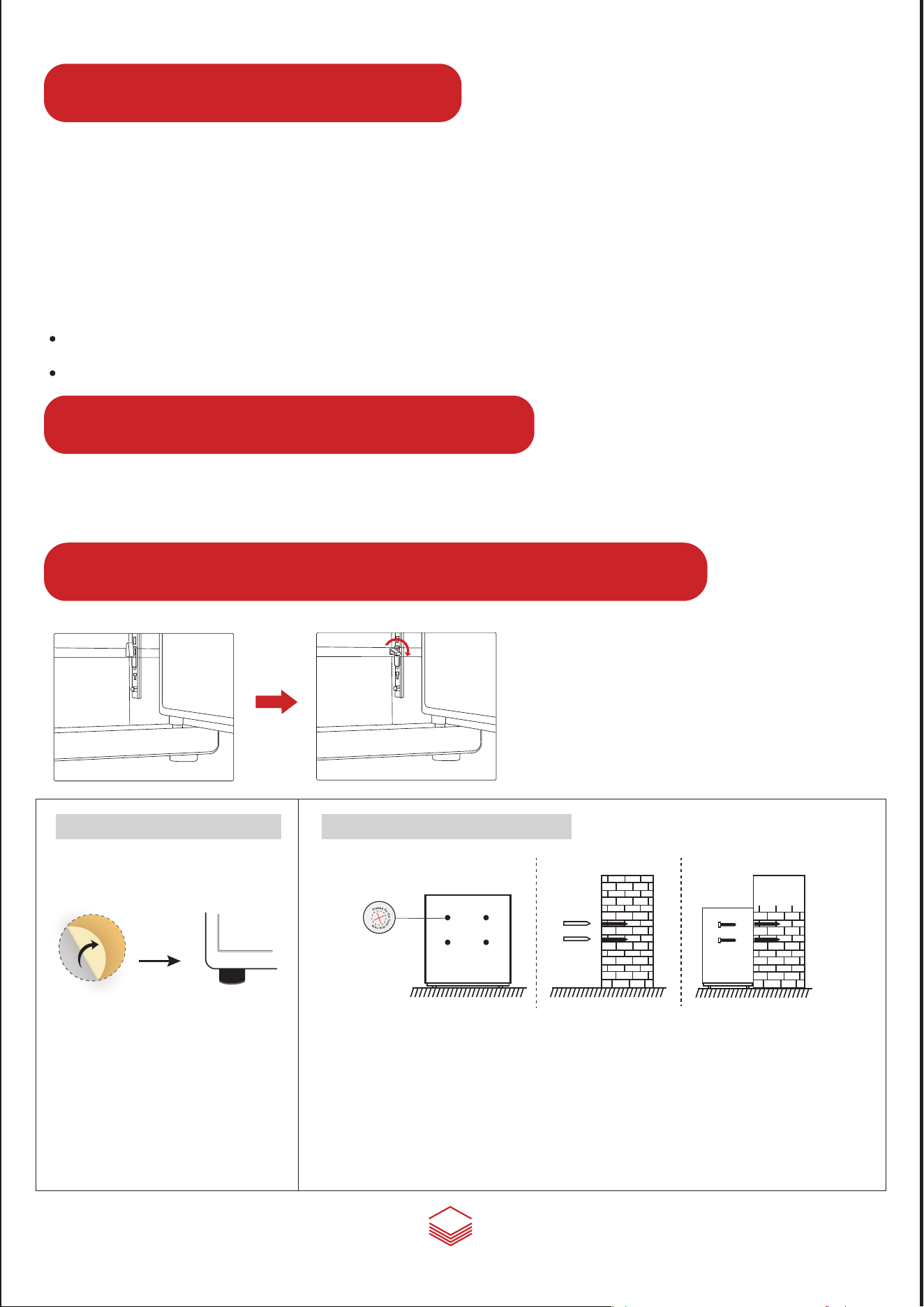
How to use the adjustable shelf
Turn the fastener clockwise and pull out the
fastener horizontally, you can adjust the position
of the shelf or take out the shelf according to your
needs.
5
1
2
3
4
6 7
8
9 0
#
*
5
ERROR
SET
RIGHT
1
2
3
4
6 7
8
9 0
#
*
5
OPEN
For the password Ⅱ, press "#" and enter ‘00’, then press the setting button, the buzzer "di" will sound, the screen
will display "ERROR" . (The buzzer will make the "di di" sound when anyone of the buttons is pressed during the
second password setting process)
① Enter your passwordⅡ, and press "#".
② Repeat the password, then press "#" to confirm.
③ The screen will display "RIGHT" indicate success.
2. Please verity the passwords after done the passworlds setting, and lock the door after verification.
Set Password Ⅱ
1. A single "di" sound indicating that the password has been set successfully, "di di di" sounds indicate
that the user does not enter the same password, please repeat the procedures.
Tip:
When the safe box’s battery is too low to open the door, insert
4AA batteries in the emergency battery box, plug the emergency
power cord into the emergency power jack on the bottom edge
of the panel, then enter the correct password to open the door.
1. Place the safe at the installation place. Mark the drilling spots on the wall from
the inside pre-drilled holes, then remove safe and drill four holes.
2. Put the expansion bolts into the drilled holes, take the expansion bolt out of the
sleeves, then place the safe and align the pre-drilled holes with drilled holes, and
insert the expansion bolts into its sleeves from inside of the safe.
How to install foot mat?
1. Remove the stickers of the four
foot mats
2. Install the four foot mats on the
bottom of the safe
How to mount the safe?
2. In standby state, press the "9" button, all the lights are on at the same time, and then a beep of "di" , the
Vibration alarm mode is turned on. If the box is shaken or violent hit, it will give an alarm immediately, at this
point, enter the correct password to stop the alarm.
When power on, the system default for alarm is off.
When the door is opened, the alarm is turned off and needs to be turned on again.
1. After 3 consecutive time of wrong code, your safe will activate the alarm system, the alarm will sound for
one minute, then enter the correct password and the alarm will be cancelled. If you want to turn off the
alarm immediately, you need to open the safe with the emergency key, and then remove the battery.
1
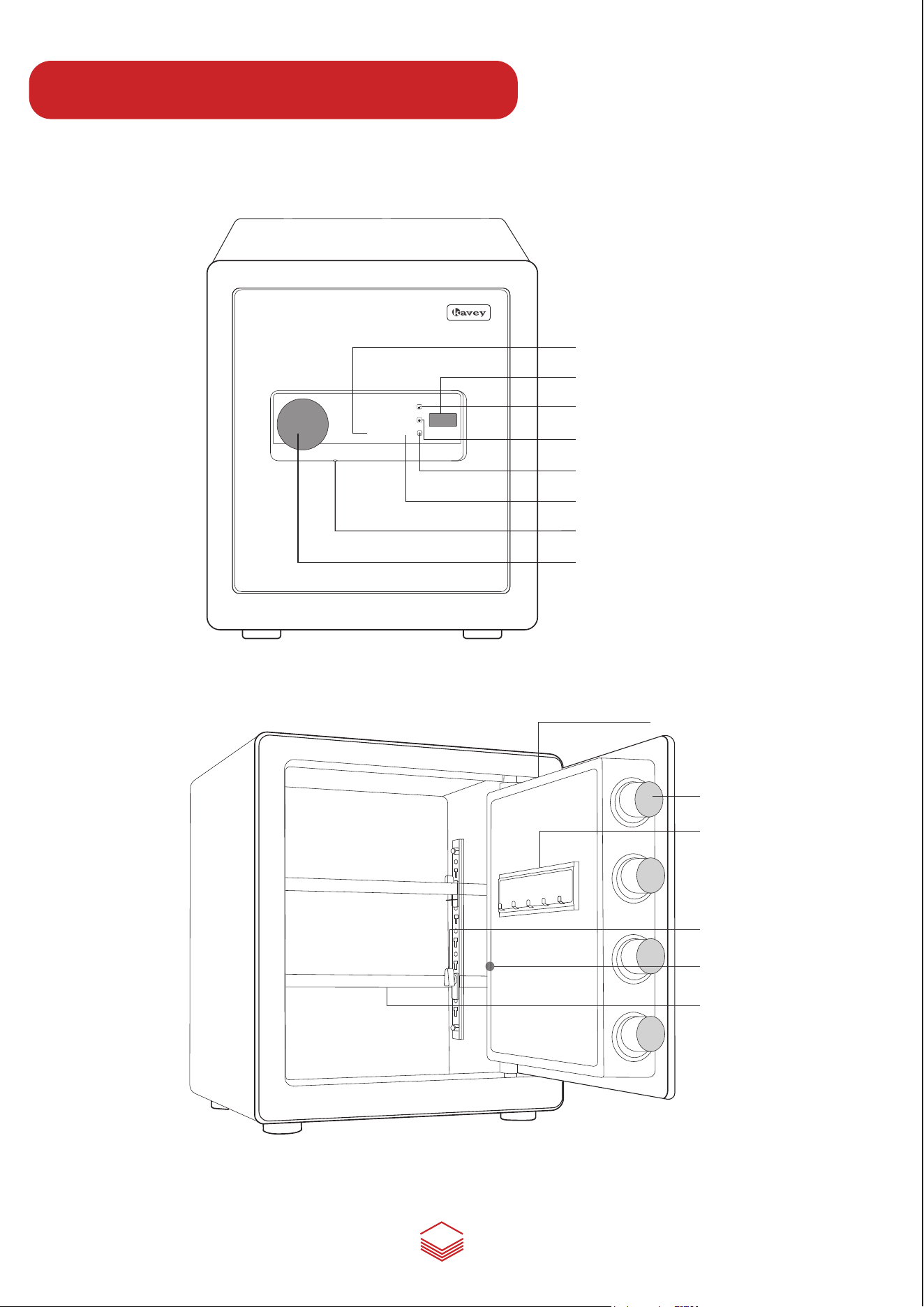
Component Description
5
1
2
3
4
6 7
8
9 0
#
*
ERROR
SET
RIGHT
Knob
Emergency power jack
COnfirming button(#)
Emergency keyhole cover
RIGHT
SET
ERROR
The delete key(*)
Setting button
Shelf
Locking bolt
Key Hook
Internal battery case
Fastener
OPEN
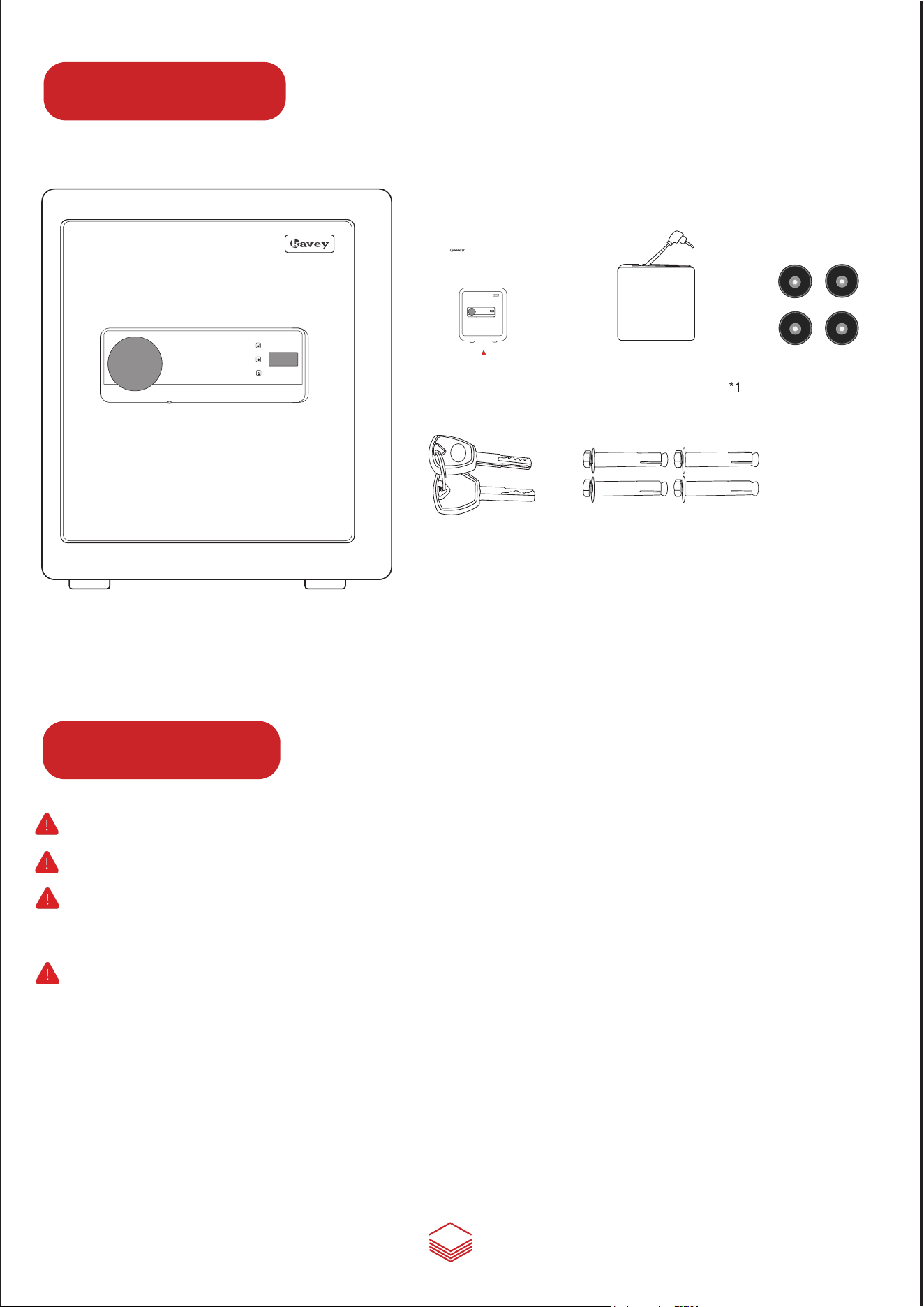
Emergency battery box*1
Expansion screws*4
2
Parts List
5
1
2
3
4
6 7
8
9 0
#
*
ERROR
SET
RIGHT
Instruction Manual
SAFE BOX
5
1
2
3
4
6 7
8
9 0
#
*
ERROR
SET
RIGHT
Safe box *1
Quick start guide*1
Emergency key*2
Warnings
1. Do not lock the emergency key or emergency battery box into the cabinet.
2. The initial password are "123456" and "654321", both need to be modified.
3. lf the safe box is not used for a long time, the battery should be removed to
prevent leakage of liquid from damaging the electronic system.
4. Purchase 4 AA batteries in advance, this safe does not contain batteries.
Foot mat*4
①
②
3
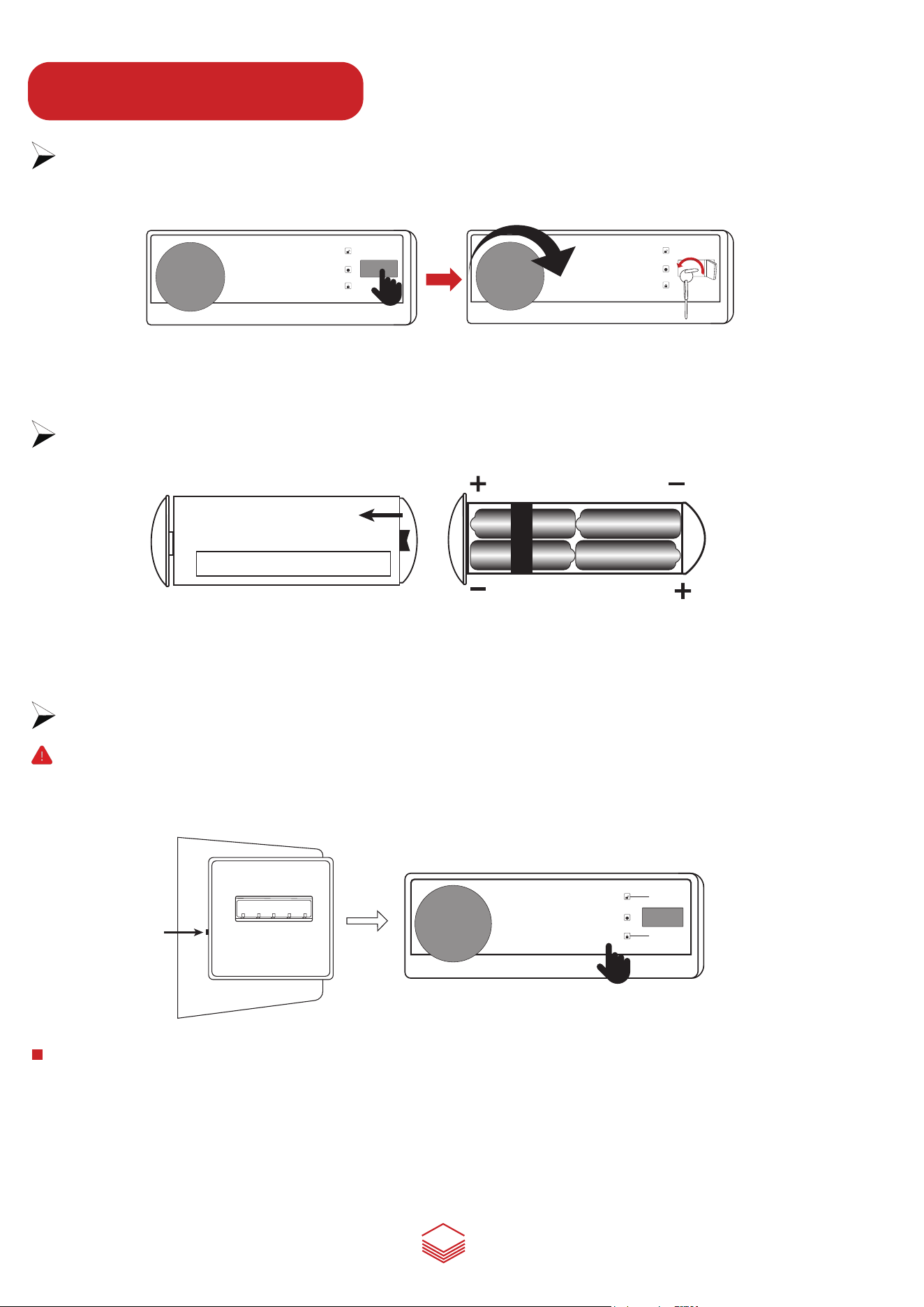
Step1 Open the safe box for the first time
Press the right edge of the emergency keyhole cover, insert the emergency key, and turn it 90°counterclockwise,
then turn the handle clockwise to open the door successfully for the first time
Step2 Insert the battery
Remove the internal battery case cover and install the 4 AA 1.5 Volt alkaline batteries, the system will power on.
(Note: Rechargeable battery is not recommended as it may destroy safe box’s internal electronic components)
Step3 Set the digital password
Note: 1. The user can set two independent passwords for the lock.
2. The initial password are "123456" and "654321", both need to be modified.
3. The password consists of a minimum 1 number and maximum 8 numbers.
1
2
3
4
6 7
8
9 0
#
*
5
ERROR
SET
RIGHT
To set the passwordⅠ, the door must be opened first, then press the setting button on the inner side of the
door. Buzzer "di" will sound, the screen will display "ERROR".
① Then enter your passwordⅠ, and press "#".
② Repeat the password, then press "#" to confirm.
③ The screen will display "RIGHT" indicate success.
1
2
3
4
6 7
8
9 0
#
*
5
ERROR
SET
RIGHT
System Setting
1
2
3
4
6 7
8
9 0
#
*
5
ERROR
SET
RIGHT
Set Password Ⅰ
Please do not lock the emergency key and emergency battery box into the cabinet.
1
Component Description
5
1
2
3
4
6 7
8
9 0
#
*
ERROR
SET
RIGHT
Knob
Emergency power jack
COnfirming button(#)
Emergency keyhole cover
RIGHT
SET
ERROR
The delete key(*)
Setting button
Shelf
Locking bolt
Key Hook
Internal battery case
Fastener
OPEN
Emergency battery box*1
Expansion screws*4
2
Parts List
5
1
2
3
4
6 7
8
9 0
#
*
ERROR
SET
RIGHT
Instruction Manual
SAFE BOX
5
1
2
3
4
6 7
8
9 0
#
*
ERROR
SET
RIGHT
Safe box *1
Quick start guide*1
Emergency key*2
Warnings
1. Do not lock the emergency key or emergency battery box into the cabinet.
2. The initial password are "123456" and "654321", both need to be modified.
3. lf the safe box is not used for a long time, the battery should be removed to
prevent leakage of liquid from damaging the electronic system.
4. Purchase 4 AA batteries in advance, this safe does not contain batteries.
Foot mat*4
①
②
3
Step1 Open the safe box for the first time
Press the right edge of the emergency keyhole cover, insert the emergency key, and turn it 90°counterclockwise,
then turn the handle clockwise to open the door successfully for the first time
Step2 Insert the battery
Remove the internal battery case cover and install the 4 AA 1.5 Volt alkaline batteries, the system will power on.
(Note: Rechargeable battery is not recommended as it may destroy safe box’s internal electronic components)
Step3 Set the digital password
Note: 1. The user can set two independent passwords for the lock.
2. The initial password are "123456" and "654321", both need to be modified.
3. The password consists of a minimum 1 number and maximum 8 numbers.
1
2
3
4
6 7
8
9 0
#
*
5
ERROR
SET
RIGHT
To set the passwordⅠ, the door must be opened first, then press the setting button on the inner side of the
door. Buzzer "di" will sound, the screen will display "ERROR".
① Then enter your passwordⅠ, and press "#".
② Repeat the password, then press "#" to confirm.
③ The screen will display "RIGHT" indicate success.
1
2
3
4
6 7
8
9 0
#
*
5
ERROR
SET
RIGHT
System Setting
1
2
3
4
6 7
8
9 0
#
*
5
ERROR
SET
RIGHT
Set Password Ⅰ
Please do not lock the emergency key and emergency battery box into the cabinet.
1
Component Description
5
1
2
3
4
6 7
8
9 0
#
*
ERROR
SET
RIGHT
Knob
Emergency power jack
COnfirming button(#)
Emergency keyhole cover
RIGHT
SET
ERROR
The delete key(*)
Setting button
Shelf
Locking bolt
Key Hook
Internal battery case
Fastener
OPEN
Emergency battery box*1
Expansion screws*4
2
Parts List
5
1
2
3
4
6 7
8
9 0
#
*
ERROR
SET
RIGHT
Instruction Manual
SAFE BOX
5
1
2
3
4
6 7
8
9 0
#
*
ERROR
SET
RIGHT
Safe box *1
Quick start guide*1
Emergency key*2
Warnings
1. Do not lock the emergency key or emergency battery box into the cabinet.
2. The initial password are "123456" and "654321", both need to be modified.
3. lf the safe box is not used for a long time, the battery should be removed to
prevent leakage of liquid from damaging the electronic system.
4. Purchase 4 AA batteries in advance, this safe does not contain batteries.
Foot mat*4
①
②
3
Step1 Open the safe box for the first time
Press the right edge of the emergency keyhole cover, insert the emergency key, and turn it 90°counterclockwise,
then turn the handle clockwise to open the door successfully for the first time
Step2 Insert the battery
Remove the internal battery case cover and install the 4 AA 1.5 Volt alkaline batteries, the system will power on.
(Note: Rechargeable battery is not recommended as it may destroy safe box’s internal electronic components)
Step3 Set the digital password
Note: 1. The user can set two independent passwords for the lock.
2. The initial password are "123456" and "654321", both need to be modified.
3. The password consists of a minimum 1 number and maximum 8 numbers.
1
2
3
4
6 7
8
9 0
#
*
5
ERROR
SET
RIGHT
To set the passwordⅠ, the door must be opened first, then press the setting button on the inner side of the
door. Buzzer "di" will sound, the screen will display "ERROR".
① Then enter your passwordⅠ, and press "#".
② Repeat the password, then press "#" to confirm.
③ The screen will display "RIGHT" indicate success.
1
2
3
4
6 7
8
9 0
#
*
5
ERROR
SET
RIGHT
System Setting
1
2
3
4
6 7
8
9 0
#
*
5
ERROR
SET
RIGHT
Set Password Ⅰ
Please do not lock the emergency key and emergency battery box into the cabinet.
Instruction Manual
SAFE BOX
5
1
2
3
4
6 7
8
9 0
#
*
ERROR
SET
RIGHT
Please do not lock the emergency key and emergency battery box into the cabinet.
4
Three ways to open the door
1. The first unlocking method: Use the emergency key.
Insert the emergency key into the right keyhole, turn it to the right to the end. Then turn the
knob to the right to open the safe door(Suitable for unlocking or for the first time, forgetting the
password, or when the battery is dead).
2. The second unlocking method: Use the keyboard password.
After installing the battery, press the "#" key, enter your password and then press the "#" key,
the screen displays "RIGHT", Then turn the knob to the right to open the door.
1
2
3
4
6 7
8
9 0
#
*
5
ERROR
SET
RIGHT
3. The third unlocking method: Use the emergency battery box + password.
Dual Alarm System
Under-voltage warning
When the voltage is around 4.8V, after opening the door, the buzzer "beep" will ring 9 times alarm, reminding
the user that the battery power is low and the user needs to repalce the battery.
How to use the adjustable shelf
Turn the fastener clockwise and pull out the
fastener horizontally, you can adjust the position
of the shelf or take out the shelf according to your
needs.
5
1
2
3
4
6 7
8
9 0
#
*
5
ERROR
SET
RIGHT
1
2
3
4
6 7
8
9 0
#
*
5
OPEN
For the password Ⅱ, press "#" and enter ‘00’, then press the setting button, the buzzer "di" will sound, the screen
will display "ERROR" . (The buzzer will make the "di di" sound when anyone of the buttons is pressed during the
second password setting process)
① Enter your passwordⅡ, and press "#".
② Repeat the password, then press "#" to confirm.
③ The screen will display "RIGHT" indicate success.
2. Please verity the passwords after done the passworlds setting, and lock the door after verification.
Set Password Ⅱ
1. A single "di" sound indicating that the password has been set successfully, "di di di" sounds indicate
that the user does not enter the same password, please repeat the procedures.
Tip:
When the safe box’s battery is too low to open the door, insert
4AA batteries in the emergency battery box, plug the emergency
power cord into the emergency power jack on the bottom edge
of the panel, then enter the correct password to open the door.
1. Place the safe at the installation place. Mark the drilling spots on the wall from
the inside pre-drilled holes, then remove safe and drill four holes.
2. Put the expansion bolts into the drilled holes, take the expansion bolt out of the
sleeves, then place the safe and align the pre-drilled holes with drilled holes, and
insert the expansion bolts into its sleeves from inside of the safe.
How to install foot mat?
1. Remove the stickers of the four
foot mats
2. Install the four foot mats on the
bottom of the safe
How to mount the safe?
2. In standby state, press the "9" button, all the lights are on at the same time, and then a beep of "di" , the
Vibration alarm mode is turned on. If the box is shaken or violent hit, it will give an alarm immediately, at this
point, enter the correct password to stop the alarm.
When power on, the system default for alarm is off.
When the door is opened, the alarm is turned off and needs to be turned on again.
1. After 3 consecutive time of wrong code, your safe will activate the alarm system, the alarm will sound for
one minute, then enter the correct password and the alarm will be cancelled. If you want to turn off the
alarm immediately, you need to open the safe with the emergency key, and then remove the battery.
Instruction Manual
SAFE BOX
5
1
2
3
4
6 7
8
9 0
#
*
ERROR
SET
RIGHT
Please do not lock the emergency key and emergency battery box into the cabinet.
4
Three ways to open the door
1. The first unlocking method: Use the emergency key.
Insert the emergency key into the right keyhole, turn it to the right to the end. Then turn the
knob to the right to open the safe door(Suitable for unlocking or for the first time, forgetting the
password, or when the battery is dead).
2. The second unlocking method: Use the keyboard password.
After installing the battery, press the "#" key, enter your password and then press the "#" key,
the screen displays "RIGHT", Then turn the knob to the right to open the door.
1
2
3
4
6 7
8
9 0
#
*
5
ERROR
SET
RIGHT
3. The third unlocking method: Use the emergency battery box + password.
Dual Alarm System
Under-voltage warning
When the voltage is around 4.8V, after opening the door, the buzzer "beep" will ring 9 times alarm, reminding
the user that the battery power is low and the user needs to repalce the battery.
How to use the adjustable shelf
Turn the fastener clockwise and pull out the
fastener horizontally, you can adjust the position
of the shelf or take out the shelf according to your
needs.
5
1
2
3
4
6 7
8
9 0
#
*
5
ERROR
SET
RIGHT
1
2
3
4
6 7
8
9 0
#
*
5
OPEN
For the password Ⅱ, press "#" and enter ‘00’, then press the setting button, the buzzer "di" will sound, the screen
will display "ERROR" . (The buzzer will make the "di di" sound when anyone of the buttons is pressed during the
second password setting process)
① Enter your passwordⅡ, and press "#".
② Repeat the password, then press "#" to confirm.
③ The screen will display "RIGHT" indicate success.
2. Please verity the passwords after done the passworlds setting, and lock the door after verification.
Set Password Ⅱ
1. A single "di" sound indicating that the password has been set successfully, "di di di" sounds indicate
that the user does not enter the same password, please repeat the procedures.
Tip:
When the safe box’s battery is too low to open the door, insert
4AA batteries in the emergency battery box, plug the emergency
power cord into the emergency power jack on the bottom edge
of the panel, then enter the correct password to open the door.
1. Place the safe at the installation place. Mark the drilling spots on the wall from
the inside pre-drilled holes, then remove safe and drill four holes.
2. Put the expansion bolts into the drilled holes, take the expansion bolt out of the
sleeves, then place the safe and align the pre-drilled holes with drilled holes, and
insert the expansion bolts into its sleeves from inside of the safe.
How to install foot mat?
1. Remove the stickers of the four
foot mats
2. Install the four foot mats on the
bottom of the safe
How to mount the safe?
2. In standby state, press the "9" button, all the lights are on at the same time, and then a beep of "di" , the
Vibration alarm mode is turned on. If the box is shaken or violent hit, it will give an alarm immediately, at this
point, enter the correct password to stop the alarm.
When power on, the system default for alarm is off.
When the door is opened, the alarm is turned off and needs to be turned on again.
1. After 3 consecutive time of wrong code, your safe will activate the alarm system, the alarm will sound for
one minute, then enter the correct password and the alarm will be cancelled. If you want to turn off the
alarm immediately, you need to open the safe with the emergency key, and then remove the battery.