User Manual

2
ENGLISH
IMPORTANT SAFETY INSTRUCTIONS
This electrical appliance must always be used according to the following safety instructions. Save these
instructions as this manual contains important safety and operating information. A copy of the user manual
can also be found on our website at https://eyevac.com/faq/#manuals. When using an electrical appliance,
basic precaution should always be followed, including the following:
READ ALL INSTRUCTIONS CAREFULLY BEFORE USING THIS APPLIANCE:
To reduce the risk of fire, electric shock or injury:
WARNING! To reduce the risk of electric shock, do not use on wet surfaces. Do not expose to rain. Store
indoors
1. Always depress the Power Button to the Off position before unplugging EyeVac Home.
2. Always unplug the appliance before cleaning or servicing it. Do not unplug by pulling the cord; to unplug,
grasp the plug, not the cord.
3. Do not let the EyeVac Home be used as a toy. Close attention is necessary when used near children. Do not
use in Auto Mode or leave appliance plugged in near children, infants or small animals.
4. Do not pull or carry the appliance by the cord. Do not run the appliance over the cord, close a door on the
cord, or pull the cord around sharp edges or corners. Keep the cord away from heated surfaces.
5. Do not use the appliance if the cord or plug is damaged.
6. Do not handle the plug or appliance with wet hands or use on wet surfaces.
7. Do not expose to rain.
8. Do not use appliance to dispose of water or damp materials such as mud, tile grout, plaster filler, or caulking.
Do not use to pick up any liquid or wet objects.
9. Do not use appliance to vacuum up flammable or combustible liquids, such as gasoline. Do not use in areas
where these liquids may be present.
10. Do not use this appliance to vacuum up burning or smoking materials, such as cigarettes, matches or hot
ashes.
11. Keep hair, loose clothing, and all parts of the body, especially fingers, away from openings and moving parts.
12. Do not put any objects into appliance openings or use with any openings blocked or plugged.
13. Do not use this appliance to pick up hard or sharp objects or other large surface litter. Pick these up by hand
before vacuuming.
14. Use the appliance only as described in this User Manual.
15. Turn EyeVac off and unplug before removing or replacing the Canister or Filter.
16. Turn appliance off and unplug before cleaning or maintenance.
17. If the appliance is not working as it should, visit https://eyevac.com/connect/ and fill out the “Service Request”
form. Do NOT attempt to repair, as it will invalidate your warranty.
18. When cleaning the outside of the appliance, wipe with a damp cloth to reduce the static electricity on the
outer surface.
19. Other than cleaning the Pre-Motor Filter, Exhaust Filter and Vent Filter, replacing them as described in this
Owner Manual, this EyeVac Home is not user serviceable. There are no user serviceable parts inside the unit.
Servicing is required by JPaulJones, LP to avoid damage to internal components.
20. Do not operate without all Filters, Canister, and Lid in properly in place.
21. EyeVac Home is appropriate and warrantied for HOME USE ONLY.
3
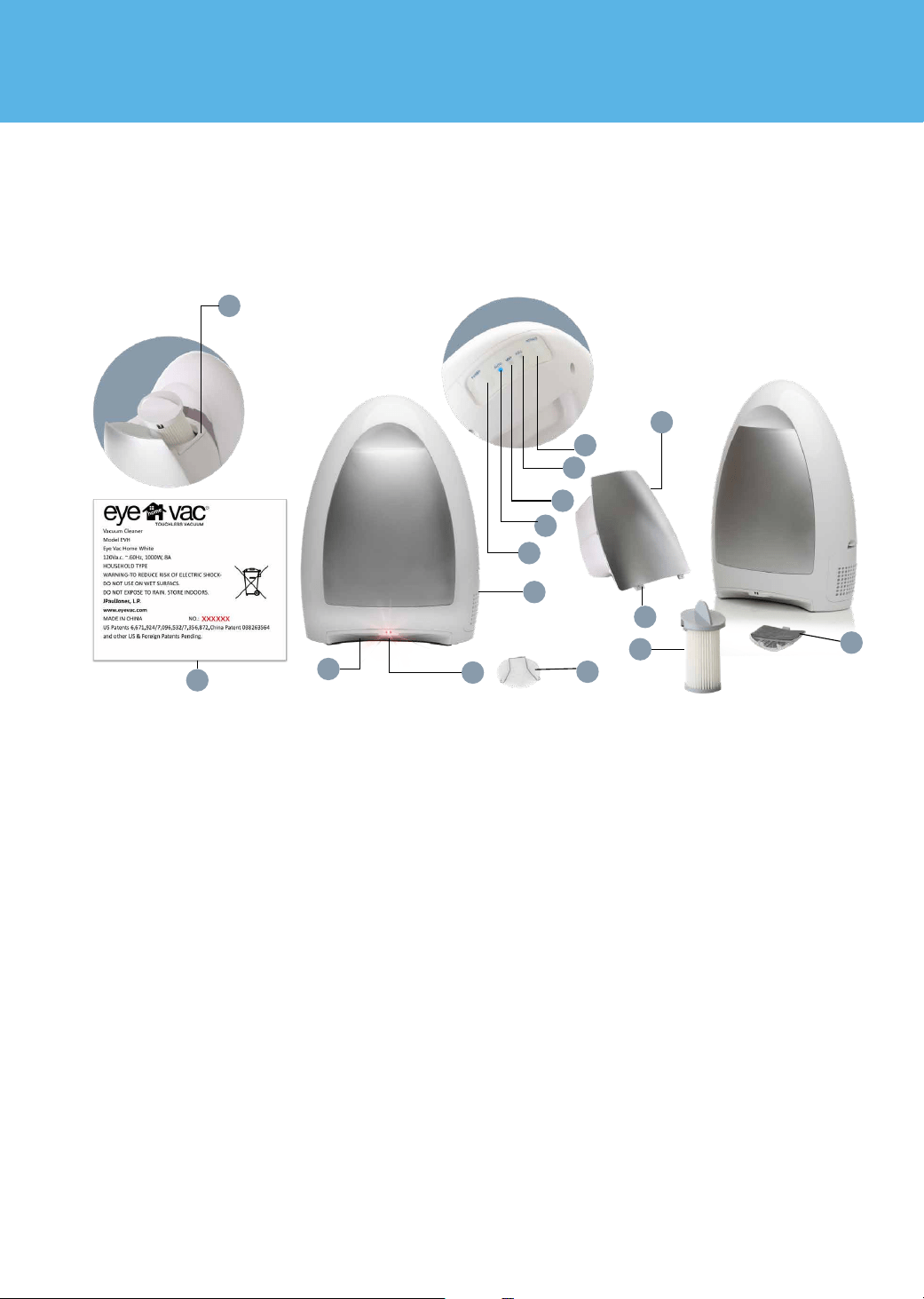
1. Canister Lid
2. Inlet
3. Sensors
4. Exhaust Filter Housing
5. Power
6. Auto Mode
7. Manual Mode
8. Canister Full Indicator
9. Manual Activation
10. Canister Tabs
11. Canister
12. Pre-Motor Filter
13. Exhaust Filter
14. Vent Filter
15. Serial Number (located on back of unit)
DESCRIPTION OF EYEVAC HOME
Save These Instructions
For Household Use Only
1
2
3
4
5
6
7
8
9
10
11
12
14
13
15

4
BEFORE USING FOR THE FIRST TIME
1. Remove EyeVac Home from packaging and set upright on any non-carpeted flooring. Remove packing
tape from Exhaust Filter on the side of the unit.
2. Plug unit into any standard 120V(US) AC electrical outlet.
NOTE: EYEVAC HOME CANNOT BE USED WITH A CONVERTER OR ADAPTER
3. Depress the Power Button to the Manual position for manual operation or to the Auto position for
automated use. The status Indicator Light will illuminate when the Power Button is in either of these
positions. Your EyeVac Home is now ready for use.
4. EyeVac Home is appropriate and warrantied for HOME USE ONLY.
5
OPERATING THE VACUUM: INSTRUCTIONS
NOTE: EYEVAC HOME cannot operate EYEVAC HOME when in the OFF position, or when
filters/canister is out of alignment.
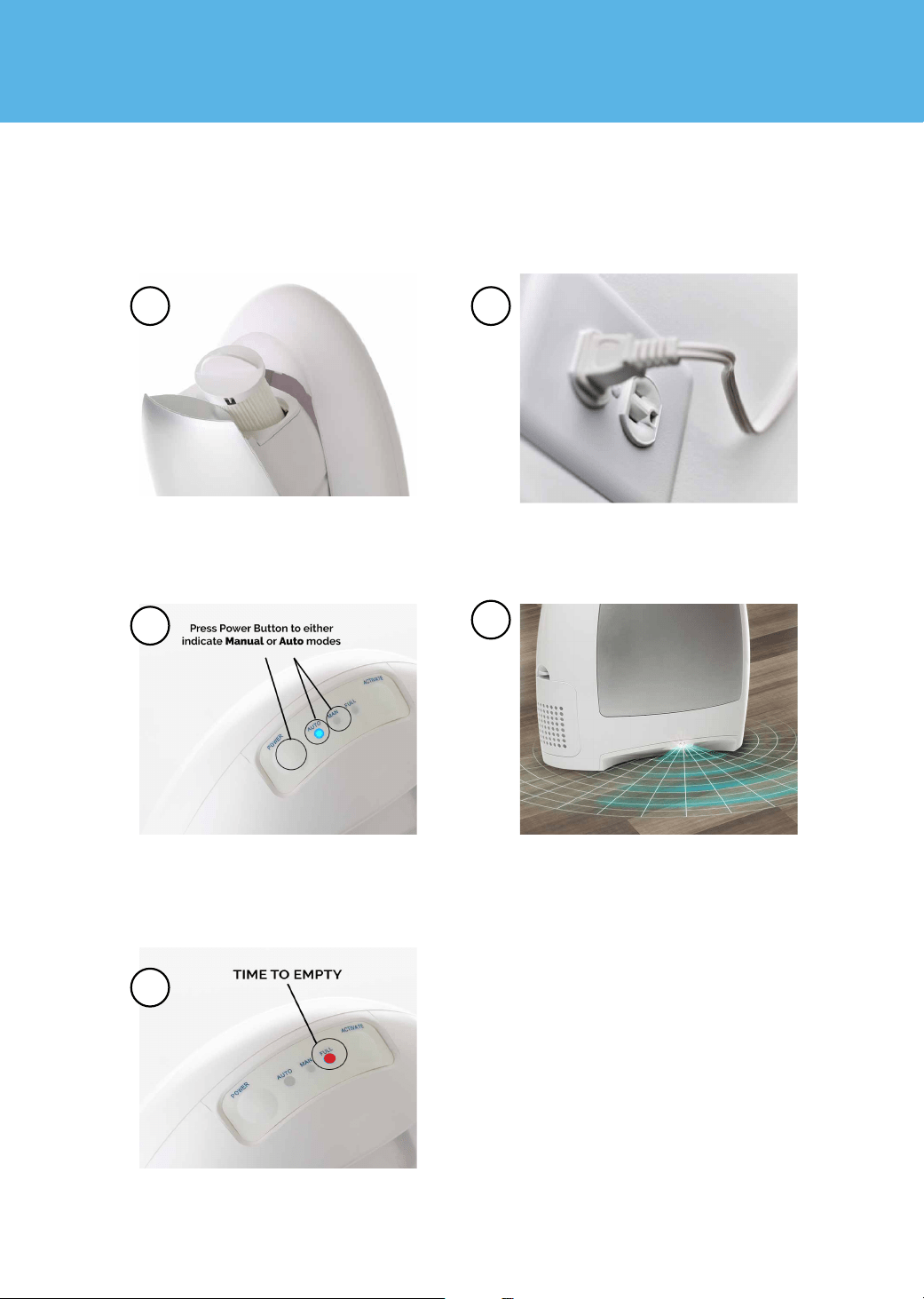
Open the Canister and ensure the Pre-
Motor Filter is aligned properly locked
into place and flush with the Canister Lid.
Thenclose the canister.
Press Power Button located on top, back
of unit. A blue Indicator light illuminates to
show EyeVac Home is On. Press Power Button
to cycle between Auto and Manual Modes.
As debris accumulates, the Canister will need
to be emptied. The Canister Indicator Light
lets you know when its time to empty.
Sweep debris over to the EyeVac Home. If in
Auto Mode, the sensor will detect sweeping
motion and automatically vacuum debris. If
in Manual Mode, simply press the Activate
Button, located on the control panel, to
manually activate.
Plug in your EyeVac Home in the desired
location.
1
3
5
2
4

6
USER MAINTENANCE INSTRUCTIONS
CLEANING THE PRE-MOTOR FILTER
1. To empty the EyeVac Home Canister, press the Power Button to the Off position and unplug the unit.
2. Pull the Canister outward from the front of the Bin Cavity. Grasp the Canister Grip firmly and lift it out and
away from the EyeVac Home Main Unit.
3. Holding the Canister firmly with one hand, grasp the Canister Lid Handle with the other hand and pull
the Lid straight up and out to remove.
4. Turn the Canister upside down over a trash can. Make sure you empty all dirt and debris from inside and
below the Bin. To ensure that all the dirt spills out, tap the side of the Canister gently against the edge of
the trash can. Re-attach the Canister Lid to the top of the Canister.
5. Clean Sensors, Inlet area, Canister, Canister Lid and Canister Cavity with a damp rag or towel. Do not
use soap or alcohol to clean sensors.
6. After all parts are fully dried, insert the assembled Canister with Lid fitted snugly into position and Pre-
Motor Filter locked into place and flush with Canister Lid. The 2 grooves in the bottom of the Bin fit easily
over the rod in the front of the unit. Grasp the Canister Grip and lock the Canister back into position.
NOTE: Make sure all parts are completely dry before reassembly.
NOTE: Do not throw away the Canister Lid.
HEALTH TIP: If you suffer from allergies or asthma, take the Canister outdoors to empty. As you empty
the dirt into the trash can, gently tap the Canister against the side of the can to remove loose debris.
To maintain optimal performance, the Pre-Motor Filter will need cleaning whenever the suction is not
strong. The Pre-Motor Filter must be clean and free of elements, which might hinder the flow of air.
1. Press the Power Button to the Off position and unplug the unit.
2. Pull the Canister outward from the front of the Bin Cavity. Grasp the Canister Grip firmly and lift it out and
away from the EyeVac Home Main Unit. Locate the Pre-Motor Filter Handle.
3. Remove the Pre-Motor Filter by grasping the Filter Handle and turn counter-clockwise to the unlock
position. Pull Filter straight up and out of the top of the Canister. Rinse under running water to clean. If
needed a mild soap and soft bristled brush can also be used.
IMPORTANT! Dry thoroughly before use.
4. Slide the Pre-Motor Filter back into the top of the Canister. Rotate clockwise to the “lock” position. Put the
Canister back into place.
5. If a new Filter is needed, replace with standard filter cartridges. Make sure that it fits snugly in the
Filter Holder. Replacement Filters are available through the Customer Service Department.Housing
Replacement Filters are available through the Customer Service Department.
IMPORTANT! NEVER OPERATE THE EYEVAC HOME WITHOUT THE PRE-MOTOR FILTER PROPERLY IN
PLACE.

7
CLEANING THE EXHAUST FILTER
CLEANING THE VENT FILTER
CLEANING THE CANISTER
STORAGE
1. The Exhaust Filter slides up and out of its housing on the side of the unit.
2. Gently pull the Filter out of the Filter Holder.
3. Tap Filter gently against trash container to free and eliminate excess dirt and debris.
4. To clean the Filter, wash in mild soap and water; rinse and dry thoroughly before assembly
5. Slide the Exhaust Filter back into the unit with the Filter facing outwards.
1. Press the Power Button to the Off position and unplug the unit.
2. Remove the Canister carefully. The Vent Filter is located underneath it.
3. Gently squeeze spring inward and lift to remove spring. Gently lift and remove vent filter.
4. To clean the Filter, wash in mild soap and water; rinse and dry thoroughly before assembly.
5. Insert the Vent Filter back under the Spring to ensure it is secure.
The Canister should be washed periodically.
1. Wash the Bin in warm water using a mild soap. Avoid harsh or abrasive cleaners or sponges.
Rinse thoroughly.
TO AVOID DAMAGE, DO NOT PLACE CANISTER IN THE DISHWASHER.
2. Let it air dry. Make sure the Canister is completely dry before putting it back into the EyeVac Home.
3. Insert the assembled Canister following the instructions outlined in the User Maintenance Instructions
1. Unplug unit and clean Canister and all Filters before storing.
2. Store EyeVac Home indoors, in a clean, dry place.
3. Never store EyeVac Home while it is still plugged in. Never wrap cord tightly around the appliance, use
the Cord Storage area on the back of the EyeVac Home unit. Do not put any stress on the cord where it
enters the unit, as it could cause the cord to break.
WARNING! TO REDUCE THE RISK OF ELECTRIC SHOCK, DO NOT USE OUTDOORS OR ON WET SURFACES.
8
TROUBLESHOOTING
Problem
EyeVac Home will not turn On/
no power
Does not pick up debris
Suction not strong
Canister Indicator light is On
Sensor does not activate
Debris at Inlet before unit is
powered on
Status Indicator Light
blinking
1. Not firmly plugged in
2. Unit is in Off position
3. Pre-Motor Filter is not in
position
4. Broken switch
1. The inlet is blocked
2. Container is full
3. Debris may be too large
for inlet
1. Filters may be dirty
1. Canister is full
1. EyeVac Home is not in Auto-
Mode
1. EyeVac Home sensors have
been shut off for 30 seconds
which caused power to the
motor to be shut off
1. Press Power Button to the Off position
2. Clean path of inlet
3. Empty Canister
4. Clear large debris
1. Press Power Button to the Off position
2. Clean Pre-Motor, Exhaust Filters or Vent Filter
when needed
1. Press Power Button to Auto position
1. Press Power Button to the Manual position
2. Activate unit manually
1. Press Power Button to the Off position
2. Empty the Canister
3. Clean all filters
1. Press Power Button to the Off position
2. Check Pre-Motor Filter and Exhaust Filter to
ensure they are clean.
3. Clean sensors with warm water and Q-tip.
DO NOT USE ALCOHOL OR SOAP.
1. Plug in firmly
2. Press Power Button to Manual or Auto position
3. Ensure that Pre-Motor Filter is locked and flus
with Canister Lid
4. Remove Canister to check switch inside cavity
above where the Pre-Motor Filter is positioned.
If switch is broken or missing, fill out a “Service
Request Form” at EyeVac.com/connect.
Possible Cause Possible Solution
CORRECT DISPOSAL OF THIS PRODUCT
This marking indicates that this product should not be disposed with other household wastes. To prevent
possible harm to the environment or human health from uncontrolled waste disposal, recycle it responsibly
to promote the sustainable reuse of material resources. To return your used device, please use the return
and collection systems or contact the retailer where the product was purchased. They can take this
product for environmentally safe recycling. This appliance is a dry pick-up, Canister type vacuum cleaner for
household and indoor use. Also, it is a general-purpose vacuum cleaner, which can be used for hard floor
cleaning.

9
LIMITED WARRANTY
One-Year Limited Warranty. What is covered: JPaulJones, LP
TM
warrants to the first retail
purchaser of this EyeVac Home that should this product or any part be proved defective in
materials or workmanship from the date of proof of purchase for a period of one (1) year, then
it will be subject to the terms of this one-year limited warranty. Such defects will be replaced,
or credit issued at JPaulJones, LP’s option, without charge for parts or labor directly related to
the defect. Limitations and Exclusions: This warranty gives you specific legal rights and you
may also have other rights which vary from state to state. This warranty does not apply to any
cost incurred for removal or re-installation, or to any product or part thereof which has suffered
through normal wear and tear, alteration, improper installation, physical abuse, misuse, neglect
or accident. Nor does it cover defects caused by shipment to JPaulJones, LP or repair or service
of the product by anyone other than JPaulJones, LP. Damage resulting from an unforeseen
circumstance including but not limited to fire, flood, earthquake, and other natural causes will
be excluded. This Limited warranty is in lieu of all other warranties, express or implied either
in fact or by operations of law, statutory or otherwise, including, but not limited to any implied
warranty of merchantability or fitness for a particular use. JPaulJones, LP does not authorize
any other person to assume any liability beyond the warranty herein described. In no event,
whether based in contract or tort shall be liable for incidental, inconsequential, indirect, special
or punitive damages of any kind from the use of this product. In no event shall be liable for
damage in excess of the purchase price. EyeVac Home is not for commercial use.
For Warranty Service, submit a Service Request at http://eyevac.com/connect/ or contact:
JPaulJones, LP, 7500 Rialto Blvd., Bldg. 1, Suite 122, Austin, TX 78735 or call 512-485-3050.
©2014 JPaulJones, LP Intellectual Property. All rights reserved, JPaulJones, LP, JPaulJones,
LP logo and all other marks contained herein are trademarks of JPaulJones, LP Intellectual
Property and/ or JPaulJones, LP affiliated companies.
JPaulJones, LP
7500 Rialto Blvd, Bldg. 1 STE. 122
Austin, TX 78735
(512) 485-3050
For service and general inquiries please visit www.eyevac.com/connect