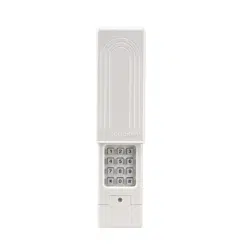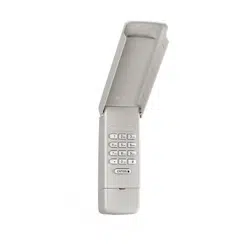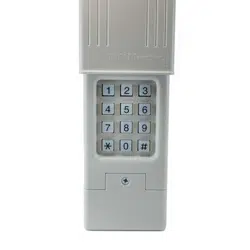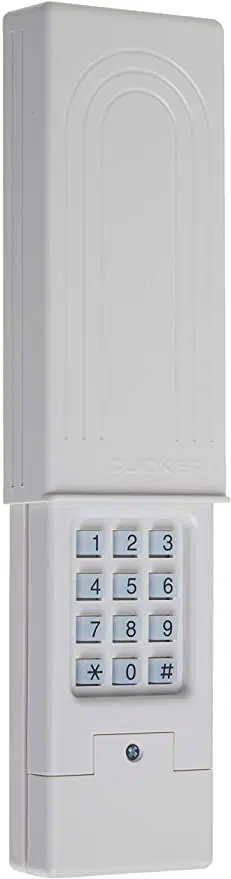
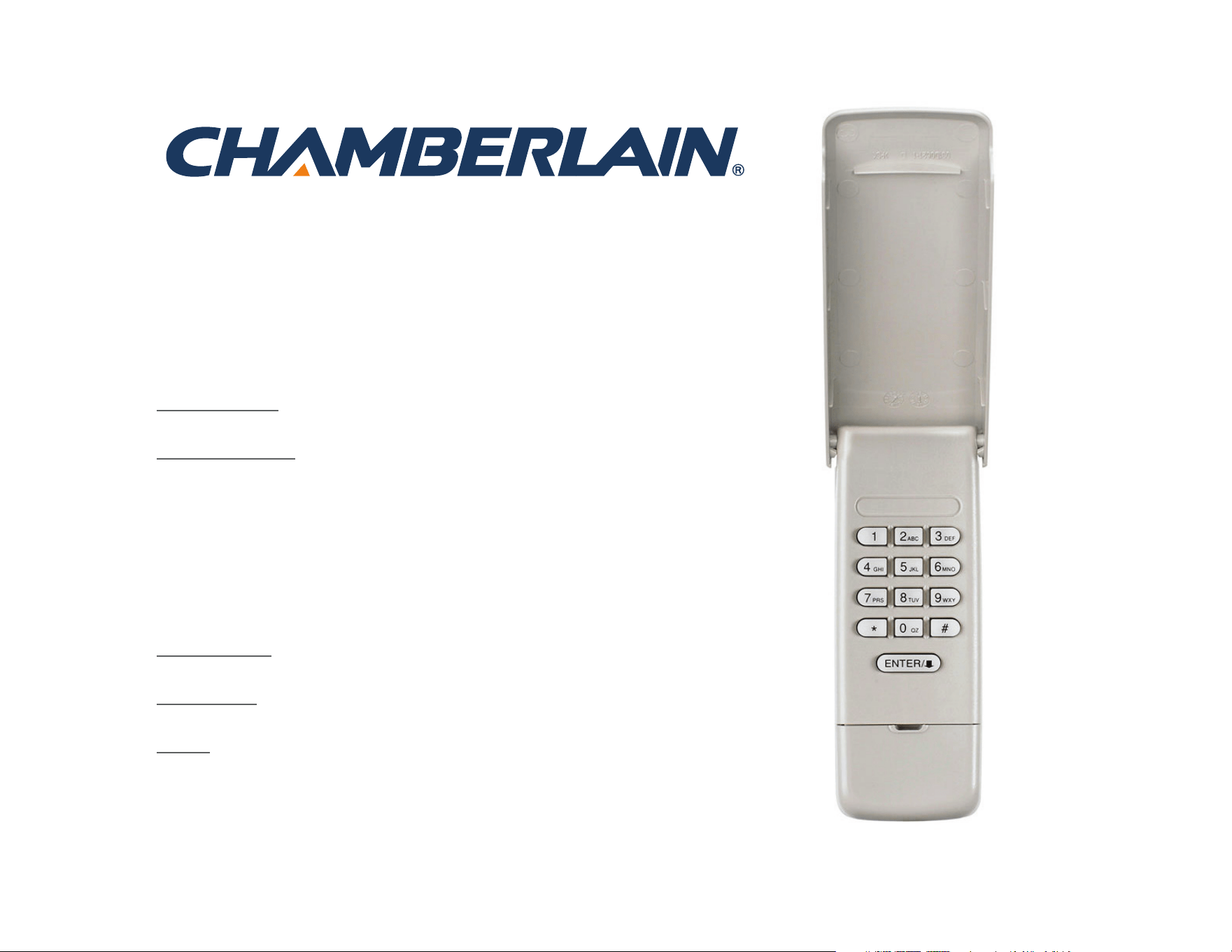
Wireless Keyless Entry
MODELS 940EV, 940EV-P2, 940EVC, AND 940EVC-P2
Introduction . . . . . . . . . . . . . 2
Programming . . . . . . . . . . . 3-6
Program PIN . . . . . . . . . . . . . . . . .3
Change an Existing PIN . . . . . . . . . .4
Program a Temporary PIN -
Number of Hours . . . . . . . . . . . . . .5
Program a Temporary PIN -
Number of Openings . . . . . . . . . . . .6
Installation . . . . . . . . . . . . . . 7
Operation . . . . . . . . . . . . . . . 8
FAQs . . . . . . . . . . . . . . . . . . 9
2
To prevent possible SERIOUS INJURY or DEATH from a moving gate
or garage door:
• Install Keyless Entry Control within sight of garage door, out of reach
of small children at a minimum height of 5 feet (1.5 m) above floors,
landings, steps or any other adjacent walking surface, and away from
ALL moving parts of door.
• ALWAYS keep remote controls out of reach of children. NEVER
permit children to operate, or play with remote controls.
• Activate gate or door ONLY when it can be seen clearly, is properly
adjusted, and there are no obstructions to door travel.
• ALWAYS keep gate or garage door in sight until completely closed.
NEVER permit anyone to cross path of moving gate or door.
For use with Chamberlain garage door openers manufactured after
January 1, 1993. The garage door opener activates when the 4-digit
Personal Identification Number (PIN) and ENTER button are pressed on
the Keyless Entry.
Install the battery and program the Keyless Entry prior to installation.
Make sure the garage door opener has a working light bulb because it
is a programming indicator.
Introduction
GETTING STARTED
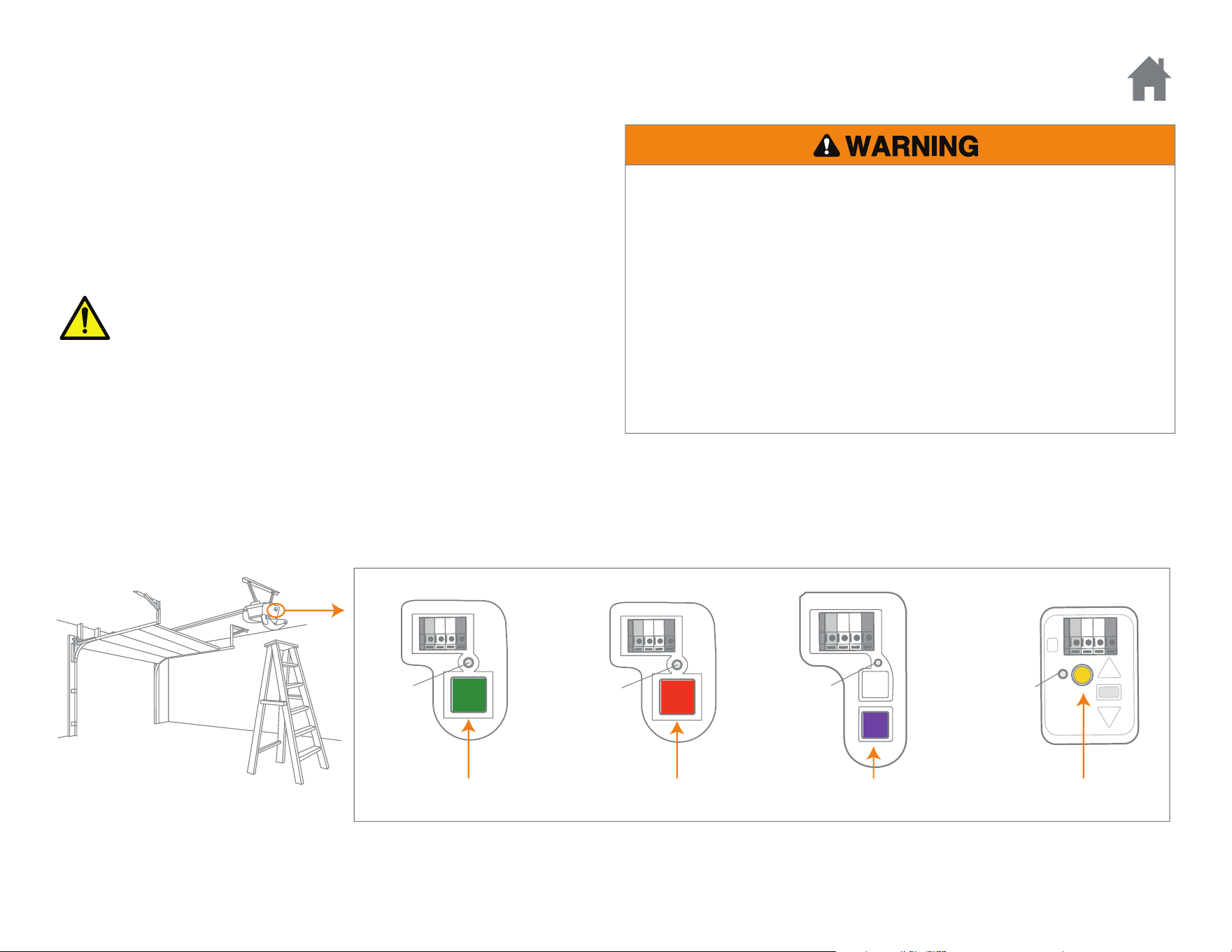
Locate the Learn button on the garage door opener. NOTE: Your garage door opener may look different.
Learn
LED
Learn
LED
OR OR
Learn
LED
Red/Orange Purple Yellow
Learn
LED
Green
OR
WARNING: This product can expose you to chemicals including
lead, which are known to the State of California to cause cancer or
birth defects or other reproductive harm. For more information go
to www.P65Warnings.ca.gov
3
PROGRAM PIN
To program the Keyless Entry to more than one garage door opener,
repeat the programming steps using a new PIN for each additional
garage door opener.
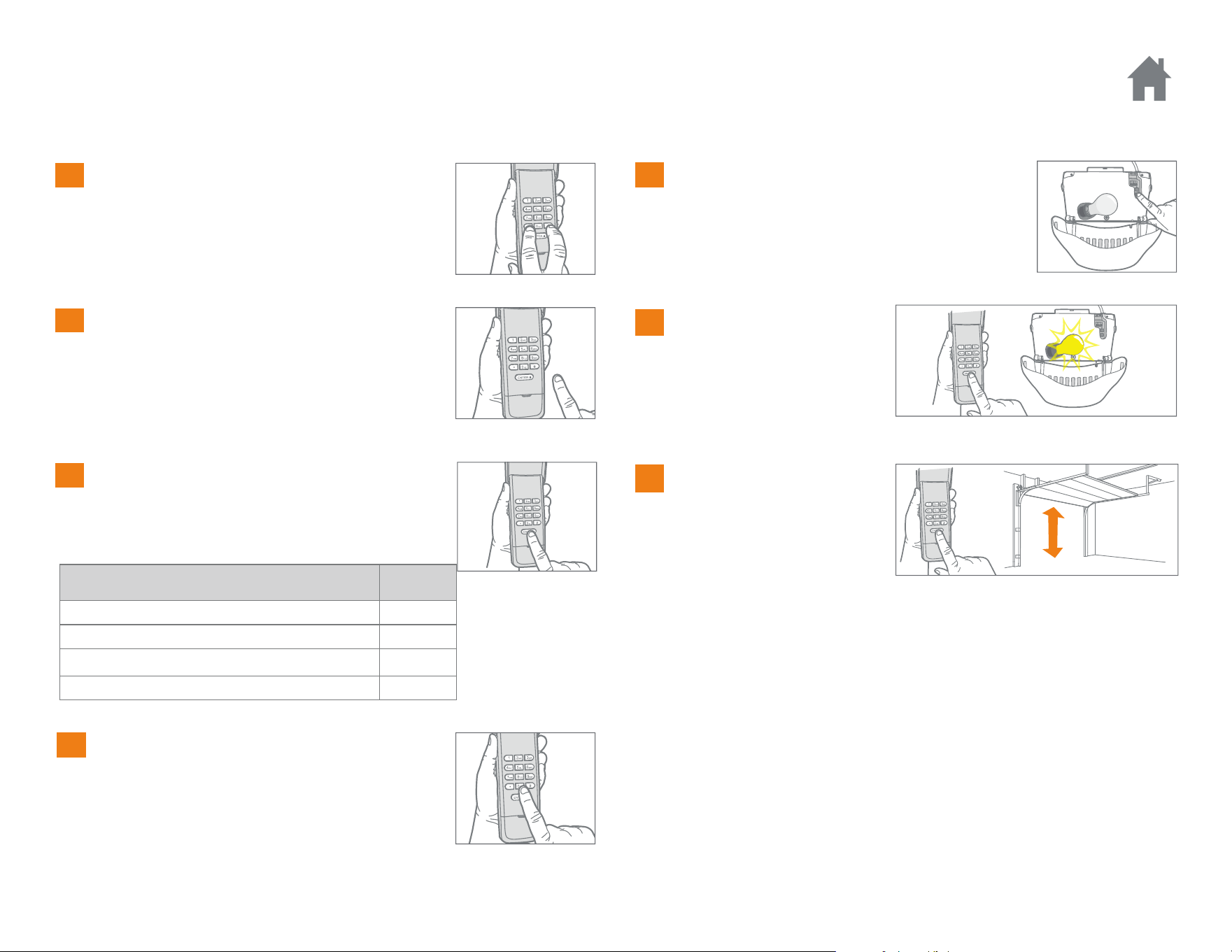
Press and hold the * and # buttons until the
lights on the keypad stop blinking.
GARAGE DOOR OPENER TYPE # OF
PRESSES
Yellow Learn Button (315 and 390 MHz Security+ 2.0
®
)1
Purple Learn Button (315 MHz Security+
®
)2
Red/Orange Learn Button (390 MHz Security+
®
)3
Green Learn Button (390 MHz Billion Code) 4
Enter a 4-digit personal identification
number (PIN) of your choice, then press
the # button.
Press and release the ENTER button on the
Keyless Entry the number of times that
corresponds with your garage door opener
type:
Press and release the 0 button.
Press and release the Learn button on the
garage door opener. The Learn LED will
light.
Within 30 seconds...
Enter your 4-digit PIN, then
press and release the
ENTER button until the
garage door opener lights
flash or two clicks are
heard.
Click
Click
To test, enter your PIN,
then press the ENTER
button. The garage door
opener will activate.
1
Programming
2
3
4
5
6
7
4
CHANGE AN EXISTING PIN
Programming
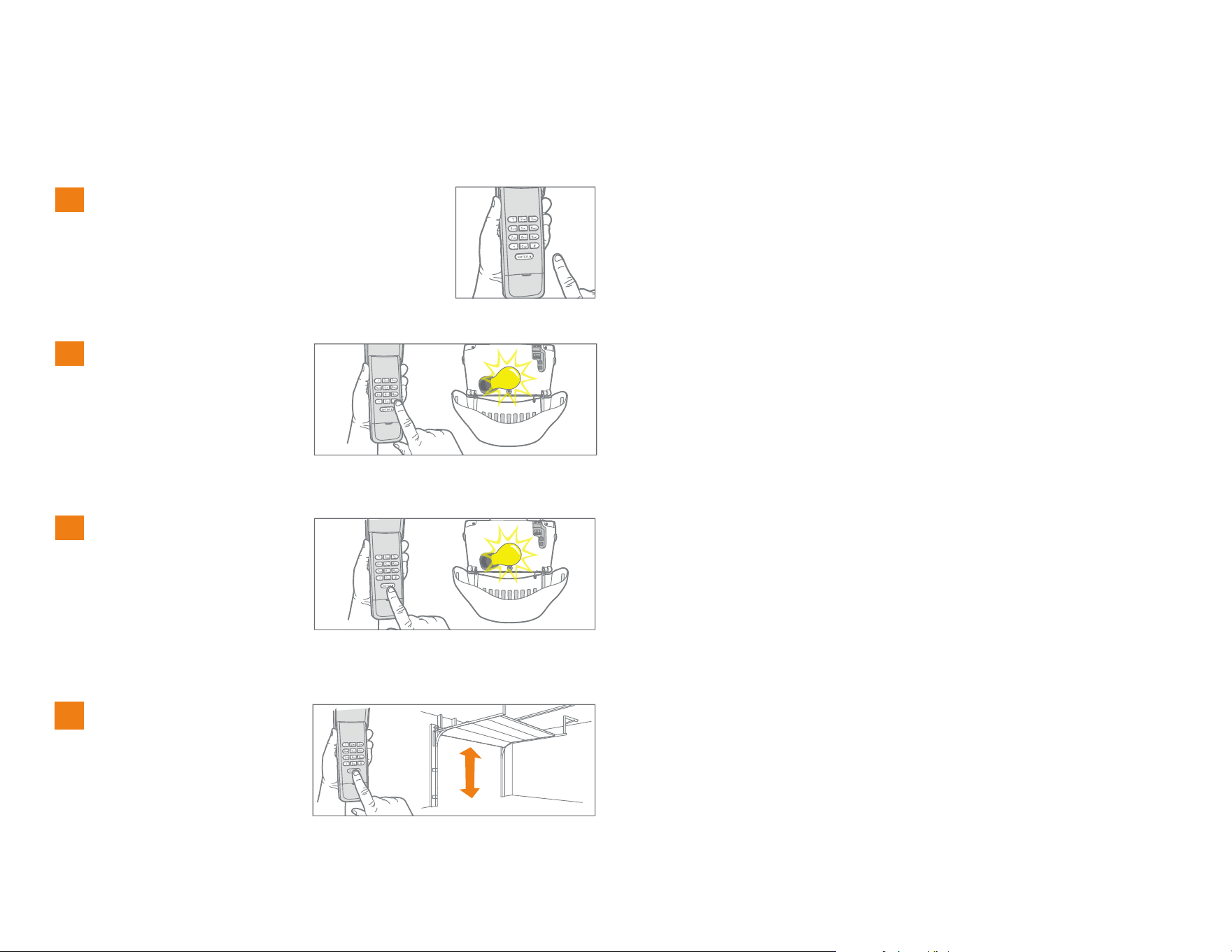
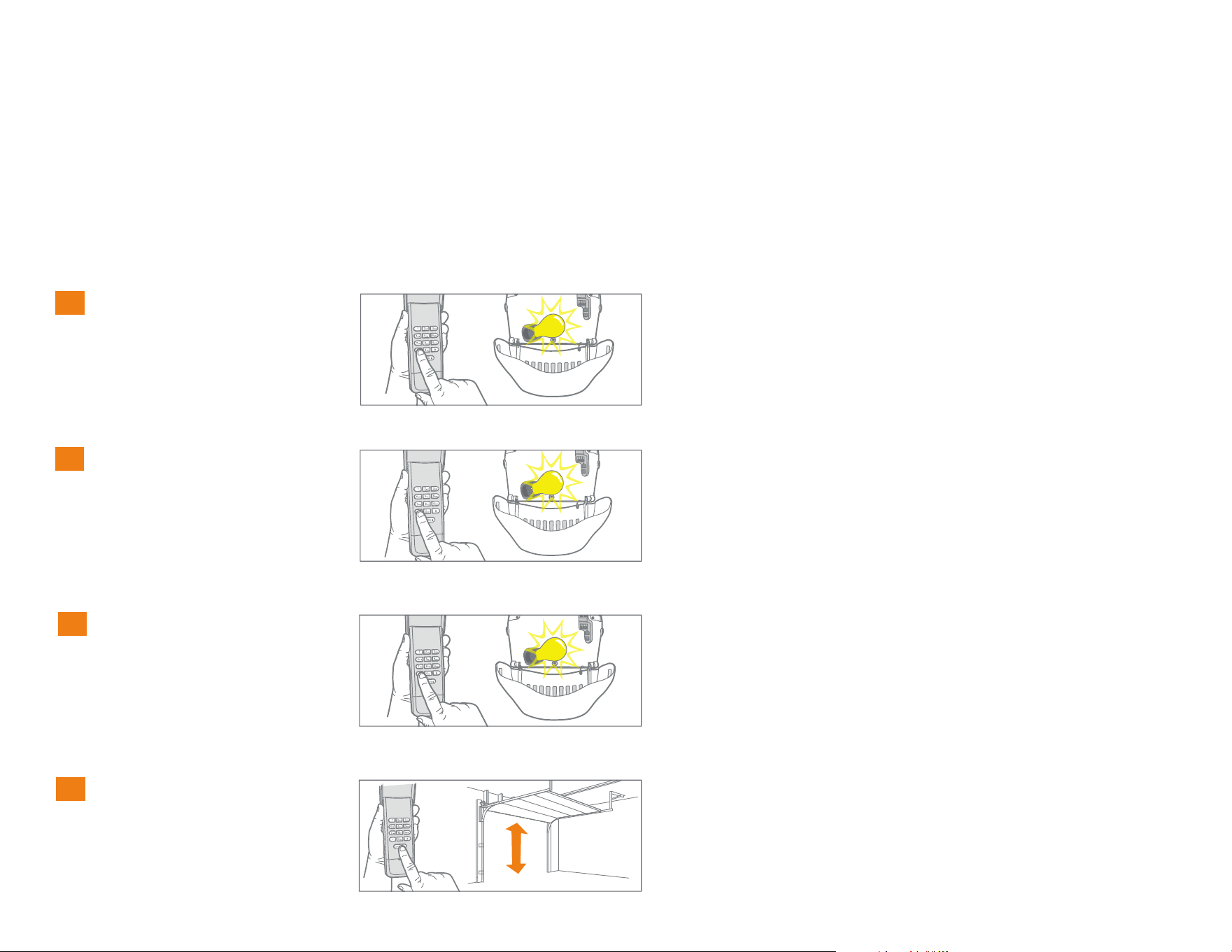
Enter the programmed PIN that you want
to change.
1
Press and hold the #
button until the light bulb
on the garage door opener
blinks twice.
2
x2
Enter the new 4-digit PIN
of your choice, then press
the ENTER button. The
light bulb on the garage
door opener will blink
once.
3
To test, enter the new PIN,
then press the ENTER
button. The garage door
opener will activate.
4
5
PROGRAM A TEMPORARY PIN - NUMBER OF HOURS
Programming
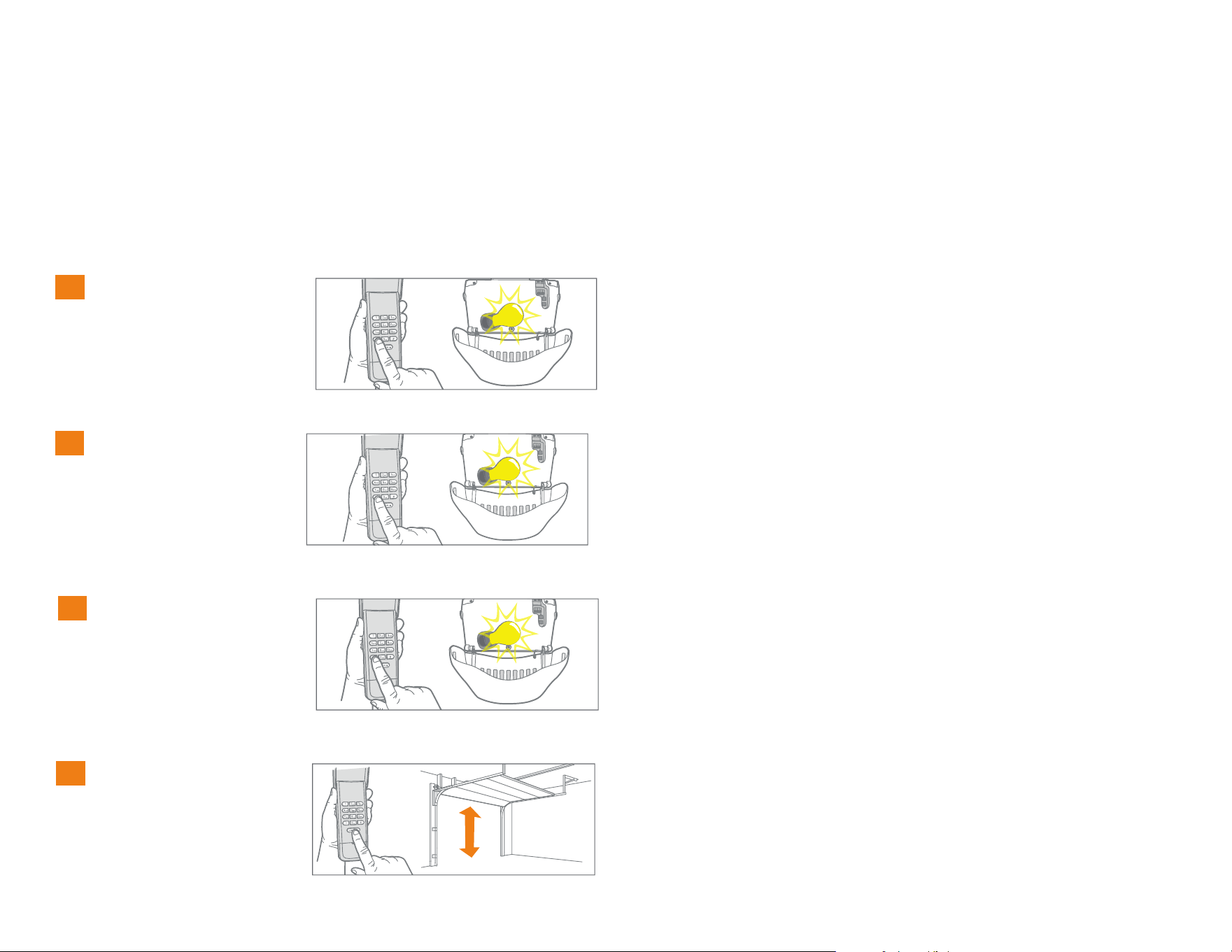
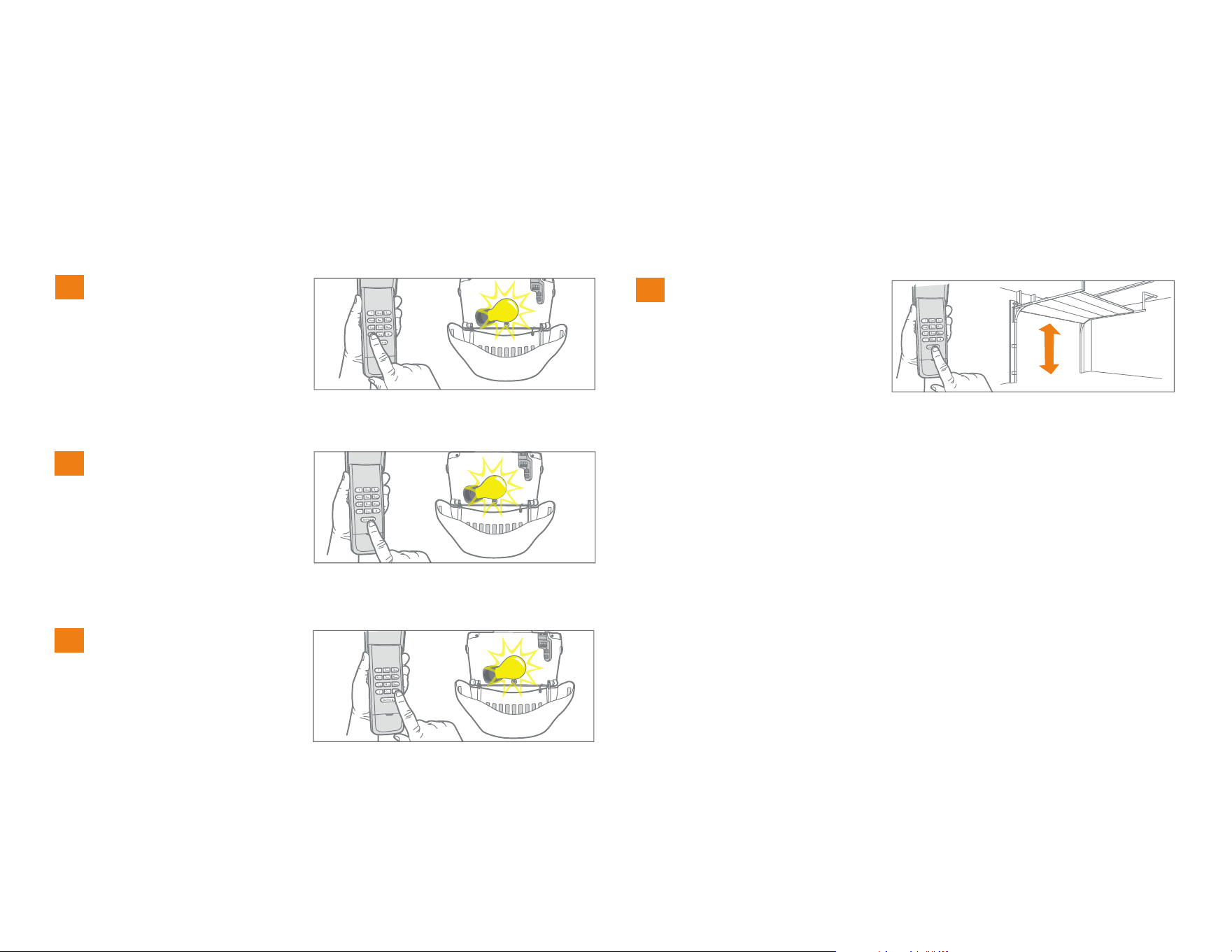
Enter any programmed
PIN, then press and hold
the * button until the
garage door opener light
bulb flashes 3 times.
1
NOTE: This feature is not available on garage door openers that have a green Learn button or an external receiver.
A temporary 4-digit PIN can be programmed to allow access to visitors. Each programmed PIN can program one temporary PIN. The temporary PIN
can be set for a number of hours or a number of door openings. The temporary PIN cannot be the same as any previously programmed PIN.
Enter the temporary 4-digit
PIN of your choice, then
press the * button. The
garage door opener light
bulb will flash 4 times.
2
x4
Press the number of
hours the temporary PIN
will work (up to 255).
Then press the * button.
The garage door opener
light bulb will flash once.
3
To test, press the
temporary PIN, then press
the ENTER button. The
garage door opener will
activate.
4
x3
6
PROGRAM A TEMPORARY PIN - NUMBER OF OPENINGS
Programming
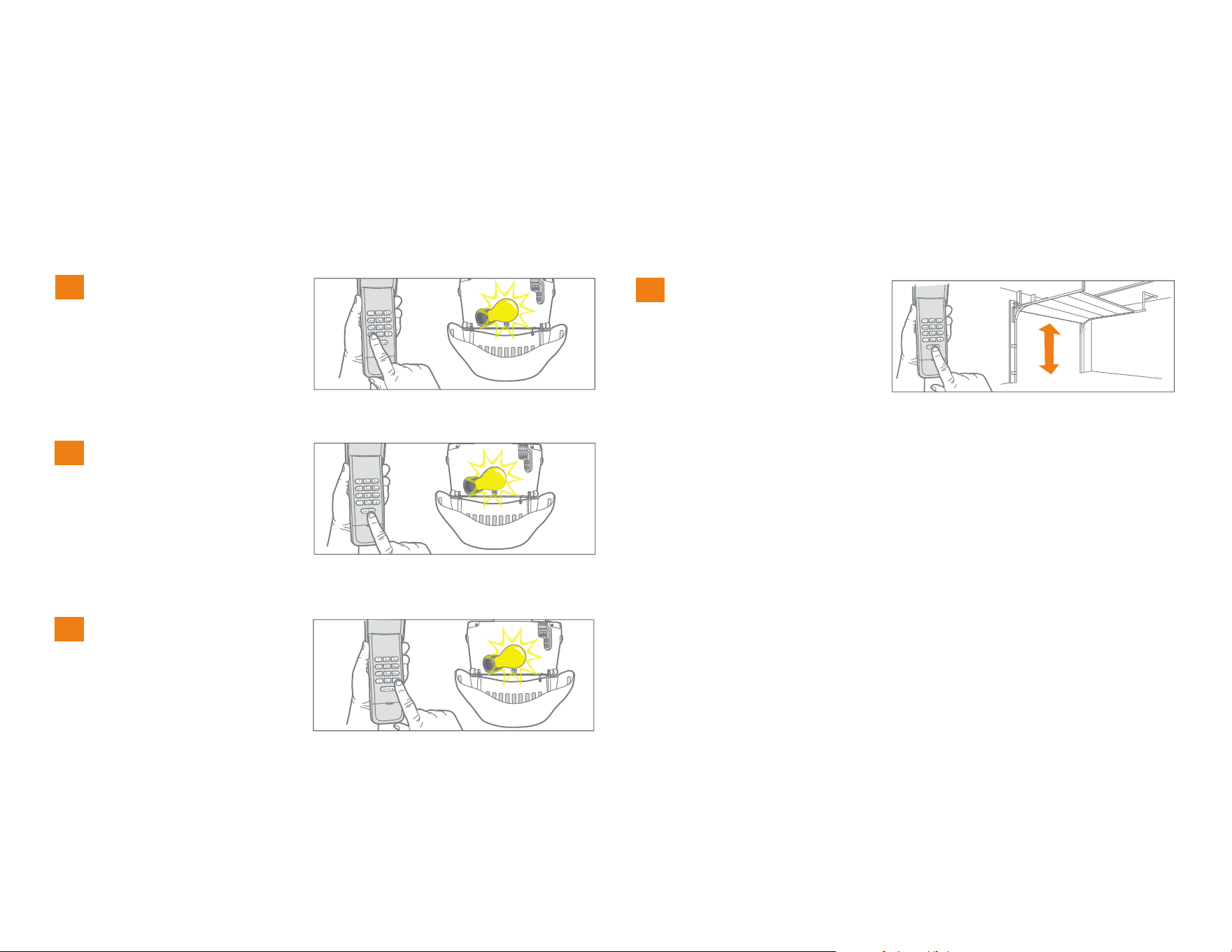
Enter any programmed
PIN, then press and hold
the * button until the
garage door opener light
bulb flashes 3 times.
1
NOTE: This feature is not available on garage door openers that have a green Learn button or an external receiver.
A temporary 4-digit PIN can be programmed to allow access to visitors. Each programmed PIN can program one temporary PIN. The temporary PIN
can be set for a number of hours or a number of door openings. The temporary PIN cannot be the same as any previously programmed PIN.
Enter the temporary 4-digit
PIN of your choice, then
press the ENTER button.
The garage door opener
light bulb will flash 4
times.
2
x4
3
Press the number of
openings the temporary
PIN will work (up to 255).
Then press the # button.
The garage door opener
light bulb will flash once.
To test, press the
temporary PIN, then press
the ENTER button. The
garage door opener will
activate. If the temporary
PIN was set for a number
of openings, the test will
use up one opening.
4
x3
7
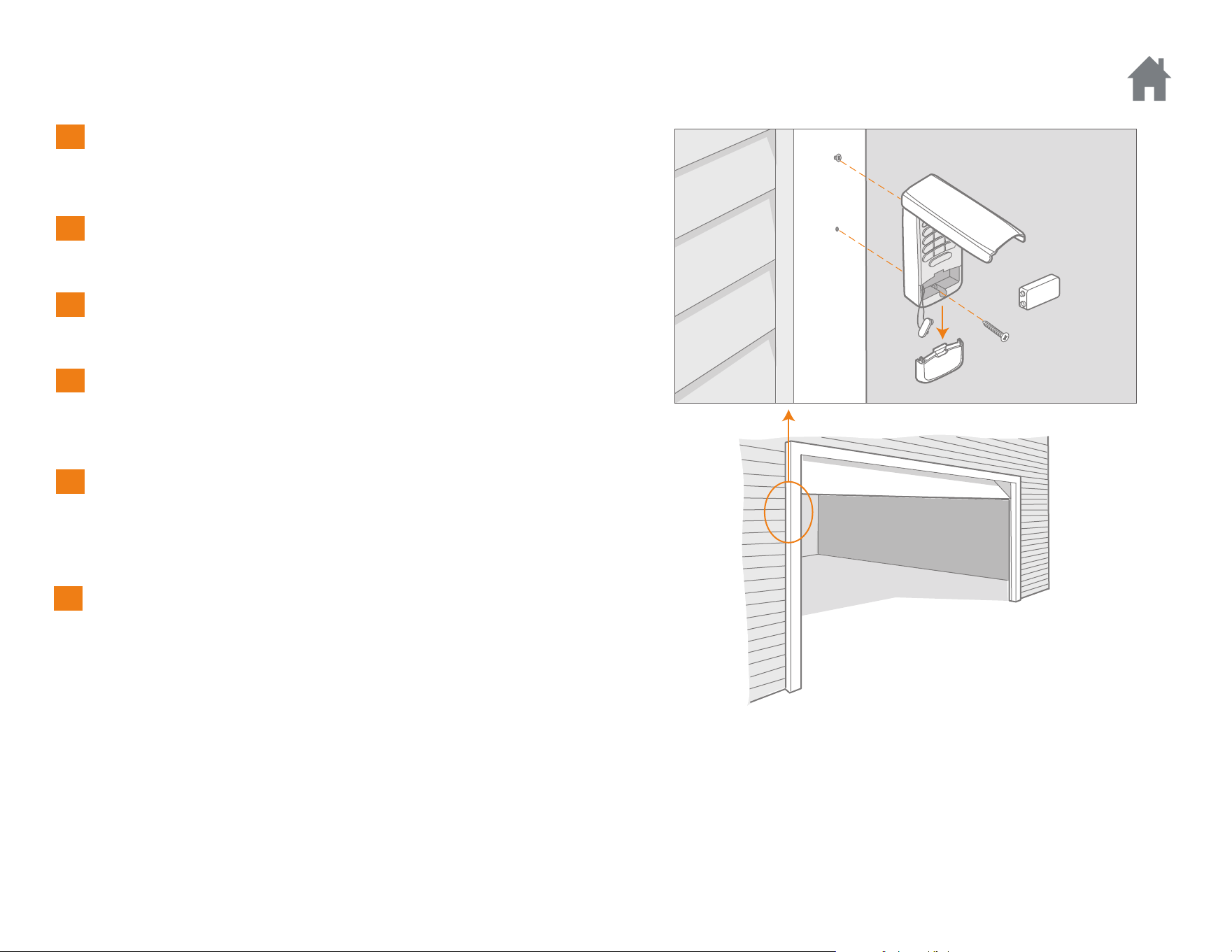
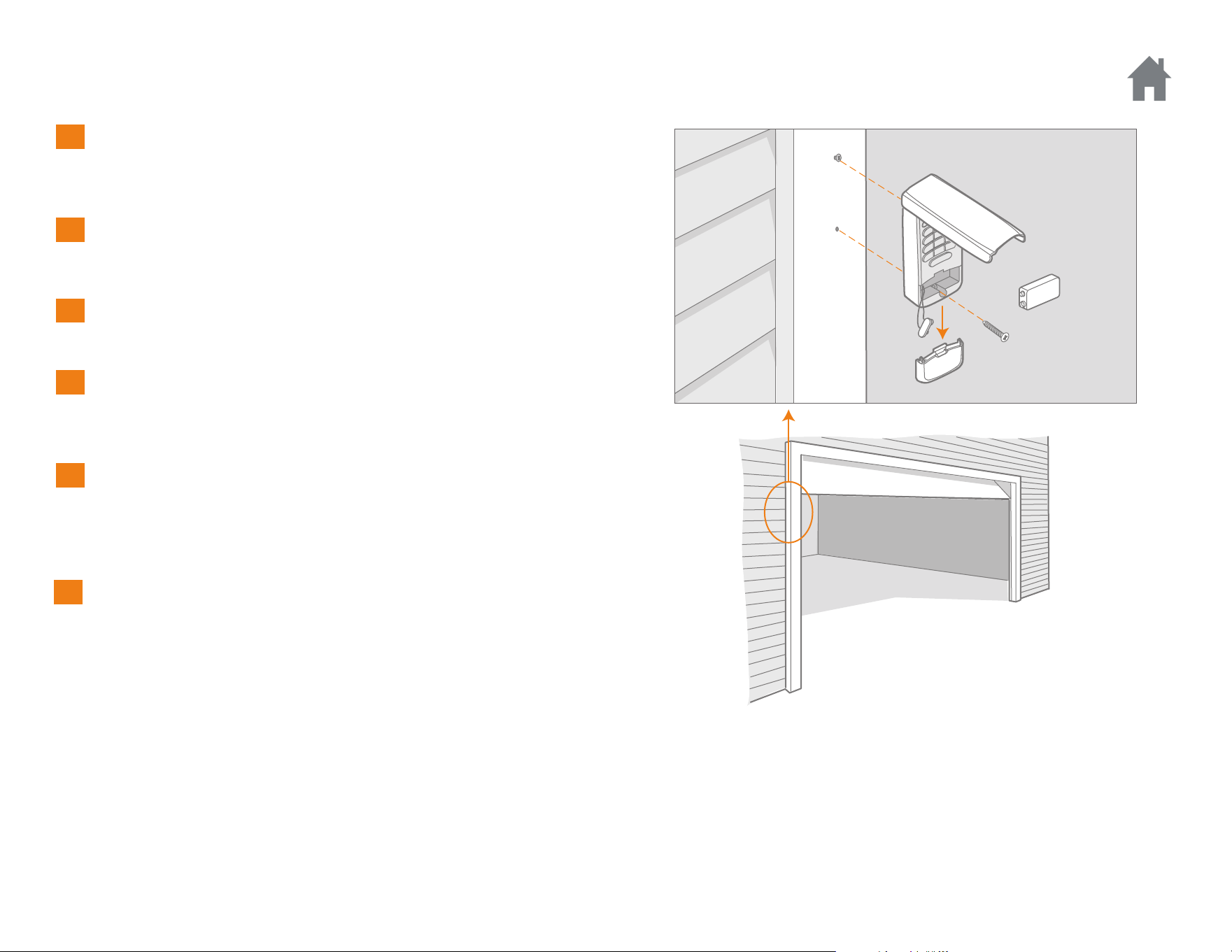
Select a location to mount the Keyless Entry at a minimum height
of 5 feet (1.5 m) out of reach of children.
Remove battery cover and battery.
Mark the top mounting hole and drill 1/8 inch (3.2 mm) pilot hole.
Install the top screw, allowing 1/8 inch (3.2 mm) to protrude above
the surface. Position the Keyless Entry over the top screw.
Mark the bottom hole and drill 1/8 inch (3.2 mm) pilot hole. Install
the bottom screw. Do not overtighten to avoid cracking the plastic
housing.
Reinstall battery and replace cover.
Installation
1
2
3
4
5
6
8
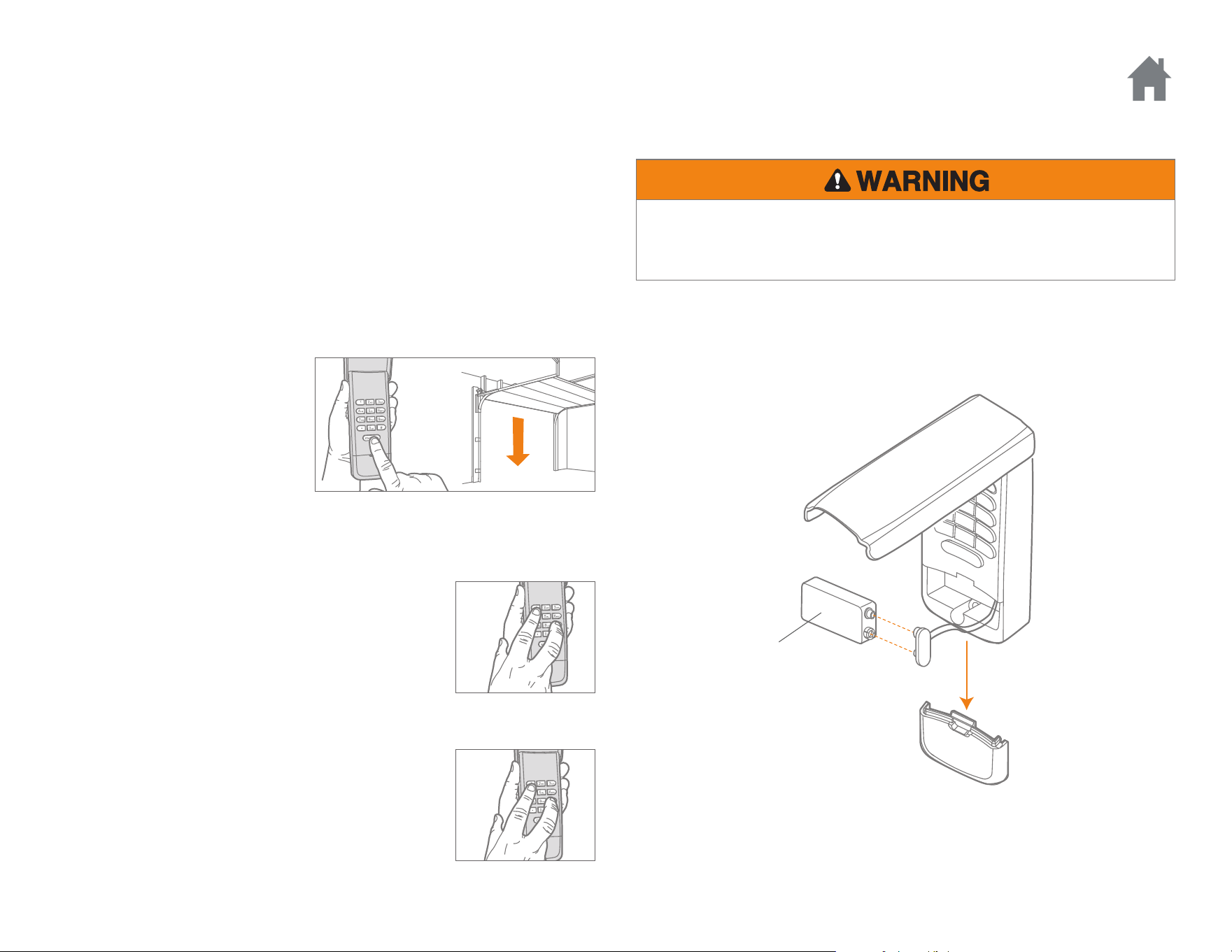
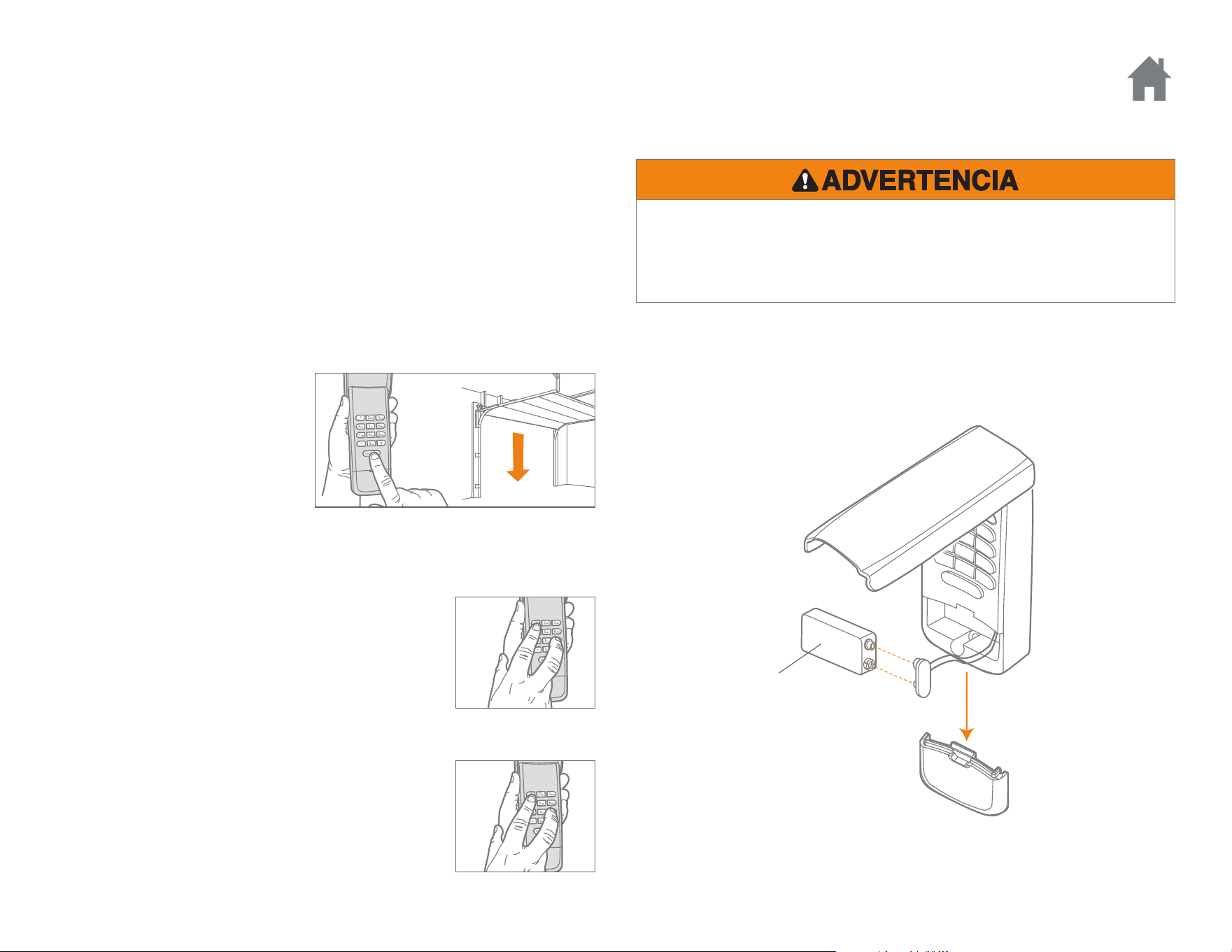
To deactivate the one button close feature:
Press and hold the 1 and 9 buttons for 10 seconds.
The keypad will blink four times when the one
button close feature is deactivated.
To activate the one button close feature:
Press and hold the 1 and 9 buttons for 10 seconds.
The keypad will blink twice when the one button
close feature is activated.
The Keyless Entry has a feature
that allows the door to be closed
using the ENTER button instead
of a PIN.
NOTE: This feature is not
available on garage door
openers manufactured prior to
2006 or an external receiver.
The garage door opener activates when the PIN and ENTER button are
pressed. The keypad will blink for 15 seconds, during that time the
ENTER button can be used to stop, start or reverse the door.
If the wrong number is accidentally pressed, press the correct PIN then
the ENTER button. The Keyless Entry will transmit only the last four
digits that were pressed before the ENTER button.
Operation
ONE BUTTON CLOSE
Replace the battery when the keypad becomes dim or does not light
after a button is pressed.
Dispose of old battery properly.
9V Battery
BATTERY
To prevent possible SERIOUS INJURY or DEATH:
• NEVER allow small children near batteries.
• If battery is swallowed, immediately notify doctor.

9
FAQs
Why won’t my keypad work?
• Did the keypad lights come on when you entered your PIN? If the
keypad lights do not turn on when you press a button, it indicates
that the battery needs to be replaced. Replace with a 9V battery.
• Try reprogramming the Keyless Entry to the garage door opener.
• Make sure the Keyless Entry is compatible with your garage door
opener (Chamberlain garage door openers manufactured after
January 1, 1993).
• If the solutions above did not work, replace the Keyless Entry.
How many PINs can I program to the Keyless Entry?
The Keyless Entry will program up to 24 PINs and up to 24 temporary
PINs.
Can I use the same PIN to activate multiple garage doors?
No, you cannot use the same PIN number twice. The Keyless Entry will
overwrite the original programming if the PIN is programmed a second
time.
Why don’t the keypad lights turn on when I press a button?
If the keypad lights do not turn on when you press a button, it indicates
that the battery needs to be replaced. Replace with a 9V battery.
What garage door openers are compatible with the Keyless Entry?
The Keyless Entry is only compatible with Chamberlain garage door
openers manufactured after January 1, 1993.
Why does the door close when I just press the ENTER button?
The Keyless Entry has a “One Button Close” feature that allows the door
to be closed using the ENTER button instead of a PIN. If you do not
want this feature activated, press and hold the 1 and 9 buttons for 10
seconds. The keypad will blink four times when the one button close
feature is deactivated.
What if I enter the wrong PIN?
If the wrong number is accidentally pressed, press the correct PIN then
the ENTER button. The Keyless Entry will transmit only the last four
digits that were pressed before the ENTER button.
NOTICE: To comply with FCC and or Industry Canada rules (IC), adjustment or modifications of
this receiver and/or transmitter are prohibited, except for changing the code setting or replacing
the battery. THERE ARE NO OTHER USER SERVICEABLE PARTS.
This device complies with Part 15 of the FCC rules and IC RSS-210. Operation is subject to the
following two conditions: (1) this device may not cause harmful interference, and (2) this device
must accept any interference received, including interference that may cause undesired
operation.
WARRANTY
ONE YEAR LIMITED WARRANTY
The Chamberlain Group, Inc. warrants to the first consumer purchaser
of this product that it is free from defect in materials and/or
workmanship for a period of 1 year from the date of purchase.
REPLACEMENT PARTS
Battery . . . . . . . . . . . . . . . . . . . . . . . . . . . . . . . . . . . . . . . . . . . . . . 10A25
Keypad Cover . . . . . . . . . . . . . . . . . . . . . . . . . . . . . . . . . . . . . . . . 41D621
Battery Cover . . . . . . . . . . . . . . . . . . . . . . . . . . . . . . . . . . . . . . . . 41D541
www.chamberlain.com
© 2017, The Chamberlain Group, Inc.
All Rights Reserved
114A5071B
Entrée Sans Clé Et Sans Fil
MODÈLES 940EV, 940EV-P2, 940EVC, ET 940EVC-P2
Introduction . . . . . . . . . . . . . 2
Programmation . . . . . . . . . . 3-6
Programmation Du NIP . . . . . . . . . .3
Modification D’un NIP Existant . . . . .4
Programmation D’un NIP Temporaire -
Nombre D’heures . . . . . . . . . . . . . .5
Programmation D’un NIP Temporaire -
Nombre D’ouvertures . . . . . . . . . . .6
Installation . . . . . . . . . . . . . . 7
Fonctionnement . . . . . . . . . . 8
FAQ . . . . . . . . . . . . . . . . . . . 9
2
Pour prévenir d’éventuelles BLESSURES GRAVES ou LA MORT par
suite de l’utilisation d’une barrière mobile ou d’une porte de garage :
• Installer l’émetteur à code bien en vue de la porte de garage, hors de
portée des jeunes enfants à une hauteur d’au moins 1,5 m (5 pi) du
sol, des paliers, des marches ou de toute autre surface adjacente sur
laquelle on marche, et à l’écart de TOUTES les pièces mobiles de la
porte.
• TOUJOURS garder les télécommandes hors de la portée des enfants.
NE JAMAIS laisser les enfants faire fonctionner les télécommandes ni
jouer avec celles-ci.
• Actionner la barrière ou la porte UNIQUEMENT lorsqu’on la voit
clairement, qu’elle est bien réglée et que rien ne gêne sa course.
• TOUJOURS garder en vue la porte de la barrière ou du garage jusqu’à
ce qu’elle soit complètement fermée. NE JAMAIS laisser personne
traverser la trajectoire d’une barrière ou d’une porte en mouvement.
À utiliser avec les ouvre-portes de garage Chamberlain fabriqués après le
1er janvier 1993. L’ouvre-porte de garage s’activera lorsque le numéro
d’identification personnel (NIP) à 4 chiffres et le bouton
« ENTER » seront enfoncés sur le système d’entrée sans clé.
Installer la pile et programmer le système d’entrée sans clé
avantl’installation. S’assurer que l’éclairage de l’ouvre-porte de
garage fonctionne, dans la mesure où il s’agit d’un témoin de
programmation.
Introduction
POUR COMMENCER
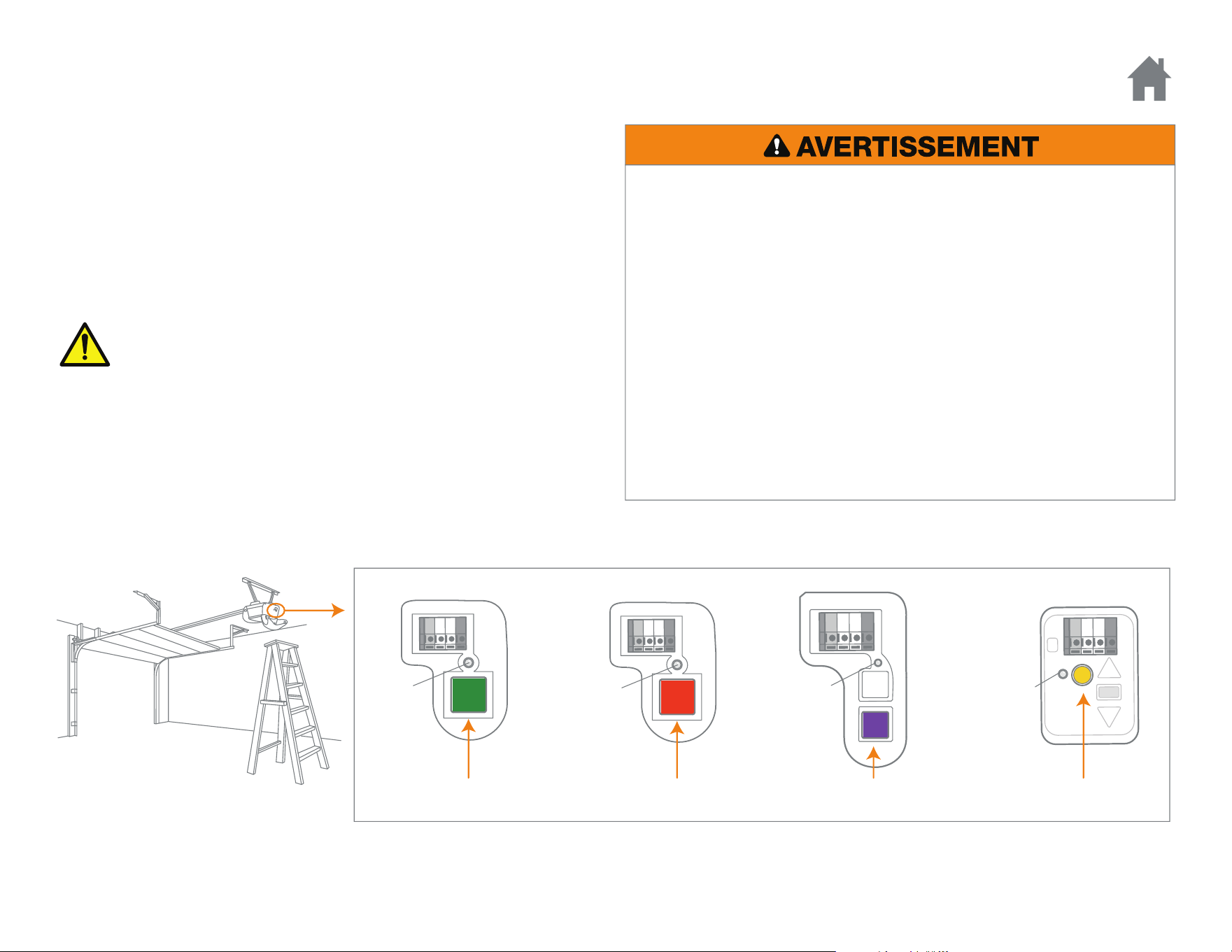
Trouvex le bouton Learn sur l’ouvre-porte de garage. REMARQUE : L’aspect de votre ouvre-porte peut être différent.
DEL
Learn
DEL
Learn
OU OU
DEL
Learn
Rouge/Orange Violet Jaune
DEL
Learn
Vert
OU
AVERTISSEMENT : Ce produit peut vous exposer à des produits
chimiques comme le plomb, reconnu par l’État de la Californie
comme cause de cancers, d’anomalies congénitales et d’autres
problèmes liés à la reproduction. Pour plus d’informations, visitez
www.P65Warnings.ca.gov
3
PROGRAM PIN
Pour programmer l’entrée sans clé à plus d’un ouvre-porte de garage,
répéter les étapes précédentes à l’aide d’un nouveau NIP pour chaque
ouvre-porte de garage supplémentaire.
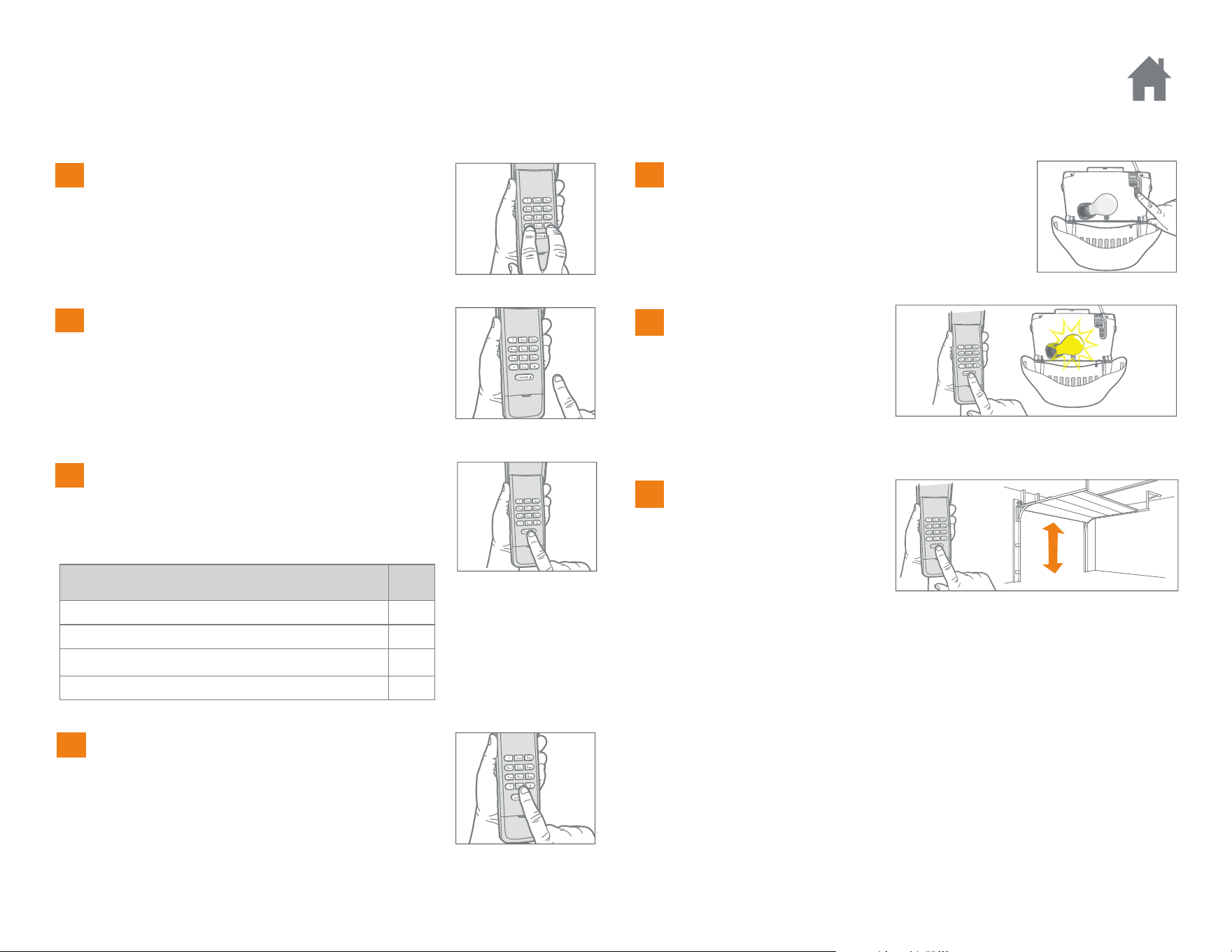
Pressez les boutons * et # jusqu’à ce que les
DEL du clavier s’arrêtent de clignoter.
TYPE D’OUVRE-PORTE DE GARAGE N
o
de
fois
Bouton « Learn » jaune (315 et 390 MHz Security+ 2.0
®
)
1
Bouton « Learn » violet (315 MHz Security+
®
)
2
Bouton « Learn » rouge ou orange (390 MHz Security+
®
)
3
Bouton « Learn » vert (390 MHz Billion Code)
4
Saisir un numéro d’identification
personnelle (NIP) à quatre chiffres de votre
choix, puis appuyer sur la touche #.
Enfoncer et relâcher la touche « ENTER » sur
le clavier de l’émetteur à code le nombre de
fois correspondant au type de votre ouvre-
porte de garage :
Enfoncer et relâcher la touche 0.
Pressez et relâchez le bouton
« Learn ». La diode s’allume.
Dans les 30 secondes qui suivent...
Saisir le NIP à quatre
chiffres, puis enfoncer et
relâcher la touche ENTER
jusqu’à ce l’éclairage de
l’ouvre-porte de garage
clignote ou que deux
déclics soient entendus.
Click
Click
Pour mettre l’ouvre-porte
à l’essai, saisir votre NIP,
puis appuyer sur la touche
ENTER. L’ouvre-porte de
garage s’actionne.
1
Programmation
2
3
4
5
6
7
4
MODIFICATION D’UN NIP EXISTANT
Programmation
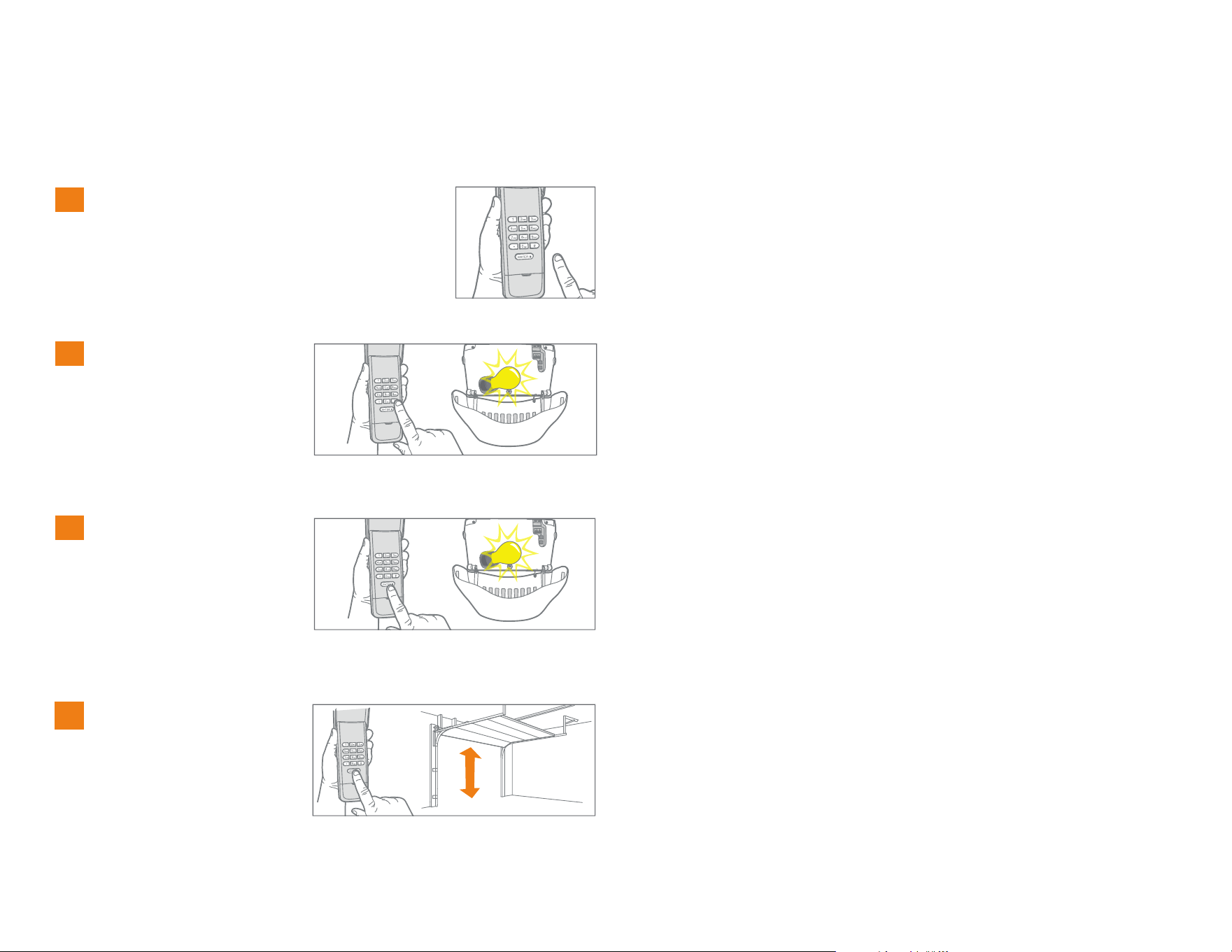
Saisir le NIP programmé à modifier.
1
Appuyer sur le bouton #
et le tenir jusqu’à ce que
l’ampoule de l’ouvre-
porte de garage clignote
deux fois.
2
x2
Tapez le nouveau NIP à
quatre chiffres de votre
choix, puis appuyez sur le
bouton ENTER. L’ampoule
de l’ouvre-porte de garage
clignotera une fois.
3
Pour tester l’ouvre-porte,
saisir le nouveau NIP, puis
appuyer sur le bouton
ENTER. L’ouvre-porte de
garage s’actionne.
4
5
PROGRAMMATION D’UN NIP TEMPORAIRE - NOMBRE D’HEURES
Programmation
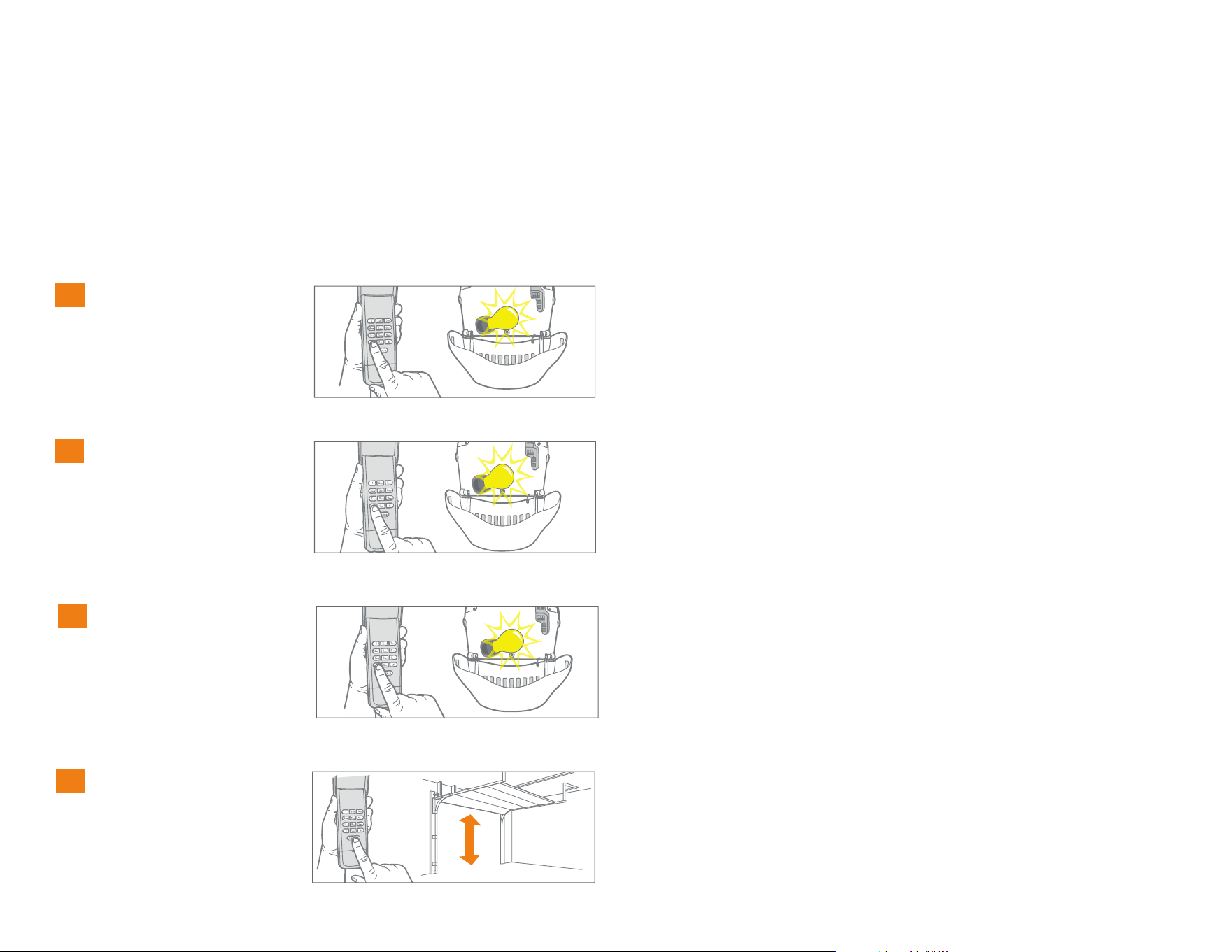
Saisir tout NIP
programmé, puis enfoncer
et tenir le bouton * jusqu’à
ce que l’ampoule de
l’ouvre-porte de garage
clignote trois fois.
1
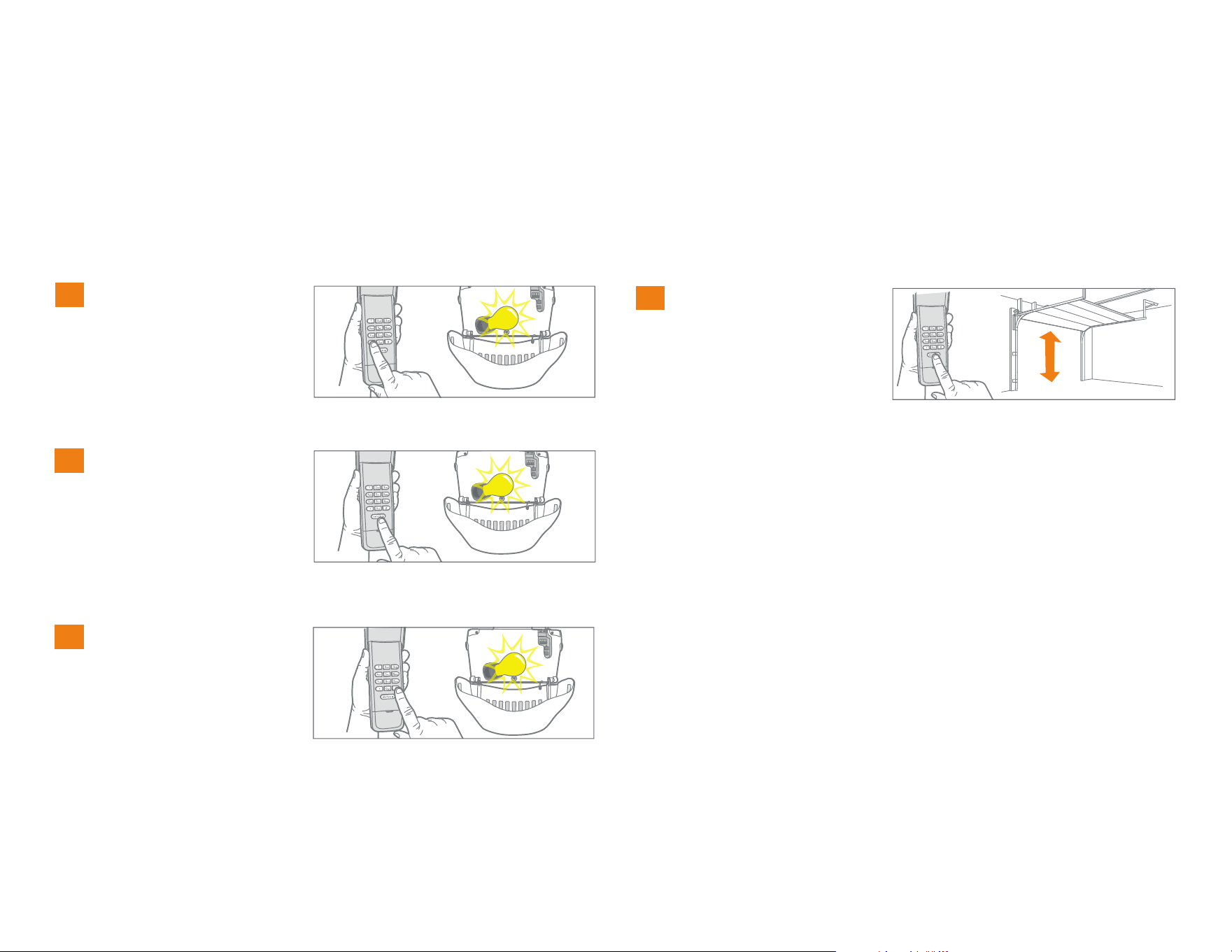
REMARQUE : Cette fonction n’est pas disponible sur un ouvre-porte de garage muni d’un bouton Learn vert ou d’un récepteur extérieur.
Un NIP temporaire à 4 chiffres peut être programmé pour donner accès à des visiteurs. Chacun des NIP programmés peut programmer un NIP
temporaire. Le NIP temporaire peut être configuré pour un certain nombre d’heures ou d’ouvertures. Le NIP temporaire ne peut être identique à un NIP
programmé antérieurement.
Tapez le NIP temporaire à
quatre chiffres de votre
choix, puis appuyez sur le
bouton *. L’ampoule de
l’ouvre-porte de garage
clignotera quatre fois.
2
x4
Entrez le nombre d’heures
de porte actionnées par le
NIP temporaire (255
maxi). Appuyez ensuite
sur le bouton *. L’ampoule
de l’ouvre-porte de garage
clignotera une fois.
3
Pour tester l’ouvre-porte,
appuyez sur le NIP
temporaire, puis sur le
bouton ENTER. L’ouvre-
porte de garage
s’actionne.
4
x3
6
PROGRAMMATION D’UN NIP TEMPORAIRE - NOMBRE D’OUVERTURES
Programmation
Saisir tout NIP
programmé, puis enfoncer
et tenir le bouton * jusqu’à
ce que l’ampoule de
l’ouvre-porte de garage
clignote trois fois.
1
Tapez le NIP temporaire à
quatre chiffres de votre
choix, puis appuyez sur le
bouton ENTER. L’ampoule
de l’ouvre-porte de garage
clignotera quatre fois.
2
x4
3
Entrez le nombre
d’ouvertures de porte
actionnées par le NIP
temporaire (255 maxi).
Appuyez ensuite sur le
bouton #. L’ampoule de
l’ouvre-porte de garage
clignotera une fois.
Pour tester l’ouvre-porte,
appuyez sur le NIP
temporaire, puis sur le
bouton ENTER. L’ouvre-
porte de garage s’actionne.
Le test compte pour une
ouverture de porte lorsque
le NIP temporaire a été
programmé pour un certain
nombre d’ouvertures.
4
x3
REMARQUE : Cette fonction n’est pas disponible sur un ouvre-porte de garage muni d’un bouton Learn vert ou d’un récepteur extérieur.
Un NIP temporaire à 4 chiffres peut être programmé pour donner accès à des visiteurs. Chacun des NIP programmés peut programmer un NIP
temporaire. Le NIP temporaire peut être configuré pour un certain nombre d’heures ou d’ouvertures. Le NIP temporaire ne peut être identique à un NIP
programmé antérieurement.
7
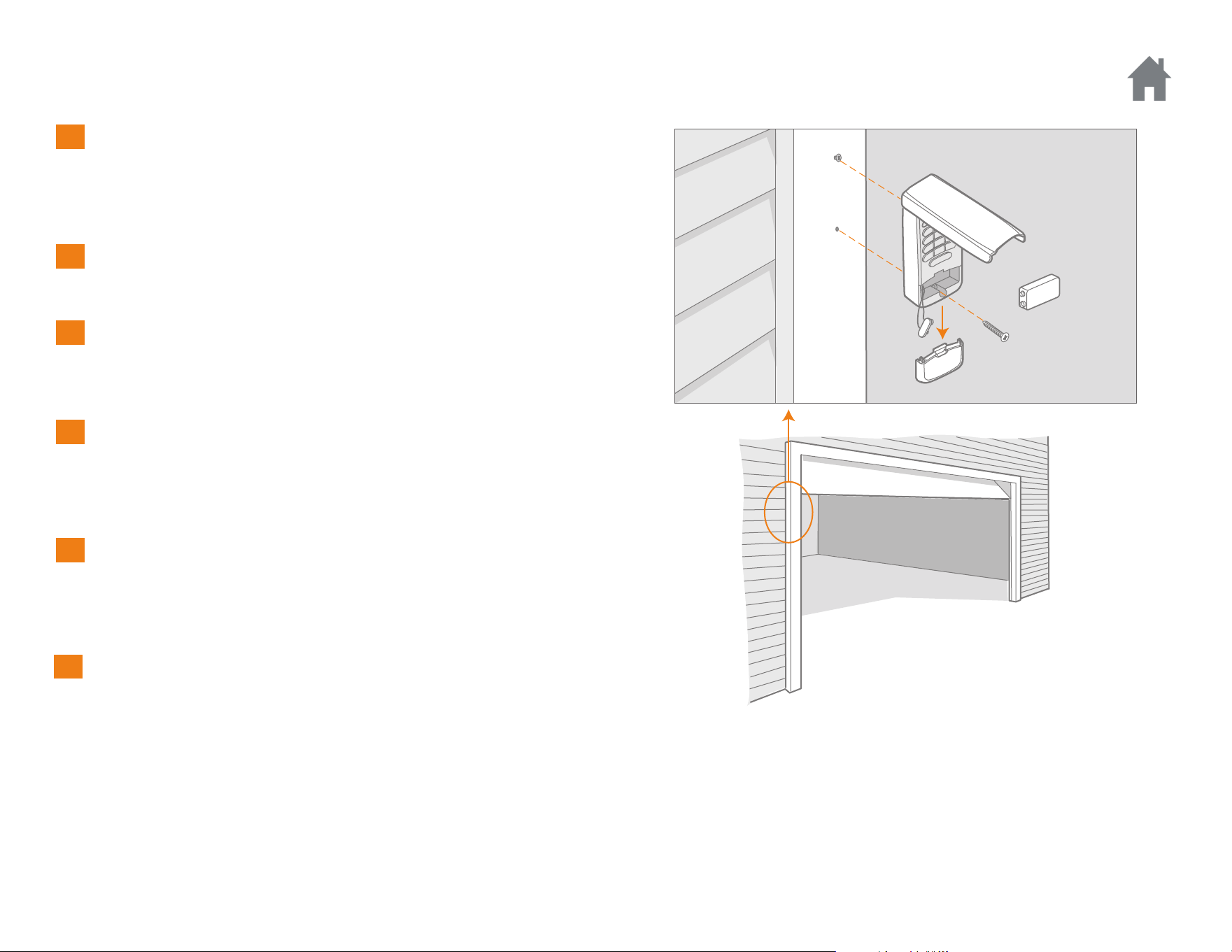
Choisir un emplacement pour monter le système d’entrée sans clé
à une hauteur minimum de 5 pieds (1,5 m) hors de la portée des
enfants.
Retirer le couvercle de la pile et la pile.
Marquer le trou de montage supérieur et percer un avant-troude
3,2 mm (1/8 de po).
Poser la vis supérieure en laissant une saillie de 3,2 mm (1/8 de
po) par rapport à la surface. Placer le système d’entrée sans clé sur
la vis supérieure.
Marquer le trou de montage inférieur et percer un
avant-trou de 3,2 mm (1/8 de po). Poser la vis inférieure. Ne pas
trop serrer pour éviter d’endommager le boîtier en plastique.
Réinstaller la pile et replacer le couvercle.
Installation
1
2
3
4
5
6
8
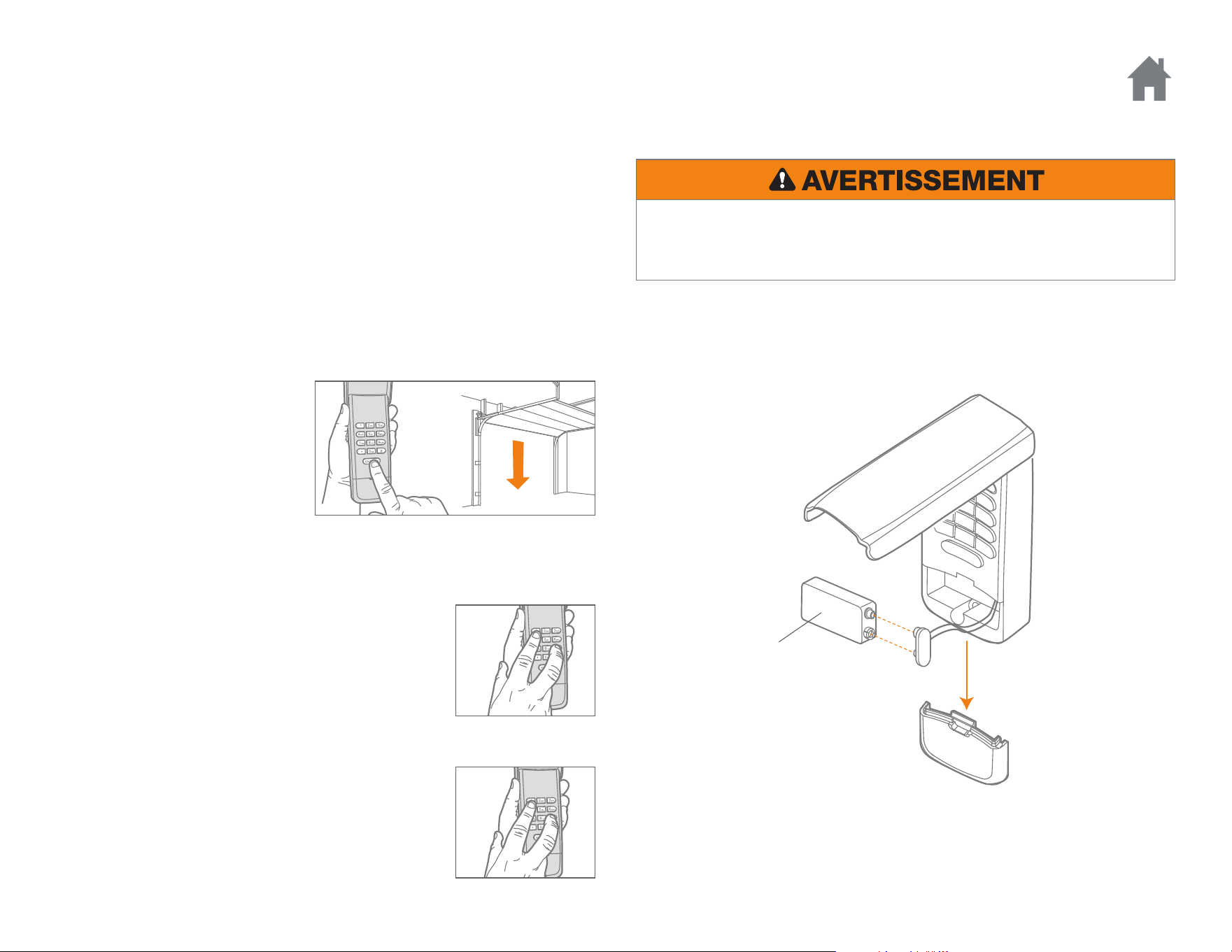
Pour désactiver la fonction de fermeture à un
bouton :
Appuyer et maintenir enfoncés les boutons 1 et 9
pendant 10 secondes. Le clavier clignotera quatre
fois lorsque la fonction de fermeture à un bouton
sera désactivée.
Pour activer la fonction de fermeture à un bouton :
Appuyer et maintenir enfoncés les boutons 1 et 9
pendant 10 secondes. Le clavier clignotera deux fois
lorsque la fonction de fermeture à un bouton sera
activée.
Le système d’entrée sans clé a
une fonction qui permet de
fermer la porte à l’aide du
bouton
« ENTER » au lieu d’un NIP.
REMARQUE : La fonction n’est
pas disponible sur les
ouvre-portes de garage fabriqués
avant 2006 ou sur un récepteur extérieur.
L’ouvre-porte de garage est activé lorsque le NIP est entré et que l’on
appuie sur le bouton « ENTER ». Le clavier clignotera pendant 15
secondes ; pendant ce temps, le bouton « ENTER » peut être utilisé pour
arrêter, activer ou inverser le mouvement de la porte.
En cas d’entrée par inadvertance d’un numéro incorrect, il suffit d’entrer
le NIP correct et d’appuyer sur le bouton « ENTER ». Le système
d’entrée sans clé ne transmet que les quatre derniers chiffres entrés
avant la validation par le bouton ENTER.
Fonctionnement
FERMETURE À UN BOUTON
Remplacer la pile lorsque l’éclairage du clavier s’affaiblit ou ne s’allume
pas.
Se débarrasser de la pile usagée convenablement.
Pile 9V
BATTERY
Pour prévenir d’éventuelles BLESSURES GRAVES ou LA MORT :
• NE JAMAIS laisser de petits enfants à proximité des piles.
• Aviser immédiatement un médecin en cas d’ingestion de la pile.

9
FAQ
Pourquoi mon clavier ne fonctionne-t-il pas?
• Les témoins lumineux du clavier se sont-ils allumés quand vous avez
tapé votre NIP? Si aucun témoin lumineux du clavier ne s’est allumé
quand vous avez appuyé sur une touche, la pile doit être remplacée.
Replacez-la par une pile de 9 V.
• Essayez de reprogrammer l’entrée sans clé pour l’ouvre-porte de
garage.
• Assurez-vous que l’entrée sans clé est compatible avec votre ouvre-
porte de garage (Ouvre-portes de garage Chamberlain fabriqués
après le 1er janvier 1993).
• Si les solutions ci-dessus ne fonctionnent pas, remplacez l’entrée
sans clé.
Combien de NIP puis-je programmer à l’émetteur à code?
L’émetteur à code programmera jusqu’à 24 NIP et jusqu’à 24 NIP
temporaires.
Puis-je me servir du même NIP pour activer plusieurs portes de
garage?
Non, un NIP ne peut pas être utilisé deux fois. L’émetteur à code
annulera la programmation originale si le NIP est programmé une
seconde fois.
Pourquoi le clavier ne s’allume-t-il pas lorsque j’appuie sur un bouton?
Si aucun témoin lumineux du clavier ne s’allume lorsqu’on appuie sur un
bouton, la pile doit alors être remplacée. Remplacer la pile par une pile
de 9 V.
Quels ouvre-portes de garage sont compatibles avec l’émetteur à code?
L’émetteur à code n’est compatible qu’avec les ouvre-portes de garage
fabriqués après le 1er janvier 1993.
Pourquoi la porte se ferme-t-elle lorsque je ne fais qu’appuyer sur le
bouton ENTER?
L’émetteur à code est doté d’une fonction de « fermeture par un seul
bouton » qui permet de fermer la porte en utilisant le bouton ENTER plutôt
qu’un NIP. Si l’on souhaite désactiver cette fonction, enfoncer et tenir
simultanément les boutons 1 et 9 pendant 10 secondes. Le clavier clignote
quatre fois lorsque la fonction de fermeture par un bouton est désactivée.
Que faire si j’ai tapé le mauvais NIP?
Si vous tapez un mauvais NIP par erreur, tapez le bon NIP puis appuyez
sur la touche ENTRÉE. L’entrée sans clé ne transmettra que les quatre
derniers chiffres qui ont été pressés avant la touche ENTRÉE.
AVIS : Les règles de la FCC ou d’Industrie Canada (IC), ou les deux, interdisent tout ajustement ou
toute modification de ce récepteur et/ou de cet émetteur, sauf pour modifier le code ou pour remplacer
la pile. IL N’EXISTE AUCUNE AUTRE PIÈCE SUSCEPTIBLE D’ÊTRE ENTRETENUE PAR L’UTILISATEUR.
Cet appareil est conforme aux dispositions de la partie 15 du règlement de la FCC et de l’norme IC
RSS-210. Son utilisation est assujettie aux deux conditions
suivantes : (1) ce dispositif ne peut causer des interférences nuisibles, et (2) ce dispositif doit accepter
toute interférence reçue, y compris une interférence pouvant causer un fonctionnement non souhaité.
GARANTIE
GARANTIE LIMITÉE D’UN AN
La société Chamberlain Group, Inc. garantit à l’acheteur initial que le
produit est exempt de tout défaut de matériaux ou de fabrication
pendant une période d’un an à compter de la date d’achat.
PIÈCES DE RECHANGE
Pile . . . . . . . . . . . . . . . . . . . . . . . . . . . . . . . . . . . . . . . . . . . . . . . . . 10A25
Couvercle du clavier . . . . . . . . . . . . . . . . . . . . . . . . . . . . . . . . . . . 41D621
Couvercle de la pile . . . . . . . . . . . . . . . . . . . . . . . . . . . . . . . . . . . 41D541
www.chamberlain.com
© 2017, The Chamberlain Group, Inc.
Tous droits réservés
114A5071B
Entrada Inalámbrica sin Llave
MODELOS 940EV, 940EV-P2, 940EVC, Y 940EVC-P2
Introducción . . . . . . . . . . . . . 2
Programación . . . . . . . . . . . 3-6
Programe el PIN . . . . . . . . . . . . . .3
Cambio de un PIN Existente . . . . . . .4
Programación de un PIN Temporal -
Cantidad de Horas . . . . . . . . . . . . .5
Programación de un PIN Temporal -
Cantidad de Aperturas . . . . . . . . . .6
Instalación . . . . . . . . . . . . . . 7
Operación . . . . . . . . . . . . . . 8
Preguntas Frecuentes . . . . . . 9
2
Para evitar la posibilidad de LESIONES GRAVES o incluso la MUERTE
debido al movimiento de un portón o puerta de garaje:
• Instale el control digital de entrada a la vista desde la puerta del
garaje, fuera del alcance de los niños a una altura mínima de 5 pies
(1.5 m) sobre pisos, escalones y cualquier superficie peatonal
cercana, y lejos de TODAS las partes móviles de la puerta.
• Mantenga SIEMPRE los controles remotos fuera del alcance de los
niños. NUNCA permita que los niños utilicen o jueguen con los
controles remotos.
• Active el portón o la puerta SÓLO cuando se pueda ver claramente,
cuando esté ajustada adecuadamente y cuando no haya
obstrucciones en su recorrido.
• Mantenga SIEMPRE a la vista el portón o la puerta del garaje hasta
que cierre completamente. NUNCA permita que alguien cruce el
camino de un portón o puerta en movimiento.
Para usarse con los abre-puertas de garaje Chamberlain fabricados después
del 1 de enero de 1993. El abre-puertas de garaje se activa cuando se
oprimen los 4 dígitos del Número de identificación personal (PIN) y el
botón “ENTER” en la Entrada sin llave.
Instale la batería y programe la Entrada sin llave antes de la
instalación. Asegúrese de que el abre-puertas de garaje tenga un foco
que funcione, ya que este es un indicador de la programación.
Introducción
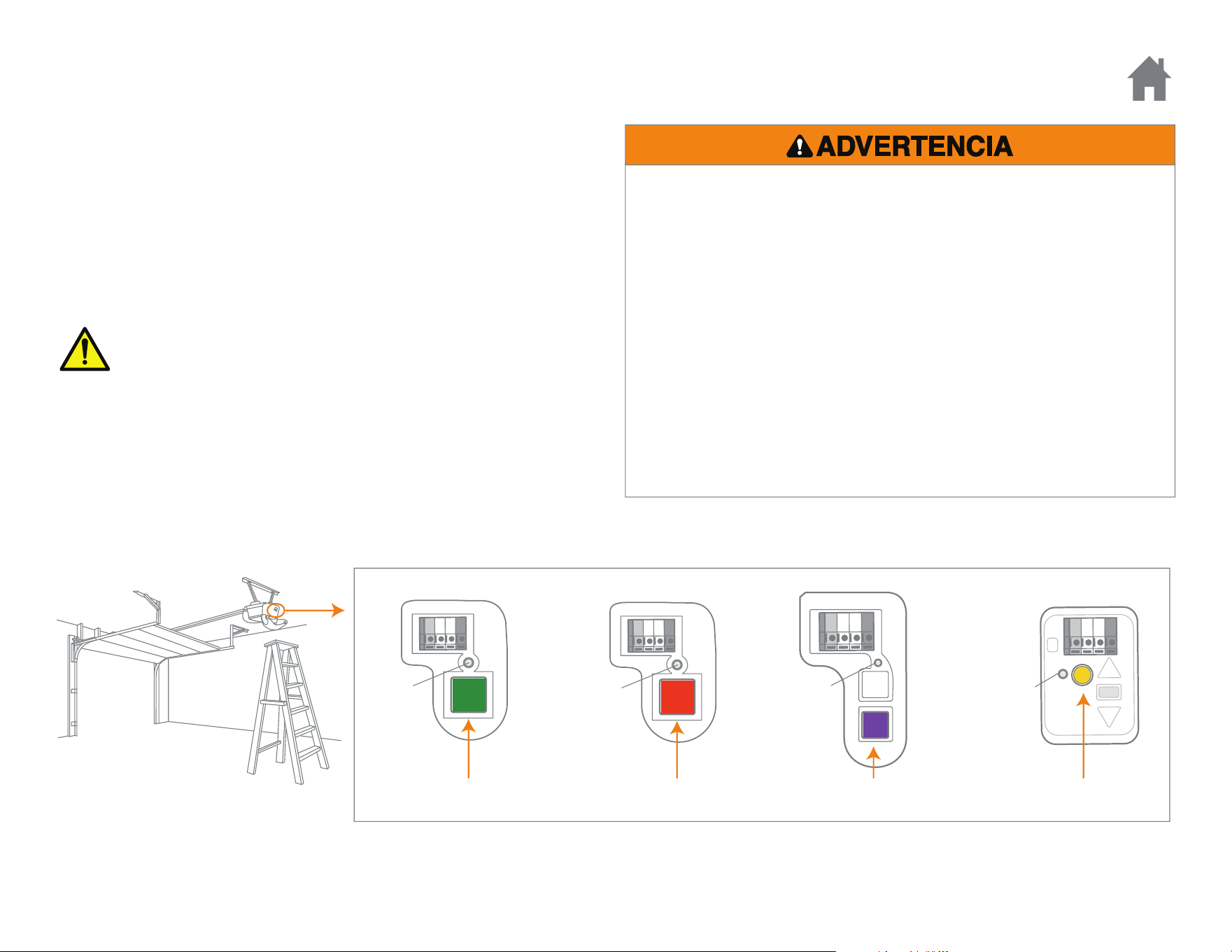
PASOS INICIALES
Localice el botón “LEARN” en el abre-puertas de garaje. NOTA: Su abre-puertas de garaje puede ser diferente.
DEL
“LEARN”
DEL
“LEARN”
OO
DEL
“LEARN”
Rojo/Naranja Purpura Amarillo
DEL
“LEARN”
Verde
O
ADVERTENCIA: Este producto puede exponerle a productos
químicos (incluido el plomo), que a consideración del
estado de California causan cáncer, defectos congénitos u
otros daños reproductivos. Para más información, visite
www.P65Warnings.ca.gov
3
PROGRAME EL PIN
Para programar la Entrada sin llave para más de un abre-puertas de
garaje, repita los pasos anteriores usando un nuevo PIN para cada
abre-puertas de garaje adicional.
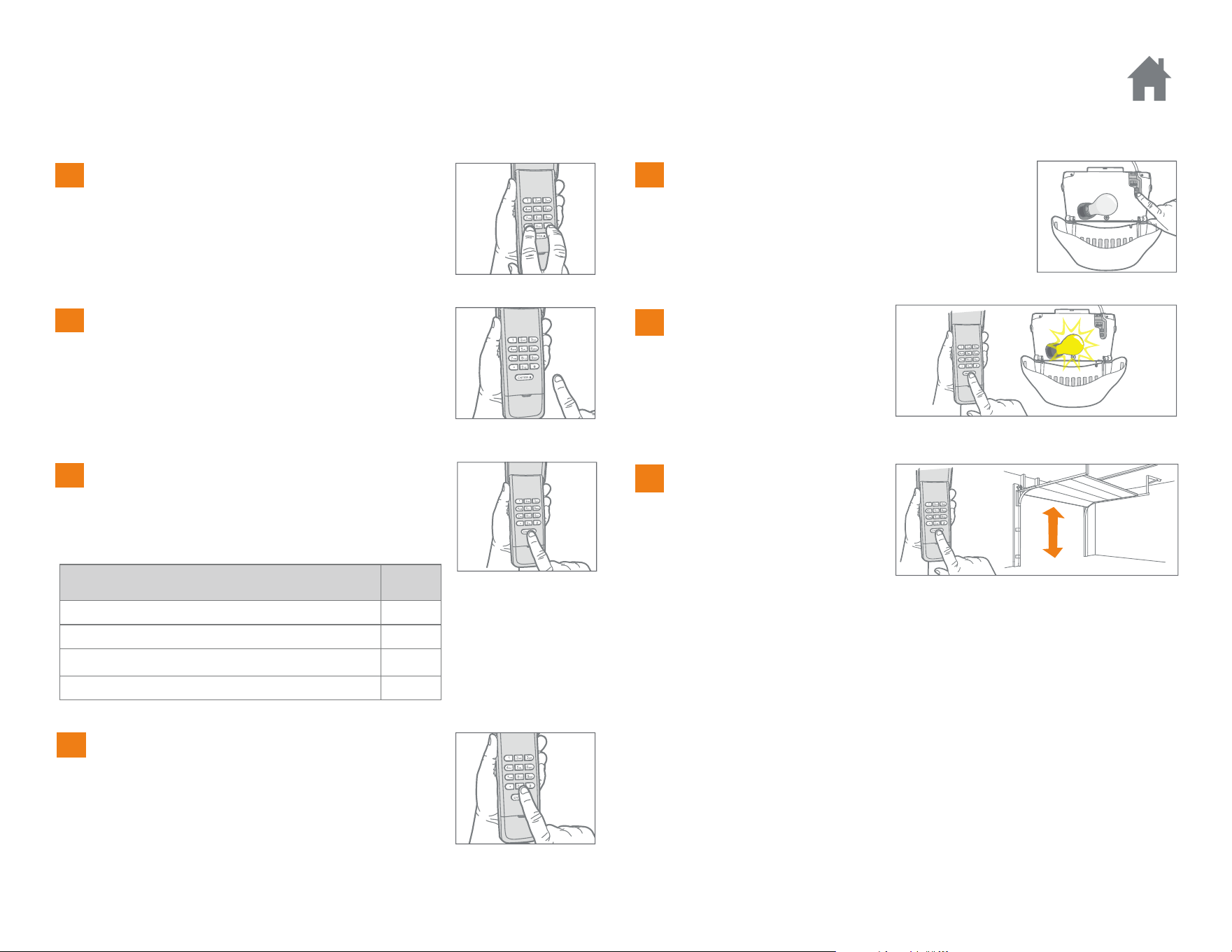
Mantener oprimidas las teclas * y # hasta
que las luces del teclado dejen de parpadear.
TIPO DE ABRE-PUERTAS N
O
. DE
VECES
Botón “Learn” amarillo (315 y 390 MHz Security+ 2.0
®
)1
Botón “Learn” Púrpura (315 MHz Security+
®
)2
Botón “Learn” rojo o anaranjado (390 MHz Security+
®
)3
Botón “Learn” verde (390 MHz Billion Code) 4
Ingrese un número de identificación
personal (PIN) de 4 dígitos en el teclado y
luego pulse el botón #.
Pulsar y soltar el botón ENTER en el teclado
digital la cantidad de veces que corresponda
al tipo de abre-puerta de garaje:
Pulse y suelte el botón 0.
Oprima y suelte el botón “LEARN”.
El DEL se encenderá.
Espere 30 segundos...
Pulse el PIN de 4 dígitos y
luego pulse y suelte el
botón ENTER hasta las
luces del abre-puerta
parpadeen o se escuche
dos sonidos.
Click
Click
Para probar la
programación pulse el PIN
y luego pulse el botón
ENTER. El abre-puertas de
garaje se activará.
1
Programación
2
3
4
5
6
7
4
CAMBIO DE UN PIN EXISTENTE
Programación
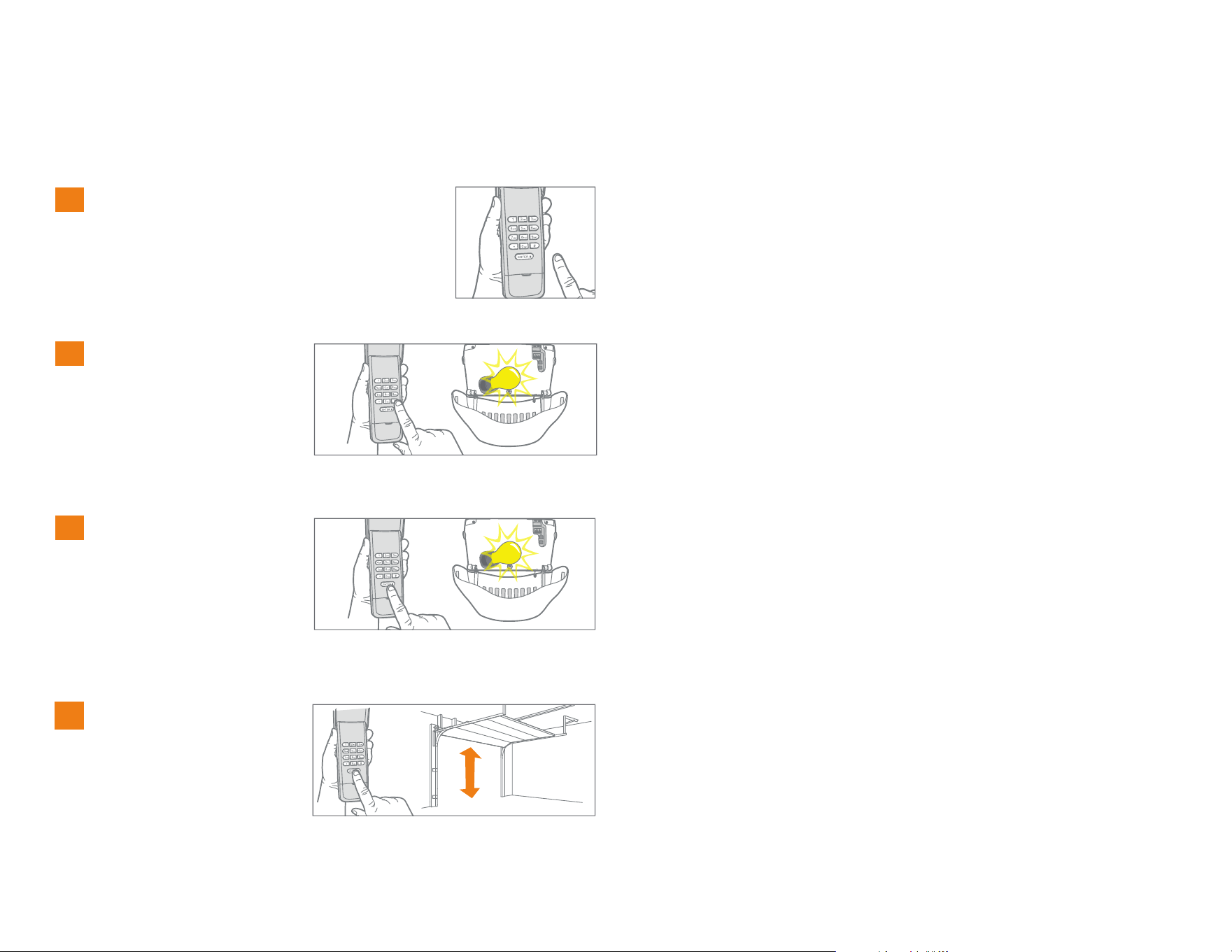
Ingrese el PIN programado que quiere
cambiar.
1
Presione y mantenga
presionado el botón #
hasta que la bombilla del
abre-puertas de garaje
parpadee dos veces.
2
x2
Introduzca el nuevo PIN de
4 dígitos elegido por
usted, entonces oprima el
botón ENTER. La bombilla
del abre-puertas de garaje
parpadeará una vez.
3
Oprima el nuevo PIN para
probarlo y, luego, oprima
el botón ENTER. El abre-
puertas de garaje se
activará.
4
5
PROGRAMACIÓN DE UN PIN TEMPORAL - CANTIDAD DE HORAS
Programación
Ingrese el PIN programado y, a
continuación, presione y
mantenga presionado el botón *
hasta que la bombilla del abre-
puertas de garaje se encienda
intermitentemente 3 veces.
1
NOTA: Esta función no está presente en abre-puertas con botón verde “Learn” o receptor externo.
Se puede programar un PIN temporal de 4 dígitos para permitir el acceso a visitantes. Cada PIN programado puede programar un PIN temporal. El PIN
temporal puede configurarse para un número de horas o para una cantidad de aperturas de la puerta. El PIN temporal no puede ser igual a ningún PIN
programado anteriormente.
Introduzca el PIN temporal de 4
dígitos elegido por usted y,
luego, oprima el botón *. La
bombilla del abre-puertas de
garaje se encenderá
intermitentemente 4 veces.
2
x4
Oprima la cantidad de horas que
trabajará el PIN temporal (hasta
255). A continuación, oprima el
botón *. La bombilla del abre-
puertas de garaje se encenderá
intermitentemente 1 vez.
3
Introduzca el PIN temporal para
probar; luego, oprima el botón
ENTER. El abre-puertas de
garaje se activará.
4
x3
6
PROGRAMACIÓN DE UN PIN TEMPORAL - CANTIDAD DE APERTURAS
Programación
1
2
x4
3
Oprima la cantidad de
aperturas que trabajará el
PIN temporal (hasta 255).
A continuación, oprima el
botón #. La bombilla del
abre-puertas de garaje se
encenderá
intermitentemente 1 vez.
Introduzca el PIN
temporal para probar;
luego, oprima el botón
ENTER. El abre-puertas de
garaje se activará. Si el
PIN temporal se configuró
para una cantidad de
aperturas, la prueba
consumirá una de ellas.
4
x3
NOTA: Esta función no está presente en abre-puertas con botón verde “Learn” o receptor externo.
Se puede programar un PIN temporal de 4 dígitos para permitir el acceso a visitantes. Cada PIN programado puede programar un PIN temporal. El PIN
temporal puede configurarse para un número de horas o para una cantidad de aperturas de la puerta. El PIN temporal no puede ser igual a ningún PIN
programado anteriormente.
Ingrese el PIN programado
y, a continuación, presione
y mantenga presionado el
botón * hasta que la
bombilla del abre-puertas
de garaje se encienda
intermitentemente 3 veces.
Introduzca el PIN temporal
de 4 dígitos elegido por
usted y, luego, oprima el
botón ENTER. La bombilla
del abre-puertas de garaje
se encenderá
intermitentemente 4 veces.
7
Seleccione una ubicación para montar la Entrada sin llave a una
altura mínima de 5 pies (1.5 m) fuera del alcance de los niños.
Retire la tapa de las baterías y la batería.
Marque el agujero superior de montaje y abra un agujero guía
de 3.2 mm (1/8 de pulg.).
Instale el tornillo superior, permitiendo que sobresalga
3.2 mm (1/8 de pulg.) por encima de la superficie. Posicione la
Entrada sin llave sobre el tornillo superior.
Marque el agujero inferior y abra un agujero guía de 3.2 mm (1/8
de pulg.). Instale el botón inferior. No apriete demasiado para evitar
que se fracture el alojamiento plástico.
Instale de nuevo la batería y coloque otra vez la cubierta.
Instalación
1
2
3
4
5
6
8
Para desactivar la funcionalidad de cierre con un
botón:
Mantenga oprimidos los botones 1 y 9 durante 10
segundos. El teclado parpadeará cuatro veces
cuando se desactive la funcionalidad de cierre con
un botón.
Para activar la funcionalidad de cierre con un
botón:
Mantenga oprimidos los botones 1 y 9 durante 10
segundos. El teclado parpadeará dos veces cuando
se active la funcionalidad de cierre con un botón.
La Entrada sin llave tiene una
funcionalidad que permite que la
puerta se cierre usando el botón
ENTER en lugar del PIN.
NOTA: Esta función no está
presente en abre-puertas
fabricados antes de 2006 o con
receptor externo.
El abre-puertas de garaje se activa cuando se oprimen el PIN y el botón
ENTER. El teclado parpadeará durante 15 segundos; durante ese tiempo,
el botón ENTER puede usarse para parar, arrancar o invertir la puerta.
Si oprime accidentalmente un número incorrecto, oprima el PIN correcto
y, a continuación, el botón ENTER. La Entrada sin llave transmitirá
solamente los últimos cuatro dígitos que se oprimieron antes del botón
ENTER.
Operación
CIERRE CON UN BOTÓN
Sustituya la batería cuando el teclado reduzca su iluminación o no se
ilumine después de oprimir un botón.
Elimine las baterías usadas en forma adecuada.
9V batería
BATERÍA
Para evitar la posibilidad de LESIONES GRAVES o incluso la MUERTE:
• NUNCA permita que los niños pequeños estén cerca de
las baterías.
• Si se ingieren las baterías, notifíquelo de inmediato a un médico.

9
Preguntas Frecuentes
¿Por qué no funciona el teclado?
• ¿Se encendieron las luces del teclado cuando escribió el PIN? Si las
luces no se encendieron al pulsar un botón significa que hay que
cambiar la batería. Usar una batería de 9 V.
• Intente reprogramar el teclado del abre-puerta de garaje.
• Verificar que el teclado sea compatible con el abre-puerta (Abre-
puertas de garaje Chamberlain fabricados después del 1 de enero de
1993).
• Si las medidas anteriores no dieron resultado, cambie el teclado.
¿Cuántos PINs puedo programar a la entrada con llave digital?
La entrada con llave digital programará hasta 24 PINs y hasta 24 PINs
temporales.
¿Puedo usar el mismo PIN para activar varias puertas de garaje?
No, no puede usar el mismo número de PIN dos veces. La entrada con
llave digital sobrescribirá la programación original si el PIN se programa
una segunda vez.
¿Por qué no se activan las luces del teclado cuando presiono un botón?
Si las luces del teclado no se encendieron al pulsar un botón significa
que hay que cambiar la batería. Usar una batería de 9 V.
¿Qué abre-puertas de garaje son compatibles con la entrada con llave
digital?
La entrada con llave digital solo es compatible con los abre-puertas de
garaje Chamberlain fabricados después del 1 de enero de 1993.
¿Por qué se cierra la puerta cuando solo presiono el botón ENTER?
La entrada con llave digital tiene la función “Cierre con un botón” que
permite cerrar la puerta a través del botón ENTER en lugar de un PIN. Si
no quiere activar esta función, presione y mantenga presionado los
botones 1 y 9 durante 10 segundos. El teclado parpadeará cuatro veces
cuando la función de cierre con un botón se desactive.
¿Qué sucede si uso un PIN equivocado?
Si marca accidentalmente el número equivocado, vuelva a marcar el PIN
y pulse el botón ENTER. El teclado transmitirá únicamente los últimos
cuatro dígitos marcados antes de pulsar ENTER.
GARANTÍA
UN AÑO DE GARANTÍA LIMITADA
The Chamberlain Group, Inc. garantiza al primer comprador de este
producto que dicho producto está libre de defectos de materiales y/o
mano de obra durante un período de 1 año a partir de la fecha de compra.
PIEZAS DE RECAMBIO
Batería . . . . . . . . . . . . . . . . . . . . . . . . . . . . . . . . . . . . . . . . . . . . . . 10A25
Cubierta del teclado . . . . . . . . . . . . . . . . . . . . . . . . . . . . . . . . . . . 41D621
Cubierta de la batería . . . . . . . . . . . . . . . . . . . . . . . . . . . . . . . . . . 41D541
www.chamberlain.com
© 2017, The Chamberlain Group, Inc.
Todos los derechos reservados
114A5071B
AVISO: para cumplir con las normas de la FCC y/o de la IC (Industry Canada), queda prohibido
realizar ajustes o modificaciones en este receptor y/o transmisor, excepto para cambiar la
configuración del código o para reemplazar la batería. NO HAY OTRAS PIEZAS QUE EL
USUARIO PUEDA REPARAR.
Este dispositivo cumple con la Parte 15 de las normas de la FCC y de las normas canadienses IC
RSS-210. La operación está sujeta a las dos condiciones siguientes: (1) este dispositivo no
puede causar interferencias perjudiciales y, (2) este dispositivo debe aceptar cualquier
interferencia recibida, incluyendo cualquier interferencia que pueda ocasionar un funcionamiento
no deseado.