
Instructions
The appliance is not to be used by persons (including children) with reduced physical, sensory
or mental capabilities, or lack of experience and knowledge, unless they have been given
supervision or instruction.
Children being supervised not to play with the appliance.
This appliance can be used by children aged from 8 years and above and persons with reduced
physical, sensory or mental capabilities or lack of experience and knowledge if they have been
given supervision or instruction concerning use of the appliance in a safe way and understand
the hazards involved.
Children shall not play with the appliance.
Cleaning and user maintenance shall not be made by children without supervision.
If the supply cord is damaged, it must be replaced by the manufacturer of its service agent or a
similarly qualified person in order to avoid a hazard.
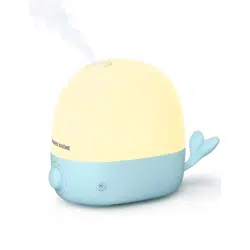
– Be aware that high humidity levels may encourage the growth of biological organisms in the
environment.
– Do not permit the area around the humidifier to become damp or wet. If dampness occurs,
turn the output of the humidifier down. If the humidifier output volume cannot be turned down,
use the humidifier intermittently. Do not allow absorbent materials, such as carpeting, curtains,
drapes, or tablecloths, to become damp.
– Unplug the appliance during filling and cleaning.
– Never leave water in the reservoir when the appliance is not in use.
– Empty and clean the humidifier before storage. Clean the humidifier before next use.
Warning: Micro-organisms that may be present in the water or in the environment where the
appliance is used or stored, can grow in the water reservoir and be blown in the air causing very
serious health risks when the water is not renewed and the tank is not cleaned properly every
3 days.
This marking on the product, accessories or literature indicates that the product and its electronic
accessories should not be disposed of with other household waste at the end of their working life.
To prevent possible harm to the environment or human health from uncontrolled waste disposal,
please separate these items from other types of waste and recycle them responsibly to promote
the sustainable reuse of material resources. Household users should contact either the retailer
where they purchased this product, or their local government office, for details of where and how
they can take these items for environmentally safe recycling. Business users should contact their
supplier and check the terms and conditions of the purchase contract. This product and its
electronic accessories should not be mixed with other commercial wastes for disposal.
Correct Disposal of This Product (Waste Electrical & Electronic Equipment)
(Applicable in countries with separate collection systems)
1
1-12
freedom
2
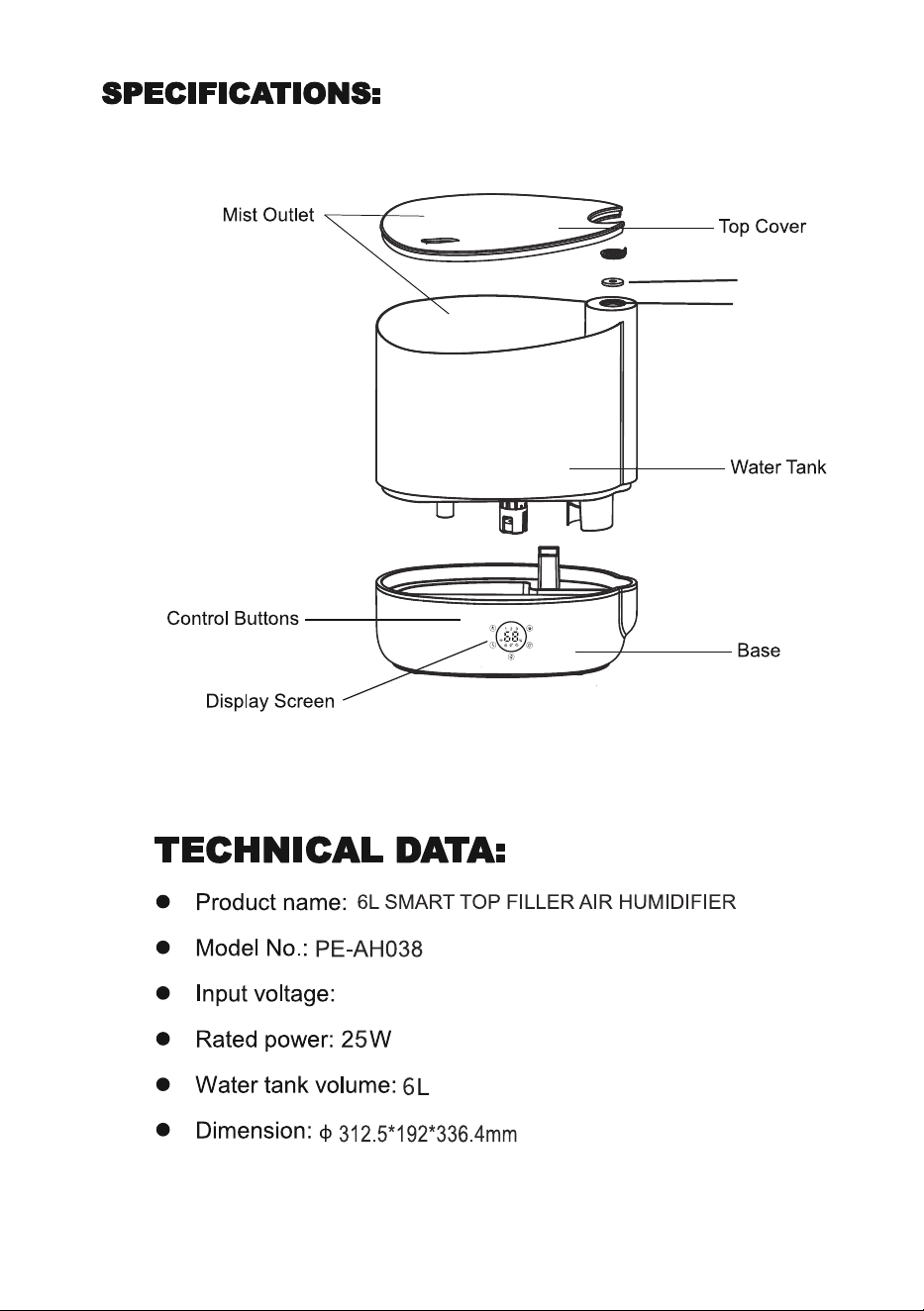
Aroma box
Aroma pad
AC 120V 60Hz
3
4
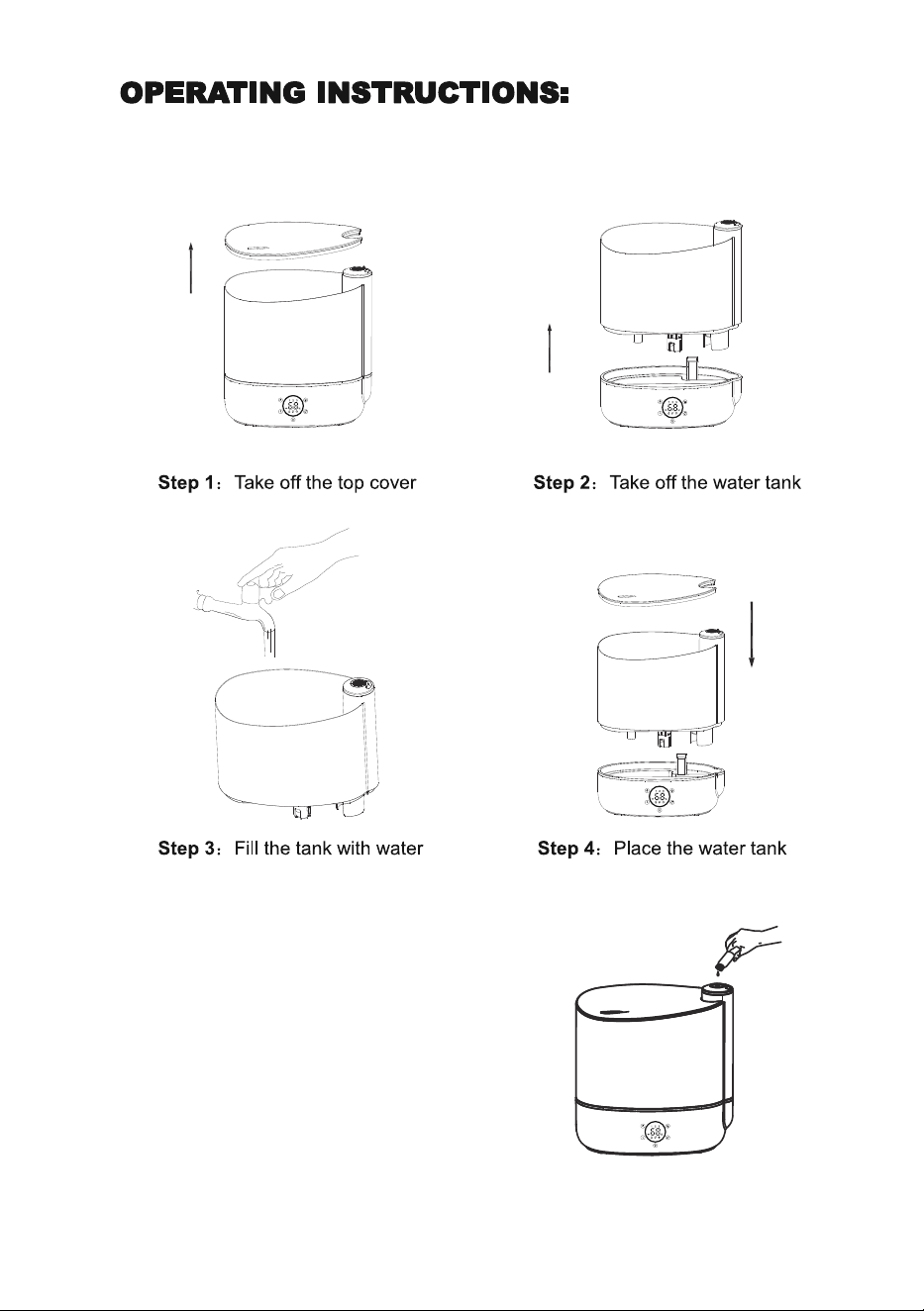
Lift off the aroma cap.
Put 8-10 drops of essential oil on the aroma pad.
5
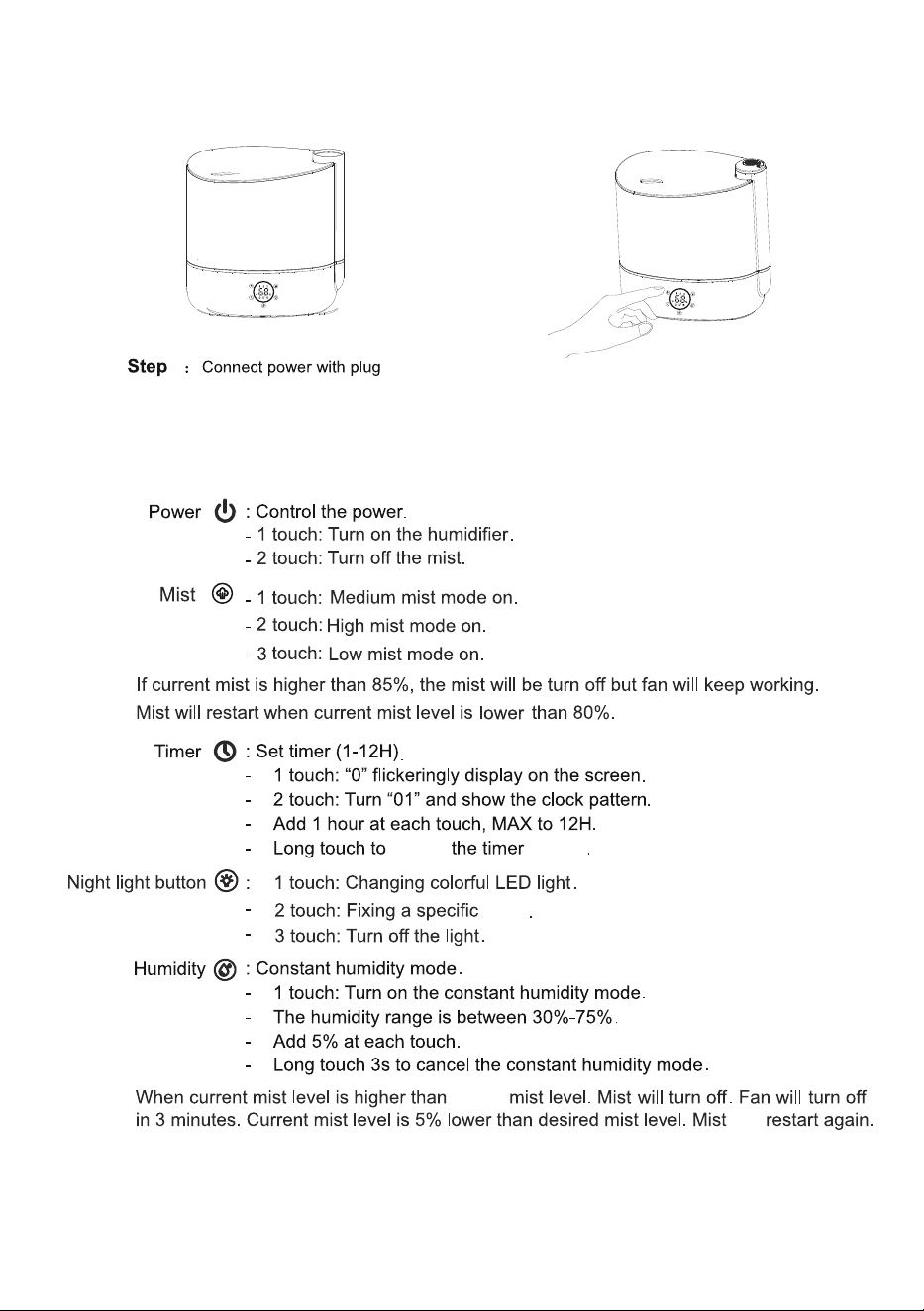
5
cancel
setting
color
target
will
6
7
USING Wi-fi CONTROL
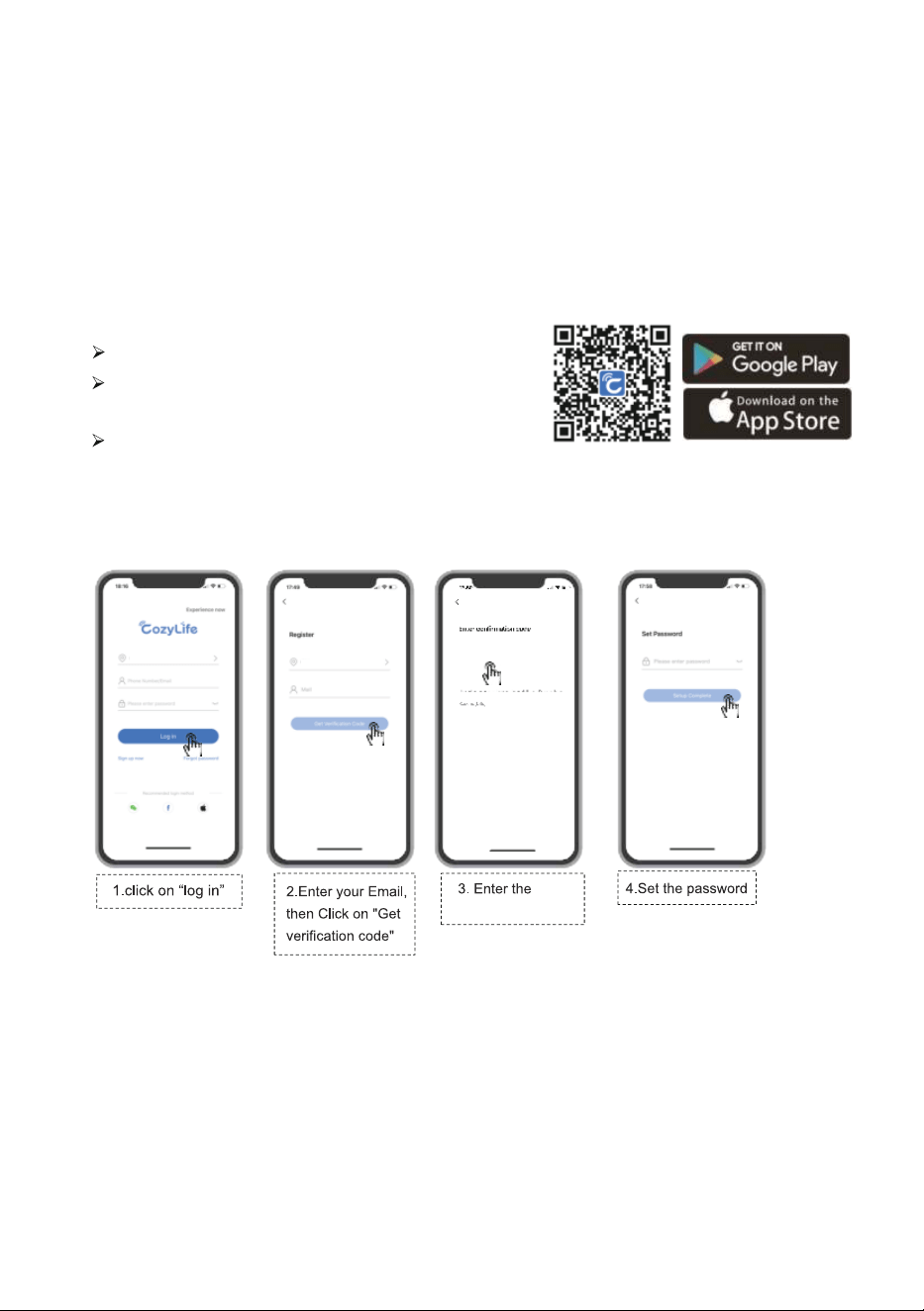
2. Registration
US
US
Each device can be only connected with one smart phone(Host). For multiple people use, the
"Host need to share it to the others.
1. Application Download
Scan the QR code to download it.
Android phone: Download it from Google Play by
searching Cozylife.
ios phone: Download it from App store by searching
Cozylife.
APPLICATION CONNECTION AND SHARE
verification code
8
XXXX
XXXX
PAY ATTENTION:
If the connection is failed:
1、Check if input wrong Wi-Fi name or password.
2、Both phone and the device must connect same Wi-Fi.
3、Only 2.4GHz Wi-Fi networks are supported, check your network.
4、During connection, keep your smart phone’s Bluetooth on and close to the device.
5、Above steps must be finished within 3 mins. If time exceeds, connection
will be failed, please repeat.
6、Restart your Wi-Fi device (Router, TV box) and try again.
Long press " " button to turn on wifi function.
Turn on the Bluetooth on your phone.
Make sure your phone connect to your 2.4G Wi-Fi network.
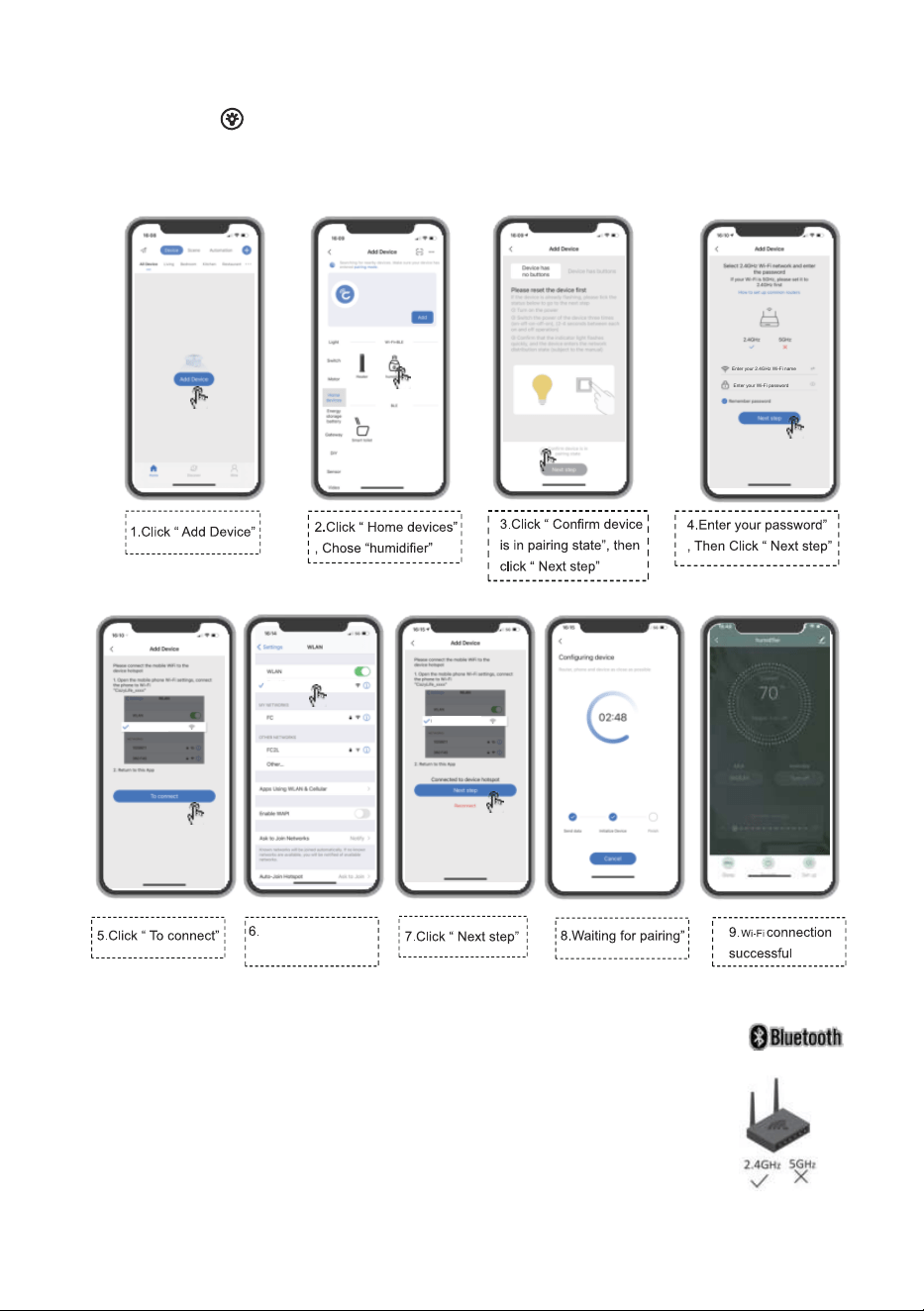
Follow below steps to connect your Application with the device.
3. Add device
9
chose your 2.4GHz Wi-Fi name
Enter your 2.4GHz Wi-Fi name
Enter your 2.4GHz Wi-Fi name
Enter your Wi-Fi password
Enter your 2.4GHz Wi-Fi name
Chose your 2.4GHz
Wi-Fi name
10
11
FCC STATEMENT :
This device complies with Part 18 of the FCC Rules. Operation is subject to
the following two conditions:
(1)This device may not cause harmful interference, and
(2)This device must accept any interference received, including interference
that may cause undesired operation.
Warning: Changes or modifications not expressly approved by the party
responsible for compliance could void the user's authority to operate the
equipment.
NOTE: This equipment has been tested and found to comply with the limits for
a Class B digital device, pursuant to Part 18 of the FCC Rules. These limits
are designed to provide reasonable protection against harmful interference in
a residential installation. This equipment generates uses and can radiate radio
frequency energy and, if not installed and used in accordance with the instruc-
tions, may cause harmful interference to radio communications. However,
there is no guarantee that interference will not occur in a particular installation.
If this equipment does cause harmful interference to radio or television recep-
tion, which can be determined by turning the equipment off and on, the user is
encouraged to try to correct the interference by one or more of the following
measures:
Reorient or relocate the receiving antenna.
Increase the separation between the equipment and receiver.
Connect the equipment into an outlet on a circuit different from that to which
the receiver is connected.
Consult the dealer or an experienced radio/TV technician for help.
FCC Radiation Exposure Statement:
This equipment complies with FCC radiation exposure limits set forth for an
uncontrolled environment. This equipment should be installed and operated
with minimum distance 20cm between the radiator & your body.
12
Manufacturer: Shenzhen Aspiron Technology Company Limited
Address:3rd Floor, Yiben Building, No.1063 Chaguang Road, Xili Street,
Nanshan District, Shenzhen, Guangdong, China
www.parisrhone.com
Made In China