

Table of Contents
Solution overview ..........................................................................................................................................3
Specifications................................................................................................................................................4
Product overview ....................................................................................................................................4
LED indicators.........................................................................................................................................4
Buttons..................................................................................................................................................5
Control button .................................................................................................................................5
Connectors .............................................................................................................................................5
OSDP connector ...............................................................................................................................5
Wiegand connector...........................................................................................................................5
Supervised inputs .............................................................................................................................6
DIP switch connector ........................................................................................................................6
Troubleshooting.............................................................................................................................................8
Reset to factory default settings ...............................................................................................................8
......................................................................................................................................................8
Configuration mode.................................................................................................................................8
Upgrade the device software ....................................................................................................................8
Technical issues, clues, and solutions.........................................................................................................8
Contact support ......................................................................................................................................9
AXIS TA1101-B Wiegand to OSDP Converter
2
3
Solution overview
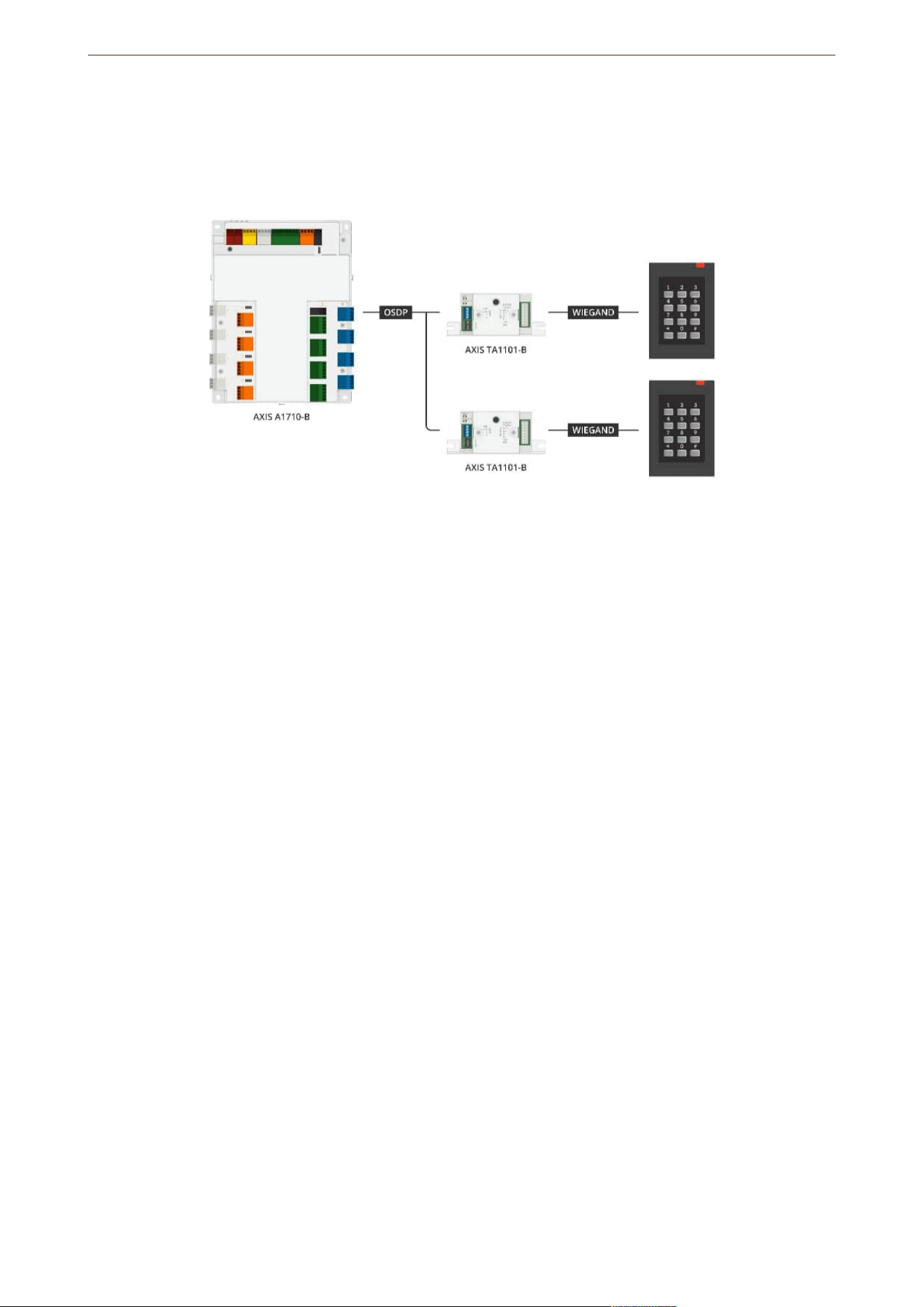
The Wiegand to OSDP converter is used between the Wiegand reader and door controller to convert Wiegand
data to OSDP. Each Wiegand reader must be connected to one converter.
AXIS TA1101-B Wiegand to OSDP Converter
4
Specifications
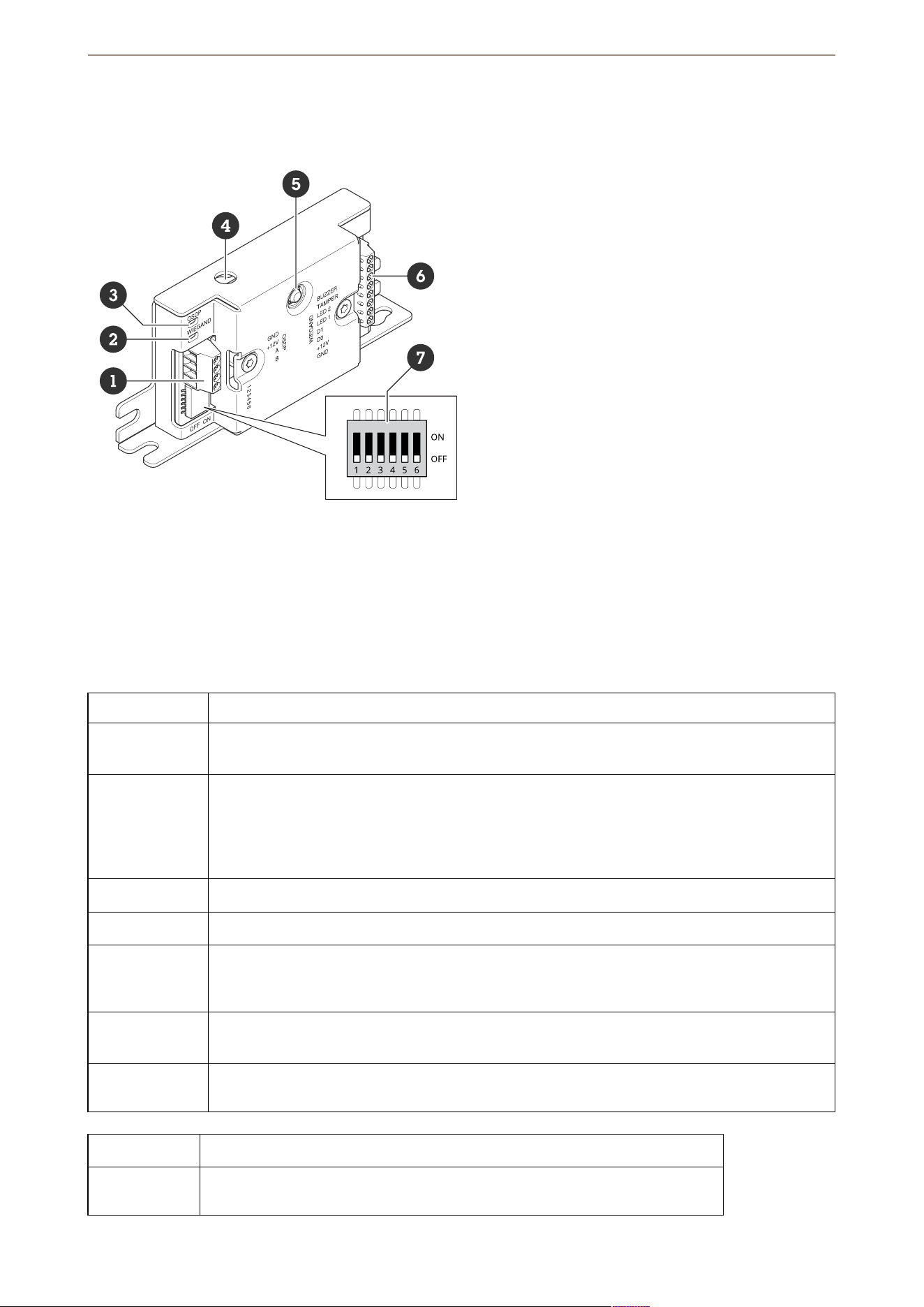
Product overview
1 OSDP connector
2 Wiegand LED
3 OSDP LED
4 Case open tamper
5 Control button
6 Wiegand connector
7 DIP switch
LED indicators
OSDP LED Indication
Blinks green
every 1 s
Idle. No OSDP communication
Blinks green
every 50 ms on
every OSDP
response
transmission
Normal OSDP communication
Red Casing tamper or Wiegand reader tamper is active
Green Idle when the control button is pressed for less than 15 s
Blinks red/
green every
250 ms
Flashing device software
Blinks green
every 100 ms
Restore to factory default when the control button is pressed for more than 15 s (*)
Blinks red every
100 ms
Erase the device software when the control button is pressed for more than 60 s (*)
Wiegand LED Indication
Green Wiegand data received
AXIS TA1101-B Wiegand to OSDP Converter
5
(On for 50 ms)
Green
(On for 1s)
Enter or exit the configuration mode (*)
Blinks green
every 250 ms
In the configuration mode (*)
Red Wiegand output over current error
(*) See .
Buttons
Control button
The control button is used for:
• Resetting the device to factory default settings. See .
• Configuration mode. See .
Connectors
OSDP connector
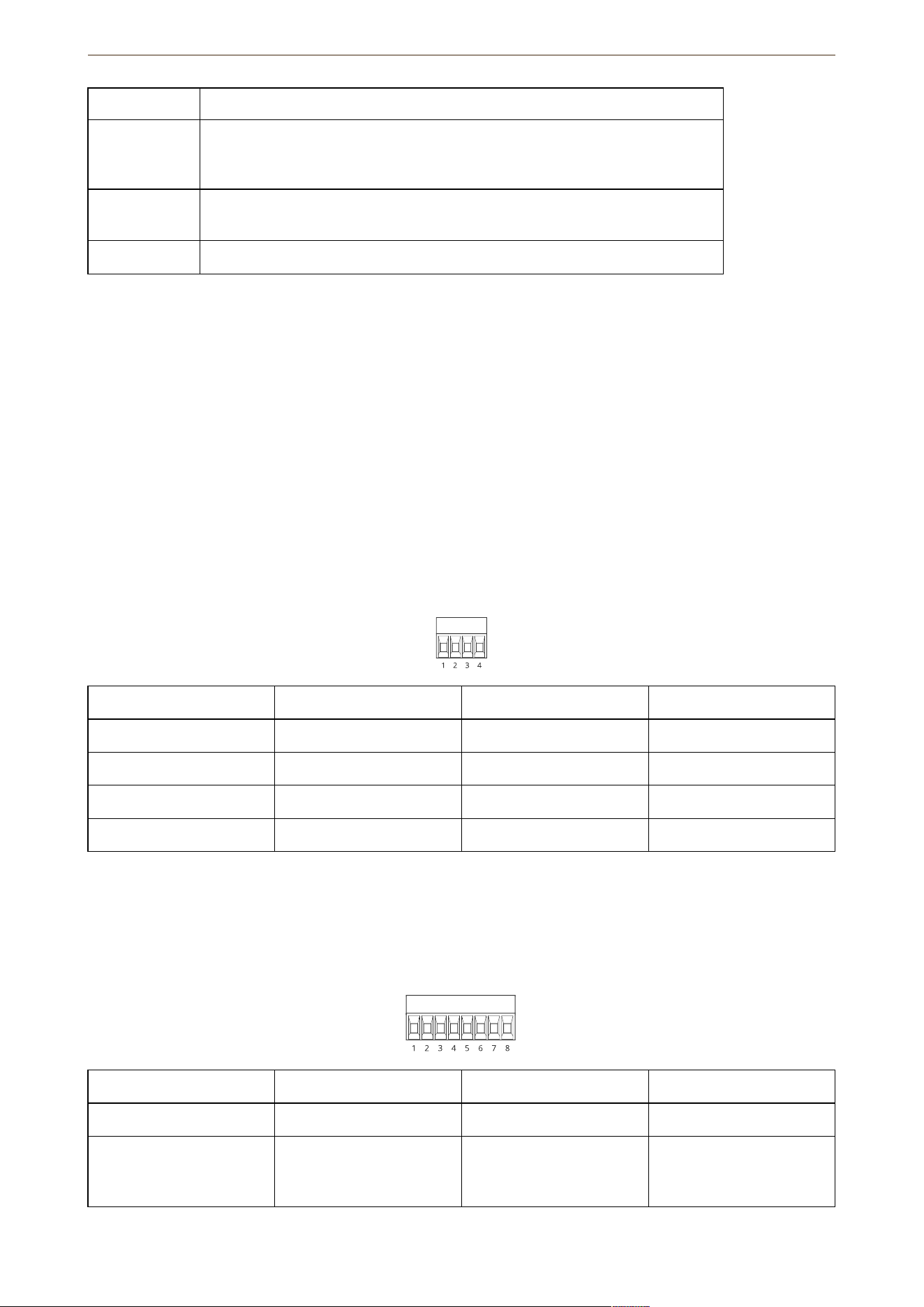
One 4-pin terminal block to connect to the OSDP reader.
Function Pin Note Specifications
DC ground (GND) 1 0 V DC
DC input (+12 V) 2 Supplies power to unit 12 V DC, max 440 mA
A 3 Half duplex RS485
B 4 Half duplex RS485
For more information, see electrical wiring drawings.
Wiegand connector
One 8-pin terminal block to connect to the Wiegand reader.
Function Pin Note Specifications
DC ground (GND) 1 0 V DC
DC output (+12 V) 2 Supplies power to reader.
(Pass through from OSDP
DC input)
12 V DC, max 440 mA
AXIS TA1101-B Wiegand to OSDP Converter
6
D0 3 Wiegand data 0 to max 30 V DC
D1 4 Wiegand data 0 to max 30 V DC
LED 1 5 Digital output 0 to max 30 V DC, open
drain, 100 mA
LED 2 6 Digital output 0 to max 30 V DC, open
drain, 100 mA
TAMPER 7 Digital input or
supervised input —
Connect to pin 1 to
activate, or leave floating
(unconnected) to
deactivate. To use
supervised input, install
end-of-line resistors. See
connection diagram for
information about how
to connect the resistors.
See .
0 to max 30 V DC
BUZZER 8 Digital output 0 to max 30 V DC, open
drain, 100 mA
For more information, see electrical wiring drawings.
Note
Wiegand data isn’t encrypted. To reduce security risk, install the Wiegand reader as close as possible to
AXIS TA1101-B when using OSDP Secure Channel.
Supervised inputs
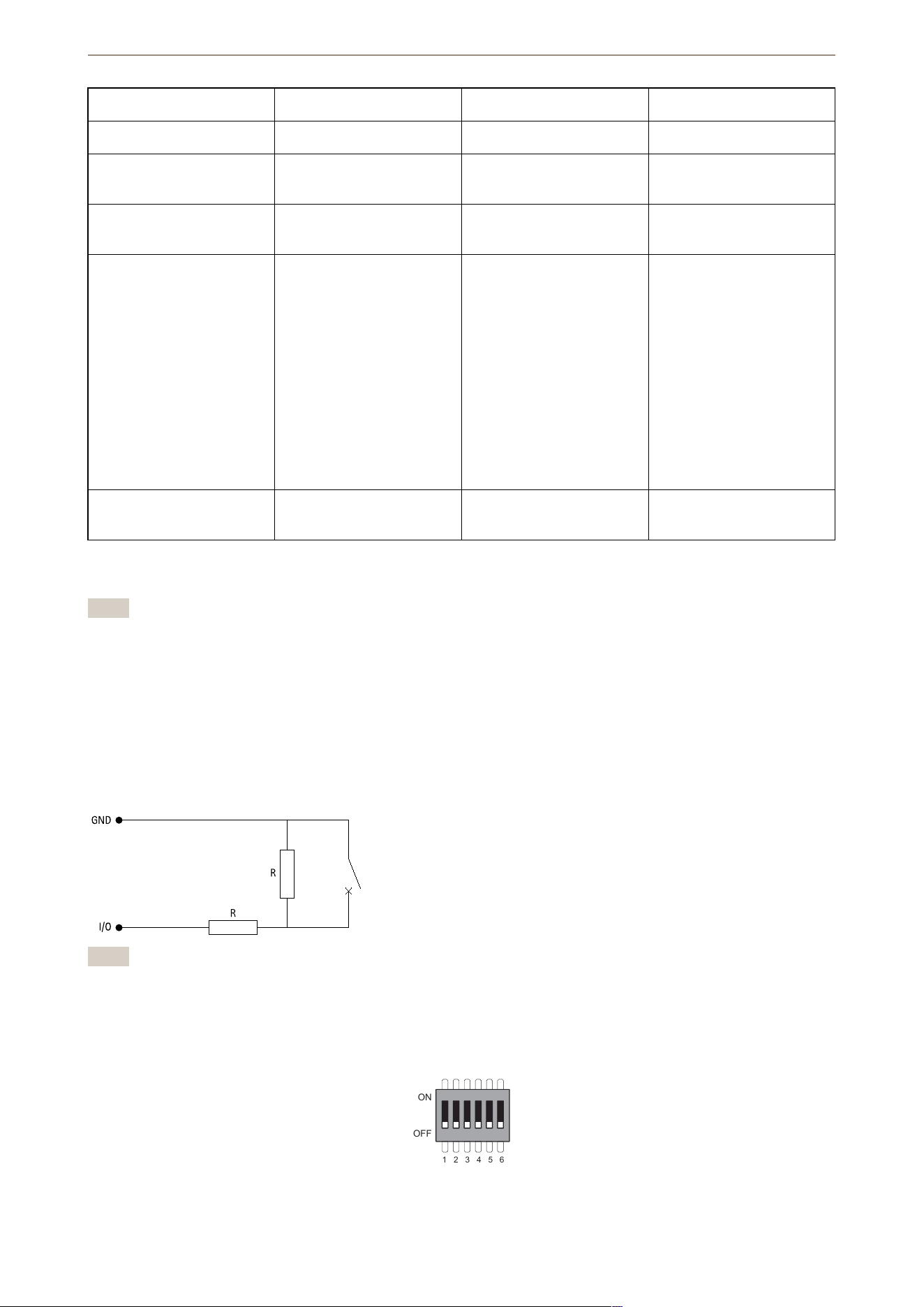
To use supervised inputs, install end of line resistors according to the diagram below.
Serial first connection
The resistor values must be 1 kΩ.
Note
It is recommended to use twisted and shielded cables. Connect shielding to 0 V DC.
DIP switch connector
6-pin terminal block. The default position of the DIP switches is OFF.
1 2 3 4 5 6
ON
OFF
AXIS TA1101-B Wiegand to OSDP Converter

7
1 2 3 4 5 6 Description
OFF OFF Address 0 (OSDP
COMSET supported)
ON OFF Address 1
OFF ON Address 2
ON ON Address 3
OFF 120 Ohm RS485
termination disabled
ON 120 Ohm RS485
termination enabled
OFF Single Wiegand LED
mode (LED1)
ON Dual Wiegand LED
mode (LED1 + LED2)
OFF Casing tamper disabled
ON Casing tamper enabled
OFF OSDP Secure Channel
mode disabled
ON OSDP Secure Channel
mode enabled
AXIS TA1101-B Wiegand to OSDP Converter

8
Troubleshooting
Reset to factory default settings
1. Disconnect power from the product.
2. Press and hold the control button while reconnecting power. See .
3. Keep the control button pressed for 15 seconds. See .
4. Release the control button. The process is complete when the status LED indicator turns green. The
product has been reset to the factory default settings.
Configuration mode
To enter the configuration mode, press the control button for more than 10 seconds until the Wiegand LED turns
green for one second. See . For how to configure supervised inputs, see .
During the configuration mode:
• Click the control button once to exit the configuration mode.
• Click the control button twice to configure IO5 as digital.
• Click the control button three times to configure IO5 as analog for supervised tamper.
• Click the control button four times to configure the supervised open collector circuit.
• Click the control button five times to configure the supervised switch circuit.
Upgrade the device software
Important
• Preconfigured and customized settings are saved when you upgrade the device software (provided that
the features are available in the new version) although this is not guaranteed by Axis Communications
AB.
• Make sure the device remains connected to the power source throughout the upgrade process.
• Make sure you have an OSDP reader configured in your access control management system.
Note
When you upgrade the device with the latest version, the product receives the latest functionality available.
Always read the upgrade instructions and release notes available with each new release before you upgrade
the version. To find the latest device software and the release notes, go to axis.com/support/device-software.
1. Download the device software file to your computer, available free of charge at axis.com/support/
device-software.
2. Log in to your door controller web interface as an administrator.
3. Go to Peripherals > Upgrade > Upgrade converters.
4. Click Upgrade converters.
When the upgrade has finished, the product restarts automatically.
Technical issues, clues, and solutions
If you can’t find what you’re looking for here, try the troubleshooting section at axis.com/support.
Problems with the device software
Upgrade failure If the upgrade fails, try upgrading the device software again.
No device software If you press the control button during power on for more than 60 seconds, it is
possible to remove the device software. To solve this, try upgrading the device
software.
AXIS TA1101-B Wiegand to OSDP Converter


.
T10221892
2025-04 (M1.13)
© 2025 Axis Communications AB
