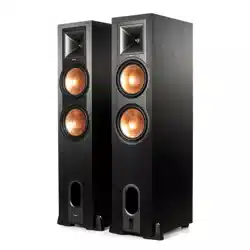
R-28PF
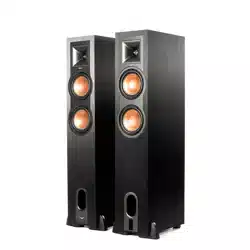
R-26PF
PHONO
ANALOG
DIGITAL
USB
PHONO
ANALOG
DIGITAL
USB
INSIDETABLE OF CONTENTS
CONTENU • CONTENIDO • INHALT • CONTENUTO • CONTEÚDO • 目录 •
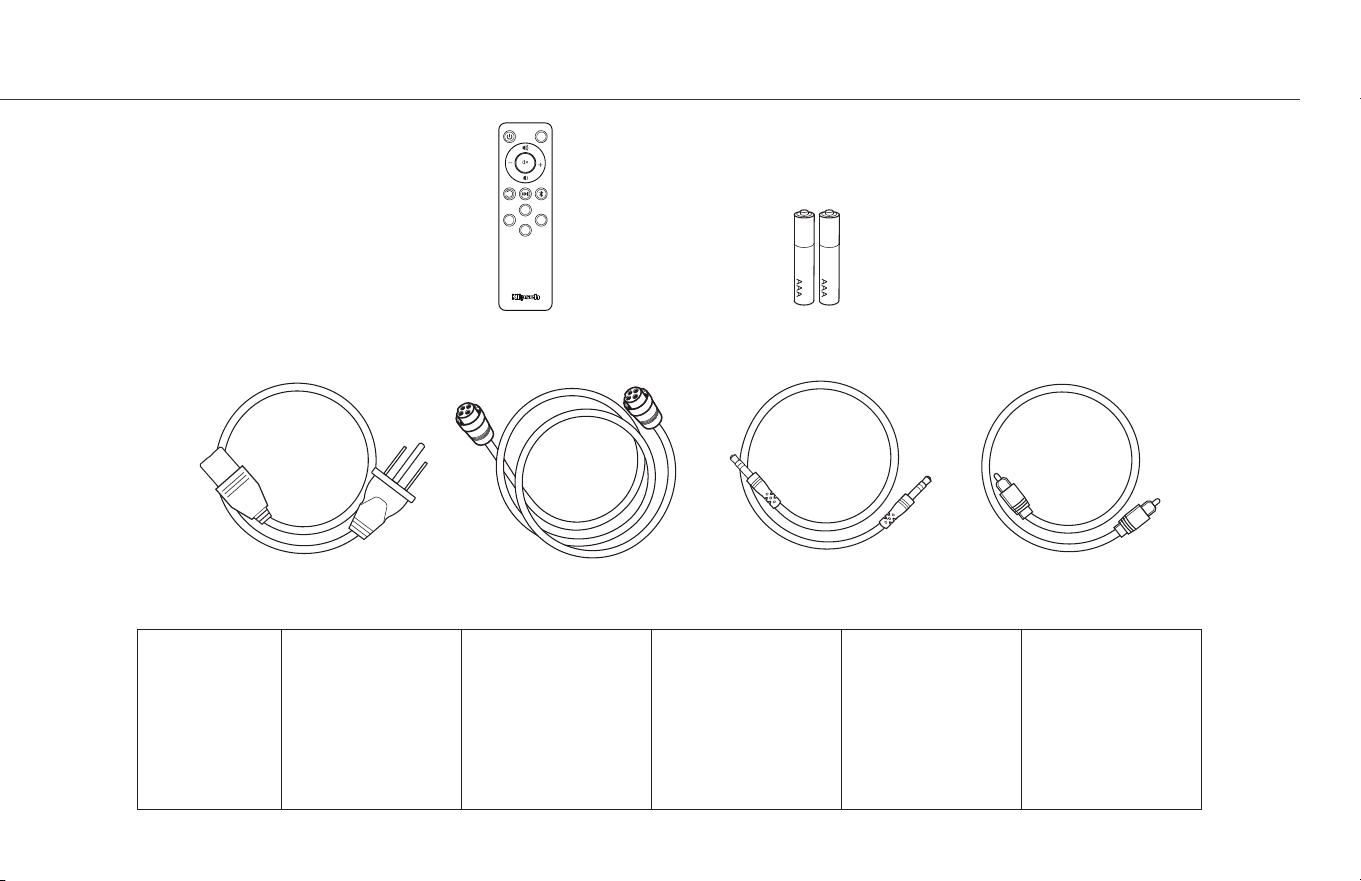
Speakers (2)
- INSIDE
- RIGHT SPEAKER (ACTIVE)
- SETUP
- CONNECTIONS - TV
- CONNECTIONS - COMPUTER
- CONNECTIONS - TURNTABLE
- REMOTE
-
BLUETOOTH
®
WIRELESS TECHNOLOGY
- SELECT SOURCE
- LED SOURCE INDICATOR
- SUBWOOFER OUTPUT
- BASS MANAGEMENT
- ENABLE/DISABLE BASS MANAGEMENT
- REMOTE CONTROL CODES
- FACTORY RESET
- CARE AND CLEANING
- PRODUCT REGISTRATION
- TROUBLESHOOTING
1-2
3-4
5
6
7
8
9-10
11-12
13
13
14
15
16
17
18
19
20
21
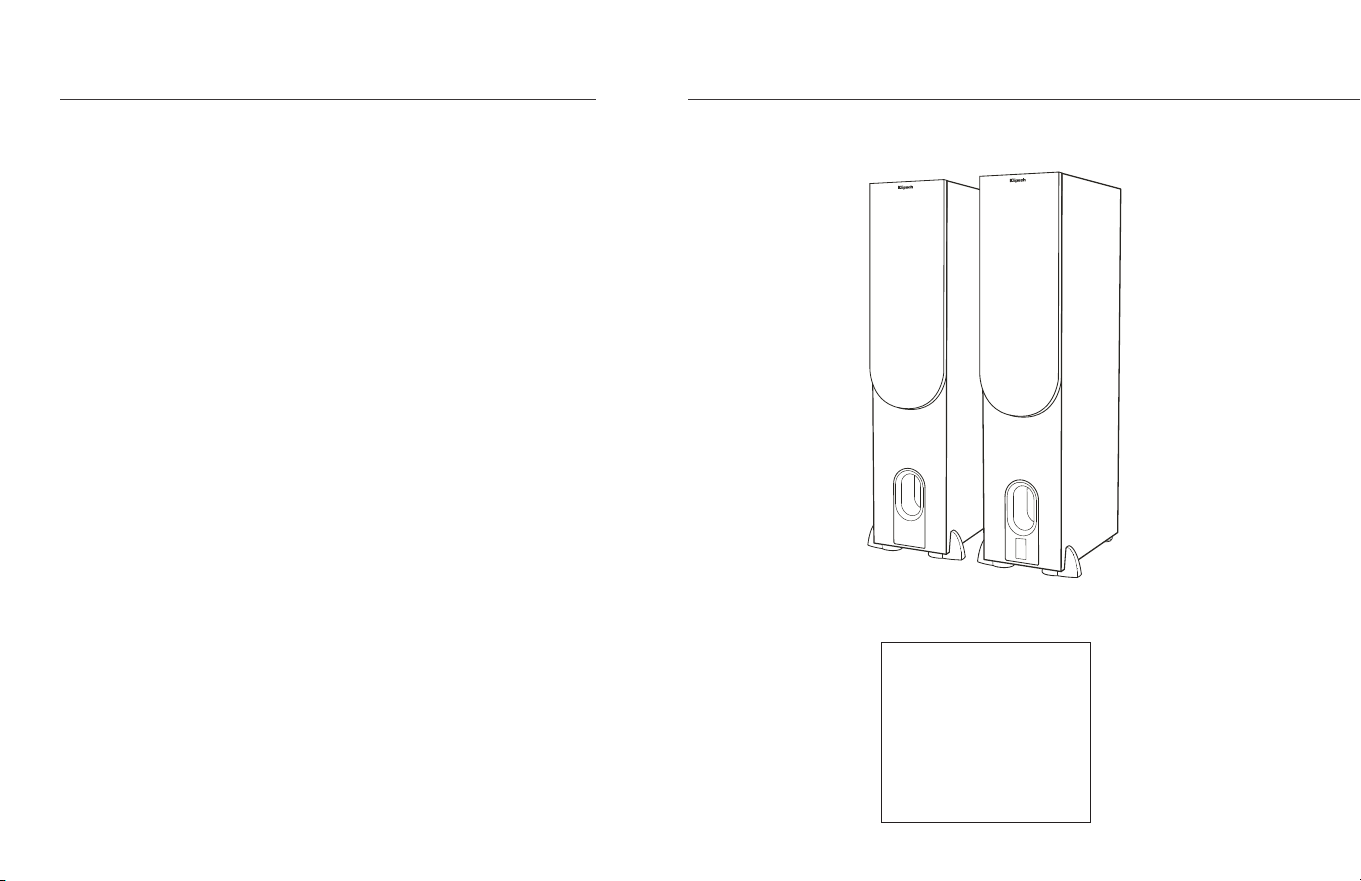
Speakers (2)
Enceintes (2)
Altavoces (2)
Lautsprecher (2)
Altoparlanti (2)
Caixas acústicas (2)
音箱 (2)
1
ةوبعلا لخاد
تاعامسلا
INSIDE
CONTENU • CONTENIDO • INHALT • CONTENUTO • CONTEÚDO • 目录 •
3.5mm AUXILIARY Cable4 PIN Speaker CableMain Power Cord Digital Optical Cable
Remote Batteries
LED
USB
PHONO OPT
AUX
SUBSUB
SUB
Remote
Télécommande
Control remoto
Fernbedienung
Telecomando
Controle remoto
遥控器
Main Power Cord
Cordon d’alimentation principal
Cordón principal de alimentación
Hauptnetzkabel
Cavo di alimentazione principale
Cabo de alimentação principal
主电源线
4 PIN Speaker Cable
Câble de haut-parleur à 4 broches
Cable de altavoz de 4 clavijas
Vierpoliges Lautsprecherkabel
Cavo altoparlante a 4 pin
Cabo de caixa acústica de 4 pinos
4针音箱线
3.5mm AUXILIARY
AUXILIAIRE 3,5mm
3.5 mm AUXILIAR
3,5-mm-AUX
INGRESSO AUSILIARIO DA 3,5 mm
AUXILIAR DE 3,5 MM
3.5mm 辅助电缆)
Digital Optical Cable
Câble optique numérique
Cable óptico digital
Optisches Digitalkabel
Cavo ottico digitale
Cabo ótico digital
光纖線
Batteries
Les Piles
Pilas
Batterien
Baterias
Batterie
电池
2
دع
ُ
ب نع مكحت زاهج يرصب يمقر لباكيسيئرلا ةقاطلا كلس
نونس 4 ةعامس لباك مم 3.5 يفاضإ لباك
تايراطبل
RIGHT SPEAKER (ACTIVE)
ENCEINTE DROITE (ACTIVE) • ALTAVOZ DERECHO (ACTIVO) • RECHTER LAUTSPRECHER (AKTIV) • ALTOPARLANTE DESTRO (ATTIVO) • CAIXA ACÚSTICA DIREITA (ATIVA) • 右音箱(有源)•
1
6
2
7
11
12
3
8
4
9
5
10
3
)ةطشن( ىنميلا ةعامسلا
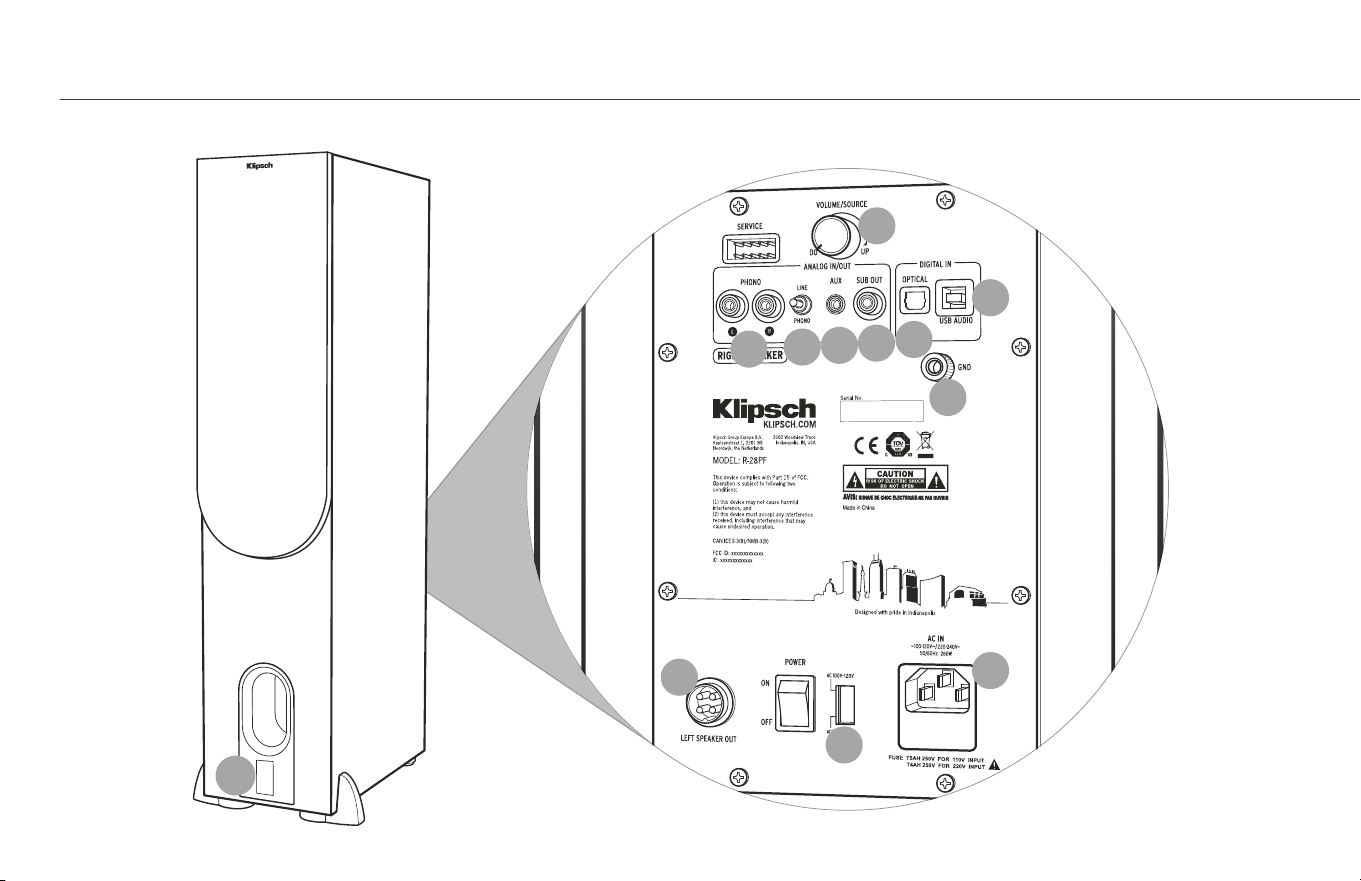
LED Source Indicator
Indicateur de source à DEL
Indicador LED de fuente
LED-Quellenanzeige
Spia LED sorgente audio
LED indicador de fonte
LED 源指示灯
Phono/Line Switch
Interrupteur Phono/Ligne
Conmutador de tocadiscos y línea
Phono/Line-Schalter
Selettore phono/linea
Chave fono/linha
唱机/线路开关
Volume/Source Control
Commande Volume/Source
Control de volumen y fuente
Regler Lautstärke/Quelle
Comando volume/sorgente audio
Controle de volume/fonte
音量/源控制
Phono Inputs
Entrées phono
Entradas de tocadiscos
Phono-Eingänge
Ingressi phono
Entradas fono
唱机输入
Auxiliary 3.5mm Input
Entrée auxiliaire de 3,5 m
Entrada auxiliar de 3.5 mm
3,5-mm-AUX-Eingang
Ingresso ausiliario da 3,5 mm
Entrada auxiliar de 3,5 mm
辅助 3.5mm 输入
Subwoofer Output
Sortie du haut-parleur d’extrêmes graves
Salida de subwoofer
Subwoofer-Ausgang
Uscita subwoofer
Saída para subwoofer
低音炮输出
Optical Input
Connexion Optique
Conexión Óptica
Optische verbindung
Connessione Ottica
Conexão Ótica
数字光纤连接
USB Audio Input
Entrée USB
Entrada de audio USB
USB-Audio-Eingang
Ingresso audio USB
Entrada de áudio USB
USB 音频输入
Left Speaker Terminal
Borne d’enceinte gauche
Terminal de altavoz izquierdo
Linker Lautsprecherterminal
Terminale altoparlante sinistro
Terminal da caixa acústica esquerda
左音箱端子
Ground Screw Terminal
Borne de la vis de raccord à la terre
Terminal de tornillo de conexión a tierra
Erdungsanschluss
Terminale a vite di messa a terra
Terminal de parafuso terra
接地螺钉端子
Mains Inlet
Entrée du secteur
Entrada principal de corriente
Netzeingang
Spina di alimentazione
Entrada de energia elétrica
市电接入口
Selector Switch
Commutateur
Selector
Wahlschalter
Selettore di selezione
Chave seletora
选择开关
1
6
2
7
11
3
8
4
9
5
10
4
12
ددحم حاتفم
LED ردصملا رشؤم
توصلا مخضم جارخإ يرصب لخدم
ضيرأتلا رامسم ليصوت فرط يسيئرلا رايتلا لخدم
ىرسيلا ةعامسلا ليصوت فرط
USB توص لخدم
طخلا/توصلا حاتفم توصلا تاخدإ
مم 3.5 يفاضإ لاخدإ
ردصملا/توصلا ىوتسم يف مكحتلا حاتفم
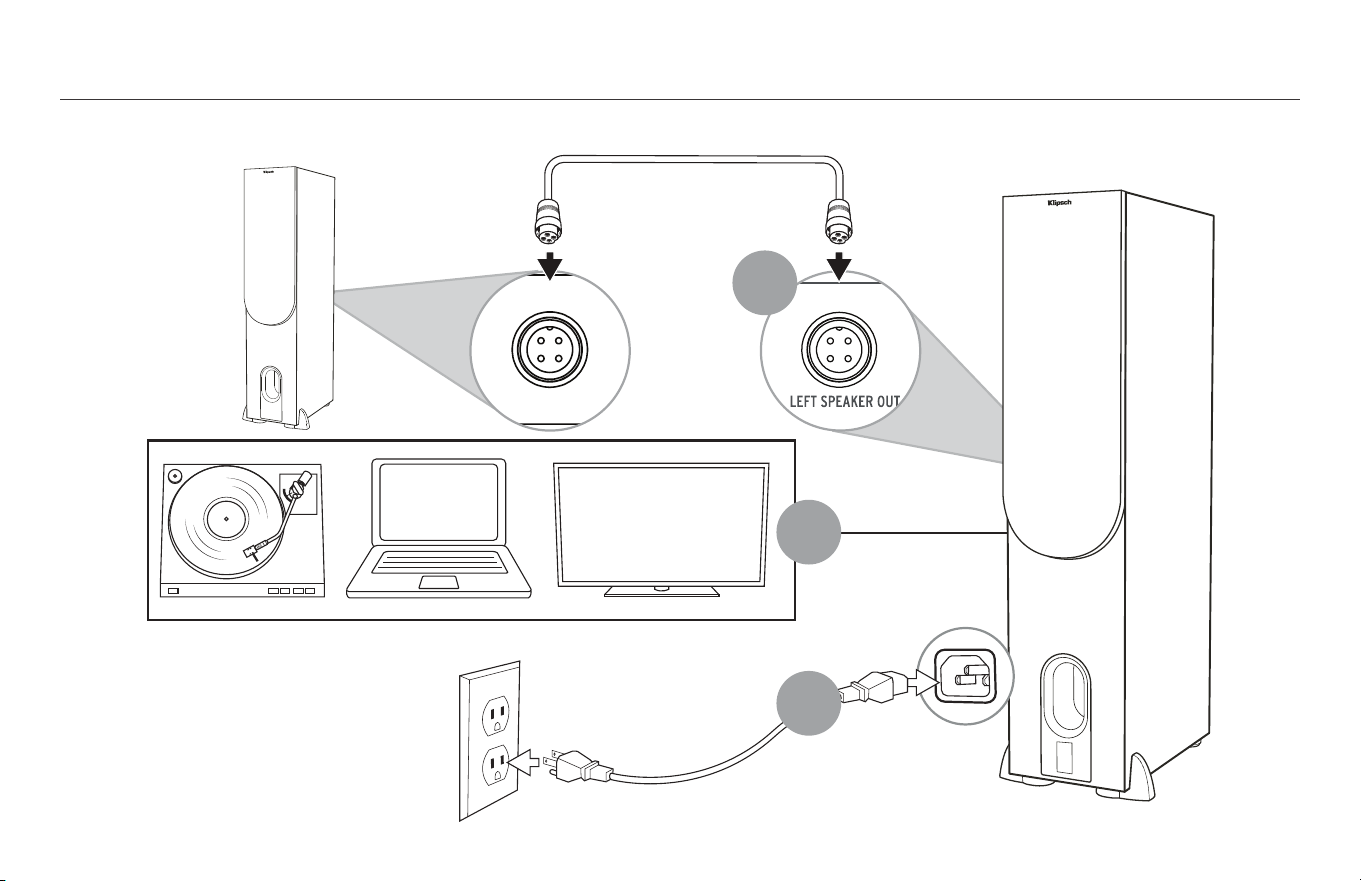
SETUP
INSTALLATION • CONFIGURACIÓN • SETUP • INSTALLAZIONE • INSTALAÇÃO • 设置 •
1
2
3
5
بيكرتلا
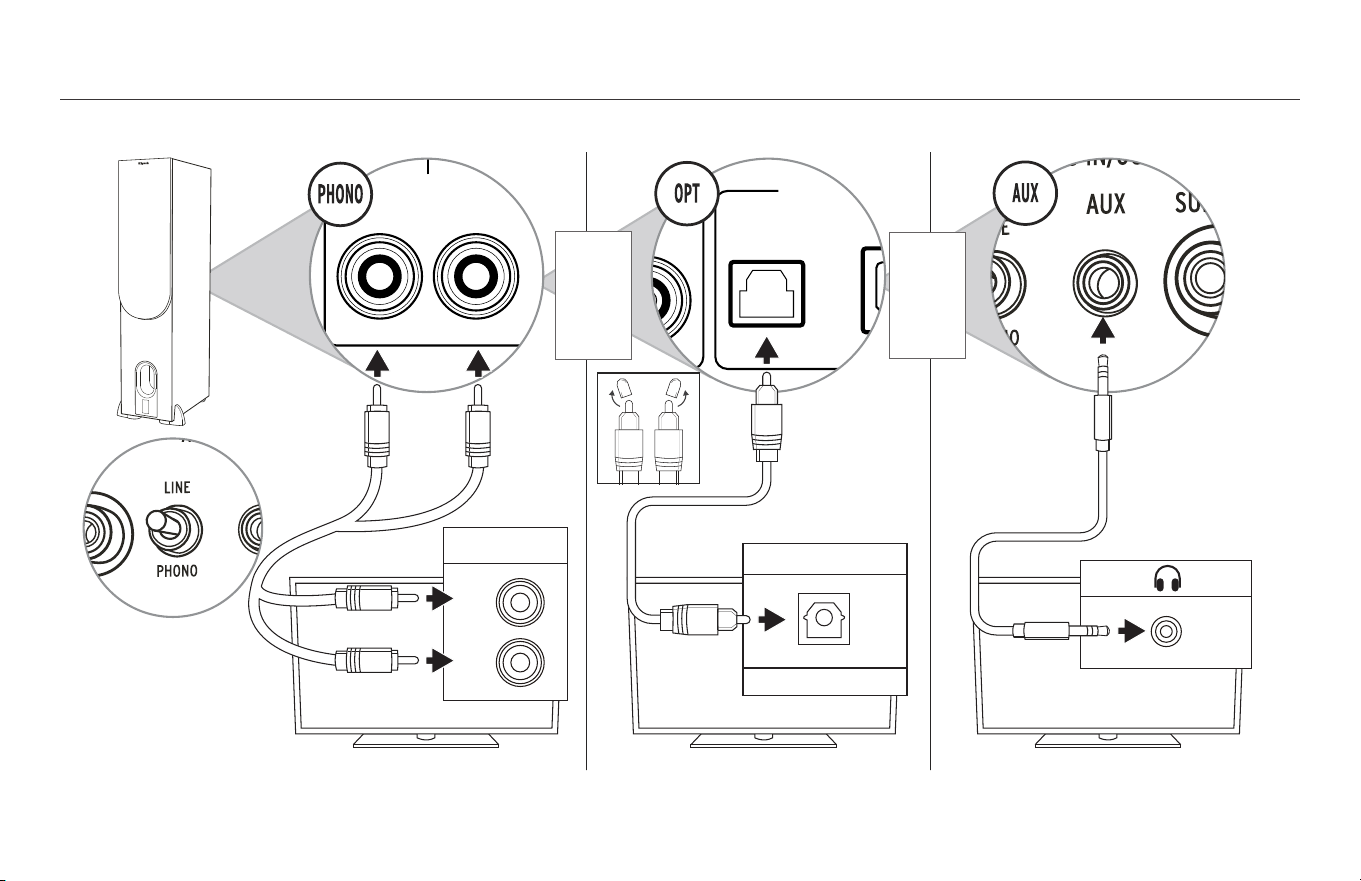
CONNECTIONS - TV
CONNEXIONS – TV • CONEXIONES DEL TELEVISOR • ANSCHLÜSSE – TV • CONNESSIONI – TV • CONEXÕES - TV • 连接 – 电视 •
RIGHT SPEAKER OUT
DIGITAL IN
ANALOG IN/OUT
OPTICALSUB OUT
GND
AUX 2 INAUX 1 IN
+–
PHONO LINE
RL
UPDOWN
USB AUDIO
Optical
Digital Audio Out
MODEL: R-15PM
WARNING: TO REDUCE THE RISK OF FIRE OR ELECTRIC SHOCK
DO NOT EXPOSE THIS APPLIANCE TO RAIN OR MOISTURE
LEFT SPEAKER OUT
RIGHT SPEAKER
DIGITAL IN
ANALOG IN/OUT
PHONO
OPTICALSUB OUT
GND
AUX
+–
RL
UPDOWN
USB AUDIO
This device complies with Part 15 of the
FCC Rules and Industry Canada
License-Exempt RSS-210. Operation is
subject to the following two conditions:
(1) this device may not cause harmful
interference, and
(2) this device must accept any
interference received, including
interference that may cause undesired
operation.
CAN ICES-3 (B) / NMB-3 (B)
FCC ID: XCO-XXXXXXX
IC: 7756A-XXXXXXXX
Audio Out
R
L
OR
OU
O BIEN
ODER
OPPURE
OU
或
OR
OU
O BIEN
ODER
OPPURE
OU
或
* **
*
6
** Your TV will need to be set to PCM (or Stereo Only)
** Votre télévision devra être réglée sur la sortie MIC (Modulation d’impulsion codée) (ou stéréo seulement) ** Su televisor debe fijarse en PCM (o Solo estéreo) ** Ihr Fernseher muss auf PCM (oder Nur Stereo) eingestellt sein ** Il televisore deve essere impostato su PCM (o solo stereo)
** A TV precisa ser configurada para PCM (ou apenas estéreo) ** 需要将您的电视设置为 PCM (或仅设置为“立体声”)
CABLE NOT INCLUDED
CÂBLE NON INCLUS
NO SE INCLUYE EL CABLE
KABEL NICHT IM LIEFERUMFANG ENTHALTEN
CAVO NON INCLUSO
CABO NÃO INCLUÍDO
不包括电缆
نويزفلت - تيصوتلا
)طقف ويرتسا وأ( PCM ىلع كيدل نويزفلتلا طبض مزليس**
وأ وأ
قفرم ريغ لباكلا
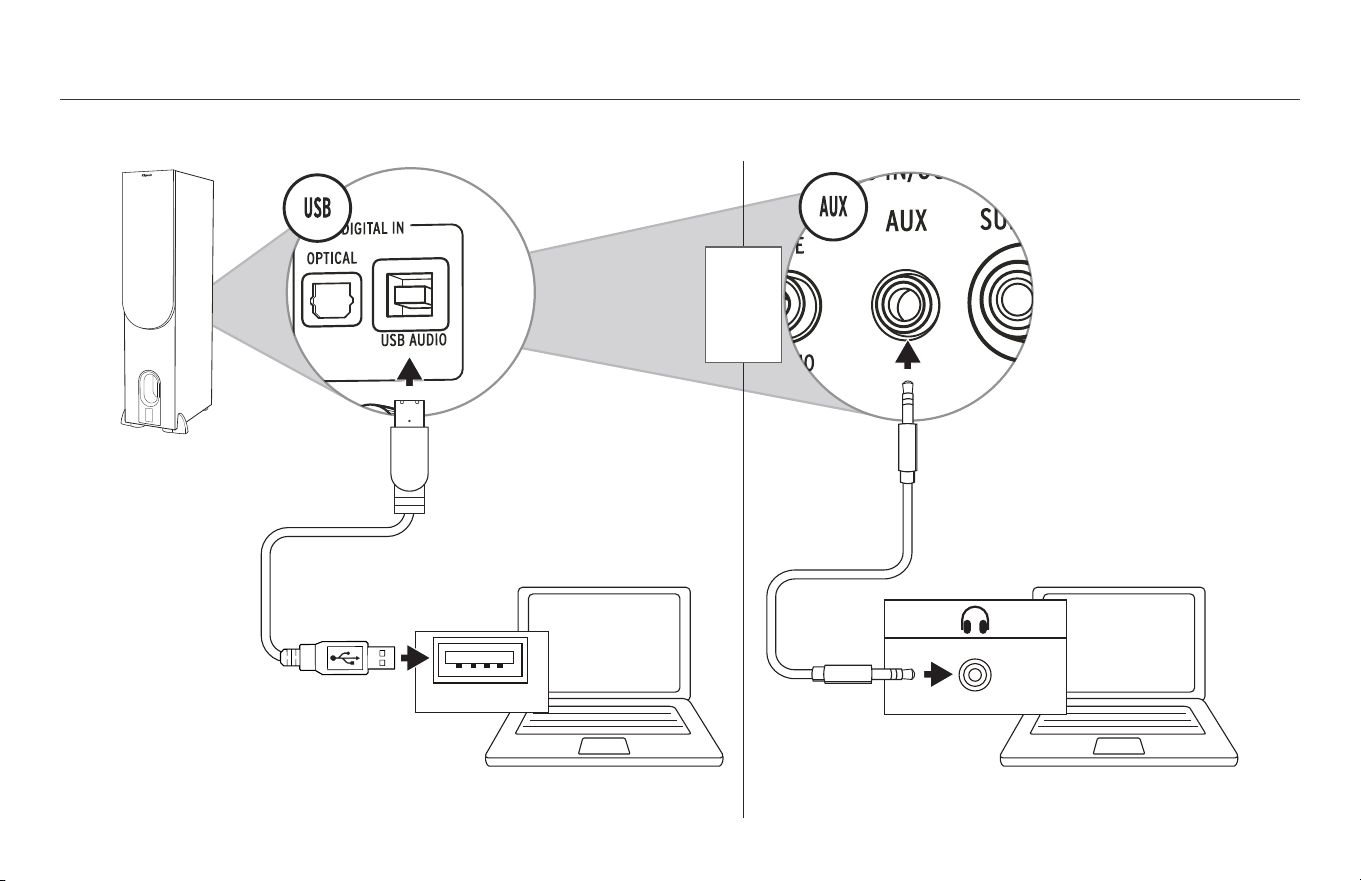
CONNECTIONS - COMPUTER
CONNEXIONS – ORDINATEUR • CONEXIONES DE LA COMPUTADORA • ANSCHLÜSSE – COMPUTER • CONNESSIONI – COMPUTER • CONEXÕES - COMPUTADOR • 连接 – 计算机 •
USB
RIGHT SPEAKER OUT
7
CABLE NOT INCLUDED
CÂBLE NON INCLUS
NO SE INCLUYE EL CABLE
KABEL NICHT IM LIEFERUMFANG ENTHALTEN
CAVO NON INCLUSO
CABO NÃO INCLUÍDO
不包括电缆
PC / MAC PC / MAC
رتويبمك - تيصوتلا
قفرم ريغ لباكلا
OR
OU
O BIEN
ODER
OPPURE
OU
或
وأ
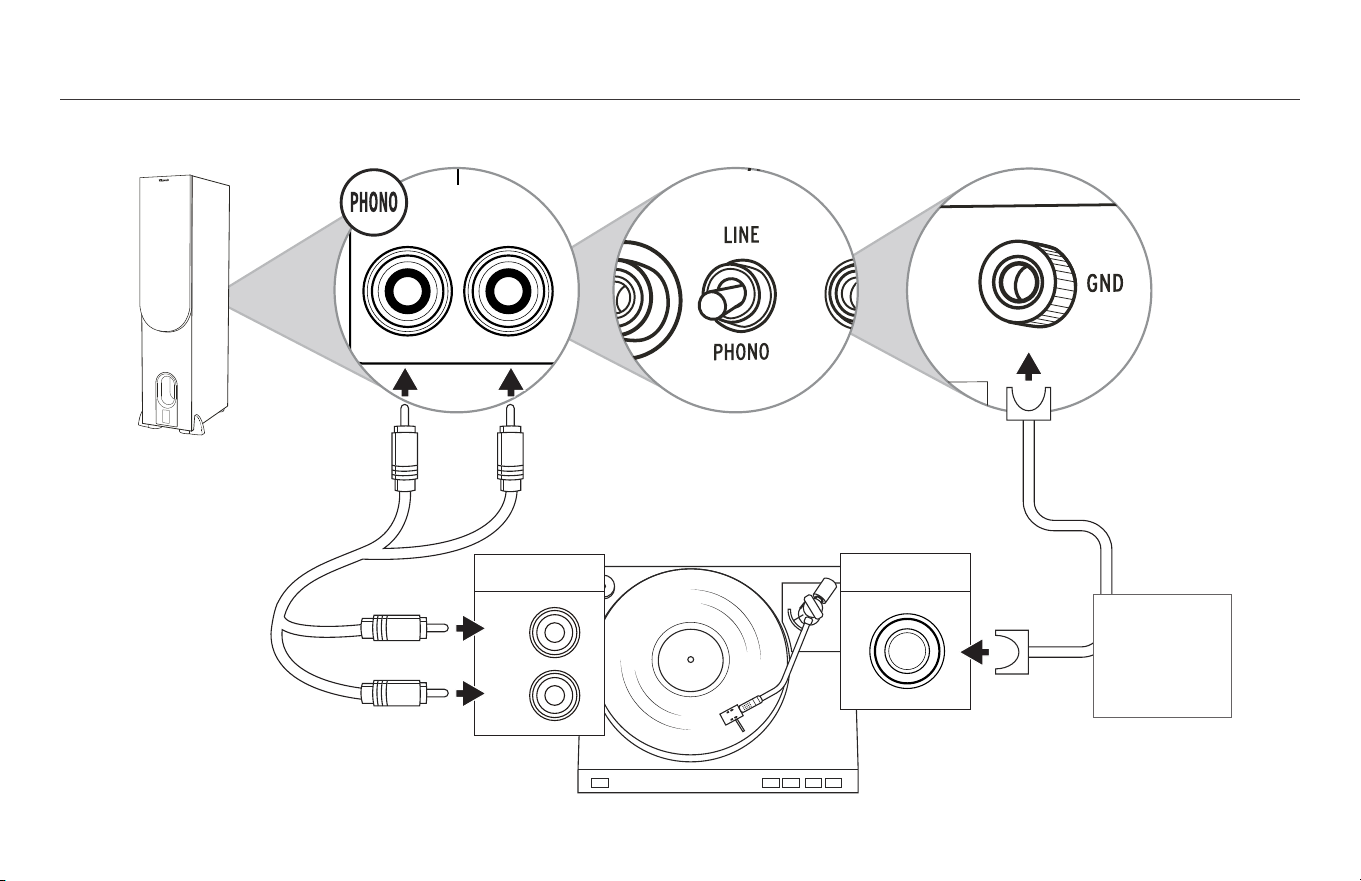
CONNECTIONS - TURNTABLE
CONNEXIONS – PLATINES • CONEXIONES DEL TOCADISCOS • ANSCHLÜSSE – PLATTENSPIELER • CONNESSIONI – GIRADISCHI • CONEXÕES - TOCA-DISCOS • 连接 – 计算机 •
MODEL: R-15PM
WARNING: TO REDUCE THE RISK OF FIRE OR ELECTRIC SHOCK
DO NOT EXPOSE THIS APPLIANCE TO RAIN OR MOISTURE
LEFT SPEAKER OUT
RIGHT SPEAKER
DIGITAL IN
ANALOG IN/OUT
PHONO
OPTICALSUB OUT
GND
AUX
+–
RL
UPDOWN
USB AUDIO
This device complies with Part 15 of the
FCC Rules and Industry Canada
License-Exempt RSS-210. Operation is
subject to the following two conditions:
(1) this device may not cause harmful
interference, and
(2) this device must accept any
interference received, including
interference that may cause undesired
operation.
FCC ID: XCO-XXXXXXX
IC: 7756A-XXXXXXXX
Audio Out
R
L
GND
Visit Klipsch.com/R-28PF for
recommendations for your turntable
Consultez Klipsch.com/R-28PF pour des
recommandations pour votre platine
En Klipsch.com/R-28PF hay recomendaciones
para su tocadiscos
Besuchen Sie Klipsch.com/R-28PF, um
Empfehlungen für Ihren Plattenspieler zu
erhalten
Visitare Klipsch.com/R-28PF per
raccomandazioni concernenti il giradischi
Visite Klipsch.com/R-28PF para ver as
recomendações para conectar toca-discos
有关黑胶唱机的连接,请访问
Klipsch.com/R-28PF。
*
*
8
CABLE NOT INCLUDED
CÂBLE NON INCLUS
NO SE INCLUYE EL CABLE
KABEL NICHT IM LIEFERUMFANG ENTHALTEN
CAVO NON INCLUSO
CABO NÃO INCLUÍDO
不包括电缆
تاناوطسأ زاهج - تيصوتلا
يرايتخا
ةفرعمل Klipsch.com/R-28PF ةرايزب مق
تاناوطسا زاهجب ةصاخلا تايصوتلا
OPTIONAL
OPTIONNEL
OPCIONAL
OPTIONAL
FACOLTATIVO
OPCIONAL
可选项
قفرم ريغ لباكلا
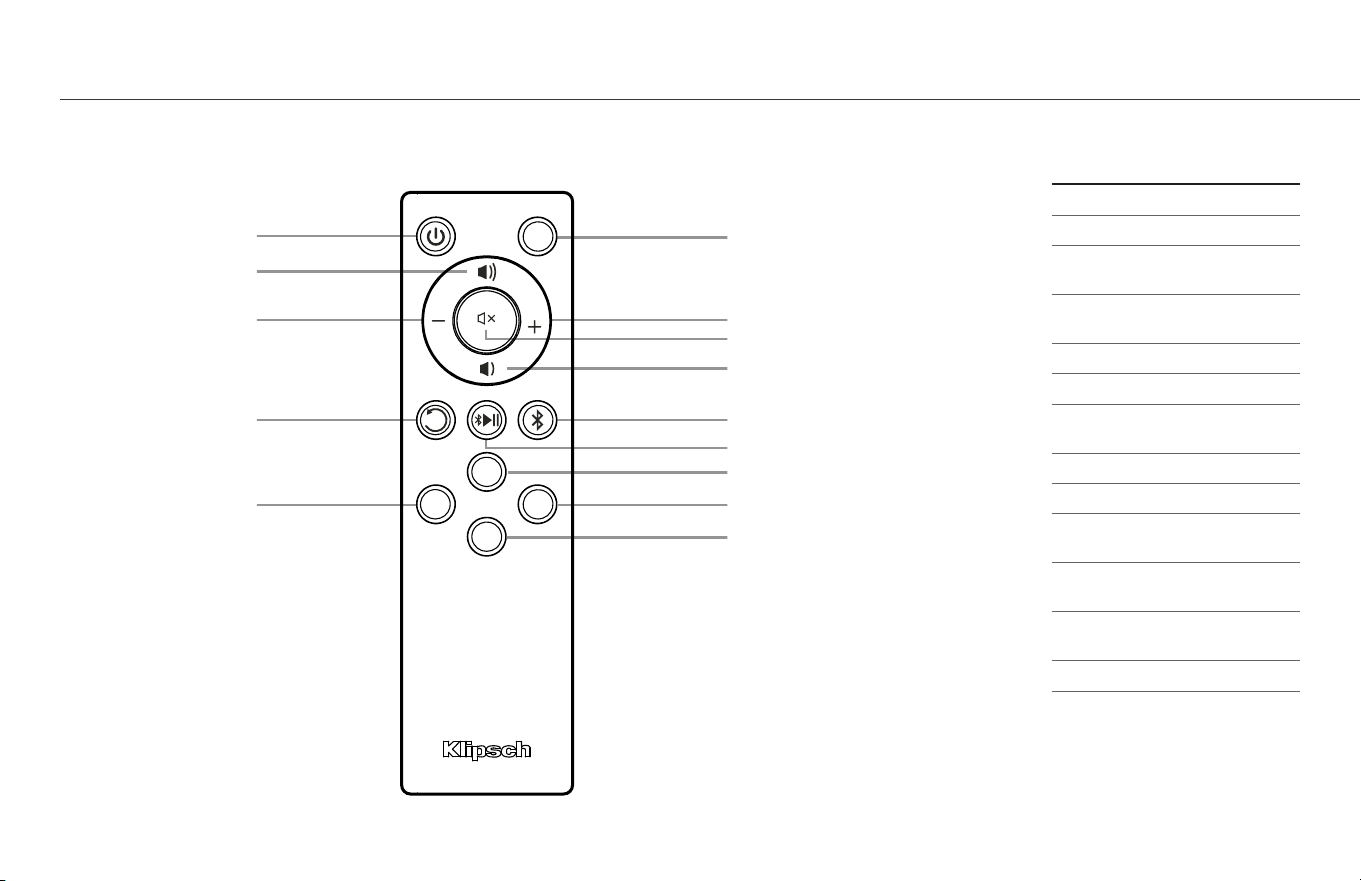
REMOTE
TÉLÉCOMMANDE • CONTROL REMOTO • FERNBEDIENUNG • TELECOMANDO • CONTROLE REMOTO • 遥控器 •
LED
USB
PHONO OPT
AUX
SUBSUB
SUB
Auxiliary Source Select
Mute
Digital/Optical Source Select
USB Source Select
Volume Up
Volume Down
Subwoofer Level Up
Subwoofer Level Down
Play/Pause
LED ON/OFF
Subwoofer Level Reset
Bluetooth
®
Source Select
Phono Source Select
ON/OFF
9
IR REMOTE CONTROL CODES
ON / OFF 0x 02FD 0AF5
Mute 0x 02FD 0DF2
Subwoofer
Level Up
0x 02FD 0CF3
Subwoofer
Level Down
0x 02FD 04FB
Volume Up 0x 02FD 1CE3
Volume Down 0x 02FD 07F8
Subwoofer
Level Reset
0x 02FD 03FC
LED ON / OFF 0x 02FD 08F7
Play/Pause 0x 02FD 1EE1
Phono
Source Select
0x 02FD 01FE
Auxiliary
Source Select
0x 02FD 09F6
Digital Optical
Source Select
0x 02FD 00FF
USB Source Select 0x 02FD 48B7
Bluetooth
®
Source Select
0x 02FD 5CA3
دع
ُ
ب نع مكحت زاهج

10
ON / OFF
Sous tensio / Hors tension
Encendido / Apagado
Ein / Aus
Acceso / Spento
Ligar / Desligar
开/关
Mute
Sourdine
Silenciador
Stummschaltung
Disattivazione audio
Desativar áudio
静音
Subwoofer Level Up
Niveau haut du haut-parleur d’extrêmes graves
Subida de nivel de subwoofer
Subwoofer-Pegel Plus
Aumento livello subwoofer
Aumentar nível de volume do subwoofer
低音炮电平上升
Subwoofer Level Down
Niveau bas du haut-parleur d’extrêmes graves
Bajada de nivel de subwoofer
Subwoofer-Pegel Minus
Riduzione livello subwoofer
Diminuir nível de volume do subwoofer
低音炮电平下降
Volume Up
Volume haut
Subida de volumen
Lauter
Aumento volume
Aumentar o volume
音量增大
Volume Down
Volume bas
Bajada de volumen
Leiser
Riduzione volume
Diminuir o volume
音量减小
Phono Source Select
Sélection de la source Phono
Selección de fuente de tocadiscos
Phone-Quellenwahl
Selezione sorgente phono
Seleção de fonte fono
唱机源选择
Auxiliary Source Select
Sélection de la source auxiliaire
Selección de fuente auxiliar
AUX-Quellenwahl
Selezione sorgente ausiliaria
Seleção de fonte auxiliar
辅助源选择
Digital Optical Source Select
Sélection de la source optique numérique
Selección de fuente óptica digital
Digital-optische Quellenwahl
Selezione segnale ottico digitale
Seleção de fonte ótica digital
数字光学源选择
USB Source Select
Sélection de la source USB
Seleccione de fuente USB
USB-Quellenwahl
Selezione sorgente USB
Seleção de fonte USB
USB 源选择
Bluetooth
®
Source Select
Sélection de la source
Bluetooth
®
Selección de fuente
Bluetooth
®
Bluetooth
®
-Quellenwahl
Selezione segnale
Bluetooth
®
Seleção de fonte
Bluetooth
®
蓝牙源选择
Subwoofer Level Reset
Réinitialisation du niveau du haut-parleur d’extrêmes graves
Restablecimiento de nivel de subwoofer
Subwoofer-Pegel zurücksetzen
Ripristino livello subwoofer
Restabelecer nível de volume do subwoofer
低音炮电平复位
LED ON/OFF
DEL MARCHE/ARRÊT
INDICADOR LED ENCENDIDO/APAGADO
LED AN/AUS
LED ACCESO/SPENTO
LED LIGA/DESLIGA
LED 灯开/关
Play/Pause
Lecture/pause
Reproducción/pausa
Wiedergabe/Pause
Riproduzione / Pausa
Reproduzir/Pausar
播放/暂停
ةقاطلا فاقيإ/ليغشت
توصلا متك توصلا مخضم ىوتسم عفر توصلا مخضم ىوتسم ضفخ توصلا ىوتسم ضفختوصلا ىوتسم عفر
تارشؤملا حيباصم فاقيإ/ليغشتتوصلا مخضم ىوتسم طبض ةداعإ
يتوصلا ردصملا ديدحت يفاضا ردصملا ديدحت يمقرلا يرصبلا ردصملا ديدحت
®
Bluetooth ردصم ديدحت
USB ردصم ديدحت
تقؤم فاقيإ/ليغشت
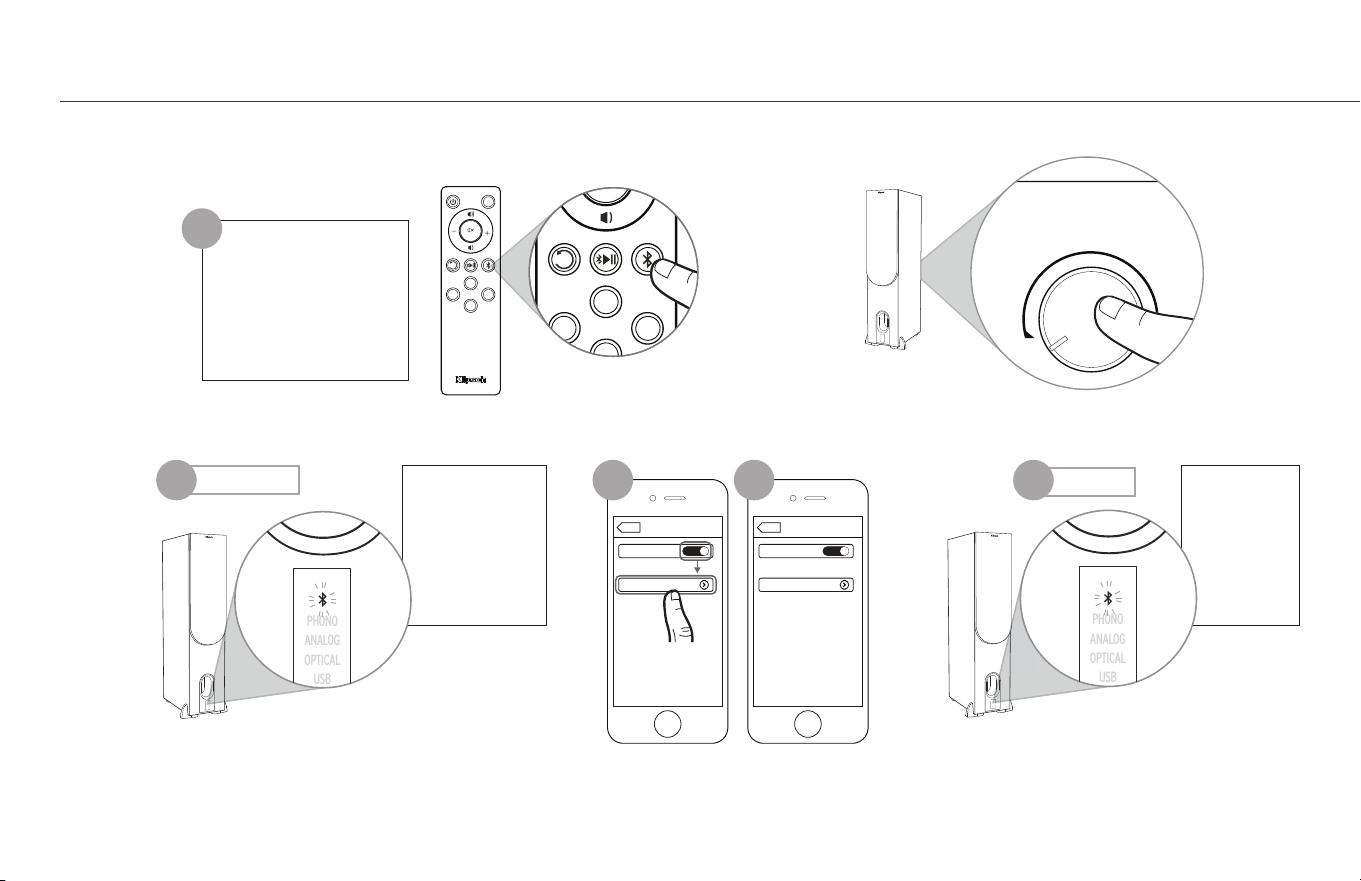
Blue / Solid
Bleu / Continu
Azul / Continuo
Blau / Dauerhaft
Blu / Luce fissa
Azul / Constante
蓝色 / 常亮
PHONO
ANALOG
OPTICAL
USB
Bluetooth
Bluetooth
ON
Devices
Settings
Klipsch R-28PF
Connected
Bluetooth
Bluetooth
ON
Devices
Settings
Klipsch R-28PF
Connected
Bluetooth
Bluetooth
ON
Klipsch R-28PF
Devices
Not Paired
Settings
Klipsch R-15PM
Phone
RIGHT SPEAKER OUT
DIGITAL IN
ANALOG IN/OUT
VOLUME/SOURCE
OPTICALSUB OUTAUX INAUX 1 IN
+–
AUX 1 LEVEL
PHONO LINE
RL
UPDOWN
LED
USB
PHONO OPT
AUX
SUBSUB
SUB
USB
PHONO OPT
AUX
SUBSUB
SUB
PHONO
ANALOG
OPTICAL
USB
PHONO
ANALOG
OPTICAL
USB
Blue / Flashing
Bleu / Clignotant
Azul / Destello
Blau / Blinkt
Blu / Lampeggiante
Azul / Intermitente
蓝色 / 闪烁
PHONO
ANALOG
OPTICAL
USB
Bluetooth
Bluetooth
ON
Devices
Settings
Klipsch R-28PF
Connected
Bluetooth
Bluetooth
ON
Devices
Settings
Klipsch R-28PF
Connected
Bluetooth
Bluetooth
ON
Klipsch R-28PF
Devices
Not Paired
Settings
Klipsch R-15PM
Phone
RIGHT SPEAKER OUT
DIGITAL IN
ANALOG IN/OUT
VOLUME/SOURCE
OPTICALSUB OUTAUX INAUX 1 IN
+–
AUX 1 LEVEL
PHONO LINE
RL
UPDOWN
LED
USB
PHONO OPT
AUX
SUBSUB
SUB
USB
PHONO OPT
AUX
SUBSUB
SUB
PHONO
ANALOG
OPTICAL
USB
PHONO
ANALOG
OPTICAL
USB
Solid Blue
Flashing Blue
BLUETOOTH
®
WIRELESS TECHNOLOGY
TECNOLOGÍA INALÁMBRICA
BLUETOOTH
®
• CONFIGURACIÓN DE TECNOLOGIA WIRELESS
BLUETOOTH
®
• DRAHTLOSE
BLUETOOTH
®
-TECHNOLOGIE-SETUP • CONFIGURAZIONE TECNOLOGIA WIRELESS
BLUETOOTH
®
•
CONFIGURAÇÃO DE TECNOLOGIA SEM FIO
BLUETOOTH
®
•
BLUETOOTH
®
蓝牙无线电技术 •
PAIR
CONNEXION
CONEXIÓN
VERBINDEN
COLLEGAMENTO
CONECTAR
连接
Hold 3 Seconds
Appuyer pendant 3 secondes
Mantenga oprimido durante 3 segundos
3 Sekunden gedrückt halten
Tenere premuto per 3 secondi
Manter pressionado por 3 segundos
保持 3 秒
1
32 4 5
OR
OU
O BIEN
ODER
OPPURE
OU
或
Bluetooth
Bluetooth
ON
Devices
Settings
Klipsch R-14PM
Connected
Bluetooth
Bluetooth
ON
Devices
Settings
Klipsch R-14PM
Connected
Bluetooth
Bluetooth
ON
Klipsch R-14PM
Devices
Not Paired
Settings
Klipsch R-15PM
Phone
RIGHT SPEAKER OUT
DIGITAL IN
ANALOG IN/OUT
VOLUME/SOURCE
OPTICALSUB OUT
GND
AUX INAUX 1 IN
+–
AUX 1 LEVEL
PHONO LINE
RL
UPDOWN
USB AUDIO
LED
USB
PHONO OPT
AUX
SUBSUB
SUB
USB
PHONO OPT
AUX
SUBSUB
SUB
PHONO
ANALOG
OPTICAL
USB
Bluetooth
Bluetooth
ON
Devices
Settings
Klipsch R-28PF
Connected
Bluetooth
Bluetooth
ON
Devices
Settings
Klipsch R-28PF
Connected
Bluetooth
Bluetooth
ON
Klipsch R-28PF
Devices
Not Paired
Settings
Klipsch R-15PM
Phone
RIGHT SPEAKER OUT
DIGITAL IN
ANALOG IN/OUT
VOLUME/SOURCE
OPTICALSUB OUTAUX INAUX 1 IN
+–
AUX 1 LEVEL
PHONO LINE
RL
UPDOWN
LED
USB
PHONO OPT
AUX
SUBSUB
SUB
USB
PHONO OPT
AUX
SUBSUB
SUB
PHONO
ANALOG
OPTICAL
USB
PHONO
ANALOG
OPTICAL
USB
Example only. Your device may differ.
• À titre d’exemple seulement. Votre appareil peut être différent. • Este es solo un ejemplo. Es posible que su dispositivo sea diferente. • Nur als Beispiel. Ihr Gerät kann anders aussehen
• Solo a titolo esemplificativo. Lo specifico dispositivo può essere diverso. • Apenas para exemplo. O dispositivo pode ser diferente. • 仅为示例。实际设备可能有所不同 •11
ةيكلسلا
®
BLUETOOTH ايجولونكت
نارتقا
ناوث 3 ةدمل رارمتساب طغضا
وأ
ضيمو / قرز تباث / قرز
كزاهج فلتخي دق .طقف لاثم
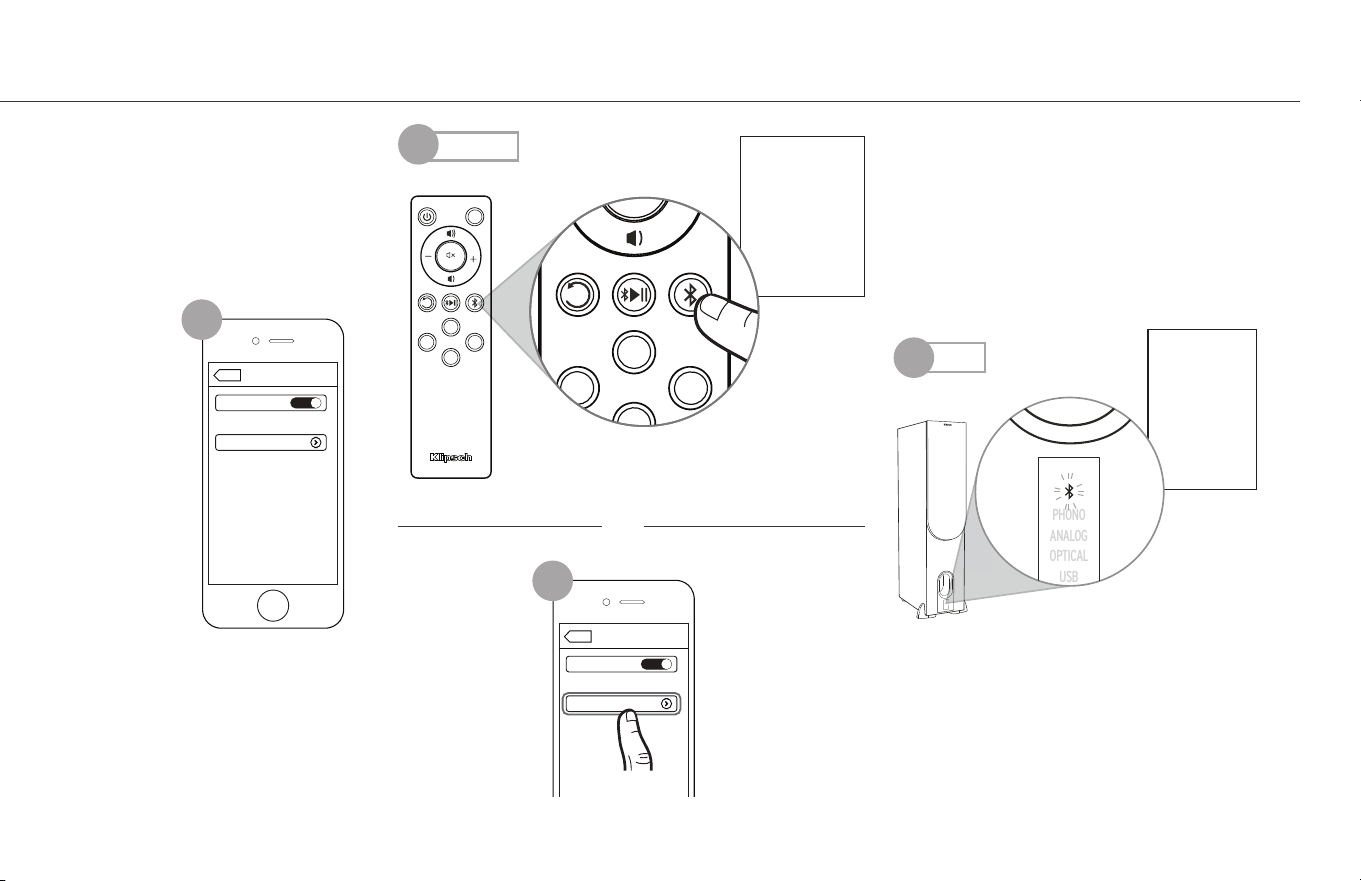
Press x1
Appuyer 1 fois
Oprima 1 vez
1x drücken
Premere 1 volta
Pressionar uma vez
按 1 次
ةدحاو ةرم طغضا
Solid Blue
Continu
Continuo
Dauerhaft
Luce fissa
Constante
常亮
PHONO
ANALOG
OPTICAL
USB
Bluetooth
Bluetooth
ON
Devices
Settings
Klipsch R-28PF
Connected
Bluetooth
Bluetooth
ON
Devices
Settings
Klipsch R-28PF
Connected
Bluetooth
Bluetooth
ON
Klipsch R-28PF
Devices
Not Paired
Settings
Klipsch R-15PM
Phone
RIGHT SPEAKER OUT
DIGITAL IN
ANALOG IN/OUT
VOLUME/SOURCE
OPTICALSUB OUTAUX INAUX 1 IN
+–
AUX 1 LEVEL
PHONO LINE
RL
UPDOWN
LED
USB
PHONO OPT
AUX
SUBSUB
SUB
USB
PHONO OPT
AUX
SUBSUB
SUB
PHONO
ANALOG
OPTICAL
USB
PHONO
ANALOG
OPTICAL
USB
RECONNECT
RECONNECTER
RECONECTAR
ERNEUT VERBINDEN
RICONNESSIONE
RECONECTAR
重新连接
PHONO
ANALOG
OPTICAL
USB
Bluetooth
Bluetooth
ON
Devices
Settings
Klipsch R-28PF
Connected
Bluetooth
Bluetooth
ON
Devices
Settings
Klipsch R-28PF
Connected
Bluetooth
Bluetooth
ON
Klipsch R-28PF
Devices
Not Paired
Settings
Klipsch R-15PM
Phone
RIGHT SPEAKER OUT
DIGITAL IN
ANALOG IN/OUT
VOLUME/SOURCE
OPTICALSUB OUTAUX INAUX 1 IN
+–
AUX 1 LEVEL
PHONO LINE
RL
UPDOWN
LED
USB
PHONO OPT
AUX
SUBSUB
SUB
USB
PHONO OPT
AUX
SUBSUB
SUB
PHONO
ANALOG
OPTICAL
USB
PHONO
ANALOG
OPTICAL
USB
PHONO
ANALOG
OPTICAL
USB
Bluetooth
Bluetooth
ON
Devices
Settings
Klipsch R-28PF
Connected
Bluetooth
Bluetooth
ON
Devices
Settings
Klipsch R-28PF
Connected
Bluetooth
Bluetooth
ON
Klipsch R-28PF
Devices
Not Paired
Settings
Klipsch R-15PM
Phone
RIGHT SPEAKER OUT
DIGITAL IN
ANALOG IN/OUT
VOLUME/SOURCE
OPTICALSUB OUTAUX INAUX 1 IN
+–
AUX 1 LEVEL
PHONO LINE
RL
UPDOWN
LED
USB
PHONO OPT
AUX
SUBSUB
SUB
USB
PHONO OPT
AUX
SUBSUB
SUB
PHONO
ANALOG
OPTICAL
USB
PHONO
ANALOG
OPTICAL
USB
Bluetooth
Bluetooth
ON
Devices
Settings
Klipsch R-14PM
Connected
Bluetooth
Bluetooth
ON
Devices
Settings
Klipsch R-14PM
Connected
Bluetooth
Bluetooth
ON
Klipsch R-14PM
Devices
Not Paired
Settings
Klipsch R-15PM
Phone
RIGHT SPEAKER OUT
DIGITAL IN
ANALOG IN/OUT
VOLUME/SOURCE
OPTICALSUB OUT
GND
AUX INAUX 1 IN
+–
AUX 1 LEVEL
PHONO LINE
RL
UPDOWN
USB AUDIO
LED
USB
PHONO OPT
AUX
SUBSUB
SUB
USB
PHONO OPT
AUX
SUBSUB
SUB
1
2
2
Solid
Press x1
3
12
ليصوت ةداعإ
تباث قرزأ
Not
OR
OU
O BIEN
ODER
OPPURE
OU
或
وأ
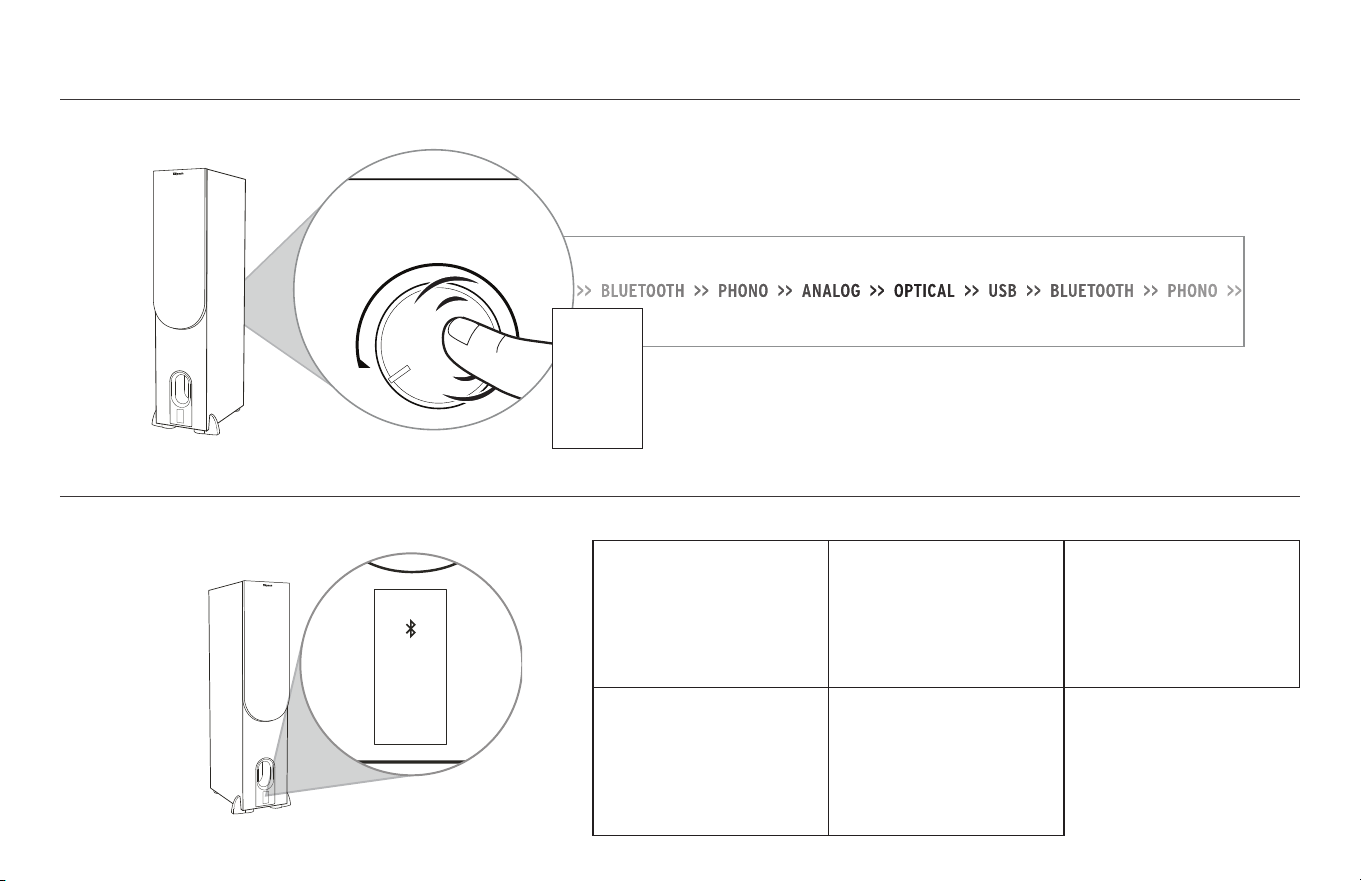
LED SOURCE INDICATOR
INDICATEUR DE SOURCE À DEL • INDICADOR LED DE FUENTE • LED-QUELLENANZEIGE • SPIA LED SORGENTE AUDIO • LED INDICADOR DE FONTE • LED 源指示灯 •
PHONO
ANALOG
OPTICAL
USB
Bluetooth
Bluetooth
ON
Devices
Settings
Klipsch R-28PF
Connected
Bluetooth
Bluetooth
ON
Devices
Settings
Klipsch R-28PF
Connected
Bluetooth
Bluetooth
ON
Klipsch R-28PF
Devices
Not Paired
Settings
Klipsch R-15PM
Phone
RIGHT SPEAKER OUT
DIGITAL IN
ANALOG IN/OUT
VOLUME/SOURCE
OPTICALSUB OUTAUX INAUX 1 IN
+–
AUX 1 LEVEL
PHONO LINE
RL
UPDOWN
LED
USB
PHONO OPT
AUX
SUBSUB
SUB
USB
PHONO OPT
AUX
SUBSUB
SUB
PHONO
ANALOG
OPTICAL
USB
PHONO
ANALOG
OPTICAL
USB
BLUE =
Bluetooth
®
Input
BLEU= Entrée
Bluetooth
®
AZUL = Entrada
Bluetooth
®
BLAU =
Bluetooth
®
-Eingang
BLU = Ingresso
Bluetooth
®
AZUL = Entrada
Bluetooth
®
LED 源指示灯
PURPLE = Phono Input
VIOLET = Entrée phono
MORADO = Entrada de tocadiscos
LILA = Phono-Eingang
VIOLA = Ingresso phono
ROXO = Entrada fono
紫色 = 唱机输入
GREEN = Auxiliary Input
VERT = Entrée auxiliaire
VERDE = Entrada auxiliar
GRÜN = AUX-Eingang
VERDE = Ingresso ausiliario
VERDE = Entrada auxiliar
绿色 = 辅助输入
RED = Optical Input
ROUGE = Connexion Optique
ROJO = Conexión Óptica
ROTE = Optische verbindung
ROSSO = Connessione Ottica
VERMELHO = Conexão Ótica
红 = 数字光纤连接
WHITE = USB Audio Input
BLANC = Entrée audio USB
BLANCO = Entrada de audio USB
WEISS = USB-Audio-Eingang
BIANCO = Ingresso audio USB
BRANCO = Entrada de áudio USB
白色 = USB 音频输入
13
LED ردصملا رشؤم
®
Bluetooth لخدم = قرزأ
يتوص لخدم = يناوجرأ
يرصب لخدم = رمحأ
USB توص لخدم = ضيبأ
يفاضإ لخدم = رضخأ
SELECT SOURCE
SELECTIONNER LA SOURCE • SELECCIÓN DE FUENTE • QUELLE WÄHLEN • SELEZIONE SORGENTE AUDIO • SELEÇÃO DA FONTE • 选择源 •
DIGITAL IN
ANALOG IN/OUT
VOLUME/SOURCE
AUX 1 LEVEL
PHONO LINE
UPDOWN
Press
Appuyer
Oprima
Drücken
Premere
Pressionar
按
ردصملا ديدحت
رم طغضا
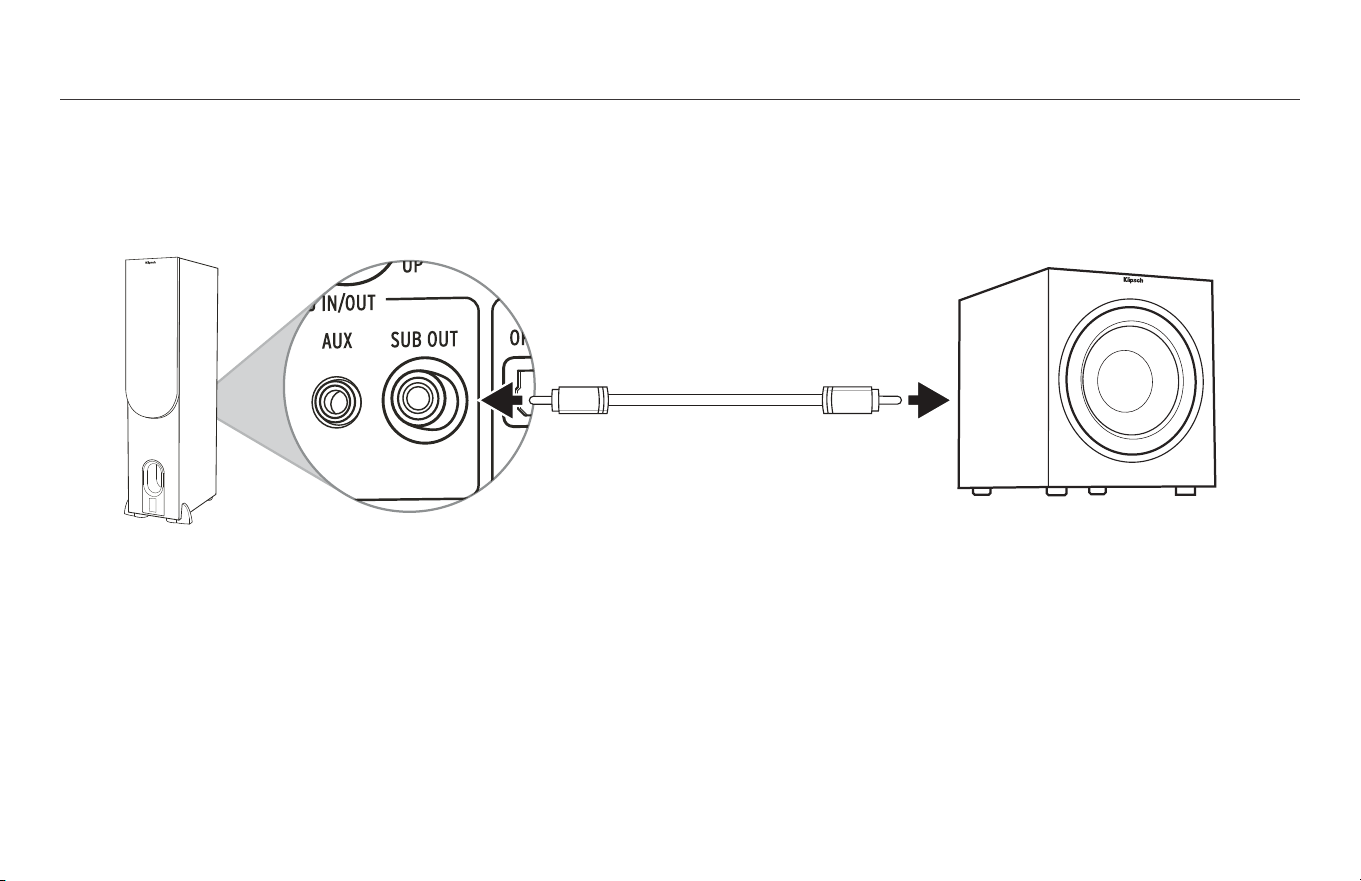
SUBWOOFER OUTPUT
SORTIE DU HAUT-PARLEUR D’EXTRÊMES GRAVES • SALIDA DE SUBWOOFER • SUBWOOFER-AUSGANG • USCITA SUBWOOFER • SAÍDA PARA SUBWOOFER • 低音炮输出 •
14
توصلا مخضم جارخإ
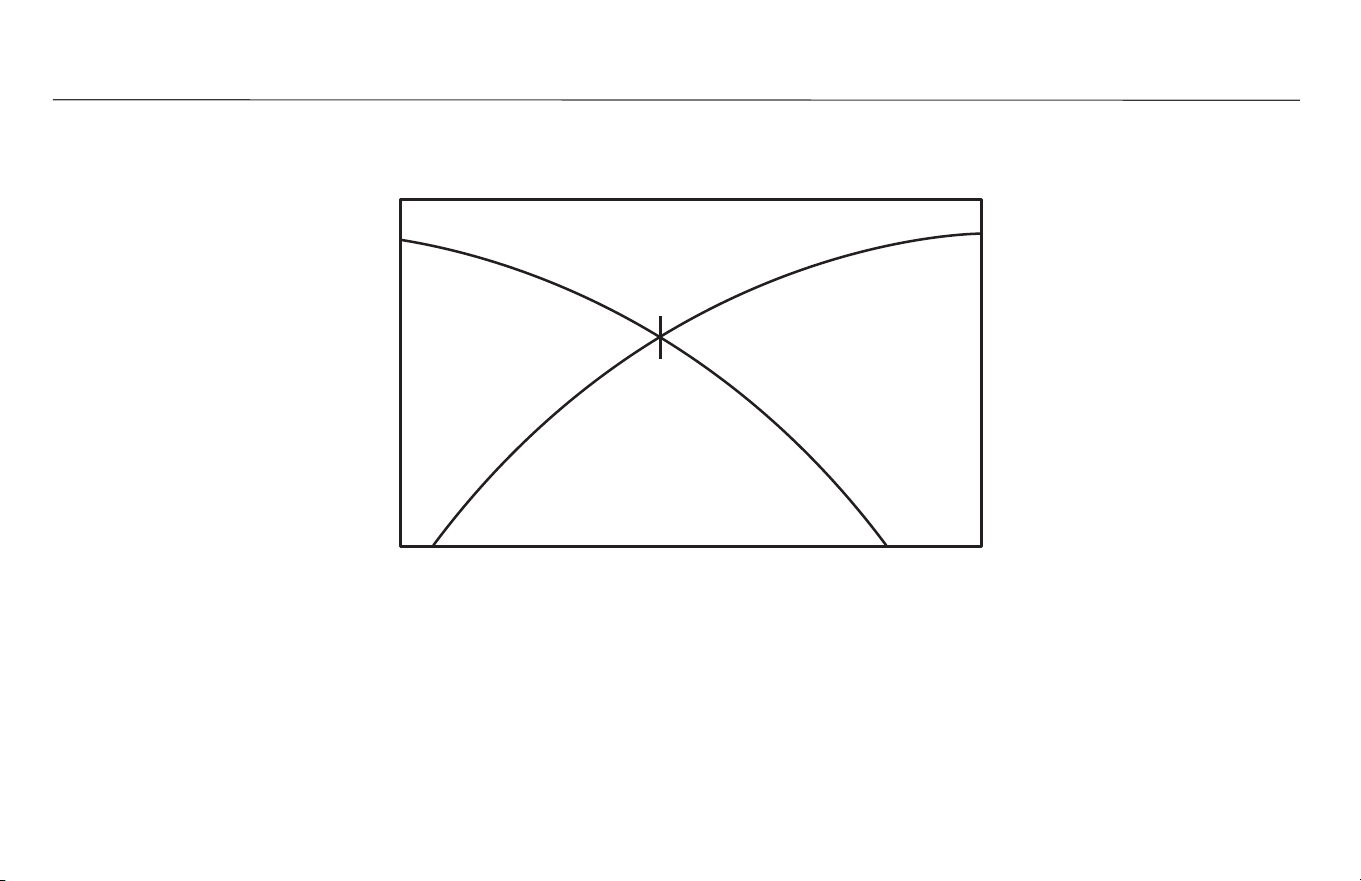
15
GESTION DES BASSES
•
PROCESAMIENTO DE BAJOS
• BASS-MANAGEMENT • GESTIONE DEI BASSI • CONTROLE DE GRAVES • 低音管理 •
BASS MANAGEMENT
ددرتلا ةضفخنم ةمغنلا ةرادإ
80Hz
MAIN
SPEAKERS
MAIN
SPEAKERS
SUBWOOFER
80Hz
SUBWOOFER
Enable Bass Management to blend Subwoofer bass
with your speakers.
Activez la gestion des basses afin de mélanger les
graves du caisson des basses à vos haut-parleurs.
Activar el procesamiento de bajos para combinar
los bajos del subwoofer con los de los altavoces.
Aktivieren Sie das Bass-Management, um den
Subwoofer-Bass mit Ihren Lautsprechern zu
mischen.
Attiva la gestione dei bassi per miscelare i bassi del
subwoofer con l’audio degli altoparlanti.
Ative o controle de graves para mesclar os graves
do subwoofer com as caixas acústicas.
启用低音管理功能将低音炮低音与扬声器
混合。
CAISSONS DE GRAVES
列低音炮
HAUT-PARLEURS PRINCIPAUX
ALTAVOCES PRINCIPALES
HAUPTLAUTSPRECHER
ALTOPARLANTI PRINCIPALI
CAIXAS ACÚSTICAS PRINCIPAIS
主扬声器
Disable Bass Management to revert your speakers
back to full range.
Désactivez la gestion des basses pour revenir aux
haut-parleurs large bande.
Desactivar el procesamiento de bajos para volver
los altavoces a su funcionamiento en gama
completa.
Deaktivieren Sie das Bass-Management, um Ihre
Lautsprecher wieder in den Vollbereichsmodus zu
versetzen.
Disattiva la gestione dei bassi per ripristinare
l’intera gamma di frequenze degli altoparlanti.
Desative o controle de graves para restabelecer a
faixa de frequências completa das caixas acústicas.
禁用低音管理将扬声器恢复到全范围。
مخضم ريهج جزمل ددرتلا ةضفخنم ةمغنلا ةرادإ نيكمت
.كيدل تاعامسلا عم توصلا
تاعامسلا ةداعتس ددرتلا ةضفخنم ةمغنلا ةرادإ ليطعت
.لماكلا اهادم ىلإ
ةيسيئرلا تاعامسلا
مضخمات صوت
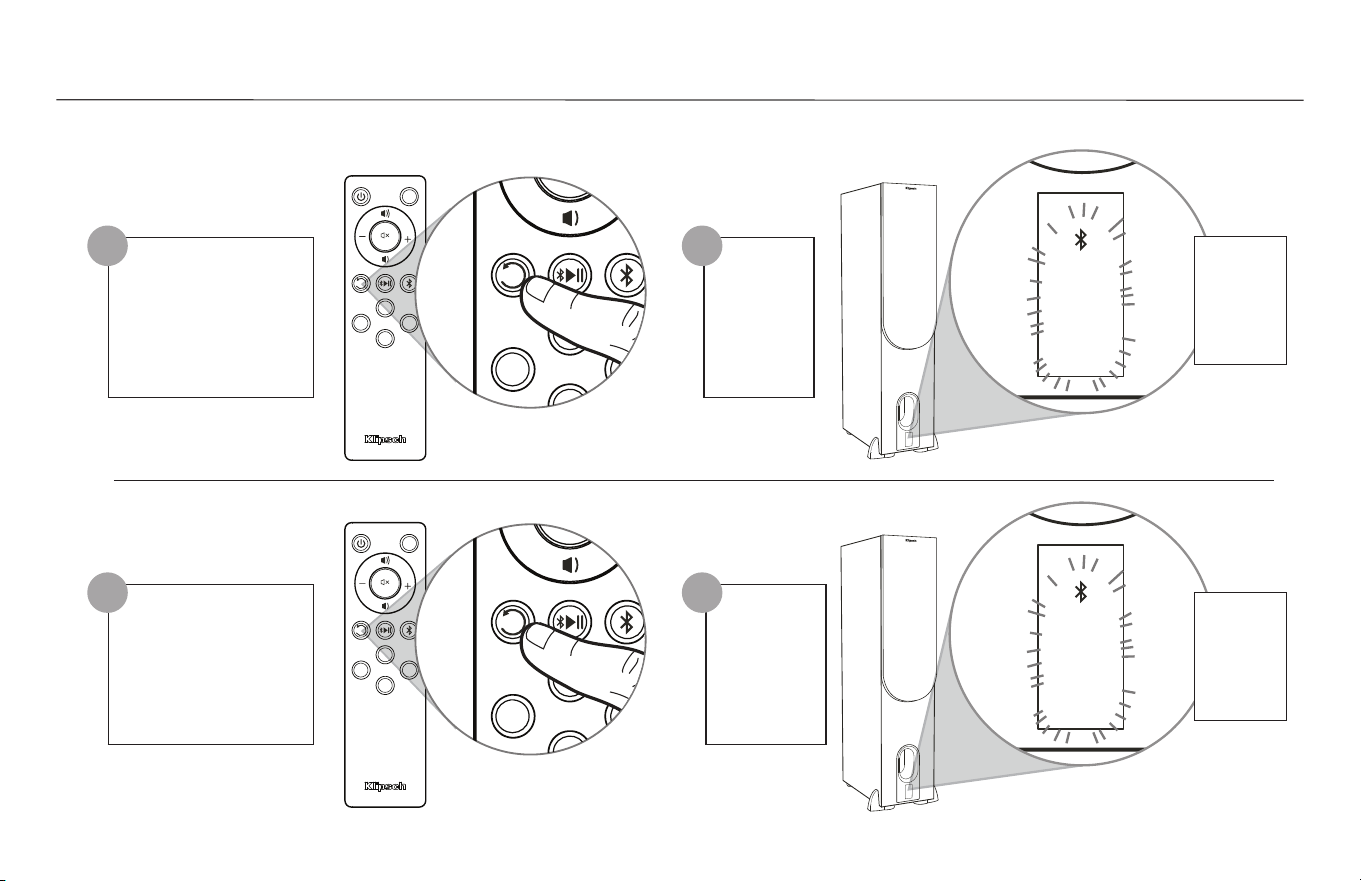
16
ACTIVATION/DÉSACTIVATION LA GESTION DES BASSES
•
ACTIVAR / DESACTIVAR EL PROCESAMIENTO DE BAJOS
• BASS-MANAGEMENT AKTIVIEREN/DEAKTIVIEREN • ATTIVA / DISATTIVA LA GESTIONE DEI BASSI • ATIVAR/DESATIVAR O GERENCIAMENTO DE
GRAVES • 启用/禁用 低音管理 •
Flashes x2
Clignote x2
Destella x2
Blinkt x2
Lampeggia x2
Piscará x2
闪烁 x2
Flashes x1
Clignote x1
Destella x1
Blinkt x1
Lampeggia x1
Piscará x1
闪烁 x1
PHONO
ANALOG
OPTICAL
USB
LED
USB
PHONO OPT
AUX
SUBSUB
SUB
USB
PHONO OPT
AUX
SUB
PHONO
ANALOG
OPTICAL
USB
LED
USB
PHONO OPT
AUX
SUBSUB
SUB
USB
PHONO OPT
AUX
SUB
ENABLE / DISABLE BASS MANAGEMENT
Hold 3 Seconds
Appuyer pendant 3 secondes
Mantenga oprimido durante 3 segundos
3 Sekunden gedrückt halten
Tenere premuto per 3 secondi
Manter pressionado por 3 segundos
保持 3 秒
Hold 3 Seconds
Appuyer pendant 3 secondes
Mantenga oprimido durante 3 segundos
3 Sekunden gedrückt halten
Tenere premuto per 3 secondi
Manter pressionado por 3 segundos
保持 3 秒
1
1
PHONO
ANALOG
OPTICAL
USB
LED
USB
PHONO OPT
AUX
SUBSUB
SUB
USB
PHONO OPT
AUX
SUB
PHONO
ANALOG
OPTICAL
USB
LED
USB
PHONO OPT
AUX
SUBSUB
SUB
USB
PHONO OPT
AUX
SUB
ناوث 3 ةدمل رارمتساب طغضا
x1 تاضمولا
x2 تاضمولاناوث 3 ةدمل رارمتساب طغضا
2
2
ENABLED
D’ACTIVATION
ACTIVAR
AKTIVIEREN
ATTIVATA
ATIVAR
نيكمت
启用
DISABLED
DÉSACTIVATION
DESACTIVAR
DEAKTIVIEREN
DISATTIVATA
DESATIVAR
ليطعت
禁用
ددرتلا ةضفخنم ةمغنلا ةرادإ ليطعت/نيكمت
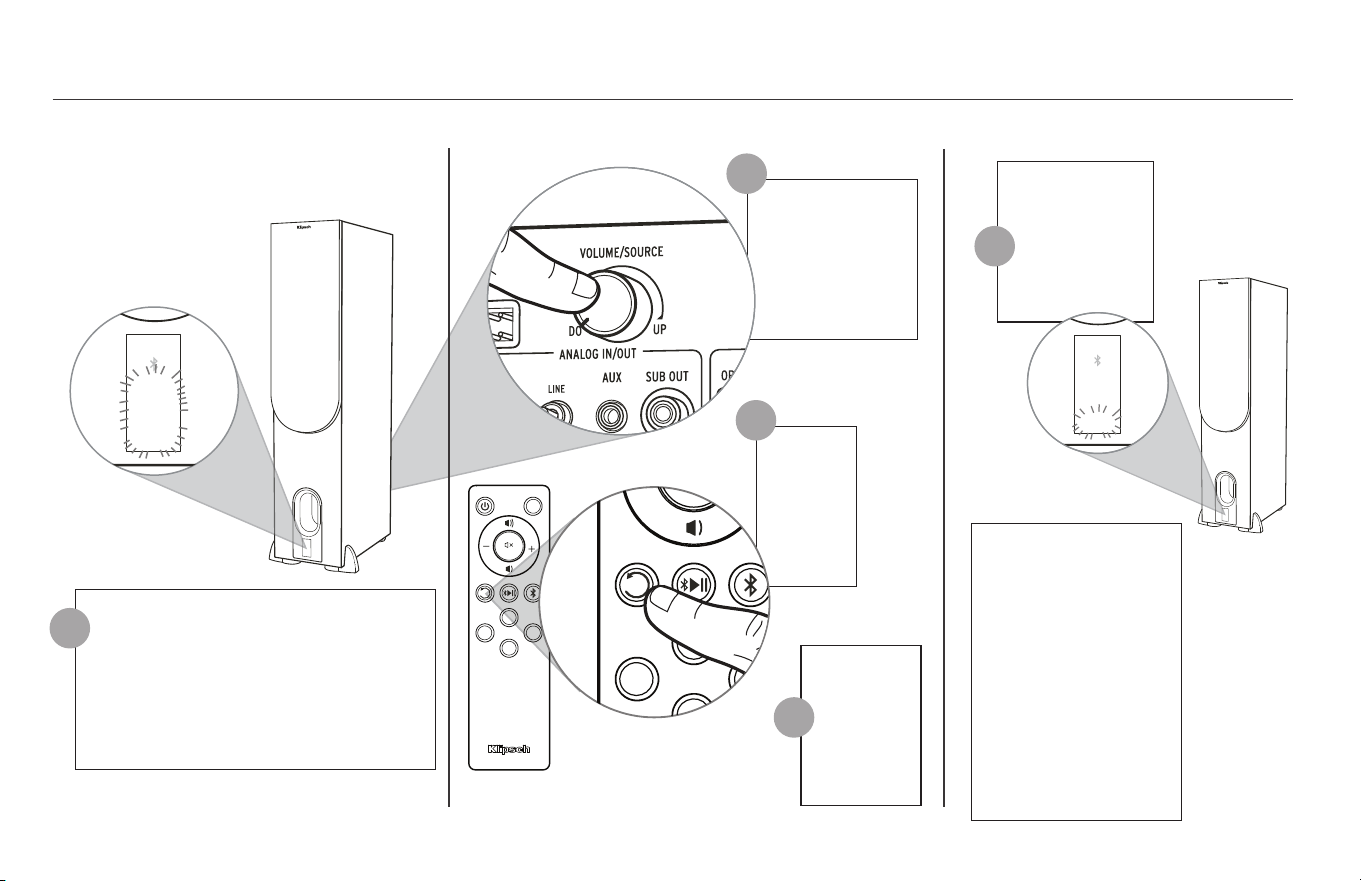
17
REMOTE CONTROL CODES (FOR UNIVERSAL OR CABLE REMOTES)
RCA
*
41609 OR 43915
DIRECTV
31609
XFINITY
**
30531 OR 31023
BRIGHT HOUSE
288
AT&T (SILVER)
5156 OR 5023
AT&T (BLACK)
5156
HEX CODES - SET 1
VOLUME UP
0x 856A 9F60
VOLUME DOWN
0x 856A 9E61
MUTE
0x 856A 9966
HEX CODES - SET 3
VOLUME UP
0x A55A 0AF5
VOLUME DOWN
0x A55A 0BF4
MUTE
0x A55A 12ED
HEX CODES - SET 4
VOLUME UP
0x 859A 817E
VOLUME DOWN
0x 859A 827D
MUTE
0x 859A 8778
* MUST HAVE AUDIO/AUX BUTTON OR AUDIO·SB BUTTON
** RED CENTER BUTTON
NOTE: NOT ALL UNIVERSAL REMOTES ARE COMPATIBLE
18
Select Source to Phono, Analog, Optical or USB
Sélectionner la source Phono, auxiliaire, numérique ou USB
Seleccionar tocadiscos, auxiliar, digital o bien USB
Quellenwahl auf Phone, AUX, Digital oder USB
Selezionare il segnale per phono, ausiliaria, digitale oppure USB
Selecione a fonte para o fono, auxiliar, digital ou USB
选择源至唱机,辅,数字或USB
Press
Appuyer
Oprima
drücken
Premere
Pressionar
按
Release
Libération
Lanzamiento
Freisetzung
Liberare
Lançamento
发布
Press and Hold
Appuyer et Maintenir
Presione y mantenga
Drücken und halten
Tieni premuto
Pressione e segure
按下并保持
FACTORY RESET
RÉINITIALISATION • RESTABLECIMIENTO DE FÁBRICA • RÜCKSETZUNG AUF WERKSEINSTELLUNG • RIPRISTINO IMPOSTAZIONI DI FABBRICA • RESTABELECIMENTO DAS CONFIGURAÇÕES DE FÁBRICA • 恢复出厂设置 •
*NOTE* Factory Reset will
clear the Bluetooth
®
pairing history
*REMARQUE* La réinitialisation aux réglages
d’usine effacera l’historique d’association
Bluetooth
®
*NOTA* El restablecimiento de fábrica borra el
historial de vinculación de Bluetooth
®
*HINWEIS* Rücksetzung auf Werkseinstellungen
löscht die gespeicherten Bluetooth
®
-Kopplungen
*NOTA* Il ripristino delle impostazioni
di fabbrica cancella la cronologia delle
associazioni Bluetooth
®
*OBSERVAÇÃO* O restabelecimento das
configurações de fábrica apagará o histórico de
emparelhamento Bluetooth
®
*注*: 出厂设置恢复将清除蓝牙
配对历史
PHONO
ANALOG
OPTICAL
USB
LED
USB
PHONO OPT
AUX
SUBSUB
SUB
USB
PHONO OPT
AUX
SUB
PHONO
ANALOG
OPTICAL
USB
PHONO
ANALOG
OPTICAL
USB
1
3
4
2
Flashes 10 Seconds
Clignote 10 secondes
Destella 10 segundos
10 Sekunden Blinkt
Lampeggia 10 secondi
Piscará 10 segundos
闪烁 10 秒
5
PHONO
ANALOG
OPTICAL
USB
PHONO
ANALOG
OPTICAL
USB
عنصملا طبض ةداعإ
USB وأ يمقر DIGITAL وأ )يرظانت( ANALOG وأ )يتوص( PHONO ىلإ ردصملا ددح
رم طغضا
حارس قطإ
رمتساب طغضا
ناوث 10 ةدمل تاضمولا
لجس حسم ىلإ عنصملا طبض ةداعإ يدؤتس *ةظحم*
®
BLUETOOTH نارتقا
19
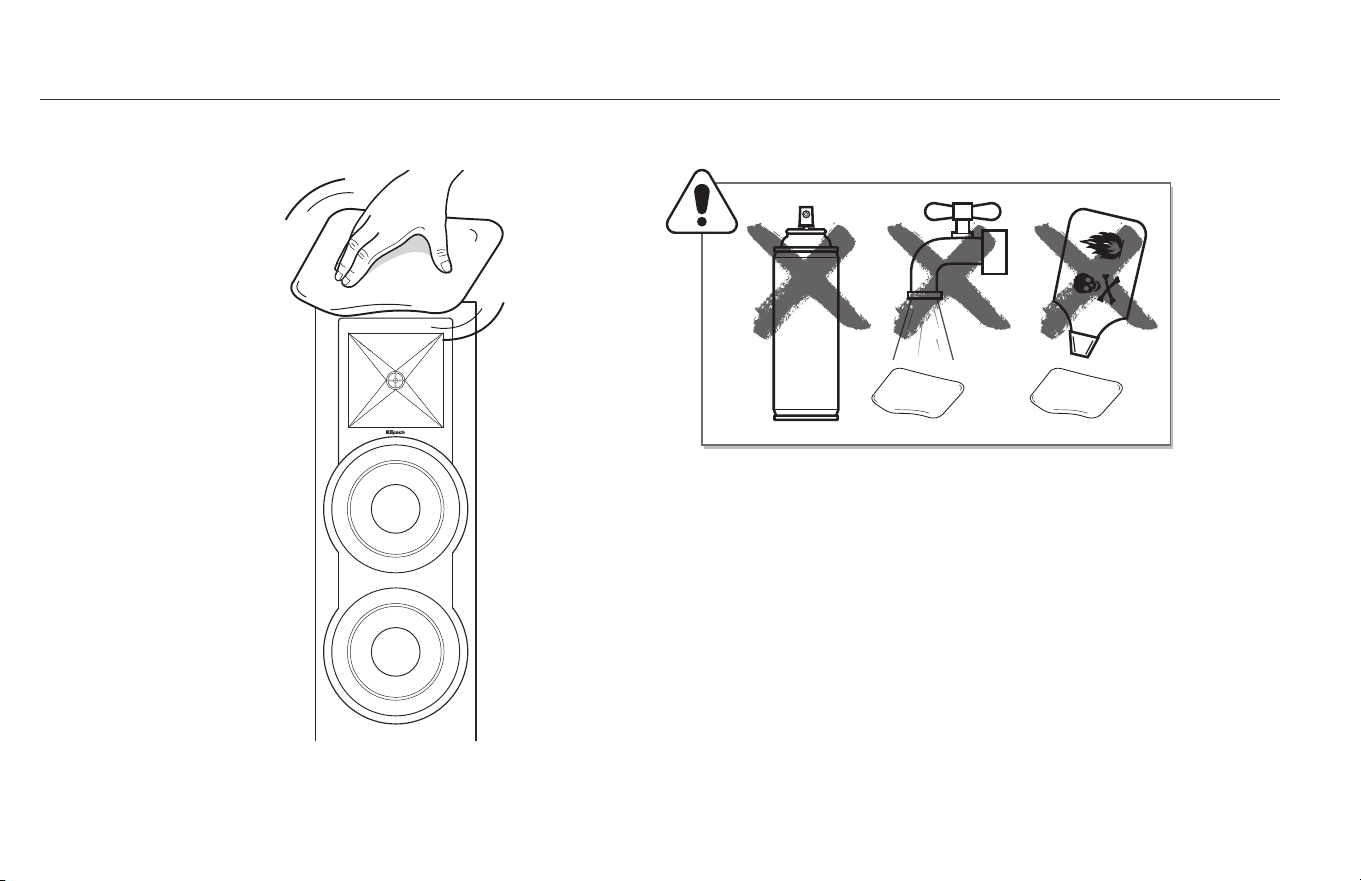
CARE AND CLEANING
ENTRETIEN ET NETTOYAGE • CUIDADO Y LIMPIEZA • PFLEGE UND REINIGUNG • CURA E PULIZIA • CUIDADOS E LIMPEZA • 保养与清洁 •
* USE MICROFIBER CLOTHS ONLY
*Utilisez des chiffons en microfibres seulement *Use solamente paños de microfibra *Nur Mikrofasertücher verwenden
*Usare solo panni in microfibra *Use somente tecidos de microfibra *仅限使用超细纤维布
فيظنتلاو ةيانعلا
طقف ربيافوركياملا فايلأ نم شامق عطق مدختسا *

20
PRODUCT REGISTRATION
ENREGISTREMENT DU PRODUIT • REGISTRACIÓN DEL PRODUCTO • PRODUKTREGISTRIERUNG • REGISTRAZIONE DEL PRODOTTO • REGISTO DO PRODUTO • 产品注册 •
جتنملا ليجست
Register your product online at www.klipsch.com/register
• Keep up-to-date on new products and promotions.
• Your personal information will never be resold.
• This registration information is not used for warranty purposes.
Please retain your receipt for warranty claims.
Enregistrez votre produit en ligne à www.klipsch.com/register
• Restez informé des nouveaux produits et des promotions.
• Vos informations personnelles ne seront jamais revendues.
• Ces informations d’enregistrement ne sont pas utilisées à des fins de
garantie.
Veuillez conserver votre reçu pour toute réclamation au titre de la garantie.
Registrieren Sie Ihr Produkt online unter www.klipsch.com/register
•
Dadurch werden Sie über neue Produkte und
Sonderangebote informiert.
• Ihre personenbezogenen Daten werden nie verkauft.
• Diese Registrierungsdaten werden nicht zu Garantiezwecken verwendet.
Bewahren Sie bitte Ihre Quittung auf, um die Garantie in Anspruch nehmen
zu können.
Registre su producto en línea en at www.klipsch.com/register
•
Manténgase al día sobre nuevos productos y promociones.
• Sus datos personales nunca serán vendidos.
• Estos datos de registro no son para propósitos de garantía.
Guarde su recibo para hacer reclamaciones de garantía.
Registre o produto on-line no site www.klipsch.com/register
•
Mantenha-se atualizado sobre novos produtos e promoções.
• Suas informações pessoais nunca serão vendidas a terceiros.
• As informações solicitadas para registro do produto não são usadas
para fins de garantia.
Guarde uma cópia da nota fiscal ou recibo como comprovante para
serviços cobertos pela garantia.
Il prodotto può essere registrato on-line sul sito www.klipsch.com/register
•
Si riceveranno così informazioni su nuovi prodotti e promozioni.
• I dati personali degli utenti non saranno mai venduti.
• Le informazioni di registrazione non vengono utilizzate a scopi di
garanzia.
Conservare la ricevuta per mostrarla in caso di reclami coperti
dalla garanzia.
请在www.klipsch.com/register在线注册您的产品
•
了解最新产品促销活动。
•
您的个人信息绝不会被转售。
•
该注册信息不用于保修目的。
请保存好您的收据,保修时我们需要您出示该收据。
www.klipsch.com/register ىلع تنرتنا ربع كجتنم لجس
.ةديدجلا ضورعلاو تاجتنملاب عطا ىلع نك •
.ا
ً
قلطم ةيصخشلا تامولعم عيب داع
ُ
ي نل •
.نامضلا ضارغ هذه ليجستلا تامولعم مدختس
ُ
ت •
.نامضلا تابلاطمل لاصياب ظافتحا ءاجرلا

21
TROUBLESHOOTING
DÉPANNAGE • DETECCIÓN • HINWEISE ZUR PROBLEMBEHEBUNG • SOLUZIONE DEI PROBLEMI • SOLUCIONAR PROBLEMAS • 故障排除 •
اهحصإو لاطعا فاشكتسا
Klipsch.com/R-28PF ةرايز ىجر
ُ
ي ،اهحصإو لاطعا فاشكتسا تاميلعتو ةيليصفتلا تامولعملا نم ديزمل
For more in-depth information and troubleshooting instructions visit Klipsch.com/R-28PF
Pour plus d’informations et des instructions de dépannage détaillées, consultez Klipsch.com/R-28PF
Hay información más detallada e instrucciones de detección y reparación de averías en Klipsch.com/R-28PF
Detailliertere Anweisungen und Hinweise zur Problembehebung finden Sie unter Klipsch.com/R-28PF
Per informazioni più dettagliate e istruzioni per la soluzione dei problemi, visitare Klipsch.com/R-28PF
Para obter informações mais detalhadas e instruções para solucionar problemas, visite o site Klipsch.com/R-28PF
欲了解更详细的信息和故障排除说明,请访问 Klipsch.com/R-28PF

22

V04 - 170627
3502 WOODVIEW TRACE, INDIANAPOLIS, IN, USA
KLIPSCH.COM
©2016, Klipsch Group, Inc. Klipsch Group, Inc. is a wholly-owned subsidiary of Voxx International Corporation.
Klipsch and Keepers of the Sound are trademarks of Klipsch Group, Inc., registered in the United States and other countries. The
Bluetooth
®
word mark
is a registered trademark owned by Bluetooth SIG, Inc. and any use of such mark by Klipsch Group, Inc. is under license.