After Sales Support
(AU) 1300 886 649 (NZ) 0800 836 761 | tempo.org/support
Model Number ON-DW45S
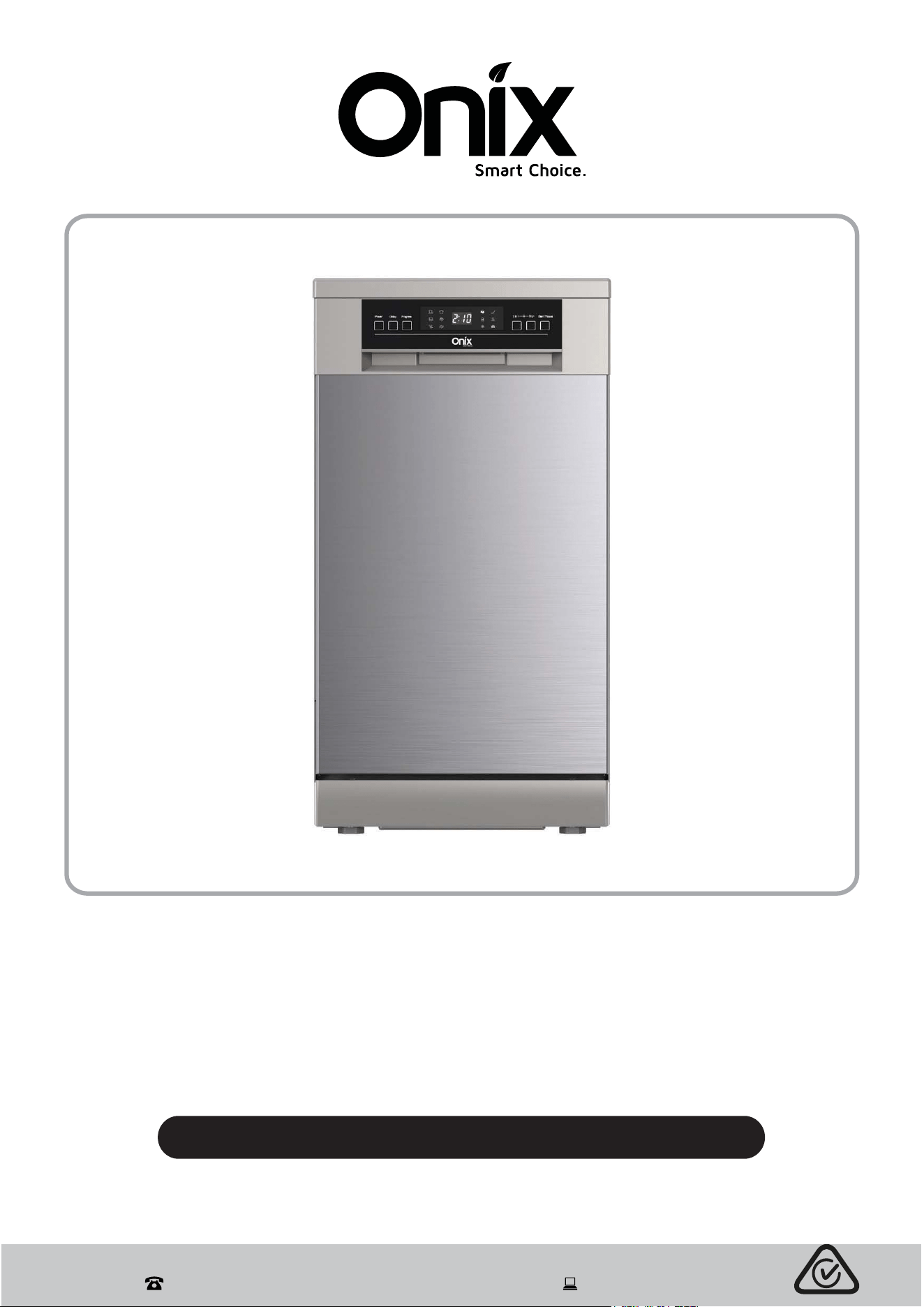
45 cm Dishwasher
INSTRUCTION MANUAL

After Sales Support
(AU) 1300 886 649 (NZ) 0800 836 761 | tempo.org/support
2
Contents
03 General Safety Instructions
06 Product Overview
09 Installation
14 Features
16 Instructions
27 FAQs and Troubleshooting Guide
30 Other Useful Information

After Sales Support
(AU) 1300 886 649 (NZ) 0800 836 761 | tempo.org/support
3
General Safety Instructions
IMPORTANT SAFETY INSTRUCTIONS
READ CAREFULLY AND KEEP FOR FUTURE REFERENCE
Read this manual thoroughly before first use, even if you are familiar with this type of
product. The safety precautions enclosed herein reduce the risk of fire, electric shock and
injury when correctly adhered to. Keep the manual in a safe place for future reference,
along with the completed warranty card and purchase receipt. If applicable, pass these
instructions on to the next owner of the appliance.
Always follow basic safety precautions and accident prevention measures when
using an electrical appliance, including the following:
Pay particular attention to safety messages that follow the words:
DANGER, WARNING and CAUTION.
These words are used to alert you to a potential hazard that can seriously
injure you and others. The instructions will tell you how to reduce the chance
of injury and let you know what can happen if the instructions are not followed.
DANGER means that failure to read this safety statement may result in severe
personal injury.
WARNING means that failure to read this safety statement may result in extensive
product damage or serious personal injury.
CAUTION means that failure to read this safety statement may result in
minor or moderate personal injury, property or equipment damage.
Electrical safety and cord handling
Voltage: Before connecting and turning on the appliance, ensure the electrical voltage
and circuit frequency correspond to those indicated on the appliance rating label.
WARNING! Ensure the outlet is properly earthed to the ground. If unsure, consult a
qualified electrician or a service representative. Improper connection of the equipment
grounding conductor can result in the risk of an electric shock if the appliance
malfunctions.
WARNING! Do not modify the cord and plug provided with the appliance; if it does not
fit the outlet, have a proper outlet installed by a qualified electrician.
WARNING! If the supply cord is damaged, do not use the appliance. A damaged
cord must be replaced by the manufacturer or its service agent or a similarly qualified
person in order to avoid a hazard. Contact our after sales support centre.
Connection: Do not use an adaptor; do not use an extension cord. We recommend
you connect the appliance to a separate circuit serving only this appliance.
Power cord: Do not kink or damage the power cord. Position it out of the way so no
one steps on or places anything on the cord or against it.
Winding the cord: If winding the power cord, avoid tight bends as this could
damage the cord.

After Sales Support
(AU) 1300 886 649 (NZ) 0800 836 761 | tempo.org/support
4
General Safety Instructions (Cont.)
Inserting/removing the plug: Before you insert or remove the plug, make sure the
appliance is switched off and the power is switched off at the electrical outlet. Remove
by grasping the plug, do not pull on the cord.
CAUTION! To reduce the risk of electric shock, do not immerse the unit, cord or plug
in water or other liquid. Do not expose it to rain or moisture.
Auto switch off: To save energy, in standby mode the appliance will switch off
automatically when there is no operation in 30 minutes.
RCD: Unless your home is already fitted with a residual current device (safety switch),
we recommend installing an RCD with a rated residual operating current not exceeding
30 mA to provide additional safety protection when using electrical appliances. See
your electrician for professional advice.
Installation
WARNING! Do not install the dishwasher yourself. Have it installed by an appropriately
qualified, licensed plumber or dishwasher installer only.
WARNING! Any electrical work required for the installation of this dishwasher must be
carried out by a qualified, licensed electrician.
Power supply cord: During installation, the power supply cord must not be excessively
or dangerously bent or flattened. Do not tamper with the controls.
Safe disposal: When removing an old dishwasher from service or discarding it, remove
the door to the washing compartment.
Hose sets: Only use new hose sets when connecting this dishwasher to the water
supply; do not reuse old hoses.
Water pressure: The maximum permissible inlet water pressure is 1 MPa. The
minimum permissible inlet water pressure is 0.04 MPa (0.4–10 bar).
Flammable objects: Do not install the appliance on or near any flammable or hot
objects.
Ventilation: If there are any ventilation openings in the base,
make sure they are not
obstructed by carpet.
Proper installation: Install the dishwasher on an even, flat and stable ground. Do not
operate your dishwasher unless all enclosure panels are properly in place.
Usage conditions and restrictions
Domestic use only: This appliance is intended for indoor household use only. It is not
suitable for industrial, commercial or trade use. Do not use it for anything other than its
intended purpose, and only use it as described in this manual.
Usage restriction: The appliance is not intended for use by persons (including
children) with reduced physical, sensory or mental capabilities, or lack of experience
and knowledge, unless they have been given supervision or instruction concerning use
of the appliance by a person responsible for their safety.

After Sales Support
(AU) 1300 886 649 (NZ) 0800 836 761 | tempo.org/support
5
General Safety Instructions (Cont.)
Children should be supervised to ensure they do not play with the appliance. Close
supervision is necessary when any appliance is used by or near children.
WARNING! Never leave the appliance unattended while in use.
Dishwasher door: Do not abuse, sit on or stand on the door or dish rack of the
dishwasher, or use it for anything other than its intended purpose. Do not place any
heavy objects on the dishwasher door when it is open. The appliance could tip forward.
Open the door very carefully if the dishwasher is operating as there is a risk of water
squirting out.
The door should not be left wide open as this could increase the risk of someone
tripping over the door.
Safe loading: Do not overload this dishwasher, it has a maximum capacity of 9
place settings. To ensure safe operation, follow a few simple rules when loading the
dishwasher:
— Place sharp items so they are not likely to damage the door seal.
—
WARNING: Knives and other utensils with sharp points must be loaded in the
basket with their points down or placed in a horizontal position to avoid potential
hazards.
— Only wash plastic items that are marked dishwasher safe or the equivalent. For
plastic items not marked, check the manufacturer’s recommendations.
Dishwasher detergent: Use only detergent and rinse additives designed for an
automatic dishwasher and keep them out of reach of children. Never use liquid
detergent (for manual washing up), soap or laundry detergent in your dishwasher.
DANGER! Some dishwasher detergents are strongly alkaline and can be extremely
dangerous if swallowed. Avoid contact with the skin and eyes.
DANGER! When the door of the dishwasher is open, make sure to keep children away
from the dishwasher. Even after a wash there could still be detergent left inside. Make
sure that the detergent compartment is empty after completion of the wash cycle.
Cleaning: Unplug before cleaning and performing maintenance on the appliance. Use
a soft cloth moistened with mild detergent for cleaning the appliance, and then use a
dry cloth to wipe it again.
Do not modify or not attempt to alter this appliance or its controls in any way.
Repair: Do not attempt to take the unit apart. Apart from regular maintenance as
described in this manual, this appliance is not designed to be dismantled by the user.
In case of damage or malfunction, have the unit repaired by trained personnel only, or
contact the after sales support line for advice.
Misuse: Inappropriate use can result in property damage, injury or death. We assume
no liability for misuse of the appliance or noncompliance with these instructions.
After Sales Support
(AU) 1300 886 649 (NZ) 0800 836 761 | tempo.org/support
6
Product Overview
Scope of delivery
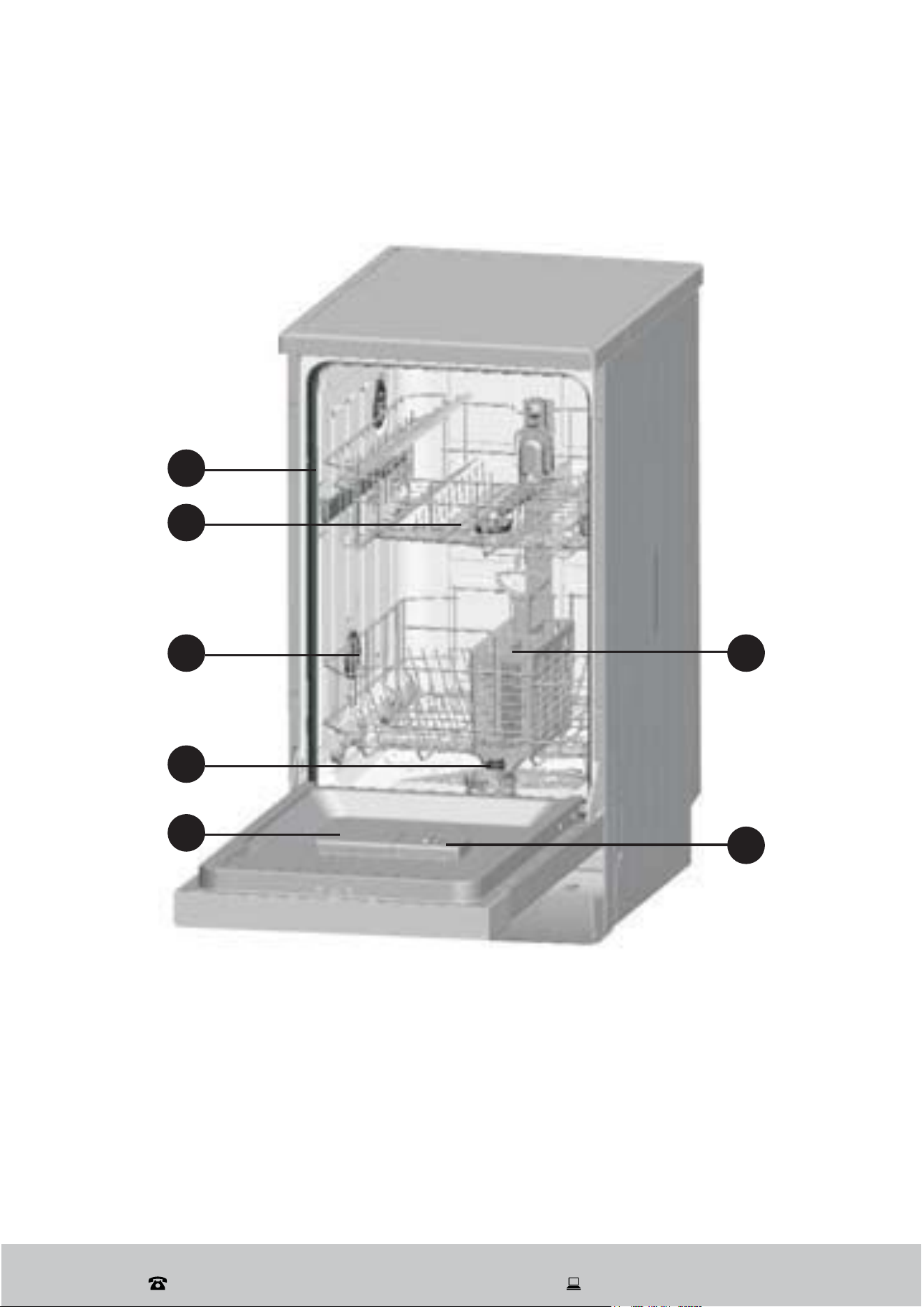
Dishwasher: front view, open
1 Upper Basket
2 Spray Arms
3 Lower Basket
4 Filters
5 Detergent Dispenser
6 Rinse Aid Dispenser
7 Cutlery Basket
1
2
5
4
3
7
Documentation (Not Shown)
Instruction Manual
Warranty Certificate
6
After Sales Support
(AU) 1300 886 649 (NZ) 0800 836 761 | tempo.org/support
7
Product Overview (Cont.)
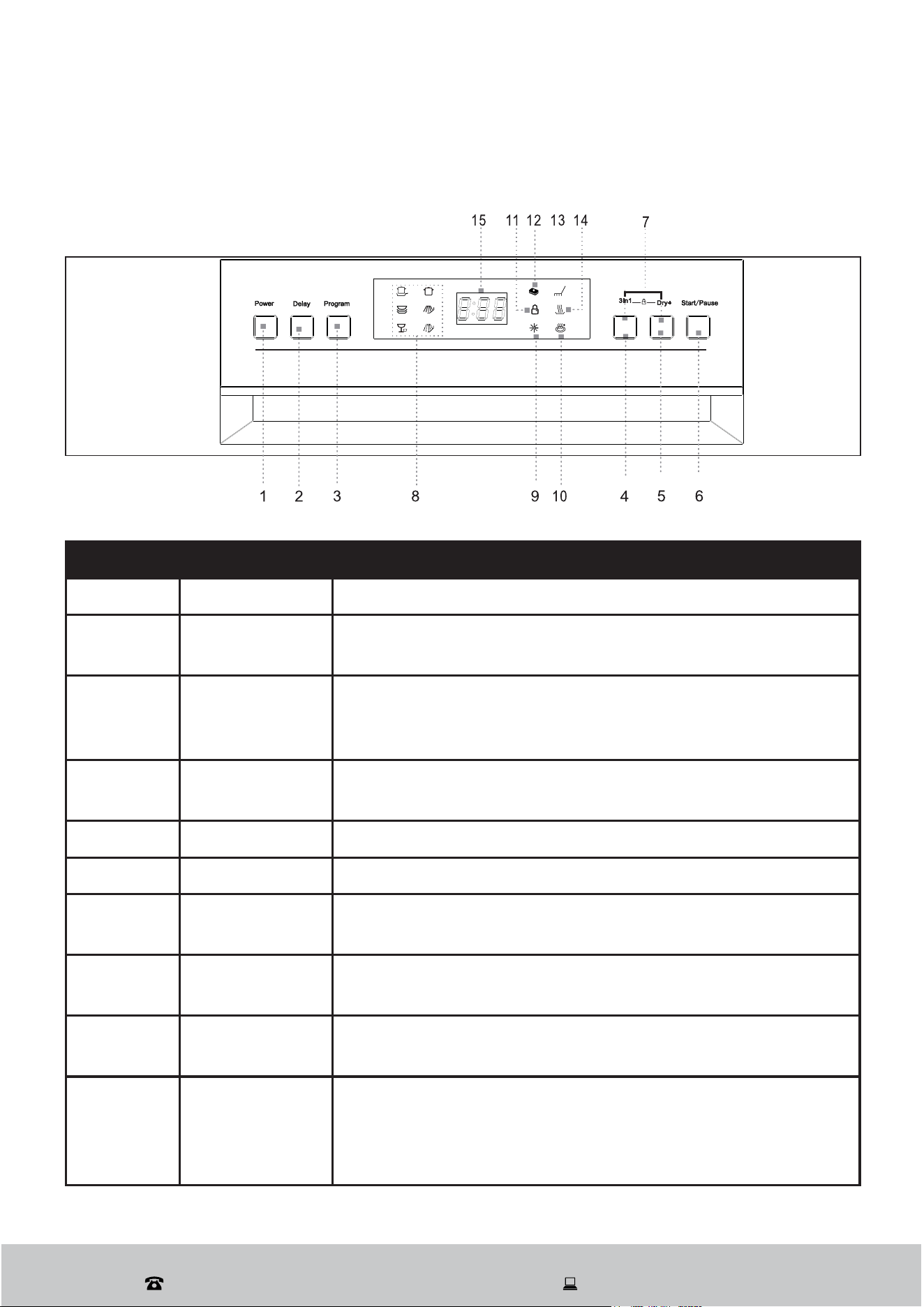
Operation buttons
1 POWER
Press this button to turn on or off the power supply.
2 Delay
Press this button to delay the start time of any cycle
automatically up to 24hours.
3 Progam
Press this button to scroll through the wash cycles. The
corresponding program light will be ON to indicate which
wash cycle has been selected.
4 3 in 1 Tablet
Press this button to choose or cancel the 3 in 1 tablet
function.
5 Dry +
Press this button to choose or cancel the Dry + function.
6 Start/ Pause
Press this button to start or pause the washing cycle.
7 Child Lock
Press both buttons for 3 seconds, the appliance will be
locked and all buttons will not work.
8
Program
indicator light
When a washing program is selected, the corresponding
light will display.
9
Rinse aid fill
indicator
This indicator will light up when dispenser needs to be
refilled.
10 Dry+ indicator
This indicator will show when the Dry+ button is selected.
A increase temperature will help the drying process during
final rinse. This function is only available for Intensive,
Heavy or Normal cycles.
Control panel
Tablet
After Sales Support
(AU) 1300 886 649 (NZ) 0800 836 761 | tempo.org/support
8
Product Overview (Cont.)
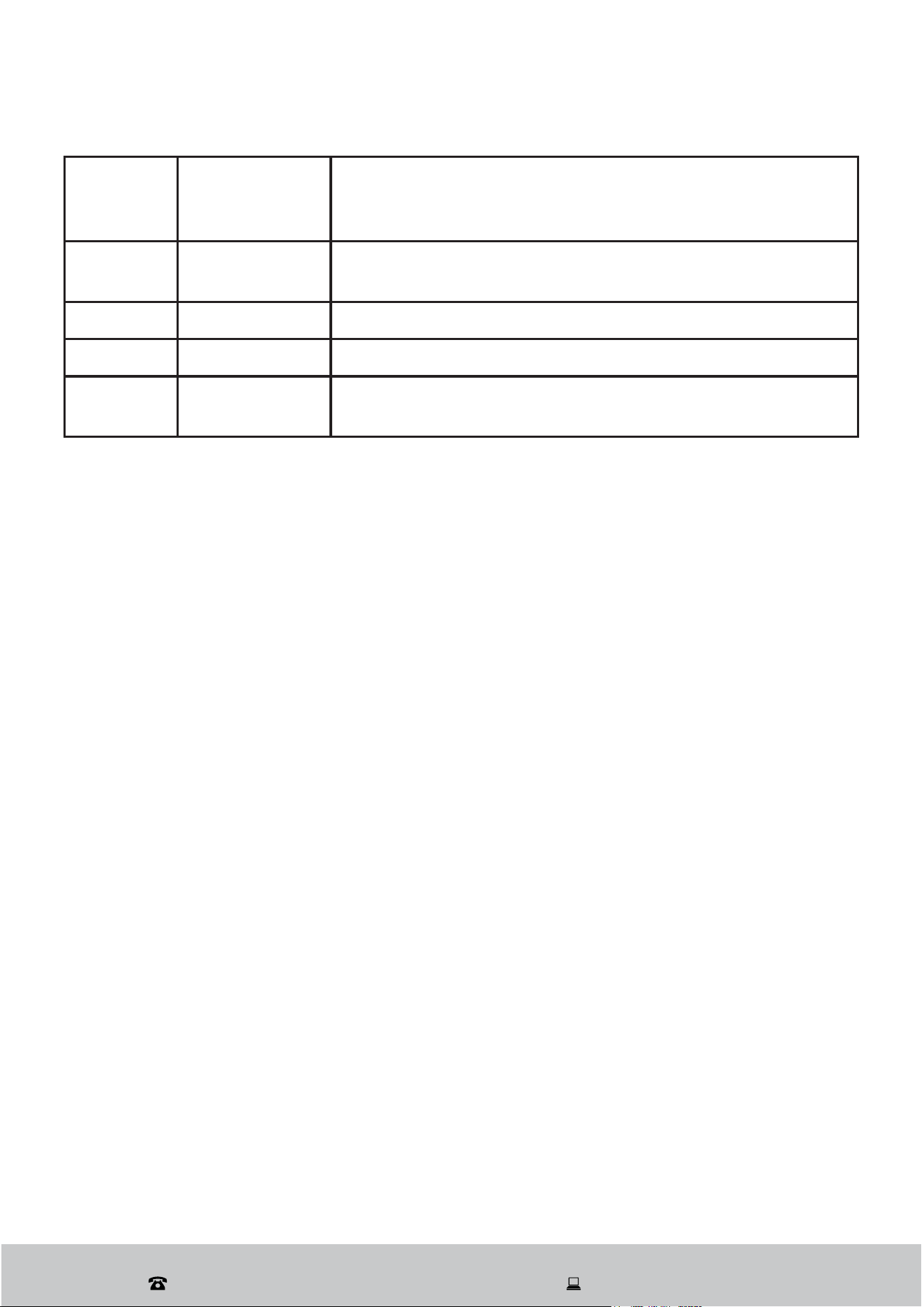
11
Child lock
indicator
This indicator will show when child lock buttons are
pressed for 3 seconds. The indicator lights up after
flashing 6 times when activated.
12
3 in 1 Tablet
Indicator
This indicator lights up when additional functions need to
be selected.
13 Washing light
This light comes on when the dishwasher is washing
14 Drying light
This light comes on when the dishwasher is drying
15 Digital display
This display shows remaining time, malfunction codes and
delay times.

After Sales Support
(AU) 1300 886 649 (NZ) 0800 836 761 | tempo.org/support
9
Installation
DANGER! Make sure your electrical power is disconnected before installing the
dishwasher. Failure to do so can result in death or electric shock.
IMPORTANT! All relevant pipes and electrical equipment should be installed by
licensed plumbers, electricians or dishwasher installers. Make sure to
use new water supply and drain hoses; do not use old hoses.
IMPORTANT! Read this manual to familiarise yourself with all parts and operating
principles. Pay particular attention to the safety instructions.
Unpacking the appliance
This product has been packaged to protect it against transportation damage. Unpack
the appliance but keep all packaging materials until you have made sure your new
dishwasher is undamaged and in good working order.
The packaging carton is recyclable. Whenever possible, reuse the carton and recycle it
when disposing of the packaging materials.
Plastic wrapping can be a suffocation hazard for babies and young children, so ensure
all packaging materials are out of their reach, and dispose of them safely.
The baskets inside the dishwasher are taped to secure them during transport. Remove
any tape, ties and foam padding from inside the dishwasher.
IMPORTANT! Using the loading instructions, make sure all parts in the upper and
lower baskets are properly installed inside the dishwasher – you may need to relocate
the cup rack for appropriate usage.
Unwind the cord to its full length and inspect it for damage. Do not use if damaged. In
case of damage, contact our after sales support centre for advice.
Positioning the appliance
This dishwasher is freestanding. It can also be recessed under a single benchtop.
Position the dishwasher close to an existing water inlet and drain connection and make
sure there is a power point nearby, or in an adjoining cabinet.
The back should rest against the wall behind it and the sides along any adjacent
cabinets or walls.
The dishwasher’s water supply and drain hoses can be positioned either to the right or
left sides to facilitate proper installation.
Make sure the appliance does not stand on any water hoses or the power cable.
After Sales Support
(AU) 1300 886 649 (NZ) 0800 836 761 | tempo.org/support
10
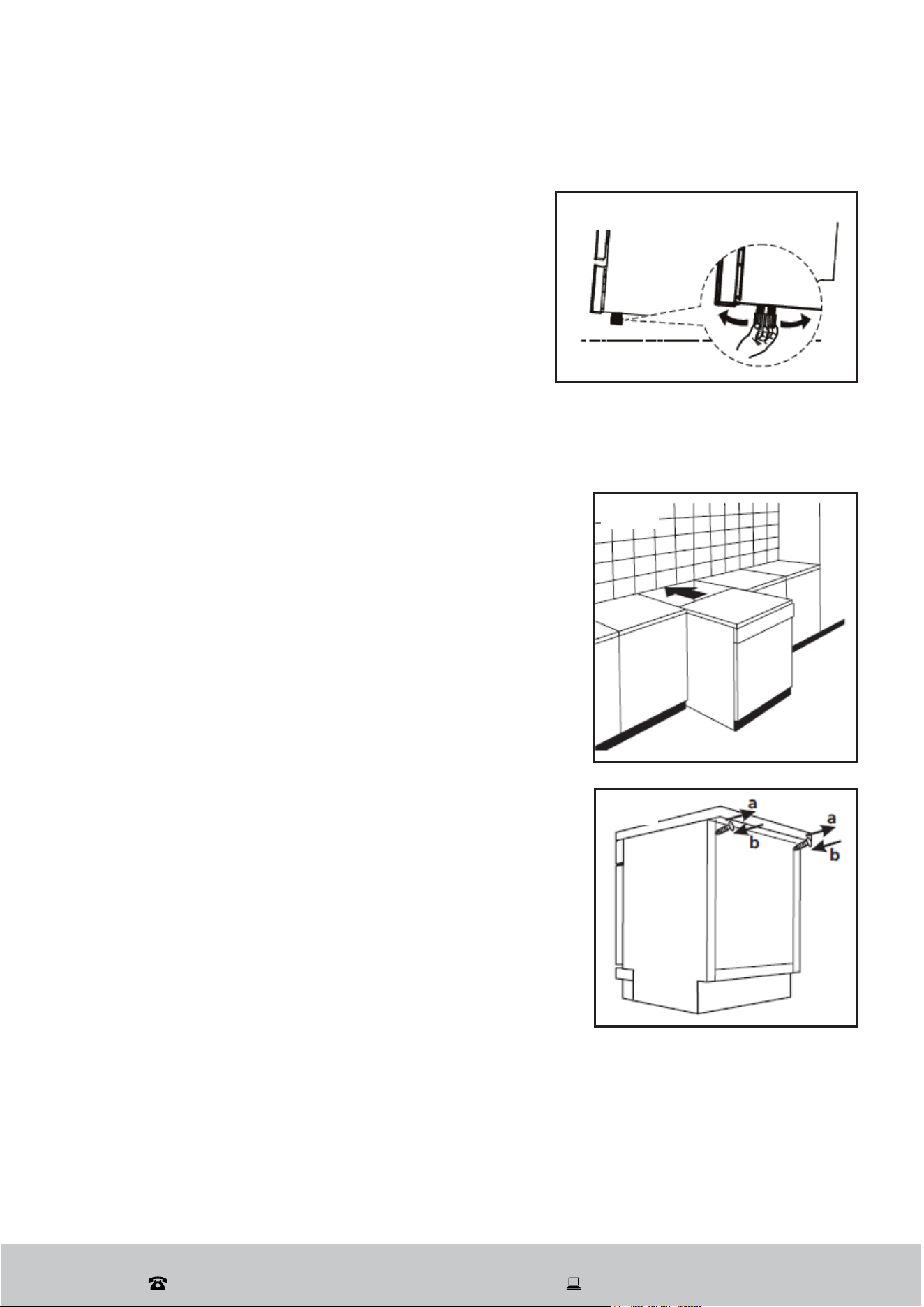
Levelling the appliance
Position the dishwasher on a level and sturdy floor.
If the floor is uneven, adjust the adjustable feet until
it reaches a horizontal position; just screw the feet in
or out a little (Fig. 1).
The appliance should not be inclined more than 2°.
Correctly levelled, the appliance will be more stable
and much less likely to move or cause vibrations
and noise during operation.
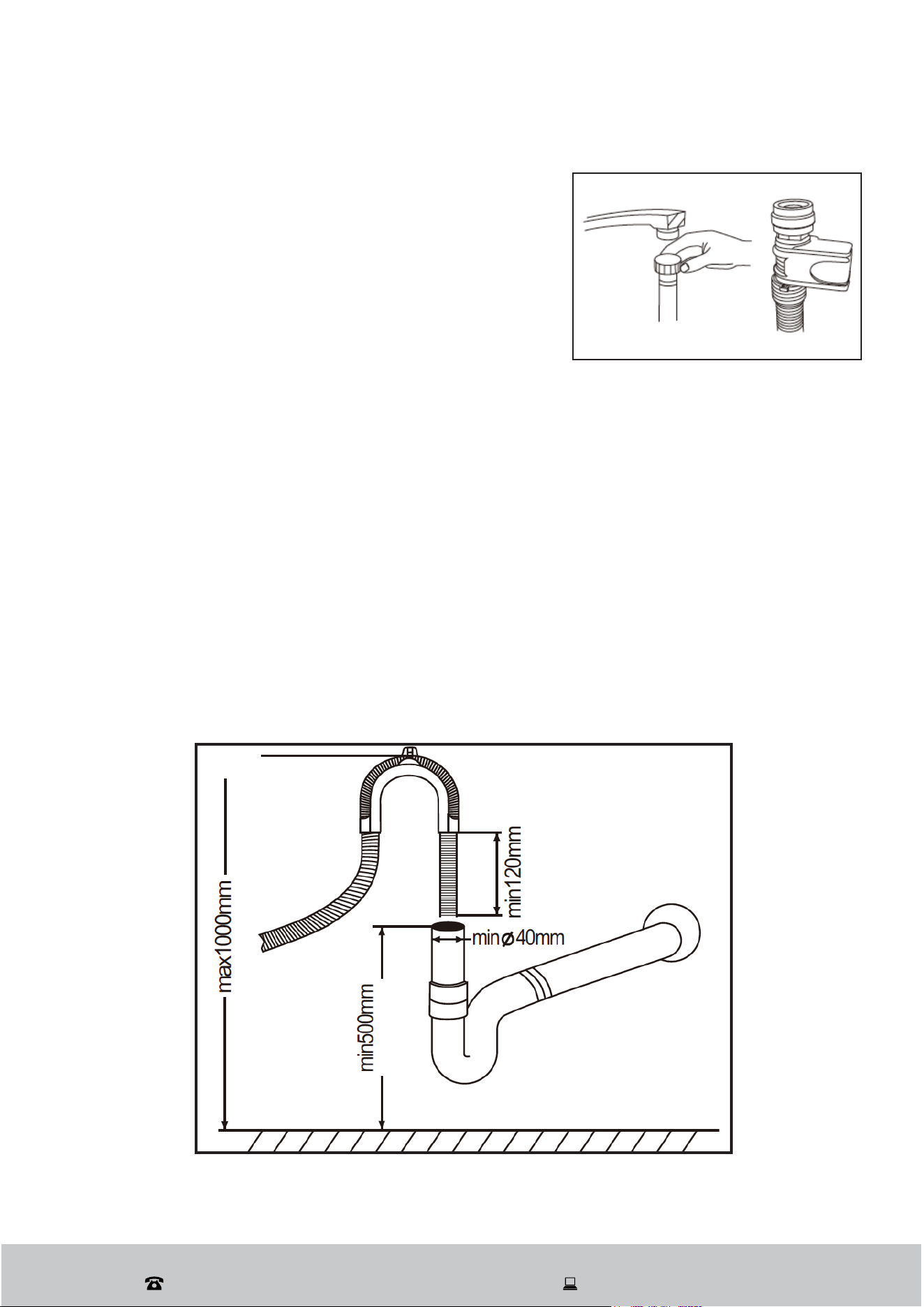
Freestanding installation
Between existing cabinets
The height of the dishwasher, 850 mm, has been
designed in order to allow the machine to be fitted
between existing cabinets of the same height in
modern fitted kitchens (Fig. 2).
The feet can be adjusted so that the correct height
is reached.
Underneath an existing worktop
In most modern fitted kitchens there is only
one single worktop under which cabinets and
electrical appliances are fitted. If you want to fit
this dishwasher under an existing worktop, you
need to remove the worktop of the dishwasher by
unscrewing the screws under the rear edge of the
top (Fig. 3: a).
IMPORTANT! Keep the screws! After removing the
worktop you will have to screw them back under the
rear edge of the top (Fig. 3: b).
The height of the dishwasher will then be reduced
to 815 mm (as per ISO regulations), which means it
should fit perfectly under your kitchen worktop.
Installation (Cont.)
Fig. 2
Fig. 3
Fig. 1
After Sales Support
(AU) 1300 886 649 (NZ) 0800 836 761 | tempo.org/support
11
Installation (Cont.)
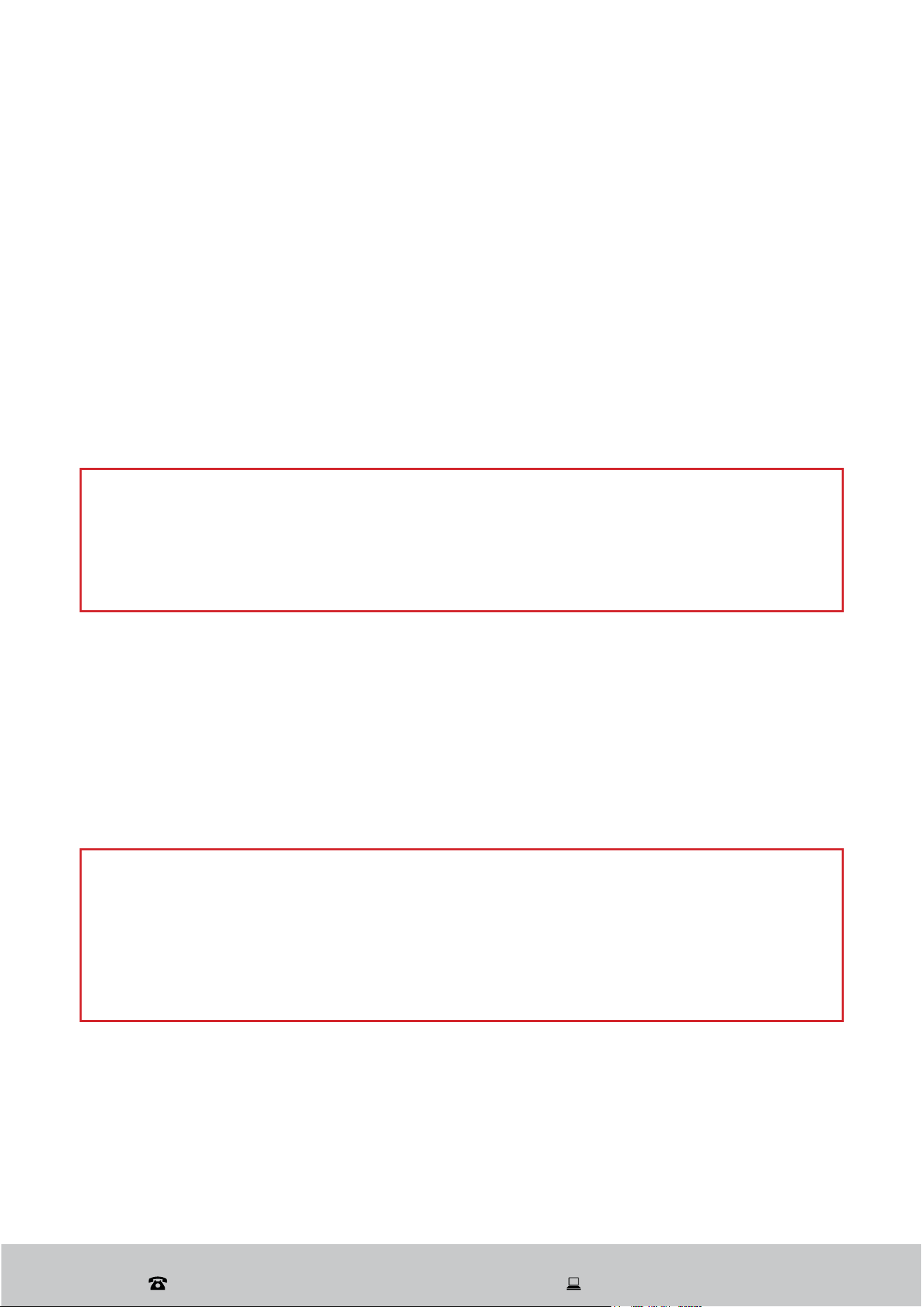
Cold water connection
Connect the cold water supply hose to a threaded 3/4”
connector. During use, the dishwasher will heat up the
water to the required temperature. Make sure the hose
is not kinked or squashed and is fastened tightly in
place (Fig. 4).
If the water pipes are new or have not been used for
an extended period of time, let the water run to make
sure it is clear and free of impurities. This step is necessary to avoid the risk of the water
inlet being blocked and damaging the appliance.
WARNING!
Always close the water tap after using the dishwasher.
Drain hose connection
To ensure optimal drainage for the dishwasher, insert the drain pipe into the sewer drain
pipe. The outlet height should be between 0.5 to 1 meter (Fig. 5).
The drain pipe connection must be fixed and positioned as close as possible to the
dishwasher. The recommended drainage distance is between 1 to 1.5 meters.
NOTE: A longer distance can negatively impact drainage efficiency, leading to excessive
residual water in the pipe, which may in turn affect the dishwasher’s washing performance.
Fig. 4
Fig. 5
After Sales Support
(AU) 1300 886 649 (NZ) 0800 836 761 | tempo.org/support
12
Electrical connection
Make sure that the electrical voltage and circuit frequency in your home correspond to
those indicated on the appliance rating label and that the electrical system is sized for the
maximum voltage on the rating plate. This appliance requires a 10A fused, copper-wired
electrical supply. A time delay fuse or circuit breaker is recommended, as well as provision
of a separate circuit serving only this appliance. A suitable power outlet should be located
in an adjacent cabinet.
To connect the dishwasher, insert the plug into a properly earthed, easily accessible
electrical socket. If the socket is not appropriate for the plug, replace the socket rather
than use an adaptor or the like as such devices could cause overheating and burns.
Installation (Cont.)
WARNING!
Do not use an extension cord or an adaptor with this appliance.
Do not bend the power cord. Do not place the appliance on top of the cord.
Do not modify the plug provided with this appliance. If it does not fit into your
power point, have a suitable outlet installed by a qualified electrician.
Earthing
This appliance must be earthed. In the event of a malfunction or breakdown, earthing will
reduce the risk of an electric shock by providing a path of least resistance for the electric
current. This appliance is equipped with a cord having an equipment-earthing conductor
and an earthing plug. The plug must be plugged into an appropriate outlet that is installed
and earthed in accordance with all local standards and requirements.
WARNING!
Ensure the outlet is properly earthed to the ground. If unsure, consult a qualified
electrician or a service representative. Improper connection of the equipment
grounding conductor can result in the risk of an electric shock if the appliance
malfunctions.
Do not, under any circumstances, cut or remove the third grounding prong from the
power plug.

After Sales Support
(AU) 1300 886 649 (NZ) 0800 836 761 | tempo.org/support
13
)LMVYLÄYZ[\ZL
After your new dishwasher has been installed, and before using it for the first time, make
sure to check the following points to ensure safe and efficient operation:
Is the dishwasher level and properly installed?
Is the water tap open?
Are the hose connections secured tightly and there is no leakage at either end?
Are all electrical cords tightly connected?
Is the power switched on at the power point?
Are the inlet and drain hoses free of knots and kinks?
Has all packing material been removed from the dishwasher?
Is all product documentation stored safely for easy access?
Installation (Cont.)
After Sales Support
(AU) 1300 886 649 (NZ) 0800 836 761 | tempo.org/support
14
Features
Wash programs and cycles
* The Normal program was used for testing to the Australian standard AS/NZS 2007.1 (with 9
place settings, rinse aid setting on 4, upper basket with the upper wheels on the rails, and the
door opened about 50 mm at the end of the program to assist with drying).
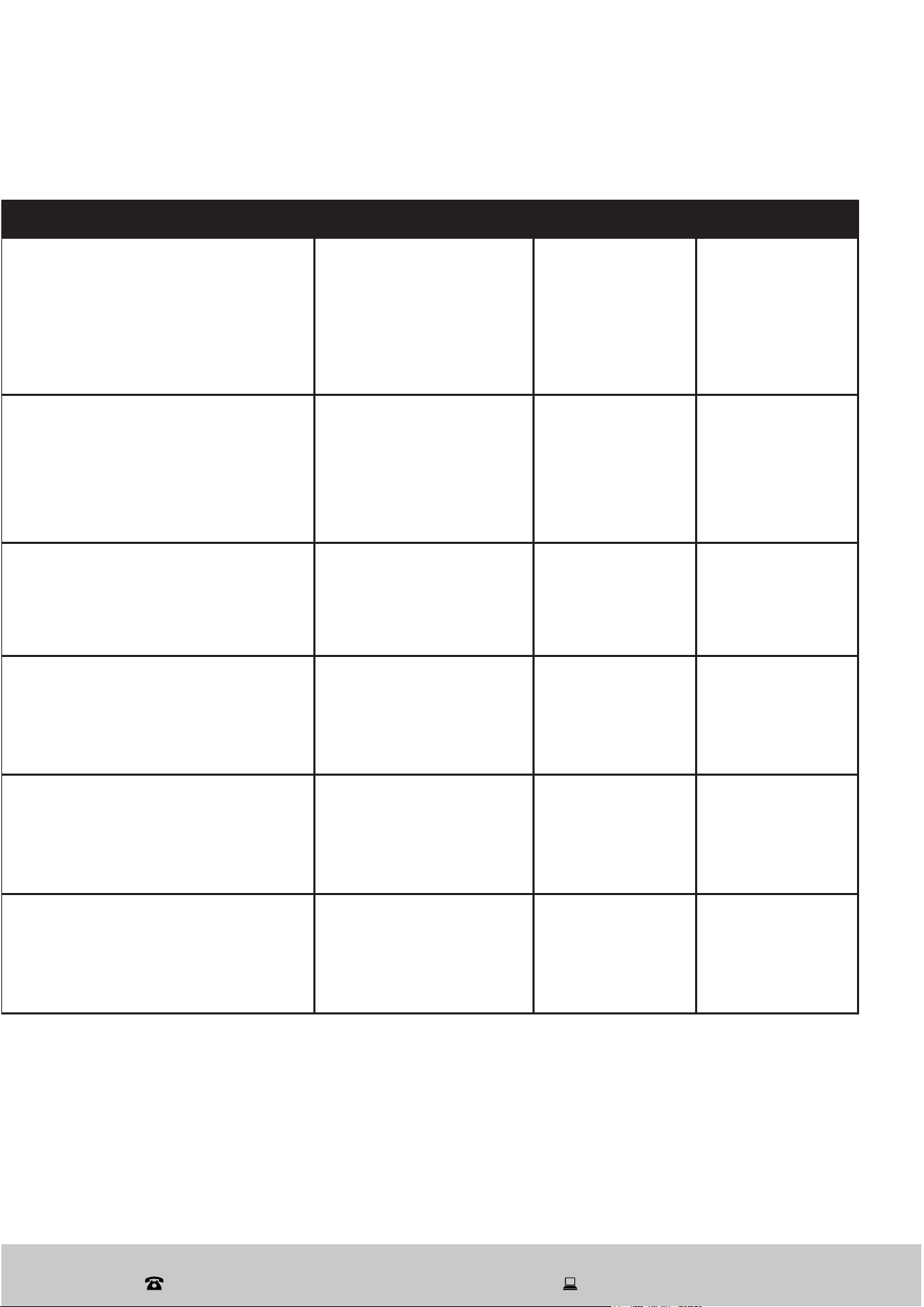
Program Suitability Cycles
Intensive
For most heavily soiled crockery,
such as pots, pans, casserole
dishes and dishes that have been
sitting with dried food on them for
some time.
Prewash (40ºC)
Main Wash (55ºC)
Rinse 1
Rinse 2
Hot Rinse (65ºC)
Drying
Heavy
For heavily soiled loads, such as
pots, plates, and glasses, as well as
lightly soiled pans, use the standard
daily cycle.
Main Wash (60ºC)
Rinse 1
Rinse 2
Hot Rinse (65ºC)
Drying
Normal
For normally soiled loads, such as
pots, plates, glasses, and lightly
soiled pans, use the standard daily
cycle.
Main Wash (44ºC)
Rinse
Hot Rinse (46ºC)
Drying
Rinse
For dishes that need to be rinsed
and dried only.
Pre wash
Hot Rinse (70ºC)
Drying
Rapid
A shorter wash for lightly soiled
loads that do not require drying.
Main Wash (40ºC)
Hot Rinse (50ºC)
Soak
For rinsing dishes you plan to wash
later that day.
Pre-wash
After Sales Support
(AU) 1300 886 649 (NZ) 0800 836 761 | tempo.org/support
15
Features (Cont.)
Detergent (pre / main) Running Time (min.) Energy (kWh) Water (L)
4 / 22 g
(or 3-in-1)
137 1.10 15.0
4 / 22 g
(or 3-in-1)
122 1.00 11.5
4 / 22 g
(or 3-in-1)
110 0.56 9.4
4 / 22 g 60 0.69 6.0
15 g 43 0.48 6.0
/ 8 0.010 3.3

After Sales Support
(AU) 1300 886 649 (NZ) 0800 836 761 | tempo.org/support
16
Loading the dishwasher
For best performance of your dishwasher, follow the loading guidelines in this manual.
ATTENTION: Before loading the dishwasher baskets:
It is not necessary to rinse the dishes under running water before you put them into the
dishwasher. However, we recommend you scrape off any large amounts of leftover food
and soften remnants of burnt food in pots and pans.
Place objects in the dishwasher in the following way:
Hollow items such as cups, glasses, pots, pans, etc. should be placed upside down so
water cannot collect in the container or in a deep base.
Curved items, or items with recesses, should be loaded at a slant so water can run off.
All utensils should be stacked securely so they cannot tip over.
All dishes and utensils should be placed in a way so the spray arms can rotate freely
during washing.
Very small items should not be washed in the dishwasher as they could easily fall out of
the baskets and obstruct moving parts.
Dishes and items of cutlery should not lie inside one another, or cover each other.
To avoid damage to glasses, they must not touch.
WARNING! Long bladed knives stored upright are a potential hazard! Always position these
and other sharp cutlery items horizontally on the cup/cutlery racks.
Do not overload your dishwasher; it will hold a maximum of 9 standard place settings. This
is important for better washing results and lowers energy consumption.
WARNING! Do not pull out the upper and lower basket at the same time, which can
lead to the appliance tipping forward.
Protecting your glass and tableware
Much of today’s tableware is dishwasher safe. However, not everything can be washed
safely in a dishwasher. The chemical composition of your dishwasher detergent or
the water temperature and duration of the wash program may adversely affect some
materials. To protect your special cutlery, glass and tableware from damage, select a wash
program with as low a temperature as possible (see washing programs table for details).
We recommend you do not wash in a dishwasher the items listed below, and take special
care with items deemed of limited suitability. And when buying new dishes, glassware,
porcelain or cutlery, look for products labelled dishwasher safe.
Not suitable for the dishwasher: cutlery with wooden, china or mother-of-pearl handles;
plastic items that are not heat resistant; older cutlery with glued parts that are not
temperature resistant; bonded cutlery items or dishes; pewter or copper items; lead
crystal glass; steel items subject to corrosion (rusting); wooden platters.
Of limited suitability: some types of glasses can become dull with frequent machine
washing; items made of silver and aluminium tend to discolour from machine washing;
glazed patterns may fade with frequent machine washing.
Instructions
After Sales Support
(AU) 1300 886 649 (NZ) 0800 836 761 | tempo.org/support
17
Instructions (Cont.)
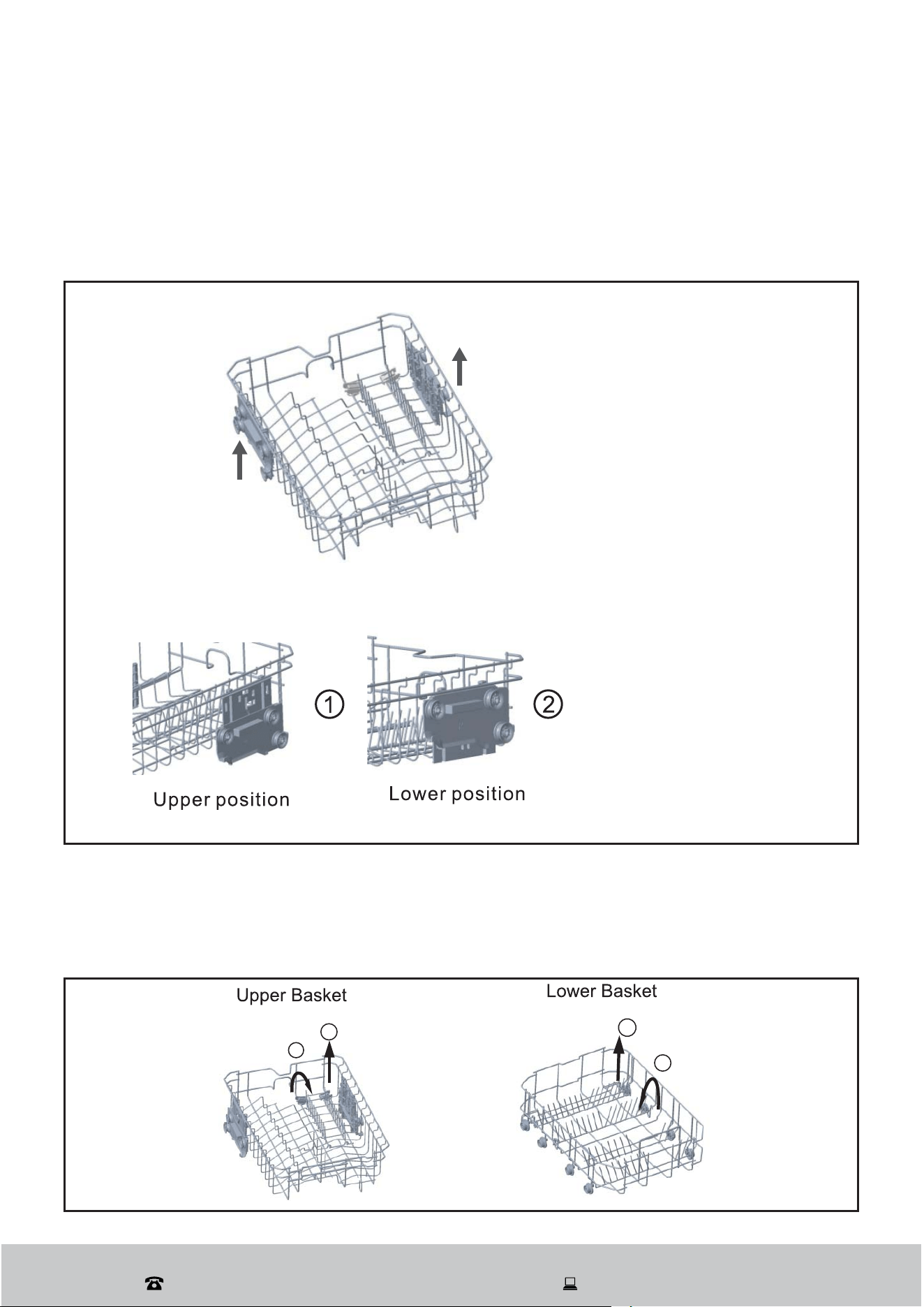
Adjusting the upper basket height
The height of the upper basket can easily be adjusted in order to accommodate taller
dishes in either the upper or lower basket. The basket is set to the lower position from
factory. To adjust the height of the upper basket, please follow the steps below (Fig. 6):
Fig. 6
Folding down the spike rows
If you need more space for pots and pans in the lower basket, you can fold down the
spike rows at the back so that larger or more pots and pans can be loaded (Fig. 7).
Fig. 7
Make sure both sides of the
adjustment mechanism are
in the same position.
To raise your basket, grasp
it on both sides and lift it
upward. To lower it, hold
both sides again and gently
release it downward
After Sales Support
(AU) 1300 886 649 (NZ) 0800 836 761 | tempo.org/support
18
Fig 8:
Instructions (Cont.)
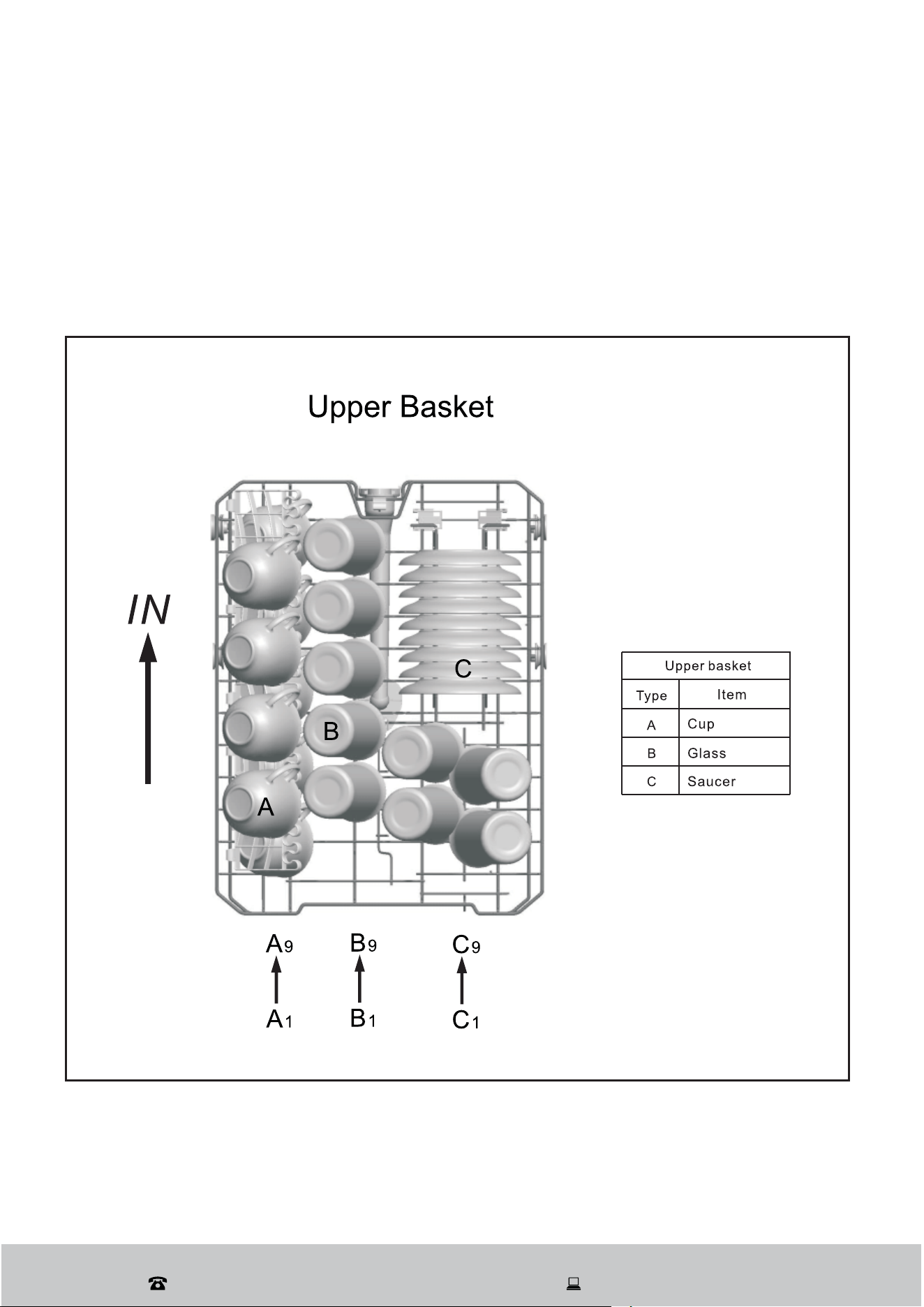
The upper basket
The upper basket is designed to hold more delicate and lighter tableware such as glasses,
cups, small plates, bowls and shallow pans (as long as they are not too dirty). Position these
items securely so they do not get moved by the spray of water (Fig. 8).
After Sales Support
(AU) 1300 886 649 (NZ) 0800 836 761 | tempo.org/support
19
Instructions (Cont.)
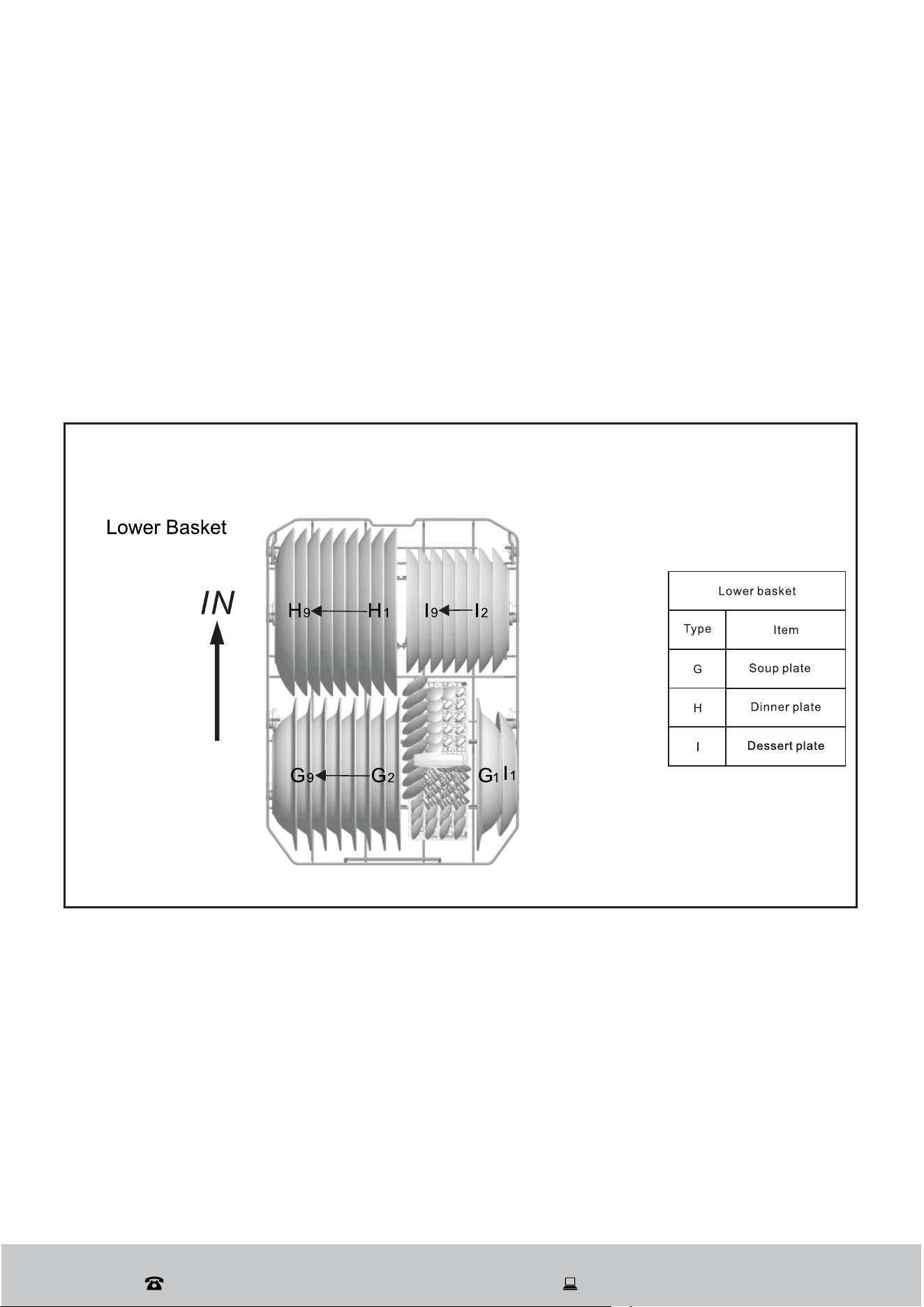
The lower basket
The lower basket is designed to hold dinner plates, larger items and the cutlery basket.
To ensure the detergent dispenser lid can open freely, the maximum diameter for plates in
front of the detergent dispenser is 19 cm.
Pots, pans, serving dishes and bowls are often the most difficult to clean and fit best into
the lower basket. Always place these items upside down into the basket or at a slant so
the water can flow out. Load large serving dishes and lids on the side of the baskets so they
do not block the rotation of the top spray arm.
Fig. 9 shows the lower basket loaded to fit according to the standard.
Fig. 9:
After Sales Support
(AU) 1300 886 649 (NZ) 0800 836 761 | tempo.org/support
20
Fig. 10
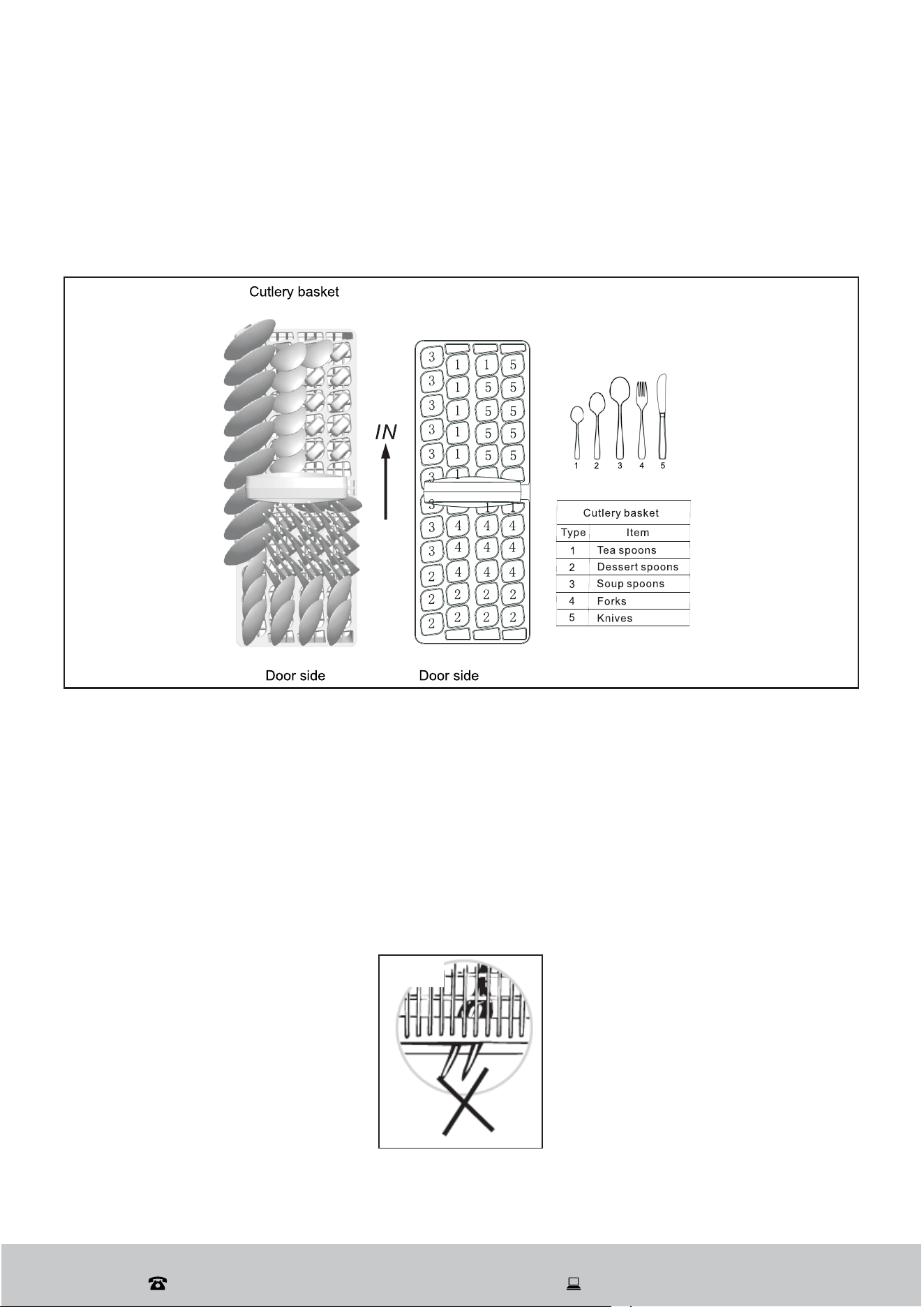
The cutlery basket
Your new dishwasher is equipped with a removable cutlery basket with anti-nesting grid
(Fig. 10). You can use it with the anti-nesting grid up or down, as convenient, anywhere in
the back section of the lower basket.
Fig. 1
WARNING!
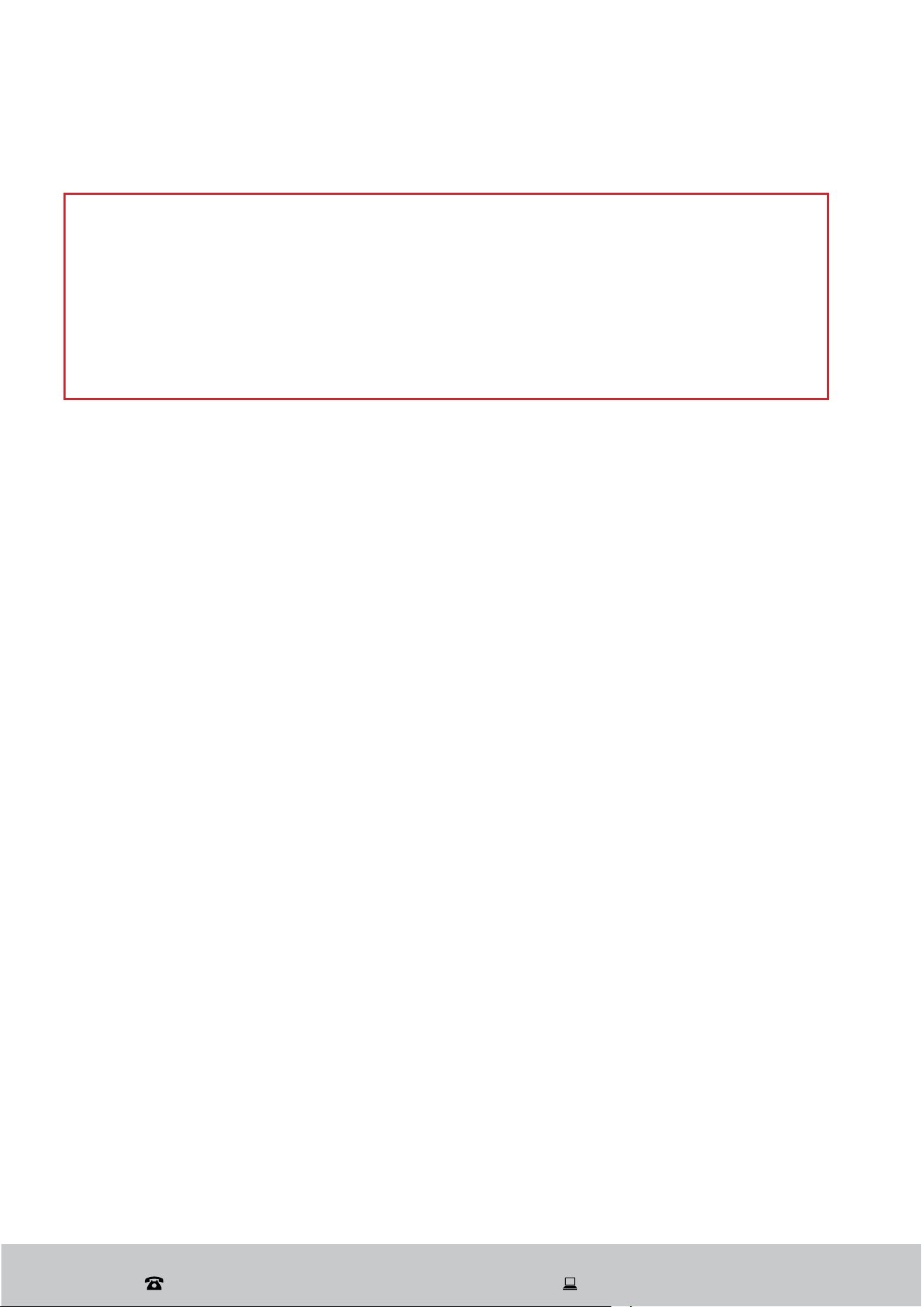
Do not let any item extend through the bottom.
For personal safety and top quality cleaning, place your dishwasher-safe standard size
cutlery in the basket, making sure that:
Cutlery is placed with the handles down.
Items do not nest together (use of the anti-nesting grid will prevent this).
Knives and other potentially dangerous utensils are placed sharp point down, or in a
horizontal position on the cup/cutlery racks in the upper basket.
No item extends through the bottom of the basket (Fig. 11).
Long utensils are placed in a horizontal position on the cup rack in the upper basket.
Instructions (Cont.)
After Sales Support
(AU) 1300 886 649 (NZ) 0800 836 761 | tempo.org/support
21
Instructions (Cont.)
Dishwasher detergent
Dishwasher detergents have chemical ingredients that remove dirt, food and germs and
transport them out of the dishwasher. Most commercially sold dishwasher detergents are
suitable for this purpose; they come in powder or tablet form.
Based on their chemical composition, dishwasher detergents can be split into two basic
types: conventional, alkaline detergents with caustic components and low alkaline,
concentrated detergents with enzymes.
Concentrated detergent
Using an “eco” washing program together with a concentrated detergent is better for the
environment and good for your dishes; such wash programs are specifically matched to
the dirt-dissolving properties in the enzymes of concentrated detergent. For this reason,
an “eco” wash program in which a concentrated detergent is used can achieve the same
results that otherwise only an “intensive” program can achieve.
Detergent tablets
Detergent tablets of different brands dissolve at different speeds; some cannot dissolve
and develop their full cleaning power during short wash programs.
To ensure the complete removal of detergent residues, we recommend
choosing longer wash programs when using dishwasher detergent tablets.
WARNING!
Only use detergent specifically made for use in dishwashers.
Always add detergent just before starting the dishwasher, otherwise it could get
damp and will not dissolve properly. It is also a hazard to leave detergent in
the dispenser where children can reach it when the door is open.
Dishwasher detergent is corrosive! Take care to keep it out of reach of
children.
After Sales Support
(AU) 1300 886 649 (NZ) 0800 836 761 | tempo.org/support
22
Instructions (Cont.)
The detergent dispenser
Adding detergent
The wash cycle table
lists the recommended
amounts of detergent,
generally one heaped
tablespoonful, or
25–30 g. However, water
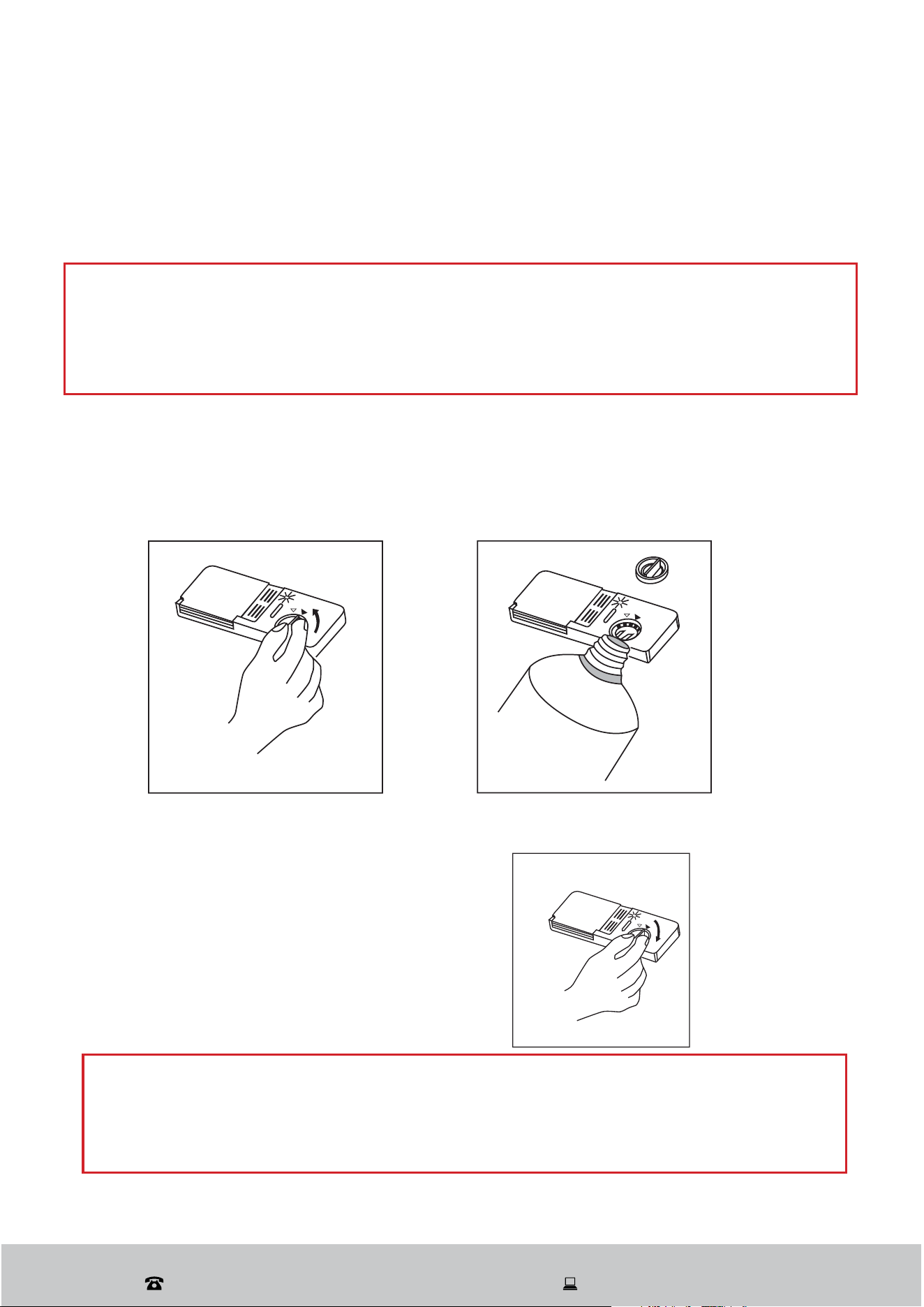
Fig. 12: Push button to open
Fig. 13
3 in 1 Tablet
General Advice
1. Before use, check that the water hardness in your supply is compatible with the
product, as per the detergent manufacturer’s instructions on the packaging.
2. Always follow the detergent manufacturer’s instructions for use.
3. If you encounter issues using “3 in 1 tablet” products for the first time, contact the
manufacturer’s customer care line (phone number available on the product packaging).
These products combine detergent and rinse aid functions.
Switching to a standard detergent system:
• Refill the rinse aid compartments.
• Set the water hardness to the highest level and run three normal cycles without a load
• Adjust the water hardness setting according to your region’s water conditions (refer to
the instruction manual for details).
To select the “3 in 1 Tablet” function
1. Close the door and press the “3 in 1 Tablet” option button until the “3 in 1 Tablet”
indicator lights up.
2. Press the start/pause button to begin the cycle, and the “3 in 1 Tablet” indicator will
remain lit.
hardness and soiling levels affect the amount of detergent required, and there are various
types of detergent tablet on the market, so always follow the detergent manufacturer’s
recommendations on dosage.
Before the start of each wash cycle fill an appropriate amount of detergent (or a
detergent tablet) into the detergent dispenser. If the lid is closed, press the button (Fig.
12) and the lid will spring open.
For each wash cycle, fill dishwasher detergent (or a detergent tablet) into the detergent
dispenser compartment (Fig 13). If you are washing more heavily soiled dishes or using
a program with a prewash cycle, also fill some detergent in compartment , if using
powder detergent.
Unless you use a detergent tablet with rinse aid, make sure there is sufficient liquid
rinse aid in the rinse aid dispenser. Check the mechanical indicator, or the electronic
indicator on the control panel.Close the lid of the detergent dispenser and press until
you hear it lock in place.
After Sales Support
(AU) 1300 886 649 (NZ) 0800 836 761 | tempo.org/support
23
Instructions (Cont.)
Rinse aid
Rinse aid is automatically released during the last rinse to prevent water from forming
droplets on your dishes, which can leave spots and streaks. It also improves drying by
allowing water to roll off the dishes. Your dishwasher is designed to use liquid rinse aid.
CAUTION!
Only use specific, branded rinse aid for your dishwasher. Never fill the rinse aid
dispenser with any other substances (e.g. dishwasher cleaning agent, liquid
detergent) as this could damage the appliance. If using a 3-in-1 tablet there is no
need to fill the dispenser with rinse aid, but make sure 3-in-1 Tablet mode is selected.
Filling the rinse aid dispenser
The rinse aid dispenser is located inside the door next to the detergent dispenser. It holds
about 110 mL.
Fig. 14: Turn anticlockwise to open Fig. 15: Pour in rinse aid
Fig. 16: Turn clockwise to lock
To open the dispenser, turn the cap in
anticlockwise direction (left) and lift it out
(Fig. 14).
Carefully pour rinse aid into the dispenser
until the level indicator turns completely
black (Fig. 15). Take care not to overfill.
Replace the cap in the opening and turn
it clockwise (right) to close the dispenser
(Fig. 16).
CAUTION!
Clean up any rinse aid spilled while filling with an absorbent cloth or paper towel to
avoid excessive foaming during the next wash.
Do not forget to replace the cap before you close the dishwasher door.
After Sales Support
(AU) 1300 886 649 (NZ) 0800 836 761 | tempo.org/support
24
Adjusting the rinse aid dose
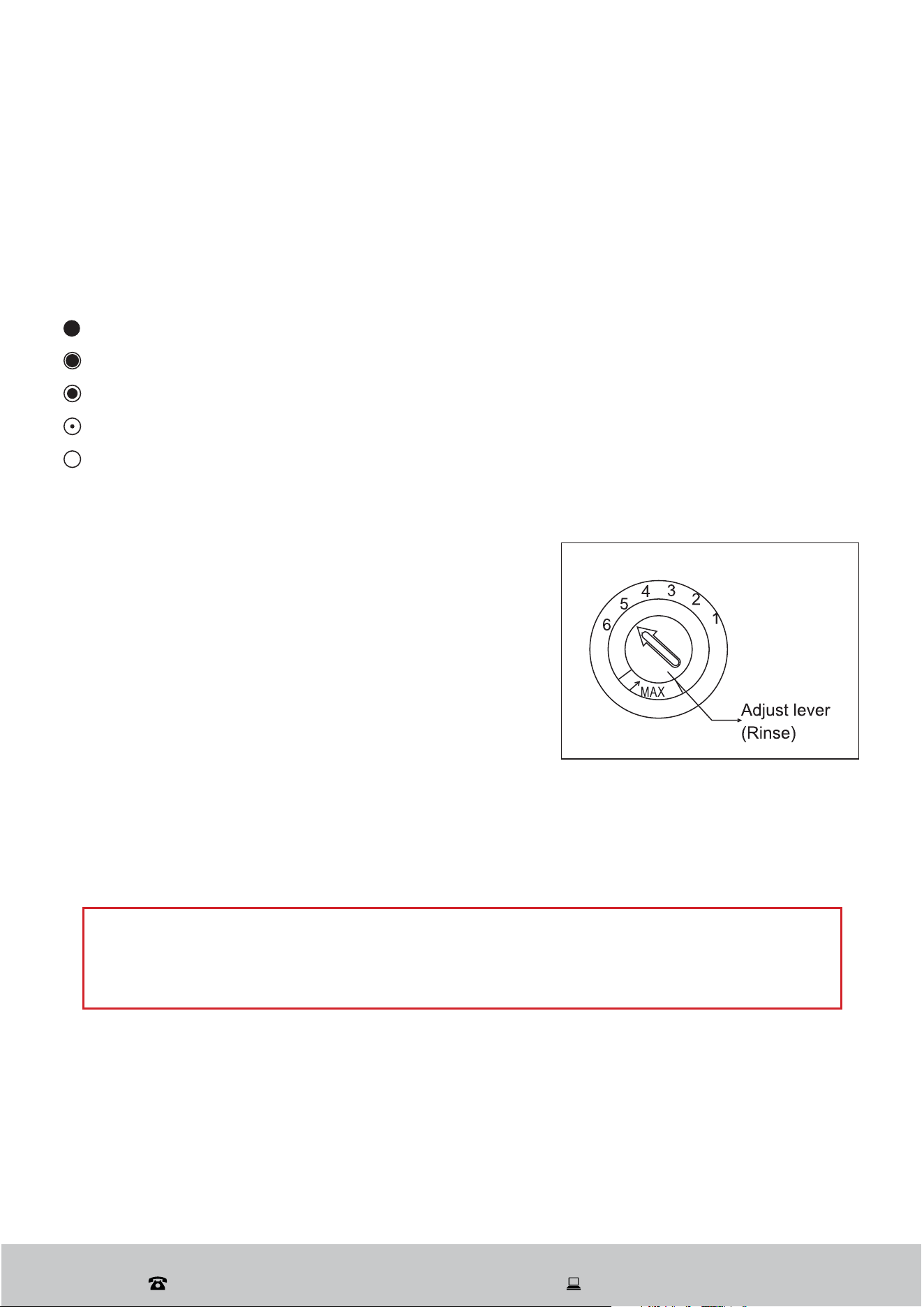
When you remove the cap from the rinse aid dispenser
(Fig. 17), the dosage dial with six settings will be
visible.
The rinse aid dispenser has six settings. Always
start with the dispenser set on “5” .If spots and poor
drying are problems, increase the amount of rinse aid
dispensed by removing the dispenser lid and rotating
the dial to “6”. The dose is factory set in position 5 or 4.
>OLU[VYLÄSS[OLYPUZLHPKKPZWLUZLY
Fill the rinse aid dispenser when the warning light on the control panel comes on.
Alternatively, you can estimate the amount of rinse aid left in the dispenser by the colour
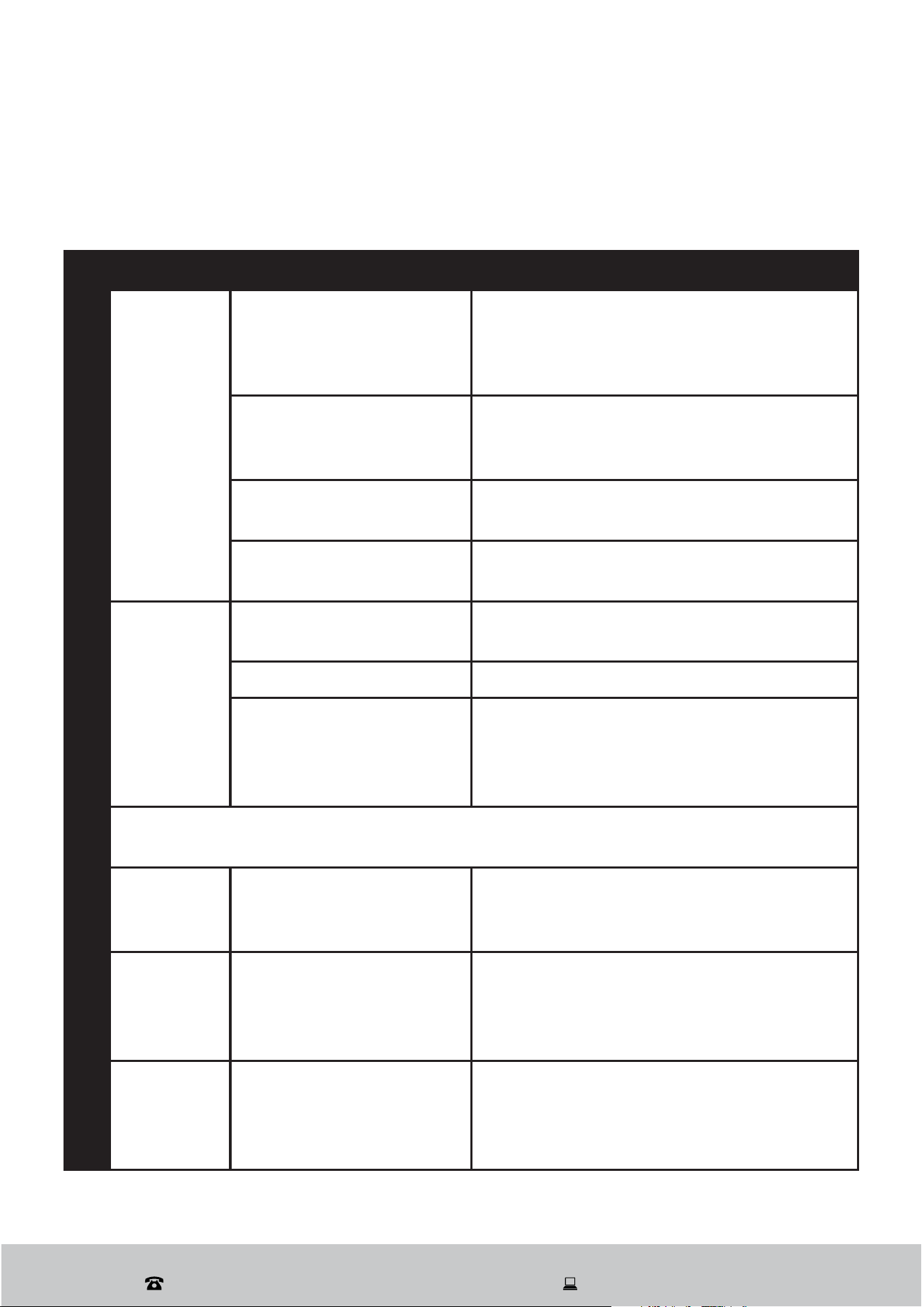
of the optical level indicator, which is located next to the cap When the rinse aid container
is full, the whole indicator will be dark. As the rinse aid diminishes, the size of the dark dot
decreases, as indicated below. Never let the rinse aid level fall below 1/4 full.
Full
3/4 Full
1/2 Full
1/4 Full - refill now to prevent spotting
Empty
NOTE
If you are using detergent tablets that contain a rinse aid, you do not need to add
liquid rinse aid and can ignore the rinse aid warning light when it comes on.
Instructions (Cont.)
Fig. 17

After Sales Support
(AU) 1300 886 649 (NZ) 0800 836 761 | tempo.org/support
25
Instructions (Cont.)
Running the dishwasher
Starting a wash program
Open the door and draw out the lower basket. Load your dishes and push the basket
back into place. Then load the upper basket the same way.
Add dishwasher detergent according to the instruction.
Unless you use dishwasher detergent tablets that contain a rinse aid, make sure there
is sufficient liquid rinse aid in the rinse aid dispenser.
Close the dishwasher door, making sure you hear a click when it closes properly.
Insert the plug into a suitable power socket (the power supply is 240 V~ 50 Hz) and
make sure the water supply is turned on to full pressure.
Press the POWER button on the dishwasher control panel.
Press the PROGRAM button, repeatedly, to select the desired wash program from
the following: Intensive -Heavy- Normal - Rinse- Rapid- Soak. The selected program’s
indicator light will illuminate.
Press the START/PAUSE button to start the washing program.
At the end of the program, press the power button to power down.
NOTE: We recommend you open the door slightly (about 5 cm) to assist in drying.
Setting a delayed start
Press the DELAY button, repeatedly, to select the desired delay time for the start of the
selected washing program up to 24 hours. The respective indicator light will illuminate.
Changing a program
A cycle that is underway can only be modified if it has only been running for a short time.
Otherwise, the detergent may have already been released, and the appliance may have
already drained the wash water. If this is the case, the detergent dispenser must be refilled.
Press the POWER button to cancel the program.
Turn on it again and restart a new washing cycle refer to the “Starting a wash program
section above.
Note: If you open the door when washing, the machine pauses and warning alarm rings,
the display appears E1. When you close the door, the machine will keep on working after
10 seconds. The 6 programme lights show the state of the dishwasher:
All program lights off --> stand by
One of the program lights on --> cycle running
One of the program lights blinking --> pause
If all the lights begin to glimmer, that indicates the machine is out of order, please turn off
the main power and water supply before calling for a service.

After Sales Support
(AU) 1300 886 649 (NZ) 0800 836 761 | tempo.org/support
26
Instructions (Cont.)
Forgot to add a dish?
Additional dishes can be added any time before the detergent dispenser opens.
Press the START/PAUSE button to pause the washing.
Wait for 5 seconds, then open the door.
Add additional dishes.
Close the door.
Press the START/PAUSE button to restart the dishwasher. It will start running again
after 10 seconds.
WARNING! It is dangerous to open the door mid-cycle as hot water or steam may
escape and scald you. Open the door very carefully
.
At the end of the wash program
The machine will enter standby state at the end of the program.
If there is no other operation, the dishwasher will switch off automatically 30 minutes
after the end of the program. Alternatively, you may press the POWER button to shut
down the unit.
Open the door — take care when opening the door as hot steam may escape.
Leave the door ajar and wait at least a few minutes before unloading the dishwasher to
avoid handling the dishes and utensils while they are still hot and more susceptible to
breakage. They will also dry better. We recommend allowing dishes to cool for around
15 minutes before removing them from the dishwasher.
When unloading the dishwasher, empty the lower basket first and then the upper one
so water from the upper basket will not drip onto the dishes in the lower basket.
CAUTION! Do not pull out both the upper and lower basket at the same time, which
may lead to the appliance tipping forward.
It is normal that the dishwasher is wet inside. You may wipe the inside of the door with
a dry cloth or leave the door slightly ajar for moisture to evaporate.
NOTE: If you are not going to use the dishwasher for a period of time, please shut off the
water supply.
After Sales Support
(AU) 1300 886 649 (NZ) 0800 836 761 | tempo.org/support
27
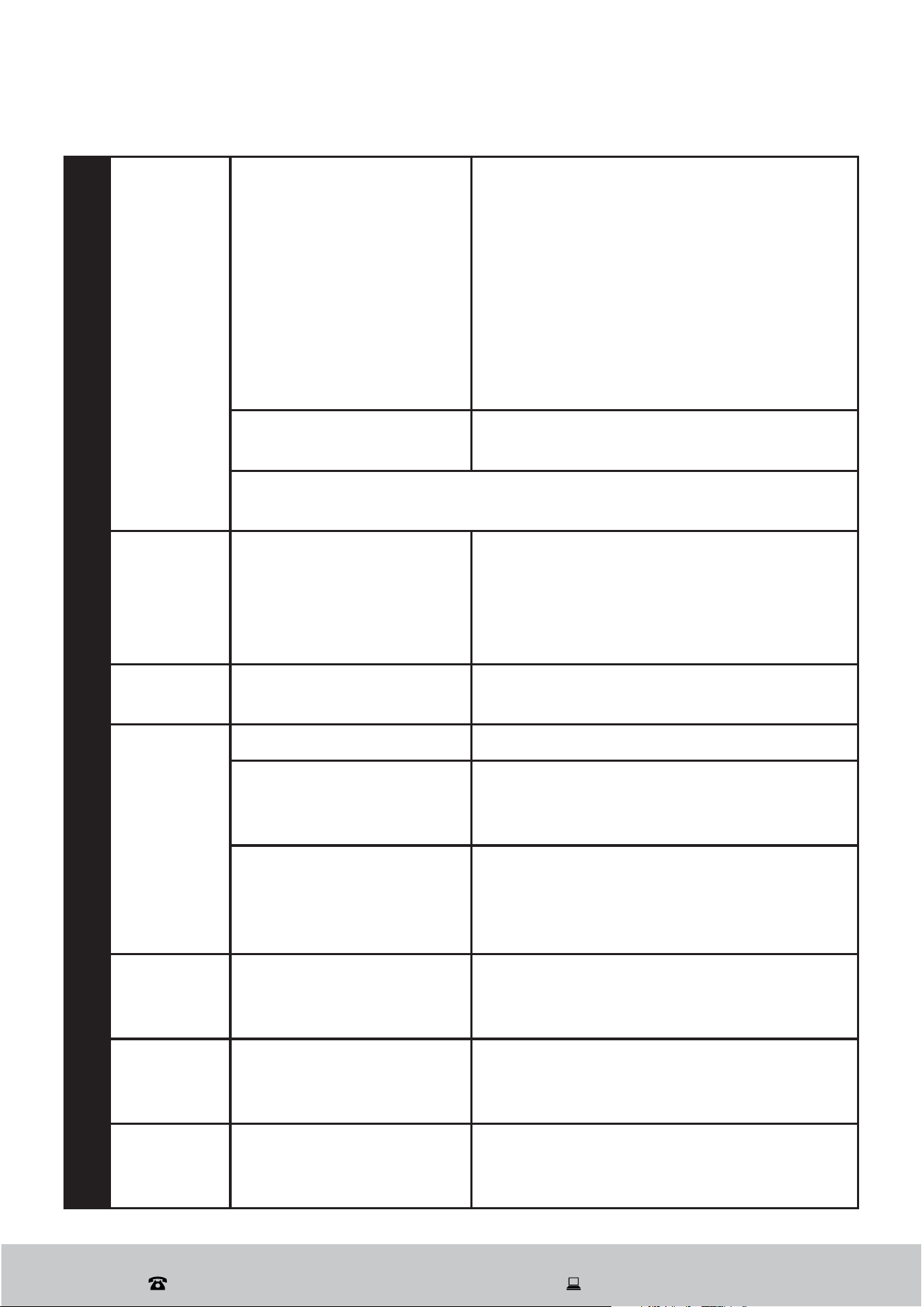
The table below lists possible causes and solutions for common problems you may
encounter with the dishwasher. If you follow all the instructions below but still cannot
solve a problem, please contact our after sales support centre.
Problem Possible cause Solution
The
dishwasher
does not
start.
The fuse is blown or
the circuit breaker is
activated.
Replace the fuse or reset the circuit
breaker. Unplug any other appliances on
the same circuit with the dishwasher.
The power supply is not
turned on.
Ensure the power and the dishwasher are
turned on, the cord is properly plugged in
and the door is closed securely.
The water pressure is
low.
Check that the water supply is connected
properly and the water is turned on.
The dishwasher door is
not properly closed.
Close the door properly and latch it.
Water is not
pumped
out.
Kink in the drain hose.
Check the drain hose and ensure there
are no kinks.
The filter is clogged. Check and clean the coarse filter.
The kitchen sink is
clogged.
Check and ensure the kitchen sink drains
well. If the problem is the kitchen sink not
draining, you may need a plumber rather
than a dishwasher service technician.
Some audible sounds are normal, such as sound from water spraying, food
remnants being shredded and the detergent dispenser opening.
Knocking
noise in the
wash tub
A spray arm is knocking
against an item in a
basket.
Interrupt the program and rearrange the
items that are obstructing the spray arm.
Rattling
noise in the
wash tub
Utensils are not secure in
the baskets or something
small has dropped out of
the baskets.
Interrupt the program and rearrange the
loose crockery/cutlery items.
Knocking
noise in the
water pipes
This may be caused by
on-site installation or
the cross section of the
piping.
This has no influence on the dishwasher
function. if in doubt, contact a suitably
qualified plumber.
Technical problems
Noise
FAQs and Troubleshooting Guide
After Sales Support
(AU) 1300 886 649 (NZ) 0800 836 761 | tempo.org/support
28
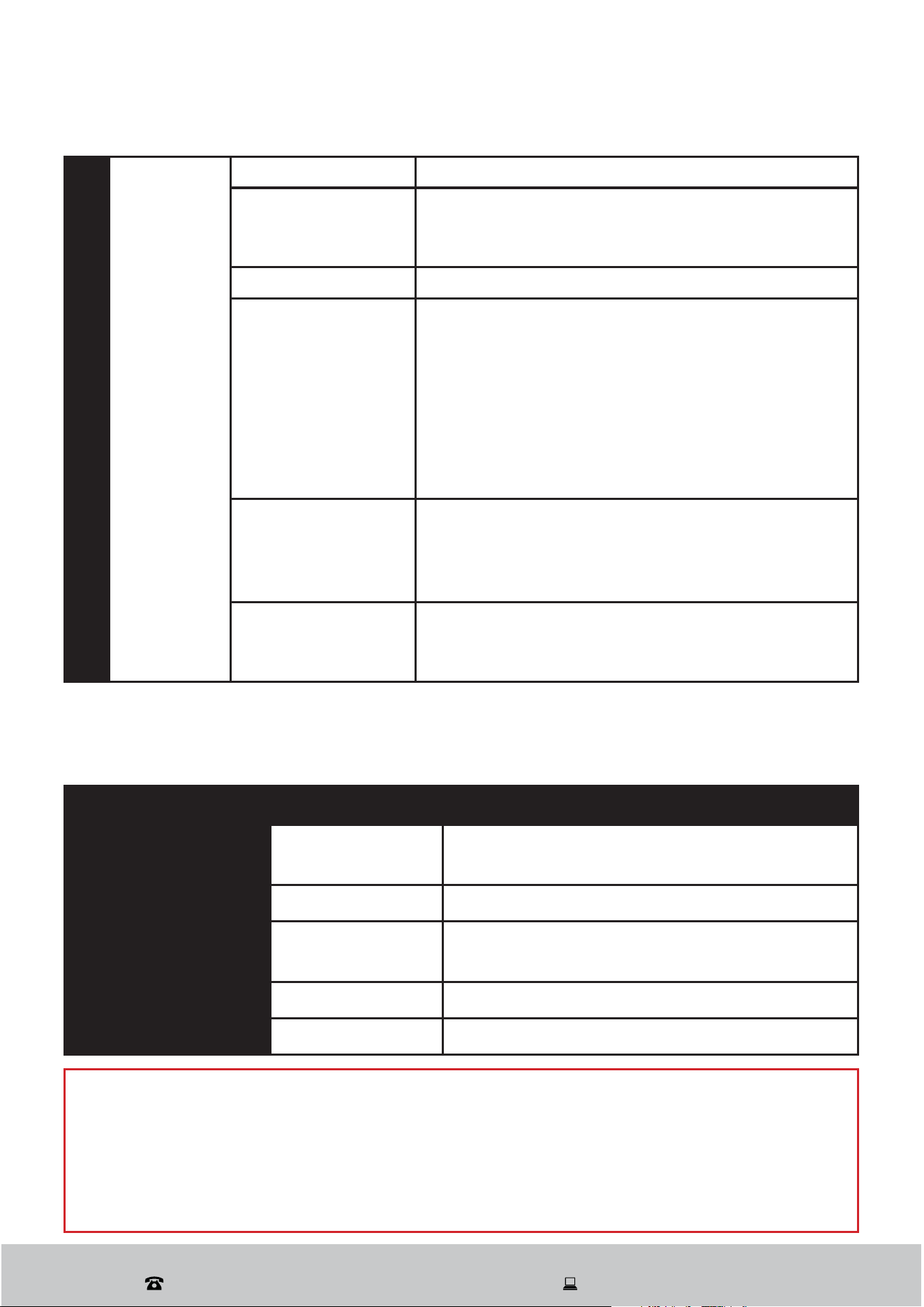
Suds in the
tub
Inappropriate detergent
Use only specific dishwasher detergent
to avoid suds. If this occurs, open the
dishwasher and let the suds evaporate.
Add 3–4 litres of cold water to the tub,
close the door securely, then run any
program. The dishwasher will drain out
the water at the first step. Open the door
after draining has stopped and check if
the suds have disappeared. Repeat, if
necessary.
Spilled rinse aid
Always wipe up rinse aid spills
immediately.
A small amount of clean water around the outlet on the tub bottom is
normal. It keeps the water seal lubricated.
White film
on inside
surface of
the tub
Hard water minerals
To clean the interior, use a dishwasher
cleaner made specially for that purpose.
Alternatively, use a damp sponge with
dishwasher detergent and wear rubber
gloves.
Rust stains
on cutlery
The affected items are
not corrosion resistant.
Cutlery must be corrosion resistant and
dishwasher safe.
Dishes are
not clean.
Wrong program selection Select a more intensive wash program.
Improper basket loading
Make sure the action of the detergent
dispenser and spray arms are not
blocked by large tableware.
The filters are not clean,
or incorrectly fitted, which
may cause the spray arm
jets to get blocked.
Clean and/or fit the filter assembly
correctly. Clean the spray arm jets.
Cloudiness
on
glassware
Combination of soft
water and too much
detergent
Use less detergent if you have soft water,
and select a shorter program when
washing glassware.
Black or
grey marks
on dishes
Aluminium utensils have
rubbed against dishes.
Use a mild abrasive cleaner to eliminate
those marks. Avoid washing aluminium
utensils in the dishwasher.
Detergent
left in
dispenser
Incorrectly loaded dishes
prevent the detergent
cover from opening.
Reload the dishes properly to ensure
nothing is blocking the detergent cover.
FAQs and Troubleshooting Guide (Cont.)
General problemsUnsatisfactory washing result
After Sales Support
(AU) 1300 886 649 (NZ) 0800 836 761 | tempo.org/support
29
FAQs and Troubleshooting Guide (Cont.)
Unsatisfactory drying result
Dishes are
not dried.
Improper loading Load the dishwasher as suggested in this manual.
Too little rinse aid
Increase the amount of rinse aid. Remove the cap
from the rinse aid dispenser and set the dosage
dial to a higher number.
No rinse aid Refill the rinse aid dispenser.
Dishes are
removed too soon
after the program
has finished.
Do not empty your dishwasher immediately after
washing. Open the door slightly so that the steam
can escape. Wait at least 15 minutes before
unloading. Only start unloading the dishwasher
when the dishes are barely warm to the touch.
Empty the lower basket first to prevent water
from dropping off dishes in the upper basket onto
the dry dishes in the lower basket.
Wrong program
selection
In shorter programs the rinse temperature is
generally lower. This also lowers the drying
performance. Choose a longer program with a
higher rinse temperature.
Use of cutlery with
a lower-quality
coating.
Water drainage is more difficult with these items.
Cutlery or dishes of this type are not suitable for
washing in the dishwasher.
Unsatisfactory washing result
Code Meaning Possible Cause
E1 Door is open
The door is opened while the dishwasher is
in operation.
E2 Water inlet Water inlet malfunction.
E4
Temperature
sensor
Temperature sensor malfunction.
E5 Overflow/leakage Overflow occurs/Water leakage occurs.
E7 Heating element Abnormal heating.
Error codes
When there is a malfunction, some of the indicator lights on the control panel will start
flickering in order to warn you that something is wrong.
WARNING!
If the code indicates a malfunction, overflow or leakage, shut down the dishwasher,
turn off the power and close the water supply. Then call our after sales support
center for advice, or contact a suitably qualified service technician
If there is water in the base of the tub because of an overfill or small leak, make sure
to remove the water before restarting the dishwasher.
After Sales Support
(AU) 1300 886 649 (NZ) 0800 836 761 | tempo.org/support
30
To remove the filters:
1. Rotate the coarse filter anti-
clockwise and lift it out (Fig. 19).
2. Lift out the flat filter (Fig. 20).
To replace the filters:
1. Insert the flat filter first (Fig. 20).
2. Place the coarse filter and rotate
it clockwise until secure (Fig. 19).
Other Useful Information
*SLHUPUN[OLÄS[LYZ`Z[LT
The filter system in the base of the wash cabinet efficiently removes food particles from
the wash water, allowing it to be recycled during the wash. It prevents larger remnants of
food or other objects from getting inside the pump.
Fig. 18
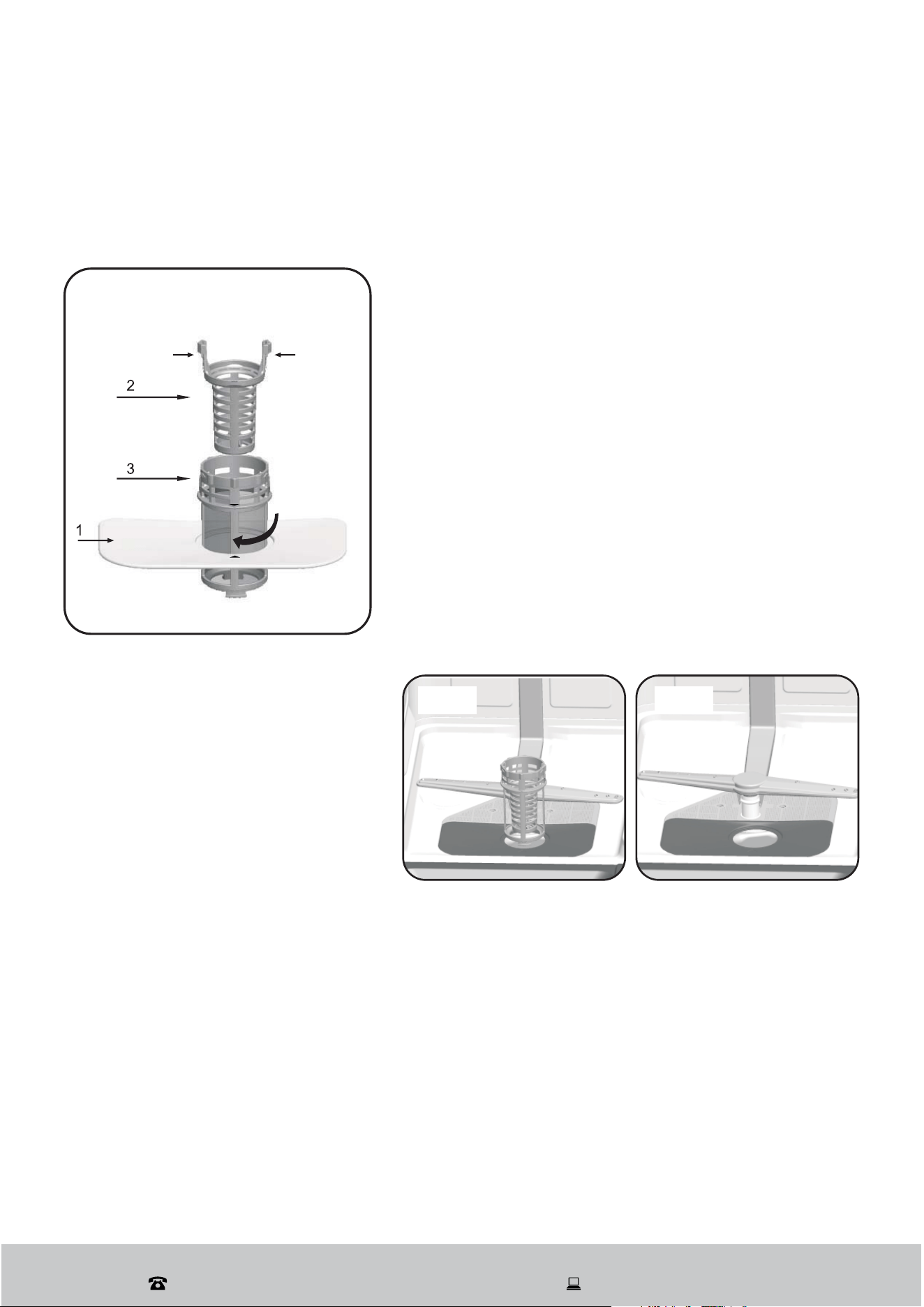
The filter system consists of a coarse filter, a flat
(Main filter) and a micro filter (fine filter) (Fig. 18).
1 Flat filter: Food and debris will be trapped by a
special jet on the lower spray arm.
2 Coarse filter: Big debris, such as bone and glass
that could clog the drain will be trapped in the coarse
filter. To remove an item caught in this filter, gently
squeeze the taps on the top of this filter and lift it out.
3 Micro filter: This filter holds soil and food residue
in the sump area and prevents it from being redeposit
on the dishes during a cycle.
- Inspect the filters for obstructions every time the
dishwasher has been used.
- By unscrewing the coarse filter, you can remove the
filter system. Remove any food remnants and clean
the filters under running water.
Fig. 19 Fig. 20
Filter assembly
For optimal performance and results, the filter assembly must be cleaned regularly. The
filter effectively removes food particles from the wash water, allowing it to be recirculated
during the cycle. Therefore, it’s advisable to rinse the semicircular filter and cup under
running water after each wash cycle to remove larger food particles. To remove the filter
assembly, pull the cup handle upward.
The entire filter assembly should be cleaned once a week. Use a cleaning brush to clean
the coarse filter and the microfilter. After cleaning, reassemble the filter parts as shown in
the diagrams and reinsert the entire assembly into the dishwasher, ensuring it is properly
seated and pressed downward. Never use the dishwasher without the filters in place.
Improper replacement of the filters can reduce the appliance’s performance and damage
dishes and utensils.
After Sales Support
(AU) 1300 886 649 (NZ) 0800 836 761 | tempo.org/support
31
Other Useful Information (Cont.)
WARNING!
When cleaning the filters take care not to contort their shape, which could
compromise the washing performance.
Do not overtighten the filters. Put the filters back in sequence securely,
otherwise coarse debris could get into the system and cause a blockage.
Never use the dishwasher without the filters. Improper replacement of the filters
may reduce the washing performance and damage dishes and utensils.
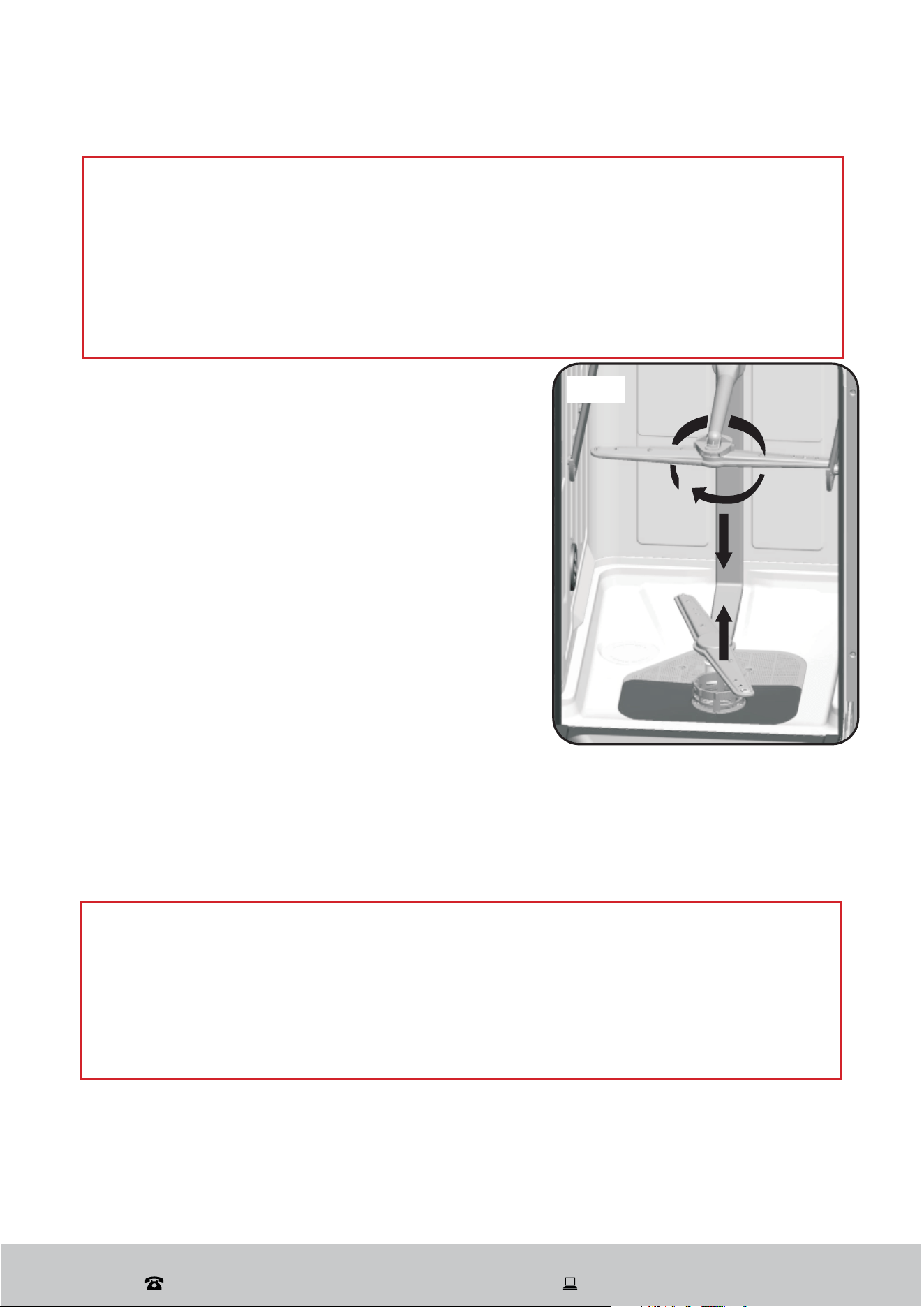
Cleaning the spray arms
It is necessary to clean the spray arms regularly for
hard water chemicals will clog the spray arm jets
and bearings.
To remove the spray arms, screw off the nut
clockwise to take out the washer on top of the spray
arm and remove the arm. Wash the arms in soapy
and warm water and use a soft brush to clean the
jets. Replace them after rinsing thoroughly. (Fig. 22)
Cleaning the exterior of the appliance
Clean the door seals regularly with a soft damp
cloth to remove food deposits.
When the dishwasher is being loaded, food and
drink residues may drip onto the sides of the
CAUTION!
To prevent penetration of water into the door lock and electrical components, do
not use a spray cleaner of any kind.
Never use sharp objects, harsh or abrasive cleaners or scouring pads on any
dishwasher surface because they will scratch the finish. Some papers towels
may also scratch or leave marks on the surface.
Fig. 22
dishwasher door. These surfaces are outside the wash cabinet and are not accessed by
water from the spray arms. It is therefore important that you wipe off any deposits before
you close the door.
If the control panel is dirty, wipe it with a soft, damp cloth only and dry thoroughly.

After Sales Support
(AU) 1300 886 649 (NZ) 0800 836 761 | tempo.org/support
32
Other Useful Information (Cont.)
Looking after your dishwasher
After every wash, turn off the water supply to the appliance and leave the door
slightly ajar so moisture and odours are not trapped inside.
Before cleaning or performing maintenance, always unplug the dishwasher from the
socket.
No solvents or abrasive cleaning
To clean the exterior and rubber parts of the dishwasher, do not use solvents or
abrasive cleaning products. Only use a cloth with warm, soapy water.
To remove spots or stains from the surface of the interior, use a cloth dampened
with water and a little white vinegar, or a cleaning product made specifically for
dishwashers.
Clean the door seals periodically with a damp sponge to remove any trapped food
remnants and prevent odours developing inside the dishwasher.
In special situations
Going on holidays
When your dishwasher is not going to be used for some time, we recommend you run a
wash cycle with the dishwasher empty and then unplug the dishwasher from the socket,
turn off the water supply and leave the door slightly open. This will help with door seal
durability and odour prevention inside the appliance.
Moving the dishwasher
If you must move the dishwasher, try to keep it in a vertical position. Only put it on its
back if absolutely necessary.
Frost protection
If your dishwasher is left in an unheated place during winter and temperatures are likely to
drop to below zero degrees Celsius, you should take certain precautions to prevent water
freezing in the pipes. Unplug the dishwasher from the electrical power supply and turn off
the water supply. Then ask an authorised service technician to:
Disconnect the water inlet pipe from the water valve.
Drain any water from the inlet pipe and water valve (use a pan to catch the water).
Reconnect the water inlet pipe to the water valve.
Remove the filter assembly from the bottom of the dishwasher and wipe up any water
left in the sump with an absorbent sponge.
If your dishwasher does not work because of ice, contact a qualified service technician.
After Sales Support
(AU) 1300 886 649 (NZ) 0800 836 761 | tempo.org/support
33
Other Useful Information (Cont.)
Service, repair and spare parts
If the appliance is damaged, do not attempt to repair it yourself. Do not disassemble or
modify the appliance. If it requires repair or service, please contact our after sales support
centre to arrange for a service.
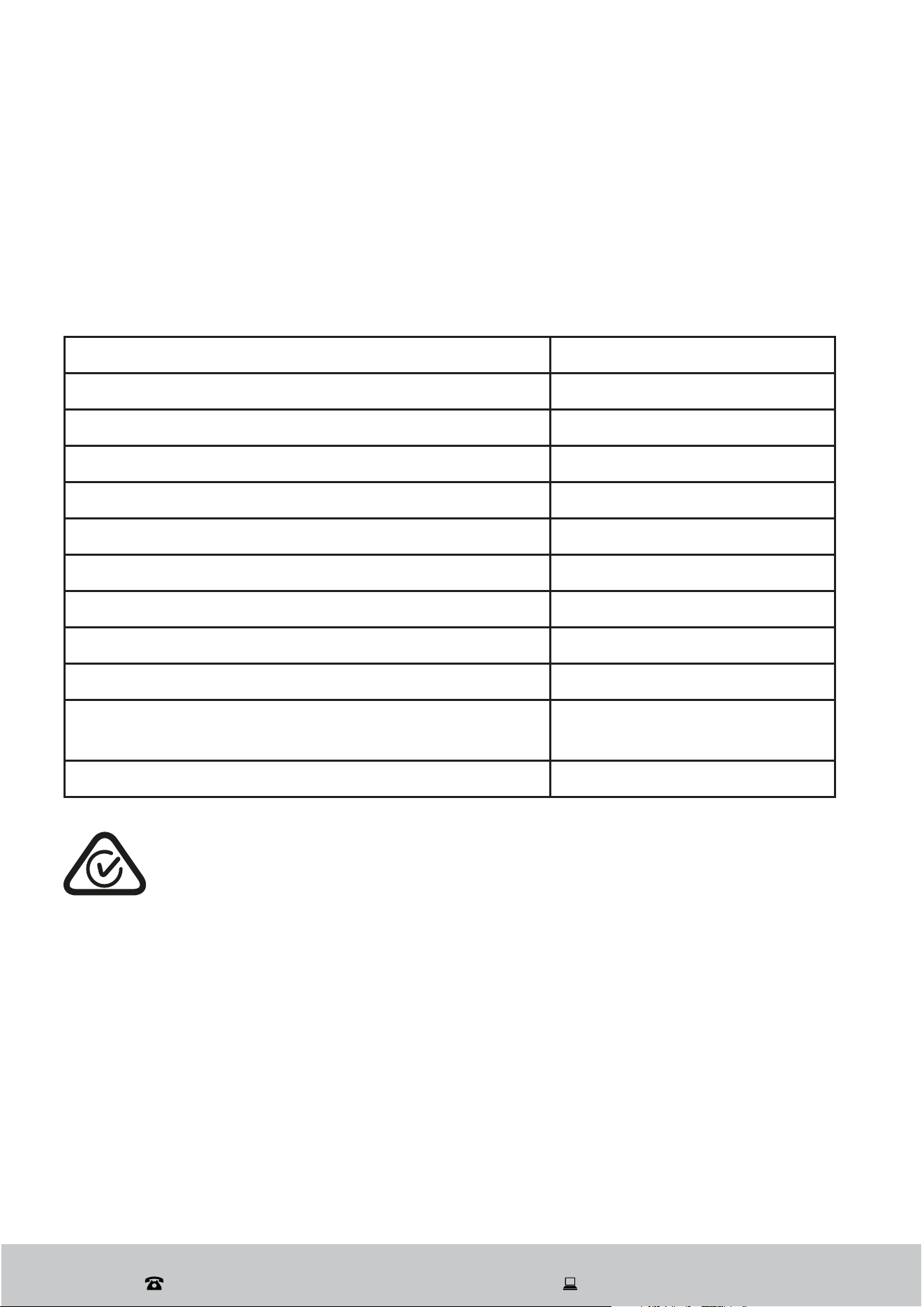
Technical specifications
Model Number ON-DW45W
Capacity 9 Place Setting
Rated voltage/frequency 220-240 V~ 50 Hz
Power consumption 1850 W
Standard cleaning cycle Normal
Energy consumption of the standard cleaning cycle 208 kWh per year
Water consumption of the standard cleaning cycle 9.4 L per wash
Water pressure (flow pressure) 0.04–1.00 MPa = 0.4–10 bar
Height 845 mm
Width 448 mm
Depth with door closed: 600 mm
with door open 90°:1170 mm
Weight approx. 37kg
Compliance
This product has been fully tested and meets all requirements as set out by standards AS/
NZS 60335.1 and AS/NZS 60335.2.5.
The RCM Mark (Regulatory Compliance Mark) indicates that the product
complies with the relevant guidelines of the ACMA as well as corresponding
government requirements for the safety of electrical devices.
After Sales Support
(AU) 1300 886 649 (NZ) 0800 836 761 | tempo.org/support
34
Responsible disposal
Packaging materials are recyclable. Please dispose of them responsibly
for recycling.
At the end of its working life, do not throw this appliance out with
your household waste. Electrical and electronic products contain
Z\IZ[HUJLZ[OH[JHUOH]LHKL[YPTLU[HSLɈLJ[VU[OLLU]PYVUTLU[
and human health if disposed of inappropriately. Observe any local
regulations regarding the disposal of electrical consumer goods and
dispose of it appropriately for recycling.
Contact your local authorities for advice on recycling facilities in your
HYLH6YÄUKYLJ`JSPUNZJOLTLZLY]PJLZSPZ[LKVU7SHUL[(YR»Z^LIZP[L
at www.recyclingnearyou.com.au, or call Planet Ark on 1300 733 712.
Other Useful Information (Cont.)

After Sales Support
(AU) 1300 886 649 (NZ) 0800 836 761 | tempo.org/support
35
This page has been left blank intentionally.
After Sales Support
(AU) 1300 886 649 (NZ) 0800 836 761 | tempo.org/support
36
Warranty returns
Should you for any reason need to return this product for
a warranty claim, make sure to include all accessories with
the product.
Product does not work?
If you encounter problems with this product, or if it fails to
perform to your expectations, make sure to contact our
After Sales Support Centre on 1300 886 649 for advice.
Instruction Manual Revision Index
Version No Issue Date Description
V1.0 04 April 2025 Original Release (2025)
Please read the manual
Please read the manual
It will help you get the
best out of your product.
Still have questions?
Still have questions?
Call after sales support
1300 886 649
1300 886 649
Or visit www.tempo.org