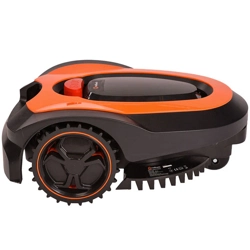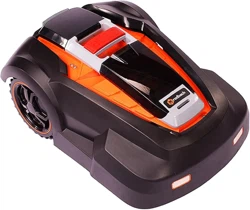
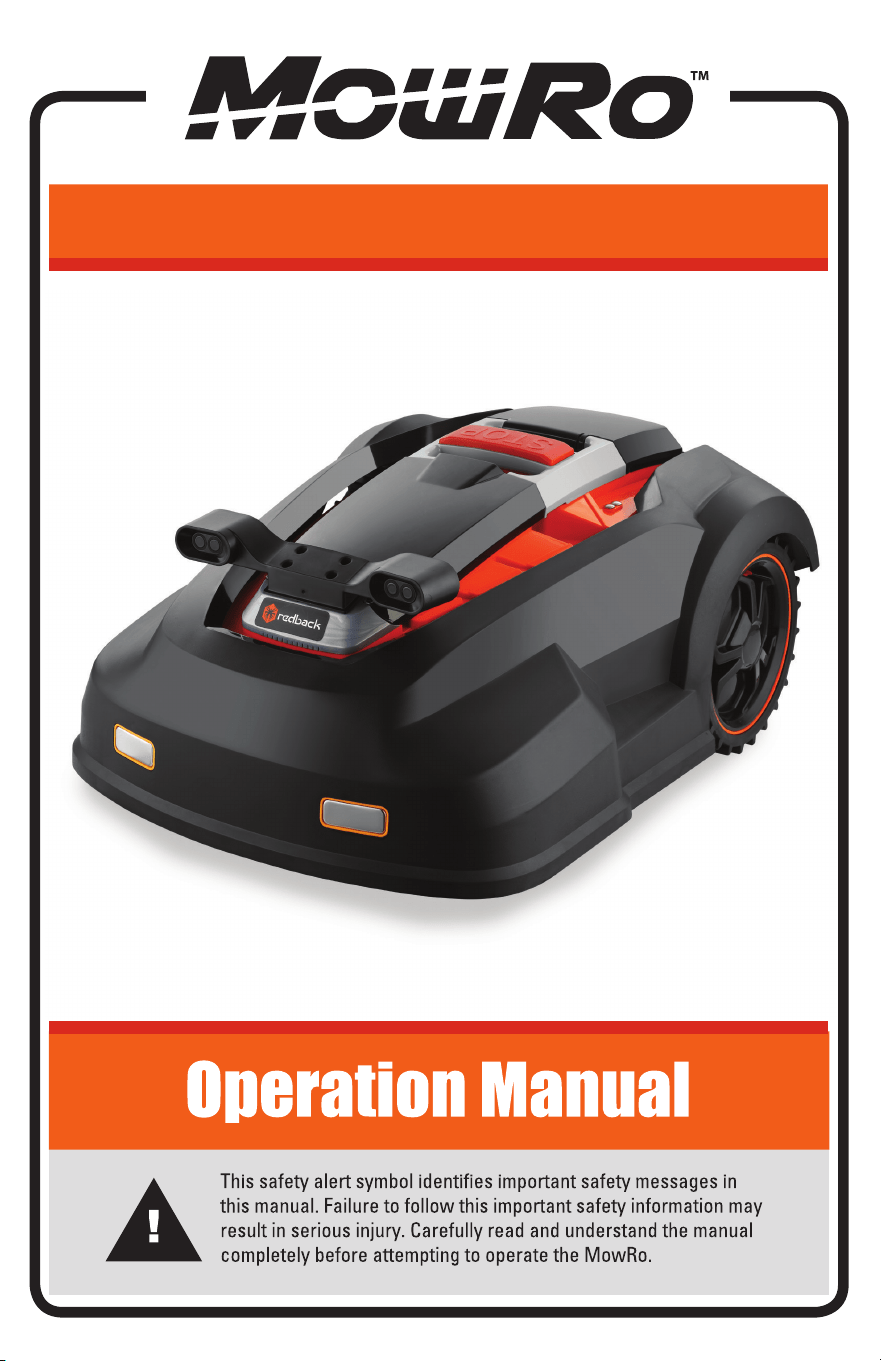
RM24-PRO

Table of Contents
Important Safety Information
.................................................................
.............................................................................
.....................................................................
....................................................................
.................................................................
..................................................................................
.......................................................
.......................................................................................
...................................................
............................................................................
4
Warranty Information
7
Mower Part and Overview
8
Planning and Layout Guide
10
Docking Station Installation
12
Mower Operations
13
..................................................................................................
App Setup
17
........................................................................................
Mower Sensors
16
Mower Maintenance and Storage
23
Troubleshooting
24
Trouble Shooting Information Codes
25
3URGXFW6SHFLƛFDWLRQV
27
Important Safety Information
WARNING: Read and thoroughly understand all instructions
and safety information before assembling or operating the MowRo
Lawn Mower. Failure to do so may cause serious injury. Do not allow
anyone to operate this MowRo Lawn Mower who has not read this manual.
As with all power equipment, the MowRo can be dangerous if
assembled or used improperly. Do not operate this mower if you
have doubts or questions concerning safe operation.
Call our customer service department at 435-267-1494, or
www.mowro.com if you have any questions or
concerns about the safe operation of this equipment.
Intended Use
The MowRo Lawn Mower has been designed for residential lawn mowing
up to 0.25 acre in area. It is not suitable for lawns with grades
greater than 30°. Do not use the MowRo for any purpose
other than for which it was designed. Any other use is unauthorized
and may result in serious injury.
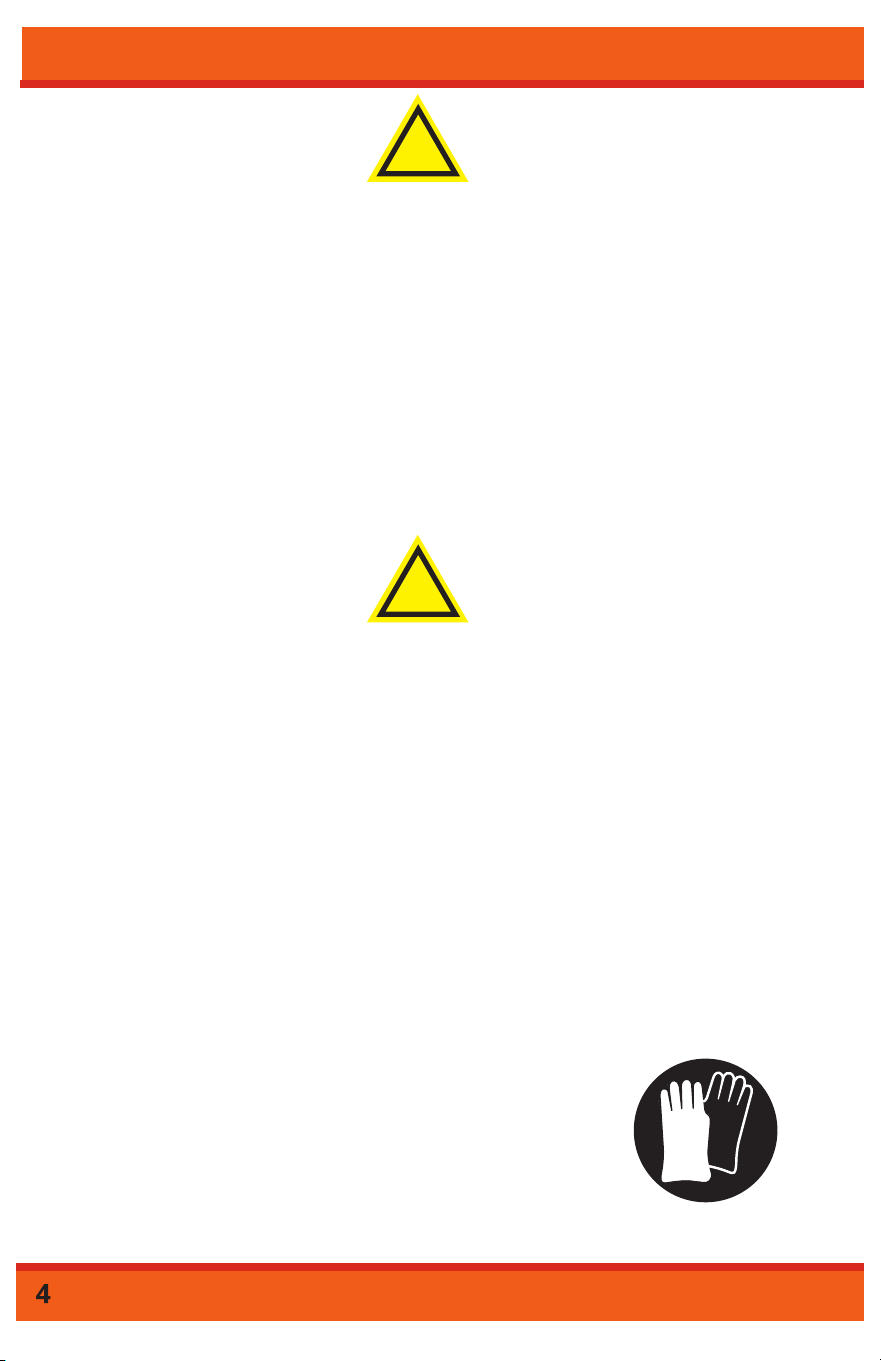
Personal Protective Equipment
Always have the MowRo stopped before lifting, moving or
transporting the MowRo. When handling the MowRo Lawn
Mower it is important to avoid the blades that are two sided
and double edged and therefore extremely sharp. It is
recommended to wear safety gloves to make adjustments
to the MowRo or when changing the blades or blade disc.
!
WARNING
!
DANGER
visit
Important Safety Information
General Safety
Failure to follow warnings, cautions, assembly and operation instructions
in the Operation Manual may result in serious injury.
!
DANGER
READ THE OPERATION MANUAL BEFORE OPERATION.
• Do not permit children to operate this equipment at any time.
• Do not permit others that have not read and understood the complete
Operation Manual to operate this equipment.
• Keep all people and pets a minimum of 10 feet away from the work
area.
• Do not operate the MowRo in rain or other wet conditions.
• Use caution when handling the MowRo. Blades are extremely
sharp.
Docking Station
• Use only the docking station designed for the MowRo.
• Do not attempt to modify the Robot Mower or the docking station in any
• When battery replacement is required, replace only with an original or
manufacturer authorized replacement.
• DO NOT dispose of the MowRo in household waste.
• DO NOT dispose of the battery in household waste.
• Ensure correct installation of the boundary wire.
• Make a regular inspection of the MowRo’s working area and
remove stones, branches, toys and other objects that may cause
damage to the robot.
• Never place anything on top of the MowRo or the docking station.
• Check the blades for wear and replace when necessary.
• Check that bolts, screws and nuts are securely fastened to ensure the
optimum operation of the MowRo.
• Avoid running the MowRo in wet grass. Clean the MowRo’s
wheels and wheel holder carefully of earth, grass and dust to avoid
imbalance.
Important Safety Information
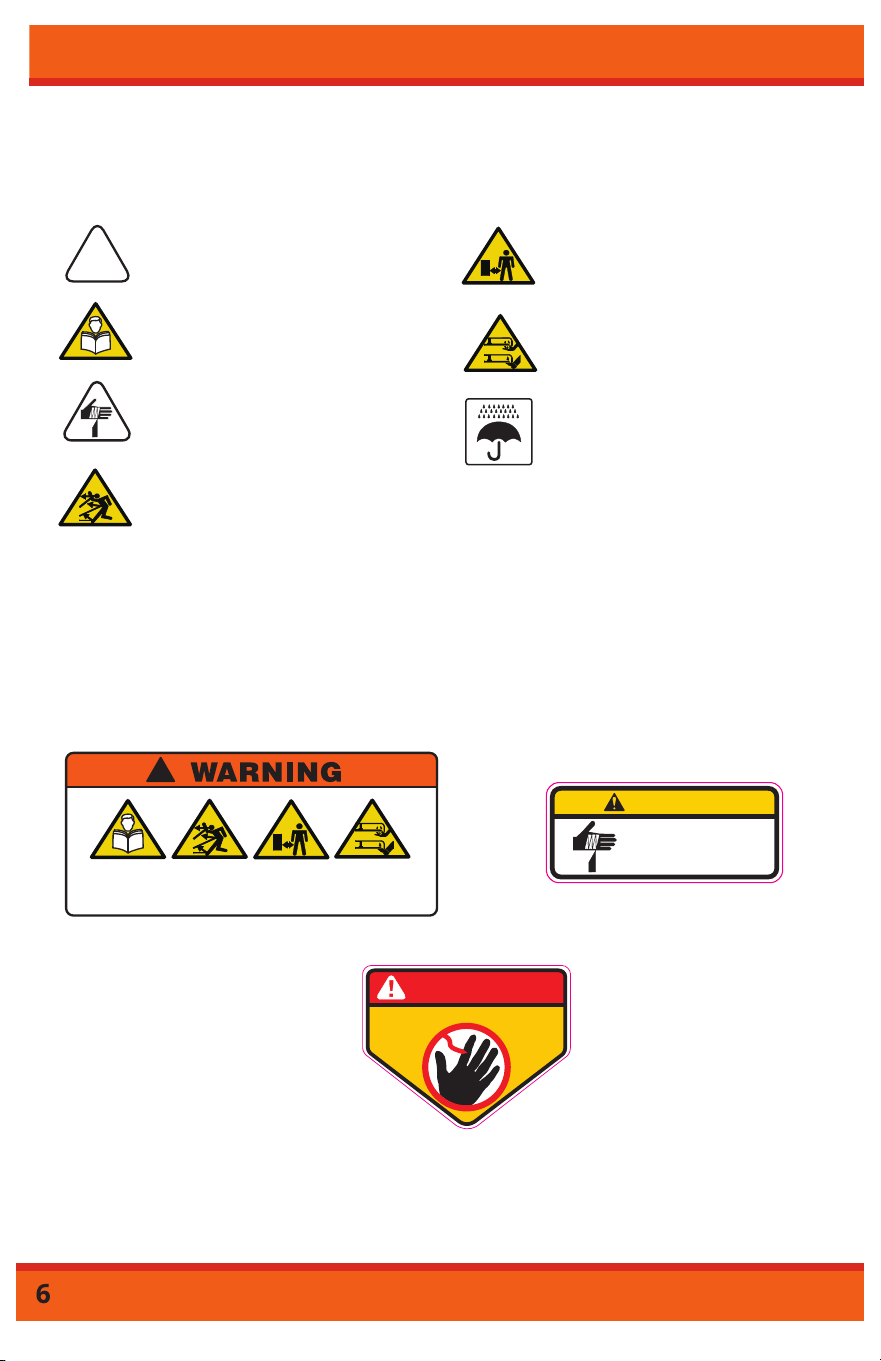
Safety Icons
Safety icons are to remind you of important information while
you are operating the unit.
Safety Decals
Safety decals on the MowRo are to remind you of
important information while you are operating the unit. Make
sure all decals are attached and in readable condition. Replace
missing or defaced decals. Contact us at 1-800-976-3009 or go to
www.mowro.com for replacement decals.
Use caution when operating this power
equipment.
Read and understand the Operation
Manual before operating the MowRo
Lawn Mower.
The MowRo has sharp blades. Use
caution when operating, transporting and
handling.
The MowRo may throw objects.
Keep children, pets and bystanders away
from mower when operating.
!
The MowRo has sharp blades. Use
caution when operating around other
people and pets.
Keep your hands and feet away from the
rotating blades. Use extreme caution when
lifting and transporting. Wear gloves to
handle the blades or blade disc.
Avoid operating in the rain, protect the
battery and docking station from wet
conditions.
!
READ
OPERATORS
MANUAL
MAY
THROW
OBJECTS
KEEP
SAFE
DISTANCE
KEEP
HANDS AND
FEET AWAY
CAUTION
SHARP BLADES!
USE CARE WHEN
HANDLING.
KEEP HANDS and FEET AWAY
DANGER
107854
IMPORTANT NOTICE
MowRo warranties this product, to the original purchaser with proof of purchase,
for a period of one (1) year against defects in materials, parts or workmanship.
Redback, at its own discretion, will repair or replace any and all parts found
to be defective, through normal use. This warranty is valid for only units that
have been used for personal use, and that have been maintained in accordance
with the instructions in the owner’s manual. You can extend the warranty for
another year by registering your product at www.mowro.com.
The battery carries a six (6) month limited warranty, including warranty against
defects in workmanship and materials. Batteries must be charged in accordance
with the owner’s manual directions and regulations in order to be valid. You can extend
the warranty another 6 months by registering your product at www.mowro.com.
Transportation charges for the movement of any unit are the responsibility of the
purchaser. It is the purchaser’s responsibility to pay transportation charges for
any product submitted for replacement under this warranty, unless such return
is requested in writing by MowRo.
This warranty is null and void in the event of the installation of unauthorized
spare parts.
Items not covered by warranty:
1. Any part that has become inoperative due to misuse, commercial use,
abuse, neglect, accident, improper maintenance, or alteration; or
2. The unit, if it has not been operated and/or maintained in accordance
with the owner’s manual; or
3. Normal wear, except as noted below;
4. Routine maintenance items such as lubricants, unauthorized blades;
5. Normal deterioration of the exterior finish due to use or exposure.
MowRo Helpline:
Contact Us: 1-435-267-1494 www.mowro.com
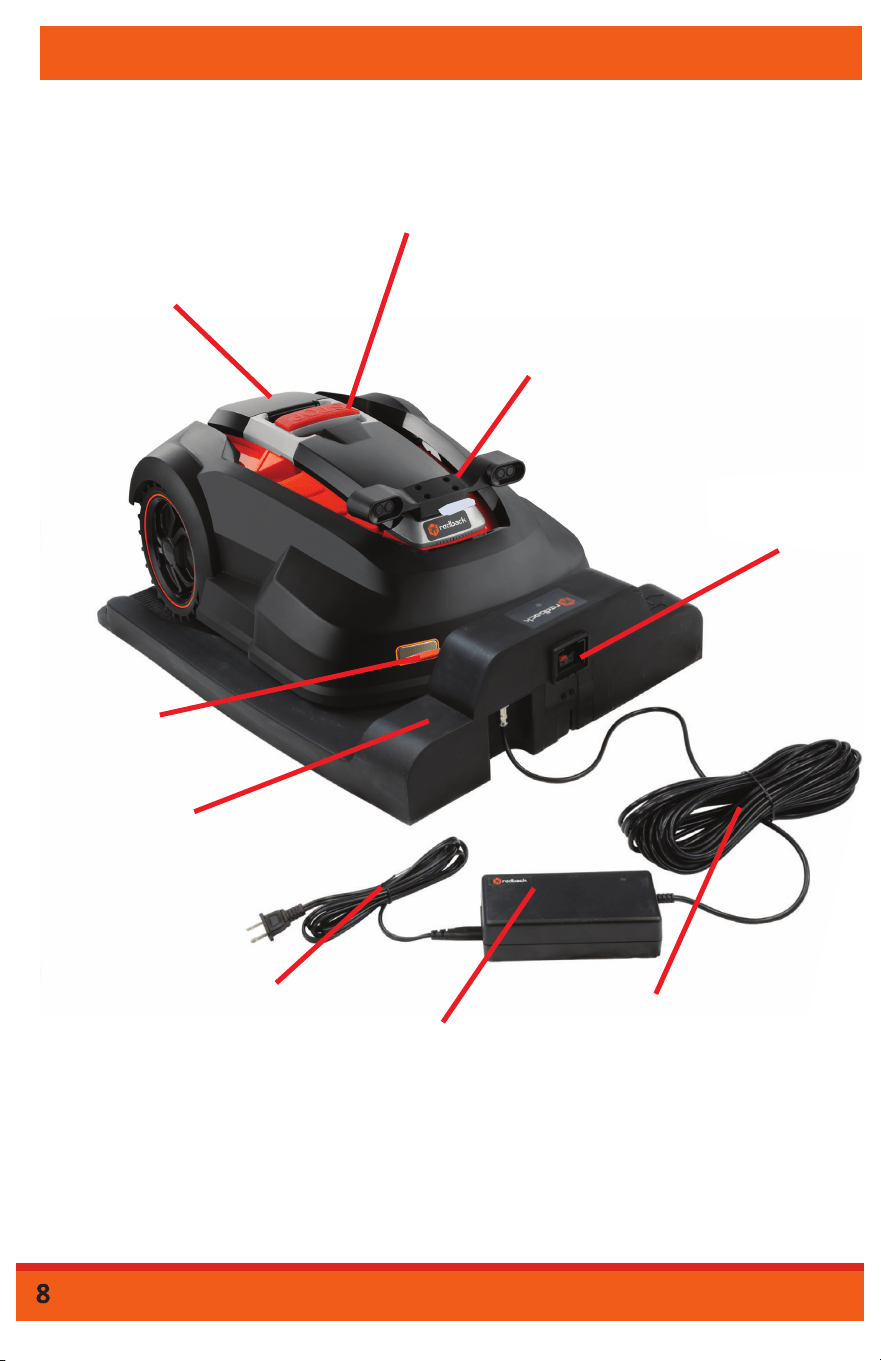
AC Lithium Ion
Adapter
Docking Station
Connection
Cord
Docking
Station
Emergency
Stop
Control
Panel
(Front Cover)
Height
Adjustment
(Rear Cover)
B
L
Charging
Contacts
AC Adapter
Cord
Boundary W
Terminals
Boundary Wire
Terminals
Overview
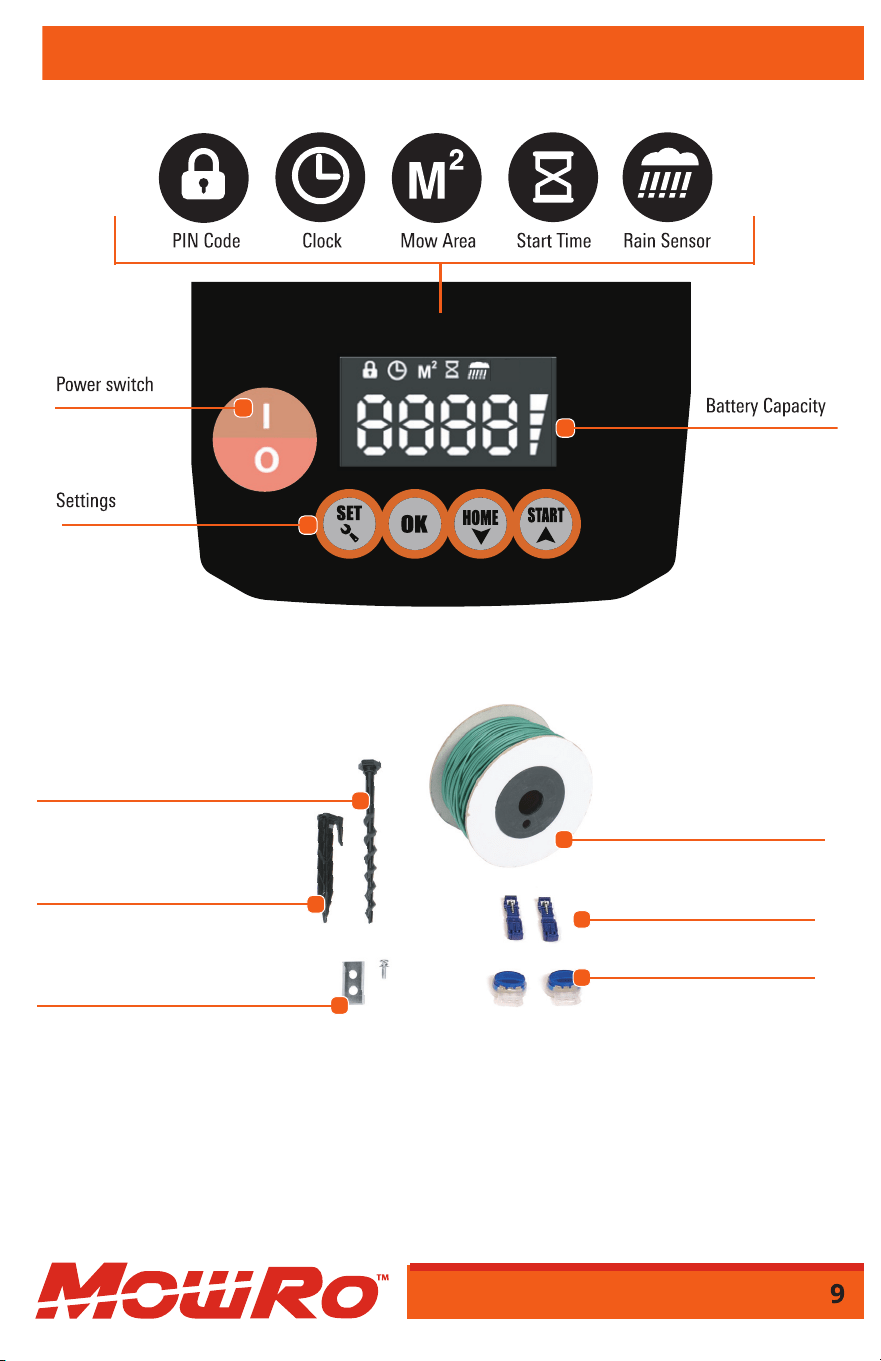
Overview
6 Docking Station Spiral Stakes
150 Boundary Wire Stakes
6 Spare Blades with Screws
330 ft Boundary Wire
330 ft Boundary Wire
2 T-Tap Wire Connectors
4 Wire Splicers
Laying Boundary Wire
Laying Boundary Wire
In order to make the Robot Mower mow within the desired
area – and only that area – you need to outline the area using
the boundary wire. Remove all foreign objects, rocks, roots,
etc. that may interfere with the Robot Mower’s operation in the
mowing area. Large objects such as trees, swings sets, ponds, etc. should
be encircled by the boundary wire. The boundary wire line needs
to be laid out in a continuous line (see Figure 2 on following page).
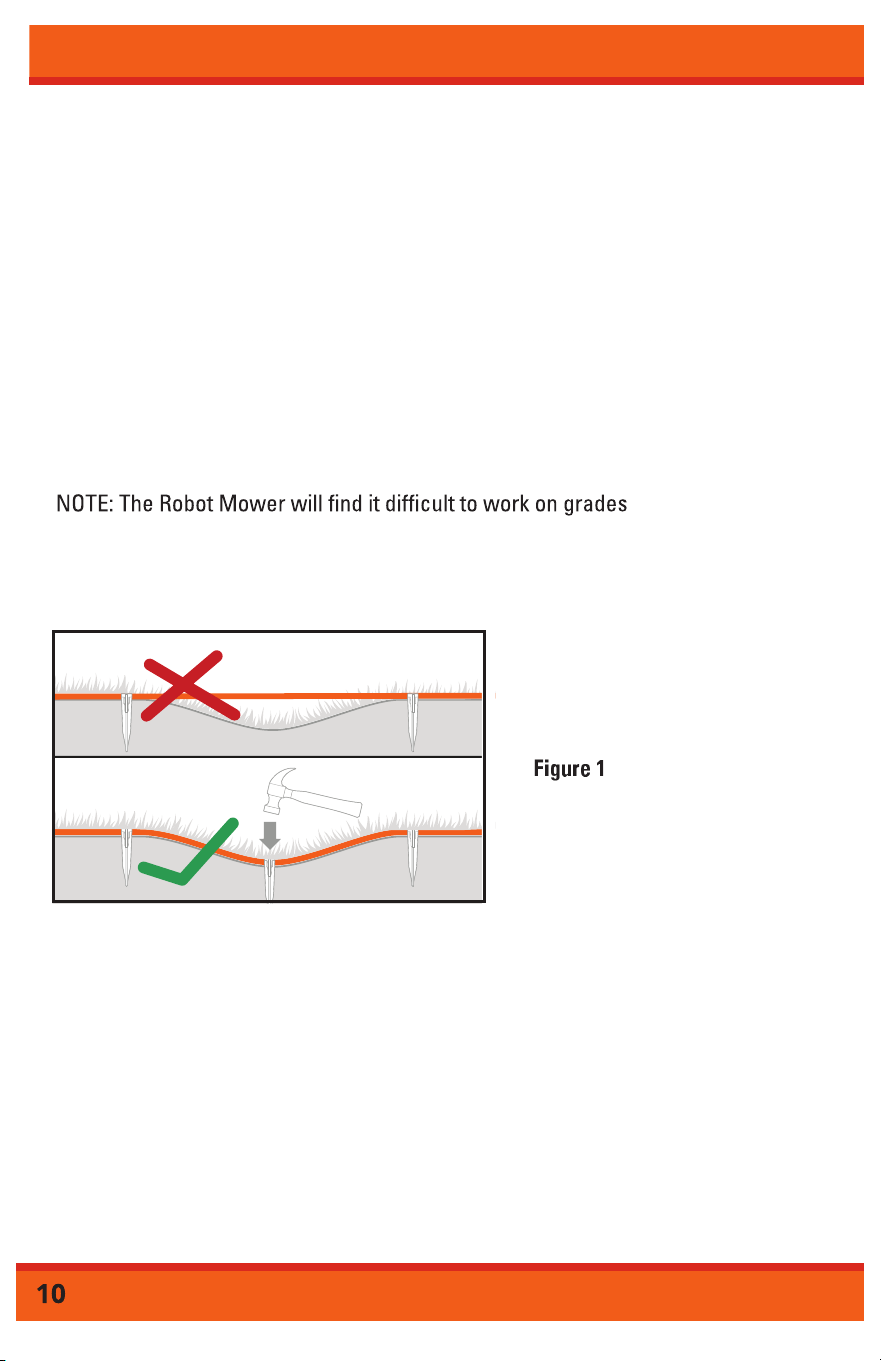
The boundary wire should be placed at the root level of the grass
(see Figure 1). Secure the boundary wire into the ground and
anchor with the boundary stakes. Place a stake approximately
every 3 feet.
greater than 30°. On slopes steeper than 30° the robot’s sensor
will shut the mower off.
Use the following distances when placing your boundary wire (see Figure2):
rqCYC[HTQOCP[YCNNUFTQRQʘUWPGXGPGFIGUQTNCTIGQDLGEVU
(trees, trampolines, etc.)
• 4” away from any sidewalks/dirt/etc. that is level with the grass as long as
there is an additional 8” of space after the grass ends.
rqCYC[HTQOCPQVJGTNCTIGQDLGEV+HQDLGEVUCTGENQUGTVJCPqGPEKTNG
them both together.
• 6.5 ft away from itself when creating an isle/pathway.
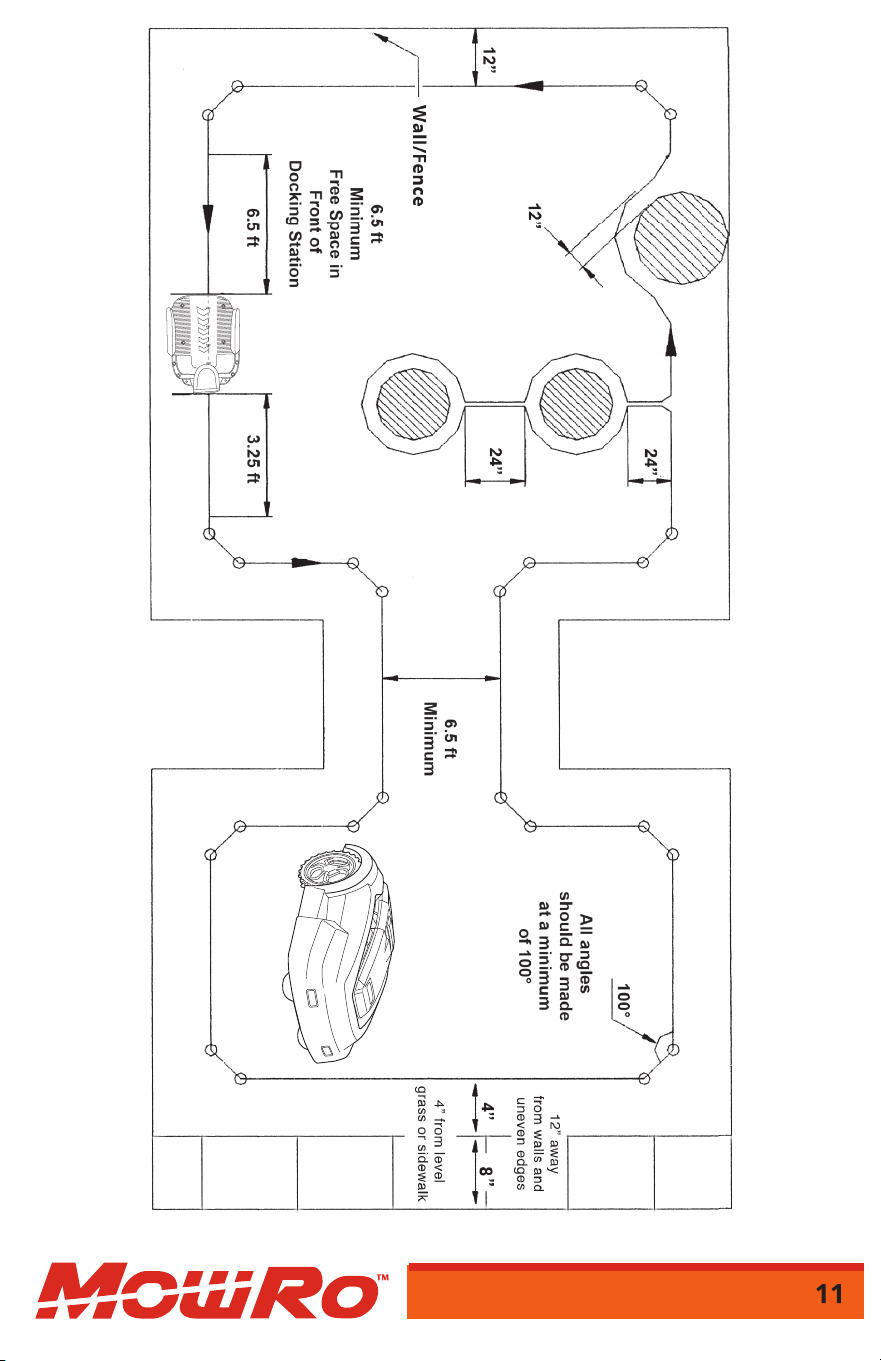
Figure 2
Docking Station Installation
Make sure that the "IN" arrow on your docking station is pointed to the
inside of your boundary (towards the area the MowRo will cut).
Note: It is important that the adapter and the electrical plug are always
kept dry! Avoid placing the docking station in low-lying areas where puddles
may form or under a tree due to the risk of lightning.
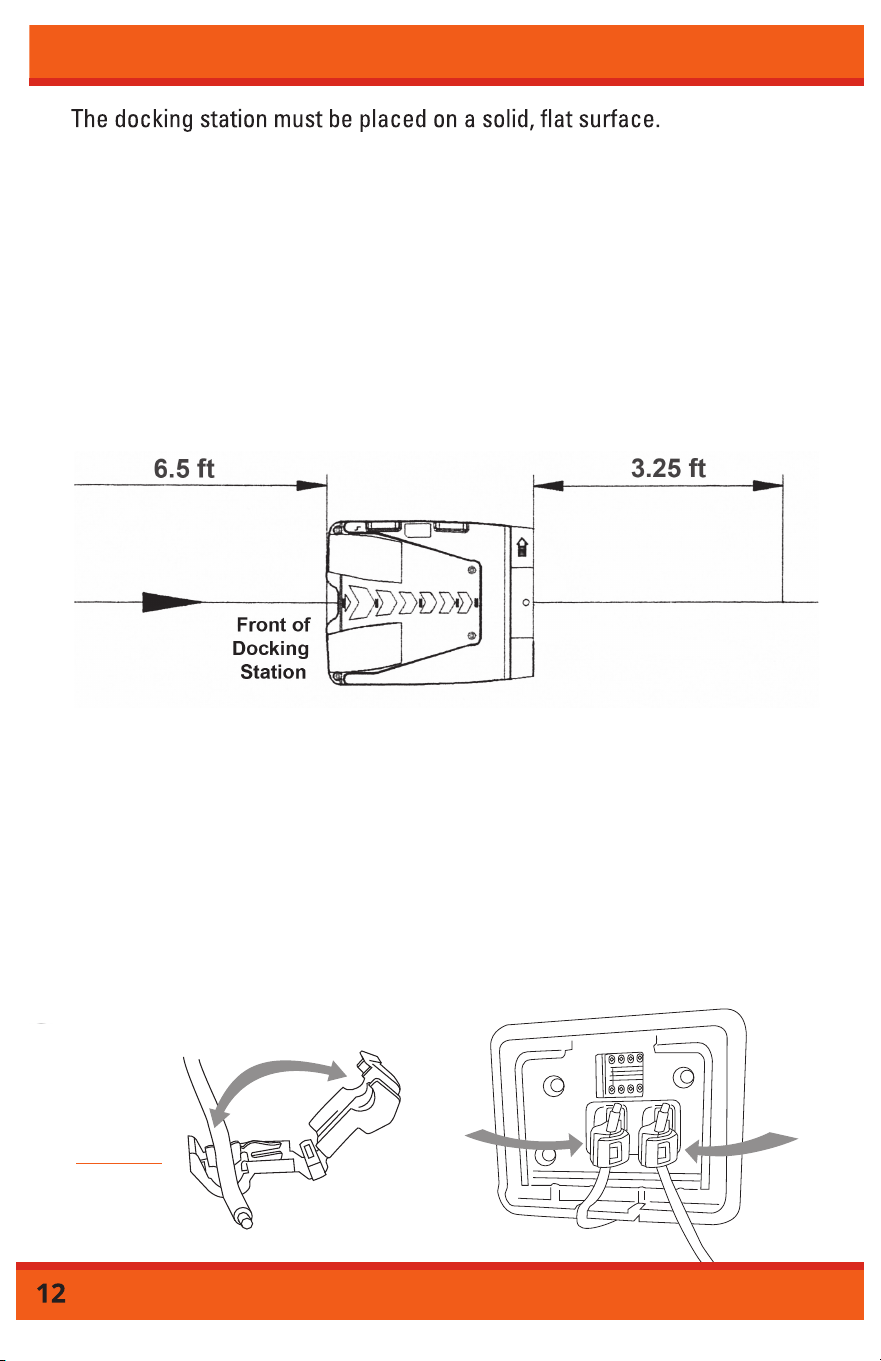
The docking station must have 6.5 feet of free space in front and 3.25 feet
of free space in back of it so the Robot Mower can return to charge or
when mowing is complete (see Figure 3). The docking station must be located
o
nl
e
v
e
l
g
r
ou
n
d
f
o
r
co
rr
ec
t
ope
r
a
ti
o
n.
Connecting the Boundary Wire to the Docking Station
Remove the terminal cover located on the back of the docking station. Insert the
end of the boundary wire into a blue T- Tap wire connector and use a pair of pilers
to press the clip on the wire until you hear a click. Repeat this action on the other
end of the wire. Insert the wire that leaves the docking station into the negative (-)
metal prong. Connect the wire that comes from under the docking station to the
positive (+) metal prong. Proceed to plug in the docking station and confirm
the LED is a solid GREEN light. If the LED is flashing RED and GREEN confirm all
of your docking station connections are securely inserted and the boundary
wire does not have any cuts or breakage.
Fi
gure
4
IN
OUT
CLICK
Figure 3
Operation
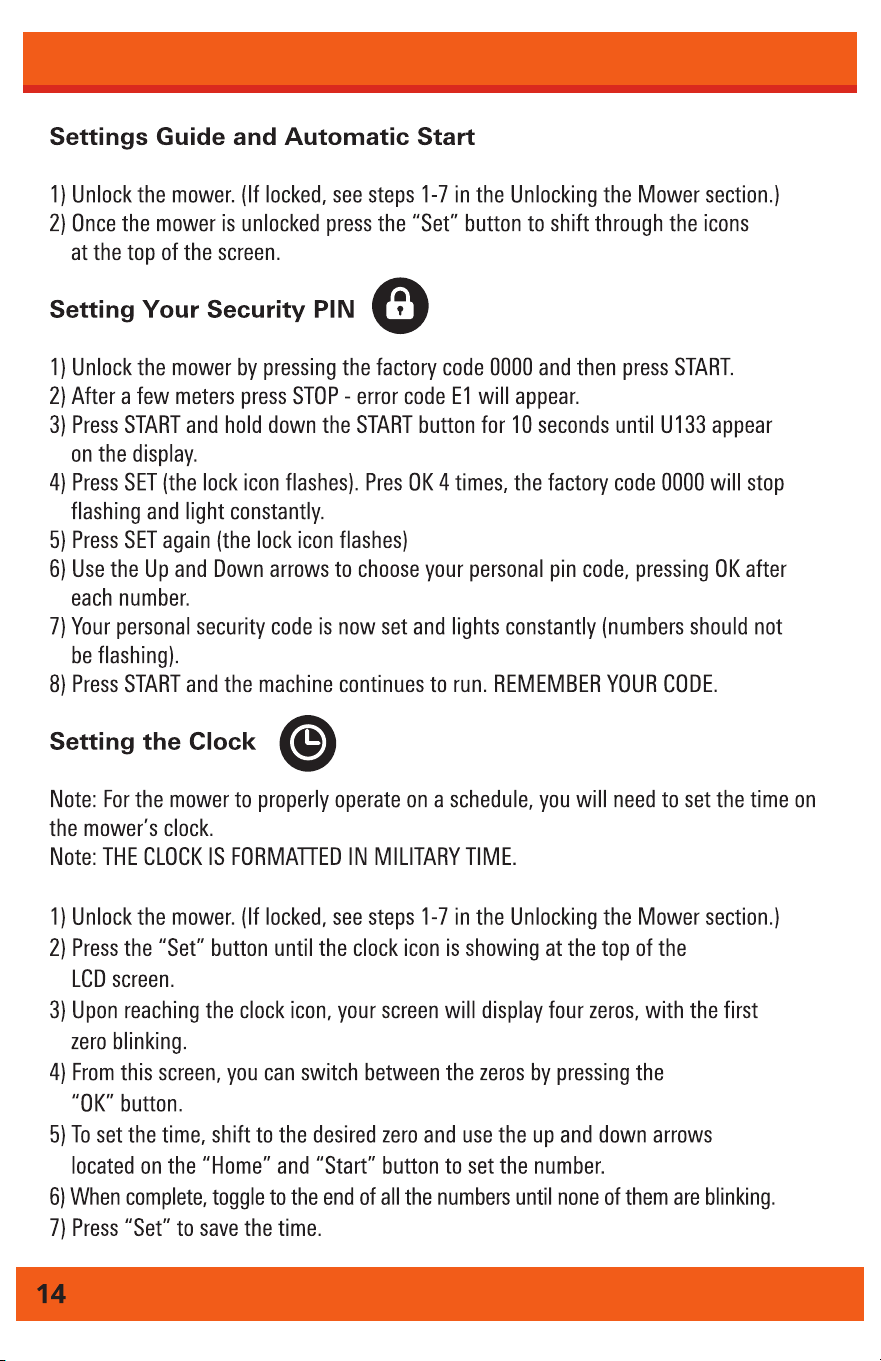
Operation
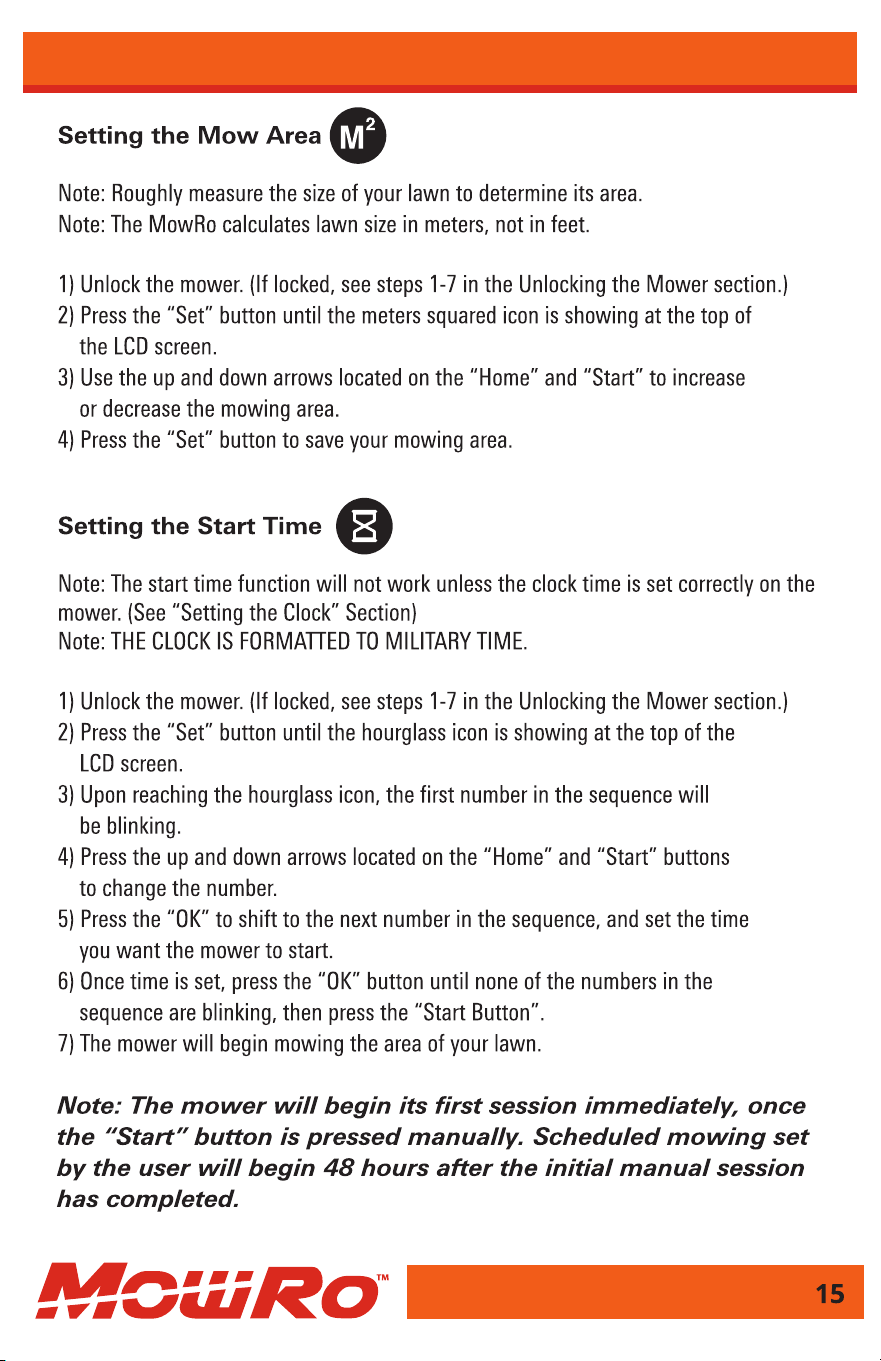
Operation
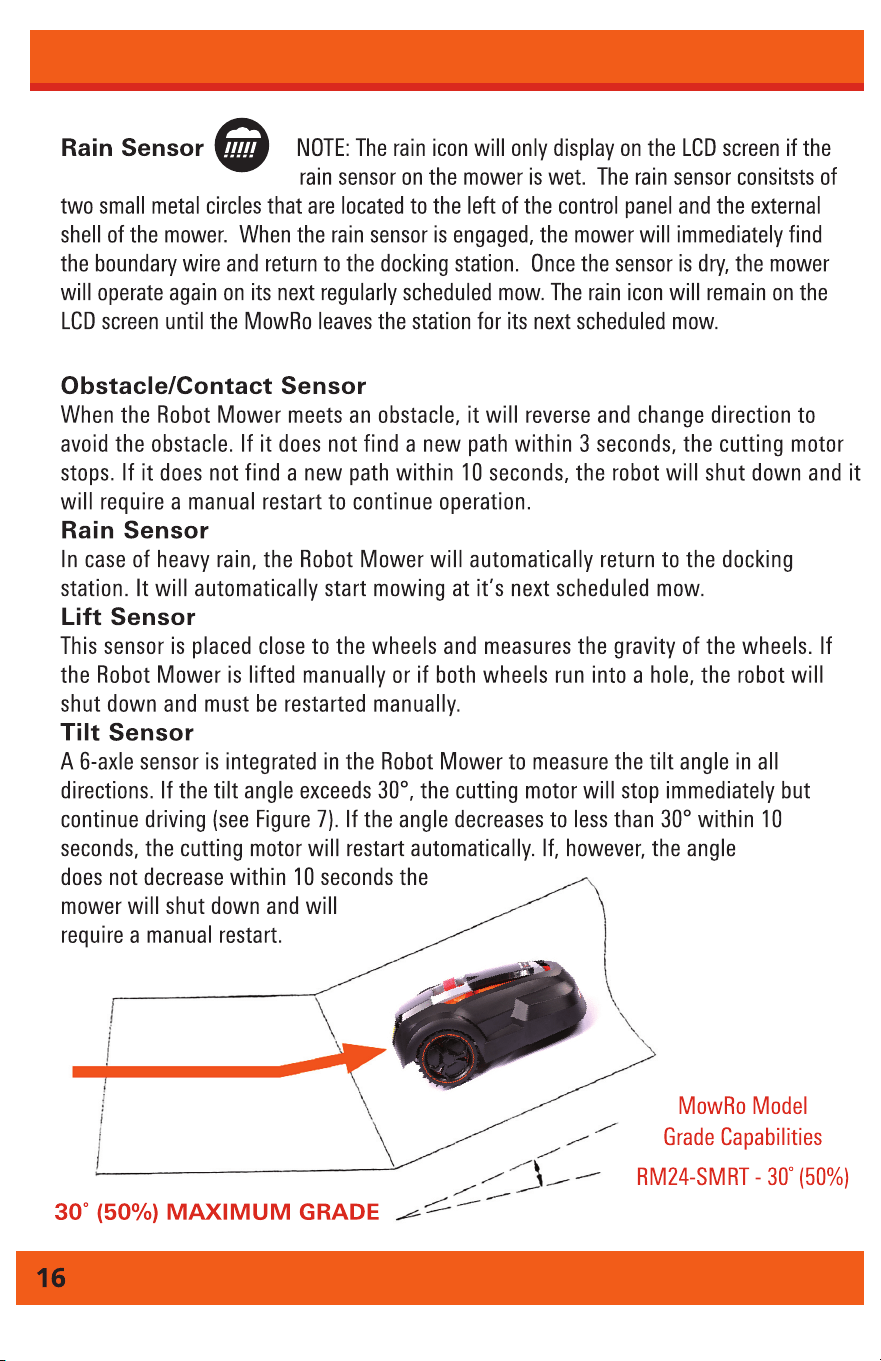
Sensors
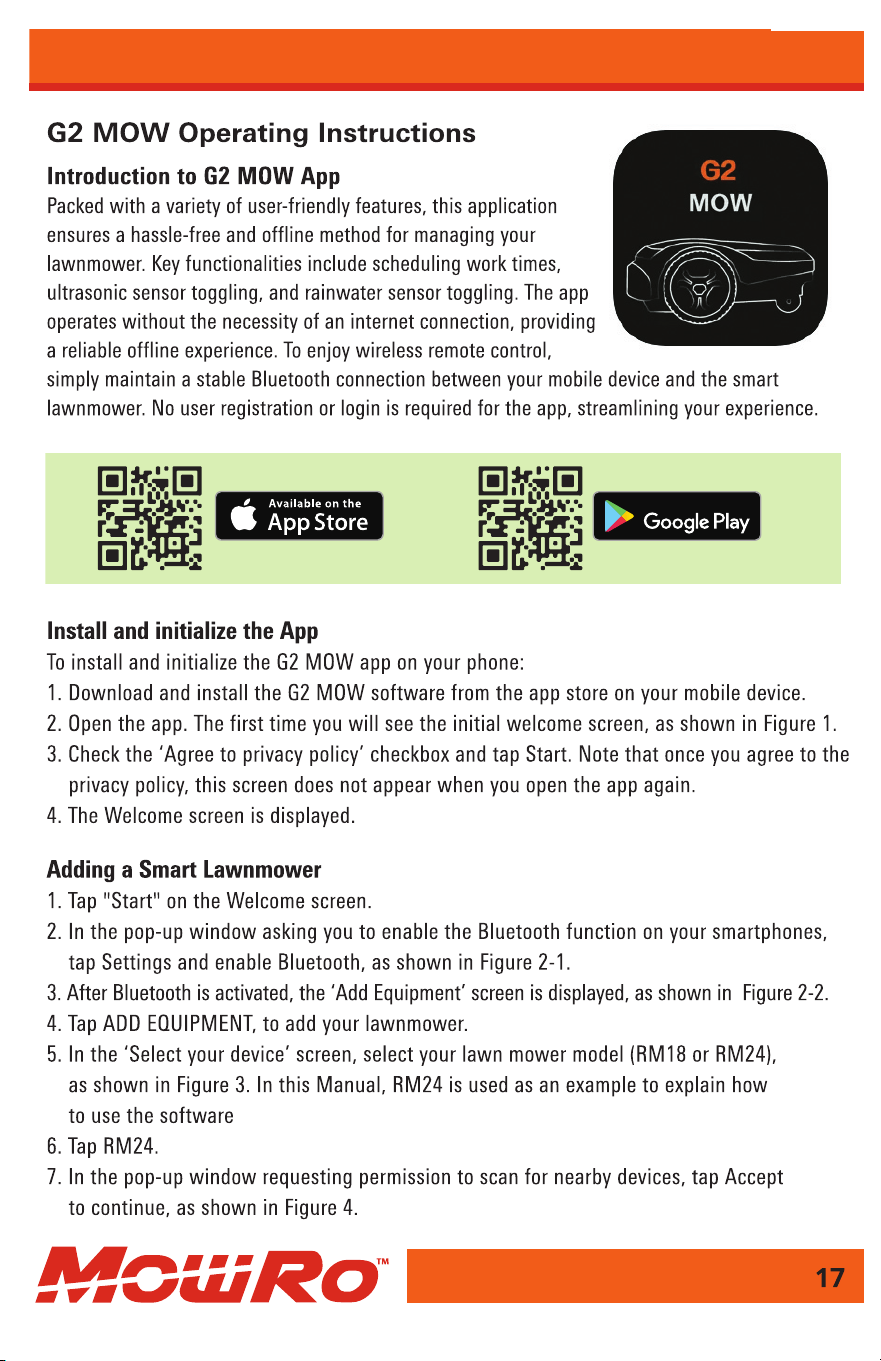
App Setup
DOWNLOAD FRA
App Setup
App Setup
Operation
App Setup
App Setup
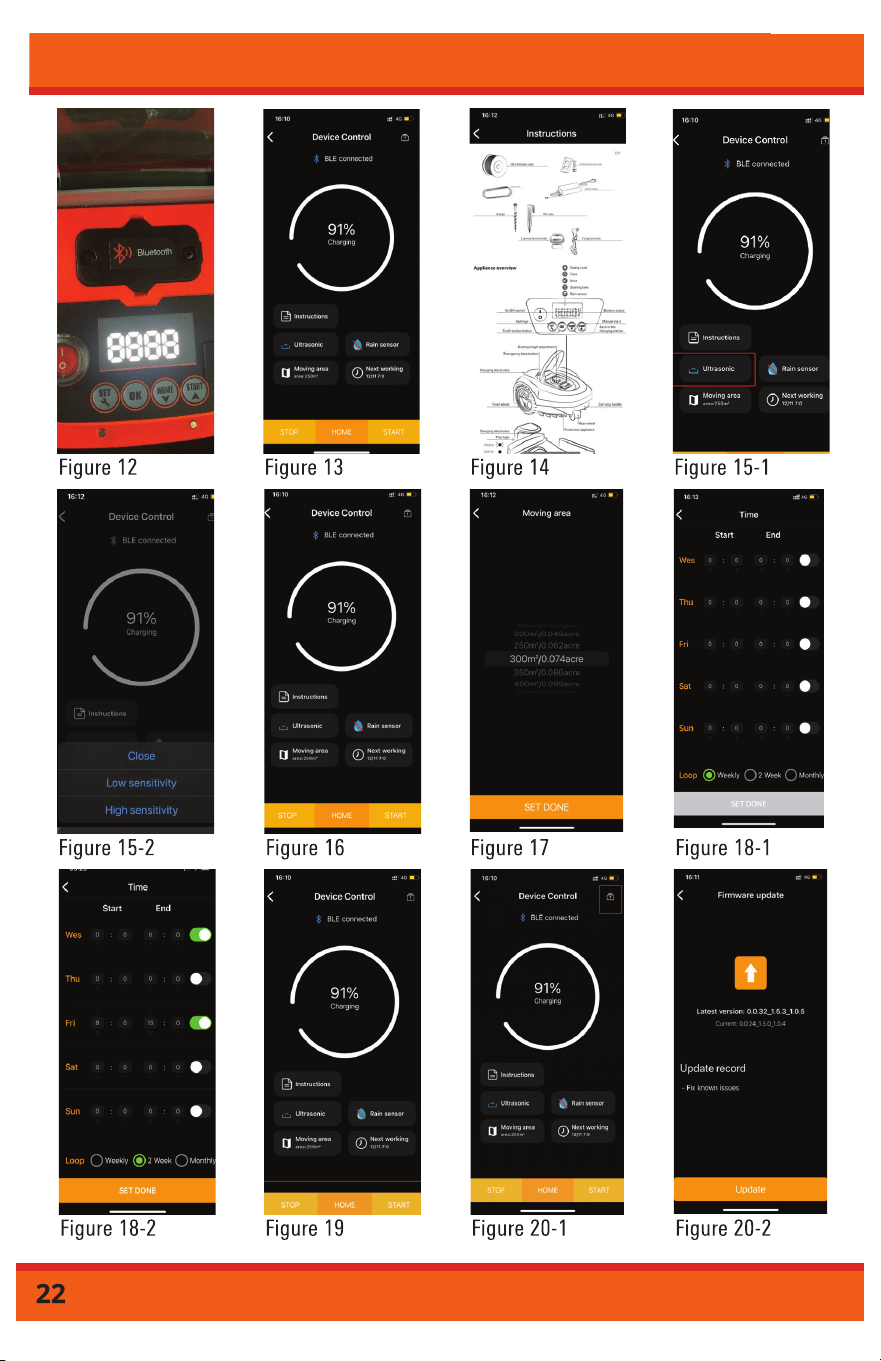
App Setup
Maintenance and Storage
Cleaning the Robot Mower
Lift the front and rear covers and remove any collected debris, grass
clippings and dust using a soft brush, vacuum or damp cloth. Repeat for
the bottom side of the robot using care when handling the blade disc and
blades. It is important to keep the blades free from accumulated grass
clippings to ensure proper operation of the robot mower. Ensure all
retaining screws are secure.
Clean and brush the contacts on the robot mower and the docking
station charging arms with steel wool or emery paper.
Cleaning the Docking Station
Remove dirt, grass and other debris from the docking station base plate
on a regular basis.
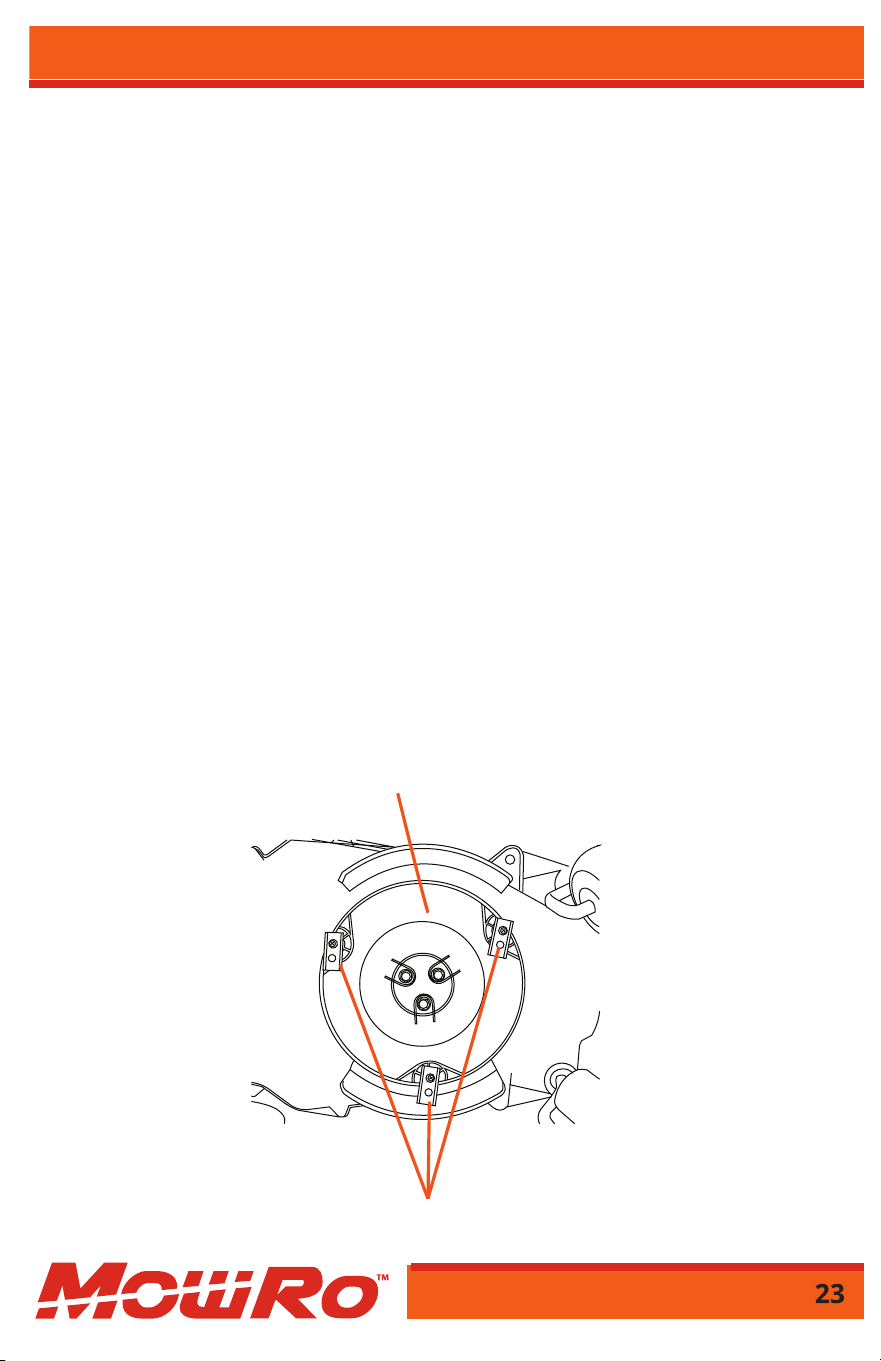
Blade Replacement
The Robot Mower blades are accessible when you turn the mower
upside down (see Figure 8). Blades have two edges and two sides. The
blades can be turned over one time before replacing. Blade replacement
is indicated when grass shows prominent white edges after cutting or
the mower makes excessive vibration noise. Unscrew each blade and
reattach using the second unused hole in the blade or replace with
new blades.
Cutting
Blades
Blade
Disc
Figure 8
Maintenance and Storage
new blades.
Blades are extremely sharp and will cut even when dull.
Use caution when replacing.
Wear gloves to protect hands from cuts.
!
DANGER
Storage
Disconnect the docking station from the AC power adapter. Remove
the ends of the boundary wire from the docking station. Turn the power
switch off on the Robot Mower to protect the battery. Store the Robot
Mower, docking station and AC adapter and cords in a dry frost free
area. Cover the ends of the boundary wire with electrical tape. To help
preserve the life of the battery, check the charge status of the battery
and recharge the battery in the docking station at regular intervals.
Winter Storage
During winter seasons, please follow all guidelines explained in the
Storage Section above. Failure to properly care for your MowRo
will void any remaining warranty.
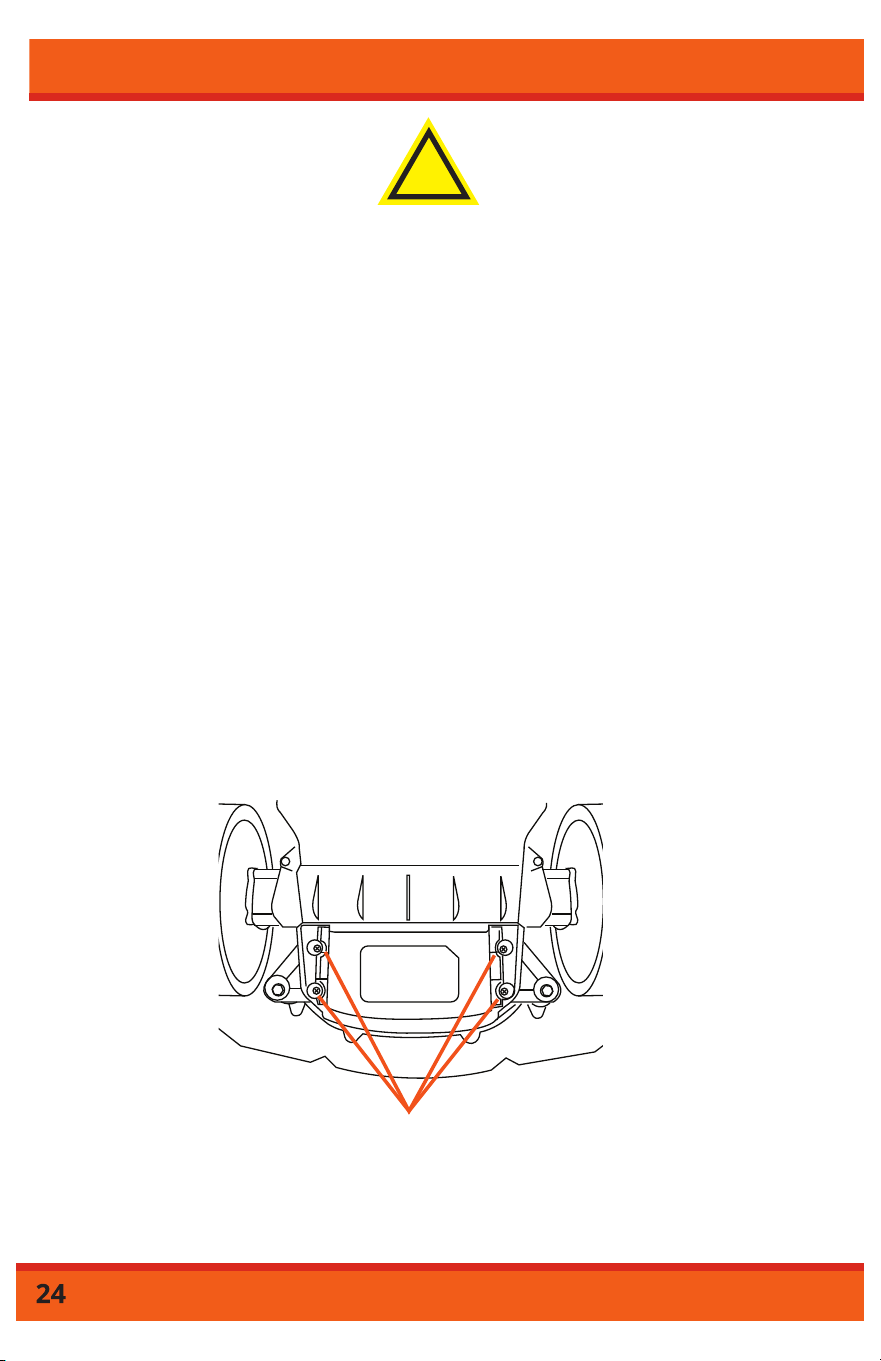
Retaining
Screws
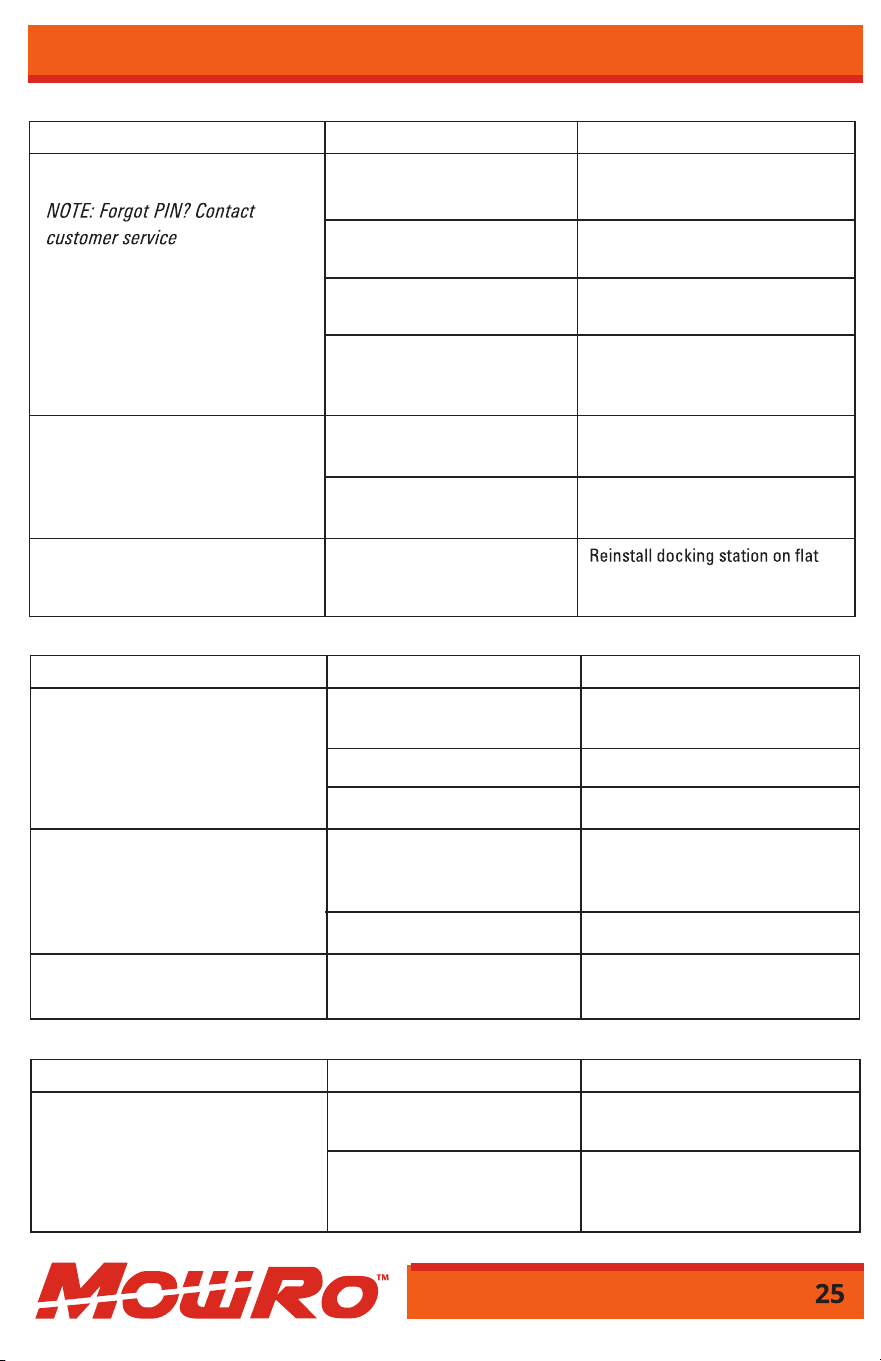
Troubleshooting
Symptom Cause Action
Robot doesn’t leave docking station. PIN not entered correctly. Enter factory default PIN (0000) or
PIN set by user.
Battery is not charged. Allow robot to charge until battery
symbol has 4 bars on LCD screen.
Docking station not installed IN arrow on docking station should
correctly. point to inside of working area.
Boundary wire not installed Wire end routed under docking
correctly. station should be connected to the
positive (+) metal prong.
Robot’s initial tracking is incorrect. Boundary wire not installed Adjust boundary wire so robot
correctly. follows desired path.
Interference from underground Reroute boundary wire around
power source. obstacle source.
Robot does not reconnect to Docking station is not level.
charging blades on return to level surface.
docking station.
Testing the Docking Station
Symptom Cause Action
Robot leaves boundary area or Wheels are obstructed. Remove debris from mowing area
stops beyond boundary line. and/or clean robot’s wheels.
Grass is wet and/or slope is Reroute boundary wire to avoid
too close to boundary edge. slope. Do not operate in wet
conditions.
First Robot Mower Use
Symptom Cause Action
Excessive vibration and noise. Cutting system unbalanced; Turn power off and reverse or
blades are dull. replace all three blades.
Blade disc is damaged. Replace blade disc.
Disc retaining screws loose. Tighten screws securely.
Working time between charges Charging contacts are dirty. Clean charging contacts on the
decreases. robot and the docking station.
Brush lightly with steel wool.
Battery capacity diminished. Replace battery.
Robot does not leave docking Rain sensor is still activated. Dry and clean metal contacts.
station after rain sensor is activated. Then restart robot mower.
Normal Robot Mower Use
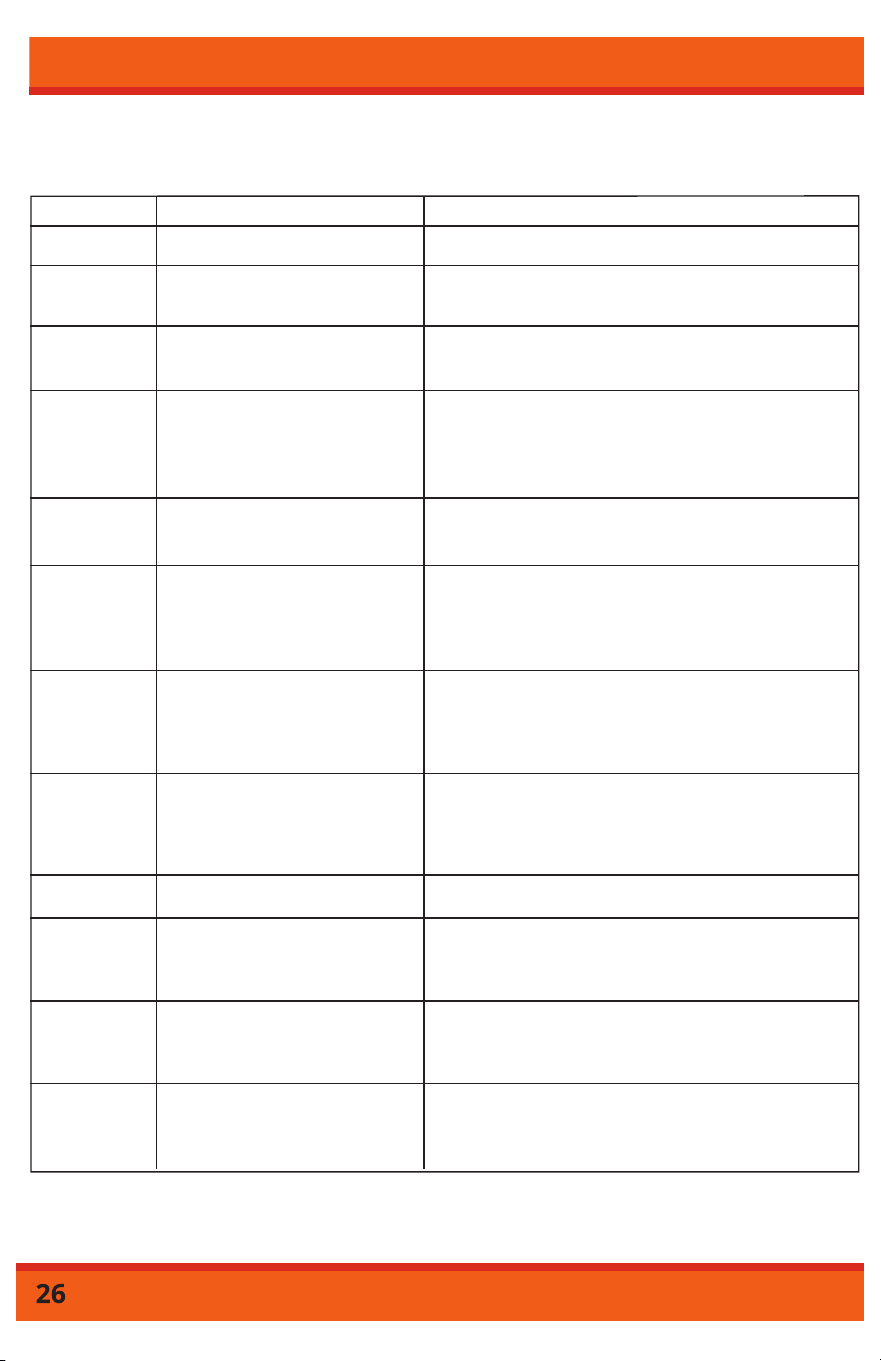
Status Code Cause Solution
E1 STOP Button has been engaged. Manually restart the mower.
E3 Robot mower is out of the
boundary line perimeter.
Relocate the robot mower in the boundary line
perimeter then manually restart.
E4 No boundary line signal. Check the status of the LED on the charging station.
If it is blinking red, the boundary line is cut or the
boundary wire is not properly connected to the docking
station. Check boundary wire connection.
E5 A collision sensor is triggered. Remove any obstacles or relocate the robot
mower. Then manually restart the mower.
E6 Overcurrent on left propulsion
motor.
Grass too tall and thick? Wheel blocked? If grass is
> 2.6" tall cut with traditional mower. If grass is < 2.6"
adjust height on mower to make sure the cutting can
move without restriction.
E7 Overcurrent on right propulsion
motor.
Grass too tall and thick? Wheel blocked? If grass is
> 2.6" tall cut with traditional mower. If grass is < 2.6"
adjust height on mower to make sure the cutting can
move without restriction.
Information Codes: Displayed on LCD Screen
NOTE: How to Manually Restart - Place the machine within 1m near the boundary line, enter correct
PIN code, then press “start”.
E2 Lift sensor has been triggered. Robot mower lifted? Wheel blocked? Remove
foreign objects then manually restart the mower.
E8 Overcurrent on cutting motor. Grass too tall and thick? Wheel blocked? If grass is
> 2.6" tall cut with traditional mower. If grass is < 2.6"
adjust height on mower to make sure the cutting can
move without restriction.
E9 Faulty battery. Battery malfunction, contact customer service.
E10 Under voltage of battery detected. Place the robot mower back to the charging station
and manually restart the mower. If the issue persists,
please contact customer service.
E11 Tilt sensor triggered. Tilting angle > 30˚? Robot mower is overturned? Place the
robot mower on flat ground and manually restart mower.
All wheels must be on the ground to return to operation.
E12 Wheel spinning without grip. Robot mower stuck in sand or holes? Check the
surrounding lawn, place the robot mower on
flat ground and manually restart the mower.
Information Codes
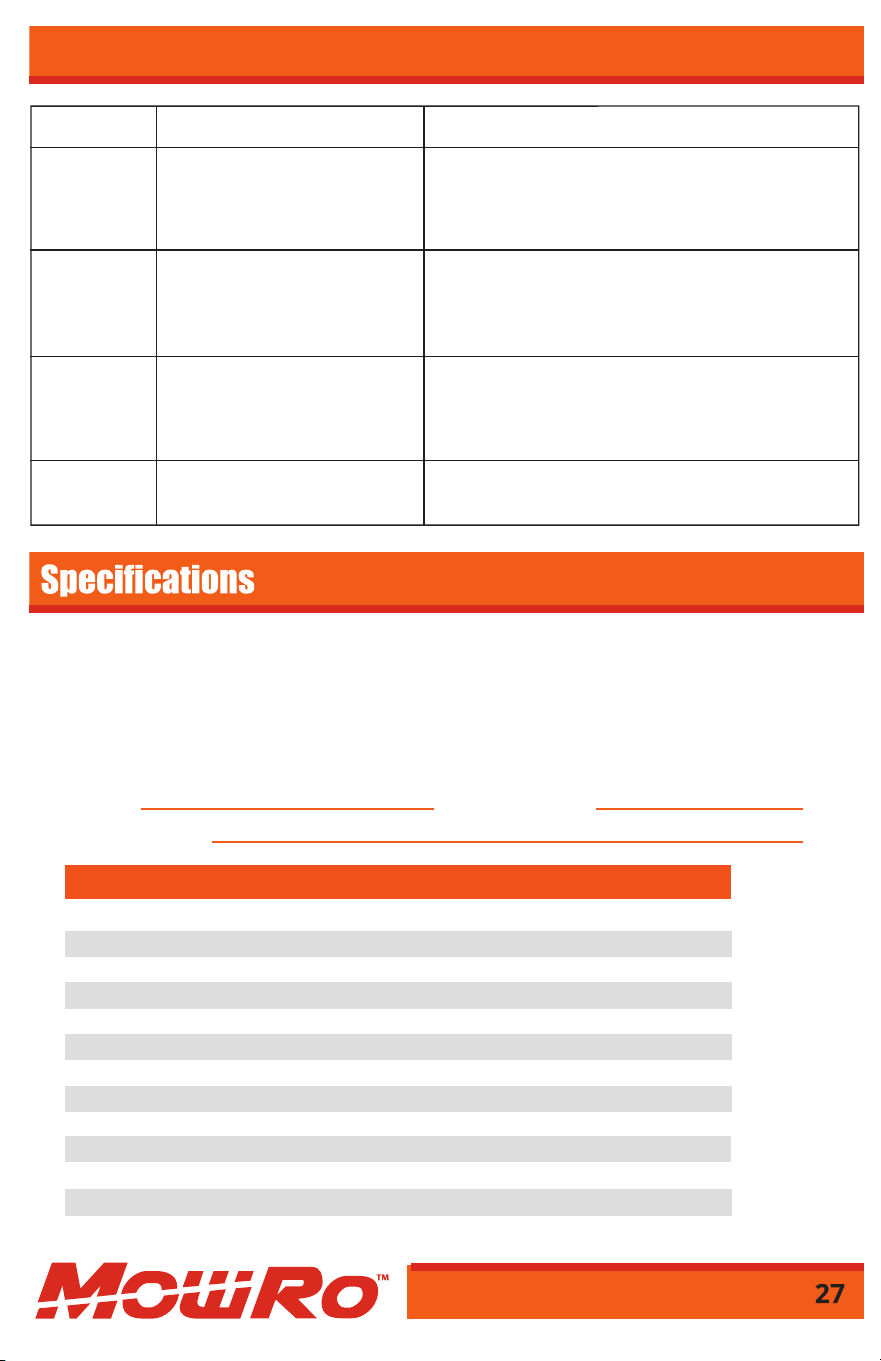
Information Codes
E13 Battery overheat. If this issue persists, please contact customer service.
F1 Robot is out of boundary line
perimeter.
Robot mower is outside boundary wire? Boundary line is
connected reversely? Robot mower is too far from the
boundary line? Check boundary line connections, place
mower inside wire perimeter, manually restart mower.
F2 Won’t start after pressing “start”
button, boundary line signal
not available.
Check the status of the LED on the charging station. If it is
blinking red, boundary line is cut or the boundary wire is
not properly connected to docking station. Check
boundary wire connection.
F3 Won’t start after pressing “start”
button, bad charging contact.
Clean the charging contacts and remove any foreign
objects. Place mower back in docking station and allow
it to charge fully. Manually start mower while in
the docking station.
F4 Won’t start after pressing “start”
button, battery voltage is too low.
Return the robot mower to the charging dock and let
it fully recharge.
Serial No.
Place of Purchase
IMPORTANT NOTICE
9GVJGOCPWHCEVWTGTTGUGTXGVJGTKIJVVQEJCPIGVJGRTQFWEVCPFQTURGEKʙECVKQPUKPVJKUOCPWCNYKVJQWVPQVKʙECVKQP
6JGOCPWCNKUHQTKPHQTOCVKQPWUCIGQPN[CPFVJGRKEVWTGUCPFFTCYKPIUFGRKEVGFJGTGKPCTGHQTTGHGTGPEGQPN[
Warranty Repair and Service - &QPQVTGVWTPVJKURTQFWEVVQVJGUVQTGHQTYCTTCPV[KUUWGUQTTGRCKT%CNNQWTEWUVQOGT
service department at 1-435-267-1494or visit www.mowro.com HQTVJGNQECVKQPQHVJGPGCTGUVUGTXKEGEGPVGT.
Record the information below for future reference.
Date of Purchase
SKU/Part No. RM24-SMRT
Lithium Battery Voltage 28V
Lithium Battery Capacity 4Ah
Motor Type Brushless
Blade Speed 2900 rpm
Cutter Type 3 Blades
Cutting Width 240mm (9.5”)
Cutting Height 25-65mm (1 – 2.5”)
Mowing Areas 1000m
2
(0.25 acre)
Maximum Climb Angle 30˚
Maximum Walking Speed 0.5m/s (1.55 ft/sec)
Boundary Wire Length 100m (330ft)
W
arranty
1 Year Limited on MowRo/6 Month Limited on Battery