
Technical Support and E-Warranty Certificate
www.vevor.com/support
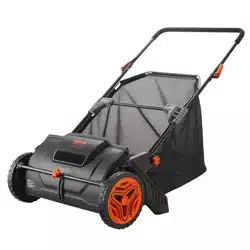
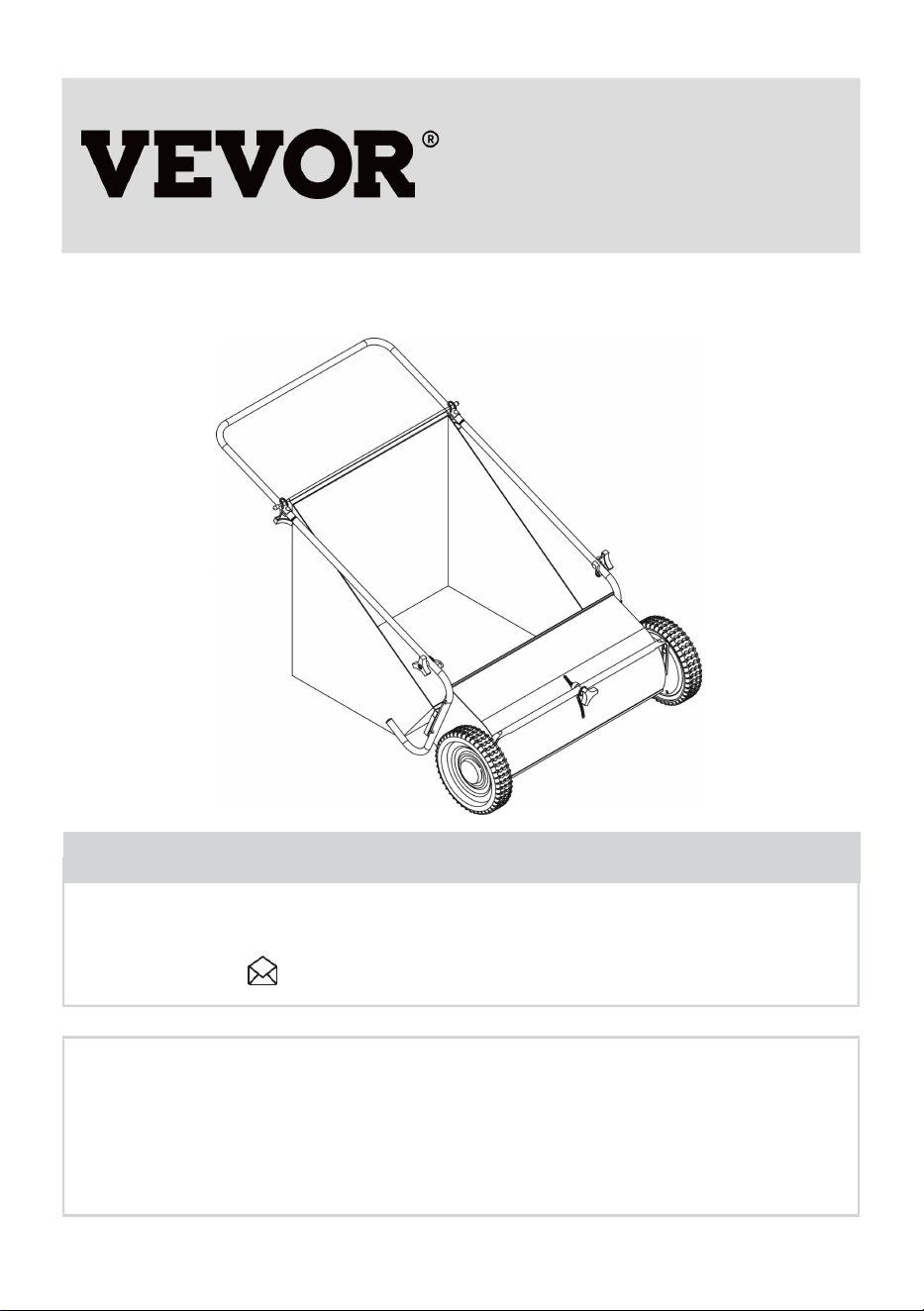
LAWN SWEEPERS
USER MANUAL
We continue to be committed to offering tools at competitive prices. "Save Half", "Half Price",
or any other similar expressions used by us only represent an estimate of savings you might
benefit from buying certain tools with us compared to the major top brands and do not
necessarily mean to cover all categories of tools offered by us. You are kindly reminded to
verify carefully when placing an order with us if you are saving half in comparison with the top
major brands.
1
GT1110
Have product questions? Need technical support? Please feel free to
contact us:
CustomerService@vevor.com
NEED HELP? CONTACT US!
This is the original instruction, please read all manual instructions carefully
before operating. VEVOR reserves a clear interpretation of our user manual. The
appearance of the product shall be subject to the product you received. Please
forgive us that we won't inform you again if there are any technology or software
updates on our product.
LAWN SWEEPERS

2
Table of Contents
General Warnings and Rules........................................................................... 3
Hazard Signal Word Definitions........................................................................4
Controls and Features Identification............................................................... 5
Component & Hardware.....................................................................................6
Assembly Instructions...............................................................................7, 8, 9
Operation Instructions...............................................................................10, 11
Maintenance and Storage.......................................................11, 12, 13, 14, 15
Specification....................................................................................................15
Parts Drawing & Parts List................................................................. 16,17, 18

3
GENERAL WARNINGS
READ and UNDERSTAND this manual completely before using the Push
Sweeper.
The operator must read and understand all safety and warning information,
operating instructions, maintenance and storage instructions before operating this
equipment. Failure to properly operate and maintain the push sweeper could
result in serious injury to the operator or bystanders.
Operation Warnings
·Do not at any time carry passengers, sit or stand on the sweeper.
·Do not allow children to play on, stand upon or climb in the sweeper.
·Always inspect the sweeper before using it to ensure it is in good working
condition.
·Replace or repair damaged or worn parts immediately.
·Always check and tighten the hardware and assembled parts before operation.
·Avoid large holes and ditches when using the sweeper.
·Be careful when operating on steep grades (hills) cause the sweeper may tip
over.
·Do not push close to creeks, ditches and public highways.
·Always use caution when unloading the sweeper.
·Never tow the sweeper with a motorized vehicle.
Crush and Cut Hazards
·Always keep hands and feet clear from moving parts while operating the
equipment.
·Always clear and keep the work area clean when operating.
·Always wear safety gear, eye protection, gloves and work boots when operating
the sweeper.
WARNING
The warnings, cautions, and instructions outlined in this instruction manual cannot
cover all possible conditions or situations that may occur. It must be understood
4
by the operator that common sense and caution are factors that cannot be built
into this product and must be supplied by the operator.
PROP 65 WARNING
This product contains chemicals known to the state of California to cause cancer,
birth defects, or other reproductive harm.
Assembly Is Required
This product requires assembly before use. See the “Assembly” section for
instructions. Because of the weight and/or size of the push sweeper, it is
recommended that another adult be present to assist with the assembly.
INSPECT ALL COMPONENTS closely upon receipt to make sure no
components are missing or damaged.
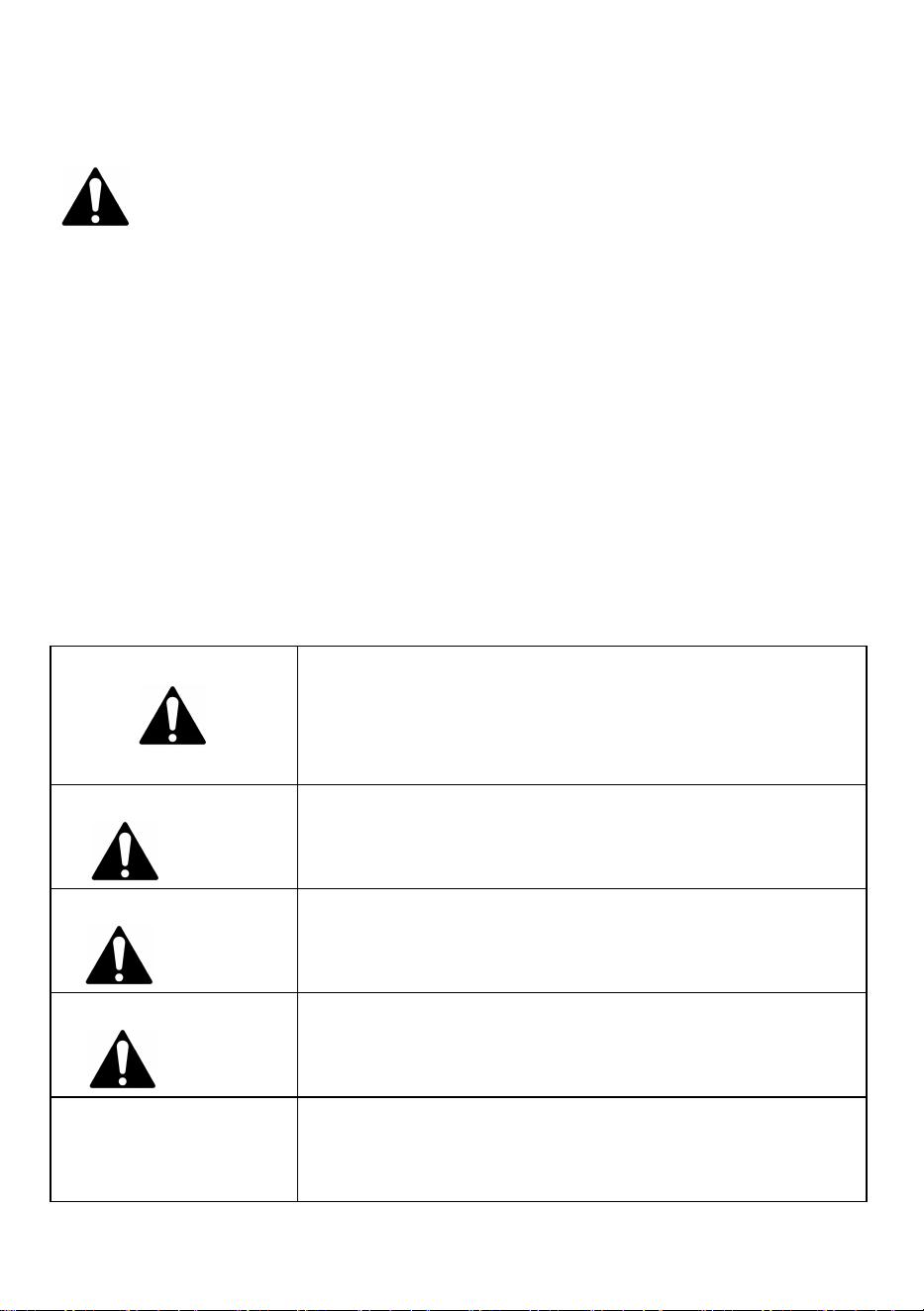
Hazard Signal Word Definitions
This is the safety alert symbol. It is used to alert
you to potential personal injury hazards. Obey all
safety messages that follow this symbol to avoid
possible injury or death.
DANGER
DANGER indicates an imminently hazardous
situation which, if not avoided, will result in death
or serious injury.
WARNING
WARNING indicates a potentially hazardous
situation which, if not avoided, could result in
death or serious injury.
CAUTION
CAUTION indicates a potentially hazardous
situation which, if not avoided, may result in minor
or moderate injury.
CAUTION
CAUTION used without the safety alert symbol
indicates a potentially hazardous situation which,
if not avoided, may result in property damage.
5
ABOUT YOUR PUSH SWEEPER
This heavy-duty push sweeper makes yard work a breeze. The steel and poly
construction is durable, lightweight and is easy to push. The extra-large sweeping
span makes the job easy and saves time when cleaning different types of debris
from grass, twigs, paper, leaves and much more.
The push sweeper features an easy one-handed turn function to adjust the brush
height. It can be stored in a shed, garage or on the wall. The large 7 cubic-foot
hopper makes loading and unloading fast and convenient.
Technical specifications on the push sweeper are provided in the “Specifications”
section of this manual.
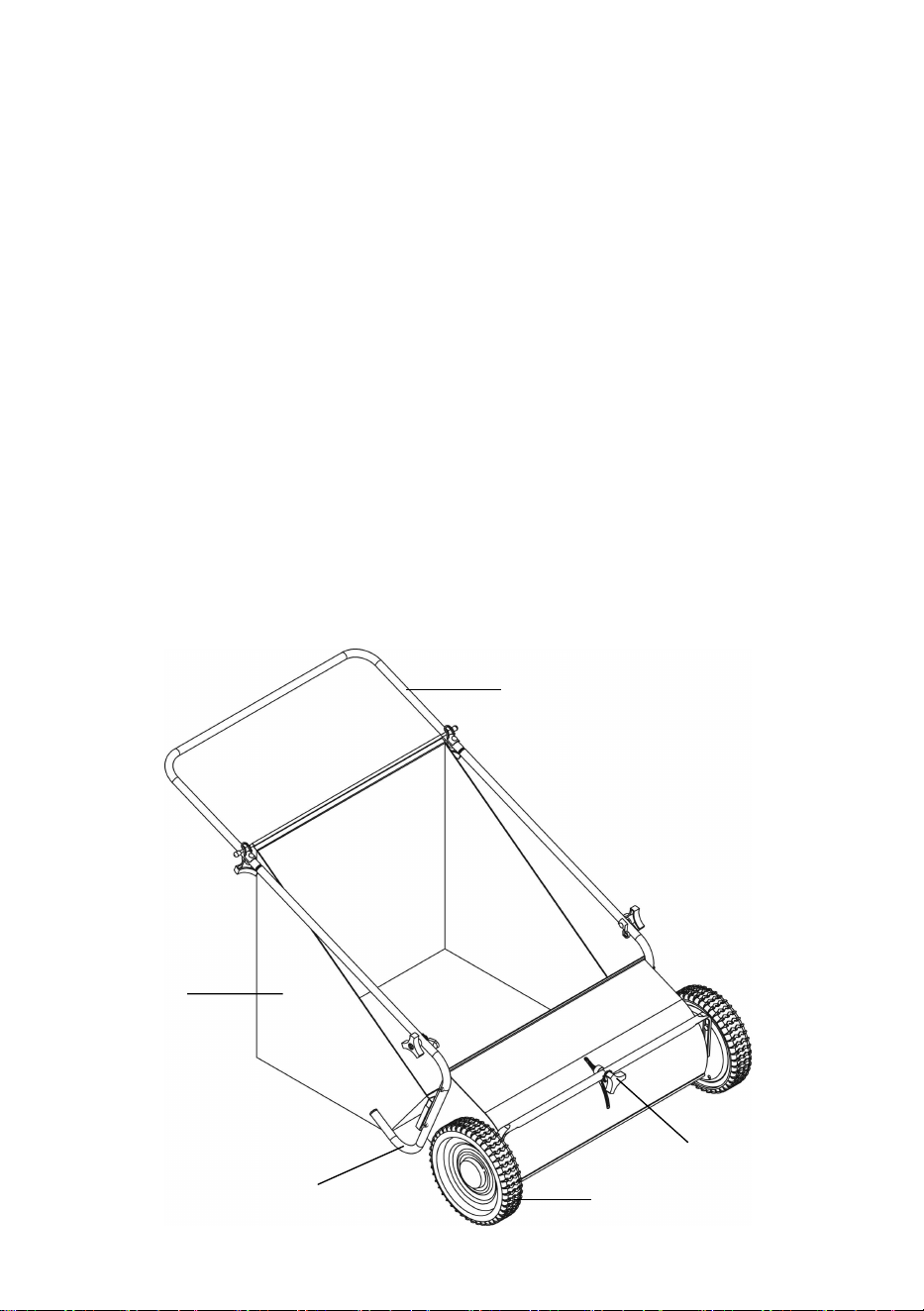
Controls and Features Identification
Read this owner’s manual before operating the equipment. Familiarize yourself
with the location and function of the controls and features. Save this manual for
future reference.
1
2
3
4
5

6
1) Handle – Pushes and moves the sweeper easily.
2) Hopper Bag – Do not exceed the rated load capacity of 7 Cu. Ft.
3) Support Leg – Stabilizes load and sweeper.
4) Tires / Wheel – Heavy duty 10” tires.
5) Hand Knob – Adjust brush height.
CAUTION
Read and follow all instructions for assembly and operation. Failure to properly
assemble this equipment could result in serious injury to the user or bystanders,
or cause equipment damage.
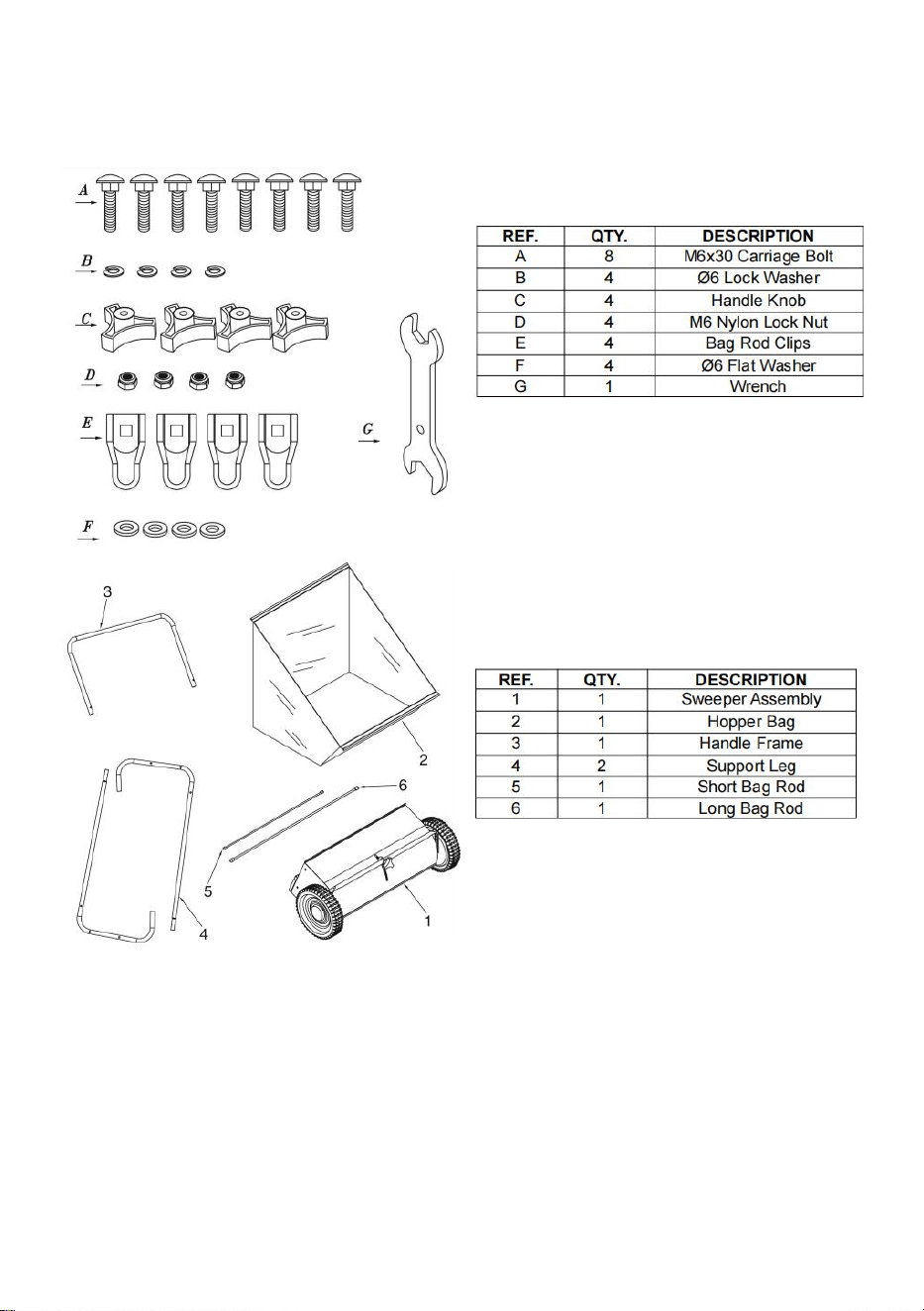
PUSH SWEEPER COMPONENT PARTS AND ASSEMBLY
Before assembling the push sweeper according to steps 1 to 5, take all parts out
of the shipping crate and inspect components to ensure there are no missing
piece.
TOOLS REQUIRED
·10mm Wrenches
7
Component Parts
Assembly Instructions
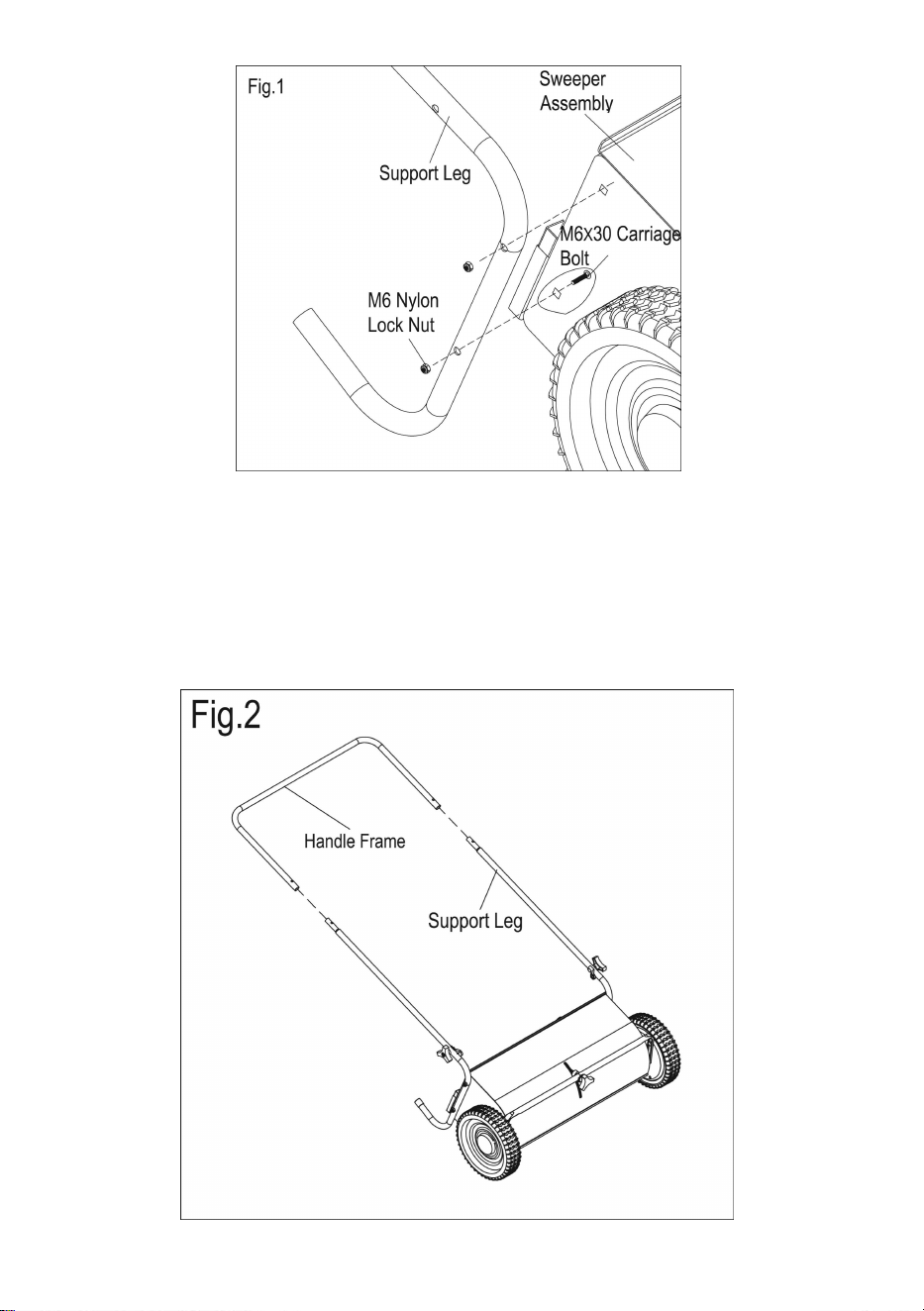
STEP 1: Install Support Legs to Sweeper Housing
1. Attach the supporting leg to the sweeper assembly and secure with M6 x 30
carriage bolt and M6 nylon lock nut (Fig. 1). Loosely tighten and repeat for the
other side.
8
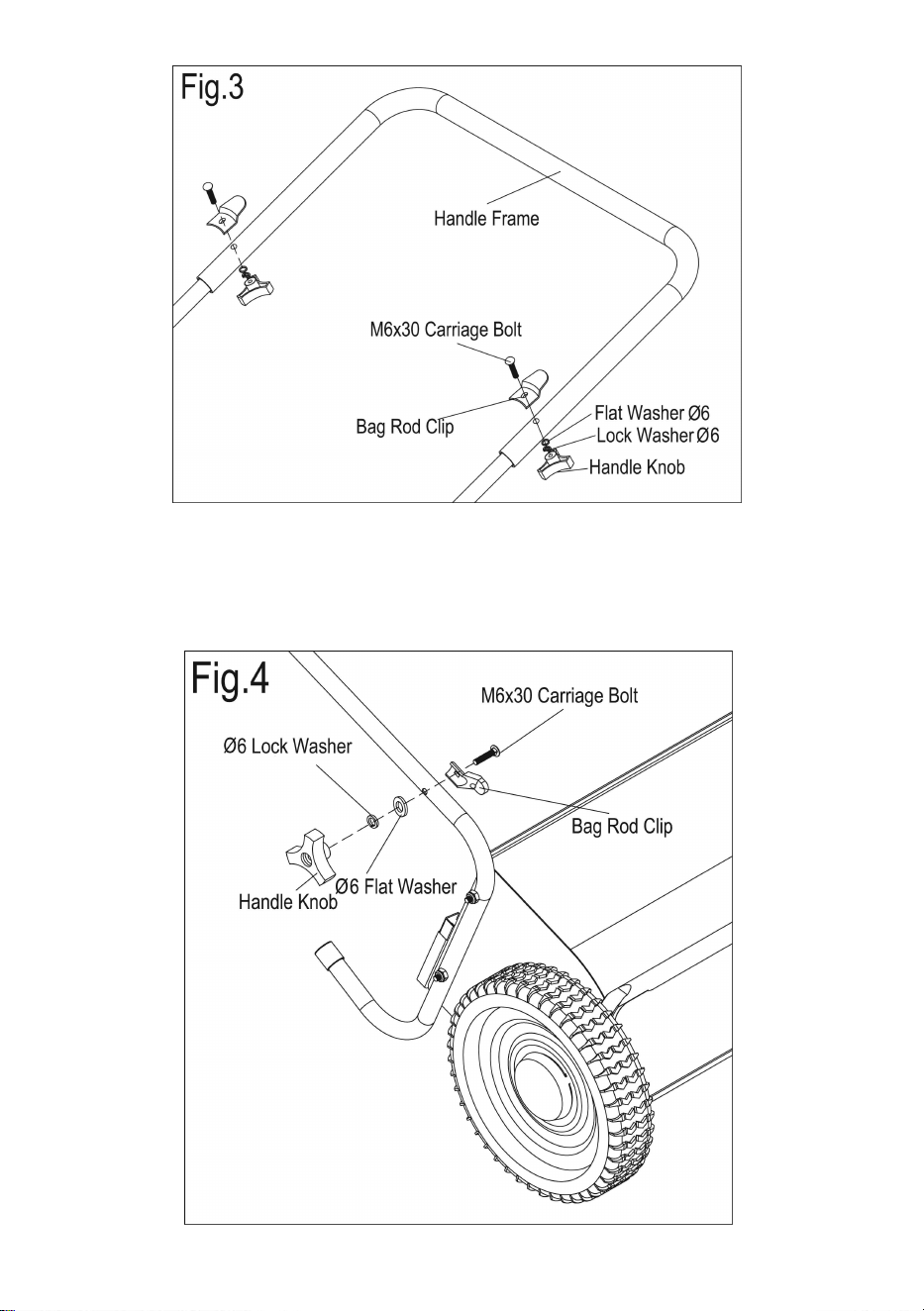
STEP 2: Attach Push Handle to Support Legs
1. Insert the handle frame into the supporting legs (Fig. 2).
2. Secure the handle frame to the supporting legs with the M6 x 30 carriage bolts,
bag rod clips, flat washers, lock washers, and handle knobs (Fig. 3).
3. Tighten all hardware in both steps.
9
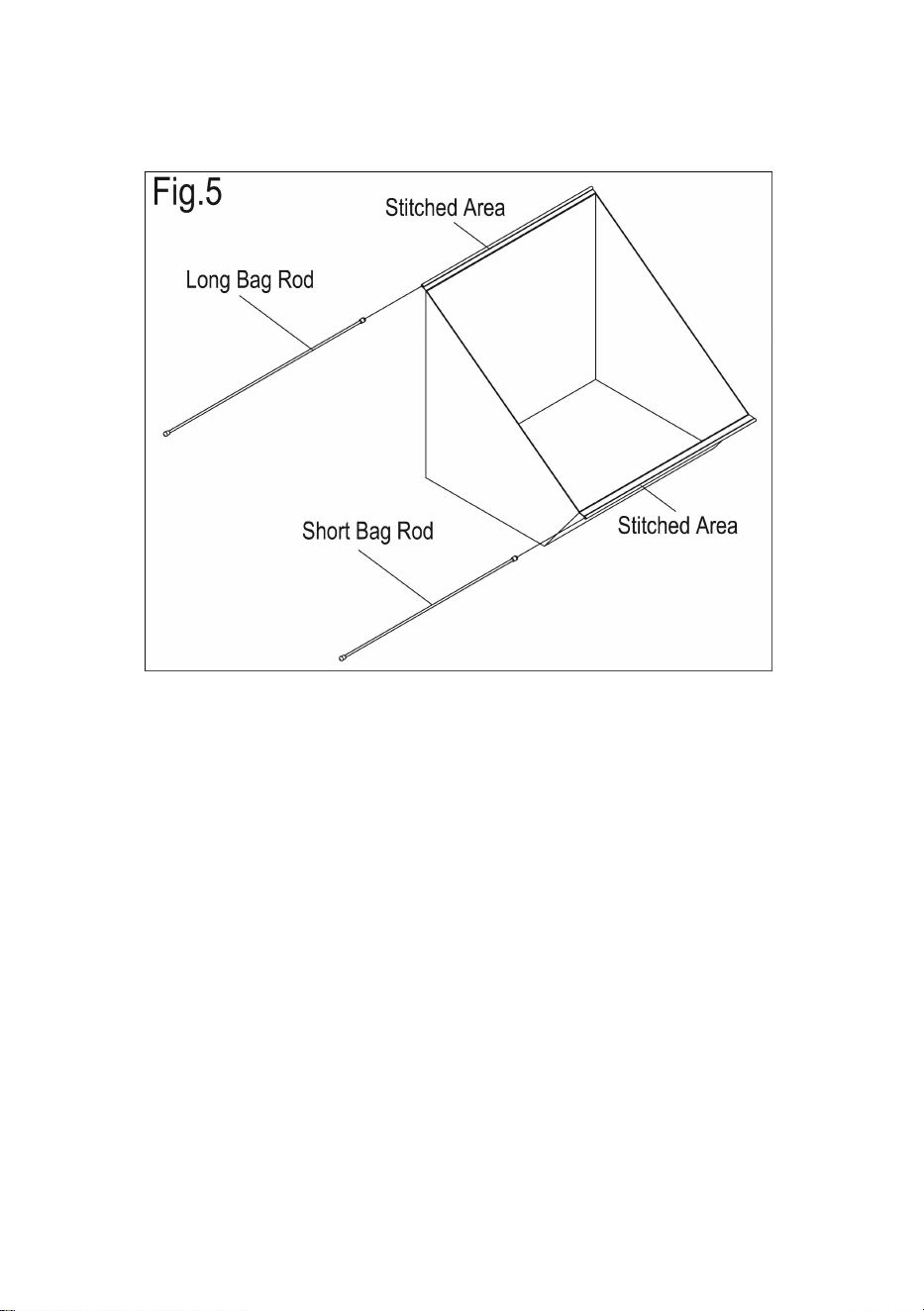
STEP 3: Attach Bag Rod Clips
1. Put a bag rod clip on each side of the support legs and secure using a M6 x 30
carriage bolt, a flat washer, a lock washer, and a handle knob (Fig. 4).
10
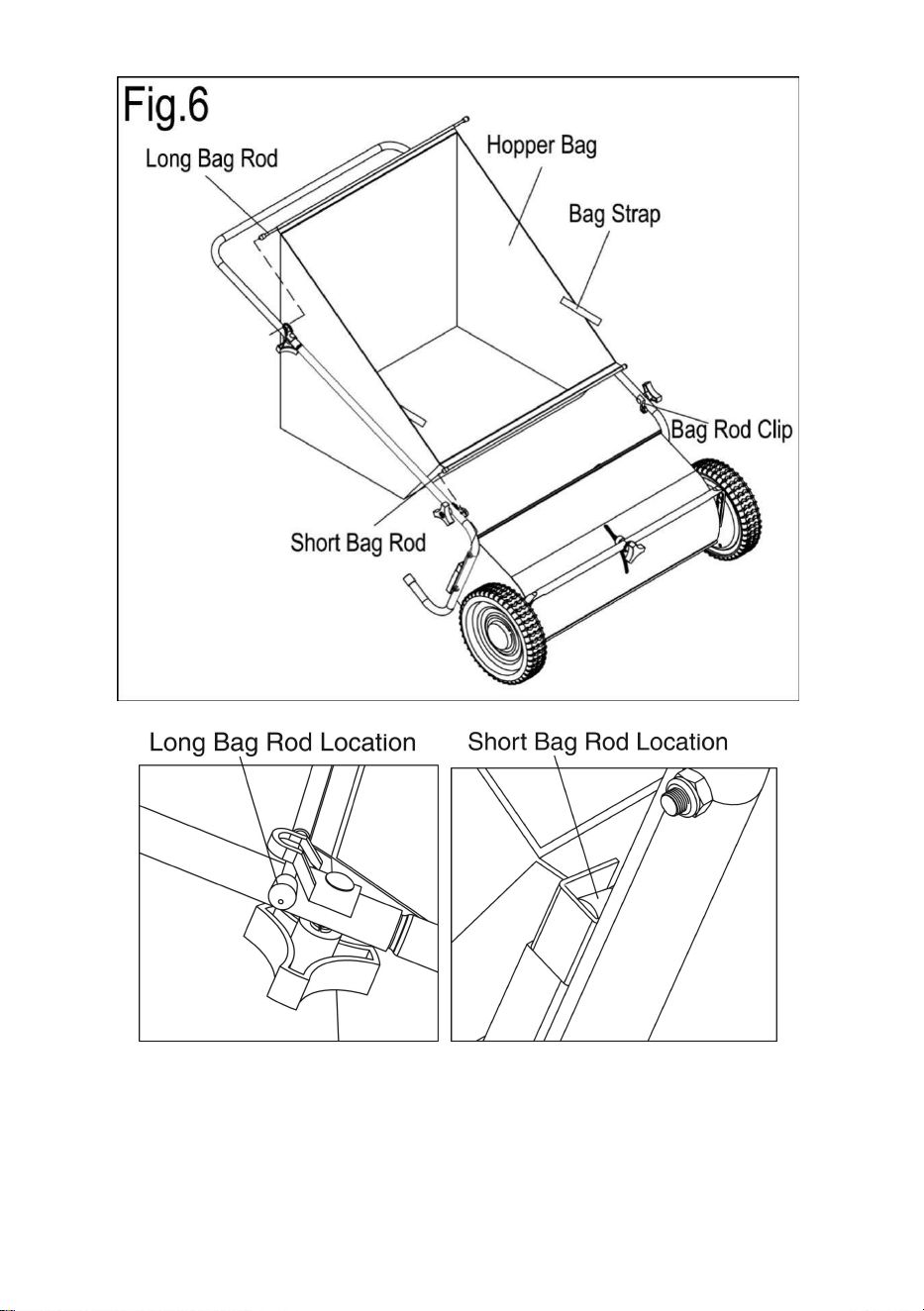
STEP 4: Assemble Hopper Bag Hardware
1. Slide the long bag rod through the top opening in the hopper bag. Slide the
short bag rod through the bottom of the hopper bag. (Fig. 5).
STEP 5: Attach Hopper Bag to Sweeper
1. Place the hopper bag assembly inside the sweeper frame. Insert the long rod
into the two rod clips at the top and the shorter rod into the clips at the bottom.
2. Hook the plastic straps on the bag flaps under the bag clips on the supporting
legs (Fig. 6).
3. Make sure all hardware is installed correctly before operating the sweeper.
11
12
Operation Instructions
WARNING
Before using the push sweeper, make sure the sweeper is correctly assembled
and all hardware is fully tightened.
Brush Height Adjustment
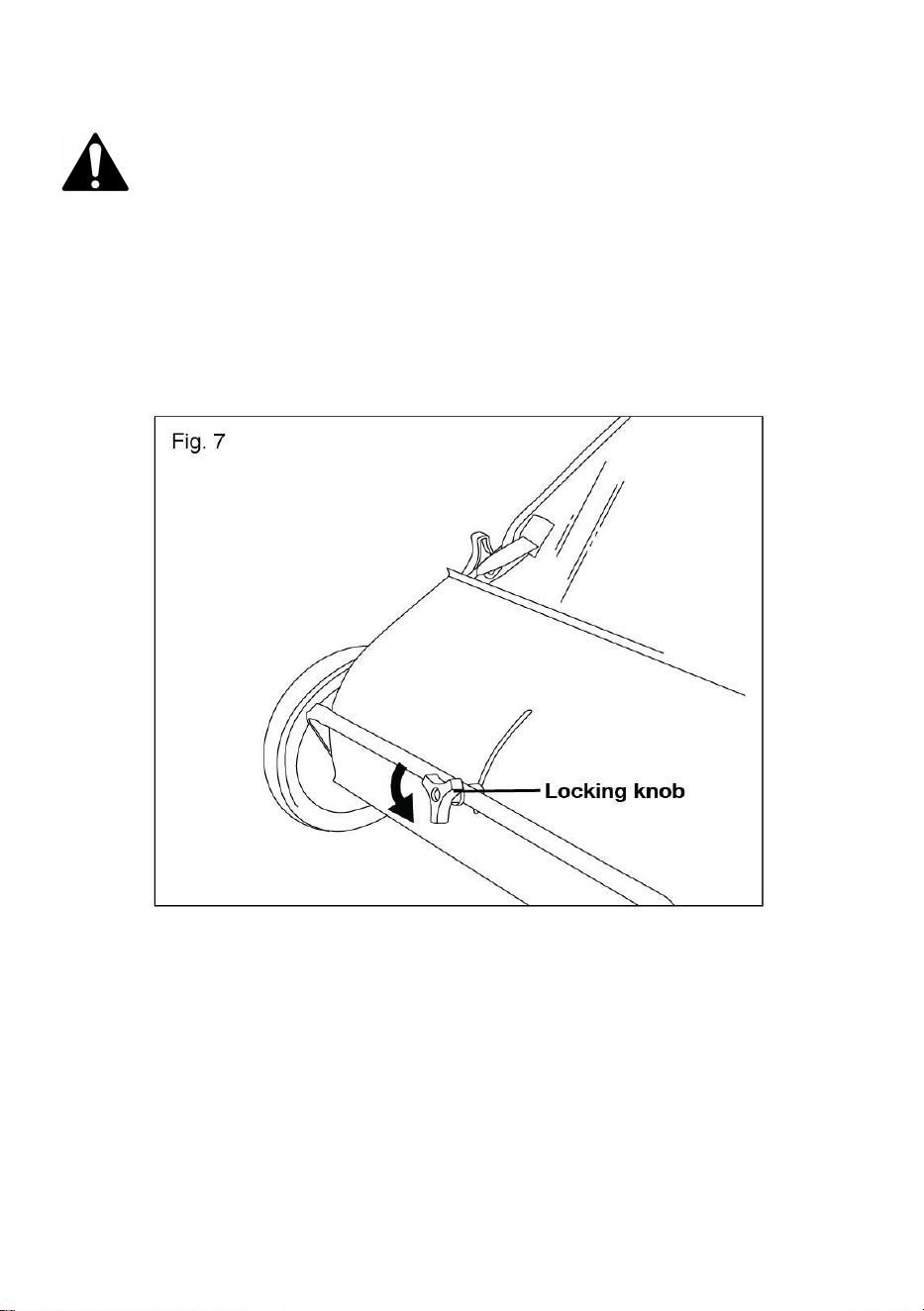
1. Unlock the height adjustment lock by turning the locking knob counterclockwise
(Fig. 7).
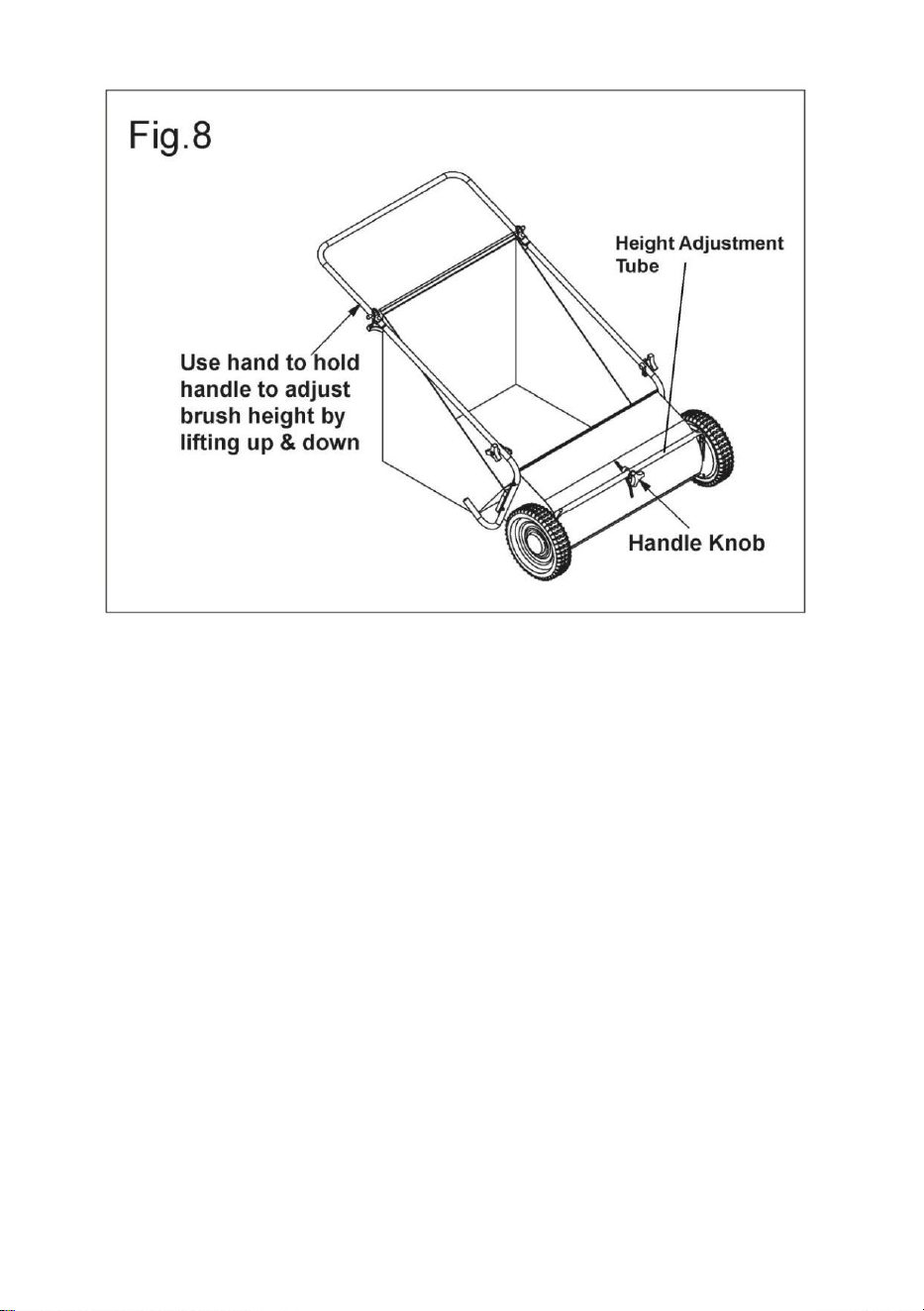
2. Use your hand to hold the handle (see arrow) to adjust the brush height by
lifting the handle up and down several times. Tighten the handle knob to the
desired height.
Note: You may need to use your hands to slide the height adjustment tube
for placement.
13
Basic Sweeping Method
Push the sweeper forward at normal walking speed; it does not operate when
pulled backward.
NOTE: For best results, mow the grass to an even height before sweeping.
Dumping Hopper Bag
1. To dump the hopper bag, tip the sweeper forward to allow the material to fall
out.
2. You can also take the hopper bag off of the sweeper to dump.
WARNING! Always dump the hopper bag after each use. Damp or wet grass and
leaves will cause damage to the hopper if stored for an extended period of time.
WARNING! DO NOT dump or unload the sweeper too close to the fire, as the
brushes and the hopper bag can be destroyed by the overheated flame.
14
Maintenance
General
• After each use, dump and clean the hopper.
• Rinse/dry inside and outside of the sweeper after each use.
• Periodically check all nuts, bolts, and screws for proper tightness.
• Annually clean out and lightly lubricate parts.
• Use the glossy enamel spray paint to touch up the scratched or worn painted
metal surface.
• Never exceed the hopper load capacity rating of 52.3 gal (198 l). It will damage
the hopper bag.
Lubrication
The bearings in the sweeper have been pre-lubricated at the factory. However, it’s
recommended that a few drops of light oil should be added to the brush shaft
bearings twice a year. Also, the gear should be cleaned every two years. After
cleaning, apply an even coat of light grease.
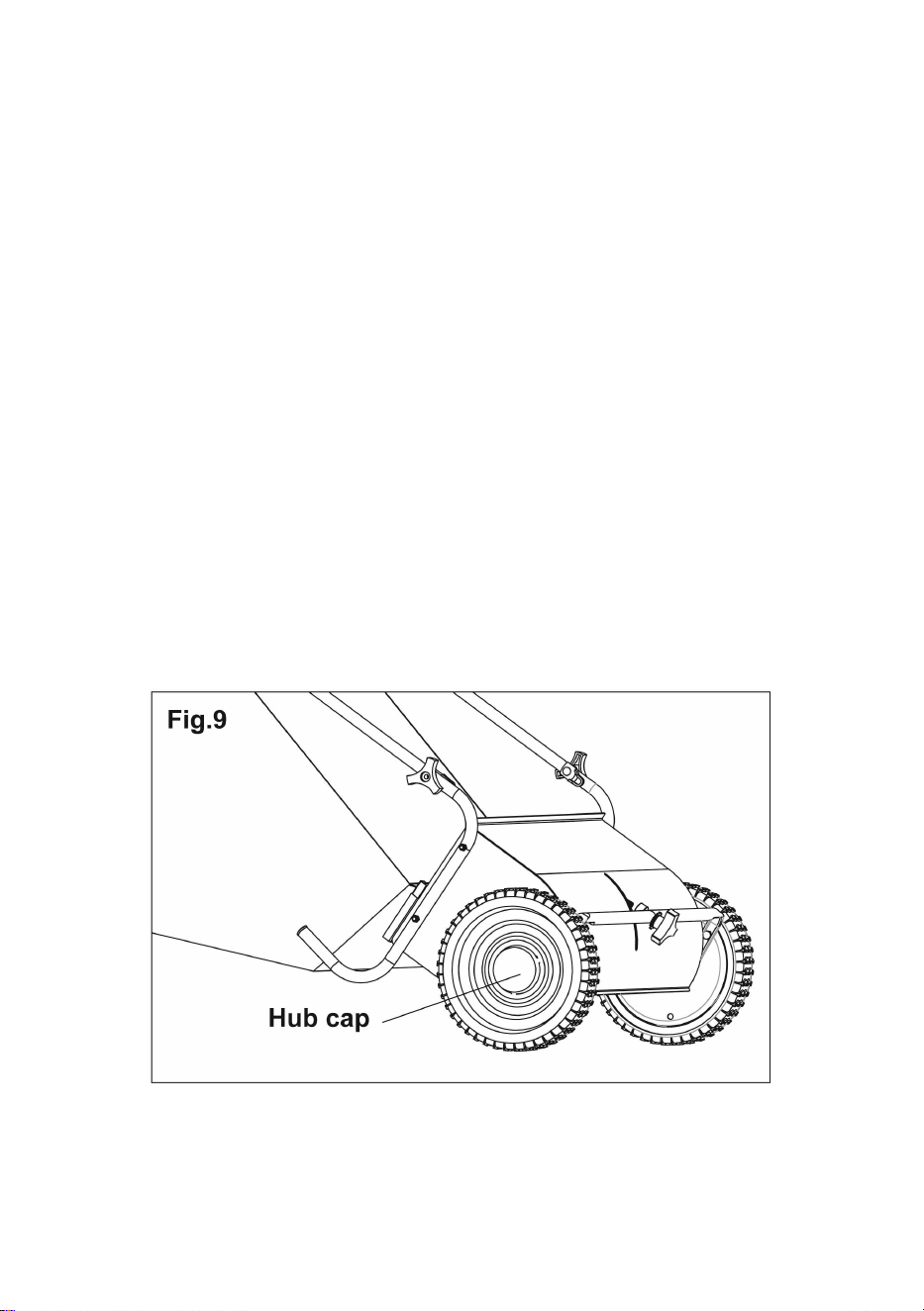
1. Use a screw driver to pop off the hub cap (Fig. 9).
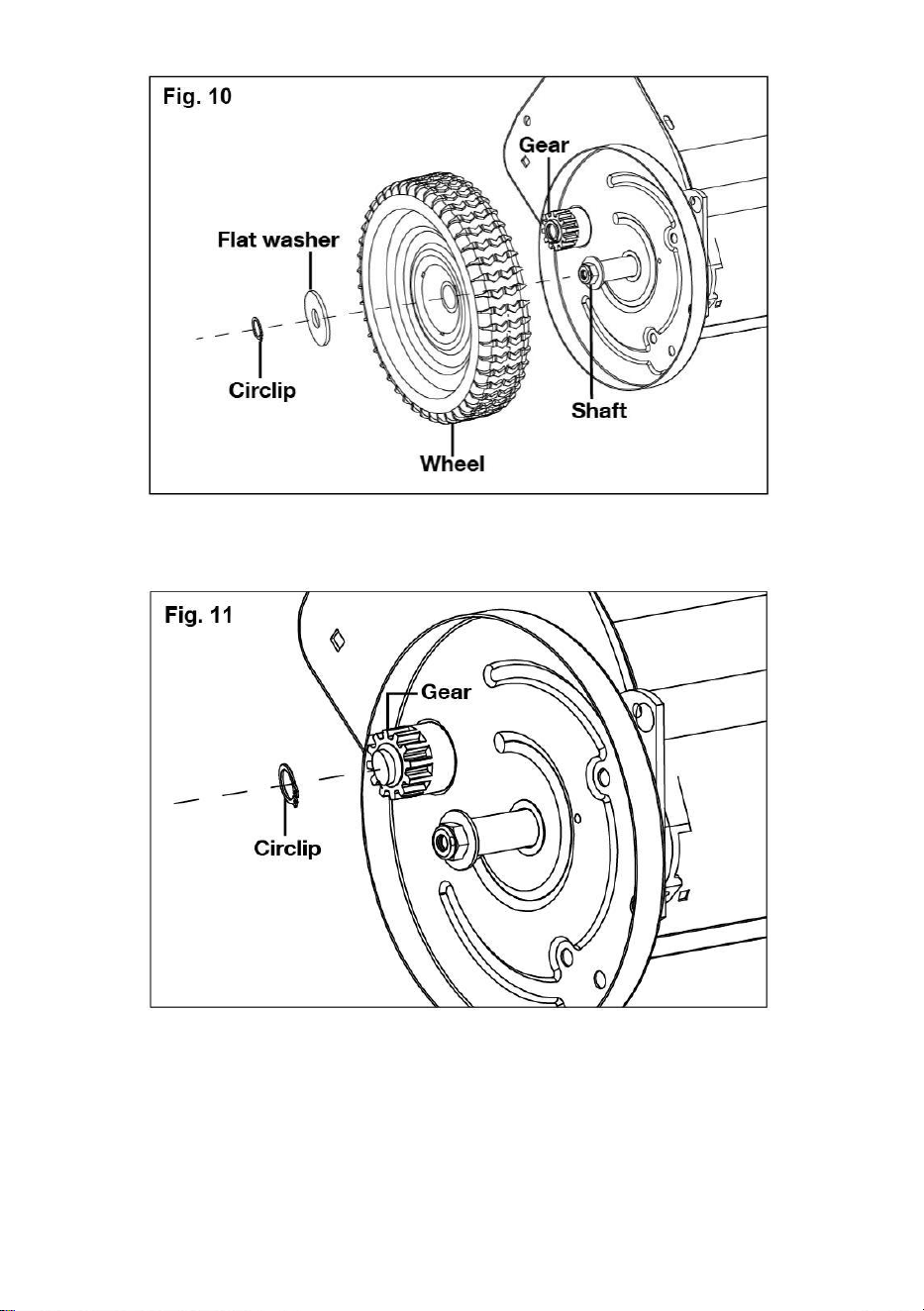
2. To remove the wheel, take out the circlip and the flat washer; you will see the
gear and the shaft (Fig. 10).
15
3. Remove the circlip on the gear, and the gear can be taken off easily (Fig. 11).
4. Clean the gear and lubricate the shaft as needed, then reassemble the wheel
in a reverse sequence.
16
Brush Replacement
1. Before replacing the brush, remove the hopper bag from the sweeper, and flip
the sweeper over.
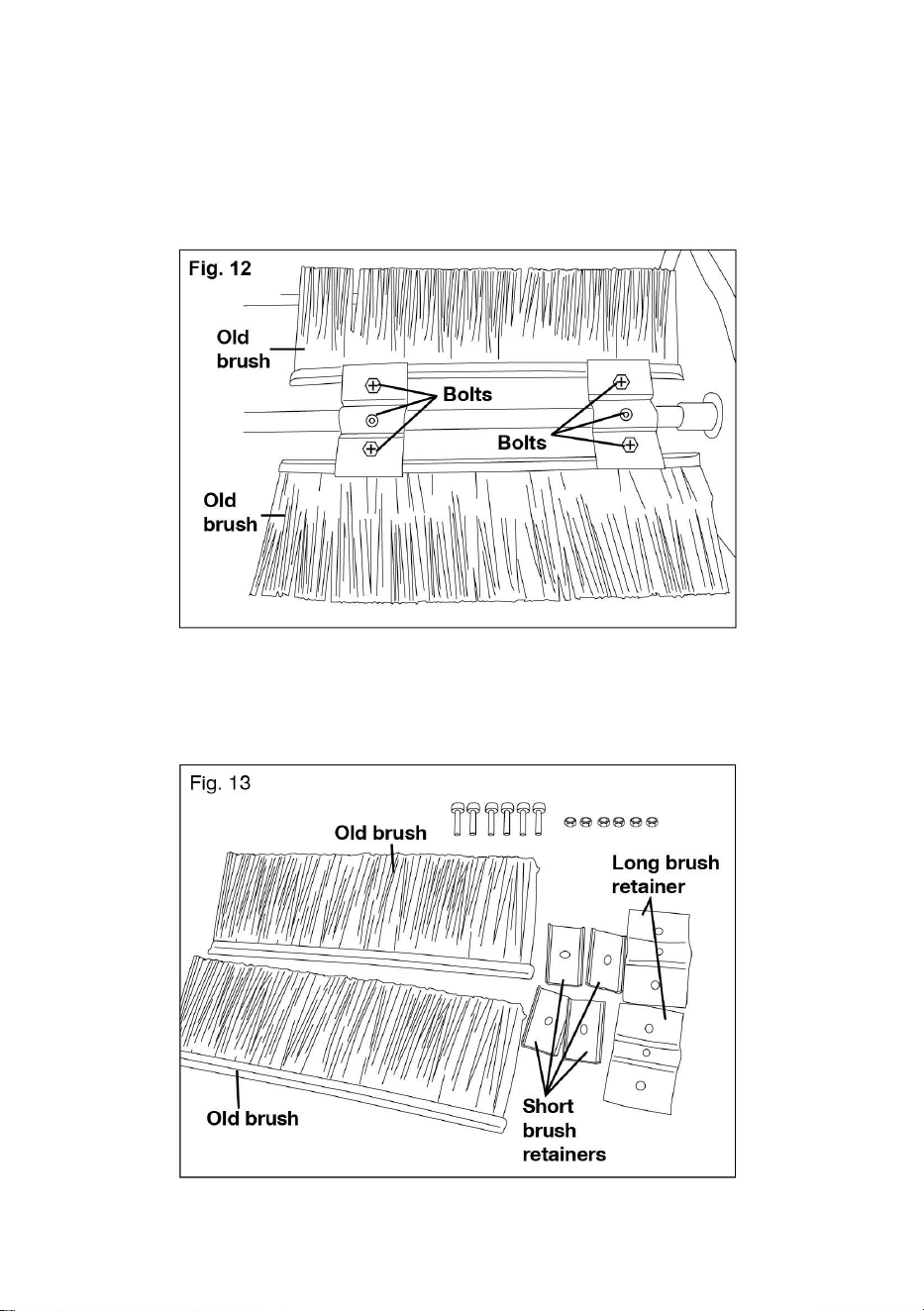
2. Remove all the nuts and bolts on the brush retainers used for securing the
brushes (Fig. 12).
3. Remove the old brushes, the long brush retainer, and the short brush retainer
from the sweeper (Fig. 13).
17
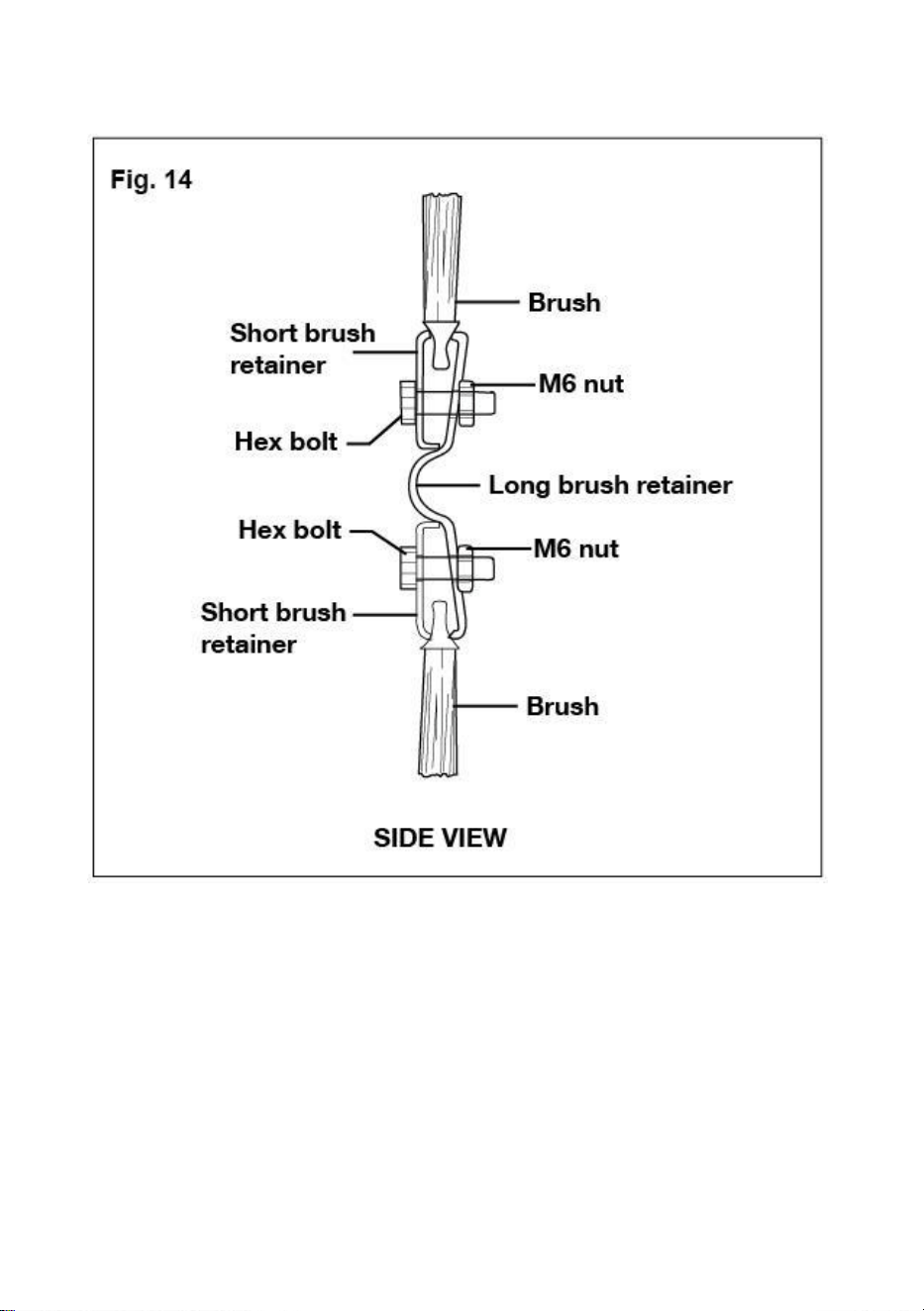
4. Insert new brushes between the long brush retainer and the short brush
retainer; fix with M6 nuts and hex bolts (Fig. 14).
18
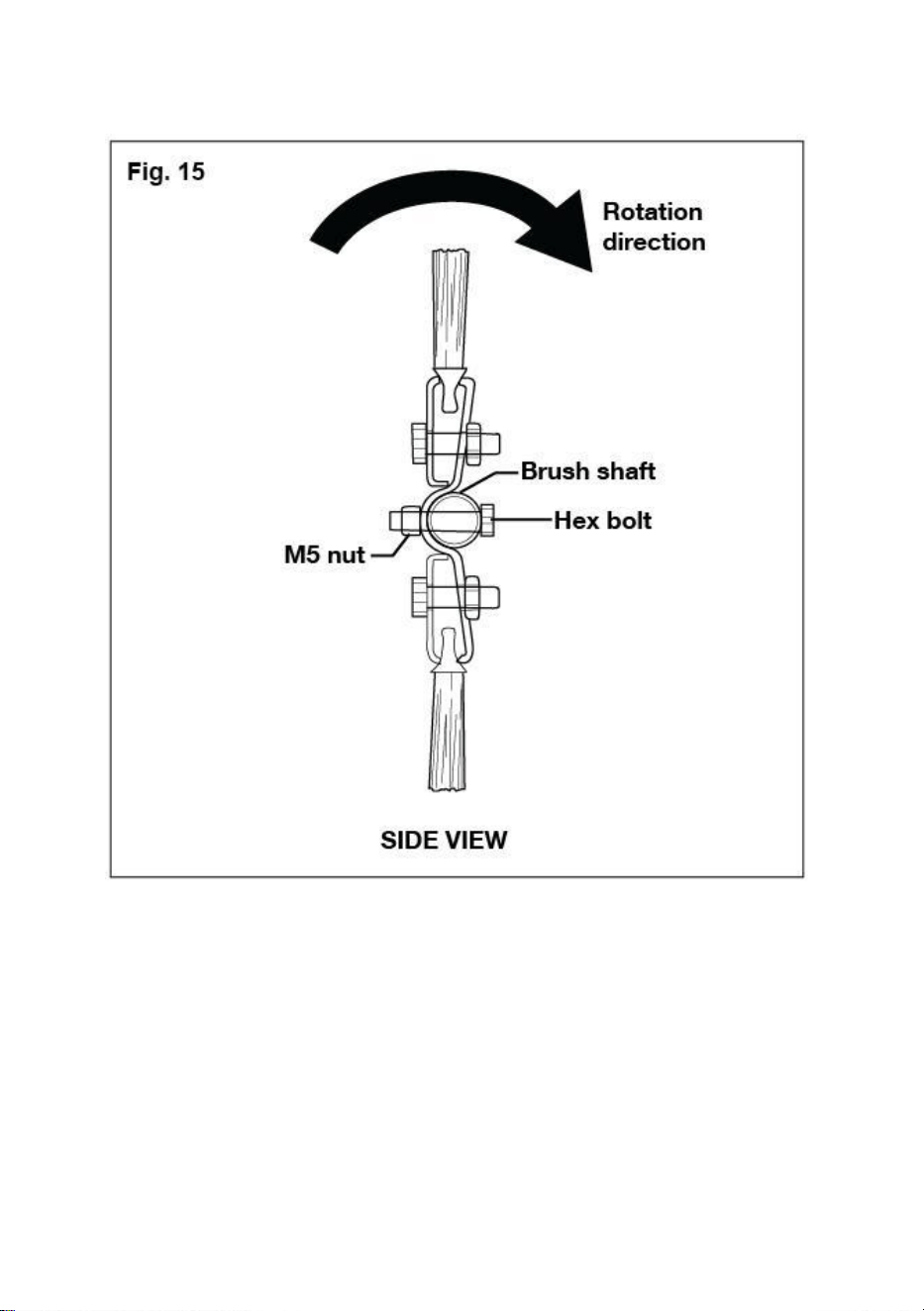
5. Fit the brush assembly onto the brush shaft; fix with a M5 nut and a M5 bolt (Fig.
15).
6. Repeat the steps to install the remaining brush.
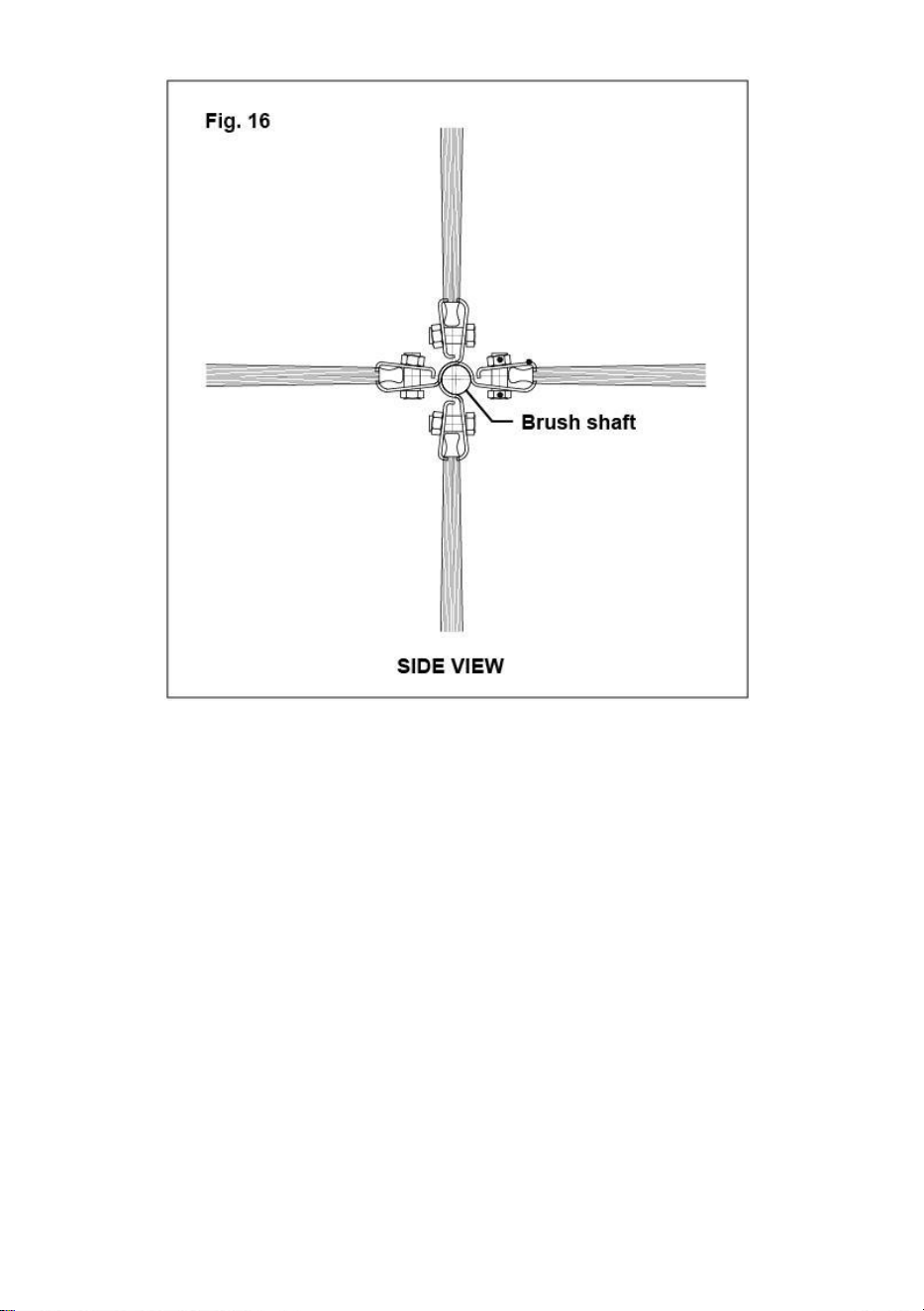
NOTE: The two sets of brushes should remain vertical to each other after
assembly (Fig. 16).
19
Storage
1. Store indoors or in protected areas during severe weather and winter months.
2. Never allow anything left in the hopper bag to remain for an extended period of
time.
3. Before storing, make sure the sweeper is dry and clean.
Specifications
Load Capacity..........................................................................................7 CU FT
Sweeper Type...............................................................................................Push
Hopper Material..............................................................................Polypropylene
Hopper Dimensions........................................................ 23.6” x 22” x 25.5” (9.4”)
Overall Dimensions............................................................48.9” x 32.52” x 30.35”
Wheel size........................................................................................................10’’
20
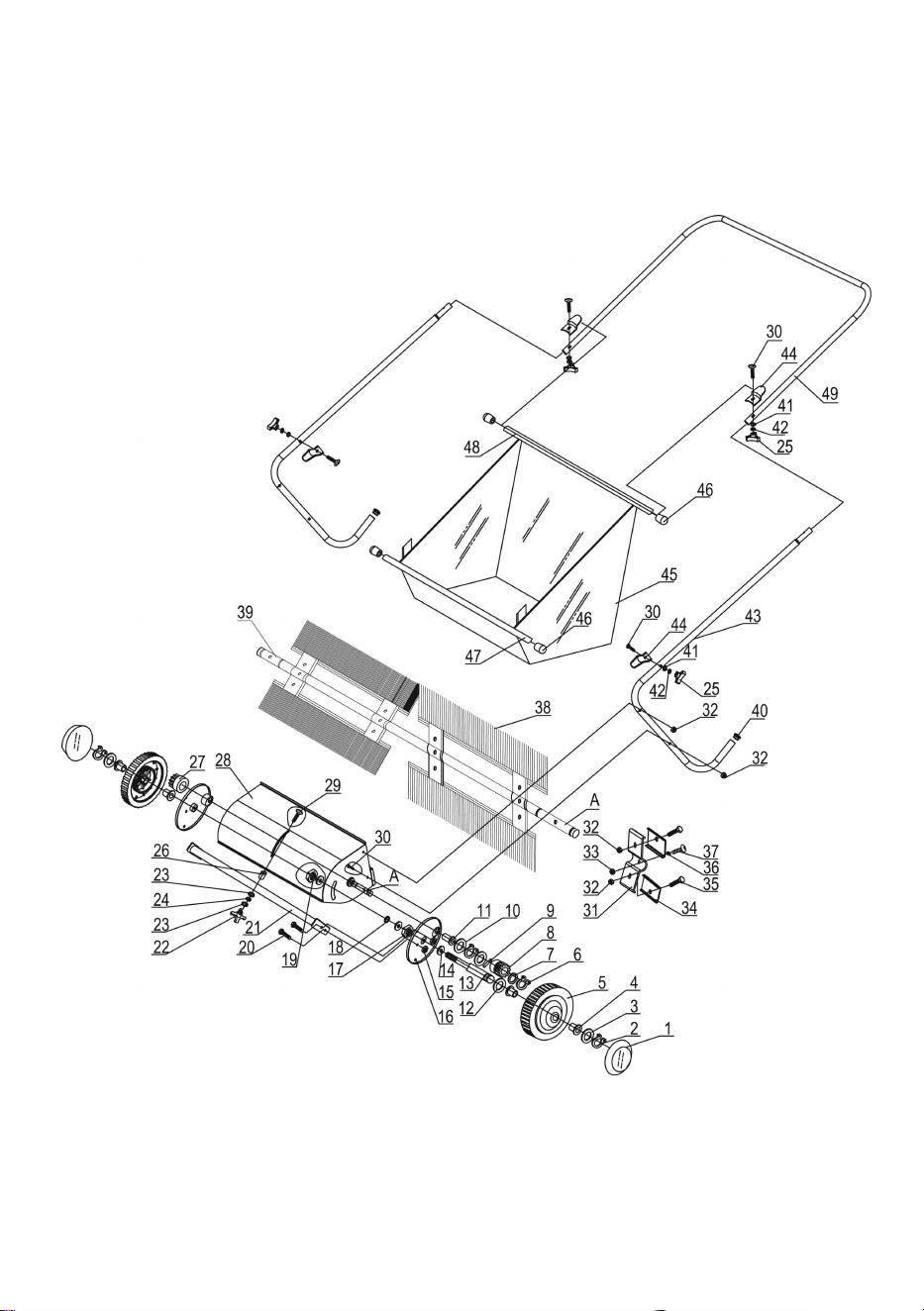
Parts Drawing & Parts List
21
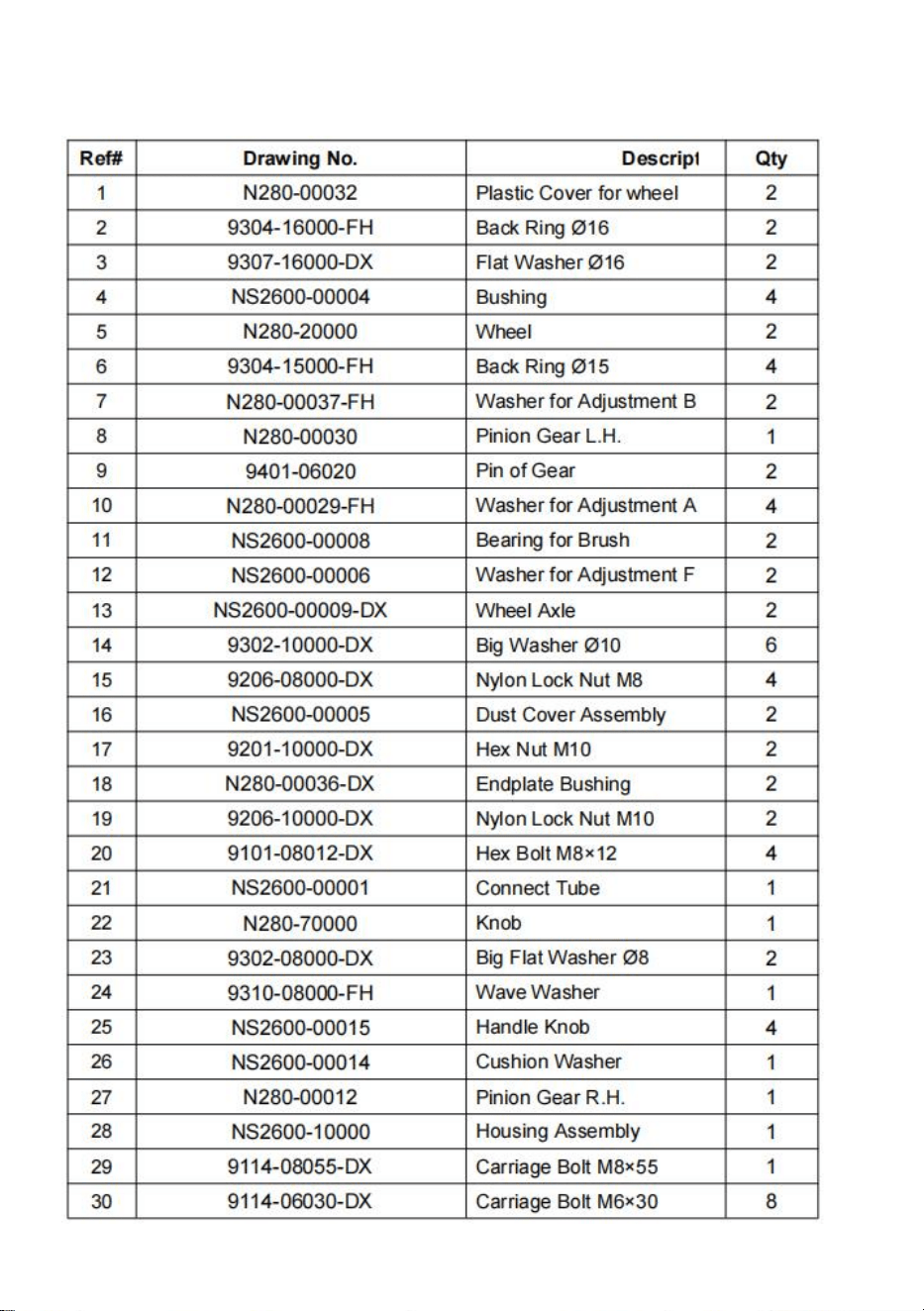
Parts Drawing & Parts List
22
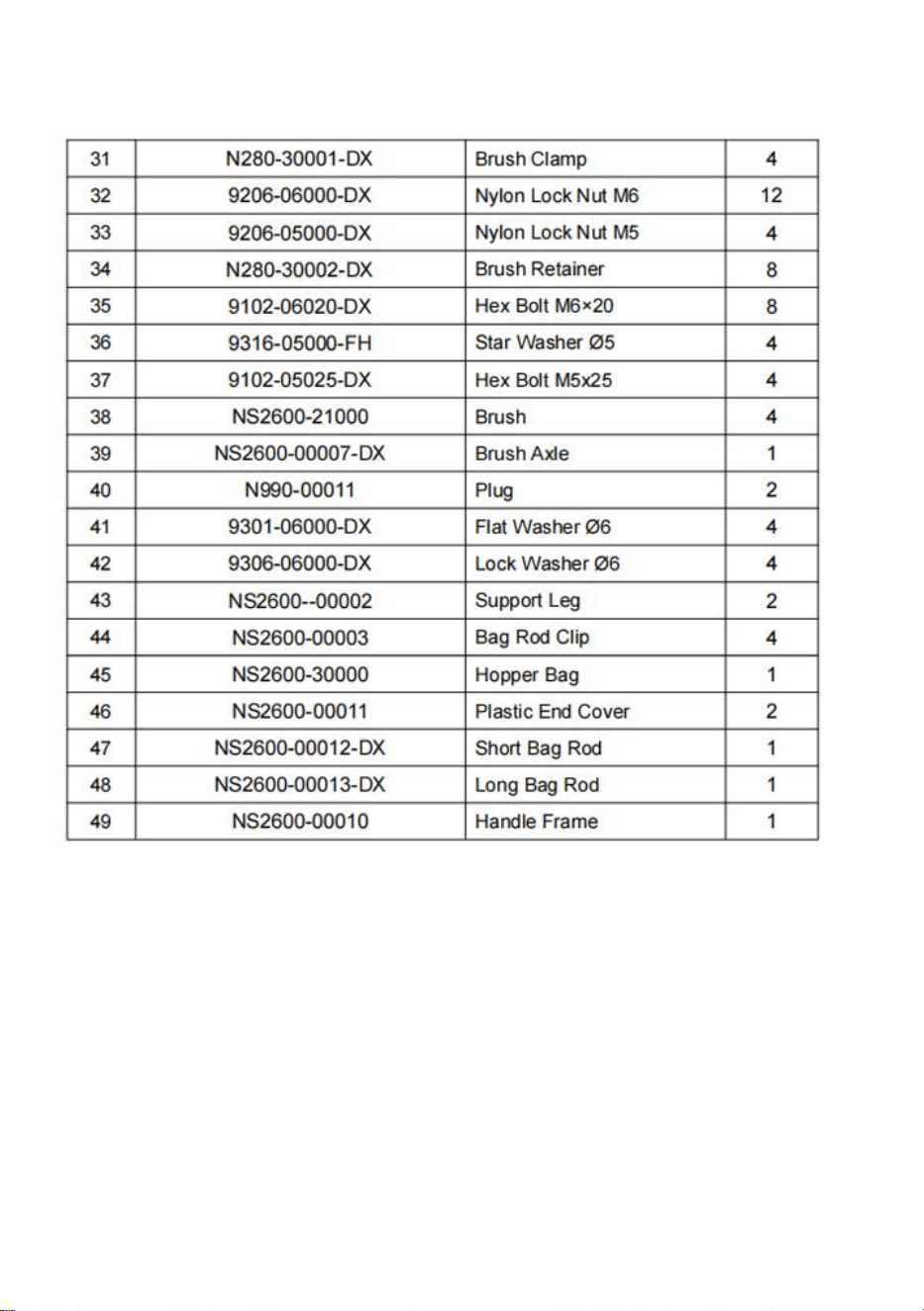
Parts Drawing & Parts List

Technical Support and E-Warranty Certificate
www.vevor.com/support